McDewey
/mcpPage 1455
↗ View in doc contextEvents/Response
Scenario
Sl.No
User on A hears the ZIP tone.
A calls CTI1. Call is answered by CTI1. Application calls
TermConnCTI1. playTone(CiscoTone.ZIPTONE, CiscoCall.
PLAYTONE_REMOTEONLY)
5.
User on B hears the ZIP tone.
A, B and CTI1 are in conference. Application calls
TermConnB.playTone(CiscoTone.ZIPTONE, CiscoCall.
PLAYTONE_LOCALONLY)
6.
None of the users on A, B and CTI hear the tone.
A, B and CTI1 are in conference. Application calls
TermB.playTone(CiscoTone.ZIPTONE, CiscoCall.
PLAYTONE_REMOTEONLY)
7.
QoS Support
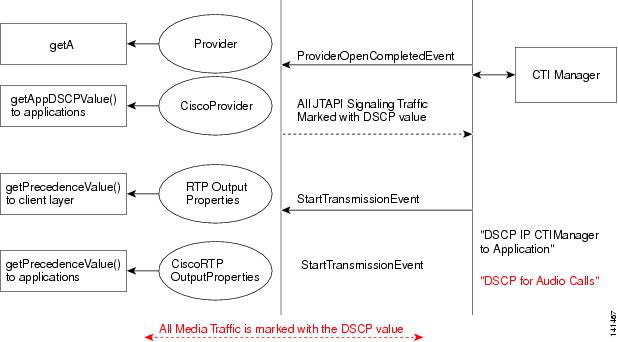
Figure 21: Call Flow Diagram for QoS Support
JTAPI QoS
For QoS to work in Windows, complete the following steps:
1.
Start Registry Editor (Regedt32.exe).
2.
Go to the following key:
HKEY_LOCAL_ MACHINE\System\CurrentControlSet\Services\Tcpip\Parameters
The registry key is one path.
Note
Cisco Unified JTAPI Developers Guide for Cisco Unified Communications Manager, Release 15 and SUs
1391
Message Sequence Charts
QoS Support