McDewey
/mcpPage 1663
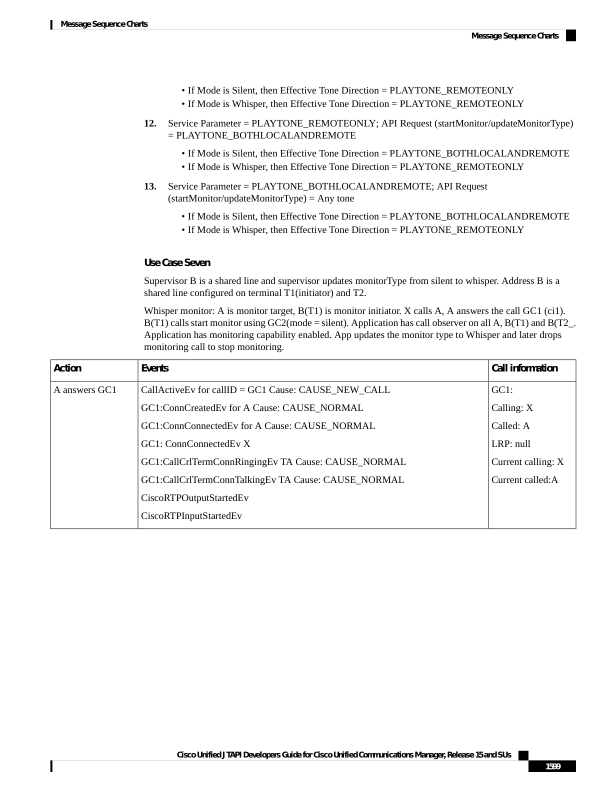
↗ View in doc context• If Mode is Silent, then Effective Tone Direction = PLAYTONE_REMOTEONLY • If Mode is Whisper, then Effective Tone Direction = PLAYTONE_REMOTEONLY 12. Service Parameter = PLAYTONE_REMOTEONLY; API Request (startMonitor/updateMonitorType) = PLAYTONE_BOTHLOCALANDREMOTE • If Mode is Silent, then Effective Tone Direction = PLAYTONE_BOTHLOCALANDREMOTE • If Mode is Whisper, then Effective Tone Direction = PLAYTONE_REMOTEONLY 13. Service Parameter = PLAYTONE_BOTHLOCALANDREMOTE; API Request (startMonitor/updateMonitorType) = Any tone • If Mode is Silent, then Effective Tone Direction = PLAYTONE_BOTHLOCALANDREMOTE • If Mode is Whisper, then Effective Tone Direction = PLAYTONE_REMOTEONLY Use Case Seven Supervisor B is a shared line and supervisor updates monitorType from silent to whisper. Address B is a shared line configured on terminal T1(initiator) and T2. Whisper monitor: A is monitor target, B(T1) is monitor initiator. X calls A, A answers the call GC1 (ci1). B(T1) calls start monitor using GC2(mode = silent). Application has call observer on all A, B(T1) and B(T2_. Application has monitoring capability enabled. App updates the monitor type to Whisper and later drops monitoring call to stop monitoring. Call information Events Action GC1: Calling: X Called: A LRP: null Current calling: X Current called:A CallActiveEv for callID = GC1 Cause: CAUSE_NEW_CALL GC1:ConnCreatedEv for A Cause: CAUSE_NORMAL GC1:ConnConnectedEv for A Cause: CAUSE_NORMAL GC1: ConnConnectedEv X GC1:CallCrlTermConnRingingEv TA Cause: CAUSE_NORMAL GC1:CallCrlTermConnTalkingEv TA Cause: CAUSE_NORMAL CiscoRTPOutputStartedEv CiscoRTPInputStartedEv A answers GC1 Cisco Unified JTAPI Developers Guide for Cisco Unified Communications Manager, Release 15 and SUs 1599 Message Sequence Charts Message Sequence Charts