McDewey
/mcpPage 307
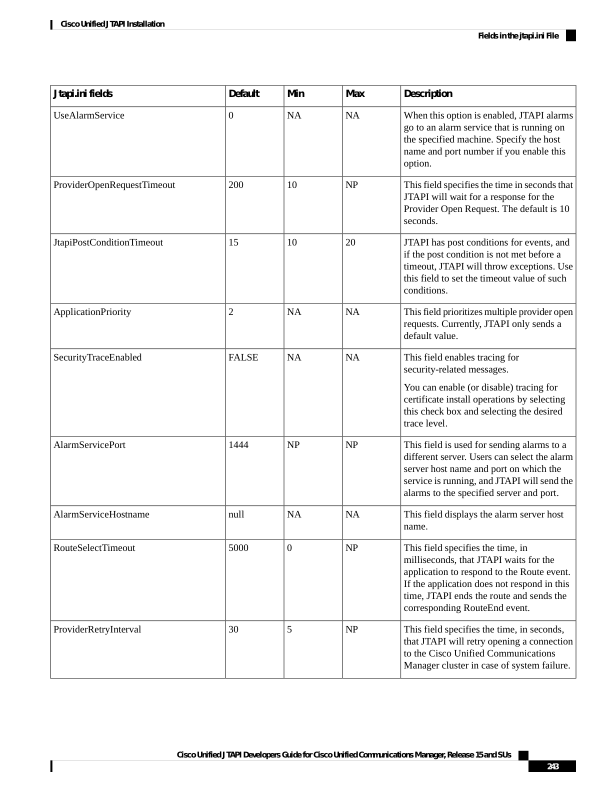
↗ View in doc contextDescription Max Min Default Jtapi.ini fields When this option is enabled, JTAPI alarms go to an alarm service that is running on the specified machine. Specify the host name and port number if you enable this option. NA NA 0 UseAlarmService This field specifies the time in seconds that JTAPI will wait for a response for the Provider Open Request. The default is 10 seconds. NP 10 200 ProviderOpenRequestTimeout JTAPI has post conditions for events, and if the post condition is not met before a timeout, JTAPI will throw exceptions. Use this field to set the timeout value of such conditions. 20 10 15 JtapiPostConditionTimeout This field prioritizes multiple provider open requests. Currently, JTAPI only sends a default value. NA NA 2 ApplicationPriority This field enables tracing for security-related messages. You can enable (or disable) tracing for certificate install operations by selecting this check box and selecting the desired trace level. NA NA FALSE SecurityTraceEnabled This field is used for sending alarms to a different server. Users can select the alarm server host name and port on which the service is running, and JTAPI will send the alarms to the specified server and port. NP NP 1444 AlarmServicePort This field displays the alarm server host name. NA NA null AlarmServiceHostname This field specifies the time, in milliseconds, that JTAPI waits for the application to respond to the Route event. If the application does not respond in this time, JTAPI ends the route and sends the corresponding RouteEnd event. NP 0 5000 RouteSelectTimeout This field specifies the time, in seconds, that JTAPI will retry opening a connection to the Cisco Unified Communications Manager cluster in case of system failure. NP 5 30 ProviderRetryInterval Cisco Unified JTAPI Developers Guide for Cisco Unified Communications Manager, Release 15 and SUs 243 Cisco Unified JTAPI Installation Fields in the jtapi.ini File