McDewey
/mcpPage 309
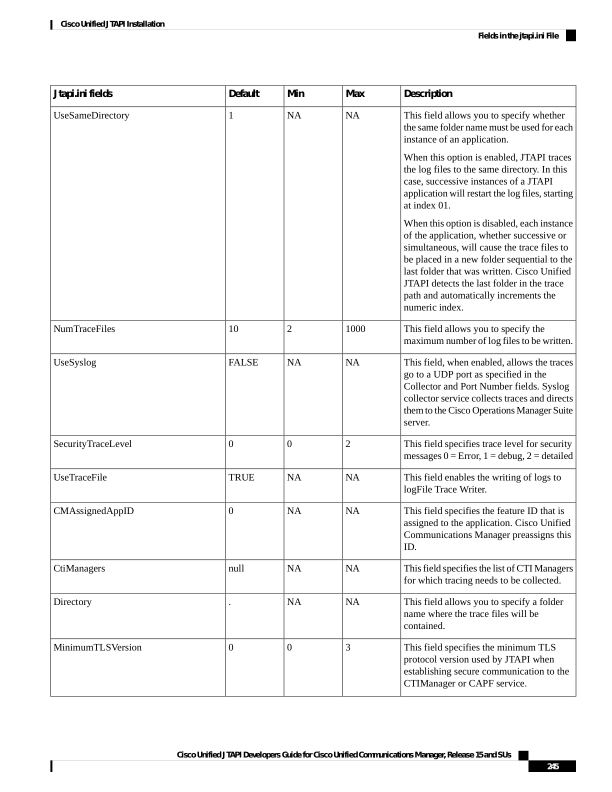
↗ View in doc contextDescription Max Min Default Jtapi.ini fields This field allows you to specify whether the same folder name must be used for each instance of an application. When this option is enabled, JTAPI traces the log files to the same directory. In this case, successive instances of a JTAPI application will restart the log files, starting at index 01. When this option is disabled, each instance of the application, whether successive or simultaneous, will cause the trace files to be placed in a new folder sequential to the last folder that was written. Cisco Unified JTAPI detects the last folder in the trace path and automatically increments the numeric index. NA NA 1 UseSameDirectory This field allows you to specify the maximum number of log files to be written. 1000 2 10 NumTraceFiles This field, when enabled, allows the traces go to a UDP port as specified in the Collector and Port Number fields. Syslog collector service collects traces and directs them to the Cisco Operations Manager Suite server. NA NA FALSE UseSyslog This field specifies trace level for security messages 0 = Error, 1 = debug, 2 = detailed 2 0 0 SecurityTraceLevel This field enables the writing of logs to logFile Trace Writer. NA NA TRUE UseTraceFile This field specifies the feature ID that is assigned to the application. Cisco Unified Communications Manager preassigns this ID. NA NA 0 CMAssignedAppID This field specifies the list of CTI Managers for which tracing needs to be collected. NA NA null CtiManagers This field allows you to specify a folder name where the trace files will be contained. NA NA . Directory This field specifies the minimum TLS protocol version used by JTAPI when establishing secure communication to the CTIManager or CAPF service. 3 0 0 MinimumTLSVersion Cisco Unified JTAPI Developers Guide for Cisco Unified Communications Manager, Release 15 and SUs 245 Cisco Unified JTAPI Installation Fields in the jtapi.ini File