McDewey
/mcpPage 32
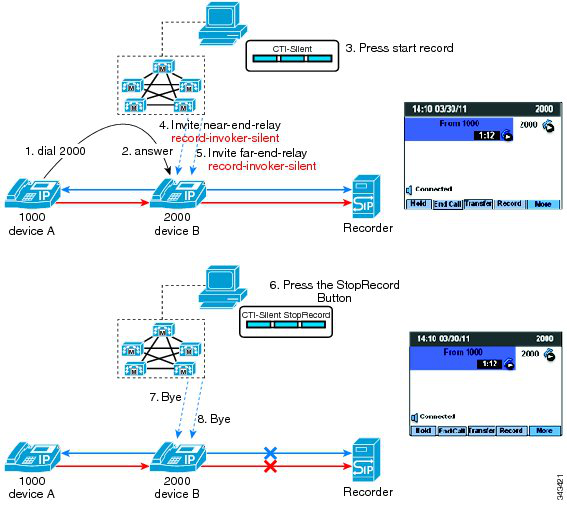
↗ View in doc contextSelective call recording supports two modes: Silent Recording In the silent recording mode the call recording status is not reflected on the Cisco IP device display. Silent recording is typically used in a call center environment to enable a supervisor to record an agent call. A CTI-enabled application running on the supervisor desktop is generally used to start and stop the recording for the agent-customer call. User Recording In the user recording mode the call recording status is reflected on the Cisco IP device display. A recording may be started or stopped using a softkey, programmable line key, or CTI-enabled application running on the user desktop. Selective Call Recording Silent Recording mode In this use case for selective call recording silent recording mode, the supervisor manages the recording session from a CTI-enabled desktop. The following figure illustrates selective call recording silent recording mode. Figure 25: Selective Call Recording Silent Recording Mode 32