McDewey
/mcpPage 34
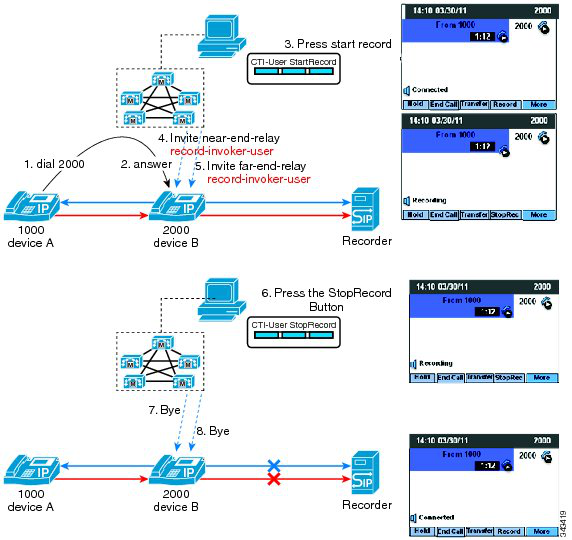
↗ View in doc contextFigure 26: User Recording Mode Managed from a CTI-Enabled Application In this use case: • Device A (DN 1000) calls device B (DN 2000). • The user on device B answers the call. • The user on device B uses a CTI-enabled application to start and stop the call recording session. The user starts the recording session using a CTI-enabled desktop. Cisco Unified Communications Manager makes two recording calls to the built-in bridge (BIB) of the Cisco IP device (one call for the near-end media; another call for the far-end media). The recording calls are automatically and silently answered. Cisco Unified Communications Manager extends both recording calls to the recording server connected by a SIP trunk. The recorder receives and answers both recording calls and the user Cisco IP device starts to fork both media streams to the recorder. The Cisco IP device display updates to reflect Recording. The key toggles from Record to StopRec. The CTI-enabled application is used to stop the recording session. Cisco Unified Communications Manager clears both recording calls. Selective Call Recording User Recording Mode—Recording Session Managed From a Cisco IP Device In this use case for selective call recording user recording mode, the user presses a softkey or programmable line key on a Cisco IP device to start and stop the call recording session. 34