McDewey
/mcpPage 3
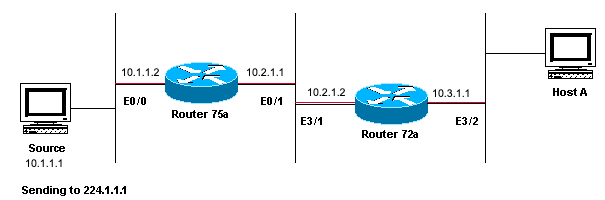
↗ View in doc contextNetwork Diagram Example of Multicast RPF Failure In this figure, multicast packets come into E0/0 of Router 75a from a server whose IP address is 10.1.1.1 and sends to group 224.1.1.1. This is known as an (S,G) or (10.1.1.1, 224.1.1.1). Diagnose the Problem Hosts directly connected to Router 75a receive the multicast feed, but hosts directly connected to Router 72a do not. First, enter the show ip mroute command in order to check activity on Router 75a. This command examines the multicast route (mroute) for the group address 224.1.1.1:
<#root> 75a# show ip mroute 224.1.1.1
IP Multicast Routing Table Flags: D - Dense, S - Sparse, C - Connected, L - Local, P - Pruned R - RP-bit set, F - Register flag, T - SPT-bit set, J - Join SPT M - MSDP created entry, X - Proxy Join Timer Running A - Advertised via MSDP Timers: Uptime/Expires Interface state: Interface, Next-Hop or VCD, State/Mode
(*, 224.1.1.1), 00:01:23/00:02:59, RP 0.0.0.0, flags: D Incoming interface: Null, RPF nbr 0.0.0.0 Outgoing interface list: Ethernet0/1, Forward/Sparse-Dense, 00:01:23/00:00:00
(10.1.1.1, 224.1.1.1), 00:01:23/00:03:00, flags: TA Incoming interface: Ethernet0/0, RPF nbr 0.0.0.0 Outgoing interface list: Ethernet0/1, Forward/Sparse-Dense, 00:01:23/00:00:00
Since the router runs PIM dense mode (you know it is dense mode because of the D flag), ignore the *,G entry and focus on the S,G entry. This entry tells you that the multicast packets are sourced from a server whose address is 10.1.1.1, which sends to a multicast group of 224.1.1.1. The packets come into the Ethernet0/0 interface and are forwarded out the Ethernet0/1 interface. This is a perfect scenario. Enter the show ip pim neighbor command in order to see whether Router 72a shows the upstream router (75a) as a