McDewey
/mcpPage 9
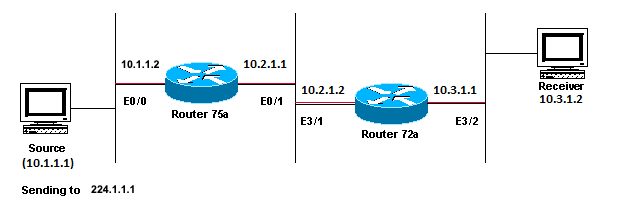
↗ View in doc contextMulticast Applications Designed Primarily for the LAN Usage Example Diagnose the Problem In the previous figure, Router A does not forward packets from source(S) to Router B that is directly connected Receiver. Look at the output of the show ip mroute command on Router A in order to see the multicast routing state:
<#root> ROUTERA# show ip mroute
IP Multicast Routing Table Flags: D - Dense, S - Sparse, C - Connected, L - Local, P - Pruned R - RP-bit set, F - Register flag, T - SPT-bit set, J - Join SPT M - MSDP created entry, X - Proxy Join Timer Running A - Advertised via MSDP Timers: Uptime/Expires Interface state: Interface, Next-Hop or VCD, State/Mode
(*, 224.0.1.40), 00:00:01/00:00:00, RP 0.0.0.0, flags: DJCL Incoming interface: Null, RPF nbr 0.0.0.0 Outgoing interface list: Ethernet0/1, Forward/Sparse-Dense, 00:00:01/00:00:00
(*, 224.1.1.1), 00:00:02/00:02:57, RP 0.0.0.0, flags: D Incoming interface: Null, RPF nbr 0.0.0.0 Outgoing interface list: Ethernet0/1, Forward/Sparse-Dense, 00:00:02/00:00:00
You can ignore the 224.0.1.40 in the output since all routers join this Auto-RP Discovery group. But there is no source listed for 224.1.1.1. In addition to "*, 224.1.1.1" you cannot see "10.1.1.1, 224.1.1.1". Enter the show ip rpf command in order to see if it is a RPF issue:
<#root> ROUTERA#