Document Metadata
Format: PDF 1.4
Title: SIP Line Messaging Guide (Standard Edition) for Cisco Unified Communications Manager
Author: Unknown
Creator: DITA Open Toolkit
Producer: XEP 4.30.961; modified using iText 2.1.7 by 1T3XT
Creation Date: D:20250328093527Z
Mod Date: D:20250831062725-07'00'
Page 1
SIP Line Messaging Guide (Standard Edition) for Cisco Unified
Communications Manager
First Published: 2017-09-14
Last Modified: 2025-03-27
Americas Headquarters
Cisco Systems, Inc.
170 West Tasman Drive
San Jose, CA 95134-1706
USA
http://www.cisco.com
Tel: 408 526-4000
800 553-NETS (6387)
Fax: 408 527-0883

Page 2
© 2017–2025 Cisco Systems, Inc. All rights reserved.
Page 3
C O N T E N T S
SIP Standard Line Interface
1
C H A P T E R 1
SIP Line Messaging Guide (Standard Edition) for Cisco Unified Communications Manager
iii


Page 4
SIP Line Messaging Guide (Standard Edition) for Cisco Unified Communications Manager
iv
Contents

Page 5
C H A P T E R 1
SIP Standard Line Interface
This chapter describes the external interface for Cisco Unified Communications Manager (Unified
Communications Manager) SIP line-side devices. It highlights SIP primitives that are supported on the line-side
interface and describes call flow scenarios that can be used as a guide for technical support and future
development.
This document describes the Unified Communications Manager SIP line interface from an external interface
point of view.
This chapter includes these sections:
• Features Supported in Respective Releases, on page 1
• Definitions/Glossary, on page 3
• Standard Interface Compliance Summary, on page 4
• SIP Message Fields, on page 18
• Standard Feature Scenarios, on page 26
• Enhanced Interface Compliance Summary, on page 51
Features Supported in Respective Releases
Cisco Unified Communications Manager, Release 15
Release 15 and SUs contained no new features that impacted the SIP line messaging standard information for
Cisco Unified Communications Manager.
Cisco Unified Communications Manager, Release 14
With this release, Cisco Unified Communications Manager introduces the following feature for SIP lines:
• Call Persistency Registration—LTE to Wi-Fi Support, on page 51
Cisco Unified Communications Manager, Release 12.5(x)
The release 12.5(x) does not provide any new or changed SIP line interface enhancements.
SIP Line Messaging Guide (Standard Edition) for Cisco Unified Communications Manager
1

Page 6
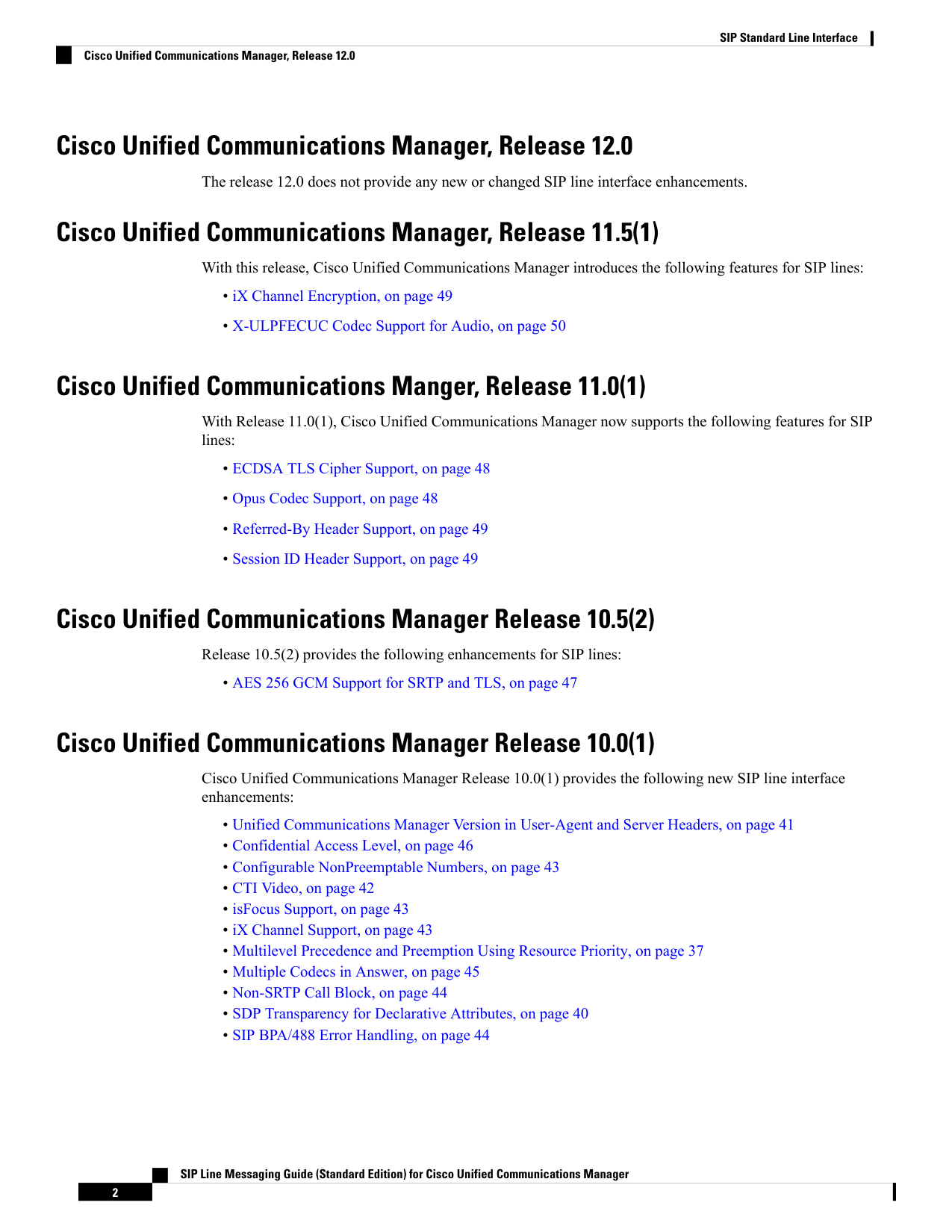
Cisco Unified Communications Manager, Release 12.0
The release 12.0 does not provide any new or changed SIP line interface enhancements.
Cisco Unified Communications Manager, Release 11.5(1)
With this release, Cisco Unified Communications Manager introduces the following features for SIP lines:
• iX Channel Encryption, on page 49
• X-ULPFECUC Codec Support for Audio, on page 50
Cisco Unified Communications Manger, Release 11.0(1)
With Release 11.0(1), Cisco Unified Communications Manager now supports the following features for SIP
lines:
• ECDSA TLS Cipher Support, on page 48
• Opus Codec Support, on page 48
• Referred-By Header Support, on page 49
• Session ID Header Support, on page 49
Cisco Unified Communications Manager Release 10.5(2)
Release 10.5(2) provides the following enhancements for SIP lines:
• AES 256 GCM Support for SRTP and TLS, on page 47
Cisco Unified Communications Manager Release 10.0(1)
Cisco Unified Communications Manager Release 10.0(1) provides the following new SIP line interface
enhancements:
• Unified Communications Manager Version in User-Agent and Server Headers, on page 41
• Confidential Access Level, on page 46
• Configurable NonPreemptable Numbers, on page 43
• CTI Video, on page 42
• isFocus Support, on page 43
• iX Channel Support, on page 43
• Multilevel Precedence and Preemption Using Resource Priority, on page 37
• Multiple Codecs in Answer, on page 45
• Non-SRTP Call Block, on page 44
• SDP Transparency for Declarative Attributes, on page 40
• SIP BPA/488 Error Handling, on page 44
SIP Line Messaging Guide (Standard Edition) for Cisco Unified Communications Manager
2
SIP Standard Line Interface
Cisco Unified Communications Manager, Release 12.0
Page 7
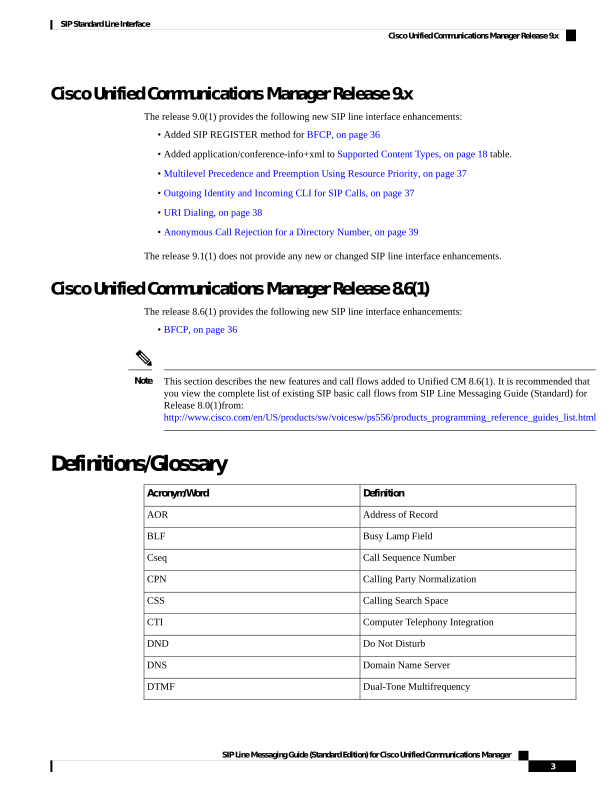
Cisco Unified Communications Manager Release 9.x
The release 9.0(1) provides the following new SIP line interface enhancements:
• Added SIP REGISTER method for BFCP, on page 36
• Added application/conference-info+xml to Supported Content Types, on page 18 table.
• Multilevel Precedence and Preemption Using Resource Priority, on page 37
• Outgoing Identity and Incoming CLI for SIP Calls, on page 37
• URI Dialing, on page 38
• Anonymous Call Rejection for a Directory Number, on page 39
The release 9.1(1) does not provide any new or changed SIP line interface enhancements.
Cisco Unified Communications Manager Release 8.6(1)
The release 8.6(1) provides the following new SIP line interface enhancements:
• BFCP, on page 36
This section describes the new features and call flows added to Unified CM 8.6(1). It is recommended that
you view the complete list of existing SIP basic call flows from SIP Line Messaging Guide (Standard) for
Release 8.0(1)from:
http://www.cisco.com/en/US/products/sw/voicesw/ps556/products\_programming\_reference\_guides\_list.html
Note
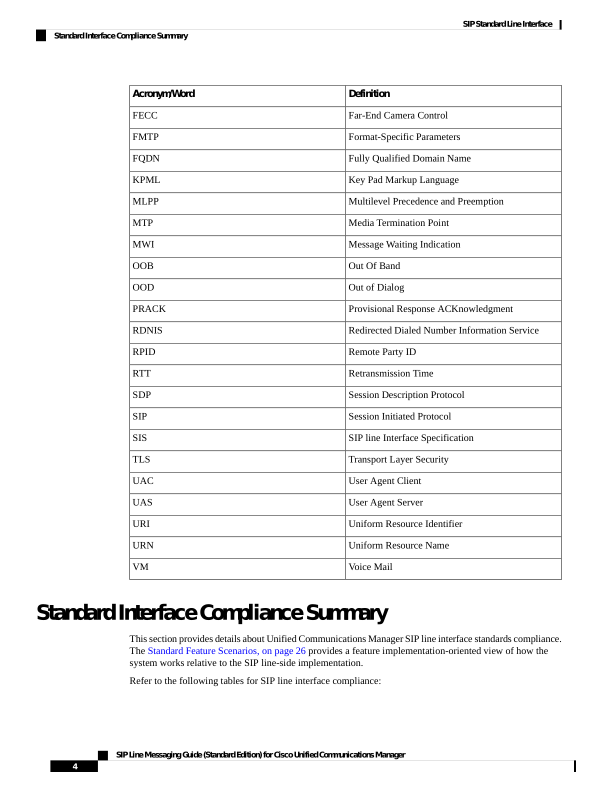
Definitions/Glossary
Definition
Acronym/Word
Address of Record
AOR
Busy Lamp Field
BLF
Call Sequence Number
Cseq
Calling Party Normalization
CPN
Calling Search Space
CSS
Computer Telephony Integration
CTI
Do Not Disturb
DND
Domain Name Server
DNS
Dual-Tone Multifrequency
DTMF
SIP Line Messaging Guide (Standard Edition) for Cisco Unified Communications Manager
3
SIP Standard Line Interface
Cisco Unified Communications Manager Release 9.x

Page 8
Definition
Acronym/Word
Far-End Camera Control
FECC
Format-Specific Parameters
FMTP
Fully Qualified Domain Name
FQDN
Key Pad Markup Language
KPML
Multilevel Precedence and Preemption
MLPP
Media Termination Point
MTP
Message Waiting Indication
MWI
Out Of Band
OOB
Out of Dialog
OOD
Provisional Response ACKnowledgment
PRACK
Redirected Dialed Number Information Service
RDNIS
Remote Party ID
RPID
Retransmission Time
RTT
Session Description Protocol
SDP
Session Initiated Protocol
SIP
SIP line Interface Specification
SIS
Transport Layer Security
TLS
User Agent Client
UAC
User Agent Server
UAS
Uniform Resource Identifier
URI
Uniform Resource Name
URN
Voice Mail
VM
Standard Interface Compliance Summary
This section provides details about Unified Communications Manager SIP line interface standards compliance.
The Standard Feature Scenarios, on page 26 provides a feature implementation-oriented view of how the
system works relative to the SIP line-side implementation.
Refer to the following tables for SIP line interface compliance:
SIP Line Messaging Guide (Standard Edition) for Cisco Unified Communications Manager
4
SIP Standard Line Interface
Standard Interface Compliance Summary
Page 9
• Table 1: Applicable Standards and Drafts—Standard Interface, on page 5 identifies the applicable
standards and drafts.
• Table 2: Compliance with SIP Requests, on page 5 and Table 3: Compliance with SIP Responses, on
page 6 provide SIP line-side compliance for SIP messages.
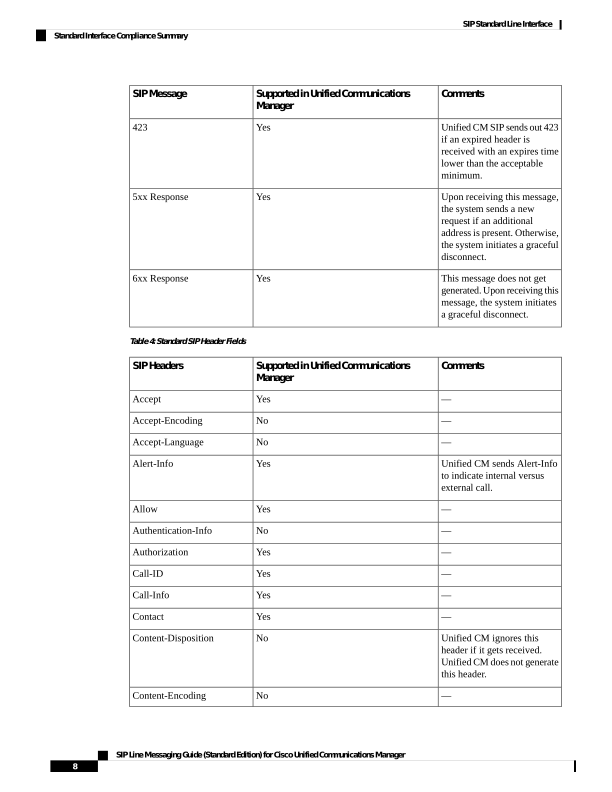
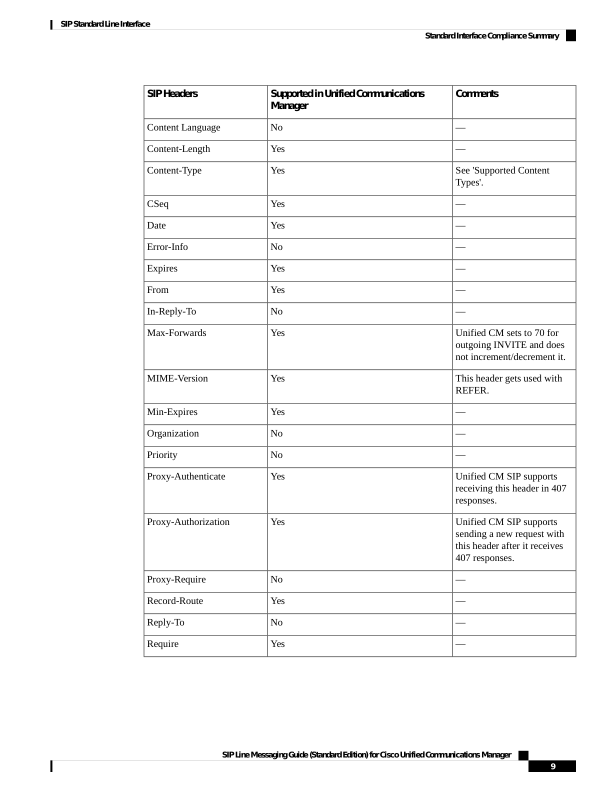
• Table 4: Standard SIP Header Fields, on page 8 provides SIP line-side compliance for standard SIP
headers.
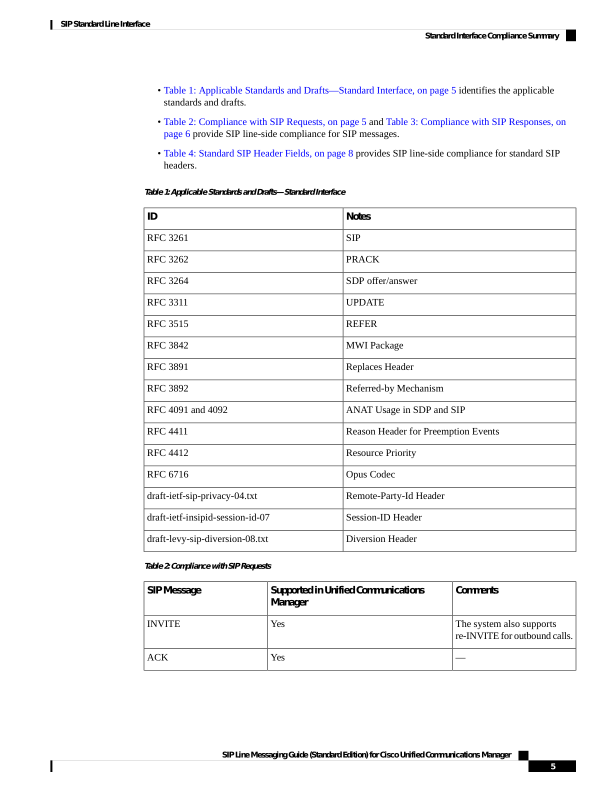
Table 1: Applicable Standards and Drafts—Standard Interface
Notes
ID
SIP
RFC 3261
PRACK
RFC 3262
SDP offer/answer
RFC 3264
UPDATE
RFC 3311
REFER
RFC 3515
MWI Package
RFC 3842
Replaces Header
RFC 3891
Referred-by Mechanism
RFC 3892
ANAT Usage in SDP and SIP
RFC 4091 and 4092
Reason Header for Preemption Events
RFC 4411
Resource Priority
RFC 4412
Opus Codec
RFC 6716
Remote-Party-Id Header
draft-ietf-sip-privacy-04.txt
Session-ID Header
draft-ietf-insipid-session-id-07
Diversion Header
draft-levy-sip-diversion-08.txt
Table 2: Compliance with SIP Requests
Comments
Supported in Unified Communications
Manager
SIP Message
The system also supports
re-INVITE for outbound calls.
Yes
INVITE
—
Yes
ACK
SIP Line Messaging Guide (Standard Edition) for Cisco Unified Communications Manager
5
SIP Standard Line Interface
Standard Interface Compliance Summary
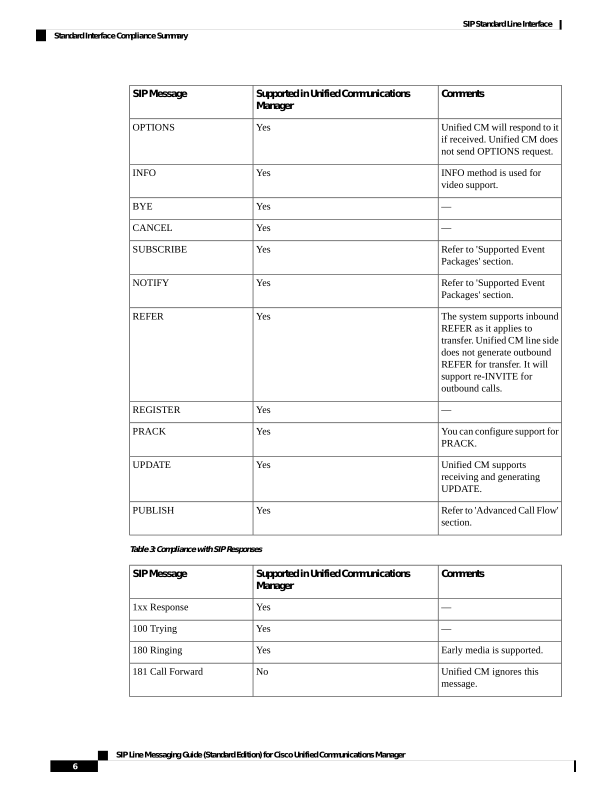
Page 10
Comments
Supported in Unified Communications
Manager
SIP Message
Unified CM will respond to it
if received. Unified CM does
not send OPTIONS request.
Yes
OPTIONS
INFO method is used for
video support.
Yes
INFO
—
Yes
BYE
—
Yes
CANCEL
Refer to 'Supported Event
Packages' section.
Yes
SUBSCRIBE
Refer to 'Supported Event
Packages' section.
Yes
NOTIFY
The system supports inbound
REFER as it applies to
transfer. Unified CM line side
does not generate outbound
REFER for transfer. It will
support re-INVITE for
outbound calls.
Yes
REFER
—
Yes
REGISTER
You can configure support for
PRACK.
Yes
PRACK
Unified CM supports
receiving and generating
UPDATE.
Yes
UPDATE
Refer to 'Advanced Call Flow'
section.
Yes
PUBLISH
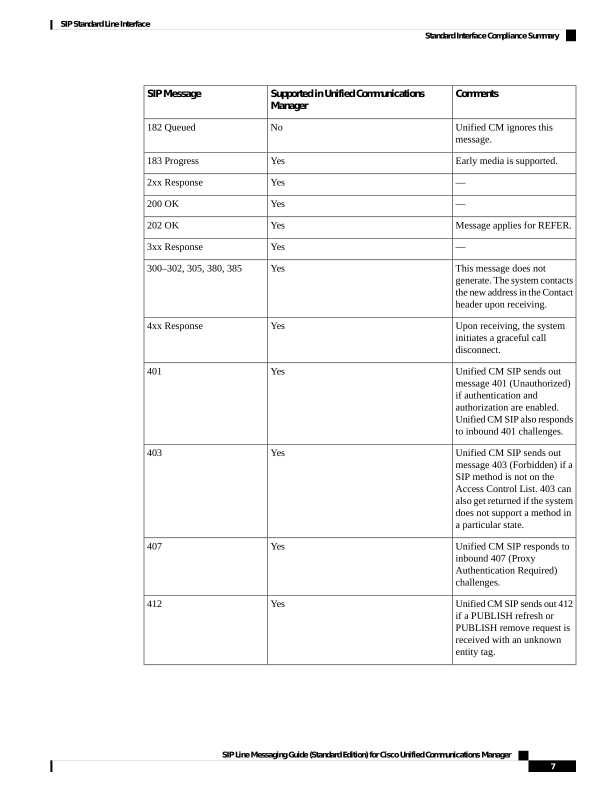
Table 3: Compliance with SIP Responses
Comments
Supported in Unified Communications
Manager
SIP Message
—
Yes
1xx Response
—
Yes
100 Trying
Early media is supported.
Yes
180 Ringing
Unified CM ignores this
message.
No
181 Call Forward
SIP Line Messaging Guide (Standard Edition) for Cisco Unified Communications Manager
6
SIP Standard Line Interface
Standard Interface Compliance Summary
Page 11
Comments
Supported in Unified Communications
Manager
SIP Message
Unified CM ignores this
message.
No
182 Queued
Early media is supported.
Yes
183 Progress
—
Yes
2xx Response
—
Yes
200 OK
Message applies for REFER.
Yes
202 OK
—
Yes
3xx Response
This message does not
generate. The system contacts
the new address in the Contact
header upon receiving.
Yes
300–302, 305, 380, 385
Upon receiving, the system
initiates a graceful call
disconnect.
Yes
4xx Response
Unified CM SIP sends out
message 401 (Unauthorized)
if authentication and
authorization are enabled.
Unified CM SIP also responds
to inbound 401 challenges.
Yes
401
Unified CM SIP sends out
message 403 (Forbidden) if a
SIP method is not on the
Access Control List. 403 can
also get returned if the system
does not support a method in
a particular state.
Yes
403
Unified CM SIP responds to
inbound 407 (Proxy
Authentication Required)
challenges.
Yes
407
Unified CM SIP sends out 412
if a PUBLISH refresh or
PUBLISH remove request is
received with an unknown
entity tag.
Yes
412
SIP Line Messaging Guide (Standard Edition) for Cisco Unified Communications Manager
7
SIP Standard Line Interface
Standard Interface Compliance Summary
Page 12
Comments
Supported in Unified Communications
Manager
SIP Message
Unified CM SIP sends out 423
if an expired header is
received with an expires time
lower than the acceptable
minimum.
Yes
423
Upon receiving this message,
the system sends a new
request if an additional
address is present. Otherwise,
the system initiates a graceful
disconnect.
Yes
5xx Response
This message does not get
generated. Upon receiving this
message, the system initiates
a graceful disconnect.
Yes
6xx Response
Table 4: Standard SIP Header Fields
Comments
Supported in Unified Communications
Manager
SIP Headers
—
Yes
Accept
—
No
Accept-Encoding
—
No
Accept-Language
Unified CM sends Alert-Info
to indicate internal versus
external call.
Yes
Alert-Info
—
Yes
Allow
—
No
Authentication-Info
—
Yes
Authorization
—
Yes
Call-ID
—
Yes
Call-Info
—
Yes
Contact
Unified CM ignores this
header if it gets received.
Unified CM does not generate
this header.
No
Content-Disposition
—
No
Content-Encoding
SIP Line Messaging Guide (Standard Edition) for Cisco Unified Communications Manager
8
SIP Standard Line Interface
Standard Interface Compliance Summary
Page 13
Comments
Supported in Unified Communications
Manager
SIP Headers
—
No
Content Language
—
Yes
Content-Length
See 'Supported Content
Types'.
Yes
Content-Type
—
Yes
CSeq
—
Yes
Date
—
No
Error-Info
—
Yes
Expires
—
Yes
From
—
No
In-Reply-To
Unified CM sets to 70 for
outgoing INVITE and does
not increment/decrement it.
Yes
Max-Forwards
This header gets used with
REFER.
Yes
MIME-Version
—
Yes
Min-Expires
—
No
Organization
—
No
Priority
Unified CM SIP supports
receiving this header in 407
responses.
Yes
Proxy-Authenticate
Unified CM SIP supports
sending a new request with
this header after it receives
407 responses.
Yes
Proxy-Authorization
—
No
Proxy-Require
—
Yes
Record-Route
—
No
Reply-To
—
Yes
Require
SIP Line Messaging Guide (Standard Edition) for Cisco Unified Communications Manager
9
SIP Standard Line Interface
Standard Interface Compliance Summary
Page 14
Comments
Supported in Unified Communications
Manager
SIP Headers
Supported only for the
namespaces used in the
context of MLPP. ETS and
WPS are not supported.
Yes
Resource-Priority
Send it but ignore receiving
it.
Yes
Retry-After
—
Yes
Route
—
Yes
Server
—
No
Subject
—
Yes
Supported
—
Yes
Timestamp
—
Yes
To
—
Yes
Unsupported
—
Yes
User-Agent
—
Yes
Via
—
Yes
Warning
—
Yes
WWW-Authenticate
Proprietary and Nonstandard SIP Headers and Identification Services
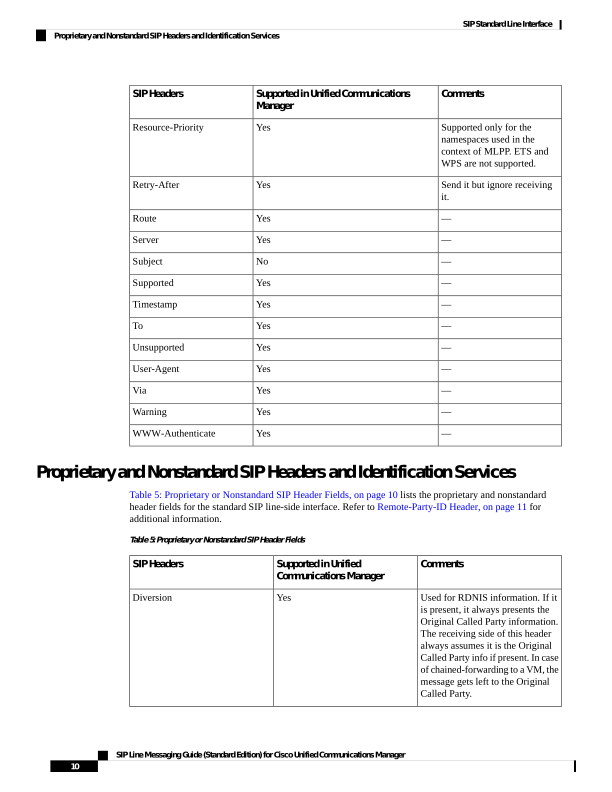
Table 5: Proprietary or Nonstandard SIP Header Fields, on page 10 lists the proprietary and nonstandard
header fields for the standard SIP line-side interface. Refer to Remote-Party-ID Header, on page 11 for
additional information.
Table 5: Proprietary or Nonstandard SIP Header Fields
Comments
Supported in Unified
Communications Manager
SIP Headers
Used for RDNIS information. If it
is present, it always presents the
Original Called Party information.
The receiving side of this header
always assumes it is the Original
Called Party info if present. In case
of chained-forwarding to a VM, the
message gets left to the Original
Called Party.
Yes
Diversion
SIP Line Messaging Guide (Standard Edition) for Cisco Unified Communications Manager
10
SIP Standard Line Interface
Proprietary and Nonstandard SIP Headers and Identification Services
Page 15
Comments
Supported in Unified
Communications Manager
SIP Headers
Used for ID services including
Connected Name and ID. This
nonstandard, nonproprietary header
gets included in the Standard
Feature Scenarios anyway.
Yes
Remote-Party-ID
+multiple-codecs-in-ans is
introduced by Multiple codecs in
the SDP answer feature.
Yes
Contact
Remote-Party-ID Header
This section describes the SIP Identification Services in the Unified Communications Manager for the SIP
line, including Line and Name Identification Services. Line Identification Services include Calling Line and
Connected Line Directory Number. Name identification Services include Calling Line Name, Alerting Line
Name, and Connected Line Name.
The Remote-Party-ID header provides ID services header as specified in draft-ietf-sip-privacy-03.txt.
The Unified Communications Manager provides flexible configuration options for the endpoint to provide
both the Alerting Line Name and/or the Connected Line Name. This section does not describe those
configuration options; it only provides the details on how Unified CM sends and receives these ID services
to and from the SIP endpoint. The Remote-Party-ID header contains a display name with an address
specification followed by optional parameters. The display carries the name while the user part of the address
carries the number.
Unified Communications Manager 8.0(1) enables the Unified CM to route the localized and globalized forms
of a calling number to the receiving endpoint, which is known as Calling Party Normalization (CPN). For
example, when receiving a local call outside an enterprise in North America, it is desirable to display the
familiar seven-digit calling number to the endpoint user (for example, 232-5757). To return a call to a local
number outside the enterprise, the endpoint user typically dials an access code (for example, 9) to indicate
dialing of an external directory number (92325757). This form of the calling number is referred to as the
global or globalized number. The localized form of the calling number is presented in the SIP Remote-Party-ID
header as the user part of the address. The globalized form of the calling number is presented as an optional
SIP URI parameter.
Although the Remote-Party-ID header is nonstandard, many vendors implement it, and it is included in most
Cisco SIP products. Therefore, the standard section of this document includes it, even though it is effectively
proprietary. The use of this header is not negotiated. Recipients should ignore it if it is not understood.
Note
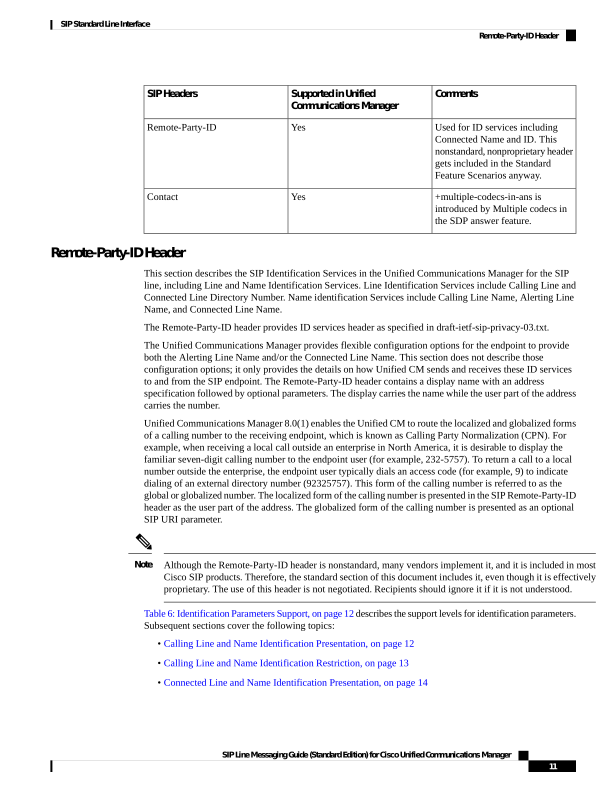
Table 6: Identification Parameters Support, on page 12 describes the support levels for identification parameters.
Subsequent sections cover the following topics:
• Calling Line and Name Identification Presentation, on page 12
• Calling Line and Name Identification Restriction, on page 13
• Connected Line and Name Identification Presentation, on page 14
SIP Line Messaging Guide (Standard Edition) for Cisco Unified Communications Manager
11
SIP Standard Line Interface
Remote-Party-ID Header

Page 16
• Connected Line and Name Identification Restriction, on page 14
• CPN Number Presentation, on page 15
• Blended Identity, on page 15
Table 6: Identification Parameters Support
Notes
Values
Parameter
Ignored if received by Unified CM.
Set to the globalized form of the
calling (callback) number. The
globalized from of a number is the
form that, when dialed by the
endpoint, is successfully routed to
the desired destination with no
editing by the user.
various
x-cisco-callback-number
Ignored if Unified CM receives it.
Set to called for outgoing INVITE
or UPDATE from Unified CM. Set
to calling for outgoing responses
from Unified CM.
calling
called
party
Ignored if Unified CM receives it.
Set to subscriber for outgoing
requests and responses.
subscriber
user
term
id-type
Supported if Unified CM receives
it.
Unified CM will also support
sending all values in either INVITE
or UPDATE requests and responses
for the same.
full
name
uri
off
privacy
Ignored if Unified CM receives it.
Unified CM always sends yes when
generating a Remote-Party-ID
header.
no
yes
screen
Set to calling or connected DN
value when the endpoint supports
receiving of both URI and DN
identity.
various
x-cisco-number
Calling Line and Name Identification Presentation
The system includes the Calling Line (Number) and Name in both the From header and optionally the
Remote-Party-ID headers in the initial INVITE message from the endpoint. For example, an incoming INVITE
SIP Line Messaging Guide (Standard Edition) for Cisco Unified Communications Manager
12
SIP Standard Line Interface
Calling Line and Name Identification Presentation
Page 17
from an endpoint with directory number, 69005, and a Caller ID, “sip line,” for an outbound call will have
the following Remote-Party-ID and From headers:
Remote-Party-ID: "sip line"
sip:69005@10.10.10.2;party=calling;id-type=subscriber;privacy=off;screen=yes
From: "sip line" sip:69005@10.10.10.2;tag=1234
Calling Line and Name Identification Restriction
The system conveys the SIP Line (Number) and Name restrictions by using the privacy parameter. If neither
is restricted, privacy gets specified as off. The details that follow provide other values of privacy (name, uri,
and full) with their impact on the various values in the From and Remote-Party-ID headers:
name
Name Restrict only—When name is restricted, the display field (Calling Name) in “From” header gets set to
“Anonymous.” The display field in the “Remote-Party-ID” header still includes the actual name, but the
privacy field gets set to “name.” For example:
Remote-Party-ID: "Anonymous"
sip:69005@10.10.10.2;party=calling;id-type=subscriber;privacy=name;screen=yes
From: "Anonymous" sip:69005@10.10.10.2;tag=1234
uri
Number Restrict only—When number is restricted, the system sets the calling Line to “Anonymous” out in
the “From” header; however, it still gets included in the “Remote-Party-ID” header with privacy=uri. For
example:
Remote-Party-ID: "sip line"
sip:69005@10.10.10.2;party=calling;id-type=subscriber;privacy=uri;screen=yes
From: "sip line" sip:Anonymous@10.10.10.2;tag=1234
full
Both Name and Number Restrict—When both name and number are restricted, the same principle applies
with privacy=full. For example:
Remote-Party-ID: "sip line"
sip:69005@10.10.10.2;party=calling;id-type=subscriber;privacy=full;screen=yes
SIP Line Messaging Guide (Standard Edition) for Cisco Unified Communications Manager
13
SIP Standard Line Interface
Calling Line and Name Identification Restriction
Page 18
From: "Anonymous" sip:Anonymous@10.10.10.2;tag=1234
Connected Line and Name Identification Presentation
Connected Line/Name Identification is a supplementary service that provides the called or connected party
number and name.
Unified Communications Manager uses the Remote-Party-ID header in 18x, 200, re-INVITE, and UPDATE
messages to convey the connected name and number information. In this example, an endpoint placed a call
to 9728135001. Unified CM determined that this number is for “Bob Jones” and sent that back to the originator
in a 180 or 183 message.
Remote-Party-ID: "Bob Jones" <sip:
9728135001@10.10.10.2>;party=called;screen=yes;privacy=off
Connected Line and Name Identification Restriction
Similar to Calling ID services, the RPID can restrict the connected number and/or the name independently.
name
Name Restrict only—When name is restricted, the connected name still gets included with privacy=name.
For example:
Remote-Party-ID: "Bob Jones"<9728135001@localhost; user=phone>;
party=called;screen=no;privacy=name
uri
Number Restrict only—When number is restricted, the connected number still gets included with privacy=uri.
For example:
Remote-Party-ID: "Bob Jones"<9728135001@localhost; user=phone>;
party=called;screen=no;privacy=uri
full
Both Name and Number Restrict—When both name and number are restricted, both information parameters
get included with privacy=full. For example:
Remote-Party-ID: "Bob Jones"<9728135001@localhost; user=phone>;
party=called;screen=no;privacy=full
SIP Line Messaging Guide (Standard Edition) for Cisco Unified Communications Manager
14
SIP Standard Line Interface
Connected Line and Name Identification Presentation
Page 19
CPN Number Presentation
Calling Party Normalization is a supplementary service which provides the calling number in a localized
(normalized) and globalized format. Both forms of the calling number may appear in any of the SIP request
or response messages where the Remote-Party-ID is present. The localized form of the calling number is
presented as the user part of the SIP URI. The globalized form is presented as an optional SIP URI parameter.
For example:
Remote-Party-ID: "sip line"
sip:2325757@10.10.10.2;x-cisco-callback-number=99192325757;party=calling;id-type=subscriber;privacy=off;screen=yes
Because this is an optional URI parameter, endpoints that do not support the x-cisco-callback-number parameter
should ignore it.
Blended Identity
Currently, the Remote-Party-ID header can deliver only one piece of identity information, in the main uri of
the addr-spec.
Delivering the secondary piece of identity information in the identity headers means to add a new tag within
the Remote-Party-ID header. Depending on the endpoint support, Unified Communications Manager can
deliver both DN and URI in the identity headers. For devices that do not support blended delivery, Unified
CM delivers the DN identity only, same as the pre 9.0 release.
When delivering blended, Unified CM delivers the URI as the main uri of the addr-spec. The new
x-cisoc-number contains the DN.
For example, asserting 2000 as the calling party, also, alice@cisco.com:
Remote-Party-ID: <sip:alice@cisco.com;x-cisco-number=2000;
x-cisco-callback-number=2000>;party=calling;
Supported Media Types
Refer to the following tables for supported media types at the SIP line interface:
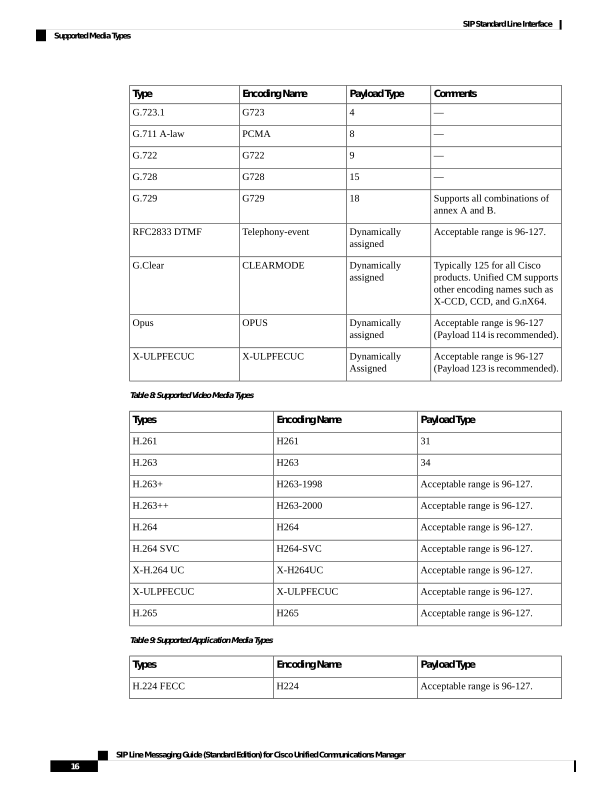
• For supported audio media types, see Table 7: Supported Audio Media Types, on page 15.
• For supported video media types, see Table 8: Supported Video Media Types, on page 16.
• For supported application media types, see Table 9: Supported Application Media Types, on page 16.
• For supported T38fax media types, see Table 10: Supported T38fax Payload Types, on page 17.
Table 7: Supported Audio Media Types
Comments
Payload Type
Encoding Name
Type
—
0
PCMU
G.711 μ-law
—
3
GSM
GSM Full-rate
SIP Line Messaging Guide (Standard Edition) for Cisco Unified Communications Manager
15
SIP Standard Line Interface
CPN Number Presentation
Page 20
Comments
Payload Type
Encoding Name
Type
—
4
G723
G.723.1
—
8
PCMA
G.711 A-law
—
9
G722
G.722
—
15
G728
G.728
Supports all combinations of
annex A and B.
18
G729
G.729
Acceptable range is 96-127.
Dynamically
assigned
Telephony-event
RFC2833 DTMF
Typically 125 for all Cisco
products. Unified CM supports
other encoding names such as
X-CCD, CCD, and G.nX64.
Dynamically
assigned
CLEARMODE
G.Clear
Acceptable range is 96-127
(Payload 114 is recommended).
Dynamically
assigned
OPUS
Opus
Acceptable range is 96-127
(Payload 123 is recommended).
Dynamically
Assigned
X-ULPFECUC
X-ULPFECUC
Table 8: Supported Video Media Types
Payload Type
Encoding Name
Types
31
H261
H.261
34
H263
H.263
Acceptable range is 96-127.
H263-1998
H.263+
Acceptable range is 96-127.
H263-2000
H.263++
Acceptable range is 96-127.
H264
H.264
Acceptable range is 96-127.
H264-SVC
H.264 SVC
Acceptable range is 96-127.
X-H264UC
X-H.264 UC
Acceptable range is 96-127.
X-ULPFECUC
X-ULPFECUC
Acceptable range is 96-127.
H265
H.265
Table 9: Supported Application Media Types
Payload Type
Encoding Name
Types
Acceptable range is 96-127.
H224
H.224 FECC
SIP Line Messaging Guide (Standard Edition) for Cisco Unified Communications Manager
16
SIP Standard Line Interface
Supported Media Types
Page 21
Table 10: Supported T38fax Payload Types
Payload Type
Encoding Name
Types
Not applied
Not applied
T38Fax
Supported Event Packages
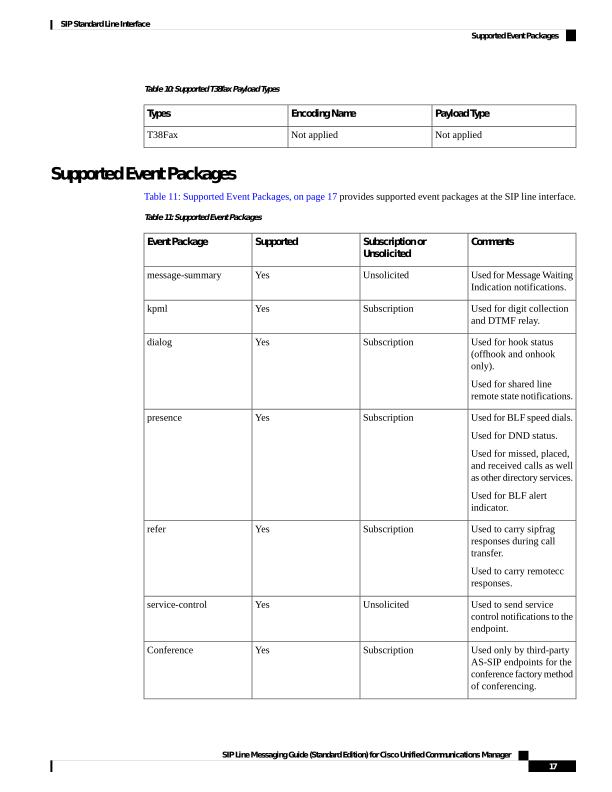
Table 11: Supported Event Packages, on page 17 provides supported event packages at the SIP line interface.
Table 11: Supported Event Packages
Comments
Subscription or
Unsolicited
Supported
Event Package
Used for Message Waiting
Indication notifications.
Unsolicited
Yes
message-summary
Used for digit collection
and DTMF relay.
Subscription
Yes
kpml
Used for hook status
(offhook and onhook
only).
Used for shared line
remote state notifications.
Subscription
Yes
dialog
Used for BLF speed dials.
Used for DND status.
Used for missed, placed,
and received calls as well
as other directory services.
Used for BLF alert
indicator.
Subscription
Yes
presence
Used to carry sipfrag
responses during call
transfer.
Used to carry remotecc
responses.
Subscription
Yes
refer
Used to send service
control notifications to the
endpoint.
Unsolicited
Yes
service-control
Used only by third-party
AS-SIP endpoints for the
conference factory method
of conferencing.
Subscription
Yes
Conference
SIP Line Messaging Guide (Standard Edition) for Cisco Unified Communications Manager
17
SIP Standard Line Interface
Supported Event Packages
Page 22
Supported Content Types
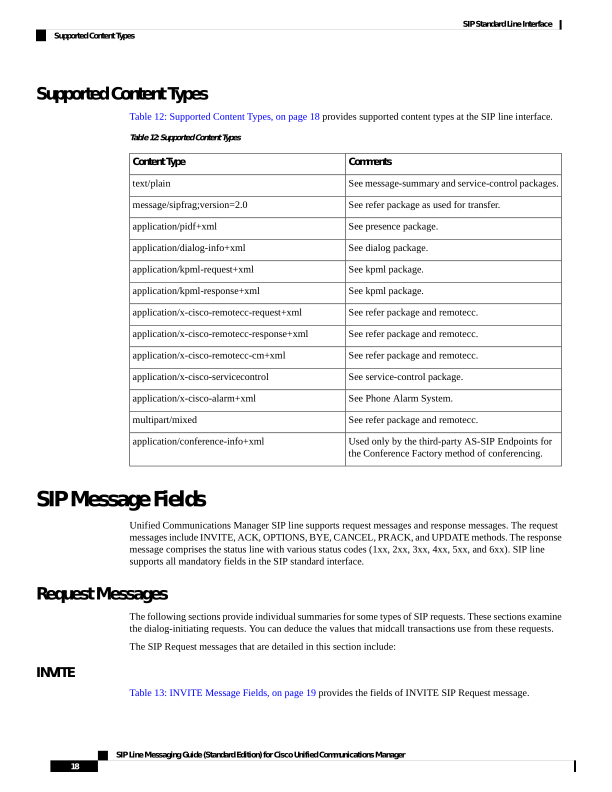
Table 12: Supported Content Types, on page 18 provides supported content types at the SIP line interface.
Table 12: Supported Content Types
Comments
Content Type
See message-summary and service-control packages.
text/plain
See refer package as used for transfer.
message/sipfrag;version=2.0
See presence package.
application/pidf+xml
See dialog package.
application/dialog-info+xml
See kpml package.
application/kpml-request+xml
See kpml package.
application/kpml-response+xml
See refer package and remotecc.
application/x-cisco-remotecc-request+xml
See refer package and remotecc.
application/x-cisco-remotecc-response+xml
See refer package and remotecc.
application/x-cisco-remotecc-cm+xml
See service-control package.
application/x-cisco-servicecontrol
See Phone Alarm System.
application/x-cisco-alarm+xml
See refer package and remotecc.
multipart/mixed
Used only by the third-party AS-SIP Endpoints for
the Conference Factory method of conferencing.
application/conference-info+xml
SIP Message Fields
Unified Communications Manager SIP line supports request messages and response messages. The request
messages include INVITE, ACK, OPTIONS, BYE, CANCEL, PRACK, and UPDATE methods. The response
message comprises the status line with various status codes (1xx, 2xx, 3xx, 4xx, 5xx, and 6xx). SIP line
supports all mandatory fields in the SIP standard interface.
Request Messages
The following sections provide individual summaries for some types of SIP requests. These sections examine
the dialog-initiating requests. You can deduce the values that midcall transactions use from these requests.
The SIP Request messages that are detailed in this section include:
INVITE
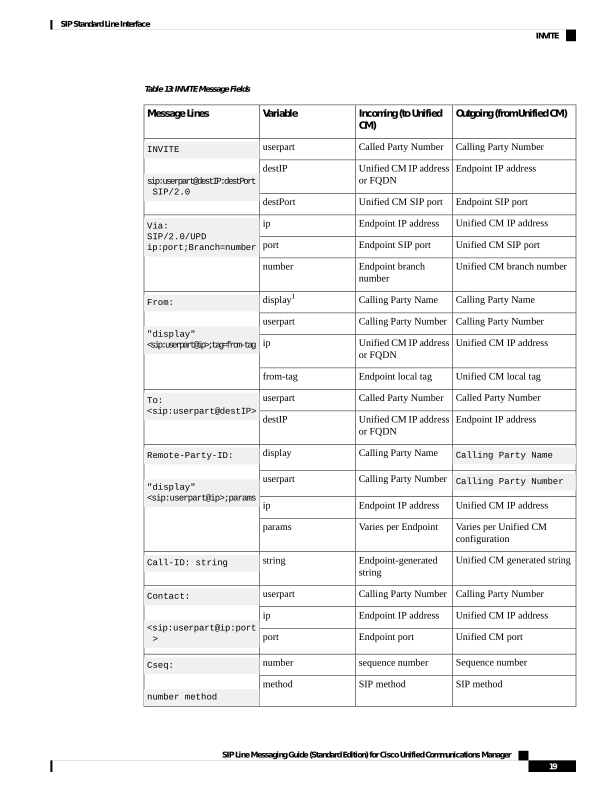
Table 13: INVITE Message Fields, on page 19 provides the fields of INVITE SIP Request message.
SIP Line Messaging Guide (Standard Edition) for Cisco Unified Communications Manager
18
SIP Standard Line Interface
Supported Content Types
Page 23
Table 13: INVITE Message Fields
Outgoing (from Unified CM)
Incoming (to Unified
CM)
Variable
Message Lines
Calling Party Number
Called Party Number
userpart
INVITE
sip:userpart@destIP:destPort
SIP/2.0
Endpoint IP address
Unified CM IP address
or FQDN
destIP
Endpoint SIP port
Unified CM SIP port
destPort
Unified CM IP address
Endpoint IP address
ip
Via:
SIP/2.0/UPD
ip:port;Branch=number
Unified CM SIP port
Endpoint SIP port
port
Unified CM branch number
Endpoint branch
number
number
Calling Party Name
Calling Party Name
display1
From:
"display"
sip:userpart@ip;tag=from-tag
Calling Party Number
Calling Party Number
userpart
Unified CM IP address
Unified CM IP address
or FQDN
ip
Unified CM local tag
Endpoint local tag
from-tag
Called Party Number
Called Party Number
userpart
To:
sip:userpart@destIP
Endpoint IP address
Unified CM IP address
or FQDN
destIP
Calling Party Name
Calling Party Name
display
Remote-Party-ID:
"display"
sip:userpart@ip;params
Calling Party Number
Calling Party Number
userpart
Unified CM IP address
Endpoint IP address
ip
Varies per Unified CM
configuration
Varies per Endpoint
params
Unified CM generated string
Endpoint-generated
string
string
Call-ID: string
Calling Party Number
Calling Party Number
userpart
Contact:
<sip:userpart@ip:port
Unified CM IP address
Endpoint IP address
ip
Unified CM port
Endpoint port
port
Sequence number
sequence number
number
Cseq:
number method
SIP method
SIP method
method
SIP Line Messaging Guide (Standard Edition) for Cisco Unified Communications Manager
19
SIP Standard Line Interface
INVITE
Page 24
Outgoing (from Unified CM)
Incoming (to Unified
CM)
Variable
Message Lines
Max forwards
Max forwards
number
Max-Forwards:
number
Same as incoming
The MLPP network
domain name
(alphanumeric)
Network domain
Resource-Priority:
<network-domain>-<prec-domain>.<prec-lvl>
Same as incoming
The MLPP precedence
domain
(000000-FFFFFF)
Precedence domain
Same as incoming
The MLPP precedence
level for this call (value
depends on network
dmn)
Prec-level
Resolved CAL value and
mode
None
local-access-level
Confidential-Access-Level
local-access-level
SEMI
reflected-access-level
[SEMI
access-display]
0 and variable
None
local-access-level
Text corresponding to
resolved CAL value.
None
Access-display
Unified CM typically uses
delayed media.
Endpoint SDP
sdp
SDP [sdp]
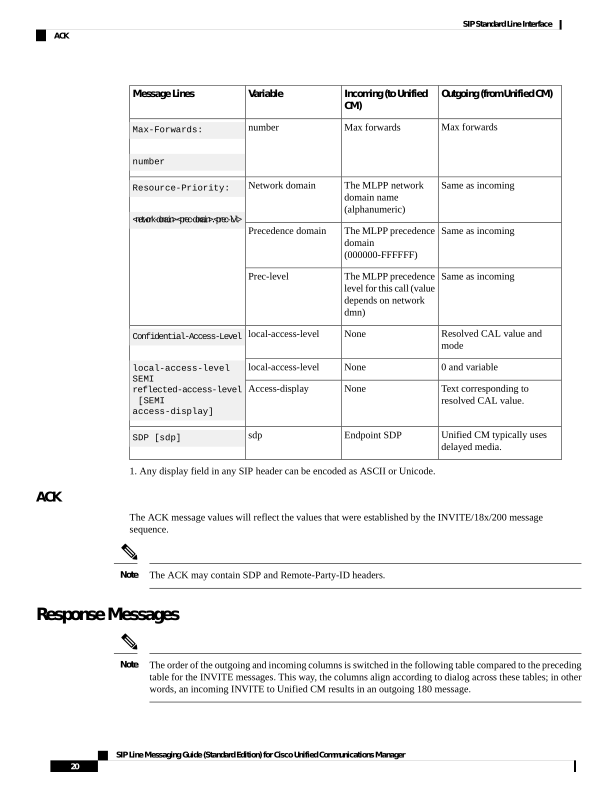
- Any display field in any SIP header can be encoded as ASCII or Unicode.
ACK
The ACK message values will reflect the values that were established by the INVITE/18x/200 message
sequence.
The ACK may contain SDP and Remote-Party-ID headers.
Note
Response Messages
The order of the outgoing and incoming columns is switched in the following table compared to the preceding
table for the INVITE messages. This way, the columns align according to dialog across these tables; in other
words, an incoming INVITE to Unified CM results in an outgoing 180 message.
Note
SIP Line Messaging Guide (Standard Edition) for Cisco Unified Communications Manager
20
SIP Standard Line Interface
ACK

Page 25
The SIP Response messages that are detailed in this section include:
180 Ringing
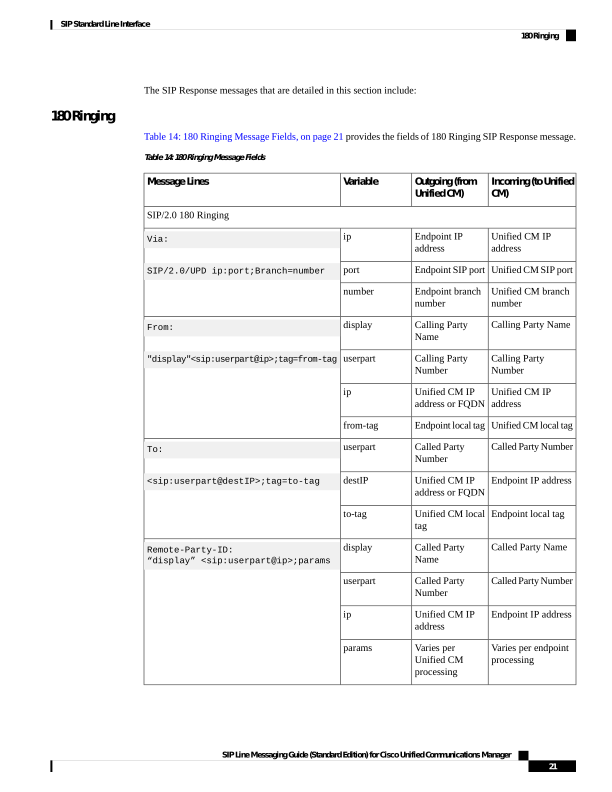
Table 14: 180 Ringing Message Fields, on page 21 provides the fields of 180 Ringing SIP Response message.
Table 14: 180 Ringing Message Fields
Incoming (to Unified
CM)
Outgoing (from
Unified CM)
Variable
Message Lines
SIP/2.0 180 Ringing
Unified CM IP
address
Endpoint IP
address
ip
Via:
SIP/2.0/UPD ip:port;Branch=number
Unified CM SIP port
Endpoint SIP port
port
Unified CM branch
number
Endpoint branch
number
number
Calling Party Name
Calling Party
Name
display
From:
"display"sip:userpart@ip;tag=from-tag
Calling Party
Number
Calling Party
Number
userpart
Unified CM IP
address
Unified CM IP
address or FQDN
ip
Unified CM local tag
Endpoint local tag
from-tag
Called Party Number
Called Party
Number
userpart
To:
sip:userpart@destIP;tag=to-tag
Endpoint IP address
Unified CM IP
address or FQDN
destIP
Endpoint local tag
Unified CM local
tag
to-tag
Called Party Name
Called Party
Name
display
Remote-Party-ID:
“display” sip:userpart@ip;params
Called Party Number
Called Party
Number
userpart
Endpoint IP address
Unified CM IP
address
ip
Varies per endpoint
processing
Varies per
Unified CM
processing
params
SIP Line Messaging Guide (Standard Edition) for Cisco Unified Communications Manager
21
SIP Standard Line Interface
180 Ringing
Page 26
Incoming (to Unified
CM)
Outgoing (from
Unified CM)
Variable
Message Lines
Unified CM-
generated string
from the initial
INVITE
Endpoint-generated
string from the
initial INVITE
string
Call-ID: string
Called Party Number
Called Party
Number
userpart
Contact:<sip:userpart@ip:port >
Endpoint IP address
Unified CM IP
address
ip
Endpoint port
Unified CM port
port
Sequence number
from initial INVITE
Sequence number
from initial
INVITE
number
Cseq: number INVITE
None
0 and variable
local-access-level
Confidential-Access-Level:
local-access-level SEMI
reflected-access-level [SEMI
access-display]
None
0 and variable
reflected-access-level
None
PENDING
Access-display
Endpoint SDP
Unified CM SDP
sdp
SDP [sdp]
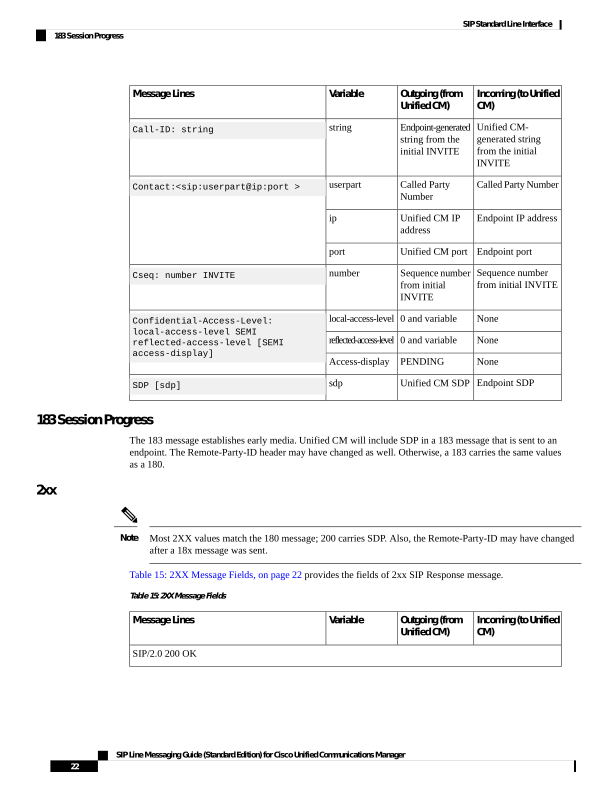
183 Session Progress
The 183 message establishes early media. Unified CM will include SDP in a 183 message that is sent to an
endpoint. The Remote-Party-ID header may have changed as well. Otherwise, a 183 carries the same values
as a 180.
2xx
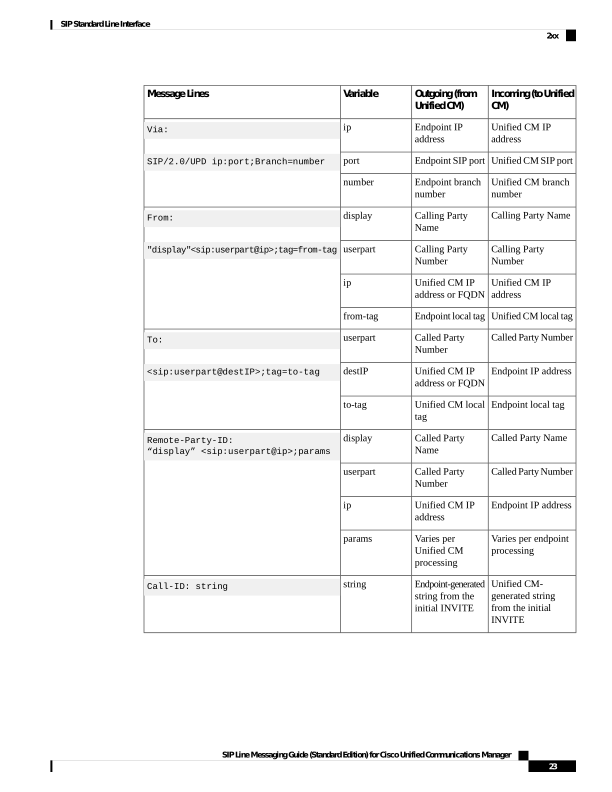
Most 2XX values match the 180 message; 200 carries SDP. Also, the Remote-Party-ID may have changed
after a 18x message was sent.
Note
Table 15: 2XX Message Fields, on page 22 provides the fields of 2xx SIP Response message.
Table 15: 2XX Message Fields
Incoming (to Unified
CM)
Outgoing (from
Unified CM)
Variable
Message Lines
SIP/2.0 200 OK
SIP Line Messaging Guide (Standard Edition) for Cisco Unified Communications Manager
22
SIP Standard Line Interface
183 Session Progress

Page 27
Incoming (to Unified
CM)
Outgoing (from
Unified CM)
Variable
Message Lines
Unified CM IP
address
Endpoint IP
address
ip
Via:
SIP/2.0/UPD ip:port;Branch=number
Unified CM SIP port
Endpoint SIP port
port
Unified CM branch
number
Endpoint branch
number
number
Calling Party Name
Calling Party
Name
display
From:
"display"sip:userpart@ip;tag=from-tag
Calling Party
Number
Calling Party
Number
userpart
Unified CM IP
address
Unified CM IP
address or FQDN
ip
Unified CM local tag
Endpoint local tag
from-tag
Called Party Number
Called Party
Number
userpart
To:
sip:userpart@destIP;tag=to-tag
Endpoint IP address
Unified CM IP
address or FQDN
destIP
Endpoint local tag
Unified CM local
tag
to-tag
Called Party Name
Called Party
Name
display
Remote-Party-ID:
“display” sip:userpart@ip;params
Called Party Number
Called Party
Number
userpart
Endpoint IP address
Unified CM IP
address
ip
Varies per endpoint
processing
Varies per
Unified CM
processing
params
Unified CM-
generated string
from the initial
INVITE
Endpoint-generated
string from the
initial INVITE
string
Call-ID: string
SIP Line Messaging Guide (Standard Edition) for Cisco Unified Communications Manager
23
SIP Standard Line Interface
2xx
Page 28
Incoming (to Unified
CM)
Outgoing (from
Unified CM)
Variable
Message Lines
Called Party Number
Called Party
Number
userpart
Contact:<sip:userpart@ip:port >
Endpoint IP address
Unified CM IP
address
ip
Endpoint port
Unified CM port
port
Sequence number
from initial INVITE
Sequence number
from initial
INVITE
number
Cseq: number INVITE
None
Reverse resolved
CAL value and
mode
local-access-level
Confidential-Access-Level
local-access-level SEMI
reflected-access-level [SEMI
access-display]
None
Resolved CAL
value and mode
reflected-access-level
None
Text
corresponding to
resolved CAL
value
Access-display
Endpoint SDP
Unified CM SDP
sdp
SDP [sdp]
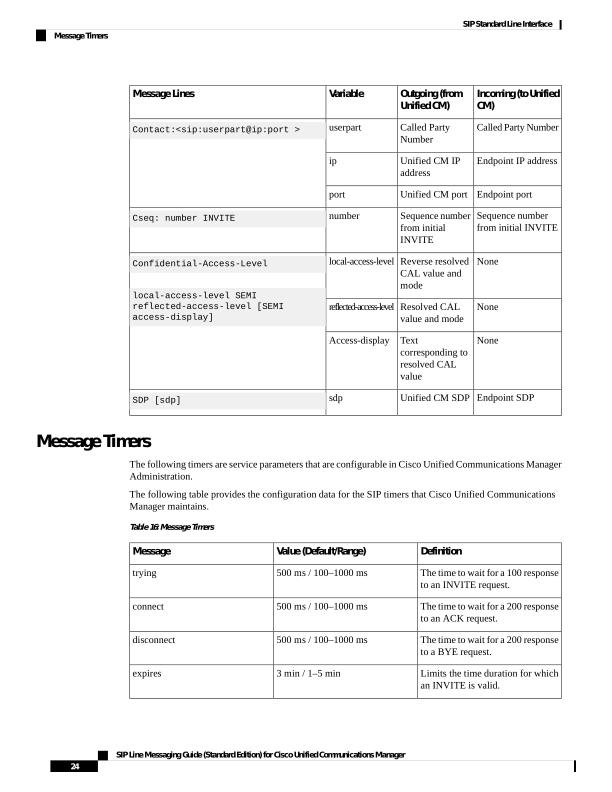
Message Timers
The following timers are service parameters that are configurable in Cisco Unified Communications Manager
Administration.
The following table provides the configuration data for the SIP timers that Cisco Unified Communications
Manager maintains.
Table 16: Message Timers
Definition
Value (Default/Range)
Message
The time to wait for a 100 response
to an INVITE request.
500 ms / 100–1000 ms
trying
The time to wait for a 200 response
to an ACK request.
500 ms / 100–1000 ms
connect
The time to wait for a 200 response
to a BYE request.
500 ms / 100–1000 ms
disconnect
Limits the time duration for which
an INVITE is valid.
3 min / 1–5 min
expires
SIP Line Messaging Guide (Standard Edition) for Cisco Unified Communications Manager
24
SIP Standard Line Interface
Message Timers
Page 29
Definition
Value (Default/Range)
Message
The time that Unified CM should
wait before retransmitting the
reliable 1xx responses.
500 ms / 100–1000 ms
rel1xx
The time that Unified CM should
wait before retransmitting the
PRACK request.
500 ms / 100–1000 ms
prack
The time that Unified CM should
wait before retransmitting the
Notify message.
500 ms / 100–1000 ms
notify
Unified CM does not manage a
timer for aging out published event
state data that it receives from
endpoints. Unified CM requires
endpoints to specify an expires time
of 2147483647 when publishing
event state data to Unified CM.
2147483647
Publish
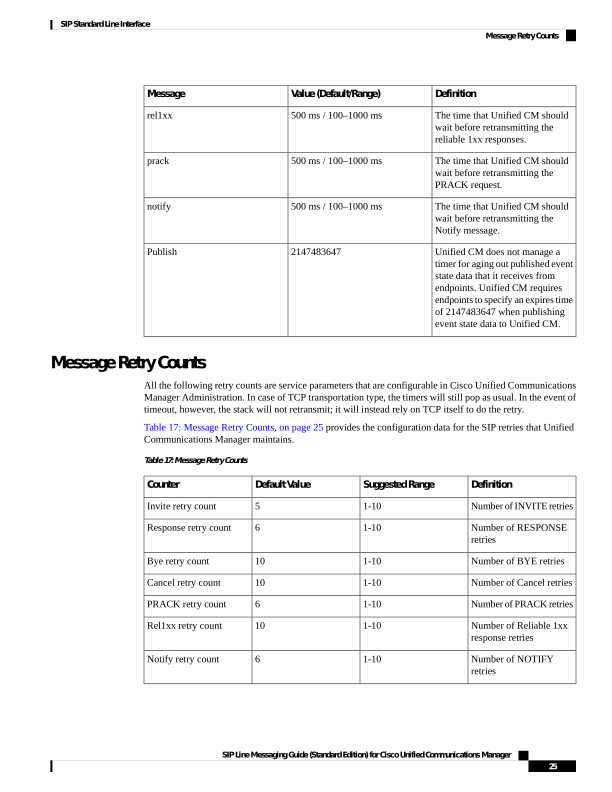
Message Retry Counts
All the following retry counts are service parameters that are configurable in Cisco Unified Communications
Manager Administration. In case of TCP transportation type, the timers will still pop as usual. In the event of
timeout, however, the stack will not retransmit; it will instead rely on TCP itself to do the retry.
Table 17: Message Retry Counts, on page 25 provides the configuration data for the SIP retries that Unified
Communications Manager maintains.
Table 17: Message Retry Counts
Definition
Suggested Range
Default Value
Counter
Number of INVITE retries
1-10
5
Invite retry count
Number of RESPONSE
retries
1-10
6
Response retry count
Number of BYE retries
1-10
10
Bye retry count
Number of Cancel retries
1-10
10
Cancel retry count
Number of PRACK retries
1-10
6
PRACK retry count
Number of Reliable 1xx
response retries
1-10
10
Rel1xx retry count
Number of NOTIFY
retries
1-10
6
Notify retry count
SIP Line Messaging Guide (Standard Edition) for Cisco Unified Communications Manager
25
SIP Standard Line Interface
Message Retry Counts
Page 30
Standard Feature Scenarios
This section provides details with respect to overall flow and handling of standard SIP features on the Unified
CM line-side interface. This includes, but is not limited to, the following features:
Registration
Unified Communications Manager supports standard RFC3261 registration from any compliant SIP phone.
Because Unified CM is a B2BUA, however, it must be able to uniquely identify the registering device to
match that device with a configuration entry in the database. Furthermore, Unified CM must be able to identify
the originating device (and line) for all other SIP requests that it receives (INVITE, REFER, SUBSCRIBE,
and so on) to authorize, filter, and route the message. Because standard SIP does not provide a consistent and
unambiguous mechanism for identifying the originating device, for standard registration, Unified CM relies
on the HTTP digest user ID to identify the sending device.
Knowledge of the sending device and line allows Unified CM to apply various routing, authorization, and
filtering logic to incoming registrations, subscriptions, and invites.
The system supports TCP and UDP transports for Standard registration, but not TLS.
Source Device ID for RFC3261-Compliant Phones
Unified Communications Manager must uniquely identify the device sending the REGISTER message to
apply authentication, routing, and filtering. The Contact IP address is not suitable because it can change
dynamically if DHCP is used. Instead, Unified CM uses the HTTP digest user ID. Each device that is configured
in Unified CM requires a unique digest user ID. When the device sends the REGISTER, Unified CM will
immediately respond with a 401 challenge to get the Authentication header. The system uses the user ID from
the authentication header to find the configuration entry in the database. If the third-party phone is not
configured with the correct user ID, or the user ID is not associated with the device in the Unified CM database,
Unified CM responds with a 404 Not Found.
MultiLine Registration
Multiple lines can register with Unified CM if each line has a unique directory number. The directory number
must appear in the To and From header of the REGISTER, and it must be numeric.
REGISTER Refresh (Keepalive)
Unified Communications Manager uses REGISTER refreshes as keepalive messages to ensure the phone is
still alive and connected. When the phone first registers with Unified CM, the 200 OK response will include
an Expires header with the configured keepalive interval. The phone must send a REGISTER refresh within
this interval with the same Call ID, Contact IP address, and Contact port number. If Unified CM fails to receive
a keepalive message within the configured interval (default 120 seconds), it will unregister the phone internally,
so no calls can originate from or terminate to the phone.
Device Binding
After the device has been identified by the digest user ID, the system creates a binding within Unified
Communications Manager between that device ID and the transport address. This binding gets created because
Unified CM must identify the sending device for all subsequent requests from the phone (INVITE, REFER,
SUBSCRIBE, and so on), and these requests do not contain the device ID. However, these requests do contain
SIP Line Messaging Guide (Standard Edition) for Cisco Unified Communications Manager
26
SIP Standard Line Interface
Standard Feature Scenarios
Page 31
source transport information, so the binding gets created between the device ID and the transport information.
The transport information that is used differs for UDP and TCP.
For UDP, the system creates the binding between the device ID and the IP address and port number in the
Contact header. After the first REGISTER message is sent, all subsequent requests must use the same IP
address and port number in the Contact header. If it changes, a 5xx error response gets returned because
Unified CM cannot route the message.
For TCP, the system uses a combination of Contact binding and TCP connection binding. When a device
registers over a TCP connection, Unified CM cannot determine whether the TCP connection will be transient
(a new connection gets used for each transaction) or persistent. Therefore, Unified CM initially binds the
device ID to the Contact IP address and port number. After several transactions get sent over the same TCP
connection, the system considers it as proved-in and marks it as persistent. At this point, a binding gets created
between the device ID and the TCP connection.
Multiple Bindings for the Same AOR
Unified Communications Manager includes a minor deviation from RFC3261 for the case of multiple
registration bindings for a single address of record. Under the Unified CM architecture, if three devices are
configured to have a shared line at 321-1000, each registers a contact in the form of 3211000@ip:port for that
line. Each device has its own unique IP address and thus have a unique contact for that line. RFC3261 states
that, upon registration, all known contact bindings shall be returned to the registering entity in the 200 OK
response. Unified CM will only return the contact binding of the registering device during each registration;
it will not enumerate other bindings that it knows about for a given AOR during registration. A registering
endpoint should not rely on the binding list that is returned in the 200 OK response as an exhaustive list for
all bindings that are associated with the AOR. In addition, an endpoint cannot modify bindings for another
device through Unified CM; it can only refresh or delete its own binding.
Contact: *
Unified Communications Manager deviates from RFC3261 in that it does not support the Contact: * format.
This format is often used to unregister all contacts currently associated with an AOR. However Unified CM
requires that the Contact header in each REGISTER message must contain the SIP URI identifying the device,
and the unregister message (REGISTER with Expires: 0) must contain the same Contact header as the original
REGISTER message.
This restriction occurs because Unified CM must be able to identify the source device for each incoming SIP
message, and it uses the Contact header for that purpose. Unified CM cannot use the AOR in the To header
because the shared line feature allows multiple different source devices to have the same AOR; thus, it is not
unique to a specific device.
Basic Call
Unified Communications Manager follows the procedures that are described in RFC 3261, 3262, and 3264
to establish and clear down basic SIP calls. Often, on the outgoing side, Unified CM will send out INVITE
without SDP. This allows Unified CM to discover the capabilities of both sides and provide media services
in between if necessary (for example, transcoding).
Simple Hold and Resume
Unified CM SIP line side supports simple media hold as per RFC 2543 (a.k.a. c = 0) or as per RFCs 3261 and
3264 (a = sendonly or a = inactive).
SIP Line Messaging Guide (Standard Edition) for Cisco Unified Communications Manager
27
SIP Standard Line Interface
Multiple Bindings for the Same AOR
Page 32
Transfer
SIP line-side Transfer uses the REFER message, and REFER with an embedded Replaces header, as per RFC
3515.
The following three participants exist for call transfer:
• Transferee—The person who is being transferred.
• Transferor—The person who is transferring the call.
• Transfer Target (Target)—The person who is receiving the transfer.
Unified CM supports the following three types of transfer:
Attended Transfer
With attended transfer, the transferor places the transferee on hold and calls the target. After conversing with
the target, the transferor completes the transfer and drops out of the call. The transferee automatically gets
taken off hold and connected to the target.
Attended transfer involves two somewhat independent dialogs at the transferor device up until the time the
device sends a REFER with embedded replaces header. When this message is received, Unified CM knows
that the calls are associated.
Because Unified CM is a B2BUA, a REFER with embedded replaces does not trigger an INVITE with replaces
from the transferee to the transfer target. The dialogs between Unified CM and each phone stay independent.
Instead, Unified CM reINVITEs (and UPDATEs) the transferee and transfer target to connect them together.
During this process, the transferor will receive sipfrag NOTIFY messages. After the connection is complete,
both dialogs between Unified CM and transferor get BYE’d.
The following more detailed view shows what happens when the REFER is received:
1.
Split transferor and transferee call:
• reINVITE to disconnect media.
2.
Split transferor and transfer target call:
• reINVITE to disconnect media.
3.
Join transferee and transfer target call legs:
a.
reINVITE to connect media.
b.
UPDATE display name and number via the Remote-Party-ID header.
4.
Clear transferor dialogs.
Early Attended Transfer
With an early attended transfer, the transferor places the original call on hold and calls the target. Upon
receiving a ringback tone, the transferor transfers the call to the target and drops out of both calls. The transferee
receives a ringback while the target phone is alerting. When the target answers, the system establishes a
connection between transferee and target.
SIP Line Messaging Guide (Standard Edition) for Cisco Unified Communications Manager
28
SIP Standard Line Interface
Transfer
Page 33
The transferor call flow, which uses a REFER with embedded replaces header, is based on the existing
implementation of this feature on the SIP phones and gateways. The problem with this implementation in a
peer-to-peer environment is the failure to support parallel forking to multiple targets. Version 04 of the replaces
draft specifically precludes a UAS from accepting a replaces header that was not initiated by that UA. The
receiving UAS must return a 481 message in that situation. Instead, the existing implementation honors the
request and replaces the early dialog. That causes it to send a 487 message back to the transferor.
Early attended transfer involves two somewhat independent dialogs at the transferor device up until the time
that the device sends a REFER with embedded replaces header. When this message is received, Unified CM
registers that the calls are associated. Because Unified CM is a B2BUA, a REFER with a replaces header does
not trigger an INVITE with replaces from the transferee to the transfer target. The dialogs between Unified
CM and each phone stay independent. Instead, Unified CM reINVITEs (and UPDATEs) the transferee and
transfer target to connect them together. During this process, the transferor will receive sipfrag NOTIFY
messages. After the connection is complete, both dialogs between Unified CM and transferor get BYE’d.
The following more detailed view shows what happens when the REFER is received:
1.
Split transferor and transferee call:
• reINVITE to disconnect media.
2.
Split transferor and transfer target call:
• reINVITE sent to transferor to disconnect media.
3.
Join transferee and transfer target call legs:
a.
reINVITE to connect media.
b.
UPDATE display name and number via the Remote-Party-ID header.
c.
Clear transferor dialogs.
The transferee will not receive a ringback although the target is alerting.
Blind Transfer
With blind transfer, the transferor places the original call on hold and dials the target. The transferor then uses
SIP REFER to redirect the transferee to the target. No call gets made to the target prior to transfer. The timing
for when the transferor drops out of the call depends on the transferor implementation of the feature, but, most
likely, the drop occurs when the transferor is notified that the redirect operation was accepted and has begun.
The REFER does not contain an embedded replaces as it does for attended and early attended transfer.
Three-Way Calling
Many SIP phones support local mixing by the endpoint. For example, the existing SIP implementation on the
Cisco Unified IP Phone 7960/40 supports it. It continues to work for Unified CM line-side SIP endpoints. To
support local mixing on the phone, Unified CM must allow the endpoint to have multiple active calls. Unified
CM allows this for SIP endpoints. From the Unified CM perspective, a locally mixed three-way call (or an
n-way call) just looks like individual active calls. Unified CM does not perceive local mixing. Unified CM
conference-related features like Conference List and Remove Last Party do not apply.
SIP Line Messaging Guide (Standard Edition) for Cisco Unified Communications Manager
29
SIP Standard Line Interface
Blind Transfer
Page 34
In a SIP environment, the endpoint that is hosting a three-way call can drop out and arrange to have the
remaining two parties connected together. With SIP, the system accomplishes this by using REFER with
embedded replaces. Prior to this action, two calls with four dialogs exist:
1.
A.1 to B call:
a.
A.1 to Unified CM dialog.
b.
Unified CM to B dialog.
2.
A.2 to C call:
a.
A.2 to Unified CM dialog.
b.
Unified CM to C dialog.
Phone A can drop out of the call by sending an in-dialog REFER on dialog A.1 with an embedded replaces
header that specifies dialog A.2. Unified CM invokes its attended transfer feature, which results in the remaining
parties being connected together. Refer to Attended Transfer, on page 28 for details regarding the operation
of that feature.
Call Forwarding
Call Forwarding occurs when a call does not get answered by the original called party but, instead, gets
presented to one or more subsequent forwarded parties. Unified CM supports three types of forwarding:
• Call Forward All (also known as Call Forward Unconditional)
• Call Forward No Answer
• Call Forward Busy
Only, in call forward no answer case, does the call actually get presented to the original called party. Unified
CM detects call forward all and call forward busy prior to sending an INVITE to the called party, so forwarding
bypasses that party. Call forward no answer will get detected via a timer in Unified CM, so Unified CM will
initiate the canceling of the call to the original called party.
Older Cisco phones that use SIP or third-party SIP phones may elect to implement forward all and forward
busy locally on the phone, in which case they must use 302 (see Endpoint Returns 302 Redirect, on page 31)
and 486 (see Endpoint Returns 486 Busy, on page 32 response codes, respectively, to the INVITE.
Unified CM informs the calling party that their call has been forwarded via “Remote-Party-ID:” headers in
updated 180 messages. This type of forwarding does not get communicated to the calling party.
For example:
Remote-Party-ID: "Line 1030 Name"
sip:1030@172.18.203.78;party=called;id-type=subscriber;privacy=off;screen=yes
Unified CM indicates forwarding to the called (or current forwarded-to) party by using “Diversion:” headers
in subsequent INVITEs. Unified CM will report, at most, two diversion headers. The first will indicate the
last forwarding party, and the second will indicate the original called party. In a single-hop forwarding case,
the system uses only a single diversion header because the original called party and last forwarding parties
SIP Line Messaging Guide (Standard Edition) for Cisco Unified Communications Manager
30
SIP Standard Line Interface
Call Forwarding
Page 35
are the same. In a three-or-more-hop case, the intermediate parties do not get communicated to the current
forwarded-to party. For example:
Diversion: "Line 1020 Name"
sip:1020@172.18.203.99;reason=no-answer;privacy=off;screen=yes
Diversion: "Line 2020 Name"
sip:2020@172.18.203.99;reason=unconditional;privacy=off;screen=yes
Diversion: "Line 3020 Name"
sip:3020@172.18.203.99;reason=user-busy;privacy=off;screen=yes
The phone may activate Call Forward All via a softkey.
Message Waiting Indication
The system triggers activation of the Message Waiting Indication (MWI) on the phone via an unsolicited
NOTIFY from Unified CM. The NOTIFY has an event type of “message-summary” and a message body with
content type of “application/simple-message-summary” and a body that contains either “Messages-Waiting:
yes” to instruct the phone to turn on its MWI or “Messages-Waiting: no” to instruct the phone to turn off its
MWI.
This MWI Notify will get sent whenever that Unified CM detects that the phone MWI status should change.
This could occur if a message is left for that subscriber on a connected voice messaging server and that voice
messaging server informs Unified CM or if all messages are cleared. Also, this NOTIFY that contains the
current MWI state always gets sent during registration of a line, so phones with flash memory have the latest
MWI state that is known to Unified CM.
Endpoint Returns 302 Redirect
Because not all SIP phones support the enhanced call forward all activation behavior to synchronize the call
forward all state between the phone and Unified CM, some phones may allow the user to configure a call
forward number on the phone locally and then return a 302 message to an INVITE instead.
The 302 message must contain a “Contact:” header that indicates the party to which the call should be forwarded.
A phone that sends a 302 should also include a “Diversion:” header that includes its own name and number
as well as the reason for forwarding.
When Unified CM receives a 302 message from a phone, the system presents the call to the next party that is
indicated in the contact header of that 302 with the diversion header from the 302 that is listed first (assuming
the next party is also a SIP device). If that next party also forwards, the diversion header that is sent in the
first 302 may get passed along to subsequent forwarded-to parties if the phone that is sending the 302 was
the original called party.
SIP Line Messaging Guide (Standard Edition) for Cisco Unified Communications Manager
31
SIP Standard Line Interface
Message Waiting Indication
Page 36
Endpoint Returns 486 Busy
You can configure all lines on a Unified CM with a “busy trigger.” After the number of active calls to that
line reaches the busy trigger, Unified CM will prevent further calls from being presented to that phone by
initiating a call forward busy without sending another INVITE to the phone.
However, due to misconfiguration or the potential for calls of which Unified CM is not aware to exist on the
phone (for example, a phone in a dialing state that has not yet sent an INVITE), the phone may need to manage
its own busy trigger and autonomously throttle calls. Phones accomplish this by sending a 486 response code
to an INVITE.
Although Unified CM may have Call Forward Busy behavior configured for a line (for example, forward to
DN or forward to a voice-messaging system), that behavior does not get exercised when a 486 message is
received from the phone. Instead, the 486 message will be passed back to the original called party.
Announcements for Certain Call Setup Failures
When Party A calls Party B, there are circumstances in which the call cannot complete and an announcement
as to the reason for the call failure is played to party A. A simple example is when party A misdials the B’s
number and the misdialed number does not exist. This results in a vacant code error.
In this same scenario if Party A were an SCCP phone, then party A would be connected to an annunciator
and would receive an announcement similar to “Your call cannot be completed as dialed. Please
consult your directory and call again or ask your operator for assistance. This is a
recording.” Once the announcement is completed, the Party A would hear the re-order tone if they were
still offhook. Previous to Unified CM Release 8.0 if Party A were SIP, they would immediately hear re-order
locally on the phone as a result of the 4xx SIP error message and not hear the announcement-Unified CM 8.0,
SIP phones now have parity for error scenarios where an announcement is performed (for example, vacant
code).
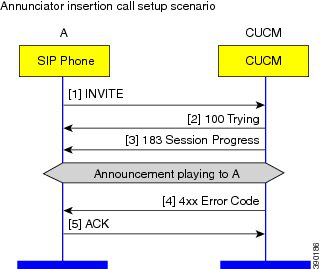
The call flow for these announcements utilizes standard SIP. A sample of the flow is shown after this. In this
scenario, the announcement is played and the 4xx/5xx error code is sent as before. The SIP 183 contains SDP.
Figure 1: Annunciator Insertion Call Setup Scenario
SIP Line Messaging Guide (Standard Edition) for Cisco Unified Communications Manager
32
SIP Standard Line Interface
Endpoint Returns 486 Busy
Page 37
Error scenarios that may result in announcements during call setup include vacant code and certain call setup
failures that result from MLPP.
INFO Packages
During the life of an INVITE dialog, INFO packages allow SIP UAs to exchange negotiated content without
managing and correlating a subscription. The INFO package negotiation occurs during initial call setup and
is remembered throughout the life of the INVITE dialog. This is independent of the number of times the
endpoint is subject to some feature interaction such as transfer or conference.
Unified Communication Manager supports the conference package. The negotiation works according to the
rules spelled out in the following draft: draft-ietf-sip-info-events-01.txt.
INFO Conference Package Negotiation
Unified Communication Manager is a B2BUA. As such, each endpoint has their own specific INVITE dialog
with Unified Communication Manager, when a call is established. Due to feature invocations, Unified
Communication Manager can move the media around, while maintaining the original INVITE dialog. For
example, if A transfers B to C, B and C get reINVITEs and UPDATEs to redirect their media towards each
other and to update the connected party information. The original dialogs established between B and Unified
Communication Manager and C and Unified Communication Manager prior to the transfer remain intact.
The conference INFO package negotiation occurs during initial call setup and is remembered throughout the
life of the INVITE dialog. This is independent of the number of times the endpoint is subject to some feature
interaction such as transfer or conference. The actual conference package XML is borrowed from the following
RFC:
• RFC-4575: A Session Initiation Protocol (SIP) Event Package for Conference State.
RFC defines the package in the context of the SUBSCRIBE/NOTIFY framework. The same XML schema
can be used in the INFO event package framework.
The negotiation within the context of Unified Communication Manager works the following way:
When A calls B, this is two distinct dialogs since Unified Communication Manager is a B2BUA. In this
example, A is the initiator of the dialog between A and Unified Communication Manager. On the other hand,
Unified Communication Manager is the initiator of the dialog between Unified Communication Manager and
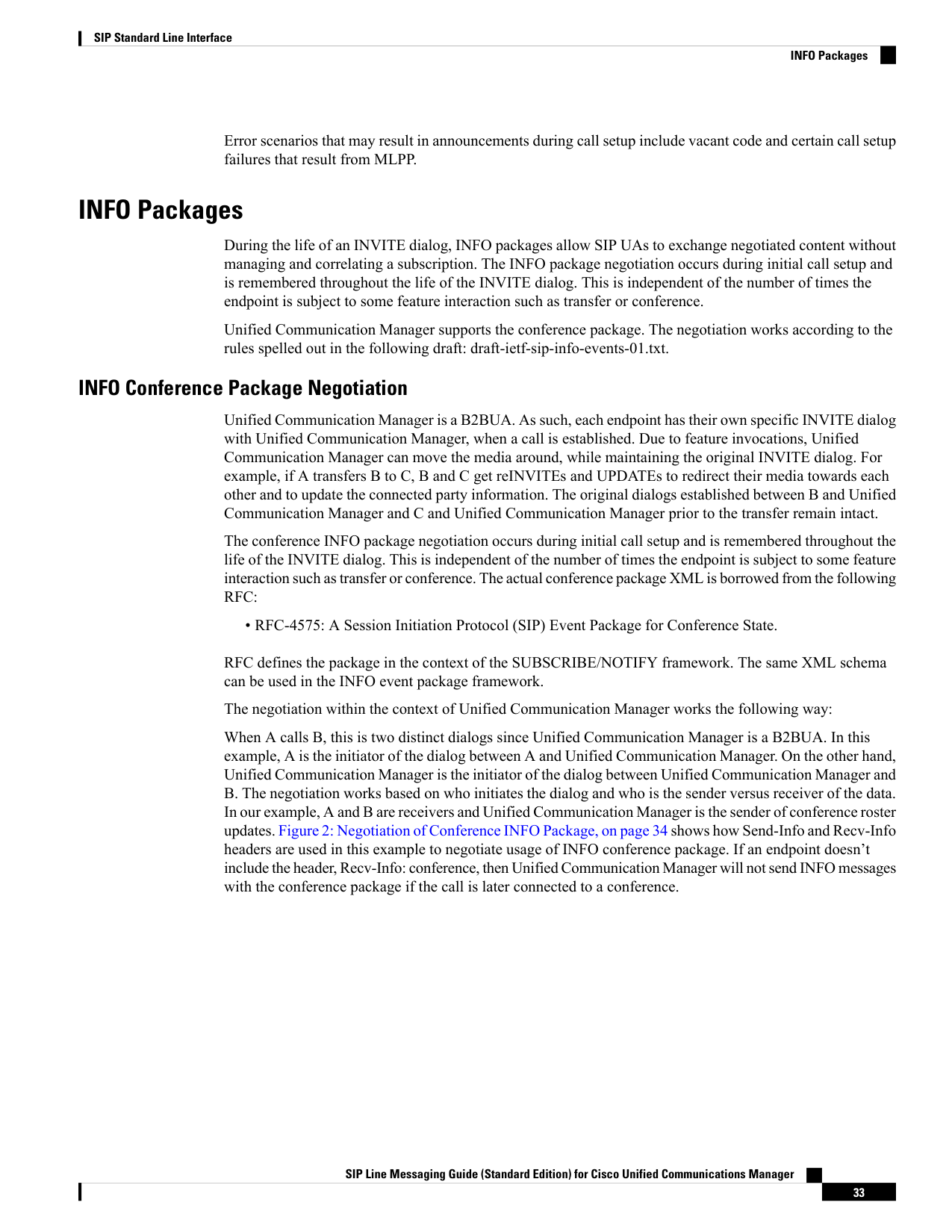
B. The negotiation works based on who initiates the dialog and who is the sender versus receiver of the data.
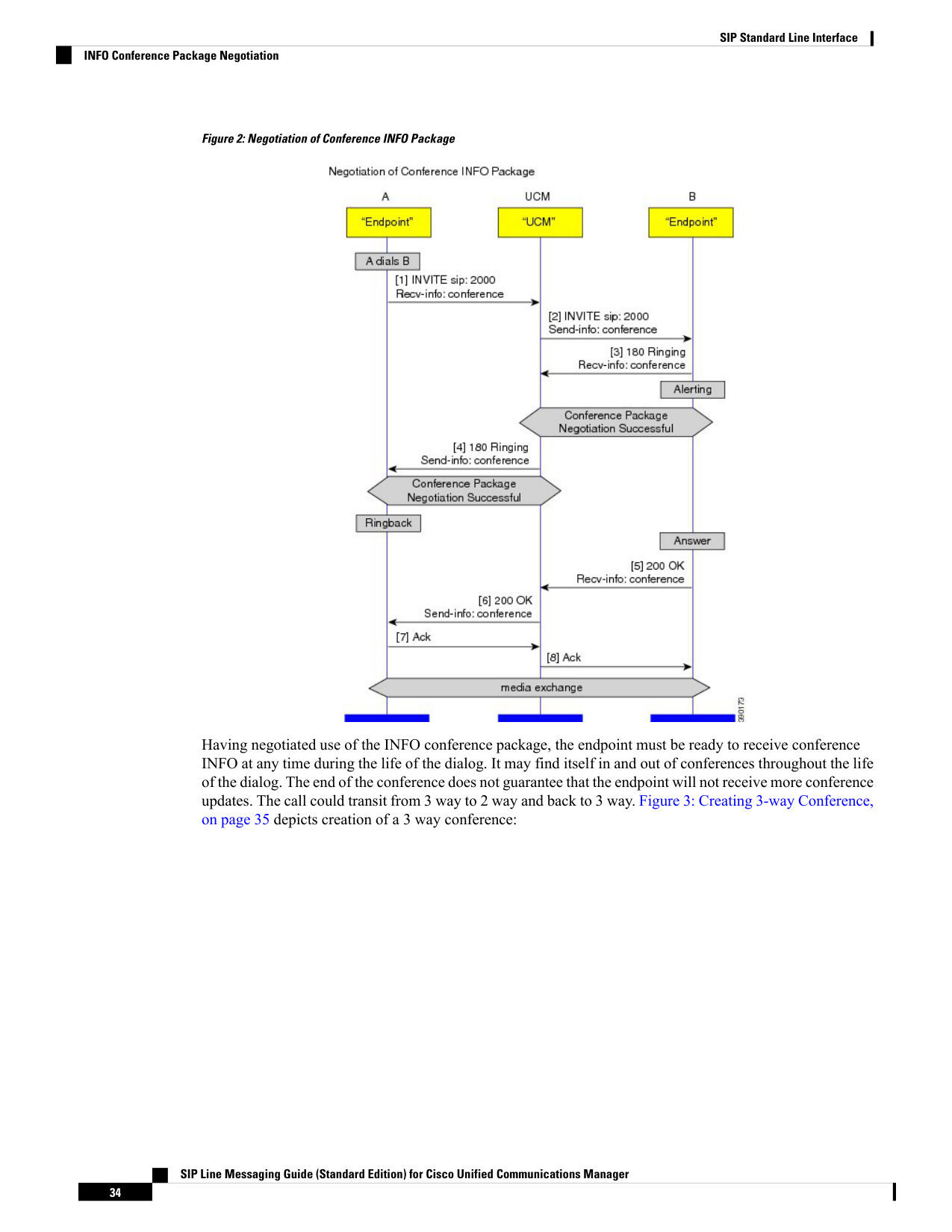
In our example, A and B are receivers and Unified Communication Manager is the sender of conference roster
updates. Figure 2: Negotiation of Conference INFO Package, on page 34 shows how Send-Info and Recv-Info
headers are used in this example to negotiate usage of INFO conference package. If an endpoint doesn’t
include the header, Recv-Info: conference, then Unified Communication Manager will not send INFO messages
with the conference package if the call is later connected to a conference.
SIP Line Messaging Guide (Standard Edition) for Cisco Unified Communications Manager
33
SIP Standard Line Interface
INFO Packages
Page 38
Figure 2: Negotiation of Conference INFO Package
Having negotiated use of the INFO conference package, the endpoint must be ready to receive conference
INFO at any time during the life of the dialog. It may find itself in and out of conferences throughout the life
of the dialog. The end of the conference does not guarantee that the endpoint will not receive more conference
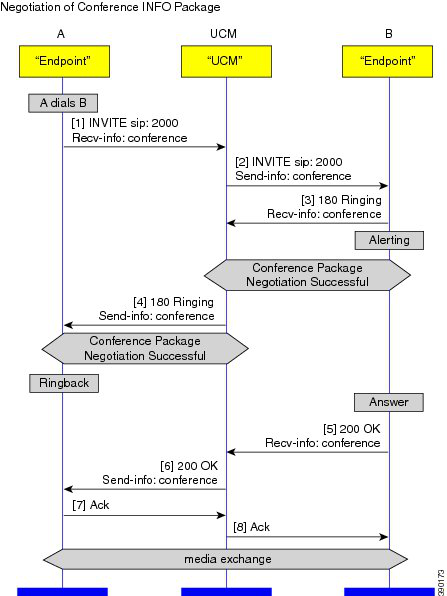
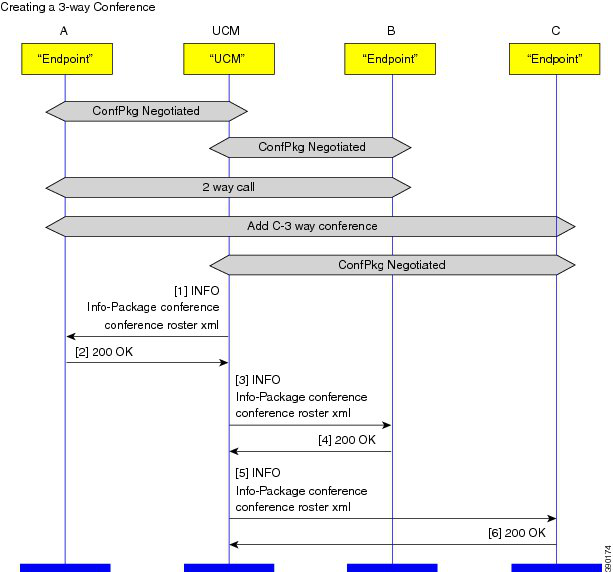
updates. The call could transit from 3 way to 2 way and back to 3 way. Figure 3: Creating 3-way Conference,
on page 35 depicts creation of a 3 way conference:
SIP Line Messaging Guide (Standard Edition) for Cisco Unified Communications Manager
34
SIP Standard Line Interface
INFO Conference Package Negotiation
Page 39
Figure 3: Creating 3-way Conference
G.Clear Calls
Unified Communications Manager supports voice and video calls. It also establishes a media session between
two registered SIP endpoints using the G.Clear codec. A G.Clear media session uses RTP to establish a 64kbps
transparent data channel between two devices. This allows data streams generated by ISDN terminals to be
transparently being carried via an IP network. Refer to RFC 4040 for more details.
Unified CM supports the following:
1.
G.Clear codec (RFC 4040) handling in SIP signaling and codec negotiation.
2.
Including SDP in the outgoing INVITE from Unified CM for G.Clear calls without requiring an MTP.
Example SDP for G.Clear Call
SIP endpoints capable of initiating a G.Clear calls sends the indication by using the G.Clear codec in the
m=audio line of the INVITE SDP.
SIP Line Messaging Guide (Standard Edition) for Cisco Unified Communications Manager
35
SIP Standard Line Interface
G.Clear Calls
Page 40
Only third-party SIP devices can initiate a G.Clear call with Unified Communication Manager.
Note
Example of SDP having a G.Clear codec:
v=0
o=XYZ 317625 317625 IN IP4 172.18.199.61
s=XYZ
c=IN IP4 172.18.199.61
t=0 0
m=audio 30002 RTP/AVP 125
a=rtpmap:125 CLEARMODE/8000
a=ptime:20
Unified Communications Manager also support other rtpmap attributes in addition to the CLEARMODE. It
can identify X-CCD, CCD and G.nX64 rtpmap attributes as G.Clear codec in incoming SDPs. Unified CM
supports sending one of these values - CLEARMODE, X-CCD, CCD, and G.nX64 in rtpmap attribute of the
outgoing SDP. This is based on Unified CM configuration. For example, Unified CM must be configured to
send this attribute line for a G.Clear codec in outgoing SDPL:
a=rtpmap:125 X-CCD/8000
Early Offer Support for G.Clear Calls
Unified Communications Manager will route the call based on the called number in the INVITE request-uri
to another SIP endpoint or over SIP trunk. Unified CM includes the offer SDP in the outgoing INVITE for
G.Clear calls, which is configurable. The SDP included in outgoing INVITE is received from the incoming
SIP call leg. Therefore, Unified CM supports sending offer SDP in outgoing INVITE without requiring an
MTP, only for G.Clear calls. Unified CM Voice calls will still require the 'MTP Required' check box to be
enabled to include SDP for voice calls.
BFCP
Release 8.6(1) of Unified Communications Manager adds support for negotiation of the Binary Floor Control
Protocol (BFCP) between SIP Line and SIP Trunk devices participating in calls that include a presentation
sharing session. Presentation sharing is the ability to send a second video stream such as a PowerPoint slide
presentation in addition to the main video stream. BFCP enables this functionality.
SIP Line Messaging Guide (Standard Edition) for Cisco Unified Communications Manager
36
SIP Standard Line Interface
Early Offer Support for G.Clear Calls

Page 41
A sample use case scenario consists of two users in a video call via their Cisco EX90 phones. Each user has
the video output of their laptop computer connected to their respective EX90 via HDMI or DVI. During the
call, user A on his EX90 decides to share his laptop video with user B. User A presses the "Present" button
on the EX90. The EX90s and Unified CM would utilize SIP and BFCP protocols to enable User B to see User
A's main video along with the User A's laptop video.
BFCP is an SDP-only feature and does not entail any signaling related changes.
BFCP is enabled by default for all Cisco TelePresence endpoints.
As of Release 9.0(1), other Cisco endpoints that support BFCP can enable the feature in Unified
Communications Manager by advertising BFCP capability to Unified CM in the SIP REGISTER message as
follows:
<optionsind>
<bfcp></bfcp>
</optionsind>
Third-party endpoints that register to Unified Communications Manager can enable features in the Phone
Configuration window of the Cisco Unified CM Administration user interface.
Multilevel Precedence and Preemption Using Resource Priority
Unified Communications Manager supports Multilevel Precedence and Preemption (MLPP) for both Cisco
and third-party endpoints, based on the configured device type. Unified CM only supports MLPP for certain
models. The Resource Priority header communicates precedence information between the Unified CM and
the endpoint. The Unified CM implementation of Resource Priority is compliant with DISA Unified Capabilities
Requirements, which go beyond the RFC 4412 standards, particularly with regard to the treatment of the
namespace. While RFC 4412 gives no special significance to the presence of a dash in the namespace, the
UCR reserves the dash for tokenizing a namespace into network domain and precedence domain. The Unified
CM allows the use of the dash in the namespace and determines whether it is simply a part of the namespace
or a token delimiter based on whether it is configured as part of the network domain on Unified CM.
The preemption function of MLPP is handled by the endpoint, not by the Unified CM. Unified CM overrides
the normal busy trigger when MLPP is enabled to present a precedence call to the endpoint.
Configurable Non-Preemptable Numbers
Configurable Non-Preemptable numbers affect the preemption behavior of the SIP endpoints. If the feature
is enabled at the service parameter level, and the SIP endpoint had more than one call on the phone, then the
Unified Communications Manager will not present the subsequent incoming call to the SIP phone as the phone
does not implement the Non-Preemptable numbers feature. Hence, to prevent the phone from preempting a
Non-Preemptable number, Unified Communications Manager rejects the incoming call to the phone which
is higher than the busy trigger. For example, if the busy trigger is 2, then Unified Communications Manager
will reject the third call.
Outgoing Identity and Incoming CLI for SIP Calls
The Outgoing Identity and Incoming CLI for SIP calls feature provides the ability to enhance the identity
selection, presentation, and restriction on SIP Interfaces. These capabilities are offered via additional
configuration fields that you can use for presentation (Identity headers and From headers) on SIP Trunk and
on SIP profiles for controlling corresponding SIP phones.
SIP Line Messaging Guide (Standard Edition) for Cisco Unified Communications Manager
37
SIP Standard Line Interface
Multilevel Precedence and Preemption Using Resource Priority
Page 42
There are two sets of identities: network provided identity (trusted) and user provided identity (untrusted). In
terms of SIP calls, Identity headers including P-Asserted-Identity (PAI), P-Preferred-Identity (PPI), and
Remote-Party-ID (RPID) should carry network proven identity while From header carries user/caller provided
identity.
Previously, Unified CM only provides a single set of identity for outgoing calls. Therefore, the identities in
Identity headers and From header are the same and there is no differentiation between network provided
identity and user provided identity. Typically, administrators configure each user device with a Directory
Number (DN) and a display name. An outgoing call from this DN carries its directory number and display
name in both the Identity headers and From header.
The administrator can also configure another identity on a SIP trunk. You can use this identity, sometimes
termed as a switchboard, to hide each individual caller's identity. You can configure it on the Caller Information
section of a SIP Trunk for outbound calls. The configuration includes two fields, Caller ID DN and Caller
Name. For example, all calls originating from a SIP Trunk carry the same identify, Caller Name with "Cisco
Systems" and "(800) 555-1234" for the Caller ID DN. However, the caller's original directory number and
display name will be overwritten when you enable such configurations.
With this new feature, however, Unified CM provides configurations where the administrator can enable both
sets of identifications, switchboard identity and original caller identity. Switchboard identity will be carried
in the From header and original caller identity will be carried in the Identity headers. You can enable this
configuration for each SIP Trunk or SIP device.
For incoming calls, Unified CM provides configurations to accept network provided identity carried in Identity
headers or user provided identity carried in the From header. Unified CM maintains only a single set of
identities per call.
URI Dialing
The URI Dialing feature gives Unified Communications Manager the ability to route an alphanumeric URI,
such as bob@cisco.com, and allows the delivery of both URI and DN in identity headers for endpoints that
supports both.
The following use case shows a URI intra-cluster call and presumes that blended delivery is enabled and the
phones can consume.
1.
Phone A dials bob@cisco.com. Unified CM discovers blended info, for calling and called parties
1000/bob@cisco.com, 2000/alice@cisco.com.
2.
Unified CM extends INVITE to Phone B. Since phone B is configured to consume blended identity info,
the RPID contains blended.
3.
Phone extends Alerting, RPID from phone is ignored. Unified CM will re-blend with 1000/bob@cisco.com.
4.
Unified CM extends 180 Ringing to phone A. Since phone A is configured to consume blended identity
info, the RPID contains blended.
SIP Line Messaging Guide (Standard Edition) for Cisco Unified Communications Manager
38
SIP Standard Line Interface
URI Dialing
Page 43
Anonymous Call Rejection for a Directory Number
The Anonymous Call Rejection for a Directory Number feature allows the administrator to block anonymous
calls for a particular Directory Number. This feature enables the administrator to have a granular control on
allowing or disallowing anonymous callers from reaching a particular Directory Number.
If the caller's DN is either not present or caller's DN is private and will not be displayed to the called party -
then the call is from an anonymous caller.
Anonymous calls in SIP are identified based on the criteria described in RFC 5079. Based on RFC 5079, calls
are identified to be anonymous when incoming initial INVITE has:
• From or PAI/PPI header with display-name "Anonymous"
• From header host-portion = anonymous.invalid
• Privacy: id or Privacy: user or Privacy: header [associated with PAI/PPI]
• Remote-Party-ID header has a display-name "Anonymous"
• Remote-Party-ID header has privacy=uri/name/full
SIP Line Messaging Guide (Standard Edition) for Cisco Unified Communications Manager
39
SIP Standard Line Interface
Anonymous Call Rejection for a Directory Number
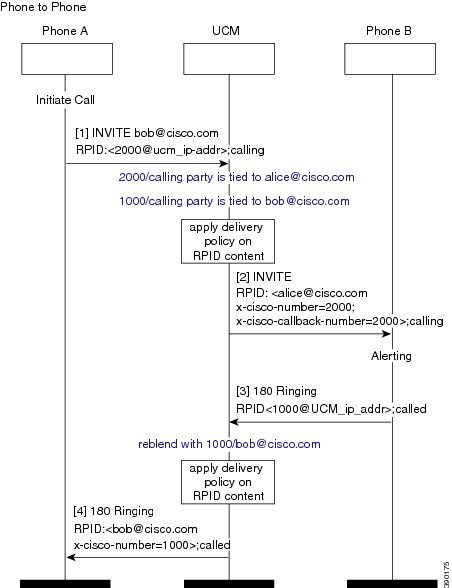
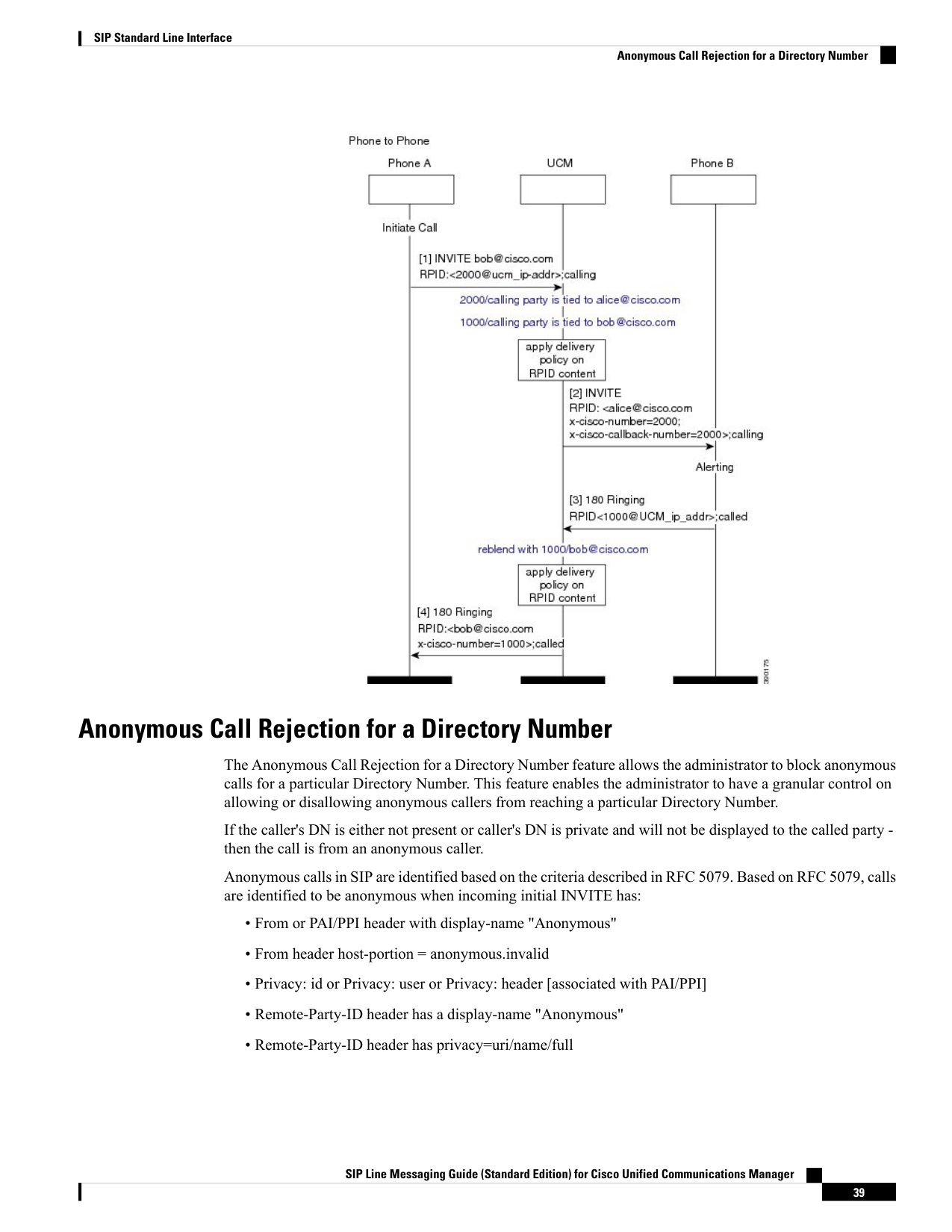
Page 44
If the incoming anonymous call arrives from a SIP device such as a phone or trunk, Unified CM rejects the
call with SIP response 433 Anonymity Disallowed. The 433 response will also carry a Reason header with
Q.850 cause value 21 (call rejected).
The following example shows a SIP 433 response sent to the anonymous caller.
SIP/2.0 433 Anonymity Disallowed
Via: SIP/2.0/TLS 172.18.199.91:50486;branch=z9hG4bK3584db90
From: "Connected6005" sip:6005@10.81.54.224;tag=f0257279babd003850ae8c99-11653498
To: sip:\*@10.81.54.224;tag=32638~078d0a52-bf48-420d-b77b-7737bebdf89b-18845479
Date: Mon, 11 Jun 2012 16:39:40 GMT
Call-ID: f0257279-babd0004-0c6a0894-727311e0@172.18.199.91
CSeq: 101 INVITE
Allow-Events: presence
Reason: Q.850; cause=21
Content-Length: 0
For other protocols, calling leg gets rejected with Q.850 cause = 21 (call rejected).
SDP Transparency for Declarative Attributes
This feature allows the administrator to specify declarative SDP attributes that are not natively supported to
be passed from the ingress call leg to the egress call leg. The administrator also has the option of configuring
all unrecognized attributes to the egress leg. If the Unified Communications Manager is not configured to
pass all unrecognized attributes transparently and it receives attributes that are not explicitly identified by the
administrator to send to the egress leg, then the Unified Communications Manager will drop the attribute from
the outgoing SDP similar to previous releases of Unified Communications Manager.
Note that for the purposes of identifying which attributes are passed to the egress leg, comparisons are both
case sensitive and white space is considered.
The administrator is allowed to identify attributes that will be sent to the egress leg in multiple ways. In
addition to passing all unrecognized attributes, he or she has the option to choose to specify all property
attributes with a particular name, all value attributes with a particular name, or all value attributes with a
specific name and specific value. The configuration is done at the level of the SIP Profile by associating an
SDP Transparency Profile specifying which attributes should be passed transparently or picking the
pre-configured SDP Transparency Profile named "Pass all unknown SDP attributes" to indicate all unrecognized
SIP Line Messaging Guide (Standard Edition) for Cisco Unified Communications Manager
40
SIP Standard Line Interface
SDP Transparency for Declarative Attributes
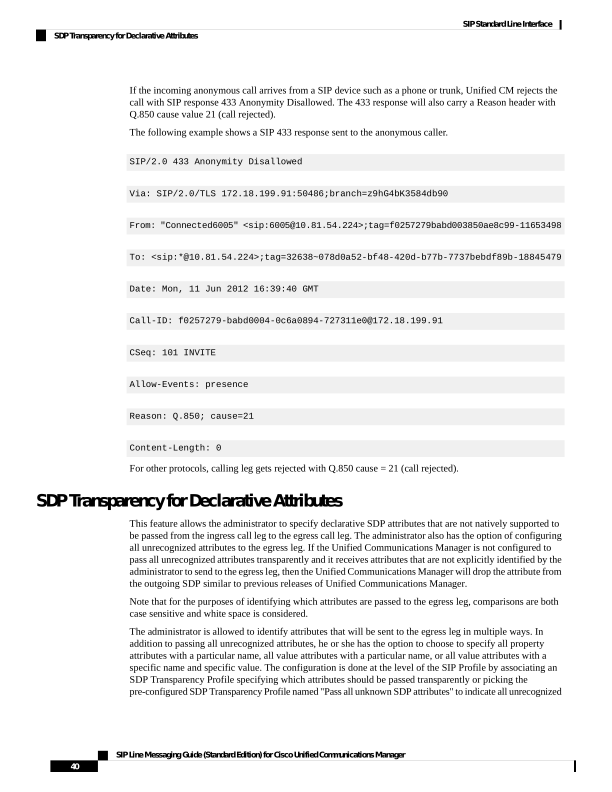
Page 45
declarative attributes need to be passed to the egress leg. The configuration for this feature on the SIP Profile
applies all registered SIP endpoints and SIP trunks using that SIP Profile. Note that a reset of all devices using
this SIP Profile is needed for any changes to take affect.
There are exceptions, however, for when the feature will take effect. The feature does not apply to the following
situations:
• One or more of the following apply on the egress leg:
• One or more Media Termination Points (MTPs) that does not support pass through has been allocated
• One or more Trusted Relay Points (TRPs) that does not support pass through has been allocated
• The use of the RSVP feature
• The use of a transcoder
• “Media Termination Point Required” is selected
• The ingress call leg is using Delayed Offer while the egress call leg is using Early Offer
• The media line has been rejected (the port is set to 0). Note that in this situation, it may be possible to
see certain attributes in the media line. Any attribute on a rejected media line should be ignored and
solutions must not rely on this feature to send attributes on rejected media lines. Doing so is strictly not
supported.
• Either call leg uses any protocol other than SIP
This feature supports the passing of attributes that follow the grammar prescribed in RFC 4566. Any attribute
that deviates from this grammar is not guaranteed to pass correctly. However, best effort is made to pass the
attribute in these situations.
Unified Communications Manager Version in User-Agent and Server Headers
This feature adds a new field to the common section of the SIP profile called "Version in User Agent and
Server Header". There are 5 possible values and each specifies a portion of the installed build version that
will be used as the value of these headers in SIP requests.
Previously, Unified Communications Manager always used a value representing the major and minor version
(for example "Cisco-CUCM9.0") as the User-Agent value in outgoing SIP requests. The Server header was
not previously sent in SIP responses, except as part of the feature for passthrough of User-Agent and Server
headers.
When the passthrough feature is not in use (for example if the value of the SIP profile parameter "User-Agent
and Server header information" is "Send Unified CM Version Information as User-Agent Header"), this feature
will populate the User-Agent and Server headers as specified in the following table, given an example build
version of "10.0.1.98000-19".
Example string value in the User-Agent and Server
header
Value specified for SIP profile parameter "Version in
User Agent and Server Header"
Cisco-CUCM10.0
Major and Minor
Cisco-CUCM10
Major
Cisco-CUCM10.0.1
Major, Minor And Revision
SIP Line Messaging Guide (Standard Edition) for Cisco Unified Communications Manager
41
SIP Standard Line Interface
Unified Communications Manager Version in User-Agent and Server Headers
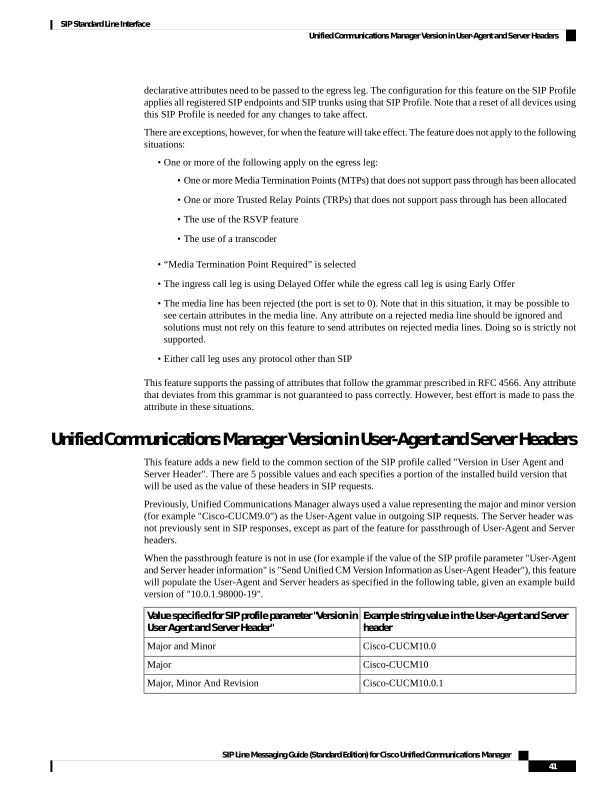
Page 46
Example string value in the User-Agent and Server
header
Value specified for SIP profile parameter "Version in
User Agent and Server Header"
Cisco-CUCM10.0.1.98000-19
Full Build
Header will be omitted
None
The value “Major and Minor” matches the current behavior and is the default value.
CTI Video
You can advertise video capabilities of SIP endpoints to CTI applications after successful registration. When
the video capabilities of the endpoints are known, CTI applications can take into account the video capability
of the calling and called endpoint during call routing. Unified Communications Manager will also notify the
CTI application with the setup and tear-down of video streams during a call session.
To support this feature, SIP video endpoints are required to report additional feature tags to indicate video
capabilities in the SIP REGISTER message. When the endpoint refreshes its registration, it must continue to
include these feature tags - to keep these capabilities active in Unified Communications Manager and CTI
application. Absence of these tags in a subsequent registration implies this capability is no longer available.
The following table indicates the fields that endpoints should send in the Contact header of a SIP REGISTER
message.
Comment
SIP REGISTER Contact Header
Parameter Name
Capability
Defined in RFC 3840
If "video" parameter is present in
Contact header, it indicates that the
device is video capable.
The absence of this parameter
indicates that the video is not
enabled on the device or device is
not video capable.
video
Video capable
If this parameter is not present,
Unified Communications Manager
will report unknown.
x-cisco-multiple-screen=<n> where
<n> is number of screens.
Number of screen
Presence indicates support for
Telepresence Interoperability
Protocol (TIP).
Absence of this tag implies that the
device does not support TIP.
x-cisco-tip
Tele-presence Interoperability
Examples of Contact in SIP REGISTER
Device is video capable. TIP is not supported. Number
of screen is reported as unknown.
Contact: sip:1234@10.1.1.1;…;video
SIP Line Messaging Guide (Standard Edition) for Cisco Unified Communications Manager
42
SIP Standard Line Interface
CTI Video
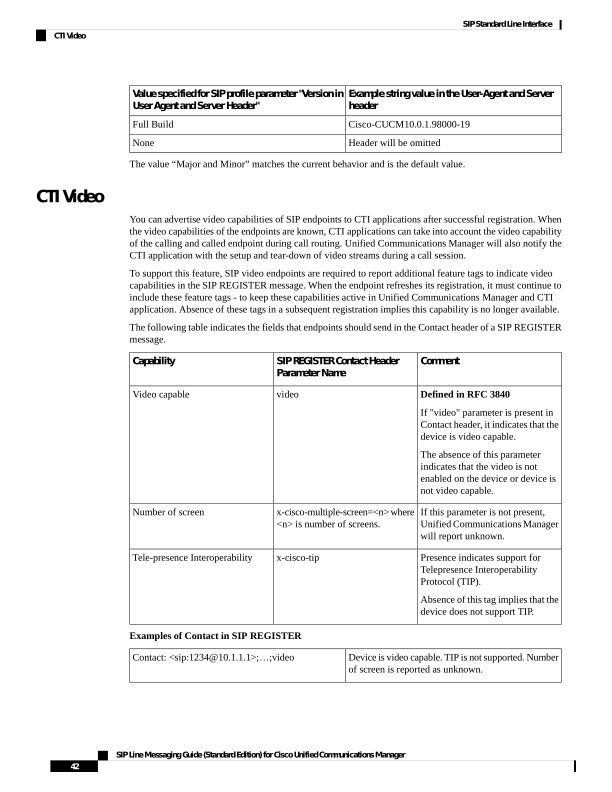
Page 47
Device is video and TIP capable. Device supports
three screens.
Contact:
sip:1234@10.1.1.1;…;video;x-cisco-multiple-screen=3;x-cisco-tip
The system will also monitor the SDP exchange involved in offer-answer with the video endpoints. When a
video stream is established, Unified Communications Manager informs CTI applications about the stream
such as IP address, port, codec, content-type (main/presentation), and maximum bit rate of the video stream.
Similarly, when the video stream is broken down, Unified Communications Manager indicates that to the CTI
application. This allows CTI applications to monitor the active video streams for a particular call.
iX Channel Support
IX provides a simple, reliable, and secure channel that multiple application layer protocols can be multiplexed
over. The transport used for the IX channel is UDP. To provide a reliable channel, IX utilizes UDT over UDP.
The IX channel can be negotiated and set up using the Session Description Protocol (SDP) and the Offer/Answer
model. The IX channel extends SDP to support new attributes mapping the protocols to be multiplexed.
IX support applies strictly to SIP devices. Both SIP Trunk and SIP Line interfaces are fully supported.
Sample IX application mline in SDP
m=application 12345 UDP/UDT/IX *
b=as:64
a=ixmap:1 XCCP
a=ixmap:2 MSCP
a=connection:new
a=setup:actpass
IX is not yet a public standard or draft. It’s currently supported by Cisco devices. Both sides of a call have to
support IX for IX to be negotiated and work. Unified Communications Manager does not terminate the IX
protocol.
For IX to work, all SIP Interfaces for the call must have IX enabled or support IX. IX capable Cisco endpoints
indicate IX capability during registration, using a new optionsInd tag, <ix>, in the REGISTER message. If
Unified CM is also iX capable, it will add the <ix> tag in optionsInd in the 200OK response message.
If IX cannot be negotiated, for example, when one side doesn’t support IX, the IX application media line is
rejected and the port number is set to 0.
m=application 0 UDP/UDT/IX *
< ---- Inactive channel
a=setup:actpass
a=ixmap:0 ping
a=ixmap:2 xccp
a=ixmap:3 rmultisitectrl
isFocus Support
With the help of new implementation, any line device which is capable of local mixing should send an 'isfocus'
parameter in the Contact header so the MOH will be suppressed when one of the participants puts the call on
hold during a conference.
Configurable NonPreemptable Numbers
In Release 10.0 the new feature, Configurable NonPreemptable Numbers is introduced which affects the
preemption behavior of the SIP endpoints. If the feature is enabled at the service parameter level, and the SIP
endpoint had more than one call on the phone, then the Unified Communications Manager does not present
SIP Line Messaging Guide (Standard Edition) for Cisco Unified Communications Manager
43
SIP Standard Line Interface
iX Channel Support
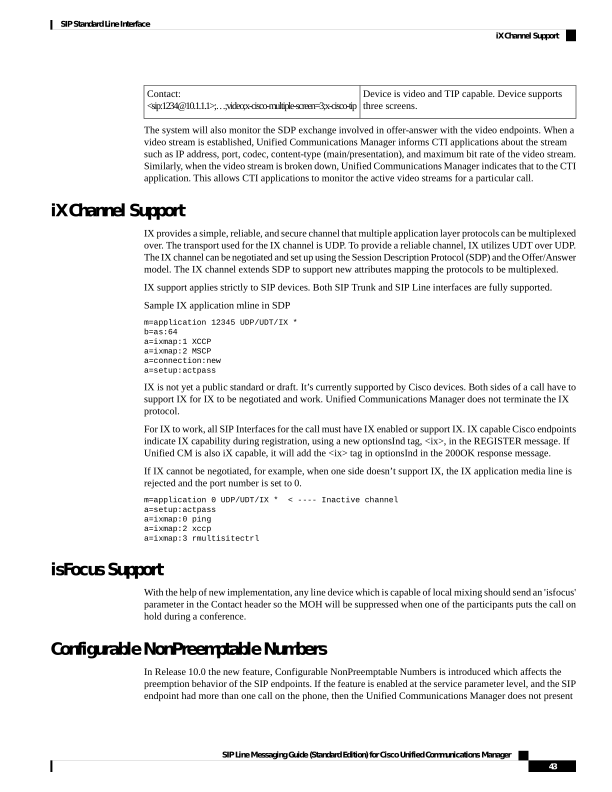
Page 48
the subsequent incoming call to the SIP phone as the phone does not implement NonPreemptable numbers
feature. In order to prevent the phone from preempting a NonPreemptable number, Unified Communications
Manager rejects the incoming call to the phone which is higher than the busy trigger. For example, if the busy
trigger is 2, then Unified Communications Manager rejects the 3rd call.
SIP BPA/488 Error Handling
The purpose of this feature is to include a warning header “370 Insufficient Bandwidth” in the 488 Error
messages for the following scenarios:
• If the Unified Communications Manager receives an inbound precedence call request (for example, with
precedence level PRIORITY or above) over the IP network for a served endpoint and the Unified
Communications Manager has insufficient bandwidth-related resources (due to call count threshold) to
handle the call request, and if there are insufficient existing calls (and/or call requests) of lower precedence
where their removal would provide the necessary resources to support the pending call request, then the
Unified Communications Manager must reply with a 488 (Not Acceptable Here) response code and must
include a Warning header with warning code 370 (Insufficient Bandwidth), and BPA blocked precedence
announcement to be played and/or displayed to the user through the calling IP EI.
• For an outgoing call when the Unified Communications Manager receives an outbound precedence call
request from a served IP endpoint and there are insufficient resources to support the outbound precedence
call request (for example bandwidth restriction), the Unified Communications Manager must compare
the precedence level of the new precedence call request with the precedence levels of the existing calls
and/or call requests to determine whether there are sufficient resources of lesser precedence that can be
preempted to accommodate the new precedence call request. This comparison can only occur for calls
and call requests having the same value for the precedence-domain subfield in the namespace of the
Resource-Priority header field.
Sample Message
SIP/2.0 488 Not Acceptable Media
Via: SIP/2.0/TCP 10.77.46.84:5064;branch=z9hG4bKd47639f069
From: sip:7654@10.77.46.84;tag=1657~c86d348c-200d-4847-ba87-837e294a0ef2-23831059
To: sip:4444@10.77.46.93;tag=1014~785d648c-40a2-4556-b74c-cd3d2402bb56-23829943
Date: Tue, 09 Jul 2013 16:50:09 GMT
Call-ID: 9c10fc00-1dc13f41-60-542e4d0a@10.77.46.84
CSeq: 101 INVITE
Allow-Events: presence
Server: Cisco-CUCM10.0
Warning: 370 10.77.46.93 "Insufficient Bandwidth"
Remote-Party-ID: sip:4444@10.77.46.93;user=phone;party=x-cisco-original-called;privacy=off
Content-Length: 0
Non-SRTP Call Block
All the SIP endpoints (both line and trunk) should not allow any non-secure call to establish if the service
parameter "Block Unencrypted Calls" is set to true. Therefore, for any originating/terminating SIP Line device,
if the above service parameter is set to true and the device is non-secure, then the call is blocked and is not
allowed to proceed further.
SIP Line Messaging Guide (Standard Edition) for Cisco Unified Communications Manager
44
SIP Standard Line Interface
SIP BPA/488 Error Handling
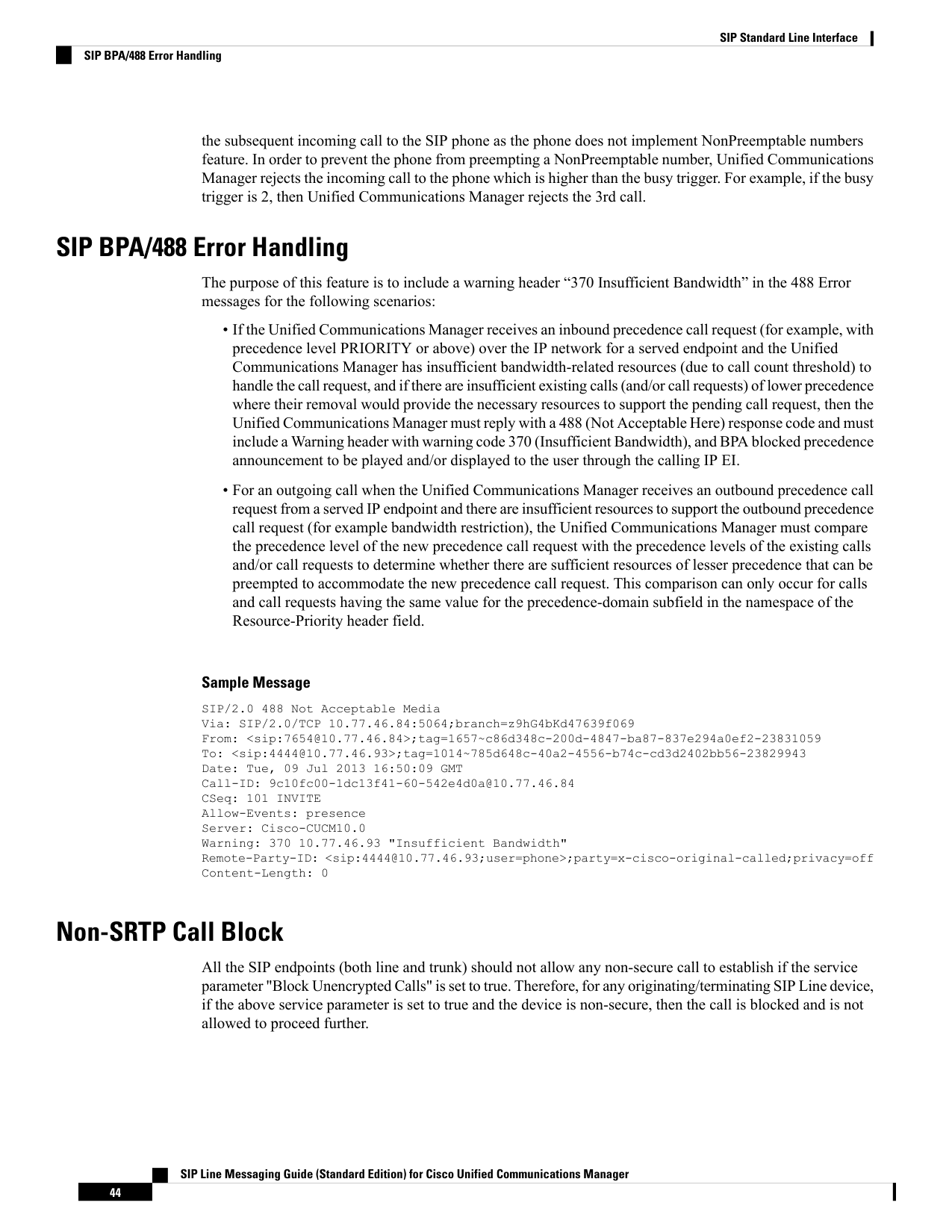
Page 49
Multiple Codecs in Answer
When a call is routed through Unified Communications Manager, Unified Communications Manager takes
the role of selecting a single audio and video codec for the call based on the CAC policy and the codec
preference configured in Unified Communications Manager. Therefore, the endpoint can only communicate
with the codec specified by Unified Communications Manager. This logic applies to audio and video codec.
However, there are endpoints that can support receiving more than one codec within a media channel. Simulcast
is one of the applications that can transmit more than one encoded data within an established channel. In order
to support such usage, Unified Communications Manager 10.0 release has introduced Multiple Codec in
Answer SDP to support this function that Unified Communications Manager will not narrow down to a single
codec during negotiation when both parties are capable of handling more than one codec in the SIP answer
message. Instead, Unified Communications Manager sends a common set of codecs in the SIP answer message
provided the codec offered by the endpoints does not exceed the inter-region bandwidth policies. This feature
only applies to endpoints that indicate the support of Multiple Codec in Answer and they have to be homogenous
SIP protocol call. The rest of the call scenarios remain to be single codec negotiation as Unified Communications
Manager does today.
When Unified Communications Manager allows multiple codec to be negotiated, the endpoint can decide
which codec to be transmitted and be prepared to receive any codec being offered. The endpoint may choose
to transmit more than one media codec depending on the application. Unified Communications Manager will
not know which codec has been transmitted inside the RTP channels by the call devices.
Unified Communications Manager recognizes the SIP endpoint supporting multiple codecs in answer in
several ways:
• SIP line device configuration: SIP endpoints, such as Cisco TelePresence EX90, registering to Unified
Communications Manager indicates the support of multiple codecs in the answer SDP through
configuration.
• SIP contact header URI: The endpoint can specify “+multiple-codecs-in-ans” in the Contact header
line of the SIP message to indicate the support of multiple codecs negotiation. It is noted that Unified
Communications Manager recognizes the tag in the incoming SIP “offer” message only, not in the
“answer” message.
Contact:sip:84626@172.27.31.84:5060;transport=tcp;video;audio;+multiple-codecs-in-ans>
• SIP trunk configuration: In the SIP profile page, under Trunk Specific Configuration, the "Allow
multiple codecs in answer SDP" check box was introduced in the SDP Information section. Any endpoint
behind a SIP Trunk (that has this check box enabled and SIP Profile assigned) is considered to be able
to handle multiple codecs in the SDP answer message. It is noted that Unified Communications Manager
still considers that SIP endpoint supports multiple codecs in the answer SDP, if the incoming offer
message containing contact header URI as indicated above though this configuration check box is
unchecked.
• Multiple Codecs Specified in SIP answer Signals: When Unified Communications Manager offers an
SIP endpoint with SDP and the endpoint respond with multiple codecs in answer signals, Unified
Communications Manager considers that the endpoint is capable of negotiating multiple codec in the
answer. This applies to both sip trunk and sip line device regardless if they have hinted the support of
multiple codec negotiations by any means discussed above. This operation is performed in the media
layer.
SIP Line Messaging Guide (Standard Edition) for Cisco Unified Communications Manager
45
SIP Standard Line Interface
Multiple Codecs in Answer
Page 50
Confidential Access Level
Confidential Access Level (CAL) is a Department of Defence feature. Confidential Access Level controls
which calls can be completed and persistently displays information on the phone that conveys additional
information about the call.
SIP Phones 9971, 9951, and 8961 support the Confidential Access Level feature.
In a CAL enabled system, every device, line, and trunk has a configured CAL value, which is a numeric value
within the range of 0-99.
Confidential Access Level has two modes:
• Fixed mode:
• Emphasizes the CAL level over call completion.
• The calculation is done at each hop: an incoming CAL is resolved against the outgoing CAL.
• The resolved CAL must match the CAL of whichever party is in Fixed mode, which could be one
or both parties of the call.
• Variable mode:
• Emphasizes call completion over CAL level.
• The calculation is done at each hop: an incoming CAL is resolved against the outgoing CAL.
• The numeric value may change as the call moves through the voice network. As long as it resolves
to a value, the call is allowed to proceed to next hop.
The Enterprise Parameter to enable or disable the Confidential Access Level feature is 'Confidential Access
Level (CAL) Enforcement’.
Confidential-Access-Level SIP Header is a new SIP header used to negotiate CAL between AS-SIP enabled
Call Agents.
Syntax:
Confidential-Access-Level = “Confidential-Access-Level”
HCOLON local-access-level SEMI reflected-access-level [SEMI access-display]
local-access-level = (access-level SEMI access-mode)
reflected-access-level = (“ref” EQUAL access-level SEMI reflected-mode)
access-level = (1*2DIGIT ; 0 to 99)
access-mode = (“mode” EQUAL mode-param)
reflected-mode = (“rmode” EQUAL mode-param)
mode-param = (fixed / variable)
access-display = (1*16display-text)
display-text = (ALPHA/SP/”/”/”-”)
The Enterprise Parameter displays the display-text present in CAL header and Enterprise Parameter does not
generate the CAL header in any message.
CAL in initial INVITE:
Confidential-Access-Level: 4;mode=variable;ref=0;rmode=fixed;PENDING
CAL in 200 OK to INVITE:
SIP Line Messaging Guide (Standard Edition) for Cisco Unified Communications Manager
46
SIP Standard Line Interface
Confidential Access Level
Page 51
Confidential-Access-Level: 4;mode=variable;ref=4,rmode=variable;EXTERNAL
418 Incompatible CAL message:
When an AS-SIP signaling appliance (i.e., LSC or SS) in the signaling path between parties receives
an initial INVITE with a CAL header that the AS-SIP signaling appliance cannot successfully resolve
against the locally configured value of the next hop routing domain, CAL Header Processing, then
the AS-SIP signaling appliance respond with a 418 Incompatible CAL.
CAL causes Additional Headers to be included in INVITE messages. Some SIP entities may not
support it. So there are parameters to control the inclusion on CAL header using SIP profile. The
parameter ‘Confidential Access Level Headers’ in sip profile takes three values ‘Disabled’, ‘Preferred’,
and ‘Required’.
These options would do the following:
• Disabled—would not send any CAL headers.
• Preferred—would include the CAL header in INVITE message and put the
"confidential-access-level" tag in a Supported header.
• Required—would include the CAL header in INVITE message and put the
"confidential-access-level" tag in Require and Proxy-Require headers.
The CAL header is populated in INVITE, 180 Ringing, 200 OK, and UPDATE messages.
AES 256 GCM Support for SRTP and TLS
With release 10.5(2), AES 256 Galois/Counter Mode crypto cipher suite support has been added for both
SRTP and TLS.
AES 256 GCM Support for SRTP
Cisco Unified Communications Manager now supports the following SRTP crypto cipher suites:
• AEAD_AES_256_GCM (32-byte key)
• AEAD_AES_128_GCM (16-byte key)
When a SIP line advertises one of the two GCM crypto cipher suites, Cisco Unified Communications Manager
can negotiate these ciphers based on the cipher preference set by the SIP Line endpoint and the existing cipher
negotiation rules. Cisco Unified Communications Manger gives preference to the GCM cipher over a SHA1
cipher, due to higher security, in the event there is a tie.
In addition, a new enterprise parameter, SRTP Ciphers, has been added to determine which crypto cipher
suites Cisco Unified Communications Manager allows endpoints to use for SRTP. By default, Cisco Unified
Communications Manager allows all ciphers, including AES 256 GCM and AES 128 GCM, to be used.
However, you can reconfigure the SRTP Ciphers enterprise parameter so that Cisco Unified Communications
Manager accepts only an AES 128 SHA cipher and rejects attempts to use either the AES 256 GCM or AES
128 GCM cipher.
Following is the sample crypto attribute line that gets appended for each media line in the SDP message:
a=crypto:1 AEAD_AES_256_GCM
inline:iZLP7bds308s27xmZZ7fMwycIO2FRhnnk/Br1Q/d1zYNd30YIIF9FkGUn3c=
a=crypto:2 AEAD_AES_128_GCM inline:sExqh5iE+ILVuHiQVTuKoDrHCFVWjdv9EXnMcQ==
SIP Line Messaging Guide (Standard Edition) for Cisco Unified Communications Manager
47
SIP Standard Line Interface
AES 256 GCM Support for SRTP and TLS
Page 52
AES 256 GCM Support for TLS 1.2
Cisco Unified Communications Manager now supports the following TLS 1.2 crypto cipher suites:
• TLS_ECDHE_RSA_WITH_AES_256_GCM_SHA384
• TLS_ECDHE_RSA_WITH_AES_128_GCM_SHA256
Cisco Unified Communications Manager uses either of the above ciphers to negotiate when a SIP line endpoint
handshakes a secure TLS 1.2 connection. If the peer doesn't support TLS1.2 or the GCM ciphers, the connection
can fall back to TLS 1.0 with TLS_RSA_WITH_AES_128_CBC_SHA.
In addition, a new enterprise parameter, TLS Ciphers, has been added in order to configure whether the AES
256 cipher is preferred or the AES 128 cipher (TLS_RSA_WITH_AES_128_CBC_SHA). By default, the
enterprise parameter is set so that Cisco Unified Communications Manager uses the AES 256 cipher if the
cipher is supported by the peers. However, you can also set the enterprise parameter so that Cisco Unified
Communications Manager uses the AES 128 cipher only.
ECDSA TLS Cipher Support
Cisco Unified Communications Manager supports the following ciphers for SIP connections that use TLS:
• TLS_ECDHE_ECDSA_WITH_AES_256_GCM_SHA384
• TLS_ECDHE_ECDSA_WITH_AES_128_GCM_SHA256
You can configure Cisco Unified Communications Manager to use these ciphers via the TLS Ciphers enterprise
parameter. The default configuration for this enterprise parameter supports the two new ciphers as well as the
following existing ciphers:
• TLS_ECDHE_RSA_WITH_AES_256_GCM_SHA384
• TLS_ECDHE_RSA_WITH_AES_128_GCM_SHA256
• TLS_RSA_WITH_AES_CBC_SHA
Opus Codec Support
Cisco Unified Communications Manager supports the Opus interactive speech and audio codec. Opus can
scale from low bitrate narrowband speech at 6 kbt/second, up to high quality stereo music at 510 kbit/s.
Opus is designed to handle a wide range of applications including VoIP, in-game chat, and even live music.
The codec is royalty free. The algorithms and source code are openly documented and available.
Opus supports several clock rates. The SDP advertises only the highest clock rate, 48000Hz. The actual clock
rate of the corresponding media is signaled inside the payload.
SDP Example 1
m=audio 54312 RTP/AVP 100
a=rtpmap:100 opus/48000/2
SIP Line Messaging Guide (Standard Edition) for Cisco Unified Communications Manager
48
SIP Standard Line Interface
ECDSA TLS Cipher Support
Page 53
SDP Example 2
m=audio 54312 RTP/AVP 99
a=rtpmap:99 opus/48000/2
a=fmtp:99 maxplaybackrate=16000; sprop-maxcapturerate=16000;
maxaveragebitrate=20000; stereo=1; useinbandfec=1; usedtx=0
Referred-By Header Support
Cisco Unified Communications Manager transparently passes the Referred-By header, which is present in an
incoming REFER message that a SIP endpoint sends, to the outbound initial INVITE (triggered by the REFER).
When a SIP endpoint wants to blind transfer to a different endpoint, the SIP endpoint sends the REFER
message to Cisco Unified Communications Manager with the Refer-To header and Referred-By headers
populated. If Cisco Unified Communications Manager has to generate a brand new call to the Refer-To target,
then Cisco Unified Communications Manager includes the Referred-By header in the outbound initial INVITE
to the Refer-To target. If additional redirect features such as call forwarding are configured, the Referred-By
header does not get included in any SIP INVITES that are communicated as a result of the supplementary
feature.
If the Refer-To destination endpoint does not understand the Referred-By header, it can respond with a 429
Provide Referrer Identity response. Cisco Unified Communications Manager passes this error response back
to endpoint that initiated the REFER, and clears the call.
Session ID Header Support
Cisco Unified Communications Manager supports passing the SIP Session-ID headers through to all call legs.
When Cisco Unified Communications Manager receives an inbound SIP INVITE message from a SIP endpoint,
and the Session ID header is included, Cisco Unified Communications Manager passes the header through to
the other call leg and includes it in the outbound INVITE dialog message that gets sent to the other endpoint.
If the SIP endpoint does not provide the Session-ID header, Cisco Unified Communications Manager generates
the header on behalf of the endpoint after the first inbound SIP message that is received.
iX Channel Encryption
Encryption support with DTLS is now added to the iX Channel for application media. This update ensures
privacy for information transmitted using iX Channel. When iX Channel encryption is used in video
conferences, this update ensures that the privacy of transmitted information, such as the identities of meeting
participants is protected.
There are two types of SDP offers for iX Channel encryption:
• Best Effort Encryption—The SDP offer is for an encrypted iX Channel, but will fall back to a
non-encrypted iX Channel if the SIP peers do not support it. This approach may be used if encryption is
not mandatory in the solution. For example, encryption is usually mandatory within the cloud, but not
within a single enterprise.
• Forced Encryption—The SDP offer is for an encrypted iX Channcel only. This offer will be rejected if
the SIP peers do not support iX Channel encryption. This approach may be used in deployments where
encryption is mandatory between endpoints.
SIP Line Messaging Guide (Standard Edition) for Cisco Unified Communications Manager
49
SIP Standard Line Interface
Referred-By Header Support
Page 54
SDP Body for Encrypted iX Channel
For Best Effort offers, the SDP portion looks like:
m=application 12345 UDP/UDT/IX *
b=as:64
a=ixmap:1 XCCP
a=ixmap:2 MSCP
a=connection:new
a=setup:actpass
a=fingerprint: SHA-1 4A:AD:BA:XX:W7:82:18:3B:54:92:12:SA:3E:5D:99:6B:19:E5:75:R9
For Forced Encryption offers, the SDP portion looks like:
m=application 12345 UDP/DTLS/UDT/IX *
b=as:64
a=ixmap:1 XCCP
a=ixmap:2 MSCP
a=connection:new
a=setup:actpass
a=fingerprint: SHA-1 4A:AD:BA:XX:W7:82:18:3B:54:92:12:SA:3E:5D:99:6B:19:E5:75:R9
For Best Effort encryption, the m line transport protocol is UDP/UDT/IX. For forced encryption, the m line
transport protocol is UDP/DTLS/UDT/IX.
The setup attribute indicates which endpoint should initiate the DTLS/UDT connection. If the fingerprint
attribute is present, the setup attribute must also be present at either the m line level or session level.
The fingerprint attribute is the user’s DTLS authorization certificate and must be present at the m line level
or session level. For forced encryption, the fingerprint is mandatory.
X-ULPFECUC Codec Support for Audio
X-ULPFECUC is a Forward Error Correction (FEC) codec based on Reed Solomon error correction or similar
algorithms. X_ULPFECUC works by creating K additional packets based on encoded input data for every N
media packets which enables the receiving entity to recover (N-K) errored packets. This ensures media stream
resiliency and can help deliver higher audio quality.
Although the recommended payload type for FEC Codec is 123, it can negotiate using other dynamic payload
types. Clock rate is transparently passed from one leg to other, along with FMTP parameters.
As FEC Codec is a non-primary codec, an SDP containing only FEC Codec (or FEC + any non primary codecs
like RFC2833) in audio mLine is rejected with a 488 message.
The SDP offer looks like:
m=audio 47352 RTP/AVP 114 18 123 18 101
a=sendrecv
a=rtpmap:114 opus/48000/2
a=rtpmap:123 X-ULPFECUC/8000
a=fmtp:123 multi_ssrc=0;max_esel=20;m=2;max_n=20
a=rtpmap:18 G729/8000
a=fmtp:18 annexb=no
a=ptime:20
a=rtpmap:101 telephone-event/8000
a=fmtp:101 0-15
SIP Line Messaging Guide (Standard Edition) for Cisco Unified Communications Manager
50
SIP Standard Line Interface
X-ULPFECUC Codec Support for Audio
Page 55
Call Persistency Registration—LTE to Wi-Fi Support
Unified Communications Manager provides the flexibility for Webex App users to switch between networks
without getting disconnected from active calls using the Call Persistency Registration feature. When there is
a call that is made from Webex App on iOS/Android devices and the user moves from LTE to Wi-Fi or vice
versa, and Unified CM detects that the client has lost connection with the user, the call is not impacted. If
Webex App connects back within 12 seconds, the active call and media are resumed with the client's updated
connection address on a new network after switch re-registration.
The following header tag is defined to support this capability:
• X-cisco-sessionpersist: This tag informs Unified Communications Manager that the client supports call
persistency after network switch.
[1] Client A Registers -> CUCM - REGISTER, X-cisco-sessionpersist
Registration successful message after identifying the new network post switch registration.
[2] CUCM -> Client A - 200 OK
Enhanced Interface Compliance Summary
This section provides details with respect to overall flow and handling of enhanced SIP features on the Unified
CM line-side interface. This includes, but is not limited to, the following features:
Call-Info Header
The Call-Info header is used mainly for the two following purposes:
1.
Pass supplementary call information from Unified Communications Manager to the endpoint.
2.
Pass supplementary feature activation information from the endpoint to Unified Communications Manager.
The following sections describe each of these.
Call-Info-Sent from Unified CM to Endpoint
Unified Communications Manager line side SIP uses the Call-Info header with the Call-Info feature to pass
supplementary call information to the endpoints. Inclusion of this information depends on whether the endpoint
registers with the line including the x-cisco-callinfo tag. In case not, this information is not sent by Unified
Communications Manager to the endpoint. This information is not required to make calls operational. It is
additional supplementary information typically used to display call details to a phone user.
For calls from a SIP endpoint to Unified Communications Manager, Unified CM sends Call-Info in response
messages to the INVITE (for example, 18x and 200). For calls to a SIP endpoint from Unified Communications
Manager, Unified CM sends Call-Info in the initial INVITE message to the phone.
Throughout a dialog, re-INVITE messages and UPDATE messages may contain new Call-Info parameters.
Here is an example with all the parameters:
Call-Info: urn:x-cisco-remotecc:callinfo; security= NotAuthenticated;
orientation= to;
SIP Line Messaging Guide (Standard Edition) for Cisco Unified Communications Manager
51
SIP Standard Line Interface
Call Persistency Registration—LTE to Wi-Fi Support
Page 56
ui-state= ringout; call-instance= 1
Table 18: Call-Info Parameters
Notes
Value
Message
Optional
See Call Security Status, on page
52.
• Unknown
• NotAuthenticated
• Authenticated
security
Optional
See Orientation, on page 53.
• to
• from
orientation
Optional
See UI State, on page 54.
• ringout
• busy
ui-state
Optional
See Call Instance, on page 54.
<integer>
call-instance
Optional
See Priority, on page 54.
• urgent
• emergency
priority
Optional
See gci, on page 55.
a string of the format
<integer>-<integer>
gci
Call Security Status
When a secured endpoint has an active call, the Unified Communications Manager shall provide the appropriate
security status information to the devices that are involved in the call. When multiple endpoints are involved
in a call, the security status of a call is determined by the least of the security status of all the endpoints involved
in the call. Call Control and feature logic within Unified CM maintain the security status for the call. Currently,
there are three values that can be passed to the device. The list below ranges from least secure to most secure.
• NotAuthenticated—Indicates that the current connected call is not signaling authenticated.
• Authenticated—Indicates that the current connected call is signaling authenticated.
• Encrypted—Indicates that the current connected call is signaling encrypted.
For supporting phones, Unified CM passes this status to the phone using the Call-Info header. In the absence
of this header, the phone should assume a value of Unknown. Here is an example using the urn feature naming
scheme where the feature is Call-Info and the security status is encoded as a generic parameter.
Call-Info: urn:X-cisco-remotecc:callinfo; security= Authenticated
In Unified CM releases, SIP endpoints could use this information along with local knowledge of the security
of negotiated media to determine what level of security should be presented to the endpoint UI. For this release,
SIP Line Messaging Guide (Standard Edition) for Cisco Unified Communications Manager
52
SIP Standard Line Interface
Call Security Status
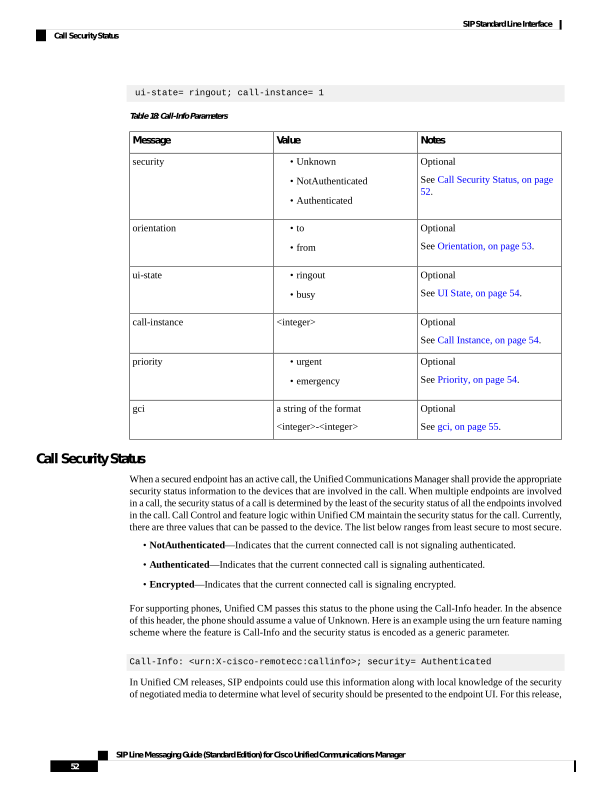
Page 57
the endpoint MUST present the call security level dictated by the Unified CM in the Call-Info header),
especially if the call security level specified by Unified CM is lower than the endpoint’s call leg security level.
For instance, if the endpoint is using encrypted TLS signaling and SRTP media, the Unified CM may still
signal a call security level of 'NotAuthenticated' or 'Authenticated' as Unified CM allows mixing of secure
and non-secure call legs through external conference bridges.
The endpoint must comply with the above statement if they advertise the X-cisco-sis-2.0.0 or greater release
tag. If they do not advertise the tag, then the Unified CM restricts media negotiation to RTP for that endpoint.
The one exception to this rule is the Third-Party AS-SIP Endpoint, which supports SRTP but does not support
signaling of this tag.
Since Unified CM is a B2BUA, we must look at call setup and mid call updates to determine when the Call-Info
header will be sent (for example, which method or response).
Call Setup:
• Originating side (A side): When the phone originates an INVITE to Unified Communications Manager,
assuming Unified CM extends the call forward, the security status will be known when the 200 OK is
generated back to the phone. The 200 OK will contain the Call-Info header as indicated above.
• Terminating side (B side): Unified Communications Manager does not evaluate the security status of
the call until both endpoints are connected from a signaling perspective. For a call leg that terminates on
a SIP device, the value is known when the ACK is sent to the device. However, 3261 precludes an ACK
from containing a Call-Info header. Therefore, it will be sent in a subsequent re-INVITE or UPDATE.
Mid call Updates:
Feature invocations cause dialogs to be manipulated. The security status is impacted. For example, endpoints
A and B are connected securely but A is transferred to C which is unsecure. For endpoints already involved
in a call, a change in status will be sent through a re-INVITE or UPDATE. In the example given, endpoint A
receives a re-INVITE or UPDATE containing the Call-Info header with a new security status.
XSI Icon Display
The Conference List (XSI-based) feature will now be able to include security icon information in the data
sent to supporting endpoints for each participant in a conference call. This icon information will not display
properly on phones which do not support the additional information. Unified Communications Manager must
be aware of what the version of the phone’s XSI SDK is to include or exclude the new icon information in
the Conference List display.
For this reason, all phones which support the new XSI content must advertise X-cisco-xsi-6.0.1 or greater
release in the Supported header tags that are sent during registration.
Orientation
Mid call feature invocations can cause the display orientation on the phone to change directions. For example,
Alice calls Bob. Bob’s phone indicates that the call is 'From Alice' assuming Alice’s caller id is not restricted.
While talking with Bob, Alice creates an ad hoc conference with Charlie. Bob’s phone should show 'To
Conference'. The orientation has changed. It was 'From Alice' and now it is 'To Conference'. The caller id
information sent in the Remote-Party-Id header only includes the name (for example, 'Alice' or 'Conference').
Note that from a SIP perspective, Alice had placed a call to Bob. Originally, Bob’s display had reflected 'From'
which also happened to reflect the direction of the SIP dialog relative to Bob’s phone (that is, the dialog was
from the Unified CM). When Bob’s call leg was redirected to the conference server, the orientation of the
SIP dialog did not change. Media was redirected to an alternative destination.
SIP Line Messaging Guide (Standard Edition) for Cisco Unified Communications Manager
53
SIP Standard Line Interface
XSI Icon Display
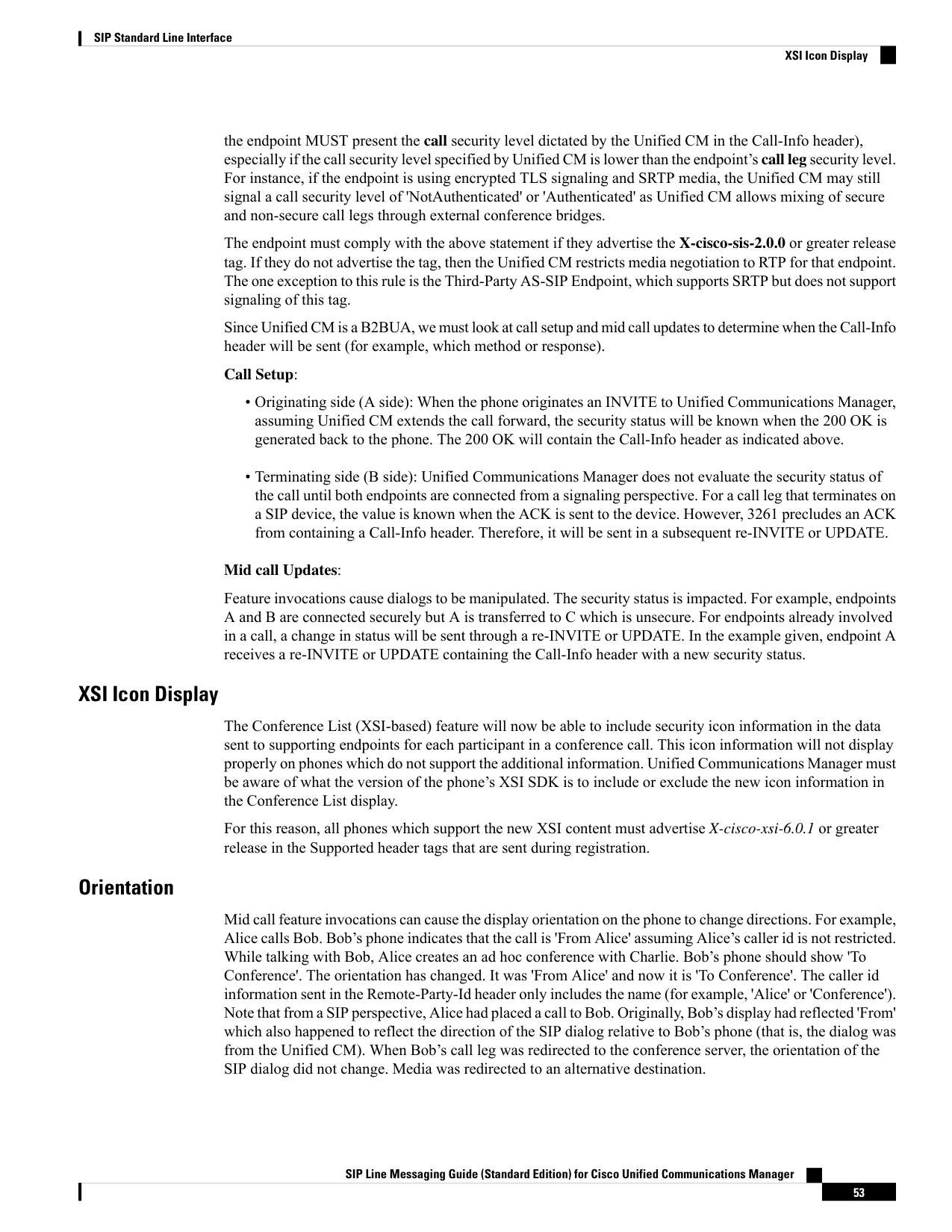
Page 58
The scenario above is an example of how a redirect causes the display orientation to change. There are many
more scenarios where this happens. As with the security status, the display orientation will be sent to the
endpoint through the Call-Info header. The endpoint should use the SIP dialog orientation as the display
orientation if none is specified (in fact, this is what legacy and 3rd party phones do).
There are two possible values for the orientation:
• from
• to
Here is an example using the urn feature naming scheme where the feature is Call-Info and the orientation is
encoded as a generic parameter.
Call-Info: urn:X-cisco-remotecc:callinfo; orientation= to
The endpoint is responsible for localizing this information.
Call Instance
When a call arrives at a phone (or is placed by a phone), a call instance number relative to the line is associated
with the call. On the phones, this number is displayed in the call bubble beside the call details. For example,
if line 1000 calls line 1001, the call on the phone with line 1001 shows up as '01 from 1000'. If line 2000 then
calls 1001, another call bubble appears on 1001. This one indicates '02 From 2000'. The 01 and 02 are the
call instance numbers.
Here is an example using the urn feature naming scheme where the feature is Call-Info and the call instance
information is encoded as a generic parameter.
Call-Info: urn:X-cisco-remotecc:callinfo; call-instance= 1
The endpoint is responsible for localizing this information.
UI State
Two ui-state values are utilized, “ringout” and “busy”. Refer to the Early Attended Transfer, on page 28
section of this document for “ui-state= ringout”. For “ui-state= busy”, see the following information for its
usage.
Phones that support x-Cisco-callinfo and extended refer do not get a 486 when calling a line that is busy.
Unified Communications Manager sends a "183 Session Progress", and then a playtonereq to play the busy
tone in a REFER. With the “183 Session Progress”, a Call-info header is included. Within that Call-Info
header, “ui-state= busy” is included to indicate the line is busy when calling a busy line.
Priority
Some types of calls require the endpoint to override is local alerting policy regardless of a user’s alerting
preference. For example, an emergency operator (911 callback) must be able to call an originator of an
emergency call should the call be disconnected. Unified Communications Manager conveys the urgent nature
of the call using the Call-Info header’s Priority parameter.
One example where this type of UI policy override is required is when the user has enabled DND with Call
Reject as the call treatment. In this case, operator callback, hold reversion, park reversion, and call pickup
calls should provide normal alerting to being the users attention to these calls.
SIP Line Messaging Guide (Standard Edition) for Cisco Unified Communications Manager
54
SIP Standard Line Interface
Call Instance
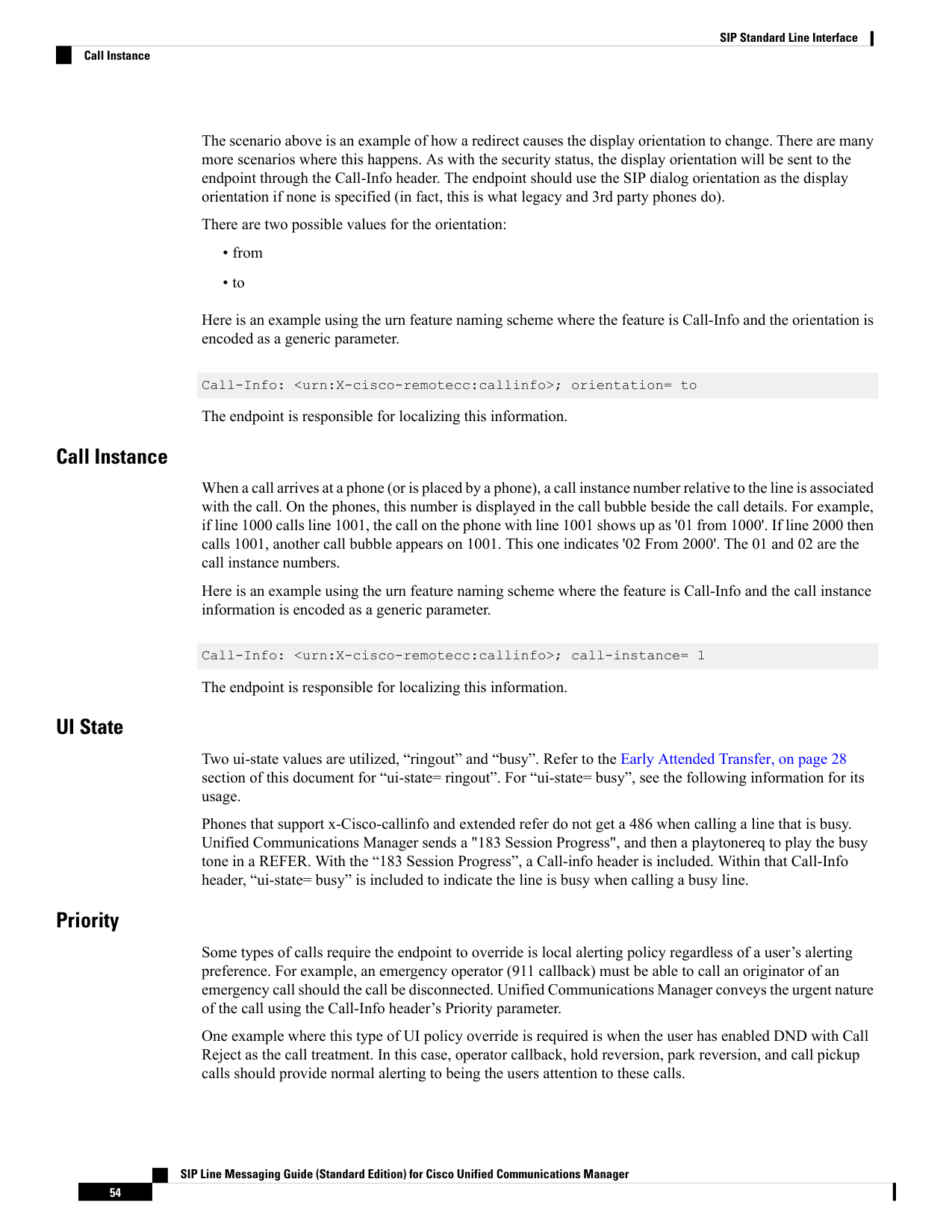
Page 59
Emergency operator call back calls are designated with the priority value of 'emergency'. Hold reversion, park
reversion, and call pickup calls are designated as ‘urgent'. All other calls are considered as having a priority
of 'normal' and a priority parameter is not provided.
gci
A unique identifier is passed down to the phone in this parameter. The identifier is the same for all call-legs
that belong to a particular call. This identifier can be used by phones to influence the end user interface. Phones
can filter out multiple call-legs on the device that belong to a particular call and choose to present a single
call-context to the end user.
Call-Info-Sent from Endpoint to Unified CM
Unified Communications Manager SIP line-side endpoints can pass supplementary feature activation
information to Unified CM using the Call-Info header. The following table provides details of what additional
parameters apply to each feature.
Example/Notes
Feature
Call-Info:
urn:X-cisco-remotecc:callinfo; gci=
1-1039476;
mode= silent
callinfo
The gci parameter is a string which the endpoint
obtains from a remotecc initiate call request or
monitor call request. The initiated call request is used
by the CallBack feature and CTI applications. The
monitor call request is used by the CTI-controlled
Silent Monitoring feature.
The mode parameter provides a signaling mechanism
to distinguish between different Monitoring feature
modes. The only mode supported in this release is
“silent”. Refer to the 'Monitoring' section for further
information.
Call-Info: urn:X-cisco-remotecc:hold
hold
Call-Info: urn:X-cisco-remotecc:hold;
reason= transfer
The reason parameter is optional. Feature holds by
itself (that is, simply placing a call on feature hold)
does not include a reason (see the 1st example).
Values are transfer and conference (see the 2nd
example).
SIP Line Messaging Guide (Standard Edition) for Cisco Unified Communications Manager
55
SIP Standard Line Interface
gci
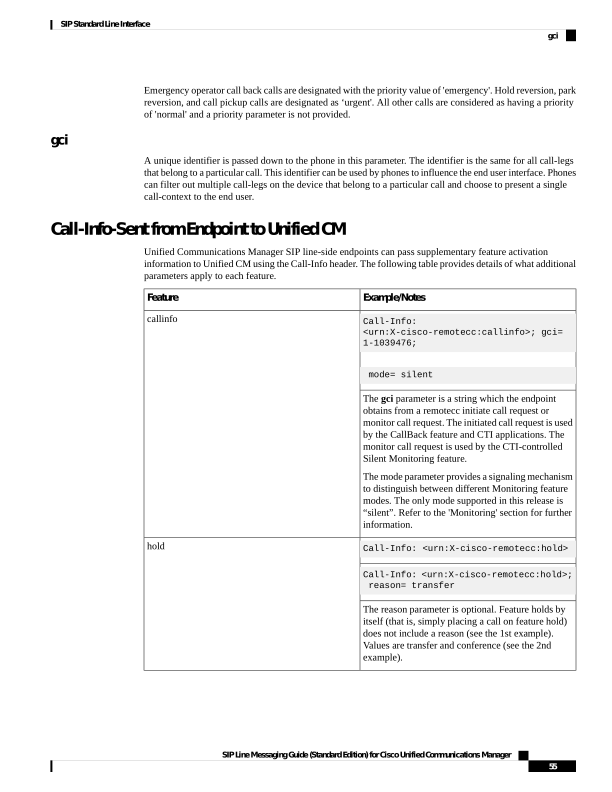
Page 60
Example/Notes
Feature
Call-Info: urn:X-cisco-remotecc:resume
resume
No parameters. Used to resume a feature hold call.
Call-Info: urn:X-cisco-remotecc:barge
barge
No parameters. Used along with a Join header to barge
into a shared line call.
Call-Info: urn:X-cisco-remotecc:cbarge
cbarge
No parameters. Used along with a Join header to
cbarge into a shared line call.
For the call persistency feature, the endpoint sends gci information along with the session persist tag in the
Call-Info header as shown below. This gci should match with the initial call gci.
Call-Info: urn:x-cisco-remotecc:callinfo;gci=1-427062;sessionpersist
SIP Line Messaging Guide (Standard Edition) for Cisco Unified Communications Manager
56
SIP Standard Line Interface
Call-Info-Sent from Endpoint to Unified CM