McDewey

Multi-vendor documentation library · semantic search · MCP endpoint at /mcp

interop-sip-trunking-guide

95 chunks · cucm v15 · 95 pages
Page 1#

chunk 0

© 2018 Cisco Systems, Inc. All rights reserved. Important notices, privacy statements, and trademarks of Cisco Systems, Inc. can be found on cisco.com Page 1 of 48 Connecting Cisco Unified Communication Manager [v11.5.1] to CableOne SIP Trunks via Cisco Unified Border Element v12.0.0 [IOS-XE 16.07.01] May 16, 2018

Page 2#

chunk 1

© 2018 Cisco Systems, Inc. All rights reserved. Important notices, privacy statements, and trademarks of Cisco Systems, Inc. can be found on cisco.com Page 2 of 48 Table of Contents Introduction .................................................................................................................................................. 4 Network Topology ......................................................................................................................................... 5 System Components ..................................................................................................................................... 6 Hardware Requirements ........................................................................................................................... 6 Software Requirements ............................................................................................................................ 6 Features ........................................................................................................................................................ 6 Features Supported .................................................................................................................................. 6 Features Not Supported............................................................................................................................ 6 Caveats ...................................................................................................................................................... 7 Configuration ................................................................................................................................................ 8 Configuring Cisco Unified Border Element ............................................................................................... 8 Network Interface ................................................................................................................................. 8 Global Cisco UBE settings .................................................................................................................... 11 Codecs ................................................................................................................................................. 11 Dial peer .............................................................................................................................................. 12 Configuration example ........................................................................................................................ 14 Configuring Cisco UCM 11.5 Cluster ....................................................................................................... 28 Cisco UCM Version .............................................................................................................................. 28 Cisco Call Manager Service Parameters .............................................................................................. 29 SIP Trunk Security Profile .................................................................................................................... 30 SIP Profile ............................................................................................................................................ 32 Trunk configuration............................................................................................................................. 36 Routing configuration ......................................................................................................................... 42 Acronyms .................................................................................................................................................... 47 Important Information ................................................................................................................................ 47

Page 3#

chunk 2

© 2018 Cisco Systems, Inc. All rights reserved. Important notices, privacy statements, and trademarks of Cisco Systems, Inc. can be found on cisco.com Page 3 of 48 Table of Figures Figure 1 Network Topology ........................................................................................................................... 5 Figure 2 High Availability topology ............................................................................................................... 8 Figure 3: Cisco UCM Version ....................................................................................................................... 28 Figure 4: Service Parameters ...................................................................................................................... 29 Figure 5: Service Parameters (Cont.) .......................................................................................................... 30 Figure 6: SIP Trunk Security Profile ............................................................................................................. 31 Figure 7: SIP Profile ..................................................................................................................................... 32 Figure 8: SIP Profile (Cont.) ......................................................................................................................... 33 Figure 9: SIP Profile (Cont.) ......................................................................................................................... 34 Figure 10: SIP Profile (Cont.) ....................................................................................................................... 35 Figure 11: Add New Trunk to Cisco UBE ..................................................................................................... 36 Figure 12: Add SIP Trunk Type .................................................................................................................... 37 Figure 13: SIP Trunk to Cisco UBE ............................................................................................................... 38 Figure 14: SIP Trunk to Cisco UBE (Cont.) ................................................................................................... 39 Figure 15: SIP Trunk to Cisco UBE (Cont.) ................................................................................................... 40 Figure 16: SIP Trunk to Cisco UBE (Cont.) ................................................................................................... 41 Figure 17: Add New Route Pattern for Cisco UBE ....................................................................................... 42 Figure 18: Route Pattern Configuration for Cisco UBE-PSTN Access .......................................................... 43 Figure 19: Route Pattern Configuration for Cisco UBE-PSTN Access (Cont.) .............................................. 44 Figure 20: Route Pattern Configuration for Cisco UBE-PSTN Access - Anonymous Call ............................. 45 Figure 21: Route Pattern Configuration for Cisco UBE-PSTN Access - Anonymous Call (Cont.) ................. 46

Page 4#

chunk 3

© 2018 Cisco Systems, Inc. All rights reserved. Important notices, privacy statements, and trademarks of Cisco Systems, Inc. can be found on cisco.com Page 4 of 48 Introduction Service Providers today, such as CableOne, are offering alternative methods to connect to the PSTN via their IP network. Most of these services utilize SIP as the primary signaling method and centralized IP to TDM POP gateways to provide on-net and off-net services. CableOne is a service provider offering that allows connection to the PSTN and may offer the end customer a viable alternative to traditional PSTN connectivity. A demarcation device between these services and customer owned services is recommended. As an intermediary device between Cisco Unified Communications Manager (Cisco UCM) and CableOne network, Cisco Unified Border Element (Cisco UBE) ISR 4331/K9 running IOS 16.07.01 can be used. The Cisco Unified Border Element 16.07.01 provides demarcation, security, interworking and session control services for Cisco Unified Communications Manager 11.5.1 connected to CableOne IP network. This document assumes the reader is knowledgeable with the terminology and configuration of Cisco Unified Communications Manager. Only configuration settings specifically required for CableOne interoperability are presented. Feature configuration and most importantly the dial plan are customer specific and need individual approach.  This application note describes how to configure Cisco UCM 11.5.1, and Cisco UBE on ISR 4331/K9 [IOS – 16.07.01] for connectivity to CableOne SIP Trunking service. The deployment model covered in this application note is CPE (Cisco UCM) to PSTN (CableOne) via Cisco UBE v12.0 [IOS-XE] 16.07.01.  Testing was performed in accordance to CableOne generic SIP Trunking test methodology and among features verified were – basic calls, DTMF transport, Music on Hold (MOH), unattended and attended transfers, call forward, conferences and High Availability.  The Cisco UBE configuration detailed in this document is based on a lab environment with a simple dial-plan used to ensure proper interoperability between CableOne SIP network and Cisco Unified Communications. The configuration described in this document details the important configuration settings to have enabled for interoperability to be successful and care must be taken by the network administrator deploying Cisco UCM to interoperate to CableOne SIP Trunking network.

Page 5#

chunk 4

© 2018 Cisco Systems, Inc. All rights reserved. Important notices, privacy statements, and trademarks of Cisco Systems, Inc. can be found on cisco.com Page 5 of 48 Network Topology Figure 1 Network Topology  The network topology includes the Cisco UCM Cluster, Unity Voicemail system, Cisco Fax gateway and 2 Cisco Endpoints. Cisco UCM has a trunk configured to Cisco UBE’s Virtual IP Address. CableOne was used as the service provider with SIP trunk to the Cisco UBE using the WAN Virtual IP Address.  2 Cisco Unified Border Elements are used here for High Availability.  SIP Trunk transport type used between Cisco UBE and Cisco UCM is TCP and to CableOne is UDP. Cisco UCM and Cisco UBE Settings: Setting Value Transport from Cisco UBE to Cisco UCM TCP with RTP Transport from Cisco UBE to CableOne UDP with RTP Voice Mail Support YES Session Refresh YES
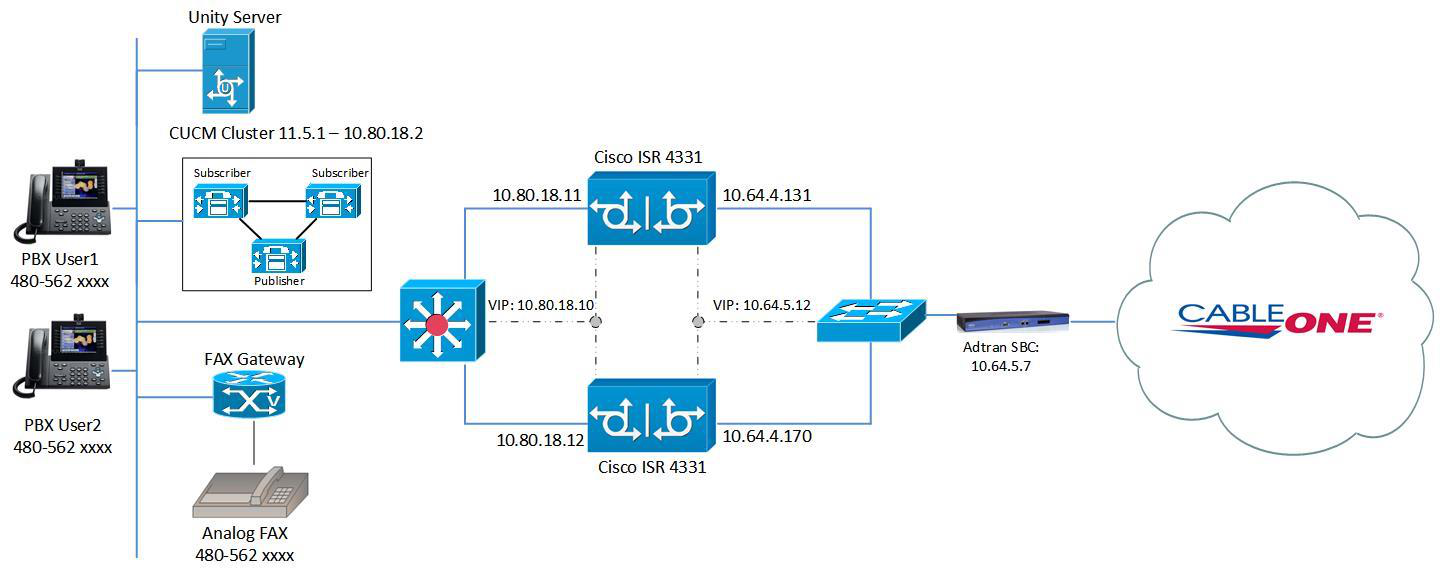
Image 1 from page 5

Page 5 diagram

Page 6#

chunk 5

© 2018 Cisco Systems, Inc. All rights reserved. Important notices, privacy statements, and trademarks of Cisco Systems, Inc. can be found on cisco.com Page 6 of 48 System Components Hardware Requirements  Cisco UBE on Cisco ISR 4331/K9 router  CUCM cluster on UCS C240, 1 Publisher node and 2 Subscriber nodes  Cisco 2851 with FXS ports and Analog Fax machine  Generic Cisco IP-Phones  Adtran NetVanta 3140 Software Requirements  CUBE-Version: 12.0.0 running IOS-XE 16.07.01  CUCM UCOS 11.5.1.12900-21 for 1 Publisher and 2 Subscriber  Cisco IOS v15.1(4)M5 for the fax gateway  ADTRAN, Inc. OS version R12.3.3.E Features Features Supported  Incoming and outgoing calls using G711ulaw codec  International Calls and digit manipulations  Call Conference  CPE Voice Mail support  Call hold & Resume with and without MoH  Unattended and Attended Call transfer  Call forward (all, busy and no answer)  Inband DTMF  Fax (G711 Pass-through)  IP-PBX Calling number privacy  High Availability Features Not Supported  Cisco UCM does not support Blind Call transfer  In HA Redundancy mode, the Primary Cisco UBE will not take over the Primary/Active role after a reboot/network outage  CableOne does not support T.38 Fax  G.729 Codec for voice calls is not supported by CableOne

Page 7#

chunk 6

© 2018 Cisco Systems, Inc. All rights reserved. Important notices, privacy statements, and trademarks of Cisco Systems, Inc. can be found on cisco.com Page 7 of 48 Caveats  Caller ID is not updated on attended and unattended transfer scenarios.  Only one IP PBX used for the testing.  The Cisco UBE HA tested is layer 2 box to box Cisco UBE redundancy.  Transcoder has been enabled on Cisco UBE to support Inband DTMF.

Page 8#

chunk 7

© 2018 Cisco Systems, Inc. All rights reserved. Important notices, privacy statements, and trademarks of Cisco Systems, Inc. can be found on cisco.com Page 8 of 48 Configuration Configuring Cisco Unified Border Element Network Interface The IP address used are for illustration only, the actual IP address can vary. The Active/Standby pair share the same virtual IP address and continually exchange status messages. Figure 2 High Availability topology

Image 1 from page 8

Page 9#

chunk 8

© 2018 Cisco Systems, Inc. All rights reserved. Important notices, privacy statements, and trademarks of Cisco Systems, Inc. can be found on cisco.com Page 9 of 48 Cisco UBE 1: interface GigabitEthernet0/0/0 description WAN ip address 10.64.4.131 255.255.0.0 negotiation auto redundancy rii 1 redundancy group 1 ip 10.64.5.12 exclusive ! interface GigabitEthernet0/0/1 description LAN ip address 10.80.18.11 255.255.255.0 negotiation auto redundancy rii 2 redundancy group 1 ip 10.80.18.10 exclusive ! interface GigabitEthernet0/0/2 description CUBE_HA ip address 10.89.20.12 255.255.255.0 negotiation auto ! interface Service-Engine0/4/0 ! interface GigabitEthernet0 vrf forwarding Mgmt-intf no ip address shutdown negotiation auto Cisco UBE 2: interface GigabitEthernet0/0/0 description WAN ip address 10.64.4.170 255.255.0.0

Page 10#

chunk 9

© 2018 Cisco Systems, Inc. All rights reserved. Important notices, privacy statements, and trademarks of Cisco Systems, Inc. can be found on cisco.com Page 10 of 48 negotiation auto redundancy rii 1 redundancy group 1 ip 10.64.5.12 exclusive ! interface GigabitEthernet0/0/1 description LAN ip address 10.80.18.12 255.255.255.0 negotiation auto redundancy rii 2 redundancy group 1 ip 10.80.18.10 exclusive ! interface GigabitEthernet0/0/2 description CUBE_HA ip address 10.89.20.11 255.255.255.0 negotiation auto ! interface Service-Engine0/4/0 ! interface GigabitEthernet0 vrf forwarding Mgmt-intf no ip address shutdown negotiation auto

Page 11#

chunk 10

© 2018 Cisco Systems, Inc. All rights reserved. Important notices, privacy statements, and trademarks of Cisco Systems, Inc. can be found on cisco.com Page 11 of 48 Global Cisco UBE settings In order to enable Cisco UBE IP2IP SBC functionality, following command has to be entered: voice service voip address-hiding mode border-element license capacity 20 allow-connections sip to sip redundancy-group 1 no supplementary-service sip handle-replaces fax protocol pass-through g711ulaw sip asserted-id pai midcall-signaling passthru Explanation Command Description allow-connections sip to sip Allow IP2IP connections between two SIP call legs redundancy-group 1 Enable High Availability for the VoIP service fax protocol Specifies the fax protocol asserted-id Specifies the privacy header in the outgoing SIP requests and response messages midcall-signaling passthru Pass-through media change method optimizes or consumes mid- call, media-related signaling within the call Codecs G711ulaw codec is used for this testing. voice class codec 1 codec preference 1 g711ulaw!

Page 11 diagram

Page 12#

chunk 11

© 2018 Cisco Systems, Inc. All rights reserved. Important notices, privacy statements, and trademarks of Cisco Systems, Inc. can be found on cisco.com Page 12 of 48 Dial peer Outbound Dial-peer to CableOne: description Incoming Call from CUCM International session protocol sipv2 session transport tcp incoming called-number .T voice-class codec 1 voice-class sip bind control source-interface GigabitEthernet0/0/1 voice-class sip bind media source-interface GigabitEthernet0/0/1 dtmf-relay rtp-nte no vad ! dial-peer voice 2 voip description Outgoing Call to CableOne destination-pattern .T session protocol sipv2 session target ipv4:10.64.5.7:5060 voice-class codec 1 voice-class sip profiles 1 voice-class sip bind control source-interface GigabitEthernet0/0/0 voice-class sip bind media source-interface GigabitEthernet0/0/0 no dtmf-interworking no vad Inbound Dial-peer from CableOne: dial-peer voice 3 voip description Incoming call from CableOne session protocol sipv2 incoming called-number 480...... voice-class codec 1 voice-class sip options-keepalive voice-class sip bind control source-interface GigabitEthernet0/0/0

Page 13#

chunk 12

© 2018 Cisco Systems, Inc. All rights reserved. Important notices, privacy statements, and trademarks of Cisco Systems, Inc. can be found on cisco.com Page 13 of 48 voice-class sip bind media source-interface GigabitEthernet0/0/0 no vad ! dial-peer voice 4 voip description Outgoing to CUCM destination-pattern 480...... session protocol sipv2 session target ipv4:10.80.18.2:5060 session transport tcp voice-class codec 1 voice-class sip bind control source-interface GigabitEthernet0/0/1 voice-class sip bind media source-interface GigabitEthernet0/0/1 dtmf-relay rtp-nte no vad

Page 14#

chunk 13

© 2018 Cisco Systems, Inc. All rights reserved. Important notices, privacy statements, and trademarks of Cisco Systems, Inc. can be found on cisco.com Page 14 of 48 Configuration example The following configuration snippet contains a sample configuration of Cisco UBE with all parameters mentioned previously. Active Cisco UBE: version 16.7 service config service timestamps debug datetime msec service timestamps log datetime msec platform qfp utilization monitor load 80 no platform punt-keepalive disable-kernel-core ! hostname CUBE10Cableone ! boot-start-marker boot-end-marker ! ! vrf definition Mgmt-intf ! address-family ipv4 exit-address-family ! address-family ipv6 exit-address-family ! ! no aaa new-model ! !

Page 15#

chunk 14

© 2018 Cisco Systems, Inc. All rights reserved. Important notices, privacy statements, and trademarks of Cisco Systems, Inc. can be found on cisco.com Page 15 of 48 subscriber templating multilink bundle-name authenticated ! crypto pki trustpoint TP-self-signed-2930804041 enrollment selfsigned subject-name cn=IOS-Self-Signed-Certificate-2930804041 revocation-check none rsakeypair TP-self-signed-2930804041 ! crypto pki trustpoint TP-self-signed-3616943619 enrollment selfsigned subject-name cn=IOS-Self-Signed-Certificate-3616943619 revocation-check none rsakeypair TP-self-signed-3616943619 ! ! crypto pki certificate chain TP-self-signed-2930804041 crypto pki certificate chain TP-self-signed-3616943619 ! voice service voip address-hiding mode border-element license capacity 20 allow-connections sip to sip redundancy-group 1 no supplementary-service sip handle-replaces fax protocol pass-through g711ulaw sip asserted-id pai midcall-signaling passthru

Page 16#

chunk 15

© 2018 Cisco Systems, Inc. All rights reserved. Important notices, privacy statements, and trademarks of Cisco Systems, Inc. can be found on cisco.com Page 16 of 48 ! voice class codec 1 codec preference 1 g711ulaw ! voice class sip-profiles 1 request ANY sip-header Diversion modify "sip:(.*)@" "sip:480562\1@" ! voice-card 0/4 dsp services dspfarm no watchdog ! license udi pid ISR4331/K9 sn FDO21381F17 diagnostic bootup level minimal spanning-tree extend system-id ! redundancy mode none application redundancy group 1 name voice-HA priority 150 failover threshold 75 timers delay 30 reload 60 control GigabitEthernet0/0/2 protocol 1 data GigabitEthernet0/0/2 track 1 shutdown track 2 shutdown ! track 1 interface GigabitEthernet0/0/0 line-protocol track 2 interface GigabitEthernet0/0/1 line-protocol

Page 17#

chunk 16

© 2018 Cisco Systems, Inc. All rights reserved. Important notices, privacy statements, and trademarks of Cisco Systems, Inc. can be found on cisco.com Page 17 of 48 interface GigabitEthernet0/0/0 description WAN ip address 10.64.4.131 255.255.0.0 negotiation auto redundancy rii 1 redundancy group 1 ip 10.64.5.12 exclusive ! interface GigabitEthernet0/0/1 description LAN ip address 10.80.18.11 255.255.255.0 negotiation auto redundancy rii 2 redundancy group 1 ip 10.80.18.10 exclusive ! interface GigabitEthernet0/0/2 description CUBE_HA ip address 10.89.20.12 255.255.255.0 negotiation auto ! interface Service-Engine0/4/0 ! interface GigabitEthernet0 vrf forwarding Mgmt-intf no ip address shutdown negotiation auto ! ip forward-protocol nd ip http server

Page 18#

chunk 17

© 2018 Cisco Systems, Inc. All rights reserved. Important notices, privacy statements, and trademarks of Cisco Systems, Inc. can be found on cisco.com Page 18 of 48 ip http authentication local ip http secure-server ip http client source-interface GigabitEthernet0/0/0 ip tftp source-interface GigabitEthernet0/0/0 ip route 0.0.0.0 0.0.0.0 10.64.1.1 ip route 10.80.18.0 255.255.255.0 10.80.18.1 ! ip ssh server algorithm encryption aes128-ctr aes192-ctr aes256-ctr ip ssh client algorithm encryption aes128-ctr aes192-ctr aes256-ctr control-plane ! mgcp behavior rsip-range tgcp-only mgcp behavior comedia-role none mgcp behavior comedia-check-media-src disable mgcp behavior comedia-sdp-force disable mgcp profile default ! dspfarm profile 50 transcode codec g711ulaw maximum sessions 12 associate application CUBE ! dial-peer voice 1 voip description Incoming Call from CUCM International session protocol sipv2 session transport tcp incoming called-number .T voice-class codec 1 voice-class sip bind control source-interface GigabitEthernet0/0/1

Page 19#

chunk 18

© 2018 Cisco Systems, Inc. All rights reserved. Important notices, privacy statements, and trademarks of Cisco Systems, Inc. can be found on cisco.com Page 19 of 48 voice-class sip bind media source-interface GigabitEthernet0/0/1 dtmf-relay rtp-nte no vad ! dial-peer voice 2 voip description Outgoing Call to CableOne destination-pattern .T session protocol sipv2 session target ipv4:10.64.5.7:5060 voice-class codec 1 voice-class sip profiles 1 voice-class sip bind control source-interface GigabitEthernet0/0/0 voice-class sip bind media source-interface GigabitEthernet0/0/0 no dtmf-interworking no vad ! dial-peer voice 3 voip description Incoming call from CableOne session protocol sipv2 incoming called-number 480...... voice-class codec 1 voice-class sip options-keepalive voice-class sip bind control source-interface GigabitEthernet0/0/0 voice-class sip bind media source-interface GigabitEthernet0/0/0 no vad ! dial-peer voice 4 voip description Outgoing to CUCM destination-pattern 480......

Page 20#

chunk 19

© 2018 Cisco Systems, Inc. All rights reserved. Important notices, privacy statements, and trademarks of Cisco Systems, Inc. can be found on cisco.com Page 20 of 48 session protocol sipv2 session target ipv4:10.80.18.2:5060 session transport tcp voice-class codec 1 voice-class sip bind control source-interface GigabitEthernet0/0/1 voice-class sip bind media source-interface GigabitEthernet0/0/1 dtmf-relay rtp-nte no vad ! ! sip-ua connection-reuse ! ! line con 0 exec-timeout 0 0 password XXXXXXXX login transport input none stopbits 1 line aux 0 stopbits 1 line vty 0 4 exec-timeout 0 0 password XXXXXXXXXX login transport input telnet ! end

Page 21#

chunk 20

© 2018 Cisco Systems, Inc. All rights reserved. Important notices, privacy statements, and trademarks of Cisco Systems, Inc. can be found on cisco.com Page 21 of 48 Standby Cisco UBE: version 16.7 service timestamps debug datetime msec service timestamps log datetime msec platform qfp utilization monitor load 80 no platform punt-keepalive disable-kernel-core ! hostname CUBE8Cableone ! boot-start-marker boot-end-marker ! ! vrf definition Mgmt-intf ! address-family ipv4 exit-address-family ! address-family ipv6 exit-address-family ! no aaa new-model ! subscriber templating multilink bundle-name authenticated ! crypto pki trustpoint TP-self-signed-3616943619 enrollment selfsigned subject-name cn=IOS-Self-Signed-Certificate-3616943619

Page 22#

chunk 21

© 2018 Cisco Systems, Inc. All rights reserved. Important notices, privacy statements, and trademarks of Cisco Systems, Inc. can be found on cisco.com Page 22 of 48 revocation-check none rsakeypair TP-self-signed-3616943619 ! crypto pki certificate chain TP-self-signed-3616943619 ! voice service voip no ip address trusted authenticate address-hiding mode border-element license capacity 20 allow-connections sip to sip redundancy-group 1 no supplementary-service sip handle-replaces fax protocol pass-through g711ulaw sip midcall-signaling passthru ! voice class codec 1 codec preference 1 g711ulaw ! ! voice class sip-profiles 1 request ANY sip-header Diversion modify "sip:(.*)@" "sip:480562\1@" ! voice-card 0/4 dsp services dspfarm no watchdog ! license udi pid ISR4331/K9 sn FDO21381FEY no license smart enable

Page 23#

chunk 22

© 2018 Cisco Systems, Inc. All rights reserved. Important notices, privacy statements, and trademarks of Cisco Systems, Inc. can be found on cisco.com Page 23 of 48 diagnostic bootup level minimal ! spanning-tree extend system-id ! redundancy mode none application redundancy group 1 name voice-HA priority 150 failover threshold 75 timers delay 30 reload 60 control GigabitEthernet0/0/2 protocol 1 data GigabitEthernet0/0/2 track 1 shutdown track 2 shutdown ! track 1 interface GigabitEthernet0/0/0 line-protocol track 2 interface GigabitEthernet0/0/1 line-protocol ! interface GigabitEthernet0/0/0 description WAN ip address 10.64.4.170 255.255.0.0 negotiation auto redundancy rii 1 redundancy group 1 ip 10.64.5.12 exclusive ! interface GigabitEthernet0/0/1 description LAN ip address 10.80.18.12 255.255.255.0

Page 24#

chunk 23

© 2018 Cisco Systems, Inc. All rights reserved. Important notices, privacy statements, and trademarks of Cisco Systems, Inc. can be found on cisco.com Page 24 of 48 negotiation auto redundancy rii 2 redundancy group 1 ip 10.80.18.10 exclusive ! interface GigabitEthernet0/0/2 description CUBE_HA ip address 10.89.20.11 255.255.255.0 negotiation auto ! interface Service-Engine0/4/0 ! interface GigabitEthernet0 vrf forwarding Mgmt-intf no ip address shutdown negotiation auto ! ip forward-protocol nd ip http server ip http authentication local ip http secure-server ip http client source-interface GigabitEthernet0/0/0 ip tftp source-interface GigabitEthernet0/0/0 ip route 0.0.0.0 0.0.0.0 10.64.1.1 ip route 10.80.18.0 255.255.255.0 10.80.18.1 ! control-plane ! !

Page 25#

chunk 24

© 2018 Cisco Systems, Inc. All rights reserved. Important notices, privacy statements, and trademarks of Cisco Systems, Inc. can be found on cisco.com Page 25 of 48 mgcp behavior rsip-range tgcp-only mgcp behavior comedia-role none mgcp behavior comedia-check-media-src disable mgcp behavior comedia-sdp-force disable ! mgcp profile default ! dspfarm profile 50 transcode codec g711ulaw maximum sessions 12 associate application CUBE ! dial-peer voice 1 voip description Incoming Call from CUCM International session protocol sipv2 session transport tcp incoming called-number .T voice-class codec 1 voice-class sip bind control source-interface GigabitEthernet0/0/1 voice-class sip bind media source-interface GigabitEthernet0/0/1 dtmf-relay rtp-nte no vad ! dial-peer voice 2 voip description Outgoing Call to CableOne destination-pattern .T session protocol sipv2 session target ipv4:10.64.5.7:5060 voice-class codec 1

Page 26#

chunk 25

© 2018 Cisco Systems, Inc. All rights reserved. Important notices, privacy statements, and trademarks of Cisco Systems, Inc. can be found on cisco.com Page 26 of 48 voice-class sip profiles 1 voice-class sip bind control source-interface GigabitEthernet0/0/0 voice-class sip bind media source-interface GigabitEthernet0/0/0 no dtmf-interworking no vad ! dial-peer voice 3 voip description Incoming call from CableOne session protocol sipv2 incoming called-number 480...... voice-class codec 1 voice-class sip options-keepalive voice-class sip bind control source-interface GigabitEthernet0/0/0 voice-class sip bind media source-interface GigabitEthernet0/0/0 no vad ! dial-peer voice 4 voip description Outgoing to CUCM destination-pattern 480...... session protocol sipv2 session target ipv4:10.80.18.2:5060 session transport tcp voice-class codec 1 voice-class sip bind control source-interface GigabitEthernet0/0/1 voice-class sip bind media source-interface GigabitEthernet0/0/1 dtmf-relay rtp-nte no vad ! !

Page 27#

chunk 26

© 2018 Cisco Systems, Inc. All rights reserved. Important notices, privacy statements, and trademarks of Cisco Systems, Inc. can be found on cisco.com Page 27 of 48 sip-ua connection-reuse ! ! line con 0 exec-timeout 0 0 password XXXXXXXXXX login transport input none stopbits 1 line aux 0 stopbits 1 line vty 0 4 exec-timeout 0 0 password XXXXXXXXXX login ! wsma agent exec ! wsma agent config ! wsma agent filesys ! wsma agent notify ! ! end CUBE8Cableone#

Page 28#

chunk 27

© 2018 Cisco Systems, Inc. All rights reserved. Important notices, privacy statements, and trademarks of Cisco Systems, Inc. can be found on cisco.com Page 28 of 48 Configuring Cisco UCM 11.5 Cluster Cisco UCM Version Figure 3: Cisco UCM Version

Image 1 from page 28

Page 29#

chunk 28

© 2018 Cisco Systems, Inc. All rights reserved. Important notices, privacy statements, and trademarks of Cisco Systems, Inc. can be found on cisco.com Page 29 of 48 Cisco Call Manager Service Parameters Navigation: System  Service Parameters  Select Server* = Clus28pub--CUCM Voice/Video (Active)  Select Service*= Cisco CallManager (Active)  Duplex Streaming Enabled* = True  All other fields are set to default values Figure 4: Service Parameters

Image 1 from page 29

Page 30#

chunk 29

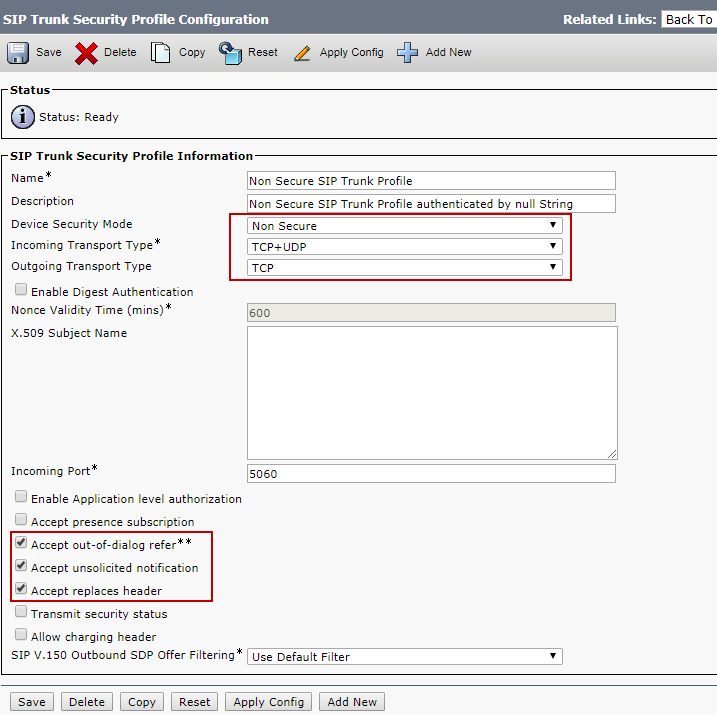
© 2018 Cisco Systems, Inc. All rights reserved. Important notices, privacy statements, and trademarks of Cisco Systems, Inc. can be found on cisco.com Page 30 of 48 Figure 5: Service Parameters (Cont.) SIP Trunk Security Profile Navigation: System  Security  SIP Trunk Security Profile • Name*= Non Secure SIP Trunk Profile is used as an example • Description = Non Secure SIP Trunk Profile authenticated by null String is used as an example • Device Security Mode = Non Secure • Incoming Transport Type* = TCP + UDP • Outgoing Transport Type = TCP

Image 1 from page 30

Page 31#

chunk 30

© 2018 Cisco Systems, Inc. All rights reserved. Important notices, privacy statements, and trademarks of Cisco Systems, Inc. can be found on cisco.com Page 31 of 48 Figure 6: SIP Trunk Security Profile

Image 1 from page 31

Page 32#

chunk 31

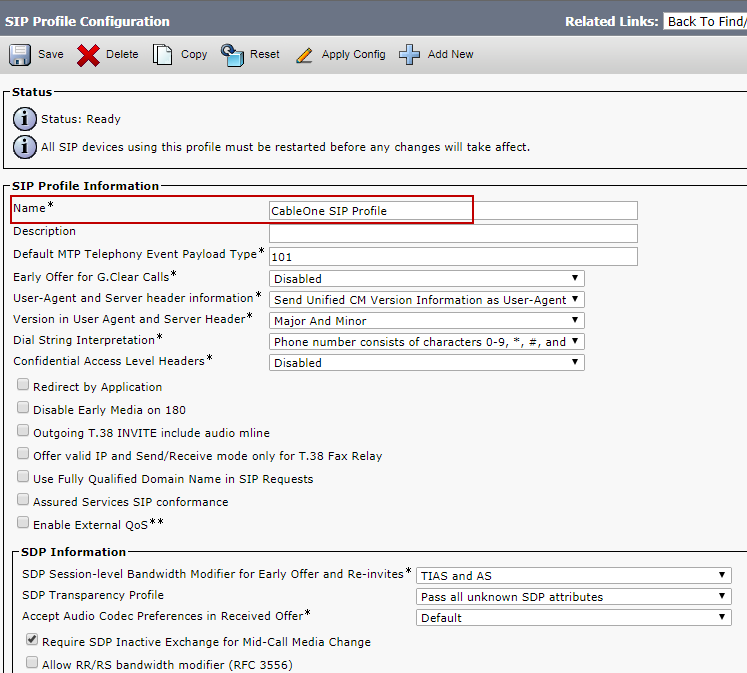
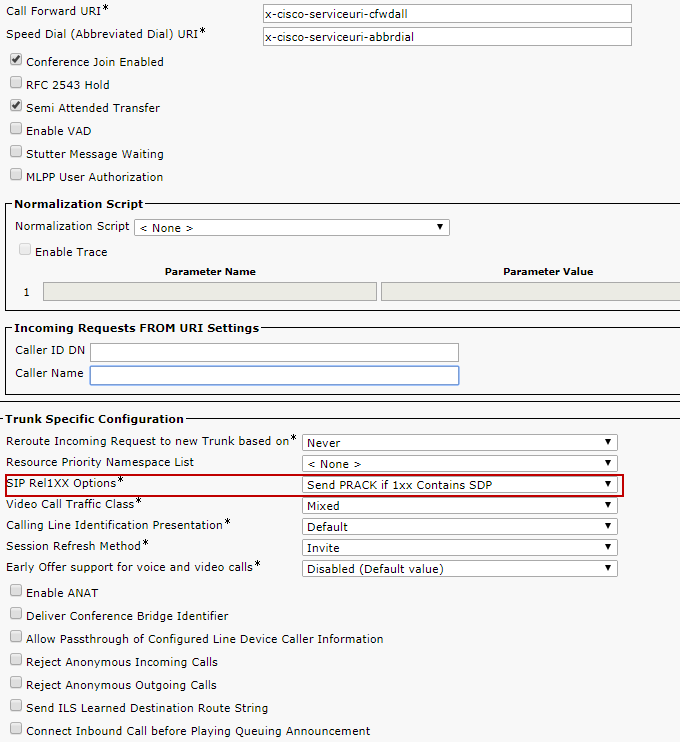
© 2018 Cisco Systems, Inc. All rights reserved. Important notices, privacy statements, and trademarks of Cisco Systems, Inc. can be found on cisco.com Page 32 of 48 SIP Profile Navigation: Device  Device Settings  SIP Profile • Name*= CableOne SIP Profile is used as an example • SIP Rel1XX Options: Send PRACK if 1XX contains SDP is selected for this example Figure 7: SIP Profile

Image 1 from page 32

Page 33#

chunk 32

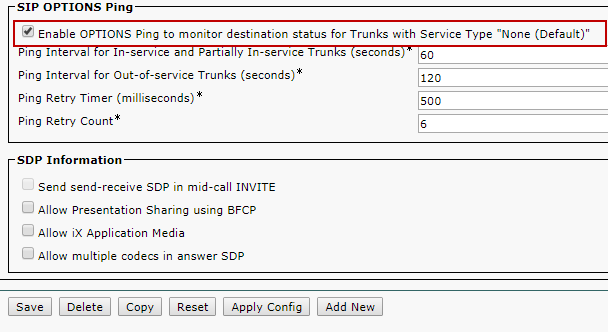
© 2018 Cisco Systems, Inc. All rights reserved. Important notices, privacy statements, and trademarks of Cisco Systems, Inc. can be found on cisco.com Page 33 of 48 Figure 8: SIP Profile (Cont.)

Image 2 from page 33

Page 34#

chunk 33

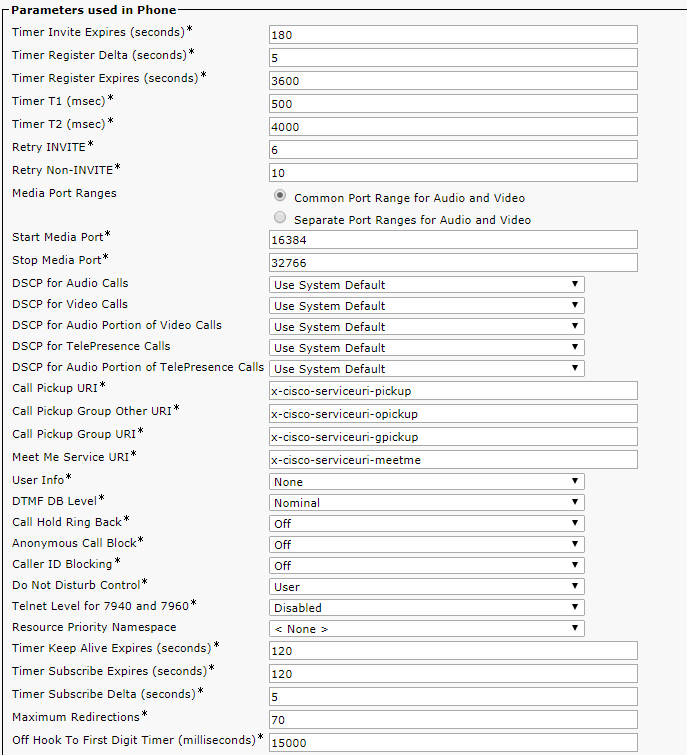
© 2018 Cisco Systems, Inc. All rights reserved. Important notices, privacy statements, and trademarks of Cisco Systems, Inc. can be found on cisco.com Page 34 of 48 Figure 9: SIP Profile (Cont.)

Image 1 from page 34

Page 35#

chunk 34

© 2018 Cisco Systems, Inc. All rights reserved. Important notices, privacy statements, and trademarks of Cisco Systems, Inc. can be found on cisco.com Page 35 of 48 Figure 10: SIP Profile (Cont.)

Image 1 from page 35

Page 36#

chunk 35

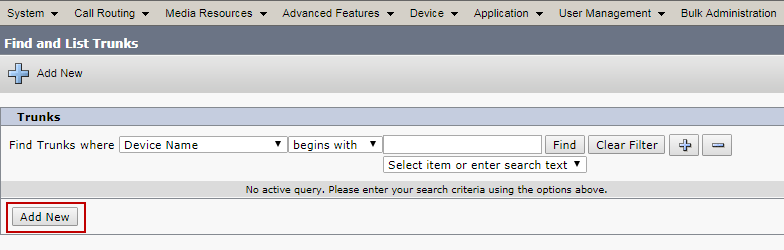
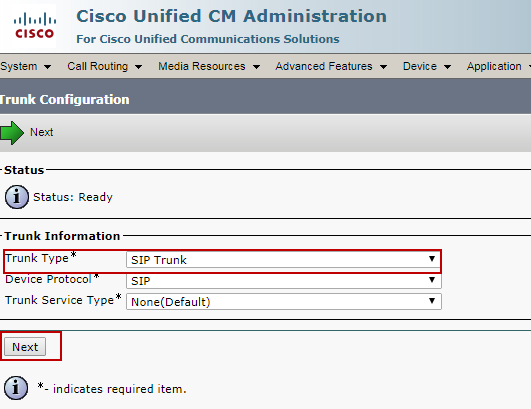
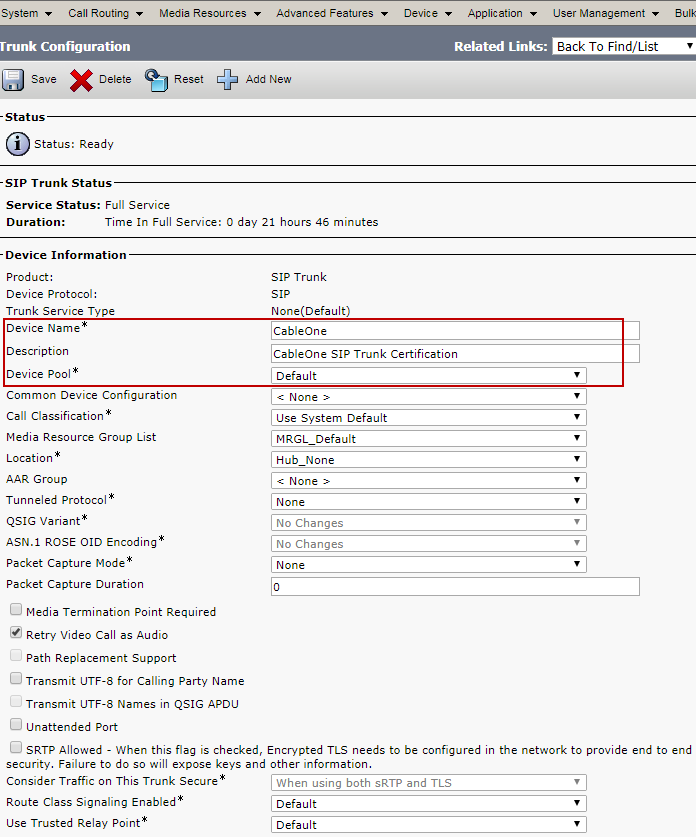
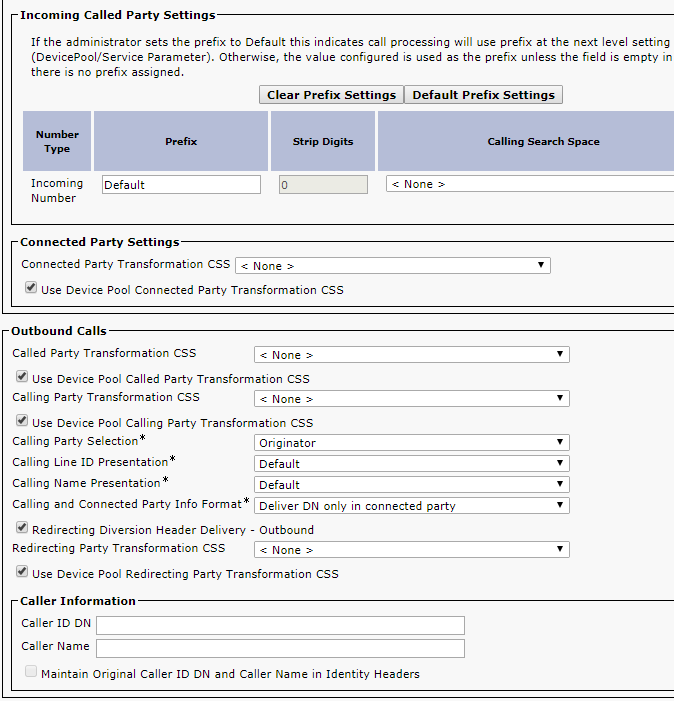
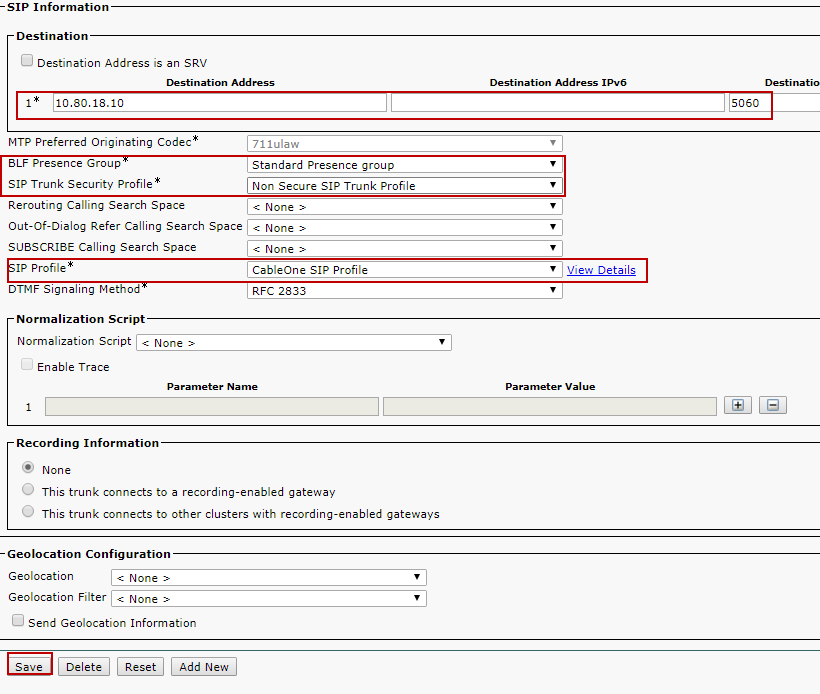
© 2018 Cisco Systems, Inc. All rights reserved. Important notices, privacy statements, and trademarks of Cisco Systems, Inc. can be found on cisco.com Page 36 of 48 Trunk configuration Trunk configuration from Cisco UCM to the LAN side of the Cisco UBE: Navigation: Device  Trunk  Add New Figure 11: Add New Trunk to Cisco UBE  Select ‘Trunk Type’ as SIP Trunk and ‘Device Protocol’ as SIP and select ‘Next’ as shown below.  Set Device Name: CableOne is given for this example  Set Description: CableOne SIP Trunk Certification is given for this example  Select Device Pool: “Default” is selected for this example.  Set Significant Digits: 4  Under Destination:  Set Destination Address: 10.80.18.12 is given for this example. This is the CUBE LAN side VIP IP address.  Set Destination Port: 5060  Set BLF Presence Group: Standard presence group is selected from dropdown menu  Set SIP Trunk security profile: Non-Secured SIP trunk Profile is elected from drop down menu  Set SIP Profile: CableOne SIP Profile is selected from drop down menu

Image 1 from page 36

Page 37#

chunk 36

© 2018 Cisco Systems, Inc. All rights reserved. Important notices, privacy statements, and trademarks of Cisco Systems, Inc. can be found on cisco.com Page 37 of 48 Figure 12: Add SIP Trunk Type

Image 1 from page 37

Page 38#

chunk 37

© 2018 Cisco Systems, Inc. All rights reserved. Important notices, privacy statements, and trademarks of Cisco Systems, Inc. can be found on cisco.com Page 38 of 48 Figure 13: SIP Trunk to Cisco UBE

Image 1 from page 38

Page 39#

chunk 38

© 2018 Cisco Systems, Inc. All rights reserved. Important notices, privacy statements, and trademarks of Cisco Systems, Inc. can be found on cisco.com Page 39 of 48 Figure 14: SIP Trunk to Cisco UBE (Cont.)  Configure the Virtual LAN IP address of the Cisco UBE and the Destination Port  Configure the SIP Trunk Security Profile and SIP Profile as shown below  The rest of the configuration is all default

Image 1 from page 39

Page 40#

chunk 39

© 2018 Cisco Systems, Inc. All rights reserved. Important notices, privacy statements, and trademarks of Cisco Systems, Inc. can be found on cisco.com Page 40 of 48  Click Save and Reset after completion Figure 15: SIP Trunk to Cisco UBE (Cont.)

Image 1 from page 40

Page 41#

chunk 40

© 2018 Cisco Systems, Inc. All rights reserved. Important notices, privacy statements, and trademarks of Cisco Systems, Inc. can be found on cisco.com Page 41 of 48 Figure 16: SIP Trunk to Cisco UBE (Cont.)

Image 1 from page 41

Page 42#

chunk 41

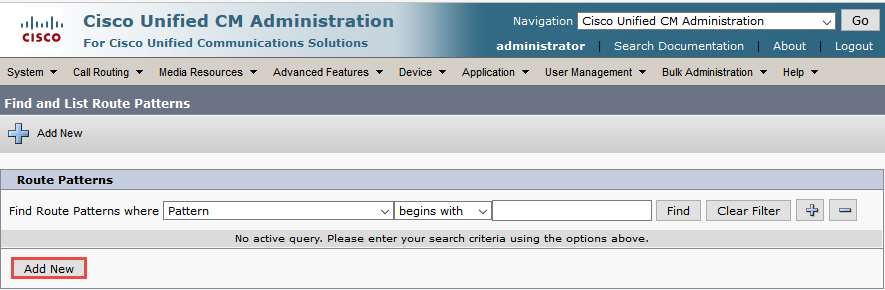
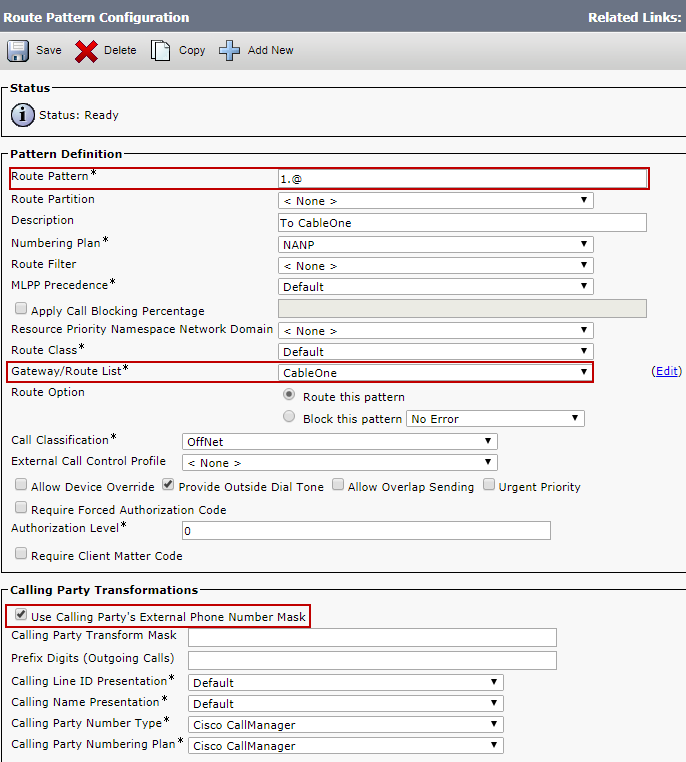
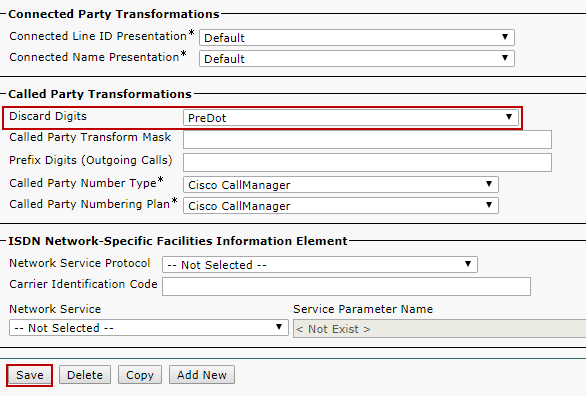
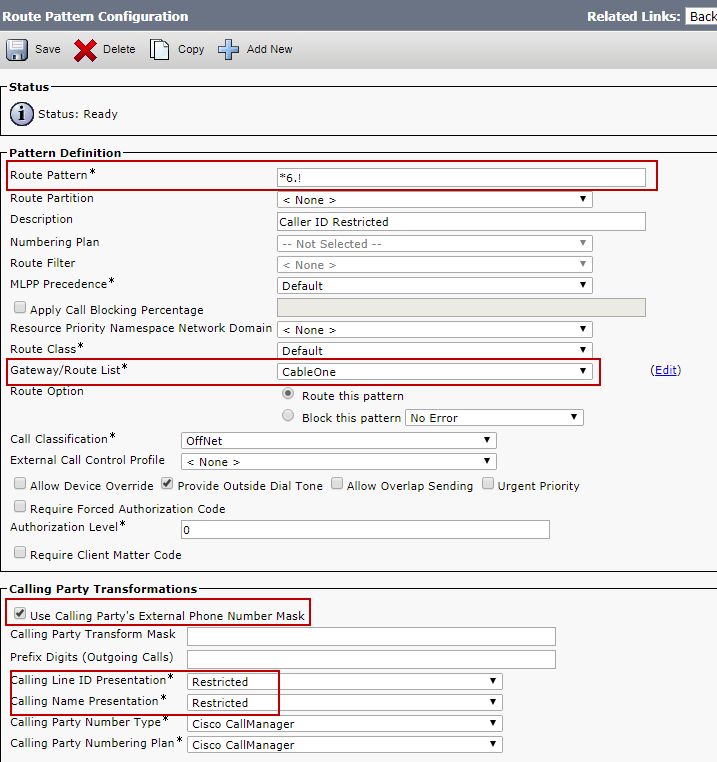
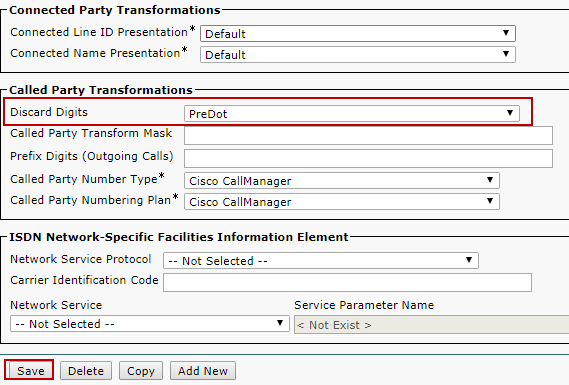
© 2018 Cisco Systems, Inc. All rights reserved. Important notices, privacy statements, and trademarks of Cisco Systems, Inc. can be found on cisco.com Page 42 of 48 Routing configuration Route Pattern for Cisco UBE: Navigation: Call Routing  Route/Hunt  Route Pattern  Add New Route patterns are configured as below: Cisco IP phone dial “11” 10 digits number to access PSTN via Cisco UBE o “1” is removed before sending to Cisco UBE o The rest of the number is sent to Cisco UBE and to Cable One Network  *6 is used to dial the outbound calls with caller ID blocking Figure 17: Add New Route Pattern for Cisco UBE

Image 2 from page 42

Page 43#

chunk 42

© 2018 Cisco Systems, Inc. All rights reserved. Important notices, privacy statements, and trademarks of Cisco Systems, Inc. can be found on cisco.com Page 43 of 48 Figure 18: Route Pattern Configuration for Cisco UBE-PSTN Access

Image 1 from page 43

Page 44#

chunk 43

© 2018 Cisco Systems, Inc. All rights reserved. Important notices, privacy statements, and trademarks of Cisco Systems, Inc. can be found on cisco.com Page 44 of 48 Figure 19: Route Pattern Configuration for Cisco UBE-PSTN Access (Cont.)

Image 1 from page 44

Page 45#

chunk 44

© 2018 Cisco Systems, Inc. All rights reserved. Important notices, privacy statements, and trademarks of Cisco Systems, Inc. can be found on cisco.com Page 45 of 48 Figure 20: Route Pattern Configuration for Cisco UBE-PSTN Access - Anonymous Call

Image 1 from page 45

Page 46#

chunk 45

© 2018 Cisco Systems, Inc. All rights reserved. Important notices, privacy statements, and trademarks of Cisco Systems, Inc. can be found on cisco.com Page 46 of 48 Figure 21: Route Pattern Configuration for Cisco UBE-PSTN Access - Anonymous Call (Cont.)

Image 1 from page 46

Page 1#

chunk 0

© 2020 Cisco Systems, Inc. All rights reserved. Important notices, privacy statements, and trademarks of Cisco Systems, Inc. can be found on cisco.com Page 1 of 50 Connecting Cisco Unified Communication Manager [v12.5.1] to Sparklight SIP Trunk via Cisco Unified Border Element v12.7.0 [IOS-XE 16.12.02] June 16, 2020

Page 2#

chunk 1

© 2020 Cisco Systems, Inc. All rights reserved. Important notices, privacy statements, and trademarks of Cisco Systems, Inc. can be found on cisco.com Page 2 of 50 Table of Contents Introduction .................................................................................................................................................. 4 Network Topology ......................................................................................................................................... 5 System Components ..................................................................................................................................... 6 Hardware Requirements ........................................................................................................................... 6 Software Requirements ............................................................................................................................ 6 Features ........................................................................................................................................................ 6 Features Supported .................................................................................................................................. 6 Features Not Supported............................................................................................................................ 6 Caveats ...................................................................................................................................................... 6 Configuration ................................................................................................................................................ 7 Configuring Cisco Unified Border Element ............................................................................................... 7 Network Interface ................................................................................................................................. 7 Global Cisco UBE settings .................................................................................................................... 10 Codecs ................................................................................................................................................. 11 Dial peer .............................................................................................................................................. 11 Configuration example ........................................................................................................................ 14 Configuring Cisco UCM 12.5.................................................................................................................... 32 Cisco UCM Version .............................................................................................................................. 32 Cisco Call Manager Service Parameters .............................................................................................. 32 SIP Trunk Security Profile .................................................................................................................... 33 SIP Profile ............................................................................................................................................ 35 Trunk configuration............................................................................................................................. 38 Routing configuration ......................................................................................................................... 42 Fax Configuration in Cisco ATA SPA112 .................................................................................................. 45 Quick Setup ......................................................................................................................................... 45 Voice.................................................................................................................................................... 46 Acronyms .................................................................................................................................................... 48 Important Information ................................................................................................................................ 49

Page 3#

chunk 2

© 2020 Cisco Systems, Inc. All rights reserved. Important notices, privacy statements, and trademarks of Cisco Systems, Inc. can be found on cisco.com Page 3 of 50 Table of Figures Figure 1 Network Topology ........................................................................................................................... 5 Figure 2 High Availability topology ............................................................................................................... 7 Figure 3: Cisco UCM Version ....................................................................................................................... 32 Figure 4: Service Parameters ...................................................................................................................... 32 Figure 5: Service Parameters (Cont.) .......................................................................................................... 33 Figure 6:SIP Trunk Security Profile .............................................................................................................. 34 Figure 7:SIP Profile ...................................................................................................................................... 35 Figure 8:Add New Trunk to Cisco UBE ........................................................................................................ 38 Figure 9:Add SIP Trunk Type ....................................................................................................................... 38 Figure 10:SIP Trunk to Cisco UBE ................................................................................................................ 39 Figure 11:Add New Route Pattern for Cisco UBE ....................................................................................... 42 Figure 12:Route Pattern for PSTN dialing ................................................................................................... 43 Figure 13:Route Pattern for Anonymous dialing ........................................................................................ 44 Figure 14:Fax-Quick Setup .......................................................................................................................... 45 Figure 15:Fax-Line Setup-SIP Settings ......................................................................................................... 46 Figure 16:Fax-Line Setup-Audio Configuration ........................................................................................... 47

Page 4#

chunk 3

© 2020 Cisco Systems, Inc. All rights reserved. Important notices, privacy statements, and trademarks of Cisco Systems, Inc. can be found on cisco.com Page 4 of 50 Introduction Service Providers today, such as Sparklight, are offering alternative methods to connect to the PSTN via their IP network. Most of these services utilize SIP as the primary signaling method and centralized IP to TDM POP gateways to provide on-net and off-net services. Sparklight is a service provider offering that allows connection to the PSTN and may offer the end customer a viable alternative to traditional PSTN connectivity. A demarcation device between these services and customer owned services is recommended. As an intermediary device between Cisco Unified Communications Manager (Cisco UCM) and Sparklight network, Cisco Unified Border Element (CUBE) ISR 4331/K9 running IOS-XE 16.12.02 can be used. The Cisco Unified Border Element v12.7.0 provides demarcation, security, interworking and session control services for Cisco Unified Communications Manager (CUCM) 12.5.1 connected to Sparklight IP network. This document assumes the reader is knowledgeable with the terminology and configuration of Cisco Unified Communications Manager. Only configuration settings specifically required for Sparklight interoperability are presented. Feature configuration and most importantly the dial plan are customer specific and need individual approach. • This application note describes how to configure Cisco UCM 12.5.1, and Cisco UBE on ISR 4331/K9 [IOS-XE – 16.12.02] for connectivity to Sparklight SIP Trunking service. The deployment model covered in this application note is CPE (Cisco UCM) to PSTN (Sparklight) via Cisco UBE v12.7.0 [IOS- XE] 16.12.02. • Testing was performed in accordance to Sparklight generic SIP Trunking test methodology and among features verified were – basic calls, DTMF transport, Music on Hold (MOH), unattended and attended transfers, call forward, conferences and High Availability. • The Cisco UBE configuration detailed in this document is based on a lab environment with a simple dial-plan used to ensure proper interoperability between Sparklight SIP network and Cisco Unified Communications. The configuration described in this document details the important configuration settings to have enabled for interoperability to be successful and care must be taken by the network administrator deploying Cisco UCM to interoperate to Sparklight SIP Trunking network.

Page 5#

chunk 4

© 2020 Cisco Systems, Inc. All rights reserved. Important notices, privacy statements, and trademarks of Cisco Systems, Inc. can be found on cisco.com Page 5 of 50 Network Topology Figure 1 Network Topology • The network topology includes the Cisco UCM Cluster, Unity Voicemail system and 2 Cisco Endpoints. Cisco UCM has a trunk configured to Cisco UBE’s Virtual IP Address. Sparklight was used as the service provider with SIP trunk to the Cisco UBE using the WAN Virtual IP Address. • 2 Cisco Unified Border Elements are used here for High Availability. • SIP Trunk transport type used between Cisco Unified Border Element and Cisco UCM is TCP and to Sparklight is UDP. Cisco UCM and Cisco UBE Settings: Setting Value Transport from Cisco UBE to Cisco UCM TCP with RTP Transport from Cisco UBE to Sparklight IP UDP with RTP Voice Mail Support YES Session Refresh YES Early Media support with PRACK YES
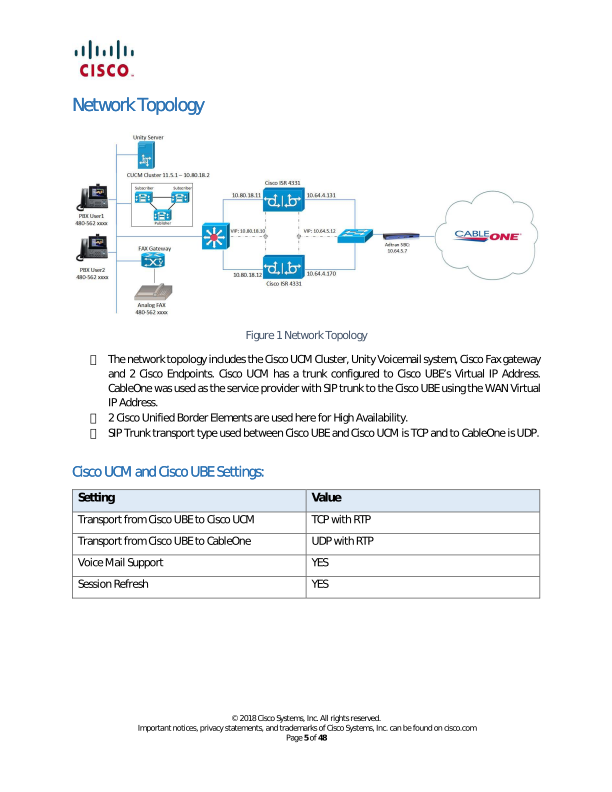
Image 2 from page 5

Page 5 diagram

Page 6#

chunk 5

© 2020 Cisco Systems, Inc. All rights reserved. Important notices, privacy statements, and trademarks of Cisco Systems, Inc. can be found on cisco.com Page 6 of 50 System Components Hardware Requirements • Cisco UBE on Cisco ISR 4331 router • CUCM cluster on UCS C240, 1 Publisher node and 1 Subscriber nodes • Generic Cisco IP-Phones Software Requirements • CUBE-Version: 12.7.0 running IOS-XE 16.12.02 • CUCM UCOS 12.5.1.11900-146 for 1 Publisher and 1 Subscriber Features Features Supported • Incoming and outgoing off-net calls using G711ulaw • Call Conference • CPE Voice Mail support • Call hold & Resume with and without MOH • Unattended and Attended Call transfer • Call forward (all, busy and no answer) • DTMF (RFC2833) • Fax (g711ulaw pass-through) • IP-PBX Calling number privacy • High Availability Features Not Supported • Cisco UCM does not support Blind Call transfer Caveats • Caller ID is not updated on attended and unattended transfer scenarios. • Only one IP PBX used for the testing. • Sparklight does not supports T.38 fax. • The codec priority of inbound calls are G711A Law and G711U Law. G729 is neither offered as a preferred codec nor available in the codec list of the incoming INVITE from PSTN

Page 7#

chunk 6

© 2020 Cisco Systems, Inc. All rights reserved. Important notices, privacy statements, and trademarks of Cisco Systems, Inc. can be found on cisco.com Page 7 of 50 Configuration Configuring Cisco Unified Border Element Network Interface The IP address used are for illustration only, the actual IP address can vary. The Active/Standby pair share the same virtual IP address and continually exchange status messages. Figure 2 High Availability topology
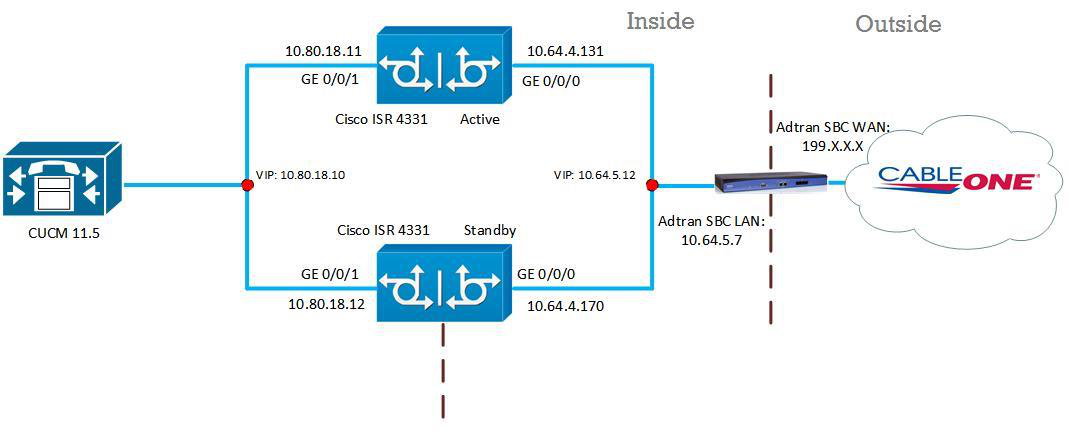
Image 1 from page 7

Page 8#

chunk 7

© 2020 Cisco Systems, Inc. All rights reserved. Important notices, privacy statements, and trademarks of Cisco Systems, Inc. can be found on cisco.com Page 8 of 50 Cisco UBE 1: interface GigabitEthernet0/0/0 description CUBE LAN ip address 10.64.4.170 255.255.0.0 negotiation auto redundancy rii 4 redundancy group 2 ip 10.64.4.231 exclusive ! interface GigabitEthernet0/0/1 description CUBE WAN ip address 10.249.248.211 255.255.255.240 negotiation auto redundancy rii 3 redundancy group 2 ip 10.249.248.210 exclusive ! interface GigabitEthernet0/0/2 description CUBE HA ip address 10.80.10.49 255.255.255.0 negotiation auto !

Page 9#

chunk 8

© 2020 Cisco Systems, Inc. All rights reserved. Important notices, privacy statements, and trademarks of Cisco Systems, Inc. can be found on cisco.com Page 9 of 50 Cisco UBE 2: interface GigabitEthernet0/0/0 description CUBE WAN ip address 10.64.4.131 255.255.0.0 negotiation auto redundancy rii 4 redundancy group 2 ip 10.64.4.231 exclusive ! interface GigabitEthernet0/0/1 description CUBE WAN ip address 10.249.248.212 255.255.255.240 negotiation auto redundancy rii 3 redundancy group 2 ip 10.249.248.210 exclusive ! interface GigabitEthernet0/0/2 description CUBE HA ip address 10.80.10.48 255.255.255.0 negotiation auto !

Page 10#

chunk 9

© 2020 Cisco Systems, Inc. All rights reserved. Important notices, privacy statements, and trademarks of Cisco Systems, Inc. can be found on cisco.com Page 10 of 50 Global Cisco UBE settings In order to enable Cisco UBE IP2IP SBC functionality, following command has to be entered: voice service voip ip address trusted list ipv4 10.80.12.2 ipv4 10.80.12.3 ipv4 10.249.248.216 address-hiding mode border-element license capacity 20 allow-connections sip to sip redundancy-group 2 fax protocol pass-through g711ulaw sip session refresh asserted-id pai early-offer forced midcall-signaling passthru privacy-policy passthru g729 annexb-all sip-profiles inbound sip-profiles 1 inbound ! Explanation Command Description allow-connections sip to sip Allow IP2IP connections between two SIP call legs redundancy-group 2 Enable High Availability for the VoIP service fax protocol Specifies the fax protocol asserted-id Specifies the privacy header in the outgoing SIP requests and response messages

Page 11#

chunk 10

© 2020 Cisco Systems, Inc. All rights reserved. Important notices, privacy statements, and trademarks of Cisco Systems, Inc. can be found on cisco.com Page 11 of 50 Codecs G711ulaw codec is used for this testing. Codec preferences used to change according to the test plan description. voice class codec 1 codec preference 1 g711ulaw codec preference 2 g711alaw ! Dial peer Outbound Dial-peer to Sparklight: dial-peer voice 1 voip description Ingress CUCM to PSTN - LAN Interface session protocol sipv2 session transport tcp incoming called-number .T voice-class codec 1 voice-class sip bind control source-interface GigabitEthernet0/0/0 voice-class sip bind media source-interface GigabitEthernet0/0/0 dtmf-relay rtp-nte fax protocol pass-through g711ulaw no vad ! dial-peer voice 2 voip description Egress CUCM to PSTN - WAN Interface destination-pattern .T session protocol sipv2 session target ipv4: 10.249.248.216:5060 session transport udp voice-class codec 1 voice-class sip options-ping 60

Page 12#

chunk 11

© 2020 Cisco Systems, Inc. All rights reserved. Important notices, privacy statements, and trademarks of Cisco Systems, Inc. can be found on cisco.com Page 12 of 50 voice-class sip profiles 2 voice-class sip bind control source-interface GigabitEthernet0/0/1 voice-class sip bind media source-interface GigabitEthernet0/0/1 dtmf-relay rtp-nte fax protocol pass-through g711ulaw no vad ! Inbound Dial-peer from Sparklight: dial-peer voice 3 voip description Sparklight PSTN to CUCM - WAN Interface session protocol sipv2 session transport udp incoming called-number 623....... voice-class codec 1 voice-class sip profiles 2 voice-class sip bind control source-interface GigabitEthernet0/0/1 voice-class sip bind media source-interface GigabitEthernet0/0/1 dtmf-relay rtp-nte fax protocol pass-through g711ulaw no vad ! dial-peer voice 4 voip description Sparklight PSTN to CUCM - LAN Interface destination-pattern 623....... session protocol sipv2 session target ipv4:10.80.12.2:5060 session transport tcp voice-class codec 1 voice-class sip options-ping 60 voice-class sip bind control source-interface GigabitEthernet0/0/0 voice-class sip bind media source-interface GigabitEthernet0/0/0 dtmf-relay rtp-nte

Page 13#

chunk 12

© 2020 Cisco Systems, Inc. All rights reserved. Important notices, privacy statements, and trademarks of Cisco Systems, Inc. can be found on cisco.com Page 13 of 50 fax protocol pass-through g711ulaw no vad !

Page 14#

chunk 13

© 2020 Cisco Systems, Inc. All rights reserved. Important notices, privacy statements, and trademarks of Cisco Systems, Inc. can be found on cisco.com Page 14 of 50 Configuration example The following configuration snippet contains a sample configuration of Cisco UBE with all parameters mentioned previously. Active Cisco UBE: version 16.12 service timestamps debug datetime msec service timestamps log datetime msec service call-home platform qfp utilization monitor load 80 platform punt-keepalive disable-kernel-core ! hostname Router ! boot-start-marker boot system bootflash:isr4331-universalk9.16.12.02.SPA.bin boot-end-marker ! vrf definition Mgmt-intf ! address-family ipv4 exit-address-family ! address-family ipv6 exit-address-family ! enable secret 9 $9$WqvWswdeK1HDYk$aWfZx9jLuxYKTg1njANmuDAxLCRXapdky0 ! ip host voip.cableone.net 10.249.248.216 ! login on-success log !

Page 15#

chunk 14

© 2020 Cisco Systems, Inc. All rights reserved. Important notices, privacy statements, and trademarks of Cisco Systems, Inc. can be found on cisco.com Page 15 of 50 subscriber templating ! multilink bundle-name authenticated ! crypto pki trustpoint SLA-TrustPoint enrollment pkcs12 revocation-check crl ! crypto pki trustpoint TP-self-signed-2194658987 enrollment selfsigned subject-name cn=IOS-Self-Signed-Certificate-2194658987 revocation-check none rsakeypair TP-self-signed-2194658987 ! ! crypto pki certificate chain SLA-TrustPoint certificate ca 01 30820321 30820209 A0030201 02020101 300D0609 2A864886 F70D0101 0B050030 32310E30 0C060355 040A1305 43697363 6F312030 1E060355 04031317 43697363 6F204C69 63656E73 696E6720 526F6F74 20434130 1E170D31 33303533 30313934 3834375A 170D3338 30353330 31393438 34375A30 32310E30 0C060355 040A1305 43697363 6F312030 1E060355 04031317 43697363 6F204C69 63656E73 696E6720 526F6F74 20434130 82012230 0D06092A 864886F7 0D010101 05000382 010F0030 82010A02 82010100 A6BCBD96 131E05F7 145EA72C 2CD686E6 17222EA1 F1EFF64D CBB4C798 212AA147 C655D8D7 9471380D 8711441E 1AAF071A 9CAE6388 8A38E520 1C394D78 462EF239 C659F715 B98C0A59 5BBB5CBD 0CFEBEA3 700A8BF7 D8F256EE 4AA4E80D DB6FD1C9 60B1FD18 FFC69C96 6FA68957 A2617DE7 104FDC5F EA2956AC 7390A3EB 2B5436AD C847A2C5 DAB553EB 69A9A535 58E9F3E3 C0BD23CF 58BD7188 68E69491 20F320E7 948E71D7 AE3BCC84 F10684C7 4BC8E00F 539BA42B 42C68BB7 C7479096 B4CB2D62 EA2F505D C7B062A4 6811D95B E8250FC4 5D5D5FB8 8F27D191 C55F0D76 61F9A4CD 3D992327 A8BB03BD 4E6D7069 7CBADF8B DF5F4368 95135E44 DFC7C6CF 04DD7FD1 02030100 01A34230 40300E06 03551D0F 0101FF04 04030201 06300F06 03551D13 0101FF04 05300301 01FF301D 0603551D 0E041604 1449DC85

Page 16#

chunk 15

© 2020 Cisco Systems, Inc. All rights reserved. Important notices, privacy statements, and trademarks of Cisco Systems, Inc. can be found on cisco.com Page 16 of 50 4B3D31E5 1B3E6A17 606AF333 3D3B4C73 E8300D06 092A8648 86F70D01 010B0500 03820101 00507F24 D3932A66 86025D9F E838AE5C 6D4DF6B0 49631C78 240DA905 604EDCDE FF4FED2B 77FC460E CD636FDB DD44681E 3A5673AB 9093D3B1 6C9E3D8B D98987BF E40CBD9E 1AECA0C2 2189BB5C 8FA85686 CD98B646 5575B146 8DFC66A8 467A3DF4 4D565700 6ADF0F0D CF835015 3C04FF7C 21E878AC 11BA9CD2 55A9232C 7CA7B7E6 C1AF74F6 152E99B7 B1FCF9BB E973DE7F 5BDDEB86 C71E3B49 1765308B 5FB0DA06 B92AFE7F 494E8A9E 07B85737 F3A58BE1 1A48A229 C37C1E69 39F08678 80DDCD16 D6BACECA EEBC7CF9 8428787B 35202CDC 60E4616A B623CDBD 230E3AFB 418616A9 4093E049 4D10AB75 27E86F73 932E35B5 8862FDAE 0275156F 719BB2F0 D697DF7F 28 quit crypto pki certificate chain TP-self-signed-2194658987 certificate self-signed 01 30820330 30820218 A0030201 02020101 300D0609 2A864886 F70D0101 05050030 31312F30 2D060355 04031326 494F532D 53656C66 2D536967 6E65642D 43657274 69666963 6174652D 32313934 36353839 3837301E 170D3230 30343038 31313338 34365A17 0D333030 31303130 30303030 305A3031 312F302D 06035504 03132649 4F532D53 656C662D 5369676E 65642D43 65727469 66696361 74652D32 31393436 35383938 37308201 22300D06 092A8648 86F70D01 01010500 0382010F 00308201 0A028201 0100DE9E 163CD3E2 E4785C90 FB051FCF E6CF65EB A7024931 CD6FF987 4DBEFE44 95DF3F75 29C2F176 7E509294 27E92E57 F0CC9D00 07BCB083 CEA2915C 745B3F44 1628B7AB 3905CA7C 6DCFEA2F 406686A6 12837FE4 F4362ECB 28BC9689 AE8C603A B99BBDFA C7C80A8D 252D0C34 20C764F6 320D5843 4FF2F380 6525FB23 6EAAC070 7096A6B9 09C01DBB CA40CA93 3D05DAAE 7E9194BE ABFFD280 67F62072 433049EA E0280098 E9873C0D 4D2B2ACF 88011990 6CCA1F74 0DCFC18B 5A79D635 C349802A 86EAB262 1EC59E07 F14BCA19 6706BF8C D82A0AB2 3B8289B1 89D10FCB 6912D08F E9A49EB2 36AC143F E0844DC1 B8BB6243 F8FFAC2C 77CC0914 A1579019 9E9A9804 DE5B0203 010001A3 53305130 0F060355 1D130101 FF040530 030101FF 301F0603 551D2304 18301680 144F4B69 4258E0DF E53F4DBD 38899AAA 891E4405 98301D06 03551D0E 04160414 4F4B6942 58E0DFE5 3F4DBD38 899AAA89 1E440598 300D0609 2A864886 F70D0101 05050003 82010100 0B2BD756 978173BE CD0C084B E2490023 1B9B3BDC 5B4CADA5 5EEDD0EE 9B30083C 6A20C31A 427D03EB 7DBC0ABC CFA24E54 6833AFEA CF1A3AFF 8475261C C60FE5D3 25EF31EA 0998E891 4ACFB424

Page 17#

chunk 16

© 2020 Cisco Systems, Inc. All rights reserved. Important notices, privacy statements, and trademarks of Cisco Systems, Inc. can be found on cisco.com Page 17 of 50 58D258F6 B1AD4269 4008B6E0 999F827F 0F46A8AF 3B6C0B12 C7BC563E 3303ED15 0193865F FEF700B5 D9AE32AD B5F2A39D 16C2EF07 0C7695FA 22B905C5 6FAD7707 F103F2E7 C98E3B5C F72A9C01 CE6F43B7 E0F02E16 76063F38 C158233C 11B5AADC 8C1764DF 78440F79 32F0EF91 9DA08785 0452673B 32F5449C 07ED8128 7780AC86 4CA9D5F9 488AB7DC FCA96602 93EDF9F5 9786174D A0985524 A004389A 92BDCADE C49605A3 11777581 35D96531 FC43E356 7EE1D7A3 quit ! voice service voip ip address trusted list ipv4 10.80.12.2 ipv4 10.80.12.3 ipv4 10.249.248.216 address-hiding mode border-element license capacity 20 allow-connections sip to sip redundancy-group 2 fax protocol pass-through g711ulaw sip session refresh asserted-id pai early-offer forced midcall-signaling passthru privacy-policy passthru g729 annexb-all sip-profiles inbound sip-profiles 1 inbound ! voice class codec 1 codec preference 1 g711ulaw codec preference 2 g711alaw ! !

Page 18#

chunk 17

© 2020 Cisco Systems, Inc. All rights reserved. Important notices, privacy statements, and trademarks of Cisco Systems, Inc. can be found on cisco.com Page 18 of 50 voice class sip-profiles 1 request INVITE sip-header To copy "sip:(.*)@" u01 request INVITE sip-header SIP-Req-URI modify ".*@(.*)" "INVITE sip:\u01@\1" ! voice class sip-profiles 2 request ANY sip-header Diversion modify "sip:(.*)@" "sip:623455\1@" ! no license feature hseck9 license udi pid ISR4331/K9 sn FDO21381GMV license accept end user agreement license boot level appxk9 license boot level uck9 license boot level securityk9 memory free low-watermark processor 67123 ! diagnostic bootup level minimal spanning-tree extend system-id ! redundancy mode none application redundancy group 2 priority 100 failover threshold 75 timers delay 30 reload 60 control GigabitEthernet0/0/2 protocol 1 data GigabitEthernet0/0/2 track 1 shutdown track 2 shutdown ! track 1 interface GigabitEthernet0/0/0 line-protocol ! track 2 interface GigabitEthernet0/0/1 line-protocol !

Page 19#

chunk 18

© 2020 Cisco Systems, Inc. All rights reserved. Important notices, privacy statements, and trademarks of Cisco Systems, Inc. can be found on cisco.com Page 19 of 50 interface GigabitEthernet0/0/0 description CUBE LAN ip address 10.64.4.170 255.255.0.0 negotiation auto redundancy rii 4 redundancy group 2 ip 10.64.4.231 exclusive ! interface GigabitEthernet0/0/1 description CUBE WAN ip address 10.249.248.211 255.255.255.240 negotiation auto redundancy rii 3 redundancy group 2 ip 10.249.248.210 exclusive ! interface GigabitEthernet0/0/2 description CUBE HA ip address 10.80.10.49 255.255.255.0 negotiation auto ! interface Service-Engine0/2/0 ! interface Service-Engine0/4/0 ! interface GigabitEthernet0 vrf forwarding Mgmt-intf no ip address negotiation auto ! ip forward-protocol nd no ip http server ip http secure-server ip route 0.0.0.0 0.0.0.0 10.249.248.209 ip route 10.64.0.0 255.255.0.0 10.64.1.1

Page 20#

chunk 19

© 2020 Cisco Systems, Inc. All rights reserved. Important notices, privacy statements, and trademarks of Cisco Systems, Inc. can be found on cisco.com Page 20 of 50 ip route 10.80.12.0 255.255.255.0 10.64.1.1 ip route 172.16.0.0 255.255.0.0 10.64.1.1 ip route 172.17.0.0 255.255.0.0 10.64.1.1 ! control-plane ! voice-port 0/2/0 voice-port 0/2/1 ! mgcp behavior rsip-range tgcp-only mgcp behavior comedia-role none mgcp behavior comedia-check-media-src disable mgcp behavior comedia-sdp-force disable ! mgcp profile default ! dial-peer voice 1 voip description Ingress CUCM to PSTN - LAN Interface session protocol sipv2 session transport tcp incoming called-number .T voice-class codec 1 voice-class sip bind control source-interface GigabitEthernet0/0/0 voice-class sip bind media source-interface GigabitEthernet0/0/0 dtmf-relay rtp-nte fax protocol pass-through g711ulaw no vad ! dial-peer voice 2 voip description Egress Cube to PSTN - WAN Interface destination-pattern .T session protocol sipv2 session target ipv4:10.249.248.216:5060

Page 21#

chunk 20

© 2020 Cisco Systems, Inc. All rights reserved. Important notices, privacy statements, and trademarks of Cisco Systems, Inc. can be found on cisco.com Page 21 of 50 session transport udp voice-class codec 1 voice-class sip profiles 2 voice-class sip bind control source-interface GigabitEthernet0/0/1 voice-class sip bind media source-interface GigabitEthernet0/0/1 dtmf-relay rtp-nte fax protocol pass-through g711ulaw no vad ! dial-peer voice 3 voip description PSTN to Cube - WAN Interface session protocol sipv2 session transport udp incoming called-number 623....... voice-class codec 1 voice-class sip bind control source-interface GigabitEthernet0/0/1 voice-class sip bind media source-interface GigabitEthernet0/0/1 dtmf-relay rtp-nte fax protocol pass-through g711ulaw no vad ! dial-peer voice 4 voip description PSTN to CUCM - LAN Interface destination-pattern 623....... session protocol sipv2 session target ipv4:10.80.12.2:5060 session transport tcp voice-class codec 1 voice-class sip bind control source-interface GigabitEthernet0/0/0 voice-class sip bind media source-interface GigabitEthernet0/0/0 dtmf-relay rtp-nte fax protocol pass-through g711ulaw no vad

Page 22#

chunk 21

© 2020 Cisco Systems, Inc. All rights reserved. Important notices, privacy statements, and trademarks of Cisco Systems, Inc. can be found on cisco.com Page 22 of 50 ! sip-ua no transport tcp tls connection-reuse ! line con 0 stopbits 1 line aux 0 stopbits 1 line vty 0 4 exec-timeout 30 30 password 7 XXX login ! end

Page 23#

chunk 22

© 2020 Cisco Systems, Inc. All rights reserved. Important notices, privacy statements, and trademarks of Cisco Systems, Inc. can be found on cisco.com Page 23 of 50 Standby Cisco UBE: version 16.12 service timestamps debug datetime msec service timestamps log datetime msec service call-home platform qfp utilization monitor load 80 platform punt-keepalive disable-kernel-core ! hostname Router ! boot-start-marker boot system bootflash:isr4331-universalk9.16.12.02.SPA.bin boot-end-marker ! vrf definition Mgmt-intf ! address-family ipv4 exit-address-family ! address-family ipv6 exit-address-family ! enable secret 9 $9$s0ATbbL5j5ok4.$mNCRebFwGyWcBoZunVuUhRIWv6SHw1ds ! ip host voip.cableone.net 10.249.248.216 ! login on-success log ! subscriber templating ! multilink bundle-name authenticated !

Page 24#

chunk 23

© 2020 Cisco Systems, Inc. All rights reserved. Important notices, privacy statements, and trademarks of Cisco Systems, Inc. can be found on cisco.com Page 24 of 50 crypto pki trustpoint SLA-TrustPoint enrollment pkcs12 revocation-check crl ! crypto pki trustpoint TP-self-signed-3616943619 enrollment selfsigned subject-name cn=IOS-Self-Signed-Certificate-3616943619 revocation-check none rsakeypair TP-self-signed-3616943619 ! ! crypto pki certificate chain SLA-TrustPoint certificate ca 01 30820321 30820209 A0030201 02020101 300D0609 2A864886 F70D0101 0B050030 32310E30 0C060355 040A1305 43697363 6F312030 1E060355 04031317 43697363 6F204C69 63656E73 696E6720 526F6F74 20434130 1E170D31 33303533 30313934 3834375A 170D3338 30353330 31393438 34375A30 32310E30 0C060355 040A1305 43697363 6F312030 1E060355 04031317 43697363 6F204C69 63656E73 696E6720 526F6F74 20434130 82012230 0D06092A 864886F7 0D010101 05000382 010F0030 82010A02 82010100 A6BCBD96 131E05F7 145EA72C 2CD686E6 17222EA1 F1EFF64D CBB4C798 212AA147 C655D8D7 9471380D 8711441E 1AAF071A 9CAE6388 8A38E520 1C394D78 462EF239 C659F715 B98C0A59 5BBB5CBD 0CFEBEA3 700A8BF7 D8F256EE 4AA4E80D DB6FD1C9 60B1FD18 FFC69C96 6FA68957 A2617DE7 104FDC5F EA2956AC 7390A3EB 2B5436AD C847A2C5 DAB553EB 69A9A535 58E9F3E3 C0BD23CF 58BD7188 68E69491 20F320E7 948E71D7 AE3BCC84 F10684C7 4BC8E00F 539BA42B 42C68BB7 C7479096 B4CB2D62 EA2F505D C7B062A4 6811D95B E8250FC4 5D5D5FB8 8F27D191 C55F0D76 61F9A4CD 3D992327 A8BB03BD 4E6D7069 7CBADF8B DF5F4368 95135E44 DFC7C6CF 04DD7FD1 02030100 01A34230 40300E06 03551D0F 0101FF04 04030201 06300F06 03551D13 0101FF04 05300301 01FF301D 0603551D 0E041604 1449DC85 4B3D31E5 1B3E6A17 606AF333 3D3B4C73 E8300D06 092A8648 86F70D01 010B0500 03820101 00507F24 D3932A66 86025D9F E838AE5C 6D4DF6B0 49631C78 240DA905 604EDCDE FF4FED2B 77FC460E CD636FDB DD44681E 3A5673AB 9093D3B1 6C9E3D8B D98987BF E40CBD9E 1AECA0C2 2189BB5C 8FA85686 CD98B646 5575B146 8DFC66A8

Page 25#

chunk 24

© 2020 Cisco Systems, Inc. All rights reserved. Important notices, privacy statements, and trademarks of Cisco Systems, Inc. can be found on cisco.com Page 25 of 50 467A3DF4 4D565700 6ADF0F0D CF835015 3C04FF7C 21E878AC 11BA9CD2 55A9232C 7CA7B7E6 C1AF74F6 152E99B7 B1FCF9BB E973DE7F 5BDDEB86 C71E3B49 1765308B 5FB0DA06 B92AFE7F 494E8A9E 07B85737 F3A58BE1 1A48A229 C37C1E69 39F08678 80DDCD16 D6BACECA EEBC7CF9 8428787B 35202CDC 60E4616A B623CDBD 230E3AFB 418616A9 4093E049 4D10AB75 27E86F73 932E35B5 8862FDAE 0275156F 719BB2F0 D697DF7F 28 quit crypto pki certificate chain TP-self-signed-3616943619 certificate self-signed 01 30820330 30820218 A0030201 02020101 300D0609 2A864886 F70D0101 05050030 31312F30 2D060355 04031326 494F532D 53656C66 2D536967 6E65642D 43657274 69666963 6174652D 33363136 39343336 3139301E 170D3230 30343038 31313238 34345A17 0D333030 31303130 30303030 305A3031 312F302D 06035504 03132649 4F532D53 656C662D 5369676E 65642D43 65727469 66696361 74652D33 36313639 34333631 39308201 22300D06 092A8648 86F70D01 01010500 0382010F 00308201 0A028201 0100D7B5 B01CB61F 405692AB 0367B5FD FFDD7DE7 F2779111 6742D4CC 729BA52D 38816BC7 BD076992 B8FB4CFF 9EF76D2F 2B170F33 58302925 E8BC82A3 2730377A 53B10B7E 887D003B 4F117214 2AB94356 BA35364F 01AF4B32 20AAE06E 33FC9D86 4E52101B 32BD500B FB8E154C 71602FC7 CF65C1FA 87BAF066 D4CA48ED A19EA403 2DC6374B 719905A1 C6600AF2 AA0B64F5 6D00EE5B 4A165757 2F3C93C4 2C9C8E7B 54B4733C 89FCBBFF 663174C9 D6661110 9ACCC49C DE25143D 5DF87ECB DC0F7183 E76D02D7 1F3E89FC D30D91C1 165483D6 AF5270B6 14C83073 6C2B5990 E0D66B36 6A98D663 C969A8BA 45F7F5CB FADD5C6F B15E13DB 4C5F0E72 9FB6B049 0F16EA21 44130203 010001A3 53305130 0F060355 1D130101 FF040530 030101FF 301F0603 551D2304 18301680 14B2A0A6 33E67A00 23D6FD1E C788ADE1 2E569223 6D301D06 03551D0E 04160414 B2A0A633 E67A0023 D6FD1EC7 88ADE12E 5692236D 300D0609 2A864886 F70D0101 05050003 82010100 A4AE647C 3F7F1F31 E2EC3BFF 0F7A6AD3 1337844F BFB44956 EE78B503 827274E0 1110DE45 A49962B7 B71C0D6B 4ABC6F93 D93F6109 3E589CE8 BF2962FF C0BEED86 6E9A1B2C 8031593E A83373C1 10B00F00 951BEFC8 610BC0C5 02D28055 E2E3D04D 10BD7165 B8EEC124 76D5C864 C748C715 CDCFD54A DC622333 D342318F 31A6D6DB F3FBA6C5 0CC5859E BAA823B5 BA286C68 AC7F239B E6BF44FA E3DC3A63 7132D72B 96879F19 9919E2CB 7551DD01 F5C42ABB BDA68A09 2D64D2FC 246207F1 BFEF2526 32C17096 8574CF3B CD909625

Page 26#

chunk 25

© 2020 Cisco Systems, Inc. All rights reserved. Important notices, privacy statements, and trademarks of Cisco Systems, Inc. can be found on cisco.com Page 26 of 50 F14AE5FD D86548F3 D60639B6 182F07D8 1808B88E 14611CEC 964C42C4 EB555CAA 28EC9819 D99CBEB3 D5A6D537 379C88D5 1E9A7614 quit ! ! voice service voip ip address trusted list ipv4 10.80.12.2 ipv4 10.80.12.3 ipv4 10.249.248.216 address-hiding mode border-element license capacity 20 allow-connections sip to sip redundancy-group 2 fax protocol pass-through g711ulaw sip session refresh asserted-id pai early-offer forced midcall-signaling passthru privacy-policy passthru g729 annexb-all sip-profiles inbound sip-profiles 1 inbound ! voice class codec 1 codec preference 1 g711ulaw codec preference 2 g711alaw ! ! voice class sip-profiles 1 request INVITE sip-header To copy "sip:(.*)@" u01 request INVITE sip-header SIP-Req-URI modify ".*@(.*)" "INVITE sip:\u01@\1"

Page 27#

chunk 26

© 2020 Cisco Systems, Inc. All rights reserved. Important notices, privacy statements, and trademarks of Cisco Systems, Inc. can be found on cisco.com Page 27 of 50 ! voice class sip-profiles 2 request ANY sip-header Diversion modify "sip:(.*)@" "sip:623455\1@" ! no license feature hseck9 license udi pid ISR4331/K9 sn FDO21381FEY license accept end user agreement license boot level appxk9 license boot level uck9 license boot level securityk9 memory free low-watermark processor 67123 ! diagnostic bootup level minimal ! spanning-tree extend system-id ! redundancy mode none application redundancy group 2 priority 100 failover threshold 75 timers delay 30 reload 60 control GigabitEthernet0/0/2 protocol 1 data GigabitEthernet0/0/2 track 1 shutdown track 2 shutdown ! track 1 interface GigabitEthernet0/0/0 line-protocol ! track 2 interface GigabitEthernet0/0/1 line-protocol ! ! !

Page 28#

chunk 27

© 2020 Cisco Systems, Inc. All rights reserved. Important notices, privacy statements, and trademarks of Cisco Systems, Inc. can be found on cisco.com Page 28 of 50 interface GigabitEthernet0/0/0 description CUBE LAN ip address 10.64.4.131 255.255.0.0 negotiation auto redundancy rii 4 redundancy group 2 ip 10.64.4.231 exclusive ! interface GigabitEthernet0/0/1 description CUBE WAN ip address 10.249.248.212 255.255.255.240 negotiation auto redundancy rii 3 redundancy group 2 ip 10.249.248.210 exclusive ! interface GigabitEthernet0/0/2 description CUBE HA ip address 10.80.10.48 255.255.255.0 negotiation auto ! interface Service-Engine0/2/0 ! interface Service-Engine0/4/0 ! interface GigabitEthernet0 vrf forwarding Mgmt-intf no ip address negotiation auto ! ip forward-protocol nd no ip http server ip http secure-server ip route 0.0.0.0 0.0.0.0 10.249.248.209 ip route 10.64.0.0 255.255.0.0 10.64.1.1

Page 29#

chunk 28

© 2020 Cisco Systems, Inc. All rights reserved. Important notices, privacy statements, and trademarks of Cisco Systems, Inc. can be found on cisco.com Page 29 of 50 ip route 10.80.12.0 255.255.255.0 10.64.1.1 ip route 172.16.0.0 255.255.0.0 10.64.1.1 ip route 172.17.0.0 255.255.0.0 10.64.1.1 ! control-plane ! voice-port 0/2/0 ! voice-port 0/2/1 ! mgcp behavior rsip-range tgcp-only mgcp behavior comedia-role none mgcp behavior comedia-check-media-src disable mgcp behavior comedia-sdp-force disable ! mgcp profile default ! dial-peer voice 1 voip description Ingress CUCM to PSTN - LAN Interface session protocol sipv2 session transport tcp incoming called-number .T voice-class codec 1 voice-class sip bind control source-interface GigabitEthernet0/0/0 voice-class sip bind media source-interface GigabitEthernet0/0/0 dtmf-relay rtp-nte fax protocol pass-through g711ulaw no vad ! dial-peer voice 2 voip description Egress Cube to PSTN - WAN Interface destination-pattern .T session protocol sipv2

Page 30#

chunk 29

© 2020 Cisco Systems, Inc. All rights reserved. Important notices, privacy statements, and trademarks of Cisco Systems, Inc. can be found on cisco.com Page 30 of 50 session target ipv4:10.249.248.216:5060 session transport udp voice-class codec 1 voice-class sip profiles 2 voice-class sip bind control source-interface GigabitEthernet0/0/1 voice-class sip bind media source-interface GigabitEthernet0/0/1 dtmf-relay rtp-nte fax protocol pass-through g711ulaw no vad ! dial-peer voice 3 voip description PSTN to Cube - WAN Interface session protocol sipv2 session transport udp incoming called-number 623....... voice-class codec 1 voice-class sip bind control source-interface GigabitEthernet0/0/1 voice-class sip bind media source-interface GigabitEthernet0/0/1 dtmf-relay rtp-nte fax protocol pass-through g711ulaw no vad ! dial-peer voice 4 voip description PSTN to CUCM - LAN Interface destination-pattern 623....... session protocol sipv2 session target ipv4:10.80.12.2:5060 session transport tcp voice-class codec 1 voice-class sip bind control source-interface GigabitEthernet0/0/0 voice-class sip bind media source-interface GigabitEthernet0/0/0 dtmf-relay rtp-nte fax protocol pass-through g711ulaw

Page 31#

chunk 30

© 2020 Cisco Systems, Inc. All rights reserved. Important notices, privacy statements, and trademarks of Cisco Systems, Inc. can be found on cisco.com Page 31 of 50 no vad ! sip-ua no transport tcp tls connection-reuse ! line con 0 stopbits 1 line aux 0 stopbits 1 line vty 0 4 exec-timeout 30 30 password 7 XXX login ! end

Page 32#

chunk 31

© 2020 Cisco Systems, Inc. All rights reserved. Important notices, privacy statements, and trademarks of Cisco Systems, Inc. can be found on cisco.com Page 32 of 50 Configuring Cisco UCM 12.5 Cisco UCM Version Figure 3: Cisco UCM Version Cisco Call Manager Service Parameters Navigation: System → Service Parameters • Select Server* = cucm1-cucmpub.tekvoice.in--CUCM Voice/Video (Active) • Select Service*= Cisco CallManager (Active) • All other fields are set to default values Figure 4: Service Parameters
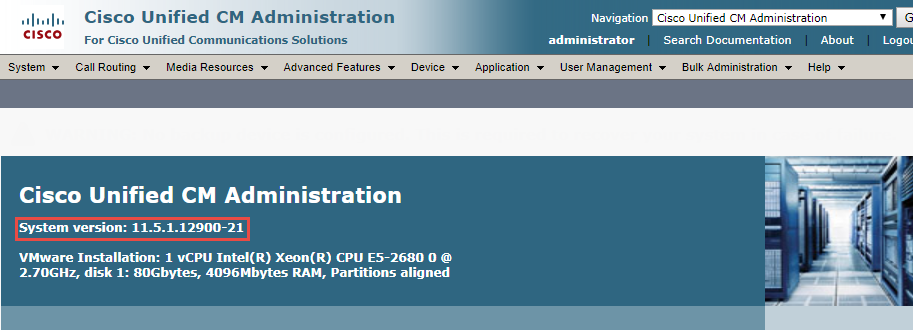
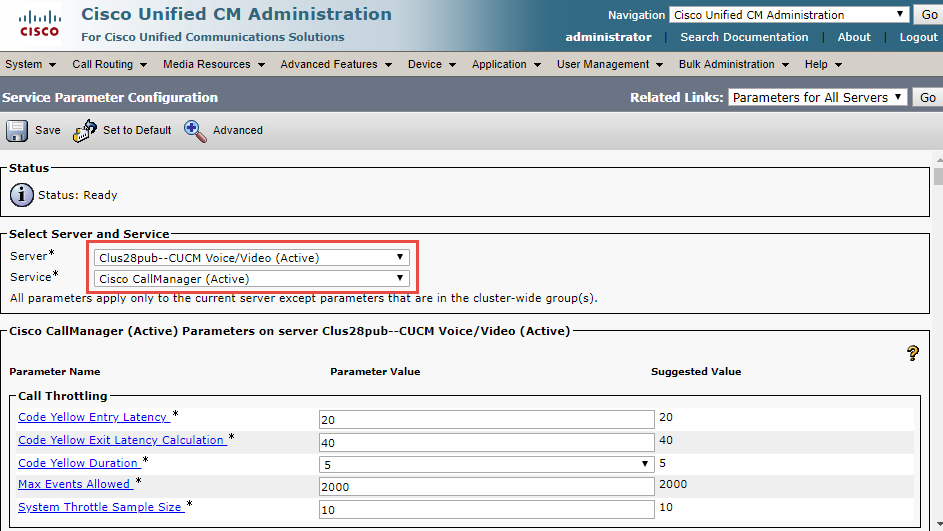
Image 2 from page 32

Image 3 from page 32

Page 33#

chunk 32

© 2020 Cisco Systems, Inc. All rights reserved. Important notices, privacy statements, and trademarks of Cisco Systems, Inc. can be found on cisco.com Page 33 of 50 Figure 5: Service Parameters (Cont.) SIP Trunk Security Profile Navigation: System → Security → SIP Trunk Security Profile • Name*= Sparklight SIP Trunk Profile is used as an example • Description = Non Secure SIP Trunk Profile authenticated by null String is used as an example • Device Security Mode = Non Secure • Incoming Transport Type* = TCP + UDP • Outgoing Transport Type = TCP
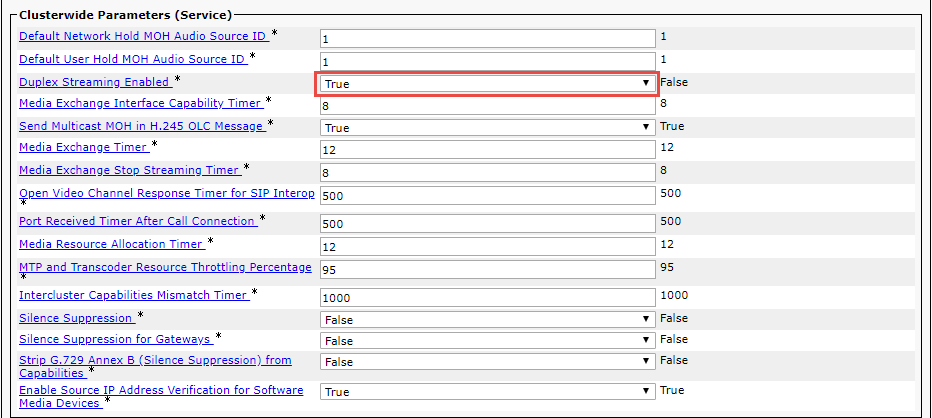
Image 2 from page 33

Page 34#

chunk 33

© 2020 Cisco Systems, Inc. All rights reserved. Important notices, privacy statements, and trademarks of Cisco Systems, Inc. can be found on cisco.com Page 34 of 50 Figure 6:SIP Trunk Security Profile

Image 1 from page 34

Page 35#

chunk 34

© 2020 Cisco Systems, Inc. All rights reserved. Important notices, privacy statements, and trademarks of Cisco Systems, Inc. can be found on cisco.com Page 35 of 50 SIP Profile Navigation: Device → Device Settings → SIP Profile • Name*= Sparklight SIP Profile is used as an example • Description = Sparklight SIP Profile is used as an example Figure 7:SIP Profile

Image 2 from page 35

Page 36#

chunk 35

© 2020 Cisco Systems, Inc. All rights reserved. Important notices, privacy statements, and trademarks of Cisco Systems, Inc. can be found on cisco.com Page 36 of 50 Figure 6: SIP Profile (Cont.)

Image 2 from page 36

Page 37#

chunk 36

© 2020 Cisco Systems, Inc. All rights reserved. Important notices, privacy statements, and trademarks of Cisco Systems, Inc. can be found on cisco.com Page 37 of 50 Figure 6: SIP Profile (Cont.)

Image 1 from page 37

Page 38#

chunk 37

© 2020 Cisco Systems, Inc. All rights reserved. Important notices, privacy statements, and trademarks of Cisco Systems, Inc. can be found on cisco.com Page 38 of 50 Trunk configuration Trunk configuration from Cisco UCM to the LAN side of the Cisco UBE: Navigation: Device → Trunk → Add New Figure 8:Add New Trunk to Cisco UBE • Select ‘Trunk Type’ as SIP Trunk and ‘Device Protocol’ as SIP and select ‘Next’ as shown below. Figure 9:Add SIP Trunk Type

Image 1 from page 38

Image 3 from page 38

Page 39#

chunk 38

© 2020 Cisco Systems, Inc. All rights reserved. Important notices, privacy statements, and trademarks of Cisco Systems, Inc. can be found on cisco.com Page 39 of 50 Figure 10:SIP Trunk to Cisco UBE

Image 1 from page 39

Page 40#

chunk 39

© 2020 Cisco Systems, Inc. All rights reserved. Important notices, privacy statements, and trademarks of Cisco Systems, Inc. can be found on cisco.com Page 40 of 50 Figure 10: SIP Trunk to Cisco UBE (Cont.) • Configure the Virtual LAN IP address of the Cisco UBE and the Destination Port • Configure the SIP Trunk Security Profile and SIP Profile as shown below • The rest of the configuration is all default • Click Save and Reset after completion
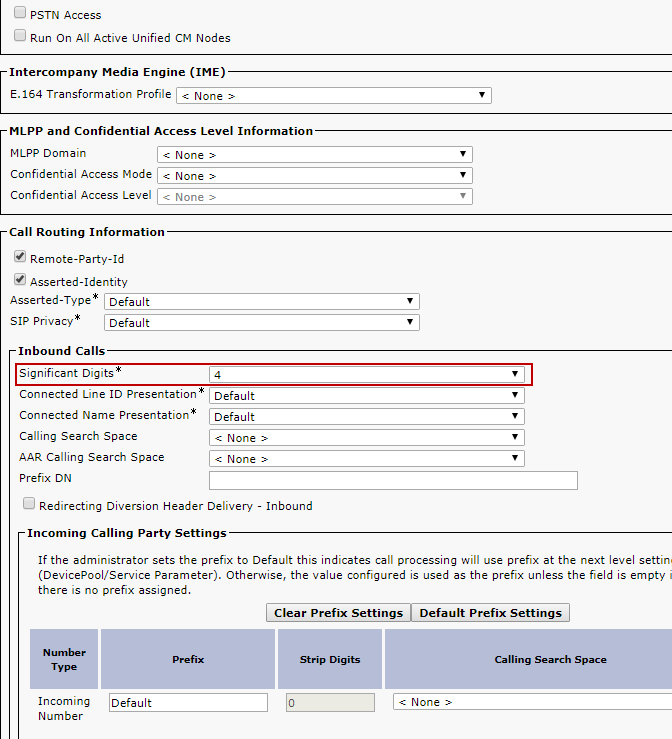
Image 2 from page 40

Page 41#

chunk 40

© 2020 Cisco Systems, Inc. All rights reserved. Important notices, privacy statements, and trademarks of Cisco Systems, Inc. can be found on cisco.com Page 41 of 50 Figure 10: SIP Trunk to Cisco UBE (Cont.) Figure 10: SIP Trunk to Cisco UBE (Cont.)

Image 2 from page 41

Image 3 from page 41

Page 42#

chunk 41

© 2020 Cisco Systems, Inc. All rights reserved. Important notices, privacy statements, and trademarks of Cisco Systems, Inc. can be found on cisco.com Page 42 of 50 Routing configuration Route Pattern for Cisco UBE: Navigation: Call Routing → Route/Hunt → Route Pattern → Add New Figure 11:Add New Route Pattern for Cisco UBE

Image 2 from page 42

Page 43#

chunk 42

© 2020 Cisco Systems, Inc. All rights reserved. Important notices, privacy statements, and trademarks of Cisco Systems, Inc. can be found on cisco.com Page 43 of 50 Figure 12:Route Pattern for PSTN dialing

Image 1 from page 43

Page 44#

chunk 43

© 2020 Cisco Systems, Inc. All rights reserved. Important notices, privacy statements, and trademarks of Cisco Systems, Inc. can be found on cisco.com Page 44 of 50 Figure 13:Route Pattern for Anonymous dialing

Image 2 from page 44

Page 45#

chunk 44

© 2020 Cisco Systems, Inc. All rights reserved. Important notices, privacy statements, and trademarks of Cisco Systems, Inc. can be found on cisco.com Page 45 of 50 Fax Configuration in Cisco ATA SPA112 Quick Setup • Access the IP address of Cisco ATA SPA112 using the web browser • Enter the credentials to authenticate • Click on Quick Setup • Line 1: 10.80.12.2 (Enter the IP address of Cisco UCM) • User ID: 6906 (End User Configured in Cisco UCM) • Dial Plan: Use the default values • Click on Submit to save the configuration Figure 14:Fax-Quick Setup

Image 2 from page 45

Page 46#

chunk 45

© 2020 Cisco Systems, Inc. All rights reserved. Important notices, privacy statements, and trademarks of Cisco Systems, Inc. can be found on cisco.com Page 46 of 50 Voice • Click on the tab Voice • Click on Line 1 from the menu options available in the left panel • In the SIP Settings section ensure the following and the rest can be set to default values, o SIP Transport: UDP o SIP Port: 5060 Figure 15:Fax-Line Setup-SIP Settings

Image 2 from page 46

Page 47#

chunk 46

© 2020 Cisco Systems, Inc. All rights reserved. Important notices, privacy statements, and trademarks of Cisco Systems, Inc. can be found on cisco.com Page 47 of 50 • In the Audio Configuration section ensure the following and the rest can be set to default values, o Preferred Code: G711u o Silence Supp Enable: no o FAX Passthru Codec: G711u o FAX Enable T38: yes/no (Depending on the Fax codec requirements) Figure 16:Fax-Line Setup-Audio Configuration

Image 1 from page 47

Page 48#

chunk 47

© 2020 Cisco Systems, Inc. All rights reserved. Important notices, privacy statements, and trademarks of Cisco Systems, Inc. can be found on cisco.com Page 48 of 50 Acronyms Acronym Definitions CPE Customer Premise Equipment Cisco UBE Cisco Unified Border Element Cisco UCM Cisco Unified Communications Manager MTP Media Termination Point POP Point of Presence PSTN Public Switched Telephone Network ESBC Enterprise Session Border Controller SCCP Skinny Client Control Protocol SIP Session Initiation Protocol

Page 48 diagram

Page 50#

chunk 48

© 2020 Cisco Systems, Inc. All rights reserved. Important notices, privacy statements, and trademarks of Cisco Systems, Inc. can be found on cisco.com Page 50 of 50 Portugal • Puerto Rico • Romania • Russia • Saudi Arabia • Scotland • Singapore • Slovakia • Slovenia • South Africa • Spain • Sweden • Switzerland • Taiwan • Thailand • Turkey Ukraine • United Kingdom • United States • Venezuela • Vietnam • Zimbabwe © 2016 Cisco Systems, Inc. All rights reserved. CCENT, Cisco Lumin, Cisco Nexus, the Cisco logo and the Cisco Square Bridge logo are trademarks of Cisco Systems, Inc.; Changing the Way We Work, Live, Play, and Learn is a service mark of Cisco Systems, Inc.; and Access Registrar, Aironet, BPX, Catalyst, CCDA, CCDP, CCVP, CCIE, CCIP, CCNA, CCNP, CCSP, Cisco, the Cisco Certified Internetwork Expert logo, Cisco IOS, Cisco Press, Cisco Systems, Cisco Systems Capital, the Cisco Systems logo, Cisco Unity, EtherFast, EtherSwitch, Fast Step, Follow Me Browsing, FormShare, GigaDrive, HomeLink, Internet Quotient, IOS, iPhone, iQ Expertise, the iQ logo, iQ Net Readiness Scorecard, iQuick Study, LightStream, Linksys, Meeting Place, MGX, Networking Academy, Network Registrar, Packet, PIX, ProConnect, ScriptShare, SMARTnet, StackWise, The Fastest Way to Increase Your Internet Quotient, and TransPath are registered trademarks of Cisco Systems, Inc. and/or its affiliates in the United States and certain other countries. All other trademarks mentioned in this document or Website are the property of their respective owners. The use of the word partner does not imply a partnership relationship between Cisco and any other company. (0705R) Printed in the USA