Document Metadata
Format: PDF
Title: Preferred Architecture for Cisco Collaboration 15 On-Premises Deployments, Design Overview
Author: CTG TME
Creator: Acrobat PDFMaker 24 for Word
Page 1
Preferred Architecture for
Cisco Collaboration Release
15 On-Premises Deployments
Design Overview
NOVEMBER 2024
© 2024 Cisco Systems, Inc. All rights reserved.



Page 2
Preferred Architecture for Cisco Collaboration Release 15 On-Premises Deployments
PAGE 2
Preface
Contents
Preface ....................................................................................................................4
About This Guide ............................................................................................................................................... 4
Documentation for Cisco Collaboration On-Premises Preferred Architectures .................................................. 4
Introduction .............................................................................................................6
Technology Use Cases ...................................................................................................................................... 6
Architectural Overview....................................................................................................................................... 7
Cisco Business Edition 7000..................................................................................................................... 9
Core Applications ..................................................................................................................................... 9
High Availability ...................................................................................................................................... 10
Licensing ................................................................................................................................................ 10
Cisco Catalyst 8000 and Integrated Services Router 4461 .............................................................................. 10
Endpoints...............................................................................................................12
Recommended Deployment ............................................................................................................................ 13
Call Control ............................................................................................................15
Recommended Deployment ............................................................................................................................ 16
Cluster Recommendations ...................................................................................................................... 16
SIP Trunk Recommendations .................................................................................................................. 17
Dial Plan ................................................................................................................................................. 18
Multi-Cluster Deployment Considerations ............................................................................................... 20
Benefits ........................................................................................................................................................... 21
Conferencing .........................................................................................................22
Recommended Deployment ............................................................................................................................ 23
Audio and Video Instant Conferences ..................................................................................................... 23
Permanent Conferences with Cisco Meeting Server (CMS) Spaces ....................................................... 24
Scheduled Video Conferences ............................................................................................................... 24
Support for Multiple Call Processing Sites .............................................................................................. 24
Managing Conferencing Resources ........................................................................................................ 25
Benefits ........................................................................................................................................................... 25
Collaboration Edge .................................................................................................26
Recommended Deployment ............................................................................................................................ 27
Cisco Expressway .................................................................................................................................. 28
PSTN Gateway ....................................................................................................................................... 29
Benefits ........................................................................................................................................................... 30
Voice Messaging ...................................................................................................31
Recommended Deployment ............................................................................................................................ 31
Benefits ........................................................................................................................................................... 33

Page 3
Preferred Architecture for Cisco Collaboration Release 15 On-Premises Deployments
PAGE 3
Preface
Collaboration Management Services ......................................................................34
Cisco Prime Collaboration Deployment ............................................................................................................ 35
Recommended Deployment ................................................................................................................... 35
Benefits .................................................................................................................................................. 36
Webex Cloud-Connected UC .......................................................................................................................... 36
Recommended Deployment ................................................................................................................... 38
Benefits .................................................................................................................................................. 38
Cisco Smart Software Manager ....................................................................................................................... 39
Recommended Deployment ................................................................................................................... 39
Benefits .................................................................................................................................................. 40
Security .................................................................................................................41
Recommended Deployment ............................................................................................................................ 42
Secure Infrastructure Recommendations ................................................................................................ 42
Device Hardening Recommendations ..................................................................................................... 42
Toll Fraud Recommendations ................................................................................................................. 43
Certificate Recommendations ................................................................................................................. 43
Encryption Recommendations ................................................................................................................ 43
Benefits ........................................................................................................................................................... 44
Bandwidth Management.........................................................................................45
Bandwidth Management Architecture for Collaboration .......................................................................... 45
Self-Regulating Video Network ............................................................................................................... 46
Prioritized Audio ..................................................................................................................................... 46
Opportunistic Video ................................................................................................................................ 46
Recommended Deployment ............................................................................................................................ 47
Benefits ........................................................................................................................................................... 47

Page 4
Preferred Architecture for Cisco Collaboration Release 15 On-Premises Deployments
PAGE 4
Preface
Preface
Cisco Preferred Architectures provide tested and recommended deployment models for specific market segments
based on common use cases. They incorporate a subset of products from the Cisco Collaboration portfolio that is
best suited for the targeted market segment and defined use cases. These deployment models are prescriptive, out-
of-the-box, and built to scale with an organization as its business needs change. This prescriptive approach simplifies
the integration of multiple system-level components and enables an organization to select the deployment model that
best addresses its business needs.
About This Guide
This document provides a high-level overview of the Preferred Architecture (PA) for on-premises deployments of
Cisco Collaboration release 15. It is intended for use in pre-sales discussions and decision making by:
•
Sales teams that design and sell collaboration solutions.
•
Customers and sales teams who want to understand the overall collaboration architecture, its components, and
general design best practices.
This guide simplifies the design and sales process by:
•
Recommending products in the Cisco Collaboration portfolio that are best suited for on-premises deployments
and that provide appropriate feature sets for those deployments.
•
Detailing a collaboration architecture and identifying general best practices for deploying in enterprise
organizations.
This guide describes the Cisco Collaboration on-premises Preferred Architecture for Enterprise collaboration —
Deployments of more than 1,000 users on a variety of platforms. In this case, on-premises means on-premises
infrastructure and on-premises applications including collaboration. This architecture does not preclude cloud
services such as push notifications, Cisco Smart Software licensing, and Cloud Connected UC, however, most
components and services are delivered from on-premises. While this architecture is not intended for “air-gapped”
deployments, it can be modified to reduce dependencies on cloud services. For example, permanent or specific
license reservations (PLR or SLR) can be used eliminating the need for connectivity to the Cisco Smart Software
licensing service.
For hybrid and cloud collaboration deployments where cloud services and applications including Webex and the
Webex App are included, refer to the hybrid Preferred Architecture documentation and alternative design guides
available on the Cisco Collaboration Preferred Architectures site.
Readers of this guide should have a general knowledge of Cisco Voice, Video, and Collaboration products and a basic
understanding of how to deploy these products. For detailed information about configuring, deploying, and
implementing this architecture, consult the Cisco Validated Design (CVD) guides listed in the next section on
Documentation for Cisco Collaboration On-Premises Preferred Architecture.
Documentation for Cisco Collaboration On-Premises Preferred Architectures
Figure 1 illustrates the various documents available for this Preferred Architecture (PA):
•
Pre-sales (design overview): Preferred Architecture for Cisco Collaboration 15 On-Premises Deployments (this
document)

Page 5
Preferred Architecture for Cisco Collaboration Release 15 On-Premises Deployments
PAGE 5
Preface
•
Post-sales (Cisco Validated Design guides) – Enterprise deployments (more than 1,000 users): Preferred
Architecture for Cisco Collaboration 15 Enterprise On-Premises Deployment chapters.
The latest versions of these documents are available at https://www.cisco.com/go/pa.
Figure 1. Preferred Architecture Documentation


Page 6
Preferred Architecture for Cisco Collaboration Release 15 On-Premises Deployments
PAGE 6
Introduction
Introduction
In recent years, many new collaborative tools have been introduced to the market, enabling organizations to extend
collaboration outside the walls of their businesses. Providing access to collaborative tools for employees outside the
office is no longer a luxury; it is mandatory for businesses to stay relevant in today's market. Today's users expect
immediate access to these tools from a wide variety of portable and mobile devices. Many of these same tools can
be extended to customers and partners, helping strengthen these relationships.
Organizations realize the added value that collaboration applications bring to their businesses through increased
employee productivity and enhanced customer relationships. Not long ago, interoperability among collaboration
applications was sparse, and applications were difficult to deploy and use. Since then, significant advances have been
made in the collaboration space, simplifying deployment, improving interoperability, and enhancing the overall user
experience. Additionally, individuals have adopted a wide variety of smart phones, social media, and collaboration
applications in their personal lives.
Organizations can now feel comfortable providing collaboration applications that employees will quickly adopt and that
provide maximum value. These new collaboration tools enhance an organization's overall business processes, make
its employees more productive, and open the door to new and innovative ways for communicating with business
partners and customers. Today's collaboration solutions offer organizations the ability to integrate video, audio, and
web participants into a single, unified meeting experience.
Technology Use Cases
Organizations want to streamline their business processes, optimize employee productivity, and enhance relationships
with partners and customers. The Cisco Collaboration on-premises Preferred Architecture (PA) delivers capabilities
that enable organizations to realize immediate gains in productivity and enhanced relationships. Additionally, the
following technology use cases offer organizations opportunities to develop new, advanced business processes that
deliver even more value in these areas:
•
Consolidate Communications Infrastructure—Bring together voice, video, and data into a single IP network to
simplify management and support effective communications.
•
Incorporate Video into Meetings—Improve communications, relationships, and productivity by making it easier to
meet face-to-face over distance.
•
Extend Telephony with Video—Facilitate face-to-face video communications directly from end-user phones or
softphone applications.
•
Support Teleworkers and Branch Offices—Let employees work from multiple locations, whether satellite offices,
home offices, or when traveling.
•
Collaborate with External Organizations—Easily share information, interact in real time, and communicate using
technologies beyond email and telephone.
•
Create Flexible Work Areas and Office Spaces—Scale office space and create work areas that foster employee
inclusiveness, collaboration, innovation, and teamwork.
•
Deploy a Unified Communications Architecture—Provide the entire global organization with a unified network
architecture built from components designed to work together for optimum performance.
Information about Cisco Collaboration Technologies and use cases is available on Cisco.com.

Page 7
Preferred Architecture for Cisco Collaboration Release 15 On-Premises Deployments
PAGE 7
Introduction
Architectural Overview
The Cisco Collaboration on-premises Preferred Architecture provides end-to-end collaboration targeted for a wide
range of customers. This architecture incorporates high availability for critical applications. The consistent user
experience provided by the overall architecture facilitates quick user adoption. Additionally, this architecture supports
an advanced set of collaboration services that extend to mobile workers, partners, and customers through the
following key services:
•
Voice communications
•
Instant messaging and presence
•
High-definition video and content sharing
•
Rich media conferencing
•
Collaboration services for mobile and remote workers
•
Business-to-business voice and video communications
•
Unified voice messaging
•
Customer care for midmarket deployments
Because of the adaptable nature of Cisco endpoints and their support for IP networks, this architecture enables an
organization to use its current data network to support both voice and video calls. The Preferred Architecture provides
a holistic approach to bandwidth management, incorporating an end-to-end Quality of Service (QoS) architecture,
call admission control, and video rate adaptation and resiliency mechanisms to ensure the best possible user
experience for deploying pervasive video over managed and unmanaged networks.
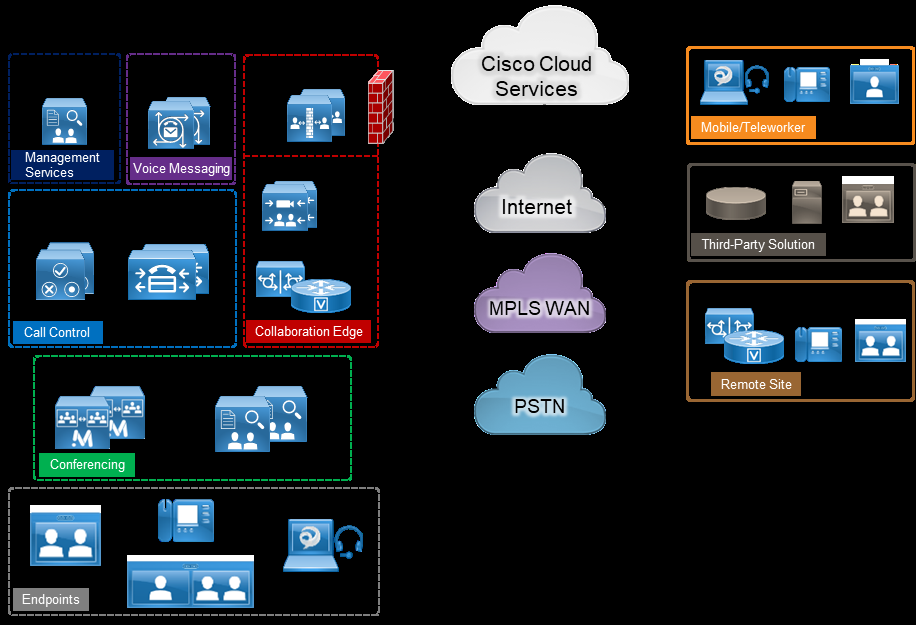
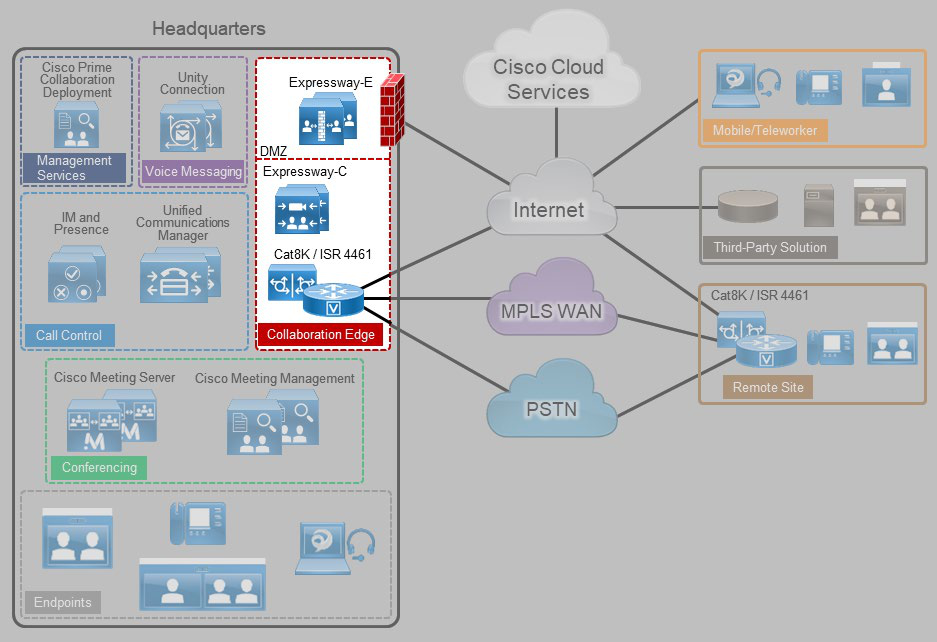
The Cisco Collaboration on-premises PA, shown in Figure 2, provides highly available and secure centralized services
for enterprise and midmarket deployments. These services extend easily to remote offices and mobile workers,
providing availability of critical services even if communication to headquarters is lost. Centralized services also
simplify management and administration of an organization's collaboration deployment.

Page 8
Preferred Architecture for Cisco Collaboration Release 15 On-Premises Deployments
PAGE 8
Introduction
Figure 2. Cisco Collaboration On-Premises Preferred Architecture for Enterprise
Table 1 lists the products in this architecture. For simplicity, products are grouped into modules to help categorize
and define their roles. The content in this guide is organized in the same modules.
Table 1. Components of the Cisco Collaboration Preferred Architecture
Module
Component
Description
Endpoints
Cisco IP Phones, Cisco video
endpoints, and Cisco Jabber
Enable real-time voice, video, and instant
messaging communications for users
Call Control
Cisco Unified Communications Manager
(Unified CM)
Provides endpoint registration, call processing,
and media resource management
Cisco Unified Communications Manager
IM and Presence Service
Provides instant messaging and presence
services
Cisco Catalyst 8200 / 8300 / 8Kv and
ISR 4461
Provides Survivable Remote Site Telephony
(SRST) functionality
Conferencing
Cisco Meeting Server
Provides voice and video conferencing with
content share capabilities
Cisco Meeting Manager
Provides Cisco Meeting Server meeting
management as well as Cisco Meeting Server
web app user provisioning.
Collaboration
Edge
Cisco Expressway-C
Enables interoperability with third-party systems
and firewall traversal
Cisco Expressway-E
Supports remote endpoint registration to Cisco
Unified CM and enables business-to-business
communications

Page 9
Preferred Architecture for Cisco Collaboration Release 15 On-Premises Deployments
PAGE 9
Introduction
Module
Component
Description
Cisco Catalyst 8200 / 8300 / 8Kv and
ISR 4461
Provides connectivity to public switched
telephone network (PSTN) or IP PSTN
Voice Messaging
Cisco Unity Connection
Provides unified messaging and voicemail
services
Collaboration
Management
Services
Webex Cloud-Connected UC
Cisco Webex Cloud-Connected Unified
Communications (CCUC) is a suite of cloud
services providing centralized administrative
services within Webex Control Hub for on-
premises collaboration applications. Services
enabled with include system health checks and
analytics.
Cisco Smart Software Manager
Internet-based web portal providing
administrators with a single management point
for the Cisco Unified CM, Cisco Unity Connection,
Cisco Meeting Server, and Cisco Expressway
licenses within a deployment
Cisco Business Edition 7000
The Cisco Business Edition (BE) 7000 serves organizations with 1,000 or more users, and it is the foundation of the
Cisco Collaboration on-premises PA for enterprise deployments. The Cisco BE7000 is built on a Cisco Unified
Computing System (UCS) that ships ready-for-use with a preinstalled virtualization hypervisor and application
installation files. The Cisco BE7000 solution offers premium voice, video, messaging, instant messaging and
presence, and contact center features on a single, integrated platform. For more information about the Cisco BE7000,
see the data sheet.
Core Applications
In the Cisco Collaboration on-premises PA, the following applications are deployed on multiple Cisco Unified
Computing System (UCS) servers to provide hardware and software redundancy:
•
Cisco Unified Communications Manager
•
Cisco Unified Communications Manager IM and Presence Service
•
Cisco Unity Connection
•
Cisco Expressway, consisting of Expressway-C and Expressway-E
•
Cisco Meeting Server and Cisco Meeting Management
•
Cisco Prime Collaboration Deployment
We recommend always deploying redundant components and configurations to provide the highest availability for
critical business applications. We also recommend deploying Cisco Meeting Server on a dedicated server.

Page 10
Preferred Architecture for Cisco Collaboration Release 15 On-Premises Deployments
PAGE 10
Introduction
High Availability
The Cisco Collaboration on-premises PA provides high availability for all deployed applications by means of the
underlying clustering mechanism present in all Cisco Unified Communications applications.
Clustering replicates the administration and configuration of deployed applications to backup instances of those
applications. If an instance of an application fails, Cisco Unified Communications services—such as endpoint
registration, call processing, messaging, business-to-business communication, and many others—continue to operate
on the remaining instance(s) of the application. This failover process is transparent to the users. In addition to
clustering, the Cisco Collaboration on-premises PA provides high availability through the use of redundant power
supplies, network connectivity, and disk arrays.
Licensing
Details about the individual licenses for the endpoints and infrastructure components in the Cisco Collaboration on-
premises PA are beyond the scope of this document. Information about Cisco Collaboration licensing is available at
https://www.cisco.com/c/en/us/products/unified-communications/collaboration-flex-plan/index.html.
Cisco Catalyst 8000 and Integrated Services Router 4461
The Cisco Catalyst 8200, 8300, and 8Kv (Cat8K) Series and Integrated Services Router (ISR) 4461 provide Wide Area
Network (WAN) and Cisco Unified Communications services in a single platform. In the Cisco Collaboration on-
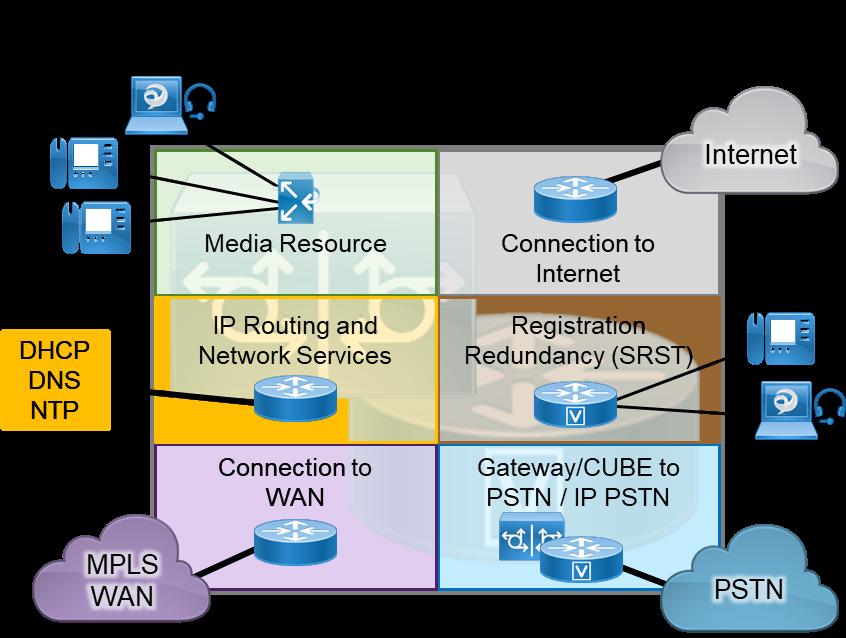
premises Preferred Architecture, the Cisco Cat8K and ISR 4461 can provide the following functions (Figure 3):
•
External connectivity to the Internet
•
IP routing and remote-site network services such as DHCP, DNS, NTP, and others
•
Cisco Unified Survivable Remote Site Telephony (SRST) to service calls during WAN failures
•
Voice gateway to the Public Switched Telephone Network (PSTN), or Cisco Unified Border Element (CUBE) for
Session Initiation Protocol (SIP) trunks
•
Integrated data and voice connectivity to service providers
•
Multiprotocol Label Switching (MPLS) WAN connectivity for an organization’s network
•
Media resources for Cisco Unified Communications Manager (Unified CM)

Page 11
Preferred Architecture for Cisco Collaboration Release 15 On-Premises Deployments
PAGE 11
Introduction
Figure 3. Cisco Catalyst 8000 Series and ISR 4461 Functions
The Cisco Catalyst 8000 and ISR 4461s have additional slots that support add-on modules such as wireless
controllers. Deployments can use various Cat8K and ISR 4461models to support different features, to scale, and to
accommodate additional services. Their modular design enables the Cat8K and ISR to be deployed at headquarters,
remote locations, or branch locations. For more information about these routers, see the Catalyst 8000 Series and
Cisco ISR 4000 data sheets.

Page 12
Preferred Architecture for Cisco Collaboration Release 15 On-Premises Deployments
PAGE 12
Endpoints
Endpoints
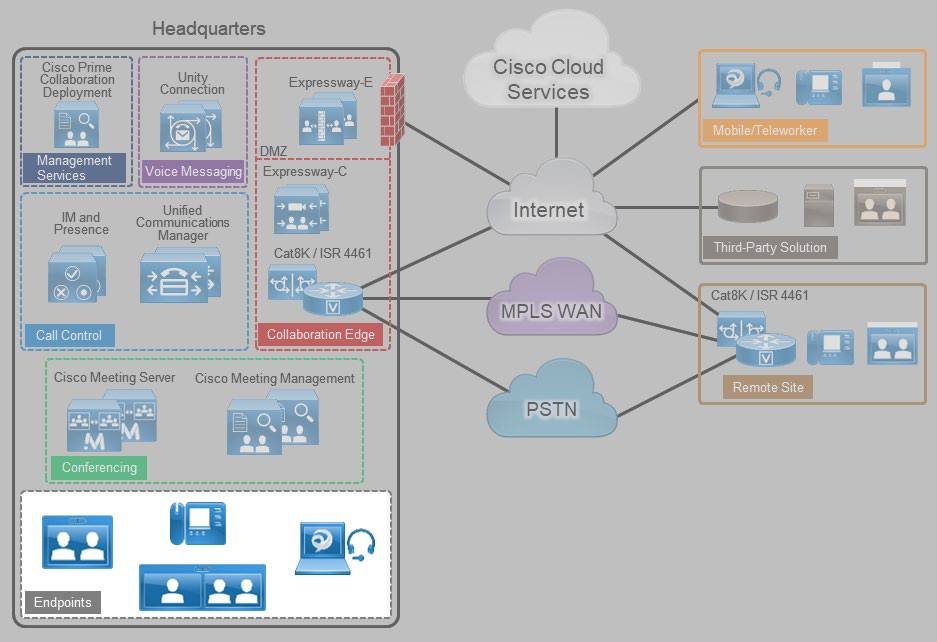
Cisco Collaboration endpoints provide a wide range of features, functionality, and user experiences. Because Cisco
endpoints range from low-cost, single-line phones and soft clients to three-screen Cisco TelePresence endpoints, an
organization can deploy the right variety of endpoints to meet users' needs (Figure 4). Additionally, these devices
enable users to access multiple communication services such as:
•
Voice calls
•
Video calls
•
Conferencing
•
Voicemail
•
Presence
•
Instant messages
•
Desktop sharing
Figure 4. Architecture for Endpoints

Page 13
Preferred Architecture for Cisco Collaboration Release 15 On-Premises Deployments
PAGE 13
Endpoints
Recommended Deployment
Cisco Unified Communications Manager (Unified CM) is the call control server for the Cisco Collaboration on-
premises Preferred Architecture. Cisco IP Phones, Jabber clients, and TelePresence video endpoints use SIP to
register directly to Cisco Unified CM. The Unified CM cluster's failover mechanism provides endpoint registration
redundancy. If a WAN failure occurs and endpoints at remote locations cannot register to Unified CM, they use SRST
functionality for local and PSTN calls, but some services such as voicemail and presence might not be available.
We recommend the endpoints listed in the following tables because they provide optimal features for this design.
Cisco has a range of endpoints with various features and functionality that an organization can also use to address its
business needs.
Table 2. Cisco IP Phones
Product
Description
Cisco IP Phone 8800 Series
Public space, general office use, single-line and multi-line
phones
Cisco IP Conference Phone 8832
IP conference phone
Table 3. Cisco Video Endpoints
Product
Description
Cisco Desk Series
Personal Collaboration endpoints for the desktop
Cisco Room Series
Collaboration integrator and multipurpose room endpoints
Table 4. Cisco Jabber
Product
Description
Mobile:
Jabber for Android
Jabber for iPhone and iPad
Desktop:
Jabber for Mac
Jabber for Windows
Soft client with integrated voice, video, voicemail, instant
messaging, and presence functionality for mobile devices
and personal computers
Table 5. Comparison of Endpoint Features and Capabilities
Product(s)
Audio
Video
Content
Sharing
Unified CM High
Availability
Mobile and
Remote Access
Audio SRST
IP Phone 8800 Series
Yes
Yes1
No
Yes
Yes
Yes
IP Phone Conference 8832
Yes
No
No
Yes
No
Yes
Desk Series
Yes
Yes
Yes
Yes
Yes
No
Room Series
Yes
Yes2
Yes
Yes
Yes
No

Page 14
Preferred Architecture for Cisco Collaboration Release 15 On-Premises Deployments
PAGE 14
Endpoints
Product(s)
Audio
Video
Content
Sharing
Unified CM High
Availability
Mobile and
Remote Access
Audio SRST
Jabber Mobile
Yes
Yes
No
Yes
Yes
Yes
Jabber Desktop
Yes
Yes
Yes
Yes
Yes
Yes
- Only the IP Phones 8845 and 8865 support video.
- Cisco Desk/Desk Pro and Room Series endpoints support 4K resolution.

Page 15
Preferred Architecture for Cisco Collaboration Release 15 On-Premises Deployments
PAGE 15
Call Control
Call Control
Call control is the core element for any communications deployment. It provides endpoint registration, call processing,
and call admission control. Call control design considerations include the dial plan, endpoint addressing scheme,
calling party presentation, call admission control, codec selection, PSTN connectivity, and general trunking
requirements, as well as other factors.
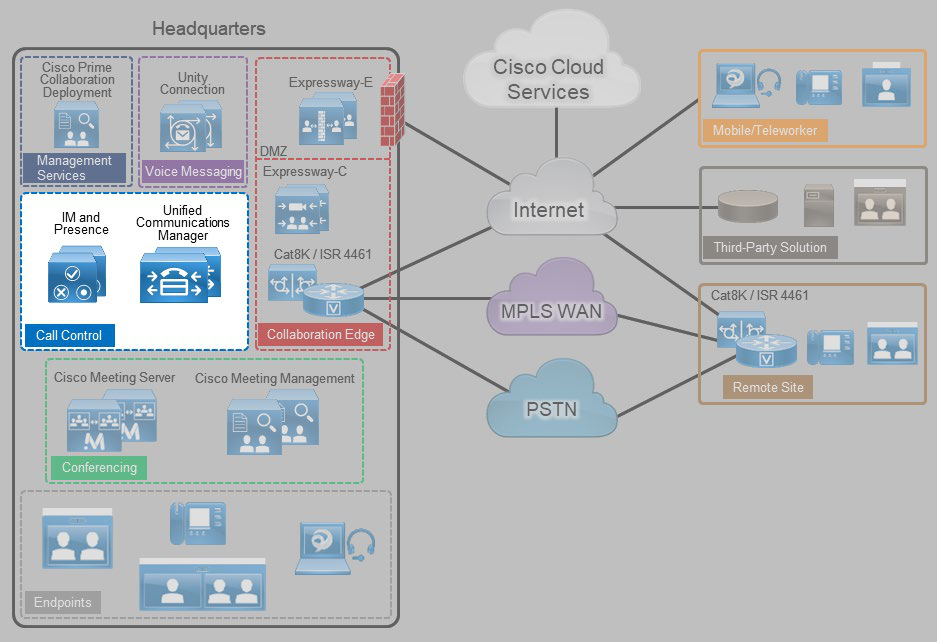
Cisco Unified Communications Manager (Unified CM) provides a common call control platform for all Cisco
Collaboration deployments (Figure 5). Having a highly available and common call control component for a
communications infrastructure is crucial to provide consistent services for all devices and communication types and to
preserve a uniform dial plan and a consistent feature set across the deployment.
Adding the IM and Presence Service to a Cisco Unified CM deployment provides instant messaging, network-based
presence, and federation for third-party chat servers, and it enables the use of Cisco Jabber for instant messaging,
presence, and audio and video communications.
Figure 5. Architecture for Call Control

Page 16
Preferred Architecture for Cisco Collaboration Release 15 On-Premises Deployments
PAGE 16
Call Control
Table 6 lists the roles of the call control components in this architecture and the services they provide.
Table 6. Components for Call Control
Module
Component
Description
Call Control
Cisco Unified Communications Manager
(Unified CM)
Provides call routing and services, dial plan, and
bandwidth management; and enables Cisco
Jabber desk phone control
Cisco Unified Communications Manager
IM and Presence Service
Provides Cisco Jabber support for instant
messaging and user-based presence and third-
party federation
Cisco Integrated Services Router (ISR)
Provides Survivable Remote Site Telephony
(SRST) to support call control functions during a
WAN outage
Recommended Deployment
For call control in the Cisco Collaboration on-premises Preferred Architecture, we recommend the following:
•
Deploy a single Cisco Unified CM cluster for an enterprise with a central site and remote offices. Deploy call
processing subscribers in pairs for scalability and redundancy.
•
Add additional Cisco Unified CM clusters for very large sites or for geographic and/or organizational separation.
Configure SIP trunks to interconnect individual Cisco Unified CM clusters.
•
Deploy a pair of IM and Presence Service servers in a cluster configuration. For enterprise deployments, you can
add more pairs for scalability. (Increased scalability does not apply to midmarket deployments.)
•
Enable SRST on the Cisco ISR as a backup service at remote sites to provide high availability.
•
Enable Apple Push Notification service (APNs) for Apple iOS devices running Jabber for iPhone and iPad, so that
these clients continue to receive incoming call and messaging notification even when running in the background.
For Apple iOS devices operating in a constrained network without Internet access Local Push Notification
Service (LPNS) can be deployed to deliver notifications for voice calls only. LPNS does not deliver messaging
notifications. LPNS also helps to minimize delays for incoming calls to the Apple iOS devices operating in
unconstrained and constrained networks.
•
Enable Android Push Notification service for devices running Jabber for Android, so that these clients continue
to receive incoming call and messaging notification even when running in the background.
Cluster Recommendations
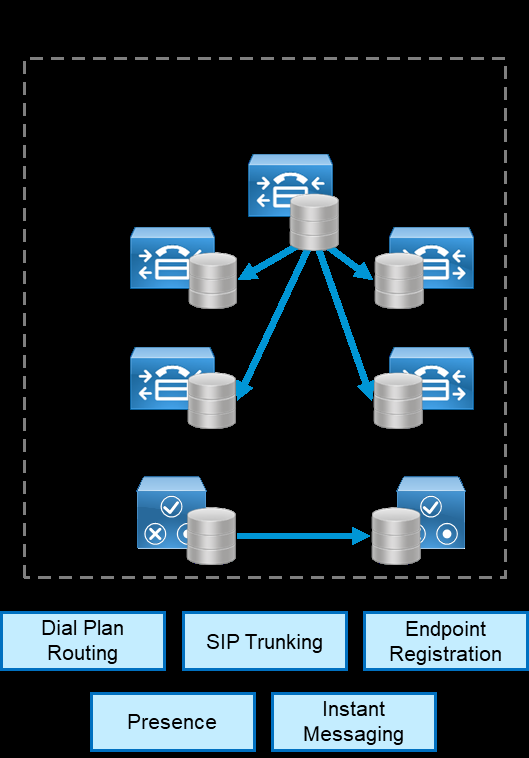
Cisco Unified CM and IM and Presence support clustering, which is the grouping of nodes that work together as a
single logical entity. The publisher node contains the cluster's configuration database, which is replicated to the call
processing subscriber nodes and TFTP nodes in the cluster.
Clustering provides an automatic redundancy mechanism for endpoints and for Cisco Unified CM services, such as
the ability to receive and process incoming calls. To provide 1:1 redundancy, deploy call processing subscribers and
TFTP nodes in pairs. (Figure 6) While the call processing subscribers provide endpoint registration and call processing
capabilities, the TFTP nodes provide configuration and firmware updates to endpoints.

Page 17
Preferred Architecture for Cisco Collaboration Release 15 On-Premises Deployments
PAGE 17
Call Control
All the TFTP nodes and subscriber nodes periodically receive updates of the configuration database from the
publisher node. These database updates enable all the subscriber nodes to operate in a consistent configuration
state.
To provide load balancing of call processing services across the subscribers and to reduce failover response times,
deploy each call processing subscriber pair in an active/active redundancy scheme.
For IM and Presence, we recommend deploying a minimum of one IM and Presence publisher and one subscriber.
The IM and Presence publisher is not a dedicated node, and the publisher and subscriber provide redundancy for
each other. (Figure 6)
For enterprise deployments, add more pairs of IM and Presence subscribers or Unified CM call processing nodes as
needed to accommodate more users.
Figure 6. Cisco Unified CM Cluster
SIP Trunk Recommendations
Use SIP trunks from Cisco Unified CM to communicate with all the components in the Cisco Collaboration on-
premises Preferred Architecture, including external entities such as third-party systems. SIP trunks offer the following
benefits:

Page 18
Preferred Architecture for Cisco Collaboration Release 15 On-Premises Deployments
PAGE 18
Call Control
•
SIP trunks provide a standards-based environment that reduces operations and maintenance complexity of the
end-to-end solution.
•
SIP trunks are enhanced with presence information.
•
SIP trunks are recommended for video communications.
The Cisco Survivable Remote Site Telephony (SRST) feature is critical for remote sites that require continuation of
voice services during WAN outages. SRST runs on the same Cisco ISR that provides WAN and PSTN connectivity for
the remote site. Deploy SRST on the Cisco ISR in the following cases:
•
The remote site has local PSTN connectivity.
•
The remote site does not have local PSTN connectivity but has more than 25 users.
To avoid interruption of external voice services if a WAN outage occurs, provide local PSTN connectivity at the remote
site. SRST is required only if the remote site's WAN reliability does not match that site's required service level for
voice service availability.
If a WAN failure occurs at a site with SRST and local PSTN access, the following services will still be available:
•
Internal point-to-point voice calls
•
External voice calls through the PSTN
•
Call hold, transfer, and conference
•
Music on hold
Note
SRST is not available for Desk Series or Room Series endpoints. See Table 5 for information about endpoints
that support SRST.
Dial Plan
A structured, well-designed dial plan is essential to successful deployment of any call control system. When
designing a dial plan, consider the following main factors:
•
Dialing habits
•
Endpoint addressing
•
Routing
•
Directory integration
•
Classes of service
Dialing habits


Page 19
Preferred Architecture for Cisco Collaboration Release 15 On-Premises Deployments
PAGE 19
Call Control
Dialing habits describe what end users can dial to reach various types of destinations. Dialing habits can first be
classified as numeric dialing (for example, 914085550123) or alphanumeric dialing (for example, bob@ent-pa.com).
Typically, different types of destinations require support for different dialing habits. Further dialing habits might have to
be defined for services such as call pick-up, voicemail, and others. Also, future growth should be considered so that
more users and more sites can be added as needed without redesigning the dial plan. Some dialing habits, typically
PSTN dialing habits in particular, need to follow country-specific requirements or established dialing procedures.
Identifying dialing habits is most important when defining an enterprise dial plan in order to avoid overlaps between
any two dialing habits.
Endpoint addressing
Each endpoint registered with the enterprise call control must have a unique numeric address. Endpoint addresses in
Cisco Unified CM are equivalent to the directory numbers provisioned on the lines of the endpoints. Use fully qualified
PSTN numbers (E.164 numbers) with a leading "+" as endpoint addresses. This format is typically referred to as
+E.164 format. The benefits of using +E.164 endpoint addresses include:
•
Wide use in voice networks
•
No need to develop and maintain an enterprise numbering scheme
•
Easy creation of correct caller ID presentation for all on-cluster and off-cluster call flows
•
Easy implementation of directory lookups
•
Simplified alternate routing to the PSTN in cases of WAN failure or bandwidth constraints
•
In addition to the primary numeric endpoint addresses, administrators can provision alphanumeric URIs (for
example, bob@ent-pa.com) in Cisco Unified CM to serve as aliases for the primary addresses, and users can
enter the URI as an alternate way to dial the destination endpoint.
Routing
The routing portion of the dial plan enables users to reach the correct destinations when they use the defined dialing
habits.
The primary numeric routing is based on +E.164 numbers. External routes to other transport networks such as the
PSTN also use the +E.164 scheme. Endpoint addresses in +E.164 provide +E.164 on-net dialing without any further
configuration. All other numeric dialing habits, such as abbreviated inter-site and intra-site dialing, are implemented
as overlays by adding the appropriate translation patterns to the dial plan to map from the implemented dialing habit
to the +E.164 global routing address format. This allows users to reach the same endpoint by means of different
dialing habits, depending on user preference.
Alpha-numeric URIs, as aliases for numeric addresses, provide an alternative means of reaching endpoints. The
benefits of URI dialing and routing include:
•
Conformity with the native dialing habit on most video systems
•
Easier business-to-business connectivity
•
Direct mapping from instant messaging identifiers to addresses (easier escalation of business-to-business IM
sessions to voice and/or video), although technically IM identifiers and SIP URIs are not necessarily identical

Page 20
Preferred Architecture for Cisco Collaboration Release 15 On-Premises Deployments
PAGE 20
Call Control
Directory integration
To enable users to search contacts and dial from the directory, integrate Cisco Unified CM with the organization's
LDAP directory. Although Unified CM allows the creation of local user contacts, LDAP directory integration is required
when using Cisco Jabber because it provides a single location for directory management and enables users to
authenticate to Cisco Unified CM and Cisco Jabber by using their LDAP directory credentials.
Cisco Unified CM pulls user and contact information from LDAP directories and synchronizes user parameters –
name, surname, username, telephone number, and SIP URI – when changes occur. The IM and Presence Service
pulls user and contact information from Cisco Unified CM.
Classes of service
Classes of service define which users can access which services, such as allowing only emergency and local calls
from lobby phones while allowing unrestricted calls from executive phones. The complexity of the dial plan is directly
related to the number of differentiated classes of service it supports.
To define classes of service, configure partitions and calling search spaces in Cisco Unified CM. The number of
classes of services supported by a dial plan depends on the granularity and complexity of the classes. For more
information about classes of service and details on enterprise dial plan design, see the Cisco Collaboration SRND Dial
Plan chapter.
Multi-Cluster Deployment Considerations
Consider deploying more than one Cisco Unified CM cluster (and Unified CM IM&P cluster) if you have any of the
following requirements:
•
Administrative separation — This includes the need to keep users from different parts of the organization on
separate infrastructures, or the requirement to have different departments operate different parts of the
communications infrastructure.
•
Geographic footprint — Technical limitations such as excessive propagation delay might prohibit endpoint
registrations (for example, endpoints in Asia registering to an enterprise call control hosted in the US).
In a multi-cluster deployment, interconnect all the individual Unified CM clusters through SIP trunks. To avoid session
traversal through individual clusters, deploy a full mesh of SIP trunks. With four or more clusters, deploy Cisco Unified
CM Session Management Edition to centralize the dial plan and trunking and to avoid the complexity of a full-mesh
SIP trunk topology.
In multi-cluster deployments, use Global Dial Plan Replication (GDPR) to replicate dial plan information between
clusters. GDPR can advertise a +E.164 number, one enterprise significant number (ESN), and up to five alpha-
numeric URIs per directory number. An ESN is the abbreviated inter-site dialing equivalent of a directory number. The
information advertised and learned through GDPR enables deterministic intercluster routing for these dialing habits:
•
+E.164 dialing based on the advertised +E.164 numbers
•
Enterprise abbreviated inter-site dialing based on the advertised ESNs
•
Alpha-numeric URI dialing based on the advertised URIs
•
PSTN dialing based on normalization to +E.164

Page 21
Preferred Architecture for Cisco Collaboration Release 15 On-Premises Deployments
PAGE 21
Call Control
Benefits
This deployment provides the following benefits:
•
Call control is centralized at a single location that serves multiple remote sites.
•
Common telephony features are available across voice and video endpoints.
•
Single call control and a unified dial plan are provided for voice and video endpoints.
•
Critical business applications are highly available and redundant.

Page 22
Preferred Architecture for Cisco Collaboration Release 15 On-Premises Deployments
PAGE 22
Conferencing
Conferencing
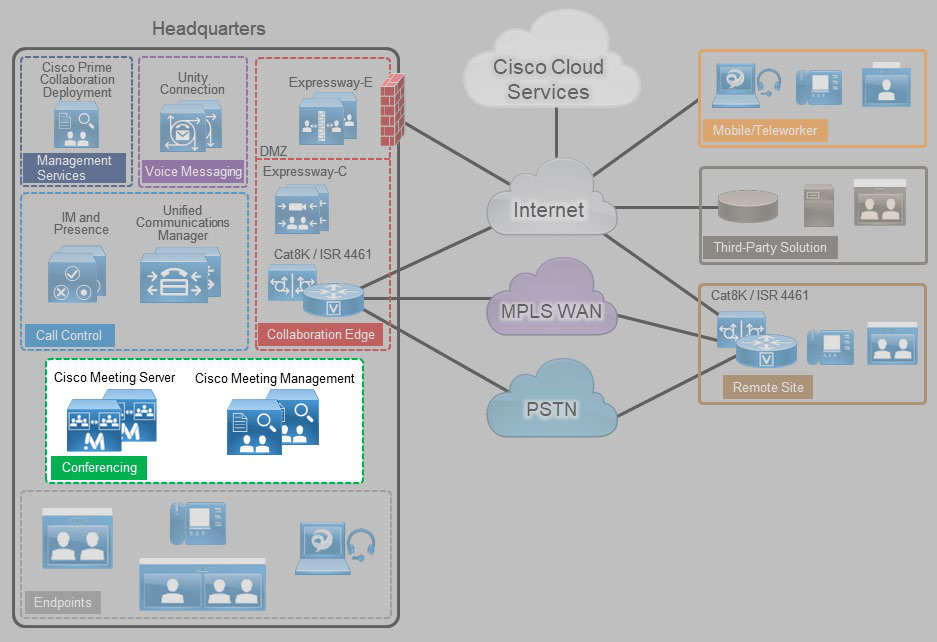
The ability for three or more people to communicate in real time by using voice and video technologies is a core
component of collaboration. Cisco rich media conferencing builds upon existing infrastructure in place for point-to-
point calls, offering users a consistent voice and video experience (Figure 7).
Figure 7. Architecture for Conferencing
Table 7 lists the roles of the call control components in this architecture and the services they provide.
Table 7. Components for Conferencing
Module
Component
Description
Conferencing
Cisco Meeting Server
Provides voice and video conferencing with
content sharing.
Manages and allocates conferencing resources
Cisco Meeting Management
Provides Cisco Meeting Server meeting
management as well as Cisco Meeting Server
web app user provisioning.
There are three types of conferences:

Page 23
Preferred Architecture for Cisco Collaboration Release 15 On-Premises Deployments
PAGE 23
Conferencing
•
Instant or ad hoc — A conference that is not scheduled or organized in advance; for example, a call between two
parties who add other parties to the call.
•
Permanent or rendezvous — A conference that requires callers to dial a predetermined number or URI to reach a
shared conferencing resource. Meet-me, static, and rendezvous are other names for this type of conference.
•
Scheduled — A conference planned in advance with a predetermined start time.
Recommended Deployment
For audio and video conferencing in the Cisco Collaboration on-premises Preferred Architecture, we recommend the
following:
•
Deploy Cisco Meeting Server for all conference types.
•
Deploy Cisco Meeting Management for meeting management, license management and Cisco Meeting Server
web app provisioning.
•
Deploy Cisco Meeting Server in a cluster for high availability and increased scale.
•
Integrate the Cisco Meeting Server cluster with Cisco Unified CM through SIP trunks and registered media
resource conference bridges for instant conferences.
•
Integrate the Cisco Meeting Server cluster with Unified CM through SIP trunks and route patterns for permanent
and scheduled conferences.
•
Integrate the Cisco Meeting Server with Cisco Meeting Management for meetings management.
•
Integrate the Cisco Meeting Management with LDAP for CMS space creation and web app user provisioning.
•
Deploy CMS web scheduler to schedule conferences from CMS web app. For extended functionalities deploy
Scheduling solution from Cisco Solution Plus partners to schedule conferences with Cisco Meeting Server.
Audio and Video Instant Conferences
For instant audio and video conferences, use Cisco Meeting Server on-premises as the media resource. Cisco
Unified CM has the HTTPS and SIP trunk interfaces to Cisco Meeting Server inside the instant conference bridges.
HTTPS is used for conference control, while a SIP trunk is used for call signaling. These conference bridges are
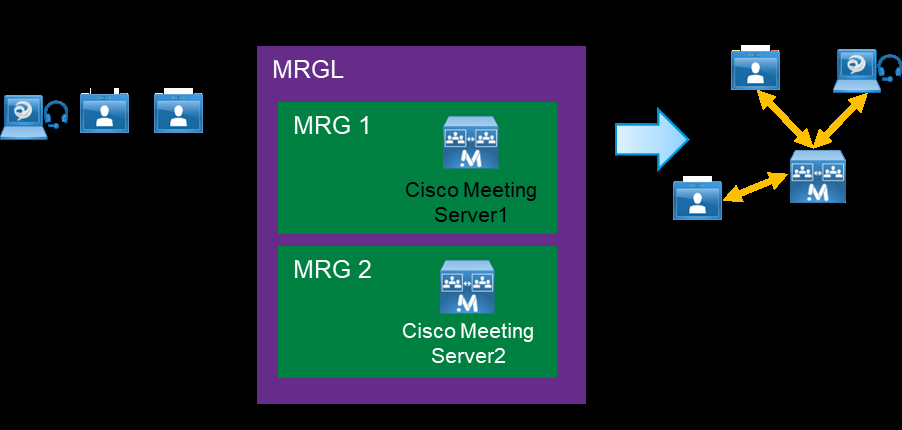
assigned to media resource group lists (MRGLs) and media resource groups (MRGs) in Unified CM. Unified CM uses
MRGLs and MRGs to prioritize and allocate media resources such as conference bridges, music on hold sources,
annunciators, transcoders, and media termination points (MTPs).
If endpoints have access to the appropriate MRGL, they can request these resources. Resources local to the initiating
endpoint are preferred over remote resources (Figure 8).

Page 24
Preferred Architecture for Cisco Collaboration Release 15 On-Premises Deployments
PAGE 24
Conferencing
Figure 8. Media Resource Group List (MRGL) Example
Permanent Conferences with Cisco Meeting Server (CMS) Spaces
Permanent conferences are deployed using CMS Spaces. A CMS Space is a virtual persistent meeting room that
anyone can join and that has support for video, voice, and content sharing. ACMS Space is created for a user when
the user is imported into Cisco Meeting Server from Microsoft Active Directory configured in the web administrative
interface, by using the Cisco Meeting Server API, or provisioned by Cisco Meeting Management (CMM). Each CMS
space is associated with a few attributes such as, Username, Space name, and so forth, and can be accessed using a
video address URI or numeric alias. These attributes are configured by the administrator through the Field Mapping
Expressions. After the CMS Space has been created, the administrator can further customize the Spaces by
specifying a default layout or guest access code for each user. With CMM provisioning an administrator can also
configure automatic CMS Space creation or provision CMS web app users with the ability to create their own CMS
Spaces.
Scheduled Video Conferences
CMS web app provides an ability to schedule conferences on CMS using scheduler component. Leverage third party
solutions from Cisco Solution plus partners for scheduling meetings on CMS.
Support for Multiple Call Processing Sites
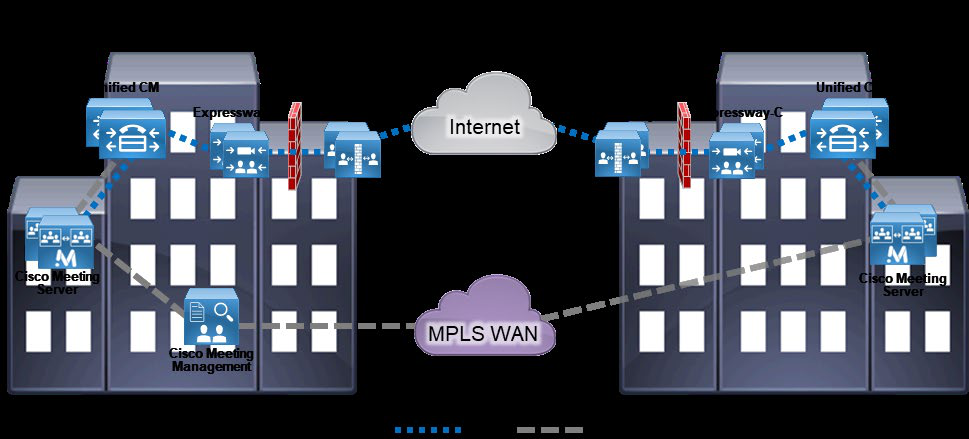
Organizations may choose to implement more than one Cisco Meeting Server cluster (Figure 9) for any of the
following reasons:
•
Administrative separation — This includes the need to keep users from different parts of the organization on
separate infrastructures or to have different departments operate different parts of the communications
infrastructure.
•
Geographic footprint — Physical limitations such as excessive latency between endpoints and conferencing
resources could degrade the user experience (for example, US users might not have a productive collaborative
meeting if they use conferencing resources located in Europe).

Page 25
Preferred Architecture for Cisco Collaboration Release 15 On-Premises Deployments
PAGE 25
Conferencing
However, when multiple Cisco Unified CM clusters are deployed, we recommend deploying a single Cisco Meeting
Server cluster with one call bridge group dedicated for each Unified CM cluster. The call bridges within the group
should be deployed in the same data center as the corresponding Unified CM cluster. Using a single Cisco Meeting
Server cluster enables users to access the same conference using the same video address regardless of which
Unified CM cluster they dial from.
Figure 9. Multiple Call Processing Sites with Conferencing
Managing Conferencing Resources
Cisco Meeting Management (CMM) is a mandatory component in a Cisco Meeting Server deployment that connects
to Cisco Smart Licensing for license monitoring and management. CMM also provides administrators the ability to
provision Cisco Meeting web app users so that users can join, create, and manage their own meetings using a
browser portal. Cisco Meeting Management also provides conference monitoring and management controls for
Collaboration administrators and operators.
Benefits
This deployment provides the following benefits:
•
Users have a consistent experience for launching and joining various types of conferences.
•
A single conferencing platform provides on-premises audio and video conferencing.
•
It provides users with real-time, high-definition video conferencing, including the ability to share content easily
over a dedicated presentation channel.
•
Cisco Meeting Management provides administrators the ability to manage conference resources, manage
meetings and provision CMS web app users.

Page 26
Preferred Architecture for Cisco Collaboration Release 15 On-Premises Deployments
PAGE 26
Collaboration Edge
Collaboration Edge
Business demand for connectivity between organizations by leveraging the Internet has increased significantly over
the past few years. For many organizations, this connectivity is a fundamental requirement for conducting day-to-day
activities. Moreover, securely connecting mobile workers and remote sites to each other and to headquarters is
critical functionality that enables organizations to accomplish their business goals. The Cisco Collaboration on-
premises Preferred Architecture addresses these needs with the Collaboration Edge architecture shown in Figure 10.
Figure 10. Architecture for Collaboration Edge
Table 8 lists the roles of the Collaboration Edge components in this architecture and the services they provide.
Table 8. Components for Collaboration Edge
Module
Component
Description
Collaboration
Edge
Cisco Expressway-E
The traversal server that enables secure VPN-
less mobile and remote access for TelePresence
endpoints and Jabber clients. The traversal
server resides in the DMZ. The solution also
provides business-to-business calling, protocol
interworking, and cloud connectivity.
Cisco Expressway-C
The traversal client that creates a secure, trusted
connection through the firewall to Expressway-E.
The traversal client resides inside the
organization’s network. The solution provides

Page 27
Preferred Architecture for Cisco Collaboration Release 15 On-Premises Deployments
PAGE 27
Collaboration Edge
Module
Component
Description
mobile and remote access, business-to-
business calling, protocol interworking, and cloud
connectivity.
Cisco Catalyst 8200 / 8300 / 8KV or
Integrated Services Router (ISR) 4461
with PSTN interfaces
Enables local PSTN connectivity
Cisco Cat8K or ISR 4461 with Cisco
Unified Border Element (CUBE)
software
Enables connectivity from an organization's
network to the service provider network for SIP
trunks via CUBE
Recommended Deployment
We recommend the following Collaboration Edge solution for the Cisco Collaboration on-premises Preferred
Architecture:
Headquarters
•
Deploy a Cisco Expressway-C and Expressway-E server pair to enable remote Jabber and TelePresence video
endpoint registrations, and IM and Presence. Deploy a separate Expressway-C and Expressway-E server pair
for secure business-to-business connectivity through the firewall. Cluster both Expressway-C and Expressway-
E servers in both pairs. If your deployment does not reach or exceed the scalability limit, you can deploy a single
Expressway-C and Expressway-E cluster for both business-to-business and mobile and remote access
applications.
•
Deploy a Cat8K or ISR 4461 as the PSTN gateway or enable Cisco Unified Border Element functionality on the
Cat8K / ISR 4461 for voice connectivity from the organization's network to the service provider network through
a SIP trunk.
•
If full redundancy is not required, a single server pair (Expressway-C and Expressway-E) may be deployed.
•
If full redundancy is required, for CUBE the Cat8K and ISR 4461 should be deployed in active/standby pairs and
for Expressway the Expressway-C and Expressway-E servers should be deployed in cluster with multiple pairs.
Remote Sites
•
Deploy a Cat8K or ISR 4461 as the PSTN gateway.
•
Deploy Expressway-C and Expressway-E if the remote site has local Internet connectivity and an Internet
business-to-business architecture for video calls is required.
Teleworker Sites
•
For video-enabled sites, deploy Cisco TelePresence endpoints utilizing the Expressway-C and Expressway-E
infrastructure at headquarters or another site.
•
In addition, the Cisco Jabber client and a specific set of hardware voice and video devices can be used without
VPN, regardless of the location of the endpoint (internal or external to the organization).

Page 28
Preferred Architecture for Cisco Collaboration Release 15 On-Premises Deployments
PAGE 28
Collaboration Edge
Cisco Expressway
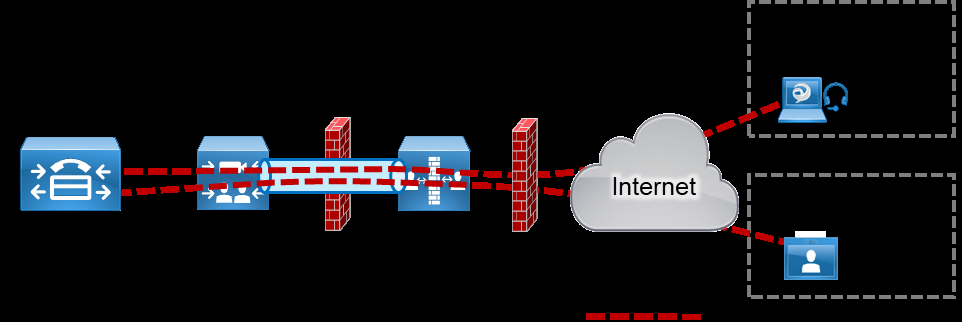
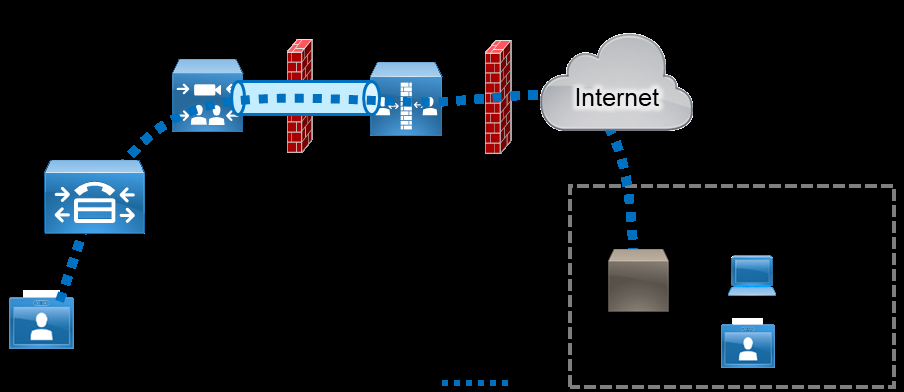
Cisco Expressway provides secure firewall and NAT traversal for mobile or remote Cisco Jabber and TelePresence
video endpoints (Figure 11), and it provides secure business-to-business communications (Figure 12). Cisco
Expressway consists of two applications: Expressway-C and Expressway-E.
Deploy Cisco Expressway-C inside the network and deploy Expressway-E in the demilitarized zone (DMZ) by
connecting separate network ports on Expressway-E to the organization's network and to the DMZ.
Cisco fully supports a virtualized Expressway-E in the DMZ; however, a dedicated server can be deployed based on
the company's security requirements.
Figure 11. Traversal for Endpoint Registrations Through Firewall with Expressway-C and Expressway-E
Figure 12. Traversal for Business-to-Business Calls Through Firewall with Expressway-C and Expressway-E
Cisco Expressway-C
Place Expressway-C in the trusted network inside the organization. Deploy Expressway-C to:

Page 29
Preferred Architecture for Cisco Collaboration Release 15 On-Premises Deployments
PAGE 29
Collaboration Edge
•
Function as a traversal client and establish a secure connection to Expressway-E through the firewall
•
Establish secure or non-secure connection to Cisco Unified CM
•
Integrate with an existing internal video network that uses H.323
•
Enable business-to-business calls to external entities that communicate using SIP or H.323
•
Provide interworking between H.323 and SIP protocols for H.323 business-to-business communications.
•
Enable mobile and remote access capabilities and call signaling for Cisco supported endpoints, directing them
to Cisco Unified CM for SIP registration and/or the IM and Presence Service (See Table 5 for information on
which endpoints support mobile and remote access.)
Cisco Expressway-E
Because Expressway-E is reachable directly from the untrusted external network, it should be placed in a DMZ for
security. The organization's firewall policies control communications to and from this server. Deploy Expressway-E to:
•
Function as a traversal server and allow secure communications to and from Expressway-C
•
Enable audio, video, and IM and Presence connections to other organizations using SIP or H.323 on the Internet
•
Provide DNS SRV lookup service to resolve outbound calls and to receive inbound calls over the Internet.
•
Process registration and IM and Presence information from Cisco endpoints on the external network and use
secure traversal communications to pass the information to Expressway-C
•
Provide interworking between protocols (between SIP and H.323, and between IPv4 and IPv6) for business-to-
business communications.
PSTN Gateway
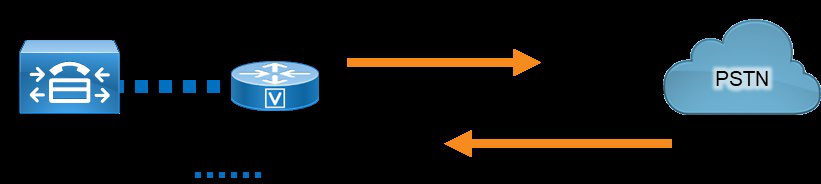
Because landlines and mobile phones use the PSTN for local and international calls, external connectivity to the PSTN
from an organization's IP telephony network is a requirement (Figure 13).
Figure 13. PSTN Connectivity
Use a Catalyst 8200 / 8300 / 8Kv or ISR 4461 with a time-division multiplexing (TDM) module as the PSTN gateway
at headquarters. This configuration enables the gateway to implement media interworking for the organization's
incoming and outgoing PSTN calls.
At remote sites, deploy a Catalyst 8200 / 8300 / 8Kv or ISR 4461 for local PSTN connectivity using voice modules.
For more information about Cisco ISR, see the data sheet.

Page 30
Preferred Architecture for Cisco Collaboration Release 15 On-Premises Deployments
PAGE 30
Collaboration Edge
Redundancy is achieved by deploying multiple Cat8Ks or ISR 4461s. Cisco Unified CM has the ability to route traffic to
the closest available router.
If SIP trunks are used to connect to a service provider for voice calls, enable Cisco Unified Border Element (CUBE)
functionality on the Cisco ISR that is deployed at headquarters, and deploy CUBE in the demilitarized zone (DMZ).
Cisco Unified CM routes calls through SIP trunks to gateways, CUBE, or Cisco Expressway based on the dial plan. For
dial plan recommendations, see the Call Control section.
Benefits
This deployment provides the following benefits:
•
The Cat8K and ISR 4461 support standards-based interfaces and various PSTN types, so it can be deployed
globally.
•
Instead of traditional PSTN interfaces, Cisco Unified Border Element functionality can be enabled on the Cat8K
and ISR 4461 if a SIP trunk is used.
•
The Cat8K and ISR 4461 can be used for WAN connectivity.
•
Cisco Expressway provides calling, presence, instant messaging, voicemail, and corporate directory services for
Cisco Jabber and TelePresence video endpoints.
•
Cisco Expressway enables video communications between organizations, partners, and vendors over the
Internet.

Page 31
Preferred Architecture for Cisco Collaboration Release 15 On-Premises Deployments
PAGE 31
Voice Messaging
Voice Messaging
Voice messaging is considered to be a basic requirement and essential service for any collaboration deployment.
Cisco Unity Connection enables users to access and manage voice messages from their email inbox, web browser,
Cisco Jabber client, Cisco IP Phone, or TelePresence endpoint. The Cisco Collaboration on-premises Preferred
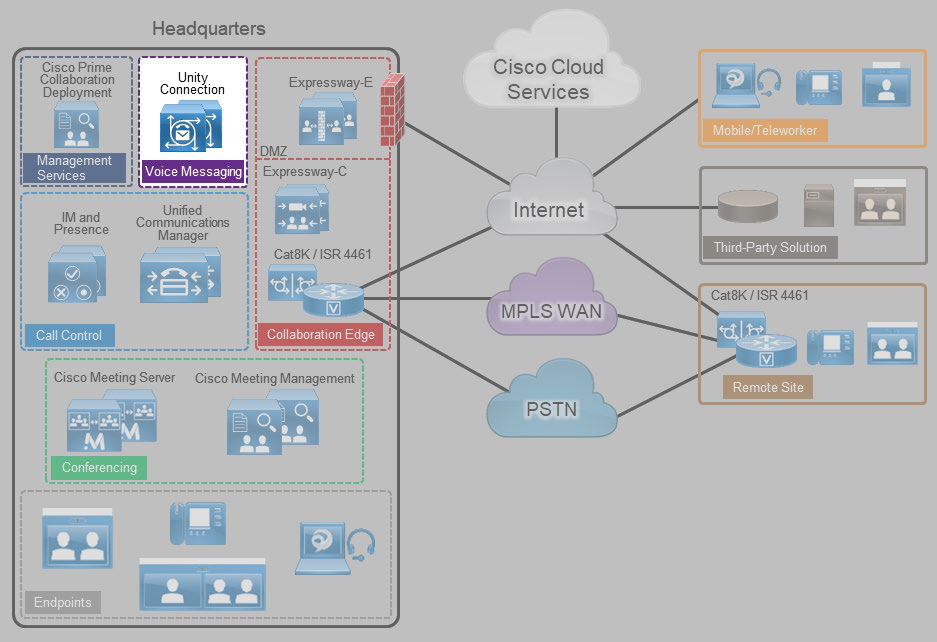
Architecture includes Cisco Unity Connection to enable voice messaging for the collaboration solution (Figure 14).
Figure 14. Architecture for Voice Messaging
Table 9 lists the roles of the voice messaging components in this architecture and the services they provide.
Table 9. Components for Voice Messaging
Module
Component
Description
Voice Messaging
Cisco Unity Connection
Provides unified messaging and voicemail
services
Recommended Deployment
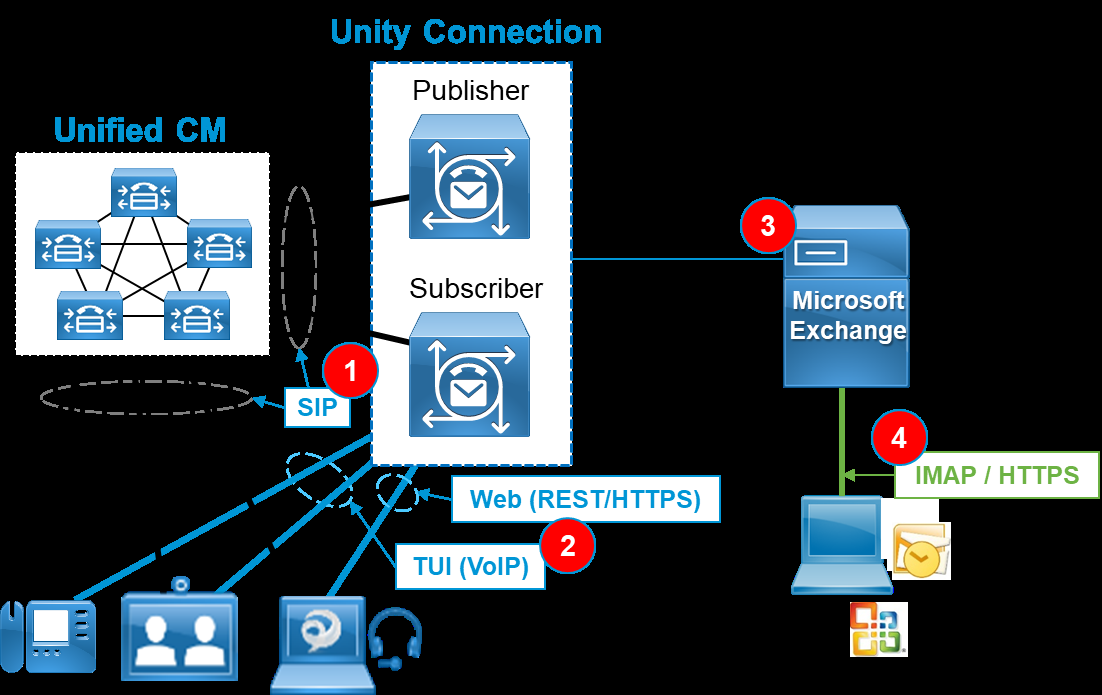
Cisco Unity Connection supports a cluster configuration in active/active mode to provide both high availability and
redundancy. As depicted in Figure 15, a Unity Connection cluster consists of a maximum of two nodes, one publisher
and one subscriber (#1). If one of the Unity Connection nodes fails, the other active node in the cluster handles all the
calls and HTTP requests for the Unity Connection cluster. Each server in the Unity Connection cluster must have
enough voice messaging ports to handle all calls for the cluster.

Page 32
Preferred Architecture for Cisco Collaboration Release 15 On-Premises Deployments
PAGE 32
Voice Messaging
As shown in Figure 15, the integration between Cisco Unified CM and Unity Connection relies on SIP for
communications (#1). In addition, hardware and software endpoints are able to access voice messaging services
through VoIP communications or via REST-based HTTPS communications (#2). The voicemail pilot number
designates the directory number that users dial to access their voice messages. Unified CM automatically dials the
voice messaging number when users press the Messages button on their phone (VoIP). Visual Voicemail allows users
to access voicemail from the graphical interface on the IP phone or Jabber client (HTTPS). Users can view a list of
messages and play messages from the list. Users can also compose, reply to, forward, and delete messages. Each
voicemail message displays data that includes the date and time when the message was left, urgency level, and
message length.
Figure 15. Unified Messaging Architecture
In summary, we recommend deploying Cisco Unity Connection as follows:
•
Deploy two Cisco Unity Connection servers for each Cisco Unified CM cluster to provide high availability and
redundancy.
•
Use SIP trunks to integrate Unity Connection with Unified CM. Configure two SIP trunks, one for each Unity
Connection server in a pair.
•
Import user information from the enterprise LDAP directory to Unity Connection. Each mailbox must have a
unique voicemail number. Unity Connection supports both E.164 and + E.164 formats for the extension of an
end-user account (user with a voice mailbox). Unity Connection also supports alternate extensions per user.
•
Configure visual voicemail and unified messaging, including Single Inbox, and then enable users for appropriate
voice message retrieval methods.

Page 33
Preferred Architecture for Cisco Collaboration Release 15 On-Premises Deployments
PAGE 33
Voice Messaging
•
Enable the speech-activated voice command interface to maximize productivity of mobile workers.
For more information about Cisco Unity Connection, refer to the product documentation.
Benefits
This deployment architecture provides the following benefits:
•
Users can access the voicemail system and retrieve their voice messages by using their IP phones, mobile
devices, and various email client applications with either a dialed number or a SIP URI.
•
Cisco Unity Connection allows users to customize personal settings from a web browser.
•
Cisco Unity Connection offers a natural and robust speech-activated user interface that allows users to browse
and manage voice messages using simple and natural speech command.

Page 34
Preferred Architecture for Cisco Collaboration Release 15 On-Premises Deployments
PAGE 34
Collaboration Management Services
Collaboration Management Services
System management and software licensing are important functions in a collaboration system environment. The Cisco
Collaboration on-premises Preferred Architecture includes the following Cisco core management applications that are
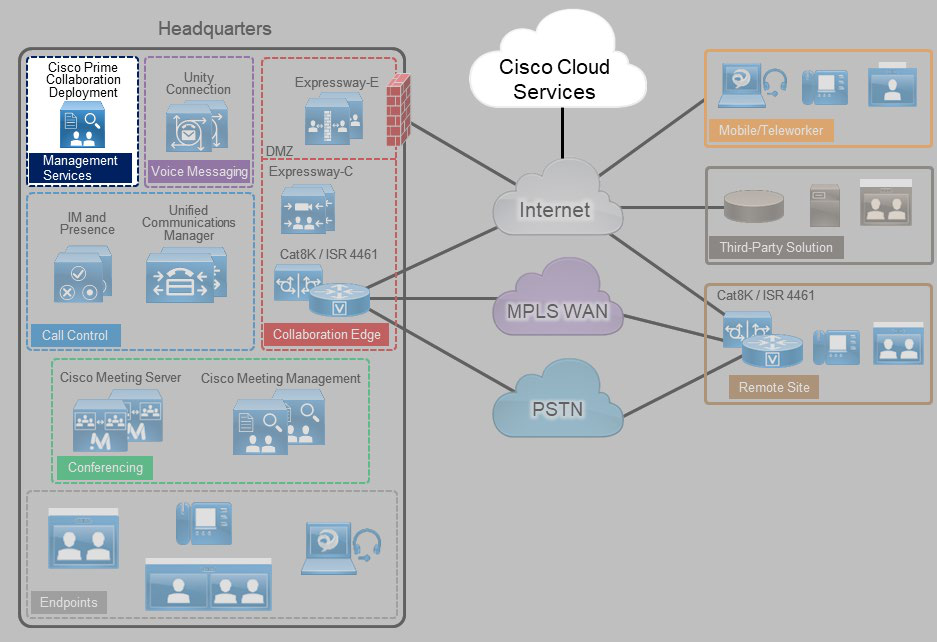
considered to be a basic requirement and foundational to any collaboration solution (Figure 16):
•
Cisco Prime Collaboration Deployment — Assists with installation, upgrade, replatform, and readdress of
applications.
•
Cisco Webex Cloud-Connected UC (CCUC) – Provides a centralized cloud-based administrative interface to
manage all on-premises UC application via analytics, troubleshooting and operational tools from Webex Control
Hub.
•
Cisco Smart Software Manager — Internet-based Cisco cloud service with web portal for managing collaboration
user licenses.
Figure 16. Architecture for Collaboration Management Services
Table 10 lists the roles of the application components in this architecture and the services they provide.
Table 10. Components for Collaboration Management Services
Module
Component
Description
Cisco Prime Collaboration Deployment
Assists the administrator by automating many of
the steps necessary to install and maintain a

Page 35
Preferred Architecture for Cisco Collaboration Release 15 On-Premises Deployments
PAGE 35
Collaboration Management Services
Module
Component
Description
Collaboration
Management
Services
Cisco Unified CM cluster with IM and Presence
Service and a Cisco Unity Connection cluster
Webex Cloud-Connected UC
Webex Cloud-Connected UC (CCUC) is a suite
of cloud services providing centralized
administrative services within Webex Control
Hub for on-premises collaboration applications.
Services include system health checks,
troubleshooting, operational activities and
analytics
Software
Licensing
Cisco Smart Software Manager
Internet-based Cisco web portal that provides
administrators with a single management point for
the Cisco Unified CM, Cisco Unity Connection,
Cisco Meeting Server and Cisco Expressway
licenses used in a deployment
Cisco Prime Collaboration Deployment
Cisco Prime Collaboration Deployment assists the administrator by automating many of the primary steps necessary
to configure and install Cisco Collaboration applications.
Cisco Prime Collaboration Deployment supports the following applications in the Cisco Collaboration on-premises
Preferred Architecture:
•
Cisco Unified Communications Manager (Unified CM)
•
Cisco IM and Presence Service
•
Cisco Unity Connection
Recommended Deployment
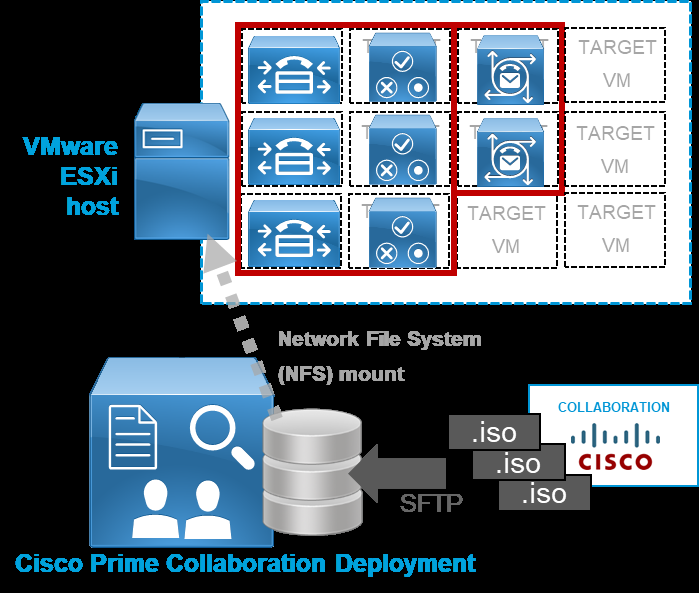
Figure 17 illustrates the following recommended architecture for Cisco Prime Collaboration Deployment:
•
Install Cisco Prime Collaboration Deployment on a dedicated virtual machine (VM) and not co-resident with any
other applications.
•
Cisco Prime Collaboration Deployment uses the collaboration application installation ISO files (available from
Cisco.com) to install and deploy the Collaboration applications (see Figure 17).

Page 36
Preferred Architecture for Cisco Collaboration Release 15 On-Premises Deployments
PAGE 36
Collaboration Management Services
Figure 17. Architecture for Cisco Prime Collaboration Deployment
Benefits
Cisco Prime Collaboration Deployment provides the following benefits:
•
Enables automated, unattended installation of ESXi-hosted collaboration application virtual machine server
nodes
•
Facilitates configuration of a common base platform and initial application settings for all collaboration
application nodes, including:
−
Network services (time, domain name)
−
Administrative accounts and passwords
−
Base certificate information
Webex Cloud-Connected UC
Webex Cloud-Connected UC (CCUC) is an optional set of cloud services delivered by Webex and managed through
Webex Control Hub that provides centralized and simplified on-premises collaboration application management and
visibility. In addition, CCUC can enable new business workflows to improve your on-premises user’s calling
experience.
Webex Cloud-Connected UC (CCUC) is designed for customers with on-premises collaboration deployments with
Unified CM who want to start leveraging Webex cloud services and centralize their operational tasks. This includes

Page 37
Preferred Architecture for Cisco Collaboration Release 15 On-Premises Deployments
PAGE 37
Collaboration Management Services
moving some of the administrative workloads to the Webex cloud while still maintaining their on-premises calling
workload.
CCUC is supported with the following Cisco UC on-premises collaboration products:
•
Cisco Unified Communications Manager / Session Management Edition (SME)
•
Cisco Unified Communications Manager IM & Presence Service
•
Cisco Unity Connection
•
Cisco Emergency Responder
Note
All CCUC services and features are not supported on all UC products.
CCUC appears as another workflow within Control Hub and for any deployed on-premises application that is enabled
with CCUC, it provides in-depth analytics, system visibility, and troubleshooting tools including:
•
Analytics insights
−
Service Experience – audio quality, call volume and status, and traffic trends
−
Asset usage –inventory of endpoints and headsets including call usage and adoption
−
Traffic Analysis – call traffic trends related to locations, call types, call volume and hunt group usage
−
Capacity analysis – trunk usage and utilization
•
Certificate management – single place to view and manage certs for all on-premises Unified Communications
apps across multiple clusters and UC applications
•
Operational dashboard – near real-time view of calls (poor and failed calls)
•
WebRTMT – web-based client for UC troubleshooting
•
Troubleshooting – Unified CM signaling and calling issues
Note
The Webex App can be deployed instead of Jabber as the user’s calling soft client with on-premises Unified
CM. This allows for additional user features which are enabled via CCUC. For more information on
deployments with the Webex App review the following Hybrid Preferred Architecture documents:
•
Preferred Architecture for Cisco Webex Hybrid Services, Design Overview
•
Preferred Architecture for Cisco Webex Hybrid Services, CVD



Page 38
Preferred Architecture for Cisco Collaboration Release 15 On-Premises Deployments
PAGE 38
Collaboration Management Services
Recommended Deployment
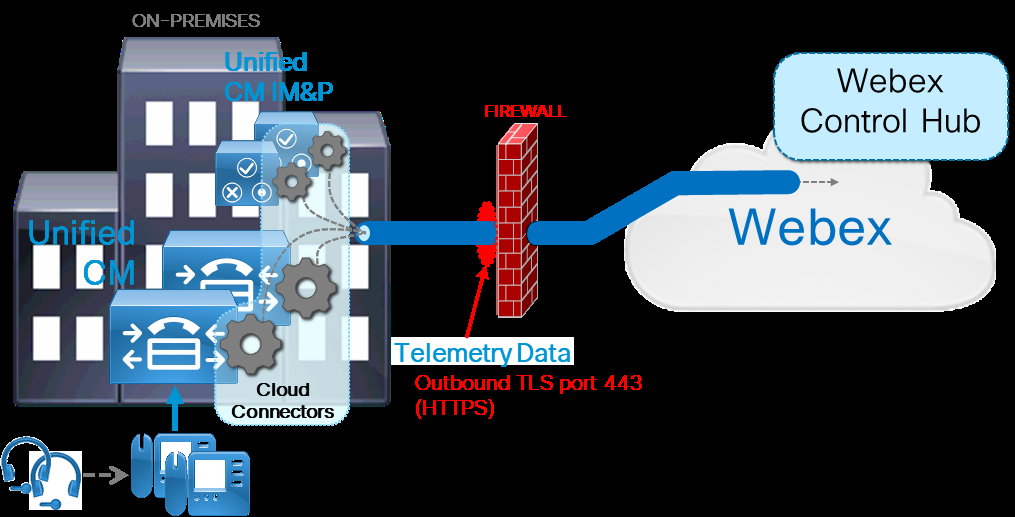
Figure 18 illustrates the following recommended architectural aspects of the CCUC deployment:
•
CCUC cloud connectors run on each collaboration application node (in this case Unified CM and Unified CM
IM&P).
•
The CCUC cloud connector and related services collect system telemetry data for endpoints, headsets, trunks,
and call records.
•
The collected data is sent to Webex via an HTTPS connection that is initiated outbound from the UC
infrastructure applications (in this case Unified CM and Unified IM&P). The telemetry data is encapsulated in
HTTPS (TLS 1.2) and sent through the organization’s firewall and/or HTTPS proxy on port 443.
•
The collected telemetry data is analyzed and reported to the customer administrator within Webex Control Hub.
•
This outbound connection is also used to provide the additional services between the Webex Control Hub and
the on-premises UC infrastructure and devices. This includes the management of the Unified CM application
certificates, using a web-based RTMT client for troubleshooting, and troubleshooting Unified CM calls.
Figure 18. Architecture for Webex Cloud-Connected UC
Benefits
Webex Cloud-Connected UC provides the following benefits:
•
Single pane of glass via Control Hub for both cloud and on-premises UC management.
•
Centralized location via Control Hub for key operational and troubleshooting activities for on-premises UC
applications.

Page 39
Preferred Architecture for Cisco Collaboration Release 15 On-Premises Deployments
PAGE 39
Collaboration Management Services
•
Solution delivered with proxy-aware “cloud connectors” running on infrastructure collaboration application
nodes.
•
Lower total cost of ownership (TCO) as customer gains cost optimized insights and increased administrative
productivity through automated workflows.
•
Delivers analytics for broad business and operations actionable insights for collaboration products.
•
Enables customer to maintain business-critical calling and media on-premises.
•
Simplifies and augments monitoring and reporting features and workflows for Cisco on-premises UC
collaboration deployments.
•
Industry leading Webex security and privacy with disaster recovery and redundancy.
−
All data is encrypted at rest and in transit.
−
Webex Identity Services infrastructure is used to authenticate and authorize cloud connectors to a specific
Control Hub organization.
−
All the data sent by CCUC is outlined in the privacy data sheet maintained at the Trust Portal
(trustportal.cisco.com).
Webex Cloud-Connected UC is recommended in the Preferred Architectures as the platform of choice for application
management and visibility.
Cisco Smart Software Manager
Although not a collaboration service, the Cisco Smart Software Manager is an Internet-based web portal that provides
simplified and flexible enterprise-wide management of software licensing including collaboration software. It is
required for licensing collaboration on-premises deployments. Cisco Smart Software Manager simplifies licenses and
software activation as well as reconciliation of licenses across supported products, and it provides enterprise-level
reporting of usage and entitlement. Cisco Smart Software Manager also supports deployments with multiple clusters.
Cisco Smart Software Manager supports the following applications in the Cisco Collaboration on-premises Preferred
Architecture:
•
Cisco Unified Communications Manager (Unified CM)
•
Cisco Unity Connection
•
Cisco Meeting Server
•
Cisco Expressway
Recommended Deployment
We recommend direct or proxy communications between the web-based Cisco Smart Software Manager and your
on-premises Unified CM and Unity Connection, Cisco Meeting Management, and Expressway nodes. This does
require outbound HTTPS communications from collaboration application’s nodes through your organization’s firewall
to the web-based Cisco Smart Software Manager service. If your organization does not enable direct outbound web

Page 40
Preferred Architecture for Cisco Collaboration Release 15 On-Premises Deployments
PAGE 40
Collaboration Management Services
communications, you should direct cluster publisher nodes to a standard HTTP/HTTPS proxy server within your
organization to enable firewall traversal and access to the web-based Cisco Smart Software service.
Benefits
Cisco Smart Software Manager provides the following benefits:
•
Centralizes and simplifies user license management for Cisco Unified CM, Unity Connection, Cisco Meeting
Server, and Expressway
•
Provides flexible license pooling across application nodes and clusters.
•
Eliminates dependency of licenses on versions of Cisco Unified Communications applications

Page 41
Preferred Architecture for Cisco Collaboration Release 15 On-Premises Deployments
PAGE 41
Security
Security
A collaboration deployment is subject to threats such as denial of service, unauthorized access, toll fraud, and
eavesdropping so it is critical to ensure that it is secured against these threats. You should take a layered approach by
securing various network levels: secure physical access, network infrastructure, collaboration applications, and
collaboration endpoints (Figure 19).
Solely following the recommendations in this section does not guarantee a secure environment, nor will it prevent all
penetration attacks on a network. You can achieve reasonable security by establishing a good security policy,
following that security policy, staying up to date on the latest developments in the hacker and security communities,
and maintaining and monitoring all systems with sensible system administration practices.
Note
The Security Guide for Cisco Unified Communications Manager, Release 15 contains information about user
security and system security.
https://www.cisco.com/c/en/us/td/docs/voice_ip_comm/cucm/security/15_0/cucm_b_security-guide-
release-15.html
Figure 19. Secure All Components of the Enterprise Collaboration Preferred Architecture

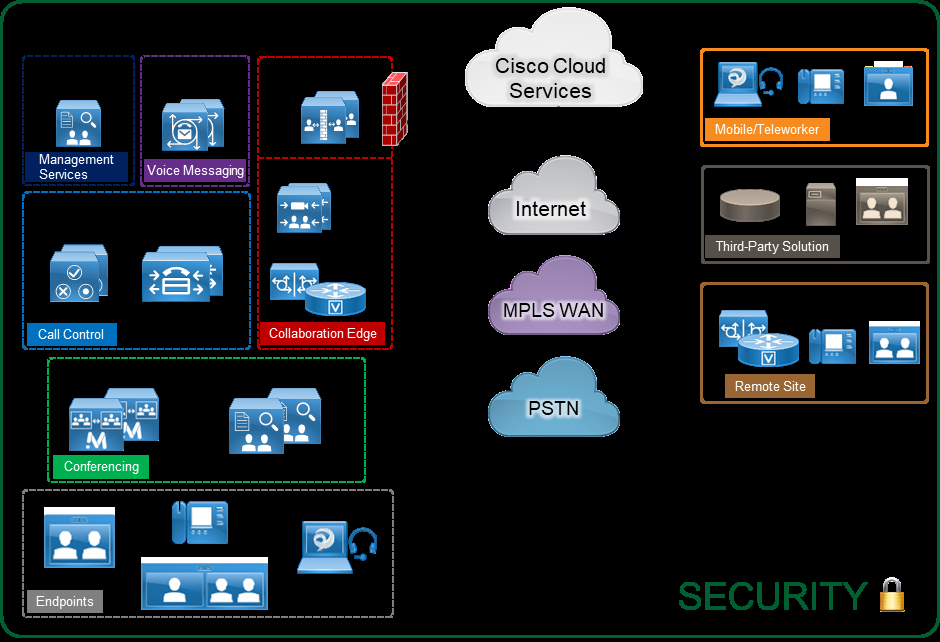

Page 42
Preferred Architecture for Cisco Collaboration Release 15 On-Premises Deployments
PAGE 42
Security
Recommended Deployment
We recommend the following general security practices for the Cisco Collaboration on-premises Preferred
Architecture:
•
Secure the infrastructure by restricting physical access to hardware.
•
Securing the IP network by utilizing encryption wherever possible and restricting unnecessary access to other
devices on the network.
•
Use hardening techniques to secure all devices, including servers and endpoints.
•
Protect your deployment against toll fraud.
•
Educate users on the Malicious Call Identification (MCID) feature.
•
Simplify certificate management by having certificates signed by a certificate authority (CA).
•
Do not disable native security features.
•
Enable Single Sign-On (SSO) using an IdP configured with secure authentication requirements including
complex passwords and two-factor authentication.
•
Regularly audit authentication logs for suspicious activity.
•
Encrypt SIP trunks, web server connections, and other server-to-server links.
•
Use SIP OAuth on all endpoints that support it to enable encryption for call signaling, media, and IP phone config
files.
•
If SIP OAuth is not an option or not supported on all endpoints, enable mixed mode on Cisco Unified CM to
enable encrypted signaling, media, and config files for endpoints.
Secure Infrastructure Recommendations
•
Secure your infrastructure; it is the foundation of your collaboration deployment.
•
Protect physical access to your premises, network, endpoints, and servers.
•
Protect your network with firewall and Intrusion Prevention System (IPS) devices.
•
Implement security features at Layer 2 and Layer 3 for your network. For example, protect access to your
network with 802.1X, and protect your DHCP server with DHCP Snooping and Dynamic ARP Inspection.
•
Implement network segmentation by having a separate voice/video VLAN for hardware endpoints and a data
VLAN for multipurpose devices such as mobile phones and laptops running Jabber.
•
With Cisco Unified Border Element deployed at the network edge, configure the Unified Border Element
protection mechanisms against telephony denial of service (TDoS) and configure access control lists (ACLs).
Device Hardening Recommendations
•
Protect network access to devices by using hardening techniques.

Page 43
Preferred Architecture for Cisco Collaboration Release 15 On-Premises Deployments
PAGE 43
Security
•
Use secure password policies and do not rely on default passwords.
•
Restrict physical and network access to devices.
Toll Fraud Recommendations
On Cisco Unified CM, several mechanisms can be used to prevent toll fraud. Partitions and calling search spaces
(CSS) provide segmentation and access control to the directory number that can be called or the device or line that is
placing the call. As a best practice, apply the most restrictive class of service possible (for example, no access to
PSTN routes for calls coming in from the PSTN) based on partitions and calling search spaces. Other mechanisms
can also be used, such as time-of-day routing, enabling the Block OffNet to OffNet Transfer service parameter,
forced authentication code (FAC), and route filters.
On Cisco Expressway-E, use Call Processing Language (CPL) rules to block fraudulent attempts.
On Cisco Unified Border Element, configure protection mechanisms against toll fraud; for example, configure an IP
trust list and explicit incoming and outgoing dial peers.
Certificate Recommendations
Simplify certificate management by using CA-signed certificates. By default, server certificates are self-signed. For a
client to establish trust with a device presenting a self-signed certificate, the self-signed certificate must be imported
into the trust store of the client. If the certificate is not imported, the connection can be terminated by the client, or
the client may present warning message(s) about the certificate to the user. Importing certificates is feasible if the
number of clients is low, but this solution does not scale for larger organizations. For this reason, we recommend that
you utilize certificates signed by a trusted CA and configure clients to trust the CA. This is especially important for
certificates such as the Tomcat certificates for Cisco Unified CM, Unified CM IM and Presence, and Cisco Unity
Connection, as well as the XMPP certificate for IM and Presence.
For Cisco Expressway-E servers, use certificates that are signed by a public CA.
Use multi-server certificates wherever possible, especially for the Cisco Unified CM and Unified CM IM and Presence
Tomcat certificates. Multi-server certificates allow the administrator to assign a single certificate for a given service
across multiple servers in a cluster in order to further simplify certificate management.
Regarding endpoints, two types of certificates available: Manufacturer Installed Certificate (MIC) and Local Significant
Certificate (LSC). Endpoint certificates are used for encryption of call signaling and media, encryption of the phone
web page, and for the optional encryption of TFTP phone configuration files. You should use an LSC instead of MIC
certificate, whenever possible.
Encryption Recommendations
Provide encryption for the following:
•
SIP trunks
SIP trunks connect Cisco Unified CM with other servers such as Cisco Unity Connection, IM and Presence,
Cisco Meeting Server, Cisco Unified Border Element, business-to-business Collaboration Edge, and voice
gateways.
•
HTTP connections
Use HTTPS instead of HTTP for all application connections such as Extension Mobility and corporate directory.

Page 44
Preferred Architecture for Cisco Collaboration Release 15 On-Premises Deployments
PAGE 44
Security
•
LDAP connections
Configure your LDAP connection(s) to utilize either ports 636 or 3269 (global catalog) instead of non-secure
connections on 389 or 3268.
With a Cisco Unified CM multi-cluster deployment, also enable encryption for:
•
Intercluster Lookup Service (ILS)
•
Location Bandwidth Manager (LBM)-to-LBM communication between clusters
To protect sensitive voice and video communications, enable endpoint encryption for signaling and media. This is
especially important if your network is not entirely trusted and secure. This requires SIP OAuth and/or enabling mixed
mode in Cisco Unified CM. You can select which endpoints are configured to use signaling and media encryption and
which are not via the phone security profiles.
Benefits
These security recommendations provide the following benefits:
•
Your collaboration deployment is more secure if the physical access is protected, and the IP network is secured.
•
By protecting network access to servers and phones, you make it more difficult to compromise them and get
access to other devices in the deployment.
•
By implementing toll fraud protection mechanisms, you can prevent unauthorized access to your telephony
system, data network, and PSTN lines.
•
By signing certificates with a CA, certificate management becomes easier. Furthermore, overall security is
improved because users will not receive certificate prompts as often. This reduces the likelihood that users
become accustomed to bypassing certificate warnings to access a resource and, ideally, they will scrutinize any
prompts they receive more thoroughly.
•
Several secure features are implemented by default. For example, with Cisco Unified CM, phone configurations
and firmware loads are signed so that it becomes more difficult to compromise the phones by loading malicious
configurations or firmware.
•
Encryption protects against eavesdropping, tampering, and protects the privacy of voice and video calls. By
encrypting communications between all devices, including the endpoints, you can achieve end-to-end
encryption. With the latest ciphers and encryption protocols including TLS 1.3, rest assured that your encrypted
connections are highly secured providing the highest level of privacy.

Page 45
Preferred Architecture for Cisco Collaboration Release 15 On-Premises Deployments
PAGE 45
Bandwidth Management
Bandwidth Management
Bandwidth management is about ensuring the best possible user experience end-to-end for all voice and video
endpoints, clients, and applications in the Collaboration solution. The Cisco Collaboration on-premises Preferred
Architecture provides a holistic approach to bandwidth management that incorporates an end-to-end Quality of
Service (QoS) architecture, call admission control, and video rate adaptation and resiliency mechanisms to ensure the
best possible user experience for deploying pervasive video over managed and unmanaged networks.
Bandwidth Management Architecture for Collaboration
With recent increases in the number of interactive applications – particularly voice and video applications – real-time
services are often required from the network. Because these resources are finite, they must be managed efficiently
and effectively. If the number of flows contending for such priority resources were not limited, then as those
resources become oversubscribed, the quality of all real-time traffic flows would degrade, eventually to the point of
becoming useless. To address this requirement the Cisco Collaboration on-premises Preferred Architecture provides
a strategy that leverages "intelligent" media techniques, QoS, and admission control to prevent real-time applications
and their related media from oversubscribing the network and the bandwidth provisioned for those applications, thus
ensuring efficient use of bandwidth resources.
Figure 20 illustrates the approach to bandwidth management used in the Cisco Collaboration on-premises Preferred
Architecture. This approach consists of the following phases:
•
Identification and classification — Refers to concepts of trust and techniques for identifying media and signaling
for trusted and untrusted endpoints. It also includes the process of mapping the identified traffic to the correct
DSCP markings to provide the media and signaling with the correct per-hop behavior end-to-end across the
network for both trusted and untrusted endpoints.
•
Queuing and scheduling — Consists of general WAN queuing and scheduling, the various types of queues, and
recommendations for ensuring that collaboration media and signaling are correctly queued on egress to the
WAN.
•
Provisioning and admission control — Refers to provisioning the bandwidth in the network and determining the
maximum bit rate that groups of endpoints will utilize. This is also where call admission control can be
implemented in areas of the network where it is required.
•
Monitoring, troubleshooting, and optimization — Ensures the proper operation and management of voice and
video across the network. Cisco Prime Collaboration offers a suite of tools to perform these functions.

Page 46
Preferred Architecture for Cisco Collaboration Release 15 On-Premises Deployments
PAGE 46
Bandwidth Management
Figure 20. Architecture for Bandwidth Management
The concepts applied to the bandwidth management strategy illustrated in Figure 20 include:
•
A self-regulating video network.
•
Prioritization of all audio streams throughout the network
•
Creation of a class of video endpoints that use available bandwidth opportunistically.
The following sections describe these concepts briefly.
Self-Regulating Video Network
A self-regulating video network leverages intelligent media techniques and rate adaptation along with proper
provisioning and QoS to allow the video endpoints to maximize their video resolution during times when video
bandwidth is not fully utilized in the network and to rate adapt or throttle down their bit rate to accommodate more
video flows during the busy hour of the day.
Prioritized Audio
Prioritized audio for both audio-only calls and audio of video calls ensures that all audio is prioritized in the network
and is thus not impacted by any loss that might occur in the video queues. Prioritizing voice from all types of
collaboration media ensures that, even during times of extreme congestion when video is experiencing packet loss
and adjusting to that loss, the audio streams will not suffer packet loss and will enable the users to have an
uninterrupted audio experience.
Opportunistic Video
Opportunistic video allows for a group of video endpoints to be strategically marked with a lower class of video, thus
allowing them to use available bandwidth opportunistically for optimal video resolution during times when the network
is less busy, and more bandwidth is available. Conversely, the lower class of video endpoints can throttle down their
video bit rate more aggressively than the prioritized class of video during times of congestion when the network is in
its busy hour. This concept of opportunistic video, coupled with prioritized audio, maintains an acceptable video
experience while simultaneously ensuring that voice media for the opportunistic video calls is not compromised. This,
of course, applies to the managed network since an unmanaged network such as the Internet is not QoS-enabled and
thus provides no guarantees with regard to packet loss. Nevertheless, the media resiliency and rate adaptation
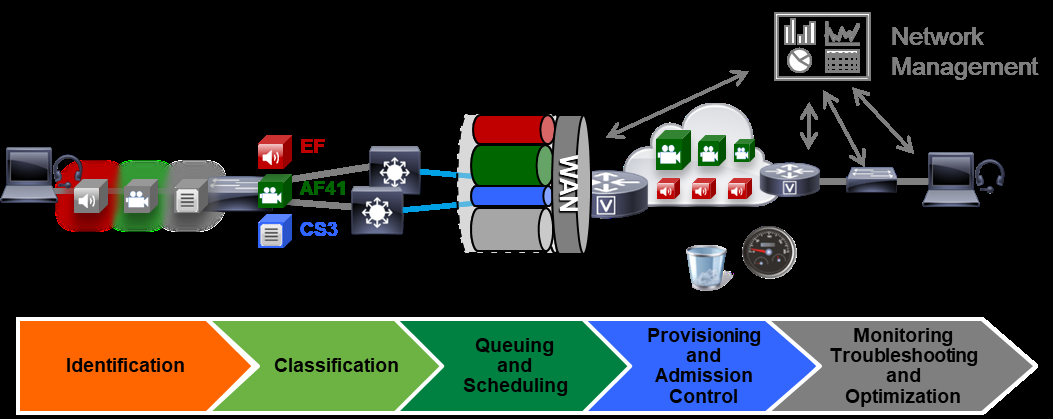

Page 47
Preferred Architecture for Cisco Collaboration Release 15 On-Premises Deployments
PAGE 47
Bandwidth Management
mechanisms also attempt to ensure that media over unmanaged networks has the best possible quality in the face of
packet loss, delay, and jitter.
Recommended Deployment
•
Identify traffic based on trusted and untrusted devices.
•
Classify and mark traffic at the access switch edge.
−
Mark all audio with Expedited Forwarding class EF (includes all audio for voice-only and video calls).
−
Mark all critical desktop and room system video with an Assured Forwarding class of AF41.
−
Mark all Jabber, Mobile and Remote Access (MRA), and Edge video with an Assured Forwarding class of
AF42.
_______________________________________________________________________
Note This creates a class of video endpoints and video call flows that are opportunistic in nature. (For
more details, see Opportunistic Video.) If AF42 marking and scheduling are not possible due to
limitations on customer edge equipment or other reasons, then AF41 can be used for all video
traffic. If that is the case, then the benefits of Opportunistic Video will be minimized. With only
AF41 marking, all video traffic will compete equally for resources and rate adapt based on
utilization in a self-regulating video network.
−
Configure QoS on all media originating and terminating applications and MCUs across the solution.
•
Apply simplified WAN Edge policies for identifying, classifying, marking, and queuing collaboration traffic:
−
WAN edge ingress re-marking policy
−
WAN edge egress queuing and scheduling policy
•
Group video endpoints into classes of maximum video bitrate to limit bandwidth consumption based on endpoint
type and usage in the solution.
•
Deploy Enhanced Locations Call Admission Control and limit calling based only in areas of the network where
bandwidth resources are restricted.
Benefits
This deployment provides the following benefits:
•
Employs prescriptive recommendations to simplify deployment with a simplified QoS architecture.
•
Makes more efficient use of network resources.
•
Supports mobile and multi-media Collaboration devices.
•
Takes into account "unmanaged" network segments (Internet)


Page 48
Preferred Architecture for Cisco Collaboration Release 15 On-Premises Deployments
PAGE 48
Bandwidth Management
•
Is "future-proof" — facilitates introduction of new services, features, and endpoints.
•
Provides a self-regulating video network.