Document Metadata
Format: PDF 1.7
Title: Troubleshoot Call Routing Issue via CUCM Dialed Number Analyzer
Producer: iText® Core 7.2.5 (AGPL version), pdfHTML 4.0.5 (AGPL version) ©2000-2023 iText Group NV
Creation Date: D:20260128100331-06'00'
Mod Date: D:20260128081613-08'00'
Page 1
Troubleshoot Call Routing Issue via CUCM Dialed
Number Analyzer
Contents
Introduction
Prerequisites
Requirements
Components Used
Benefits of Dialed Number Analyzer
Validation of Dial Plan Configuration
Troubleshooting and Diagnostics
Detailed Analysis and Reporting
How to Enable and Access Dialed Number Analyzer
- Activate the Dialed Number Analyzer Service
- Start or Stop the Dialed Number Analyzer Service
- Enable Database Synchronization (Optional but Recommended)
Key Features and Use Cases of Dialed Number Analyzer
- Analyzer
- Gateways
- Phones
- Trunks
- Dump DA Information
- Multiple Analyzer
- View File
Related Information
Introduction
This document describes how to use Dialed Number Analyzer to troubleshoot call routing issues.
Prerequisites
Requirements
Cisco recommends that you have knowledge of Cisco CallManager.
Components Used
The information in this document is based on Cisco Unified Communications Manager (CUCM) versions
12.x/14.x/15.x.
The information in this document was created from the devices in a specific lab environment. All of the
devices used in this document started with a cleared (default) configuration. If your network is live, ensure
Page 2
that you understand the potential impact of any command.
Benefits of Dialed Number Analyzer
The Cisco DNA is a diagnostic tool within CUCM that enables administrators to validate and troubleshoot
dial plan configurations by simulating call routing and providing a detailed analysis of how calls are
processed. This ensures the accuracy and efficiency of voice communications within an organization.
Validation of Dial Plan Configuration
Dialed Number Analyzer allows administrators to test and verify that the dial plan is configured correctly
without having to make actual calls. This can be useful when setting up or making changes to the dial plan,
as it helps ensure that calls are routed as intended based on the current configuration.
Troubleshooting and Diagnostics
When issues arise with call routing or number patterns, Cisco DNA can be used to simulate calls and
determine how the system is treating different dialed numbers. This aids in diagnosing problems and
identifying misconfigurations or policy violations within the call-routing logic, which can save time and
reduce the impact of dial plan issues on end-users.
Detailed Analysis and Reporting
The Dialed Number Analyzer provides detailed reports on how calls would be handled by the system for any
given dialed number. These reports include information such as which route patterns are matched, which
calling search spaces are used, and which translation patterns affect the call. This level of detail is valuable
for both routine audits and for planning changes to the dial plan, as it helps administrators understand the
intricate workings of their call-routing infrastructure.
How to Enable and Access Dialed Number Analyzer
In order to enable Dialed Number Analyzer, you need these steps:
Note: Unified Communications Manager clusters only: Cisco does not recommend that you
activate the service on all the servers in a cluster. Cisco recommends that you activate this service
only on one of the servers of a cluster where call-processing activity is the least.
- Activate the Dialed Number Analyzer Service
Access CUCM Serviceability
•
Choose Tools > Service Activation.
•
Choose Cisco Dialed Number Analyzer and Cisco Dialed Number Analyzer Server from the Unified
CM Services list and click Save. If the service is already activated, its status shows as Activated.
•
- Start or Stop the Dialed Number Analyzer Service
In CUCM Serviceability, navigate to Tools > Control Center - Feature Services.
•
From the Servers drop-down list, choose the Cisco Unified Communications Manager server.
•
Ensure that the status of the Dialed Number Analyzer is displayed as Activated. From here, you can
•
Page 3
start, stop, or restart the service if needed.
3. Enable Database Synchronization (Optional but Recommended)
In Dialed Number Analyzer, choose Service > Control Center.
•
Database Synchronization is enabled by default. Do not modify this setting in order to keep it enabled.
If you need to disable and then re-enable it, ensure that the Dialed Number Analyzer service is
stopped and started to synchronize with the database.
•
These services and configurations ensure that the Cisco Dialed Number Analyzer can properly function and
reflect any changes made to the CUCM database, allowing for accurate dialed number analysis.
Once the Dialed Number Analyzer Service is enabled and running, you can access the Cisco Dialed Number
Analyzer application via https://cucm ip/dna or https://cucmfqdn/dna.
Key Features and Use Cases of Dialed Number Analyzer
The Analysis menu in the Cisco DNA has several submenus.
- Analyzer
Function: Allows direct input of a dialed number in order to see how it is routed.
Example: You enter the number '91232345678'. The Analyzer shows that this call is routed through a
specific route pattern, applies a particular translation pattern, and is ultimately sent to an external gateway
for an international call.
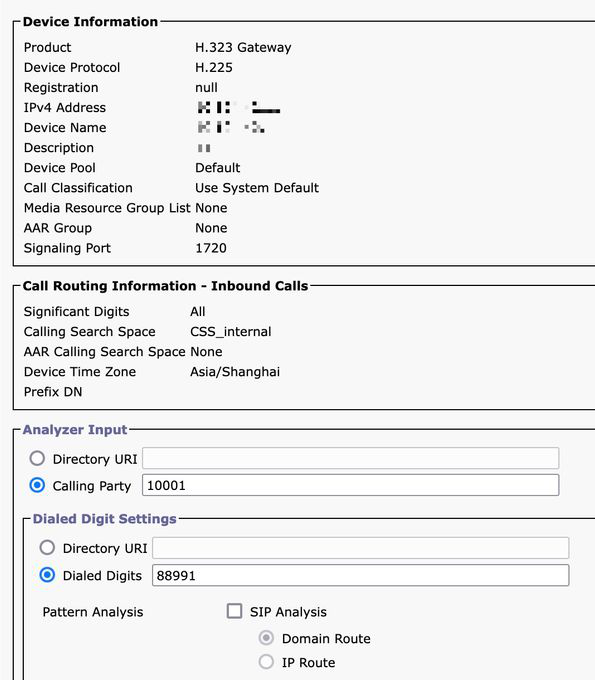
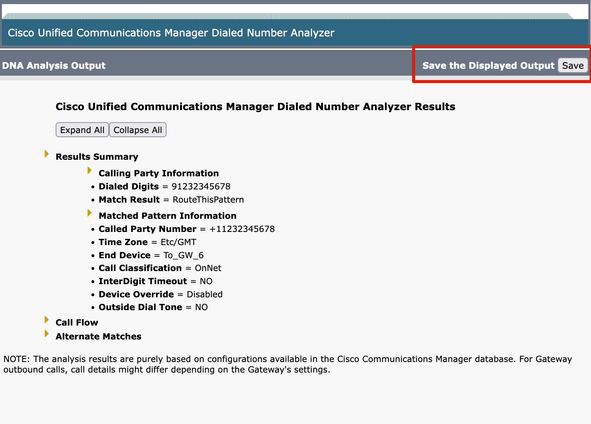
From the next example, you can see some basic information in the Result Summary. For instance, the
calling party number for this call is '10001', and the originally dialed Called Number is '91232345678'. You
can also determine whether this call can be routed, with our test result indicating 'RouteThisPattern'.
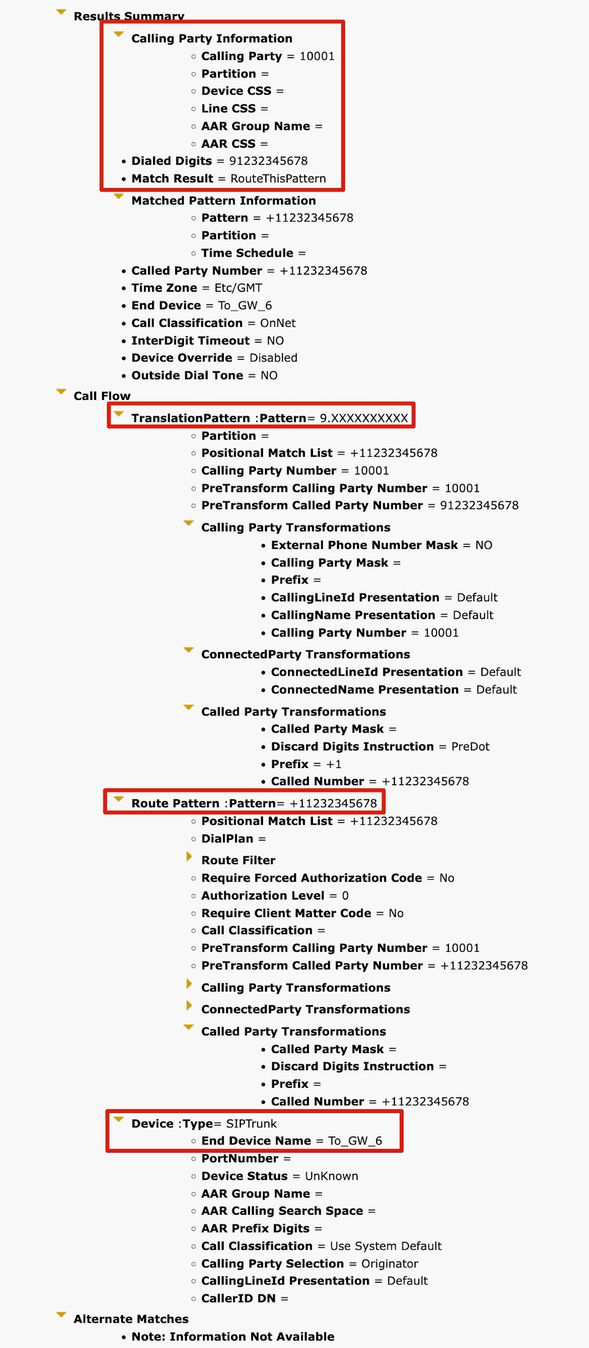
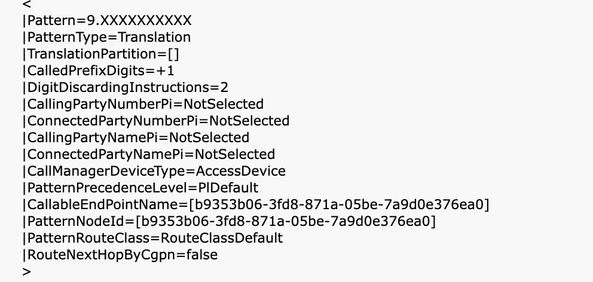
In order to see detailed call routing information, you can refer to the Call Flow section. Here, you observe
that CUCM first matches a Translation Pattern '9.XXXXXXXXXX', changing the called number to
'+11232345678'. Then, it matches a Route Pattern '+11232345678' and routes the call to a SIP Trunk
'To_GW_6'. This comprehensive information about how CUCM handles the call is beneficial for verifying
configurations and troubleshooting.
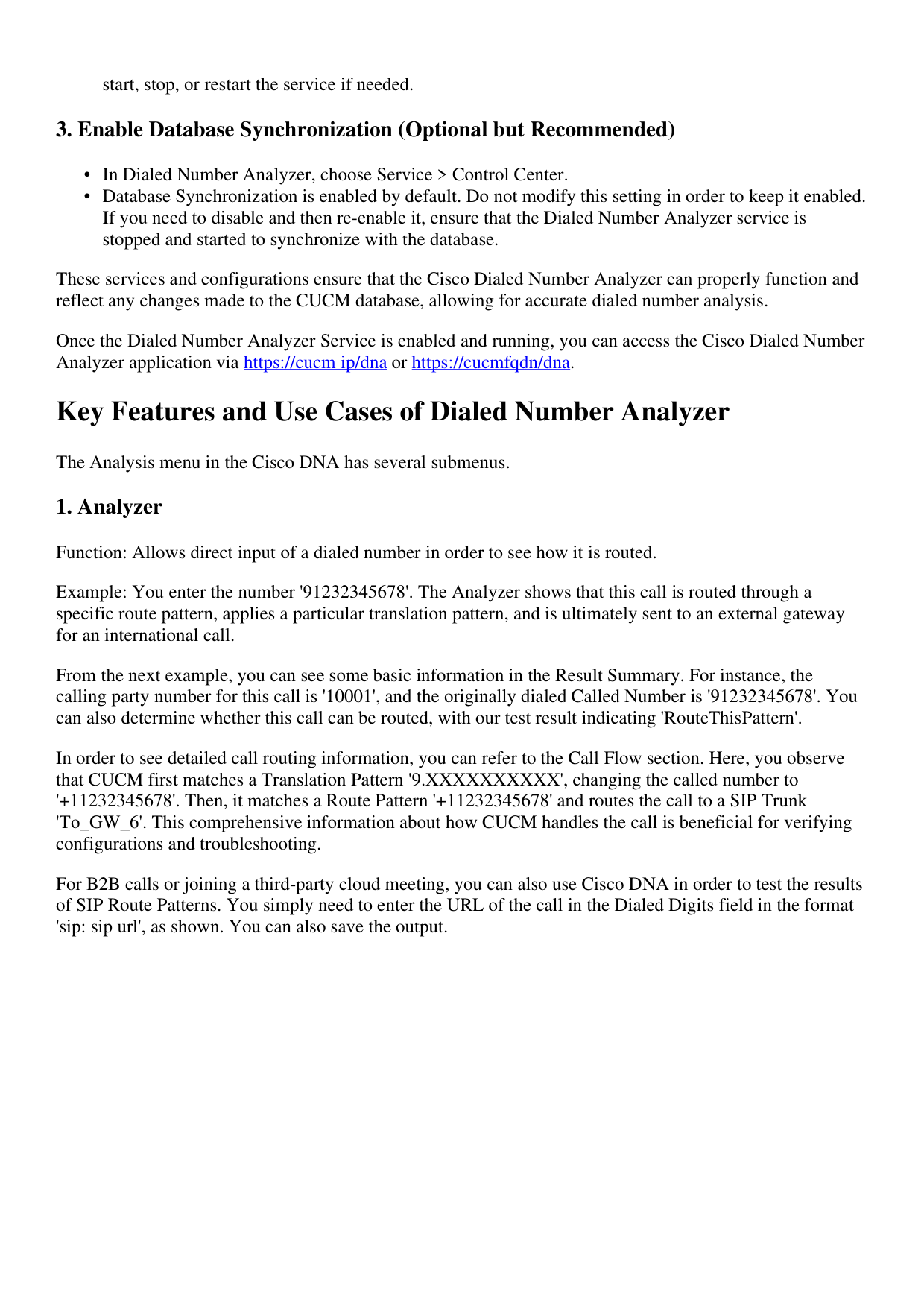
For B2B calls or joining a third-party cloud meeting, you can also use Cisco DNA in order to test the results
of SIP Route Patterns. You simply need to enter the URL of the call in the Dialed Digits field in the format
'sip: sip url', as shown. You can also save the output.
Page 4
Page 5
- Phones
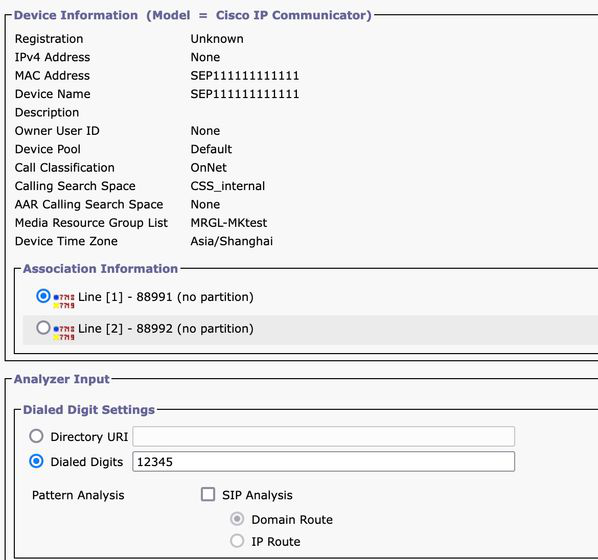
Function: It is typically used to validate or troubleshoot the configuration of incoming or outgoing calls for
specific phones.
Example: if you want to configure the phones in a Branch Office to route outgoing calls through the Branch
Office gateway, you can choose the Branch Office Phone through the Phones option for validation.
For phones with MultiLine, you can directly choose the corresponding line for testing. The Calling Search Space of both
the device and the line is applied directly to the test, so there is no need to choose the corresponding Calling Search
Space separately.
- Trunks
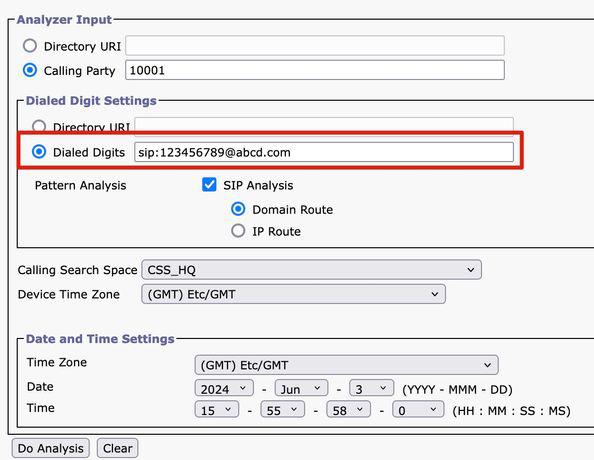
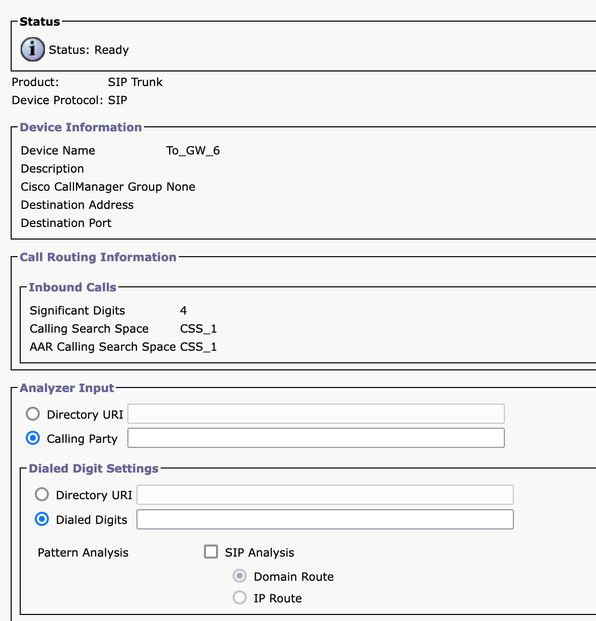
Function: Similar to the Gateway Analyzer, when you need to handle incoming calls from a SIP trunk or
ICT trunk, you can use the Trunk Analyzer in order to analyze how a specific trunk routes the call.
Page 6
Example: Once you choose the corresponding Trunk, you can see its incoming Calling Search Space and
Significant Digits.
5. Dump DA Information
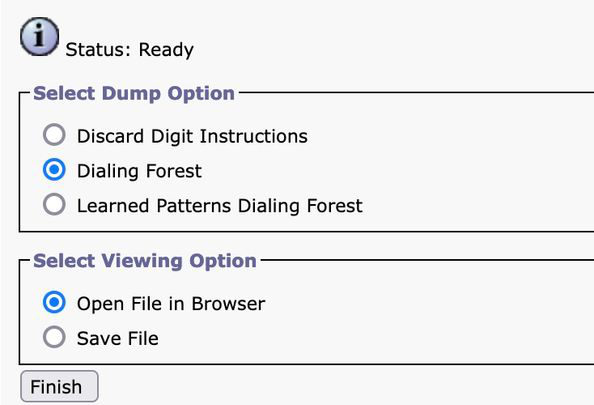
Function: Dump DA Information provides three Dump Otipons. Discard Digit Instructions, Dialing Forest,
Learned Patterns Dialing Forest. Usually, the Dialing Forest and Learned Patterns Dialing Forest are used.
Example: Dialing Forest provides detailed dial plan information, similar to the 'Route Plan Report', you can
search for all the DA, Route Pattern, and Translation Pattern configured on CUCM. You can open the file in
the browser directly or download it to your PC and check it via any document editor application.
Page 7
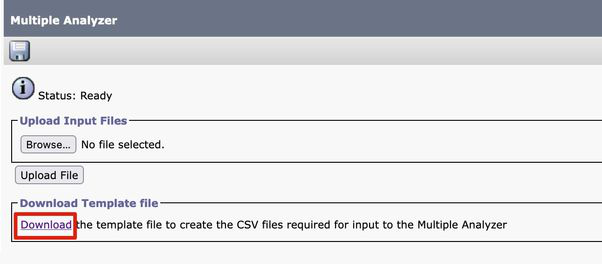
- Multiple Analyzer
Function: Analyze multiple dialed numbers using a CSV file. You must download the template from Cisco
DNA in order to avoid any format issues. Then use the template in order to generate a CSV file.
Example: You upload a CSV file containing several numbers: '1001,2002,3003'. The Multiple Analyzer
processes each number, showing detailed routing information for each, useful for batch testing new dial plan
configurations.
Page 8
- View File
Function: View results of previously saved analyses.
Example: You can upload the result you downloaded from any previous analyzer and then view the file.
You can see the results as if you just tested it. This is very helpful when assisting you in analyzing issues.
Related Information
Dialed Number Analyzer for Cisco Unified Communications Manager, Release 12.0(1) - Dial Plan
Configuration [Cisco Unified Communications Manager (CallManager)] - Cisco
•
Cisco Technical Support & Downloads
•