Document Metadata
Format: PDF
Title: Cisco Finesse Web Services Developer and JavaScript Guide, Release 12.5(1)
Author: ajwala
Creator: DITA Open Toolkit
Page 1
Cisco Finesse Web Services Developer and JavaScript Guide, Release
12.5(1)
First Published: 2020-01-31
Americas Headquarters
Cisco Systems, Inc.
170 West Tasman Drive
San Jose, CA 95134-1706
USA
http://www.cisco.com
Tel: 408 526-4000
800 553-NETS (6387)
Fax: 408 527-0883


Page 2
THE SPECIFICATIONS AND INFORMATION REGARDING THE PRODUCTS IN THIS MANUAL ARE SUBJECT TO CHANGE WITHOUT NOTICE. ALL STATEMENTS,
INFORMATION, AND RECOMMENDATIONS IN THIS MANUAL ARE BELIEVED TO BE ACCURATE BUT ARE PRESENTED WITHOUT WARRANTY OF ANY KIND,
EXPRESS OR IMPLIED. USERS MUST TAKE FULL RESPONSIBILITY FOR THEIR APPLICATION OF ANY PRODUCTS.
THE SOFTWARE LICENSE AND LIMITED WARRANTY FOR THE ACCOMPANYING PRODUCT ARE SET FORTH IN THE INFORMATION PACKET THAT SHIPPED WITH
THE PRODUCT AND ARE INCORPORATED HEREIN BY THIS REFERENCE. IF YOU ARE UNABLE TO LOCATE THE SOFTWARE LICENSE OR LIMITED WARRANTY,
CONTACT YOUR CISCO REPRESENTATIVE FOR A COPY.
The Cisco implementation of TCP header compression is an adaptation of a program developed by the University of California, Berkeley (UCB) as part of UCB's public domain version of
the UNIX operating system. All rights reserved. Copyright © 1981, Regents of the University of California.
NOTWITHSTANDING ANY OTHER WARRANTY HEREIN, ALL DOCUMENT FILES AND SOFTWARE OF THESE SUPPLIERS ARE PROVIDED “AS IS" WITH ALL FAULTS.
CISCO AND THE ABOVE-NAMED SUPPLIERS DISCLAIM ALL WARRANTIES, EXPRESSED OR IMPLIED, INCLUDING, WITHOUT LIMITATION, THOSE OF
MERCHANTABILITY, FITNESS FOR A PARTICULAR PURPOSE AND NONINFRINGEMENT OR ARISING FROM A COURSE OF DEALING, USAGE, OR TRADE PRACTICE.
IN NO EVENT SHALL CISCO OR ITS SUPPLIERS BE LIABLE FOR ANY INDIRECT, SPECIAL, CONSEQUENTIAL, OR INCIDENTAL DAMAGES, INCLUDING, WITHOUT
LIMITATION, LOST PROFITS OR LOSS OR DAMAGE TO DATA ARISING OUT OF THE USE OR INABILITY TO USE THIS MANUAL, EVEN IF CISCO OR ITS SUPPLIERS
HAVE BEEN ADVISED OF THE POSSIBILITY OF SUCH DAMAGES.
Any Internet Protocol (IP) addresses and phone numbers used in this document are not intended to be actual addresses and phone numbers. Any examples, command display output, network
topology diagrams, and other figures included in the document are shown for illustrative purposes only. Any use of actual IP addresses or phone numbers in illustrative content is unintentional
and coincidental.
All printed copies and duplicate soft copies of this document are considered uncontrolled. See the current online version for the latest version.
Cisco has more than 200 offices worldwide. Addresses and phone numbers are listed on the Cisco website at www.cisco.com/go/offices.
Cisco and the Cisco logo are trademarks or registered trademarks of Cisco and/or its affiliates in the U.S. and other countries. To view a list of Cisco trademarks, go to this URL:
https://www.cisco.com/c/en/us/about/legal/trademarks.html. Third-party trademarks mentioned are the property of their respective owners. The use of the word partner does not imply a
partnership relationship between Cisco and any other company. (1721R)
© 2024 Cisco Systems, Inc. All rights reserved.
Page 3
C O N T E N T S
Introduction
1
C H A P T E R 1
What's New in Cisco Finesse 12.5(1)
1
Cisco Finesse REST APIs
3
JavaScript Library and Sample Gadgets
5
Communication with the Cisco Finesse Web Service
5
Client Requests
6
HTTPS Requests
8
Real-Time Events
8
API Parameter Types
9
Cisco Finesse API Errors
10
Lab Development Environment Validation with Cisco FinesseWeb Services APIs
13
C H A P T E R 2
Environment and Tools
13
Postman
13
Pidgin for Windows
15
Adium for Mac OS X
18
Cisco Finesse APIs
21
Sign In to Finesse
22
Change Agent State
23
Cisco Finesse Desktop APIs
27
C H A P T E R 3
User
27
User APIs
29
User—Sign In to Finesse
29
User—Sign In as a Mobile Agent
30
User—Sign Out of Finesse Desktop
32
Cisco Finesse Web Services Developer and JavaScript Guide, Release 12.5(1)
iii

Page 4
User—Get User
33
User—Get User Id from loginName
36
User—Get List
38
User—Get List of Dialogs (Voice Only by Default)
38
User—Get List of Dialogs (Nonvoice Only)
40
User—Get List of Reservation Dialogs
41
User—Change Agent State
41
User—Agent State Change With Reason Code
50
User—Get Reason Code
51
User—Get Reason Code List
52
User—Get Wrap-Up Reason
54
User—Get Wrap-Up Reason List
55
User—Get Default Media Properties Layout
56
User—Get Media Properties Layout List
60
User—Get List of Phone Books
61
User—Get List of Workflows
63
User API Parameters
68
User API Errors
73
Dialog
74
Dialog APIs
76
Dialog—Get Dialog
76
Dialog—Create a New Dialog (Make a Call)
80
Dialog—Take Action on Participant
83
Dialog—Update Call Variable Data
87
Dialog—Send DTMF String
91
Dialog—Make a Consult Call Request
93
Dialog—Initiate a Single Step Transfer
96
Dialog—Make a Silent Monitor Call
97
Dialog—End a Silent Monitor Call
99
Dialog—Make a Barge Call
100
Dialog—End a Barge Call
103
Dialog—Drop Participant from Conference
104
Dialog—Start Recording
106
Dialog—Accept, Close, or Reject an Outbound Option Preview Reservation
108
Cisco Finesse Web Services Developer and JavaScript Guide, Release 12.5(1)
iv
Contents
Page 5
Dialog—Accept, Close, or Reject a Direct Preview Outbound Reservation
109
Dialog—Reclassify a Direct Preview Call
111
Dialog—Schedule or Cancel a Callback
112
Dialog API Parameters
114
State (Dialog) Parameter Values
124
Actions Parameter Values
125
State (Participant) Parameter Values
126
CTI Event Mappings for Dialog and Participant States
127
Outbound Call Types and BAStatus
132
Disposition Code Parameter Values for Nonvoice Tasks
135
Dialog API Errors
136
Queue
138
Queue APIs
138
Queue—Get Queue
138
Queue—Get List of Queues for User
140
Queue API Parameters
142
Queue API Errors
144
Team
144
Team APIs
145
Team—Get Team
145
Team—Get List of TeamMessages
147
Team API Parameters
150
Team API Errors
150
TeamResource
150
TeamResource APIs
151
TeamResource—Get Reason Codes
151
TeamResource—Get Wrap-Up Reasons
152
TeamResource—Get Media Properties Layouts
153
TeamResource—Get Phone Books
154
TeamResource—Get Workflows
156
TeamResource API Parameters
161
TeamResource API Errors
162
ClientLog
163
ClientLog APIs
164
Cisco Finesse Web Services Developer and JavaScript Guide, Release 12.5(1)
v
Contents
Page 6
ClientLog—Post to Finesse
164
CompressedClientLog—Post Compressed Log to Finesse
165
ClientLog API Parameters
166
ClientLog API Errors
166
Task Routing APIs
166
Media
167
Media APIs
167
MediaDomain—Get List
177
Agent States for Nonvoice Media
178
Media API Parameters
181
Media API Errors
185
Dialog APIs for Nonvoice Tasks
186
User APIs for Nonvoice Tasks
187
Single Sign-On
188
Single Sign-On APIs
189
Single Sign-On—Test API
189
Single Sign-On—Fetch Access Token
190
Single Sign-On—Refresh Existing Access Token
193
Single Sign-On—Get User Authentication Mode
194
Single Sign-On Parameters
195
Single Sign-On API Errors
196
Client Integration
196
TeamMessage
198
TeamMessage APIs
199
TeamMessage—Get Team Message
199
TeamMessage—Get List
200
TeamMessage—Create a Team Message
202
TeamMessage—Delete a Team Message
202
TeamMessage API Parameters
203
TeamMessage API Errors
204
Cisco Finesse Configuration APIs
205
C H A P T E R 4
SystemConfig
206
SystemConfig APIs
206
Cisco Finesse Web Services Developer and JavaScript Guide, Release 12.5(1)
vi
Contents
Page 7
SystemConfig—Get
206
SystemConfig—Set
207
SystemConfig API Parameters
208
SystemConfig API Errors
209
ConfigInfo
210
ConfigInfo APIs
210
ConfigInfo—Get
210
ConfigInfo API Parameters
211
ConfigInfo API Errors
212
ECCVariableConfig
212
ECCVariableConfig APIs
213
ECCVariableConfig—Get ECC Variable Configuration
213
ECCVariableConfig API Parameters
214
ECCVariableConfig API Errors
214
ClusterConfig
214
ClusterConfig APIs
215
ClusterConfig—Get
215
ClusterConfig—Set
216
ClusterConfig API Parameters
217
ClusterConfig API Errors
217
EnterpriseDatabaseConfig
217
EnterpriseDatabaseConfig APIs
218
EnterpriseDatabaseConfig—Get
218
EnterpriseDatabaseConfig—Set
219
EnterpriseDatabaseConfig API Parameters
220
EnterpriseDatabaseConfig API Errors
221
LayoutConfig
221
LayoutConfig APIs
234
LayoutConfig—Get
234
LayoutConfig—Set
235
LayoutConfig API Parameters
236
LayoutConfig API Errors
236
ReasonCode
236
ReasonCode APIs
237
Cisco Finesse Web Services Developer and JavaScript Guide, Release 12.5(1)
vii
Contents
Page 8
ReasonCode—Get
237
ReasonCode—Get List
239
ReasonCode—Create
240
ReasonCode—Update
241
ReasonCode—Delete
242
ReasonCode API Parameters
243
ReasonCode API Errors
244
WrapUpReason
244
WrapUpReason APIs
244
WrapUpReason—Get
244
WrapUpReason—Get List
245
WrapUpReason—Create
246
WrapUpReason—Update
247
WrapUpReason—Delete
248
WrapUpReason API Parameters
249
WrapUpReason API Errors
249
ChatConfig
250
ChatConfig APIs
250
ChatConfig—Get
250
ChatConfig—Set
251
ChatConfig API Parameters
252
ChatConfig API Errors
252
Cloud Connect Configuration
253
Cloud Connect Configuration APIs
253
Cloud Connect Configuration—Get
253
Cloud Connect Configuration—Set
254
Cloud Connect Integration—Delete
255
Cloud Connect Configuration Parameters
256
Cloud Connect Configuration API Errors
256
MediaPropertiesLayout
256
MediaPropertiesLayout APIs
258
MediaPropertiesLayout—Get
258
MediaPropertiesLayout—Get Default Layout
258
MediaPropertiesLayout—Get List
260
Cisco Finesse Web Services Developer and JavaScript Guide, Release 12.5(1)
viii
Contents
Page 9
MediaPropertiesLayout—Create
261
MediaPropertiesLayout—Update
263
MediaPropertiesLayout—Update Default Layout
265
MediaPropertiesLayout—Delete
267
MediaPropertiesLayout API Parameters
268
MediaPropertiesLayout API Errors
270
PhoneBook
271
PhoneBook APIs
271
PhoneBook—Get
271
PhoneBook—Get List
272
PhoneBook—Create
273
PhoneBook—Update
274
PhoneBook—Delete
275
PhoneBook—Import Contact List (CSV)
276
PhoneBook—Import Contact List (XML)
277
PhoneBook—Export Contact List
278
PhoneBook API Parameters
279
PhoneBook API Errors
280
Contact
280
Contact APIs
281
Contact—Get
281
Contact—Get List
282
Contact—Create
283
Contact—Update
284
Contact—Delete
284
Contact API Parameters
285
Contact API Errors
286
Workflow
286
Workflow APIs
291
Workflow—Get
291
Workflow—Get List
294
Workflow—Create
295
Workflow—Update
296
Workflow—Delete
298
Cisco Finesse Web Services Developer and JavaScript Guide, Release 12.5(1)
ix
Contents
Page 10
Workflow API Parameters
299
Workflow API Errors
303
WorkflowAction
303
WorkflowAction APIs
305
WorkflowAction—Get
305
WorkflowAction—Get List
306
WorkflowAction—Create
307
WorkflowAction—Update
309
WorkflowAction—Delete
310
WorkflowAction API Parameters
311
WorkflowAction API Errors
314
Team
315
Team APIs
315
Team—Get List
315
Team—Get List of Reason Codes
316
Team—Update List of Reason Codes
317
Team—Get List of Wrap-Up Reasons
318
Team—Update List of Wrap-Up Reasons
319
Team—Get List of Phone Books
320
Team—Update List of Phone Books
321
Team—Get Layout Configuration
322
Team—Update Layout Configuration
323
Team—Get List of Workflows
325
Team—Update List of Workflows
326
Team API Parameters
327
Team API Errors
328
SystemVariable
328
SystemVariable APIs
328
SystemVariable—List
328
SystemVariable API Parameters
332
SystemVariable API Errors
332
Cisco Finesse Serviceability APIs
333
C H A P T E R 5
SystemInfo
333
Cisco Finesse Web Services Developer and JavaScript Guide, Release 12.5(1)
x
Contents
Page 11
SystemInfo APIs
334
SystemInfo—Get
334
SystemInfo API Parameters
335
SystemInfo API Errors
337
Diagnostic Portal
337
Diagnostic Portal APIs
337
Diagnostic Portal—Get Performance Information
337
Diagnostic Portal—Get Product Version
339
Diagnostic Portal API Errors
340
RuntimeConfigInfo
340
RuntimeConfigInfo APIs
340
RuntimeConfigInfo—Get
340
RuntimeConfigInfo API Parameters
341
RuntimeConfigInfo API Errors
343
Cisco Finesse Notifications
345
C H A P T E R 6
About Cisco Finesse Notifications
345
Notification Frequency
345
Subscription Management
345
Subscription Persistence
346
Resources
347
User Notification
347
Dialog Notification
348
Dialogs/Media Notification
355
Dialog CTI Error Notification
358
Team Notification
360
Queue Notifications
361
User/Queue Notification
363
Media Notification
365
Media and Dialogs/Media Asynchronous Error Notification
366
Notification Parameters
370
Managing Notifications in Third-Party Applications
371
Connect to XMPP over HTTP (BOSH/WebSocket) using Finesse EventTunnel
373
Connect to XMPP over TCP
374
Cisco Finesse Web Services Developer and JavaScript Guide, Release 12.5(1)
xi
Contents
Page 12
Finesse High Availability
377
C H A P T E R 7
Failure Scenarios
378
Desktop Presence and Forced Logout
378
Failure Handling for Task Routing Clients
380
Finesse Desktop Gadget Development
383
C H A P T E R 8
Finesse Gadgets
383
Gadget Description
384
Simple Example Gadget
386
Gadget Limitations
387
Import Finesse JavaScript API
388
alternateHosts Configuration
389
Headless Gadget Configuration
389
Best Practices for Gadget Development
389
Supported OpenSocial Features
391
Gadget Specification XML Features
391
Required Module pref Feature
392
Loading Indicator Feature
392
APIs Available to Gadget JavaScript
393
Gadget Preferences
394
Caveats
395
Gadget Caching
395
Notifications on Finesse Desktop
395
Finesse Notifications in Third-Party Containers
396
Finesse Topics
396
Connection Information
396
Finesse Notifications
397
Finesse Requests
398
ConnectionInfoReq
398
ConnectionReq
399
SubscribeNodeReq
399
UnsubscribeNodeReq
399
Finesse Responses
400
Cisco Finesse Web Services Developer and JavaScript Guide, Release 12.5(1)
xii
Contents
Page 13
Workflow Action Event
400
Finesse Container Timer
402
Handling Special Characters in CSS
403
Subscription Management on Finesse Desktop
404
Gadget Height Management
404
Setting Gadget Height—Desktop Layout XML
404
Setting Gadget Height—Using Gadget API
405
Third-Party Gadgets
409
C H A P T E R 9
Enable or Reset 3rdpartygadget Account
409
CSS Requirements
410
Upload Third-Party Gadgets
410
Permissions
412
Replication
413
Migration
413
Backup and Restore
413
Restrictions
413
CORS Support for Finesse REST APIs
413
Cisco Finesse JavaScript APIs
415
C H A P T E R 1 0
Client Services
415
Container Services
417
Container Services Topics
423
Finesse Toaster
424
Popover Service
426
Events
433
Gadget View Changed Event
433
Timer Tick Event
434
Workflow Action Event
435
ClientLogger
437
Digital Channel
438
Cisco Common Desktop Stock Icon Names with Image
441
Channel Service
442
Gadget Configuration
446
Cisco Finesse Web Services Developer and JavaScript Guide, Release 12.5(1)
xiii
Contents
Page 14
Interfaces
447
Request Handlers
447
REST Services
448
JavaScript Representation of Finesse REST API
448
REST Collection Objects
448
RestBase and RestCollectionBase Common Parameters
450
JavaScript Library
453
Subscription Support
455
REST Base
456
REST Collection Base
459
User
459
User.MediaStates
472
User.States
473
User.WorkMode
473
User.WrapUpMode
474
UserMediaPropertiesLayout
474
UserMediaPropertiesLayouts
475
Users
475
Dialog
475
Dialog.Actions
481
Dialog.ParticipantStates
482
Dialog.ReasonStates
482
Dialog.States
483
DialogBase
483
DialogLogoutActions
486
Dialogs
487
Queue
488
Queues
489
Team
490
TeamNotReadyReasonCode
491
TeamNotReadyReasonCodes
492
TeamSignOutReasonCodes
492
Media
493
Media.States
500
Cisco Finesse Web Services Developer and JavaScript Guide, Release 12.5(1)
xiv
Contents
Page 15
MediaDialog
501
MediaDialog.States
502
MediaDialog.TaskActions
503
MediaDialogs
503
MediaList
504
MediaOptionsHelper
505
MediaOptionsHelper.States
506
MediaPropertiesLayout
506
ChatConfig
507
ECCVariableConfig
509
Contact
509
Contacts
510
InterruptActions
511
PhoneBook
512
PhoneBooks
513
ReasonCodeLookup
513
ReasonCodes
514
SystemInfo
514
SystemInfo.Statuses
517
WrapUpReason
517
WrapUpReasons
518
ShortcutKey Service
519
Utilities
524
Desktop Cache
534
JSONValidator
537
WorkflowService
537
JSON Schema
540
Log Collection
541
C H A P T E R 1 1
Log Collection
541
Documents and Documentation Feedback
545
C H A P T E R 1 2
Documents and Documentation Feedback
545
Cisco Finesse Web Services Developer and JavaScript Guide, Release 12.5(1)
xv
Contents
Page 16
Cisco Finesse Web Services Developer and JavaScript Guide, Release 12.5(1)
xvi
Contents
Page 17
C H A P T E R 1
Introduction
• What's New in Cisco Finesse 12.5(1), on page 1
• Cisco Finesse REST APIs, on page 3
• JavaScript Library and Sample Gadgets, on page 5
• Communication with the Cisco Finesse Web Service, on page 5
• API Parameter Types, on page 9
• Cisco Finesse API Errors, on page 10
What's New in Cisco Finesse 12.5(1)
REST APIs
The following REST APIs have been added in Cisco Finesse 12.5(1).
• User—Get User Id from loginName—This API accepts the loginName in the URI and authentication
for both SSO and non-SSO deployments. This API is only supported for Unified CCE deployments.
• Team Resource—The TeamResource object represents a team configuration based on Team assignments.
The object contains the URI, team ID, and the respective configuration. The agent or supervisor can use
the TeamResource API to fetch configurations such as reason codes, wrap-up reasons, media properties
layout, phone books, and workflows associated to the team.
The following are the new TeamResource APIs:
• Get Reason Codes
• Get Wrap-Up Reasons
• Get Media Properties Layouts
• Get Phone Books
• Get Workflows
• CompressedClientLog—Post Compressed Log to Finesse—This API allows a user to submit compressed
logs to the Cisco Finesse server. The server saves the compressed data in a zip file format.
• Media—Change Agent from Work State to Active—This API allows a user to change the agent state
from WORK state to active (READY and NOT_READY), which is automatically computed by Unified
CCE. Users can only use this API when an agent state is WORK.
Cisco Finesse Web Services Developer and JavaScript Guide, Release 12.5(1)
1

Page 18
• Single Sign-On—Get User Authentication Mode—This API allows a client to get the authentication
mode of a user in a Unified CCE deployment that is in hybrid mode (SSO and non-SSO).
• ECCVariableConfig—Get ECC Variable Configuration—This API allows a user to get ECC variable
configuration details for Unified CCE.
• Cloud Connect Configuration—This API allows a user to configure Cloud Connect in the Cisco Finesse
server. The following are the new Cloud Connect Configuration APIs:
• CloudConnectConfig—Get
• CloudConnectConfig—Set
• CloudConnectConfig—Delete
The following changes are made to the payloads in the Cisco Finesse 12.5(1) REST APIs.
• MediaPropertiesLayout APIs—The uiEditable field has been added to the payload to indicate if the
call variable values can be edited in the agent and supervisor desktop.
• SystemInfo APIs—The following fields have been added to the payload:
• lastSuccessCTIHeartbeatTime—Indicates the last successful heartbeat time between the Cisco
Finesse server and the CTI server.
• ctiVersion—Indicates the CTI protocol version with which the Cisco Finesse server is connected
to the CTI server.
• ctiHeartbeatInterval—Indicates the heartbeat interval between the Cisco Finesse server and the CTI
server in seconds.
• Phone Book Contact Limit
The maximum number of contacts per agent is increased from 1500 to 6000 in the PhoneBook and
Contact APIs.
• Dialog—Create a New Dialog (Make a Call)
For a Unified CCE deployment, the MAKE_CALL API now allows you to make a call from Ready state.
When an agent goes off-hook to place a call, the Unified CCE changes the agent status to Not Ready
with 50006 reason code.
HTTP Secure Support
This release supports only HTTP Secure (HTTPS) and support for HTTP is disabled for the administration
console, desktop (agent and supervisor), Web Services, Desktop Modules (gadgets), and Finesse IPPA. All
the HTTP requests are automatically redirected to HTTPS.
The support to the following ports are disabled:
• Tomcat (HTTP)—80, 8082: If you access Finesse using HTTP, then the 301 HTTP redirect status response
is issued to the secure port 8445.
• BOSH/WebSocket (HTTP)—7071 and XMPP—5222: These ports are disabled by default. Set the utils
finesse set_property webservices enableInsecureOpenfirePort to true to enable these ports.
For more information, see Service Properties section in Cisco Finesse Administration Guide at
https://www.cisco.com/c/en/us/support/customer-collaboration/finesse/products-maintenance-guides-list.html.
Cisco Finesse Web Services Developer and JavaScript Guide, Release 12.5(1)
2
Introduction
What's New in Cisco Finesse 12.5(1)
Page 19
SocialMiner Product Name Change
All the references to SocialMiner are changed to the Customer Collaboration Platform.
The following changes are made to the payloads in the Cisco Finesse 12.5(1) ES REST APIs.
• Single Sign-On APIs—The optional parameters are added in the Fetch Access Token and Refresh Existing
Access Token APIs.
• User APIs—The following field has been added to the payload:
• skillTargetId—Indicates the unique identifier for the skill target assigned to the agent in the Unified
CCE database.
• Dialog—Drop Participant from Conference—This API is now extended to allow an agent, who is a
participant in the conference call, to drop other participants.
JavaScript APIs
The following JavaScript APIs have been added in Cisco Finesse 12.5(1).
• finesse.shortcutkey.ShortcutKeyService
• finesse.utilities.DesktopCache
The following changes are made in the Cisco Finesse 12.5(1) JavaScript APIs.
• ContainerServices—Added the collapseMyGadget and expandMyGadget functions that hide
and display the gadget contents respectively.
• DialogBase—Added the updateCallVariables function that updates the dialog's call variables.
The following changes are made in the Cisco Finesse 12.5(1) ES JavaScript APIs.
• User—Added the getSkillTargetId function that retrieves the skill ID of the user.
• Gadget Configuration—Added the skillTargetId field which refers to the skill ID of the user.
Cisco Finesse REST APIs
This document is the official reference for the Cisco Finesse Application Programming Interface (API). The
Finesse desktop APIs support the Finesse desktop, providing agent desktop functionality, such as call control
and state changes.
The Finesse configuration APIs support the Finesse administration console, providing the ability to configure
resources (such as reason codes, wrap-up reasons, and workflows).
The Finesse APIs support the following capabilities:
• User Sign In/Sign Out
• Agent States
• Configurations
• Subscriptions
Cisco Finesse Web Services Developer and JavaScript Guide, Release 12.5(1)
3
Introduction
Cisco Finesse REST APIs
Page 20
• Call Control
• Reason Codes
• Wrap-up Reasons
• Teams
• Team Resource
• Queues
• Task Routing
• Mobile Agents
• Workflows
• TeamMessages
• Desktop Chat
This guide explains each API and the notification messages returned by the APIs. The guide includes a section
to assist developers with running and validating the APIs in a lab environment.
REST API Response Caching
The Finesse webproxy caches the following REST API responses:
• ChatConfig
• ECCVariableConfig (applicable for Unified CCE)
• MediaDomain (applicable for Unified CCE)
• TeamResource: The responses of the TeamResource API are cached at the team-level.
When Reason Codes, Wrap-Up Reasons, Phone Books, Workflows, or Media Properties Layouts specific
to a Team are updated, the Finesse webproxy cache is cleared and the update is reflected in the next
TeamResource API request.
Proxy cache bypassing degrades performance and is only recommended for debugging purposes during the
gadget development or troubleshooting.
• To bypass the server cache for the Finesse API, include bypassServerCache=true as a query parameter
in the request or clear server cache using the CLI utils webproxy cache clear rest.
• To bypass the server cache for the Finesse desktop, include bypassServerCache=true&nocache as a
query parameter in the desktop URL.
For more information on the CLI commands, see Cisco Finesse Administration Guide at https://www.cisco.com/
c/en/us/support/customer-collaboration/finesse/products-maintenance-guides-list.html.
Cisco Finesse Web Services Developer and JavaScript Guide, Release 12.5(1)
4
Introduction
Cisco Finesse REST APIs
Page 21
JavaScript Library and Sample Gadgets
Finesse provides a JavaScript library (finesse.min.js) and several sample gadgets to help jump-start your
gadget development. The JavaScript library provides a substantial amount of fundamental code infrastructure
that you would otherwise must write yourself.
• You can access the JavaScript library at the following URL:
https://<FQDN>:<port>/desktop/assets/js/finesse.min.js
The unminified version of finesse.min.js can be accessed from the URL:
https://<FQDN>:<port>/desktop/assets/js/finesse.js
Note
• You can access the JavaScript documentation at the following URL:
https://<FQDN>:<port>/desktop/assets/js/doc/index.html
• You can access JQuery at the following URL: https://<FQDN>:<port>/desktop/assets/js/jquery.min.js.
• If you have third-party gadgets that are loaded on Finesse, the third-party gadgets can access the JavaScript
library at: /desktop/assets/js/finesse.min.js.
• The sample gadgets are available from Cisco DevNet at the following link: https://developer.cisco.com/
site/finesse/.
For the proper functioning of the JavaScript library, you must import both the Finesse JavaScript library and
JQuery.
Note
Communication with the Cisco Finesse Web Service
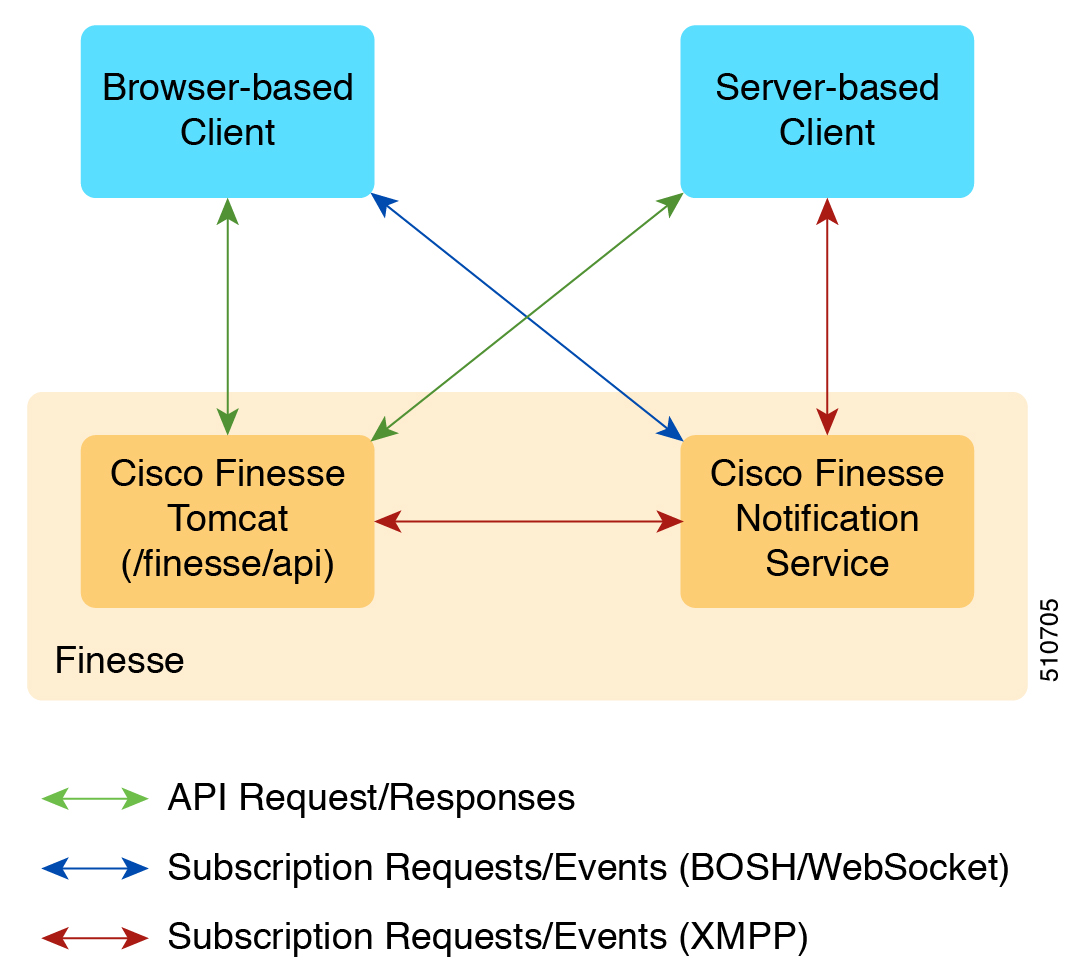
The Cisco Finesse Notification Service name in the following diagram is specific to Unified CCE deployments.
In a Unified CCX deployment, the notification service is named the Cisco Unified CCX Notification Service.
Cisco Finesse Web Services Developer and JavaScript Guide, Release 12.5(1)
5
Introduction
JavaScript Library and Sample Gadgets

Page 22
Figure 1: Finesse API and Event Flow
The Finesse desktop supports receiving updates through BOSH/WebSocket only.
Note
Client Requests
Cisco Finesse Release 12.5(1) or higher supports only secure HTTP (HTTPS) requests from clients. Cisco
Finesse desktop operations can be performed using the available REST HTTPS request described in this guide.
Operations on specific objects are performed using the ID of the object in the REST URL. For example, the
URL to view a single object (HTTPs) would be:
The URL to view a single object (HTTPS) would be:
https://<FQDN>:<port>/finesse/api/<object>/<objectID>
FQDN is the fully-qualified domain name of the Finesse server.
Finesse configuration APIs require the application user ID and password, which is established during
installation, for authentication purposes.
Finesse APIs use the following HTTP methods to make requests:
• GET: Retrieve a single object or list of objects (for example, a single user or list of users).
Cisco Finesse Web Services Developer and JavaScript Guide, Release 12.5(1)
6
Introduction
Client Requests

Page 23
• PUT: Replace a value in an object (for example, to change the state of a user from NOT_READY to
READY).
• POST: Create a new entry in a collection (for example, to create a new reason code or wrap-up reason).
• DELETE: Remove an entry from a collection (for example, to delete a reason code or wrap-up reason).
Finesse uses the standard HTTP status codes (for example, 200, 400, and 500) in the response. These status
codes indicate overall success or failure of the request.
If an API operation fails, a detailed error is returned in the HTTP response message body. The error, in XML
format, appears as follows:
<ApiErrors>
<ApiError>
<ErrorType>type</ErrorType>
<ErrorMessage>message</ErrorMessage>
<ErrorData>data</ErrorData>
</ApiError>
</ApiErrors>
Finesse has a Dependency Manager that collects the state of internal dependencies for Finesse (such as the
state of the Cisco Finesse Notification Service) and reports these states to external entities.
If any of these dependencies are down, Finesse is out of service. If the Cisco Finesse Tomcat is running,
Finesse rejects any API requests and returns an HTTP 503 error. The error appears as follows:
<ApiErrors>
<ApiError>
<ErrorType>Service Unavailable</ErrorType>
<ErrorData></ErrorData>
<ErrorMessage>SERVER_OUT_OF_SERVICE</ErrorMessage>
</ApiError>
</ApiErrors>
If the Cisco Finesse Tomcat service is not running, Finesse returns a Connection Timeout error.
All Finesse APIs use HTTP BASIC authentication, which requires the credentials to be sent in the
"Authorization" header. The credentials contain the username and password, separated by a single colon (:),
within a BASE64-encoded string. For example, the Authorization header would contain the following string:
"Basic YWdlbnRiYXJ0b3dza2k6Y2FybWljaGFlbA=="
where "YWdlbnRiYXJ0b3dza2k6Y2FybWljaGFlbA==" is the Base64-encoded string of
"agentbartowski:carmichael" (agentbartowski being the username and carmichael being the password).
In case of Single Sign-On mode, the Authorization header would contain the following string:
Bearer <authtoken>
where the authtoken has to be fetched from IDS through the ADFS server.
If an administrator changes the password for an agent or supervisor on the secondary Administration & Data
server (if configured) while the primary distributor process on Unified CCE is down, the agent or supervisor
can still use the old password and access all REST APIs except the sign-in request. To ensure this does not
happen, the primary distributor must be up and running when the administrator changes the password.
Cisco Finesse Web Services Developer and JavaScript Guide, Release 12.5(1)
7
Introduction
Client Requests
Page 24
HTTPS Requests
Cisco Finesse does not support plain HTTP but supports only secure HTTP (HTTPS). In response to clients
accessing Finesse using plain HTTP, the 301 HTTP redirect is issued to the secured port 8445.
Cisco Finesse supports HTTP/2 protocol by default.
Note
Clients must make all HTTPS requests to port 8445. Finesse desktop APIs conform to the following format:
https://<FQDN>:<port>/finesse/api/<object>
Use the fully qualified domain name (FQDN) of the Finesse server instead of the IP address to avoid address
mismatch errors (SSL certificate uses the Finesse hostname.)
Note
The following ports are disabled by default:
• BOSH/WebSocket (HTTP)—7071
• XMPP—5222
Use the CLI command utils finesse set_property webservices enableInsecureOpenfirePort true to enable
these ports. For more information on CLI commands, see Cisco Finesse Administration Guide at
https://www.cisco.com/c/en/us/support/customer-collaboration/finesse/products-maintenance-guides-list.html.
For gadget development, Finesse server and client connections only support TLS 1.2 by default.
Note
Real-Time Events
Real-time events (such as call events, state events, and so on) are sent by the Cisco Finesse Notification
Service, using the XEP-0060 Publish-Subscribe extension of the XMPP (Extensible Messaging and Presence
Protocol) protocol. All real-time events are sent over HTTPS.
The agents must remain connected to the Cisco Notification Service to retain the user presence information.
If not, it can result in unexpected behavior or cause the desktop not to respond as expected.
The developer content below only applies to the third-party application building its own XMPP client to
communicate with the Finesse server. Gadgets running on the desktop need not do anything to receive events,
as the desktop handles this automatically and makes the events available through the respective Javascript
API interfaces.
Note
Applications that need to communicate with the Notification Service must use XMPP over the BOSH
(Bidirectional-streams Over Synchronous HTTP)/WebSocket transport.
BOSH/WebSocket is an open technology for real-time communication and is useful for emulating a long-lived,
bidirectional TCP connection between two entities (such as client and server). See documentation at the XMPP
Standards Foundation (http://www.xmpp.org) for details about both XMPP and BOSH/WebSocket (XEP-0124).
Cisco Finesse Web Services Developer and JavaScript Guide, Release 12.5(1)
8
Introduction
HTTPS Requests

Page 25
Client applications can communicate with the Cisco Finesse Notification Service through BOSH/WebSocket,
using the binding URI http://<host>:7071/http-bind. Developers can create their own BOSH/WebSocket
library or use any that are available publicly.
Client applications can communicate with the Cisco Finesse Notification Service through BOSH/WebSocket
over HTTPS, using the binding URI https://<FQDN>:7443/http-bind. Developers can create their own
BOSH/WebSocket library or use any that are available publicly. Finesse desktop uses the Strophe.js XMPP
library internally to manage its XMPP connections over BOSH/Websocket.
Applications receive notification events of feeds to which they are subscribed. Users are currently subscribed
to a few feeds by default (subject to change). Other feeds require an explicit subscription (see Subscription
Management).
XMPP Connection Management
1.
After creating the connection, the client application must send a priority stanza with a non-negative
presence priority to ensure all events are recieved. It is advisable to set the presence priority as 0 by default.
For more details about the presence information, see the Mapping the Extensible Messaging and Presence
Protocol (XMPP) to Common Presence and Instant Messaging (CPIM) documenation.
2.
Stream management is not supported by the Finesse Notification service and clients cannot use this feature.
3.
Finesse depends on the presence availability of the agent to drive automatic logouts. Therefore, ensure
that the whitespace pings are enabled and have retries to handle failures. Finesse uses ping interval value
of 10 seconds and 2 retries.
API Parameter Types
The following sections describe the parameter and data types for the Cisco Finesse APIs.
API Header Parameters
Description
Type
Name
The password used in the request header to make any Finesse API request.
Finesse supports a "Basic" authorization scheme only and authorization is
required for each Finesse API request.
String
password
The username used in the request header to make any Finesse API request.
Finesse supports a "Basic" authorization scheme only and authorization is
required for each Finesse API request.
String
username
Body Parameter
A body parameter (also known as a complex parameter) appears in the body of the message. In the following
example, targetMediaAddress and requestedAction are body parameters.
<Dialog>
<targetMediaAddress>1001001</targetMediaAddress>
<requestedAction>HOLD</requestedAction>
</Dialog>
Cisco Finesse Web Services Developer and JavaScript Guide, Release 12.5(1)
9
Introduction
API Parameter Types
Page 26
Path Parameter
A path parameter is included in the path of the URI. In the following example, dialogId is a path parameter.
https://<FQDN>:<port>/finesse/api/Dialog/<dialogId>
Query Parameter
A query parameter is passed in a query string on the end of the URI you are calling. The query parameter is
preceded by a question mark. Multiple query parameters are connected by an ampersand (&). In the following
example, category is a query parameter.
https://<FQDN>:<port>/finesse/api/User/<id>/ReasonCodes?category=NOT_READY
Data Types
The following table lists the data types used in API parameters and notification message fields.
Description
Type
A logical data type that has one of two values: true or false.
Boolean
A 32-bit wide integer.
Integer
A 64-bit wide integer.
Long
A variable-length string. If a maximum length exists, it is listed with the parameter
description.
String
Cisco Finesse API Errors
Error codes for Cisco Finesse are categorized as follows:
• 4xx—Client-related error
• 5xx—Server-related error
Each error includes a failure response, error type, error message, and error data. The following is an example
of a failure message format:
<ApiErrors>
<ApiError>
<ErrorType>Authentication Failure</ErrorType>
<ErrorMessage>UNAUTHORIZED</ErrorMessage>
<ErrorData>jsmith</ErrorData>
</ApiError>
</ApiErrors>
In addition to Cisco Finesse API errors, a response may return a CTI error or an HTTP error.
Cisco Finesse Web Services Developer and JavaScript Guide, Release 12.5(1)
10
Introduction
Cisco Finesse API Errors
Page 27
This document contains information about error type and error message. You can find information about error
data values for most User and Dialog errors in the following documents:
For Finesse deployments with Unified CCE, see the CTI Server Message Reference Guide for Cisco Unified
Contact Center Enterprise, which you can find at https://developer.cisco.com/site/cti-protocol/documentation/
.
For Finesse deployments with Unified CCX, see the https://developer.cisco.com/docs/contact-center-express/
#!cti-protocol-dev-guide.
Note
HTTP Errors
All HTTP errors are returned as HTTP 1.1 Status Codes. Errors that might be for Finesse-specific events are
listed below:
500 Internal Server Error
Finesse Web Services returns 500 if the CTI connection is lost but the loss is not yet detected by automated
means.
• 500 - DB_RUNTIME_EXCEPTION (database error, but the database is thought to be operational)
• 500 - RUNTIME_EXCEPTION (a non-database error)
• 500 - AWS_SERVICE_UNAVAILABLE (AWS not operational)
503 Service Unavailable
If Finesse is in PARTIAL_SERVICE or OUT_OF_SERVICE, it returns 503 for all requests. If any
dependent service goes down, Finesse goes to OUT_OF_SERVICE state (for example, if the Cisco
Finesse Notification Service is down).This error is due to a temporary outage or overloading condition.
A retry after several seconds is likely to succeed. For example, the system returns 503 when the system
is just starting up and when the system is trying to connect to the CTI server.
Peripheral Error Codes
Cisco Finesse, Release 12.5(1) introduces peripheral error codes for CTI operations, which provide a more
detailed description of the error scenario. The newly added parameters are:
• peripheralErrorCode
• peripheralErrorMsg
• peripheralErrorText
Example:
<ApiErrors>
<ApiError>
<ErrorType>Service Unavailable</ErrorType>
<ErrorData></ErrorData>
<ErrorMessage>SERVER_OUT_OF_SERVICE</ErrorMessage>
<peripheralErrorCode>13036</peripheralErrorCode>
<peripheralErrorMsg>PERERR_GW_E_JTAPIOBJ_PERFORMANSWERCALL_NO_TERMINAL_CONNECTION</peripheralErrorMsg>
<peripheralErrorText>The routine performAnswerCall in class JTapiObj got a null
connection from a call to 'findTerminalConnection'</peripheralErrorText>
Cisco Finesse Web Services Developer and JavaScript Guide, Release 12.5(1)
11
Introduction
Cisco Finesse API Errors

Page 28
</ApiError>
</ApiErrors>
For more information, see Cisco IPCC Error Codes at https://www.cisco.com/c/en/us/support/docs/
voice-unified-communications/unified-contact-center-enterprise/26142-error-codes.html.
Cisco Finesse Web Services Developer and JavaScript Guide, Release 12.5(1)
12
Introduction
Cisco Finesse API Errors
Page 29
C H A P T E R 2
Lab Development Environment Validation with
Cisco FinesseWeb Services APIs
This section explains how to work with the Cisco Finesse Web Services APIs to validate your lab development
environment.
• Environment and Tools, on page 13
• Cisco Finesse APIs, on page 21
Environment and Tools
The topics in this section are for use as a learning exercise and are not meant for use in real deployments.
To complete these exercises, you need the following:
• A user who is configured as an agent in Unified CCE or Unified CCX (with an agent ID, password, and
extension). Make the agent a member of a team and of a queue. (A queue is a skill group.)
• Three phones that are configured in Cisco Unified Communications Manager: one for the agent, one for
the caller, and one to use for conferencing and transfer APIs. These can be Cisco IP "hard phones" or
Cisco IP Communicator softphones.
• Tools: Postman and Pidgin for Windows or Adium for Mac OS X.
Postman, Pidgin and Adium are meant to aid in development; however, they are not officially supported.
Note
Postman
Procedure
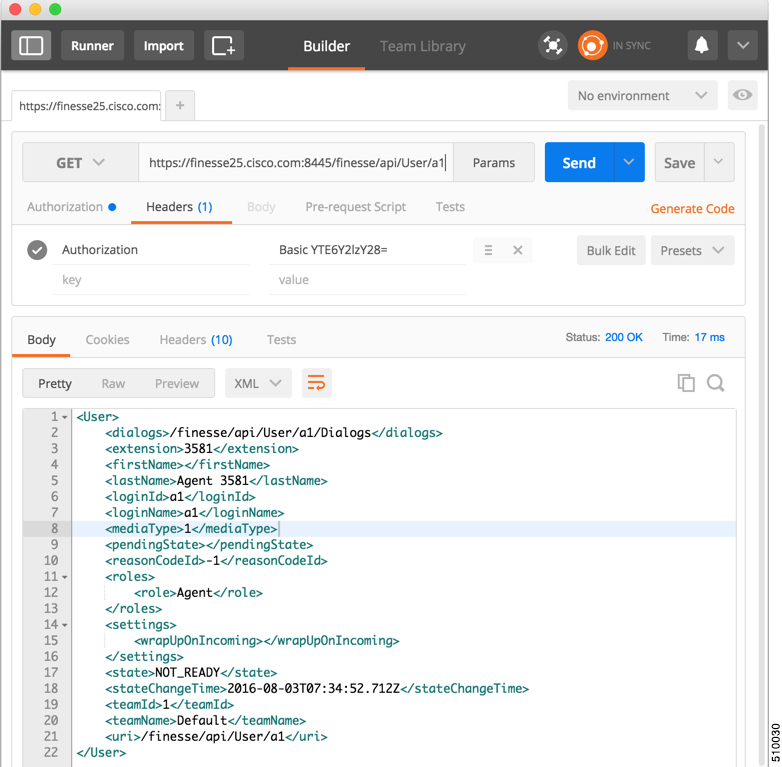
Postman is an example of a REST client utility that allows you to send HTTP requests to a specific URL. You can use this
utility in your lab to exercise the Finesse Web Service APIs by entering the URI for an API and checking the response. All
APIs are accessible by URI and follow a request/response paradigm. There is always a single response for any request.
You can download Postman from https://www.getpostman.com/.
Cisco Finesse Web Services Developer and JavaScript Guide, Release 12.5(1)
13


Page 30
For using self-signed SSL certificates with Postman see, http://blog.getpostman.com/2014/01/28/
using-self-signed-certificates-with-postman/
To test an API in Postman, follow these steps:
Step 1
Copy and paste the URI for the API request from this Developer Guide into a text editor. For example, to
enter the URI for signing in, copy the URI from the User—Sign In to Finesse API. Examine the pasted code
for case sensitivity and format and remove any carriage returns.
Step 2
Update the URI with the IP address of your Cisco Finesse Web Services server.
Step 3
Add any mandatory parameters for the request.
Step 4
Enter the username and password for the agent you set up for these exercises.
Step 5
For Content Type, enter application/xml
Step 6
Click the appropriate action (GET, PUT, or POST).
Figure 2: Postman Rest Client
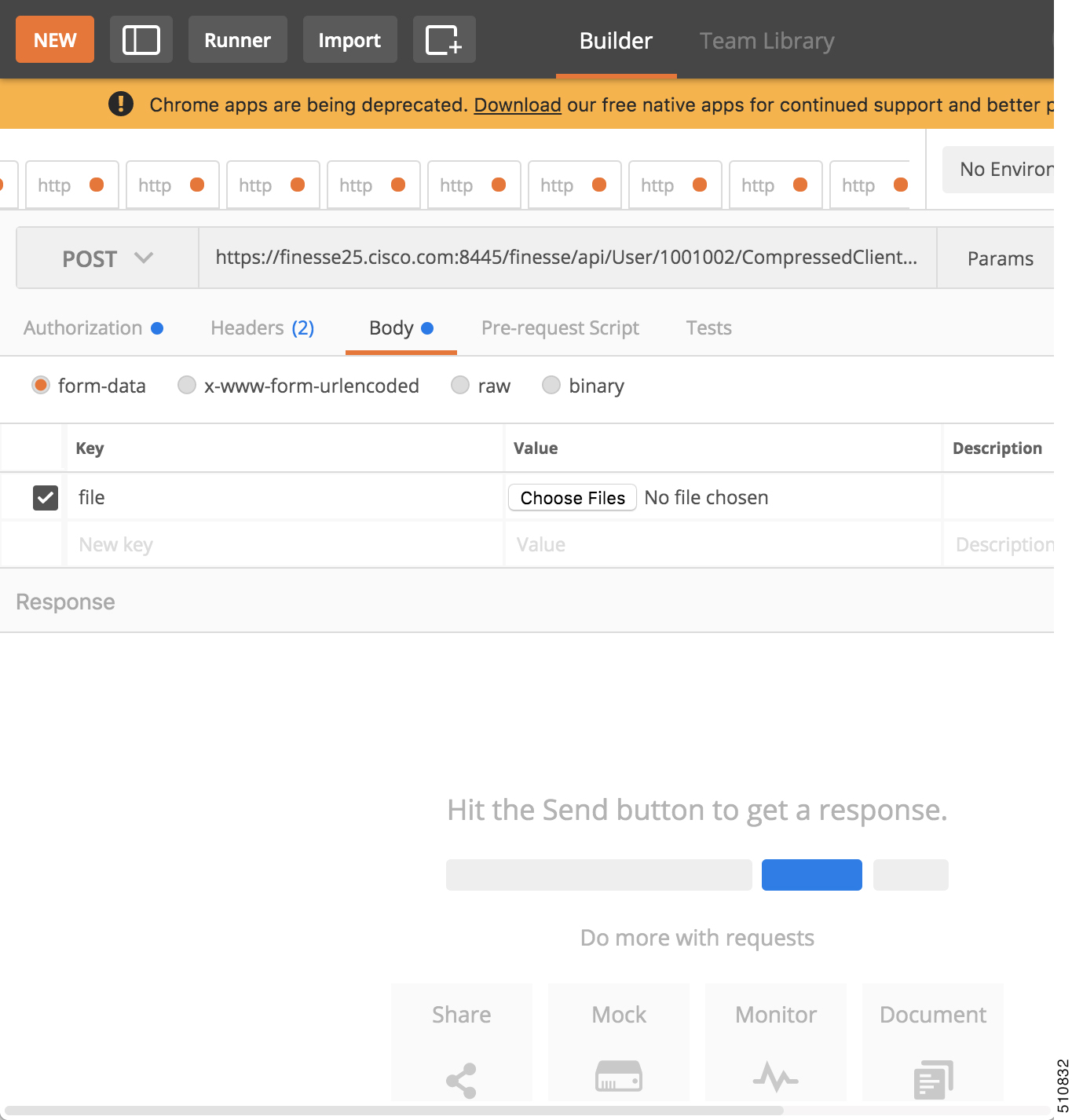
When you send zip files, select Content Type as form-data. For more information, see
CompressedClientLog—Post Compressed Log to Finesse, on page 165.
Cisco Finesse Web Services Developer and JavaScript Guide, Release 12.5(1)
14
Lab Development Environment Validation with Cisco FinesseWeb Services APIs
Postman
Page 31
Figure 3: Send Zip File
Pidgin for Windows
Pidgin is a multiplatform instant messaging client that supports many common messaging protocols, including
XMPP. You can use Pidgin to establish an XMPP connection and view XMPP messages published by the
Cisco Finesse Notification Service.
You cannot be signed in to Pidgin at the same time you are signed in to Finesse as the XMPP event feed is
disrupted.
Note
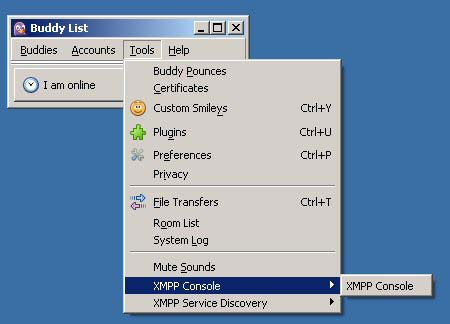
Notifications that result from API requests made in Postman appear in the XMPP Console tool of the Pidgin
application. For example, if you use Postman to change an agent's state, you can see the resulting agent state
change event in the Pidgin XMPP Console window.
Cisco Finesse Web Services Developer and JavaScript Guide, Release 12.5(1)
15
Lab Development Environment Validation with Cisco FinesseWeb Services APIs
Pidgin for Windows

Page 32
Make sure that you use the same username and resource values in both Postman and Pidgin.
Note
You can download Pidgin from http://www.pidgin.im/download/.
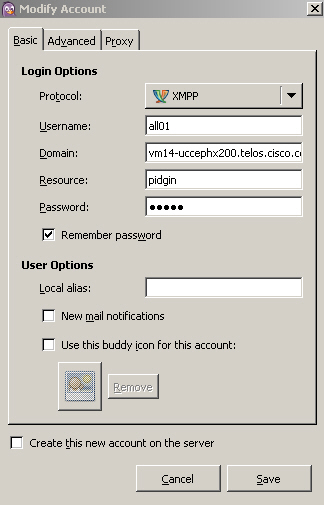
Perform the following steps to configure XMPP:
1.
In Pidgin, go to Tools > Plugins to open the Plugins dialog box.
2.
Check the XMPP Console and XMPP Service Discovery check boxes.
Perform the following steps to configure Pidgin:
1.
Add an account for your XMPP server. Go to Pidgin > Accounts > Manage Accounts > Add Account.
The Add Account dialog box opens.
2.
For Protocol, select XMPP.
3.
For Username, enter the username for the agent that you added.
4.
For Domain, enter the fully-qualified domain name of the Cisco Finesse server.
5.
For Resource, enter any text.
6.
For Password, enter the password of the agent.
Figure 4: The Pidgin Interface
7.
Click Save.
8.
Click the Advanced tab.
9.
Check the Allow plaintext auth over unencrypted streams check box.
Cisco Finesse Web Services Developer and JavaScript Guide, Release 12.5(1)
16
Lab Development Environment Validation with Cisco FinesseWeb Services APIs
Pidgin for Windows

Page 33
For Connect Server, enter the IP address of the Finesse server.
11.
If the Connection Security drop-down menu is present, choose Use encryption if available.
12.
Click Save.
Connect port and File transfer proxies should be filled in automatically (5222 should appear in the Connect
port field).
Note
When connecting to the secure port 5223:
1.
Add the Finesse Notification Service certificate in the Pidgin certificate manager. Finesse Notification
Service shares the same certificate with Cisco Finesse Tomcat.
2.
To download the certificate:
a.
Sign in to the Cisco Unified Operating System Administration through the URL
(https://FQDN:8443/cmplatform, where FQDN is the fully qualified domain name of the primary
Finesse server and 8443 is the port number).
b.
Click Security > Certificate Management.
c.
Click Find to get the list of all the certificates.
d. In the Certificate List screen, choose Certificate from the Find Certificate List where drop-down
menu, enter tomcat in the begins with option and click Find.
e.
Click the FQDN link which appears in the Common Name column parallel to the listed tomcat
certificate.
f.
In the pop-up that appears, click the option Download .PEM File to save the file on your desktop.
3.
In the Pidgin Certificate Manager, go to the Connection Security drop-down menu and choose Use old-style
SSL.
4.
In the Connect Server field, enter the FQDN of the Finesse server.
Note
The XMPP logo next to the agent's name becomes active (is no longer dimmed). To see event messages in
Pidgin, open the XMPP Console.
Cisco Finesse Web Services Developer and JavaScript Guide, Release 12.5(1)
17
Lab Development Environment Validation with Cisco FinesseWeb Services APIs
Pidgin for Windows

Page 34
Figure 5: Open XMPP Console in Pidgin
The agent must be signed in to Finesse through Postman or the browser interface to be signed in to the XMPP
account on Pidgin.
Note
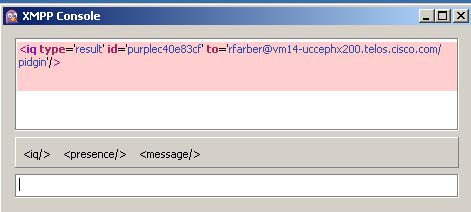
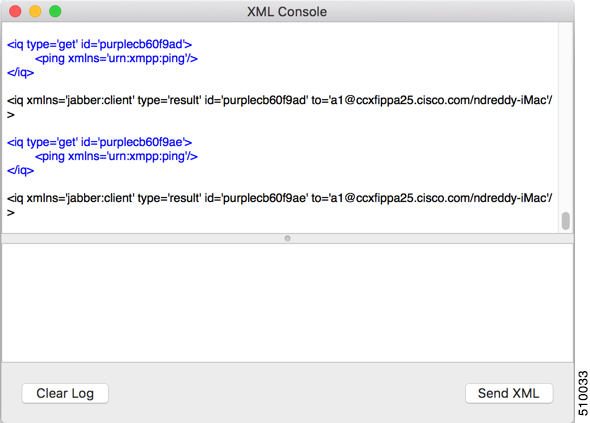
The XMPP Console window immediately begins to update every few seconds with iq type statements. The
window does not display an event message until an event occurs. If the XMPP Console window fills with iq
type notifications and becomes difficult to navigate, close and reopen it to refresh with a clean window.
Figure 6: The XMPP Console Window
Adium for Mac OS X
Adium is a free open source instant messaging application for Mac OS X. You can use Adium to establish
an XMPP connection and view XMPP messages published by the Cisco Finesse Notification Service.
You can download Adium from https://www.adium.im.
Perform the following steps to configure XMPP:
1.
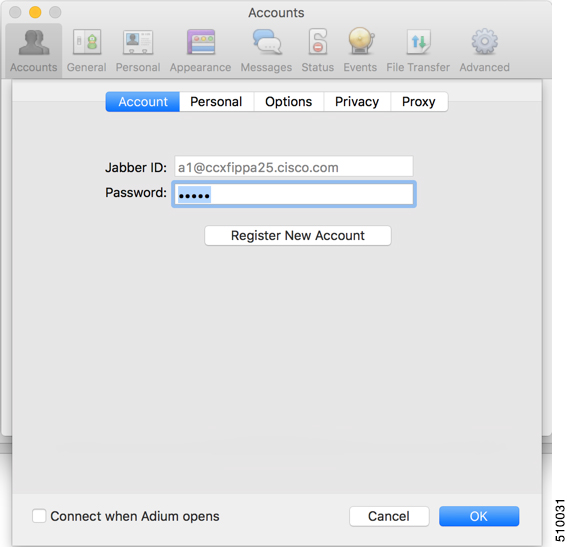
In Adium go to Preferences > Account > '+' > XMPP (Jabber).
Cisco Finesse Web Services Developer and JavaScript Guide, Release 12.5(1)
18
Lab Development Environment Validation with Cisco FinesseWeb Services APIs
Adium for Mac OS X

Page 35
For Jabber ID, enter the username for the agent along with the fully qualified domain name of the Cisco
Finesse server.
3.
For Password, enter the password of the agent.
Figure 7: The Adium Interface
4.
Enable XMPP Advanced Features (Default: Off).
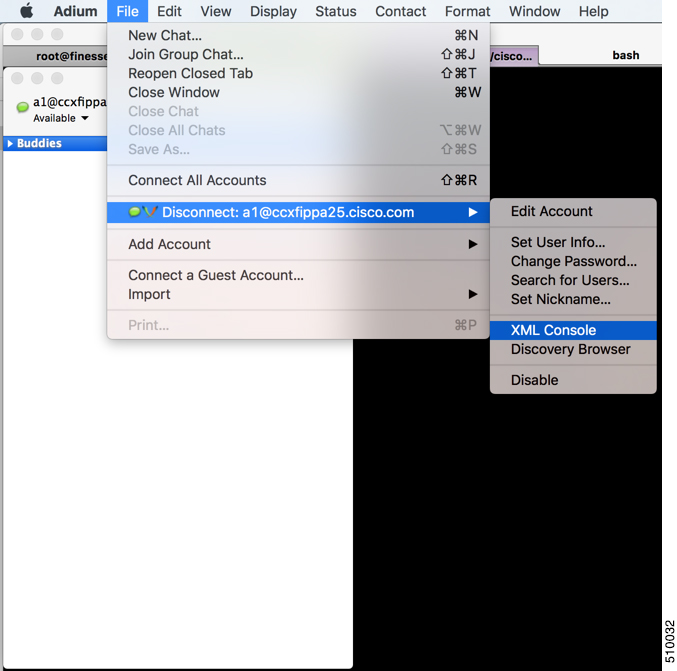
To enable the XML Console menu run the following command in Terminal:
defaults write
com.adiumX.adiumX AMXMPPShowAdvanced -bool YES
5.
In Adium go to File > Logged in User > XML Console.
Cisco Finesse Web Services Developer and JavaScript Guide, Release 12.5(1)
19
Lab Development Environment Validation with Cisco FinesseWeb Services APIs
Adium for Mac OS X
Page 36
Figure 8: Open XML Console in Adium
The agent must be signed in to Finesse through Postman or the browser interface to be signed in to the XMPP
account on Adium.
Note
The XML Console window immediately begins to update every few seconds with iq type statements. The
window does not display an event message until an event occurs. If the XML Console window fills with
iq type notifications and becomes difficult to navigate, close and reopen it to refresh with a clean window.
Cisco Finesse Web Services Developer and JavaScript Guide, Release 12.5(1)
20
Lab Development Environment Validation with Cisco FinesseWeb Services APIs
Adium for Mac OS X

Page 37
Figure 9: The XML Console Window
Cisco Finesse APIs
APIs that control actions on the Finesse desktop and call control make use of two objects:
• User object: The User object represents agent and supervisor data and actions. This object is used to get
information about a single user or list of users, to sign in or out of the Finesse Desktop, and change agent
state.
• Dialog object: The Dialog object represents a dialog with participants. For media type "voice", this object
represents a call. A participant can represent an internal user (such as an agent) or an external user (for
example, a customer). A participant can belong to only one dialog but a user can be a participant in
several dialogs. The Dialog object is used for call control and call data.
GET requests are synchronous. That is, the response body of a successful GET request contains all requested
contents, which you can view in Postman or RESTClient. No event is published by XMPP and no event is
received in Pidgin.
PUT and POST requests are asynchronous. A successful response is an HTTP return code of 200 or 202. The
response body does not contain the updated object information.
If a PUT, POST, or DELETE request is on a User or Dialog object, the update is published by XMPP as a
real-time event to Pidgin. If a PUT, POST, or DELETE request is on a configuration object (for example, a
ReasonCode object), XMPP does not publish a real-time update. You must perform a GET request to get an
updated copy of the object.
GET, PUT, POST, and DELETE requests that fail Finesse server internal checks are synchronous. If a request
fails, Postman or RESTClient display the error. No event is published by XMPP to Pidgin. However, if the
request fails on CTI side, Finesse will send an api Error XMPP event back to client after receiving a failure
confirmation response from the CTI Server.
Cisco Finesse Web Services Developer and JavaScript Guide, Release 12.5(1)
21
Lab Development Environment Validation with Cisco FinesseWeb Services APIs
Cisco Finesse APIs
Page 38
For each object, Finesse maintains an internal request queue where each subsequent request for this object is
processed only after a success or a failure confirmation response is received from the CTI Server for the
previous request.
RequestId is a user provided unique string that is added to the request API header and used to correlate
originating requests with the resulting XMPP notifications or errors.
RequestId is a best effort request-response correlation and is not reliable.
Note
XMPP event notifications that match the requested action are tagged with the requestId (if available) from
the original request. If the originating request results in a system error, the corresponding XMPP error
notifications also contain the requestId. Note that the request id is not sent in the case of synchronous responses
to GET requests. Although not mandatory, using a unique requestId helps in tracking error messages and
allows a user to debug issues faster, as messages with requestId are easily tracked in Finesse logs.
The requestId facility is not implemented for Task routing APIs. For more information, see the section on
Task Routing APIs.
Note
The following sections provide instructions and examples for using the APIs with Postman and Pidgin.
Sign In to Finesse
Use the User - Sign In to Finesse API to sign the agent in.
This example uses the following information:
• Finesse server FQDN: finesse1.xyz.com
• Agent name: John Smith
• Agent ID: 1234
• Agent password: 1001
• Agent extension: 1001
• requestId: xyz
This example shows the URL field for a Unified CCE deployment. In a Unified CCX deployment, you must
include the port number in the URL.
Note
1.
Access Postman (Ctrl + Alt +P from the Mozilla Firefox browser) and enter the following string in the
URL field:
https://finesse1.xyz.com/finesse/api/User/1234
2.
Enter the agent's ID (1234) and password (1001) in the two User Auth fields directly under the URL field.
3.
In the Content Type field, enter application/XML.
Cisco Finesse Web Services Developer and JavaScript Guide, Release 12.5(1)
22
Lab Development Environment Validation with Cisco FinesseWeb Services APIs
Sign In to Finesse

Page 39
In the area under Content Options, enter the following:
<User>
<state>LOGIN</state>
<extension>1001</extension>
</User>
5.
(Optional) To add the requestId:
a.
Click Headers.
b.
In the Name field, enter requestId, and in the Value field, enter xyz.
c.
Click Add/Change
6.
Click PUT.
Postman returns the following response:
PUT on https://finesse1.xyz.com/finesse/api/User/1234
Status 202: Accepted
Finesse returns a user notification, which you can view in Pidgin:
<Update>
<data>
<user>
<dialogs>/finesse/api/User/1234/Dialogs</dialogs>
<extension>1001</extension>
<firstName>John</firstName>
<lastName>Smith</lastName>
<loginId>1234</loginId>
<loginName>jsmith</loginName>
<roles>
<role>Agent</role>
</roles>
<pendingState></pendingState>
<reasonCodeId>-1</reasonCodeId>
<settings>
<wrapUpOnIncoming></wrapUpOnIncoming>
<wrapUpOnOutgoing></wrapUpOnOutgoing>
<settings>
<state>NOT_READY</state>
<stateChangeTime>2014-05-27T00:33:44.836Z</stateChangeTime>
<teamId>1</teamId>
<teamName>Default</teamName>
<uri>/finesse/api/User/1234</uri>
</settings>
</user>
</data>
<event>PUT</event>
<requestId>xyz</requestId>
<source>/finesse/api/User/1234</source>
</Update>
The agent is now signed in and in NOT_READY state.
Change Agent State
Use the User - Change agent state API to change the agent state to Ready.
This example uses the same agent information as the previous example.
Cisco Finesse Web Services Developer and JavaScript Guide, Release 12.5(1)
23
Lab Development Environment Validation with Cisco FinesseWeb Services APIs
Change Agent State
Page 40
This example shows the URL field for a Unified CCE deployment. In a Unified CCX deployment, you must
include the port number in the URL.
Note
1.
In Postman, enter the following string in the URL field:
https://finesse1.xyz.com/finesse/api/User/1234
2.
Enter the agent's ID (1234) and password (1001) in the two User Auth fields directly under the URL field.
3.
In the Content Type field, enter application/XML.
4.
In the area under Content Options, enter the following:
<User>
<state>READY</state>
</User>
5.
(Optional) To add the requestId:
a.
Click Headers.
b.
In the Name field, enter requestId, and in the Value field, enter xyz.
c.
Click Add/Change
6.
Click PUT.
Postman returns the following response:
PUT on https://finesse1.xyz.com/finesse/api/User/1234
Status 202: Accepted
Finesse returns the following user notification:
<Update>
<data>
<user>
<dialogs>/finesse/api/User/1234/Dialogs</dialogs>
<extension>1001</extension>
<firstName>John</firstName>
<lastName>Smith</lastName>
<loginId>1234</loginId>
<loginName>jsmith</loginName>
<roles>
<role>Agent</role>
</roles>
<state>READY</state>
<pendingState></pendingState>
<settings>
<wrapUpOnIncoming></wrapUpOnIncoming>
<wrapUpOnOutgoing></wrapUpOnOutgoing>
</settings>
<stateChangeTime>2014-05-27T00:35:24.123Z</stateChangeTime>
<teamId>1</teamId>
<teamName>Default</teamName>
<uri>/finesse/api/User/1234</uri>
</user>
</data>
<event>PUT</event>
<requestId>xyz</requestId>
Cisco Finesse Web Services Developer and JavaScript Guide, Release 12.5(1)
24
Lab Development Environment Validation with Cisco FinesseWeb Services APIs
Change Agent State

Page 41
<source>/finesse/api/User/1234</source>
</Update>
Cisco Finesse Web Services Developer and JavaScript Guide, Release 12.5(1)
25
Lab Development Environment Validation with Cisco FinesseWeb Services APIs
Change Agent State
Page 42
Cisco Finesse Web Services Developer and JavaScript Guide, Release 12.5(1)
26
Lab Development Environment Validation with Cisco FinesseWeb Services APIs
Change Agent State
Page 43
C H A P T E R 3
Cisco Finesse Desktop APIs
Agents and supervisors use the Cisco Finesse Desktop APIs to communicate between the Finesse desktop
and Finesse server, and Unified Contact Center Enterprise (Unified CCE) or Unified Contact Center Express
(Unified CCX) to send and receive information about the following:
• Agents and agent states
• Calls and call states
• Teams
• Queues
• Client logs
The Finesse desktop APIs must provide BASIC authentication credentials, as described in Client Requests.
• User, on page 27
• Dialog, on page 74
• Queue, on page 138
• Team, on page 144
• TeamResource, on page 150
• ClientLog, on page 163
• Task Routing APIs, on page 166
• Single Sign-On, on page 188
• TeamMessage, on page 198
User
The User object represents an agent or supervisor and includes information about the user, such as roles, state,
and teams. The User object is structured as follows:
<User>
<uri>/finesse/api/User/1001001</uri>
<roles>
<role>Agent</role>
<role>Supervisor</role>
</roles>
<loginId>1001001</loginId>
<loginName>csmith</loginName>
<state>NOT_READY</state>
Cisco Finesse Web Services Developer and JavaScript Guide, Release 12.5(1)
27

Page 44
<stateChangeTime>2012-03-01T17:58:21.234Z</stateChangeTime>
<mediaType>1</mediaType>
<pendingState>NOT_READY</pendingState>
<pendingStateReasonCode>
<category>NOT_READY</category>
<code>1725</code>
<forAll>true</forAll>
<id>489</id>
<label>Lunch</label>
<systemCode>false</systemCode>
<uri>/finesse/api/ReasonCode/489</uri>
</pendingStateReasonCode>
<pendingState></pendingState>
<reasonCodeId>16</reasonCodeId>
<ReasonCode>
<category>NOT_READY</category>
<uri>/finesse/api/ReasonCode/16</uri>
<code>10</code>
<label>Team Meeting</label>
<forAll>true</forAll/>
<systemCode>false</systemCode>
<id>16</id>
</ReasonCode>
<settings>
<wrapUpOnIncoming>OPTIONAL</wrapUpOnIncoming>
<wrapUpOnOutgoing>REQUIRED</wrapUpOnOutgoing>
</settings>
<extension>1001001</extension>
<mobileAgent>
<mode>CALL_BY_CALL</mode>
<dialNumber>4085551234</dialNumber>
</mobileAgent>
<firstName>Chris</firstName>
<lastName>Smith</lastName>
<teamId>500</teamId>
<teamName>Sales</teamName>
<dialogs>/finesse/api/User/1001001/Dialogs</dialogs>
<teams>
<Team>
<uri>/finesse/api/Team/2001</uri>
<id>2001</id>
<name>First Line Support</name>
</Team>
<Team>
<uri>/finesse/api/Team/2002</uri>
<id>2002</id>
<name>Second Line Support</name>
</Team>
<Team>
<uri>/finesse/api/Team/2003</uri>
<id>2003</id>
<name>Third Line Support</name>
</Team>
... other teams ...
</teams>
</User>
Cisco Finesse Web Services Developer and JavaScript Guide, Release 12.5(1)
28
Cisco Finesse Desktop APIs
User
Page 45
User APIs
User—Sign In to Finesse
The User—Sign in to Finesse API allows a user to sign in to the CTI server. If the response is successful, the
user is signed in to Finesse and is automatically placed in NOT_READY state.
If five consecutive sign-ins fail due to an incorrect password, Finesse blocks access to the user account for a
period of 5 minutes.
This API forces a sign-in. That is, if the user is already signed in, that user is authenticated via the sign-in
process. If the user's credentials are correct, the user is signed in again but the user keeps the current state.
For example, if a user signs in, changes state to Ready, and then signs in again, the user remains in Ready
state.
To sign in as a mobile agent, see User—Sign In as a Mobile Agent, on page 30.
Note
https://<FQDN>/finesse/api/User/<id>
URI:
https://finesse1.xyz.com/finesse/api/User/1234
Example URI:
Users can only act on their own User objects.
Security Constraints:
PUT
HTTP Method:
Application/XML
Content Type:
XML
Input/Output Format:
<User>
<state>LOGIN</state>
<extension>1001001</extension>
</User>
HTTP Request:
id (required): The ID of the user
state (required): The new state that the user wants to be in (LOGIN)
extension (required): The extension with which the user wants to sign in
Request Parameters:
202: Success
400: Bad Request (for example, malformed or incomplete request, invalid extension)
400: Parameter Missing
401: Unauthorized (for example, the user is not authenticated in the Web Session)
404: Not Found (for example, the user ID is not known)
503: Service Unavailable (for example, the Notification Service is not running)
HTTP Response:
Cisco Finesse Web Services Developer and JavaScript Guide, Release 12.5(1)
29
Cisco Finesse Desktop APIs
User APIs

Page 46
<ApiErrors>
<ApiError>
<ErrorType>User Not Found</ErrorType>
<ErrorMessage>UNKNOWN_USER</ErrorMessage>
<ErrorData>4023</ErrorData>
</ApiError>
</ApiErrors>
Example Failure
Response:
User notification
Notifications
Triggered:
Platform-Based API Differences
Stand-alone Finesse with Unified CCE:
Finesse does not support agent sign-in with an E.164 extension when Finesse is deployed with Unified CCE.
However, agents can make calls to and receive calls from E.164 phone numbers.
Coresident Finesse with Unified CCX:
Finesse supports agent sign-in with an E.164 extension when Finesse is deployed with Unified CCX. The
maximum number of characters supported for an E.164 extension is 15 (a single plus sign followed by 14
digits).
Asynchronous Errors
When accessing the Finesse REST API through the Finesse JavaScript library, asynchronous errors have a
status code of 400. When receiving the asynchronous error directly through XMPP, the error message has the
format described in "Dialog CTI Error Notification."
Note
Deployment Type
Reason
ErrorType
All
Attempt to sign in an agent with a multiline device without
the correct Unified CM configuration for maximum calls and
busy trigger for these devices.
Invalid Device
All
Attempt to sign in an agent with a device that does not exist.
Invalid Device
All
Attempt to sign in an agent with a device that is offline.
Invalid Device
All
Attempt to sign in an agent with an extension that is not
associated with the Unified CCX Resource Manager provider.
Invalid Device
All
Attempt to sign in an agent with a device that is already in
use.
Device Busy
User—Sign In as a Mobile Agent
The User—Sign in as a mobile agent API allows a user to sign in to the CTI server as a mobile agent. This
API uses the existing User object with a LOGIN state only. The user must be authenticated to use this API
successfully.
Cisco Finesse Web Services Developer and JavaScript Guide, Release 12.5(1)
30
Cisco Finesse Desktop APIs
User—Sign In as a Mobile Agent

Page 47
If five consecutive sign-ins fail due to an incorrect password, Finesse blocks access to the user account for a
period of 5 minutes.
Additional configuration is required on Unified CCE and Unified Communications Manager before a mobile
agent can sign in. After using this API, you may need to perform additional steps to complete the sign-in. For
more information, see the Cisco Unified Contact Center Enterprise Features Guide.
Note
Cisco Unified Mobile Agent (Unified MA) enables an agent using an PSTN phone and a broadband VPN
connection (for agent desktop communications) to function just like a Unified CCE agent.
https://<FQDN>/finesse/api/User/<id>
URI:
https://finesse1.xyz.com/finesse/api/User/1234
Example URI:
Users can only act on their own User objects.
Security Constraints:
PUT
HTTP Method:
Application/XML
Content Type:
XML
Input/Output Format:
<User>
<state>LOGIN</state>
<extension>1001001</extension>
<mobileAgent>
<mode>CALL_BY_CALL</mode>
<dialNumber>4085551234</dialNumber>
</mobileAgent>
</User>
HTTP Request:
id (required): The ID of the user
state (required): The new state that the user wants to be in (for this API, the state
must be set to LOGIN)
extension (required): The extension with which to sign in the user
mobileAgent (required): Indicates that the user is a mobile agent
mode (required): The connection mode for the call
dialNumber (required): The phone number that the system calls to connect with
the mobile agent
Request Parameters:
Cisco Finesse Web Services Developer and JavaScript Guide, Release 12.5(1)
31
Cisco Finesse Desktop APIs
User—Sign In as a Mobile Agent

Page 48
202: Success
This response only indicates the successful completion of the request. The request
is processed and the actual response is sent as part of a User notification.
400: Invalid Input (for example, the mode provided is invalid)
400: Parameter Missing (for example the mode or dialNumber was not provided)
400: Generic Error
401: Unauthorized (for example, the user is not authenticated in the Web Session)
401: Invalid User Authorization Specified (an authenticated user tried to make a
request for another user)
404: User Not Found (for example, the agent is not recognized)
HTTP Response:
<ApiErrors>
<ApiError>
<ErrorType>Invalid Authorization User Specified</ErrorType>
<ErrorData>4321</ErrorData>
<ErrorMessage>The user specified in the authentication
credentials and the uri don't match</ErrorMessage>
</ApiError>
</ApiErrors>
Example Failure
Response:
User notification
Notifications
Triggered:
Asynchronous Errors
When accessing the Finesse REST API through the Finesse JavaScript library, asynchronous errors have a
status code of 400. When receiving the asynchronous error directly through XMPP, the error message has the
format described in "Dialog CTI Error Notification."
Note
Deployment Type
Reason
ErrorType
Unified CCE
Attempt to sign in an agent as a mobile agent when that agent
is not configured as a mobile agent.
Mode Not Allowed
User—Sign Out of Finesse Desktop
This API allows a user to sign out of Cisco Finesse desktop.
Administrators can use the CLI utils finesse user_signout_channel to configure the media channels from
which the users are signed out.
Note
https://<FQDN>/finesse/api/User/<id>
URI:
https://finesse1.xyz.com/finesse/api/User/1234
Example URI:
Cisco Finesse Web Services Developer and JavaScript Guide, Release 12.5(1)
32
Cisco Finesse Desktop APIs
User—Sign Out of Finesse Desktop

Page 49
Agents and Supervisors can use this API.
Users can only act on their own User objects.
Security Constraints:
PUT
HTTP Method:
Application/XML
Content Type:
XML
Input/Output Format:
<User>
<state>LOGOUT</state>
</User>
HTTP Request:
id (required): The ID of the user
state (required): The new state that the user wants to be in (LOGOUT)
Request Parameters:
202: Success
400: Bad Request (for example, malformed or incomplete request, invalid extension)
401: Unauthorized (for example, the user is not authenticated in the Web Session)
404: Not Found (for example, the user ID is not known)
503: Service Unavailable (for example, the Notification Service is not running)
HTTP Response:
<ApiErrors>
<ApiError>
<ErrorType>Invalid Input</ErrorType>
<ErrorData>state</ErrorData>
<ErrorMessage>Invalid State specified for user</ErrorMessage>
</ApiError>
</ApiErrors>
Example Failure
Response:
User notification
Notifications
Triggered:
User—Get User
The User—Get User API allows a user to get a copy of the User object. For a mobile agent, this operation
returns the full User object, including the mobile agent node.
Mobile agent information is available to the Cisco Finesse node on which the mobile agent is signed in.
However, the other Cisco Finesse node in the cluster does not have the mobile agent information. If the mobile
agent signs in to the other node (for example, during a client failover), the mobile agent information is lost
and the User object does not return any mobile agent data fields. As a result, the Cisco Finesse desktop
inaccurately represents the mobile agent as a regular agent (including all related features). Any other type of
CTI failover also results in Cisco Finesse losing the current mobile agent information. However, the Unified
Mobile Agent feature behaves as usual whether Cisco Finesse knows that the agent is a mobile agent or not.
As a workaround, the mobile agent can sign out and sign back in as a mobile agent.
Note
Cisco Finesse Web Services Developer and JavaScript Guide, Release 12.5(1)
33
Cisco Finesse Desktop APIs
User—Get User

Page 50
https://<FQDN>/finesse/api/User/<id>
For more information on supported characters, see the section "Sign In to Cisco
Finesse Desktop" in the Cisco Finesse Agent and Supervisor Desktop User Guide.
URI:
https://finesse1.xyz.com/finesse/api/User/1234
Example URI:
Agents can only get their own User object. Administrators can get any User object.
To get the User object, a user must be signed in, or provide valid authorization
credentials when challenged.
Security Constraints:
GET
HTTP Method:
Application/XML
Content Type:
XML
Input/Output Format:
—
HTTP Request:
—
Request Parameters:
200: Success
401: Authorization Failure
401: Invalid Authorization User Specified
404: User Not Found
500: Internal Server Error
503: Service Unavailable
HTTP Response:
Cisco Finesse Web Services Developer and JavaScript Guide, Release 12.5(1)
34
Cisco Finesse Desktop APIs
User—Get User
Page 51
<User>
<uri>/finesse/api/User/1234</uri>
<roles>
<role>Agent</role>
<role>Supervisor</role>
</roles>
<loginId>1234</loginId>
<loginName>csmith</loginName>
<state>NOT_READY</state>
<stateChangeTime>2012-03-01T17:58:21.234Z</stateChangeTime>
<pendingState></pendingState>
<reasonCodeId>16</reasonCodeId>
<ReasonCode>
<category>NOT_READY</category>
<uri>/finesse/api/ReasonCode/16</uri>
<code>10</code>
<label>Team Meeting</label>
<forAll>true</forAll>
<id16</id>
</ReasonCode>
<settings>
<wrapUpOnIncoming>OPTIONAL</wrapUpOnIncoming>
<wrapUpOnOutgoing>REQUIRED</wrapUpOnOutgoing>
</settings>
<extension>1001001</extension>
<mobileAgent>
<mode>CALL_BY_CALL</mode>
<dialNumber>4085551234</dialNumber>
</mobileAgent>
<firstName>Chris</firstName>
<lastName>Smith</lastName>
<teamId>500</teamId>
<teamName>Sales</teamName>
<skillTargetId>6067</skillTargetId>
<dialogs>/finesse/api/User/1234/Dialogs</dialogs>
<teams>
<Team>
<uri>/finesse/api/Team/2001</uri>
<id>2001</id>
<name>First Line Support</name>
</Team>
<Team>
<uri>/finesse/api/Team/2002</uri>
<id>2002</id>
<name>Second Line Support</name>
</Team>
<Team>
<uri>/finesse/api/Team/2003</uri>
<id>2003</id>
<name>Third Line Support</name>
</Team>
... other teams ...
</teams>
</User>
Example Response:
<User>
... Full User Object ...
<mobileAgent>
<mode>CALL_BY_CALL</mode>
<dialNumber>4085551234</dialNumber>
</mobileAgent>
</User>
Example Response
(Mobile Agent):
Mobile agent only
applies to Unified
CCE
deployments).
Note
Cisco Finesse Web Services Developer and JavaScript Guide, Release 12.5(1)
35
Cisco Finesse Desktop APIs
User—Get User
Page 52
<ApiErrors>
<ApiError>
<ErrorType>User Not Found</ErrorType>
<ErrorMessage>UNKNOWN_USER</ErrorMessage>
<ErrorData>4023</ErrorData>
</ApiError>
</ApiErrors>
Example Failure
Response:
User—Get User Id from loginName
The User—Get User Id from loginName API accepts the loginName in the URI and authentication for both
SSO and non-SSO deployments. This API is only supported for Unified CCE deployments.
In Unified CCE, an agent is assigned with an AgentID (peripheral number) and a Login name, but they are
different from one another.
Use the User—Get User Id from loginName API to retrieve the agent's peripheral ID from the LoginName.
Clients in Unified CCE SSO deployments can use the User—Get API request to retrieve the peripheralID
using the username obtained from the Cisco Identity Service (IdS) token. The userName has to be URL
encoded with UTF-8.
For Unified CCE: https://<FQDN>/finesse/api/User/<loginName>
For more information on supported characters, see the section "Sign In to Cisco
Finesse Desktop" in the Cisco Finesse Agent and Supervisor Desktop User Guide.
URI:
https://finesse1.xyz.com/finesse/api/User/csmith
Example URI:
Agents can only get their own User object. Administrators can get any User object.
To get the User object, a user must be signed in, or provide valid authorization
credentials when challenged.
Security Constraints:
GET
HTTP Method:
—
Content Type:
XML
Input/Output Format:
—
HTTP Request:
—
Request Parameters:
200: Success
401: Authorization Failure
401: Invalid Authorization User Specified
404: User Not Found
500: Internal Server Error
503: Service Unavailable
HTTP Response:
Cisco Finesse Web Services Developer and JavaScript Guide, Release 12.5(1)
36
Cisco Finesse Desktop APIs
User—Get User Id from loginName
Page 53
<User>
<uri>/finesse/api/User/1234</uri>
<roles>
<role>Agent</role>
<role>Supervisor</role>
</roles>
<loginId>1234</loginId>
<loginName>csmith</loginName>
<state>NOT_READY</state>
<stateChangeTime>2012-03-01T17:58:21.234Z</stateChangeTime>
<pendingState></pendingState>
<reasonCodeId>16</reasonCodeId>
<ReasonCode>
<category>NOT_READY</category>
<uri>/finesse/api/ReasonCode/16</uri>
<code>10</code>
<label>Team Meeting</label>
<forAll>true</forAll>
<id16</id>
</ReasonCode>
<settings>
<wrapUpOnIncoming>OPTIONAL</wrapUpOnIncoming>
<wrapUpOnOutgoing>REQUIRED</wrapUpOnOutgoing>
</settings>
<extension>1001001</extension>
<mobileAgent>
<mode>CALL_BY_CALL</mode>
<dialNumber>4085551234</dialNumber>
</mobileAgent>
<firstName>Chris</firstName>
<lastName>Smith</lastName>
<teamId>500</teamId>
<teamName>Sales</teamName>
<dialogs>/finesse/api/User/1234/Dialogs</dialogs>
<teams>
<Team>
<uri>/finesse/api/Team/2001</uri>
<id>2001</id>
<name>First Line Support</name>
</Team>
<Team>
<uri>/finesse/api/Team/2002</uri>
<id>2002</id>
<name>Second Line Support</name>
</Team>
<Team>
<uri>/finesse/api/Team/2003</uri>
<id>2003</id>
<name>Third Line Support</name>
</Team>
... other teams ...
</teams>
</User>
Example Response:
<ApiErrors>
<ApiError>
<ErrorType>User Not Found</ErrorType>
<ErrorMessage>UNKNOWN_USER</ErrorMessage>
<ErrorData>4023</ErrorData>
</ApiError>
</ApiErrors>
Example Failure
Response:
Cisco Finesse Web Services Developer and JavaScript Guide, Release 12.5(1)
37
Cisco Finesse Desktop APIs
User—Get User Id from loginName
Page 54
User—Get List
This API allows an administrator to get a list of users.
https://<FQDN>/finesse/api/Users
URI:
https://finesse1.xyz.com/finesse/api/Users
Example URI:
Only administrators can get a list of users.
To get a list of users, the administrator must be signed in or provide valid
authorization credentials when challenged.
Security Constraints:
GET
HTTP Method:
—
Content Type:
XML
Input/Output Format:
—
HTTP Request:
200: Success
401: Authorization Failure
500: Internal Server Error
503: Service Unavailable
HTTP Response:
<Users>
<User>
... Full User Object ...
</User>
<User>
... Full User Object ...
</User>
<User>
... Full User Object ...
</User>
<User>
... Full User Object ...
</User>
<User>
... Full User Object ...
</User>
... Additional Users...
</Users>
Example Response:
<ApiErrors>
<ApiError>
<ErrorType>Unauthorized</ErrorType>
<ErrorMessage>The user is not authorized to perform
this operation</ErrorMessage>
</ApiError>
</ApiErrors>
Example Failure
Response:
User—Get List of Dialogs (Voice Only by Default)
This API allows an agent or administrator to get a list of dialogs associated with a particular user. By default,
this API returns voice dialogs only. You can use the query parameters to include nonvoice dialogs.
Cisco Finesse Web Services Developer and JavaScript Guide, Release 12.5(1)
38
Cisco Finesse Desktop APIs
User—Get List
Page 55
The URI for this API contains two query parameters:
• type: (optional) Set the type to return voice or nonvoice dialogs for a user. You can include both types
to return all dialogs for a user (type=voice&type=non-voice). If you do not include the type query
parameter, only voice dialogs are returned.
• media: (optional) Use this parameter to filter nonvoice dialog results by a specific media id. This parameter
is only applicable when the "type=non-voice" query parameter is used.
https://<FQDN>/finesse/api/User/<id>/Dialogs?type={voice|non-voice}&media={id}
URI:
https://finesse1.xyz.com/finesse/api/User/1234/Dialogs
Example URI:
Agents can only get a list of their own dialogs, supervisors can get a list of dialogs
associated to the agents in their teams, and administrators can get a list of dialogs
associated with any user.
To get a list of dialogs, a user must be signed in or provide valid authorization
credentials when challenged.
Security Constraints:
GET
HTTP Method:
—
Content Type:
XML
Input/Output Format:
—
HTTP Request:
200: Success
401: Authorization Failure
500: Internal Server Error
503: Service Unavailable
HTTP Response:
<Dialogs>
<Dialog>
... Full Dialog Object ...
</Dialog>
<Dialog>
... Full Dialog Object ...
</Dialog>
<Dialog>
... Full Dialog Object ...
</Dialog>
<Dialog>
... Full Dialog Object ...
</Dialog>
<Dialog>
... Full Dialog Object ...
</Dialog>
... Additional Dialogs...
</Dialogs>
Example Response:
Cisco Finesse Web Services Developer and JavaScript Guide, Release 12.5(1)
39
Cisco Finesse Desktop APIs
User—Get List of Dialogs (Voice Only by Default)
Page 56
<ApiErrors>
<ApiError>
<ErrorType>Authorization Failure</ErrorType>
<ErrorMessage>UNAUTHORIZED</ErrorMessage>
<ErrorData>jsmith</ErrorData>
</ApiError>
</ApiErrors>
Example Failure
Response:
User—Get List of Dialogs (Nonvoice Only)
This API allows an agent or administrator to get a list of nonvoice dialogs associated with a particular user
for a specific Media Routing Domain (MRD).
https://<FQDN>/finesse/api/User/<id>/Media/<mrdId>/Dialogs
URI:
https://finesse1.xyz.com/finesse/api/User/1234/Media/5001/Dialogs
Example URI:
Agents can only get a list of their own dialogs. Administrators can get a list of
dialogs associated with any user.
To get a list of dialogs, a user must be signed in or provide valid authorization
credentials when challenged.
Security Constraints:
GET
HTTP Method:
—
Content Type:
XML
Input/Output Format:
—
HTTP Request:
200: Success
401: Authorization Failure
500: Internal Server Error
503: Service Unavailable
HTTP Response:
<Dialogs>
<Dialog>
... Full Dialog Object ...
</Dialog>
<Dialog>
... Full Dialog Object ...
</Dialog>
<Dialog>
... Full Dialog Object ...
</Dialog>
<Dialog>
... Full Dialog Object ...
</Dialog>
<Dialog>
... Full Dialog Object ...
</Dialog>
... Additional Dialogs...
</Dialogs>
Example Response:
Cisco Finesse Web Services Developer and JavaScript Guide, Release 12.5(1)
40
Cisco Finesse Desktop APIs
User—Get List of Dialogs (Nonvoice Only)
Page 57
<ApiErrors>
<ApiError>
<ErrorType>Authorization Failure</ErrorType>
<ErrorMessage>UNAUTHORIZED</ErrorMessage>
<ErrorData>jsmith</ErrorData>
</ApiError>
</ApiErrors>
Example Failure
Response:
User—Get List of Reservation Dialogs
This API allows an agent or administrator to get a list of reservation dialogs and is applicable for progressive
and predictive outbound reservation calls.
https://<FQDN>/finesse/api/User/<id>/ReservationDialogs
URI:
https://finesse1.xyz.com/finesse/api/User/1234/ReservationDialogs
Example URI:
Agents can get a list of their outbound reservation dialogs.
Administrators can get a list of outbound reservation dialogs for all the users.
To get a list of outbound reservation dialogs, a user must be signed in or must have the
valid authorization credentials.
Security
Constraints:
GET
HTTP Method:
—
Content Type:
XML
Input/Output
Format:
—
HTTP Request:
200: Success
401: Invalid Authorization
500: Internal Server Error
503: Service Unavailable
HTTP Response:
<ApiErrors>
<ApiError>
<ErrorType>Authorization Failure</ErrorType>
<ErrorMessage>UNAUTHORIZED</ErrorMessage>
<ErrorData>jsmith</ErrorData>
</ApiError>
</ApiErrors>
Example Failure
Response:
User—Change Agent State
This API allows a user to change the state of an agent on the CTI server. Agents can change their own states
If the request to change an agent's state is successful, the response is sent as part of a User notification.
The following figure illustrates the supported state transitions by Unified CCE agents.
Cisco Finesse Web Services Developer and JavaScript Guide, Release 12.5(1)
41
Cisco Finesse Desktop APIs
User—Get List of Reservation Dialogs
Page 58
The following diagram contains only logical state transitions. Because the underlying system determines the
state, an agent can transition from any state to any state, especially under failover conditions. The diagram
describes the typical state changes that occur in the system.
Note
Figure 10: Supported State Transitions by Agent (Unified CCE)
In the preceding diagram, RESERVED_OUTBOUND can represent RESERVED_OUTBOUND or
RESERVED_OUTBOUND_PREVIEW state.
Note
The following table describes supported agent state transitions for Unified CCE.
Description
To
From
If the agent state is unknown, the state is UNKNOWN.
This scenario is unlikely.
UNKNOWN
*
To sign in to Finesse, the agent sets the state to LOGIN.
LOGIN is a transient state and transitions to
NOT_READY.
LOGIN
LOGOUT
Cisco Finesse Web Services Developer and JavaScript Guide, Release 12.5(1)
42
Cisco Finesse Desktop APIs
User—Change Agent State

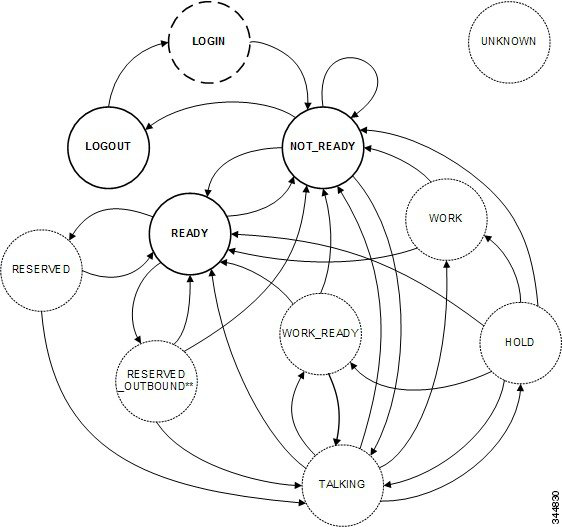
Page 59
Description
To
From
After a successful LOGIN, the agent transitions to
NOT_READY.
NOT_READY
LOGIN
To sign out of Finesse, the agent sets the state to
LOGOUT. An agent can set the state to LOGOUT only
if that agent is in NOT_READY state.
LOGOUT
NOT_READY
To change their Not Ready reason code, agents can set a
NOT_READY state from NOT_READY.
NOT_READY
NOT_READY
To become available for incoming or Outbound Option
calls, agents set their state to READY.
READY
NOT_READY
An agent who places a call while in NOT_READY state
transitions to TALKING.
TALKING
NOT_READY
An incoming call arrives at an agent.
RESERVED
READY
An outbound agent becomes reserved to handle an
Outbound Option Progressive or Predictive call.
RESERVED
_OUTBOUND
READY
An outbound agent becomes reserved to handle an
Outbound Option Preview call.
RESERVED_OUTBOUND
_PREVIEW
READY
Agents can change to NOT_READY to make themselves
unavailable for incoming calls.
NOT_READY
READY
An agent can become RESERVED but never take a call.
READY
RESERVED
When an agent answers an incoming call, the agent
transitions to TALKING.
TALKING
RESERVED
An agent can change to READY state to leave
RESERVED_OUTBOUND. If the system deems it
necessary, that agent may transition back to
RESERVED_OUTBOUND.
READY
RESERVED
_OUTBOUND
An agent can change to NOT_READY state to leave
RESERVED_OUTBOUND.
NOT_READY
RESERVED
_OUTBOUND
An agent transitions to TALKING when an Outbound
Option call arrives at the agent.
TALKING
RESERVED
_OUTBOUND
An agent transitions to READY if the agent was in
READY state before being reserved in an Outbound
Option Preview campaign.
READY
RESERVED_OUTBOUND
_PREVIEW
Cisco Finesse Web Services Developer and JavaScript Guide, Release 12.5(1)
43
Cisco Finesse Desktop APIs
User—Change Agent State
Page 60
Description
To
From
An agent transitions to NOT_READY if that agent
changes state to NOT_READY while reserved in an
Outbound Option Preview campaign. This state change
is a pending state change. The agent does not transition
to NOT_READY until the call is complete or the
Outbound Option Preview reservation is closed or rejected.
NOT_READY
RESERVED_OUTBOUND
_PREVIEW
An agent transitions to TALKING when an Outbound
Option call arrives at the agent.
TALKING
RESERVED_OUTBOUND
_PREVIEW
If an agent is on a call that is dropped, the agent transitions
to READY (if the agent was in READY state before the
call).
READY
TALKING
If an agent is on a call that is dropped, the agent transitions
to NOT_READY if that agent was in NOT_READY state
before the call.
NOT_READY
TALKING
If wrap-up is enabled, and the agent chooses
NOT_READY while on a call, that agent enters WORK
state after the call is dropped.
WORK
TALKING
If wrap-up is enabled, an agent enters WORK_READY
state after a call is dropped.
WORK_READY
TALKING
An agent puts a call on hold and transitions to HOLD
state.
HOLD
TALKING
If an agent is connected to a held call and the call is
dropped, the agent transitions to READY state (if the agent
was in READY state before the call).
READY
HOLD
If an agent is connected to a held call and the call is
dropped, the agent transitions to NOT_READY state (if
the agent was in NOT_READY state before the call).
NOT_READY
HOLD
If wrap-up is enabled and an agent is connected to a held
call that is dropped, the agent transitions to WORK state
if the agent chose to go NOT_READY during the call.
WORK
HOLD
If wrap-up is enabled and an agent is connected to a held
call that is dropped, the agent transitions to
WORK_READY state.
WORK_READY
HOLD
When an agent retrieves a held call, the agent transitions
to TALKING state.
TALKING
HOLD
To leave WORK state, agents can set their state to
READY.
READY
WORK
Cisco Finesse Web Services Developer and JavaScript Guide, Release 12.5(1)
44
Cisco Finesse Desktop APIs
User—Change Agent State
Page 61
Description
To
From
To leave WORK state, agents can set their state to
NOT_READY. Agents automatically transition to
NOT_READY after the wrap-up timer expires.
NOT_READY
WORK
To leave WORK_READY state, agents can set their state
to READY. Agents automatically transition to READY
after the wrap-up timer expires.
READY
WORK_READY
To leave WORK_READY state, agents can set their state
to NOT_READY.
NOT_READY
WORK_READY
The following table describes supported agent state transitions for Unified CCX.
Description
To
From
After a successful LOGIN, the agent transitions to
NOT_READY.
NOT_READY
LOGIN
To sign out of Finesse, the agent sets the state to
LOGOUT.
LOGOUT
NOT_READY
To change their Not Ready reason code, agents can set a
NOT_READY state from NOT_READY.
NOT_READY
NOT_READY
To become available for incoming calls, agents set their
state to READY.
READY
NOT_READY
Agents can change their state to NOT_READY to make
themselves unavailable for incoming calls.
NOT_READY
READY
To sign out of Finesse, agents set their state to LOGOUT.
LOGOUT
READY
An outbound agent becomes reserved to handle an
Outbound Option Direct Preview call.
RESERVED_
OUTBOUND_
PREVIEW
READY
An outbound agent accepts a direct preview call and the
call is active.
TALKING
RESERVED_
OUTBOUND_
PREVIEW
Users can set the following states with this API:
• READY
• NOT_READY
• LOGOUT
The LOGIN state is a transitive state. That is, when set, LOGIN triggers a change that results in a new state.
Cisco Finesse Web Services Developer and JavaScript Guide, Release 12.5(1)
45
Cisco Finesse Desktop APIs
User—Change Agent State
Page 62
Users can be in the following states while on a call. However, users cannot place themselves in these states.
For example, agents cannot change their state to TALKING. Agents enter TALKING state when they answer
a call.
• RESERVED
• RESERVED_OUTBOUND
• RESERVED_OUTBOUND_PREVIEW
• TALKING
• HOLD
• WORK
• WORK_READY
RESERVED_OUTBOUND user state:
Users who belong to Outbound Option skill groups transition from READY state to RESERVED_OUTBOUND
state when those users are reserved for Progressive or Predictive Outbound Option calls.
In a Unified CCE deployment, users can change their state to READY or NOT_READY to exit this state. If
not ready reason codes are configured, users must specify a reason code to transition to NOT_READY state.
If the user does nothing and then the call is transferred to the user, the user transitions to TALKING state. If
the call is not transferred to the user, the user transitions back to READY state.
In a Unified CCX deployment, users cannot change their state to exit RESERVED_OUTBOUND state. If
auto-answer for the predictive or progressive call is not enabled and the agent does not answer the call, the
agent transitions to NOT_READY state. If the call does not reach a voice contact or if the reservation timer
on Unified CCX expires, the agent transitions to READY state.
RESERVED_OUTBOUND_PREVIEW user state:
Users who belong to Outbound Option skill groups transition from READY state to
RESERVED_OUTBOUND_PREVIEW state when they are reserved for Outbound Option Preview or Direct
Preview calls. Users cannot set their state to RESERVED_OUTBOUND_PREVIEW.
In a Unified CCE deployment, users can click Close or Reject on the Outbound Option dialog. Changing the
user's state to READY or NOT_READY does not generate a state change notification but does affect the user
state when the call is complete. For example, if the user selects NOT_READY state while in
RESERVED_OUTBOUND_PREVIEW state, the user transitions to NOT_READY state after clicking Close
or Reject.
In a Unified CCX deployment, users cannot change their state directly when in
RESERVED_OUTBOUND_PREVIEW state. The state can only be changed by issuing a Dialog Accept,
Close, or Reject request or when the reservation call times out.
WORK and WORK_READY user states:
A user is in WORK or WORK_READY state during wrap-up. A user is placed in WORK state when the user
is set to transition to NOT_READY state when wrap-up ends. A user is in WORK_READY state when the
user is set to transition to READY state when wrap-up ends.
A user transitions to WORK state for the following reasons:
• The user was in NOT_READY state before taking a call.
• The user set a state of NOT_READY while in TALKING state.
Cisco Finesse Web Services Developer and JavaScript Guide, Release 12.5(1)
46
Cisco Finesse Desktop APIs
User—Change Agent State
Page 63
When the wrap-up timer expires, the user transitions to NOT_READY state.
WORK_READY state applies only to Unified CCE deployments. A user transitions to WORK_READY state
for the following reasons:
• The user was in READY state before taking a call.
• The user set a state of READY while in TALKING state.
When the wrap-up timer expires, the user transitions to READY state.
The following statements apply to a supervisor using this API to change the state of an agent or other supervisor:
• A supervisor can only change the state of a user who is assigned to that supervisor's team.
• A supervisor can only set the state of another user to NOT_READY, READY, or LOGOUT.
• A supervisor can set the state of a user to LOGOUT only if that user is in READY, NOT_READY,
RESERVED, RESERVED_OUTBOUND, RESERVED_OUTBOUND_PREVIEW, TALKING, HOLD,
WORK, or WORK_READY state.
• A supervisor can set the state of a user to NOT_READY only if that user is in READY, WORK, or
WORK_READY state.
• When a supervisor uses this API to set the state of a user to NOT_READY, a reason code must not be
used. If a reason code is provided, Finesse rejects it and returns a 400 Invalid Input error. Finesse sends
a hard-coded reason code to indicate that the state change was performed by the supervisor.
Note
https://<FQDN>/finesse/api/User/<id>
URI:
https://finesse1.xyz.com/finesse/api/User/1234
Example URI:
Agents can only act on their own User objects. Supervisors can act on the User
objects of agents who belong to their team.
Security Constraints:
PUT
HTTP Method:
Application/XML
Content Type:
XML
Input/Output Format:
<User>
<state>READY</state>
</User>
HTTP Request:
id (required): The ID of the user
state (required): The new state the user wants to be in (for example, LOGOUT,
READY, NOT_READY)
Request Parameters:
Cisco Finesse Web Services Developer and JavaScript Guide, Release 12.5(1)
47
Cisco Finesse Desktop APIs
User—Change Agent State

Page 64
200: Success
400: Bad Request
401: Invalid Supervisor
401: Unauthorized
404: Not Found
500: Internal Server Error
503: Service Unavailable
HTTP Response:
<ApiErrors>
<ApiError>
<ErrorType>Parameter Missing</ErrorType>
<ErrorData>state</ErrorData>
<ErrorMessage>State Parameter missing</ErrorMessage>
</ApiError>
</ApiErrors>
Example Failure
Response:
User notification
Notifications
Triggered:
Platform-Based API Differences
The following table describes API differences between a stand-alone Finesse deployment with Unified CCE
and a coresident Finesse deployment with Unified CCX.
Response
Scenario
Stand-alone Finesse with Unified CCE:
<data>
<apiErrors>
<apiError>
<errorData>257</errorData>
<errorMessage>CF_INVALID_PASSWORD_SPECIFIED</errorMessage>
<errorType>Invalid State</errorType>
</apiError>
</apiErrors>
</data>
Coresident Finesse with Unified CCX:
<data>
<apiErrors>
<apiError>
<errorData>1010</errorData>
<errorMessage>CF_INVALID_PARAMETER</errorMessage>
<errorType>Invalid State</errorType>
</apiError>
</apiErrors>
</data>
Change from LOGOUT
to NOT_READY.
Cisco Finesse Web Services Developer and JavaScript Guide, Release 12.5(1)
48
Cisco Finesse Desktop APIs
User—Change Agent State
Page 65
Response
Scenario
Stand-alone Finesse with Unified CCE:
Finesse sends a User notification with state=TALKING.
Coresident Finesse with Unified CCX:
Finesse does not send a User notification. The agent remains in NOT_READY
state.
Agent receives and
answers a non-ICD call.
Stand-alone Finesse with Unified CCE:
Finesse sends a User notification with state=HOLD.
Coresident Finesse with Unified CCX:
Finesse does not send a User notification. The agent remains in TALKING state.
Agent puts an ICD call
on hold.
Stand-alone Finesse with Unified CCE:
Agent transitions to READY state after the call ends.
Coresident Finesse with Unified CCX:
Unified CCX does not allow an agent to set a pending state of READY while that
agent is talking on an ICD call.
<data>
<apiErrors>
<apiError>
<errorData>265</errorData>
<errorMessage>CF_INVALID_AGENT_WORKMODE</errorMessage>
<errorType>Invalid State</errorType>
</apiError>
</apiErrors>
</data>
While talking on an ICD
call, the agent sets a
pending state of
READY.
Stand-alone Finesse with Unified CCE:
Agent transitions to READY state after the call ends.
Coresident Finesse with Unified CCX:
Unified CCX does not allow an agent to set a pending state of READY while that
agent is talking on a non-ICD call.
<data>
<apiErrors>
<apiError>
<errorData>33</errorData>
<errorMessage>CF_RESOURCE_BUSY</errorMessage>
<errorType>Invalid State</errorType>
</apiError>
</apiErrors>
</data>
While talking on a
non-ICD call (agent
state can be TALKING
in Unified CCE or
NOT_READY in
Unified CCX), the agent
sets a pending state of
READY.
Cisco Finesse Web Services Developer and JavaScript Guide, Release 12.5(1)
49
Cisco Finesse Desktop APIs
User—Change Agent State
Page 66
Response
Scenario
Stand-alone Finesse with Unified CCE:
Agent transitions to NOT_READY state with reason code 2 after the call ends.
Coresident Finesse with Unified CCX:
Unified CCX allows an agent to set a pending state of NOT_READY only once
during a call. Unified CCX does not allow an agent to change from one Not Ready
reason code to another.
<data>
<apiErrors>
<apiError>
<errorData>265</errorData>
<errorMessage>CF_INVALID_AGENT_WORKMODE</errorMessage>
<errorType>Invalid State</errorType>
</apiError>
</apiErrors>
</data>
While talking on an ICD
call, the agent attempts
to change from a
pending state of
NOT_READY with
reason code 1 to a
pending state of
NOT_READY with
reason code 2.
Stand-alone Finesse with Unified CCE:
Finesse sends a hard-coded reason code of 999 to indicate the forced state change.
Coresident Finesse with Unified CCX:
Finesse sends a hard-coded reason code of 33 to indicate the forced state change.
A supervisor changes
the state of an agent on
that supervisor's team to
NOT_READY.
Asynchronous Errors
When accessing the Finesse REST API through the Finesse JavaScript library, asynchronous errors have a
status code of 400. When receiving the asynchronous error directly through XMPP, the error message has the
format described in "Dialog CTI Error Notification."
Note
Deployment Type
Reason
ErrorType
All
Invalid state transition requested.
For example, attempt to set Wrap-Up state on an agent that
is not allowed to go to Wrap-Up, or attempt to change an
agent's state from READY state to Wrap-up or WORK state.
Invalid State
Unified CCX
Attempt to change an agent's state from
RESERVED_OUTBOUND to any other state.
Internal Server Error
User—Agent State Change With Reason Code
This API allows a user to change the agent state in the CTI server and pass along the code value of a
corresponding reason code. Users can use this API only when changing state to NOT_READY or LOGOUT.
https://<FQDN>/finesse/api/User/<id>
URI:
https://finesse1.xyz.com/finesse/api/User/1234
Example URI:
Cisco Finesse Web Services Developer and JavaScript Guide, Release 12.5(1)
50
Cisco Finesse Desktop APIs
User—Agent State Change With Reason Code

Page 67
Users can only act on their own User objects.
Security Constraints:
PUT
HTTP Method:
Application/XML
Content Type:
XML
Input/Output Format:
<User>
<state>NOT_READY</state>
<reasonCodeId>1001</reasonCodeId>
</User>
HTTP Request:
id (required): The ID of the user
reasonCodeID (required if reason codes are configured for the given state): The
database ID for the reason code
state (required): The new state the user wants to be in (NOT_READY, LOGOUT)
Request Parameters:
202: Successfully Accepted
400: Parameter Missing
400: Invalid Input
400: Invalid State
401: Authorization Failure (for example, the user is not authenticated in the Web
Session)
401: Invalid Authorization Specified (for example, the authenticated user tried to
make a request for another user)
HTTP Response:
<ApiErrors>
<ApiError>
<ErrorType>Parameter Missing</ErrorType>
<ErrorData>state</ErrorData>
<ErrorMessage>State Parameter missing</ErrorMessage>
</ApiError>
</ApiErrors>
Example Failure
Response:
User notification
Notifications
Triggered:
User—Get Reason Code
This API allows an agent or supervisor to get an individual Not Ready or Sign Out reason code, which is
already defined and stored in the Finesse database (and that is applicable to the agent or supervisor).
Users can select the reason code to display on their desktops when they change their state to NOT_READY
or LOGOUT.
For more information about the ReasonCode object, see section on ReasonCode.
https://<FQDN>/finesse/api/User/<id>/ReasonCode/<reasonCodeId>
URI:
https://finesse1.xyz.com/finesse/api/User/1234/ReasonCode/12
Example URI:
Cisco Finesse Web Services Developer and JavaScript Guide, Release 12.5(1)
51
Cisco Finesse Desktop APIs
User—Get Reason Code
Page 68
Administrators, agents, and supervisors can use this API.
To get a reason code, a user must be signed in or provide valid authorization
credentials when challenged.
The reason code must be global (forAll parameter set to true) or be assigned to a
team to which the user belongs.
Only an administrator can get another user's reason codes.
Security Constraints:
GET
HTTP Method:
—
Content Type:
XML
Input/Output Format:
—
HTTP Request:
200: Success
400: Bad Request
400: Finesse API Error (for example, the object does not exist, the object is stale,
or violation of DB constraint)
401: Authorization Failure
401: Invalid Authorization User Specified
404: Not Found (for example, the reason code does not exist or has been deleted)
500: Internal Server Error
HTTP Response:
<ReasonCode>
<uri>finesse/api/ReasonCode/1</uri>
<category>NOT_READY</category>
<code>12</code>
<label>Lunch</label>
<forAll>true</forAll>
</ReasonCode>
Example Response:
<ApiErrors>
<ApiError>
<ErrorType>Authorization Failure</ErrorType>
<ErrorMessage>UNAUTHORIZED</ErrorMessage>
<ErrorData>1234</ErrorData>
</ApiError>
</ApiErrors>
Example Failure
Response:
User—Get Reason Code List
This API allows an agent or supervisor to get a list of Not Ready or Sign Out reason codes (that are applicable
to that agent or supervisor), which are defined and stored in the Finesse database. Users can assign one of the
reason codes on the desktop when they change their state to NOT_READY or LOGOUT. Cisco Finesse
Release 12.5(1) onward, this API is deprecated.
Cisco Finesse Web Services Developer and JavaScript Guide, Release 12.5(1)
52
Cisco Finesse Desktop APIs
User—Get Reason Code List
Page 69
The ReasonCode list can be empty (for example, if no reason codes for the specified category exist in the
Finesse configuration database).
Reason codes that have the forAll parameter set to true apply to any user.
The category parameter is required when making a request to get a list of reason codes.
For information about the ReasonCode object, see section on ReasonCode.
Note
https://<FQDN>/finesse/api/User/<id>/ReasonCodes?category=NOT_READY|LOGOUT
URI:
https://finesse1.xyz.com/finesse/api/User/1234/ReasonCodes?category=NOT_READY
Example URI:
Administrators, agents and supervisors can use this API.
To get a list of reason codes, a user must be signed in or provide valid authorization
credentials when challenged.
Only an administrator can get another user's list of reason codes.
Security Constraints:
GET
HTTP Method:
—
Content Type:
XML
Input/Output Format:
—
HTTP Request:
200: Success
400: Bad Request
400: Finesse API Error (for example, the object does not exist, the object is stale,
or violation of DB constraint)
401: Authorization Failure
401: Invalid Authorization User Specified
404: Not Found
500: Internal Server Error
HTTP Response:
<ReasonCodes category="NOT_READY">
<ReasonCode>
<uri>/finesse/api/ReasonCode/1</uri>
<category>NOT_READY</category>
<code>12</code>
<label>Lunch</label>
<forAll>true</forAll>
</ReasonCode>
<ReasonCode>
...Full ReasonCode Object...
</ReasonCode>
<ReasonCode>
...Full ReasonCode Object...
</ReasonCode>
</ReasonCodes>
Example Response:
Cisco Finesse Web Services Developer and JavaScript Guide, Release 12.5(1)
53
Cisco Finesse Desktop APIs
User—Get Reason Code List

Page 70
<ApiErrors>
<ApiError>
<ErrorType>Authorization Failure</ErrorType>
<ErrorMessage>UNAUTHORIZED</ErrorMessage>
<ErrorData>1234</ErrorData>
</ApiError>
</ApiErrors>
Example Failure
Response:
User—Get Wrap-Up Reason
This API allows a user to get a WrapUpReason object.
For more information about the WrapUpReason object, see WrapUpReason, on page 244.
https://<FQDN>/finesse/api/User/<id>/WrapUpReason/<wrapUpReasonId>
URI:
https://finesse1.xyz.com/finesse/api/User/1234/WrapUpReason/1001
Example URI:
Administrators, agents, and supervisors can use this API.
To get a wrap-up reason, a user must be signed in, or provide valid authorization
credentials when challenged.
Only an administrator can get another user's wrap-up reasons.
Security Constraints:
GET
HTTP Method:
—
Content Type:
XML
Input/Output Format:
—
HTTP Request:
200: Success
400: Bad Request (the request body is invalid)
400: Finesse API Error (for example, the object does not exist, the object is stale,
or violation of DB constraint)
401: Authorization Failure
401: Invalid Authorization User Specified
404: Not Found (for example, the wrap-up reason does not exist or has been deleted)
500: Internal Server Error
HTTP Response:
<WrapUpReason>
<uri>finesse/api/User/1234/WrapUpReason/205</uri>
<label>Product Question</label>
<forAll>true</forAll>
</WrapUpReason>
Example Response:
<ApiErrors>
<ApiError>
<ErrorType>Authorization Failure</ErrorType>
<ErrorMessage>UNAUTHORIZED</ErrorMessage>
<ErrorData>1234</ErrorData>
</ApiError>
</ApiErrors>
Example Failure
Response:
Cisco Finesse Web Services Developer and JavaScript Guide, Release 12.5(1)
54
Cisco Finesse Desktop APIs
User—Get Wrap-Up Reason
Page 71
User—Get Wrap-Up Reason List
This API allows a user to get a list of all wrap-up reasons applicable for that user. Cisco Finesse Release
12.5(1) onward, this API is deprecated.
For more information about the WrapUpReason object, see WrapUpReason, on page 244.
https://<FQDN>/finesse/api/User/<id>/WrapUpReasons
URI:
https://finesse1.xyz.com/finesse/api/User/1234/WrapUpReasons
Example URI:
Administrators, agents, and supervisors can use this API.
To get a list of wrap-up reasons, a user must be signed in or provide valid
authorization credentials when challenged.
Only an administrator can get another user's list of wrap-up reasons.
Security Constraints:
GET
HTTP Method:
—
Content Type:
XML
Input/Output Format:
—
HTTP Request:
200: Success
400: Finesse API Error (for example, the object does not exist, the object is stale,
or violation of DB constraint)
401: Authorization Failure
401: Invalid Authorization User Specified
404: User Not Found
500: Internal Server Error
HTTP Response:
<WrapUpReasons>
<WrapUpReason>
<label>Successful tech support call</label>
<forAll>true</forAll>
<uri>/finesse/api/User/1234/WrapUpReason/12</uri>
</WrapUpReason>
... more wrap-up reasons ...
</WrapUpReasons>
Example Response:
<ApiErrors>
<ApiError>
<ErrorType>Authorization Failure</ErrorType>
<ErrorMessage>UNAUTHORIZED</ErrorMessage>
<ErrorData>1234</ErrorData>
</ApiError>
</ApiErrors>
Example Failure
Response:
Cisco Finesse Web Services Developer and JavaScript Guide, Release 12.5(1)
55
Cisco Finesse Desktop APIs
User—Get Wrap-Up Reason List
Page 72
User—Get Default Media Properties Layout
This API allows a user to get a copy of the default MediaPropertiesLayout object. The MediaPropertiesLayout
object determines how call variables and ECC variables appear on the Finesse desktop.
https://<FQDN>/finesse/api/User/<id>/MediaPropertiesLayout
URI:
https://finesse1.xyz.com/finesse/api/User/1234/MediaPropertiesLayout
Example URI:
Agents and supervisors can use this API.
To get the default MediaPropertiesLayout object, a user must be signed in or provide
valid authorization credentials when challenged.
Security
Constraints:
GET
HTTP Method:
—
Content Type:
XML
Input/Output
Format:
—
HTTP Request:
200: Success
401: Authorization Failure
500: Internal Server Error
HTTP Response:
Cisco Finesse Web Services Developer and JavaScript Guide, Release 12.5(1)
56
Cisco Finesse Desktop APIs
User—Get Default Media Properties Layout
Page 73
Example
Response:
Cisco Finesse Web Services Developer and JavaScript Guide, Release 12.5(1)
57
Cisco Finesse Desktop APIs
User—Get Default Media Properties Layout
Page 74
<MediaPropertiesLayout>
<header>
<entry>
<displayName>Call Variable 1</displayName>
<mediaProperty>callVariable1</mediaProperty>
</entry>
</header>
<column>
<entry>
<displayName>BA AccountNumber</displayName>
<mediaProperty>BAAccountNumber</mediaProperty>
</entry>
<entry>
<displayName>BA Campaign</displayName>
<mediaProperty>BACampaign</mediaProperty>
</entry>
<entry>
<displayName>Call Variable 1</displayName>
<mediaProperty>callVariable1</mediaProperty>
</entry>
<entry>
<displayName>Call Variable 2</displayName>
<mediaProperty>callVariable2</mediaProperty>
</entry>
<entry>
<displayName>Call Variable 3</displayName>
<mediaProperty>callVariable3</mediaProperty>
</entry>
<entry>
<displayName>Call Variable 4</displayName>
<mediaProperty>callVariable4</mediaProperty>
</entry>
<entry>
<displayName>Call Variable 5</displayName>
<mediaProperty>callVariable5</mediaProperty>
</entry>
</column>
<column>
<entry>
<displayName>BA Status</displayName>
<mediaProperty>BAStatus</mediaProperty>
</entry>
<entry>
<displayName>BA Response</displayName>
<mediaProperty>BAResponse</mediaProperty>
</entry>
<entry>
<displayName>Call Variable 6</displayName>
<mediaProperty>callVariable6</mediaProperty>
</entry>
<entry>
<displayName>Call Variable 7</displayName>
<mediaProperty>callVariable7</mediaProperty>
</entry>
<entry>
<displayName>Call Variable 8</displayName>
<mediaProperty>callVariable8</mediaProperty>
</entry>
<entry>
<displayName>Call Variable 9</displayName>
<mediaProperty>callVariable9</mediaProperty>
</entry>
<entry>
<displayName>Call Variable 10</displayName>
Cisco Finesse Web Services Developer and JavaScript Guide, Release 12.5(1)
58
Cisco Finesse Desktop APIs
User—Get Default Media Properties Layout
Page 75
<mediaProperty>callVariable10</mediaProperty>
</entry>
</column>
<uri>/finesse/api/MediaPropertiesLayout/1</uri>
<name>Default Layout</name>
<description>Layout used when no other layout matches the user layout
Custom/ECC Variable</description>
<type>DEFAULT</type>
</MediaPropertiesLayout>
<MediaPropertiesLayout>
<header>
<entry>
<displayName>Call Variable 1</displayName>
<mediaProperty>callVariable1</mediaProperty>
</entry>
</header>
<column>
<entry>
<displayName>BA AccountNumber</displayName>
<mediaProperty>BAAccountNumber</mediaProperty>
</entry>
<entry>
<displayName>BA Campaign</displayName>
<mediaProperty>BACampaign</mediaProperty>
</entry>
<entry>
<displayName>Call Variable 1</displayName>
<mediaProperty>callVariable1</mediaProperty>
</entry>
<entry>
<displayName>Call Variable 2</displayName>
<mediaProperty>callVariable2</mediaProperty>
</entry>
<entry>
<displayName>Call Variable 3</displayName>
<mediaProperty>callVariable3</mediaProperty>
</entry>
<entry>
<displayName>Call Variable 4</displayName>
<mediaProperty>callVariable4</mediaProperty>
</entry>
<entry>
<displayName>Call Variable 5</displayName>
<mediaProperty>callVariable5</mediaProperty>
</entry>
</column>
<column>
<entry>
<displayName>BA Status</displayName>
<mediaProperty>BAStatus</mediaProperty>
</entry>
<entry>
<displayName>BA Response</displayName>
<mediaProperty>BAResponse</mediaProperty>
</entry>
<entry>
<displayName>Call Variable 6</displayName>
<mediaProperty>callVariable6</mediaProperty>
</entry>
<entry>
<displayName>Call Variable 7</displayName>
<mediaProperty>callVariable7</mediaProperty>
</entry>
<entry>
Cisco Finesse Web Services Developer and JavaScript Guide, Release 12.5(1)
59
Cisco Finesse Desktop APIs
User—Get Default Media Properties Layout
Page 76
<displayName>Call Variable 8</displayName>
<mediaProperty>callVariable8</mediaProperty>
</entry>
<entry>
<displayName>Call Variable 9</displayName>
<mediaProperty>callVariable9</mediaProperty>
</entry>
<entry>
<displayName>Call Variable 10</displayName>
<mediaProperty>callVariable10</mediaProperty>
</entry>
</column>
<uri>/finesse/api/MediaPropertiesLayout/1</uri>
<name>Default Layout</name>
<description>Layout used when no other layout matches the user layout
Custom/ECC Variable</description>
<type>DEFAULT</type>
</MediaPropertiesLayout>
<ApiErrors>
<ApiError>
<ErrorType>Authorization Failure</ErrorType>
<ErrorMessage>UNAUTHORIZED</ErrorMessage>
<ErrorData>1234</ErrorData>
</ApiError>
</ApiErrors>
Example Failure
Response:
User—Get Media Properties Layout List
This API allows a user to get a list of all media properties layouts configured on the system, including the
default media properties layout. Cisco Finesse Release 12.5(1) onward, this API is deprecated.
https://<FQDN>/finesse/api/User/<UserId>/MediaPropertiesLayouts
URI:
https://finesse1.xyz.com/finesse/api/User/<UserId>/MediaPropertiesLayouts
Example URI:
Agents and supervisors can use this API.
Any user can get a list of media properties layouts if they are signed in or they provide
valid authorization credentials when challenged.
Security
Constraints:
GET
HTTP Method:
—
Content Type:
XML
Input/Output
Format:
—
HTTP Request:
Cisco Finesse Web Services Developer and JavaScript Guide, Release 12.5(1)
60
Cisco Finesse Desktop APIs
User—Get Media Properties Layout List
Page 77
200: Success
400: Bad Request
400: Finesse API error (for example, the object does not exist, the object is stale, or
violation of DB constraint)
401: Authorization Failure
401: Invalid Authorization User Specified
500: Internal Server Error
HTTP Response:
<MediaPropertiesLayouts>
<MediaPropertiesLayout>
... Full MediaPropertiesLayout Object ...
</MediaPropertiesLayout>
<MediaPropertiesLayout>
... Full MediaPropertiesLayout Object ...
</MediaPropertiesLayout>
<MediaPropertiesLayout>
... Full MediaPropertiesLayout Object ...
</MediaPropertiesLayout>
</MediaPropertiesLayouts>
Example Response:
<ApiErrors>
<ApiError>
<ErrorType>Authorization Failure</ErrorType>
<ErrorMessage>UNAUTHORIZED</ErrorMessage>
<ErrorData>1234</ErrorData>
</ApiError>
</ApiErrors>
Example Failure
Response:
User—Get List of Phone Books
This API allows a user to get a list of phone books and the first list of associated contacts for that user, based
on the defined range (1 to 6000). Contacts are retrieved from the global phone books first, followed by the
team phone books, up to the maximum limit of 6000. Cisco Finesse Release 12.5(1) onward, this API is
deprecated.
For more information about the PhoneBook object, see PhoneBook, on page 271.
https://<FQDN>/finesse/api/User/<id>/PhoneBooks
URI:
https://finesse1.xyz.com/finesse/api/User/1234/PhoneBooks
Example URI:
Agents and supervisors can use this API.
Any user can get a list of their own phone books if they are signed in or they provide
valid authorization credentials when challenged.
Security Constraints:
"Range: objects=1-6000"
The range of contacts to retrieve.
Additional Headers:
GET
HTTP Method:
—
Content Type:
Cisco Finesse Web Services Developer and JavaScript Guide, Release 12.5(1)
61
Cisco Finesse Desktop APIs
User—Get List of Phone Books
Page 78
XML
Input/Output Format:
—
HTTP Request:
200: Success
206: Partial Content
400: Bad Request (the request body is invalid)
400: Finesse API Error (for example, the object does not exist or the object is stale)
401: Authorization Failure
404: User Not Found
416: Invalid Range Specified. Range must be 1– 6000 objects
500: Internal Server Error
HTTP Response:
<PhoneBooks>
<PhoneBook>
<name>PhoneBook1</name>
<type>GLOBAL</type>
<Contacts>
<Contact>
...Full Contact Object...
</Contact>
...Full Contact Object...
</Contact>
</Contacts>
</PhoneBook>
<PhoneBook>
<name>PhoneBook2</name>
<type>TEAM</type>
<Contacts>
<Contact>
...Full Contact Object...
</Contact>
<Contact>
...Full Contact Object...
</Contact>
</Contacts>
</PhoneBook>
</PhoneBooks>
Example Response:
Cisco Finesse Web Services Developer and JavaScript Guide, Release 12.5(1)
62
Cisco Finesse Desktop APIs
User—Get List of Phone Books
Page 79
Example
<ApiErrors>
<ApiError>
<ErrorType>Authorization Failure</ErrorType>
<ErrorMessage>UNAUTHORIZED</ErrorMessage>
<ErrorData>1234</ErrorData>
</ApiError>
</ApiErrors>
Example
<ApiErrors>
<ApiError>
<ErrorType>Invalid Input</ErrorType>
<ErrorData></ErrorData>
<ErrorMessage>Invalid range header format. Format:
objects=1-6000</ErrorMessage>
</ApiError>
</ApiErrors>>
Example
<ApiErrors>
<ApiError>
<ErrorType>Invalid Input</ErrorType>
<ErrorData></ErrorData>
<ErrorMessage>Maximum number of contacts cannot exceed
6000</ErrorMessage>
</ApiError>
</ApiErrors>
Example Failure
Response:
User—Get List of Workflows
This API allows a user to get a list of workflows and workflow actions assigned to that user. Cisco Finesse
Release 12.5(1) onward, this API is deprecated.
For more information about the Workflow object, see Workflow, on page 286.
https://<FQDN>/finesse/api/User/<id>/Workflows
URI:
https://finesse1.xyz.com/finesse/api/User/1234/Workflows
Example URI:
Any user can get their own workflows if they are signed in or they provide valid
authorization credentials when challenged.
Security
Constraints:
GET
HTTP Method:
—
Content Type:
XML
Input/Output
Format:
—
HTTP Request:
Cisco Finesse Web Services Developer and JavaScript Guide, Release 12.5(1)
63
Cisco Finesse Desktop APIs
User—Get List of Workflows
Page 80
200: Success
400: Bad Request (the request body is invalid)
400: Finesse API Error (for example, the object is stale or there is a violation of database
constraints)
401: Authorization Failure
404: Not Found (the resource is not found)
500: Internal Server Error
HTTP Response:
Cisco Finesse Web Services Developer and JavaScript Guide, Release 12.5(1)
64
Cisco Finesse Desktop APIs
User—Get List of Workflows
Page 81
Example Response:
Cisco Finesse Web Services Developer and JavaScript Guide, Release 12.5(1)
65
Cisco Finesse Desktop APIs
User—Get List of Workflows
Page 82
<Workflows>
<Workflow>
<name>google ring pop</name>
<description> Pops a Google web page when an agent phone
rings</description>
<TriggerSet>
<type>SYSTEM</type>
<name>CALL_ARRIVES</name>
<triggers>
<Trigger>
<Variable>
<name>mediaType</name>
<node>//Dialog/mediaType</node>
<type>CUSTOM</type>
</Variable>
<comparator>IS_EQUAL</comparator>
<value>Voice</value>
</Trigger>
<Trigger>
<Variable>
<name>callType</name>
<node>//Dialog/mediaProperties/callType</node>
<type>CUSTOM</type>
</Variable>
<comparator>IS_IN_LIST</comparator>
<value>ACT_IN,PREROUTE_ACD_IN,PREROUTE_DIRECT_AGENT,
TRANSFER,OVERFLOW_IN,OTHER_IN,AGENT_OUT,AGENT_INSIDE,
OFFERED,CONSULT,CONSULT_OFFERED,CONSULT_CONFERENCE,
CONFERENCE,TASK_ROUTED_BY_ICM,TASK_ROUTED_BY_
APPLICATION</value>
</Trigger>
<Trigger>
<Variable>
<name>state</name>
<node>//Dialog/participants/Participant/mediaAddress[.=${userExtension}]/../state</node>
<type>CUSTOM</type>
</Variable>
<comparator>IS_IN_LIST</comparator>
<value>ALERTING,ACTIVE,HELD</value>
</Trigger>
<Trigger>
<Variable>
<name>fromAddress</name>
<node>//Dialog/fromAddress</node>
<type>CUSTOM</type>
</Variable>
<comparator>IS_NOT_EQUAL</comparator>
<Variable>
<name>userExtension</name>
<type>SYSTEM</type>
</Variable>
</Trigger>
</triggers>
</TriggerSet>
<ConditionSet>
<applyMethod>ALL</applyMethod>
<conditions>
<Condition>
<Variable>
<name>callVariable1</name>
<type>SYSTEM</type>
</Variable>
Cisco Finesse Web Services Developer and JavaScript Guide, Release 12.5(1)
66
Cisco Finesse Desktop APIs
User—Get List of Workflows
Page 83
<comparator>CONTAINS</comparator>
<value>1234</value>
</Condition>
<Condition>
<Variable>
<name>user.foo.bar[1]</name>
<node>//Dialog/mediaProperties/callvariables/CallVariable/name[.="user.foo.bar[1]"]/../value</node>
<type>CUSTOM</type>
</Variable>
<comparator>IS_NOT_EMPTY</comparator>
</Condition>
</conditions>
</ConditionSet>
<workflowActions>
<WorkflowAction>
<name>Google ring pop</name>
<type>BROWSER_POP</type>
<params>
<Param>
<name>windowName</name>
<value>google</value>
</Param>
<Param>
<name>path</name>
<value>http://www.google.com?a=${CallVariable1}&c=cat&${DNIS}&d=${user.foo.bar[1]}</value>
</Param>
</params>
<actionVariables>
<ActionVariable>
<name>callVariable1</name>
<type>SYSTEM</type>
<testValue>apple</testValue>
</ActionVariable>
<ActionVariable>
<name>user.foo.bar[1]</name>
<node>//Dialog/mediaProperties/callvariables/CallVariable/name[.="user.foo.bar[1]"]/../value</node>
<type>CUSTOM</type>
<testValue>1234</testValue>
</ActionVariable>
</actionVariables>
</WorkflowAction>
<WorkflowAction>
<name>My Delay</name>
<type>DELAY</type>
<params>
<Param>
<name>time</name>
<value>10</value>
</Param>
</params>
</WorkflowAction>
</workflowActions>
</Workflow>
</Workflows>
Cisco Finesse Web Services Developer and JavaScript Guide, Release 12.5(1)
67
Cisco Finesse Desktop APIs
User—Get List of Workflows
Page 84
<ApiErrors>
<ApiError>
<ErrorType>Unauthorized</ErrorType>
<ErrorMessage>The user is not authorized to perform
this operation</ErrorMessage>
</ApiError>
</ApiErrors>
Example Failure
Response:
User API Parameters
Notes
Possible Values
Description
Type
Parameter
If the user is
configured in
Unified CCE, size
is determined by
Unified CCE.
If the user is
configured in
Unified CCX, the
size is determined
by Unified
Communications
Manager.
—
The ID of the user.
String
id
—
—
The URI to get a new copy
of the object.
String
uri
—
Agent, Supervisor
List of roles for this user.
Collection
roles
—
Agent, Supervisor
One of the roles assigned to
this user.
String
-->role
—
—
The login ID of the user.
String
loginId
—
—
The login name of the user.
String
loginName
—
LOGOUT,
NOT_READY, READY,
RESERVED,
RESERVED_OUTBOUND,
RESERVED_OUTBOUND_
PREVIEW, TALKING,
HOLD, WORK,
WORK_READY,
UNKNOWN
The state for this user.
String
state
Cisco Finesse Web Services Developer and JavaScript Guide, Release 12.5(1)
68
Cisco Finesse Desktop APIs
User API Parameters
Page 85
Notes
Possible Values
Description
Type
Parameter
This parameter is
empty if the time of
the state change is
not available (if no
agent state change
notification was
received yet).
—
The time at which the state
of the user changed to the
current state. The format for
this parameter is
YYYY-MM-DDThh:MM:ss.
SSSZ.
String
stateChangeTime
—
—
The type of media under
which the dialog is
classified.
String
mediaType
For Unified CCX
deployments, when
an agent is in
TALKING state
and a Finesse
failover or
reconnect occurs,
this parameter is set
to LOGOUT. The
pendingState
parameter indicates
that the agent
transitions to
LOGOUT state
when the call ends.
LOGOUT
The state to which the user
will transition next.
String
pendingState
Cisco Finesse Web Services Developer and JavaScript Guide, Release 12.5(1)
69
Cisco Finesse Desktop APIs
User API Parameters
Page 86
Notes
Possible Values
Description
Type
Parameter
The value of the
reasonCodeId may
be -1 in the
following cases:
• No reason
codes are
configured for
the category.
• The agent has
just signed in
(transitioned
from LOGIN
to
NOT_READY)
• A failover
occurred. The
agent is in
NOT_READY
state but
Finesse could
not recover the
reasonCode
used before
failover.
If the user has not
selected the reason code,
this parameter is empty.
Otherwise, the value of
this parameter is the
database ID for the
selected reason code.
The database ID for the
reason code that indicates
why the user is in the current
state.
Integer
reasonCodeId
—
—
Information about the reason
code currently associated
with this user.
Collection
ReasonCode
—
NOT_READY,LOGOUT
The category of the reason
code.
String
-->category
—
—
The full URI for the reason
code.
String
-->uri
—
—
CTI code associated with
this reason code.
Integer
-->code
—
—
The label associated with
this reason code.
String
-->label
—
true, false
Whether the reason code is
global (true) or non-global
(false).
Boolean
-->forAll
—
true, false
The reserved status of the
reason code
Boolean
systemCode
—
—
The ID of the reason code.
Integer
-->id
Cisco Finesse Web Services Developer and JavaScript Guide, Release 12.5(1)
70
Cisco Finesse Desktop APIs
User API Parameters
Page 87
Notes
Possible Values
Description
Type
Parameter
The settings
parameter is only
present for Unified
CCE deployments.
—
The settings for this user.
Collection
settings
This parameter
applies only to
Unified CCE
deployments.
REQUIRED,
OPTIONAL,
NOT_ALLOWED,
REQUIRED_WITH_
WRAP_UP_DATA
Indicates whether this user
required or allowed to enter
wrap-up data on an incoming
call.
String
-->wrapUpOn
Incoming
This parameter
applies only to
Unified CCE
deployments.
REQUIRED,
OPTIONAL,
NOT_ALLOWED
Indicates whether this user
required or allowed to enter
wrap-up data on an outgoing
call.
String
-->wrapUpOn
Outgoing
The extension must
exist in Unified
Communications
Manager.
If the user is
configured in
Unified CCE, size
is determined by
Unified
Communications
Manager.
If the user is
configured in
Unified CCX, the
size is determined
by Unified CCX.
—
The extension that this user
is currently using.
String
extension
This parameter is
returned for mobile
agents only. Finesse
supports mobile
agents only in
Unified CCE
deployments.
—
Indicates that the user is a
mobile agent.
Collection
mobileAgent
This parameter is
returned for mobile
agents only. Finesse
supports mobile
agents only in
Unified CCE
deployments.
CALL_BY_CALL,
NAILED_CONNECTION
The work mode for the
mobile agent
String
-->mode
Cisco Finesse Web Services Developer and JavaScript Guide, Release 12.5(1)
71
Cisco Finesse Desktop APIs
User API Parameters
Page 88
Notes
Possible Values
Description
Type
Parameter
This parameter is
returned for mobile
agents only. Finesse
supports mobile
agents only in
Unified CCE
deployments.
Validated by the
Unified
Communications
Manager dial plan.
—
The external number that the
system calls to connect to
the mobile agent.
String
-->dialNumber
—
The first name of this user.
String
firstName
—
—
The last name of this user.
String
lastName
—
—
The ID of the team to which
this user belongs.
String
teamId
—
—
The name of the team to
which this user belongs.
String
teamName
This parameter
applies only to
Unified CCE
deployments.
—
Unique identifier for the skill
target assigned to the agent
in the Unified CCE database.
This is supported from Cisco
Finesse, Release 12.5(1) ES2
onwards.
String
skillTargetId
—
URI to the collection of
dialogs that the user is a part
of.
String
dialogs
—
If the user has a role of
Supervisor, a list of teams
that the user supervises.
Collection
teams
—
Set of information for a
team.
Collection
-->Team
—
The URI to get a new copy
of the Team object.
String
--->uri
—
The ID for the team.
String
--->id
—
The name of the team.
String
--->name
Cisco Finesse Web Services Developer and JavaScript Guide, Release 12.5(1)
72
Cisco Finesse Desktop APIs
User API Parameters
Page 89
Notes
Possible Values
Description
Type
Parameter
This parameter is
returned for Team
API only and not
for User API.
This parameter
applies only to
Unified CCX
deployments.
BUSY, IDLE
The state of the user on a
manual outbound call from
NOT_READY state.
—
mediaState
User API Errors
Description
Error Type
Status
The request is malformed or incomplete or the
extension provided is invalid.
Bad Request
400
An unaccounted for error occurred. The root cause
could not be determined.
Generic Error
400
One of the parameters provided as part of the user
input is invalid or not recognized (for example, the
mode for a mobile agent or the state for a user)
Invalid Input
400
The requested state change is not allowed (for
example, a user in LOGOUT state requests a state
change to LOGOUT or a supervisor tries to change
an agent's state to something other than READY or
LOGOUT).
Invalid State
400
The extension, state, or requestedAction is not
provided.
If signing in a mobile agent, the mode or dialNumber
is not provided.
Parameter Missing
400
Unauthorized (for example, the user is not yet
authenticated in the Web Session).
The user is not authorized to use the API (for example,
an agent tries to use an API that only a supervisor or
administrator is authorized to use).
Authorization Failure
401
The authenticated user tried to make a request for
another user.
Invalid Authorization User
Specified
401
A user tried to change to a state that is not supported
in the scenario.
Invalid State
401
A supervisor tried to change the state of an agent who
does not belong to that supervisor's team.
Invalid Supervisor
401
Cisco Finesse Web Services Developer and JavaScript Guide, Release 12.5(1)
73
Cisco Finesse Desktop APIs
User API Errors
Page 90
Description
Error Type
Status
The resource specified is invalid or does not exist.
Not Found
404
The user ID provided is invalid or is not recongnized.
No such user exists in CTI.
User Not Found
404
Any runtime exception is caught and responded with
this error.
Internal Server Error
500
A dependent service is down (for example, the Cisco
Finesse Notification Service or Cisco Finesse
Database). Finesse is OUT_OF_SERVICE.
Service Unavailable
503
Dialog
The Dialog object represents a dialog with participants.
Dialog Object for Voice Calls
For the media type “voice”, this object represents a call. A participant represents an internal or external user's
CallConnection, or that user's leg of the call.
The Dialog object is structured as follows for voice calls:
<Dialog>
<associatedDialogUri>/finesse/api/Dialog/321654</associatedDialogUri>
<id>12345678</id>
<secondaryId>12345679</secondaryId>
<mediaType>Voice</mediaType>
<fromAddress>2002</fromAddress>
<toAddress>2000</toAddress>
<mediaProperties>
<dialedNumber>2000</dialedNumber>
<callType>AGENT_INSIDE</callType>
<DNIS>2000</DNIS>
<queueNumber>5022</queueNumber>
<queueName>UCM_PIM.Func.Agents.SG</queueName>
<callKeyCallId>217</callKeyCallId>
<callKeySequenceNum>1</callKeySequenceNum>
<callKeyPrefix>152018</callKeyPrefix>
<wrapUpReason>Sales Call</wrapUpReason>
<wrapUpItems>
<wrapUpItem>Wrong number</wrapUpItem>
<wrapUpItem>Satisfied Customer</wrapUpItem>
</wrapUpItems>
<callvariables>
<CallVariable>
<name>callVariable1</name>
<value>Chuck Smith</value>
</CallVariable>
<CallVariable>
<name>callVariable2</name>
<value>Cisco Systems, Inc.</value>
</CallVariable>
...Other CallVariables ...
</callvariables>
</mediaProperties>
Cisco Finesse Web Services Developer and JavaScript Guide, Release 12.5(1)
74
Cisco Finesse Desktop APIs
Dialog
Page 91
<participants>
<Participant>
<actions>
<action>HOLD</action>
<action>DROP</action>
</actions>
<mediaAddress>2002</mediaAddress>
<mediaAddressType>AGENT_DEVICE</mediaAddressType>
<startTime>2014-02-11T16:10:23.121Z</startTime>
<state>ACTIVE</state>
<stateCause></stateCause>
<stateChangeTime>2014-02-11T16:10:23.121Z</stateChangeTime>
</Participant>
<Participant>
<actions>
<action>RETRIEVE</action>
<action>DROP</action>
</actions>
<mediaAddress>2000</mediaAddress>
<mediaAddressType>AGENT_DEVICE</mediaAddressType>
<startTime>2014-02-11T16:10:23.121Z</startTime>
<state>HELD</state>
<stateCause></stateCause>
<stateChangeTime>2014-02-11T16:10:36.543Z</stateChangeTime>
</Participant>
</participants>
<state>ACTIVE</state>
<uri>/finesse/api/Dialog/12345678</uri>
<scheduledCallbackInfo>
<callbackTime>2014-03-07T14:30</callbackTime>
<callbackNumber>9785551212</callbackNumber>
</scheduledCallbackTime>
</Dialog>
The <wrapUpItems> element applies only to Unified CCX deployments.
Note
Dialog Object for Nonvoice Tasks
For nonvoice media types, this object represents a task. A participant represents an internal or external user's
leg of the task.
The Dialog object is structured as follows for nonvoice tasks:
Several Dialog parameters do not apply for nonvoice tasks, and are returned empty.
Note
<Dialog>
<associatedDialogUri>/finesse/api/Dialog/3216_5432_1</associatedDialogUri>
<id>1234_5423_1</id>
<mediaType>Cisco_Chat_MRD</mediaType>
<mediaProperties>
<mediaId>5002</mediaId>
<dialedNumber></dialedNumber>
<queueNumber>5022</queueNumber>
<queueName>UCM_PIM.Func.Agents.SG</queueName>
<callKeyCallId>217</callKeyCallId>
<callKeySequenceNum>1</callKeySequenceNum>
<callKeyPrefix>152018</callKeyPrefix>
Cisco Finesse Web Services Developer and JavaScript Guide, Release 12.5(1)
75
Cisco Finesse Desktop APIs
Dialog

Page 92
<wrapUpReason>Sales Call</wrapUpReason>
<callvariables>
<CallVariable>
<name>callVariable1</name>
<value>Chuck Smith</value>
</CallVariable>
<CallVariable>
<name>callVariable2</name>
<value>Cisco Systems, Inc.</value>
</CallVariable>
...Other CallVariables ...
</callvariables>
</mediaProperties>
<participants>
<Participant>
<actions>
<action>ACCEPT</action>
</actions>
<mediaAddress>1001001</mediaAddress>
<startTime>2015-11-19T06:04:27.864Z</startTime>
<state>OFFERED</state>
<stateChangeTime>2015-11-19T06:04:27.864Z</stateChangeTime>
</Participant>
</participants>
<state>OFFERED</state>
<uri>/finesse/api/Dialog/1234_5423_1</uri>
</Dialog>
callKeyCallId, CallKeySequenceNum, and callKeyPrefix parameters apply only to Unified CCE deployments.
Note
Dialog APIs
Finesse obtains the dialogId value from the CallID value defined for the calls by the CTI Server. With some
call flows, the messaging between Finesse and the CTI Server refers to an updated CallID value. In most
cases, the updated CallID value maintains a relationship to the original CallID value, and therefore Finesse
maintains the same dialogId value for the duration of the call flows. However, there are some call flows in
which the CallID and dialogId change permanently (for example, in a conference). If you require a better
understanding of the relationship between the CallID and dialogId values, you can perform some test call
flows and view the webservices logs.
Note
Dialog—Get Dialog
This API allows a user to get a copy of a Dialog object.
https://<FQDN>/finesse/api/Dialog/<dialogId>
URI:
https://finesse1.xyz.com/finesse/api/Dialog/12345678
Example URI:
Agents and administrators can use this API.
Agents can only get their own Dialog object. Administrators can get any Dialog object.
Security
Constraints:
Cisco Finesse Web Services Developer and JavaScript Guide, Release 12.5(1)
76
Cisco Finesse Desktop APIs
Dialog APIs

Page 93
GET
HTTP Method:
—
Content Type:
XML
Input/Output
Format:
—
HTTP Request:
200: Success
401: Unauthorized
401: Invalid Authorization
404: Not Found
500: Internal Server Error
HTTP Response:
Cisco Finesse Web Services Developer and JavaScript Guide, Release 12.5(1)
77
Cisco Finesse Desktop APIs
Dialog—Get Dialog
Page 94
Example
Response:
Cisco Finesse Web Services Developer and JavaScript Guide, Release 12.5(1)
78
Cisco Finesse Desktop APIs
Dialog—Get Dialog
Page 95
<Dialog>
<uri>/finesse/api/Dialog/12345678</uri>
<mediaType>Voice</mediaType>
<state>ACTIVE</state>
<fromAddress>2002</fromAddress>
<toAddress>2000</toAddress>
<mediaProperties>
<dialedNumber>2000</dialedNumber>
<callType>AGENT_INSIDE</callType>
<DNIS>2000</DNIS>
<queueNumber>5022</queueNumber>
<queueName>UCM_PIM.Func.Agents.SG</queueName>
<callKeyCallId>217</callKeyCallId>
<callKeySequenceNum>1</callKeySequenceNum>
<callKeyPrefix>152018</callKeyPrefix>
<wrapUpReason>Another satisfied customer</wrapUpReason>
<wrapUpItems>
<wrapUpItem>Wrong number</wrapUpItem>
<wrapUpItem>Satisfied customer</wrapUpItem>
</wrapUpItems>
<callbackNumber>14567</callbackNumber>
<callvariables>
<CallVariable>
<name>callVariable1</name>
<value>Chuck Smith</value>
</CallVariable>
<CallVariable>
<name>callVariable2</name>
<value>Cisco Systems, Inc</value>
</CallVariable>
<CallVariable>
<name>callVariable3</name>
<value>chucksmith@cisco.com</value>
</CallVariable>
...Other Call Variables (up to 10)
<CallVariable>
<name>ecc.user</name>
<value>csmith</value>
</CallVariable>
<CallVariable>
<name>ecc.years[0]</name>
<value>1985</value>
</CallVariable>
<CallVariable>
<name>ecc.years[1]</name>
<value>1995</value>
</CallVariable>
</mediaProperties>
<participants>
<Participant>
<actions>
<action>HOLD</action>
<action>DROP</action>
</actions>
<mediaAddress>1081001</mediaAddress>
<mediaAddressType>AGENT_DEVICE<mediaAddressType>
<startTime>2014-02-04T15:33:16.653Z</startTime>
<state>ACTIVE</state>
<stateCause></stateCause>
<stateChangeTime>2014-02-04T15:33:26.653Z</stateChangeTime>
</Participant>
<Participant>
Cisco Finesse Web Services Developer and JavaScript Guide, Release 12.5(1)
79
Cisco Finesse Desktop APIs
Dialog—Get Dialog
Page 96
<actions>
<action>RETRIEVE</action>
<action>DROP</action>
</actions>
<mediaAddress>1081002</mediaAddress>
<mediaAddressType>AGENT_DEVICE<mediaAddressType>
<startTime>2014-02-04T15:33:16.653Z</startTime>
<state>HELD</state>
<stateCause></stateCause>
<stateChangeTime>2014-02-04T15:33:27.584Z</stateChangeTime>
</Participant>
</participants>
</Dialog
<ApiErrors>
<ApiError>
<ErrorType>Not Found</ErrorType>
<ErrorMessage>Invalid dialogId specified for dialog/ErrorMessage>
</ApiError>
</ApiErrors>
Example Failure
Response:
The <wrapUpItems> element applies only to Unified CCX deployments.
Note
Dialog—Create a New Dialog (Make a Call)
This API allows a user to make a call. To make a call, a new Dialog object is created that specifies the
fromAddress (the caller's extension) and the toAddress (the destination target). The new Dialog object is
posted to the Dialog collection for that user.
In a Unified CCE deployment, you can also use this API to pass call variables with the MAKE_CALL request.
The API supports call variable 1 through call variable 10 and ECC variables. You cannot pass BA variables
or wrap-up reasons with the request.
In a Unified CCE Release 12.5(1) deployment onward, you can make a call from Ready state. When the agent
goes off-hook to place a call, the Unified CCE changes the agent status to Not Ready with 50006 reason code.
The Not Ready state prevents the agent from receiving an inbound call while the outbound call placed by the
agent is in progress.
This API supports the use of any ASCII character in the toAddress. Finesse does not convert any entered
letters into numbers, nor does it remove non-numeric characters (including parentheses and hyphens) from
the toAddress.
In a Unified CCX deployment, you cannot use this API to pass call variables. If you supply the mediaProperties
parameter with a MAKE_CALL request in a Unified CCX deployment, Finesse returns a 400 Invalid Input
error.
Note
https://<FQDN>/finesse/api/User/<id>/Dialogs
URI:
https://finesse1.xyz.com/finesse/api/User/1234/Dialogs
Example URI:
Cisco Finesse Web Services Developer and JavaScript Guide, Release 12.5(1)
80
Cisco Finesse Desktop APIs
Dialog—Create a New Dialog (Make a Call)

Page 97
All users can use this API.
Users can only create dialogs using a fromAddress to which they are currently
signed in.
Users with only agent or supervisor permission can make calls.
Security Constraints:
POST
HTTP Method:
Application/XML
Content Type:
XML
Input/Output Format:
<Dialog>
<requestedAction>MAKE_CALL</requestedAction>
<fromAddress>1001001</fromAddress>
<toAddress>1002002</toAddress>
</Dialog>
HTTP Request:
<Dialog>
<requestedAction>MAKE_CALL</requestedAction>
<fromAddress>1001001</fromAddress>
<toAddress>1002002</toAddress>
<mediaProperties>
<callvariables>
<CallVariable>
<name>callVariable1</name>
<value>testcallvar1</value>
</CallVariable>
<CallVariable>
<name>user.Finesse_ecc2</name>
<value>A</value>
</CallVariable>
<CallVariable>
<name>user.finesse_array[0]</name>
<value>array_val_0</value>
</CallVariable>
<CallVariable>
<name>user.finesse_array[1]</name>
<value>array_val_1</value>
</CallVariable>
<CallVariable>
<name>user.finesse_array[2]</name>
<value>array_val_2</value>
</CallVariable>
<CallVariable>
<name>user.finesse_array[3]</name>
<value>array_val_3</value>
</CallVariable>
<CallVariable>
<name>user.finesse_array[4]</name>
<value>array_val_4</value>
</CallVariable>
</callvariables>
</mediaProperties>
</Dialog>
HTTP Request with
Call Variables
(Unified CCE only):
Cisco Finesse Web Services Developer and JavaScript Guide, Release 12.5(1)
81
Cisco Finesse Desktop APIs
Dialog—Create a New Dialog (Make a Call)
Page 98
id (required): The ID of the user
requested Action (required): The way in which the dialog is created (MAKE_CALL)
fromAddress (required): The extension with which the user is currently signed in
toAddress (required): The destination for the call
mediaProperties (optional): Collection of media-specific properties related to the
dialog
callvariables (optional): Collection of call variables to include as part of the initial
call
CallVariable (optional): Name and value pair for a call variable
Request Parameters:
202: Successfully Accepted
This response only indicates successful completion of the request. The
request is processed and the actual response is sent as part of a dialog
notification.
Note
400: Bad Request (the request body is invalid)
400: Parameter Missing
400: Invalid Input (a request in a Unified CCX deployment includes
mediaProperties)
400: Invalid Destination (the toAddress and fromAddress are the same)
401: Authorization Failure
401: Invalid Authorization
500: Internal Server Error
HTTP Response:
Authorization error returned when a user has no permission:
<ApiErrors>
<ApiError>
<ErrorType>Authorization Failure</ErrorType>
<ErrorMessage>Unauthorized</ErrorMessage>
<ErrorData>jsmith</ErrorData>
</ApiError>
</ApiErrors>
Authorization error returned when users with only administrator permission makes
a call:
<ApiErrors>
<ApiError>
<ErrorType>Invalid Authorization User Specified</ErrorType>
<ErrorData>The user is not authorized to perform this
operation</ErrorData>
<ErrorMessage>User (administrator) is not an authorizied
supervisor.</ErrorMessage>
</ApiError>
</ApiErrors>
Example Failure
Response:
Cisco Finesse Web Services Developer and JavaScript Guide, Release 12.5(1)
82
Cisco Finesse Desktop APIs
Dialog—Create a New Dialog (Make a Call)
Page 99
Dialog notification
Notifications
Triggered:
Asynchronous Errors
When accessing the Finesse REST API through the Finesse JavaScript library, asynchronous errors have a
status code of 400. When receiving the asynchronous error directly through XMPP, the error message has the
format described in "Dialog CTI Error Notification."
Note
Deployment Type
Reason
ErrorType
All
Attempt to POST a Dialog when the agent is in an invalid
state to make a call.
Invalid State
All
Supervisor attempts to POST a Dialog when that supervisor
is silently monitoring another agent.
Invalid State
All
Attempt to POST a Dialog to a route point when there are
no agents in Ready state in the queue corresponding to that
route point.
Generic Error
Unified CCE
Attempt to POST a Dialog in which the toAddress is an E164
extension.
Generic Error
Dialog—Take Action on Participant
This API allows a user to take action on a participant within a dialog. Agents must be the participant they are
targeting with an action.
https://<FQDN>/finesse/api/Dialog/<dialogId>
URI:
https://finesse1.xyz.com/finesse/api/Dialog/54321
Example URI:
Agents can use this API.
Agents can only act on a participant of a dialog when they are that participant.
Security Constraints:
PUT
HTTP Method:
Application/XML
Content Type:
XML
Input/Output Format:
Cisco Finesse Web Services Developer and JavaScript Guide, Release 12.5(1)
83
Cisco Finesse Desktop APIs
Dialog—Take Action on Participant

Page 100
For voice dialogs:
<Dialog>
<targetMediaAddress>1001001</targetMediaAddress>
<requestedAction>ANSWER</requestedAction>
</Dialog>
voice dialog TRANSFER example:
<Dialog>
<requestedAction>TRANSFER</requestedAction>
<toAddress>1001002</toAddress>
<targetMediaAddress>1001001</targetMediaAddress>
</Dialog>
voice dialog CONFERENCE example:
<Dialog>
<requestedAction>CONFERENCE</requestedAction>
<toAddress>1001002</toAddress>
<targetMediaAddress>1001001</targetMediaAddress>
</Dialog>
For nonvoice dialogs:
Nonvoice dialog CLOSE example:
<Dialog>
<requestedAction>CLOSE</requestedAction>
<mediaProperties>
<wrapUpReason>Happy customer!</wrapUpReason>
</mediaProperties>
</Dialog>
Nonvoice dialog TRANSFER example:
<Dialog>
<requestedAction>TRANSFER</requestedAction>
<target>scriptSelector</target>
</Dialog>
HTTP Request:
For voice dialogs:
dialogId (required): The ID of the dialog
targetMediaAddress(required): The extension with which the user is currently
signed in (used to locate the participant to target with the action request).
requestedAction (required): The action to take on the targeted participant
For nonvoice dialogs:
dialogId (required): The ID of the dialog
requestedAction (required): The action to take on the targeted participant
mediaProperties (optional): A collection of media-specific properties for the dialog.
This parameter can be used only when the action is CLOSE in order to set the
wrapUpReason parameter.
wrapUpReason (optional): A description of the task. This parameter can be used
only when the action is CLOSE.
target (required for TRANSFER): The Script Selector/dialed number to which the
dialog is being transferred.
Request Parameters:
Cisco Finesse Web Services Developer and JavaScript Guide, Release 12.5(1)
84
Cisco Finesse Desktop APIs
Dialog—Take Action on Participant
Page 101
202: Successfully Accepted
400: Parameter Missing (the targetMediaAddress or requestedAction is not provided)
400: Invalid Input
401: Authorization Failure
401: Invalid Authorization User Specified
404: Dialog Not Found
500: Internal Server Error
503: Service Unavailable (for example, the Notification Service is not running).
HTTP Response:
For voice dialogs:
<ApiErrors>
<ApiError>
<ErrorType>Invalid Input</ErrorType>
<ErrorData>requestedAction</ErrorData>
<ErrorMessage>Invalid 'requestedAction' specified for
dialog</ErrorMessage>
</ApiError>
</ApiErrors>
For nonvoice dialogs:
<ApiErrors>
<ApiError>
<ErrorType>Agent is not logged in</ErrorType>
<ErrorMessage>E_ARM_STAT_AGENT_NOT_LOGGED_IN</ErrorMessage>
<ErrorData>6</ErrorData>
<ErrorMedia>5001</ErrorMedia>
</ApiError>
</ApiErrors>
Example Failure
Response:
For voice dialogs:
Dialog notification
Dialog CTI error notification (if a CTI error occurs)
For nonvoice dialogs:
Dialogs/Media notification
Dialogs/Media asynchronous error notifications including CTI errors
Notifications
Triggered:
Platform-Based API Differences
The following table describes API differences between a stand-alone Finesse deployment with Unified CCE
or a coresident Finesse deployment with Unified CCX.
Cisco Finesse Web Services Developer and JavaScript Guide, Release 12.5(1)
85
Cisco Finesse Desktop APIs
Dialog—Take Action on Participant
Page 102
Response
Scenario
Stand-alone Finesse with Unified CCE:
<data>
<apiErrors>
<apiError>
<errorData>20999</errorData>
<errorMessage><ConferenceCallCommand>: Conference
failed...causes include agent already has a consult call
or conferencing a non-conference controller.
</errorMessage>
<errorType>Generic Error</errorType>
</apiError>
</apiErrors>
</data>
Coresident Finesse with Unified CCX:
<data>
<apiErrors>
<apiError>
<errorData>22</errorData>
<errorMessage>CF_INVALID_OBJECT_STATE</errorMessage>
<errorType>Invalid State</errorType>
</apiError>
</apiErrors>
</data>
A participant who is
not the conference
controller tries to
conference in another
participant.
Asynchronous Errors for Voice Dialogs
When accessing the Finesse REST API through the Finesse JavaScript library, asynchronous errors have a
status code of 400. When receiving the asynchronous error directly through XMPP, the error message has the
format described in "Dialog CTI Error Notification."
Note
Deployment Type
Reason
ErrorType
All
Attempt a call transfer without an existing consult call.
Generic Error
All
Attempt a call transfer on the original call (a direct call) after
the original call has already been retrieved.
Generic Error
All
Attempt to complete a conference on the original call after
retrieving the original call.
Generic Error
All
Attempt to exceed the maximum allowed conference
participants.
Generic Error
All
Attempt to RETRIEVE an incoming OutBoundPreview
campaign call when the allowed actions are ACCEPT,
CLOSE, and REJECT.
Generic Error
Unified CCE
Non-conference-controller attempts to conference in another
party.
Generic Error
Cisco Finesse Web Services Developer and JavaScript Guide, Release 12.5(1)
86
Cisco Finesse Desktop APIs
Dialog—Take Action on Participant

Page 103
Deployment Type
Reason
ErrorType
All
Attempt to put the held call (a direct call) on hold again.
Generic Error
Unified CCX
Non-conference-controller attempts to conference in another
party.
Invalid State
Asynchronous Errors for Nonvoice Dialogs
If an error occurs after the initial validation of a nonvoice dialog is complete, the API send an error notification
over XMPP to the Dialogs/Media notification. The error message has the format described in "Media and
Dialogs/Media Asynchronous Error Notification.". The requestId is included in the response XML. The
ErrorMedia parameter in the ApiError information indicates the Media Routing Domain to which the error
applies.
For transfers, Finesse communicates asynchronously with Customer Collaboration Platform to initiate task
resubmission requests. The following types of errors can occur, and are returned asynchronously:
• Customer Collaboration Platform can respond to the Finesse transfer request with an HTTP error response
(for example 4XX or 5XX ).
• The Finesse request to Customer Collaboration Platform may time-out due to network issues.
If the request to Customer Collaboration Platform fails, the API send an error notification over XMPP to the
Dialogs/Media notification, and Finesse retains the dialog.
Dialog—Update Call Variable Data
This API allows a user to set or change call variables (including named variables or ECC variables) of a dialog.
If the user is an agent, the user must be a participant to invoke this action. A corresponding notification is
published if there is an update to any of the values of the call variables or named variables.
With Unified CCE, Cisco Finesse does not support the use of extended ASCII characters required for additional
alphabets in the ECC variables and call variables 1-10. You must use only ASCII characters in the 0-127
range. For example, if you set call variable 2 to contain the character à (ASCII 133), it does not appear correctly
on the agent desktop.
Note
With Unified CCX, Cisco Finesse only supports Latin1 characters for ECC variables. Other Unicode characters
are not supported. For example, if a user tries to use this API to update an ECC variable that contains Chinese
characters, Finesse may not return the correct value in the subsequent dialog update it sends to the client.
https://<FQDN>/finesse/api/Dialog/<dialogId>
URI:
https://finesse1.xyz.com/finesse/api/Dialog/54321
Example URI:
Agents can use this API.
Agents can only act on a participant of a dialog when they are that participant.
Security Constraints:
PUT
HTTP Method:
Application/XML
Content Type:
Cisco Finesse Web Services Developer and JavaScript Guide, Release 12.5(1)
87
Cisco Finesse Desktop APIs
Dialog—Update Call Variable Data

Page 104
XML
Input/Output Format:
For voice dialogs:
<Dialog>
<requestedAction>UPDATE_CALL_DATA</requestedAction>
<mediaProperties>
<wrapUpReason>Happy customer!</wrapUpReason>
<wrapUpItems>
<wrapUpItem>Wrong number</wrapUpItem>
<wrapUpItem>Satisfied customer</wrapUpItem>
</wrapUpItems>
<callvariables>
<CallVariable>
<name>callVariable1</name>
<value>123456789</value>
</CallVariable>
<CallVariable>
... Other call variables to be modified ...
</CallVariable>
</callvariables>
</callvariables>
</mediaProperties>
</Dialog>
For nonvoice dialogs:
<Dialog>
<requestedAction>UPDATE_CALL_DATA</requestedAction>
<mediaProperties>
<callvariables>
<CallVariable>
<name>{name of the call variable/named variable}</name>
<value>{value to be changed}</value>
</CallVariable>
<CallVariable>
... Other call variables to be modified ...
</CallVariable>
</callvariables>
</mediaProperties>
</Dialog>
HTTP Request:
Cisco Finesse Web Services Developer and JavaScript Guide, Release 12.5(1)
88
Cisco Finesse Desktop APIs
Dialog—Update Call Variable Data
Page 105
For voice dialogs:
dialogId (required): The ID of the dialog
mediaProperties (required): Collection of media-specific properties related to the
dialog to be modified
wrapUpReason (optional): A description of the call
wrapUpItems (required if multiple wrap-up item parameter is present): Contains
the list of wrap-up items belonging to this dialog (CCX deployments only).
wrapUpItem (optional): A description of the call (CCX deployments only).
callvariables (optional): A list of call variables to modify (either wrapUpReason
or callvariables must be present in the request)
CallVariable (required if the callvariables parameter is present): Contains the name
and value of a call variable belonging to this dialog. The name must be present and
cannot be empty. Duplicate names cannot exist. The value tag must be specified
but can be empty.
For nonvoice dialogs:
dialogid (required) - The ID of the Task
requestedAction (required): The action to take
Request Parameters:
202: Successfully Accepted
400: Parameter Missing
400: Invalid Input
401: Authorization Failure
401: Invalid Authorization User Specified
404: Dialog Not Found
500: Internal Server Error
503: Service Unavailable (for example, the Notification Service is not running)
HTTP Response:
For voice dialogs:
<ApiErrors>
<ApiError>
<ErrorType>Authorization Failure</ErrorType>
<ErrorMessage>UNAUTHORIZED</ErrorMessage>
<ErrorData>jsmith</ErrorData>
</ApiError>
</ApiErrors>
For nonvoice dialogs:
<apiErrors>
<apiError>
<errorData>XXX</errorData>
<errorMedia>5001</errorMedia>
<errorMessage>XXXXXXXX</errorMessage>
<errorType>XXXXXXXXXXXXXXX</errorType>
</apiError>
</apiErrors>
Example Failure
Response:
Cisco Finesse Web Services Developer and JavaScript Guide, Release 12.5(1)
89
Cisco Finesse Desktop APIs
Dialog—Update Call Variable Data
Page 106
Dialog notification
Dialog CTI error notification (if a CTI error occurs)
Notifications
Triggered:
Asynchronous Errors
When accessing the Finesse REST API through the Finesse JavaScript library, asynchronous errors have a
status code of 400. When receiving the asynchronous error directly through XMPP, the error message has the
format described in "Dialog CTI Error Notification."
Note
Deployment Type
Reason
ErrorType
All
The value of a call variable or ECC variable is longer than
what is either allowed or configured as the maximum length
for that variable.
Invalid Input
All
The value of an ECC variable that is configured as a scalar
is set as an array.
Invalid Input
All
The value of an ECC variable that is configured as an array
is set as a scalar.
Invalid Input
All
The value of an ECC variable that is configured as an array
is set as an array but with an index greater than what is
configured.
Invalid Input
All
Attempt to set call variables on a non-routed (direct) call.
Call Variable is
protected
ECC and Call Variable Error Handling
When a client makes an invalid update request for a ECC or call variable, that request is sent to Finesse and
then to the CTI server. The CTI server logs certain errors but does not return events for them. In these cases,
Finesse does not return an error. Clients must be aware of this behavior and follow the appropriate Unified
CCE/Unified CCX documentation.
A client can also send an update request for an ECC or call variable that contains both valid and invalid data
(that is, some of the ECC or call variable updates in the request payload are valid while others are invalid).
See the following table to determine the response from Finesse in these error scenarios.
Finesse Response
CTI Server Response
Error Scenario
Finesse forwards the error to
the client.
The CTI server sends an error to
Finesse.
1.
A request was sent that generates an
error from the CTI server to Finesse.
2.
The request payload contained no
valid ECC or call variables.
1.
Finesse forwards the
error to the client.
1.
The CTI server sends an error
to Finesse.
1.
A request was sent that generates an
error from the CTI server to Finesse.
Cisco Finesse Web Services Developer and JavaScript Guide, Release 12.5(1)
90
Cisco Finesse Desktop APIs
ECC and Call Variable Error Handling

Page 107
The request payload contained a mix
of valid and invalid ECC or call
variables.
The client does not
receive an
UPDATE_CALL_DATA
event.
The CTI server does not send
an UPDATE_CALL_DATA
event to Finesse (that is, the
CTI server fails the entire
request).
Finesse does not respond.
The CTI server does not respond.
1.
A request was sent that does not
generate an error from the CTI server
to Finesse.
2.
The request payload contained no
valid ECC or call variables.
1.
Finesse does not forward
an error to the client.
1.
The CTI server does not send
an error to Finesse.
1.
A request was sent that does not
generate an error from the CTI
serverto Finesse.
2.
2.
Finesse forwards the
UPDATE_CALL_DATA
event to the client.
The CTI server sends an
UPDATE_CALL_DATA
event to Finesse for the valid
ECC and call variables.
2.
The request payload contained a mix
of valid and invalid ECC or call
variables.
When the size of the value of an ECC variable name exceeds its maximum length, the CTI server silently
truncates the value and updates the variable. As a result, Finesse does not receive a maximum length error.
Note
Users of this API must ensure that the variables they are trying to update exist. Users must follow the exact
format of each variable and ensure that the maximum size is not exceeded.
Dialog—Send DTMF String
This API allows a user to send a dual-tone multifrequency (DTMF) string during a call.
CTI communication architecture has been optimized in Cisco Finesse Release 12.5(1), which has introduced
changes in the Finesse API behavior. As a result of this change, it is suggested that call control requests for
the same device should not be sent to the Finesse server until the response to a previous call control request
has been received. Multiple DTMF requests can however be send one after another, and the server queues
them up for you without any error.
To prevent CTI errors, the Finesse desktop disables Wrap-Up button and call control buttons Hold, Transfer,
Consult, and End across all calls when the DTMF Keypad is opened until the responses to all of the DTMF
requests have been completed or timed out. It is suggested that third-party clients follow the same design. The
number of outstanding DTMF requests and the timeout duration can be configured using the Finesse CLI.
For more information on CLIs, see the Desktop Properties section in Cisco Finesse Administration Guide at
https://www.cisco.com/c/en/us/support/customer-collaboration/finesse/products-maintenance-guides-list.html.
https://<FQDN>/finesse/api/Dialog/<dialogId>
URI:
https://finesse1.xyz.com/finesse/api/Dialog/54321
Example URI:
Agents can use this API.
An agent must be a participant in the dialog to perform this action.
Security Constraints:
PUT
HTTP Method:
Cisco Finesse Web Services Developer and JavaScript Guide, Release 12.5(1)
91
Cisco Finesse Desktop APIs
Dialog—Send DTMF String

Page 108
Application/XML
Content Type:
XML
Input/Output Format:
<Dialog>
<requestedAction>SEND_DTMF</requestedAction>
<targetMediaAddress>1001001</targetMediaAddress>
<actionParams>
<ActionParam>
<name>dtmfString</name>
<value>777</value>
</ActionParam>
</actionParams>
</Dialog>
HTTP Request:
dialogId (required): The ID of the dialog
requestedAction (required): The way in which the dialog is created (SEND_DTMF)
targetMediaAddress (required): The extension of the agent
actionParams (required): A collection of objects called ActionParam, which contain
name/value pairs. The name must be dtmfString. The value is the DTMF string to
submit and can contain 0-9, *, #, or A-D for Unified CCE. For Unified CCX, the
value can only contain 0-9, *, or #.
Request Parameters:
202: Successfully Accepted
This response only indicates a successful completion of the request.
The request is processed and the actual response is sent as part of a
dialog notification.
Note
400: Parameter Missing
400: Invalid Input
401: Authorization Failure
401: Invalid Authorization User Specified
401: Invalid State (the targetMediaAddress specifies an extension of a participant
in HELD state)
500: Internal Server Error
HTTP Response:
<ApiErrors>
<ApiError>
<ErrorType>Authorization Failure</ErrorType>
<ErrorMessage>UNAUTHORIZED</ErrorMessage>
<ErrorData>jsmith</ErrorData>
</ApiError>
</ApiErrors>
Example Failure
Response:
Dialog notification
Notifications
Triggered:
Platform-Based API Differences
The following table describes API differences between a stand-alone Finesse deployment with Unified CCE
or a coresident Finesse deployment with Unified CCX.
Cisco Finesse Web Services Developer and JavaScript Guide, Release 12.5(1)
92
Cisco Finesse Desktop APIs
Dialog—Send DTMF String
Page 109
Response
Scenario
Stand-alone Finesse with Unified CCE:
Unified CCE accepts the alphanumeric dtmfString.
Coresident Finesse with Unified CCX:
Unified CCX allows only 0-9, *, or # in the dtmfString. Using any other
values results in the following error:
<apiError>
<errorData>3</errorData>
<errorMessage>CF_VALUE_OUT_OF_RANGE</errorMessage>
<errorType>Generic Error</errorType>
</apiError>
Send a DTMF request with an
alphanumeric dtmfString.
Asynchronous Errors
When accessing the Finesse REST API through the Finesse JavaScript library, asynchronous errors have a
status code of 400. When receiving the asynchronous error directly through XMPP, the error message has the
format described in "Dialog CTI Error Notification."
Note
Deployment Type
Reason
ErrorType
Unified CCX
Attempt to send a DTMF request with a valid
requestedAction, a valid targetMediaAddress (agent's
extension), and an alphanumeric dtmfString.
Unified CCX allows only 0-9, *, and # for the dtmfString.
Any other values result in the error.
Generic Error
ALL
Attempt to send a DTMF request for a call when the
participant in the dialog whose extension is the
targetMediaAddress is in a HELD state.
Generic Error
ALL
Attempt a PUT request to send DTMF while a call is alerting.
Generic Error
Dialog—Make a Consult Call Request
This API allows an agent to make a consult call request. After the request succeeds, the agent can complete
the call as a conference or transfer. The requestedAction for a consult call is CONSULT_CALL. The request
is sent to the Dialog URL of an existing active call, from where the call is initiated.
Finesse supports the transfer or conference of any held call to the current active call, as long as the agent
performing the transfer or conference is a participant in both the held and active call. Finesse does not support
blind conference through the API or the desktop.
Blind conference is defined as follows:
An agent has an active call and initiates a consult call to a destination. The agent starts a conference while the
call is ringing at the destination.
Cisco Finesse Web Services Developer and JavaScript Guide, Release 12.5(1)
93
Cisco Finesse Desktop APIs
Dialog—Make a Consult Call Request

Page 110
Only the conference controller (the agent who initiates the conference) can add parties to that conference. For
example, Agent 1 is on a call with a customer. Agent 1 consults with Agent 2 and then conferences Agent 2
into the call. Agent 2 then consults with Agent 3. If Agent 2 tries to add Agent 3 to the conference, the request
fails.
Note
Finesse maintains a copy of the call variables (including call peripheral variables and ECC variables) for each
call in the system. When Unified CCE or Unified CCX sets the call variables to values that are not NULL
(through CTI events, such as CALL_DATA_UPDATE_EVENT), the call variables maintained by Finesse
are updated with these values. In this way, Finesse ensures that a client always receives the latest data for call
variables sent by Unified CCE/Unified CCX. Because an empty string is considered a valid value, when call
values are set to empty strings, Finesse updates its version of the same call variables to empty strings and then
updates the clients.
An agent or supervisor who signs in after being on an active conference call with other devices (which are
not associated with any other agent or supervisor) may experience unpredictable behavior with the Finesse
Desktop due to incorrect Dialog notification payloads. These limitations also encompass failover scenarios
where failover occurs while the agent or supervisor is participating in a conference call. For example, an agent
is on a conference call when the Finesse server fails. When that agent is redirected to the other Finesse server,
that agent could see unpredictable behavior on the desktop. Examples of unpredictable behavior include, but
are not limited to, the following:
• The desktop does not reflect all participants in a conference call.
• The desktop does not reflect that the signed-in agent or supervisor is in an active call.
• Dialog updates contain inconsistent payloads.
Despite these caveats, users may continue to perform usual operations on their phones. Desktop behavior will
return to usual after the agent or supervisor drops off the conference call.
Note
https://<FQDN>/finesse/api/Dialog/<dialogId>
URI:
https://finesse1.xyz.com/finesse/api/Dialog/54321
Example URI:
Agents can use this API.
An agent must be a participant in the dialog and the agent's extension must match
the targetMediaAddress.
Security Constraints:
PUT
HTTP Method:
Application/XML
Content Type:
XML
Input/Output Format:
Cisco Finesse Web Services Developer and JavaScript Guide, Release 12.5(1)
94
Cisco Finesse Desktop APIs
Dialog—Make a Consult Call Request

Page 111
CONSULT_CALL Example
<Dialog>
<requestedAction>CONSULT_CALL</requestedAction>
<toAddress>1001002</toAddress>
<targetMediaAddress>1001001</targetMediaAddress>
</Dialog>
HTTP Request:
dialogId (required): The ID of the dialog
requestedAction (required): The way in which the dialog is created
(CONSULT_CALL)
toAddress (required): The destination for the call
targetMediaAddress (required): The extension of the agent, used to locate the
participant to target with the requestedAction
Request Parameters:
202: Successfully Accepted
400: Parameter Missing
400: Invalid Input
401: Authorization Failure
401: Invalid Authorization User Specified
500: Internal Server Error
HTTP Response:
<ApiErrors>
<ApiError>
<ErrorType>Authorization Failure</ErrorType>
<ErrorMessage>UNAUTHORIZED</ErrorMessage>
<ErrorData>jsmith</ErrorData>
</ApiError>
</ApiErrors>
Example Failure
Response:
Dialog notification
Dialog CTI error notification (if a CTI error occurs)
Notifications
Triggered:
Asynchronous Errors
When accessing the Finesse REST API through the Finesse JavaScript library, asynchronous errors have a
status code of 400. When receiving the asynchronous error directly through XMPP, the error message has the
format described in "Dialog CTI Error Notification."
Note
Deployment Type
Reason
ErrorType
ALL
Attempt a CONSULT_CALL on an incoming
OutBoundPreview campaign call while the allowed actions
are ACCEPT, CLOSE, and REJECT.
Generic Error
ALL
Attempt a CONSULT_CALL while the call is alerting.
Generic Error
ALL
Attempt a CONSULT_CALL while the call is on HOLD.
Generic Error
Cisco Finesse Web Services Developer and JavaScript Guide, Release 12.5(1)
95
Cisco Finesse Desktop APIs
Dialog—Make a Consult Call Request

Page 112
Dialog—Initiate a Single Step Transfer
This API allows a user to make a single-step transfer request. After a user makes a successful request, that
user's active call is transferred to the destination provided in the toAddress parameter.
The requestedAction for a single-step transfer is TRANSFER_SST. This request is sent on the Dialog URL
of an existing active call, from where the call is initiated. Therefore, the dialogId in the URL represents the
dialogId of the active call.
https://<FQDN>/finesse/api/Dialog/<dialogId>
URI:
https://finesse1.xyz.com/finesse/api/Dialog/54321
Example URI:
Agents can use this API.
An agent must be a participant in the dialog and the agent's extension must match
the targetMediaAddress.
Security Constraints:
PUT
HTTP Method:
Application/XML
Content Type:
XML
Input/Output Format:
<Dialog>
<requestedAction>TRANSFER_SST</requestedAction>
<toAddress>1001002</toAddress>
<targetMediaAddress>1001001</targetMediaAddress>
</Dialog>
HTTP Request:
dialogId (required): The ID of the dialog
requestedAction (required): The way in which the dialog is created
(TRANSFER_SST)
toAddress (required): The destination to which to transfer the call
targetMediaAddress (required): The extension of the agent who is making the
request
Request Parameters:
202: Successfully Accepted
This response only indicates a successful completion of the request.
The request is processed and the actual response is sent as part of a
dialog notification.
Note
400: Parameter Missing
400: Invalid Input
400: Invalid Destination
401: Authorization Failure
401: Invalid Authorization User Specified
500: Internal Server Error
HTTP Response:
Cisco Finesse Web Services Developer and JavaScript Guide, Release 12.5(1)
96
Cisco Finesse Desktop APIs
Dialog—Initiate a Single Step Transfer
Page 113
<ApiErrors>
<ApiError>
<ErrorType>Authorization Failure</ErrorType>
<ErrorMessage>UNAUTHORIZED</ErrorMessage>
<ErrorData>jsmith</ErrorData>
</ApiError>
</ApiErrors>
Example Failure
Response:
Dialog notification
Notifications
Triggered:
Asynchronous Errors
When accessing the Finesse REST API through the Finesse JavaScript library, asynchronous errors have a
status code of 400. When receiving the asynchronous error directly through XMPP, the error message has the
format described in "Dialog CTI Error Notification."
Note
Deployment Type
Reason
ErrorType
Unified CCE
Attempt a TRANSFER_SST before the call gets answered.
Generic Error
Unified CCE
Attempt a TRANSFER_SST on an incoming
OutBoundPreview campaign call while the allowed actions
are ACCEPT, CLOSE, and REJECT.
Generic Error
Dialog—Make a Silent Monitor Call
This API allows a supervisor to silently monitor an agent who is on an active call and in TALKING state. A
new dialog is created, specifying the fromAddress (the supervisor's extension) and the toAddress (the agent's
extension). The dialog is posted to the supervisor's dialog collection.
Agent phones to be monitored must support silent monitoring and must be configured in Cisco Unified
Communications Manager as follows:
• The correct device type must be configured.
• The device must have Bridge Monitoring enabled.
• The correct permissions must be configured (under User Management > End User > PG User, in the
Permissions area, select Standard CTI Allow Call Recording, and then click Add to User Group).
Note
https://<FQDN>/finesse/api/User/<id>/Dialogs
URI:
https://finesse1.xyz.com/finesse/api/User/1234/Dialogs
Example URI:
Cisco Finesse Web Services Developer and JavaScript Guide, Release 12.5(1)
97
Cisco Finesse Desktop APIs
Dialog—Make a Silent Monitor Call

Page 114
Supervisors can use this API.
A supervisor must be signed in to the fromAddress (extension) being used to create
the silent monitor call. Agent to be monitored must be assigned to a team that the
supervisor is responsible for. A supervisor can silently monitor any call except a
silent monitor call.
If an agent drops from or transfers the call that the supervisor is monitoring, the
silent monitoring session ends.
Security Constraints:
POST
HTTP Method:
Application/XML
Content Type:
XML
Input/Output Format:
<Dialog>
<requestedAction>SILENT_MONITOR</requestedAction>
<fromAddress>1001002</fromAddress>
<toAddress>1001001</toAddress>
</Dialog>
HTTP Request:
id (required): The ID of the user
requestedAction (required): The way in which the dialog is created
(SILENT_MONITOR)
fromAddress (required): The extension of the supervisor who initiated the silent
monitor request
toAddress (required): The extension of the agent that the supervisor wants to monitor
Request Parameters:
202: Successfully Accepted
This response only indicates a successful completion of the request.
The request is processed and the actual response is sent as part of a
dialog notification.
Note
400: Parameter Missing
400: Invalid Input
400: Invalid Destination
400: Invalid State
401: Authorization Failure
401: Invalid Authorization User Specified
500: Internal Server Error
HTTP Response:
<ApiErrors>
<ApiError>
<ErrorType>Authorization Failure</ErrorType>
<ErrorMessage>UNAUTHORIZED</ErrorMessage>
<ErrorData>jsmith</ErrorData>
</ApiError>
</ApiErrors>
Example Failure
Response:
Cisco Finesse Web Services Developer and JavaScript Guide, Release 12.5(1)
98
Cisco Finesse Desktop APIs
Dialog—Make a Silent Monitor Call
Page 115
Dialog notification
Notifications
Triggered:
Platform-Based API Differences
Stand-alone Finesse with Unified CCE:
In a stand-alone Finesse deployment with Unified CCE, supervisors can silently monitor agents who are on
ICD calls or non-ICD calls (for example a call to another agent). The supervisor must be in NOT_READY
state to start a silent monitoring session and the agent must be in TALKING state. After the supervisor starts
the silent monitoring session, the supervisor transitions to TALKING state.
Coresident Finesse with Unified CCX:
In a coresident Finesse deployment with Unified CCX, supervisors can silently monitor agents who are on
ICD calls or non-ICD calls (for example, calls to another agent). The supervisor must be in NOT_READY
state to start a silent monitoring state. The agent can be in TALKING state (on an ICD call) or NOT_READY
state (on a non-ICD call). After the supervisor starts the silent monitoring call, the supervisor remains in
NOT_READY state.
Asynchronous Errors
When accessing the Finesse REST API through the Finesse JavaScript library, asynchronous errors have a
status code of 400. When receiving the asynchronous error directly through XMPP, the error message has the
format described in "Dialog CTI Error Notification."
Note
Deployment Type
Reason
ErrorType
Unified CCX
Attempt to POST Silent Monitor for an agent who is in
Ready, Wrap-Up, Hold, or Not Ready state.
88049
Unified CCE
Attempt to POST Silent Monitor for an agent who is in Hold
or Not Ready state.
13145
Unified CCE
Attempt to POST Silent Monitor for an agent who is in
Ready or Wrap-Up State.
Invalid State
Dialog—End a Silent Monitor Call
This API allows a supervisor to drop a silent monitor call that was initiated by that supervisor. The Dialog
object is updated by specifying a requestedAction of DROP and the targetMediaAddress of the extension of
the supervisor who initiated the silent monitor call.
https://<FQDN>/finesse/api/Dialog/<dialogId>
URI:
https://finesse1.xyz.com/finesse/api/Dialog/32458
Example URI:
Supervisors and administrators can use this API.
A supervisor can only end a silent monitor call that was initiated by that supervisor.
An administrator can end any silent monitor call.
Security Constraints:
Cisco Finesse Web Services Developer and JavaScript Guide, Release 12.5(1)
99
Cisco Finesse Desktop APIs
Dialog—End a Silent Monitor Call

Page 116
PUT
HTTP Method:
Application/XML
Content Type:
XML
Input/Output Format:
<Dialog>
<requestedAction>DROP</requestedAction>
<targetMediaAddress>1001002</targetMediaAddress>
</Dialog>
HTTP Request:
dialogId (required): The ID of the dialog
requestedAction (required): The action to take on the targeted participant (DROP)
targetMediaAddress (required): The extension of the supervisor who initiated the
silent monitor call
Request Parameters:
202: Successfully Accepted
This response only indicates a successful completion of the request.
The request is processed and the actual response is sent as part of a
dialog notification.
Note
400: Parameter Missing
400: Invalid Input
401: Authorization Failure
401: Invalid Authorization User Specified
404: Not Found (the dialog specified by the dialogId does not exist)
500: Internal Server Error
HTTP Response:
<ApiErrors>
<ApiError>
<ErrorType>Authorization Failure</ErrorType>
<ErrorMessage>UNAUTHORIZED</ErrorMessage>
<ErrorData>jsmith</ErrorData>
</ApiError>
</ApiErrors>
Example Failure
Response:
Dialog notification
Notifications
Triggered:
Dialog—Make a Barge Call
This API allows a supervisor to barge in to an agent call that the supervisor is silently monitoring. The request
specifies the fromAddress (supervisor's extension), the toAddress (agent's extension), and the associatedDialog
(the URI of the silent monitor dialog that the supervisor initiated). When the barge request succeeds, the
agent's original Dialog object is updated and is posted to the supervisor's dialog collection. The supervisor's
silent monitor call is dropped. After the barge request succeeds, the original silent monitor call becomes a
conference call with the supervisor, agent, and caller as participants.
The call must meet certain conditions for the barge request to succeed:
Cisco Finesse Web Services Developer and JavaScript Guide, Release 12.5(1)
100
Cisco Finesse Desktop APIs
Dialog—Make a Barge Call
Page 117
• Unified Communications Manager may limit the number of phone devices that can join a conference
call (a configurable parameter). When a supervisor makes a barge call, the supervisor is added as a new
party to the conference. If the resource limit has already been reached, the supervisor's barge request
fails.
• Both Unified CCE and Unified CCX allow a barge request only through the conference controller (the
agent who initiates the conference call). In case of CVP routed calls, the barge request is also possible
for agents other than the conference controller. If the original call is not a conference call, after the barge
request succeeds, the call becomes a conference call and the agent is the conference controller. If the
original call is a conference call and the agent is not the conference controller, the supervisor's barge
request fails.
https://<FQDN>/finesse/api/User/<id>/Dialogs
URI:
https://finesse1.xyz.com/finesse/api/User/1234/Dialogs
Example URI:
Supervisors can use this API.
Supervisors can only make barge call requests using the fromAddress that they are
currently signed in to and can only barge in to calls they are already silent
monitoring.
Administrators cannot barge in to any calls because they are not associated with a
phone device.
Security Constraints:
POST
HTTP Method:
Application/XML
Content Type:
XML
Input/Output Format:
<Dialog>
<requestedAction>BARGE_CALL</requestedAction>
<fromAddress>1001002</fromAddress>
<toAddress>1001001</toAddress>
<associatedDialogUri>/finesse/api/Dialog/6873122</associatedDialogUri>
</Dialog>
HTTP Request:
requestedAction (required): The way in which to create the dialog (BARGE_CALL)
fromAddress (required): The extension of the supervisor who initiated the barge
request
toAddress (required): The extension of the agent whose call the supervisor wants
to barge in on
associatedDialogUri (required): The relative URI of the silent monitor dialog on
which the supervisor wants to barge in
Request Parameters:
Cisco Finesse Web Services Developer and JavaScript Guide, Release 12.5(1)
101
Cisco Finesse Desktop APIs
Dialog—Make a Barge Call
Page 118
202: Successfully Accepted
This response only indicates a successful completion of the request.
The request is processed and the actual response is sent as part of a
dialog notification.
Note
400: Parameter Missing
400: Invalid Input
400: Invalid Destination
400: Invalid State
400: 20700 (Conference resource limit violation)
400: 20999 (Barge via non-conference-controller or the agent already has an
outstanding consult call)
401: Authorization Failure
401: Invalid Authorization User Specified
500: Internal Server Error
HTTP Response:
<ApiErrors>
<ApiError>
<ErrorType>Authorization Failure</ErrorType>
<ErrorMessage>UNAUTHORIZED</ErrorMessage>
<ErrorData>jsmith</ErrorData>
</ApiError>
</ApiErrors>
Example Failure
Response:
Dialog notification
Notifications
Triggered:
Platform-Based API Differences
Stand-alone Finesse with Unified CCE:
A supervisor must be silently monitoring a call before making a request to barge in to that call. In a Finesse
deployment with Unified CCE, the supervisor's state during the silent monitoring session is TALKING. When
the supervisor barges in to the call, the supervisor's state remains TALKING. The agent's state is TALKING
before the silent monitoring request, during the silent monitoring session, and after the barge request succeeds.
Coresident Finesse with Unified CCX:
A supervisor must be silently monitoring a call before making a request to barge into that call. In a coresident
Finesse deployment with Unified CCX, the supervisor is in NOT_READY state during the silent monitoring
session. If the agent is on an ICD call, the supervisor's state transitions to TALKING after barging in to the
call. The agent's state is TALKING before the silent monitoring request, during the silent monitoring session,
and after the barge request succeeds.
If the agent is on a non-ICD call (for example, a call to another agent), both the supervisor and the agent
remain in NOT_READY state during the silent monitoring session and after the barge request succeeds.
Cisco Finesse Web Services Developer and JavaScript Guide, Release 12.5(1)
102
Cisco Finesse Desktop APIs
Dialog—Make a Barge Call
Page 119
Asynchronous Errors
When accessing the Finesse REST API through the Finesse JavaScript library, asynchronous errors have a
status code of 400. When receiving the asynchronous error directly through XMPP, the error message has the
format described in "Dialog CTI Error Notification."
Note
Deployment Type
Reason
ErrorType
ALL
Supervisor attempts a barge call on an agent who is not the
conference controller.
Generic Error
ALL
Supervisor attempts a barge call on an agent who is on a
Consult call.
Generic Error
Dialog—End a Barge Call
This API allows a supervisor to leave a barge call that was initiated by that supervisor. The Dialog object is
updated, specifying a requestedAction of DROP and a targetMediaAddress of the extension of the supervisor
who made the barge call.
The agent can remain on the call unless the total number of participants becomes less than two when the
supervisor leaves (like the drop operation of a conference call).
https://<FQDN>/finesse/api/Dialog/<dialogId>
URI:
https://finesse1.xyz.com/finesse/api/Dialog/32458
Example URI:
Supervisors can use this API.
A supervisor can only drop barge call if that supervisor is a participant in the call.
Security Constraints:
PUT
HTTP Method:
Application/XML
Content Type:
XML
Input/Output Format:
<Dialog>
<requestedAction>DROP</requestedAction>
<targetMediaAddress>1001002</targetMediaAddress>
</Dialog>
HTTP Request:
requestedAction (required): The way in which to create the dialog (DROP)
targetMediaAddress (required): The extension of the supervisor who initiated the
barge call
Request Parameters:
Cisco Finesse Web Services Developer and JavaScript Guide, Release 12.5(1)
103
Cisco Finesse Desktop APIs
Dialog—End a Barge Call

Page 120
202: Successfully Accepted
This response only indicates a successful completion of the request.
The request is processed and the actual response is sent as part of a
dialog notification.
Note
400: Parameter Missing
400: Invalid Input
401: Authorization Failure
401: Invalid Authorization User Specified
404: Not Found (the dialog specified by the dialogId does not exist)
500: Internal Server Error
HTTP Response:
<ApiErrors>
<ApiError>
<ErrorType>Authorization Failure</ErrorType>
<ErrorMessage>UNAUTHORIZED</ErrorMessage>
<ErrorData>jsmith</ErrorData>
</ApiError>
</ApiErrors>
Example Failure
Response:
Dialog notification
Notifications
Triggered:
Dialog—Drop Participant from Conference
This API allows an agent or supervisor to make a request to drop other participants from a conference based
on the permission set by the administrator. By default, this API is only available for supervisors, but the
administrator can use the Finesse CLI to expand access to conference controllers or even all agents. This
setting is reflected in the enableDropParticipantFor property. This API is only supported for Unified CCE
deployments.
The possible values for the enableDropParticipantFor property are:
• supervisor_only—(default value) Only the supervisor, who is a participant of the conference call, can
drop other agents in the conference call.
• conference_controller_and_supervisor—The supervisor who is a participant of the conference call or
an agent who initiated the conference call (conference controller) can drop other participants including
CTI Route points and IVR ports.
• all—Any agent or supervisor who is a participant of the conference call can drop other participants
including CTI Route points and IVR ports.
For example, if the permission is set to be supervisor_only, when the supervisor barges in to a call between
an agent and a customer, the supervisor is the only one who can make a request to drop the agent from the
call, leaving the supervisor on the call with the customer.
For more information, see the Service Properties section in Cisco Finesse Administration Guide at
https://www.cisco.com/c/en/us/support/customer-collaboration/finesse/products-maintenance-guides-list.html.
After the participant is dropped from the conference, the call may become a two-party call or remain a
conference call (if more than two parties remain on the call).
Cisco Finesse Web Services Developer and JavaScript Guide, Release 12.5(1)
104
Cisco Finesse Desktop APIs
Dialog—Drop Participant from Conference
Page 121
When the CLI property is set to a default value (supervisor_only), the supervisor can drop only an extension
that corresponds to a signed-in agent or supervisor. The supervisor cannot drop a CTI Route Point, IVR port,
a device to which no agent is signed in, a caller device, or other agents for whom SILENT_MONITOR is not
initiated by the supervisor. In conference calls, the application (CTI softphone) is able to drop only its own
connection from the conference and is not able to drop other participants from the conference call.
For more information, see the Enable Dropping Call Participants from a Conference Call section in Cisco
Contact Center Gateway Deployment Guide for Cisco Unified ICM/CCE at https://www.cisco.com/c/en/us/
support/customer-collaboration/unified-contact-center-enterprise/
products-programming-reference-guides-list.html
If wrap-up is enabled for the agent who is dropped, that agent can perform wrap-up after being dropped.
Note
https://<FQDN>/finesse/api/Dialog/<dialogId>
URI:
https://finesse1.xyz.com/finesse/api/Dialog/54321
Example URI:
The Agents and the supervisor who are the participants in the conference call can
use this API.
By default, this API is only available for supervisors, but the
administrator can use the Finesse CLI to expand access to conference
controllers or even all agents.
Note
Security Constraints:
PUT
HTTP Method:
Application/XML
Content Type:
XML
Input/Output Format:
<Dialog>
<requestedAction>PARTICIPANT_DROP</requestedAction>
<targetMediaAddress>1001001</targetMediaAddress>
</Dialog>
HTTP Request:
requestedAction (required): The action to be performed on the dialog.
targetMediaAddress (required): The extension to drop from the conference call.
Request Parameters:
Cisco Finesse Web Services Developer and JavaScript Guide, Release 12.5(1)
105
Cisco Finesse Desktop APIs
Dialog—Drop Participant from Conference

Page 122
202: Successfully Accepted
This response only indicates a successful completion of the request.
The request is processed and the actual response is sent as part of a
dialog notification.
Note
400: Parameter Missing
400: Invalid Input
400: Invalid Destination (the targetMediaAddress is not one of the parties in the
dialog or is not an agent extension)
400: Invalid State (the dialog is not a conference call)
401: Authorization Failure
401: Invalid Authorization User Specified
500: Internal Server Error
HTTP Response:
<ApiErrors>
<ApiError>
<ErrorType>Authorization Failure</ErrorType>
<ErrorMessage>UNAUTHORIZED</ErrorMessage>
<ErrorData>jsmith</ErrorData>
</ApiError>
</ApiErrors>
Example Failure
Response:
Dialog notification
Notifications
Triggered:
Asynchronous Errors
When accessing the Finesse REST API through the Finesse JavaScript library, asynchronous errors have a
status code of 400. When receiving the asynchronous error directly through XMPP, the error message has the
format described in "Dialog CTI Error Notification."
Note
Deployment Type
Reason
ErrorType
ALL
Supervisor barges in and attempts to drop a participant in a
two-party call scenario.
Generic Error
Dialog—Start Recording
This API allows a user to start recording an active call.
This API applies to Unified CCX deployments only. If you attempt to use this API on a Finesse deployment
with Unified CCE, Finesse returns a “Not Implemented” error.
Note
https://<FQDN>/finesse/api/Dialog/<dialogId>
URI:
Cisco Finesse Web Services Developer and JavaScript Guide, Release 12.5(1)
106
Cisco Finesse Desktop APIs
Dialog—Start Recording

Page 123
https://finesse1.xyz.com/finesse/api/Dialog/54321
Example URI:
Agents and supervisors can use this API.
A user must be a participant in the call to perform this action.
An agent cannot record the call of another agent. A supervisor cannot record an
agent's call if the supervisor is not a participant in the call. If a supervisor wants to
record an agent's call, the supervisor must first start a silent monitoring session on
the call.
A supervisor can only silently monitor (and therefore record) agents who belong
to teams assigned to that supervisor.
Security Constraints:
PUT
HTTP Method:
Application/XML
Content Type:
XML
Input/Output Format:
<Dialog>
<requestedAction>START_RECORDING</requestedAction>
<targetMediaAddress>1001001</targetMediaAddress>
</Dialog>
HTTP Request:
requestedAction (required): The way in which to create the dialog
(START_RECORDING)
targetMediaAddress (required): The extension of the agent whose call to record
Request Parameters:
202: Successfully Accepted
This response only indicates a successful completion of the request.
The request is processed and the actual response is sent as part of a
dialog notification.
Note
400: Parameter Missing
400: Invalid Input
401: Authorization Failure
401: Invalid Authorization User Specified
401: Invalid State (the targetMediaAddress specifies an extension of a participant
in HELD state)
500: Internal Server Error
501: Not Implemented (a recording attempt was made in a Unified CCE deployment)
HTTP Response:
<ApiErrors>
<ApiError>
<ErrorType>Authorization Failure</ErrorType>
<ErrorMessage>UNAUTHORIZED</ErrorMessage>
<ErrorData>jsmith</ErrorData>
</ApiError>
</ApiErrors>
Example Failure
Response:
Dialog notification
Notifications
Triggered:
Cisco Finesse Web Services Developer and JavaScript Guide, Release 12.5(1)
107
Cisco Finesse Desktop APIs
Dialog—Start Recording
Page 124
Asynchronous Errors
When accessing the Finesse REST API through the Finesse JavaScript library, asynchronous errors have a
status code of 400. When receiving the asynchronous error directly through XMPP, the error message has the
format described in "Dialog CTI Error Notification."
Note
Deployment Type
Reason
ErrorType
Unified CCX
Attempt to PUT a START_RECORDING when the only
allowable action is TRANSFER_SST.
Generic Error
Unified CCX
Attempt to PUT a START_RECORDING when the only
allowable action is ANSWER.
Generic Error
Unified CCE
Attempt to PUT a START_RECORDING on a Unified CCE
deployment type.
This API is only supported with Unified CCX deployment
type.
Generic Error
Dialog—Accept, Close, or Reject an Outbound Option Preview Reservation
This API allows a user to accept, close, or reject a reservation in an Outbound Option Preview campaign.
Finesse signals an Outbound Option Preview reservation by posting a dialog notification of type
OUTBOUND_PREVIEW to the reserved user.
This API applies to Unified CCE only. If you attempt to use this API on a Finesse deployment with Unified
CCX, Finesse returns a “Not Implemented” error.
Note
https://<FQDN>/finesse/api/Dialog/<dialogId>
URI:
https://finesse1.xyz.com/finesse/api/Dialog/54321
Example URI:
Agents can use this API.
An agent must be a participant in the dialog to perform this action.
Security Constraints:
PUT
HTTP Method:
Application/XML
Content Type:
XML
Input/Output Format:
<Dialog>
<requestedAction>{ACCEPT|CLOSE|REJECT}</requestedAction>
<targetMediaAddress>1001001</targetMediaAddress>
</Dialog>
HTTP Request:
Cisco Finesse Web Services Developer and JavaScript Guide, Release 12.5(1)
108
Cisco Finesse Desktop APIs
Dialog—Accept, Close, or Reject an Outbound Option Preview Reservation

Page 125
dialogId (required): The ID of the dialog
requestedAction (required): The action to take on the Outbound Option Preview
reservation (ACCEPT, CLOSE, or REJECT)
targetMediaAddress (required): The extension of the agent
Request Parameters:
202: Successfully Accepted
This response only indicates a successful completion of the request.
The request is processed and the actual response is sent as part of a
dialog notification.
Note
400: Parameter Missing
400: Invalid Input
401: Authorization Failure
401: Invalid Authorization User Specified
404: Dialog Not Found
500: Internal Server Error
501: Not Implemented
HTTP Response:
<ApiErrors>
<ApiError>
<ErrorType>Authorization Failure</ErrorType>
<ErrorMessage>UNAUTHORIZED</ErrorMessage>
<ErrorData>jsmith</ErrorData>
</ApiError>
</ApiErrors>
Example Failure
Response:
Dialog notification
Notifications
Triggered:
Asynchronous Errors
When accessing the Finesse REST API through the Finesse JavaScript library, asynchronous errors have a
status code of 400. When receiving the asynchronous error directly through XMPP, the error message has the
format described in "Dialog CTI Error Notification."
Note
Deployment Type
Reason
ErrorType
All
Attempt to PUT a Dialog object using an action that is not
allowed. For example, attempting a HOLD call when allowed
actions are ACCEPT, REJECT, and CLOSE.
Generic Error
Dialog—Accept, Close, or Reject a Direct Preview Outbound Reservation
This API allows a user to accept, close, or reject an Direct Preview Outbound reservation . Finesse signals a
Direct Preview reservation by posting a dialog notification of type OUTBOUND_PREVIEW to the reserved
user.
Cisco Finesse Web Services Developer and JavaScript Guide, Release 12.5(1)
109
Cisco Finesse Desktop APIs
Dialog—Accept, Close, or Reject a Direct Preview Outbound Reservation

Page 126
This API applies to Unified CCX only. If you attempt to use this API on a Finesse deployment with Unified
CCE, Finesse returns a "Not Implemented" error.
Note
https://<FQDN>/finesse/api/Dialog/<dialogId>
URI:
https://finesse1.xyz.com/finesse/api/Dialog/54321
Example URI:
Agents can use this API.
An agent must be a participant in the dialog to perform this action.
Security Constraints:
PUT
HTTP Method:
Application/XML
Content Type:
XML
Input/Output Format:
<Dialog>
<requestedAction>{ACCEPT|CLOSE|REJECT}</requestedAction>
<targetMediaAddress>1001001</targetMediaAddress>
</Dialog>
HTTP Request:
dialogId (required): The ID of the dialog
requestedAction (required): The action to take on the Direct Preview reservation
(ACCEPT, CLOSE, or REJECT)
targetMediaAddress (required): The extension of the agent
Request Parameters:
202: Successfully Accepted
This response only indicates a successful completion of the request.
The request is processed and the actual response is sent as part of a
dialog notification.
Note
400: Parameter Missing
400: Invalid Input
401: Authorization Failure
401: Invalid Authorization User Specified
404: Dialog Not Found
500: Internal Server Error
501: Not Implemented
HTTP Response:
<ApiErrors>
<ApiError>
<ErrorType>Authorization Failure</ErrorType>
<ErrorMessage>UNAUTHORIZED</ErrorMessage>
<ErrorData>jsmith</ErrorData>
</ApiError>
</ApiErrors>
Example Failure
Response:
Cisco Finesse Web Services Developer and JavaScript Guide, Release 12.5(1)
110
Cisco Finesse Desktop APIs
Dialog—Accept, Close, or Reject a Direct Preview Outbound Reservation

Page 127
Dialog notification
Notifications
Triggered:
Dialog—Reclassify a Direct Preview Call
This API allows a user to reclassify an Outbound Option Direct Preview call. A call can be reclassified as
VOICE, FAX, ANS_MACHINE, INVALID, DO_NOT_CALL, or BUSY. The call type is then sent back to
Unified CCX for processing.
This API applies to Unified CCX only. If you attempt to use this API on a Finesse deployment with Unified
CCE, Finesse returns a "Not Implemented" error.
Note
https://<FQDN>/finesse/api/Dialog/<dialogId>
URI:
https://finesse1.xyz.com/finesse/api/Dialog/54321
Example URI:
Agents can use this API.
Agents can only act on their own Dialog object.
Security Constraints:
PUT
HTTP Method:
Application/XML
Content Type:
XML
Input/Output
Format:
<Dialog>
<requestedAction>RECLASSIFY</requestedAction>
<targetMediaAddress>1001001</targetMediaAddress>
<actionParams>
<ActionParam>
<name>outboundClassification</name>
<value>FAX</value>
</ActionParam>
</actionParams>
</Dialog>
HTTP Request:
dialogId (required): The ID of the dialog
requestedAction (required): The action to perform (RECLASSIFY)
targetMediaAddress (required): The extension of the agent who is making the request
actionParams (required): A collection of objects called ActionParam, which contain
name/value pairs. The name must be outboundClassification. The value can be
VOICE, FAX, ANS_MACHINE, INVALID, DO_NOT_CALL, or BUSY. A single
parameter must be specified for the value. Any additional parameters are ignored.
Request Parameters:
Cisco Finesse Web Services Developer and JavaScript Guide, Release 12.5(1)
111
Cisco Finesse Desktop APIs
Dialog—Reclassify a Direct Preview Call

Page 128
202: Successfully Accepted
This response only indicates a successful completion of the request. The
request is processed asynchronously and the state change is sent as part of
and updated to the Dialog object. The response is in the BAResponse call
variable, which contains the value sent to the CTI server for the reclassify
action. No confirmation is returned, other than the value in the BAResponse.
Note
400: Bad Request
400: Finesse API Error (for example, the object does not exist or is stale)
400: Parameter Missing
401: Authorization Failure
401: Invalid Authorization User Specified
404: Dialog Not Found
500: Internal Server Error
HTTP Response:
<ApiErrors>
<ApiError>
<ErrorType>Authorization Failure</ErrorType>
<ErrorMessage>UNAUTHORIZED</ErrorMessage>
<ErrorData>jsmith</ErrorData>
</ApiError>
</ApiErrors>
Example Failure
Response:
Dialog notification
Notifications
Triggered:
Asynchronous Errors
When accessing the Finesse REST API through the Finesse JavaScript library, asynchronous errors have a
status code of 400. When receiving the asynchronous error directly through XMPP, the error message has the
format described in "Dialog CTI Error Notification."
Note
Deployment Type
Reason
ErrorType
All
Attempt to reclassify a dialog that is not generated by the
outbound campaign.
Generic error
Dialog—Schedule or Cancel a Callback
This API allows a user to schedule or cancel a callback. The dialog action
UPDATE_SCHEDULED_CALLBACK is used to schedule or update a callback. The dialog action
CANCEL_SCHEDULED_CALLBACK is used to cancel a previously scheduled callback.
https://<FQDN>/finesse/api/Dialog/<dialogId>
URI:
https://finesse1.xyz.com/finesse/api/Dialog/54321
Example URI:
Cisco Finesse Web Services Developer and JavaScript Guide, Release 12.5(1)
112
Cisco Finesse Desktop APIs
Dialog—Schedule or Cancel a Callback

Page 129
Agents can use this API.
Agents can only act on their own Dialog object.
Security Constraints:
PUT
HTTP Method:
Application/XML
Content Type:
XML
Input/Output Format:
<Dialog>
<requestedAction>UPDATE_SCHEDULED_CALLBACK</requestedAction>
<targetMediaAddress>1001001</targetMediaAddress>
<actionParams>
<ActionParam>
<name>callbackTime</name>
<value>2013-12-07T14:30</value>
</ActionParam>
</actionParams>
</Dialog>
HTTP Request
(Update Scheduled
Callback):
<Dialog>
<requestedAction>CANCEL_SCHEDULED_CALLBACK</requestedAction>
<targetMediaAddress>100100</targetMediaAddress>
</Dialog>
HTTP Request
(Cancel Scheduled
Callback):
dialogId (required): The ID of the dialog
requestedAction (required): The action to perform
(UPDATE_SCHEDULED_CALLBACK,CANCEL_SCHEDULED_CALLBACK)
targetMediaAddress (required): The extension of the agent who is making the
request
actionParams (required): A collection of objects called ActionParam, which contain
name/value pairs. The name must be UPDATE_SCHEDULED_CALLBACK. The
value can be callbackTime or callbackNumber. A single parameter must be specified
for the value. Any additional parameters are ignored.
Request Parameters:
202: Successfully Accepted
This response only indicates a successful completion of the request.
The request is processed and the actual response is sent as part of a
dialog notification.
Note
400: Parameter Missing
400: Invalid Input
401: Authorization Failure
401: Invalid Authorization User Specified
404: Dialog Not Found
500: Internal Server Error
501: Not Implemented
HTTP Response:
Cisco Finesse Web Services Developer and JavaScript Guide, Release 12.5(1)
113
Cisco Finesse Desktop APIs
Dialog—Schedule or Cancel a Callback
Page 130
<ApiErrors>
<ApiError>
<ErrorType>Authorization Failure</ErrorType>
<ErrorMessage>UNAUTHORIZED</ErrorMessage>
<ErrorData>jsmith</ErrorData>
</ApiError>
</ApiErrors>
Example Failure
Response:
Dialog notification
Notifications
Triggered:
Dialog API Parameters
Notes
Parameter
Provided
Possible Values
Description
Type
Parameter
Nonvoice
Tasks
Voice
Calls
Yes
Yes
—
The URI to get a
new copy of the
object.
String
uri
Yes
Yes
/finesse/api/Dialog/dialogId
The URI to a
Dialog object that
is associated with
this Dialog object.
String
associatedDialog
Uri
No
Yes
—
The call ID value
assigned to the
secondary call.
Numeric
secondaryId
Yes
Yes
The enterprise name of the Media
Routing Domain (MRD).
The type of media
under which this
dialog is
classified.
String
mediaType
Yes
Yes
For a list of possible values, see State
(Dialog) Parameter Values, on page
124.
The last state of
this dialog.
String
state
No
Yes
—
The calling line
ID of the caller.
String
fromAddress
No
Yes
—
The destination
for the call.
String
toAddress
Cisco Finesse Web Services Developer and JavaScript Guide, Release 12.5(1)
114
Cisco Finesse Desktop APIs
Dialog API Parameters
Page 131
Notes
Parameter
Provided
Possible Values
Description
Type
Parameter
Nonvoice
Tasks
Voice
Calls
This is applicable for
CCE direct preview
outbound calls.
No
Yes
—
In outbound calls,
the customer
number received
by agent may
contain the prefix
added by dialer.
This value
indicates the
actual number
without any
prefix.
String
callbackNumber
Yes
Yes
—
A collection of
media-specific
properties for the
dialog.
Collection
mediaProperties
Yes
Yes
For voice, this value is always 1.
The ID of the
MRD.
String
-->mediaId
This parameter is
empty for nonvoice
tasks.
Yes
Yes
—
The number
dialed.
String
-->dialedNumber
Yes
Yes
—
The queue ID of
the call.
Numeric
queueNumber
Yes
Yes
—
The queue name
of the call.
String
queueName
Unified CCE only.
Yes
Yes
—
The unique
number of the call
routed on a
particular day.
Numeric
callKeyCallId
Unified CCE only.
Yes
Yes
—
Represents the
call sequence
number.
Numeric
CallKeySequenceNum
Unified CCE only.
Yes
Yes
—
Represents the
day when the call
is routed.
Numeric
callKeyPrefix
Cisco Finesse Web Services Developer and JavaScript Guide, Release 12.5(1)
115
Cisco Finesse Desktop APIs
Dialog API Parameters
Page 132
Notes
Parameter
Provided
Possible Values
Description
Type
Parameter
Nonvoice
Tasks
Voice
Calls
No
Yes
ACD_IN, PREROUTE_ACD_IN,
PREROUTE_DIRECT_ AGENT,
TRANSFER, OTHER_IN, OUT,
OVERFLOW_IN, AUTO_OUT,
AGENT_OUT, AGENT_INSIDE,
ASSIST_CALL,
BARGE_IN_CONSULT,
CONSULT, CONFERENCE,
EMERGENCY,
SUPERVISOR_MONITOR,
SUPERVISOR_WHISPER,
SUPERVISOR_BARGE_IN,
SUPERVISOR_INTERCEPT,
OFFERED, CONSULT_OFFERED,
CONSULT_CONFERENCE,
NON_ACD, OUTBOUND,
OUTBOUND_PREVIEW,
OUTBOUND_CALLBACK,
OUTBOUND_CALLBACK_
PREVIEW,
OUTBOUND_PERSONAL_
CALLBACK,
OUTBOUND_PERSONAL_
CALLBACK_PREVIEW,
OUTBOUND_DIRECT_
PREVIEW,
OO_RESERVATION_PREDICTIVE,
OO_CUSTOMER_IVR,
PLAY_AGENT_GREETING,
RECORD_AGENT_GREETING,
TASK_ROUTED_BY_ICM,
TASK_ROUTED_BY_APPLICATION,
UNMONITORED,
VOICE_CALL_BACK.
The type of call.
String
-->callType
No
Yes
—
The DNIS
provided with the
call.
For routed calls,
the DNIS is the
route point.
String
-->DNIS
Cisco Finesse Web Services Developer and JavaScript Guide, Release 12.5(1)
116
Cisco Finesse Desktop APIs
Dialog API Parameters
Page 133
Notes
Parameter
Provided
Possible Values
Description
Type
Parameter
Nonvoice
Tasks
Voice
Calls
The maximum size
of this parameter is
39 bytes (which
equals 39 US
English characters).
Yes
Yes
—
A description of
the call.
String
-->wrapUpReason
Unified CCX only.
No
Yes
—
A list of multiple
wrap-up reasons
associated with
this dailog.
Collection
wrapUpItems
Unified CCX only.
No
Yes
—
A description of
the call.
String
wrapUpItem
Yes
Yes
—
A list of call
variables
associated with
this dialog.
Collection
-->callVariables
Cisco Finesse Web Services Developer and JavaScript Guide, Release 12.5(1)
117
Cisco Finesse Desktop APIs
Dialog API Parameters
Page 134
Notes
Parameter
Provided
Possible Values
Description
Type
Parameter
Nonvoice
Tasks
Voice
Calls
Size:
• Call variable:
40 bytes
• ECC/named
variable: Sum
of all names,
values, and
index (if array)
must be less
than or equal to
2000 bytes.
Each ECC
variable value
cannot exceed
the length
defined in the
CTI server
administration
user interface.
Yes
Yes
callvariable1 through callvariable10
ECC variables
The following Outbound variables:
• BACampaign
• BAAccountNumber
• BAResponse
• BAStatus
• BADialedListID
• BATimeZone
• BABuddyName
• BACustomerNumber (Unified
CCX only)
For information about possible
values for BAStatus, see Outbound
Call Types and BAStatus, on page
132.
Contains the name
and value of a call
variable belonging
to this dialog. The
name indicates
whether the
variable is a call
variable or an
ECC variable
Call variable
names start with
callVariable#,
where # is 1-10.
ECC variable
names (both scalar
and array) are
prepended with
“user”. ECC
variable arrays
include an index
enclosed within
square brackets
located at the end
of the ECC array
name (for
example,
user.myarray[2]).
Outbound Option
call variables
provide additional
details about an
Outbound Option
call.
String
--->CallVariable
Yes
Yes
—
A list of all
participants (both
internal and
external) involved
in the dialog.
Collection
participants
Yes
Yes
—
Information about
one participant in
the dialog.
Collection
-->Participant
Cisco Finesse Web Services Developer and JavaScript Guide, Release 12.5(1)
118
Cisco Finesse Desktop APIs
Dialog API Parameters
Page 135
Notes
Parameter
Provided
Possible Values
Description
Type
Parameter
Nonvoice
Tasks
Voice
Calls
Yes
Yes
For a list of possible values, see
Actions Parameter Values, on page
125.
A list of actions
that are allowed
for a participant.
Collection
--->actions
Yes
Yes
Possible values include the extension
of an agent or ANI for a caller who
are participants in the call.
For nonvoice dialogs, the value is the
agent's id.
Point of contact
for the participant.
String
--->mediaAddress
No
Yes
AGENT_DEVICE or empty string
The device type
specified by the
mediaAddress.
Collection
--->mediaAddressType
Cisco Finesse Web Services Developer and JavaScript Guide, Release 12.5(1)
119
Cisco Finesse Desktop APIs
Dialog API Parameters
Page 136
Notes
Parameter
Provided
Possible Values
Description
Type
Parameter
Nonvoice
Tasks
Voice
Calls
No
Yes
The start time in the format
YYYY-MM-DDThh:MM:ss.SSSZ
or an empty string
The UTC time
when the
participant
initiated the call
or the first time
the participant call
state becomes
active.
Finesse uses the
Finesse server
timestamp (not the
CTI even
timestamp) to
determine the
startTime.
A time difference
may exist between
the Finesse server
on side A and side
B. Although they
are synchronized
using an NTP
server, a few
milliseconds of
drift may exist.
Therefore, the
startTime may be
different for a
participant if
Finesse fails over
from side A to
side B.
String
--->startTime
Cisco Finesse Web Services Developer and JavaScript Guide, Release 12.5(1)
120
Cisco Finesse Desktop APIs
Dialog API Parameters
Page 137
Notes
Parameter
Provided
Possible Values
Description
Type
Parameter
Nonvoice
Tasks
Voice
Calls
When an agent signs
in with an extension
that has an active
call, Finesse does
not have a call object
tracking the call and
sets the startTime for
this participant as an
empty string. If the
call does have a
participant who is an
agent, Finesse can
reuse the call object
for the extension and
the startTime is
available For
example, if an agent
is on a call with a
customer and then
signs in, Finesse
does not have the
call object. If the
agent is on a call
with another agent
and then signs in,
Finesse can reuse the
call object for the
extension.
In a Unified CCE
deployment, Finesse
on side B is in
standby and keeps
track of agent states
and calls. When
failover occurs,
Finesse can recover
the startTime for the
agent.
In a Unified CCX
deployment, Finesse
on side B does not
have the agent state
or call information.
After failover
occurs, Finesse sets
Cisco Finesse Web Services Developer and JavaScript Guide, Release 12.5(1)
121
Cisco Finesse Desktop APIs
Dialog API Parameters
Page 138
Notes
Parameter
Provided
Possible Values
Description
Type
Parameter
Nonvoice
Tasks
Voice
Calls
the startTime
parameter as an
empty string.
Yes
Yes
For a list of possible values, see State
(Participant) Parameter Values, on
page 126.
The last
participant state in
a dialog.
String
--->state
This parameter is
usually associated
with a FAILED
participant state.
No
Yes
BUSY, BAD_DESTINATION,
OTHER
The cause for the
last participant
state in a dialog.
String
--->stateCause
Cisco Finesse Web Services Developer and JavaScript Guide, Release 12.5(1)
122
Cisco Finesse Desktop APIs
Dialog API Parameters
Page 139
Notes
Parameter
Provided
Possible Values
Description
Type
Parameter
Nonvoice
Tasks
Voice
Calls
When Finesse
cannot determine the
stateChangeTime,
this parameter is an
empty string. For
example, if a
participant is in
HELD state and a
failover occurs, after
failover, Finesse can
determine that the
participant is in
HELD state but
cannot determine
when the call was
put on hold.
Therefore, Finesse
sets the
stateChangeTime
parameter to an
empty string.
In a Unified CCE
deployment, Finesse
on side B is in
standby and keeps
track of agent states
and calls. When
failover occurs,
Finesse can recover
the stateChangeTime
for the agent.
In a Unified CCX
deployment, Finesse
on side B does not
have the agent state
or call information.
After failover
occurs, Finesse sets
the stateChangeTime
parameter as an
empty string.
Yes
Yes
The state change time in the format
YYYY-MM-DDThh:MM:ss.SSSZ
or an empty string
The UTC time
when the
participant
changed to the
current state.
Finesse uses the
Finesse server
timestamp (not the
CTI even
timestamp) to
determine the
stateChangeTime.
A time difference
may exist between
the Finesse server
on side A and side
B. Although they
are synchronized
using an NTP
server, a few
milliseconds of
drift may exist.
Therefore, the
stateChangeTime
may be different
for a participant if
Finesse fails over
from side A to
side B.
String
--->stateChangeTime
Cisco Finesse Web Services Developer and JavaScript Guide, Release 12.5(1)
123
Cisco Finesse Desktop APIs
Dialog API Parameters
Page 140
Notes
Parameter
Provided
Possible Values
Description
Type
Parameter
Nonvoice
Tasks
Voice
Calls
This parameters is
provided only if a
callback is scheduled
for this dialog.
No
Yes
—
For Outbound
Option
campaigns,
provides
information about
scheduled
callbacks.
Collection
scheduledCallbackInfo
This parameter is
provided only if a
callback time has
been set.
Value returned in the
BAReponse:
Callback
MMDDYYYY
HH:MM (for
example, Callback
12072013 14:30)
No
Yes
—
The callback time
in the format
YYYY-MM-DDThh:MM
(for example,
2013-12-15T11:45).
The time is in the
customer's
timezone.
Optionally, a full
ISO-8601 format
time string (ex.
2013-12-25T23:59:59
.9999999+03:00)
can be sent, but
everything beyond
the minutes,
including the time
zone, is ignored.
String
-->callbackTime
This parameter is
provided only if a
callback number has
been set.
Value returned in the
BAResponse:
P#<callbackNumber>
( for example,
P#9780001)
No
Yes
—
The phone
number to call for
the callback.
String
-->callbackNumber
Yes
No
For a list of possible values, see
Disposition Code Parameter Values
for Nonvoice Tasks, on page 135.
The reason the
dialog ended.
String
dispositionCode
State (Dialog) Parameter Values
The following table describes possible values for the state (dialog) parameter:
Cisco Finesse Web Services Developer and JavaScript Guide, Release 12.5(1)
124
Cisco Finesse Desktop APIs
State (Dialog) Parameter Values
Page 141
Description
Dialog State
Indicates that the phone is off the hook at a device
INITIATING
Indicates that the phone is dialing at the device
INITIATED
Indicates that the call is ringing at a device
ALERTING
Indicates that the dialog has at least one active participant
ACTIVE
Indicates that the dialog has failed
FAILED
Indicates that the dialog has no active participants
DROPPED
Actions Parameter Values
The following table describes possible values (allowable actions) for the Actions response parameter:
Description
Enabled Button on Desktop
Participant Allowable Action
Allows an agent to make an
outgoing call.
Make a New Call
MAKE_CALL
Allows an agent to answer an
incoming call.
Answer
ANSWER
Allows an agent to hold a call that
is currently active.
Hold
HOLD
Allows an agent to retrieve a call
that was on hold.
Retrieve
RETRIEVE
Allows an agent to drop the
participant of a call.
End
DROP
Allows an agent to set call data for
the call.
Finesse does not allow an
agent to set call data from the
desktop. A user can set call
data through the API only.
Note
—
UPDATE_CALL_DATA
Allows an agent to send DTMF
digits for the call.
—
SEND_DTMF
Allows an agent to make a consult
call for transfer or conference.
Consult
CONSULT_CALL
Allows an agent to start a
conference between the selected
held call and the existing active call
on the desktop.
Conference
CONFERENCE
Cisco Finesse Web Services Developer and JavaScript Guide, Release 12.5(1)
125
Cisco Finesse Desktop APIs
Actions Parameter Values
Page 142
Description
Enabled Button on Desktop
Participant Allowable Action
Allows an agent to complete a
transfer between the selected held
call and the existing active call on
the desktop.
Transfer
TRANSFER
Allows a supervisor to silent
monitor an agent who is in
TALKING state on an active call.
Start Monitoring
SILENT_MONITOR
The Participant Allowable Action is present where applicable for all participants on a call, including participants
who are not agents. The actions for participants who are not agents are not needed by the client and may not
always be accurate. These actions will be removed in a subsequent release.
Note
State (Participant) Parameter Values
The following table describes possible values for the state (participant) response parameter:
Description
Call State on Finesse Desktop
Allowable Actions for the
Participant State
Participant State
Indicates that an
outgoing call, not yet
active, exists on the
device
Off Hook
DROP,
UPDATE_CALL_DATA
INITIATING
Indicates that the phone
is dialing at a device
Dialing
DROP,
UPDATE_CALL_DATA
INITIATED
Indicates that an
incoming call is ringing
on the device
Incoming
ANSWER
ALERTING
Indicates that the
participant is active on
the call
Active
HOLD, DROP,
UPDATE_CALL_DATA,
CONSULT_CALL
ACTIVE
Indicates that the call
failed (BUSY)
Busy
DROP
FAILED
Indicates that the call
failed
(BAD_DESINATION)
Error
DROP
FAILED
Indicates that the call
failed (OTHER)
Error
DROP
FAILED
Cisco Finesse Web Services Developer and JavaScript Guide, Release 12.5(1)
126
Cisco Finesse Desktop APIs
State (Participant) Parameter Values

Page 143
Description
Call State on Finesse Desktop
Allowable Actions for the
Participant State
Participant State
Indicates that the
participant has held
their connection to the
call
Hold
RETRIEVE, DROP,
UPDATE_CALL_DATA,
TRANSFER (if active call
exists), CONFERENCE
(if active call exists)
HELD
Indicates that the
participant has dropped
from the call
DROPPED
Indicates that the
participant is not in
active state on the call
but is wrapping up after
the participant has
dropped from the call
Active
UPDATE_CALL_DATA
WRAP_UP
CTI Event Mappings for Dialog and Participant States
The following table provides a list of CTI call events and the associated Dialog and Participant states for the
call. This table is specifically oriented toward the agent receiving an incoming call.
If the caller is also an agent, the events go to the caller. If the caller is not an agent, events are not published
to the caller.
Note
Table 1: Incoming Call
Participant
State (Caller)
Participant
State (Agent)
Dialog State
Event
Method
CTI Event
Scenario
INITIATING
Not a
participant yet
INITIATING
POST
(Caller)
BEGIN_CALL_EVENT
Start the call
INITIATED
ALERTING
ALERTING
POST
(Agent),
PUT
(Caller)
CALL_DELIVERED
Call arrives
at agent
ACTIVE
ACTIVE
ACTIVE
PUT
CALL_ESTABLISHED
Agent
answers call
DROPPED
ACTIVE
ACTIVE
PUT
CALL_CONNECTION_CLEARED
Caller drops
call
DROPPED
DROPPED
DROPPED
PUT
CALL_CONNECTION_CLEARED
Agent is
dropped
from call
Cisco Finesse Web Services Developer and JavaScript Guide, Release 12.5(1)
127
Cisco Finesse Desktop APIs
CTI Event Mappings for Dialog and Participant States

Page 144
Participant
State (Caller)
Participant
State (Agent)
Dialog State
Event
Method
CTI Event
Scenario
DROPPED
DROPPED
DROPPED
PUT
CALL_CONNECTION_CLEARED
Call is
cleared
DROPPED
DROPPED
DROPPED
DELETE
END_CALL_EVENT
Call is
removed
The following table provides a list of CTI call events and their mapping to the Dialog state and Participant
state for the call. This table is specifically oriented toward the caller making an outgoing call.
If the recipient is also an agent, then the events go to the recipient. If the recipient is not an agent, events are
not published to the recipient.
Note
Table 2: Outgoing Call
Participant
State(Recipient)
Participant
State (Caller)
DialogState
Event
Method
CTI Event
Scenario
Not a participant
yet
INITIATING
INITIATING
POST
(Caller)
BEGIN_CALL_EVENT
Start of any
call
Not a participant
yet
INITIATING
INITIATING
POST
(Caller)
CALL_SERVICE_INITIATED_EVENT
Caller takes
phone
off-hook
Not a participant
yet
INITIATED
INITIATED
PUT
(Caller)
CALL_ORIGINATED_EVENT
Caller dials
number
Not a participant
yet
FAILED
FAILED
PUT
(Caller)
CALL_FAILED_EVENT (BUSY)
Destination
is busy
Not a participant
yet
FAILED
FAILED
PUT
(Caller)
CALL_FAILED_EVENT
(BAD_DESTINATION)
Destination
is bad
ALERTING
INITIATED
ALERTING
PUT
(Caller),
POST
(Recipient)
(See the
note that
precedes
this
table.)
CALL_DELIVERED
Destination
is recipient
ACTIVE
ACTIVE
ACTIVE
PUT
CALL_ESTABLISHED
Recipient
answers
call
Cisco Finesse Web Services Developer and JavaScript Guide, Release 12.5(1)
128
Cisco Finesse Desktop APIs
CTI Event Mappings for Dialog and Participant States

Page 145
Participant
State(Recipient)
Participant
State (Caller)
DialogState
Event
Method
CTI Event
Scenario
ACTIVE
DROPPED
ACTIVE
PUT
CALL_CONNECTION_CLEARED
Caller
drops call
DROPPED
DROPPED
DROPPED
PUT
CALL_CONNECTION_CLEARED
Recipient is
dropped
from call
DROPPED
DROPPED
DROPPED
PUT
CALL_CLEARED_EVENT
Call is
cleared
DROPPED
DROPPED
DROPPED
DELETE
END_CALL_EVENT
Call is
removed
If the caller is also an agent, then the events go to the caller. If the caller is not an agent, events are not published
to the caller.
Note
Table 3: Holding a Call
Participant State
(Caller)
ParticipantState
(Agent)
Dialog State
EventMethod
CTI Event
Scenario
Call arrives and
is answered
ACTIVE
HELD
ACTIVE
PUT
CALL_HELD
Agent holds call
HELD
HELD
ACTIVE
PUT
CALL_HELD
Caller holds call
HELD
ACTIVE
ACTIVE
PUT
CALL_RETRIEVED
Agent retrieves
call
ACTIVE
ACTIVE
ACTIVE
PUT
CALL_RETRIEVED
Caller retrieves
call
The following table provides a list of CTI call events and their mapping to the Dialog and Participant states
for a call transfer. In this scenario, a call exists between the caller and Agent A. The transfer occurs after
Agent B answers the consult call.
Cisco Finesse Web Services Developer and JavaScript Guide, Release 12.5(1)
129
Cisco Finesse Desktop APIs
CTI Event Mappings for Dialog and Participant States

Page 146
Table 4: Call Transfer
Participant
State
Dialog State
Event
Method
CTI Event (Consult
Call)
CTI Event (Original
Call)
Scenario
Caller:
ACTIVE
Agent A:
HELD (original
call)
Agent B: Not
yet a participant
Original
call:
ACTIVE
PUT
(original
call only)
CALL_HELD
Agent A starts
consult call
Caller:
ACTIVE
Agent A:
INITIATING
(consult call)
Agent B: Not
yet a participant
Original
call:
ACTIVE
Consult call:
INITIATING
PUT
(consult
call only)
CALL_SERVICE_
INITIATED_EVENT
Agent A takes
phone off-hook
(BEGIN_CALL_
EVENT
assumed)
Caller:
ACTIVE
Agent A:
INITIATED
(consult call)
Agent B: Not
yet a participant
Original
call:
ACTIVE
Consult call:
INITIATED
PUT
(consult
call only)
CALL_ORIGINATED_
EVENT
Agent A dials
number
Caller:
ACTIVE
Agent A:
INITIATED
(consult call)
Agent B:
ALERTING
Original
call:
ACTIVE
Consult call:
ALERTING
PUT
(consult
call, on
Agent A
POST
(consult
call on
Agent B
CALL_DELIVERED
Agent B
receives the call
Caller:
ACTIVE
Agent A:
ACTIVE
(consult call)
Agent B:
ACTIVE
Original
call:
ACTIVE
Consult call:
ACTIVE
PUT
(consult
call only)
CALL_ESTABLISHED
Agent B answers
the call
Cisco Finesse Web Services Developer and JavaScript Guide, Release 12.5(1)
130
Cisco Finesse Desktop APIs
CTI Event Mappings for Dialog and Participant States
Page 147
Participant
State
Dialog State
Event
Method
CTI Event (Consult
Call)
CTI Event (Original
Call)
Scenario
Caller:
ACTIVE
Agent A:
DROPPED
(original and
consult call)
Agent B:
DROPPED
(consult call),
ACTIVE
(original call)
Original
call:
DROPPED
(Agent A),
ACTIVE
(Agent B)
Consult call:
DROPPED
(both Agent
A and Agent
B)
DELETE
(original
call on
Agent A)
DELETE
(consult
call on
Agent A)
DELETE
(consult
call on
Agent B)
POST
(original
call on
Agent B)
CALL_TRANSFERRED_
EVENT
Agent A
completes the
transfer of the
caller to Agent
B
If the caller is also an agent, that caller receives a Dialog update (PUT) with an updated participant list after
the transfer is complete.
The following table provides a list of CTI call events and their mapping to the Dialog state and Participant
state for a silent monitor call.
For the Finesse API, a silent monitor call request only specifies the agent's extension for the supervisor to
silent monitor. Unified CCE/Unified CCX decides which of the agent's active calls to monitor. In most cases,
an agent only has one active call to be monitored. This table describes the scenario where a call already exists
between the caller and Agent A. The focus is on the silent monitor call only. In this scenario, the original
agent call is not affected. The silent monitor call is created and the agent becomes a participant with no
allowable action. The agent has two active calls: the original call and the silent monitor call. Finesse considers
the silent monitor call to be a "passive" active call of the agent.
Note
Table 5: Silent Monitor Call
Participant
State
(Supervisor)
Participant
State
(Agent A)
Participant
State(Caller)
Dialog State
(Silent
Monitor
Call)
Dialog
State
(Original
Call)
Event
Method
CTI Event (Silent
Monitor Call)
Scenario
Agent
call
arrives
and is
answered
Cisco Finesse Web Services Developer and JavaScript Guide, Release 12.5(1)
131
Cisco Finesse Desktop APIs
CTI Event Mappings for Dialog and Participant States

Page 148
Participant
State
(Supervisor)
Participant
State
(Agent A)
Participant
State(Caller)
Dialog State
(Silent
Monitor
Call)
Dialog
State
(Original
Call)
Event
Method
CTI Event (Silent
Monitor Call)
Scenario
INITIATING
(silent
monitor
call)
ACTIVE
(original
call)
ACTIVE
(original
call)
INITIATING
ACTIVE
POST
(SILENT_
MONITOR)
BEGIN_CALL
Supervisor
starts the
silent
monitor
call
INITIATING
(silent
monitor
call)
ACTIVE
(original
call)
ACTIVE
(original
call)
INITIATING
ACTIVE
CALL_SERVICE_
INITIATED_EVENT
CALL_DATA_
UPDATE_EVENT
INITIATED
(silent
monitor
call)
ACTIVE
(original
call)
ACTIVE
(original
call)
INITIATED
ACTIVE
CALL_
ORIGINATED_
EVENT
CALL_DATA_
UPDATE_EVENT
INITIATED
(silent
monitor
call)
ACTIVE
(original
call)
ACTIVE
(original
call)
ALERTING
ACTIVE
CALL_DELIVERED_
EVENT
CALL_DELIVERED_
EVENT
ACTIVE
(silent
monitor
call)
ACTIVE
(original
call)
ACTIVE
(passive -
silent
monitor
call)
ACTIVE
(original
call)
ACTIVE
ACTIVE
CALL_
ESTABLISHED_
EVENT
Outbound Call Types and BAStatus
The following tables list the call types for outbound calls and the associated values for BAStatus for Unified
CCE deployments and Unified CCX deployments.
For each call type, the BAStatus differs based on the outbound agent’s mode:
• Dedicated mode—Agents who only make calls for Outbound Option campaigns.
• Blended mode—Agents who receive inbound calls and Outbound Option calls.
Cisco Finesse Web Services Developer and JavaScript Guide, Release 12.5(1)
132
Cisco Finesse Desktop APIs
Outbound Call Types and BAStatus
Page 149
When a user transfers or conferences an outbound call, the callType changes to TRANSFER or CONFERENCE.
In Unified CCE deployments, the BAStatus of the call remains unchanged. In Unified CCX deployments, the
BAStatus changes to TRANSFERRED or CONFERENCED for Progressive and Predictive outbound calls
and remains OUTBOUND for Direct Preview outbound calls.
When the failover occurs in a Unified CCE deployment, the callType and BAStatus remain unchanged. In
Unified CCX deployments, the callType parameter is null or empty after failover for all outbound dialing
modes. The BAStatus parameter is removed as the call no longer functions as an outbound call.
Note
Table 6: Outbound Call Types and BAStatus for Finesse with Unified CCE
Direct Preview
Preview
Predictive
Progressive
callType:
OUTBOUND_
DIRECT_
PREVIEW
BAStatus:
BLENDED_DIRECT_
PREVIEW_
OUTBOUND_
RESERVATION
or DIRECT_
PREVIEW_
OUTBOUND_
RESERVATION
callType: OUTBOUND_
PREVIEW
BAStatus:
BLENDED_PREVIEW_
OUTBOUND_
RESERVATION or
PREVIEW_
OUTBOUND_
RESERVATION
—
—
Reservation
Call
callType:
OUTBOUND
BAStatus:
BLENDED_DIRECT_
PREVIEW_
OUTBOUND or
DIRECT_
PREVIEW_
OUTBOUND
callType: OUTBOUND
BAStatus:
BLENDED_PREVIEW_
OUTBOUND or
PREVIEW_OUTBOUND
callType: OUTBOUND
BAStatus: BLENDED_
PREDICTIVE_
OUTBOUND or
PREDICTIVE_
OUTBOUND
callType: OUTBOUND
BAStatus:
BLENDED_PROGRESSIVE_
OUTBOUND or
PROGRESSIVE_
OUTBOUND
Customer
Call
callType:
OUTBOUND_
DIRECT_
PREVIEW
BAStatus:
DIRECT_
PREVIEW_
OUTBOUND_
RESERVATION
callType: OUTBOUND_
CALLBACK_PREVIEW
BAStatus: PREVIEW_
OUTBOUND_
RESERVATION
—
—
Callback
Reservation
Call
Cisco Finesse Web Services Developer and JavaScript Guide, Release 12.5(1)
133
Cisco Finesse Desktop APIs
Outbound Call Types and BAStatus

Page 150
Direct Preview
Preview
Predictive
Progressive
callType:
OUTBOUND_
CALLBACK
BAStatus:
DIRECT_
PREVIEW_
OUTBOUND
callType: OUTBOUND_
CALLBACK
BAStatus: PREVIEW_
OUTBOUND
callType: OUTBOUND_
CALLBACK
BAStatus: PREDICTIVE_
OUTBOUND
callType:
OUTBOUND_
CALLBACK
BAStatus:
PROGRESSIVE_
OUTBOUND
Callback
Customer
Call
callType:
OUTBOUND_
PERSONAL_
CALLBACK_
PREVIEW
BAStatus:
PERSONAL_
CALLBACK_
OUTBOUND_
RESERVATION
callType: OUTBOUND_
PERSONAL_
CALLBACK_PREVIEW
BAStatus: PERSONAL_
CALLBACK_
OUTBOUND_
RESERVATION
callType: OUTBOUND_
PERSONAL_
CALLBACK_PREVIEW
BAStatus: PERSONAL_
CALLBACK_
OUTBOUND_
RESERVATION
callType:
OUTBOUND_
PERSONAL_
CALLBACK_
PREVIEW
BAStatus:
PERSONAL_
CALLBACK_
OUTBOUND_
RESERVATION
Personal
Callback
Reservation
Call
callType:
OUTBOUND_
PERSONAL_
CALLBACK
BAStatus:
PERSONAL_
CALLBACK_
OUTBOUND
callType: OUTBOUND_
PERSONAL_
CALLBACK
BAStatus: PERSONAL_
CALLBACK_
OUTBOUND
callType: OUTBOUND_
PERSONAL_
CALLBACK
BAStatus: PERSONAL_
CALLBACK_
OUTBOUND
callType:
OUTBOUND_
PERSONAL_
CALLBACK
BAStatus:
PERSONAL_
CALLBACK_
OUTBOUND
Personal
Callback
Customer
Call
Table 7: Outbound Call Types and BAStatus for Finesse with Unified CCX
Direct Preview
Predictive
Progressive
callType: OUTBOUND_
DIRECT_ PREVIEW
BAStatus: DIRECT_
PREVIEW_OUTBOUND_
RESERVATION
—
—
Reservation
Call
callType: OUTBOUND
BAStatus: DIRECT_
PREVIEW_ OUTBOUND
callType: OUTBOUND
BAStatus: OUTBOUND
callType: OUTBOUND
BAStatus: OUTBOUND
Customer
Call
callType: OUTBOUND_
DIRECT_ PREVIEW
BAStatus: DIRECT_
PREVIEW_OUTBOUND_
RESERVATION
—
—
Callback
Reservation
Call
Cisco Finesse Web Services Developer and JavaScript Guide, Release 12.5(1)
134
Cisco Finesse Desktop APIs
Outbound Call Types and BAStatus
Page 151
Direct Preview
Predictive
Progressive
callType: OUTBOUND_
CALLBACK
BAStatus: DIRECT_
PREVIEW_ OUTBOUND
callType: OUTBOUND_
CALLBACK
BAStatus: OUTBOUND
callType: OUTBOUND_
CALLBACK
BAStatus: OUTBOUND
Callback
Customer
Call
—
—
—
Personal
Callback
Reservation
Call
—
—
—
Personal
Callback
Customer
Call
Disposition Code Parameter Values for Nonvoice Tasks
The following table describes possible values for the dispositionCode response parameter for nonvoice tasks:
Description
Disposition Code Value
Type of Code
The task ended normally.
CD_NORMAL_END_TASK
Normal End
The task was transferred. The
initiating application sends a
new task request to CCE for
routing that includes the task id
of the first task.
CD_TASK_TRANSFER
Transfer
The task was transferred because
the agent logged out during the
task.
CD_TASK_TRANSFERRED_ON_AGENT_LOGOUT
The task timed out while waiting
to be accepted by an agent. The
task was redirected to another
agent.
CD_RING_NO_ANSWER
RONA
The dialog ended because it
exceeded the maximum task
duration for the MRD.
CD_MAX_DIALOG_LIFETIME_EXCEEDED
Task Lifetime
Exceeded
The customer cancelled the task
before the agent began working
on the task.
In this case, the Finesse user
sees the offered dialog but the
dialog is deleted before the user
can accept it.
CD_TASK_ABANDONED_WHILE_OFFERED
Customer Abandoned
Cisco Finesse Web Services Developer and JavaScript Guide, Release 12.5(1)
135
Cisco Finesse Desktop APIs
Disposition Code Parameter Values for Nonvoice Tasks
Page 152
Description
Disposition Code Value
Type of Code
The Agent PG could not assign
an ID to the dialog.
In this case, the Finesse user
sees the offered dialog, but it is
deleted before the user can
accept the dialog.
Contact Cisco Technical Support
for assistance.
CD_CANT_OBTAIN_DIALOG_ID
Other
The agent working on the task
logged out before the task
ended.
CD_AGENT_LOGGED_OUT_DURING_DIALOG
This indicates that the dialog
was in progress when the
application path went down, and
ended before the application
path was reinitialized, but within
the task life timeout threshold.
When the application path was
reinitialized, the Agent PG
ended the dialog.
CD_TASK_ENDED_DURING_APP_INIT
One instance of an application
that is allowed to have multiple
client connections with the same
application path was
disconnected. However, the
application path is not down
because another instance of the
application is still connected.
CD_APPLICATION_DISCONNECTED
Dialog API Errors
Description
Error Type
Status
The barge call will cause the total number of parties
on the conference call to exceed the allowed resource
limit for the conference bridge.
20700 (conference resource limit
violation)
400
The agent specified in the toAddress is not the
controller of the conference call or the agent already
has an outstanding conference call.
20999 (Barge via a
non-conference-controller)
400
An unaccounted for error occurred. The root cause
could not be determined.
Generic Error
400
Cisco Finesse Web Services Developer and JavaScript Guide, Release 12.5(1)
136
Cisco Finesse Desktop APIs
Dialog API Errors
Page 153
Description
Error Type
Status
The toAddress and fromAddress are the same (if users
attempt to call their own extension).
For the Dialog—Drop Participant from Conference
API, this error occurs if the targetMediaAddress is not
one of the parties on the call or is not an agent
extension.
For the Dialog—Make a Barge Call API, this error
occurs if the supervisor tries to barge in on an agent
call when the agent's extension is in HELD state.
Invalid Destination
400
One of the parameters provided as part of the user
input is invalid or not recognized (for example, the
fromAddress, toAddress, targetMediaAddress,
requestedAction).
For the Dialog—Update Call Variable Data API, the
call variable name or action is invalid or not
recognized, or there are duplicate call variable names.
This error is also returned if a user attempts to set any
of the following Outbound Option variables:
BACampaign, BAAccountNumber, BAResponse,
BAStatus, BADialedListID, BATimeZone,
BABuddyName, BACustomerNumber (Unified CCX
only).
Invalid Input
400
A supervisor who is already on an active call (in
TALKING or HOLD state) makes a silent monitor
request.
Invalid State
400
A required parameter was not provided in the request.
For example, if creating a dialog, the fromAddess or
toAddress was not provided.
Parameter Missing
400
Unauthorized (for example, the user is not yet
authenticated in the Web Session).
The user is not authorized to use the API (for example,
an agent tries to use an API that only a supervisor or
administrator is authorized to use).
Authorization Failure
401
The authenticated user tried to make a request for
another user.
The authenticated user tried to use a fromAddress that
does not belong to that user.
Invalid Authorization User
Specified
401
The targetMediaAddress in a Dialog—Start Recording
request specifies an extension of a participant in HELD
state.
Invalid State
401
Cisco Finesse Web Services Developer and JavaScript Guide, Release 12.5(1)
137
Cisco Finesse Desktop APIs
Dialog API Errors
Page 154
Description
Error Type
Status
A supervisor tried to change the state of an agent who
does not belong to that supervisor's team.
Invalid Supervisor
401
The resource specified is invalid or does not exist.
Not Found
404
The dialogId provided is invalid or no such dialog
exists.
Dialog Not Found
404
Any runtime exception is caught and responded with
this error.
Internal Server Error
500
A user attempted to use the API in a deployment where
it is not supported.
For example, a recording attempt was made in a
Unified CCE deployment.
Not Implemented
501
Queue
The Queue object represents a queue (or skill group in Unified CCE) and contains the URI, name, and statistics
for that queue. Queue statistics include the number of calls in queue, the start time of the longest call in queue,
and the number of agents in each state.
The Queue object is structured as follows:
<Queue>
<uri>/finesse/api/Queue/10</uri>
<name>Sales</name>
<statistics>
<callsInQueue>3</callsInQueue>
<startTimeOfLongestCallInQueue>2012-02-15T17:58:21Z</startTimeOfLongestCallInQueue>
<agentsReady>1</agentsReady>
<agentsNotReady>2</agentsNotReady>
<agentsBusyOther>0</agentsBusyOther>
<agentsLoggedOn>1</agentsLoggedOn>
<agentsTalkingInbound>3</agentsTalkingInbound>
<agentsTalkingOutbound>2</agentsTalkingOutbound>
<agentsTalkingInternal>1</agentsTalkingInternal>
<agentsWrapUpNotReady>2</agentsWrapUpNotReady>
<agentsWrapUpReady>3</agentsWrapUpReady>
</statistics>
</Queue>
Queue APIs
Queue—Get Queue
This API allows a user to get a Queue object. Use this API to access statistics for a queue that is assigned to
agents or supervisors.
If you use this API to get a queue that is not assigned to any users, the response contains a value of -1 for
numeric statistics and is empty for string statistics.
Cisco Finesse Web Services Developer and JavaScript Guide, Release 12.5(1)
138
Cisco Finesse Desktop APIs
Queue
Page 155
This API is only supported for a stand-alone Finesse deployment with Unified CCE and not applicable for
coresident Finesse deployment with Unified CCX.
Note
https://<FQDN>/finesse/api/Queue/<id>
URI:
https://finesse1.xyz.com/finesse/api/Queue/10
Example URI:
Any user can use this API to retrieve information about a specific queue. The user
does not need to belong to that queue.
Security Constraints:
GET
HTTP Method:
—
Content Type:
XML
Input/Output Format:
—
HTTP Request:
200: Success
401: Authorization Failure
404: Not Found
500: Internal Server Error
HTTP Response:
<Queue>
<uri>/finesse/api/Queue/10</uri>
<name>Sales</name>
<statistics>
<callsInQueue>3</callsInQueue>
<startTimeOfLongestCallInQueue>2012-02-15T17:58:21Z</startTimeOfLongestCallInQueue>
<agentsReady>1</agentsReady>
<agentsNotReady>2</agentsNotReady>
<agentsBusyOther>0</agentsBusyOther>
<agentsLoggedOn>1</agentsLoggedOn>
<agentsTalkingInbound>3</agentsTalkingInbound>
<agentsTalkingOutbound>4</agentsTalkingOutbound>
<agentsTalkingInternal>5</agentsTalkingInternal>
<agentsWrapUpNotReady>6</agentsWrapUpNotReady>
<agentsWrapUpReady>7</agentsWrapUpReady>
</statistics>
</Queue>
Example Response:
<ApiErrors>
<ApiError>
<ErrorType>Authorization Failure</ErrorType>
<ErrorMessage>UNAUTHORIZED</ErrorMessage>
<ErrorData>jsmith</ErrorData>
</ApiError>
</ApiErrors>
Example Failure
Response:
Platform-Based API Differences
The following statistics fields are updated only for a stand-alone Finesse deployment with Unified CCE:
Cisco Finesse Web Services Developer and JavaScript Guide, Release 12.5(1)
139
Cisco Finesse Desktop APIs
Queue—Get Queue

Page 156
• callsInQueue
• startTimeOfLongestCallInQueue
• agentsReady
• agentsNotReady
• agentsTalkingInbound
• agentsTalkingOutbound
• agentsTalkingInternal
• agentsWrapUpNotReady
• agentsWrapUpReady
• agentsLoggedOn
• agentsBusyOther
Queue—Get List of Queues for User
This API allows a user to get a list of all queues associated with that user. If the user is a supervisor, it returns
all queues assigned to all team members of the supervised teams, in addition to the teams that the supervisor
belongs to.
The list of queues does not include the system-defined queue (skill group) present in Unified CCE to which
all agents belong.
Note
https://<FQDN>/finesse/api/User/<id>/Queues
URI:
https://finesse1.xyz.com/finesse/api/User/1234/Queues
Example URI:
All users can use this API to retrieve a list of queues for any user.
Security Constraints:
GET
HTTP Method:
—
Content Type:
XML
Input/Output Format:
—
HTTP Request:
200: Success
401: Authorization Failure
404: User Not Found
500: Internal Server Error
HTTP Response:
Cisco Finesse Web Services Developer and JavaScript Guide, Release 12.5(1)
140
Cisco Finesse Desktop APIs
Queue—Get List of Queues for User

Page 157
<Queues>
<Queue>
<uri>/finesse/api/Queue/1234</uri>
<name>Sales</name>
<statistics>
<callsInQueue>3</callsInQueue>
<startTimeOfLongestCallInQueue>2012-02-15T17:58:21Z</startTimeOfLongestCallInQueue>
<agentsReady>1</agentsReady>
<agentsNotReady>2</agentsNotReady>
<agentsBusyOther>0</agentsBusyOther>
<agentsLoggedOn>1</agentsLoggedOn>
<agentsTalkingInbound>3</agentsTalkingInbound>
<agentsTalkingOutbound>4</agentsTalkingOutbound>
<agentsTalkingInternal>5</agentsTalkingInternal>
<agentsWrapUpNotReady>6</agentsWrapUpNotReady>
<agentsWrapUpReady>7</agentsWrapUpReady>
</statistics>
</Queue>
... more queues ...
</Queues>
Example Response:
<ApiErrors>
<ApiError>
<ErrorType>Authorization Failure</ErrorType>
<ErrorMessage>UNAUTHORIZED</ErrorMessage>
<ErrorData>jsmith</ErrorData>
</ApiError>
</ApiErrors>
Example Failure
Response:
Platform-Based API Differences
The following statistics fields are updated only for a stand-alone Finesse deployment with Unified CCE:
• callsInQueue
• startTimeOfLongestCallInQueue
• agentsReady
• agentsNotReady
• agentsTalkingInbound
• agentsTalkingOutbound
• agentsTalkingInternal
• agentsWrapUpNotReady
• agentsWrapUpReady
• agentsLoggedOn
• agentsBusyOther
Cisco Finesse Web Services Developer and JavaScript Guide, Release 12.5(1)
141
Cisco Finesse Desktop APIs
Queue—Get List of Queues for User
Page 158
Queue API Parameters
Notes
Possible Values
Description
Type
Parameter
—
The URI to get a new copy
of the Queue object.
String
uri
—
A unique identifier for the
queue. This identifier is the
PeripheralNumber from
t_Skill_Group in AWDB.
String
id
—
The name of the queue.
String
name
—
A list of statistics for the
queue.
Collection
statistics
If the queue is not
assigned to an agent
or supervisor, this
value is -1.
—
The number of calls
currently queued to this
queue.
Integer
-->callsInQueue
If the queue is not
assigned to an agent
or supervisor, this
value is -1.
—
The start time of the longest
call in the queue.
The format for this
parameter is
YYYY-MM-DDThh:MM:ssZ.
String
-->startTimeOf
LongestCallInQueue
If the queue is not
assigned to an agent
or supervisor, this
value is -1.
—
The number of agents
assigned to the queue who
are in READY state.
Integer
-->agentsReady
If the queue is not
assigned to an agent
or supervisor, this
value is -1.
—
The number of agents
assigned to the queue who
are in NOT_READY state.
Integer
-->agentsNotReady
If the queue is not
assigned to an agent
or supervisor, this
value is -1.
—
The number of agents
assigned to the queue who
are in TALKING state on
inbound calls.
Integer
-->agentsTalking
Inbound
Cisco Finesse Web Services Developer and JavaScript Guide, Release 12.5(1)
142
Cisco Finesse Desktop APIs
Queue API Parameters
Page 159
Notes
Possible Values
Description
Type
Parameter
If the queue is not
assigned to an agent
or supervisor, this
value is -1.
Outbound calls
include non-routed
calls placed to
external devices that
are not monitored by
Unified
Communications
Manager or to
devices in a different
Unified
Communications
Manager cluster.
Outbound Dialer calls
are not included.
—
The number of agents
assigned to the queue who
are in TALKING state on
outbound calls.
Integer
-->agentsTalking
Outbound
If the queue is not
assigned to an agent
or supervisor, this
value is -1.
—
The number of agents
assigned to the queue who
are in Talking state on
internal calls.
Internal calls are consult
calls. When an agent on a
routed call initiates an
internal consult call, this
statistic is incremented for
the queue associated with
the original call.
Integer
-->agentsTalking
Internal
If the queue is not
assigned to an agent
or supervisor, this
value is -1.
—
The number of agents
assigned to the queue who
are in Work Not Ready
state.
Integer
-->agentsWrapUp
NotReady
If the queue is not
assigned to an agent
or supervisor, this
value is -1.
—
The number of agents
assigned to the queue who
are in Work Ready state.
Integer
-->agentsWrapUp
Ready
If the queue is not
assigned to an agent
or supervisor, this
value is -1.
—
Number of agents currently
busy with calls.
Integer
-->agentsBusyOther
Cisco Finesse Web Services Developer and JavaScript Guide, Release 12.5(1)
143
Cisco Finesse Desktop APIs
Queue API Parameters
Page 160
Notes
Possible Values
Description
Type
Parameter
If the queue is not
assigned to an agent
or supervisor, this
value is -1.
—
Number of agents who are
currently logged in to the
system.
Integer
-->agentsLoggedOn
Queue API Errors
Description
Error Type
Status
Unauthorized (for example, the user is not yet
authenticated in the Web Session).
Authorization Failure
401
The resource specified is invalid or does not exist.
Not Found
404
The user ID provided is invalid or is not recongnized.
No such user exists in CTI.
User Not Found
404
Any runtime exception is caught and responded with
this error.
Internal Server Error
500
Team
The Team object represents a team and contains the URI, team name, and the users associated with the team.
The Team object does not contain a full User object for each of the team's users, but a summary object that
contains the User uri, loginId, firstName, lastName, ReasonCode, and extension parameters. For more
information about these parameters, see User API Parameters.
The Team object is structured as follows:
<Team>
<uri>/finesse/api/Team/34</uri>
<id>34</id>
<name>My Team</name>
<users>
<User>
<uri>/finesse/api/User/1234/</uri>
<loginId>1234</loginId>
<firstName>Charles</firstName>
<lastName>Brown</lastName>
<dialogs>/finesse/api/User/1234/Dialogs</dialogs>
<extension>1001001</extension>
<pendingState></pendingState>
<state>LOGOUT</state>
<stateChangeTime>2012-03-01T17:58:21.345Z</stateChangeTime>
</User>
<User>
<uri>/finesse/api/User/1235/</uri>
<loginId>1235</loginId>
<firstName>Jack</firstName>
<lastName>Brawn</lastName>
<dialogs>/finesse/api/User/1235/Dialogs</dialogs>
<extension>1001002</extension>
Cisco Finesse Web Services Developer and JavaScript Guide, Release 12.5(1)
144
Cisco Finesse Desktop APIs
Queue API Errors
Page 161
<pendingState></pendingState>
<state>NOT_READY</state>
<reasonCode>
<category>NOT_READY</category>
<code>12</code>
<label>Lunch Break</label>
<id>1</id>
<uri>/finesse/api/ReasonCode/1</uri>
</reasonCode>
<stateChangeTime>2012-03-01T18:22:25.123Z</stateChangeTime>
</User>
...Other Users...
</users>
</Team>
Team APIs
Team—Get Team
This API allows a user to get a copy of the Team object. The Team object contains the configuration information
for a specific team, which includes the URI, the team ID, the team name, and a list of agents who are members
of that team.
The URI for this API contains the parameter includeLoggedOutAgents. This parameter is optional and can
be set to:
• True or Empty: Includes all the agents of that team in the list (with the logged out agents).
• False: Includes only the logged in agents in the list.
https://<FQDN>/finesse/api/Team/<id>?includeLoggedOutAgents=true
URI:
https://finesse1.xyz.com/finesse/api/Team/10?includeLoggedOutAgents=true
Example URI:
By default, only administrators and supervisors can access this API. Supervisors
can access the information of the teams that they are asigned to and Administrators
can access all the teams.
Security Constraints:
GET
HTTP Method:
—
Content Type:
XML
Input/Output Format:
—
HTTP Request:
id (required): The ID of the user
includeLoggedOutAgents (optional): Returns the list with all the agents in that team
Request Parameters:
200: Success
401: Authorization Failure
404: Not Found
500: Internal Server Error
HTTP Response:
Cisco Finesse Web Services Developer and JavaScript Guide, Release 12.5(1)
145
Cisco Finesse Desktop APIs
Team APIs
Page 162
<Team>
<uri>/finesse/api/Team/34</uri>
<id>34</id>
<name>My Team</name>
<users>
<User>
<uri>/finesse/api/User/1234/</uri>
<loginId>1234</loginId>
<firstName>Charles</firstName>
<lastName>Brown</lastName>
<dialogs>/finesse/api/User/1234/Dialogs</dialogs>
<extension>1001001</extension>
<pendingState></pendingState>
<state>LOGOUT</state>
<stateChangeTime>2012-03-01T17:58:21.345Z</stateChangeTime>
</User>
<User>
<uri>/finesse/api/User/1235/</uri>
<loginId>1235</loginId>
<firstName>Jack</firstName>
<lastName>Brawn</lastName>
<dialogs>/finesse/api/User/1235/Dialogs</dialogs>
<extension>1001002</extension>
<pendingState></pendingState>
<state>NOT_READY</state>
<reasonCode>
<category>NOT_READY</category>
<code>12</code>
<label>Lunch Break</label>
<id>1</id>
<uri>/finesse/api/ReasonCode/1</uri>
</reasonCode>
<stateChangeTime>2012-03-01T18:22:25.123Z</stateChangeTime>
</User>
...Other Users...
</users>
</Team>
Example Response for
Unified CCE
deployment:
Cisco Finesse Web Services Developer and JavaScript Guide, Release 12.5(1)
146
Cisco Finesse Desktop APIs
Team—Get Team
Page 163
<Team>
<uri>/finesse/api/Team/34</uri>
<id>34</id>
<name>My Team</name>
<users>
<User>
<uri>/finesse/api/User/1234/</uri>
<loginId>1234</loginId>
<firstName>Charles</firstName>
<lastName>Brown</lastName>
<mediaState>BUSY</mediaState>
<dialogs>/finesse/api/User/1234/Dialogs</dialogs>
<extension>1001001</extension>
<pendingState></pendingState>
<state>LOGOUT</state>
<stateChangeTime>2012-03-01T17:58:21.345Z</stateChangeTime>
</User>
<User>
<uri>/finesse/api/User/1235/</uri>
<loginId>1235</loginId>
<firstName>Jack</firstName>
<lastName>Brawn</lastName>
<dialogs>/finesse/api/User/1235/Dialogs</dialogs>
<extension>1001002</extension>
<pendingState></pendingState>
<state>NOT_READY</state>
<reasonCode>
<category>NOT_READY</category>
<code>12</code>
<label>Lunch Break</label>
<id>1</id>
<uri>/finesse/api/ReasonCode/1</uri>
</reasonCode>
<stateChangeTime>2012-03-01T18:22:25.123Z</stateChangeTime>
</User>
...Other Users...
</users>
</Team>
Example Response for
Unified CCX
deployment:
<ApiErrors>
<ApiError>
<ErrorType>Authorization Failure</ErrorType>
<ErrorMessage>UNAUTHORIZED</ErrorMessage>
<ErrorData>jsmith</ErrorData>
</ApiError>
</ApiErrors>
Example Failure
Response:
Team—Get List of TeamMessages
This API allows the user to get a list of all active TeamMessages for a particular team.
https://<FQDN>/finesse/api/Team/<teamid>/TeamMessages
URI:
https://finesse1.xyz.com/finesse/api/Team/5000/TeamMessages
Example URI:
Agents and Supervisors of the team can use this API.
Security Constraints:
GET
HTTP Method:
—
Content Type:
Cisco Finesse Web Services Developer and JavaScript Guide, Release 12.5(1)
147
Cisco Finesse Desktop APIs
Team—Get List of TeamMessages
Page 164
XML
Input/Output Format:
—
HTTP Request:
200: Success
401: Authorization Failure
404: Not Found
500: Internal Server Error
HTTP Response:
Cisco Finesse Web Services Developer and JavaScript Guide, Release 12.5(1)
148
Cisco Finesse Desktop APIs
Team—Get List of TeamMessages
Page 165
<TeamMessages>
<TeamMessage>
<uri>/finesse/api/BroadcastMessage/be1598bb-bb2a-4dfc-8c01-91ec10b029af</uri>
<id>be1598bb-bb2a-4dfc-8c01-91ec10b029af</id>
<createdBy>
<id>1001050</id>
<firstName>AGENT</firstName>
<lastName>1001050</lastName>
</createdBy>
<createdAt>1537418173</createdAt>
<duration>100</duration>
<content>content 4</content>
<teams>
<team>5052</team>
<team>5000</team>
</teams>
</TeamMessage>
<TeamMessage>
<uri>/finesse/api/TeamMessage/c652fb4f-1f1a-48c8-bc77-2cbab3c9d231</uri>
<id>c652fb4f-1f1a-48c8-bc77-2cbab3c9d231</id>
<createdBy>
<id>1001050</id>
<firstName>AGENT</firstName>
<lastName>1001050</lastName>
</createdBy>
<createdAt>1537418172</createdAt>
<duration>100</duration>
<content>content 4</content>
<teams>
<team>5052</team>
<team>5000</team>
</teams>
</TeamMessage>
<TeamMessage>
<uri>/finesse/api/TeamMessage/ea74a0db-efcf-4651-84b1-1d2119509e9f</uri>
<id>ea74a0db-efcf-4651-84b1-1d2119509e9f</id>
<createdBy>
<id>1001050</id>
<firstName>AGENT</firstName>
<lastName>1001050</lastName>
</createdBy>
<createdAt>1537418177</createdAt>
<duration>100</duration>
<content>some content 4</content>
<teams>
<team>5052</team>
<team>5000</team>
</teams>
</TeamMessage>
</broadcastMessages>
Example Response:
<ApiErrors>
<ApiError>
<ErrorType>Not Found</ErrorType>
<ErrorData>finesse.api.not_found</ErrorData>
<ErrorMessage>Team not found.</ErrorMessage>
</ApiError>
</ApiErrors>
Example Failure
Response:
Cisco Finesse Web Services Developer and JavaScript Guide, Release 12.5(1)
149
Cisco Finesse Desktop APIs
Team—Get List of TeamMessages
Page 166
Team API Parameters
Notes
Possible Values
Description
Type
Parameter
—
The URI to get a new copy
of the Team object.
String
uri
—
The unique identifier for the
team.
String
id
—
The name of the team.
String
name
—
The list of users that belong
to this team.
Collection
users
The Team object
contains a subset of
the User parameters.
These parameters
include the uri,
loginId, firstName,
lastName, dialogs,
pendingState, state,
stateChangeTime,
extension,
ReasonCode, and
mediaState.
For information about
these parameters, see
User API
Parameters.
—
Information about one
specific user on the team.
Collection
-->User
Team API Errors
Description
Error Type
Status
Unauthorized (for example, the user is not yet
authenticated in the Web Session).
Authorization Failure
401
The team id is invalid. No such team exists.
Not Found
404
Any runtime exception is caught and responded with
this error.
Internal Server Error
500
TeamResource
The TeamResource object represents a team configuration based on Team assignments. The object contains
the URI, team ID, and the respective configuration. The agent or supervisor uses the TeamResource APIs to
Cisco Finesse Web Services Developer and JavaScript Guide, Release 12.5(1)
150
Cisco Finesse Desktop APIs
Team API Parameters
Page 167
get copy of the details such as reason codes, wrap-up reasons, media properties layout, phone books, and
workflows associated to the team.
From Cisco Finesse Release 12.5(1) onwards, the following User APIs are deprecated. These APIs are available
for backward compatibility and have lower performance compared to the TeamResouce APIs.
• User—Get Reason Code List
• User—Get Wrap-Up Reason List
• User—Get Media Properties Layout List
• User—Get List of Phone Books
• User—Get List of Workflows
Responses from the TeamResource APIs are valid for all members of the team.
For more details, see Cisco Finesse REST APIs, on page 3.
TeamResource APIs
TeamResource—Get Reason Codes
This API allows an agent or supervisor to get the NOT_READY, LOGOUT, and ALL reason codes for a
team.
The ReasonCodes can be empty (for example, if no reason codes for the specified category exist in the Finesse
configuration database).
Reason codes that have forAll field set to true apply to all the teams.
The category parameter is required when making a request to get reason codes for a team.
Note
For more information about the ReasonCode object, see ReasonCode, on page 236.
https://<FQDN>/finesse/api/TeamResource/<teamId>/ReasonCodes?category=NOT_READY|LOGOUT|ALL
URI:
https://finesse1.xyz.com/finesse/api/TeamResource/1234/ReasonCodes?category=NOT_READY
Example URI:
Agents and supervisors who are part of the team can use this API.
To get the reason codes for the team, the user must be signed in or provide valid
authorization credentials.
Security
Constraints:
GET
HTTP
Method:
—
Content Type:
XML
Input/Output
Format:
Cisco Finesse Web Services Developer and JavaScript Guide, Release 12.5(1)
151
Cisco Finesse Desktop APIs
TeamResource APIs

Page 168
—
HTTP
Request:
200: Success
400: Bad Request (the request body is invalid)
400: Finesse API Error (for example, the object does not exist, the object is stale, or violation
of the DB constraint)
401: Authorization Failure
401: Invalid Authorization
404: Not Found (for example, the teamId does not exist or has been deleted)
500: Internal Server Error
HTTP
Response:
<ReasonCodes category="NOT_READY">
<ReasonCode>
<uri>/finesse/api/ReasonCode/1234</uri>
<category>NOT_READY</category>
<code>12</code>
<label>Lunch</label>
<forAll>true</forAll>
</ReasonCode>
<ReasonCode>
...Full ReasonCode Object...
</ReasonCode>
<ReasonCode>
...Full ReasonCode Object...
</ReasonCode>
</ReasonCodes>
Example
Response:
<ApiErrors>
<ApiError>
<ErrorType>Authorization Failure</ErrorType>
<ErrorMessage>UNAUTHORIZED</ErrorMessage>
<ErrorData>1234</ErrorData>
</ApiError>
</ApiErrors>
Example
Failure
Response:
TeamResource—Get Wrap-Up Reasons
This API allows an agent or supervisor to get all the wrap-up reasons for a team.
For more information about the WrapUpReason object, see WrapUpReason, on page 244.
https://<FQDN>/finesse/api/TeamResource/<teamId>/WrapUpReasons
URI:
https://finesse1.xyz.com/finesse/api/TeamResource/1234/WrapUpReasons
Example URI:
Agents and supervisors who are part of the team can use this API.
To get the wrap-up reason for the team, the user must be signed in or provide valid
authorization credentials.
Security Constraints:
GET
HTTP Method:
Cisco Finesse Web Services Developer and JavaScript Guide, Release 12.5(1)
152
Cisco Finesse Desktop APIs
TeamResource—Get Wrap-Up Reasons
Page 169
—
Content Type:
XML
Input/Output Format:
—
HTTP Request:
200: Success
400: Bad Request (the request body is invalid)
400: Finesse API Error (for example, the object does not exist, the object is stale,
or violation of the DB constraint)
401: Authorization Failure
401: Invalid Authorization
404: Not Found (for example, the teamId does not exist or has been deleted)
500: Internal Server Error
HTTP Response:
<WrapUpReasons>
<WrapUpReason>
<label>Successful tech support call</label>
<forAll>true</forAll>
<uri>/finesse/api/WrapUpReason/1234</uri>
</WrapUpReason>
... more wrap-up reasons ...
</WrapUpReasons>
Example Response:
<ApiErrors>
<ApiError>
<ErrorType>Authorization Failure</ErrorType>
<ErrorMessage>UNAUTHORIZED</ErrorMessage>
<ErrorData>1234</ErrorData>
</ApiError>
</ApiErrors>
Example Failure
Response:
TeamResource—Get Media Properties Layouts
This API allows an agent or supervisor to get the media properties layout configured for the team.
https://<FQDN>/finesse/api/TeamResource/<teamId>/MediaPropertiesLayouts
URI:
https://finesse1.xyz.com/finesse/api/TeamResource/1234/MediaPropertiesLayouts
Example URI:
Agents and supervisors who are part of the team can use this API.
To get the media properties layout for the team, the user must be signed in or provide
valid authorization credentials.
Security
Constraints:
GET
HTTP Method:
—
Content Type:
XML
Input/Output
Format:
—
HTTP Request:
Cisco Finesse Web Services Developer and JavaScript Guide, Release 12.5(1)
153
Cisco Finesse Desktop APIs
TeamResource—Get Media Properties Layouts
Page 170
200: Success
400: Bad Request (the request body is invalid)
400: Finesse API error (for example, the object does not exist, the object is stale, or
violation of the DB constraint)
401: Authorization Failure
401: Invalid Authorization
404: Not Found (for example, the teamId does not exist or has been deleted)
500: Internal Server Error
HTTP Response:
<MediaPropertiesLayouts>
<MediaPropertiesLayout>
... Full MediaPropertiesLayout Object ...
</MediaPropertiesLayout>
<MediaPropertiesLayout>
... Full MediaPropertiesLayout Object ...
</MediaPropertiesLayout>
<MediaPropertiesLayout>
... Full MediaPropertiesLayout Object ...
</MediaPropertiesLayout>
</MediaPropertiesLayouts>
Example Response:
<ApiErrors>
<ApiError>
<ErrorType>Authorization Failure</ErrorType>
<ErrorMessage>UNAUTHORIZED</ErrorMessage>
<ErrorData>1234</ErrorData>
</ApiError>
</ApiErrors>
Example Failure
Response:
TeamResource—Get Phone Books
This API allows an agent or supervisor to get phone books and the first associated contacts for the team, based
on the defined range (1 to 6000). Contacts are retrieved from the global phone books first, followed by the
team phone books, up to the maximum limit of 6000. For more information about the PhoneBook object, see
PhoneBook, on page 271.
https://<FQDN>/finesse/api/TeamResource/<teamId>/PhoneBooks
URI:
https://finesse1.xyz.com/finesse/api/TeamResource/1234/PhoneBooks
Example URI:
Agents and supervisors who are part of the team can use this API.
To get the phone book for the team, the user must be signed in or provide valid
authorization credentials.
Security Constraints:
"Range: objects=16000"
The range of contacts to retrieve.
Additional Headers:
GET
HTTP Method:
—
Content Type:
Cisco Finesse Web Services Developer and JavaScript Guide, Release 12.5(1)
154
Cisco Finesse Desktop APIs
TeamResource—Get Phone Books
Page 171
XML
Input/Output Format:
—
HTTP Request:
200: Success
206: Partial Content
400: Bad Request (the request body is invalid)
400: Finesse API error (for example, the object does not exist, the object is stale,
or violation of the DB constraint)
401: Authorization Failure
401: Invalid Authorization
404: Not Found (for example, the teamId does not exist or has been deleted)
416: Invalid Range Specified. Range must be 1– 6000 objects
500: Internal Server Error
HTTP Response:
<PhoneBooks>
<PhoneBook>
<name>PhoneBook1</name>
<type>GLOBAL</type>
<Contacts>
<Contact>
...Full Contact Object...
</Contact>
...Full Contact Object...
</Contact>
</Contacts>
</PhoneBook>
<PhoneBook>
<name>PhoneBook2</name>
<type>TEAM</type>
<Contacts>
<Contact>
...Full Contact Object...
</Contact>
<Contact>
...Full Contact Object...
</Contact>
</Contacts>
</PhoneBook>
</PhoneBooks>
Example Response:
Cisco Finesse Web Services Developer and JavaScript Guide, Release 12.5(1)
155
Cisco Finesse Desktop APIs
TeamResource—Get Phone Books
Page 172
Example
<ApiErrors>
<ApiError>
<ErrorType>Authorization Failure</ErrorType>
<ErrorMessage>UNAUTHORIZED</ErrorMessage>
<ErrorData>1234</ErrorData>
</ApiError>
</ApiErrors>
Example
<ApiErrors>
<ApiError>
<ErrorType>Invalid Input</ErrorType>
<ErrorData></ErrorData>
<ErrorMessage>Invalid range header format. Format:
objects=1-6000</ErrorMessage>
</ApiError>
</ApiErrors>>
Example
<ApiErrors>
<ApiError>
<ErrorType>Invalid Input</ErrorType>
<ErrorData></ErrorData>
<ErrorMessage>Maximum number of contacts cannot exceed
6000</ErrorMessage>
</ApiError>
</ApiErrors>
Example Failure
Response:
TeamResource—Get Workflows
This API allows an agent or supervisor to get the workflows and workflow actions that are assigned to a team.
For more information about the Workflow object, see Workflow, on page 286.
https://<FQDN>/finesse/api/TeamResource/<teamId>/Workflows
URI:
https://finesse1.xyz.com/finesse/api/TeamResource/1234/Workflows
Example URI:
Agents and supervisors who are part of the team can use this API.
To get the workflows for the team, the user must be signed in or provide valid
authorization credentials.
Security
Constraints:
GET
HTTP Method:
—
Content Type:
XML
Input/Output
Format:
—
HTTP Request:
Cisco Finesse Web Services Developer and JavaScript Guide, Release 12.5(1)
156
Cisco Finesse Desktop APIs
TeamResource—Get Workflows
Page 173
200: Success
400: Bad Request (the request body is invalid)
400: Finesse API Error (for example, the object is stale or there is a violation of database
constraints)
401: Authorization Failure
401: Invalid Authorization
404: Not Found (for example, the teamId does not exist or has been deleted)
500: Internal Server Error
HTTP Response:
Cisco Finesse Web Services Developer and JavaScript Guide, Release 12.5(1)
157
Cisco Finesse Desktop APIs
TeamResource—Get Workflows
Page 174
Example Response:
Cisco Finesse Web Services Developer and JavaScript Guide, Release 12.5(1)
158
Cisco Finesse Desktop APIs
TeamResource—Get Workflows
Page 175
<Workflows>
<Workflow>
<name>google ring pop</name>
<description> Pops a Google web page when an agent phone
rings</description>
<TriggerSet>
<type>SYSTEM</type>
<name>CALL_ARRIVES</name>
<triggers>
<Trigger>
<Variable>
<name>mediaType</name>
<node>//Dialog/mediaType</node>
<type>CUSTOM</type>
</Variable>
<comparator>IS_EQUAL</comparator>
<value>Voice</value>
</Trigger>
<Trigger>
<Variable>
<name>callType</name>
<node>//Dialog/mediaProperties/callType</node>
<type>CUSTOM</type>
</Variable>
<comparator>IS_IN_LIST</comparator>
<value>ACT_IN,PREROUTE_ACD_IN,PREROUTE_DIRECT_AGENT,
TRANSFER,OVERFLOW_IN,OTHER_IN,AGENT_OUT,AGENT_INSIDE,
OFFERED,CONSULT,CONSULT_OFFERED,CONSULT_CONFERENCE,
CONFERENCE,TASK_ROUTED_BY_ICM,TASK_ROUTED_BY_
APPLICATION</value>
</Trigger>
<Trigger>
<Variable>
<name>state</name>
<node>//Dialog/participants/Participant/mediaAddress[.=${teamresourceExtension}]/../state</node>
<type>CUSTOM</type>
</Variable>
<comparator>IS_IN_LIST</comparator>
<value>ALERTING,ACTIVE,HELD</value>
</Trigger>
<Trigger>
<Variable>
<name>fromAddress</name>
<node>//Dialog/fromAddress</node>
<type>CUSTOM</type>
</Variable>
<comparator>IS_NOT_EQUAL</comparator>
<Variable>
<name>teamresourceExtension</name>
<type>SYSTEM</type>
</Variable>
</Trigger>
</triggers>
</TriggerSet>
<ConditionSet>
<applyMethod>ALL</applyMethod>
<conditions>
<Condition>
<Variable>
<name>callVariable1</name>
<type>SYSTEM</type>
</Variable>
Cisco Finesse Web Services Developer and JavaScript Guide, Release 12.5(1)
159
Cisco Finesse Desktop APIs
TeamResource—Get Workflows
Page 176
<comparator>CONTAINS</comparator>
<value>1234</value>
</Condition>
<Condition>
<Variable>
<name>teamresource.foo.bar[1]</name>
<node>//Dialog/mediaProperties/callvariables/CallVariable/name[.="teamresource.foo.bar[1]"]/../value</node>
<type>CUSTOM</type>
</Variable>
<comparator>IS_NOT_EMPTY</comparator>
</Condition>
</conditions>
</ConditionSet>
<workflowActions>
<WorkflowAction>
<name>Google ring pop</name>
<type>BROWSER_POP</type>
<params>
<Param>
<name>windowName</name>
<value>google</value>
</Param>
<Param>
<name>path</name>
<value>http://www.google.com?a=${CallVariable1}&c=cat&${DNIS}&d=${teamresource.foo.bar[1]}</value>
</Param>
</params>
<actionVariables>
<ActionVariable>
<name>callVariable1</name>
<type>SYSTEM</type>
<testValue>apple</testValue>
</ActionVariable>
<ActionVariable>
<name>teamresource.foo.bar[1]</name>
<node>//Dialog/mediaProperties/callvariables/CallVariable/name[.="teamresource.foo.bar[1]"]/../value</node>
<type>CUSTOM</type>
<testValue>1234</testValue>
</ActionVariable>
</actionVariables>
</WorkflowAction>
<WorkflowAction>
<name>My Delay</name>
<type>DELAY</type>
<params>
<Param>
<name>time</name>
<value>10</value>
</Param>
</params>
</WorkflowAction>
</workflowActions>
</Workflow>
</Workflows>
Cisco Finesse Web Services Developer and JavaScript Guide, Release 12.5(1)
160
Cisco Finesse Desktop APIs
TeamResource—Get Workflows
Page 177
<ApiErrors>
<ApiError>
<ErrorType>Unauthorized</ErrorType>
<ErrorMessage>The team resource is not authorized to perform
this operation</ErrorMessage>
</ApiError>
</ApiErrors>
Example Failure
Response:
TeamResource API Parameters
Notes
Possible Values
Description
Type
Parameter
—
—
Information about the
reason codes that are
currently associated with
this team.
Collection
ReasonCodes
—
NOT_READY,
LOGOUT, ALL
The category of the reason
code.
String
-->category
—
—
The full URI for the reason
code.
String
-->uri
—
—
Numeric code associated
with this reason code.
Integer
-->code
—
true, false
Whether the reason code is
global (true) or non-global
(false).
Boolean
-->forAll
true, false
The reserved status of the
reason code
Boolean
-->systemCode
—
—
The label associated with
this reason code.
String
-->label
—
—
Information about the
wrap-up reasons currently
associated with this team.
String
WrapUpReasons
—
—
The URI to get a new copy
of the WrapUpReason
object.
String
-->uri
Maximum of 39
bytes (which is
equal to 39 US
English
characters).
The label must be
unique.
—
The UI label for the
wrap-up reason.
String
-->label
Cisco Finesse Web Services Developer and JavaScript Guide, Release 12.5(1)
161
Cisco Finesse Desktop APIs
TeamResource API Parameters
Page 178
Notes
Possible Values
Description
Type
Parameter
true, false
Whether the wrap-up
reason is global (true) or
non-global (false).
Boolean
-->forAll
—
—
Information about the
media properties layouts
that are currently associated
with this team.
Collection
MediaPropertiesLayouts
—
—
Information about the
phone books currently
associated with this team.
Collection
PhoneBooks
—
—
The name of the phone
book.
String
name
—
GLOBAL, TEAM
The type of phone book.
String
type
For more
information on
Workflow
parameters, see
Workflow API
Parameters, on
page 299.
—
Information about the
workflows that are
currently associated with
this team.
Collection
Workflows
—
—
Team ID for which layout
is requested.
String
teamid
—
—
Agent or Supervisor for
which layout is requested.
String
role
For now, the
default value is
false. If true, the
api returns 501
HTTP Status code.
true, false
Layout information of the
requested user.
Boolean
fineseLayout
TeamResource API Errors
Description
Error Type
Status
The request is malformed or incomplete or the
extension that is provided is invalid.
Bad Request
400
An unaccounted error occurred. The root cause could
not be determined.
Generic Error
400
Cisco Finesse Web Services Developer and JavaScript Guide, Release 12.5(1)
162
Cisco Finesse Desktop APIs
TeamResource API Errors
Page 179
Description
Error Type
Status
One of the parameters provided as part of the input is
invalid or not recognized (for example, the state for a
team)
Invalid Input
400
The requested state change is not allowed (for
example, a team in LOGOUT state requests a state
change to LOGOUT or a supervisor tries to change
an agent's state to something other than READY or
LOGOUT).
Invalid State
400
The extension, state, or requestedAction is not
provided.
Parameter Missing
400
Unauthorized (for example, the team is not yet
authenticated in the Web Session).
Authorization Failure
401
The authenticated team tried to make a request for
another team.
Invalid Authorization
401
Team tried to change to the state that is not supported
in the scenario.
Invalid State
401
The team that is specified is invalid or does not exist.
Not Found
404
The team details provided is invalid or is not
recognized. No such team exists in CTI.
TeamId Not Found
404
The range that is specified is invalid or does not exist.
For example, the maximum number of contacts cannot
exceed 6000.
Range Not Satisfiable
416
Any run-time exception is caught and responded with
this error.
Internal Server Error
500
The dependent service is down (for example, the Cisco
Finesse Notification Service or Cisco Finesse
Database). Finesse is OUT_OF_SERVICE.
Service Unavailable
503
ClientLog
The ClientLog object is a container element that holds client log data to post to the Finesse server. This object
supports a POST operation only.
The ClientLog object is structured as follows:
<ClientLog>
<logData>
...client logs...
</logData>
</ClientLog>
Cisco Finesse Web Services Developer and JavaScript Guide, Release 12.5(1)
163
Cisco Finesse Desktop APIs
ClientLog
Page 180
ClientLog APIs
ClientLog—Post to Finesse
This API is backward compatible with earlier versions of Finesse, it allows a user to submit client-side logs
to the Finesse server. Cisco Finesse Release 12.5(1) onwards, use the CompressedClientLog—Post Compressed
Log to Finesse, on page 165
https://<FQDN>/finesse/api/User/<id>/ClientLog
URI:
https://finesse1.xyz.com/finesse/api/User/1234/ClientLog
Example URI:
POST
HTTP Method:
Application/XML
Content Type:
XML
Input/Output Format:
<ClientLog>
<logData>
xxxxxxxxxxxxxxx\n
xxxxxxxxxxxxxxx\n
</logData>
</ClientLog>
HTTP Request:
id (required): The ID of the user
logData (required): The log data that the client sends to the server
Request Parameters:
202: Successfully Accepted
This response only indicates a successful completion of the request. The
request is processed and the actual response is sent as part of a
CLIENT_LOG_EVENT that contains empty data elements and a
matching requestId.
Note
400: Parameter Missing
400: Invalid Input
400: Operation Failure
401: Authorization Failure
401: Invalid Authorization User Specified
405: Method Not Available
HTTP Response:
<ApiErrors>
<ApiError>
<ErrorType>User Not Found</ErrorType>
<ErrorMessage>UNKNOWN_USER</ErrorMessage>
<ErrorData>4023</ErrorData>
</ApiError>
</ApiErrors>
Example Failure
Response:
Cisco Finesse Web Services Developer and JavaScript Guide, Release 12.5(1)
164
Cisco Finesse Desktop APIs
ClientLog APIs
Page 181
CompressedClientLog—Post Compressed Log to Finesse
This API allows a user to submit compressed logs to the Cisco Finesse server. The server saves the compressed
data in a zip file format.
https://<FQDN>/finesse/api/User/<id>/CompressedClientLog
URI:
https://finesse1.xyz.com/finesse/api/ User/1234/CompressedClientLog
Example URI:
POST
HTTP Method:
multipart/form-data
When you send zip files, select Content Type as form-data.
Note
Content Type:
Binary/XML
Input/Output
Format:
HTTP Clients have to construct HTTP multipart requests to upload a zip file. The
zip file size cannot exceed 1 megabyte.
HTTP Request:
201: Created
400: Bad Request
401: Authorization Failure
HTTP Response:
—
Example Response:
400 (BAD REQUEST)
<ApiErrors>
<ApiError>
<ErrorType>Invalid Input</ErrorType>
<ErrorData>LOG_DATA</ErrorData>
<ErrorMessage>Compressed File Size exceeds max allowed
size</ErrorMessage>
</ApiError>
</ApiErrors>
401(Unauthorized)
<ApiErrors>
<ApiError>
<ErrorType>Unauthorized</ErrorType>
<ErrorMessage>Unauthorized to scheduled client log
collection.</ErrorMessage>
</ApiError>
</ApiErrors>
Example Failure
Response:
Cisco Finesse Web Services Developer and JavaScript Guide, Release 12.5(1)
165
Cisco Finesse Desktop APIs
CompressedClientLog—Post Compressed Log to Finesse
Page 182
ClientLog API Parameters
Notes
Possible Values
Description
Type
Parameter
Maximum of 12
characters.
The user must be
configured in Unified
CCE or Unified
CCX.
—
The ID of the user.
The ClientLog API uses the
id in the name of the log file
created on the Finesse
server.
String
id
Must not exceed
1,048,576 characters.
The user must be
authorized to perform
the POST operation.
—
The log data that the client
sends to the Finesse server
to be stored as a log file.
String
logData
ClientLog API Errors
Description
Error Type
Status
The logData parameter is not present.
Parameter Missing
400
The size of the logData exceeds 1,048,576 characters.
Invalid Input
400
The POST client log operation failed.
Operation Failure
400
The user is not yet authenticated in the Web Session.
Authorization Failure
401
The authenticated user tried to make a request for
another user.
Invalid Authorization User
Specified
401
GET or PUT HTTP method not allowed for client-side
log collection.
Method Not Allowed
405
Task Routing APIs
Task Routing APIs provide a standard way to request, queue, route, and handle third-party multichannel tasks
in CCE.
Contact Center customers or partners can develop applications using SocialMinerCustomer Collaboration
Platform and Finesse APIs in order to use Task Routing. The SocialMinerCustomer Collaboration Platform
Task API enables applications to submit nonvoice task requests to CCE. The Finesse APIs enable agents to
sign into different types of media and handle the tasks. Agents sign into and manage their state in each media
independently.
Cisco partners can use the sample code available on Cisco DevNet as a guide for building these applications
(https://developer.cisco.com/site/task-routing/).
For Finesse, the APIs used for Task Routing include the Media APIs and some of the Dialog and User APIs.
Cisco Finesse Web Services Developer and JavaScript Guide, Release 12.5(1)
166
Cisco Finesse Desktop APIs
ClientLog API Parameters
Page 183
This API is only supported for a stand-alone Finesse deployment with Unified CCE and not applicable for
coresident Finesse deployment with Unified CCX.
Note
Media
The Media object represents a user's state in a Media Routing Domain (MRD). The Media object is structured
as follows:
<Media>
<uri>/finesse/api/User/1001004/Media/5000</uri>
<description>Chat MRD</description>
<dialogLogoutAction>CLOSE</dialogLogoutAction>
<id>5000</id>
<interruptible>true</interruptible>
<maxDialogLimit>10</maxDialogLimit>
<name>Cisco_Chat_MRD</name>
<ReasonCode>
<category>NOT_READY</category>
<code>10</code>
<forAll>true</forAll/>
<id>16</id>
<label>Team Meeting</label>
<uri>/finesse/api/ReasonCode/16</uri>
</ReasonCode>
<reasonCodeId>16</reasonCodeId>
<routable>true</routable>
<state>NOT_READY</state>
<stateChangeTime>2015-09-11T06:55:14.782Z</stateChangeTime>
</Media>
Media APIs
Media—Sign In
The Media—Sign In API allows a user to sign in to an individual non-voice Media Routing Domain (MRD)
on CCE. If the response is successful, the user is signed in to Finesse and is automatically placed in
NOT_READY state and made routable for that MRD. Routable means that CCE is allowed to assign an agent
tasks in the MRD.
If five consecutive sign-ins fail due to an incorrect password, Finesse blocks access to the user account for a
period of 5 minutes.
If a user is already signed in and attempts to sign in again, the user receives an error.
Some parameters used in this API are only known to the Finesse side on which the user signed in. If the user
switches sides, the user must sign in again to have this functionality work correctly.
Cisco Finesse Web Services Developer and JavaScript Guide, Release 12.5(1)
167
Cisco Finesse Desktop APIs
Media

Page 184
Finesse does not support a user staying signed in to both Finesse servers at the same time, through either the
REST API or XMPP subscriptions.
The user XMPP presence determines which side a user is signed into, in order to perform actions on the user's
behalf. These actions include transferring nonvoice dialogs automatically and either accepting or ignoring
interrupts. Finesse transfers nonvoice dialogs automatically if an agent does not accept a dialog within the
StartTimeout threshold for the MRD, and if the agent is set to transfer dialogs on sign out in the MRD.
Important
https://<FQDN>/finesse/api/User/<id>/Media/<mrdId>
URI:
https://finesse1.xyz.com/finesse/api/User/1234/Media/5001
Example URI:
Users can only act on their own Media objects.
Security Constraints:
PUT
HTTP Method:
Application/XML
Content Type:
XML
Input/Output Format:
<Media>
<maxDialogLimit>10</maxDialogLimit>
<state>LOGIN</state>
<interruptAction>ACCEPT</interruptAction>
<dialogLogoutAction>CLOSE</dialogLogoutAction>
</Media>
HTTP Request:
id (required): The ID of the user
mrdId (required): The ID of the MRD
maxDialogLimit (required): The maximum number of concurrent dialogs this user
is allowed to handle in the MRD. Each dialog represents a task.
state (required): The new state that the user wants to be in (LOGIN)
interruptAction (required): Defines the behavior when an agent is handling a task
in an interruptible MRD and is interrupted by a task or call from a non-interruptible
MRD. Finesse can ACCEPT the interrupt; the agent is put into INTERRUPTED
state and cannot work on dialogs in the interrupted MRD. Finesse can IGNORE
the interrupt; the agent's state does not change and the agent can continue to work
on the dialogs in the MRD.
dialogLogoutAction(optional): Determines whether to TRANSFER or CLOSE
active tasks when an agent logs out of the MRD. If not specified, this parameter is
set to CLOSE.
Request Parameters:
requestId: A user provided unique string used to correlate originating request with
the resulting HTTP response or asynchronous error. This parameter is not part of
the resulting event/events.
Header Parameters:
Cisco Finesse Web Services Developer and JavaScript Guide, Release 12.5(1)
168
Cisco Finesse Desktop APIs
Media—Sign In

Page 185
202: Successfully Accepted
The requestId is included in the response header if provided.
This response only indicates successful completion of the request. The
request is processed and the actual response is sent as part of a media
notification.
Note
400: Bad Request (for example, malformed or incomplete request)
400: Parameter Missing
401: Unauthorized (for example, the user is not authenticated in the Web Session)
404: Not Found (for example, the user ID or mrdId is not known)
503: Service Unavailable (for example, the Notification Service is not running)
HTTP Response:
<ApiErrors>
<ApiError>
<ErrorData>1</ErrorData>
<ErrorMedia>5001</ErrorMedia>
<ErrorMessage>E_ARM_STAT_AGENT_ALREADY_LOGGED_IN</ErrorMessage>
<ErrorType>Agent already logged into MRD</ErrorType>
</ApiError>
</ApiErrors>
Example Failure
Response:
Media notification
Notifications
Triggered:
Asynchronous Errors
If an error occurs after the initial validation is complete, an error notification is sent over XMPP to the Media
notification. The requestId is included in the response XML. The ErrorMedia parameter in the ApiError
information indicates the Media Routing Domain to which the error applies.
Media—Change State or Sign Out
This API allows a user to change state in or sign out of an individual nonvoice Media Routing Domain.
See Agent States for Nonvoice Media, on page 178 for information about the agent states you can set with this
API.
Users can sign out with active tasks. The user's tasks are either automatically transferred or closed, depending
on the way the MRD was configured when the user signed in through the Media - Sign In API. To transfer
tasks, Finesse resubmits the tasks into the system as new tasks.
https://<FQDN>/finesse/api/User/<id>/Media/<mrdId>
URI:
https://finesse1.xyz.com/finesse/api/User/1234/Media/5001
Example URI:
Agents and supervisors can use this API.
Users can only act on their own Media objects.
Security Constraints:
PUT
HTTP Method:
Application/XML
Content Type:
Cisco Finesse Web Services Developer and JavaScript Guide, Release 12.5(1)
169
Cisco Finesse Desktop APIs
Media—Change State or Sign Out
Page 186
XML
Input/Output Format:
<Media>
<state>LOGOUT</state>
</Media>
HTTP Request:
id (required): The ID of the user
mrdId (required): The ID of the MRD
state (required): The new state that the user wants to be in (READY, NOT_READY,
LOGIN, or LOGOUT)
Request Parameters:
requestId: A user provided unique string used to correlate originating request with
the resulting HTTP response or asynchronous error. This parameter is not part of
the resulting event/events.
Header Parameters:
202: Successfully Accepted
The requestId is included in the response header if provided.
This response only indicates successful completion of the request. The
request is processed and the actual response is sent as part of a media
notification.
Note
400: Bad Request (for example, malformed or incomplete request)
401: Unauthorized (for example, the user is not authenticated in the Web Session)
404: Not Found (for example, the user ID or mrdId is not known)
503: Service Unavailable (for example, the Notification Service is not running)
HTTP Response:
<ApiErrors>
<ApiError>
<ErrorData>6</ErrorData>
<ErrorMedia>5001</ErrorMedia>
<ErrorMessage>E_ARM_STAT_AGENT_NOT_LOGGED_IN</ErrorMessage>
<ErrorType>Agent is not logged in</ErrorType>
</ApiError>
</ApiErrors>
Example Failure
Response:
Media notification
The system ignores requests to change agent state from READY to
READY; these requests do not trigger a notification.
Note
Notifications
Triggered:
Asynchronous Errors
If an error occurs after the initial validation is complete, an error notification is sent over XMPP to the Media
notification. The requestId is included in the response XML. The ErrorMedia parameter in the ApiError
information indicates the Media Routing Domain to which the error applies.
Cisco Finesse Web Services Developer and JavaScript Guide, Release 12.5(1)
170
Cisco Finesse Desktop APIs
Media—Change State or Sign Out
Page 187
Media—Change Agent State with Reason Code
This API allows a user to change the agent state in an individual non-voice Media Routing Domain, and pass
along the code value of a corresponding reason code. Users can use this API only when changing state to
NOT_READY or LOGOUT.
https://<FQDN>/finesse/api/User/<id>/Media/<mrdId>
URI:
https://finesse1.xyz.com/finesse/api/User/1234/Media/5001
Example URI:
Agents and supervisors can use this API.
Users can only act on their own Media objects.
Security Constraints:
PUT
HTTP Method:
Application/XML
Content Type:
XML
Input/Output Format:
<Media>
<state>NOT_READY</state>
<reasonCodeId>1001</reaasonCodeId>
</Media>
HTTP Request:
id (required): The ID of the user
mrdId (required): The ID of the Media Routing Domain
reasonCodeId (required if reason codes are configured for the given state): The
database ID for the reason code
state (required): The new state that the user wants to be in (NOT_READY or
LOGOUT)
Request Parameters:
requestId: A user provided unique string used to correlate originating request with
the resulting HTTP response or asynchronous error. This parameter is not part of
the resulting event/events.
Header Parameters:
202: Successfully Accepted
The requestId is included in the response header if provided.
This response only indicates successful completion of the request. The
request is processed and the actual response is sent as part of a media
notification.
Note
400: Bad Request (for example, malformed or incomplete request)
400: Parameter Missing
401: Unauthorized (for example, the user is not authenticated in the Web Session)
404: Not Found (for example, the user ID or mrdId is not known)
503: Service Unavailable (for example, the Notification Service is not running)
HTTP Response:
Cisco Finesse Web Services Developer and JavaScript Guide, Release 12.5(1)
171
Cisco Finesse Desktop APIs
Media—Change Agent State with Reason Code
Page 188
<ApiErrors>
<ApiError>
<ErrorData>1</ErrorData>
<ErrorMedia>5001</ErrorMedia>
<ErrorMessage>E_ARM_STAT_AGENT_ALREADY_LOGGED_IN</ErrorMessage>
<ErrorType>Agent already logged into MRD</ErrorType>
</ApiError>
</ApiErrors>
Example Failure
Response:
Media notification
Notifications
Triggered:
Asynchronous Errors
If an error occurs after the initial validation is complete, an error notification is sent over XMPP to the Media
notification. The requestId is included in the response XML. The ErrorMedia parameter in the ApiError
information indicates the Media Routing Domain to which the error applies.
Media—Change Agent to Routable/Not Routable
The Media—Change Agent to Routable/Not Routable API allows a user to set an agent's routable mode in a
Media Routing Domain. Routable mode determines whether CCE can route tasks to an agent in a Media
Routing Domain.
When the routable parameter is set to true, the agent is routable. CCE can assign task to the agent in that
MRD.
When the routable parameter is set to false, the agent is not routable. CCE cannot assign tasks to the agent
in that MRD.
Make the agent not routable to stop sending tasks to the agent without changing the agent's state to
NOT_READY. If an agent changes to NOT_READY state while still working on tasks, those tasks appear
ended in CCE reports; time spent working on the tasks after going Not Ready is not counted. You may want
to make the agent not routable near the end of the agent's shift, to allow the agent to finish final tasks without
being assigned more tasks and to report accurately on those final tasks.
In a RONA situation, in which a task is resubmitted because an agent does not accept a task within the MRD's
Start Timeout threshold, Finesse automatically makes the agent not routable.
If a user sets the agent's mode to not routable when an agent has pending incoming tasks or has not started an
accepted task, the agent's mode does not change until the agent has started these tasks.
The agent's mode is set to routable automatically when the agent signs in, and when the agent changes to
READY state.
https://<FQDN>/finesse/api/User/<id>/Media/<mrdId>
URI:
https://finesse1.xyz.com/finesse/api/User/1234/Media/5001
Example URI:
Users can only act on their own Media objects.
Security Constraints:
PUT
HTTP Method:
Application/XML
Content Type:
XML
Input/Output Format:
Cisco Finesse Web Services Developer and JavaScript Guide, Release 12.5(1)
172
Cisco Finesse Desktop APIs
Media—Change Agent to Routable/Not Routable
Page 189
<Media>
<routable>true</routable>
</Media>
HTTP Request:
id (required): The ID of the user
mrdId (required): The ID of the MRD
routable(required): Indicates whether CCE can route tasks to the user in the MRD.
Request Parameters:
requestId: A user provided unique string used to correlate originating request with
the resulting HTTP response or asynchronous error. This parameter is not part of
the resulting event/events.
Header Parameters:
202: Successfully Accepted
The requestId is included in the response header if provided.
This response only indicates successful completion of the request. The
request is processed and the actual response is sent as part of a media
notification.
Note
400: Bad Request (for example, invalid input for parameters)
400: Parameter Missing
401: Unauthorized (for example, the user is not authenticated in the Web Session)
404: Not Found (for example, the user ID or mrdId is not known)
500: Internal Server Error
HTTP Response:
<ApiErrors>
<ApiError>
<ErrorData>1</ErrorData>
<ErrorMedia>5001</ErrorMedia>
<ErrorMessage>E_ARM_STAT_ALREADY_IN_REQUESTED_AGENT_MODE</ErrorMessage>
<ErrorType>Agent already in requested mode</ErrorType>
</ApiError>
</ApiErrors>
Example Failure
Response:
Media notification
Notifications
Triggered:
Asynchronous Errors
If an error occurs after the initial validation is complete, an error notification is sent over XMPP to the Media
notification. The requestId is included in the response XML. The ErrorMedia parameter in the ApiError
information indicates the Media Routing Domain to which the error applies.
Media—Change Agent from Work State to Active
This API allows a user to change the agent state from WORK state to active (READY or NOT_READY),
which is automatically computed by Unified CCE. Users can only use this API when an agent state is WORK.
Cisco Finesse Web Services Developer and JavaScript Guide, Release 12.5(1)
173
Cisco Finesse Desktop APIs
Media—Change Agent from Work State to Active
Page 190
For more information on preventing non-voice task RONAs during CTI reconnect, see CTI Failover section
in Cisco Finesse Administration Guide at https://www.cisco.com/c/en/us/support/customer-collaboration/
finesse/products-maintenance-guides-list.html.
https://<FQDN>/finesse/api/User/<id>/Media/<mrdId>
URI:
https://finesse1.xyz.com/finesse/api/User/1234/Media/5001
Example URI:
Agents and supervisors can use this API.
Security Constraints:
PUT
HTTP Method:
Application/XML
Content Type:
XML
Input/Output Format:
<Media>
<mediaConnected>true</mediaConnected>
</Media>
HTTP Request:
id (required): The ID of the user
mrdId (required): The ID of the MRD
mediaConnected (required): Indicates media connection to Finesse server.
The mediaConnected value can only be set to true and is only intended
to be used post initialization of the non-voice channel if the agent is
found to be in WORK mode.
Note
Request Parameters:
requestId: User provides a unique string that is used to correlate the originating
request with the resulting HTTP response or asynchronous error. This parameter
is not part of the resulting event or the events.
Header Parameters:
202: Successfully Accepted
The requestId is included in the response header, if provided.
This response only indicates the successful completion of the request.
The request is processed and the actual response is sent as part of a media
notification.
Note
400: Bad Request (for example, malformed or incomplete request)
401: Unauthorized (for example, the user is not authenticated in the Web Session)
404: Not Found (for example, the user ID or mrdId is not known)
503: Service Unavailable (for example, the Notification Service is not running)
HTTP Response:
<ApiErrors>
<ApiError>
<ErrorType>finesse.api.media.not_configured</ErrorType>
<ErrorData>finesse.api.not_found</ErrorData>
<ErrorMessage>MediaDomain Information Does Not Exists in Finesse
for Id: 500</ErrorMessage>
</ApiError>
</ApiErrors>
Example Failure
Response:
Cisco Finesse Web Services Developer and JavaScript Guide, Release 12.5(1)
174
Cisco Finesse Desktop APIs
Media—Change Agent from Work State to Active
Page 191
Asynchronous Errors
If an error occurs after the initial validation is complete, an error notification is sent over XMPP to the Media
notification. The requestId is included in the response XML. The ErrorMedia parameter in the ApiError
information indicates the Media Routing Domain to which the error applies.
Media—Get Media
This API allows a user to get a copy of a Media object for a specified agent. This API can be used to return
only nonvoice Media objects.
https://<FQDN>/finesse/api/User/<id>/Media/<mrdId>
URI:
https://finesse1.xyz.com/finesse/api/User/1234/Media/5001
Example URI:
Users can only act on their own Media objects.
Security Constraints:
GET
HTTP Method:
—
Content Type:
XML
Input/Output Format:
—
HTTP Request:
id (required): The ID of the user
mrdId (required): The ID of the Media Routing Domain
Request Parameters:
200: Success
400: Bad Request (for example, malformed or incomplete request)
400: Parameter Missing
401: Unauthorized (for example, the user is not authenticated in the Web Session)
404: Not Found (for example, the user ID or mrdId is not known)
HTTP Response:
Cisco Finesse Web Services Developer and JavaScript Guide, Release 12.5(1)
175
Cisco Finesse Desktop APIs
Media—Get Media
Page 192
Response if the agent is assigned to skill groups in the Media Routing Domain:
<Media>
<uri>/finesse/api/User/1001004/Media/5000</uri>
<description>Chat MRD</description>
<dialogLogoutAction>CLOSE</dialogLogoutAction>
<id>5000</id>
<interruptible>false</interruptible>
<maxDialogLimit>10</maxDialogLimit>
<name>Cisco_Chat_MRD</name>
<ReasonCode>
<category>NOT_READY</category>
<code>10</code>
<forAll>true</forAll/>
<id>16</id>
<label>Team Meeting</label>
<uri>/finesse/api/ReasonCode/16</uri>
</ReasonCode>
<reasonCodeId>16</reasonCodeId>
<routable>true</routable>
<state>NOT_READY</state>
<stateChangeTime>2015-09-11T06:55:14.782Z</stateChangeTime>
<interruptAction>IGNORE</interruptAction>
</Media>
Response if the agent is not assigned to skill groups in the Media Routing
Domain:
<Media>
<uri>/finesse/api/User/1001004/Media/5002</uri>
<description>Chat MRD</description>
<id>5002</id>
<interruptible>false</interruptible>
<name>Cisco_Chat_MRD2</name>
</Media>
Example HTTP
Response
<ApiErrors>
<ApiError>
<ErrorData>1002001</ErrorData>
<ErrorMessage>The user specified in the authentication
credentials and the uri don't match</ErrorMessage>
<ErrorType>Invalid Authorization User Specified</ErrorType>
</ApiError>
</ApiErrors>
Example Failure
Response:
Media—Get List
This API allows a user to get a list of Media objects for all nonvoice Media Routing Domains (MRDs)
associated with an agent. The media object also includes the agent's state information for that MRD.
The agent association with an MRD is determined via membership in skill groups associated with the MRD.
https://<FQDN>/finesse/api/User/<id>/Media
URI:
https://finesse1.xyz.com/finesse/api/User/1234/Media
Example URI:
Users can only act on their own Media objects.
Security Constraints:
GET
HTTP Method:
—
Content Type:
Cisco Finesse Web Services Developer and JavaScript Guide, Release 12.5(1)
176
Cisco Finesse Desktop APIs
Media—Get List
Page 193
XML
Input/Output Format:
—
HTTP Request:
id (required): The ID of the user
Request Parameters:
200: Success
400: Bad Request (for example, malformed or incomplete request)
400: Parameter Missing
401: Unauthorized (for example, the user is not authenticated in the Web Session)
404: Not Found (for example, the user ID is not known)
HTTP Response:
<MediaList>
<Media>
...Full Media Object ...
</Media>
<Media>
...Full Media Object ...
</Media>
</MediaList>
Example HTTP
Response
<ApiErrors>
<ApiError>
<ErrorData>1002001</ErrorData>
<ErrorMessage>The user specified in the authentication
credentials and the uri don't match</ErrorMessage>
<ErrorType>Invalid Authorization User Specified</ErrorType>
</ApiError>
</ApiErrors>
Example Failure
Response:
MediaDomain—Get List
This API allows a user to get a list of all Media Domain objects configured on Unified CCE.
https://<FQDN>/finesse/api/MediaDomain
URI:
https://finesse1.xyz.com/finesse/api/MediaDomain
Example URI:
Only administrators can use this API
Security Constraints:
GET
HTTP Method:
—
Content Type:
XML
Input/Output Format:
—
HTTP Request:
200: Success
500: Internal Server Error
HTTP Response:
Cisco Finesse Web Services Developer and JavaScript Guide, Release 12.5(1)
177
Cisco Finesse Desktop APIs
MediaDomain—Get List
Page 194
<MediaDomainList>
<MediaDomain>
<description>Default Media Routing Domain for
Cisco_Voice</description>
<id>1</id>
<interruptible>false</interruptible>
<maxDialogDuration>0</maxDialogDuration>
<name>Cisco_Voice</name>
</MediaDomain>
<MediaDomain>
<description />
<id>5000</id>
<interruptible>true</interruptible>
<maxDialogDuration>28800</maxDialogDuration>
<name>Cisco_Chat_MRD</name>
</MediaDomain>
<MediaDomain>
<description />
<id>5003</id>
<interruptible>false</interruptible>
<maxDialogDuration>60</maxDialogDuration>
<name>Cisco_Twitter_MRD</name>
</MediaDomain>
</MediaDomainList>
Example HTTP
Response
<ApiErrors>
<ApiError>
<ErrorType>Internal Server Error</ErrorType>
<ErrorMessage>Runtime Exception</ErrorMessage>
<ErrorData></ErrorData>
</ApiError>
</ApiErrors>
Example Failure
Response:
Agent States for Nonvoice Media
Users can set the following states with the Media APIs:
• LOGIN
• READY
• NOT_READY
• LOGOUT
Users enter the following states automatically while on a task. Users cannot place themselves in these states.
For example, agents enter ACTIVE state when they accept a task.
• RESERVED
• ACTIVE
• PAUSED
• INTERRUPTED
• WORK_READY
The agent enters WORK_NOT_READY state automatically if the Finesse server on which the agent is signed
in disconnects. When agent signs in again or Finesse side reconnects to CCE, the agent is moved out of the
WORK_NOT_READY state. This state cannot be set from the agent desktop.
Cisco Finesse Web Services Developer and JavaScript Guide, Release 12.5(1)
178
Cisco Finesse Desktop APIs
Agent States for Nonvoice Media
Page 195
If an agent is configured to work on a maximum of one task in an MRD, the agent's state in the MRD reflects
the agent's activity on that task. However, an agent can be configured to work on several tasks at once in an
MRD. The following state hierarchy determines the agent's state in that MRD:
1.
LOGIN/LOGOUT
2.
READY/NOT_READY
3.
INTERRUPTED
4.
ACTIVE
5.
WORK_READY
6.
PAUSED
7.
RESERVED
Consider this state hierarchy example. An agent is handling three tasks in an interruptible MRD:
• Task 1 = PAUSED
• Task 2 = WORK_READY
• Task 3 = ACTIVE
Based on the state hierarchy, the agent's overall state in the MRD is ACTIVE. If a task from another MRD
then interrupts this MRD, the agent's state in this MRD changes to INTERRUPTED.
The table describes the agent states for nonvoice MRDs.
Allowed Actions
State Information
State
None; the user transitions to
NOT_READY automatically
The agent's state immediately after signing in. No
tasks are assigned to an agent while in this state.
The LOGIN state is a transitive state; LOGIN
triggers a change that results in a new state
(NOT_READY).
LOGIN
• READY
• LOGOUT
The agent won't be assigned tasks.
The agent enters NOT_READY state automatically
after signing in.
For accurate task durations in reports, do not change
agents to NOT_READY state while they have active
tasks. Instead, make the agent not routable to stop
assigning tasks to the agent.
An agent cannot change to NOT_READY state if
the agent has a pending incoming task. The agent
has a pending task if Finesse has an offered dialog
for that agent.
NOT_READY
Cisco Finesse Web Services Developer and JavaScript Guide, Release 12.5(1)
179
Cisco Finesse Desktop APIs
Agent States for Nonvoice Media
Page 196
Allowed Actions
State Information
State
• NOT_READY
• LOGOUT
The agent will be assigned tasks. The agent
currently doesn't have any tasks.
The agent is automatically made routable when the
agent enters READY state.
When an agent completes all tasks in the MRD, the
agent's state returns to the READY.
READY
• NOT_READY
• LOGOUT
The agent has been interrupted in this MRD by a
task from another MRD.
An agent can be interrupted from ACTIVE,
WORK_READY, PAUSED, and RESERVED
states.
The agent cannot perform dialog actions while
INTERRUPTED.
This state is only applicable for interruptible MRDs
in which the agent was configured to accept
interrupts when signing into the MRD.
INTERRUPTED
• NOT_READY
• LOGOUT
The agent has accepted at least one offered task.
The agent can also have one or more of the
following:
• Paused tasks
• Offered tasks
• Tasks for which the agent is performing
wrap-up work
ACTIVE
• NOT_READY
• LOGOUT
The agent is performing wrap-up work for all tasks,
or is performing wrap-up work for at least one task
and has one or more paused tasks.
WORK_READY
• NOT_READY
• LOGOUT
The agent has paused all tasks.
PAUSED
• NOT_READY
• LOGOUT
The agent has been assigned one or more tasks by
CCE, but has not accepted the tasks. The agent does
not have active or paused tasks, and is not
performing wrap-up work for any tasks.
RESERVED
LOGIN
The agent signed out of the MRD.
If the agent signs out with active tasks, Finesse
either closes or transfers the tasks depending on
how the dialogLogoutAction parameter was set for
the MRD when the agent signed in.
LOGOUT
Cisco Finesse Web Services Developer and JavaScript Guide, Release 12.5(1)
180
Cisco Finesse Desktop APIs
Agent States for Nonvoice Media
Page 197
Allowed Actions
State Information
State
None
The Finesse server on which the agent is signed in
disconnected.
When an agent fails over to the secondary Finesse
server, the agent must sign in to the media again.
The agent's state after signing in is determined based
on the state of the agent's assigned tasks. If the agent
doesn't have tasks, the agent is put in NOT_READY
state.
WORK_NOT_READY
Media API Parameters
For parameters specified when a user signs in, including maxDialogLimit, interruptAction, and
dialogLogoutAction, the setting for the parameter is correct only when the user is signed in.
Note
Notes
Possible Values
Description
Type
Parameter
—
The URI to get a new copy of the
Media object.
String
uri
Any special XML
characters in the
description are
escaped. For
example, "<" is
replaced with
"<".
—
A description of the Media Routing
Domain (MRD)
String
description
—
—
The ID of the user.
String
id
The size is
determined by
Unified CCE.
—
The ID of the MRD.
String
mrdId
Unified CCE only.
true
Indicates media connection to
Finesse server.
Boolean
mediaConnected
—
true, false
Whether a task in this MRD can be
interrupted by a task from another
MRD.
Boolean
interruptible
The maximum value
for this parameter is
10.
1–10
The maximum number of
concurrent dialogs this user is
allowed to handle in this MRD.
Each dialog represents a task.
Integer
maxDialogLimit
—
—
The name of the MRD.
String
name
Cisco Finesse Web Services Developer and JavaScript Guide, Release 12.5(1)
181
Cisco Finesse Desktop APIs
Media API Parameters

Page 198
Notes
Possible Values
Description
Type
Parameter
—
—
The earlier sentence was A user
provided unique string used to
correlate originating request with
the resulting HTTP response or
asynchronous error. This parameter
isn’t part of the resulting
event/events.
String
requestId
—
—
Information about the reason code
currently associated with this user.
Collection
ReasonCode
—
NOT_READY
The category of the reason code.
String
-->category
—
—
CTI code associated with this
reason code.
Integer
-->code
—
true, false
Whether the reason code is global
(true) or nonglobal (false).
Boolean
-->forAll
—
—
The ID of the reason code.
Integer
-->id
—
—
The label associated with this
reason code.
String
-->label
—
—
The full URI for the reason code.
String
-->uri
Cisco Finesse Web Services Developer and JavaScript Guide, Release 12.5(1)
182
Cisco Finesse Desktop APIs
Media API Parameters
Page 199
Notes
Possible Values
Description
Type
Parameter
The value of the
reasonCodeId may
be -1 in the following
cases:
• The agent
logged out.
• No reason
codes are
configured for
the category.
• The agent has
signed in
(transitioned
from LOGIN to
NOT_READY)
• A failover
occurred. The
agent is in
NOT_READY
state but
Finesse couldn’t
recover the
reasonCode
used before
failover.
If the user hasn’t
selected the
reason code, this
parameter is
empty. Otherwise,
the value of this
parameter is the
database ID for
the selected
reason code.
The database ID for the reason
code that indicates why the user is
in the current state in this MRD.
Integer
reasonCodeId
—
true, false
Indicates whether CCE can route
the tasks to the user in this MRD.
When the agent is routable (true),
CCE can route tasks to the user.
When the agent isn’t routable
(false), CCE can’t route tasks to the
agent.
Boolean
routable
—
LOGIN,
NOT_READY,
READY,
LOGOUT,
RESERVED,
ACTIVE,
PAUSED,
WORK_READY,
INTERRUPTED,
WORK_NOT_READY
The state for this user in this MRD.
String
state
Cisco Finesse Web Services Developer and JavaScript Guide, Release 12.5(1)
183
Cisco Finesse Desktop APIs
Media API Parameters
Page 200
Notes
Possible Values
Description
Type
Parameter
This parameter is
empty if the time of
the state change isn’t
available (if no agent
state change
notification was
received yet).
—
The time at which the state of the
user changed to the current state in
this MRD. The format for this
parameter is
YYYY-MM-DDThh:MM:ss.
SSSZ.
String
stateChangeTime
This parameter
reflects the
configured setting
only if you’re
performing a GET on
the Finesse server
that the user is signed
in to.
ACCEPT,
IGNORE
This parameter only applies to
interruptible MRDs. It is ignored
for noninterruptible MRDs.
An agent setting that defines the
behavior when an agent is handling
a task in an interruptible MRD and
is interrupted by a task or call from
a non-interruptible MRD.
ACCEPT: The MRD accepts the
interrupt event. The agent state is
INTERRUPTED in the
interruptible MRD and the agent
can’t perform any actions on
dialogs in that MRD.
IGNORE: The MRD doesn’t accept
the interrupt event. The agent state
doesn’t change in the interruptible
MRD and the agent can continue
to perform actions on dialogs in
that MRD.
String
interruptAction
Cisco Finesse Web Services Developer and JavaScript Guide, Release 12.5(1)
184
Cisco Finesse Desktop APIs
Media API Parameters
Page 201
Notes
Possible Values
Description
Type
Parameter
This parameter
reflects the
configured setting
only if you’re
performing a GET on
the Finesse server
that the user is signed
in to.
CLOSE,
TRANSFER
An agent setting that determines
whether active tasks are closed or
transferred when an agent logs out
of an MRD.
CLOSE (default): Active tasks are
closed when an agent logs out.
Finesse sends Customer
Collaboration Platform the
task-handled events. CCE
determines the correct disposition
codes for the closed task.
TRANSFER: Active tasks are
transferred using Customer
Collaboration Platform when an
agent logs out. Finesse puts the
dialogs in the CLOSED state with
the CD_TASK_TRANSFERRED_
AGENT_LOGOUT disposition
code.
String
dialogLogoutAction
Media API Errors
For synchronous errors, the Media APIs include the requestId in the error response.
Description
Error Type
Status
The request is malformed or incomplete.
Bad Request
400
An unaccounted for error occurred. The root cause
could not be determined.
Generic Error
400
One of the parameters provided as part of the user
input is invalid or not recognized.
Invalid Input
400
The state or requestedAction is not provided.
Parameter Missing
400
Unauthorized (for example, the user is not yet
authenticated in the Web Session).
The user is not authorized to use the API (for example,
an agent tries to use an API that only a supervisor or
administrator is authorized to use).
Authorization Failure
401
The authenticated user tried to make a request for
another user.
Invalid Authorization User
Specified
401
A supervisor tried to change the state of an agent who
does not belong to that supervisor's team.
Invalid Supervisor
401
The resource specified is invalid or does not exist.
Not Found
404
Cisco Finesse Web Services Developer and JavaScript Guide, Release 12.5(1)
185
Cisco Finesse Desktop APIs
Media API Errors
Page 202
Description
Error Type
Status
A dependent service is down (for example, the Cisco
Finesse Notification Service or Cisco Finesse
Database). Finesse is OUT_OF_SERVICE.
Service Unavailable
503
Dialog APIs for Nonvoice Tasks
Supported Functionality for Voice and Nonvoice Dialogs
The following are the major differences between supported functionality for voice and nonvoice dialogs:
• Users cannot initiate nonvoice dialogs; nonvoice dialogs are always incoming.
• Nonvoice dialogs can be blind transferred only. Direct transfer is not supported.
• Nonvoice dialogs support only one agent participant. Consult and conference are not supported.
Dialog Object and Parameters for Nonvoice Tasks
The same Dialog object is used for voice calls and nonvoice tasks. The Dialog object includes mediaId and
mediaType parameters that indicate the Media Routing Domain with which the dialog is associated.
Some of the Dialog parameters used for voice calls, such as callType and mediaAddressType, are not applicable
for nonvoice tasks; these parameters are not returned.
The dialog id format is different for voice calls and nonvoice tasks. The nonvoice dialog id contains underscores
(for example, 151635_312_1). Voice dialog ids do not contain underscores (for example, 16804377).
The Dialog section of the Finesse Desktop APIs chapter describes the differences in the Dialog object for
voice calls and nonvoice tasks. It also explains the parameters and parameter values used for nonvoice tasks.
Dialog APIs for Nonvoice Tasks
Most Dialog APIs are restricted to voice media.
You can use Dialog - Take Action on Participant API to handle nonvoice dialogs. This API supports the
following allowable actions for nonvoice tasks.
Description
Action
Allows an agent to accept an incoming task.
ACCEPT
Allows an agent to start work on an accepted task.
START
Allows an agent to pause an active task.
PAUSE
Allows an agent to resume a paused task.
RESUME
Allows an agent to transfer an accepted, active, or paused task to another
Script Selector/dialed number.
TRANSFER
Allows an agent to perform wrap up work for a task.
WRAP_UP
Allows an agent to end a task.
CLOSE
Cisco Finesse Web Services Developer and JavaScript Guide, Release 12.5(1)
186
Cisco Finesse Desktop APIs
Dialog APIs for Nonvoice Tasks
Page 203
For nonvoice tasks, dialog actions result only in Finesse reporting the state to CCE. The application is
responsible for enforcing that state within the application. For example, if a user pauses an email dialog using
the Dialog - Take Action on Participant API, the dialog state PAUSED is reported to CCE. However, if the
application still displays the user interface to work on the email, the agent can continue to work on the email.
The application must enforce the PAUSED state by preventing agent from working on the email in the user
interface.
Important
Notifications
Finesse sends a Dialogs/Media notification when information (or an action) changes for a nonvoice task to
which the user belongs.
If a nonvoice dialog operation results in an asynchronous error, the error is returned in a Dialogs/Media
notification. The notification includes the error type, error code, and error constant. The ErrorMedia parameter
indicates the Media RoutingDomain to which the error applies.
For an interruptible Media Routing Domain configured to accept interrupts, Finesse sends only a Media state
change when an agent is interrupted in that MRD. It does not send Dialogs/Media notifications with the action
list modified to reflect the fact that actions not permitted on the tasks in that media. The state change is the
only indication to the Finesse applications that no actions are allowed on the interrupted dialogs.
Important
Interactions with Customer Collaboration Platform
Finesse connects to Customer Collaboration Platform in order to resubmit tasks into the system for these
reasons:
• The agent transfers a task.
• A task RONAs while waiting to be accepted by an agent. Finesse automatically resubmits the task to
Customer Collaboration Platform.
• An agent signs out with tasks. The agent was configured to transfer tasks on logout. Finesse automatically
resubmits the task to Customer Collaboration Platform.
The original dialog is closed with an appropriate disposition code, and the task is resubmitted as a new task
request.
For automatic task resubmissions due to RONA and agent logout, the Finesse server on which the agent was
last signed in initiates the request.
User APIs for Nonvoice Tasks
Most User APIs are restricted to voice media. Several of them, described here, can be used with nonvoice
media.
User- Get List of Dialogs APIs
You can use User - Get List of Dialogs (Nonvoice Only) to get a list of only nonvoice dialogs for a user.
Cisco Finesse Web Services Developer and JavaScript Guide, Release 12.5(1)
187
Cisco Finesse Desktop APIs
User APIs for Nonvoice Tasks

Page 204
To get a list of both voice and nonvoice dialogs for a user, use the User - Get List of Dialogs (Voice Only by
Default) API.
User - Sign Out and User - Change State with Reason Code APIs
You can sign a user out of all Media Routing Domains when the user signs out of the desktop, using either
the User - Sign Out API or the User - Change State with Reason Code API.
The desktop sign out fails only if the voice MRD sign out fails; it is not impacted by nonvoice MRD sign out
failure.
Single Sign-On
Single Sign-On (SSO) is a mechanism to authenticate users across software systems using a common LDAP
identity and this common authentication service provides a token. Multiple applications use this token to
authenticate the user across preconfigured applications.
The Single Sign-On (SSO) APIs are used in the Finesse desktop for token related operations and are ready to
use in an out of the box Finesse deployment. Third-party desktop applications have to use these APIs
independently for SSO token related operations.
Single Sign-On Components
The following are the SSO components:
Identity Provider (IdP)
• IdP is an application that creates, maintains, and manages identity information for users.
• IdP offers the user authentication as a service. Third-party applications (for example, web applications)
outsource the user authentication mechanism to a trusted IdP which is configured within the Organization.
For example, Active Directory Windows Server.
Cisco Identity Service (IdS)
• Cisco IdS is the common API endpoint for relaying requests to the IdP by generating the authentication
token and validating it.
• Cisco IdS implements an authorization endpoint and token endpoint as part of its OAuth (Open
Authorization) server implementation.
Token Types
The following are the token types:
• Access Token—It accesses protected resources. Clients are issued an access token that contains identity
information for the user that is encrypted by default.
For an SSO enabled user, use the access token in the authorization header of the
Finesse REST APIs.
Authorization: Bearer <access token>
Note
Cisco Finesse Web Services Developer and JavaScript Guide, Release 12.5(1)
188
Cisco Finesse Desktop APIs
Single Sign-On

Page 205
• Refresh Token—It obtains a new access token before the current access token expires. The IdS generates
the refresh token.
The refresh and access token are generated as a pair of tokens. When refreshing the access token, the pair of
tokens provide an extra layer of security.
You can configure the expiry time of the refresh token and access token in the IdS administration. When the
refresh token expires, you cannot refresh the access token.
Cisco Contact Center Components
The following are the Cisco Contact Center components that support SSO:
• Cisco Finesse
• Cisco Unified Intelligence Center
For more information about SSO Solution overview, see https://developer.cisco.com/docs/
contact-center-express/#cisco-identity-service-client-sdk-overview.
For more information about the third-party integrations, see https://developer.cisco.com/docs/
contact-center-express/#cisco-identity-service-client-sdk-guide/overview.
Single Sign-On APIs
Single Sign-On—Test API
This SSO Test API is used to test the SSO authentication and authorization setup with Finesse.
https://<FQDN>/desktop/sso/test
URI:
https://finesse1.xyz.com/desktop/sso/test
Example URI:
Agents and supervisors can use this API.
Security Constraints:
GET
HTTP Method:
—
Content Type:
HTML
Input/Output Format:
—
HTTP Request:
—
Request Parameters:
200: Success
400: Bad Request
401: Unauthorized
500: Internal Server Error
HTTP Response:
Cisco Finesse Web Services Developer and JavaScript Guide, Release 12.5(1)
189
Cisco Finesse Desktop APIs
Single Sign-On APIs
Page 206
Response body returned after the SSO test contains an HTML displaying information
about the user and token. This HTML also contains a JavaScript that sends the SSO
test status, via window postMessage API, to the parent or opener window.
To get the status of SSO test on an older versions of Internet Explorer or any
third-party non-browser clients that do not have this API, use the cookie set as part
of HTTP response.
COOKIES set as part of response:
ssotest=true
Post message to parent window with below object:
{
status: "true",
errorMessage: ""
}
Example Response
COOKIES set as part of response:
ssotest=false
Post message to parent window with below object:
{
status: "false",
errorMessage: "AUTH_ERROR"/"NO TOKEN"
}
Example Failure
Response:
Single Sign-On—Fetch Access Token
This API gets the access token and refresh token from the Finesse server.
Invoking this API might involve browser redirect to Cisco Identity Service and Identity Provider.
Note
https://<FQDN>/desktop/sso/token
URI:
https://finesse1.xyz.com/desktop/sso/token
Example URI:
Agents and supervisors can use this API.
Security Constraints:
GET
HTTP Method:
—
Content Type:
JSON
Input/Output Format:
—
HTTP Request:
(Optional) return_user=yes|no
(Optional) return_refresh_token=true|false
Request Parameters:
200: Success
400: Bad Request
401: Unauthorized
500: Internal Server Error
HTTP Response:
Cisco Finesse Web Services Developer and JavaScript Guide, Release 12.5(1)
190
Cisco Finesse Desktop APIs
Single Sign-On—Fetch Access Token

Page 207
Response without any parameter:
{"token":"eyJhbGciOiJkaXIiLCJjdHkiOiJKV1QiLCJlbm
MiOiJBMTI4Q0JDLUhTMjU2In0..lDXjaqAsM89uhdc
Qt364LA.qXBMK_y58Hkz19k-B8ealJ9LOalB0yNnm9
vOvKExf8slCpXAPPlJLnNXGD9_-YTGdjs7lPtEcdI—
hSuDmwxxOhdGZc7ekbAadJ6EItZhOGykCYk_CBF
mEHKU8-pHV3bdbsUGrCTponA8BMw04-S-N5iuI3v
u8fuihcNAeRY_9tjl5jvlhHEnD6zrYLDFH8KcO-V2f9
bcFdxHn3BrZk9tMasrsAJNhm8Uo_kg06PXq9omrTb
UEKm3f1_lMb3bwqZGXfOO6WLOngsADRTuHren_C
Tp5gR8r94LpsbXV7gRaEqsCu9kWo3pfxQsu88LNPR
W6RPcjozupw0A4-jrHBOf_X2XaDquanEbBkZIt9VIJh
jr6p8bTO5zlH9Z_x7vdMIfEt2pcjqcXKP3NiHlXOaB-tni
PX_zN8ckGqIKR7L4wBxYmXUj82cnjBNMkcUsbvP9W
Mb7ihJw0wazl1Tq6WnhtTGeOf0cnorjPm8DOZrcAAjJc
SDCpudfj5CgE-OwikeSdWURgYTg_k6Kcct71I3olVLT
c6nFRGcYvclvjCfTc1_ooBQ6ZKI_thq0Apnof235l6drDxG
sDMPiyop69hWCuMoRRK-KKAXr8xK3fiqKjSse-KMLMG
rMLZkUsr2Y_Q0YwiEIJk1FJ4n5Qgn-ismhKi-A_Vg3ZicG
J-YyIcYgcslJGDeqSB10Y0uThqOuMA9eGEHKSlZGLcZ
BfX5MGv23dEOOxN9_wLkqazF75m5H_23ycLyN0v9d8u
F7_fe7IWB97cI9nDAhaNBdHBR3XYU5GPSbRRS7GknD
oWZM_8eTgzc-gFTfYfAJveg_pPr1sSKvWnabqLXUuLDm
vcVbgA-5UI2Y4HEGKzW85fNOHE9WPpo3cQdxFdRQyH
fvFCBdTAOiFcIz_uP2nCDB_8oPT7qycm6b58BRJ5EzaTc
WapskB73w8no1YJadliQ20OYHrDKSs_LJYDeB2iBROS
UoVocYlW6GwTv0Ko7NsLv3OtGc_I.Fre8fhy_Y4u11tIfNo6
fIA","expires_in":300}
Example Response:
Response with return_user=yes parameter:
{"token":"eyJhbGciOiJkaXIiLCJjdHkiOiJKV1QiLCJlbm
MiOiJBMTI4Q0JDLUhTMjU2In0..lDXjaqAsM89uhdcQ
t364LA.qXBMK_y58Hkz19k-B8ealJ9LOalB0yNnm9v
OvKExf8slCpXAPPlJLnNXGD9_-YTGdjs7lPtEcdI—
hSuDmwxxOhdGZc7ekbAadJ6EItZhOGykCYk_CBFm
EHKU8-pHV3bdbsUGrCTponA8BMw04-S-N5iuI3vu8
fuihcNAeRY_9tjl5jvlhHEnD6zrYLDFH8KcO-V2f9bc
FdxHn3BrZk9tMasrsAJNhm8Uo_kg06PXq9omrTbUE
Km3f1_lMb3bwqZGXfOO6WLOngsADRTuHren_CTp
5gR8r94LpsbXV7gRaEqsCu9kWo3pfxQsu88LNPR
W6RPcjozupw0A4-jrHBOf_X2XaDquanEbBkZIt9V
IJhjr6p8bTO5zlH9Z_x7vdMIfEt2pcjqcXKP3NiHlXOaB-
tniPX_zN8ckGqIKR7L4wBxYmXUj82cnjBNMkcUsbvP
9WMb7ihJw0wazl1Tq6WnhtTGeOf0cnorjPm8DOZrcA
AjJcSDCpudfj5CgE-OwikeSdWURgYTg_k6Kcct71I3ol
VLTc6nFRGcYvclvjCfTc1_ooBQ6ZKI_thq0Apnof235l6
drDxGsDMPiyop69hWCuMoRRK-KKAXr8xK3fiqKjSse-
KMLMGrMLZkUsr2Y_Q0YwiEIJk1FJ4n5Qgn-ismhKi-A
_Vg3ZicGJ-YyIcYgcslJGDeqSB10Y0uThqOuMA9e
GEHKSlZGLcZBfX5MGv23dEOOxN9_wLkqazF75m5H
_23ycLyN0v9d8uF7_fe7IWB97cI9nDAhaNBdHBR3XYU
5GPSbRRS7GknDoWZM_8eTgzc-gFTfYfAJveg_pPr1s
SKvWnabqLXUuLDmvcVbgA-5UI2Y4HEGKzW85fNO
HE9WPpo3cQdxFdRQyHfvFCBdTAOiFcIz_uP2nCDB_8
oPT7qycm6b58BRJ5EzaTcWapskB73w8no1YJadliQ20O
YHrDKSs_LJYDeB2iBROSUoVocYlW6GwTv0Ko7NsLv3
OtGc_I.Fre8fhy_Y4u11tIfNo6fIA","expires_in":49,
"user_id":"1001001",
"realm":"finesse.com",
"user_principal":"1001001@finesse.com"}
Cisco Finesse Web Services Developer and JavaScript Guide, Release 12.5(1)
191
Cisco Finesse Desktop APIs
Single Sign-On—Fetch Access Token
Page 208
Response with return_refresh_token=true parameter:
{"token":"eyJhbGciOiJkaXIiLCJjdHkiOiJKV1QiLCJlbm
MiOiJBMTI4Q0JDLUhTMjU2In0..lDXjaqAsM89uhdcQ
t364LA.qXBMK_y58Hkz19k-B8ealJ9LOalB0yNnm9v
OvKExf8slCpXAPPlJLnNXGD9_-YTGdjs7lPtEcdI—
hSuDmwxxOhdGZc7ekbAadJ6EItZhOGykCYk_CBFm
EHKU8-pHV3bdbsUGrCTponA8BMw04-S-N5iuI3vu8
fuihcNAeRY_9tjl5jvlhHEnD6zrYLDFH8KcO-V2f9bc
FdxHn3BrZk9tMasrsAJNhm8Uo_kg06PXq9omrTbUE
Km3f1_lMb3bwqZGXfOO6WLOngsADRTuHren_CTp
5gR8r94LpsbXV7gRaEqsCu9kWo3pfxQsu88LNPR
W6RPcjozupw0A4-jrHBOf_X2XaDquanEbBkZIt9V
IJhjr6p8bTO5zlH9Z_x7vdMIfEt2pcjqcXKP3NiHlXOaB-
tniPX_zN8ckGqIKR7L4wBxYmXUj82cnjBNMkcUsbvP
9WMb7ihJw0wazl1Tq6WnhtTGeOf0cnorjPm8DOZrcA
AjJcSDCpudfj5CgE-OwikeSdWURgYTg_k6Kcct71I3ol
VLTc6nFRGcYvclvjCfTc1_ooBQ6ZKI_thq0Apnof235l6
drDxGsDMPiyop69hWCuMoRRK-KKAXr8xK3fiqKjSse-
KMLMGrMLZkUsr2Y_Q0YwiEIJk1FJ4n5Qgn-ismhKi-A
_Vg3ZicGJ-YyIcYgcslJGDeqSB10Y0uThqOuMA9e
GEHKSlZGLcZBfX5MGv23dEOOxN9_wLkqazF75m5H
23ycLyN0v9d8uF7_fe7IWB97cI9nDAhaNBdHBR3XYU
5GPSbRRS7GknDoWZM_8eTgzc-gFTfYfAJveg_pPr1s
SKvWnabqLXUuLDmvcVbgA-5UI2Y4HEGKzW85fNO
HE9WPpo3cQdxFdRQyHfvFCBdTAOiFcIz_uP2nCDB_8
oPT7qycm6b58BRJ5EzaTcWapskB73w8no1YJadliQ20O
YHrDKSs_LJYDeB2iBROSUoVocYlW6GwTv0Ko7NsLv3
OtGc_I.Fre8fhy_Y4u11tIfNo6fIA","refresh_token":"
eyJhbGciOiJkaXIiLCJjdHkiOiJKV1QiLCJlbmMiOiJBMTI4Q0J
DLUhTMjU2In0..gdULcCw-3nh_R-FnIHPXDQ.0kYaOssJH76ro
2iD5JCYBuZqVMFrDpA0FDeK_bm9ClcuJaaU4vNWnww7r6G7qT4A
FdQZqnIMq0kBSzpbfKVIchOs95usysQA3IYi2d8dlEblIkdRiPW
YWhNbhj_KjcNM-Rjt9SbinW3dfl8NL_OB0MTs0HYa8DwdcXnP
62QonodfHAiGVH9i8VgoHKBjCLUTNcUbVX43pdxy
OvLwuOOZh4Uzp-8L1dn16PE0wU7wBvyl2J6xTrAEZ1Beya2pCP-zn8e
CYTqAEiuzbm-DVP9b4G7w4qusQ_Z347b0Oa782o7_Ui4_mpbt2kaOP5w
YByR0ftCkGLsAnPyJ5BpB89Sd2TnXmRWMhc72vqu1AM67UimxUpjWxVDZ
em0QowbYKLdEWZSMUP744hLgrGFEKdanWQKFKoOMzqhprfHCz3VZYs6kZv
hvWRsmoU8hI9j0qklfNuhJkCs-UeF6GnlN7FNsxEfHAvcXgF_oxGFQcEjoe
k0cYPzUWhIqV94bapeYm6sRH7d38QGBRm2D-mkdsQyMcQvH66NJ3uYPm1Inw
NoNQuaS0feo4OTpms5CIt49jblNrl7k5Kpk6Q7DMKcCuyKK4OyxPY9uN-7y2l
3XnmtG3jhqOTjQ9t_1YdBh-RFHbv6M2KWWIHZ57CpRpSNCo-wN1VRaOkbQaLw
LwEU_Hk-Cp4.RRHsyddqhFEtH0xvRc5EjA","expires_in":49}
{"error":"invalid_redirectUri","error_description":"Invalid Redirect
URI."}
Example Failure
Response:
When you use the return_refresh_token=true query parameter in this API, access token and refresh
token cookies are not added to the response. All information is provided as part of the response body, which
can be directly used by the third-party clients.
Use this query parameter when third-party clients use Cisco Finesse SSO APIs alongside Finesse desktop in
the same browser. Using this query parameter prevents agent logout from Finesse desktop due to desktop
cookie overriding by third-party clients.
Note
Cisco Finesse Web Services Developer and JavaScript Guide, Release 12.5(1)
192
Cisco Finesse Desktop APIs
Single Sign-On—Fetch Access Token

Page 209
Single Sign-On—Refresh Existing Access Token
This API allows a user to refresh an existing access token that is about to expire.
• Third-party applications have to refresh the access token after 75% of the token expiry time is elapsed.
• Invoking this API might involve browser redirect to Cisco Identity Service and Identity Provider.
Note
https://<FQDN>/desktop/sso/token
URI:
https://finesse1.xyz.com/desktop/sso/token
Example URI:
Agents and supervisors can use this API.
Security Constraints:
POST
HTTP Method:
application/x-www-form-urlencoded
Content Type:
Application/JSON
Input/Output Format:
—
HTTP Request:
token=<token value>
refresh-token=<refresh token value>
(Optional) return_user=yes
Request URI
Parameters:
200: Success
400: Bad Request
401: Unauthorized
500: Internal Server Error
HTTP Response:
Cisco Finesse Web Services Developer and JavaScript Guide, Release 12.5(1)
193
Cisco Finesse Desktop APIs
Single Sign-On—Refresh Existing Access Token

Page 210
{"token": "eyJhbGciOiJkaXIiLCJjdHkiOiJKV1QiLCJlbmMiOiJBM
TI4Q0JDLUhTMjU2In0..521UM8q8d7wM5naKgWzPhA.NkhEH
7SatpXPOVqQobJstaZ51HBcMTcIej5qdIJ0ZwjCnV7u8iKGcv7t
5cLYruV6WZFJn8z7iSckXdduDqmRserhBDnbpk-gd5jqNj9r2ZS
tfeBZIx6Phng6EMWUjtK9cbrO79MenQ7u7Y3Hhe7P7qvQiaTw
keUw7No09NFGat-ICzhHbTF8D4WKFhFefw1J-q55ktcdD-CmM
s-KXYrmA8DLltjF9ii9dCYHFfC2nKBETzdYWR2ple4B6_Lv0np
g8OSU53LyTT3ObHm6TvWZ09KYrWUWMKNFas73Gx7rYro4
C7Tc4pYb9ZfJmkcT6coRIocMteYCrqCy7ufRqO-BPObNIah_J
o2VQ_wwo-5wE-cMUUDpGa5X2nMtP2YUH4sb7b_SHX9Xq_w6
cwLRcBiDXjyGl7Smk1RzF1aXj2A9R06a71VjzmUsjq4UtrT7_IfY
s9RrFX9jhnXX1VB8Dqgh-Pnb16rsskRg7TPP4EV9fwDSbhA-
oMrMKqFz5BFWMhNaFCHtJQWtXxNRK802ybyzXwR3KGeINS
D3dOGj2vWRpnhuTB9veHr9InSrc2s67rspguN7YX2bkIEEQNBC
Y3X5rf_UMyGSlPvlArh6b-_yZXk62kXmYJWJ7g1uTRwTaou87C
j83fqdaIOYMNIOeZhZqDmKDOZqMmVW_Aj-9-Tn0lTXkKmsPvqt
oJYCN1T_3fZrvhzJLImy0whXgEtxc88MYNOCsuPSkIuCRNpoO
GgWXATdF1GHPUnQPStW2GsZEfbdY5R1X9x3SZXtngh4XFM
gYtMjP129X8pvAT_AY35JtRzpdryRPdAYrEc72tkY_xWLBahpS
AKrcX7x8gtMRZmV5HlKs7_sW1amje0gaMKFlqh8i56XWbwnsU
SdKLC-LZDtvWZ5wYuHPY1CSwC0oT9lHytWBXo3GSXSv
1iqy75ud6KrvrJg3WG2k_2biqxpc0S9MsATT2WGtGBt5ko2wEcn6
A.l_JfM6gAelSswEeGFAOKwg",
"expires_in": 300}
Example Response
{"errorType": "AUTH_ERROR",
"errorData": "refresh-token",
"errorMessage": "Invalid Token"}
Example Failure
Response:
If the token was initially fetched with the return_refresh_token=true query parameter, the refresh
token query parameter with the value of the current refresh token is mandatory.
Note
Troubleshooting Steps
1.
Validate that the requests are reaching Finesse by checking the Finesse tomcat_access_logs.
2.
For any errors on the token refresh, check the Finesse Valve logs.
3.
If the request reached Finesse access logs and there are no errors in Finesse Valve logs, check the IdS
error logs for more details. It contains the reason for the error.
Single Sign-On—Get User Authentication Mode
This API allows a client to get the authentication mode of a user in a Unified CCE deployment that is in hybrid
mode (SSO and non-SSO). This API uses either the username or userId and it does not require authentication.
This API does not require HTTP authentication. The third-party integrations must configure this API to
determine which authentication mode (SSO or non-SSO) is configured for the user. If required, this API can
be disabled using CLI. By default, the CLI sets the value of this property as true.
utils finesse set_property webservices enableUserAuthMode {true|false}
For more information, see Service Properties section in Cisco Finesse Administration Guide at
https://www.cisco.com/c/en/us/support/customer-collaboration/finesse/products-maintenance-guides-list.html.
Note
Cisco Finesse Web Services Developer and JavaScript Guide, Release 12.5(1)
194
Cisco Finesse Desktop APIs
Single Sign-On—Get User Authentication Mode

Page 211
https://<FQDN>/finesse/api/UserAuthMode/<username>
https://<FQDN>/finesse/api/UserAuthMode/<userId>
URI:
https://finesse1.xyz.com/finesse/api//UserAuthMode/myName
https://finesse1.xyz.com/finesse/api//UserAuthMode/1234
Example URI:
All users can use this API without authentication.
Security Constraints:
GET
HTTP Method:
—
Content Type:
XML
Input/Output Format:
—
HTTP Request:
—
Request Parameters:
200: Success
403: Forbidden
HTTP Response:
<UserAuthMode>
<authMode>NON_SSO</authMode>
</UserAuthMode>
Example Response
<ApiErrors>
<ApiError>
<ErrorType>Forbidden</ErrorType>
<ErrorMessage>UserAuthModeService is disabled</ErrorMessage>
<ApiError>
</ApiErrors>
Example Failure
Response:
Single Sign-On Parameters
Notes
Possible Values
Description
Type
Parameter
—
—
The username that is
configured at ADFS.
String
username
—
—
The userId is the
peripheralId that is
configured in Unified CCE.
String
userId
—
SSO or non-SSO
Information about the user
authentication mode.
String
authMode
Cisco Finesse Web Services Developer and JavaScript Guide, Release 12.5(1)
195
Cisco Finesse Desktop APIs
Single Sign-On Parameters
Page 212
Single Sign-On API Errors
Description
Error Type
Status
The user attempted to run the API against the
secondary Finesse server.
Configuration APIs cannot be run against the
secondary Finesse server.
Forbidden
403
Client Integration
Clients can use the Finesse REST APIs in SSO mode. For thick client integrations, the following are browser
like behaviors that thick clients must ensure to exhibit:
• Follow server issued redirects.
• Store and forward cookies.
• Honor the various cookie attributes.
• Run JavaScript in HTML responses.
Procedure
Step 1
Use the API to get the system's authentication mode. The authentication mode can be found in the response
as the value of the systemAuthMode.
If the system's authentication mode is SSO, then you can skip step 2.
Note
Step 2
Use the Single Sign-On—Get User Authentication Mode to get a specific user's authentication mode.
You must use browser components that allow redirections and IdP form submissions. You
cannot use Postman or AJAX for the Single Sign-On APIs.
Note
Step 3
Use the Single Sign-On—Get User Authentication Mode with the return_user query parameter set to yes
to get the user's access token.
The username must be provided in a cookie or a URL query parameter with a key of cc_username. The value
is a URL encoded username, which can be the loginName or peripheralId for whom the token is requested.
Example:
https://finesse1.xyz.com/desktop/sso/token?return_refresh_token=true
The result of the API request will redirect the request to the IdS page which then redirects to the IdP page.
Step 4
On the IdP page, enter the username and the password.
• On successful authentication, the response body contains the access token and user_id value. The access
token returns the token in the JWT format.
Example Response:
Cisco Finesse Web Services Developer and JavaScript Guide, Release 12.5(1)
196
Cisco Finesse Desktop APIs
Single Sign-On API Errors
Page 213
{"token":"eyJhbGciOiJkaXIiLCJjdHkiOiJKV1QiLCJlbmMiOiJBMTI4Q0JDLUhTMjU2In0..0
KelINtPSTQJGHthEo6GGg.iJl7anAh8Edt07pOQmHZ7BLgK-ozMiy5Fy42Pkj8FQ3xUMQvq5coGwSnHCEr1
deuNFt5i6685L5aHZzGe3VChWRPOnHveKaOEbgjgdNAhFXnIF033H4hZ-sKf zGSdIiXDIqv7llOGhzwDWw
jYA7icEgIqaTttu5VVMPsI5eCwwd8uf1SXA7_rNU9bM1Kkra-v PRyqJX4h2gR-1vbk1q3L1GEtaAnWqDIe
4MAZELtuD-J5O4Kid26lwKzdq5PL_PH51-lyw_Mz ds0JiE4ZWcG_JmAa4BtZfKGs1z4S6Laj7scxi7WW7u
5-lfBsn6ixhouC3Jdz4N3FJQZ6IizQ 0tUwOWb0HoD6tsU6mH4r5tYeRjtGliTJff71BIAkZl6N1fCB0ZN2
P5lPMWPqfIgqw8r0H5Ar 1xDNpmfs_b0e0lHwfCczWKqn96wFIUeP0IBpk2uv7-8C5NvM6U72Vbs9SjUH7T
3b8zZzt9mg Hnu2fdluW5OfrdLxF6BGiI20_p6jjI0D7HPrqpX-I7RGSWB79fEFm0IOFAEy04kwvRJBJx8hI
Mu-2AHc38NW7i-mZVzbE28K2pPwyeFMR6UWKIl0ztDsAyEQA89DI1bOukFa57CDQzF4mR5szmczaLeoXTAC
hY8qPMvAEjMtAvSIQSwb9W-D6HoxBQM6gF-Sth1eD2n82gkbb1-Gg4GF3gzoSa-kf1sYj62mF4PUsJVN4
cFXRgzdyhjkDielwabBJPbt0oAXR2qj3qH7TBxLj4hYdKbPq2bDd9eFNeMhTMX49hYrONGWaSz3CdBb3fby
177ALj-AHlGU2mbZ1Ofa3hUj5h1H3p7QwGWGs1Ka56DHK3cTcPszAvMdtVF0MZsK9ODr0gJVFFKPvoY2alb
d3xG6rbbQmvWGoSYWgT7l2dzUYokEOEjN6halaZmOBcnjxS-NeqCRrve-22zwqFwD-fEdjRf9ATtq32UcB_
RmlnubDJOndJQ.5kix_gQZGr6xGye3cUE18g","refresh_token":"eyJhbGciOiJkaXIiLCJjdHkiOiJK
V1QiLCJlbmMiOiJBMTI4Q0JDLUhTMjU2In0..gdULcCw-3nh_R-FnIHPXDQ.0kYaOssJH76ro2iD5JCYBuZ
qVMFrDpA0FDeK_bm9ClcuJaaU4vNWnww7r6G7qT4AFdQZqnIMq0kBSzpbfKVIchOs95usysQA3IYi2d8dlE
blIkdRiPWYWhNbhj_KjcNM-Rjt9SbinW3dfl8NL_OB0MTs0HYa8DwdcXnP_62QonodfHAiGVH9i8VgoHKBj
CLUTNcUbVX43pdxyOvLwuOOZh4Uzp-8L1dn16PE0wU7wBvyl2J6xTrAEZ1Beya2pCP-zn8eCYTqAEiuzbm-
DVP9b4G7w4qusQ_Z347b0Oa782o7_Ui4_mpbt2kaOP5wYByR0ftCkGLsAnPyJ5BpB89Sd2TnXmRWMhc72vq
u1AM67UimxUpjWxVDZem0QowbYKLdEWZSMUP744hLgrGFEKdanWQKFKoOMzqhprfHCz3VZYs6kZvhvWRsmo
U8hI9j0qklfNuhJkCs-UeF6GnlN7FNsxEfHAvcXgF_oxGFQcEjoek0cYPzUWhIqV94bapeYm6sRH7d38QGB
Rm2D-mkdsQyMcQvH66NJ3uYPm1InwNoNQuaS0feo4OTpms5CIt49jblNrl7k5Kpk6Q7DMKcCuyKK4OyxPY9
uN-7y2l3XnmtG3jhqOTjQ9t_1YdBh-RFHbv6M2KWWIHZ57CpRpSNCo-wN1VRaOkbQaLwLwEU_Hk-Cp4.RRH
syddqhFEtH0xvRc5EjA","expires_in":3564,"user_id":"sjefferson","realm":"finesse.com",
"user_principal":"sjefferson@finesse.com"}
• The response also contains the token expiry time in seconds.
In a Unified CCX deployment, the username, loginName, and loginId can be used
interchangeably for the Finesse REST API calls.
Note
Step 5
This step is for Unified CCE deployments only. In a Unified CCE deployment, the user_id obtained from the
IdS token can be either the loginName or the peripheralId (loginId). The Finesse REST APIs can only accept
the loginId. Use the User—Get User Id from loginName API to get the loginId from the user_id of the IdS
token.
Example:
https://finesse1.xyz.com/finesse/api/User/sjefferson
Example Response:
<User>
<dialogs>/finesse/api/User/1001002/Dialogs</dialogs>
<extension></extension>
<firstName>AGENT</firstName>
<lastName>98411</lastName>
<loginId>98411</loginId>
<loginName>sjefferson</loginName>
<mediaType>1</mediaType>
<pendingState></pendingState>
<reasonCodeId>-1</reasonCodeId>
<roles>
<role>Agent</role>
</roles>
<settings>
<wrapUpOnIncoming>OPTIONAL</wrapUpOnIncoming>
</settings>
<state>LOGOUT</state>
<stateChangeTime></stateChangeTime>
<teamId>5000</teamId>
<teamName>FunctionalAgents</teamName>
<uri>/finesse/api/User/sjefferson</uri>
Cisco Finesse Web Services Developer and JavaScript Guide, Release 12.5(1)
197
Cisco Finesse Desktop APIs
Client Integration
Page 214
<wrapUpTimer>30</wrapUpTimer>
</User>
Step 6
Get the loginId from the loginId field.
All subsequent Finesse REST API requests must use the loginId from the <User> response, instead of the
username/user_id/loginName.
Example:
To login the agent sjefferson using the Finesse REST API, you must use the loginId of 98411.
https://finesse1.xyz.com/finesse/api/User/98411
<User>
<state>LOGIN</state>
<extension>98411</extension>
</User>
Step 7
To avoid the authentication and authorization flow again, the access token must be refreshed before the expiry
time. Use the Single Sign-On—Refresh Existing Access Token with the return_user query parameter set to
yes to refresh the user's access token.
The username must be provided in a cookie or a URL query parameter with a key of cc_username. The value
is a URL encoded username, which can be the loginName or peripheralId for whom the token is requested.
Example Response:
{"token":"eyJhbGciOiJkaXIiLCJjdHkiOiJKV1QiLCJlbmMiOiJBMTI4Q0JDLUhTMjU2In0..0
KelINtPSTQJGHthEo6GGg.iJl7anAh8Edt07pOQmHZ7BLgK-ozMiy5Fy42Pkj8FQ3xUMQvq5coGwSnHCEr1
deuNFt5i6685L5aHZzGe3VChWRPOnHveKaOEbgjgdNAhFXnIF033H4hZ-sKf zGSdIiXDIqv7llOGhzwDWw
jYA7icEgIqaTttu5VVMPsI5eCwwd8uf1SXA7_rNU9bM1Kkra-v PRyqJX4h2gR-1vbk1q3L1GEtaAnWqDIe
4MAZELtuD-J5O4Kid26lwKzdq5PL_PH51-lyw_Mz ds0JiE4ZWcG_JmAa4BtZfKGs1z4S6Laj7scxi7WW7u
5-lfBsn6ixhouC3Jdz4N3FJQZ6IizQ 0tUwOWb0HoD6tsU6mH4r5tYeRjtGliTJff71BIAkZl6N1fCB0ZN2
P5lPMWPqfIgqw8r0H5Ar 1xDNpmfs_b0e0lHwfCczWKqn96wFIUeP0IBpk2uv7-8C5NvM6U72Vbs9SjUH7T 3b8zZzt9mg
Hnu2fdluW5OfrdLxF6BGiI20_p6jjI0D7HPrqpX-I7RGSWB79fEFm0IOFAEy04kwvRJBJx8hI
Mu-2AHc38NW7i-mZVzbE28K2pPwyeFMR6UWKIl0ztDsAyEQA89DI1bOukFa57CDQzF4mR5s zmczaLeoXTAC
hY8qPMvAEjMtAvSIQSwb9W-D6HoxBQM6gF-Sth1eD2n82gkbb1-Gg4GF3gzo Sa-kf1sYj62mF4PUsJVN4
cFXRgzdyhjkDielwabBJPbt0oAXR2qj3qH7TBxLj4hYdKbPq2b Dd9eFNeMhTMX49hYrONGWaSz3CdBb3fby1
77ALj-AHlGU2mbZ1Ofa3hUj5h1H3p7QwGWGs1Ka 56DHK3cTcPszAvMdtVF0MZsK9ODr0gJVFFKPvoY2albd3
xG6rbbQmvWGoSYWgT7l2dzUYokEOE jN6halaZmOBcnjxS-NeqCRrve-22zwqFwD-fEdjRf9ATtq32UcB_Rml
nubDJOndJQ.5kix_gQZ Gr6xGye3cUE18g","expires_in":3564,"user_id":"sjefferson",
"realm":"finesse.com","user_principal":"sjefferson@finesse.com"}
TeamMessage
The TeamMessage object represents messages that can be sent by the supervisor or the Finesse administrator
to any or all teams. It contains the URI, team message, and id of the sender. The supervisor or administrator
uses the TeamMessage APIs to create or delete a team message, return all active messages for a team, and
return all messages created by a user.
The TeamMessage object is structured as follows:
<TeamMessage>
<uri>/finesse/api/TeamMessage/be1598bb-bb2a-4dfc-8c01-91ec10b029af</uri>
<id>be1598bb-bb2a-4dfc-8c01-91ec10b029af</id>
Cisco Finesse Web Services Developer and JavaScript Guide, Release 12.5(1)
198
Cisco Finesse Desktop APIs
TeamMessage
Page 215
<createdBy>
<id>1001050</id>
<firstName>AGENT</firstName>
<lastName>1001050</lastName>
</createdBy>
<createdAt>1537418173</createdAt>
<duration>100</duration>
<content>content 4</content>
<teams>
<team>5052</team>
<team>5000</team>
</teams>
</TeamMessage>
TeamMessage APIs
TeamMessage—Get Team Message
This API allows the user to get a copy of a TeamMessage object.
https://<FQDN>/finesse/api/TeamMessage/<id>
URI:
https://finesse1.xyz.com/finesse/api/TeamMessage/123
Example URI:
Supervisors or administrators can use this API.
Security Constraints:
GET
HTTP Method:
—
Content Type:
XML
Input/Output Format:
—
HTTP Request:
200: Success
401: Authorization Failure
404: Not Found
500: Internal Server Error
HTTP Response:
<TeamMessage>
<uri>/finesse/api/TeamMessage/be1598bb-bb2a-4dfc-8c01-91ec10b029af</uri>
<id>be1598bb-bb2a-4dfc-8c01-91ec10b029af</id>
<createdBy>
<id>1001050</id>
<firstName>AGENT</firstName>
<lastName>1001050</lastName>
</createdBy>
<createdAt>1537418173</createdAt>
<duration>100</duration>
<content>content 4</content>
<teams>
<team>5052</team>
<team>5000</team>
</teams>
</TeamMessage>
Example Response:
Cisco Finesse Web Services Developer and JavaScript Guide, Release 12.5(1)
199
Cisco Finesse Desktop APIs
TeamMessage APIs
Page 216
<ApiErrors>
<ApiError>
<ErrorType>Not Found</ErrorType>
<ErrorData>finesse.api.not_found</ErrorData>
<ErrorMessage>Message with ID
06f381e6-10ee-47a9-9b36-1c2d7b62db08 not found.</ErrorMessage>
</ApiError>
</ApiErrors>
Example Failure
Response:
TeamMessage—Get List
This API allows the user to get a list of all Team Messages that are created by the user.
https://<FQDN>/finesse/api/TeamMessages?createdBy=<id>
URI:
https://finesse1.xyz.com/finesse/api/TeamMessages?createdBy=1001050
Example URI:
Administrator and supervisor who created the message can use this API.
For Administrators, if the createdBy parameter has no value, it returns all active
messages.
Security Constraints:
GET
HTTP Method:
—
Content Type:
XML
Input/Output Format:
—
HTTP Request:
200: Success
401: Authorization Failure
404: Not Found
500: Internal Server Error
HTTP Response:
Cisco Finesse Web Services Developer and JavaScript Guide, Release 12.5(1)
200
Cisco Finesse Desktop APIs
TeamMessage—Get List
Page 217
<TeamMessages>
<TeamMessage>
<uri>/finesse/api/TeamMessage/be1598bb-bb2a-4dfc-8c01-91ec10b029af</uri>
<id>be1598bb-bb2a-4dfc-8c01-91ec10b029af</id>
<createdBy>
<id>1001050</id>
<firstName>AGENT</firstName>
<lastName>1001050</lastName>
</createdBy>
<createdAt>1537418173</createdAt>
<duration>100</duration>
<content>content 4</content>
<teams>
<team>5052</team>
<team>5000</team>
</teams>
</TeamMessage>
<TeamMessage>
<uri>/finesse/api/TeamMessage/c652fb4f-1f1a-48c8-bc77-2cbab3c9d231</uri>
<id>c652fb4f-1f1a-48c8-bc77-2cbab3c9d231</id>
<createdBy>
<id>1001050</id>
<firstName>AGENT</firstName>
<lastName>1001050</lastName>
</createdBy>
<createdAt>1537418172</createdAt>
<duration>100</duration>
<content>content 4</content>
<teams>
<team>5052</team>
<team>5000</team>
</teams>
</TeamMessage>
<TeamMessage>
<uri>/finesse/api/TeamMessage/ea74a0db-efcf-4651-84b1-1d2119509e9f</uri>
<id>ea74a0db-efcf-4651-84b1-1d2119509e9f</id>
<createdBy>
<id>1001050</id>
<firstName>AGENT</firstName>
<lastName>1001050</lastName>
</createdBy>
<createdAt>1537418177</createdAt>
<duration>100</duration>
<content>some content 4</content>
<teams>
<team>5052</team>
<team>5000</team>
</teams>
</TeamMessage>
</TeamMessages>
Example Response:
<ApiErrors>
<ApiError>
<ErrorType>Unauthorized</ErrorType>
<ErrorMessage>Not authorized to access this
resource.</ErrorMessage>
</ApiError>
</ApiErrors>
Example Failure
Response:
Cisco Finesse Web Services Developer and JavaScript Guide, Release 12.5(1)
201
Cisco Finesse Desktop APIs
TeamMessage—Get List
Page 218
TeamMessage—Create a Team Message
This API allows the user to create a TeamMessage object.
https://<FQDN>/finesse/api/TeamMessage
URI:
https://finesse1.xyz.com/finesse/api/TeamMessages
Example URI:
Supervisors or administrators can use this API.
Security Constraints:
POST
HTTP Method:
Application/XML
Content Type:
XML
Input/Output Format:
—
HTTP Request:
200: Success
207: Partially succeeded
207 indicates that one of the operations (Create or Delete) has succeeded
but publishing to the alternate node might have failed due to DB replication
issues. In this case, the message broadcasted by a supervisor (logged in to
one of the Finesse nodes) might not be displayed to the agents logged in
to the alternate Finesse node.
Note
401: Authorization Failure
404: Not Found
500: Internal Server Error
503: Service Unavailable
HTTP Response:
<TeamMessage>
<duration>100</duration>
<content>content 3</content>
<teams>
<team>5000</team>
<team>5052</team>
</teams>
</TeamMessage>
Example Response:
<ApiErrors>
<ApiError>
<ErrorType>System Resource Limit Exceeded</ErrorType>
<ErrorData>teammessage.max.limit.exceeded</ErrorData>
<ErrorMessage>MAX_ACTIVE_MESSAGE_LIMIT_EXCEEDED</ErrorMessage>
</ApiError>
</ApiErrors>
Example Failure
Response:
TeamMessage—Delete a Team Message
This API allows the supervisor who created the Team Message or administrator, to delete a Team Message.
The supervisor or administrator can reference the existing TeamMessage object by its ID.
Cisco Finesse Web Services Developer and JavaScript Guide, Release 12.5(1)
202
Cisco Finesse Desktop APIs
TeamMessage—Create a Team Message
Page 219
https://<FQDN>/finesse/api/TeamMessage/<id>
URI:
https://finesse1.xyz.com/finesse/api/TeamMessage/be1598bb-bb2a-4dfc-8c01-91ec10b029af
Example URI:
Supervisor who created the Team Message or the administrator can use this API.
Security Constraints:
DELETE
HTTP Method:
Application/XML
Content Type:
XML
Input/Output Format:
—
HTTP Request:
200: Success
207: Partially succeeded
207 indicates that one of the operations (Create or Delete) has succeeded
but publishing to the alternate node might have failed due to DB replication
issues. In this case, the message broadcasted by a supervisor (logged in to
one of the Finesse nodes) might not be displayed to the agents logged in
to the alternate Finesse node.
Note
401: Authorization Failure
404: Not Found
500: Internal Server Error
HTTP Response:
<ApiErrors>
<ApiError>
<ErrorType>Not Found</ErrorType>
<ErrorData>finesse.api.not_found</ErrorData>
<ErrorMessage>Message with ID
06f381e6-10ee-47a9-9b36-1c2d7b62db08 not found.</ErrorMessage>
</ApiError>
</ApiErrors>
Example Failure
Response:
TeamMessage API Parameters
Notes
Possible Values
Description
Type
Parameter
—
The URI to get a new copy
of the TeamMessage object.
String
uri
—
The unique identifier for the
TeamMessage.
String
id
—
The Agent ID of the creator
of the TeamMessage.
String
createdBy
—
The UTC time of the
TeamMessage posted in
seconds.
Integer
createdAt
Cisco Finesse Web Services Developer and JavaScript Guide, Release 12.5(1)
203
Cisco Finesse Desktop APIs
TeamMessage API Parameters
Page 220
Notes
Possible Values
Description
Type
Parameter
—
The time the TeamMessage
is displayed in seconds.
Integer
duration
A maximum of 255
characters are
supported.
—
The content of the
TeamMessage.
String
content
—
The ID of the particular
team.
Integer
team
TeamMessage API Errors
Description
Error Type
Status
Unauthorized (for example, the user is not yet
authenticated in the Web Session).
Authorization Failure
401
The resource specified is invalid or does not exist.
Not Found
404
The user ID provided is invalid or is not recongnized.
No such user exists in CTI.
User Not Found
404
Any runtime exception is caught and responded with
this error.
Internal Server Error
500
Cisco Finesse Web Services Developer and JavaScript Guide, Release 12.5(1)
204
Cisco Finesse Desktop APIs
TeamMessage API Errors
Page 221
C H A P T E R 4
Cisco Finesse Configuration APIs
Administrators use the Cisco Finesse configuration APIs to configure the following:
• System, cluster, and database settings
• Finesse desktop and call variable layout
• Reason codes and wrap-up reasons
• Phonebooks and contacts
• Team resources
• Workflows and workflow actions
Finesse configuration APIs require administrator credentials (the application user ID and password) to be
passed in the basic authorization header.
If a user repeatedly passes an invalid password in the basic authorization header to a configuration API, on
the fifth invalid attempt, Finesse blocks the user's access to all configuration APIs for 5 minutes. This lock
period differs from the 30-minute lock period implemented for the Finesse administrator console.
Note
In a stand-alone Finesse deployment with Unified CCE, you cannot run configuration APIs against the
secondary Finesse server. If you attempt to run a ReasonCode API against the secondary Finesse server,
Finesse responds with a 403 “Forbidden” error.
In a coresident Finesse deployment with Unified CCX, administration on the secondary node is read-only.
You can run a GET request against the secondary node. However, other requests (PUT, POST, or DELETE)
result in a 403 “Forbidden” error.
• SystemConfig, on page 206
• ConfigInfo, on page 210
• ECCVariableConfig, on page 212
• ClusterConfig, on page 214
• EnterpriseDatabaseConfig, on page 217
• LayoutConfig, on page 221
• ReasonCode, on page 236
• WrapUpReason, on page 244
• ChatConfig, on page 250
Cisco Finesse Web Services Developer and JavaScript Guide, Release 12.5(1)
205


Page 222
• Cloud Connect Configuration, on page 253
• MediaPropertiesLayout, on page 256
• PhoneBook, on page 271
• Contact, on page 280
• Workflow, on page 286
• WorkflowAction, on page 303
• Team, on page 315
• SystemVariable, on page 328
SystemConfig
The SystemConfig object is a container element that holds the Finesse system configuration, including details
about the primary and backup CTI servers.
SystemConfig APIs apply only to Finesse deployments with Unified CCE. Because you need not configure
these settings for Finesse with Unified CCX, these APIs are not supported for deployments with Unified CCX.
Note
The SystemConfig object is structured as follows:
<SystemConfig>
<uri>/finesse/api/SystemConfig</uri>
<cti>
<host></host>
<port></port>
<backupHost></backupHost>
<backupPort></backupPort>
<peripheralId></peripheralId>
<secure></secure>
</cti>
</SystemConfig>
Any changes made to the settings through the SystemConfig API will require a Cisco Finesse Tomcat restart.
Note
SystemConfig APIs
SystemConfig—Get
This API allows an administrator to get a copy of the SystemConfig object.
https://<FQDN>/finesse/api/SystemConfig
URI:
https://finesse1.xyz.com/finesse/api/SystemConfig
Example URI:
Only administrators can use this API.
Security
Constraints:
GET
HTTP Method:
Cisco Finesse Web Services Developer and JavaScript Guide, Release 12.5(1)
206
Cisco Finesse Configuration APIs
SystemConfig

Page 223
—
Content Type:
XML
Input/Output
Format:
—
HTTP Request:
200: Success
401: Unauthorized
403: Forbidden
500: Internal Server Error
HTTP Response:
<SystemConfig>
<uri>/finesse/api/SystemConfig</uri>
<cti>
<host>10.1.1.1</host>
<port>42027</port>
<backupHost>10.1.1.2</backupHost>
<backupPort>42027</backupPort>
<peripheralId>5000</peripheralId>
<secure>true</secure>
</cti>
</SystemConfig>
Example Response:
<ApiErrors>
<ApiError>
<ErrorType>Authorization Failure</ErrorType>
<ErrorMessage>UNAUTHORIZED</ErrorMessage>
<ErrorData>jsmith</ErrorData>
</ApiError>
</ApiErrors>
Example Failure
Response:
SystemConfig—Set
This API allows an administrator to configure the CTI server settings.
If you do not specify the backupHost and backupPort during a PUT operation but they were configured at an
earlier time, the PUT operation removes these values from the database.
Note
https://<FQDN>/finesse/api/SystemConfig
URI:
https://finesse1.xyz.com/finesse/api/SystemConfig
Example URI:
Only administrators can use this API.
Security Constraints:
PUT
HTTP Method:
Application/XML
Content Type:
XML
Input/Output Format:
Cisco Finesse Web Services Developer and JavaScript Guide, Release 12.5(1)
207
Cisco Finesse Configuration APIs
SystemConfig—Set

Page 224
<SystemConfig>
<uri>/finesse/api/SystemConfig</uri>
<cti>
<host>10.1.1.1</host>
<port>42027</port>
<backupHost>10.1.1.2</backupHost>
<backupPort>42027</backupPort>
<peripheralId>5000</peripheralId>
<secure>false</secure>
</cti>
</SystemConfig>
HTTP Request:
host (required): Hostname or IP address of the primary (A Side) CTI server
Port (required): Port number of the primary (A Side) CTI server
backupHost (required if backupPort is present): Hostname or IP address of the
backup (B Side) CTI server
backupPort (required if backupHost is present): Port number of the backup (B Side)
CTI server
peripheralId (required): ID of the CTI server peripheral
secure (optional): enables secure encryption to configure secure CTI connection
depending on value set to true or false. By default, the value if not provided, will
be false
Request Parameters:
200: Success
400: Invalid Input
400: Parameter Missing
401: Authorization Failure
403: Forbidden
500: Internal Server Error
HTTP Response:
<ApiErrors>
<ApiError>
<ErrorType>Invalid Input</ErrorType>
<ErrorMessage>port</ErrorMessage>
<ErrorData>65536</ErrorData>
</ApiError>
</ApiErrors>
Example Failure
Response:
SystemConfig API Parameters
Notes
Possible Values
Description
Type
Parameter
—
The URI to get a new copy
of the SystemConfig object.
String
uri
—
Information about the CTI
server settings.
Collection
cti
Cisco Finesse Web Services Developer and JavaScript Guide, Release 12.5(1)
208
Cisco Finesse Configuration APIs
SystemConfig API Parameters
Page 225
Notes
Possible Values
Description
Type
Parameter
No special characters
allowed except “.”
and “-”.
—
The hostname or IP address
of the primary (A Side) CTI
server.
String
-->host
1–65535
Default value: 42027
The port of the primary (A
Side) CTI server.
Integer
-->port
1–32767
Default value: 5000
The ID of the CTI server
peripheral.
Integer
-->peripheralId
Must not be the same
as the hostname or IP
address of the
primary (A Side) CTI
server.
No special characters
allowed except “.”
and “-”.
—
The hostname or IP address
of the (B Side) backup CTI
server.
String
-->backupHost
1–65535
The port of the backup (B
Side) CTI server.
Integer
-->backupPort
When the value is set
to true enables secure
encryption and if the
value is set to false
disables secure
encryption
true or false
To enable secure
encryption.
Boolean
-->secure
SystemConfig API Errors
Description
Error Type
Status
One of the parameters provided as part of the user
input is invalid or not recognized.
Invalid Input
400
A required parameter was not provided in the request.
For example, if the backupPort is provided but the
backupHost is missing.
Parameter Missing
400
Unauthorized (for example, the user is not yet
authenticated in the Web Session).
The user is not authorized to use the API (the user is
not an administrator).
Authorization Failure
401
Cisco Finesse Web Services Developer and JavaScript Guide, Release 12.5(1)
209
Cisco Finesse Configuration APIs
SystemConfig API Errors
Page 226
Description
Error Type
Status
The user attempted to run the API against the
secondary Finesse server.
Configuration APIs cannot be run against the
secondary Finesse server.
Forbidden
403
Any runtime exception is caught and responded with
this error.
Internal Server Error
500
ConfigInfo
The ConfigInfo object is a container element that holds the Cisco Finesse configuration details.
The ConfigInfo object is structured as follows:
<ConfigInfo>
<totalSkillGroups></totalSkillGroups>
<totalSupervisors></totalSupervisors>
<totalTeams></totalTeams>
<totalUsers></totalUsers>
<uri></uri>
<versionInfo></versionInfo>
</ConfigInfo>
ConfigInfo APIs
ConfigInfo—Get
This API allows an administrator to get the following information:
• Product version with the COP information
• Total skillGroups
• Total supervisors
• Total teams
• Total users
https://<FQDN>/finesse/api/ConfigInfo
URI:
https://finesse1.xyz.com/finesse/api/ConfigInfo
Example URI:
Administrators, agents, and supervisors can use this API.
Security
Constraints:
GET
HTTP Method:
—
Content Type:
Cisco Finesse Web Services Developer and JavaScript Guide, Release 12.5(1)
210
Cisco Finesse Configuration APIs
ConfigInfo
Page 227
XML
Input/Output
Format:
—
HTTP Request:
200: Success
401: Unauthorized
403: Forbidden
500: Internal Server Error
HTTP Response:
<ConfigInfo>
<totalSkillGroups>5</totalSkillGroups>
<totalSupervisors>11</totalSupervisors>
<totalTeams>53</totalTeams>
<totalUsers>48</totalUsers>
<uri>/finesse/api/ConfigInfo</uri>
<versionInfo>12.0.0.99200-263</versionInfo>
</ConfigInfo>
Example Response:
<ApiErrors>
<ApiError>
<ErrorType>Authorization Failure</ErrorType>
<ErrorMessage>UNAUTHORIZED</ErrorMessage>
<ErrorData>jsmith</ErrorData>
</ApiError>
</ApiErrors>
Example Failure
Response:
ConfigInfo API Parameters
Notes
Possible Values
Description
Type
Parameter
—
—
The total number of skill
groups.
Integer
totalSkillGroups
—
—
The total number of
supervisors.
Integer
totalSupervisors
—
—
The total number of teams.
Integer
totalTeams
—
—
The total number of users.
Integer
totalUsers
—
—
The URI to get a new copy
of the ConfigInfo object.
String
uri
—
—
The product version with the
COP information.
String
versionInfo
Cisco Finesse Web Services Developer and JavaScript Guide, Release 12.5(1)
211
Cisco Finesse Configuration APIs
ConfigInfo API Parameters
Page 228
ConfigInfo API Errors
Description
Error Type
Status
Unauthorized (for example, the user is not yet
authenticated in the Web Session).
Authorization Failure
401
The user attempted to run the API against the
secondary Cisco Finesse server.
Configuration APIs cannot be run against the
secondary Cisco Finesse server.
Forbidden
403
Any runtime exception is caught and responded with
this error.
Internal Server Error
500
ECCVariableConfig
The ECCVariableConfig object is a container element that holds ECC variable configuration details for Unified
CCE.
The ECCVariableConfig object is structured as follows:
<ECCVariableConfig>
<ECCVariable>
<name>user.microapp.override_cli</name>
<length>40</length>
</ECCVariable>
<ECCVariable>
<name>user.microapp.play_data</name>
<length>40</length>
</ECCVariable>
<ECCVariable>
<name>user.cvp_server_info</name>
<length>40</length>
</ECCVariable>
<ECCVariable>
<name>user.media.id</name>
<length>40</length>
</ECCVariable>
<ECCVariable>
<name>user.microapp.media_server</name>
<length>40</length>
</ECCVariable>
<ECCVariable>
<name>user.microapp.app_media_lib</name>
<length>10</length>
</ECCVariable>
<ECCVariable>
<name>user.microapp.locale</name>
<length>5</length>
</ECCVariable>
<ECCVariable>
<name>user.microapp.FromExtVXML</name>
<length>60</length>
</ECCVariable>
<ECCVariable>
<name>user.microapp.caller_input</name>
Cisco Finesse Web Services Developer and JavaScript Guide, Release 12.5(1)
212
Cisco Finesse Configuration APIs
ConfigInfo API Errors
Page 229
<length>40</length>
</ECCVariable>
<ECCVariable>
<name>user.microapp.error_code</name>
<length>2</length>
</ECCVariable>
<ECCVariable>
<name>user.CourtesyCallbackEnabled</name>
<length>1</length>
</ECCVariable>
<ECCVariable>
<name>user.charset</name>
<length>3</length>
</ECCVariable>
<ECCVariable>
<name>user.microapp.UseVXMLParams</name>
<length>1</length>
</ECCVariable>
<ECCVariable>
<name>user.microapp.input_type</name>
<length>1</length>
</ECCVariable>
<ECCVariable>
<name>user.microapp.ToExtVXML</name>
<length>80</length>
</ECCVariable>
</ECCVariableConfig>
ECCVariableConfig APIs
ECCVariableConfig—Get ECC Variable Configuration
This API allows a user to get a copy of the ECC variable configuration in Unified CCE.
https://<FQDN>/finesse/api/ECCVariableConfig
URI:
https://finesse1.xyz.com/finesse/api/ECCVariableConfig
Example URI:
Administrators, agents, and supervisors can use this API.
Security
Constraints:
GET
HTTP Method:
—
Content Type:
XML
Input/Output
Format:
—
HTTP Request:
200: Success
401: Unauthorized
403: Forbidden
500: Internal Server Error
HTTP Response:
Cisco Finesse Web Services Developer and JavaScript Guide, Release 12.5(1)
213
Cisco Finesse Configuration APIs
ECCVariableConfig APIs
Page 230
<ECCVariableConfig>
<ECCVariable>
<name>user.microapp.override_cli</name>
<length>40</length>
</ECCVariable>
<ECCVariable>
<name>user.microapp.play_data</name>
<length>40</length>
</ECCVariable>
</ECCVariableConfig>
Example Response:
ECCVariableConfig API Parameters
Notes
Possible Values
Description
Type
Parameter
—
—
The name of the ECC variable
(both scalar and array).
String
name
The maximum payload per
ECC variable (bytes) in
Unified UCC is 210.
The ECC variable limitation
for Unified CCE can be
defined in the CTI server. The
maximum value is 210.
—
The length of the ECC
variable.
Number
length
ECCVariableConfig API Errors
Description
Error Type
Status
Unauthorized (for example, the user is not yet
authenticated in the Web Session).
Authorization Failure
401
The user attempted to run the API against the
secondary Cisco Finesse server.
Configuration APIs cannot be run against the
secondary Cisco Finesse server.
Forbidden
403
Any runtime exception is caught and responded with
this error.
Internal Server Error
500
ClusterConfig
The ClusterConfig object is a container element that holds Finesse cluster configuration. This container
supports the addition of a single, secondary Finesse node. After the secondary Finesse node is installed and
ready, it becomes part of the cluster.
Cisco Finesse Web Services Developer and JavaScript Guide, Release 12.5(1)
214
Cisco Finesse Configuration APIs
ECCVariableConfig API Parameters
Page 231
ClusterConfig APIs apply only to Finesse deployments with Unified CCE. Because you need not configure
cluster settings for Unified CCX deployments, these APIs are not supported for Finesse with Unified CCX.
Note
This feature also reports replication status. Replication status determines whether a user is allowed to or
restricted from changing the value of the secondary node.
The Finesse server interacts with the VOS database to get and set information about the secondary node.
The ClusterConfig object is structured as follows:
<ClusterConfig>
<uri>/finesse/api/ClusterConfig</uri>
<secondaryNode>
<host></host>
</secondaryNode>
</ClusterConfig>
Any changes made to the settings through the ClusterConfig API will require a Cisco Finesse Tomcat restart.
Note
ClusterConfig APIs
ClusterConfig—Get
This API allows an administrator to get a copy of the ClusterConfig object.
https://<FQDN>/finesse/api/ClusterConfig
URI:
https://finesse1.xyz.com/finesse/api/ClusterConfig
Example URI:
Only administrators can use this API.
Security
Constraints:
GET
HTTP Method:
—
Content Type:
XML
Input/Output
Format:
—
HTTP Request:
200: Success
401: Unauthorized
403: Forbidden
500: Internal Server Error
HTTP Response:
Cisco Finesse Web Services Developer and JavaScript Guide, Release 12.5(1)
215
Cisco Finesse Configuration APIs
ClusterConfig APIs

Page 232
<ClusterConfig>
<uri>/finesse/api/ClusterConfig</uri>
<secondaryNode>
<host>10.1.1.1</host>
</secondaryNode>
</ClusterConfig>
Example Response:
<ApiErrors>
<ApiError>
<ErrorType>Authorization Failure</ErrorType>
<ErrorMessage>UNAUTHORIZED</ErrorMessage>
<ErrorData>jsmith</ErrorData>
</ApiError>
</ApiErrors>
Example Failure
Response:
ClusterConfig—Set
This API allows an administrator to configure cluster settings for Finesse.
https://<FQDN>/finesse/api/ClusterConfig
URI:
https://finesse1.xyz.com/finesse/api/ClusterConfig
Example URI:
Only administrators can use this API.
Security Constraints:
PUT
HTTP Method:
Application/XML
Content Type:
XML
Input/Output Format:
<ClusterConfig>
<uri>/finesse/api/ClusterConfig</uri>
<secondaryNode>
<host>10.1.1.1</host>
</secondaryNode>
</ClusterConfig>
HTTP Request:
host (required): Hostname or IP address of the secondary Finesse server
Request Parameters:
200: Success
400: Invalid Input
400: Parameter Missing
401: Authorization Failure
403: Forbidden
500: Internal Server Error
HTTP Response:
<ApiErrors>
<ApiError>
<ErrorType>Invalid Input</ErrorType>
<ErrorMessage>host</ErrorMessage>
<ErrorData>10.1.1</ErrorData>
</ApiError>
</ApiErrors>
Example Failure
Response:
Cisco Finesse Web Services Developer and JavaScript Guide, Release 12.5(1)
216
Cisco Finesse Configuration APIs
ClusterConfig—Set
Page 233
ClusterConfig API Parameters
Notes
Possible Values
Description
Type
Parameter
—
The URI to get a new copy
of the ClusterConfig object.
String
uri
—
Information about
secondary Finesse node.
Collection
secondaryNode
No special characters
allowed except “.”
and “-”.
—
The hostname or IP address
of the secondary Finesse
node.
String
-->host
ClusterConfig API Errors
Description
Error Type
Status
One of the parameters provided as part of the user
input is invalid or not recognized.
Invalid Input
400
A required parameter was not provided in the request.
Parameter Missing
400
Unauthorized (for example, the user is not yet
authenticated in the Web Session).
The user is not authorized to use the API (the user is
not an administrator).
Authorization Failure
401
The user attempted to run the API against the
secondary Finesse server.
Configuration APIs cannot be run against the
secondary Finesse server.
Forbidden
403
Any runtime exception is caught and responded with
this error.
Internal Server Error
500
EnterpriseDatabaseConfig
The EnterpriseDatabaseConfig object is a container element that holds the properties required for Finesse to
connect to the Administration & Data Server database (AWDB) for user authentication.
The EnterpriseDatabaseConfig APIs apply only to Finesse deployments with Unified CCE. Because these
settings do not apply to Finesse deployments with Unified CCX, these APIs are not supported with Unified
CCX.
Note
The EnterpriseDatabaseConfig object is structured as follows:
Cisco Finesse Web Services Developer and JavaScript Guide, Release 12.5(1)
217
Cisco Finesse Configuration APIs
ClusterConfig API Parameters

Page 234
<EnterpriseDatabaseConfig>
<uri>/finesse/api/EnterpriseDatabaseConfig</uri>
<host></host>
<backupHost></backupHost>
<port></port>
<databaseName></databaseName>
<domain></domain>
<username></username>
<password></password>
</EnterpriseDatabaseConfig>
Any changes made to the settings through the EnterpriseDatabaseConfig API will require a Cisco Finesse
Tomcat restart.
Note
EnterpriseDatabaseConfig APIs
EnterpriseDatabaseConfig—Get
This API allows an administrator to get a copy of the EnterpriseDatabaseConfig object.
https://<FQDN>/finesse/api/EnterpriseDatabaseConfig
URI:
https://finesse1.xyz.com/finesse/api/EnterpriseDatabaseConfig
Example URI:
Only administrators can use this API.
Security
Constraints:
GET
HTTP Method:
—
Content Type:
XML
Input/Output
Format:
—
HTTP Request:
200: Success
401: Unauthorized
403: Forbidden
500: Internal Server Error
HTTP Response:
<EnterpriseDatabaseConfig>
<uri>/finesse/api/EnterpriseDatabaseConfig</uri>
<host>10.1.1.1</host>
<backupHost>10.1.1.2</backupHost>
<port>1433</port>
<databaseName>ucce8x_awdb</databaseName>
<domain>xyz.com</domain>
<username>Administrator</username>
<password>admin_password</password>
</EnterpriseDatabaseConfig>
Example Response:
Cisco Finesse Web Services Developer and JavaScript Guide, Release 12.5(1)
218
Cisco Finesse Configuration APIs
EnterpriseDatabaseConfig APIs

Page 235
<ApiErrors>
<ApiError>
<ErrorType>Authorization Failure</ErrorType>
<ErrorMessage>UNAUTHORIZED</ErrorMessage>
<ErrorData>jsmith</ErrorData>
</ApiError>
</ApiErrors>
Example Failure
Response:
EnterpriseDatabaseConfig—Set
This API allows an administrator to configure the enterprise database settings.
If you do not specify the backupHost during a PUT operation but it was configured at an earlier time, the PUT
operation resets the value for this parameter to blank.
Note
The URI for this API contains the query parameter override. This parameter is optional and can be set to true
or false.
Certain errors returned by this API can be overridden. If an error can be overridden, it contains an override
XML element within the body with a value of "true". If Finesse cannot connect to the Enterprise database
with the supplied parameters, the following error is returned.
<ApiErrors>
<ApiError>
<ErrorType>Invalid Input</ErrorType>
<ErrorMessage>Enterprise Database Connection Validation Failed</ErrorMessage>
<ErrorData>Unable to authenticate against the primary enterprise database</ErrorData>
<Overrideable>true</Overrideable>
</ApiError>
</ApiErrors>
If this API is called with the query parameter override set to "true", the validation is skipped, the error is
overridden, and the API continues to run.
https://<FQDN>/finesse/api/EnterpriseDatabaseConfig?override='<true|false>'
URI:
https://finesse1.xyz.com/finesse/api/EnterpriseDatabaseConfig?override='true'
Example URI:
Only administrators can use this API.
Security Constraints:
PUT
HTTP Method:
Application/XML
Content Type:
XML
Input/Output Format:
<EnterpriseDatabaseConfig>
<uri>/finesse/api/EnterpriseDatabaseConfig</uri>
<host>10.1.1.1</host>
<backupHost>10.1.1.2</backupHost>
<port>1433</port>
<databaseName>ucce8.x_awdb</databaseName>
<domain>example.com</domain>
<username>Admin</username>
<password>password</password>
</EnterpriseDatabaseConfig>
HTTP Request:
Cisco Finesse Web Services Developer and JavaScript Guide, Release 12.5(1)
219
Cisco Finesse Configuration APIs
EnterpriseDatabaseConfig—Set

Page 236
host (required): Hostname or IP address of the AWDB server
backupHost (optional): Hostname or IP address of the backup AWDB server
Port (required): Port number of the AWDB server
databaseName (required): Name of the AWDB
domain (optional): Domain of the AWDB
username (required): Username to sign in to the AWDB. If there is a domain
specified, this must be a domain user. Otherwise it must be an SQL user.
password (required): Password to sign in to the AWDB
Request Parameters:
200: Success
400: Invalid Input
400: Parameter Missing
401: Authorization Failure
403: Forbidden
500: Internal Server Error
HTTP Response:
<ApiErrors>
<ApiError>
<ErrorType>Invalid Input</ErrorType>
<ErrorMessage>port</ErrorMessage>
<ErrorData>65536</ErrorData>
</ApiError>
</ApiErrors>
Example Failure
Response:
EnterpriseDatabaseConfig API Parameters
Notes
Possible Values
Description
Type
Parameter
—
The URI to get a new copy
of the
EnterpriseDatabaseConfig
object.
String
uri
No special characters
allowed except “.”
and “-”.
—
The hostname or IP address
of the AWDB server.
String
host
No special characters
allowed except “.”
and “-”.
—
The hostname or IP address
of the backup AWDB
server.
String
backupHost
1–65535
The port of the AWDB
server.
Integer
port
—
The name of the AWDB
(for example,
ucceinstance_awdb).
String
databaseName
Cisco Finesse Web Services Developer and JavaScript Guide, Release 12.5(1)
220
Cisco Finesse Configuration APIs
EnterpriseDatabaseConfig API Parameters
Page 237
Notes
Possible Values
Description
Type
Parameter
—
The domain of the AWDB.
String
domain
—
The username required to
sign in to the AWDB. If
there is a domain specified,
this must be a domain user.
Otherwise it must be an
SQL user.
String
username
—
The password required to
sign in to the AWDB.
String
password
EnterpriseDatabaseConfig API Errors
Description
Error Type
Status
One of the parameters provided as part of the user
input is invalid or not recognized.
Invalid Input
400
A required parameter was not provided in the request.
For example, if the backupPort is provided but the
backupHost is missing.
Parameter Missing
400
Unauthorized (for example, the user is not yet
authenticated in the Web Session).
The user is not authorized to use the API (the user is
not an administrator).
Authorization Failure
401
The user attempted to run the API against the
secondary Finesse server.
Configuration APIs cannot be run against the
secondary Finesse server.
Forbidden
403
Any runtime exception is caught and responded with
this error.
Internal Server Error
500
LayoutConfig
The LayoutConfig object is a container element that holds the layout XML for the Finesse desktop. The layout
XML defines how tabs, labels, columns, and gadgets appear on the Finesse agent and supervisor desktops.
When the desktop loads, Finesse reads the label for each tab and attempts to find it in the resource bundle (as
a key). If Finesse finds the key, it displays in the value in the tab. If Finesse does not find the key, it displays
the key as the default value for the tab.
The following example shows how the key mappings appear in the resource bundle for the Home and Manage
Call tabs:
Cisco Finesse Web Services Developer and JavaScript Guide, Release 12.5(1)
221
Cisco Finesse Configuration APIs
EnterpriseDatabaseConfig API Errors
Page 238
finesse.container.tabs.agent.homeLabel=Home
finesse.container.tabs.agent.manageCallLabel=Manage Call
finesse.container.tabs.supervisor.homeLabel=Home
finesse.container.tabs.supervisor.manageCallLabel=Manage Call
Gadgets that reside on the Finesse server can be specified by a relative path, as shown in the following example:
/desktop/gadgets/<gadgetname>.xml
Gadgets that are hosted on a server other than the Finesse server must be specified with a fully-qualified URL
(absolute path), as shown in the following example:
http://server.com/<path to gadget>/<gadget name>.xml
Note
The LayoutConfig object is structured as follows for Unified CCE:
<!--
*Note: When you upgrade, modify Custom Layout XML appropriately to utilize the benefits of
new gadgets.
-->
<finesseLayout xmlns="http://www.cisco.com/vtg/finesse">
<!--
DO NOT EDIT. The version number for the layout XML. -->
<version>1250.03</version>
<configs>
<!-- The Title for the application which can be customized. -->
<config key="title" value="Cisco Finesse"/>
<!-- The following entries are examples of changing defaults for desktop properties.
To change any property, uncomment the respective line and set the appropriate value.
For more details on the properties that can be customized, refer to the Cisco Finesse
Administration Guide.
Note: The customized properties can only be set in the configs section and are not
role-specific. -->
<!-- <config key="enableDragDropAndResizeGadget" value="false"/> -->
<!-- <config key="wrapUpCountDown" value="true"/> -->
<!-- <config key="desktopChatAttachmentEnabled" value="true"/> -->
<!-- <config key="forceWrapUp" value="true"/> -->
<!-- The logo file for the application -->
<!-- For detailed instructions on using custom icons for logos and tabs,
please refer to the section "Customize Title and Logo in the Header"
in the Finesse Administration Guide. -->
<!-- <config key="logo" value="/3rdpartygadget/files/cisco_finext_logo.png"/>
-->
</configs>
<header>
<!--
Please ensure that at least one gadget/component is present within every
headercolumn tag -->
<leftAlignedColumns>
<headercolumn width="300px">
<component id="cd-logo">
<url>/desktop/scripts/js/logo.js</url>
</component>
</headercolumn>
<headercolumn width="230px">
<component id="agent-voice-state">
<url>/desktop/scripts/js/agentvoicestate.component.js</url>
</component>
</headercolumn>
<headercolumn width="251px">
<component id="nonvoice-state-menu">
Cisco Finesse Web Services Developer and JavaScript Guide, Release 12.5(1)
222
Cisco Finesse Configuration APIs
LayoutConfig

Page 239
<url>/desktop/scripts/js/nonvoice-state-menu.component.js</url>
</component>
</headercolumn>
</leftAlignedColumns>
<rightAlignedColumns>
<headercolumn width="50px">
<component id="broadcastmessagepopover">
<url>/desktop/scripts/js/teammessage.component.js</url>
</component>
</headercolumn>
<headercolumn width="50px">
<component id="chat">
<url>/desktop/scripts/js/chat.component.js</url>
</component>
</headercolumn>
<headercolumn width="50px">
<component id="make-new-call-component">
<url>/desktop/scripts/js/makenewcall.component.js</url>
</component>
</headercolumn>
<headercolumn width="72px">
<component id="identity-component">
<url>/desktop/scripts/js/identity-component.js</url>
</component>
</headercolumn>
</rightAlignedColumns>
</header>
<layout>
<role>Agent</role>
<page>
<gadget>/desktop/scripts/js/callcontrol.js</gadget>
</page>
<tabs>
<tab>
<id>home</id>
<icon>home</icon>
<label>finesse.container.tabs.agent.homeLabel</label>
<columns>
<column>
<gadgets>
<
<!-- The following gadget is for CloudCherry Customer Experience
Journey.
If CloudCherry is onboarded successfully with all configurations,
then replace the url
with the actual url obtained by exporting the Cisco Finesse
gadget from CloudCherry -->
<!-- <gadget>/3rdpartygadget/files/CXService/CiscoCXJourneyGadget.xml</gadget> -->
<gadget>/desktop/scripts/js/queueStatistics.js</gadget>
<!--
The following Gadgets are for LiveData.
If you wish to show LiveData Reports, then do the following:
- Uncomment each Gadget you wish to show.
- Replace all instances of "my-cuic-server.com" with the Fully Qualified
Domain Name of your Intelligence Center Server.
- [OPTIONAL] Adjust the height of the gadget by changing the
"gadgetHeight" parameter.
IMPORTANT NOTES:
- In order for these Gadgets to work, you must have performed all
documented pre-requisite steps.
Cisco Finesse Web Services Developer and JavaScript Guide, Release 12.5(1)
223
Cisco Finesse Configuration APIs
LayoutConfig
Page 240
- Do NOT change the viewId (unless you have built a custom report and
know what you are doing).
- The "teamName" will be automatically replaced with the Team Name of
the User logged into Finesse (for Team-specific layouts).
-->
<!-- HTTPS Version of LiveData Gadgets -->
<!-- TEAM STATUS REPORTS: 1. Agent Default view (default), 2.
Agent Skill Group Default view -->
<!--
<gadget>https://my-cuic-server.com:8444/cuic/gadget/LiveData/LiveDataGadget.jsp?gadgetHeight=310&
viewId_1=99E6C8E210000141000000D80A0006C4&filterId_1=agent.id=CL%20teamName&
viewId_2=9AB7848B10000141000001C50A0006C4&filterId_2=agent.id=CL%20teamName</gadget>
-->
<!-- QUEUE STATUS REPORTS: 1. Skill Group Default view (default),
- Skill Group Utilization view, 3. Precision Queue Default view, 4. Precision Queue
Utilization view -->
<!--
<gadget>https://my-cuic-server.com:8444/cuic/gadget/LiveData/LiveDataGadget.jsp?
gadgetHeight=310&viewId_1=B7371BE210000144000002870A0007C5&filterId_1=skillGroup.id=CL%20teamName
&viewId_2=9E760C8B1000014B0000005A0A0006C4&filterId_2=skillGroup.id=CL%20teamName
&viewId_3=B71A630C10000144000002480A0007C5&filterId_3=precisionQueue.id=CL%20teamName&
viewId_4=286B86F01000014C000005330A0006C4&filterId_4=precisionQueue.id=CL%20teamName</gadget>
-->
</gadgets>
</column>
</columns>
</tab>
<tab>
<id>myStatistics</id>
<icon>column-chart</icon>
<label>finesse.container.tabs.agent.myStatisticsLabel</label>
<columns>
<column>
<gadgets>
<gadget>https://my-cuic-server.com:8444/cuic/gadget/LiveData/LiveDataGadget.jsp?
gadgetHeight=150&viewId=0B8D11317ED54A80B64F3AE28C5139E5&
filterId=agentStats.id=CL%20teamName</gadget>
</gadgets>
</column>
</columns>
</tab>
<tab>
<id>myHistory</id>
<icon>history</icon>
<label>finesse.container.tabs.agent.myHistoryLabel</label>
<columns>
<column>
<!-- The following gadgets are used for viewing the call history
and state history of an agent. -->
<gadgets>
<gadget>https://my-cuic-server.com:8444/cuic/gadget/LiveData/LiveDataGadget.jsp?
gadgetHeight=280&viewId=5FA44C6F930C4A64A6775B21A17EED6A&
filterId=agentTaskLog.id=CL%20teamName</gadget>
<gadget>https://my-cuic-server.com:8444/cuic/gadget/LiveData/LiveDataGadget.jsp?
gadgetHeight=280&viewId=56BC5CCE8C37467EA4D4EFA8371258BC&
filterId=agentStateLog.id=CL%20teamName</gadget>
</gadgets>
</column>
Cisco Finesse Web Services Developer and JavaScript Guide, Release 12.5(1)
224
Cisco Finesse Configuration APIs
LayoutConfig
Page 241
</columns>
</tab>
<!--
The following Gadgets are for LiveData.
If you wish to show More LiveData Reports, then do the following:
- Uncomment each Gadget you wish to show.
- Replace all instances of "my-cuic-server.com" with the Fully Qualified Domain Name
of your Intelligence Center Server.
- [OPTIONAL] Adjust the height of the gadget by changing the "gadgetHeight" parameter.
IMPORTANT NOTES:
- In order for these Gadgets to work, you must have performed all documented pre-requisite
steps.
- Do NOT change the viewId (unless you have built a custom report and know what you
are doing).
- The "teamName" will be automatically replaced with the Team Name of the User logged
into Finesse (for Team-specific layouts).
-->
<!-- If you are showing the "More Live Data Reports" tab, then also uncomment
this section.
<tab>
<id>moreLiveDataReports</id>
<icon>reports-more</icon>
<label>finesse.container.tabs.agent.moreLiveDataReportsLabel</label>
<gadgets>
-->
<!-- HTTPS Version of LiveData Gadgets -->
<!-- AGENT REPORTS: 1. Agent Default view (default) -->
<!--
<gadget>https://my-cuic-server.com:8444/cuic/gadget/LiveData/LiveDataGadget.jsp?gadgetHeight=310&
viewId_1=99E6C8E210000141000000D80A0006C4&filterId_1=agent.id=CL%20teamName</gadget>-->
<!-- AGENT SKILL GROUP REPORTS: 1. Agent Skill Group Default view (default) -->
<!--
<gadget>https://my-cuic-server.com:8444/cuic/gadget/LiveData/LiveDataGadget.jsp?gadgetHeight=310&
viewId_1=9AB7848B10000141000001C50A0006C4&filterId_1=agent.id=CL%20teamName</gadget>-->
<!-- QUEUE STATUS SKILL GROUP REPORTS: 1. Skill Group Default view (default),
- Skill Group Utilization view -->
<!--
<gadget>https://my-cuic-server.com:8444/cuic/gadget/LiveData/LiveDataGadget.jsp?gadgetHeight=310&
viewId_1=B7371BE210000144000002870A0007C5&filterId_1=skillGroup.id=CL%20teamName&
viewId_2=9E760C8B1000014B0000005A0A0006C4&filterId_2=skillGroup.id=CL%20teamName</gadget>-->
<!-- QUEUE STATUS PRECISION QUEUE REPORTS: 1. Precision Queue Default view
(default), 2. Precision Queue Utilization view -->
<!--
<gadget>https://my-cuic-server.com:8444/cuic/gadget/LiveData/LiveDataGadget.jsp?gadgetHeight=310&
viewId_1=B71A630C10000144000002480A0007C5&filterId_1=precisionQueue.id=CL%20teamName&
viewId_2=286B86F01000014C000005330A0006C4&filterId_2=precisionQueue.id=CL%20teamName</gadget>-->
<!-- If you are showing the "more reports" tab, then uncomment this section
too.
</gadgets>
</tab>
-->
</tabs>
</layout>
<layout>
<role>Supervisor</role>
<page>
<gadget>/desktop/scripts/js/callcontrol.js</gadget>
</page>
<tabs>
<tab>
<id>home</id>
Cisco Finesse Web Services Developer and JavaScript Guide, Release 12.5(1)
225
Cisco Finesse Configuration APIs
LayoutConfig
Page 242
<icon>home</icon>
<label>finesse.container.tabs.supervisor.homeLabel</label>
<columns>
<column>
<gadgets>
<!-- The following gadget is for CloudCherry Customer Experience
Analytics.
If CloudCherry is onboarded successfully with all configurations,
then replace the url
with the actual url obtained by exporting the Cisco Finesse
gadget from CloudCherry -->
<!-- <gadget>/3rdpartygadget/files/CXService/CiscoCXAnalyticsGadget.xml</gadget> -->
<gadget
id="team-performance">/desktop/scripts/js/teamPerformance.js</gadget>
<!-- The following gadgets are used for viewing the call history
and state history of an agent selected in the Team Performance Gadget. -->
<!-- The following gadgets are managed(loaded and displayed)
by the team performance gadget (associated with id "team-performance").
This association is done using the mapping of managedBy
attribute of the managed gadgets, to the id of managing gadget.
If the id for team performance gadget is changed, the
values for the associated managedBy attribute
for the managed gadgets, also need to be updated with the
new id.
These managed gadgets are not displayed by default, but
would be displayed when the option
"view history" is selected, for an agent, in the team
performance gadget.
Note: As managed gadgets are not displayed by default,
placing managed gadgets alone on
separate columns of their own, would display blank space
in that area.
For more details on managed gadgets and managedBy attribute,
please refer to Finesse Administration Guide.
-->
<gadget
managedBy="team-performance">https://my-cuic-server.com:8444/cuic/gadget/LiveData/LiveDataGadget.jsp?
gadgetHeight=275&viewId=630CB4C96B0045D9BFF295A49A0BA45E&filterId=agentTaskLog.id=AgentEvent:Id
&type=dynamic&maxRows=20</gadget>
<gadget
managedBy="team-performance">https://my-cuic-server.com:8444/cuic/gadget/LiveData/LiveDataGadget.jsp?
gadgetHeight=275&viewId=56BC5CCE8C37467EA4D4EFA8371258BC&filterId=agentStateLog.id=AgentEvent:Id
&type=dynamic&maxRows=20</gadget>
</gadgets>
</column>
</columns>
</tab>
<tab>
<id>myHistory</id>
<icon>history</icon>
<label>finesse.container.tabs.agent.myHistoryLabel</label>
<columns>
<column>
<!-- The following gadgets are used for viewing the call history
and state history of a logged in supervisor. -->
<gadgets>
<gadget>https://my-cuic-server.com:8444/cuic/gadget/LiveData/LiveDataGadget.jsp?gadgetHeight=280&
viewId=5FA44C6F930C4A64A6775B21A17EED6A&filterId=agentTaskLog.id=CL%20teamName</gadget>
Cisco Finesse Web Services Developer and JavaScript Guide, Release 12.5(1)
226
Cisco Finesse Configuration APIs
LayoutConfig
Page 243
<gadget>https://my-cuic-server.com:8444/cuic/gadget/LiveData/LiveDataGadget.jsp?gadgetHeight=280&
viewId=56BC5CCE8C37467EA4D4EFA8371258BC&filterId=agentStateLog.id=CL%20teamName</gadget>
</gadgets>
</column>
</columns>
</tab>
<tab>
<id>teamData</id>
<icon>team-data</icon>
<label>finesse.container.tabs.supervisor.teamDataLabel</label>
<columns>
<column>
<!-- The following gadget is used by the supervisor to view an
agent's queue interval details. -->
<gadgets>
<gadget>https://my-cuic-server.com:8444/cuic/gadget/LiveData/LiveDataGadget.jsp?gadgetHeight=310&
viewId=0B8D11317ED54A80B64F3AE28C5139E5&filterId=agentStats.id=CL%20teamName</gadget>
<gadget>https://my-cuic-server.com:8444/cuic/gadget/Historical/HistoricalGadget.jsp?
viewId=BD9A8B7DBE714E7EB758A9D472F0E7DC&linkType=htmlType&viewType=Grid
&refreshRate=900&@start_date=RELDATE%20THISWEEK&@end_date=RELDATE%20THISWEEK&
@agent_list=CL%20~teams~&gadgetHeight=360</gadget>
</gadgets>
</column>
</columns>
</tab>
<tab>
<id>queueData</id>
<icon>storage</icon>
<label>finesse.container.tabs.supervisor.queueDataLabel</label>
<columns>
<column>
<gadgets>
<gadget>/desktop/scripts/js/queueStatistics.js</gadget>
</gadgets>
</column>
</columns>
</tab>
</tabs>
</layout>
</finesseLayout>
The LayoutConfig object is structured as follows for Unified CCX:
<!--
*Note:
- When you upgrade, modify Custom Layout XML appropriately to utilize the benefits of new
gadgets.
- Remove the Agent State Log gadget from My Statistics tab, as it is available in the My
History tab.
-->
<finesseLayout xmlns="http://www.cisco.com/vtg/finesse">
<!--
DO NOT EDIT. The version number for the layout XML. -->
<version>1250.03</version>
<configs>
<!-- The Title for the application which can be customized. -->
<config key="title" value="Cisco Finesse"/>
<!-- The following entries are examples of changing defaults for desktop properties.
To change any property, uncomment the respective line and set the appropriate value.
Cisco Finesse Web Services Developer and JavaScript Guide, Release 12.5(1)
227
Cisco Finesse Configuration APIs
LayoutConfig
Page 244
For more details on the properties that can be customized, refer to the Cisco Finesse
Administration Guide.
Note: The customized properties can only be set in the configs section and are not
role-specific. -->
<!-- <config key="enableDragDropAndResizeGadget" value="false"/> -->
<!-- <config key="wrapUpCountDown" value="true"/> -->
<!-- <config key="desktopChatAttachmentEnabled" value="true"/> -->
<!-- <config key="enableShortCutKeys" value="true"/> -->
<!-- The logo file for the application -->
<!-- For detailed instructions on using custom icons for logos and tabs,
please refer to the section "Customize Title and Logo in the Header"
in the Finesse Administration Guide. -->
<!-- <config key="logo" value="/3rdpartygadget/files/cisco_finext_logo.png"/> -->
</configs>
<header>
<!--
Please ensure that at least one gadget/component is present within every
headercolumn tag -->
<leftAlignedColumns>
<headercolumn width="300px">
<component id="cd-logo">
<url>/desktop/scripts/js/logo.js</url>
</component>
</headercolumn>
<headercolumn width="230px">
<component id="agent-voice-state">
<url>/desktop/scripts/js/agentvoicestate.component.js</url>
</component>
</headercolumn>
<headercolumn width="251px">
<component id="nonvoice-state-menu">
<url>/desktop/scripts/js/nonvoice-state-menu.component.js</url>
</component>
</headercolumn>
</leftAlignedColumns>
<rightAlignedColumns>
<headercolumn width="50px">
<component id="broadcastmessagepopover">
<url>/desktop/scripts/js/teammessage.component.js</url>
</component>
</headercolumn>
<headercolumn width="50px">
<component id="chat">
<url>/desktop/scripts/js/chat.component.js</url>
</component>
</headercolumn>
<headercolumn width="50px">
<component id="make-new-call-component">
<url>/desktop/scripts/js/makenewcall.component.js</url>
</component>
</headercolumn>
<headercolumn width="72px">
<component id="identity-component">
<url>/desktop/scripts/js/identity-component.js</url>
</component>
</headercolumn>
</rightAlignedColumns>
</header>
<layout>
<role>Agent</role>
<page>
<gadget>/desktop/scripts/js/callcontrol.js</gadget>
<!--
The following Gadget is used for WebChat and Email. It is ONLY supported with WebChat
Cisco Finesse Web Services Developer and JavaScript Guide, Release 12.5(1)
228
Cisco Finesse Configuration APIs
LayoutConfig
Page 245
and Email.
If you are not using WebChat and Email, then
remove it. If you are using WebChat or Email, include this Gadget in the Desktop Layouts
used by Teams associated with chat and email
CSQs. To include this functionality:
- Remove these comments leaving the gadget
RESTRICTIONS:
- The NonVoiceControl gadget must be configured as a page level gadget
- The NonVoiceControl gadget must not be configured in a column
<gadget
hidden="true">https://localhost:8445/uccx-nvcontrol/gadgets/NonVoiceControl.xml</gadget>
-->
</page>
<tabs>
<tab>
<id>home</id>
<icon>home</icon>
<label>finesse.container.tabs.agent.homeLabel</label>
<columns>
<column>
<gadgets>
<!-- The following gadget is for CloudCherry Customer Experience Journey.
If CloudCherry is onboarded successfully with all configurations,
then replace the url
with the actual url obtained by exporting the Cisco Finesse
gadget from CloudCherry -->
<!-- <gadget>/3rdpartygadget/files/CXService/CiscoCXJourneyGadget.xml</gadget> -->
<gadget>https://localhost:8445/cuic/gadget/LiveData/LiveDataGadget.xml?gadgetHeight=310&
viewId=76D964AD10000140000000830A4E5E6F&filterId=AgentCSQStats.csqName=CL&compositeFilterId=
AgentCSQStats.AgentIds.agentId=loginId</gadget>
<gadget>https://localhost:8445/cuic/gadget/LiveData/LiveDataGadget.xml?gadgetHeight=310&
viewId=5C626F9C10000140000000600A4E5B33&filterId=ResourceIAQStats.resourceId=CL</gadget>
</gadgets>
</column>
</columns>
</tab>
<tab>
<id>myHistory</id>
<icon>history</icon>
<label>finesse.container.tabs.agent.myHistoryLabel</label>
<columns>
<column>
<!-- The following gadgets are used for viewing the call history
and state history of an agent. -->
<gadgets>
<gadget>https://localhost:8445/cuic/gadget/LiveData/LiveDataGadget.xml?gadgetHeight=280&
viewId=ECD59EE071BE439A898187B29575E175&filterId=AgentCallLogDetailStats.agentID=loginId</gadget>
<gadget>https://localhost:8445/cuic/gadget/LiveData/LiveDataGadget.xml?gadgetHeight=280&
viewId=5D411E8A10000140000000230A4E5E6B&filterId=AgentStateDetailStats.agentID=loginId</gadget>
</gadgets>
</column>
</columns>
</tab>
<tab>
<id>myStatistics</id>
<icon>column-chart</icon>
Cisco Finesse Web Services Developer and JavaScript Guide, Release 12.5(1)
229
Cisco Finesse Configuration APIs
LayoutConfig
Page 246
<label>finesse.container.tabs.agent.myStatisticsLabel</label>
<columns>
<column>
<gadgets>
<gadget>https://localhost:8445/cuic/gadget/LiveData/LiveDataGadget.xml?gadgetHeight=150&
viewId=67D4371110000140000001080A4E5E6B&filterId=ResourceIAQStats.resourceId=loginId</gadget>
</gadgets>
</column>
</columns>
</tab>
<!--
The following Tab and Gadget are used for WebChat and Email. They are ONLY supported
with WebChat and Email. If you are not using WebChat or Email, then
remove them. If you are using WebChat or Email, include this Gadget in the Desktop
Layouts used by Teams associated with chat or email
CSQs.
To include this functionality:
- Remove these comments leaving the tab and gadget
- Replace all instances of "my-ccp-server" with the Fully Qualified Domain Name
of your CCP Server.
- [OPTIONAL] Adjust the height of the gadget by changing the "gadgetHeight"
parameter.
IMPORTANT NOTE:
- In order for this Gadget to work, you must have performed all documented
prerequisite steps.
RESTRICTIONS:
- The multisession-reply-gadget must not be configured as a page level gadget
- The multisession-reply-gadget must not be configured in a column
<tab>
<id>manageNonVoiceMedia</id>
<icon>settings</icon>
<label>finesse.container.tabs.agent.manageNonVoiceMediaLabel</label>
<columns>
<column>
<gadgets>
<gadget>https://my-ccp-server/multisession/ui/gadgets/multisession-reply-gadget.xml?gadgetHeight=590</gadget>
</gadgets>
</column>
</columns>
</tab>
-->
</tabs>
</layout>
<layout>
<role>Supervisor</role>
<page>
<gadget>/desktop/scripts/js/callcontrol.js</gadget>
<!--
The following Gadget is used for WebChat and Email.
It is ONLY supported with WebChat
and Email.
If you are not using WebChat and Email, then
remove it.
If you are using WebChat or Email, include this Gadget in the Desktop Layouts
used by Teams associated with chat or email
CSQs. To include this functionality:
- Remove these comments leaving the gadget
RESTRICTIONS:
- The NonVoiceControl gadget must be configured as a page level gadget
Cisco Finesse Web Services Developer and JavaScript Guide, Release 12.5(1)
230
Cisco Finesse Configuration APIs
LayoutConfig
Page 247
- The NonVoiceControl gadget must not be configured in a column
- The NonVoiceControl gadget is a headless gadget(i.e., with no display of its own),
but has to be available for the agent's non-voice state control to be able
to
set agent states for WebChat and Email.
<gadget
hidden="true">https://localhost:8445/uccx-nvcontrol/gadgets/NonVoiceControl.xml</gadget>
-->
</page>
<tabs>
<tab>
<id>manageTeam</id>
<icon>manage-team</icon>
<label>finesse.container.tabs.supervisor.manageTeamLabel</label>
<columns>
<column>
<gadgets>
<!-- The following gadget is for CloudCherry Customer Experience
Analytics.
If CloudCherry is onboarded successfully with all configurations,
then replace the url
with the actual url obtained by exporting the Cisco Finesse
gadget from CloudCherry -->
<!-- <gadget>/3rdpartygadget/files/CXService/CiscoCXAnalyticsGadget.xml</gadget> -->
<gadget
id="team-performance">/desktop/scripts/js/teamPerformance.js</gadget>
<!-- The following gadgets are used for viewing the call history
and state history of an agent selected in the Team Performance Gadget. -->
<!-- The following gadgets are managed(loaded and displayed)
by the team performance gadget (associated with id "team-performance").
This association is done using the mapping of managedBy
attribute of the managed gadgets, to the id of managing gadget.
If the id for team performance gadget is changed, the
values for the associated managedBy attribute
for the managed gadgets, also need to be updated with the
new id.
These managed gadgets are not displayed by default, but
would be displayed when the option
"view history" is selected, for an agent, in the team
performance gadget.
Note: As managed gadgets are not displayed by default,
placing managed gadgets alone on
separate columns of their own, would display blank space
in that area.
For more details on managed gadgets and managedBy attribute,
please refer to Finesse Administration Guide.
-->
<gadget
managedBy="team-performance">https://localhost:8445/cuic/gadget/LiveData/LiveDataGadget.xml?
gadgetHeight=275&viewId=D6D0B6740B0040D5A089FD1C09F5C72C&filterId=
AgentCallLogDetailStats.agentID=AgentEvent:Id&type=dynamic&maxRows=20</gadget>
<gadget
managedBy="team-performance">https://localhost:8445/cuic/gadget/LiveData/LiveDataGadget.xml?
gadgetHeight=275&viewId=5D411E8A10000140000000230A4E5E6B&filterId=
AgentStateDetailStats.agentID=AgentEvent:Id&type=dynamic&maxRows=20</gadget>
</gadgets>
</column>
</columns>
Cisco Finesse Web Services Developer and JavaScript Guide, Release 12.5(1)
231
Cisco Finesse Configuration APIs
LayoutConfig
Page 248
</tab>
<tab>
<id>myHistory</id>
<icon>history</icon>
<label>finesse.container.tabs.supervisor.myHistoryLabel</label>
<columns>
<column>
<!-- The following gadgets are used for viewing the call history
and state history of a supervisor. -->
<gadgets>
<gadget>https://localhost:8445/cuic/gadget/LiveData/LiveDataGadget.xml?gadgetHeight=280&
viewId=ECD59EE071BE439A898187B29575E175&filterId=AgentCallLogDetailStats.agentID=loginId</gadget>
<gadget>https://localhost:8445/cuic/gadget/LiveData/LiveDataGadget.xml?gadgetHeight=280&
viewId=5D411E8A10000140000000230A4E5E6B&filterId=AgentStateDetailStats.agentID=loginId</gadget>
</gadgets>
</column>
</columns>
</tab>
<tab>
<id>teamData</id>
<icon>team-data</icon>
<label>finesse.container.tabs.supervisor.teamDataLabel</label>
<columns>
<column>
<gadgets>
<gadget>https://localhost:8445/cuic/gadget/LiveData/LiveDataGadget.xml?gadgetHeight=620&
viewId_1=7291DCB410000140000000890A4E5B33&filterId_1=ResourceIAQStats.resourceId=CL&viewId_2=728283C210000140000000530A4E5B33
&filterId_2=ResourceIAQStats.resourceId=CL</gadget>
<!--
The following Gadget is used for WebChat and Email.
It is ONLY supported with WebChat
and Email.
If you are not using WebChat or Email, then
remove it.
If you are using WebChat or Email, include this Gadget in the Desktop Layouts
used by Teams associated with chat or email
CSQs.
To include this functionality:
- Remove these comments leaving the gadget
<gadget>https://localhost:8445/cuic/gadget/LiveData/LiveDataGadget.xml?gadgetHeight=310&
viewId=F2F1FC17100001440000014E0A4E5D48&filterId=ChatAgentStats.agentId=CL</gadget>
<gadget>https://localhost:8445/cuic/gadget/LiveData/LiveDataGadget.xml?gadgetHeight=310&
viewId=BCC5767B1000014F000000580A4D3FA7&filterId=EmailAgentStats.agentId=CL</gadget>
-->
<!--
The following Gadgets are used for Predictive/Progressive/Preview Agent Outbound.
To include this functionality:
- Remove these comments leaving the gadget
<gadget>https://localhost:8445/cuic/gadget/LiveData/LiveDataGadget.xml?gadgetHeight=310&
viewId_1=FD919FB9100001440000005D0A4E5B29&filterId_1=ResourceIAQStats.resourceId=CL&viewId_2=FD919FB510000144000000470A4E5B29
&filterId_2=ResourceIAQStats.resourceId=CL</gadget>
-->
</gadgets>
</column>
</columns>
</tab>
<tab>
<id>queueData</id>
Cisco Finesse Web Services Developer and JavaScript Guide, Release 12.5(1)
232
Cisco Finesse Configuration APIs
LayoutConfig
Page 249
<icon>storage</icon>
<label>finesse.container.tabs.supervisor.queueDataLabel</label>
<columns>
<column>
<gadgets>
<gadget>https://localhost:8445/cuic/gadget/LiveData/LiveDataGadget.xml?gadgetHeight=620
&viewId_1=C8E2DB1610000140000000A60A4E5E6B&filterId_1=VoiceIAQStats.esd
Name=CL&viewId_2=9A7A14CE10000140000000ED0A4E5E6B&filterId_2=VoiceCSQDetailsStats.
agentId=CL&compositeFilterId=VoiceCSQDetailsStats.AgentVoiceCSQNames.agentVoiceCSQName=CL&
viewId_3=C8EF510810000140000000EB0A4E5E6B&filterId_3=VoiceIAQStats.esdName=CL&viewId_4=
C8EE241910000140000000C30A4E5E6B&
filterId_4=VoiceIAQStats.esdName=CL</gadget>
<!--
The following Gadget is used for WebChat and Email. It is ONLY supported with WebChat
and Email.
If you are not using WebChat or Email, then
remove it.
If you are using WebChat or Email, include this Gadget in the Desktop Layouts
used by Teams associated with chat or email
CSQs.
To include this functionality:
- Remove these comments leaving the gadget
<gadget>https://localhost:8445/cuic/gadget/LiveData/LiveDataGadget.xml?gadgetHeight=310&
viewId=E42ED788100001440000007B0A4E5CA1&filterId=ChatQueueStatistics.queueName=CL</gadget>
<gadget>https://localhost:8445/cuic/gadget/LiveData/LiveDataGadget.xml?gadgetHeight=310&
viewId=13970B4E100001500000021C0A4D3FA7&filterId=EmailQueueStatistics.queueName=CL</gadget>
-->
</gadgets>
</column>
</columns>
</tab>
<!--
The following Tab and Gadget are used for WebChat and Email. They are ONLY supported
with WebChat and Email. If you are not using WebChat or Email, then
remove them. If you are using WebChat or Email, include this Gadget in the Desktop
Layouts used by Teams associated with chat or email
CSQs.
To include this functionality:
- Remove these comments leaving the tab and gadget
- Replace all instances of "my-ccp-server" with the Fully Qualified Domain Name
of your CCP Server.
- [OPTIONAL] Adjust the height of the gadget by changing the "gadgetHeight"
parameter.
IMPORTANT NOTE:
- In order for this Gadget to work, you must have performed all documented
prerequisite steps.
RESTRICTIONS:
- The multisession-reply-gadget must not be configured as a page level gadget
- The multisession-reply-gadget must not be configured in a column
<tab>
<id>manageNonVoiceMedia</id>
<icon>settings</icon>
<label>finesse.container.tabs.supervisor.manageNonVoiceMediaLabel</label>
<columns>
<column>
<gadgets>
<gadget>https://my-ccp-server/multisession/ui/gadgets/multisession-reply-gadget.xml?gadgetHeight=590</gadget>
Cisco Finesse Web Services Developer and JavaScript Guide, Release 12.5(1)
233
Cisco Finesse Configuration APIs
LayoutConfig
Page 250
</gadgets>
</column>
</columns>
</tab>
-->
<!--
The following gadget provides Supervisor with advanced capabilities.
Using this gadget, supervisors can manage Queues, Prompts, Calendars, and so on.
Before including this gadget in Desktop Layout,
ensure that the advanced capability is enabled in Unified CCX Administration.
<tab>
<id>ASCGadget</id>
<icon>admin</icon>
<label>finesse.container.tabs.supervisor.advancedcapabilities</label>
<columns>
<column>
<gadgets>
<gadget>https://localhost:8445/ascgadget/gadgets/ascgadget.xml</gadget>
</gadgets>
</column>
</columns>
</tab>
-->
</tabs>
</layout>
</finesseLayout>
LayoutConfig APIs
LayoutConfig—Get
This API allows an administrator to get a copy of the LayoutConfig object.
https://<FQDN>/finesse/api/LayoutConfig/default
URI:
https://finesse1.xyz.com/finesse/api/LayoutConfig/default
Example URI:
Only administrators can use this API.
Security
Constraints:
GET
HTTP Method:
—
Content Type:
XML
Input/Output
Format:
—
HTTP Request:
200: Success
401: Unauthorized
403: Forbidden
500: Internal Server Error
HTTP Response:
Cisco Finesse Web Services Developer and JavaScript Guide, Release 12.5(1)
234
Cisco Finesse Configuration APIs
LayoutConfig APIs
Page 251
<LayoutConfig>
<uri>/finesse/api/LayoutConfig/default</uri>
<layoutxml>
...
</layoutxml>
</LayoutConfig>
Example Response:
<ApiErrors>
<ApiError>
<ErrorType>Authorization Failure</ErrorType>
<ErrorMessage>UNAUTHORIZED</ErrorMessage>
<ErrorData>jsmith</ErrorData>
</ApiError>
</ApiErrors>
Example Failure
Response:
LayoutConfig—Set
This API allows an administrator to update the default layout settings for the Finesse desktop.
The XML data is verified to ensure that it is valid XML and that it conforms to the Finesse schema.
Note
https://<FQDN>/finesse/api/LayoutConfig/default
URI:
https://finesse1.xyz.com/finesse/api/LayoutConfig/default
Example URI:
Only administrators can use this API.
Security Constraints:
PUT
HTTP Method:
Application/XML
Content Type:
XML
Input/Output Format:
<LayoutConfig>
<layoutxml><?xml version="1.0" encoding="UTF-8">
...
</layoutxml>
</LayoutConfig>
HTTP Request:
layoutxml (required): The XML data that determines the layout of the Finesse
desktop
Request Parameters:
200: Success
400: Invalid Input
400: Parameter Missing
401: Authorization Failure
403: Forbidden
500: Internal Server Error
HTTP Response:
Cisco Finesse Web Services Developer and JavaScript Guide, Release 12.5(1)
235
Cisco Finesse Configuration APIs
LayoutConfig—Set

Page 252
<ApiErrors>
<ApiError>
<ErrorType>Invalid Input</ErrorType>
<ErrorMessage>layoutxml</ErrorMessage>
</ApiError>
</ApiErrors>
Example Failure
Response:
LayoutConfig API Parameters
Notes
Possible Values
Description
Type
Parameter
—
The URI to get a new copy
of the LayoutConfig object.
String
uri
Must be valid XML
and must conform to
the Finesse schema.
—
The XML data that
determines the layout of the
Finesse desktop.
String
layoutxml
LayoutConfig API Errors
Description
Error Type
Status
The submitted XML is invalid or does not conform to
the Finesse schema.
Invalid Input
400
The layout XML file was not provided.
Parameter Missing
400
Unauthorized (for example, the user is not yet
authenticated in the Web Session).
The user is not authorized to use the API (the user is
not an administrator).
Authorization Failure
401
The user attempted to run the API against the
secondary Finesse server.
Configuration APIs cannot be run against the
secondary Finesse server.
Forbidden
403
Any runtime exception is caught and responded with
this error.
Internal Server Error
500
ReasonCode
The ReasonCode object represents a reason code that can be applied when an agent changes state. There are
two categories of reason codes: not ready reason codes and sign out reason codes.
Administrators can use either the ReasonCode APIs or the Finesse administration console to configure not
ready and sign out reason codes. When using the APIs to configure reason codes, the administrator specifies
the category of reason code in the request (NOT_READY or LOGOUT).
Cisco Finesse Web Services Developer and JavaScript Guide, Release 12.5(1)
236
Cisco Finesse Configuration APIs
LayoutConfig API Parameters
Page 253
To prevent reporting problems, define your reason codes consistently on both Finesse and the platform (Unified
CCE or Unified CCX). For example, if you create a not ready reason code in Finesse with a code of 413 and
a label of “Meeting”, but create a not ready reason code in Unified CCE with a code of 413 and a description
of “Lunch Break”, the Unified CCE report shows “Lunch Break” for any agent who selects that code. For
more information about predefined reason codes for Unified CCE, see the Cisco Unified Contact Center
Enterprise Reporting User Guide (http://www.cisco.com/en/US/products/sw/custcosw/ps1844/products_user_
guide_list.html). For more information about predefined reason codes for Unified CCX, see the Cisco Unified
Contact Center Express CTI Protocol Developer Guide.
System reason codes are defined by Unified CCE and Unified CCX. These reason codes are used by Finesse
but not listed in the ReasonCode APIs.
Note
The ReasonCode object is structured as follows:
<ReasonCode>
<uri>/finesse/api/ReasonCode/{id}</uri>
<category>NOT_READY|LOGOUT</category>
<code></code>
<label></label>
<forAll>true|false</forAll>
<systemCode>true|false</systemCode>
</ReasonCode>
ReasonCode APIs
ReasonCode—Get
The following GET APIs allow an administrator or an agent to get a copy of the ReasonCode object.
https://<FQDN>/finesse/api/ReasonCode/<id>
URI:
https://finesse1.xyz.com/finesse/api/ReasonCode/45
Example URI:
Administrators and agents can use this API.
Security
Constraints:
GET
HTTP Method:
—
Content Type:
XML
Input/Output
Format:
—
HTTP Request:
Cisco Finesse Web Services Developer and JavaScript Guide, Release 12.5(1)
237
Cisco Finesse Configuration APIs
ReasonCode APIs

Page 254
200: Success
401: Authorization Failure
401: Invalid Authorization User Specified
403: Forbidden
404: Not Found
500: Internal Server Error
HTTP Response:
<ReasonCode>
<uri>/finesse/api/ReasonCode/45</uri>
<category>NOT_READY</category>
<code>10</code>
<label>Team Meeting</label>
<forAll>true</forAll>
<systemCode>true</systemCode>
</ReasonCode>
Example Response:
<ApiErrors>
<ApiError>
<ErrorType>Authorization Failure</ErrorType>
<ErrorMessage>UNAUTHORIZED</ErrorMessage>
<ErrorData>jsmith</ErrorData>
</ApiError>
</ApiErrors>
Example Failure
Response:
https://<FQDN>/finesse/api/ReasonCode?category=NOT_READY|LOGOUT&code=<code>
URI:
https://finesse1.xyz.com/finesse/api/ReasonCode?category=NOT_READY&code=45
Example URI:
Administrators and agents can use this API.
Security
Constraints:
GET
HTTP Method:
—
Content Type:
XML
Input/Output
Format:
—
HTTP Request:
200: Success
401: Authorization Failure
401: Invalid Authorization User Specified
403: Forbidden
404: Not Found
500: Internal Server Error
HTTP Response:
Cisco Finesse Web Services Developer and JavaScript Guide, Release 12.5(1)
238
Cisco Finesse Configuration APIs
ReasonCode—Get
Page 255
<ReasonCode>
<uri>/finesse/api/ReasonCode/45</uri>
<category>NOT_READY</category>
<code>10</code>
<label>Team Meeting</label>
<forAll>true</forAll>
<systemCode>true</systemCode>
</ReasonCode>
Example Response:
<ApiErrors>
<ApiError>
<ErrorType>Authorization Failure</ErrorType>
<ErrorMessage>UNAUTHORIZED</ErrorMessage>
<ErrorData>jsmith</ErrorData>
</ApiError>
</ApiErrors>
Example Failure
Response:
ReasonCode—Get List
This API allows an administrator to get a list of not ready or sign out reason codes. The required URI parameter
category specifies whether to retrieve not ready reason codes, sign out reason codes or both. If the category
parameter is missing, the API returns an error.
https://<FQDN>/finesse/api/ReasonCodes?category=NOT_READY|LOGOUT|ALL
URI:
https://finesse1.xyz.com/finesse/api/ReasonCodes?category=ALL
Example URI:
Only administrators can use this API.
Security
Constraints:
GET
HTTP Method:
—
Content Type:
XML
Input/Output
Format:
—
HTTP Request:
200: Success
400: Invalid Input
401: Authorization Failure
401: Invalid Authorization User Specified
403: Forbidden
404: Not Found
500: Internal Server Error
HTTP Response:
Cisco Finesse Web Services Developer and JavaScript Guide, Release 12.5(1)
239
Cisco Finesse Configuration APIs
ReasonCode—Get List
Page 256
<ReasonCodes category="ALL">
<ReasonCode>
<uri>/finesse/api/ReasonCode/1</uri>
<category>NOT_READY</category>
... Rest of ReasonCode Object ..
</ReasonCode>
<ReasonCode>
<uri>/finesse/api/ReasonCode/2</uri>
<category>LOGOUT</category>
... Rest of ReasonCode Object ...
</ReasonCode>
</ReasonCodes>
Example Response:
<ApiErrors>
<ApiError>
<ErrorType>Authorization Failure</ErrorType>
<ErrorMessage>UNAUTHORIZED</ErrorMessage>
<ErrorData>jsmith</ErrorData>
</ApiError>
</ApiErrors>
Example Failure
Response:
ReasonCode—Create
This API allows an administrator to create a new reason code. The administrator specifies the category, code,
label, and forAll attributes for the reason code.
Finesse supports a maximum of 100 global reason codes and 100 non-global reason codes for each category.
You can create up to 100 global and 100 non-global reason codes with a category of NOT_READY, and 100
global and 100 non-global reason codes with a category of LOGOUT.
The forAll parameter determines if a reason code is global (true) or non-global (false).
If you provide two or more duplicate tags in the XML body for a POST operation, the value of the last duplicate
tag is processed and all other duplicate tags are ignored.
Note
https://<FQDN>/finesse/api/ReasonCode/
URI:
https://finesse1.xyz.com/finesse/api/ReasonCode/
Example URI:
Only administrators can use this API.
Security Constraints:
POST
HTTP Method:
Application/XML
Content Type:
XML
Input/Output Format:
<ReasonCode>
<category>NOT_READY</category>
<code>24</code>
<label>Lunch</label>
<forAll>true</forAll>
</ReasonCode>
HTTP Request:
Cisco Finesse Web Services Developer and JavaScript Guide, Release 12.5(1)
240
Cisco Finesse Configuration APIs
ReasonCode—Create

Page 257
category (required): The category of reason code (NOT_READY or LOGOUT)
code (required):The code for the reason code
label (required): The UI label for the reason code
forAll (required): Whether the reason code is global (true) or non-global (false)
Request Parameters:
200: Success
Finesse successfully created the new ReasonCode. The response contains
an empty response body, and a "location:" header denoting the absolute
URL of the newly created ReasonCode object
Note
400: Bad Request
400: Finesse API Error
400: Maximum Exceeded
401: Authorization Failure
401: Invalid Authorization User Specified
403: Forbidden
500: Internal Server Error
HTTP Response:
<ApiErrors>
<ApiError>
<ErrorType>Authorization Failure</ErrorType>
<ErrorMessage>UNAUTHORIZED</ErrorMessage>
<ErrorData>jsmith</ErrorData>
</ApiError>
</ApiErrors>
Example Failure
Response:
ReasonCode—Update
This API allows an administrator to modify an existing reason code. The administrator specifies an existing
reason code via the uri, which includes its id, along with the value of the field to update.
At least one of the following parameters must be present in the HTTP request to update a reason code: code,
label, or forAll. If none of these parameters are present, Finesse returns an Invalid Input error.
You do not need to include the attributes (code, label, or forAll) that you do not want to change. For example,
if you want to change only the label for an existing reason code from "In Meeting" to "Attend Meeting", you
can send the following request:
<ReasonCode>
<label>Attend Meeting</label>
</ReasonCode>
If you provide two or more duplicate tags in the XML body for a PUT operation, the value of the last duplicate
tag is processed and all other duplicate tags are ignored.
Note
https://<FQDN>/finesse/api/ReasonCode/<id>
URI:
https://finesse1.xyz.com/finesse/api/ReasonCode/456
Example URI:
Cisco Finesse Web Services Developer and JavaScript Guide, Release 12.5(1)
241
Cisco Finesse Configuration APIs
ReasonCode—Update

Page 258
Only administrators can use this API.
Security Constraints:
PUT
HTTP Method:
Application/XML
Content Type:
XML
Input/Output Format:
<ReasonCode>
<code>101</code>
<label>Lunch Break</label>
<forAll>true</forAll>
</ReasonCode>
HTTP Request:
id (required): The database ID for the reason code
code:The code for the reason code
label: The UI label for the reason code
forAll: Whether the reason code is global (true) or non-global (false)
Your request must include at least one of the following parameters:
code, label, or forAll.
Note
Request Parameters:
200: Success
400: Bad Request
400: Finesse API Error
401: Authorization Failure
401: Invalid Authorization User Specified
403: Forbidden
404: Not Found
500: Internal Server Error
HTTP Response:
<ApiErrors>
<ApiError>
<ErrorType>Authorization Failure</ErrorType>
<ErrorMessage>UNAUTHORIZED</ErrorMessage>
<ErrorData>jsmith</ErrorData>
</ApiError>
</ApiErrors>
Example Failure
Response:
ReasonCode—Delete
This API allows an administrator to delete an existing reason code.
https://<FQDN>/finesse/api/ReasonCode/<id>
URI:
https://finesse1.xyz.com/finesse/api/ReasonCode/ 423
Example URI:
Only administrators can use this API.
Security Constraints:
DELETE
HTTP Method:
Cisco Finesse Web Services Developer and JavaScript Guide, Release 12.5(1)
242
Cisco Finesse Configuration APIs
ReasonCode—Delete
Page 259
Application/XML
Content Type:
XML
Input/Output Format:
—
HTTP Request:
200: Success
401: Authorization Failure
401: Invalid Authorization User Specified
403: Forbidden
404: Not Found
500: Internal Server Error
HTTP Response:
<ApiErrors>
<ApiError>
<ErrorType>Authorization Failure</ErrorType>
<ErrorMessage>UNAUTHORIZED</ErrorMessage>
<ErrorData>jsmith</ErrorData>
</ApiError>
</ApiErrors>
Example Failure
Response:
ReasonCode API Parameters
Notes
Possible Values
Description
Type
Parameter
—
The URI to get a new copy
of the ReasonCode object.
String
uri
NOT_READY,
LOGOUT
The category of the reason
code.
String
category
The combination of
code and category
must be unique.
Unified CCE: 1–65535
Unified CCX: 1–999
The code for the reason
code
Integer
code
Maximum of 40
characters.
The combination of
label and category
must be unique.
—
The UI label for the reason
code.
String
label
true, false
Whether a reason code is
global (true) or non-global
(false).
Boolean
forAll
true, false
The reserved status of the
reason code.
Boolean
systemCode
Cisco Finesse Web Services Developer and JavaScript Guide, Release 12.5(1)
243
Cisco Finesse Configuration APIs
ReasonCode API Parameters
Page 260
ReasonCode API Errors
Description
Error Type
Status
One of the required parameters was not provided or
is invalid
Bad Request
400
API error such as duplicated reason code or the reason
code does not exist.
Finesse API Error
400
The maximum number of items has been exceeded.
Maximum Exceeded
400
Unauthorized (for example, the user is not yet
authenticated in the Web Session).
The user is not authorized to use the API (the user is
not an administrator).
Authorization Failure
401
The authenticated user tried to use the identity of
another user.
Invalid Authorization User
Specified
401
The user attempted to run the API against the
secondary Finesse server.
Configuration APIs cannot be run against the
secondary Finesse server.
Forbidden
403
The specified resource cannot be found.
Not Found
404
Any runtime exception is caught and responded with
this error.
Internal Server Error
500
WrapUpReason
The WrapUpReason object represents a reason that an agent can apply to a call during call wrap-up.
The WrapUpReason object is structured as follows:
<WrapUpReason>
<uri>/finesse/api/WrapUpReason/{id}</uri>
<label></label>
<forAll>true|false</forAll>
</WrapUpReason>
WrapUpReason APIs
WrapUpReason—Get
This API allows an administrator to get a copy of the WrapUpReason object.
https://<FQDN>/finesse/api/WrapUpReason/<id>
URI:
https://finesse1.xyz.com/finesse/api/WrapUpReason/31
Example URI:
Cisco Finesse Web Services Developer and JavaScript Guide, Release 12.5(1)
244
Cisco Finesse Configuration APIs
ReasonCode API Errors
Page 261
Only administrators can use this API.
Security
Constraints:
GET
HTTP Method:
—
Content Type:
XML
Input/Output
Format:
—
HTTP Request:
200: Success
401: Authorization Failure
401: Invalid Authorization User Specified
403: Forbidden
404: Not Found
500: Internal Server Error
HTTP Response:
<WrapUpReason>
<uri>/finesse/api/WrapUpReason/31</uri>
<label>Product Question</label>
<forAll>false</forAll>
</WrapUpReason>
Example Response:
<ApiErrors>
<ApiError>
<ErrorType>Authorization Failure</ErrorType>
<ErrorMessage>UNAUTHORIZED</ErrorMessage>
<ErrorData>jsmith</ErrorData>
</ApiError>
</ApiErrors>
Example Failure
Response:
WrapUpReason—Get List
This API allows an administrator to get a list of wrap-up reasons.
https://<FQDN>/finesse/api/WrapUpReasons
URI:
https://finesse1.xyz.com/finesse/api/WrapUpReasons
Example URI:
Only administrators can use this API.
Security
Constraints:
GET
HTTP Method:
—
Content Type:
XML
Input/Output
Format:
—
HTTP Request:
Cisco Finesse Web Services Developer and JavaScript Guide, Release 12.5(1)
245
Cisco Finesse Configuration APIs
WrapUpReason—Get List
Page 262
200: Success
401: Authorization Failure
401: Invalid Authorization User Specified
403: Forbidden
404: Not Found
500: Internal Server Error
HTTP Response:
<WrapUpReasons>
<WrapUpReason>
... Full WrapUpReason Object ...
</WrapUpReason>
<WrapUpReason>
... Full WrapUpReason Object ...
</WrapUpReason>
<WrapUpReason>
... Full WrapUpReason Object ...
</WrapUpReason>
</WrapUpReasons>
Example Response:
<ApiErrors>
<ApiError>
<ErrorType>Authorization Failure</ErrorType>
<ErrorMessage>UNAUTHORIZED</ErrorMessage>
<ErrorData>jsmith</ErrorData>
</ApiError>
</ApiErrors>
Example Failure
Response:
WrapUpReason—Create
This API allows an administrator to create a new wrap-up reason. The administrator specifies the label and
forAll attributes for the wrap-up reason.
Cisco Finesse does not support the use of extended ASCII characters required for additional alphabets in the
wrap-up reasons. You must use only ASCII characters in the 0-127 range. For example, if you add a wrap-up
reason that contains the character à (ASCII 133), it does not appear correctly on the agent desktop.
Note
Finesse supports a maximum of 100 global wrap-up reasons and 100 non-global wrap-up reasons. for each
category.
The forAll parameter determines if a reason code is global (true) or non-global (false).
If you provide two or more duplicate tags in the XML body for a POST operation, the value of the last duplicate
tag is processed and all other duplicate tags are ignored.
Note
https://<FQDN>/finesse/api/WrapUpReason/
URI:
https://finesse1.xyz.com/finesse/api/WrapUpReason/
Example URI:
Only administrators can use this API.
Security Constraints:
Cisco Finesse Web Services Developer and JavaScript Guide, Release 12.5(1)
246
Cisco Finesse Configuration APIs
WrapUpReason—Create

Page 263
POST
HTTP Method:
Application/XML
Content Type:
XML
Input/Output Format:
<WrapUpReason>
<label>Recommendation</label>
<forAll>true</forAll>
</WrapUpReason>
HTTP Request:
label (required): The UI label for the wrap-up reason
forAll (required): Whether the wrap-up reason is global (true) or non-global (false)
Request Parameters:
200: Success
Finesse successfully created the new WrapUpReason. The response
contains an empty response body, and a "location:" header denoting the
absolute URL of the newly created WrapUpReason object
Note
400: Maximum Exceeded
401: Authorization Failure
401: Invalid Authorization User Specified
403: Forbidden
500: Internal Server Error
HTTP Response:
<ApiErrors>
<ApiError>
<ErrorType>Authorization Failure</ErrorType>
<ErrorMessage>UNAUTHORIZED</ErrorMessage>
<ErrorData>jsmith</ErrorData>
</ApiError>
</ApiErrors>
Example Failure
Response:
WrapUpReason—Update
This API allows an administrator to modify an existing wrap-up reason. The administrator references the
wrap-up reason by its ID and specifies the values of the fields to update.
At least one of the following parameters must be present in the HTTP request to update a wrap-up reason:
label or forAll. If neither of these parameters is present, Finesse returns an Invalid Input error.
You do not need to include the attributes (label or forAll) that you do not need to change. For example, if you
want to change only the label for an existing reason code from "Wrong Number" to "Wrong Department",
you can send the following request:
<WrapUpReason>
<label>Wrong Department</label>
</WrapUpReason>
If you provide two or more duplicate tags in the XML body for a PUT operation, the value of the last duplicate
tag is processed and all other duplicate tags are ignored.
Note
Cisco Finesse Web Services Developer and JavaScript Guide, Release 12.5(1)
247
Cisco Finesse Configuration APIs
WrapUpReason—Update

Page 264
https://<FQDN>/finesse/api/WrapUpReason/<id>
URI:
https://finesse1.xyz.com/finesse/api/WrapUpReason/43
Example URI:
Only administrators can use this API.
Security Constraints:
PUT
HTTP Method:
Application/XML
Content Type:
XML
Input/Output Format:
<WrapUpReason>
<label>Sales Call</label>
<forAll>true</forAll>
</WrapUpReason>
HTTP Request:
id (required): The database ID for the wrap-up reason
label (required): The UI label for the reason code
forAll (required): Whether the reason code is global (true) or non-global (false)
Request Parameters:
200: Success
400: Finesse API Error
401: Authorization Failure
401: Invalid Authorization User Specified
403: Forbidden
404: Not Found
500: Internal Server Error
HTTP Response:
<ApiErrors>
<ApiError>
<ErrorType>Authorization Failure</ErrorType>
<ErrorMessage>UNAUTHORIZED</ErrorMessage>
<ErrorData>jsmith</ErrorData>
</ApiError>
</ApiErrors>
Example Failure
Response:
WrapUpReason—Delete
This API allows an administrator to delete an existing wrap-up reason.
https://<FQDN>/finesse/api/WrapUpReason/<id>
URI:
https://finesse1.xyz.com/finesse/api/WrapUpReason/23
Example URI:
Only administrators can use this API.
Security Constraints:
DELETE
HTTP Method:
Application/XML
Content Type:
XML
Input/Output Format:
Cisco Finesse Web Services Developer and JavaScript Guide, Release 12.5(1)
248
Cisco Finesse Configuration APIs
WrapUpReason—Delete
Page 265
—
HTTP Request:
200: Success
401: Authorization Failure
401: Invalid Authorization User Specified
403: Forbidden
404: Not Found
500: Internal Server Error
HTTP Response:
<ApiErrors>
<ApiError>
<ErrorType>Authorization Failure</ErrorType>
<ErrorMessage>UNAUTHORIZED</ErrorMessage>
<ErrorData>jsmith</ErrorData>
</ApiError>
</ApiErrors>
Example Failure
Response:
WrapUpReason API Parameters
Notes
Possible Values
Description
Type
Parameter
—
The URI to get a new copy
of the WrapUpReason
object.
String
uri
Maximum of 39
bytes (which is equal
to 39 US English
characters).
The label must be
unique.
—
The UI label for the
wrap-up reason.
String
label
true, false
Whether a wrap-up reason
is global (true) or
non-global (false).
Boolean
forAll
WrapUpReason API Errors
Description
Error Type
Status
The request body is invalid
Bad Request
400
API error such as duplicated wrap-up reason or the
wrap-up reason does not exist.
Finesse API Error
400
The maximum number of items has been exceeded.
Maximum Exceeded
400
Cisco Finesse Web Services Developer and JavaScript Guide, Release 12.5(1)
249
Cisco Finesse Configuration APIs
WrapUpReason API Parameters
Page 266
Description
Error Type
Status
Unauthorized (for example, the user is not yet
authenticated in the Web Session).
The user is not authorized to use the API (the user is
not an administrator).
Authorization Failure
401
The authenticated user tried to use the identity of
another user.
Invalid Authorization User
Specified
401
The user attempted to run the API against the
secondary Finesse server.
Configuration APIs cannot be run against the
secondary Finesse server.
Forbidden
403
The specified resource cannot be found.
Not Found
404
Any runtime exception is caught and responded with
this error.
Internal Server Error
500
ChatConfig
The ChatConfig object is a container element that holds the Finesse chat configuration and URLs of the
primary and secondary chat servers.
The ChatConfig object is structured as follows:
<ChatConfig>
<uri>/finesse/api/ChatConfig</uri>
<primaryNode></primaryNode>
<secondaryNode></secondaryNode>
</ChatConfig>
ChatConfig APIs
ChatConfig—Get
This API allows an administrator to get a copy of the ChatConfig object.
https://<FQDN>/finesse/api/ChatConfig
URI:
https://finesse1.xyz.com/finesse/api/ChatConfig
Example URI:
Administrators and agents can use this API.
Security
Constraints:
GET
HTTP Method:
—
Content Type:
Cisco Finesse Web Services Developer and JavaScript Guide, Release 12.5(1)
250
Cisco Finesse Configuration APIs
ChatConfig
Page 267
XML
Input/Output
Format:
—
HTTP Request:
200: Success
401: Unauthorized
403: Forbidden
500: Internal Server Error
HTTP Response:
<ChatConfig>
<primaryNode></primaryNode>
<secondaryNode></secondaryNode> <uri></uri>
</ChatConfig>
Example Response:
<ApiErrors>
<ApiError>
<ErrorType>Authorization Failure</ErrorType>
<ErrorMessage>UNAUTHORIZED</ErrorMessage>
<ErrorData>jsmith</ErrorData>
</ApiError>
</ApiErrors>
Example Failure
Response:
ChatConfig—Set
This API allows an administrator to configure the desktop chat server settings.
https://<FQDN>/finesse/api/ChatConfig
URI:
https://finesse1.xyz.com/finesse/api/ChatConfig
Example URI:
Only administrators can use this API.
Security Constraints:
PUT
HTTP Method:
Application/XML
Content Type:
XML
Input/Output Format:
<ChatConfig>
<primaryNode>https://finessecup.xyz.com/httpbinding</primaryNode>
<secondaryNode>https://finessecup2.xyz.com/httpbinding</secondaryNode>
</ChatConfig>
HTTP Request:
primaryNode (optional): Primary node of the desktop chat server.
secondaryNode (optional): The secondary node of the desktop chat server.
Request Parameters:
Cisco Finesse Web Services Developer and JavaScript Guide, Release 12.5(1)
251
Cisco Finesse Configuration APIs
ChatConfig—Set
Page 268
200: Success
400: Invalid Input
400: Parameter Missing
401: Authorization Failure
403: Forbidden
500: Internal Server Error
HTTP Response:
<ApiErrors>
<ApiError>
<ErrorType>Invalid Input</ErrorType>
<ErrorData>primaryNode</ErrorData>
<ErrorMessage>Invalid Primary Node specified for
ChatConfig</ErrorMessage>
</ApiError>
</ApiErrors>
Example Failure
Response:
ChatConfig API Parameters
Notes
Possible Values
Description
Type
Parameter
—
Valid URL with https
protocol.
The primary server node of
the chat server.
String
primaryNode
—
Valid URL with https
protocol.
The secondary server node
of the chat server.
String
secondaryNode
ChatConfig API Errors
Description
Error Type
Status
One of the parameters provided as part of the user
input is invalid or not recognized.
Invalid Input
400
A required parameter was not provided in the request.
Parameter Missing
400
Unauthorized (for example, the user is not yet
authenticated in the Web Session).
The user is not authorized to use the API (the user is
not an administrator).
Authorization Failure
401
The user is not authorized to use the API (the user is
not an administrator).
Forbidden
403
Any runtime exception is caught and responded with
this error.
Internal Server Error
500
Cisco Finesse Web Services Developer and JavaScript Guide, Release 12.5(1)
252
Cisco Finesse Configuration APIs
ChatConfig API Parameters
Page 269
Cloud Connect Configuration
Cloud Connect is a component that hosts services that allow customers to use cloud capabilities such as Cisco
Webex Experience Management. The administrator can configure the Cloud Connect server settings in the
Finesse administration console to contact the Cisco cloud services.
For more information, see Cisco Unified Contact Center Enterprise Features Guide at https://www.cisco.com/
c/en/us/support/customer-collaboration/unified-contact-center-enterprise/products-feature-guides-list.html.
The Cloud Connect configuration object is structured as follows:
<CloudConnectConfig>
<publisherAddress>ccpub.cisco.com</publisherAddress>
<subscriberAddress>ccsub.cisco.com</subscriberAddress>
<userName>admin</userName>
<password>password</password>
</CloudConnectConfig>
Cloud Connect Configuration APIs
Cloud Connect Configuration—Get
This API allows an administrator to get a copy of the Cloud Connect configuration details. These details are
stored in Finesse database.
https://<FQDN>/finesse/api/CloudConnectConfig
URI:
https://finesse1.xyz.com/finesse/api/CloudConnectConfig
Example URI:
Only administrators can use this API.
Security Constraints:
GET
HTTP Method:
—
Content Type:
XML
Input/Output Format:
—
HTTP Request:
—
Request Parameters:
200: Success
400: Bad Request
401: Authorization Failure
500: Internal Server Error
503: Service Unavailable
HTTP Response:
<CloudConnectConfig>
<publisherAddress>ccpub.cisco.com</publisherAddress>
<subscriberAddress>ccsub.cisco.com</subscriberAddress>
<userName>admin</userName>
<password>password</password>
</CloudConnectConfig>
Example Response:
Cisco Finesse Web Services Developer and JavaScript Guide, Release 12.5(1)
253
Cisco Finesse Configuration APIs
Cloud Connect Configuration
Page 270
<ApiErrors>
<ApiError>
<ErrorType>Authorization Failure</ErrorType>
<ErrorMessage>UNAUTHORIZED</ErrorMessage>
<ErrorData>jsmith</ErrorData>
</ApiError>
</ApiErrors>
Example Failure Response:
Cloud Connect Configuration—Set
This API allows an administrator to configure the Cloud Connect server settings for Finesse.
https://<FQDN>/finesse/api/CloudConnectConfig
URI:
https://finesse1.xyz.com/finesse/api/CloudConnectConfig
Example URI:
Only administrators can use this API.
Security Constraints:
PUT
HTTP Method:
Application/XML
Content Type:
XML
Input/Output Format:
<CloudConnectConfig>
<publisherAddress>ccpub.cisco.com</publisherAddress>
<subscriberAddress>ccsub.cisco.com</subscriberAddress>
<userName>admin</userName>
<password>password</password>
</CloudConnectConfig>
HTTP Request:
publisherAddress (required): The Cloud Connect publisher address.
subscriberAddress (optional): The Cloud Connect subscriber address.
userName (required): The username to invoke the Cloud Connect APIs.
password (required): The password to invoke the Cloud Connect APIs.
Request Parameters:
200: Success
400: Bad Request
400: Parameter Missing
401: Authorization Failure
500: Internal Server Error
503: Service Unavailable
HTTP Response:
<CloudConnectConfig>
<publisherAddress>ccpub.cisco.com</publisherAddress>
<subscriberAddress>ccsub.cisco.com</subscriberAddress>
<userName>admin</userName>
<password>********</password>
</CloudConnectConfig>
Example Response:
Cisco Finesse Web Services Developer and JavaScript Guide, Release 12.5(1)
254
Cisco Finesse Configuration APIs
Cloud Connect Configuration—Set
Page 271
Example:
<ApiErrors>
<ApiError>
<ErrorType>Authorization Failure</ErrorType>
<ErrorMessage>UNAUTHORIZED</ErrorMessage>
<ErrorData>jsmith</ErrorData>
</ApiError>
</ApiErrors>
Example:
<ApiErrors>
<ApiError>
<ErrorType>Parameter Missing</ErrorType>
<ErrorData>Username</ErrorData>
<ErrorMessage>Missing required parameter</ErrorMessage>
</ApiError>
</ApiErrors>
Example Failure
Response:
Cloud Connect Integration—Delete
This API allows an administrator to delete the Cloud Connect server settings for Finesse.
https://<FQDN>/finesse/api/CloudConnectConfig
URI:
https://finesse1.xyz.com/finesse/api/CloudConnectConfig
Example URI:
Only administrators can use this API.
Security Constraints:
DELETE
HTTP Method:
Application/XML
Content Type:
XML
Input/Output Format:
—
HTTP Request:
200: Success
400: Bad Request
401: Authorization Failure
500: Internal Server Error
503: Service Unavailable
HTTP Response:
<ApiErrors>
<ApiError>
<ErrorType>Authorization Failure</ErrorType>
<ErrorMessage>UNAUTHORIZED</ErrorMessage>
<ErrorData>jsmith</ErrorData>
</ApiError>
</ApiErrors>
Example Failure Response:
Cisco Finesse Web Services Developer and JavaScript Guide, Release 12.5(1)
255
Cisco Finesse Configuration APIs
Cloud Connect Integration—Delete
Page 272
Cloud Connect Configuration Parameters
Notes
Possible Values
Description
Type
Parameter
Mandatory
—
The FQDN of the Cloud Connect
publisher.
String
publisherAddress
Optional
—
The FQDN of the Cloud Connect
subscriber.
String
subscriberAddress
Mandatory
—
The username to invoke the Cloud
Connect APIs.
String
userName
Mandatory
—
The password to invoke the Cloud
Connect APIs.
String
password
Cloud Connect Configuration API Errors
Description
Error Type
Status
The request is malformed or incomplete or the extension
provided is invalid.
Bad Request
400
The required parameter was not provided in the request.
Parameter Missing
400
Unauthorized (for example, the user is not yet authenticated
in the Web Session).
The user is not authorized to use the API (for example, an
agent tries to use an API that only the administrator is
authorized to use).
Authorization Failure
401
Any runtime exception is caught and responded with this
error.
Internal Server Error
500
A dependent service is down (for example, the Cisco Finesse
Notification Service or Cisco Finesse Database). Finesse is
OUT_OF_SERVICE.
Service Unavailable
503
MediaPropertiesLayout
The MediaPropertiesLayout object represents the appearance of media properties in the call control gadget
on the agent or supervisor desktop. Media properties are carried in Dialog objects. Administrators can create
and customize multiple layouts for media properties.
The MediaPropertiesLayout supports callVariable1 through callVariable10, ECC variables, and the following
blended agent (outbound) variables:
• BACampaign
• BAAccountNumber
Cisco Finesse Web Services Developer and JavaScript Guide, Release 12.5(1)
256
Cisco Finesse Configuration APIs
Cloud Connect Configuration Parameters
Page 273
• BAResponse
• BAStatus
• BADialedListID
• BATimeZone
• BABuddyName
• BACustomerNumber (Unified CCX only)
The MediaPropertiesLayout object is structured as follows:
<MediaPropertiesLayout>
<uri>/finesse/api/MediaPropertiesLayout/{id}</uri>
<name>Layout name</name>
<description>Layout description</description>
<type>DEFAULT|CUSTOM</type>
<header>
<entry>
<displayName>Customer Name</displayName>
<mediaProperty>callVariable1</mediaProperty>
<showInPopOver>false</showInPopOver>
<uiEditable>false</uiEditable>
</entry>
</header>
<column>
<entry>
<displayName>Customer Name</displayName>
<mediaProperty>callVariable1</mediaProperty>
<showInPopOver>false</showInPopOver>
<uiEditable>false</uiEditable>
</entry>
<entry>
<displayName>Customer Acct#</displayName>
<mediaProperty>user.cisco.acctnum</mediaProperty>
<showInPopOver>false</showInPopOver>
<uiEditable>false</uiEditable>
</entry>
</column>
<column>
<entry>
<displayName>Support contract</displayName>
<mediaProperty>callVariable2</mediaProperty>
<showInPopOver>false</showInPopOver>
<uiEditable>false</uiEditable>
</entry>
<entry>
<displayName>Product calling about</displayName>
<mediaProperty>callVariable3</mediaProperty>
<showInPopOver>false</showInPopOver>
<uiEditable>false</uiEditable>
</entry>
</column>
</MediaPropertiesLayout>
Cisco Finesse Web Services Developer and JavaScript Guide, Release 12.5(1)
257
Cisco Finesse Configuration APIs
MediaPropertiesLayout
Page 274
MediaPropertiesLayout APIs
MediaPropertiesLayout—Get
This API allows an administrator to get a copy of the media properties layout associated with the specified
ID.
https://<FQDN>/finesse/api/MediaPropertiesLayout/{id}
URI:
https://finesse1.xyz.com/finesse/api/MediaPropertiesLayout/15
Example URI:
Only administrators can use this API.
Security
Constraints:
GET
HTTP Method:
—
Content Type:
XML
Input/Output
Format:
—
HTTP Request:
200: Success
401: Authorization Failure
403: Forbidden
500: Internal Server Error
HTTP Response:
<MediaPropertiesLayout>
... Full MediaPropertiesLayoutConfig Object ...
</MediaPropertiesLayout>
Example Response:
<ApiErrors>
<ApiError>
<ErrorType>Authorization Failure</ErrorType>
<ErrorMessage>UNAUTHORIZED</ErrorMessage>
<ErrorData>jsmith</ErrorData>
</ApiError>
</ApiErrors>
Example Failure
Response:
MediaPropertiesLayout—Get Default Layout
This API allows an administrator to get a copy of the default MediaPropertiesLayout object.
Cisco Finesse supports this API for backward compatibility, but to get the default layout, developers must
specify the default MediaPropertiesLayout ID in the MediaPropertiesLayout—Get API.
Note
https://<FQDN>/finesse/api/MediaPropertiesLayout/default
URI:
https://finesse1.xyz.com/finesse/api/MediaPropertiesLayout/default
Example URI:
Cisco Finesse Web Services Developer and JavaScript Guide, Release 12.5(1)
258
Cisco Finesse Configuration APIs
MediaPropertiesLayout APIs

Page 275
Only administrators can use this API.
Security
Constraints:
GET
HTTP Method:
—
Content Type:
XML
Input/Output
Format:
—
HTTP Request:
200: Success
401: Authorization Failure
403: Forbidden
500: Internal Server Error
HTTP Response:
<MediaPropertiesLayout>
<uri>/finesse/api/MediaPropertiesLayout/{id}</uri>
<name>Default</name>
<description>This is the default layout</description>
<type>DEFAULT</type>
<header>
<entry>
<displayName>Customer Name</displayName>
<mediaProperty>callVariable1</mediaProperty>
<showInPopOver>false</showInPopOver>
<uiEditable>false</uiEditable>
</entry>
</header>
<column>
<entry>
<displayName>Customer Name</displayName>
<mediaProperty>callVariable1</mediaProperty>
<showInPopOver>false</showInPopOver>
<uiEditable>false</uiEditable>
</entry>
<entry>
<displayName>Customer Acct#</displayName>
<mediaProperty>user.cisco.acctnum</mediaProperty>
<showInPopOver>false</showInPopOver>
<uiEditable>false</uiEditable>
</entry>
</column>
<column>
<entry>
<displayName>Support contract</displayName>
<mediaProperty>callVariable2</mediaProperty>
<showInPopOver>false</showInPopOver>
<uiEditable>false</uiEditable>
</entry>
<entry>
<displayName>Product calling about</displayName>
<mediaProperty>callVariable3</mediaProperty>
<showInPopOver>false</showInPopOver>
<uiEditable>false</uiEditable>
</entry>
</column>
</MediaPropertiesLayout>
Example Response:
Cisco Finesse Web Services Developer and JavaScript Guide, Release 12.5(1)
259
Cisco Finesse Configuration APIs
MediaPropertiesLayout—Get Default Layout
Page 276
<ApiErrors>
<ApiError>
<ErrorType>Authorization Failure</ErrorType>
<ErrorMessage>UNAUTHORIZED</ErrorMessage>
<ErrorData>jsmith</ErrorData>
</ApiError>
</ApiErrors>
Example Failure
Response:
MediaPropertiesLayout—Get List
This API allows an administrator to list all the media properties layouts configured in the system.
https://<FQDN>/finesse/api/MediaPropertiesLayouts
URI:
https://finesse1.xyz.com/finesse/api/MediaPropertiesLayouts
Example URI:
Only administrators can use this API.
Security
Constraints:
GET
HTTP Method:
—
Content Type:
XML
Input/Output
Format:
—
HTTP Request:
200: Success
400: Bad Request
400: Finesse API error
401: Authorization Failure
401: Invalid Authorization User Specified
403: Forbidden
500: Internal Server Error
HTTP Response:
<MediaPropertiesLayouts>
<MediaPropertiesLayout>
... Full MediaPropertiesLayout Object ...
</MediaPropertiesLayout>
<MediaPropertiesLayout>
... Full MediaPropertiesLayout Object ...
</MediaPropertiesLayout>
<MediaPropertiesLayout>
... Full MediaPropertiesLayout Object ...
</MediaPropertiesLayout>
</MediaPropertiesLayouts>
Example Response:
Cisco Finesse Web Services Developer and JavaScript Guide, Release 12.5(1)
260
Cisco Finesse Configuration APIs
MediaPropertiesLayout—Get List
Page 277
<ApiErrors>
<ApiError>
<ErrorType>Authorization Failure</ErrorType>
<ErrorMessage>UNAUTHORIZED</ErrorMessage>
<ErrorData>jsmith</ErrorData>
</ApiError>
</ApiErrors>
Example Failure
Response:
If the Finesse database is down or if there is a problem retrieving the media properties layout from the database,
then a GET on https://<server>/finesse/api/MediaPropertiesLayouts (or on
https://<server>/finesse/api/MediaPropertiesLayout/default) returns the system defined default media properties
layout with an ID of 0.
Note
MediaPropertiesLayout—Create
This API allows an administrator to create a custom media properties layout. Finesse supports up to 200 media
properties layouts (1 default and 199 custom media properties layouts).
https://<FQDN>/finesse/api/MediaPropertiesLayout/
URI:
https://finesse1.xyz.com/finesse/api/MediaPropertiesLayout/
Example URI:
Only administrators can use this API.
Security
Constraints:
POST
HTTP Method:
Application/XML
Content Type:
XML
Input/Output
Format:
Cisco Finesse Web Services Developer and JavaScript Guide, Release 12.5(1)
261
Cisco Finesse Configuration APIs
MediaPropertiesLayout—Create

Page 278
<MediaPropertiesLayout>
<name>Layout name</name>
<description>Layout description</description>
<header>
<entry>
<displayName>Customer Name</displayName>
<mediaProperty>callVariable1</mediaProperty>
<showInPopOver>false</showInPopOver>
<uiEditable>false</uiEditable>
</entry>
</header>
<column>
<entry>
<displayName>Customer Name</displayName>
<mediaProperty>callVariable1</mediaProperty>
<showInPopOver>false</showInPopOver>
<uiEditable>false</uiEditable>
</entry>
<entry>
<displayName>Customer Acct#</displayName>
<mediaProperty>user.cisco.acctnum</mediaProperty>
<showInPopOver>false</showInPopOver>
<uiEditable>false</uiEditable>
</entry>
</column>
<column>
<entry>
<displayName>Support contract</displayName>
<mediaProperty>callVariable2</mediaProperty>
<showInPopOver>false</showInPopOver>
<uiEditable>false</uiEditable>
</entry>
<entry>
<displayName>Product calling about</displayName>
<mediaProperty>callVariable3</mediaProperty>
<showInPopOver>false</showInPopOver>
<uiEditable>false</uiEditable>
</entry>
</column>
</MediaPropertiesLayout>
HTTP Request:
name (required): Name of the media properties layout
description (optional): Description of the media properties layout
header (optional): Mapping for a single mediaProperty to be displayed with a label
on the call details in the agent or supervisor desktop
column (optional): Grouping of mediaProperties for agent or supervisor desktops
entry (optional): Contains a displayName and mediaProperty combination
displayName (required): Name of the field to be displayed to the agent or supervisor
mediaProperty (required): Value of the entry to be displayed to the agent or supervisor
matched with the displayName in the same entry
showInPopOver: Indicates if the call variables to be displayed in the Call PopOver
are based on the set value (true or false)
uiEditable: Indicates if the call variable values can be edited in the agent and supervisor
desktop (true or false)
Request
Parameters:
Cisco Finesse Web Services Developer and JavaScript Guide, Release 12.5(1)
262
Cisco Finesse Configuration APIs
MediaPropertiesLayout—Create
Page 279
200: Success
Finesse successfully created the new media properties layout. The response
contains an empty response body and a location header that denotes the
absolute URL of the newly created MediaPropertiesLayout object.
Note
400: Parameter Missing
400: Invalid Input
401: Authorization Failure
403: Forbidden
500: Internal Server Error
HTTP Response:
<ApiErrors>
<ApiError>
<ErrorType>Authorization Failure</ErrorType>
<ErrorMessage>UNAUTHORIZED</ErrorMessage>
<ErrorData>jsmith</ErrorData>
</ApiError>
</ApiErrors>
Example Failure
Response:
MediaPropertiesLayout—Update
This API allows an administrator to update the media properties layout associated with the specified ID.
https://<FQDN>/finesse/api/MediaPropertiesLayout/{id}
URI:
https://finesse1.xyz.com/finesse/api/MediaPropertiesLayout/15
Example URI:
Only administrators can use this API.
Security
Constraints:
PUT
HTTP Method:
Application/XML
Content Type:
XML
Input/Output
Format:
Cisco Finesse Web Services Developer and JavaScript Guide, Release 12.5(1)
263
Cisco Finesse Configuration APIs
MediaPropertiesLayout—Update
Page 280
<MediaPropertiesLayout>
<name>Layout name</name>
<description>Layout description</description>
<header>
<entry>
<displayName>Customer Name</displayName>
<mediaProperty>callVariable1</mediaProperty>
<showInPopOver>false</showInPopOver>
<uiEditable>false</uiEditable>
</entry>
</header>
<column>
<entry>
<displayName>Customer Name</displayName>
<mediaProperty>callVariable1</mediaProperty>
<showInPopOver>false</showInPopOver>
<uiEditable>false</uiEditable>
</entry>
<entry>
<displayName>Customer Acct#</displayName>
<mediaProperty>user.cisco.acctnum</mediaProperty>
<showInPopOver>false</showInPopOver>
<uiEditable>false</uiEditable>
</entry>
</column>
<column>
<entry>
<displayName>Support contract</displayName>
<mediaProperty>callVariable2</mediaProperty>
<showInPopOver>false</showInPopOver>
<uiEditable>false</uiEditable>
</entry>
<entry>
<displayName>Product calling about</displayName>
<mediaProperty>callVariable3</mediaProperty>
<showInPopOver>false</showInPopOver>
<uiEditable>false</uiEditable>
</entry>
</column>
</MediaPropertiesLayout>
HTTP Request:
name (required): Name of the media properties layout
description (optional): Description of the media properties layout
header (optional): Mapping for a single mediaProperty to be displayed with a label
on the call details in the agent or supervisor desktop
column (optional): Grouping of mediaProperties for agent or supervisor desktops
entry (optional): Contains a displayName and mediaProperty combination
displayName (required): Name of the field to be displayed to the agent or supervisor
mediaProperty (required): Value of the entry to be displayed to the agent or supervisor
matched with the displayName in the same entry
showInPopOver: Indicates if the call variables to be displayed in the Call PopOver
are based on the set value (true or false)
uiEditable: Indicates if the call variable values can be edited in the agent and supervisor
desktop (true or false)
Request
Parameters:
Cisco Finesse Web Services Developer and JavaScript Guide, Release 12.5(1)
264
Cisco Finesse Configuration APIs
MediaPropertiesLayout—Update
Page 281
200: Success
400: Parameter Missing
400: Invalid Input
401: Authorization Failure
403: Forbidden
500: Internal Server Error
HTTP Response:
<ApiErrors>
<ApiError>
<ErrorType>Authorization Failure</ErrorType>
<ErrorMessage>UNAUTHORIZED</ErrorMessage>
<ErrorData>jsmith</ErrorData>
</ApiError>
</ApiErrors>
Example Failure
Response:
MediaPropertiesLayout—Update Default Layout
This API allows an administrator to update the default media properties layout for the Finesse desktop.
Cisco Finesse supports this API for backward compatibility, but to update the default layout, developers must
specify the default MediaPropertiesLayout ID in the MediaPropertiesLayout—Update API.
Note
https://<FQDN>/finesse/api/MediaPropertiesLayout/default
URI:
https://finesse1.xyz.com/finesse/api/MediaPropertiesLayout/default
Example URI:
Only administrators can use this API.
Security
Constraints:
PUT
HTTP Method:
Application/XML
Content Type:
XML
Input/Output
Format:
Cisco Finesse Web Services Developer and JavaScript Guide, Release 12.5(1)
265
Cisco Finesse Configuration APIs
MediaPropertiesLayout—Update Default Layout

Page 282
<MediaPropertiesLayout>
<name>Default</name>
<description>default layout</description>
<header>
<entry>
<displayName>Customer Name</displayName>
<mediaProperty>callVariable1</mediaProperty>
<showInPopOver>false</showInPopOver>
<uiEditable>false</uiEditable>
</entry>
</header>
<column>
<entry>
<displayName>Customer Name</displayName>
<mediaProperty>callVariable1</mediaProperty>
<showInPopOver>false</showInPopOver>
<uiEditable>false</uiEditable>
</entry>
<entry>
<displayName>Customer Acct#</displayName>
<mediaProperty>user.cisco.acctnum</mediaProperty>
<showInPopOver>false</showInPopOver>
<uiEditable>false</uiEditable>
</entry>
</column>
<column>
<entry>
<displayName>Support contract</displayName>
<mediaProperty>callVariable2</mediaProperty>
<showInPopOver>false</showInPopOver>
<uiEditable>false</uiEditable>
</entry>
<entry>
<displayName>Product calling about</displayName>
<mediaProperty>callVariable3</mediaProperty>
<showInPopOver>false</showInPopOver>
<uiEditable>false</uiEditable>
</entry>
</column>
</MediaPropertiesLayout>
HTTP Request:
name (required): Name of the media properties layout
description (optional): Description of the media properties layout
header (optional): Contains displayName and mediaProperty that appears in the call header
on the desktop
column (optional): Grouping of media properties for the Finesse desktop (can contain a
maximum of 10 entries)
entry (optional): Contains a displayName and mediaProperty
displayName (required): A label that describes the mediaProperty for that entry
mediaProperty (required): The name of the variable for that entry
showInPopOver: Indicates if the call variables to be displayed in the Call PopOver are
based on the set value (true or false)
uiEditable: Indicates if the call variable values can be edited in the agent and supervisor
desktop (true or false)
Request
Parameters:
Cisco Finesse Web Services Developer and JavaScript Guide, Release 12.5(1)
266
Cisco Finesse Configuration APIs
MediaPropertiesLayout—Update Default Layout
Page 283
200: Success
400: Invalid Input
400: Parameter Missing
401: Authorization Failure
403: Forbidden
500: Internal Server Error
HTTP
Response:
<ApiErrors>
<ApiError>
<ErrorData>The entry contained an invalid media property:
callVariable11</ErrorData>
<ErrorType>Invalid Input</ErrorType>
<ErrorMessage>HTTP Status code: 400 (Bad Request)
Api Error Type: Invalid Input
Error Message: Invalid media property name 'callVariable11'
</ErrorMessage>
</ApiError>
</ApiErrors>
Example
Failure
Response:
MediaPropertiesLayout—Delete
This API allows an administrator to delete the custom media properties layout with the specified ID.
https://<FQDN>/finesse/api/MediaPropertiesLayout/{id}
URI:
https://finesse1.xyz.com/finesse/api/MediaPropertiesLayout/15
Example URI:
Only administrators can use this API.
Administrators can only delete a media properties layout of type CUSTOM.
Security
Constraints:
DELETE
HTTP Method:
Application/XML
Content Type:
XML
Input/Output
Format:
—
HTTP Request:
200: Success
400: Bad Request
401: Unauthorized
403: Forbidden
404: Not Found
500: Runtime exception
HTTP Response:
Cisco Finesse Web Services Developer and JavaScript Guide, Release 12.5(1)
267
Cisco Finesse Configuration APIs
MediaPropertiesLayout—Delete
Page 284
<ApiErrors>
<ApiError>
<ErrorType>Authorization Failure</ErrorType>
<ErrorMessage>UNAUTHORIZED</ErrorMessage>
<ErrorData>jsmith</ErrorData>
</ApiError>
</ApiErrors>
Example Failure
Response:
If you attempt to delete the default media properties layout, the system responds with one of the following
errors, depending on the API you use for the operation:
Details
HTTP Response
API Used to Delete the Default
Layout
DELETE of the default media properties
layout is forbidden with this API.
403 Forbidden
https://<FQDN>/finesse/api/
MediaPropertiesLayout/{id}
DELETE is not a supported operation with
this API.
405 Method Not Allowed
https://<FQDN>/finesse/api/
MediaPropertiesLayout/default
Note
MediaPropertiesLayout API Parameters
Notes
Possible Values
Description
Type
Parameter
—
Contains a single entry
(combination of displayName
and mediaProperty) that appears
in the call header on the desktop
for each call.
Object
header
Finesse supports
up to two
columns in the
MediaProperties
Layout object.
Columns can
contain up to 10
entries and can
be empty.
The first column
supplied in a
PUT is always
the left column.
The second
column (if any)
is always the
right column.
—
Grouping of media properties for
agent and supervisor desktops.
Contains a list of entry objects
Object
column
Cisco Finesse Web Services Developer and JavaScript Guide, Release 12.5(1)
268
Cisco Finesse Configuration APIs
MediaPropertiesLayout API Parameters

Page 285
Notes
Possible Values
Description
Type
Parameter
Each entry must
contain one
displayName and
one
mediaProperty.
The
displayName can
be empty.
—
A displayName and
mediaProperty combination.
Object
-->entry
Maximum of 50
characters.
—
Part of an entry. A label that
describes the mediaProperty for
that entry (for example,
Customer Name). The label
appears on the Finesse desktop.
String
--->displayName
Maximum of 32
characters.
Allowed strings include
callVariable1 through
callVariable10, any valid
ECC variable (user.*), and
the following Outbound
Option variables:
• BACampaign
• BAAccountNumber
• BAResponse
• BAStatus
• BADialedListID
• BATimeZone
• BABuddyName
• BACustomerNumber
(Unified CCX only)
The name of the variable that is
displayed on the Finesse desktop.
Each entry contains exactly one
mediaProperty.
String
--->mediaProperty
Default value for
this parameter is
FALSE.
TRUE, FALSE
Indicates the call variables to be
displayed in the Call PopOver
and in Supervisor team
performance gadget based on the
value.
Boolean
--->showInPopOver
Cisco Finesse Web Services Developer and JavaScript Guide, Release 12.5(1)
269
Cisco Finesse Configuration APIs
MediaPropertiesLayout API Parameters
Page 286
Notes
Possible Values
Description
Type
Parameter
Default value for
this parameter is
FALSE.
TRUE, FALSE
Indicates the call variables that
are editable in the agent and
supervisor desktop.
Note
• Call variable
(callVariable1 to
callVariable10) values
are editable.
• ECC variable values
are editable.
• Amongst BA variables
(campaign based
outbound calls), only
BA Response value is
editable.
Boolean
--->uiEditable
MediaPropertiesLayout API Errors
Description
Error Type
Status
At least one of the parameters provided is not valid.
Invalid Input
400
At least one of the required parameters was not
provided.
Parameter Missing
400
The maximum number of items has been exceeded.
Maximum Exceeded
400
The user has selected more than five call variables
when configuring call pop-over for a layout.
Invalid Input
400
Unauthorized (for example, the user is not yet
authenticated in the Web Session).
The user is not authorized to use the API (the user is
not an administrator).
Authorization Failure
401
The user attempted to run the API against the
secondary Finesse server.
Configuration APIs cannot be run against the
secondary Finesse server.
Forbidden
403
Any runtime exception is caught and responded with
this error.
Internal Server Error
500
Cisco Finesse Web Services Developer and JavaScript Guide, Release 12.5(1)
270
Cisco Finesse Configuration APIs
MediaPropertiesLayout API Errors
Page 287
PhoneBook
The PhoneBook object represents a phone book that contains contacts. Each PhoneBook object contains a
Contacts summary object.
Phone books can be assigned globally (to all agents) or to specific teams. Finesse supports a maximum of 10
global phone books and 300 team phone books.
The PhoneBook object is structured as follows:
<PhoneBook>
<uri>/finesse/api/PhoneBook/{id}</uri>
<name></name>
<type></type>
<contacts>/finesse/api/PhoneBook/{id}/Contacts</contacts>
</PhoneBook>
PhoneBook APIs
PhoneBook—Get
This API allows an administrator to get a specific phone book.
https://<FQDN>/finesse/api/PhoneBook/<id>
URI:
https://finesse1.xyz.com/finesse/api/PhoneBook/34
Example URI:
Only administrators can use this API.
Security
Constraints:
GET
HTTP Method:
—
Content Type:
XML
Input/Output
Format:
—
HTTP Request:
200: Success
400: Finesse API Error
401: Authorization Failure
401: Invalid Authorization User Specified
403: Forbidden
404: Not Found
500: Internal Server Error
HTTP Response:
Cisco Finesse Web Services Developer and JavaScript Guide, Release 12.5(1)
271
Cisco Finesse Configuration APIs
PhoneBook
Page 288
<PhoneBook>
<uri>/finesse/api/PhoneBook/34</uri>
<name>Phonebook 1</name>
<type>GLOBAL</type>
<contacts>/finesse/api/PhoneBook/34/Contacts</contacts>
</PhoneBook>
Example Response:
<ApiErrors>
<ApiError>
<ErrorType>Authorization Failure</ErrorType>
<ErrorMessage>UNAUTHORIZED</ErrorMessage>
<ErrorData>jsmith</ErrorData>
</ApiError>
</ApiErrors>
Example Failure
Response:
PhoneBook—Get List
This API allows an administrator to get a list of all global and team phone books. Agents' personal phone
books are not returned.
https://<FQDN>/finesse/api/PhoneBooks
URI:
https://finesse1.xyz.com/finesse/api/PhoneBooks
Example URI:
Only administrators can use this API.
Security
Constraints:
GET
HTTP Method:
—
Content Type:
XML
Input/Output
Format:
—
HTTP Request:
200: Success
400: Bad Request
400: Finesse API Error
401: Authorization Failure
401: Invalid Authorization User Specified
403: Forbidden
500: Internal Server Error
HTTP Response:
Cisco Finesse Web Services Developer and JavaScript Guide, Release 12.5(1)
272
Cisco Finesse Configuration APIs
PhoneBook—Get List
Page 289
<PhoneBooks>
<PhoneBook>
...Full PhoneBook Object...
</PhoneBook>
<PhoneBook>
...Full PhoneBook Object...
</PhoneBook>
<PhoneBook>
...Full PhoneBook Object...
</PhoneBook>
</PhoneBooks>
Example Response:
<ApiErrors>
<ApiError>
<ErrorType>Authorization Failure</ErrorType>
<ErrorMessage>UNAUTHORIZED</ErrorMessage>
<ErrorData>jsmith</ErrorData>
</ApiError>
</ApiErrors>
Example Failure
Response:
PhoneBook—Create
This API allows an administrator to create a new phone book. The administrator specifies the name and type
for the phone book.
https://<FQDN>/finesse/api/PhoneBook/
URI:
https://finesse1.xyz.com/finesse/api/PhoneBook/
Example URI:
Only administrators can use this API.
Security Constraints:
POST
HTTP Method:
Application/XML
Content Type:
XML
Input/Output Format:
<PhoneBook>
<name>PhoneBook1</name>
<type>GLOBAL</type>
</PhoneBook>
HTTP Request:
name (required): The name of the phone book
type (required): The type of phone book (GLOBAL or TEAM)
Request Parameters:
Cisco Finesse Web Services Developer and JavaScript Guide, Release 12.5(1)
273
Cisco Finesse Configuration APIs
PhoneBook—Create
Page 290
200: Success
Finesse successfully created the new phone book. The server response
contains an empty response body and a location header that denotes the
absolute URL of the new phone book.
Note
400: Invalid Input
400: Parameter Missing
401: Authorization Failure
403: Forbidden
500: Internal Server Error
HTTP Response:
<ApiErrors>
<ApiError>
<ErrorType>Authorization Failure</ErrorType>
<ErrorMessage>UNAUTHORIZED</ErrorMessage>
<ErrorData>jsmith</ErrorData>
</ApiError>
</ApiErrors>
Example Failure
Response:
PhoneBook—Update
This API allows an administrator to modify an existing phone book.
https://<FQDN>/finesse/api/PhoneBook/<id>
URI:
https://finesse1.xyz.com/finesse/api/PhoneBook/45
Example URI:
Only administrators can use this API.
Security Constraints:
PUT
HTTP Method:
Application/XML
Content Type:
XML
Input/Output Format:
<PhoneBook>
<name>PhoneBook2</name>
<type>TEAM</type>
</PhoneBook>
HTTP Request:
id (required): The database ID for the phone book
name (required): The name of the phone book
type (required): The type of phone book (GLOBAL or TEAM)
Request Parameters:
Cisco Finesse Web Services Developer and JavaScript Guide, Release 12.5(1)
274
Cisco Finesse Configuration APIs
PhoneBook—Update
Page 291
202: Successfully Accepted
400: In Use
400: Invalid Input
400: Parameter Missing
401: Authorization Failure
403: Forbidden
500: Internal Server Error
HTTP Response:
<ApiErrors>
<ApiError>
<ErrorType>Authorization Failure</ErrorType>
<ErrorMessage>UNAUTHORIZED</ErrorMessage>
<ErrorData>jsmith</ErrorData>
</ApiError>
</ApiErrors>
Example Failure
Response:
PhoneBook—Delete
This API allows an administrator to delete an existing phone book.
https://<FQDN>/finesse/api/PhoneBook/<id>
URI:
https://finesse1.xyz.com/finesse/api/PhoneBook/43
Example URI:
Only administrators can use this API.
Security Constraints:
DELETE
HTTP Method:
Application/XML
Content Type:
XML
Input/Output Format:
—
HTTP Request:
200: Success
400: In Use
401: Authorization Failure
403: Forbidden
404: Not Found
500: Internal Server Error
HTTP Response:
<ApiErrors>
<ApiError>
<ErrorType>Authorization Failure</ErrorType>
<ErrorMessage>UNAUTHORIZED</ErrorMessage>
<ErrorData>jsmith</ErrorData>
</ApiError>
</ApiErrors>
Example Failure
Response:
Cisco Finesse Web Services Developer and JavaScript Guide, Release 12.5(1)
275
Cisco Finesse Configuration APIs
PhoneBook—Delete
Page 292
PhoneBook—Import Contact List (CSV)
This API allows an administrator to replace all the contacts in a specific phonebook by importing a list of
contacts in a comma-separated values (CSV) file. The CSV file can contain up to 6000 contacts. Cisco Finesse
supports a system-wide total of 50,000 contacts.
All existing contacts in the phonebook are deleted before the new contacts are inserted. Contacts that contain
errors are not inserted. Contacts that are error-free or contacts that contain missing or empty fields are inserted.
In general, the import is fault-tolerant. The CSV file is sent using standard web form syntax and is delivered
to the Cisco Finesse server as multipart/form data.
This format is particular about formatting. Lines in the CSV file must be separated by carriage returns and
newlines (\r\n). To import:
1.
Use the PhoneBook—Get List API to get a list of all the global and team phonebooks. From the returned
list, find the id of the phonebook containing the contacts that need to be replaced. The phonebook id can
be found in the uri field.
2.
Create a Web Form HTML file by copying the below HTML into a new file. In the form action field,
replace <FQDN> with the FQDN of the Finesse server and <id> with the phonebook id obtained from
Step 1. Save the file on your desktop as a HTML file. Example: phonebook.html.
<form action="https://<FQDN>/finesse/api/PhoneBook/<id>/Contacts/csvFileContent"
enctype="multipart/form-data" method="post">
<p>
File(s):
<input type="file" name="datafile" size="40">
</p>
<div>
<input type="submit" value="Import">
</div>
</form>
3.
Create a CSV file with the phonebook content you want to upload. Example: pb.csv (Also saved to the
Desktop).
"First Name","Last Name","Phone Number","Notes"
"Agent","10001","20001","Sales"
"Agent","10002","20002","Service"
"Agent","10003","20011","Supervisor"
"","VVB","090011","HelloWorld"
"","Survivability","090011","To HelloWorld"
4.
Run the phonebook.html file. A browser window opens.
5.
Click Browse and select the pb.csv file.
6.
Click Import.
https://<FQDN>/finesse/api/PhoneBook/<id>/Contacts/csvFileContent
URI:
https://finesse1.xyz.com/finesse/api/PhoneBook/34/Contacts/csvFileContent
Example URI:
Only administrators can use this API.
Security Constraints:
POST
HTTP Method:
text/CSV
Content Type:
Cisco Finesse Web Services Developer and JavaScript Guide, Release 12.5(1)
276
Cisco Finesse Configuration APIs
PhoneBook—Import Contact List (CSV)
Page 293
text/plain, text/CSV
Input/Output Format:
<form
action="https://finesse1.xyz.com/finesse/api/PhoneBook/34/Contacts/csvFileContent"
enctype="multipart/form-data" method="post">
<p>
File(s):
<input type="file" name="datafile" size="40">
</p>
<div>
<input type="submit" value="Import">
</div>
</form>
Example HTML
Form:
-----------------------------13290916118636
Content-Disposition: form-data; name="phonebook"
-----------------------------13290916118636
Content-Disposition: form-data; name="datafile"; filename="pb.csv"
Content-Type: application/vnd.ms-excel
"First Name","Last Name","Phone Number","Notes"
"Amanda","Cohen","6511234",""
"Nicholas","Knight","6125551228","Sales"
"Natalie","Lambert","9525559876","Benefits"
"Joseph","Stonetree","6515557612","Manager"
HTTP Request:
id (required): The database ID for the phonebook
Request Parameters:
202: Successfully Accepted
This response indicates a successful completion of the request. The
request is processed and the actual response is sent as part of and
updated to the PhoneBook object.
Note
400: Invalid Input
400: Maximum Exceeded
401: Authorization Failure
403: Forbidden
404: Not Found
500: Internal Server Error
HTTP Response:
<ApiErrors>
<ApiError>
<ErrorType>Authorization Failure</ErrorType>
<ErrorMessage>UNAUTHORIZED</ErrorMessage>
<ErrorData>jsmith</ErrorData>
</ApiError>
</ApiErrors>
Example Failure
Response:
PhoneBook—Import Contact List (XML)
This API allows an administrator to replace all the contacts in a specific phone book by importing a collection
of contacts. The collection can contain up to 6000 contacts.
All existing contacts in the phone book are deleted before the new contacts are inserted. Contacts that contain
errors are not inserted.
Cisco Finesse Web Services Developer and JavaScript Guide, Release 12.5(1)
277
Cisco Finesse Configuration APIs
PhoneBook—Import Contact List (XML)
Page 294
https://<FQDN>/finesse/api/PhoneBook/<id>/Contacts
URI:
https://finesse1.xyz.com/finesse/api/PhoneBook/34/Contacts
Example URI:
Only administrators can use this API.
Security Constraints:
PUT
HTTP Method:
Application/XML
Content Type:
XML
Input/Output Format:
<Contacts>
<Contact>
...Full Contact Object...
</Contact>
<Contact>
...Full Contact Object...
</Contact>
<Contact>
...Full Contact Object
</Contact>
HTTP Request:
id (required): The database ID for the phone book
Request Parameters:
202: Successfully Accepted
This response indicates a successful completion of the request. The
request is processed and the actual response is sent as part of and
updated to the PhoneBook object.
Note
Some of the data could not be imported because it was invalid. The
ErrorData field contains a list of lines that were not imported. This
response indicates partial success because some data was uploaded.
Note
400: Invalid Input
400: Maximum Exceeded
401: Authorization Failure
403: Forbidden
404: Not Found
500: Internal Server Error
HTTP Response:
<ApiErrors>
<ApiError>
<ErrorType>Authorization Failure</ErrorType>
<ErrorMessage>UNAUTHORIZED</ErrorMessage>
<ErrorData>jsmith</ErrorData>
</ApiError>
</ApiErrors>
Example Failure
Response:
PhoneBook—Export Contact List
This API allows an administrator to export a list of contacts that belong to a specific phone book. The list is
exported in CSV format.
Cisco Finesse Web Services Developer and JavaScript Guide, Release 12.5(1)
278
Cisco Finesse Configuration APIs
PhoneBook—Export Contact List
Page 295
https://<FQDN>/finesse/api/PhoneBook/<id>/Contacts/csvFileContent
URI:
https://finesse1.xyz.com/finesse/api/PhoneBook/34/Contacts/csvFileContent
Example URI:
Only administrators can use this API.
Security Constraints:
GET
HTTP Method:
text/CSV
Content Type:
Multipart/form-data type=file
Input/Output Format:
"First Name","Last Name","Phone Number","Notes"
"Amanda","Cohen","6511234",""
"Nicholas","Knight","6125551228","Sales"
"Natalie","Lambert","9525559876","Benefits"
"Joseph","Stonetree","6515557612","Manager"
Example Exported
CSV File:
200: Success
This response indicates a successful completion of the request. After a
successful request, browser clients are prompted to save the returned
content as a CSV file.
Note
400: Finesse API Error
401: Authorization Failure
403: Forbidden
404: Not Found
500: Internal Server Error
HTTP Response:
<ApiErrors>
<ApiError>
<ErrorType>Authorization Failure</ErrorType>
<ErrorMessage>UNAUTHORIZED</ErrorMessage>
<ErrorData>jsmith</ErrorData>
</ApiError>
</ApiErrors>
Example Failure
Response:
PhoneBook API Parameters
Notes
Possible Values
Description
Type
Parameter
The id in the URI
maps to the primary
key of the phone
book entry.
—
The URI to get a new copy
of the PhoneBook object.
String
uri
—
The name of the phone
book.
String
name
GLOBAL, TEAM
The type of phone book.
String
type
Cisco Finesse Web Services Developer and JavaScript Guide, Release 12.5(1)
279
Cisco Finesse Configuration APIs
PhoneBook API Parameters
Page 296
PhoneBook API Errors
Description
Error Type
Status
API error such as the object is stale or does not exist.
Finesse API Error
400
One of the input parameters exceeded constraints.
Contacts could not be imported because the data was
invalid. The file may be empty or may not contain any
valid lines. If the ErrorData field contains no lines,
there may not be data to import. The multipart mime
message may have been improperly formatted or did
not contain a file.
The multipart mime message may have been
improperly formatted or did not contain a file. In this
case, the existing records are overwritten.
Invalid Input
400
The phone book is assiged to a team. You cannot
change a team phone book to a global phone book if
it is use. You cannot delete a phone book if it is use.
In Use
400
The maximum number of phone books or contacts has
been exceeded.
Maximum Exceeded
400
A required parameter was not present in the request.
Parameter Missing
400
Unauthorized (for example, the user is not yet
authenticated in the Web Session).
The user is not authorized to use the API (the user is
not an administrator).
Authorization Failure
401
The authenticated user tried to use the identity of
another user.
Invalid Authorization User
Specified
401
The user attempted to run the API against the
secondary Finesse server.
Configuration APIs cannot be run against the
secondary Finesse server.
Forbidden
403
The specified resource cannot be found.
Not Found
404
Any runtime exception is caught and responded with
this error.
Internal Server Error
500
Contact
The Contact object represents a contact that can be assigned to a phone book. A phone book can contain up
to 6000 contacts. Finesse supports a system-wide total of 50,000 contacts.
Cisco Finesse Web Services Developer and JavaScript Guide, Release 12.5(1)
280
Cisco Finesse Configuration APIs
PhoneBook API Errors
Page 297
The Contact object is structured as follows:
<Contact>
<firstName></firstName>
<lastName></lastName>
<phoneNumber></phoneNumber>
<description></description>
<uri>/finesse/api/PhoneBook/{phoneBookId}/Contact/{id}</uri>
</Contact>
Contact APIs
Contact—Get
This API allows an administrator to get a specific phone book contact.
https://<FQDN>/finesse/api/PhoneBook/<phoneBookId>/Contact/<id>
URI:
https://finesse1.xyz.com/finesse/api/PhoneBook/34/Contact/785
Example URI:
Only administrators can use this API.
Security
Constraints:
GET
HTTP Method:
—
Content Type:
XML
Input/Output
Format:
—
HTTP Request:
200: Success
400: Bad Request
400: Finesse API Error
401: Authorization Failure
403: Forbidden
404: Not Found
500: Internal Server Error
HTTP Response:
<Contact>
<firstName>John</firstName>
<lastName>Doe</lastName>
<phoneNumber>5551234</phoneNumber>
<description>Accounts Manager</description>
<uri>/finesse/api/PhoneBook/34/Contact/785</uri>
</Contact>
Example Response:
Cisco Finesse Web Services Developer and JavaScript Guide, Release 12.5(1)
281
Cisco Finesse Configuration APIs
Contact APIs
Page 298
<ApiErrors>
<ApiError>
<ErrorType>Authorization Failure</ErrorType>
<ErrorMessage>UNAUTHORIZED</ErrorMessage>
<ErrorData>jsmith</ErrorData>
</ApiError>
</ApiErrors>
Example Failure
Response:
Contact—Get List
This API allows an administrator to get a list of contacts for a specific phone book.
https://<FQDN>/finesse/api/PhoneBook/<phoneBookId>/Contacts
URI:
https://finesse1.xyz.com/finesse/api/PhoneBook/34/Contacts
Example URI:
Only administrators can use this API.
Security
Constraints:
GET
HTTP Method:
—
Content Type:
XML
Input/Output
Format:
—
HTTP Request:
200: Success
400: Bad Request
400: Finesse API Error
401: Authorization Failure
403: Forbidden
404: Not Found
500: Internal Server Error
HTTP Response:
<Contacts>
<Contact>
...Full Contact Object...
</Contact>
<Contact>
...Full Contact Object...
</Contact>
<Contact>
...Full Contact Object...
</Contact>
</Contacts>
Example Response:
<ApiErrors>
<ApiError>
<ErrorType>Authorization Failure</ErrorType>
<ErrorMessage>UNAUTHORIZED</ErrorMessage>
<ErrorData>jsmith</ErrorData>
</ApiError>
</ApiErrors>
Example Failure
Response:
Cisco Finesse Web Services Developer and JavaScript Guide, Release 12.5(1)
282
Cisco Finesse Configuration APIs
Contact—Get List
Page 299
Contact—Create
This API allows an administrator to create a new phone book contact.
https://<FQDN>/finesse/api/PhoneBook/<phoneBookId>/Contact/
URI:
https://finesse1.xyz.com/finesse/api/PhoneBook/34/Contact/
Example URI:
Only administrators can use this API.
Security Constraints:
POST
HTTP Method:
Application/XML
Content Type:
XML
Input/Output Format:
<Contact>
<firstName>Jerry</firstName>
<lastName>Green</lastName>
<phoneNumber>5554444</phoneNumber>
<description>Product Expert</description>
</Contact>
HTTP Request:
phoneBookId (required): Maps to the primary key of the phone book to which the
contact belongs
firstName (optional): The first name of the contact
lastName (optional): The last name of the contact
phoneNumber (required): The phone number of the contact
description (optional): A description for the contact
Request Parameters:
200: Success
Finesse successfully created the new contact. The server response
contains an empty response body and a location header that denotes the
absolute URL of the new contact.
Note
400: Bad Request
400: Finesse API Error
401: Authorization Failure
403: Forbidden
500: Internal Server Error
HTTP Response:
<ApiErrors>
<ApiError>
<ErrorType>Authorization Failure</ErrorType>
<ErrorMessage>UNAUTHORIZED</ErrorMessage>
<ErrorData>jsmith</ErrorData>
</ApiError>
</ApiErrors>
Example Failure
Response:
Cisco Finesse Web Services Developer and JavaScript Guide, Release 12.5(1)
283
Cisco Finesse Configuration APIs
Contact—Create
Page 300
Contact—Update
This API allows an administrator to modify a specific phone book contact.
https://<FQDN>/finesse/api/PhoneBook/<phoneBookId>/Contact/<id>
URI:
https://finesse1.xyz.com/finesse/api/PhoneBook/45 /Contact/787
Example URI:
Only administrators can use this API.
Security Constraints:
PUT
HTTP Method:
Application/XML
Content Type:
XML
Input/Output Format:
<Contact>
<firstName>Marie</firstName>
<lastName>Brown</lastName>
<phoneNumber>5554444</phoneNumber>
<description>Product Expert</description>
</Contact>
HTTP Request:
phoneBookId (required): Maps to the primary key of the phone book to which the
contact belongs
id (required): Maps to the primary key of the contact entry
firstName (optional): The first name of the contact
lastName (optional): The last name of the contact
phoneNumber (required): The phone number of the contact
description (optional): A description for the contact
Request Parameters:
202: Successfully Accepted
400: Bad Request
400: Finesse API Error
401: Authorization Failure
403: Forbidden
500: Internal Server Error
HTTP Response:
<ApiErrors>
<ApiError>
<ErrorType>Authorization Failure</ErrorType>
<ErrorMessage>UNAUTHORIZED</ErrorMessage>
<ErrorData>jsmith</ErrorData>
</ApiError>
</ApiErrors>
Example Failure
Response:
Contact—Delete
This API allows an administrator to delete an existing phone book contact.
https://<FQDN>/finesse/api/PhoneBook/<phoneBookId>/Contact/<id>
URI:
Cisco Finesse Web Services Developer and JavaScript Guide, Release 12.5(1)
284
Cisco Finesse Configuration APIs
Contact—Update
Page 301
https://finesse1.xyz.com/finesse/api/PhoneBook/43 /Contact/1523
Example URI:
Only administrators can use this API.
Security Constraints:
DELETE
HTTP Method:
Application/XML
Content Type:
XML
Input/Output Format:
—
HTTP Request:
200: Success
400: Bad Request
400: Finesse API Error
401: Authorization Failure
403: Forbidden
404: Not Found
500: Internal Server Error
HTTP Response:
<ApiErrors>
<ApiError>
<ErrorType>Authorization Failure</ErrorType>
<ErrorMessage>UNAUTHORIZED</ErrorMessage>
<ErrorData>jsmith</ErrorData>
</ApiError>
</ApiErrors>
Example Failure
Response:
Contact API Parameters
Notes
Possible Values
Description
Type
Parameter
The phoneBookId in
the URI maps to the
primary key of the
phone book to which
the contact belongs.
The id in the URI
maps to the primary
key of the contact
entry.
—
The URI to get a new copy
of the Contact object.
String
uri
Maximum of 128
characters.
—
The first name of the
contact.
String
firstName
Maximum of 128
characters.
—
The last name of the
contact.
String
lastName
Maximum of 32
characters.
—
The phone number for the
contact.
String
phoneNumber
Cisco Finesse Web Services Developer and JavaScript Guide, Release 12.5(1)
285
Cisco Finesse Configuration APIs
Contact API Parameters
Page 302
Notes
Possible Values
Description
Type
Parameter
Maximum of 128
characters.
—
A description of the contact.
String
description
Contact API Errors
Description
Error Type
Status
The request body is invalid.
Bad Request
400
API error such as the object is stale or does not exist.
Finesse API Error
400
Unauthorized (for example, the user is not yet
authenticated in the Web Session).
The user is not authorized to use the API (the user is
not an administrator).
Authorization Failure
401
The user attempted to run the API against the
secondary Finesse server.
Configuration APIs cannot be run against the
secondary Finesse server.
Forbidden
403
The specified resource cannot be found.
Not Found
404
Any runtime exception is caught and responded with
this error.
Internal Server Error
500
Workflow
The Workflow object represents a workflow that can be assigned to a team. Workflows manage agent activity
based on call events. Workflows have triggers and conditions, which are used to determine whether the
associated actions are run. The Workflow object contains the following subobjects: TriggerSet, ConditionSet,
and workflowActions. The Workflow object is structured as follows:
<Workflow>
<uri>/finesse/api/Workflow/{id}</uri>
<name></name>
<description></description>
<media></media>
<TriggerSet>
<type></type>
<name></name>
<allowOverlappingCallWorkflow></allowOverlappingCallWorkflow>
<triggers>
<Trigger>
<Variable>
<name></name>
<node></node>
<type></type>
</Variable>
<comparator></comparator>
Cisco Finesse Web Services Developer and JavaScript Guide, Release 12.5(1)
286
Cisco Finesse Configuration APIs
Contact API Errors
Page 303
<value></value>
</Trigger>
<Trigger>
<Variable>
<name></name>
<node></node>
<type></type>
</Variable>
<comparator></comparator>
<value></value>
</Trigger>
</triggers>
</TriggerSet>
<ConditionSet>
<applyMethod></applyMethod>
<conditions>
<Condition>
<Variable>
<name></name>
<type></type>
</Variable>
<comparator></comparator>
<value></value>
</Condition>
<Condition>
<Variable>
<name></name>
<type></type>
</Variable>
<comparator></comparator>
<value></value>
</Condition>
</conditions>
</ConditionSet>
<workflowActions>
<WorkflowAction>
<name></name>
<type></type>
<uri>/finesse/api/WorkflowAction/{id}</uri>
</WorkflowAction>
<WorkflowAction>
<name></name>
<type></type>
<uri>/finesse/api/WorkflowAction/{id}</uri>
</WorkflowAction>
</workflowActions>
</Workflow>
The following SYSTEM TriggerSets are defined by the Finesse system. When you create a workflow, you
need only specify the name and type of SYSTEM. The TriggerSets are automatically expanded when retrieved
by the User—Get list of workflows API.
CALL_ARRIVES
<TriggerSet>
<type>SYSTEM</type>
<name>CALL_ARRIVES</name>
<triggers>
<Trigger>
<Variable>
<name>mediaType</name>
<node>//Dialog/mediaType</node>
<type>CUSTOM</type>
</Variable>
Cisco Finesse Web Services Developer and JavaScript Guide, Release 12.5(1)
287
Cisco Finesse Configuration APIs
Workflow
Page 304
<comparator>IS_EQUAL</comparator>
<value>Voice</value>
</Trigger>
<Trigger>
<Variable>
<name>callType</name>
<node>//Dialog/mediaProperties/callType</node>
<type>CUSTOM</type>
</Variable>
<comparator>IS_IN_LIST</comparator>
<value>ACD_IN,PREROUTE_ACD_IN,PREROUTE_DIRECT_AGENT,TRANSFER,OVERFLOW_IN,
OTHER_IN,AGENT_OUT,OUT,OUTBOUND,AGENT_INSIDE,OFFERED,CONSULT,
CONSULT_OFFERED,CONSULT_CONFERENCE,CONFERENCE,TASK_ROUTED_BY_ICM,
TASK_ROUTED_BY_APPLICATION,VOICE_CALL_BACK,NON_ACD,
SUPERVISOR_BARGE_IN,NULL</value>
</Trigger>
<Trigger>
<Variable>
<name>state</name>
<node>//Dialog/participants/Participant/mediaAddress
[.=${extension}]/../state</node>
<type>CUSTOM</type>
</Variable>
<comparator>IS_IN_LIST</comparator>
<value>ALERTING,ACTIVE,HELD</value>
</Trigger>
<Trigger>
<Variable>
<name>fromAddress</name>
<node>//Dialog/fromAddress</node>
<type>CUSTOM</type>
</Variable>
<comparator>IS_NOT_EQUAL</comparator>
<value>${extension}</value>
</Trigger>
</triggers>
</TriggerSet>
CALL_ANSWERED
<TriggerSet>
<type>SYSTEM</type>
<name>CALL_ANSWERED</name>
<triggers>
<Trigger>
<Variable>
<name>mediaType</name>
<node>//Dialog/mediaType</node>
<type>CUSTOM</type>
</Variable>
<comparator>IS_EQUAL</comparator>
<value>Voice</value>
</Trigger>
<Trigger>
<Variable>
<name>callType</name>
<node>//Dialog/mediaProperties/callType</node>
<type>CUSTOM</type>
</Variable>
<comparator>IS_IN_LIST</comparator>
<value>ACD_IN,PREROUTE_ACD_IN,PREROUTE_DIRECT_AGENT,TRANSFER,OVERFLOW_IN,
OTHER_IN,AGENT_OUT,OUT,OUTBOUND,AGENT_INSIDE,OFFERED,CONSULT,CONSULT_OFFERED,
CONSULT_CONFERENCE,CONFERENCE,TASK_ROUTED_BY_ICM,TASK_ROUTED_BY_APPLICATION,
VOICE_CALL_BACK,NON_ACD,SUPERVISOR_BARGE_IN,NULL</value>
</Trigger>
Cisco Finesse Web Services Developer and JavaScript Guide, Release 12.5(1)
288
Cisco Finesse Configuration APIs
Workflow
Page 305
<Trigger>
<Variable>
<name>state</name>
<node>//Dialog/participants/Participant/mediaAddress
[.=${extension}]/../state</node>
<type>CUSTOM</type>
</Variable>
<comparator>IS_EQUAL</comparator>
<value>ACTIVE</value>
</Trigger>
<Trigger>
<Variable>
<name>fromAddress</name>
<node>//Dialog/fromAddress</node>
<type>CUSTOM</type>
</Variable>
<comparator>IS_NOT_EQUAL</comparator>
<value>${extension}</value>
</Trigger>
</triggers>
</TriggerSet>
CALL_ENDS
<TriggerSet>
<type>SYSTEM</type>
<name>CALL_ENDS</name>
<triggers>
<Trigger>
<Variable>
<name>mediaType</name>
<node>//Dialog/mediaType</node>
<type>CUSTOM</type>
</Variable>
<comparator>IS_EQUAL</comparator>
<value>Voice</value>
</Trigger>
<Trigger>
<Variable>
<name>callType</name>
<node>//Dialog/mediaProperties/callType</node>
<type>CUSTOM</type>
</Variable>
<comparator>IS_IN_LIST</comparator>
<value>ACD_IN,PREROUTE_ACD_IN,PREROUTE_DIRECT_AGENT,TRANSFER,OVERFLOW_IN,
OTHER_IN,AGENT_OUT,OUT,OUTBOUND,AGENT_INSIDE,OFFERED,CONSULT,CONSULT_OFFERED,
CONSULT_CONFERENCE,CONFERENCE,TASK_ROUTED_BY_ICM,TASK_ROUTED_BY_APPLICATION,
VOICE_CALL_BACK,NON_ACD,SUPERVISOR_BARGE_IN,NULL</value>
</Trigger>
<Trigger>
<Variable>
<name>state</name>
<node>//Dialog/participants/Participant/mediaAddress
[.=${extension}]/../state</node>
<type>CUSTOM</type>
</Variable>
<comparator>IS_IN_LIST</comparator>
<value>DROPPED,WRAP_UP</value>
</Trigger>
</triggers>
</TriggerSet>
CALL_IS_MADE
Cisco Finesse Web Services Developer and JavaScript Guide, Release 12.5(1)
289
Cisco Finesse Configuration APIs
Workflow
Page 306
<TriggerSet>
<type>SYSTEM</type>
<name>CALL_IS_MADE</name>
<triggers>
<Trigger>
<Variable>
<name>mediaType</name>
<node>//Dialog/mediaType</node>
<type>CUSTOM</type>
</Variable>
<comparator>IS_EQUAL</comparator>
<value>Voice</value>
</Trigger>
<Trigger>
<Variable>
<name>callType</name>
<node>//Dialog/mediaProperties/callType</node>
<type>CUSTOM</type>
</Variable>
<comparator>IS_IN_LIST</comparator>
<value>ACD_IN,PREROUTE_ACD_IN,PREROUTE_DIRECT_AGENT,TRANSFER,OVERFLOW_IN,
OTHER_IN,AGENT_OUT,OUT,OUTBOUND,AGENT_INSIDE,OFFERED,CONSULT,CONSULT_OFFERED,
CONSULT_CONFERENCE,CONFERENCE,TASK_ROUTED_BY_ICM,TASK_ROUTED_BY_APPLICATION,
VOICE_CALL_BACK,NON_ACD,SUPERVISOR_BARGE_IN,NULL</value>
</Trigger>
<Trigger>
<Variable>
<name>state</name>
<node>//Dialog/participants/Participant/mediaAddress
[.=${extension}]/../state</node>
<type>CUSTOM</type>
</Variable>
<comparator>IS_IN_LIST</comparator>
<value>INITIATED,FAILED,ACTIVE,HELD</value>
</Trigger>
<Trigger>
<Variable>
<name>fromAddress</name>
<node>//Dialog/fromAddress</node>
<type>CUSTOM</type>
</Variable>
<comparator>IS_EQUAL</comparator>
<value>${extension}</value>
</Trigger>
</triggers>
</TriggerSet>
CALL_IS_PREVIEWED
<TriggerSet>
<type>SYSTEM</type>
<name>CALL_IS_PREVIEWED</name>
<triggers>
<Trigger>
<Variable>
<name>mediaType</name>
<node>//Dialog/mediaType</node>
<type>CUSTOM</type>
</Variable>
<comparator>IS_EQUAL</comparator>
<value>Voice</value>
</Trigger>
<Trigger>
<Variable>
<name>callType</name>
Cisco Finesse Web Services Developer and JavaScript Guide, Release 12.5(1)
290
Cisco Finesse Configuration APIs
Workflow
Page 307
<node>//Dialog/mediaProperties/callType</node>
<type>CUSTOM</type>
</Variable>
<comparator>IS_EQUAL</comparator>
<value>OUTBOUND_PREVIEW</value>
</Trigger>
</triggers>
</TriggerSet>
Workflow APIs
Workflow—Get
This API allows an administrator to get a specific Workflow object.
https://<FQDN>/finesse/api/Workflow/<id>
URI:
https://finesse1.xyz.com/finesse/api/Workflow/195
Example URI:
Only administrators can use this API.
Security
Constraints:
GET
HTTP Method:
—
Content Type:
XML
Input/Output
Format:
—
HTTP Request:
200: Success
400: Bad Request
400: Finesse API Error
401: Authorization Failure
403: Forbidden
404: Not Found
500: Internal Server Error
HTTP Response:
Cisco Finesse Web Services Developer and JavaScript Guide, Release 12.5(1)
291
Cisco Finesse Configuration APIs
Workflow APIs
Page 308
Example Response:
Cisco Finesse Web Services Developer and JavaScript Guide, Release 12.5(1)
292
Cisco Finesse Configuration APIs
Workflow—Get
Page 309
<Workflow>
<uri>/finesse/api/Workflow/195</uri>
<name>Workflow A</name>
<description>Workflow description</description>
<media>Media Channel</media>
<TriggerSet>
<type>SYSTEM</type>
<name>CALL_ARRIVES</name>
<triggers>
<Trigger>
<Variable>
<name>mediaType</name>
<node>//Dialog/mediaType</node>
<type>CUSTOM</type>
</Variable>
<comparator>IS_EQUAL</comparator>
<value>Voice</value>
</Trigger>
<Trigger>
<Variable>
<name>callType</name>
<node>//Dialog/mediaProperties/callType</node>
<type>CUSTOM</type>
</Variable>
<comparator>IS_IN_LIST</comparator>
<value>ACD_IN,PREROUTE_ACD_IN,PREROUTE_
DIRECT_AGENT,TRANSFER,OVERFLOW_IN,
OTHER_IN,AGENT_OUT,OUT,OUTBOUND,OUTBOUND_
CALLBACK,OUTBOUND_PERSONAL_CALLBACK,AGENT_INSIDE,
OFFERED,CONSULT,CONSULT_OFFERED,CONSULT_CONFERENCE,
CONFERENCE,TASK_ROUTED_BY_ICM,TASK_ROUTED_BY_
APPLICATION,VOICE_CALL_BACK,NON_ACD,SUPERVISOR_
BARGE_IN,NULL</value>
</Trigger>
<Trigger>
<Variable>
<name>state</name>
<node>//Dialog/participants/Participant/mediaAddress[.=${userExtension}]/../state</node>
<type>CUSTOM</type>
</Variable>
<comparator>IS_IN_LIST</comparator>
<value>ALERTING,ACTIVE,HELD</value>
</Trigger>
</triggers>
</TriggerSet>
<ConditionSet>
<applyMethod>ALL</applyMethod>
<conditions>
<Condition>
<Variable>
<name>callVariable1</name>
<type>SYSTEM</type>
</Variable>
<comparator>CONTAINS</comparator>
<value>1234</value>
</Condition>
<Condition>
<Variable>
<name>user.foo.bar[1}</name>
<node>/dialogs/Dialog/mediaProperties/callvariables/CallVariable/name[.="user.foo.bar[1]"]/../value</node>
Cisco Finesse Web Services Developer and JavaScript Guide, Release 12.5(1)
293
Cisco Finesse Configuration APIs
Workflow—Get
Page 310
<type>CUSTOM</type>
</Variable>
<comparator>IS_NOT_EMPTY</comparator>
</Condition>
</conditions>
</ConditionSet>
<workflowActions>
<WorkflowAction>
<name>Google</name>
<type>BROWSER_POP</type>
<uri>/finesse/api/WorkflowAction/1234</uri>
</WorkflowAction>
<WorkflowAction>
<name>Company Web Page</name>
<type>BROWSER_POP</type>
<uri>/finesse/api/WorkflowAction/9876</uri>
</WorkflowAction>
</workflowActions>
</Workflow>
<ApiErrors>
<ApiError>
<ErrorData>Workflow 10009 not found.</ErrorData>
<ErrorType>Not Found</ErrorType>
<ErrorMessage>HTTP Status code:404 (Not Found)
Api Error Type:
Not Found
Error Message: Workflow not found with an id of 10009
</ErrorMessage>
</ApiError>
</ApiErrors>
Example Failure
Response:
Workflow—Get List
This API allows an administrator to get a list of workflows.
https://<FQDN>/finesse/api/Workflows
URI:
https://finesse1.xyz.com/finesse/api/Workflows
Example URI:
Only administrators can use this API.
Security
Constraints:
GET
HTTP Method:
—
Content Type:
XML
Input/Output
Format:
—
HTTP Request:
Cisco Finesse Web Services Developer and JavaScript Guide, Release 12.5(1)
294
Cisco Finesse Configuration APIs
Workflow—Get List
Page 311
200: Success
400: Bad Request
400: Finesse API Error
401: Authorization Failure
403: Forbidden
500: Internal Server Error
HTTP Response:
<Workflows>
<Workflow>
...Full Workflow Object...
</Workflow>
<Workflow>
...Full Workflow Object...
</Workflow>
<Workflow>
...Full Workflow Object...
</Workflow>
</Workflows>
Example Response:
<ApiErrors>
<ApiError>
<ErrorData>Database read/write error</ErrorData>
<ErrorType>Bad Request</ErrorType>
<ErrorMessage>
HTTP Status code: 400 (Bad Request)
Api Error Type:
Bad Request
Error Message: Database read/write error
</ErrorMessage>
</ApiError>
</ApiErrors>
Example Failure
Response:
Workflow—Create
This API allows an administrator to create a new workflow. Finesse supports a maximum of 100 workflows.
If you provide two or more duplicate tags during a POST, the value of the last duplicate tag is processed and
all other duplicate tags are ignored.
Note
https://<FQDN>/finesse/api/Workflow/
URI:
https://finesse1.xyz.com/finesse/api/Workflow/
Example URI:
Only administrators can use this API.
Security Constraints:
POST
HTTP Method:
Application/XML
Content Type:
XML
Input/Output Format:
<Workflow>
...Full Workflow Object...
</Workflow>
HTTP Request:
Cisco Finesse Web Services Developer and JavaScript Guide, Release 12.5(1)
295
Cisco Finesse Configuration APIs
Workflow—Create

Page 312
id (required): Maps to the primary key of the workflow entry
name (required): The name of the workflow
description (optional): A description of the workflow
Media (optional): The media of the workflow
TriggerSet (required): A set of events that cause the conditions to be evaluated
ConditionSet (optional): A set of conditions that determine if the workflow is run
workflowActions (optional): A list of workflow actions to run if the trigger and
conditions are satisfied
Request Parameters:
200: Success
Finesse successfully created the new workflow. The server response
contains an empty response body and a location header that denotes the
absolute URL of the new phone book.
Note
400: Bad Request
400: Finesse API Error
401: Authorization Failure
403: Forbidden
500: Internal Server Error
HTTP Response:
<ApiErrors>
<ApiError>
<ErrorData>Duplicate Workflow name.</ErrorData>
<ErrorType>Database constraint violation</ErrorType>
<ErrorMessage>
HTTP Status code: 400 (Bad Request)
Api Error Type:
Database constraint violation
Error Message: A workflow with the same name
already exists
</ErrorMessage>
</ApiError>
</ApiErrors>
Example Failure
Response:
Workflow—Update
This API allows an administrator to update an existing workflow.
If the attributes (name, description, TriggerSet, ConditionSet, workflowActions) for the specified workflow
do not change, the request does not need to include those attributes. If an attribute is not specified, the current
value is retained. However, you must specify at least one attribute in the request.
If you only want to change the description of the workflow, you can make the following request:
<Workflow>
<description>New description</description>
</Workflow>
Cisco Finesse Web Services Developer and JavaScript Guide, Release 12.5(1)
296
Cisco Finesse Configuration APIs
Workflow—Update
Page 313
If you provide two or more duplicate tags during a PUT, the value of the last duplicate tag is processed and
all other duplicate tags are ignored.
Note
https://<FQDN>/finesse/api/Workflow/<id>
URI:
https://finesse1.xyz.com/finesse/api/Workflow/769
Example URI:
Only administrators can use this API.
Security Constraints:
PUT
HTTP Method:
Application/XML
Content Type:
XML
Input/Output Format:
<Workflow>
...Workflow Object...
</Workflow>
HTTP Request:
id (required): Maps to the primary key of the workflow entry
name (optional): The name of the workflow
description (optional): A description of the workflow
Media (optional): The media of the workflow
TriggerSet (optional): A set of events that cause the conditions to be evaluated
ConditionSet (optional): A set of conditions that determine if the workflow is run
workflowActions (optional): A list of workflow actions to run if the trigger and
conditions are satisfied
Request Parameters:
200: Success
400: Bad Request
400: Finesse API Error
401: Authorization Failure
403: Forbidden
404: Not Found
500: Internal Server Error
HTTP Response:
Cisco Finesse Web Services Developer and JavaScript Guide, Release 12.5(1)
297
Cisco Finesse Configuration APIs
Workflow—Update

Page 314
<ApiErrors>
<ApiError>
<ErrorData>For update, at least one field must be set.</ErrorData>
<ErrorType>Invalid Input</ErrorType>
<ErrorMessage>
HTTP Status code: 400 (Bad Request)
Api Error Type:
Invalid Input
Error Message: Updating a Workflow requires specifying at
least one value to be changed.
</ErrorMessage>
</ApiError>
</ApiErrors>
Example Failure
Response:
Workflow—Delete
This API allows an administrator to delete an existing workflow. The administrator references the existing
Workflow object by its ID.
https://<FQDN>/finesse/api/Workflow/<id>
URI:
https://finesse1.xyz.com/finesse/api/Workflow/768
Example URI:
Only administrators can use this API.
Security Constraints:
DELETE
HTTP Method:
Application/XML
Content Type:
XML
Input/Output Format:
—
HTTP Request:
200: Success
400: Bad Request
400: Finesse API Error
401: Authorization Failure
403: Forbidden
404: Not Found
500: Internal Server Error
HTTP Response:
<ApiErrors>
<ApiError>
<ErrorData>Workflow 1009 not found.</ErrorData>
<ErrorType>Not Found</ErrorType>
<ErrorMessage>
HTTP Status code: 404 (Not Found)
Api Error Type:
Not Found
Error Message: Workflow not found with an id of 1009
</ErrorMessage>
</ApiError>
</ApiErrors>
Example Failure
Response:
Cisco Finesse Web Services Developer and JavaScript Guide, Release 12.5(1)
298
Cisco Finesse Configuration APIs
Workflow—Delete
Page 315
Workflow API Parameters
Notes
Possible Values
Description
Type
Parameter
The id in the URI maps to
the primary key of the
workflow.
—
The URI to get a new copy
of the Workflow object.
String
uri
Must be unique.
Maximum of 40
characters.
—
The name of the workflow.
String
name
Maximum of 128
characters.
—
A description of the
workflow.
String
description
Media channel maps to the
media id.
Domain List can be
obtained from the
MediaDomain API.
Note
• For Unified CCE,
you can define
custom media
channels for Voice
and Digital Channels.
• For Unified CCX, the
media channels are:
• Voice with
media id as 1.
• Chat with media
id as Chat.
• Email with
media id as
Email.
If no media channels
are specified, Voice
is set as the default
media.
Note
—
Media channel of the
workflow
String
media
—
A set of events that cause
the conditions to be
evaluated.
Object
TriggerSet
You can assign up to five
conditions to a workflow.
—
A set of conditions that
determine whether the
workflow runs.
Object
ConditionSet
Cisco Finesse Web Services Developer and JavaScript Guide, Release 12.5(1)
299
Cisco Finesse Configuration APIs
Workflow API Parameters
Page 316
Notes
Possible Values
Description
Type
Parameter
You can assign up to five
workflow actions to a
workflow.
When getting a workflow
or list of workflows, this
list contains summary
workflow actions (name,
type, and URL). When
creating or updating a
workflow, only the URI is
required in each workflow
action.
For more information, see
WorkflowAction, on page
303.
—
A list of workflow actions
to run if the trigger and its
conditions are met. Actions
run in the order in which
they appear in this list.
Object
workflowActions
ConditionSet Parameters
Notes
Possible Values
Description
Type
Parameter
ANY, ALL
Determines whether any or
all of the conditions must be
met for the workflow to run.
String
applyMethod
Maximum of five
conditions for a
workflow.
A workflow with no
conditions is
specified by a
conditions parameter
with no Condition
elements.
—
A list of conditions for the
workflow.
Object
conditions
—
Information about a
workflow condition.
Object
Condition
Leading and trailing
spaces are removed
from the variable
during evaluation.
Comma-separated
values in a list also
have leading and
trailing spaces
removed. If the value
contains only spaces,
it is treated as an
empty value.
—
A piece of data from the
Trigger event used to filter
the event.
Object
Variable
Cisco Finesse Web Services Developer and JavaScript Guide, Release 12.5(1)
300
Cisco Finesse Configuration APIs
Workflow API Parameters
Page 317
Notes
Possible Values
Description
Type
Parameter
IS_EQUAL,
IS_NOT_EQUAL,
BEGINS_WITH,
ENDS_WITH,
CONTAINS,
IS_EMPTY,
IS_NOT_EMPTY,
IS_IN_LIST,
IS_NOT_IN_LIST
The operator used to
compare the event variable
to the desired value.
String
comparator
If the comparator is
IS_IN_LIST or
IS_NOT_IN_LIST,
the value is one of a
comma-separated list
of values. If an
explicit comma is
needed, it must be
escaped with a
backslash (,). If a
backslash is needed,
it must be escaped
with a backslash (\)
(for example,
apple,slash\
here,comma,here,ball).
When type is SYSTEM,
valid values are
CALL_ARRIVES,
CALL_ANSWERED,
CALL_ENDS,
CALL_IS_MADE, and
CALL_IS_PREVIEWED.
The value to compare the
event variable with.
String
value
TriggerSet Parameters
Notes
Possible Values
Description
Type
Parameter
SYSTEM
The type of TriggerSet.
String
type
When type is SYSTEM,
valid values are
CALL_ARRIVES,
CALL_ANSWERED,
CALL_ENDS,
CALL_IS_MADE, and
CALL_IS_PREVIEWED.
The name of the TriggerSet
String
name
Default for this
parameter is FALSE.
TRUE, FALSE
Indicates whether workflow
for a second simultaneous
call can fir while the call for
this trigger is in process.
Boolean
allow
Overlapping
CallWorkflow
Cisco Finesse Web Services Developer and JavaScript Guide, Release 12.5(1)
301
Cisco Finesse Configuration APIs
Workflow API Parameters
Page 318
Notes
Possible Values
Description
Type
Parameter
For workflow admin,
this field is not
returned and is
ignored if the type is
SYSTEM.
—
List of Trigger subobjects.
Object
triggers
Trigger Parameters
Notes
Possible Values
Description
Type
Parameter
—
A piece of data from the
trigger event to be used to
filter the event.
Contains a name, node,
and type.
Object
Variable
—
A unique name for the
variable. Used as a
readable, unique key for
the variable.
String
name
—
The XPath to use to
extract the value of the
variable from an XMPP
event that might contain
it.
String
node
SYSTEM variables
are name references
to the values returned
by SystemVariable
and do not require a
node value.
CUSTOM variables
are self-defining and
require a node and a
unique name that
does not conflict with
any system variable.
SYSTEM, CUSTOM
Indicates whether this is a
system or custom variable.
String
type
Nodes can contain the following predefined variables as part of their XPath. When the node is evaluated, the
current value as received in the most recent User event will be substituted in place of the variable. Variables
are surrounded by ${} when specified in XPath as shown in the table below.
These variables are a subset of those defined by the SystemVariable resource
Note
Cisco Finesse Web Services Developer and JavaScript Guide, Release 12.5(1)
302
Cisco Finesse Configuration APIs
Workflow API Parameters

Page 319
SYSTEM variables are name references to the values returned by SystemVariable and do not require a node
value. CUSTOM variables are self-defining and require a node and a unique name that does not conflict with
any system variable.
Data Type
Value
Variable Name
String
The extension this user is currently
using.
${userExtension}
String
The login ID of the user.
${userLoginId}
String
The user's login name.
${userLoginName}
String
The name of the team the user
belongs to.
${userTeamName}
String
The ID of the team the user belongs
to.
${userTeamId}
String
The first name of the user.
${userFirstName}
String
The last name of the user.
${userLastName}
Workflow API Errors
Description
Error Type
Status
The request body is invalid.
Bad Request
400
API error such as the object is stale or does not exist.
Finesse API Error
400
Unauthorized (for example, the user is not yet
authenticated in the Web Session).
The user is not authorized to use the API (the user is
not an administrator).
Authorization Failure
401
The user attempted to run the API against the
secondary Finesse server.
Configuration APIs cannot be run against the
secondary Finesse server.
Forbidden
403
The specified resource cannot be found.
Not Found
404
Any runtime exception is caught and responded with
this error.
Internal Server Error
500
WorkflowAction
The WorkflowAction object represents a workflow action that can be assigned to a workflow. Finesse supports
a system-wide maximum of 100 workflow actions.
The WorkflowAction object is structured as follows:
Cisco Finesse Web Services Developer and JavaScript Guide, Release 12.5(1)
303
Cisco Finesse Configuration APIs
Workflow API Errors
Page 320
<WorkflowAction>
<uri>/finesse/api/WorkflowAction/{id}</uri>
<name></name>
<type></type>
<handledBy></handledBy>
<params>
<Param>
<name><name>
<value></value>
</Param>
<Param>
<name></name>
<value></value>
</Param>
</params>
<actionVariables>
<ActionVariable>
<name></name>
<type></type>
</ActionVariable>
</actionVariables>
</WorkflowAction>
There are two types of workflow actions: BROWSER_POP and HTTP_REQUEST.
The BROWSER_POP type is structured as follows:
<WorkflowAction>
<uri>/finesse/api/WorkflowAction/{id}</uri>
<name>DuckDuckGo</name>
<type>BROWSER_POP</type>
<handledBy>FINESSE_DESKTOP</handledBy>
<params>
<Param>
<name>path<name>
<value>http://www.example.com?q=${callVariable1}</value>
</Param>
<Param>
<name>windowName</name>
<value>theWindow</value>
</Param>
</params>
<actionVariables>
<ActionVariable>
<name>callVariable1</name>
<type>SYSTEM</type>
</ActionVariable>
</actionVariables>
</WorkflowAction>
The HTTP_REQUEST type is structured as follows:
<WorkflowAction>
<name>Test with Content Type</name>
<type>HTTP_REQUEST</type>
<handledBy>FINESSE_DESKTOP</handledBy>
<Param>
<name>path</name>
<value>http://www.example.com?q=${callVariable1}</value>
</Param>
<Param>
<name>method</name>
<value>PUT</value>
</Param>
<Param>
Cisco Finesse Web Services Developer and JavaScript Guide, Release 12.5(1)
304
Cisco Finesse Configuration APIs
WorkflowAction
Page 321
<name>authenticationType</name>
<value>BASIC</value>
</Param>
<Param>
<name>location</name>
<value>OTHER</value>
</Param>
<Param>
<name>contentType</name>
<value>application/xml</value>
</Param>
<Param>
<name>body</name>
<value>${callVariable1},${callVariable2}</value>
</Param>
</params>
<actionVariables>
<ActionVariable>
name>callVariable1</name>
<type>SYSTEM</type>
</ActionVariable>
<ActionVariable>
<name>callVariable2</name>
<type>SYSTEM</type>
</ActionVariable>
</actionVariables>
</WorkflowAction>
WorkflowAction APIs
WorkflowAction—Get
This API allows an administrator to get a specific WorkflowAction object.
https://<FQDN>/finesse/api/WorkflowAction/<id>
URI:
https://finesse1.xyz.com/finesse/api/WorkflowAction/674
Example URI:
Only administrators can use this API.
Security
Constraints:
GET
HTTP Method:
—
Content Type:
XML
Input/Output
Format:
—
HTTP Request:
Cisco Finesse Web Services Developer and JavaScript Guide, Release 12.5(1)
305
Cisco Finesse Configuration APIs
WorkflowAction APIs
Page 322
200: Success
400: Bad Request
400: Finesse API Error
401: Authorization Failure
403: Forbidden
404: Not Found
500: Internal Server Error
HTTP Response:
<WorkflowAction>
...Full WorkflowAction Object...
</WorkflowAction>
Example Response:
<ApiErrors>
<ApiError>
<ErrorData>Action 674 not found.</ErrorData>
<ErrorType>Not Found</ErrorType>
<ErrorMessage>HTTP Status code:404 (Not Found)
Api Error Type:
Not Found
Error Message: Workflow not found with an id of 674
</ErrorMessage>
</ApiError>
</ApiErrors>
Example Failure
Response:
WorkflowAction—Get List
This API allows an administrator to get a list of workflow actions.
https://<FQDN>/finesse/api/WorkflowActions
URI:
https://finesse1.xyz.com/finesse/api/WorkflowActions
Example URI:
Only administrators can use this API.
Security
Constraints:
GET
HTTP Method:
—
Content Type:
XML
Input/Output
Format:
—
HTTP Request:
200: Success
400: Bad Request
400: Finesse API Error
401: Authorization Failure
403: Forbidden
500: Internal Server Error
HTTP Response:
Cisco Finesse Web Services Developer and JavaScript Guide, Release 12.5(1)
306
Cisco Finesse Configuration APIs
WorkflowAction—Get List
Page 323
<WorkflowActions>
<WorkflowAction>
<name>WorkflowAction 1</name>
<type>HTTP</name>
<uri>/finesse/api/WorkflowAction/{id}</uri>
</WorkflowAction>
<WorkflowAction>
<name>WorkflowAction 2</name>
<type>DELAY</name>
<uri>/finesse/api/WorkflowAction/{id}</uri>
</WorkflowAction>
</WorkflowActions>
Example Response:
<ApiErrors>
<ApiError>
<ErrorData>Database read/write error</ErrorData>
<ErrorType>Bad Request</ErrorType>
<ErrorMessage>
HTTP Status code: 400 (Bad Request)
Api Error Type:
Bad Request
Error Message: Database read/write error
</ErrorMessage>
</ApiError>
</ApiErrors>
Example Failure
Response:
WorkflowAction—Create
This API allows an administrator to create a new workflow action.
If you provide two or more duplicate tags during a POST, the value of the last duplicate tag is processed and
all other duplicate tags are ignored.
Note
https://<FQDN>/finesse/api/WorkflowAction/
URI:
https://finesse1.xyz.com/finesse/api/WorkflowAction/
Example URI:
Only administrators can use this API.
Security Constraints:
POST
HTTP Method:
Application/XML
Content Type:
XML
Input/Output Format:
<WorkflowAction>
...Full WorkflowAction Object...
</WorkflowAction>
HTTP Request:
Cisco Finesse Web Services Developer and JavaScript Guide, Release 12.5(1)
307
Cisco Finesse Configuration APIs
WorkflowAction—Create

Page 324
name (required): The name of the workflow action
type (required): The type of workflow action
handledBy (required): Indicates what handles the action
params (required): List of Params for the workflow action
actionVariables (required): list of actionVariables for the workflow
path (required): The path to use in the action
windowName (optional): The window name to pop open
Request Parameters
(Browser Pop):
name (required): The name of the workflow action
type (required): The type of workflow action
handledBy (required): Indicates what handles the action
params (required): List of Params for the workflow action
actionVariables (required): list of actionVariables for the workflow
path (required): The path to use in the action
method (required): The method to use in the request
authenticationType (optional): The authentication type to use in the request
location (required): Whether the request is to Finesse or a third party
contentType (optional): The value of the content type header to send with the request
body (optional): The body to send with the request
Request Parameters
(HTTP Request):
200: Success
Finesse successfully created the new workflow action. The server
response contains an empty response body and a location header that
denotes the absolute URL of the new workflow action.
Note
400: Bad Request
400: Finesse API Error
401: Authorization Failure
403: Forbidden
500: Internal Server Error
HTTP Response:
<ApiErrors>
<ApiError>
<ErrorData>Action Type is invalid.</ErrorData>
<ErrorType>Invalid Input</ErrorType>
<ErrorMessage>
HTTP Status code: 400 (Bad Request)
Api Error Type:
Invalid Input
Error Message: type is invalid
</ErrorMessage>
</ApiError>
</ApiErrors>
Example Failure
Response:
Cisco Finesse Web Services Developer and JavaScript Guide, Release 12.5(1)
308
Cisco Finesse Configuration APIs
WorkflowAction—Create
Page 325
WorkflowAction—Update
This API allows an administrator to update an existing workflow action.
If the attributes (name, description, TriggerSet, ConditionSet, workflowActions) for the specified workflow
do not change, the request does not need to include those attributes. If an attribute is not specified, the current
value is retained. However, you must specify at least one attribute in the request.
If you only want to change the description of the workflow, you can make the following request:
<Workflow>
<description>New description</description>
</Workflow>
If you provide two or more duplicate tags during a PUT, the value of the last duplicate tag is processed and
all other duplicate tags are ignored.
Note
https://<FQDN>/finesse/api/WorkflowAction/<id>
URI:
https://finesse1.xyz.com/finesse/api/WorkflowAction/769
Example URI:
Only administrators can use this API.
Security Constraints:
PUT
HTTP Method:
Application/XML
Content Type:
XML
Input/Output Format:
<WorkflowAction>
...WorkflowAction Object...
</WorkflowAction>
HTTP Request:
id (required): Maps to the primary key of the workflowAction entry
name (required): The name of the workflow action
type (required): The type of workflow action
handledBy (required): Indicates what handles the action
params (required): List of Params for the workflow action
actionVariables (required): list of actionVariables for the workflow
Request Parameters:
200: Success
400: Bad Request
400: Finesse API Error
401: Authorization Failure
403: Forbidden
404: Not Found
500: Internal Server Error
HTTP Response:
Cisco Finesse Web Services Developer and JavaScript Guide, Release 12.5(1)
309
Cisco Finesse Configuration APIs
WorkflowAction—Update

Page 326
<ApiErrors>
<ApiError>
<ErrorData>Duplicate Action name.</ErrorData>
<ErrorType>Database constraint violation</ErrorType>
<ErrorMessage>
HTTP Status code: 400 (Bad Request)
Api Error Type:
Database constraint violation
Error Message: An action with the same name already
exists
</ErrorMessage>
</ApiError>
</ApiErrors>
Example Failure
Response:
WorkflowAction—Delete
This API allows an administrator to delete an existing workflow action. The administrator references the
existing WorkflowAction object by its ID.
https://<FQDN>/finesse/api/WorkflowAction/<id>
URI:
https://finesse1.xyz.com/finesse/api/WorkflowAction/768
Example URI:
Only administrators can use this API.
Security Constraints:
DELETE
HTTP Method:
Application/XML
Content Type:
XML
Input/Output Format:
—
HTTP Request:
200: Success
400: Bad Request
400: Finesse API Error
401: Authorization Failure
403: Forbidden
404: Not Found
500: Internal Server Error
HTTP Response:
<ApiErrors>
<ApiError>
<ErrorData>Action 768 not found.</ErrorData>
<ErrorType>Not Found</ErrorType>
<ErrorMessage>
HTTP Status code: 404 (Not Found)
Api Error Type:
Not Found
Error Message: This is not a valid action
</ErrorMessage>
</ApiError>
</ApiErrors>
Example Failure
Response:
Cisco Finesse Web Services Developer and JavaScript Guide, Release 12.5(1)
310
Cisco Finesse Configuration APIs
WorkflowAction—Delete
Page 327
WorkflowAction API Parameters
Notes
Possible Values
Description
Type
Parameter
The id in the URI
maps to the primary
key of the
WorkflowAction.
—
The URI to get a new copy
of the WorkflowAction
object.
String
uri
Must be unique.
Maximum of
64characters.
—
The name of the workflow
action.
String
name
BROWSER_POP,
HTTP_REQUEST
The type of workflow
action
String
type
For
FINESSE_DESKTOP,
the Finesse workflow
engine runs the
action.
For OTHER, the
action event is
published on the
OpenAJAX hub but
is not run by the
Finesse desktop. This
allows a third-party
gadget to run the
action.
FINESSE_DESKTOP,
OTHER
Indicates what handles the
action when it is triggered
by a workflow.
String
handledBy
—
A list of Param subobjects.
Object
params
Params are flexible
and can contain any
value. Validation is
based on the type of
the WorkflowAction
in which they are
contained. See the
following tables for
more information.
—
Includes a name and value
pair.
Object
-->Param
—
The name of the parameter.
String
--->name
—
The value of the parameter.
String
--->value
—
List of ActionVariable
subobjects.
Object
actionVariables
Cisco Finesse Web Services Developer and JavaScript Guide, Release 12.5(1)
311
Cisco Finesse Configuration APIs
WorkflowAction API Parameters
Page 328
Notes
Possible Values
Description
Type
Parameter
You can assign up to
five ActionVariable
parameters to a
workflow.
—
Set of information about
one ActionVariable.
Object
-->ActionVariable
Maximum of 32
characters.
—
The name of the variable.
String
--->name
Maximum of 500
characters.
SYSTEM variables
are name references
to the values returned
by SystemVariable
and do not require a
node value.
CUSTOM variables
are self-defining and
require a node and a
unique name that
does not conflict with
any system variable.
—
The XPath to extract from
the dialog XML.
String
--->node
CUSTOM, SYSTEM
Indicates the type of
variable
String
--->type
Maximum of 128
characters.
—
The value used to test the
variable.
String
--->testValue
Param Values (BROWSER_POP)
Required?
Size
Possible Values
Description
Parameter
Yes
500
The URL path is validated only to make
sure its length is at least 1 and no longer
than the maximum length. It is up to the
user to provide a valid URL. Variables can
be embedded into the URL by using a
dollar sign and curly braces. For example:
http://www.example.com?q=${callVariable1}
causes the workflow engine to substitute
the value of callVariable1 into the path. If
a literal curly brace or dollar sign is needed
in the URL, it must be escaped with a
backslash (for example, { ). A literal
backslash must be escaped with another
backslash (\).
The path to use in the
BROWSER_POP
action
path
Cisco Finesse Web Services Developer and JavaScript Guide, Release 12.5(1)
312
Cisco Finesse Configuration APIs
WorkflowAction API Parameters
Page 329
No
40
The window name is passed to the browser
Window Open method by the work flow
engine. The value can be any string other
than _parent, _self, or _top. It can also be
an empty string or missing entirely, in
which case the workflow engine passes
_blank to the Window Open method.
The window name to
pop open
windowName
Param (HTTP_REQUEST)
Required?
Size
Possible Values
Description
Parameter
Yes
500
The URL path is validated only to make sure
its length is at least 1 and no longer than the
maximum length. It is up to the user to provide
a valid URL. Variables can be embedded into
the URL by using a dollar sign and curly
braces. For example:
http://www.example.com?q=${callVariable1}
will cause the workflow engine to substitute
the value of callVariable1 into the path. If a
literal curly brace or dollar sign is needed in
the URL, they must be escaped with a
backslash (e.g. { ). A literal backslash must
be escaped with another backslash (e.g. \).
When location is FINESSE, the protocol, host,
and port should not be specified. These will
be inferred automatically by Finesse when it
runs the REST request. For example, to send
a dialog request for dialog id 32458, the
following URL should be entered:
/finesse/api/Dialog/32458
The path to use
in the
HTTP_REQUEST
action
path
Yes
PUT, POST
The method to
use in the
HTTP_REQUEST
method
No
BASIC: A basic access authentication header
is included in the REST request each time it
is made.
NONE: No authentication is used with the
request, no authentication headers or other
negotiation is done as part of the request.
The
authentication
type to use in
the
HTTP_REQUEST
authenticationType
No
FINESSE: The request is made to Finesse and
passes the credentials of the currently
logged-in user
NONE: No credentials are included as part of
the request.
Defines if the
HTTP_REQUEST
is to Finesse or
to a third party
application
location
Cisco Finesse Web Services Developer and JavaScript Guide, Release 12.5(1)
313
Cisco Finesse Configuration APIs
WorkflowAction API Parameters
Page 330
No
500
The content type is only validated to ensure it
does not exceed the maximum length. You
must make sure you provide a valid content
type.
If the parameter is empty, no content type
header is sent with the HTTP_REQUEST.
The value of the
content type
header to send
with the
HTTP_REQUEST
contentType
No
2000
A free form text string that is included in the
body of the request. It may be JSON, XPATH
or any other format. It is not validated. If xml
is included in the value it must be well formed
xml. Variables may be embedded into the
body by using a dollar sign curly braces. For
example:
<foo>${callVariable1}</foo>
causes the workflow engine to substitute the
value of callVariable1 into the body. If a literal
curly brace or dollar sign is needed in the body
it must be escaped with a backslash:
{
A literal backslash must be escaped with
another backslash :
\
The body to
send with the
HTTP_REQUEST
body
WorkflowAction API Errors
Description
Error Type
Status
The request body is invalid.
Bad Request
400
API error such as the object is stale or does not exist.
Finesse API Error
400
Unauthorized (for example, the user is not yet
authenticated in the Web Session).
The user is not authorized to use the API (the user is
not an administrator).
Authorization Failure
401
The user attempted to run the API against the
secondary Finesse server.
Configuration APIs cannot be run against the
secondary Finesse server.
Forbidden
403
The specified resource cannot be found.
Not Found
404
Any runtime exception is caught and responded with
this error.
Internal Server Error
500
Cisco Finesse Web Services Developer and JavaScript Guide, Release 12.5(1)
314
Cisco Finesse Configuration APIs
WorkflowAction API Errors
Page 331
Team
The Team object represents a team and the resources associated with that team. For more information, see
Team, on page 144.
The administrator uses the Team configuration APIs to assign or unassign resources (such as reason codes,
wrap-up reasons, phonebooks, layout configuration, and workflows) to a specific team.
Team APIs
Team—Get List
This API allows an administrator to get a list of teams. The team must have agents or supervisors assigned to
it for the team to appear in the retrieved list.
https://<FQDN>/finesse/api/Teams
URI:
https://finesse1.xyz.com/finesse/api/Teams
Example URI:
Only administrators can use this API.
Security
Constraints:
GET
HTTP Method:
—
Content Type:
XML
Input/Output
Format:
—
HTTP Request:
200: Success
401: Authorization Failure
403: Forbidden
500: Internal Server Error
HTTP Response:
<Teams>
<Team>
...Summary Team Object...
</Team>
<Team>
...Summary Team Object...
</Team>
<Team>
...Summary Team Object...
</Team>
</Teams>
Example Response:
Cisco Finesse Web Services Developer and JavaScript Guide, Release 12.5(1)
315
Cisco Finesse Configuration APIs
Team
Page 332
<ApiErrors>
<ApiError>
<ErrorType>Unauthorized</ErrorType>
<ErrorMessage>The user is not authorized to
perform this operation.</ErrorMessage>
</ApiError>
</ApiErrors>
Example Failure
Response:
Team—Get List of Reason Codes
This API allows an administrator to get a list of reason codes for the specified category assigned to a specific
team. The list is in the same format as defined in the section ReasonCode.
https://<FQDN>/finesse/api/Team/<id>/ReasonCodes?category=<category>
URI:
https://finesse1.xyz.com/finesse/api/Team/574/ReasonCodes?category=NOT_READY
Example URI:
Only administrators can use this API.
Security
Constraints:
GET
HTTP Method:
—
Content Type:
XML
Input/Output
Format:
—
HTTP Request:
200: Success
400: Bad Request
400: Finesse API Error
401: Authorization Failure
403: Forbidden
404: Not Found
500: Internal Server Error
HTTP Response:
<ReasonCodes category="NOT_READY">
<ReasonCode>
... Full Reason Code Object ...
</ReasonCode>
<ReasonCode>
... Full Reason Code Object ...
</ReasonCode>
<ReasonCode>
... Full Reason Code Object ...
</ReasonCode>
....
</ReasonCodes>
Example Response:
Cisco Finesse Web Services Developer and JavaScript Guide, Release 12.5(1)
316
Cisco Finesse Configuration APIs
Team—Get List of Reason Codes
Page 333
<ApiErrors>
<ApiError>
<ErrorData>500</ErrorData>
<ErrorType>finesse.api.team.team_assignment_invalid_
team&</ErrorType>
<ErrorMessage>HTTP Status code: 404 (Not Found)
Api Error Type:finesse.api.team.team_assignment_invalid_team
Error Message:
This is not a valid team</ErrorMessage>
</ApiError>
</ApiErrors>
Example Failure
Response:
Team—Update List of Reason Codes
This API allows an administrator to assign or unassign a list of reason codes of the specified category to a
team.
If multiple users try to update the reason code for the same team at the same time, the changes made by the
last user to update overwrite the changes made by the other users.
This list includes all reason codes of the specified category that are assigned to a team. Any reason codes that
you assign or unassign overwrite the current reason code list.
The category attribute of the ReasonCodes tag is not required for the update. If it is included in the request,
it is ignored. However, all the reason codes in the list must have a category specified in the category query
parameter. Inclusion of a reason code whose category does not match results in a Finesse API error (Status
400).
Note
https://<FQDN>/finesse/api/Team/<Id>/ReasonCodes?category=<category>
URI:
https://finesse1.xyz.com/finesse/api/Team/574/ReasonCodes?category=NOT_READY
Example URI:
Only administrators can use this API.
Security Constraints:
PUT
HTTP Method:
Application/XML
Content Type:
XML
Input/Output Format:
<ReasonCodes>
<ReasonCode>
<uri>/finesse/api/ReasonCode/123</uri>
</ReasonCode>
<ReasonCode>
<uri>/finesse/api/ReasonCode/456</uri>
</ReasonCode>
<ReasonCode>
<uri>/finesse/api/ReasonCode/789</uri>
</ReasonCode>
....
</ReasonCodes>
HTTP Request:
Cisco Finesse Web Services Developer and JavaScript Guide, Release 12.5(1)
317
Cisco Finesse Configuration APIs
Team—Update List of Reason Codes

Page 334
id (required): The database ID for the team
category (required): The category of reason code (NOT_READY or LOGOUT)
Request Parameters:
200: Success
400: Bad Request
400: Finesse API Error
401: Authorization Failure
401: Invalid Authorization User Specified
403: Forbidden
404: Not Found
500: Internal Server Error
HTTP Response:
<ApiErrors>
<ApiError>
<ErrorData>category NOT_READ is invalid</ErrorData>
<ErrorType>Invalid Input</ErrorType>
<ErrorMessage>HTTP Status code:400 (Bad Request)
Api Error Type:Invalid Input
Error Message:Category must be NOT_READY
or LOGOUT</ErrorMessage>
</ApiError>
</ApiErrors>
Example Failure
Response:
Team—Get List of Wrap-Up Reasons
This API allows an administrator to get a list of wrap-up reasons assigned to a specific team. The list is in the
same format as defined in the section WrapUpReason, on page 244.
https://<FQDN>/finesse/api/Team/<id>/WrapUpReasons
URI:
https://finesse1.xyz.com/finesse/api/Team/574/WrapUpReasons
Example URI:
Only administrators can use this API.
Security
Constraints:
GET
HTTP Method:
—
Content Type:
XML
Input/Output
Format:
—
HTTP Request:
Cisco Finesse Web Services Developer and JavaScript Guide, Release 12.5(1)
318
Cisco Finesse Configuration APIs
Team—Get List of Wrap-Up Reasons
Page 335
200: Success
400: Bad Request
400: Finesse API Error
401: Authorization Failure
403: Forbidden
404: Not Found
500: Internal Server Error
HTTP Response:
<WrapUpReasons>
<WrapUpReason>
... Full WrapUpReason Object ...
</WrapUpReason>
<WrapUpReason>
... Full WrapUpReason Object ...
</WrapUpReason>
<WrapUpReason>
... Full WrapUpReason Object ...
</WrapUpReason>
....
</WrapUpReasons>
Example Response:
<ApiErrors>
<ApiError>
<ErrorData>500</ErrorData>
<ErrorType>finesse.api.team.team_assignment_invalid_
team&</ErrorType>
<ErrorMessage>HTTP Status code: 404 (Not Found)
Api Error Type:finesse.api.team.team_assignment_
invalid_team
Error Message:
This is not a valid team</ErrorMessage>
</ApiError>
</ApiErrors>
Example Failure
Response:
Team—Update List of Wrap-Up Reasons
This API allows an administrator to assign or unassign a list of wrap-up reasons to a team.
If multiple users try to update the wrap-up reasons for the same team at the same time, the changes made by
the last user to update overwrite the changes made by the other users.
This list includes all wrap-up reasons that are assigned to a team. Any wrap-up reasons that you assign or
unassign overwrite the current wrap-up reason list.
https://<FQDN>/finesse/api/Team/<Id>/WrapUpReasons
URI:
https://finesse1.xyz.com/finesse/api/Team/574/WrapUpReasons
Example URI:
Only administrators can use this API.
Security Constraints:
PUT
HTTP Method:
Application/XML
Content Type:
XML
Input/Output Format:
Cisco Finesse Web Services Developer and JavaScript Guide, Release 12.5(1)
319
Cisco Finesse Configuration APIs
Team—Update List of Wrap-Up Reasons
Page 336
<WrapUpReasons>
<WrapUpReason>
<uri>/finesse/api/WrapUpReason/123</uri>
</WrapUpReason>
<WrapUpReason>
<uri>/finesse/api/WrapUpReason/456</uri>
</WrapUpReason>
<WrapUpReason>
<uri>/finesse/api/WrapUpReason/789</uri>
</WrapUpReason>
....
</WrapUpReasons>
HTTP Request:
id (required): The database ID for the team
Request Parameters:
200: Success
400: Bad Request
400: Finesse API Error
400: Maximum Exceeded
401: Authorization Failure
401: Invalid Authorization User Specified
403: Forbidden
404: Not Found
500: Internal Server Error
HTTP Response:
<ApiErrors>
<ApiError>
<ErrorData>574</ErrorData>
<ErrorType>finesse.api.team.team_assignment_
invalid_team</ErrorType>
<ErrorMessage>HTTP Status code: 404 (Not Found)
Api Error Type:finesse.api.team.team_assignment_
invalid_team Error Message:
This is not a valid team</ErrorMessage>
</ApiError>
</ApiErrors>
Example Failure
Response:
Team—Get List of Phone Books
This API allows an administrator to get a list of phone books assigned to a specific team. The list is in the
same format as defined in the section PhoneBook, on page 271.
https://<FQDN>/finesse/api/Team/<id>/PhoneBooks
URI:
https://finesse1.xyz.com/finesse/api/Team/574/PhoneBooks
Example URI:
Only administrators can use this API.
Security
Constraints:
GET
HTTP Method:
—
Content Type:
Cisco Finesse Web Services Developer and JavaScript Guide, Release 12.5(1)
320
Cisco Finesse Configuration APIs
Team—Get List of Phone Books
Page 337
XML
Input/Output
Format:
—
HTTP Request:
200: Success
400: Bad Request
400: Finesse API Error
401: Authorization Failure
403: Forbidden
404: Not Found
500: Internal Server Error
HTTP Response:
<PhoneBooks>
<PhoneBook>
... Full PhoneBook Object ...
</PhoneBook>
<PhoneBook>
... Full PhoneBook Object ...
</PhoneBook>
<PhoneBook>
... Full PhoneBook Object ...
</PhoneBook>
....
</PhoneBooks>
Example Response:
<ApiErrors>
<ApiError>
<ErrorData>574</ErrorData>
<ErrorType>finesse.api.team.team_assignment_invalid_
team&</ErrorType>
<ErrorMessage>HTTP Status code: 404 (Not Found)
Api Error Type:finesse.api.team.team_assignment_
invalid_team
Error Message:
This is not a valid team</ErrorMessage>
</ApiError>
</ApiErrors>
Example Failure
Response:
Team—Update List of Phone Books
This API allows an administrator to assign or unassign a list of phone books to a team.
If multiple users try to update the phone books for the same team at the same time, the changes made by the
last user to update overwrite the changes made by the other users.
This list includes all phone books that are assigned to a team. Any phone books that you assign or unassign
overwrite the current phone book list.
https://<FQDN>/finesse/api/Team/<Id>/PhoneBooks
URI:
https://finesse1.xyz.com/finesse/api/Team/574/PhoneBooks
Example URI:
Only administrators can use this API.
Security Constraints:
Cisco Finesse Web Services Developer and JavaScript Guide, Release 12.5(1)
321
Cisco Finesse Configuration APIs
Team—Update List of Phone Books
Page 338
PUT
HTTP Method:
Application/XML
Content Type:
XML
Input/Output Format:
<PhoneBooks>
<PhoneBook>
<uri>/finesse/api/PhoneBook/123</uri>
</PhoneBook>
<PhoneBook>
<uri>/finesse/api/PhoneBook/456</uri>
</PhoneBook>
<PhoneBook>
<uri>/finesse/api/PhoneBook/789</uri>
</PhoneBook>
....
</PhoneBooks>
HTTP Request:
id (required): The database ID for the team
Request Parameters:
200: Success
400: Bad Request
400: Finesse API Error
401: Authorization Failure
401: Invalid Authorization User Specified
403: Forbidden
404: Not Found
500: Internal Server Error
HTTP Response:
<ApiErrors>
<ApiError>
<ErrorData>574</ErrorData>
<ErrorType>finesse.api.team.team_assignment_
invalid_team</ErrorType>
<ErrorMessage>HTTP Status code: 404 (Not Found)
Api Error Type:finesse.api.team.team_assignment_
invalid_team Error Message:
This is not a valid team</ErrorMessage>
</ApiError>
</ApiErrors>
Example Failure
Response:
Team—Get Layout Configuration
This API allows an administrator to get the layout configuration assigned to a specific team.
https://<FQDN>/finesse/api/Team/<id>/LayoutConfig
URI:
https://finesse1.xyz.com/finesse/api/Team/574/LayoutConfig
Example URI:
Only administrators can use this API.
Security
Constraints:
GET
HTTP Method:
Cisco Finesse Web Services Developer and JavaScript Guide, Release 12.5(1)
322
Cisco Finesse Configuration APIs
Team—Get Layout Configuration
Page 339
—
Content Type:
XML
Input/Output
Format:
—
HTTP Request:
200: Success
400: Bad Request
400: Finesse API Error
401: Authorization Failure
403: Forbidden
404: Not Found
500: Internal Server Error
HTTP Response:
<TeamLayoutConfig>
<useDefault>false</useDefault>
<layoutxml>
<finesseLayout xmlns="http://www.cisco.com/vtg/finesse">
<layout>
<role>Agent</role>
...
</layout>
<layout>
<role>Supervisor</role>
...
</layout>
</finesseLayout>
</layoutxml>
</TeamLayoutConfig>
Example Response:
<ApiErrors>
<ApiError>
<ErrorData>574</ErrorData>
<ErrorType>finesse.api.team.team_assignment_invalid_
team&</ErrorType>
<ErrorMessage>HTTP Status code: 404 (Not Found)
Api Error Type:finesse.api.team.team_assignment_
invalid_team
Error Message:
This is not a valid team</ErrorMessage>
</ApiError>
</ApiErrors>
Example Failure
Response:
Team—Update Layout Configuration
This API allows an administrator to assign or unassign a layout configuration to a team.
If multiple users try to update the layout configuration for the same team at the same time, the changes made
by the last user to update overwrite the changes made by the other users.
https://<FQDN>/finesse/api/Team/<Id>/LayoutConfig
URI:
https://finesse1.xyz.com/finesse/api/Team/574/LayoutConfig
Example URI:
Cisco Finesse Web Services Developer and JavaScript Guide, Release 12.5(1)
323
Cisco Finesse Configuration APIs
Team—Update Layout Configuration
Page 340
Only administrators can use this API.
Security Constraints:
PUT
HTTP Method:
Application/XML
Content Type:
XML
Input/Output Format:
Example of assigning a team-specific layout:
<TeamLayoutConfig>
<useDefault>false</useDefault>
<layoutxml>
<finesseLayout xmlns="http://www.cisco.com/vtg/finesse">
<layout>
<role>Agent</role>
...
</layout>
<layout>
<role>Supervisor</role>
...
</layout>
</finesseLayout>
</layoutxml>
</TeamLayoutConfig>
Example of assigning the default layout to a team:
<TeamLayoutConfig>
<useDefault>true</useDefault>
</TeamLayoutConfig>
HTTP Request:
id (required): The database ID for the team
useDefault (required): Whether to use the default desktop layout for this team
layoutxml (required if useDefault is false): The XML data that determines the layout
of the Finesse desktop
Request Parameters:
200: Success
400: Bad Request
400: Finesse API Error
401: Authorization Failure
401: Invalid Authorization User Specified
403: Forbidden
404: Not Found
500: Internal Server Error
HTTP Response:
Cisco Finesse Web Services Developer and JavaScript Guide, Release 12.5(1)
324
Cisco Finesse Configuration APIs
Team—Update Layout Configuration
Page 341
<ApiErrors>
<ApiError>
<ErrorData>574</ErrorData>
<ErrorType>finesse.api.team.team_assignment_
invalid_team</ErrorType>
<ErrorMessage>HTTP Status code: 404 (Not Found)
Api Error Type:finesse.api.team.team_assignment_
invalid_team Error Message:
This is not a valid team</ErrorMessage>
</ApiError>
</ApiErrors>
Example Failure
Response:
Team—Get List of Workflows
This API allows an administrator to get a list of workflows assigned to a specific team. The list is in the same
format as defined in the section Workflow, on page 286.
https://<FQDN>/finesse/api/Team/<id>/Workflows
URI:
https://finesse1.xyz.com/finesse/api/Team/574/Workflows
Example URI:
Only administrators can use this API.
Security
Constraints:
GET
HTTP Method:
—
Content Type:
XML
Input/Output
Format:
—
HTTP Request:
200: Success
400: Bad Request
400: Finesse API Error
401: Authorization Failure
403: Forbidden
404: Not Found
500: Internal Server Error
HTTP Response:
<Workflows>
<Workflow>
... Summary Workflow Object ...
</Workflow>
<Workflow>
... Summary Workflow Object ...
</Workflow>
<Workflow>
... Summary Workflow Object ...
</Workflow>
....
</Workflows>
Example Response:
Cisco Finesse Web Services Developer and JavaScript Guide, Release 12.5(1)
325
Cisco Finesse Configuration APIs
Team—Get List of Workflows
Page 342
<ApiErrors>
<ApiError>
<ErrorData>574</ErrorData>
<ErrorType>finesse.api.team.team_assignment_invalid_
team&</ErrorType>
<ErrorMessage>HTTP Status code: 404 (Not Found)
Api Error Type:finesse.api.team.team_assignment_
invalid_team
Error Message:
This is not a valid team</ErrorMessage>
</ApiError>
</ApiErrors>
Example Failure
Response:
Team—Update List of Workflows
This API allows an administrator to assign or unassign a list of workflows to a team.
If multiple users try to update the workflows for the same team at the same time, the changes made by the
last user to update overwrite the changes made by the other users.
This list includes all workflows that are assigned to a team. Any workflows that you assign or unassign
overwrite the current workflow list.
Because the order in which workflows are evaluated is important, the order of the workflows in the list is
preserved in the GET method (see Team—Get List of Workflows, on page 325).
Note
https://<FQDN>/finesse/api/Team/<Id>/workflows
URI:
https://finesse1.xyz.com/finesse/api/Team/574/Workflows
Example URI:
Only administrators can use this API.
Security Constraints:
PUT
HTTP Method:
Application/XML
Content Type:
XML
Input/Output Format:
<Workflows>
<Workflow>
<uri>/finesse/api/Workflow/123</uri>
</Workflow>
<Workflow>
<uri>/finesse/api/Workflow/456</uri>
</Workflow>
<Workflow>
<uri>/finesse/api/Workflow/789</uri>
</Workflow>
....
</Workflows>
HTTP Request:
id (required): The database ID for the team
Request Parameters:
Cisco Finesse Web Services Developer and JavaScript Guide, Release 12.5(1)
326
Cisco Finesse Configuration APIs
Team—Update List of Workflows

Page 343
200: Success
400: Bad Request
400: Finesse API Error
401: Authorization Failure
401: Invalid Authorization User Specified
403: Forbidden
404: Not Found
500: Internal Server Error
HTTP Response:
<ApiErrors>
<ApiError>
<ErrorData>574</ErrorData>
<ErrorType>finesse.api.team.team_assignment_
invalid_team</ErrorType>
<ErrorMessage>HTTP Status code: 404 (Not Found)
Api Error Type:finesse.api.team.team_assignment_
invalid_team Error Message:
This is not a valid team</ErrorMessage>
</ApiError>
</ApiErrors>
Example Failure
Response:
Team API Parameters
Notes
Possible Values
Description
Type
Parameter
—
The URI to get a new copy
of the Team, ReasonCode,
WrapUpReason,
LayoutConfig, or Workflow
object.
String
uri
The unique identifier for the
team.
String
id
—
The name of the team.
String
name
NOT_READY,
LOGOUT
Specifies the type of reason
code.
String
category
true, false
Determines whether to use
the default desktop layout
for this team.
Boolean
useDefault
If useDefault is set to
true and the
layoutxml is provided
in a request, the
layoutxml is ignored.
—
The XML data that
determines the desktop
layout.
String
layoutxml
Cisco Finesse Web Services Developer and JavaScript Guide, Release 12.5(1)
327
Cisco Finesse Configuration APIs
Team API Parameters
Page 344
Team API Errors
Description
Error Type
Status
The request body is invalid.
Bad Request
400
API error such as the object is stale or does not exist.
Finesse API Error
400
Unauthorized (for example, the user is not yet
authenticated in the Web Session).
The user is not authorized to use the API (the user is
not an administrator).
Authorization Failure
401
The user attempted to run the API against the
secondary Finesse server.
Configuration APIs cannot be run against the
secondary Finesse server.
Forbidden
403
The specified resource cannot be found.
Not Found
404
Any runtime exception is caught and responded with
this error.
Internal Server Error
500
SystemVariable
The SystemVariable object represents a variable that can be extracted from a Finesse event object and displayed
on the Finesse desktop or used in a workflow.
The SystemVariable object is structured as follows:
<SystemVariable>
<name></name>
<node></node>
</SystemVariable>
SystemVariable APIs
SystemVariable—List
This API allows an administrator to get a list of all system variables.
The Outbound variable BACustomerNumber only appears in the response when Finesse is deployed with
Unified CCX.
Note
https://<FQDN>/finesse/api/SystemVariables
URI:
https://finesse1.xyz.com/finesse/api/SystemVariables
Example URI:
Cisco Finesse Web Services Developer and JavaScript Guide, Release 12.5(1)
328
Cisco Finesse Configuration APIs
Team API Errors

Page 345
Only administrators can use this API.
Security
Constraints:
GET
HTTP Method:
—
Content Type:
XML
Input/Output
Format:
—
HTTP Request:
200: Success
401: Authorization Failure
403: Forbidden
500: Internal Server Error
HTTP Response:
Cisco Finesse Web Services Developer and JavaScript Guide, Release 12.5(1)
329
Cisco Finesse Configuration APIs
SystemVariable—List
Page 346
Example Response:
Cisco Finesse Web Services Developer and JavaScript Guide, Release 12.5(1)
330
Cisco Finesse Configuration APIs
SystemVariable—List
Page 347
<SystemVariables>
<SystemVariable>
<name>callVariable1</name>
<node>>//Dialog/mediaProperties/callvariables/CallVariable/
name[.="callVariable1"]/../value</node>
</SystemVariable>
<SystemVariable>
<name>callVariable2</name>
<node>//Dialog/mediaProperties/callvariables/CallVariable/
name[.="callVariable2"]/../value</node>
</SystemVariable>
<SystemVariable>
<name>callVariable3</name>
<node>//Dialog/mediaProperties/callvariables/CallVariable/
name[.="callVariable3"]/../value</node>
</SystemVariable>
...Other callVariables (4 through 10)...
<SystemVariable>
<name>BAAccountNumber</name>
<node>//Dialog/mediaProperties/callvariables/CallVariable/
name[.="callVariable3"]/../value</node>
</SystemVariable>
<SystemVariable>
<name>callVariable5</name>
<node>//Dialog/mediaProperties/callvariables/CallVariable/
name[.="BAAccountNumber"]/../value</node>
</SystemVariable>
<SystemVariable>
<name>BABuddyName</name>
<node>//Dialog/mediaProperties/callvariables/CallVariable/
name[.="BABuddyName"]/../value</node>
</SystemVariable>
...Other Outbound Variables...
<SystemVariable>
<name>DNIS</name>
<node>//Dialog/mediaProperties/DNIS</node>
<SystemVariable>
<name>fromAddress</name>
<node>//Dialog/fromAddress</node>
</SystemVariable>
<SystemVariable>
<name>Extension</name>
<node>//User/Extension</node>
</SystemVariable>
<SystemVariable>
<name>loginId</name>
<node>//User/loginId</node>
</SystemVariable>
<SystemVariable>
<name>teamName</name>
<node>//User/teamName</node>
</SystemVariable>
<SystemVariable>
<name>teamId</name>
<node>//User/teamId</node>
</SystemVariable>
<SystemVariable>
<name>firstName</name>
<node>//User/firstName</node>
</SystemVariable>
<SystemVariable>
<name>lastName</name>
<node>//User/lastName</node>
</SystemVariable>
Cisco Finesse Web Services Developer and JavaScript Guide, Release 12.5(1)
331
Cisco Finesse Configuration APIs
SystemVariable—List
Page 348
</SystemVariables>
No API errors are returned. Responses are 401/403/404 Errors.
Example Failure
Response:
SystemVariable API Parameters
Notes
Possible Values
Description
Type
Parameter
The name is used as
a readable, unique
key for the variable.
Maximum of 32
characters.
—
A unique name for the
variable.
String
name
Maximum of 500
characters.
—
The XPath to use to extract
the value of this variable
from an XMPP event that
may contain the variable.
String
node
SystemVariable API Errors
Description
Error Type
Status
Unauthorized (for example, the user is not yet
authenticated in the Web Session).
The user is not authorized to use the API (the user is
not an administrator).
Authorization Failure
401
The user attempted to run the API against the
secondary Finesse server.
Configuration APIs cannot be run against the
secondary Finesse server.
Forbidden
403
Any runtime exception is caught and responded with
this error.
Internal Server Error
500
Cisco Finesse Web Services Developer and JavaScript Guide, Release 12.5(1)
332
Cisco Finesse Configuration APIs
SystemVariable API Parameters
Page 349
C H A P T E R 5
Cisco Finesse Serviceability APIs
If a user repeatedly passes an invalid password in the basic authorization header to a serviceability API, on
the fifth invalid attempt, Finesse blocks the user's access to all serviceability APIs for 5 minutes. This lock
period differs from the 30-minute lock period implemented for the Finesse administrator console.
Note
• SystemInfo, on page 333
• Diagnostic Portal, on page 337
• RuntimeConfigInfo, on page 340
SystemInfo
The SystemInfo object represents the Finesse system and provides high level configuration and state information
like the deployment type, the current system state, hostnames of the finesse nodes and such details.
The SystemInfo object is structured as follows:
<SystemInfo>
<currentTimestamp></currentTimestamp>
<deploymentType></deploymentType>
<lastCTIHeartbeatStatus></lastCTIHeartbeatStatus>
<lastSuccessCTIHeartbeatTime></lastSuccessCTIHeartbeatTime>
<ctiVersion></ctiVersion>
<ctiHeartbeatInterval></ctiHeartbeatInterval>
<license></license>
<peripheralId></peripheralId>
<primaryNode>
<host></host>
</primaryNode>
<secondaryNode>
<host></host>
</secondaryNode>
<status></status>
<statusReason></statusReason>
<systemAuthMode></systemAuthMode>
<timezoneOffset></timezoneOffset>
<uri></uri>
<xmppDomain></xmppDomain>
<xmppPubSubDomain></xmppPubSubDomain>
</SystemInfo>
Cisco Finesse Web Services Developer and JavaScript Guide, Release 12.5(1)
333


Page 350
SystemInfo APIs
SystemInfo—Get
This API allows a user to get information about the Finesse system.
https://<FQDN>/finesse/api/SystemInfo
URI:
https://finesse1.xyz.com/finesse/api/SystemInfo
Example URI:
GET
HTTP Method:
—
Content Type:
XML
Input/Output
Format:
—
HTTP Request:
200: Success
500: Internal Server Error
HTTP Response:
<SystemInfo>
<currentTimestamp>2019-12-18T04:11:06.385Z</currentTimestamp>
<deploymentType>UCCE</deploymentType>
<lastCTIHeartbeatStatus>success</lastCTIHeartbeatStatus>
<lastSuccessCTIHeartbeatTime>1576642265936
</lastSuccessCTIHeartbeatTime>
<ctiVersion>23</ctiVersion>
<ctiHeartbeatInterval>2</ctiHeartbeatInterval>
<license></license>
<peripheralId>5001</peripheralId>
<primaryNode>
<host>finesse25.autobot.cvp</host>
</primaryNode>
<secondaryNode>
<host>finesse125.autobot.cvp</host>
</secondaryNode>
<status>IN_SERVICE</status>
<statusReason></statusReason>
<systemAuthMode>NON_SSO</systemAuthMode>
<timezoneOffset>-480</timezoneOffset>
<uri>/finesse/api/SystemInfo</uri>
<xmppDomain>finesse25.autobot.cvp</xmppDomain>
<xmppPubSubDomain>pubsub.finesse25.autobot.cvp</xmppPubSubDomain>
</SystemInfo>
Example Response:
<ApiErrors>
<ApiError>
<ErrorType>Internal Server Error</ErrorType>
<ErrorMessage>Runtime Exception</ErrorMessage>
<ErrorData></ErrorData>
</ApiError>
</ApiErrors>
Example Failure
Response:
Cisco Finesse Web Services Developer and JavaScript Guide, Release 12.5(1)
334
Cisco Finesse Serviceability APIs
SystemInfo APIs
Page 351
SystemInfo API Parameters
Notes
Possible Values
Description
Type
Parameter
—
—
The current time (GMT
time) in the following
format:
YYYY-MM-DDThh:MM:ss.SSZ
String
currentTimeStamp
—
UCCE, UCCX
The type of deployment for
Finesse.
String
deploymentType
Once the
heartbeat
request is sent,
Finesse waits
for the heartbeat
confirmation.
success, failure
The heartbeat request from
Finesse to CTI server.
String
lastCTIHeartbeatStatus
—
—
The last successful
heartbeat time between the
Cisco Finesse server and
the CTI server.
Integer
lastSuccessCTIHeartbeatTime
—
—
The CTI protocol version
with which the Cisco
Finesse server is connected
to the CTI server.
Integer
ctiVersion
—
—
The heartbeat interval
between the Cisco Finesse
server and the CTI server
in seconds.
Integer
ctiHeartbeatInterval
This parameter
is blank for
Unified CCE
deployments.
STANDARD,
ENHANCED, or
PREMIUM
The Unified CCX license.
String
license
This parameter
is blank for
Unified CCX
deployments.
—
The ID of the Unified CCE
peripheral to which
Finesse is connected.
String
peripheralId
—
—
The hostname or IP
address of the primary
Finesse node.
String
primaryNode - host
—
—
The hostname or IP
address of the secondary
Finesse node.
String
secondaryNode - host
Cisco Finesse Web Services Developer and JavaScript Guide, Release 12.5(1)
335
Cisco Finesse Serviceability APIs
SystemInfo API Parameters
Page 352
Notes
Possible Values
Description
Type
Parameter
—
IN_SERVICE: The
system is in service
and normal operations
are accepted.
OUT_OF_SERVICE:
The system is out of
service and normal
operations result in a
503 Service
Unavailable response.
The state of the Finesse
system.
String
status
This parameter
is blank when
Finesse system
is
IN_SERVICE.
Possible
out-of-service
scenarios returned by
Finesse system:
• Cisco Finesse
Database is
down.
• Cisco Finesse
Notification
Service is down.
• Finesse
connection to
CTI Server is
down.
• CTI Peripheral
ID xxx is down.
• System is
initializing.
• Local Unified
CCX Engine is
not in Service.
(Unified CCX
only)
The reason for which
Finesse system is down.
String
statusReason
Hybrid is for
Unified CCE
deployment.
SSO or non-SSO
Information about the
system authentication
mode.
String
systemAuthMode
Cisco Finesse Web Services Developer and JavaScript Guide, Release 12.5(1)
336
Cisco Finesse Serviceability APIs
SystemInfo API Parameters
Page 353
Notes
Possible Values
Description
Type
Parameter
For example, a
value of 300
means the
server time is
GMT + 5 hours.
A value of -300
means the
server time is
GMT - 5 hours.
—
The difference (in minutes)
between the server time
and GMT time.
Integer
timezoneOffset
—
The URI to get a new copy
of the SystemInfo object.
String
uri
—
—
The XMPP server domain.
String
xmppDomain
—
—
The XMPP server pubsub
domain.
String
xmppPubSubDomain
SystemInfo API Errors
Description
Error Type
Status
Any runtime exception is caught and responded with
this error.
Internal Server Error
500
Diagnostic Portal
Diagnostic Portal APIs
Diagnostic Portal APIs are primarily to integrate Finesse with the Cisco Prime Contact Center Module and
get information about the health of the Finesse system. You can access these APIs only through HTTPS.
The Diagnostic Portal APIs are not usable unless Finesse has initially gone IN_SERVICE, after which Finesse
can go OUT_OF_SERVICE and the APIs should continue to work.
Note
Diagnostic Portal—Get Performance Information
The Diagnostic Portal—Get Performance Information API allows an administrator to get performance
information to a Diagnostic Portal object.
https://FQDN/finesse-dp/rest/DiagnosticPortal/GetPerformanceInformation
URI:
https://finesse1.xyz.com/finesse-dp/rest/DiagnosticPortal/GetPerformanceInformation
Example URI:
Cisco Finesse Web Services Developer and JavaScript Guide, Release 12.5(1)
337
Cisco Finesse Serviceability APIs
SystemInfo API Errors

Page 354
A user must be signed in as an administrator to use this API.
Security
Constraints:
GET
HTTP Method:
—
Content Type:
XML
Input/Output
Format:
—
HTTP Request:
200: Success
All requests that reach the Finesse Diagnostic Portal web application return
a 200 response. However, requests that are not successfully handled return
XML that includes an error code and optionally, an error string.
Note
401: Authorization Failure
403: Forbidden
404: Not Found
500: Internal Server Error
HTTP Response:
<?xml version="1.0" encoding="UTF-8" standalone="yes"?>
<dp:GetPerformanceInformationReply ReturnCode="0"
xmlns:dp="http://www.cisco.com/vtg/diagnosticportal">
<dp:Schema Version="1.0" />
dp:PerformanceInformation
dp:PropertyList
<dp:Property Value="109441280" Name="Tomcat/Heap
Memory Utilized"/>
<dp:Property Value="50921904" Name="Tomcat/Non Heap
Memory Utilized"/>
<dp:Property Value="0" Name="CTI Statistics/Outgoing
Responses Queue"/>
<dp:Property Value="0" Name="Tomcat/Average Request
Process Time"/>
<dp:Property Value="0" Name="Tomcat/Longest Request
Process Time"/>
<dp:Property Value="1.47" Name="Average System Load"/>
<dp:Property Value="183" Name="Tomcat/Thread Count"/>
<dp:Property Value="183" Name="Tomcat/Peak Thread Count"/>
<dp:Property Value="0" Name="CTI Statistics/Events In Queue"/>
<dp:Property Value="0" Name="CTI Statistics/Decoding
Responses Queue"/>
<dp:Property Value="0" Name="Active Totals/Logged In Agents"/>
<dp:Property Value="0" Name="Active Totals/Current Calls"/>
<dp:Property Value="0" Name="Running Totals/Calls Received
or Initiated"/>
<dp:Property Value="0" Name="Running Totals/Calls Failed"/>
</dp:PropertyList>
</dp:PerformanceInformation>
</dp:GetPerformanceInformationReply>
From the Cisco Finesse Release 12.5(1), CTI Statistics or Incoming
Responses Queue is removed due to the architecture changes in the CTI
event processing.
Note
Successful
Response:
Cisco Finesse Web Services Developer and JavaScript Guide, Release 12.5(1)
338
Cisco Finesse Serviceability APIs
Diagnostic Portal—Get Performance Information
Page 355
<?xml version="1.0" encoding="UTF-8" ?>
<dp:GetProductLicenseReply ReturnCode="1" ErrorString="License file
license.txt could not be
read" xmlns:dp="http://www.cisco.com/vtg/diagnosticportal">
<dp:Schema Version="1.0"/>
</dp:GetProductLicenseReply>
Example Failure
Response:
Diagnostic Portal—Get Product Version
This API allows an administrator to get product version information for Finesse.
https://FQDN/finesse-dp/rest/DiagnosticPortal/GetProductVersion
URI:
https://finesse1.xyz.com/finesse-dp/rest/DiagnosticPortal/GetProductVersion
Example URI:
A user must be signed in as an administrator to use this API.
Security
Constraints:
GET
HTTP Method:
—
Content Type:
XML
Input/Output
Format:
—
HTTP Request:
200: Success
All requests that reach the Finesse Diagnostic Portal web application return
a 200 response. However, requests that are not successfully handled return
XML that includes an error code and optionally, an error string.
Note
401: Authorization Failure
403: Forbidden
404: Not Found
500: Internal Server Error
HTTP Response:
<?xml version="1.0" encoding="UTF-8" standalone="yes"?>
<dp:GetProductVersionReply xmlns:dp="http://www.cisco.com/vtg/
diagnosticportal" ReturnCode="0">
<dp:Schema Version="1.0"/>
<dp:ProductVersion VersionString="10.5(1)" Maintenance="1" Minor="5"
Major="10" Name="Cisco Finesse"/>
dp:ComponentVersionList/
</dp:GetProductVersionReply>
Successful
Response:
<?xml version="1.0" encoding="UTF-8" ?>
<dp:GetProductLicenseReply ReturnCode="1" ErrorString="License file
license.txt could not be read" xmlns:dp="http://www.cisco.com/vtg/
diagnosticportal">
<dp:Schema Version="1.0"/>
</dp:GetProductLicenseReply>
Example Failure
Response:
Cisco Finesse Web Services Developer and JavaScript Guide, Release 12.5(1)
339
Cisco Finesse Serviceability APIs
Diagnostic Portal—Get Product Version
Page 356
Diagnostic Portal API Errors
Description
Error Type
Status
The user is not authorized to access this API.
Authorization Error
401
The user is not authorized to use the API (the user is
not an administrator).
Forbidden
403
The resource is not found (for example, the
DiagnosticPortal has been deleted).
Not Found
404
Any runtime exception is caught and responded with
this error.
Internal Server Error
500
RuntimeConfigInfo
RuntimeConfigInfo APIs
RuntimeConfigInfo—Get
This API allows an administrator to access run time information.
https://<FQDN>/finesse/api/RuntimeConfigInfo
URI:
https://finesse1.xyz.com/finesse/api/RuntimeConfigInfo
Example URI:
Only administrators can use this API.
Security
Constraints:
GET
HTTP Method:
—
Content Type:
XML
Input/Output
Format:
—
HTTP Request:
200: Success
401: Unauthorized
403: Forbidden
500: Internal Server Error
HTTP Response:
Cisco Finesse Web Services Developer and JavaScript Guide, Release 12.5(1)
340
Cisco Finesse Serviceability APIs
Diagnostic Portal API Errors
Page 357
<RuntimeConfigInfo>
<activeDialogCount>0</activeDialogCount>
<activeTaskCount>0</activeTaskCount>
<averageConfiguredMediaPerAgent>0</averageConfiguredMediaPerAgent>
<averageLoggedInMediaPerAgent>0</averageLoggedInMediaPerAgent>
<averageSkillGroupCountPerAgent>0</averageSkillGroupCountPerAgent>
<maxSkillGroupCountPerAgent>0</maxSkillGroupCountPerAgent>
<timeToInService>11</timeToInService>
<totalLoggedInAgentsInNode>0</totalLoggedInAgentsInNode>
<uniqueConfiguredSkillGroups>0</uniqueConfiguredSkillGroups>
<uri>/finesse/api/RuntimeConfigInfo</uri>
</RuntimeConfigInfo>
Example Response:
<ApiErrors>
<ApiError>
<ErrorType>Authorization Failure</ErrorType>
<ErrorMessage>UNAUTHORIZED</ErrorMessage>
<ErrorData>jsmith</ErrorData>
</ApiError>
</ApiErrors>
Example Failure
Response:
RuntimeConfigInfo API Parameters
Notes
Possible
Values
Description
Type
Parameter
—
—
The count of active calls
present in the node.
Integer
activeDialogCount
—
—
The count of active tasks
present in the node.
Integer
activeTaskCount
This parameter is
not applicable for
Unified CCX.
However, the
value is
considered as 1.
—
The average of the
configured media channels
for the logged in agents
(voice).
For example, Agent 1 has
logged in to the voice
channel and has configured
for voice and chat. Agent 2
has logged in to the voice
channel and has configured
for voice, email, and chat.
Result is (2+3)/ 2 = 2
Integer
averageConfiguredMediaPerAgent
Cisco Finesse Web Services Developer and JavaScript Guide, Release 12.5(1)
341
Cisco Finesse Serviceability APIs
RuntimeConfigInfo API Parameters
Page 358
Notes
Possible
Values
Description
Type
Parameter
This parameter is
not applicable for
Unified CCX.
However, the
value is
considered as 1.
—
The average of the logged
in media channels by the
agent who has logged in
(voice).
For example, Agent 1 has
logged in to the voice
channel and chat. Agent 2
has logged in the voice
channel along with email.
Result is (2+2)/ 2 = 2
Integer
averageLoggedInMediaPerAgent
—
—
The count of the average
configured skill groups
among all the logged in
agents for that node.
For example,
• Agent 1—3 configured
skill groups
• Agent 2—2 configured
skill groups
• Agent 3—1 configured
skill groups
Result is (3+2+1)/ 3 = 2
Integer
averageSkillGroupCountPerAgent
—
—
The count of the maximum
configured skill groups
among all the logged in
agents for that node.
For example,
• Agent 1—3 configured
skill groups
• Agent 2—2 configured
skill groups
• Agent 3—1 configured
skill groups
Result is 3 (maximum
count)
Integer
maxSkillGroupCountPerAgent
—
—
The time taken by Cisco
Finesse to connect with the
CTI server in seconds.
Integer
timeToInService
Cisco Finesse Web Services Developer and JavaScript Guide, Release 12.5(1)
342
Cisco Finesse Serviceability APIs
RuntimeConfigInfo API Parameters
Page 359
Notes
Possible
Values
Description
Type
Parameter
—
—
The count of the logged in
agents for the voice channel
only.
Integer
totalLoggedInAgentsInNode
—
—
The count of the unique skill
groups among all the logged
in agents for that node.
Integer
uniqueConfiguredSkillGroups
—
—
The URI to get a new copy
of the RuntimeConfigInfo
object.
String
uri
RuntimeConfigInfo API Errors
Description
Error Type
Status
Unauthorized (for example, the user is not yet
authenticated in the Web Session).
Authorization Failure
401
The user attempted to run the API against the
secondary Cisco Finesse server.
Configuration APIs cannot be run against the
secondary Cisco Finesse server.
Forbidden
403
Any runtime exception is caught and responded with
this error.
Internal Server Error
500
Cisco Finesse Web Services Developer and JavaScript Guide, Release 12.5(1)
343
Cisco Finesse Serviceability APIs
RuntimeConfigInfo API Errors
Page 360
Cisco Finesse Web Services Developer and JavaScript Guide, Release 12.5(1)
344
Cisco Finesse Serviceability APIs
RuntimeConfigInfo API Errors
Page 361
C H A P T E R 6
Cisco Finesse Notifications
• About Cisco Finesse Notifications, on page 345
About Cisco Finesse Notifications
The Cisco Finesse Web Service sends notifications to clients that subscribe to that class of resource.
For example, a client that is subscribed to User notifications receives a notification when an agent signs in or
out of the Finesse desktop, information about an agent changes, or an agent's state changes.
The preceding example illustrates some cases where notifications are sent. It is not intended to be an exhaustive
list.
Note
Notification payloads are XML-encoded. If these payloads contain any special XML characters, you must
ensure that the client decodes this information correctly before processing it further.
Note
Notification Frequency
Finesse publishes notifications when a change occurs in the resource characteristics.
Subscription Management
Finesse clients can interface directly with the Cisco Finesse Notification Service to send subscribe and
unsubscribe requests. Clients subscribe to notification feeds published to their respective nodes (such as
/finesse/api/User/1000) by following the XEP-0060 standard.
Each agent is automatically subscribed to the following notification feeds, where {id} represents the agent
ID for that agent:
• User - /finesse/api/User/{id}
• Dialogs - /finesse/api/User/{id}/Dialogs
• SystemInfo - /finesse/api/SystemInfo
Cisco Finesse Web Services Developer and JavaScript Guide, Release 12.5(1)
345


Page 362
To receive notifications for feeds to which they are not automatically subscribed, clients must explicitly
subscribe to the node on which the notifications are published. For example, agent state change notifications
for all agents on a specific team are published to the node /finesse/api/Team/{id}/Users. Clients must request
a subscription to this node to receive notifications on this feed.
To avoid increasing notification traffic for other users, use a full JID (username@domain/resource) when
making explicit subscriptions.
Make sure to unsubscribe to any explicit subscriptions before disconnecting the XMPP session. Any
subscriptions that are left behind persist on that node in the Cisco Finesse Notification Service.
The following example shows how to subscribe to agent state change notifications for a specific team:
<iq type='set'
from='CharlesNorrad@finesse-server.cisco.com'
to='pubsub.finesse-server.cisco.com'
id='sub1'>
<pubsub xmlns='http://jabber.org/protocol/pubsub'>
<subscribe
node='/finesse/api/Team/TheA/Users'
jid='ChuckieNorrad@finesse-server.cisco.com'/>
</pubsub>
</iq>
The following example shows how to unsubscribe to agent state change notifications for a specific team:
<iq type='set'
from='ChuckieNorrad@finesse-server.cisco.com'
to='pubsub.finesse-server.cisco.com'
id='unsub1'>
<pubsub xmlns='http://jabber.org/protocol/pubsub'>
<unsubscribe
node='/finesse/api/Team/TheA/Users'
jid='userid@finesse-server.cisco.com'/>
</pubsub>
</iq>
Perform a GET using the SystemInfo API (https://<server>/finesse/api/SystemInfo) to obtain connection
details. The returned payload provides the domain and pubsub addresses used to interact with the Cisco Finesse
Notification Service.
<SystemInfo>
<status>IN_SERVICE</status>
<xmppDomain>xmppserver.cisco.com</xmppDomain>
<xmppPubSubDomain>pubsub.xmppserver.cisco.com</xmppPubSubDomain>
</SystemInfo>
Users are identified in the following manner: userid@xmppserver.cisco.com
Stanzas are sent to the pubsub domain (pubsub.xmppserver.cisco.com ).
Clients should ensure that any subscriptions that are no longer required are cleaned up.
Subscription Persistence
All subscriptions are stored in a database and persist through the following shutdown events:
• Finesse experiences a CTI failover.
Cisco Finesse Web Services Developer and JavaScript Guide, Release 12.5(1)
346
Cisco Finesse Notifications
Subscription Persistence
Page 363
• The Cisco Finesse Notification Service restarts.
• Cisco Finesse Tomcat restarts.
In each of the preceding events, the client does not need to resubscribe to explicit subscriptions.
However, subscriptions do not persist across multiple Finesse servers. If a client fails over to an alternate
Finesse server, that client must resubscribe to any explicit subscriptions.
Resources
User Notification
Finesse sends a User notification when information about a user changes.
XML
Format:
/finesse/api/User/{id}
Node:
/finesse/api/User/{id}
Source:
User
Data:
<Update>
<event>{put|delete}</event>
<source>/finesse/api/User/{id}</source>
<data>
<user>
<!-- full User object -->
</user>
</data>
</Update>
Payload:
Cisco Finesse Web Services Developer and JavaScript Guide, Release 12.5(1)
347
Cisco Finesse Notifications
Resources
Page 364
<Update>
<event>put</event>
<source>/finesse/api/User/csmith</source>
<data>
<User>
<dialogs>/finesse/api/User/1001001/Dialogs</dialogs>
<extension></extension>
<firstName>AGENT</firstName>
<lastName>1001001</lastName>
<loginId>1001001</loginId>
<loginName>agent1</loginName>
<pendingState></pendingState>
<reasonCodeId>2</reasonCodeId>
<ReasonCode>
<uri>/finesse/api/ReasonCode/{id}</uri>
<code>10</code>
<label>Team Meeting</label>
</ReasonCode>
<settings>
<wrapUpOnIncoming>OPTIONAL</wrapUpOnIncoming>
<wrapUpOnOutgoing>REQUIRED</wrapUpOnOutgoing>
</settings>
<roles>
<role>Agent</role>
</roles>
<state>LOGOUT</state>
<stateChangeTime></stateChangeTime>
<teamId>5000</teamId>
<teamName>FunctionalAgents</teamName>
<uri>/finesse/api/User/1001001</uri>
</User>
</data>
</Update>
Sample Notification
Payload:
• Addition of a user
Addition of a user
• Deletion of a user
• State change
• First or last name change
• Role change
• Pending state change
Notification Triggers:
Dialog Notification
Finesse sends a Dialog notification when information (or an action) changes for a call to which the user belongs
or when the user adds or removes a dialog.
For the purpose of notifications, the fromAddress and toAddress parameters of the Dialog object are defined
as follows:
• fromAddress: The extension of the caller who initiated the original call. If an unmonitored caller placed
the call, the fromAddress is the unmonitored caller's extension. If an agent placed the call, the fromAddress
is the agent's extension. For an Outbound Option Dialer call, the fromAddress is the extension of the
Cisco Finesse Web Services Developer and JavaScript Guide, Release 12.5(1)
348
Cisco Finesse Notifications
Dialog Notification
Page 365
agent on the outbound call. For a reservation call in Preview Outbound mode, the fromAddress is the
dialer port. .
For a reservation call in Direct Preview Outbound mode, the fromAddress is the dialer port.
• toAddress: The dialed number of the original call. If the caller calls a route point, the toAddress is the
route point. If the caller calls an agent directly, the toAddress is the agent's extension. For an Outbound
Option Dialer call, the toAddress is the customer phone number called by the dialer. For a reservation
call in Outbound Option Preview mode, the toAddress is the extension of the agent who received the
call.
For a reservation call in Direct Preview Outbound mode, the toAddress is the extension of the agent on
the outbound call.
When a call is transferred, the fromAddress and toAddress in subsequent dialog notifications are those of the
surviving call. For example, if an agent who is on a call places a consult call and then transfers the original
call, the fromAddress and toAddress in the subsequent dialog notifications are those of the original call because
the original call is the surviving call. However, if the agent puts the consult call on hold, retrieves the original
call, and then transfers the consult call, the fromAddress and toAddress in subsequent dialog notifications are
those of the consult call. In this case, the consult call is the surviving call.
When an agent who is on a call places a consult call, the original call will be on hold and the consult call will
be active. Once the call is complete where the agent either transfers or places the call on conference, the
surviving call's dialog notifications will contain the dropped call's dialog id in the secondary id field.
During Dialog notifications, there are two types of notifications that get sent to the Dialog node.
• When a dialog is added or removed from the Dialog collection of the user.
XML
Format:
/finesse/api/User/{id}/Dialogs
Node:
/finesse/api/User/{id}/Dialogs (when a Dialog is added or removed from the Dialog
collection for the user)
Source:
Dialogs
Data:
<Update>
<data>
<dialogs>
<Dialog>
<!-- full Dialog object -->
</Dialog>
</dialogs>
</data>
<event>{POST|DELETE}</event>
<requestId>xxxxxxxxx</requestId>
<source>/finesse/api/User/{id}/Dialogs</source>
</Update>
Payload:
Cisco Finesse Web Services Developer and JavaScript Guide, Release 12.5(1)
349
Cisco Finesse Notifications
Dialog Notification
Page 366
Sample
Notification
Payload:
Cisco Finesse Web Services Developer and JavaScript Guide, Release 12.5(1)
350
Cisco Finesse Notifications
Dialog Notification
Page 367
<Update>
<data>
<dialogs>
<Dialog>
<associatedDialogUri></associatedDialogUri>
<fromAddress>1112554</fromAddress>
<id>2130715746</id>
<secondaryId>2130715747</secondaryId>
<mediaProperties>
<mediaId>1</mediaId>
<DNIS>90101</DNIS>
<callType>CONSULT</callType>
<dialedNumber>90101</dialedNumber>
<outboundClassification></outboundClassification>
<callvariables>
<CallVariable>
<name>callVariable1</name>
<value>1</value>
</CallVariable>
....
<CallVariable>
<name>callVariable2</name>
<value>0123456789ABCDEFGHIJ0123456789ABCDEFGHIJ</value>
</CallVariable>
<CallVariable>
<name>callVariable3</name>
<value>0123456789ABCDEFGHIJ0123456789ABCDEFGHIJ</value>
</CallVariable>
<CallVariable>
<name>callVariable4</name>
<value>0123456789ABCDEFGHIJ0123456789ABCDEFGHIJ</value>
</CallVariable>
<CallVariable>
<name>callVariable5</name>
<value>0123456789ABCDEFGHIJ0123456789ABCDEFGHIJ</value>
</CallVariable>
<CallVariable>
<name>callVariable6</name>
<value>0123456789ABCDEFGHIJ0123456789ABCDEFGHIJ</value>
</CallVariable>
<CallVariable>
<name>callVariable7</name>
<value>0123456789ABCDEFGHIJ0123456789ABCDEFGHIJ</value>
</CallVariable>
<CallVariable>
<name>callVariable8</name>
<value>0123456789ABCDEFGHIJ0123456789ABCDEFGHIJ</value>
</CallVariable>
<CallVariable>
<name>callVariable9</name>
<value>0123456789ABCDEFGHIJ0123456789ABCDEFGHIJ</value>
</CallVariable>
<CallVariable>
<name>callVariable10</name>
<value>0123456789ABCDEFGHIJ0123456789ABCDEFGHIJ</value>
Cisco Finesse Web Services Developer and JavaScript Guide, Release 12.5(1)
351
Cisco Finesse Notifications
Dialog Notification
Page 368
</CallVariable>
</callvariables>
<queueNumber>5022</queueNumber>
<queueName>UCM_PIM.Func.Agents.SG</queueName>
<callKeyCallId>217</callKeyCallId>
<callKeySequenceNum>1</callKeySequenceNum>
<callKeyPrefix>152018</callKeyPrefix>
</mediaProperties>
<mediaType>Voice</mediaType>
<participants>
<Participant>
<actions>
<action>UPDATE_CALL_DATA</action>
<action>DROP</action>
</actions>
<mediaAddress>1112554</mediaAddress>
<mediaAddressType>AGENT_DEVICE</mediaAddressType>
<startTime>2016-05-03T21:49:36.512Z</startTime>
<state>INITIATING</state>
<stateCause></stateCause>
<stateChangeTime>2016-05-03T21:49:36.512Z</stateChangeTime>
</Participant>
</participants>
<state>INITIATING</state>
<toAddress>90101</toAddress>
<uri>/finesse/api/Dialog/2130715746</uri>
</Dialog>
</dialogs>
</data>
<event>POST</event>
<requestId>edc7064f-1178-11e6-8bd0-005056000005</requestId>
<source>/finesse/api/User/112554/Dialogs</source>
</Update>
• Incoming call
• Ending a call
Notification
Triggers:
• When dialog properties associated with the specified Dialog id is modified.
XML
Format:
/finesse/api/User/{id}/Dialogs
Node:
/finesse/api/Dialog/{id} (when a Dialog within the Dialogs collection for the user
is modified)
Source:
Dialog
Data:
<Update>
<data>
<dialog>
<!-- full Dialog object -->
</dialog>
</data>
<event>{PUT}</event>
<requestId>xxxxxxxxx</requestId>
<source>/finesse/api/Dialog/16804377</source>
</Update>
Payload:
Cisco Finesse Web Services Developer and JavaScript Guide, Release 12.5(1)
352
Cisco Finesse Notifications
Dialog Notification
Page 369
Sample Notification
Payload:
Cisco Finesse Web Services Developer and JavaScript Guide, Release 12.5(1)
353
Cisco Finesse Notifications
Dialog Notification
Page 370
<Update>
<data>
<dialog>
<associatedDialogUri></associatedDialogUri>
<fromAddress>1081001</fromAddress>
<id>16804377</id>
<mediaProperties>
<mediaId>1</mediaId>
<DNIS>1081002</DNIS>
<callType>AGENT_INSIDE</callType>
<callvariables>
<CallVariable>
<name>callVariable1</name>
<value></value
<queueNumber>5022</queueNumber>
<queueName>UCM_PIM.Func.Agents.SG</queueName>
<callKeyCallId>217</callKeyCallId>
<callKeySequenceNum>1</callKeySequenceNum>
<callKeyPrefix>152018</callKeyPrefix>
<dialedNumber>1081002</dialedNumber>
</mediaProperties>
<mediaType>Voice</mediaType>
<participants>
<Participant>
<actions>
<action>TRANSFER_SST</action>
<action>CONSULT_CALL</action>
<action>HOLD</action>
<action>UPDATE_CALL_DATA</action>
<action>SEND_DTMF</action>
<action>DROP</action>
</actions>
<mediaAddress>1081001</mediaAddress>
<mediaAddressType>AGENT_DEVICE</mediaAddressType>
<startTime>2014-02-04T15:33:16.653Z</startTime>
<state>ACTIVE</state>
<stateCause></stateCause>
<stateChangeTime>2014-02-04T15:33:16.653Z</stateChangeTime>
</Participant>
<Participant>
<actions>
<action>UPDATE_CALL_DATA</action>
<action>DROP</action>
<action>RETRIEVE</action>
</actions>
<mediaAddress>1081002</mediaAddress>
<mediaAddressType>AGENT_DEVICE</mediaAddressType>
<startTime>2014-02-04T15:33:16.653Z</startTime>
<state>HELD</state>
<stateCause></stateCause>
<stateChangeTime>2014-02-04T15:33:27.584Z</stateChangeTime>
</Participant>
</participants>
<state>ACTIVE</state>
<toAddress>1081002</toAddress>
<uri>/finesse/api/Dialog/16804377</uri>
</dialog>
</data>
Cisco Finesse Web Services Developer and JavaScript Guide, Release 12.5(1)
354
Cisco Finesse Notifications
Dialog Notification
Page 371
<event>PUT</event>
<requestId>xxxxxxxxx</requestId>
<source>/finesse/api/Dialog/16804377</source>
</Update>
• Modification of participant state (for example, when a participant answers
or hangs up a call)
• A new participant on the call
• Modification of the call data or actions
Notification Triggers:
Dialogs/Media Notification
Finesse sends a Dialogs/Media notification when information (or an action) changes for a nonvoice dialog to
which the user belongs.
For an interruptible Media Routing Domain configured to accept interrupts, Finesse sends only a Media state
change when an agent is interrupted in that MRD. It does not send Dialogs/Media notifications with the action
list modified to reflect the fact that actions not permitted on the tasks in that media. The state change is the
only indication to the Finesse applications that no actions are allowed on the interrupted dialogs.
During Dialog notifications, there are two types of notifications that get sent to the Dialog node.
• When a dialog is added or removed from the Dialog collection of the user.
Important
XML
Format:
/finesse/api/User/{id}/Dialogs/Media
Node:
/finesse/api/User/{id}/ Media/{mrdId}/Dialogs (when a Dialog is added or
removed from the Dialog collection for the user, for example offered or closed)
Source:
Dialogs
Data:
<Update>
<data>
<dialogs>
<Dialog>
<!-- full Dialog object -->
</Dialog>
</dialogs>
</data>
<event>{POST|DELETE}</event>
<requestId>xxxxxxxxx</requestId>
<source>/finesse/api/User/{id}/Media{mrdld}/Dialogs</source>
</Update>
Payload:
Cisco Finesse Web Services Developer and JavaScript Guide, Release 12.5(1)
355
Cisco Finesse Notifications
Dialogs/Media Notification

Page 372
<Update>
<data>
<dialogs>
<Dialog>
<associatedDialogUri>/finesse/api/Dialog/3216_5432_1</associatedDialogUri>
<id>1234_5423_1</id>
<mediaType>Cisco_Chat_MRD</mediaType>
<mediaProperties>
<mediaId>5002</mediaId>
<dialedNumber></dialedNumber>
<callvariables>
<CallVariable>
<name>callVariable1</name>
<value>Chuck Smith</value>
</CallVariable>
<CallVariable>
<name>callVariable2</name>
<value>Cisco Systems, Inc.</value>
...Other CallVariables ...
</callvariables>
<queueNumber>5022</queueNumber>
<queueName>UCM_PIM.Func.Agents.SG</queueName>
<callKeyCallId>217</callKeyCallId>
<callKeySequenceNum>1</callKeySequenceNum>
<callKeyPrefix>152018</callKeyPrefix>
</mediaProperties>
<participants>
<Participant>
<actions>
<action>ACCEPT</action>
</actions>
<mediaAddress>1001001</mediaAddress>
<startTime>2015-11-19T06:04:27.864Z</startTime>
<state>OFFERED</state>
<stateChangeTime>2015-11-19T06:04:27.864Z</stateChangeTime>
</Participant>
</participants>
<state>OFFERED</state>
<uri>/finesse/api/Dialog/1234_5423_1</uri>
</Dialog>
</dialogs>
</data>
<event>POST</event>
<requestId>xxxxxxxxx</requestId>
<source>/finesse/api/User/10010012/Media{5002}/Dialogs</source>
</Update>
Sample Notification
Payload
• Incoming dialog
Notification Triggers:
• When dialog properties associated with the specified Dialog id is modified.
XML
Format:
/finesse/api/User/{id}/Dialogs/Media
Node:
Cisco Finesse Web Services Developer and JavaScript Guide, Release 12.5(1)
356
Cisco Finesse Notifications
Dialogs/Media Notification
Page 373
/finesse/api/Dialog/{id} (when a Dialog within the Dialogs collection for the
user is modified, for example accepted, started, paused, or wrapped up)
Source:
Dialog
Data:
<Update>
<data>
<dialog>
<!-- full Dialog object -->
</dialog>
</data>
<event>{PUT}</event>
<requestId>xxxxxxxxx</requestId>
<source>/finesse/api/Dialogs{id}</source>
</Update>
Payload:
Cisco Finesse Web Services Developer and JavaScript Guide, Release 12.5(1)
357
Cisco Finesse Notifications
Dialogs/Media Notification
Page 374
Update>
<data>
<dialog>
<associatedDialogUri/>
<id>151705_33542697_1</id>
<mediaProperties>
<mediaId>5000</mediaId>
<dialedNumber>mark_test_dn</dialedNumber>
<callvariables>
<CallVariable>
<name>callVariable1</name>
<value>cv1_value</value>
</CallVariable>
<CallVariable>
<name>callVariable2</name>
<value>cv2_value</value>
</CallVariable>
<CallVariable>
<name>user.finesse.ecc1</name>
<value>ecc1</value>
</CallVariable>
</callvariables>
<queueNumber>5022</queueNumber>
<queueName>UCM_PIM.Func.Agents.SG</queueName>
<callKeyCallId>217</callKeyCallId>
<callKeySequenceNum>1</callKeySequenceNum>
<callKeyPrefix>152018</callKeyPrefix>
</mediaProperties>
<mediaType>Cisco_Chat_MRD</mediaType>
<participants>
<Participant>
<actions>
<action>START</action>
<action>CLOSE</action>
<action>TRANSFER</action>
</actions>
<mediaAddress>1001010</mediaAddress>
<startTime>2016-05-10T20:25:12.302Z</startTime>
<state>ACCEPTED</state>
<stateChangeTime>2016-05-10T20:25:17.372Z</stateChangeTime>
</Participant>
</participants>
<state>ACCEPTED</state>
<uri>/finesse/api/Dialog/151705_33542697_1</uri>
</dialog>
</data>
<event>PUT</event>
<requestId/>
<source>/finesse/api/Dialog/{id}</source>
</Update>
Sample Notification
Payload
• Modification of participant state (for example, when a participant accepts
or closes a dialog)
Notification Triggers:
Dialog CTI Error Notification
Call operations performed on a dialog (such as MAKE_CALL, HOLD, RETRIEVE, ANSWER, END,
TRANSFER, CONSULT, and CONFERENCE) may result in CTI errors. The notification system sends these
Cisco Finesse Web Services Developer and JavaScript Guide, Release 12.5(1)
358
Cisco Finesse Notifications
Dialog CTI Error Notification
Page 375
errors as asynchronous updates. Error notifications include the error type and the CTI error code and error
constant. The error type is “Call Operation Failure”.
XML
Format:
/finesse/api/User/{id}/Dialogs
Node:
/finesse/api/Dialog/{id}
Source:
apiErrors
Data:
<Update>
<data>
<apiErrors>
<apiError>
<errorData>[CTI Error Code]</errorData>
<errorMessage>[CTI Error Constant]</errorMessage>
<errorType>Call Operation Failure</errorType>
</apiError>
</apiErrors>
</data>
<event>PUT</event>
<requestId></requestId>
<source>/finesse/api/Dialog/[ID]</source>
</Update>
Payload:
<Update>
<data>
<apiErrors>
<apiError>
<errorData>34</errorData>
<errorMessage>CF_RESOURCE_OUT_OF_SERVICE</errorMessage>
<errorType>Call Operation Failure</errorType>
</apiError>
</apiErrors>
</data>
<event>PUT</event>
<requestId></requestId>
<source>/finesse/api/Dialog/12345</source>
</Update>
Sample Notification
Payload
The notification system delivers this error notification if call operations on a
Dialog (such as MAKE_CALL, HOLD, RETRIEVE, ANSWER, END,
TRANSFER, CONSULT, and CONFERENCE) result in a CTI error
Notification Triggers:
Asynchronous Errors
When accessing the Finesse REST API through the Finesse JavaScript library, asynchronous errors have a
status code of 400. When receiving the asynchronous error directly through XMPP, the error message has the
format described in the description above for Dialog CTI Error Notification.
Note
Deployment Type
Reason
ErrorType
Unified CCE
Attempt to exceed maximum allowed conference participants.
Call Operation Failure
Cisco Finesse Web Services Developer and JavaScript Guide, Release 12.5(1)
359
Cisco Finesse Notifications
Dialog CTI Error Notification

Page 376
Team Notification
Finesse sends a team notification when the agent name or agent state changes for an agent who belongs to
that team.
XML
Format:
/finesse/api/Team/{id}/Users
Node:
/finesse/api/User/{id}
Source:
Summary version of the User object
Data:
<Update>
<event>{put}</event>
<source>/finesse/api/User/{id}</source>
<requestId>xxxxxxxxx</requestId>
<data>
<user>
<uri>/finesse/api/User/{id}</uri>
<loginId>{id}</loginId>
<firstName>Jack</firstName>
<lastName>Brown</lastName>
<state>NOT_READY</state>
<stateChangeTime>2012-03-01T17:58:21.123Z</stateChangeTime>
<ReasonCode>
<uri>finesse/api/ReasonCode/1</uri>
<code>10</code>
<label>Team Meeting</label>
<category>NOT_READY</category>
<id>1</id>
</ReasonCode>
</user>
</data>
</Update>
Payload:
Cisco Finesse Web Services Developer and JavaScript Guide, Release 12.5(1)
360
Cisco Finesse Notifications
Team Notification
Page 377
<Update>
<event>put</event>
<source>/finesse/api/Team/1004</source>
<requestId>xxxxxxxxx</requestId>
<data>
<team>
<uri>/finesse/api/Team/1004</uri>
<id>1004</id>
<name>Shiny</name>
<users>
<User>
<uri>/finesse/api/User/1234</uri>
<loginId>1004</loginId>
<firstName>Charles</firstName>
<lastName>Norrad</lastName>
<pendingState></pendingState>
<state>LOGOUT</state>
<stateChangeTime>2012-03-01T17:58:21.123Z</stateChangeTime>
</User>
<User>
<uri>/finesse/api/User/9876</uri>
<loginId>9876</loginId>
<firstName>Jack</firstName>
<lastName>Brown</lastName>
<state>NOT_READY</state>
<stateChangeTime>2012-03-01T17:58:21.134Z</stateChangeTime>
<ReasonCode>
<uri>/finesse/api/ReasonCode/1</uri>
<code>10</code>
<label>Team Meeting</label>
<category>NOT_READY</category>
<id>1</id>
</ReasonCode>
</User>
... other users ...
</users>
</team>
</data>
</Update>
Sample Notification
Payload:
• Agent name is changed for an agent who belongs to the team
• Agent state is changed for an agent who belongs to the team
Notification Triggers:
Queue Notifications
Finesse sends a queue notification every 10 seconds (if queue statistics change).
Finesse sends notifications for this node only for a stand-alone Finesse deployment with Unified CCE.
Notifications for this node are not sent for a coresident Finesse deployment with Unified CCX.
Note
XML
Format:
/finesse/api/Queue/{id}
Node:
/finesse/api/Queue/{id}
Source:
Cisco Finesse Web Services Developer and JavaScript Guide, Release 12.5(1)
361
Cisco Finesse Notifications
Queue Notifications

Page 378
Queue object
Data:
<Update>
<event>{put}</event>
<source>/finesse/api/Queue/{id}</source>
<requestId>xxxxxxxxx</requestId>
<data>
<Queue>
<uri>/finesse/api/Queue/{id}</uri>
<name>Sales</name>
<statistics>
<callsInQueue>3</callsInQueue>
<startTimeOfLongestCallInQueue>2012-02-15T17:58:21Z</startTimeOfLongestCallInQueue>
<agentsReady>1</agentsReady>
<agentsNotReady>2</agentsNotReady>
<agentsTalkingInbound>3</agentsTalkingInbound>
<agentsTalkingOutbound>4</agentsTalkingOutbound>
<agentsTalkingInternal>5</agentsTalkingInternal>
<agentsWrapUpNotReady>6</agentsWrapUpNotReady>
<agentsWrapUpReady>7</agentsWrapUpReady>
</statistics>
</Queue>
</data>
</Update>
Payload (PUT):
<Update>
<event>{delete}</event>
<source>/finesse/api/Queue/{id}</source>
<requestId></requestId>
<data>
<Queue>
<uri>/finesse/api/Queue/{id}</uri>
</Queue>
</data>
</Update>
Payload (DELETE):
<Update>
<event>put</event>
<source>/finesse/api/Queue/1004</source>
<requestId>xxxxxxxxx</requestId>
<data>
<Queue>
<uri>/finesse/api/Queue/1004</uri>
<name>Sales</name>
<statistics>
<callsInQueue>3</callsInQueue>
<startTimeOfLongestCallInQueue>2012-02-15T17:58:21Z</startTimeOfLongestCallInQueue>
<agentsReady>1</agentsReady>
<agentsNotReady>2</agentsNotReady>
<agentsTalkingInbound>3</agentsTalkingInbound>
<agentsTalkingOutbound>4</agentsTalkingOutbound>
<agentsTalkingInternal>5</agentsTalkingInternal>
<agentsWrapUpNotReady>6</agentsWrapUpNotReady>
<agentsWrapUpReady>7</agentsWrapUpReady>
</statistics>
</Queue>
</data>
</Update>
Sample Notification
Payload (PUT):
Cisco Finesse Web Services Developer and JavaScript Guide, Release 12.5(1)
362
Cisco Finesse Notifications
Queue Notifications
Page 379
<Update>
<event>delete</event>
<source>/finesse/api/Queue/1004</source>
<requestId></requestId>
<data>
<Queue>
<uri>/finesse/api/Queue/1004</uri>
</Queue>
</data>
</Update>
Sample Notification
Payload (DELETE):
Finesse publishes a notification
• every 10 seconds, if queue statistics change
• when a queue name changes
• when a queue is deleted
Notification Triggers:
User/Queue Notification
Finesse sends a User/Queues notification when a queue is added or removed from the user's list of queues or
if a queue assigned to that user is removed from the system.
Finesse sends notifications for this node only for a stand-alone Finesse deployment with Unified CCE.
Notifications for this node are not sent for a coresident Finesse deployment with Unified CCX.
Note
XML
Format:
/finesse/api/User/{id}/Queues
Node:
/finesse/api/User/{id}/Queues
Source:
User/Queues object
Data:
Cisco Finesse Web Services Developer and JavaScript Guide, Release 12.5(1)
363
Cisco Finesse Notifications
User/Queue Notification

Page 380
<Update>
<event>{post}</event>
<source>/finesse/api/User/{id}/Queues</source>
<requestId></requestId>
<data>
<Queues>
<Queue>
<uri>/finesse/api/Queue/{id}</uri>
<name>Sales</name>
<statistics>
<callsInQueue>3</callsInQueue>
<startTimeOfLongestCallInQueue>2012-02-15T17:58:21Z</startTimeOfLongestCallInQueue>
<agentsReady>1</agentsReady>
<agentsNotReady>2</agentsNotReady>
<agentsTalkingInbound>3</agentsTalkingInbound>
<agentsTalkingOutbound>4</agentsTalkingOutbound>
<agentsTalkingInternal>5</agentsTalkingInternal>
<agentsWrapUpNotReady>6</agentsWrapUpNotReady>
<agentsWrapUpReady>7</agentsWrapUpReady>
</statistics>
</Queue>
... more queues ...
</Queues>
</data>
</Update>
Payload (POST):
<Update>
<event>{delete}</event>
<source>/finesse/api/User/{id}/Queues</source>
<requestId></requestId>
<data>
<Queues>
<Queue>
<uri>/finesse/api/Queue/{id}</uri>
</Queue>
<Queue>
<uri>/finesse/api/Queue/{id}</uri>
</Queue>
<Queue>
<uri>/finesse/api/Queue/{id}</uri>
</Queue>
... more queues ...
</Queues>
</data>
</Update>
Payload (DELETE):
Cisco Finesse Web Services Developer and JavaScript Guide, Release 12.5(1)
364
Cisco Finesse Notifications
User/Queue Notification
Page 381
Update>
<event>post</event>
<source>/finesse/api/User/1001001/Queues</source>
<requestId></requestId>
<data>
<Queues>
<Queue>
<uri>/finesse/api/Queue/1215</uri>
<name>Sales</name>
<statistics>
<callsInQueue>3</callsInQueue>
<startTimeOfLongestCallInQueue>2012-02-15T17:58:21Z</startTimeOfLongestCallInQueue>
<agentsReady>1</agentsReady>
<agentsNotReady>2</agentsNotReady>
<agentsTalkingInbound>3</agentsTalkingInbound>
<agentsTalkingOutbound>4</agentsTalkingOutbound>
<agentsTalkingInternal>5</agentsTalkingInternal>
<agentsWrapUpNotReady>6</agentsWrapUpNotReady>
<agentsWrapUpReady>7</agentsWrapUpReady>
</statistics>
</Queue>
... more queues ...
</Queues>
</data>
</Update>
Sample Notification
Payload (POST):
<Update>
<event>delete</event>
<source>/finesse/api/User/1001001/Queues</source>
<requestId></requestId>
<data>
<Queues>
<Queue>
<uri>/finesse/api/Queue/1326</uri>
</Queue>
<Queue>
<uri>/finesse/api/Queue/1364</uri>
</Queue>
<Queue>
<uri>/finesse/api/Queue/1389</uri>
</Queue>
... more queues ...
</Queues>
</data>
</Update>
Sample Notification
Payload (DELETE):
• A queue is added or removed from the user's list of queues.
• A queue assigned to the user is removed from the system.
Notification Triggers:
Media Notification
Finesse sends a Media notification when information about a user in a Media Routing Domain changes.
XML
Format:
/finesse/api/User/{id}/Media
Node:
/finesse/api/User/{id}/Media/{mrdId}
Source:
Cisco Finesse Web Services Developer and JavaScript Guide, Release 12.5(1)
365
Cisco Finesse Notifications
Media Notification
Page 382
Media
Data:
<Update>
<event>{put|delete}</event>
<source>/finesse/api/User/{id}/Media/{mrdId}</source>
<data>
<Media>
<!-- full Media object -->
</user>
</data>
</Update>
Payload:
<Update>
<event>put</event>
<source>/finesse/api/User/1001004/Media/5000</source>
<requestId>xxxx-xxxx</requestId>
<data>
<Media>
<uri>/finesse/api/User/1001004/Media/5000</uri>
<description>Chat MRD</description>
<dialogLogoutAction>CLOSE</dialogLogoutAction>
<id>5000</id>
<interruptible>true</interruptible>
<maxDialogLimit>10</maxDialogLimit>
<name>Cisco_Chat_MRD</name>
<ReasonCode>
<category>NOT_READY</category
<code>10</code>
<forAll>true</forAll>
<id>16</id>
<label>Team Meeting</label>
<uri>/finesse/api/ReasonCode/16</uri>
</ReasonCode>
<reasonCodeId>16</reasonCodeId>
<routable>true</routable>
<state>NOT_READY</state>
<stateChangeTime>2015-09-11T06:55:14.782Z</stateChangeTime>
</Media>
</data>
</Update>
Sample
Notification
Payload:
• State change
Notification
Triggers:
Media and Dialogs/Media Asynchronous Error Notification
If an operations performed on a Media or nonvoice Dialog results in an asynchronous error, the error
notifications include the error type, error code, and error constant. The ErrorMedia parameter indicates the
Media Routing Domain to which the error applies.
XML
Format:
/finesse/api/User/{id}/Media
/finesse/api/User/{id}/Dialogs/Media
Node:
Cisco Finesse Web Services Developer and JavaScript Guide, Release 12.5(1)
366
Cisco Finesse Notifications
Media and Dialogs/Media Asynchronous Error Notification
Page 383
/finesse/api/User/{id}/Media/{mrdId}
/finesse/api/User/{id}/ Media/{mrdId}/Dialogs (when a Dialog is added or
removed from the Dialog collection for the user, for example offered or closed.)
/finesse/api/Dialog/{id} (when a Dialog within the Dialogs collection for the
user is modified, for example accepted, started, paused, or wrapped up.)
Source:
Media
Dialog
Data:
<Update>
<data>
<apiErrors>
<apiError>
<errorData>[Error Code]</errorData>
<errorMedia>5001</errorMedia>
<errorMessage>[Error Constant]</errorMessage>
<errorType>[Error Type]</errorType>
</apiError>
</apiErrors>
</data>
<event>PUT</event>
<requestId>xxx-xxxx</requestId>
<source>/finesse/api/User/{id}/Media/{mrdId}</source>
</Update>
Payload:
<Update>
<data>
<apiErrors>
<apiError>
<errorData>1</errorData>
<errorMedia>5001</errorMedia>
<errorMessage>E_ARM_STAT_AGENT_ALREADY_LOGGED_IN</errorMessage>
<errorType>Agent already logged into MRD</errorType>
</apiError>
</apiErrors>
</data>
<event>PUT</event>
<requestId>xxx-xxxx</requestId>
<source>/finesse/api/User/1001001/Media/5001</source>
</Update>
Sample Notification
Payload:
The notification system returns this error if an operation on a Media or nonvoice
Dialog results in an asynchronous error.
Notification Triggers:
Media and Dialogs/Media Error Code Descriptions
Errors for Agent State and Mode Changes
Common Agent State and Mode Change Errors
This table describes common errors returned if agent state or mode changes fail.
Cisco Finesse Web Services Developer and JavaScript Guide, Release 12.5(1)
367
Cisco Finesse Notifications
Media and Dialogs/Media Error Code Descriptions
Page 384
Description
Error
Code
Error Constant
The specified agent is not configured in CCE.
2
E_ARM_STAT_AGENT_NOT_FOUND
The specified Media Routing Domain is not
configured in CCE.
3
E_ARM_STAT_MRD_LIST_ENTRY_NOT_FOUND
The specified agent is not logged into the MRD.
This error is not returned when logging the agent
into an MRD.
6
E_ARM_STAT_AGENT_NOT_LOGGED_IN
Agent Login Errors
Description
ErrorCode
Error Constant
The specified agent is already logged in to this
MRD.
1
E_ARM_STAT_AGENT_ALREADY_LOGGED_IN
The agent cannot log in to the voice MRD. The
application attempted to log an agent into the voice
MRD using the Media API instead of the User API.
11
E_ ARM_STAT_CANT_LOGIN_TO_VOICE_MRD
The MRD and peripheral specified in the agent
login request are not members of the application
path associated with the Finesse server that sent
the request.
27
E_ARM_STAT_LOGIN_NOT_ALLOWED_FOR_APP_PATH
This code is used in the Packaged CCE deployment.
When the PG reaches the Maximum Concurrent
Number of Logged in Agents for that peripheral,
all the ARMMediaLoginReqs for that Peripheral
are rejected with this status code.
34
E_ARM_STAT_PERFORMANCE_LIMIT_EXCEEDED
The log in request failed because the Central
Controller is offline.
36
E_ARM_STAT_CC_OFFLINE
The log in request timed out.
37
E_ ARM_STAT_LOGIN_TIMEOUT
The agent log in request to the precision queue
failed.
38
E_ARM_STAT_PQ_LOGIN_FAILED
There is already a pending request for the agent to
log in to the Media Routing Domain.
41
E_ARM_STAT_LOGIN_REQUEST_ALREADY_PENDING
Cisco Finesse Web Services Developer and JavaScript Guide, Release 12.5(1)
368
Cisco Finesse Notifications
Errors for Agent State and Mode Changes
Page 385
Agent Not Ready Errors
Description
Error
Code
Error Constant
There is already a pending request to make this
agent Not Ready in this Media Routing Domain.
9
E_ARM_STAT_ALREADY_HAVE_PENDING_MAKE_AGENT_NOT_READY
The agent cannot be made Not Ready because the
agent has a pending incoming task; Finesse has
received an offered dialog for the agent.
14
E_ARM_STAT_DO_THIS_WITH_TASK_SENT_RECENTLY
The specified agent is already in the Not Ready
state.
If reason codes are enabled, then an agent state
change from Not Ready to Not Ready with a
different reason code is allowed.
39
E_ARM_STAT_ALREADY_IN_REQUESTED_AGENT_STATE
Agent Mode Change Errors
Description
Error
Code
Error Constant
There is already a pending request to make this
agent Not Routable in this Media Routing Domain.
8
E_ARM_STAT_ALREADY_HAVE_PENDING_MAKE_AGENT_NOT_ROUTABLE
The agent is already in the requested mode.
40
E_ARM_STAT_ALREADY_IN_REQUESTED_AGENT_MODE
Internal Errors
If you receive these errors, Contact Cisco Technical Support for assistance.
Error Code
Error Constant
5
E_ARM_STAT_NO_ACTIVE_SKILL_GROUPS_IN_MRD_LIST_ENTRY
Errors for Dialogs
Common Dialog Errors
This table describes common errors returned if Dialog actions fail.
Description
Error Code
Error Constant
The specified agent is not configured in CCE.
2
E_ARM_STAT_AGENT_NOT_FOUND
The specified Media Routing Domain is not
configured in CCE.
3
E_ARM_STAT_MRD_LIST_ENTRY_NOT_FOUND
The specified agent is not logged into the MRD.
6
E_ARM_STAT_AGENT_NOT_LOGGED_IN
Cisco Finesse Web Services Developer and JavaScript Guide, Release 12.5(1)
369
Cisco Finesse Notifications
Errors for Dialogs
Page 386
Description
Error Code
Error Constant
The specified dialog cannot be found.
18
E_ARM_STAT_TASK_OBJECT_NOT_FOUND
The Media Routing Domain ID does not match the
MRD ID for this skill, service, or dialog.
20
E_ARM_STAT_INCONSISTENT_MEDIA_ROUTING_DOMAIN_IDS
The dialog has been interrupted by a dialog in a
different MRD. Typically, this code indicates that
a voice call interrupted the agent working on a chat
or an email.
30
E_ARM_STAT_NOT_VALID_AFTER_INTERRUPT_ADVISORY_ACCEPT
The dialog API request is made and the
synchronous response received but the dialog is
removed before contacting CCE.
6030
INVALID_DIALOG_ID: <DIALOG ID>
Internal Errors
If you receive these errors, Contact Cisco Technical Support for assistance.
Error Code
Error Constant
19
E_ARM_STAT_INVALID_MESSAGE_SEQUENCE
21
E_ARM_STAT_NO_OFFER_OR_PRE_CALL_RECEIVED
22
E_ARM_STAT_INCONSISTENT_AGENT_IDS
32
E_ARM_STAT_SKILL_GROUP_NOT_FOUND
33
E_ARM_STAT_SERVICE_NOT_FOUND
Notification Parameters
Possible Values
Description
Data Type
Name
The entire User, Team, Dialog,
Queue, or Media object in its most
current, updated form.
The Team object includes all of its
agents.
For the User/Queues object,
specifies a list of queues that were
added or deleted from the user's
list.
Provides the new representation of
the modified User, Team, Dialog,
Queue, User/Queues, or Media
object. This information is not
provided when a user is deleted.
For a Dialog or Media Error
notification, provides the list of
ApiError objects that represent the
failure conditions detected by the
server.
Object
Data
Cisco Finesse Web Services Developer and JavaScript Guide, Release 12.5(1)
370
Cisco Finesse Notifications
Notification Parameters
Page 387
Possible Values
Description
Data Type
Name
PUT: A property of the User,
Dialog, Team, Queue, or Media
object that was modified.
DELETE: A User, Dialog, Team,
Queue, or Media object has been
deleted. For a User/Queues
modification, the queues removed
from the user's list of queues.
POST: A User, Dialog, Team,
Queue, or Media object has been
added. For a User/Queues
modification, specifies the queues
that were added to the user's list of
queues.
The type of modification that
occurred to the User, Team, Dialog,
Queue, User/Queues, or Media
object.
String
Event
/finesse/api/User/{id}
/finesse/api/Dialog/{id}
/finesse/api/Team/{id}
/finesse/api/User/{id}/Dialogs
/finesse/api/User/{id}/Dialogs/Media
/finesse/api/Queue/{id}
/finesse/api/User/{id}/Queues
/finesse/api/User/{id}/Media
The resource location for the User,
Dialog, Team, Queue,
User/Queues, or Media object that
was modified.
String
Source
An opaque, unique string, used to
correlate the originating request
with the resulting event
The requestId that was returned
when the triggering REST API
request was made. If the event was
unsolicited, this tag is empty. This
tag is empty for a User/Queues
notification.
String
RequestId
Managing Notifications in Third-Party Applications
For applications that aren’t gadgets in the Cisco Finesse Desktop or in a third-party OpenSocial container,
use one of the following methods to establish a connection with the Cisco Finesse Notification Service to
subscribe to XMPP events:
• Cisco Finesse Desktop EventTunnel (for browser applications only)
• XMPP over TCP based on Smack over port 5222 or 5223 (TLS)
Finesse uses the following base XMPP features:
1.
session establishment
2.
presence
Cisco Finesse Web Services Developer and JavaScript Guide, Release 12.5(1)
371
Cisco Finesse Notifications
Managing Notifications in Third-Party Applications
Page 388
roster management
These are supported over BOSH (http-bind)/WebSocket/smack protocols.
In addition, the only XMPP extension feature supported is (XEP-0060) Pubsub.XMPP extensions natively
supported by Openfire. For example, (XEP – 0198) Stream management, (XEP-0163) PEP, (XEP-0256)
Last Activity, aren’t used by Finesse and wherever possible are disabled. Custom clients should ensure
that only supported features are used when interacting with OpenFire.
• Finesse by default uses WebSocket to connect to Cisco Finesse Notification Service. For better
performance, third-party XMPP clients should connect to the Cisco Finesse Notification Service over
WebSocket.
• For all types of connection methods, Cisco Finesse Notification Service expects XMPP client ping every
20 seconds.
Note
This section describes how to use the Cisco Finesse Desktop EventTunnel method. This method requires
knowledge of how to use postMessage to pass messages between different frames in the browser.
The EventTunnel.js file is located at https://<hostname>:<port>/tunnel/EventTunnel.js
(the hostname is of the Cisco Finesse server and the port is 8445 or 7443 for HTTPS). This class is designed
to be loaded within an iframe. This class loads in the browser application and uses postMessage to communicate
between frames.
Access BOSH and WebSockets as follows:
BOSH: https://<hostname>:<port>/http-bind
WebSocket: ws(s)://<hostname>:<port>/ws
Cisco Finesse, Release 12.5(1) onward, the 7071 port (BOSH/WebSocket for HTTP) is disabled by default.
Use the utils finesse set_property webservices enableInsecureOpenfirePort true command to enable this
port.
For more information, see the Service Properties section in the Cisco Finesse Administration Guide.
Note
Using the EventTunnel, the application can perform the following operations:
• Establish the XMPP connection
• Subscribe to XMPP nodes
• Unsubscribe from XMPP nodes
The following is a sample file that you can use to instantiate and initialize the EventTunnel in the iframe:
<!DOCTYPE HTML>
<html>
<head>
<meta http-equiv="Content-Type" content="text/html; charset=UTF-8" />
<meta http-equiv="X-UA-Compatible" content="IE=edge" />
<script type="text/javascript">
//Set the JabberWerx connect to unsecure because the custom authentication
//on the XMPP server does not support encrypted credentials.
Cisco Finesse Web Services Developer and JavaScript Guide, Release 12.5(1)
372
Cisco Finesse Notifications
Managing Notifications in Third-Party Applications

Page 389
var jabberwerx_config = {unsecureAllowed: true};
<script type="text/javascript">
//Set the JabberWerx connect to unsecure because the custom authentication
//on the XMPP server does not support encrypted credentials.
var jabberwerx_config = {unsecureAllowed: true};
</script>
<script type="text/javascript" src="thirdparty/jquery/jquery-1.5.min.js"></script>
<script type="text/javascript" src="thirdparty/strophe/strophe.js"></script>
<script type="text/javascript" src="thirdparty/strophe/strophe.pubsub.min.js"></script>
<script type="text/javascript" src="thirdparty/util/converter.js"></script>
<script type="text/javascript" src="EventTunnel.js"></script>
<script type="text/javascript">
jQuery(document).ready(function () {
var tunnel = new finesse.EventTunnel();
tunnel.init();
});
</script>
</head>
</html>
Connect to XMPP over HTTP (BOSH/WebSocket) using Finesse EventTunnel
To initialize the XMPP connection, the following information must be passed to the EventTunnel before it
can proceed:
1.
Agent ID
2.
XMPP Domain
3.
Agent Password
4.
XMPP PubSub Domain
5.
Agent XMPP Resource (Optional)
The postMessage payload has the following message structure:
message = type + "|" + message;
where type is a number that has the following mapping:
Description
Value
Message Type
XMPP events received by the EventTunnel and published out to the parent
frame
0
EVENT
Agent XMPP ID
1
ID
Agent XMPP password
2
PASSWORD
Agent XMPP resource
3
RESOURCEID
Status of the XMPP connection published by the EventTunnel
4
STATUS
Domain of the XMPP service
5
XMPPDOMAIN
PubSub domain of the XMPP service
6
PUBSUBDOMAIN
Request to subscribe to an XMPP node
7
SUBSCRIBE
Request to unsubscribe form an XMPP node
8
UNSUBSCRIBE
Cisco Finesse Web Services Developer and JavaScript Guide, Release 12.5(1)
373
Cisco Finesse Notifications
Connect to XMPP over HTTP (BOSH/WebSocket) using Finesse EventTunnel
Page 390
Description
Value
Message Type
Request to subscribe to XMPP presence
9
PRESENCE
Request to disconnect the XMPP connection. This request attempts to
unsubscribe the application from all nodes to which it subscribed during the
session and then disconnects the session.
11
DISCONNECT_REQ
For example, a postMessage call to send the agent ID is as follows:
message = "1|1001001"
// 1 - type: ID, 1001001 - agent ID
tunnelFrame.postMessage(message, tunnelOrigin);
// where tunnelFrame is the frame
// corresponding to the iframe hosting
// the EventTunnel and tunnelOrigin is
// the URL of the EventTunnel i.e.
// http://<host>:<port> where host is
// the host of the Cisco Finesse
// server and port is the port of
// the Cisco Finesse Notification
// Service, either 7071 for http or
// 7443 for https
Be sure to also wire up a callback to receive messages using postMessage from the EventTunnel frame, for
example:
if (window.addEventListener) { //Firefox, Opera, Chrome, Safari
window.addEventListener("message", cb, false);
} else { //Internet Explorer
window.attachEvent("onmessage", cb);
}
where cb is the callback that handles any messages received using postMessage and that can parse the messages
sent by the EventTunnel.
Connect to XMPP over TCP
Any third party XMPP client can connect to the Finesse Notification Service through TCP sockets for sending
and receiving notifications. You can connect to ports 5222 (non-secure connection) and 5223 (secure
connection).
Cisco Finesse, Release 12.5(1) onward, the 5222 port (non-secure connection) is disabled by default. Set the
utils finesse set_property webservices enableInsecureOpenfirePort to true to enable this port.
For more information, see Service Properties section in Cisco Finesse Administration Guide at
https://www.cisco.com/c/en/us/support/customer-collaboration/finesse/products-maintenance-guides-list.html.
Note
Connect to Secure Port 5223 over SSL/TLS
Third party clients need to add the Finesse Notification certificate to their respective trust stores. Finesse
Notification Service shares the same certificate with Cisco Finesse Tomcat. To download the certificate:
1.
Sign in to the Cisco Unified Operating System Administration through the URL
(https://FQDN:8443/cmplatform, where FQDN is the fully qualified domain name of the primary Finesse
server and 8443 is the port number).
2.
Click Security > Certificate Management.
Cisco Finesse Web Services Developer and JavaScript Guide, Release 12.5(1)
374
Cisco Finesse Notifications
Connect to XMPP over TCP

Page 391
Click Find to get the list of all the certificates.
4.
In the Certificate List screen, choose Certificate from the Find Certificate List where drop-down menu,
enter tomcat in the begins with option and click Find.
5.
Click the FQDN link which appears in the Common Name column parallel to the listed tomcat certificate.
6.
In the pop-up that appears, click the option Download .PEM File to save the file on your desktop.
Cisco Finesse Web Services Developer and JavaScript Guide, Release 12.5(1)
375
Cisco Finesse Notifications
Connect to XMPP over TCP
Page 392
Cisco Finesse Web Services Developer and JavaScript Guide, Release 12.5(1)
376
Cisco Finesse Notifications
Connect to XMPP over TCP
Page 393
C H A P T E R 7
Finesse High Availability
Availability of a Finesse server is determined by the following information (and in this order):
1.
The status of the server as provided by the SystemInfo object:
The status of the server indicates whether the server is in service and available to accept requests.
2.
The status and availability of a XMPP connection to the Cisco Finesse Notification Service:
In a Unified CCX deployment, this service is called the Unified CCX Notification Service.
Note
An active XMPP connection to the Cisco Finesse Notification Service is required to receive notifications.
Loss of this connection may mean that the server itself is unavailable or that the client cannot reach the
server.
3.
The presence of the 'finesse' XMPP user:
Presence indicates whether Finesse has an active connection to the Cisco Finesse Notification Service
(Unified CCE) or the Cisco Unified CCX Notification Service (Unified CCX) . An UNAVAILABLE
presence for the 'finesse' XMPP user may mean that the connection is lost or that the Finesse web app
crashed.
A Finesse server must meet the following criteria to be fully available for client use:
1.
The status of the server must be IN_SERVICE.
2.
A successful XMPP connection is made.
3.
The presence of the 'finesse' XMPP user is AVAILABLE.
Ensure that the preceding conditions are checked in the order listed, as failure of the criteria at the top of the
list means the rest of the criteria will also fail or will not be relevant. For example the presence of the 'finesse'
XMPP user cannot be checked without a XMPP connection. An XMPP connection is not useful if the server
is OUT_OF_SERVICE.
• Failure Scenarios , on page 378
• Desktop Presence and Forced Logout, on page 378
• Failure Handling for Task Routing Clients, on page 380
Cisco Finesse Web Services Developer and JavaScript Guide, Release 12.5(1)
377


Page 394
Failure Scenarios
The following table lists possible failure scenarios and describes how a client can determine when a failure
occurs.
Notification mechanism
Scenario
Client loses XMPP connection to the Cisco Finesse Notification
Service.
This condition can occur while the Cisco Finesse
Notification Services is running if the client loses network
connectivity to the server (for example, a client
experiences a complete loss of network connectivity).
Note
Cisco Finesse Notification Service goes
down.
In a Unified CCX deployment,
this service is called the Cisco
Unified CCX Notification
Service.
Note
The 'finesse' user presence becomes UNAVAILABLE (if desktop
is still connected to the Cisco Finesse Notification Service).
Cisco Finesse Tomcat goes down.
The 'finesse' user presence becomes UNAVAILABLE (if desktop
is still connected to the Cisco Finesse Notification Service).
Finesse web app goes down.
Finesse sends a SystemInfo notification of status
OUT_OF_SERVICE (if desktop is still connected to the Cisco
Finesse Notification Service).
Finesse loses connection to the CTI
server.
Recovery
When any of the preceding failure scenarios are detected, the course of action is to attempt or detect recovery
of the server on which the scenario occurred, as well as to check for the availability of an alternate server
using the following criteria (when applicable):
1.
The XMPP connection is down.
Periodically check the SystemInfo object for IN_SERVICE status. After the system is IN_SERVICE,
attempt to re-establish the XMPP connection.
2.
If desktop is still connected and a SystemInfo OUT_OF_SERVICE notification is received:
As long as the XMPP connection remains available, wait for a SystemInfo notification that the system is
IN_SERVICE.
3.
A 'finesse' user UNAVAILABLE presence is received.
As long as the XMPP connection remains available, wait for an AVAILABLE presence notification for
the 'finesse' user. Then wait for the SystemInfo IN_SERVICE notification.
Desktop Presence and Forced Logout
The Finesse server subscribes to the presence of the XMPP users of the Finesse desktop to monitor the health
of the connection between the server and desktop.
Under certain conditions, Finesse sends a forced logout with a reason code of 255 to the CTI server.
Cisco Finesse Web Services Developer and JavaScript Guide, Release 12.5(1)
378
Finesse High Availability
Failure Scenarios
Page 395
The actual behavior of the desktop under these conditions depends on the setting for Logout on Agent
Disconnect (LOAD) in Unified CCE.
The following table lists the conditions under which Finesse sends a forced logout to the CTI server:
Race Conditions
Server Action
Desktop
Behavior
Scenario
Finesse receives a
presence notification of
When you close
the browser or
The client
closes, the
1.
The agent closes the browser window.
Finesse receives a presence notification
Unavailable from the
navigate away
from the Finesse
browser
crashes, or the
of Unavailable for the user. Finesse tries
to sign the agent out; however, that agent
is already signed out.
client. Finesse waits 60
seconds, and then sends
a forced logout request to
the CTI server.
desktop, the
Finesse desktop
makes a
best-effort attempt
agent clicks the
Back button on
the browser.
2.
If the browser crashes, it can take the
Finesse server up to 120 seconds to
detect that the client is gone and send a
to notify the
server.
presence notification to Finesse. A
situation can occur where the client signs
in to the secondary Finesse server before
the primary Finesse server receives the
presence notification caused by the
browser crash. In this case, the agent
may be signed out or put into Not Ready
state on the secondary Finesse server.
3.
If the Finesse desktop is running over a
slower network connection, Finesse may
not always receive an Unavailable
presence notification from the client
browser. In this situation, the behavior
mimics a browser crash, as described in
the preceding condition.
—
Finesse receives a
presence notification of
—
The client
refreshes the
browser
Unavailable from the
client. Finesse waits 60
seconds before sending a
forced logout request to
the CTI server to allow
the browser to reconnect
after the refresh.
A situation can occur where the forced
logout does not happen before the client
The primary Finesse
server receives a presence
Because the
connection to the
The client
encounters a
signs in to the secondary Finesse server. If
notification of
Finesse server
network glitch
the agent is on a call, the primary Finesse
Unavailable from the
temporarily goes
down, the client
(Finesse is in
service)
server sends the forced logout request after
the call ends. The agent is signed out or put
client. Because Finesse is
in service, it sends a
fails over to the
secondary Finesse
server.
into Not Ready state when the call ends, even
though the client is already signed in to the
secondary Finesse server.
forced logout request to
the CTI server for the
agent.
Cisco Finesse Web Services Developer and JavaScript Guide, Release 12.5(1)
379
Finesse High Availability
Desktop Presence and Forced Logout
Page 396
Load parameter = 0
The Finesse server
forwards the forced
Finesse desktop
sends a forced
In a Unified
CCE
• When the agent's current state is Not
Ready, Ready or Wrap-Up, the agent's
logout request to the CTI
server.
logout request to
the CTI server.
deployment,
when Refresh
Token has
expired
state after force logout is changed to
Not Ready – Force Not Ready.
• When the agent's current state is
Talking, the Agent goes into Not-Ready
– Force Not Ready state after the call
ends.
Load parameter = 1
• When the agent's current state is Not
Ready, Ready or Wrap-Up, the agent
goes to Logged Out – System Failure.
• When the agent's current state is
Talking, the Agent goes to Logged Out
– System Failure immediately even
though the call is still active.
Failure Handling for Task Routing Clients
Task Routing applications that use the Finesse APIs must be able to handle failure scenarios involving Finesse
and CCE services.
To recover REST and XMPP connections, follow the steps described for failure recovery earlier in this chapter.
Once you recover the connections, perform more actions to recover nonvoice media state and nonvoice dialogs.
The actions you perform depend on whether your application is built with the Finesse REST APIs or the
finesse.min.js javascript library.
Recovery Actions for Finesse REST APIs
If your application is built with Finesse REST APIs, perform these actions to recover nonvoice media state
and nonvoice dialogs:
• Use the Media GET API to synchronize your application with the state of the agent in the application's
media. For example:
https://finesse_server/finesse/api/User/userId/Media/mediaId.
• If the maxDialogLimit, interruptAction, or dialogLogoutAction settings do not match the settings set by
your application at sign-in time, use the Media Sign In API to reset the settings. The Sign In API returns
an "agent already logged in" error. This error is expected. The API call does not affect the agent's state
in the media. The call does, however, reset the agent's maxDialogLimit, interruptAction, and
dialogLogoutAction settings in the media.
• Use the nonvoice Dialog LIST method to synchronize the application with the set of dialogs that the
agent currently is assigned. For example:
https://finesse_server/finesse/api/User/userId/Media/ mediaId/Dialogs.
Cisco Finesse Web Services Developer and JavaScript Guide, Release 12.5(1)
380
Finesse High Availability
Failure Handling for Task Routing Clients
Page 397
Typically, the set of dialogs does not change when you use this command. However, in some failure
cases, such as double PG failures, the set of dialogs changes when you use this method.
Recovery Actions for Finesse.min.js Javascript Library
Media settings (maxDialogLimit, interruptAction, and dialogLogoutAction) can become out of sync after a
failure.
If your application is built with finesse.min.js, when getting the media object for the application, tell the media
object the media options. The finesse.min.js library uses these settings to ensure that the media object associated
with your application's agent has the correct settings after recovering from a failure.
For example:
media = _mediaList.getMedia({
id: mrdID,
onLoad: handleMediaLoad,
onError: handleMediaError,
onChange: handleMediaChange,
mediaOptions: {
maxDialogLimit: 3,
interruptAction: "IGNORE",
dialogLogoutAction: "CLOSE"
}
});
Cisco Finesse Web Services Developer and JavaScript Guide, Release 12.5(1)
381
Finesse High Availability
Failure Handling for Task Routing Clients
Page 398
Cisco Finesse Web Services Developer and JavaScript Guide, Release 12.5(1)
382
Finesse High Availability
Failure Handling for Task Routing Clients
Page 399
C H A P T E R 8
Finesse Desktop Gadget Development
• Finesse Gadgets, on page 383
• Best Practices for Gadget Development, on page 389
• Supported OpenSocial Features, on page 391
• Gadget Caching, on page 395
• Notifications on Finesse Desktop, on page 395
• Finesse Notifications in Third-Party Containers, on page 396
• Finesse Topics, on page 396
• Finesse Container Timer, on page 402
• Handling Special Characters in CSS, on page 403
• Subscription Management on Finesse Desktop, on page 404
• Gadget Height Management, on page 404
Finesse Gadgets
Gadgets are web-based software components based on HTML, CSS, and JavaScript. They allow developers
to write web applications that work anywhere on the web without modification. They are defined using a
declarative XML syntax that is processed by a gadget server into a format that allows them to be embedded
into the following contexts:
• standalone web pages
• web applications
• other gadgets
Cisco Finesse Web Services Developer and JavaScript Guide, Release 12.5(1)
383

Page 400
Do not use the following JavaScript methods as they block the Finesse agent desktop until the pop up is
dismissed. The Finesse backend process can also be interrupted by these methods which may lead to unexpected
behavior.
• window.alert()
• window.prompt()
• window.confirm()
• window.showModalDialog()
Note
Prerequisites to Develop Gadgets
For Finesse Gadget development, a basic understanding of the following is necessary:
• How web applications work
• XML
• HTML
• JavaScript
Gadget Description
The gadgets API consists of simple building blocks:
XML: is a general purpose markup language. It describes structured data in a way that both humans and
computers can read and write.
XML is the language used to write gadget specifications. A gadget is an XML file, placed on the internet
where Google can find it. The XML file that specifies a gadget contains instructions on how to process and
render the gadget. The XML file contains all data and code for the gadget, or it can have references (URLs)
on where to find the rest of the elements.
HTML: is the markup language used to format pages on the internet. The static content of a gadget is written
in HTML. HTML looks similar to XML, but is used to format web documents rather than to describe structured
data.
JavaScript: is a scripting language used to add dynamic behavior to your gadgets.
Gadget XML
A gadget and its XML are synonymous. The gadget XML contains all information needed to identify and
render a web application. The XML gadget specification consists of the following:
Content
The <Content> section specifies the programming logic and the HTML elements that determine the appearance
of the gadget. It defines the type of content, and either holds the content itself or has a link to external content.
The gadget attributes and user preferences are combined with programming logic and formatting information
to become a running gadget.
Cisco Finesse Web Services Developer and JavaScript Guide, Release 12.5(1)
384
Finesse Desktop Gadget Development
Gadget Description

Page 401
<Content> provides the actual HTML, CSS, and JavaScript to be rendered by the gadget. Code is provided
directly in the gadget XML content section for rendering and control flow. The code is processed by a gadget
server and rendered in an IFRAME.
<?xml version="1.0" encoding="UTF-8"?>
<Module>
<ModulePrefs title="Sample Gadget"
…
</ModulePrefs>
<UserPref name="scheme" display_name="scheme" default_value="" datatype ="hidden"/>
<UserPref name="host" display_name="host" default_value="" datatype ="hidden"/>
<UserPref name="hostPort" display_name="hostPort" default_value="" datatype ="hidden"/>
<Content type="html">
<![CDATA[
<!DOCTYPE html>
<!-- Styling -->
<link rel="stylesheet" href="SampleGadget_Final.css" type="text/css" />
…
…
<script type="text/javascript">
…
</script>
]]>
</Content>
</Module>
User Preferences
The <UserPrefs> section allows you to pass custom properties to the gadget from the gadget XML. The
custom properties have to be suffixed with the datatype attribute as hidden.
For example, <UserPref name="myname" display_name="Name" required="true" datatype=“hidden”
/>.
The user preferences are defined in the XML specifications as follows:
<?xml version="1.0" encoding="UTF-8"?>
<Module>
<ModulePrefs title="Sample Gadget"
…
</ModulePrefs>
<UserPref name="scheme" display_name="scheme" default_value="" datatype ="hidden"/>
<UserPref name="host" display_name="host" default_value=""
datatype ="hidden"/>
<UserPref name="hostPort" display_name="hostPort" default_value=""
datatype ="hidden"/>
<Content type="html">
<![CDATA[
<!DOCTYPE html>
<!-- Styling -->
<link rel="stylesheet" href="SampleGadget_Final.css" type="text/css" />
<!-- Finesse Library -->
<script type="text/javascript"
src="UP_scheme://UP_host:UP_hostPort/desktop/assets/js/finesse.min.js"></script>
…
…
<script type="text/javascript">
…
</script>
]]>
Cisco Finesse Web Services Developer and JavaScript Guide, Release 12.5(1)
385
Finesse Desktop Gadget Development
Gadget Description
Page 402
</Content>
</Module>
Note that for each User Preference, “hangman variables” can be substituted into supported gadget specification
fields. Hangman variables are of the form <TYPE>_<ID>, and are replaced with string values. For each
provided User Pref with key foo and value bar, hangman expansion UP_foo = bar. Hence, in the above
code user preference scheme is available as UP_scheme. Similarly, for other User Preferences the
hangman variables are dynamically substituted. Also, as the datatype value is specified as hidden, the user
preferences pop up for the agent to enter their own data does not show up on the gadget.
User preferences are accessed from your gadget using the user preferences JavaScript API, for example:
<script type="text/javascript">
var prefs = new gadgets.Prefs();
var someStringPref = prefs.getString("StringPrefName");
var someIntPref = prefs.getInt("IntPrefName");
var someBoolPref = prefs.getBool("BoolPrefName");
</script>
Gadget JavaScript
Contains the business logic for the gadget. It can be written inside the gadget XML under the content section
or an external JavaScript file can be created which can then be referred to using the src attribute in the <script>
tag.
Gadget CSS
Contains the complete styling of the gadget. Similar to the JavaScript, CSS can also be referred to as an
external file using href attribute in <link> tag.
Gadget Behavior
Rendering a gadget at the page level removes the title bar from the gadget layout.
Components
Components are simple scripts that are loaded into the desktop directly at predefined positions as directed by
the layout, without an enclosing frame and its document.
Components have been introduced in the desktop to overcome a few rendering limitations and performance
considerations inherent to gadgets.
Components are listed in the desktop layout using the <component> tag. Currently, the layout validations
prevent custom components from being created. Hence, only default components are allowed in the desktop
layouts. The default desktop functionalities are currently registered as components to provide flexibility and
to reduce the load on the server.
Simple Example Gadget
Do the following to create and deploy a gadget:
• Use any text editor to write your gadget specification.
• Host the gadget on any web server. See Enable or Reset 3rdpartygadget Account, on page 409.
• Add the gadget to the Finesse Container which can run gadgets. See Upload Third-Party Gadgets, on
page 410.
Cisco Finesse Web Services Developer and JavaScript Guide, Release 12.5(1)
386
Finesse Desktop Gadget Development
Simple Example Gadget
Page 403
Example Gadget
Use the following lines of code to build a simple gadget. This gadget displays the message "Hello, world!".
Copy the following lines of code into a new file named hello_world.xml:
<?xml version="1.0" encoding="UTF-8" ?>
<Module>
<ModulePrefs title="hello world example" />
<Content type="html">
<![CDATA[
Hello, world!
]]>
</Content>
</Module>
Note the following about the "Hello World" example:
• Gadgets are specified in XML. The first line is the standard way to start an XML file. This must be the
first line in the file.
• The <Module> tag indicates that this XML file contains a gadget.
• The <ModulePrefs> tag contains information about the gadget such as its title, description, author, and
other optional features.
• The line <Content type="html"> indicates that the gadget's content type is HTML.
• <![CDATA[ ...insert HTML here... ]]> is used to enclose HTML when a gadget's content type is html.
It tells the gadget parser that the text within the CDATA section should not be treated as XML. The
CDATA section typically contains HTML and JavaScript.
• </Content> signifies the end of the Content section.
• </Module> signifies the end of the gadget definition.
For a Finesse specific example, download the LearningSampleGadget from https://github.com/CiscoDevNet/
finesse-sample-code/tree/master/LearningSampleGadget, which provides step by step instructions in learning
some of the objects in the finesse.min.js library.
Note
Portions of this page are reproduced from work created and shared by Google, see
https://developers.google.com/terms/site-policies and used according to terms described in the Creative
Commons 3.0 Attribution License, see https://creativecommons.org/licenses/by/3.0/. For more information
about OpenSocial gadgets, see https://developers.google.com/gadgets/docs/overview. Note that not all
OpenSocial gadget features are available in the Finesse container.
Note
Gadget Limitations
Cisco Finesse, Release 12.5(1) allows an agent or a supervisor to drag-and-drop a gadget to the required
position on the desktop layout. The drag-and-drop feature is not applicable for gadgets that do not have a
defined title.
Example: Gadget without Title
Cisco Finesse Web Services Developer and JavaScript Guide, Release 12.5(1)
387
Finesse Desktop Gadget Development
Gadget Limitations

Page 404
<ModulePrefs>
<Require feature="pubsub-2"></Require>
<Require feature="setprefs"></Require>
<Require feature="osapi"></Require>
<Require feature="dynamic-height"></Require>
</ModulePrefs>
Example: Gadget with Title
<ModulePrefs title="SampleGadget"
description="Hello">
<Require feature="settitle"/>
<Require feature="pubsub-2"></Require>
<Require feature="setprefs"></Require>
<Require feature="osapi"></Require>
<Require feature="dynamic-height"></Require>
</ModulePrefs>
Import Finesse JavaScript API
For gadgets to work properly, they need to import the Finesse JavaScript library hosted on the Finesse server.
Hosting Third-Party Gadgets on Web Server
To import the JavaScript library, the Finesse FQDN needs to be provided inside the import statement. For
building the finesse.min.js URL, we need to retrieve the following properties from the gadget preferences:
1.
scheme: https
2.
hostname: FQDN of the Finesse server
3.
port: port of the Finesse service
These properties are inside the gadget preferences as part of Finesse container initialization. In your gadget
XML:
• Define the user preferences that will be used for building the finesse.min.js import statement.
<UserPref name="scheme" display_name="scheme" default_value="" datatype ="hidden"/>
<UserPref name="host" display_name="host" default_value="" datatype ="hidden"/>
<UserPref name="hostPort" display_name="hostPort" default_value="" datatype ="hidden"/>
• Import the finesse.min.js file.
<script type="text/javascript"
src="UP_scheme://UP_host:UP_hostPort/desktop/assets/js/finesse.min.js">
</script>
Hosting Third-Party Gadgets on Finesse Server
Third-party gadgets can be hosted on the Finesse server inside the 3rdpartygadget directory. See Upload
Third-Party Gadgets, on page 410.
Since the third-party gadget is hosted on the Finesse server, you can import the Finesse JavaScript API with
a relative URL.
<script type=”text/javascript”src=”/desktop/assets/js/finesse.min.js”></script>
Cisco Finesse Web Services Developer and JavaScript Guide, Release 12.5(1)
388
Finesse Desktop Gadget Development
Import Finesse JavaScript API
Page 405
alternateHosts Configuration
The <gadget> element in the Finesse Layout XML provides an attribute to specify alternate hosts from which
the gadget can be loaded. This allows the Cisco Finesse desktop to load the gadget using a different host if
the primary server is unavailable.
The alternateHosts attribute contains a comma-separated list of FQDNs that will be used if the
primary-host-FQDN is unavailable.
<gadget alternateHosts="host1,host2,host3,...">
https://<primary-host-FQDN>/<gadget-URL>
</gadget>
The alternateHosts attribute is only applicable for gadgets with an absolute URL. That is URLs containing
the FQDN of a host, an optional port, and the complete URL path to the gadget. For example: <gadget
alternateHosts="host1,host2">https://primary host/relative_path</gadget>
If loading the gadget from the primary-host fails, the Cisco Finesse container attempts to load the gadget from
the alternate hosts in the order specified in the alternateHosts attribute.
The Cisco Finesse desktop may fail to load the gadget even if some of the hosts are reachable. In such cases,
refresh the Cisco Finesse desktop.
When the gadget is specified with a relative URL, for example: <gadget
/3rdpartygadgets/relative_path</gadget>, the alternateHosts attribute does not apply and is ignored by
the Cisco Finesse desktop.
If the host serving the gadget fails after the Cisco Finesse desktop was successfully loaded, the desktop must
be refreshed in order to load the gadget from an alternate host. The gadget does not implement its own failover
mechanism.
Note
Headless Gadget Configuration
Headless gadgets are gadgets which do not need a display space, but can be loaded and run like a background
task in the browser. The Hidden attribute (optional) is used to support headless gadgets in the layout XML.
When an attribute is set to "hidden=true", then the gadget is loaded by the container, but will not be displayed.
The default value set for the attribute is "false".
Best Practices for Gadget Development
Each new gadget adds more load to the Cisco Finesse server and caution must be observed when adding
gadgets to all users. Gadgets must comply with certain performance guidelines to allow the best possible
performance, which results in faster Cisco Finesse failover.
For more information on deployment practices and guidelines to ensure optimal failover performance, see
Guidelines for Optimal Desktop Failover and Failover Planning sections in Cisco Finesse Administration
Guide at https://www.cisco.com/c/en/us/support/customer-collaboration/finesse/
products-maintenance-guides-list.html.
Cisco Finesse Web Services Developer and JavaScript Guide, Release 12.5(1)
389
Finesse Desktop Gadget Development
alternateHosts Configuration

Page 406
In Unified CCE, Cisco Finesse deployments with more than eight gadgets per agent for the maximum supported
2000 users, must deploy the Cisco Finesse OVA with 8 CPUs to ensure faster failover time.
The actual number of gadgets that require the Cisco Finesse OVA with 8 CPUs depends on the gadgets and
the number of requests that they invoke. In Unified CCE, Cisco Finesse deployments must be monitored for
CPU consumption.
Note
General Gadget Development Guidelines
The following are the general gadget guidelines that are applicable for both gadgets uploaded in Cisco Finesse
3rd party folder and gadgets hosted in 3rd party servers.
• Use XML-based gadget URLs instead of dynamic JSP-based gadget URLs to prevent extra calls to the
Finesse server.
• Bundle and pack the resources for faster downloads.
• Use finesse.min.js, which is compressed and smaller in size over finesse.js.
• Prevent loading the Finesse desktop with bypassServerCache=true&nocache as a query parameter
in the desktop URL.
• Ensure static resources used by the gadget is cached by the browser.
• External gadget hosting servers must prefer CA-signed certificates for easy integration with the browser.
If they are self-signed, then import those certificates into the agent browser.
For more information, see Accept Security Certificates section in Cisco Finesse Agent and Supervisor
Desktop User Guide at https://www.cisco.com/c/en/us/support/customer-collaboration/finesse/
products-user-guide-list.html.
• Gadgets must cache configuration data retrieved after the gadget load, and reuse them after failover using
DesktopCache JavaScript API. Use the DesktopCache JavaScript API to prevent calls being made
to the external servers during failover.
Guidelines for Gadgets Uploaded to Finesse 3rdpartygadget Account
• Application data that are not susceptible to change across sessions can be cached in the browser using
DesktopCache API and reused.
• Add exclusions for finesse.js and the 3rd party JavaScript files in the gadget XML.
Guidelines for Gadgets Hosted on 3rd Party Servers
• If a gadget is loaded from a 3rd party server, then make REST API calls directly to that server without
proxying the requests through Shindig (avoid gadget.makeRequest() calls).
• Load the static data as scripts or HTML and not as active-content (JSP files).
Guidelines for JSP Gadgets
• Efficient failover requires converting all the JSP-based gadgets to XML-based gadgets.
Cisco Finesse Web Services Developer and JavaScript Guide, Release 12.5(1)
390
Finesse Desktop Gadget Development
Best Practices for Gadget Development

Page 407
• In Unified CCX Release 12.5(1), all the CUIC and LiveData gadgets are converted to XML-based gadgets.
• In Unified CCE, after upgrading CUIC to Release 12.5(1) use the CLI command utils finesse layout
updateCuicGadgetUrl to change the JSP references of CUIC gadgets to XML with no functional
changes.
For more information, see Cisco Finesse Administration Guide at https://www.cisco.com/c/en/us/support/
customer-collaboration/finesse/products-maintenance-guides-list.html.
The webproxy in Cisco Finesse cannot cache any JSP content.
Note
Gadget Deployment Guidelines
• Verify the new gadgets by accessing a configured layout using nocache query parameter in the desktop
URL.
• When gadgets are successfully deployed, access the changed layout to verify the gadgets.
Supported OpenSocial Features
The Finesse Desktop supports OpenSocial Core Gadget Specification 1.1.
Gadget Specification XML Features
The following table lists supported features that can be specified in the Gadget Specification XML or are
available as an API for use in the JavaScript code of a gadget.
Description
Name
The <Locale> element specifies the locales that the gadget supports. The
Finesse Desktop Gadget Container takes the locale provided by the browser
and renders the gadget with the specific message bundle when available.
Locale
The Scrolling attribute of the ModulePrefs tag renders the gadget frame with
a value of auto for scrolling.
When the content exceeds the viewport, the browser renders a vertical or
horizontal scrollbar. For a better user experience, use the
gadgets.window.adjustHeight API to dynamically resize the gadget as needed
instead of using this feature.
ModulePrefs: Scrolling
The string provided is used for the title of the gadget shown in the title bar.
You can also use the gadgets.window.setTitle API to set the title at runtime,
which may offer more flexibility.
ModulePrefs: Title
Displays a loading message while the gadget is loading.
loadingindicator
Cisco Finesse Web Services Developer and JavaScript Guide, Release 12.5(1)
391
Finesse Desktop Gadget Development
Supported OpenSocial Features

Page 408
Required Module pref Feature
Finesse requires that all gadgets use the following module pref feature:
<Require feature="pubsub-2" />: This feature is required for the gadget to load in the OpenAjax Hub.
Before you can access the authorization string through the gadget prefs, you must first import the Finesse
JavaScript library.
Note
Loading Indicator Feature
The loading indicator is an OpenSocial feature that displays a loading message over gadgets while they are
loading. This feature allows you to provide a consistent user experience within Finesse.
Requesting the Loading Indicator
Use the following to request the loading indicator in the gadget ModulePrefs:
<ModulePrefs>
<Require feature="loadingindicator">
<Param name="manual-dismiss">false</Param>
<Param name="loading-timeout">10</Param>
</Require>
</ModulePrefs>
Notes
Possible
Values
Description
Type
Parameter
Optional
parameter.
Default is 10.
integers
The number of seconds to wait before displaying
the Retry button. If the loading indicator is
dismissed within this time, the Retry button does
not appear.
Set this to a number that is appropriate for your
gadget.
Integer
loading-timeout
Optional
parameter.
Default is false.
true,
false
This parameter determines whether the gadget
dismisses the loading indicator. If set to false, the
feature code dismisses the loading indicator when
the gadget has loaded. However, the indicator may
be dismissed too soon because the gadget may
load before all gadget initialization code is
complete. To manually dismiss the loading
indicator, set this parameter to true, and then
configure the gadget to call
gadgets.loadingindicator.dismiss() after the gadget
is loaded and initialized.
Boolean
manual-dismiss
When the gadget is loading, if the loading timeout is reached, the loading indicator changes to a timeout
message and displays a Retry button that the user can click to reload the gadget.
Cisco Finesse Web Services Developer and JavaScript Guide, Release 12.5(1)
392
Finesse Desktop Gadget Development
Required Module pref Feature

Page 409
Figure 11: Loading Indicator - Timeout
You can change any of the strings displayed by the loading indicator by configuring the gadget to call the
following JavaScript methods:
• gadgets.loadingindicator.updateLoadingMessage(text)
• gadgets.loadingindicator.updateTimeoutMessage(text)
• gadgets.loadingindicator.updateRetryButtonText(text)
APIs Available to Gadget JavaScript
The following table lists the available APIs and methods.
Description
Parameters
Name
Adjusts the height of the gadget.
opt_height (integer)—Preferred height
in pixels. This parameter is optional. If
the opt_height is not specified, the API
attempts to fit the gadget to its content.
<static> gadgets.window.adjustHeight(opt_height)
Sets the title of the gadget.
title (string)—Preferred title of the
gadget.
<static> gadgets.window.setTitle(title)
Fetches content from the provided URL
and feeds that content into the callback
function.
The makeRequest call to the
Shindig server is a POST
request.
Note
url (string)—Address from which
content is fetched.
callback (function)—Run after content
from the url is fetched.
opt_params (Map<String,
String>)—Additional optional
parameters to pass to the request.
<static> gadgets.io.makeRequest (url, callback,
opt_params)
Sets the view type of the gadget. If the
parameter value equals "canvas", the
gadget is requesting to be maximized
within the tab on which it resides. If any
other value is provided, the gadget is
requesting to be restored to its default
view.
view (string)—The view type to which
the gadget is requesting to change.
<static> gadgets.views.requestNavigateTo (view)
Dismisses the loading indicator so that
the message is no longer visible.
None
<static> gadgets.loadingindicator.dismiss()
Cisco Finesse Web Services Developer and JavaScript Guide, Release 12.5(1)
393
Finesse Desktop Gadget Development
APIs Available to Gadget JavaScript
Page 410
Description
Parameters
Name
Displays a loading indicator message
over the gadget.
None
<static> gadgets.loadingindicator.showLoading()
Displays an error message over the
gadget stating that the gadget failed to
load, along with a Retry button. When
the user clicks the Retry button, the
container reloads the gadget.
None
<static> gadgets.loadingindicator.showRetry()
Changes the message that appears when
the gadget is loading.
text (string)—Text to display as the
loading message.
<static>
gadgets.loadingindicator.updateLoadingMessage(text)
Changes the message that appears when
the gadget loading times out.
text (string)—Text to display when the
gadget loading has timed out.
<static>
gadgets.loadingindicator.updateTimeoutMessage(text)
Changes the message that appears on the
Retry button.
text (string)—Text to display on the
Retry button.
<static>
gadgets.loadingindicator.updateRetryButtonText(text)
Gadget Preferences
The gadgets.Prefs class provides access to user preferences, module dimensions, and messages. Clients can
access their preferences by constructing an instance of gadgets.Prefs (and optionally, passing in their module
ID). Gadget preferences can then be set using the standard OpenSocial gadget APIs.
var myPrefs = new gadgets.Prefs();
myPrefs.set(“counter”, count +1);
In the Finesse Desktop, gadget preferences persist in the browser. After a gadget sets its preferences, anytime
that gadget is constructed in the same browser, these preferences continue to be available through the APIs.
var myPrefs = new gadgets.Prefs();
helloValue = myPrefs.getString(“hello”);
Do not use preferences to persist critical application data. This data is stored in the browser and may be
manually purged by the user at will. This storage is meant for preferences (similar to the type of information
that is typically stored inside a cookie), and not for complex application data. Additionally, when the browser
runs out of the allocated storage space, this data is purged.
Note
If special characters are expected in the value of the preference, they should be escaped inbound and unescaped
outbound, as shown in the following example:
var myPrefs = new gadgets.Prefs(),
myPrefs.set("hello", gadgets.util.escapeString("!@#$%^&*()<>?");
…
var myPrefs = new gadgets.Prefs(),
helloValue = gadgets.util.unescapeString(myPrefs.getString("hello"));
Cisco Finesse Web Services Developer and JavaScript Guide, Release 12.5(1)
394
Finesse Desktop Gadget Development
Gadget Preferences

Page 411
Do not use special characters within the name of the preference. The use of special characters within the name
of the preference is not supported.
Note
Caveats
Although OpenSocial is a web standard, gadgets may exhibit different behaviors in various OpenSocial
containers. You should always thoroughly test gadgets in Finesse to ensure that functionality is in accordance
with customer requirements. The Finesse team will document known issues as they are discovered to help
customers and partners build gadgets for the Finesse Desktop.
Gadget Caching
When gadget caching is enabled, the contents are cached in the Finesse server cache and Finesse gadget
container. If changes are made to the code of an existing gadget, then perform one of the following:
• Restart Cisco Finesse tomcat.
• Pass a nocache parameter in the URL to clear the cache and use the CLI command utils webproxy
cache clear shindig to clear the Shindig cache.
You can pass the nocache parameter at the root level or at the desktop web application. For example,
• https://server?nocache
• https://server/desktop?nocache
• https://server/desktop/container?nocache
Notifications on Finesse Desktop
The Finesse desktop contains support for OpenSocial Core Gadget Specification 1.1. OpenSocial Core Gadget
Specification 1.1 supports an intergadget notification system that is based on the OpenAjax Hub 2.0
Specification.
The Finesse desktop automatically establishes a XMPP connection to the Notification Service upon sign-in.
The Finesse desktop publishes notifications that it receives from the Notification Service to OpenAjax Hub
topics. An OpenAjax topic is a string name that identifies a particular topic type to which a client can subscribe
or publish. Gadgets must subscribe to these topics to receive notifications.
If the XMPP connection is disconnected, the Finesse desktop attempts to recover based on the recovery
strategy. If the XMPP connection cannot be re-established, the Finesse Desktop triggers a failover to the
alternate Finesse server.
Review the OpenSocial and OpenAjax Hub specifications before you implement gadget support for notifications
on the Finesse Desktop.
Cisco Finesse Web Services Developer and JavaScript Guide, Release 12.5(1)
395
Finesse Desktop Gadget Development
Caveats

Page 412
Finesse Notifications in Third-Party Containers
Strict requirements must be followed to leverage the Finesse Desktop notification framework on a third-party
container.
1.
Clients must add a specific Finesse gadget, which establishes the XMPP connection and publishes
notifications to Finesse-specific OpenAjax topics
2.
Third-party containers (that is, those other than the Finesse Desktop) must provide support for the
OpenSocial Core Gadget Specification 1.1 to ensure that gadgets can subscribe to Finesse-specific
notifications through the OpenAjax Hub.
Finesse Topics
A gadget that is within the Finesse environment has the ability to subscribe or publish to a set of Finesse
Desktop topics via OpenAjax Hub. The following sections provide details for the available topics.
Connection Information
finesse.info.connection
Topic Name
Gadgets subscribe to this topic.
Topic Type
Gadgets subscribe to the finesse.info.connection topic to receive status information about the XMPP connection,
which is automatically established by the Finesse Desktop or a Finesse Desktop gadget (within a non-Finesse
container). Connection status information can be used to determine the state of the connection so that a gadget
can act appropriately. Additionally, a resource ID is provided in the published data to allow the gadget to
construct a subscribe request to the Finesse Web Services. Connection information is published every time
there is a connection state change.
The published data is a JavaScript object with the following properties:
{
status: string,
resourceID: string
}
The status parameter describes the XMPP connection status. It can have any one of the following values:
• connected
• connecting
• disconnected
• disconnecting
• reconnecting
• unloading
Cisco Finesse Web Services Developer and JavaScript Guide, Release 12.5(1)
396
Finesse Desktop Gadget Development
Finesse Notifications in Third-Party Containers
Page 413
A XMPP connection status of "unloading" indicates that an action in the browser (such as refreshing the
browser or clicking the back button) caused the XMPP connection to initiate the unloading process.
Note
The resourceID parameter is a unique identifier for the XMPP connection. Although the resourceID parameter
is provided with every connection status change, the ID is not available until after a XMPP connection has
been successfully established. It is possible that the XMPP connection reconnects with a different resourceID.
A situation can occur where a gadget is loaded after the Finesse Desktop or gadget has already published
connection information. In this case, have the gadget publish a request to a Finesse request topic, which forces
the Finesse Desktop to publish the connection information again. For more information, see Finesse Requests.
Finesse Notifications
finesse.api.[resourceObject].[resourceID]
Topic Name
Gadgets subscribe to this topic.
Topic Type
If a user has any subscriptions for a particular notification, either created by the Finesse Desktop or by an
explicit subscribe request (see Subscription Management on the Finesse Desktop), the Cisco Finesse Notification
Service delivers updates through the established XMPP connection. The Finesse Desktop automatically handles
the management of the XMPP event connection to the Notification Service. Any notifications that are delivered
through the connection are converted to JavaScript Object, and then published by the Finesse Desktop to an
OpenAjax Hub topic. The name of the topic matches the node on the Finesse Notification Service on which
the notification was published. However, to comply with OpenAjax topic conventions, all slashes (/) are
replaced with dots (.) and the leading slash is removed.
To receive notifications, the gadgets must
1.
Subscribe to the OpenAjax topic for a particular notification feed. This action ensures that no notifications
are missed after sending the subscription request to Finesse Web Services.
2.
If required, make a request to the Cisco Finesse Notification Service to create a subscription for the
notification feed (see Subscription Management on the Finesse Desktop).
When connecting to the Cisco Finesse Notification Service, you must always specify a resource to identify
your connection. Issues occur if the resource is omitted when the connection is created.
The resource “desktop” is reserved for the Finesse Desktop. Do not use this resource for other connections
as it causes a conflict with the Finesse Desktop.
In Finesse, each notification type has an equivalent topic to which gadgets can subscribe. For a list of available
Finesse notifications, see Cisco Finesse Notifications and look under the "node" property. These notifications
are structured as follows:
{
content : Raw object payload as a String,
object : JavaScript object representation of the payload
}
Cisco Finesse Web Services Developer and JavaScript Guide, Release 12.5(1)
397
Finesse Desktop Gadget Development
Finesse Notifications

Page 414
Finesse Requests
finesse.info.requests
Topic Name
Gadgets publish to this topic.
Topic Type
Communication between gadgets and the Finesse Desktop or other gadgets is done through inter-gadget
notification via OpenAjax Hub. A gadget can send an operation request to the Finesse Desktop by publishing
a request object to the Finesse request topic.
The gadget must construct an object to be published to the request topic with the following structure:
{
type: string,
data: object
}
The type parameter describes the request type.
The data parameter provides additional information for the Finesse Desktop to respond to the request. The
contents of this data depends on the type of request.
The following sections describe the different types of requests supported.
More request types may be added in the future.
Note
ConnectionInfoReq
Sending an "ConnectionInfoReq" request forces the Finesse Desktop to publish a connection information
object to all gadgets subscribed to the finesse.info.connection topic. This request allows gadgets to determine
the current state of the XMPP connection and retrieve the resource ID. The gadget must be subscribed to the
connectionInfo topic to receive the event.
The gadget should publish the following object to the topic finesse.info.requests:
{
type: “ConnectionInfoReq”,
data: { }
}
It is possible that the gadget may come up before the Finesse Desktop is ready to start responding to a request
to send connection information. For this reason, gadgets should subscribe to the finesse.info.connection topic
regardless. When the Finesse Desktop or gadget is ready, it starts publishing connection information
immediately.
The topic finesse.info.connection is shared across all subscribed gadgets. Gadgets that subscribe to this topic
may receive duplicate notifications. Gadgets must be able to handle duplicate notifications appropriately.
Note
Cisco Finesse Web Services Developer and JavaScript Guide, Release 12.5(1)
398
Finesse Desktop Gadget Development
Finesse Requests

Page 415
ConnectionReq
Sending a "ConnectionReq" forces the Finesse Desktop to attempt to establish a XMPP connection with the
Notification Service. This request can only go through if either no active connection currently exists or if the
current connection is in the "disconnected" state.
The gadget should publish the following object to the topic finesse.info.requests:
{
type: "ConnectionReq",
data: {
id: ID,
password: password,
xmppDomain: xmppDomain
},
}
The id and password parameters specify the ID and password of the XMPP user for which to establish an
XMPP connection. The xmppDomain parameter specifies the domain of the XMPP server.
SubscribeNodeReq
Sending a "SubscribeNodeReq" request causes the managed XMPP connection to send an XEP-0060 standard
subscribe request (described in About Cisco Finesse Notifications) to subscribe to the notification feed for
the specified node. The response to this request is published on the response topic
finesse.info.responses.{invokeID}, where the invokeID must be generated by the gadget to identify this unique
request and subscription. For more details, see Finesse Responses. The Cisco gadgets use an
RFC1422v4-compliant universally unique identifier (UUID) for this invokeID.
To guarantee that the gadget receives the response, it must subscribe to the response topic (on the OpenAjax
Hub) of its self-generated invokeID before sending the following object to the topic finesse.info.requests:
{
type: "SubscribeNodeReq",
data: {
node: "/finesse/api/Team/{id}/Users" // the node of interest
},
invokeID: "xxxxxxxx-xxxx-4xxx-yxxx-xxxxxxxxxxxx"
}
The node parameter specifies the node to subscribe to. The invokeID parameter is self-generated and is used
to track this particular subscription. This parameter is also used as part of the OpenAjax topic to which the
response of the request is published.
UnsubscribeNodeReq
Sending an "UnsubscribeNodeReq" request causes the managed XMPP connection to send an XEP-0060
standard unsubscribe request (described in section 7.1 About Cisco Finesse Notifications) to unsubscribe from
the specified node. The response of this request is published on the response topic
finesse.info.responses.{invokeID}, where the invokeID must be generated by the gadget to identify this unique
request. For more details, see Finesse Responses. The Cisco gadgets use an RFC1422v4-compliant UUID for
this invokeID. For more details, see the Finesse SDK.
To guarantee that the gadget receives the response, it must subscribe to the response topic (on the OpenAjax
Hub) of its self-generated invokeID before sending the following object to the topic finesse.info.requests:
{
Cisco Finesse Web Services Developer and JavaScript Guide, Release 12.5(1)
399
Finesse Desktop Gadget Development
ConnectionReq
Page 416
type: "UnsubscribeNodeReq",
data: {
node: "/finesse/api/Team/{id}/Users",
subid: "xxxxxxxx-xxxx-xxxx-xxxx-xxxxxxxxxxxx"
},
invokeID: "xxxxxxxx-xxxx-xxxx-xxxx-xxxxxxxxxxxy"
}
The node parameter specifies the node to subscribe to. The subid parameter specifies the subscription to
remove, which is uniquely identified by the invokeID that was used in the subscribe request. The invokeID
parameter is self-generated and is used as part of the OpenAjax topic to which the response of the request is
published.
Finesse Responses
finesse.info.responses.{invokeID}
Topic Name
Gadgets subscribe to this topic.
Topic Type
Responses to requests are published to these channels. When a request is made, the gadget generates and
specifies a unique invokeID as part of the request. This invokeID is used as the trailing token in the topic to
which the response of the request is published.
Because this topic is only used to communicate the response of a single request and never used again, be sure
to unsubscribe from the topic as part of the callback handler in the subscribe request. For example:
// Generate invokeID and construct request
var UUID = _util.generateUUID(),
data = {
type: "ExampleReq",
data: {},
invokeID: UUID
},
// Subscribe to the response channel to ensure we don't miss the response
OAAsubid = gadgets.Hub.subscribe("finesse.info.responses."+ UUID, function (topic, data) {
// Unsubscribe from the response topic to prevent memory leaks
// Do this before processing the response in case the processing throws an exception
gadgets.Hub.unsubscribe(OAAsubid);
// Process the response here
});
// Publish the request after we have registered our response callback on the response topic
gadgets.Hub.publish("finesse.info.requests", data);
Workflow Action Event
finesse.containerservices.workflowActionEvent
Topic Name
Gadgets subscribe to this topic.
Topic Type
Cisco Finesse Web Services Developer and JavaScript Guide, Release 12.5(1)
400
Finesse Desktop Gadget Development
Finesse Responses
Page 417
Gadgets subscribe to the finesse.containerservices.workflowActionEvent topic to receive workflow action
events to run as a result of workflow evaluations.
Third-party gadgets subscribing directly to the OpenAjax Hub for the Workflow Action Event topic might
cause the Finesse Workflow Engine to lose its subscription and no longer be able to run workflow actions.
Third party gadgets should instead implement something like the following:
Note
var _containerServices = finesse.containerservices.ContainerServices.init();
_containerServices.addHandler("finesse.containerservices.workflowActionEvent",
function(data) {
// Perform logic on "data", which is a WorkflowActionEvent object
});
The published data is a JavaScript object with the following properties:
{
uri: string,
name: string,
type: string,
params: [
{
name: string,
value: string,
expandedValue: string
}
],
actionVariables: [
{
name: string,
node: string,
type: string,
testValue: string,
actualValue: string
}
]
}
Description
Field
In the uri, the id maps to the primary key of the WorkflowAction entry.
uri
The name of the workflow action.
name
The type of workflow action. Possible value is BROWSER_POP.
type
List of Param subobjects (see below).
params
List of ActionVariable subobjects (see below). There can be at most 5 Action Variable subobjects
assigned to a workflow action.
actionVariables
The Param subobject uses the following fields:
Description
Field
The name of the parameter.
name
The value of the parameter.
value
The value of the parameter with variables substituted with their values.
expandedValue
Cisco Finesse Web Services Developer and JavaScript Guide, Release 12.5(1)
401
Finesse Desktop Gadget Development
Workflow Action Event

Page 418
The ActionVariable subobject uses the following fields:
Description
Field
The name of the variable.
name
The XPath to extract from the dialogs XML.
node
Indicates if this is a SYSTEM or CUSTOM variable.
type
The value used to test the variable.
testValue
The actual value of the variable in context of the events used by the workflow evaluation.
actualValue
Finesse Container Timer
Because too many timers that run concurrently can cause issues for JavaScript, you should not use setTimeout()
or setInterval() directly. The Finesse container provides a service (the TimerTickEvent) that you can leverage
for your third-party gadgets.
Finesse publishes the TimerTickEvent to the OpenAJAX hub every 1000 milliseconds. To use this service:
• Have the gadget subscribe to the TimerTickEvent:
finesse.containerservices.ContainerServices.addHandler(finesse.containerservices.ContainerServices.Topics.
TIMER_TICK_EVENT, callback);
• Define a callback method (see boilerplate gadget tick code - _timerTickHandler()) and, optionally, an
update method (see boilerplate gadget tick code - _processTick()).
Cisco provides a boilerplate gadget tick code that you can use to define the callback method.
Boilerplate gadget tick code:
//Gadget defined field: _lastProcessedTimerTick
_lastProcessedTimerTick = null,
//Gadget defined field: _maxTimerCallbackThreshold
_maxTimerCallbackThreshold = 500,
//Gadget defined field: _forceTickProcessingEvery (10 seconds)
_forceTickProcessingEvery = 10000,
/**
- Processes a timer tick - updating the UI.
- @param start is the time that the tick was received
- @returns {boolean} true
/
_processTick = function (start) {
//Developer's add UI update logic here
//...
//...
_lastProcessedTimerTick = start;
return true;
},
/*
- Timer tick callback handler.
Cisco Finesse Web Services Developer and JavaScript Guide, Release 12.5(1)
402
Finesse Desktop Gadget Development
Finesse Container Timer
Page 419
- @param data
/
_timerTickHandler
= function (timerTickEvent) {
var start, end, diff, discardThreshold, processed;
start = (new Date()).getTime();
processed = false;
//Prevent starvation of timer logic
if (_lastProcessedTimerTick === null) {
processed = _processTick(start);
} else {
if ((_lastProcessedTimerTick + _forceTickProcessingEvery) <= start) {
//Force processing at least every _forceTickProcessingEvery milliseconds
processed = _processTick(start);
}
end = (new Date()).getTime();
diff = end - start;
if (diff > _maxTimerCallbackThreshold) {
_clientLogs.log("GadgetXYZ took too long to process timer tick (_maxTimerCallbackThreshold
exceeded).");
}
},
If you choose not to use the boilerplate gadget tick code, you should ensure the following:
• Callback calculates entry and exit time.
• Callback for timer tick is quick (log when callback takes to long - only when exceeding threshold).
• Callback provides discard capability (as outlined in the boilerplate gadget tick code) to prevent events
from piling up.
• Callback adds a _lastProcessedTimerTick and uses it to force an update to occur at regular intervals (such
as every 10 seconds). The intent is to prevent starvation in a heavily-loaded system that cannot respond
quickly enough, such that all events are being discarded.
Because the timer callback triggers every 1 second and the JavaScript engine is single-threaded, it is important
to process as quickly as possible. Using the boilerplate code makes gadget development issues more obvious
and easier to debug.
Note
Handling Special Characters in CSS
When using CSS in a gadget, the Finesse Desktop Gadget Container restricts the following special characters:
@ ^ $ * :: ~
If the CSS contains any of the special characters listed above, copy the following JavaScript code into your
gadget’s .js file:
/
- Injects css or js files into DOM dynamically.
- This is to bypass gadget container's restriction for special chars in CSS 3 files.
- E.g. @Keyframes
*/
Cisco Finesse Web Services Developer and JavaScript Guide, Release 12.5(1)
403
Finesse Desktop Gadget Development
Handling Special Characters in CSS

Page 420
injectResource : function (url){
var node = null;
// url null? do nothing
if(!url) {
return;
}
// creates script node for .js files
else if(url.lastIndexOf('.js')=== url.length-3){
node = document.createElement("script");
node.async = false;
node.setAttribute('src', url);
}
// creates link node for css files
else if(url.lastIndexOf('.css')== url.length-4){
node = document.createElement("link");
node.setAttribute('href', url);
node.setAttribute('rel', 'stylesheet');
}
// inserts the node into dom
if(node) {
document.getElementsByTagName('head')[0].appendChild(node);
}
}
In your gadget’s *.xml file, call the injectResource function that you have copied above. The parameter to
the injectResource function is the path to your css file:
<script type="text/javascript">
<your gadget namespace>.injectResource('<path to CSS file>/<CSS filename>.css');
</script>
Subscription Management on Finesse Desktop
Because the Finesse desktop provides a managed XMPP connection to the Cisco Finesse Notification Service,
the ability to subscribe or unsubscribe to a particular notification feed is also provided as an interface using
the SubscribeNodeReq and UnsubscribeNodeReq requests described in Finesse Requests.
Gadget Height Management
The height of the gadget is managed in several ways. As the gadget is essentially an iFrame HTML element,
the height of the gadget refers to the height of the iFrame. This height can be set and modified by the following
options.
• Finesse desktop layout XML (fixed height)
• Gadget API (dynamic height)
Setting Gadget Height—Desktop Layout XML
The gadget height is provided in pixels as a query parameter to the gadget URL in the Finesse desktop layout
XML. The query parameter used in the XML is gadgetHeight. This is recommended if the height of the
content inside the gadget does not change frequently.
In the following example, the initial height of the gadget, when it gets rendered on the client, is set to 150
pixels.
Cisco Finesse Web Services Developer and JavaScript Guide, Release 12.5(1)
404
Finesse Desktop Gadget Development
Subscription Management on Finesse Desktop
Page 421
Example
<gadget>https://my-server.com/gadgets/SampleGadget/SampleGadget.jsp?gadgetHeight=150</gadget>
In the above example, the gadget content cannot define the height of the gadget. You would want the gadget
to take the height of the content dynamically. But since the gadget is an iFrame, it has limited capabilities to
adjust height automatically. Setting the gadget height through Finesse desktop layout XML gives you a gadget
with fixed height with no resizing capabilities.
Setting Gadget Height—Using Gadget API
You might have a gadget whose content is dynamic, such as a grid that is being populated with data dynamically.
The number of rows can increase or decrease in real-time. If you have a gadget with highly dynamic content,
then fixed height may result in a lot of extra white space or there is not enough space to show the whole
content inside the gadget. These issues can be resolved with the gadgets.window.adjustHeight(opt_height)
API.
Figure 12: Extra White Space
Figure 13: Space Constraint
You can set the height of the gadget dynamically from inside the gadget itself by passing the height in pixels
to the gadgets.window.adjustHeight(opt_height) API.
For example, consider a gadget which shows the details of a customer currently on the call. This gadget is
supposed to have two views to display the information.
Cisco Finesse Web Services Developer and JavaScript Guide, Release 12.5(1)
405
Finesse Desktop Gadget Development
Setting Gadget Height—Using Gadget API
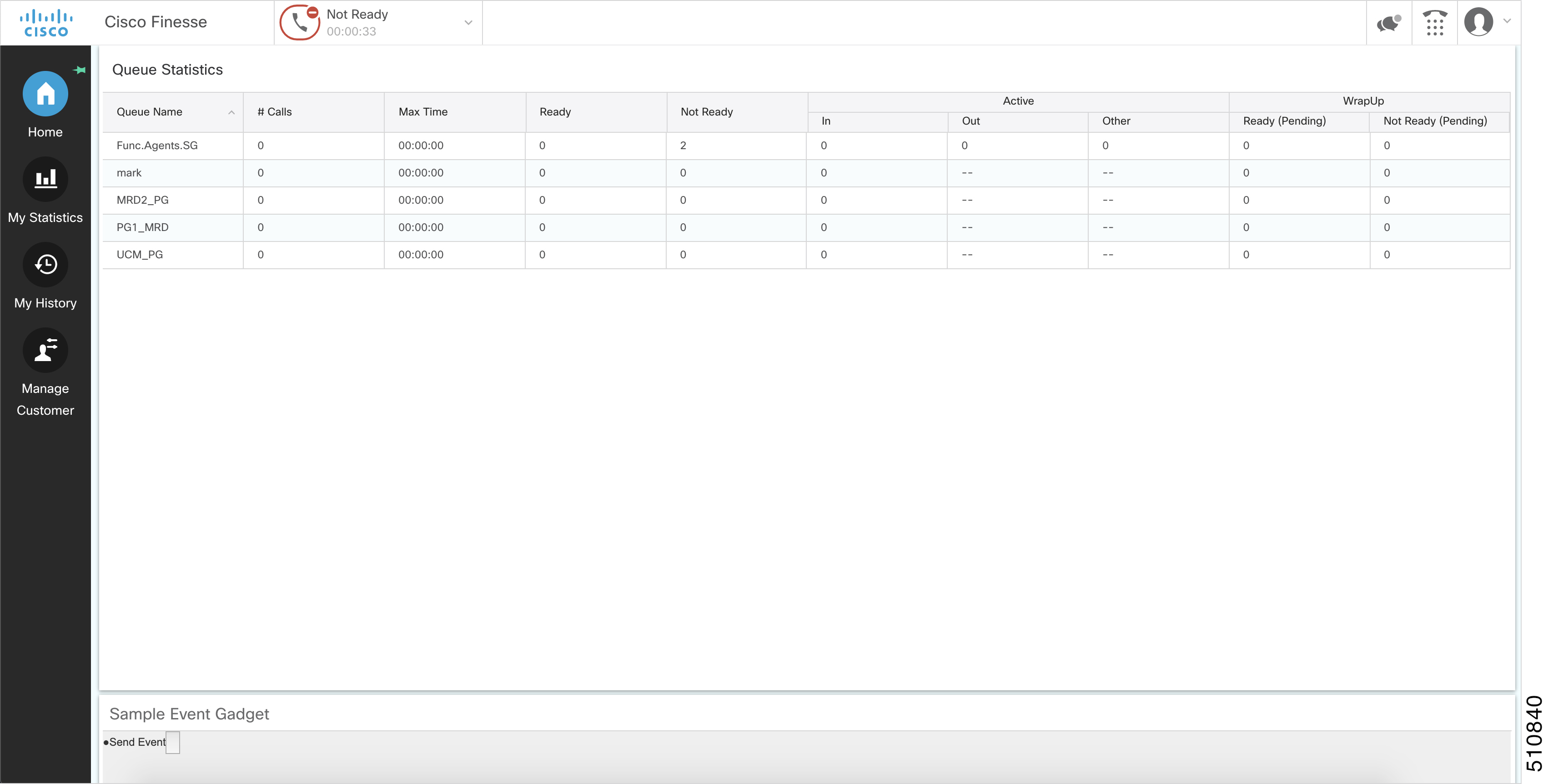
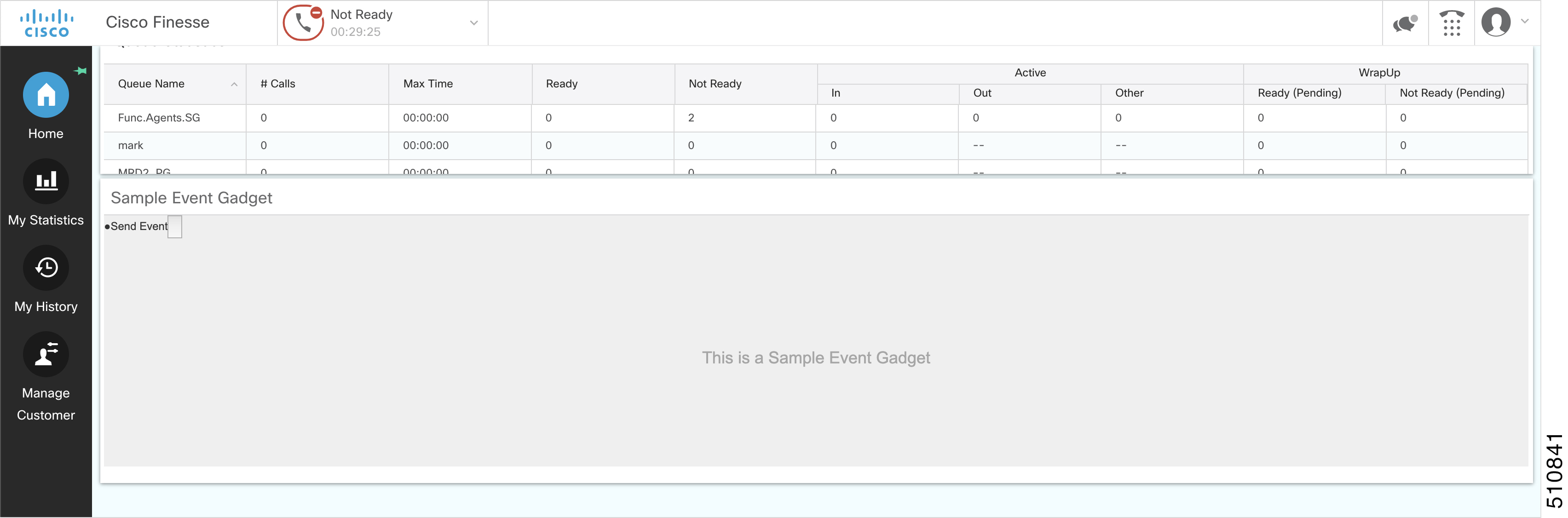
Page 422
Minimal view—Displays minimum information which is default option. This displays only 10 fields out of
50 which are the most critical information about the customer such as, customer id, first name, last name, and
email address.
Enlarged view—Displays maximum information which displays all the 50 fields related to the customer
information.
A simple button can be used to toggle these views. The minimal view takes less space. Hence a gadget with
lesser height would suffice. The enlarged view takes more space to fit in the content in a user-friendly manner
(no or minimal scrollbars).
Example of Toggle View
var view = 'minimal'; // view is minimal by default
function toggleView() {
if (view === 'minimal') {
view = 'enlarged';
// add more fields to the DOM here and do something else which is also required.
// Once you have the DOM updated with the content use the adjustHeight API to adjust
the height of the iFrame in px according your need
gadgets.window.adjustHeight(500);
} else {
// here we are going back to minimal view
view = 'minimal';
// remove the extra fields from here and do something else which is also required.
// Once you have the DOM updated with the content use the adjustHeight API to adjust
the height of the iFrame in px according your need
gadgets.window.adjustHeight(100);
}
}
In the above example, the dynamic nature of the view is limited to two fixed sizes, one is the minimal view
which can always fit in an iFrame of height 100 pixels and the other is the enlarged view with more details
which can fit in an iFrame of height 500 pixels.
Calling the gadgets.window.adjustHeight() without Parameter
Consider a gadget with a grid which displays the real-time data of the signed-in users in a team to a Supervisor.
This grid would dynamically update whenever a user of that team signs-in or signs-out. The size of the grid
can vary from one row to n number of rows. To calculate the height of the gadget with respect to the changing
number of rows in the grid you must call the gadgets.window.adjustHeight(opt_height) API without any
parameter.
Whenever gadgets.window.adjustHeight(opt_height) API is called without the height parameter, it
calculates the height of the content inside the iFrame and applies that height to the iFrame. It is recommended
that the gadget calls this API in the gadget code, which can manipulate the DOM to change the size of the
content inside it.
Example of Adjust Height without Parameter
team.getUsers({
onLoad: function(users) {
// load the grid first time
for (user in users.getCollection()) {
if (user.getState() === 'LOGGED_IN') {
// render each row of logged in users
}
}
// calling the adjustHeight API will automatically calculate the height of the
content and apply it to the iFrame
gadgets.window.adjustHeight();
Cisco Finesse Web Services Developer and JavaScript Guide, Release 12.5(1)
406
Finesse Desktop Gadget Development
Setting Gadget Height—Using Gadget API
Page 423
},
onCollectionAdd: function(user) {
// add the newly added user to the grid
if (user.getState() === 'LOGGED_IN') {
// add this row to the grid
}
// adjusts the height each time a row is added, so that the content is fully visible
in the iFrame
gadgets.window.adjustHeight();
}
});
Cisco Finesse Web Services Developer and JavaScript Guide, Release 12.5(1)
407
Finesse Desktop Gadget Development
Setting Gadget Height—Using Gadget API
Page 424
Cisco Finesse Web Services Developer and JavaScript Guide, Release 12.5(1)
408
Finesse Desktop Gadget Development
Setting Gadget Height—Using Gadget API
Page 425
C H A P T E R 9
Third-Party Gadgets
Cisco Finesse provides a mechanism for you to upload third-party gadgets to the Finesse server. This mechanism
allows one user in the Finesse system to upload gadgets to one directory using secure FTP (SFTP).
The account used to upload gadgets is named 3rdpartygadget.The directory where third-party gadgets are
deployed is:
/files
The 3rdpartygadget account only has permission to this directory (and any directories created under it).
• Enable or Reset 3rdpartygadget Account, on page 409
• CSS Requirements, on page 410
• Upload Third-Party Gadgets, on page 410
• Permissions, on page 412
• Replication, on page 413
• Migration, on page 413
• Backup and Restore, on page 413
• Restrictions, on page 413
• CORS Support for Finesse REST APIs, on page 413
Enable or Reset 3rdpartygadget Account
Use the following CLI command to enable (or reset) the password for the 3rdpartygadget account:
utils reset_3rdpartygadget_password
You are prompted to enter a password. After you enter a password, you are prompted to confirm the password.
You must set the password before you can upload gadgets using SFTP.
You must enable or reset the password for the 3rdpartygadget account on install. The password must be
between 5 and 32 characters long and must not contain spaces or double quotes (").
Note
Cisco Finesse Web Services Developer and JavaScript Guide, Release 12.5(1)
409


Page 426
CSS Requirements
By default, Finesse rewrites the linked CSS in your gadget, which in some cases is not desirable as it results
in a loss of functionality if the CSS you are loading refers to other asynchronous elements. As a result, for all
third-party gadgets, you can bypass the content rewriting for CSS by including the following in your gadget
XML:
1.
Add the optional feature "content-rewrite" to disable the CSS rewrite:
<Optional feature="content-rewrite">
<Param name="expires">86400</Param>
<Param name="include-url">.*</Param>
<Param name="exclude-url">.css</Param>
</Optional>
2.
Include UserPref for "externalServerHost":
<UserPref name="externalServerHost"/>
3.
To reference the CSS file, perform one of the following:
• If the gadget is hosted on the Finesse server, reference the CSS file using externalServerHost:
<link rel="stylesheet"
href="UP_externalServerHost/3rdpartygadget/files/<yourgadgetname>/<path to CSS
file>/<CSS filename>.css"
type="text/css"/>
where you must update <yourgadgetname> to the filename of your gadget under the 3rdpartygadget
/files folder and update the remaining path variables to the location of the CSS file for your
gadget.
• If the gadget is hosted on a server external to Finesse, reference the CSS file using the URL:
<link rel="stylesheet"
href="[https:]//<hostname>/<path to CSS file>/<CSS filename>.css"
type="text/css"/>
where you must update the URL variables to the location of the CSS file on your external server,
and where specifying the protocol (https ) is optional. (If you omit the protocol, Finesse uses the
default protocol of the page.)
Finesse Desktop Gadget Container restrains special characters while loading a CSS3 file. See Handling Special
Characters in CSS, on page 403
Note
Upload Third-Party Gadgets
After you set the password for the 3rdpartygadget account, you can use SFTP to upload third-party gadgets
to the Finesse server, as illustrated in the following example. Note that third-party gadget files must be .xml
files. It does not support .jsp files.
Cisco Finesse Web Services Developer and JavaScript Guide, Release 12.5(1)
410
Third-Party Gadgets
CSS Requirements

Page 427
Finesse allows you to upload third-party gadgets to your own web server, however, you must ensure that the
Finesse server has access to your web server.
Note
my_workstation:gadgets user$ sftp 3rdpartygadget@<finesse>
3rdpartygadget@<finesse>'s password:
Connected to <finesse>.
sftp> cd /files
sftp> put HelloWorld.xml
Uploading HelloWorld.xml to /files/HelloWorld.xml
HelloWorld.xml
sftp> exit
After you upload a gadget, it is available under the following URL:
https://<finesse>/3rdpartygadget/files/
To access the gadget uploaded in the previous example, use the following URL:
https://<finesse>/3rdpartygadget/files/HelloWorld.xml
When you add a gadget to the desktop layout, that gadget can be referenced using a relative path. For more
information on adding third party gadgets to the Finesse desktop layout, see the section Manage Desktop
Layout in the Cisco Finesse Administration Guide.
To include the gadget that was uploaded in the previous example in the desktop layout, add the following
XML (highlighted) to the layout:
<finesseLayout xmlns="http://www.cisco.com/vtg/finesse">
<layout>
<role>Agent</role>
<page>
<gadget>/desktop/gadgets/CallControl.jsp</gadget>
<gadget>/3rdpartygadget/files/HelloWorld.xml</gadget>
</page>
...
</layout>
<layout>
<role>Supervisor</role>
<page>
<gadget>/desktop/gadgets/CallControl.jsp</gadget>
<gadget>/3rdpartygadget/files/HelloWorld.xml</gadget>
</page>
...
</layout>
</finesseLayout>
You cannot delete, rename or change permissions of a folder while using SFTP in 3rd party gadget accounts
for Unified CCX deployments. To perform these actions, SELinux has to be in permissive mode. This can be
accomplished by running the following CLI command:
utils os secure permissive
Note
Cisco Finesse Web Services Developer and JavaScript Guide, Release 12.5(1)
411
Third-Party Gadgets
Upload Third-Party Gadgets

Page 428
Because of browser caching and caching in the Finesse web server, you may need to clear the browser cache
or restart the Cisco Finesse Tomcat service before gadget changes take effect. If you make a change to a
gadget and the change is not reflected on the Finesse desktop, clear your browser cache.
If you do not see the changes after you clear the browser cache, use the following CLI command to restart
the Cisco Finesse Tomcat service:
admin:utils service restart Cisco Finesse Tomcat
Note
Automatic Compression of Third-party Gadget Resources
To optimize the browser resource fetching and reduce network bandwidth, the Finesse server automatically
compresses the third-party gadget resources into gz format. A watcher service running in the Finesse server
monitors the third-party gadgets folder for any updates. It compresses the resource files such as image files
and css accordingly, to generate the compressed gz file. The request originating from the browser, Finesse
desktop adds HTTP request header Accept-Encoding:gzip and the response from the Finesse server includes
Content-Encoding:gzip HTTP header to achieve the same.
Third-party Gadget Limitations
Third-party gadgets must be .xml files. You cannot use .jsp files.
Permissions
If a newly uploaded third-party gadget does not render via the desktop layout or when you launch it directly
in a browser, the gadget files may not have the correct permissions. If gadget files do not have read permissions
for everyone else (for example, the file permission is 770), Cisco Finesse Tomcat cannot read them. The
minimum file permission should be 644.
If a gadget file does not have the correct permissions, when you launch it directly in the browser, you receive
a 404 “Resource not available” error. When you try to launch the gadget via the desktop layout, you receive
an error message that states the requested resource is not available.
To change file permissions on the Finesse server, use SFTP (CLI or client program) as shown in the following
example:
$ sftp 3rdpartygadget@172.27.184.59
3rdpartygadget@172.27.184.59's password:
Connected to 172.27.184.59.
sftp> cd files
sftp> ls -l
---------- 1 751 751 0 Dec 6 19:40 MyGadget.xml
sftp> chmod 644 MyGadget.xml
Changing mode on /files/MyGadget.xml
sftp> ls -l
-rw-r--r-- 1 751 751 0 Dec 6 19:40 MyGadget.xml
sftp>
Cisco Finesse Web Services Developer and JavaScript Guide, Release 12.5(1)
412
Third-Party Gadgets
Permissions

Page 429
Replication
You must set the password for the 3rdpartygadget account on both the primary and secondary Finesse servers.
Gadgets must be manually uploaded to both the primary and secondary Finesse servers.
Migration
Gadgets are not migrated when you perform an upgrade. You must manually upload the gadgets to the primary
and secondary Finesse servers each time you update the system.
The 3rdpartygadget account password is not migrated across upgrades. After an upgrade, you must reset the
password for the 3rdpartygadget account before you can make changes to third-party gadgets. You must reset
the password on both the primary and secondary Finesse servers.
Backup and Restore
Third-party gadgets are preserved when you perform a DRS backup and restore.
Restrictions
Any attempt to GET JavaServer Pages (jsp) using the URL https://<finesse>/3rdpartygadget/files is blocked.
You will receive a 403 (Access Denied) error code when attempting to retrieve a jsp.
CORS Support for Finesse REST APIs
Cross-Origin Resource Sharing (CORS) is a verification mechanism that uses additional HTTP headers to let
a user gain permission to access selected resources from a server on a different origin (domain) than the site
currently in use. By default, CORS support is disabled for Cisco Finesse and Cisco Finesse Notification
Service. The CORS support can be enabled by the Administrator for specific origins listed in the allowed
origin list using CLIs. For more information see, Cisco Finesse Admin guide 12.0(1) located at
https://www.cisco.com/c/en/us/support/customer-collaboration/finesse/products-user-guide-list.html. CORS
requests that are originating from the allowed origin list will be honored as per CORS RFC.
Cisco Finesse Web Services Developer and JavaScript Guide, Release 12.5(1)
413
Third-Party Gadgets
Replication
Page 430
Cisco Finesse Web Services Developer and JavaScript Guide, Release 12.5(1)
414
Third-Party Gadgets
CORS Support for Finesse REST APIs
Page 431
C H A P T E R 10
Cisco Finesse JavaScript APIs
• Client Services, on page 415
• Container Services, on page 417
• ClientLogger, on page 437
• Digital Channel, on page 438
• Gadget Configuration, on page 446
• Interfaces, on page 447
• REST Services, on page 448
• ShortcutKey Service, on page 519
• Utilities, on page 524
• JSON Schema, on page 540
Client Services
Class finesse.clientservices.ClientServices
Allows clients to make the Cisco Finesse API requests and use Cisco Finesse events by using the JavaScript
functions that are provided by this module. This service layer establishes a notification connection that is
shared between all the gadgets and the desktop for its eventing needs. It uses events for client subscriptions
and constructs API requests.
Methods
getNotificationConnectionState()
Retrieves the current state of the BOSH/WebSocket connection.
Example
finesse.clientservices.ClientServices.getNotificationConnectionState();
Returns
{String} The current state of the BOSH/WebSocket connection from the following options:.
• Connected—When the connection is established between client and openfire.
• Recovered —When the connection is re-established after a failure.
• Failing —When the notification service or the Cisco Finesse server is down.
Cisco Finesse Web Services Developer and JavaScript Guide, Release 12.5(1)
415

Page 432
getRestHost()
Retrieves the destination host where the REST requests are proxied through Shindig. This method can be used
before making REST requests to retrieve the hostname.
Example
finesse.clientservices.ClientServices.getRestHost();
Returns
{String} The hostname of Cisco Finesse.
init(config)
Initiates the ClientServices module with the specified configuration parameters. For more information, see
Gadget Configuration, on page 446.
Example
finesse.clientservices.ClientServices.init(finesse.gadget.Config)
Throws
{Error} If the valid parameter is missing during initialization.
registerOnConnectHandler(handler)
Adds a handler to be invoked when the following conditions are met:
• Cisco Finesse goes IN_SERVICE wherein all the operations of Cisco Finesse is performed or accepted.
• BOSH/WebSocket connection is established and the client application communicates with the Cisco
Finesse Notification Service through BOSH/WebSocket to receive notifications. The loss of this connection
means that the server is UNAVAILABLE or that the client cannot reach the server.
• Cisco Finesse user presence becomes available. The presence indicates whether Finesse has an active
connection to the Cisco Finesse Notification Service (Unified CCE) or the Cisco Unified CCX Notification
Service (Unified CCX). An UNAVAILABLE presence for the Cisco Finesse XMPP user means that the
connection is lost.
For more information.
If these conditions are met when this function is called, the handler is invoked immediately.
Example
_cs = finesse.clientservices.ClientServices;
_cs.registerOnConnectHandler(_connectionConnectHandler);
_connectionConnectHandler = function () {
// Perform the logic
}
Parameters
Required
Description
Type
Name
Yes
The function that is invoked when the conditions are met.
Registers only one handler at a time. Handlers registered earlier
are overwritten.
Function
handler
Cisco Finesse Web Services Developer and JavaScript Guide, Release 12.5(1)
416
Cisco Finesse JavaScript APIs
Client Services
Page 433
registerOnDisconnectHandler(handler)
Adds a handler or callback to be invoked when any of the following occurs:
• Cisco Finesse is no longer IN_SERVICE
• BOSH/WebSocket connection is lost
• Cisco Finesse user presence becomes UNAVAILABLE
If any of these conditions are met at the time this function is called, the callback is invoked immediately.
Example
_cs = finesse.clientservices.ClientServices;
_cs.registerOnDisconnectHandler(_connectionDisconnectHandler);
_connectionDisconnectHandler = function () {
// Perform the logic
}
Parameters
Required
Description
Type
Name
Yes
The function that is invoked when the conditions are met. Registers
only one handler at a time. Handlers registered earlier are
overwritten.
Function
handler
Container Services
Class finesse.containerservices.ContainerServices
Provides container level services for gadget developers. Gadgets can utilize the container dialogs and event
handling to add or remove a service.
Example
var containerServices = finesse.containerservices.ContainerServices.init();
containerServices.addHandler(
finesse.containerservices.ContainerServices.Topics.ACTIVE_TAB,
function() {
clientLogs.log("Gadget is now visible"); // log to Finesse logger
// automatically adjust the height of the gadget to show the html
gadgets.window.adjustHeight();
}
);
containerServices.makeActiveTabReq();
Methods
activateMyTab()
Activates the tab in the container in which the gadget is present.
Example
finesse.containerservices.ContainerServices.activateMyTab();
Cisco Finesse Web Services Developer and JavaScript Guide, Release 12.5(1)
417
Cisco Finesse JavaScript APIs
Container Services
Page 434
activateTab(tabId)
Activates a particular tab in the container.
Example
finesse.containerservices.ContainerServices.activateTab(tabId);
Parameters
Required
Description
Type
Name
Yes
The Id (not the label text) of the tab is activated. If the
Id is invalid, no action occurs.
String
tabId
addHandler(topic, callback)
Adds a handler for the specific Container Services topic. For more information on topics, see Container
Services Topics, on page 423.
Example
finesse.containerservices.ContainerServices.addHandler(finesse.containerservices.ContainerServices.Topics.
TIMER_TICK_EVENT,callback);
Parameters
Required
Description
Type
Name
Yes
Hub topic that the gadget wants to listen to. For more
information on topics, see Container Services Topics, on
page 423.
String
topic
Yes
An asynchronous callback function that is invoked when the
hub topic is notified.
Function
callback
collapseMyGadget()
Collapses the gadget by hiding its contents for gadgets that are collapsible. In the collapsed state, only the
gadget header is displayed.
Example
finesse.containerservices.ContainerServices.collapseMyGadget();
To make the gadget collapsible, add <Optional feature="collapsible" /> in to the ModulePrefs inside
the gadget XML.
Example: Enable Collapse Feature
<ModulePrefs title="Sample Gadget" description="Sample Gadget">
<Optional feature="collapsible" />
</ModulePrefs>
Ensure that the gadget height is set using gadgets.window.adjustHeight before making a call to
finesse.containerservices.ContainerServices.collapseMyGadget.
Note
Cisco Finesse Web Services Developer and JavaScript Guide, Release 12.5(1)
418
Cisco Finesse JavaScript APIs
Container Services

Page 435
expandMyGadget()
Expands the gadget which is collapsed to display its contents.
Example
finesse.containerservices.ContainerServices.expandMyGadget();
Ensure that the gadget height is set using gadgets.window.adjustHeight before making a call to
finesse.containerservices.ContainerServices.expandMyGadget.
Note
getMyGadgetId()
Retrieves the Id of the gadget.
Example
finesse.containerservices.ContainerServices.getMyGadgetId();
Returns
{Number} Id of the gadget
getMyGadgetView()
Returns the current view details of the gadget. To identify if the gadget is in canvas (maximized) or default
(restored) state, you must use this at the gadget inital load time. In all the other scenarios, gadget can use
finesse.containerservices.ContainerServices.Topics.GADGET_VIEW_CHANGED_EVENT to get to the gadget
view change events.
Example
containerServices = finesse.containerservices.ContainerServices.init();
var viewConfig = containerServices.getMyGadgetView();
var newgadgetHeight = viewConfig.maxAvailableHeight;
Returns
{Object} The gadget details that include the following:
• gadgetId—The Finesse gadget ID
• tabId—The tab ID of the container or the gadget
• maxAvailableHeight—Maximum available height that can be used by the gadget iframe
• view—'canvas' or 'default', where canvas is maximized and default is restored state of a gadget
getMyTabId()
Retrieves the tabId of the container or gadget.
Example
finesse.containerservices.ContainerServices.getMyTabId();
Returns
{String} The tabId of the container or gadget.
Cisco Finesse Web Services Developer and JavaScript Guide, Release 12.5(1)
419
Cisco Finesse JavaScript APIs
Container Services

Page 436
hideDialog()
Hides the user interface modal dialog.
Example
var containerServices = finesse.containerservices.ContainerServices.init();
containerServices.hideDialog();
init()
Initiates the ContainerServices module.
The init method must be called before using the ContainerServices object for invoking any other functionality.
Note
Example
finessse.containerServices.ContainerServices.init();
Returns
{finesse.containerServices.ContainerServices} The initiated finesse.containerServices.ContainerServices
reference.
makeActiveTabReq()
Requests to activate the tab in which the gadget is present.
Example
finesse.containerservices.ContainerServices.makeActiveTabReq();
publish(topic, data)
Publishes data to the specified topic on the OpenAjax hub. Since gadgets reside in different iFrames, message
publication is the only way to communicate with each other. This method gives a mechanism for the gadgets
to have their data published through custom topics, which in turn can be used by other gadgets by subscribing
to the same topic.
For example, OnClick is an element in one gadget which triggers an action in another gadget that is achieved
by using this method.
Example
finesse.containerservices.ContainerServices.publish('CUSTOMTOPIC', data);
finesse.containerservices.ContainerServices.addHandler("CUSTOMTOPIC", function(data) {
// Perform the logic
});
Parameters
Required
Description
Type
Name
Yes
Hub topic that the gadget wants to listen to. For
more information on topics, see Container
Services Topics, on page 423.
String
topic
Cisco Finesse Web Services Developer and JavaScript Guide, Release 12.5(1)
420
Cisco Finesse JavaScript APIs
Container Services

Page 437
Required
Description
Type
Name
Yes
The data to be published for the specified topic
on the OpenAjax hub.
Object
data
reloadMyGadget()
Reloads the current gadget. This method is useful when the gadget encounters an error.
Example
var containerServices = finesse.containerservices.ContainerServices.init();
containerServices.reloadMyGadget();
reloadMyGadgetFromUrl(url)
Updates the URL for this gadget and reloads the gadget. This method allows the gadget to be reloaded from
a different URL which can be useful for third-party gadgets implementing a failover mechanism.
Example
var containerServices = finesse.containerservices.ContainerServices.init();
containerServices.reloadMyGadgetFromUrl(url);
Parameters
Required
Description
Type
Name
Yes
The URL that the gadget should reload from.
String
url
removeHandler(topic, callback)
Removes previously added handler for the specified Container Services topic.
Example
finesse.containerservices.ContainerServices.removeHandler(finesse.containerservices.ContainerServices.Topics.
TIMER_TICK_EVENT,callback);
Parameters
Required
Description
Type
Name
Yes
Hub topic that the gadget wants to listen to. For more
information on topics, see Container Services Topics, on page
423.
String
topic
No
An asynchronous callback function to be removed for the
specified Container Services topic.
Function
callback
showDialog(options)
Shows the user interface modal dialog with the specified parameters. The parameters are:
• Title of the modal dialog
• Message inside the modal dialog
Cisco Finesse Web Services Developer and JavaScript Guide, Release 12.5(1)
421
Cisco Finesse JavaScript APIs
Container Services
Page 438
• Label for the button to close the modal dialog
• If the modal dialog should block other dialogs
• If the modal dialog is draggable
• If the modal dialog is fixed-size
Figure 14: Sample UI Modal Dialog
Custom JavaScript-based modal dialogs and alerts negatively affects the functionality of the Finesse desktop
and is not recommended to be used.
Note
Example
var containerServices = finesse.containerservices.ContainerServices.init();
containerServices.showDialog({
title: 'Error Occurred',
message: 'Something went wrong',
close: function() {
}
});
Parameters
Required
Description
Type
Name
Yes
Title of the modal dialog.
String
title
Yes
Options for the modal dialog.
• close—Callback function that gets invoked
when the close button of the modal dialog is
clicked.
• message—Message to be displayed in the
modal dialog.
• isBlocking—Indicates whether the modal
dialog blocks other dialogs from being shown.
Object
options
Returns
{Object} The modal dialog object of the modal dialog DOM (Document Object Model) element.
Cisco Finesse Web Services Developer and JavaScript Guide, Release 12.5(1)
422
Cisco Finesse JavaScript APIs
Container Services

Page 439
tabVisible()
Retrieves the visibility of the current gadget only after the initialization of the gadget.
Example
finesse.containerservices.ContainerServices.tabVisible();
Returns
{Boolean} The visibility of the gadget.
Container Services Topics
Class finesse.containerservices.ContainerServices.Topics
Set of topics used for subscribing events from ContainerServices. The method to subscribe to topics is
finesse.containerservices.ContainerServices.containerServices.addHandler();. For more
information, see addHandler(topic, callback), on page 418.
Table 8: Field Details
Description
Topic Name
Listens to an active call event. Callback is invoked when
an agent voice state changes from Ready or Not Ready to
any other non-callable state or vice versa.
There are two types of responses:
• Active call—ActiveCallStatusEvent {status: true,
type: "info"}
• End or inactive call—ActiveCallStatusEvent {status:
false, type: "info"}
ACTIVE_CALL_STATUS_EVENT
Listens to changes to the active tab. Callback is invoked
when the tab containing the gadget becomes active.
The method to use when the gadget is in the active tab
finesse.containerservices.ContainerServices.makeActiveTabReq()
ACTIVE_TAB
Listens to changed events of the gadget view. Callback is
invoked when a gadget view changes.
There are two types of views:
• Default (set by the developer)
• Canvas (full-screen view)
The callback passes
finesse.containerservices.GadgetViewChangedEvent.
For more information, see Finesse Desktop Gadget
Development section in Cisco Finesse Web Services
Developer Guide at https://developer.cisco.com/docs/
finesse/#!rest-api-dev-guide.
GADGET_VIEW_CHANGED_EVENT
Cisco Finesse Web Services Developer and JavaScript Guide, Release 12.5(1)
423
Cisco Finesse JavaScript APIs
Container Services Topics
Page 440
Description
Topic Name
Listens to the TimerTick event. Callback is invoked when
this event is run. Cisco Finesse publishes TimerTickEvent
to OpenAjax hub every 1000 milliseconds.
The callback passes
finesse.containerservices.TimerTickEvent.
For more information, see Finesse Container Timer section
in Cisco Finesse Web Services Developer Guide at
https://developer.cisco.com/docs/finesse/
#!rest-api-dev-guide.
TIMER_TICK_EVENT
Listens to workflow action traffic events. When the trigger
and the conditions defined for a workflow are completed,
then a workflow action event is published, which is used
to run the workflow action.
The callback passes
finesse.containerservices.WorkflowActionEvent.
For more information, see Workflow Action Event section
in Cisco Finesse Web Services Developer Guide at
https://developer.cisco.com/docs/finesse/
#!rest-api-dev-guide.
WORKFLOW_ACTION_EVENT
Finesse Toaster
Class finesse.containerservices.FinesseToaster
FinesseToaster is a utility class that displays Cisco FinesseToaster notifications. FinesseToaster is a built-in
browser notification that appears at the bottom of the screen, and is typically used to notify the user of important
events when the agent desktop browser tab is not active. FinesseToaster uses the HTML5 Notification API
to display the notification. For more details on HTML5 Notification API and browser compatibility, see
https://developer.mozilla.org/en-US/docs/Web/API/notification#Browser_compatibility.
Internet Explorer does not support the toaster functionality.
Note
Figure 15: Sample Finesse Toaster Notification
Cisco Finesse Web Services Developer and JavaScript Guide, Release 12.5(1)
424
Cisco Finesse JavaScript APIs
Finesse Toaster

Page 441
Methods
init(config, logger)
Initiates the Cisco Finesse Toaster module for the gadget to be able to display notifications.
Example
finesse.containerservices.FinesseToaster.init("config,logger");
Parameters
Required
Description
Type
Name
Yes
The configuration data which is either the finesse.container.Config
or finesse.gadget.Config.
Object
config
No
The finesse.cslogger.ClientLogger object for the client logging
messages.
For example, you can use finesse.cslogger.ClientLogger as a
parameter.
Object
logger
Returns
{finesse.containerservices.FinesseToaster} The initiated finesse.containerServices.FinesseToaster
reference.
showToaster(title, options)
Displays Cisco FinesseToaster notification to the user.
Example
finesse.containerservices.FinesseToaster.showToaster(
'Incoming Alert', {
body: 'There is new message'
}
);
Parameters
Required
Description
Type
Name
Yes
The title of the Cisco FinesseToaster notification.
String
title
Cisco Finesse Web Services Developer and JavaScript Guide, Release 12.5(1)
425
Cisco Finesse JavaScript APIs
Finesse Toaster
Page 442
Required
Description
Type
Name
Yes
Options for the Cisco FinesseToaster notification.
• body—The text in the Cisco FinesseToaster notification
• icon—The URL of the image for the icon in the Cisco
FinesseToaster notification
Cisco FinesseToaster notification default icons. The
constant lists are:
• TOASTER_DEFAULT_ICONS.INCOMING_CALL_ICON
• TOASTER_DEFAULT_ICONS.INCOMING_CHAT_ICON
• TOASTER_DEFAULT_ICONS.INCOMING_TEAM_MESSAGE
• autoClose—Duration in milliseconds, the Cisco
FinesseToaster notification remains opened. The default
value is 8000 milliseconds.
The autoClose parameter is applicable only for
Chrome and Firefox browsers in Windows OS. In
macOS, Chrome and Firefox browsers
automatically close the toaster notification. In
macOS, the autoClose value is ignored and the
browser automatically closes the toaster
notification.
Note
• showWhenVisible—Determines how the Cisco Finesse
Toaster notification is displayed based on the visibility of
the Cisco Finesse desktop.
• true—Shows the Cisco Finesse Toaster notification
irrespective of whether the Cisco Finesse desktop is
active or not.
• false (default)—Shows the Cisco Finesse Toaster
notification only when the Cisco Finesse desktop is
inactive.
Object
options
Popover Service
Class finesse.containerservices.PopoverService
Cisco Finesse voice component and gadgets hosting digital services uses the
finesse.containerservices.PopoverService to display a popover for incoming calls and chat events.
The popover is different from Cisco Finesse toaster notification. Toaster is a built-in browser notification,
and it appears only if the agent desktop's browser tab is in the background.
Note
Cisco Finesse Web Services Developer and JavaScript Guide, Release 12.5(1)
426
Cisco Finesse JavaScript APIs
Popover Service

Page 443
Figure 16: Sample Popover to Answer a Call
Object Definitions
The finesse.containerservices.PopoverService class uses specific data objects as inputs. The properties and
their values of the object are JSON Schema compliant. The format is defined below.
actionData
The actionData object defines the set of actions that can be taken and the buttons to be displayed popover.
finesse.containerservices.PopoverSchema.getActionDataSchema()
Sample actionData Object
actionData = {
"dismissible": false,
"keepMaximised": false,
"clientIdentifier": 'popup1', // A string to uniquely identify a specific popover
"requiredActionText": "Please answer the call from your phone",
"buttons": // Optional. Max 2
[{
"id": "No",
"label": "Decline",
"type": "Affirm",
"hoverText": "NOOO",
"confirmButtons": [ // confirmButtons is an optional property in actionData
{
"id": "Yes",
"label": "Reject - Return to campaign",
"hoverText": "YESSSS"
},
{
"id": "No",
"label": "Close - Remove from campaign",
"hoverText": ""
}
]
}]
};
The payload details are explained in the table below.
Cisco Finesse Web Services Developer and JavaScript Guide, Release 12.5(1)
427
Cisco Finesse JavaScript APIs
Popover Service
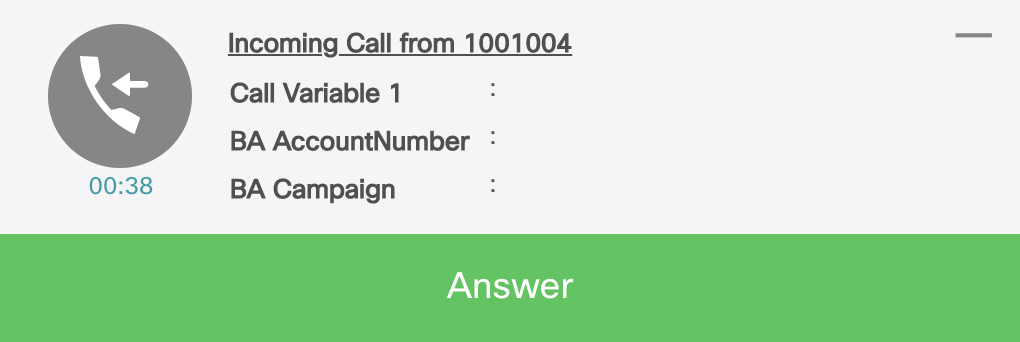
Page 444
Description
Type
Key
Determines whether the popover must be manually
dismissed.
• True—Popover to be dismissed automatically after
the specified time is lapsed.
• False—User to take action on the displayed popover
based the buttons defined. For example, Answer or
Decline.
Boolean
dismissible
Determines whether the popover must be maximized or
minimized.
• True—Shows the popover minimized when there is
more than one popover.
• False—Shows the popover maximized when there
is more than one popover.
Boolean
keepMaximised
Unique identifier across all popovers. Used in the callback
for popover events.
String
clientIdentifier
The text in the popover that describes the user action.
String
requiredActionText
(optional)
Options for the action buttons (maximum two) in the
popover.
Array
buttons (optional)
Unique identifier across all popovers. Used in the callback
for popover events.
String
-->id
The text of the action button.
String
-->label
The color of the button.
• Affirm—Green button refers to affirm
• Decline—Light gray button refers to decline.
Enum
-->type
The tooltip when you hover the mouse pointer over the
'requiredActionText' (popover) when the text is truncated.
String
-->hoverText (optional)
The confirmation message with the buttons in response
to the user action.
Object
-->confirmButtons (optional)
Unique identifier of the confirmation button.
String
–-->id
The label on the button.
String
–-->label
The tooltip message on the confirmation button.
String
–-->hoverText
The following method can be used to get the schema for the actionData object.
finesse.containerservices.PopoverSchema.getActionDataSchema().
Cisco Finesse Web Services Developer and JavaScript Guide, Release 12.5(1)
428
Cisco Finesse JavaScript APIs
Popover Service
Page 445
bannerData
The bannerData object helps to configure the data displayed on the popover.
finesse.containerservices.PopoverSchema.getBannerDataSchema()
Sample bannerData Object
bannerData = {
"icon": { // Mandatory
"type": "collab-icon",
"value": "chat"
},
"content": [ // Optional. first 6 name/value pairs is shown in popover
{
"name": "Customer Name",
"value": "Michael Littlefoot"
},
{
"name": "Phone Number",
"value": "+1-408-567-789"
},
{
"name": "Account Number",
"value": "23874567923"
},
{
"name": "Issue", // For the below one, tool tip is displayed
"value": "a very long text."
}
],
"headerContent": {
"maxHeaderTitle": "Popover maximised title",
"minHeaderTitle": "Popover minimized title"
}
};
The payload details are explained in the table below.
Description
Type
Key
The icon displayed in the popover.
Object
icon
The type of icon in the popover. For more information, see Cisco
Common Desktop Stock Icon Names with Image, on page 441.
Enum
-->type
The display name of the icon.
String
–>value
The list of six names or value pairs to be displayed in the popover.
Array
content (optional)
The display name of an individual name or value pair to be
displayed on the popover.
String
-->name
The corresponding value of the name for the individual name or
value pair to be displayed on the popover.
String
-->value
The title of the popover when it is maximized or minimized.
Object
headerContent
The title of the popover when it is maximized.
String
-->maxHeaderTitle
The title of the popover when it is minimized.
String
-->minHeaderTitle
Cisco Finesse Web Services Developer and JavaScript Guide, Release 12.5(1)
429
Cisco Finesse JavaScript APIs
Popover Service
Page 446
The following method can be used to get the schema for the bannerData object.
finesse.containerservices.PopoverSchema.getBannerDataSchema()
timerData
The timerData object helps configure the timer that displayed on the popover, which indicates the time left
for the popover to be dismissed.
finesse.containerservices.PopoverSchema.getTimerDataSchema()
Sample timerData Object
timerData = {
"displayTimeoutInSecs": 60,
"display": true, // false means no displayable UI for timer
"counterType": 'COUNT_UP'
}
The payload details are explained in the table below.
Description
Type
Key
The popover timeout in seconds. The minimum is 3 seconds and the
maximum is 3600 seconds. –1 refers to no upper limit.
Integer
displayTimeoutInSecs
(mandatory)
Determines whether the timer must be displayed on the popover.
• True—Shows the time left for the popover to be dismissed.
• False—Shows the popover without the time left for dismissal.
Boolean
display
Determines the direction in which time in the popover should be
updated.
• COUNT_UP—Shows the time elapsed for taking action on the
popover, and the timer begins counting up.
• COUNT_DOWN— Shows the time left for taking action on the
popover, and the timer begins counting down.
Enum
counterType
The following method can be used to get the schema for the timerData object.
finesse.containerservices.PopoverSchema.getTimerDataSchema()
Methods
dismissPopover(popoverId)
Dismisses the popover with the given popover Id.
Parameters
Required
Description
Type
Name
Yes
Unique identifier of the popover to be dismissed. This Id is returned
from the showPopover call.
String
popoverId
Throws
Cisco Finesse Web Services Developer and JavaScript Guide, Release 12.5(1)
430
Cisco Finesse JavaScript APIs
Popover Service
Page 447
{Error} If the service is not initialized.
generatePayload(isExistingPopover, popoverId, bannerData, timerData, actionData)
Generates a single payload for use by the popover service.
Parameters
Required
Description
Type
Name
Yes
Determines whether the popover is shown in the Finesse desktop.
• True—Shows the popover in the Finesse desktop.
• False—Does not show the popover in the Finesse desktop.
Boolean
isExistingPopover
Yes
Unique identifier of the popover to be generated. This Id is
returned from the showPopover call.
String
popoverId
Yes
The data displayed on the popover. For example, Customer
Information such as name and phone number.
For more information on the payload and description, see
bannerData, on page 429.
Object
bannerData
Yes
The time left for the popover to be dismissed. The duration is
displayed in seconds. For example, 00:38.
For more information on the payload and description, see
timerData, on page 430.
Object
timerData
Yes
Describes the set of actions to be taken on the displayed popover.
For example, Answer and Decline.
For more information on the payload and description, see
actionData, on page 427.
Object
actionData
Throws
{Error} If the popoverData is not as per defined format.
init(ContainerService)
Initiates the PopoverService which is used by gadgets.
Parameters
Required
Description
Type
Name
Yes
Provides container level services for gadget developers.
Gadgets can utilize the container dialogs and event
handling to add or remove a service.
Function
ContainerService
Returns
{finesse.containerservices.PopoverService} The initiated finesse.containerServices.PopoverService
reference.
Cisco Finesse Web Services Developer and JavaScript Guide, Release 12.5(1)
431
Cisco Finesse JavaScript APIs
Popover Service
Page 448
showPopover(bannerData, timerData, actionData, actionHandler)
Shows a popover with the specified data. The user interaction or timeout of the popover is notified to the
gadget through the registered actionHandler.
When there is a new popover, the older popover is minimized except the popover related to voice calls.
Note
Parameters
Required
Description
Type
Name
Yes
The data displayed on the popover. For example, Customer
Information such as name and phone number.
For more information on the payload and description, see
bannerData, on page 429.
Object
bannerData
Yes
The time left for the popover to be dismissed. The duration
is displayed in seconds. For example, 00:38.
For more information on the payload and description, see
timerData, on page 430.
Object
timerData
Yes
Describes the set of actions to be taken on the displayed
popover. For example, Answer and Decline.
For more information on the payload and description, see
actionData, on page 427.
Object
actionData
Yes
Handler function that gets invoked for the events that are
associated with the user interactions.
Function
actionHandler
Yes
Unique identifier of the popover to be generated. This Id is
returned from the showPopover call.
String
-->popoverId
Yes
Unique identifier of the source which generates the event.
For example, 'btn_[id]_click', 'dismissed', or 'timeout'.
String
-->source
Throws
{Error} If the popoverData is not as per defined format.
Returns
{String} The popover Id and can be used for subsequent interaction with the service.
updatePopover(popoverId, bannerData, timerData, actionData, actionHandler)
Updates an active popover's displayed content.
Parameters
Required
Description
Type
Name
Yes
Unique identifier of the popover to be generated. This Id is returned
from the showPopover call.
String
popoverId
Cisco Finesse Web Services Developer and JavaScript Guide, Release 12.5(1)
432
Cisco Finesse JavaScript APIs
Popover Service

Page 449
Required
Description
Type
Name
Yes
The data displayed on the popover. For example, Customer
Information such as name and phone number.
For more information on the payload and description, see bannerData,
on page 429.
Object
bannerData
Yes
The time left for the popover to be dismissed. The duration is
displayed in seconds. For example, 00:38.
For more information on the payload and description, see timerData,
on page 430.
Object
timerData
Yes
Describes the set of actions to be taken on the displayed popover. For
example, Answer and Decline.
For more information on the payload and description, see actionData,
on page 427.
Object
actionData
Yes
Handler function that gets invoked for the events that are associated
with the user interactions.
Function
actionHandler
Throws
{Error} If the popoverData is not as per defined format.
Events
Gadget View Changed Event
Class finesse.containerservices.GadgetViewChangedEvent
Contains information about the changed events of the gadget view. There are two types of views supported
for a gadget, that is default and canvas. The default view is the default size of the gadget. Canvas view is a
maximized view of the gadget.
You can set a button to toggle between default view and canvas view. Add <Content type="html"
view="default,canvas"> in the gadget XML. This adds the toggle button in the top right corner of the gadget.
For more information, see Gadget Height Management, on page 404.
The method to subscribe to the changed gadget event is
finesse.containerservices.ContainerServices.containerServices.addHandler() with a topic of
finesse.containerservices.ContainerServices.Topics.GADGET_VIEW_CHANGED_EVENT.
Example
var containerServices = finesse.containerservices.ContainerServices.init();
finesse.containerservices.ContainerServices.addHandler(finesse.containerservices.
ContainerServices.Topics.GADGET_VIEW_CHANGED_EVENT, function(gadgetViewChangedEvent) {
var gadgetId = finesse.containerservices.ContainerServices.getMyGadgetId(),
tabId = finesse.containerservices.ContainerServices.getMyTabId();
if (gadgetViewChangedEvent.getGadgetId() === gadgetId &&
gadgetViewChangedEvent.getTabId() === tabId) {
if (gadgetViewChangedEvent.getView() === 'default') {
gadgets.window.adjustHeight(defaultHeight);
$('#content').html('DEFAULT VIEW');
view = 'default';
Cisco Finesse Web Services Developer and JavaScript Guide, Release 12.5(1)
433
Cisco Finesse JavaScript APIs
Events
Page 450
} else if (gadgetViewChangedEvent.getView() === 'canvas') {
gadgets.window.adjustHeight(gadgetViewChangedEvent.getMaxAvailableHeight());
$('#content').html('CANVAS VIEW');
view = 'canvas';
}
}
Methods
getGadgetId()
Retrieves the gadget Id.
Returns
{String} Unique Identifier for the gadget changing view.
getMaxAvailableHeight()
Retrieves the maximum available height of the gadget.
Returns
{String} The maximum available height for the gadget's view.
getTabId()
Retrieves the tab Id.
Returns
{String} Unique Identifier for the tab where the gadget changing view resides.
getView()
Retrieves the gadget view.
Returns
{String} The view type of the gadget.
Timer Tick Event
Class finesse.containerservices.TimerTickEvent
Contains information about the events of the timer-tick. The method to subscribe to the changed gadget event
is finesse.containerservices.ContainerServices.addHandler() with a topic of
finesse.containerservices.ContainerServices.Topics.TIMER_TICK_EVENT().
When the gadget is attaching a handler for the time ticker topic, it is called periodically with tick frequency
mentioned. By default, the value is one second. For more information, see Finesse Container Timer, on page
402.
Example
finesse.containerservices.ContainerServices.addHandler(finesse.containerservices.
ContainerServices.Topics.TIMER_TICK_EVENT,updateTimer);
Cisco Finesse Web Services Developer and JavaScript Guide, Release 12.5(1)
434
Cisco Finesse JavaScript APIs
Timer Tick Event
Page 451
Method
getDateQueued()
Retrieves the TimerTickEvent dateQueued field.
Returns
{Date} The date object when the TimerTickEvent is queued.
Workflow Action Event
Class finesse.containerservices.WorkflowActionEvent
Contains information about the events of the workflow action. Gadgets subscribe to the
finesse.containerservices.workflowActionEvent to receive workflow action events to run as a result of workflow
evaluations. For more information, see Workflow Action Event, on page 400.
The method to subscribe to the workflow event is
finesse.containerservices.ContainerServices.containerServices.addHandler() with a topic of
finesse.containerservices.ContainerServices.Topics.WORKFLOW_ACTION_EVENT. Gadgets must listen
to events with the handleBy value of “OTHER”, which is configured through cfadmin. Selecting “OTHER”
in cfadmin that implies the action is run by other third-party gadgets and not Finesse desktop. The handleBy
value is fetched by using the function getHandledBy().
For more information, see the Manage Workflows chapter in Cisco Finesse Administration Guide at
https://www.cisco.com/c/en/us/support/customer-collaboration/finesse/products-maintenance-guides-list.html.
Example
var containerServices = finesse.containerservices.ContainerServices.init();
containerServices.addHandler("finesse.containerservices.workflowActionEvent",
function(workflowActionEvent) {
var type, handledby
params = workflowActionEvent.getParams();
actionVariabless = workflowActionEvent.getActionVariables();
handledby = workflowActionEvent.getHandledBy();
type = workflowActionEvent.getType();
//
if (handledby === "OTHER" && type === "BROWSER_POP") {
// Have the logic
}
});
Methods
getActionVariables()
Retrieves the WorkflowActionEvent action variables map.
Returns
{Object} The object for the action variables map, where key is the action variable name, and value is the
Object such as name, type, node, testValue, and actualValue.
getHandledBy()
Retrieves the WorkflowActionEvent handledBy value. Gadgets search for events with a handleBy value of
OTHER.
Cisco Finesse Web Services Developer and JavaScript Guide, Release 12.5(1)
435
Cisco Finesse JavaScript APIs
Workflow Action Event
Page 452
Returns
{String} The handledBy value of the WorkflowAction which is
finesse.containerservices.WorkflowActionEvent.HandledBy.
getName()
Retrieves the WorkflowActionEvent name.
Returns
{String} The name of the WorkflowAction.
getParams()
Retrieves the WorkflowActionEvent parameters map.
Returns
{Object} The object for the parameters map, where key is the param name, and value is the Object such as
name, value, and expandedValue ().
The type of the WorkflowAction are BROWSER_POP and HTTP_REQUEST.
BROWSER_POP
• windowName—Name of the window as seen on the browser tab header.
• path—URL to open.
HTTP_REQUEST
• method—PUT or POST.
• location—FINESSE or OTHER.
• contentType—If applicable, then MIME type of request body. For example, text or plain.
• path—Request URL.
• body—Request content for POST requests.
getType()
Retrieves the WorkflowActionEvent type.
Returns
{String} The type of the WorkflowAction (BROWSER_POP or HTTP_REQUEST).
Workflow Action Event.HandledBy
Class finesse.containerservices.WorkflowActionEvent.HandledBy
Contains information about the set of possible HandledBy values used for WorkflowActionEvent from
ContainerServices. This is provided from the finesse.containerservices.WorkflowActionEvent.getHandledBy
method.
Field Details
Cisco Finesse Web Services Developer and JavaScript Guide, Release 12.5(1)
436
Cisco Finesse JavaScript APIs
Workflow Action Event.HandledBy
Page 453
Description
Name
The Cisco Finesse handles the WorkflowActionEvent. The third-party does the additional
processing with the action. Cisco Finesse handles this WorkflowAction.
FINESSE
The third-party handles the WorkflowActionEvent. Cisco Finesse's Workflow Engine
program ignores the action and expects the Gadget Developers to take action.
OTHER
ClientLogger
Class finesse.cslogger.ClientLogger
Allows gadgets to send the client log messages over the hub by calling the log method of the clientLogger.
This enables the container to collect the logs of the third-party gadget and make it available on the server.
Methods
init(hub, gadgetId, config)
Initiates the client logger object for the client logging messages.
Example
var _clientLogger = finesse.cslogger.ClientLogger;
_clientLogger.init(gadgets.Hub, "MyGadgetId", config);
Parameters
Required
Description
Type
Name
Yes
The Shindig hub topic that the gadgets wants to listen to.
Object
hub
Yes
Unique identifier of the gadget.
String
gadgetId
Yes
The configuration data which is used to get the hostname
for the third-party gadget.
Object
config
log(message, error)
Publishes a log message over the hub.
Example
_clientLogger.log("This is a important message for MyGadget");
Parameters
Required
Description
Type
Name
Yes
The log message displayed in the hub.
String
message
Optional
The message that is associated with the error.
Object
error
Cisco Finesse Web Services Developer and JavaScript Guide, Release 12.5(1)
437
Cisco Finesse JavaScript APIs
ClientLogger
Page 454
Digital Channel
Digital channels are distinct and separate from the voice state control of Cisco Finesse. For example, Email
and Chat. Digital channels are intended for gadgets to represent their custom channels and can be
programmatically used to control the digital channel state.
The Finesse Digital Channel State Control (FNC), a programmable desktop component, is available from
Cisco Finesse Release 12.0(1) onwards. This API provides the schema that is used in
finesse.digital.ChannelService for various digital channel operations.
Figure 17: Component Interaction
Figure 18: Digital Channel Options
Cisco Finesse Web Services Developer and JavaScript Guide, Release 12.5(1)
438
Cisco Finesse JavaScript APIs
Digital Channel
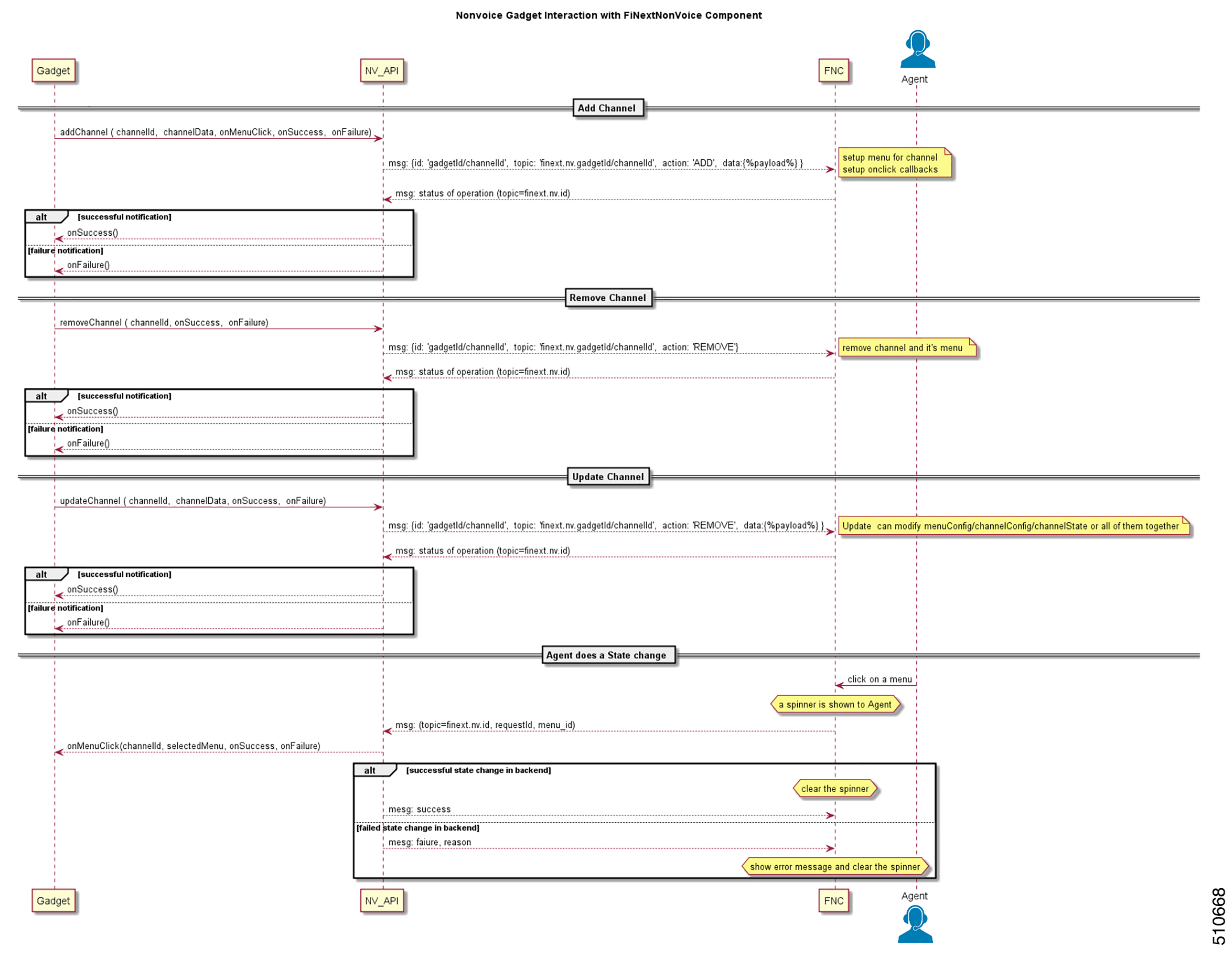
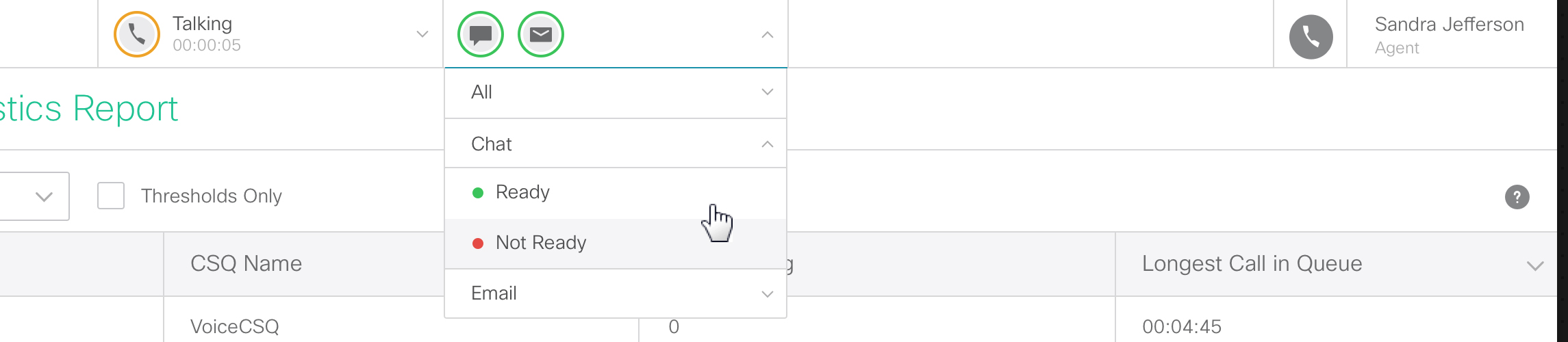
Page 455
Object Definitions
The finesse.digital.ChannelService class uses specific data objects as inputs. The properties and their values
of the object are JSON Schema compliant. The format is defined below.
channelConfig
The channelConfig object helps to configure the digital channel details.
finesse.containerservices.ChannelSchema.getChannelConfigSchema()
Sample channelConfig Object
{
"actionTimeoutInSec": 5,
"icons": [{
"type": "collab-icon",
"value": "Chat"
},
{
"type": "url",
"value": "../../thirdparty/gadget3/channel-icon.png"
}
]
}
The payload details are explained in the table below.
Description
Type
Key
The duration for which the FNC waits after sending the menu selection
request to the gadget. The duration is mentioned in seconds, and the
upper limit is 30 seconds. During this period, no other operation can be
performed on the FNC.
Integer
actionTimeoutInSec
The icons displayed in the header to represent a digital channel.
Array
icons
The type of the icon in the header. For more information, see Cisco
Common Desktop Stock Icon Names with Image, on page 441.
Enum
-->type
The display name of the icon.
String
-->value
The following method can be used to get the schema for the channelConfig object.
finesse.containerservices.ChannelSchema.getChannelConfigSchema()
channelState
The channelState object defines the state of the digital channel.
finesse.containerservices.ChannelSchema.getChannelStateSchema()
Sample channelState Object
{
"label": "Chat & Email",
"currentState": "ready",
"iconColor": "available",
"enable": true,
"logoutDisabled": true,
"logoutDisabledText": "Please go unavailable on chat before logout",
Cisco Finesse Web Services Developer and JavaScript Guide, Release 12.5(1)
439
Cisco Finesse JavaScript APIs
Digital Channel
Page 456
"iconBadge": "none"
"hoverText": "Tooltip text"
}
Description
Type
Key
The label of the digital channel.
String
label
The text that describes the current state of the digital channel.
String
currentState
The color of the icon based on the current state of the digital channel.
• Green color refers to available.
• Red color refers to unavailable.
• Orange color refers to busy.
Enum
iconColor
Determines whether the digital channel is shown in the Finesse desktop.
• True—Shows the digital channel menu in the Finesse desktop.
• False—Does not show the digital channel menu in the Finesse
desktop.
Boolean
enable
Determines whether the logout menu is shown in the user identity
component.
• True—Disables the logout menu in the user identity component.
• False—Enables the logout menu in the user identity component.
For example, during Agent Ready or Busy state, disable the logout
menu and enable it again when the state changes to Not Ready.
Boolean
logoutDisabled
The text to the user if the logout menu is disabled.
String
logoutDisabledText
The type of badge based in the digital channel.
• info refers to the information badge.
• error refers to an error badge.
• warning refers to the warning badge.
• none refers to no badge.
String
iconBadge
The tooltip when you hover the mouse pointer.
String
hoverText
The following method can be used to get the schema for the channelState object.
finesse.containerservices.ChannelSchema.getChannelStateSchema()
menuConfig
The menuConfig object helps to configure the menu details.
finesse.containerservices.ChannelSchema.getMenuConfigSchema()
Cisco Finesse Web Services Developer and JavaScript Guide, Release 12.5(1)
440
Cisco Finesse JavaScript APIs
Digital Channel
Page 457
Sample menuConfig Object
{
"label": "Chat",
"menuItems": [{
"id": "ready-menu-item",
"label": "Ready",
"iconColor": "available"
},
{
"id": "not-ready-menu-item",
"label": "Not Ready",
"iconColor": "unavailable"
}
]
}
Description
Type
Key
The label of the digital channel.
String
label
The list of the menu items for the digital channel.
Array
menuItems
Unique identifier of the digital channel menu. When there is a user action
on the digital channel menu, this Id is returned through the parameter
finesse.digital.ChannelService.selectedMenuItemId.
String
-->id
The text of the menu item.
String
-->label
The color of the icon based on the current state of the digital channel.
• Green color refers to available.
• Red color refers to unavailable.
• Orange color refers to busy.
Enum
-->iconColor
The following method can be used to get the schema for the menuConfig object.
finesse.containerservices.ChannelSchema.getMenuConfigSchema()
Cisco Common Desktop Stock Icon Names with Image
The digital channel configuration schema considers the Cisco Common Desktop icon (CD-icon) name as its
value. The icons are composed of different elements. Sign in to Cisco Finesse and paste the following JavaScript
code in the editor of your browser developer console to see the list of CD-UI icon names and their visual
design. This script cleans the Cisco Finesse web page, displays the icon name, and renders it in an HTML
table. Refresh the browser to reflect the changes.
You can also define this value in a gadget.
Note
Example
var showIcons = function() {
$('body').html('');
Cisco Finesse Web Services Developer and JavaScript Guide, Release 12.5(1)
441
Cisco Finesse JavaScript APIs
Cisco Common Desktop Stock Icon Names with Image

Page 458
$('body').append("<table border='1' background-color:#a0c0a0;'>" +
"<thead style='display: none;'><th>Icon Name</th>" +
"<th>Icon</th></thead><tbody
" +
"style='display: block;
overflow-y: auto; height: 600px'>" +
"</tbody></table>");
var icons = window.top.cd.core.cdIcon;
var addIcon = function(name, iconJson) {
var width = (iconJson.width) ? iconJson.width : 1000;
var height = (iconJson.height) ? iconJson.height : 1000;
var iconBuilt = "<tr><td>" + name +
"</td><td><svg width='" + width +
"' height='" + height +
"' style='height: 30px; width: 30px;'
viewBox='" +
iconJson.viewBox + "'>" +
iconJson.value + "</svg></td></tr>";
try {
$('tbody').append(iconBuilt);
} catch (e) {
console.error("Error when adding " + name, e);
}
}
for (var icon in icons) {
if (icons[icon].viewBox) addIcon(icon, icons[icon])
}
}
showIcons()
Channel Service
Class finesse.digital.ChannelService
Provides methods that are leveraged by the gadgets serving digital channels to register, update, or modify
digital channel-specific display information and corresponding menu action behavior in Agent State Control
Menu (referred to as the FNC Menu component).
These APIs are available to the gadget through the finesse.min.js import. For more information on how to
write a sample gadget, see https://github.com/CiscoDevNet/finesse-sample-code/tree/master/
LearningSampleGadget.
Example
var containerServices = finesse.containerservices.ContainerServices.init();
channelService = finesse.digital.ChannelService.init(containerServices);
channelService.addChannel(channelId, channelData, onMenuClick, onSuccess, onError);
Field Details
Description
Name
The type of badge in the digital channel.
ICON_BADGE_TYPE
Cisco Finesse Web Services Developer and JavaScript Guide, Release 12.5(1)
442
Cisco Finesse JavaScript APIs
Channel Service
Page 459
Description
Name
The type of icon in the digital channel. For more information, see Cisco
Common Desktop Stock Icon Names with Image, on page 441.
ICON_TYPE
The color of the icon based on the current state of the digital channel.
STATE_STATUS
The operation status of the digital channel.
STATUS
Methods
addChannel(channelId, channelData, onMenuClick, onSuccess, onError)
Add a digital channel to the FNC menu component. The API requires the complete digital channel state in
the form of a JSON payload. Developers must pre-validate the JSON against its corresponding schema by
testing it through finesse.utilities.JsonValidator.validateJson. The result of the add operation is returned through
the given success or error callback.
Example
finesse.digital.ChannelService.addChannel(channelId, channelData, onMenuClick, onSuccess,
onError);
Parameters
Required
Description
Type
Name
Yes
Unique identifier to register the digital channel with FNC. Used
in the callback for FNC.
String
channelId
Yes
The data of the key-value pair added to the digital channel as
JSON payload. The following are the channelData keys:
• menuconfig
• channelConfig
• channelState
For more information on the channelData keys, see Digital
Channel, on page 438.
Object
channelData
Yes
Callback function that is invoked when the menu button of the
digital channel is clicked.
Function
onMenuClick
Yes
Callback function that is invoked upon a successful add
operation.
Function
onSuccess
Yes
Callback function that is invoked upon an unsuccessful add
operation.
Function
onError
Success payload has the following format:
{
"channelId": "[ID of the Digital channel]",
"status": "success"
}
Cisco Finesse Web Services Developer and JavaScript Guide, Release 12.5(1)
443
Cisco Finesse JavaScript APIs
Channel Service
Page 460
Error payload has the following format:
{
"channelId": "[ID of the Digital channel]",
"status": "failure",
"error": {
"errorCode": "[Channel supplied error code that will be logged in Finesse client
logs]",
"errorDesc": "An error occurred while processing request"
}
}
Throws
{Error} If the digital channelData passed on is not as per the schema.
init(ContainerServices)
Initiates the ChannelService module.
Example
finesse.digital.ChannelService.init(finesse.containerservices.ContainerServices);
Parameters
Required
Description
Type
Name
Yes
Provides container level services for gadget developers. Gadgets
can utilize the container dialogs and event handling to add or
remove a service.
Function
ContainerServices
Returns
{finesse.digital.ChannelService} The initiated finesse.digital.ChannelService reference.
removeChannel(channelId, onSuccess, onError)
Removes the previously added digital channel representation from the FNC menu component.
Example
finesse.digital.ChannelService.removeChannel(channelId, onSuccess, onError);
Parameters
Required
Description
Type
Name
Yes
Unique identifier of the digital channel to be removed. This Id
is returned from the FNC.
String
channelId
Yes
Callback function that is invoked upon a successful remove
operation.
Function
onSuccess
Yes
Callback function that is invoked upon an unsuccessful remove
operation.
Function
onError
Cisco Finesse Web Services Developer and JavaScript Guide, Release 12.5(1)
444
Cisco Finesse JavaScript APIs
Channel Service
Page 461
updateChannel(channelId, channelData, onSuccess, onError)
Updates the digital channel in the FNC menu component. None of the data that is passed within the data
payload channelData is mandatory. This API provides an easy way to update the complete channel configuration
in one go or partially if necessary. The result of the update operation is intimated through the given success
and error callbacks.
Example
finesse.digital.ChannelService.updateChannel(channelId, channelData, onSuccess, onError);
Parameters
Required
Description
Type
Name
Yes
Unique identifier of the digital channel to be removed. This Id is returned
from the FNC.
String
channelId
Yes
The data of the key-value pair updated to the digital channel as JSON
payload. For more information on the object description, see
addChannel(channelId, channelData, onMenuClick, onSuccess, onError),
on page 443
Object
channelData
Yes
Callback function that is invoked upon a successful update operation.
Function
onSuccess
Yes
Callback function that is invoked upon an unsuccessful update operation.
Function
onError
updateChannelMenu(channelId, menuItems, onSuccess, onError)
Updates the menu displayed for the digital channel.
Example
finesse.digital.ChannelService.updateChannelMenu(channelId, menuItems, onSuccess, onError);
Parameters
Required
Description
Type
Name
Yes
Unique identifier of the digital channel to be removed. This Id is
returned from the FNC.
String
channelId
Yes
The list of menu items for the digital channel. For more
information, see menuConfig, on page 440.
Array
menuItems
Yes
Callback function that is invoked upon a successful update
operation.
Function
onSuccess
Yes
Callback function that is invoked upon an unsuccessful update
operation.
Function
onError
updateChannelState(channelId, channelState, onSuccess, onError)
Updates the digital channel's current state.
Example
finesse.digital.ChannelService.updateChannelMenu(channelId, channelState, onSuccess, onError);
Cisco Finesse Web Services Developer and JavaScript Guide, Release 12.5(1)
445
Cisco Finesse JavaScript APIs
Channel Service
Page 462
Parameters
Required
Description
Type
Name
Yes
Unique identifier of the digital channel to be updated. This Id is
returned from the FNC.
String
channelId
Yes
The current state of the digital channel. For more information, see
channelState, on page 439.
Object
channelState
Yes
Callback function that is invoked upon a successful update
operation.
Function
onSuccess
Yes
Callback function that is invoked upon an unsuccessful update
operation.
Function
onError
Gadget Configuration
Class finesse.gadget.Config
Provides configuration data from the container page for the gadgets Config object in the Finesse desktop.
When Finesse desktop load successfully, the container loads configuration details from the server. While
creating gadgets, these configurations are passed to the gadgets as finesse.gadget.Config object. For more
information on gadgets.
Field Details
Description
Field
The Base64 encoded "id:password" that can be used for non-SSO authentication
by the gadget to make Finesse REST API requests.
authorization
The token used for authentication in SSO deployments.
authToken
The time difference between the client and the server in milliseconds.
clientDriftInMillis
The configuration of the client compatibility mode. This field is used to display
a message to the user or handle compatibility mode use cases in the gadget.
The compatibility mode in Internet Explorer is a feature that helps you to view
webpages that were designed for the previous versions of the browser. Enabling
this feature affects the newer sites that were designed for modern browsers.
compatibilityMode
The country code of the client derived from the locale.
country
The extension with which the user signs in.
extension
The Finesse server IP address or host.
host
The connections and listening port of the Finesse server host.
hostPort
The unique identifier of the signed-in agent, which is used to uniquely identify
an agent using the Cisco Finesse REST API URI and in the desktop notifications.
id
Cisco Finesse Web Services Developer and JavaScript Guide, Release 12.5(1)
446
Cisco Finesse JavaScript APIs
Gadget Configuration
Page 463
Description
Field
The language code of the client derived from the locale.
language
The locale of the client.
locale
The fully qualified domain name of the local host.
localhostFQDN
The connections and listening port of the local host.
localhostPort
The phone number that the system calls to connect with the mobile agent.
mobileAgentDialNumber
The work mode of the mobile agent that is found in
finesse.restservices.User.WorkMode.
mobileAgentMode
Unique identifier of the CTI server peripheral that Finesse is connected to.
peripheralId
The pub sub domain of the XMPP service where the pub subservice is running.
pubsubDomain
The IP address or host of the Finesse API.
restHost
The type of HTTP protocol (http or https).
scheme
Unique identifier for the skill target assigned to the user in the Unified CCE
Database. It is supported from Cisco Finesse, Release 12.5(1) ES2 onwards.
This is only supported for Unified CCE deployments.
Note
skillTargetId
The system authorization mode of the Finesse deployment.
systemAuthMode
Unique identifier of the team that the user belongs to.
teamId
The name of the team that the user belongs to.
teamName
The duration in seconds, the Cisco Finesse toaster notification remains opened.
toasterNotificationTimeout
The domain of the XMPP service.
xmppDomain
Interfaces
Request Handlers
Class finesse.interfaces.RequestHandlers(handlers)
Defines the REST object callback handlers that are passed as arguments while creating the REST object.
Retrieves the methods when the object is created.
Parameters
Cisco Finesse Web Services Developer and JavaScript Guide, Release 12.5(1)
447
Cisco Finesse JavaScript APIs
Interfaces
Page 464
Required
Description
Type
Name
Optional
An object containing callback functions which are invoked
when the callback scenario is triggered.
The following are the request handlers (see below for details):
• success(rsp)
• error(rsp)
Object
handlers
Optional
Callback function that is invoked upon a successful request.
The initialized object is then passed to the callback function as
a parameter.
Function
success(rsp)
Optional
Callback function that is invoked upon an unsuccessful request.
The initialized object is then passed to the callback function as
a parameter.
Function
error(rsp)
status Number The HTTP status code of the succeeded request. Optional content String The raw string response
of the succeeded request. Optional object Object The parsed object response of the succeeded request. Optional
error Object The error details from the failed request. Optional errorType String The type of error. Optional
errorMessage String The message that is associated with the error. Optional
REST Services
JavaScript Representation of Finesse REST API
Finesse JavaScript library uses JavaScript objects that represent the underlying REST API objects1 such as a
User, Dialog, Phonebook and so on. When a Finesse JavaScript class is initialized, a corresponding REST
API call is made, and the response is populated into a JavaScript object. In addition to having JavaScript
object representations of Finesse REST API objects, the Finesse JavaScript library also supports the subscription
to the Finesse Notification Service. When a Finesse notification is sent for a particular JavaScript object, the
corresponding handler of the object is triggered with the updated JavaScript object as the parameter.
1
JavaScript objects that represent the underlying REST API objects are referred to as JavaScript REST objects further on in this document.
This section establishes the principle behind the Finesse JavaScript objects. For example, consider the Finesse
REST API called User. A User is an agent who can log in to the Finesse Desktop with valid credentials. A
User object can be a composition of various fields such as State, Dialogs, Phonebooks, and so on.
REST Collection Objects
Finesse JavaScript library provides REST collection objects, which is a collection of Finesse REST API
objects. For instance, a User is a Finesse JavaScript REST object, and Users is a Finesse JavaScript REST
collection object, which can hold multiple User objects.
Table 9: JavaScript REST Object with its Corresponding REST Collection Object
JavaScript REST Collection Object
JavaScript REST Object
Dialogs
Dialog
Cisco Finesse Web Services Developer and JavaScript Guide, Release 12.5(1)
448
Cisco Finesse JavaScript APIs
REST Services
Page 465
JavaScript REST Collection Object
JavaScript REST Object
MediaList
Media
PhoneBooks
PhoneBook
Queues
Queue
Teams
Team
Users
User
Significance of REST Collection Object
To understand the significance of a REST collection object, consider the example of all the Dialogs associated
with a User in a grid.
A Dialog is a JavaScript representation of a call. It can be a regular phone call, a conference, or a silent monitor
session. A User object can be composed of many other objects, one of which is the Dialogs object. Note that
it is Dialogs and not Dialog. This is because a user can be involved in multiple calls.
Example—Get Dialogs for a User
var _user = new finesse.restservices.User({
id: '1001001', // user id
onLoad: function(user) {
// User has successfully loaded, now get User Dialogs
user.getDialogs({
onLoad: function(dialogs) {
// successfully loaded the dialogs collection object, now format and display
in the grid var dialogCollection = dialogs.getCollection();
for (dialogId in dialogCollection) {
if (dialogCollection[dialogId] instanceOf finesse.restservices.Dialog)
{
// each item in the Dialogs Collection will be an instance of Dialog
object.
// can format and display each record here.
}
}
}
// for the sake of simplicity of this example, not adding other handlers.
});
}
});
In the above example, after the User has successfully loaded, you call the getDialogs() API of the User
object to get the Dialogs collection object and perform certain operations on it before you display it in a grid.
Note that we did not explicitly initialize the Dialogs collection object. The getDialogs() API of the User
object did it for us internally.
You do not have to explicitly create the collection objects. All the JavaScript REST objects which are composed
of such collection object provides certain APIs which are internally taken care of initializing the objects. You
must provide the handlers to control once the collection is loaded, modified, or deleted. The following are
some examples of APIs which internally initialize and return respective REST collection objects.
Example—Collection Objects
_team.getUsers // Team REST API Object is composed of a Users Collection Object.(Users who
are the part of that team)
_user.getMediaList // User REST API Object is composed of MediaList Collection Object.
_user.getQueues // User REST API Object is composed of Queues Collection Object.
Cisco Finesse Web Services Developer and JavaScript Guide, Release 12.5(1)
449
Cisco Finesse JavaScript APIs
REST Collection Objects
Page 466
_team.getTeamMessages // Team REST API Object is composed of a TeamMessages Collection
Object.
Consider the Dialogs in a grid example to include a feature where the grid updates in real-time if any new
dialog shows up or any existing dialog gets removed. REST collection objects also provide multiple handlers.
The following example shows two new handlers provided by the collection object onCollectionAdd and
onCollectionDelete that are triggered when an item is added or removed respectively.
Example—Multiple Handlers
user.getDialogs({
onLoad: function(dialogs) {},
onCollectionAdd: function(dialog) {
// called when a new Dialog is added to the collection
// add this new dialog to the Grid
},
onCollectionDelete: function(dialog) {
// called when a new Dialog is removed from the collection
// remove this dialog from the Grid
}
});
Commonly used REST collection object handlers are:
• onLoad—Triggers when the collection object is successfully loaded.
• onCollectionAdd—Triggers when a new item is added to the collection.
• onCollectionDelete—Triggers when a item is deleted from the collection.
• onError—Triggers when some error occurs during any of the above operations.
RestBase and RestCollectionBase Common Parameters
Finesse JavaScript library makes use of the principles of inheritance and composition extensively. To make
the code more readable and maintainable, all the common functionality and properties are defined in Base
classes. These Base classes are then extended by the child classes inheriting all their functionalities, overriding
existing functionalities or adding new if needed.
All the JavaScript object classes such as User, Dialog, Media, Team, and Queue extend the RestBase class.
All the REST collection object classes such as Users, Dialogs, MediaList, Teams, and Queues extend the
RestCollectionBase class.
RestBase Common Parameters
All the JavaScript objects extend from the RestBase class. There is some common configuration that can be
passed into each of these objects during initialization.
Example—Common Configurations
var _user = new finesse.restservices.User(options);
or
var _team = new finesse.restservices.Team(options);
or
var _media = new finesse.restservices.Media(options);
Example—Options
var options = {
id: 'someUniqueId',
onLoad: function(restObj){},
onChange: function(restObj){},
Cisco Finesse Web Services Developer and JavaScript Guide, Release 12.5(1)
450
Cisco Finesse JavaScript APIs
RestBase and RestCollectionBase Common Parameters
Page 467
onAdd: function(restObj){},
onDelete: function(restObj){},
onError: function(response){},
}
Example
Description
Parameter
For a Us
Each Jav
of it on t
An ID that uniquely identifies the JavaScript object.
id
An exam
var _us
id:
onL
}
});
A callback that is invoked one time in the life of the object, which is when the initialization
is successful and the data is loaded into the JavaScript object successfully. This JavaScript
object is then passed to the handler as a parameter.
This is equivalent to the success handler of a GET REST API request.
onLoad
An exam
var _us
id:
onL
onC
}
});
In the ab
A callback that is invoked upon the successful update of the object. The updated object
is then passed to the handler as a parameter.
This is equivalent to the success handler of a PUT REST API request.
onChange
Currentl
A callback that is invoked when an object is created in the upstream system by doing a
POST request from the client. The client receives a success response for the creation. The
newly created object is passed to the handler as a parameter.
This is unlike the other scenarios where the JavaScript object is pre-existing in the system
and you are creating a JavaScript version that creates a new object in the system.
onAdd
Currentl
A callback that is invoked when an object is deleted in the upstream system by doing a
DELETE request from the client. The client receives a success response for the deletion.
onDelete
Cisco Finesse Web Services Developer and JavaScript Guide, Release 12.5(1)
451
Cisco Finesse JavaScript APIs
RestBase Common Parameters
Page 468
Example
Description
Parameter
An example
var _user
id: '1
onLoad
onErro
//
//
}
});
A callback that is invoked with the response object as the parameter when any of the
operations such as, GET, PUT, POST and DELETE fails.
The following are the parameters:
• status—{Number} Returns the HTTP status code.
• content—{String} The raw string response.
• object—{Object} The parsed object response.
• error—The type of API error returned from the REST API request. It can be accessed
using
rsp.object.ApiErrors.
ApiError.ErrorType
• errorType—{String} The type of error.
• errorMessage—{String} The message that is associated with the error.
onError
RestCollectionBase Common Parameters
The RestCollectionBase objects are automatically created by the Finesse JavaScript Library when applicable
APIs are used. Thus, the RestCollectionBase objects do not have to be initialized manually. The
RestCollectionBase class extends the RestBase and supports all the handlers of RestBase.
The RestCollectionBase extends RestBase class. Hence, all the common parameters of the RestBase applies
to RestCollectionBase.
Fields borrowed from class finesse.restservices.RestBase: ajaxRequestTimeout, restResponseStatus.
Methods borrowed from class finesse.restservices.RestCollectionBase: getCollection, refresh.
Methods borrowed from class finesse.restservices.RestBase: addHandler, getData, getId, getProperty,
hasProperty, isLoaded, removeHandler.
Example of Common Configurations
_user.getDialogs(options) // User REST API Object is composed of Dialogs Collection Object.
_team.getUsers(options) // Team REST API Object is composed of a Users Collection
Object.(Users who are the part of that team)
_user.getMediaList(options) // User REST API Object is composed of MediaList Collection
Object.
_user.getQueues(options) // User REST API Object is composed of Queues Collection Object.
_team.getTeamMessages(options) // Team REST API Object is composed of a TeamMessages
Collection Object.
Cisco Finesse Web Services Developer and JavaScript Guide, Release 12.5(1)
452
Cisco Finesse JavaScript APIs
RestCollectionBase Common Parameters
Page 469
Description
Parameter
A callback that is invoked one time in the life of the object, which is when the initializ
successful and the data is loaded into the JavaScript object successfully. This JavaScri
then passed to the handler as a parameter.
This is equivalent to the success handler of a GET REST API request.
onLoad
A callback that is invoked when a new object is added to the collection. The newly ad
then passed to the handler as a parameter.
onCollectionAdd
A callback that is invoked when an object is removed from the collection. The remove
then passed to the handler as a parameter.
onCollectionDelete
A callback that is invoked with the response object as the parameter when any of the o
such as, GET, PUT, POST and DELETE fails.
For more information on parameters, see RestBase Common Parameters, on page 450
onError
JavaScript Library
Without Finesse JavaScript library
In the absence of the Finesse JavaScript library, the following code would be needed to pull the User details
after the login process is completed.
• Make a GET call to the server to get the details of this agent.
Example—GET
$.ajax({
url: 'finesse/api/User/1001001' // where 1001001 is the username or id of the logged
in agent.
type: 'GET',
Cisco Finesse Web Services Developer and JavaScript Guide, Release 12.5(1)
453
Cisco Finesse JavaScript APIs
JavaScript Library
Page 470
success: function(response){
// here response is an xml containing all the relevant information regarding
the User 1001001 which can be used
// for example response can be
<User><id>1001001</id><state>NOT_READY</state></User>
// Need to parse the response and make it usable
},
error: function(err){
// Something went wrong while fetching user data, show an error dialog to the
user may be.
},
});
• Make a PUT call to the server to change the state of this agent.
Example—PUT
$.ajax({
url: 'finesse/api/User/1001001' // where 1001001 is the username/id through which
the agent logged in.
type: 'PUT',
data: '<User><state>READY</state></User>'
success: function(response){
// Do something once the user state has been changed successfully.
},
error: function(err){
// Something went wrong while fetching user data, show an error dialog to the
user may be.
},
});
REST operations such as POST and DELETE can also be performed on the User API to get the desired
result.
With Finesse JavaScript library
In the presence of the Finesse JavaScript library, the following code would be needed to pull the User details,
where the User object is under the namespace finesse.restservices.User.
• Make a GET all on the User API. The GET call in the above example is made using the jQuery OpenAjax
API, where the onLoad is equivalent to the success option of the jQuery OpenAjax call.
Example—onLoad, onChange, and on Error
var _user = new finesse.restservices.User({
id: '1001001',
onLoad: function(user){
// Do something on the successful fetch(GET) of user object
},
onChange: function(user){
// Do something on the successful update(PUT) of object
// can do user.getState() or user.getTeamName()
}
onError: function(err){
// Something went wrong while fetching user data, show an error dialog to the
user may be.
}
});
The onChange is equivalent to the success option in PUT jQuery OpenAjax call made to modify the
state of the User in the second example. Similarly, there are other handlers such as onAdd used for POST
request and onDelete used for DELETE requests which are supported by User object as well as other
Finesse JavaScript objects.
Cisco Finesse Web Services Developer and JavaScript Guide, Release 12.5(1)
454
Cisco Finesse JavaScript APIs
JavaScript Library
Page 471
• Update the state of the User using the setState() provided by finesse.restservices.User.
Example—Update State of a User
_user.setState('READY');
The above example triggers a state change for the User, which is equivalent to make a PUT request,
which in turn triggers the onChange handler attached to the User object.
All the handlers (GET, PUT, POST, DELETE, ERROR) can be attached to the object during initialization.
Initialization of a JavaScript object triggers a GET request, the response of which is used to populate the
JavaScript object. There are APIs available within the JavaScript object to create, update, and delete
certain compositions (in the JavaScript object itself) that internally trigger PUT, POST, and DELETE
REST API request respectively.
To put this into perspective, the Finesse JavaScript REST API objects try to encapsulate the low-level
request or response handling at the client-side and provide with APIs which are easy to use, maintain
and improve the readability of the code.
Subscription Support
Finesse JavaScript objects support subscription to the XMPP events. These events are the notifications
generated by the Openfire server and pushed to the desktop as XMPP events. Any JavaScript object that
supports subscription is automatically hooked up for listening to XMPP events when it is initialized.
This subscription is not a Notification subscription but a desktop level subscription to receive the events
generated by the OpenAjax hub.
Note
For example, the User API supports the subscription model and the User functions as stated in the below
example.
Example for User Functions
var _user = new finesse.restservices.User({
id: '1001001',
onLoad: function(user){
// Do something on the successful fetch(GET) of user object
},
onChange: function(user){
// Do something on the successful update(PUT) of object
// can do user.getState() or user.getTeamName()
},
onAdd: function(user){},
onDelete: function(user){},
onError: function(err){
// Something went wrong while fetching user data, show an error dialog to the user
may be.
}
});
These handlers can handle the REST response and the XMPP events. For example, when the state change for
a signed-in User is triggered by another agent (that is, Supervisor), the client or desktop receives a User update
XMPP event on the node “/finesse/api/User/1001001”.
Payload with Updated User State Details
Cisco Finesse Web Services Developer and JavaScript Guide, Release 12.5(1)
455
Cisco Finesse JavaScript APIs
Subscription Support

Page 472
<Update>
<data>
<user>
<dialogs>/finesse/api/User/1001001/Dialogs</dialogs>
<extension>1001001</extension>
<firstName>AGENT</firstName>
<lastName>1001001</lastName>
<loginId>1001001</loginId>
<loginName>agent444agent444agent444agent444</loginName>
<mediaType>1</mediaType>
<pendingState></pendingState>
<roles>
<role>Agent</role>
</roles>
<settings>
<wrapUpOnIncoming>OPTIONAL</wrapUpOnIncoming>
<wrapUpOnOutgoing>NOT_ALLOWED</wrapUpOnOutgoing>
</settings>
<state>READY</state>
<stateChangeTime>2020-03-13T05:45:26.827Z</stateChangeTime>
<teamId>5000</teamId>
<teamName>FunctionalAgents</teamName>
<uri>/finesse/api/User/1001001</uri>
<wrapUpTimer>30</wrapUpTimer>
</user>
</data>
<event>PUT</event>
<requestId>2a7f6cd3-bd26-4e46-a8ea-429cba8d9ff7</requestId>
<source>/finesse/api/User/1001004</source>
</Update>
The XMPP events are handled, and the same onChange handler provided by you is invoked by the Finesse
JavaScript library.
REST Base
Class finesse.restservices.RestBase
Represents the JavaScript REST object and it exposes methods to operate on the object against the server.
This object is extended to individual JavaScript REST objects (such as Dialog, User, and so on) and is not be
used directly.
Example
var NotReadyReasonCode = RestBase.extend( /** @lends
finesse.restservices.NotReadyReasonCode.prototype / {
/*
- @class
- A ReasonCode object for NOT_READY state.
- @augments finesse.restservices.RestBase
- @see finesse.restservices.User.States#NOT_READY
- @constructs
/
_fakeConstuctor: function() {
/ This is here to hide the real init constructor from the public docs */
},
For additional parameters and methods, see RestBase Common Parameters, on page 450.
Cisco Finesse Web Services Developer and JavaScript Guide, Release 12.5(1)
456
Cisco Finesse JavaScript APIs
REST Base
Page 473
Field Details
Description
Name
Duration in milliseconds that the OpenAjax request remains opened.
ajaxRequestTimeout
Number of the REST response status that is returned.
restResponseStatus
Methods
addHandler(notifierType, callback, scope)
Add a handler for the specific RestBase object. The callback function is invoked if the notifierType is triggered.
Example
// Handler for additions to the Dialogs collection object.
// When Dialog (a RestBase object) is created, add a change handler.
_handleDialogAdd = function(dialog) {
dialog.addHandler('change', _handleDialogChange);
}
Parameters
Required
Description
Type
Name
Yes
The type of notifier to add to the load, change, add, delete,
and error.
String
notifierType
Yes
An asynchronous callback function that is invoked when the
type is notified.
Function
callback
Optional
The object on which the handler is invoked.
Object
scope
getData()
Retrieves the data for an object.
Returns
{Object} The object with the retrieved data.
getId()
Retrieves the unique identifier of the RestBase.
Returns
{String} Unique identifier of the RestBase.
getProperty(obj, property)
Retrieves the property from the object.
Parameters
Cisco Finesse Web Services Developer and JavaScript Guide, Release 12.5(1)
457
Cisco Finesse JavaScript APIs
REST Base
Page 474
Required
Description
Type
Name
Yes
The object to retrieve the property from.
Object
obj
Yes
The property is the key of the value that will be returned.
String
property
Returns
{Object} The value of the property that was requested.
hasProperty(obj, property)
Determines whether the object has a property.
Parameters
Required
Description
Type
Name
Yes
The object to check if the property exists.
Object
obj
Yes
The property is the key of the value that will be returned.
String
property
Returns
{Boolean} True if the object contains the property, else false.
isLoaded()
Loads the utility method for operations that require complete instantiation.
Throws
{Error} If this object is not fully instantiated.
Returns
{finesse.restservices.RestBase} The RestBase object reference. Makes the isLoaded function available
to all the classes which are extending RestBase class. For example, in Dialogs, this.isloaded() can be called
Dialogs.js which is the child class of RestBase.
refresh(retries)
Updates the RestBase object with the latest data by performing an asynchronous GET. The updated object
will be returned through the onChange handler, so make sure it is registered.
Parameters
Required
Description
Type
Name
Yes
The number of retry attempts to update the RestBase object.
Integer
retries
Returns
{Object} The end-call function that signifies the callback handler to not process the response of the
asynchronous request.
Cisco Finesse Web Services Developer and JavaScript Guide, Release 12.5(1)
458
Cisco Finesse JavaScript APIs
REST Base
Page 475
removeHandler(notifierType, callback)
Removes previously added handler for the specified notifierType.
Parameters
Required
Description
Type
Name
Yes
The type of notifier to remove the load, change, add, delete,
and error.
String
notifierType
Yes
The callback to be removed.
Function
callback
REST Collection Base
Class finesse.restservices.RestCollectionBase
Extends finesse.restservices.RestBase Common Parameters
Represents the collection of finesse.restservices.RestBase objects. A collection is a group of similar
objects. For instance, Users is a collection that can hold multiple User objects.
This class is used by all other JavaScript objects. For more information, see RestCollectionBase Common
Parameters, on page 452.
Methods
getCollection()
Retrieves the RestBase collection.
Returns
{Object} The collection as an object.
refresh()
Updates the RestBase object with the latest data by performing an asynchronous GET. The updated object
will be returned through the onChange handler, so make sure it is registered
Returns
{finesse.restservices.RestBaseCollection} The RestBaseCollection object reference. Makes the refresh
function available to all the classes which are extending RestCollectionBase class.
User
Class finesse.restservices.User
Extends finesse.restservices.RestBase Common Parameters
Represents an agent or supervisor and includes information about the user, such as roles, state, teams, dialogs,
and so on. The User object is the representation of the Finesse REST API User object.
Cisco Finesse Web Services Developer and JavaScript Guide, Release 12.5(1)
459
Cisco Finesse JavaScript APIs
REST Collection Base
Page 476
When the User object is initialized (for example, var _user = new finesse.restservices.User()), a GET
REST API request is made to /finesse/api/User/<userid>, and its response is used to populate the User
object.
When a User change event is received, the User object's values are updated accordingly. For example, if the
agent state changes, the respective User object's getState() method reflects the change, and returns the latest
state of the agent when invoked.
Example
var _user = new finesse.restservices.User({
id: _id,
onLoad: _handleUserLoad,
onChange: _handleUserChange
});
For additional parameters and methods, see RestBase Common Parameters, on page 450.
Methods
getDialogs(handlers)
Retrieves the collection of voice dialogs associated with the current user. This includes the dialogs that the
user is currently active on, being alerted, along with the held dialogs. The terminated dialogs are not part of
the list.
The dialog list is retrieved by making a GET REST API request to the /finesse/api/User/<id>/Dialogs/
endpoint. The getDialogs are queried only once from the server that is, when the object is created.
Example
_dialogs = _user.getDialogs({
onCollectionAdd: handleNewDialog,
onCollectionDelete: handleEndDialog
});
Parameters
Required
Description
Type
Name
Optional
An object containing callback functions which are invoked when
the callback scenario is triggered.
To find the list of callback scenarios, see RestCollectionBase
Common Parameters, on page 452.
Object
handlers
Returns
{finesse.restservices.Dialogs} The Dialogs collection object.
getDialogsNoCache(handlers)
Retrieves the collection of dialogs (calls) associated with the current user. This includes the dialogs that the
user is currently active on, being alerted, along with the held dialogs. The terminated dialogs are not part of
the list. The difference between the getDialogsNoCache and getDialogs methods is that the GET REST API
request is always made for this method.
Example
Cisco Finesse Web Services Developer and JavaScript Guide, Release 12.5(1)
460
Cisco Finesse JavaScript APIs
User
Page 477
_user.getDialogsNoCache({
onLoad: handleDialogsLoadedCallDetails,
onCollectionAdd: handleDialogsAddedCallDetails,
onCollectionDelete: handleDialogsDeletedCallDetails,
onError: handleDialogsErrorCallDetails
});
Parameters
Required
Description
Type
Name
Optional
An object containing callback functions which are invoked when the
callback scenario is triggered.
Object
handlers
Returns
{finesse.restservices.Dialogs} The Dialogs collection object.
getExtension()
Retrieves the extension that is associated with the user.
Returns
{String} The extension of the user.
getFirstName()
Retrieves the first name of the user.
Returns
{String} The first name of the user.
getFullName()
Retrieves the full name of the user. The full name format is FirstName LastName (for example, John Doe).
Returns
{String} The full name of the user.
getLastName()
Retrieves the last name of the user.
Returns
{String} The last name of the user.
getMediaList(handlers)
Retrieves the media list that is associated with the user. It retrieves the media dialog collection object.
Example
var mediaList = _user.getMediaList({
onCollectionAdd: _handleMediaAdd,
onCollectionDelete: _handleMediaDelete,
onLoad: _handleMediaListLoaded
});
Cisco Finesse Web Services Developer and JavaScript Guide, Release 12.5(1)
461
Cisco Finesse JavaScript APIs
User
Page 478
Parameters
Required
Description
Type
Name
Optional
An object containing callback functions which are invoked when
the callback scenario is triggered.
To find the list of callback scenarios, see RestCollectionBase
Common Parameters, on page 452.
Object
handlers
Returns
{finesse.restservices.MediaList} The MediaList collection object.
getMediaPropertiesLayout(handlers)
Retrieves the layout that is associated with the user. Teams are configured with custom layouts by the
administrator. Users are associated to custom call variable layouts (MediaPropertyLayout) due to their
association with a team.
Example
var _mediaPropertiesLayout = _user.getMediaPropertiesLayout({
onLoad: _handleMediaPropertiesLayoutLoaded,
onError: _handleMediaPropertiesLayoutError
});
Parameters
Required
Description
Type
Name
Optional
An object containing callback functions which are invoked when
the callback scenario is triggered.
To find the list of callback scenarios, see RestBase Common
Parameters, on page 450.
Object
handlers
Returns
{finesse.restservices.UserMediaPropertiesLayout} The UserMediaPropertiesLayout object.
getMediaPropertiesLayouts(handlers)
Retrieves the layouts that is associated with the user. Teams are configured with custom layouts by the
administrator. Users are associated to custom call variable layouts (MediaPropertyLayouts) due to their
association with a team.
Example
var _mediaPropertiesLayouts = _user.getMediaPropertiesLayouts({
onLoad: _handleMediaPropertiesLayoutsLoaded,
onError: _handleMediaPropertiesLayoutsError
});
Parameters
Cisco Finesse Web Services Developer and JavaScript Guide, Release 12.5(1)
462
Cisco Finesse JavaScript APIs
User
Page 479
Required
Description
Type
Name
Optional
An object containing callback functions which are invoked when the
callback scenario is triggered.
To find the list of callback scenarios, see RestCollectionBase Common
Parameters, on page 452.
Object
handlers
Returns
{finesse.restservices.UserMediaPropertiesLayout} The UserMediaPropertiesLayout object.
getMediaState()
Retrieves the media state of the user. This is applicable only in Unified CCX deployments.
Returns
{String} The current (or last fetched) media state of the user. When the agent is talking on a manual outbound
call, or when the agent in not signed-in, the getMediaState returns busy. In all other cases getMediaState
returns null.
getMobileAgentDialNumber()
Retrieves the mobile agent dial number.
Returns
{String} If available, returns the mobile agent dial number, otherwise null.
getMobileAgentMode()
Retrieves the mobile agent work mode. In Unified CCE, when an agent has logged in as a mobile agent (by
selecting Sign in as a Mobile Agent checkbox in the Cisco Finesse login page), then it returns mobile agent
mode. If an agent has not selected the checkbox, then it returns null.
Returns
{finesse.restservices.User.WorkMode} The WorkMode object. If available, then the mobile agent work
mode, otherwise null. For more information, see User.WorkMode, on page 473.
getNotReadyReasonCodeId()
Retrieves the user's Not Ready reasonCodeId.
Returns
{String} The reasonCodeId, or undefined if the ID is not set or indeterminate.
getNotReadyReasonCodes(handlers)
Retrieves all the custom Not Ready reason codes configured globally and the team level reason codes applicable
to the user.
There is no return value. Use the success handler to process a valid return.
Note
Cisco Finesse Web Services Developer and JavaScript Guide, Release 12.5(1)
463
Cisco Finesse JavaScript APIs
User

Page 480
_user.getNotReadyReasonCodes({
success: handleNotReadyReasonCodesSuccess,
error: handleNotReadyReasonCodesError
});
Parameters
Required
Description
Type
Name
Optional
An object containing the handlers for the request.
For more information on handlers, see Request Handlers, on page
447.
Object
handlers
getPendingStateReasonCode()
Retrieves the pending state reasonCode of the user.
Returns
{Object} The reasonCode for the pending state of the user. The contents include the following:
• uri—The URI for the reasonCode object.
• Id—The unique ID for the reasonCode.
• category—The category can either be NOT_READY or LOGOUT.
• code—The numeric reasonCode value.
• label—The label for the reasonCode.
• forAll—The boolean flag that denotes the global status for the reasonCode.
• systemCode—The boolean flag which denotes whether the reasonCode is system-generated or customized.
getPhoneBooks(handlers)
Retrieves the PhoneBooks collection object that is associated with the user.
Parameters
Required
Description
Type
Name
Optional
An object containing callback functions which are invoked when
the callback scenario is triggered.
To find the list of callback scenarios, see RestCollectionBase
Common Parameters, on page 452.
Object
handlers
Returns
{finesse.restservices.PhoneBooks} The PhoneBooks collection object.
getQueues(handlers)
Retrieves the Queues collection object that is associated with the user.
Parameters
Cisco Finesse Web Services Developer and JavaScript Guide, Release 12.5(1)
464
Cisco Finesse JavaScript APIs
User
Page 481
Required
Description
Type
Name
Optional
An object containing callback functions which are invoked when the
callback scenario is triggered.
To find the list of callback scenarios, see RestCollectionBase Common
Parameters, on page 452.
Object
handlers
Returns
{finesse.restservices.Queues} The Queues collection object.
getReasonCode()
Retrieves the reason code object corresponding to the user's current state.
Returns
{Object} The reasonCode for the pending state of the user. The contents include the following:
• uri—The URI for the reasonCode object.
• id—The unique ID for the reasonCode.
• category—The category and it can be either NOT_READY or LOGOUT.
• code—The numeric reasonCode value.
• label—The label for the reasonCode.
• forAll—Boolean flag that denotes the global status for the reasonCode.
• systemCode—Boolean flag which denotes whether the reasonCode is system-generated or customized.
getReasonCodeById(handlers, reasonCodeId)
Retrieves the reason code object that is associated with the reasonCodeId.
There is no return value. Use the success handler to process a valid return.
Note
Parameters
Required
Description
Type
Name
Yes
An object containing the handlers for the request.
For more information on handlers, see Request Handlers, on
page 447.
Object
handlers
Yes
Unique identifier for the reasonCode to lookup.
String
reasonCodeId
getReasonCodeLabel()
Retrieves the user's reasonCode label for both Not Ready and Logout reasonCodes.
Returns
Cisco Finesse Web Services Developer and JavaScript Guide, Release 12.5(1)
465
Cisco Finesse JavaScript APIs
User

Page 482
{String} The reasonCode label, or an empty string if none.
getSignoutReasonCodes(handlers)
Retrieves all the Signout reason codes that is associated with the user.
There is no return value. Use the success handler to process a valid return.
Note
_user.getSignoutReasonCodes({
success: handleSignoutReasonCodesSuccess,
error: handleSignoutReasonCodesError
});
Parameters
Required
Description
Type
Name
Yes
An object containing the handlers for the request.
For more information on handlers, see Request Handlers, on page
447.
Object
handlers
getSkillTargetId()
Retrieves the ID for the skill target assigned to the user in the Unified CCE database. It is supported from
Cisco Finesse, Release 12.5(1) ES2 onwards.
This is only supported for Unified CCE deployments.
Note
Returns
{String} The ID for the skill target assigned to the user.
getState()
Retrieve the state of the user.
Returns
{String} The current (or last fetched) state of the user.
getStateChangeTime()
Retrieves the state change time (UTC) of the user.
Returns
{String} The state change time of the user in UTC.
getSupervisedTeams()
Retrieves the teams that are managed by the user (supervisor). Applicable for users that are supervisors.
Returns
Cisco Finesse Web Services Developer and JavaScript Guide, Release 12.5(1)
466
Cisco Finesse JavaScript APIs
User

Page 483
{Array} The array of objects containing Id, name, and URI of the teams managed by the user (supervisor).
The object content includes the following:
• id—The unique ID for the team.
• name—The team name for the team.
• uri—The URI for the team.
getTeamId()
Retrieves the ID of the team that is associated with the user.
Returns
{String} The current (or last fetched) ID of the team that is associated with the user.
getTeamName()
Retrieves the name of the team that is associated with the user.
Returns
{String} The current (or last fetched) name of the team that is associated with the user.
getWrapUpOnIncoming()
Retrieves the wrap-up mode of the user. For more information, see User.WrapUpMode, on page 474.
Returns
{String} The wrap-up mode of the user.
getWrapUpOnOutgoing()
Retrieves the wrap-up mode of the user. For more information, see User.WrapUpMode, on page 474.
Returns
{String} The wrap-up mode of the user.
getWrapUpReasons(handlers)
Retrieves the WrapUpReasons collection object that is associated with the user.
Parameters
Required
Description
Type
Name
Optional
An object containing callback functions which are invoked when
the callback scenario is triggered.
To find the list of callback scenarios, see RestCollectionBase
Common Parameters, on page 452.
Object
handlers
Returns
{finesse.restservices.WrapUpReasons} The WrapUpReasons collection object.
Cisco Finesse Web Services Developer and JavaScript Guide, Release 12.5(1)
467
Cisco Finesse JavaScript APIs
User
Page 484
getWrapUpTimer()
Retrieves the maximum amount of time the user can be in Wrap Up state (in seconds).
Returns
{String} The WrapUp time configured for the user. For example, 3600 (1 hour).
hasAgentRole()
Checks whether the user is an agent.
Returns
{Boolean} True if the user has the role of an agent, else false.
hasSupervisorRole()
Checks whether the user is a supervisor.
Returns
{Boolean} True if the user has the role of the supervisor, else false.
isDeviceSelectionEnabled()
Retrieves whether the device selection is enabled for the user.
Example
/**
- Retrieves whether the device selection is enabled for the user.
- If device selection is enabled, the login request for the user should
- contain active device Id, if the extension chosen by the agent is
- shared between multiple devices.
- @see finesse.restservices.User.loginWithActiveDeviceId
- @returns {Boolean} True if the device selection is enabled and false
if device selection is disabled.
*/
isDeviceSelectionEnabled: function() {
this.isLoaded();
if (this.getData().settings) {
return this.getData().settings.deviceSelection === 'enabled';
}
return false;
}
Returns {Boolean} True if the device selection is enabled and false if device selection is disabled.
isMobileAgent()
Checks whether the user is a mobile agent.
Returns
{Boolean} True if this agent is a mobile agent, else false.
isPendingStateChange()
Checks whether there is a pending state change. A pending state change is a request to change state that does
not result in an immediate state change. For example, if an agent in the TALKING state attempts to change
Cisco Finesse Web Services Developer and JavaScript Guide, Release 12.5(1)
468
Cisco Finesse JavaScript APIs
User
Page 485
to the NOT_READY state, the state is not changed until the call ends. Pending state change occurs when the
agent is in the following states:
• TALKING
• HOLD
• RESERVED
• OUTBOUND
• PREVIEW
Returns
{Boolean} True if there is a pending state change.
isReasonCodeReserved()
Checks whether the reasonCode of the user is a system-generated reasonCode.
Returns
{Boolean} True if the reasonCode for the state of the user is a system-generated reasonCode.
isWrapUp()
Checks whether the user's current state is WORK or WORK_READY. This is used to ensure that a pending
state is not cleared when moving into wrap-up (work) mode. We do not add this as a pending state, as the
changes (while in wrap-up) occur immediately.
Returns
{Boolean} True if user is in wrap-up mode.
isWrapUpRequired()
Checks whether the user is required to go into wrap-up mode.
Returns
{Boolean} True if the user is required to go in to wrap-up mode.
login(extension, handlers)
Performs an agent login for the user and associates the agent with the specified extension.
Parameters
Required
Description
Type
Name
Yes
The extension to associate with the user.
String
extension
Yes
An object containing the handlers for the request.
For more information on handlers, see Request Handlers, on page
447.
Object
handlers
Returns
Cisco Finesse Web Services Developer and JavaScript Guide, Release 12.5(1)
469
Cisco Finesse JavaScript APIs
User
Page 486
{finesse.restservices.User} The User object.
loginMobileAgent(extension, mode, extension, handlers, reasonCode)
Performs an agent login for the user and associates the agent with the specified extension. This marks the
agent as a mobile agent and associates an external dial number.
Parameters
Required
Description
Type
Name
Yes
The extension to associate with the user.
String
extension
Yes
The mobile agent work mode as defined in
finesse.restservices.User.WorkMode.
For more information, see User.WorkMode, on page 473.
String
mode
Yes
The external dial number to be used by the mobile agent.
String
extension
Yes
An object containing the handlers for the request.
For more information on handlers, see Request Handlers, on page 447.
Object
handlers
Yes
An object containing the reasonCode for the login request.
Object
reasonCode
Returns
{finesse.restservices.User} The User object.
logout(reasonCode, handlers)
Performs an agent logout for the user.
Parameters
Required
Description
Type
Name
Yes
The reason that the user is logging out.
String
reasonCode
Yes
An object containing the handlers for the request.
For more information on handlers, see Request Handlers, on page
447.
Object
handlers
Returns
{finesse.restservices.User} The User object.
makeBargeCall(number, dialogUri, handlers)
Makes a silent monitor call to a particular agent's phone number. Barge in to call, which is silently monitored
by the supervisor.
Applicable for users that are supervisors. Barge in is performed on a call that is not being monitored by the
supervisor, and the error handler is invoked.
Note
Cisco Finesse Web Services Developer and JavaScript Guide, Release 12.5(1)
470
Cisco Finesse JavaScript APIs
User

Page 487
Parameters
Required
Description
Type
Name
Yes
The agent's extension of the call that is being barged into.
String
number
Yes
The associated dialog URI of SUPERVISOR_MONITOR call.
String
dialogUri
Yes
An object containing the handlers for the request.
For more information on handlers, see Request Handlers, on page 447.
Object
handlers
Returns
{finesse.restservices.User} The User object.
makeCall(number, handlers)
Makes a call to the specified phone number.
Parameters
Required
Description
Type
Name
Yes
The phone number to call.
String
number
Yes
An object containing the handlers for the request.
For more information on handlers, see Request Handlers, on page 447.
Object
handlers
Returns
{finesse.restservices.User} The User object.
makeSMCall(number, handlers)
Makes a silent monitor call for the specified agent's extension.
Parameters
Required
Description
Type
Name
Yes
The phone number to silent monitor.
String
number
Yes
An object containing the handlers for the request.
For more information on handlers, see Request Handlers, on page 447.
Object
handlers
Returns
{finesse.restservices.User} The User object.
setState(newState, reasonCode, handlers)
Sets the state of the user.
Parameters
Cisco Finesse Web Services Developer and JavaScript Guide, Release 12.5(1)
471
Cisco Finesse JavaScript APIs
User
Page 488
Required
Description
Type
Name
Yes
The state that you are setting for the user.
String
newState
Yes
The reason that the user is logging out.
ReasonCode
reasonCode
Yes
An object containing the handlers for the request.
For more information on handlers, see Request Handlers, on page
447.
Object
handlers
Returns
{finesse.restservices.User} The User object.
updateToMobileAgent(mode, dialNumber, handlers)
Updates the user object with the agent's mobile login information.
Parameters
Required
Description
Type
Name
Yes
The mobile agent work mode as defined in
finesse.restservices.User.WorkMode.
For more information, see User.WorkMode, on page 473.
String
mode
Yes
The phone number that is used by the mobile agent.
String
dialNumber
Yes
An object containing the handlers for the request.
For more information on handlers, see Request Handlers, on
page 447.
Object
handlers
Returns
{finesse.restservices.User} The User object.
User.MediaStates
Class finesse.restservices.User.MediaStates
When the agent is talking on a manual outbound call, the media state returns BUSY. Otherwise, it returns
null.
Field Details
Description
Name
The user is on a manual outbound call. This is applicable only for Unified CCX
deployments.
BUSY
Cisco Finesse Web Services Developer and JavaScript Guide, Release 12.5(1)
472
Cisco Finesse JavaScript APIs
User.MediaStates
Page 489
User.States
Class finesse.restservices.User.States
Represents the possible user state values.
Field Details
Description
Name
The user is on hold. In Unified CCX deployments, the user remains
in TALKING state while on hold.
HOLD
The user logs in.
This is an action, not a state since a logged-in user is always
in a specific state (READY, NOT_READY, TALKING
and so on).
Note
LOGIN
The user has logged out.
LOGOUT
The user is not ready. In Unified CCX deployments, the user is in this
state while on a non-routed call.
NOT_READY
The user is ready for calls.
READY
The user has a incoming call, but has not answered it.
RESERVED
The user has an outbound call, but not connected to it.
RESERVED_OUTBOUND
The user has an outbound call's preview information, but has not acted
on it.
RESERVED_OUTBOUND_PREVIEW
The user is on a call. In Unified CCX deployments, this is for routed
calls only.
TALKING
The user is in wrap-up or work mode. This mode is configured to time
out. After time out, the user's state changes to NOT_READY.
WORK
The user is in wrap-up or work mode. This mode is configured to time
out. After time out, the user's state changes to READY.
WORK_READY
User.WorkMode
Class finesse.restservices.User.WorkMode
WorkMode is only applicable for Unified CCE and mobile agents. When an agent has logged in as a mobile
agent (by selecting Sign in as a Mobile Agent checkbox in the Cisco Finesse login page), then the agent must
select the work mode from the drop-down list. The following are the work modes:
• Call by Call
• Nailed Collection
Cisco Finesse Web Services Developer and JavaScript Guide, Release 12.5(1)
473
Cisco Finesse JavaScript APIs
User.States
Page 490
Field Details
Description
Name
The mobile agent is connected (dialed) for each incoming call received, and
is disconnected when the call ends.
CALL_BY_CALL
The mobile agent is connected (dialed) at login and the call stays connected
through multiple customer calls.
NAILED_CONNECTION
User.WrapUpMode
Class finesse.restservices.User.WrapUpMode
Represents the possible wrap-up mode types in Unified CCE deployments.
Field Details
Description
Name
The user is not allowed to go to wrap-up when call ends.
NOT_ALLOWED
The user can choose to go to wrap-up on a call-by-call basis when
the call ends.
OPTIONAL
The user must go to wrap-up when call ends.
REQUIRED
The user must go to wrap-up when call ends and must enter wrap-up
data.
REQUIRED_WITH_WRAP_UP_DATA
UserMediaPropertiesLayout
Class finesse.restservices.UserMediaPropertiesLayout
Represents a media properties layout.
Example
_mediaPropertiesLayout = _user.getMediaPropertiesLayout({
onLoad: _handleMediaPropertiesLayoutLoaded,
onError: _handleMediaPropertiesLayoutError
});
For additional parameters and methods, see RestBase Common Parameters, on page 450.
Method
getRestUrl()
Retrieves the URL for the UserMediaPropertiesLayout resource.
Cisco Finesse Web Services Developer and JavaScript Guide, Release 12.5(1)
474
Cisco Finesse JavaScript APIs
User.WrapUpMode
Page 491
UserMediaPropertiesLayouts
Class finesse.restservices.UserMediaPropertiesLayouts
Represents a collection of media properties layouts.
Example
var _mediaPropertiesLayouts = _user.getMediaPropertiesLayouts({
onLoad: function(mediaPropertiesLayouts) {},
onError: function(error) {}
});
Parameters
For additional parameters and methods, see RestCollectionBase Common Parameters, on page 452.
Users
Class finesse.restservices.Users
Extends finesse.restservices.RestCollectionBase
Represents a collection of User objects. When there is no method to retrieve all Users, then this collection is
used to return Users in a team.
Example
// Note: The following method gets an Array of Teams, not a Collection.
_teams = _user.getSupervisedTeams();
if (_teams.length > 0) {
_team0Users = _teams[0].getUsers();
}
Parameters
For additional parameters and methods, see RestCollectionBase Common Parameters, on page 452.
Dialog
Class finesse.restservices.Dialog
Extends finesse.restservices.DialogBase
Represents a call such as a regular phone call, a conference, or a silent monitor session.
Example
var _dialogs = _user.getDialogs({
includeNonVoice: true
}
_dialogs.addHandler('load', function() {
dialog
}) dialogCollection = _dialogs.getCollection();
for (dialog in dialogCollection) {
if (dialogCollection.hasOwnProperty(dialog)) {
var _dialog = dialogCollection[dialog];
_dialog.addHandler(‘change’, function() {
// TODO: on change of dialog do some thing
}));
}
}
Cisco Finesse Web Services Developer and JavaScript Guide, Release 12.5(1)
475
Cisco Finesse JavaScript APIs
UserMediaPropertiesLayouts
Page 492
Methods
cancelCallback(mediaAddress, handlers)
Cancels a scheduled callback.
Parameters
Required
Description
Type
Name
Yes
The media address of the user.
String
mediaAddress
Yes
An object containing the handlers for the request.
For more information on handlers, see Request Handlers, on page
447.
Object
handlers
dropParticipant(targetMediaAddress, handlers)
Drops a participant from the call.
Parameters
Required
Description
Type
Name
Yes
The media address of the participant to drop from the call.
String
targetMediaAddress
Yes
An object containing the handlers for the request.
For more information on handlers, see Request Handlers,
on page 447.
Object
handlers
getCallbackInfo()
Retrieves information about the currently scheduled callback.
Returns
{Object} Undefined if no callback is set. If callback is set, then it returns a map with one or more entries
depending on the configured value. The callbackTime refers to the configured callback time and the
callbackNumber refers to the configured callback number.
getCallbackNumber()
Retrieves the callback number without the dialer prefix. This is required to schedule a callback if there is any
dialer prefix added for Direct Preview Outbound calls.
Returns
{String} The callback number without the dialer prefix.
getDroppableParticipants(filterExtension)
Retrieves the dropable participants, which are participants with an agent extension. A participant can represent
an internal user (such as, an agent) or an external user (such as, a customer). It is not a CTI Route Point, IVR
Port, or the caller.
Cisco Finesse Web Services Developer and JavaScript Guide, Release 12.5(1)
476
Cisco Finesse JavaScript APIs
Dialog
Page 493
Parameters
Required
Description
Type
Name
Optional
To remove a single extension from the list.
String
filterExtension
Returns
{Array} The array of participants that can be dropped. Participant entity properties are as follows:
• state—The last participant state in a dialog.
• stateCause—The reason for the last participant state in a dialog. It is applicable to a FAILED participant
state. The possible values are BUSY, BAD_DESTINATION, and OTHER.
• mediaAddress—The media address of the participant.
• startTime—The start time of the participant.
• stateChangeTime—The time from when the participant state has changed.
• actions—The list of actions that a participant can perform.
getFromAddress()
Retrieves the from address, which is the calling line ID of the caller.
Returns
{String} The from address.
getParticipantTimerCounters(participantExt)
Retrieves the participant timer counters.
Parameters
Required
Description
Type
Name
Yes
The extension of the participant.
String
participantExt
Returns
{Object} The array of participants which contains properties:
• state—The last participant state in a dialog.
• startTime—The start time of the participant.
• stateChangeTime—The time when the participant state has changed.
getSecondaryId()
Retrieves the secondaryId of a dialog. A consult call has two call legs (primary leg and a consult leg). When
the consult call is completed (either with a transfer or conference), the two call legs would merge. The dropped
call's Dialog Id can be found in the secondaryId field of the the surviving call's Dialog object. For Unified
CCE deployments, the secondaryId will be populated for direct transfers as well. This is supported from Cisco
Finesse, Release 11.6(1) ES1 onwards.
Cisco Finesse Web Services Developer and JavaScript Guide, Release 12.5(1)
477
Cisco Finesse JavaScript APIs
Dialog
Page 494
Returns
{String} The Id of the secondary dialog.
getToAddress()
Retrieves the to address, which is the destination for the call.
Returns
{String} The to address.
initiateDirectTransfer(mediaAddress, toAddress, handlers)
Initiates a single-step transfer request.
Parameters
Required
Description
Type
Name
Yes
The extension of the user performing the single-step transfer.
String
mediaAddress
Yes
The destination address of the single-step transfer.
String
toAddress
Yes
An object containing the handlers for the request.
For more information on handlers, see Request Handlers, on
page 447.
Object
handlers
isParticipantDroppable(participantExt)
Determines whether the supervisor can drop the provided extension from a call.
Parameter
Required
Description
Type
Name
Yes
The extension of the participant.
String
participantExt
Returns
{Boolean} True if the extension of the participant is droppable.
makeConsultCall(mediaAddress, toAddress, handlers)
Makes a consult call to a destination.
Parameters
Required
Description
Type
Name
Yes
The extension of the user performing the consult call.
String
mediaAddress
Yes
The destination address of the consult call.
String
toAddress
Cisco Finesse Web Services Developer and JavaScript Guide, Release 12.5(1)
478
Cisco Finesse JavaScript APIs
Dialog
Page 495
Required
Description
Type
Name
Yes
An object containing the handlers for the request.
For more information on handlers, see Request Handlers,
on page 447.
Object
handlers
reclassifyCall(mediaAddress, classification, handlers)
Reclassifies an Outbound Option Direct Preview call. A call can be reclassified as VOICE, FAX,
ANS_MACHINE, INVALID, DO_NOT_CALL, or BUSY. The call type is then sent back to Unified CCX
for processing.
Parameters
Required
Description
Type
Name
Yes
The extension of the user performing the reclassification.
String
mediaAddress
Yes
The new classification to assign to the call. Valid values are
VOICE, FAX, ANS_MACHINE, INVALID, BUSY, and
DO_NOT_CALL.
String
classification
Yes
An object containing the handlers for the request.
For more information on handlers, see Request Handlers, on
page 447.
Object
handlers
requestAction(mediaAddress, action, handlers)
Requests the provided action to be taken for the specified mediaAddress.
Example
dialog.requestAction(_user.getExtension(), 'CONSULT', {
error: onError,
success: onSuccess
});
Parameters
Required
Description
Type
Name
Yes
The extension of the user which the action is performed on.
String
mediaAddress
Yes
The action that is invoked on the dialog. For more information,
see Dialog.Actions, on page 481.
String
action
Yes
An object containing the handlers for the request.
For more information on handlers, see Request Handlers, on
page 447.
Object
handlers
sendDTMFRequest(mediaAddress, handlers, digit)
Sends the DTMF digit tones.
Cisco Finesse Web Services Developer and JavaScript Guide, Release 12.5(1)
479
Cisco Finesse JavaScript APIs
Dialog
Page 496
Parameters
Required
Description
Type
Name
Yes
The extension of the user sending the DTMF digits.
String
mediaAddress
Yes
The DTMF digits to be sent.
String
digit
Yes
An object containing the handlers for the request.
For more information on handlers, see Request
Handlers, on page 447.
Object
handlers
updateCallbackNumber(mediaAddress, callbackNumber, handlers)
Updates the number for a callback.
Parameters
Required
Description
Type
Name
Yes
The extension of the user updating the callback number.
String
mediaAddress
Yes
The new number for the callback.
String
callbackNumber
Yes
An object containing the handlers for the request.
For more information on handlers, see Request Handlers,
on page 447.
Object
handlers
updateCallbackTime(mediaAddress, callbackTime, handlers)
Updates the time for a callback.
Parameters
Required
Description
Type
Name
Yes
The extension of the user updating the callback time.
String
mediaAddress
Yes
The new time for the callback. Format:
YYYY-MM-DDTHH:MM
For example, 2013-12-24T23:59
String
callbackTime
Yes
An object containing the handlers for the request.
For more information on handlers, see Request Handlers, on
page 447.
Object
handlers
updateWrapUpReason(wrapUpReason, handlers)
Updates the wrap-up reason for the dialog.
Parameters
Cisco Finesse Web Services Developer and JavaScript Guide, Release 12.5(1)
480
Cisco Finesse JavaScript APIs
Dialog
Page 497
Required
Description
Type
Name
Yes
The new wrap-up reason for the dialog.
String
wrapUpReason
Yes
An object containing the handlers for the request.
For more information on handlers, see Request Handlers, on
page 447.
Object
handlers
Dialog.Actions
Class finesse.restservices.Dialog.Actions
The list of actions that can be taken on a dialog.
Field Details
Description
Name
The user accepts a dialog that is being previewed.
ACCEPT
The user answers a dialog.
ANSWER
The user barges into a dialog.
BARGE_CALL
The user cancels a scheduled callback.
CANCEL_SCHEDULED_CALLBACK
The user closes a dialog.
CLOSE
The user initiates a conference of a dialog.
CONFERENCE
The user initiates a consult call.
CONSULT_CALL
The user drops from the dialog.
DROP
The user sends DTMF digits to a dialog.
DTMF
The user puts the dialog on hold.
HOLD
The user makes a new dialog.
MAKE_CALL
The supervisor drops a participant from the dialog.
PARTICIPANT_DROP
The user changes the classification for the dialog.
RECLASSIFY
The user rejects a dialog.
REJECT
The user retrieves a dialog that is on Hold.
RETRIEVE
The user initiates a recording on a dialog.
START_RECORDING
The user initiates a transfer of a dialog.
TRANSFER
The user initiates a single-step transfer of a dialog.
TRANSFER_SST
Cisco Finesse Web Services Developer and JavaScript Guide, Release 12.5(1)
481
Cisco Finesse JavaScript APIs
Dialog.Actions
Page 498
Description
Name
The user updates data on a dialog.
UPDATE_CALL_DATA
The user updates the time or number for a scheduled callback.
UPDATE_SCHEDULED_CALLBACK
Dialog.ParticipantStates
Class finesse.restservices.Dialog.ParticipantStates
The list of participant states for voice dialogs.
Field Details
Description
Name
The participant has accepted the dialog. This state is applicable to
OUTBOUND_PREVIEW dialogs.
ACCEPTED
The participant is active on the dialog.
ACTIVE
An incoming dialog is ringing on the device.
ALERTING
The participant has dropped from the dialog.
DROPPED
The dialog failed (BUSY).
FAILED
The participant has held the connection to the dialog.
HELD
The phone is dialing at the device.
INITIATED
An outgoing dialog, not yet active, exists on the device.
INITIATING
The participant is not in an active state on the dialog. The participant has
dropped from the dialog and is wrapping up.
WRAP_UP
Dialog.ReasonStates
Class finesse.restservices.Dialog.ReasonStates
The list of reason codes for a FAILED dialog participant state. This code can be found in the stateCause field
when the participant's state is FAILED. In all other cases, the stateCause is empty.
Field Details
Description
Name
The dialog reached a bad destination. For example, making a call
to a non-existence extension.
BAD_DESTINATION
The dialog is busy. The dialog failed due to a reason other than
the ones listed in this table.
BUSY
Cisco Finesse Web Services Developer and JavaScript Guide, Release 12.5(1)
482
Cisco Finesse JavaScript APIs
Dialog.ParticipantStates
Page 499
Description
Name
The device resource for the dialog was not available.
DEVICE_RESOURCE_NOT_AVAILABLE
All the other reasons. The dialog failed due to a reason other than
the ones listed in this table.
OTHER
Dialog.States
Class finesse.restservices.Dialog.States
The list of states for a dialog.
Field Details
Description
Name
The user has accepted an OUTBOUND_PREVIEW dialog.
ACCEPTED
The dialog has at least one active participant.
ACTIVE
The call is ringing at a device.
ALERTING
The dialog has no active participants.
DROPPED
The dialog has failed.
FAILED
The phone is dialing at the device.
INITIATED
The phone is off the hook at a device.
INITIATING
DialogBase
Class finesse.restservices.DialogBase
Extends finesse.restservices.RestBase Common Parameters
DialogBase is extended into individual JavaScript objects (such as Dialog and MediaDialog) and cannot be
used directly. DialogBase defines common utilities that are used by both Dialog and MediaDialog objects.
A dialog is a connection between multiple participants. For example, a regular phone call, a chat, or an email.
Example
var _dialogs = _user.getDialogs({
includeNonVoice: true
}
_dialogs.addHandler('load', function() {
dialog
})._dialogs.getCollection();
for (dialog in dialogCollection) {
if (dialogCollection.hasOwnProperty(dialog)) {
var _dialog = dialogCollection[dialog];
_dialog.addHandler(‘change’, function() {
// TODO: on change of dialog do some thing
}));
Cisco Finesse Web Services Developer and JavaScript Guide, Release 12.5(1)
483
Cisco Finesse JavaScript APIs
Dialog.States
Page 500
}
}
Methods
getCallType()
Retrieves the call type.
This method is deprecated. Use getMediaProperties().callType.
Note
Returns
{String} The call type.
updateCallVariables(callvariablesList, options)
Updates the dialog's call variables. This function does not validate the call variables. The client must take
care of validating the call variables before using this function.
Parameters
Required
Description
Type
Name
Yes
The call variables are from 1 to 10. For example, callVariable1:
value1, callVariable2: value2, and so on.
Object
callvariablesList
Yes
An object containing the handlers for the request.
For more information on handlers, see Request Handlers, on
page 447.
Object
options
Example
var callVariablePayload = {
"callVariable1": "value1",
"callVariable2": "value2"
};
dialog.updateCallVariables(callVariablePayLoad, {
error: function() {
console.log("Error on updating call variable");
}
});
var callVariablePayload = {
"callVariable1": "value1",
"callVariable2": "value2",
"user.eccVariable1": "value3"
};
dialog.updateCallVariables(callVariablePayLoad, {
error: function() {
console.log("Error on updating call variable");
}
});
Cisco Finesse Web Services Developer and JavaScript Guide, Release 12.5(1)
484
Cisco Finesse JavaScript APIs
DialogBase

Page 501
getMediaProperties()
Retrieves a list of media properties from the dialog object.
Returns
{Object} The call variables and the names are mapped to values. Variables include the following:
• dialedNumber—The number dialed.
• callType—The type of call. Call types include:
• ACD_IN
• PREROUTE_ACD_IN
• PREROUTE_DIRECT_AGENT
• TRANSFER
• OTHER_IN
• OUT
• AGENT_INSIDE
• CONSULT
• CONFERENCE
• SUPERVISOR_MONITOR
• OUTBOUND
• OUTBOUND_PREVIEW
• DNIS—The DNIS provided. For routed calls, this is the route point.
• wrapUpReason—Description of the call.
• queueNumber—The Id of the agent Skill Group queue.
• queueName—Name of the agent Skill Group the that the call is attributed to.
• callKeyCallId—Unique number of the call routed on a particular day.
• callKeyPrefix—The day when the call is routed.
• callKeySequenceNum—The sequence number of the call.
• Variables by name—The name indicates whether it is a call variable or an ECC variable. Call variable
names to start with callVariable#, where # refers to 1–10. ECC variable names (both scalar and array)
are prepended with the user. ECC variable arrays include an index that is enclosed within square brackets
that are located at the end of the ECC array name.
• The following call variables provide additional details about an Outbound Option call:
• BACampaign
• BAAccountNumber
• BAResponse
Cisco Finesse Web Services Developer and JavaScript Guide, Release 12.5(1)
485
Cisco Finesse JavaScript APIs
DialogBase
Page 502
• BAStatus
• PREDICTIVE_OUTBOUND—A predictive outbound call.
• PROGRESSIVE_OUTBOUND—A progressive outbound call.
• PREVIEW_OUTBOUND_RESERVATION—The agent is reserved for a preview outbound
call.
• PREVIEW_OUTBOUND—The agent is on a preview outbound call.
• BADialedListID
• BATimeZone
• BABuddyName
getMediaType()
Retrieves the media type.
Returns
{String} The media type.
getParticipants()
Retrieves a list of participants from the dialog object.
{Array} The array list of participants. The participant entity properties are as follows:
• state—The last participant state in a dialog.
• stateCause—The state cause of the participant.
• mediaAddress—The media address of the participant.
• startTime—The start time of the participant.
• stateChangeTime—The time when the participant state has changed.
• actions—These are the actions that a participant can perform.
getState()
Retrieves the dialog state.
Returns
{String} The dialog state.
For additional parameters and methods, see RestBase Common Parameters, on page 450.
DialogLogoutActions
Class finesse.restservices.DialogLogoutActions
Cisco Finesse Web Services Developer and JavaScript Guide, Release 12.5(1)
486
Cisco Finesse JavaScript APIs
DialogLogoutActions
Page 503
Represents the logout actions for media tasks (non-voice dialogs). The actions are performed on the dialog
when the user logs out.
Field Details
Description
Name
The user sets the action to close active dialogs when logged out.
CLOSE
The user sets the action to transfer active dialogs when logged out.
TRANSFER
Method
isValidAction(action)
Determines whether the logout action is valid.
Parameters
Required
Description
Type
Name
Yes
The action to evaluate.
String
action
Returns
{Boolean} True if the action is valid and false if it is not valid.
Dialogs
Class finesse.restservices.Dialogs
Extends finesse.restservices.RestCollectionBase
Represents a collection of dialog objects.
Example
_dialogs = _user.getDialogs({
onCollectionAdd: _handleDialogAdd,
onCollectionDelete: _handleDialogDelete,
onLoad: _handleDialogsLoaded
});
_dialogCollection = _dialogs.getCollection();
for (var dialogId in _dialogCollection) {
if (_dialogCollection.hasOwnProperty(dialogId)) {
_dialog = _dialogCollection[dialogId];
etc...
}
}
For additional parameters and methods, see RestCollectionBase Common Parameters, on page 452.
Cisco Finesse Web Services Developer and JavaScript Guide, Release 12.5(1)
487
Cisco Finesse JavaScript APIs
Dialogs
Page 504
Field Details
Description
Name
Unique identifier of the request reaper timeout.
REQUESTID_REAPER_TIMEOUT
Method
getDialogCount(excludeSilentMonitor)
Retrieves the number of dialogs in the collection. The excludeSilentMonitor parameter is provided as an
option to exclude dialogs with the call type of SUPERVISOR_MONITOR from the count.
Parameters
Required
Description
Type
Name
Yes
Determines whether the dialogs with the call type
of SUPERVISOR_MONITOR is to be excluded
from the count.
Boolean
excludeSilentMonitor
Returns
{Number} The number of dialogs in the collection.
For additional parameters and methods, see RestCollectionBase Common Parameters, on page 452.
Queue
Class finesse.restservices.Queue
Extends finesse.restservices.RestBase Common Parameters
Represents a queue (or skill group in Unified CCE) and contains the URI, name, and statistics for that queue.
Queue statistics include the number of calls in queue, the start time of the longest call in the queue, and the
number of agents in each state.
This class is only applicable to Unified CCE.
Note
Methods
getId()
Retrieves the queue Id.
Returns
{String} The Id of the Queue.
getName()
Retrieves the queue name.
Cisco Finesse Web Services Developer and JavaScript Guide, Release 12.5(1)
488
Cisco Finesse JavaScript APIs
Queue

Page 505
Returns
{String} The name of the queue.
getStatistics()
Retrieves the queue statistics. The following are the supported statistics:
• agentsBusyOther
• agentsLoggedOn
• agentsNotReady
• agentsReady
• agentsTalkingInbound
• agentsTalkingInternal
• agentsTalkingOutbound
• agentsWrapUpNotReady
• agentsWrapUpReady
• callsInQueue
• startTimeOfLongestCallInQueue
Individual statistics can be accessed through dot notation. For example, getStatistics().callsInQueue.
Returns
{Object} The object with different statistics as properties.
For additional parameters and methods, see RestBase Common Parameters, on page 450.
Queues
Class finesse.restservices.Queues
Extends finesse.restservices.RestCollectionBase
Represents a collection of Queue objects. For more information, see Queue, on page 138.
External subscriptions to the Queues for queue stats notifications will have a performance impact. This is not
qualified for third-party gadget subscriptions.
Note
Example
_queues = _user.getQueues({
onCollectionAdd: _handleQueueAdd,
onCollectionDelete: _handleQueueDelete,
onLoad: _handleQueuesLoaded
});
_queueCollection = _queues.getCollection();
Cisco Finesse Web Services Developer and JavaScript Guide, Release 12.5(1)
489
Cisco Finesse JavaScript APIs
Queues

Page 506
for (var queueId in _queueCollection) {
if (_queueCollection.hasOwnProperty(queueId)) {
_queue = _queueCollection[queueId];
etc...
}
}
For additional parameters and methods, see RestCollectionBase Common Parameters, on page 452.
Team
Class finesse.restservices.Team
Extends finesse.restservices.RestBase Common Parameters
Represents a team and contains the URI, team name, and the users associated with the team. The Team object
does not contain a full user object for each of the team's users, but a summary object that contains the User
URI, loginId, firstName, lastName, ReasonCode, and extension parameters.
Example
var _team = new finesse.restservices.Team({
id: id,
onLoad: _onTeamLoad,
onChange: _onTeamChange,
onError: _onTeamError
})
For additional parameters and methods, see RestBase Common Parameters, on page 450.
Methods
getId()
Retrieves the team Id.
Returns
{String} The Id of the team.
getName()
Retrieves the team name.
Returns
{String} The name of the team.
getUsers(options)
Retrieves a collection of the users in the team.
Parameters
Description
Type
Name
Options for the Users collection object.
For additional parameters and methods, see RestCollectionBase Common Parame
Object
options
Cisco Finesse Web Services Developer and JavaScript Guide, Release 12.5(1)
490
Cisco Finesse JavaScript APIs
Team
Page 507
Returns
{Object} The collection of User object representing the users in the team.
For additional parameters and methods, see RestBase Common Parameters, on page 450.
TeamNotReadyReasonCode
Class finesse.restservices.TeamNotReadyReasonCode
Represents a Not Ready reason code that is configured for the team.
Example
new_team.getTeamNotReadyReasonCode({
id: id,
onLoad: _onTeamLoad,
onChange: _onTeamChange,
onError: _onTeamError
})
For additional parameters and methods, see RestBase Common Parameters, on page 450.
Methods
getCategory()
Retrieves the category of the reason code.
Returns
{String} The category of the reason code.
getCode()
Retrieves the code associated with the reason code.
Returns
{String} The code for the reason code.
getForAll()
Retrieves the forAll property value.
Returns
{String} The forAll property value.
getLabel()
Retrieves the label associated with the reason code.
Returns
{String} The label associated with the reason code.
Cisco Finesse Web Services Developer and JavaScript Guide, Release 12.5(1)
491
Cisco Finesse JavaScript APIs
TeamNotReadyReasonCode
Page 508
getSystemCode()
Retrieves the system code value. The system code is the reserved status of the reason code. This is supported
from Cisco Finesse, Release 11.6(1) ES1 onwards.
Returns
{String} The value for systemCode.
getUri()
Retrieves the URI value.
Returns
{String} The URI value.
TeamNotReadyReasonCodes
Class finesse.restservices.TeamNotReadyReasonCodes
Extends finesse.restservices.RestCollectionBase
Represents the list of Not Ready reason codes configured for the team as a collection of
TeamNotReadyReasonCode objects.
Example
new_team.getTeamNotReadyReasonCodes({
id: id,
onLoad: _onTeamLoad,
onChange: _onTeamChange,
onError: _onTeamError
})
For additional parameters and methods, see RestCollectionBase Common Parameters, on page 452.
TeamSignOutReasonCodes
Class finesse.restservices.TeamSignOutReasonCodes
Represents a collection of TeamSignOutReasonCode objects and also exposes methods to operate on the
object against the server.
Example
new_team.getTeamSignOutReasonCodes({
id: id,
onLoad: _onTeamLoad,
onChange: _onTeamChange,
onError: _onTeamError
})
For additional parameters and methods, see RestCollectionBase Common Parameters, on page 452.
Methods
get()
Retrieves the sign out reason codes.
Cisco Finesse Web Services Developer and JavaScript Guide, Release 12.5(1)
492
Cisco Finesse JavaScript APIs
TeamNotReadyReasonCodes
Page 509
Returns
{finesse.restservices.TeamSignOutReasonCodes} The TeamSignOutReasonCodes object.
getRestUrl()
Retrieves the URL for the SignOutReasonCodes resource.
update(newValues, handlers)
Updates the sign out reason codes with new values.
Parameters
Required
Description
Type
Name
Yes
The new values to be set which is triggered after user signs
out such as, reasoncode name, label or code, global status.
Object
newValues
Yes
An object containing the handlers for the request.
For more information on handlers, see Request Handlers,
on page 447.
Object
handlers
Returns
{finesse.restservices.TeamSignOutReasonCodes} The TeamSignOutReasonCodes object.
Media
Class finesse.restservices.Media
Extends finesse.restservices.RestCollectionBase
Represents a non-voice media channel such as, chat or email. This object can be used to perform various
actions in the media channel such as, logging into, or logging out of the media channel, setting the state of
the user for the media channel (Ready, Not Ready), setting the maximum allowed number of dialogs for this
media, and so on.
Example
_mediaCollection = mediaList.getCollection();
if (_mediaCollection.hasOwnProperty(_emailMediaId)) {
media = _mediaCollection[_emailMediaId];
media.login({
maxDialogLimit: 5,
interruptAction: 'ACCEPT',
dialogLogoutAction: 'CLOSE',
handlers: _handlers
});
...
}
}
For additional parameters and methods, see RestCollectionBase Common Parameters, on page 452.
Cisco Finesse Web Services Developer and JavaScript Guide, Release 12.5(1)
493
Cisco Finesse JavaScript APIs
Media
Page 510
Methods
getDialogLogoutAction()
Retrieves the action that is taken when the agent logs out with dialogs that are associated with the media.
Returns
{String} The action taken when dialog logs out. The actions are:
• CLOSE—The dialog is closed.
• TRANSFER—The dialog is transferred to another agent.
getId()
Retrieves the Id.
Returns
{String} The Id.
getInterruptAction()
Retrieves the action that is taken when the media is interrupted.
Returns
{String} The action taken when media is interrupted. The actions are:
• ACCEPT—The interrupt is accepted and the agent is not allowed to work on tasks in the media.
• IGNORE—The interrupt is ignored and the agent is allowed to work on tasks in the media.
getInterruptible()
Retrieves whether the media is interruptible.
Returns
{Boolean} True if interruptible and false if it is not interruptible.
getMaxDialogLimit()
Retrieves the maximum number of dialogs that are allowed in the media.
Returns
{String} The maximum number of dialogs in the media.
getMediaDialogs(handlers)
Retrieves the MediaDialogs collection object that is associated with the user in the media.
Example
First call:
_mediaDialogs = _media.getMediaDialogs({
onLoad: _handleMediaDialogsLoad,
onChange: _handleTeamChange,
onAdd: _handleMediaDialogAdd,
Cisco Finesse Web Services Developer and JavaScript Guide, Release 12.5(1)
494
Cisco Finesse JavaScript APIs
Media
Page 511
onDelete: _handleMediaDialogDelete,
onError: _errorHandler
});
Subsequent calls on the same object, after the media dialogs are loaded:
...
_mediaDialogsNew = _media.getMediaDialogs();
_dialogsCollection = _mediaDialogsNew.getCollection();
...
Parameters
Required
Description
Type
Name
Optional
An object containing callback functions which are invoked
when the callback scenario is triggered.
To find the list of callback scenarios, see RestCollectionBase
Common Parameters, on page 452.
Object
handlers
Returns
{finesse.restservices.MediaDialogs} The MediaDialogs object.
getMediaId()
Retrieves the media Id
Returns
{String} The media Id.
getName()
Retrieves the media name.
Returns
{String} The media name.
getReasonCodeId()
Retrieves the reason code Id.
Returns
{String} The reason code Id.
getReasonCodeLabel()
Retrieves the reason code label.
Returns
{String} The reason code label.
getRoutable()
Retrieves whether the user is routable in the media.
Returns
Cisco Finesse Web Services Developer and JavaScript Guide, Release 12.5(1)
495
Cisco Finesse JavaScript APIs
Media
Page 512
{Boolean} True if routable, and false if the value is not routable.
getState()
Retrieves the state of the user in the media.
Returns
{String} The current (or last fetched) state of the user in the media.
isInterruptible()
Retrieves whether the user is interruptible in the media.
Returns
{Boolean} True if the user is interruptible, and false if the user is not interruptible.
isInWorkState()
Retrieves whether the user is in work state in the media.
Returns
{boolean} True if the media is in work state, and false if it is not in the work state.
isLoggedIn()
Retrieves whether the user is in any state except LOGOUT in the media.
Returns
{boolean} True if the agent is in any state except LOGOUT in the media.
isRoutable()
Retrieves if the user is routable in the media.
Returns
{Boolean} True if the user is routable, and false if the user is not routable.
login(params)
Logs the agent into the media.
Parameters
Required
Description
Type
Name
Yes
An media object with options.
Object
params
Yes
The maximum number of dialogs that are allowed in
the media.
For more information, see getMaxDialogLimit(), on
page 494.
String
-->maxDialogLimit
Cisco Finesse Web Services Developer and JavaScript Guide, Release 12.5(1)
496
Cisco Finesse JavaScript APIs
Media
Page 513
Required
Description
Type
Name
Yes
The action that is taken when the media is interrupted.
The actions are:
• ACCEPT
• IGNORE
For more information, see getInterruptAction(), on page
494.
String
-->interruptAction
Yes
The action taken with the dialogs that are associated
with the media when the agent logs out. The actions
are:
• CLOSE
• TRANSFER
For more information, see getDialogLogoutAction(),
on page 494.
String
-->dialogLogoutAction
Yes
An object containing the handlers for the request.
For more information on handlers, see Request
Handlers, on page 447.
Object
-->handlers
If maxDialogLimit, interruptAction, and dialogLogoutAction are not present, then the loginOptions specified
in the call to finesse.restservices.MediaList.getMedia is used.
Note
Returns
{finesse.restservices.Media} The media object.
logout(reasonCode, params)
Logs out the agent from the media.
Parameters
Required
Description
Type
Name
Yes
The reasonCode for the user to log out of the media. Pass
null as the first parameter if no reason code is associated
with the log out event.
String
reasonCode
Yes
An media object.
Object
params
Yes
An object containing the handlers for the request.
For more information on handlers, see Request Handlers,
on page 447.
Object
-->handlers
Cisco Finesse Web Services Developer and JavaScript Guide, Release 12.5(1)
497
Cisco Finesse JavaScript APIs
Media

Page 514
Returns
{finesse.restservices.Media} The media object.
refresh(retries)
Refreshes the media object and optionally refreshes the list of media dialogs that are associated with the object.
Parameters
Required
Description
Type
Name
Yes
The number of attempts to retry synchronizing the media
object.
Integer
retries
refreshMediaDialogs()
Refreshes the dialog collection that is associated with the media. The refresh happens only if the media dialogs
are initialized.
setMediaOptions(mediaOptions)
Sets the maxDialogLimit, interruptAction, and dialogLogoutAction settings that the application uses for the
media. During a failure, these options are set in the new Cisco Finesse server.
Parameters
Required
Description
Type
Name
Yes
An media object with options.
Object
mediaOptions
Yes
The maximum number of dialogs that are allowed
in the media.
For more information, see #unique_399 unique_
399_Connect_42_d15e137.
String
-->maxDialogLimit
Yes
The action that is taken when the media is
interrupted. The actions are:
• ACCEPT
• IGNORE
For more information, see #unique_399 unique_
399_Connect_42_d15e89.
String
-->interruptAction
Yes
The action taken with the dialogs that are associated
with the media when the agent logs out. The actions
are:
• CLOSE
• TRANSFER
For more information, see #unique_399 unique_
399_Connect_42_d15e43.
String
-->dialogLogoutAction
Cisco Finesse Web Services Developer and JavaScript Guide, Release 12.5(1)
498
Cisco Finesse JavaScript APIs
Media
Page 515
setRoutable(options)
Sets the routable status in the media.
Parameters
Required
Description
Type
Name
Yes
An media object with options.
Object
options
Yes
Determines whether the agent is routable or not.
String
-->routable
Yes
An object containing the handlers for the request.
For more information on handlers, see Request
Handlers, on page 447.
Object
-->handlers
Returns
{finesse.restservices.Media} The media object.
setState(newState, reasonCode, params)
Sets the state of the user in the media.
Example
_media.setState(finesse.restservices.Media.States.NOT_READY, {
id: _reasonCodeId
}, {
handlers: {
success: _handleStateChangeSuccess,
error: handleStateChangeError
}
});
Parameters
Required
Description
Type
Name
Yes
The new state of the user in the media.
String
newState
Yes
The reasonCode for the user to log out of the
media. Pass null as the first parameter if no reason
code is associated with the log out event.
String
reasonCode
Yes
An media object with options.
Object
params
Yes
The maximum number of dialogs that are allowed
in the media.
For more information, see #unique_399 unique
399_Connect_42_d15e137.
String
-->maxDialogLimit
Cisco Finesse Web Services Developer and JavaScript Guide, Release 12.5(1)
499
Cisco Finesse JavaScript APIs
Media
Page 516
Required
Description
Type
Name
Yes
The action that is taken when the media is
interrupted. The actions are:
• ACCEPT
• IGNORE
For more information, see #unique_399 unique_
399_Connect_42_d15e89.
String
-->interruptAction
Yes
The action taken with the dialogs that are
associated with the media when the agent logs
out. The actions are:
• CLOSE
• TRANSFER
For more information, see #unique_399 unique_
399_Connect_42_d15e43.
String
-->dialogLogoutAction
Yes
An object containing the handlers for the request.
For more information on handlers, see Request
Handlers, on page 447.
Object
-->handlers
Returns
{finesse.restservices.Media} The media object.
Media.States
Class finesse.restservices.Media.States
Contains the various states that a non-voice media can be set to. This can be used for setting state in
finesse.restservices.Media.setState, or comparing the state which is got from finesse.restservices.Media.getState.
Field Details
Description
Field
The dialog has been interrupted by a dialog from another Media Routing
Domain (MRD).
INTERRUPTED
The logged-in user on a non-voice media.
This is an action and not a state. A logged-in user is always in a
specific state (READY or NOT_READY).
Note
LOGIN
The user is logged out from the media.
LOGOUT
The user is not ready in the media.
NOT_READY
Cisco Finesse Web Services Developer and JavaScript Guide, Release 12.5(1)
500
Cisco Finesse JavaScript APIs
Media.States
Page 517
Description
Field
The user is ready for activity in the media.
READY
The user has a dialog coming in, but has not accepted it.
RESERVED
The user enters this state when failing over from one Cisco Finesse to the other
or when failing over from one PG side to the other.
WORK
MediaDialog
Class finesse.restservices.MediaDialog
Extends finesse.restservices.DialogBase
Represents a non-voice media dialog and also exposes the methods to perform actions on the media dialog.
For example, accepting, starting, pausing, resuming, transferring, closing, and so on.
Example
_MediaDialogs = _media.getMediaDialogs({
onCollectionAdd: _handleDialogAdd,
onCollectionDelete: _handleDialogDelete,
onLoad: _handleMediaDialogsLoaded
});
_dialogCollection = _MediaDialogs.getCollection();
for (var mediadialogId in _dialogCollection) {
if (_dialogCollection.hasOwnProperty(dialogId)) {
_mediadialog = _dialogCollection[mediadialogId];
etc...
}
}
For additional parameters and methods, see RestBase Common Parameters, on page 450.
Methods
setTaskState(action, handlers, target)
Sets the state on a media dialog based on the action given.
Example
_mediaDialog.setTaskState(finesse.restservices.MediaDialog.TaskActions.ACCEPT, {
success: _handleAcceptSuccess,
error: _handleAcceptError
},
null)
Parameters
Required
Description
Type
Name
Yes
The action is invoked when the media dialog is set.
String
action
Yes
An object containing the handlers for the request.
For more information on handlers, see Request Handlers, on page
447.
Object
handlers
Cisco Finesse Web Services Developer and JavaScript Guide, Release 12.5(1)
501
Cisco Finesse JavaScript APIs
MediaDialog
Page 518
Required
Description
Type
Name
Yes
The script selector or dialed number to which the dialog is being
transferred. Pass the target as null if the task is not related to
transfer.
String
target
transfer(target, handlers)
Transfers a media dialog to the specified target.
Required
Description
Type
Name
Yes
The script selector or dialed number to which the dialog is being
transferred.
String
target
Yes
An object containing the handlers for the request.
For more information on handlers, see Request Handlers, on
page 447.
Object
handlers
MediaDialog.States
Class finesse.restservices.MediaDialog.States
Contains the various states in a non-voice media dialog. This can be used to compare the state of the non-voice
media dialog, got from the method finesse.restservices.MediaDialog.getState.
Field Details
Description
Field
The user accepted the offered dialog.
ACCEPTED
The dialog has at least one active participant and the user has started working on
the accepted dialog.
ACTIVE
The dialog is ended.
CLOSED
The dialog is interrupted by a dialog from another MRD.
INTERRUPTED
The dialog is offered to a user.
OFFERED
The user has paused an active dialog.
PAUSED
The Cisco Finesse server or PG has recovered a dialog after a failure. It does not
have enough information to build a complete set of actions for the task; so it only
allows the user to end the task.
UNKNOWN
The user is wrapping up for a dialog.
WRAPPING_UP
Cisco Finesse Web Services Developer and JavaScript Guide, Release 12.5(1)
502
Cisco Finesse JavaScript APIs
MediaDialog.States
Page 519
MediaDialog.TaskActions
Class finesse.restservices.MediaDialog.TaskActions
Contains the various task actions that can be performed on a non-voice media dialog. This is used for setting
task state in finesse.restservices.MediaDialog.setTaskState.
Field Details
Description
Field
The user accepts an incoming task.
ACCEPT
The user ends a task.
CLOSE
The user pauses work on an active task.
PAUSE
The user resumes work on a paused task.
RESUME
The user starts work on an accepted task.
START
The user transfers an accepted, active, or paused task to another script selector
or dialed number (target).
TRANSFER
The user wraps up work for a task.
WRAP_UP
MediaDialogs
Class finesse.restservices.MediaDialogs
Extends finesse.restservices.Dialogs
Represents the list of non-voice media dialogs in a media channel. Fetches the list from the corresponding
media, finesse.restservices.Media.getMediaDialogs. Extracts the Individual media dialogs from the media list
using their Id.
Example
_MediaDialogs = _media.getMediaDialogs({
onCollectionAdd: _handleDialogAdd,
onCollectionDelete: _handleDialogDelete,
onLoad: _handleMediaDialogsLoaded
});
_dialogCollection = _MediaDialogs.getCollection();
for (var dialogId in _dialogCollection) {
if (_dialogCollection.hasOwnProperty(dialogId)) {
_dialog = _dialogCollection[dialogId];
etc...
}
}
For additional parameters and methods, see RestCollectionBase Common Parameters, on page 452.
Cisco Finesse Web Services Developer and JavaScript Guide, Release 12.5(1)
503
Cisco Finesse JavaScript APIs
MediaDialog.TaskActions
Page 520
Method
getMedia()
Retrieves the associated media object.
Returns
{finesse.restservices.Media} The Media object.
MediaList
Class finesse.restservices.MediaList
Extends finesse.restservices.RestCollectionBase
Represents the list of non-voice media such as chat and email for an agent. The media list available for an
agent can be procured from the finesse.restservices.User object, which corresponds to the agent. Individual
media channels can be extracted from the media list using their Id.
Example
mediaList = _user.getMediaList({
onCollectionAdd: _handleMediaAdd,
onCollectionDelete: _handleMediaDelete,
onLoad: _handleMediaListLoaded
});
_mediaCollection = mediaList.getCollection();
for (var mediaId in _mediaCollection) {
if (_mediaCollection.hasOwnProperty(mediaId)) {
media = _mediaCollection[mediaId];
etc...
}
}
For additional parameters and methods, see RestCollectionBase Common Parameters, on page 452.
Method
getMedia(options)
Retrieves a specific media with the Id passed from the MediaList collection.
Example
var media = mediaList.getMedia({
id: mediaId,
onLoad: _onloadCallback,
onChange: _onChangeCallback,
onAdd: _onAddCallback,
onDelete: _onDeleteCallback,
onError: _onErrorCallback,
mediaOptions: {
maxDialogLimit: _dialogLimit,
}
});
Parameters
Cisco Finesse Web Services Developer and JavaScript Guide, Release 12.5(1)
504
Cisco Finesse JavaScript APIs
MediaList
Page 521
Description
Type
Name
Options for the media object.
For additional parameters and methods, see RestBase Common P
Object
options
Returns
{finesse.restservices.Media} The Media object.
MediaOptionsHelper
Class finesse.restservices.MediaOptionsHelper
Synchronizes media login options after recovering from a connection or system failure. This class ensures
that when the Cisco Finesse server application fails over, it has the same maxDialogLimit, interruptAction,
and dialogLogoutAction as the previous Cisco Finesse server.
Example
_optionsHelper = new MediaOptionsHelper(media, mediaOptions);
Method
init(media, mediaOptions)
Initializes a helper class that is used to recover media objects following a connectivity failure or component
failure. These failures may be related to either Cisco Finesse or Cisco Unified CCE services or both. Initializes
the failover helper to manage the recovery of the given media object.
Parameters
Required
Description
Type
Name
Yes
The media object to recover.
Object
media
Yes
The options for the media object.
Object
mediaOptions
Yes
The maximum number of dialogs that are
allowed in the media.
For more information, see #unique_406 unique
406_Connect_42_d15e137.
String
-->maxDialogLimit
Yes
The action that is taken when the media is
interrupted. The actions are:
• ACCEPT
• IGNORE
For more information, see #unique_406 unique
406_Connect_42_d15e89.
String
-->interruptAction
Cisco Finesse Web Services Developer and JavaScript Guide, Release 12.5(1)
505
Cisco Finesse JavaScript APIs
MediaOptionsHelper
Page 522
Required
Description
Type
Name
Yes
The action taken with the dialogs that are
associated with the media when the agent logs
out. The actions are:
• CLOSE
• TRANSFER
For more information, see #unique_406 unique_
406_Connect_42_d15e43.
String
-->dialogLogoutAction
MediaOptionsHelper.States
Class finesse.restservices.MediaOptionsHelper.States
Contains the various MediaOptionsHelper state values.
Field Details
Description
Name
The media is synchronized with the Cisco Finesse server and the
options are monitored for changes.
MONITORING_OPTIONS
The media login request is sent to Cisco Finesse to set the correct
media options.
SETTING_OPTIONS
MediaPropertiesLayout
Class finesse.restservices.MediaPropertiesLayout
Extends finesse.restservices.RestBase Common Parameters
Represents the appearance of media properties in the call control gadget on the agent or supervisor desktop.
Media properties are carried in Dialog objects. Administrators can create and customize multiple layouts for
media properties.
Example
_mediaPropLayout = new finesse.restservices.MediaPropertiesLayouts({
"onLoad": _onLoadHandler,
"onError": _onErrorHandler,
"onChange": _onChangeHandler
});
For additional parameters and methods, see RestBase Common Parameters, on page 450.
Methods
get()
Retrieves the media properties layout. This call re-queries the server and refreshes the layout object.
Cisco Finesse Web Services Developer and JavaScript Guide, Release 12.5(1)
506
Cisco Finesse JavaScript APIs
MediaOptionsHelper.States
Page 523
Returns
{finesse.restservices.MediaPropertiesLayout} The MediaPropertiesLayout object.
getData()
Retrieves the data for the object. Performs safe conversion from raw API data to ensure the returned layout.
The object has a header with correct entry fields and exactly two columns with lists of entries.
Returns
{finesse.restservices.MediaPropertiesLayout.Object} The data in columns (unless only one defined).
getDescription()
Retrieves the description.
Returns
{String} The description.
getName()
Retrieves the name.
Returns
{String} The name.
getType()
Retrieves the layout type DEFAULT or CUSTOM.
Returns
{String} The layout type DEFAULT or CUSTOM.
ChatConfig
Class finesse.restservices.ChatConfig
Represents the ChatConfig object and exposes methods to operate on the object against the server. The
ChatConfig object is a container element that holds the Cisco Finesse chat configuration and URLs of the
primary and secondary chat servers.
Example
_chatcfg = new finesse.restservices.ChatConfig({
"onLoad": _onLoadHandler,
"onError": _onErrorHandler,
"onChange": _onChangeHandler
});
Field Details
Description
Name
Determines whether the object supports subscriptions. For more
information, see Subscription Support, on page 455.
supportsSubscriptions
Cisco Finesse Web Services Developer and JavaScript Guide, Release 12.5(1)
507
Cisco Finesse JavaScript APIs
ChatConfig
Page 524
Methods
get()
Retrieves the ChatConfig settings.
Returns
{finesse.restservices.ChatConfig} The ChatConfig object.
getPrimaryNode()
Retrieves the primary node of the chat server.
Returns
{String} The primary node of the chat server.
getRestClass()
Retrieves the REST class for the ChatConfig object.
getRestType()
Retrieves the REST type for the ChatConfig object.
getRestUrl()
Retrieves the URL for the ChatConfig resource.
Returns
{String} The URL for the ChatConfig resource.
getSecondaryNode()
Retrieves the secondary node (if any) of the chat server.
Returns
{String} The secondary node of the chat server.
update(chatSettings, handlers)
Updates the chat configuration settings.
Parameters
Required
Description
Type
Name
Yes
The chat server settings which you want to configure.
Object
chatSettings
Optional
An object containing the handlers for the request.
For more information on handlers, see Request Handlers, on
page 447.
Object
handlers
Returns
Cisco Finesse Web Services Developer and JavaScript Guide, Release 12.5(1)
508
Cisco Finesse JavaScript APIs
ChatConfig
Page 525
{finesse.restservices.ChatConfig} The ChatConfig object.
ECCVariableConfig
Class finesse.restservices.ECCVariableConfig
Represents the ECCVariableConfig object and also exposes methods to operate on the object against the
server.
Example
_eccvariableconfig = new finesse.restservices.ECCVariableConfig({
onLoad: _onLoadECCVariableConfig
})
Field Details
Description
Name
Determines whether the object supports subscriptions. For more
information, see Subscription Support, on page 455.
supportsSubscriptions
Methods
get()
Retrieves the ECCVariableConfig settings.
Returns
{finesse.restservices.ECCVariableConfig} The ECCVariableConfig object.
getRestClass()
Retrieves the REST class for the current object and this is the ECCVariableConfig object.
getRestType()
Retrieves the REST type for the current object and this is ECCVariableConfig.
getRestUrl()
Retrieves the URL for the ECCVariableConfig resource.
Returns
{String} The URL for the ECCVariableConfig resource.
Contact
Class finesse.restservices.Contact
Extends finesse.restservices.RestBase Common Parameters
Represents the collection of Contact objects. A Contact is a single entry in a phone book, consisting of a first
name, last name, phone number, and description.
Cisco Finesse Web Services Developer and JavaScript Guide, Release 12.5(1)
509
Cisco Finesse JavaScript APIs
ECCVariableConfig
Page 526
Example
_contacts = _phonebook.getContacts({
onCollectionAdd: _handleContactAdd,
onCollectionDelete: _handleContactDelete,
onLoad: _handleContactsLoaded
});
_contactCollection = _contacts.getCollection();
for (var contactId in _contactCollection) {
if (_contactCollection.hasOwnProperty(contactId)) {
_contact = _contactCollection[contactId];
etc...
}
}
For additional parameters and methods, see RestBase Common Parameters, on page 450.
Methods
getDescription()
Retrieves the description for a contact.
Returns
{String} The description for a contact.
getFirstName()
Retrieves the first name of a contact.
Returns
{String} The first name of a contact.
getLastName()
Retrieves the last name of a contact.
Returns
{String} The last name of a contact.
getPhoneNumber()
Retrieves the phone number.
Returns
{String} The phone number.
Contacts
Class finesse.restservices.Contacts
Extends finesse.restservices.RestCollectionBase
Represents the Contacts collection object and also exposes methods to operate on the object against the server.
Example
Cisco Finesse Web Services Developer and JavaScript Guide, Release 12.5(1)
510
Cisco Finesse JavaScript APIs
Contacts
Page 527
_contacts = _phonebook.getContacts({
onCollectionAdd: _handleContactAdd,
onCollectionDelete: _handleContactDelete,
onLoad: _handleContactsLoaded
});
_contactCollection = _contacts.getCollection();
for (var contactId in _contactCollection) {
if (_contactCollection.hasOwnProperty(contactId)) {
_contact = _contactCollection[contactId];
etc...
}
}
For additional parameters and methods, see RestCollectionBase Common Parameters, on page 452.
InterruptActions
Class finesse.restservices.InterruptActions
InterruptActions are used during non-voice media login. These consist of the actions to be taken when the
dialog has been interrupted by a dialog from another Media Routing Domain (MRD). Dialogs can be interrupted
if they are in the ACTIVE, PAUSED, or WRAPPING UP states. While a dialog is interrupted, all actions for
that dialog are disabled. The following are the action values.
• ACCEPT
• IGNORE
Field Details
Description
Field
The interrupt is accepted and the agent is not allowed to work on dialogs.
ACCEPT
The interrupt is ignored and the agent is allowed to work on dialogs.
IGNORE
Method
isValidAction(action)
Determines whether the action is valid dialog logout.
Parameters
Required
Description
Type
Name
Yes
Action to evaluate the dialog.
String
action
Returns
{Boolean} True if the action is valid; otherwise it returns false.
Cisco Finesse Web Services Developer and JavaScript Guide, Release 12.5(1)
511
Cisco Finesse JavaScript APIs
InterruptActions
Page 528
PhoneBook
Class finesse.restservices.PhoneBook
Extends finesse.restservices.RestBase Common Parameters
PhoneBook is a list of contacts available to a user for a quick dial. PhoneBooks are assigned globally (to all
agents) or to specific teams.
Example
_phoneBooks = _user.getPhoneBooks({
onCollectionAdd: _handlePhoneBookAdd,
onCollectionDelete: _handlePhoneBookDelete,
onLoad: _handlePhoneBooksLoaded
});
_phoneBookCollection = _phoneBooks.getCollection();
for (var phoneBookId in _phoneBookCollection) {
if (_phoneBookCollection.hasOwnProperty(phoneBookId)) {
_phoneBook = _phoneBookCollection[phoneBookId];
etc...
}
}
For additional parameters and methods, see RestBase Common Parameters, on page 450.
Methods
getContacts(handlers)
Retrieves the collection of contact objects that is part of the PhoneBook.
Parameters
Required
Description
Type
Name
Yes
An object containing the handlers for the request.
For more information on handlers, see Request Handlers,
on page 447.
Object
handlers
Returns
{finesse.restservices.Contacts} The Contacts object.
getEmbeddedContacts()
Retrieves either a URI or collection of contacts.
Returns
{String} The URI or finesse.restservices.Contacts object.
getName()
Retrieves the name of the PhoneBook.
Returns
{String} The name of the PhoneBook.
Cisco Finesse Web Services Developer and JavaScript Guide, Release 12.5(1)
512
Cisco Finesse JavaScript APIs
PhoneBook
Page 529
getType()
Retrieves the PhoneBook type. The following are the two types of PhoneBooks.
• GLOBAL—By default, available to all agents. Cisco Finesse supports a maximum of 10 global
PhoneBooks.
• TEAM—The administrator assigns the PhoneBooks to a specific team. Cisco Finesse supports a maximum
of 300 team PhoneBooks.
Returns
{String} The PhoneBook type.
PhoneBooks
Class finesse.restservices.PhoneBooks
Extends finesse.restservices.RestCollectionBase
Represents the phone book collection object.
Example
_phoneBooks = _user.getPhoneBooks({
onCollectionAdd: _handlePhoneBookAdd,
onCollectionDelete: _handlePhoneBookDelete,
onLoad: _handlePhoneBooksLoaded
});
_phoneBookCollection = _phoneBooks.getCollection();
for (var phoneBookId in _phoneBookCollection) {
if (_phoneBookCollection.hasOwnProperty(phoneBookId)) {
_phoneBook = _phoneBookCollection[phoneBookId];
etc...
}
}
For additional parameters and methods, see RestCollectionBase Common Parameters, on page 452.
ReasonCodeLookup
Class finesse.restservices.ReasonCodeLookup
Extends finesse.restservices.RestBase Common Parameters
Retrieves the ReasonCode using the reason code value and category provided by the user.
Method
lookupReasonCode(handlers, reasonCodeValue, reasonCodeCategory)
Performs a GET operation against the Cisco Finesse server, for looking up the reason code with its reason
code value, and category.
Example
new finesse.restservices.ReasonCodeLookup().lookupReasonCode({
success: _handleReasonCodeGet,
error: _handleReasonCodeGetError
Cisco Finesse Web Services Developer and JavaScript Guide, Release 12.5(1)
513
Cisco Finesse JavaScript APIs
PhoneBooks
Page 530
}, '32762', 'NOT_READY');
_handleReasonCodeGet(_reasonCode) {
var id = _reasonCode.id;
var uri = _reasonCode.uri;
var label = _reasonCode.label;
...
}
Parameters
Required
Description
Type
Name
Yes
An object containing the handlers for the request.
For more information on handlers, see Request Handlers, on page
447.
Object
handlers
Yes
The lookup code for the reasonCode value.
String
reasonCodeValue
Yes
The lookup category for the reasonCode. The possible values
are NOT_READY and LOGOUT.
String
reasonCodeCategory
ReasonCodes
Class finesse.restservices.ReasonCodes
Represents an array of reasonCode objects. An object of this class is passed as a parameter for a success
callback after fetching the reasonCodes available for the user using
finesse.restservices.User.getNotReadyReasonCodes or finesse.restservices.User.getSignOutReasonCodes.
Example
_user.getNotReadyReasonCodes({
success: handleNotReadyReasonCodesSuccess,
error: handleNotReadyReasonCodesError
});
handleNotReadyReasonCodesSuccess = function(reasonCodes) {
for (var i = 0; i < reasonCodes.length; i++) {
var reasonCode = reasonCodes[i];
var reasonCodeId = reasonCode.id;
var reasonCodeLabel = reasonCode.label;
}
}
}
For more information on handlers, see Request Handlers, on page 447.
SystemInfo
Class finesse.restservices.SystemInfo
Extends finesse.restservices.RestBase Common Parameters
Represents the SystemInfo object. For more information, see SystemInfo, on page 514.
Example
var systeminfo = new finesse.restservices.SystemInfo('',{
Cisco Finesse Web Services Developer and JavaScript Guide, Release 12.5(1)
514
Cisco Finesse JavaScript APIs
ReasonCodes
Page 531
onLoad: handleSystemInfoOnLoad,
onChange: handleSystemInfoOnChange
});
systeminfo.getCtiMMode();
Methods
getAlternateHost()
Retrieves the FQDN of the alternate Finesse host and this is used for failover purposes.
Returns
{String} The FQDN (if properly configured) of the alternate node, defaults to primary if no match is found,
and undefined for the single-node deployments. For example, if the desktop is connected to the primary Finesse
node, this method will return FQDN of the secondary Finesse node, and vice-versa.
getCtiVersion()
Retrieves the CTI version for the current deployment.
Example
systeminfo.getCtiVersion();
Returns
{String} The CTI version used in the Cisco Finesse to connect the CTI server.
getCurrentTimestamp()
Retrieves the current timestamp from the SystemInfo object. This is used to calculate the time drift between
the server and the client.
Example
systeminfo.getCurrentTimestamp();
Returns
{String} The time (GMT) in the format: yyyy-MM-dd'T'HH:mm:ss'Z'
getDeploymentType()
Retrieves the deployment type Unified CCE or Unified CCX.
Example
systeminfo.getDeploymentType();
Returns
{String} The deployment type, which is either Unified CCE or Unified CCX.
getHeartbeatInterval()
Retrieves the ctiHeartbeatInterval for the current deployment. This represents the interval of heartbeats between
the Cisco Finesse server and CTI server (in seconds) that helps in failover time calculation.
Returns
Cisco Finesse Web Services Developer and JavaScript Guide, Release 12.5(1)
515
Cisco Finesse JavaScript APIs
SystemInfo
Page 532
{String} The ctiHeartbeatInterval between the Cisco Finesse server and the CTI server.
getLastCTIHeartbeatStatus()
Retrieves the lastCTIHeartbeatStatus. The lastCTIHeartbeatStatus provides the success or failure of the last
heartbeat sent to the CTI server. This can be used to determine whether the Cisco Finesse side is healthy or
not. If three consecutive heartbeats fail, the CTI server gets disconnected.
• success—The last CTI heartbeat was successful.
• failure—The last CTI heartbeat was unsuccessful.
Returns
{finesse.restservices.SystemInfo.lastCTIHeartbeatStatus} The last Heartbeat status (success or
failure) to CTI.
getlicense()
Retrieves the license and is applicable only to Unified CCX deployment.
Returns
{String} The Unified CCX deployment license details. Otherwise, an empty string.
getPeripheralId()
Retrieves the peripheral Id that Cisco Finesse is connected to. The peripheral Id refers to the Id of the PG
Routing Client (PIM).
Returns
{String} The Id of the Unified CCE peripheral to which Cisco Finesse is connected. For Unified CCX, it
returns an empty string.
getStatus()
Retrieves the status of the Cisco Finesse server. The possible values are:
• IN_SERVICE
• OUT_OF_SERVICE
Returns
{finesse.restservices.SystemInfo.Statuses} The system status.
getStatusReason()
Retrieves the reason for Cisco Finesse being OUT_OF_SERVICE.
Returns
{String} Returns the status reason if the Cisco Finesse is OUT_OF_SERVICE. Otherwise, an empty string
when Cisco Finesse status is IN_SERVICE.
getSystemAuthMode()
Retrieves the system authentication mode for the current deployment. The possible values are SSO or non-SSO.
Cisco Finesse Web Services Developer and JavaScript Guide, Release 12.5(1)
516
Cisco Finesse JavaScript APIs
SystemInfo
Page 533
Returns
{String} The system authentication mode for the current deployment.
getXmppDomain()
Retrieves the XMPP domain of the system. The XMPP servers such as Openfire require to identify the domain
that they serve. Hence, configure the XMPP domain which is the JID value.
Returns
{String} The XMPP domain.
getXmppPubSubDomain()
Retrieves the XMPP PubSub domain of the system. For third-party applications to identify the domain of the
server PubSubDomain is required.
Returns
{String} The XMPP PubSub domain.
isSingleNode()
Confirms whether the deployment is a single-node deployment by checking for the existence of the secondary
node in the SystemInfo.
Returns
{Boolean} True for single-node deployments, else false.
SystemInfo.Statuses
Class finesse.restservices.SystemInfo.Statuses
Represents the system information status values. The possible values are IN_SERVICE and
OUT_OF_SERVICE.
Field Details
Description
Field
The system is in service and usual operations are accepted.
IN_SERVICE
The system is out of service, and usual operations result in a 503
Service Unavailable response.
OUT_OF_SERVICE
WrapUpReason
Class finesse.restservices.WrapUpReason
Extends finesse.restservices.RestBase Common Parameters
Represents the reasons that agents can apply to calls. The administrator configures the WrapUp reasons to be
available globally to all agents or only to specific teams. Finesse supports WrapUp functionality for incoming
Cisco Finesse Web Services Developer and JavaScript Guide, Release 12.5(1)
517
Cisco Finesse JavaScript APIs
SystemInfo.Statuses
Page 534
calls, outgoing calls, and outbound option dialer calls (Finesse does not support outbound option direct preview
mode).
WrapUp reasons are set on a per-call basis. If you apply a WrapUp reason for a call, the same is reflected on
the desktops of all other participants (agents) of the call. Finesse desktop users can enter a WrapUp reason
during a call or while you are in WrapUp state after the call ends (this includes usual call termination, transfer,
and conference drop scenarios).
The WrapUp reason is a code and the description identifies a particular reason that a user is in WORK (WrapUp)
mode.
Example
_wrapUpReasons = _user.getWrapUpReasons({
onCollectionAdd: _handleWrapUpReasonAdd,
onCollectionDelete: _handleWrapUpReasonDelete,
onLoad: _handleWrapUpReasonsLoaded
});
_wrapUpReasonCollection = _wrapUpReasons.getCollection();
for (var wrapUpReasonId in _wrapUpReasonCollection) {
if (_wrapUpReasonCollection.hasOwnProperty(wrapUpReasonId)) {
_wrapUpReason = _wrapUpReasonCollection[wrapUpReasonId];
etc...
}
}
For additional parameters and methods, see RestBase Common Parameters, on page 450.
Method
getLabel()
Retrieves the WrapUp reason label.
Returns
{String} The WrapUp reason label.
WrapUpReasons
Class finesse.restservices.WrapUpReasons
Extends finesse.restservices.RestCollectionBase
Represents the collection of WrapUpReasons objects.
Example
_wrapUpReasons = _user.getWrapUpReasons({
onCollectionAdd: _handleWrapUpReasonAdd,
onCollectionDelete: _handleWrapUpReasonDelete,
onLoad: _handleWrapUpReasonsLoaded
});
_wrapUpReasonCollection = _wrapUpReasons.getCollection();
for (var wrapUpReasonId in _wrapUpReasonCollection) {
if (_wrapUpReasonCollection.hasOwnProperty(wrapUpReasonId)) {
_wrapUpReason = _wrapUpReasonCollection[wrapUpReasonId];
etc...
}
}
Cisco Finesse Web Services Developer and JavaScript Guide, Release 12.5(1)
518
Cisco Finesse JavaScript APIs
WrapUpReasons
Page 535
For additional parameters and methods, see RestCollectionBase Common Parameters, on page 452.
ShortcutKey Service
Allows gadgets or components to create shortcut keys for any component or gadget-related actions.
Example
finesse.shortcutkey.ShortcutKeyService.registerShortcutKey(arr);
Methods
getShorcutKeys()
Retrieves all the registered shortcut keys.
Example
finesse.shortcutkey.ShortcutKeyService.getShortcutKeys();
Returns
{Array} The array of objects. The objects content includes the following:
• {String} accessKey—The key combination for the shortcut.
• {String} actionName—The name of the action or operation performed by the assigned shortcut keys.
• {String} componentName—The name of the functionality, component, or the gadget.
• {Boolean} conflict—Determines whether the shortcut key is conflicting with another shortcut key.
• {Enum} executionScope—Determines the execution scope.
• {Function} handler—The function that is invoked when the shortcut keys are pressed.
• {String} id—Unique identifier of the gadget.
• {Boolean} isPageLevel—Determines whether the shortcut key is at the page level.
• {String} key—The main key to be combined with modifier keys.
• {String} modifierKeys—The modifier key is used commonly in keyboard shortcuts on the host platform.
• {String} type—Determines whether the shortcut key runs on component or gadget.
init()
Initiates the ShortcutKeyService for the Container or the gadgets.
Example
finesse.shortcutkey.ShortcutKeyService.init();
registerShortcutKey(keys)
Registers the shortcut keys for the components or the gadgets. A key combination consists of a main key and
a set of modifier keys. The main key is specified by its key character - key. A modifier key is Shift, Ctrl,
Alt, or the combination.
Cisco Finesse Web Services Developer and JavaScript Guide, Release 12.5(1)
519
Cisco Finesse JavaScript APIs
ShortcutKey Service
Page 536
Parameters
Required
Description
Type
Name
Yes
The array of key objects.
Array
keys
Example
finesse.shortcutkey.ShortcutKeyService.init();
finesse.shortcutkey.ShortcutKeyService.registerShortcutKey(
[{
"id": "cisco_sample_gadget",
"componentName": "Sample gadget",
"actionName": "Sample gadget action name",
"modifierKeys": finesse.shortcutkey.ShortcutKeyService.CONSTANTS.MODIFIER_KEYS_CTRL,
"key": "e",
"executionScope": "activeTab",
"handler": function() {}
}]);
The following table lists the shortcut key registration payload details.
Required
Description
Type
Name
Optional
Unique identifier of the gadget.
Format: companyName_gadgetId_functionId
String
id
Yes
The name of the functionality, component, or the gadget.
String
componentName
Yes
The name of the action or operation performed by the assigned
shortcut keys.
String
actionName
Optional
The modifier key is used commonly in keyboard shortcuts on
the host platform. The keyboard modifier key combinations
are:
• Ctrl + Shift (default)
• Alt + Shift
• Ctrl + Alt
• Ctrl
• Shift
• Alt
These are predefined in ShortcutKeyService.CONSTANTS.
For more information on predefined modifier keys, see
ShortcutKeyService.CONSTANTS, on page 521.
String
modifierKeys
Yes
The main key to be combined with modifier keys.
For example, Ctrl + Shift + e where Ctrl and Shift are the
modifiers keys, and e is the main key.
String
key
Cisco Finesse Web Services Developer and JavaScript Guide, Release 12.5(1)
520
Cisco Finesse JavaScript APIs
ShortcutKey Service
Page 537
Required
Description
Type
Name
Yes
Determines the execution scope.
• activeTab: If the gadget is in currently active tab, only
then the shortcut keys of that gadget are run.
• activeFrame: If the gadget is in focus, only then the
shortcut keys of that gadget are run.
For more information on CONSTANTS, see
ShortcutKeyService.CONSTANTS, on page 521.
Enum
executionScope
Yes
The function that is invoked when the shortcut keys are pressed.
Function
handler
ShortcutKeyService.CONSTANTS
The following table lists the predefined modifier keys.
Modifier Key
Shortcut Key
finesse.shortcutkey.ShortcutKeyService.CONSTANTS.MODIFIER_KEYS.CTRL_SHIFT
Ctrl + Shift
finesse.shortcutkey.ShortcutKeyService.CONSTANTS.MODIFIER_KEYS.ALT_SHIFT
Alt + Shift
finesse.shortcutkey.ShortcutKeyService.CONSTANTS.MODIFIER_KEYS.CTRL_ALT
Ctrl + Alt
finesse.shortcutkey.ShortcutKeyService.CONSTANTS.MODIFIER_KEYS.CTRL
Ctrl
finesse.shortcutkey.ShortcutKeyService.CONSTANTS.MODIFIER_KEYS.SHIFT
Shift
finesse.shortcutkey.ShortcutKeyService.CONSTANTS.MODIFIER_KEYS.ALT
Alt
• When shortcut keys are used, the callback that is registered by the gadget is run. The gadgets or
components perform a specific action on callback.
• Components or gadgets register the shortcut keys on a successful sign in to Finesse desktop.
• After deploying the third-party gadgets, sign in as an agent and as a supervisor to check if there are any
shortcut key conflicts. Resolve them if any.
Note
sendKeyupEvent(keyEvent)
Sends the Keyup event object to the Finesse container. If there is any custom iFrame created by the gadget
that is not controlled by Finesse, then the Finesse shortcut key framework cannot capture the KeyupEvent
from that custom iFrame to run the shortcut keys.
The Keyup event occurs when a keyboard key is released. The Keyup event object is captured inside the child
iFrame and propagated to its immediate parent. The parent again has to propagate the event until the event
reaches the Finesse container. When the immediate parent is the Finesse container, then use sendKeyupEvent
to propagate the event to Finesse container. Param object has to be serializable and cannot contain any functions.
Cisco Finesse Web Services Developer and JavaScript Guide, Release 12.5(1)
521
Cisco Finesse JavaScript APIs
ShortcutKey Service

Page 538
Example
var keyEvent = {
ctrlKey: event.ctrlKey,
altKey: event.altKey,
shiftKey: event.shiftKey,
keyCode: event.keyCode,
key: event.key
};
sendKeyupEvent(keyEvent);
Parameters
Required
Description
Type
Name
Yes
The key event sent to the Finesse container.
Object
keyEvent
Shortcut Keys List
The following table lists out-of-the-box agent-specific shortcut keys which should not be used by third-party
applications. If the same shortcut keys are used it results in conflict.
Table 10: Agent Shortcut Keys List (Windows)
Shortcut Key
Action
Group
Ctrl + Alt + R
Ready for Call
Agent State
Ctrl + Alt + N
Not Ready for Call
Ctrl + Shift + L
Open Digital Channel State Control
Ctrl + Shift + V
Ready for All Digital Channels
Ctrl + Shift + Z
Not Ready for All Digital Channels
Ctrl + Alt + P
Switch between Popover
Application
Ctrl + Shift + 0
Maximize/Restore view
Cisco Finesse Web Services Developer and JavaScript Guide, Release 12.5(1)
522
Cisco Finesse JavaScript APIs
ShortcutKey Service
Page 539
Shortcut Key
Action
Group
Ctrl + Alt + O
Make New Call
Call Handling
Ctrl + Alt + Q
Direct Transfer Call
Ctrl + Alt + K
Open Keypad (DTMF)
Ctrl + Alt + C
Open Consult
Ctrl + Alt + W
Wrap-Up Call
Ctrl + Alt + Y
Reclassify Call
Ctrl + Alt + S
Schedule Callback
Ctrl + Alt + A
Answer/Accept Call
Ctrl + Alt + J
Close - Remove Record from Campaign
Ctrl + Alt + U
Reject - Return Record to
Campaign/Close this Callback
Ctrl + Alt + E
End Call
Ctrl + Alt + V
Hold Call
Ctrl + Alt + G
Retrieve Call
Ctrl + Alt + X
Transfer Call
Ctrl + Alt + H
Conference Call
Ctrl + Shift + 1
Toggle, Minimize and Maximize Chat
Window
Desktop Chat
Ctrl + Shift + 3
Open Desktop Chat
Ctrl + Alt + M
Save Edited Call Variable Values
Edit Call Variable
Ctrl + Alt + Z
Revert Edited Call Variable Values
Ctrl + Alt + F
Keyboard Shortcuts List
Keyboard Shortcuts
Ctrl + Alt + 1
Home
Navigation
Ctrl + Alt + 2
My History
Ctrl + Alt + 3
My Statistics
Ctrl + Alt + 4
Manage Customer
Ctrl + Shift + 2
Send Error Report
Send Error Report
Ctrl + Alt + L
Sign Out
Sign Out
Ctrl + Shift + 4
Ready for Email
Agent State (for Unified
CCE)
Ctrl + Shift + 5
Ready for Chat
Ctrl + Shift + 6
Not Ready for Email
Ctrl + Shift + 7
Not Ready for Chat
Cisco Finesse Web Services Developer and JavaScript Guide, Release 12.5(1)
523
Cisco Finesse JavaScript APIs
ShortcutKey Service
Page 540
Table 11: Supervisor Shortcut Keys List (Windows)
Shortcut Key
Action
Group
Ctrl + Alt + B
Barge in Call
Call Handling
Ctrl + Alt + D
Drop Participant
Ctrl + Shift + Y
Open Team Message Window
Team Message
Ctrl + Shift + F
Select Team
Team Performance
Utilities
Class finesse.utilities.Utilities
Collection of utility methods to deal with various text-related activities.
Methods
b64Decode(input)
Decodes a Base64 encoded string.
The output is assumed to be UTF-8, and only the first 8 bits of each output element is significant.
Note
Example
finesse.utilities.Utilities.b64Decode(_base64String)
Parameters
Required
Description
Type
Name
Yes
The string to decode to Base64.
String
input
Returns
{String} The decoded string.
b64Encode(input)
Encodes a string to Base64.
The input is assumed to be UTF-8, and only the first 8 bits of each output element is significant.
Note
Example
finesse.utilities.Utilities.b64Encode(a + ':' + b)
Parameters
Cisco Finesse Web Services Developer and JavaScript Guide, Release 12.5(1)
524
Cisco Finesse JavaScript APIs
Utilities

Page 541
Required
Description
Type
Name
Yes
The string to encode to Base64.
String
input
Returns
{String} The encoded string.
buildTimeString(timeInMs)
Builds a string that specifies the time in minutes and seconds.
Example
finesse.utilities.Utilities.buildTimeString(70000)
Parameters
Required
Description
Type
Name
Yes
The time in milliseconds.
Integer
timeInMs
Returns
{String} The time in MINUTES:SECONDS. For example, 11:23.
buildTimeStringWithOptionalHours(timeInMs)
Builds a string that specifies the time in minutes, seconds, and optionally hours.
Example
finesse.utilities.Utilities.buildTimeStringWithOptionalHours(11170000)
Parameters
Required
Description
Type
Name
Yes
The time in milliseconds.
Integer
timeInMs
Returns
{String} The time in HOURS:MINUTES:SECONDS or MINUTES:SECONDS. For example, 01:11:23 or
11:23.
buildTotalTimeString(adjustedServerTimeInMs, callStartTimeInMs)
Builds a string that specifies the total call time in minutes and seconds.
Example
finesse.utilities.Utilities.buildTotalTimeString(3600000, 900000)
Parameters
Required
Description
Type
Name
Yes
The expected server time in milliseconds accounting for
time difference between the client and server.
Integer
adjustedServerTimeInMs
Cisco Finesse Web Services Developer and JavaScript Guide, Release 12.5(1)
525
Cisco Finesse JavaScript APIs
Utilities
Page 542
Required
Description
Type
Name
Yes
The time in milliseconds when the call starts.
Integer
callStartTimeInMs
Returns
{String} The elapsed time in MINUTES:SECONDS.
convertDateToISODateString(aDate)
Converts the date object to an ISO date string.
Example
finesse.utilities.Utilities.convertDateToISODateString(new Date())
Parameters
Required
Description
Type
Name
Yes
The date to be converted to an ISO date format.
Date
aDate
Returns
{String} The date in ISO format.
Certain browsers do not support the date constructor which considers ISO-8601 date format. For example,
Internet Explorer 8.
Note
convertNullToEmptyString(str)
Checks whether the string is null.
Example
finesse.utilities.Utilities.convertNullToEmptyString(null)
Parameters
Required
Description
Type
Name
Yes
The string object to be checked.
String
str
Returns
{String} The empty string if it is null or the string itself.
convertToServerTimeMillis(clientTime)
Converts the client time to the server time by adjusting time difference between server and client.
Example
convertToServerTimeMillis(new Date().getTime());
Parameters
Cisco Finesse Web Services Developer and JavaScript Guide, Release 12.5(1)
526
Cisco Finesse JavaScript APIs
Utilities

Page 543
Required
Description
Type
Name
Yes
The client time in milliseconds.
Integer
clientTime
Returns
{Integer} The server time in milliseconds.
convertTsToDuration(timestamp, now)
Converts the timestamp string of the format YYYY-MM-DDTHH:MM:SSZ into a duration of HH:MM:SS
format.
Example
finesse.utilities.Utilities.convertTsToDuration(a)
Parameters
Required
Description
Type
Name
Yes
The timestamp of the format
YYYY-MM-DDTHH:MM:SSZ.
String
timestamp
Optional
The defined time from which to calculate the duration instead
of using the current time.
Date
now
Returns
{String} The duration in the HH:MM:SS format.
convertTsToDurationWithFormat(timestamp, forFormat, now)
Converts the timestamp string of the format YYYY-MM-DDTHH:MM:SSZ into a duration of HH:MM:SS
format or -1 for null or negative durations, depending on the forFormat parameter.
Example
finesse.utilities.Utilities.convertTsToDurationWithFormat(a, true, new Date())
Parameters
Required
Description
Type
Name
Yes
The timestamp of the format YYYY-MM-DDTHH:MM:SSZ.
String
timestamp
Yes
Determines the timestamp format.
• True—If the duration is null or a negative value, -1 is
returned. Otherwise, the duration is in HH:MM:SS
format.
• False—The duration in HH:MM:SS format.
Boolean
forFormat
Optional
The defined time from which to calculate the duration instead
of using the current time.
Date
now
Returns
Cisco Finesse Web Services Developer and JavaScript Guide, Release 12.5(1)
527
Cisco Finesse JavaScript APIs
Utilities
Page 544
{String} The duration in the HH:MM:SS format or -1 for null or negative values.
currentServerTimeMillis()
Retrieves the current time, which is adjusted by the calculated time difference to the approximate server time.
This is used when calculating durations based on a server timestamp, which can produce unexpected results
if the clock on the client and server are off.
Example
finesse.utilities.Utilities.currentServerTimeMillis()
Returns
{String} The current server time in milliseconds.
encodeNodeName(node)
Encodes the node name.
Example
finesse.utilities.Utilities.encodeNodeName('User1@h')
Parameters
Required
Description
Type
Name
Yes
The name of the node. If the string has special characters (?,
@, &, ') then, the string is encoded in UTF-8.
String
node
Returns
{String} The encoded name of the node.
escapeSpaces(text)
Escapes the spaces as encoded " " characters so they can be safely rendered by jQuery.text(string) in all
browsers. Although Internet Explorer behaves as expected, Firefox collapses spaces if this function is not
used.
Example
finesse.utilities.Utilities.escapeSpaces('User John')
Parameters
Required
Description
Type
Name
Yes
The string whose spaces must be escaped.
String
text
Returns
{String} The string with spaces escaped.
extractHostname(url)
Extracts the hostname from a given URL string.
Example
Cisco Finesse Web Services Developer and JavaScript Guide, Release 12.5(1)
528
Cisco Finesse JavaScript APIs
Utilities
Page 545
finesse.utilities.Utilities.extractHostname(a)
Parameters
Required
Description
Type
Name
Yes
The URL from which the hostname of the server is extracted.
String
url
Returns
{String} The hostname of the server. For example, if the given URL is
https://finesse25.autobot.cvp:8445/desktop/container/?locale=en_US, then the
returned hostname will be “finesse25.autobot.cvp”.
extractTime(timeStr)
Extracts the time in milliseconds from the ISO date string.
Example
finesse.utilities.Utilities.extractTime('2020-05-25T13:49:42.80Z')
Parameters
Required
Description
Type
Name
Yes
The time in ISO-8601 format
(YYYY-MM-DDTHH:mm:ss.sssZ) or empty.
String
timeStr
Returns
{Long} The number of milliseconds since 1 January 1970 (Unix Epoch). If the timeStr is empty, then the time
returned is 0.
generateUUID()
Generates an RFC1422v4-compliant UUID using pseudorandom numbers.
Example
finesse.utilities.Utilities.generateUUID()
Returns
{String} An RFC1422v4-compliant UUID using pseudorandom numbers. For example,
456efbab-d794-4c7a-a731-762e476eb4d3.
getAuthHeaderString(configObj)
Retrieves the authorization header that is based on SSO or non-SSO deployment. The headers are Bearer or
Basic.
Example
finesse.utilities.Utilities.getAuthHeaderString(finesse.container.Config)
Parameters
Cisco Finesse Web Services Developer and JavaScript Guide, Release 12.5(1)
529
Cisco Finesse JavaScript APIs
Utilities
Page 546
Required
Description
Type
Name
Yes
The configuration data which is either the
finesse.container.Config or finesse.gadget.Config.
For more information on gadget configuration, see Gadget
Configuration, on page 446.
Object
configObj
Returns
{String} The authorization header based on SSO or non-SSO deployment. For example,
SSO: Bearer MTAwMTAwMjpjaXNjbw==
NON-SSO: Basic MTAwMTAwMjpjaXNjbw==
getAuthModes()
Retrieves the constant for authentication modes. The modes are SSO, NON_SSO, or HYBRID.
Example
finesse.utilities.Utilities.getAuthModes()
Returns
{String} The constant for authentication modes, that is SSO, NON_SSO, or HYBRID.
getAuthTokenObj()
Retrieves the user access token as JSON Object.
Example
finesse.utilities.Utilities.getAuthTokenObj()
Returns
{Object} A user access token as the JSON object in SSO mode and null in non-SSO mode.
getCurrentDrift()
Retrieves the current timestamp difference between the client and server.
Example
finesse.utilities.Utilities.getCurrentDrift()
Returns
{Integer} The timestamp difference between the client and server. If it cannot be calculated, then it returns
0.
getDisplayTime(time)
Retrieves the timestamp value from milliseconds to the HH:MM:SS format.
Example
finesse.utilities.Utilities.getDisplayTime(60000)
Parameters
Cisco Finesse Web Services Developer and JavaScript Guide, Release 12.5(1)
530
Cisco Finesse JavaScript APIs
Utilities
Page 547
Required
Description
Type
Name
Yes
The timestamp in milliseconds.
Number
time
Returns
{String} The time string in the HH:MM:SS format.
getEquals(obj1, obj2)
Retrieves the value by comparing the value of each key in the first object with the value of the same key in
the second object.
Example
finesse.utilities.Utilities.getEquals(x,y)
Parameters
Required
Description
Type
Name
Yes
The first object to compare from. For example, x={'a':
1, 'b': 2}.
Object
obj1
Yes
The second object to compare against. For example,
y={'b': 2, 'a': 1}.
Object
obj2
Returns
{Boolean} True if the value of each key in the first object matches the value of the same key in the second
object. False, if the value of at least one key in the first object does not match the value of the same key in
the second object.
getParameterByName(str, name)
Accepts the value from the corresponding given string.
Example
finesse.utilities.Utilities.getParameterByName('http://www.company.com/?param1=value1¶m2=value2',
'param1')
Parameters
Required
Description
Type
Name
Yes
The string to search from. The URL from which parameter
value is extracted based on the given parameter name.
String
str
Yes
The name to search for. The name of the parameter whose
value must be extracted from the given URL string.
String
name
Returns
{String} The value that corresponds to the given name.
Cisco Finesse Web Services Developer and JavaScript Guide, Release 12.5(1)
531
Cisco Finesse JavaScript APIs
Utilities
Page 548
getQueryString(field, url)
Retrieves the value of the given field from the query string.
Example
finesse.utilities.Utilities.getQueryString('name', 'https://finesse/?name=user');
Parameters
Required
Description
Type
Name
Yes
The name of the field in the query string to retrieve.
String
field
Optional
The URL value from the query string to retrieve.
String
url
Returns
{String} The field value.
getToken()
Retrieves the user access token as a string.
Example
finesse.utilities.Utilities.getToken()
Returns
{String} The access token.
getUserAuthString()
Retrieves the Base64 encoded user authorization string.
Example
finesse.utilities.Utilities.getUserAuthString()
Returns
{String} The authorization string.
isArray(obj)
Determines whether an object is an array.
Example
finesse.utilities.Utilities.isArray(a)
Parameters
Required
Description
Type
Name
Yes
The object to be tested.
Object
obj
Returns
{Boolean} True if the object is an array, else false.
Cisco Finesse Web Services Developer and JavaScript Guide, Release 12.5(1)
532
Cisco Finesse JavaScript APIs
Utilities
Page 549
parseDateStringISO8601(s)
Parses the string with ISO-8601 date format: YYYY-MM-DDTHH:mm:ss.sssZ.
Example
finesse.utilities.Utilities.parseDateStringISO8601(new Date().toISOString())
Parameters
Required
Description
Type
Name
Yes
ISO-8601 date format:
YYYY-MM-DDTHH:mm:ss.sssZ.
String
s
Returns
{Date} The JavaScript date object.
Certain browsers do not support the date constructor which considers ISO-8601 date format. For example,
Internet Explorer 8.
Note
removeSpaces(string)
Removes all spaces from the given string.
Example
finesse.utilities.Utilities.removeSpaces('user is')
Parameters
Required
Description
Type
Name
Yes
The string to remove spaces from.
String
string
Returns
{String} The string with no leading and trailing whitespace.
trim(str)
Trims the leading and trailing whitespace from the given string.
Example
finesse.utilities.Utilities.trim('user ')
Parameters
Required
Description
Type
Name
Yes
The string to trim.
String
str
Returns
{String} The string with removed whitespace from both ends.
Cisco Finesse Web Services Developer and JavaScript Guide, Release 12.5(1)
533
Cisco Finesse JavaScript APIs
Utilities

Page 550
validateHandler(handler)
Checks whether the given handler is a function.
Example
finesse.utilities.Utilities.validateHandler(a);
Parameters
Required
Description
Type
Name
Yes
Any valid JavaScript function.
Function
handler
Throws
{Error} If the handler provided is invalid, or generic JavaScript error stating handler must be a
function.
Returns
{Function} The provided handler if it is valid.
whenAllDone()
Uses jQuery implementation of Promises (Deferred) to run the code when multiple asynchronous processes
have completed.
Example
var asyncProcess1 = $.Deferred(),
asyncProcess2 = $.Deferred();
finesse.utilities.Utilities.whenAllDone(asyncProcess1, asyncProcess2) // WHEN both
asyncProcess1 and asyncProcess2 are resolved or rejected ...
.then(
// First function passed to then() is called when all async processes are complete,
regardless of errors
function() {
// Perform Logic("all processes completed");
},
// Second function passed to then() is called if any async processed threw an
exception
function(failures) { // Array of failure messages
// Perform Logic("Number of failed async processes: " + failures.length);
});
Returns
{Object} A jQuery deferred object. For more information, see https://api.jquery.com/jQuery.Deferred/.
Desktop Cache
Class finesse.utilities.DesktopCache
Allows gadgets to cache their data locally in the IndexedDB of the browser. When a third-party gadget makes
any REST API call to retrieve data from the server (which does not change frequently), it can be cached using
Desktop Cache. This helps to load the gadget faster after failover by avoiding a REST request to the server.
The cached data is a key-value pair where the key is a string, and value is an object.
Cisco Finesse Web Services Developer and JavaScript Guide, Release 12.5(1)
534
Cisco Finesse JavaScript APIs
Desktop Cache
Page 551
Methods
clearData(callback)
Clears all the records in the database.
Example
finesse.utilities.DesktopCache.clearData(function(err) {
if (!err) {
// Successfully cleared the records!
}
});
Parameters
Required
Description
Type
Name
No
An asynchronous callback function that is invoked after all the
records in the IndexedDB is cleared
Function
callback
deleteData(key, callback)
Deletes the record that corresponds to the key passed from the database.
Example
// inside the gadget somewhere
if (userClickedOk) {
finesse.utilities.DesktopCache.delete('someKey', function(err, data) {
if (!err) {
// Successfully deleted! Now do something else.
}
});
}
Parameters
Required
Description
Type
Name
Yes
The unique identifier which is used to delete a record from
the IndexedDB.
String
key
No
An asynchronous callback function that is invoked after the
attempt to delete the record (success or fail).
Function
callback
No
The JavaScript error message.
Object
-->err
fetchData(key, callback)
Retrieves the records corresponding to the key passed.
Example
// fetching all the records
finesse.utilities.DesktopCache.fetchData(null, function(err, data) {
if (!err)
console.log(data); // will print something like [{key: someKey, data: someData},
{key: otherKey, data: otherData}.......]
});
Cisco Finesse Web Services Developer and JavaScript Guide, Release 12.5(1)
535
Cisco Finesse JavaScript APIs
Desktop Cache
Page 552
Parameters
Required
Description
Type
Name
Yes
Unique identifier and it is the primary key to retrieve a single
record from the IndexedDB.
String
key
No
An asynchronous callback function that is invoked after the
data retrieval is successful or failed.
Function
callback
No
The JavaScript error message.
Object
-->err
No
The JavaScript array of objects.
Object
-->data
saveOrUpdateData(records, callback)
Creates or updates the records. The parameters passed are an array of key-value pairs.
Example
finesse.utilities.DesktopCache.saveOrUpdateData({
[
key: 'someKey'
data: 'someData'
]
}, function(err, data) {
if (!err) // do something
});
Parameters
Required
Description
Type
Name
Yes
The data to be saved or updated as an array of key-value pairs.
Array
records
No
An asynchronous callback function that is invoked after the save
or updating of the record is completed (success or fail).
Function
callback
No
The JavaScript error message.
Object
-->err
setGroup(groupName)
Reduces redundancy in the data that are stored when different gadgets from the same vendor (for example,
cuic) retain the same group name.
Having the same group name for the gadgets which share the same data reduces the server load and improves
the performance. This API must be called before any other desktop cache APIs.
Note
For example, consider vendor1 has two gadgets (gadget1 and gadget2), and both gadgets require the same
token to be accessed from the server. Then the group name for these two gadgets can be set as vendor1. The
gadget which loads first makes the server call, fetches the token, and then saves it in the desktop cache. The
second gadget fetches this token from the desktop cache without making the server call.
Example
Cisco Finesse Web Services Developer and JavaScript Guide, Release 12.5(1)
536
Cisco Finesse JavaScript APIs
Desktop Cache

Page 553
// Set this once and you don't need to send this group name with any other subsequent
requests from this gadget.
finesse.utilities.DesktopCache.setGroup('cuic');
Parameters
Required
Description
Type
Name
Yes
The name of the group for the gadgets which share the same
data.
String
groupName
JSONValidator
Class finesse.utilities.JsonValidator
Utility methods for the validation of JSON data against a user-provided schema.
Methods
validateJson(jsonData, schema)
Validates the JSON data by applying a specific schema.
Parameters
Required
Description
Type
Name
Yes
The JSON data to be validated.
jsonData
jsonData
Yes
The JSON schema that validates the parameter
jsonData. Follow the JSON schema definition
standards.
For more information, see http://json-schema.org/.
schema
schema
Returns
{String} The JSON data in the following format:
{
"valid": [true / false],
"error": [tv4 error object
if schema is not valid
]
}
The error object is as follows:
{
"code": 0,
"message": "Invalid type: string",
"dataPath": "/intKey",
"schemaPath": "/properties/intKey/type"
}
WorkflowService
Class finesse.workflow.WorkflowService
Cisco Finesse Web Services Developer and JavaScript Guide, Release 12.5(1)
537
Cisco Finesse JavaScript APIs
JSONValidator
Page 554
Provides an API which consists of methods that allow a gadget to submit the workflow task.
Example
var containerServices = finesse.containerservices.ContainerServices.init();
workflowService = finesse.workflow.WorkflowService.init(containerServices);
var payload = {
"dialogId": "email1",
"mediaType": "email",
"state": "EMAIL_READ",
"taskVariables": {
"from": "mme@cisco.com",
"cc": "yyy@cisco.com"
}
}
workflowService.submitTask(payload);
Methods
init(containerServices)
Initiates the WorkflowService and accepts finesse.containerservices.ContainerServices as a parameter.
Example
var containerServices = finesse.containerservices.ContainerServices.init();
workflowService = finesse.workflow.WorkflowService.init(containerServices);
Parameters
Required
Description
Type
Name
Yes
Provides container level services for gadget developers.
Gadgets can utilize the container dialogs and event
handling to add or remove a service.
Function
ContainerServices
submitTask(payload)
Allows to trigger workflow for digital channels.
Example
var payload = {
"dialogId": "email1",
"mediaType": "email",
"state": "EMAIL_READ",
"taskVariables": {
"from": "mme@cisco.com",
"cc": "yyy@cisco.com"
}
}
workflowService.submitTask(payload);
Parameters
Required
Description
Type
Name
Yes
The action data of the JSON object as per the
specification.
Object
payload
Cisco Finesse Web Services Developer and JavaScript Guide, Release 12.5(1)
538
Cisco Finesse JavaScript APIs
WorkflowService
Page 555
Required
Description
Type
Name
Yes
Unique identifier of the dialog that helps in debugging
an error. For example, dialogId, eventId, chatId and so
on.
String
-->dialogId
Yes
The type of media under which the dialog is classified.
For example, CHAT and EMAIL.
String
-->mediaType
Yes
The workflow statuses are based on the task that is run.
Values for Unified CCX are:
• CHAT
• CHAT_PRESENTED
• CHAT_ACCEPTED
• CHAT_HANDLED
• CHAT_DECLINED
• CHAT_LEAVE
• EMAIL
• EMAIL_PRESENTED
• EMAIL_READ
• EMAIL_DISCARDED
• EMAIL_REPLIED
• EMAIL_FORWARDED
• EMAIL_REQUEUED
Values for Unified CCE are:
• TASK_OFFERED
• TASK_ACCEPTED
• TASK_ACTIVE
• TASK_PAUSED
• TASK_INTERRUPTED
• TASK_CLOSED
Enum
-->state
No
The corresponding value of the workflow name for the
individual task. For example, the keys of the
callVariables are callVariable name and callVariable
value.
Array
-->taskVariables
Cisco Finesse Web Services Developer and JavaScript Guide, Release 12.5(1)
539
Cisco Finesse JavaScript APIs
WorkflowService
Page 556
JSON Schema
JSON schema is a powerful tool for validating the structure of JSON data. The following are the advantages
of using JSON schema.
• Describes your existing data formats.
• Provides clear human-and machine-readable documentation.
• Validates data that is useful for:
• Automated testing.
• Ensuring quality of client-submitted data.
The most basic schema is a blank JSON object, which constrains nothing, allows anything, and describes
nothing.
Example
{ }
You can apply constraints on an instance by adding validation keywords to the schema. Consider the type
keyword which can be used to restrict an instance to an object, array, string, number, boolean, or null.
Example
{ "type": "string" }
Certain APIs in Finesse JavaScript library may require the user to input objects with complex structures.
Having a standard way of validating and providing the input is beneficial for both the consumer and the
provider.
There are classes such as the PopoverSchema and ChannelSchema in Finesse JavaScript library which
provide APIs such as the getActionDataSchema() and getChannelConfigSchema(). These APIs return a
human-readable schema for a valid input for the APIs such as the showPopover() and addChannel() in a
human-readable fashion.
Inspecting the JSON schemas helps to realize the combinations of valid inputs, which can be provided to
some of the Finesse JavaScript APIs. For more information on understanding the JSON schema, see
https://json-schema.org/understanding-json-schema/.
Cisco Finesse Web Services Developer and JavaScript Guide, Release 12.5(1)
540
Cisco Finesse JavaScript APIs
JSON Schema
Page 557
C H A P T E R 11
Log Collection
• Log Collection, on page 541
Log Collection
These commands prompt you to specify a secure FTP (SFTP) server location to which the files will be uploaded.
To obtain logs:
• Install log: file get install desktop-install.log
Use this command to see the installation log after the system is installed.
This log is written to the SFTP server and stored as a text file written to this path: <IP Address><date
time stamp>\install\desktop-install.log
• Desktop logs: file get activelog desktop recurs compress
Use this command to obtain logs for the Finesse web applications. This command uploads a zip file that
contains the following directories:
• webservices: Contains the logs for the Finesse backend that serves the Finesse REST APIs. The
maximum size of an uncompressed desktop log file is 100 MB. The maximum size of this directory
is approximately 4.5 GB. After a log file reaches 100 MB, that file is compressed and a new log
file is generated. Output to the last compressed desktop log file wraps to the log file created next.
The log file wrap-up duration can vary, based on the number of users on the system. Timestamps
are placed in the file name of each desktop log.
• finesseconfig: Contains the logs for the Finesse Config backend that serves the Finesse
Administration REST APIs. The maximum size of an uncompressed desktop log file is 100 MB.
This directory holds a maximum of 300 log files. After a log file reaches 100 MB, that file is
compressed and a new log file is generated. Output to the last compressed desktop log file wraps
to the log file created next. The log file wrap-up duration can vary, based on the number of users
on the system. Timestamps are placed in the file name of each desktop log.
• desktop: Contains logs from the Finesse agent desktop gadget container that holds the Finesse
desktop gadgets. Any container-level errors with Finesse agent desktop will appear in these log
files.
• admin: Contains logs from the Finesse administration gadget container that holds the administration
gadgets. Any container-level errors with the Finesse administration console appear in these log files.
Cisco Finesse Web Services Developer and JavaScript Guide, Release 12.5(1)
541

Page 558
• audit-log: Audit logs contain all admin operations (including Finesse admin UI and REST
client operations) and supervisor operations for Team Message. The maximum size of an
uncompressed audit log file is 100 MB. The maximum size of total audit log files (including
compressed log files) is approximately 1 GB. After a log file reaches 100 MB, that file is
compressed and a new log file is generated. The log file wrap-up duration can vary, based on
the number of users on the system. The log contains the following parameters:
• Timestamp
• User Id of the administrator
• Method of operation (PUT, POST, DELETE ). GET operations will not be logged
• URL
• Payload
• clientlogs: Contains the client-side logs that are submitted from the Cisco Finesse agent desktop to
the Finesse server. Each log file is no larger than 1.5 MB and contains a timestamp and the agent
ID of the agent who submitted the file. A new log file is created each time that an agent submits
client-side logs (the data is not appended to an existing log file). The maximum size of this directory
is 100 MB. The directory holds a maximum number of 25000 clientlog files. When the directory
exceeds the size limit or the file count, the oldest files are deleted.
• openfireservice: Contains startup and shutdown-related information logs for the Cisco Finesse
Notification Service.
• openfire: Contains limited error and information logs for the Cisco Finesse Notification Service.
• realm: Contains the logs for authentication requests from clients that are handled by the Finesse
backend.
• db: Contains the Finesse database logs.
• /finesse/logs: Contains the logs for the Cisco Finesse Tomcat service.
• fippa: Contains logs for the Finesse IP Phone Agent (IPPA) application.
• jmx: Contains the JMX counters data that is generated by the JMX logger process. It contains
important jmx counters that are exposed by Finesse and openfire.
These logs are stored in the following path on the SFTP server: <IP address><date time
stamp>\active_nnn.tgz , where nnn is timestamp in long format.
• WebProxy Service logs: file get activelog webproxy recurs compress
Use this command to obtain logs for the WebProxy Service. The maximum size of an uncompressed
webproxy log file is 10 MB. The maximum size of this directory is approximately 500 MB. After a log
file reaches 10 MB, that file is compressed and wraps to the new log file which is generated. The log file
wrap-up duration can vary, based on the number of users on the system. Timestamps are placed in the
file name of each webproxy log.
These logs are stored in the following path on the SFTP server: <IP address><date time
stamp>\active_nnn.tgz , where nnn is timestamp in long format.
This command uploads a zip file that contains the following log files:
Cisco Finesse Web Services Developer and JavaScript Guide, Release 12.5(1)
542
Log Collection
Log Collection
Page 559
• access.log: Contains the webproxy access logs after you configure the access log-level using the
set webproxy access-log-level CLI. For more information on CLI commands, see WebProxy Service.
• error.log: Contains the webproxy error logs.
• webproxy_cli.log: Contains the webproxy CLI logs. For more information on CLI commands, see
WebProxy Service.
• webproxy_launcher.log: Contains the logs after the WebProxy Service is launched.
To access the individual log file, use the command file get activelog
webproxy/<log filename>.
For example, file get activelog webproxy/error.log
Note
• Servm log: file get activelog platform/log/servm*.* compress
Use this command to obtain logs that are generated by the platform service manager that manages the
starting and stopping of the Finesse services.
The desktop and servm logs are compressed to one set of files.
These logs are stored to the following path on the SFTP server: <IP address><date time
stamp>\active_nnn.tgz , where nnn is the timestamp in long format.
• Platform Tomcat logs: file get activelog tomcat/logs recurs compress
These logs are stored to the following path on the SFTP server: <IP address><date time
stamp>\active_nnn.tgz , where nnn is the timestamp in long format.
• Install log: file get install install.log
These logs are stored to the following path on the SFTP server: <IP address><date time
stamp>\active_nnn.tgz , where nnn is timestamp in long format.
Log collection may fail when you use the compress flag if there are a lot of log files. If collection fails, run
the command again without the compress flag.
Note
Call Variables Logging
From Cisco Finesse Release 12.5(1) onwards, the call variables logging in Cisco Finesse logs are disabled by
default. The callVariables contain sensitive user information and this property allows the administrator to
decide whether the information must be captured in the logs. You can enable the call variables logging by
using the CLI commands.
Cisco Finesse Web Services Developer and JavaScript Guide, Release 12.5(1)
543
Log Collection
Log Collection

Page 560
Cisco Finesse Web Services Developer and JavaScript Guide, Release 12.5(1)
544
Log Collection
Log Collection
Page 561
C H A P T E R 12
Documents and Documentation Feedback
• Documents and Documentation Feedback, on page 545
Documents and Documentation Feedback
Documents
The Cisco Finesse Web Services Developer Guide is available from Cisco DevNet at the following link:
https://developer.cisco.com/site/finesse/
If you have development questions, you can post them to the Cisco Finesse forums on Cisco DevNet, located
at the following link: https://communities.cisco.com/community/developer/finesse.
The following documents are available from the Finesse page on Cisco.com
(http://www.cisco.com/en/US/products/ps11324/tsd_products_support_series_home.html):
• Cisco Finesse Installation and Upgrade Guide
• Cisco Finesse Administration Guide
• Release Notes for Cisco Finesse
JavaScript Library and Sample Gadgets
The Finesse JavaScript library and sample gadgets are available on Cisco DevNet at the following link:
https://developer.cisco.com/site/finesse/
Documentation Feedback
You can provide comments about this document by sending email to the following address:
contactcenterproducts_docfeedback@cisco.com
We appreciate your comments.
Cisco Finesse Web Services Developer and JavaScript Guide, Release 12.5(1)
545

Page 562
Cisco Finesse Web Services Developer and JavaScript Guide, Release 12.5(1)
546
Documents and Documentation Feedback
Documents and Documentation Feedback