Document Metadata
Format: PDF 1.4
Title: Cisco Virtualization Guide for Cisco On-premises Calling Applications
Author: Cisco
Creator: Acrobat PDFMaker 25 for Word
Producer: Adobe PDF Library 25.1.40; modified using iText 2.1.7 by 1T3XT
Creation Date: D:20260324111137+05'30'
Mod Date: D:20260323231808-07'00'
Page 1
© 2026 Cisco and/or its affiliates. All rights reserved.
Page 1 of 34
Cisco Virtualization Guide for
Cisco On-premises Calling
Applications
Published Date: 2026-03-24

Page 2
© 2026 Cisco and/or its affiliates. All rights reserved.
Page 2 of 34
Contents
About the Documentation ................................................................................................................... 3
Change History ................................................................................................................................... 3
New and Changed Information ............................................................................................................ 3
Introduction to Supported Virtualization Environments ......................................................................... 4
VMware vSphere ESXi ............................................................................................................................................ 4
Nutanix AHV ............................................................................................................................................................. 4
Cisco NFVIS-for-UC (Network Function Virtualization Infrastructure Software) ................................................ 5
Applicable Applications and Versions ............................................................................................................... 5
Physical Hardware Categories .......................................................................................................................... 5
Unsupported Infrastructure ............................................................................................................................... 6
General Requirements ........................................................................................................................ 7
Recommended Design Workflow ...................................................................................................................... 7
In a Nutshell ............................................................................................................................................................. 8
Inter-application Compatibility .......................................................................................................................... 9
Per-Application Design .................................................................................................................................... 10
Per-Application Derive Virtual Machine (VM) count/specifications .............................................................. 11
Application/Hypervisor Compatibility ............................................................................................................. 12
VM Placement ................................................................................................................................................... 13
Required Hardware Specification .................................................................................................................... 14
Bill of Materials (BOMs) .................................................................................................................................... 15
Virtualization Requirements for VMware vSphere ESXi ...................................................................... 16
Virtualization Requirements for Cisco NFVIS-for-UC ......................................................................... 24
Virtualization Requirements for Nutanix AHV ..................................................................................... 27
Example Hardware Bill of Materials (BOMs) ...................................................................................... 29
Summary of Hardware Examples .................................................................................................................... 29
Cisco Calling Appliances ......................................................................................................................................29
Small Collaboration Design used for Hardware Examples ............................................................................ 33
Medium Collaboration Design used for Hardware Examples ........................................................................ 33
Large Collaboration Design used for Hardware Examples ............................................................................ 33
Page 3
© 2026 Cisco and/or its affiliates. All rights reserved.
Page 3 of 34
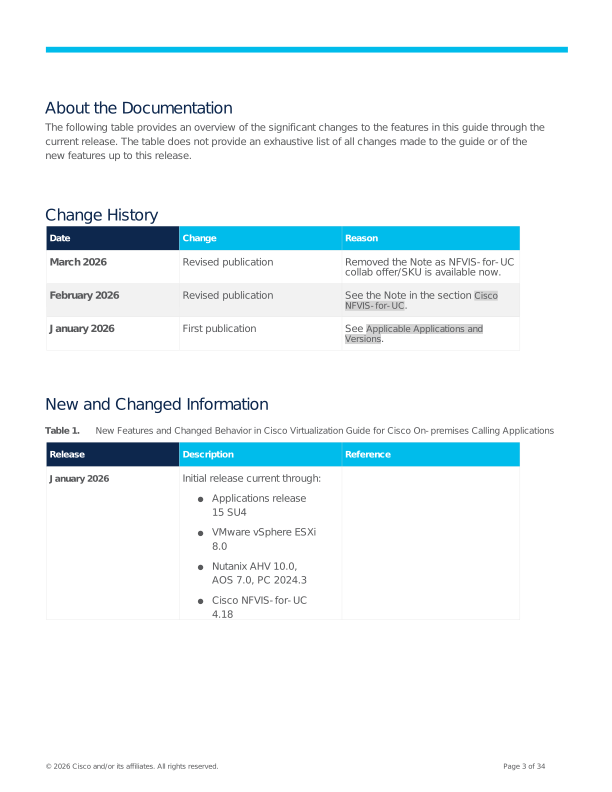
About the Documentation
The following table provides an overview of the significant changes to the features in this guide through the
current release. The table does not provide an exhaustive list of all changes made to the guide or of the
new features up to this release.
Change History
Date
Change
Reason
March 2026
Revised publication
Removed the Note as NFVIS-for-UC
collab offer/SKU is available now.
February 2026
Revised publication
See the Note in the section Cisco
NFVIS-for-UC.
January 2026
First publication
See Applicable Applications and
Versions.
New and Changed Information
Table 1.
New Features and Changed Behavior in Cisco Virtualization Guide for Cisco On-premises Calling Applications
Release
Description
Reference
January 2026
Initial release current through:
●
Applications release
15 SU4
●
VMware vSphere ESXi
8.0
●
Nutanix AHV 10.0,
AOS 7.0, PC 2024.3
●
Cisco NFVIS-for-UC
4.18
Page 4
© 2026 Cisco and/or its affiliates. All rights reserved.
Page 4 of 34
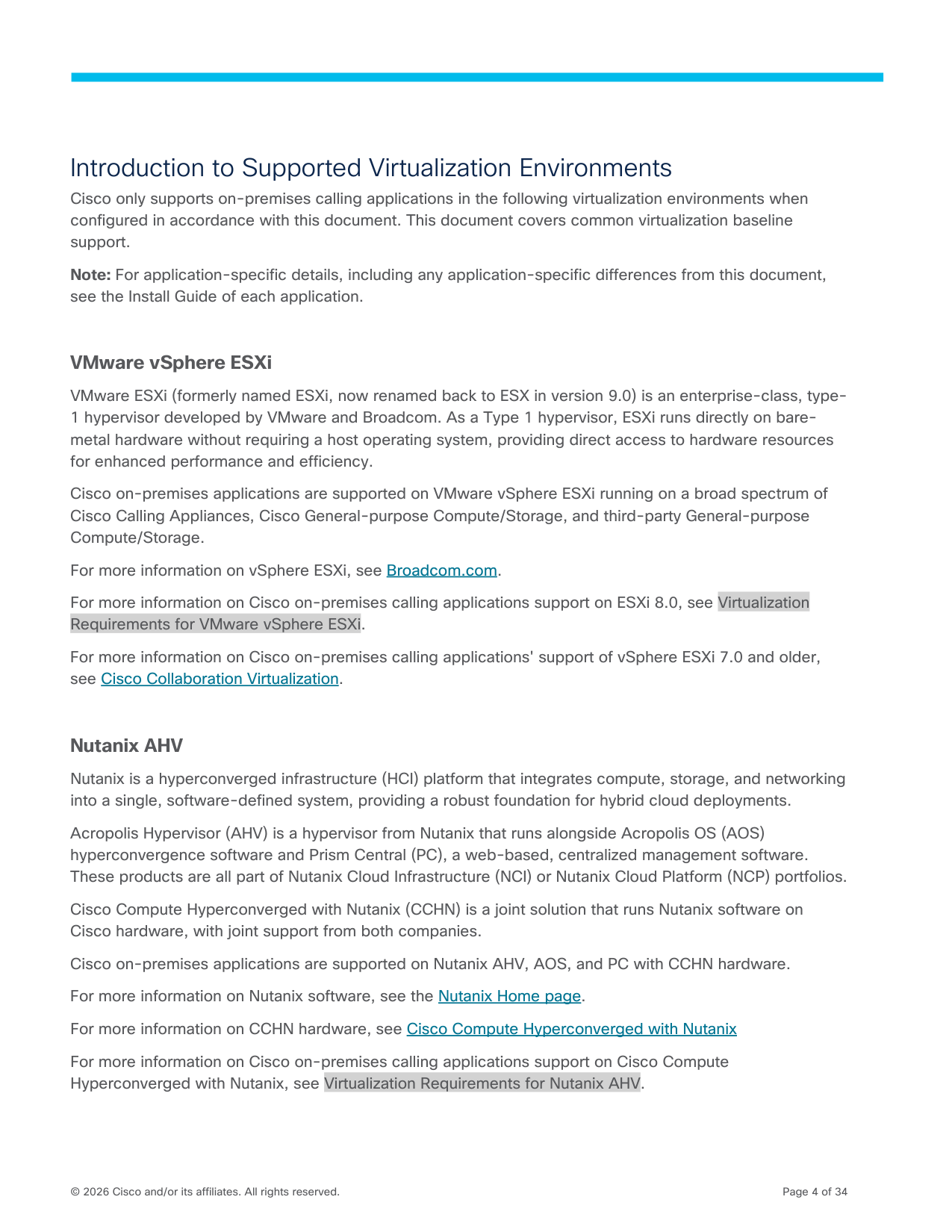
Introduction to Supported Virtualization Environments
Cisco only supports on-premises calling applications in the following virtualization environments when
configured in accordance with this document. This document covers common virtualization baseline
support.
Note: For application-specific details, including any application-specific differences from this document,
see the Install Guide of each application.
VMware vSphere ESXi
VMware ESXi (formerly named ESXi, now renamed back to ESX in version 9.0) is an enterprise-class, type-
1 hypervisor developed by VMware and Broadcom. As a Type 1 hypervisor, ESXi runs directly on bare-
metal hardware without requiring a host operating system, providing direct access to hardware resources
for enhanced performance and efficiency.
Cisco on-premises applications are supported on VMware vSphere ESXi running on a broad spectrum of
Cisco Calling Appliances, Cisco General-purpose Compute/Storage, and third-party General-purpose
Compute/Storage.
For more information on vSphere ESXi, see Broadcom.com.
For more information on Cisco on-premises calling applications support on ESXi 8.0, see Virtualization
Requirements for VMware vSphere ESXi.
For more information on Cisco on-premises calling applications' support of vSphere ESXi 7.0 and older,
see Cisco Collaboration Virtualization.
Nutanix AHV
Nutanix is a hyperconverged infrastructure (HCI) platform that integrates compute, storage, and networking
into a single, software-defined system, providing a robust foundation for hybrid cloud deployments.
Acropolis Hypervisor (AHV) is a hypervisor from Nutanix that runs alongside Acropolis OS (AOS)
hyperconvergence software and Prism Central (PC), a web-based, centralized management software.
These products are all part of Nutanix Cloud Infrastructure (NCI) or Nutanix Cloud Platform (NCP) portfolios.
Cisco Compute Hyperconverged with Nutanix (CCHN) is a joint solution that runs Nutanix software on
Cisco hardware, with joint support from both companies.
Cisco on-premises applications are supported on Nutanix AHV, AOS, and PC with CCHN hardware.
For more information on Nutanix software, see the Nutanix Home page.
For more information on CCHN hardware, see Cisco Compute Hyperconverged with Nutanix
For more information on Cisco on-premises calling applications support on Cisco Compute
Hyperconverged with Nutanix, see Virtualization Requirements for Nutanix AHV.
Page 5
© 2026 Cisco and/or its affiliates. All rights reserved.
Page 5 of 34
Cisco NFVIS-for-UC (Network Function Virtualization Infrastructure Software)
Cisco NFVIS (Network Function Virtualization Infrastructure Software) is a hypervisor product from Cisco's
Enterprise Network Function Virtualization (Enterprise NFV)) portfolio. It is a special-purpose Linux/KVM-
based virtualization layer for deploying select application workloads on select Cisco hardware.
Cisco NFVIS-for-UC is a special edition of NFVIS, a new commercial offering with a separate product ID,
distinct pricing, new licensing, and a slightly different admin User Interface.
Cisco NFVIS-for-UC supports only select On-premises Calling Applications.
Cisco NFVIS-for-UC supports only select Cisco Calling Appliances.
For more information on the base Cisco NFVIS from Cisco Enterprise NFV, see the following:
●
Optimize the virtualization layer
●
Cisco Enterprise NFV Infrastructure Software
For more information on Cisco on-premises calling applications support on Cisco NFVIS-for-UC, see
Virtualization Requirements for Cisco NFVIS-for-UC.
Applicable Applications and Versions
This document applies to the following:
●
Version 15SU4 of UCM, SME, IMP, CUC, CER
●
Version X15.4 of Cisco Expressway Series
●
The Enhanced Survivability Node of Webex Calling dedicated instance (“DI ESN”) is also supported;
its virtualization requirements are described here: Link
Sections of this document may use the following categories of applications:
●
Core Cisco Calling (UCM, SME, DI ESN, IMP, CUC, CER, Expressway). Broader “Cisco Calling” may
also include PCD, CUACA, and CPS.
●
Other Cisco (applications that are Cisco but not part of Cisco Calling, for example,
meetings/contact center applications, virtual network functions (VNF’s) like Catalyst 8000V or
security workloads like Cisco Identity Services Engine ISE).
●
3rd party (customer-provided non-Cisco applications)
●
Customer-homegrown (customer-produced/-provided applications).
Physical Hardware Categories
Cisco on-premises Calling applications use the following categorizations of compute and storage hardware
in this guide:
Cisco Calling Appliances
●
Cisco Business Edition 6000 (BE6000 or BE6K)
●
Cisco Business Edition 7000 (BE7000 or BE7K)
Page 6
© 2026 Cisco and/or its affiliates. All rights reserved.
Page 6 of 34
●
Cisco Expressway CE1400V (CE1400V)
Cisco General-purpose Compute/Storage
Including but not limited to:
●
Cisco UCS C-Series
●
Cisco UCS X-Series
●
Cisco UCS B-Series
●
Cisco HCI-Series
●
Cisco HCIX-Series
●
Cisco HX-Series
Third-party General-purpose Compute/Storage
●
Third-party compute from various vendors.
●
Third-party storage from various vendors, either local DAS, external SAN/NAS, or Hyperconverged
(HCI/SDS).
Unsupported Infrastructure
Cisco does not support on-premises calling applications on infrastructure environments that are not
explicitly listed.
Unsupported environments/No support includes (but is not limited to) the following:
●
Bare-metal / non-virtualized / physical installation on any hardware or public cloud bare-metal
solutions.
●
Any other on-premises hypervisors, for example, Hyper-V or Azure Local
●
New features in VMware Cloud Foundation (VCF) 5.2.2 and older; only traditional ESXi+vCenter
supported.
●
Any customer-provided open-source environments, for example, RedHat OpenShift or OpenShift
Virtualization, Proxmox VE, Harvester, KVM-based or Xen-based Linux distributions, and more.
●
Any customer-provided-3rdparty-public clouds, for example, Amazon EC2 or EVS, Azure
Compute or Azure VMware Solution, OCI or Oracle Cloud VMware Solution, GCP or Google Cloud
VMware Engine, Alibaba, IBM Cloud, and more.
●
Hybrid infrastructure, cloud-connected or cloud extension-based environments, for example,
Amazon AWS Outposts, Azure Stack Hub (ASH), Dell Apex Cloud Platform, GKE On-prem, and
more.
Page 7
© 2026 Cisco and/or its affiliates. All rights reserved.
Page 7 of 34
General Requirements
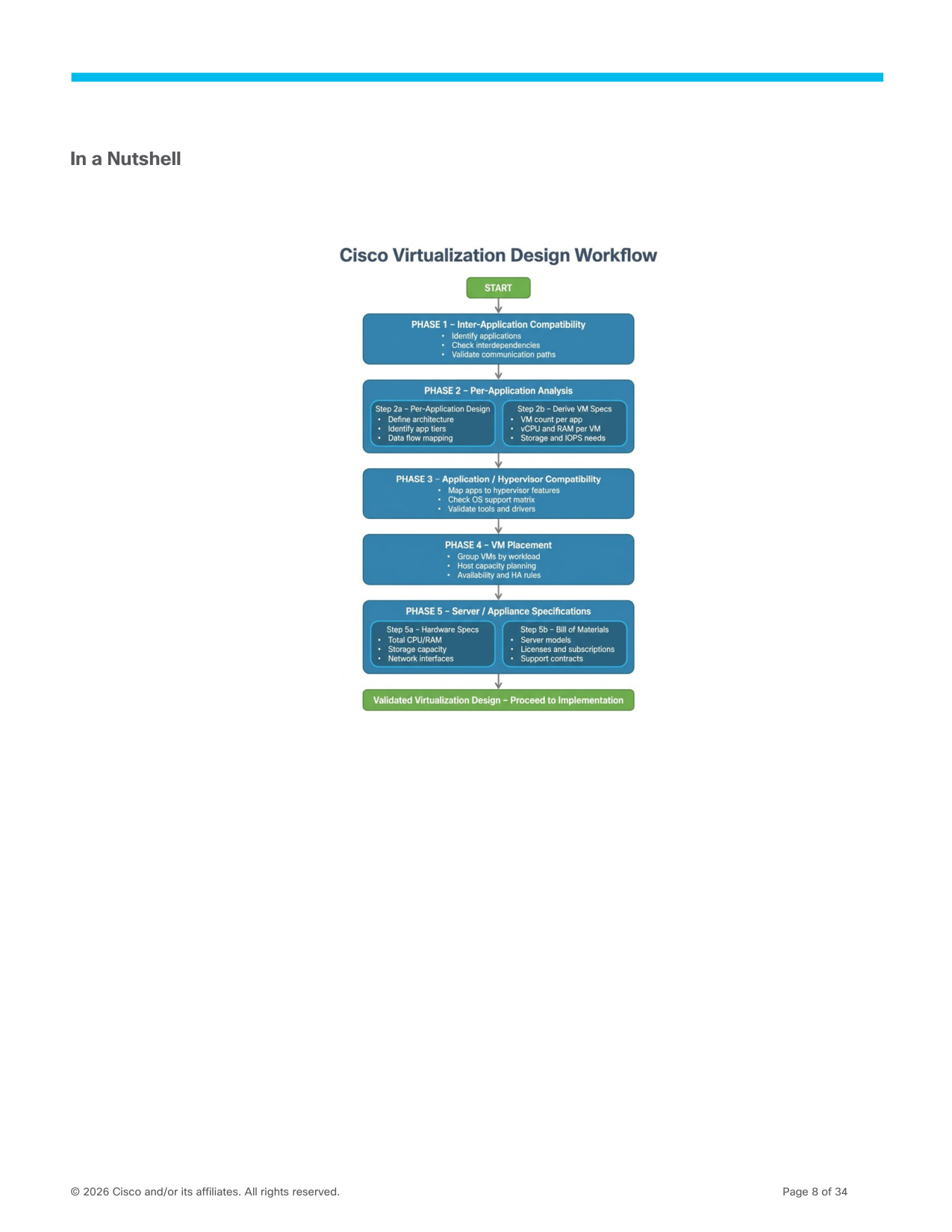
Recommended Design Workflow
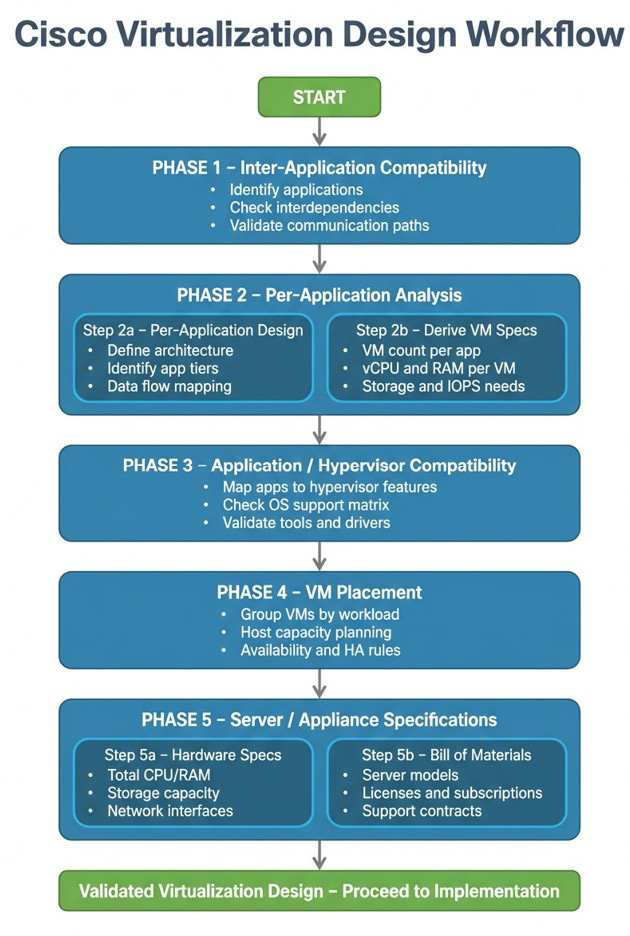
The recommended workflow to properly size and configure a virtualized environment for On-premises
Calling applications is below (details in subsequent sections):
- Inter-application Compatibility
- For each application:
a. Per-Application Design
b. Per-Application Derive Virtual Machine (VM) count/specifications
- Application / Hypervisor Compatibility
- VM Placement
- For each server/appliance:
a. Required Hardware Specification
b. Bill of Materials (BOM)
For examples of how to use this workflow, see the chapter on Example Hardware Bill of Materials
(BOMs).
Page 8
© 2026 Cisco and/or its affiliates. All rights reserved.
Page 8 of 34
In a Nutshell
Page 9
© 2026 Cisco and/or its affiliates. All rights reserved.
Page 9 of 34
Inter-application Compatibility
Pre-requisites: Identify all of your applications and their compatible versions.
For Cisco on-premises applications compatibility, see the following:
●
Cisco Collaboration Systems Release 15
●
Cisco Collaboration Systems Release Compatibility Matrix
●
Software Compatibility Matrix of each application, for example, Cisco Unified CM+IMP 15 SU4
Result: The “output” is a list of applications and their versions.
Page 10
© 2026 Cisco and/or its affiliates. All rights reserved.
Page 10 of 34
Per-Application Design
Pre-requisites: For each application, perform capacity planning, sizing, and cluster design based on your
scale and redundancy requirements.
Use one of the following documents, based on the level of prescriptive guidance you require:
●
If planning a typical best practices design and deploying on Business Edition 6000 (BE6000) hardware,
see section BE6000 Supported Solution Capacities in the appropriate Installation Guide.
●
If planning a typical best practices design and deploying on Business Edition 7000 (BE7000) or
similarly-spec'd hardware, see the section Simplified Sizing Examples in the appropriate Cisco
Collaboration Sizing Guide.
●
If you need a more customized design, see either the Cisco Collaboration Preferred Architectures or
the appropriate Cisco Collaboration System Solution Network Design Guide.
Result: The “output” is a set of application nodes, each with a “T-shirt size” capacity, used to determine
virtual machine information.
Page 11
© 2026 Cisco and/or its affiliates. All rights reserved.
Page 11 of 34
Per-Application Derive Virtual Machine (VM) count/specifications
The previous section details how many Virtual Machines are required.
To get the specifications of each Virtual Machine, see each application node in that application’s
Installation Guides.
- Cisco Unified Communications Manager and the IM and Presence Service
- Cisco Expressway Installation Guide
- Cisco Emergency Responder Administration Guide
Page 12
© 2026 Cisco and/or its affiliates. All rights reserved.
Page 12 of 34
Application/Hypervisor Compatibility
Identify compatible release of hypervisor software and any other required infrastructure software.
For hypervisor major/minor release compatibility, check the Installation Guide of each application.
For hypervisor maintenance/patch release compatibility, check each hypervisor-specific chapter in this
document for the common virtualization requirement, and the Installation Guide of each application for any
app-specific callouts.
Hyperconverged environments like Nutanix also require checking other components, like
hyperconvergence software versions.
For major/minor hypervisor releases, you can use QuoteCollab to save time.
For previous releases, see the Cisco Collaboration Infrastructure Requirements document.
To get the specifications of each Virtual Machine, see each application node in that application’s
Installation Guides.
- Cisco Unified Communications Manager and the IM and Presence Service
- Cisco Expressway Installation Guide
- Cisco Emergency Responder Administration Guide
Page 13
© 2026 Cisco and/or its affiliates. All rights reserved.
Page 13 of 34
VM Placement
Derive server/appliance count using applications’ VM Placement and co-residency rules vs. your needs for
sites and redundant hardware.
You can use QuoteCollab to save time.
For VMware vSphere ESXi and Nutanix AHV, unless otherwise indicated in application-specific
documentation, co-residency of supported Cisco core calling applications + other Cisco applications +
3rd-party/customer-homegrown applications is allowed if the underlying virtualization environment allows.
For more information, see Virtualization Requirements for VMware vSphere ESXi and Virtualization
Requirements for Cisco NFVIS-for-UC.
For Cisco NFVIS-for-UC, only Cisco core calling applications are supported. Other Cisco applications are
not supported. 3rdparty/customer-homegrown applications are not supported. For more information, see
Virtualization Requirements for Cisco NFVIS-for-UC.
All applications sharing hardware must align with the requirements in this document. To diagnose or
resolve an issue with a Cisco on-premises calling application, Cisco TAC may ask that workloads be
powered down or moved to another server (for example, if a 3rd-party workload is a “noisy neighbor”
causing symptoms in Cisco Unified CM).
VM Placement rules for each hardware component are in the next section.
Page 14
© 2026 Cisco and/or its affiliates. All rights reserved.
Page 14 of 34
Required Hardware Specification
Derive raw physical hardware specs required for the set of application VMs you will run on each server,
then combine with hypervisor system requirements to complete the required hardware specifications.
You can use QuoteCollab to save time by checking each hypervisor-specific chapter of this document.

Page 15
© 2026 Cisco and/or its affiliates. All rights reserved.
Page 15 of 34
Bill of Materials (BOMs)
Follow server- and appliance-specific rules to translate these hardware specs into orderable Bill of
Materials (BOMs).
●
For Cisco Business Edition 6000/7000 appliances, see their Datasheets and Ordering Guides.
●
For the Cisco Expressway CE1400V appliance, see its Installation Guide and the Expressway
Release Notes.
●
For Cisco UCS or CCHN servers, see their Datasheets and Spec Sheets.
Page 16
© 2026 Cisco and/or its affiliates. All rights reserved.
Page 16 of 34
Virtualization Requirements for VMware vSphere ESXi
Overview
●
For an overview of VMware vSphere ESXi as a supported virtualization environment, see the
Introduction to Supported Virtualization Environments.
●
In general, applications on a compatible ESXi release are supported on Cisco and 3rdparty
hardware listed in the VMware by Broadcom Compatibility Guide as supported for that ESXi release.
◦ Cisco calling appliances: Business Edition 6000/7000 M5, M6, M7 generations and Cisco Expressway
CE1400V M7.
◦ Cisco UCS, HX, HCI, HCIX models (a Cisco-specific ESXi image may be required).
3rd party compute with local DAS storage or 3rdparty storage (local DAS, 3rd party SAN/NAS, 3rd party
HCI).
●
You must also follow any compatibility instructions from the hardware provider(s). For example, the
Cisco UCS Hardware and Software Compatibility tool.
●
You must also follow the application rules for CPU, Memory, Storage, and Network in this chapter.
Application / Hypervisor Compatibility
ESXi releases through 8.0 can be described as Major and Minor. Within a Major/Minor, there are various
Update and patch releases, and other versioned components like Virtual Machine File System (vmfs),
Virtual Machine Hardware (vmv or vmx), and (only for application releases previous to 15 FCS) VMware
Tools (replaced by Open VM Tools in 15 FCS and beyond).
For compatibility of application releases with ESXi Major/Minor releases (for example, “8.0”, “7.0”, “6.7”),
see each application’s Installation Guide.
●
Compatible releases will be explicitly listed.
●
Unlisted releases are not supported and not tested.
●
See Broadcom.com for when compatible releases enter Broadcom’s release end-of-life and
implications for support.
Within a supported ESXi Major/Minor release,
●
A minimum Update release may be required for application compatibility (for example, “8.0 U1” not
“8.0 GA” is the minimum requirement for “8.0” compatibility).
●
Subsequent Update/Patch releases (for example, “8.0 U2”, “8.0 U3”) are compatible unless
explicitly indicated otherwise.
Note: Certain Update/Patch releases may be compatible only with specific hardware; see
Broadcom.com and your hardware’s documentation for details.
●
For Virtual Machine File System (vmfs), see Broadcom.com for Major/Minor/vmfs compatibility. All
vmfs versions are compatible with applications unless explicitly indicated otherwise.
Page 17
© 2026 Cisco and/or its affiliates. All rights reserved.
Page 17 of 34
●
For Virtual Machine Hardware (vmv or vmx), see Broadcom.com for Major/Minor/vmv
compatibility.
o
Application versions will define the minimum compatible version. For example, UCM 15
requires a minimum vmv 17/vmx 15.
o
Newer vmv/vmx versions are compatible unless explicitly indicated otherwise.
o
Cisco only provides Application OVAs for the required minimum vmv; if the customer needs
a newer vmv, deploy OVA with the old vmv, then upgrade the vmv.
●
VMware VM Tools (vmtools) are not compatible with applications release 15. Open VM Tools
(open-vmtools) are required and are provided with the application.
VM Placement and Required Hardware Specifications
Co-residency of Cisco core calling applications, other Cisco applications and 3rd party/customer-
homegrown applications is allowed as indicated in VM Placement Rules.
You can use QuoteCollab to save time, or follow the VM Placement Rules in the sections below.
CPU/Processor Requirements
General
●
If Cisco Calling Appliance, the CPU vendor/architecture/model is selected by default in the
appliance model (no changes are supported). For more details, see Install Guide of each appliance.
- Cisco Unified Communications Manager and the IM and Presence Service
- Cisco Expressway Installation Guide
- Cisco Emergency Responder Administration Guide
●
For Cisco General-purpose and 3rd-party General-purpose hardware, must follow:
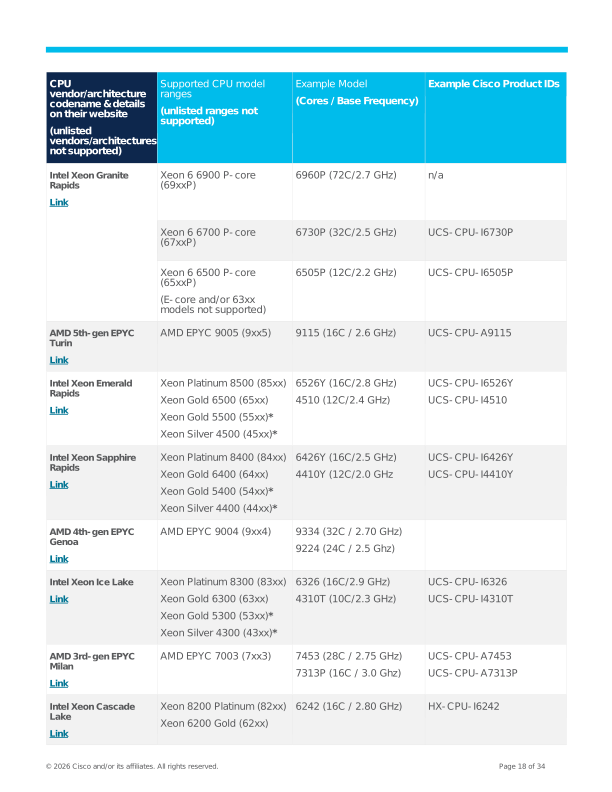
◦ CPU vendor/architecture must be listed in the table below. Applications are not supported for unlisted
vendors/architectures (for example, ARM is not supported, nor is the Intel Processor-D architecture).
◦ Within a vendor/architecture, the selected CPU model must follow these rules:
◦ Model range must be listed in the table below (for example, Intel 69xxP or AMD 9xx5). Applications
are not supported on unlisted model ranges. Some applications support different model ranges for
different scale points.
◦ Have a minimum Base Frequency defined by each application’s Installation Guide (which may vary by
scale point). Applications are not supported on frequency-scaling technologies like Intel Turbo Boost or
AMD Turbo Core / Core Performance Boost / Precision Boost. Applications are not supported on CPUs
that use power management “throttling” features.
Page 18
© 2026 Cisco and/or its affiliates. All rights reserved.
Page 18 of 34
CPU
vendor/architecture
codename & details
on their website
(unlisted
vendors/architectures
not supported)
Supported CPU model
ranges
(unlisted ranges not
supported)
Example Model
(Cores / Base Frequency)
Example Cisco Product IDs
Intel Xeon Granite
Rapids
Link
Xeon 6 6900 P-core
(69xxP)
6960P (72C/2.7 GHz)
n/a
Xeon 6 6700 P-core
(67xxP)
6730P (32C/2.5 GHz)
UCS-CPU-I6730P
Xeon 6 6500 P-core
(65xxP)
(E-core and/or 63xx
models not supported)
6505P (12C/2.2 GHz)
UCS-CPU-I6505P
AMD 5th-gen EPYC
Turin
Link
AMD EPYC 9005 (9xx5)
9115 (16C / 2.6 GHz)
UCS-CPU-A9115
Intel Xeon Emerald
Rapids
Link
Xeon Platinum 8500 (85xx)
Xeon Gold 6500 (65xx)
Xeon Gold 5500 (55xx)*
Xeon Silver 4500 (45xx)*
6526Y (16C/2.8 GHz)
4510 (12C/2.4 GHz)
UCS-CPU-I6526Y
UCS-CPU-I4510
Intel Xeon Sapphire
Rapids
Link
Xeon Platinum 8400 (84xx)
Xeon Gold 6400 (64xx)
Xeon Gold 5400 (54xx)*
Xeon Silver 4400 (44xx)*
6426Y (16C/2.5 GHz)
4410Y (12C/2.0 GHz
UCS-CPU-I6426Y
UCS-CPU-I4410Y
AMD 4th-gen EPYC
Genoa
Link
AMD EPYC 9004 (9xx4)
9334 (32C / 2.70 GHz)
9224 (24C / 2.5 Ghz)
Intel Xeon Ice Lake
Link
Xeon Platinum 8300 (83xx)
Xeon Gold 6300 (63xx)
Xeon Gold 5300 (53xx)*
Xeon Silver 4300 (43xx)*
6326 (16C/2.9 GHz)
4310T (10C/2.3 GHz)
UCS-CPU-I6326
UCS-CPU-I4310T
AMD 3rd-gen EPYC
Milan
Link
AMD EPYC 7003 (7xx3)
7453 (28C / 2.75 GHz)
7313P (16C / 3.0 Ghz)
UCS-CPU-A7453
UCS-CPU-A7313P
Intel Xeon Cascade
Lake
Link
Xeon 8200 Platinum (82xx)
Xeon 6200 Gold (62xx)
6242 (16C / 2.80 GHz)
HX-CPU-I6242
Page 19
© 2026 Cisco and/or its affiliates. All rights reserved.
Page 19 of 34
CPU
vendor/architecture
codename & details
on their website
(unlisted
vendors/architectures
not supported)
Supported CPU model
ranges
(unlisted ranges not
supported)
Example Model
(Cores / Base Frequency)
Example Cisco Product IDs
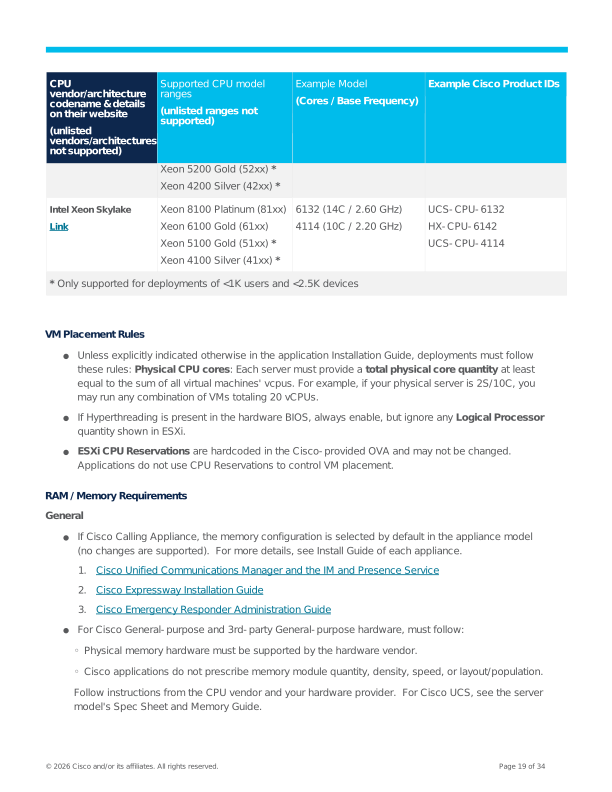
Xeon 5200 Gold (52xx) *
Xeon 4200 Silver (42xx) *
Intel Xeon Skylake
Link
Xeon 8100 Platinum (81xx)
Xeon 6100 Gold (61xx)
Xeon 5100 Gold (51xx) *
Xeon 4100 Silver (41xx) *
6132 (14C / 2.60 GHz)
4114 (10C / 2.20 GHz)
UCS-CPU-6132
HX-CPU-6142
UCS-CPU-4114
- Only supported for deployments of <1K users and <2.5K devices
VM Placement Rules
●
Unless explicitly indicated otherwise in the application Installation Guide, deployments must follow
these rules: Physical CPU cores: Each server must provide a total physical core quantity at least
equal to the sum of all virtual machines' vcpus. For example, if your physical server is 2S/10C, you
may run any combination of VMs totaling 20 vCPUs.
●
If Hyperthreading is present in the hardware BIOS, always enable, but ignore any Logical Processor
quantity shown in ESXi.
●
ESXi CPU Reservations are hardcoded in the Cisco-provided OVA and may not be changed.
Applications do not use CPU Reservations to control VM placement.
RAM / Memory Requirements
General
●
If Cisco Calling Appliance, the memory configuration is selected by default in the appliance model
(no changes are supported). For more details, see Install Guide of each appliance.
- Cisco Unified Communications Manager and the IM and Presence Service
- Cisco Expressway Installation Guide
- Cisco Emergency Responder Administration Guide
●
For Cisco General-purpose and 3rd-party General-purpose hardware, must follow:
◦ Physical memory hardware must be supported by the hardware vendor.
◦ Cisco applications do not prescribe memory module quantity, density, speed, or layout/population.
Follow instructions from the CPU vendor and your hardware provider. For Cisco UCS, see the server
model's Spec Sheet and Memory Guide.
Page 20
© 2026 Cisco and/or its affiliates. All rights reserved.
Page 20 of 34
VM Placement Rules
●
Physical memory must not be oversubscribed.
●
Usable RAM: Memory configuration must provide at least as many GB as the sum of all virtual
machines' vram plus additional memory for ESXi itself. At the time of this writing, additional usable
GB from ESXi Hardware Requirements are:
o
ESXi 8.0 minimum 8GB, 12GB for typical production deployments.
Storage Requirements
General
●
If Cisco Calling Appliance, the storage hardware and RAID configuration are selected by default in
the appliance model (no changes are supported). For more details, see Install Guide of each
appliance.
- Cisco Unified Communications Manager and the IM and Presence Service
- Cisco Expressway Installation Guide
- Cisco Emergency Responder Administration Guide
●
For Cisco General-purpose and 3rd-party General-purpose hardware, must follow:
◦ The "storage system" is defined as all hardware and software end-to-end required for the UCM virtual
machine's vdisk to be available to the application. Including but not limited to:
o
The ESXi datastore configuration.
o
One of the following:
RAID controller with local DAS disks.
Network adapter, transport network and 3rdparty SAN/NAS array.
Hyperconvergence software (AOS, HXDP, and more) and underlying hardware.
o
The entirety of the storage system must be listed as supported by the ESXi release being run,
per the beginning of this chapter.
●
ESXi datastores may be provisioned with eager zero or lazy zero.
VM Placement Rules
●
Maximum latency of storage system: Application requirements must be met, or the storage will be
inadequate for the application software load presented. For application symptoms that correlate
with high storage latency, Cisco may require resolving the storage latency before proceeding with
troubleshooting or resolution.
◦ Unless otherwise indicated, Cisco Collaboration applications require storage systems to have average
virtual machine operating system latency per command <= 25 ms.
o
In VMware documentation and monitoring tools like esxtop, this is also called "GAVG/cmd"
(Guest Average Latency per command), and is the response time as perceived by the guest
operating system. It is the sum of two other latency values (GAVG = KAVG + DAVG):
Page 21
© 2026 Cisco and/or its affiliates. All rights reserved.
Page 21 of 34
o
"KAVG/cmd" (VM Kernel Average Latency per command) - an indicator of CPU
resources/performance. Expected to be 0ms in an ideal environment. Values greater
than 2ms may cause performance problems.
o "DAVG/cmd" (Device Average Latency per command) - an indicator of disk
subsystem performance. Values consistently greater than 20-30ms are often
indicative of performance problems in typical applications.
o
Latency values over time are expected to fluctuate. Ephemeral spikes above the application's
indicated maximum with tiny duration and tiny frequency are expected, but spikes above the
application's indicated maximum that are frequent, sustained, and/or high-magnitude indicate a
potential problem and are likely contributors to application symptoms.
o
See VMware by Broadcom documentation for monitoring, performance, and esxtop for more
details on viewing and interpreting latency values.
●
Usable space: The storage system must provide usable space in GB at least equal to the sum of all
virtual machines' vdisks. Non-appliance hardware may also use thin provisioning, with the caveat
that disk space must be available to the VM as needed; running out of disk space due to thin
provisioning will cause application instability and data corruption, including preventing restore from
backup.
●
IOPS capacity: Some storage system design documentation will request information on the
application workloads' I/O operations, including read/write, sequential, and random. For most
applications, this varies by deployment model and capacity; refer to each application's Installation
Guide for details.
●
Best Practices by Storage Option
o
Local DAS:
o
Make sure the RAID controller and all disks are listed by Broadcom as compatible for the ESXi
release being used, and listed as supported by the hardware vendor.
o
See hardware providers for guidance on meeting application latency and IOPS requirements.
Below are guidelines only; your results may vary.
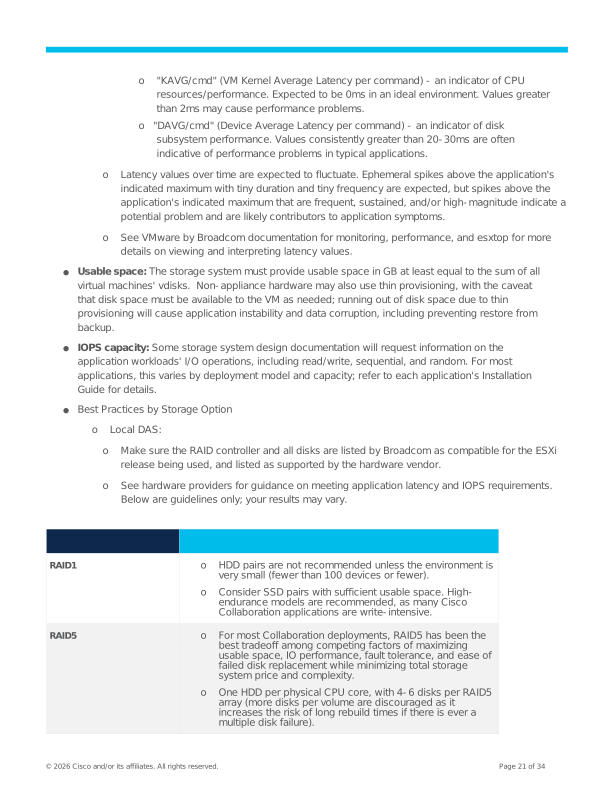
RAID1
o
HDD pairs are not recommended unless the environment is
very small (fewer than 100 devices or fewer).
o
Consider SSD pairs with sufficient usable space. High-
endurance models are recommended, as many Cisco
Collaboration applications are write-intensive.
RAID5
o
For most Collaboration deployments, RAID5 has been the
best tradeoff among competing factors of maximizing
usable space, IO performance, fault tolerance, and ease of
failed disk replacement while minimizing total storage
system price and complexity.
o
One HDD per physical CPU core, with 4-6 disks per RAID5
array (more disks per volume are discouraged as it
increases the risk of long rebuild times if there is ever a
multiple disk failure).
Page 22
© 2026 Cisco and/or its affiliates. All rights reserved.
Page 22 of 34
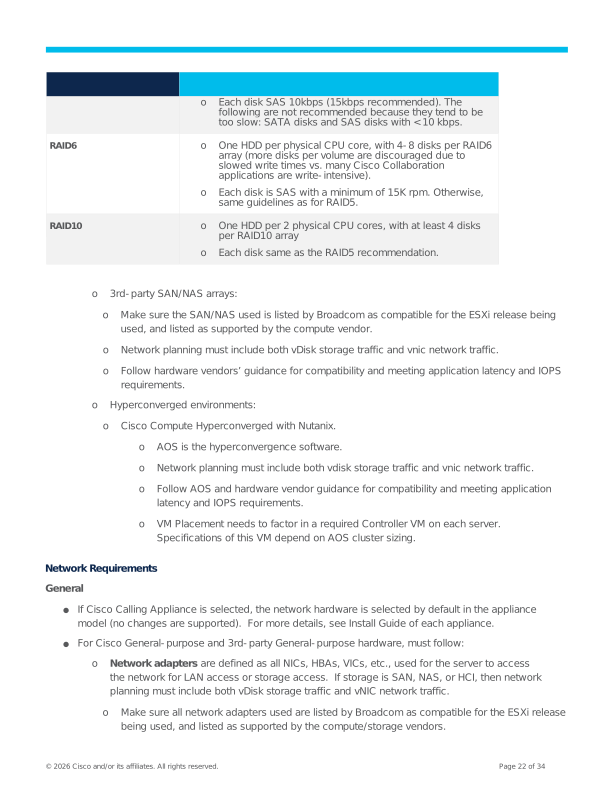
o
Each disk SAS 10kbps (15kbps recommended). The
following are not recommended because they tend to be
too slow: SATA disks and SAS disks with < 10 kbps.
RAID6
o
One HDD per physical CPU core, with 4-8 disks per RAID6
array (more disks per volume are discouraged due to
slowed write times vs. many Cisco Collaboration
applications are write-intensive).
o
Each disk is SAS with a minimum of 15K rpm. Otherwise,
same guidelines as for RAID5.
RAID10
o
One HDD per 2 physical CPU cores, with at least 4 disks
per RAID10 array
o
Each disk same as the RAID5 recommendation.
o
3rd-party SAN/NAS arrays:
o
Make sure the SAN/NAS used is listed by Broadcom as compatible for the ESXi release being
used, and listed as supported by the compute vendor.
o
Network planning must include both vDisk storage traffic and vnic network traffic.
o
Follow hardware vendors’ guidance for compatibility and meeting application latency and IOPS
requirements.
o
Hyperconverged environments:
o
Cisco Compute Hyperconverged with Nutanix.
o
AOS is the hyperconvergence software.
o
Network planning must include both vdisk storage traffic and vnic network traffic.
o
Follow AOS and hardware vendor guidance for compatibility and meeting application
latency and IOPS requirements.
o
VM Placement needs to factor in a required Controller VM on each server.
Specifications of this VM depend on AOS cluster sizing.
Network Requirements
General
●
If Cisco Calling Appliance is selected, the network hardware is selected by default in the appliance
model (no changes are supported). For more details, see Install Guide of each appliance.
●
For Cisco General-purpose and 3rd-party General-purpose hardware, must follow:
o
Network adapters are defined as all NICs, HBAs, VICs, etc., used for the server to access
the network for LAN access or storage access. If storage is SAN, NAS, or HCI, then network
planning must include both vDisk storage traffic and vNIC network traffic.
o
Make sure all network adapters used are listed by Broadcom as compatible for the ESXi release
being used, and listed as supported by the compute/storage vendors.
Page 23
© 2026 Cisco and/or its affiliates. All rights reserved.
Page 23 of 34
o
Network infrastructure is defined as the physical or virtual switching/routing/fabric network
elements providing LAN access or storage access.
o
Make sure all virtual elements running on the server are listed by Broadcom as compatible for
the ESXi release being used, and listed as supported by the compute/storage vendors.
o
For a physical access switch, you may need to check the compatibility of that switch with your
compute/storage vendors.
VM Placement Rules
●
Physical network access links: Each "server" must provide enough for the vnics of all application
VMs (details out of scope for this policy).
o
Redundant physical network access links (for example, "NIC teaming") are permitted where
supported by the VMware Compatibility Guide and the network hardware/software providers'
instructions.
o
If you choose to use access options like VLAN trunking or link aggregation, multiple physical
links will be required.
●
Application vnic network traffic capacity/quality of service required:
o
vnic traffic: see application design guides for their "min spec" for network traffic and quality
of service (for example, required bandwidth and max tolerable delay, jitter, and loss, along
with which quality of service traffic marking mechanisms they support). For example:
o
For example, see Cisco Collaboration 12x guidelines for Network Infrastructure
o
For example, see Cisco Collaboration 12x quality of service guidelines
o
vdisk traffic: If the same network will be carrying both application VM vnic network traffic
and application VM vdisk storage traffic, make sure to plan for both sets of traffic. Storage
Requirements must be met for the applications to be supported.
●
See Cisco network and datacenter Preferred Architectures for best practices on network element
selection and configuration.
Page 24
© 2026 Cisco and/or its affiliates. All rights reserved.
Page 24 of 34
Virtualization Requirements for Cisco NFVIS-for-UC
Overview
For an overview of Cisco NFVIS-for-UC as a supported virtualization environment, see the Introduction to
Supported Virtualization Environments.
●
Cisco NFVIS-for-UC is only supported on the following hardware:
o
Cisco calling appliances: Business Edition 6000/7000 M5, M6, M7 generations and Cisco
Expressway CE1400V M7.
●
You must also follow any compatibility instructions in Supported Platforms from NFVIS Release
Notes (for example, Link).
●
You must also follow the application rules for CPU, Memory, Storage, and Network in this chapter.
Application / Hypervisor Compatibility
The minimum supported releases are 15 SU4 / X15.4 with NFVIS-for-UC 4.18.
Supported NFVIS-for-UC releases can be classified as Major and Minor. Within a Major/Minor, there are
various Maintenance releases.
For compatibility of application releases with NFVIS-for-UC Major/Minor releases (for example, “4.18”),
see each application’s Installation Guide.
- Cisco Unified Communications Manager and the IM and Presence Service
- Cisco Expressway Installation Guide
- Cisco Emergency Responder Administration Guide
●
Compatible releases will be explicitly listed. Newer hardware generations may require a newer
minimum Major/Minor release.
●
Unlisted releases are not supported and not tested.
●
See Cisco EOL Bulletins for when compatible releases enter Cisco’s release end-of-life and
implications for support.
Within a supported NFVIS-for-UC Major/Minor release,
●
A minimum Maintenance release may be required for application compatibility (for example,
“4.18.2a” not “4.18.1” is the minimum requirement for “4.18” compatibility).
●
Subsequent Maintenance releases (for example, “4.18.2a” as the minimum compatible release vs.
future “4.18.3”) are compatible unless explicitly indicated otherwise.
●
There are no other versioned components that need to be tracked/managed.
Page 25
© 2026 Cisco and/or its affiliates. All rights reserved.
Page 25 of 34
VM Placement and Required Hardware Specifications
Co-residency of Cisco core calling applications is allowed as indicated in VM Placement rules. No other
applications are supported with NFVIS-for-UC. Other Cisco applications and 3rd party/customer-
homegrown applications are not supported.
You can use QuoteCollab to save time, or follow the VM Placement Rules.
CPU / Processor, RAM / Memory, Storage, Network Requirements
General
●
NFVIS-for-UC is only supported on the Cisco Calling Appliance models listed above.
o
The entire hardware loadout and configurations are selected by default in the appliance
model (no changes are supported). For more details, see Install Guide of each appliance.
- Cisco Unified Communications Manager and the IM and Presence Service
- Cisco Expressway Installation Guide
- Cisco Emergency Responder Administration Guide
●
NFVIS-for-UC is NOT supported on Cisco General-purpose or 3rd-party General-purpose
hardware.
VM Placement Rules
●
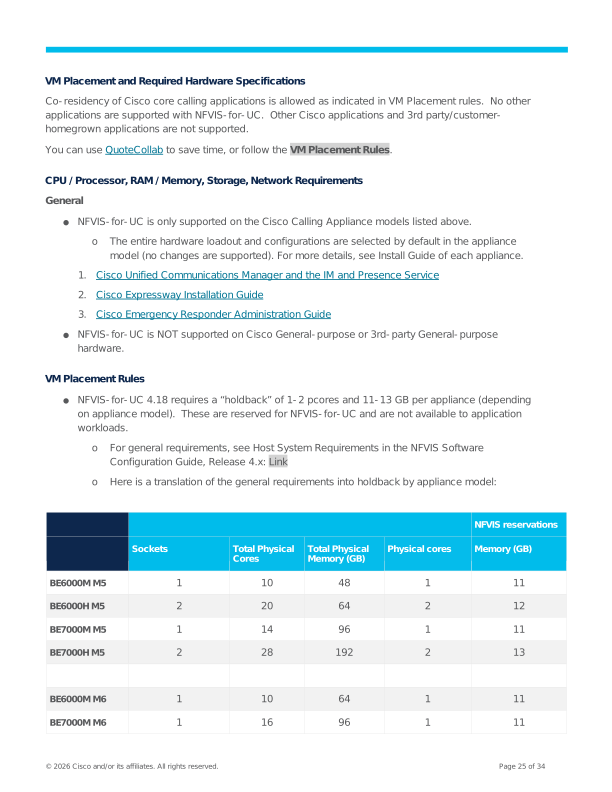
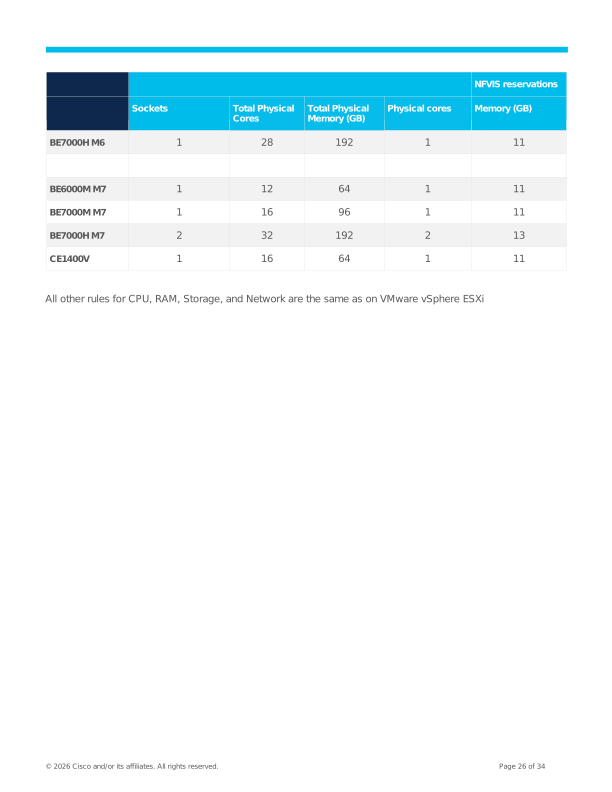
NFVIS-for-UC 4.18 requires a “holdback” of 1-2 pcores and 11-13 GB per appliance (depending
on appliance model). These are reserved for NFVIS-for-UC and are not available to application
workloads.
o
For general requirements, see Host System Requirements in the NFVIS Software
Configuration Guide, Release 4.x: Link
o
Here is a translation of the general requirements into holdback by appliance model:
NFVIS reservations
Sockets
Total Physical
Cores
Total Physical
Memory (GB)
Physical cores
Memory (GB)
BE6000M M5
1
10
48
1
11
BE6000H M5
2
20
64
2
12
BE7000M M5
1
14
96
1
11
BE7000H M5
2
28
192
2
13
BE6000M M6
1
10
64
1
11
BE7000M M6
1
16
96
1
11
Page 26
© 2026 Cisco and/or its affiliates. All rights reserved.
Page 26 of 34
NFVIS reservations
Sockets
Total Physical
Cores
Total Physical
Memory (GB)
Physical cores
Memory (GB)
BE7000H M6
1
28
192
1
11
BE6000M M7
1
12
64
1
11
BE7000M M7
1
16
96
1
11
BE7000H M7
2
32
192
2
13
CE1400V
1
16
64
1
11
All other rules for CPU, RAM, Storage, and Network are the same as on VMware vSphere ESXi
Page 27
© 2026 Cisco and/or its affiliates. All rights reserved.
Page 27 of 34
Virtualization Requirements for Nutanix AHV
Overview
For an overview of Nutanix AHV as a supported virtualization environment, see the Introduction to
Supported Virtualization Environments.
●
Cisco on-premises applications are only supported with Cisco Compute Hyperconverged with
Nutanix (CCHN) hardware, in deployment models HCI / Hyperconverged Node or Compute-only
Node with HCI nodes.
o
Cisco HCI-Series, HCIX-Series
o
Allowed specifications of UCS C-Series, UCS X-Series, HX-Series, and (compute-only
node) UCS B-Series.
o
For more information, see CCHN Spec Sheets for Hyperconverged Nodes and Compute-only
Nodes at the link.
●
Applications are NOT supported on :
o
FlashStack (Cisco HCI Node with external storage from Pure Storage)
o
3rd-party HCI nodes
o
3rd-party Compute node with HCI nodes or external storage
●
You must also follow:
o
Any compatibility instructions from Nutanix and the hardware provider(s).
o
Application rules for CPU, Memory, Storage, and Network in this chapter.
Application / Hypervisor Compatibility
The minimum supported releases are 15 SU4/X15.4 with Nutanix AHV 10.0 / AOS 7.0 / Prism Central
2024.3.
Nutanix software releases can be described as X.Y.z.n, where a single X.Y may contain several z.n. For
more information, see the following link
For compatibility of application releases with Nutanix AHV and AOS X.Y (for example, “10.0” or “7.0”), see
each application’s Installation Guide.
●
Compatible releases will be explicitly listed.
●
Unlisted releases are not supported and not tested.
●
See Nutanix.com for when compatible releases enter Nutanix’s release end-of-life and implications
for support.
Within a supported Nutanix AHV or AOS X.Y release,
●
A minimum z.n release may be required for application compatibility.
●
Subsequent z.n releases are compatible unless explicitly indicated otherwise.
Page 28
© 2026 Cisco and/or its affiliates. All rights reserved.
Page 28 of 34
Note: Some releases may be compatible only with specific hardware; see Nutanix.com and the
hardware documentation for details.
●
There are no other versioned components that need to be tracked/managed.
VM Placement and Required Hardware Specifications
You must follow Nutanix technical documentation to determine the minimum and maximum server counts
for the Nutanix cluster, as well as the Controller VM specifications for each server.
Co-residency of Cisco core calling applications, other Cisco applications and 3rdparty/customer-
homegrown applications is allowed as indicated in VM Placement rules.
For other application requirements, you can use QuoteCollab to save time, or follow the VM Placement
Rules.
CPU / Processor, RAM / Memory, Storage, Network Requirements
General
Only Cisco Compute Hyperconverged with Nutanix hardware listed above is supported.
VM Placement Rules
●
Rules for CPU are the same as on VMware vSphere ESXi, but must add the vcpu of the Controller
VM.
●
Rules for RAM are the same as on VMware vSphere ESXi, but instead of the RAM GB overhead for
ESXi, you must add the vram of the Controller VM.
●
Rules for Storage are the same as on VMware vSphere ESXi, but you must add the vdisk of the
Controller VM.
●
Rules for the network are the same as on VMware vSphere ESXi.
Bill of Materials (BOM)
When Nutanix cluster design and physical hardware specifications are finalized, use the Spec Sheet for the
desired CCHN server model.
Page 29
© 2026 Cisco and/or its affiliates. All rights reserved.
Page 29 of 34
Example Hardware Bill of Materials (BOMs)
Summary of Hardware Examples
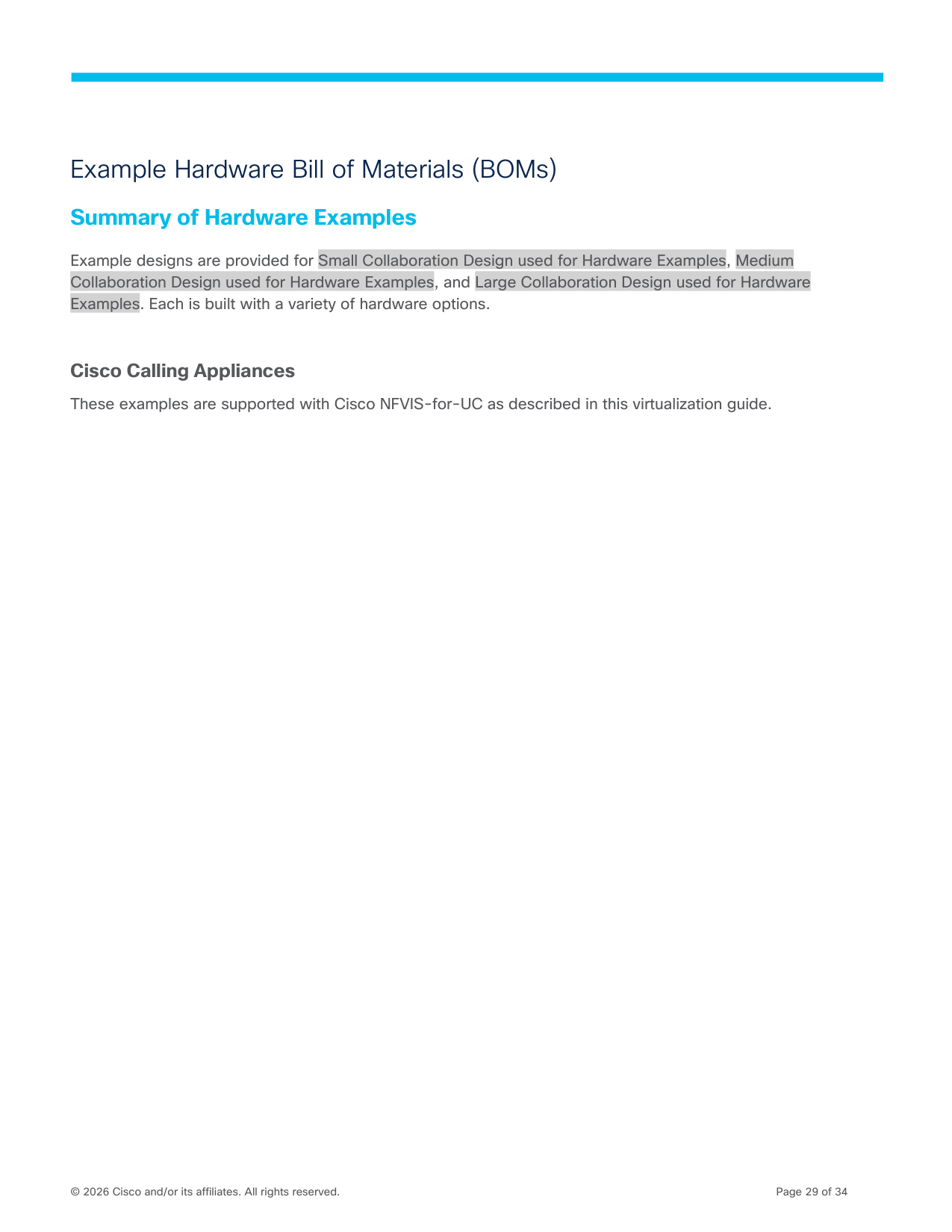
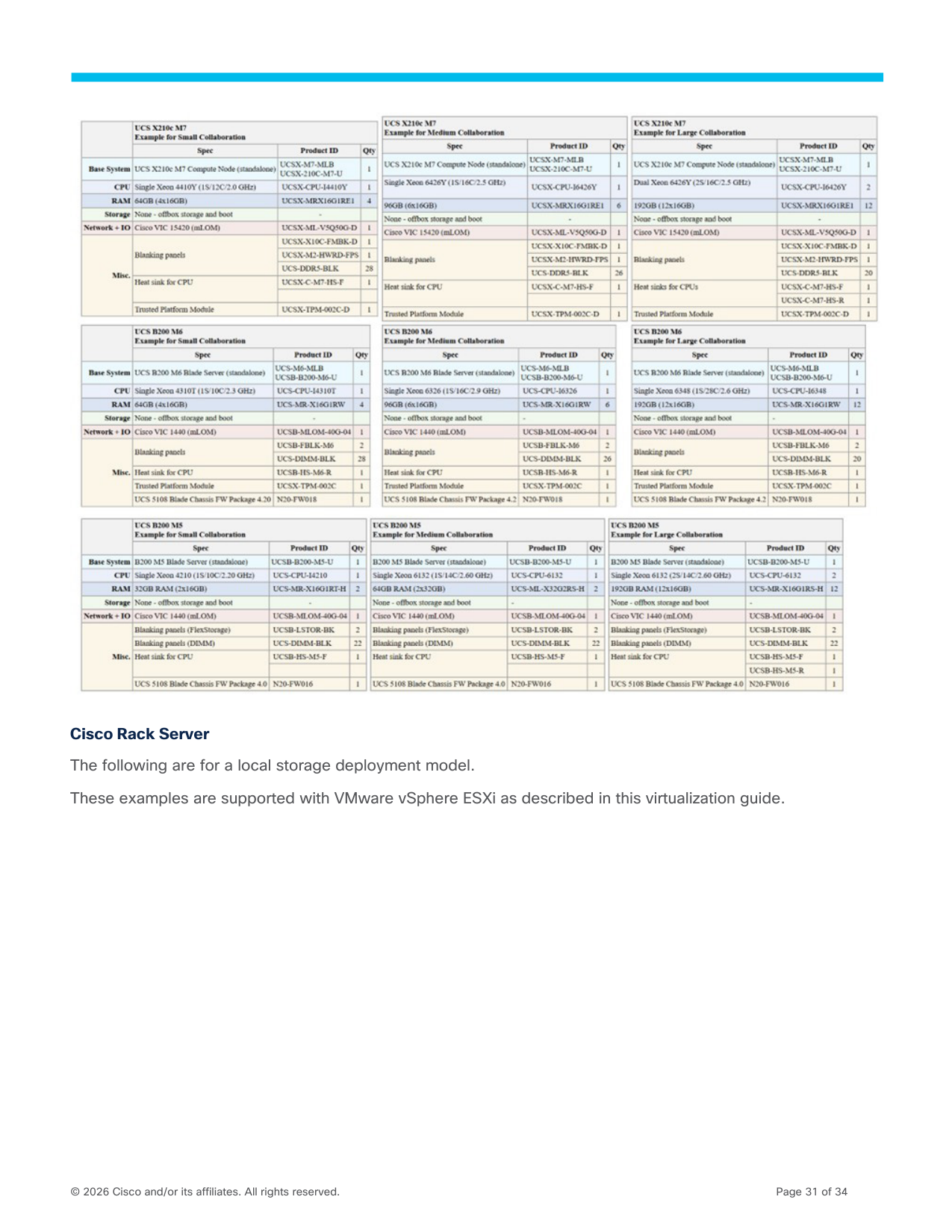
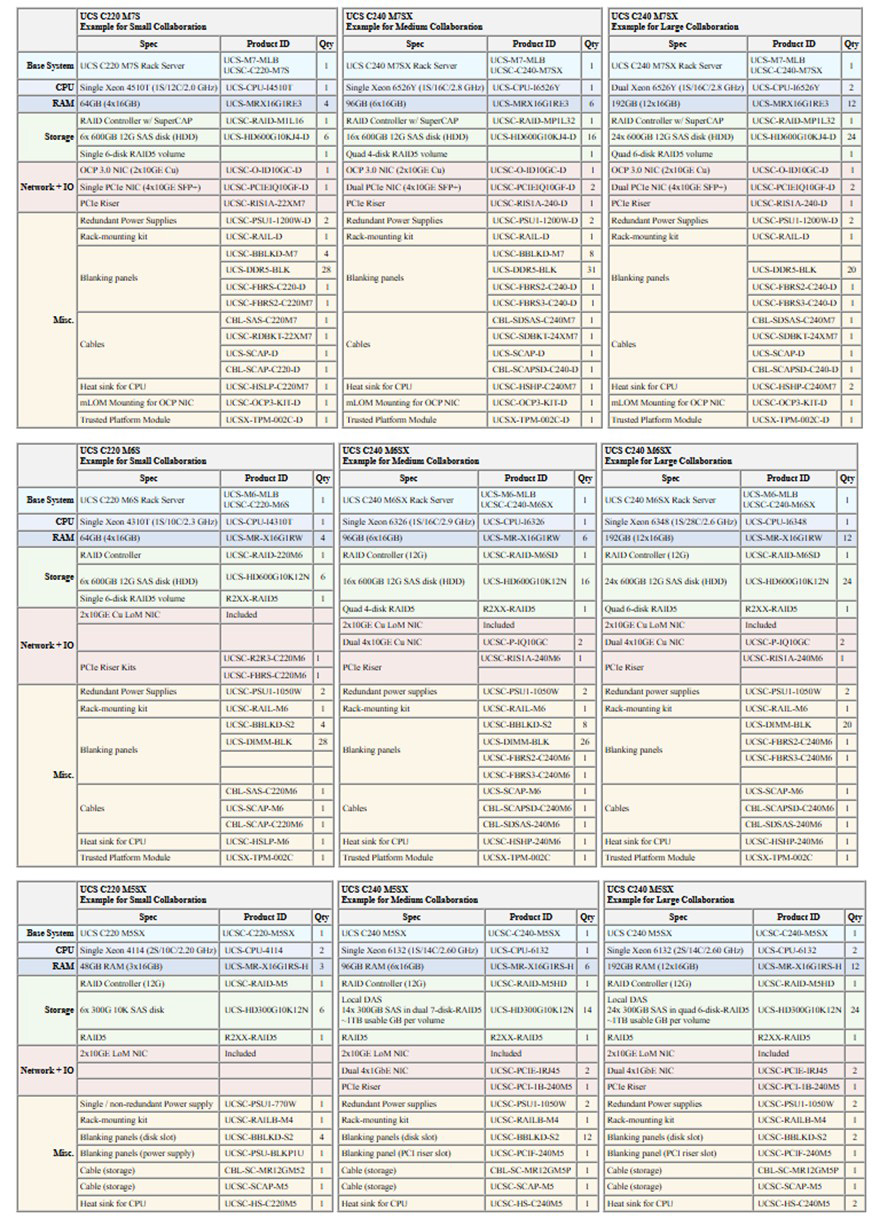
Example designs are provided for Small Collaboration Design used for Hardware Examples, Medium
Collaboration Design used for Hardware Examples, and Large Collaboration Design used for Hardware
Examples. Each is built with a variety of hardware options.
Cisco Calling Appliances
These examples are supported with Cisco NFVIS-for-UC as described in this virtualization guide.
Page 30
© 2026 Cisco and/or its affiliates. All rights reserved.
Page 30 of 34
Cisco Compute Hyperconverged with Nutanix
<<COMING SOON>>
The following are for the HCI/Hyperconverged Node deployment model.
These examples are supported with Nutanix AHV as described in this virtualization guide.
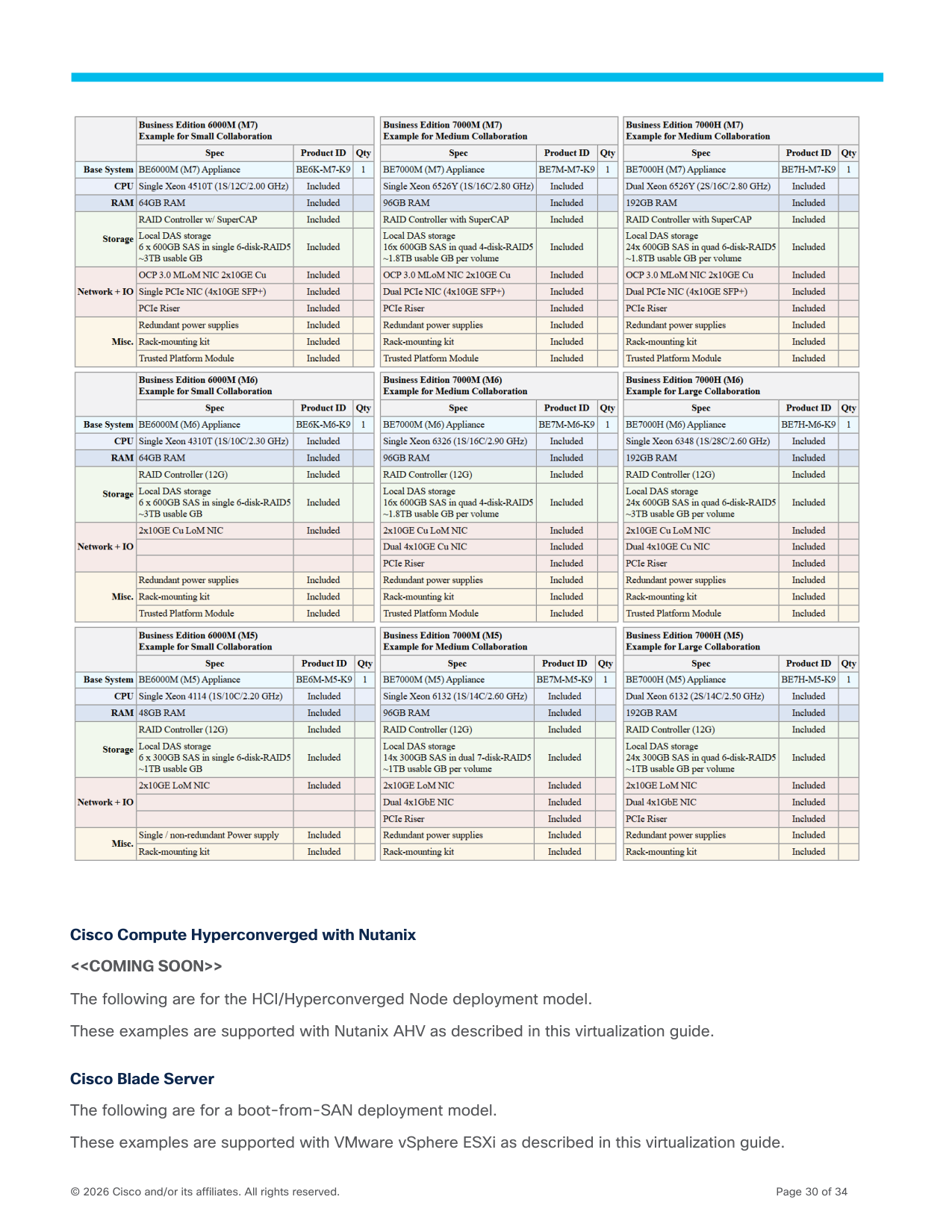
Cisco Blade Server
The following are for a boot-from-SAN deployment model.
These examples are supported with VMware vSphere ESXi as described in this virtualization guide.
Page 31
© 2026 Cisco and/or its affiliates. All rights reserved.
Page 31 of 34
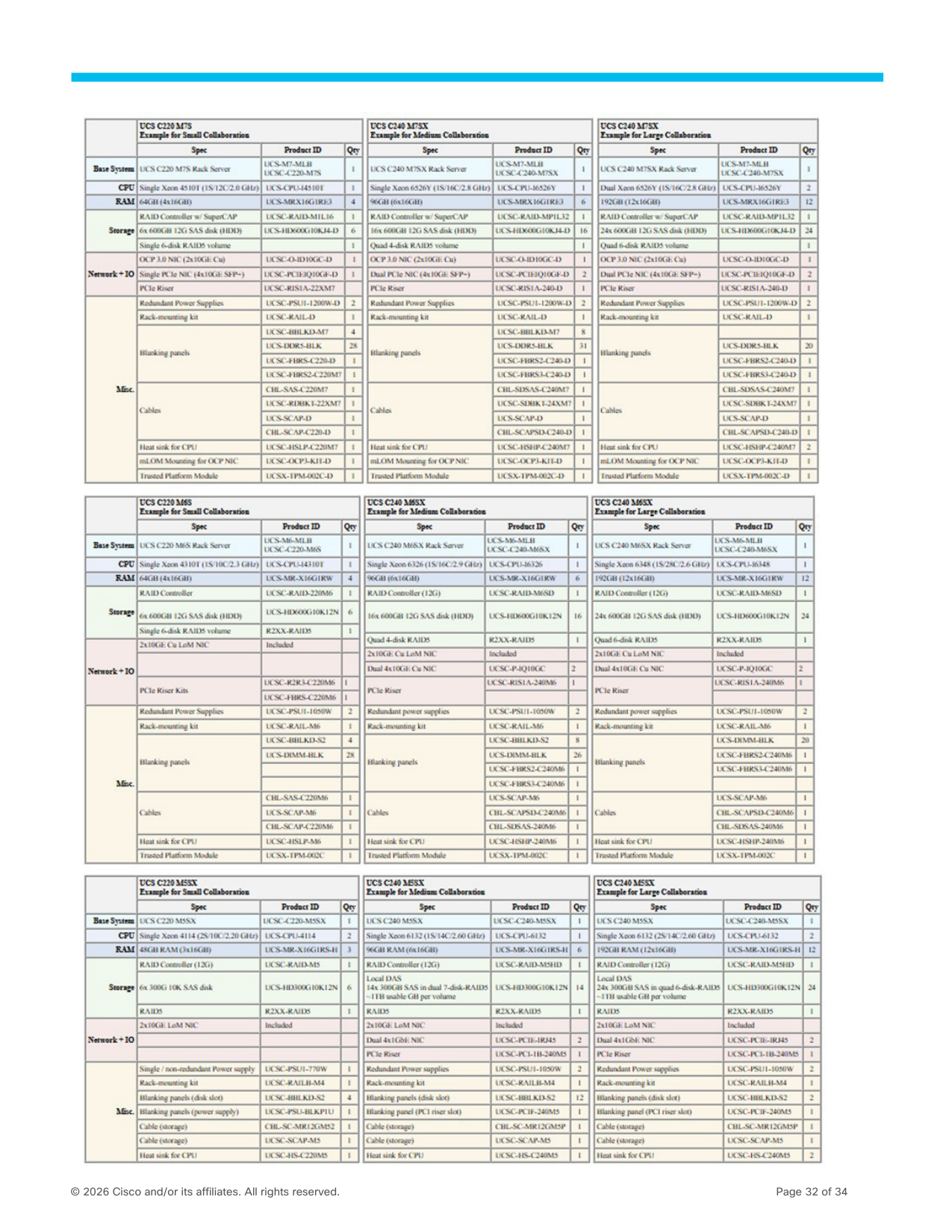
Cisco Rack Server
The following are for a local storage deployment model.
These examples are supported with VMware vSphere ESXi as described in this virtualization guide.
Page 32
© 2026 Cisco and/or its affiliates. All rights reserved.
Page 32 of 34
Page 33
© 2026 Cisco and/or its affiliates. All rights reserved.
Page 33 of 34
Small Collaboration Design used for Hardware Examples
See the Cisco Collaboration Sizing Guide for Release 15, Simplified Sizing Examples, Small Example.
For a deployment that will fit on Cisco Business Edition 6000 appliances, modify this deployment and its
assumptions to fit within the BE6000 Supported System Capacities.
Medium Collaboration Design used for Hardware Examples
See the Cisco Collaboration Sizing Guide for Release 15, Simplified Sizing Examples, Medium #1 and Medium
#2 Examples.
Large Collaboration Design used for Hardware Examples
See the Cisco Collaboration Sizing Guide for Release 15, Simplified Sizing Examples, Large Example.
Page 34
© 2026 Cisco and/or its affiliates. All rights reserved.
Page 34 of 34