Document Metadata
Format: PDF
Title: Configure Custom Script for CallBack Feature in UCCX
Page 1
Configure Custom Script for CallBack
Feature in UCCX
Contents
Introduction
Prerequisites
Requirements
Components Used
Background Information
Configure
Script 1
Callflow and Script Logic
Script 2
Verify
Troubleshoot
Related Information
Introduction
This document describes the script steps used to configure the CallBack feature in Cisco Unified
Contact Center Express (Unified CCX).
Prerequisites
Requirements
Cisco recommends that you have knowledge of these topics:
Unified CCX
G
Scripting development
G
Components Used
The information in this document is based on Unified CCX 10.6.X and later.
The information in this document was created from the devices in a specific lab environment. All of
the devices used in this document started with a cleared (default) configuration. If your network is
live, ensure that you understand the potential impact of any command.
Background Information
In order to create the script, you need Unified CCX Editor. You can download it from CCX
Administration Page > Tools > Plug-ins > Cisco Unified CCX Editor.
Page 2
This is not related to the Outbound Dialer feature in Unified CCX. This is a custom script by which
the callback can be placed to the customer on the specified callback number.
Note: This custom script example is just for reference. It is a proof of concept from a lab
environment. Custom scripts are not supported by the Cisco Technical Assistance Center
(TAC).
Configure
In order to complete the configuration, create two scripts.
Script 1
This is the logic and other details:
Callflow and Script Logic
The caller calls into the script (Script 1).
1.
If an agent is available, the call is connected to the agent.
2.
If no agent is available, the call is queued.
3.
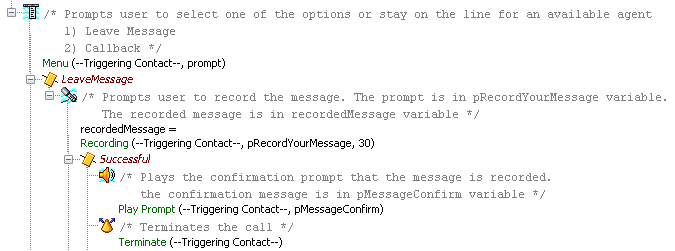
Under the queued step, after a time (approximately five minutes); the option is given to the
caller: Would you like to leave a message and also request callback? This is an example
how the script
looks:
4.
The caller presses 1 to leave a message or request callback. If the caller chooses the first
option, his message is recorded and the call is terminated.
5.
Leave Message
Since the message has been recorded, a call is played to another trigger which is associated with
an Application/script (script 2) which just has Accept > Select Resource.
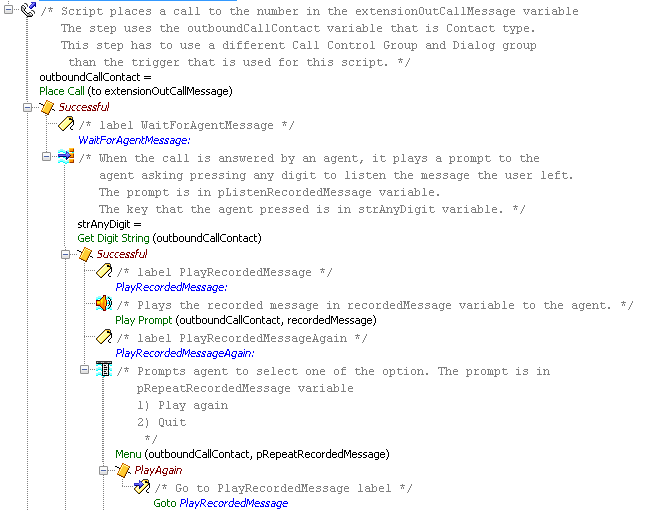
Once an agent accepts the call there, the system plays a prompt (Play Prompt in Script 1) to that
agent. This agent is usually part of another set of agents who are available to take these calls.
This is an example of how the script looks:
Page 3
Note: When PlaceCall is used, a new call is generated and this is saved into a Contact
variable called outboundCallContact. In the Play Prompt step, you need to select this contact
instead of the Triggering Contact since the Triggering Contact has already dropped off (the
caller who called in). You play the prompt to the agent and this is for the new call/contact
which was created through the PlaceCall step.
Callback
When the caller choses the callback option, this is the logic used:
Get the callback number from the caller.
1.
Store it in a variable and write it into a database (if needed).
2.
Use the Place Call step and call another trigger which is associated with an application/script
(Script 2) which has an Accept > Select Resource. This will usually search for agents from
another team where the agents are available for such calls.
3.
Once the agent accepts the call, use the redirect step in Script 1 in order to redirect the call
to the callback number collected from the end user.
4.
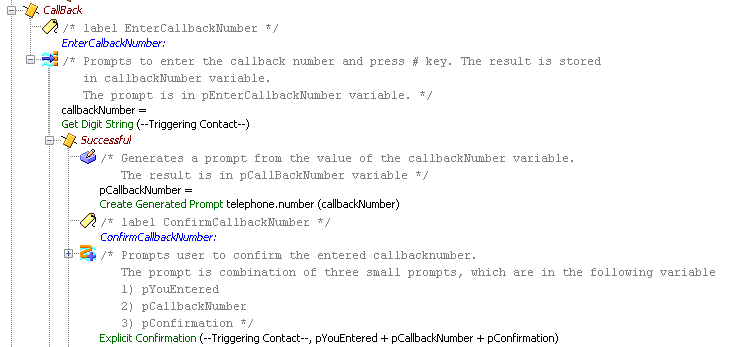
Collect and Confirm the Callback Number
Page 4
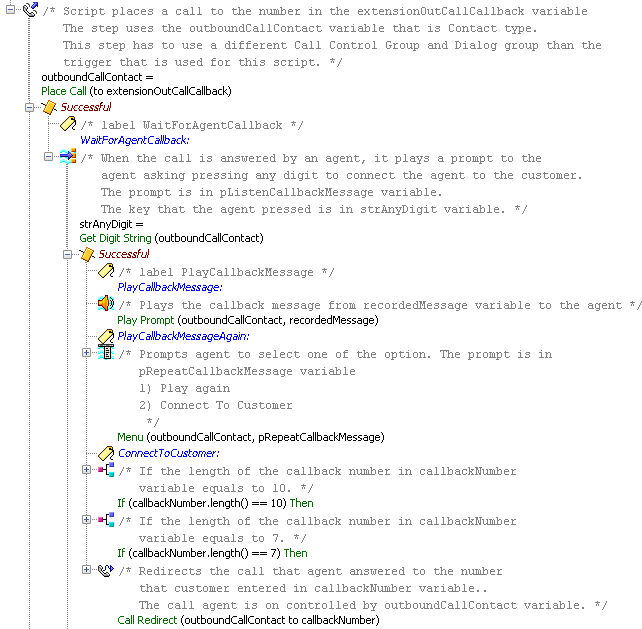
This is an example of the script when it connects the call to the agent and then redirects the call to
the callback number:
Page 5
Note: When PlaceCall is used, a new call is generated and this is saved into a Contact
variable called outboundCallContact. In the redirect step, you need to select this contact
instead of the Triggering Contact. This is because you need to redirect the call which is
connected to the agent and this is the new call/contact which is created with the Place Call
step. The Triggering Contact is not there anymore, since this call from the caller has already
dropped.
Script 2
It is a simple script with Accept and Select Resource.
Verify
There is currently no verification procedure available for this configuration.
Page 6
Troubleshoot
There is currently no specific troubleshooting information available for this configuration.
Related Information
UCCX Call Back Feature as seen on CUCM and UCCX
G
Cisco Unified Contact Center Express Getting Started with Scripts
G
Technical Support & Documentation - Cisco Systems
G