Document Metadata
Format: PDF 1.4
Title: Cisco Unified Contact Center Express Database Schema Guide, Release 12.5(1) SU1
Author: Sripathy
Creator: DITA Open Toolkit
Producer: XEP 4.30.961; modified using iText 2.1.7 by 1T3XT
Creation Date: D:20250311124644Z
Mod Date: D:20250311094117-07'00'
Page 1
CiscoUnifiedContactCenterExpressDatabaseSchemaGuide,Release
12.5(1) SU1
First Published: 2021-01-31
Americas Headquarters
Cisco Systems, Inc.
170 West Tasman Drive
San Jose, CA 95134-1706
USA
http://www.cisco.com
Tel: 408 526-4000
800 553-NETS (6387)
Fax: 408 527-0883

Page 2
THE SPECIFICATIONS AND INFORMATION REGARDING THE PRODUCTS IN THIS MANUAL ARE SUBJECT TO CHANGE WITHOUT NOTICE. ALL STATEMENTS,
INFORMATION, AND RECOMMENDATIONS IN THIS MANUAL ARE BELIEVED TO BE ACCURATE BUT ARE PRESENTED WITHOUT WARRANTY OF ANY KIND,
EXPRESS OR IMPLIED. USERS MUST TAKE FULL RESPONSIBILITY FOR THEIR APPLICATION OF ANY PRODUCTS.
THE SOFTWARE LICENSE AND LIMITED WARRANTY FOR THE ACCOMPANYING PRODUCT ARE SET FORTH IN THE INFORMATION PACKET THAT SHIPPED WITH
THE PRODUCT AND ARE INCORPORATED HEREIN BY THIS REFERENCE. IF YOU ARE UNABLE TO LOCATE THE SOFTWARE LICENSE OR LIMITED WARRANTY,
CONTACT YOUR CISCO REPRESENTATIVE FOR A COPY.
The Cisco implementation of TCP header compression is an adaptation of a program developed by the University of California, Berkeley (UCB) as part of UCB's public domain version of
the UNIX operating system. All rights reserved. Copyright © 1981, Regents of the University of California.
NOTWITHSTANDING ANY OTHER WARRANTY HEREIN, ALL DOCUMENT FILES AND SOFTWARE OF THESE SUPPLIERS ARE PROVIDED “AS IS" WITH ALL FAULTS.
CISCO AND THE ABOVE-NAMED SUPPLIERS DISCLAIM ALL WARRANTIES, EXPRESSED OR IMPLIED, INCLUDING, WITHOUT LIMITATION, THOSE OF
MERCHANTABILITY, FITNESS FOR A PARTICULAR PURPOSE AND NONINFRINGEMENT OR ARISING FROM A COURSE OF DEALING, USAGE, OR TRADE PRACTICE.
IN NO EVENT SHALL CISCO OR ITS SUPPLIERS BE LIABLE FOR ANY INDIRECT, SPECIAL, CONSEQUENTIAL, OR INCIDENTAL DAMAGES, INCLUDING, WITHOUT
LIMITATION, LOST PROFITS OR LOSS OR DAMAGE TO DATA ARISING OUT OF THE USE OR INABILITY TO USE THIS MANUAL, EVEN IF CISCO OR ITS SUPPLIERS
HAVE BEEN ADVISED OF THE POSSIBILITY OF SUCH DAMAGES.
Any Internet Protocol (IP) addresses and phone numbers used in this document are not intended to be actual addresses and phone numbers. Any examples, command display output, network
topology diagrams, and other figures included in the document are shown for illustrative purposes only. Any use of actual IP addresses or phone numbers in illustrative content is unintentional
and coincidental.
All printed copies and duplicate soft copies of this document are considered uncontrolled. See the current online version for the latest version.
Cisco has more than 200 offices worldwide. Addresses and phone numbers are listed on the Cisco website at www.cisco.com/go/offices.
Cisco and the Cisco logo are trademarks or registered trademarks of Cisco and/or its affiliates in the U.S. and other countries. To view a list of Cisco trademarks, go to this URL:
https://www.cisco.com/c/en/us/about/legal/trademarks.html. Third-party trademarks mentioned are the property of their respective owners. The use of the word partner does not imply a
partnership relationship between Cisco and any other company. (1721R)
© 2000–2021 Cisco Systems, Inc. All rights reserved.
Page 3
C O N T E N T S
Preface
vii
P R E F A C E
Change History
vii
About This Guide
viii
Audience
ix
Organization
ix
Conventions
ix
Related Documents
x
Documentation and Support
xi
Documentation Feedback
xi
Database Schema
1
C H A P T E R 1
Database Table Details
1
Overview of Tables
1
AgentConnectionDetail
4
AgentStateDetail
7
AgentCallDetailSnapshot
8
AgentStateDetailSnapshot
9
Application Prompt Map
10
AreaCode
11
Assigned Prompts
12
AuditResidualSkills
13
AuditReskill
15
AuditSkillGroup
16
CalendarAssociation
17
Campaign
18
CampaignCSQMap
20
Cisco Unified Contact Center Express Database Schema Guide, Release 12.5(1) SU1
iii

Page 4
CampaignSupervisorMap
21
CampaignData
22
CCCalendar
23
CCHolidays
24
ChannelProvider
25
ChatProblemStatement
26
ChatScheduledHours
27
ChatScheduledSpecialDays
28
ChatTriggerPoint
29
ChatUserForm
29
ChatWidget
30
ChatBubble
31
ConsultLegDetail
33
ContactCallDetail
34
ContactHoldDetail
42
ConfigSchema
42
ConfigSchemaColumn
43
ConfigSeed
44
ContactQueueDetail
44
ContactRoutingDetail
46
ContactServiceQueue
47
ContactWrapupData
51
CrsApplication
52
CrsGroup
54
CrsProperties
56
CrsTrigger
56
DateShiftMap
58
DayShiftMap
59
DebugFlag
60
DialingList
61
DialingListHistory
66
EngineStatus
71
FlexLicenseUsage
71
LatestSynchedTime
72
Cisco Unified Contact Center Express Database Schema Guide, Release 12.5(1) SU1
iv
Contents
Page 5
LicenseUtilizationDetail
72
MonitoredResourceDetail
73
MediaCustomerDataMapping
74
ProfileIDMapping
75
PurgeConfig
76
PurgeHistory
76
ReasoncodeLabelMap
78
RemoteMonitoringDetail
79
Resource
81
ResourceGroup
83
ResourceSkillMapping
84
RmonCSQConfig
85
RmonResConfig
86
RmonUser
86
RtCSQsSummary
87
RtICDStatistics
89
Schedule Reskill
91
Schedule Reskill Status
92
Skill
93
SkillGroup
94
Supervisor
95
SupervisorCampaignMap
96
SupervisorApplicationMap
97
SystemConfig
98
Team
99
TeamCSQMapping
100
TextAgentConnectionDetail
101
TextAgentStateDetails
103
TextAgentWrapupDetail
105
TextContactDetail
105
TextContactQueueDetail
108
TextCustomerDetails
109
TextRatingDetail
110
WorkflowTask
111
Cisco Unified Contact Center Express Database Schema Guide, Release 12.5(1) SU1
v
Contents
Page 6
WrapupCategory
112
WrapupReasons
113
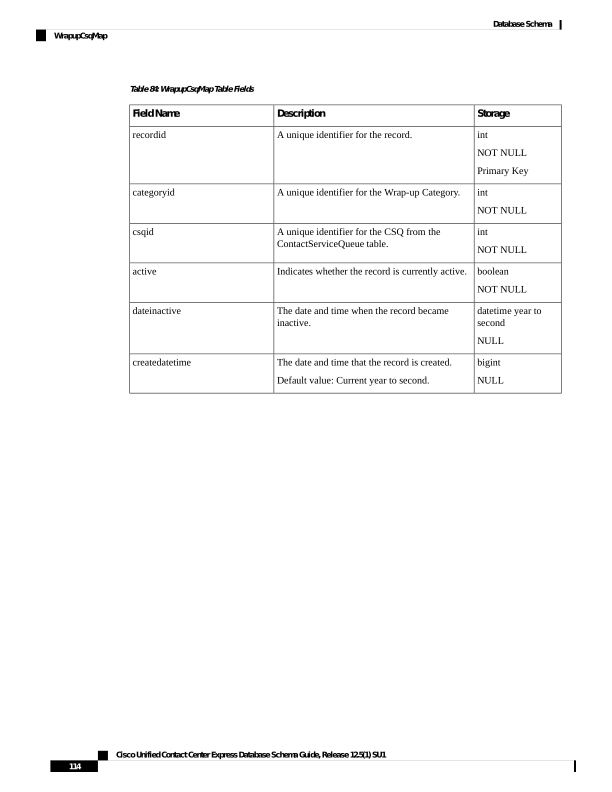
WrapupCsqMap
113
Cisco Unified Contact Center Express Database Schema Guide, Release 12.5(1) SU1
vi
Contents
Page 7
Preface
• Change History, on page vii
• About This Guide, on page viii
• Audience, on page ix
• Organization, on page ix
• Conventions, on page ix
• Related Documents, on page x
• Documentation and Support, on page xi
• Documentation Feedback, on page xi
Change History
This table lists changes made to this guide. Most recent changes appear at the top.
Date
See
Change
July 2021
Database Schema>Database Table
Details>Team
A new field
acdbusyonnonacdbusy is included
in the Team table.
Database Schema>Database Table
Details>Team
A new field nonacdbusyoverride
is included in the Team table.
Initial Release of Document for Release 12.5(1) SU1
January 2021
Database Schema>Database Table
Details>Team
A new field autoanswer is
included in the Team table
Cisco Unified Contact Center Express Database Schema Guide, Release 12.5(1) SU1
vii

Page 8
Date
See
Change
Database Schema>Database Table
Details>AuditReskill
Database Schema>Database Table
Details>AuditResidualSkills
Database Schema>Database Table
Details>Resource
Database Schema>Database Table
Details>RmonResConfig
Database Schema>Database Table
Details>RmonUser
Database Schema>Database Table
Details>Schedule Reskill
Database Schema>Database Table
Details>Supervisor
Database Schema>Database Table
Details>SupervisorCampaignMap
Database Schema>Database Table
Details>SupervisorApplicationMap
The storage size of the
resourceLoginID and reskiller
fields are updated to 128
Database Schema>Database Table
Details>ContactServiceQueue
Added two new fields
emailAuthType and
emailOAuthDetails
Database Schema>Database Table
Details>ContactCallDetail
Added a point about SMS/Email
survey
Database Schema>Database Table
Details>CrsApplication
Added new fields surveyname and
dispatchid
Database Schema>Database Table
Details>ChannelProvider
Added the new field usehttpproxy
Database Schema>Database Table
Details>ChatWidget
Removed the fields wdcode and
wdcontextservicefieldsets
About This Guide
The Cisco Unified CCX Database Schema Guide for Cisco Unified Contact Center Express (Unified CCX)
describes how data is organized in the Unified CCX Databases. This document provides detailed description
of the records and fields in each database table and enables you to create your own reports.
Cisco Unified Contact Center Express Database Schema Guide, Release 12.5(1) SU1
viii
Preface
About This Guide
Page 9
Audience
This manual is intended for system managers, administrators, and developers who want to create custom
reports using the generally available third-party programs that create reports from databases.
Organization
The Database Table Details, on page 1describes each table in the Cisco Unified CCX database. The
descriptions are arranged in the alphabetical order by table name. Each description includes a detailed
explanation of each record in the table. The Index helps you find information in this book.
Conventions
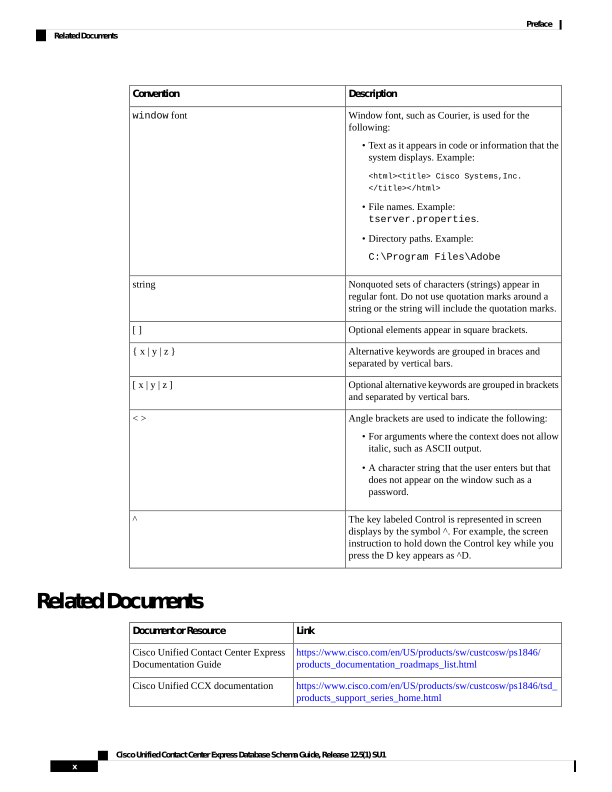
This manual uses the following conventions.
Description
Convention
Boldface font is used to indicate commands, such as
user entries, keys, buttons, and folder and submenu
names. For example:
• Choose Edit > Find
• Click Finish.
boldface font
Italic font is used to indicate the following:
• To introduce a new term. Example: A skill group
is a collection of agents who share similar skills.
• For emphasis. Example: Do not use the
numerical naming convention.
• An argument for which you must supply values.
Example:
IF (condition, true-value, false-value)
• A book title. Example:
See the Cisco Unified Contact Center Express
Installation Guide.
italic font
Cisco Unified Contact Center Express Database Schema Guide, Release 12.5(1) SU1
ix
Preface
Audience
Page 10
Description
Convention
Window font, such as Courier, is used for the
following:
• Text as it appears in code or information that the
system displays. Example:
<html><title> Cisco Systems,Inc.
</title></html>
• File names. Example:
tserver.properties.
• Directory paths. Example:
C:\Program Files\Adobe
window font
Nonquoted sets of characters (strings) appear in
regular font. Do not use quotation marks around a
string or the string will include the quotation marks.
string
Optional elements appear in square brackets.
[ ]
Alternative keywords are grouped in braces and
separated by vertical bars.
{ x | y | z }
Optional alternative keywords are grouped in brackets
and separated by vertical bars.
[ x | y | z ]
Angle brackets are used to indicate the following:
• For arguments where the context does not allow
italic, such as ASCII output.
• A character string that the user enters but that
does not appear on the window such as a
password.
< >
The key labeled Control is represented in screen
displays by the symbol ^. For example, the screen
instruction to hold down the Control key while you
press the D key appears as ^D.
^
Related Documents
Link
Document or Resource
https://www.cisco.com/en/US/products/sw/custcosw/ps1846/
products_documentation_roadmaps_list.html
Cisco Unified Contact Center Express
Documentation Guide
https://www.cisco.com/en/US/products/sw/custcosw/ps1846/tsd\_
products_support_series_home.html
Cisco Unified CCX documentation
Cisco Unified Contact Center Express Database Schema Guide, Release 12.5(1) SU1
x
Preface
Related Documents
Page 11
Link
Document or Resource
https://www.cisco.com/en/US/products/ps9755/tsd\_products\_
support_series_home.html
Cisco Unified Intelligence Center
documentation
https://www.cisco.com/en/US/products/ps11324/tsd\_products\_
support_series_home.html
Cisco Finesse documentation
https://www.cisco.com/en/US/products/sw/custcosw/ps1846/tsd\_
products_support_series_home.html
Cisco Customer Collaboration Platform
documentation
Note
From Unified CCX Release 12.5(1),
CCP documents are available in the
Cisco Unified CCX documentation
folder.
https://www.cisco.com/c/en/us/support/customer-collaboration/
mediasense/tsd-products-support-series-home.html
Cisco Mediasense documentation
https://www.cisco.com/c/dam/en/us/td/docs/voice\_ip\_comm/uc\_
system/virtualization/
virtualization-cisco-unified-contact-center-express.html
Cisco Unified CCX Virtualization
Information
https://www.cisco.com/c/en/us/support/customer-collaboration/
unified-contact-center-express/
products-device-support-tables-list.html
Cisco Unified CCX Compatibility
Information
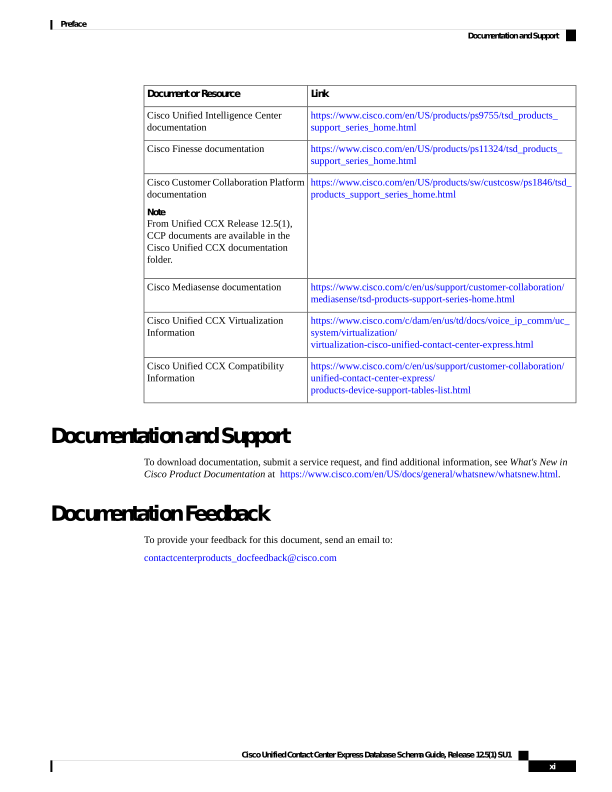
Documentation and Support
To download documentation, submit a service request, and find additional information, see What's New in
Cisco Product Documentation at https://www.cisco.com/en/US/docs/general/whatsnew/whatsnew.html.
Documentation Feedback
To provide your feedback for this document, send an email to:
contactcenterproducts_docfeedback@cisco.com
Cisco Unified Contact Center Express Database Schema Guide, Release 12.5(1) SU1
xi
Preface
Documentation and Support
Page 12
Cisco Unified Contact Center Express Database Schema Guide, Release 12.5(1) SU1
xii
Preface
Documentation Feedback
Page 13
C H A P T E R 1
Database Schema
• Database Table Details, on page 1
Database Table Details
Each description provides the following information:
• Database Table Name—Name of the Unified CCX database table.
• Field Name—Name of a field as it appears in the database table.
• Description—Description of the field, including valid values where appropriate.
• Storage—Information about the data in each field as follows:
• Data type used for the field in the database.
For storage characteristics and limitations of the data types used for the fields in
the databases refer to "IBM Informix SQL Reference Guide". The date and time
in the database fields are stored in Coordinated Universal Time (UTC).
Note
• Whether the NULL value is valid for the field. “NULL” if the NULL value is or “NOT NULL” if
the NULL value is not valid.
If the NULL value is valid, the database will record a value of -1 for a numeric
field and an empty string for other fields.
Note
• “Primary Key” if the field is a primary key, or part of a primary key, in the database table.
Overview of Tables
The following tables are described in this guide:
• AgentConnectionDetail, on page 4, contains records written for calls that are connected to an agent.
Cisco Unified Contact Center Express Database Schema Guide, Release 12.5(1) SU1
1


Page 14
• AgentStateDetail, on page 7, contains records written when an agent changes state.
• AgentCallDetailSnapshot, on page 8, contains records of agent call details in a day.
• AgentStateDetailSnapshot, on page 9, contains records of agent state change details in a day.
• AuditReskill, on page 15, contains records written when the resource is added or removed from the CSQ
because of the changes that are made to the resource or CSQ skills.
• AuditSkillGroup, on page 16, contains records written when the resource skills or competency level
changes are made to the resource or CSQ.
• AreaCode, on page 11, contains the area code and time zone information used for outbound calls.
• Campaign, on page 18, contains records with campaign configuration information.
• CampaignCSQMap, on page 20, provides a relationship between campaigns and Contact Service Queues
(CSQs).
• CampaignSupervisorMap, on page 21, provides a relationship between campaigns and supervisors.
• CampaignData , on page 22, contains records with the campaign data information.
• ChatProblemStatement, on page 26, contains the associated problem statements and tag ids for each chat
widget.
• ChatTriggerPoint, on page 29, contains the chat CSQ tag information.
• ChatUserForm, on page 29, contains the user form fields included in each chat widget along with the
order of the fields in the widget.
• ChatWidget, on page 30, contains the chat widget information.
• ChatBubble, on page 31, contains the chat bubble information.
• ContactCallDetail, on page 34, contains records written for every incoming, outgoing, or internal call.
• ContactQueueDetail, on page 44, contains records written for calls that are queued for CSQs; one record
for each CSQ is queued.
• ContactRoutingDetail , on page 46, contains records written for calls that are queued for CSQs; one
record for each call.
• ContactServiceQueue , on page 47, contains records written for CSQs configured on the Unified CCX
Administration user interface.
• CrsApplication , on page 52, contains records about applications that are uniquely identified by application
name.
• CrsGroup , on page 54, contains records about groups that are identified by a combination of group class
name and group ID.
• CrsTrigger, on page 56, contains records about triggers that are uniquely identified by trigger name.
• DialingList , on page 61, contains records with outbound contacts that need to be dialed for a particular
campaign.
• MonitoredResourceDetail, on page 73, contains records written for agents who are monitored by a
Supervisor.
Cisco Unified Contact Center Express Database Schema Guide, Release 12.5(1) SU1
2
Database Schema
Overview of Tables
Page 15
• ProfileIDMapping, on page 75, contains records written for profiles defined on the Unified CCX
Administration user interface.
• PurgeHistory, on page 76, contains records written for tracking of the history of purge information for
both Manual and Scheduled purge.
• RemoteMonitoringDetail , on page 79, contains records written for remote monitoring calls made by a
Supervisor.
• Resource, on page 81, contains records written for resources (agents) that are configured on the Cisco
Unified Communications Manager (Unified CM) Administration user interface.
• ResourceGroup , on page 83, contains records written for resource groups configured on the Unified
CCX Administration user interface.
• ResourceSkillMapping, on page 84, is a relationship table between resources and skills.
• RmonCSQConfig , on page 85, contains records written for CSQs configured for a Supervisor’s remote
monitoring allowed list on the Unified CCX Administration user interface.
• RmonResConfig, on page 86, contains records written for resources configured for a Supervisor’s remote
monitoring allowed list on the Unified CCX Administration user interface.
• RmonUser , on page 86, contains records written for remote monitoring Supervisors configured on the
Unified CCX Administration user interface.
• RtCSQsSummary , on page 87, contains real-time statistics for configured CSQs.
• RtICDStatistics , on page 89, contains Unified CCX summary statistics.
• Skill , on page 93, contains records written for skills configured on the Unified CCX Administration
user interface.
• SkillGroup , on page 94, is a relationship table between skills and CSQs.
• Supervisor , on page 95, contains records written for Supervisors configured on the Unified CCX
Administration user interface.
• SupervisorCampaignMap, on page 96, contains records for the list of campaigns that can be associated
with no or more campaigns to a Supervisor and managed by the Supervisor.
• SupervisorApplicationMap, on page 97, contains records for the list of applications that can be associated
to a Supervisor and managed by the Supervisor.
• Team, on page 99, contains records written for teams configured on the Unified CCX Administration
user interface.
• TeamCSQMapping , on page 100, is a relationship table between teams and CSQs.
• TextAgentConnectionDetail , on page 101, contains information relating to the agent who handled the
contact or leg.
• TextAgentStateDetails, on page 103, contains information about the chat agent and about the event that
caused the chat agent state change.
• TextContactDetail , on page 105, contains detailed information about the contact or leg.
• TextContactQueueDetail, on page 108, is a relationship table between teams and CSQs.
Cisco Unified Contact Center Express Database Schema Guide, Release 12.5(1) SU1
3
Database Schema
Overview of Tables
Page 16
• TextCustomerDetails, on page 109, contains customer-related information corresponding to the chat
contact.
• WorkflowTask , on page 111, contains records written for workflow tasks that are completed.
• ConsultLegDetail, on page 33, contains records of agents corresponding to the consult call details.
AgentConnectionDetail
Database table name: AgentConnectionDetail
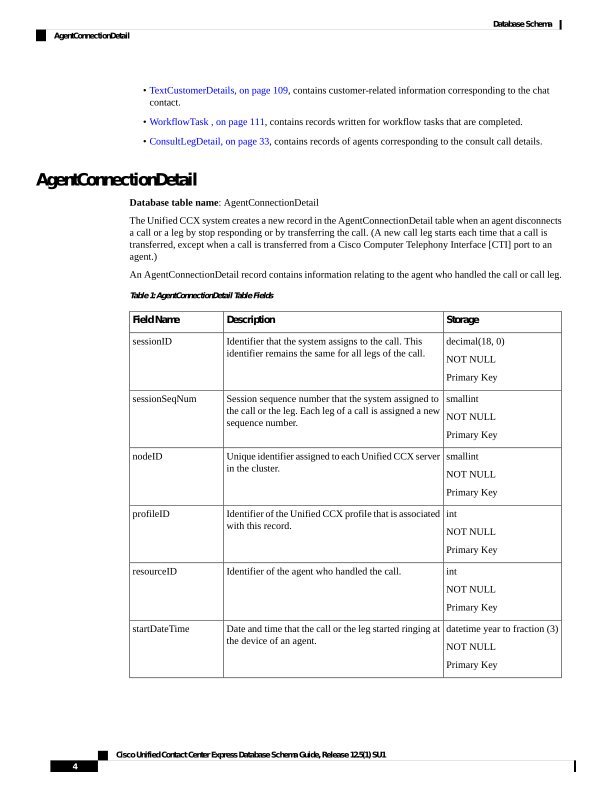
The Unified CCX system creates a new record in the AgentConnectionDetail table when an agent disconnects
a call or a leg by stop responding or by transferring the call. (A new call leg starts each time that a call is
transferred, except when a call is transferred from a Cisco Computer Telephony Interface [CTI] port to an
agent.)
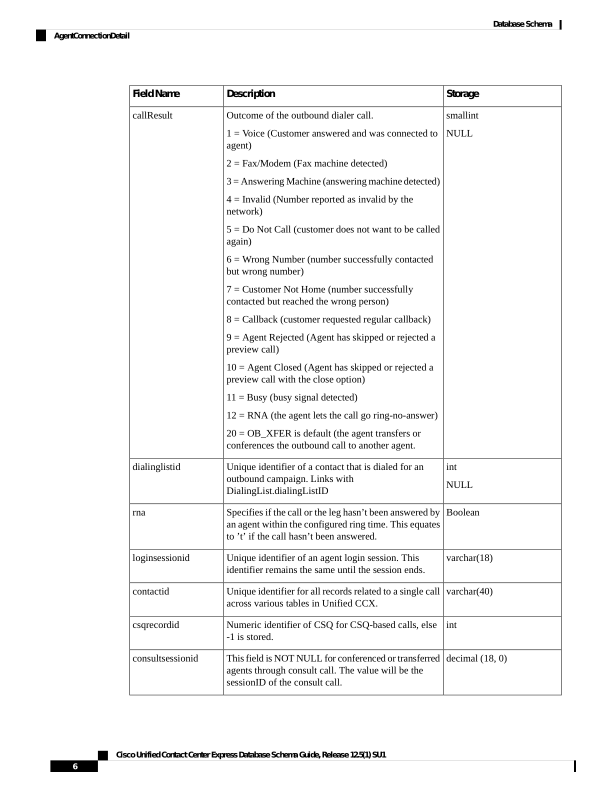
An AgentConnectionDetail record contains information relating to the agent who handled the call or call leg.
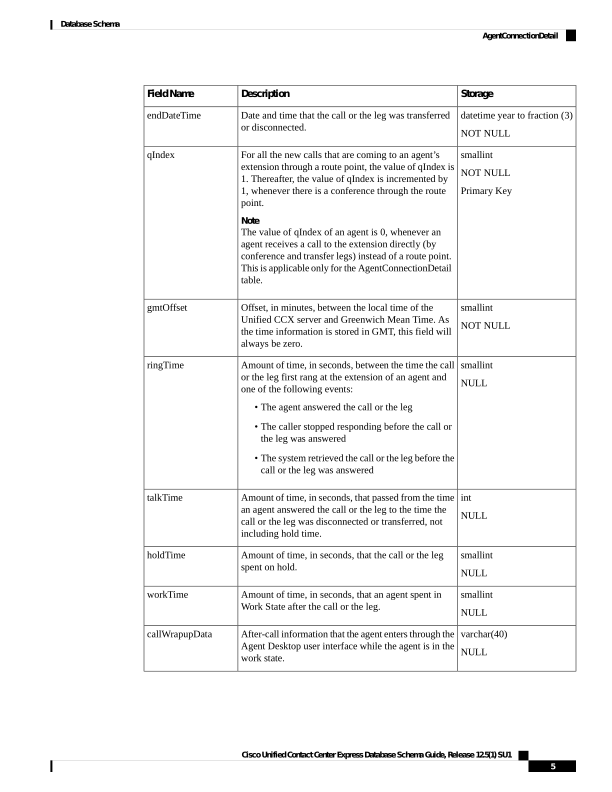
Table 1: AgentConnectionDetail Table Fields
Storage
Description
Field Name
decimal(18, 0)
NOT NULL
Primary Key
Identifier that the system assigns to the call. This
identifier remains the same for all legs of the call.
sessionID
smallint
NOT NULL
Primary Key
Session sequence number that the system assigned to
the call or the leg. Each leg of a call is assigned a new
sequence number.
sessionSeqNum
smallint
NOT NULL
Primary Key
Unique identifier assigned to each Unified CCX server
in the cluster.
nodeID
int
NOT NULL
Primary Key
Identifier of the Unified CCX profile that is associated
with this record.
profileID
int
NOT NULL
Primary Key
Identifier of the agent who handled the call.
resourceID
datetime year to fraction (3)
NOT NULL
Primary Key
Date and time that the call or the leg started ringing at
the device of an agent.
startDateTime
Cisco Unified Contact Center Express Database Schema Guide, Release 12.5(1) SU1
4
Database Schema
AgentConnectionDetail
Page 17
Storage
Description
Field Name
datetime year to fraction (3)
NOT NULL
Date and time that the call or the leg was transferred
or disconnected.
endDateTime
smallint
NOT NULL
Primary Key
For all the new calls that are coming to an agent’s
extension through a route point, the value of qIndex is
- Thereafter, the value of qIndex is incremented by
1, whenever there is a conference through the route
point.
Note
The value of qIndex of an agent is 0, whenever an
agent receives a call to the extension directly (by
conference and transfer legs) instead of a route point.
This is applicable only for the AgentConnectionDetail
table.
qIndex
smallint
NOT NULL
Offset, in minutes, between the local time of the
Unified CCX server and Greenwich Mean Time. As
the time information is stored in GMT, this field will
always be zero.
gmtOffset
smallint
NULL
Amount of time, in seconds, between the time the call
or the leg first rang at the extension of an agent and
one of the following events:
• The agent answered the call or the leg
• The caller stopped responding before the call or
the leg was answered
• The system retrieved the call or the leg before the
call or the leg was answered
ringTime
int
NULL
Amount of time, in seconds, that passed from the time
an agent answered the call or the leg to the time the
call or the leg was disconnected or transferred, not
including hold time.
talkTime
smallint
NULL
Amount of time, in seconds, that the call or the leg
spent on hold.
holdTime
smallint
NULL
Amount of time, in seconds, that an agent spent in
Work State after the call or the leg.
workTime
varchar(40)
NULL
After-call information that the agent enters through the
Agent Desktop user interface while the agent is in the
work state.
callWrapupData
Cisco Unified Contact Center Express Database Schema Guide, Release 12.5(1) SU1
5
Database Schema
AgentConnectionDetail
Page 18
Storage
Description
Field Name
smallint
NULL
Outcome of the outbound dialer call.
1 = Voice (Customer answered and was connected to
agent)
2 = Fax/Modem (Fax machine detected)
3 = Answering Machine (answering machine detected)
4 = Invalid (Number reported as invalid by the
network)
5 = Do Not Call (customer does not want to be called
again)
6 = Wrong Number (number successfully contacted
but wrong number)
7 = Customer Not Home (number successfully
contacted but reached the wrong person)
8 = Callback (customer requested regular callback)
9 = Agent Rejected (Agent has skipped or rejected a
preview call)
10 = Agent Closed (Agent has skipped or rejected a
preview call with the close option)
11 = Busy (busy signal detected)
12 = RNA (the agent lets the call go ring-no-answer)
20 = OB_XFER is default (the agent transfers or
conferences the outbound call to another agent.
callResult
int
NULL
Unique identifier of a contact that is dialed for an
outbound campaign. Links with
DialingList.dialingListID
dialinglistid
Boolean
Specifies if the call or the leg hasn’t been answered by
an agent within the configured ring time. This equates
to ’t’ if the call hasn’t been answered.
rna
varchar(18)
Unique identifier of an agent login session. This
identifier remains the same until the session ends.
loginsessionid
varchar(40)
Unique identifier for all records related to a single call
across various tables in Unified CCX.
contactid
int
Numeric identifier of CSQ for CSQ-based calls, else
-1 is stored.
csqrecordid
decimal (18, 0)
This field is NOT NULL for conferenced or transferred
agents through consult call. The value will be the
sessionID of the consult call.
consultsessionid
Cisco Unified Contact Center Express Database Schema Guide, Release 12.5(1) SU1
6
Database Schema
AgentConnectionDetail
Page 19
Related Topics
• ContactCallDetail, on page 34 (via sessionID, sessionSeqNum, nodeID, and profileID)
• ContactRoutingDetail , on page 46 (via sessionID, sessionSeqNum, nodeID, profileID, and qIndex)
• ContactQueueDetail (via sessionID, sessionSeqNum, nodeID, profileID, and qIndex)
• DialingList , on page 61 (via dialingListID)
• MonitoredResourceDetail, on page 73 (sessionSeqNum maps to monitoredSessionSeqNum, via profileID,
and nodeID)
• ProfileIDMapping, on page 75 (via profileID)
• PurgeHistory, on page 76 (sessionID maps to monitoredSessionID, via profileID, and nodeID)
• Resource, on page 81 (via resourceID and profileID)
AgentStateDetail
Database table name: AgentStateDetail
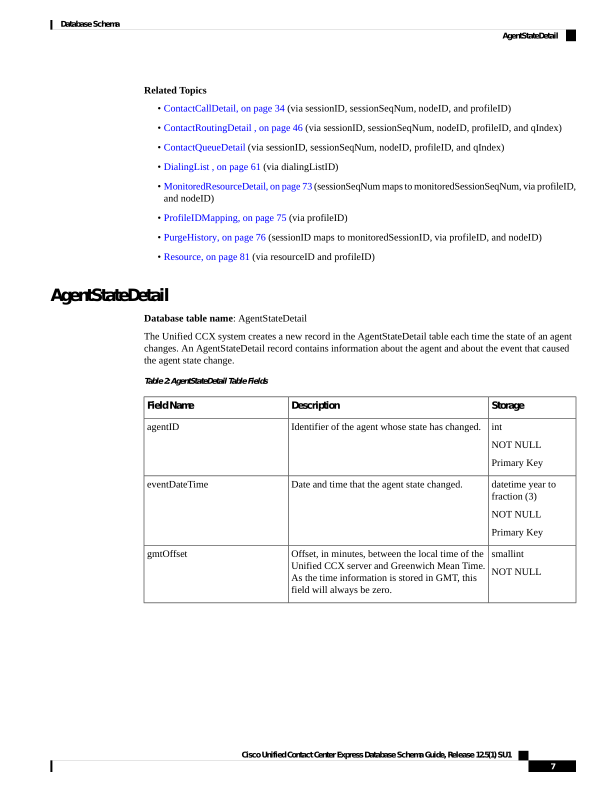
The Unified CCX system creates a new record in the AgentStateDetail table each time the state of an agent
changes. An AgentStateDetail record contains information about the agent and about the event that caused
the agent state change.
Table 2: AgentStateDetail Table Fields
Storage
Description
Field Name
int
NOT NULL
Primary Key
Identifier of the agent whose state has changed.
agentID
datetime year to
fraction (3)
NOT NULL
Primary Key
Date and time that the agent state changed.
eventDateTime
smallint
NOT NULL
Offset, in minutes, between the local time of the
Unified CCX server and Greenwich Mean Time.
As the time information is stored in GMT, this
field will always be zero.
gmtOffset
Cisco Unified Contact Center Express Database Schema Guide, Release 12.5(1) SU1
7
Database Schema
AgentStateDetail
Page 20
Storage
Description
Field Name
smallint
NOT NULL
Primary Key
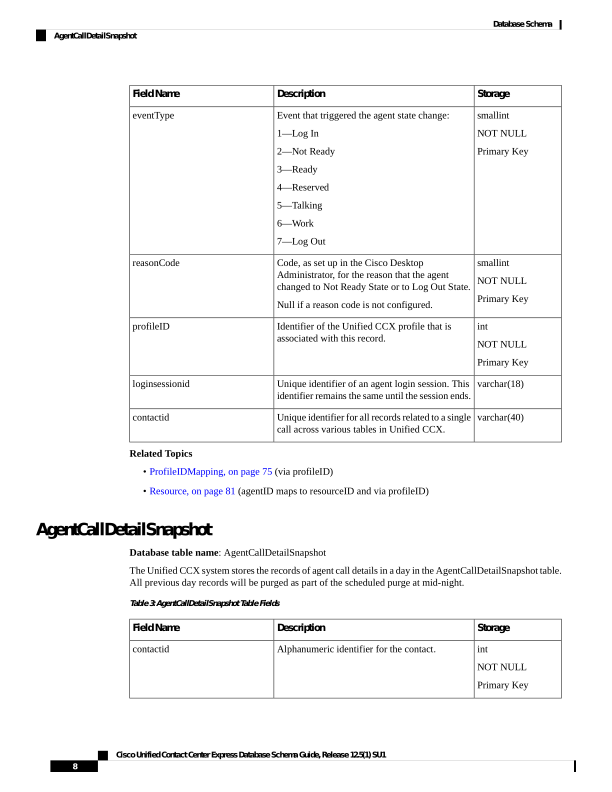
Event that triggered the agent state change:
1—Log In
2—Not Ready
3—Ready
4—Reserved
5—Talking
6—Work
7—Log Out
eventType
smallint
NOT NULL
Primary Key
Code, as set up in the Cisco Desktop
Administrator, for the reason that the agent
changed to Not Ready State or to Log Out State.
Null if a reason code is not configured.
reasonCode
int
NOT NULL
Primary Key
Identifier of the Unified CCX profile that is
associated with this record.
profileID
varchar(18)
Unique identifier of an agent login session. This
identifier remains the same until the session ends.
loginsessionid
varchar(40)
Unique identifier for all records related to a single
call across various tables in Unified CCX.
contactid
Related Topics
• ProfileIDMapping, on page 75 (via profileID)
• Resource, on page 81 (agentID maps to resourceID and via profileID)
AgentCallDetailSnapshot
Database table name: AgentCallDetailSnapshot
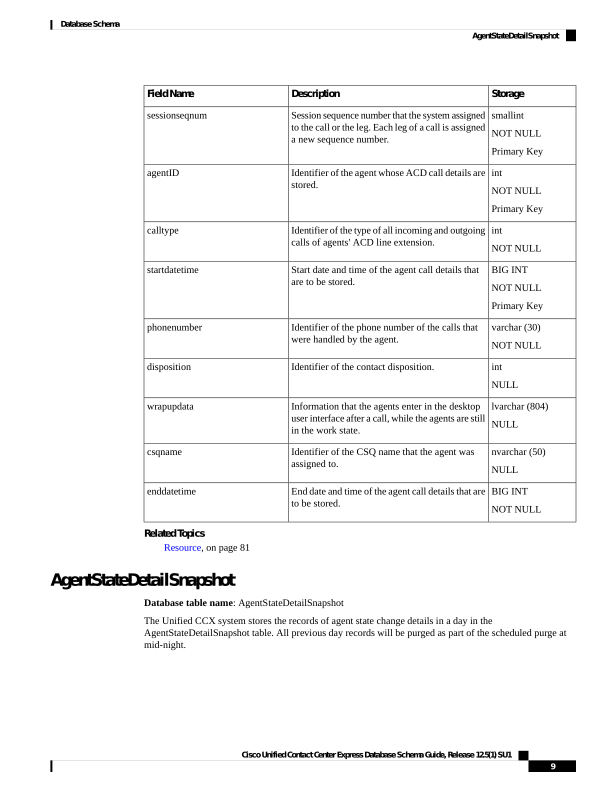
The Unified CCX system stores the records of agent call details in a day in the AgentCallDetailSnapshot table.
All previous day records will be purged as part of the scheduled purge at mid-night.
Table 3: AgentCallDetailSnapshot Table Fields
Storage
Description
Field Name
int
NOT NULL
Primary Key
Alphanumeric identifier for the contact.
contactid
Cisco Unified Contact Center Express Database Schema Guide, Release 12.5(1) SU1
8
Database Schema
AgentCallDetailSnapshot
Page 21
Storage
Description
Field Name
smallint
NOT NULL
Primary Key
Session sequence number that the system assigned
to the call or the leg. Each leg of a call is assigned
a new sequence number.
sessionseqnum
int
NOT NULL
Primary Key
Identifier of the agent whose ACD call details are
stored.
agentID
int
NOT NULL
Identifier of the type of all incoming and outgoing
calls of agents' ACD line extension.
calltype
BIG INT
NOT NULL
Primary Key
Start date and time of the agent call details that
are to be stored.
startdatetime
varchar (30)
NOT NULL
Identifier of the phone number of the calls that
were handled by the agent.
phonenumber
int
NULL
Identifier of the contact disposition.
disposition
lvarchar (804)
NULL
Information that the agents enter in the desktop
user interface after a call, while the agents are still
in the work state.
wrapupdata
nvarchar (50)
NULL
Identifier of the CSQ name that the agent was
assigned to.
csqname
BIG INT
NOT NULL
End date and time of the agent call details that are
to be stored.
enddatetime
Related Topics
Resource, on page 81
AgentStateDetailSnapshot
Database table name: AgentStateDetailSnapshot
The Unified CCX system stores the records of agent state change details in a day in the
AgentStateDetailSnapshot table. All previous day records will be purged as part of the scheduled purge at
mid-night.
Cisco Unified Contact Center Express Database Schema Guide, Release 12.5(1) SU1
9
Database Schema
AgentStateDetailSnapshot
Page 22
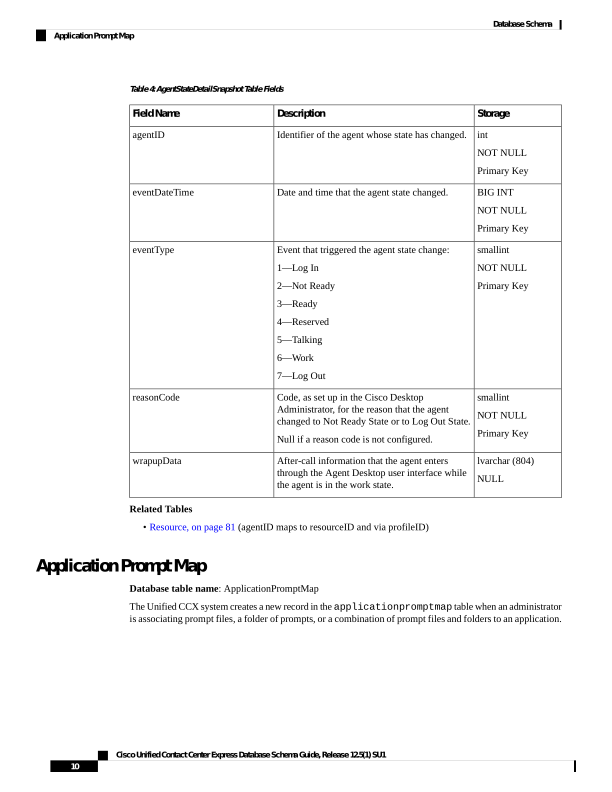
Table 4: AgentStateDetailSnapshot Table Fields
Storage
Description
Field Name
int
NOT NULL
Primary Key
Identifier of the agent whose state has changed.
agentID
BIG INT
NOT NULL
Primary Key
Date and time that the agent state changed.
eventDateTime
smallint
NOT NULL
Primary Key
Event that triggered the agent state change:
1—Log In
2—Not Ready
3—Ready
4—Reserved
5—Talking
6—Work
7—Log Out
eventType
smallint
NOT NULL
Primary Key
Code, as set up in the Cisco Desktop
Administrator, for the reason that the agent
changed to Not Ready State or to Log Out State.
Null if a reason code is not configured.
reasonCode
lvarchar (804)
NULL
After-call information that the agent enters
through the Agent Desktop user interface while
the agent is in the work state.
wrapupData
Related Tables
• Resource, on page 81 (agentID maps to resourceID and via profileID)
Application Prompt Map
Database table name: ApplicationPromptMap
The Unified CCX system creates a new record in the applicationpromptmap table when an administrator
is associating prompt files, a folder of prompts, or a combination of prompt files and folders to an application.
Cisco Unified Contact Center Express Database Schema Guide, Release 12.5(1) SU1
10
Database Schema
Application Prompt Map
Page 23
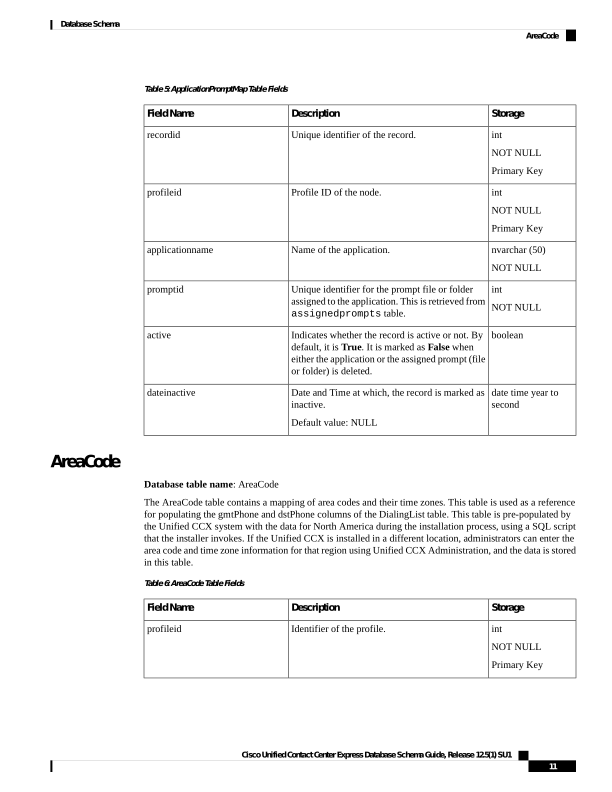
Table 5: ApplicationPromptMap Table Fields
Storage
Description
Field Name
int
NOT NULL
Primary Key
Unique identifier of the record.
recordid
int
NOT NULL
Primary Key
Profile ID of the node.
profileid
nvarchar (50)
NOT NULL
Name of the application.
applicationname
int
NOT NULL
Unique identifier for the prompt file or folder
assigned to the application. This is retrieved from
assignedprompts table.
promptid
boolean
Indicates whether the record is active or not. By
default, it is True. It is marked as False when
either the application or the assigned prompt (file
or folder) is deleted.
active
date time year to
second
Date and Time at which, the record is marked as
inactive.
Default value: NULL
dateinactive
AreaCode
Database table name: AreaCode
The AreaCode table contains a mapping of area codes and their time zones. This table is used as a reference
for populating the gmtPhone and dstPhone columns of the DialingList table. This table is pre-populated by
the Unified CCX system with the data for North America during the installation process, using a SQL script
that the installer invokes. If the Unified CCX is installed in a different location, administrators can enter the
area code and time zone information for that region using Unified CCX Administration, and the data is stored
in this table.
Table 6: AreaCode Table Fields
Storage
Description
Field Name
int
NOT NULL
Primary Key
Identifier of the profile.
profileid
Cisco Unified Contact Center Express Database Schema Guide, Release 12.5(1) SU1
11
Database Schema
AreaCode
Page 24
Storage
Description
Field Name
datetime year to
second
NOT NULL
Default -CURRENT_TIMESTAMP
createdatetime
int
NOT NULL
Primary Key
Unique identifier for the record
recordid
nvarchar(10)
NOT NULL
Primary Key
The area code of the call.
areacode
nvarchar(10)
NULL
Uses the same data as that of gmtzone.
regioncode
char(1)
NOT NULL
Indicates whether daylight savings time is
observed.
• N = Daylight savings time is not observed.
• Y = Daylight savings time is observed.
daylightsavingsenabled
int
NULL
Stores identifiers that internally maps to the GMT
offset corresponding to the area code.
gmtzone
BLOB
NULL
Any fields which are to be used internally only.
privatedata
boolean
NOT NULL
Whether the record is active in the system. A
record becomes inactive if the team is deleted
from the system.
f = Inactive
t = Active
active
datetime year to
second
NULL
Date this record was deleted.
dateinactive
Related Topics
ProfileIDMapping, on page 75
DialingList , on page 61
Assigned Prompts
Database table name: AssignedPrompts
Cisco Unified Contact Center Express Database Schema Guide, Release 12.5(1) SU1
12
Database Schema
Assigned Prompts
Page 25
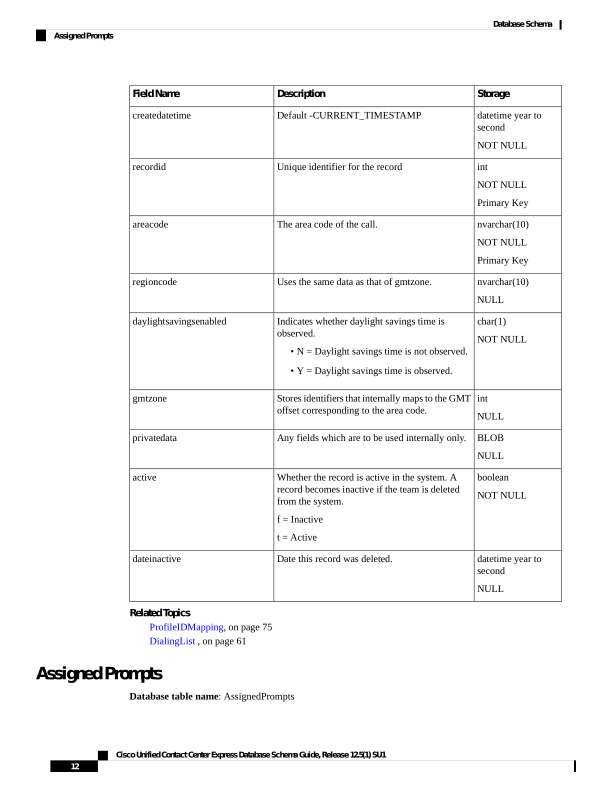
This table stores the details of prompt files and folders that are assigned to applications. Before updating the
applicationpromptmap table, the system verifies if the selected prompt file or prompt folder is available
in this table. If it is not available, a new record is created.
Table 7: AssignedPrompts Table Fields
Storage
Description
Field Name
int
NOT NULL
Primary Key
Unique identifier of the record.
recordid
int
NOT NULL
Primary Key
Profile ID of the node.
profileid
int
NOT NULL
Unique identifier for the prompt file or folder
assigned to the application.
promptid
small int
NOT NULL
To identify if the selection is a prompt file or
folder.
0 = File
1 = Folder
Default value: 0
type
int
NOT NULL
The ID of parent folder of this prompt, which is
stored in the assignedFolder table.
parentfolderid
lvarchar (255)
NOT NULL
Name of the prompt file or folder.
name
boolean
Indicates whether the record is active in the
Unified CCX system. A record becomes inactive
if a prompt file or folder is renamed or deleted
(name).
f = Inactive
t - Active
active
date time year to
second
Date and Time at which, the record is marked as
inactive.
Default value: NULL
dateinactive
AuditResidualSkills
Database table name: audit_residualskills
Cisco Unified Contact Center Express Database Schema Guide, Release 12.5(1) SU1
13
Database Schema
AuditResidualSkills
Page 26
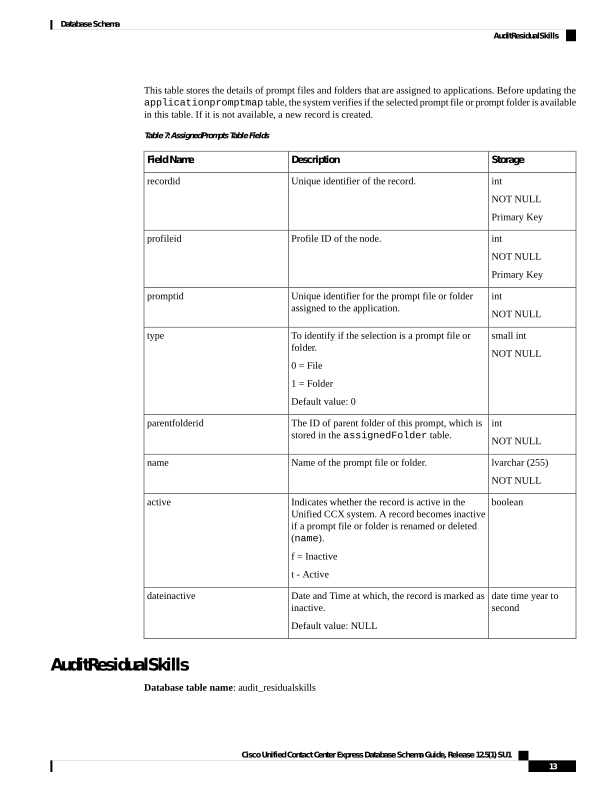
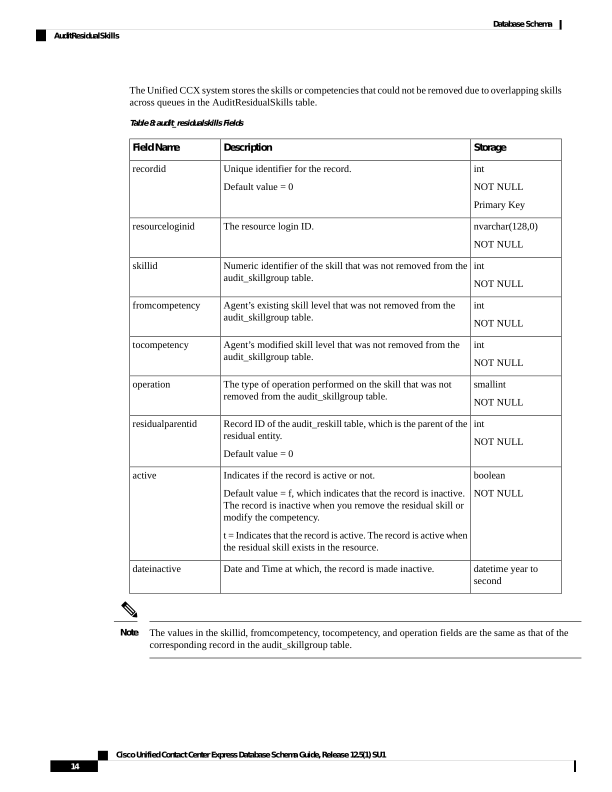
The Unified CCX system stores the skills or competencies that could not be removed due to overlapping skills
across queues in the AuditResidualSkills table.
Table 8: audit_residualskills Fields
Storage
Description
Field Name
int
NOT NULL
Primary Key
Unique identifier for the record.
Default value = 0
recordid
nvarchar(128,0)
NOT NULL
The resource login ID.
resourceloginid
int
NOT NULL
Numeric identifier of the skill that was not removed from the
audit_skillgroup table.
skillid
int
NOT NULL
Agent’s existing skill level that was not removed from the
audit_skillgroup table.
fromcompetency
int
NOT NULL
Agent’s modified skill level that was not removed from the
audit_skillgroup table.
tocompetency
smallint
NOT NULL
The type of operation performed on the skill that was not
removed from the audit_skillgroup table.
operation
int
NOT NULL
Record ID of the audit_reskill table, which is the parent of the
residual entity.
Default value = 0
residualparentid
boolean
NOT NULL
Indicates if the record is active or not.
Default value = f, which indicates that the record is inactive.
The record is inactive when you remove the residual skill or
modify the competency.
t = Indicates that the record is active. The record is active when
the residual skill exists in the resource.
active
datetime year to
second
Date and Time at which, the record is made inactive.
dateinactive
The values in the skillid, fromcompetency, tocompetency, and operation fields are the same as that of the
corresponding record in the audit_skillgroup table.
Note
Cisco Unified Contact Center Express Database Schema Guide, Release 12.5(1) SU1
14
Database Schema
AuditResidualSkills

Page 27
AuditReskill
Database table name: audit_reskill
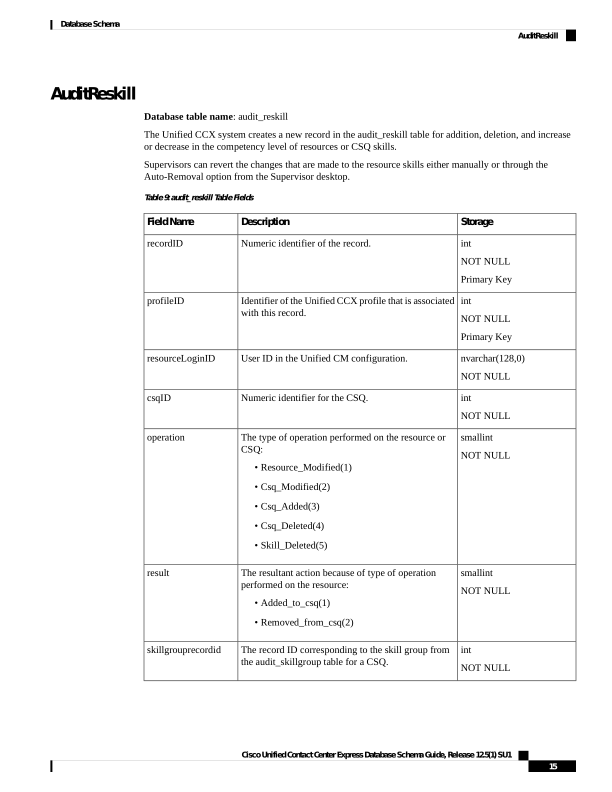
The Unified CCX system creates a new record in the audit_reskill table for addition, deletion, and increase
or decrease in the competency level of resources or CSQ skills.
Supervisors can revert the changes that are made to the resource skills either manually or through the
Auto-Removal option from the Supervisor desktop.
Table 9: audit_reskill Table Fields
Storage
Description
Field Name
int
NOT NULL
Primary Key
Numeric identifier of the record.
recordID
int
NOT NULL
Primary Key
Identifier of the Unified CCX profile that is associated
with this record.
profileID
nvarchar(128,0)
NOT NULL
User ID in the Unified CM configuration.
resourceLoginID
int
NOT NULL
Numeric identifier for the CSQ.
csqID
smallint
NOT NULL
The type of operation performed on the resource or
CSQ:
• Resource_Modified(1)
• Csq_Modified(2)
• Csq_Added(3)
• Csq_Deleted(4)
• Skill_Deleted(5)
operation
smallint
NOT NULL
The resultant action because of type of operation
performed on the resource:
• Added_to_csq(1)
• Removed_from_csq(2)
result
int
NOT NULL
The record ID corresponding to the skill group from
the audit_skillgroup table for a CSQ.
skillgrouprecordid
Cisco Unified Contact Center Express Database Schema Guide, Release 12.5(1) SU1
15
Database Schema
AuditReskill
Page 28
Storage
Description
Field Name
nvarchar(128,0)
NOT NULL
Login ID of the user.
reskiller
smallint
NOT NULL
Resource is reskilled by:
• Supervisor(1)
• Admin(2)
• System(3)
Note
If the resource is reskilled by the Auto-Removal
option, the reskiller_type is System.
reskiller_type
datetime year to fraction(3)
NOT NULL
Date and Time this record was changed.
reskilledtimestamp
boolean
NOT NULL
Indicates whether the record is active based on the
values in the "result" field in the audit_reskill table.
• True=The record is active when a resource is
added to a CSQ and the value of the "result" field
is "Added_to_csq".
• False =The record is inactive when the resource
is removed from the CSQ and the value of the
"result" field is "Removed_from_csq". If an active
record exists for the same resource and the same
CSQ, then this record is alo marked inactive.
active
Related Topics
AuditSkillGroup, on page 16
AuditSkillGroup
Database table name: audit_skillgroup
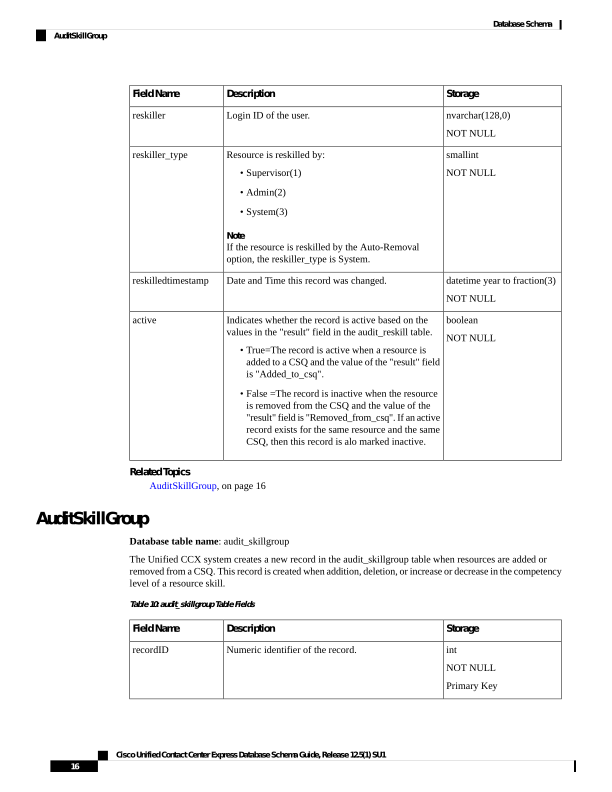
The Unified CCX system creates a new record in the audit_skillgroup table when resources are added or
removed from a CSQ. This record is created when addition, deletion, or increase or decrease in the competency
level of a resource skill.
Table 10: audit_skillgroup Table Fields
Storage
Description
Field Name
int
NOT NULL
Primary Key
Numeric identifier of the record.
recordID
Cisco Unified Contact Center Express Database Schema Guide, Release 12.5(1) SU1
16
Database Schema
AuditSkillGroup
Page 29
Storage
Description
Field Name
int
NOT NULL
Primary Key
Identifier of the Unified CCX profile that is associated
with this record.
profileID
int
NOT NULL
Primary Key
Numeric identifier of the skill.
skillID
int
NOT NULL
Existing skill level of the agents. Values range from 1
(lowest) to 10 (highest).
fromcompetency
int
NOT NULL
Modified skill level of the agents. Values range from
1 (lowest) to 10 (highest).
tocompetency
smallint
NOT NULL
The type of operation performed on the skill:
• Skill Add(1)
• Skill Removed(2)
• Competency Increased(3)
• Competency Decreased(4)
operation
Related Topics
AuditReskill, on page 15
CalendarAssociation
Database table name: CalendarAssociation
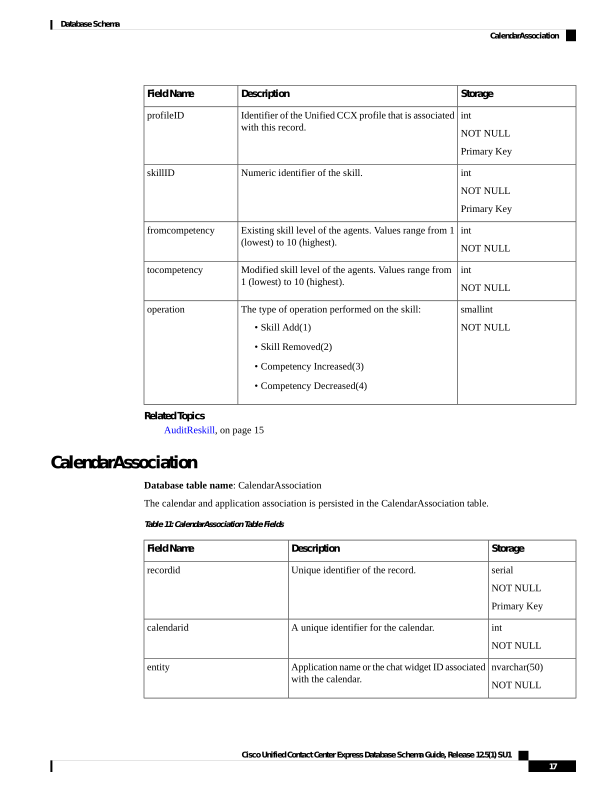
The calendar and application association is persisted in the CalendarAssociation table.
Table 11: CalendarAssociation Table Fields
Storage
Description
Field Name
serial
NOT NULL
Primary Key
Unique identifier of the record.
recordid
int
NOT NULL
A unique identifier for the calendar.
calendarid
nvarchar(50)
NOT NULL
Application name or the chat widget ID associated
with the calendar.
entity
Cisco Unified Contact Center Express Database Schema Guide, Release 12.5(1) SU1
17
Database Schema
CalendarAssociation
Page 30
Storage
Description
Field Name
smallint
NOT NULL
Indicates whether the calendar is associated with
an application or a chat widget.
entitytype
boolean
NOT NULL
Indicates wheather the record is deleted.
active
datetime year to
second
Date and time when the record was deleted.
dateinactive
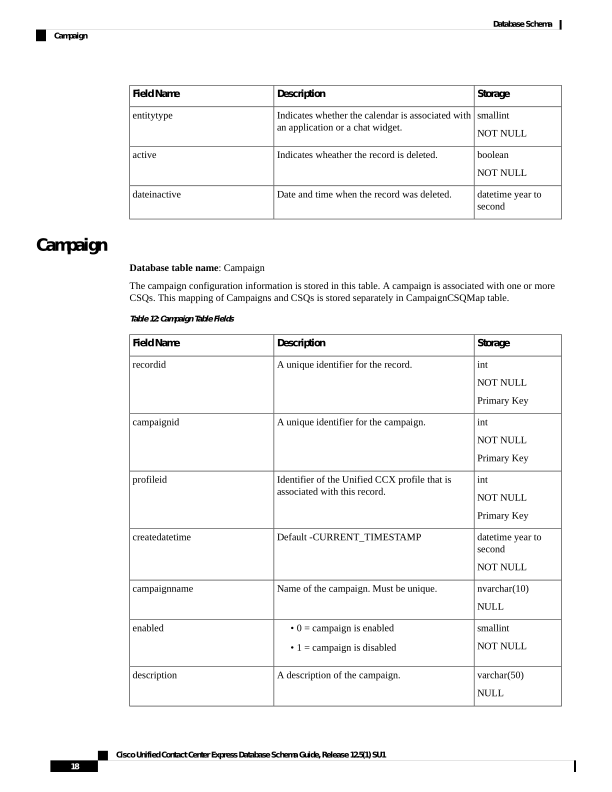
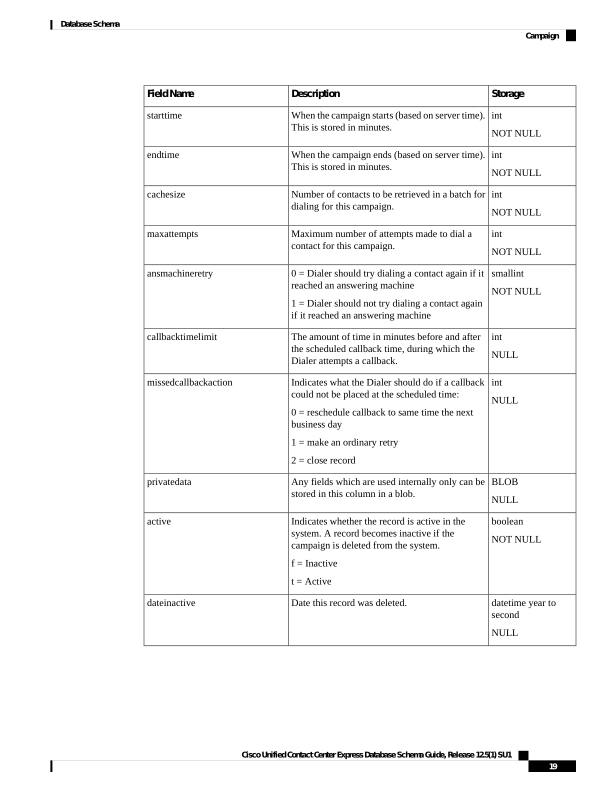
Campaign
Database table name: Campaign
The campaign configuration information is stored in this table. A campaign is associated with one or more
CSQs. This mapping of Campaigns and CSQs is stored separately in CampaignCSQMap table.
Table 12: Campaign Table Fields
Storage
Description
Field Name
int
NOT NULL
Primary Key
A unique identifier for the record.
recordid
int
NOT NULL
Primary Key
A unique identifier for the campaign.
campaignid
int
NOT NULL
Primary Key
Identifier of the Unified CCX profile that is
associated with this record.
profileid
datetime year to
second
NOT NULL
Default -CURRENT_TIMESTAMP
createdatetime
nvarchar(10)
NULL
Name of the campaign. Must be unique.
campaignname
smallint
NOT NULL
• 0 = campaign is enabled
• 1 = campaign is disabled
enabled
varchar(50)
NULL
A description of the campaign.
description
Cisco Unified Contact Center Express Database Schema Guide, Release 12.5(1) SU1
18
Database Schema
Campaign
Page 31
Storage
Description
Field Name
int
NOT NULL
When the campaign starts (based on server time).
This is stored in minutes.
starttime
int
NOT NULL
When the campaign ends (based on server time).
This is stored in minutes.
endtime
int
NOT NULL
Number of contacts to be retrieved in a batch for
dialing for this campaign.
cachesize
int
NOT NULL
Maximum number of attempts made to dial a
contact for this campaign.
maxattempts
smallint
NOT NULL
0 = Dialer should try dialing a contact again if it
reached an answering machine
1 = Dialer should not try dialing a contact again
if it reached an answering machine
ansmachineretry
int
NULL
The amount of time in minutes before and after
the scheduled callback time, during which the
Dialer attempts a callback.
callbacktimelimit
int
NULL
Indicates what the Dialer should do if a callback
could not be placed at the scheduled time:
0 = reschedule callback to same time the next
business day
1 = make an ordinary retry
2 = close record
missedcallbackaction
BLOB
NULL
Any fields which are used internally only can be
stored in this column in a blob.
privatedata
boolean
NOT NULL
Indicates whether the record is active in the
system. A record becomes inactive if the
campaign is deleted from the system.
f = Inactive
t = Active
active
datetime year to
second
NULL
Date this record was deleted.
dateinactive
Cisco Unified Contact Center Express Database Schema Guide, Release 12.5(1) SU1
19
Database Schema
Campaign
Page 32
Storage
Description
Field Name
smallint
NOT NULL
The type of the dialer used for the campaign. The
dialer can be any one of the following three types
- Predictive, Progressive or Preview Outbound.
0 - Direct Preview Dialer
1 - IVR based Predictive Dialer
2 - IVR based Progressive Dialer
Default value = 0
dialertype
smallint
NOT NULL
The campaign type can be IVR-based or
ICD-based.
0 - IVR based campaign
1 - Agent based campaign
Default value = 1
campaignType
Related Topics
CampaignCSQMap, on page 20
ContactCallDetail, on page 34
ProfileIDMapping, on page 75
DialingList , on page 61
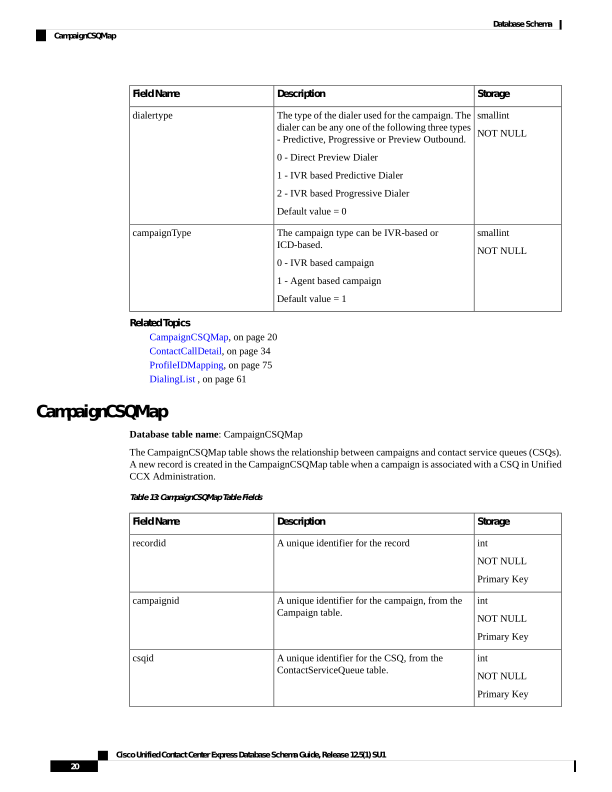
CampaignCSQMap
Database table name: CampaignCSQMap
The CampaignCSQMap table shows the relationship between campaigns and contact service queues (CSQs).
A new record is created in the CampaignCSQMap table when a campaign is associated with a CSQ in Unified
CCX Administration.
Table 13: CampaignCSQMap Table Fields
Storage
Description
Field Name
int
NOT NULL
Primary Key
A unique identifier for the record
recordid
int
NOT NULL
Primary Key
A unique identifier for the campaign, from the
Campaign table.
campaignid
int
NOT NULL
Primary Key
A unique identifier for the CSQ, from the
ContactServiceQueue table.
csqid
Cisco Unified Contact Center Express Database Schema Guide, Release 12.5(1) SU1
20
Database Schema
CampaignCSQMap
Page 33
Storage
Description
Field Name
smallint
NULL
Indicates whether the record is active in the
system. A record becomes inactive if the
campaign is deleted from the system.
f = Inactive
t = Active
active
datetime year to
second
NULL
Default, CURRENT_TIME_STAMP
createdatetime
datetime year to
second
NULL
Date this record was deleted.
dateinactive
Related Topics
Campaign, on page 18
ContactServiceQueue , on page 47
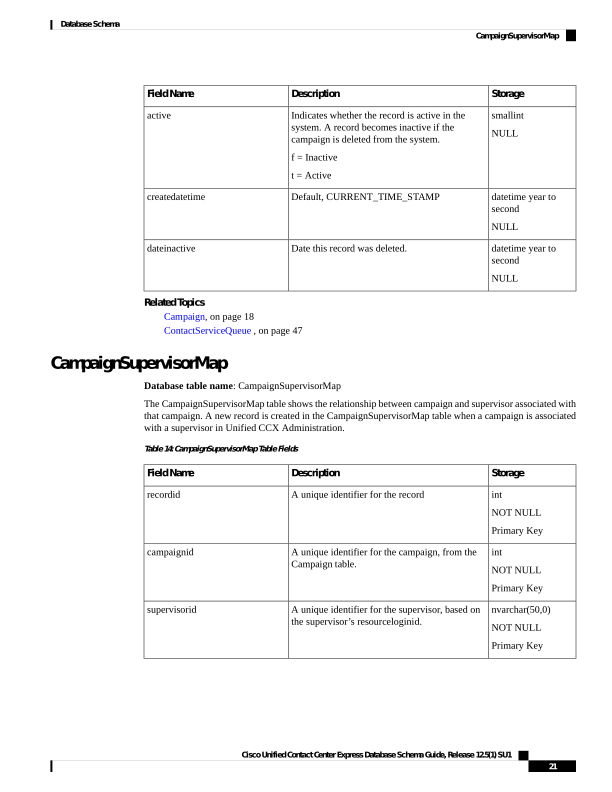
CampaignSupervisorMap
Database table name: CampaignSupervisorMap
The CampaignSupervisorMap table shows the relationship between campaign and supervisor associated with
that campaign. A new record is created in the CampaignSupervisorMap table when a campaign is associated
with a supervisor in Unified CCX Administration.
Table 14: CampaignSupervisorMap Table Fields
Storage
Description
Field Name
int
NOT NULL
Primary Key
A unique identifier for the record
recordid
int
NOT NULL
Primary Key
A unique identifier for the campaign, from the
Campaign table.
campaignid
nvarchar(50,0)
NOT NULL
Primary Key
A unique identifier for the supervisor, based on
the supervisor’s resourceloginid.
supervisorid
Cisco Unified Contact Center Express Database Schema Guide, Release 12.5(1) SU1
21
Database Schema
CampaignSupervisorMap
Page 34
Storage
Description
Field Name
boolean
NOT NULL
Indicates whether the record is active in the
system. A record becomes inactive if the
campaign is deleted from the system.
f = Inactive
t = Active
active
datetime year to
second
NOT NULL
Default, CURRENT_TIME_STAMP
createdatetime
datetime year to
second
NULL
Date this record was deleted.
dateinactive
Related Topics
Campaign, on page 18
Supervisor , on page 95
CampaignData
Database table name: CampaignData
If you have configured a campaign as an outbound IVR campaign and have chosen Predictive dialer type, the
number of lines per port along with the other parameters are stored in the CampaignData table every half
hour.
Table 15: CampaignCSQMap Table Fields
Storage
Description
Field Name
int
NOT NULL
Primary Key
A unique identifier for the record
recordId
int
NOT NULL
Primary Key
The campaign for which the data is recorded
campaignId
datetime year to
fraction
NOT NULL
Start date and time of the interval
startDate
datetime year to
fraction
NOT NULL
End date and time of the interval
endDate
Cisco Unified Contact Center Express Database Schema Guide, Release 12.5(1) SU1
22
Database Schema
CampaignData
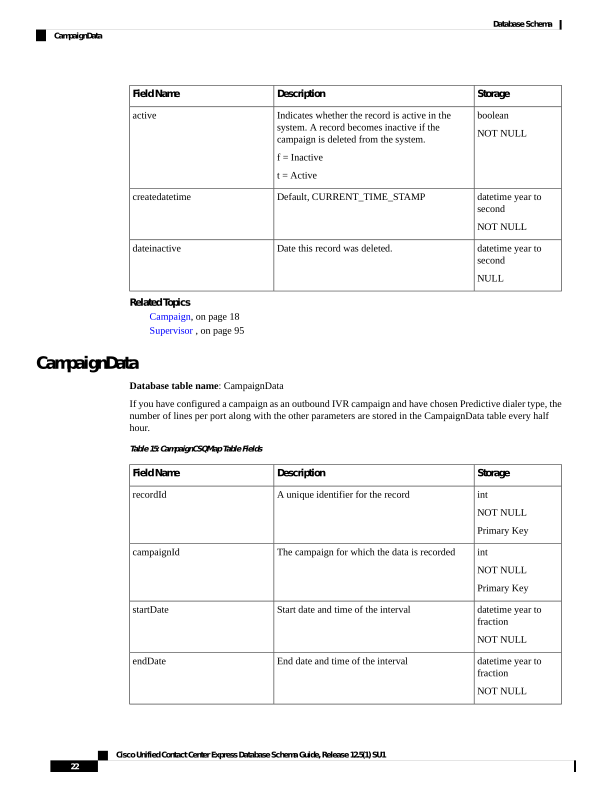
Page 35
Storage
Description
Field Name
int
NOT NULL
The number of attempted calls in the interval
attemptedCalls
int
NOT NULL
The number of abandoned calls in the interval
abandonedCalls
int
NOT NULL
The number of voice calls in the interval
voiceCalls
decimal(8, 3)
NOT NULL
Lines Per Port value computed depending on the
abandoned calls/voice calls
linesPerPort
boolean
NOT NULL
Indicates whether the data stored is for an active
campaign or not.
f = Inactive
t = Active
active
datetime year to
fraction
The date on which this campaign was deleted
dateinactive
Related Topics
Campaign, on page 18
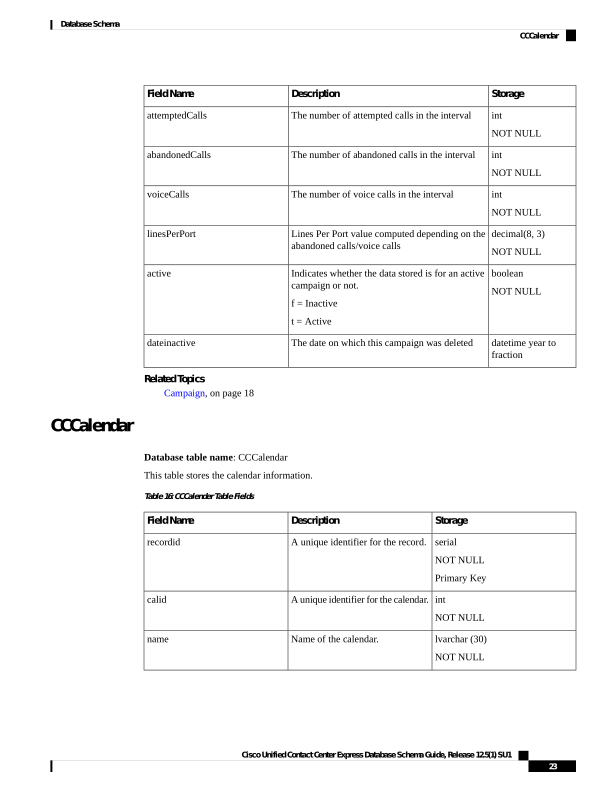
CCCalendar
Database table name: CCCalendar
This table stores the calendar information.
Table 16: CCCalender Table Fields
Storage
Description
Field Name
serial
NOT NULL
Primary Key
A unique identifier for the record.
recordid
int
NOT NULL
A unique identifier for the calendar.
calid
lvarchar (30)
NOT NULL
Name of the calendar.
name
Cisco Unified Contact Center Express Database Schema Guide, Release 12.5(1) SU1
23
Database Schema
CCCalendar
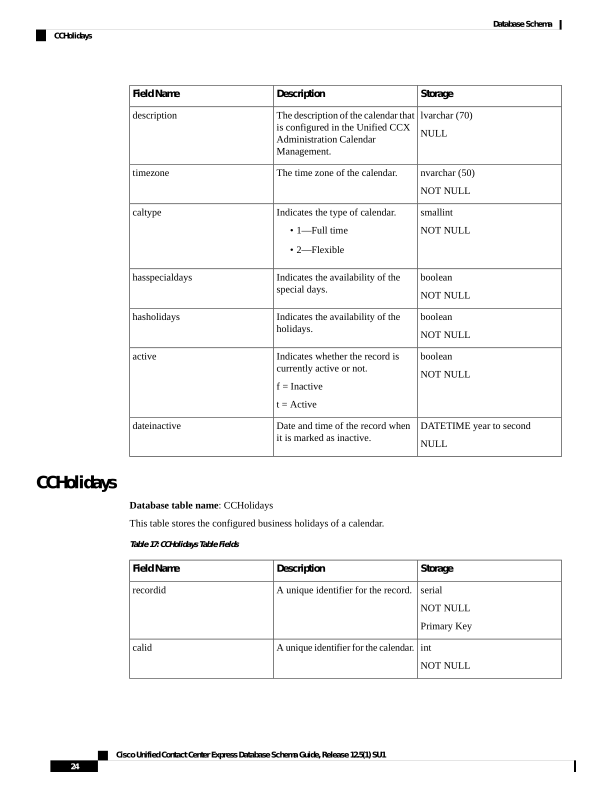
Page 36
Storage
Description
Field Name
lvarchar (70)
NULL
The description of the calendar that
is configured in the Unified CCX
Administration Calendar
Management.
description
nvarchar (50)
NOT NULL
The time zone of the calendar.
timezone
smallint
NOT NULL
Indicates the type of calendar.
• 1—Full time
• 2—Flexible
caltype
boolean
NOT NULL
Indicates the availability of the
special days.
hasspecialdays
boolean
NOT NULL
Indicates the availability of the
holidays.
hasholidays
boolean
NOT NULL
Indicates whether the record is
currently active or not.
f = Inactive
t = Active
active
DATETIME year to second
NULL
Date and time of the record when
it is marked as inactive.
dateinactive
CCHolidays
Database table name: CCHolidays
This table stores the configured business holidays of a calendar.
Table 17: CCHolidays Table Fields
Storage
Description
Field Name
serial
NOT NULL
Primary Key
A unique identifier for the record.
recordid
int
NOT NULL
A unique identifier for the calendar.
calid
Cisco Unified Contact Center Express Database Schema Guide, Release 12.5(1) SU1
24
Database Schema
CCHolidays
Page 37
Storage
Description
Field Name
nvarchar (50)
NOT NULL
Name of the calendar.
name
DATETIME YEAR TO DAY
NOT NULL
Date of the special day.
caldate
boolean
NOT NULL
Indicates whether the record is
currently active or not.
f = Inactive
t = Active
active
DATETIME year to second
NULL
Date and time of the record when
it is marked as inactive.
dateinactive
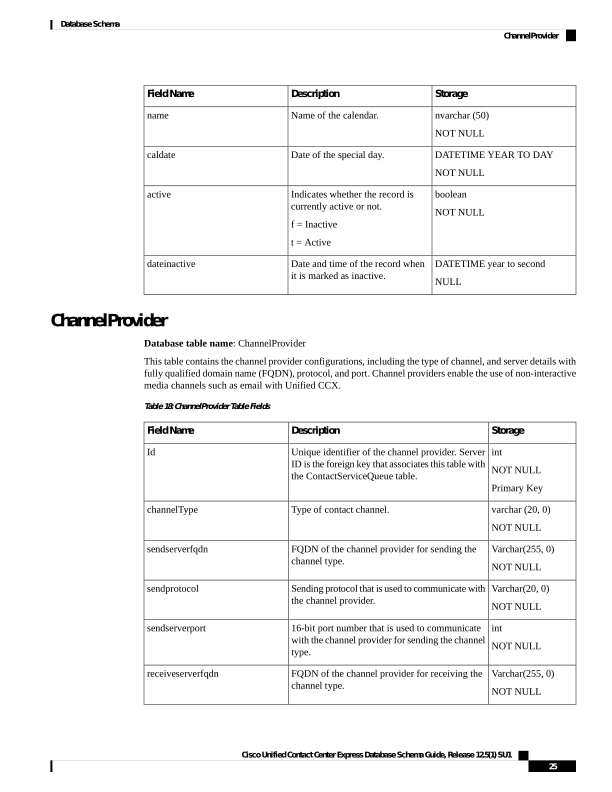
ChannelProvider
Database table name: ChannelProvider
This table contains the channel provider configurations, including the type of channel, and server details with
fully qualified domain name (FQDN), protocol, and port. Channel providers enable the use of non-interactive
media channels such as email with Unified CCX.
Table 18: ChannelProvider Table Fields
Storage
Description
Field Name
int
NOT NULL
Primary Key
Unique identifier of the channel provider. Server
ID is the foreign key that associates this table with
the ContactServiceQueue table.
Id
varchar (20, 0)
NOT NULL
Type of contact channel.
channelType
Varchar(255, 0)
NOT NULL
FQDN of the channel provider for sending the
channel type.
sendserverfqdn
Varchar(20, 0)
NOT NULL
Sending protocol that is used to communicate with
the channel provider.
sendprotocol
int
NOT NULL
16-bit port number that is used to communicate
with the channel provider for sending the channel
type.
sendserverport
Varchar(255, 0)
NOT NULL
FQDN of the channel provider for receiving the
channel type.
receiveserverfqdn
Cisco Unified Contact Center Express Database Schema Guide, Release 12.5(1) SU1
25
Database Schema
ChannelProvider
Page 38
Storage
Description
Field Name
Varchar(20, 0)
NOT NULL
Receiving protocol that is used to communicate
with the channel provider.
receiveprotocol
int
NOT NULL
16-bit port number that is used to communicate
with the channel provider for receiving the
channel type.
receiveserverport
Lvarchar(400)
Description of the channel provider.
description
Boolean
NOT NULL
Indicates whether the record is currently active
or not. A record becomes inactive if the record is
deleted or updated from the system.
f = Inactive
t = Active
active
datetime year to
second
If the active field is "f", this field indicates the
date and time that the record became inactive.
dateinactive
Lvarchar(25)
Indicates whether Enable/Disable option is
selected for SOCKS Proxy in Mail server
configuration page.
proxytype
boolean
NOT NULL
Indicates if HTTP proxy is used to connect to the
mail server.
Default value: f
usehttpproxy
Lvarchar(50)
Indicates the mail server type. The default is
microsoft.
mailservertype
Related Topics
ContactServiceQueue , on page 47
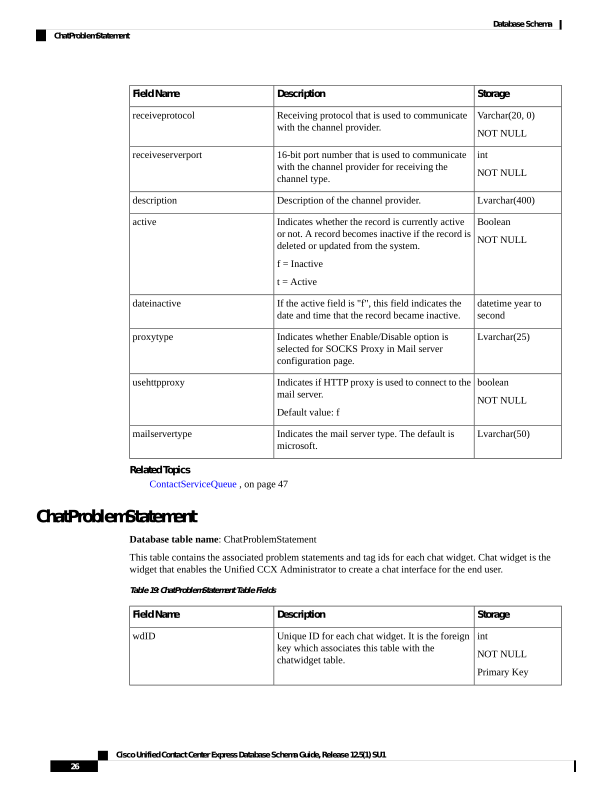
ChatProblemStatement
Database table name: ChatProblemStatement
This table contains the associated problem statements and tag ids for each chat widget. Chat widget is the
widget that enables the Unified CCX Administrator to create a chat interface for the end user.
Table 19: ChatProblemStatement Table Fields
Storage
Description
Field Name
int
NOT NULL
Primary Key
Unique ID for each chat widget. It is the foreign
key which associates this table with the
chatwidget table.
wdID
Cisco Unified Contact Center Express Database Schema Guide, Release 12.5(1) SU1
26
Database Schema
ChatProblemStatement
Page 39
Storage
Description
Field Name
nvarchar(50)
NOT NULL
The tagID for the csq associated with the problem
statement.
tagID
lvarchar (256)
NOT NULL
The definition of the problem.
problemStmt
int
NOT NULL
Primary Key
Order of the problem statement in the chat widget.
psOrder
Related Topics
ChatWidget, on page 30
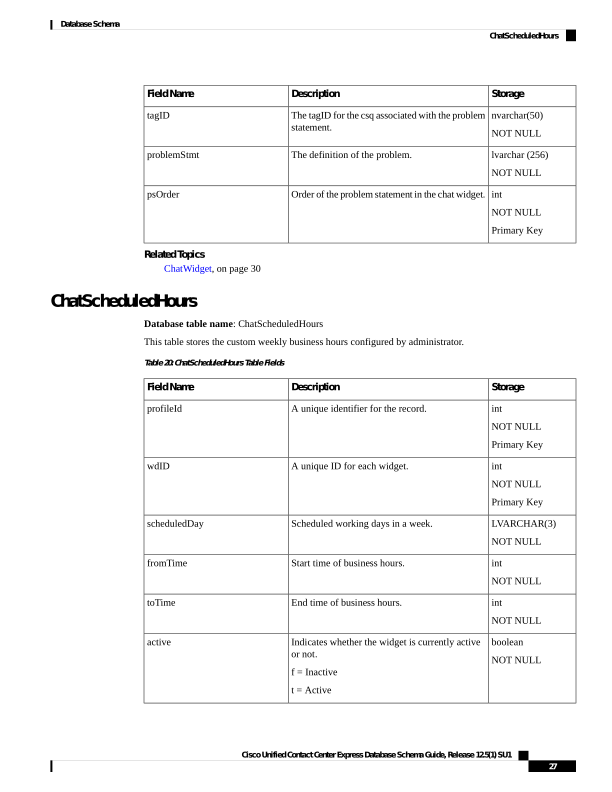
ChatScheduledHours
Database table name: ChatScheduledHours
This table stores the custom weekly business hours configured by administrator.
Table 20: ChatScheduledHours Table Fields
Storage
Description
Field Name
int
NOT NULL
Primary Key
A unique identifier for the record.
profileId
int
NOT NULL
Primary Key
A unique ID for each widget.
wdID
LVARCHAR(3)
NOT NULL
Scheduled working days in a week.
scheduledDay
int
NOT NULL
Start time of business hours.
fromTime
int
NOT NULL
End time of business hours.
toTime
boolean
NOT NULL
Indicates whether the widget is currently active
or not.
f = Inactive
t = Active
active
Cisco Unified Contact Center Express Database Schema Guide, Release 12.5(1) SU1
27
Database Schema
ChatScheduledHours
Page 40
Storage
Description
Field Name
datetime year to
second
The date and time when the record became
inactive.
dateinactive
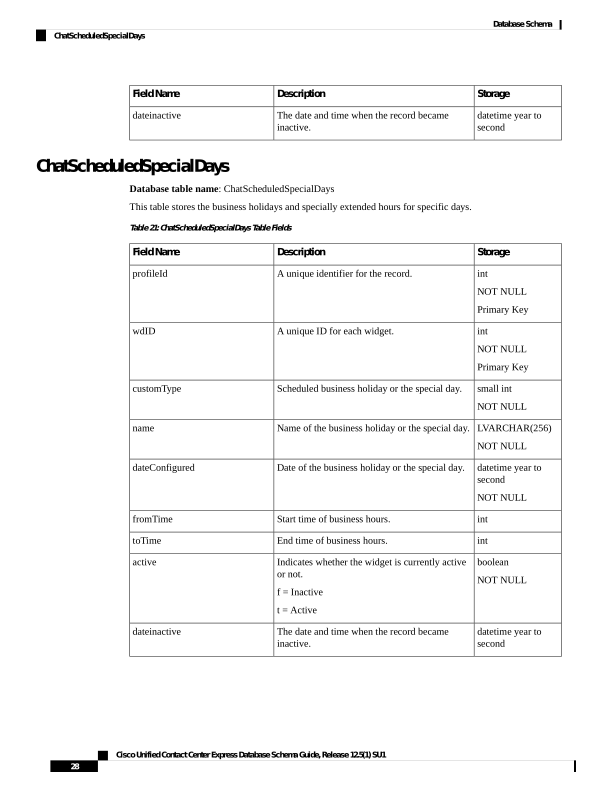
ChatScheduledSpecialDays
Database table name: ChatScheduledSpecialDays
This table stores the business holidays and specially extended hours for specific days.
Table 21: ChatScheduledSpecialDays Table Fields
Storage
Description
Field Name
int
NOT NULL
Primary Key
A unique identifier for the record.
profileId
int
NOT NULL
Primary Key
A unique ID for each widget.
wdID
small int
NOT NULL
Scheduled business holiday or the special day.
customType
LVARCHAR(256)
NOT NULL
Name of the business holiday or the special day.
name
datetime year to
second
NOT NULL
Date of the business holiday or the special day.
dateConfigured
int
Start time of business hours.
fromTime
int
End time of business hours.
toTime
boolean
NOT NULL
Indicates whether the widget is currently active
or not.
f = Inactive
t = Active
active
datetime year to
second
The date and time when the record became
inactive.
dateinactive
Cisco Unified Contact Center Express Database Schema Guide, Release 12.5(1) SU1
28
Database Schema
ChatScheduledSpecialDays
Page 41
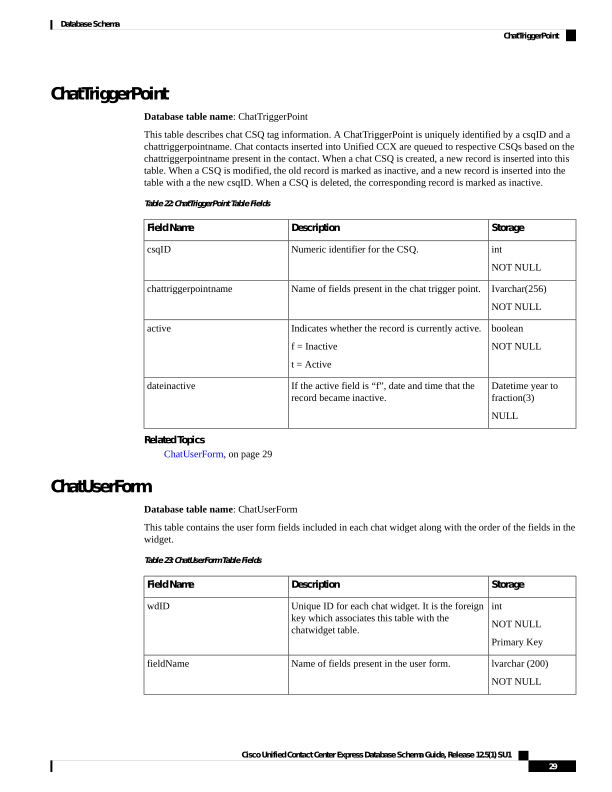
ChatTriggerPoint
Database table name: ChatTriggerPoint
This table describes chat CSQ tag information. A ChatTriggerPoint is uniquely identified by a csqID and a
chattriggerpointname. Chat contacts inserted into Unified CCX are queued to respective CSQs based on the
chattriggerpointname present in the contact. When a chat CSQ is created, a new record is inserted into this
table. When a CSQ is modified, the old record is marked as inactive, and a new record is inserted into the
table with a the new csqID. When a CSQ is deleted, the corresponding record is marked as inactive.
Table 22: ChatTriggerPoint Table Fields
Storage
Description
Field Name
int
NOT NULL
Numeric identifier for the CSQ.
csqID
Ivarchar(256)
NOT NULL
Name of fields present in the chat trigger point.
chattriggerpointname
boolean
NOT NULL
Indicates whether the record is currently active.
f = Inactive
t = Active
active
Datetime year to
fraction(3)
NULL
If the active field is “f”, date and time that the
record became inactive.
dateinactive
Related Topics
ChatUserForm, on page 29
ChatUserForm
Database table name: ChatUserForm
This table contains the user form fields included in each chat widget along with the order of the fields in the
widget.
Table 23: ChatUserForm Table Fields
Storage
Description
Field Name
int
NOT NULL
Primary Key
Unique ID for each chat widget. It is the foreign
key which associates this table with the
chatwidget table.
wdID
lvarchar (200)
NOT NULL
Name of fields present in the user form.
fieldName
Cisco Unified Contact Center Express Database Schema Guide, Release 12.5(1) SU1
29
Database Schema
ChatTriggerPoint
Page 42
Storage
Description
Field Name
int
NOT NULL
Primary Key
ID of fields present in the user form.
fieldID
smallint
NOT NULL
Order of the field in the widget.
fieldOrder
Boolean
NOT NULL
Indicates whether the record is currently active
or not.
f = Inactive
t = Active
active
datetime year to
fraction (3)
The date and time when the user form details were
last modified.
lastmodifieddate
Related Topics
• ChatWidget, on page 30 (via wdID)
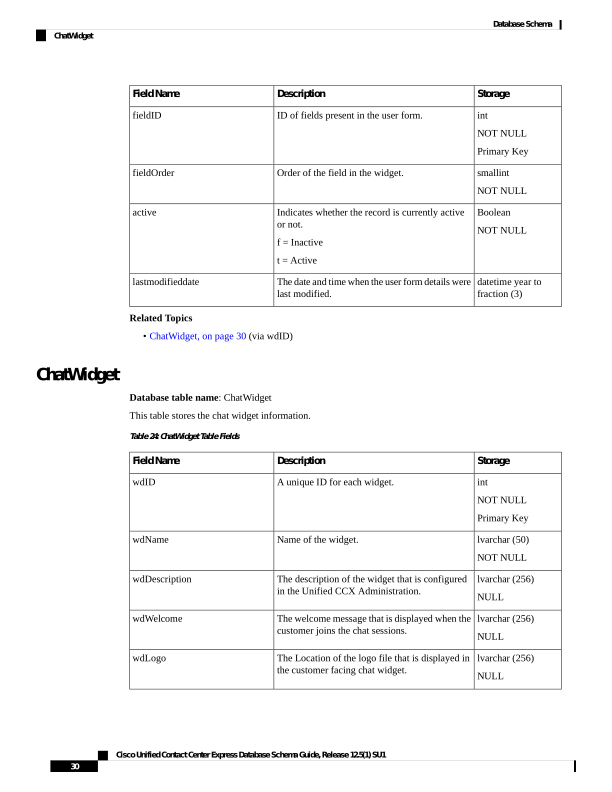
ChatWidget
Database table name: ChatWidget
This table stores the chat widget information.
Table 24: ChatWidget Table Fields
Storage
Description
Field Name
int
NOT NULL
Primary Key
A unique ID for each widget.
wdID
lvarchar (50)
NOT NULL
Name of the widget.
wdName
lvarchar (256)
NULL
The description of the widget that is configured
in the Unified CCX Administration.
wdDescription
lvarchar (256)
NULL
The welcome message that is displayed when the
customer joins the chat sessions.
wdWelcome
lvarchar (256)
NULL
The Location of the logo file that is displayed in
the customer facing chat widget.
wdLogo
Cisco Unified Contact Center Express Database Schema Guide, Release 12.5(1) SU1
30
Database Schema
ChatWidget
Page 43
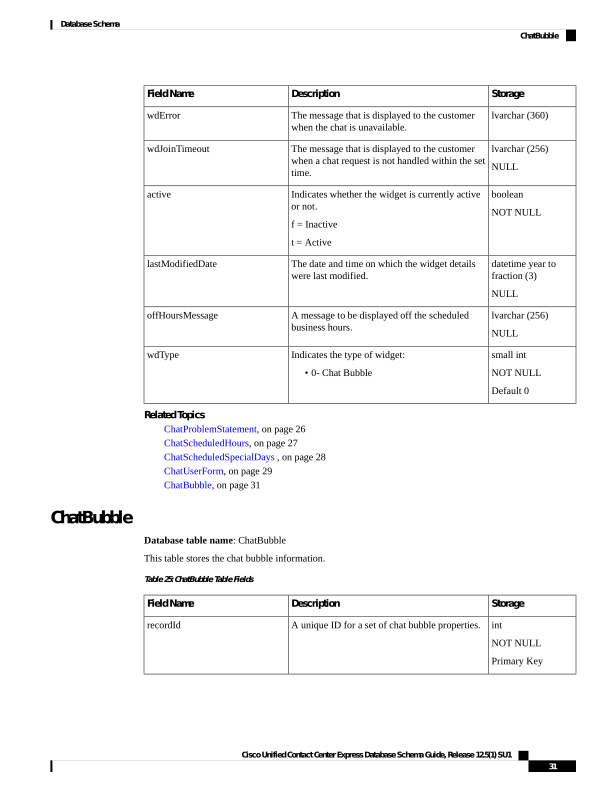
Storage
Description
Field Name
lvarchar (360)
The message that is displayed to the customer
when the chat is unavailable.
wdError
lvarchar (256)
NULL
The message that is displayed to the customer
when a chat request is not handled within the set
time.
wdJoinTimeout
boolean
NOT NULL
Indicates whether the widget is currently active
or not.
f = Inactive
t = Active
active
datetime year to
fraction (3)
NULL
The date and time on which the widget details
were last modified.
lastModifiedDate
lvarchar (256)
NULL
A message to be displayed off the scheduled
business hours.
offHoursMessage
small int
NOT NULL
Default 0
Indicates the type of widget:
• 0- Chat Bubble
wdType
Related Topics
ChatProblemStatement, on page 26
ChatScheduledHours, on page 27
ChatScheduledSpecialDays , on page 28
ChatUserForm, on page 29
ChatBubble, on page 31
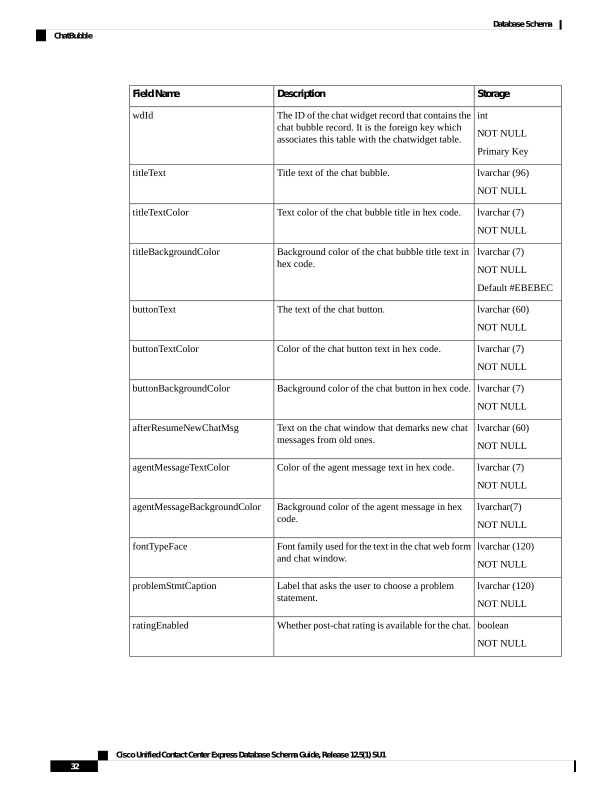
ChatBubble
Database table name: ChatBubble
This table stores the chat bubble information.
Table 25: ChatBubble Table Fields
Storage
Description
Field Name
int
NOT NULL
Primary Key
A unique ID for a set of chat bubble properties.
recordId
Cisco Unified Contact Center Express Database Schema Guide, Release 12.5(1) SU1
31
Database Schema
ChatBubble
Page 44
Storage
Description
Field Name
int
NOT NULL
Primary Key
The ID of the chat widget record that contains the
chat bubble record. It is the foreign key which
associates this table with the chatwidget table.
wdId
lvarchar (96)
NOT NULL
Title text of the chat bubble.
titleText
lvarchar (7)
NOT NULL
Text color of the chat bubble title in hex code.
titleTextColor
lvarchar (7)
NOT NULL
Default #EBEBEC
Background color of the chat bubble title text in
hex code.
titleBackgroundColor
lvarchar (60)
NOT NULL
The text of the chat button.
buttonText
lvarchar (7)
NOT NULL
Color of the chat button text in hex code.
buttonTextColor
lvarchar (7)
NOT NULL
Background color of the chat button in hex code.
buttonBackgroundColor
lvarchar (60)
NOT NULL
Text on the chat window that demarks new chat
messages from old ones.
afterResumeNewChatMsg
lvarchar (7)
NOT NULL
Color of the agent message text in hex code.
agentMessageTextColor
lvarchar(7)
NOT NULL
Background color of the agent message in hex
code.
agentMessageBackgroundColor
lvarchar (120)
NOT NULL
Font family used for the text in the chat web form
and chat window.
fontTypeFace
lvarchar (120)
NOT NULL
Label that asks the user to choose a problem
statement.
problemStmtCaption
boolean
NOT NULL
Whether post-chat rating is available for the chat.
ratingEnabled
Cisco Unified Contact Center Express Database Schema Guide, Release 12.5(1) SU1
32
Database Schema
ChatBubble
Page 45
Storage
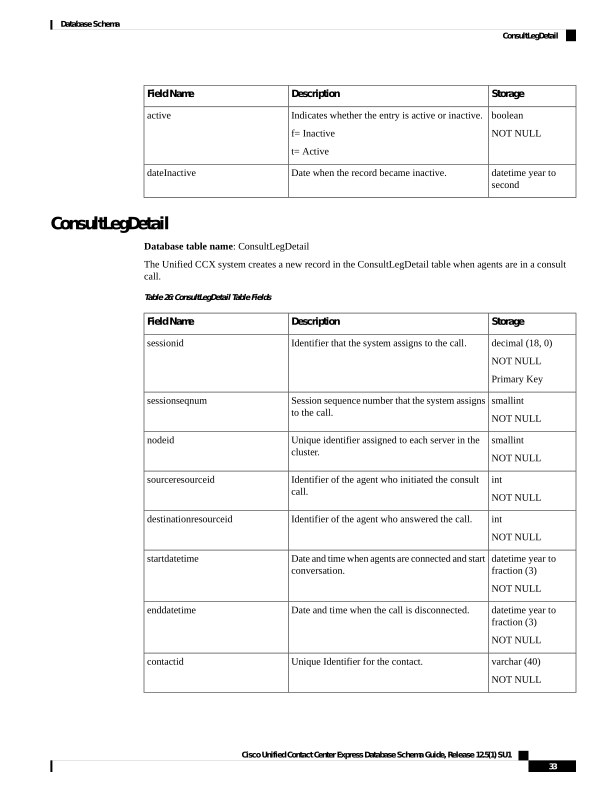
Description
Field Name
boolean
NOT NULL
Indicates whether the entry is active or inactive.
f= Inactive
t= Active
active
datetime year to
second
Date when the record became inactive.
dateInactive
ConsultLegDetail
Database table name: ConsultLegDetail
The Unified CCX system creates a new record in the ConsultLegDetail table when agents are in a consult
call.
Table 26: ConsultLegDetail Table Fields
Storage
Description
Field Name
decimal (18, 0)
NOT NULL
Primary Key
Identifier that the system assigns to the call.
sessionid
smallint
NOT NULL
Session sequence number that the system assigns
to the call.
sessionseqnum
smallint
NOT NULL
Unique identifier assigned to each server in the
cluster.
nodeid
int
NOT NULL
Identifier of the agent who initiated the consult
call.
sourceresourceid
int
NOT NULL
Identifier of the agent who answered the call.
destinationresourceid
datetime year to
fraction (3)
NOT NULL
Date and time when agents are connected and start
conversation.
startdatetime
datetime year to
fraction (3)
NOT NULL
Date and time when the call is disconnected.
enddatetime
varchar (40)
NOT NULL
Unique Identifier for the contact.
contactid
Cisco Unified Contact Center Express Database Schema Guide, Release 12.5(1) SU1
33
Database Schema
ConsultLegDetail
Page 46
Storage
Description
Field Name
int
NOT NULL
Numeric identifier of the selected CSQ for
CSQ-based calls, else -1 is stored.
csqrecordid
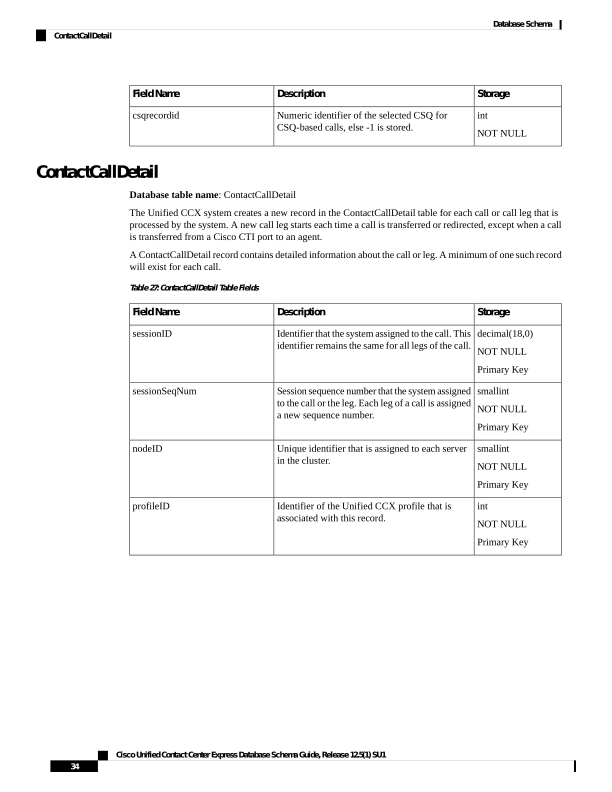
ContactCallDetail
Database table name: ContactCallDetail
The Unified CCX system creates a new record in the ContactCallDetail table for each call or call leg that is
processed by the system. A new call leg starts each time a call is transferred or redirected, except when a call
is transferred from a Cisco CTI port to an agent.
A ContactCallDetail record contains detailed information about the call or leg. A minimum of one such record
will exist for each call.
Table 27: ContactCallDetail Table Fields
Storage
Description
Field Name
decimal(18,0)
NOT NULL
Primary Key
Identifier that the system assigned to the call. This
identifier remains the same for all legs of the call.
sessionID
smallint
NOT NULL
Primary Key
Session sequence number that the system assigned
to the call or the leg. Each leg of a call is assigned
a new sequence number.
sessionSeqNum
smallint
NOT NULL
Primary Key
Unique identifier that is assigned to each server
in the cluster.
nodeID
int
NOT NULL
Primary Key
Identifier of the Unified CCX profile that is
associated with this record.
profileID
Cisco Unified Contact Center Express Database Schema Guide, Release 12.5(1) SU1
34
Database Schema
ContactCallDetail
Page 47
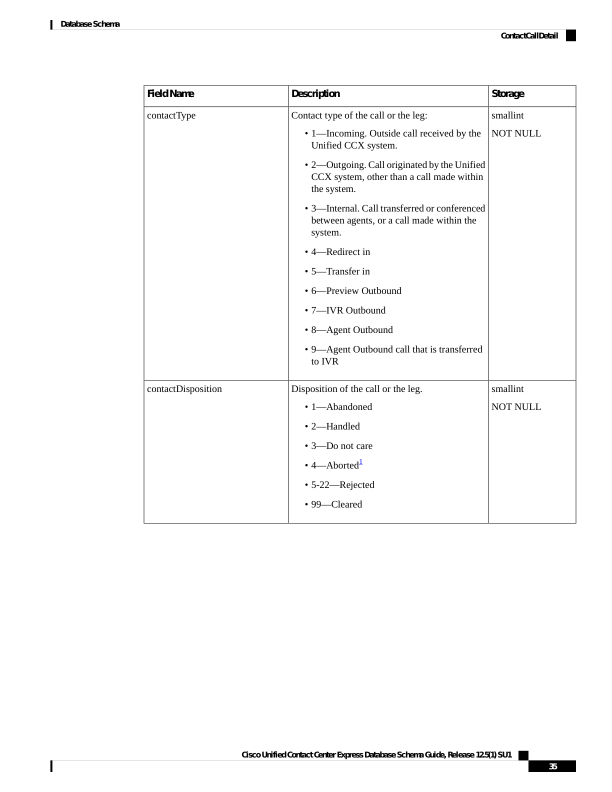
Storage
Description
Field Name
smallint
NOT NULL
Contact type of the call or the leg:
• 1—Incoming. Outside call received by the
Unified CCX system.
• 2—Outgoing. Call originated by the Unified
CCX system, other than a call made within
the system.
• 3—Internal. Call transferred or conferenced
between agents, or a call made within the
system.
• 4—Redirect in
• 5—Transfer in
• 6—Preview Outbound
• 7—IVR Outbound
• 8—Agent Outbound
• 9—Agent Outbound call that is transferred
to IVR
contactType
smallint
NOT NULL
Disposition of the call or the leg.
• 1—Abandoned
• 2—Handled
• 3—Do not care
• 4—Aborted1
• 5-22—Rejected
• 99—Cleared
contactDisposition
Cisco Unified Contact Center Express Database Schema Guide, Release 12.5(1) SU1
35
Database Schema
ContactCallDetail
Page 48
Storage
Description
Field Name
varchar(100,0)
NULL
Reason for disposition.
• 1—System Error
• 2—Consult Transfer
• 3—Blind Transfer
• 5—Blind Transfer to Experience
Management for IVR Survey
• 6—SIPURI Retrieval Failure for Experience
Management Survey
• 7—JTAPI Transfer Failure for Experience
Management Survey
• 8—Notified Experience Management for
SMS/Email Survey
dispositionReason
smallint
NOT NULL
Originator of the call or the leg:
• 1—Agent. Call originated by an agent.
• 2—Device. Call originated by a simulated
caller (used for testing) and an agent phone
where the agent is not currently logged in.
• 3—Unknown. Call originated by an outside
caller through a gateway or by an unknown
device.
originatorType
int
NULL
Numeric identifier of the agent who originated
the call or the leg.
Used only if originatorType is 1.
originatorID
nvarchar(30,0)
NULL
If originatorType is 1 and the call was placed by
the agent using the non-IPCC extension then this
field contains the non-IPCC extension, else it
contains an empty character ('').
If originatorType is 2, this field shows the CTI
port number.
If originatorType is 3, this field shows the
telephone number of the caller as received by the
Unified CM, if available.
An empty character ('') if originatorType is 1. This
is not applicable for agent based progressive and
predictive outbound calls.
originatorDN
Cisco Unified Contact Center Express Database Schema Guide, Release 12.5(1) SU1
36
Database Schema
ContactCallDetail
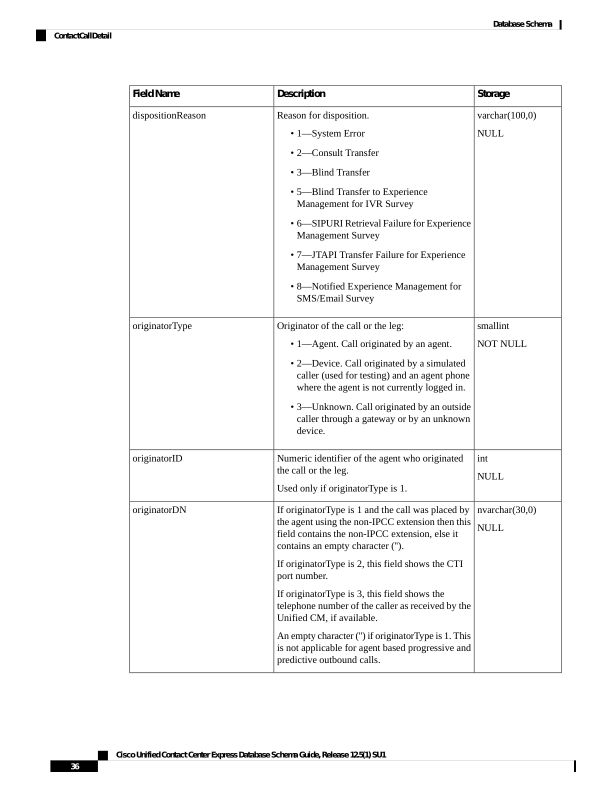
Page 49
Storage
Description
Field Name
smallint
NULL
Destination of the call or the leg:
• 1—Agent. Call presented to an agent.
• 2—Device. Call presented to a route point.
• 3—Unknown. Call presented to an outside
destination through a gateway or to an
unknown device.
• Null if no destination.
destinationType
int
NULL
Numeric identifier of the agent who received the
call or the leg.
Used only if destinationType is 1.
destinationID
nvarchar(30)
NULL
If the destinationType is 1 and the call was
received by an agent using the non-IPCC
extension, then this field contains the non-IPCC
extension, else it contains an empty character ('').
If destinationType is 2, this field shows the CTI
port number.
If destinationType is 3, this field shows the
telephone number called, if available.
An empty character ('') if destinationType is 1.
destinationDN
datetime year to
fraction (3)
NOT NULL
For an incoming call or a leg, date and time that
the call or the leg started to ring in the system.
For an internal call or for an outgoing call, date
and time that the call originated.
For a transferred call or a leg, endDateTime of
the transferring call or leg.
startDateTime
datetime year to
fraction (3)
NOT NULL
Date and time that this call or the leg was
transferred or was disconnected.
endDateTime
smallint
NOT NULL
Offset, in minutes, between the local time of the
Unified CCX server and Greenwich Mean Time.
As the time information is stored in GMT, this
field will always be zero.
gmtOffset
Cisco Unified Contact Center Express Database Schema Guide, Release 12.5(1) SU1
37
Database Schema
ContactCallDetail
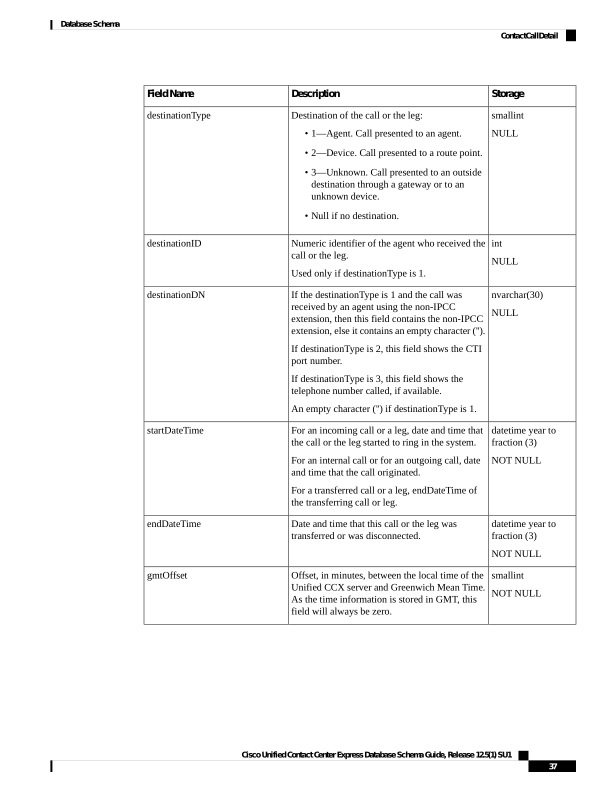
Page 50
Storage
Description
Field Name
nvarchar(30)
NULL
Telephone number of the device to which the call
or leg was presented.
If the call or leg was placed to a Unified CCX
Route Point, this field shows the directory number
configured in the Unified CM for that Route Point.
If the call was placed to an external party, this
field shows the telephone number dialed by the
caller.
calledNumber
nvarchar(30)
NULL
Telephone number dialed by the caller if the call
was placed from an IP phone.
The Unified CM directory number to which the
VoIP gateway routed the call if the call was placed
from outside the VoIP2 network (for example,
from the PSTN3 or a TDM4 PBX5).
Null if the caller picked up the phone but did not
dial any digits.
origCalledNumber
decimal(18,0)
NULL
Identifier of the Unified CCX or Cisco Unified
IP IVR6(Unified IP IVR) application task that is
associated with the call or the leg.
Null for a call that does not have an application
associated with it.
applicationTaskID
int
NULL
Identifier of the Unified CCX or Unified IP IVR
application that processed the call or the leg.
Null for a call or a leg that does not have an
application associated with it.
applicationID
nvarchar(30)
NULL
Name of the Unified CCX or Unified IP IVR
application associated with the call.
Null for a call or a leg that does not have an
application associated with it.
applicationName
int
NULL
Duration of the call in seconds.
connectTime
varchar(40)
NULL
Contents of the variable _ccdrVar1, if this variable
is set by the Set Enterprise Call step in the script
that the Unified CCX or Unified IP IVR
application associated with this call or this leg
invoked.
Null if this variable is not set.
customVariable1
Cisco Unified Contact Center Express Database Schema Guide, Release 12.5(1) SU1
38
Database Schema
ContactCallDetail
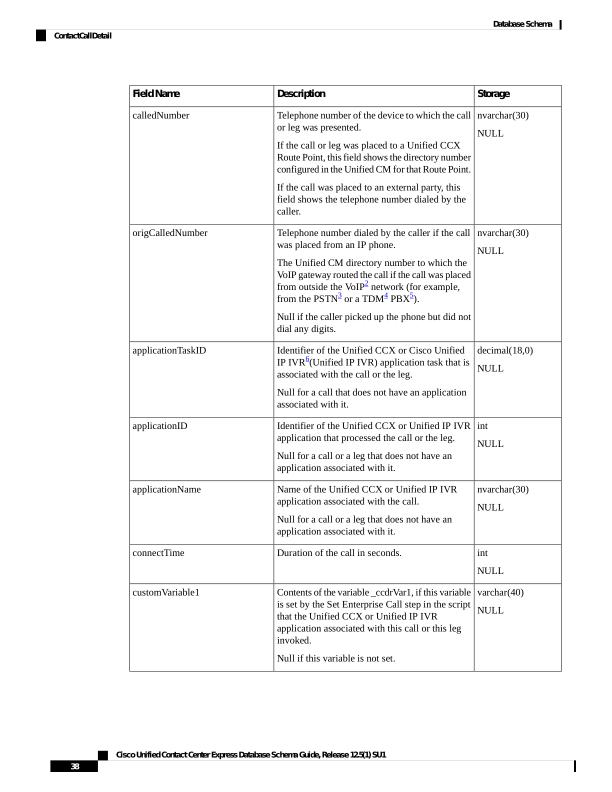
Page 51
Storage
Description
Field Name
varchar(40)
NULL
Contents of the variable _ccdrVar2, if this variable
is set by the Set Enterprise Call step in the script
that the Unified CCX or Unified IP IVR
application associated with this call or this leg
invoked.
Null if this variable is not set.
customVariable2
varchar(40)
NULL
Contents of the variable _ccdrVar3, if this variable
is set by the Set Enterprise Call step in the script
that the Unified CCX or Unified IP IVR
application associated with this call or this leg
invoked.
Null if this variable is not set.
customVariable3
varchar(40)
NULL
Contents of the variable _ccdrVar4, if this variable
is set by the Set Enterprise Call step in the script
that the Unified CCX or Unified IP IVR
application associated with this call or this leg
invoked.
Null if this variable is not set.
customVariable4
varchar(40)
NULL
Contents of the variable _ccdrVar5, if this variable
is set by the Set Enterprise Call step in the script
that the Unified CCX or Unified IP IVR
application associated with this call or this leg
invoked.
Null if this variable is not set.
customVariable5
varchar(40)
NULL
Contents of the variable _ccdrVar6, if this variable
is set by the Set Enterprise Call step in the script
that the Unified CCX or Unified IP IVR
application associated with this call or this leg
invoked.
Null if this variable is not set.
customVariable6
varchar(40)
NULL
Contents of the variable _ccdrVar7, if this variable
is set by the Set Enterprise Call step in the script
that the Unified CCX or Unified IP IVR
application associated with this call or this leg
invoked.
Null if this variable is not set.
customVariable7
Cisco Unified Contact Center Express Database Schema Guide, Release 12.5(1) SU1
39
Database Schema
ContactCallDetail
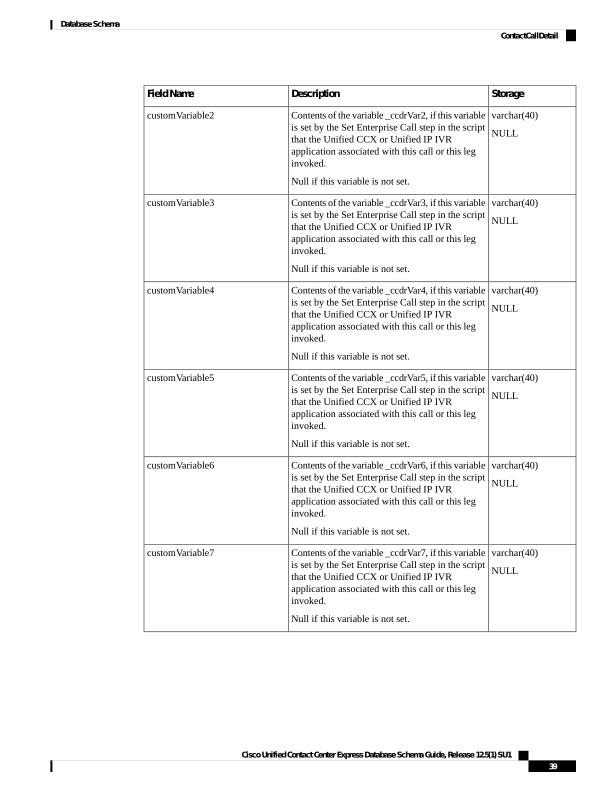
Page 52
Storage
Description
Field Name
varchar(40)
NULL
Contents of the variable _ccdrVar8, if this variable
is set by the Set Enterprise Call step in the script
that the Unified CCX or Unified IP IVR
application associated with this call or this leg
invoked.
Null if this variable is not set.
customVariable8
varchar(40)
NULL
Contents of the variable _ccdrVar9, if this variable
is set by the Set Enterprise Call step in the script
that the Unified CCX or Unified IP IVR
application associated with this call or this leg
invoked.
Null if this variable is not set.
customVariable9
varchar(40)
NULL
Contents of the variable _ccdrVar10, if this
variable is set by the Set Enterprise Call step in
the script that the Unified CCX or Unified IP IVR
application associated with this call or this leg
invoked.
Null if this variable is not set.
customVariable10
varchar(40)
NULL
Account number entered by the caller.
accountNumber
varchar(40)
NULL
Phone number entered by the caller.
callerEnteredDigits
char(1)
NULL
Tag for a bad call.
Default = N
badCallTag
boolean
NULL
Was this call leg transferring the call:
t = transfer
f = no
transfer
boolean
NULL
Was this call leg redirecting the call:
t = redirect
f = no
redirect
boolean
NULL
Was this call leg conferencing the call:
t = conference
f = no
conference
boolean
NULL
When this flag is set, it means this call leg is sent
to another application or destination outside the
system.
flowout
Cisco Unified Contact Center Express Database Schema Guide, Release 12.5(1) SU1
40
Database Schema
ContactCallDetail
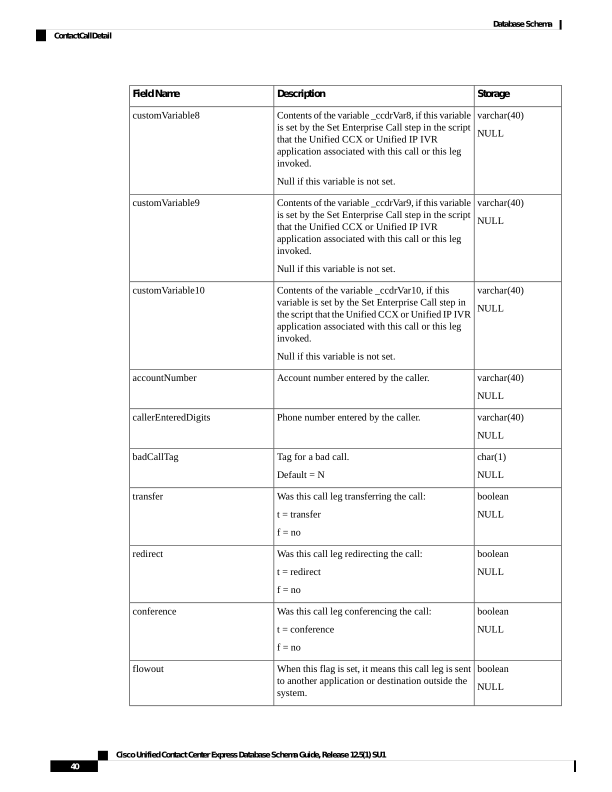
Page 53
Storage
Description
Field Name
boolean
NULL
Did the call meet the service level:
t = met service level
f = no
Note: Reserved for future use.
metServiceLevel
int
NULL
Unique identifier of the campaign that generated
this call.
campaignID
Varchar(32)
NULL
Unique identifier to identify a call leg that enters
the Unified CCX system. This is used to trace a
call which has traversed from some product to the
Unified CCX.
OrigProtocolCallRef
Varchar(32)
NULL
Unique Identifier to identify a call leg that exits
the Unified CCX system. This is used to trace a
call which has traversed from Unified CCX to
some other product.
DestProtocolCallRef
smallint
NULL
The result of an IVR based or agent based
progressive or predictive outbound call.
CallResult
int
NULL
Unique identifier of a contact that is dialed for an
outbound campaign. Links with
DialingList.dialingListID.
dialingListID
varchar(40)
A unique identifier for all the records related to a
single call across various tables in Unified CCX.
contactid
boolean
Indicates whether this is the last leg corresponding
to the original call.
lastleg
1 For aborted calls, the corresponding value in ContactQueueDetail.disposition = 1 (abandoned)
2 VoIP = Voice over Internet Protocol
3 PSTN = Public Switched Telephone Network
4 TDM = Time-Division Multiplexing
5 Private Branch Exchange
6 Interactive Voice Response
Related Topics
• AgentConnectionDetail, on page 4 (via sessionID, sessionSeqNum, nodeID, and profileID)
• Campaign, on page 18 (via campaignID)
• ContactQueueDetail (via sessionID, sessionSeqNum, nodeID, profileID)
• ContactRoutingDetail , on page 46 (via sessionID, sessionSeqNum, nodeID, and profileID)
• MonitoredResourceDetail, on page 73 (sessionSeqNum maps to monitoredSessionSeqNum, via sessionID,
profileID, and nodeID)
Cisco Unified Contact Center Express Database Schema Guide, Release 12.5(1) SU1
41
Database Schema
ContactCallDetail
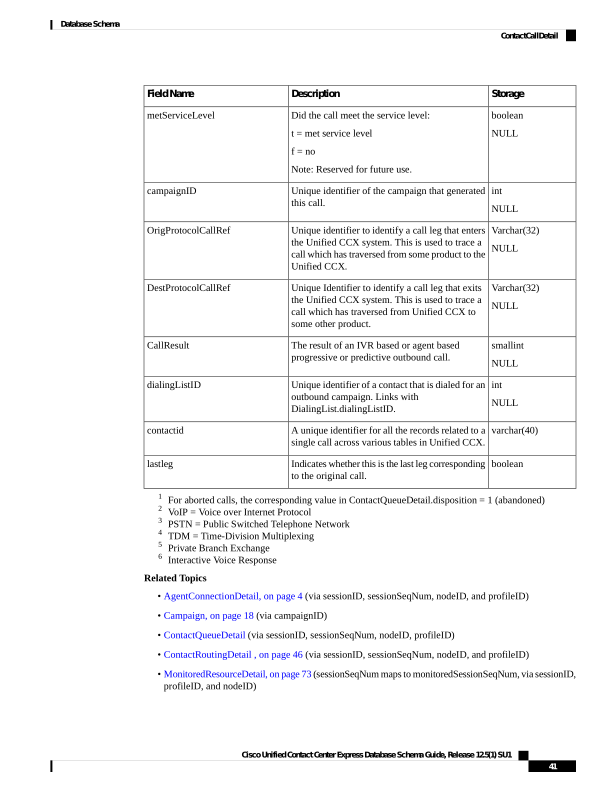
Page 54
• ProfileIDMapping, on page 75 (via profileID)
• PurgeHistory, on page 76 (sessionID maps to monitoredSessionID, via sessionID, sessionSeqNum,
profileID, and nodeID)
• Resource, on page 81 (via originatorID/destinationID maps to resourceID when
originatorType/destinationType is 1, via profileID)
ContactHoldDetail
Database table name: ContactHoldDetail
The Unified CCX system creates a new record in the ContactHoldDetail table each time a contact is put on
hold.
Table 28: ContactHoldDetail
Storage
Description
Field Name
varchar(40)
NOT NULL
A unique identifier for the contact. This is used to identify all
call records pertaining to a single customer whose call details
are stored across various tables within Unified CCX.
contact id
decimal(18,0)
NOT NULL
An identifier that the system assigns to the call. This
identifier remains the same for all legs of the call.
sessionID
smallint
NOT NULL
A session sequence number that the system assigns to the call
or the call leg. Each leg of the call is assigned a new sequence
number.
sessionSeqNum
datetime year to
fraction(3)
NOT NULL
Date and time the call was put on hold.
startDateTime
datetime year to
fraction(3)
NOT NULL
Date and time the call changed from hold state to retrieved or
disconnected state.
endDateTime
smallint
NOT NULL
Indicates the hold initiation type.
• 1 - Agent Initiated
• 2 - System Initiated
type
int
NOT NULL
Identifier of the agent who has put the call on hold.
resourceid
ConfigSchema
Database table name: ConfigSchema
Cisco Unified Contact Center Express Database Schema Guide, Release 12.5(1) SU1
42
Database Schema
ContactHoldDetail
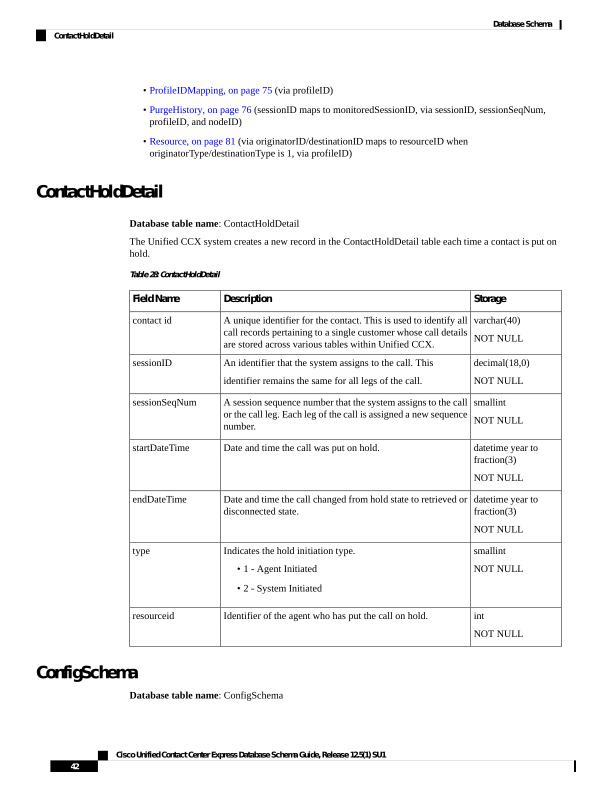
Page 55
The Unified CCX system creates a new record in the configschema table for a specified configuration class.
Table 29: ConfigSchema Table Fields
Storage
Description
Field Name
int
NOT NULL
Primary key
Unique identifier assigned to the
configuration class.
configclassid
lvarchar(512)
NOT NULL
Uniquely identifies a class.
classname
int
NOT NULL
Specifies the version of the
configuration schema.
version
int
NOT NULL
Specifies the type of the private
data.
privatedatatype
ConfigSchemaColumn
Database table name: ConfigSchemaColumn
This table provides information about the mapping details of other table columns.
Table 30: ConfigSchemaColumn Table Fields
Storage
Description
Field Name
int
NOT NULL
Primary key
Unique identifier assigned to the
configuration class.
configclassid
int
NOT NULL
Identifies the index of the column.
columnindex
nvarchar(128,0)
NOT NULL
Name of the column.
columnname
lvarchar(512)
NOT NULL
The type of data stored in the
column.
columntype
int
NOT NULL
Provides the sequence of the key.
keysequence
Cisco Unified Contact Center Express Database Schema Guide, Release 12.5(1) SU1
43
Database Schema
ConfigSchemaColumn
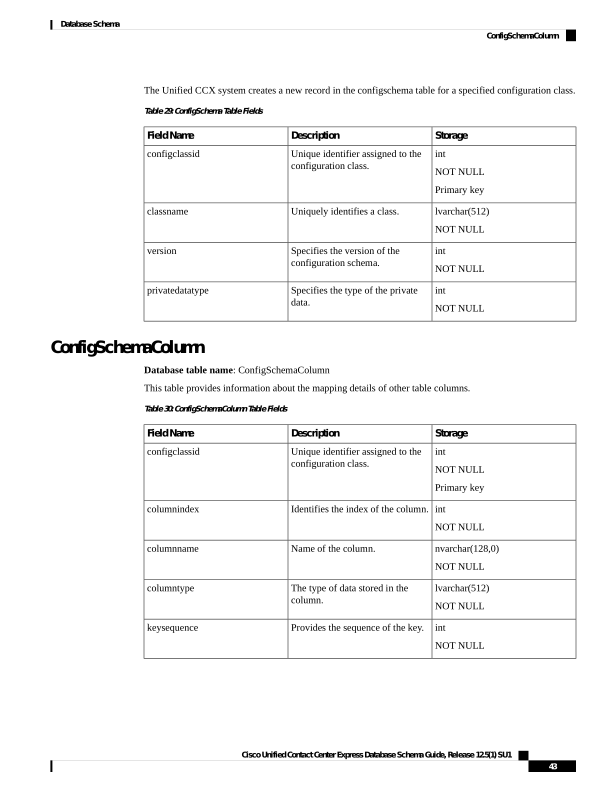
Page 56
ConfigSeed
Database table name: ConfigSeed
This table provides information about the single and multiple seed values.
Table 31: ConfigSeed Table Fields
Storage
Description
Field Name
lvarchar(512)
NOT NULL
Uniquely identifies a table.
tablename
int
NOT NULL
Specifies the number which the
table references.
id
ContactQueueDetail
Database table name: ContactQueueDetail
The Unified CCX system writes the record when the call is queued for CSQs. Then, one of the following
happens:
• Call is abandoned while queued for CSQs
• Call is being dequeued
• Caller is connected to an agent
Table 32: ContactQueueDetail Table Fields
Storage
Description
Field Name
decimal(18,0)
NOT NULL
Primary Key
Identifier that the system assigned to the call. This
identifier remains the same for all legs of the call.
sessionID
smallint
NOT NULL
Primary Key
Session sequence number that the system assigned
to the call or the leg. Each leg of a call is assigned
a new sequence number.
sessionSeqNum
int
NOT NULL
Primary Key
Identifier of the Unified CCX profile that is
associated with this record.
profileID
smallint
NOT NULL
Primary Key
Unique identifier assigned to each server in the
cluster.
nodeID
Cisco Unified Contact Center Express Database Schema Guide, Release 12.5(1) SU1
44
Database Schema
ConfigSeed
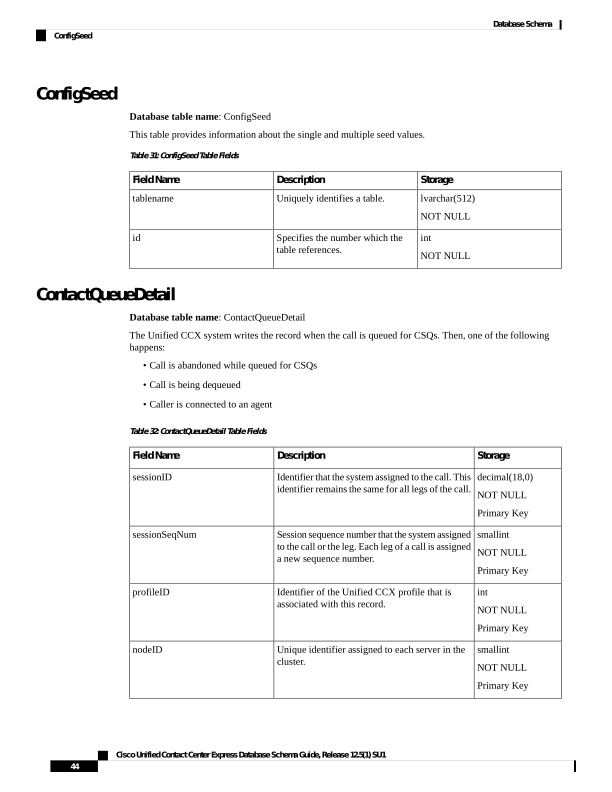
Page 57
Storage
Description
Field Name
int
NOT NULL
Primary Key
Numeric ID of the CSQ or the agent depending
upon the targetType.Numeric ID of the CSQ or
the agent depending upon the targetType.
• 0—Numeric record ID of the CSQ. (See
record ID description in the Contact Service
Queue Table)
• 1—Numeric agent ID (see resourceID
description in the Resource Table)
targetID
smallint
NOT NULL
Primary Key
Indicates whether the call was queued for a CSQ
or for an agent.
• 0 = CSQ
• 1 = Agent
targetType
smallint
NOT NULL
Primary Key
For all the new calls that are coming to an agent’s
extension through a route point, the value of
qIndex is 1. Thereafter, the value of qIndex is
incremented by 1, whenever there is a conference
through the route point.
qIndex
smallint
NOT NULL
Primary Key
The order of the call in the queue.
queueOrder
smallint
NULL
Disposition for this leg of the call for this CSQ.
• Abandoned = 17
• Handled by CSQ = 2
• Dequeued from CSQ = 3
• Handled by script = 4
• Handled by another CSQ = 5
disposition
boolean
NULL
Call answered within the configured number of
seconds of queue time for this CSQ.
• Yes = t
• No = f
metServiceLevel
int
NULL
Number of seconds that the caller spent in this
CSQ.
queueTime
datetime year to
fraction (3)
Date and time of an incoming call that is queued
to a particular CSQ.
startDateTime
Cisco Unified Contact Center Express Database Schema Guide, Release 12.5(1) SU1
45
Database Schema
ContactQueueDetail
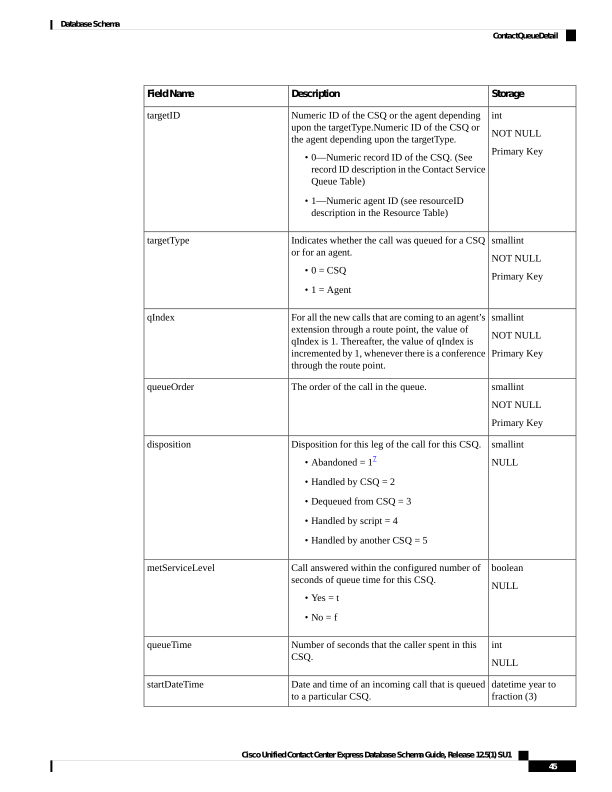
Page 58
Storage
Description
Field Name
datetime year to
fraction (3)
Date and time of an incoming call that is dequeued
from a particular CSQ.
endDateTime
varchar(40)
A unique identifier for all the records related to a
single call across various tables in Unified CCX.
contactid
7 For aborted calls, ContactQueueDetail.disposition = 1 and the corresponding
ContactCallDetail.contactDisposition = 4 (aborted).
Related Topics
• AgentConnectionDetail, on page 4 (via sessionID, sessionSeqNum, nodeID, profileID and qIndex)
• ContactCallDetail, on page 34 (via sessionID, sessionSeqNum, nodeID, and profileID)
• ContactRoutingDetail , on page 46 (via sessionID, sessionSeqNum, nodeID, profileID, and qIndex)
• ContactServiceQueue , on page 47 (targetID maps to recordID when targetType is 0, via profileID)
• MonitoredResourceDetail, on page 73 (sessionSeqNum maps to monitoredSessionSeqNum, via profileID,
and nodeID)
• ProfileIDMapping, on page 75 (via profileID)
• RemoteMonitoringDetail , on page 79 (sessionID maps to monitoredSessionID, via profileID and nodeID)
• Resource, on page 81 (targetID maps to resourceID when targetType is 1, and via profileID)
ContactRoutingDetail
Database table name: ContactRoutingDetail
The Unified CCX system creates a new record in the ContactRoutingDetail table for each Unified CCX call
or call leg that is queued for one or more CSQs. A new call leg starts each time that a call is transferred or
redirected, except when a call is transferred from a Cisco CTI port to an agent. The system also creates a new
record in the ContactRoutingDetail table if a call is conferenced to a Unified CCX script.
A ContactRoutingDetail record contains information about call priority and accumulated queue time. This
differs from the ContactQueueDetail record which shows individual queue time for each CSQ.
Table 33: ContactRoutingDetail Table Fields
Storage
Description
Field Name
decimal(18, 0)
NOT NULL
Primary Key
Identifier that the system assigned to the call. This
identifier remains the same for all legs of the call.
sessionID
smallint
NOT NULL
Primary Key
Session sequence number that the system assigned
to the call or the leg. Each leg of a call is assigned
a new sequence number.
sessionSeqNum
Cisco Unified Contact Center Express Database Schema Guide, Release 12.5(1) SU1
46
Database Schema
ContactRoutingDetail
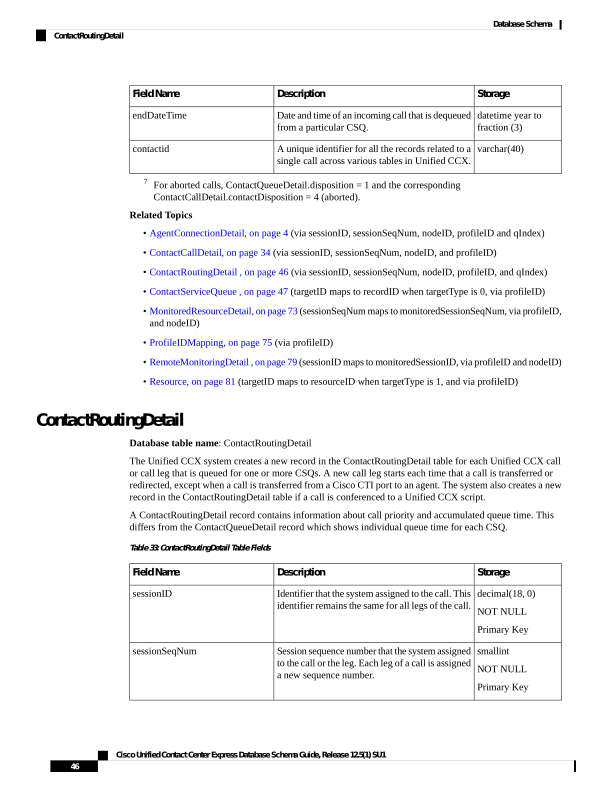
Page 59
Storage
Description
Field Name
smallint
NOT NULL
Primary Key
Unique identifier assigned to each server in the
cluster.
nodeID
int
NOT NULL
Primary Key
Identifier of the Unified CCX profile that is
associated with this record.
profileID
smallint
NOT NULL
Primary Key
For all the new calls that are coming to an agent’s
extension through a route point, the value of
qIndex is 1. Thereafter, the value of qIndex is
incremented by 1, whenever there is a conference
through the route point.
qIndex
smallint
NULL
Priority level assigned to the call or the leg when
it was first queued.
Null if a priority was not assigned.
origPriority
smallint
NULL
Priority level of the call or the leg when it ended.
Null if a priority was not assigned.
finalPriority
int
NULL
Time (in seconds) that the call was in queue
before an agent picked up the call. If the call was
in multiple CSQs, then it is the total time that the
call has spent in multiple CSQs.
queueTime
datetime year to
fraction (3)
NOT NULL
For an incoming call or a leg, date and time that
the call or the leg was queued for the first CSQ.
startDateTime
varchar(40)
A unique identifier for all the records related to a
single call across various tables in Unified CCX.
contactid
Related Topics
AgentConnectionDetail, on page 4
ContactCallDetail, on page 34
ContactQueueDetail, on page 44
MonitoredResourceDetail, on page 73
ProfileIDMapping, on page 75
PurgeHistory, on page 76
ContactServiceQueue
Database table name: ContactServiceQueue
Cisco Unified Contact Center Express Database Schema Guide, Release 12.5(1) SU1
47
Database Schema
ContactServiceQueue
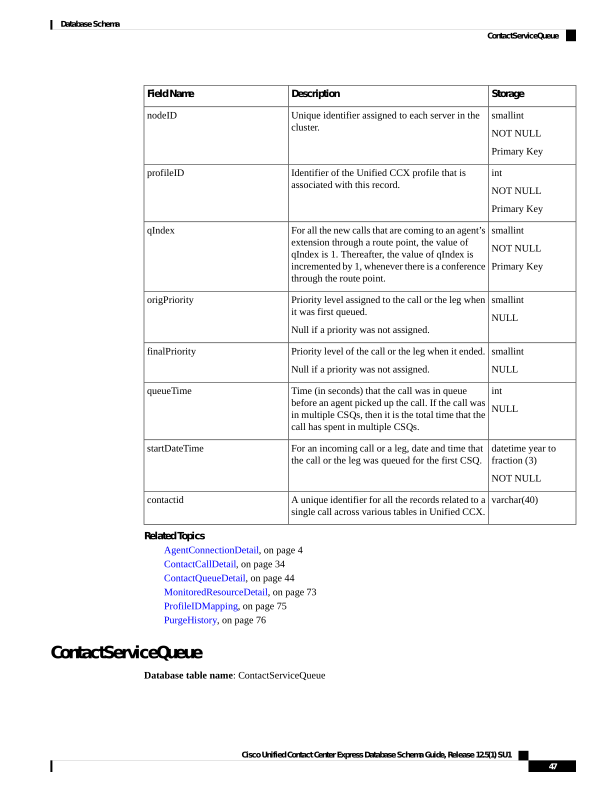
Page 60
The Unified CCX system creates a new record in the ContactServiceQueue table when a CSQ is set up in
Unified CCX Administration.
A ContactServiceQueue record contains information about the CSQ. One such record exists for each active
and inactive CSQ. When a CSQ is deleted (deactivated), its record still remains in the database marked as
inactive; that is, the active field value is “f”.
Table 34: ContactServiceQueue Table Fields
Storage
Description
Field Name
int
NOT NULL
Numeric identifier of the CSQ. This ID does not
change when CSQ attributes are changed through
the Unified CCX Administration user interface.
contactServiceQueueID
int
NOT NULL
Identifier of the Unified CCX profile that is
associated with this record.
profileID
nvarchar(50,0)
NOT NULL
Name of the CSQ as set up in Unified CCX
Administration.
CSQName
smallint
NOT NULL
Type of resource pool that is set up in Unified
CCX Administration:
1—Resource groups
2—Resource skills
resourcePoolType
int
NULL
If resourcePoolType is 1, unique identifier used
to locate the associated resource group in the
Resource Group table.
Not used if resourcePoolType is 2.
resourceGroupID
nvarchar(30,0)
NOT NULL
Resource pool selection model that is set up in
the Unified CCX Administration.
selectionCriteria
int
NULL
If resourcePoolType is 2, unique identifier used
to locate the associated skill group in the
SkillGroup table.
Not used if resourcePoolType is 1.
skillGroupID
int
NOT NULL
Goal, in seconds, for the maximum time that a
caller spends in the queue before the call is
answered by an agent, as set up in Unified CCX
Administration.
serviceLevel
smallint
NOT NULL
Goal for the percentage of calls that meet the
service level that is shown in the serviceLevel
field, as set up in Unified CCX Administration.
serviceLevelPercentage
Cisco Unified Contact Center Express Database Schema Guide, Release 12.5(1) SU1
48
Database Schema
ContactServiceQueue
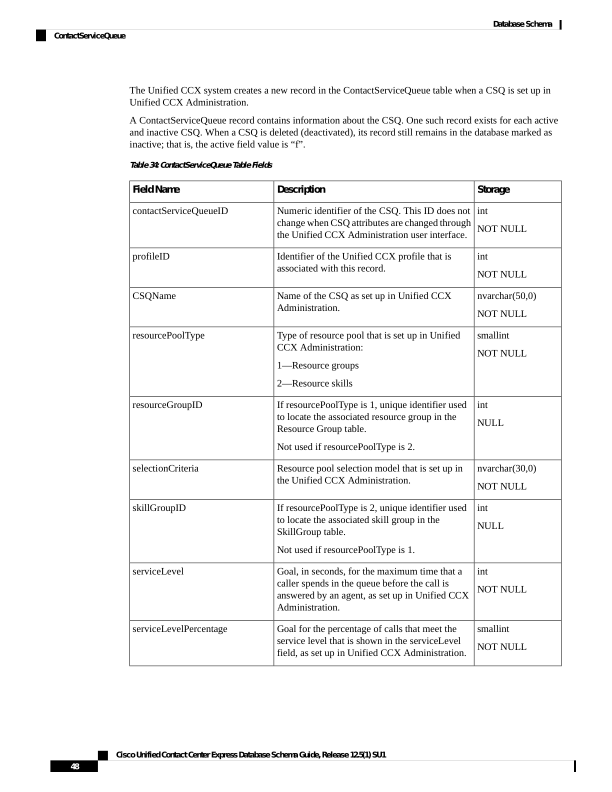
Page 61
Storage
Description
Field Name
boolean
NOT NULL
Indicates whether the record is active:
f = Inactive
t = Active
A record becomes inactive if the CSQ is deleted
from the system or if the attributes are changed
through the Unified CCX Administration user
interface. When an attribute is changed, the record
is marked inactive; that is, the active field is
changed to “f”, and a new record is created.
active
boolean
NOT NULL
Whether an agent goes to Work State after
handling a call from this CSQ:
f —No
t —Yes
autoWork
datetime year to
fraction (3)
NULL
If the active field is “f”, date and time that the
record became inactive.
dateInactive
nvarchar(30,0)
NOT NULL
Criterion that specifies how contacts are queued,
as set up in Unified CCX Administration.
queueAlgorithm
int
NOT NULL
Primary Key
Identifier of this record. When any CSQ attribute,
such as service level, is changed through the
Unified CCX Administration user interface, the
record is marked inactive; that is, the value of the
active field changes to “f”, and a new record is
created with a new record ID; the
contactServiceQueueID stays the same for that
CSQ.
recordID
int
NULL
Reserved for future use.
orderList
smallint
NULL
Time in seconds that agent is placed in Work state.
Possible values:
1 – 7200
0 – disabled
wrapupTime
nvarchar (256)
NOT NULL
The prompt value is used for remote monitoring.
The customer can record the name of the CSQ
and store it in a WAV file. This field contains the
name of the WAV file.
prompt
Cisco Unified Contact Center Express Database Schema Guide, Release 12.5(1) SU1
49
Database Schema
ContactServiceQueue
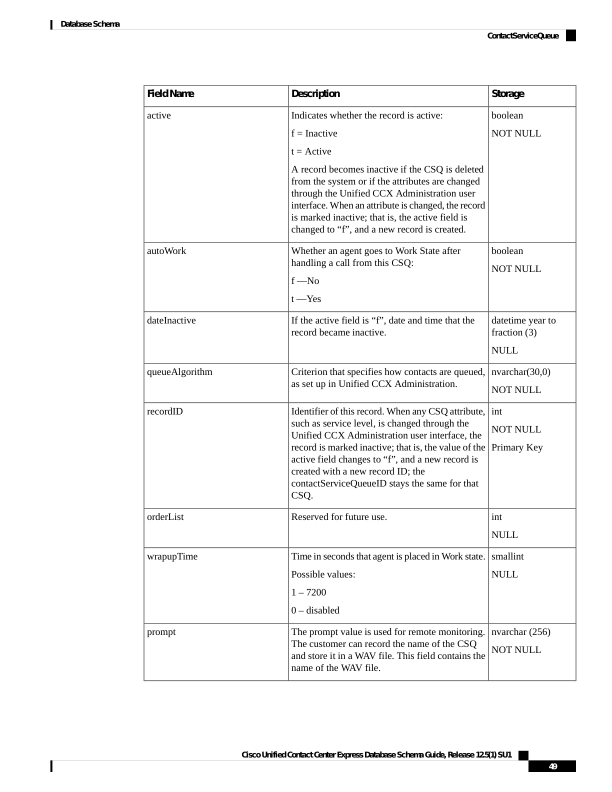
Page 62
Storage
Description
Field Name
BLOB
NULL
Any fields which are used internally only can be
stored in this column in a blob.
privateData
smallint
NOT NULL
A type of the CSQ.
Possible values:
0 – voice CSQ
1 – email CSQ
2 – chat CSQ
queueType
nvarchar(30,0)
NULL
The name displayed for the CSQ type. Possible
values:
• Voice
• Chat
• Email
queueTypeName
smallint
NOT NULL
Type of authentication for email CSQ. The
possible values are 0 and 1.
• 0=BASIC
• 1=OAUTH
emailAuthType
lvarchar(30000)
NULL
For Gmail: Downloaded JSON file is stored.
Default value: NULL
emailOAuthDetails
nvarchar(255,0)
NULL
The userid of the email account mapped to an
email CSQ.
accountuserId
int
NULL
The unique identifier for the channel provider.
channelproviderId
int
NULL
Reserved.
reviewQueueId
nvarchar(30,0)
NULL
The type of routing:
• Interactive
• Noninteractive
routingType
nvarchar(255,0)
NULL
The name of the email folder that needs to be
polled for mails on the mail server.
folderName
Cisco Unified Contact Center Express Database Schema Guide, Release 12.5(1) SU1
50
Database Schema
ContactServiceQueue
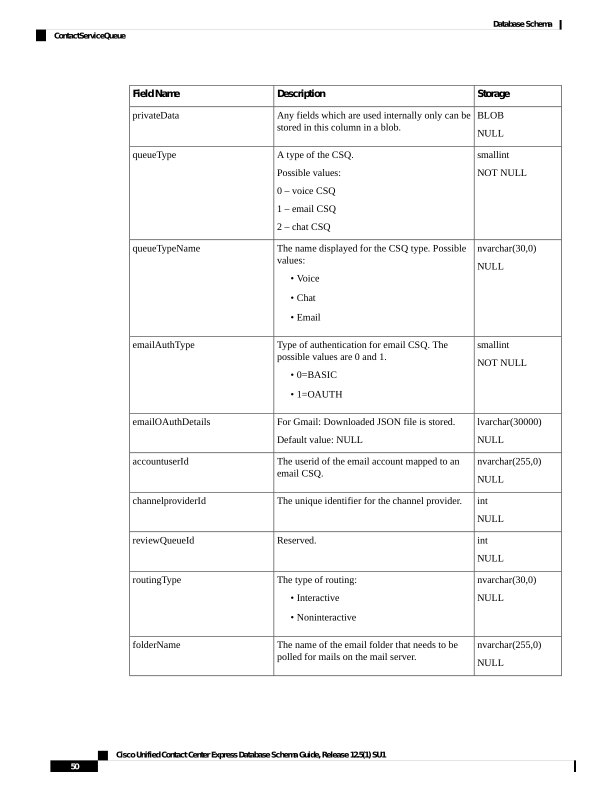
Page 63
Storage
Description
Field Name
int
NULL
The time (in seconds) on how frequently the email
server is polled for any new emails.
pollingInterval
int
NULL
The time (in minutes) to indicate how far to go
back to fetch emails on startup.
snapshotAge
nvarchar(30,0)
NULL
The unique identifier for the feeds from Customer
Collaboration Platform.
feedId
Related Topics
ContactQueueDetail, on page 44
ProfileIDMapping, on page 75
RemoteMonitoringDetail , on page 79
ResourceGroup , on page 83
SkillGroup , on page 94
TeamCSQMapping , on page 100
ContactWrapupData
Database table name: ContactWrapupData
The Unified CCX system creates a new record in the contactwrapupdata table each time the agent selects a
Wrap-Up reason.
Table 35: ContactWrapupData Table Fields
Storage
Description
Field Name
decimal (18)
NOT NULL
Primary Key
Identifier that the system assigned
to the call. This identifier remains
the same for all legs of the call.
sessionID
smallint
NOT NULL
Primary Key
Session sequence number that the
system assigned to the call or the
leg. Each leg of a call is assigned a
new sequence number.
sessionSeqNum
int
NOT NULL
Primary Key
Numeric identifier of the resource.
resourceID
varchar (160)
NOT NULL
Primary Key
Call related information that the
agent enters through the Agent
Desktop user interface while the
agent is in the talking/work state.
wrapupData
Cisco Unified Contact Center Express Database Schema Guide, Release 12.5(1) SU1
51
Database Schema
ContactWrapupData
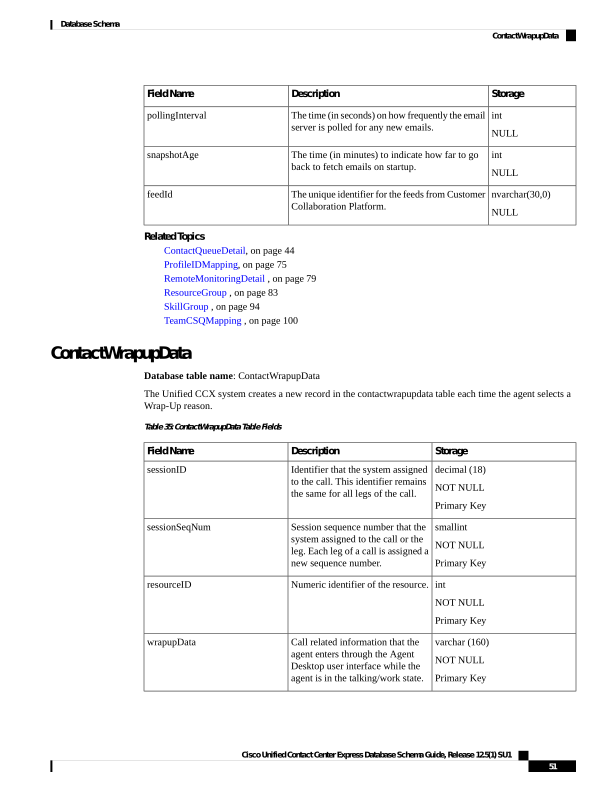
Page 64
Storage
Description
Field Name
smallint
Primary Key
Unique identifier assigned to each
Unified CCX server in the cluster.
nodeid
smallint
Primary Key
A new qIndex is created whenever
a Unified CCX call is conferenced
to a Unified CCX route point.
qindex
datetime year to fraction
Primary Key
Date and time that the call or the
leg started ringing at the device of
an agent.
startDateTime
smallint
Unique number of wrapup reasons
for a particular call. A call can have
maximum of five wrapup reasons.
wrapupindex
varchar(40)
A unique identifier for all the
records related to a single call
across various tables in Unified
CCX.
contactid
CrsApplication
Database table name: CrsApplication
The CrsApplication table records application information. An application is uniquely identified by
applicationName. When an application is created, a new record is inserted into this table. When an application
is modified, the old record is marked as inactive, and a new record is inserted into the table with a new recordID.
When an application is deleted, the corresponding record is marked as inactive.
Table 36: CrsApplication Table Fields
Storage
Description
Field Name
int
NOT NULL
Primary Key
Unique numeric ID for each record. Introduced
for historical reporting purposes.
Possible values: 1, 2, 3....
record ID
int
NOT NULL
Primary Key
The indentifier of the profile
profileID
int
NOT NULL
Configurable application identifier. Not unique
for an application. Exposed for Cisco Unified
Intelligent Contact Management Enterprise
(Unified ICME) integration. Configured on
Unified CCX Administration, modifiable.
Possible values: -1, 1, 2, 3...
applicationID
Cisco Unified Contact Center Express Database Schema Guide, Release 12.5(1) SU1
52
Database Schema
CrsApplication
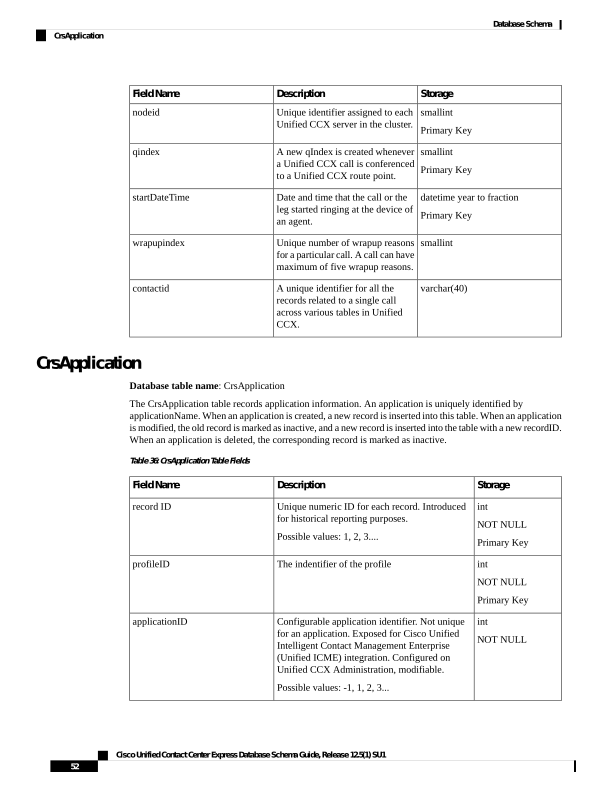
Page 65
Storage
Description
Field Name
lvarchar(512)
NOT NULL
Represents application configuration class.
Possible values:
• com.cisco.app.ApplicationConfig
• ApplicationConfig.class
configClass
int
NOT NULL
Specifies internal configuration schema version.
Possible values: 1
version
lvarchar(512)
NOT NULL
Represents application configuration
implementation class.
Possible value:
com.cisco.crs.app.ScriptApplicationConfig
configImplClass
nvarchar(50,0)
NOT NULL
Name that uniquely identifies the application
applicationName
nvarchar(128,0)
NOT NULL
The type of application.
Possible values:
• Busy
• Ring-No-Answer
• Cisco Script Application
• Simulation Script
• Unified ICME Post-Routing
• Unified ICME Translation Routing
applicationType
boolean
NOT NULL
Whether or not the application is enabled.
Possible values:
• f = disabled
• t = enabled
applicationEnabled
int
NOT NULL
Maximum number of sessions
numOfSessions
nvarchar(128,0)
NULL
The description of the application that is
configured in the Unified CCX Administration.
description
BLOB
NULL
Internal data not exposed to customers.
privateData
Cisco Unified Contact Center Express Database Schema Guide, Release 12.5(1) SU1
53
Database Schema
CrsApplication
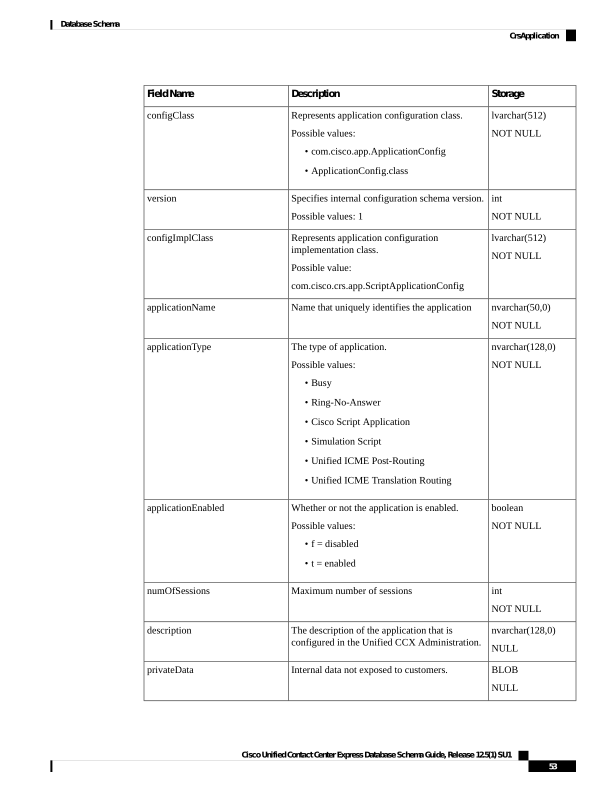
Page 66
Storage
Description
Field Name
datetime year to
second
NOT NULL
The time when the record is created or updated.
Default value: Current year to second
createDateTime
boolean
NOT NULL
Whether this record is active.
Possible values:
• f = inactive
• t = active
active
datetime year to
second
NULL
If active = f, the time when this record became
inactive.
dateInactive
lvarchar(512)
Name of the IVR survey that is associated with
the application for post-call survey.
surveyname
varchar(24)
The ID of the SMS/Email dispatch that is
associated with the application for post-call
survey.
dispatchid
Related Topics
ProfileIDMapping, on page 75
CrsGroup
Database table name: CrsGroup table
The CrsGroup table describes group information. A group is uniquely identified by the combination of
groupClassName and groupID. When a group is created, a new record is inserted into this table. When a group
is modified, the old record is marked as inactive, and a new record is inserted into the table with a new recordID.
When a group is deleted, the corresponding record is marked as inactive.
Table 37: CrsGroup Table Fields
Storage
Description
Field Name
int
NOT NULL
Primary Key
A unique numeric ID for each record. Introduced
for historical reporting purposes.
recordID
int
NOT NULL
Primary Key
Indentifier of the profile
Possible values: 1, 2, 3....
profileID
Cisco Unified Contact Center Express Database Schema Guide, Release 12.5(1) SU1
54
Database Schema
CrsGroup
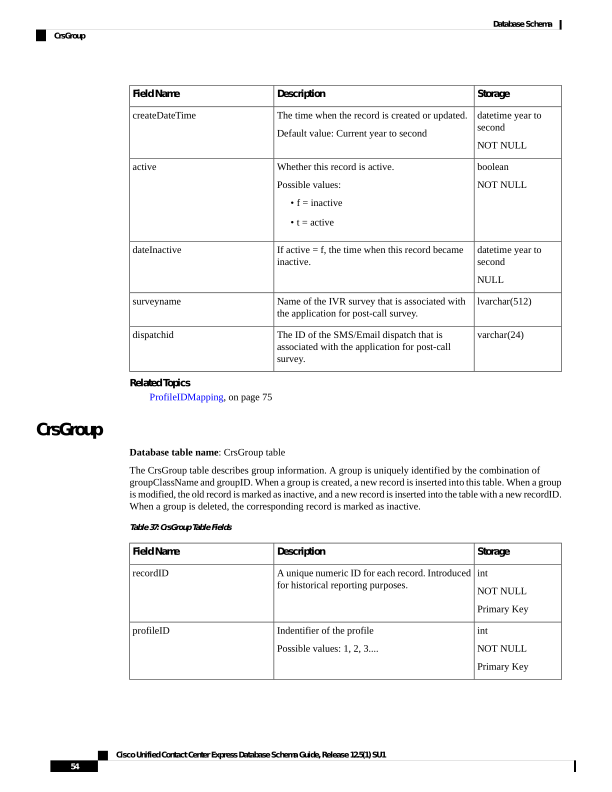
Page 67
Storage
Description
Field Name
lvarchar(512)
NOT NULL
Represents Group configuration class.
Possible values: GroupConfig.class
configClass
int
NOT NULL
Specifies internal configuration schema version.
Possible values: 2
version
lvarchar(512)
NOT NULL
Represents group configuration implementation
class.
Possible values:
• com.cisco.crs.email.
• CiscoEmailControlGroupConfig.
configImplClass
lvarchar(400)
NOT NULL
Uniquely identifies a group together with the
groupID. The class of channels being managed
by the group.
groupClass
int
NOT NULL
Uniquely identifies a group together with
groupClassName. Group identifier unique for a
give class of channels.
groupID
nvarchar(128,0)
NOT NULL
Type of the group, corresponding to type of the
channels managed by the group as defined since
CRS 3.0.
groupType
boolean
NOT NULL
Whether the group is enabled.
Possible values:
f = disabled
t = enabled
groupEnabled
int
NOT NULL
Number of channels defined in the group.
numOfChannels
nvarchar(128,0)
NULL
Description of the group.
description
BLOB
NULL
Internal data not exposed to customers.
privateData
datetime year to
second
NOT NULL
When the group was created.
Default value: Current year to second
createDateTime
Cisco Unified Contact Center Express Database Schema Guide, Release 12.5(1) SU1
55
Database Schema
CrsGroup
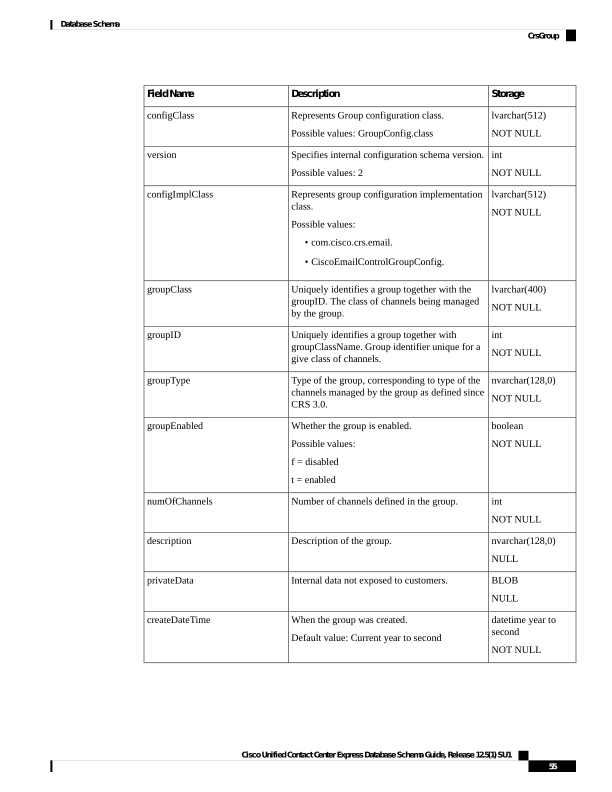
Page 68
Storage
Description
Field Name
boolean
NOT NULL
Whether this record is active.
Possible values:
f = inactive
t = active
active
datetime year to
second
NULL
If active = f, the time when the record became
inactive.
dateInactive
CrsProperties
Database table name: CrsProperties
This table stores the configuration properties as key-value pair.
Table 38: CrsProperties Table Fields
Storage
Description
Field Name
lvarchar(256)
NOT NULL
Unique identifier of the property
from a properties file.
propertyname
lvarchar(2048)
NOT NULL
Specifies the value of the property
from a properties file.
propertyvalue
CrsTrigger
Database table name: CrsTrigger
The CrsTrigger table describes trigger information. A trigger is uniquely identified by a trigger name
(triggerName). When a trigger is created, a new record is inserted into this table. When a trigger is modified,
the old record is marked as inactive, and a new record is inserted into the table with a new recordID. When a
trigger is deleted, the corresponding record will be marked as inactive.
Table 39: CrsTrigger Table Fields
Storage
Description
Field Name
int
NOT NULL
Primary Key
Unique numeric ID for each record. Introduced
for historical reporting purposes.
recordID
int
NOT NULL
Primary Key
Indentifier of the profile
Possible values: 1, 2, 3....
profileID
Cisco Unified Contact Center Express Database Schema Guide, Release 12.5(1) SU1
56
Database Schema
CrsProperties
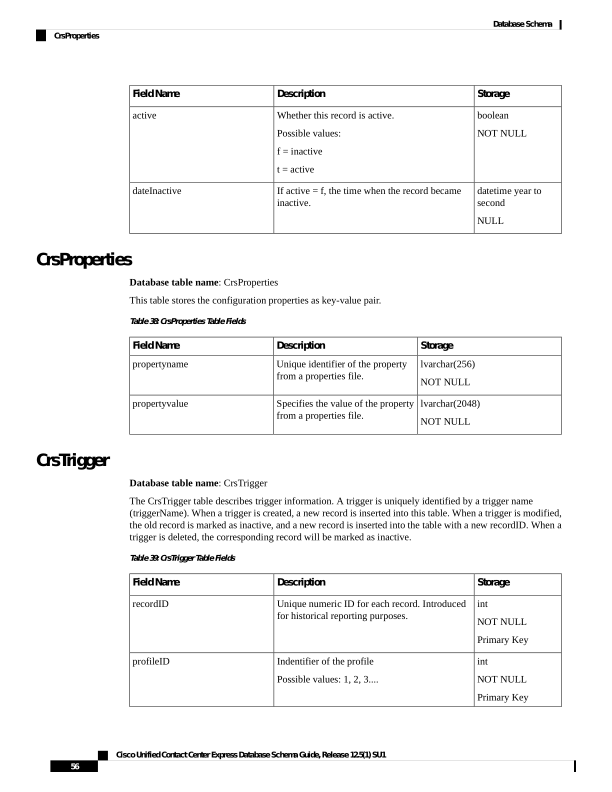
Page 69
Storage
Description
Field Name
lvarchar(512)
NOT NULL
Represents trigger configuration class.
Possible values:
ApplicationTriggerConfig.class
configClass
int
NOT NULL
Specifies internal configuration schema version.
Possible values: 3
version
lvarchar(512)
NOT NULL
Represents trigger configuration implementation
class.
Possible values:
• com.cisco.crs.email.
• CiscoEmailControlGroupConfig.
configImplClass
nvarchar(50,0)
NOT NULL
Uniquely identifies a trigger. Available from CRS
4.5 onwards. The API does limit the string length.
Go back and revisit the length.
triggerName
nvarchar(128,0)
NOT NULL
Hard coded.
Possible values:
• Cisco Http Trigger
• Cisco JTAPI Trigger
triggerType
nvarchar(50,0)
NOT NULL
Application name being triggered by the trigger.
applicationName
boolean
NOT NULL
Whether the trigger is enabled
Possible values:
• f = disabled
• t = enabled
triggerEnabled
int
NOT NULL
Maximum number of sessions
Possible values: 0, 1, 2...
numOfSessions
int
NOT NULL
Idle time out in milliseconds
idleTimeout
Cisco Unified Contact Center Express Database Schema Guide, Release 12.5(1) SU1
57
Database Schema
CrsTrigger
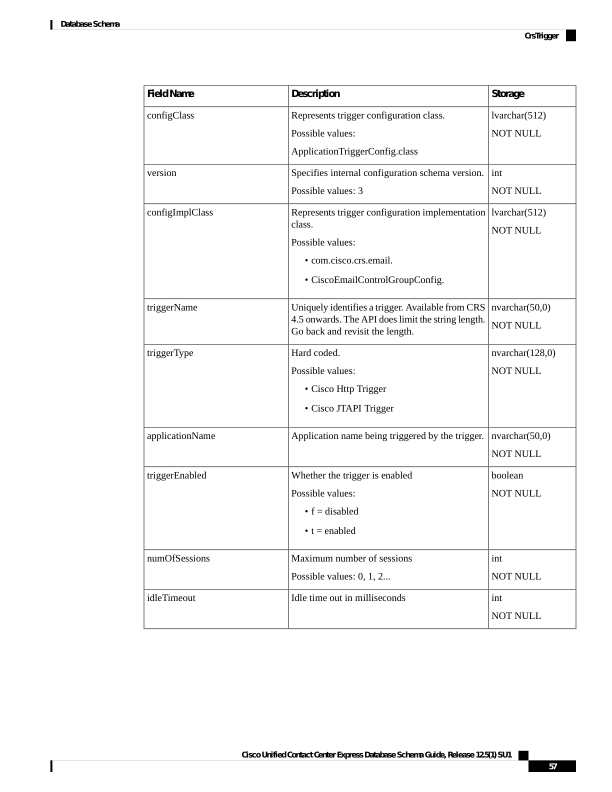
Page 70
Storage
Description
Field Name
nvarchar(50,0)
NOT NULL
Default locale for the trigger.
Possible values:
• system.default (the currently configured
system default locale)
• accept.trigger (the locale provided by the
incoming event)
triggerLocale
nvarchar(128,0)
NULL
Description of the trigger
description
lvarchar(256)
NULL
For HTTP trigger, this field contains the URL.
For JTAPI and call triggers, this is the dialed
number (DN).
misc1
lvarchar(256)
NULL
For JTAPI trigger, this is the partition.
misc2
BLOB
NULL
Internal data not exposed to customers, such as
parameters or groups associated with a trigger.
privateData
datetime year to
second
Not NULL
When the trigger was created.
Default value: Current year to second
createDateTime
boolean
NOT NULL
Whether this record is active.
Possible values:
f = inactive
t = active
active
datetime year to
second
NULL
If active = f, the time when the record became
inactive.
dateInactive
Related Topics
ProfileIDMapping, on page 75
DateShiftMap
Database table name: DateShiftMap
This table stores the special business days configured for calendars.
Cisco Unified Contact Center Express Database Schema Guide, Release 12.5(1) SU1
58
Database Schema
DateShiftMap
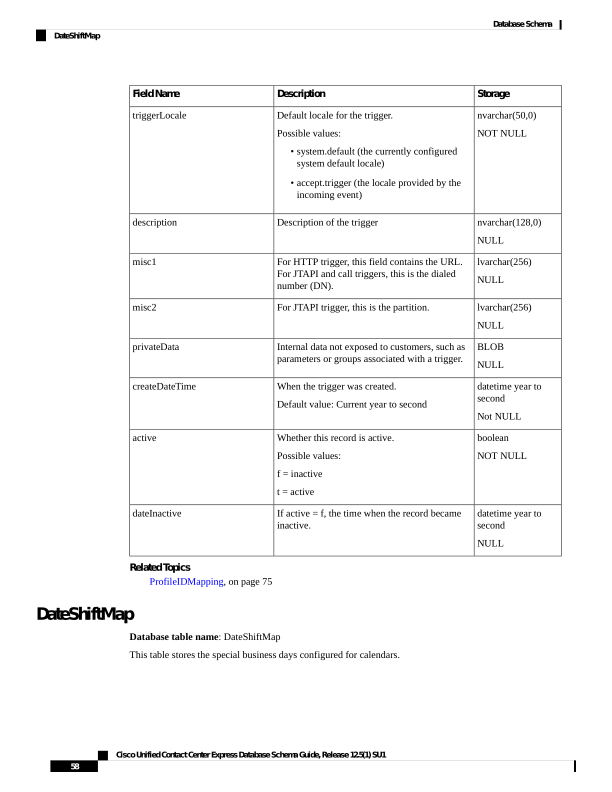
Page 71
Table 40: DateShiftMap Table Fields
Storage
Description
Field Name
serial
NOT NULL
Primary Key
A unique identifier for the record.
recordid
int
NOT NULL
A unique identifier for the calendar.
calid
nvarchar (50)
NOT NULL
Name of the calendar.
name
DATETIME YEAR TO DAY
NOT NULL
Date of the special day.
caldate
nvarchar (25)
NOT NULL
The shift name configured for the
specific day of the week.
shiftname
smallint
NOT NULL
Type of the shift.
shifttype
int
NOT NULL
Shift start time.
fromtime
int
NOT NULL
Shift end time.
totime
boolean
NOT NULL
Indicates whether the record is
currently active or not.
f = Inactive
t = Active
active
DATETIME year to second
NULL
Date and time of the record when
it is marked as inactive.
dateinactive
DayShiftMap
Database Table Name: DayShiftMap
This table stores the custom weekly business days configured for calendars.
Cisco Unified Contact Center Express Database Schema Guide, Release 12.5(1) SU1
59
Database Schema
DayShiftMap
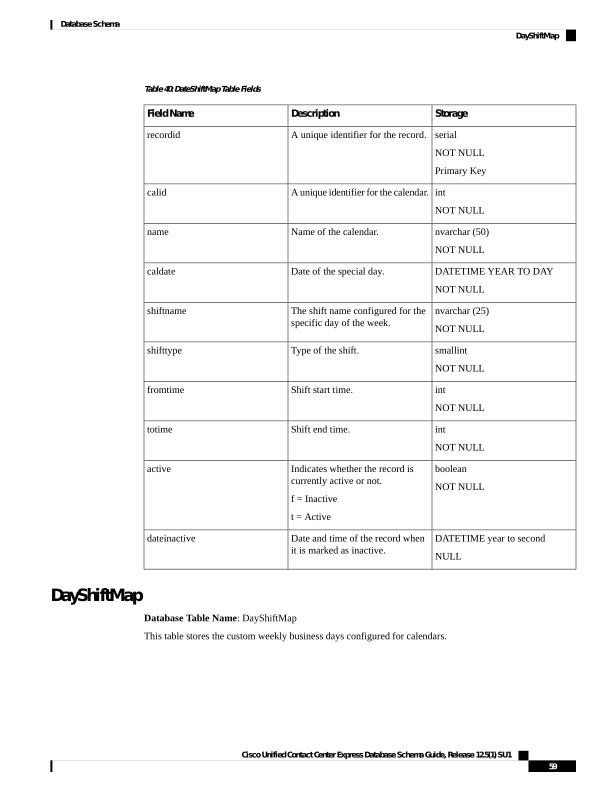
Page 72
Table 41: DayShiftMap Table Fields
Storage
Description
Field Name
serial
NOT NULL
Primary Key
A unique identifier for the record.
recordid
int
NOT NULL
A unique identifier for the calendar.
calid
nvarchar (3)
NOT NULL
Day of the week.
dow
nvarchar (25)
NOT NULL
The shift name configured for the
specific day of the week.
shiftname
NOT NULL
smallint
Type of the shift.
shifttype
int
NOT NULL
Shift start time in 24-hour format.
fromtime
int
NOT NULL
Shift end time in 24-hour format.
totime
boolean
NOT NULL
Indicates whether the record is
currently active or not.
f = Inactive
t = Active
active
DATETIME year to second
NULL
Date and time of the record when
it is marked as inactive.
dateinactive
DebugFlag
Database table name: DebugFlag
This table provides information about the status of the debug flag. The debug flag can be set to Enable or
Disable.
Table 42: DebugFlag Table Field
Storage
Description
Field Name
boolean
NULL
Specifies the flag for debugging.
flag
Cisco Unified Contact Center Express Database Schema Guide, Release 12.5(1) SU1
60
Database Schema
DebugFlag
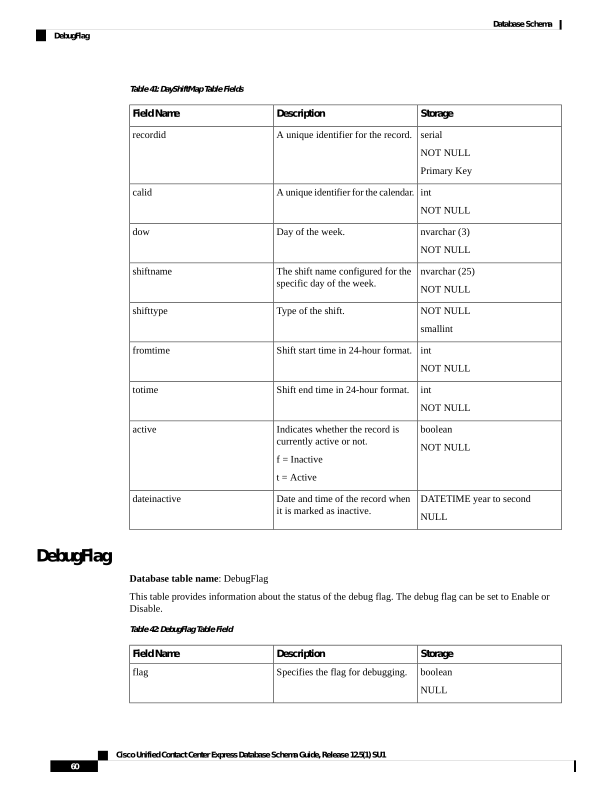
Page 73
DialingList
Database table name: DialingList
The DialingList table contains the outbound contacts that need to be dialed for a particular campaign. This
table is populated when a text file containing the outbound contacts is imported from the Campaigns
configuration page in the Unified CCX Administration.
When the outbound contacts are imported into the database from the Unified CCX Administration, the callStatus
field has the default value of 1 (Pending); that is, the contacts are yet to be dialed.
Table 43: DialingList Table Fields
Storage
Description
Field Name
int
NOT NULL
Primary Key
A unique identifier for the record.
recordid
int
NOT NULL
Primary Key
A unique identifier for a contact.
dialinglistid
int
NOT NULL
Primary Key
Identifier of the Unified CCX profile that is
associated with this record.
profileid
int
NULL
Campaign identifier
campaignid
datetime year to
second
NULL
Default -CURRENT_TIMESTAMP
createdatetime
nvarchar(25, 0)
NULL
The account number of the contact (from the
imported file). This field is sent to the agent
desktop.
accountnumber
nvarchar(50, 0)
NULL
The first name of the contact (from the imported
file).
firstname
nvarchar(50,0)
NULL
The last name of the contact (from the imported
file).
lastname
varchar(28,0)
NOT NULL
Primary phone number of the contact (from the
imported file).
phone01
Cisco Unified Contact Center Express Database Schema Guide, Release 12.5(1) SU1
61
Database Schema
DialingList
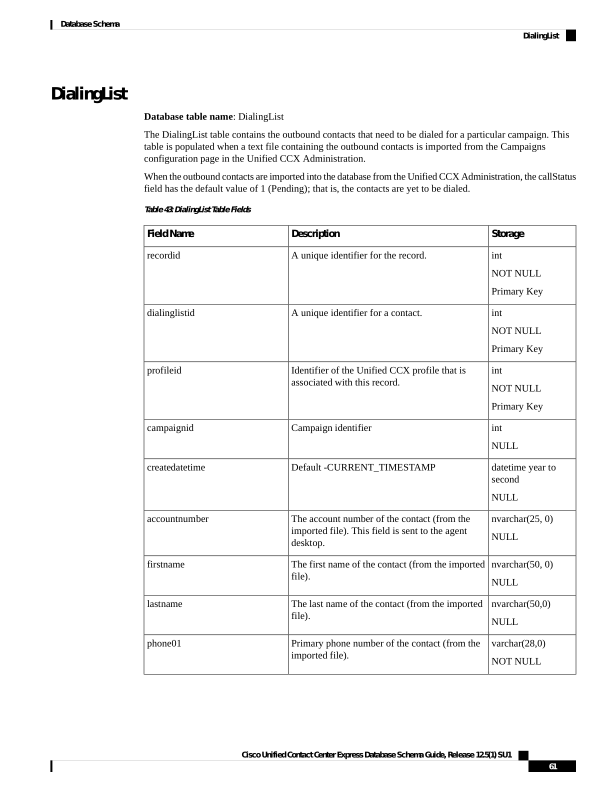
Page 74
Storage
Description
Field Name
varchar(28,0)
NULL
Additional number of the contact (from the
imported file). The number is dialed when the
agent selects Skip-Next for the preview call.
phone02
varchar(28,0)
NULL
Additional number of the contact (from the
imported file). This number is dialed if attempts
to dial the first two numbers are unsuccessful.
phone03
smallint
NOT NULL
The time zone for the first phone number of the
contact.
gmtzonephone01
smallint
NOT NULL
0 = Daylight Savings Time (DST) is observed at
this phone number.
1 = DST is not observed at this phone number
dstphone01
smallint
NOT NULL
The time zone for the second phone number of
the contact.
gmtzonephone02
smallint
NOT NULL
0 = DST is observed at this phone number.
1 = DST is not observed at this phone number.
dstphone02
smallint
NOT NULL
The time zone for the third phone number of the
contact.
gmtzonephone03
smallint
NOT NULL
0 = DST is observed at this phone number.
1 = DST is not observed at this phone number.
dstphone03
varchar(28,0)
NULL
Phone number to be used for callback (can be
supplied by the agent).
callbacknumber
datetime year to
second
NULL
Customer requested callback time.
callbackdatetime
Cisco Unified Contact Center Express Database Schema Guide, Release 12.5(1) SU1
62
Database Schema
DialingList
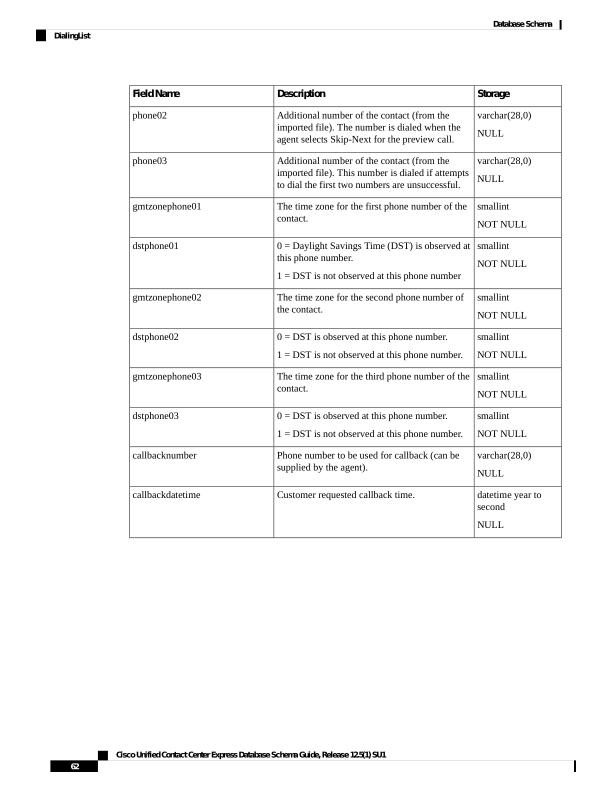
Page 75
Storage
Description
Field Name
smallint
NOT NULL
The status of the contact record:
1 = Pending. The call is pending.
2 = Active. The record is sent (active) to the
Outbound subsystem for dialing.
3 = Closed. The record is closed.
4 = Callback. The record is marked for a callback.
5 = Max Calls. Maximum attempts have been
reached for this record (considered closed).
6 = Retry. The call is redialed immediately
whenever there is any miss.
7 = Unknown. If the Outbound subsystem was
restarted with records in the Active (2) state, the
records are moved to this state.
8 = Retries with delay. The call is redialed as it
was either busy, no answer, customer abandoned
or system abandoned. Retry time is set as per the
corresponding configuration in the Unified CCX
Application Administration web interface.
callstatus
Cisco Unified Contact Center Express Database Schema Guide, Release 12.5(1) SU1
63
Database Schema
DialingList
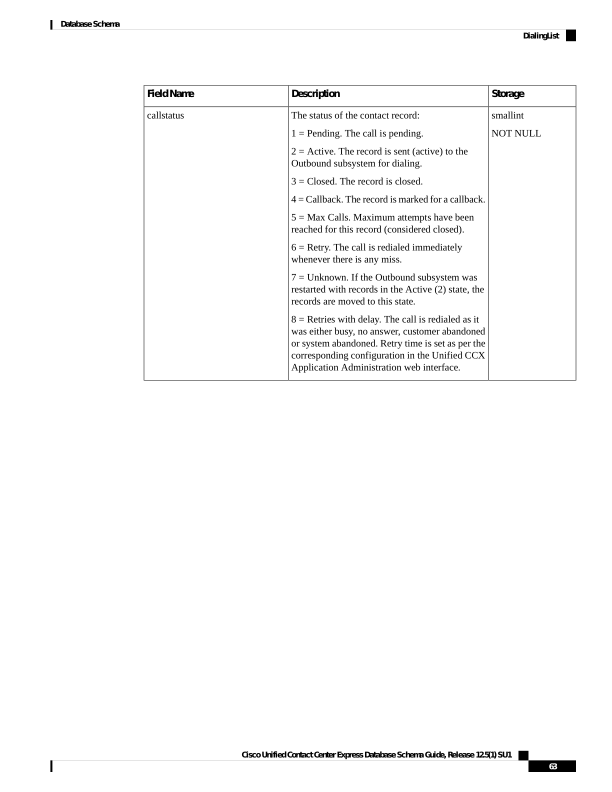
Page 76
Storage
Description
Field Name
smallint
NOT NULL
The call result from the last call placed for this
record.
1 = Voice. Customer answered and was connected
to agent.
2 = Fax. Fax machine reached.
3 = Answering machine. Answering machine
reached.
4 = Invalid. Number reported as invalid by the
network or by the agent.
5 = Do Not Call. Customer does not want to be
called again.
6 = Wrong Number. Number successfully
contacted but wrong number.
7 = Wrong Person. Number successfully contacted
but reached the wrong person.
8 = Callback. Customer requested regular
callback.
9 = Skip/Reject. Agent skipped or rejected a
preview call.
10 = Skip-Close/Reject-Close. Agent skipped or
rejected a preview call with the close option.
11 = Busy. Busy signal detected or marked busy
by agent.
12 = Agent did not respond to the preview call
within the timeout duration.
13 = Callback Failed - this value is not written to
the database; this is for internal use only.
14 = Callback missed and marked for Retry.
15 = Customer's phone timed out either due to
Ring No Answer (RNA) or Gateway failure.
16 = Call was abandoned because IVR port was
unavailable or Unified CCX failed to transfer the
call to the IVR port.
17 = Call failed due any one of the reasons.
18 = Customer abandoned as customer or agent
disconnected the call within the time limit as
configured in “Abandoned Call Wait Time” in
Unified CCX Application Administration web
interface.
callresult
Cisco Unified Contact Center Express Database Schema Guide, Release 12.5(1) SU1
64
Database Schema
DialingList
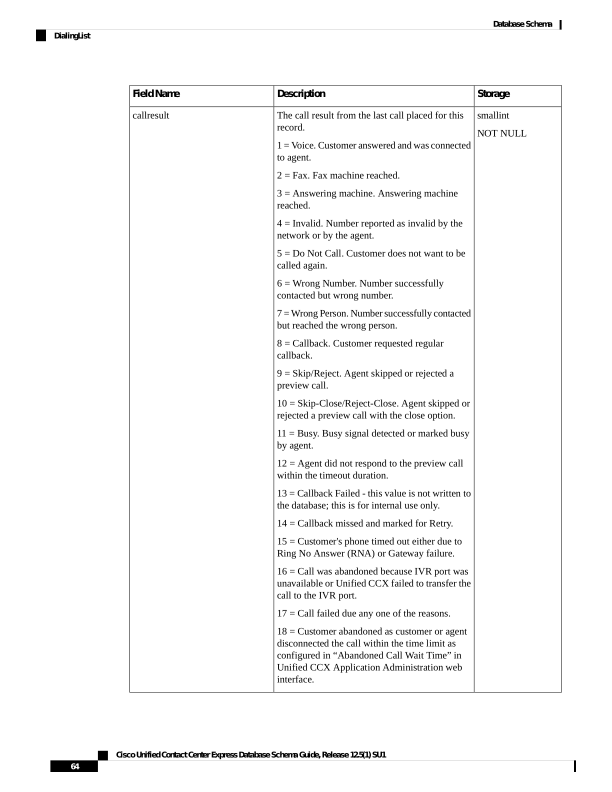
Page 77
Storage
Description
Field Name
smallint
NULL
The call result from the last time phone01 was
called.
Values are the same as for callResult.
callresult01
smallint
NULL
The call result from the last time phone02 was
called.
Values are the same as for callResult.
callresult02
smallint
NULL
The call result from the last time phone03 was
called.
Values are the same as for callResult.
callresult03
smallint
NULL
The last number dialed.
1 = phone01
2 = phone02
3 = phone03
lastnumberdialed
smallint
NULL
The number of call attempts made to phone01. If
there is an error in an attempt to call this number,
the attempt is not counted here.
callsmadetophone01
smallint
NULL
The number of call attempts made to phone02. If
there is an error in an attempt to call this number,
the attempt is not counted here.
callsmadetophone02
smallint
NULL
The number of call attempts made to phone03. If
there is an error in an attempt to call this number,
the attempt is not counted here.
callsmadetophone03
boolean
NULL
Indicates whether the contact has to be retried.
retry
boolean
NOT NULL
Contacts becomes inactive for a campaign in the
following scenarios:
1 = delete a campaign
2 = delete all the contacts for a campaign
f = Inactive
t = Active
active
datetime year to
second
NULL
The date when record became inactive.
dateinactive
smallint
NULL
Number of missed callbacks.
numMissedCallback
Cisco Unified Contact Center Express Database Schema Guide, Release 12.5(1) SU1
65
Database Schema
DialingList
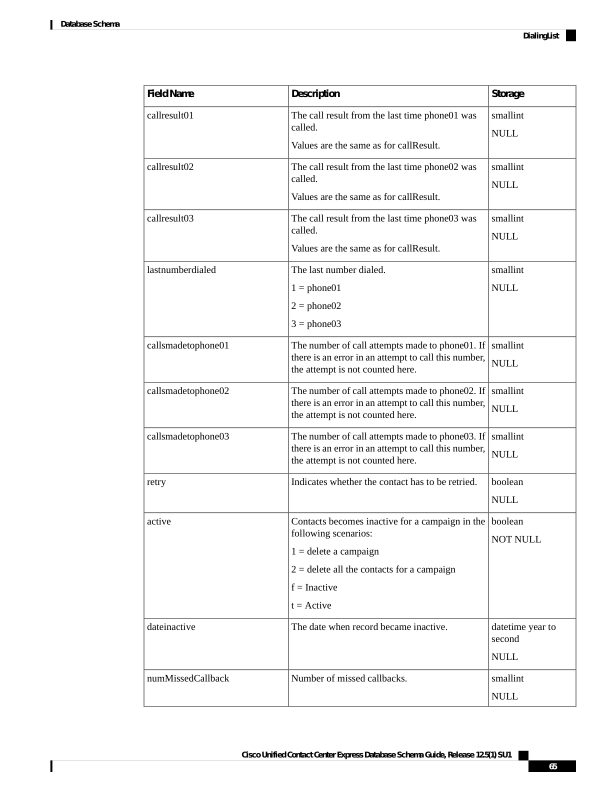
Page 78
Related Topics
AgentConnectionDetail, on page 4
AreaCode, on page 11
Campaign, on page 18
ContactCallDetail, on page 34
DialingList , on page 61
ProfileIDMapping, on page 75
DialingListHistory
Database table name: DialingList
The DialingList table contains the outbound contacts that need to be dialed for a particular campaign. This
table is populated when a text file containing the outbound contacts is imported from the Campaigns
configuration page in the Unified CCX Administration.
When the outbound contacts are imported into the database from the Unified CCX Administration, the callStatus
field has the default value of 1 (Pending); that is, the contacts are yet to be dialed.
Table 44: DialingList Table Fields
Storage
Description
Field Name
int
NOT NULL
Primary Key
A unique identifier for the record.
recordid
int
NOT NULL
Primary Key
A unique identifier for a contact.
dialinglistid
int
NOT NULL
Primary Key
Identifier of the Unified CCX profile that is
associated with this record.
profileid
int
NULL
Campaign identifier
campaignid
datetime year to
second
NULL
Default -CURRENT_TIMESTAMP
createdatetime
nvarchar(25,0)
NULL
The account number of the contact (from the
imported file). This field is sent to the agent
desktop.
accountnumber
nvarchar(50,0)
NULL
The first name of the contact (from the imported
file).
firstname
Cisco Unified Contact Center Express Database Schema Guide, Release 12.5(1) SU1
66
Database Schema
DialingListHistory
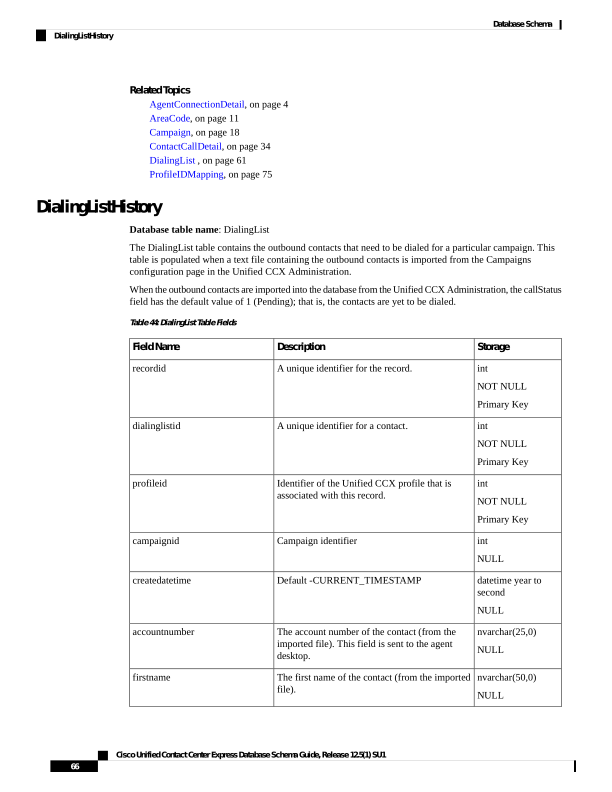
Page 79
Storage
Description
Field Name
nvarchar(50,0)
NULL
The last name of the contact (from the imported
file).
lastname
varchar(28,0)
NULL
Primary phone number of the contact (from the
imported file).
phone01
varchar(28,0)
NULL
Additional number of the contact (from the
imported file). The number is dialed when the
agent selects Skip-Next for the preview call.
phone02
varchar(28,0)
NULL
Additional number of the contact (from the
imported file). This number is dialed if attempts
to dial the first two numbers are unsuccessful.
phone03
smallint
NULL
The time zone for the first phone number of the
contact.
gmtzonephone01
smallint
NULL
0 = Daylight Savings Time (DST) is observed at
this phone number.
1 = DST is not observed at this phone number
dstphone01
smallint
NULL
The time zone for the second phone number of
the contact.
gmtzonephone02
smallint
NULL
0 = DST is observed at this phone number.
1 = DST is not observed at this phone number.
dstphone02
smallint
NULL
The time zone for the third phone number of the
contact.
gmtzonephone03
smallint
NULL
0 = DST is observed at this phone number.
1 = DST is not observed at this phone number.
dstphone03
varchar(28)
NULL
Phone number to be used for callback (can be
supplied by the agent).
callbacknumber
datetime year to
second
NULL
Customer requested callback time.
callbackdatetime
Cisco Unified Contact Center Express Database Schema Guide, Release 12.5(1) SU1
67
Database Schema
DialingListHistory
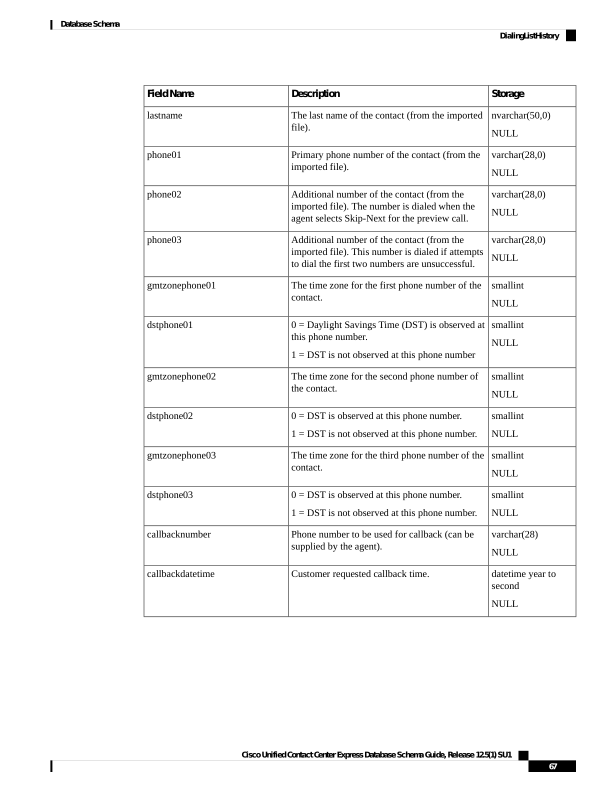
Page 80
Storage
Description
Field Name
smallint
NULL
The status of the contact record:
1 = Pending. The call is pending.
2 = Active. The record is sent (active) to the
Outbound subsystem for dialing.
3 = Closed. The record is closed.
4 = Callback. The record is marked for a callback.
5 = Max Calls. Maximum attempts have been
reached for this record (considered closed).
6 = Retry. The call is redialed immediately
whenever there is any miss.
7 = Unknown. If the Outbound subsystem was
restarted with records in the Active (2) state, the
records are moved to this state.
8 = Retries with delay. The call is redialed as it
was either busy, no answer, customer abandoned
or system abandoned. Retry time is set as per the
corresponding configuration in the Unified CCX
Application Administration web interface.
callstatus
Cisco Unified Contact Center Express Database Schema Guide, Release 12.5(1) SU1
68
Database Schema
DialingListHistory
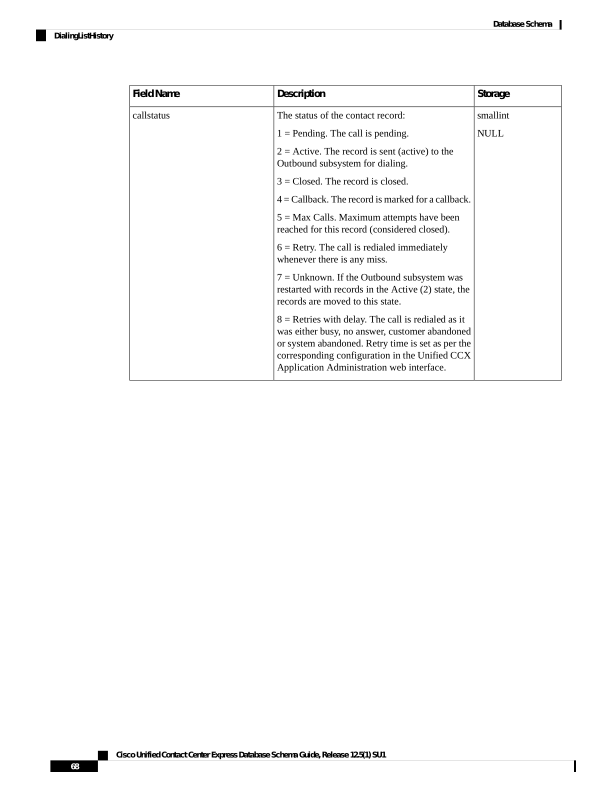
Page 81
Storage
Description
Field Name
smallint
NULL
The call result from the last call placed for this
record.
1 = Voice. Customer answered and was connected
to agent.
2 = Fax. Fax machine reached.
3 = Answering machine. Answering machine
reached.
4 = Invalid. Number reported as invalid by the
network or by the agent.
5 = Do Not Call. Customer does not want to be
called again.
6 = Wrong Number. Number successfully
contacted but wrong number.
7 = Wrong Person. Number successfully contacted
but reached the wrong person.
8 = Callback. Customer requested regular
callback.
9 = Skip/Reject. Agent skipped or rejected a
preview call.
10 = Skip-Close/Reject-Close. Agent skipped or
rejected a preview call with the close option.
11 = Busy. Busy signal detected or marked busy
by agent.
12 = Agent did not respond to the preview call
within the timeout duration.
13 = Callback Failed - this value is not written to
the database; this is for internal use only.
14 = Callback missed and marked for Retry.
15 = Customer's phone timed out either due to
Ring No Answer (RNA) or Gateway failure.
16 = Call was abandoned because IVR port was
unavailable or Unified CCX failed to transfer the
call to the IVR port.
17 = Call failed due any one of the reasons.
18 = Customer abandoned as customer or agent
disconnected the call within the time limit as
configured in “Abandoned Call Wait Time” in
Unified CCX Application Administration web
interface.
callresult
Cisco Unified Contact Center Express Database Schema Guide, Release 12.5(1) SU1
69
Database Schema
DialingListHistory
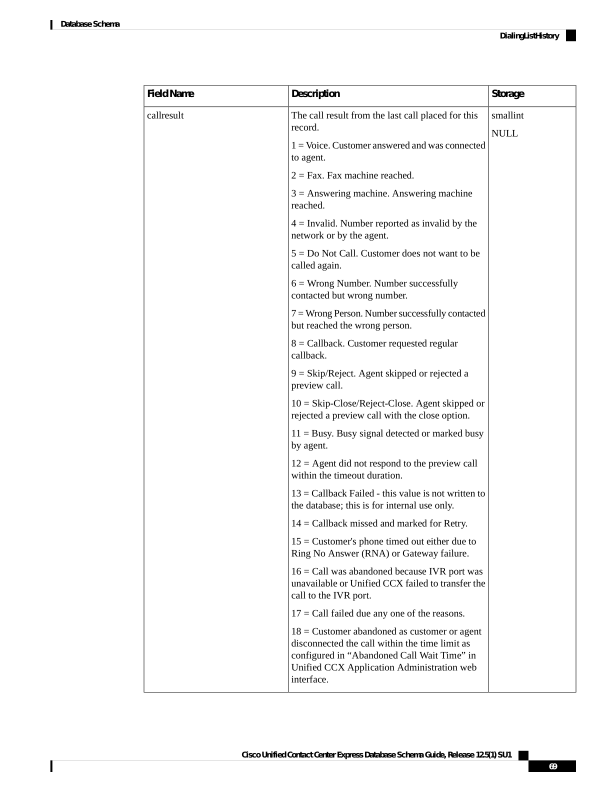
Page 82
Storage
Description
Field Name
smallint
NULL
The call result from the last time phone01 was
called.
Values are the same as for callResult.
callresult01
smallint
NULL
The call result from the last time phone02 was
called.
Values are the same as for callResult.
callresult02
smallint
NULL
The call result from the last time phone03 was
called.
Values are the same as for callResult.
callresult03
smallint
NULL
The last number dialed.
1 = phone01
2 = phone02
3 = phone03
lastnumberdialed
smallint
NULL
The number of call attempts made to phone01. If
there is an error in an attempt to call this number,
the attempt is not counted here.
callsmadetophone01
smallint
NULL
The number of call attempts made to phone02. If
there is an error in an attempt to call this number,
the attempt is not counted here.
callsmadetophone02
smallint
NULL
The number of call attempts made to phone03. If
there is an error in an attempt to call this number,
the attempt is not counted here.
callsmadetophone03
boolean
NULL
Indicates whether the contact has to be retried.
retry
boolean
NULL
Contacts becomes inactive for a campaign in the
following scenarios:
1 = delete a campaign
2 = delete all the contacts for a campaign
3 = when callStatus becomes 3 (closed) or 5 (max
calls)
f = Inactive
t = Active
active
datetime year to
second
NULL
The date when record became inactive.
dateinactive
Cisco Unified Contact Center Express Database Schema Guide, Release 12.5(1) SU1
70
Database Schema
DialingListHistory
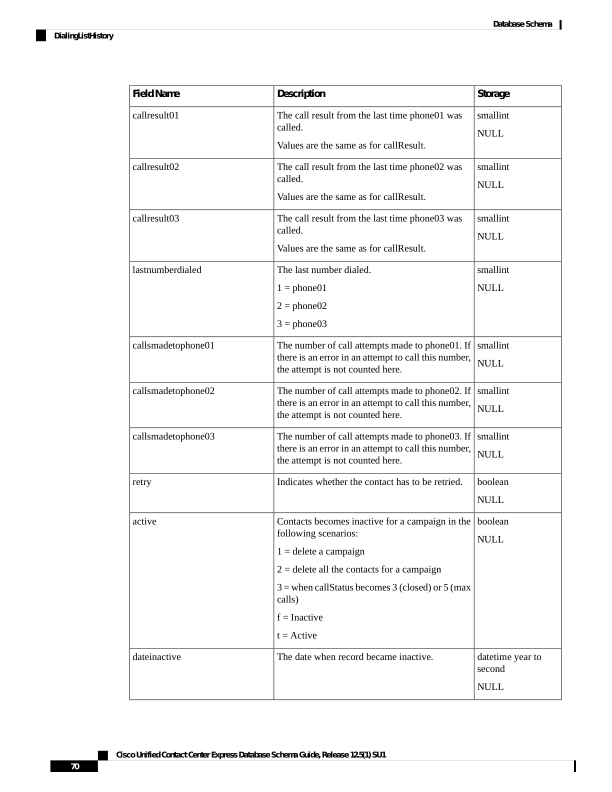
Page 83
Storage
Description
Field Name
smallint
NULL
Number of missed callbacks.
numMissedCallback
Related Topics
AgentConnectionDetail, on page 4
AreaCode, on page 11
Campaign, on page 18
ContactCallDetail, on page 34
DialingList , on page 61
ProfileIDMapping, on page 75
EngineStatus
Database table name: EngineStatus
This table stores the information about the start time of the Unified CCX engine.
Table 45: EngineStatus Table Fields
Storage
Description
Field Name
datetime year to second
NOT NULL
Indicates the date and time when
the engine starts.
enginestarttime
FlexLicenseUsage
Database table name: FlexLicenseUsage
This table stores information about the license utilization in Unified CCX such as the number of ports and
agent seats in use.
Table 46: FlexLicenseUsage Table Fields
Storage
Description
Field Name
datetime year to
fraction(3)
NOT NULL
Identifies the date and time when the record was
created.
timestamp
smallint
NOT NULL
Specifies the number of inbound ports that are in
use.
inboundportsinuse
smallint
NOT NULL
Specifies the number of outbound ports that are
in use.
outboundportsinuse
Cisco Unified Contact Center Express Database Schema Guide, Release 12.5(1) SU1
71
Database Schema
EngineStatus
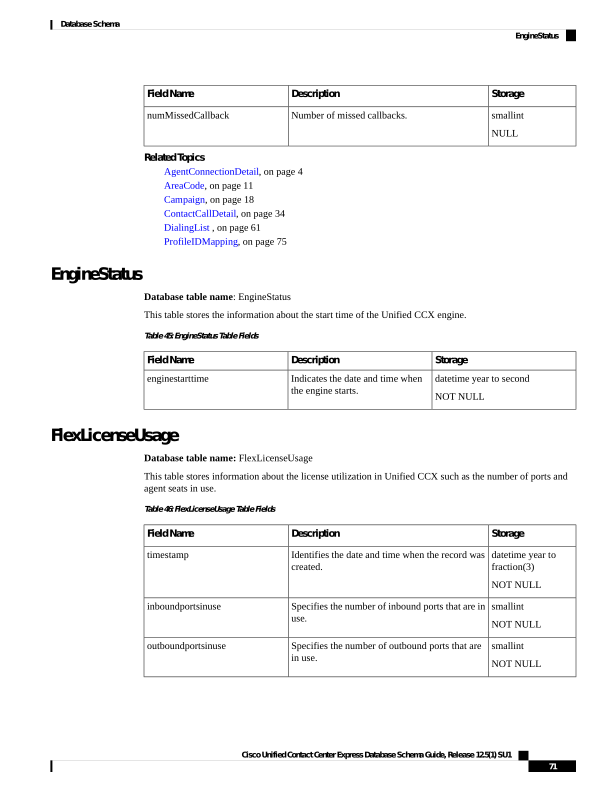
Page 84
Storage
Description
Field Name
smallint
NOT NULL
Specifies the number of Standard Agent seats in
use.
stdseats
smallint
NOT NULL
Specifies the number of Premium Agent seats in
use.
premseats
LatestSynchedTime
Database table name: LatestSynchedTime
This table contains the information about the latest synchronization time of Unified CCX.
Table 47: ConsultLegDetail Table Fields
Storage
Description
Field Name
datetime year to
fraction(3)
NOT NULL
Specifies the date and the time of the latest
synchronization.
datesynched
LicenseUtilizationDetail
Database table name: LicenseUtilizationDetail
This table stores information about the license utilization in Unified CCX such as the number of ports and
agent seats in use.
Table 48: LicenseUtilizationDetail Table Fields
Storage
Description
Field Name
datetime year to
fraction(3)
NOT NULL
Identifies the date and time when the record was
created.
timestamp
int
NOT NULL
Specifies the number of inbound ports that are in
use.
inboundportsinuse
int
NOT NULL
Specifies the number of outbound ports that are
in use.
outboundportsinuse
int
NOT NULL
Specifies the number of inbound Agent seats in
use.
inboundseatsinuse
smallint
NOT NULL
Specifies the number of outbound Agent seats in
use.
outboundseatsinuse
Cisco Unified Contact Center Express Database Schema Guide, Release 12.5(1) SU1
72
Database Schema
LatestSynchedTime
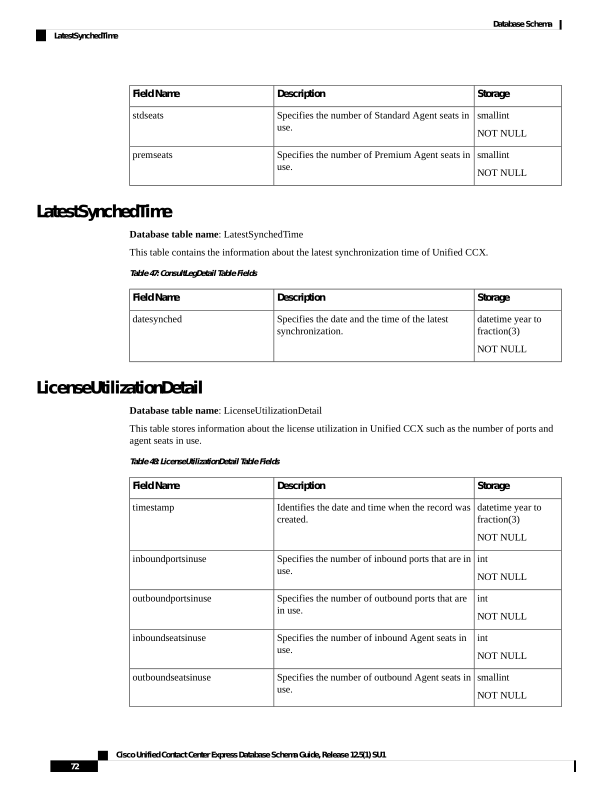
Page 85
MonitoredResourceDetail
Database table name: MonitoredResourceDetail
The MonitoredResourceDetail table records the actual agents who are monitored. The RemoteMonitoringDetail
table records the original agent or the CSQ that the supervisor plans to monitor. Monitoring a CSQ involves
monitoring the agents who handle calls for that CSQ. So the actual agents (there can be more than one) who
are monitored will be recorded in the MonitoredResourceDetail table.
Table 49: MonitoredResourceDetail Table Fields
Storage
Description
Field Name
decimal(18)
NOT NULL
Primary Key
Identifier that the system assigns to the call. This
identifier remains the same for all legs of the call.
It is the sessionID of the IVR call; that is, when
the supervisor starts monitoring, the monitoring
call itself is an IVR call. The supervisor monitors
one or more Unified CCX calls.
sessionid
datetime year to
fraction (3)
NOT NULL
The date and time when the remote supervisor
attempted to monitor the agent.
startmonitoringreqtime
datetime year to
fraction (3)
NOT NULL
Primary Key
The date and time when the remote supervisor
began monitoring the call.
startmonitoringcalltime
int
NOT NULL
Identifier of the resource being monitored.
monitoredrsrcid
smallint
NOT NULL
The session sequence number of the Unified CCX
call that is being monitored.
monitoredsessionseqnum
int
NOT NULL
Primary Key
Identifier of the Unified CCX profile that is
associated with this record.
profileid
int
NOT NULL
Offset, in minutes, between the local time of the
Unified CCX server and Greenwich Mean Time.
As the time information is stored in GMT, this
field will always be zero.
gmtoffset
smallint
NOT NULL
Primary Key
Unique identifier assigned to each server in the
cluster.
nodeid
Related Topics
Cisco Unified Contact Center Express Database Schema Guide, Release 12.5(1) SU1
73
Database Schema
MonitoredResourceDetail
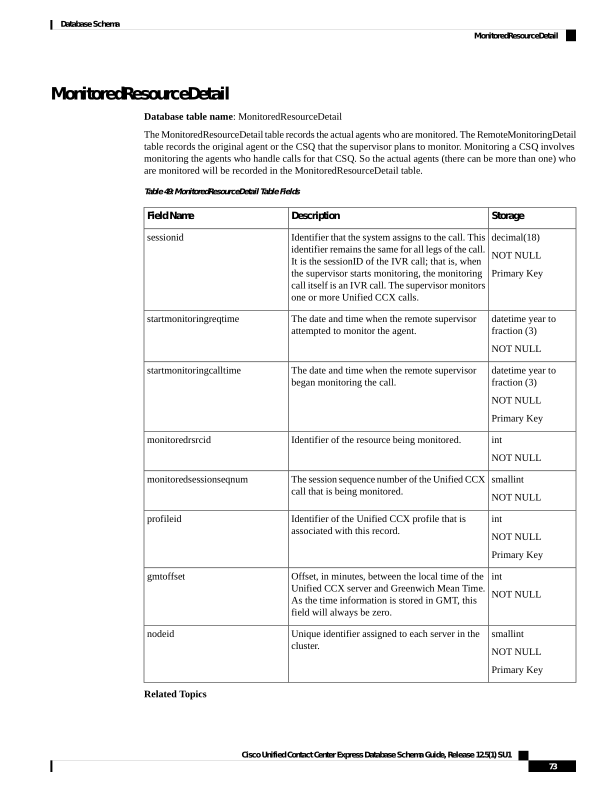
Page 86
• AgentConnectionDetail, on page 4 (monitoredSessionSeqNum maps to sessionSeqNum, via nodeID,
profileID)
• ContactCallDetail, on page 34 (monitoredSessionSeqNum maps to sessionSeqNum, via sessionID,
nodeID, profileID)
• ContactQueueDetail (monitoredSessionSeqNum maps to sessionSeqNum, via nodeID, profileID)
• ContactRoutingDetail , on page 46 (monitoredSessionSeqNum maps to sessionSeqNum, via nodeID,
profileID)
• RemoteMonitoringDetail , on page 79 (via sessionID, profileID, nodeID, startMonitoringReqTime)
• Resource, on page 81 (monitoredRsrcID maps to resourceID, via profileID)
MediaCustomerDataMapping
Database table name: MediaCustomerDataMapping
The MediaCustomerDataMapping table contains mapping between the customer data fields for a specific
media (such as email and other media types) and the order of fields stored in the TextCustomerDetail table.
Do not edit this table directly. It is for internal use only
Note
Table 50: MediaCustomerDataMapping Table Fields
Storage
Description
Field Name
int
NOT NULL
Primary Key
Unique identifier for the record.
recordId
varchar(30,0)
NOT NULL
Primary Key
Type of the media such as email and other media
types.
mediaType
varchar(50,0)
NOT NULL
Name of the field in the customer data.
fieldName
int
NOT NULL
Field ID in the TextCustomerDetail where this
field is stored.
columnId
Related Topics
• TextCustomerDetails, on page 109 (via columnId)
Cisco Unified Contact Center Express Database Schema Guide, Release 12.5(1) SU1
74
Database Schema
MediaCustomerDataMapping

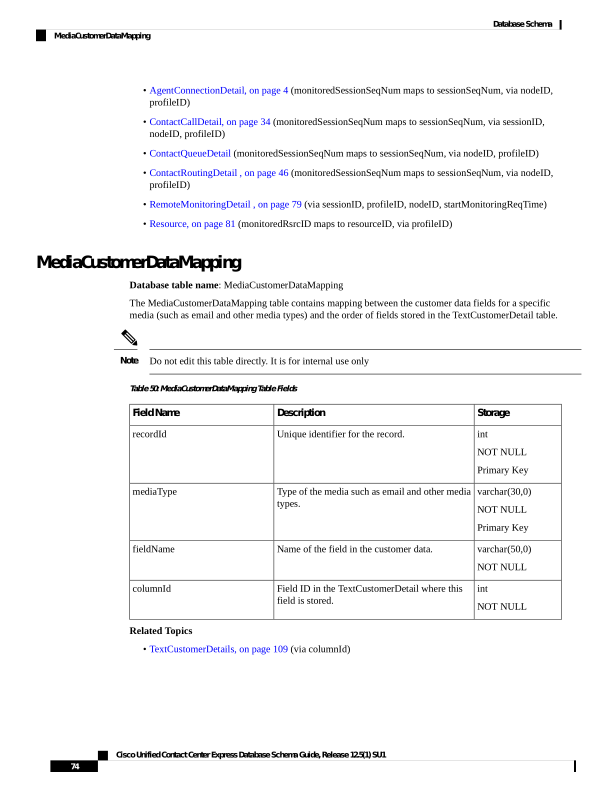
Page 87
ProfileIDMapping
Database table name: ProfileIDMapping
The Unified CCX system creates a new record in the ProfileIDMapping table when a new profile is set up in
the Unified CCX Administration.
A ProfileIDMapping record shows the mapping of the profile name to its unique identifier.
Table 51: ProfileIDMapping Table Fields
Storage
Description
Field Name
nvarchar(50,0)
NOT NULL
Primary Key
Name of the profile, as set up in the Unified CCX
Administration.
profileName
int
NOT NULL
Identifier of the profile.
profileID
Related Topics
• AgentConnectionDetail, on page 4 (via ProfileID)
• AgentStateDetail, on page 7 (via ProfileID)
• AreaCode, on page 11 (via ProfileID)
• Campaign, on page 18 (via ProfileID)
• ContactCallDetail, on page 34 (via ProfileID)
• ContactQueueDetail (via ProfileID)
• ContactRoutingDetail , on page 46 (via ProfileID)
• ContactServiceQueue , on page 47 (via ProfileID)
• DialingList , on page 61 (via ProfileID)
• MonitoredResourceDetail, on page 73 (via ProfileID)
• RemoteMonitoringDetail , on page 79 (via ProfileID)
• Resource, on page 81 (via profileID)
• ResourceGroup , on page 83 (via ProfileID)
• ResourceSkillMapping, on page 84 (via ProfileID)
• RmonCSQConfig , on page 85 (via ProfileID)
• RmonResConfig, on page 86 (via ProfileID)
• RmonUser , on page 86 (via ProfileID)
• Skill , on page 93 (via ProfileID)
• SkillGroup , on page 94 (via ProfileID)
Cisco Unified Contact Center Express Database Schema Guide, Release 12.5(1) SU1
75
Database Schema
ProfileIDMapping
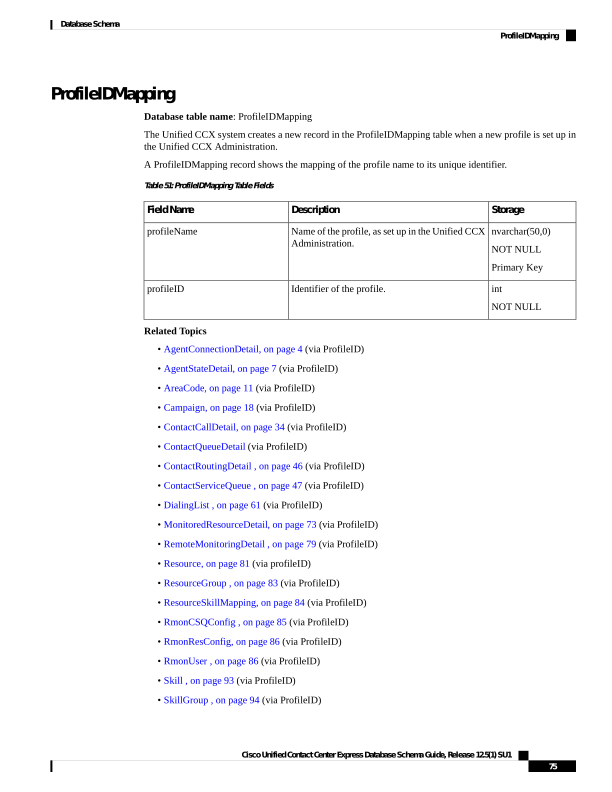
Page 88
• Supervisor , on page 95 (via ProfileID)
• Team, on page 99 (via ProfileID)
• TeamCSQMapping , on page 100 (via ProfileID)
PurgeConfig
Database table name: PurgeConfig
This table provides information about the purge schedule configuration and the corresponding details such
as scheduled time, maximum threshold size of the database, and so on.
Table 52: PurgeConfig Table Fields
Storage
Description
Field Name
int
NOT NULL
Unique identifier of the purge schedule
configuration
id
int
NOT NULL
Specifies the threshold size of the database beyond
which an alert message is sent out.
hrdbsize
int
NOT NULL
The maximum size allowed for the database.
When the database crosses this size, the oldest
hrdbdays records are purged.
hrdbmaxsize
varchar(255)
NULL
Indicates the email address to receive the alert
message when the hrdbsize limit is crossed.
hrdbemail
int
NOT NULL
Used in the automatic purge calculation.
hrdbdays
int
NOT NULL
Specifies the duration for which the data is
retained. After this time period, the data is
removed in a scheduled purge.
retaininterval
varchar(5,0)
NULL
Identifies the time at which the scheduled purge
occurs.
scheduledtime
int
NOT NULL
Specifies the duration of the purge activity.
rundurationinhours
NOT NULL
Specifies the maximum threshold of the extents
which, when crossed, triggers an automatic purge.
maxextentspercentage
PurgeHistory
Database table name: PurgeHistory
Cisco Unified Contact Center Express Database Schema Guide, Release 12.5(1) SU1
76
Database Schema
PurgeConfig
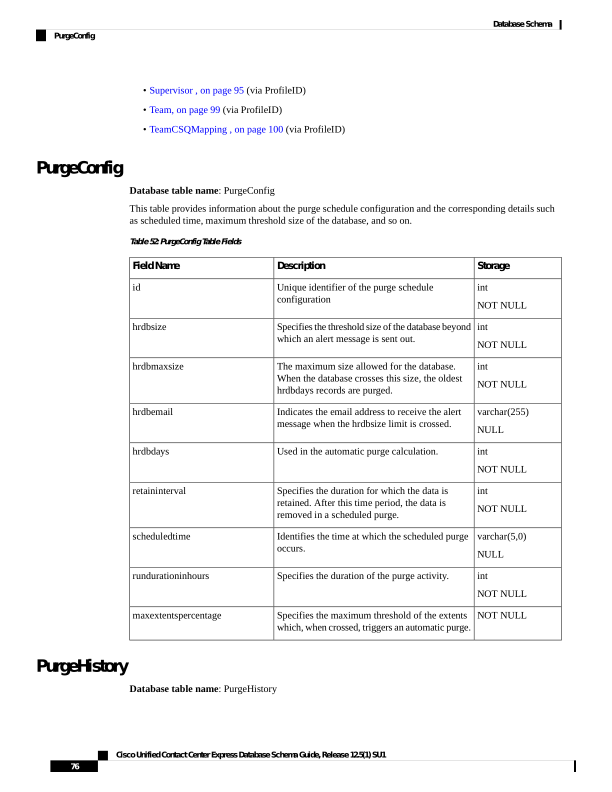
Page 89
The PurgeHistory table records the history of purge information for both manual and scheduled purges.
Table 53: PurgeHistory Table Fields
Storage
Description
Field Name
int
NOT NULL
Primary Key
Unique identifier that is assigned to each server
in the cluster.
nodeId
int
NOT NULL
Primary Key
Sequence numbers.
purgeHistoryId
nvarchar(10,0)
NOT NULL
PurgeType MANUAL or SCHEDULED.
purgeType
nvarchar(30,0)
NOT NULL
PurgeState can be any one of, RUNNING,
COMPLETED_SUCCESSFULLY,
COMPLETED_WITH_ERRORS,UNKNOWN.
purgeState
datetime year to
fraction(3)
NOT NULL
Purge start time.
purgeStartedDateTime
int
NULL
Historical db size before purge which has the
value using store procedure getDbSize with
column name as "used”.
hrDbSizeBeforePurge
datetime year to
fraction(3)
NULL
Date and time of the oldest record before the
purge, in YYYY-MM-DD HH:MM:SS.MS
format.
oldestRecDateTimeBeforePurge
datetime year to
fraction(3)
NULL
Purge completion time, in YYYY-MM-DD
HH:MM:SS.MS format.
purgeCompletedDateTime
int
NULL
Historical db size before purge which has the
value using store procedure getDbSize with
column name as "used”.
hrDbSizeAfterPurge
int
NULL
Config db size before purge which has the value
using store procedure getDBspaceUsage('db_cra')
with column name as "used".
configDbSizeAfterPurge
datetime year to
fraction(3)
NULL
Date and time of the oldest record after the purge,
in YYYY-MM-DD HH:MM:SS.MS format.
oldestRecDateTimeAfterPurge
Cisco Unified Contact Center Express Database Schema Guide, Release 12.5(1) SU1
77
Database Schema
PurgeHistory
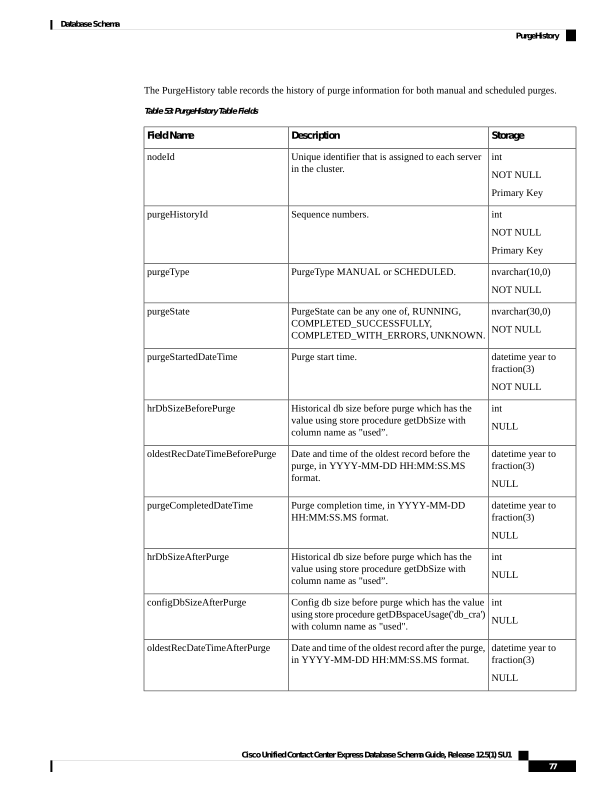
Page 90
Storage
Description
Field Name
int
NULL
Purge run time in minutes which is the difference
between purgeCompletedDataTime and
purgeStartedDateTime.
purgeRunTime
Purge the old data from the historical tables periodically to ensure that the number of rows are within the
recommended limits. The recommended limits for the number of rows in the historical tables are as follows:
• agentstatedetail: Less than 10 million
• agentconnectiondetail: Less than 10 million
• contactcalldetail: Less than 8 million
• contactqueuedetail: Less than 10 million
• contactroutingdetail: Less than 10 million
Note
ReasoncodeLabelMap
Database table name: ReasoncodeLabelMap
Unified CCX maintains a table of reason codes and labels for Logout and Not Ready states. The reason codes
and labels are available in the Cisco Finesse Administration console.
This table holds the mapping between reason codes and labels.
Table 54: ReasoncodeLabelMap
Storage
Description
Field Name
Smallint
NOT NULL
Primary Key
Reason code as configured in the Cisco Finesse
Administration console.
code
NVARCHAR(40,0)
NOT NULL
Reason label as configured in the Cisco Finesse
Administration console.
label
NVARCHAR(15,0)
NOT NULL
Primary Key
Type of reason code, label:
NOT_READY
LOGOUT
category
boolean
NULL
Specifies whether the record is active in the
system. A record becomes Inactive if you delete
the reason code label from the Cisco Finesse
Administration console and mark the field as
"FALSE".
active
Cisco Unified Contact Center Express Database Schema Guide, Release 12.5(1) SU1
78
Database Schema
ReasoncodeLabelMap

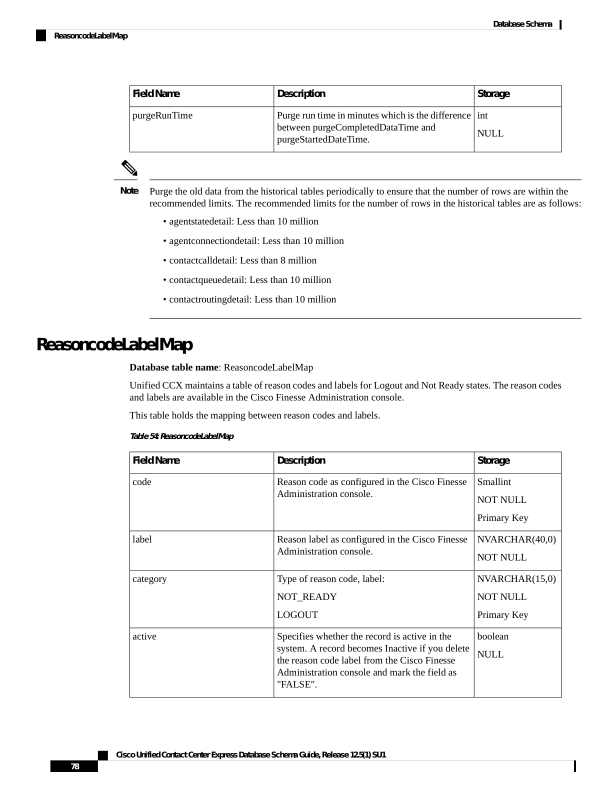
Page 91
Storage
Description
Field Name
Date time year to
second
NULL
Date and time when this record was added,
modified, or deleted from the Cisco Finesse
Administration console.
dateinactive
RemoteMonitoringDetail
Database table name: RemoteMonitoringDetail
The Remote Monitoring Detail Record provides information about sessions where remote monitoring is used.
Table 55: RemoteMonitoringDetail Table Fields
Storage
Description
Field Name
decimal(18)
NOT NULL
Primary Key
Identifier that the system assigned to the call. This
identifier remains the same for all legs of the call.
This is the sessionID of the IVR call; that is, the
call that the supervisor makes to monitor other
Unified CCX calls.
sessionid
datetime year to
fraction (3)
NOT NULL
Primary Key
The time and date that the remote supervisor
attempted to monitor the agent.
startmonitoringreqtime
varchar(50,0)
NULL
The numeric ID that the supervisor enters before
starting to monitor a call
remoteloginid
int
NOT NULL
Numeric ID of the supervisor who does the
monitoring.
rmonid
datetime year to
fraction (3)
NOT NULL
The date and time the monitoring ended.
endmonitoringtime
int
NOT NULL
If origMonitoredIDType is:
• 1 (agent), this field contains the extension of
the agent being monitored.
• 2 (CSQ), this field contains the CSQ ID of
the CSQ being monitored.
origmonitoredid
smallint
NOT NULL
Indicates an agent or a CSQ.
• 1 = agent
• 2 = CSQ
origmonitoredidtype
Cisco Unified Contact Center Express Database Schema Guide, Release 12.5(1) SU1
79
Database Schema
RemoteMonitoringDetail
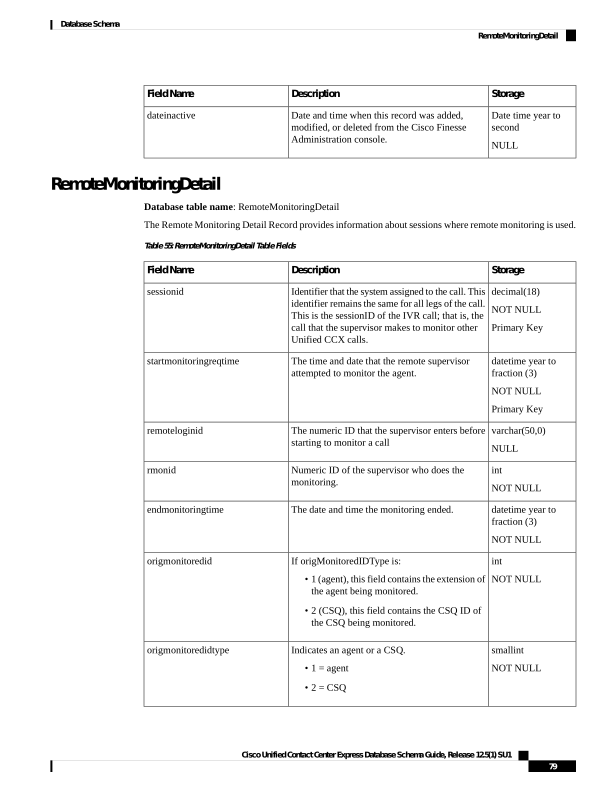
Page 92
Storage
Description
Field Name
smallint
NULL
The termination cause of a monitoring session:
• 3 = Normal (Monitored)
• 100 = Normal (Agent RNA)
• 0 = Error (Other)
• –9 = Error (Unable to Stop Monitoring)
• –8 = Error (Unable to Monitor New Call)
• –7 = Error (Agent Logged Off)
• –6 = Error (Network Problem)
• –5 = Error (VoIP Server unable to
communicate)
• –4 = Error (Monitoring not allowed)
• –3 = Error (Agent not logged in)
• –2 = Error (Invalid input)
• –1 = Error (Other)
cause
smallint
NOT NULL
The sequence number for the IVR call; that is, the
call the supervisor makes to monitor other Unified
CCX calls.
sessionSeqNum
decimal(18)
NOT NULL
The sessionID of the monitored Unified CCX call.
monitoredSessionID
int
NOT NULL
Primary Key
Identifier of the Unified CCX profile that is
associated with this record.
profileID
int
NULL
Offset, in minutes, between the local time of the
Unified CCX server and Greenwich Mean Time.
As the time information is stored in GMT, this
field will always be zero.
gmtOffset
smallint
NOT NULL
Primary Key
Unique identifier assigned to each server in the
cluster.
nodeID
Related Topics
AgentConnectionDetail, on page 4
ContactCallDetail, on page 34
ContactQueueDetail, on page 44
Cisco Unified Contact Center Express Database Schema Guide, Release 12.5(1) SU1
80
Database Schema
RemoteMonitoringDetail
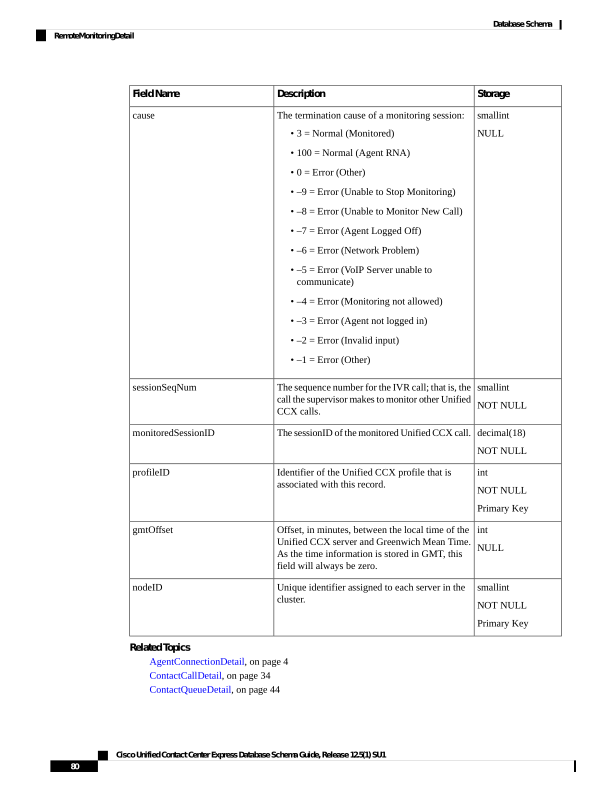
Page 93
ContactRoutingDetail , on page 46
ContactServiceQueue , on page 47
MonitoredResourceDetail, on page 73
RmonUser , on page 86
Resource
Database table name: Resource
The Unified CCX system creates a new record in the Resource table when the Unified CCX system retrieves
agent information from the Unified CM.
A Resource record contains information about the resource (agent). One such record exists for each active
and inactive resource. When a resource is deleted, the old record is flagged as inactive; when a resource is
updated, a new record is created and the old one is flagged as inactive.
Table 56: Resource Table Fields
Storage
Description
Field Name
int
NOT NULL
Primary Key
Numeric identifier of the resource.
resourceID
int
NOT NULL
Primary Key
Identifier of the Unified CCX profile that is
associated with this record.
profileID
nvarchar(128,0)
NOT NULL
The login name assigned to the resource in the
Unified CM.
resourceLoginID
nvarchar(50,0)
NOT NULL
The first name and the last name of the resource.
resourceName
int
NULL
Resource group to which the resource belongs.
Null if no resource group is assigned to the
resource.
resourceGroupID
smallint
NOT NULL
Type of the resource:
1—Agent
2—Supervisor
3—Administrator
resourceType
Cisco Unified Contact Center Express Database Schema Guide, Release 12.5(1) SU1
81
Database Schema
Resource
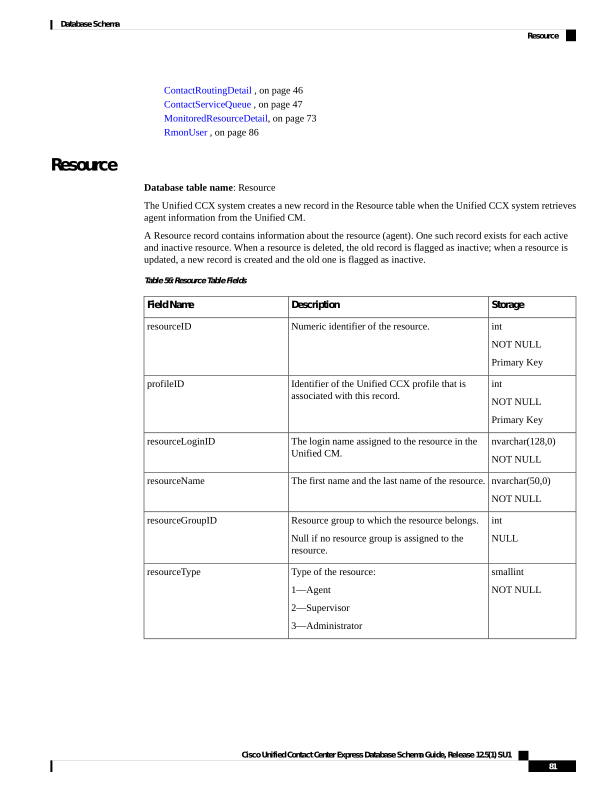
Page 94
Storage
Description
Field Name
boolean
NOT NULL
Whether this record is active:
f —Inactive
t —Active
A record becomes inactive if the resource is
deleted or updated.
active
boolean
NOT NULL
Determines whether the resource goes to Ready
State after handling a Unified CCX call:
f —No
t —Yes
autoAvail
nvarchar(50,0)
NOT NULL
The Unified CCX extension of the resource.
extension
int
NULL
Order in which the resource resides within the
resource group.
Null if no resource group is assigned to the
resource.
orderInRG
datetime year to
fraction(3)
NULL
Date and time that the record became inactive
when the active field is "f".
dateInactive
int
NOT NULL
Identifier used to locate the associated skill set of
the resource in the ResourceSkillMapping table.
The ResourceSkillMapping table can contain
multiple records for one resource.
resourceSkillMapID
int
NOT NULL
Team ID of the resource.
assignedTeamID
nvarchar(50,0)
NOT NULL
First name of the resource.
resourceFirstName
nvarchar(50,0)
NOT NULL
Last name of the resource.
resourceLastName
nvarchar(50,0)
NULL
Alias name of the resource.
resourceAlias
smallint
NOT NULL
Advanced Supervisor Capabilities for the
resource.
capabilities
nvarchar(255)
NULL
Email ID of the resource.
resourceEmailId
Cisco Unified Contact Center Express Database Schema Guide, Release 12.5(1) SU1
82
Database Schema
Resource
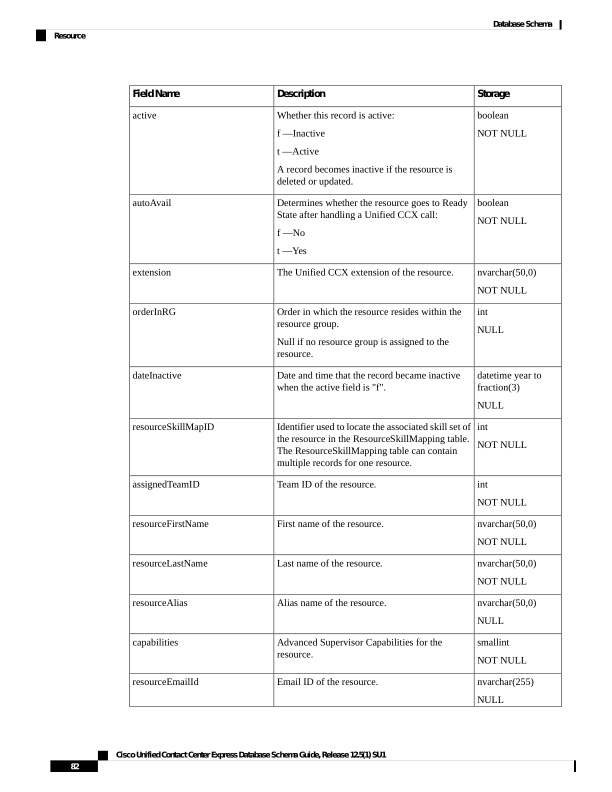
Page 95
Related Tables
• AgentConnectionDetail, on page 4 (via resourceID, profileID)
• AgentStateDetail, on page 7 (resourceID maps to agentID, via profileID)
• ContactCallDetail, on page 34 (resourceID maps originatorID/destinationID when
originatorType/destinageType is 1, via profileID)
• ContactQueueDetail, on page 44 (resourceID maps to targetID when targetType is 1, via profileID)
• MonitoredResourceDetail, on page 73 (resourceID maps to monitoredRsrcID, via profileID)
• ProfileIDMapping, on page 75 (via profileID)
• RemoteMonitoringDetail , on page 79 (resourceID maps to origMonitoredID when origMonitoredIDType
is 1, via profileID)
• ResourceGroup , on page 83 (via resourceGroupID, profileID)
• ResourceSkillMapping, on page 84 (via resourceSkillMapID, profileID)
• Supervisor , on page 95 (via resourceLoginID, profileID)
• Team, on page 99 (assignedTeamID maps to teamID, via profileID)
ResourceGroup
Database table name: ResourceGroup
The Unified CCX system creates a new record in the ResourceGroup table when a resource group is set up
in the Unified CCX Administration.
A ResourceGroup record contains information about the resource group. One such record exists for each
active and inactive resource group.
Table 57: Resource Group Table Fields
Storage
Description
Field Name
int
NOT NULL
Primary Key
Numeric identifier of the resource group.
resourceGroupID
int
NOT NULL
Primary Key
Identifier of the Unified CCX profile that is
associated with this record.
profileID
nvarchar(50,0)
NULL
Name of the resource group, as set up in the
Unified CCX Administration.
resourceGroupName
Cisco Unified Contact Center Express Database Schema Guide, Release 12.5(1) SU1
83
Database Schema
ResourceGroup
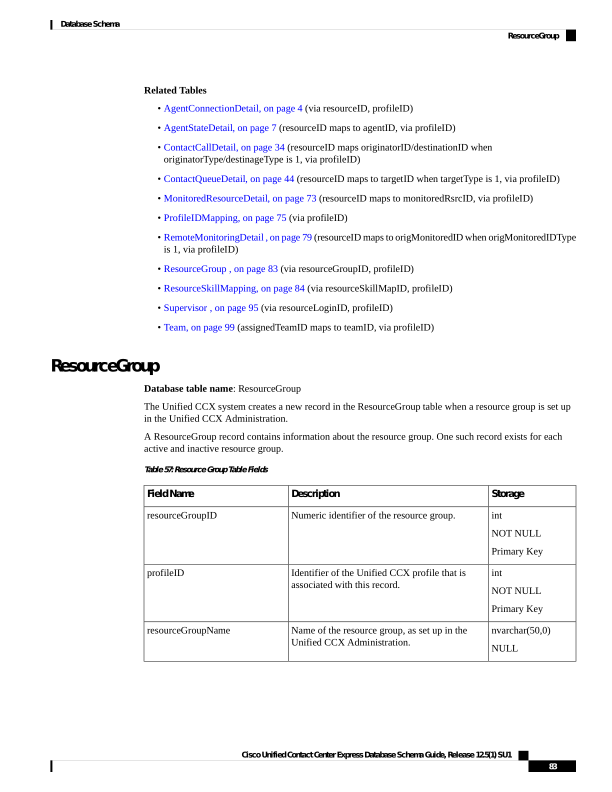
Page 96
Storage
Description
Field Name
boolean
NOT NULL
Whether the record is active in the Unified CCX
system:
f —Inactive
t —Active
A record becomes inactive if the resource group
is deleted or updated.
active
datetime year to
fraction(3)
NULL
If the active field is “f”, date and time that the
record became inactive.
dateInactive
Related Topics
• ContactServiceQueue , on page 47 (via resourceGroupID, profileID)
• ProfileIDMapping, on page 75 (via profileID)
• Resource, on page 81 (via resourceGroupID, profileID)
ResourceSkillMapping
Database table name: ResourceSkillMapping
The Unified CCX system creates a new record in the ResourceSkillMapping table when an agent is associated
with a skill in the Unified CCX Administration.
A ResourceSkillMapping record contains information about all of the skills that are assigned to resources.
Table 58: ResourceSkillMapping Table Fields
Storage
Description
Field Name
int
NOT NULL
Primary Key
Identifier of the skill set that is associated with a
resource.
resourceSkillMapID
int
NOT NULL
Primary Key
Identifier of the skill that is associated with a
resource.
skillID
int
NOT NULL
Primary Key
Identifier of the Unified CCX profile that is
associated with this record.
profileID
smallint
NOT NULL
Competence level associated with the skill, as set
up in the Unified CCX Administration. Values
range from 1 (lowest) to 10 (highest).
competenceLevel
Cisco Unified Contact Center Express Database Schema Guide, Release 12.5(1) SU1
84
Database Schema
ResourceSkillMapping
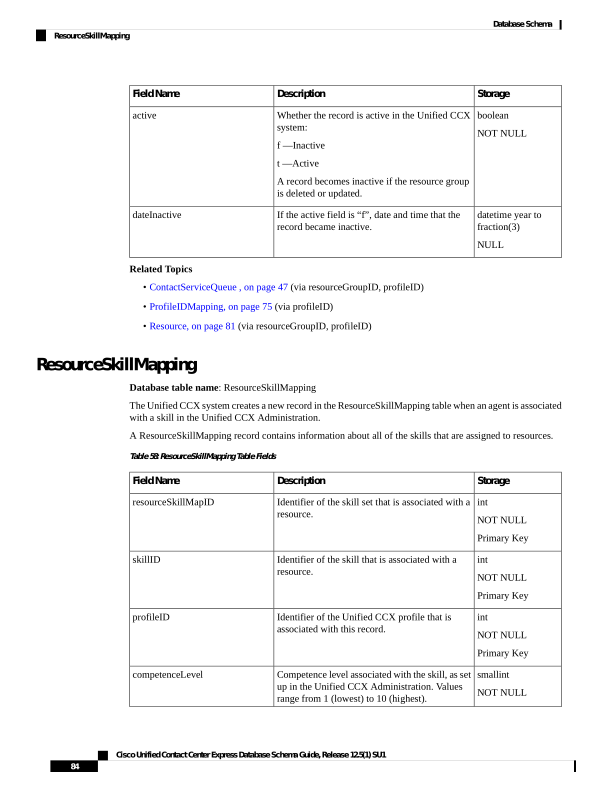
Page 97
Storage
Description
Field Name
boolean
NOT NULL
Whether the record is active in the Unified CCX
system:
f —Inactive
t —Active
A record becomes inactive if the resource group
is deleted or updated.
active
Related Topics
• ProfileIDMapping, on page 75 (via profileID)
• Resource, on page 81 (via resourceSkillMapID and profileID)
• Skill , on page 93 (via skillID and profileID)
RmonCSQConfig
Database table name: RmonCSQConfig
The Remote Monitoring Contact Service Queue Configuration table contains the CSQs that a remote monitoring
supervisor is allowed to monitor (the supervisor’s allowed list). This table is updated when you configure the
Unified CCX system through the Unified CCX Administration pages.
Table 59: RmonCSQConfig Table Fields
Storage
Description
Field Name
int
NOT NULL
Primary Key
Numeric identifier of the remote supervisor.
rmonID
int
NOT NULL
Primary Key
The numeric identifier of the CSQ, relating to
contactServiceQueueID in the
ContactServiceQueue table.
contactServiceQueueID
int
NOT NULL
Primary Key
Identifier of the Unified CCX profile that is
associated with this record.
profileID
Related Topics
ContactServiceQueue , on page 47
RmonResConfig, on page 86
RmonUser , on page 86
Cisco Unified Contact Center Express Database Schema Guide, Release 12.5(1) SU1
85
Database Schema
RmonCSQConfig
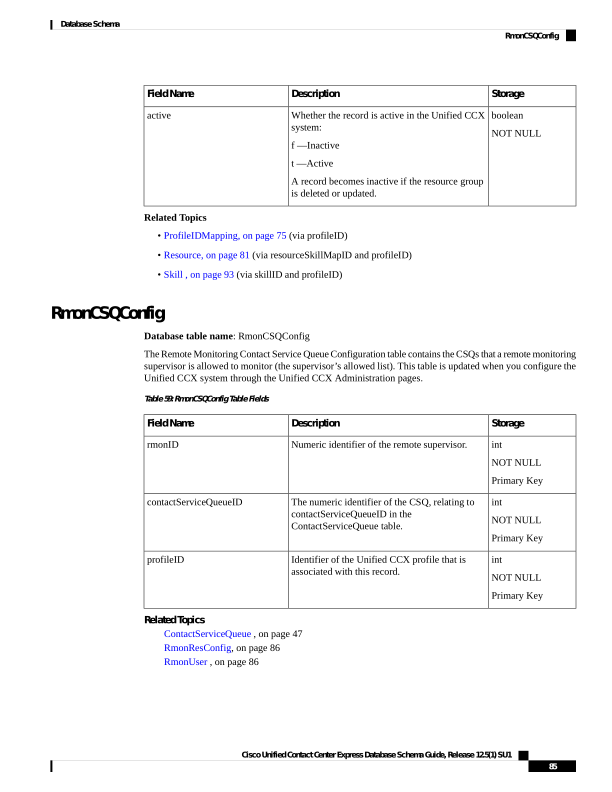
Page 98
RmonResConfig
Database table name: RmonResConfig
The Remote Monitoring Resource Configuration table contains the list of the agents (resources) that a remote
monitoring supervisor is allowed to monitor (the supervisor’s allowed list). This table is updated when you
configure the system through the Unified CCX Administration pages.
Table 60: RmonResConfig Table Fields
Storage
Description
Field Name
int
NOT NULL
Primary Key
Numeric identifier of the remote supervisor.
rmonID
nvarchar(128,0)
NOT NULL
Primary Key
The login ID of the resource that the remote
supervisor is allowed to monitor.
resourceLoginID
int
NOT NULL
Primary Key
Identifier of the Unified CCX profile that is
associated with this record.
profileID
Related Topics
• ProfileIDMapping, on page 75 (via profileID)
• Resource, on page 81 (via resourceLoginID, profileID)
• RmonCSQConfig , on page 85 (via rmonID, profileID)
• RmonUser , on page 86 (via rmonID, profileID)
RmonUser
Database table name: RmonUser
The Remote Monitoring User table provides information about the supervisor who is logged in to remotely
monitor agents.
Table 61: RmonUser Table Fields
Storage
Description
Field Name
int
NOT NULL
Primary Key
Numeric identifier of the remote supervisor.
rmonID
Cisco Unified Contact Center Express Database Schema Guide, Release 12.5(1) SU1
86
Database Schema
RmonResConfig
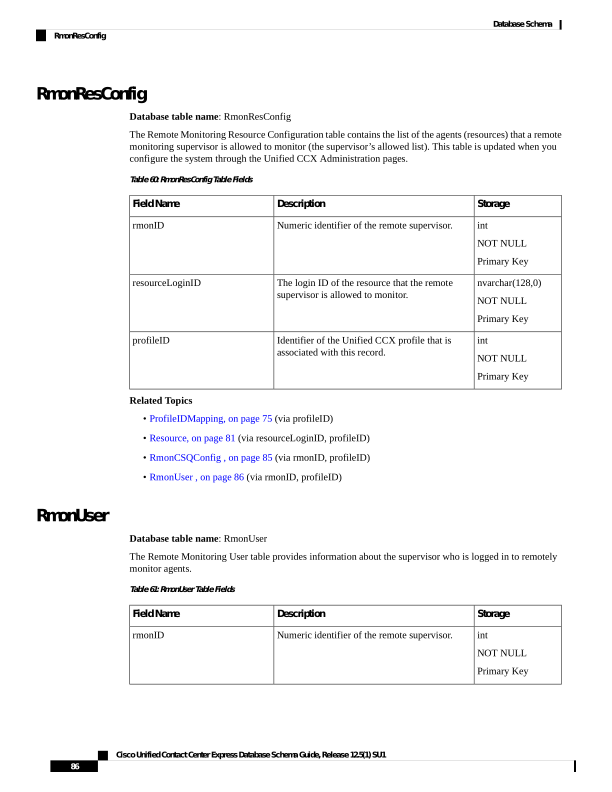
Page 99
Storage
Description
Field Name
nvarchar(128,0)
NOT NULL
User login name of the remote supervisor.
LoginID
nvarchar(50,0)
NOT NULL
Name of the supervisor.
name
int
NOT NULL
Primary Key
Identifier of the Unified CCX profile that is
associated with this record.
profileID
int
NOT NULL
The type of supervisor:
0 = regular supervisor
1 = remote monitoring supervisor
type
boolean
NOT NULL
Determines whether the remote supervisor is
active.
f = inactive
t = active
active
datetime year to
second
NULL
Date and time the remote supervisor became
inactive.
dateInactive
Related Topics
RmonResConfig, on page 86
RemoteMonitoringDetail , on page 79
RmonCSQConfig , on page 85
RtCSQsSummary
Database table name: RtCSQsSummary
The rtcsqssummary table contains real-time statistics about all configured Contact Service Queues in the
system. This table gets updated automatically when real-time snapshot data writing for this table is enabled
through the Unified CCX Administration pages (Tools > Real-time snapshot configuration menu option).
The updating frequency is based on the configured data writing interval.
Table 62: RtCSQsSummary Table Fields
Storage
Description
Field Name
nvarchar(50,0)
NOT NULL
Primary Key
Name of the contact service queue.
csqname
Cisco Unified Contact Center Express Database Schema Guide, Release 12.5(1) SU1
87
Database Schema
RtCSQsSummary
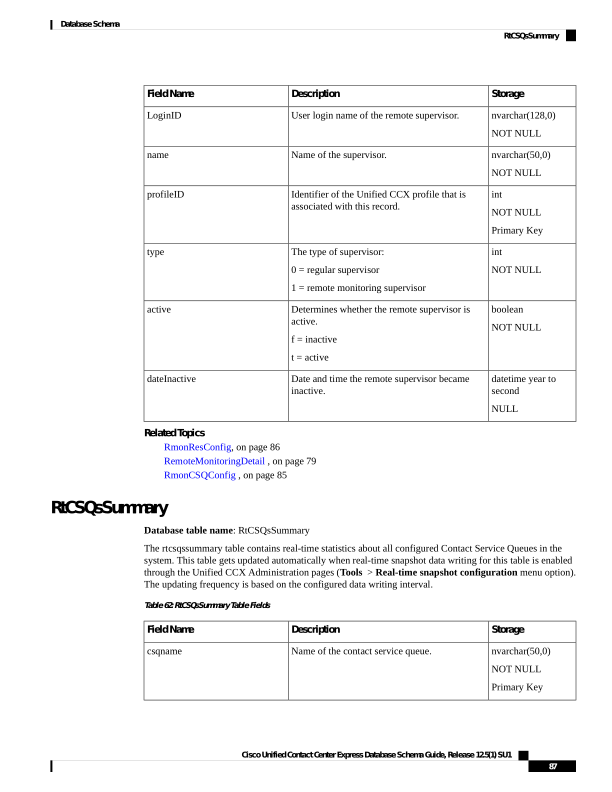
Page 100
Storage
Description
Field Name
int
NULL
Number agents who are logged in.
loggedinagents
int
NULL
Number of available (idle) agents.
availableagents
int
NULL
Number of unavailable agents.
unavailableagents
int
NULL
Total number of calls.
totalcalls
int
NULL
Oldest contact in the queue.
oldestcontact
int
NULL
Number of calls handled.
callshandled
int
NULL
Number of calls abandoned.
callsabandoned
int
NULL
Number of calls dequeued.
callsdequeued
int
NULL
Average talk duration.
avgtalkduration
int
NULL
Average wait duration.
avgwaitduration
int
NULL
Longest talk duration.
longesttalkduration
int
NULL
Longest wait duration.
longestwaitduration
int
NULL
Number of calls waiting.
callswaiting
datetime year to
second
NULL
The date and time that this table data was last
updated.
enddatetime
int
NULL
Number of agents who are in the working state.
workingagents
Cisco Unified Contact Center Express Database Schema Guide, Release 12.5(1) SU1
88
Database Schema
RtCSQsSummary
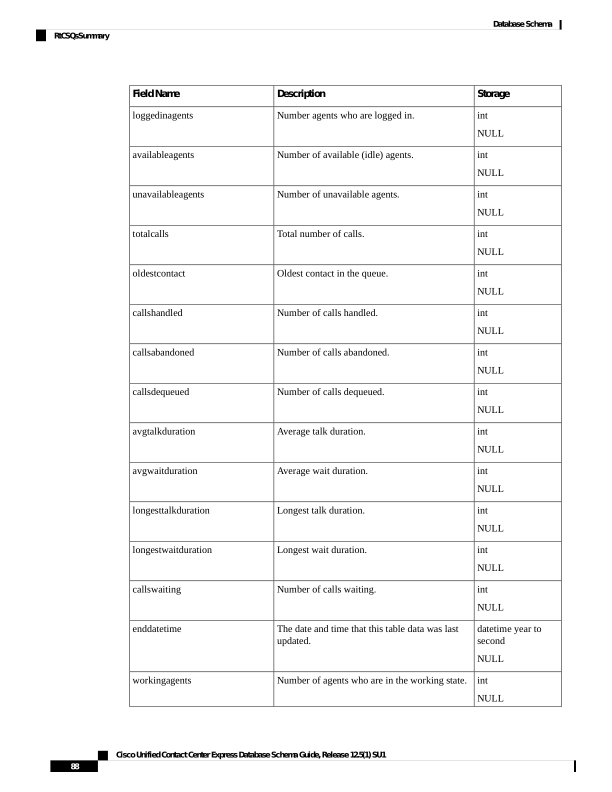
Page 101
Storage
Description
Field Name
int
NULL
Number of agents who are in the talking state.
talkingagents
int
NULL
Number of agents who are in the reserved state.
reservedagents
datetime year to
second
NULL
The date and time that this table’s statistics get
collected.
startdatetime
varchar(25,0)
NULL
Average talk duration in HH:MM:SS format.
convavgtalkduration
varchar(25,0)
NULL
Average wait duration in HH:MM:SS format.
convavgwaitduration
varchar(25,0)
NULL
Longest talk duration in HH:MM:SS format.
convlongesttalkduration
varchar(25,0)
NULL
Longest wait duration in HH:MM:SS format.
convlongestwaitduration
varchar(25,0)
NULL
Oldest call in the queue in HH:MM:SS format.
convoldestcontact
RtICDStatistics
Database table name: RtICDStatistics
The RtICDStatistics table contains real-time summary statistics about Unified CCX. This table gets updated
automatically when real-time snapshot data writing for this table is enabled through the Unified CCX
Administration pages (Tools > Real-time snapshot configuration menu option). The updating frequency
is based on the configured data writing interval.
Table 63: RtICDStatistics Table Fields
Storage
Description
Field Name
nvarchar(50,0)
NOT NULL
Primary Key
Contact Service Queue type that identifies the
contact type it services. It can be either voice or
e-mail.
type
int
NULL
Number of CSQs configured.
totalcsqs
Cisco Unified Contact Center Express Database Schema Guide, Release 12.5(1) SU1
89
Database Schema
RtICDStatistics
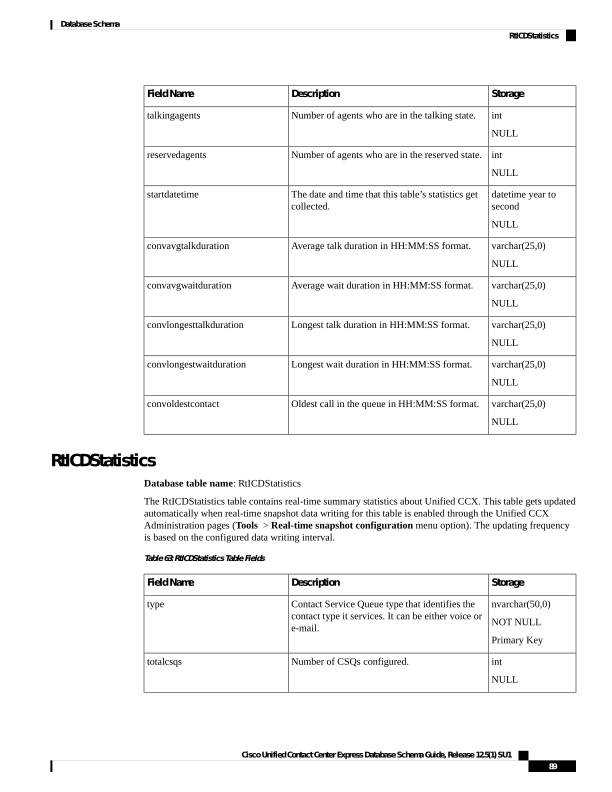
Page 102
Storage
Description
Field Name
int
NULL
Number of agents who are logged in.
loggedinagents
int
NULL
Number of agents who are in the working state.
workingagents
int
NULL
Number of agents who are in the reserved state.
reservedagents
int
NULL
Number of agents who are in the talking state.
talkingagents
int
NULL
Number of available (idle) agents.
availableagents
int
NULL
Number of unavailable agents.
unavailableagents
int
NULL
Total number of calls.
totalcalls
int
NULL
Number of calls waiting.
callswaiting
int
NULL
Number of calls handled.
callshandled
int
NULL
Number of calls abandoned.
callsabandoned
int
NULL
Average talk duration.
avgtalkduration
int
NULL
Average wait duration.
avgwaitduration
int
NULL
Longest talk duration.
longesttalkduration
int
NULL
Longest wait duration.
longestwaitduration
int
NULL
Oldest contact in the queue.
oldestcontact
Cisco Unified Contact Center Express Database Schema Guide, Release 12.5(1) SU1
90
Database Schema
RtICDStatistics
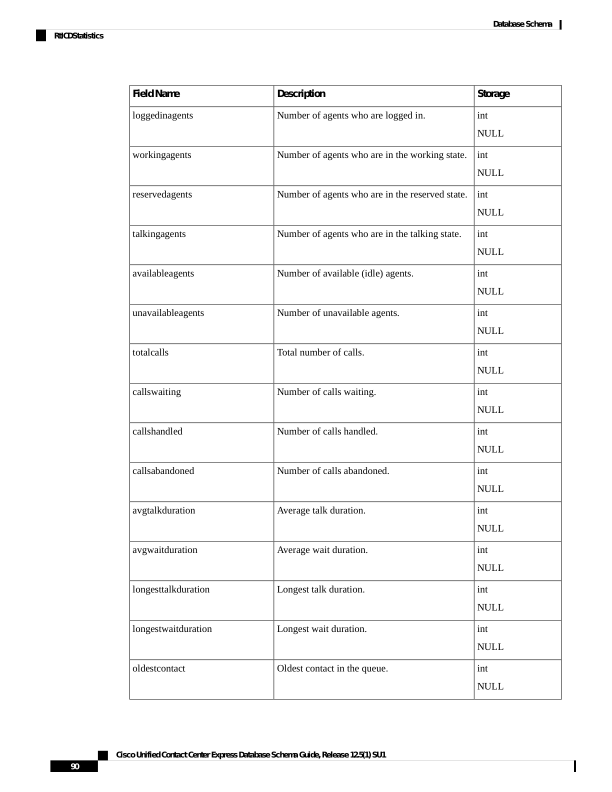
Page 103
Storage
Description
Field Name
datetime year to
second
NULL
Data collection starting time.
startdatetime
datetime year to
second
NULL
Date and time this table was last updated.
enddatetime
varchar(25,0)
NULL
Average talk duration in HH:MM:SS format.
convavgtalkduration
varchar(25,0)
NULL
Average wait duration in HH:MM:SS format.
convavgwaitduration
varchar(25,0)
NULL
Longest talk duration in HH:MM:SS format.
convlongesttalkduration
varchar(25,0)
NULL
Longest wait duration in HH:MM:SS format.
convlongestwaitduration
varchar(25,0)
NULL
Oldest call in the queue in HH:MM:SS format.
convoldestcontact
Schedule Reskill
Database table name: schedule_reskill
The Unified CCX system creates a new record in the Schedule Reskill table when an agent is scheduled to
be added or removed from a queue. It also indicates whether the agent was scheduled by a supervisor or
administrator.
Table 64: Skill Table Fields
Storage
Description
Field Name
int
NOT NULL
Primary Key
Unique identifier of the record.
recordid
nvarchar(128,0)
NOT NULL
The login ID of the resource being rekilled for a
CSQ.
resourceloginid
int
NOT NULL
Unique identifier of the CSQ for which the
resource is being reskilled.
csqid
Cisco Unified Contact Center Express Database Schema Guide, Release 12.5(1) SU1
91
Database Schema
Schedule Reskill
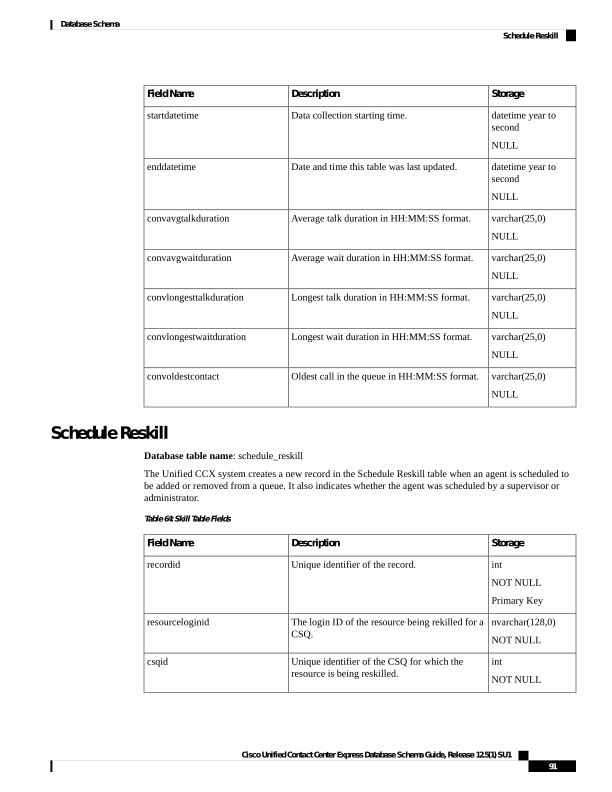
Page 104
Storage
Description
Field Name
smallint
NOT NULL
Indicates the type of operation to be performed -
either addition/removal of a resource for a CSQ.
Scheduled Addition(1)
Scheduled Removal(2)
operation
nvarchar(128,0)
NOT NULL
Login ID of the resource who has scheduled
addition/removal of a resource for a CSQ.
reskiller
smallint
NOT NULL
Indicates whether supervisor/admin has scheduled
addition/removal of a resource for a CSQ.
Supervisor(1)
Administrator(2)
reskiller_type
bigint
NOT NULL
Epoch time in seconds, indicating when the
resource will be added/removed for a CSQ.
scheduletime
boolean
NOT NULL
Indicates whether the record is active or not.
When a resource is successfully added/removed
for a CSQ, this field is set to false.
active
datetime year to
second
Date and time of the record when it is marked as
inactive.
dateinactive
Schedule Reskill Status
Database table name: schedule_reskill_status
The Unified CCX system stores the results of schedule operation in the Schedule Reskill Status table.
Table 65: Skill Table Fields
Storage
Description
Field Name
int
NOT NULL
Identifier used for conflict resolution in an island mode.
nodeid
int
NOT NULL
Foreign key to the schedule_reskill table.
scheduledid
datetime year to
second
NOT NULL
Schedule run time.
timestamp
Cisco Unified Contact Center Express Database Schema Guide, Release 12.5(1) SU1
92
Database Schema
Schedule Reskill Status
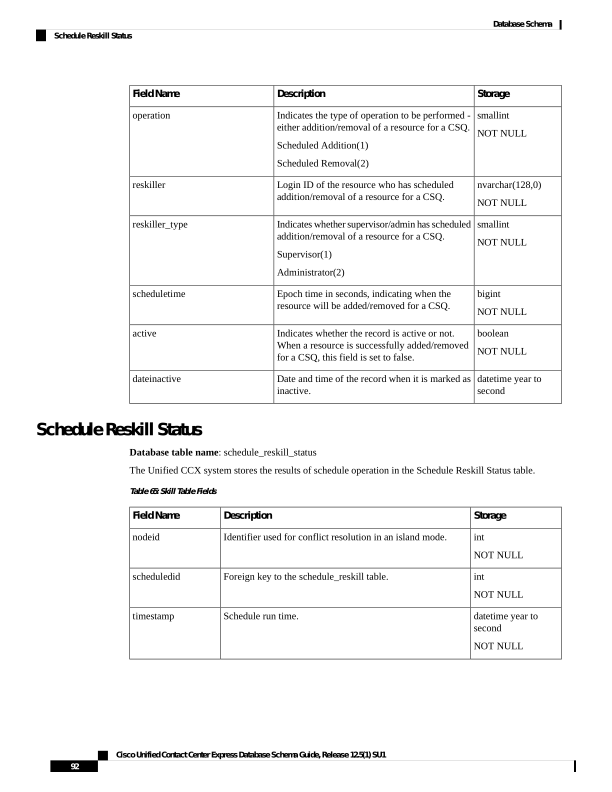
Page 105
Storage
Description
Field Name
smallint
NOT NULL
The status of the schedule while adding or removing the agents
for the CSQ.
0 = Agent is successfully added or removed for the CSQ.
1 = Agent is already part of the CSQ or is removed from the
CSQ.
2 = Operation failed due to connectivity issues.
3 = Agent is not available in the Unified CCX system.
4 = CSQ is not available in the Unified CCX system.
5 = Failed to complete the operation due to internal errors.
status
Skill
Database table name: Skill
The Unified CCX system creates a new record in the Skill table when a skill is set up in the Unified CCX
Administration.
A Skill record contains information about a skill. One such record exists for each configured skill.
Table 66: Skill Table Fields
Storage
Description
Field Name
int
NOT NULL
Primary Key
Numeric identifier of the skill.
skillID
int
NOT NULL
Primary Key
Identifier of the Unified CCX profile that is
associated with this record.
profileID
nvarchar(50,0)
NOT NULL
Name of the skill, as set up in the Unified CCX
Administration.
skillName
boolean
NOT NULL
Determines whether the record is active in the
Unified CCX system:
f —Inactive
t —Active
A record becomes inactive if the skill is deleted
or updated.
active
Cisco Unified Contact Center Express Database Schema Guide, Release 12.5(1) SU1
93
Database Schema
Skill
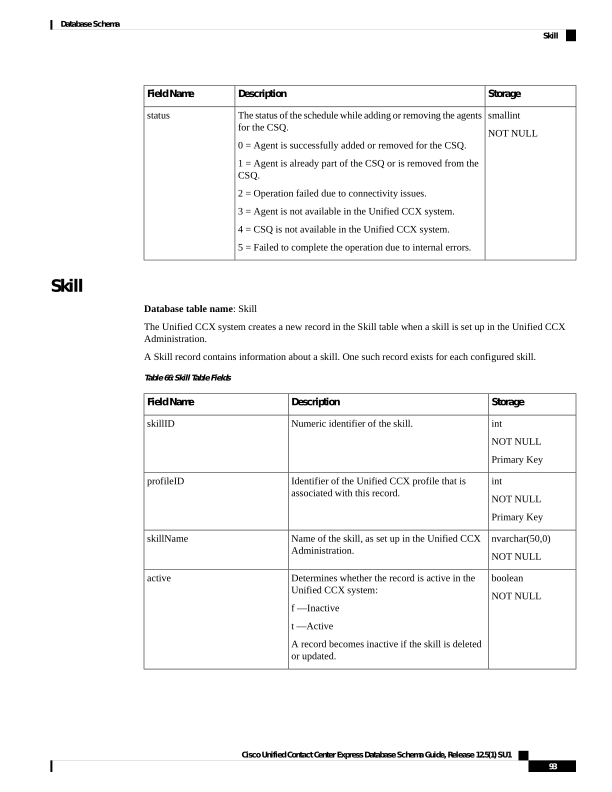
Page 106
Storage
Description
Field Name
datetime year to
fraction(3)
NULL
If the active field is “f”, date and time that the
record became inactive.
dateInactive
Related Topics
ProfileIDMapping, on page 75
ResourceSkillMapping, on page 84
SkillGroup , on page 94
SkillGroup
Database table name: SkillGroup
The Unified CCX system creates a new record in the SkillGroup table when skills are associated with a CSQ
in the Unified CCX Administration.
A SkillGroup record describes each skill that is associated with the CSQ.
Table 67: Skill Group Table Fields
Storage
Description
Field Name
int
NOT NULL
Primary Key
Numeric identifier of the skill group.
skillGroupID
int
NOT NULL
Primary Key
Numeric identifier of the skill.
skillID
int
NOT NULL
Primary Key
Identifier of the Unified CCX profile that is
associated with this record.
profileID
smallint
NOT NULL
Minimum acceptable skill level for agents with
this skill, as set up in the Unified CCX
Administration. Values range from 1 (lowest) to
10 (highest).
competenceLevel
boolean
NOT NULL
Determines whether the record is active in the
CSQ:
f —Inactive
t —Active
A record becomes inactive if the new skill group
is deleted or updated.
active
Cisco Unified Contact Center Express Database Schema Guide, Release 12.5(1) SU1
94
Database Schema
SkillGroup
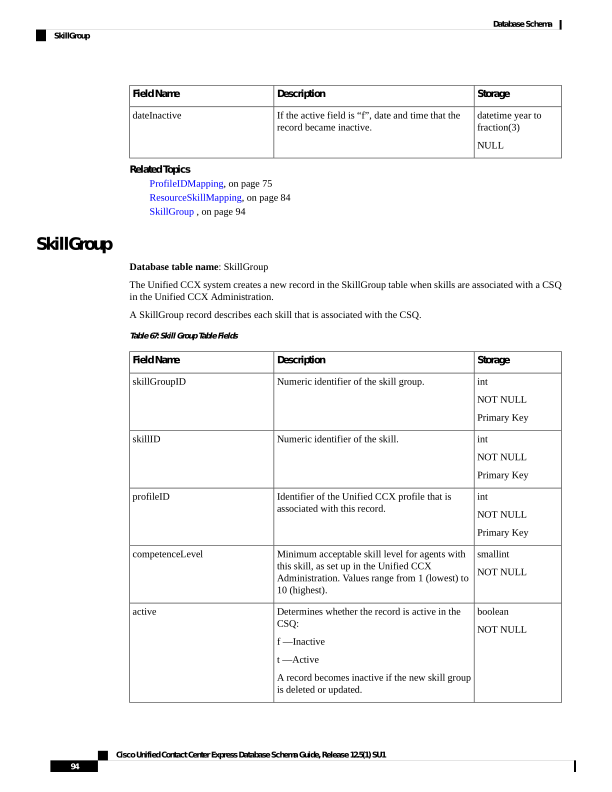
Page 107
Storage
Description
Field Name
int
NOT NULL
Skills within a CSQ can be assigned weights. This
field is used in the weighted skill calculation of
the skill-based resource selection algorithm.
Default value is 1.
skillWeight
int
NOT NULL
Skills within a CSQ can be ordered. This field is
used in the order skill calculation of the
skill-based resource selection algorithm.
Default value is 1.
skillOrder
Related Topics
ContactServiceQueue , on page 47
ProfileIDMapping, on page 75
Skill , on page 93
Supervisor
Database table name: Supervisor
The Supervisor table contains the information about supervisors.
Table 68: Supervisor Table Fields
Storage
Description
Field Name
int
NOT NULL
Primary Key
Numeric identifier of this supervisor.
recordID
nvarchar(128,0)
NOT NULL
User ID in the Unified CM configuration.
resourceLoginID
int
NOT NULL
Team identifier of the managed team.
managedTeamID
int
NOT NULL
Primary Key
Identifier of the Unified CCX profile that is
associated with this record.
profileID
smallint
NOT NULL
Type of supervisor for this team
0 = Primary
1 = Secondary
supervisorType
Cisco Unified Contact Center Express Database Schema Guide, Release 12.5(1) SU1
95
Database Schema
Supervisor
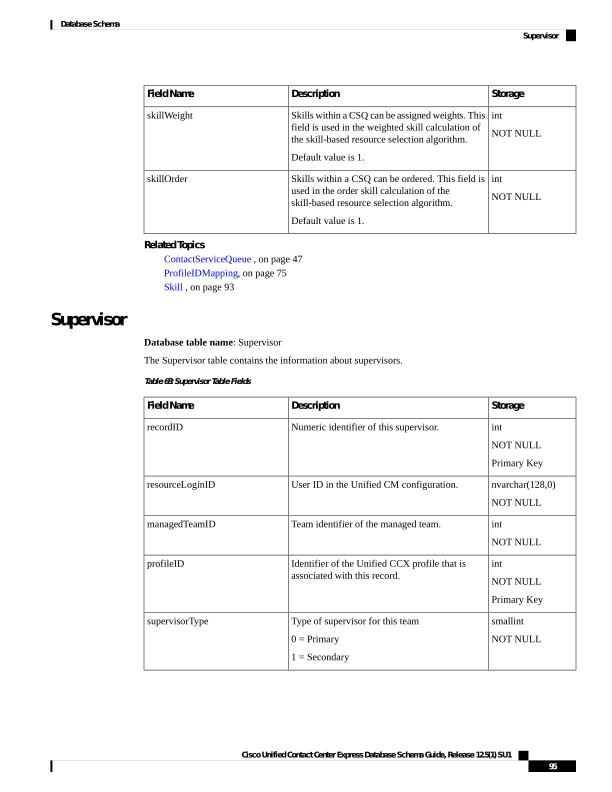
Page 108
Storage
Description
Field Name
boolean
NOT NULL
Indicates whether the record is active in the
Unified CCX system. A record becomes inactive
if a team is deleted or updated.
f = Inactive
t = Active
active
datetime year to
second
NULL
The date on which this record was deleted.
dateInactive
Related Topics
• Resource, on page 81 (via resourceLoginID and profileID)
• ProfileIDMapping, on page 75 (via ProfileID)
• Team, on page 99 (managedTeamID maps to teamID, via profileID)
SupervisorCampaignMap
Database table name: SupervisorCampaignMap
This table provides the list of campaigns that are managed by Supervisors. A Supervisor can be associated
with one or more campaigns to manage.
Table 69: SupervisorCampaignMap Table Fields
Storage
Description
Field Name
int
NOT NULL
Primary Key
A unique identifier for the record.
recordid
int
NOT NULL
Primary Key
An identifier of the Unified CCX profile that is
associated with this record.
profileid
nvarchar(128,0)
NOT NULL
The login name assigned to the resource in the
Unified CM.
resourceloginid
int
NOT NULL
A unique identifier for the campaign.
campaignid
boolean
NOT NULL
Indicates whether the record is active.
active
Cisco Unified Contact Center Express Database Schema Guide, Release 12.5(1) SU1
96
Database Schema
SupervisorCampaignMap
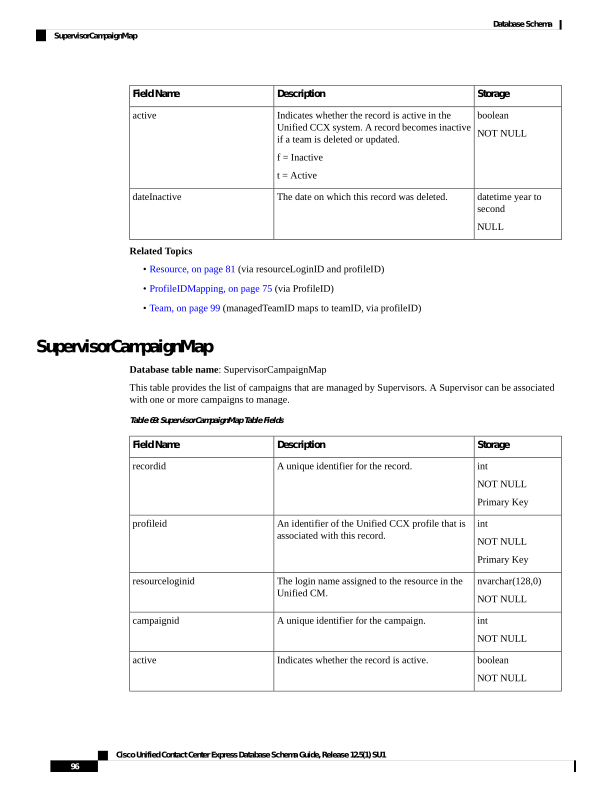
Page 109
Storage
Description
Field Name
datetime year to
second
NULL
Date this record is deleted.
dateinactive
Related Topics
ProfileIDMapping, on page 75
Campaign, on page 18
Resource, on page 81
SupervisorApplicationMap
Database table name: SupervisorApplicationMap
This table provides the list of applications that are managed by Supervisors. A Supervisor can be associated
with one or more applications to manage.
Table 70: SupervisorApplicationMap Table Fields
Storage
Description
Field Name
int
NOT NULL
Primary Key
A unique identifier for the record.
recordid
int
NOT NULL
Primary Key
An identifier of the Unified CCX profile that is
associated with this record.
profileid
nvarchar(128,0)
NOT NULL
The login name assigned to the resource in the
Unified CM.
resourceloginid
int
NOT NULL
A unique identifier for the application.
applicationid
boolean
NOT NULL
Indicates whether the record is active.
active
datetime year to
second
NULL
The date on which this record is deleted.
dateinactive
Related Topics
ProfileIDMapping, on page 75
CrsApplication , on page 52
Resource, on page 81
Cisco Unified Contact Center Express Database Schema Guide, Release 12.5(1) SU1
97
Database Schema
SupervisorApplicationMap
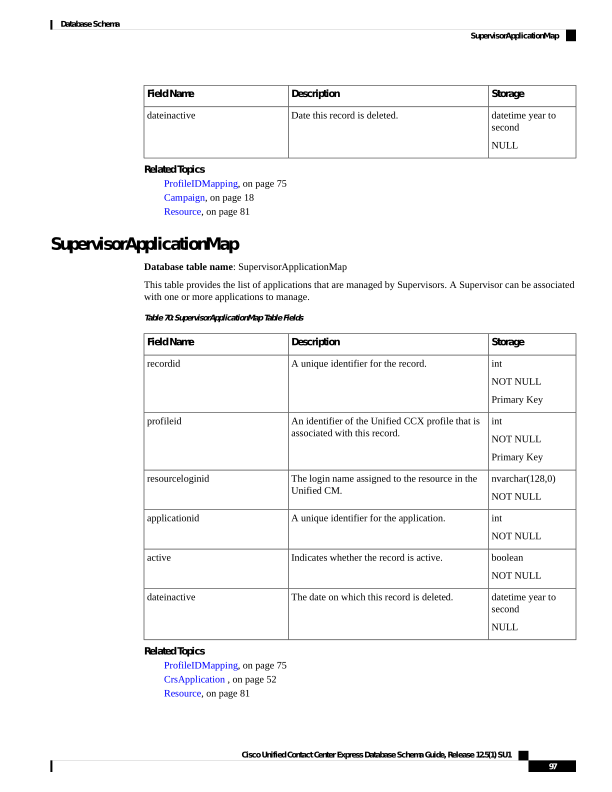
Page 110
SystemConfig
Database table name: SystemConfig
This table stores the system configuration details.
Table 71: SystemConfig Table Fields
Storage
Description
Field Name
int
NOT NULL
Unique identifier for the record.
recordid
int
NOT NULL
Unique identifier for the profile.
profileid
lvarchar(512)
NOT NULL
Unique identifier of the class.
classname
int
NOT NULL
Specifies the version of the internal
configuration schema.
version
lvarchar(512)
NOT NULL
Unique identifier of the
implemented class.
implclassname
BLOB
NULL
Specifies the internal data that is
not exposed to customers.
privatedata
nvarchar(128,0)
NULL
Specifies the description of the
system configuration.
description
datetime year to second
NOT NULL
Indicates the date and time the
record was created. Default value:
Current year to second.
createdatetime
boolean
NOT NULL
Indicates whether the record is
active.
Possible values:
f = inactive
t = active
active
datetime year to second
NULL
Indicates when the record became
inactive.
Possible values:
f = inactive
t = active
dateinactive
Cisco Unified Contact Center Express Database Schema Guide, Release 12.5(1) SU1
98
Database Schema
SystemConfig
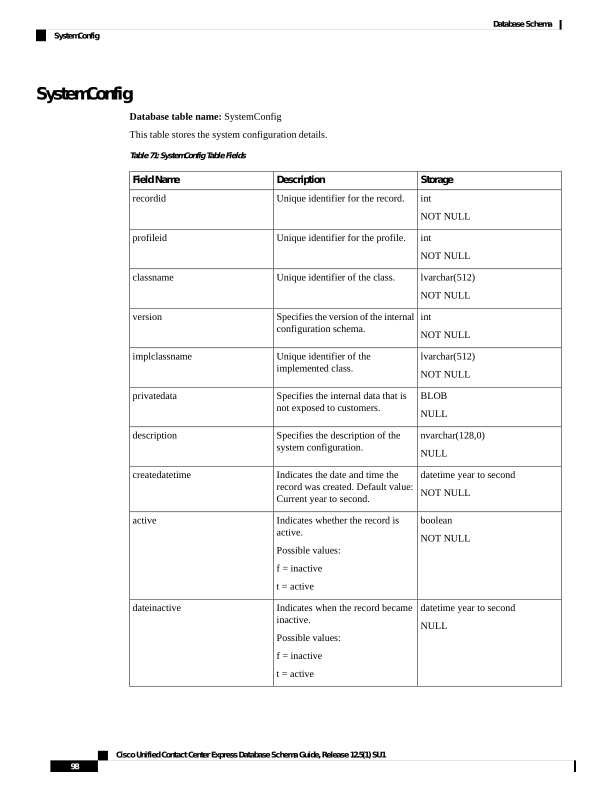
Page 111
Team
Database table name: Team
The Team table contains information about specific teams.
Table 72: Team Table Fields
Storage
Description
Field Name
int
NOT NULL
Primary Key
Numeric identifier for this team.
teamID
int
NOT NULL
Primary Key
Identifier of the Unified CCX profile that is
associated with this record.
profileID
nvarchar(50,0)
NOT NULL
Name of this team.
teamName
boolean
NOT NULL
Indicates whether the record is active in the
Unified CCX system. A record becomes inactive
if a team is deleted or updated.
f = Inactive
t = Active
active
datetime year to
fraction(3)
NULL
The date on which this record was deleted.
dateInactive
smallint
NOT NULL
Indicates the auto answer and zip tone option
selected for this team.
0 - No auto answer
1 - Auto answer with zip tone
2 - Auto answer without zip tone
Default value = 0
autoanswer
Cisco Unified Contact Center Express Database Schema Guide, Release 12.5(1) SU1
99
Database Schema
Team
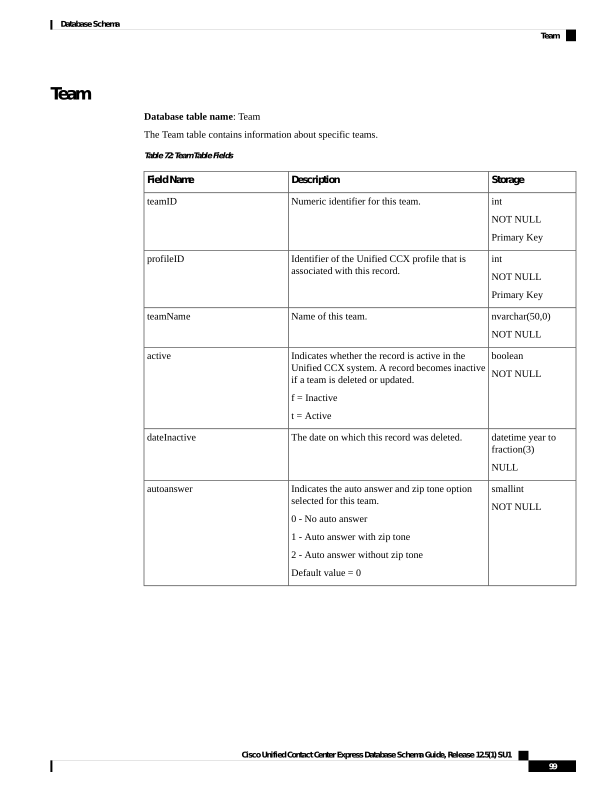
Page 112
Storage
Description
Field Name
boolean
NOT NULL
Indicates the state of an agent to move to the Not
Ready state when the monitored Non ACD lines
are used for incoming or outgoing calls.
f – The Non ACD line is busy, and the state of
the agent is set to Ready.
t – The Non ACD line is busy, and the state of the
agent is set to Not Ready.
Note
This attribute is available only if Change Agent
State to Not Ready when Agent Busy on Non
ACD Line is configured at a team level. To
configure this functionality at a team level, you
must install UCCX 12.5(1) SU1 ES01.
acdbusyonnonacdbusy
boolean
NOT NULL
Indicates whether team settings override global
settings.
f – The team settings do not override the global
settings.
t- The team settings override the global settings.
Note
This attribute is available only if Change Agent
State to Not Ready when Agent Busy on Non
ACD Line is configured at a team level. To
configure this functionality at a team level, you
must install UCCX 12.5(1) SU1 ES01.
nonacdbusyoverride
Related Topics
• ProfileIDMapping, on page 75 (via ProfileID)
• Resource, on page 81 (teamID maps to assignedTeamID and via profileID)
• Supervisor , on page 95 (teamID maps to managedTeamID and via profileID)
• TeamCSQMapping , on page 100 (via teamID and profileID)
TeamCSQMapping
Database table name: TeamCSQMapping
The TeamCSQMapping table shows the relationship between Teams and CSQs; for example, Team 1 is CSQ3,
Team 4 is CSQ10.
Cisco Unified Contact Center Express Database Schema Guide, Release 12.5(1) SU1
100
Database Schema
TeamCSQMapping
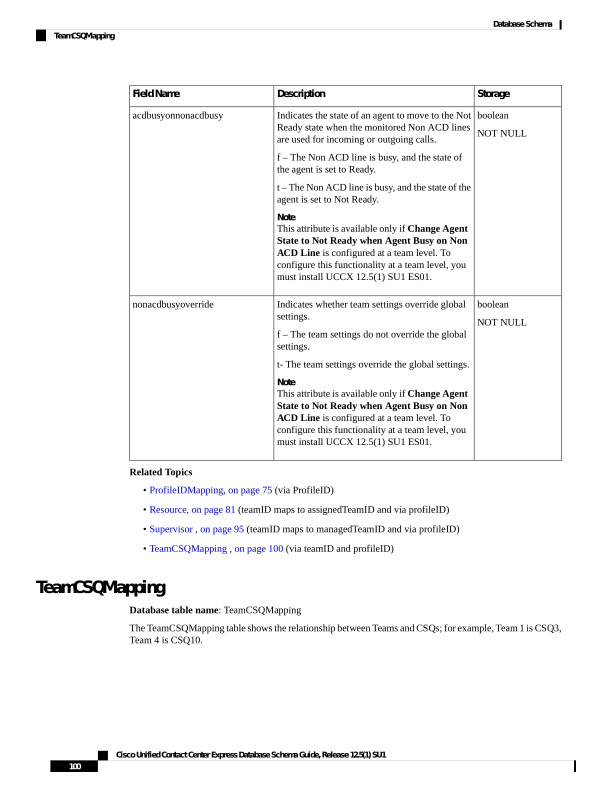
Page 113
Table 73: TeamCSQMapping Table Fields
Storage
Description
Field Name
int
NOT NULL
Primary Key
Numeric identifier for this record.
recordID
int
NOT NULL
Numeric identifier for the CSQ.
csqID
int
NOT NULL
Numeric identifier for the team.
teamID
int
NOT NULL
Primary Key
Identifier of the Unified CCX profile that is
associated with this record.
profileID
boolean
NOT NULL
Indicates whether the record is active in the
Unified CCX system. A record becomes inactive
if a team is deleted or updated.
f = Inactive
t = Active
active
datetime year to
second
NULL
The date on which this record was deleted.
dateInactive
Related Tables
• ContactServiceQueue , on page 47 (csqID maps to contactServiceQueueID, and via profileID)
• ProfileIDMapping, on page 75 (via ProfileID)
• Team, on page 99 (via teamID and profileID)
TextAgentConnectionDetail
Database table name: TextAgentConnectionDetail
The Unified CCX system creates a new record in the TextAgentConnectionDetail table when an agent receives
an email or chat.
Cisco Unified Contact Center Express Database Schema Guide, Release 12.5(1) SU1
101
Database Schema
TextAgentConnectionDetail
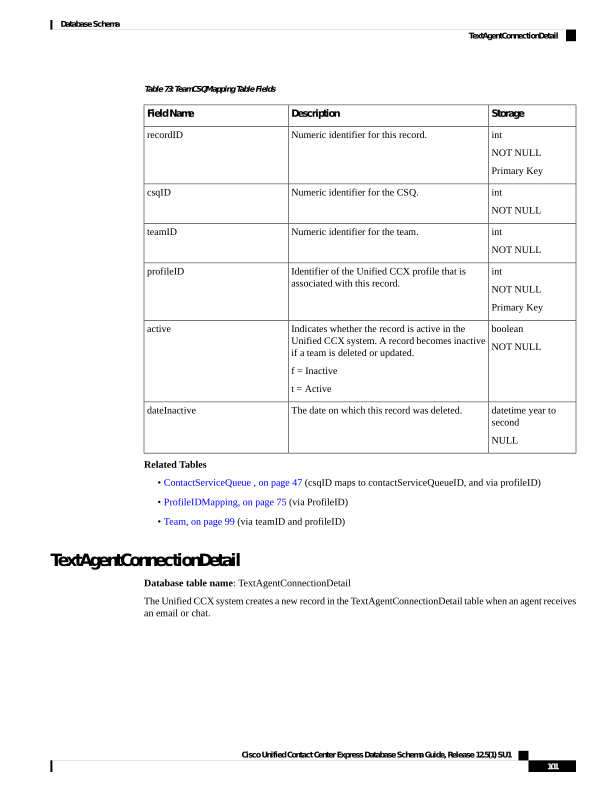
Page 114
Table 74: TextAgentConnectionDetail Table Fields
Storage
Description
Field Name
varchar (64,0)
NOT NULL
Primary Key
Alphanumeric identifier for the contact.
ContactID
smallint
NOT NULL
Primary Key
Contact sequence number that the system assigned
to the contact or the leg. Each leg of a contact is
assigned a new contact sequence number.
To be used later.
ContactSeqNum
smallint
NOT NULL
Numeric identifier for the node.
nodeID
int
NOT NULL
Primary Key
Numeric identifier for the resource.
resourceID
datetime year to
fraction (3)
NOT NULL
Primary Key
Date and time that the contact or leg entered the
system.
startDateTime
datetime year to
fraction (3)
NOT NULL
Date and time that the contact or the leg was
transferred or disconnected.
endDateTime
smallint
NOT NULL
A new qIndex is created whenever a Unified CCX
contact is conferenced to a Unified CCX route
point.
To be used later.
qIndex
smallint
NULL
Amount of time, in seconds, that passed from the
time a contact or leg was presented to an agent
and the agent answered the contact.
acceptTime
smallint
NULL
Amount of time, in seconds, that passed from the
time an agent answered the contact or the leg to
the time the contact or the leg was disconnected
or transferred, not including hold time.
talkTime
smallint
NULL
Amount of time, in seconds, that an agent spent
in Work State after the contact or the leg.
To be used later.
workTime
Cisco Unified Contact Center Express Database Schema Guide, Release 12.5(1) SU1
102
Database Schema
TextAgentConnectionDetail
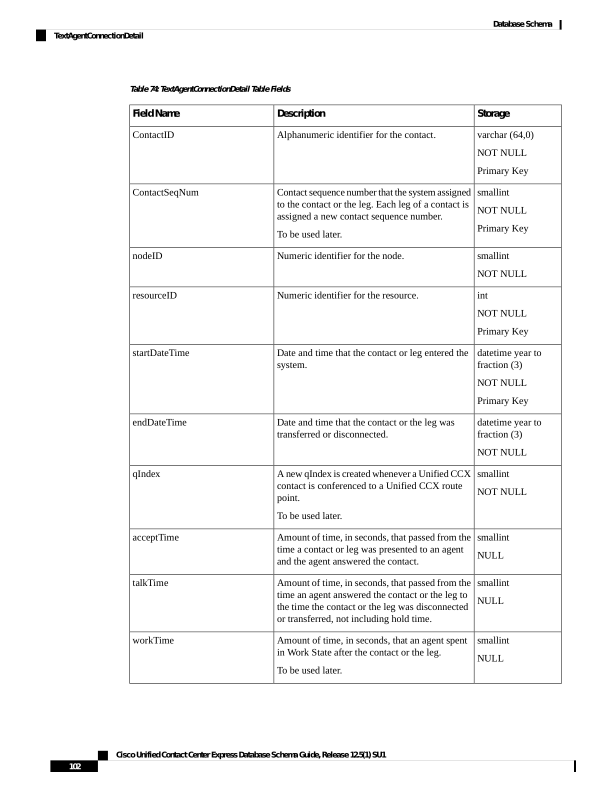
Page 115
Storage
Description
Field Name
varchar(40,0)
NULL
The contact information that the agent enters after
the contact is handled through the Agent Desktop
user interface.
WrapupData
smallint
NOT NULL
Default: 0
Disposition of the contact.
contactdisposition
varchar(18)
Unique identifier of an agent login session. This
identifier remains the same until the session ends.
loginsessionid
smallint
Indicates the media session identifier assigned
while assigning the contact. It can be 1 to 5 for
‘Chat’ media and 26 to 30 for ‘Email’ media,
depending on the maximum sessions configured
by the administrator in ‘Channel Parameter’
configuration page of AppAdmin.
mediasessionid
int
Numeric identifier of the CSQ in which the agent
received an email or chat contact.
csqrecordid
Related Topics
TextContactDetail , on page 105
TextContactQueueDetail, on page 108
TextAgentStateDetails
Database table name: TextAgentStateDetail
The Unified CCX system creates a new record in the TextAgentStateDetail table each time the state of the
agent changes while the agent is handling chat and email. The TextAgentStateDetail record contains information
about the agent and about the event that caused the agent state to change.
Table 75: TextCustomerDetail Table Fields
Storage
Description
Field Name
int
NOT NULL
Primary Key
Identifier of the agent whose state
has changed.
agentID
datetime year to fraction (3)
NOT NULL
Primary Key
Date and time that the chat agent
state changed.
stateChangeDatetime
Cisco Unified Contact Center Express Database Schema Guide, Release 12.5(1) SU1
103
Database Schema
TextAgentStateDetails
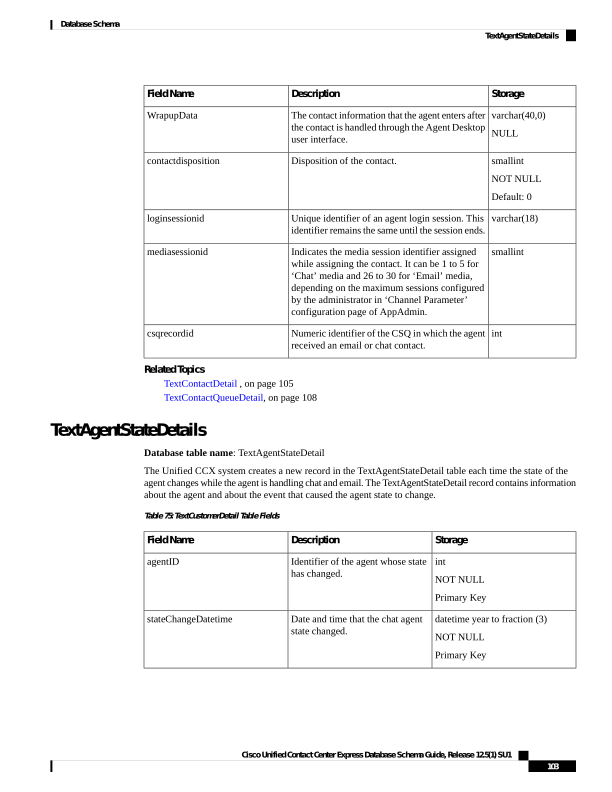
Page 116
Storage
Description
Field Name
smallint
NOT NULL
Primary Key
Event that triggered the chat agent
state change:
0—Logon
1—Log off
2—Not available
3—Available
4—Busy
5—Unknown
6—Partial busy
7—Reserved
agentStateID
smallint
NOT NULL
Primary Key
Code, as written to the database,
for the reason that the chat agent
changed to Not Ready state or to
Log Out state.
32750—Non chat agent
32755—Contact ended
32757—Media handler failure
32760—Login
32763—Contact not accepted
32764—CCX failure
32765—Connection down
reasonCode
smallint
NOT NULL
Primary Key
Routing type of the contact or leg:
1—Interactive
2—Non Interactive
routingType
varchar(18)
Unique identifier of an agent login
session. This identifier remains the
same until the session ends.
loginsessionid
varchar(64)
Alphanumeric identifier for the
contact.
This field will have an identifier
only if the agent state changes due
to allocating or handling a contact.
Else, it will be NULL.
contactid
Related Topics
• Resource, on page 81 (via agentID)
Cisco Unified Contact Center Express Database Schema Guide, Release 12.5(1) SU1
104
Database Schema
TextAgentStateDetails
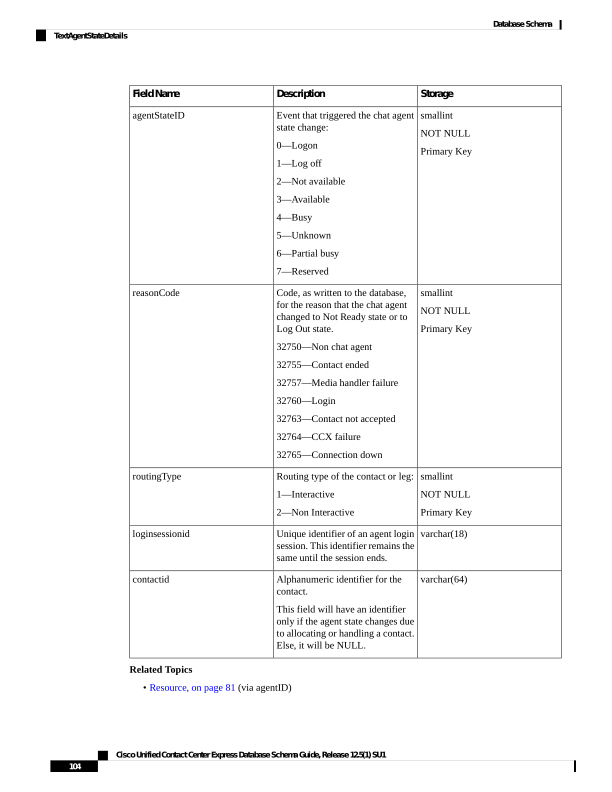
Page 117
TextAgentWrapupDetail
Database table name: TextAgentWrapupDetail
The Unified CCX system creates a new record in the TextAgentWrapupDetail table each time the agent enters
a Wrap-Up detail.
Table 76: TextAgentWrapupDetail Table Fields
Storage
Description
Field Name
varchar (64,0)
NOT NULL
Primary Key
Alphanumeric identifier for the contact.
ContactID
int
NOT NULL
Primary Key
Numeric identifier for the resource.
resourceID
int
NOT NULL
Numeric identifier for the reason.
reasonID
datetime year to
fraction (3)
NOT NULL
Primary Key
Date and time that the Wrap-Up is applied.
wrapupTime
smallint
NULL
Type of the media such as email and other media
types.
1—Chat
3—Email
MediaType
TextContactDetail
Database table name: TextContactDetail
The Unified CCX system creates a new record in the TextContactDetail table for each chat and email contact
or leg processed by the system. A new contact or leg starts each time a contact is transferred or redirected.
A TextContactDetail record contains detailed information about the contact or leg. At least one such record
will exist for each contact or leg.
Cisco Unified Contact Center Express Database Schema Guide, Release 12.5(1) SU1
105
Database Schema
TextAgentWrapupDetail
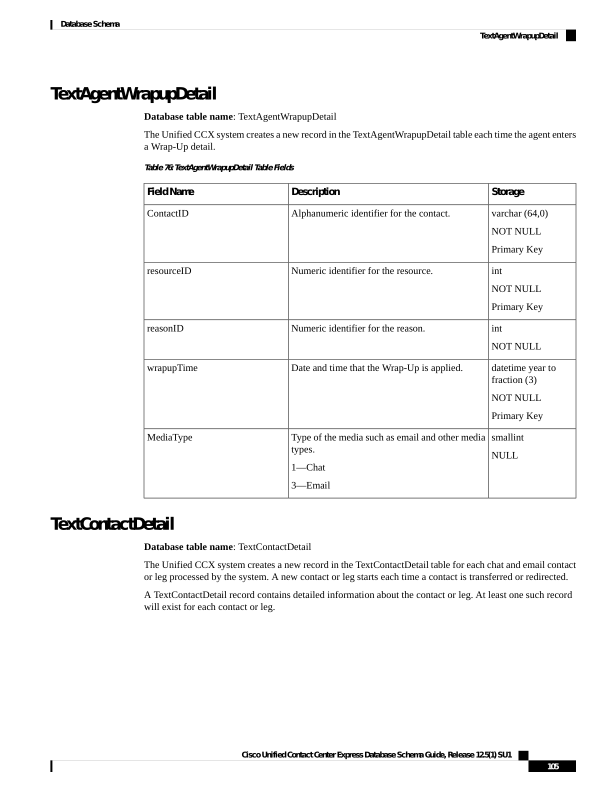
Page 118
Table 77: TextContactDetail Table Fields
Storage
Description
Field Name
varchar (64,0)
NOT NULL
Primary Key
Alphanumeric identifier for this record.
ContactID
smallint
NOT NULL
Primary Key
Contact sequence number that the system assigned
to the contact or the leg. Each leg of a contact is
assigned a new contact sequence number.
To be used later.
ContactSeqNum
smallint
NOT NULL
Numeric identifier for the node.
nodeID
smallint
NOT NULL
Type of contact or leg:
1—Incoming. Outside contact received by the
Unified CCX system.
contactType
smallint
NOT NULL
Type of the media such as email and other media
types.
1—Chat
3—Email
mediaType
smallint
NOT NULL
Disposition of the contact or the leg.
1—Abandoned
2—Handled
3—Do not care
4—Aborted 8
5—Rejected
6—Cleared
7—Unknown
contactDisposition
Cisco Unified Contact Center Express Database Schema Guide, Release 12.5(1) SU1
106
Database Schema
TextContactDetail
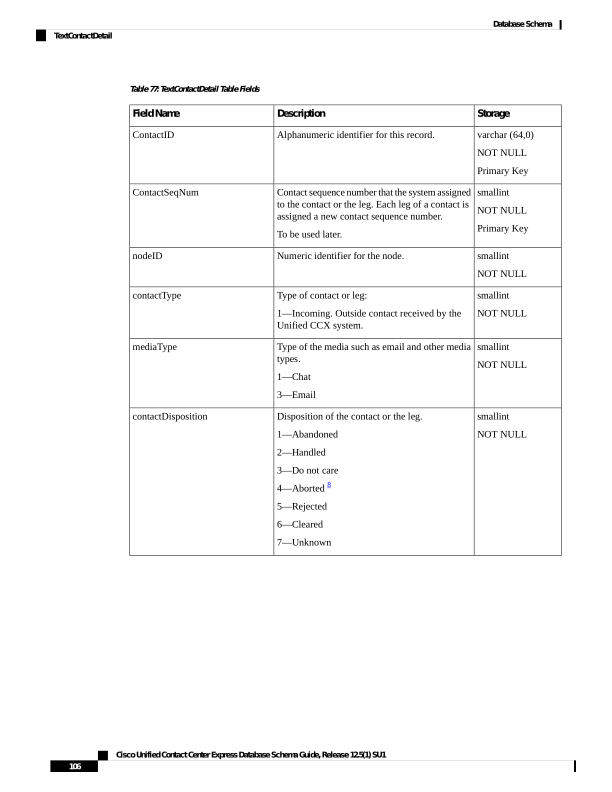
Page 119
Storage
Description
Field Name
varchar(100,0)
NULL
Reason why the contact is aborted or rejected by
the system.
• Unknown
• Chat_agent_ended
• Chat_customer_ended
• Chat_agent_aborted
• Chat_agent_abandoned
• Chat_customer_abandoned
• Chat_abandoned_timeout
• Chat_customer_abandoned
• Chat _customer_waited
• Chat_system_failure
• Chat_system_failure_before_agent_joined
• Chat_agent_connection_failure
• Chat_agent_end_before_in _chatroom
dispositionReason
smallint
NOT NULL
Originator of the contact or the leg:
1—Agent. Contact originated by an agent.
2—Unknown. Contact originated from outside.
originatorType
nvarchar(50,0)
int
NULL
Numeric identifier of the agent who originated
the contact or the leg.
Used only if originatorType is 1.
originator
smallint
NOT NULL
Destination of the contact or the leg:
1—Agent. Contact presented to an agent.
Null if no destination.
destinationType
nvarchar(50,0)
int
NULL
Numeric identifier of the agent who received the
contact or the leg.
Used only if destinationType is 1.
destination
datetime year to
fraction (3)
NOT NULL
Date and the time that the contact or the leg is
presented to the agent.
startDateTime
Cisco Unified Contact Center Express Database Schema Guide, Release 12.5(1) SU1
107
Database Schema
TextContactDetail
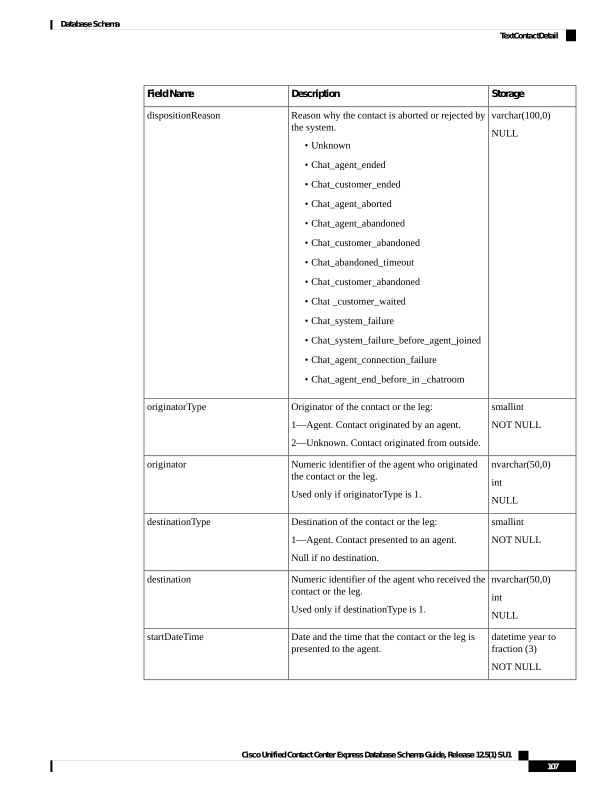
Page 120
Storage
Description
Field Name
datetime year to
fraction (3)
NOT NULL
Date and time that the contact or the leg is
transferred or disconnected.
endDateTime
nvarchar(50,0)
NULL
The string with which the contact or the leg is
tagged.
tagID
smallint
Source from which the contact originated.
1—Bubble Chat
2—Fb Messenger
-1—Others
source
8 For aborted calls, the corresponding value in ContactQueueDetail.disposition = 1 (abandoned).
Related Topics
TextAgentConnectionDetail , on page 101
TextContactQueueDetail, on page 108
TextContactQueueDetail
Database table name: TextContactQueueDetail
The Unified CCX system writes the record when the contact is queued for chat and email CSQs; then one of
the following happens:
• Contact or leg is abandoned while queued for chat and email CSQs
• Contact or leg is being dequeued
• Contact or leg is connected to an agent
Table 78: TextContactQueueDetail Table Fields
Storage
Description
Field Name
varchar (64,0)
NOT NULL
Primary Key
Alphanumeric identifier for the contact.
ContactID
smallint
NOT NULL
Primary Key
Contact sequence number that the system assigned
to the contact or the leg. Each leg of a call is
assigned a new contact sequence number.
To be used later.
ContactSeqNum
smallint
NOT NULL
Numeric identifier for the node.
nodeID
Cisco Unified Contact Center Express Database Schema Guide, Release 12.5(1) SU1
108
Database Schema
TextContactQueueDetail
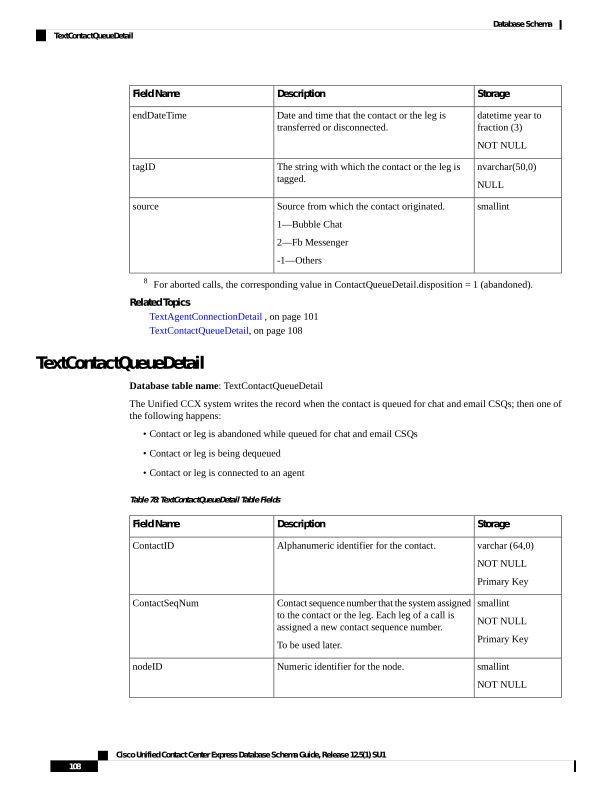
Page 121
Storage
Description
Field Name
int
NOT NULL
Primary Key
Numeric identifier for the chat and email CSQ.
csqRecordID
smallint
NOT NULL
Primary Key
A new qIndex is created whenever a Unified CCX
contact is conferenced to a Unified CCX route
point.
To be used later.
qIndex
smallint
NULL
Disposition for this leg of the contact for this
CSQ.
• Abandoned = 19
• Handled by CSQ = 2
• Dequeued from CSQ = 3
• Handled by another CSQ = 4
disposition
boolean
NULL
Contact answered within the configured number
of seconds of queue time for this CSQ.
• Yes = t
• No = f
To be used later.
metServiceLevel
int
NULL
Number of seconds the contact spent in queue for
this CSQ and this leg of the contact.
queueTime
9 For aborted calls, ContactQueueDetail.disposition = 1 and the corresponding
ContactCallDetail.contactDisposition = 4 (aborted).
Related Topics
TextAgentConnectionDetail , on page 101
TextContactDetail , on page 105
ContactServiceQueue , on page 47
TextCustomerDetails
Database table name: TextCustomerDetail
The Unified CCX system creates a new record in the TextCustomerDetails table when a chat and email agent
receives the contact.
The TextCustomerDetail table captures customer related information corresponding to the chat and email
contact. Maximum 10 customer fields can be persisted in the table. The chat and email customer is advised
to limit each field value as per the details mentioned in the below table so that the data truncation will not
Cisco Unified Contact Center Express Database Schema Guide, Release 12.5(1) SU1
109
Database Schema
TextCustomerDetails
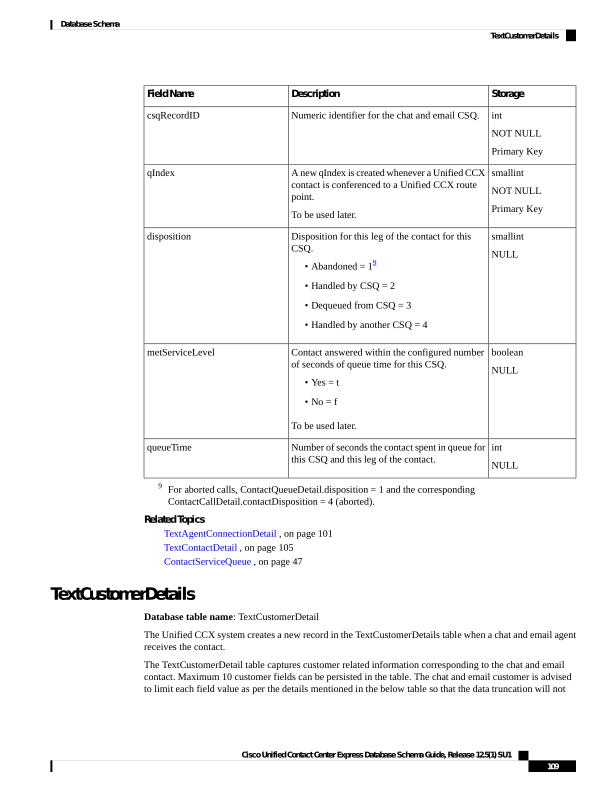
Page 122
happen while storing the customer data into the database. Customer can write custom reports on top of this
historical reporting table and use the persisted data.
Table 79: TextCustomerDetail Table Fields
Storage
Description
Field Name
nvarchar (64,0)
NOT NULL
Primary Key
Alphanumeric identifier for this record.
ContactID
int
NOT NULL
The unique field IDs corresponding to the field
names in the non-voice contact or
MediaCustomerDataMapping table.
In actual table schema there are 10 individual
columns named FieldID1 through FieldID10.
FieldID1 to FieldID10
lvarchar (600)
NOT NULL
Indicates the field values provided for the
corresponding field names in the non-voice
contact or MediaCustomerDataMapping table.
In actual table schema there are 10 individual
columns named FieldValue1 through
FieldValue10.
FieldValue1 to FieldValue5
FieldValue9 to FieldValue10
lvarchar (5080)
NULL
Indicates the field values provided for the
corresponding field names in the non-voice
contact or MediaCustomerDataMapping table.
In case of email contact the field values 6 to 8 are
used for the Agent added email addresses in the
CC, BCC and To fields respectively.
FieldValue6 to FieldValue8
datetime year to
fraction(3)
NOT NULL
Indicates the date and time of insertion.
InsertionDate
Related Topics
• ChatUserForm, on page 29 (via fieldID)
• TextContactDetail , on page 105 (via ContactID)
• MediaCustomerDataMapping, on page 74 (via FieldID)
TextRatingDetail
Database table name: TextRatingDetail
The Unified CCX system creates a new record in the TextRatingDetail table each time the customer rates a
chat experience.
Cisco Unified Contact Center Express Database Schema Guide, Release 12.5(1) SU1
110
Database Schema
TextRatingDetail
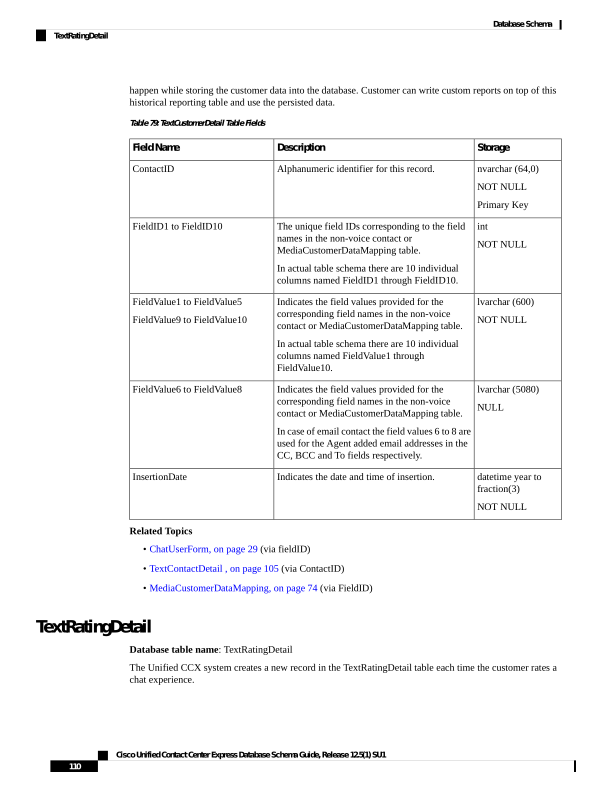
Page 123
Table 80: TextRatingDetail Table Fields
Storage
Description
Field Name
varchar (64)
NOT NULL
Primary Key
Alphanumeric identifier for this record.
ContactID
smallint
NOT NULL
The rating given by the customer.
Rating
datetime year to
fraction (3)
NOT NULL
Date and time the customer assigned the rating.
RatingTime
Related Topics
TextAgentStateDetails, on page 103
TextCustomerDetails, on page 109
TextContactQueueDetail, on page 108
TextAgentWrapupDetail, on page 105
TextContactDetail , on page 105
TextAgentConnectionDetail , on page 101
WorkflowTask
Database table name: WorkflowTask
A WorkflowTask record contains information about a task or a subtask that runs on the Unified CCX system.
Table 81: WorkflowTask Table Fields
Storage
Description
Field Name
decimal(18,0)
NOT NULL
Primary Key
Identifier of the task.
taskID
decimal(18,0)
NULL
Identifier of the parent task, if the task is a
subtask.
parentTaskID
datetime year to
second
NULL
Date and the time that the task was started.
startDateTime
datetime year to
second
NULL
Date and the time that the task was completed.
endDateTime
Cisco Unified Contact Center Express Database Schema Guide, Release 12.5(1) SU1
111
Database Schema
WorkflowTask
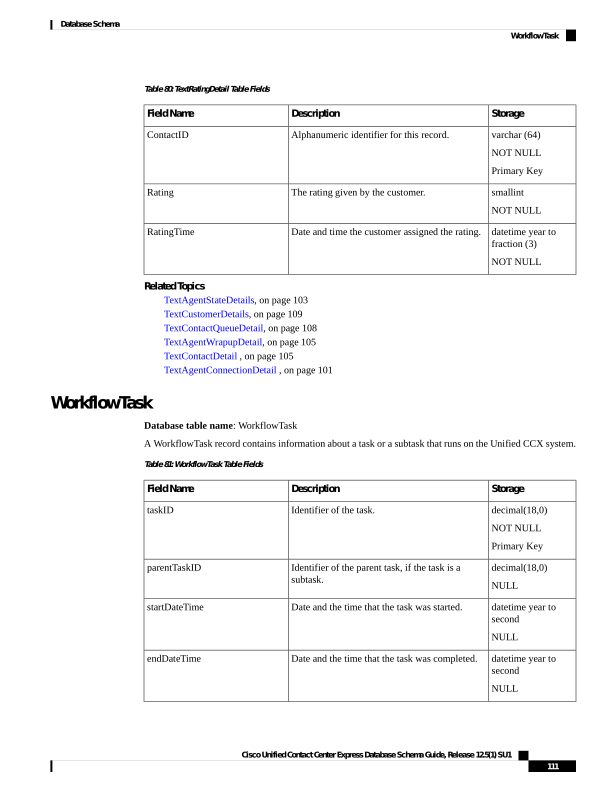
Page 124
Storage
Description
Field Name
smallint
NOT NULL
Primary Key
Unique identifier assigned to each Unified CCX
server in the cluster.
applicationServerID
Related Topics
AgentConnectionDetail, on page 4
ContactCallDetail, on page 34
ContactQueueDetail, on page 44
ContactRoutingDetail , on page 46
MonitoredResourceDetail, on page 73
RemoteMonitoringDetail , on page 79
WrapupCategory
Database table name: WrapupCategory
Wrap-Up reason category information is stored in this table. A Wrap-Up Reason is associated with one or
more CSQs. This mapping of Wrap-Up Reasons and CSQs is stored separately in wrapupCsqMap table.
Table 82: WrapupCategory Table Fields
Storage
Description
Field Name
int
NOT NULL
Primary Key
A unique identifier for the Wrap-Up category.
categoryid
int
NOT NULL
Primary Key
Identifier of the Unified CCX profile that is
associated with this record.
profileid
int
NOT NULL
Primary Key
A unique identifier for the record.
recordid
nvarchar(160,0)
NOT NULL
The name of the Wrap-Up category.
name
lvarchar(40)
NOT NULL
The type of interaction for which the Wrap-Up
reason is applied. For example, Non-Voice.
type
boolean
NOT NULL
Indicates whether the Wrap-Up category is tagged
at global or CSQ level.
global
Cisco Unified Contact Center Express Database Schema Guide, Release 12.5(1) SU1
112
Database Schema
WrapupCategory
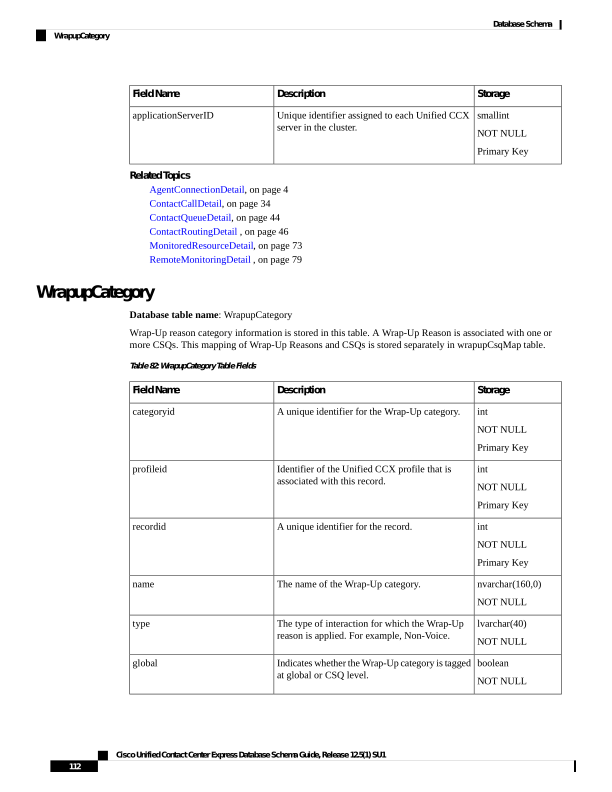
Page 125
Storage
Description
Field Name
boolean
NOT NULL
Indicates whether the record is currently active.
active
datetime year to
second
NULL
The date and time when the record became
inactive.
dateinactive
bigint
NULL
The date and time that the record is created.
Default value: Current year to second.
createdatetime
WrapupReasons
Database table name: WrapupReasons
This table stores the details about the Wrap-Up reasons that are configured by the administrator.
Table 83: WrapupReasons Table Fields
Storage
Description
Field Name
int
NOT NULL
Primary Key
A unique identifier for the Wrap-Up reason.
reasonid
int
NOT NULL
A unique identifier for the Wrap-Up category.
categoryid
nvarchar(160,0)
NOT NULL
The name of the Wrap-Up reason.
reason
boolean
NOT NULL
Indicates whether the record is currently active.
active
datetime year to
second
NULL
The date and time when the record became
inactive.
dateinactive
bigint
NULL
The date and time that the record is created.
Default value: Current year to second.
createdatetime
WrapupCsqMap
Database table name: WrapupCsqMap
The mapping of Wrap-Up Reasons and CSQs is stored in this table.
Cisco Unified Contact Center Express Database Schema Guide, Release 12.5(1) SU1
113
Database Schema
WrapupReasons
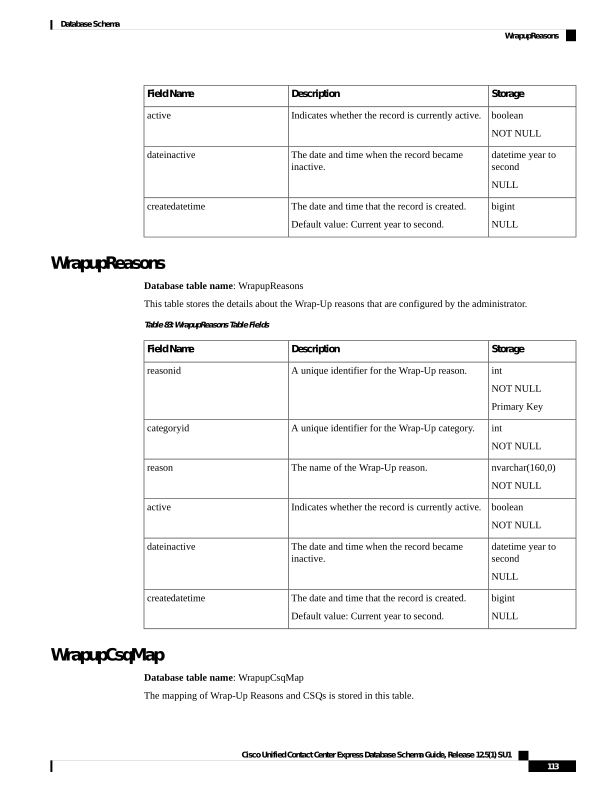
Page 126
Table 84: WrapupCsqMap Table Fields
Storage
Description
Field Name
int
NOT NULL
Primary Key
A unique identifier for the record.
recordid
int
NOT NULL
A unique identifier for the Wrap-up Category.
categoryid
int
NOT NULL
A unique identifier for the CSQ from the
ContactServiceQueue table.
csqid
boolean
NOT NULL
Indicates whether the record is currently active.
active
datetime year to
second
NULL
The date and time when the record became
inactive.
dateinactive
bigint
NULL
The date and time that the record is created.
Default value: Current year to second.
createdatetime
Cisco Unified Contact Center Express Database Schema Guide, Release 12.5(1) SU1
114
Database Schema
WrapupCsqMap