Document Metadata
Format: PDF 1.4
Title: Release Notes for Cisco Unified Contact Center Express Solution, Release 12.5(1) SU3
Author: Unknown
Creator: DITA Open Toolkit
Producer: XEP 4.30.961; modified using iText 2.1.7 by 1T3XT
Creation Date: D:20250805125401Z
Mod Date: D:20250805060005-07'00'
Page 1
Release Notes for Cisco Unified Contact Center Express Solution,
Release 12.5(1) SU3
First Published: 2023-05-08
Last Modified: 2023-05-08
Americas Headquarters
Cisco Systems, Inc.
170 West Tasman Drive
San Jose, CA 95134-1706
USA
http://www.cisco.com
Tel: 408 526-4000
800 553-NETS (6387)
Fax: 408 527-0883

Page 2
THE SPECIFICATIONS AND INFORMATION REGARDING THE PRODUCTS IN THIS MANUAL ARE SUBJECT TO CHANGE WITHOUT NOTICE. ALL STATEMENTS,
INFORMATION, AND RECOMMENDATIONS IN THIS MANUAL ARE BELIEVED TO BE ACCURATE BUT ARE PRESENTED WITHOUT WARRANTY OF ANY KIND,
EXPRESS OR IMPLIED. USERS MUST TAKE FULL RESPONSIBILITY FOR THEIR APPLICATION OF ANY PRODUCTS.
THE SOFTWARE LICENSE AND LIMITED WARRANTY FOR THE ACCOMPANYING PRODUCT ARE SET FORTH IN THE INFORMATION PACKET THAT SHIPPED WITH
THE PRODUCT AND ARE INCORPORATED HEREIN BY THIS REFERENCE. IF YOU ARE UNABLE TO LOCATE THE SOFTWARE LICENSE OR LIMITED WARRANTY,
CONTACT YOUR CISCO REPRESENTATIVE FOR A COPY.
The Cisco implementation of TCP header compression is an adaptation of a program developed by the University of California, Berkeley (UCB) as part of UCB's public domain version of
the UNIX operating system. All rights reserved. Copyright © 1981, Regents of the University of California.
NOTWITHSTANDING ANY OTHER WARRANTY HEREIN, ALL DOCUMENT FILES AND SOFTWARE OF THESE SUPPLIERS ARE PROVIDED “AS IS" WITH ALL FAULTS.
CISCO AND THE ABOVE-NAMED SUPPLIERS DISCLAIM ALL WARRANTIES, EXPRESSED OR IMPLIED, INCLUDING, WITHOUT LIMITATION, THOSE OF
MERCHANTABILITY, FITNESS FOR A PARTICULAR PURPOSE AND NONINFRINGEMENT OR ARISING FROM A COURSE OF DEALING, USAGE, OR TRADE PRACTICE.
IN NO EVENT SHALL CISCO OR ITS SUPPLIERS BE LIABLE FOR ANY INDIRECT, SPECIAL, CONSEQUENTIAL, OR INCIDENTAL DAMAGES, INCLUDING, WITHOUT
LIMITATION, LOST PROFITS OR LOSS OR DAMAGE TO DATA ARISING OUT OF THE USE OR INABILITY TO USE THIS MANUAL, EVEN IF CISCO OR ITS SUPPLIERS
HAVE BEEN ADVISED OF THE POSSIBILITY OF SUCH DAMAGES.
Any Internet Protocol (IP) addresses and phone numbers used in this document are not intended to be actual addresses and phone numbers. Any examples, command display output, network
topology diagrams, and other figures included in the document are shown for illustrative purposes only. Any use of actual IP addresses or phone numbers in illustrative content is unintentional
and coincidental.
All printed copies and duplicate soft copies of this document are considered uncontrolled. See the current online version for the latest version.
Cisco has more than 200 offices worldwide. Addresses and phone numbers are listed on the Cisco website at www.cisco.com/go/offices.
Cisco and the Cisco logo are trademarks or registered trademarks of Cisco and/or its affiliates in the U.S. and other countries. To view a list of Cisco trademarks, go to this URL:
https://www.cisco.com/c/en/us/about/legal/trademarks.html. Third-party trademarks mentioned are the property of their respective owners. The use of the word partner does not imply a
partnership relationship between Cisco and any other company. (1721R)
© 2023 Cisco Systems, Inc. All rights reserved.
Page 3
C O N T E N T S
Introduction
1
C H A P T E R 1
Release Notes for Contact Center Solutions
1
Cisco Security Advisories
1
Cisco Unified Contact Center Express
3
C H A P T E R 2
New Features
3
Updated Features
3
Deprecated Features
4
Important Notes
4
Removed and Unsupported features
7
Third Party Software Impacts
13
Cisco Unified Intelligence Center
15
C H A P T E R 3
New Features
15
Accessibility Compliance
15
Custom Logon Messages
15
Edge Chromium Browser Support
15
Commands
16
Updated Features
16
Important Notes
16
Deprecated Features
17
Removed and Unsupported Features
17
Third Party Software Impact
17
Cisco Finesse
19
C H A P T E R 4
New Features
19
Release Notes for Cisco Unified Contact Center Express Solution, Release 12.5(1) SU3
iii

Page 4
View Locked Out Users
19
Desktop Interface APIs
19
Updated Features
19
Important Notes
20
Deprecated Features
20
Removed and Unsupported Features
20
Third Party Software Impacts
20
Cisco Customer Collaboration Platform
21
C H A P T E R 5
New Features
21
VPN-less Access to Finesse Desktop
21
ECDSA Certificate Support
21
Updated Features
22
Important Notes
22
Deprecated Features
22
Removed and Unsupported Features
22
Third Party Software Impacts
22
Webex Workforce Optimization
23
C H A P T E R 6
New Features
23
Plans
23
Advanced Sentiment
23
New WFM Datasets and Dashboards Available in Insights
24
Contact Queue Enhancements
24
Absence and Attributes
25
Basic WFM and QM Offerings
25
Enterprise Analytics
25
Activity Requests
26
Periodization of Agent's Work Hours
26
New Transcription Engine Now Live
27
Insights
27
Improve Workforce Efficiency using Webex WFO Notifications
28
Introducing Sessions for Streamlined Scheduling and Enhanced Agent Management
29
Global Language Support for Phrase Categories
29
Release Notes for Cisco Unified Contact Center Express Solution, Release 12.5(1) SU3
iv
Contents
Page 5
Bulk Interaction Tool for Deletion and Updates
30
Bulk Transfer User Data
30
Updated Features
30
Sessions for Streamlined Scheduling and Enhanced Agent Management
30
Deprecated Features
31
Removed and Unsupported Features
31
Caveats
35
C H A P T E R 7
Caveat Queries by Product
35
Bug Search Tool
35
Severity 3 or Higher Caveats for Release 12.5(1)SU3
36
Release Notes for Cisco Unified Contact Center Express Solution, Release 12.5(1) SU3
v
Contents
Page 6
Release Notes for Cisco Unified Contact Center Express Solution, Release 12.5(1) SU3
vi
Contents
Page 7
C H A P T E R 1
Introduction
• Release Notes for Contact Center Solutions, on page 1
• Cisco Security Advisories, on page 1
Release Notes for Contact Center Solutions
Release introduces release note compilations for each of the contact center solutions. The compilations contain
all of the release notes for one solution type and the components that you can use with that contact center.
This document includes updates on the Cisco Unified Contact Center Express (Unified CCX) solution and
all related components such as Cisco Unified Intelligence Center (CUIC), Cisco Finesse, Customer
Collaboration Platform (CCP).
Cisco SocialMiner has been renamed as Customer Collaboration Platform (CCP).
Note
Cisco Security Advisories
The Cisco Product Security Incident Response Team (PSIRT) is a dedicated, global team that manages the
receipt, investigation, and public reporting of security vulnerability information that relates to Cisco products
and networks.
For information on existing security issues, see Cisco Security Advisories, Responses, and Alerts at
https://tools.cisco.com/security/center/publicationListing.x.
Release Notes for Cisco Unified Contact Center Express Solution, Release 12.5(1) SU3
1


Page 8
Release Notes for Cisco Unified Contact Center Express Solution, Release 12.5(1) SU3
2
Introduction
Cisco Security Advisories
Page 9
C H A P T E R 2
Cisco Unified Contact Center Express
• New Features, on page 3
• Updated Features, on page 3
• Deprecated Features, on page 4
• Important Notes, on page 4
• Removed and Unsupported features, on page 7
• Third Party Software Impacts, on page 13
New Features
The following commands are added as part of smart licensing management:
• License smart hostname enable – This command is used to enable the privacy of UCCX during smart
license registration with CSSM/On-prem SSM.
• License smart hostname disable – This command is used to disable the privacy of UCCX during smart
license registration with CSSM/On-prem SSM.
For more information, refer to Specific License Reservation Commands section in Command Line Interface
chapter of Cisco Unified Contact Center Express Administration and Operations Guide at
https://www.cisco.com/c/en/us/support/customer-collaboration/unified-contact-center-express/series.html\#~tab-documents.
Updated Features
The following features are updated for this release:
• The product instance license reporting for smart licensing is refreshed every 8 hours.
• The product instance immediately transitions to Out of Compliance state when CSSM reports
out-of-compliance.
• The type of license (Standard or Premium) reported is based on true consumption by agents and not on
the configured value.
• OAuth 2.0 support for IMAP — Unified CCX supports OAuth 2.0 for IMAP protocol (receiving the
email) in the current Microsoft Office 365 integrations. SMTP (sending the email) may continue to use
Basic authentication until Microsoft supports Basic authentication with SMTP.
Release Notes for Cisco Unified Contact Center Express Solution, Release 12.5(1) SU3
3

Page 10
Deprecated Features
Webex WFO Data Explorer
Cisco Webex WFO Data Explorer has been deprecated from Release 12.5(1) onward.
Webex WFO Data Explorer will be discontinued on March 14th, 2025 and will be replaced by Webex WFO
Insights.
Till March 14th, 2025, both Webex WFO Data Explorer and Webex WFO Insights will be available for use.
Ensure that you update your subscription (change or modify) by March 28th, 2025, to maintain uninterrupted
access to Webex WFO Insights. For details, see the FAQ.
Important Notes
• Before upgrading to Release 12.5(1) SU3, you must download the pre-upgrade COP from
https://software.cisco.com/download/home/270569179.
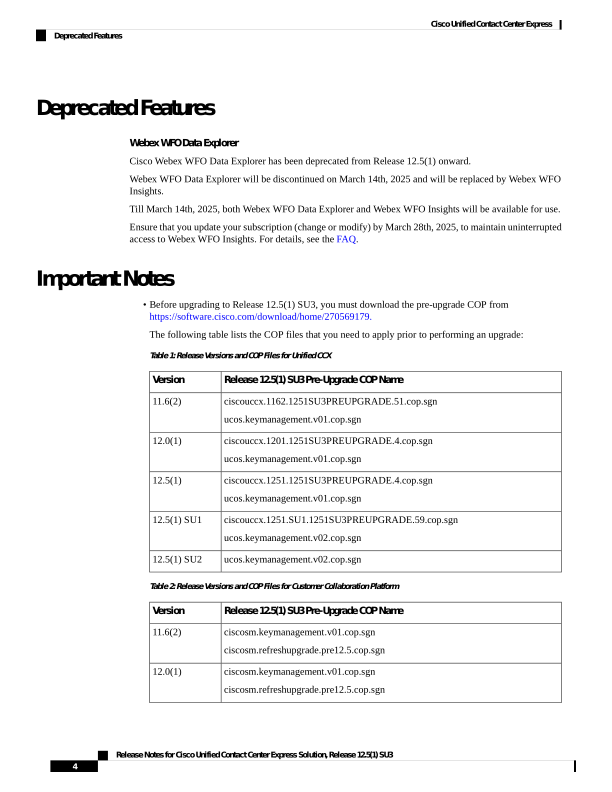
The following table lists the COP files that you need to apply prior to performing an upgrade:
Table 1: Release Versions and COP Files for Unified CCX
Release 12.5(1) SU3 Pre-Upgrade COP Name
Version
ciscouccx.1162.1251SU3PREUPGRADE.51.cop.sgn
ucos.keymanagement.v01.cop.sgn
11.6(2)
ciscouccx.1201.1251SU3PREUPGRADE.4.cop.sgn
ucos.keymanagement.v01.cop.sgn
12.0(1)
ciscouccx.1251.1251SU3PREUPGRADE.4.cop.sgn
ucos.keymanagement.v01.cop.sgn
12.5(1)
ciscouccx.1251.SU1.1251SU3PREUPGRADE.59.cop.sgn
ucos.keymanagement.v02.cop.sgn
12.5(1) SU1
ucos.keymanagement.v02.cop.sgn
12.5(1) SU2
Table 2: Release Versions and COP Files for Customer Collaboration Platform
Release 12.5(1) SU3 Pre-Upgrade COP Name
Version
ciscosm.keymanagement.v01.cop.sgn
ciscosm.refreshupgrade.pre12.5.cop.sgn
11.6(2)
ciscosm.keymanagement.v01.cop.sgn
ciscosm.refreshupgrade.pre12.5.cop.sgn
12.0(1)
Release Notes for Cisco Unified Contact Center Express Solution, Release 12.5(1) SU3
4
Cisco Unified Contact Center Express
Deprecated Features
Page 11
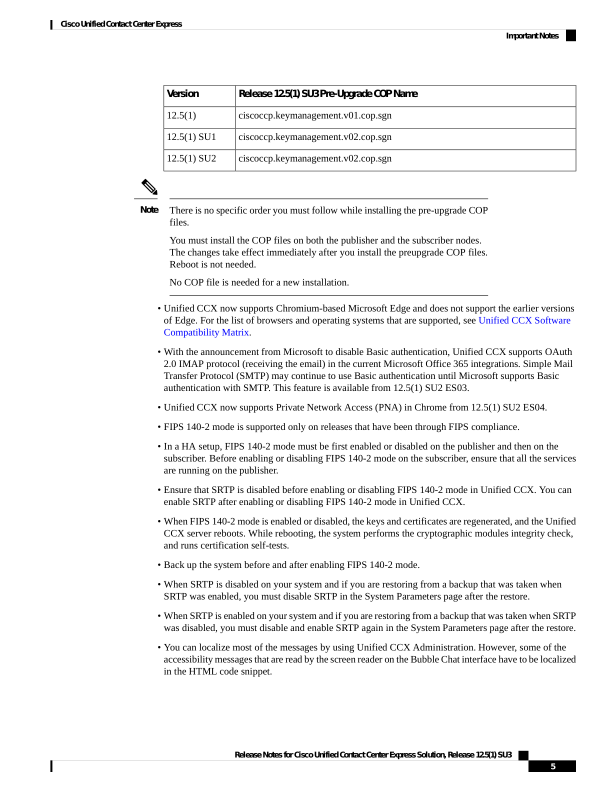
Release 12.5(1) SU3 Pre-Upgrade COP Name
Version
ciscoccp.keymanagement.v01.cop.sgn
12.5(1)
ciscoccp.keymanagement.v02.cop.sgn
12.5(1) SU1
ciscoccp.keymanagement.v02.cop.sgn
12.5(1) SU2
There is no specific order you must follow while installing the pre-upgrade COP
files.
You must install the COP files on both the publisher and the subscriber nodes.
The changes take effect immediately after you install the preupgrade COP files.
Reboot is not needed.
No COP file is needed for a new installation.
Note
• Unified CCX now supports Chromium-based Microsoft Edge and does not support the earlier versions
of Edge. For the list of browsers and operating systems that are supported, see Unified CCX Software
Compatibility Matrix.
• With the announcement from Microsoft to disable Basic authentication, Unified CCX supports OAuth
2.0 IMAP protocol (receiving the email) in the current Microsoft Office 365 integrations. Simple Mail
Transfer Protocol (SMTP) may continue to use Basic authentication until Microsoft supports Basic
authentication with SMTP. This feature is available from 12.5(1) SU2 ES03.
• Unified CCX now supports Private Network Access (PNA) in Chrome from 12.5(1) SU2 ES04.
• FIPS 140-2 mode is supported only on releases that have been through FIPS compliance.
• In a HA setup, FIPS 140-2 mode must be first enabled or disabled on the publisher and then on the
subscriber. Before enabling or disabling FIPS 140-2 mode on the subscriber, ensure that all the services
are running on the publisher.
• Ensure that SRTP is disabled before enabling or disabling FIPS 140-2 mode in Unified CCX. You can
enable SRTP after enabling or disabling FIPS 140-2 mode in Unified CCX.
• When FIPS 140-2 mode is enabled or disabled, the keys and certificates are regenerated, and the Unified
CCX server reboots. While rebooting, the system performs the cryptographic modules integrity check,
and runs certification self-tests.
• Back up the system before and after enabling FIPS 140-2 mode.
• When SRTP is disabled on your system and if you are restoring from a backup that was taken when
SRTP was enabled, you must disable SRTP in the System Parameters page after the restore.
• When SRTP is enabled on your system and if you are restoring from a backup that was taken when SRTP
was disabled, you must disable and enable SRTP again in the System Parameters page after the restore.
• You can localize most of the messages by using Unified CCX Administration. However, some of the
accessibility messages that are read by the screen reader on the Bubble Chat interface have to be localized
in the HTML code snippet.
Release Notes for Cisco Unified Contact Center Express Solution, Release 12.5(1) SU3
5
Cisco Unified Contact Center Express
Important Notes

Page 12
• An SRTP-enabled HA setup requires distinct RmCm provider users. So, the system generates a separate
RmCm Provider User Id with the suffix "_ccxsub" for the subscriber node.
• Associate devices and device profiles only with the RmCm Provider User that is configured in the Cisco
Unified CM Configuration page (primary RmCm user).
• Agent desktops must be synchronized with NTP server so that the time in the auto incrementing fields
of Live Data reports match the server time.
• From Unified CCX Release 12.5(1), the 300 agent deployment model is not supported. Deployments
that require more than 100 agents have to use the 400 agent OVA profile. The vRAM required for the
400 agent OVA profile has increased from 16GB to 20GB. Customers who want to use Cloud Connect
services with the BE6000 must increase the vRAM from 10GB to 14GB. For information about Resource
Requirements, refer to the Virtualization Wiki.
• If FIPS must be enabled on 12.5(1) SU3, the CUCM version to be used is 14.0 SU3. This is because of
change in the security provider used in the product.
As the OVA profile is changed for 400 agent model deployments, if you do not
change the OVA settings, the upgrade fails at Switch Version. For fresh install,
the new OVA must be used for deployment. For more information, see Cisco
Unified Contact Center Express Design Guide.
Note
Ensure that the reservation of CPU and memory adhere to the specification
mentioned in the Virtualization Wiki.
Caution
• After upgrading Unified CCX, the CAs that are not approved by Cisco are removed from the platform
trust store. However, you can add them back, if necessary.
• For information about the list of CAs that Cisco supports, see Cisco Trusted External Root Bundle
in https://www.cisco.com/security/pki.
• For information about adding a certificate, see the procedure from step 5 onwards under the Obtain
and Upload CA Certificate section in Cisco Unified Contact Center Express Administration and
Operations Guide.
• You can download the Chat Transcript in only HTML format.
• You can configure the maximum number of concurrent sessions for a user of the following applications:
Cisco Identity Service Management, Disaster Recovery System, Cisco Unified CCX Administration,
Cisco Finesse Administration, Cisco Unified Serviceability, Cisco Unified CCX Serviceability, Cisco
Unified OS Administration, and Cisco Unified Intelligence Center.
If a user reaches the configured limit, further login attempts are rejected. The maximum number of
concurrent sessions is configured by using the set webapp session maxlimit command. For more
information about this command, see the Command Line Interface chapter in the Cisco Unified Contact
Center Express Administration and Operations Guide at https://www.cisco.com/c/en/us/support/
customer-collaboration/unified-contact-center-express/products-maintenance-guides-list.html.
Release Notes for Cisco Unified Contact Center Express Solution, Release 12.5(1) SU3
6
Cisco Unified Contact Center Express
Important Notes


Page 13
• The DataConn container consumes CPU resources. If DataConn is not being used, use the utils
cloudconnect stop dataconn command to shut the container down. This command needs to be executed
after every reboot from each of the nodes.
Removed and Unsupported features
Removed features
• The Classic Chat feature has been removed. The configuration of the Classic Chat in the previous release
won’t be migrated during an upgrade to this release. Customers must configure the Bubble Chat widget
available in the Cisco Unified CCX Administration.
Unsupported features
From release 12.5(1) onwards, Unified CCX doesn’t support the Trusted List of Hosts in HTTP referrer
header feature.
From release 12.5(1) SU1 onwards, Unified CCX doesn't support the following commands:
• utils uccx notification-service log
• utils uccx notification-service log disable
• utils uccx notification-service log enable
• utils uccx notification-service log status
Hosted Collaboration Solution for Contact Center support withdrawn
From release 12.5(1) SU3 onwards, Unified CCX won’t support Hosted Collaboration Solution for Contact
Center. There will be no new security updates, non-security updates, assisted support options or online technical
content updates.
Chat transcript download in a PDF format
The chat transcript can’t be downloaded in a PDF format.
Mobile skill manager
Mobile Skill Manager isn’t supported.
TLS
TLS 1.0 and 1.1 aren’t supported.
Cisco context Service
Cisco Context Service isn’t supported.
Release Notes for Cisco Unified Contact Center Express Solution, Release 12.5(1) SU3
7
Cisco Unified Contact Center Express
Removed and Unsupported features
Page 14
Customer Journey Analyzer
The trial of the Customer Journey Analyzer feature has been concluded. This feature isn’t available from
release 12.5(1) SU1.
Internet Explorer
Support for Internet Explorer is removed.
Unsupported options on Finesse for Direct Preview Outbound
Finesse doesn’t support Skip, Skip-Next, Skip-Close, Reject, Cancel Reservation, and Do Not Call for direct
preview outbound calls.
Unsupported features and configurations for Progressive and Predictive Agent Outbound
Unsupported Features and Configurations for Progressive and Predictive Agent Outbound
• The “Get Reporting Statistic” step isn’t supported for progressive and predictive agent-based outbound
campaigns.
• Unified CCX doesn’t support the translation or modification of the phone number that it uses to dial
outbound calls. If any “voice translation rules” that are configured in the gateway modify the phone
number, those rules aren’t supported.
You can use either of the following two supported methods to modify a dialed
number in the gateway:
• To remove the initial digits of the phone number, use forward-digits or
digit-strip in the dial-peer configuration.
• To add a prefix to the phone number, use prefix in the dial-peer
configuration.
Note
• For Outbound campaigns outside North America, additional configuration is required to add the
area-code-to-time-zone mapping. For more information, see the Cisco Unified Contact Center Express
Administration and Operations Guide, located at https://www.cisco.com/en/US/products/sw/custcosw/
ps1846/products_installation_and_configuration_guides_list.html.
• For multi-country Outbound campaigns, the area code must also include the country code.
• Unified CCX dialer dials outbound contacts only if the publisher database is in the “IN SERVICE” state.
• Finesse doesn’t support the Do Not Call option.
• If you aren’t on Smart Licensing, outbound license usage isn’t captured in the License Utilization Cisco
Unified Intelligence Center report.
• You must enable Agent AutoAnswer manually for agent-based progressive and predictive calls when
you upgrade from an older Unified CCX release.
Release Notes for Cisco Unified Contact Center Express Solution, Release 12.5(1) SU3
8
Cisco Unified Contact Center Express
Removed and Unsupported features

Page 15
Unsupported configuration for IPv6
• Cisco Unified Communications Manager doesn’t support SIP IPv6 signaling over UDP where the
maximum transmission unit (MTU) is greater than 1500. To ensure that you don’t experience intermittent
call failure, change the transport protocol to TCP.
For more information, see the “Important Notes” section of the Release Notes for Cisco Unified
Communications Manager, located at:
https://www.cisco.com/c/en/us/support/unified-communications/
unified-communications-manager-callmanager/products-release-notes-list.html
Also, see “CSCuo71306” for details on this limitation.
• When using IPv6 and Outbound dialer, use a voice gateway IOS that contains the fix for “CSCul43754”.
Unsupported configurations and scenarios for Unified CCX
Unified CCX doesn’t support the following configurations:
• CTI route points with directory numbers (DNs) that are members of line groups and, by extension, that
are members of hunt lists of Unified CM.
• Shared lines for CTI ports and CTI route points.
• Agent devices can’t be shared with any other Directory Number, irrespective of the configured partition.
(The Agent device and Directory Number must have a 1:1 relationship).
• ICD call answer or ICD call transfer using any third-party attendant console desk software.
• Within the same script, using the “Place Call” step to generate a call and then placing the call, back into
the same queue (creating a call loop).
• SIP REFER between a switchboard and Unified CCX if the transfer is completed after the call is answered
on the Unified CCX CTI port because of media reestablishment issues.
• During TTS prompt playback, if the call is put on hold and then retrieved, the prompt doesn’t continue
from the position at which it was left.
• Use of “Consult Transfer”, “Direct Transfer”, or “Redirect” to a translation pattern that maps back to a
route point.
• Use of “Consult Transfer”, “Redirect”, and “Place Call” steps to invoke or dial into "Conference Now"
conferences.
• The following scenarios have issues:
• External -> Redirect to Unmonitored device -> Call Forward No Answer (CFNA) to UCCX RP
Use of Redirect Step to an unmonitored device which then uses CFNA to a UCCX route point.
• External -> Consult Transfer to RP ->Consult Transfer to RP -> Redirect to Unmonitored device
• External -> Redirect to RP -> Consult Transfer to RP -> Redirect to Unmonitored device
• External -> Consult Transfer to RP -> Redirect to RP -> Redirect to Unmonitored device
• External -> Consult Transfer to RP -> Redirect to Unmonitored device
Thus, use the Call Redirect Step in the script instead of Call Consult Transfer.
Release Notes for Cisco Unified Contact Center Express Solution, Release 12.5(1) SU3
9
Cisco Unified Contact Center Express
Removed and Unsupported features
Page 16
• Unified CCX doesn't completely support the E.164 numbering plan for route point directory numbers
(DN).
This limitation is because of the Unified CM limit on device name length set as 15 characters. We add
"_" between the device name prefix and the DN. So we support a maximum of 13 characters in the DN
as the device name prefix is mandatory and hence at least one character is needed there. For example,
(Device name prefix) + '_' + (length of DN) = 15 ==> [(1 + '_' + 13) = 15].
• Cisco Unified CCX system doesn’t support modification, addition or deletion of the CTI ports and the
CTI Route Points from the Cisco Unified Communication Manager. Performing the same can lead to
issues with the non-contiguous DN range for which Cisco Tomcat on Unified CCX Server needs to be
restarted.
• When the supervisor monitors the Team Performance report and during the time if there’s any update or
modification done to the team, this doesn't get updated automatically. The supervisor should refresh the
browser page or select the respective team again to view the Team Performance report.
• Use of two(2) wildcard CTI Route Points that overlap with each other isn’t supported. For example,
Route Point 1: 123XXXX and Route Point 2: 1234XXX overlap with one another and isn’t supported.
However, a wildcard CTI Route point can overlap with a full DID (best match pattern) that doesn't contain
a wildcard. For example, Route Point 1: 123XXXX and Route Point 2: 1234567 is supported.
• A discrepancy in reports is observed when a call is transferred using Cisco Jabber by multiple agents in
the same call flow. Use the Cisco Finesse desktop to transfer calls.
• SIP URI dialing for CTI route points, CTI ports, and agent extensions.
• Mid-Call Caller ID updates when the call is routed to Unified CM through MGCP gateway.
When incoming calls are routed to Unified CM through MGCP gateway, any
mid-call caller ID updates are reflected only after the call is connected.
Note
Unsupported actions for Unified CCX agents
Use of the following softkeys on a Cisco Unified IP Phone isn’t supported:
• Barge
• cBarge
• DND
• GPickup
• iDivert
• Conference Now
• Park
• Pickup
Release Notes for Cisco Unified Contact Center Express Solution, Release 12.5(1) SU3
10
Cisco Unified Contact Center Express
Removed and Unsupported features

Page 17
Unsupported configurations for agent phones
The following configurations aren’t supported for agent phones:
• Two lines on an agent phone that have the same extension but exist in different partitions.
• Configuring the same Unified CCX extension in more than one device profile, or configuring the same
Unified CCX extension in any combination of device profiles and devices. (Configuring a Unified CCX
extension in a single device profile is supported.)
• Silent Monitoring by supervisors who are logged in with Extend and Connect.
• In the Unified Communications Manager Administration Directory Number Configuration web page for
each Unified CCX line, setting Maximum Number of Calls to a value other than 2.
• In the Unified Communications Manager Administration Directory Number Configuration web page for
each Unified CCX line, setting Busy Trigger to a value other than 1.
• No Cisco Unified Communications Manager device can be forwarded to the Unified CCX extension of
an agent.
• The Unified CCX extension of an agent can’t be configured to forward to a Cisco Unified CCX Trigger
or CTI route point.
• Configuring the Unified Communications Manager Intercom feature.
• Configuring the Hold Reversion feature.
• Agent extensions can’t be added to hunt lists or hunt groups. If an agent has only one line, the agent
phone can’t be part of a hunt list or hunt group. In case of multiple lines, none of the first four configured
lines must be part of the hunt group. For more details on multiple lines support and the number of
monitored lines, see the Cisco Unified Contact Center Express Design Guide, located at
https://www.cisco.com/c/en/us/support/customer-collaboration/unified-contact-center-express/
products-implementation-design-guides-list.html.
• Call Forward All to extensions which Unified CCX doesn’t have control over. For example, if an agent
extension has Call Forward All to a PSTN extension or Directory Number on another cluster which
Unified CCX is unaware of.
• All the Cisco IP Phones for Cisco Finesse IP Phone Agent currently don’t support the Simplified New
Call UI.
Supported configurations for agent phones
To determine the phone devices that are supported by Cisco Finesse and for use by Cisco Finesse IP Phone
agents, see the Unified CCX Compatibility related information located at:
https://www.cisco.com/c/en/us/support/customer-collaboration/unified-contact-center-express/products-device-support-tables-list.html.
The following configurations are supported on agent phones:
• A Unified CCX extension that is configured on a single device (but not on multiple devices).
• A Unified CCX extension that is configured in a single device profile (but not in multiple device profiles).
• Multiple agents sharing the same Unified CCX extension, which you can set up as follows:
• Configure the Unified CCX extension to a single phone (not in a device profile).
• Associate the phone with all the agents who use this extension.
Release Notes for Cisco Unified Contact Center Express Solution, Release 12.5(1) SU3
11
Cisco Unified Contact Center Express
Removed and Unsupported features
Page 18
• Select the appropriate directory number (DN) as the Unified CCX extension for each agent.
In this configuration, only one agent at a time can be logged in.
All agents who currently have the Unified CCX extension to be shared must log
out before you configure more agents to share that extension.
Note
• Video is now supported if you’re using Cisco Jabber for Windows as the agent phone. The agent desktop
where Jabber is used for Video should comply to the Cisco Jabber hardware requirements listed in the
Cisco Jabber for Windows 11.0.x and 11.1.x Release Notes , located at:
https://www.cisco.com/c/en/us/td/docs/voice\_ip\_comm/jabber/Windows/11\_0/RN/JABW\_BK\_
C5E7828C_00_cisco-jabber-windows-11-release-notes.html.
Unsupported and supported configurations for remote agents
Unified CCX supports Cisco Expressway 8.7.1. The current version of Cisco Expressway doesn’t support
BiB and thus the Contact Center can’t achieve silent monitoring and recording functionalities.
Unsupported features in Unified Communications Manager and Cisco Business Edition 6000
The following Unified Communications Manager features aren’t supported by Unified CCX. These features
are disabled by default and you shouldn’t enable them for Unified CCX. For more information about these
features, see the Unified Communications Manager documentation, located at:
https://www.cisco.com/en/US/products/sw/voicesw/ps556/tsd\_products\_support\_series\_home.html.
• Block External to External Transfer.
• DSCP IP CTIManager to Application service parameter.
You can enable this service parameter for Unified Communications Manager, but doing so doesn’t affect
Unified CCX.
• Advanced Ad Hoc Conference Enabled service parameter.
• Drop the Ad Hoc conference when the creator leaves the conference.
• Signaling (QSIG) Path Replacement (PR).
This feature must be disabled when Unified CCX is deployed. To disable this feature, set the Unified
Communications Manager service parameters Path Replacement Enabled and Path Replacement on
Tromboned Calls to False.
• Forced Authorization Code and Client Matter Code.
Because these features can be enabled per route pattern, you should turn them off for all route patterns
in the Unified Communications Manager cluster that Unified CCX might use. Enabling these features
for route patterns that Unified CCX doesn’t use and doesn’t affect Unified CCX.
• Multilevel precedence and preemption (MLPP).
You can enable this feature for devices in the cluster that don’t interact with Unified CCX.
Release Notes for Cisco Unified Contact Center Express Solution, Release 12.5(1) SU3
12
Cisco Unified Contact Center Express
Removed and Unsupported features

Page 19
• Don’t use Unified Communications Manager Administration to add or change CTI ports or route points
that are used by Unified CCX or application users that are created by Unified CCX.
Unsupported features in Custom reports
• The Do Not Call field is no longer available. While upgrading, a report won’t be generated if the Do
Not Call column is present in the custom report. You can generate the report by removing the Do Not
Call column from the custom reports.
• A Custom report that was created from a Unified CCX Stock Report may not work as expected if the
report definition of the original Stock Report is modified in the new release.
Third Party Software Impacts
See the Unified CCX Compatibility related information located at:
https://www.cisco.com/c/en/us/support/customer-collaboration/unified-contact-center-express/products-device-support-tables-list.html
for information on third-party software.
Release Notes for Cisco Unified Contact Center Express Solution, Release 12.5(1) SU3
13
Cisco Unified Contact Center Express
Third Party Software Impacts
Page 20
Release Notes for Cisco Unified Contact Center Express Solution, Release 12.5(1) SU3
14
Cisco Unified Contact Center Express
Third Party Software Impacts
Page 21
C H A P T E R 3
Cisco Unified Intelligence Center
• New Features, on page 15
• Updated Features, on page 16
• Important Notes, on page 16
• Deprecated Features, on page 17
• Removed and Unsupported Features, on page 17
• Third Party Software Impact, on page 17
New Features
Accessibility Compliance
This release ensures that the Cisco Unified Intelligence Center reporting application complies with Web
Content Accessibility Guidelines (WCAG) 2.0. For more information on the supported JAWS version, see
Voluntary Product Accessibility Templates (VPAT) report for Contact Center at https://www.cisco.com/c/en/
us/about/accessibility/voluntary-product-accessibility-templates.html.
Custom Logon Messages
You can configure custom logon messages for Cisco Unified Intelligence Center. The custom messages appear
in a pop-up box during the sign-in process. The user has to acknowledge this message to proceed further. It
is not mandatory to have custom messages. Administrators can set up the logon messages in Cisco Unified
OS Administration. For more information, see the Configure Custom Logon Messages section in the
Administration Console User Guide for Cisco Unified Intelligence Center at:
https://www.cisco.com/c/en/us/support/customer-collaboration/unified-intelligence-center/products-maintenance-guides-list.html
Edge Chromium Browser Support
This release supports Edge Chromium (Microsoft Edge). For information about supported versions, see the
Contact Center Enterprise Solution Compatibility Matrix at https://www.cisco.com/c/en/us/support/
customer-collaboration/unified-contact-center-enterprise/products-device-support-tables-list.html.
Release Notes for Cisco Unified Contact Center Express Solution, Release 12.5(1) SU3
15

Page 22
Commands
The following commands have been introduced:
Allow External Links
The administrator can enable or disable the external links in Unified Intelligence Center dashboard using the
set cuic properties allow-external-links{on|off} command.
CUIC Logging
In this release, the log trace setting in OAMP interface is removed. The administrator must use the utils cuic
logging commands to set the log traces. To change the log level configuration on each node in the cluster,
the command must be run separately on each node.
Updated Features
Important Notes
Allow External Links
After the upgrade, the external links in the Unified Intelligence Center dashboard will be disabled. If required,
the administrator can enable the external links again using the set cuic properties allow-external-links command.
If enabled, the contents from external links are rendered within the HTML iFrame in the dashboard. This will
include the frame-src* directive in the Content Security Policy of the Unified Intelligence Center web pages.
Gadget URL
JSP format is not supported for Unified Intelligence Center gadgets (Live Data and Historical). To change
the JSP format references to XML format, the administrator must run the following commands on the primary
Cisco Finesse server.
• utils finesse layout updateCuicGadgetUrl 12.6.1+—Updates the CUIC URL configured in the Cisco
Finesse desktop layout to work with Release 12.6(1) and later versions. For more information, see the
Upgrade section in the Cisco Finesse Administration Guide at
https://www.cisco.com/c/en/us/support/customer-collaboration/finesse/products-maintenance-guides-list.html.
HTTP Access
Cisco Unified Intelligence Center is not accessible using port 8081 in any manner. From this release, port
8081 is disabled and does not redirect to HTTPS.
Restart Cisco Unified Intelligence Center Serviceability Service
After upgrading Unified CCX to 12.5(1) SU3, you must restart Cisco Unified Intelligence Center Serviceability
Service, once all the services are up. This is done in order to make SNMP Counters of CUIC to work properly.
Release Notes for Cisco Unified Contact Center Express Solution, Release 12.5(1) SU3
16
Cisco Unified Intelligence Center
Commands
Page 23
Deprecated Features
None.
Removed and Unsupported Features
None.
Third Party Software Impact
None.
Release Notes for Cisco Unified Contact Center Express Solution, Release 12.5(1) SU3
17
Cisco Unified Intelligence Center
Deprecated Features
Page 24
Release Notes for Cisco Unified Contact Center Express Solution, Release 12.5(1) SU3
18
Cisco Unified Intelligence Center
Third Party Software Impact
Page 25
C H A P T E R 4
Cisco Finesse
• New Features, on page 19
• Updated Features, on page 19
• Important Notes, on page 20
• Deprecated Features, on page 20
• Removed and Unsupported Features, on page 20
• Third Party Software Impacts, on page 20
New Features
View Locked Out Users
To view the locked out users, a new CLI utils finesse locked_out_users list command is added. For more
information, refer to the Desktop Properties section in the Cisco Finesse Administration Guide.
Desktop Interface APIs
Three new APIs are introduced. These APIs can be used for desktop development. The new APIs are as
follows:
• Desktop Configuration
• Languages List
• Verify Desktop and Third-Party URLs
For more information on the APIs, see the Cisco Finesse Desktop Interface API Guide on DevNet.
Updated Features
SystemInfo API is now authenticated when accessed through VPN-less reverse-proxy. To use alternatives in
nonauthenticated mode, refer to the Cisco Finesse Desktop Interface API Guide on DevNet.
Release Notes for Cisco Unified Contact Center Express Solution, Release 12.5(1) SU3
19

Page 26
Important Notes
None.
Deprecated Features
Notifications over BOSH (Long Polling)
In this release, support for notifications over BOSH (long polling) is deprecated. Notifications over direct
XMPP (over TCP) and Websocket-based transports are the replacements.
Removed and Unsupported Features
Cisco Finesse Trace Logging
In this release, the following CLIs are removed:
• utils finesse trace enable
• utils finesse trace disable
The replacement is the utils finesse log commands that are used to add, delete, update, or view a custom log
configuration in the Cisco Finesse system.
Third Party Software Impacts
None.
Release Notes for Cisco Unified Contact Center Express Solution, Release 12.5(1) SU3
20
Cisco Finesse
Important Notes
Page 27
C H A P T E R 5
Cisco Customer Collaboration Platform
• New Features, on page 21
• Updated Features, on page 22
• Important Notes, on page 22
• Deprecated Features, on page 22
• Removed and Unsupported Features, on page 22
• Third Party Software Impacts, on page 22
New Features
VPN-less Access to Finesse Desktop
This feature provides the flexibility for agents and supervisors to access the Finesse desktop from anywhere
through the Internet without requiring VPN connectivity. To enable this feature, a reverse-proxy pair must
be deployed in the DMZ.
When deployed with VPN-less reverse-proxy, Customer Collaboration Platform can be deployed within the
DMZ or can be moved within the enterprise.
For more information on this feature, see the VPN-less Access to Finesse Desktop sections in the following
guides:
• Solution Design Guide for Cisco Unified Contact Center Express at https://www.cisco.com/c/en/us/
support/customer-collaboration/unified-contact-center-express/
products-implementation-design-guides-list.html
• Cisco Unified Contact Center Express Administration and Operations Guide at https://www.cisco.com/
c/en/us/support/customer-collaboration/unified-contact-center-express/
products-maintenance-guides-list.html
ECDSA Certificate Support
Elliptic Curve Digital Signature Algorithm (ECDSA) offers a variant of the Digital Signature Algorithm
(DSA) which uses elliptic curve cryptography. ECDSA is an alternate algorithm to RSA.
Customer Collaboration Platform now supports ECDSA and you can make it the default signature algorithm.
Release Notes for Cisco Unified Contact Center Express Solution, Release 12.5(1) SU3
21

Page 28
For details on how to enable ECDSA, see the show and set commands in the Command Line Interface in
Cisco Unified Contact Center Express Administration and Operations Guide at https://www.cisco.com/c/en/
us/support/customer-collaboration/unified-contact-center-express/products-maintenance-guides-list.html
WxM does not support Elliptic Curve (EC) certificates.
Note
Updated Features
None.
Important Notes
After upgrading Customer Collaboration Platform, the CAs that are not approved by Cisco are removed from
the platform trust store. However, you can add them back, if necessary.
• For information about the list of CAs that Cisco supports, see Cisco Trusted External Root Bundle
section in https://www.cisco.com/security/pki
• For information about adding a certificate, see the Customer Collaboration Platform Configurations
section in the Cisco Unified Contact Center Express Administration and Operations Guide at
https://www.cisco.com/c/en/us/support/customer-collaboration/unified-contact-center-express/
products-maintenance-guides-list.html
Deprecated Features
None.
Removed and Unsupported Features
The standalone Customer Collaboration Platform features such as Facebook page, Twitter, RSS Feeds,
Standalone single session chat, associated features like filters and notifications have been removed.
Third Party Software Impacts
None.
Release Notes for Cisco Unified Contact Center Express Solution, Release 12.5(1) SU3
22
Cisco Customer Collaboration Platform
Updated Features

Page 29
C H A P T E R 6
Webex Workforce Optimization
• New Features, on page 23
• Updated Features, on page 30
• Deprecated Features, on page 31
• Removed and Unsupported Features, on page 31
New Features
Plans
Plans is now available in Webex WFO. This intelligent, web-based scheduling tool is designed to streamline
future workforce planning. It introduces dynamic planning groups, configurable periods, and built-in validation
checks, all aimed at minimizing errors and reducing manual effort. With one-step scheduling and day-off
optimization, planners benefit from faster and more consistent results. Planners stay in control using publishing
tools, change tracking, and seamless interoperability with the WFM Client, enabling smarter, scalable, and
future ready schedule creation.
Key Benefits:
• Faster scheduling with automated day-off optimization
• Improved accuracy through pre-scheduling validations
• Structured planning periods for consistent scheduling cycles
• Dynamic agent grouping that adapts to staffing changes
• Real-time control and visibility over publishing
For more information, see https://www.wfohelp.com/doc/Content/user-guides/plans/plans.htm.
Advanced Sentiment
Webex WFO has rolled out Advanced Sentiment, offering deeper and more focused insights into customer
interactions. Powered by Generative AI, this feature improves understanding of the full context of the entire
conversation, bringing greater clarity, stronger coaching potential, and more effective quality monitoring. It
helps contact center teams make faster and smarter decisions.
Release Notes for Cisco Unified Contact Center Express Solution, Release 12.5(1) SU3
23

Page 30
For a detailed breakdown of full capabilities, see Advanced Sentiment on Webex WFO.
New WFM Datasets and Dashboards Available in Insights
Webex WFO has introduced new resources in Insights to provide Classic WFM cloud customers with deeper
scheduling and performance insights. The "WFM (Classic)" folder now includes 7 new datasets and 5 new
dashboards.
The following new datasets are added for WFM:
• WFM Agent Schedule and Statistics: Combine planned schedules with actual agent activity for easy
comparison.
• Forecast Workload and Queue Stats: Supports recreating Data Explorer Forecast dashboards and
custom versions.
The following new dataset is added for Quality Management and Conversation Intelligence:
• Contacts with Phrases and Evaluations: Analyze interaction data alongside evaluations, phrase hits,
and Trending Topics.
We have released 13 new datasets supporting the WFM Group Pages feature in Insights. These mirror existing
WFM datasets and use the same names with a “(Group Pages)” suffix.
For example:
• Original dataset: Agent Schedule Adherence
• New dataset: Agent Schedule Adherence (Group Pages)
Use these Group Pages datasets only if your dashboard requires Group Pages data. To prevent over-counting,
make sure to use the WFM Group Page field as a grouping or filter in each visual.
Note
You can find the new fields in the Organization folder within each dataset.
https://wfohelp.com/doc/Content/user-guides/insights-bi/get-started/how-insights-works.htm?tocpath=Data Analysts|Insights|_____1
Contact Queue Enhancements
Webex WFO now includes powerful enhancements to the Contact Queue, making it easier to create, manage,
and track Contact Goals across teams and evaluators.
These updates make it easier to manage goals, target on the right conversations, and improve the experience
for both Assignors and Assignees. Evaluators can now see more of their queues at once, track progress in real
time, and complete evaluations more easily.
Key Benefits:
• Create more precise Contact Goals with flexible team or agent targeting.
• Use advanced logic to surface the most relevant conversations for evaluation.
• View multiple queued contacts at once for better planning and prioritization.
Release Notes for Cisco Unified Contact Center Express Solution, Release 12.5(1) SU3
24
Webex Workforce Optimization
New WFM Datasets and Dashboards Available in Insights

Page 31
• Track goal progress with clear visibility and status indicators.
• Manage goals more easily with improved user experience.
These enhancements support smarter evaluation workflows, more accurate results, and a better experience
across the entire quality process.
For more information, see the following topics:
• https://wfohelp.com/doc/Content/user-guides/application-management/contact-goal-administration-v2.htm
• https://wfohelp.com/doc/Content/user-guides/recordings/contact-queue-v2.htm
Absence and Attributes
Absence and Attributes is an upcoming capability that allows administrators to add additional details to
absences using attributes. This update enhances reporting capabilities by enabling custom attributes for personal
account balances and absence types and provides more flexibility in tracking and management.
Key benefits:
• Detailed tracking of absence types
• Reporting the number of hours scheduled for each absence attribute
With more detailed tracking and better alignment with specific business needs, Absence Attributes will simplify
the management of available balances and improve overall workforce planning.
Basic WFM and QM Offerings
Webex WFO has expanded its portfolio with the launch of Basic WFM and Basic QM. These streamlined
options are designed to help contact centers start strong with essential scheduling and evaluation tools. Built
for teams moving off spreadsheets or basic recording setups, these packages make it easier to improve staffing
accuracy, boost agent engagement, and drive consistent service quality from day one.
For a detailed breakdown of full capabilities, see Basic WFM and QM Offerings on Webex WFO.
You can place an order using the relevant SKUs (Basic WFM and Basic QM) and provide provisioning
information for services.
Note
For ordering details, see the Cisco Webex Contact Center Ordering Guide and Cisco Collaboration Flex Plan
Contact Center Ordering Guide at the
https://www.cisco.com/c/en/us/partners/tools/collaboration-ordering-guides.html.
Enterprise Analytics
Enterprise Analytics is now available in Webex WFO, introducing a new set of AI-powered capabilities that
help contact centers analyze conversations more effectively, surface key trends, and evaluate performance at
scale. With Auto QM, Trending Topics, and Interaction Summary working together, teams can uncover what
matters most, reduce manual effort, and drive smarter, faster decisions across every customer interaction.
Release Notes for Cisco Unified Contact Center Express Solution, Release 12.5(1) SU3
25
Webex Workforce Optimization
Absence and Attributes

Page 32
For a detailed breakdown of full capabilities, see, Enterprise Analytics on Webex WFO.
For additional information, see the following topics:
• https://wfohelp.com/doc/Content/user-guides/analytics/navigating-autoQM.htm
• https://wfohelp.com/doc/Content/user-guides/analytics/understanding-AutoQM-evaluation.htm
• https://wfohelp.com/doc/Content/user-guides/analytics/trending-topics.htm
• https://wfohelp.com/doc/Content/user-guides/media-player/data-insights-panel.htm
• https://wfohelp.com/doc/Content/user-guides/analytics/interaction-summary.htm
You can place an order using the relevant SKUs (Basic WFM and Basic QM) and provide provisioning
information for services.
Note
For ordering details, see the Cisco Webex Contact Center Ordering Guide and Cisco Collaboration Flex Plan
Contact Center Ordering Guide at the
https://www.cisco.com/c/en/us/partners/tools/collaboration-ordering-guides.html.
Activity Requests
Activity Requests is now available in Webex WFO, improving Agent Self-Scheduling by enabling agents to
request time for non-scheduled activities like training, administrative tasks, and development opportunities
directly within their assigned schedules. Automation plays a crucial role in the process. When an agent adds
an activity, the system handles the request according to the following predefined rules:
• The system instantly approves activities classified as auto-approved.
• Activities requiring manual approval stay pending until reviewed and approved by a team lead.
• Staffing-dependent activities are automatically approved or denied based on real-time staffing levels.
Key benefits:
• Minimize manual work through automated approval workflows
• Align scheduling decisions with staffing requirements and business objectives
• Balance oversight and flexibility while enabling a more agile and self-directed workforce
For more information, see Configure activity request settings in WFM.
Periodization of Agent's Work Hours
Periodization is now available in Webex WFO, enabling contact centers to balance an agent’s working hours
over extended periods, such as a quarter or year, to align with contractual targets.
Benefits of Periodization:
• Improves work-hour flexibility
• Prevents agent overtime costs
Release Notes for Cisco Unified Contact Center Express Solution, Release 12.5(1) SU3
26
Webex Workforce Optimization
Activity Requests

Page 33
• Manages agent under-utilization
• Controls regulatory violations
• Optimizes staffing based on time-based demand patterns
• Ensures that the required number of agents with necessary skills are scheduled for both peak and off-peak
times
• Improves service levels while reducing costs
• Enhances resource allocation and scalability for long-term workforce planning
For more information, see Periodization.
New Transcription Engine Now Live
We are excited to announce the rollout of the New Transcription Engine for Webex WFO customers, offerring
significant improvements in accuracy, speed, and scalability.
This cloud-based solution is designed to provide faster turnaround times and more consistent transcription
quality across supported languages.
What to Expect:
• Experience up to 20% increase in accuracy for US English, along with significant improvements across
other supported languages.
• Transcriptions are now delivered more quickly, enabling faster access to insights and accelerating
workflows.
• Seamless Transition.
• Historical transcription data remains unchanged.
• All new and ongoing transcriptions automatically benefit from the upgraded engine.
• Built on a cloud-native architecture to support rapid processing and scalable deployment.
• Designed with data localization and compliance in mind to meet business and regulatory requirements.
Why It Matters:
• Delivers more accurate and actionable transcriptions for QA, compliance, and insights.
• Enhances business intelligence through improved text analytics, sentiment tracking, and searchable
conversation data.
• Drives operational efficiency with faster access to conversation transcripts, enabling quicker follow-up
and coaching.
Support for 15+ global languages, including English, Spanish, French Canadian, German, Arabic, and more.
Insights
Insights is a modern, fully featured BI solution with a range of features and improvements designed to
significantly enhance your data access and visibility within Webex WFO.
Release Notes for Cisco Unified Contact Center Express Solution, Release 12.5(1) SU3
27
Webex Workforce Optimization
New Transcription Engine Now Live
Page 34
Reasons to get excited about Insights:
• The Insights experience is designed for streamlined data exploration and analysis, while being easy for
non-technical users to independently create reports and dashboards.
• AI-powered and highly customizable to help accelerate decision making
• Offers a broad range of visualizations
• Suitable for both efficient ad-hoc analysis and rich dash-boarding
Here is a short video to provide an overview of all the new capabilities that Insights brings to the table.
Insights has replaced Data Explorer. However, for Workforce Management (WFM) customers:
• Most WFM customers are already using Insights and many have manually disabled Data Explorer.
• Classic WFM customers have started their transition to Insights since April 30, 2025. Many customers
who also use QM and Analytics have already begun the transition.
• In a few cases, alternate timelines have been arranged for some customers. These customers have already
been notified of their timelines.
• Some customers using Data Explorer export APIs are waiting on release of the new Insights Export
Service to complete their journey.
For all these WFM customers mentioned above, Data Explorer is planned to be decommissioned on
June 30th, 2025.
Note
Improve Workforce Efficiency using Webex WFO Notifications
Notifications is an enhancement in Webex WFO designed to improve awareness and response for both agents
and supervisors.
Key use cases supported by Notifications:
• Shift Bidding Window Closing Notifications - Agents who haven’t placed their bids receive alerts 24
hours before the deadline via the MyTime Web App, Mobile App, and browser notifications. This helps
optimize shift allocations and prevents missed bids.
• Absence Request Notifications - When an agent submits a time-off request through the Request Module,
their team lead or supervisor receives a persistent in-app notification, pop-up notification, or system push
notification.
The system applies rules to auto-approve, deny, or waitlist the request. If no rule applies, the request remains
Pending, triggering a notification for supervisor review. Since these notifications operate at the team level,
any transferred agent’s new supervisor automatically receives the request for action.
Benefits of Notification
• Delivers timely notifications
• Enhances scheduling efficiency
• Reduces administrative workload
Release Notes for Cisco Unified Contact Center Express Solution, Release 12.5(1) SU3
28
Webex Workforce Optimization
Improve Workforce Efficiency using Webex WFO Notifications

Page 35
• Ensures seamless communication between agents and supervisors
For more information, see the following topics:
• Notification Settings
• Display User Info
• Manage Basic User Info
• Configure Organization Hierarchy
Introducing Sessions for Streamlined Scheduling and Enhanced Agent
Management
Sessions is now live, streamlining the scheduling and management of agent activities beyond traditional shift
planning. It allows managers to efficiently allocate time for training and other unscheduled tasks across a
group of agents.
With features like automated, evenly distributed activities and drag-and-drop scheduling, Sessions reduces
administrative effort and enhances flexibility.
Benefits of the Sessions feature:
• Provides clear visibility into agent allocation and performance for data-driven decision-making.
• Boosts operational efficiency.
• Supports agent development and engagement.
• Helps contact center teams stay organized and balanced.
• Keeps teams focused on continuous improvement.
• Aligns with broader business objectives. For more information, see Manage Session.
Global Language Support for Phrase Categories
Webex Workforce Optimization (Webex WFO) now offers improved multilingual support, simplifying the
management of mixed-language conversations while maintaining accuracy across various contexts. Users can
now utilize the same category name in multiple languages.
Key Updates:
• Accurate representation of multilingual contexts, including mixed-language conversations.
• Effective handling of consistent terms, such as brand names, that remain unchanged across languages.
• Enhanced flexibility in categorizing the same word or phrase across different languages.
• These enhancements make Webex WFO even more attuned to customer needs, providing a smoother
and more user-friendly experience.
For more information, see the following topics:
• Create and manage phrases and phrase categories
Release Notes for Cisco Unified Contact Center Express Solution, Release 12.5(1) SU3
29
Webex Workforce Optimization
Introducing Sessions for Streamlined Scheduling and Enhanced Agent Management
Page 36
• Localization and supported languages
Bulk Interaction Tool for Deletion and Updates
Webex WFO has introduced a self-service bulk contact deletion feature, enabling users to efficiently remove
multiple contacts simultaneously without the need for manual, one-by-one deletions.
• Effortlessly delete interactions recorded in error or those containing unredacted sensitive data.
• Minimizes the need for development team intervention, conserving engineering resources.
• Empowers users with greater control over data management, thereby reducing the volume of support
cases.
For more information, see Delete or update multiple contacts at once.
Bulk Transfer User Data
Webex WFO Bulk transfer of user data provides a more efficient and user-friendly solution to transfer data
from one user to another when an employee has more than one user account. This feature also enables you to
transfer data for up to 2,000 users in bulk at once.
For more information about bulk data transfer, see the About user data transfer for QM and Analytics and
Transfer user data for QM and Analytics topics at:
• Transfer User Data
• About Transfer User Data
Updated Features
Sessions for Streamlined Scheduling and Enhanced Agent Management
Sessions is now live, streamlining the scheduling and management of agent activities beyond traditional shift
planning. It allows managers to efficiently allocate time for training and other unscheduled tasks across a
group of agents.
With features like automated, evenly distributed activities and drag-and-drop scheduling, Sessions reduces
administrative effort and enhances flexibility.
Benefits of the Sessions feature:
• Provides clear visibility into agent allocation and performance for data-driven decision-making.
• Boosts operational efficiency.
• Supports agent development and engagement.
• Helps contact center teams stay organized and balanced.
• Keeps teams focused on continuous improvement.
• Aligns with broader business objectives. For more information, see Manage Session.
Release Notes for Cisco Unified Contact Center Express Solution, Release 12.5(1) SU3
30
Webex Workforce Optimization
Bulk Interaction Tool for Deletion and Updates
Page 37
Deprecated Features
None.
Removed and Unsupported Features
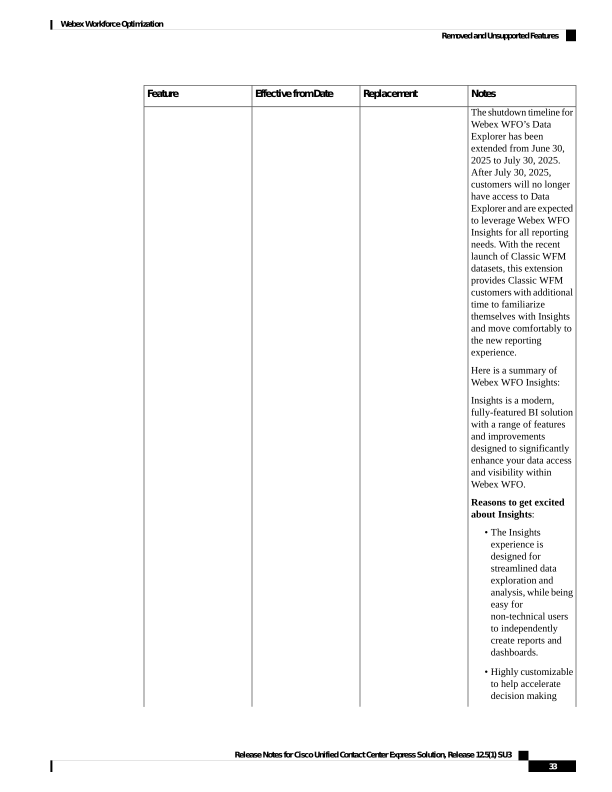
The features listed in the following table are no longer available.
Release Notes for Cisco Unified Contact Center Express Solution, Release 12.5(1) SU3
31
Webex Workforce Optimization
Deprecated Features
Page 38
Notes
Replacement
Effective from Date
Feature
Webex WFO Insights
24 October, 2024
Webex WFO Data
Explorer
Release Notes for Cisco Unified Contact Center Express Solution, Release 12.5(1) SU3
32
Webex Workforce Optimization
Removed and Unsupported Features

Page 39
Notes
Replacement
Effective from Date
Feature
The shutdown timeline for
Webex WFO’s Data
Explorer has been
extended from June 30,
2025 to July 30, 2025.
After July 30, 2025,
customers will no longer
have access to Data
Explorer and are expected
to leverage Webex WFO
Insights for all reporting
needs. With the recent
launch of Classic WFM
datasets, this extension
provides Classic WFM
customers with additional
time to familiarize
themselves with Insights
and move comfortably to
the new reporting
experience.
Here is a summary of
Webex WFO Insights:
Insights is a modern,
fully-featured BI solution
with a range of features
and improvements
designed to significantly
enhance your data access
and visibility within
Webex WFO.
Reasons to get excited
about Insights:
• The Insights
experience is
designed for
streamlined data
exploration and
analysis, while being
easy for
non-technical users
to independently
create reports and
dashboards.
• Highly customizable
to help accelerate
decision making
Release Notes for Cisco Unified Contact Center Express Solution, Release 12.5(1) SU3
33
Webex Workforce Optimization
Removed and Unsupported Features
Page 40
Notes
Replacement
Effective from Date
Feature
Offers a broad range
of visualizations
•
• Suitable for both
efficient ad-hoc
analysis and rich
dash-boarding.
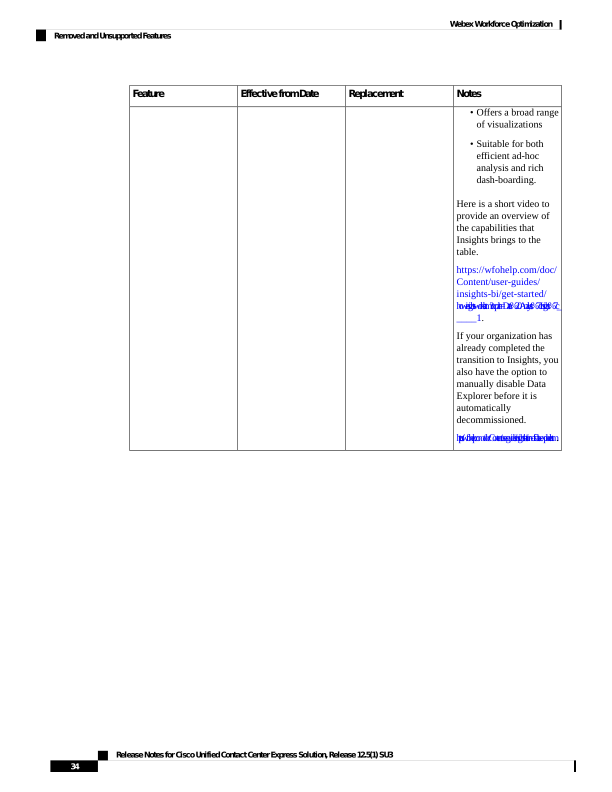
Here is a short video to
provide an overview of
the capabilities that
Insights brings to the
table.
https://wfohelp.com/doc/
Content/user-guides/
insights-bi/get-started/
how-insights-works.htm?tocpath=Data%20Analysts%7cInsights%7c_
____1.
If your organization has
already completed the
transition to Insights, you
also have the option to
manually disable Data
Explorer before it is
automatically
decommissioned.
htps:/wfohelp.com/doc/Content/user-guides/insights-bi/turn-of-data-explorer.htm.
Release Notes for Cisco Unified Contact Center Express Solution, Release 12.5(1) SU3
34
Webex Workforce Optimization
Removed and Unsupported Features
Page 41
C H A P T E R 7
Caveats
• Caveat Queries by Product, on page 35
Caveat Queries by Product
Bug Search Tool
If you have an account with Cisco.com, you can use the Bug Search tool to find caveats of any severity for
any release. Access the Bug Search tool at https://bst.cloudapps.cisco.com/bugsearch/. Enter the bug identifier
in the search box, and press return or click Search.
To access a list of open caveats and resolved caveats (rather than an individual caveat) for a particular product
or component, see the relevant sections later in these notes.
You can also choose your own filters and criteria in the tool to see a specific subset of caveats, as described
in the following table.
A list of the following caveats appears
And you choose this in Status
If you choose this in Releases
Any caveat in an open state for the
release or releases you select.
Open
Affecting or Fixed in these
Releases
OR
Affecting these Releases
Any caveat in any release with the fix
applied to the specific release or releases
you select.
Fixed
Fixed in these Releases
Any caveat that is either fixed or occurs
in the specific release or releases you
select.
Fixed
Affecting or Fixed in these
Releases
Any caveat that occurs in the release or
releases you select.
Fixed
Affecting these Releases
Release Notes for Cisco Unified Contact Center Express Solution, Release 12.5(1) SU3
35

Page 42
Severity 3 or Higher Caveats for Release 12.5(1)SU3
Use the following links to the Bug Search Tool to view a list of Severity 3 or higher caveats for each product
or component for the current release. You can filter the result by setting the filter values in the tool.
If the list of caveats does not automatically appear when you open the browser, refresh the browser.
Note
Cisco Unified Contact Center Express
https://bst.cloudapps.cisco.com/bugsearch/
search?kw=*&pf=prdNm&pfVal=270569179&rls=12.5(1)SU3&sb=anfr&svr=3nH&bt=custV
Cisco Unified Intelligence Center
None.
Cisco Finesse
https://bst.cloudapps.cisco.com/bugsearch/
search?kw=*&pf=prdNm&rls=12.5(1)SU3&sb=anfr&svr=3nH&bt=custV&prdNam=Cisco%20Finesse
Cisco Customer Collaboration Platform
https://bst.cloudapps.cisco.com/bugsearch/
search?kw=*&pf=prdNm&pfVal=283613136&rls=12.5(1)SU3&sb=anfr&svr=3nH&bt=custV
Release Notes for Cisco Unified Contact Center Express Solution, Release 12.5(1) SU3
36
Caveats
Severity 3 or Higher Caveats for Release 12.5(1)SU3