Document Metadata
Format: PDF 1.4
Title: Cisco Unified Contact Center Express Report Developer Guide, Release 12.5(1)
Author: Prashanth
Creator: DITA Open Toolkit
Producer: XEP 4.9 build 20070312; modified using iText 2.1.7 by 1T3XT
Creation Date: D:20200308123911
Mod Date: D:20200308212723-07'00'
Page 1
Cisco Unified Contact Center Express Report Developer Guide, Release
12.5(1)
First Published: 2020-01-31
Americas Headquarters
Cisco Systems, Inc.
170 West Tasman Drive
San Jose, CA 95134-1706
USA
http://www.cisco.com
Tel: 408 526-4000
800 553-NETS (6387)
Fax: 408 527-0883

Page 2
THE SPECIFICATIONS AND INFORMATION REGARDING THE PRODUCTS IN THIS MANUAL ARE SUBJECT TO CHANGE WITHOUT NOTICE. ALL STATEMENTS,
INFORMATION, AND RECOMMENDATIONS IN THIS MANUAL ARE BELIEVED TO BE ACCURATE BUT ARE PRESENTED WITHOUT WARRANTY OF ANY KIND,
EXPRESS OR IMPLIED. USERS MUST TAKE FULL RESPONSIBILITY FOR THEIR APPLICATION OF ANY PRODUCTS.
THE SOFTWARE LICENSE AND LIMITED WARRANTY FOR THE ACCOMPANYING PRODUCT ARE SET FORTH IN THE INFORMATION PACKET THAT SHIPPED WITH
THE PRODUCT AND ARE INCORPORATED HEREIN BY THIS REFERENCE. IF YOU ARE UNABLE TO LOCATE THE SOFTWARE LICENSE OR LIMITED WARRANTY,
CONTACT YOUR CISCO REPRESENTATIVE FOR A COPY.
The Cisco implementation of TCP header compression is an adaptation of a program developed by the University of California, Berkeley (UCB) as part of UCB's public domain version of
the UNIX operating system. All rights reserved. Copyright © 1981, Regents of the University of California.
NOTWITHSTANDING ANY OTHER WARRANTY HEREIN, ALL DOCUMENT FILES AND SOFTWARE OF THESE SUPPLIERS ARE PROVIDED “AS IS" WITH ALL FAULTS.
CISCO AND THE ABOVE-NAMED SUPPLIERS DISCLAIM ALL WARRANTIES, EXPRESSED OR IMPLIED, INCLUDING, WITHOUT LIMITATION, THOSE OF
MERCHANTABILITY, FITNESS FOR A PARTICULAR PURPOSE AND NONINFRINGEMENT OR ARISING FROM A COURSE OF DEALING, USAGE, OR TRADE PRACTICE.
IN NO EVENT SHALL CISCO OR ITS SUPPLIERS BE LIABLE FOR ANY INDIRECT, SPECIAL, CONSEQUENTIAL, OR INCIDENTAL DAMAGES, INCLUDING, WITHOUT
LIMITATION, LOST PROFITS OR LOSS OR DAMAGE TO DATA ARISING OUT OF THE USE OR INABILITY TO USE THIS MANUAL, EVEN IF CISCO OR ITS SUPPLIERS
HAVE BEEN ADVISED OF THE POSSIBILITY OF SUCH DAMAGES.
Any Internet Protocol (IP) addresses and phone numbers used in this document are not intended to be actual addresses and phone numbers. Any examples, command display output, network
topology diagrams, and other figures included in the document are shown for illustrative purposes only. Any use of actual IP addresses or phone numbers in illustrative content is unintentional
and coincidental.
All printed copies and duplicate soft copies of this document are considered uncontrolled. See the current online version for the latest version.
Cisco has more than 200 offices worldwide. Addresses and phone numbers are listed on the Cisco website at www.cisco.com/go/offices.
Cisco and the Cisco logo are trademarks or registered trademarks of Cisco and/or its affiliates in the U.S. and other countries. To view a list of Cisco trademarks, go to this URL: www.cisco.com
go trademarks. Third-party trademarks mentioned are the property of their respective owners. The use of the word partner does not imply a partnership relationship between Cisco and any
other company. (1721R)
© 2000–2020 Cisco Systems, Inc. All rights reserved.
Page 3
C O N T E N T S
Preface
v
P R E F A C E
Change History
v
About This Guide
v
Audience
vi
Conventions
vi
Related Documents
vii
Documentation and Support
viii
Documentation Feedback
viii
Introduction
1
C H A P T E R 1
Overview
1
Common Terms
2
Create Custom Reports
3
C H A P T E R 2
Overview
3
How to Create Custom Reports
3
Create Unified CCX Data Source
4
Create Custom Stored Procedure
5
Interpret Database Records
7
C H A P T E R 3
Overview
7
Call Scenarios
7
Call-Related Detail Records Flow
7
Basic ACD Call Queues for One CSQ
8
Basic ACD Call Queues for Two CSQs
9
Basic ACD Call Wrap-Up
9
Cisco Unified Contact Center Express Report Developer Guide, Release 12.5(1)
iii

Page 4
Basic Agent-Based Routing Call
10
Transfer to Route Point
11
Conference to Agent
12
Workflow Redirect to Route Point
12
ACD Call Unanswered
13
Agent-to-Agent Non-ACD Call
13
Agent-to-Agent Non-ACD Call Transfer
14
Agent-to-Agent Non-ACD Call Conference
15
ACD Call Consult Transfer
15
ACD Call Blind Transfer to Agent Extension(ACD/Non-ACD)
16
ACD Call Blind Transfer to Route Point
17
Agent Places Consult Call and Resumes Call
18
Agent Consults Agent and Resumes Call
19
Basic Outbound Call Accepted
20
Basic Outbound Call Rejected and Later Accepted
20
Basic Outbound Call Accepted and Transferred to Another Agent
21
Basic Outbound Call Accepted and Transferred to Route Point
22
Chat Scenarios
23
Chat-Related Detail Records Flow
23
Chat Contact Unanswered
23
Cisco Unified Contact Center Express Report Developer Guide, Release 12.5(1)
iv
Contents
Page 5
Preface
• Change History, on page v
• About This Guide, on page v
• Audience, on page vi
• Conventions, on page vi
• Related Documents, on page vii
• Documentation and Support, on page viii
• Documentation Feedback, on page viii
Change History
This table lists changes made to this guide. Most recent changes appear at the top.
Date
See
Change
January 2020
Initial Release of Document for Release 12.5(1)
Preface >> Related Documents
Cisco SocialMiner (SM) has been
renamed as Customer Collaboration
Platform (CCP).
Create Custom
Reports>>Overview
Create Custom Reports>>How to
Create Custom Reports
You can now create custom reports
without installing Standalone
Unified Intelligence Center.
About This Guide
The Cisco Unified Contact Center Express Report Developer Guide describes how database records are written
for various call, chat, and email scenarios in Cisco Unified Contact Center Express (Unified CCX). It describes
how to create custom reports from Cisco Unified Intelligence Center that is embedded with Unified CCX.
Cisco Unified Contact Center Express Report Developer Guide, Release 12.5(1)
v

Page 6
Audience
This document is intended for Unified CCX users who use Unified Intelligence Center to create custom reports.
Conventions
This manual uses the following conventions.
Description
Convention
Boldface font is used to indicate commands, such as
user entries, keys, buttons, and folder and submenu
names. For example:
• Choose Edit > Find
• Click Finish.
boldface font
Italic font is used to indicate the following:
• To introduce a new term. Example: A skill group
is a collection of agents who share similar skills.
• For emphasis. Example: Do not use the
numerical naming convention.
• An argument for which you must supply values.
Example:
IF (condition, true-value, false-value)
• A book title. Example:
See the Cisco Unified Contact Center Express
Installation Guide.
italic font
Window font, such as Courier, is used for the
following:
• Text as it appears in code or information that the
system displays. Example:
<html><title> Cisco Systems,Inc.
</title></html>
• File names. Example:
tserver.properties.
• Directory paths. Example:
C:\Program Files\Adobe
window font
Cisco Unified Contact Center Express Report Developer Guide, Release 12.5(1)
vi
Preface
Audience
Page 7
Description
Convention
Nonquoted sets of characters (strings) appear in
regular font. Do not use quotation marks around a
string or the string will include the quotation marks.
string
Optional elements appear in square brackets.
[ ]
Alternative keywords are grouped in braces and
separated by vertical bars.
{ x | y | z }
Optional alternative keywords are grouped in brackets
and separated by vertical bars.
[ x | y | z ]
Angle brackets are used to indicate the following:
• For arguments where the context does not allow
italic, such as ASCII output.
• A character string that the user enters but that
does not appear on the window such as a
password.
< >
The key labeled Control is represented in screen
displays by the symbol ^. For example, the screen
instruction to hold down the Control key while you
press the D key appears as ^D.
^
Related Documents
Link
Document or Resource
https://www.cisco.com/en/US/products/sw/custcosw/ps1846/
products_documentation_roadmaps_list.html
Cisco Unified Contact Center Express
Documentation Guide
https://www.cisco.com/en/US/products/sw/custcosw/ps1846/tsd\_
products_support_series_home.html
Cisco Unified CCX documentation
https://www.cisco.com/en/US/products/ps9755/tsd\_products\_
support_series_home.html
Cisco Unified Intelligence Center
documentation
https://www.cisco.com/en/US/products/ps11324/tsd\_products\_
support_series_home.html
Cisco Finesse documentation
https://www.cisco.com/en/US/products/sw/custcosw/ps1846/tsd\_
products_support_series_home.html
Cisco Customer Collaboration Platform
documentation
From Unified CCX Release
12.5(1), CCP documents are
available in the Cisco Unified
CCX documentation folder.
Note
Cisco Unified Contact Center Express Report Developer Guide, Release 12.5(1)
vii
Preface
Related Documents
Page 8
Link
Document or Resource
https://www.cisco.com/c/dam/en/us/td/docs/voice\_ip\_comm/uc\_
system/virtualization/
virtualization-cisco-unified-contact-center-express.html
Cisco Unified CCX Virtualization
Information
https://www.cisco.com/c/en/us/support/customer-collaboration/
unified-contact-center-express/
products-device-support-tables-list.html
Cisco Unified CCX Compatibility
Information
Documentation and Support
To download documentation, submit a service request, and find additional information, see What's New in
Cisco Product Documentation at https://www.cisco.com/en/US/docs/general/whatsnew/whatsnew.html.
Documentation Feedback
To provide your feedback for this document, send an email to:
contactcenterproducts_docfeedback@cisco.com
Cisco Unified Contact Center Express Report Developer Guide, Release 12.5(1)
viii
Preface
Documentation and Support
Page 9
C H A P T E R 1
Introduction
• Overview, on page 1
• Common Terms, on page 2
Overview
Cisco Unified Intelligence Center is a reporting platform for users of Cisco Contact Center products. It is a
web-based application that provides Historical, Real-time, and Live Data reporting and dashboards.
Unified Intelligence Center serves the following primary purposes:
• Obtains data from the base solution's database. The base solution can be any of the Contact Center
products.
• Allows you to create custom queries to obtain specific data.
• Customizes the visual presentation of the reports.
• Customizes the data presented in the reports.
• Allows different groups of people to view specific data based on their roles.
As a reporting user, you can use the new Unified Intelligence Center page to perform the following tasks:
• Create, edit, and manage Dashboards.
• Create, edit, run, and manage Reports.
• Filter data in a report.
• View permalink for Dashboards and Reports.
• Set sharing permissions for Dashboards and Reports.
• Select locale for the Unified Intelligence Center.
• Search for Dashboard and Report.
• Mark Dashboards and Reports as favorites.
• View the personal list of favorites for Dashboards and Reports.
• Schedule reports to run at selected intervals.
Cisco Unified Contact Center Express Report Developer Guide, Release 12.5(1)
1

Page 10
• Creating and viewing;
• Report Definitions
• Data Sources
• Value Lists and Collections
• Users and Permissions (Security)
Common Terms
Data Source
Data source defines the sources that contain data for the report. Unified Intelligence Center supports two types
of data sources: IBM Informix (Historical Reports) and Streaming (Live-Data Reports). Data sources are
preconfigured for you.
Additional data sources are not supported.
Note
Report Definition
Each report has a report definition that represents how data is retrieved from the data source for that report
template. In addition, a report definition contains the dataset that is obtained. This includes the fields, filters,
formulas, refresh rate, and key criteria field for the report.
Reports
Reports show data returned by Report Definitions. This data is extracted by database queries.
Stock Report
Report that is pre-bundled in Unified Intelligence Center.
Report Views
A report can be presented in multiple formats like a grid, chart, or a graph and gauge. Each view can have its
own set of fields. A single report can have multiple views.
Report Help
You can attach a help page specifically for your report.
Cisco Unified Contact Center Express Report Developer Guide, Release 12.5(1)
2
Introduction
Common Terms

Page 11
C H A P T E R 2
Create Custom Reports
• Overview, on page 3
• How to Create Custom Reports, on page 3
• Create Unified CCX Data Source, on page 4
• Create Custom Stored Procedure, on page 5
Overview
You can create new reports with the Unified Intelligence Center that is embedded with Unified CCX. To
create new custom Historical reports, you need not install a Standalone Unified Intelligence Center.
How to Create Custom Reports
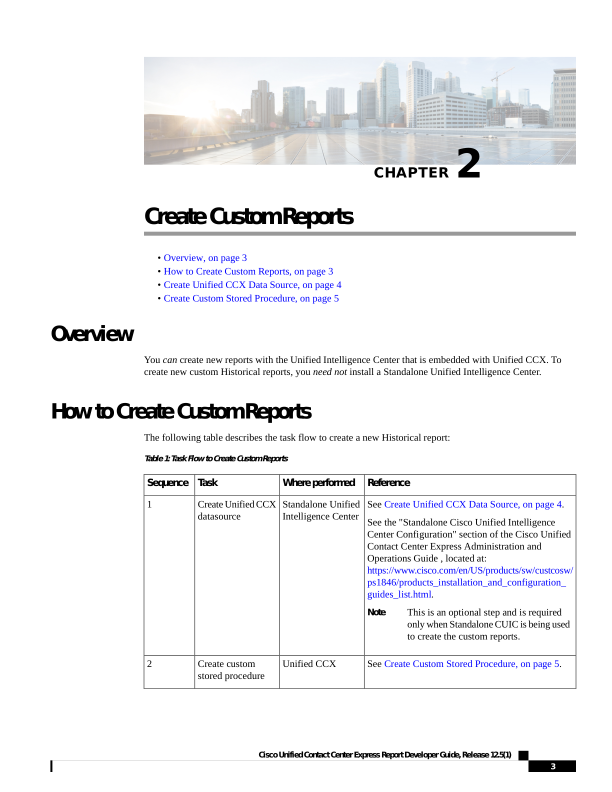
The following table describes the task flow to create a new Historical report:
Table 1: Task Flow to Create Custom Reports
Reference
Where performed
Task
Sequence
See Create Unified CCX Data Source, on page 4.
See the "Standalone Cisco Unified Intelligence
Center Configuration" section of the Cisco Unified
Contact Center Express Administration and
Operations Guide , located at:
https://www.cisco.com/en/US/products/sw/custcosw/
ps1846/products_installation_and_configuration_
guides_list.html.
This is an optional step and is required
only when Standalone CUIC is being used
to create the custom reports.
Note
Standalone Unified
Intelligence Center
Create Unified CCX
datasource
1
See Create Custom Stored Procedure, on page 5.
Unified CCX
Create custom
stored procedure
2
Cisco Unified Contact Center Express Report Developer Guide, Release 12.5(1)
3

Page 12
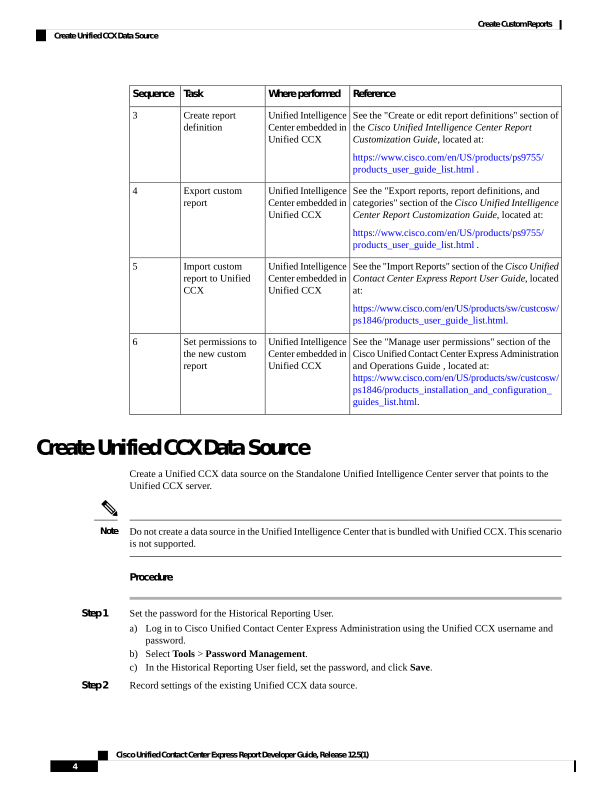
Reference
Where performed
Task
Sequence
See the "Create or edit report definitions" section of
the Cisco Unified Intelligence Center Report
Customization Guide, located at:
https://www.cisco.com/en/US/products/ps9755/
products_user_guide_list.html .
Unified Intelligence
Center embedded in
Unified CCX
Create report
definition
3
See the "Export reports, report definitions, and
categories" section of the Cisco Unified Intelligence
Center Report Customization Guide, located at:
https://www.cisco.com/en/US/products/ps9755/
products_user_guide_list.html .
Unified Intelligence
Center embedded in
Unified CCX
Export custom
report
4
See the "Import Reports" section of the Cisco Unified
Contact Center Express Report User Guide, located
at:
https://www.cisco.com/en/US/products/sw/custcosw/
ps1846/products_user_guide_list.html.
Unified Intelligence
Center embedded in
Unified CCX
Import custom
report to Unified
CCX
5
See the "Manage user permissions" section of the
Cisco Unified Contact Center Express Administration
and Operations Guide , located at:
https://www.cisco.com/en/US/products/sw/custcosw/
ps1846/products_installation_and_configuration_
guides_list.html.
Unified Intelligence
Center embedded in
Unified CCX
Set permissions to
the new custom
report
6
Create Unified CCX Data Source
Create a Unified CCX data source on the Standalone Unified Intelligence Center server that points to the
Unified CCX server.
Do not create a data source in the Unified Intelligence Center that is bundled with Unified CCX. This scenario
is not supported.
Note
Procedure
Step 1
Set the password for the Historical Reporting User.
a)
Log in to Cisco Unified Contact Center Express Administration using the Unified CCX username and
password.
b) Select Tools > Password Management.
c)
In the Historical Reporting User field, set the password, and click Save.
Step 2
Record settings of the existing Unified CCX data source.
Cisco Unified Contact Center Express Report Developer Guide, Release 12.5(1)
4
Create Custom Reports
Create Unified CCX Data Source

Page 13
a)
Log in to Unified Intelligence Center on the Unified CCX server.
b) In the left pane, click Data Sources.
The Data Sources page opens in a separate tab in the right pane.
c)
Select the Unified CCX data source and click Edit.
d) Record the settings in the page so that you can refer to this data later.
Step 3
Configure a data source on the Standalone Unified Intelligence Center server to point to the Unified CCX
server.
a)
Log in to the Standalone Unified Intelligence Center using credentials that has report designer permissions.
b) In the left pane, click Data Sources.
c)
Click Create to create a new data source.
d) Set the parameters as per the settings you recorded in Step 2d.
The database user name should be uccxhruser and the password should match the password
you set in Step 1c.
Note
e)
Click Test Connection and verify the settings.
If an error is prompted, verify that the settings are correct and try again.
Tip
Create Custom Stored Procedure
Perform the following steps for both Unified CCX nodes, if applicable.
Note
The Unified CCX database schema details are described in the Database Schema Guide for Cisco Unified
CCX and Cisco Unified IP IVR, located at:
https://www.cisco.com/c/en/us/support/customer-collaboration/unified-contact-center-express/
products-technical-reference-list.html.
Procedure
Step 1
Connect to the db_cra database using the uccxhruser username and password.
Step 2
Create a stored procedure using third-party tools such as SQuirrel SQL Client and AGS Server Studio.
Step 3
Assign execution privileges for the stored procedure to uccxHrUserRole using the following command:
Example:
grant execute on <your procedure name> to 'uccxHrUserRole';
What to do next
See the task flow table in How to Create Custom Reports, on page 3.
Cisco Unified Contact Center Express Report Developer Guide, Release 12.5(1)
5
Create Custom Reports
Create Custom Stored Procedure

Page 14
Cisco Unified Contact Center Express Report Developer Guide, Release 12.5(1)
6
Create Custom Reports
Create Custom Stored Procedure
Page 15
C H A P T E R 3
Interpret Database Records
• Overview, on page 7
• Call Scenarios, on page 7
• Chat Scenarios, on page 23
Overview
The following abbreviations are used for database records:
• ACDR—AgentConnectionDetail record in the AgentConnectionDetail table.
• ASDR—AgentStateDetail record in the AgentStateDetail table.
• CCDR—ContactCallDetail record in the ContactCallDetail table.
• CQDR—ContactQueueDetail record in the ContactQueueDetail table.
• CRDR—ContactRoutingDetail record in the ContactRoutingDetail table.
• TACDR—TextAgentConnectionDetail record in the TextAgentConnectionDetail table.
• TCDR—TextContactDetail records in the TextContactDetail table.
• TASDR—TextAgentStateDetail records in the TextAgentStateDetail table.
• TCQDR—TextContactQueueDetail record in the TextContactQueueDetail table.
Call Scenarios
The following assumptions are made for the call scenarios:
• Auto-work is disabled for incoming Automatic Call Distribution (ACD) calls.
• Auto-available is enabled for agents.
Call-Related Detail Records Flow
The following table presents an example of the general flow of detail records for incoming ACD calls.
Cisco Unified Contact Center Express Report Developer Guide, Release 12.5(1)
7

Page 16
Assumptions
• Contact Service Queue (CSQ) is configured for auto-work.
• Agent is configured for auto-available.
Table 2: General Flow of Detail Records for Incoming ACD Calls
Detail record activity
Call activity
Allocates session.
Begins CCDR in memory.
Call reaches the CTI port
Begins CRDR and CQDR in memory.
Call executes the first Select Resource step
Begins ACDR in memory, writes ASDR to change
state to Reserved.
System selects agent and rings the phone
Writes ASDR (Talking).
Agent answers
Writes CRDR, CQDRs, ASDR (Work).
Call disconnects
Writes ACDR, CCDR, ASDR (Ready).
Agent leaves Work state
If the agent does not enter Work state after the call, the system writes the ACDR and the ASDR (Ready) when
the call disconnects. If the agent is not configured to be auto-available, the ASDR relates to the Not Ready
state.
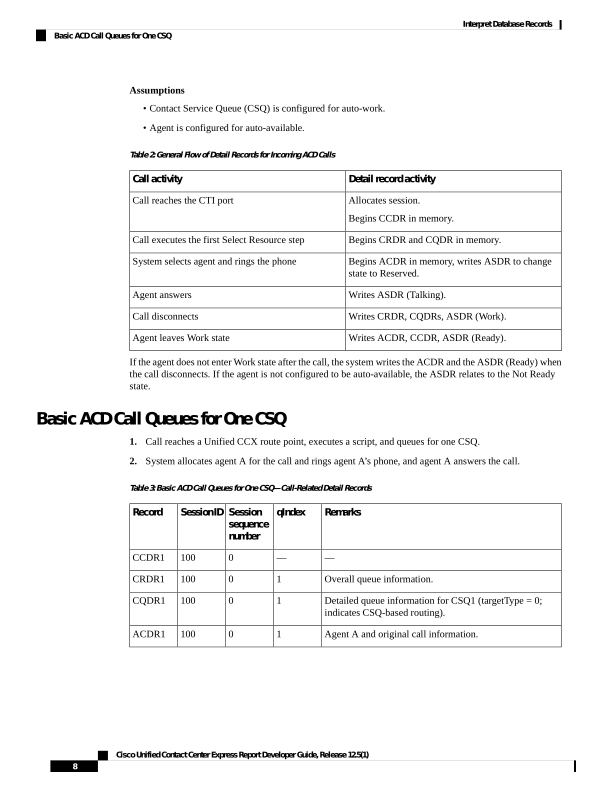
Basic ACD Call Queues for One CSQ
1.
Call reaches a Unified CCX route point, executes a script, and queues for one CSQ.
2.
System allocates agent A for the call and rings agent A’s phone, and agent A answers the call.
Table 3: Basic ACD Call Queues for One CSQ—Call-Related Detail Records
Remarks
qIndex
Session
sequence
number
SessionID
Record
—
—
0
100
CCDR1
Overall queue information.
1
0
100
CRDR1
Detailed queue information for CSQ1 (targetType = 0;
indicates CSQ-based routing).
1
0
100
CQDR1
Agent A and original call information.
1
0
100
ACDR1
Cisco Unified Contact Center Express Report Developer Guide, Release 12.5(1)
8
Interpret Database Records
Basic ACD Call Queues for One CSQ
Page 17
Table 4: Basic ACD Call Queues for One CSQ—Agent State-Change Records
Remarks
Reason
Record
Agent A is selected for call.
4 (Reserved)
ASDR1
Agent A answers call.
5 (Talking)
ASDR2
Call ends.
3 (Ready)
ASDR3
Basic ACD Call Queues for Two CSQs
1.
Call reaches a Unified CCX route point, executes a script, and queues for two CSQs.
2.
System allocates agent A for the call and rings agent A’s phone, and agent A answers the call.
Table 5: Basic ACD Call Queues for Two CSQs—Call-Related Detail Records
Remarks
qIndex
Session
sequence
number
SessionID
Record
—
—
0
100
CCDR1
Overall queue information.
1
0
100
CRDR1
Overall queue information for CSQ1 (targetType = 0,
targetID = ID of CSQ1).
1
0
100
CQDR1
Overall queue information for CSQ2 (targetType = 0,
targetID = ID of CSQ2).
1
0
100
CQDR2
Agent A and original call information.
1
0
100
ACDR1
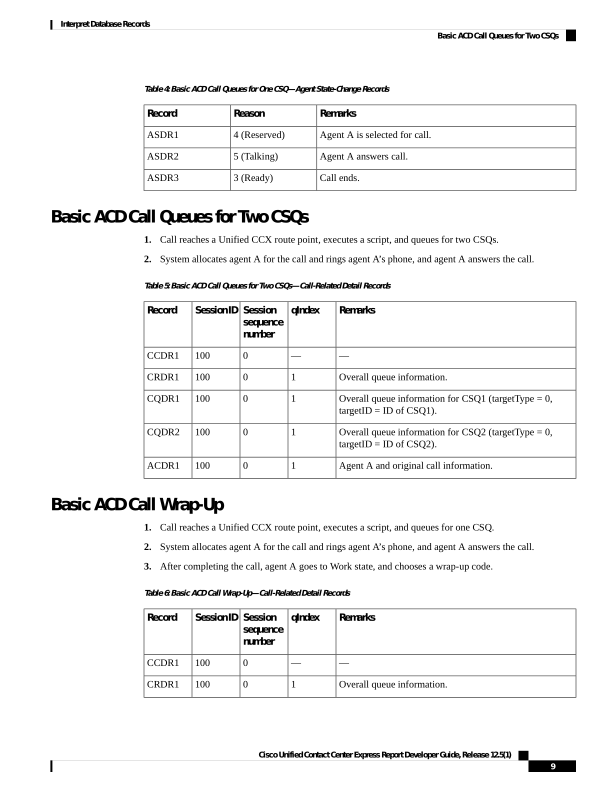
Basic ACD Call Wrap-Up
1.
Call reaches a Unified CCX route point, executes a script, and queues for one CSQ.
2.
System allocates agent A for the call and rings agent A’s phone, and agent A answers the call.
3.
After completing the call, agent A goes to Work state, and chooses a wrap-up code.
Table 6: Basic ACD Call Wrap-Up—Call-Related Detail Records
Remarks
qIndex
Session
sequence
number
SessionID
Record
—
—
0
100
CCDR1
Overall queue information.
1
0
100
CRDR1
Cisco Unified Contact Center Express Report Developer Guide, Release 12.5(1)
9
Interpret Database Records
Basic ACD Call Queues for Two CSQs
Page 18
Remarks
qIndex
Session
sequence
number
SessionID
Record
Detailed queue information for CSQ1 (targetType = 0;
indicates CSQ-based routing).
1
0
100
CQDR1
Agent A and original call information with wrap-up code.
1
0
100
ACDR1
Table 7: Basic ACD Call Wrap-Up—Agent State-Change Records
Remarks
Reason
Record
Agent A is selected for call.
4 (Reserved)
ASDR1
Agent A answers call.
5 (Talking)
ASDR2
Call ends.
6 (Work)
ASDR3
Agent A goes to Ready state.
3 (Ready)
ASDR4
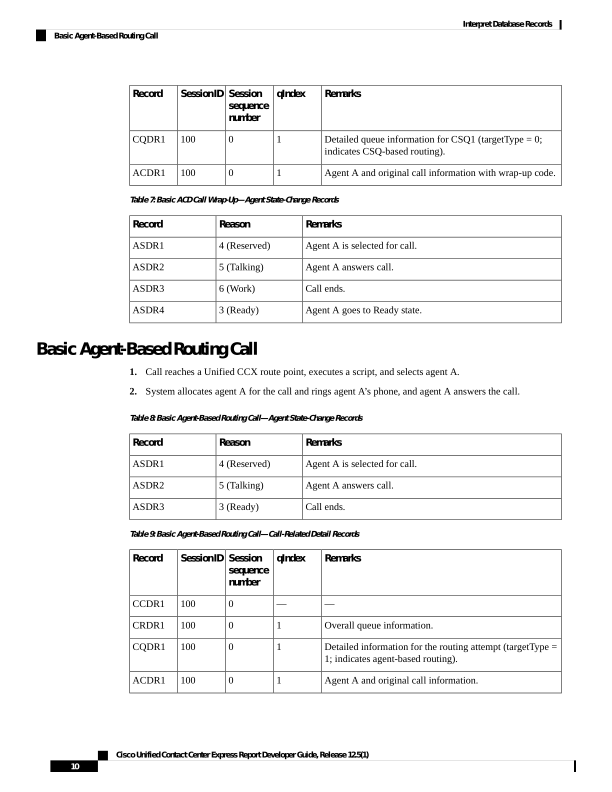
Basic Agent-Based Routing Call
1.
Call reaches a Unified CCX route point, executes a script, and selects agent A.
2.
System allocates agent A for the call and rings agent A’s phone, and agent A answers the call.
Table 8: Basic Agent-Based Routing Call—Agent State-Change Records
Remarks
Reason
Record
Agent A is selected for call.
4 (Reserved)
ASDR1
Agent A answers call.
5 (Talking)
ASDR2
Call ends.
3 (Ready)
ASDR3
Table 9: Basic Agent-Based Routing Call—Call-Related Detail Records
Remarks
qIndex
Session
sequence
number
SessionID
Record
—
—
0
100
CCDR1
Overall queue information.
1
0
100
CRDR1
Detailed information for the routing attempt (targetType =
1; indicates agent-based routing).
1
0
100
CQDR1
Agent A and original call information.
1
0
100
ACDR1
Cisco Unified Contact Center Express Report Developer Guide, Release 12.5(1)
10
Interpret Database Records
Basic Agent-Based Routing Call
Page 19
Table 10: Basic Agent-Based Routing Call—Agent State-Change Records
Remarks
Reason
Record
Agent A is selected for call.
4 (Reserved)
ASDR1
Agent A answers call.
5 (Talking)
ASDR2
Call ends.
3 (Ready)
ASDR3
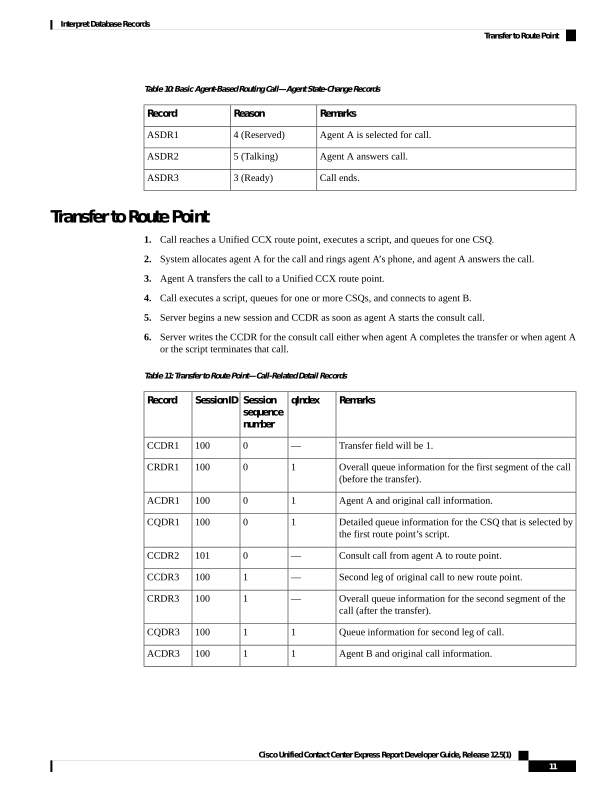
Transfer to Route Point
1.
Call reaches a Unified CCX route point, executes a script, and queues for one CSQ.
2.
System allocates agent A for the call and rings agent A’s phone, and agent A answers the call.
3.
Agent A transfers the call to a Unified CCX route point.
4.
Call executes a script, queues for one or more CSQs, and connects to agent B.
5.
Server begins a new session and CCDR as soon as agent A starts the consult call.
6.
Server writes the CCDR for the consult call either when agent A completes the transfer or when agent A
or the script terminates that call.
Table 11: Transfer to Route Point—Call-Related Detail Records
Remarks
qIndex
Session
sequence
number
SessionID
Record
Transfer field will be 1.
—
0
100
CCDR1
Overall queue information for the first segment of the call
(before the transfer).
1
0
100
CRDR1
Agent A and original call information.
1
0
100
ACDR1
Detailed queue information for the CSQ that is selected by
the first route point’s script.
1
0
100
CQDR1
Consult call from agent A to route point.
—
0
101
CCDR2
Second leg of original call to new route point.
—
1
100
CCDR3
Overall queue information for the second segment of the
call (after the transfer).
—
1
100
CRDR3
Queue information for second leg of call.
1
1
100
CQDR3
Agent B and original call information.
1
1
100
ACDR3
Cisco Unified Contact Center Express Report Developer Guide, Release 12.5(1)
11
Interpret Database Records
Transfer to Route Point
Page 20
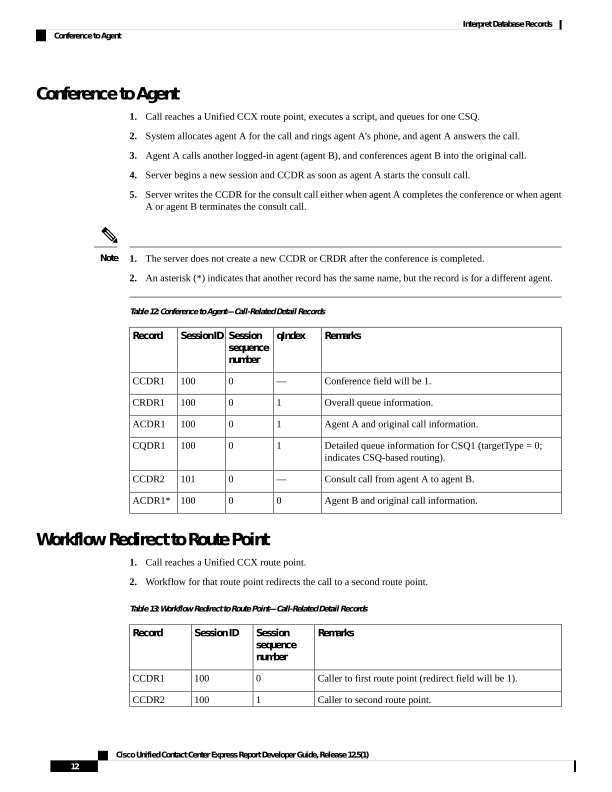
Conference to Agent
1.
Call reaches a Unified CCX route point, executes a script, and queues for one CSQ.
2.
System allocates agent A for the call and rings agent A’s phone, and agent A answers the call.
3.
Agent A calls another logged-in agent (agent B), and conferences agent B into the original call.
4.
Server begins a new session and CCDR as soon as agent A starts the consult call.
5.
Server writes the CCDR for the consult call either when agent A completes the conference or when agent
A or agent B terminates the consult call.
1.
The server does not create a new CCDR or CRDR after the conference is completed.
2.
An asterisk (*) indicates that another record has the same name, but the record is for a different agent.
Note
Table 12: Conference to Agent—Call-Related Detail Records
Remarks
qIndex
Session
sequence
number
SessionID
Record
Conference field will be 1.
—
0
100
CCDR1
Overall queue information.
1
0
100
CRDR1
Agent A and original call information.
1
0
100
ACDR1
Detailed queue information for CSQ1 (targetType = 0;
indicates CSQ-based routing).
1
0
100
CQDR1
Consult call from agent A to agent B.
—
0
101
CCDR2
Agent B and original call information.
0
0
100
ACDR1*
Workflow Redirect to Route Point
1.
Call reaches a Unified CCX route point.
2.
Workflow for that route point redirects the call to a second route point.
Table 13: Workflow Redirect to Route Point—Call-Related Detail Records
Remarks
Session
sequence
number
Session ID
Record
Caller to first route point (redirect field will be 1).
0
100
CCDR1
Caller to second route point.
1
100
CCDR2
Cisco Unified Contact Center Express Report Developer Guide, Release 12.5(1)
12
Interpret Database Records
Conference to Agent

Page 21
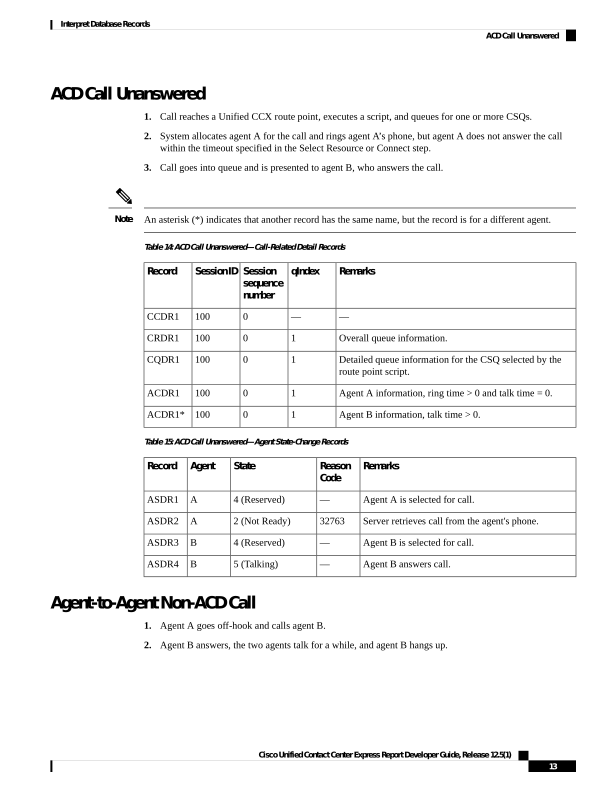
ACD Call Unanswered
1.
Call reaches a Unified CCX route point, executes a script, and queues for one or more CSQs.
2.
System allocates agent A for the call and rings agent A’s phone, but agent A does not answer the call
within the timeout specified in the Select Resource or Connect step.
3.
Call goes into queue and is presented to agent B, who answers the call.
An asterisk (*) indicates that another record has the same name, but the record is for a different agent.
Note
Table 14: ACD Call Unanswered—Call-Related Detail Records
Remarks
qIndex
Session
sequence
number
SessionID
Record
—
—
0
100
CCDR1
Overall queue information.
1
0
100
CRDR1
Detailed queue information for the CSQ selected by the
route point script.
1
0
100
CQDR1
Agent A information, ring time > 0 and talk time = 0.
1
0
100
ACDR1
Agent B information, talk time > 0.
1
0
100
ACDR1*
Table 15: ACD Call Unanswered—Agent State-Change Records
Remarks
Reason
Code
State
Agent
Record
Agent A is selected for call.
—
4 (Reserved)
A
ASDR1
Server retrieves call from the agent's phone.
32763
2 (Not Ready)
A
ASDR2
Agent B is selected for call.
—
4 (Reserved)
B
ASDR3
Agent B answers call.
—
5 (Talking)
B
ASDR4
Agent-to-Agent Non-ACD Call
1.
Agent A goes off-hook and calls agent B.
2.
Agent B answers, the two agents talk for a while, and agent B hangs up.
Cisco Unified Contact Center Express Report Developer Guide, Release 12.5(1)
13
Interpret Database Records
ACD Call Unanswered

Page 22
Table 16: Agent-to-Agent Non-ACD Call—Call-Related Detail Records
Remarks
Session
sequence
number
Session ID
Record
Agent A to agent B information.
0
100
CCDR1
Table 17: Agent-to-Agent Non-ACD Call—Agent State-Change Records
Remarks
Reason
Code
State
Agent
Record
Agent A goes off-hook.
32762
2 (Not Ready)
A
ASDR1
Call rings at agent B’s phone.
32761
2 (Not Ready)
B
ASDR2
Agent B hangs up.
—
3 (Ready)
B
ASDR3
—
—
3 (Ready)
A
ASDR4
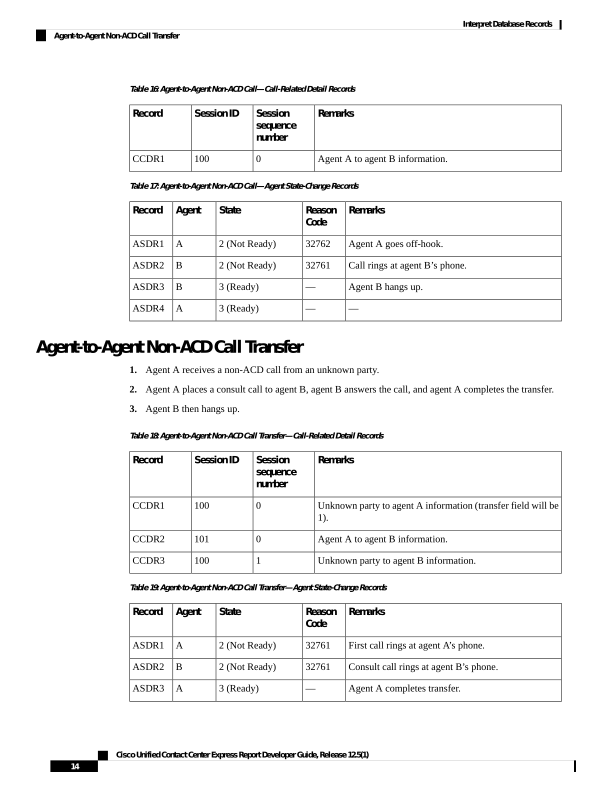
Agent-to-Agent Non-ACD Call Transfer
1.
Agent A receives a non-ACD call from an unknown party.
2.
Agent A places a consult call to agent B, agent B answers the call, and agent A completes the transfer.
3.
Agent B then hangs up.
Table 18: Agent-to-Agent Non-ACD Call Transfer—Call-Related Detail Records
Remarks
Session
sequence
number
Session ID
Record
Unknown party to agent A information (transfer field will be
1).
0
100
CCDR1
Agent A to agent B information.
0
101
CCDR2
Unknown party to agent B information.
1
100
CCDR3
Table 19: Agent-to-Agent Non-ACD Call Transfer—Agent State-Change Records
Remarks
Reason
Code
State
Agent
Record
First call rings at agent A’s phone.
32761
2 (Not Ready)
A
ASDR1
Consult call rings at agent B’s phone.
32761
2 (Not Ready)
B
ASDR2
Agent A completes transfer.
—
3 (Ready)
A
ASDR3
Cisco Unified Contact Center Express Report Developer Guide, Release 12.5(1)
14
Interpret Database Records
Agent-to-Agent Non-ACD Call Transfer
Page 23
Remarks
Reason
Code
State
Agent
Record
Agent B hangs up.
—
3 (Ready)
B
ASDR4
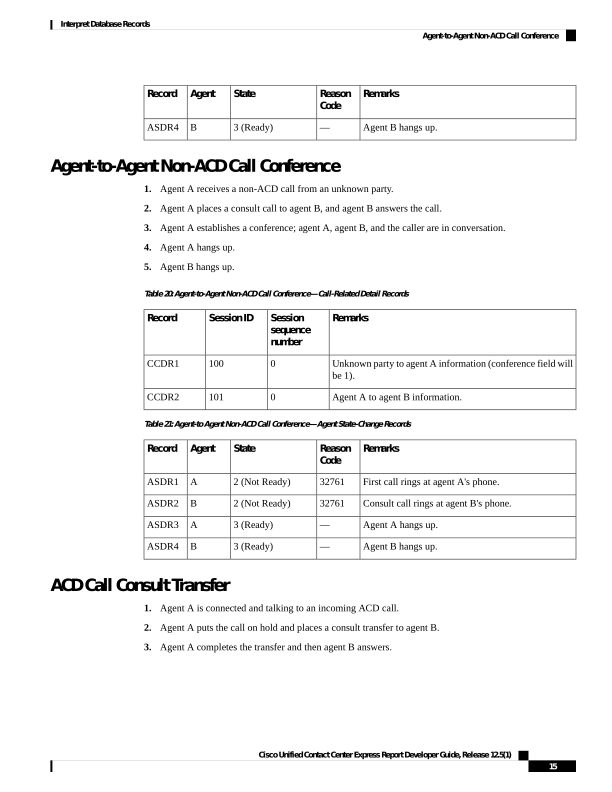
Agent-to-Agent Non-ACD Call Conference
1.
Agent A receives a non-ACD call from an unknown party.
2.
Agent A places a consult call to agent B, and agent B answers the call.
3.
Agent A establishes a conference; agent A, agent B, and the caller are in conversation.
4.
Agent A hangs up.
5.
Agent B hangs up.
Table 20: Agent-to-Agent Non-ACD Call Conference—Call-Related Detail Records
Remarks
Session
sequence
number
Session ID
Record
Unknown party to agent A information (conference field will
be 1).
0
100
CCDR1
Agent A to agent B information.
0
101
CCDR2
Table 21: Agent-to Agent Non-ACD Call Conference—Agent State-Change Records
Remarks
Reason
Code
State
Agent
Record
First call rings at agent A's phone.
32761
2 (Not Ready)
A
ASDR1
Consult call rings at agent B's phone.
32761
2 (Not Ready)
B
ASDR2
Agent A hangs up.
—
3 (Ready)
A
ASDR3
Agent B hangs up.
—
3 (Ready)
B
ASDR4
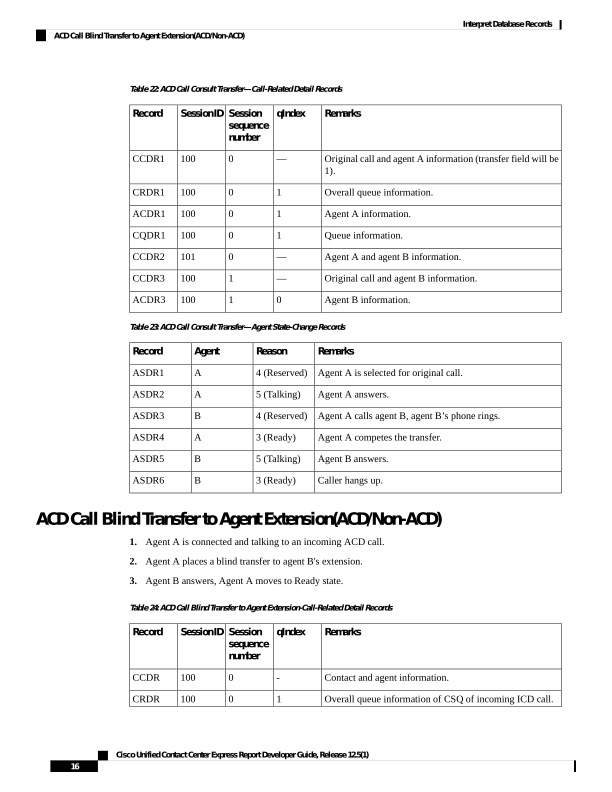
ACD Call Consult Transfer
1.
Agent A is connected and talking to an incoming ACD call.
2.
Agent A puts the call on hold and places a consult transfer to agent B.
3.
Agent A completes the transfer and then agent B answers.
Cisco Unified Contact Center Express Report Developer Guide, Release 12.5(1)
15
Interpret Database Records
Agent-to-Agent Non-ACD Call Conference
Page 24
Table 22: ACD Call Consult Transfer—Call-Related Detail Records
Remarks
qIndex
Session
sequence
number
SessionID
Record
Original call and agent A information (transfer field will be
1).
—
0
100
CCDR1
Overall queue information.
1
0
100
CRDR1
Agent A information.
1
0
100
ACDR1
Queue information.
1
0
100
CQDR1
Agent A and agent B information.
—
0
101
CCDR2
Original call and agent B information.
—
1
100
CCDR3
Agent B information.
0
1
100
ACDR3
Table 23: ACD Call Consult Transfer—Agent State-Change Records
Remarks
Reason
Agent
Record
Agent A is selected for original call.
4 (Reserved)
A
ASDR1
Agent A answers.
5 (Talking)
A
ASDR2
Agent A calls agent B, agent B’s phone rings.
4 (Reserved)
B
ASDR3
Agent A competes the transfer.
3 (Ready)
A
ASDR4
Agent B answers.
5 (Talking)
B
ASDR5
Caller hangs up.
3 (Ready)
B
ASDR6
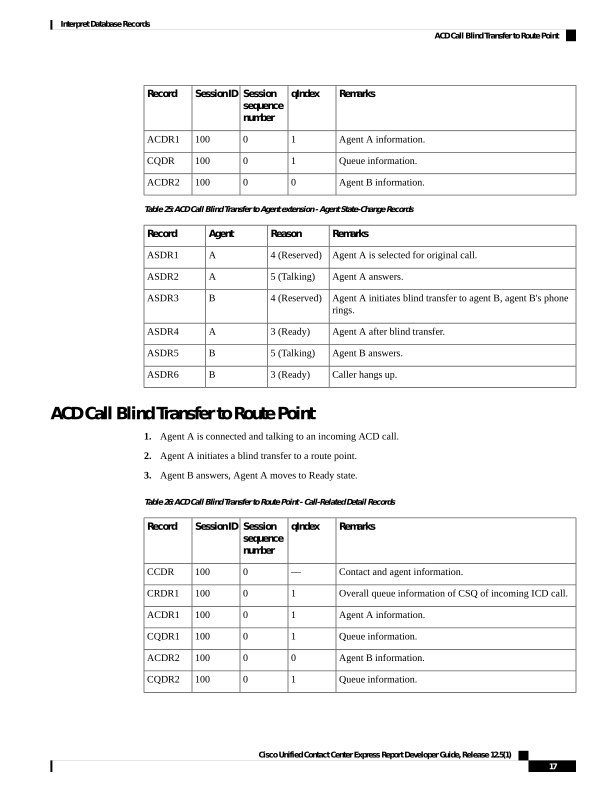
ACD Call Blind Transfer to Agent Extension(ACD/Non-ACD)
1.
Agent A is connected and talking to an incoming ACD call.
2.
Agent A places a blind transfer to agent B's extension.
3.
Agent B answers, Agent A moves to Ready state.
Table 24: ACD Call Blind Transfer to Agent Extension-Call-Related Detail Records
Remarks
qIndex
Session
sequence
number
SessionID
Record
Contact and agent information.
0
100
CCDR
Overall queue information of CSQ of incoming ICD call.
1
0
100
CRDR
Cisco Unified Contact Center Express Report Developer Guide, Release 12.5(1)
16
Interpret Database Records
ACD Call Blind Transfer to Agent Extension(ACD/Non-ACD)
Page 25
Remarks
qIndex
Session
sequence
number
SessionID
Record
Agent A information.
1
0
100
ACDR1
Queue information.
1
0
100
CQDR
Agent B information.
0
0
100
ACDR2
Table 25: ACD Call Blind Transfer to Agent extension - Agent State-Change Records
Remarks
Reason
Agent
Record
Agent A is selected for original call.
4 (Reserved)
A
ASDR1
Agent A answers.
5 (Talking)
A
ASDR2
Agent A initiates blind transfer to agent B, agent B's phone
rings.
4 (Reserved)
B
ASDR3
Agent A after blind transfer.
3 (Ready)
A
ASDR4
Agent B answers.
5 (Talking)
B
ASDR5
Caller hangs up.
3 (Ready)
B
ASDR6
ACD Call Blind Transfer to Route Point
1.
Agent A is connected and talking to an incoming ACD call.
2.
Agent A initiates a blind transfer to a route point.
3.
Agent B answers, Agent A moves to Ready state.
Table 26: ACD Call Blind Transfer to Route Point - Call-Related Detail Records
Remarks
qIndex
Session
sequence
number
SessionID
Record
Contact and agent information.
—
0
100
CCDR
Overall queue information of CSQ of incoming ICD call.
1
0
100
CRDR1
Agent A information.
1
0
100
ACDR1
Queue information.
1
0
100
CQDR1
Agent B information.
0
0
100
ACDR2
Queue information.
1
0
100
CQDR2
Cisco Unified Contact Center Express Report Developer Guide, Release 12.5(1)
17
Interpret Database Records
ACD Call Blind Transfer to Route Point
Page 26
Remarks
qIndex
Session
sequence
number
SessionID
Record
Overall queue information for CSQ after blind transfer is
initiated.
1
0
100
CRDR2
Table 27: ACD Call Blind Transfer to Route Point - Agent State-Change Records
Remarks
Reason
Agent
Record
Agent A is selected for original call.
4 (Reserved)
A
ASDR1
Agent A answers.
5 (Talking)
A
ASDR2
Agent A initiates blind transfer to agent B, agent B's phone
rings.
4 (Reserved)
B
ASDR3
Agent A after blind transfer.
3 (Ready)
A
ASDR4
Agent B answers.
5 (Talking)
B
ASDR5
Caller hangs up.
3 (Ready)
B
ASDR6
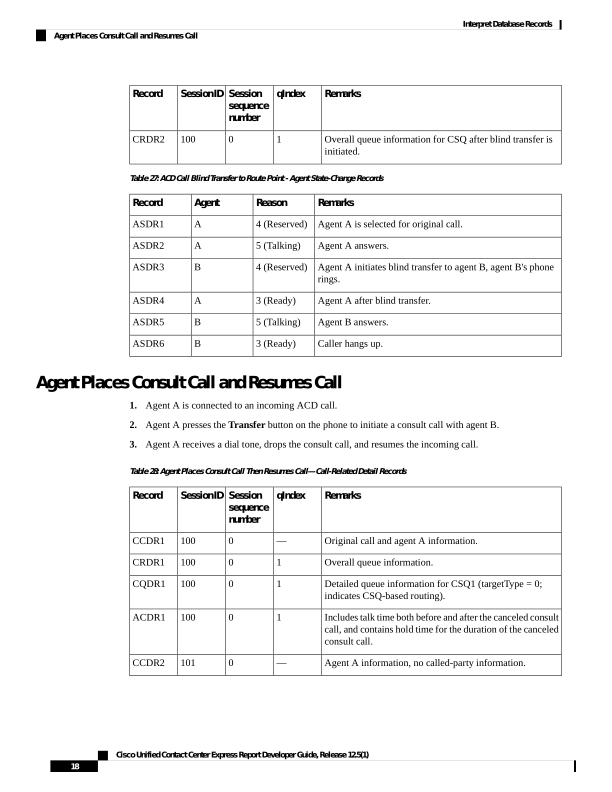
Agent Places Consult Call and Resumes Call
1.
Agent A is connected to an incoming ACD call.
2.
Agent A presses the Transfer button on the phone to initiate a consult call with agent B.
3.
Agent A receives a dial tone, drops the consult call, and resumes the incoming call.
Table 28: Agent Places Consult Call Then Resumes Call—Call-Related Detail Records
Remarks
qIndex
Session
sequence
number
SessionID
Record
Original call and agent A information.
—
0
100
CCDR1
Overall queue information.
1
0
100
CRDR1
Detailed queue information for CSQ1 (targetType = 0;
indicates CSQ-based routing).
1
0
100
CQDR1
Includes talk time both before and after the canceled consult
call, and contains hold time for the duration of the canceled
consult call.
1
0
100
ACDR1
Agent A information, no called-party information.
—
0
101
CCDR2
Cisco Unified Contact Center Express Report Developer Guide, Release 12.5(1)
18
Interpret Database Records
Agent Places Consult Call and Resumes Call
Page 27
Table 29: Agent Places Consult Call Then Resumes Call—Agent State-Change Records
Remarks
Reason
Agent
Record
Agent A is selected for original call.
4 (Reserved)
A
ASDR1
Agent A answers.
5 (Talking)
A
ASDR2
Caller hangs up.
3 (Ready)
A
ASDR3
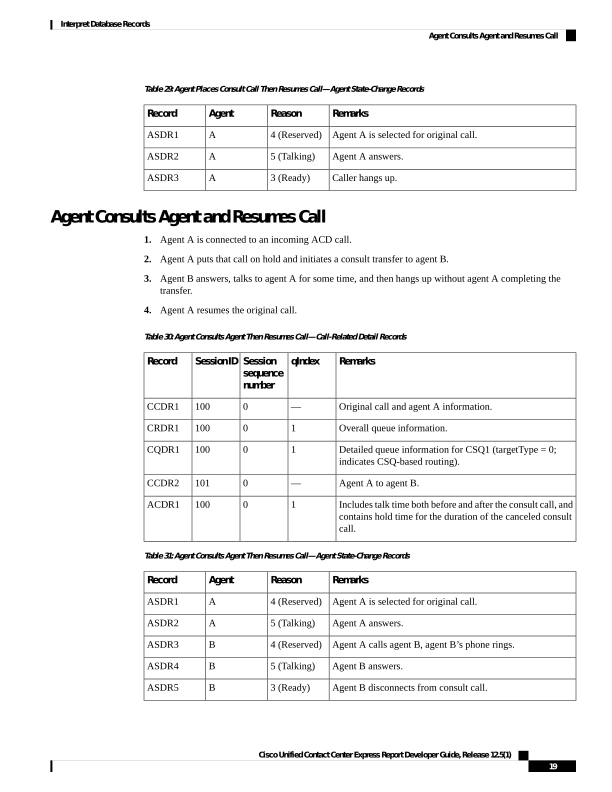
Agent Consults Agent and Resumes Call
1.
Agent A is connected to an incoming ACD call.
2.
Agent A puts that call on hold and initiates a consult transfer to agent B.
3.
Agent B answers, talks to agent A for some time, and then hangs up without agent A completing the
transfer.
4.
Agent A resumes the original call.
Table 30: Agent Consults Agent Then Resumes Call—Call-Related Detail Records
Remarks
qIndex
Session
sequence
number
SessionID
Record
Original call and agent A information.
—
0
100
CCDR1
Overall queue information.
1
0
100
CRDR1
Detailed queue information for CSQ1 (targetType = 0;
indicates CSQ-based routing).
1
0
100
CQDR1
Agent A to agent B.
—
0
101
CCDR2
Includes talk time both before and after the consult call, and
contains hold time for the duration of the canceled consult
call.
1
0
100
ACDR1
Table 31: Agent Consults Agent Then Resumes Call—Agent State-Change Records
Remarks
Reason
Agent
Record
Agent A is selected for original call.
4 (Reserved)
A
ASDR1
Agent A answers.
5 (Talking)
A
ASDR2
Agent A calls agent B, agent B’s phone rings.
4 (Reserved)
B
ASDR3
Agent B answers.
5 (Talking)
B
ASDR4
Agent B disconnects from consult call.
3 (Ready)
B
ASDR5
Cisco Unified Contact Center Express Report Developer Guide, Release 12.5(1)
19
Interpret Database Records
Agent Consults Agent and Resumes Call
Page 28
Remarks
Reason
Agent
Record
Caller disconnects original call.
3 (Ready)
A
ASDR6
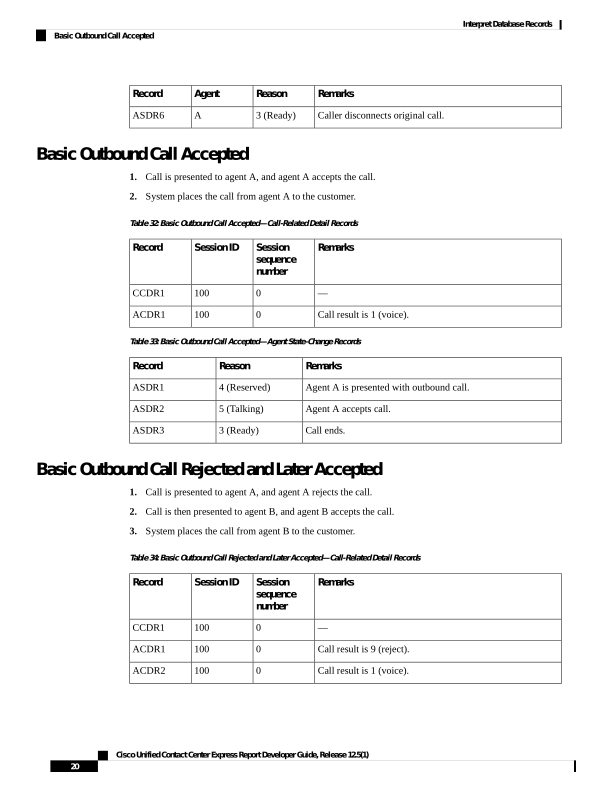
Basic Outbound Call Accepted
1.
Call is presented to agent A, and agent A accepts the call.
2.
System places the call from agent A to the customer.
Table 32: Basic Outbound Call Accepted—Call-Related Detail Records
Remarks
Session
sequence
number
Session ID
Record
—
0
100
CCDR1
Call result is 1 (voice).
0
100
ACDR1
Table 33: Basic Outbound Call Accepted—Agent State-Change Records
Remarks
Reason
Record
Agent A is presented with outbound call.
4 (Reserved)
ASDR1
Agent A accepts call.
5 (Talking)
ASDR2
Call ends.
3 (Ready)
ASDR3
Basic Outbound Call Rejected and Later Accepted
1.
Call is presented to agent A, and agent A rejects the call.
2.
Call is then presented to agent B, and agent B accepts the call.
3.
System places the call from agent B to the customer.
Table 34: Basic Outbound Call Rejected and Later Accepted—Call-Related Detail Records
Remarks
Session
sequence
number
Session ID
Record
—
0
100
CCDR1
Call result is 9 (reject).
0
100
ACDR1
Call result is 1 (voice).
0
100
ACDR2
Cisco Unified Contact Center Express Report Developer Guide, Release 12.5(1)
20
Interpret Database Records
Basic Outbound Call Accepted
Page 29
Table 35: Basic Outbound Call Rejected and Later Accepted—Agent State-Change Records
Remarks
Reason
Record
Agent A is presented with outbound call.
4 (Reserved)
ASDR1
Agent A rejects call.
3 (Ready)
ASDR1
Agent B is presented with outbound call.
4 (Reserved)
ASDR1
Agent B accepts call.
5 (Talking)
ASDR2
Call ends.
3 (Ready)
ASDR3
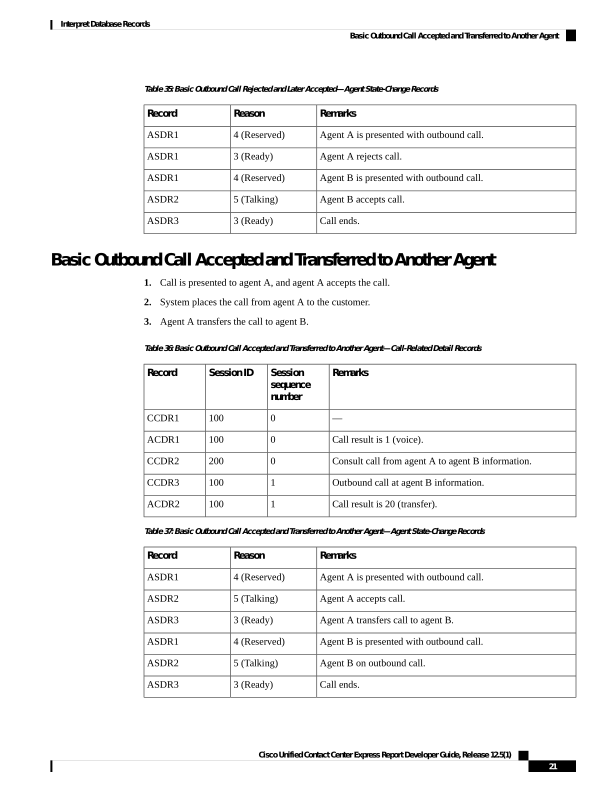
Basic Outbound Call Accepted and Transferred to Another Agent
1.
Call is presented to agent A, and agent A accepts the call.
2.
System places the call from agent A to the customer.
3.
Agent A transfers the call to agent B.
Table 36: Basic Outbound Call Accepted and Transferred to Another Agent—Call-Related Detail Records
Remarks
Session
sequence
number
Session ID
Record
—
0
100
CCDR1
Call result is 1 (voice).
0
100
ACDR1
Consult call from agent A to agent B information.
0
200
CCDR2
Outbound call at agent B information.
1
100
CCDR3
Call result is 20 (transfer).
1
100
ACDR2
Table 37: Basic Outbound Call Accepted and Transferred to Another Agent—Agent State-Change Records
Remarks
Reason
Record
Agent A is presented with outbound call.
4 (Reserved)
ASDR1
Agent A accepts call.
5 (Talking)
ASDR2
Agent A transfers call to agent B.
3 (Ready)
ASDR3
Agent B is presented with outbound call.
4 (Reserved)
ASDR1
Agent B on outbound call.
5 (Talking)
ASDR2
Call ends.
3 (Ready)
ASDR3
Cisco Unified Contact Center Express Report Developer Guide, Release 12.5(1)
21
Interpret Database Records
Basic Outbound Call Accepted and Transferred to Another Agent
Page 30
Basic Outbound Call Accepted and Transferred to Route Point
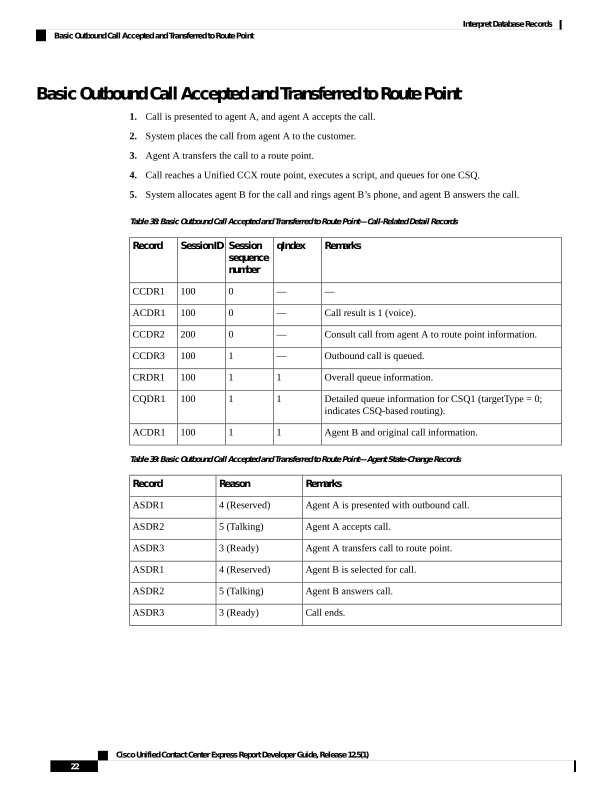
1.
Call is presented to agent A, and agent A accepts the call.
2.
System places the call from agent A to the customer.
3.
Agent A transfers the call to a route point.
4.
Call reaches a Unified CCX route point, executes a script, and queues for one CSQ.
5.
System allocates agent B for the call and rings agent B’s phone, and agent B answers the call.
Table 38: Basic Outbound Call Accepted and Transferred to Route Point—Call-Related Detail Records
Remarks
qIndex
Session
sequence
number
SessionID
Record
—
—
0
100
CCDR1
Call result is 1 (voice).
—
0
100
ACDR1
Consult call from agent A to route point information.
—
0
200
CCDR2
Outbound call is queued.
—
1
100
CCDR3
Overall queue information.
1
1
100
CRDR1
Detailed queue information for CSQ1 (targetType = 0;
indicates CSQ-based routing).
1
1
100
CQDR1
Agent B and original call information.
1
1
100
ACDR1
Table 39: Basic Outbound Call Accepted and Transferred to Route Point—Agent State-Change Records
Remarks
Reason
Record
Agent A is presented with outbound call.
4 (Reserved)
ASDR1
Agent A accepts call.
5 (Talking)
ASDR2
Agent A transfers call to route point.
3 (Ready)
ASDR3
Agent B is selected for call.
4 (Reserved)
ASDR1
Agent B answers call.
5 (Talking)
ASDR2
Call ends.
3 (Ready)
ASDR3
Cisco Unified Contact Center Express Report Developer Guide, Release 12.5(1)
22
Interpret Database Records
Basic Outbound Call Accepted and Transferred to Route Point
Page 31
Chat Scenarios
Chat-Related Detail Records Flow
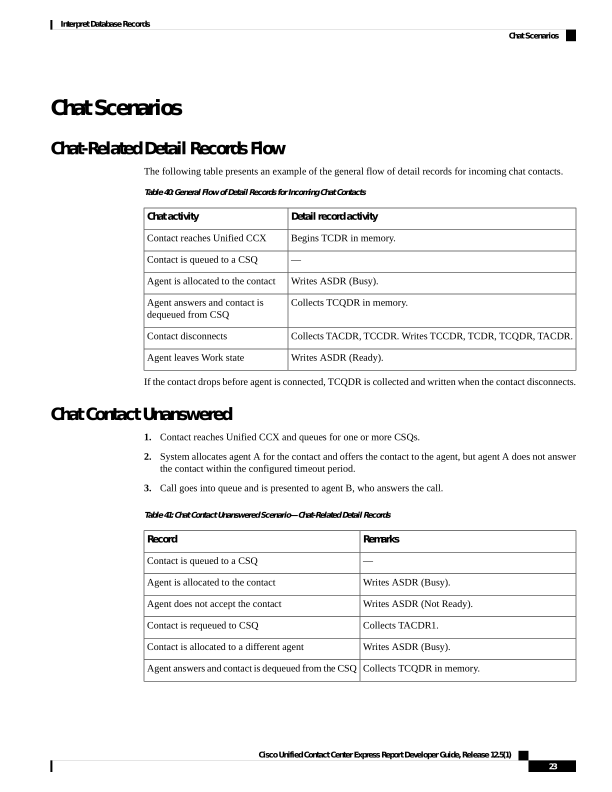
The following table presents an example of the general flow of detail records for incoming chat contacts.
Table 40: General Flow of Detail Records for Incoming Chat Contacts
Detail record activity
Chat activity
Begins TCDR in memory.
Contact reaches Unified CCX
—
Contact is queued to a CSQ
Writes ASDR (Busy).
Agent is allocated to the contact
Collects TCQDR in memory.
Agent answers and contact is
dequeued from CSQ
Collects TACDR, TCCDR. Writes TCCDR, TCDR, TCQDR, TACDR.
Contact disconnects
Writes ASDR (Ready).
Agent leaves Work state
If the contact drops before agent is connected, TCQDR is collected and written when the contact disconnects.
Chat Contact Unanswered
1.
Contact reaches Unified CCX and queues for one or more CSQs.
2.
System allocates agent A for the contact and offers the contact to the agent, but agent A does not answer
the contact within the configured timeout period.
3.
Call goes into queue and is presented to agent B, who answers the call.
Table 41: Chat Contact Unanswered Scenario—Chat-Related Detail Records
Remarks
Record
—
Contact is queued to a CSQ
Writes ASDR (Busy).
Agent is allocated to the contact
Writes ASDR (Not Ready).
Agent does not accept the contact
Collects TACDR1.
Contact is requeued to CSQ
Writes ASDR (Busy).
Contact is allocated to a different agent
Collects TCQDR in memory.
Agent answers and contact is dequeued from the CSQ
Cisco Unified Contact Center Express Report Developer Guide, Release 12.5(1)
23
Interpret Database Records
Chat Scenarios
Page 32
Remarks
Record
Collects TACDR2, TCCDE. Writes TACDR1,
TACDR2, TCDR, TCQDR, TCCDR.
Contact disconnects
Writes ASDR (Ready).
Agent leaves Work state
Cisco Unified Contact Center Express Report Developer Guide, Release 12.5(1)
24
Interpret Database Records
Chat Contact Unanswered