Document Metadata
Format: PDF 1.7
Title: Troubleshoot Common UCCX Finesse and CUIC Issues
Producer: iText® Core 7.2.5 (AGPL version), pdfHTML 4.0.5 (AGPL version) ©2000-2023 iText Group NV
Creation Date: D:20240618131618-07'00'
Mod Date: D:20240618133030-07'00'
Page 1
Troubleshoot Common UCCX Finesse and CUIC
Issues
Contents
Introduction
Prerequisites
Requirements
Components Used
Problem: Finesse and Finesse Admin Loads Up with Blank Screen
Solution
Problem: Authentication Failure of Finesse Notification Service after PG Failover
Solution
Problem: UCCX 12.5 Snapshot View in Voice CSQ Summary Report Missing the
Longest Call in Queue Column
Solution
Problem: Agents put into NOT READY State Automatically from TALKING STATE
Solution
Problem: After Applying Workaround for Cisco bug ID CSCvx73795, Agents Report
Issue with Finesse Disconnections
Solution
Problem: HIGH_MEM_USAGE and LowSwapPartitionAvailableDiskSpace Alerts
Solution
Problem: When the ASR/TTS is Configured, and a VXML is Selected as part of an
Application,Prompt is not Audibleif a Call is Made to the Trigger Associated with that
Application
Solution
Problem: Custom Reports and Dashboards not Working
Solution
Problem: Unable to Run CUIC Reports
Solution
Problem: Finesse Prompts for Username and Passwords Multiple Times after being
able to Sign In
Solution
Introduction
This document describes solutions for common problems and solutions in Cisco Unified Contact Center
Express (UCCX).
Prerequisites
Requirements
Page 2
There are no specific requirements for this document.
Components Used
This document is not restricted to specific hardware and software versions.
The information in this document was created from the devices in a specific lab environment. All of the
devices used in this document started with a cleared (default) configuration. If your network is live, ensure
that you understand the potential impact of any command.
Problem: Finesse and Finesse Admin Loads Up with Blank Screen
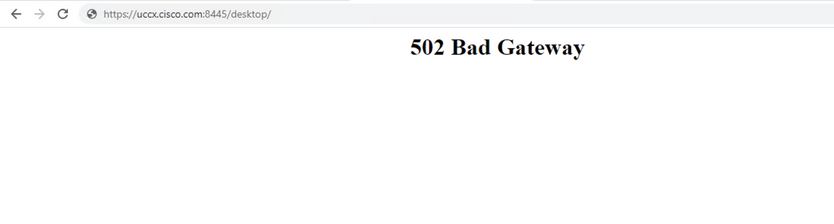
Intermittently, Finesse can begin to not respond to agent requests or internal requests.
Symptom: Finesse desktop cannot load up and throw 5xx errors.
This issue is documented by Cisco bug ID CSCvy99585 and Cisco bug ID CSCvy99583.
Solution
Restart of Finesse Tomcat Services would fix the issue temporarily. The permanent fix is scheduled to be in
UCCX version 12.6.X.
Problem: Authentication Failure of Finesse Notification Service
after PG Failover
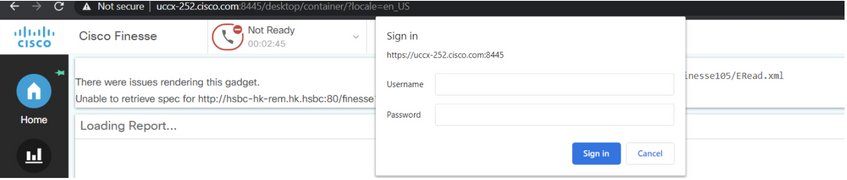
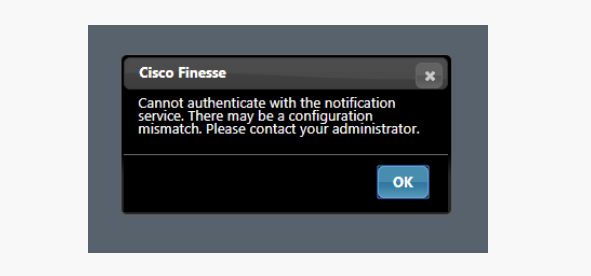
Symptom: Finesse fails to log in agents with error and cannot authenticate with the notification service. The
log in failure is due to webservice response to HTTP 404 not found for a get on an Agent.
Page 3
This issue is documented by Cisco bug ID CSCvc94546 and Cisco bug ID CSCvb19751.
Solution
This issue can be temporarily fixed by a Notification and Finesse Tomcat services restart. Permanent fix is
to upgrade to the version which has a solution for Cisco bug ID CSCvc94546 and Cisco bug
ID CSCvb19751 .
Problem: UCCX 12.5 Snapshot View in Voice CSQ Summary
Report Missing the Longest Call in Queue Column
Symptom: UCCX 12.5 Voice CSQ Summary report does not show the Longest Call in Queue column in the
snapshot view.
This issue is documented by Cisco bug ID CSCvv71473 .
Solution
Use the solution mentioned in Cisco bug ID CSCvv71473.
Problem: Agents put into NOT READY State Automatically from
TALKING STATE
Symptom: Agents are put into Not Ready - Agent Logon either in the same node or in the alternate node.
This impacts as agents are set to Not Ready - Agent Logon without notification. Agents must set themselves
Ready again when it is noticed.
Page 4
This issue is documented by Cisco bug ID CSCvx73795.
Solution
The permanent fix for this issue is obtained when you upgrade to 11.6.2 ES08 and 12.5.1 SU1 ES02
versions. Temporary fix is provided when you contact Cisco TAC.
Problem: After Applying Workaround for Cisco bug ID
CSCvx73795, Agents Report Issue with Finesse Disconnections
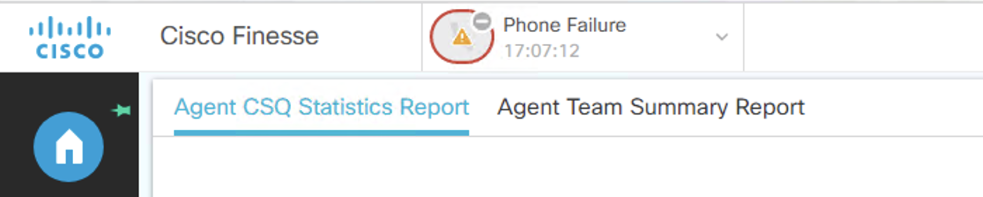
Symptom: Few agents report that at random times they see connection failure issues on their finesse client
desktop. Disconnect happens at random times for the agents.
This issue is briefly documented in Understand Finesse BOSH Implementation and Troubleshoot Finesse
Agent Desktop Presence Disconnect Issues
Solution
Gather the Agent State Detail Report for the affected agents from the Cisco Unified Intelligence Center
(CUIC). If the Agent State shows Connection Failures and Phone Failures, refer to the document to narrow
down the behavior and disconnect reason. Contact Cisco TAC for further clarification.
Problem: HIGH_MEM_USAGE and
LowSwapPartitionAvailableDiskSpace Alerts
Symptom: System generates HIGH_MEM_USAGE and LowSwapPartitionAvailableDiskSpace alerts.
Cisco Unified CCX Engine is the application that uses most of the memory. Memory leak seen on Engine
caused by socket IO exceptions.
This issue is documented by Cisco bug ID CSCvx74769.
Solution
The permanent fix for this issue can be obtained when you upgrade to 12.5.1 SU1 ES02 version.
Page 5
Problem: When the ASR/TTS is Configured, and a VXML is
Selected as part of an Application, Prompt is not Audible if a Call is
Made to the Trigger Associated with that Application
Symptom: Unable to hear ASR/TTS related prompts. Configured the ASR/TTS providers and servers. An
application is created with voice browser script and VXML associated. Made a call to the trigger associated
with this application through the jabber. At that time no prompts are heard with respect to the VXML.
This issue is documented by Cisco bug ID CSCvz35219.
Solution
The permanent fix for this issue can be obtained when you upgrade to 12.5.1 SU1 ES02 version.
Problem: Custom Reports and Dashboards not Working
Symptom: Post upgrade to 12.5.X versions from lower versions, the custom reports and dashboards in CUIC
is not working.
This issue is briefly documented in Unsupported Features in Custom Reports section of the document.
Solution
Custom Reports and Dashboards have to be re-created post upgrade to the 12.5.X versions.
Problem: Unable to Run CUIC Reports
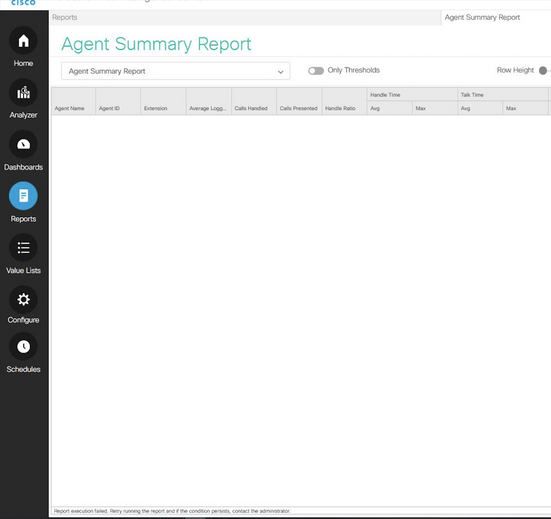
Symptom: When you try to run a report, the report execution fails with error:
Report execution failed. Retry running the report and if the condition persists, contact the administrator.
Chosen filters could not be applied to the report. Please try again.
Page 6
This issue is documented by Cisco bug ID CSCvg07984 and Cisco bug ID CSCvg04634.
Solution
The permanent fix for the issue can be obtained when you upgrade to 11.6(2.10000.38) version.
Problem: Finesse Prompts for Username and Passwords Multiple
Times after being able to Sign In
Symptom: Agents post log into finesse and start to see multiple username and password prompts. Live
datasource of CUIC can also be affected.
Page 7
This issue is documented by Cisco bug ID CSCvx60122.
Solution
Use the solution mentioned in Cisco bug ID CSCvx60122.