Document Metadata
Format: PDF
Title: Partner Configuration Guide Poly VVX D230 DECT Phones
Author: tekVizion
Creator: Microsoft® Word for Microsoft 365
Page 1
Cisco BroadWorks
Partner Configuration Guide
Poly VVX D230 DECT Phones
Feb 2021
Document Version 1.4

Page 2
PARTNER CONFIGURATION GUIDE – POLY VVX D230 DECT PHONES
20-BD5624-00
©2021 CISCO SYSTEMS INC.
PAGE 2 OF 86
Cisco® Guide
Notification
BroadSoft BroadWorks has been renamed to Cisco BroadWorks. You will begin to see
the Cisco name and company logo, along with the new product name on the software,
documentation, and packaging. During this transition process, you may see both
BroadSoft and Cisco brands and former product names. These products meet the same
high standards and quality that both BroadSoft and Cisco are known for in the industry.
Copyright Notice
Copyright© 2020 Cisco Systems, Inc. All rights reserved.
Trademarks
Any product names mentioned in this document may be trademarks or registered
trademarks of Cisco or their respective companies and are hereby acknowledged.

Page 3
PARTNER CONFIGURATION GUIDE – POLY VVX D230 DECT PHONES
20-BD5624-00
©2021 CISCO SYSTEMS INC.
PAGE 3 OF 86
Document Revision History
Version
Reason for Change
1.1
Introduced document for Poly VVX D230 DECT Phone version 7.0.0 validation with Cisco
BroadWorks Release 22.0.
1.2
Edited and published document.
1.3
Updated the document for Poly VVX D230 DECT Phone version 7.1.0 validation with Cisco
BroadWorks Release 22.0.
1.4
Edited changes and published document.

Page 4
PARTNER CONFIGURATION GUIDE – POLY VVX D230 DECT PHONES
20-BD5624-00
©2021 CISCO SYSTEMS INC.
PAGE 4 OF 86
Table of Contents
1
Overview..........................................................................................................................................6
2
Interoperability Status ..................................................................................................................7
2.1
Verified Versions ........................................................................................................................... 7
2.2
Interface Capabilities Supported .................................................................................................. 7
2.2.1
SIP Interface Capabilities .................................................................................................... 8
2.2.2
Other Interface Capabilities .............................................................................................. 13
2.3
Known Issues ............................................................................................................................ 15
3
Cisco BroadWorks Configuration ........................................................................................... 16
3.1
Cisco BroadWorks Device Profile Type Configuration ............................................................ 16
3.2
Cisco BroadWorks Configuration Steps ................................................................................... 17
4
Poly VVX D230 Phone Configuration ...................................................................................... 18
4.1
Configuration Method ................................................................................................................ 18
4.2
System Level Configuration ...................................................................................................... 18
4.2.1
Configure Network Settings ............................................................................................. 19
4.2.2
Configure SIP Interface Settings ..................................................................................... 22
4.2.3
Configure Service Settings ............................................................................................... 27
4.3
Subscriber Level Configuration ................................................................................................. 28
4.4
SIP Advanced Feature Configuration ....................................................................................... 31
4.4.1
Shared Call Appearance Configuration ........................................................................... 31
4.4.2
Feature Key Synchronization Configuration ................................................................... 43
4.5
Xtended Services Interface (Xsi) Feature Configuration ......................................................... 44
4.5.1
Xsi Authentication Methods ............................................................................................. 44
4.5.2
Cisco BroadWorks Directory Configuration .................................................................... 47
5
Device Management ................................................................................................................... 48
5.1
Device Management Capabilities Supported .......................................................................... 48
5.2
Device Management Configuration .......................................................................................... 49
5.2.1
Configure Cisco BroadWorks Tags ................................................................................. 50
5.2.2
Configure Cisco BroadWorks Device Profile Type ......................................................... 52
5.2.3
Create Device Profile Instance ........................................................................................ 62
5.2.4
Configure Cisco BroadWorks User ................................................................................. 63
5.2.5
Customize Tags ................................................................................................................ 63
5.2.6
Configure Poly VVX D230 Phones .................................................................................. 64
5.3
Upgrade from Previous CPE Kits ............................................................................................. 69
Appendix A: Reference Poly VVX D230 Phone Configuration Files ....................................... 70
References .......................................................................................................................................... 86

Page 5
PARTNER CONFIGURATION GUIDE – POLY VVX D230 DECT PHONES
20-BD5624-00
©2021 CISCO SYSTEMS INC.
PAGE 5 OF 86
Table of Figures
Figure 1 Device Identity/Profile Type ....................................................................................................... 16
Figure 2 Shared Call Appearance Configuration .................................................................................... 32
Figure 3 System Default Tag Settings ..................................................................................................... 51
Figure 4 Device Type-specific Tag Settings ........................................................................................... 52
Figure 5 Device Access FQDN ................................................................................................................ 54
Figure 6 Poly_VVX_D230system.xml ..................................................................................................... 57
Figure 7 Poly_VVX_D230template.xml Device-Specific Files ............................................................... 58
Figure 8 Device-specific File .................................................................................................................... 59
Figure 9 Application Firmware File Settings ............................................................................................ 60
Figure 10 Device Profile Instance ............................................................................................................ 63
Figure 11 Example Login Screen ............................................................................................................ 65
Figure 12 Example Provisioning Screen ................................................................................................. 65
Figure 13 MAC Address Definition for Device Profile Instance.............................................................. 66
Figure 14 Device Profile Type Update for MAC-Based Auth using Client Certificate .......................... 67
Figure 15 Authentication Mode Set to MAC-Based and Sourced from Client Certificate .................... 68

Page 6
PARTNER CONFIGURATION GUIDE – POLY VVX D230 DECT PHONES
20-BD5624-00
©2021 CISCO SYSTEMS INC.
PAGE 6 OF 86
1
Overview
This guide describes the configuration procedures required for the Poly VVX D230 Phone
for interoperability with Cisco BroadWorks.
The Poly VVX D230 Phone are DECT phones that uses the Session Initiation Protocol
(SIP) to communicate with Cisco BroadWorks for call control.
This guide describes the specific configuration items that are important for use with Cisco
BroadWorks. It does not describe the purpose and use of all configuration items on the
Poly VVX D230 Phone. For those details, see the configuration guide called Poly® VVX®
D230 DECT IP Phones, Admin Guide [1] supplied by Poly.
Polycom phone models:
◼
VVX D230 DECT Phone

Page 7
PARTNER CONFIGURATION GUIDE – POLY VVX D230 DECT PHONES
20-BD5624-00
©2021 CISCO SYSTEMS INC.
PAGE 7 OF 86
2
Interoperability Status
This section provides the known interoperability status of the Poly VVX D230 Phone with
Cisco BroadWorks. This includes the version(s) tested, the capabilities supported, and
known issues.
Interoperability testing validates that the device interfaces properly with Cisco BroadWorks
via the SIP interface. Qualitative aspects of the device or device capabilities not affecting
the SIP interface such as display features, performance, and audio qualities are not
covered by interoperability testing. Requests for information and/or issues regarding these
aspects should be directed to Poly.
2.1
Verified Versions
The following table identifies the verified Poly VVX D230 Phone and Cisco BroadWorks
versions and the month/year the testing occurred. If the device has undergone more than
one test cycle, versions for each test cycle are listed, with the most recent listed first.
Compatible Versions in the following table identify specific Poly VVX D230 Phone versions
that the partner has identified as compatible so should interface properly with Cisco
BroadWorks. Generally, maintenance releases of the validated version are considered
compatible and may not be specifically listed here. For any questions concerning
maintenance and compatible releases, contact Poly.
NOTE: Interoperability testing is usually performed with the latest generally available (GA)
device firmware/software and the latest GA Cisco BroadWorks release and service pack at the
time the testing occurs. If there is a need to use a non-verified mix of Cisco BroadWorks and
device software versions, customers can mitigate their risk by self-testing the combination
themselves using the Cisco BroadWorks SIP Phone Interoperability Test Plan [5].
Verified Versions
Date (mm/yyyy)
Cisco BroadWorks
Release
Poly Verified Version
Poly Compatible
Versions
2/2021
Release 22.0
7.1.0
Any maintenance
revisions of the
verified version.
3/2020
Release 22.0
7.0.0
Any maintenance
revisions of the
verified version.
2.2
Interface Capabilities Supported
This section identifies interface capabilities that have been verified through testing as
supported by Poly VVX D230 Phone.
The Supported column in the tables in this section identifies the Poly VVX D230 Phone’
support for each of the items covered in the test plan, with the following designations:
◼
Yes
Test item is supported
◼
No
Test item is not supported
◼
NA
Test item is not applicable to the device type
◼
NT
Test item was not tested

Page 8
PARTNER CONFIGURATION GUIDE – POLY VVX D230 DECT PHONES
20-BD5624-00
©2021 CISCO SYSTEMS INC.
PAGE 8 OF 86
Caveats and clarifications are identified in the Comments column.
2.2.1
SIP Interface Capabilities
The Poly VVX D230 Phone has completed interoperability testing with Cisco BroadWorks
using the Cisco BroadWorks SIP Phone Interoperability Test Plan [5]. The results are
summarized in the following table.
The Cisco BroadWorks test plan is composed of packages, each covering distinct
interoperability areas, such as “Basic” call scenarios and “Redundancy” scenarios. Each
package is composed of one or more test items, which in turn are composed of one or
more test cases. The test plan exercises the SIP interface between the device and Cisco
BroadWorks with the intent to ensure interoperability sufficient to support the Cisco
BroadWorks feature set.
NOTE: DUT in the following table refers to the Device Under Test, which in this case is the Poly
VVX D230 Phone.
Cisco BroadWorks SIP Phone Interoperability Test Plan Support Table
Test Plan Package
Test Plan Package Items
Supported
Comments
Basic
Call Origination
Yes
Call Termination
Yes
Session Audit
Yes
Session Timer
Yes
Ringback
Yes
Forked Dialog
Yes
181 Call Being Forwarded
Yes
Dial Plan
Yes
DTMF – Inband
Yes
DTMF – RFC 2833
Yes
DTMF – DTMF Relay
Yes
Codec Negotiation
Yes
Codec Renegotiation
Yes
Cisco BroadWorks
Services
Third-Party Call Control – Basic
No
Click to dial is supported
Third-Party Call Control – Advanced
No
Click to dial is supported
Voice Message Deposit/Retrieval
Yes
Message Waiting Indicator –
Unsolicited
Yes
Message Waiting Indicator – Solicited
Yes
Message Waiting Indicator – Detail
Yes
Message Waiting Saved and Urgent
Information is not supported
Voice Portal Outcall
Yes
Advanced Alerting – Ringing
Yes

Page 9
PARTNER CONFIGURATION GUIDE – POLY VVX D230 DECT PHONES
20-BD5624-00
©2021 CISCO SYSTEMS INC.
PAGE 9 OF 86
Cisco BroadWorks SIP Phone Interoperability Test Plan Support Table
Test Plan Package
Test Plan Package Items
Supported
Comments
Advanced Alerting – Call Waiting
Yes
Advanced Alerting – Ring Splash
Yes
Advanced Alerting – Silent Alerting
Yes
Calling Line ID
Yes
Calling Line ID with Unicode
Characters
Yes
Connected Line ID
Yes
Connected Line ID with Unicode
Characters
Yes
Connected Line ID on UPDATE
Yes
Connected Line ID on Re-INVITE
Yes
Diversion Header
Yes
History-Info Header
Yes
Advice of Charge
No
Meet-Me Conferencing
Yes
Meet-Me Conferencing – G722
Yes
Meet-Me Conferencing – AMR-WB
No
Meet-Me Conferencing – Opus
Yes
Collaborate – Audio
Yes
Collaborate – Audio – G722
Yes
Collaborate – Audio – Opus
Yes
Call Decline Policy
Yes
DUT Services – Call
Control Services
Call Waiting
Yes
Call Hold
Yes
Call Transfer
Yes
Attended transfer before answer is
not supported.
Three-Way Calling
Yes
Three-Way Call Before Answer is
not supported.
Network-Based Conference
Yes
DUT Services –
Registration and
Authentication
Register Authentication
Yes
Maximum Registration
Yes
Minimum Registration
Yes
Invite Authentication
Yes
Re-Invite/Update Authentication
Yes
Refer Authentication
Yes
Device Authenticating Cisco
BroadWorks
No

Page 10
PARTNER CONFIGURATION GUIDE – POLY VVX D230 DECT PHONES
20-BD5624-00
©2021 CISCO SYSTEMS INC.
PAGE 10 OF 86
Cisco BroadWorks SIP Phone Interoperability Test Plan Support Table
Test Plan Package
Test Plan Package Items
Supported
Comments
DUT Services –
Emergency Call
Emergency Call
No
Emergency Call with Ringback
No
DUT Services – P-
Access-Network-Info
Header
REGISTER with P-Access-Network-
Info Header
No
INVITE with P-Access-Network-Info
Header
No
DUT Services –
Miscellaneous
Do Not Disturb
Yes
Call Forwarding Always
Yes
Call Forwarding Always Diversion
Inhibitor
Yes
Anonymous Call
Yes
Anonymous Call Block
Yes
Remote Restart Via Notify
Yes
Advanced Phone
Services – Busy Lamp
Field
Busy Lamp Field
No
Call Park Notification
No
Advanced Phone
Services – Feature
Key Synchronization,
Private Line
Do Not Disturb
Yes
Do Not Disturb Ring Splash
Yes
Call Forwarding
Yes
Call Forwarding Always Ring Splash
Yes
Call Forwarding Always Diversion
Inhibitor
Yes
Call Center Agent Logon/Logoff
No
Call Center Agent Unavailable Code
No
Executive – Call Filtering
No
Executive-Assistant – Call Filtering
No
Executive-Assistant – Diversion
No
Call Recording
No
Security Classification
No
Advanced Phone
Services – Feature
Key Synchronization,
Shared Line
Do Not Disturb
No
Do Not Disturb Ring Splash
No
Call Forwarding
No
Call Forwarding Always Ring Splash
No
Call Forwarding Always Diversion
Inhibitor
No
Security Classification
No

Page 11
PARTNER CONFIGURATION GUIDE – POLY VVX D230 DECT PHONES
20-BD5624-00
©2021 CISCO SYSTEMS INC.
PAGE 11 OF 86
Cisco BroadWorks SIP Phone Interoperability Test Plan Support Table
Test Plan Package
Test Plan Package Items
Supported
Comments
Advanced Phone
Services – Missed
Calls Display
Synchronization
Missed Calls Display Sync
Yes
Advanced Phone
Services – Shared
Call Appearance
using Call Info
Line-Seize
Yes
Refresh Line-Seize is not supported.
Call-Info/Lamp Management
Yes
Public Hold
Yes
Private Hold
No
Hybrid Key System
No
Multiple Call Arrangement
Yes
Bridge Active Line
Yes
Bridge Active Line – Silent Monitor
No
Call Park Notification
No
Advanced Phone
Services – Call Park
Notification
Call Park Notification
Yes
Advanced Phone
Services – Call Center
Hold Reminder
No
Call Information
No
Hoteling Event
No
Status Event
No
Disposition Code
No
Emergency Escalation
No
Customer Originated Trace
No
Advanced Phone
Services – Call
Recording Controls
Pause/Resume
No
Start/Stop
No
Record Local Conference
No
Record Network Conference
No
Advanced Phone
Services – Call
Recording Video
Basic Call
No
Record Local Conference
No
Record Network Conference
No
Advanced Phone
Services – Security
Classification
Security Classification
No
Advanced Phone
Services –
Conference Event
Network-Based Conference Creator
No
Network-Based Conference Participant
No
Meet-Me Conference Participant
No
Redundancy
DNS SRV Lookup
Yes

Page 12
PARTNER CONFIGURATION GUIDE – POLY VVX D230 DECT PHONES
20-BD5624-00
©2021 CISCO SYSTEMS INC.
PAGE 12 OF 86
Cisco BroadWorks SIP Phone Interoperability Test Plan Support Table
Test Plan Package
Test Plan Package Items
Supported
Comments
Test Plan Package
Register Failover/Failback
Yes
Invite Failover/Failback
Yes
Bye Failover
Yes
SBC/ALG – Basic
Register
Yes
Outgoing Invite
Yes
Incoming Invite
Yes
SBC/ALG –
Failover/Failback
Register Failover/Failback
Yes
Invite Failover/Failback
Yes
Video – Basic Video
Calls
Call Origination
No
Call Termination
No
Call Hold
No
Call Waiting
No
Call Transfer
No
Video – Cisco
BroadWorks Video
Services
Auto Attendant
No
Auto Attendant – HD
No
Voice Messaging
No
Voice Messaging – HD
No
Custom Ringback
No
Video – Cisco
BroadWorks Video
Conference
Network-based Conference
No
Network-based Conference – HD
No
Collaborate – Video
No
Collaborate – Video – HD
No
Video – Cisco
BroadWorks WebRTC
Client
Call from WebRTC Client
No
Call to WebRTC Client
No
TCP
Register
Yes
Outgoing Invite
Yes
Incoming Invite
Yes
IPV6
Call Origination
No
Call Termination
No
Session Audit
No
Ringback
No
Codec Negotiation/Renegotiation
No

Page 13
PARTNER CONFIGURATION GUIDE – POLY VVX D230 DECT PHONES
20-BD5624-00
©2021 CISCO SYSTEMS INC.
PAGE 13 OF 86
Cisco BroadWorks SIP Phone Interoperability Test Plan Support Table
Test Plan Package
Test Plan Package Items
Supported
Comments
Voice Message Deposit/Retrieval
No
Call Control
No
Registration with Authentication
No
Busy Lamp Field
No
Redundancy
No
SBC
No
Video
No
Dual Stack with Alternate
Connectivity
No
2.2.2
Other Interface Capabilities
This section identifies whether the Poly VVX D230 Phone has implemented support for
the following:
◼
Cisco BroadWorks Xtended Services Interface (Xsi)
◼
Extensible Messaging and Presence Protocol (XMPP) (BroadCloud/Cisco
BroadWorks Collaborate Instant Messaging and Presence [IM&P])
Support for these interfaces is demonstrated by completing the Cisco BroadWorks SIP
Phone Xsi and XMPP Test Plan [6]. Support for these interfaces is summarized in the
following table.
Cisco BroadWorks Xtended Services Interface (Xsi) and BroadCloud IM&P Support Table
Interface
Feature
Supported
Comments
Xsi Features –
Authentication
Authenticate with SIP Credentials
Yes
Preferred and implemented
method in the CPE kit.
Authenticate with Cisco BroadWorks
User Login Credentials
Yes
Authenticate with Cisco BroadWorks
User Directory Number
No
Xsi Features – User
Service Configuration
Remote Office
No
Cisco BroadWorks Anywhere
No
Simultaneous Ringing
No
Caller ID Blocking
No
Call Forwarding Always
No
Call Forwarding Busy
No
Call Forwarding No Answer
No
Do Not Disturb
No
Xsi Features –
Directories
Enterprise Directory
Yes
Enterprise Common Phone List
Yes
Group Directory
Yes

Page 14
PARTNER CONFIGURATION GUIDE – POLY VVX D230 DECT PHONES
20-BD5624-00
©2021 CISCO SYSTEMS INC.
PAGE 14 OF 86
Cisco BroadWorks Xtended Services Interface (Xsi) and BroadCloud IM&P Support Table
Interface
Feature
Supported
Comments
Group Common Phone List
Yes
Personal Phone List
Yes
Search All Directories
Yes
Exact match is not supported.
Search Enterprise Directories
Yes
Case Insensitive is not
supported.
Xsi Features – Call
Logs
Placed Calls
No
Received Calls
No
Missed Calls
No
All Calls
No
Sort by Name
No
Xsi Features – Visual
Voice Mail
View Messages
No
Listen to Audio Message
No
Watch Video Message
No
Mark Message Read/Unread
No
Delete Message
No
Mark All Messages Read/Unread
No
Xsi Features – Push
Notification
Register/Deregister for Push
Notifications
No
Incoming Call via Push Notification
No
Call Update via Push Notification
No
Incoming Call via Push Notification;
Second Incoming Call
No
MWI via Push Notification
No
Ring Splash via Push Notification
No
Xsi Features – Call
Recording
Configurations
Call Record Mode Get
No
Set Record Mode
No
Set Play Call Recording to Start and
Stop Announcement
No
Set Record Voice Messaging
No
Set Pause and Resume Notification
No
Set Recording Notification
No
Xsi Features – Call
Recording Controls
Record Mode set to Never
No
Record Mode set to Always
No
Record Mode set to Always with
Pause/Resume
No
Start Recording Mid-Call with Record
Mode set to On Demand
No

Page 15
PARTNER CONFIGURATION GUIDE – POLY VVX D230 DECT PHONES
20-BD5624-00
©2021 CISCO SYSTEMS INC.
PAGE 15 OF 86
Cisco BroadWorks Xtended Services Interface (Xsi) and BroadCloud IM&P Support Table
Interface
Feature
Supported
Comments
Start Recording During Call Setup with
Record Mode set to On Demand
No
Perform User Initiated Start with
Record Mode set to On Demand
No
Perform Mid-Call Start Recording after
Placing Call on Hold
No
Perform Mid-Call Change to Call
Recording Mode
No
Record Local Three-Way Call
No
Record Network Three-Way Call
No
XMPP Features –
Contact/Buddy List
Contacts
No
Favorites
No
Groups
No
Non-XMPP Contacts
No
Conferences
No
XMPP Features –
Presence
Login Invisible
No
Presence State
No
Presence Status
No
Contact’s Presence State
No
2.3
Known Issues
This section lists the known interoperability issues between Cisco BroadWorks and
specific partner release(s). Issues identified during interoperability testing and known
issues identified in the field are listed.
The following table provides a description of each issue and, where possible, identifies a
workaround. The verified partner device versions are listed with an “X” indicating that the
issue occurs in the specific release. The issues identified are device deficiencies or bugs,
and are typically not Cisco BroadWorks release dependent.
The Issue Number is a tracking number for the issue. If it is a Poly issue, the issue
number is from Poly’s tracking system. If it is a Cisco BroadWorks issue, the issue
number is from BroadSoft’s tracking system.
For more information on any issues related to the particular partner device release, see
the partner release notes.
Issue Number
Issue Description
Partner Version
None.
7.0.0
7.1.0

Page 16
PARTNER CONFIGURATION GUIDE – POLY VVX D230 DECT PHONES
20-BD5624-00
©2021 CISCO SYSTEMS INC.
PAGE 16 OF 86
3
Cisco BroadWorks Configuration
This section identifies the required Cisco BroadWorks device profile type for the Poly VVX
D230 Phone as well as any other unique Cisco BroadWorks configuration required for
interoperability with the Poly VVX D230 Phone.
3.1
Cisco BroadWorks Device Profile Type Configuration
This section identifies the device profile type settings to use when deploying the Poly VVX
D230 Phone with Cisco BroadWorks.
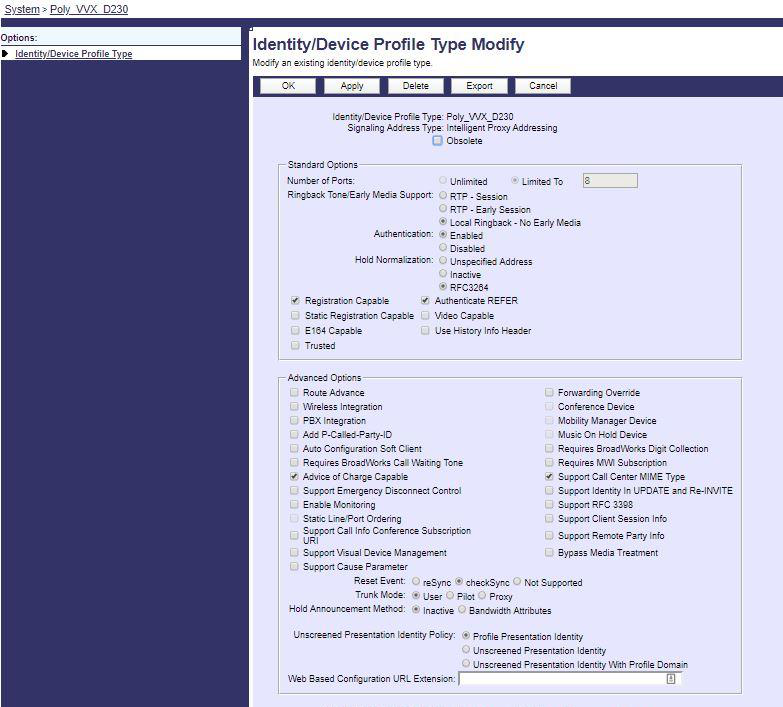
Create a device profile type for the Poly VVX D230 Phone with settings as shown in the
following example. A separate device profile type should be created for each Poly VVX
D230 Phone model. The settings shown are recommended for use when deploying the
Poly VVX D230 Phone with Cisco BroadWorks. For an explanation of the profile
parameters, see the Cisco BroadWorks Device Management Configuration Guide [2].
The device profile type shown provides the Number of Ports (number of SIP lines) setting
for Poly VVX D230 Phone. For other Poly VVX D230 Phone models, create a new device
profile type and set the Number of Ports to match the available number of SIP lines per
model according to the following table.
Model
Number of Lines
Video Capable
VVX D230
8
Un-checked.
Figure 1 Device Identity/Profile Type

Page 17
PARTNER CONFIGURATION GUIDE – POLY VVX D230 DECT PHONES
20-BD5624-00
©2021 CISCO SYSTEMS INC.
PAGE 17 OF 86
3.2
Cisco BroadWorks Configuration Steps
No additional Cisco BroadWorks configuration steps are required.

Page 18
PARTNER CONFIGURATION GUIDE – POLY VVX D230 DECT PHONES
20-BD5624-00
©2021 CISCO SYSTEMS INC.
PAGE 18 OF 86
4
Poly VVX D230 Phone Configuration
This section describes the configuration settings required for the Poly VVX D230 Phone
integration with Cisco BroadWorks, primarily focusing on the SIP interface configuration.
The Poly VVX D230 Phone configuration settings identified in this section have been
derived and verified through interoperability testing with Cisco BroadWorks. For
configuration details not covered in this section, see the Poly® VVX® D230 DECT IP
Phones [1].
4.1
Configuration Method
Poly VVX D230 Phone can be configured through a web browser, OBitalk portal
(www.obitalk.com) or configuration files. Poly VVX D230 Phone can be provisioned with
the configuration files through Trivial File Transfer Protocol (TFTP) or Hypertext Transfer
Protocol (HTTP). The configuration files are written in Extensible Markup Language
(XML). Poly VVX D230 Phone comes with a default ITSP provisioning URL (configURL):
◼
$DHCPOPT160/$MAC.xml;$DHCPOPT160/$DM.xml;$DHCPOPT160;tftp://$DHCP
OPT66/$DM.xml;$DHCPOPT66
After the Poly VVX D230 Phone is boot up and has received an IP address through
Dynamic Host Configuration Protocol (DHCP), Poly VVX D230 Phone will replace the
$DHCPOPT160 or 66 with the server address that it received from the DHCP server to
download $DM.xml, device model, for example, Poly_VVX_D230Template.xml, and
update accordingly.
The following configuration files serve different purposes.
Configuration Files
Poly VVX D230 Phone Configuration
Files
Level
Description
VVX-D230-7-1-0-7866-2020-7-7.fw
System
Contains the device firmware load.
Poly_VVX_D230Template.xml
System
Initial Configuration file.
Poly_VVX_D230-
%BWMACADDRESS%.xml
Subscriber
Contains configurable parameters that
apply to an individual device in a
deployment.
Poly_VVX_D230system.xml
System or
subscriber
Any additional files that contain
configurable parameters.
4.2
System Level Configuration
This section describes system-wide configuration items that are generally required for
each Poly VVX D230 Phone to work with Cisco BroadWorks. Subscriber-specific settings
are described in the next section.

Page 19
PARTNER CONFIGURATION GUIDE – POLY VVX D230 DECT PHONES
20-BD5624-00
©2021 CISCO SYSTEMS INC.
PAGE 19 OF 86
4.2.1
Configure Network Settings
Step
Command
Description
Step 1
Set DHCP to enable.
Web:
WAN Setting
Internet Settings
AddressingType: DHCP
XML:
<O>
<N>DeviceInfo.WAN.</N>
<P>
<N>AddressingType</N>
<V>DHCP</V>
</P>
</O>
VVX OBi phone comes with DHCP as
default network setting.

Page 20
PARTNER CONFIGURATION GUIDE – POLY VVX D230 DECT PHONES
20-BD5624-00
©2021 CISCO SYSTEMS INC.
PAGE 20 OF 86
Step
Command
Description
Step 2
Set Static IP, DNS.
Web:
WAN Settings
Internet Settings
AddressingType = Static
IPAddress = 192.168.15.81
SubnetMask = 255.255.255.0
DefaultGateway = 192.168.15.1
DNSServer1 = 4.2.2.2
DNSServer2 = 8.8.8.8
XML:
<O>
<N>DeviceInfo.WAN.</N>
<P>
<N>AddressingType</N>
<V>Static</V>
</P>
<P>
<N>IPAddress</N>
<V>192.168.15.81</V>
</P>
<P>
<N>SubnetMask</N>
<V>255.255.255.0</V>
</P>
<P>
<N>DefaultGateway</N>
<V>192.168.15.1</V>
</P>
<P>
<N>DNSServer1</N>
<V>4.2.2.2</V>
</P>
<P>
<N>DNSServer2</N>
<V>8.8.8.8</V>
</P>
</O>

Page 21
PARTNER CONFIGURATION GUIDE – POLY VVX D230 DECT PHONES
20-BD5624-00
©2021 CISCO SYSTEMS INC.
PAGE 21 OF 86
Step
Command
Description
Step 3
Set NTP Server.
Web:
WAN Settings
Time Service Settings
NTPServer1 = pool.ntp.org
XML:
<O>
<N>DeviceInfo.Time.</N>
<P>
<N>NTPServer1</N>
<V>ntp.polycom.com</V>
</P>
</O>
Default NTP server is ntp.polycom.com.
4.2.1.1
Configure IPV6 Settings
Not Supported.

Page 22
PARTNER CONFIGURATION GUIDE – POLY VVX D230 DECT PHONES
20-BD5624-00
©2021 CISCO SYSTEMS INC.
PAGE 22 OF 86
4.2.2
Configure SIP Interface Settings
Step
Command
Description
Step 1
Set SIP proxy.
Web:
ITSP Profile A
SIP
ProxyServer = as.iop1.Cisco
BroadWorks.net
ProxyServerPort = 5060
ProxyServerTransport = UDP
RegistrarServer =
as.iop1.Cisco BroadWorks.net
RegistrarServerPort = 5060
XML:
<O>
<N>VoiceService.1.VoiceProfile
.1.SIP.</N>
<P>
<N>ProxyServer</N>
<V>as.iop1.Cisco
BroadWorks.net</V>
</P>
<P>
<N>ProxyServerPort</N>
<V>5060</V>
</P>
<P>
<N>ProxyServerTransport</N>
<V>UDP</V>
</P>
<P>
<N>RegistrarServer</N>
<V>as.iop1.Cisco
BroadWorks.net</V>
</P>
<P>
<N>RegistrarServerPort</N>
<V>5060</V>
</P>
</O>
VVX D230 can be configured up to eight
ITSP profiles, A, B, C, D, E, F, G and H.
The corresponding name tag will be:
VoiceService.1.VoiceProfile.1.SIP
To:
VoiceService.1.VoiceProfile.8.SIP

Page 23
PARTNER CONFIGURATION GUIDE – POLY VVX D230 DECT PHONES
20-BD5624-00
©2021 CISCO SYSTEMS INC.
PAGE 23 OF 86
Step
Command
Description
Step 2
Set Outbound Proxy.
Web:
ITSP Profile A
SIP
OutboundProxy =
sbc1.iop1.Cisco BroadWorks.net
OutboundProxyPort = 5060
XML:
<O>
<N>VoiceService.1.VoiceProfile
.1.SIP.</N>
<P>
<N>OutboundProxy</N>
<V>sbc1.iop1.Cisco
BroadWorks.net</V>
</P>
<P>
<N>OutboundProxyPort</N>
<V>5060</V>
</P>
</O>
If Outbound proxy is needed and this can
be group with Step 1.

Page 24
PARTNER CONFIGURATION GUIDE – POLY VVX D230 DECT PHONES
20-BD5624-00
©2021 CISCO SYSTEMS INC.
PAGE 24 OF 86
Step 3
SIP Timer Configuration.
Web:
ITSP Profile A
SIP
TimerT1 = 500
TimerT2 = 4000
TimerT4 = 4000
TimerA = 500
TimerB = 4000
TimerD = 16000
TimerE = 500
TimerF = 4000
TimerG = 500
TimerH = 16000
TimerI = 5000
TimerJ = 16000
TimerK = 5000
InviteExpires = 240
ReInviteExpires = 30
RegisterMinExpires = 1
RegisterRetryInterval = 30
XML:
<O>
<N>VoiceService.1.VoiceProfile.
1.SIP.</N>
<P>
  <N>TimerT1</N>
  <V>500</V>
</P>
<P>
  <N>TimerT2</N>
  <V>4000</V>
</P>
<P>
  <N>TimerT4</N>
  <V>4000</V>
</P>
<P>
  <N>TimerA</N>
  <V>500</V>
</P>
<P>
  <N>TimerB</N>
  <V>4000</V>
</P>
<P>
  <N>TimerD</N>
  <V>16000</V>
</P>
These are the preferred timer settings.
User can adjust the value accordingly.

Page 25
PARTNER CONFIGURATION GUIDE – POLY VVX D230 DECT PHONES
20-BD5624-00
©2021 CISCO SYSTEMS INC.
PAGE 25 OF 86
Step
Command
Description
<P>
<N>TimerE</N>
<V>500</V>
</P>
<P>
<N>TimerF</N>
<V>4000</V>
</P>
<P>
  <N>TimerG</N>
  <V>500</V>
</P>
<P>
  <N>TimerH</N>
  <V>16000</V>
</P>
<P>
  <N>TimerI</N>
  <V>5000</V>
</P>
<P>
  <N>TimerJ</N>
  <V>16000</V>
</P>
<P>
  <N>TimerK</N>
  <V>5000</V>
</P>
<P>
  <N>InviteExpires</N>
  <V>240</V>
</P>
<P>
  <N>ReInviteExpires</N>
  <V>30</V>
</P>
<P>
<N>RegisterMinExpires</N>
<V>1</V>
</P>
<P>
<N>RegisterRetryInterval</N>
<V>30</V>
</P>
</O>

Page 26
PARTNER CONFIGURATION GUIDE – POLY VVX D230 DECT PHONES
20-BD5624-00
©2021 CISCO SYSTEMS INC.
PAGE 26 OF 86
Step
Command
Description
Step 4
SIP related feature settings.
Web:
ITSP Profile A
SIP
X_UseRefer = True
X_ReferAOR = True
X_User302ToCallForward = True
X_DnsSrvAutoPrefix = True
X_Support100rel = True
X_DiscoverPublicAddress =
False
XML:
<O>
<N>VoiceService.1.VoiceProfile
.1.SIP.</N>
<P>
<N>X_UseRefer</N>
<V>true</V>
</P>
<P>
<N>X_ReferAOR</N>
<V>true</V>
</P>
<P>
<N>X_Use302ToCallForward</N>
<V>true</V>
</P>
<P>
<N>X_DnsSrvAutoPrefix</N>
<V>true</V>
</P>
<P>
<N>X_Support100rel</N>
<V>true</V>
</P>
<P>
<N>X_DiscoverPublicAddress</N>
<V>false</V>
</P>
</O>

Page 27
PARTNER CONFIGURATION GUIDE – POLY VVX D230 DECT PHONES
20-BD5624-00
©2021 CISCO SYSTEMS INC.
PAGE 27 OF 86
Step
Command
Description
Step 5
SIP DNS ARV (optional).
Web:
ITSP Profile A
SIP
X_ProxyServerRedundancy = True
X_SecondaryRegistration =
False
X_CheckPrimarFallbackInterval
= 1
XML:
<O>
<N>VoiceService.1.VoiceProfile
.1.SIP.</N>
<P>
<N>X_ProxyServerRedundancy</N>
<V>true</V>
</P>
<P>
<N>X_SecondaryRegistration</N>
<V>false</V>
</P>
<P>
<N>X_CheckPrimaryFallbackInter
val</N>
<V>1</V>
</P>
</O>
4.2.3
Configure Service Settings
Step
Command
Description
Step 1
Digit Map settings.
Web:
ITSP Profile A
General
DigitMap =
(*xx.|xx|1xxxxxxxxxx|<1>[2-
9]xxxxxxxxx|011xx.|xx.|(Mipd))
Physical Interfaces
PHONE1 Port
StarcodeProfile = None
XML:
<O>
<N>VoiceService.1.VoiceProfile
.1.</N>
The DigitMap is showing the default
setting with additional star code feature.
For more detail check the VVX D230
Admin Guide.
VVX D230 comes with two identical Start
Code profiles, it contains multiple internal
star code features. If the user wants to
use the BroadSoft star code, the internal
star code should be disabled and add the
star code in the DigitMap accordingly.

Page 28
PARTNER CONFIGURATION GUIDE – POLY VVX D230 DECT PHONES
20-BD5624-00
©2021 CISCO SYSTEMS INC.
PAGE 28 OF 86
Step
Command
Description
<P>
<N>DigitMap</N>
<V>(*xx.|xx|1xxxxxxxxxx|<
1>[2-
9]xxxxxxxxx|011xx.|xx.|(Mipd))
</V>
</P>
</O>
<O>
<N>VoiceService.1.X_FXS.1.Call
ingFeatures.</N>
<P>
<N>StarCodeProfile</N>
<V>None</V>
</P>
</O>
4.3
Subscriber Level Configuration
This section identifies the device-specific parameters, including registration and
authentication. These settings must be unique across devices to be matched with the
settings for a Cisco BroadWorks SIP trunk or subscriber. SIP Registration requires that a
unique address of record (AoR) be provisioned on Cisco BroadWorks and the device.

Page 29
PARTNER CONFIGURATION GUIDE – POLY VVX D230 DECT PHONES
20-BD5624-00
©2021 CISCO SYSTEMS INC.
PAGE 29 OF 86
Step
Command
Description
Step 1
Enable service for each line.
Web:
Voice Services
SP1 Service
Enable = true
X_ServProvProfile = A
Voice Services
SP2 Service
Enable = true
X_ServProvProfile = A
XML:
<O>
<N>AuthUserNameN>
<P>
<N>Enable</N>
<V>true</>
</P>
<P>
<N>X_ServProvProfile</N>
<V>A</>
</P>
</O>
<O>
<N>VoiceService.1.VoiceProfile
.1.Line.2.</N>
<P>
<N>Enable</N>
<V>true</V>
</P>
<P>
<N>X_ServProvProfile</N>
<V>A</V>
</P>
</O>
This example shows both voice service is
using the same ServProvProfile A, that is
ITSP Profile A. Two Voice service, SP1
and SP2, value is set to Enable (default
is Enable).
VVX D230 phone can be configured with
8 Voice Service, SP1/2/3/4/5/6/7/8. They
can be set to the same
X_ServProvProfile or set to the
corresponding one.
For example,
SP1 X_ServProvProfile = A
SP2 X_ServProvProfile = B
…etc.

Page 30
PARTNER CONFIGURATION GUIDE – POLY VVX D230 DECT PHONES
20-BD5624-00
©2021 CISCO SYSTEMS INC.
PAGE 30 OF 86
Step
Command
Description
Step 2
Set AOR for each service.
Web:
Voice Service
SP1 Service
URI =
2408889000@as.broadsoft.com
AuthPassword = welcome
SP2 Service
URI =
2408889001@as.broadsoft.com
AuthPassword = welcome
XML:
<O>
<N>VoiceService.1.VoiceProfile
.1.Line.1.SIP.</N>
<P>
<N>URI</N>
<V>2408889000@as.broadsoft.com
</V>
</P>
<P>
<N>AuthPassword</N>
<V>welcome</V>
</P>
</O>
<O>
<N>VoiceService.1.VoiceProfile
.1.Line.2.SIP.</N>
<P>
<N>URI</N>
<V>2408889001@as.broadsoft.com
</V>
</P>
<P>
<N>AuthPassword</N>
<V>welcome</V>
</P>
</O>

Page 31
PARTNER CONFIGURATION GUIDE – POLY VVX D230 DECT PHONES
20-BD5624-00
©2021 CISCO SYSTEMS INC.
PAGE 31 OF 86
Step
Command
Description
Step 3
Set up Authentication user.
Web:
Voice Services
SP1 Service
AuthUserName = user9000
SP2 Service
AuthUserName = user9001
XML:
<O>
<N>VoiceService.1.VoiceProfile
.1.Line.1.SIP.</N>
<P>
<N>AuthUserName</N>
<V>user9000</V>
</P>
</O>
<O>
<N>VoiceService.1.VoiceProfile
.1.Line.2.SIP.</N>
<P>
<N>AuthUserName</N>
<V>user9001</V>
</P>
</O>
This applies to the user authentication is
enabled. The authentication password
should be provided in the AuthPassword
in Step 2 instead of user account
password.
4.4
SIP Advanced Feature Configuration
This section provides configuration instructions for advanced SIP features supported by
the phone including but not limited to Shared Call Appearance, Feature Key
Synchronization.
4.4.1
Shared Call Appearance Configuration
The Shared Call Appearance (SCA) feature allows the administrator to add multiple
locations to a given line. Any of the locations can be used to originate or receive calls.
When a call comes in to an idle line, all the provisioned locations for that line are alerted.
The first location to answer the call is connected to the originator. If the line is already
active in a call, only the active location is alerted.
A subscriber can originate calls from any of the configured locations. All other locations
are unable to originate calls until all calls are released.
It is recommended to use the phone number plus an index (<phoneNumber><index>)
when provisioning the unique AoR for each shared line, for example: 2405551111_2. If a
phone number does not exist, use the Media Access Control (MAC) address plus an index
(<macAddress><index>).

Page 32
PARTNER CONFIGURATION GUIDE – POLY VVX D230 DECT PHONES
20-BD5624-00
©2021 CISCO SYSTEMS INC.
PAGE 32 OF 86
Application
Server
Bob's Phone
Joe's Phone
Subscriber Bob's Profile
Configuration
Line/Port:/AoR 2405551111_1
Auth UserID: bobsmith
Auth Password: bobs
Subscriber Joe's Profile
Configuration
Line/Port:/AoR 2405552222_1
Auth UserID: joebrown
Auth Password: joeb
Shared Call Appearance
Configuration
Bob's 2nd Line
Line/Port:/AoR 2405551111_2
Shared Call Appearance
Configuration
Joe's 2nd Line
Line/Port:/AoR 2405552222_2
Bob's Line
Joe's Line
Figure 2 Shared Call Appearance Configuration
Figure 2 shows that Bob and Joe each have two lines and that Bob shares a line with Joe
and Joe shares a line with Bob. The figure also shows the applicable Subscriber Profile
and Shared Call Appearance configuration data for subscribers Bob and Joe.
When Bob (2405551111) is called, Bob’s first line and Joe’s second line ring. When Joe
(2405552222) is called, Joe’s first line and Bob’s second line ring.
The following steps show how to configure both phones for this Shared Call Appearance
configuration.
4.4.1.1
Bob’s Phone Configuration – Poly_VVX_D230-%BWMACADDRESS%.xml
The following steps are used to configure line 1 for Bob’s phone. This line rings when Bob
is called, and it has Bob’s authentication information.

Page 33
PARTNER CONFIGURATION GUIDE – POLY VVX D230 DECT PHONES
20-BD5624-00
©2021 CISCO SYSTEMS INC.
PAGE 33 OF 86
Step
Command
Purpose
Step 1
Configure the line as shared.
Web:
Voice Service
SP1 Service
X_ShareLine = true
XML:
<O>
<N>VoiceService.1.VoiceProfile.1.Li
ne.1.SIP.</N>
<P>
<N>X_ShareLine</N>
<V>true</V>
</P>
</O>
Configure the line as “shared”
(as opposed to “private”).
In this example, the SP1 service
is configured as a Share Line.
Step 2
Set Register User ID.
Set AOR for each service
Web:
Voice Service
SP1 Service
URI = 2405551111_1
XML:
<O>
<N>VoiceService.1.VoiceProfile.1.Li
ne.1.SIP.</N>
<P>
<N>URI</N>
<V>2405551111_1</V>
</P>
</O>
The register user ID must
correspond with the line/port
setting on Cisco BroadWorks.

Page 34
PARTNER CONFIGURATION GUIDE – POLY VVX D230 DECT PHONES
20-BD5624-00
©2021 CISCO SYSTEMS INC.
PAGE 34 OF 86
Step
Command
Purpose
Step 3
Enable SIP Authentication.
Web:
Voice Services
SP1 Service
AuthUserName = bobsmith
AuthPassword = bobs
XML:
<O>
<N>VoiceService.1.VoiceProfile.1.Li
ne.1.SIP.</N>
<P>
<N>AuthUserName</N>
<V>bobsmith</V>
</P>
<P>
<N>AuthPassword</N>
<V>bobs</V>
</P>
</O>
If the Authentication service is
configured on Cisco
BroadWorks, these parameters
must be configured to match the
Cisco BroadWorks settings.
This line rings when Bob is
called, and it has Bob’s
authentication information.
Step 4
Configure the display name.
Web:
Left Line Keys
Key 1
Function = Call Appearance
Service = SP1
XML:
<O>
<N>VoiceService.1.Phone.LeftLineKey
.1.</N>
<P>
<N>Function</N>
<V>Call Appearance</V>
</P>
<P>
<N>Service</N>
<V>SP1</V>
</P>
</O>
Configure the name to be
displayed on the device for this
line.
The following steps are used to configure line 2 for Bob’s phone. This line rings when Joe
is called and it has Joe’s authentication information.

Page 35
PARTNER CONFIGURATION GUIDE – POLY VVX D230 DECT PHONES
20-BD5624-00
©2021 CISCO SYSTEMS INC.
PAGE 35 OF 86
Step
Command
Purpose
Step 1
Configure the line as shared.
Web:
Voice Service
SP2 Service
X_ShareLine = true
XML:
<O>
<N>VoiceService.1.VoiceProfile.1.Li
ne.2.SIP.</N>
<P>
<N>X_ShareLine</N>
<V>true</V>
</P>
</O>
Configure the line as “shared”
(as opposed to “private”).
Step 2
Set the Register User ID.
Set AOR for each service
Web:
Voice Service
SP2 Service
URI = 2405551111_2
XML:
<O>
<N>VoiceService.1.VoiceProfile.1.Li
ne.2.SIP.</N>
<P>
<N>URI</N>
<V>2405551111_2</V>
</P>
</O>
The register user ID must
correspond with the line/port
setting on Cisco BroadWorks.

Page 36
PARTNER CONFIGURATION GUIDE – POLY VVX D230 DECT PHONES
20-BD5624-00
©2021 CISCO SYSTEMS INC.
PAGE 36 OF 86
Step
Command
Purpose
Step 3
Enable SIP Authentication.
Web:
Voice Services
SP2 Service
AuthUserName = joebrown
AuthPassword = joeb
XML:
<O>
<N>VoiceService.1.VoiceProfile.1.Li
ne.2.SIP.</N>
<P>
<N>AuthUserName</N>
<V>joebrown</V>
</P>
<P>
<N>AuthPassword</N>
<V>joeb</V>
</P>
</O>
If the Authentication service is
configured on Cisco
BroadWorks, these parameters
must be configured to match the
Cisco BroadWorks settings.
This line rings when Joe is
called and it has Joe’s
authentication information.
Step 4
Configure the display name.
Web:
Left Line Keys
Key 2
Function = Call Appearance
Service = SP2
XML:
<O>
<N>VoiceService.1.Phone.LeftLineKey
.2.</N>
<P>
<N>Function</N>
<V>Call Appearance</V>
</P>
<P>
<N>Service</N>
<V>SP2</V>
</P>
</O>
Configure the name to be
displayed on the device for this
line.

Page 37
PARTNER CONFIGURATION GUIDE – POLY VVX D230 DECT PHONES
20-BD5624-00
©2021 CISCO SYSTEMS INC.
PAGE 37 OF 86
Step
Command
Purpose
Step 5
Configure Display Label (Optional).
Web:
Voice Service
SP2 Service
X_DisplayLabel = Joe Brown
X_DisplayNumber = 2405551111_2
XML:
<O>
<N>VoiceService.1.VoiceProfile.1.Li
ne.2.</N>
<P>
<N>X_DisplayLabel</N>
<V>Joe Brown</V>
</P>
<P>
<N>X_DisplayNumber</N>
<V>2405551111_2</V>
</P>
</O>
Customized the line key label.
Step 6
Enable Shareline optional features.
Web:
Voice Service
SP1 Service
X_ShareLineBargeIn = true
X_ShareLineMonitor = true
X_ShareLinePrivateHold = true
X_ShareLineCallPickup = true
XML:
<O>
<N>VoiceService.1.VoiceProfile.1.Li
ne.1.SIP.</N>
<P>
<N>X_ShareLineBargeIn</N>
<V>true</V>
</P>
<P>
<N>X_ShareLineMonitor</N>
<V>true</V>
</P>
<P>
<N>X_ShareLinePrivateHold</N>
<V>true</V>
</P>
<P>
<N>X_ShareLineCallPickup</N>
<V>true</V>
</P>
</O>

Page 38
PARTNER CONFIGURATION GUIDE – POLY VVX D230 DECT PHONES
20-BD5624-00
©2021 CISCO SYSTEMS INC.
PAGE 38 OF 86
4.4.1.2
Joe’s Phone Configuration – Poly_VVX_D230-%BWMACADDRESS%.xml
The following steps are used to configure line 1 for Joe’s phone. This line rings when Joe
is called, and it has Joe’s authentication information.
Step
Command
Purpose
Step 1
Configure the line as shared.
Web:
Voice Service
SP1 Service
X_ShareLine = true
XML:
<O>
<N>VoiceService.1.VoiceProfile.1.Li
ne.1.SIP.</N>
<P>
<N>X_ShareLine</N>
<V>true</V>
</P>
</O>
Configure the line as “shared”
(as opposed to “private”).
Step 2
Set the Register User ID.
Web:
Voice Service
SP1 Service
URI = 2405552222_1
XML:
<O>
<N>VoiceService.1.VoiceProfile.1.Li
ne.1.SIP.</N>
<P>
<N>URI</N>
<V>2405552222_1</V>
</P>
</O>
The register user ID must
correspond with the line/port
setting on Cisco BroadWorks.

Page 39
PARTNER CONFIGURATION GUIDE – POLY VVX D230 DECT PHONES
20-BD5624-00
©2021 CISCO SYSTEMS INC.
PAGE 39 OF 86
Step
Command
Purpose
Step 3
Enable SIP Authentication.
Web:
Voice Services
SP1 Service
AuthUserName = joebrown
AuthPassword = joeb
XML:
<O>
<N>VoiceService.1.VoiceProfile.1.Li
ne.1.SIP.</N>
<P>
<N>AuthUserName</N>
<V>joebrown</V>
</P>
<P>
<N>AuthPassword</N>
<V>joeb</V>
</P>
</O>
If the Authentication service is
configured on Cisco
BroadWorks, these parameters
must be configured to match the
Cisco BroadWorks settings.
This line rings when Joe is
called, and it has Joe’s
authentication information.
Step 4
Configure the display name.
Web:
Left Line Keys
Key 1
Function = Call Appearance
Service = SP1
XML:
<O>
<N>VoiceService.1.Phone.LeftLineKey
.1.</N>
<P>
<N>Function</N>
<V>Call Appearance</V>
</P>
<P>
<N>Service</N>
<V>SP1</V>
</P>
</O>
Configure the name to be
displayed on the device for this
line.

Page 40
PARTNER CONFIGURATION GUIDE – POLY VVX D230 DECT PHONES
20-BD5624-00
©2021 CISCO SYSTEMS INC.
PAGE 40 OF 86
Step
Command
Purpose
Step 5
Configure Display label (optional).
Web:
Voice Service
SP1 Service
X_DisplayLabel = Joe Brown
X_DisplayNumber = 2405552222_1
XML:
<O>
<N>VoiceService.1.VoiceProfile.1.Li
ne.1.</N>
<P>
<N>X_DisplayLabel</N>
<V>Joe Brown</V>
</P>
<P>
<N>X_DisplayNumber</N>
<V>2405552222_1</V>
</P>
</O>
Customize line key label.
The following steps are used to configure line 2 for Joe’s phone. This line rings when Bob
is called, and it has Bob’s authentication information.
Step
Command
Purpose
Step 1
Configure the line as shared.
Web:
Voice Service
SP2 Service
X_ShareLine = true
XML:
<O>
<N>VoiceService.1.VoiceProfile.1.Li
ne.2.SIP.</N>
<P>
<N>X_ShareLine</N>
<V>true</V>
</P>
</O>
Configure the line as “shared”
(as opposed to “private”).

Page 41
PARTNER CONFIGURATION GUIDE – POLY VVX D230 DECT PHONES
20-BD5624-00
©2021 CISCO SYSTEMS INC.
PAGE 41 OF 86
Step
Command
Purpose
Step 2
Set the Register User ID.
Web:
Voice Service
SP1 Service
URI = 2405552222_2
XML:
<O>
<N>VoiceService.1.VoiceProfile.1.Li
ne.2.SIP.</N>
<P>
<N>URI</N>
<V>2405552222_2</V>
</P>
</O>
The register user ID must
correspond with the line/port
setting on Cisco BroadWorks.
Step 3
Enable SIP Authentication.
Web:
Voice Services
SP2 Service
AuthUserName = bobsmith
AuthPassword = bobs
XML:
<O>
<N>VoiceService.1.VoiceProfile.1.Li
ne.2.SIP.</N>
<P>
<N>AuthUserName</N>
<V>bobsmith</V>
</P>
<P>
<N>AuthPassword</N>
<V>bobs</V>
</P>
</O>
If the Authentication service is
configured on Cisco
BroadWorks, these parameters
must be configured to match the
Cisco BroadWorks settings.
This line rings when Bob is
called, and it has Bob’s
authentication information.

Page 42
PARTNER CONFIGURATION GUIDE – POLY VVX D230 DECT PHONES
20-BD5624-00
©2021 CISCO SYSTEMS INC.
PAGE 42 OF 86
Step
Command
Purpose
Step 4
Configure the display name.
Web:
Left Line Keys
Key 2
Function = Call Appearance
Service = SP2
XML:
<O>
<N>VoiceService.1.Phone.LeftLineKey
.2.</N>
<P>
<N>Function</N>
<V>Call Appearance</V>
</P>
<P>
<N>Service</N>
<V>SP2</V>
</P>
</O>
Configure the name to be
displayed on the device for this
line.
Step 5
Configure Display Label (optional).
Web:
Voice Service
SP2 Service
X_DisplayLabel = Bob Smith
X_DisplayNumber = 2405552222_2
XML:
<O>
<N>VoiceService.1.VoiceProfile.1.Li
ne.2.</N>
<P>
<N>X_DisplayLabel</N>
<V>Bob Smith</V>
</P>
<P>
<N>X_DisplayNumber</N>
<V>2405552222_2</V>
</P>
</O>
Customize line key label.

Page 43
PARTNER CONFIGURATION GUIDE – POLY VVX D230 DECT PHONES
20-BD5624-00
©2021 CISCO SYSTEMS INC.
PAGE 43 OF 86
Step
Command
Purpose
Step 6
Enable Shareline feature (Optional).
Web:
Voice Service
SP2 Service
X_ShareLineBargeIn = true
X_ShareLineMonitor = true
X_ShareLinePrivateHold = true
X_ShareLineCallPickup = true
XML:
<O>
<N>VoiceService.1.VoiceProfile.1.Li
ne.2.SIP.</N>
<P>
<N>X_ShareLineBargeIn</N>
<V>true</V>
</P>
<P>
<N>X_ShareLineMonitor</N>
<V>true</V>
</P>
<P>
<N>X_ShareLinePrivateHold</N>
<V>true</V>
</P>
<P>
<N>X_ShareLineCallPickup</N>
<V>true</V>
</P>
</O>
4.4.2
Feature Key Synchronization Configuration
The Feature Key Synchronization provides synchronization of phone services, such as
Call Forwarding and Do Not Disturb, with the settings on Cisco BroadWorks for the
analogous services. Configuration of the phone to enable Feature Key Synchronization is
described as follows.

Page 44
PARTNER CONFIGURATION GUIDE – POLY VVX D230 DECT PHONES
20-BD5624-00
©2021 CISCO SYSTEMS INC.
PAGE 44 OF 86
Step
Command
Purpose
Step 1
Enable Feature Key Synchronization.
Web:
Voice Service
SP1 Service
X_ASFeatureEventSubscribe =
%ASFEATURE_EVENT_ENABLE%
XML:
<O>
<N>VoiceService.1.VoiceProfile.1.Li
ne.1.CallingFeatures.</N>
<P>
<N>X_ASFeatureEventSubscribe</N>
<V> %ASFEATURE_EVENT_ENABLE%
</V>
</P>
</O>
The feature can be enabled per
service.
Tags:
%ASFEATURE_EVENT_ENAB
LE%
true - enable
false – disable (default)
Step 2
Enable feature, for example:
Web:
Voice Services
SP1 Service
Network Provided Service
CallForwardAlways = true
DoNotDisturbEnable = true
XML:
<O>
<N>VoiceService.1.VoiceProfile.1.Li
ne.1.X_NetServices.</N>
<P>
<N>CallForwardAlways</N>
<V>true</V>
</P>
<P>
<N>DoNotDisturbEnable</N>
<V>true</V>
</P>
</O>
4.5
Xtended Services Interface (Xsi) Feature Configuration
Poly VVX D230 Phone XSI feature can be enabled by adding the XSI server,
authentication credential (SIP auth or XSP auth) and required XSI service.
4.5.1
Xsi Authentication Methods
The phone must authenticate with the Xsi interface to access the available features. This
section identifies the authentication method(s) supported by the phone and the
configurations required.

Page 45
PARTNER CONFIGURATION GUIDE – POLY VVX D230 DECT PHONES
20-BD5624-00
©2021 CISCO SYSTEMS INC.
PAGE 45 OF 86
XSI User credential configuration using SIP Auth Credentials.
Step
Command
Purpose
Step 1
XSI User credential configuration using SIP
Auth Credentials.
Voice Service
SP1 Service
AuthUserName = %BWAUTHUSER-1%
AuthPassword = %BWAUTHPASSWORD-1%
XML:
<O>
<N>VoiceService.1.VoiceProfile.1.Li
ne.1.SIP.</N>
<P>
<N>AuthUserName</N>
<V>%BWAUTHUSER-1%</V>
</P>
<P>
<N>AuthPassword</N>
<V>%BWAUTHPASSWORD-1%</V>
</P>
<P>
<N>X_XsiUserName</N>
<V></V>
</P>
<P>
<N>X_XsiPassword</N>
<V></V>
</P>
</O>
The example is assuming SP1
is configured with service with
SIP Auth Credentials
Step 2
XSI server configuration(optional).
Web:
ITSP Profile A
SIP
X_XsiServer = %XSP_ADDRESS_XSI_A
CTIONS%
X_XsiServerPort = 1234
X_XsiServerScheme = HTTP
XML:
<O>
<N>VoiceService.1.VoiceProfile.1.SI
P.</N>
<P>
<N>X_XsiServer</N>
<V>%XSP_ADDRESS_XSI_A
CTIONS%</V>
</P>
<P>
<N>X_XsiServerPort</N>
Tags:
%XSP_ADDRESS_XSI_A
CTIONS%
Address of XSP server

Page 46
PARTNER CONFIGURATION GUIDE – POLY VVX D230 DECT PHONES
20-BD5624-00
©2021 CISCO SYSTEMS INC.
PAGE 46 OF 86
Step
Command
Purpose
<V>1234</V>
</P>
<P>
<N>X_XsiServerScheme</N>
<V>HTTP</V>
</P>
</O>
XSI User credential configuration using XSP Auth credentials.
Step
Command
Purpose
Step 1
XSI User credential configuration using XSI
Auth credentials.
Voice Service
SP1 Service
X_XsiUserName = %BWLOGIN-ID-1%
X_XsiPassword = %BWAUTHPASSWORD-1%
XML:
<O>
<N>VoiceService.1.VoiceProfile.1.Li
ne.1.SIP.</N>
<P>
<N>X_XsiUserName</N>
<V>%BWLOGIN-ID-1%</V>
</P>
<P>
<N>X_XsiPassword</N>
<V>%BWAUTHPASSWORD-1%</V>
</P>
</O>
The example is assuming SP1
is configured with service using
XSI auth credentials.
Step 2
XSI server configuration(optional).
Web:
ITSP Profile A
SIP
X_XsiServer = xsi.Cisco
BroadWorks.net
X_XsiServerPort = 1234
X_XsiServerScheme = HTTP
XML:
<O>
<N>VoiceService.1.VoiceProfile.1.SI
P.</N>
<P>
<N>X_XsiServer</N>
<V>%XSP_ADDRESS_XSI_A
CTIONS%</V>
</P>
<P>
Tags:
%XSP_ADDRESS_XSI_A
CTIONS%
Address of XSP server

Page 47
PARTNER CONFIGURATION GUIDE – POLY VVX D230 DECT PHONES
20-BD5624-00
©2021 CISCO SYSTEMS INC.
PAGE 47 OF 86
Step
Command
Purpose
<N>X_XsiServerPort</N>
<V>1234</V>
</P>
<P>
<N>X_XsiServerScheme</N>
<V>HTTP</V>
</P>
</O>
4.5.2
Cisco BroadWorks Directory Configuration
Integration with the Cisco BroadWorks Xtended Services Interface for Directories enables
the phone to download Enterprise Directories from Cisco BroadWorks and make them
available to a user via the phone UI. To enable this feature, follow these instructions.
Step
Command
Purpose
Step 1
XSI Service configuration.
Web:
Voice Service
SP1 Service
Network Provided Service
Directory = %BSFT_DIR_ENABLE%
Voice Service
SP1 Service
Network Directory Setup
DirectoryType = %BSFT_DIR_TYPE%
XML:
<O>
<N>VoiceService.1.VoiceProfile.1.Li
ne.1.X_NetServices.</N>
<P>
   <N>Directory</N>
   <V>true</V>
 </P>
</O>
<O>
<N>VoiceService.1.VoiceProfile.1.Li
ne.1.X_NetServices.Dir.</N>
<P>
<N>URL</N>
<V></V>
</P>
<P>
<N>DirectoryType</N>
<V>%BSFT_DIR_TYPE%</V>
</P>
</O>
List the VVX OBi phone XSI
supported feature list.
Tags:
%BSFT_DIR_ENABLE%
true – enable feature
false – disable (default)
%BSFT_DIR_TYPE%
Enterprise
Enterprise Common
Group
Group Common
Personal

Page 48
PARTNER CONFIGURATION GUIDE – POLY VVX D230 DECT PHONES
20-BD5624-00
©2021 CISCO SYSTEMS INC.
PAGE 48 OF 86
5
Device Management
The Cisco BroadWorks Device Management feature provides the capability to automate
generation of device configuration files to support mass deployment of devices. This section
identifies the Device Management capabilities supported by the Poly VVX D230 Phone and
the configuration steps required. For Device Management configuration details not covered
here, see the Cisco BroadWorks Device Management Configuration Guide [2] and the
Cisco BroadWorks CPE Kit Usage Guide [8].
5.1
Device Management Capabilities Supported
The Poly VVX D230 Phone has completed Device Management interoperability testing
with Cisco BroadWorks using the Cisco BroadWorks Device Management Interoperability
Test Plan [7]. The results are summarized in the following table.
The Cisco BroadWorks test plan is composed of packages, each covering distinct
interoperability areas. Each package is composed of one or more test items, which in
turn, are composed of one or more test cases. The test plan exercises the Device
Management interface between the device and Cisco BroadWorks with the intent to
ensure interoperability.
The Supported column in the following table identifies the Poly VVX D230 Phone’s
support for each of the items covered in the test plan packages, with the following
designations:
◼
Yes
Test item is supported
◼
No
Test item is not supported
◼
NA
Test item is not applicable
◼
NT
Test item was not tested
Caveats and clarifications are identified in the Comments column.
NOTE: DUT in the following table refers to the Device Under Test, which in this case is the Poly
VVX D230 Phone.
Cisco BroadWorks Device Management Interoperability Test Plan Support Table
Test Plan Package
Test Plan Package Items
Supported
Comments
HTTP File
Download
HTTP Download Using XSP IP
Address
Yes
HTTP Download Using XSP FQDN
Yes
HTTP Download Using XSP Cluster
FQDN
Yes
HTTP Download With Double Slash
Yes
HTTPS File
Download
HTTPS Download Using XSP FQDN
Yes
HTTPS Download Using XSP Cluster
FQDN
Yes
HTTPS File
Download with
HTTPS Download with Client
Authentication Using XSP FQDN
Yes

Page 49
PARTNER CONFIGURATION GUIDE – POLY VVX D230 DECT PHONES
20-BD5624-00
©2021 CISCO SYSTEMS INC.
PAGE 49 OF 86
Cisco BroadWorks Device Management Interoperability Test Plan Support Table
Test Plan Package
Test Plan Package Items
Supported
Comments
Client
Authentication
HTTPS Download with Client
Authentication Using XSP Cluster
FQDN
Yes
Time Zone Mapping
Inspect Time Zone Setting
Yes
Language Mapping
Inspect Language Setting
Yes
File Inspection
Inspect System Config File
Yes
Inspect Device-Specific Config File
Yes
Inspect Other Config Files
Yes
Inspect Static Files
Yes
Device Inspection
Inspect SIP Settings
Yes
Inspect Line Settings
Yes
Inspect Service Settings
Yes
HTTP File Upload
HTTP Upload Using XSP IP Address
No
HTTP Upload Using XSP FQDN
No
HTTP Upload Using XSP Cluster
FQDN
No
Call Processing
Sanity Tests
Register with Authentication
Yes
Call Origination
Yes
Call Termination
Yes
Remote Restart
Yes
Shared Line Origination
Yes
Shared Line Termination
Yes
Shared Line Status
Yes
Busy Lamp Field
No
Network-Based Conference
Yes
Flexible Seating
Association via Voice Portal
No
Association via Phone
No
No Touch
Provisioning
Provision via DHCP Options Field
Yes
No Touch Provision via DM redirect
Yes
No Touch Provision via Vendor
redirect
Yes
5.2
Device Management Configuration
This section identifies the steps required to enable the Poly VVX D230 Phone for device
management. For Device Management configuration details not covered here, see the
Cisco BroadWorks Device Management Configuration Guide [2] and the Cisco
BroadWorks CPE Kit Usage Guide [8].

Page 50
PARTNER CONFIGURATION GUIDE – POLY VVX D230 DECT PHONES
20-BD5624-00
©2021 CISCO SYSTEMS INC.
PAGE 50 OF 86
5.2.1
Configure Cisco BroadWorks Tags
The template files in Device Management use tags to represent the data stored on Cisco
BroadWorks. When a configuration changes for a user, Device Management parses the
template files and replaces the Device Management tags with the associated data stored
on Cisco BroadWorks. There are default tags defined in the Device Management
software and there are custom tags that the service provider can create and define via the
web portal for use by Device Management. There are two types of custom tags that can
be defined: system-default tags that are common to all devices on the system and device
type-specific tags that are common to Poly device models only.
The Poly VVX D230 Phone makes use of custom tags which can be configured by a
Cisco BroadWorks administrator as either system default or device type-specific tags.
This section identifies the required tags.
5.2.1.1
Create System Default Tags
Browse to System → Resources → Device Management Tag Sets and select the System
Default tag set. The Poly configuration templates make use of the tags in the following
table. Add the tags if they do not already exist.
The Poly system configuration file also uses the %BWASCLUSTERFQDN%, which is a
pre-defined tag. For this tag to resolve properly, make sure that the following command
line interface (CLI) parameter is set to the Application Server cluster address as follows:
AS_CLI/System/Device/IpDeviceMgmt> set deviceAccessAppServerClusterName
<AS-Cluster-FQDN>
Tag Name
Valid Settings
Description
%SBC_ADDRESS%
IP address or FQDN
This is the SBC SIP address.
%XSP_ADDRESS_XSI_A
CTIONS%
IP address or FQDN
Example:
xsp1.iop1.Cisco BroadWorks.net
This is the Cisco BroadWorks
Xtended Services Platform (Xsp)
server address, which provides
the Xsi-Actions web services.
%DNS_SERVER_1%
IP address
IP address of the DNS server
%DNS_SERVER_2%
IP address
IP address of the alternate DNS
server

Page 51
PARTNER CONFIGURATION GUIDE – POLY VVX D230 DECT PHONES
20-BD5624-00
©2021 CISCO SYSTEMS INC.
PAGE 51 OF 86
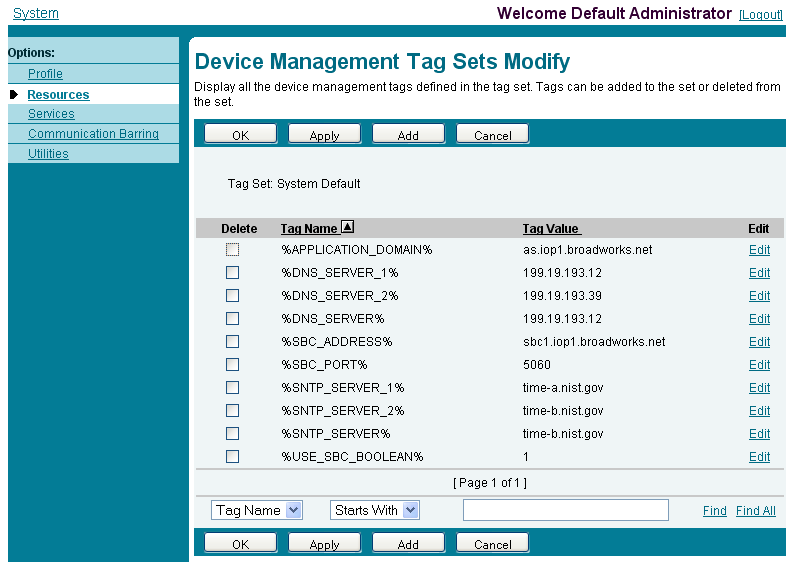
Example System Default Tag Settings
Figure 3 System Default Tag Settings
5.2.1.2
Create Device Type-specific Tags
Browse to System → Resources → Device Management Tag Sets and then click Add to
add a new tag set. Configure the tag set name using the device name appended by Tags:
VVX D230 Tags. Add the device type specific tags in the following table to the device tag
set. If the tag set already exists, make sure the following tags are defined.
Tag Name
Valid Settings
Description
%ASFEATURE%
true/false
Enable or disable the AS
Feature Sync subscription
feature.
%DigitMap%
(*xx|xx|1xxxxxxxxxx|<
1>[2-
9]xxxxxxxxx|011xx.|xx.|(M
ipd))
This is the dial plan for the
U.S.
%NETSERV_CFWD_ALWAYS%
true/false
Enable or disable Call
Forward Always.
%NETSERV_CFWD_BUSY%
true/false
Enable or disable Call
Forward Busy.
%NETSERV_CFWD_NOANSWER%
true/false
Enable or disable Call
Forward No Answer.
%NETSERV_CALLPARK%
true/false
Enable or disable Call Park.
%NETSERV_CALLPARK_STATUS_E
NABLE%
true/false
Enable or disable Call Park
Status.
%NETSERV_CALLPARK_EXT%
String value comma
separated
Configured extensions to
park against. i.e. 1001,1002
%NETSERV_CALLPICKUP%
true/false
Enable or disable Call
Pickup.
%NETSERV_DIRECTORY%
true/false
Enable or disable Directory.

Page 52
PARTNER CONFIGURATION GUIDE – POLY VVX D230 DECT PHONES
20-BD5624-00
©2021 CISCO SYSTEMS INC.
PAGE 52 OF 86
%NETSERV_DND%
true/false
Enable or disable Do Not
Disturb.
%BSFT_DIR_TYPE%
Enterprise / Enterprise
Common / Group / Group
Common / Personal
Specify what type of
BroadWorks Directory to
list
%FIRMWV%
VVX-D230-7-1-0-7866-
2020-7-7.fw
Firmware file
%UseExternalConfBridge%
true/false
User external bridge for
conf calls. True to enable.
False by default.
Example Device Type-specific Tag Settings
Figure 4 Device Type-specific Tag Settings
5.2.2
Configure Cisco BroadWorks Device Profile Type
The device profile type is a system-level structure that defines how the device interfaces
with Cisco BroadWorks. It also identifies the default configuration files and other files,
such as firmware, which are required for the device to operate correctly. The device
profile type is created by the system administrator. Group administrators use the device
profile type to create a device profile. The device profile is an instance of the device profile
type that is associated with a physical device.
There are two Cisco BroadWorks device profile configuration methods described: import
and manual. The import method takes a DTAF as input and builds the Cisco BroadWorks
device profile type(s) automatically. The manual method takes the administrator through
the steps to manually add and configure the device profile type(s).
The import method should be used if all of the following prerequisites are met:
◼
The Cisco BroadWorks Release is 17.0 or later.

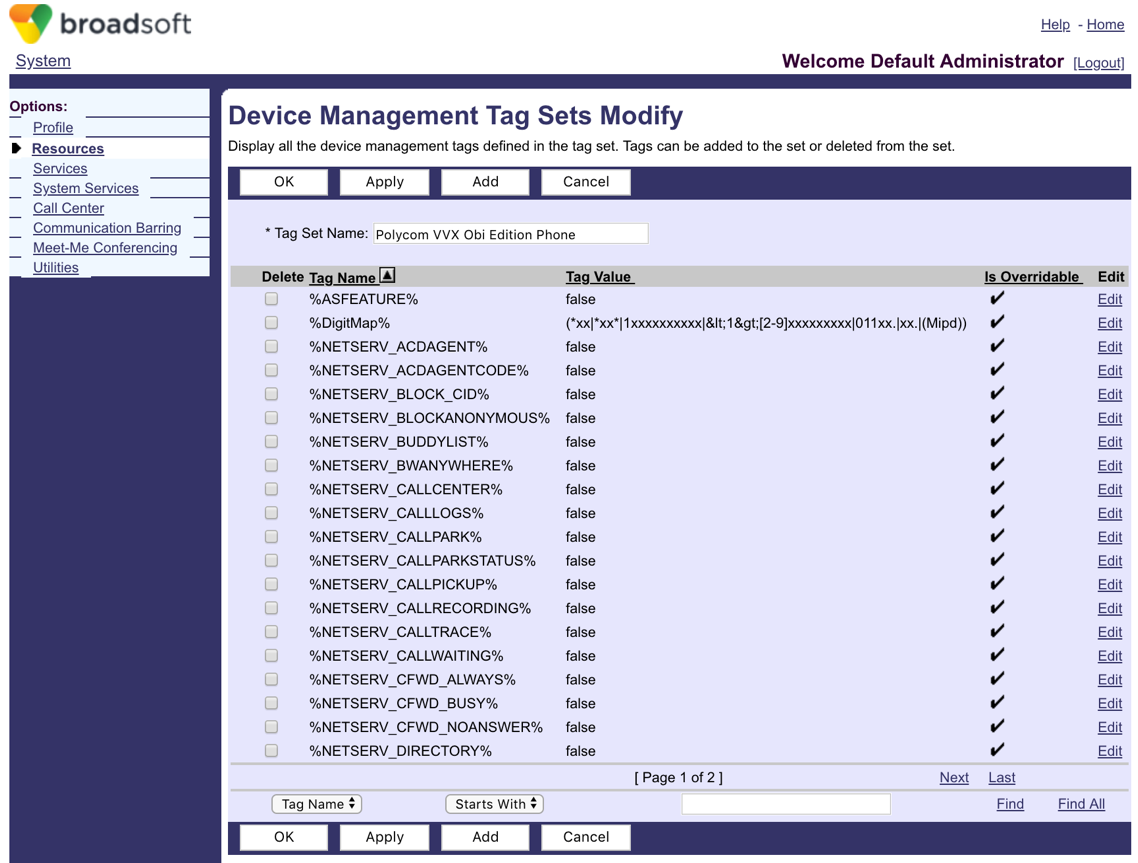
Page 53
PARTNER CONFIGURATION GUIDE – POLY VVX D230 DECT PHONES
20-BD5624-00
©2021 CISCO SYSTEMS INC.
PAGE 53 OF 86
◼
The device profile type(s) being imported do not already exist on the system. (If either
a previous import or manual configuration was done, then the import fails.)
◼
There is a DTAF file available for import with a Cisco BroadWorks release level that is
the same as or prior to the release to which it is being imported. If the DTAF file is at a
release level later than the release being imported to, then the import can fail.
Otherwise, use the manual method.
For more detailed instructions, refer to the Cisco BroadWorks CPE Kit Usage Guide [8]
and the Cisco BroadWorks Device Management Configuration Guide [2].
5.2.2.1
Configuration Method 1: Import
This section identifies the steps necessary to make use of the Device Management import
feature to configure Cisco BroadWorks to add the Poly VVX D230 Phone as a Device
Management-enabled device type. Also, see the Cisco BroadWorks CPE Kit Usage
Guide [8].
Download the Poly VVX D230 Phone CPE kit from BroadSoft Xchange at
xchange.broadsoft.com. Extract the DTAF file(s) from the CPE kit. These are the import
files. Repeat the following steps for each model you wish to import.
- Log in to Cisco BroadWorks as an administrator.
- Browse to System → Resources → Identity/Device Profile Types and then click
Import.
- Select Browse to find the extracted DTAF file for the model and then click OK to start
the import.
After the import finishes, complete the following post-import configuration steps:
- Browse to System → Resources → Identity/Device Profile Types.
- Perform a search to find the imported Polycom device profile type, Poly_VVX_D230
Phone.
- Browse to the Profile page and change the Device Management Device Access
FQDN to your Xtended Services Platform (XSP) or XSP cluster address.

Page 54
PARTNER CONFIGURATION GUIDE – POLY VVX D230 DECT PHONES
20-BD5624-00
©2021 CISCO SYSTEMS INC.
PAGE 54 OF 86
Figure 5 Device Access FQDN
7) Click the Files and Authentication link and then select the option to rebuild all the
system files.
Firmware files must be obtained from Poly. These files are not included in the import.
Complete the steps in section 5.2.2.2.2 Define Device Profile Type Files to define the
static firmware files and to upload the firmware.
NOTE: The non-firmware static files in section 5.2.2.2.2 Define Device Profile Type Files are
normally included in the import.
8) After importing the DTAFs, restart the Application Server to load the TimeZoneAlias
files.
5.2.2.2
Configuration Method 2: Manual
This section identifies the basic steps necessary for an administrator to manually configure
Cisco BroadWorks to add the Poly VVX D230 Phone as a Device Management-enabled
device type. This method should not be used except in special cases as described in the
opening to section 5.2.2 Configure Cisco BroadWorks Device Profile Type.
For more detailed instruction on manual configuration, see the Cisco BroadWorks CPE Kit
Usage Guide [8] and the Cisco BroadWorks Device Management Configuration Guide [2].
The steps in this section can also be followed to update previously imported or configured
device profile type(s) with new configuration files and firmware.
If there are DTAFs for more than one device model, these steps must be completed for
each model.

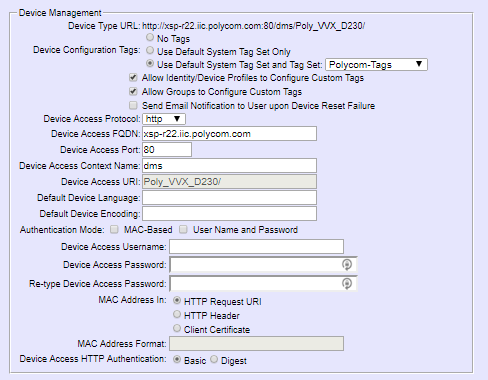
Page 55
PARTNER CONFIGURATION GUIDE – POLY VVX D230 DECT PHONES
20-BD5624-00
©2021 CISCO SYSTEMS INC.
PAGE 55 OF 86
5.2.2.2.1
Create or Modify Device Profile Type
This section identifies the Cisco BroadWorks device profile type settings relevant to
Device Management for the Poly VVX D230 Phone.
Browse to System → Resources → Identity/Device Profile Types and perform a search to
find the Poly device profile type(s) created in section 3.1 Cisco BroadWorks Device Profile
Type Configuration or add the device profile type for each model using the settings from
section 3.1 Cisco BroadWorks Device Profile Type Configuration if they do not exist.
Configure the device profile type Signaling Address Type, Standard and Advanced options
settings to match the settings in section 3.1 Cisco BroadWorks Device Profile Type
Configuration.
Configure the device profile type Device Management options as shown in section 5.2.2.1
Configuration Method 1: Import.
The following subsections identify the required settings specific to Device Management.
5.2.2.2.2
Define Device Profile Type Files
This section describes the Cisco BroadWorks Device Management configuration
necessary to identify the configuration files and other files that the Poly VVX D230 Phone
downloads.
Configuration templates, firmware, and other files the Poly VVX D230 Phone uses must
be uploaded to Cisco BroadWorks. Download the Poly VVX D230 Phone CPE kit from
BroadSoft Xchange at xchange.broadsoft.com. Extract the configuration files from the
Configuration Files folder of CPE kit. Obtain the firmware files directly from Poly.
The following table identifies the Poly configuration files distributed with the CPE kit.
File Name
CPE Kit Template File Name
File Type
Description
Examples
Poly_VVX_D230-
<MACAddress>.xm
l
Poly_VVX_D230-
%BWMACADDRESS%.xml.t
emplate
Device-specific
This file contains all
the configuration and
firmware files that
the device needs to
load.
Poly_VVX_D230sy
stem.xml
Poly_VVX_D230system.xml.t
emplate
System-level
This file contains
configuration
parameters for all
device profile types.
Poly_VVX_D230Te
mplate.xml
Poly_VVX_D230template.xml
.template
System-level
This initial template
file specifies the URI
of the subsequent
configuration files to
be loaded.
TimeZoneAliasLab
els_Poly_VVX_D23
0.properties
TimeZoneAliasLabels_Poly_V
VX_D230.properties
Time Zone Alias
The time zone alias
file is a Cisco
BroadWorks Device
Management file
used to map time
zone identifiers
between Cisco
BroadWorks and
Poly devices. A time
zone alias file is
required for each
model.

Page 56
PARTNER CONFIGURATION GUIDE – POLY VVX D230 DECT PHONES
20-BD5624-00
©2021 CISCO SYSTEMS INC.
PAGE 56 OF 86
The following table identifies other files that the Poly VVX D230 Phone downloads from
the server or uploads to the server. These files are not provided in the CPE kit and must
be obtained from Poly.
File Name
File Type
Description
VVX-D230-7-1-0-
7866-2020-7-7.fw
Static
The file is the application firmware image for D230.
Browse to System → Resources → Identity/Device Profile Types → Files and
Authentication to add the files as described in the following subsections.
5.2.2.2.2.1
System Files
This Section identifies the system-level files used by Poly VVX D230 Phone and provides
instructions for defining and uploading the files for Device Management.
The Poly VVX D230 Phone downloads 2 system files, named as follows:
◼
Poly_VVX_D230system.xml and Poly_VVX_D230template.xml
Add a Cisco BroadWorks device profile type file to the Poly VVX D230 device profile for
the system file using the settings described in the following table.
Parameters not identified in the following table can usually be left with their default values.
Parameter
Value
Description
Device Access File Format
Poly_VVX_D230syste
m.xml.template
Poly_VVX_D230templ
ate.xml.template
Example:
Poly_VVX_D230syste
m.xml
Poly_VVX_D230Temp
late.xml
This is the file name, which the
phone uses to request the file.
Repository File Format
<system-file-name>-
%BWTIMESTAMP%
Example:
Poly_VVX_D230syste
m-
%BWTIMESTAMP%.x
ml
Poly_VVX_D230Temp
late-
%BWTIMESTAMP%.x
ml
This is the file name as stored in the
Device Management repository.
If group customization of the system
file is required, then the repository
file name must contain the
timestamp tag.
File Category
Dynamic Per-Type
This is the system file that applies to
the device type.
File Customization
Administrator
This identifies who can customize
the system file template.
Enable Caching
Not set
Caching is optional for a system file.
Assign File
Custom
Authentication Mode
User name and
password
This must be set based on what the
device supports.
If group customization of the system
file is required, then Authentication
must be set to the user name and
password.

Page 57
PARTNER CONFIGURATION GUIDE – POLY VVX D230 DECT PHONES
20-BD5624-00
©2021 CISCO SYSTEMS INC.
PAGE 57 OF 86
Parameter
Value
Description
Device Access HTTP
Authentication
Digest
After defining the system file type, upload the corresponding system file template
downloaded from BroadSoft Xchange. Click the Browse button on the file definition
screen and click the Apply button after uploading the file.
Figure 6 Poly_VVX_D230system.xml

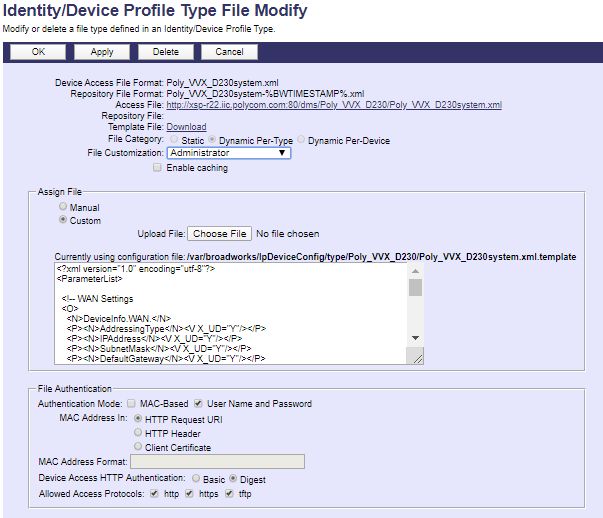
Page 58
PARTNER CONFIGURATION GUIDE – POLY VVX D230 DECT PHONES
20-BD5624-00
©2021 CISCO SYSTEMS INC.
PAGE 58 OF 86
Figure 7 Poly_VVX_D230template.xml Device-Specific Files
This section identifies the device-specific files used by Poly VVX D230 phone and
provides instructions for defining the files and uploading for Device Management.
The Poly VVX D230 phone downloads one device-specific file, named as follows:
◼
Poly_VVX_D230-%BWMACADDRESS%.xml
Add a BroadWorks device profile type file to the Poly VVX D230 device profile for the
system file using the settings described in the following table.
Parameters not identified in the following table can usually be left with their default values.
Parameter
Value
Description
Device Access File Format
Poly_VVX_D230-
%BWMACADDRESS
%.xml
This is the file name that the phone
uses when requesting the file.
Repository File Format
Poly_VVX_D230-
%BWFQDEVICEID%.
xml
This is the file name as stored in the
Device Management repository.
File Category
Dynamic Per-Device
This file is unique per device.
File Customization
Administrator and
User
This identifies who can customize this
file template.
Enable Caching
Not set.
Caching should not be enabled for
device-specific files.
Assign File
Custom
Authentication Mode
User name and
password
This must be set based on what the
device supports.
If group customization of the system
file is required, then Authentication
must be set to the user name and
password.

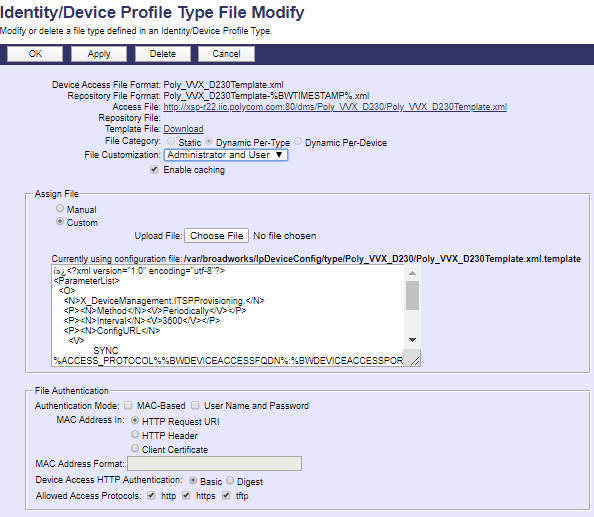
Page 59
PARTNER CONFIGURATION GUIDE – POLY VVX D230 DECT PHONES
20-BD5624-00
©2021 CISCO SYSTEMS INC.
PAGE 59 OF 86
Device Access HTTP
Authentication
Digest
After defining the system file type, upload the corresponding system file template
downloaded from BroadSoft Xchange. Click the Browse button on the file definition
screen and click the Apply button after uploading the file.
Figure 8 Device-specific File
5.2.2.2.2.2
Application Firmware
The static application firmware and medial files are not configurable and/or do not make
use of the dynamic Cisco BroadWorks Device Management tags.
The Poly VVX D230 Phone with 7.1.0 firmware release requires static files in the following
format:
◼
VVX-D230-<FW version-buildID>-<YYYY-M-DD>.fw
Example:
◼
VVX-D230-7-1-0-7866-2020-7-7.fw
Add a Cisco BroadWorks device profile type file to the Poly VVX D230 device profile for
the application file using the settings described in the following table.
Parameters not identified in the following table can usually be left with their default values.
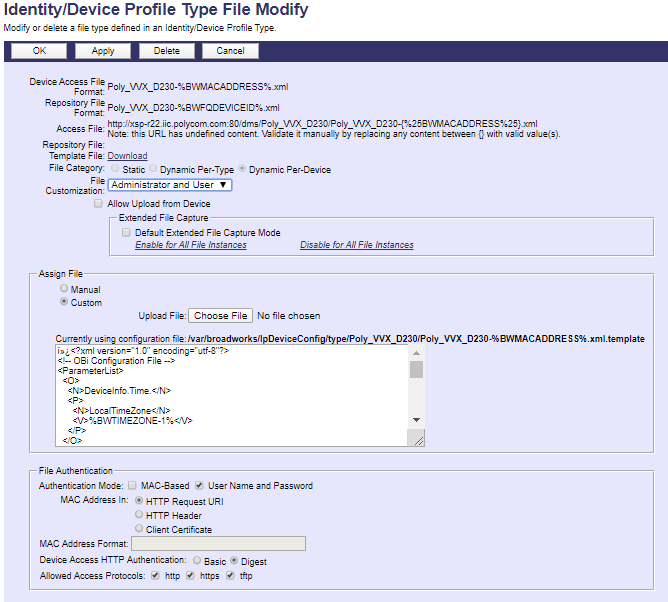

Page 60
PARTNER CONFIGURATION GUIDE – POLY VVX D230 DECT PHONES
20-BD5624-00
©2021 CISCO SYSTEMS INC.
PAGE 60 OF 86
Parameter
Value
Description
Device Access File
Format
VVX-D230-<FW version-buildID>-
<YYYY-M-DD>.fw
Example:
VVX-D230-7-1-0-7866-2020-7-7.fw
This is the file name, which the
phone uses to request the file.
Repository File Format
VVX-D230-<FW version-buildID>-
<YYYY-M-DD>.fw
Example:
VVX-D230-7-1-0-7866-2020-7-7.fw
This is the file name stored in the
Device Management repository.
Use the same name as the actual
file name.
File Category
Static
This is a static file. There are no
dynamic tags in the file.
File Customization
Disallow
This file must not be modified.
Enable Caching
Selected
Caching is recommended for static
files.
Assign File
Custom
Authentication Mode
Not set
The static files are not authenticated
so do not select either of the
options.
After defining the application firmware file type, upload the corresponding application
firmware file. Application firmware files are not included in the CPE kit and must be
obtained from Poly. Click the Browse button on the file definition screen and click the
Apply button after uploading the file.
Example application firmware file settings:
Figure 9 Application Firmware File Settings

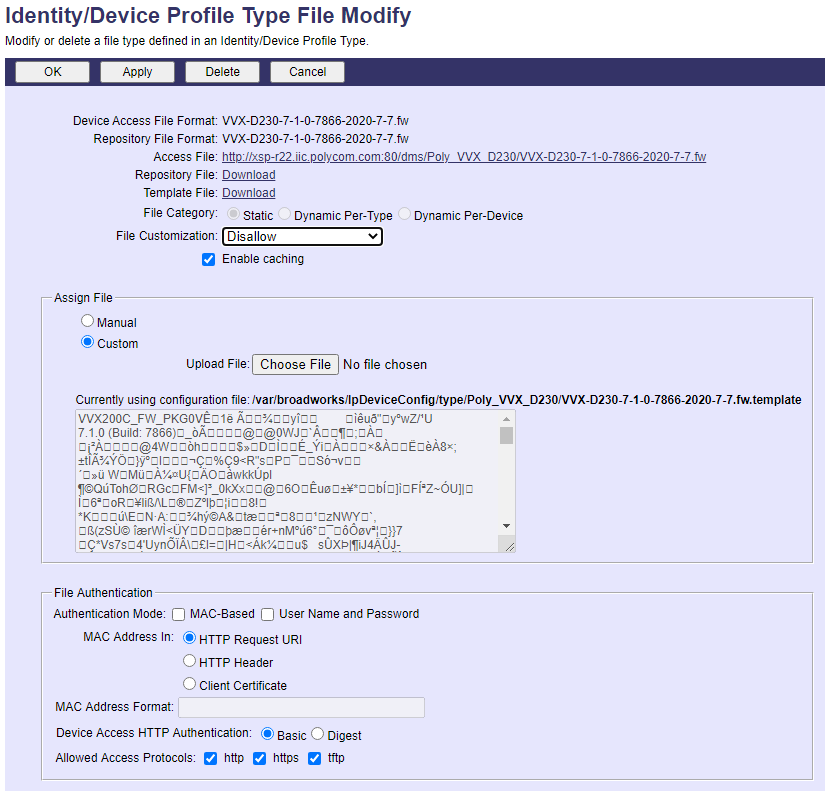
Page 61
PARTNER CONFIGURATION GUIDE – POLY VVX D230 DECT PHONES
20-BD5624-00
©2021 CISCO SYSTEMS INC.
PAGE 61 OF 86
5.2.2.2.2.3
Time Zone Mapping
To map a Cisco BroadWorks configured user time zone properly to the Poly VVX D230
device setting, a mapping file must be created on the Cisco BroadWorks system. This file
maps the Cisco BroadWorks user time zone settings to the phone’s time zone settings.
Time zone mapping for the device profile type is documented in the Cisco BroadWorks
Device Management Configuration Guide [2].
This time zone mapping file must be added to the /usr/local/Cisco
BroadWorks/bw_base/conf/dms directory on the Application Server using the following file
name format: TimeZoneAliasLabels_<Device_Type_Name>.properties.
For example, if the device type name is Poly_VVX_D230, the time zone mapping file
name must be TimeZoneAliasLabels_ Poly_VVX_D230.properties. If a space exists in
the device name, the space character must be converted to a “+” in the file name.
◼
US_HAWAII=GMT-10:00 (Hawaii)
◼
US_ALASKA=GMT-09:00 (Alaska)
◼
CANADA_PACIFIC_TIME=GMT-08:00 (Pacific Time)
◼
MEXICO_PACIFIC_TIME=GMT-08:00 (Pacific Time)
◼
US_PACIFIC_TIME=GMT-08:00 (Pacific Time)
◼
US_ARIZONA=GMT-07:00 (Mountain Time)
◼
CANADA_MOUNTAIN_TIME=GMT-07:00 (Mountain Time)
◼
MEXICO_MOUNTAIN_TIME=GMT-07:00 (Mountain Time)
◼
US_MOUNTAIN_TIME=GMT-07:00 (Mountain Time)
◼
CANADA_CENTRAL_TIME=GMT-06:00 (Central Time)
◼
US_CENTRAL_TIME=GMT-06:00 (Central Time)
◼
US_INDIANA=GMT-05:00 (Eastern Time)
◼
CANADA_EASTERN_TIME=GMT-05:00 (Eastern Time)
◼
US_EASTERN_TIME=GMT-05:00 (Eastern Time)
◼
CANADA_ALTANTIC_TIME=GMT-04:00 (Atlantic Time)
◼
CANADA_NEWFOUNDLAND=GMT-03:30 (Newfoundland)
◼
VENEZUELA_TIME=GMT-04:30 (Caracas)
◼
CHILE_TIME=GMT-03:00 (Buenos Aires, Greenland)
◼
ARGENTINA_TIME=GMT-03:00 (Buenos Aires, Greenland)
◼
GREENWICH_MEAN_TIME=GMT+00:00 (London, Lisbon)
◼
CENTRAL_EUROPEAN_TIME=GMT+01:00 (Rome, Paris, Madrid)
◼
EASTERN_EUROPEAN_TIME=GMT+02:00 (Athens, Cairo)
◼
EAST_AFRICAN_TIME=GMT+03:00 (Moscow, Baghdad)
◼
IRAN_TIME=GMT+03:30 (Tehran)
◼
AZERBAIJAN_TIME=GMT+04:00 (Abu Dhabi)
◼
AFGHANISTAN_TIME=GMT+04:30 (Kabul)
◼
PAKISTAN_TIME=GMT+05:00 (Islamabad, Karachi)
◼
INDIA_TIME=GMT+05:30 (New Delhi)

Page 62
PARTNER CONFIGURATION GUIDE – POLY VVX D230 DECT PHONES
20-BD5624-00
©2021 CISCO SYSTEMS INC.
PAGE 62 OF 86
◼
EASTERN_KAZAKHSTAN_TIME=GMT+06:00
◼
MYANMAR_TIME=GMT+06:30 (Yangon)
◼
THAILAND_TIME=GMT+07:00 (Bangkok, Jakarta)
◼
CHINA_TIME=GMT+08:00 (Beijing, HK, Singapore)
◼
JAPAN_TIME=GMT+09:00 (Tokyo, Seoul)
◼
AUSTRALIAN_CENTRAL_STANDARD_TIME=GMT+09:30 (Adelaide)
◼
AUSTRALIAN_EASTERN_STANDARD_TIME=GMT+10:00 (Sydney, Guam)
◼
NEWZEALAND_TIME=GMT+12:00 (Fiji, Auckland)
This file must contain all the time zones supported by the service provider’s Cisco
BroadWorks system. You must restart the Application Server to load this file.
5.2.3
Create Device Profile Instance
The previous sections defined the device profile type such that the system is ready to
mass deploy device profiles. A device profile is an instance of the device profile type and
defines the Cisco BroadWorks interface to an individual Poly device.
Browse to the Cisco BroadWorks <group> → Resources → Identity/Device Profiles page
and then select Add to add a new Poly VVX D230 Phone device profile. Configure the
device profile as shown in the Figure 10 example.
Parameters not identified in the following table can usually be left with their default values.
Parameter
Value
Description
Identity/Device Profile
Name
<device-profile-name>
Example: D230_user1
The device profile name is a
unique identifier for the device
profile instance.
Identity/Device Profile
Type
<Polycom VVX device profile type>
Example: Poly_VVX_D230
From the drop-down menu, select
the Poly VVX D230 device profile
type (created in the previous
section).
Authentication
Use custom credentials
Set a unique login ID and
password for each phone.
Device Access User
Name
<phone-login-name>
Example: user123
This is the user name to log in
from the phone.
The phone login user naming
convention must be determined by
the service provider.
Device Access
Password
<phone-login-password>
Example: 1234
This is the password to log in from
the phone.
MAC Address
(Optional)
<MAC Address of the VVX D230>
Populate this field only if the
device is using MAC address
authentication.

Page 63
PARTNER CONFIGURATION GUIDE – POLY VVX D230 DECT PHONES
20-BD5624-00
©2021 CISCO SYSTEMS INC.
PAGE 63 OF 86
Figure 10 Device Profile Instance
5.2.4
Configure Cisco BroadWorks User
Configure the user with the desired Cisco BroadWorks configuration and services. Any
services that require a specific configuration on the device are managed via Device
Management and are defined in the device configuration files, if the template files are
created with the correct Device Management tags.
The device profile created in the previous section must be assigned to the Cisco
BroadWorks user. Assigning the device profile to the user automatically causes the
Device Management feature to generate the device configuration files for this user’s
device.
To assign the device profile to the user, browse to the Cisco BroadWorks <user> →
Addresses.
5.2.5
Customize Tags
This section identifies custom tags used by the Poly VVX D230 Phone that may need to
be customized at the group or device profile. Customizing a tag at the group level
overrides the setting on the device profile type for the device profiles created within the
group. Customizing a tag at the device profile level overrides the setting at the device
profile type and/or group level for the individual device profile.
5.2.5.1
SBC Address Customization for Edge Device
In many deployments, an edge device, such as an enterprise SBC or application layer
gateway, is deployed on the enterprise edge. The edge device’s SIP server or outbound
proxy setting is configured with the service provider’s SBC IP address or FQDN. If there is
no edge device, the following customization does not apply.

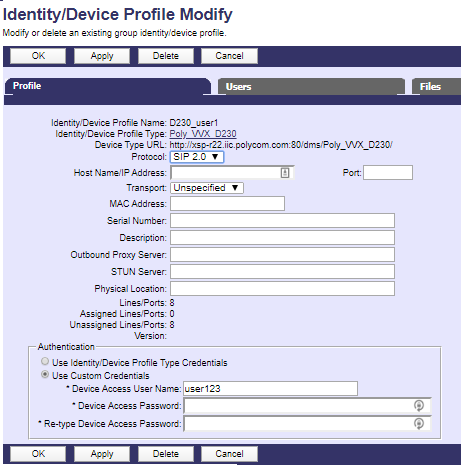
Page 64
PARTNER CONFIGURATION GUIDE – POLY VVX D230 DECT PHONES
20-BD5624-00
©2021 CISCO SYSTEMS INC.
PAGE 64 OF 86
To integrate the edge device with Device Management, the SBC address tag
(%SBC_ADDRESS%) defined in section 5.2.1.1 Create System Default Tags must be
overridden at the group level with the LAN address of the edge device. To do so, perform
that following steps.
- At the Group → Utilities → Configure Device page, select the Poly device profile (for
example, Poly_VVX_D230).
- Click on the Custom Tags tab.
- Click Add.
- For the tag, enter “SBC_ADDRESS”.
- For the value, enter the edge device LAN IP address.
- To save the tag data, click OK.
Repeat these steps for each Poly model provisioned in the group.
5.2.6
Configure Poly VVX D230 Phones
This section describes the steps necessary to configure the Poly VVX D230 Phone to
integrate with Cisco BroadWorks Device Management.
5.2.6.1
Defining Device Management File Access URI
The Poly VVX D230 Phone uses the provisioning server parameters configured on the
phone unless Option 160 or 66 has been defined on the DHCP server. If the DHCP
server returns data set for the Option 160 or 66 parameter, then the Poly VVX D230
Phone uses the address defined in this field as the server address to retrieve its
configuration data.
To utilize DHCP Options Field, the following value should be configured on the DHCP
server for Option 160 or 66:
◼
<Access Protocol>://<Device Access FQDN>:<Device Access Port>/ <Device Access
Context Name>/<Device Access URI>
Example:
option myDevice code 66 = string;
subnet 10.2.0.0 netmask 255.255.255.0 {
option subnet-mask 255.255.255.0;
option domain-name-servers 10.2.0.29;
option routers 10.2.0.1;
option myDevice “http://xsp1.iop1.Cisco
BroadWorks.net:80/dms/myDevice/Poly_VVX_D230Template.xml”
}
In this case manual configuration is required, perform the following steps to manually
define the Device Management file access URL:
- Log in to the web user interface (UI) for the device. The default Username and
Password is “admin” and “admin” respectively. Browse to the Auto Provisioning page
and fill in the Device Management server address ConfigURL under ITSP
Provisioning. Following is an example of the ConfigURL:
http://$GPRM0:$GPRM1@xsp1.iop1.Cisco
BroadWorks.net/dms/Poly_VVX_D230Template.xml
- Fill in the GRPM0 and GPRM1 with the BroadSoft “Device Access User Name” and
“Device Access Password” respectively.

Page 65
PARTNER CONFIGURATION GUIDE – POLY VVX D230 DECT PHONES
20-BD5624-00
©2021 CISCO SYSTEMS INC.
PAGE 65 OF 86
3) Click Submit and then OK to confirm the changes.
4) Click Reboot to complete. Restart the device and enter the Cisco BroadWorks device
access user name and password when prompted.
Example Login Screen
Figure 11 Example Login Screen
Example Provisioning Screen
Figure 12 Example Provisioning Screen
5.2.6.2
File Authentication Using MAC Address from Client Certificate
This section describes the steps necessary to configure Cisco BroadWorks to
perform device management file authentication using the MAC address
obtained from the phone’s client certificate. This secure authentication method
based on MAC address is a new feature available from Cisco BroadWorks
Release 22.0.
Prior to configuring for the MAC address authentication, mutual HTTPS
authentication must be established among the D230 and Cisco BroadWorks.
That is by the implication of client certificate authentication, HTTPS must be
enabled on the phones to trust Cisco BroadWorks server certificate.
Furthermore, HTTPS client certificates offered by D230 devices containing
the phone’s MAC address must also be trusted by Cisco BroadWorks.
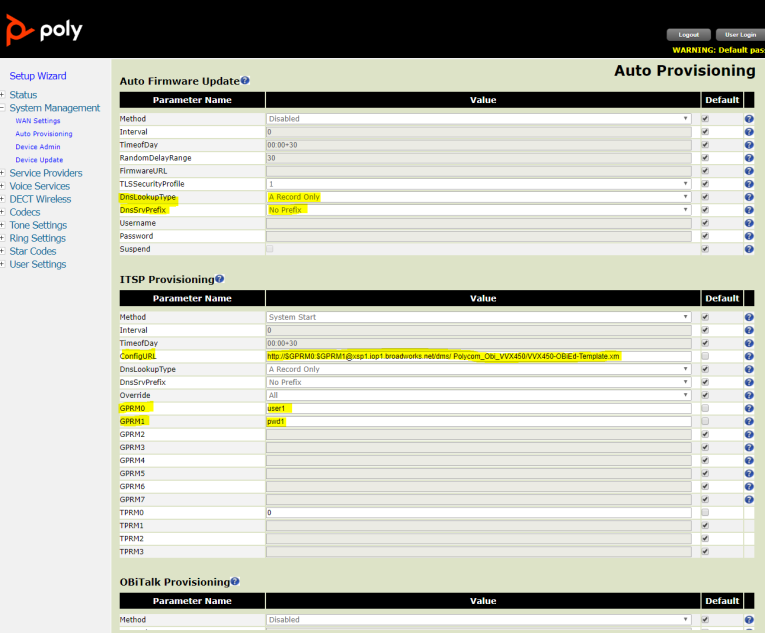

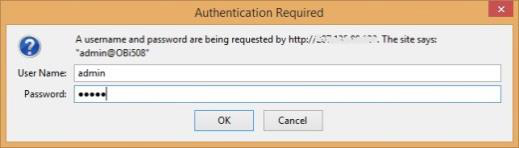
Page 66
PARTNER CONFIGURATION GUIDE – POLY VVX D230 DECT PHONES
20-BD5624-00
©2021 CISCO SYSTEMS INC.
PAGE 66 OF 86
From factory, each Poly D230 Phone is installed with a client certificate that
is signed by Poly’s certificate authority. The public certificates of Poly’s
certificate authority can be obtained from Poly. The Poly certificate should be
installed on the Device Management deploying Xtended Services Platform.
- Create or Modify Device Profile Instance using MAC Address from Client Certificate
When MAC address authentication is chosen as the file authentication mode,
every single D230 phone’s MAC address must be added to the corresponding
device profile on Cisco BroadWorks. The device MAC address is to be
configured for the device profile as shown in the following figure. Further,
select or update the Authentication method of Use Custom Credentials
instead of Use Identity/Device Profile Type Credentials. If altering the
authentication mode, repeat the steps to modify all existing device profiles on
the Cisco BroadWorks system.
Figure 13 MAC Address Definition for Device Profile Instance
Caution: Altering the authentication mode from “username/password” to “MAC address in client
certificate” for a given device profile type will affect all existing device profile instances on the
BroadWorks system. Prepare the authentication mode switch by collecting all MAC addresses of the
existing Polycom UC Software VVX Phones and follow instructions below in the specified order.
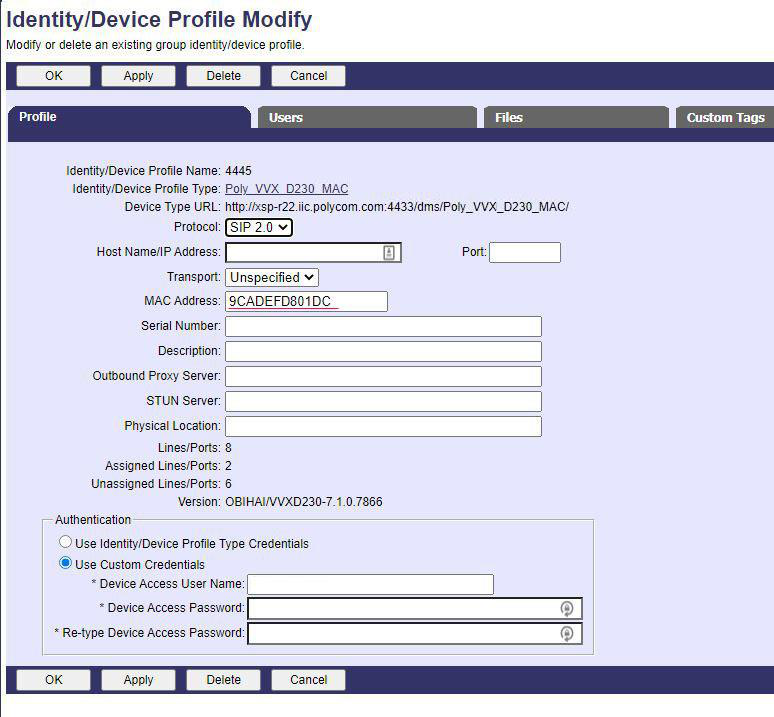

Page 67
PARTNER CONFIGURATION GUIDE – POLY VVX D230 DECT PHONES
20-BD5624-00
©2021 CISCO SYSTEMS INC.
PAGE 67 OF 86
6) Update Device Management Authentication Mode on the Device Profile Type
Instructions in this section are only applicable to updating Cisco BroadWorks
systems with existing Poly VVX D230 device profile types. Perform the
changes as shown on the device profile type to be updated with MAC address
authentication using Client Certificate.
Parameter
Value
Description
Device Access
Protocol
https
HTTPS protocol is a must when
using client mutual authentication
with signed certificates.
Device Access Port
XSP’s listening port of HTTPS
mutual authentication.
Enter the corresponding TCP port.
Authentication Mode
MAC-Based checked
MAC-Based authentication
method is used
MAC Address in
Client Certificate radio button
selected
MAC address used for
authentication is to be obtained
from the client certificate to
compare to the provisioned values
on the device profiles.
MAC Address Format
.([0-9a-fA-F]{12}).
Regular expression used to parse
the MAC address from the CN field
of the client certificate.
Figure 14 Device Profile Type Update for MAC-Based Auth using Client Certificate
7) Change File Authentication Mode to MAC address in Client Certificate
Instructions in this section are only applicable to updating Cisco BroadWorks
systems with existing Poly VVX D230 device profile types. Perform
corresponding changes on the authentication mode of all authenticated files as
shown in the following figure. The regular expression used in MAC Address
Format is:
.([0-9a-fA-F]{12}).
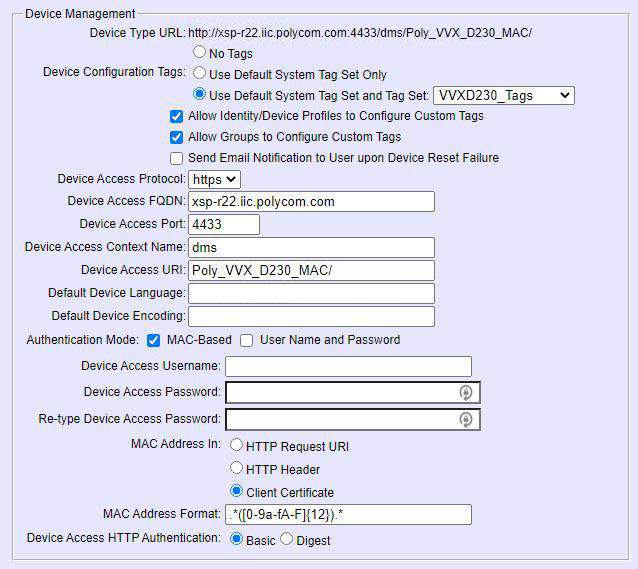

Page 68
PARTNER CONFIGURATION GUIDE – POLY VVX D230 DECT PHONES
20-BD5624-00
©2021 CISCO SYSTEMS INC.
PAGE 68 OF 86
Figure 15 Authentication Mode Set to MAC-Based and Sourced from Client Certificate
5.2.6.3
Zero-Touch Device Provisioning (ZT)
Using Poly PDMS-SP (Obitalk Zero-Touch customization), the device can be boot-
strapped to automatically connect to the Cisco BroadWorks Device Management server.
Poly VVX D230 Phones leave the factory with their configuration set to pre-defined default
values. The configuration is then changed subsequently through local configuration or
remote provisioning.
Poly offers a device customization service, known as Zero-Touch or ZT, which lets service
provider customers select the default values for Poly VVX D230 device configuration
parameters. A typical parameter default customized to a specific service provider would
be the ConfigURL which tells the device where and how to download its configuration
profile(s) from the service provider’s provisioning system. With the default ConfigURL
pointing to their provisioning servers, service providers are in control of their devices the
first time they are powered on, and therefore can provide true plug-and-play experience to
their users without first preparing the units before shipping. Talk to your Poly sales
representative if you would like to incorporate this service with your next order.
While the customized default values cannot be changed after the devices are shipped
from the factory, customized parameter values may still be changed by subsequent
provisioning, just like any other common parameter. When the device’s factory resets all
the customized parameters will be restored to the corresponding customized default
values.
Poly Obitalk ZT is a technology (late customization) for service provider customers.
Customization is finalized when the unit is first plugged in at the end-user’s location. This
allows service providers to ship devices in their original packaging to end-users without
any pre-configuration.
When a service provider customer places an order with Poly for ZT devices, it must also
define a ZT profile (or re-use an existing one previously defined). A ZT profile is just a
device configuration profile with a small number of customized device parameter values.
The ZT profile must be validated and approved by Poly. When ZT units are shipped from
the factory, Poly records vital information (such as MAC and Serial#) for each device and
links it in a database to the ZT profile already defined for that shipment. ZT enabled
devices leave the factory in the “pre-customized” state. While in this state, the device will
continuously attempt to complete customization by downloading its ZT profile from the ZT
Server at www.oblitalk.com. Its functionality is otherwise very limited in this state, the end-
user may change some basic network parameters such as DHCP and IP address, but
may not set up a service provider’s service for example. A very basic ZT profile would
include a ConfigURL that points to a provisioning server managed by the service provider.
When a ZT profile is successfully downloaded and stored, the device operates in the
customized state. It is in this state that the device can operate normally under the
management of the service provider. The service provider should bear in mind the
following points regarding their ZT devices:
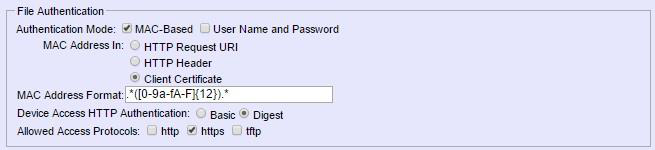

Page 69
PARTNER CONFIGURATION GUIDE – POLY VVX D230 DECT PHONES
20-BD5624-00
©2021 CISCO SYSTEMS INC.
PAGE 69 OF 86
As the ZT profile is defined, each parameter specified in the profile may be permanently
locked down. No one can change the value of a locked down parameter after the unit is
customized.
Factory resetting the device restores all the customized parameters to the values defined
in the original ZT profile; other parameters are restored to their corresponding factory
default values.
Service Providers are strongly advised to keep good records (MAC and serial# at the
minimum) of the device shipment received from Poly and also devices they have shipped
out to their end-users. These records would be valuable for example when a device has
failed to complete ZT customization at a user’s site and would allow Poly support staff to
manually force the device to complete the proper ZT customization process.
For more information on Poly PDMS-SP’s ZT service, see
https://www.poly.com/us/en/products/services/cloud/polycom-device-management-
service-providers
5.3
Upgrade from Previous CPE Kits
The previous configuration sections are primarily structured around importing or manually
configuring the Poly device profile types for the first time. Many of the steps are
unnecessary when upgrading to a new firmware release or CPE kit version.
For general instructions on upgrading, see the Cisco BroadWorks CPE Kit Usage Guide
[8].

Page 70
PARTNER CONFIGURATION GUIDE – POLY VVX D230 DECT PHONES
20-BD5624-00
©2021 CISCO SYSTEMS INC.
PAGE 70 OF 86
Appendix A: Reference Poly VVX D230 Phone Configuration Files
The following is a reference configuration for the Poly VVX D230 Phone configured for use
with Cisco BroadWorks.
Poly VVX D230 Phone can be configured through the device web user interface (UI). The
default User Name and Password is admin and admin.
Browse to the Auto Provisioning page, under ITSP Provisioning section, fill in ConfigURL
with the Device Management server address. Here’s the example:
http://xsp1.iop1.Cisco BroadWorks.net/dms/Poly_VVX_D230Template.xml
or
http://username:password@xsp1.iop1.Cisco
BroadWorks.net/dms/Poly_VVX_D230Template.xml
Click Submit and then OK to confirm the changes. Then click Reboot to complete.
NOTE: These are example files and they should be used for reference only. DO NOT CUT AND
PASTE THESE EXAMPLES TO GENERATE YOUR CONFIGURATION FILES. The Poly
configuration files change between releases so be sure to use the configuration files from Poly for the
specific release to generate your configuration files.
System Master File: Poly_VVX_D230Template.xml
<?xml version="1.0" encoding="utf-8"?>
<ParameterList>
<O>
<N>X_DeviceManagement.ITSPProvisioning.</N>
<P>
<N>Method</N>
<V>Periodically</V>
</P>
<P>
<N>Interval</N>
<V>3600</V>
</P>
<P>
<N>ConfigURL</N>
<V>
SYNC
%ACCESS_PROTOCOL%%BWDEVICEACCESSFQDN%:%BWDEVICEACCESSPORT%/%BWDMSCONTEXT%/
%BWDEVICEACCESSURI%Poly_VVX_D230system.xml;
SYNC
%ACCESS_PROTOCOL%%BWDEVICEACCESSFQDN%:%BWDEVICEACCESSPORT%/%BWDMSCONTEXT%/
%BWDEVICEACCESSURI%Poly_VVX_D230-$MAC.xml
</V>
</P>
</O>
</ParameterList>

Page 71
PARTNER CONFIGURATION GUIDE – POLY VVX D230 DECT PHONES
20-BD5624-00
©2021 CISCO SYSTEMS INC.
PAGE 71 OF 86
System Default File: Poly_VVX_D230system.xml.template
<?xml version="1.0" encoding="utf-8"?>
<ParameterList>
<!-- ****** Firmware upgrade -->
<O>
<N>X_DeviceManagement.FirmwareUpdate.</N>
<P><N>Method</N><V>Periodically</V></P>
<P><N>Interval</N><V>3600</V></P>
<P><N>FirmwareURL</N><V>%ACCESS_PROTOCOL%%BWDEVICEACCESSFQDN%:%BWDEVICEACC
ESSPORT%/%BWDMSCONTEXT%/%BWDEVICEACCESSURI%%FIRMWV%</V></P>
</O>
<!-- ****** Network -->
<O>
<N>DeviceInfo.WAN.</N>
<P><N>DNSServer1</N><V>%DNS_SERVER_1%</V></P>
<P><N>DNSServer2</N><V>%DNS_SERVER_2%</V></P>
</O>
<!-- ****** Network conference -->
<O>
<N>VoiceService.1.Phone.CallingFeatures.</N>
<P><N>UseExternalConferenceBridge</N><V>%UseExternalConfBridge%</V></
P>
</O>
<!-- SP1 Services -->
<O>
<N>VoiceService.1.VoiceProfile.1.Line.1.</N>
<P><N>X_RingProfile</N><V>A</V></P>
<P><N>X_CodecProfile</N><V X_UD="Y"/></P>
<P><N>X_RegisterEnable</N><V X_UD="Y"/></P>
<P><N>X_AcceptSipFromRegistrarOnly</N><V X_UD="Y"/></P>
<P><N>X_NoRegNoCall</N><V X_UD="Y"/></P>
<P><N>X_KeepAliveEnable</N><V X_UD="Y"/></P>
<P><N>X_KeepAliveExpires</N><V X_UD="Y"/></P>
<P><N>X_KeepAliveMsgType</N><V X_UD="Y"/></P>
<P><N>X_CustomKeepAliveMsg</N><V X_UD="Y"/></P>
<P><N>X_UserAgentPort</N><V X_UD="Y"/></P>
<P><N>X_UserAgentPorts</N><V X_UD="Y"/></P>
<P><N>DirectoryNumber</N><V X_UD="Y"/></P>
<P><N>X_DefaultRing</N><V X_UD="Y"/></P>
<P><N>X_SatelliteMode</N><V X_UD="Y"/></P>
<P><N>X_AcceptResync</N><V X_UD="Y"/></P>
</O>
<O>
<N>VoiceService.1.VoiceProfile.1.Line.1.CallingFeatures.</N>
<P><N>CallerIDName</N><V X_UD="Y"/></P>
<P><N>MaxSessions</N><V X_UD="Y"/></P>
<P><N>CallForwardUnconditionalEnable</N><V X_UD="Y"/></P>
<P><N>CallForwardUnconditionalNumber</N><V X_UD="Y"/></P>
<P><N>CallForwardOnBusyEnable</N><V X_UD="Y"/></P>
<P><N>CallForwardOnBusyNumber</N><V X_UD="Y"/></P>
<P><N>CallForwardOnNoAnswerEnable</N><V X_UD="Y"/></P>
<P><N>CallForwardOnNoAnswerNumber</N><V X_UD="Y"/></P>
<P><N>CallForwardOnNoAnswerRingCount</N><V X_UD="Y"/></P>
<P><N>X_BlockedCallers</N><V X_UD="Y"/></P>

Page 72
PARTNER CONFIGURATION GUIDE – POLY VVX D230 DECT PHONES
20-BD5624-00
©2021 CISCO SYSTEMS INC.
PAGE 72 OF 86
<P><N>X_MailboxID</N><V X_UD="Y"/></P>
<P><N>X_CheckVoiceMailNumber</N><V X_UD="Y"/></P>
<P><N>MWIEnableMask</N><V X_UD="Y"/></P>
<P><N>X_VMWIEnableMask</N><V X_UD="Y"/></P>
<P><N>X_MWIRoute</N><V X_UD="Y"/></P>
<P><N>X_VMWIRoute</N><V X_UD="Y"/></P>
<P><N>MessageWaiting</N><V X_UD="Y"/></P>
<P><N>MessageCount</N><V X_UD="Y"/></P>
<P><N>AnonymousCallBlockEnable</N><V X_UD="Y"/></P>
<P><N>AnonymousCallEnable</N><V X_UD="Y"/></P>
<P><N>DoNotDisturbEnable</N><V X_UD="Y"/></P>
<P><N>X_SRTP</N><V X_UD="Y"/></P>
<P><N>X_SRTPCryptos</N><V X_UD="Y"/></P>
</O>
<!-- SP2 Services -->
<O>
<N>VoiceService.1.VoiceProfile.1.Line.2.</N>
<P><N>X_RingProfile</N><V>A</V></P>
<P><N>X_CodecProfile</N><V X_UD="Y"/></P>
<P><N>X_RegisterEnable</N><V X_UD="Y"/></P>
<P><N>X_AcceptSipFromRegistrarOnly</N><V X_UD="Y"/></P>
<P><N>X_NoRegNoCall</N><V X_UD="Y"/></P>
<P><N>X_KeepAliveEnable</N><V X_UD="Y"/></P>
<P><N>X_KeepAliveExpires</N><V X_UD="Y"/></P>
<P><N>X_KeepAliveMsgType</N><V X_UD="Y"/></P>
<P><N>X_CustomKeepAliveMsg</N><V X_UD="Y"/></P>
<P><N>X_UserAgentPort</N><V X_UD="Y"/></P>
<P><N>X_UserAgentPorts</N><V X_UD="Y"/></P>
<P><N>DirectoryNumber</N><V X_UD="Y"/></P>
<P><N>X_DefaultRing</N><V X_UD="Y"/></P>
<P><N>X_SatelliteMode</N><V X_UD="Y"/></P>
<P><N>X_AcceptResync</N><V X_UD="Y"/></P>
</O>
<O>
<N>VoiceService.1.VoiceProfile.1.Line.2.CallingFeatures.</N>
<P><N>CallerIDName</N><V X_UD="Y"/></P>
<P><N>MaxSessions</N><V X_UD="Y"/></P>
<P><N>CallForwardUnconditionalEnable</N><V X_UD="Y"/></P>
<P><N>CallForwardUnconditionalNumber</N><V X_UD="Y"/></P>
<P><N>CallForwardOnBusyEnable</N><V X_UD="Y"/></P>
<P><N>CallForwardOnBusyNumber</N><V X_UD="Y"/></P>
<P><N>CallForwardOnNoAnswerEnable</N><V X_UD="Y"/></P>
<P><N>CallForwardOnNoAnswerNumber</N><V X_UD="Y"/></P>
<P><N>CallForwardOnNoAnswerRingCount</N><V X_UD="Y"/></P>
<P><N>X_BlockedCallers</N><V X_UD="Y"/></P>
<P><N>X_MailboxID</N><V X_UD="Y"/></P>
<P><N>X_CheckVoiceMailNumber</N><V X_UD="Y"/></P>
<P><N>MWIEnableMask</N><V X_UD="Y"/></P>
<P><N>X_VMWIEnableMask</N><V X_UD="Y"/></P>
<P><N>X_MWIRoute</N><V X_UD="Y"/></P>
<P><N>X_VMWIRoute</N><V X_UD="Y"/></P>
<P><N>MessageWaiting</N><V X_UD="Y"/></P>
<P><N>MessageCount</N><V X_UD="Y"/></P>
<P><N>AnonymousCallBlockEnable</N><V X_UD="Y"/></P>
<P><N>AnonymousCallEnable</N><V X_UD="Y"/></P>
<P><N>DoNotDisturbEnable</N><V X_UD="Y"/></P>
<P><N>X_SRTP</N><V X_UD="Y"/></P>
<P><N>X_SRTPCryptos</N><V X_UD="Y"/></P>
</O>

Page 73
PARTNER CONFIGURATION GUIDE – POLY VVX D230 DECT PHONES
20-BD5624-00
©2021 CISCO SYSTEMS INC.
PAGE 73 OF 86
<!-- SP3 Services -->
<O>
<N>VoiceService.1.VoiceProfile.1.Line.3.</N>
<P><N>X_RingProfile</N><V>A</V></P>
<P><N>X_CodecProfile</N><V X_UD="Y"/></P>
<P><N>X_RegisterEnable</N><V X_UD="Y"/></P>
<P><N>X_AcceptSipFromRegistrarOnly</N><V X_UD="Y"/></P>
<P><N>X_NoRegNoCall</N><V X_UD="Y"/></P>
<P><N>X_KeepAliveEnable</N><V X_UD="Y"/></P>
<P><N>X_KeepAliveExpires</N><V X_UD="Y"/></P>
<P><N>X_KeepAliveMsgType</N><V X_UD="Y"/></P>
<P><N>X_CustomKeepAliveMsg</N><V X_UD="Y"/></P>
<P><N>X_UserAgentPort</N><V X_UD="Y"/></P>
<P><N>X_UserAgentPorts</N><V X_UD="Y"/></P>
<P><N>DirectoryNumber</N><V X_UD="Y"/></P>
<P><N>X_DefaultRing</N><V X_UD="Y"/></P>
<P><N>X_SatelliteMode</N><V X_UD="Y"/></P>
<P><N>X_AcceptResync</N><V X_UD="Y"/></P>
</O>
<O>
<N>VoiceService.1.VoiceProfile.1.Line.3.CallingFeatures.</N>
<P><N>CallerIDName</N><V X_UD="Y"/></P>
<P><N>MaxSessions</N><V X_UD="Y"/></P>
<P><N>CallForwardUnconditionalEnable</N><V X_UD="Y"/></P>
<P><N>CallForwardUnconditionalNumber</N><V X_UD="Y"/></P>
<P><N>CallForwardOnBusyEnable</N><V X_UD="Y"/></P>
<P><N>CallForwardOnBusyNumber</N><V X_UD="Y"/></P>
<P><N>CallForwardOnNoAnswerEnable</N><V X_UD="Y"/></P>
<P><N>CallForwardOnNoAnswerNumber</N><V X_UD="Y"/></P>
<P><N>CallForwardOnNoAnswerRingCount</N><V X_UD="Y"/></P>
<P><N>X_BlockedCallers</N><V X_UD="Y"/></P>
<P><N>X_MailboxID</N><V X_UD="Y"/></P>
<P><N>X_CheckVoiceMailNumber</N><V X_UD="Y"/></P>
<P><N>MWIEnableMask</N><V X_UD="Y"/></P>
<P><N>X_VMWIEnableMask</N><V X_UD="Y"/></P>
<P><N>X_MWIRoute</N><V X_UD="Y"/></P>
<P><N>X_VMWIRoute</N><V X_UD="Y"/></P>
<P><N>MessageWaiting</N><V X_UD="Y"/></P>
<P><N>MessageCount</N><V X_UD="Y"/></P>
<P><N>AnonymousCallBlockEnable</N><V X_UD="Y"/></P>
<P><N>AnonymousCallEnable</N><V X_UD="Y"/></P>
<P><N>DoNotDisturbEnable</N><V X_UD="Y"/></P>
<P><N>X_SRTP</N><V X_UD="Y"/></P>
<P><N>X_SRTPCryptos</N><V X_UD="Y"/></P>
</O>
<!-- SP4 Services -->
<O>
<N>VoiceService.1.VoiceProfile.1.Line.4.</N>
<P><N>X_RingProfile</N><V>A</V></P>
<P><N>X_CodecProfile</N><V X_UD="Y"/></P>
<P><N>X_RegisterEnable</N><V X_UD="Y"/></P>
<P><N>X_AcceptSipFromRegistrarOnly</N><V X_UD="Y"/></P>
<P><N>X_NoRegNoCall</N><V X_UD="Y"/></P>
<P><N>X_KeepAliveEnable</N><V X_UD="Y"/></P>
<P><N>X_KeepAliveExpires</N><V X_UD="Y"/></P>
<P><N>X_KeepAliveMsgType</N><V X_UD="Y"/></P>
<P><N>X_CustomKeepAliveMsg</N><V X_UD="Y"/></P>
<P><N>X_UserAgentPort</N><V X_UD="Y"/></P>
<P><N>X_UserAgentPorts</N><V X_UD="Y"/></P>
<P><N>DirectoryNumber</N><V X_UD="Y"/></P>
<P><N>X_DefaultRing</N><V X_UD="Y"/></P>

Page 74
PARTNER CONFIGURATION GUIDE – POLY VVX D230 DECT PHONES
20-BD5624-00
©2021 CISCO SYSTEMS INC.
PAGE 74 OF 86
<P><N>X_SatelliteMode</N><V X_UD="Y"/></P>
<P><N>X_AcceptResync</N><V X_UD="Y"/></P>
</O>
<O>
<N>VoiceService.1.VoiceProfile.1.Line.4.CallingFeatures.</N>
<P><N>CallerIDName</N><V X_UD="Y"/></P>
<P><N>MaxSessions</N><V X_UD="Y"/></P>
<P><N>CallForwardUnconditionalEnable</N><V X_UD="Y"/></P>
<P><N>CallForwardUnconditionalNumber</N><V X_UD="Y"/></P>
<P><N>CallForwardOnBusyEnable</N><V X_UD="Y"/></P>
<P><N>CallForwardOnBusyNumber</N><V X_UD="Y"/></P>
<P><N>CallForwardOnNoAnswerEnable</N><V X_UD="Y"/></P>
<P><N>CallForwardOnNoAnswerNumber</N><V X_UD="Y"/></P>
<P><N>CallForwardOnNoAnswerRingCount</N><V X_UD="Y"/></P>
<P><N>X_BlockedCallers</N><V X_UD="Y"/></P>
<P><N>X_MailboxID</N><V X_UD="Y"/></P>
<P><N>X_CheckVoiceMailNumber</N><V X_UD="Y"/></P>
<P><N>MWIEnableMask</N><V X_UD="Y"/></P>
<P><N>X_VMWIEnableMask</N><V X_UD="Y"/></P>
<P><N>X_MWIRoute</N><V X_UD="Y"/></P>
<P><N>X_VMWIRoute</N><V X_UD="Y"/></P>
<P><N>MessageWaiting</N><V X_UD="Y"/></P>
<P><N>MessageCount</N><V X_UD="Y"/></P>
<P><N>AnonymousCallBlockEnable</N><V X_UD="Y"/></P>
<P><N>AnonymousCallEnable</N><V X_UD="Y"/></P>
<P><N>DoNotDisturbEnable</N><V X_UD="Y"/></P>
<P><N>X_SRTP</N><V X_UD="Y"/></P>
<P><N>X_SRTPCryptos</N><V X_UD="Y"/></P>
</O>
<!-- SP5 Services -->
<O>
<N>VoiceService.1.VoiceProfile.1.Line.5.</N>
<P><N>X_RingProfile</N><V>A</V></P>
<P><N>X_CodecProfile</N><V X_UD="Y"/></P>
<P><N>X_RegisterEnable</N><V X_UD="Y"/></P>
<P><N>X_AcceptSipFromRegistrarOnly</N><V X_UD="Y"/></P>
<P><N>X_NoRegNoCall</N><V X_UD="Y"/></P>
<P><N>X_KeepAliveEnable</N><V X_UD="Y"/></P>
<P><N>X_KeepAliveExpires</N><V X_UD="Y"/></P>
<P><N>X_KeepAliveMsgType</N><V X_UD="Y"/></P>
<P><N>X_CustomKeepAliveMsg</N><V X_UD="Y"/></P>
<P><N>X_UserAgentPort</N><V X_UD="Y"/></P>
<P><N>X_UserAgentPorts</N><V X_UD="Y"/></P>
<P><N>DirectoryNumber</N><V X_UD="Y"/></P>
<P><N>X_DefaultRing</N><V X_UD="Y"/></P>
<P><N>X_SatelliteMode</N><V X_UD="Y"/></P>
<P><N>X_AcceptResync</N><V X_UD="Y"/></P>
</O>
<O>
<N>VoiceService.1.VoiceProfile.1.Line.5.CallingFeatures.</N>
<P><N>CallerIDName</N><V X_UD="Y"/></P>
<P><N>MaxSessions</N><V X_UD="Y"/></P>
<P><N>CallForwardUnconditionalEnable</N><V X_UD="Y"/></P>
<P><N>CallForwardUnconditionalNumber</N><V X_UD="Y"/></P>
<P><N>CallForwardOnBusyEnable</N><V X_UD="Y"/></P>
<P><N>CallForwardOnBusyNumber</N><V X_UD="Y"/></P>
<P><N>CallForwardOnNoAnswerEnable</N><V X_UD="Y"/></P>
<P><N>CallForwardOnNoAnswerNumber</N><V X_UD="Y"/></P>
<P><N>CallForwardOnNoAnswerRingCount</N><V X_UD="Y"/></P>
<P><N>X_BlockedCallers</N><V X_UD="Y"/></P>

Page 75
PARTNER CONFIGURATION GUIDE – POLY VVX D230 DECT PHONES
20-BD5624-00
©2021 CISCO SYSTEMS INC.
PAGE 75 OF 86
<P><N>X_MailboxID</N><V X_UD="Y"/></P>
<P><N>X_CheckVoiceMailNumber</N><V X_UD="Y"/></P>
<P><N>MWIEnableMask</N><V X_UD="Y"/></P>
<P><N>X_VMWIEnableMask</N><V X_UD="Y"/></P>
<P><N>X_MWIRoute</N><V X_UD="Y"/></P>
<P><N>X_VMWIRoute</N><V X_UD="Y"/></P>
<P><N>MessageWaiting</N><V X_UD="Y"/></P>
<P><N>MessageCount</N><V X_UD="Y"/></P>
<P><N>AnonymousCallBlockEnable</N><V X_UD="Y"/></P>
<P><N>AnonymousCallEnable</N><V X_UD="Y"/></P>
<P><N>DoNotDisturbEnable</N><V X_UD="Y"/></P>
<P><N>X_SRTP</N><V X_UD="Y"/></P>
<P><N>X_SRTPCryptos</N><V X_UD="Y"/></P>
</O>
<!-- SP6 Services -->
<O>
<N>VoiceService.1.VoiceProfile.1.Line.6.</N>
<P><N>X_RingProfile</N><V>A</V></P>
<P><N>X_CodecProfile</N><V X_UD="Y"/></P>
<P><N>X_RegisterEnable</N><V X_UD="Y"/></P>
<P><N>X_AcceptSipFromRegistrarOnly</N><V X_UD="Y"/></P>
<P><N>X_NoRegNoCall</N><V X_UD="Y"/></P>
<P><N>X_KeepAliveEnable</N><V X_UD="Y"/></P>
<P><N>X_KeepAliveExpires</N><V X_UD="Y"/></P>
<P><N>X_KeepAliveMsgType</N><V X_UD="Y"/></P>
<P><N>X_CustomKeepAliveMsg</N><V X_UD="Y"/></P>
<P><N>X_UserAgentPort</N><V X_UD="Y"/></P>
<P><N>X_UserAgentPorts</N><V X_UD="Y"/></P>
<P><N>DirectoryNumber</N><V X_UD="Y"/></P>
<P><N>X_DefaultRing</N><V X_UD="Y"/></P>
<P><N>X_SatelliteMode</N><V X_UD="Y"/></P>
<P><N>X_AcceptResync</N><V X_UD="Y"/></P>
</O>
<O>
<N>VoiceService.1.VoiceProfile.1.Line.6.CallingFeatures.</N>
<P><N>CallerIDName</N><V X_UD="Y"/></P>
<P><N>MaxSessions</N><V X_UD="Y"/></P>
<P><N>CallForwardUnconditionalEnable</N><V X_UD="Y"/></P>
<P><N>CallForwardUnconditionalNumber</N><V X_UD="Y"/></P>
<P><N>CallForwardOnBusyEnable</N><V X_UD="Y"/></P>
<P><N>CallForwardOnBusyNumber</N><V X_UD="Y"/></P>
<P><N>CallForwardOnNoAnswerEnable</N><V X_UD="Y"/></P>
<P><N>CallForwardOnNoAnswerNumber</N><V X_UD="Y"/></P>
<P><N>CallForwardOnNoAnswerRingCount</N><V X_UD="Y"/></P>
<P><N>X_BlockedCallers</N><V X_UD="Y"/></P>
<P><N>X_MailboxID</N><V X_UD="Y"/></P>
<P><N>X_CheckVoiceMailNumber</N><V X_UD="Y"/></P>
<P><N>MWIEnableMask</N><V X_UD="Y"/></P>
<P><N>X_VMWIEnableMask</N><V X_UD="Y"/></P>
<P><N>X_MWIRoute</N><V X_UD="Y"/></P>
<P><N>X_VMWIRoute</N><V X_UD="Y"/></P>
<P><N>MessageWaiting</N><V X_UD="Y"/></P>
<P><N>MessageCount</N><V X_UD="Y"/></P>
<P><N>AnonymousCallBlockEnable</N><V X_UD="Y"/></P>
<P><N>AnonymousCallEnable</N><V X_UD="Y"/></P>
<P><N>DoNotDisturbEnable</N><V X_UD="Y"/></P>
<P><N>X_SRTP</N><V X_UD="Y"/></P>
<P><N>X_SRTPCryptos</N><V X_UD="Y"/></P>
</O>

Page 76
PARTNER CONFIGURATION GUIDE – POLY VVX D230 DECT PHONES
20-BD5624-00
©2021 CISCO SYSTEMS INC.
PAGE 76 OF 86
<!-- SP7 Services -->
<O>
<N>VoiceService.1.VoiceProfile.1.Line.7.</N>
<P><N>X_RingProfile</N><V>A</V></P>
<P><N>X_CodecProfile</N><V X_UD="Y"/></P>
<P><N>X_RegisterEnable</N><V X_UD="Y"/></P>
<P><N>X_AcceptSipFromRegistrarOnly</N><V X_UD="Y"/></P>
<P><N>X_NoRegNoCall</N><V X_UD="Y"/></P>
<P><N>X_KeepAliveEnable</N><V X_UD="Y"/></P>
<P><N>X_KeepAliveExpires</N><V X_UD="Y"/></P>
<P><N>X_KeepAliveMsgType</N><V X_UD="Y"/></P>
<P><N>X_CustomKeepAliveMsg</N><V X_UD="Y"/></P>
<P><N>X_UserAgentPort</N><V X_UD="Y"/></P>
<P><N>X_UserAgentPorts</N><V X_UD="Y"/></P>
<P><N>DirectoryNumber</N><V X_UD="Y"/></P>
<P><N>X_DefaultRing</N><V X_UD="Y"/></P>
<P><N>X_SatelliteMode</N><V X_UD="Y"/></P>
<P><N>X_AcceptResync</N><V X_UD="Y"/></P>
</O>
<O>
<N>VoiceService.1.VoiceProfile.1.Line.7.CallingFeatures.</N>
<P><N>CallerIDName</N><V X_UD="Y"/></P>
<P><N>MaxSessions</N><V X_UD="Y"/></P>
<P><N>CallForwardUnconditionalEnable</N><V X_UD="Y"/></P>
<P><N>CallForwardUnconditionalNumber</N><V X_UD="Y"/></P>
<P><N>CallForwardOnBusyEnable</N><V X_UD="Y"/></P>
<P><N>CallForwardOnBusyNumber</N><V X_UD="Y"/></P>
<P><N>CallForwardOnNoAnswerEnable</N><V X_UD="Y"/></P>
<P><N>CallForwardOnNoAnswerNumber</N><V X_UD="Y"/></P>
<P><N>CallForwardOnNoAnswerRingCount</N><V X_UD="Y"/></P>
<P><N>X_BlockedCallers</N><V X_UD="Y"/></P>
<P><N>X_MailboxID</N><V X_UD="Y"/></P>
<P><N>X_CheckVoiceMailNumber</N><V X_UD="Y"/></P>
<P><N>MWIEnableMask</N><V X_UD="Y"/></P>
<P><N>X_VMWIEnableMask</N><V X_UD="Y"/></P>
<P><N>X_MWIRoute</N><V X_UD="Y"/></P>
<P><N>X_VMWIRoute</N><V X_UD="Y"/></P>
<P><N>MessageWaiting</N><V X_UD="Y"/></P>
<P><N>MessageCount</N><V X_UD="Y"/></P>
<P><N>AnonymousCallBlockEnable</N><V X_UD="Y"/></P>
<P><N>AnonymousCallEnable</N><V X_UD="Y"/></P>
<P><N>DoNotDisturbEnable</N><V X_UD="Y"/></P>
<P><N>X_SRTP</N><V X_UD="Y"/></P>
<P><N>X_SRTPCryptos</N><V X_UD="Y"/></P>
</O>
<!-- SP8 Services -->
<O>
<N>VoiceService.1.VoiceProfile.1.Line.8.</N>
<P><N>X_RingProfile</N><V>A</V></P>
<P><N>X_CodecProfile</N><V X_UD="Y"/></P>
<P><N>X_RegisterEnable</N><V X_UD="Y"/></P>
<P><N>X_AcceptSipFromRegistrarOnly</N><V X_UD="Y"/></P>
<P><N>X_NoRegNoCall</N><V X_UD="Y"/></P>
<P><N>X_KeepAliveEnable</N><V X_UD="Y"/></P>
<P><N>X_KeepAliveExpires</N><V X_UD="Y"/></P>
<P><N>X_KeepAliveMsgType</N><V X_UD="Y"/></P>
<P><N>X_CustomKeepAliveMsg</N><V X_UD="Y"/></P>
<P><N>X_UserAgentPort</N><V X_UD="Y"/></P>
<P><N>X_UserAgentPorts</N><V X_UD="Y"/></P>

Page 77
PARTNER CONFIGURATION GUIDE – POLY VVX D230 DECT PHONES
20-BD5624-00
©2021 CISCO SYSTEMS INC.
PAGE 77 OF 86
<P><N>DirectoryNumber</N><V X_UD="Y"/></P>
<P><N>X_DefaultRing</N><V X_UD="Y"/></P>
<P><N>X_SatelliteMode</N><V X_UD="Y"/></P>
<P><N>X_AcceptResync</N><V X_UD="Y"/></P>
</O>
<O>
<N>VoiceService.1.VoiceProfile.1.Line.8.CallingFeatures.</N>
<P><N>CallerIDName</N><V X_UD="Y"/></P>
<P><N>MaxSessions</N><V X_UD="Y"/></P>
<P><N>CallForwardUnconditionalEnable</N><V X_UD="Y"/></P>
<P><N>CallForwardUnconditionalNumber</N><V X_UD="Y"/></P>
<P><N>CallForwardOnBusyEnable</N><V X_UD="Y"/></P>
<P><N>CallForwardOnBusyNumber</N><V X_UD="Y"/></P>
<P><N>CallForwardOnNoAnswerEnable</N><V X_UD="Y"/></P>
<P><N>CallForwardOnNoAnswerNumber</N><V X_UD="Y"/></P>
<P><N>CallForwardOnNoAnswerRingCount</N><V X_UD="Y"/></P>
<P><N>X_BlockedCallers</N><V X_UD="Y"/></P>
<P><N>X_MailboxID</N><V X_UD="Y"/></P>
<P><N>X_CheckVoiceMailNumber</N><V X_UD="Y"/></P>
<P><N>MWIEnableMask</N><V X_UD="Y"/></P>
<P><N>X_VMWIEnableMask</N><V X_UD="Y"/></P>
<P><N>X_MWIRoute</N><V X_UD="Y"/></P>
<P><N>X_VMWIRoute</N><V X_UD="Y"/></P>
<P><N>MessageWaiting</N><V X_UD="Y"/></P>
<P><N>MessageCount</N><V X_UD="Y"/></P>
<P><N>AnonymousCallBlockEnable</N><V X_UD="Y"/></P>
<P><N>AnonymousCallEnable</N><V X_UD="Y"/></P>
<P><N>DoNotDisturbEnable</N><V X_UD="Y"/></P>
<P><N>X_SRTP</N><V X_UD="Y"/></P>
<P><N>X_SRTPCryptos</N><V X_UD="Y"/></P>
</O>
<!-- ITSP Profile A General -->
<O>
<N>VoiceService.1.VoiceProfile.1.</N>
<P><N>Name</N><V X_UD="Y"/></P>
<P><N>SignalingProtocol</N><V X_UD="Y"/></P>
<P><N>DTMFMethod</N><V X_UD="Y"/></P>
<P><N>InbandDTMFVolume</N><V X_UD="Y"/></P>
<P><N>X_FixedDurationRFC2833DTMF</N><V X_UD="Y"/></P>
<P><N>DigitMap</N><V>%DigitMap%</V></P>
<P><N>STUNEnable</N><V X_UD="Y"/></P>
<P><N>STUNServer</N><V X_UD="Y"/></P>
<P><N>X_STUNServerPort</N><V X_UD="Y"/></P>
<P><N>X_ICEEnable</N><V X_UD="Y"/></P>
<P><N>X_SymmetricRTPEnable</N><V X_UD="Y"/></P>
</O>
<O>
<N>VoiceService.1.VoiceProfile.1.ServiceProviderInfo.</N>
<P><N>Name</N><V X_UD="Y"/></P>
<P><N>URL</N><V X_UD="Y"/></P>
<P><N>ContactPhoneNumber</N><V X_UD="Y"/></P>
<P><N>EmailAddress</N><V X_UD="Y"/></P>
</O>
<!-- ITSP Profile A RTP -->
<O>
<N>VoiceService.1.VoiceProfile.1.RTP.</N>
<P><N>LocalPortMin</N><V X_UD="Y"/></P>
<P><N>LocalPortMax</N><V X_UD="Y"/></P>
<P><N>KeepAliveInterval</N><V X_UD="Y"/></P>
<P><N>DSCPMark</N><V X_UD="Y"/></P>

Page 78
PARTNER CONFIGURATION GUIDE – POLY VVX D230 DECT PHONES
20-BD5624-00
©2021 CISCO SYSTEMS INC.
PAGE 78 OF 86
<P><N>X_RefreshSession</N><V X_UD="Y"/></P>
<P><N>X_SymmetricMedia</N><V X_UD="Y"/></P>
</O>
<O>
<N>VoiceService.1.VoiceProfile.1.RTP.RTCP.</N>
<P><N>Enable</N><V X_UD="Y"/></P>
<P><N>TxRepeatInterval</N><V X_UD="Y"/></P>
<P><N>LocalCName</N><V X_UD="Y"/></P>
<P><N>X_RTCPMux</N><V X_UD="Y"/></P>
<P><N>X_VqPublishEnable</N><V X_UD="Y"/></P>
<P><N>X_VqPublishUrl</N><V X_UD="Y"/></P>
<P><N>X_VqPublishInterval</N><V X_UD="Y"/></P>
<P><N>X_VqPublishOnSSRCChange</N><V X_UD="Y"/></P>
</O>
<O>
<N>VoiceService.1.VoiceProfile.1.RTP.JIB.</N>
<P><N>Adaptive</N><V X_UD="Y"/></P>
<P><N>MaximumSize</N><V X_UD="Y"/></P>
<P><N>SetPoint</N><V X_UD="Y"/></P>
<P><N>Target</N><V X_UD="Y"/></P>
<P><N>AdaptationSlope</N><V X_UD="Y"/></P>
</O>
<O>
<N>VoiceService.1.VoiceProfile.1.SIP.</N>
<P><N>ProxyServer</N><V X_UD="Y"/></P>
<P><N>ProxyServerPort</N><V X_UD="Y"/></P>
<P><N>RestrictedDomain</N><V X_UD="Y"/></P>
<P><N>ProxyServerTransport</N><V X_UD="Y"/></P>
<P><N>RegistrarServer</N><V X_UD="Y"/></P>
<P><N>RegistrarServerPort</N><V X_UD="Y"/></P>
<P><N>X_XsiServer</N><V X_UD="Y"/></P>
<P><N>X_XsiServerPort</N><V X_UD="Y"/></P>
<P><N>X_XsiServerScheme</N><V X_UD="Y"/></P>
<P><N>UserAgentDomain</N><V X_UD="Y"/></P>
<P><N>OutboundProxy</N><V X_UD="Y"/></P>
<P><N>OutboundProxyPort</N><V X_UD="Y"/></P>
<P><N>X_OutboundProxyTransport</N><V X_UD="Y"/></P>
<P><N>X_TLSSecurityProfile</N><V X_UD="Y"/></P>
<P><N>X_UserAgentContactFollowProxyServerTransport</N><V
X_UD="Y"/></P>
<P><N>X_BypassOutboundProxyInCall</N><V X_UD="Y"/></P>
<P><N>RegistrationPeriod</N><V X_UD="Y"/></P>
<P><N>X_RegistrationMargin</N><V X_UD="Y"/></P>
<P><N>InviteExpires</N><V X_UD="Y"/></P>
<P><N>ReInviteExpires</N><V X_UD="Y"/></P>
<P><N>RegisterMinExpires</N><V X_UD="Y"/></P>
<P><N>RegisterRetryInterval</N><V X_UD="Y"/></P>
<P><N>X_RegisterRetryResponseCodes</N><V X_UD="Y"/></P>
<P><N>X_RegisterIncludeInstance</N><V X_UD="Y"/></P>
<P><N>DSCPMark</N><V X_UD="Y"/></P>
<P><N>X_SpoofCallerID</N><V X_UD="Y"/></P>
<P><N>X_UseRefer</N><V>true</V></P>
<P><N>X_ReferAOR</N><V>true</V></P>
<P><N>X_HoldReferee</N><V X_UD="Y"/></P>
<P><N>X_Use302ToCallForward</N><V X_UD="Y"/></P>
<P><N>X_UserAgentName</N><V X_UD="Y"/></P>
<P><N>X_ProcessDateHeader</N><V X_UD="Y"/></P>
<P><N>X_InsertRemotePartyID</N><V X_UD="Y"/></P>
<P><N>X_EnforcePAssertedIdentity</N><V X_UD="Y"/></P>
<P><N>X_InsertPPreferredIdentity</N><V X_UD="Y"/></P>
<P><N>X_InsertPrivacyHdr</N><V X_UD="Y"/></P>
<P><N>X_UseAnonymousFROM</N><V>true</V></P>

Page 79
PARTNER CONFIGURATION GUIDE – POLY VVX D230 DECT PHONES
20-BD5624-00
©2021 CISCO SYSTEMS INC.
PAGE 79 OF 86
<P><N>X_SessionRefresh</N><V X_UD="Y"/></P>
<P><N>X_SessionTimer</N><V X_UD="Y"/></P>
<P><N>X_SessionExpires</N><V X_UD="Y"/></P>
<P><N>X_AccessList</N><V X_UD="Y"/></P>
<P><N>X_InsertRTPStats</N><V X_UD="Y"/></P>
<P><N>X_MWISubscribe</N><V X_UD="Y"/></P>
<P><N>X_MWISubscribeURI</N><V X_UD="Y"/></P>
<P><N>X_MWISubscribeExpires</N><V X_UD="Y"/></P>
<P><N>X_RegSubscribe</N><V X_UD="Y"/></P>
<P><N>X_RegSubscribeExpires</N><V X_UD="Y"/></P>
<P><N>X_NoNonceAuth</N><V X_UD="Y"/></P>
<P><N>X_ProxyServerRedundancy</N><V>true</V></P>
<P><N>X_SecondaryRegistration</N><V X_UD="Y"/></P>
<P><N>X_CheckPrimaryFallbackInterval</N><V X_UD="Y"/></P>
<P><N>X_CheckSecondaryFallbackInterval</N><V X_UD="Y"/></P>
<P><N>X_ProxyFailoverResponseCodes</N><V X_UD="Y"/></P>
<P><N>X_InviteFailoverWaitRegTimer</N><V X_UD="Y"/></P>
<P><N>X_ProxyRequire</N><V X_UD="Y"/></P>
<P><N>X_MaxForward</N><V X_UD="Y"/></P>
<P><N>X_AcceptLanguage</N><V X_UD="Y"/></P>
<P><N>X_DnsSrv</N><V X_UD="Y"/></P>
<P><N>X_DnsSrvAutoPrefix</N><V X_UD="Y"/></P>
<P><N>X_Support100rel</N><V>true</V></P>
<P><N>X_UserEqPhone</N><V X_UD="Y"/></P>
<P><N>X_UseTelURI</N><V X_UD="Y"/></P>
<P><N>X_CallWaitingIndication</N><V X_UD="Y"/></P>
<P><N>X_DiscoverPublicAddress</N><V X_UD="Y"/></P>
<P><N>X_UsePublicAddressInVia</N><V X_UD="Y"/></P>
<P><N>X_PublicIPAddress</N><V X_UD="Y"/></P>
<P><N>X_UseRport</N><V X_UD="Y"/></P>
<P><N>X_UseCompactHeader</N><V X_UD="Y"/></P>
<P><N>X_OmitContentLength</N><V X_UD="Y"/></P>
<P><N>X_IncludeMessageHash</N><V X_UD="Y"/></P>
<P><N>X_EnableRFC2543CallHold</N><V X_UD="Y"/></P>
<P><N>X_VerifyServerDomain</N><V X_UD="Y"/></P>
<P><N>X_RejectKeyResponseCode</N><V X_UD="Y"/></P>
<P><N>X_Sticky18x</N><V X_UD="Y"/></P>
<P><N>X_CallParkMethod</N><V X_UD="Y"/></P>
<P><N>X_DirectedCallPickupMethod</N><V X_UD="Y"/></P>
<P><N>X_CallParkStatusMethod</N><V X_UD="Y"/></P>
<P><N>X_ShareLineMethod</N><V X_UD="Y"/></P>
<P><N>X_CallInfoSubscribeExpires</N><V X_UD="Y"/></P>
<P><N>X_ASFeatureEventSubscribeExpires</N><V X_UD="Y"/></P>
<P><N>X_LineSeizeSubscribeExpires</N><V X_UD="Y"/></P>
<P><N>X_BWCallParkSubscribeExpires</N><V X_UD="Y"/></P>
</O>
<O>
<N>VoiceService.1.VoiceProfile.1.X_FeatureCode.</N>
<P><N>DirectedCallPickup</N><V X_UD="Y"/></P>
<P><N>CallPickup</N><V X_UD="Y"/></P>
<P><N>Park</N><V X_UD="Y"/></P>
</O>
</ParameterList>
Phone-Specific File: Poly_VVX_D230-%BWMACADDRESS%.xml.template
<?xml version="1.0" encoding="utf-8"?>
<!-- OBi Configuration File -->
<ParameterList>
<O>
<N>DeviceInfo.Time.</N>
<P><N>LocalTimeZone</N><V>%BWTIMEZONE-1%</V></P>
</O>

Page 80
PARTNER CONFIGURATION GUIDE – POLY VVX D230 DECT PHONES
20-BD5624-00
©2021 CISCO SYSTEMS INC.
PAGE 80 OF 86
<!-- ****** ITSP Profile A ******** -->
<O>
<N>VoiceService.1.VoiceProfile.1.SIP.</N>
<P><N>ProxyServer</N><V>%BWHOST-1%</V></P>
<P><N>X_XsiServer</N><V>%XSP_ADDRESS_XSI_ACTIONS%</V></P>
<P><N>OutboundProxy</N><V>%SBC_ADDRESS%</V></P>
</O>
<!-- ****** SP1 Service Profile ******* -->
<O>
<N>VoiceService.1.VoiceProfile.1.Line.1.</N>
<P><N>X_DisplayLabel</N><V>%BWCLID-1%</V></P>
<P><N>X_DisplayNumber</N><V>%BWEXTENSION-1%</V></P>
<P><N>X_InboundCallRoute</N><V X_UseDefault="Yes" /></P>
<P><N>X_ServProvProfile</N><V X_UseDefault="Yes" /></P>
</O>
<!-- ****** SP1 Service SIP Credential ******* -->
<O>
<N>VoiceService.1.VoiceProfile.1.Line.1.SIP.</N>
<P><N>AuthUserName</N><V>%BWAUTHUSER-1%</V></P>
<P><N>AuthPassword</N><V>%BWAUTHPASSWORD-1%</V></P>
<P><N>URI</N><V>%BWLINEPORT-1%</V></P>
<P><N>X_MyExtension</N><V>%BWEXTENSION-1%</V></P>
<P><N>X_XsiUserName</N><V>%BWLOGIN-ID-1%</V></P>
<P><N>X_XsiPassword</N><V>%BWAUTHPASSWORD-1%</V></P>
<P><N>X_ContactUserID</N><V X_UseDefault="Yes" /></P>
<P><N>X_EnforceRequestUserID</N><V X_UseDefault="Yes" /></P>
<P><N>X_ShareLine</N><V X_UseDefault="Yes" /></P>
<P><N>X_ShareLineBargeIn</N><V X_UseDefault="Yes" /></P>
</O>
<!-- Network Service -->
<O>
<N>VoiceService.1.VoiceProfile.1.Line.1.CallingFeatures.</N>
<P><N>X_ASFeatureEventSubscribe</N><V>%ASFEATURE%</V></P>
<P><N>X_ConferenceBridge</N><V>%BWNETWORK-CONFERENCE-SIPURI-1%</V></P>
</O>
<O>
<N>VoiceService.1.VoiceProfile.1.Line.1.X_NetServices.</N>
<P><N>CallPark</N><V>%NETSERV_CALLPARK%</V></P>
<P><N>CallParkStatus</N><V>%NETSERV_CALLPARK_STATUS_ENABLE%</V></P>
<P><N>CallParkExtensions</N><V>%NETSERV_CALLPARK_EXT%</V></P>
<P><N>CallPickup</N><V>%NETSERV_CALLPICKUP%</V></P>
<P><N>CallFowardAlways</N><V>%NETSERV_CFWD_ALWAYS%</V></P>
<P><N>CallFowardBusy</N><V>%NETSERV_CFWD_BUSY%</V></P>
<P><N>CallFowardNoAnswer</N><V>%NETSERV_CFWD_NOANSWER%</V></P>
<P><N>Directory</N><V>%NETSERV_DIRECTORY%</V></P>
<P><N>DoNotDisturb</N><V>%NETSERV_DND%</V></P>
</O>
<O>
<N>VoiceService.1.VoiceProfile.1.Line.1.X_NetServices.Dir.</N>
<P><N>URL</N><V></V></P>
<P><N>DirectoryType</N><V>%BSFT_DIR_TYPE%</V></P>
</O>
<!-- ****** SP2 Service Profile ******* -->
<O>
<N>VoiceService.1.VoiceProfile.1.Line.2.</N>
<P><N>X_DisplayLabel</N><V>%BWCLID-2%</V></P>
<P><N>X_DisplayNumber</N><V>%BWEXTENSION-2%</V></P>
<P><N>X_InboundCallRoute</N><V X_UseDefault="Yes" /></P>
<P><N>X_ServProvProfile</N><V X_UseDefault="Yes" /></P>

Page 81
PARTNER CONFIGURATION GUIDE – POLY VVX D230 DECT PHONES
20-BD5624-00
©2021 CISCO SYSTEMS INC.
PAGE 81 OF 86
</O>
<!-- ****** SP2 Service SIP Credential ******* -->
<O>
<N>VoiceService.1.VoiceProfile.1.Line.2.SIP.</N>
<P><N>AuthUserName</N><V>%BWAUTHUSER-2%</V></P>
<P><N>AuthPassword</N><V>%BWAUTHPASSWORD-2%</V></P>
<P><N>URI</N><V>%BWLINEPORT-2%</V></P>
<P><N>X_MyExtension</N><V>%BWEXTENSION-2%</V></P>
<P><N>X_XsiUserName</N><V>%BWLOGIN-ID-1%</V></P>
<P><N>X_XsiPassword</N><V>%BWAUTHPASSWORD-1%</V></P>
<P><N>X_ContactUserID</N><V X_UseDefault="Yes" /></P>
<P><N>X_EnforceRequestUserID</N><V X_UseDefault="Yes" /></P>
<P><N>X_ShareLine</N><V X_UseDefault="Yes" /></P>
<P><N>X_ShareLineBargeIn</N><V X_UseDefault="Yes" /></P>
</O>
<!-- Network Service -->
<O>
<N>VoiceService.1.VoiceProfile.1.Line.2.CallingFeatures.</N>
<P><N>X_ASFeatureEventSubscribe</N><V>%ASFEATURE%</V></P>
<P><N>X_ConferenceBridge</N><V>%BWNETWORK-CONFERENCE-SIPURI-1%</V></P>
</O>
<O>
<N>VoiceService.1.VoiceProfile.1.Line.2.X_NetServices.</N>
<P><N>CallPark</N><V>%NETSERV_CALLPARK%</V></P>
<P><N>CallParkStatus</N><V>%NETSERV_CALLPARK_STATUS_ENABLE%</V></P>
<P><N>CallParkExtensions</N><V>%NETSERV_CALLPARK_EXT%</V></P>
<P><N>CallPickup</N><V>%NETSERV_CALLPICKUP%</V></P>
<P><N>CallFowardAlways</N><V>%NETSERV_CFWD_ALWAYS%</V></P>
<P><N>CallFowardBusy</N><V>%NETSERV_CFWD_BUSY%</V></P>
<P><N>CallFowardNoAnswer</N><V>%NETSERV_CFWD_NOANSWER%</V></P>
<P><N>Directory</N><V>%NETSERV_DIRECTORY%</V></P>
<P><N>DoNotDisturb</N><V>%NETSERV_DND%</V></P>
</O>
<O>
<N>VoiceService.1.VoiceProfile.1.Line.2.X_NetServices.Dir.</N>
<P><N>URL</N><V></V></P>
<P><N>DirectoryType</N><V>%BSFT_DIR_TYPE%</V></P>
</O>
<!-- ****** SP3 Service Profile ******* -->
<O>
<N>VoiceService.1.VoiceProfile.1.Line.3.</N>
<P><N>X_DisplayLabel</N><V>%BWCLID-3%</V></P>
<P><N>X_DisplayNumber</N><V>%BWEXTENSION-3%</V></P>
<P><N>X_InboundCallRoute</N><V X_UseDefault="Yes" /></P>
<P><N>X_ServProvProfile</N><V X_UseDefault="Yes" /></P>
</O>
<!-- ****** SP3 Service SIP Credential ******* -->
<O>
<N>VoiceService.1.VoiceProfile.1.Line.3.SIP.</N>
<P><N>AuthUserName</N><V>%BWAUTHUSER-3%</V></P>
<P><N>AuthPassword</N><V>%BWAUTHPASSWORD-3%</V></P>
<P><N>URI</N><V>%BWLINEPORT-3%</V></P>
<P><N>X_MyExtension</N><V>%BWEXTENSION-3%</V></P>
<P><N>X_XsiUserName</N><V>%BWLOGIN-ID-1%</V></P>
<P><N>X_XsiPassword</N><V>%BWAUTHPASSWORD-1%</V></P>
<P><N>X_ContactUserID</N><V X_UseDefault="Yes" /></P>
<P><N>X_EnforceRequestUserID</N><V X_UseDefault="Yes" /></P>
<P><N>X_ShareLine</N><V X_UseDefault="Yes" /></P>
<P><N>X_ShareLineBargeIn</N><V X_UseDefault="Yes" /></P>
</O>
<!-- Network Service -->
<O>
<N>VoiceService.1.VoiceProfile.1.Line.3.CallingFeatures.</N>

Page 82
PARTNER CONFIGURATION GUIDE – POLY VVX D230 DECT PHONES
20-BD5624-00
©2021 CISCO SYSTEMS INC.
PAGE 82 OF 86
<P><N>X_ASFeatureEventSubscribe</N><V>%ASFEATURE%</V></P>
<P><N>X_ConferenceBridge</N><V>%BWNETWORK-CONFERENCE-SIPURI-1%</V></P>
</O>
<O>
<N>VoiceService.1.VoiceProfile.1.Line.3.X_NetServices.</N>
<P><N>CallPark</N><V>%NETSERV_CALLPARK%</V></P>
<P><N>CallParkStatus</N><V>%NETSERV_CALLPARK_STATUS_ENABLE%</V></P>
<P><N>CallParkExtensions</N><V>%NETSERV_CALLPARK_EXT%</V></P>
<P><N>CallPickup</N><V>%NETSERV_CALLPICKUP%</V></P>
<P><N>CallFowardAlways</N><V>%NETSERV_CFWD_ALWAYS%</V></P>
<P><N>CallFowardBusy</N><V>%NETSERV_CFWD_BUSY%</V></P>
<P><N>CallFowardNoAnswer</N><V>%NETSERV_CFWD_NOANSWER%</V></P>
<P><N>Directory</N><V>%NETSERV_DIRECTORY%</V></P>
<P><N>DoNotDisturb</N><V>%NETSERV_DND%</V></P>
</O>
<O>
<N>VoiceService.1.VoiceProfile.1.Line.3.X_NetServices.Dir.</N>
<P><N>URL</N><V></V></P>
<P><N>DirectoryType</N><V>%BSFT_DIR_TYPE%</V></P>
</O>
<!-- ****** SP4 Service Profile ******* -->
<O>
<N>VoiceService.1.VoiceProfile.1.Line.4.</N>
<P><N>X_DisplayLabel</N><V>%BWCLID-4%</V></P>
<P><N>X_DisplayNumber</N><V>%BWEXTENSION-4%</V></P>
<P><N>X_InboundCallRoute</N><V X_UseDefault="Yes" /></P>
<P><N>X_ServProvProfile</N><V X_UseDefault="Yes" /></P>
</O>
<!-- ****** SP4 Service SIP Credential ******* -->
<O>
<N>VoiceService.1.VoiceProfile.1.Line.4.SIP.</N>
<P><N>AuthUserName</N><V>%BWAUTHUSER-4%</V></P>
<P><N>AuthPassword</N><V>%BWAUTHPASSWORD-4%</V></P>
<P><N>URI</N><V>%BWLINEPORT-4%</V></P>
<P><N>X_MyExtension</N><V>%BWEXTENSION-4%</V></P>
<P><N>X_XsiUserName</N><V>%BWLOGIN-ID-1%</V></P>
<P><N>X_XsiPassword</N><V>%BWAUTHPASSWORD-1%</V></P>
<P><N>X_ContactUserID</N><V X_UseDefault="Yes" /></P>
<P><N>X_EnforceRequestUserID</N><V X_UseDefault="Yes" /></P>
<P><N>X_ShareLine</N><V X_UseDefault="Yes" /></P>
<P><N>X_ShareLineBargeIn</N><V X_UseDefault="Yes" /></P>
</O>
<!-- Network Service -->
<O>
<N>VoiceService.1.VoiceProfile.1.Line.4.CallingFeatures.</N>
<P><N>X_ASFeatureEventSubscribe</N><V>%ASFEATURE%</V></P>
<P><N>X_ConferenceBridge</N><V>%BWNETWORK-CONFERENCE-SIPURI-1%</V></P>
</O>
<O>
<N>VoiceService.1.VoiceProfile.1.Line.4.X_NetServices.</N>
<P><N>CallPark</N><V>%NETSERV_CALLPARK%</V></P>
<P><N>CallParkStatus</N><V>%NETSERV_CALLPARK_STATUS_ENABLE%</V></P>
<P><N>CallParkExtensions</N><V>%NETSERV_CALLPARK_EXT%</V></P>
<P><N>CallPickup</N><V>%NETSERV_CALLPICKUP%</V></P>
<P><N>CallFowardAlways</N><V>%NETSERV_CFWD_ALWAYS%</V></P>
<P><N>CallFowardBusy</N><V>%NETSERV_CFWD_BUSY%</V></P>
<P><N>CallFowardNoAnswer</N><V>%NETSERV_CFWD_NOANSWER%</V></P>
<P><N>Directory</N><V>%NETSERV_DIRECTORY%</V></P>
<P><N>DoNotDisturb</N><V>%NETSERV_DND%</V></P>
</O>
<O>
<N>VoiceService.1.VoiceProfile.1.Line.4.X_NetServices.Dir.</N>

Page 83
PARTNER CONFIGURATION GUIDE – POLY VVX D230 DECT PHONES
20-BD5624-00
©2021 CISCO SYSTEMS INC.
PAGE 83 OF 86
<P><N>URL</N><V></V></P>
<P><N>DirectoryType</N><V>%BSFT_DIR_TYPE%</V></P>
</O>
<!-- ****** SP5 Service Profile ******* -->
<O>
<N>VoiceService.1.VoiceProfile.1.Line.5.</N>
<P><N>X_DisplayLabel</N><V>%BWCLID-5%</V></P>
<P><N>X_DisplayNumber</N><V>%BWEXTENSION-5%</V></P>
<P><N>X_InboundCallRoute</N><V X_UseDefault="Yes" /></P>
<P><N>X_ServProvProfile</N><V X_UseDefault="Yes" /></P>
</O>
<!-- ****** SP5 Service SIP Credential ******* -->
<O>
<N>VoiceService.1.VoiceProfile.1.Line.5.SIP.</N>
<P><N>AuthUserName</N><V>%BWAUTHUSER-5%</V></P>
<P><N>AuthPassword</N><V>%BWAUTHPASSWORD-5%</V></P>
<P><N>URI</N><V>%BWLINEPORT-5%</V></P>
<P><N>X_MyExtension</N><V>%BWEXTENSION-5%</V></P>
<P><N>X_XsiUserName</N><V>%BWLOGIN-ID-1%</V></P>
<P><N>X_XsiPassword</N><V>%BWAUTHPASSWORD-1%</V></P>
<P><N>X_ContactUserID</N><V X_UseDefault="Yes" /></P>
<P><N>X_EnforceRequestUserID</N><V X_UseDefault="Yes" /></P>
<P><N>X_ShareLine</N><V X_UseDefault="Yes" /></P>
<P><N>X_ShareLineBargeIn</N><V X_UseDefault="Yes" /></P>
</O>
<!-- Network Service -->
<O>
<N>VoiceService.1.VoiceProfile.1.Line.5.CallingFeatures.</N>
<P><N>X_ASFeatureEventSubscribe</N><V>%ASFEATURE%</V></P>
<P><N>X_ConferenceBridge</N><V>%BWNETWORK-CONFERENCE-SIPURI-1%</V></P>
</O>
<O>
<N>VoiceService.1.VoiceProfile.1.Line.5.X_NetServices.</N>
<P><N>CallPark</N><V>%NETSERV_CALLPARK%</V></P>
<P><N>CallParkStatus</N><V>%NETSERV_CALLPARK_STATUS_ENABLE%</V></P>
<P><N>CallParkExtensions</N><V>%NETSERV_CALLPARK_EXT%</V></P>
<P><N>CallPickup</N><V>%NETSERV_CALLPICKUP%</V></P>
<P><N>CallFowardAlways</N><V>%NETSERV_CFWD_ALWAYS%</V></P>
<P><N>CallFowardBusy</N><V>%NETSERV_CFWD_BUSY%</V></P>
<P><N>CallFowardNoAnswer</N><V>%NETSERV_CFWD_NOANSWER%</V></P>
<P><N>Directory</N><V>%NETSERV_DIRECTORY%</V></P>
<P><N>DoNotDisturb</N><V>%NETSERV_DND%</V></P>
</O>
<O>
<N>VoiceService.1.VoiceProfile.1.Line.5.X_NetServices.Dir.</N>
<P><N>URL</N><V></V></P>
<P><N>DirectoryType</N><V>%BSFT_DIR_TYPE%</V></P>
</O>
<!-- ****** SP6 Service Profile ******* -->
<O>
<N>VoiceService.1.VoiceProfile.1.Line.6.</N>
<P><N>X_DisplayLabel</N><V>%BWCLID-6%</V></P>
<P><N>X_DisplayNumber</N><V>%BWEXTENSION-6%</V></P>
<P><N>X_InboundCallRoute</N><V X_UseDefault="Yes" /></P>
<P><N>X_ServProvProfile</N><V X_UseDefault="Yes" /></P>
</O>
<!-- ****** SP6 Service SIP Credential ******* -->
<O>
<N>VoiceService.1.VoiceProfile.1.Line.6.SIP.</N>
<P><N>AuthUserName</N><V>%BWAUTHUSER-6%</V></P>
<P><N>AuthPassword</N><V>%BWAUTHPASSWORD-6%</V></P>

Page 84
PARTNER CONFIGURATION GUIDE – POLY VVX D230 DECT PHONES
20-BD5624-00
©2021 CISCO SYSTEMS INC.
PAGE 84 OF 86
<P><N>URI</N><V>%BWLINEPORT-6%</V></P>
<P><N>X_MyExtension</N><V>%BWEXTENSION-6%</V></P>
<P><N>X_XsiUserName</N><V>%BWLOGIN-ID-1%</V></P>
<P><N>X_XsiPassword</N><V>%BWAUTHPASSWORD-1%</V></P>
<P><N>X_ContactUserID</N><V X_UseDefault="Yes" /></P>
<P><N>X_EnforceRequestUserID</N><V X_UseDefault="Yes" /></P>
<P><N>X_ShareLine</N><V X_UseDefault="Yes" /></P>
<P><N>X_ShareLineBargeIn</N><V X_UseDefault="Yes" /></P>
</O>
<!-- Network Service -->
<O>
<N>VoiceService.1.VoiceProfile.1.Line.6.CallingFeatures.</N>
<P><N>X_ASFeatureEventSubscribe</N><V>%ASFEATURE%</V></P>
<P><N>X_ConferenceBridge</N><V>%BWNETWORK-CONFERENCE-SIPURI-1%</V></P>
</O>
<O>
<N>VoiceService.1.VoiceProfile.1.Line.6.X_NetServices.</N>
<P><N>CallPark</N><V>%NETSERV_CALLPARK%</V></P>
<P><N>CallParkStatus</N><V>%NETSERV_CALLPARK_STATUS_ENABLE%</V></P>
<P><N>CallParkExtensions</N><V>%NETSERV_CALLPARK_EXT%</V></P>
<P><N>CallPickup</N><V>%NETSERV_CALLPICKUP%</V></P>
<P><N>CallFowardAlways</N><V>%NETSERV_CFWD_ALWAYS%</V></P>
<P><N>CallFowardBusy</N><V>%NETSERV_CFWD_BUSY%</V></P>
<P><N>CallFowardNoAnswer</N><V>%NETSERV_CFWD_NOANSWER%</V></P>
<P><N>Directory</N><V>%NETSERV_DIRECTORY%</V></P>
<P><N>DoNotDisturb</N><V>%NETSERV_DND%</V></P>
</O>
<O>
<N>VoiceService.1.VoiceProfile.1.Line.6.X_NetServices.Dir.</N>
<P><N>URL</N><V></V></P>
<P><N>DirectoryType</N><V>%BSFT_DIR_TYPE%</V></P>
</O>
<!-- ****** SP7 Service Profile ******* -->
<O>
<N>VoiceService.1.VoiceProfile.1.Line.7.</N>
<P><N>X_DisplayLabel</N><V>%BWCLID-7%</V></P>
<P><N>X_DisplayNumber</N><V>%BWEXTENSION-7%</V></P>
<P><N>X_InboundCallRoute</N><V X_UseDefault="Yes" /></P>
<P><N>X_ServProvProfile</N><V X_UseDefault="Yes" /></P>
</O>
<!-- ****** SP7 Service SIP Credential ******* -->
<O>
<N>VoiceService.1.VoiceProfile.1.Line.7.SIP.</N>
<P><N>AuthUserName</N><V>%BWAUTHUSER-7%</V></P>
<P><N>AuthPassword</N><V>%BWAUTHPASSWORD-7%</V></P>
<P><N>URI</N><V>%BWLINEPORT-7%</V></P>
<P><N>X_MyExtension</N><V>%BWEXTENSION-7%</V></P>
<P><N>X_XsiUserName</N><V>%BWLOGIN-ID-1%</V></P>
<P><N>X_XsiPassword</N><V>%BWAUTHPASSWORD-1%</V></P>
<P><N>X_ContactUserID</N><V X_UseDefault="Yes" /></P>
<P><N>X_EnforceRequestUserID</N><V X_UseDefault="Yes" /></P>
<P><N>X_ShareLine</N><V X_UseDefault="Yes" /></P>
<P><N>X_ShareLineBargeIn</N><V X_UseDefault="Yes" /></P>
</O>
<!-- Network Service -->
<O>
<N>VoiceService.1.VoiceProfile.1.Line.7.CallingFeatures.</N>
<P><N>X_ASFeatureEventSubscribe</N><V>%ASFEATURE%</V></P>
<P><N>X_ConferenceBridge</N><V>%BWNETWORK-CONFERENCE-SIPURI-1%</V></P>
</O>
<O>
<N>VoiceService.1.VoiceProfile.1.Line.7.X_NetServices.</N>

Page 85
PARTNER CONFIGURATION GUIDE – POLY VVX D230 DECT PHONES
20-BD5624-00
©2021 CISCO SYSTEMS INC.
PAGE 85 OF 86
<P><N>CallPark</N><V>%NETSERV_CALLPARK%</V></P>
<P><N>CallParkStatus</N><V>%NETSERV_CALLPARK_STATUS_ENABLE%</V></P>
<P><N>CallParkExtensions</N><V>%NETSERV_CALLPARK_EXT%</V></P>
<P><N>CallPickup</N><V>%NETSERV_CALLPICKUP%</V></P>
<P><N>CallFowardAlways</N><V>%NETSERV_CFWD_ALWAYS%</V></P>
<P><N>CallFowardBusy</N><V>%NETSERV_CFWD_BUSY%</V></P>
<P><N>CallFowardNoAnswer</N><V>%NETSERV_CFWD_NOANSWER%</V></P>
<P><N>Directory</N><V>%NETSERV_DIRECTORY%</V></P>
<P><N>DoNotDisturb</N><V>%NETSERV_DND%</V></P>
</O>
<O>
<N>VoiceService.1.VoiceProfile.1.Line.7.X_NetServices.Dir.</N>
<P><N>URL</N><V></V></P>
<P><N>DirectoryType</N><V>%BSFT_DIR_TYPE%</V></P>
</O>
<!-- ****** SP8 Service Profile ******* -->
<O>
<N>VoiceService.1.VoiceProfile.1.Line.8.</N>
<P><N>X_DisplayLabel</N><V>%BWCLID-8%</V></P>
<P><N>X_DisplayNumber</N><V>%BWEXTENSION-8%</V></P>
<P><N>X_InboundCallRoute</N><V X_UseDefault="Yes" /></P>
<P><N>X_ServProvProfile</N><V X_UseDefault="Yes" /></P>
</O>
<!-- ****** SP8 Service SIP Credential ******* -->
<O>
<N>VoiceService.1.VoiceProfile.1.Line.8.SIP.</N>
<P><N>AuthUserName</N><V>%BWAUTHUSER-8%</V></P>
<P><N>AuthPassword</N><V>%BWAUTHPASSWORD-8%</V></P>
<P><N>URI</N><V>%BWLINEPORT-8%</V></P>
<P><N>X_MyExtension</N><V>%BWEXTENSION-8%</V></P>
<P><N>X_XsiUserName</N><V>%BWLOGIN-ID-1%</V></P>
<P><N>X_XsiPassword</N><V>%BWAUTHPASSWORD-1%</V></P>
<P><N>X_ContactUserID</N><V X_UseDefault="Yes" /></P>
<P><N>X_EnforceRequestUserID</N><V X_UseDefault="Yes" /></P>
<P><N>X_ShareLine</N><V X_UseDefault="Yes" /></P>
<P><N>X_ShareLineBargeIn</N><V X_UseDefault="Yes" /></P>
</O>
<!-- Network Service -->
<O>
<N>VoiceService.1.VoiceProfile.1.Line.8.CallingFeatures.</N>
<P><N>X_ASFeatureEventSubscribe</N><V>%ASFEATURE%</V></P>
<P><N>X_ConferenceBridge</N><V>%BWNETWORK-CONFERENCE-SIPURI-1%</V></P>
</O>
<O>
<N>VoiceService.1.VoiceProfile.1.Line.8.X_NetServices.</N>
<P><N>CallPark</N><V>%NETSERV_CALLPARK%</V></P>
<P><N>CallParkStatus</N><V>%NETSERV_CALLPARK_STATUS_ENABLE%</V></P>
<P><N>CallParkExtensions</N><V>%NETSERV_CALLPARK_EXT%</V></P>
<P><N>CallPickup</N><V>%NETSERV_CALLPICKUP%</V></P>
<P><N>CallFowardAlways</N><V>%NETSERV_CFWD_ALWAYS%</V></P>
<P><N>CallFowardBusy</N><V>%NETSERV_CFWD_BUSY%</V></P>
<P><N>CallFowardNoAnswer</N><V>%NETSERV_CFWD_NOANSWER%</V></P>
<P><N>Directory</N><V>%NETSERV_DIRECTORY%</V></P>
<P><N>DoNotDisturb</N><V>%NETSERV_DND%</V></P>
</O>
<O>
<N>VoiceService.1.VoiceProfile.1.Line.8.X_NetServices.Dir.</N>
<P><N>URL</N><V></V></P>
<P><N>DirectoryType</N><V>%BSFT_DIR_TYPE%</V></P>
</O>
</ParameterList>

Page 86
PARTNER CONFIGURATION GUIDE – POLY VVX D230 DECT PHONES
20-BD5624-00
©2021 CISCO SYSTEMS INC.
PAGE 86 OF 86
References
[1] Poly, Inc. 2021. Poly® VVX® D230 DECT IP Phones. Available from Poly at
www.poly.com.
[2] Cisco Systems, Inc. 2020. Cisco BroadWorks Device Management Configuration
Guide, Release 22.0. Available from Cisco at xchange.broadsoft.com.
[3] Cisco Systems, Inc. 2020. Cisco BroadWorks Redundancy Guide, Release 22.0.
Available from Cisco at xchange.broadsoft.com.
[4] Cisco Systems, Inc. 2019. Cisco BroadWorks SIP Access Interface Interworking
Guide, Release 22.0. Available from Cisco at xchange.broadsoft.com.
[5] Cisco Systems, Inc. 2018. Cisco BroadWorks SIP Phone Interoperability Test Plan,
Release 22.0. Available from Cisco at xchange.broadsoft.com.
[6] Cisco Systems, Inc. 2018. Cisco BroadWorks SIP Phone Xsi and XMPP Test Plan,
Release 22.0. Available from Cisco at xchange.broadsoft.com.
[7] Cisco Systems, Inc. 2018. Cisco BroadWorks Device Management Interoperability
Test Plan, Release 22.0. Available from Cisco at xchange.broadsoft.com.
[8] Cisco Systems, Inc. 2017. Cisco BroadWorks CPE Kit Usage Guide, Release 22.0.
Available from Cisco at xchange.broadsoft.com.