Document Metadata
Format: PDF 1.7
Title: Troubleshoot E911 Location with Webex UCM Calling
Producer: iText® Core 7.2.5 (AGPL version), pdfHTML 4.0.5 (AGPL version) ©2000-2023 iText Group NV
Creation Date: D:20240531114536-05'00'
Mod Date: D:20240531101507-07'00'
Page 1
Troubleshoot E911 Location with Webex UCM
Calling
Contents
Introduction
Prerequisites
Requirements
Supported Deployment Types
Components Used
Problem: Unable to add E911 Location with UCM Calling on Webex App
Log Review
Solution: Fix RedSky-Related Configuration in UCM Service Profile
Configuration Procedure for UCM Service Profile
Related Information
Introduction
This document describes how to add E911 Location with UCM Calling in Webex App.
Prerequisites
Requirements
Cisco recommends that you have knowledge of these topics:
Webex App
•
Unified Communications Manager (UCM)
•
Cisco Emergency Responder
•
Cisco Expressway
•
3rd party vendor RedSky
•
Supported Deployment Types
Webex App 42.2 and later
1.
UCM On-Premises
UCM 12.5SU6 and later
1.
Cisco Emergency Responder 12.5SU6 and later
2.
Cisco Expressway X14.1 and later
3.
2.
UCM Cloud
UCM 12.5SU5a and later
1.
Cisco Emergency Responder 12.5SU5a and later
2.
Cisco Expressway X14.0.4 and later
3.
3.
Components Used
Page 2
The information in this document is based on these software and hardware versions:
Webex App 44.2
•
UCM Version 12.5SU5a
•
Cisco Emergency Responder 12.5SU5a
•
Cisco Expressway X14.0.4
•
3rd party vendor RedSky
•
The information in this document was created from the devices in a specific lab environment. All of the
devices used in this document started with a cleared (default) configuration. If your network is live, ensure
that you understand the potential impact of any command.
Problem: Unable to add E911 Location with UCM Calling on
Webex App
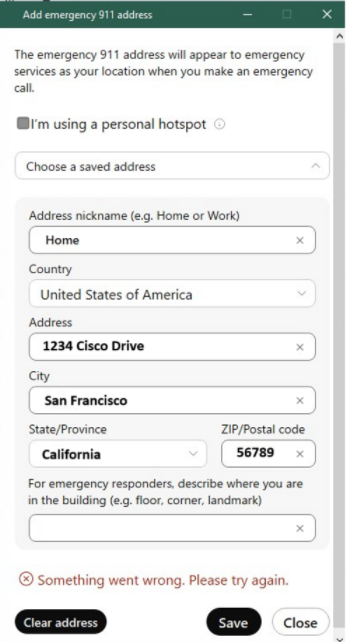
The user is unable to add E911 location on Webex App.
Error message: "Something went wrong. Please try again." seen on the Edit emergency 911 address pop-up
window:
Page 3
Page 4
2024-02-28T09:10:06.831Z <Error> [0xeaa0][]E911RedSkyHttpRequester.cpp:97 E911RedSkyHttpRequester::getAc
2024-02-28T09:10:06.831Z <Error> [0xeaa0][]E911RedSkyManager.cpp:637 E911RedSkyManager::getAccessToken:
2024-02-28T09:10:06.832Z <Debug> [0xeaa0][]E911RedSkyTelemetry.cpp:63 E911RedSkyTelemetry::sendGetToken
Solution: Fix RedSky-Related Configuration in UCM Service
Profile
Webex App clients need to get configuration from UCM to enable the HELD+ location updates.
A UCM admininistrator must configure the required paramentes in the UCM Service Profile(s) and ensure
that the correct Organization ID is used.
Configuration Procedure for UCM Service Profile
In UCM admin, navigate to User Management > User Settings > Service Profile.
1.
Select the Service Profile that the Webex App uses for configuration.
Note: In some instances, there can be multiple Service Profiles that need to be updated.
2.
Page 5
Navigate to the Emergency Calling Profile section.
Emergency Calling Profile Parameters
1.
3.
Click the Enable Emergency Calling check box.
4.
Populate these parameters:
Organization ID (provided by Redsky)
Warning: Organization ID under Emergency Calling Profile refers to the HELD
company ID provided by RedSky.
This is NOT the same value as the Control Hub Organization ID.
1.
Secret (provided by RedSky)
2.
Location URL: Default RedSky Location URL Address
3.
5.

Page 6
Caution: RedSky Location URL change Revised RedSky Location URL Address
Emergency Numbers: 911, 933 (default)
4.
Click Save.
6.
Repeat steps 1-6 on any other Service Profiles that require E911 location.
7.
Related Information
Deployment guide for Calling in Webex App (Unified CM)
•