McDewey
/mcpPage 2
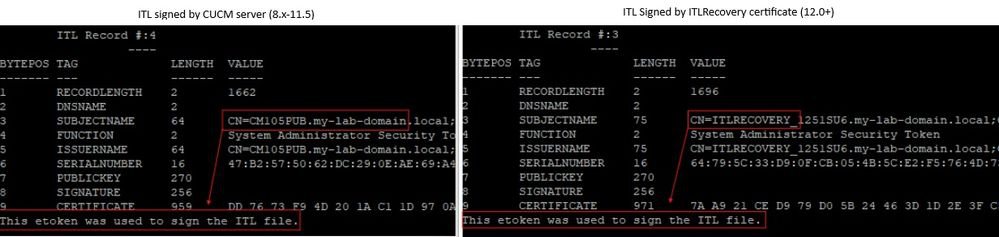
↗ View in doc contextCertificate Authority Proxy Function • Components Used Cisco Recommends that you have these tools installed: Real Time Monitoring Tool (RTMT) • Information based on Cisco Unified Communications Manager (CUCM) releases 10.5, 12.0, 14.0, 15.0. • The information in this document was created from the devices in a specific lab environment. All of the devices used in this document started with a cleared (default) configuration. If your network is live, ensure that you understand the potential impact of any command. Background Information This document describes the step-by-step procedure on how to regenerate certificates in Cisco Unified Communications Manager (CUCM) release 8.X and newer. Reference the Security Guide for your specific release. Communications Manager (CUCM) release 8.X – 11.5.X the ITL is signed by the Call Manager Certificate. Communications Manager (CUCM) release 12.0+ the ITL is signed by the ITLRecovery Certificate. ITL and CTL File Interaction The Cisco IP Phone relies on the CTL file to know about the cluster security mode (non-secure or mixed mode). The CTL File tracks the cluster security mode by including the Unified Communications Manager certificate in the Unified Communications Manager record. The ITL File also contains the cluster security mode indication. ITL Signer Comparison Install Real Time Monitoring Tool (RTMT) Download and install RTMT Tool from Call Manager. Navigate to Call Manager (CM) Administration: Application > Plugins > Find > Cisco Unified Real-Time Monitoring Tool - Windows > Download. Install and launch. ○ • Monitor Endpoints with RTMT Launch RTMT and enter the IP address or Fully Qualified Domain Name (FQDN), then username and password to access the tool: Select the Voice/Video Tab. ○ •