McDewey
/mcpPage 15
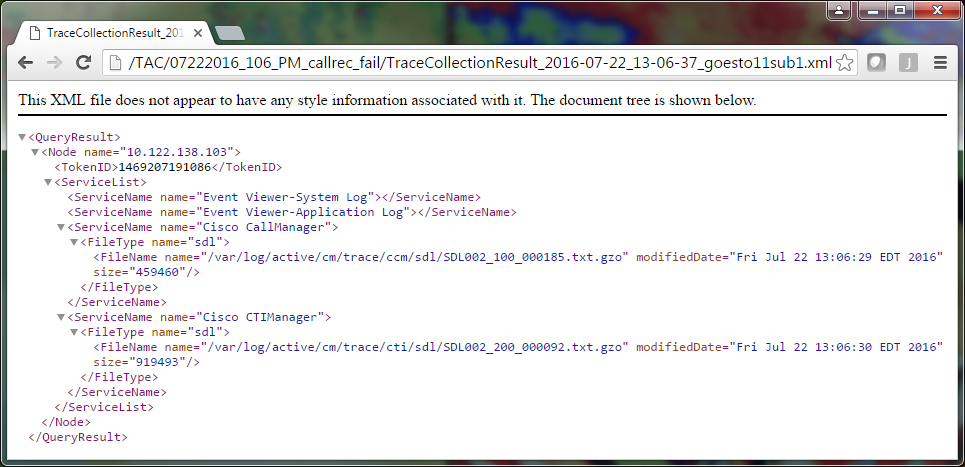
↗ View in doc contextOpen each TraceCollectionResult file and observe whether the modified date for the listed file or files maps to the date and time range for your trace collection. If trace files could not be collected, for example, they are overwritten, then they are lost. If you are familiar with earlier versions of CUCM, this version differs in that the Cisco CallManager traces are a single set of SDL* traces, not a set of SDL* traces and a set of ccm* traces. This is because, in CUCM 9.X and later, traces are interwoven into a single set of files which makes analysis easier. The same is true for the Cisco CTI Manager service. Instead of both the SDL* traces and cti* traces, all of the data is in the SDL* traces for that service. Trace collection issues can usually be avoided if you collect traces immediately after an issue reproduction. Note: The TraceCollectionResult*.xml files simply contain a list of files which were successfully collected from each CUCM server. TAC needs to review the actual trace and log files that were collected. Attach a Trace Package to Your Service Request Now that you have a complete set of traces for your issue reproduction call, you need send them to your TAC engineer. When you downloaded the traces, you specified a new download file directory. This directory now contains all of the log and trace files, as well as the TraceCollectionResult*.xml files. TAC requires you to send all of the contents of the download file directory, not just one or two files. In order to make this simple, upload a single .zip file with the Case File Uploader tool: Compress the entire download file directory to a single .zip archive file. 1. Browse to the Support Case Manager. You are redirected to a log in page. Log in with your CCO username and password. 2.