McDewey
/mcpPage 173
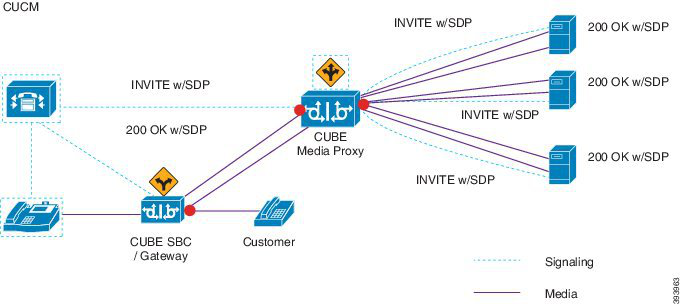
↗ View in doc contextThe following example illustrates the network-based recording of multi-fork recording through CUBE Media Proxy. Figure 5: Network-based recording For more information on method summary, see "Cisco Device-Specific Extensions" section of Cisco Unified JTAPI Developers Guide for Cisco Unified Communications Manager Release 12.5(1). Supported Platforms Multi-fork recording through CUBE Media Proxy server is supported on the following Cisco Router Platforms running on Cisco IOS XE Gibraltar Release 16.10.1: • Cisco 4000 Series-Integrated Services Routers (ISR G3 - ISR4331, ISR4351, ISR4431, ISR4451). • Cisco Aggregated Services Routers (ASR - ASR1001-X, ASR1002-X, ASR1004 with RP2, ASR1006 with RP2). • Cisco Cloud Services Routers (CSR1000V series). Restrictions for Multi-fork recording through CUBE Media Proxy Multi-fork recording through CUBE Media Proxy server does not support the following: • Video recording. • Secure media (SRTP) forking of non secure calls. • SRTP fall back. • Midcall block. Recording Media Source Selection When you configure network-based recording, you must configure either the phone or the gateway as your preferred source of recording media for the agent phone line. However, depending on your deployment, Unified Communications Manager may not select your preferred choice as the recording media source. The following table displays the logic Unified Communications Manager uses to select the recording media source. Feature Configuration Guide for Cisco Unified Communications Manager, Release 15 and SUs 131 Monitoring and Recording Recording Media Source Selection