McDewey
/mcpPage 1472
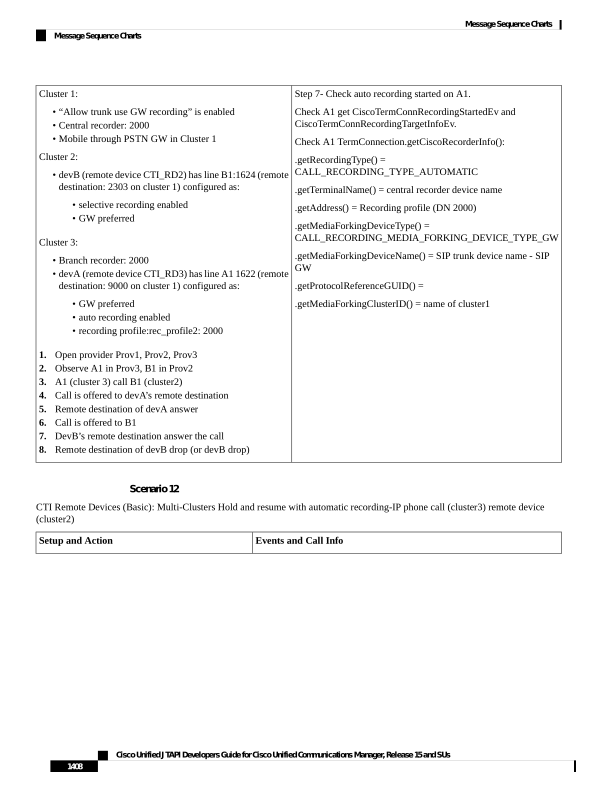
↗ View in doc contextStep 7- Check auto recording started on A1. Check A1 get CiscoTermConnRecordingStartedEv and CiscoTermConnRecordingTargetInfoEv. Check A1 TermConnection.getCiscoRecorderInfo(): .getRecordingType() = CALL_RECORDING_TYPE_AUTOMATIC .getTerminalName() = central recorder device name .getAddress() = Recording profile (DN 2000) .getMediaForkingDeviceType() = CALL_RECORDING_MEDIA_FORKING_DEVICE_TYPE_GW .getMediaForkingDeviceName() = SIP trunk device name - SIP GW .getProtocolReferenceGUID() = .getMediaForkingClusterID() = name of cluster1 Cluster 1: • “Allow trunk use GW recording” is enabled • Central recorder: 2000 • Mobile through PSTN GW in Cluster 1 Cluster 2: • devB (remote device CTI_RD2) has line B1:1624 (remote destination: 2303 on cluster 1) configured as: • selective recording enabled • GW preferred Cluster 3: • Branch recorder: 2000 • devA (remote device CTI_RD3) has line A1 1622 (remote destination: 9000 on cluster 1) configured as: • GW preferred • auto recording enabled • recording profile:rec_profile2: 2000 1. Open provider Prov1, Prov2, Prov3 2. Observe A1 in Prov3, B1 in Prov2 3. A1 (cluster 3) call B1 (cluster2) 4. Call is offered to devA’s remote destination 5. Remote destination of devA answer 6. Call is offered to B1 7. DevB’s remote destination answer the call 8. Remote destination of devB drop (or devB drop) Scenario 12 CTI Remote Devices (Basic): Multi-Clusters Hold and resume with automatic recording-IP phone call (cluster3) remote device (cluster2) Events and Call Info Setup and Action Cisco Unified JTAPI Developers Guide for Cisco Unified Communications Manager, Release 15 and SUs 1408 Message Sequence Charts Message Sequence Charts