McDewey
/mcpPage 300
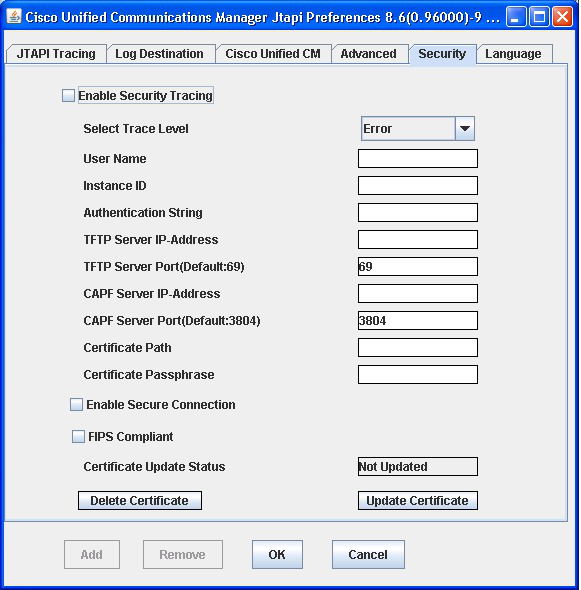
↗ View in doc contextSecurity Tab The following figure illustrates the Security tab of the preferences application. Figure 18: Security Tab Administrators need to configure the User Name, Instance ID, Authorization Code, TFTP Server IP-Address, and CAPF Server IP-Address parameters through the JTAPI Preferences application before invoking the JTAPI API or JTAPI Preferences to download/install certificates on the application server. You can use JTAPI Preferences to configure security profiles for one or more User Name/Instance ID pairs. If an application user has previously configured a security profile for a User Name/Instance ID pair, the security profile automatically populates when the user enters the User Name/Instance ID and clicks any of the other edit boxes. Apart from the GUI that is provided through JTAPI Preferences, an application can also install a client certificate by calling the interface that is provided at CiscoJtapiProperties. When Interface UpdateCertificate is called, the JTAPI client connects to the TFTP server to download the CTL file and extract certificates to the given certificate path. It then connects to the CAPF server to download the client certificate and installs it into the given certificate path. The jtapi.ini files store user security records in comma separated value (CSV) format. Semicolons separate individual records. An example of a users security record is as follows: Cisco Unified JTAPI Developers Guide for Cisco Unified Communications Manager, Release 15 and SUs 236 Cisco Unified JTAPI Installation Security Tab