McDewey
/mcpPage 8
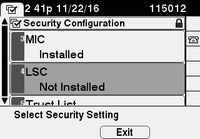
↗ View in doc context7 PUBLICKEY 97 8 SIGNATURE 103 9 CERTIFICATE 651 E0 CF 8A B3 4F 79 CE 93 03 72 C3 7A 3F CF AE C3 3E DE 64 C5 (SHA1 Hash HEX) The ITL file was verified successfully. With the CAPF entry confirmed as an entry in the ITL, you can complete a certificate operation on a phone. In this example, a 2048 bit RSA certificate is installed by use of Null String authentication. On the phone, verify that an LSC is not yet installed as shown in the image. For example, on a 79XX series phone, navigate to Settings > 4 - Security Configuration > 4 - LSC. Open the phone configuration page for your phone. Navigate to Cisco Unified CM Administration > Device > Phone. Enter these details to the CAPF Information section of the phone’s configuration, as shown in the image: For Certificate Operation, choose Install/Upgrade. • For Authentication Mode, choose By Null String. • For this example, leave the Key Order, RSA Key Size (Bits) and EC Key Size (Bits) set to the system defaults. • For Operation Completes By, enter a date and time that is at least one hour in the future. •