McDewey
/mcpPage 986
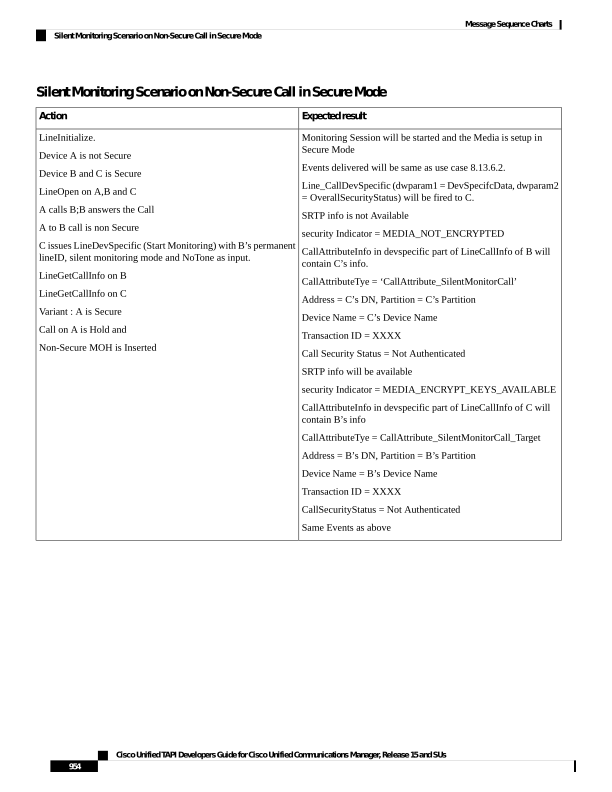
↗ View in doc contextSilent Monitoring Scenario on Non-Secure Call in Secure Mode Expected result Action Monitoring Session will be started and the Media is setup in Secure Mode Events delivered will be same as use case 8.13.6.2. Line_CallDevSpecific (dwparam1 = DevSpecifcData, dwparam2 = OverallSecurityStatus) will be fired to C. SRTP info is not Available security Indicator = MEDIA_NOT_ENCRYPTED CallAttributeInfo in devspecific part of LineCallInfo of B will contain C’s info. CallAttributeTye = ‘CallAttribute_SilentMonitorCall’ Address = C’s DN, Partition = C’s Partition Device Name = C’s Device Name Transaction ID = XXXX Call Security Status = Not Authenticated SRTP info will be available security Indicator = MEDIA_ENCRYPT_KEYS_AVAILABLE CallAttributeInfo in devspecific part of LineCallInfo of C will contain B’s info CallAttributeTye = CallAttribute_SilentMonitorCall_Target Address = B’s DN, Partition = B’s Partition Device Name = B’s Device Name Transaction ID = XXXX CallSecurityStatus = Not Authenticated Same Events as above LineInitialize. Device A is not Secure Device B and C is Secure LineOpen on A,B and C A calls B;B answers the Call A to B call is non Secure C issues LineDevSpecific (Start Monitoring) with B’s permanent lineID, silent monitoring mode and NoTone as input. LineGetCallInfo on B LineGetCallInfo on C Variant : A is Secure Call on A is Hold and Non-Secure MOH is Inserted Cisco Unified TAPI Developers Guide for Cisco Unified Communications Manager, Release 15 and SUs 954 Message Sequence Charts Silent Monitoring Scenario on Non-Secure Call in Secure Mode