McDewey
/mcpPage 984
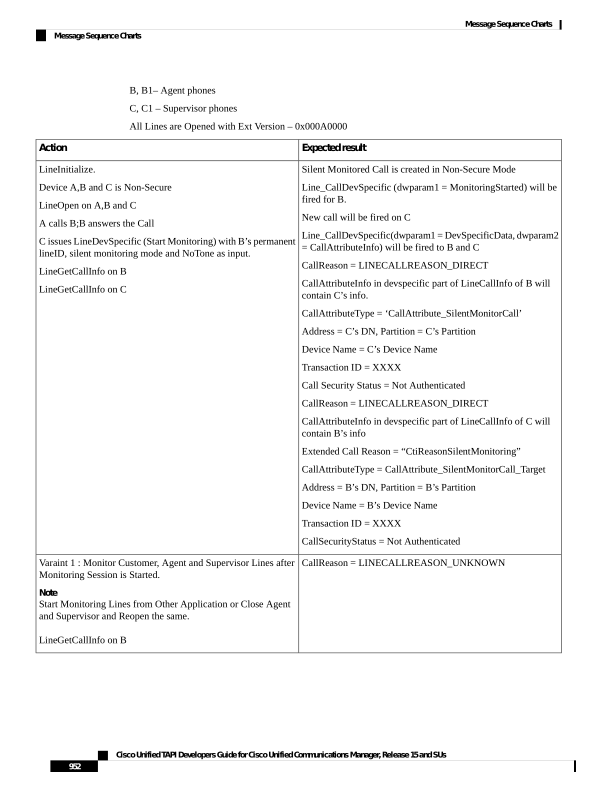
↗ View in doc contextB, B1– Agent phones C, C1 – Supervisor phones All Lines are Opened with Ext Version – 0x000A0000 Expected result Action Silent Monitored Call is created in Non-Secure Mode Line_CallDevSpecific (dwparam1 = MonitoringStarted) will be fired for B. New call will be fired on C Line_CallDevSpecific(dwparam1 = DevSpecificData, dwparam2 = CallAttributeInfo) will be fired to B and C CallReason = LINECALLREASON_DIRECT CallAttributeInfo in devspecific part of LineCallInfo of B will contain C’s info. CallAttributeType = ‘CallAttribute_SilentMonitorCall’ Address = C’s DN, Partition = C’s Partition Device Name = C’s Device Name Transaction ID = XXXX Call Security Status = Not Authenticated CallReason = LINECALLREASON_DIRECT CallAttributeInfo in devspecific part of LineCallInfo of C will contain B’s info Extended Call Reason = “CtiReasonSilentMonitoring” CallAttributeType = CallAttribute_SilentMonitorCall_Target Address = B’s DN, Partition = B’s Partition Device Name = B’s Device Name Transaction ID = XXXX CallSecurityStatus = Not Authenticated LineInitialize. Device A,B and C is Non-Secure LineOpen on A,B and C A calls B;B answers the Call C issues LineDevSpecific (Start Monitoring) with B’s permanent lineID, silent monitoring mode and NoTone as input. LineGetCallInfo on B LineGetCallInfo on C CallReason = LINECALLREASON_UNKNOWN Varaint 1 : Monitor Customer, Agent and Supervisor Lines after Monitoring Session is Started. Note Start Monitoring Lines from Other Application or Close Agent and Supervisor and Reopen the same. LineGetCallInfo on B Cisco Unified TAPI Developers Guide for Cisco Unified Communications Manager, Release 15 and SUs 952 Message Sequence Charts Message Sequence Charts