McDewey
/mcpPage 22
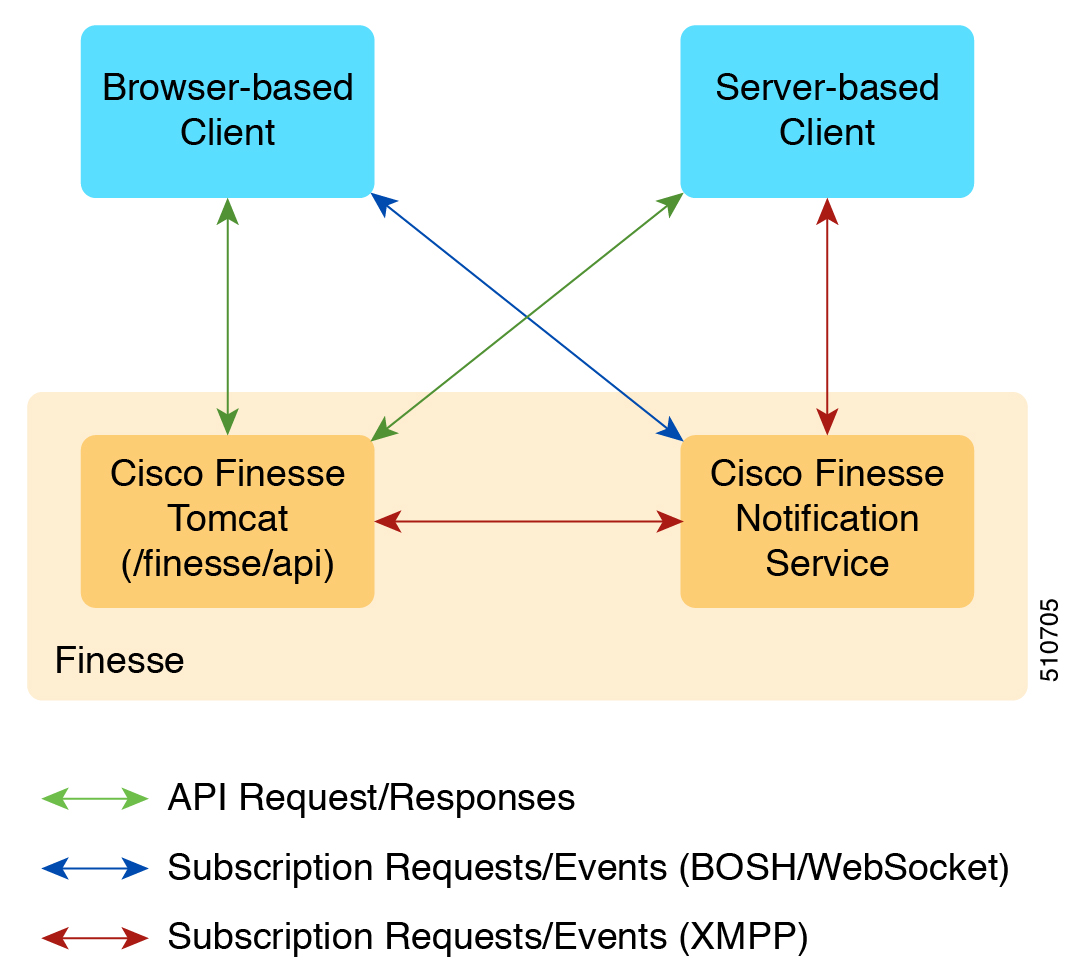
↗ View in doc contextFigure 1: Finesse API and Event Flow The Finesse desktop supports receiving updates through BOSH/WebSocket only. Note Client Requests Cisco Finesse Release 12.5(1) or higher supports only secure HTTP (HTTPS) requests from clients. Cisco Finesse desktop operations can be performed using the available REST HTTPS request described in this guide. Operations on specific objects are performed using the ID of the object in the REST URL. For example, the URL to view a single object (HTTPs) would be: The URL to view a single object (HTTPS) would be: https://<FQDN>:<port>/finesse/api/<object>/<objectID> FQDN is the fully-qualified domain name of the Finesse server. Finesse configuration APIs require the application user ID and password, which is established during installation, for authentication purposes. Finesse APIs use the following HTTP methods to make requests: • GET: Retrieve a single object or list of objects (for example, a single user or list of users). Cisco Finesse Web Services Developer and JavaScript Guide, Release 12.5(1) 6 Introduction Client Requests