McDewey
Multi-vendor documentation library · semantic search · MCP endpoint at
/mcpPage 13
↗ View in doc contextSPA112 firmware versions 1.2.1(004) and newer April 5 th 2013 Check for updates at: https://supportforums.cisco.com/docs/DOC-31744 Configuring the SPA112 ATA Overview The following SPA112 administration tasks will be described in order to prepare the SPA112 for connecting the CUCM:
- Defaulting the SPA112 to factory settings
- Upgrading the SPA112 to the current firmware
- Configuring Line 1 of the SPA112 to register to the CUCM Detailed Instructions In this subtask, you restore the SPA112 to a factory default state so that you are starting from a known configuration.
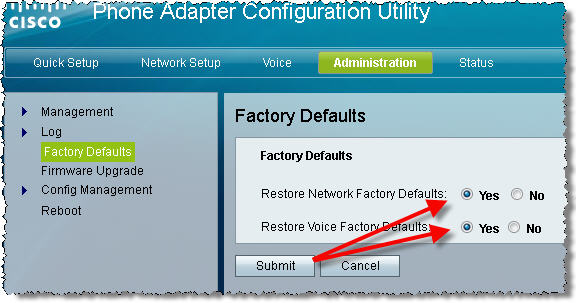
- Connect the SPA112 to your network. If you need help with connecting it and logging in, retrieve and follow the instructions in the most current version of the SPA112 Quick Start Guide located here. a. Access the web-User Interface (web-UI) at the http://spa112IPaddress URL. b. Take note of the Version displayed under the "Phone Adapter Configuration Utility" text. If your SPA112 firmware is older than 1.2.1(004), you must use Internet Explorer until you have upgraded to at least 1.2.1(004) else you will not see some components of the web-UI The default administration credentials are admin / admin c. Navigate to Administration > Factory Defaults: d. Select both Restore Network Factory Defaults and Restore Voice Factory Defaults e. Click Submit