McDewey
/mcpPage 14
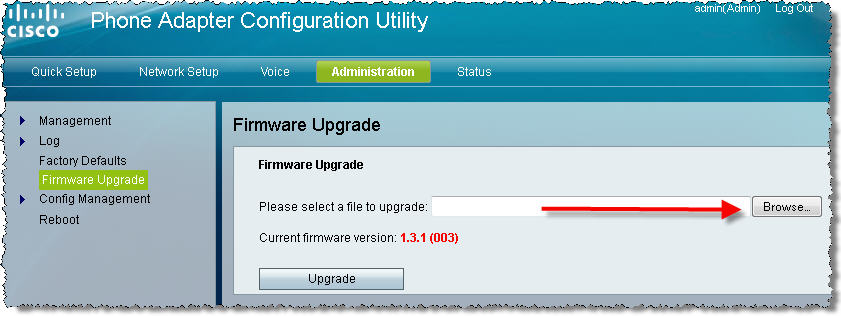
↗ View in doc contextSPA112 firmware versions 1.2.1(004) and newer April 5 th 2013 Check for updates at: https://supportforums.cisco.com/docs/DOC-31744 2. In this subtask, you upgrade your SPA112 to the most currently available SPA112 firmware available from here a. If your SPA112 firmware is older than 1.2.1(004), you must use Internet Explorer until you have upgraded to at least 1.2.1(004) else you will not see some components of the web-UI b. Navigate to Administration > Firmware Upgrade > Browse > select the SPA112 firmware you just downloaded > Click Upgrade 3. In this subtask, you configure Line 1 of the SPA112 to register to the CUCM a. Log in to the SPA112 as the admin user. Default password is admin b. Navigate to Voice tab > Line 1 tab: i. SIP Settings > SIP Transport: TCP ii. Proxy and Registration: Proxy: 10.99.31.140 [CUCM IP address] iii. Subscriber Information:
- User ID: 1022
- Password: 1234
- Use Auth ID: yes
- Auth ID: 1022 iv. Dial Plan:
- Dial Plan: (*xx|[3469]11|0|00|[2-9]xxxxxx|1xxx[2- 9]xxxxxxS0|xxxxxxxxxxxx.|1xxx) Addition in bold red to allow 4-digit dialing starting with 1