McDewey
/mcpPage 61
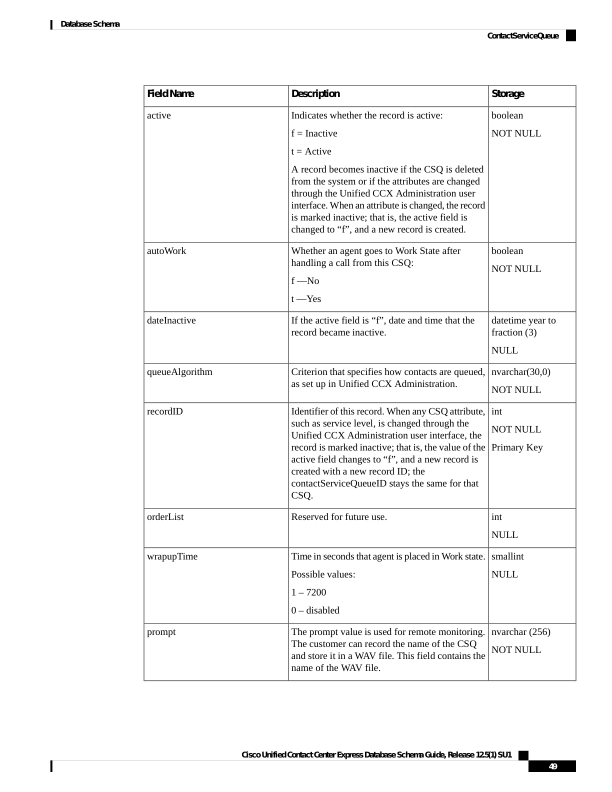
↗ View in doc contextStorage Description Field Name boolean NOT NULL Indicates whether the record is active: f = Inactive t = Active A record becomes inactive if the CSQ is deleted from the system or if the attributes are changed through the Unified CCX Administration user interface. When an attribute is changed, the record is marked inactive; that is, the active field is changed to “f”, and a new record is created. active boolean NOT NULL Whether an agent goes to Work State after handling a call from this CSQ: f —No t —Yes autoWork datetime year to fraction (3) NULL If the active field is “f”, date and time that the record became inactive. dateInactive nvarchar(30,0) NOT NULL Criterion that specifies how contacts are queued, as set up in Unified CCX Administration. queueAlgorithm int NOT NULL Primary Key Identifier of this record. When any CSQ attribute, such as service level, is changed through the Unified CCX Administration user interface, the record is marked inactive; that is, the value of the active field changes to “f”, and a new record is created with a new record ID; the contactServiceQueueID stays the same for that CSQ. recordID int NULL Reserved for future use. orderList smallint NULL Time in seconds that agent is placed in Work state. Possible values: 1 – 7200 0 – disabled wrapupTime nvarchar (256) NOT NULL The prompt value is used for remote monitoring. The customer can record the name of the CSQ and store it in a WAV file. This field contains the name of the WAV file. prompt Cisco Unified Contact Center Express Database Schema Guide, Release 12.5(1) SU1 49 Database Schema ContactServiceQueue