McDewey
/mcpPage 12
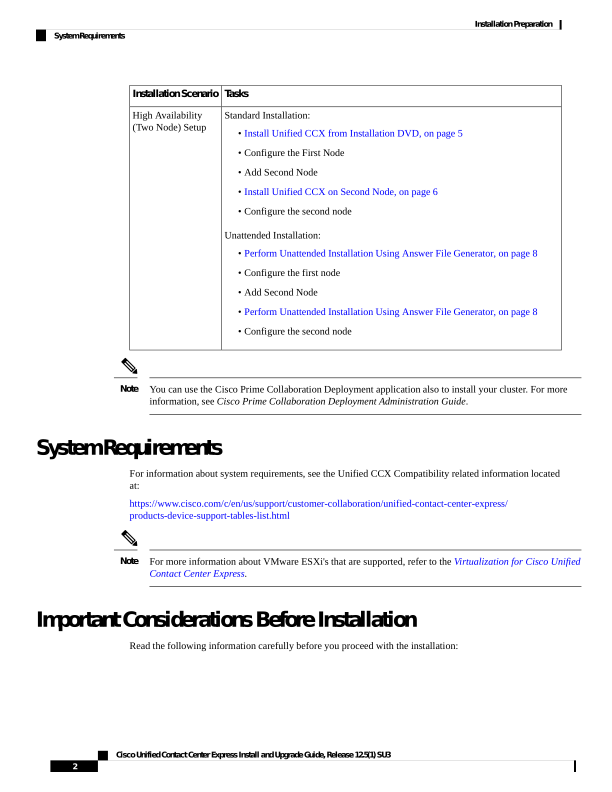
↗ View in doc contextTasks Installation Scenario Standard Installation: • Install Unified CCX from Installation DVD, on page 5 • Configure the First Node • Add Second Node • Install Unified CCX on Second Node, on page 6 • Configure the second node Unattended Installation: • Perform Unattended Installation Using Answer File Generator, on page 8 • Configure the first node • Add Second Node • Perform Unattended Installation Using Answer File Generator, on page 8 • Configure the second node High Availability (Two Node) Setup You can use the Cisco Prime Collaboration Deployment application also to install your cluster. For more information, see Cisco Prime Collaboration Deployment Administration Guide. Note System Requirements For information about system requirements, see the Unified CCX Compatibility related information located at: https://www.cisco.com/c/en/us/support/customer-collaboration/unified-contact-center-express/ products-device-support-tables-list.html For more information about VMware ESXi's that are supported, refer to the Virtualization for Cisco Unified Contact Center Express. Note Important Considerations Before Installation Read the following information carefully before you proceed with the installation: Cisco Unified Contact Center Express Install and Upgrade Guide, Release 12.5(1) SU3 2 Installation Preparation System Requirements