McDewey
/mcpPage 99
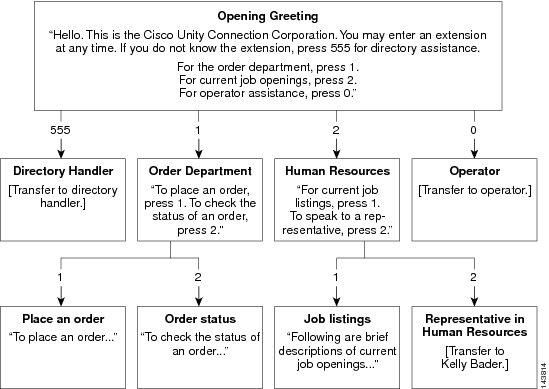
↗ View in doc contextImplementing a Call Management Plan After you map your plan, write detailed scripts for the greeting of each call handler that is used during the recording session. When you are ready to set up your system of call handlers, first create the call handlers to which the calls are routed. You select these “destination” call handlers when you create the call handlers that route calls to them. Before creating the call handlers, you also need to create accounts for the users to which call handlers transfer the calls. Using above figure as an example, you first create a user account for Kelly Bader, and the handlers for Place an Order, Order Status, and Job Listings. Then you create the handlers for the Order Department and Human Resources. In addition to mapping call handlers, you also need to plan call routing tables. The above figure, for example, all new call handlers are reached through the Opening Greeting. You can also assign extensions to some of your call handlers and to route incoming calls to those extensions using a call routing table. System Call Handlers Call handlers are used to answer calls, greet callers with recorded prompts and provide them with information and options, route calls, and take messages. You can use the predefined Unity Connection call handlers, or can create unlimited new call handlers. Each call handler that you add in Unity Connection is based on a template known as Call Handler Template. System Administration Guide 81 Call Management Implementing a Call Management Plan