Document Metadata
Format: PDF
Title: Database Schema Handbook for Cisco Unified Contact Center Enterprise, Release 15.0(1)
Author: Unknown
Creator: DITA Open Toolkit
Page 1
Database Schema Handbook for Cisco Unified Contact Center
Enterprise, Release 15.0(1)
First Published: 2025-04-30
Last Modified: 2025-11-28
Americas Headquarters
Cisco Systems, Inc.
170 West Tasman Drive
San Jose, CA 95134-1706
USA
http://www.cisco.com
Tel: 408 526-4000
800 553-NETS (6387)
Fax: 408 527-0883


Page 2
THE SPECIFICATIONS AND INFORMATION REGARDING THE PRODUCTS IN THIS MANUAL ARE SUBJECT TO CHANGE WITHOUT NOTICE. ALL STATEMENTS,
INFORMATION, AND RECOMMENDATIONS IN THIS MANUAL ARE BELIEVED TO BE ACCURATE BUT ARE PRESENTED WITHOUT WARRANTY OF ANY KIND,
EXPRESS OR IMPLIED. USERS MUST TAKE FULL RESPONSIBILITY FOR THEIR APPLICATION OF ANY PRODUCTS.
THE SOFTWARE LICENSE AND LIMITED WARRANTY FOR THE ACCOMPANYING PRODUCT ARE SET FORTH IN THE INFORMATION PACKET THAT SHIPPED WITH
THE PRODUCT AND ARE INCORPORATED HEREIN BY THIS REFERENCE. IF YOU ARE UNABLE TO LOCATE THE SOFTWARE LICENSE OR LIMITED WARRANTY,
CONTACT YOUR CISCO REPRESENTATIVE FOR A COPY.
The Cisco implementation of TCP header compression is an adaptation of a program developed by the University of California, Berkeley (UCB) as part of UCB's public domain version of
the UNIX operating system. All rights reserved. Copyright © 1981, Regents of the University of California.
NOTWITHSTANDING ANY OTHER WARRANTY HEREIN, ALL DOCUMENT FILES AND SOFTWARE OF THESE SUPPLIERS ARE PROVIDED “AS IS" WITH ALL FAULTS.
CISCO AND THE ABOVE-NAMED SUPPLIERS DISCLAIM ALL WARRANTIES, EXPRESSED OR IMPLIED, INCLUDING, WITHOUT LIMITATION, THOSE OF
MERCHANTABILITY, FITNESS FOR A PARTICULAR PURPOSE AND NONINFRINGEMENT OR ARISING FROM A COURSE OF DEALING, USAGE, OR TRADE PRACTICE.
IN NO EVENT SHALL CISCO OR ITS SUPPLIERS BE LIABLE FOR ANY INDIRECT, SPECIAL, CONSEQUENTIAL, OR INCIDENTAL DAMAGES, INCLUDING, WITHOUT
LIMITATION, LOST PROFITS OR LOSS OR DAMAGE TO DATA ARISING OUT OF THE USE OR INABILITY TO USE THIS MANUAL, EVEN IF CISCO OR ITS SUPPLIERS
HAVE BEEN ADVISED OF THE POSSIBILITY OF SUCH DAMAGES.
Any Internet Protocol (IP) addresses and phone numbers used in this document are not intended to be actual addresses and phone numbers. Any examples, command display output, network
topology diagrams, and other figures included in the document are shown for illustrative purposes only. Any use of actual IP addresses or phone numbers in illustrative content is unintentional
and coincidental.
All printed copies and duplicate soft copies of this document are considered uncontrolled. See the current online version for the latest version.
Cisco has more than 200 offices worldwide. Addresses and phone numbers are listed on the Cisco website at www.cisco.com/go/offices.
Cisco and the Cisco logo are trademarks or registered trademarks of Cisco and/or its affiliates in the U.S. and other countries. To view a list of Cisco trademarks, go to this URL:
https://www.cisco.com/c/en/us/about/legal/trademarks.html. Third-party trademarks mentioned are the property of their respective owners. The use of the word partner does not imply a
partnership relationship between Cisco and any other company. (1721R)
© 1994 –2025 Cisco Systems, Inc. All rights reserved.
Page 3
C O N T E N T S
Full Cisco Trademarks with Software License
?
Preface
xv
P R E F A C E
Change History
xv
About This Guide
xvi
Audience
xvi
Related Documents
xvi
Communications, Services, and Additional Information
xvi
Field Notice
xvii
Documentation Feedback
xvii
Conventions
xvii
Introduction
1
C H A P T E R 1
The Unified ICM and Unified CC Enterprise Databases
1
General Concepts
2
Tables Columns and Rows
2
Table Relationships
2
Key Fields
3
Reserved Fields
4
Field Applicability
4
Data Types
4
Real-Time and Historical Data
6
Call Detail Data
6
Historical data replication
7
All Tables
9
C H A P T E R 2
Database Schema Handbook for Cisco Unified Contact Center Enterprise, Release 15.0(1)
iii

Page 4
Admin_Script_Schedule_Map
14
Agent
17
Agent_Attribute
20
Agent_Desk_Settings
21
Agent_Distribution
27
Agent_Event_Detail
28
Agent_Interval
36
Agent_Logout
40
Agent_Real_Time
42
Agent_Skill_Group_Interval
48
Agent_Skill_Group_Logout
65
Agent_Skill_Group_Real_Time
66
Agent_State_Trace
68
Agent_Service_Enabled
73
Agent_Targeting_Rule
74
Agent_Targeting_Rule_Member
76
Agent_Targeting_Rule_Range
77
Agent_Team
77
Agent_Team_Member
79
Agent_Team_Supervisor
80
Announcement
80
Application_Event
81
Application_Gateway
84
Application_Gateway_Connection
85
Application_Gateway_Globals
87
Application_Gateway_Half_Hour
89
Application_Instance
91
Application_Path
92
Application_Path_Member
94
Application_Path_Real_Time
94
Attribute
96
Attribute_Set
98
Attribute_Set_Member
99
AWControl
99
Database Schema Handbook for Cisco Unified Contact Center Enterprise, Release 15.0(1)
iv
Contents
Page 5
Blended_Agent_Options
100
Bucket_Intervals
104
Bulk_Job
105
Business_Entity
107
Business_Hours
108
Business_Hours_Real_Time
110
Business_Hours_Reason
111
Call_Event_Detail (Reserved for future use)
112
Call_Type
112
Call_Type_Interval
114
Call_Type_Map
128
Call_Type_SG_Interval
129
Call_Type_Real_Time
142
Campaign
156
Campaign_Half_Hour
165
Campaign_Query_Rule
166
Campaign_Query_Rule_Half_Hour
169
Campaign_Query_Rule_Interval
172
Campaign_Query_Rule_Real_Time
175
Campaign_Skill_Group
184
Campaign_Target_Sequence
186
Cfg_Mngr_App_Snapshot_State
187
Cfg_Mngr_Globals
188
Cfg_Mngr_User_Desktop_Snap
189
Cfg_Mngr_User_Menu
191
Cfg_Mngr_User_Settings
192
Cfg_Mngr_View
193
Class_Access_Xref
194
Class_List
194
Class_Security
195
ClassID_To_ObjectType
196
Configuration_Limit
197
Config_Message_Log
199
Congestion Control
200
Database Schema Handbook for Cisco Unified Contact Center Enterprise, Release 15.0(1)
v
Contents
Page 6
Contact_Share_Group
203
Contact_Share_Group_Member
204
Contact_Share_Queue
205
Contact_Share_Rule
206
Controller_Time
207
Customer_Definition
207
Customer_Options
208
Default_Call_Type
209
Default_Configuration
210
Department
211
Department _Member
212
Device_Target
213
Dialed_Number
215
Dialed_Number_Label
217
Dialed_Number_Map
217
Dial_Number_Plan
219
Dialer
220
Dialer_Detail
225
Dialer_Half_Hour
231
Dialer_Interval
234
Dialer_Port_Map
237
Dialer_Port_Real_Time
238
Dialer_Real_Time
240
Dialer_Skill_Group_Half_Hour
244
Dialer_Skill_Group_Real_Time
247
ECC_Payload
249
ECC_Payload_Member
250
Enterprise_Route
251
Enterprise_Route_Member
252
Enterprise_Service
253
Enterprise_Service_Member
254
Enterprise_Skill_Group
255
Enterprise_Skill_Group_Member
256
Event
257
Database Schema Handbook for Cisco Unified Contact Center Enterprise, Release 15.0(1)
vi
Contents
Page 7
Expanded_Call_Variable
259
Feature_Control_Set
261
Global_Configuration
262
ICR_Globals
263
ICR_Instance
267
ICR_Locks
268
ICR_Node
269
ICR_View
271
Ids
272
Import_Log
273
Import_Rule
274
Import_Rule_Clause
278
Import_Rule_History
280
Import_Rule_Real_Time
281
Import_Schedule
282
Label
283
Logger_Admin
285
Logger_Meters
286
Logger_Type
288
Logical_Interface_Controller
288
Location
290
Location_Member
290
Machine_Address
291
Machine_Connection_Profile
292
Machine_Host
292
Machine Host Attributes
297
Machine_Service
298
Master_Script
302
Media_Class
304
Media_Routing_Domain
305
Network_Event_Detail
308
Network_Target
310
Network_Trunk_Group
311
Network_Trunk_Group_Half_Hour
312
Database Schema Handbook for Cisco Unified Contact Center Enterprise, Release 15.0(1)
vii
Contents
Page 8
Network_Trunk_Group_Real_Time
314
Network_Vru
316
Network_Vru_Bank
317
Network_Vru_Script
318
Next_Available_Number
320
Object_Access_Xref
320
Object_List
321
Object_Security
322
Person
323
Peripheral
326
Peripheral_Default_Route
330
Peripheral_Interval
331
Peripheral_Monitor
333
Peripheral_Real_Time
335
Peripheral_Set
338
Peripheral_Set_Controller
339
Peripheral_Set_Host
340
Peripheral_Target
341
Persistent_Variable
342
Physical_Controller_Half_Hour
343
Physical_Interface_Controller
344
Precision_Queue
346
Precision_Q_Real_Time Table
348
Precision_Queue_Step
359
Precision_Q_Step_Real_Time
359
Precision_Queue_Term
360
Query_Rule
362
Query_Rule_Clause
364
Reason_Code
365
Recovery
367
Recurring_Schedule_Map
368
Region
370
Region_Info
371
Region_Member
371
Database Schema Handbook for Cisco Unified Contact Center Enterprise, Release 15.0(1)
viii
Contents
Page 9
Region_Prefix
372
Region_View
373
Region_View_Member
377
Rename
378
Route
379
Route_Call_Detail
380
Route_Call_Variable
391
Route_Five_Minute
392
Route_Half_Hour
396
Route_Real_Time
401
Router_Queue_Interval
406
Routing_Client
416
Routing_Client_Five_Minute
420
Routing_Pattern
427
Schedule
428
Schedule_Import
430
Schedule_Import_Real_Time
432
Schedule_Map
434
Schedule_Report
435
Schedule_Report_Input
437
Schedule_Source
438
Scheduled_Target
439
Scheduled_Target_Real_Time
440
Script
441
Script_Cross_Reference
443
Script_Data
444
Script_Five_Minute
444
Script_Print_Control
446
Script_Queue_Real_Time
446
Script_Real_Time
447
Script_Table
448
Script_Table_Column
449
Sec_Group
450
Sec_User
451
Database Schema Handbook for Cisco Unified Contact Center Enterprise, Release 15.0(1)
ix
Contents
Page 10
Service
452
Service_Array
455
Service_Array_Member
457
Service_Five_Minute
458
Service_Interval
463
Service_Level_Threshold
472
Service_Member
473
Service_Real_Time
474
Shift
490
SIP_Server_Group
491
SIP_Server_Group_Elements
492
Skill_Group
493
Skill_Group_Five_Minute
497
Skill_Group_Interval
501
Skill_Group_Member
527
Skill_Group_Real_Time
527
Skill_Target
543
Smart_License_Entitlements
544
Smart_License_Info
547
Smart_License_Product
549
Smart_License_Server
551
Special_Day_Schedule
554
Survey_Question (For Future Use)
556
Survey_Result (For Future Use)
558
System_Attribute
560
System_Capacity_Interval
561
System_Capacity_Real_Time
563
Termination_Call_Detail
566
Termination_Call_Variable
585
Time_Zone_Location
586
Translation_Route
587
Translation_Route_Half_Hour
588
Trunk
590
Trunk_Group
591
Database Schema Handbook for Cisco Unified Contact Center Enterprise, Release 15.0(1)
x
Contents
Page 11
Trunk_Group_Five_Minute
593
Trunk_Group_Half_Hour
594
Trunk_Group_Real_Time
596
User_Formula
597
User_Formula_Equation
598
User_Group
599
User_Group_Member
601
User_Security_Control
602
User_Supervisor_Map
603
User_Variable
604
Version
605
View_Column
606
Vru_Currency
607
Vru_Defaults
608
Vru_Locale
610
Vru_Port_Map
611
Week_Day_Schedule
612
Tables by Group
615
C H A P T E R 3
Overview
615
Blended Agent (Outbound Option)
616
Business Hours
617
Device
618
Peripheral Detail
620
Trunk Group Detail
620
Enterprise
621
Media Routing
623
Precision Queue
624
Precision Queue Detail
625
Route
625
Schedule
628
Script
629
Call Type Detail
631
Region Detail
631
Database Schema Handbook for Cisco Unified Contact Center Enterprise, Release 15.0(1)
xi
Contents
Page 12
Script Detail
632
Security
633
Skill Target
635
Agent Detail
637
Service Detail
638
Skill Group Detail
638
Smart License
639
Smart_License_Info
639
Smart_License_Server
642
Smart_License_Entitlements
645
Smart_License_Product
647
System
649
User Preferences
650
VRU Micro-application
651
Tables Reserved for Future Use
651
Field Values
653
C H A P T E R 4
Access Levels
654
AgentState
654
Application Gateway: Fault Tolerance
655
Client Type
656
Customer Options Type
656
Days
657
Dialed Number Map: ANIWildCardType
658
Dialer Detail: CallResult
658
Dialer Detail: CallStatusZone
660
Dialer Detail: DialingMode
661
Event Fields
661
ICR Locks Fields
662
LabelType Fields
662
Logical Interface Controller Fields
663
Network Vru Type
663
Port Status
664
Route Call Detail Fields
664
Database Schema Handbook for Cisco Unified Contact Center Enterprise, Release 15.0(1)
xii
Contents
Page 13
Router Error Codes
666
Object Types: Security
670
Object Types: User Variable
672
Peripheral Real Time Status Field
674
Reason Codes
675
Service Fields
676
Service Real Time: Service Mode Indicator Field
677
Survey Question (For Future Use)
677
Target Types: Script Cross Reference and Scheduled Report Input
678
Termination Call Detail: Call Disposition and CallDispositionFlag Fields
681
Termination Call Detail: Peripheral Call Type
690
Trunk Type
693
Database Rules
695
C H A P T E R 5
Blended Agent Tables (Outbound Option)
695
Business Hours Tables
697
Contact Sharing Tables
697
CX Survey_Table (For Future Use)
697
Device Tables
698
Enterprise Tables
699
Media Routing Tables
699
Route Tables
700
Schedule Tables
700
Script Tables
701
Security Tables
702
Skill Target Tables
702
System Tables
703
User Preferences Tables
704
VRU Micro-applications Tables
704
Database Schema Handbook for Cisco Unified Contact Center Enterprise, Release 15.0(1)
xiii
Contents
Page 14
Database Schema Handbook for Cisco Unified Contact Center Enterprise, Release 15.0(1)
xiv
Contents
Page 15
Preface
• Change History, on page xv
• About This Guide, on page xvi
• Audience, on page xvi
• Related Documents, on page xvi
• Communications, Services, and Additional Information, on page xvi
• Field Notice, on page xvii
• Documentation Feedback, on page xvii
• Conventions, on page xvii
Change History
This table lists changes made to this guide. Most recent changes appear at the top.
Date
See
Change
November 2025
Throughout the document
Replaced CUSP with CCCSP
April 2025
Initial Release of Document for Release 15.0(1)
Chapter: All Tables
Topic: Smart_License_Server
Renamed SlrEnabled to ReservationType
Chapter: All Tables
Topic: Person
Added New Field DigitalChannelEnabled
Chapter: Field Value
Topic: Router Error Codes
Added new RouterErrorCodes=704, new
sub-error codes are also added.
Chapter: All Tables
Topic: Agent_Event_Detail
Extended Agent Event Details
Chapter: All Tables
Topic: Global_Configuration
Global Configuration
Database Schema Handbook for Cisco Unified Contact Center Enterprise, Release 15.0(1)
xv

Page 16
About This Guide
The Database Schema Handbook for Cisco Unified Contact Center Enterprise describes the database schema
used by Unified Contact Center Enterprise (Unified CCE), including the types of data stored in the database
and the relationships among those data. This guide documents each table, major categories of tables, coded
values used, and the dependencies and constraints.
Audience
This manual is intended for Unified ICM and Unified CCE software system managers and supervisors.
Understanding the database schema helps you to create your own monitoring screens and reports. It also helps
you to understand how the Unified ICM and Unified CCE software works.
You can navigate the PDF file using the Contents, the Index, and the links.
Related Documents
Documentation for contact center enterprise solutions is accessible from Cisco.com at: https://www.cisco.com/
c/en/us/support/contact-center/category.html. Click Voice and Unified Communications, then click Cisco
Unified Contact Center Products or Cisco Unified Voice Self-Service Products, then click the product or
option you want.
• For the Unified CCE Documentation guide, go to http://www.cisco.com/c/en/us/support/
customer-collaboration/unified-contact-center-enterprise/products-documentation-roadmaps-list.html.
• Related documentation includes the documentation sets for Cisco Unified Contact Center Management
Portal (Unified CCMP), Cisco Unified Customer Voice Portal (Unified CVP), and Cisco Unified IP IVR.
• Documentation for Cisco Unified Communications Manager (Unified CM) is accessible from
https://www.cisco.com/c/en/us/support/unified-communications/
unified-communications-manager-callmanager/products-documentation-roadmaps-list.html.
• Technical Support documentation and tools are accessible from
http://www.cisco.com/en/US/support/index.html.
• For information on the Cisco software support methodology, see Software Release and Support
Methodology: Unified CCE available at (sign-in required) http://www.cisco.com/c/en/us/products/
customer-collaboration/unified-contact-center-enterprise/bulletin-listing.html.
• For a detailed list of language localizations, see the Cisco Unified Contact Center Product and System
Localization Matrix available at the bottom of http://www.cisco.com/c/en/us/support/
customer-collaboration/unified-intelligent-contact-management-enterprise/
products-technical-reference-list.html.
Communications, Services, and Additional Information
• To receive timely, relevant information from Cisco, sign up at Cisco Profile Manager.
Database Schema Handbook for Cisco Unified Contact Center Enterprise, Release 15.0(1)
xvi
Preface
About This Guide
Page 17
• To get the business results you’re looking for with the technologies that matter, visit Cisco Services.
• To submit a service request, visit Cisco Support.
• To discover and browse secure, validated enterprise-class apps, products, solutions and services, visit
Cisco DevNet.
• To obtain general networking, training, and certification titles, visit Cisco Press.
• To find warranty information for a specific product or product family, access Cisco Warranty Finder.
Cisco Bug Search Tool
Cisco Bug Search Tool (BST) is a web-based tool that acts as a gateway to the Cisco bug tracking system
that maintains a comprehensive list of defects and vulnerabilities in Cisco products and software. BST provides
you with detailed defect information about your products and software.
Field Notice
Cisco publishes Field Notices to notify customers and partners about significant issues in Cisco products that
typically require an upgrade, workaround, or other user action. For more information, see Product Field Notice
Summary at https://www.cisco.com/c/en/us/support/web/tsd-products-field-notice-summary.html.
You can create custom subscriptions for Cisco products, series, or software to receive email alerts or consume
RSS feeds when new announcements are released for the following notices:
• Cisco Security Advisories
• Field Notices
• End-of-Sale or Support Announcements
• Software Updates
• Updates to Known Bugs
For more information on creating custom subscriptions, see My Notifications at https://cway.cisco.com/
mynotifications.
Documentation Feedback
To provide comments about this document, send an email message to the following address:
contactcenterproducts_docfeedback@cisco.com
We appreciate your comments.
Conventions
This document uses the following conventions:
Database Schema Handbook for Cisco Unified Contact Center Enterprise, Release 15.0(1)
xvii
Preface
Field Notice
Page 18
Table 1: Conventions
Description
Convention
Boldface font is used to indicate commands, such as user entries, keys, buttons,
folder names, and submenu names.
For example:
• Choose Edit > Find.
• Click Finish.
boldface font
Italic font is used to indicate the following:
• To introduce a new term. Example: A skill group is a collection of agents
who share similar skills.
• A syntax value that the user must replace. Example: IF (condition, true-value,
false-value)
• A book title. Example: See the Cisco Unified Contact Center Enterprise
Installation and Upgrade Guide.
italic font
Window font, such as Courier, is used for the following:
• Text as it appears in code or that the window displays. Example:
<html><title>Cisco Systems, Inc. </title></html>
window font
Angle brackets are used to indicate the following:
• For arguments where the context does not allow italic, such as ASCII output.
• A character string that the user enters but that does not appear on the window
such as a password.
< >
Database Schema Handbook for Cisco Unified Contact Center Enterprise, Release 15.0(1)
xviii
Preface
Preface
Page 19
C H A P T E R 1
Introduction
• The Unified ICM and Unified CC Enterprise Databases, on page 1
• General Concepts, on page 2
• Real-Time and Historical Data, on page 6
• Historical data replication, on page 7
The Unified ICM and Unified CC Enterprise Databases
Unified ICM and Unified CC Enterprise software uses the following types of databases:
• The central database that is part of the Central Controller.
• The local database on each distributor Administration & Data Server.
• The Historical Data Server (HDS) database on a distributor Administration & Data Server.
The following table lists the databases and respective customer instance names.
Database Name
Database
<customer>_sideA or <customer>_sideB
Central
<customer>_awdb
Local
<customer>_hds
Historical Data Server
Unified ICM and Unified CC Enterprise software uses information in the central database to determine how
to route each call. This includes information about your telephone system configuration and routing scripts.
The local database contains copy of the configuration data and scripts from the central database.
The local database also contains tables of real-time information that describe activity at the call centers. (The
Central Controller keeps the real-time information in memory but does not store it in the central database.)
This information allows you to monitor current activity within the system.
The central database stores historical information describing past activities at the call centers and within
Unified ICM and Unified CC Enterprise systems. A special HDS database on a distributor Administration &
Data Server at each site also stores the same historical information. Therefore, either the central database or
an HDS database is the historical database for an Administration & Data Server user. You can access historical
information that is stored in the historical database to produce reports and screens.
Database Schema Handbook for Cisco Unified Contact Center Enterprise, Release 15.0(1)
1

Page 20
General Concepts
This section gives a brief overview of relational database concepts and details about how data is generated
by the system software.
Tables Columns and Rows
A database contains tables of data. A table defines a series of columns or fields. The actual data is stored as
rows or records within each table. Each row contains one value for each column of the table. For example,
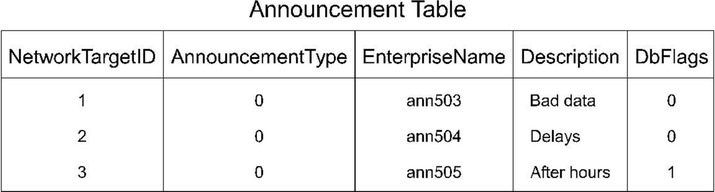
Figure 1 shows a table with five columns. It contains three rows of data.
The data in tables changes for each system, but the definition of tables and columns does not. This manual
describes the columns of each table; it does not describe the actual data in table rows.
Table Relationships
Related tables in a database share one or more common fields or columns. For example, both the Agent and
Peripheral tables include the PeripheralID field. This defines a relationship: each row in the Agent table is
related to the row in the Peripheral table that shares the same PeripheralID value.
Relationships between tables can be one-to-one or one-to-many. For example, because one peripheral can be
associated with many agents, the relationship between the Peripheral and Agent tables is one-to-many. On
the other hand, each peripheral has a single peripheral default route and each peripheral default route belongs
to only one peripheral. Therefore, the relationship between the Peripheral and Peripheral Default Route tables
is one-to-one.
Sometimes a single row might not be associated with any rows in a related table. For example, it is possible
to define a peripheral with no associated agents. Usually, this would only be a temporary condition. In some
cases, however, the condition might be permanent. For example, you can define a trunk group but not define
the associated trunks.
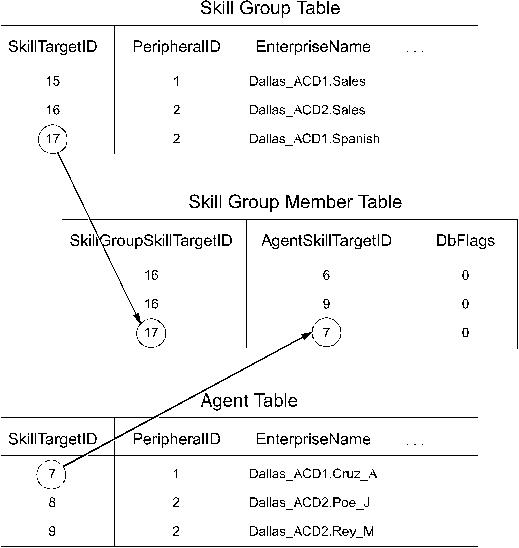
Sometimes the natural relationship between two tables appears to be many-to-many. For example, each agent
can be a member of many skill groups and each skill group can contain many agents. Therefore, the Agent
and Skill Group tables appear to have a many-to-many relationship. However, in this case, a third table, called
a cross-reference table, actually links the tables so the relationship is actually one-to-many. For example,
Figure 2 shows how the Skill Group Member table acts as a cross-reference table for the Agent and Skill
Group tables.
Database Schema Handbook for Cisco Unified Contact Center Enterprise, Release 15.0(1)
2
Introduction
General Concepts
Page 21
The Skill Group Member table contains one record for each member of each skill group. It has one-to-many
relationships with both the Agent table and the Skill Group table. This avoids a direct many-to-many relationship
between the Agent and Skill Group tables.
Key Fields
One or more fields within a table can form a key. Keys are the fields that you commonly use to locate specific
records. Usually the fields that make up a key are defined as NOT NULL (meaning they cannot take the NULL
value), but there are many exceptions.
Most tables have a primary key. For example, the PeripheralID field is the primary key for the Peripheral
table.
An example of a foreign key is the PeripheralID field in the Agent table. You can use this key to find all
agents that are associated with a specific peripheral.
The Agent table contains two alternate keys: the EnterpriseName field, and the combination of the PeripheralID
and PeripheralNumber fields. A value for either of these keys uniquely identifies an agent.
The combination of FirstName and LastName is an inversion key for the Agent table. While this key value
is not necessarily unique, it is a convenient way to locate specific agents. This table lists the types of keys and
the codes that are used for them in the system database.
Database Schema Handbook for Cisco Unified Contact Center Enterprise, Release 15.0(1)
3
Introduction
Key Fields
Page 22
Description
Code
Key Type
Consists of one or more fields that have a unique value for each
record in the table.
By default, the primary key is the clustered key for the table.
PK
Primary key
A unique key, other than the primary key, that you can use to
locate a specific record.
AK
Alternate key
A primary key from one table that appears in a second table. A
foreign key that establishes a one-to-one relationship is always
unique. A foreign key that establishes a one-to-many relationship
is not unique.
FK
Foreign key
A key that does not necessarily have a unique value, but can be
used to locate a group of records within the table.
IE
Inversion key
By default, all keys are on the PRIMARY file group for the database. Microsoft SQL Server always creates
the PRIMARY file group as the default file group.
Note
The codes from this table are used to identify key fields in each table. If a table has more than one key of the
same type, then numbers are attached to the codes. For example, if a table has two alternate keys, then the
fields in the first are "AK1" and the fields in the second are "AK2."
Each field is marked as either NULL (meaning that NULL is a valid value) or NOT NULL (meaning that
NULL is not valid).
Reserved Fields
Some fields in the database are marked as reserved. This means that system software or the database manager
might use the field, but it has no external meaning. You must not modify any field marked as reserved.
Field Applicability
Unless specifically indicated otherwise, table fields apply to both Unified ICM and Unified CCE.
Data Types
This table describes the data types used for fields in the Unified ICM and Unified CCE database.
Description
Null Option
Default
MS SQL Server
Data Type
Unified ICM and
Unified CCE
Defined Data
Type
Consists of one or more fields that have a unique
value for each record in the table.
NOT NULL
int
CHANGESTAMP
Up to 1 character. The value 1 is the storage size.
NOT NULL
char(1)
DBCHAR
Database Schema Handbook for Cisco Unified Contact Center Enterprise, Release 15.0(1)
4
Introduction
Reserved Fields

Page 23
Description
Null Option
Default
MS SQL Server
Data Type
Unified ICM and
Unified CCE
Defined Data
Type
A date and time accurate to the second. Stored as
two four-byte integers (eight bytes total): days
before or since January 1, 1900 and seconds since
midnight.
datetime
datetime
DBDATETIME
A four-byte floating-point value (7-digit precision).
NULL
real
DBFLT4
An eight-byte floating-point value (15-digit
precision).
float
float
DBFLT8
A date and time accurate to the minute. Stored as
two unsigned two-byte integers (four bytes total):
number of days since January 1, 1900 and minutes
since midnight.
smalldatetime
smalldatetime
DBSMALLDATE
A four-byte integer value between -2,147,483,648
and 2,147,483,647.
NULL
int
DBINT
A two-byte integer value between -32,768 and
32,767.
NULL
smallint
DBSMALLINT
Up to 255 characters. The value 255 is the storage
size.
NULL
varchar(255)
DESCRIPTION
A one-byte integer value between 0 and 255.
NOT NULL
tinyint
DBTINYINT
Up to 10 characters. The value 10 is the storage
size.
NULL
char (10)
TELNO
Up to 32 characters. The value 32 is the storage
size.
varchar(32)
varchar(32)
VNAME32
Up to 10 characters. The value 10 is the storage
size.
NULL
varchar(10)
VTELNO10
Up to 20 characters. The value 20 is the storage
size.
NULL
varchar(20)
VTELNO20
Up to n characters. The value n is the storage size.
NULL
char(n)
char(n)
Up to n characters. The value n is the storage size.
NULL
varchar(n)
varchar(n)
Up to 2,147,483,647 bytes of binary data. The
storage size is determined by the length of the data.
NULL
image
image
A date and time accurate to the second. Stored as
two four-byte integers (eight bytes total): days
before or since January 1, 1900 and seconds since
midnight.
NULL
datetime
datetime
A date and time accurate to the minute. Stored as
two unsigned two-byte integers (four bytes total):
number of days since January 1, 1900 and minutes
since midnight.
NULL
smalldatetime
smalldatetime
Database Schema Handbook for Cisco Unified Contact Center Enterprise, Release 15.0(1)
5
Introduction
Data Types
Page 24
Real-Time and Historical Data
Unified ICM and Unified CCE software maintains real-time and historical status information about certain
objects in the system such as service, skill groups, routes, and scripts.
For example, the Route Real Time table contains real-time information about each route. The Route Five
Minute and Route Half Hour tables contain historical information about each route. The Route Real Time
table contains one row for each route. (It has a one-to-one relationship with the Route table.) The Route Half
Hour table contains many rows for each route--Unified ICM and Unified CCE software adds an additional
row for each route every half hour. (It has a one-to-many relationship with the Route table.)
The Half Hour database tables available in the database are not populated because these tables are not supported.
These tables are replaced by the Interval database tables.
Note
The system software updates the real-time tables in the database every ten seconds. Real-time information
includes information about what is happening right now (for example, CallsQNow and ExpectedDelay). It
also includes summary information about what has happened during the last five minutes (for example,
CallsIncomingTo5 and AvgTalkTimeTo5), since the last half-hour historical data (for example, CallsRoutedHalf
and CallsAbandQHalf), and since midnight (for example, CallsOfferedToday and CallsHandledToday).
Unified ICM and Unified CCE software generates historical information on five- and 30-minute intervals,
with the first interval beginning at midnight. For example, Unified ICM and Unified CCE software adds a
new row for each Route to the Route Five Minute table every five minutes. Unified ICM and Unified CCE
software adds a new row for each Route to the Route Half Hour table every 30 minutes. Some of the information
for the historical tables is derived from accumulation fields in the real-time tables. For example, at the end of
each five-minute interval, the value from the CallsOfferedTo5 field in the Route Real Time table is copied to
the CallsOfferedTo5 field of the Route Five Minute table.
Each five- and 30-minute row contains a field for the date-time. The time stored in this field is the time at the
start of the interval. For example, a Service Five Minute row for the interval from 10:00 a.m. to 10:05 a.m.
contains the time 10:00 a.m. However, some fields within the table contain a snapshot of data from the end
of the interval. For example, the CallsQNow field of the Service Five Minute table contains the number of
calls queued at the end of the five-minute period. Therefore, the Service Five Minute row with the time of
10:00 a.m. tells you the number of calls queued at 10:05 a.m. To find the number of calls queued at 10:00
a.m., look at the Service Five Minute record for 9:55 a.m.
Call Detail Data
Each time Unified ICM and Unified CCE software processes a routing request, it generates a Route Call Detail
row that contains information about the request and routing decision it made. Each row includes the day on
which the request was handled and a key value generated by Unified ICM and Unified CCE software that is
unique among all requests handled that day. These two values together comprise a unique identifier for the
call.
When Unified ICM and Unified CCE software receives information that a call is completely done (that is, for
example, it has been routed to a peripheral, handled by an agent, and disconnected), then a row about the call
is written to the Termination Call Detail table. The Termination Call Detail row indicates the agent, skill
group, and service that handled the call. It also contains information such as how long the caller was on hold,
and whether the call was transferred to another agent after the initial routing.
Database Schema Handbook for Cisco Unified Contact Center Enterprise, Release 15.0(1)
6
Introduction
Real-Time and Historical Data

Page 25
If the call was sent to a translation route, the Termination Call Detail row contains the same day and router
key values as the Route Call Detail row for the same call. You can use these fields to link the tables and find
all the call detail information for a single call. This process is called cradle-to-grave call tracking.
Historical data replication
All tables are replicated in AW-HDS-DDS and HDS-DDS modes.
For AW-HDS, all tables except the following gets replicated:
• Route_Call_Detail
• Route_Call_Variable
• Termination_Call_Detail
• Termination_Call_Variable
Database Schema Handbook for Cisco Unified Contact Center Enterprise, Release 15.0(1)
7
Introduction
Historical data replication
Page 26
Database Schema Handbook for Cisco Unified Contact Center Enterprise, Release 15.0(1)
8
Introduction
Historical data replication
Page 27
C H A P T E R 2
All Tables
• Admin_Script_Schedule_Map, on page 14
• Agent, on page 17
• Agent_Attribute, on page 20
• Agent_Desk_Settings, on page 21
• Agent_Distribution, on page 27
• Agent_Event_Detail, on page 28
• Agent_Interval, on page 36
• Agent_Logout, on page 40
• Agent_Real_Time, on page 42
• Agent_Skill_Group_Interval, on page 48
• Agent_Skill_Group_Logout, on page 65
• Agent_Skill_Group_Real_Time, on page 66
• Agent_State_Trace, on page 68
• Agent_Service_Enabled, on page 73
• Agent_Targeting_Rule, on page 74
• Agent_Targeting_Rule_Member, on page 76
• Agent_Targeting_Rule_Range, on page 77
• Agent_Team, on page 77
• Agent_Team_Member, on page 79
• Agent_Team_Supervisor, on page 80
• Announcement, on page 80
• Application_Event, on page 81
• Application_Gateway, on page 84
• Application_Gateway_Connection, on page 85
• Application_Gateway_Globals, on page 87
• Application_Gateway_Half_Hour, on page 89
• Application_Instance, on page 91
• Application_Path, on page 92
• Application_Path_Member, on page 94
• Application_Path_Real_Time, on page 94
• Attribute, on page 96
• Attribute_Set, on page 98
• Attribute_Set_Member, on page 99
Database Schema Handbook for Cisco Unified Contact Center Enterprise, Release 15.0(1)
9

Page 28
• AWControl, on page 99
• Blended_Agent_Options, on page 100
• Bucket_Intervals, on page 104
• Bulk_Job, on page 105
• Business_Entity, on page 107
• Business_Hours, on page 108
• Business_Hours_Real_Time, on page 110
• Business_Hours_Reason, on page 111
• Call_Event_Detail (Reserved for future use), on page 112
• Call_Type, on page 112
• Call_Type_Interval, on page 114
• Call_Type_Map, on page 128
• Call_Type_SG_Interval, on page 129
• Call_Type_Real_Time, on page 142
• Campaign, on page 156
• Campaign_Half_Hour, on page 165
• Campaign_Query_Rule, on page 166
• Campaign_Query_Rule_Half_Hour, on page 169
• Campaign_Query_Rule_Interval, on page 172
• Campaign_Query_Rule_Real_Time, on page 175
• Campaign_Skill_Group, on page 184
• Campaign_Target_Sequence, on page 186
• Cfg_Mngr_App_Snapshot_State, on page 187
• Cfg_Mngr_Globals, on page 188
• Cfg_Mngr_User_Desktop_Snap, on page 189
• Cfg_Mngr_User_Menu, on page 191
• Cfg_Mngr_User_Settings, on page 192
• Cfg_Mngr_View, on page 193
• Class_Access_Xref, on page 194
• Class_List, on page 194
• Class_Security, on page 195
• ClassID_To_ObjectType, on page 196
• Configuration_Limit, on page 197
• Config_Message_Log, on page 199
• Congestion Control, on page 200
• Contact_Share_Group, on page 203
• Contact_Share_Group_Member, on page 204
• Contact_Share_Queue, on page 205
• Contact_Share_Rule, on page 206
• Controller_Time, on page 207
• Customer_Definition, on page 207
• Customer_Options, on page 208
• Default_Call_Type, on page 209
• Default_Configuration, on page 210
• Department, on page 211
• Department _Member , on page 212
Database Schema Handbook for Cisco Unified Contact Center Enterprise, Release 15.0(1)
10
All Tables
Page 29
• Device_Target, on page 213
• Dialed_Number, on page 215
• Dialed_Number_Label, on page 217
• Dialed_Number_Map, on page 217
• Dial_Number_Plan, on page 219
• Dialer, on page 220
• Dialer_Detail, on page 225
• Dialer_Half_Hour, on page 231
• Dialer_Interval, on page 234
• Dialer_Port_Map, on page 237
• Dialer_Port_Real_Time, on page 238
• Dialer_Real_Time, on page 240
• Dialer_Skill_Group_Half_Hour, on page 244
• Dialer_Skill_Group_Real_Time, on page 247
• ECC_Payload, on page 249
• ECC_Payload_Member, on page 250
• Enterprise_Route, on page 251
• Enterprise_Route_Member, on page 252
• Enterprise_Service, on page 253
• Enterprise_Service_Member, on page 254
• Enterprise_Skill_Group, on page 255
• Enterprise_Skill_Group_Member, on page 256
• Event, on page 257
• Expanded_Call_Variable, on page 259
• Feature_Control_Set, on page 261
• Global_Configuration, on page 262
• ICR_Globals, on page 263
• ICR_Instance, on page 267
• ICR_Locks, on page 268
• ICR_Node, on page 269
• ICR_View, on page 271
• Ids, on page 272
• Import_Log, on page 273
• Import_Rule, on page 274
• Import_Rule_Clause, on page 278
• Import_Rule_History, on page 280
• Import_Rule_Real_Time, on page 281
• Import_Schedule, on page 282
• Label, on page 283
• Logger_Admin, on page 285
• Logger_Meters, on page 286
• Logger_Type, on page 288
• Logical_Interface_Controller, on page 288
• Location, on page 290
• Location_Member, on page 290
• Machine_Address, on page 291
Database Schema Handbook for Cisco Unified Contact Center Enterprise, Release 15.0(1)
11
All Tables
Page 30
• Machine_Connection_Profile, on page 292
• Machine_Host, on page 292
• Machine Host Attributes, on page 297
• Machine_Service, on page 298
• Master_Script, on page 302
• Media_Class, on page 304
• Media_Routing_Domain, on page 305
• Network_Event_Detail, on page 308
• Network_Target, on page 310
• Network_Trunk_Group, on page 311
• Network_Trunk_Group_Half_Hour, on page 312
• Network_Trunk_Group_Real_Time, on page 314
• Network_Vru, on page 316
• Network_Vru_Bank, on page 317
• Network_Vru_Script, on page 318
• Next_Available_Number, on page 320
• Object_Access_Xref, on page 320
• Object_List, on page 321
• Object_Security, on page 322
• Person, on page 323
• Peripheral, on page 326
• Peripheral_Default_Route, on page 330
• Peripheral_Interval, on page 331
• Peripheral_Monitor, on page 333
• Peripheral_Real_Time, on page 335
• Peripheral_Set, on page 338
• Peripheral_Set_Controller , on page 339
• Peripheral_Set_Host, on page 340
• Peripheral_Target, on page 341
• Persistent_Variable, on page 342
• Physical_Controller_Half_Hour, on page 343
• Physical_Interface_Controller, on page 344
• Precision_Queue, on page 346
• Precision_Q_Real_Time Table, on page 348
• Precision_Queue_Step, on page 359
• Precision_Q_Step_Real_Time, on page 359
• Precision_Queue_Term, on page 360
• Query_Rule, on page 362
• Query_Rule_Clause, on page 364
• Reason_Code, on page 365
• Recovery, on page 367
• Recurring_Schedule_Map, on page 368
• Region, on page 370
• Region_Info, on page 371
• Region_Member, on page 371
• Region_Prefix, on page 372
Database Schema Handbook for Cisco Unified Contact Center Enterprise, Release 15.0(1)
12
All Tables
Page 31
• Region_View, on page 373
• Region_View_Member, on page 377
• Rename, on page 378
• Route, on page 379
• Route_Call_Detail, on page 380
• Route_Call_Variable, on page 391
• Route_Five_Minute, on page 392
• Route_Half_Hour, on page 396
• Route_Real_Time, on page 401
• Router_Queue_Interval, on page 406
• Routing_Client, on page 416
• Routing_Client_Five_Minute, on page 420
• Routing_Pattern, on page 427
• Schedule, on page 428
• Schedule_Import, on page 430
• Schedule_Import_Real_Time, on page 432
• Schedule_Map, on page 434
• Schedule_Report, on page 435
• Schedule_Report_Input, on page 437
• Schedule_Source, on page 438
• Scheduled_Target, on page 439
• Scheduled_Target_Real_Time, on page 440
• Script, on page 441
• Script_Cross_Reference, on page 443
• Script_Data, on page 444
• Script_Five_Minute, on page 444
• Script_Print_Control, on page 446
• Script_Queue_Real_Time, on page 446
• Script_Real_Time, on page 447
• Script_Table, on page 448
• Script_Table_Column, on page 449
• Sec_Group, on page 450
• Sec_User, on page 451
• Service, on page 452
• Service_Array, on page 455
• Service_Array_Member, on page 457
• Service_Five_Minute, on page 458
• Service_Interval, on page 463
• Service_Level_Threshold, on page 472
• Service_Member, on page 473
• Service_Real_Time, on page 474
• Shift, on page 490
• SIP_Server_Group, on page 491
• SIP_Server_Group_Elements, on page 492
• Skill_Group, on page 493
• Skill_Group_Five_Minute, on page 497
Database Schema Handbook for Cisco Unified Contact Center Enterprise, Release 15.0(1)
13
All Tables
Page 32
• Skill_Group_Interval, on page 501
• Skill_Group_Member, on page 527
• Skill_Group_Real_Time, on page 527
• Skill_Target, on page 543
• Smart_License_Entitlements , on page 544
• Smart_License_Info, on page 547
• Smart_License_Product, on page 549
• Smart_License_Server, on page 551
• Special_Day_Schedule, on page 554
• Survey_Question (For Future Use), on page 556
• Survey_Result (For Future Use), on page 558
• System_Attribute, on page 560
• System_Capacity_Interval, on page 561
• System_Capacity_Real_Time, on page 563
• Termination_Call_Detail, on page 566
• Termination_Call_Variable, on page 585
• Time_Zone_Location, on page 586
• Translation_Route, on page 587
• Translation_Route_Half_Hour, on page 588
• Trunk, on page 590
• Trunk_Group, on page 591
• Trunk_Group_Five_Minute, on page 593
• Trunk_Group_Half_Hour, on page 594
• Trunk_Group_Real_Time, on page 596
• User_Formula, on page 597
• User_Formula_Equation, on page 598
• User_Group, on page 599
• User_Group_Member, on page 601
• User_Security_Control, on page 602
• User_Supervisor_Map, on page 603
• User_Variable, on page 604
• Version, on page 605
• View_Column, on page 606
• Vru_Currency, on page 607
• Vru_Defaults, on page 608
• Vru_Locale, on page 610
• Vru_Port_Map, on page 611
• Week_Day_Schedule, on page 612
Admin_Script_Schedule_Map
This table is in the Script category (see Script, on page 629). For database rules, see Script Tables, on page
701.
Each row describes the schedule associated with an administrative script.
Database Schema Handbook for Cisco Unified Contact Center Enterprise, Release 15.0(1)
14
All Tables
Admin_Script_Schedule_Map
Page 33
Use the Administrative Manager facility of the Script Editor to add, update, and delete
Admin_Script_Schedule_Map records.
Related tables
• Master_Script, on page 302 (through MasterScriptID)
Table 2: Indexes for Admin_Script_Schedule_Map Table
index_keys
index_description
index_name
MasterScriptID, SequenceNumber
Primary key
XPKAdmin_Script_Schedule_Map
Table 3: Fields in Admin_Script_Schedule_Map Table
Keys and
NULL
Option
Data Type
Description
Name
NOT
NULL
DBINT
A bitmask specifying the days on which the script
is run.
To see values, see Days, on page 657.
DayFlags
NOT
NULL
DBSMALLINT
Indicates to which day of month the schedule
applies.
To see values, see Days, on page 657.
DayOfMonth
NOT
NULL
DBSMALLINT
In conjunction with DayType, the position of a day
within a month.
To see values, see Days, on page 657.
DayPosition
NOT
NULL
DBSMALLINT
Indicates to which day the schedule applies.
To see values, see Days, on page 657.
DayType
NULL
DESCRIPTION
Additional information about the schedule.
Description
NOT
NULL
DBSMALLINT
The day of the month on which the schedule expires.
The value is 0 if the schedule has no end date.
EndDay
NOT
NULL
DBSMALLINT
The hour of the day at which the schedule expires.
The value is 0 if the schedule has no end time.
EndHour
NOT
NULL
DBSMALLINT
The minute of the hour at which the schedule
expires. The value is 0 if the schedule has no end
time.
EndMinute
NOT
NULL
DBSMALLINT
The month in which the schedule expires. The value
is 0 if the schedule has no end date.
EndMonth
Database Schema Handbook for Cisco Unified Contact Center Enterprise, Release 15.0(1)
15
All Tables
Admin_Script_Schedule_Map
Page 34
Keys and
NULL
Option
Data Type
Description
Name
NOT
NULL
DBSMALLINT
The second of the minute at which the schedule
expires. The value is 0 if the schedule has no end
time.
EndSecond
NOT
NULL
DBINT
The year in which the schedule expires. The value
is 0 if the schedule has no end date.
EndYear
PK, FK
NOT
NULL
DBINT
The scheduled administrative script.
MasterScriptID
NOT
NULL
DBSMALLINT
Indicates to which month the schedule applies:
• 0 = Applies to every month
• 1-12 = Specifies the month of year
MonthOfYear
NOT
NULL
DBSMALLINT
The granularity of the script frequency interval:
• 0 = hours
• 1 = minutes
• 2 = seconds
Recurrence
NOT
NULL
DBINT
Specifies how many recurrence intervals occur
between successive operations.
RecurrenceFreq
PK
NOT
NULL
DBINT
Index for schedules associated with a specific master
script.
SequenceNumber
NOT
NULL
DBSMALLINT
The day of the month on which the schedule goes
into effect (1 through 31).
StartDay
NOT
NULL
DBSMALLINT
The hour of the day at which the schedule goes into
effect.
StartHour
NOT
NULL
DBSMALLINT
The minute of the hour at which the schedule goes
into effect.
StartMinute
NOT
NULL
DBSMALLINT
The month in which the schedule goes into effect (1
through 12).
StartMonth
NOT
NULL
DBSMALLINT
The second of the minute at which the schedule goes
into effect.
StartSecond
NOT
NULL
DBINT
The year in which the schedule goes into effect
StartYear
Database Schema Handbook for Cisco Unified Contact Center Enterprise, Release 15.0(1)
16
All Tables
Admin_Script_Schedule_Map
Page 35
Keys and
NULL
Option
Data Type
Description
Name
NOT
NULL
DBSMALLINT
The type of schedule.
Type
Agent
This table is one of the Agent Detail tables in the Skill Target category. For more information, see Skill Target,
on page 635. To see database rules for these tables, see Skill Target Tables, on page 702.
It contains one record for each agent (a person capable of answering calls). Each agent is associated with a
specific peripheral (ACD) and can be a member of one or more skill groups.
Use Configuration Manager to add, update, and delete Agent records.
Related Tables
• Agent_Attribute, on page 20 (through SkillTargetID)
• Agent_Desk_Settings, on page 21 (through AgentDeskSettingsID)
• Agent_Event_Detail, on page 28 (through SkillTargetID)
• Agent_Logout, on page 40 (through SkillTargetID)
• Agent_Real_Time, on page 42 (through SkillTargetID)
• Agent_State_Trace, on page 68 (through SkillTargetID)
• Agent_Service_Enabled, on page 73(through SkillTargetID)
• Agent_Team_Member, on page 79 (through SkillTargetID)
• Dialer_Detail, on page 225 (through PeripheralNumber)
• Peripheral, on page 326 (through PeripheralID)
• Person, on page 323 (through PersonID)
• Schedule, on page 428 (through ScheduleID)
• Skill_Group_Member, on page 527 (through SkillTargetID)
• Skill_Target, on page 543 (through SkillTargetID)
• Termination_Call_Detail, on page 566 (AgentSkillTargetID maps to Agent.SkillTargetID.
SourceAgentSkillTargetID maps to Agent.SkillTargetID)
Table 4: Indexes for Agent Table
index_keys
index_description
index_name
SkillTargetID
Primary key
XPKAgent
Database Schema Handbook for Cisco Unified Contact Center Enterprise, Release 15.0(1)
17
All Tables
Agent
Page 36
index_keys
index_description
index_name
PeripheralID, PersonID
Unique key
XAK1Agent_Map
PeripheralID, PeripheralNumber
Unique key
XAK2Agent
AgentDeskSettingsID
Inversion key
XIE2Agent
ScheduleID
Inversion key
XIE3Agent
EnterpriseName
Inversion key
XIE4Agent
DateTimeStamp
Inversion key
XIE6Agent
Table 5: Fields in Agent Table
Keys and
NULL
Option
Data Type
Description
Name
FK, IE-2
NULL
DBINT
Identifies the agent desk settings associated with the
agent.
AgentDeskSettingsID
NOT
NULL
DBCHAR
Indicates whether the software collects agent state
trace data for the agent:
• Y = Yes
• N = No
AgentStateTrace
NOT
NULL
CHANGESTAMP
Incremented when the record is changed in the
central database.
ChangeStamp
NULL
varchar(255)
A string of parameters the software sends to the
peripheral to initialize the agent.
ConfigParam
NULL
DBDATETIME
Records the date and time when the record was
added/updated.
DateTimeStamp
NULL
DBINT
Provides different agents on the same peripheral the
ability to have calls reported against a unique default
skill group. For all calls where the peripheral default
skill group would usually be used (agent-initiated
outbound calls, or inbound calls queued to an agent
when a skill group is not provided), the
DefaultSkillGroup would be used instead.
DefaultSkillGroup
NOT
NULL
DBCHAR
Deleted Flag. Stored as a character:
• Y = Yes
• N = No
Deleted
Database Schema Handbook for Cisco Unified Contact Center Enterprise, Release 15.0(1)
18
All Tables
Agent
Page 37
Keys and
NULL
Option
Data Type
Description
Name
NULL
DBINT
Foreign key from Department. NULL for global
department.
DepartmentID
NULL
DESCRIPTION
Additional information about the agent.
Description
IE-4
NOT
NULL
VNAME32
An enterprise name for the agent that is unique
within the enterprise. You might form the name by
combining the agent's first and last name with the
name of the peripheral.
In a Unified CCE deployment, this is the value that
appears in the Cisco Unified Intelligence Center
Agent Report Value List.
For custom reporting, you may want to use the agent
person LoginName (as is used for Packaged CCE),
or agent last name/first name as a friendlier user
representation.
EnterpriseName
AK-1,
AK-2, FK
NOT
NULL
DBSMALLINT
Foreign key from the Peripheral table.
PeripheralID
NULL
VNAME32
The name of the agent as known to the peripheral.
PeripheralName
AK-2
NOT
NULL
varchar(32)
The agent's login ID assigned at the switch.
PeripheralNumber
AK-1, FK
NOT
NULL
DBINT
Foreign key from the Person table.
PersonID
FK, IE-3
NULL
DBINT
Identifies an imported schedule associated with the
agent.
ScheduleID
PK, FK
NOT
NULL
DBINT
An identifier that is unique among all skill targets
in the enterprise.
SkillTargetID
NOT
NULL
DBCHAR
Indicates whether an agent is a supervisor.
• Y = Yes, agent is a supervisor
• N = No, agent is not a supervisor
SupervisorAgent
Database Schema Handbook for Cisco Unified Contact Center Enterprise, Release 15.0(1)
19
All Tables
Agent
Page 38
Keys and
NULL
Option
Data Type
Description
Name
NOT
NULL
DBCHAR
Indicates whether the agent is a temporary agent
created by the CallRouter:
• Y = Yes, created by the CallRouter
• N = No, not created by the CallRouter
TemporaryAgent
NOT
NULL
DBCHAR
Indicates if the record can by deleted by a user.
Default is Y.
UserDeletable
Agent_Attribute
This table defines the attributes that belong to an agent. For change stamp purposes, the parent table is Agent.
• You can add or delete individual agents, or delete all agents from this table.
• Attributes do not require a value. Queue memberships are solely based on the attributes that belong to
an agent.
Note
Related Tables
• Agent, on page 17 (through SkillTargetID)
• Attribute, on page 96 (through AttributeID)
Table 6: Indexes for Agent_Attribute Table
index_keys
index_description
index_name
SkillTargetID, AttributeID
Primary key
XPKAgent_Attribute
AttributeID, AttributeValue
Inversion key
XIE1Agent_Attribute
Table 7: Fields in Agent_Attribute Table
Keys and
NULL
Option
Data Type
Description
Name
PK, IE-1
NOT
NULL
DBINT
Foreign key to the Attribute table, and part of the
primary key.
AttributeID
Database Schema Handbook for Cisco Unified Contact Center Enterprise, Release 15.0(1)
20
All Tables
Agent_Attribute

Page 39
Keys and
NULL
Option
Data Type
Description
Name
IE-1
NULL
varchar(255)
Value of this attribute.
AttributeValue
NULL
DESCRIPTION
Description
Description
PK
NOT
NULL
DBINT
Foreign key to the Agent table, and part of the
primary key.
SkillTargetID
Agent_Desk_Settings
This table is part of the Skill Traget category (see Skill Target, on page 635). To see database rules for these
tables, see Skill Target Tables, on page 702.
Each row defines the features available to an enterprise agent and state changes for the agent. Use Unified
ICM Configuration Manager to add, update, and delete Agent_Desk_Settings records.
Related tables
• Agent, on page 17 (through AgentDeskSettingsID)
• Peripheral, on page 326 (through AgentDeskSettingsID)
Table 8: Indexes for Agent_Desk_Settings Table
index_keys
index_description
index_name
AgentDeskSettingsID
Primary key
XPKAgent_Desk_Settings
EnterpriseName
Unique key
XAK1Agent_Desk_Settings
Table 9: Fields in Agent_Desk_Settings Table
Keys and
NULL
Option
Data Type
Description
Name
NOT
NULL
DBCHAR
Indicates if the agent can select which groups they
are logged on to.
AgentCanSelectGroup
PK
NOT
NULL
DBINT
A unique identifier for the agent desk settings.
AgentDeskSettingsID
Database Schema Handbook for Cisco Unified Contact Center Enterprise, Release 15.0(1)
21
All Tables
Agent_Desk_Settings
Page 40
Keys and
NULL
Option
Data Type
Description
Name
NOT
NULL
DBCHAR
Indicates if calls to other agents are allowed:
• Y = Yes, calls to other agents are allowed.
• N = No, calls to other agents are not allowed.
AgentToAgentCallsAllowed
NOT
NULL
DBCHAR
Indicates if calls to the agent are automatically
answered:
• Y = Yes, calls automatically answered.
• N = No, calls are not automatically answered.
AutoAnswerEnabled
NULL
DBINT
Specifies whether to automatically record or not
record when an emergency call request started:
• 0 = Do not automatically record
• 1 = Automatically record
AutoRecordOnEmergency
NOT
NULL
DBCHAR
Indicates whether to automatically consider the agent
available or not available after handling an incoming
call.
This field is not configurable.
AvailAfterIncoming
NOT
NULL
DBCHAR
Indicates whether to automatically consider the agent
available or not available after handling an outbound
call.
This field is not configurable.
AvailAfterOutgoing
NOT
NULL
CHANGESTAMP
Incremented when the record is changed in the
central database.
ChangeStamp
NULL
DBDATETIME
Records the date and time at which the record was
added / updated.
DateTimeStamp
NULL
VNAME32
Optional value to override the default port address
for the agent telephony device.
DefaultDevicePortAddress
NULL
DBINT
Foreign key from Department. NULL for global
department.
DepartmentID
NULL
DESCRIPTION
Additional information about the desk settings.
Description
Database Schema Handbook for Cisco Unified Contact Center Enterprise, Release 15.0(1)
22
All Tables
Agent_Desk_Settings
Page 41
Keys and
NULL
Option
Data Type
Description
Name
NULL
DBINT
Indicates whether Unified CCE creates a consultative
call or a blind conference call for an emergency call
request:
• 0 = Consultative call
• 1 = Blind conference call
EmergencyCallMethod
AK-1
NOT
NULL
VNAME32
An enterprise name for the agent desk settings that
is unique within the enterprise.
EnterpriseName
NULL
DBINT
Reserved for future use
FutureUseInt1
NULL
DBINT
Reserved for future use
FutureUseInt2
NULL
DBINT
Reserved for future use
FutureUseInt3
NULL
DBINT
Reserved for future use
FutureUseInt4
NULL
DBINT
Reserved for future use
FutureUseInt5
NULL
VARCHAR(64)
Reserved for future use
FutureUseVarchar1
NULL
VARCHAR(255)
Reserved for future use
FutureUseVarchar2
NOT
NULL
DBCHAR
Indicates if the agent must enter a reason before
entering the Idle state:
• Y = Yes, agent must enter a reason.
• N = No, agent does not need to enter a reason.
IdleReasonRequired
NULL
DBINT
Number of seconds on non-activity at the desktop
after which the software automatically logs out the
agent.
LogoutNonActivityTime
NOT
NULL
DBCHAR
Indicates if the agent must enter a reason before
logging out:
• Y = Yes, agent must enter a reason.
• N = No, agent does not need to enter a reason.
LogoutReasonRequired
Database Schema Handbook for Cisco Unified Contact Center Enterprise, Release 15.0(1)
23
All Tables
Agent_Desk_Settings
Page 42
Keys and
NULL
Option
Data Type
Description
Name
NOT
NULL
DBINT
Integer to determine whether the agent will be
allowed to log into devices which have a shared
ACD line.
If the value is 0, the agent is not allowed to login to
the shared ACD line.
If the value is 1, the agent is allowed to login to the
shared ACD line.
MultilineAgentControl
NOT
NULL
DBINT
Integer to determine whether to play a ziptone when
auto answering an inbound call. In order to set this
field, auto answer must be enabled for the desk
setting or an APIError will be returned
If the value is 0, zip tone will not be played.
If the value is 1, zip tone will be played.
MultilineAgentStateBehavior
NOT
NULL
DBCHAR
Reserved for future use.
NonACDCallsAllowed
NOT
NULL
DBCHAR
Indicates if the agent can initiate international calls:
• Y = Yes, agent can initiate calls.
• N = No, agent cannot initiate calls.
OutboundAccessInternational
NOT
NULL
DBCHAR
Indicates if the agent can initiate operator assisted
calls:
• Y = Yes, agent can initiate calls.
• N = No, agent cannot initiate calls.
OutboundAccessOperatorAssisted
NOT
NULL
DBCHAR
Indicates if the agent can initiate outbound PBX
calls:
• Y = Yes, agent can initiate calls.
• N = No, agent cannot initiate calls.
OutboundAccessPBX
NOT
NULL
DBCHAR
Indicates if the agent can initiate calls through the
private network:
• Y = Yes, agent can initiate calls.
• N = No, agent cannot initiate calls.
OutboundAccessPrivateNet
Database Schema Handbook for Cisco Unified Contact Center Enterprise, Release 15.0(1)
24
All Tables
Agent_Desk_Settings
Page 43
Keys and
NULL
Option
Data Type
Description
Name
NOT
NULL
DBCHAR
Indicates if the agent can initiate calls through the
public network:
• Y = Yes, agent can initiate calls.
• N = No, agent cannot initiate calls.
OutboundAccessPublicNet
NULL
DBINT
Indicates how frequently calls to the agent are
recorded.
QualityRecordingRate
NULL
DBINT
(For future use.) Specifies if the call requests are
routed through the Cisco Communication Manager
PIM. The default is 0, which means that call
requests do not get routed through the Cisco
Communication Manager PIM.
RecordingMode
NOT
NULL
DBSMALLINT
Determines how mobile agents who use this dial
plan are handled.
Values are:
0 = local agent, no remote access allowed. This is
the default
1 = use call by call mobile agent routing.
2 = use nailed connection for mobile agent routing
3 = agent chooses call by call or nailed connection
at login.
RemoteAgentType
NOT
NULL
DBCHAR
Y or N.
If Y, mobile agent is permitted to login without a
desktop.
RemoteLoginWithoutDesktop
NULL
DBINT
Provides the dialed number identifier for the new
re-route destination in case of a ring-no-answer.
RingNoAnswerDialedNumberID
Database Schema Handbook for Cisco Unified Contact Center Enterprise, Release 15.0(1)
25
All Tables
Agent_Desk_Settings
Page 44
Keys and
NULL
Option
Data Type
Description
Name
NULL
DBINT
Number of seconds a call may ring at the agent
station before being redirected.
Note
For Unified CCE deployments with CVP, configure
Ring No Answer (RNA) timeout in CVP only. This
removes the requirement to manually align the
relevant CVP and Unified CCE timer configuration.
If you configure Ring No Answer timeout on CVP,
you need not configure RNA timeout in Unified
CCE. To configure RNA time in CVP, see the
Patterns for RNA timeout on outbound SIP calls
section in the CVP OAMP console. After a CVP
requery due to the RNA condition, once the call is
revoked, the agent is transitioned to the not ready
state. For non-CVP based Unified CCE
deployments, you must configure RNA timeout in
Unified CCE (using the Agent Desk Settings List
Tool on the CCE Administration Workstation).
RingNoAnswerTime
NULL
DBINT
Specifies whether an audio click sounds when silent
monitoring is started:
• 1 = An audible click sounds.
• 0 = An audible click does not sound.
SilentMonitorAudibleIndication
NULL
DBINT
Specifies whether a warning message box appears
on the agent's desktop when silent monitoring is
started:
• 1 = A warning message box appears.
• 0 = A warning message box does not appear.
SilentMonitorWarningMessage
NULL
DBINT
Indicates whether Unified CCE Enterprise creates
a consultative call or a blind conference call for the
supervisor assistance request:
• 0 = Consultative call
• 1 = Blind conference
SupervisorAssistCallMethod
NOT
NULL
DBCHAR
Indicates if the agent can initiate supervisor assisted
calls:
• Y = Yes, agent can initiate calls.
• N = No, agent cannot initiate calls.
SupervisorCallsAllowed
Database Schema Handbook for Cisco Unified Contact Center Enterprise, Release 15.0(1)
26
All Tables
Agent_Desk_Settings
Page 45
Keys and
NULL
Option
Data Type
Description
Name
NULL
DBINT
Specifies the auto wrap-up time out. The default
value is 0 (auto wrap-up is disabled).
WorkModeTimer
NOT
NULL
DBINT
Indicates if the agent is allowed or required to enter
wrap-up data after an inbound call:
• 0= Required
• 1 = Optional
• 2= Not allowed
• 3= Required with wrap-up data
WrapupDataIncomingMode
NOT
NULL
DBINT
Indicates if the agent is allowed or required to enter
wrap-up data after an outbound call:
• 0= Required
• 1 = Optional
• 2= Not allowed
WrapupDataOutgoingMode
Agent_Distribution
This is one of the Peripheral Detail tables in the Device category. For more information, see Device, on page
618. For database rules, see Device Tables, on page 698.
Each row indicates whether to send real-time and historical agent data from a specific peripheral to a specific
Administration & Data Server.
Use Unified ICM Configuration Manager to add, update, and delete Agent_Distribution records.
Related tables
• Peripheral, on page 326 (through PeripheralID)
Table 10: Indexes for Admin_Distribution Table
index_keys
index_description
index_name
AgentDistributionID
Primary key
XPKAgent_Distribution
PeripheralID, DistributorSiteName
Unique key
XAK1Agent_Distribution
Database Schema Handbook for Cisco Unified Contact Center Enterprise, Release 15.0(1)
27
All Tables
Agent_Distribution
Page 46
Table 11: Fields in Agent_Distribution Table
Keys and
NULL
Option
Data Type
Description
Name
PK
NOT
NULL
DBINT
A unique identifier for the agent distribution.
AgentDistributionID
NOT
NULL
DBCHAR
The flag that indicates to send Agent historical to
HDS server filtered by peripheral. Default: Y
AgentHistoricalData
NOT
NULL
CHANGESTAMP
Incremented when the record is changed in the
central database.
ChangeStamp
NULL
DBDATETIME
Records the date and time at which the record was
added / updated.
DateTimeStamp
AK-1
NOT
NULL
VNAME32
The name of the Distributor site to which agent data
is sent.
DistributorSiteName
NOT
NULL
DBCHAR
Indicates whether to send agent data or not:
• Y = Yes, an agent can send data.
• N = No, an agent cannot send data.
Enabled
AK-1, FK
NOT
NULL
DBSMALLINT
The peripheral from which agent data is sent.
PeripheralID
Agent_Event_Detail
This table is one of the Agent Detail tables in the Skill Target category (see Skill Target, on page 635). To see
database rules for these tables, see Skill Target Tables, on page 702.
This table can become large. Running custom reporting queries against it while it is on the HDS can degrade
performance. To optimize performance, extract the data from the HDS into your own custom database on a
separate server (one that is not used for other Unified ICM and Unified CCE components). Use only
DBDateTime (date and time of the record that was written to the HDS database) to perform the extraction.
The table on the custom database can be indexed according to the custom reporting needs.
You can have this capabilities only if you enable Agent Event Details checkbox from the PG Explorer. To
get the additional Agent Events, the extended Agent events feature has to be turned ON.
Note
Database Schema Handbook for Cisco Unified Contact Center Enterprise, Release 15.0(1)
28
All Tables
Agent_Event_Detail

Page 47
Related tables
• Agent, on page 17 (through SkillTargetID)
• Media_Routing_Domain, on page 305 (through MRDomainID)
Table 12: Indexes for Agent_Event_Detail Table
index_keys
index_description
index_name
DateTime, SkillTargetID, MRDomainID,
TimeZone
Primary key
XPKAgent_Event_Detail
RecoveryKey
Unique key
XAK1Agent_Event_Detail
DbDateTime
Inversion key
XIEIAgent_Event_Detail
Table 13: Fields in Agent_Event_Detail Table
Keys and
NULL
Option
Data Type
Description
Name
NULL
VNAME32
The extension or the instrument number to which
the Agent is logged into.
Note
This field is applicable only for CCE Agent
Peripheral.
AgentDialedNumber
NULL
VARCHAR(64)
A unique identifier for the agent login session. The
session is same for Agent login across multiple
MRDs.
Note
This field is applicable only for CCE Agent
Peripheral.
AgentSessionID
Database Schema Handbook for Cisco Unified Contact Center Enterprise, Release 15.0(1)
29
All Tables
Agent_Event_Detail
Page 48
Keys and
NULL
Option
Data Type
Description
Name
NULL
DBINT
Reports the agent state field. The state will be same
as the Agent Real Time fields. See
Agent_State_Trace, on page 68
• 0 = Logged Off
• 1 = Logged On
• 2 = Not Ready
• 3 = Ready
• 4 = Talking
• 5 = Work Not Ready
• 6 = Work Ready
• 7 = Busy Other
• 8 = Reserved
• 9 = Call Initiated
• 10 = Call Held
• 11 = Active
• 12 = Paused
• 13 = Interrupted
• 14 = Not Active
Note
These fields are applicable only for CCE Agent
Peripheral and Extended Events feature is enabled.
AgentState
PK
NOT
NULL
DBDATETIME
The date and time (in Central Controller local time)
that the transition for the event occurred. For the
NOT_READY event, the date and time (in Central
Controller local time) that the transition for the event
occurred or the interval boundary occurred.
DateTime
IE-1
NULL
DBDATETIME
The current date and time stamp when the records
are written to the HDS database. The logger database
has NULL for this column.
DbDateTime
Database Schema Handbook for Cisco Unified Contact Center Enterprise, Release 15.0(1)
30
All Tables
Agent_Event_Detail
Page 49
Keys and
NULL
Option
Data Type
Description
Name
NULL
DBINT
Direction of call on which the agent is currently
working:
• NULL= None
• 0 = None
• 1 = In (non-voice tasks are always inbound)
• 2 =Out
• 3 = Other In
• 4 = Other Out/Direct Preview
• 5 = Outbound Reserve
• 6 = Outbound Preview
• 7 = Outbound Predictive/Progressive
Note
These fields are applicable only for CCE Agent
Peripheral.
Direction
NULL
VNAME32
The Dialed Number of the incoming call.
Note
This field is pplicable only for CCE Agent
Peripheral.
DialedNumber
Database Schema Handbook for Cisco Unified Contact Center Enterprise, Release 15.0(1)
31
All Tables
Agent_Event_Detail
Page 50
Keys and
NULL
Option
Data Type
Description
Name
NULL
DBINT
Duration in seconds associated with the EVENT:
LOGIN: Typically set to zero
LOGOUT: Number of seconds the agent was logged
into the Media Routing Domain.
NOT_READY: Number of seconds the agent was
in the NotReady State with respect to the Media
Routing Domain, from the last state change, in
NOT_READY state with reason code change, or
from the last interval boundary.
For example:
Time=12:10:00 Agent NotReady state transition
Time=12:11:00 Agent Ready state transition,
AgentEventDetail.Duration=60
Time=12:25:00 Agent NotReady state transition
Time=12:30:00 Interval boundary change,
AgentEventDetail.Duration=300
Time=13:00:00 Interval boundary change,
AgentEventDetail.Duration=1800
Duration
Database Schema Handbook for Cisco Unified Contact Center Enterprise, Release 15.0(1)
32
All Tables
Agent_Event_Detail
Page 51
Keys and
NULL
Option
Data Type
Description
Name
NULL
DBINT
Event transition that occurred. This value represents
the event that is triggered and does not correlate with
Agent State values.
• 1= LOGIN
• 2 = LOGOUT
• 3 = NOT_READY
• 4 = AVAILABLE
• 5 = TALKING
• 6 = WORK_NOT_READY
• 7 = WORK_READY
• 8 = RESERVED
• 9 = HOLD
• 10 = ACTIVE
• 11 = PAUSED
• 12 = INTERRUPTED
• 13 = NOT_ACTIVE
Note
To enable the agent events of value 1 to 3, you must
select the Agent event details checkbox in the PG
Explorer.
To enable the agent events of value 4 to 13, you
must select Extended Event Detail checkbox from
the Unified CCE Administration > Call Settings
Miscellaneous window.
Note
Extended events applicable only for CCE Agent
Peripheral.
Event
NULL
DBDATETIME
The date and time the event occurred is presented
in UTC format.
Note
This field is applicable only for CCE Agent
Peripheral.
EventDateTimeUTC
NULL
DBINT
Reserved for future use
FutureUseInt1
Database Schema Handbook for Cisco Unified Contact Center Enterprise, Release 15.0(1)
33
All Tables
Agent_Event_Detail
Page 52
Keys and
NULL
Option
Data Type
Description
Name
NULL
DBINT
Reserved for future use
FutureUseInt2
NULL
DBINT
Reserved for future use
FutureUseInt3
NULL
DBINT
Reserved for future use
FutureUseInt4
NULL
DBINT
Reserved for future use
FutureUseInt5
NULL
VARCHAR(64)
Reserved for future use
FutureUseVarchar1
NULL
VARCHAR(64)
Reserved for future use
FutureUseVarchar2
NOT
NULL
DBDATETIME
The date and time (in Central Controller local time)
when the agent initially logged into the Media
Routing Domain.
LoginDateTime
PK
NOT
NULL
DBINT
The ID of the Media Routing Domain with which
the event is associated.
MRDomainID
Null
DBINT
An identifier assigned to the call by the peripheral
(ACD, IVR). The range and type of value used in
this field vary depending on the type of peripheral.
For example:
• ACD 1 views an original call, a transfer, and a
consultative call as three separate calls (Call
IDs 1001, 1002, 1003 respectively).
• ACD 2 views all three calls as a continuation
of the same call (Call IDs 1001, 1001, 1001
respectively).
• ACD 3 views the original and transfer as the
same call, but the consultative call as a second
call (Call IDs 1001,1002, 1001 respectively).
• ACD 4 views the original call as one call and
the original and transfer as another call (Call
IDs 1001, 1002, 1002 respectively).
In addition, the identifier used may not be
unique depending on the peripheral's
implementation.
Note
This field is applicable only for CCE Agent
Peripheral.
PeripheralCallKey
Database Schema Handbook for Cisco Unified Contact Center Enterprise, Release 15.0(1)
34
All Tables
Agent_Event_Detail
Page 53
Keys and
NULL
Option
Data Type
Description
Name
NULL
DBINT
The Precision Queue ID is used for the call.
Note
This field is for future use.
PrecisionQueueID
NULL
DBINT
The ReasonCode associated with the event. See
Reason Codes, on page 675.
ReasonCode
AK-1
NOT
NULL
DBFLT8
A unique ID assigned to each record and used
internally by the Unified CCE software to track the
record.
RecoveryKey
NULL
DBINT
A call key counter that is created and set as a value
that is the unique portion of the 64-bit key for the
call. The system software resets this counter at
midnight. Applicable only if the agent is active call.
Note
This field is applicable only for CCE Agent
Peripheral.
RouterCallKey
NULL
DBINT
Indicates the day that the call was received and the
Route_Call_Detail record was created. Applicable
only if the agent is active call.
Note
This field is applicable only for CCE Agent
Peripheral.
RouterCallKeyDay
NOT
NULL
DBINT
A sequence number used for ordering rows for
cradle-to-grave call tracking. This number defines
the order in which the route requests were created.
This is not the order in which the Route_Call_Detail
records were created.
Note
This field is applicable only for CCE Agent
Peripheral.
RouterCallKeySequenceNumber
NULL
DBINT
Skill Group ID used for Router Skill Group the call.
Note
This field is applicable only for CCE Agent
Peripheral.
SkillGroupID
PK
NOT
NULL
DBINT
The SkillTargetID of the agent.
SkillTargetID
Database Schema Handbook for Cisco Unified Contact Center Enterprise, Release 15.0(1)
35
All Tables
Agent_Event_Detail
Page 54
Keys and
NULL
Option
Data Type
Description
Name
PK
NOT
NULL
DBINT
The Central Controller’s time zone for the date and
time. The value is the offset in minutes from UTC
(formerly GMT).The value is negative for time zones
to the east of UTC and positive for time zones to the
west of UTC.
TimeZone
NOT
NULL
DBINT
Indicates index of call or task when handling
multiple concurrent tasks like email or chat. This
will be unique in a login session.
Note
This field is applicable only for CCE Agent
Peripheral.
TaskIndex
NULL
VARCHAR(40)
Wrapup Data for Call/Task.
Note
This field is applicable only for CCE Agent
Peripheral.
WrapupData
Agent_Interval
This table describes the Agent Details under the 15 Minute Reporting category.
Table 14: Indexes for Agent_Interval Table
index_keys
index_description
index_name
DateTime, SkillTargetID, Timezone,
MRDomainID
Primary key
XPKAgent_Interval
Recovery Key
Unique key
XAK1Agent_Interval
DbDateTime
Inversion key
XIE1Agent_Interval
Table 15: Fields in Agent_Interval Table
Keys and
NULL
Option
Data Type
Description
Name
NULL
DBINT
Total time, in seconds, the agent was in the NOT ACTIVE state
during the reporting interval.
AvailTime
Database Schema Handbook for Cisco Unified Contact Center Enterprise, Release 15.0(1)
36
All Tables
Agent_Interval
Page 55
Keys and
NULL
Option
Data Type
Description
Name
NULL
DBINT
The number of seconds in the reporting interval that this agent
was available for this Media Routing Domain.
An agent is available, or eligible to be assigned a task in this
MRD, if the agent meets all these conditions:
1.
The agent is in any state other than Not Ready state for this
MRD.
2.
The agent is not working on a non-interruptible task in
another MRD.
3.
Only email tasks are interruptible, meaning that system
software can assign agents another task while they are
working on an email. Voice calls, and chat sessions cannot
be interrupted.
4.
The agent has not reached the maximum task limit for this
MRD. For voice calls, the task limit is always one task. For
email and chat, the maximum task limit is configurable and
can be more than one task. The agent is considered eligible
to be assigned emails or chat until the maximum task limit
is reached for that MRD.
AvailableInMRDTime
PK
NOTNULL
DBSMALLDATE
The Central Controller date and time at the start of the interval.
DateTime
IE-1
NULL
DBDATETIME
The current date and time stamp when the records are written to
the HDS database. The logger database has NULL for this
column.
DbDateTime
NULL
varchar(32)
The last extension the agent was logged in to during this interval.
Extension
NULL
DBINT
Total time, in seconds, the agent was logged in to this Media
Routing Domain during the reporting interval.
LoggedOnTime
PK
NOTNULL
DBINT
Identifies the Media Routing Domain.
MRDomainID
NULL
DBINT
Total time, in seconds, the agent was in the Not Ready state with
respect to this Media Routing Domain during the reporting
interval. (In the Not Ready state, agents are logged on, but are
not involved in any call handling activity, or available to handle
a call.)
NotReadyTime
NULL
DBINT
Indicates how many non-ACD calls the agent answered on one
of the non-ACD lines. Only populated when Multiline feature is
enabled.
NonACDLineCallsInCount
Database Schema Handbook for Cisco Unified Contact Center Enterprise, Release 15.0(1)
37
All Tables
Agent_Interval
Page 56
Keys and
NULL
Option
Data Type
Description
Name
NULL
DBINT
Indicates how many non-ACD calls the agent initiated on one of
the non-ACD lines. Only populated when Multiline feature is
enabled.
NonACDLineCallsOutCount
NULL
DBINT
Indicates how much time the agent spent on non-ACD calls that
the agent answered on the non-ACD lines. This time includes
the time from answered until the call ended. Only populated when
Multiline feature is enabled. Only applies to Unified CCE.
NonACDLineCallsInTime
NULL
DBINT
Indicates how much time the agent spent on non-ACD calls that
the agent initiated on the non-ACD lines. This time includes the
time from when the call was initiated until the call ended whether
the call was answered. Only populated when Multiline feature
is enabled. Only applies to Unified CCE.
NonACDLineCallsOutTime
NULL
DBINT
The total number of pick requests picked by this agent in the
reporting interval.
PickRequests
NULL
DBINT
The total number of pull requests picked by this agent in the
reporting interval.
PullRequests
NULL
DBINT
Number of pick requests resulting in an error either due to routing
failure or those that abandon/ terminate before being delivered
to Agent's inbox.
PickErrors
NULL
DBINT
Number of pull requests resulting in an error either due to routing
failure or those that abandon / terminate before being delivered
to Agent's inbox.
PullErrors
AK-1
NOTNULL
DBFLT8
A unique ID assigned to each record and used internally by the
Unified ICM and Unified CCE Enterprise software to track the
record.
RecoveryKey
NULL
DBINT
The value indicates half-hour boundary interval (0 to 47). Two
15-minute interval records have unique half hour boundary
values.
ReportingHalfHour
NULL
DBINT
This value indicates the period, in minutes, over which the router
calculates the Call Type and Call Type Skill Group data. The
valid values are 30 (default) or 15.
ReportingInterval
NULL
DBINT
Reserved for future use.
Reserved1
NULL
DBINT
Reserved for future use.
Reserved2
NULL
DBINT
Reserved for future use.
Reserved3
NULL
DBINT
Reserved for future use.
Reserved4
NULL
DBFLT4
Reserved for future use.
Reserved5
Database Schema Handbook for Cisco Unified Contact Center Enterprise, Release 15.0(1)
38
All Tables
Agent_Interval
Page 57
Keys and
NULL
Option
Data Type
Description
Name
NULL
DBINT
The number of seconds in the reporting interval that this agent
was routable for this MRD.
RoutableInMRDTime
NULL
DBINT
Number of calls queued to the agent by the CallRouter that were
abandoned during the reporting interval. This field is valid only
if calls are routed directly to an agent, by either the
Queue-to-Agent node or the Send-to-Agent node in the routing
script.
RouterCallsAbandQ
NULL
DBINT
Number of calls queued to the agent by the CallRouter during
the reporting interval.
RouterQueueCalls
NULL
DBINT
The count of calls routed or queued to the agent in the reporting
interval. This field is valid only if calls are routed directly to an
agent, by either the Queue-to-Agent node or the Send-to-Agent
node in the routing script.
RouterCallsOffered
NULL
DBINT
The count of calls abandoned after they have been routed to an
agent, during the reporting interval. This field is valid only if
calls are routed directly to an agent, by either the Queue-to-Agent
node or the Send-to-Agent node in the routing script. This field
is applicable to Unified CCE.
RouterCallsAband
NULL
DBINT
This value is incremented when a call is dequeued from an agent
and routed to another agent in the reporting interval. This field
is valid only if calls are routed directly to an agent, by either the
Queue-to-Agent node or the Send-to-Agent node in the routing
script.
RouterCallsDequeued
NULL
DBINT
For systems that use the Router Requery feature, this is the count
of requery events for the call in the reporting interval. For systems
using Ring on No Answer (RONA), this is the count of TCDs
with call disposition of DBCDF_REDIRECTED. If a system has
both configurations, both events increment this field. This field
is valid only if calls are routed directly to an agent, by either the
Queue-to-Agent node or the Send-to-Agent node in the routing
script. This field is applicable to Unified CCE.
RouterCallsRedirected
NULL
DBINT
The count of calls that the agent answers in this Skill Group in
the reporting interval. This field is valid only if calls are routed
directly to an agent, by either the Queue-to-Agent node or the
Send-to-Agent node in the routing script. This field is applicable
to Unified CCE.
RouterCallsAnswered
Database Schema Handbook for Cisco Unified Contact Center Enterprise, Release 15.0(1)
39
All Tables
Agent_Interval
Page 58
Keys and
NULL
Option
Data Type
Description
Name
NULL
DBINT
The number of calls this agent handles during the reporting
interval. This reflects the number of calls that were sent to this
agent that have the Handled type of Call Disposition Flag value
- For systems that use the Router Requery feature, this is the
count of requery events for the call in the reporting interval. This
field is valid only if calls are routed directly to an agent, by either
the Queue-to-Agent node or the Send-to-Agent node in the
routing script. This field is applicable to Unified CCE.
RouterCallsHandled
NULL
DBINT
The number of calls that result in an error condition in the
reporting interval. This field is valid only if calls are routed
directly to an agent, by either the Queue-to-Agent node or the
Send-to-Agent node in the routing script.
See Rotuer Error Codes for the complete list of RouterError
codes.
RouterError
PK
NOTNULL
DBINT
Identifies the agent.
SkillTargetID
PK
NOTNULL
DBINT
The Central Controller’s time zone for the date and time. The
value is the offset in minutes from UTC (formerly GMT).The
value is negative for time zones to the east of UTC and positive
for time zones to the west of UTC.
TimeZone
NULL
DBINT
Total time, in seconds, the agent spent talking on internal calls
during the reporting interval. Only defined for voice media. For
non-voice media, this is set to zero.
TalkOtherTime
Agent_Logout
This table is one of the Agent Detail tables in the Skill Target categor (see Skill Target, on page 635). To see
database rules for these tables, see Skill Target Tables, on page 702.
Central database only. Each row provides statistics for an agent's session. A session begins when an agent
first logs in to the system and ends when the agent logs out.
Related Tables
• Agent, on page 17 (through SkillTargetID)
• Media_Routing_Domain, on page 305 (through MRDomainID)
Database Schema Handbook for Cisco Unified Contact Center Enterprise, Release 15.0(1)
40
All Tables
Agent_Logout
Page 59
Table 16: Indexes for Agent_Logout Table
index_keys
index_description
index_name
LogoutDateTime, SkillTargetID, TimeZone,
MRDomainID
Primary key
XPKAgent_Logout
RecoveryKey
Unique key
XAK1Agent_Logout
DbDateTime
Inversion key
XIEAgent_Logout
Table 17: Fields in Agent_Logout Table
Keys and
NULL Option
Data Type
Description
Name
IE-1
NULL
DBDATETIME
The current date and time stamp when the records are written to
the HDS database. The logger database has NULL for this column
DbDateTime
NULL
varchar (32)
Extension the Agent was logged in
Extension
NULL
DBINT
Number of seconds the agent was logged in.
LoginDuration
PK
NOT NULL
DBDATETIME
Central Controller date and time when the agent logged out.
LogoutDateTime
PK
NOT NULL
DBINT
The identifier for the Media Routing Domain associated with the
agent logout.
MRDomainID
NULL
DBINT
The device target the agent was logged on to. This applies to
Unified CCE agents only.
NetworkTargetID
NULL
DBSMALLINT
The type of phone being used:
0 = normal ACD/Unified CCE phone, or non-voice task
1 = remote phone, call by call
2 = remote phone, nailed connection
All new agent logout data has a NOT NULL value by default.
During upgrade or migration, the value for this column is NULL.
PhoneType
NULL
DBINT
Reason code returned by the peripheral for the agent logout. See
Reason Codes, on page 675.
ReasonCode
AK-1
NOT NULL
DBFLT8
A unique ID assigned to each record and used internally by the
Unified ICM and Unified CCE Enterprise software to track the
record.
RecoveryKey
NULL
varchar(32)
For a mobile agent working remotely, the current phone number.
RemotePhoneNumber
Database Schema Handbook for Cisco Unified Contact Center Enterprise, Release 15.0(1)
41
All Tables
Agent_Logout
Page 60
Keys and
NULL Option
Data Type
Description
Name
PK
NOT NULL
DBINT
Identifies the agent.
SkillTargetID
PK
NOT NULL
DBINT
The Central Controller’s time zone for the date and time. The
value is the offset in minutes from UTC (formerly GMT).The
value is negative for time zones to the east of UTC and positive
for time zones to the west of UTC.
TimeZone
Agent_Real_Time
This table is one of the Agent Detail tables in the Skill Target category. For more information, see Skill Target,
on page 635. To see database rules for these tables, see Skill Target Tables, on page 702.
Local database only. Each row in the table is for an agent and MRD pair currently logged in. For example, if
the agent was logged into three MRDs, then the agent has three rows in the table.
Related tables
• Agent, on page 17 (through SkillTargetID)
• Media_Routing_Domain, on page 305 (through MRDomainID)
• Precision_Queue, on page 346 (through PrecisionQueueID)
• Service, on page 452 (ServiceSkillTargetID maps to Service.SkillTargetID)
• Skill_Group, on page 493 (SkillGroupSkillTargetID maps to SkillGroup.SkillTargetID)
Table 18: Index - Agent_Real_Time Table
index_keys
index_description
index_name
SkillTargetID, MRDomainID
Primary key
XPKAgent_Real_Time
Table 19: Fields in Agent_Real_Time Table
Keys and
NULL
Option
Data Type
Description
Name
NULL
DBINT
Reserved for future use.
AgentStatus
NULL
DBINT
The current real time state of the agent with respect
to this MRD.
To see Agent State values, see AgentState, on page
654.
AgentState
Database Schema Handbook for Cisco Unified Contact Center Enterprise, Release 15.0(1)
42
All Tables
Agent_Real_Time
Page 61
Keys and
NULL
Option
Data Type
Description
Name
NULL
DBINT
The agent's availability status with respect to the
MRD:
• 0 = Not Available
• 1 = ICM Available
• 2 = Application Available
AvailableInMRD
NULL
DBINT
The number of tasks associated with this MRD on
which this agent is currently working.
CallInProgress
NULL
DBINT
The campaign ID for the campaign associated with
this call. This field is populated when the call is
answered by an agent.
Note
This field is applicable to Outbound Option only
CampaignID
NULL
varchar(30)
The account number of the caller with whom the
agent is speaking. This field is populated when the
call is answered by an agent.
Note
This field is applicable to Outbound Option only.
CustomerAccountNumber
NULL
VTELNO20
The phone number of the caller with whom the agent
is speaking. This field is populated when the call is
answered by an agent.
Note
This field is applicable to Outbound Option only.
CustomerPhoneNumber
NOT
NULL
DBDATETIME
The Central Controller date and time at the start of
the interval.
DateTime
Database Schema Handbook for Cisco Unified Contact Center Enterprise, Release 15.0(1)
43
All Tables
Agent_Real_Time
Page 62
Keys and
NULL
Option
Data Type
Description
Name
NULL
DBDATETIME
The date and time of the agent last mode change in
this MRD.
An agent has a mode with respect to each Media
Routing Domain the agent is logged in to. These
modes are either routable or not routable.
If the mode is routable, the Unified ICM controls
the agent and assigns tasks to the agent. When an
agent is routable for an MRD, an application instance
(for example, Email and Web Manager) will not
allow the agent to work on a task unless Unified
ICM assigns the task.
If the mode is not routable, the application instance
(for example: Email and Web Manager) will not
allow the agent to work on a task unless Unified
ICM assigns the task.
For Email and Web Manager, an agent mode never
changes. Each agent is always routable.
An agent mode is always routable with respect to
the voice MRD.
DateTimeLastModeChange
NULL
DBDATETIME
Date and time of the agent's last state change in this
MRD.
DateTimeLastStateChange
NULL
DBDATETIME
Date and time the agent logged on to this MRD.
Date and time of the agent's last state change in this
MRD.
DateTimeLogin
NULL
DBDATETIME
The date and time of the agent's last task level
change in this MRD.
Chat agents have a maximum number of open slots.
The task level changes when the number of open
slots changes as a result of the number of calls in
progress changing (the number of open slots = the
maximum number of tasks - calls in progress).
This applies to all other agents as well, however, the
task level is always 0 or 1.
DateTimeTaskLevelChange
Database Schema Handbook for Cisco Unified Contact Center Enterprise, Release 15.0(1)
44
All Tables
Agent_Real_Time
Page 63
Keys and
NULL
Option
Data Type
Description
Name
NULL
DBINT
Destination type of outbound call on which the agent
is currently working:
• 0 = None
• 1 = ACD
• 2 = Direct
• 3 = For predictive and progressive mode OB
calls
• 4 = For outbound reservation call
• 5 = For Preview and Direct Preview mode OB
calls
Destination
NULL
DBINT
Direction of call on which the agent is currently
working:
• NULL= None
• 0 = None
• 1 = In (non-voice tasks are always inbound)
• 2 =Out
• 3 = Other In
• 4 = Other Out/Direct Preview
• 5 = Outbound Reserve
• 6 = Outbound Preview
• 7 = Outbound Predictive/Progressive
Direction
NULL
varchar(32)
Extension on which the agent is currently working.
Extension
NULL
DBINT
Reserved for future use
FutureUseInt1
NULL
DBINT
Reserved for future use
FutureUseInt2
NULL
DBINT
Reserved for future use
FutureUseInt3
NULL
DBINT
Reserved for future use
FutureUseInt4
NULL
DBINT
Reserved for future use
FutureUseInt5
NULL
DBINT
The maximum number of tasks associated with this
Media Routing Domain on which this agent can
work simultaneously.
MaxTasks
Database Schema Handbook for Cisco Unified Contact Center Enterprise, Release 15.0(1)
45
All Tables
Agent_Real_Time
Page 64
Keys and
NULL
Option
Data Type
Description
Name
PK, FK
NOT
NULL
DBINT
The identifier for the Media Routing Domain
associated with this peripheral.
MRDomainID
FK
NULL
DBINT
Unique identifier for the target.
Note
This applies for Unified CCE agents only.
NetworkTargetID
NULL
DBINT
OnHold status of the agent:
• 0 = Call not on hold
• 1 = Call on hold
OnHold
NOT
NULL
DBSMALLINT
The kind of phone being used:
• 0 = normal ACD/IP phone, or non voice task
• 1 = remote phone, call by call
• 2 = remote phone, nailed connection
PhoneType
NULL
DBINT
Identifies the Precision Queue for the call on which
the Agent is currently working otherwise the value
will be 0.
PrecisionQueueID
NULL
DBINT
Note
This field is applicable to Outbound Option only.
QueryRuleID
NULL
DBINT
Code received from the peripheral indicating the
reason for the agent's last state change. See Reason
Codes, on page 675.
Note
ReasonCode is supported for the Not Ready and
Logged Off agent states only.
ReasonCode
NULL
varchar(32)
For a mobile agent who is working remotely, current
phone number.
RemotePhoneNumber
NULL
DBINT
Indicates whether the agent has requested supervisor
assistance:
• 1= Yes, the agent requested assistance.
• 0= No, the agent did not request assistance.
Note
This field is applicable to Unified CCE.
RequestedSupervisorAssist
Database Schema Handbook for Cisco Unified Contact Center Enterprise, Release 15.0(1)
46
All Tables
Agent_Real_Time
Page 65
Keys and
NULL
Option
Data Type
Description
Name
NULL
DBINT
Indicates whether calls from the agent are routable
with respect to this Media Routing Domain:
• 1 = the agent is routable.
• 0 = the agent is not routable.
An agent has a mode with respect to each Media
Routing Domain the agent is logged in to. These
modes are either routable or not routable.
If calls in this mode are routable, the Unified ICM
controls the agent and assigns tasks to the agent.
When a call from an agent is routable for an MRD,
an application instance (for example: Email and Web
Manager) will not allow the agent to work on a task
unless Unified ICM assigns the task.
If a call from the mode is not routable, the
application instance (for example: Email and Web
Manager) controls the agent and assigns tasks to the
agent. The system software tracks the agent's task
activity by monitoring Offer Task, Start Task, and
other messages from the application that describe
the task on which the agent is working.
For Email and Web Manager, an agent mode never
changes. Each agent is always routable.
Calls from an agent's mode are always routable with
respect to the voice MRD.
Routable
NULL
DBINT
Number of calls currently queued for the agent at
the CallRouter.
RouterCallsQueueNow
NULL
DBDATETIME
The time when the longest call in queue was queued
for the agent.
RouterLongestCallQ
Database Schema Handbook for Cisco Unified Contact Center Enterprise, Release 15.0(1)
47
All Tables
Agent_Real_Time
Page 66
Keys and
NULL
Option
Data Type
Description
Name
NULL
DBINT
Identifies the service for the call on which the agent
is currently working.
If this agent is not working on a task in this MRD,
this field is zero.
If the agent is working on only one task in this MRD,
this field is the ID of the service associated with that
task.
If the agent is working on more than one task in this
MRD, and at least one of these tasks is ACTIVE,
this field is the ID of the service associated with one
of those active tasks.
Otherwise, this field is the ID of the service
associated with one of the tasks on which the agent
is working.
ServiceSkillTargetID
NULL
DBINT
Identifies the skill group for the call on which the
agent is currently working.
If this agent is not working on a task in this MRD,
this field is zero.
If the agent is working on only one task in this MRD,
this field is the ID of the skill group associated with
that task.
If the agent is working on more than one task in this
MRD, and at least one of these tasks is ACTIVE,
this field is the ID of the skill group associated with
one of those active tasks.
Otherwise, this field is the ID of the skill group
associated with one of the tasks on which the agent
is working.
SkillGroupSkillTargetID
PK, FK
NOT
NULL
DBINT
Identifies the agent.
SkillTargetID
Agent_Skill_Group_Interval
This table describes the agent details under the 15-Minute Reporting category.
Database Schema Handbook for Cisco Unified Contact Center Enterprise, Release 15.0(1)
48
All Tables
Agent_Skill_Group_Interval
Page 67
Table 20: Indexes for Agent_Skill_Group_Interval Table
index_keys
index_description
index_name
DateTime, SkillTargetID,
SkillGroupSkillTargetID, PrecisionQueueID,
Timezone
Primary key
XPKAgent_Skill_Group_Interval
RecoveryKey
Unique key
XAK1Agent_Skill_Group_Interval
DbDateTime
Inversion key
XIE1Agent_Skill_Group_Interval
Table 21: Fields in Agent_Skill_Group_Interval Table
Keys and
NULL
Option
Data Type
Description
Name
NULL
DBINT
During the reporting interval, the total number of
Outgoing calls that were abandoned while on hold.
AbandonHoldOutCalls
NULL
DBINT
During the reporting interval, the total number of
ACD calls that abandoned while ringing at an agent
position. The value is incremented at the time the
call disconnects.
AbandonRingCalls
NULL
DBINT
During the reporting interval, the total ring time
associated with ACD calls that were abandoned
while alerting an agent's position. RingTime occurs
after any DelayTime and LocalQTime. The value is
counted at the time the call disconnects, and the
database is updated every reporting.
AbandonRingTime
NULL
DBINT
During the reporting interval, the total number of
ACD calls that were abandoned while being held at
an agent position. This value is counted at the time
the call disconnects, and the database is updated
every reporting.
AbandonHoldCalls
NULL
DBINT
The total handle time, in seconds, for outbound ACD
calls handled by an agent associated with this skill
group that ended during the reporting interval.
Handle time includes WorkTime, TalkTime, and
HoldTime. The AgentOutCallsTime value includes
the time spent from the call being initiated by the
agent to the time the agent completes after-call work
time for the call. The value is counted when the
after-call work time associated with the call is
completed, and the database is updated for every
reporting.
AgentOutCallsTime
Database Schema Handbook for Cisco Unified Contact Center Enterprise, Release 15.0(1)
49
All Tables
Agent_Skill_Group_Interval
Page 68
Keys and
NULL
Option
Data Type
Description
Name
NULL
DBINT
Total talk time, in seconds, for outbound ACD calls
handled by an agent associated with this skill group
that ended during the reporting interval. The value
includes the time spent from the call being initiated
by the agent to the time the agent begins after-call
work. The value is counted when the after-call-work
time associated with the call (if any) is completed,
and the database is updated every reporting.
Note
This field does not include the hold time; it is
recorded in the AgentOutCallsOnHoldTime field.
AgentOutCallsTalkTime
NULL
DBINT
The total number of outbound ACD calls made by
an agent associated with this skill group that ended
during the reporting interval. The value is counted
when any after-call work time associated with the
call is completed, and the database is updated every
reporting.
AgentOutCalls
NULL
DBINT
During the reporting interval, the total number of
outbound ACD calls an agent associated with this
skill group ended and that were placed on hold at
least once during the life of the call. The value is
counted when the after-call work associated with
the call (if any) is completed, and the database is
updated every reporting.
AgentOutCallsOnHold
NULL
DBINT
During the reporting interval, the total number of
seconds outbound ACD calls were placed on hold
by an agent associated with this skill group. This
value updated in the database when after-call work
associated with the call (if any) is completed.
AgentOutCallsOnHoldTime
NULL
DBINT
Not currently supported.
AgentTerminatedCalls
Database Schema Handbook for Cisco Unified Contact Center Enterprise, Release 15.0(1)
50
All Tables
Agent_Skill_Group_Interval
Page 69
Keys and
NULL
Option
Data Type
Description
Name
NULL
DBINT
The sum of the answer wait times of all calls
associated to an agent in this skill group or precision
queue answered during the reporting interval.
AnswerWaitTime is updated at the time the call is
answered, and the database is updated at every
reporting interval.
In Unified ICM, AnswerWaitTime is calculated from
the following fields in the Termination_Call_Detail
table:
• DelayTime
• LocalQTime
• RingTime
In Unified CCE, AnswerWaitTime is calculated
from the following fields in the
Termination_Call_Detail table:
• DelayTime
• RingTime
• NetworkSkillGroupQTime
AnswerWaitTime
NULL
DBINT
Attribute 1 associated with the Precision Queue.
AttributeID1
NULL
DBINT
Attribute 2 associated with the Precision Queue.
AttributeID2
NULL
DBINT
Attribute 3 associated with the Precision Queue.
AttributeID3
NULL
DBINT
Attribute 4 associated with the Precision Queue.
AttributeID4
NULL
DBINT
Attribute 5 associated with the Precision Queue.
AttributeID5
NULL
DBINT
Attribute 6 associated with the Precision Queue.
AttributeID6
NULL
DBINT
Attribute 7 associated with the Precision Queue.
AttributeID7
NULL
DBINT
Attribute 8 associated with the Precision Queue.
AttributeID8
NULL
DBINT
Attribute 9 associated with the Precision Queue.
AttributeID9
NULL
DBINT
Attribute 10 associated with the Precision Queue.
AttributeID10
NULL
DBINT
Total time in seconds an agent associated with this
skill group was in the Not_Active state with respect
to this skill group during the reporting interval.
AvailTime is included in the calculation of
LoggedOnTime.
AvailTime
Database Schema Handbook for Cisco Unified Contact Center Enterprise, Release 15.0(1)
51
All Tables
Agent_Skill_Group_Interval
Page 70
Keys and
NULL
Option
Data Type
Description
Name
NULL
DBINT
The total number of AutoOut (predictive) calls made
by an agent associated with this skill group that
ended during the reporting interval. The value is
counted when the after-call work time associated
with the call (if any) has completed, and the database
is updated every reporting.
AutoOutCalls
NULL
DBINT
The total handle time, in seconds, for AutoOut
(predictive) calls handled by an agent associated
with this skill group that ended during the reporting
interval. Handle time includes WorkTime, TalkTime,
and HoldTime. The AutoOutCallsTime value
includes the time spent from the call being initiated
to the time the agent completes after-call work time.
The value is counted when the after-call work time
associated with the call (if any) has completed, and
the database is updated every reporting.
AutoOutCallsTime
NULL
DBINT
Total talk time, in seconds, for AutoOut (predictive)
calls handled by an agent associated with this skill
group that ended during the reporting interval. This
value includes the time spent from the call being
initiated to the time the agent begins after-call work.
It includes the HoldTime associated with the call.
AutoOutCallsTalkTime is counted when the
after-call work time associated with the call (if any)
has completed, and the database is updated every
reporting.
AutoOutCallsTalkTime
NULL
DBINT
During the reporting interval, the total number of
ended AutoOut (predictive) calls that an agent
associated with this skill group have placed on hold
at least once. The value is counted when the
after-call work time associated with the call (if any)
has completed, and the database is updated every
reporting.
AutoOutCallsOnHold
NULL
DBINT
The total number of seconds that AutoOut
(predictive) calls were placed on hold by an agent
associated with this skill group during the reporting
interval. The value is counted when the after-call
work associated with the call (if any) has completed,
and the database is updated every reporting.
AutoOutCallsOnHoldTime
Database Schema Handbook for Cisco Unified Contact Center Enterprise, Release 15.0(1)
52
All Tables
Agent_Skill_Group_Interval
Page 71
Keys and
NULL
Option
Data Type
Description
Name
NULL
DBINT
The number of calls that were barged in by a
supervisor or another agent during the reporting
interval. The number is calculated for each agent
associated with the specific skill group. This field
is applicable for Unified CCE only.
BargeInCalls
NULL
DBINT
The number of seconds that an agent spent in the
BusyOther state with respect to this skill group
during the reporting interval. BusyOtherTime is
included in the calculation of LoggedOnTime.
BusyOtherTime
NULL
DBINT
The number of seconds that the agent spent
processing callback messages during the reporting
interval. This field is applicable only to the Aspect
ACD.
CallbackMessagesTime
NULL
DBINT
The number of callback messages processed by the
agent during the reporting interval. This field is
applicable only to the Aspect ACD.
CallbackMessages
NULL
DBINT
The number of routed calls answered by an agent
associated with this skill group during the given
interval. CallsAnswered is incremented in the
interval where the call is answered, as opposed to
CallsHandled which is incremented in the interval
where the call ends.
CallsAnswered
NULL
DBINT
The number of inbound ACD calls that were
answered and completed wrap-up by agents in the
skill group during the reporting interval.
A handled call is:
• An incoming ACD call that was answered by
an agent, and then completed.
• A non-voice task that the agent started working
on, and then completed.
Note
This field is applicable for Unified CCE. The tasks
completed by the agent such as CallsHandled, and
HandledCallsTime are not applicable for outbound
option calls.
CallsHandled
Database Schema Handbook for Cisco Unified Contact Center Enterprise, Release 15.0(1)
53
All Tables
Agent_Skill_Group_Interval
Page 72
Keys and
NULL
Option
Data Type
Description
Name
NULL
DBINT
The number of consultative calls an agent associated
with this skill group that ended in the reporting
interval. The count is counted when the after-call
work time associated with the consultative call (if
any) is completed, and the database is updated every
reporting.
ConsultativeCalls
NULL
DBINT
During the reporting interval, the number of seconds
agents spent handling consultative calls with at least
one ACD call on hold. The value is counted when
the after-call work time associated with the
consultative call (if any) has completed, and the
database is updated every reporting.
ConsultativeCallsTime
NULL
DBINT
The number of agent initiated consult calls for this
interval that were external from the switch.
ConsultOutCalls
NULL
DBINT
The time the agent spent on consult outbound calls.
ConsultOutCallsTime
NULL
DBINT
During the reporting interval, the number of
incoming calls into which the agent was conferenced.
Incoming calls include ACD and non-ACD calls.
The value is counted when the agent drops off the
call or the call becomes a simple two-party call, and
the database is updated every reporting.
ConferencedInCalls
NULL
DBINT
During the reporting interval, the number of seconds
that an agent spent on conference calls that the agent
initiated. This includes time spent on both ACD and
non-ACD conference calls initiated by the agent.
The value is counted when the agent drops off the
call or the call becomes a simple two-party call, and
the database is updated every reporting.
ConferencedInCallsTime
NULL
DBINT
During the reporting interval, the number of
conference calls the agent initiated. The conferenced
out calls include ACD and non-ACD calls. The count
of ConferencedOutCalls is counted when the agent
drops off the call or the call becomes a simple
two-party call, and the database is updated every
reporting.
ConferencedOutCalls
NULL
DBINT
During the reporting interval, the number of seconds
that an agent spent on conference calls that the agent
initiated. This includes time spent on both ACD and
non-ACD conference calls initiated by the agent.
The value is counted when the agent drops off the
call or the call becomes a simple two-party call, and
the database is updated every reporting.
ConferencedOutCallsTime
Database Schema Handbook for Cisco Unified Contact Center Enterprise, Release 15.0(1)
54
All Tables
Agent_Skill_Group_Interval
Page 73
Keys and
NULL
Option
Data Type
Description
Name
PK
NOT
NULL
DBSMALLDATE
The date and time at the start of the reporting
interval.
DateTime
IE-1
NULL
DBDATETIME
The current date and time stamp when the records
are written to the Historical Data Server (HDS)
database. The logger database has NULL for this
column.
DbDateTime
NULL
DBINT
The number of emergency assist requests either by
the agent or by the supervisor.
Note
This field is applicable for Unified CCE only.
EmergencyAssists
NULL
DBINT
The number of seconds that an agent spent in
TalkTime for the handled calls that are associated
with a skill group and that ended in this 15-minute
or half-hour interval.
Note
This field is applicable for Unified ICM, Unified
CCE and Outbound Option.
HandledCallsTalkTime
Database Schema Handbook for Cisco Unified Contact Center Enterprise, Release 15.0(1)
55
All Tables
Agent_Skill_Group_Interval
Page 74
Keys and
NULL
Option
Data Type
Description
Name
NULL
DBINT
This field only applies to configured skill groups.
The number of seconds an agent spent answering
the call (including the time the call was on hold) to
the time the agent completed the after-call work
associated with the call.
HandledCallsTime = HandledCallsTalkTime +
IncomingCallsOnHoldTime +
(WorkNotReadyTime/WorkReadyTime)
The value in this field for the incoming routed calls
includes:
1.
Talk time
2.
IncomingCallsOnHoldTime
3.
Work Ready and Work Not Ready time
Note
Database is updated with the cumulative time only
after the call completion of both the talk time and
the wrap-up time.
Note
This field is applicable for Unified ICM, Unified
CCE, and Outbound Option.
HandledCallsTime
NULL
DBINT
Total number of seconds an agent spent in a hold
state. This occurs when the agent placed a call on
hold.
Note
If the agent has two calls, one on hold and the other
call in a talking state, the agent state is considered
as talking.
HoldTime
NULL
DBINT
Total number of seconds that inbound ACD calls
that an agent associated with this skill group placed
on hold that ended during the reporting interval. The
value is counted when the after-call work time
associated with the call (if any) is completed, and
the database is updated every reporting.
IncomingCallsOnHoldTime
NULL
DBINT
The total number of inbound ACD calls that an agent
associated with this skill group placed on hold at
least once during the reporting interval. The value
is counted when the after-call work time associated
with the call (if any) is completed, and the database
is updated every reporting.
IncomingCallsOnHold
Database Schema Handbook for Cisco Unified Contact Center Enterprise, Release 15.0(1)
56
All Tables
Agent_Skill_Group_Interval
Page 75
Keys and
NULL
Option
Data Type
Description
Name
NULL
DBINT
The total number of seconds an agent spent on hold
in an internal call associated with this skill group
that ended during the reporting interval. The value
is counted when the after-call work time associated
with the call (if any) is completed, and the database
is updated every reporting.
InternalCallsOnHoldTime
NULL
DBINT
During the reporting interval, the total number of
internal calls that an agent associated with this skill
group ended in this reporting that were placed on
hold. The value is counted when the after-call work
time associated with the call (if any) is completed,
and the database is updated every reporting.
InternalCallsOnHold
NULL
DBINT
The total number of seconds spent on internal calls
associated with this skill group that were received
by an agent that ended in the reporting interval. The
value is counted when the after-call work time
associated with the call (if any) is completed, and
the database is updated every reporting.
InternalCallsRcvdTime
NULL
DBINT
Number of internal calls associated with this skill
group that were received by an agent and that ended
during the reporting interval. The value is counted
when the after-call work time associated with the
call (if any) is completed, and the database is updated
every reporting.
InternalCallsRcvd
NULL
DBINT
Total number of seconds an agent associated with
this skill group spent on internal calls that ended
during the reporting interval. The value is counted
when the after-call work time associated with the
call (if any) is completed, and the database is updated
every reporting.
InternalCallsTime
NULL
DBINT
Number of internal calls an agent associated with
this skill group ended during the reporting interval.
The value is counted when the after-call work time
associated with the call (if any) is completed, and
the database is updated every reporting.
InternalCalls
NULL
DBINT
The number of seconds during which all calls to the
agent are in interrupted state during the reporting
interval.
InterruptedTime
NULL
DBINT
During the reporting interval, the number of calls
intercepted either by the supervisor or by the agent.
This field is applicable for Unified CCE only.
InterceptCalls
Database Schema Handbook for Cisco Unified Contact Center Enterprise, Release 15.0(1)
57
All Tables
Agent_Skill_Group_Interval
Page 76
Keys and
NULL
Option
Data Type
Description
Name
NULL
DBINT
Total time, in seconds, an agent associated with this
skill group was logged on during the reporting
interval.
This value is based on the sum of the following:
1.
HoldTime
2.
TalkInTime
3.
TalkOutTime
4.
TalkOtherTime
5.
AvailTime
6.
NotReadyTime
7.
WorkReadyTime
8.
WorkNotReadyTime
9.
BusyOtherTime
10.
ReservedStateTime
11.
TalkAutoOutTime
12.
TalkPreviewTime
13.
TalkReservedTime
14.
InterruptedTime
Note
This field is applicable for Unified ICM, Unified
CCE, and Outbound Option.
LoggedOnTime
NULL
DBINT
The number of calls that the supervisor silently
monitored.
Note
This field is applicable for Unified CCE only.
MonitorCalls
NULL
DBINT
During the reporting interval, the number of Network
consultative calls completed by agents with at least
one call on hold. The count is counted when the
after-call work time associated with the consultative
call (if any) is completed, and the database is updated
every reporting.
NetConsultativeCalls
Database Schema Handbook for Cisco Unified Contact Center Enterprise, Release 15.0(1)
58
All Tables
Agent_Skill_Group_Interval
Page 77
Keys and
NULL
Option
Data Type
Description
Name
NULL
DBINT
During the reporting interval, the number of seconds
agents spent handling a Network consultative call
with at least one call on hold. The value is counted
when the after-call work time associated with the
consultative call (if any) is completed, and the
database is updated every reporting.
NetConsultativeCallsTime
NULL
DBINT
During the reporting interval, the number of Network
conference calls the agent initiated. The count of
NetConferencedOutCalls is counted when the agent
drops off the call or the call becomes a simple
two-party call, and the database is updated every
reporting.
NetConferencedOutCalls
NULL
DBINT
During the reporting interval, the number of seconds
the agent spent on Network conference calls that
they initiated. This only includes time spent on
Network conference calls initiated by the agent. The
value includes any HoldTime for the call. This
database element uses ConferenceTime from the
Termination_Call_Detail table. The value is counted
when the agent drops off the call or the call becomes
a simple two-party call, and the database is updated
every reporting.
NetConfOutCallsTime
NULL
DBINT
Number of calls Network (Blind and Consultative)
transferred out by the agent during the reporting
interval. The value is updated at the time the agent
completes the transfer of the call.
NetTransferredOutCalls
NULL
DBINT
Total seconds an agent was in the Not Ready state
with respect to this skill group during the reporting
interval. NotReadyTime is included in the
calculation of LoggedOnTime.
NotReadyTime
PK
NULL
DBINT
Together with SkillTargetID of the Agent identifies
the Precision Queue Member. For Skill Group only
Agents, the value is NULL.
PrecisionQueueID
NULL
DBINT
Total number of outbound Preview calls made by
an agent associated with this skill group that ended
during the reporting interval. The value is counted
when the after-call work time associated with the
call (if any) has completed, and the database is
updated every reporting.
PreviewCalls
Database Schema Handbook for Cisco Unified Contact Center Enterprise, Release 15.0(1)
59
All Tables
Agent_Skill_Group_Interval
Page 78
Keys and
NULL
Option
Data Type
Description
Name
NULL
DBINT
Total handle time, in seconds, for Outbound Preview
calls handled by an agent associated with this skill
group that ended during the reporting interval.
Handle time includes WorkTime, TalkTime, and
HoldTime. The PreviewCallsTime value includes
the time spent from the call being initiated to the
time the agent completes after-call work time. The
value is counted when the after-call work time
associated with the call (if any) has completed, and
the database is updated every reporting.
PreviewCallsTime
NULL
DBINT
Total talk time, in seconds, for outbound Preview
calls handled by an agent associated with this skill
group that ended during the reporting interval. This
value includes the time spent from the call being
initiated to the time the agent begins after-call work.
It therefore includes the HoldTime associated with
the call. PreviewCallsTalkTime is counted when the
after-call work time associated with the call (if any)
has completed, and the database is updated every
reporting.
PreviewCallsTalkTime
NULL
DBINT
The total number of ended outbound Preview calls
that an agent associated with this skill group have
placed on hold at least once during the reporting
interval. The value is counted when the after-call
work time associated with the call (if any) has
completed, and the database is updated every
reporting.
PreviewCallsOnHold
NULL
DBINT
The total number of seconds outbound Preview calls
that were placed on hold by agents associated with
this skill group during the reporting interval. The
value is counted when the after-call work associated
with the call (if any) has completed, and the database
is updated every reporting.
PreviewCallsOnHoldTime
AK-1
NOT
NULL
DBFLT8
A unique ID assigned to each record and used
internally by the Unified ICM or Unified CCE
software to track the record.
RecoveryKey
NULL
DBINT
The value indicates Half Hour boundary interval (0
- 47). Two 15-minute interval records have a unique
half hour boundary value.
ReportingHalfHour
NULL
DBINT
Contains the Reporting interval, in minutes, for
Historical reporting. Valid values are 15 and 30
(default).
ReportingInterval
Database Schema Handbook for Cisco Unified Contact Center Enterprise, Release 15.0(1)
60
All Tables
Agent_Skill_Group_Interval
Page 79
Keys and
NULL
Option
Data Type
Description
Name
NULL
DBINT
During the reporting interval, the number of ACD
calls to the skill group that rang at an agent's terminal
and redirected on failure to answer. The value is
counted at the time the call is diverted to another
device, and the database is updated every reporting.
RedirectNoAnsCalls
NULL
DBINT
During the reporting interval, the number of seconds
ACD calls to the skill group rang at an agent's
terminal before being redirected on failure to answer.
The value is counted at the time the call is diverted
to another device, and the database is updated every
reporting.
RedirectNoAnsCallsTime
NULL
DBINT
How long an agent is in Reserved state. This is
counted using Agent State.
ReservedStateTime
NULL
DBINT
For Outbound Option, the number of reservation
calls received by an agent in this skill group during
the reporting interval.
ReserveCalls
NULL
DBINT
For Outbound Option, the time during the reporting
interval that an outbound agent in this skill group
spent on reservation calls waiting for the Campaign
customer call to be delivered. This includes preview
time for Preview, Direct Preview, and Personal
Callback calls.
Note
ReserveCallsTime is the sum of TalkTime,
HoldTime, and WrapTime for reservation calls. As
the reservation calls don't have HoldTime and
WrapTime, this value is same as the
ReserveCallsTalkTime.
ReserveCallsTime
NULL
DBINT
For Outbound Option, the talk time for an agent in
this skill group on reservation calls during the
reporting interval. This is calculated using Call State.
ReserveCallsTalkTime
NULL
DBINT
For Outbound Option, the number of reservation
calls for an agent in this skill group placed on hold
during the reporting interval.
ReserveCallsOnHold
NULL
DBINT
For Outbound Option, the time that reservation calls
for an agent in this skill group are on hold during
the reporting interval.
ReserveCallsOnHoldTime
NULL
DBINT
Reserved for future use.
Reserved1
NULL
DBINT
Reserved for future use.
Reserved2
Database Schema Handbook for Cisco Unified Contact Center Enterprise, Release 15.0(1)
61
All Tables
Agent_Skill_Group_Interval
Page 80
Keys and
NULL
Option
Data Type
Description
Name
NULL
DBINT
Reserved for future use.
Reserved3
NULL
DBINT
Reserved for future use.
Reserved4
NULL
DBFLT4
Reserved for future use.
Reserved5
NULL
DBINT
During the reporting interval, the number of calls
answered by an agent associated with this skill group
where the talktime of the calls is less than or equal
to the AnsweredShortCalls threshold. You might
choose to factor these calls out of handle time
statistics. Inbound ACD short calls are counted as
Handled. AGENT_INSIDE short calls are counted
as InternalCallsRcvd.
ShortCalls
PK
NOT
NULL
DBINT
Together with SkillTargetID identifies the skill
group member.
SkillGroupSkillTargetID
PK
NOT
NULL
DBINT
The SkillTargetID of the agent. Together with
SkillGroupSkillTargetID identifies the skill group
member.
SkillTargetID
NULL
DBINT
Number of seconds agents associated with this skill
group spent on supervisor-assisted calls during the
reporting interval. The value is counted when the
supervisor-assisted call completes, and the database
is updated every reporting.
Note
This field is applicable for Unified CCE only.
SupervAssistCallsTime
NULL
DBINT
Number of calls for which an agent received
supervisor assistance during the reporting interval.
The value is counted when the supervisor-assisted
call completes, and the database is updated every
reporting.
SupervAssistCalls
NULL
DBINT
Number of seconds an agent associated with this
skill group spent talking on inbound ACD calls
during the reporting interval. TalkInTime is included
in the calculation of TalkTime and LoggedOnTime.
TalkInTime
Database Schema Handbook for Cisco Unified Contact Center Enterprise, Release 15.0(1)
62
All Tables
Agent_Skill_Group_Interval
Page 81
Keys and
NULL
Option
Data Type
Description
Name
NULL
DBINT
Number of seconds that an agent in the skill group
spent talking on other calls (neither inbound or
outbound) during the reporting interval. Examples:
agent-to-agent transfers and supervisor calls.
TalkOtherTime is included in the calculation of
TalkTime and LoggedOnTime.
TalkOtherTime
NULL
DBINT
Number of seconds an agent associated with this
skill group spent talking on external outbound or
consultive transfer calls during the reporting interval.
TalkOutTime is included in the calculation of
TalkTime and LoggedOnTime.
TalkOutTime
PK
NOT
NULL
DBINT
The Central Controller’s time zone for the date and
time. The value is the offset in minutes from UTC
(formerly GMT).The value is negative for time zones
to the east of UTC and positive for time zones to the
west of UTC.
TimeZone
NULL
DBINT
Number of seconds an agent associated with this
skill group spent handling transferred in calls that
ended during the reporting interval. The value is
counted when the after-call work time associated
with the call (if any) is completed, and the database
is updated every reporting.
Note
Calls may include voice calls and non-voice tasks
from ECE or third-party multichannel applications
that use the Task Routing APIs.
TransferredInCallsTime
NULL
DBINT
Number of calls transferred into the skill group
during the reporting interval. The value is counted
when the after-call work time associated with the
call (if any) is completed, and the database is updated
every reporting.
Note
Calls may include voice calls and non-voice tasks
from ECE or third-party multichannel applications
that use the Task Routing APIs.
TransferredInCalls
Database Schema Handbook for Cisco Unified Contact Center Enterprise, Release 15.0(1)
63
All Tables
Agent_Skill_Group_Interval
Page 82
Keys and
NULL
Option
Data Type
Description
Name
NULL
DBINT
Number of calls transferred out by the agent during
the reporting interval. The value is updated at the
time the agent completes the transfer of the call.
Note
Calls may include voice calls and non-voice tasks
from ECE or third-party multichannel applications
that use the Task Routing APIs.
TransferredOutCalls
NULL
DBINT
The number of seconds the agent spent talking on
AutoOut (predictive) calls during the reporting
interval. TalkAutoOutTime is included in the
calculation of LoggedOnTime.
TalkAutoOutTime
NULL
DBINT
The number of seconds the agent spent talking on
outbound Preview calls during the reporting interval.
TalkPreviewTime is included in the calculation of
LoggedOnTime.
TalkPreviewTime
NULL
DBINT
This is how long an agent is in Talking state since
the reservation call is connected to the agent. This
is counted using Agent State.
TalkReserveTime
NULL
DBINT
Total time in seconds an agent associated with this
skill group was in the Work Not Ready state during
the reporting interval. WorkNotReadyTime is
included as in the calculation of LoggedOnTime.
Note
It calculates for all the calls within that duration
and not just the incoming calls.
WorkNotReadyTime
NULL
DBINT
Total seconds an agent in the skill group was in the
Work Ready state for tasks associated with this skill
group that ended during the reporting interval.
WorkReadyTime is included in the calculation of
LoggedOnTime.
Note
It calculates for all the calls within that duration,
and not just the incoming calls.
WorkReadyTime
NULL
DBINT
During the reporting interval, the number of calls
coached either by the supervisor or by the agent.
WhisperCalls
Database Schema Handbook for Cisco Unified Contact Center Enterprise, Release 15.0(1)
64
All Tables
Agent_Skill_Group_Interval
Page 83
Agent_Skill_Group_Logout
This table is in the Skill Target category (see Skill Target, on page 635). To see database rules for these tables,
see Skill Target Tables, on page 702.
Each row provides information about a single login session for a member of a skill group. If an individual
agent is a member of multiple skill groups, multiple Agent Skill Group Logout rows are created for that agent.
The software generates an Agent_Skill_Group_Logout record for each skill group member.
Related tables
• Skill_Group_Member, on page 527 (SkillTargetID + SkillGroupSkillTargetID maps to
Skill_Group_Member.AgentSkillTargetID + Skill_Group_Member.SkillGroupSkillTargetID)
Table 22: Indexes for Agent_Skill_Group_Logout Table
index_keys
index_description
index_name
LogoutDateTime, SkillTargetID,
SkillGroupSkillTargetID, TimeZone
Primary key
XPKAgent_Skill_Group_Logout
RecoveryKey
Unique key
XAK1Agent_Skill_Group_Logout
DbDateTime
Inversion key
XIE1Agent_Skill_Group_Logout
Table 23: Fields in Agent_Skill_Group_Logout Table
Keys and
NULL
Option
Data Type
Description
Name
IE-1
NULL
DBDATETIME
The current date and time stamp when the records are written to
the HDS database. The logger database has NULL for this column
DbDateTime
NULL
DBINT
Number of seconds the agent was logged in to the skill group.
LoginDuration
PK
NOTNULL
DBDATETIME
Date and time when the agent logged out of the skill group.
LogoutDateTime
NULL
DBINT
Reason code returned by the peripheral for the agent logout. See
Reason Codes, on page 675.
ReasonCode
AK-1
NOTNULL
DBFLT8
A unique ID assigned to each record and used internally by the
Unified ICM or Unified CCE software to track the record.
RecoveryKey
PK, FK
NOTNULL
DBINT
Together with SkillTargetID identifies the skill group member.
SkillGroupSkillTargetID
Database Schema Handbook for Cisco Unified Contact Center Enterprise, Release 15.0(1)
65
All Tables
Agent_Skill_Group_Logout
Page 84
Keys and
NULL
Option
Data Type
Description
Name
PK, FK
NOTNULL
DBINT
The SkillTargetID of the agent. Together with
SkillGroupSkillTargetID identifies the skill group member.
SkillTargetID
PK
NOTNULL
DBINT
The Central Controller’s time zone for the date and time. The
value is the offset in minutes from UTC (formerly GMT).The
value is negative for time zones to the east of UTC and positive
for time zones to the west of UTC.
TimeZone
Agent_Skill_Group_Real_Time
This table is in the Skill Target category (see Skill Target, on page 635). To see database rules for these tables,
see Skill Target Tables, on page 702.
Local database only.
Each row provides real-time statistics for a member of a skill group. If an individual agent is a member of
multiple skill groups, multiple Agent Skill Group Real Time rows are created for that agent.
The software generates an Agent_Skill_Group_Real_Time record for each skill group member.
Related tables
• Skill_Group_Member, on page 527 (SkillTargetID + SkillGroupSkillTargetID maps to
Skill_Group_Member.AgentSkillTargetID + Skill_Group_Member.SkillGroupSkillTargetID)
• Precision_Queue, on page 346 (through PrecisionQueueID)
Table 24: Index for Agent_Skill_Group_Real_Time Table
index_keys
index_description
index_name
SkillTargetID, SkillGroupSkillTargetID
Primary key
XPKAgent_Skill_Group_Real_Time
Table 25: Fields in Agent_Skill_Group_Real_Time Table
Keys and
NULL
Option
Data Type
Description
Name
NULL
DBINT
The current real time state of the agent. To see the
list of Agent States, see AgentState, on page 654.
AgentState
NULL
DBINT
AttributeID1 of the agent associated with the
Precision Queue.
AttributeID1
Database Schema Handbook for Cisco Unified Contact Center Enterprise, Release 15.0(1)
66
All Tables
Agent_Skill_Group_Real_Time
Page 85
Keys and
NULL
Option
Data Type
Description
Name
NULL
DBINT
AttributeID2 of the agent associated with the
Precision Queue.
AttributeID2
NULL
DBINT
AttributeID3 of the agent associated with the
Precision Queue.
AttributeID3
NULL
DBINT
AttributeID4 of the agent associated with the
Precision Queue.
AttributeID4
NULL
DBINT
AttributeID5 of the agent associated with the
Precision Queue.
AttributeID5
NULL
DBINT
AttributeID6 of the agent associated with the
Precision Queue.
AttributeID6
NULL
DBINT
AttributeID7 of the agent associated with the
Precision Queue.
AttributeID7
NULL
DBINT
AttributeID8 of the agent associated with the
Precision Queue.
AttributeID8
NULL
DBINT
AttributeID9 of the agent associated with the
Precision Queue.
AttributeID9
NULL
DBINT
AttributeID10 of the agent associated with the
Precision Queue.
AttributeID10
NULL
DBINT
The number of tasks currently associated with this
skill group.
CallsInProgress
NOT
NULL
DBDATETIME
The Central Controller date and time at the start of
the interval.
DateTime
NULL
DBDATETIME
Date and time of the agent's last state change.
DateTimeLastStateChange
NULL
DBDATETIME
Date and time the agent logged into the skill group.
DateTimeLogin
NULL
DBINT
Reserved for future use.
FutureUseInt1
NULL
DBINT
Reserved for future use.
FutureUseInt2
NULL
DBINT
Reserved for future use.
FutureUseInt3
NULL
DBINT
Reserved for future use.
FutureUseInt4
NULL
DBINT
Reserved for future use.
FutureUseInt5
NULL
DBINT
The precision queue ID of which the agent is a
member. For skill group only agents, the value is
NULL.
PrecisionQueueID
Database Schema Handbook for Cisco Unified Contact Center Enterprise, Release 15.0(1)
67
All Tables
Agent_Skill_Group_Real_Time
Page 86
Keys and
NULL
Option
Data Type
Description
Name
NULL
DBINT
The priority of the agent in the skill group.
Priority
NULL
DBINT
Code received from the peripheral indicating the
reason for the agent's last state change. See Reason
Codes, on page 675.
Note
ReasonCode is supported for the Not Ready and
Logged Off agent states only.
ReasonCode
PK, FK
NOT
NULL
DBINT
Together with SkillTargetID identifies the skill
group member. For precision queue only agents, the
value is the SkillTargetID for internal PQ skill group.
SkillGroupSkillTargetID
PK, FK
NOT
NULL
DBINT
The SkillTargetID of the agent. Together with
SkillGroupSkillTargetID identifies the skill group
member.
SkillTargetID
Agent_State_Trace
This table is one of the Agent Detail tables in the Skill Target category (see Skill Target, on page 635). To see
database rules for these tables, see Skill Target Tables, on page 702.
Each row describes a change of state for an agent. By examining Agent State Trace rows you can trace all the
state changes that have occurred for an agent.
The system software generates an Agent_State_Trace records for each agent for which tracing is enabled.
This table can become very large. Running custom reporting queries against it while it is on the HDS can
degrade performance. To optimize performance, extract the data from the HDS into your own custom database
on a separate server (one that is not used for other Unified ICM or Unified CCE components). Use only
DBDateTime (date and time of the record that was written to the HDS database) to perform the extraction.
The table on the custom database can be indexed according to the custom reporting needs.
Related tables
• Agent, on page 17 (through SkillTargetID)
• Media_Routing_Domain, on page 305 (through MRDomainID)
Table 26: Indexes for Agent_State_Trace Table
index_keys
index_description
index_name
DateTime, SkillTargetID, TimeZone,
MRDomainID
Primary key
XPKAgent_State_Trace
Database Schema Handbook for Cisco Unified Contact Center Enterprise, Release 15.0(1)
68
All Tables
Agent_State_Trace
Page 87
index_keys
index_description
index_name
RecoveryKey
Unique key
XAK1Agent_State_Trace
DbDateTime
Inversion key
XIE1Agent_State_Trace
Table 27: Fields in Agent_State_Trace Table
Keys and
NULL
Option
Data Type
Description
Name
NULL
DBINT
The new agent state. To see the list of Agent States,
see AgentState, on page 654.
AgentState
PK
NOT
NULL
DBDATETIME
The date and time at which the state change
occurred.
DateTime
IE-1
NULL
DBDATETIME
The current date and time stamp when the records
are written to the HDS database. The logger database
has NULL for this column
DbDateTime
NULL
DBINT
The direction for talking states.
• NULL= None
• 0 = None
• 1 = In (non-voice tasks are always inbound)
• 2 = Out
• 3 = Other In
• 4 = Other Out
• 5 = Outbound Reserve
• 6 = Outbound Preview
• 7 = Outbound Predictive/Progressive
Direction
Database Schema Handbook for Cisco Unified Contact Center Enterprise, Release 15.0(1)
69
All Tables
Agent_State_Trace
Page 88
Keys and
NULL
Option
Data Type
Description
Name
NOT
NULL
DBINT
EventName
Database Schema Handbook for Cisco Unified Contact Center Enterprise, Release 15.0(1)
70
All Tables
Agent_State_Trace
Page 89
Keys and
NULL
Option
Data Type
Description
Name
A code indicating the event that has occurred.
0 = LOGGED_OFF
1 = LOGGED_ON
2 = NOT_READY
3 = READY
4 = TALKING
5 = WORK_NOT_READY
6 = WORK_READY
7 = BUSY_OTHER
8 = RESERVED
9 = CALL_INITIATED
10 = CALL_HELD
11 = CALL_RETRIEVED
12 = CALL_TRANSFERRED
13 = CALL_CONFERENCED
14 = UNKNOWN
15 = OFFER_TASK
16 = OFFER_APPLICATION_TASK
17 = START_TASK
18 = START_APPLICATION_TASK
19 = PAUSE_TASK
20 = RESUME_TASK
21 = WRAPUP_TASK
22 = END_TASK
23 = INTERRUPT_TASK
24 = INTERRUPT_DONE
25 = INTERRUPT_UNACCEPTED
26 = MAKE_AGENT_READY
27 = MAKE_AGENT_NOT_READY
28 = TASK_INIT_REQ
29 = TASK_INIT_IND
30 = ROUTER_ASSIGNED_TASK
Database Schema Handbook for Cisco Unified Contact Center Enterprise, Release 15.0(1)
71
All Tables
Agent_State_Trace
Page 90
Keys and
NULL
Option
Data Type
Description
Name
31 = PRE_CALL_TIMEOUT
NULL
DBINT
A unique number generated at the Peripheral
Gateway. Values are reused after about 250 million
calls.
ICRCallKey
PK, FK
NOT
NULL
DBINT
The date and time at which the state change
occurred.
MRDomainID
NULL
DBINT
Key assigned by the peripheral to the call associated
with the event.
PeripheralCallKey
NULL
DBINT
Code received from the peripheral indicating the
reason for the state change. See Reason Codes, on
page 675.
ReasonCode
AK-1
NOT
NULL
DBFLT8
A unique ID assigned to each record and used
internally by the Unified ICM or Unified CCE
software to track the record.
RecoveryKey
NULL
DBINT
This field is not set for calls.
For non-voice tasks, the combination of
RouterCallKey, RouterCallKeyDay, and
RouterCallKeySequenceNumber identifies the task
(if any) that caused the agent's state to change.
RouterCallKey
NULL
DBINT
This field is not set for calls.
For non-voice tasks, the combination of
RouterCallKey, RouterCallKeyDay, and
RouterCallKeySequenceNumber identifies the task
(if any) that caused the agent's state to change.
RouterCallKeyDay
NULL
DBINT
This field is not set for calls.
For non-voice tasks, the combination of
RouterCallKey, RouterCallKeyDay, and
RouterCallKeySequenceNumber identifies the task
(if any) that caused the agent's state to change.
RouterCallKeySequenceNumber
NULL
DBINT
Identifies the skill group the event is associated with.
Note
For EventName 2 (NOT_READY), and 3
(READY), value will be NULL.
SkillGroupSkillTargetID
Database Schema Handbook for Cisco Unified Contact Center Enterprise, Release 15.0(1)
72
All Tables
Agent_State_Trace
Page 91
Keys and
NULL
Option
Data Type
Description
Name
PK, FK
NOT
NULL
DBINT
Identifies the agent.
SkillTargetID
PK
NOT
NULL
DBINT
The Central Controller’s time zone for the date and
time. The value is the offset in minutes from UTC
(formerly GMT).The value is negative for time zones
to the east of UTC and positive for time zones to the
west of UTC.
TimeZone
Agent_Service_Enabled
Agent Service Enabled is a configuration table, it stores the mapping of Contact Center AI services enabled
for an agent. If there is an entry present for a service in this table, it means that the service is enabled for the
agent.
Related Tables
• Agent, on page 17(through SkillTargetID)
Table 28: Indexes for the Agent_Service_Enabled Table
columns_name
constraint_type
constraint_name
SkillTargetID
ServiceType
Primary key
XPKAgent_Service_Enabled
Table 29: Fields in the Agent_Service_Enabled Table
Keys and NULL
Option
Data
Type
Description
Name
NOT NULL
DBINT
Identifies the agent.
SkillTargetID
NOT NULL
DBINT
Type of the
services:
1.
AgentAnswers
2.
Transcript
ServiceType
Database Schema Handbook for Cisco Unified Contact Center Enterprise, Release 15.0(1)
73
All Tables
Agent_Service_Enabled
Page 92
Agent_Targeting_Rule
This table is in the Device category (see Device, on page 618). To see database rules for these tables, see
Device Tables, on page 698.
The table decribes the basic rules for routing calls to agents
Related tables
• Agent_Targeting_Rule_Member, on page 76 (through AgentTargetingRuleID)
• Agent_Targeting_Rule_Range, on page 77 (through AgentTargetingRuleID)
• Peripheral, on page 326 (through EnterpriseName)
Table 30: Indexes for Agent_Targeting_Rule Table
index_keys
index_description
index_name
AgentTargetingRuleID
Primary key
XPKAgent_Targeting_Rule
EnterpriseName
Unique key
XAK1Agent_Targeting_Rule
Table 31: Fields in Agent_Targeting_Rule Table
Keys and
NULL
Option
Data Type
Description
Name
PK
NOT
NULL
DBINT
The ID for a specific Agent Targeting Rule.
AgentTargetingRuleID
NOT
NULL
CHANGESTAMP
Incremented when the record is changed in the
central database.
ChangeStamp
NULL
DBDATETIME
Records the date and time at which the record was
added / updated.
DateTimeStamp
NOT
NULL
DESCRIPTION
Use to note information about the Agent Targeting
Rule.
Description
AK-1
NOT
NULL
VNAME32
A logical name you enter to assist you in identifying
the Agent Targeting Rule.
EnterpriseName
NOT
NULL
VARCHAR
Expression string for use if needed by an Agent
Targeting Rule.
Applicable for type 2 Agent Targeting Rules only.
Expression
Database Schema Handbook for Cisco Unified Contact Center Enterprise, Release 15.0(1)
74
All Tables
Agent_Targeting_Rule
Page 93
Keys and
NULL
Option
Data Type
Description
Name
NOT
NULL
DBINT
The peripheral to whose agents the Agent Targeting
Rule applies.
This is applicable only for an Unified CCE PG or a
Cisco Communication Manager PG.
PeripheralID
NOT
NULL
DBINT
Defines the Agent Targeting Rule type to be used.
Agent Targeting Rule Types
• Type 1 - Agent ID
Each agent is identified by an ID which is in
the PreCall and Connect messages. No label is
needed, but the agent's extension is included as
the label. (This rule is already in use for
non-voice routing.)
This rule is implicit for System PG integrations
(ARS, Unified CCE) when the requesting
routing client is associated with the same
peripheral on which the targeted agent resides.
• Type 2 - Simple Substitution Label
An expression must be supplied which contains
a series of exclamation points, such as
978497!!!!. The exclamation points are replaced
with the agent's extension. If necessary, leading
zeroes are supplied, or leading digits deleted,
so that length of the extension matches the
number of exclamation points.
• Type 3 - Translation Route
A translation route is used to move the call.
This is potentially a very powerful feature, as
it allows pre-routing of calls directly to an agent
without requiring Direct Inward Dialing (DID)
to all agents. Translation routes require the
generation of a second label, used to target the
agent from the peripheral local routing client.
The rule mechanism is applied recursively to
generate this label. This means the CallRouter
generates a label that allows the call to be
translation routed to the PG. The CallRouter
also generates a label for the PG to target the
agent.
If a rule is not found, or if the rule involves a
translation route, Rule Type 1 is used.
RuleType
Database Schema Handbook for Cisco Unified Contact Center Enterprise, Release 15.0(1)
75
All Tables
Agent_Targeting_Rule
Page 94
Keys and
NULL
Option
Data Type
Description
Name
NULL for
Agent
Targeting
Rule types
1 and 2.
NOT
NULL
(Required)
for Agent
Targeting
Rule type 3.
DBINT
The TranslationRouteID must reference a
Translation_Route entry where the
LogicalInterfaceControllerID is the same as the
PeripheralID.
TranslationRouteID
Agent_Targeting_Rule_Member
This table is in the Device category (see Device, on page 618). To see database rules for these tables, see
Device Tables, on page 698.
The table decribes the routing clients to which an Agent_Targeting_Rule applies.
Related tables
• Agent_Targeting_Rule, on page 74 (through AgentTargetingRuleID)
• Routing_Client, on page 416 (through RoutingClientID)
Table 32: Indexes for Agent_Targeting_Rule_Member
index_keys
index_description
index_name
AgentTargetingRuleID, RoutingClientID
Primary key
XPKAgent_Targeting_Rule_Member
Table 33: Fields in Agent_Targeting_Rule_Member
Keys and
NULL
Option
Data Type
Description
Name
PK
NOT
NULL
DBINT
The ID of a specific Agent Targeting Rule.
AgentTargetingRuleID
PK
NOT
NULL
DBSMALLINT
The ID of any routing client associated with the
Agent Targeting Rule.
RoutingClientID
Database Schema Handbook for Cisco Unified Contact Center Enterprise, Release 15.0(1)
76
All Tables
Agent_Targeting_Rule_Member
Page 95
Agent_Targeting_Rule_Range
This table is in the Device category (see Device, on page 618). To see database rules for these tables, see
Device Tables, on page 698.
The table holds the agent extension ranges for an Agent Targeting Rule.
While the Low and the High Extensions must be the same length, not all extensions ranges for an Agent
Targeting Rule need to be the same length.
Note
Related tables
• Agent_Targeting_Rule, on page 74 (through AgentTargetingRuleID)
Table 34: Indexes for Agent_Targeting_Rule_Range
index_keys
index_description
index_name
AgentTargetingRuleRangeID,
AgentTargetingRuleID
Primary key
XPKAgent_Targeting_Rule_Range
Table 35: Fields in Agent_Targeting_Rule_Range
Keys and
NULL
Option
Data Type
Description
Name
PK
NOT
NULL
DBINT
The ID for a specific Agent Targeting Rule.
AgentTargetingRuleID
PK
NOT
NULL
DBINT
The ID for an extension range associated with a
specific Agent Targeting Rule.
AgentTargetingRuleRangeID
NULL
VARCHAR
Defines the high extension to which the Agent
Targeting Rule applies.
HighExtension
NULL
VARCHAR
Defines the low extension to which the Agent
Targeting Rule applies.
LowExtension
Agent_Team
This table is in the Skill Target category. For more information, see Skill Target, on page 635 category. For
the database rules for these tables, see Skill Target Tables, on page 702.
Database Schema Handbook for Cisco Unified Contact Center Enterprise, Release 15.0(1)
77
All Tables
Agent_Targeting_Rule_Range

Page 96
An agent team is a group of agents who report to the same supervisors and are associated with a single
peripheral. The software does not route to agent teams and agents within a team do not necessarily share the
same skills. Agent teams are used for administrative and monitoring purposes only.
Use Unified ICM Configuration Manager to add, update, and delete Agent_Team records.
Related Tables
• Agent, on page 17 (through PriSupervisorSkillTargetID)
• Agent_Team_Member, on page 79 (through AgentTeamID)
Table 36: Indexes for Admin_Script_Schedule_Map Table
index_keys
index_description
index_name
AgentTeamID
Primary key
XPKAgent_Team
EnterpriseName
Unique key
XAK1Agent_Team
PriSupervisorSkillTargetID
Inversion key
XIF112Agent_Team
Table 37: Fields in Admin_Script_Schedule_Map Table
Keys and
NULL
Option
Data Type
Description
Name
PK, FK
NOT
NULL
DBINT
A unique identifier for the agent team.
AgentTeamID
NOT
NULL
CHANGESTAMP
Incremented when the record is changed in the
central database.
ChangeStamp
NULL
DBDATETIME
Records the date and time at which the record was
added / updated.
DateTimeStamp
NULL
DBINT
Foreign key from Department. NULL for global
department.
DepartmentID
NULL
DESCRIPTION
Additional information about the agent team.
Description
NULL
DBINT
The dialed number identifier for the agent team.
DialedNumberID
AK-1
NOT
NULL
VNAME32
An enterprise name for the agent team that is unique
among all agent teams in the enterprise.
EnterpriseName
FK NOT
NULL
DBSMALLINT
Identifies the peripheral with which the team is
associated.
PeripheralID
Database Schema Handbook for Cisco Unified Contact Center Enterprise, Release 15.0(1)
78
All Tables
Agent_Team
Page 97
Keys and
NULL
Option
Data Type
Description
Name
IE-1, FK
NULL
DBINT
The agent who is the primary supervisor for the
team.
PriSupervisorSkillTargetID
Agent_Team_Member
This table is one of the Agent Detail tables in the Skill Target category (see Skill Target, on page 635). To see
database rules for these tables, see Skill Target Tables, on page 702.
This table specifies the mapping of agents to agent teams.
Use Unified ICM Configuration Manager to add or delete Agent_Team_Member records.
Related Tables
• Agent, on page 17 (through SkillTargetID)
• Agent_Team, on page 77 (through AgentTeamID)
Table 38: Indexes for Agent_Team_Member Table
index_keys
index_description
index_name
AgentTeamID, SkillTargetID
Primary key
XPKAgent_Team_Member
SkillTargetID
Unique key
XAK1Agent_Team_Member
AgentTeamID
Inversion key
XIE1Agent_Team_Member
Table 39: Fields in Agent_Team_Member Table
Keys and
NULL
Option
Data Type
Description
Name
PK, FK,
IE-1
NOT
NULL
DBINT
Identifies the agent team.
AgentTeamID
FK, AK-1
NOT
NULL
DBINT
Identifies the agent.
SkillTargetID
Database Schema Handbook for Cisco Unified Contact Center Enterprise, Release 15.0(1)
79
All Tables
Agent_Team_Member
Page 98
Agent_Team_Supervisor
This table is in the Skill Target category (see Skill Target, on page 635). To see database rules for these tables,
see Skill Target Tables, on page 702.
This table specifies the mapping of supervisors and agent teams.
Use Unified ICM Configuration Manager to add or delete Agent_Team_Supervisor records.
Table 40: Indexes for Agent_Team_Supervisor Table
index_keys
index_description
index_name
AgentTeamID, SupervisorSkillTargetID
Primary key
XPKAgent_Team_Supervisor
Table 41: Fields in Agent_Team_Supervisor Table
Keys and
NULL
Option
Data Type
Description
Name
PK
NOT
NULL
DBINT
Identifies the agent team.
AgentTeamID
PK
NOT
NULL
DBINT
Identifies the SkillTargetID of the supervisor.
SupervisorSkillTargetID
Announcement
This table is in the Route category (see Route, on page 625). To see database rules for these tables, see Route
Tables, on page 700.
Each row corresponds to a voice announcement. The system software can route a call to an announcement.
Use Unified ICM Configuration Manager to add, update, and delete Announcement records.
Related Tables
• Network_Target, on page 310 (through NetworkTargetID)
Table 42: Indexes for Announcement Table
index_keys
index_description
index_name
NetworkTargetID
Primary key
XPKAnnouncement
EnterpriseName
Unique key
XAK1Announcement
Database Schema Handbook for Cisco Unified Contact Center Enterprise, Release 15.0(1)
80
All Tables
Agent_Team_Supervisor
Page 99
Table 43: Fields in Announcement Table
Keys and
NULL
Option
Data Type
Description
Name
NOT
NULL
DBSMALLINT
An integer value indicating the type of the
announcement.
AnnouncementType
NOT
NULL
CHANGESTAMP
Incremented when the record is changed in the
central database.
ChangeStamp
NULL
DBDATETIME
Records the date and time at which the record was
added / updated.
DateTimeStamp
NULL
DESCRIPTION
Additional information about the announcement.
Description
AK-1
NOT
NULL
VNAME32
An enterprise name for this announcement. This
name must be unique among all announcements in
the enterprise.
EnterpriseName
PK, FK
NOT
NULL
DBINT
Foreign key from the Network Target table.
NetworkTargetID
Application_Event
This table is in the System category (see System, on page 649). To see database rules for these tables, see
System Tables, on page 703.
Central database only.
Contains information about events in the Unified ICM application. This is a subset of the events reported in
the Event table.
Table 44: Indexes for Application_Event Table
index_keys
index_description
index_name
RecoveryKey
Primary key
XPKApplication_Event
CentralControllerFileTime
Inversion key
XIE1Application_Event
MessageId
Inversion key
XIE2Application_Event
Database Schema Handbook for Cisco Unified Contact Center Enterprise, Release 15.0(1)
81
All Tables
Application_Event
Page 100
Table 45: Fields in Application_Event Table
Keys and
NULL
Option
Data Type
Description
Name
NULL
varbinary(max)
Optional event binary data.
BinData
NULL
VNAME32
The type of message.
Category
NOT
NULL
DBDATETIME
File Time event was processed at the Central
Controller.
CentralControllerFileTime
NOT
NULL
DBINT
Time zone at the Central Controller. The value is
the offset in minutes from UTC (formerly called
GMT).
CentralControllerTimeZone
NOT
NULL
DBINT
Virtual Time event was processed at the Central
Controller.
CentralControllerVirtualTime
NOT
NULL
DBINT
The customer ID.
CustomerId
NULL
DBINT
Optional event DWORD.
Dword1
NULL
DBINT
Optional event DWORD.
Dword2
NULL
DBINT
Optional event DWORD.
Dword3
NULL
DBINT
Optional event DWORD.
Dword4
NULL
DBINT
Optional event DWORD.
Dword5
NOT
NULL
DBINT
Message ID from message compiler.
MessageId
NULL
DESCRIPTION
Contents of message.
MessageString
NOT
NULL
VNAME32
Name of the process that originated the event.
ProcName
NOT
NULL
DBINT
Currently not used, set to zero (0).
RecoveryDay
AK-1
NOT
NULL
DBFLT8
A unique ID assigned to each record and used
internally by the Unified ICM or Unified CCE
software to track the record.
RecoveryKey
NULL
varchar(16)
The level of the message.
Severity
NOT
NULL
DBCHAR
Side of event originator:
A or B = paired processes
Side
Database Schema Handbook for Cisco Unified Contact Center Enterprise, Release 15.0(1)
82
All Tables
Application_Event
Page 101
Keys and
NULL
Option
Data Type
Description
Name
NOT
NULL
DBDATETIME
File time event was generated (originator's time).
SourceFileTime
NULL
VNAME32
Name of the node that generated the event.
SourceSystemName
NOT
NULL
DBINT
Virtual time event was generated (originator's time).
SourceVirtualTime
NOT
NULL
DBINT
Status code value.
StatusCode
NULL
DESCRIPTION
String associated with the status code.
StatusCodeString
NOT
NULL
DBSMALLINT
Classification of the value in StatusCode field.
StatusCodeType
NULL
varchar(240)
Optional event string.
String1
NULL
varchar(240)
Optional event string.
String2
NULL
varchar(240)
Optional event string.
String3
NULL
varchar(240)
Optional event string.
String4
NULL
varchar(240)
Optional event string.
String5
NOT
NULL
DBSMALLINT
DMP system ID of the event originator. For a
CallRouter or Logger, this value is always 0.
SystemId
NOT
NULL
DBSMALLINT
The type of system that generated the event:
0 = Unknown
1 = CallRouter
2 = Peripheral Gateway
3 = Network Interface Controller
4 = Administration & Data Server
5 = Logger
6 = Listener
7 = CTI Gateway
SystemType
NOT
NULL
DBSMALLINT
EMS version number.
VersionNum
Database Schema Handbook for Cisco Unified Contact Center Enterprise, Release 15.0(1)
83
All Tables
Application_Event
Page 102
Application_Gateway
This table is part of the Script category (see Script, on page 629). For database rules, see Script Tables, on
page 701.
Each row describes an external application (custom gateway) or another Unified ICM platform that you can
invoke from a routing script or administrative script.
Use Unified ICM Configuration Manager to add, update, and delete Application_Gateway records.
Related Tables
• Application_Gateway_Connection, on page 85 (through ApplicationGatewayID)
• ICR_Instance, on page 267 (through ICRInstanceID)
Table 46: Indexes for Application_Gateway Table
index_keys
index_description
index_name
ApplicationGatewayID
Primary key
XPKApplication_Gateway
EnterpriseName
Unique key
XAK1Application_Gateway
ICRInstanceID
Inversion key
XIE1Application_Gateway
Table 47: Fields in Application_Gateway Table
Keys and
NULL
Option
Data Type
Description
Name
PK, FK
NOT
NULL
DBINT
A unique identifier for the application gateway.
ApplicationGatewayID
NOT
NULL
DBINT
The type of gateway:
0 = custom gateway
1 = remote ICM
ApplicationGatewayType
NOT
NULL
CHANGESTAMP
Incremented when the record is changed in the
central database.
ChangeStamp
NULL
DBDATETIME
Records the date and time at which the record was
added / updated.
DateTimeStamp
NULL
DESCRIPTION
Additional information about the application
gateway.
Description
Database Schema Handbook for Cisco Unified Contact Center Enterprise, Release 15.0(1)
84
All Tables
Application_Gateway
Page 103
Keys and
NULL
Option
Data Type
Description
Name
NOT
NULL
DBINT
The encryption method used by the application
gateway:
0 = none
1 = private key
2 = TLS
Encryption
AK-1 NOT
NULL
VNAME32
An enterprise name for the application gateway. This
name must be unique among all application gateways
in the enterprise.
EnterpriseName
NOT
NULL
DBINT
The fault-tolerance strategy used by the application
gateway. To see values for this field, see Application
Gateway: Fault Tolerance, on page 655.
FaultTolerance
FK, IE-1
NULL
DBINT
Identifies the instance associated with the application
gateway.
ICRInstanceID
NULL
char(1)
Indicates which side of the Gateway the software
should use when both are available: A or B. This
applies only when ApplicationGatewayType is 0
(custom gateway).
PreferredSide
Application_Gateway_Connection
This table is part of the Script category (see Script, on page 629). For database rules, see Script Tables, on
page 701.
Each row describes the connection of one side of the CallRouter (side A or side B) to an Application Gateway
host.
Use Unified ICM Configuration Manager to add, update, and delete Application_Gateway_Connection records.
Related Tables
• Application_Gateway, on page 84 (through ApplicationGatewayID)
Table 48: Indexes for Application_Gateway_Connection Table
index_keys
index_description
index_name
ApplicationGatewayID, Side
Primary key
XPKApplication_Gateway_Connect
ApplicationGatewayID
Inversion key
XIF134Application_Gateway_Conn
Database Schema Handbook for Cisco Unified Contact Center Enterprise, Release 15.0(1)
85
All Tables
Application_Gateway_Connection
Page 104
Table 49: Fields in Application_Gateway_Connection Table
Keys and
NULL
Option
Data Type
Description
Name
NULL
DBINT
An internal timeout used by the CallRouter to
determine a failure in the application gateway
interface process. The default value is 5000.
AbandonTimeout
NULL
varchar(255)
A string that describes the connection to the host.
The format depends on the protocol. For TCP, the
format is hostname:port or IPAddress:port.
Address
PK, FK, IE
NOT
NULL
DBINT
Identifies the Application Gateway associated with
the connection.
ApplicationGatewayID
NULL
DBINT
A command the software sends to the application
gateway when the row is created or updated by the
Update Central Controller operation. You can use
this field to send one-time commands to the
application gateway host.
Command
NULL
DBINT
A parameter to be sent with the command.
CommandParam
NULL
varchar(255)
A string the software passes to the host during
initialization. The software does not use or validate
the value.
ConnectInfo
NULL
DESCRIPTION
Additional information about the connection.
Description
NULL
DBINT
Number of consecutive errors that cause the software
to declare the host unavailable. The software then
initiates a reconnect.
ErrorThreshold
NULL
DBINT
Number of consecutive unanswered heartbeats after
which the CallRouter closes the connection. The
default is 10. (For purposes of this count, a query is
counted as a heartbeat.)
HeartbeatLimit
NULL
DBINT
Number of milliseconds to wait before retrying a
missed heartbeat. The default is 200. The total time
between heartbeat tries is HeartbeatTimeout +
HeartbeatRetry.
HeartbeatRetry
NULL
DBINT
Number of milliseconds the CallRouter waits for a
host to respond to a heartbeat request. The default
is 300.
HeartbeatTimeout
NULL
DBINT
Number of milliseconds between heartbeats. The
idle timeout for each host is 4 times this value.
HeartbeatInterval
Database Schema Handbook for Cisco Unified Contact Center Enterprise, Release 15.0(1)
86
All Tables
Application_Gateway_Connection
Page 105
Keys and
NULL
Option
Data Type
Description
Name
NOT
NULL
DBCHAR
Indicates whether the connection is currently
available: 'Y' (yes) or 'N' (no).
InService
NULL
DBINT
Number of milliseconds the CallRouter waits for a
response before considering it late. This does not
affect CallRouter processing. It is for statistical use
only.
LateTimeout
NULL
DBINT
Currently not used.
LinkTestThreshold
NULL
DBINT
Number of milliseconds the CallRouter waits for a
response to an open or close connection request. The
default is 15000.
OpenTimeout
NOT
NULL
DBINT
The communications protocol used for the
connection. 1 = TCP (the only value currently
supported).
Protocol
NULL
DBINT
Number of milliseconds the CallRouter waits for a
response before timing out a request. The default
value is 300.
RequestTimeout
NULL
DBINT
Number of milliseconds the CallRouter waits before
trying to reconnect after a connection terminates or
a connection attempt fails. The default value is
30000.
SessionRetry
NULL
DBINT
The maximum number of times the CallRouter
attempts to connect or reconnect a session. (User
intervention is then required to restart the
connection.) If the value is 0, then no limit applies.
SessionRetryLimit
PK
NOT
NULL
char(1)
Indicates which side of the CallRouter uses the
connection. Valid values are 'A' and 'B'.
Side
Application_Gateway_Globals
This table is part of the Script category (see Script, on page 629). For database rules, see Script Tables, on
page 701.
The table contains two rows that define default values for the Application_Gateway_Connection tables. One
row defines defaults for external applications (custom gateways) and the other defines defaults for remote
system software platforms.
Use the Application Gateway list tool to modify the Application_Gateway_Globals records.
Database Schema Handbook for Cisco Unified Contact Center Enterprise, Release 15.0(1)
87
All Tables
Application_Gateway_Globals
Page 106
Table 50: Indexes for Application_Gateway_Globals Table
index_keys
index_description
index_name
ID
Primary key
XPKApplication_Gateway_Globals
Table 51: Fields in Application_Gateway_Globals Table
Keys and
NULL
Option
Data Type
Description
Name
NOT
NULL
DBINT
An internal timeout used by the CallRouter to
determine a failure in the application gateway
interface process. The default is 5000.
AbandonTimeout
NOT
NULL
DBINT
The type of gateway:
0 = custom gateway
1 = remote ICM
Note
You can define a separate set of defaults for each
type.
ApplicationGatewayType
NULL
DBDATETIME
Records the date and time when a record was added
/ updated.
DateTimeStamp
NOT
NULL
CHANGESTAMP
Incremented when the record is changed in the
central database.
ChangeStamp
NOT
NULL
DBINT
Number of consecutive errors that cause the software
to declare the host unavailable. The software then
initiates a reconnect.
ErrorThreshold
NOT
NULL
DBINT
Number of consecutive unanswered heartbeats after
which the CallRouter closes the connection. The
default is 10. (For purposes of this count, a query is
counted as a heartbeat.)
HeartbeatLimit
NOT
NULL
DBINT
Number of milliseconds to wait before retrying a
missed heartbeat. The default is 200. The total time
between heartbeat tries is HeartbeatTimeout +
HeartbeatRetry.
HeartbeatRetry
NOT
NULL
DBINT
Number of milliseconds the CallRouter waits for a
host to respond to a heartbeat request. The default
is 300.
HeartbeatTimeout
NOT
NULL
DBINT
Number of milliseconds between heartbeats. The
idle timeout for each host is 4 times this value.
HeartbeatInterval
Database Schema Handbook for Cisco Unified Contact Center Enterprise, Release 15.0(1)
88
All Tables
Application_Gateway_Globals
Page 107
Keys and
NULL
Option
Data Type
Description
Name
PK
NOT
NULL
DBINT
A unique identifier for the row.
ID
NOT
NULL
DBINT
Number of milliseconds the CallRouter waits for a
response before considering it late. This does not
affect CallRouter processing. It is for statistical use
only.
LateTimeout
NOT
NULL
DBINT
Currently not used.
LinkTestThreshold
NOT
NULL
DBINT
Number of milliseconds the CallRouter waits for a
response to an open or close connection request. The
default is 15000.
OpenTimeout
NOT
NULL
DBINT
Number of milliseconds the CallRouter waits for a
response before timing out a request. The default
value is 300.
RequestTimeout
NOT
NULL
DBINT
Number of milliseconds the CallRouter waits before
trying to reconnect after a connection terminates or
a connection attempt fails. The default is 30000.
SessionRetry
NOT
NULL
DBINT
The maximum number of times the CallRouter
attempts to connect or reconnect a session. (User
intervention is then required to restart the
connection.) If the value is 0, then no limit applies.
SessionRetryLimit
Application_Gateway_Half_Hour
This table is part of the Script category. For more information, see Script, on page 629. For database rules, see
Script Tables, on page 701.
It gets populated on central and HDS databases and provides statistics on each Application Gateway.
The software updates these statistics every 30 minutes and generates Application_Gateway_Half_Hour records
for each Application Gateway.
Related Tables
• Application_Gateway, on page 84 (through ApplicationGatewayID)
Database Schema Handbook for Cisco Unified Contact Center Enterprise, Release 15.0(1)
89
All Tables
Application_Gateway_Half_Hour
Page 108
Table 52: Indexes for Application_Gateway_Half_Hour Table
index_keys
index_description
index_name
ApplicationGatewayID, DateTime, TimeZone
Primary key
XPKApplication_Gateway_Half_Ho
RecoveryKey
Unique key
XAK1Application_Gateway_Half_H
DbDateTime
Inversion key
XIE1Application_Gateway_Half_H
Table 53: Fields in Application_Gateway_Half_Hour Table
Keys and
NULL
Option
Data Type
Description
Name
PK, FK
NOT
NULL
DBINT
Identifies the Application Gateway.
ApplicationGatewayID
NULL
DBINT
The average delay during the half-hour period
(AvgDelayToHalf) is derived by dividing the total
delay by the total number of requests during every
half-hour interval. TotalDelay is calculated by the
router internally in milliseconds, for all requests to
the Application Gateway. If RequestsToHalf is
higher than TotalDelay during half-hour interval,
then this value will be zero.
AvgDelayToHalf=TotalDelay/RequestsToHalf
AvgDelayToHalf
PK
NOT
NULL
DBSMALLDATE
The Central Controller date and time at the start of
the interval.
DateTime
IE-1
NULL
DBDATETIME
The current date and time stamp when the records
are written to the HDS database. The logger database
has NULL for this column.
DbDateTime
NULL
DBINT
Number of errors that occurred for Application
Gateway requests during the half-hour interval.
Consult EMS logs for specific error information.
ErrorsToHalf
NULL
DBINT
Number of responses that exceeded the LateTimeout
value for the connection during the half-hour
interval.
LatesToHalf
NULL
DBINT
The longest response time, in milliseconds, for any
request to the Application Gateway during the
half-hour interval.
MaxDelayToHalf
Database Schema Handbook for Cisco Unified Contact Center Enterprise, Release 15.0(1)
90
All Tables
Application_Gateway_Half_Hour
Page 109
Keys and
NULL
Option
Data Type
Description
Name
AK-1
NOT
NULL
DBFLT8
Unique identity that is assigned to each record and
used internally by the Unified ICM or Unified CC
Enterprise software to track records.
RecoveryKey
NULL
DBINT
The number of requests rejected by the Application
Gateway during the half-hour interval.
RejectsToHalf
NULL
DBINT
The number of requests that are sent to the
Application Gateway during the half-hour interval.
RequestsToHalf
NULL
DBINT
The number of requests sent to the Application
Gateway that timed out during the half-hour interval.
TimeoutsToHalf
PK
NOT
NULL
DBINT
The Central Controller’s time zone for the date and
time. The value is the offset in minutes from UTC
(formerly GMT).The value is negative for time zones
to the east of UTC and positive for time zones to the
west of UTC.
TimeZone
NULL
DBINT
Number of requests attempted while no Application
Gateway was available during the half-hour interval.
UnavailableToHalf
Application_Instance
This table is part of the Media Routing category (see Media Routing, on page 623). For database rules, see
Media Routing Tables, on page 699.
The table contains configuration data about external application instances. The data in this table enables the
software to identify application instances and grant them access to the Configuration Management Service
(CMS). This table is populated initially with default Application Instances as listed in the ApplicationInstanceID
field, below.
Related Table
• Application_Path, on page 92 (through ApplicationInstanceID)
Table 54: Indexes for Application_Instance Table
index_keys
index_description
index_name
ApplicationInstanceID
Primary key
XPKApplication_Instance
EnterpriseName
Unique key
XAK1Application_Instance
Database Schema Handbook for Cisco Unified Contact Center Enterprise, Release 15.0(1)
91
All Tables
Application_Instance
Page 110
Table 55: FIelds for Application_Instance Table
Keys and
NULL
Option
Data Type
Description
Name
PK
NOT
NULL
DBINT
Identifies the Application Instance.
Default Application Instance:
• 4 = UQ.Desktop
ApplicationInstanceID
NOT
NULL
varchar(32)
A key supplied by the application which allows the
application instance entry to CMS services.
ApplicationKey
NULL
DBINT
Provides a key to the characteristics of certain
applications.
ApplicationType
NOT
NULL
CHANGESTAMP
Incremented when the record is changed in the
central database.
ChangeStamp
NULL
DBDATETIME
Records the date and time when a record is added /
updated.
DateTimeStamp
NULL
DESCRIPTION
Additional information about this application
instance.
Description
AK-1
NOT
NULL
VNAME32
The unique name of the application instance.
EnterpriseName
NOT
NULL
DBINT
Determines the permissions given to the application:
0 = Full read and write permission to all
configuration tables.
1 = Read-only permission to all configuration tables
(the application may not change any data).
2 = Authentication only (only the ConAPI
authentication API's will function).
3 = None
PermissionLevel
Application_Path
This table is part of the Media Routing category. For more information, see Media Routing, on page 623. For
database rules, see Media Routing Tables, on page 699.
The table defines a path from a registered application instance to a CTI Server. Applications need an interface
to CTI Server in order to report logins, agent states, and task messages to the system software.
Database Schema Handbook for Cisco Unified Contact Center Enterprise, Release 15.0(1)
92
All Tables
Application_Path
Page 111
Related Tables
• Application_Instance, on page 91 (through ApplicationInstanceID)
• Application_Path_Member, on page 94 (through ApplicationPathID)
• Application_Path_Real_Time, on page 94 (through ApplicationPathID)
• Logical_Interface_Controller, on page 288 (through LogicalControllerID)
• Media_Routing_Domain, on page 305 (through MRDomainID)
Table 56: Indexes for Application_Path Table
index_keys
index_description
index_name
ApplicationPathID
Primary key
XPKApplication_Path
EnterpriseName
Unique key
XAK1Application_Path
Table 57: Fields in Application_Path Table
Keys and
NULL
Option
Data Type
Description
Name
FK
NOT
NULL
DBINT
Defines the application instance that uses this
application path.
ApplicationInstanceID
PK
NOT
NULL
DBINT
A unique identifier for the application path.
ApplicationPathID
NOT
NULL
CHANGESTAMP
Incremented when the record is changed in the
central database.
ChangeStamp
NULL
DBDATETIME
Records the date and time when a record is added /
updated.
DateTimeStamp
NULL
DESCRIPTION
Additional information about this application path.
Description
AK-1
NOT
NULL
VNAME32
The unique name of the application instance.
EnterpriseName
FK
NOT
NULL
DBSMALLINT
Foreign key to the Logical_Interface_Controller
table.
LogicalControllerID
Database Schema Handbook for Cisco Unified Contact Center Enterprise, Release 15.0(1)
93
All Tables
Application_Path
Page 112
Application_Path_Member
This table is part of the Media Trouting category. For more information, see Media Routing, on page 623. For
database rules, see Media Routing Tables, on page 699.
The table defines the Media Routing Domains (MRDs) that use a particular application path.
Related Tables
• Application_Path, on page 92 (through ApplicationPathID)
• Media_Routing_Domain, on page 305 (through MRDomainID)
• Peripheral, on page 326 (through PeripheralID)
Table 58: Indexes for Application_Path_MemberTable
index_keys
index_description
index_name
PeripheralID, MRDomainID
Primary key
XPKApplication_Path_Member
ApplicationPathID
Inversion key
XIE1Application_Path_Member
Table 59: Fields in Application_Path_MemberTable
Keys and
NULL
Option
Data Type
Description
Name
FK, IE-1
NOT
NULL
DBINT
The application path identifier for this application
path member.
ApplicationPathID
PK, FK
NOT
NULL
DBINT
The MRD identifier for this application path
member.
MRDomainID
PK, FK
NOT
NULL
DBSMALLINT
Link to the Peripheral table.
PeripheralID
Application_Path_Real_Time
This table is part of the Media Routing category (see Media Routing, on page 623 ). For database rules, see
Media Routing Tables, on page 699.
The table provides real-time status and connection data for application paths.
Database Schema Handbook for Cisco Unified Contact Center Enterprise, Release 15.0(1)
94
All Tables
Application_Path_Member
Page 113
Related Table
• Application_Path, on page 92 (through ApplicationInstanceID)
Table 60: Indexes for Application_Path_Real_Time Table
index_keys
index_description
index_name
ApplicationPathID
Primary key
XPKApplication_Path_Real_Time
Table 61: Fields in Application_Path_Real_Time Table
Keys and
NULL
Option
Data Type
Description
Name
PK, FK
NOT
NULL
DBINT
The application path identifier for this application
path member.
ApplicationPathID
NOT
NULL
DBDATETIME
The date and time when the data in this table was
last updated.
DateTime
NULL
DBCHAR
Indicates whether or not the application path is
currently on-line:
1 = yes, on-line
0 = no, not on-line.
OnLine
NULL
DBDATETIME
The date and time at which the application instance
associated with this application path established
connection to the CTI Server.
OnLineDateTime
NULL
varchar(40)
Application-specific strings.
Text1
NULL
varchar(40)
Application-specific strings.
Text2
NULL
varchar(40)
Application-specific strings.
Text3
NULL
varchar(40)
Application-specific strings.
Text4
NULL
varchar(40)
Application-specific strings.
Text5
NULL
varchar(40)
Application-specific strings.
Text6
NULL
varchar(40)
Application-specific strings.
Text7
NULL
varchar(40)
Application-specific strings.
Text8
NULL
varchar(40)
Application-specific strings.
Text9
NULL
varchar(40)
Application-specific strings.
Text10
Database Schema Handbook for Cisco Unified Contact Center Enterprise, Release 15.0(1)
95
All Tables
Application_Path_Real_Time
Page 114
Attribute
This table defines attributes that agents may have and that calls may request.
A skill is a special form attribute used to identify which attributes are used in the most skilled agent and least
skilled agent queue ordering.
An attribute which is considered a skill must have the following:
1.
DataType = Proficient
2.
MinimumValue = 1
3.
MaximumValue = 100
Note
You cannot modify the DataType of an existing attribute.
Note
Related Tables
• Agent_Attribute (through AttributeID)
• Agent_Skill_Group_Interval (through AttributeID)
• Agent_Skill_Group_Real_Time (through AttributeID)
• Call_type_SG_Interval (through AttributeID)
• Precision_Q_Real_Time (through AttributeID)
• Precision_Queue_Term (through AttributeID)
• Router_Queue_Interval (through AttributeID)
Table 62: Indexes for Attribute Table
index_keys
index_description
index_name
AttributeID
Primary key
XPKAttribute
EnterpriseName
Unique key
XAK1Attribute
DateTimeStamp
Inversion key
XIE1Attribute
Database Schema Handbook for Cisco Unified Contact Center Enterprise, Release 15.0(1)
96
All Tables
Attribute

Page 115
Table 63: Fields in Attribute Table
Keys and
NULL
Option
Data Type
Description
Name
NOT
NULL
DBINT
Data type for this attribute. Valid values are:
• 0 = Unknown
• 1 = Integer
• 2 = String
• 3 = Boolean
• 4 = Skill (special form of integer)
AttributeDataType
PK1
NOT
NULL
DBINT
ID and primary key.
AttributeID
NOT
NULL
DBCHAR
Y or N. Default is N. If Y, this attribute appears on
the agent desktop. This flag is only advisory for the
desktop software.
AppearsOnDesktop
NOT
NULL
CHANGESTAMP
Change stamp.
ChangeStamp
NULL
DBDATETIME
Records the date and time when a record is added /
updated.
DateTimeStamp
NULL
varchar255
Must be convertable to the datatype specified.
DefaultValue
NOT
NULL
DBCHAR
Deleted Flag stored as a character. Valid values are:
• Y = Yes
• N = No
Deleted
NULL
DBINT
Foreign key from Department. NULL for global
department.
DepartmentID
NULL
DESCRIPTION
Description of the attribute.
Description
NOT
NULL
VNMAE32
Name of this attribute.
EnterpriseName
NULL
varchar255
Must be convertable to the datatype specified.
MaximumValue
NULL
varchar255
Must be convertable to the datatype specified.
MinimumValue
NOT
NULL
DBCHAR
Y or N (Default). If Y, the agent can set this attribute
for the desktop. This flag is only advisory for the
desktop software.
SettableByAgent
Database Schema Handbook for Cisco Unified Contact Center Enterprise, Release 15.0(1)
97
All Tables
Attribute
Page 116
Attribute_Set
This table is defined for future use.
Note
This table defines the attribute set that agents may have and that calls may request.
This table supports individual adds and deletes, as well as delete.
Table 64: Indexes for Attribute_Set Table
index_keys
index_description
index_name
AttributeSetID
Primary key
XPKAttribute_Set
EnterpriseName
Unique key
XAK1Attribute_Set
Table 65: Fields in Attribute_Set Table
Keys and
NULL
Option
Data Type
Description
Name
NOT
NULL
DBINT
Data type for this attribute set. The values are:
The value are:
• 1 = Integer
• 2 = String
• 3 = Boolean
• 4 = Proficient (special form of integer)
AttrbuteSetDataType
NOT
NULL
DBINT
Unique ID and the primary key.
AttributeSetID
NOT
NULL
CHANGESTAMP
Incremented when the record is changed in the
central database.
ChangeStamp
NULL
DBDATETIME
Records the date and time when a record is added /
updated.
DateTimeStamp
NULL
DESCRIPTION
Description of the Attribute Set table.
Description
NOT
NULL
VNAME32
Name of the Attribute Set.
EnterpriseName
Database Schema Handbook for Cisco Unified Contact Center Enterprise, Release 15.0(1)
98
All Tables
Attribute_Set

Page 117
Attribute_Set_Member
This table is defined for future use.
Note
This table defines the set of attributes belong to the same attribute set data type.
This table supports individual adds and deletes, as well as delete. The Attribute table is the parent.
Table 66: Indexes for Agent Table
index_keys
index_description
index_name
AttributeSetID, AttributeID
Primary key
XPKAttribute_Set_Member
Table 67: Fields in Attribute_Set_Member Table
Keys and
NULL
Option
Data Type
Description
Name
NOT
NULL
DBINT
Foreign Key from Attribute Set table and part of the
primary key.
AttributeSetID
NOT
NULL
DBINT
Foreign Key from Attribute Set table and part of the
primary key.
AttributeID
AWControl
This table is in the System category (see System, on page 649). To see database rules for these tables, see
System Tables, on page 703.
Local database only.
Contains one record of control information about the Administration & Data Server. This information is used
internally by the system.
This table has no indexes because it has only one row.
Note
Database Schema Handbook for Cisco Unified Contact Center Enterprise, Release 15.0(1)
99
All Tables
Attribute_Set_Member

Page 118
Table 68: Fields in AWControl Table
Keys and
NULL
Option
Data Type
Description
Name
NOT
NULL
DBINT
The AW type:
AWType
NULL
VNAME32
The name of the workstation that last uploaded
configuration or script information to the central
database. This field is maintained by the real-time
feed.
ConfigChangedBySystemName
NULL
varchar(64)
The name of the user that last uploaded configuration
or script information to the central database. This
field is maintained by the real-time feed.
ConfigChangedByUserName
NOT
NULL
DBFLT8
The recovery key value from the Config Message
Log table when the configuration or script
information in the central database was last updated.
This field is maintained by the real-time feed.
ControllerConfigChangeKey
NULL
datetime
The time that the configuration or script information
in the central database was last updated. This field
is maintained by the real-time feed.
ControllerConfigChangeTime
NOT
NULL
DBCHAR
Indicates whether the Historical Data Server property
is enabled:
• Y = Yes (enabled)
• N = No (not enabled)
HDSPropertyEnabled
NOT
NULL
DBFLT8
The recovery key value copied from the Config
Message Log table when the local database was last
updated from the central database.
LastRetrievalKey
NULL
DATETIME
The time that the local Administration & Data Server
database was last updated from the central database.
LastRetrievalTime
Blended_Agent_Options
This table is in the Blended Agent category (see Blended Agent (Outbound Option), on page 616). To see
database rules for these tables, see Blended Agent Tables (Outbound Option), on page 695.
If Outbound Option was not selected during setup, this table will contain no data.
This table has no indexes because it has only one row.
Note
Database Schema Handbook for Cisco Unified Contact Center Enterprise, Release 15.0(1)
100
All Tables
Blended_Agent_Options

Page 119
Contains all options that are global to a Outbound Option deployment. There is only one row in this table.
Use the Outbound Option Configuration option within Unified ICM Configuration Manager to modify the
Outbound Option Options records.
Table 69: Fields in Blended_Agent_Options Table
Keys and
NULL
Option
Data Type
Description
Name
NOT
NULL
CHANGESTAMP
Incremented when the record is changed in the
central database.
ChangeStamp
NULL
DBINT
(THIS FIELD IS NOT CURRENTLY BEING
USED. IT IS RESERVED FOR FUTURE USE.)
Number of milliseconds the dialer will spend
analyzing. Advanced configuration item.
CPAAnalysisPeriod
NULL
DBINT
(THIS FIELD IS NOT CURRENTLY BEING
USED. IT IS RESERVED FOR FUTURE USE.)
Used for fine tuning call progress analysis.
Advanced configuration item.
CPAJitterBufferDelay
NULL
DBINT
(THIS FIELD IS NOT CURRENTLY BEING
USED. IT IS RESERVED FOR FUTURE USE.)
Maximum milliseconds the dialer will analyze an
answering machine voice message looking for a
termination tone. Advanced configuration item.
CPAMaxTermToneAnalysis
NULL
DBINT
(THIS FIELD IS NOT CURRENTLY BEING
USED. IT IS RESERVED FOR FUTURE USE.)
Maximum time allowed for analysis in milliseconds.
Advanced configuration item.
CPAMaxTimeAnalysis
NULL
DBINT
(THIS FIELD IS NOT CURRENTLY BEING
USED. IT IS RESERVED FOR FUTURE USE.)
Minimum number of milliseconds of voice required
to qualify a call as voice detected. Advanced
configuration item.
CPAMinimumValidSpeechTime
NULL
DBINT
(THIS FIELD IS NOT CURRENTLY BEING
USED. IT IS RESERVED FOR FUTURE USE.)
Minimum silence period required to classify as a
call voice detected. Advanced configuration item.
CPAMinSilencePeriod
NULL
DBDATETIME
Records the date and time when a record is added /
updated.
DateTimeStamp
Database Schema Handbook for Cisco Unified Contact Center Enterprise, Release 15.0(1)
101
All Tables
Blended_Agent_Options
Page 120
Keys and
NULL
Option
Data Type
Description
Name
NOT
NULL
DBINT
The latest valid hour to call a contact (in 24-hour
format). The hour value is based on the contact's
local time.
DialEndHours
NOT
NULL
DBINT
The latest valid minute to call a contact. The minutes
value is based on the contact's local time.
DialEndMinutes
NOT
NULL
DBINT
The earliest valid hour to call a contact (in 24-hour
format). The hour value is based on the contact's
local time.
DialStartHours
NOT
NULL
DBINT
The earliest valid minute to call a contact. The
minutes value is based on the contact's local time.
DialStartMinutes
NULL
DBINT
Reserved for future use
FutureUseInt1
NULL
DBINT
Reserved for future use
FutureUseInt2
NULL
DBINT
Reserved for future use
FutureUseInt3
NULL
DBINT
Reserved for future use
FutureUseInt4
NULL
DBINT
Reserved for future use
FutureUseInt5
NULL
varchar(64)
Reserved for future use
FutureUseVarchar1
NULL
varchar(64)
Reserved for future use
FutureUseVarchar2
NULL
varchar(64)
Reserved for future use
FutureUseVarchar3
NOT
NULL
DBCHAR
A Boolean value that indicates that all preview and
personal callback modes should be direct dialed from
the agent desktop rather than transferred from the
dialer.
A Y indicates enabled, N indicates disabled. The
default is N.
IPDirectDialPreview
NOT
NULL
DBCHAR
(THIS FIELD IS NOT CURRENTLY BEING
USED. IT IS RESERVED FOR FUTURE USE.)
Allow dialing of personal callbacks on Saturday.
The default is N.
PcbAllowedSaturday
NOT
NULL
DBCHAR
(THIS FIELD IS NOT CURRENTLY BEING
USED. IT IS RESERVED FOR FUTURE USE.)
Allow dialing of personal callbacks on Sunday. The
default is N.
PcbAllowedSunday
Database Schema Handbook for Cisco Unified Contact Center Enterprise, Release 15.0(1)
102
All Tables
Blended_Agent_Options
Page 121
Keys and
NULL
Option
Data Type
Description
Name
NULL
DBINT
(THIS FIELD IS NOT CURRENTLY BEING
USED. IT IS RESERVED FOR FUTURE USE.)
Personal callbacks. Minimum time in minutes before
retrying a busy.
PcbBusyRetry
NULL
DBINT
(THIS FIELD IS NOT CURRENTLY BEING
USED. IT IS RESERVED FOR FUTURE USE.)
Frequency (in minutes) to check for records in the
database.
PcbCheckRecords
NULL
DBINT
(THIS FIELD IS NOT CURRENTLY BEING
USED. IT IS RESERVED FOR FUTURE USE.)
Maximum attempts to retry.
PcbMaxAttempts
NULL
DBINT
(THIS FIELD IS NOT CURRENTLY BEING
USED. IT IS RESERVED FOR FUTURE USE.)
Indicates the personal callback mode to use if this
personal callback was not associated with a
campaign. The three mode choices are useVDN,
Reschedule, or Abandon.
PcbMode
NULL
DBINT
(THIS FIELD IS NOT CURRENTLY BEING
USED. IT IS RESERVED FOR FUTURE USE.)
Minimum time in minutes before retrying a no
answer.
PcbNoAnswerRetry
NULL
DBINT
(THIS FIELD IS NOT CURRENTLY BEING
USED. IT IS RESERVED FOR FUTURE USE.)
Number of rings to wait before considering this call
a no answer call.
PcbNoAnswerRingLimit
NULL
DBINT
(THIS FIELD IS NOT CURRENTLY BEING
USED. IT IS RESERVED FOR FUTURE USE.)
Days to wait before purging old records.
PcbPurgeRecords
NULL
varchar(64)
(THIS FIELD IS NOT CURRENTLY BEING
USED. IT IS RESERVED FOR FUTURE USE.)
Indicates which personal callback records to purge
based on the call status. It is a string of dialing list
status characters.
PcbPurgeStatus
Database Schema Handbook for Cisco Unified Contact Center Enterprise, Release 15.0(1)
103
All Tables
Blended_Agent_Options
Page 122
Keys and
NULL
Option
Data Type
Description
Name
NULL
DBINT
(THIS FIELD IS NOT CURRENTLY BEING
USED. IT IS RESERVED FOR FUTURE USE.)
Number of personal callback records to cache in the
dialer.
PcbRecordsToCache
NULL
DBINT
(THIS FIELD IS NOT CURRENTLY BEING
USED. IT IS RESERVED FOR FUTURE USE.)
Minimum time before retrying a failed reservation.
PcbReserveRetry
NOT
NULL
DBCHAR
(THIS FIELD IS NOT CURRENTLY BEING
USED. IT IS RESERVED FOR FUTURE USE.)
Indicates whether callbacks should be rescheduled
or not. The default is Y.
RescheduleCallbacks
Bucket_Intervals
This configuration table holds the definition for Bucket Intervals that are used for Call type reporting. The
Intervals are in sequentially increasing order, with the unused intervals having a NULL value.
Use the Unified ICM Configuration Manager Bucket Interval List Tool to modify Bucket intervals.
Table 70: Indexes for Bucket_Intervals Table
index_keys
index_description
index_name
BucketIntervalID
Primary key
XPKBucket_Intervals
EnterpriseName
Unique key
XAK1Bucket_Intervals
Table 71: Fields in Bucket_Intervals Table
Keys and
NULL
Option
Data Type
Description
Name
PK
NOT
NULL
DBINT
The primary key for this table.
BucketIntervalID
NOT
NULL
CHANGESTAMP
Incremented when the record is changed in the
central database.
ChangeStamp
NULL
DBDATETIME
Records the date and time when a record is added /
updated.
DateTimeStamp
Database Schema Handbook for Cisco Unified Contact Center Enterprise, Release 15.0(1)
104
All Tables
Bucket_Intervals
Page 123
Keys and
NULL
Option
Data Type
Description
Name
NOT
NULL
DBCHAR
The default is N.
Deleted
NULL
DBINT
Foreign key from Department. NULL for global
department.
DepartmentID
AK-1
NOT
NULL
VNAME32
The enterprise name for this table.
EnterpriseName
NULL
DBINT
Upper bound in seconds of interval 1
IntervalUpperBound1
NULL
DBINT
Upper bound in seconds of interval 2
IntervalUpperBound2
NULL
DBINT
Upper bound in seconds of interval 3
IntervalUpperBound3
NULL
DBINT
Upper bound in seconds of interval 4
IntervalUpperBound4
NULL
DBINT
Upper bound in seconds of interval 5
IntervalUpperBound5
NULL
DBINT
Upper bound in seconds of interval 6
IntervalUpperBound6
NULL
DBINT
Upper bound in seconds of interval 7
IntervalUpperBound7
NULL
DBINT
Upper bound in seconds of interval 8
IntervalUpperBound8
NULL
DBINT
Upper bound in seconds of interval 9
IntervalUpperBound9
Bulk_Job
This table supports operations from the Packaged CCE Bulk Operations tool.
Table 72: Indexes for Bulk_Job Table
index_keys
index_description
index_name
BulkJobID
Primary key
XPKBulk_Job
Database Schema Handbook for Cisco Unified Contact Center Enterprise, Release 15.0(1)
105
All Tables
Bulk_Job
Page 124
Table 73: Fields in Bulk_Job Table
Keys and
NULL
Option
Data Type
Description
Name
PK
NOT
NULL
DBINT
Auto-assigned Unique ID and Primary Key.
BulkJobID
NOT
NULL
CHANGESTAMP
Incremented when the record is changed in the
database
ChangeStamp
NULL
DBDATETIME
The date and time when the job was created
CreateDateTime
NULL
DBDATETIME
Records the date and time when a record is added /
updated.
DateTimeStamp
NULL
DBINT
Foreign key from Department. NULL for global
department.
DepartmentID
NULL
DESCRIPTION
Describes this job
Description
NULL
DBDATETIME
The date and time when the job was finished
EndDateTime
NULL
varchar(64)
The AW on which the job will run
JobHostName
NULL
DBSMALLINT
The state of the job. The options are:
• 1 = Queued
• 2 = Processing
• 3 = Completed successfully
• 4 = Failed
• 5 = Cancelled
JobState
NOT
NULL
DBSMALLINT
Indicates the type of bulk job. The options are:
• 1 = Dialed Number
• 2 = Agent
• 3 = Call Type
• 4 = Skill Group
• 5 = SSO Migration
• 102 = Inventory
Note
The operation types (create, update, delete) are
specified in the CSV file with each record.
JobType
Database Schema Handbook for Cisco Unified Contact Center Enterprise, Release 15.0(1)
106
All Tables
Bulk_Job
Page 125
Keys and
NULL
Option
Data Type
Description
Name
NULL
DBDATETIME
The date and time when the job was started
StartDateTime
Business_Entity
This table is in the Security category (see Security, on page 633). To see database rules for these tables, see
Security Tables, on page 702.
It lists the business entities within the enterprise.
Related Tables
• Enterprise_Route, on page 251 (through Enterprise Route ID)
• Enterprise_Service, on page 253 (through EntityID)
• Enterprise_Skill_Group, on page 255 (through EntityID)
• Master_Script, on page 302 (through Entity ID)
• Schedule, on page 428 (through EntityID)
Table 74: Indexes for Business_Entity Table
index_keys
index_description
index_name
EntityID
Primary key
XPKBusiness_Entity
EntityName
Unique key
XAK1Business_Entity
Table 75: Fields in Business_Entity Table
Keys and
NULL
Option
Data Type
Description
Name
NOT
NULL
CHANGESTAMP
Incremented when the record is changed in the
central database.
ChangeStamp
NULL
DBDATETIME
Records the date and time when a record is
added/updated.
DateTimeStamp
NULL
DESCRIPTION
Additional information about the business entity.
Description
PK
NOT
NULL
DBINT
A unique identifier for the business entity.
EntityID
Database Schema Handbook for Cisco Unified Contact Center Enterprise, Release 15.0(1)
107
All Tables
Business_Entity
Page 126
Keys and
NULL
Option
Data Type
Description
Name
AK-1
NOT
NULL
varchar(30)
The name of the business entity.
EntityName
Business_Hours
This table is in the Business Hours category. To see database rules for these tables, see Business Hours, on
page 617.
It contains a description of all the business hours that a enterprise may use. There is a single row for every
configured business hour.
You can use the Call Tracer utility from within Script Editor to view the Business Hour evaluvation status in
the tracer logs.
Related Tables
• Business_Hours_Real_Time, on page 110 (through BusinessHoursID)
• Business_Hours_Reason, on page 111 (through BusinessHourReasonID)
• Special_Day_Schedule, on page 554 (through BusinessHoursID)
• Time_Zone_Location, on page 586 (through TimeZoneLocationID)
• Week_Day_Schedule, on page 612 (through BusinessHoursID)
Table 76: Indexes for Business_Hours Table
index_keys
index_description
index_name
BusinessHoursID
Primary key
XPKBusiness_Hours
EnterpriseName
Unique key
XAK1Business_Hours
DepartmentID
Inversion key
XIE1Business_Hours
TimeZoneLocationID
Inversion key
XIE2Business_Hours
Database Schema Handbook for Cisco Unified Contact Center Enterprise, Release 15.0(1)
108
All Tables
Business_Hours
Page 127
Table 77: Fields in Business_Hours Table
Keys and
NULL
Option
Data Type
Description
Field
PK
NOT
NULL
DBINT
Unique ID of the business schedule object
BusinessHoursID
AK
NOT
NULL
VNAME32
An enterprise name for this business hour. The name
must be unique among all the business hours within
the business entity.
EnterpriseName
FK, IE
NULL
DBINT
Displays the foreign key from the Department table.
NULL for global department.
DepartmentID
NULL
DESCRIPTION
Additional information about this business hour.
Description
NOT
NULL
DBTINYINT
If this field is 0, the system uses the business hour
configured for that department and time zone. You
can override the default business hour with the
following:
• 1=force closes the current business hour.
• 2=force opens a business hour.
ManualOverride
FK
NULL
DBINT
Foreign key from the Business Hours Reason table.
BusinessHourReasonID
NOT
NULL
DBTINYINT
Defines the type of the business hour.
• 0 indicates that the business hour is open for
24 hours on all seven days of the week.
• 1 indicates that the business hour will fall
within a custom time period you define. To
define the time period, select the Custom
option under Business Hours > Regular
Hours in the Unified CCE Administration
console.
Default value is 0.
BusinessHourType
FK, IE
NOT
NULL
DBINT
The timezone that the schedule will be based on.
Displays the foreign key from the Time Zone
Location table.
TimeZoneLocationID
NULL
DBDATETIME
Records the date and time when a record is added
or updated.
DateTimeStamp
Database Schema Handbook for Cisco Unified Contact Center Enterprise, Release 15.0(1)
109
All Tables
Business_Hours
Page 128
Keys and
NULL
Option
Data Type
Description
Field
NOT
NULL
CHANGESTAMP
Incremented when the record is changed in the
central database.
ChangeStamp
NULL
DBINT
Future Use
FutureUseInt1
NULL
DBINT
Future Use
FutureUseInt2
NULL
VARCHAR(64)
Future Use
FutureUseVarChar1
NULL
VARCHAR(64)
Future Use
FutureUseVarChar2
Business_Hours_Real_Time
This table provides the current status of the business hour and the reason code as a real time report.
Related Tables
• Business_Hours, on page 108 (through BusinessHoursID)
• Business_Hours_Reason, on page 111 (through ReasonCode)
Table 78: Indexes for Business_Hours_Real_Time Table
index_keys
index_description
index_name
BusinessHoursID
Primary key
XPKBusiness_Hours_Real_Time
Table 79: Fields in Business_Hours_Real_Time Table
Keys and
NULL
Option
Data Type
Description
Field
PK
NOT
NULL
DBINT
Foreign key from Business Hours table.
BusinessHoursID
NOT
NULL
DBDATETIME
Date and time when this data was last updated. It
represents the updated time stamp.
DateTime
NULL
DBINT
Indicates whether the business hour is open or
closed.
• 0 indicates that the business hour is closed.
• 1 indicates that the business hour is open.
ScheduleStatus
Database Schema Handbook for Cisco Unified Contact Center Enterprise, Release 15.0(1)
110
All Tables
Business_Hours_Real_Time
Page 129
Keys and
NULL
Option
Data Type
Description
Field
NULL
DBINT
Reason code of the active schedule.
ReasonCode
NULL
DBINT
Future Use
FutureUseInt1
NULL
DBINT
Future Use
FutureUseInt2
NULL
DBINT
Future Use
FutureUseInt3
NULL
DBINT
Future Use
FutureUseInt4
NULL
DBINT
Future Use
FutureUseInt5
Business_Hours_Reason
This table contains the reason for the business hour's state.
Related Tables
• Business_Hours, on page 108 (through BusinessHourReasonID)
• Business_Hours_Real_Time, on page 110 (through ReasonCode)
Table 80: Indexes for Business_Hours_Reason Table
index_keys
index_description
index_name
BusinessHourReasonID
Primary key
XPKBusiness_Hours_Reason
ReasonCode
Unique key
XAK1Business_Hours_Reason
Table 81: Fields in Business_Hours_Reason Table
Keys and
NULL
Option
Data Type
Description
Name
PK
NOT
NULL
DBINT
Unique ID of the business reason.
BusinessHourReasonID
AK
NOT
NULL
DBINT
A unique key assigned to each reason.
ReasonCode
Database Schema Handbook for Cisco Unified Contact Center Enterprise, Release 15.0(1)
111
All Tables
Business_Hours_Reason
Page 130
Keys and
NULL
Option
Data Type
Description
Name
NULL
VARCHAR(255)
Description of the business hour reason in text
format.
ReasonText
NULL
DBDATETIME
Records the date and time when a record is added
or updated.
DateTimeStamp
NOT
NULL
CHANGESTAMP
Incremented when the record is changed in the
central database.
ChangeStamp
NULL
DBINT
Future Use
FutureUseInt1
NULL
DBINT
Future Use
FutureUseInt2
NULL
VARCHAR(128)
Future Use
FutureUseVarChar1
NULL
VARCHAR(64)
Future Use
FutureUseVarChar1
Call_Event_Detail (Reserved for future use)
Call_Type
This table is part of the Script category. For database rules, see the "Script Tables" section.
Each row describes a category of calls that the software can handle. The Dialed Number Map table determines
which calls are assigned to each category. The Call Type Map table determines which scripts are run for each
call type.
Use the Call Type list tool to add, update, and delete Call_Type records. This tool can be launched through
the Configuration Manager.
Related Tables
Call_Type_Map (by CallTypeID)
Call_Type_Real_Time (by CallTypeID)
Customer_Defintion (by CustomerDefinitionID)
Default_Call_Type (by CallTypeID)
Dialed_Number_Map (by CallTypeID)
ICR_Globals (Call_Type.CallTypeID maps to ICR_Globals.DefaultCallType)
Route_Call_Detail (by CallTypeID)
Termination_Call_Detail (by CallTypeID)
Database Schema Handbook for Cisco Unified Contact Center Enterprise, Release 15.0(1)
112
All Tables
Call_Event_Detail (Reserved for future use)
Page 131
Table 82: Indexes for Call_Type Table
index_keys
index_description
index_name
EnterpriseName
Nonclustered, unique, unique key
located on PRIMARY
XAK1Call_Type
CustomerDefinitionID
Nonclustered located on PRIMARY
XIE1Call_Type
DateTimeStamp
Nonclustered located on PRIMARY
XIE2Call_Type
CallTypeID
Clustered, unique, primary key located
on PRIMARY
XPKCall_Type
Table 83: Fields in Call_Type Table
Keys and
NULL
Option
Data Type
Description
Name
FK NULL
DBINT
The ID for the entry in the Bucket_Interval Table
used for this CallType. The default value is NULL.
NULL means that the bucket interval from
ICR_Globals is used for this calltype.
BucketIntervalID
PK NOT
NULL
DBINT
A unique identifier for this call type.
CallTypeID
NOT
NULL
CHANGESTAMP
Incremented when the record is changed in the
central database.
ChangeStamp
IE-1 NULL
DBINT
Identifies the customer definition, if any, associated
with the call type.
CustomerDefinitionID
NULL
VARCHAR(64)
Contact Center AI Configuration ID.
CCAIConfigParameter
NULL
DBDATETIME
Records the date and time when a record is added
or updated.
DateTimeStamp
NOT
NULL
DBCHAR
Deleted Flag. Stored as a character:
• Y = Yes
• N = No
Deleted
NULL
DBINT
Foreign key from Department. NULL for global
department.
DepartmentID
NULL
DESCRIPTION
Additional information about the call type.
Description
AK-1 NOT
NULL
VNAME32
An enterprise name for this call type. This name
must be unique among all call types in the enterprise.
EnterpriseName
Database Schema Handbook for Cisco Unified Contact Center Enterprise, Release 15.0(1)
113
All Tables
Call_Type
Page 132
Keys and
NULL
Option
Data Type
Description
Name
IE3, NULL
DBINT
This value indicates the period, in minutes, over
which the router calculates the Call Type and Call
Type Skill Group data. The valid values are 30
(default) or 15.
Note
This field is the Call Type Reporting Interval. It is
not the PG reporting Interval with which the skill
group is associated.
ReportingInterval
NULL
DBINT
The time in seconds to be used as the service level
threshold.
ServiceLevelThreshold
NULL
DBSMALLINT
Default value that indicates how the software
calculates the service level (that is, how it handles
abandoned calls in calculating the service level).
You can override this default for individual services.
ServiceLevelType
FK,NULL
DBINT
Reserved for future use
SurveyID
Call_Type_Interval
This section describes the Call Type Interval table.
• In a Cisco Contact Center Gateway deployment, a Unified ICM (parent) connected with a Unified CCE
with a Unified CCE System PG (child) or Cisco Unified Contact Center Express (child) through Unified
CCE Gateway PG, network queuing data is not available in the child or in the child agent and supervisor
desktops. The time spent in the network queue is not included in the reporting metrics in the child. A
call center manager, who would usually only look at the Unified CCE child reports, needs to also look
at the parent Unified ICM reports for network queuing data.
• With the existence of a network VRU, for Unified CCE and for Unified ICM systems in which calls are
translation-routed, the measurement of Answer Wait Time for a call begins when the call is queued. The
measurement of Service Level begins when the call arrives at the routing script, or when its call type is
changed. This means that, if self-service is performed on a call before queueing to an agent, the routing
script must change the call type of the call when self-service is completed. Otherwise, the time spent in
self-service negatively impacts the Service Level.
• In the Call Type Interval table, the Hold time is calculated based on the call event.
Note
Database Schema Handbook for Cisco Unified Contact Center Enterprise, Release 15.0(1)
114
All Tables
Call_Type_Interval

Page 133
Table 84: Fields in Call_Type_Interval Table
Keys and
NULLOption
Data Type
Description
Name
YES
DBINT
The number of calls abandoned within Interval
- For Call Type Interval, AbandInterval is
calculated from when the call is queued to a
skill group or a precision queue, to when the
call is abandoned. This includes any requery
time.
This field is applicable to both Unified ICM
and Unified CCE with the following exception:
the field is not incremented if an agent answers
the call on a standard ACD, unless the call was
translation routed.
AbandInterval1
YES
DBINT
Number of calls abandoned within interval 2.
See AbandInterval1.
AbandInterval2
YES
DBINT
Number of calls abandoned within interval 3.
See AbandInterval1.
AbandInterval3
YES
DBINT
Number of calls abandoned within interval 4.
See AbandInterval1.
AbandInterval4
YES
DBINT
Number of calls abandoned within interval 5.
See AbandInterval1.
AbandInterval5
YES
DBINT
Number of calls abandoned within interval 6.
See AbandInterval1.
AbandInterval6
YES
DBINT
Number of calls abandoned within interval 7.
See AbandInterval1.
AbandInterval7
YES
DBINT
Number of calls abandoned within interval 8.
See AbandInterval1.
AbandInterval8
YES
DBINT
Number of calls abandoned within interval 9.
See AbandInterval1.
AbandInterval9
YES
DBINT
Number of calls abandoned within interval 10.
See AbandInterval1.
AbandInterval10
YES
DBINT
During the reporting interval, calls that
encounter an error when the call is at the agent
desktop. These are calls that receive a TCD with
CallDispositionFlag value of DBCDF_ERROR
(4). Agent errors are counted in
AgentErrorCount, and routing errors are
counted in ErrorCount. Total Error count =
ErrorCount + AgentErrorCount.
AgentErrorCount
Database Schema Handbook for Cisco Unified Contact Center Enterprise, Release 15.0(1)
115
All Tables
Call_Type_Interval
Page 134
Keys and
NULLOption
Data Type
Description
Name
YES
DBINT
The number of calls answered within Interval
- For Call Type Interval, AnsInterval is
calculated from when the call is queued to a
skill group or a precision queue, to when the
call is answered. This includes any requery
time.
This field is applicable to both Unified ICM
and Unified CCE with the following exception:
the field is not incremented if an agent answers
the call on a standard ACD, unless the call was
translation routed.
AnsInterval1
YES
DBINT
Number of calls answered within interval 2. See
AnsInterval1.
AnsInterval2
YES
DBINT
Number of calls answered within interval 3. See
AnsInterval1.
AnsInterval3
YES
DBINT
Number of calls answered within interval 4. See
AnsInterval1.
AnsInterval4
YES
DBINT
Number of calls answered within interval 5. See
AnsInterval1.
AnsInterval5
YES
DBINT
Number of calls answered within interval 6. See
AnsInterval1.
AnsInterval6
YES
DBINT
Number of calls answered within interval 7. See
AnsInterval1.
AnsInterval7
YES
DBINT
Number of calls answered within interval 8. See
AnsInterval1.
AnsInterval8
YES
DBINT
Number of calls answered within interval 9. See
AnsInterval1.
AnsInterval9
YES
DBINT
Number of calls answered within interval 10.
See AnsInterval1.
AnsInterval10
Database Schema Handbook for Cisco Unified Contact Center Enterprise, Release 15.0(1)
116
All Tables
Call_Type_Interval
Page 135
Keys and
NULLOption
Data Type
Description
Name
YES
DBINT
The sum of answer wait time in seconds for all
calls that were answered for the call type during
the reporting interval.
The AnswerWaitTime for a single call against
the call type is an approximate sum of the
following fields in the Termination_Call_Detail
table:
• DelayTime
• LocalQTime
• RingTime
• NetQTime
This field is applicable to both Unified ICM
and Unified CCE with the following exception:
The field is not incremented if an agent answers
the call on a standard ACD, unless the call was
translation routed.
AnswerWaitTime
YES
DBINT
Average delay in queue (in seconds) for calls
removed from the Router queue during the
half-hour interval. RouterQueueDelayQ /
RouterQueueCalls
AvgRouterDelayQ
YES
DBINT
The ID of Bucket Intervals from the
Bucket_Interval table used to generate the
following AnsInterval and AbandInterval fields
in this record.
BucketIntervalID
YES
DBINT
The total number of calls of this call type
answered or work accepted by agents in the
reporting interval. This field is applicable to
both Unified ICM and Unified CCE with the
following exception: the field is not
incremented if an agent answers the call on a
standard ACD, unless the call was translation
routed.
CallsAnswered
Database Schema Handbook for Cisco Unified Contact Center Enterprise, Release 15.0(1)
117
All Tables
Call_Type_Interval
Page 136
Keys and
NULLOption
Data Type
Description
Name
YES
DBINT
The total time spent by calls of this call type
that abandoned in the reporting interval. This
time begins when the call reaches the Router
and ends when the call disconnects. Does not
include short calls.
Note
This time is not reset if the CallType changes.
To determine the time that abandoned calls
spend in the script before abandoning, subtract
DelayQAbandTimeHalf and
DelayAgentAbandTime from
CallDelayAbandTime.
CallDelayAbandTime
YES
DBINT
The total number of calls of this call type
handled in the reporting interval.
Termination_Call_Detail records generated by
agent PG with a CallDispositionFlag of 1 are
counted as CallHandled.
A handled call is:
• An incoming ACD call that was answered
by an agent, and then completed.
• A non-voice task that the agent started
working on then completed.
A handled call or task is completed when the
agent associated with the call or task finishes
the wrap-up work associated with the call or
task. This field is applicable to both Unified
ICM and Unified CCE with the following
exception: the field is not incremented if an
agent answers the call on a standard ACD,
unless the call was translation routed.
Note
This field is also incremented for a
self-serviced call (call answered by the IVR
and not by agent).
CallsHandled
YES
DBINT
The total number of calls of this call type
offered during the reporting interval.
CallsOffered
YES
DBINT
The number of calls placed on hold at least once
for the call type during the reporting interval.
CallsOnHold
Database Schema Handbook for Cisco Unified Contact Center Enterprise, Release 15.0(1)
118
All Tables
Call_Type_Interval
Page 137
Keys and
NULLOption
Data Type
Description
Name
YES
DBINT
Number of calls answered within interval 1.
This field is applicable to both Unified ICM
and Unified CCE with the following exception:
the field is not incremented if an agent answers
the call on a standard ACD, unless the call was
translation routed.
CallsQHandled
YES
DBINT
Number of calls of this type that have been
routed during the reporting interval.
CallsRouted
YES
DBINT
During the reporting interval, the number of
router requery events for this calltype. A call
may be requeried several times and counted as
such. For example, if there are 10 calls offered
and each is requeried twice, Calls Requeried is
20.
CallsRequeried
YES
DBINT
For Unified CCE, the number of calls that
implemented a Label node or a Divert Label
node in their routing script in the reporting
interval.
For Unified ICM, the number of calls that
implemented a Label node or a Divert Label
node in their routing script; or that were routed
to a standard ACD without using a translation
route in the reporting interval.
CallsRoutedNonAgent
YES
DBINT
Number of calls that have been Redirected On
No Answer in the reporting interval. This does
not include calls that are rerouted using the
router requery feature. This is for calls with a
call disposition of 5. This field is applicable to
both Unified ICM and Unified CCE with the
following exception: the field is not
incremented if an agent answers the call on a
standard ACD, unless the call was translation
routed.
Note: "Calls" may include voice calls and
nonvoice tasks from third-party multichannel
applications that use the Task Routing APIs.
CallsRONA
PK2, NOT
NULL
DBINT
Identifies the call type.
CallTypeID
Database Schema Handbook for Cisco Unified Contact Center Enterprise, Release 15.0(1)
119
All Tables
Call_Type_Interval
Page 138
Keys and
NULLOption
Data Type
Description
Name
YES
DBINT
The total time spent by calls of this call type
that abandoned calls within the reporting
interval. This time begins when the call reaches
the Router or when the call changes CallTypes
and ends when the call disconnects. This time
is reset if the CallType changes. Does not
include short calls.
CTDelayAbandTime
YES
DBINT
During the reporting interval, the total time that
all the calls spent at the VRU in the current call
type.
CTVRUTime
PK1, NOT
NULL
DBSMALLDATE
The Central Controller date and time at the start
of the interval when the row was generated.
DateTime
IE1, YES
DBDATETIME
The current date and time stamp when the
records are written to the HDS database. The
logger database has NULL for this column.
DbDateTime
YES
DBINT
The total time spend by all calls for this call
type that abandoned while in the queue, for this
reporting interval. This field changed in Release
7.0 from Abandon Time in Queue + Abandon
Time At Agent + Abandon Time in VRU to
Abandon Time in Queue only.
Note
Customers who migrate from Release 6.0
please note that the data stored in
DelayQAbandTime is moved to
CallDelayAbandTime. Does not include short
calls. This time is not reset if the CallType
changes.
DelayQAbandTime
YES
DBINT
For the reporting interval, the total time spent
by all calls for this call type that abandoned at
the agent's desktop before being answered. This
time is not reset if the CallType changes. Does
not include short calls.
DelayAgentAbandTime
Database Schema Handbook for Cisco Unified Contact Center Enterprise, Release 15.0(1)
120
All Tables
Call_Type_Interval
Page 139
Keys and
NULLOption
Data Type
Description
Name
YES
DBINT
During the reporting interval, the number of
calls that resulted in an error condition.
A few examples of error condition are:
• CCE Script operation is unable to find a
target for the call due to any scripting or
configuration error.
• The system is unable to route the call to
the identified Agent for any error in the
network or device.
• Calls with mis-configured labels that do
not use default routing; for example, when
a route has not been defined.
• Translation-routed calls are abandoned
while en route to destination target.
Is incremented every time Router encounters a
routing error. These calls can be identified by
a non-zero RouterErrorCode in
Route_Call_Detail records, after discounting
any record that may have been identified as an
Abandoned call (that is with a
RouterErrorCode=448).
See Router Error Codes for the complete list
of RouterError codes.
ErrorCount
YES
DBINT
The total handle time in seconds for handled
calls of this call type ending during the
reporting interval. HandleTime is the sum of
the fields TalkTime, HoldTime, and WorkTime
from the Termination_Call_Detail record. This
field is applicable to both Unified ICM and
Unified CCE with the following exception: it
does not include the delay time for a call that
was abandoned after it was routed to a standard
ACD, unless the call was translation routed.
HandleTime
YES
DBINT
The total hold time in seconds for calls of this
call type ending during the reporting interval.
This field is applicable to both Unified ICM
and Unified CCEwith the following exception:
it does not include the delay time for a call that
was abandoned after it was routed to a standard
ACD, unless the call was translation routed.
HoldTime
YES
DBINT
Number of calls of this type that were routed
to the default label during the reporting interval.
ICRDefaultRouted
Database Schema Handbook for Cisco Unified Contact Center Enterprise, Release 15.0(1)
121
All Tables
Call_Type_Interval
Page 140
Keys and
NULLOption
Data Type
Description
Name
YES
DBINT
During the reporting interval, the number of
IncompleteCalls; which are calls that were
routed to an agent but failed to arrive.
Is incremented on the receipt of a
Termination_Call_Detail with the Disposition
Flag value of DBCDF_INCOMPLETE (7).
This can occur under several conditions:
1.
Just as the CallRouter is about to send the
agent a call, the agent, while in the
AVAILABLE state, pushes the head set
button to enable it.
2.
Just as the CallRouter is about to send the
agent a call, the agent otherwise attempts
to make a call from the desk phone.
3.
Just as the CallRouter is about to send the
agent a call, the agent, while in the
AVAILABLE state, is direct dialed.
4.
Network issues (congestion, glitches, and
so on).
5.
A caller disconnects in route to the agent.
Note
As IP transfers are so quick, this is an
unlikely condition.
This field is applicable to both Unified ICM
and Unified CCE with the following exception:
it does not include the delay time for a call that
was abandoned after it was routed to a standard
ACD, unless the call was translation routed.
IncompleteCalls
YES
DBINT
The max hold time in seconds for calls of this
call type during the reporting interval
MaxHoldTime
NULL
DBINT
The maximum number of calls in queue for this
call type during this interval.
MaxCallsQueued
NULL
DBINT
The longest time a call had to wait before it was
dispositioned (abandoned, answered, and so on)
in this interval.
MaxCallWaitTime
NULL
DBINT
The number of times the Dialer reserved an
agent for an agent campaign during this interval.
This is a part of the equation for calls completed
to balance with CallsOffered.
ReservationCalls
Database Schema Handbook for Cisco Unified Contact Center Enterprise, Release 15.0(1)
122
All Tables
Call_Type_Interval
Page 141
Keys and
NULLOption
Data Type
Description
Name
YES
DBINT
Number of calls of this type that were routed
to a Termination node that specifies "use
network default" during the reporting interval.
This node returns a label to the network that
tells it to apply its default treatment to the call.
NetworkDefaultRouted
YES
DBINT
Number of calls routed with an announcement
node during the reporting period. This node
returns a label to the network that specifies the
announcement to be played.
NetworkAnnouncement
YES
DBINT
The number of calls overflowed to another call
type during the reporting interval. This field
increments when a requalify or call type node
is run in the script.
OverflowOut
NULL
DBINT
The total number of pick requests successfully
routed by this call type in the reporting interval.
PickRequests
NULL
DBINT
The total number of pull requests successfully
routed by this call type in the reporting interval.
PullRequests
NULL
DBINT
Number of pick requests resulting in an error.
PickErrors
NULL
DBINT
Number of pull requests resulting in an error.
PullErrors
AK1, NOT
NULL
DBFLT8
A unique ID assigned to each record and used
internally by the Unified CCE software to track
the record.
RecoveryKey
IE2, NULL
DBINT
The value indicates Half Hour boundary interval
(0 to 47). Two 15 minute interval records have
a unique half hour boundary value.
ReportingHalfHour
IE3, NULL
DBINT
This value indicates the period, in minutes, over
which the router calculates the Call Type and
Call Type Skill Group data. The valid values
are 30 (default) or 15.
ReportingInterval
YES
DBINT
Reserved for future use.
Reserved1
YES
DBINT
Reserved for future use.
Reserved2
YES
DBINT
Reserved for future use.
Reserved3
YES
DBINT
Reserved for future use.
Reserved4
YES
DBFLT4
Reserved for future use.
Reserved5
YES
DBINT
Number of calls of this type that were routed
to the Busy target during the reporting interval.
ReturnBusy
Database Schema Handbook for Cisco Unified Contact Center Enterprise, Release 15.0(1)
123
All Tables
Call_Type_Interval
Page 142
Keys and
NULLOption
Data Type
Description
Name
YES
DBINT
Number of calls of this type that were routed
to the Ring target during the reporting interval.
ReturnRing
YES
DBINT
Count of calls that run a Release node in their
routing script in the reporting interval.
ReturnRelease
YES
DBINT
Number of seconds calls of this type spent in
the Call Router queue during the reporting
interval.
This count includes only calls that exited the
queue during the interval. Calls still in the queue
at the end of the interval are not counted.
RouterQueueWaitTime
YES
DBINT
The number of tasks of the call type assigned
from the queue to be routed in the reporting
interval.
RouterQueueCalls
YES
DBINT
The number of calls to the call type that
abandoned in the Router queue during the
interval. Does not include short calls. The
definition of this field changed in Release 7.0(0)
from "Calls Abandon in Queue + Calls
Abandoned At Agent + Calls Abandoned in
VRU" to "Calls Abandoned in Queue only".
For customers who are migrating from Release
6.0 to Release 7.0, the data stored in
RouterCallsAbandQ is moved to
TotalCallsAband.
Note
RouterCallsAbandQ does not include calls that
were abandoned in the VRU. This value can
be derived from TotalCallsAband -
RouterCallsAbandQ -
RouterCallsAbandToAgent.
RouterCallsAbandQ
YES
DBINT
During the reporting interval, the number of
Router queue attempts that failed because the
limit for the call type was reached.
RouterQueueCallTypeLimit
YES
DBINT
During the reporting interval, the number of
Router queue attempts that failed because the
global system limit was reached.
RouterQueueGlobalLimit
YES
DBINT
The number of calls that abandoned at the agent
desktop before being answered in the reporting
interval. Does not include short calls.
Termination_Call_Detail records generated by
agent PG with a CallDispositionFlag of 2 are
counted as RouterCallsAbandToAgent.
RouterCallsAbandToAgent
Database Schema Handbook for Cisco Unified Contact Center Enterprise, Release 15.0(1)
124
All Tables
Call_Type_Interval
Page 143
Keys and
NULLOption
Data Type
Description
Name
YES
DBINT
The total number of calls of this call type are
abandoned within the service level threshold
during the reporting interval.
This is valid for both Unified CCE and standard
ACD targets that use translation routes.
For Call Type Interval, ServiceLevelAband is
calculated from the time the call type changes
until the time the call is abandoned.
ServiceLevelAband
YES
DBINT
The total number of calls of this call type
answered within the service level threshold
during the reporting interval. This field is
incremented when the PG sends the answered
event to the router within the service level
threshold.
This is valid for both Unified CCE and standard
ACD targets that use translation routes.
Note
The timer for Service Levels statistics starts
when the call arrives at that given CallType.
Service Levels statistics reset when CallType
changes for a given call.
ServiceLevelCalls
YES
DBINT
The number of calls of this call type that had
service level events during the reporting
interval. Calls are counted for service level
purposes when it is determined how the call
contributes to the service level calculation. This
determination is made when either the service
level timer passes, the call is answered, or the
caller abandons - whichever occurs first. Valid
for both Unified CCE and standard ACD targets
that use translation routes.
For more information about Service Level at
Call Type, see Reporting Concepts for Cisco
Unified Contact Center Enterprise guide at
https://www.cisco.com/c/en/us/support/
customer-collaboration/
unified-contact-center-enterprise/
products-user-guide-list.html.
ServiceLevelCallsOffered
Database Schema Handbook for Cisco Unified Contact Center Enterprise, Release 15.0(1)
125
All Tables
Call_Type_Interval
Page 144
Keys and
NULLOption
Data Type
Description
Name
YES
DBFLT4
Service level for the call type during the
reporting interval. Service Level Type is
configured in the Unified ICM Configuration
Manager using the Call Type list tool and the
System Information tool.
ServiceLevel is calculated as follows depending
on the service level type:
1.
Ignore Abandoned Calls:
ServiceLevelCalls/(ServiceLevelCallsOffered
Abandoned Calls have Negative Impact:
ServiceLevelCalls/ServiceLevelCallsOffered.
3.
Abandoned Calls have Positive Impact:
(ServiceLevelCalls +
ServiceLevelAband)/ServiceLevelCallsOffered.
This field is applicable to both Unified ICM
and Unified CCE with the following
exception: the field is not incremented if an
agent answers the call on a standard ACD,
unless the call was translation routed.
ServiceLevel
YES
DBINT
Service Level Type used to calculate Service
level for the reporting interval.
ServiceLevelType
YES
DBINT
Calls that ended in Error state within SL
threshold within the reporting interval.
ServiceLevelError
YES
DBINT
Calls that redirected on no answer within SL
threshold within the reporting interval.
Note: "Calls" may include voice calls and
nonvoice tasks from third-party multichannel
applications that use the Task Routing APIs.
ServiceLevelRONA
YES
DBINT
The total number of calls to the route that were
too short to be considered abandoned during
the reporting interval. A call is determined to
be a short call if it is abandoned before the
Abandoned Call Wait Time expired. Short calls
are not considered abandoned, nor are they
accounted for in any of the Unified ICM
abandoned calls calculations. This field is
applicable to Unified ICM, Unified CCE, and
Outbound Option.
ShortCalls
Database Schema Handbook for Cisco Unified Contact Center Enterprise, Release 15.0(1)
126
All Tables
Call_Type_Interval
Page 145
Keys and
NULLOption
Data Type
Description
Name
YES
DBINT
The total talk time in seconds for calls of this
call type that were handled during the reporting
interval. This field is applicable to both Unified
ICM and Unified CCEwith the following
exception: the field is not incremented if an
agent answers the call on a standard ACD,
unless the call was translation routed.
TalkTime
PK3, NOT
NULL
DBINT
The Central Controller’s time zone for the date
and time. The value is the offset in minutes
from UTC (formerly GMT).The value is
negative for time zones to the east of UTC and
positive for time zones to the west of UTC.
TimeZone
YES
DBINT
The total number of calls abandoned while in
VRU (that is, while undergoing prompting or
listening to voice menus options), calls
abandoned while queued to skill group, and
calls abandoned at agent desktop. This field
also includes abandoned calls that are not in the
queue; for example, when the caller ends the
call while listening to a VRU prompt.
Therefore, the number of calls abandoned at a
VRU before being queued is TotalCallsAband
minus RouterCallsAbandToAgent and
RouterCallsAbandQ. Does not include short
calls.
TotalCallsAband
YES
DBINT
Count of calls marked as Offered to VRU but
not handled in the reporting interval. This field
is incremented only if the call's routing script
sets the VRUProgress script variable to a certain
value.
VruUnhandledCalls
YES
DBINT
Count of the VRU calls marked as handled at
VRU in the reporting interval. This field is
incremented only if the call's routing script sets
the VRUProgress script variable to a certain
value.
VruHandledCalls
YES
DBINT
Count of the VRU handled calls marked as
routed to agents in the reporting interval. This
field is incremented only if the calls routing
script sets the VRUProgress script variable to
a certain value.
VruAssistedCalls
Database Schema Handbook for Cisco Unified Contact Center Enterprise, Release 15.0(1)
127
All Tables
Call_Type_Interval
Page 146
Keys and
NULLOption
Data Type
Description
Name
YES
DBINT
Count of the VRU unhandled calls that were
marked as routed to agents by caller request in
the reporting interval. This field is incremented
only if the call's routing script sets the
VRUProgress script variable to a certain value.
VruOptOutUnhandledCalls
YES
DBINT
Count of the VRU calls marked as routed to
agents because of usual script procedure in the
reporting period. This field is incremented only
if the call's routing script sets the VRUProgress
script variable to a certain value.
VruScriptedXferredCalls
YES
DBINT
Count of the VRU calls marked as routed to
agents because of caller difficulties in the
reporting period. This field is incremented only
if the call's routing script sets the VRUProgress
script variable to a certain value.
VruForcedXferredCalls
YES
DBINT
Count of VRU calls marked with any
VRUProgress value other than the reporting
period. This field is incremented only if the
call's routing script sets the VRUProgress script
variable to a certain value.
VruOtherCalls
YES
DBINT
The total time that all calls spent at the VRU in
the reporting interval. This is the total VRU
time, whether the call was queued or not.
VRUTime
Call_Type_Map
This table is part of the Script category (see Script, on page 629). For database rules, see Script Tables, on
page 701.
It maps call types to scheduled scripts. Use the Script Schedule facility of the Script Editor to add, update,
and delete Call_Type_Map records.
Related Tables
Call_Type, on page 112 (via CallTypeID)
Master_Script, on page 302 (via MasterScriptID)
Table 85: Indexes for Call_Type_Map Table
index_keys
index_description
index_name
MasterScriptID
nonclustered located on PRIMARY
XIE1Call_Type_Map
Database Schema Handbook for Cisco Unified Contact Center Enterprise, Release 15.0(1)
128
All Tables
Call_Type_Map
Page 147
index_keys
index_description
index_name
CallTypeID, Item
clustered, unique, primary key located
on PRIMARY
XPK_Call_Type_Map
Table 86: Fields in Call_Type_Map Table
Keys and
NULL
Option
Data Type
Description
Name
PK, FK
NOT
NULL
DBINT
Foreign key from the Call Type table. CallTypeID
and Item together form a unique key.
CallTypeID
NULL
DESCRIPTION
Additional information about the association of this
script to this call type.
Description
PK NOT
NULL
DBINT
The position of this schedule entry within the list of
entries for this call type.
Item
FK, IE-1
NOT
NULL
DBINT
Foreign key from the Master Script table.
MasterScriptID
NOT
NULL
varchar(64)
A script schedule entry in an internal format used
by the Script Editor.
ScriptSchedule
Call_Type_SG_Interval
This section describes the Call Type Skill Group Interval table.
• In the Call Type Skill Group Interval table, the Hold time is calculated based on the call event.
• In a Cisco Contact Center Gateway deployment, a Unified ICM (parent) connected with a Unified CCE
with a Unified CCE System PG (child) or Cisco Unified Contact Center Express (child) through a Unified
CCE Gateway PG, network queuing data is not available in the child or in the child agent or supervisor
desktop. The time spent in the network queue is not included in the reporting metrics in the child. A call
center manager needs to look at the Unified CCE child reports and the parent Unified ICM reports for
network queuing data.
• With the existence of a network VRU, for Unified CCE and for Unified ICM systems in which calls are
translation-routed, the measurement of Service Level begins when the call arrives at the routing script,
or when its call type is changed. This means that if self-service is performed on a call before the call is
queued to an agent, the routing script must change the call type of the call when self-service is completed.
Otherwise, the time spent in self-service negatively impacts the Service Level.
Note
Database Schema Handbook for Cisco Unified Contact Center Enterprise, Release 15.0(1)
129
All Tables
Call_Type_SG_Interval

Page 148
When creating the Agent name, you must remove spaces or hyphens from both the first and last name of the
person in the child's person record. If the parent is set for auto-configuration on the agent names and a child
agent is created with a space or a hyphen in the first or last name, the parent does not create the agent name.
Note
Table 87: Fields in Call_Type_SG_Interval Table
Keys and NULL
Option
Data Type
Description
Name
YES
DBINT
The number of calls abandoned within Interval 1. For Call Type SG
Interval, AbandInterval is calculated from when the call is queued
to a skill group or a precision queue, to when the call is abandoned.
This includes any requery time.
This field is applicable to both Unified ICM and Unified CCE with
the following exception: the field is not incremented if an agent on
a standard ACD answers the call, unless the call was translation
routed.
AbandInterval1
YES
DBINT
Number of calls abandoned within interval 2. See AbandInterval1.
AbandInterval2
YES
DBINT
Number of calls abandoned within interval 3. See AbandInterval1.
AbandInterval3
YES
DBINT
Number of calls abandoned within interval 4. See AbandInterval1.
AbandInterval4
YES
DBINT
Number of calls abandoned within interval 5. See AbandInterval1.
AbandInterval5
YES
DBINT
Number of calls abandoned within interval 6. See AbandInterval1.
AbandInterval6
YES
DBINT
Number of calls abandoned within interval 7. See AbandInterval1.
AbandInterval7
YES
DBINT
Number of calls abandoned within interval 8. See AbandInterval1.
AbandInterval8
YES
DBINT
Number of calls abandoned within interval 9. See AbandInterval1.
AbandInterval9
YES
DBINT
Number of calls abandoned within interval 10. See AbandInterval1.
AbandInterval10
YES
DBINT
The number of calls answered within Interval 1. For Call Type SG
Interval, AnsInterval is calculated from when the call is queued to
a skill group or a precision queue, to when the call is answered. This
includes any requery time.
This field is applicable to both Unified ICM and Unified CCE with
the following exception: the field is not incremented if an agent on
a standard ACD answers the call, unless the call was translation
routed.
AnsInterval1
YES
DBINT
Number of calls answered within interval 2. See AnsInterval1.
AnsInterval2
YES
DBINT
Number of calls answered within interval 3. See AnsInterval1.
AnsInterval3
YES
DBINT
Number of calls answered within interval 4. See AnsInterval1.
AnsInterval4
Database Schema Handbook for Cisco Unified Contact Center Enterprise, Release 15.0(1)
130
All Tables
Call_Type_SG_Interval

Page 149
Keys and NULL
Option
Data Type
Description
Name
YES
DBINT
Number of calls answered within interval 5. See AnsInterval1.
AnsInterval5
YES
DBINT
Number of calls answered within interval 6. See AnsInterval1.
AnsInterval6
YES
DBINT
Number of calls answered within interval 7. See AnsInterval1.
AnsInterval7
YES
DBINT
Number of calls answered within interval 8. See AnsInterval1.
AnsInterval8
YES
DBINT
Number of calls answered within interval 9. See AnsInterval1.
AnsInterval9
YES
DBINT
Number of calls answered within interval 10. See AnsInterval1.
AnsInterval10
NULL
DBINT
Attribute 1 associated with the Precision Queue.
AttributeID1
NULL
DBINT
Attribute 2 associated with the Precision Queue.
AttributeID2
NULL
DBINT
Attribute 3 associated with the Precision Queue.
AttributeID3
NULL
DBINT
Attribute 4 associated with the Precision Queue.
AttributeID4
NULL
DBINT
Attribute 5 associated with the Precision Queue.
AttributeID5
NULL
DBINT
Attribute 6 associated with the Precision Queue.
AttributeID6
NULL
DBINT
Attribute 7 associated with the Precision Queue.
AttributeID7
NULL
DBINT
Attribute 8 associated with the Precision Queue.
AttributeID8
NULL
DBINT
Attribute 9 associated with the Precision Queue.
AttributeID9
NULL
DBINT
Attribute 10 associated with the Precision Queue.
AttributeID10
Database Schema Handbook for Cisco Unified Contact Center Enterprise, Release 15.0(1)
131
All Tables
Call_Type_SG_Interval
Page 150
Keys and NULL
Option
Data Type
Description
Name
YES
DBINT
The sum of answer wait time in seconds for all calls that were
answered for the call type associated with this skill group during the
reporting interval.
The AnswerWaitTime for a single call against the call type is an
approximate sum of the following fields in the
Termination_Call_Detail table:
• DelayTime
• LocalQTime
• RingTime
• NetQTime
This field is applicable to both Unified ICM and Unified CCE with
the following exception: the field is not incremented if an agent on
a standard ACD answers the call, unless the call was translation
routed.
Note
With the existence of a network VRU, for Unified ICM and Unified
CCE systems in which calls are translation-routed, the measurement
of Answer Wait Time for a call begins when the call is queued.
AnswerWaitTime
YES
DBINT
Average delay in queue (in seconds) for calls removed from the
Router queue during the reporting interval. RouterQueueWaitTime
/ RouterQueueCalls
AvgRouterDelayQ
YES
DBINT
During the reporting interval, calls associated with this skill group
that encounter an error when the call is at the agent desktop. These
are calls that receive a TCD with CallDispositionFlag value 4. Agent
errors are counted in AgentErrorCount, and routing errors are counted
in ErrorCount. Total Error count = ErrorCount + AgentErrorCoun.
AgentErrorCount
YES
DBINT
The ID of Bucket Intervals from the Bucket_Interval table used to
generate the following AnsInterval and AbandInterval fields in this
record. The Bucket Intervals ID is taken from the corresponding
Call Type configuration.
BucketIntervalID
PK2, NOT null
DBINT
Identifies the call type.
CallTypeID
Database Schema Handbook for Cisco Unified Contact Center Enterprise, Release 15.0(1)
132
All Tables
Call_Type_SG_Interval
Page 151
Keys and NULL
Option
Data Type
Description
Name
YES
DBINT
The total time spent by calls of this call type associated with this
skill group that abandoned in the reporting interval. This time begins
when the call reaches the Router and ends when the call disconnects.
Does not include short calls.
Note
This time is not reset if the CallType changes. To determine the
time that abandoned calls spend in the script before abandoning,
subtract DelayQAbandTime and DelayAgentAbandTime from
CallDelayAbandTime.
CallDelayAbandTime
YES
DBINT
The total number of calls of this call type associated with this skill
group that was answered or work accepted by agents in the reporting
interval. This field is applicable to both Unified ICM and Unified
CCE with the following exception: the field is not incremented if
an agent on a standard ACD answers the call, unless the call was
translation routed.
Note
With the existence of a network VRU, for Unified CCE and for
Unified ICM systems in which calls are translation-routed, the
measurement of Answer Wait Time for a call begins when the call
is queued.
CallsAnswered
YES
DBINT
The total number of calls of this call type associated with this skill
group that was handled in the reporting interval.
Termination_Call_Detail records generated by agent PG with a
CallDispositionFlag of 1 are counted as CallHandled.
A handled call is:
• An incoming ACD call that was answered by an agent, and
then completed.
• A non-voice task that the agent started working on then
completed.
A handled call or task is completed when the agent associated with
the call or task finishes the wrap-up work associated with the call
or task. This field is applicable to both Unified ICM and Unified
CCE with the following exception: the field is not incremented if
an agent on a standard ACD answers the call, unless the call was
translation routed.
CallsHandled
Database Schema Handbook for Cisco Unified Contact Center Enterprise, Release 15.0(1)
133
All Tables
Call_Type_SG_Interval
Page 152
Keys and NULL
Option
Data Type
Description
Name
YES
DBINT
Calls that were counted as CallsOfferedRouted but reported against
another skill group.
Note
The call is counted in the Skill Group where it is reported depending
on the call disposition flag. For example, if the call disposition flag
is 1, the field CallsHandledNotRouted is incremented in the actual
skill group that the call was handled.
In some other scenarios, this field can be incremented where the
SkillGroupSkillTargetID is not provided and none of the call
dispositions are used to categorize where the call is going.
CallsReportAgainstOther
YES
DBINT
Number of calls associated with this skill group that was handled in
the reporting interval that were queued in the Router at any time
during the life of the call. This field is applicable to both Unified
ICM and Unified CCE with the following exception: the field is not
incremented if an agent on a standard ACD answers the call, unless
the call was translation routed.
CallsQHandled
YES
DBINT
Number of calls associated with this skill group that was that have
been Redirected On No Answer in the reporting interval. This does
not include calls that are rerouted using the router requery feature.
This is for calls with CallDispositionFlag of 5 in TCD. This field is
applicable to both Unified ICM and Unified CCE with the following
exception: the field is not incremented if an agent on a standard ACD
answers the call, unless the call was translation routed.
Note: "Calls" may include voice calls and nonvoice tasks from
third-party multichannel applications that use the Task Routing APIs.
CallsRONA
YES
DBINT
During the reporting interval, the number of router requery events
for this call type associated with this skill group. A call may be
requeried several times and counted as such. For example, if there
are 10 calls offered and each is requeried twice, CallsRequeried is
20.
CallsRequeried
YES
DBINT
Number of Calls associated with this skill group that was routed in
the reporting interval without translation route in TDM environment.
The TCD that the peripheral creates does not have any call type
associated to it.
CallsRoutedNonAgent
YES
DBINT
Calls associated with this skill group that were handled but is not
the skill group that was originally routed. Note: The field
CallsReportAgainstOther is incremented in the skill group that the
call was routed.
CallsHandledNotRouted
Database Schema Handbook for Cisco Unified Contact Center Enterprise, Release 15.0(1)
134
All Tables
Call_Type_SG_Interval
Page 153
Keys and NULL
Option
Data Type
Description
Name
YES
DBINT
The number of calls associated with this skill group that the Central
Controller routed. This field is incremented for calls sent to skill
group or service and it is incremented in the following ways:
Skill Group: The Router increments this field when the call is routed
or queued to a skill group.
Service: The Router increments this field using the agent real time
data when the call is answered, or using TCD when the agent
abandons the call.
CallsOfferedRouted
YES
DBINT
Calls offered to a skill group that the Router did not route. It happens
in TDM and PG Gateway deployments where the ACD routes the
call to a Skill Group different from the original routed Skill Group.
CallsOfferedNotRouted
YES
DBINT
The number of calls placed on hold at least once for the call type
associated with the skill group during the reporting interval.
CallsOnHold
PK1, NOT
NULL
DBSMALLDATE
The Central Controller date and time at the start of the interval when
the row was generated.
DateTime
IE1, YES
DBDATETIME
The current date and time stamp when the records are written to the
HDS database. The logger database has NULL for this column.
DbDateTime
YES
DBINT
For the reporting interval, the total time spent by all calls for this
call type associated with this skill group that abandoned at the agent's
desktop before being answered. This time is not reset if the CallType
changes. Does not include short calls.
DelayAgentAbandTime
YES
DBINT
The total time spend by all calls associated with this skill group for
this call type that abandoned while in the queue, for this reporting
interval.
DelayQAbandTime
YES
DBINT
During the reporting interval, the number of calls associated with
this skill group that resulted in an error condition.
A few examples of error condition are:
• CCE Script implementation is unable to find a target for the
call due to any scripting or configuration error.
• The system is unable to route the call to the identified Agent
for any error in the network or device.
• Calls with mis-configured labels do not use default routing; for
example, when a route has not been defined.
Translation-routed calls are abandoned while en route to destination
target. Calls with mis-configured labels do not use default routing;
for example, when a route has not been defined.
See Router Error Codes for the complete list of RouterError codes.
ErrorCount
Database Schema Handbook for Cisco Unified Contact Center Enterprise, Release 15.0(1)
135
All Tables
Call_Type_SG_Interval
Page 154
Keys and NULL
Option
Data Type
Description
Name
YES
DBINT
The total handle time in seconds for handled calls of this call type
associated with this skill group ending during the reporting interval.
HandleTime is the sum of the fields TalkTime, HoldTime, and
WorkTime from the Termination_Call_Detail record. This field is
applicable to both Unified ICM and Unified CCE with the following
exception: it does not include the delay time for a call that was
abandoned after it was routed to a standard ACD, unless the call was
translation routed.
HandleTime
YES
DBINT
The total hold time in seconds for calls of this call type associated
with this skill group ending during the reporting interval. This field
is applicable to both Unified ICM and Unified CCE with the
following exception: it does not include the delay time for a call that
was abandoned after it was routed to a standard ACD, unless the
call was translation routed.
HoldTime
YES
DBINT
During the reporting interval, the number of IncompleteCalls; which
are calls associated with this skill group that were routed to an agent
but failed to arrive. An IncompleteCall can also be identified in the
Termination_Call_Detail record, as can any call with a
CallDispositionFlag of 7 in TCD. Network issues (congestion,
glitches, and so on).
This can occur under several conditions:
1.
Just as the CallRouter is about to send the agent a call, the agent,
while in the AVAILABLE state, pushes the head set button to
enable it.
2.
Just as the CallRouter is about to send the agent a call, the agent
otherwise attempts to make a call from the desk phone.
3.
Just as the CallRouter is about to send the agent a call, the agent,
while in the AVAILABLE state, is direct dialed.
4.
A caller disconnects in route to the agent.
Note
As IP transfers are so quick, this is an unlikely condition.
This field is applicable to both Unified ICM and Unified CCE with
the following exception: it does not include the delay time for a call
that was abandoned after it was routed to a standard ACD, unless
the call was translation routed.
IncompleteCalls
YES
DBINT
The max hold time in seconds for calls of the call type associated
with the skill group during the reporting interval
MaxHoldTime
NULL
DBINT
The maximum number of calls in queue for this call type during this
interval.
MaxCallsQueued
Database Schema Handbook for Cisco Unified Contact Center Enterprise, Release 15.0(1)
136
All Tables
Call_Type_SG_Interval
Page 155
Keys and NULL
Option
Data Type
Description
Name
NULL
DBINT
The longest time a call has to wait before it is dispositioned
(abandoned, answered, and so on) in this interval.
MaxCallWaitTime
YES
DBINT
The number of calls overflowed to another call type during the
reporting interval. This field increments when a requalify or call
type node is run in the script.
OverflowOut
NULL
DBINT
The total number of pick requests successfully routed with this skill
group by this call type in the reporting interval.
PickRequests
NULL
DBINT
The total number of pull requests successfully routed with this skill
group by this call type in the reporting interval.
PullRequests
NULL
DBINT
Number of pick requests resulting in an error.
PickErrors
NULL
DBINT
Number of pull requests resulting in an error.
PullErrors
PK4, NULL
DBINT
With CallTypeID, it identifies call type association with Precision
Queue. For Skill Group only call types, the value is NULL.
PrecisionQueueID
AK1, NOT
NULL
DBFLT8
Unique ID assigned to each record and used internally by the Unified
ICM/Unified CCE software to track the record.
RecoveryKey
IE2, NULL
DBINT
The value indicates Half Hour boundary interval (0 to 47). Two 15
minute interval records have a unique half hour boundary value.
Note
This field uses the CentralController UTC time and not the local
time to calculate the Half Hour index. Therefore, based on the time
zone, the Half Hour boundary interval (0 to 47) may vary.
ReportingHalfHour
IE3, NULL
DBINT
This value indicates the period, in minutes, over which the router
calculates the Call Type and Call Type Skill Group data. The valid
values are 30 (default) or 15.
ReportingInterval
NULL
DBINT
The number of times the Dialer reserved an agent for an agent
campaign during this interval. This is a part of the equation for calls
completed to balance with CallsOffered.
ReservationCalls
YES
DBINT
The number of calls to the call type associated with this skill group
that abandoned in the Router queue during the reporting interval.
Does not include short calls.
Note
RouterCallsAbandQ does not include calls that were abandoned in
the VRU. This value can be derived from TotalCallsAband -
RouterCallsAbandQ - RouterCallsAbandToAgent.
RouterCallsAbandQ
Database Schema Handbook for Cisco Unified Contact Center Enterprise, Release 15.0(1)
137
All Tables
Call_Type_SG_Interval
Page 156
Keys and NULL
Option
Data Type
Description
Name
YES
DBINT
The number of calls associated with this skill group that abandoned
at the agent desktop before being answered in the reporting interval.
Does not include short calls. Termination_Call_Detail records
generated by agent PG with a CallDispositionFlag of 2 are counted
as RouterCallsAbandToAgent.
RouterCallsAbandToAgent
YES
DBINT
Number of seconds calls of this calltype associated with this skill
group spent in the Call Router queue during the reporting interval.
This count includes only calls that exited the queue during the
interval. Calls still in the queue at the end of the interval are not
counted.
RouterQueueWaitTime
YES
DBINT
The number of tasks of the call type associated with this skill group
assigned from the queue to be routed in the reporting interval.
RouterQueueCalls
YES
DBINT
It is incremented when the call is removed from the queue.
RouterCallsDequeued
YES
DBINT
Reserved for future use.
Reserved1
YES
DBINT
Reserved for future use.
Reserved2
YES
DBINT
Reserved for future use.
Reserved3
YES
DBINT
Reserved for future use.
Reserved4
YES
DBFLT4
Reserved for future use.
Reserved5
YES
DBINT
The number of calls associated with the skill group that were
abandoned and de-queued from this skill group. When a call is
queued to multiple skill groups and abandoned, the
RouterCallsAbandQ field is incremented for one skill group and
RouterCallsAbandDequeued is incremented for all the other skill
groups. The group that is charged with the abandon is the group to
which the call had been continuously queued to the longest at the
time of the abandon. Usually, this would be the first group the script
queued the call to, unless a more complicated dequeue, queue, or
requeue scenario changes the order.
The term "continuously queued" means that if a call is queued to a
group, later dequeued, and still later requeued, the earlier time in
queue is not used in determining which group the abandon is charged
against.
This field is applicable to Unified CCE environments and to Unified
ICM environments where calls are translation-routed to Skill Groups.
RouterCallsAbandDequeued
PK3, NOT
NULL
DBINT
Together with CallTypeID identifies call type association with skill
group in this table.
SkillGroupSkillTargetID
Database Schema Handbook for Cisco Unified Contact Center Enterprise, Release 15.0(1)
138
All Tables
Call_Type_SG_Interval
Page 157
Keys and NULL
Option
Data Type
Description
Name
YES
DBINT
The total number of calls associated with this skill group to the route
that were too short to be considered abandoned during the reporting
interval. A call is determined to be a short call if it is abandoned
before the Abandoned Call Wait Time expired. Short calls are not
considered abandoned, nor are they accounted for in any of the
Unified ICM abandoned calls calculations. This field is applicable
to Unified ICM, Unified CCE, and Outbound Option.
ShortCalls
YES
DBINT
The total number of calls of this call type associated with this skill
group abandoned within the service level threshold during the
reporting interval. Valid for both Unified CCE and standard
ACDtargets that use translation routes.
For Call Type SG Interval, ServiceLevelAband is calculated from
when the call type changes to when the call is abandoned.
ServiceLevelAband
YES
DBINT
The total number of calls of this call type associated with this skill
group answered within the service level threshold during the
reporting interval. This field is incremented when the PG sends the
answered event to the router within the service level threshold. Valid
for both Unified CCE and standard ACDtargets that use translation
routes.
For Call Type SG Interval, ServiceLevelCalls is calculated from
when the call type changes to when the call is answered.
ServiceLevelCalls
Database Schema Handbook for Cisco Unified Contact Center Enterprise, Release 15.0(1)
139
All Tables
Call_Type_SG_Interval
Page 158
Keys and NULL
Option
Data Type
Description
Name
YES
DBINT
The number of calls of this call type associated with this skill group
that had service level events during the reporting interval. Calls are
counted for service level purposes when it is determined how the
call contributes to the service level calculation. This determination
is made when either the service level timer passes, the call is
answered, or the caller abandons - whichever occurs first. Valid for
both Unified CCE and standard ACD targets that use translation
routes.
A service level event occurs when one of the following happens to
the call:
1.
An agent answers the call before the service level threshold
expires. In this case, the ServiceLevelCalls and
ServiceLevelsCallsOffered database fields are incremented.
2.
The call abandons before the service level threshold expires. In
this case, the ServiceLevelAband and ServiceLevelCallsOffered
database fields are incremented.
3.
The call is Redirected on No Answer (RONAs) before the service
level threshold expires. In this case, ServiceLevelRONA and
ServiceLevelCallsOffered database fields are incremented.
4.
The call reaches the service level threshold without being
answered by an agent or being abandoned. In this case, the
ServiceLevelCallsOffered database field is incremented. Tasks
that abandon before the short calls timer (as defined in the
Unified ICM configuration) do not count toward the
ServiceLevelCallsOffered or ServiceLevelAband call counters.
Note
In the ServicelevelCallsOffered field, calls that encountered an
error are counted, irrespective of how the calls ended (within
or beyond the threshold). You can use the
ErrorCount+AgentErrorCount field to exclude all the erroneous
calls and use ServiceLevelError field to exclude erroneous calls
before threshold.
ServiceLevelCallsOffered
Database Schema Handbook for Cisco Unified Contact Center Enterprise, Release 15.0(1)
140
All Tables
Call_Type_SG_Interval
Page 159
Keys and NULL
Option
Data Type
Description
Name
YES
DBFLT4
The service level for the call type associated with this skill group
during the reporting interval. Service Level Type is configured in
the Unified ICM Configuration Manager using the Skill Group
explorer and PG explorer.
The router uses the Call Type ServiceLevel and ServiceLevelType
to calculate the Service level of the reporting interval.
ServiceLevel is calculated as follows depending on the service level
type:
1.
IgnoreAbandCall: ServiceLevelCalls/(ServiceLevelCallsOffered-
RouterCallsDequeued - RouterCallsAbandDequeued
-ServiceLevelAband).
2.
Abandoned Calls has Negative Impact:
ServiceLevelCalls/(ServiceLevelCallsOffered-
RouterCallsDequeued - RouterCallsAbandDequeued).
3.
Abandoned Calls have Positive Impact: ServiceLevelCalls +
ServiceLevelAband/(ServiceLevelCallsOffered-
RouterCallsDequeued - RouterCallsAbandDequeued).
This field is applicable to both Unified ICM and Unified CCE with
the following exception: the field is not incremented if an agent on
a standard ACD answers the call, unless the call was translation
routed.
ServiceLevel
YES
DBINT
Calls associated with this skill group that ended in Error state within
SL threshold within the reporting interval.
ServiceLevelError
YES
DBINT
Calls associated with this skill group that redirected on no answer
within SL threshold within the reporting interval.
Note: "Calls" may include voice calls and nonvoice tasks from
third-party multichannel applications that use the Task Routing APIs.
ServiceLevelRONA
YES
DBINT
The router uses the Call Type ServiceLevel and ServiceLevelType
to calculate the Service level of the reporting interval.
ServiceLevelType
YES
DBINT
The number of queued calls associated with this skill group that was
de-queued within the skill Service Level threshold in the reporting
interval. Calls may be de-queued by Cancel Queue node or de-queued
from this Skill Group to be routed to a different Skill Group.
Note
This field is relevant to the Unified CCE environment only. Note:
With the existence of a network VRU, this value includes time in
the network queue.
ServiceLevelCallsDequeue
Database Schema Handbook for Cisco Unified Contact Center Enterprise, Release 15.0(1)
141
All Tables
Call_Type_SG_Interval
Page 160
Keys and NULL
Option
Data Type
Description
Name
PK4, NOT
NULL
DBINT
The Central Controller’s time zone for the date and time. The value
is the offset in minutes from UTC (formerly GMT).The value is
negative for time zones to the east of UTC and positive for time
zones to the west of UTC.
TimeZone
YES
DBINT
The total talk time in seconds for calls of this call type associated
with this skill group that were handled during the reporting interval.
This field is applicable to both Unified ICM and Unified CCE with
the following exception: the field is not incremented if an agent on
a standard ACD answers the call, unless the call was translation
routed.
TalkTime
Call_Type_Real_Time
This table is part of the Script category (see Script, on page 629). For database rules, see Script Tables, on
page 701.
Local database only.
• With the existence of a network VRU, for Unified CCE and for Unified ICM systems in which calls are
translation-routed, the measurement of Service Level begins when the call arrives at the routing script,
or when its call type is changed. This means that if self-service is performed on a call before the call is
queued to an agent, the routing script must be set up to change the call type of the call when self-service
is completed. Otherwise, the time spent in self-service will negatively impact the Service Level.
• In a Cisco Contact Center Gateway deployment, when the Unified ICM (parent) is connected with a
Unified CCE, or a Unified CCE System PG (child), or a Cisco Unified Contact Center Express (child)
through the Unified CCE Gateway PG, the network queuing data is not available in the child or in the
child agent/supervisor desktop. The time spent in the network queue is not included in the reporting
metrics in the child. A call center manager would need to look at the parent Unified ICM reports for
network queuing data.
Note
Provides real-time statistics for each call type defined in the software. The software generates a
Call_Type_Real_Time record for each call type.
Related Tables
Call_Type, on page 112 (via CallTypeID)
Master_Script, on page 302 (via MasterScriptID)
Script, on page 441 (via ScriptID)
Database Schema Handbook for Cisco Unified Contact Center Enterprise, Release 15.0(1)
142
All Tables
Call_Type_Real_Time

Page 161
Table 88: Indexes for Call_Type_Real_Time Table
index_keys
index_description
index_name
CallTypeID
clustered, unique, primary key located
on PRIMARY
XPKCall_Type_Real_Time
Table 89: Fields in Call_Type_Real_Time Table
Keys and
NULL
Option
Data Type
Description
Name
NULL
DBINT
Within the current half-hour interval, the number of
calls that encountered an error when the call is at
the agent desktop.
AgentErrorCountHalf
NULL
DBINT
The number of calls that encounter an error when
the call is at the agent desktop since midnight.
AgentErrorCountToday
NULL
DBINT
The sum of answer wait time in seconds for all calls
of this call type that were answered during the
current half-hour interval.
This field is applicable to both Unified ICM and
Unified CCE with the following exception: the field
is not incremented if the call is answered by an agent
on a standard ACD unless the call was translation
routed.
AnswerWaitTimeHalf
NULL
DBINT
The sum of answer wait time in seconds for all calls
answered for this call type during the rolling
five-minute interval.
AnswerWaitTimeTo5
NULL
DBINT
The sum of answer wait time in seconds for all calls
of this call type answered since midnight.
AnswerWaitTimeToday
NULL
DBINT
Average number of seconds spent in the CallRouter
queue for calls of this type that have been removed
from the queue so far during the current half-hour
interval.
AvgRouterDelayQHalf
NULL
DBINT
Average number of seconds spent in the CallRouter
queue for calls of this type that are currently in
queue.
AvgRouterDelayQNow
NULL
DBINT
Average number of seconds spent in the CallRouter
queue for calls of this type that were removed from
the queue during the rolling five- minute interval.
AvgRouterDelayQTo5
NULL
DBINT
Average number of seconds spent in the CallRouter
queue for calls of this type that were removed from
the queue since midnight.
AvgRouterDelayQToday
Database Schema Handbook for Cisco Unified Contact Center Enterprise, Release 15.0(1)
143
All Tables
Call_Type_Real_Time
Page 162
Keys and
NULL
Option
Data Type
Description
Name
NULL
DBINT
The time spent by all calls for this call type that
abandoned before being answered during the current
half-hour interval.
To determine the time that abandoned calls spend
in the script before abandoning, subtract
DelayQAbandTimeHalf and
DelayAgentAbandTimeHalf from
CallDelayAbandTimeHalf.
CallDelayAbandTimeHalf
NULL
DBINT
The time spent by all calls for this call type that
abandoned before being answered within the rolling
5 minutes
To determine the time that abandoned calls spend
in the script before abandoning, subtract
DelayQAbandTimeTo5 and
DelayAgentAbandTimeTo5 from
CallDelayAbandTimeTo5.
CallDelayAbandTimeTo5
NULL
DBINT
The time spent by all calls for this call type that
abandoned before being answered since midnight.
To determine the time that abandoned calls spend
in the script before abandoning, subtract
DelayQAbandTimeToday and
DelayAgentAbandTimeToday from
CallDelayAbandTimeToday.
CallDelayAbandTimeToday
NULL
DBINT
The number of calls answered by an agent in the
current half-hour interval.
This field is applicable to both Unified ICM and
Unified CCE with the following exception: the field
is not incremented if the call is answered by an agent
on a standard ACD unless the call was translation
routed.
CallsAnsweredHalf
NULL
DBINT
The number of calls answered by an agent during
the rolling five-minute interval.
CallsAnsweredTo5
NULL
DBINT
The number of calls answered by an agent since
midnight.
CallsAnsweredToday
Database Schema Handbook for Cisco Unified Contact Center Enterprise, Release 15.0(1)
144
All Tables
Call_Type_Real_Time
Page 163
Keys and
NULL
Option
Data Type
Description
Name
NULL
DBINT
The number calls that Unified CCE agents are
currently working on.
An agent is considered to be working on a call/task
until the agent finishes the wrap-up work associated
with the call/task, if any.
Note
This field is not applicable to ICM.
CallsAtAgentNow
NULL
DBINT
The number calls that are currently at the VRU. This
includes calls that are in prompting at the VRU
(non-queued calls) and those in the queue.
CallsAtVRUNow
NULL
DBINT
The total number of calls of this call type handled
in the current half-hour interval.
Termination_Call_Detail records generated by agent
PG with a CallDispositionFlag of 1 are counted as
CallHandled.
A handled call is:
• An incoming ACD call that was answered by
an agent, and then completed.
• A non-voice task that the agent started working
on then completed.
A handled call/task is completed when the agent
associated with the call/task finishes the wrap-up
work associated with the call/task.
This field is applicable to both Unified ICM and
Unified CCE with the following exception: the field
is not incremented if the call is answered by an agent
on a standard ACD unless the call was translation
routed.
CallsHandledHalf
NULL
DBINT
The total number of calls of this call type handled
during the rolling five-minute interval.
CallsHandledTo5
NULL
DBINT
The total number of calls of this call type handled
since midnight.
CallsHandledToday
NULL
DBINT
The total number of calls of this call type that left
the CallRouter queue during the rolling five-minute
interval.
CallsLeftQTo5
NULL
DBINT
The total number of calls of this call type offered
during the current half-hour interval.
CallsOfferedHalf
Database Schema Handbook for Cisco Unified Contact Center Enterprise, Release 15.0(1)
145
All Tables
Call_Type_Real_Time
Page 164
Keys and
NULL
Option
Data Type
Description
Name
NULL
DBINT
The number of calls of this call type offered during
the rolling five-minute interval.
CallsOfferedTo5
NULL
DBINT
The total number of calls of this call type offered to
this call type since midnight.
CallsOfferedToday
NULL
DBINT
The number of calls that have been Redirected On
No Answer in the current half-hour interval. This
does not include calls rerouted using the router
requery feature.
This field is applicable to both Unified ICM and
Unified CCE with the following exception: the field
is not incremented if the call is answered by an agent
on a standard ACD unless the call was translation
routed.
Note: "Calls" may include voice calls and nonvoice
tasks from third-party multichannel applications that
use the Task Routing APIs.
CallsRONAHalf
NULL
DBINT
The number of calls that have been Redirected On
No Answer in this in the rolling five-minute interval.
This does not include calls rerouted using the router
requery feature.
Note: "Calls" may include voice calls and nonvoice
tasks from third-party multichannel applications that
use the Task Routing APIs.
CallsRONATo5
NULL
DBINT
The number of calls that have been Redirected On
No Answer since midnight. This does not include
calls rerouted using the router requery feature.
Note: "Calls" may include voice calls and nonvoice
tasks from third-party multichannel applications that
use the Task Routing APIs.
CallsRONAToday
NULL
DBINT
For Cisco Unified Contact Center Express , the
number of calls that run a Label node or a Divert
Label node in their routing script in the current
half-hour interval.
For Unified ICM, the number of calls that run a
Label node or a Divert Label node in their routing
script; or were routed to a standard ACD without
using a translation route in the half-hour interval.
CallsRoutedNonAgentHalf
Database Schema Handbook for Cisco Unified Contact Center Enterprise, Release 15.0(1)
146
All Tables
Call_Type_Real_Time
Page 165
Keys and
NULL
Option
Data Type
Description
Name
NULL
DBINT
For Cisco Unified Contact Center Express , the
number of calls that run a Label node or a Divert
Label node in their routing script in the rolling
five-minute interval.
For Unified ICM, the number of calls that run a
Label node or a Divert Label node in their routing
script; or were routed to a standard ACD without
using a translation route in this five-minute interval.
CallsRoutedNonAgentTo5
NULL
DBINT
For Cisco Unified Contact Center Express , the
number of calls that run a Label node or a Divert
Label node in their routing script since midnight.
For Unified ICM, the number of calls that run a
Label node or a Divert Label node in their routing
script; or were routed to a standard ACD without
using a translation route since midnight.
CallsRoutedNonAgentToday
NULL
DBINT
Number of calls of this type that have been routed
since midnight.
CallsRoutedToday
NULL
DBINT
Number of calls of this type that have been routed
during the current half-hour interval.
CallsRoutedToHalf
PK, FK
NOT
NULL
DBINT
Identifies the call type.
CallTypeID
NULL
DBINT
The total time spent by calls of this call type that
abandoned calls within the current half-hour interval.
This time begins when the call reaches the Router
or when the call changes CallTypes and ends when
the call disconnects.
This time is reset if the CallType changes.
CTDelayAbandTimeHalf
NULL
DBINT
The total time spent by calls of this call type that
abandoned calls within the rolling five-minute
interval.
This time begins when the call reaches the Router
or when the call changes CallTypes and ends when
the call disconnects.
This time is reset if the CallType changes.
CTDelayAbandTimeTo5
Database Schema Handbook for Cisco Unified Contact Center Enterprise, Release 15.0(1)
147
All Tables
Call_Type_Real_Time
Page 166
Keys and
NULL
Option
Data Type
Description
Name
NULL
DBINT
The total time spent by calls of this call type that
abandoned calls since midnight.
This time begins when the call reaches the Router
or when the call changes CallTypes and ends when
the call disconnects.
This time is reset if the CallType changes.
CTDelayAbandTimeToday
NOT
NULL
DBDATETIME
The Central Controller date and time at the start of
the interval when the row was generated.
DateTime
NULL
DBINT
For the current half-hour interval, the total time spent
by all calls for this call type that abandoned at the
agent's desktop before being answered.
This time is not reset if the CallType changes.
DelayAgentAbandTimeHalf
NULL
DBINT
For the rolling five-minute interval, the total time
spent by all calls for this call type that abandoned at
the agent's desktop before being answered.
This time is not reset if the CallType changes.
DelayAgentAbandTimeTo5
NULL
DBINT
For the half-hour interval, the total time spent by all
calls for this call type that abandoned at the agent's
desktop before being answered.
This time is not reset if the CallType changes.
DelayAgentAbandTimeToday
NULL
DBINT
The total time spend by all calls for this call type
that abandoned while in the queue, during the current
half-hour interval.
This time is not reset if the CallType changes.
DelayQAbandTimeHalf
NULL
DBINT
The total time spend by all calls for this call type
that abandoned while in the queue, for this rolling
five-minute interval.
This time is not reset if the CallType changes.
DelayQAbandTimeTo5
NULL
DBINT
The total time spend by all calls for this call type
that abandoned while in the queue, since midnight.
This time is not reset if the CallType changes.
DelayQAbandTimeToday
Database Schema Handbook for Cisco Unified Contact Center Enterprise, Release 15.0(1)
148
All Tables
Call_Type_Real_Time
Page 167
Keys and
NULL
Option
Data Type
Description
Name
NULL
DBINT
Number of calls since midnight that resulted an error
condition , such as when a routing scriptfailed to
find a target and there are no default routes defined.
This field increments when:
• Translation-routed calls are abandoned while
on route to destination target.
• Calls with misconfigured labels use default
routing. (In this case, the
ICRDefaultRoutedToHalf field also
increments.)
• Calls with misconfigured labels do not use
default routing (for instance, when a default
route has not been defined).
ErrorCountToday
NULL
DBINT
In the current half-hour interval, the number of calls
that resulted in an error condition, such as when a
routing script fails to find a target and there is no
default route defined. This field increments when:
• Translation-routed calls are abandoned while
on route to destination target.
• Calls with misconfigured labels use default
routing. (In this case, the
ICRDefaultRoutedToHalf field also
increments.)
• Calls with misconfigured labels do not use
default routing (for instance, when a default
route has not been defined).
ErrorCountToHalf
NULL
DBINT
The total handle time in seconds for all calls of this
call type ending during the current half-hour interval.
This field is applicable to both Unified ICM and
Unified CCE with the following exception: the field
is not incremented if the call is answered by an agent
on a standard ACD unless the call was translation
routed.
HandleTimeHalf
NULL
DBINT
The total handle time in seconds for all calls of this
call type ending during the rolling five-minute
interval.
HandleTimeTo5
NULL
DBINT
The total handle time in seconds for all calls of this
call type ending since midnight.
HandleTimeToday
Database Schema Handbook for Cisco Unified Contact Center Enterprise, Release 15.0(1)
149
All Tables
Call_Type_Real_Time
Page 168
Keys and
NULL
Option
Data Type
Description
Name
NULL
DBINT
The total hold time in seconds for calls of this call
type ending during the current half-hour interval.
This field is applicable to bothUnified ICM and
Unified CCE with the following exception: the field
is not incremented if the call is answered by an agent
on a standard ACD unless the call was translation
routed.
HoldTimeHalf
NULL
DBINT
The total hold time in seconds for calls of this call
type ending during the rolling five-minute interval.
HoldTimeTo5
NULL
DBINT
The total hold time in seconds for calls of this call
type ending since midnight.
HoldTimeToday
NULL
DBINT
Number of calls that were routed to the default label
since midnight.
ICRDefaultRoutedToday
NULL
DBINT
Number of calls that were routed to the default label
during the current half-hour interval.
ICRDefaultRoutedToHalf
NULL
DBINT
The master script currently scheduled for the call
type.
MasterScriptID
NULL
DBINT
The number of calls routed with an announcement
node since midnight. This node returns a label to the
network that specifies the announcement to be
played.
NetworkAnnouncementToday
NULL
DBINT
The number of calls routed with an announcement
node during the current half-hour period. This node
returns a label to the network that specifies the
announcement to be played.
NetworkAnnouncementToHalf
NULL
DBINT
Number of calls that were routed to a Termination
node that specifies "Use network default" since
midnight. This node returns a label to the network
telling it to apply its default treatment to the call.
NetworkDefaultRoutedToday
NULL
DBINT
Number of calls of this type for which the IXC used
default routing during the current half-hour interval.
NetworkDefaultRoutedToHalf
NULL
DBINT
The number of calls that overflowed to another call
type during the current half-hour interval. This field
increments when a requalify or call type node is run
in the script.
OverflowOutHalf
Database Schema Handbook for Cisco Unified Contact Center Enterprise, Release 15.0(1)
150
All Tables
Call_Type_Real_Time
Page 169
Keys and
NULL
Option
Data Type
Description
Name
NULL
DBINT
The number of calls that overflowed to another call
type during the rolling five-minute interval. This
field increments when a requalify or call type node
is run in the script.
OverflowOutTo5
NULL
DBINT
The number of calls that overflowed to another call
type since midnight.This field increments when a
requalify or call type node is run in the script.
OverflowOutToday
NULL
DBINT
Number of calls of this type that were routed to the
Busy target since midnight.
ReturnBusyToday
NULL
DBINT
Number of calls of this type that were routed to the
Busy target during the current half-hour interval.
ReturnBusyToHalf
NULL
DBINT
Count of calls that run a Release node in their
routing script in the current half-hour interval.
ReturnReleaseHalf
NULL
DBINT
Count of calls that run a Release node in their
routing script since midnight.
ReturnReleaseToday
NULL
DBINT
Number of calls of this type that were routed to the
Ring target since midnight.
ReturnRingToday
NULL
DBINT
Number of calls of this type that the software routed
to the Ring target during the current half-hour
interval.
ReturnRingToHalf
NULL
DBINT
Number of calls of this type abandoned in the Router
queue during the current half-hour interval.
This field is applicable to bothUnified ICM and
Unified CCEwith the following exception: the field
is not incremented if the call is answered by an agent
on a standard ACD unless the call was translation
routed.
RouterCallsAbandQHalf
NULL
DBINT
Number of calls of this type abandoned in the Router
queue during the rolling five-minute interval.
RouterCallsAbandQTo5
NULL
DBINT
Number of calls of this type abandoned in the Router
queue since midnight.
RouterCallsAbandQToday
NULL
DBINT
The number of calls that abandoned at the agent
desktop before being answered in the current
half-hour interval.
RouterCallsAbandToAgentHalf
NULL
DBINT
The number of calls that abandoned at the agent
desktop before being answered within the rolling
five-minute interval.
RouterCallsAbandToAgentTo5
Database Schema Handbook for Cisco Unified Contact Center Enterprise, Release 15.0(1)
151
All Tables
Call_Type_Real_Time
Page 170
Keys and
NULL
Option
Data Type
Description
Name
NULL
DBINT
The number of calls that abandoned at the agent
desktop before being answered since midnight.
RouterCallsAbandToAgentToday
NULL
DBINT
Number of calls of this type currently in the
CallRouter queue. This metric does not show calls
in queue at the local ACD.
RouterCallsQNow
NULL
DBINT
Total number of seconds spent in queue for all calls
of this type currently in the CallRouter queue. This
metric does not show calls in queue at the local
ACD.
RouterCallsQNowTime
NULL
DBDATETIME
The time that the longest currently queued call for
this call type entered the CallRouter queue.
This field is applicable to bothUnified ICM and
Unified CCE with the following exception: the field
is not incremented if the call is answered by an agent
on a standard ACD unless the call was translation
routed.
RouterLongestCallQ
NULL
DBINT
Number of calls of this type that left the CallRouter
queue to be routed during the current half- hour
interval.
RouterQueueCallsHalf
NULL
DBINT
Number of calls of this type that left the CallRouter
queue to be routed during the rolling five-minute
interval.
RouterQueueCallsTo5
NULL
DBINT
Number of calls of this type that left the CallRouter
queue to be routed since midnight.
RouterQueueCallsToday
NULL
DBINT
Number of seconds calls of this type spent in the
CallRouter queue during the current half-hour
interval.
Note
This count includes only calls that exited the queue
during the interval. Calls still in the queue at the
end of the interval are not counted.
RouterQueueWaitTimeHalf
NULL
DBINT
Number of seconds calls of this type spent in the
CallRouter queue during the rolling five-minute
interval.
Note
This count includes only calls that exited the queue
during the interval. Calls still in the queue at the
end of the interval are not counted.
RouterQueueWaitTimeTo5
Database Schema Handbook for Cisco Unified Contact Center Enterprise, Release 15.0(1)
152
All Tables
Call_Type_Real_Time
Page 171
Keys and
NULL
Option
Data Type
Description
Name
NULL
DBINT
Number of seconds calls of this type spent in the
CallRouter queue since midnight.
Note
This count includes only calls that exited the queue
during the interval. Calls still in the queue at the
end of the interval are not counted.
RouterQueueWaitTimeToday
NULL
DBINT
The script currently scheduled for the call type.
ScriptID
NULL
DBINT
The total number of calls to the route that were
tooshort to be considered abandoned during the
ShortCallsHalfhalf-hour interval. A call is
determined to be a shortcall if it is abandoned before
the Abandoned CallWait Time expired. Short calls
are not consideredabandoned, nor are they accounted
for in any ofthe Unified ICM abandoned calls
calculations.
This field is applicable to Unified ICM, UnifiedCCE,
and Outbound Option.
ShortCallsToHalf
NULL
DBINT
The total number of calls to the route that were too
short to be considered abandoned after mid-night.
A call is determined to be a shortcall if it is
abandoned before the Abandoned CallWait Time
expired. Short calls are not considered abandoned,
nor are they accounted for in any of the Unified ICM
abandoned calls calculations.
This field is applicable to Unified ICM, UnifiedCCE,
and Outbound Option.
ShortCallsToday
NULL
DBINT
The total number of calls of this call type abandoned
within the service level threshold during the current
half-hour interval.
This field is applicable to both Unified ICM and
Unified CCEwith the following exception: the field
is not incremented if the call is answered by an agent
on a standard ACD unless the call was translation
routed.
ServiceLevelAbandHalf
NULL
DBINT
The number of calls of this call type abandoned
within the service level during the rolling
five-minute interval.
ServiceLevelAbandTo5
NULL
DBINT
The number of calls of this call type abandoned
within the service level since midnight.
ServiceLevelAbandToday
Database Schema Handbook for Cisco Unified Contact Center Enterprise, Release 15.0(1)
153
All Tables
Call_Type_Real_Time
Page 172
Keys and
NULL
Option
Data Type
Description
Name
NULL
DBINT
The total number of calls of this call type answered
within the service level threshold during the
half-hour interval.
This field is incremented when the PG sends the
answered event to the router within the service level
threshold.
This field is applicable to both Unified ICM and
Unified CCE with the following exception: the field
is not incremented if the call is answered by an agent
on a standard ACD unless the call was translation
routed.
ServiceLevelCallsHalf
NULL
DBINT
The number of calls of this call type that had a
service level event during the current half-hour
interval.
Calls are counted for service level purposes as soon
as it is determined how the call contributes to the
service level calculation. This determination is made
when either the service level timer passes, the call
is answered, or the caller abandons - whichever
occurs first.
This field is applicable to both Unified ICM and
Unified CCE with the following exception: the field
is not incremented if the call is answered by an agent
on a standard ACD unless the call was translation
routed.
ServiceLevelCallsOfferedHalf
NULL
DBINT
The number of calls of this call type that had service
level events during the rolling five-minute interval.
Calls are counted for service level purposes as soon
as it is determined how the call contributes to the
service level calculation. This determination is made
when either the service level timer passes, the call
is answered, or the caller abandons - whichever
occurs first.
ServiceLevelCallsOfferedTo5
NULL
DBINT
The number of calls of this call type that had service
level events since midnight.
Calls are counted for service level purposes as soon
as it is determined how the call contributes to the
service level calculation. This determination is made
when either the service level timer passes, the call
is answered, or the caller abandons - whichever
occurs first.
ServiceLevelCallsOfferedToday
Database Schema Handbook for Cisco Unified Contact Center Enterprise, Release 15.0(1)
154
All Tables
Call_Type_Real_Time
Page 173
Keys and
NULL
Option
Data Type
Description
Name
NULL
DBINT
The number of calls of this call type that had been
in queue longer than the service level threshold since
midnight.
ServiceLevelCallsQHeld
NULL
DBINT
The total number of calls of the call type handled
within the service level during the rolling
five-minute interval.
ServiceLevelCallsTo5
NULL
DBINT
The total number of calls of the call type handled
within the service level since midnight.
ServiceLevelCallsToday
NULL
DBINT
Calls that ended in Error state within SL threshold
within the current half-hour interval.
ServiceLevelErrorHalf
NULL
DBINT
Calls that ended in Error state within SL threshold
since midnight.
ServiceLevelErrorToday
NULL
DBFLT4
The service level for this call type during the current
half-hour interval.
This field is applicable to both Unified ICM and
Unified CCE with the following exception: the field
is not incremented if the call is answered by an agent
on a standard ACD unless the call was translation
routed.
ServiceLevelHalf
NULL
DBFLT4
The service level for this call type during the rolling
five-minute interval. This is derived from
ServiceLevelCallsTo5 and
ServiceLevelCallsOfferedTo5.
ServiceLevelTo5
NULL
DBFLT4
The service level for this call type since midnight.
This is derived from ServiceLevelCallsToday and
ServiceLevelCallsOfferedToday.
ServiceLevelToday
NULL
DBINT
Calls that redirected on no answer within SL
threshold within the current half-hour interval.
Note: "Calls" may include voice calls and nonvoice
tasks from third-party multichannel applications that
use the Task Routing APIs.
ServiceLevelRONAHalf
NULL
DBINT
Calls that redirected on no answer within SL
threshold within the rolling five-minute interval.
Note: "Calls" may include voice calls and nonvoice
tasks from third-party multichannel applications that
use the Task Routing APIs.
ServiceLevelRONATo5
Database Schema Handbook for Cisco Unified Contact Center Enterprise, Release 15.0(1)
155
All Tables
Call_Type_Real_Time
Page 174
Keys and
NULL
Option
Data Type
Description
Name
NULL
DBINT
Calls that redirected on no answer within SL
threshold sicne midnight.
Note: "Calls" may include voice calls and nonvoice
tasks from third-party multichannel applications that
use the Task Routing APIs.
ServiceLevelRONAToday
NULL
DBINT
The total talk time in seconds for calls of this call
type ending during the current half-hour interval.
This field is applicable to both Unified ICM and
Unified CCEwith the following exception: the field
is not incremented if the call is answered by an agent
on a standard ACD unless the call was translation
routed.
TalkTimeHalf
NULL
DBINT
The total talk time in seconds for calls of this call
type ending during the rolling five-minute interval.
TalkTimeTo5
NULL
DBINT
A total of talk time in seconds for calls of this call
type ending since midnight.
TalkTimeToday
NULL
DBINT
The total number of queued calls, non-queued calls,
and calls that abandoned at the agent desktop in the
current half-hour interval.
TotalCallsAbandHalf
NULL
DBINT
The total number of queued calls, non-queued calls,
and calls that abandoned at the agent desktop in the
rolling five-minute interval.
TotalCallsAbandTo5
NULL
DBINT
The total number of queued calls, non-queued calls,
and calls that abandoned at the agent desktop since
midnight.
TotalCallsAbandToday
Campaign
This table is in the Blended Agent category (see Blended Agent (Outbound Option), on page 616). To see
database rules for these tables, see Blended Agent Tables (Outbound Option), on page 695.
It contains a description of all the configured campaigns that an Outbound Option implementation may use.
There is a single row for every configured Outbound campaign.
Use the Outbound Option Configuration option within Unified ICM Configuration Manager to modify
Campaign table records.
If Outbound Option was not selected during setup, this table contains no data.
Note
Database Schema Handbook for Cisco Unified Contact Center Enterprise, Release 15.0(1)
156
All Tables
Campaign

Page 175
Related Tables
Campaign_Skill_Group, on page 184 (via CampaignID)
Campaign_Target_Sequence, on page 186 (via CampaignID)
Campaign_Query_Rule, on page 166 (via CampaignID)
Campaign_Half_Hour, on page 165 (via CampaignID)
Campaign_Query_Rule_Half_Hour, on page 169
Campaign_Query_Rule_Real_Time, on page 175 (via CampaignID)
Dialer_Detail, on page 225 (via CampaignID)
Dialer_Port_Real_Time, on page 238 (via CampaignID)
Dialer_Skill_Group_Real_Time, on page 247 (via CampaignID)
Table 90: Indexes for Campaign Table
index_keys
index_description
index_name
CampaignName
nonclustered, unique, unique key
located on PRIMARY
XAK1Campaign
CampaignID
clustered, unique primary key located
on PRIMARY
XPKCampaign
Table 91: Fields in Campaign Table
Keys and
NULL
Option
Data Type
Description
Name
NOT
NULL
DBINT
Indicates which of the following AMD modes are
enabled for agent campaigns:
1.
Abandon Call.
2.
Transfer to Agent.
3.
Transfer to IVR Route Point.
4.
IVR Mode Abandon call.
5.
IVR Mode Transfer to IVR Route Point.
AMDTreatmentMode
NOT
NULL
DBCHAR
Identifies whether this campaign was created using
the Outbound API:
• Y = campaign created using the API.
• N = campaign created using the Outbound
Option Campaign tool in the ICM
Configuration Manager.
APIGenerated
Database Schema Handbook for Cisco Unified Contact Center Enterprise, Release 15.0(1)
157
All Tables
Campaign
Page 176
Keys and
NULL
Option
Data Type
Description
Name
NULL
DBINT
The number of minutes to wait before calling back
a customer who abandoned the call.
AbandonCustomerCallback
NOT
NULL
DBCHAR
Indicates whether the predictive algorithm must use
AbandonPercent:
• Y = Use abandon percent algorithm.
• N = Do not take abandoned calls into
consideration while calculating the predictive
algorithm.
AbandonEnabled
NOT
NULL
DBFLT8
Used in the predictive algorithm to identify the upper
limit of abandon percentage allowed.
AbandonPercent
NULL
DBINT
The number of minutes to wait before calling back
a customer who was abandoned by the dialer.
AbandonedDialerCallback
NOT
NULL
DBCHAR
Valid options are:
• Y = Answering machine detection is enabled.
• N = Answering machine detection is disabled.
AnswerDetectEnabled
NULL
DBINT
The number of minutes to wait before calling back
a previously dialed number that was answered by
an answering machine.
AnsweringMachineCallback
NOT
NULL
DBINT
The number of minutes to wait before attempting a
callback to a number that was busy.
BusyCallback
NOT
NULL
DBCHAR
Valid options are:
• Y = A busy number must be retried.
• N = The next number in the list must be tried.
BusyRetryEnabled
NULL
DBINT
Number of milliseconds dialer will spend analyzing.
Advanced configuration item.
CPAAnalysisPeriod
NULL
DBINT
(THIS FIELD IS NOT CURRENTLY BEING
USED. IT IS RESERVED FOR FUTURE USE.)
Maximum milliseconds the dialer analyzes an
answering machine voice message looking for a
termination tone. Advanced configuration item.
CPAMaxTermToneAnalysis
NOT
NULL
DBINT
Max time allowed for analysis in milliseconds before
identifying a problem analysis as dead air/ low
volume. Default: 3000.
CPAMaxTimeAnalysis
Database Schema Handbook for Cisco Unified Contact Center Enterprise, Release 15.0(1)
158
All Tables
Campaign
Page 177
Keys and
NULL
Option
Data Type
Description
Name
NOT
NULL
DBINT
Minimum silence period required to classify a call
as voice detected. Default: 375.
CPAMinSilencePeriod
NOT
NULL
DBINT
Minimum number of milliseconds of voice required
to qualify a call as voice detected. Default: 112.
CPAMinimumValidSpeech
NOT
NULL
DBSMALLINT
Maximum amount of time, in minutes, after a
scheduled callback before giving up the callback
attempt.
CallbackTimeLimit
PK NOT
NULL
DBINT
A unique identifier for this campaign. This is the
primary key for this table.
This field is applicable to Outbound Option only.
CampaignID
AK-1 NOT
NULL
VNAME32
A customer-entered name for this campaign.
CampaignName
NOT
NULL
DBINT
Value can be set to:
• 1—Agent Campaign.
• 2—Xfer to IVR Campaign.
CampaignPurposeType
NOT
NULL
DBINT
(THIS FIELD IS NOT CURRENTLY BEING
USED. IT IS RESERVED FOR FUTURE USE.)
Identifies behavior dialer takes for canceling ringing
calls. Default is 0, which means do not cancel
ringing calls.
CancelRinging
NULL
DBINT
(THIS FIELD IS NOT CURRENTLY BEING
USED. IT IS RESERVED FOR FUTURE USE.)
Number of minutes to wait to retry a cancelled call.
CancelledCallRetryTime
NOT
NULL
CHANGESTAMP
Incremented when the record is changed in the
central database.
ChangeStamp
NOT
NULL
DBCHAR
(THIS FIELD IS NOT CURRENTLY BEING
USED. IT IS RESERVED FOR FUTURE USE.)
Indicates whether abandoned calls sent to IVR must
be considered closed or not.
CloseAbandonedToIVR
NULL
Varchar(255)
Additional configuration parameters.
ConfigParam
NULL
DBINT
The number of minutes to wait before calling a
customer back when the call was answered by the
wrong person.
CustomerNotHomeCallback
NULL
DBINT
Starting daily saving time. Default: 1
DSTLocation
Database Schema Handbook for Cisco Unified Contact Center Enterprise, Release 15.0(1)
159
All Tables
Campaign
Page 178
Keys and
NULL
Option
Data Type
Description
Name
NULL
DBDATETIME
Records the date and time when a record is added
or updated.
DateTimeStamp
NOT
NULL
DBCHAR
Valid options are:
• Y = Yes
• N = No
Deleted
NULL
DBINT
A unique identifier that identifies a department in
CCDM/CCMP deployment.
DepartmentID
NULL
DESCRIPTION
A description of the campaign.
Description
NOT
NULL
DBCHAR
Y = Disable IP Call Progress Analysis. (as in Release
5.0).
N = IP Call Progress Analysis enabled.
Default = N
DisableCPA
NULL
VARCHAR
Display Name
NOT
NULL
DBCHAR
Deleted Flag. Stored as a character:
• Y= Voice detection must be done at the
beginning of the initial greeting sound.
• N= Enables a faster but less accurate
voice/answering machine detection.
EdgeDetectEnabled
NOT
NULL
DBCHAR
Indicates the dialer stops media streams for
connected outbound calls in this campaign. Default
is 'N' (disabled).
EnableMediaTermination
NOT
NULL
DBCHAR
Indicates whether the debug setting for Recording
wave files must be enabled for connected outbound
calls in this campaign. (Default 'N'). Will get
information from BA Options Table if not
configured here. Default is 'N' (disabled).
EnableRecordWaveFile
NOT
NULL
DBCHAR
Indicates whether a campaign is currently active (Y)
or not (N).
Enabled
NULL
DBDATETIME
Scheduled end of the campaign. Date to stop
campaign based on date.
EndDate
Database Schema Handbook for Cisco Unified Contact Center Enterprise, Release 15.0(1)
160
All Tables
Campaign
Page 179
Keys and
NULL
Option
Data Type
Description
Name
NOT
NULL
DBCHAR
Valid options are:
• Y = Allow resetting the records that have
reached the maximum number of attempt.
• N = Do not allow the resetting of these records.
ExhaustedCallsEnabled
NULL
DBFLT8
Reserved for future use
FutureUseFloat1
NULL
DBFLT8
Reserved for future use
FutureUseFloat2
NULL
DBFLT8
Reserved for future use
FutureUseFloat3
NULL
DBINT
Reserved for future use
FutureUseInt1
NULL
DBINT
Reserved for future use
FutureUseInt2
NULL
DBINT
Reserved for future use
FutureUseInt3
NULL
DBINT
Reserved for future use
FutureUseInt4
NULL
DBINT
Reserved for future use
FutureUseInt5
NULL
varchar(64)
Reserved for future use
FutureUseVarchar1
NULL
varchar(64)
Reserved for future use
FutureUseVarchar2
NULL
varchar(64)
Reserved for future use
FutureUseVarchar3
NOT
NULL
DBCHAR
Valid options are:
• Y= Allow dialing to home numbers.
• N = Do not allow dialing to home numbers.
HomeEnabled
NOT
NULL
DBINT
Home phone numbers will not be dialed later than
HomeEndHours:HomeEndMinutes. Hours are in
24-hour format.
HomeEndHours
NOT
NULL
DBINT
Home phone numbers will not be dialed later than
HomeEndHours:HomeEndMinutes.
HomeEndMinutes
NOT
NULL
DBINT
Home phone numbers will be dialed no earlier than
HomeStartHours:HomeStartMinutes. Hours are in
24-hour format.
HomeStartHours
NOT
NULL
DBINT
Home phone numbers will be dialed no earlier than
HomeStartHours:HomeStartMinutes.
HomeStartMinutes
NOT
NULL
DBCHAR
Boolean to indicate that AMD is enabled on IP
Dialers. A Y indicates enabled, an N is disabled.
IPAMDEnabled
Database Schema Handbook for Cisco Unified Contact Center Enterprise, Release 15.0(1)
161
All Tables
Campaign
Page 180
Keys and
NULL
Option
Data Type
Description
Name
NOT
NULL
DBCHAR
Boolean to indicate that Terminating Tone Detection
is enabled on IP Dialers. Can be used for Transfer
to IVR campaigns and Agent campaigns.
A Y indicates enabled, an N indicates disabled. The
default value is N.
IPTerminatingBeepDetect
NOT
NULL
DBCHAR
Indicates whether the Unified ICM must leave
automated messages on answering machines:
• Y = Yes, leave automated messages on
answering machines.
• N = No, do not leave automated messages on
answering machines.
LeaveMessageEnabled
NOT
NULL
DBFLT8
The fixed number of lines to use per agent. This
number need not be an integer.
LinesPerAgent
NOT
NULL
DBINT
The maximum number of attempts permitted per
contact within the current campaign.
MaxAttempts
NOT
NULL
DBSMALLINT
The maximum number of times to retry a busy
number before trying the next number in the list.
MaxBusyAttempts
NOT
NULL
DBFLT8
The maximum number of lines dialed per agent. This
number need not be an integer.
MaximumLineAgent
NOT
NULL
DBSMALLINT
The number of seconds that a customer conversation
must last before a call is considered complete. If the
minimum call duration is not reached, the call will
be classified as busy and retried.
MinimumCallDuration
NOT
NULL
DBINT
The number of minutes to wait before attempting a
callback to a number that was not answered.
NoAnswerCallback
NOT
NULL
DBINT
The number of rings before considering a call as not
answered.
NoAnswerRingLimit
NOT
NULL
DBCHAR
Valid options are:
• Y = Personalized callback is enabled.
• N = Personalized callback is not enabled.
PersonalizedCallbackEnabled
NULL
DBINT
A correction is applied to the Lines per Agent when
the attempted calls exceed
"PredictiveConnectionPace" calls. If Null, the Dialer
value takes precedence. Otherwise, this value takes
precedence. The default is NULL.
PredictiveCorrectionPace
Database Schema Handbook for Cisco Unified Contact Center Enterprise, Release 15.0(1)
162
All Tables
Campaign
Page 181
Keys and
NULL
Option
Data Type
Description
Name
NULL
DBFLT8
The PredictiveGain term controls the overall rate of
corrective adjustment for the Lines per Agent. This
is the multiplier for the Proportional corrective term
in the algorithm. If Null, the Dialer value takes
precedence. Otherwise, this value takes precedence.
The default is NULL.
PredictiveGain
NULL
DBFLT8
(THIS FIELD IS NOT CURRENTLY BEING
USED. IT IS RESERVED FOR FUTURE USE.)
The Historic Gain term calculates an extra correction
based on the last 5 measurement sets. As a default,
it must be set to half the PredictiveGain. It attempts
to correct for systematic undershooting or
overshooting over several correction cycles. If Null,
the Dialer value takes precedence. Otherwise, this
value takes precedence. The default is NULL.
PredictiveHistoricGain
NULL
DBFLT8
(THIS FIELD IS NOT CURRENTLY BEING
USED. IT IS RESERVED FOR FUTURE USE.)
Multiplier for the Proportional term when the
measured Abandoned Call Rate is less than the target
rate. This compensates for the fact that the upside
difference between the target and measured
Abandoned Call Rate can be much larger than the
downside difference. If Null, the Dialer value takes
precedence. Otherwise, this value takes precedence.
The default is NULL.
PredictiveLowAbandonGain
Null
Varchar(15)
Digits that must be prefixed to each customer
number dialed from this campaign.
This feature is used to create a unique prefix that
can be used by Cisco Communication Manager's
Translation Pattern function to change the ANI that
customers see.
PrefixDigits
NOT
NULL
DBCHAR
Valid options are:
• Y = Voice/answering machine detection must
be done quickly rather than accurately.
• N = Voice/answering must be done accurately,
but not as quickly as with the quick detect
feature.
QuickDetectEnabled
Database Schema Handbook for Cisco Unified Contact Center Enterprise, Release 15.0(1)
163
All Tables
Campaign
Page 182
Keys and
NULL
Option
Data Type
Description
Name
NOT
NULL
DBCHAR
Valid options are:
• Y = A personalized callback must be sent to
another agent if the original agent is not
available.
• N = A personalized callback must not be sent
to another agent.
ReleaseCallbackEnabled
NOT
NULL
DBSMALLINT
Valid options include:
• 1 = If a callback must be rescheduled for the
same time period the next day.
• 2 = If the callback will be rescheduled for the
next valid dialing period.
• 3 = If the callback will be abandoned (not
attempted again).
RescheduleCallbackMode
NOT
NULL
DBSMALLINT
The number of customer close record requests to
queue before calling a stored procedure for
third-party processing.
SPClosedRecordCount
NOT
NULL
DBCHAR
Valid options are:
• Y = Indicates that a stored procedure must be
called after a customer record has been closed.
This stored procedure resides in the Outbound
Option private database.
• N = This stored procedure must not be called.
SPClosedRecordEnabled
NULL
DBDATETIME
Scheduled start of the campaign. Date to start
campaign based on date.
StartDate
NOT
NULL
DBCHAR
Boolean to indicate that customer GMT must be
obtained from the Region Prefix table. Replaces the
ImportAreaProcDisable registry setting. The default
is N.
UseGMTFromRegionPrefix
NOT
NULL
DBCHAR
Y= When a busy number has been reached wait until
the busy retry timeout and call the busy number
again instead of calling the next phone number in
the customers list. Note: if the Busy retry interval is
greater than 5 minutes the system will not wait.
N = Do not wait to retry a busy number, try the next
number in the list.
Default = N
WaitForBusyRetry
Database Schema Handbook for Cisco Unified Contact Center Enterprise, Release 15.0(1)
164
All Tables
Campaign
Page 183
Keys and
NULL
Option
Data Type
Description
Name
NOT
NULL
DBCHAR
Valid options are:
• Y = Allow dialing to work numbers.
• N = Do not allow dialing to work numbers.
WorkEnabled
NOT
NULL
DBINT
Work phone numbers will not be dialed later than
WorkEndHours:WorkEndMinutes. Hours are in
24-hour format.
WorkEndHours
NOT
NULL
DBINT
Work phone numbers will not be dialed later than
WorkEndHours:WorkEndMinutes.
WorkEndMinutes
NOT
NULL
DBINT
Work phone numbers will be dialed no earlier than
WorkStartHours:WorkStartMinutes. Hours are in
24-hour format.
WorkStartHours
NOT
NULL
DBINT
Work phone numbers will be dialed no earlier than
WorkStartHours:WorkStartMinutes.
WorkStartMinutes
NULL
varchar (128)
Displays the campaign time zone
TZDisplayName
Campaign_Half_Hour
THIS TABLE IS NOT CURRENTLY BEING USED. IT IS RESERVED FOR FUTURE USE.
Note
This table is in the Blended Agent category (seeBlended Agent (Outbound Option), on page 616). For
information about database rules for these tables, see Blended Agent Tables (Outbound Option), on page 695.
It gets populated on central and HDS databases and provides historical reporting for campaign attributes.
Related Tables
Campaign, on page 156 (via CampaignID)
Table 92: Indexes for Campaign_Half_Hour Table
index_keys
index_description
index_name
RecoveryKey
Nonclustered, unique, unique key located
on PRIMARY
XAK1Campaign_Half_Hour
DbDateTime
Nonclustered located on PRIMARY
XIE1Campaign_Half_Hour
CampaignID, DateTime, TimeZone
Clustered, unique primary key located on
PRIMARY
XPKCampaign_Half_Hour
Database Schema Handbook for Cisco Unified Contact Center Enterprise, Release 15.0(1)
165
All Tables
Campaign_Half_Hour

Page 184
Table 93: Fields in Campaign_Half_Hour Table
Keys and
NULL
Option
Data Type
Description
Name
AK1NULL
DBINT
Indicates how long in seconds the campaign has
been configured to be active during the current half
hour.
ActiveTimeToHalf
PK, FK
NOT
NULL
DBINT
The unique identifier of the Campaign.
CampaignID
PK NOT
NULL
DBSMALLDATE
The central controller date and time at the beginning
of the interval.
DateTime
IE1-Indexed
NULL
DBDATETIME
The current date and time stamp when the records
are written to the database.
DbDateTime
NULL
DBINT
Reserved for future use.
FutureUseInt1
NULL
DBINT
Reserved for future use.
FutureUseInt2
NULL
DBINT
Reserved for future use.
FutureUseInt3
NULL
DBINT
Reserved for future use.
FutureUseInt4
NULL
DBINT
Reserved for future use.
FutureUseInt5
NOT
NULL
DBFLT8
Unique record identifier.
RecoveryKey
PK NOT
NULL
DBINT
The Central Controller’s time zone for the date and
time. The value is the offset in minutes from UTC
(formerly GMT).The value is negative for time zones
to the east of UTC and positive for time zones to the
west of UTC.
TimeZone
Campaign_Query_Rule
This table is in the Blended Agent category (see Blended Agent (Outbound Option), on page 616). To see
database rules for these tables, see Blended Agent Tables (Outbound Option), on page 695.
It contains a set of associations between query rules and campaigns.
If Outbound Option was not selected during setup, this table will contain no data.
Note
Use the Outbound Option Configuration option within Unified ICM Configuration Manager to modify
Campaign_Query_Rule records.
Database Schema Handbook for Cisco Unified Contact Center Enterprise, Release 15.0(1)
166
All Tables
Campaign_Query_Rule

Page 185
Related Tables
Campaign, on page 156 (via CampaignID)
Query_Rule, on page 362 (via QueryRuleID)
Table 94: Indexes for Campaign_Query_Rule Table
index_keys
index_description
index_name
CampaignID, QueryRuleID
clustered, unique, primary key located
on PRIMARY
XPKCampaign_Query_Rule
Table 95: Fields in Campaign_Query_Rule Table
Keys and
NULL
Option
Data Type
Description
Name
PK, FK
NOT
NULL
DBINT
The campaign to which this query rule belongs. This
field is a foreign key from the Campaign table.
This field is applicable to Outbound Option only.
CampaignID
NOT
NULL
DBINT
The amount of time (in minutes) to use the current
query rule before going on to the next.
Duration
NOT
NULL
DBCHAR
Indicates whether or not to use duration rate to move
between query rules within this campaign:
• Y = Use duration (time spent within a query
rule)
• N = Do not use duration
DurationEnabled
NOT
NULL
DBINT
The contact will not be dialed past the
EndHours:EndMinutes. Hours are in 24-hour format
and are based on the Unified ICM Central Controller
time.
EndHours
NOT
NULL
DBINT
The contact will not be dialed past the
EndHours:EndMinutes. Time is based on the Unified
ICM Central Controller time.
EndMinutes
NULL
DBINT
Reserved for future use
FutureUseInt1
NULL
DBINT
Reserved for future use
FutureUseInt2
NULL
DBINT
Reserved for future use
FutureUseInt3
NULL
DBINT
Reserved for future use
FutureUseInt4
NULL
DBINT
Reserved for future use
FutureUseInt5
NULL
varchar(64)
Reserved for future use
FutureUseVarchar1
Database Schema Handbook for Cisco Unified Contact Center Enterprise, Release 15.0(1)
167
All Tables
Campaign_Query_Rule
Page 186
Keys and
NULL
Option
Data Type
Description
Name
NULL
varchar(64)
Reserved for future use
FutureUseVarchar2
NULL
varchar(64)
Reserved for future use
FutureUseVarchar3
NOT
NULL
DBINT
The percentage of hits (completed/attempted) per
campaign considered as a threshold by the predictive
algorithm. The percentage value is a whole number
between 0 and 100.
HitRate
NOT
NULL
DBCHAR
Indicates whether or not to use hit rate to move
between query rules within this campaign:
• Y = Use hit rate
• N = Do not use hit rate
HitRateEnabled
NOT
NULL
DBINT
The order in which the query rules are to be used.
ListOrder
NOT
NULL
DBINT
The percentage of this query rule to be attempted
before shifting to the next query rule within the
current campaign. The percentage value is a whole
number between 0 and 100.
Penetration
NOT
NULL
DBCHAR
Indicates whether or not to use penetration rate to
move between query rules within this campaign:
• Y = Use penetration rate
• N = Do not use penetration rate
PenetrationEnabled
NOT
NULL
DBCHAR
Indicates whether the query rule is enabled or
disabled within this campaign:
• Y = Enabled
• N = Disabled
QueryRuleEnabled
PK, FK
NOT
NULL
DBINT
The query rule belonging to the campaign identified
by the CampaignID. This field is a foreign key from
the Query Rule table.
This field is applicable to Outbound Option only.
QueryRuleID
NOT
NULL
DBINT
TThe contact will not be dialed earlier than the
StartHours:StartMinutes. Hours are in 24-hour
format and are based on the Unified ICM Central
Controller time.
StartHours
Database Schema Handbook for Cisco Unified Contact Center Enterprise, Release 15.0(1)
168
All Tables
Campaign_Query_Rule
Page 187
Keys and
NULL
Option
Data Type
Description
Name
NOT
NULL
DBINT
TThe contact will not be dialed earlier than the
StartHours:StartMinutes. Time is based on the
Unified ICM Central Controller time.
StartMinutes
Campaign_Query_Rule_Half_Hour
This table is in the Blended Agent category (seeBlended Agent (Outbound Option), on page 616). To see
database rules for these tables, see Blended Agent Tables (Outbound Option), on page 695.
It gets populated on central and HDS databases. Each row in this table provides half-hour statistics on a
particular Campaign-Query Rule combination. The statistics reflect counters that are used in the Outbound
Option predictive dialing algorithm.
Related Tables
Campaign, on page 156 (via CampaignID)
Query_Rule, on page 362 (via QueryRuleID)
Table 96: Indexes for Campaign_Query_Rule_Half_Hour Table
index_keys
index_description
index_name
RecoveryKey
Nonclustered, unique, unique key
located on PRIMARY
XAK1Campaign_Query_Rule_Half_Hour
DbDateTime
Nonclustered located on PRIMARY
XIE1Campaign_Query_Rule_Half_Hour
DateTime, CampaignID, QueryRuleID,
TimeZone
Clustered, unique, primary key located
on PRIMARY
XPKCampaign_Query_Rule_Half_Hour
The Campaign_Query_Rule_Interval Table populates with 30/15 minute reporting data, depending on the
Historical Reporting Interval setting for the peripheral gateway. However, the
Campaign_Query_Rule_Half_Hour Table does not populate this data.
Note
Table 97: Fields in Campaign_Query_Rule_Half_Hour Table
Keys and
NULL
Option
Data Type
Description
Name
NULL
DBINT
The number of calls in a half-hour period where the
dialer abandoned a customer call.
AbandonDetectToHalf
Database Schema Handbook for Cisco Unified Contact Center Enterprise, Release 15.0(1)
169
All Tables
Campaign_Query_Rule_Half_Hour

Page 188
Keys and
NULL
Option
Data Type
Description
Name
NULL
DBINT
The abandoned number of calls in a half-hour period.
However, instead of disconnecting on a customer,
the call was transferred to an IVR which played a
message to the customer.
AbandonToIVRToHalf
NULL
DBINT
The number of preview/callback calls in a half-hour
period that the agent closes (these customers will
not be dialed).
AgentClosedDetectToHalf
NULL
DBINT
The number of preview/callback calls in a half-hour
period that the agent rejects.
AgentRejectedDetectToHalf
NULL
DBINT
The number of calls in a half-hour period that
detected an answering machine.
AnsweringMachineDetectToHalf
NULL
DBINT
The number of calls in a half-hour period that
detected busy signal.
BusyDetectToHalf
NULL
DBINT
The total number of records scheduled for a callback.
CallbackCountToHalf
PK, FK
NOT
NULL
DBINT
The campaign to which this query rule belongs.
This field is applicable to Outbound Option only.
CampaignID
NULL
DBINT
(THIS FIELD IS NOT CURRENTLY BEING
USED. IT IS RESERVED FOR FUTURE USE.)
Indicates the number of times an active query rule
was used to retrieve numbers but failed to find any
valid ones for this timeframe in its dialing list.
CampaignOutOfNumbersToHalf
NULL
DBINT
The number of calls in a half-hour period where the
dialer cancelled a ringing customer call.
CancelledDetectToHalf
NULL
DBINT
The number of attested calls within a half-hour
period.
ContactsAttemptedToHalf
NULL
DBINT
The number of calls in a half-hour period that were
abandoned by the customer after they picked up the
telephone.
CustomerAbandonDetectToHalf
NULL
DBINT
The number of calls that were answered by the
wrong party; the customer was not home.
CustomerNotHomeCountToHalf
PK NOT
NULL
DBSMALLDATE
The Unified ICM Central Controller date and time
at the start of the interval.
DateTime
IE-1 NULL
DBDATETIME
The current date and time stamp when the records
are written to the HDS database. The logger database
has NULL for this column.
DbDateTime
Database Schema Handbook for Cisco Unified Contact Center Enterprise, Release 15.0(1)
170
All Tables
Campaign_Query_Rule_Half_Hour
Page 189
Keys and
NULL
Option
Data Type
Description
Name
NULL
DBINT
The number of calls in a half-hour period that
detected a FAX machine.
FaxDetectToHalf
NULL
DBINT
Reserved for future use
FutureUseInt1
NULL
DBINT
Reserved for future use
FutureUseInt2
NULL
DBINT
Reserved for future use
FutureUseInt3
NULL
DBINT
Reserved for future use
FutureUseInt4
NULL
DBINT
Reserved for future use
FutureUseInt5
NULL
DBINT
(THIS FIELD IS NOT CURRENTLY BEING
USED. IT IS RESERVED FOR FUTURE USE.)
Number of calls where the voice energy was not
significant enough to count.
LowNoiseVolumeToHalf
NULL
DBINT
The number of calls in a half-hour period that
detected a network answering machine. Network
answering machine can be network-based IVR, or
network-based answering service.
NetworkAnsMachineDetectToHalf
NULL
DBINT
The number of calls in a half-hour period that were
not answered.
NoAnswerDetectToHalf
NULL
DBINT
The number of calls in a half-hour period that did
not receive a dial tone.
NoDialToneDetectToHalf
NULL
DBINT
The number of calls in the current half hour period
that:
• Did not receive ringback tone.
• Were disconnected by the carrier or the network
while ringing.
• Were flagged with a data error or a no-value
call.
NoRingBackDetectToHalf
NULL
DBINT
The number of calls where the customer requested
a personal callback.
PersonalCallbackCountToHalf
NULL
DBINT
(THIS FIELD IS NOT CURRENTLY BEING
USED. IT IS RESERVED FOR FUTURE USE.)
Indicates how long the campaign was active during
this half hour.
QueryRuleActiveTimeToHalf
Database Schema Handbook for Cisco Unified Contact Center Enterprise, Release 15.0(1)
171
All Tables
Campaign_Query_Rule_Half_Hour
Page 190
Keys and
NULL
Option
Data Type
Description
Name
PK, FK
NOT
NULL
DBINT
The query rule belonging to the campaign identified
by the CampaignID.
This field is applicable to Outbound Option only.
QueryRuleID
AK-1 NOT
NULL
DBFLT8
Unique identity that is assigned to each record and
used internally by Unified CC Enterprise to track
the record.
RecoveryKey
NULL
DBINT
The number of calls in a half-hour period that
detected a network SIT tone.
SITToneDetectToHalf
NULL
DBINT
The total number of seconds agents spent talking on
the phone during the last half-hour.
TalkTimeToHalf
PK NOT
NULL
DBINT
The Central Controller’s time zone for the date and
time. The value is the offset in minutes from UTC
(formerly GMT).The value is negative for time zones
to the east of UTC and positive for time zones to the
west of UTC.
TimeZone
NULL
DBINT
The total number of calls ending in an agent
answering the call during the last half-hour.
Outbound Option: The number of calls in a
half-hour period that detected a live person.
VoiceDetectToHalf
NULL
DBINT
The total number of seconds agents spent in wrap-up
mode during the last half-hour.
WrapupTimeToHalf
NULL
DBINT
The number of calls where the customer's phone
number was incorrect (the customer does not live
there).
WrongNumberCountToHalf
Campaign_Query_Rule_Interval
This section describes the Campaign Query Rule Interval table.
Table 98: Fields in Campaign_Query_Rule_Interval Table
Keys and
NULL
Option
Data Type
Description
Name
NULL
DBINT
The number of calls in a reporting interval period
where the dialer abandoned a customer call.
AbandonDetect
Database Schema Handbook for Cisco Unified Contact Center Enterprise, Release 15.0(1)
172
All Tables
Campaign_Query_Rule_Interval
Page 191
Keys and
NULL
Option
Data Type
Description
Name
NULL
DBINT
The number of calls in a reporting interval period
that had to be abandoned. However, instead of
disconnecting the call on a customer, the call was
transferred to an IVR which played a message to the
customer.
AbandonToIVR
NULL
DBINT
The number of preview/callback calls in a reporting
interval period that the agent closed. (These
customers are not dialed.)
AgentClosedDetect
NULL
DBINT
The number of preview/callback calls in a reporting
interval period that the agent rejected.
AgentRejectedDetect
NULL
DBINT
The number of calls in a reporting interval period
that detected an answering machine.
AnsweringMachineDetect
NULL
DBINT
The number of calls in a reporting interval period
that detected a busy signal.
BusyDetect
NULL
DBINT
The total number of records scheduled for a callback.
CallbackCount
PK2, NOT
NULL
DBINT
The campaign to which this query rule belongs.
CampaignID
NULL
DBINT
(THIS FIELD IS NOT CURRENTLY BEING
USED. IT IS RESERVED FOR FUTURE USE.)
Indicates how much time an active query rule was
asked to retrieve numbers but could not find any
valid ones for this timeframe in its dialing list.
CampaignOutOfNumbers
NULL
DBINT
The number of calls in a reporting interval period
where the dialer cancelled a ringing customer call.
CancelledDetect
NULL
DBINT
The number of attempted calls within the reporting
interval.
ContactsAttempted
NULL
DBINT
The number of calls in a reporting interval period
that the customer abandoned after they picked up
the phone.
CustomerAbandonDetect
NULL
DBINT
The number of calls that wrong parties answered;
the customer was not home.
CustomerNotHomeCount
PK1, NOT
NULL
DBSMALLDATE
The Unified ICM Central Controller date and time
at the start of the interval.
DateTime
IE1, NULL
DBDATETIME
The current date and time stamp when the records
are written to the HDS database. The logger database
has NULL for this column.
DbDateTime
Database Schema Handbook for Cisco Unified Contact Center Enterprise, Release 15.0(1)
173
All Tables
Campaign_Query_Rule_Interval
Page 192
Keys and
NULL
Option
Data Type
Description
Name
NULL
DBINT
The number of calls in a reporting interval period
that detected a FAX machine.
FaxDetect
NULL
DBINT
Reserved for future use
FutureUseInt1
NULL
DBINT
Reserved for future use
FutureUseInt2
NULL
DBINT
Reserved for future use
FutureUseInt3
NULL
DBINT
Reserved for future use
FutureUseInt4
NULL
DBINT
Reserved for future use
FutureUseInt5
NULL
DBINT
(THIS FIELD IS NOT CURRENTLY BEING
USED. IT IS RESERVED FOR FUTURE USE.)
Number of calls where the voice energy was not
significant enough to count.
LowNoiseVolume
NULL
DBINT
The number of calls in a reporting interval period
that detected a network answering machine. A
network answering machine can be a network-based
IVR, or a network-based answering service.
NetworkAnsMachineDetect
NULL
DBINT
The number of calls in a reporting interval period
that were not answered.
NoAnswerDetect
NULL
DBINT
The number of calls in a reporting interval period
that did not receive a dial tone.
NoDialToneDetect
NULL
DBINT
The number of calls in the current reporting interval
period that did not receive a ringback tone, that the
carrier or network did not disconnect while ringing,
or that were flagged with a data error or a no-value
call.
NoRingBackDetect
NULL
DBINT
The number of calls where the customer requested
a personal callback.
PersonalCallbackCount
NULL
DBINT
(THIS FIELD IS NOT CURRENTLY BEING
USED. IT IS RESERVED FOR FUTURE USE.)
Indicates how long the campaign was active during
this reporting interval.
QueryRuleActiveTime
PK3, NOT
NULL
DBINT
The query rule belonging to the campaign identified
by the CampaignID.
QueryRuleID
AK1, NOT
NULL
DBFLT8
A unique ID assigned to each record and used
internally by the Unified CCE software to track the
record.
RecoveryKey
Database Schema Handbook for Cisco Unified Contact Center Enterprise, Release 15.0(1)
174
All Tables
Campaign_Query_Rule_Interval
Page 193
Keys and
NULL
Option
Data Type
Description
Name
IE2, NULL
DBINT
The value indicates Half Hour boundary interval (0
to 47). Two 15 minute interval records have a unique
half hour boundary value.
ReportingHalfHour
IE3, NULL
DBINT
This value indicates the period, in minutes, over
which the router calculates the Call Type and Call
Type Skill Group data. The only valid value is 30
(default).
ReportingInterval
NULL
DBINT
The number of calls in a reporting interval period
that detected a network SIT tone.
SITToneDetect
NULL
DBINT
The total number of seconds agents spent talking on
the phone during the last reporting interval.
TalkTime
PK4, NOT
NULL
DBINT
The Central Controller’s time zone for the date and
time. The value is the offset in minutes from UTC
(formerly GMT).The value is negative for time zones
to the east of UTC and positive for time zones to the
west of UTC.
TimeZone
NULL
DBINT
The total number of calls ending in an agent
answering the call during the last reporting interval.
VoiceDetect
NULL
DBINT
The total number of seconds agents spent in wrap-up
mode during the last reporting interval.
WrapupTime
NULL
DBINT
The number of calls where the customer's phone
number was incorrect. (The customer did not live
there.)
WrongNumberCount
Campaign_Query_Rule_Real_Time
This table is in the Blended Agent category (seeBlended Agent (Outbound Option), on page 616). To see
database rules for these tables, see Blended Agent Tables (Outbound Option), on page 695.
Local database only.
Each row provides real-time statistics on a particular Campaign-Query Rule combination. The statistics reflect
counters used in the Outbound Option predictive dialing algorithm.
The data in this table is reset nightly.
Exception: The following cumulative fields are not reset nightly:
• Closed Count
• TotalCount
• TotalVoiceCount
Database Schema Handbook for Cisco Unified Contact Center Enterprise, Release 15.0(1)
175
All Tables
Campaign_Query_Rule_Real_Time
Page 194
Related Tables
Campaign, on page 156 (via CampaignID)
Query_Rule, on page 362 (via QueryRuleID)
Table 99: Indexes for Campaign_Query_Rule_Real_Time Table
index_keys
index_description
index_name
CampaignID, QueryRuleID
clustered, unique, primary key located
on PRIMARY
XPKCampaign_Query_Rule_Real_Time
Table 100: Fields in Campaign_Query_Rule_Real_Time Table
Keys and
NULL
Option
Data Type
Description
Name
NULL
DBINT
The number of calls abandoned by the dialer.
AbandonDetectCount
NULL
DBINT
(THIS FIELD IS NOT CURRENTLY BEING
USED. IT IS RESERVED FOR FUTURE USE.)
The number of calls in a five minute period where
the dialer abandoned a customer call.
AbandonDetectTo5
NULL
DBINT
(THIS FIELD IS NOT CURRENTLY BEING
USED. IT IS RESERVED FOR FUTURE USE.)
The number of calls in a half-hour period where the
dialer abandoned a customer call.
AbandonDetectToHalf
NULL
DBINT
The number of calls that detected an answering
machine.
AbandonToIVRCount
NULL
DBINT
(THIS FIELD IS NOT CURRENTLY BEING
USED. IT IS RESERVED FOR FUTURE USE.)
The number of calls in a five minute period that had
to be abandoned. However, instead of disconnecting
on a customer, the call was transferred to an IVR
which played a message to the customer.
AbandonToIVRTo5
NULL
DBINT
(THIS FIELD IS NOT CURRENTLY BEING
USED. IT IS RESERVED FOR FUTURE USE.)
The number of calls in a half-hour period that had
to be abandoned. However, instead of disconnecting
on a customer, the call was transferred to an IVR
which played a message to the customer.
AbandonToIVRToHalf
NULL
DBINT
The number of preview/callback calls that were
closed by the agent (these customers will not be
dialed).
AgentClosedCount
Database Schema Handbook for Cisco Unified Contact Center Enterprise, Release 15.0(1)
176
All Tables
Campaign_Query_Rule_Real_Time
Page 195
Keys and
NULL
Option
Data Type
Description
Name
NULL
DBINT
(THIS FIELD IS NOT CURRENTLY BEING
USED. IT IS RESERVED FOR FUTURE USE.)
The number of preview/callback calls in a five
minute period that were closeded by the agent (these
customers will not be dialed).
AgentClosedDetectTo5
NULL
DBINT
(THIS FIELD IS NOT CURRENTLY BEING
USED. IT IS RESERVED FOR FUTURE USE.)
The number of preview/callback calls in a half-hour
period that were closeded by the agent (these
customers will not be dialed).
AgentClosedDetectToHalf
NULL
DBINT
The number of preview/callback calls that were
rejected by the agent.
AgentRejectedCount
NULL
DBINT
(THIS FIELD IS NOT CURRENTLY BEING
USED. IT IS RESERVED FOR FUTURE USE.)
The number of preview/callback calls in a five
minute period that were rejected by the agent.
AgentRejectedDetectTo5
NULL
DBINT
(THIS FIELD IS NOT CURRENTLY BEING
USED. IT IS RESERVED FOR FUTURE USE.)
The number of preview/callback calls in a half-hour
period that were rejected by the agent.
AgentRejectedDetectToHalf
NULL
DBINT
The number of calls that were abandoned by the
dialer. However, instead of disconnecting on the
customer, the call was transferred to an IVR which
played a message to the customer.
AnsweringMachineCount
NULL
DBINT
(THIS FIELD IS NOT CURRENTLY BEING
USED. IT IS RESERVED FOR FUTURE USE.)
The number of calls in a five minute period that
detected an answering machine.
AnsweringMachineDetectTo5
NULL
DBINT
(THIS FIELD IS NOT CURRENTLY BEING
USED. IT IS RESERVED FOR FUTURE USE.)
The number of calls in a half-hour period that
detected an answering machine.
AnsweringMachineDetectToHalf
Database Schema Handbook for Cisco Unified Contact Center Enterprise, Release 15.0(1)
177
All Tables
Campaign_Query_Rule_Real_Time
Page 196
Keys and
NULL
Option
Data Type
Description
Name
NULL
DBINT
The number of attempted calls so far today.
(CallBackCount + VoiceCount + BusyCount +
NoAnswerDetectCount + NoRingBackDetectCount
- NoDialToneDetectCount + FaxDetectCount +
NetworkAnsMachineDetectCount +
AnsweringMachineCount + SITToneDetectCount
- CancelledDetectCount + WrongNumberCount +
CustomerNotHomeCount + PersonalCallbackCount
- AbandonDetectCount + AbandonToIVRCount +
CustomerAbandonDetectCount)
AttemptedCount
NULL
DBINT
The number of calls that detected a busy signal.
BusyCount
NULL
DBINT
(THIS FIELD IS NOT CURRENTLY BEING
USED. IT IS RESERVED FOR FUTURE USE.)
The number of calls in a five minute period that
detected a busy signal.
BusyDetectTo5
NULL
DBINT
(THIS FIELD IS NOT CURRENTLY BEING
USED. IT IS RESERVED FOR FUTURE USE.)
The number of calls in a half-hour period that
detected a busy signal.
BusyDetectToHalf
NULL
DBINT
The total number of records scheduled for a callback
today.
CallBackCount
NULL
DBINT
(THIS FIELD IS NOT CURRENTLY BEING
USED. IT IS RESERVED FOR FUTURE USE.)
The total number of records scheduled for a callback
in a five minute period.
CallbackCountTo5
NULL
DBINT
(THIS FIELD IS NOT CURRENTLY BEING
USED. IT IS RESERVED FOR FUTURE USE.)
The total number of records scheduled for a callback
in a half-hour period.
CallbackCountToHalf
PK, FK
NOT
NULL
DBINT
The campaign to which this query rule belongs.
This field is applicable to Outbound Option only.
CampaignID
NULL
DBINT
The number of calls where the dialer cancelled a
ringing customer call.
CancelledDetectCount
NULL
DBINT
(THIS FIELD IS NOT CURRENTLY BEING
USED. IT IS RESERVED FOR FUTURE USE.)
The number of calls in a five minute period where
the dialer cancelled a ringing customer call.
CancelledDetectTo5
Database Schema Handbook for Cisco Unified Contact Center Enterprise, Release 15.0(1)
178
All Tables
Campaign_Query_Rule_Real_Time
Page 197
Keys and
NULL
Option
Data Type
Description
Name
NULL
DBINT
(THIS FIELD IS NOT CURRENTLY BEING
USED. IT IS RESERVED FOR FUTURE USE.)
The number of calls in a half-hour period where the
dialer cancelled a ringing customer call.
CancelledDetectToHalf
NULL
DBINT
Records customer calls closed for any reason other
than reaching a live customer since the last overwrite
import.
ClosedCount
NULL
DBINT
(THIS FIELD IS NOT CURRENTLY BEING
USED. IT IS RESERVED FOR FUTURE USE.)
The number of attempted calls within a five minute
period.
ContactsAttemptedTo5
NULL
DBINT
(THIS FIELD IS NOT CURRENTLY BEING
USED. IT IS RESERVED FOR FUTURE USE.)
The number of attempted calls within a half-hour
period.
ContactsAttemptedToHalf
NULL
DBINT
The number of calls where the customer
disconnected immediately after picking up the
telephone.
CustomerAbandonDetectCount
NULL
DBINT
(THIS FIELD IS NOT CURRENTLY BEING
USED. IT IS RESERVED FOR FUTURE USE.)
The number of calls in a five minute period that were
abandoned by the customer after they picked up the
telephone.
CustomerAbandonDetectTo5
NULL
DBINT
(THIS FIELD IS NOT CURRENTLY BEING
USED. IT IS RESERVED FOR FUTURE USE.)
The number of calls in a half-hour period that were
abandoned by the customer after they picked up the
telephone.
CustomerAbandonDetectToHalf
NULL
DBINT
The number of calls that were answered by the
wrong party because the customer was not home.
CustomerNotHomeCount
NULL
DBINT
(THIS FIELD IS NOT CURRENTLY BEING
USED. IT IS RESERVED FOR FUTURE USE.)
The number of calls in a five minute period that were
answered by the wrong party because the customer
was not home.
CustomerNotHomeCountTo5
NULL
DBINT
(THIS FIELD IS NOT CURRENTLY BEING
USED. IT IS RESERVED FOR FUTURE USE.)
The number of calls in a half-hour period that were
answered by the wrong party because the customer
was not home.
CustomerNotHomeCountToHalf
Database Schema Handbook for Cisco Unified Contact Center Enterprise, Release 15.0(1)
179
All Tables
Campaign_Query_Rule_Real_Time
Page 198
Keys and
NULL
Option
Data Type
Description
Name
NOT
NULL
DBDATETIME
The Unified ICM Central Controller date and time
when this data was last updated.
DateTime
NULL
DBINT
The number of calls that detected a FAX.
FaxDetectCount
NULL
DBINT
(THIS FIELD IS NOT CURRENTLY BEING
USED. IT IS RESERVED FOR FUTURE USE.)
The number of calls in a five minute period that
detected a FAX machine.
FaxDetectTo5
NULL
DBINT
(THIS FIELD IS NOT CURRENTLY BEING
USED. IT IS RESERVED FOR FUTURE USE.)
The number of calls in a half-hour period that
detected a FAX machine.
FaxDetectToHalf
NULL
DBINT
Reserved for future use
FutureUseInt2
NULL
DBINT
Reserved for future use
FutureUseInt3
NULL
DBINT
Reserved for future use
FutureUseInt4
NULL
DBINT
Reserved for future use
FutureUseInt5
NULL
DBINT
(THIS FIELD IS NOT CURRENTLY BEING
USED. IT IS RESERVED FOR FUTURE USE.)
Number of calls in a one day period where the voice
energy was not significant enough to count.
LowNoiseVolumeToday
NULL
DBINT
(THIS FIELD IS NOT CURRENTLY BEING
USED. IT IS RESERVED FOR FUTURE USE.)
Number of calls in a five minute period where the
voice energy was not significant enough to count.
LowNoiseVolumeTo5
NULL
DBINT
(THIS FIELD IS NOT CURRENTLY BEING
USED. IT IS RESERVED FOR FUTURE USE.)
Number of calls in a half-hour period where the
voice energy was not significant enough to count.
LowNoiseVolumeToHalf
NULL
DBINT
The number of calls that detected a network
answering machine. A network answering machine
can be a network based IVR, or a network based
answering service.
NetworkAnsMachineCount
NULL
DBINT
(THIS FIELD IS NOT CURRENTLY BEING
USED. IT IS RESERVED FOR FUTURE USE.)
The number of calls in a five minute period that
detected a network answering machine. A network
answering machine can be a network based IVR, or
a network based answering service.
NetworkAnsMachineDetectTo5
Database Schema Handbook for Cisco Unified Contact Center Enterprise, Release 15.0(1)
180
All Tables
Campaign_Query_Rule_Real_Time
Page 199
Keys and
NULL
Option
Data Type
Description
Name
NULL
DBINT
(THIS FIELD IS NOT CURRENTLY BEING
USED. IT IS RESERVED FOR FUTURE USE.)
The number of calls in a half-hour period that
detected a network answering machine. A network
answering machine can be a network based IVR, or
a network based answering service.
NetworkAnsMachineDetectToHalf
NULL
DBINT
The number of calls that were not answered.
NoAnswerDetectCount
NULL
DBINT
(THIS FIELD IS NOT CURRENTLY BEING
USED. IT IS RESERVED FOR FUTURE USE.)
The number of calls in a five minute period that were
not answered.
NoAnswerDetectTo5
NULL
DBINT
(THIS FIELD IS NOT CURRENTLY BEING
USED. IT IS RESERVED FOR FUTURE USE.)
The number of calls in a half-hour period that were
not answered.
NoAnswerDetectToHalf
NULL
DBINT
The number of calls that did not detect a dial tone.
NoDialToneDetectCount
NULL
DBINT
(THIS FIELD IS NOT CURRENTLY BEING
USED. IT IS RESERVED FOR FUTURE USE.)
The number of calls in a five minute period that did
not receive a dial tone.
NoDialToneDetectTo5
NULL
DBINT
(THIS FIELD IS NOT CURRENTLY BEING
USED. IT IS RESERVED FOR FUTURE USE.)
The number of calls in a half-hour period that did
not receive a dial tone.
NoDialToneDetectToHalf
NULL
DBINT
The number of calls in the current half hour period
that did not receive a ring-back tone, that were
disconnected by the carrier or the network while
ringing, or that were flagged with a data error or a
no-value call.
NoRingBackDetectCount
NULL
DBINT
(THIS FIELD IS NOT CURRENTLY BEING
USED. IT IS RESERVED FOR FUTURE USE.)
The number of calls in a five minute period that did
not receive a ring back tone.
NoRingBackDetectTo5
NULL
DBINT
(THIS FIELD IS NOT CURRENTLY BEING
USED. IT IS RESERVED FOR FUTURE USE.)
The number of calls in a half-hour period that did
not receive a ring back tone.
NoRingBackDetectToHalf
Database Schema Handbook for Cisco Unified Contact Center Enterprise, Release 15.0(1)
181
All Tables
Campaign_Query_Rule_Real_Time
Page 200
Keys and
NULL
Option
Data Type
Description
Name
NULL
DBINT
(THIS FIELD IS NOT CURRENTLY BEING
USED. IT IS RESERVED FOR FUTURE USE.)
Number of pending records which are eligible for
dialing now in zone 1.
PendingRecordsZone1
NULL
DBINT
(THIS FIELD IS NOT CURRENTLY BEING
USED. IT IS RESERVED FOR FUTURE USE.)
Number of pending records which are eligible for
dialing now in zone 2.
PendingRecordsZone2
NULL
DBINT
(THIS FIELD IS NOT CURRENTLY BEING
USED. IT IS RESERVED FOR FUTURE USE.)
Number of campaign records that are pending retry
in Zone 1 that are dialable now. This is significant
since retries get higher priority and can reduce hit
rate and agent efficiency.
PendingRetryRecordsZone1
NULL
DBINT
(THIS FIELD IS NOT CURRENTLY BEING
USED. IT IS RESERVED FOR FUTURE USE.)
Number of campaign records that are pending retry
in Zone 2 that are dialable now. This is significant
since retries get higher priority and can reduce hit
rate and agent efficiency.
PendingRetryRecordsZone2
NULL
DBINT
The number of calls where the customer requested
a personal call-back.
PersonalCallbackCount
NULL
DBINT
(THIS FIELD IS NOT CURRENTLY BEING
USED. IT IS RESERVED FOR FUTURE USE.)
The number of calls in a five minute period where
the customer requested a personal callback.
PersonalCallbackCountTo5
NULL
DBINT
(THIS FIELD IS NOT CURRENTLY BEING
USED. IT IS RESERVED FOR FUTURE USE.)
The number of calls in a half-hour period where the
customer requested a personal callback.
PersonalCallbackCountToHalf
NULL
DBINT
(THIS FIELD IS NOT CURRENTLY BEING
USED. IT IS RESERVED FOR FUTURE USE.)
Indicates whether the current campaign is active or
not.
QueryRuleActive
PK, FK
NOT
NULL
DBINT
The query rule belonging to the campaign identified
by the CampaignID.
This field is applicable to Outbound Option only.
QueryRuleID
NULL
DBINT
The number of calls that detected a Special
Information Tone (SIT).
SITToneDetectCount
Database Schema Handbook for Cisco Unified Contact Center Enterprise, Release 15.0(1)
182
All Tables
Campaign_Query_Rule_Real_Time
Page 201
Keys and
NULL
Option
Data Type
Description
Name
NULL
DBINT
(THIS FIELD IS NOT CURRENTLY BEING
USED. IT IS RESERVED FOR FUTURE USE.)
The number of calls in a five minute period that
detected a network SIT tone.
SITToneDetectTo5
NULL
DBINT
(THIS FIELD IS NOT CURRENTLY BEING
USED. IT IS RESERVED FOR FUTURE USE.)
The number of calls in a half-hour period that
detected a network SIT tone.
SITToneDetectToHalf
NULL
DBINT
The total number of seconds agents spent talking on
the telephone since midnight.
TalkTimeCount
NULL
DBINT
(THIS FIELD IS NOT CURRENTLY BEING
USED. IT IS RESERVED FOR FUTURE USE.)
The total number of seconds agents spent talking on
the phone during the last half-hour.
TalkTimeToHalf
NULL
DBINT
The total number of records available for the current
campaign query rule since the last overwrite import.
TotalCount
NULL
DBINT
The number of live customers that have been reached
since the last overwrite import.
TotalVoiceCount
NULL
DBINT
The number of calls for the day that ended in
successful customer contact.
Outbound Option: The number of calls that
detected a live person.
VoiceCount
NULL
DBINT
(THIS FIELD IS NOT CURRENTLY BEING
USED. IT IS RESERVED FOR FUTURE USE.)
The total number of calls ending in an agent
answering the call during the last five minutes.
Outbound Option: The number of calls in a five
minute period that detected a live person.
VoiceDetectTo5
NULL
DBINT
(THIS FIELD IS NOT CURRENTLY BEING
USED. IT IS RESERVED FOR FUTURE
USE.)The total number of calls ending in an agent
answering the call during the last half-hour.
Outbound Option: The number of calls in a
half-hour period that detected a live person.
VoiceDetectToHalf
NULL
DBINT
The number of seconds agents spent in wrap-up
mode since midnight.
WrapupTimeCount
Database Schema Handbook for Cisco Unified Contact Center Enterprise, Release 15.0(1)
183
All Tables
Campaign_Query_Rule_Real_Time
Page 202
Keys and
NULL
Option
Data Type
Description
Name
NULL
DBINT
(THIS FIELD IS NOT CURRENTLY BEING
USED. IT IS RESERVED FOR FUTURE USE.)
The total number of seconds agents spent in wrap-up
mode during the last half-hour.
WrapupTimeToHalf
NULL
DBINT
The number of calls where the customer phone
number was incorrect (the customer did not live
there).
WrongNumberCount
NULL
DBINT
(THIS FIELD IS NOT CURRENTLY BEING
USED. IT IS RESERVED FOR FUTURE USE.)
The number of calls in a five minute period where
the customer's phone number was incorrect (the
customer did not live there).
WrongNumberCountTo5
NULL
DBINT
(THIS FIELD IS NOT CURRENTLY BEING
USED. IT IS RESERVED FOR FUTURE USE.)
The number of calls in a half-hour period where the
customer's phone number was incorrect (the
customer did not live there).
WrongNumberCountToHalf
Campaign_Skill_Group
This table is in the Blended Agent category (see Blended Agent (Outbound Option), on page 616). To see
database rules for these tables, see Blended Agent Tables (Outbound Option), on page 695.
It contains the associations between campaigns and skill groups within the software.
If Outbound Option was not selected during setup, this table will contain no data.
Note
Use the Outbound Option Configuration option within Unified ICM Configuration Manager to modify
Campaign_Skill_Group records.
Related Tables
Campaign, on page 156 (via CampaignID)
Skill_Group, on page 493 (SkillGroupID maps to Skill_Group.SkillTargetID)
Table 101: Indexes for Campaign_Skill_Group Table
index_keys
index_description
index_name
CampaignID, SkillTargetID
clustered, unique, primary key located
on PRIMARY
XPKTarget_Group
Database Schema Handbook for Cisco Unified Contact Center Enterprise, Release 15.0(1)
184
All Tables
Campaign_Skill_Group

Page 203
Table 102: Fields in Campaign_Skill_Group Table
Keys and
NULL
Option
Data Type
Description
Name
NULL
varchar(50)
Abandoned Contacts are transferred to this route
point, which points to an IVR.
AbandonedRoutePoint
NULL
DBINT
This variable controls whether the dialer will use
CTI Server to answer the reservation call and the
transfer call sent to the agent or allow the agent's
phone to answer the call on its own.
Possible values: 1: Auto answer on; 2: Auto-answer
off
AutoAnswerReservationCall
PK, FK
NOT
NULL
DBINT
The campaign to which this target group belongs.
Foreign key from the Campaign table.
This field is applicable to Outbound Option only.
CampaignID
NULL
varchar(255)
Additional configuration parameters.
ConfigParam
NULL
VNAME32
For Unified CCE, indicates the DN that should be
used when sending a new call request via the MR
PIM. This DN will be used to run a routing script
where an agent should be reserved from the same
skill that has been assigned to the campaign.
Note that each skill group should have a unique DN
associated with it.
DialedNumber
NULL
DBSMALLINT
Dialing mode for this campaign:
• 0 = eOutboundModeInbound
• 1 = eOutboundModePredictiveOnly
• 3 = eOutboundModePreviewOnly
• 5 = eOutboundModeProgressiveOnly
• 7 = eOutboundModePreviewDirectOnly
DialingMode
NULL
DBINT
Reserved for future use
FutureUseInt1
NULL
DBINT
Reserved for future use
FutureUseInt2
NULL
DBINT
Reserved for future use
FutureUseInt3
NULL
DBINT
Reserved for future use
FutureUseInt4
NULL
DBINT
Reserved for future use
FutureUseInt5
NULL
varchar(64)
Reserved for future use
FutureUseVarchar1
Database Schema Handbook for Cisco Unified Contact Center Enterprise, Release 15.0(1)
185
All Tables
Campaign_Skill_Group
Page 204
Keys and
NULL
Option
Data Type
Description
Name
NULL
varchar(64)
Reserved for future use
FutureUseVarchar2
NULL
varchar(64)
Reserved for future use
FutureUseVarchar3
NOT
NULL
DBINT
Number of ports supported by the IVR for the
current skill group (3 digits).
IVRPorts
NULL
varchar(50)
Contacts are transferred to this route point, which
points to an IVR.
IVRRoutePoint
NOT
NULL
DBINT
The number of agents per skill group to ignore
during predictive dialer calculations.
OverflowAgents
NOT
NULL
DBINT
The number of records that should be cached by the
dialer for a specific campaign-skill group
combination.
RecordsToCache
NULL
DBINT
The percentage of agents to reserve within this skill
group. The variable is only relevant in preview
mode. For all other modes, 100 percent of agents
are reserved.
ReservationPercentage
PK, FK
NOT
NULL
DBINT
A unique key indicating the skill group with which
this target group is associated. Foreign key to the
Skill Group table.
SkillTargetID
Campaign_Target_Sequence
This table is in the Blended Agent category (see Blended Agent (Outbound Option), on page 616). To see
database rules for these tables, see Blended Agent Tables (Outbound Option), on page 695.
It contains the target type (home or work) and the sequence with which numbers are dialed within a campaign.
If Outbound Option was not selected during setup, this table will contain no data.
Note
Related Tables
Campaign, on page 156 (via CampaignID)
Dialer_Detail, on page 225 (via Phone Index)
Table 103: Indexes for Campaign_Target_Sequence Table
index_keys
index_description
index_name
CampaignID, SequenceNumber
clustered, unique, primary key located
on PRIMARY
XPKCampaign_Target_Sequence
Database Schema Handbook for Cisco Unified Contact Center Enterprise, Release 15.0(1)
186
All Tables
Campaign_Target_Sequence

Page 205
Table 104: Fields in Campaign_Target_Sequence Table
Keys and
NULL
Option
Data Type
Description
Name
PK, FK
NOT
NULL
DBINT
The campaign to which this target sequence belongs.
Foreign key from the Campaign table.
This field is applicable to Outbound Option only.
CampaignID
NULL
varchar(255)
Additional configuration parameters.
ConfigParam
NULL
DBINT
Reserved for future use
FutureUseInt1
NULL
DBINT
Reserved for future use
FutureUseInt2
NULL
DBINT
Reserved for future use
FutureUseInt3
NULL
DBINT
Reserved for future use
FutureUseInt4
NULL
DBINT
Reserved for future use
FutureUseInt5
NULL
varchar(64)
Reserved for future use
FutureUseVarchar1
NULL
varchar(64)
Reserved for future use
FutureUseVarchar2
NULL
varchar(64)
Reserved for future use
FutureUseVarchar3
NOT
NULL
DBINT
Indicates the phone number that should be used
within the zone.
This value can range from 0 through 9.
An index value of 0 represents the Phone1 in the
configuration tool.
PhoneIndex
PK NOT
NULL
DBINT
Part of the primary key. Indicates the sequence of
the number to dial within a campaign.
SequenceNumber
NOT
NULL
DBINT
Indicates the zone to which the configured phone
number belongs:
0 = Zone 1
1 = Zone 2
ZoneIndex
Cfg_Mngr_App_Snapshot_State
This table is part of the User Preferences group (see User Preferences, on page 650). To see database rules for
this table, see User Preferences Tables, on page 704.
This table defines a specific state of the Unified ICM Configuration Manager user interface that a user has
saved. Information from this table is used to reconstruct the state of the Unified ICM Configuration Manager
when the Administration & Data Server is restarted.
Database Schema Handbook for Cisco Unified Contact Center Enterprise, Release 15.0(1)
187
All Tables
Cfg_Mngr_App_Snapshot_State
Page 206
Related Table
Cfg_Mngr_User_Desktop_Snap, on page 189 (via DesktopSnapShotID)
Table 105: Indexes for Cfg_Mngr_App_Snapshot_State Table
index_keys
index_description
index_name
DesktopSnapShotID, ApplicationID
clustered, unique, primary key located
on PRIMARY
XPKCfg_Mngr_App_Snapshot_State
Table 106: Fields in Cfg_Mngr_App_Snapshot_State Table
Keys and
NULL
Option
Data Type
Description
Name
PK, NOT
NULL
DBINT
Identifies the application
ApplicationID
NOT
NULL
DBCHAR
Valid options include:
• Y = Indicates that the application was open
when Configuration Manager was closed.
• N = The application was not open when
Configuration Manager was closed.
ApplicationOpen
PK, FK
NOT
NULL
DBINT
A unique identifier for the desktop snapshot.
DesktopSnapShotID
NULL
DBINT
ID for the first filter key of the application.
Filter1
NULL
DBINT
ID for the second filter key of the application.
Filter2
NULL
VNAME32
A field name used for the third filter criteria.
Filter3FieldName
NULL
DBSMALLINT
A field type identifier used for text/numeric lookup.
Filter3FieldType
NULL
DBSMALLINT
The selection type.
Filter3OptionSelection
NULL
varchar(255)
The selection value.
Filter3Selection
NULL
DBSMALLINT
The application's X position on the desktop.
POSX
NULL
DBSMALLINT
The application's Y position on the desktop.
POSY
Cfg_Mngr_Globals
This table is part of the User Preferences group (see User Preferences, on page 650). To see database rules for
this table, see User Preferences Tables, on page 704.
Database Schema Handbook for Cisco Unified Contact Center Enterprise, Release 15.0(1)
188
All Tables
Cfg_Mngr_Globals
Page 207
This table contains a single record that stores version information about the menu system that Unified ICM
Configuration Manager is currently using.
Table 107: Indexes for Cfg_Mngr_Globals Table
index_keys
index_description
index_name
VersionID
clustered, unique, primary key located
on PRIMARY
XPKCfg_Mngr_Globals
Table 108: Fields in Cfg_Mngr_Globals Table
Keys and
NULL
Option
Data Type
Description
Name
NOT
NULL
CHANGESTAMP
Incremented when the record is changed in the
central database.
ChangeStamp
NULL
DBDATETIME
Records the date and time when a record is added /
updated.
DateTimeStamp
NOT
NULL
DBINT
Stores version information about the menu system
the Unified ICM Configuration Manager is currenlty
using.
Version
PK NOT
NULL
DBINT
A unique identifier for the version.
VersionID
Cfg_Mngr_User_Desktop_Snap
This table is part of the User Preferences group (see User Preferences, on page 650). To see database rules for
this table, see User Preferences Tables, on page 704.
This table retains information on current Unified ICM Configuration Manager state for a particular user.
Related Table
Cfg_Mngr_App_Snapshot_State, on page 187 (via DesktopSnapShotID)
Table 109: Cfg_Mngr_User_Desktop_Snap Table
index_keys
index_description
index_name
DesktopSnapShotID
clustered, unique, primary key located
on PRIMARY
XPKCfg_Mngr_User_Desktop_Snap
Database Schema Handbook for Cisco Unified Contact Center Enterprise, Release 15.0(1)
189
All Tables
Cfg_Mngr_User_Desktop_Snap
Page 208
Table 110: Fields in Cfg_Mngr_User_Desktop_Snap Table
Keys and
NULL
Option
Data Type
Description
Name
NOT
NULL
DBCHAR
Determines whether multiple operating instances of
a tool should be allowed:
• Y = (Default) Yes, allow multiple instances to
run at once.
• N = No, do not allow multiple instances.
AllowMultipleAppInstances
NOT
NULL
DBCHAR
Indicates whether or not the tools should
automatically retrieve data when they start:
• Y = Yes, automatically retrieve data at startup.
• N = (Default) No, do not automatically retrieve
data.
AutoRetrieve
NOT
NULL
CHANGESTAMP
Incremented when the record is changed in the
central database.
ChangeStamp
NULL
DBDATETIME
Records the date and time when a record is added /
updated.
DateTimeStamp
PK NOT
NULL
DBINT
A unique identifier for the desktop snapshot.
DesktopSnapShotID
NOT
NULL
varchar(128)
A name for the desktop snapshot.
DesktopSnapShotName
FK NULL
DBINT
A unique identifier for the menu.
MenuID
NOT
NULL
DBCHAR
Determines whether tools should be reopened when
a snapshot is loaded:
• Y = Yes, reopen tool when snapshot is loaded.
• N = (Default) No, do not reopen tool.
OpenAppsOnLoad
NOT
NULL
DBCHAR
Indicates whether or not the application should start
in the screen position it was in when it was last run
by the user:
• Y = Yes, start application is same position.
• N = (Default) No, start it in application's default
position.
SaveApplicationPositions
Database Schema Handbook for Cisco Unified Contact Center Enterprise, Release 15.0(1)
190
All Tables
Cfg_Mngr_User_Desktop_Snap
Page 209
Keys and
NULL
Option
Data Type
Description
Name
NOT
NULL
DBCHAR
Deternimes whether or not filter settings should be
saved for all tools:
• Y = (Default) Yes, save filter settings.
• N = No, do not save filter settings.
SaveFilterData
FK NOT
NULL
DBINT
A foreign key to the Cfg_Mngr_User_Settings table.
UserSettingsID
Cfg_Mngr_User_Menu
This table is part of the User Preferences group (see User Preferences, on page 650). To see database rules for
this table, see User Preferences Tables, on page 704.
This table holds information that describes the default and custom menus in use for each user of Unified CCE
Configuration Manager.
Related Table
Cfg_Mngr_View, on page 193 (via MenuID)
Table 111: Indexes for Cfg_Mngr_User_Menu Table
index_keys
index_description
index_name
MenuID
clustered, unique, primary key located
on PRIMARY
XPKCfg_Mngr_User_Menu
Table 112: Fields in Cfg_Mngr_User_Menu Table
Keys and
NULL
Option
Data Type
Description
Name
NOT
NULL
CHANGESTAMP
Incremented when the record is changed in the
central database.
ChangeStamp
NULL
DBDATETIME
Records the date and time when a record is
added/updated.
DateTimeStamp
NULL
DBINT
Identifies the last desktop snapshot.
DesktopSnapShotID
PK NOT
NULL
DBINT
A unique identifier for the menu.
MenuID
NOT
NULL
VNAME32
A name for the menu.
MenuName
Database Schema Handbook for Cisco Unified Contact Center Enterprise, Release 15.0(1)
191
All Tables
Cfg_Mngr_User_Menu
Page 210
Cfg_Mngr_User_Settings
This table is part of the User Preferences group (see User Preferences, on page 650). To see database rules for
this table, see User Preferences Tables, on page 704.
This table holds specific Unified CCE Configuration Manager settings for each user Unified CCE Configuration
Manager.
Related Tables
Cfg_Mngr_User_Desktop_Snap, on page 189 (via UserSettingsID)
Table 113: Indexes for Cfg_Mngr_User_Settings Table
index_keys
index_description
index_name
LoginName
nonclustered, unique, unique key
located on PRIMARY
XAK1Cfg_Mngr_User_Settings
UserSettingsID
clustered, unique, primary key located
on PRIMARY
XPKCfg_Mngr_User_Settings
Table 114: Fields in Cfg_Mngr_User_Settings Table
Keys and
NULL
Option
Data Type
Description
Name
NOT
NULL
CHANGESTAMP
Incremented when the record is changed in the
central database.
ChangeStamp
NULL
DBDATETIME
Records the date and time when a record is
added/updated.
DateTimeStamp
NULL
DBINT
Identifier for the last desktop snapshot that the user
had opened before closing the Unified ICM
Configuration Manager.
LastDesktopSnapShotID
AK-1 NOT
NULL
varchar(128)
The unique login name of the user who owns these
settings.
LoginName
NOT
NULL
DBCHAR
Indicates whether or not to save the current desktop
snapshot settings when the Unified ICM
Configuration Manager is closed:
• Y = Yes, save settings on exit (the default).
• N = No, do not save settings on exit.
SaveSnapShotOnExit
PK NOT
NULL
DBINT
A unique identifier for the user settings.
UserSettingsID
Database Schema Handbook for Cisco Unified Contact Center Enterprise, Release 15.0(1)
192
All Tables
Cfg_Mngr_User_Settings
Page 211
Cfg_Mngr_View
This table is part of the User Preferences group (see User Preferences, on page 650). To see database rules for
this table, see User Preferences Tables, on page 704.
This table holds the information necessary to produce the tree view structure for multiple default and custom
menus within the Unified ICM Configuration Manager. The Primary Key (PK) is nonclustered.
Related Tables
Cfg_Mngr_User_Menu, on page 191 (via MenuID)
Table 115: Indexes for Cfg_Mngr_View Table
index_keys
index_description
index_name
PeerNodeID
nonclustered located on PRIMARY
XIE1Cfg_Mngr_View
ChildNodeID
nonclustered located on PRIMARY
XIE2Cfg_Mngr_View
NodeID, MenuID
nonclustered, unique, primary key
located on PRIMARY
XPKCfg_Mngr_View
Table 116: Fields in Cfg_Mngr_View Table
Keys and
NULL
Option
Data Type
Description
Name
NULL
DBINT
Identifies the application.
ApplicationID
NOT
NULL
CHANGESTAMP
Incremented when the record is changed in the
central database.
ChangeStamp
IE-2 NULL
DBINT
Identifies the child node in the tree view.
ChildNodeID
NULL
DBDATETIME
Records the date and time when a record is
added/updated.
DateTimeStamp
PK, FK
NOT
NULL
DBINT
A unique identifier for the menu.
MenuID
PK NOT
NULL
DBINT
A unique identifier for the node in the tree view.
NodeID
IE-1 NULL
DBINT
Identifies the peer node in the tree view.
PeerNodeID
Database Schema Handbook for Cisco Unified Contact Center Enterprise, Release 15.0(1)
193
All Tables
Cfg_Mngr_View
Page 212
Class_Access_Xref
This table is in the Security category (see Security, on page 633). To see database rules for these tables, see
Security Tables, on page 702.
It lists the access levels available for each class. The Primary Key (PK) is nonclustered.
Related Tables
Class_List, on page 194 (via ClassID)
Table 117: Indexes for Class_Access_Xref Table
index_keys
index_description
index_name
AccessLevel, ClassID
clustered, unique, unique key located
on PRIMARY
XAK1Class_Access_Xref
ClassAccessXrefID
nonclustered, unique, primary key
located on PRIMARY
XPKClass_Access_Xref
Table 118: Fields in Class_Access_Xref Table
Keys and
NULL
Option
Data Type
Description
Name
AK-1 NOT
NULL
DBINT
A supported access level for the class. To see values.
see Access Levels, on page 654.
AccessLevel
PK NOT
NULL
DBINT
A unique identifier for the record.
ClassAccessXrefID
AK-1 NOT
NULL
DBINT
Identifies the class from the Class_List table.
ClassID
Class_List
This table is in the Security category (see Security, on page 633). To see database rules for these tables, see
Security Tables, on page 702.
It lists the available classes. The contents of this table are set up when the software is installed and never
change.
Related Tables
Class_Security, on page 195 (via ClassID)
ClassID_To_ObjectType, on page 196 (via ClassID)
Database Schema Handbook for Cisco Unified Contact Center Enterprise, Release 15.0(1)
194
All Tables
Class_Access_Xref
Page 213
Table 119: Indexes for Class_List Table
index_keys
index_description
index_name
Name
clustered, unique, unique key located
on PRIMARY
XAK1Class_List
ClassID
nonclustered, unique, primary key
located on PRIMARY
XPKSecurity_Class
Table 120: Fields in Class_List Table
Keys and
NULL
Option
Data Type
Description
Name
PK NOT
NULL
DBINT
A unique identifier for the class.
ClassID
NULL
DESCRIPTION
Additional information about the class.
Description
AK-1 NOT
NULL
varchar(30)
The name of the class.
Name
Class_Security
This table is in the Security category (see Security, on page 633). To see database rules for these tables, see
Security Tables, on page 702.
It lists the level of security each user or group has for a class.
Related Tables
Class_List, on page 194 (via ClassID)
User_Group, on page 599 (via UserGroupName)
Table 121: Indexes for Class_Security Table
index_keys
index_description
index_name
ClassSecurityID
clustered, unique, primary key located
on PRIMARY
XPKClass_Security
Table 122: Fields in Class_Security Table
Keys and
NULL
Option
Data Type
Description
Name
NOT
NULL
DBINT
The access level the user group has for the class. To
see values. see Access Levels, on page 654.
AccessLevel
Database Schema Handbook for Cisco Unified Contact Center Enterprise, Release 15.0(1)
195
All Tables
Class_Security
Page 214
Keys and
NULL
Option
Data Type
Description
Name
NOT
NULL
CHANGESTAMP
Incremented when the record is changed in the
central database.
ChangeStamp
NOT
NULL
DBINT
Identifies the class from the Class_List table.
ClassID
PK NOT
NULL
DBINT
A unique identifier for the record.
ClassSecurityID
NULL
DBDATETIME
Records the date and time when a record is added /
updated.
DateTimeStamp
NOT
NULL
varchar(64)
Identifies the user group.
UserGroupName
ClassID_To_ObjectType
This table is in the Security category (see Security, on page 633). To see database rules for these tables, see
Security Tables, on page 702.
Maps each class to its component object types
Related Tables
Class_List, on page 194 (via ClassID)
Object_List, on page 321 (via ObjectType + ObjectID)
Table 123: Indexes for ClassID_To_ObjectType Table
index_keys
index_description
index_name
ObjectType
nonclustered located on PRIMARY
XIE1ClassID_To_ObjectType
ClassID, ObjectType
clustered, unique, primary key located
on PRIMARY
XPKClassID_To_ObjectType
Table 124: Fields in ClassID_To_ObjectType Table
Keys and
NULL
Option
Data Type
Description
Name
PK, FK
NOT
NULL
DBINT
Identifies the class from the Class_List table.
ClassID
Database Schema Handbook for Cisco Unified Contact Center Enterprise, Release 15.0(1)
196
All Tables
ClassID_To_ObjectType
Page 215
Keys and
NULL
Option
Data Type
Description
Name
NOT
NULL
DBINT
For Logical Interface Controller objects:
• 2 = PG
• 3 = NIC
Note
For all other object types, this field is 0.
ObjectID
PK, FK,
IE-1 NOT
NULL
DBINT
Identifies the type of the object.
ObjectType
Configuration_Limit
This table defines safe outer boundaries for Unified ICM Configuration parameters. The default values set
for Configuration Limits are the maximum values that have been tested and confirmed by Cisco. Your system
deployment may require lower limits.
However, if you configure beyond the ConfigLimitID values and experience difficulties, we might require
you to change values to correspond to the defined limits before we can troubleshoot.
Table 125: Indexes for Configuration_Limit Table
index_keys
index_description
index_name
ConfigLimitID
clustered, unique, primary key located
on PRIMARY
XPKConfiguration_Limit
Table 126: Fields in Configuration_Limit Table
Keys and
NULL
Option
Data Type
Description
Name
PK-1,
clustered,
NOT
NULL
DBINT
This is created by the schema.
ConfigLimitID
Database Schema Handbook for Cisco Unified Contact Center Enterprise, Release 15.0(1)
197
All Tables
Configuration_Limit
Page 216
Keys and
NULL
Option
Data Type
Description
Name
NOT
NULL
VNAME32
The configuration limit rule name.
The valid values are:
1.
Skill_Groups_Per_Agent
2.
MAX_DNC_LIST_SIZE
3.
MAX_SIP_PORTS
4.
MAX_ATTRIBUTES_PER_AGENT
5.
MAX_ATTRIBUTES_PER_ATTRIBUTESET
6.
SYSTEM_WIDE_MAX_PRECISION_QUEUE
7.
MAX_PQSTEP_PER_PQ
8.
MAX_PQTERM_PER_PQSTEP
9.
SYSTEM_WIDE_MAX_ATTRIBUTES
10.
MAX_UNIQUE_ATTRIBUTES_PER_PQ
11.
(Reserved)
12.
CPS_CAPACITY
13.
AGENT_CAPACITY
14.
DEPLOYMENT_MAX_CPS
15.
MAX_SYS_AGENT_QUEUE_PAIR
16.
SYSTEM_WIDE_MAX_PQSTEP
17.
SYSTEM_WIDE_MAX_AGENTS
18.
MAX_AGENTS_PER_PERIPHERAL
19.
SYSTEM_WIDE_MAX_SKILLGROUPS
20.
MAX_SKILLGROUPS_PER_PERIPHERAL
21.
MAX_CD_CHILD_LIVEDATA_NODES
22.
MAX_BEYOND_TASK_LIMIT
23.
MAX_ECC_VARIABLE_SIZE_PER_CALL
24.
MAX_BUSINESS_HOURS
25.
MAX_SCHEDULES_PER_BUSINESS_HOUR
26.
MAX_AGENT_SERVICES
ConfigLimitName
Database Schema Handbook for Cisco Unified Contact Center Enterprise, Release 15.0(1)
198
All Tables
Configuration_Limit
Page 217
Keys and
NULL
Option
Data Type
Description
Name
NOT
NULL
DBINT
The default limitation value
The default limitation value is 1000
ConfigLimitDefaultValue
NOT
NULL
DBINT
The current limitation value
The current limitation value is 1000
ConfigLimitCurrentValue
NULL
DBDATETIME
Records the date and time when a record is added /
updated.
DateTimeStamp
NULL
Description
Description
Description
NOT
NULL
ChangeStamp
Change Stamp
ChangeStamp
Config_Message_Log
This table is in the System category (see System, on page 649). To see database rules for these tables, see
System Tables, on page 703.
It gets populated on central and local databases. The database system table is used to store configuration
messages.
Table 127: Indexes for Config_Message_Log Table
index_keys
index_description
index_name
RecoveryKey
Clustered, unique, primary key located
on PRIMARY
XPKConfig_Message_Log
Table 128: Fields in Config_Message_Log Table
Keys and
NULL
Option
Data Type
Description
Name
NULL
varbinary(max)
All configuration messages in a transaction.
ConfigMessage
NOT
NULL
DBDATETIME
The date and time when a set of messages was
logged.
DateTime
NULL
VNAME32
The type of configuration change. Examples include
"Add" and "Update".
LogOperation
PK NOT
NULL
DBFLT8
A value used internally by the software to track
virtual time.
RecoveryKey
Database Schema Handbook for Cisco Unified Contact Center Enterprise, Release 15.0(1)
199
All Tables
Config_Message_Log
Page 218
Keys and
NULL
Option
Data Type
Description
Name
NULL
VNAME32
The name of the table affected by the configuration
change.
TableName
Congestion Control
This table is in the System category (see System, on page 649).
This table stores configuration information for congestion control.
Table 129: Indexes for Congestion Control Table
index_keys
index_description
index_name
DeploymentID
clustered, unique, primary key located
on PRIMARY
XPKCongestion_Control
Table 130: Fields in Congestion Control Table
Keys and
NULL
Option
Data Type
Description
Name
NOT
NULL
ChangeStamp
Incremented when the record is changed in the
central database.
ChangeStamp
NOT
NULL
DBINT
For system use only.
CongestionCheckInterval
NOT
NULL
DBCHAR
Congestion control flag. It’s enabled when you first
set the congestion control limits. Default = Yes (For
Packaged CCE deployments)
CongestionEnabled
Database Schema Handbook for Cisco Unified Contact Center Enterprise, Release 15.0(1)
200
All Tables
Congestion Control
Page 219
Keys and
NULL
Option
Data Type
Description
Name
NULL
DBINT
This field is to set the rejection treatment mode.
Values for this field include the following:
• 0 - Use System Congestion Control: The call
treatment will be applied based on System
Congestion Control settings.
• 1 - Treat call with Dialed Number Default
Label: The calls to be rejected due to
congestion are treated with the default label of
the dialed number on which the new call
arrived.
• 2 - Treat call with Routing Client Default
Label: The calls to be rejected due to
congestion are treated with the default label of
the routing client which of the new call arrived.
• 3 - Treat call with System Default Label: The
calls to be rejected due to congestion are treated
with the system default label set in Congestion
Control settings.
• 4 - Terminate call with a Dialog Fail or
RouteEnd: Terminates the new call dialog with
a dialog failure.
• 5 - Treat call with a Release Message to the
Routing Client: Terminates the new call dialog
with a release message.
CongestionTreatmentMode
NULL
DBDATETIME
Records the date and time when a record is added /
updated.
DateTimeStamp
NOT
NULL
DBINT
Primary Key
DeploymentID
Database Schema Handbook for Cisco Unified Contact Center Enterprise, Release 15.0(1)
201
All Tables
Congestion Control
Page 220
Keys and
NULL
Option
Data Type
Description
Name
NOT
NULL
DBINT
The ICM/CCE deployment type.
Values for this field include the following:
• 0 - Not Specified
• 1 - NAM (Deprecated)
• 2 - Contact Director
• 3 - NAM Rogger (Deprecated)
• 4 - ICM Router/Logger
• 5 - UCCE: 8000 Agents Router/Logger
• 6 - UCCE: 12000 Agents Router/Logger
• 7 - Packaged CCE: 2000 Agents
• 8 - ICM Rogger
• 9 - UCCE: 4000 Agents Rogger
• 10 - Packaged CCE: Lab Mode
• 13 - UCCE: Progger (Lab only)
• 16 - UCCE: 2000 Agents
• 17 - Packaged CCE: 4000 Agents
• 18 - Packaged CCE: 12000 Agents
• 19 - UCCE: 24000 Agents Router/Logger
DeploymentType
NULL
VNAME32
Label string to treat the calls subjected to congestion
control. This label will be responded when
congestion treatment is set to Treat call with
System Default Label (3). The label is sent only to
the calls to be rejected.
LabelString
NOT
NULL
DBINT
Level 1 abatement
Level1Abate
NOT
NULL
DBINT
Level 2 abatement
Level2Abate
NOT
NULL
DBINT
Level 3 abatement
Level3Abate
NOT
NULL
DBINT
Level 1 onset
Level1Onset
NOT
NULL
DBINT
Level 2 onset
Level2Onset
Database Schema Handbook for Cisco Unified Contact Center Enterprise, Release 15.0(1)
202
All Tables
Congestion Control
Page 221
Keys and
NULL
Option
Data Type
Description
Name
NOT
NULL
DBINT
Level 3 onset
Level3Onset
NOT
NULL
DBINT
Level 1 call rate reduction
Level1Reduction
NOT
NULL
DBINT
Level 2 call rate reduction
Level2Reduction
NOT
NULL
DBINT
Level 3 call rate reduction
Level3Reduction
NOT
NULL
DBSMALLINT
If yes, user-defined CPS is used for congestion
control. You can enter the CPS limit. The limit is
the same in the Configuration Limits table.
UserOverride
NOT
NULL
DBSMALLINT
Weight used for moving average algorithm to
calculate CPS.
WMAWeight
Contact_Share_Group
This table defines contact share groups that apply to all contact share precision queues or skill groups.
The following tables “Indexes for Contact_Share_Group Table” and “Contact_Share_Group Table” are not
supported in 15.0(1).
Note
Table 131: Indexes for Contact_Share_Group Table
index_keys
index_description
index_name
EnterpriseName
nonclustered, unique, unique key located on PRIMARY
AK1Contact_Share_Group
GroupID
clustered, unique, primary key located on PRIMARY
PKContact_Share_Group
Table 132: Contact_Share_Group Table
Keys and NULL Option
Data Type
Description
Name
PK NOT NULL
DBINT
An identifier that has a unique
ID among all the contact share
queues.
GroupID
NOT NULL
DBINT
Foreign key from contact share
rule table.
RuleID
Database Schema Handbook for Cisco Unified Contact Center Enterprise, Release 15.0(1)
203
All Tables
Contact_Share_Group

Page 222
Keys and NULL Option
Data Type
Description
Name
AK NOT NULL
VNAME32
The unique name of this contact
share group.
EnterpriseName
NULL
varchar(512)
The contact share queue will be
accepted IF the expression
evaluates to true.
AccetQueueIf
NULL
DESCRIPTION
Additional information about
the group.
Description
NULL
DBDATETIME
Records the data and time when
the record was added or
updated.
DateTimeStamp
NOT NULL
CHANGESTAMP
Incremented when the record in
the database is changed.
ChangeStamp
Contact_Share_Group_Member
This table maps contact share groups to contact share queues. Each contact share group contains one or more
contact share queues. Each contact share queue can be a member of one or more contact share groups.
The following tables “Indexes for Contact_Share_Group_Member Table” and “Contact_Share_Group_Member
Table” are not supported in 15.0(1) release.
Note
Table 133: Indexes for Contact_Share_Group_Member Table
index_keys
index_description
index_name
Group ID
nonclustered located on PRIMARY
XIE1Contact_Share_Group_Member
GroupID, QueueID
clustered, unique, primary key located on
PRIMARY
XPKContact_Share_Group_Member
Table 134: Contact_Share_Group_Member Table
Keys and NULL Option
Data Type
Description
Name
NOT NULL
DBINT
Foreign key from
Contact_Share_Group.
GroupID
PK NOT NULL
DBINT
Foreign key from
Contact_Share_Queue.
QueueID
Database Schema Handbook for Cisco Unified Contact Center Enterprise, Release 15.0(1)
204
All Tables
Contact_Share_Group_Member

Page 223
Contact_Share_Queue
This table defines the queue that references a target queue (either precision queue or skill group). These exist
on the Unified CCE target systems.
The following tables “Indexes for Contact_Share_Queue Table” and “Contact_Share_Queue Table” are not
supported in 15.0(1) release.
Note
Table 135: Indexes for Contact_Share_Queue Table
index_keys
index_description
index_name
QueueID
clustered, unique, primary key located on
PRIMARY
XPKContact_Share_Queue
Table 136: Contact_Share_Queue Table
Keys and NULL Option
Data Type
Description
Name
PK NOT NULL
DBINT
An identifier that has a unique
ID among all the contact share
queues.
QueueID
NOT NULL
VNAME32
Name of the Queue that is
configured on the target United
CCE systems. The same as
EnterpriseName of the precision
queue or skill group.
QueueName
NOT NULL
DBINT
The unique ID (either
PrecisionQueueID or
SkillGroupID) from the target
United CCE systems.
TargetQueueID
NOT NULL
char(1)
Identifies the target queue as P
- Precision Queue, or S - Skill
Group.
QueueType
NULL
DESCRIPTION
Additional information about
the group.
Description
NULL
DBINT
Target instance identifier.
TargetInstanceID
NULL
DBDATETIME
Records the data and time when
the record was added or
updated.
DateTimeStamp
NOT NULL
CHANGESTAMP
Incremented when the record in
the database is changed.
ChangeStamp
Database Schema Handbook for Cisco Unified Contact Center Enterprise, Release 15.0(1)
205
All Tables
Contact_Share_Queue

Page 224
Contact_Share_Rule
This table defines rules to apply for all contact share precision queues or skill groups within a contact share
group.
The following tables “Indexes for Contact_Share_Rule Table” and “Contact_Share_Rule Table” are not
supported in 15.0(1) release.
Note
Table 137: Indexes for Contact_Share_Rule Table
index_keys
index_description
index_name
EnterpriseName
nonclustered, unique, unique key located
on PRIMARY
XAK1Contact_Share_Rule
RuleID
clustered, unique, primary key located on
PRIMARY
XPKContact_Share_Rule
Table 138: Contact_Share_Rule Table
Keys and NULL Option
Data Type
Description
Name
PK NOT NULL
DBINT
An identifier that has a unique
ID among all the contact share
rules.
RuleID
AK NOT NULL
VNAME32
Name of the rule.
EnterpriseName
NULL
varchar(512)
This is the rule expression that
is used for all contact share
precision queue or skill groups
within a contact share group.
RuleExpression
NULL
DESCRIPTION
Additional information about
the group.
Description
NULL
DBDATETIME
Records the data and time when
the record was added or
updated.
DateTimeStamp
NOT NULL
CHANGESTAMP
Incremented when the record in
the database is changed.
ChangeStamp
Database Schema Handbook for Cisco Unified Contact Center Enterprise, Release 15.0(1)
206
All Tables
Contact_Share_Rule

Page 225
Controller_Time
This table is in the System category (see System, on page 649). To see database rules for these tables, see
System Tables, on page 703.
A database system table that stores the current time at the Unified ICM platform.
Table 139: Fields in Controller_Time Table
Keys and
NULL
Option
Data Type
Description
Name
NULL
DBDATETIME
The most recently reported time from the Central
Controller.
NowTime
NULL
DBINT
The Central Controller’s time zone for the date and
time. The value is the offset in minutes from UTC
(formerly GMT).The value is negative for time zones
to the east of UTC and positive for time zones to the
west of UTC.
TimeZone
NULL
DESCRIPTION
The name of the time zone.
TimeZoneName
Customer_Definition
This table is part of the Script category (see Script, on page 629). For database rules, see Script Tables, on
page 701.
Each row defines a customer associated with an Unified ICM instance. Use the Customer list tool to create,
update, or delete a customer definition.
Related Tables
Call_Type, on page 112 (via CustomerDefinitionID)
Customer_Options, on page 208 (via CustomerDefinitionID)
Feature_Control_Set, on page 261 (via via FeatureSetID)
ICR_Instance, on page 267 (via ICRInstanceID)
Label, on page 283 (via CustomerDefinitionID)
Master_Script, on page 302 (via CustomerDefinitionID)
Network_Vru, on page 316 (via NetworkTargetID)
Scheduled_Target, on page 439 (via CustomerDefinitionID)
User_Group, on page 599 (via CustomerDefinitionID)
Database Schema Handbook for Cisco Unified Contact Center Enterprise, Release 15.0(1)
207
All Tables
Controller_Time
Page 226
Table 140: Indexes for Customer_Definition Table
index_keys
index_description
index_name
EnterpriseName
nonclustered, unique, unique key
located on PRIMARY
XAK1Customer_Definition
ICRInstanceID
nonclustered located on PRIMARY
XIE1Customer_Definition
CustomerDefinitionID
clustered, unique, primary key located
on PRIMARY
XPKCustomer_Definition
Table 141: Fields in Customer_Definition Table
Keys and
NULL
Option
Data Type
Description
Name
NOT
NULL
CHANGESTAMP
Incremented when the record is changed in the
central database.
ChangeStamp
PK NOT
NULL
DBINT
A unique identifier for the customer definition.
CustomerDefinitionID
NULL
DBDATETIME
Records the date and time when a record is added /
updated.
DateTimeStamp
NULL
DESCRIPTION
Additional information about the customer
definition.
Description
AK-1 NOT
NULL
VNAME32
An enterprise name for the customer. This name
must be unique among all customer definitions in
the enterprise.
EnterpriseName
FK NULL
DBINT
Identifies a feature set from the Feature_Control_Set
Table.
FeatureSetID
FK, IE-1
NOT
NULL
DBINT
Identifies the instance associated with the customer.
ICRInstanceID
FK, NULL
DBINT
Identifies the Network VRU, if any, associated with
the customer.
NetworkTargetID
Customer_Options
This table is part of the Script category (see Script, on page 629). For database rules, see Script Tables, on
page 701.
Each row identifies options installed for a specific customer.
Related Table
Database Schema Handbook for Cisco Unified Contact Center Enterprise, Release 15.0(1)
208
All Tables
Customer_Options
Page 227
Customer_Definition, on page 207 (via CustomerDefinitionID)
Table 142: Indexes for Customer_Options Table
index_keys
index_description
index_name
CustomerDefinitionID, Type
clustered, unique, primary key located
on PRIMARY
XPKCustomer_Options
Table 143: Fields in Customer_Options Table
Keys and
NULL
Option
Data Type
Description
Name
PK, FK
NOT
NULL
DBINT
Identifies the customer definition associated with
the row.
CustomerDefinitionID
NULL
varchar(255)
The option value.
OptionValue
PK NOT
NULL
DBINT
The customer option defined by the row. To see
values, see Customer Options Type, on page 656.
Type
Default_Call_Type
This table is part of the Script category (see Script, on page 629). For database rules, see Script Tables, on
page 701.
Each row specifies the default call type. You can associate a default call type with each routing client.
You can also create a general default call type in the ICR_Globals table.
Note
To add, update, and delete Default_Call_Type records, use Unified ICM Configuration Manager to modify
the Routing Client configuration.
Related Tables
Call_Type, on page 112 (via CallTypeID)
Routing_Client, on page 416 (via RoutingClientID)
Table 144: Indexes for Default_Call_Type Table
index_keys
index_description
index_name
RoutingClientID
clustered, unique, primary key located
on PRIMARY
XPKDefault_Call_Type
Database Schema Handbook for Cisco Unified Contact Center Enterprise, Release 15.0(1)
209
All Tables
Default_Call_Type

Page 228
Table 145: Fields in Default_Call_Type Table
Keys and
NULL
Option
Data Type
Description
Name
NULL
DBINT
The call type.
CallTypeID
NOT
NULL
DBSMALLINT
The routing client.
RoutingClientID
Default_Configuration
This table contains records containing general information about the Unified ICM configurations:
1.
Contact Center AI Global Configuration ID
Table 146: Indexes for Default_Configuration Table
index_keys
index_description
index_name
DefaultConfigurationID
Primary key
XPKDefault_Configuration
ConfigurationName
Unique key
XAK1Default_Configuration
ConfigurationName
Inversion key
XIE1Default_Configuration
Table 147: Fields in Default_Configuration Table
Keys and
NULL
Option
Data Type
Description
Name
NOT
NULL
VARCHAR(128)
It is the name of the configuration
ConfigurationName
NOT
NULL
VARCHAR(256)
Value of the Configuration
ConfigurationValue
NOT
NULL
CHANGESTAMP
Incremented when the record is changed in the
database.
ChangeStamp
NULL
DBDATETIME
Records the date and time when a record is
added/updated.
DateTimeStamp
PK
NOT
NULL
DBINT
Unique identifier for the default configuration.
DefaultConfigurationID
Database Schema Handbook for Cisco Unified Contact Center Enterprise, Release 15.0(1)
210
All Tables
Default_Configuration
Page 229
Department
This table defines a Department that is used for departmental data hosting.
Each row specifies a user-configured Department. The following tables contain a department ID and can be
divided into departments.
Related Tables
• Agent, on page 17
• Agent_Desk_Settings, on page 21
• Admin_Script_Schedule_Map, on page 14
• Attribute, on page 96
• Bucket_Intervals, on page 104
• Bulk_Job, on page 105
• Call_Type, on page 112
• Campaign, on page 156
• Department _Member , on page 212
• Dialed_Number, on page 215
• Enterprise_Service, on page 253
• Enterprise_Skill_Group, on page 255
• Import_Rule, on page 274
• Master_Script, on page 302
• Network_Vru_Script, on page 318
• Person, on page 323
• Precision_Queue, on page 346
• Query_Rule, on page 362
• Route, on page 379
• Service, on page 452
• Skill_Group, on page 493
• User_Formula, on page 597
Database Schema Handbook for Cisco Unified Contact Center Enterprise, Release 15.0(1)
211
All Tables
Department
Page 230
Table 148: Indexes in Department Table
index_keys
index_description
index_name
DepartmentID
Clustered, unique, primary key located on
PRIMARY
XPKDepartment
Table 149: Fields in Department Table
Keys and
NULL
Option
Data Type
Description
Name
NOT
NULL
CHANGESTAMP
Changestamp for the table.
ChangeStamp
NULL
DBINT
Maps Customer to Department in a CCMP/CCDM
deployment.
CustomerDefinitionID
NULL
DBDATETIME
Records the date and time when a record is
added/updated.
DateTimeStamp
NOT
NULL
DBCHAR
Deleted Flag. Stored as a character:
• Y = Yes
• N = No
Deleted
NOT
NULL
DBINT
A unique identifier that identifies a department in
CCDM/CCMP deployment.
DepartmentID
NULL
DESCRIPTION
Description for the Department.
Description
NOT
NULL
VARCHAR(32)
Enterprise name of the Department.
EnterpriseName
Department _Member
This table associates the User Group ID with a Department.
Related Tables
• User_Group
• Department
Table 150: Indexes for Department_Member Table
index_keys
index_description
index_name
UserGroupID, DepartmentID
PRIMARY Key
XPKUser_Group_Department
Database Schema Handbook for Cisco Unified Contact Center Enterprise, Release 15.0(1)
212
All Tables
Department _Member
Page 231
Table 151: Fields in Department_Member Table
Keys and
NULL
Option
Data Type
Description
Name
NOT
NULL
DBINT
Foreign Key from the Department table.
DepartmentID
NOT
NULL
DBINT
Foreign key from User_Group. The User_Group
table is the parent table for changestamp purposes.
UserGroupID
Device_Target
Device_Target is deprecated. Use Agent_Targeting_Rule, on page 74 instead.
Note
This table is in the Route, on page 625 category. To see database rules for these tables, see Route Tables, on
page 700.
Each row represents one or more enterprise agents. When an enterprise agents logs on, the system software
dynamically assigns them to a device target. To route calls to an enterprise agent, you must have defined a
label associated with the device target. Use Unified ICM Configuration Manager to create, delete, and modify
device targets.
To configure Unified CCE, use Agent Targeting Rules versus Device Targets. Based on configured agent
targeting rules, if an agent attempts to log into an extension to which the router cannot target a call, the
peripheral gateway rejects the login request and returns an error that includes why the log in request failed.
For call routing in system PGdeployments, configure the extension range in the Agent Targeting Rules in
Unified CCE. For table details, see Agent_Targeting_Rule, on page 74.
Note
Related Tables
Agent_Logout, on page 40 (via NetworkTargetID)
Agent_Real_Time, on page 42 (via NetworkTargetID)
Network_Target, on page 310 (via NetworkTargetID)
Table 152: Indexes for Device_Target Table
index_keys
index_description
index_name
EnterpriseName
nonclustered, unique, unique key
located on PRIMARY
XAK1Device_Target
DeviceAddressType, GlobalAddress
nonclustered, unique, unique key
located on PRIMARY
XAK2Device_Target
Database Schema Handbook for Cisco Unified Contact Center Enterprise, Release 15.0(1)
213
All Tables
Device_Target

Page 232
index_keys
index_description
index_name
NetworkTargetID
clustered, unique, primary key located
on PRIMARY
XPKDevice_Target
Table 153: Fields in Device_Target Table
Keys and
NULL
Option
Data Type
Description
Name
NOT
NULL
CHANGESTAMP
Incremented when the record is changed in the
central database.
ChangeStamp
NULL
varchar(255)
An optional string to be sent to the device during
initialization.
ConfigParam
NULL
DBDATETIME
Records the date and time when a record is
added/updated.
DateTimeStamp
NULL
DESCRIPTION
Additional information about the device target.
Description
AK-2 NOT
NULL
DBINT
Type of address defined in the GlobalAddressfield:
1 = Internet Protocol (IP).
DeviceAddressType
NOT
NULL
DBINT
The type of the target.
Note
Currently only Voice is supported.
• 1 = Voice
• 2 = FAX
• 3 = E- mail
DeviceTargetType
AK-1 NOT
NULL
VNAME32
An enterprise name for the target. This name must
be unique among all device targets in the enterprise.
EnterpriseName
AK-2 NOT
NULL
varchar(64)
A unique identifier. This field is used to enforce
validation that the agent desktop and the agent phone
are at the same IP address for media terminated agent
desktops, including Enterprise Agent. The decimal
format for an IP address is xxx.xxx.xxx.xxx. For
example, 128.127.50.224. If validating the IP address
of an agent desktop and agent phone is not the case,
then the global address can be set to any unique
string.
GlobalAddress
PK, FK
NOT
NULL
DBINT
Unique identifier for the target.
NetworkTargetID
Database Schema Handbook for Cisco Unified Contact Center Enterprise, Release 15.0(1)
214
All Tables
Device_Target
Page 233
Dialed_Number
This table is in the Route category (see Route, on page 625). To see database rules for these tables, see Route
Tables, on page 700.
Each row describes a dialed number serviced by the system software. Use Unified ICM Configuration Manager
to add, update, and delete Dialed_Number records.
Related Tables
Customer_Definition, on page 207 (via CustomerDefinitionID)
Dialed_Number_Label, on page 217 (via DialedNumberID)
Dialed_Number_Map, on page 217 (via DialedNumberID)
Dial_Number_Plan, on page 219 (via DialedNumberID)
Label, on page 283 (via LabelID)
Media_Routing_Domain, on page 305 (via MRDomainID)
Route_Call_Detail, on page 380(via DialedNumberID)
Routing_Client, on page 416 (via RoutingClientID)
Table 154: Indexes for Dialed_Number Table
index_keys
index_description
index_name
EnterpriseName
nonclustered, unique, unique key
located on PRIMARY
XAK1Dialed_Number
RoutingClientID, DialedNumberString
nonclustered, unique, unique key
located on PRIMARY
XAK2Dialed_Number
LabelID
nonclustered located on PRIMARY
XIE1Dialed_Number
CustomerDefinitionID
nonclustered located on PRIMARY
XIE2Dialed_Number
DateTimeStamp
nonclustered located on PRIMARY
XIE3Dialed_Number
DialedNumberID
clustered, unique, primary key located
on PRIMARY
XPKDialed_Number
Table 155: Dialed_Number Table
Keys and
NULL
Option
Data Type
Description
Fields
NOT
NULL
CHANGESTAMP
Incremented when the record is changed in the
central database.
ChangeStamp
IE-2, FK
NULL
DBINT
Identifies the customer definition associated with
the dialed number.
CustomerDefinitionID
Database Schema Handbook for Cisco Unified Contact Center Enterprise, Release 15.0(1)
215
All Tables
Dialed_Number
Page 234
Keys and
NULL
Option
Data Type
Description
Fields
NULL
DBDATETIME
Records the date and time when a record is
added/updated.
DateTimeStamp
NOT
NULL
DBCHAR
Deleted Flag. Stored as a character:
• Y= Yes
• N =No
Deleted
NULL
DBINT
Foreign key from Department. NULL for global
department.
DepartmentID
NULL
DESCRIPTION
Additional information about the dialed number.
Description
PK NOT
NULL
DBINT
A unique identifier for this dialed number.
DialedNumberID
AK-2 NOT
NULL
VNAME32
The string the routing client passes to the system
software to represent this dialed number.
DialedNumberString
AK-1 NOT
NULL
VNAME32
An enterprise name for the number. This name must
be unique among all dialed numbers in the database.
EnterpriseName
IE-1, FK
NULL
DBINT
References the default label for this dialed number.
LabelID
FK NOT
NULL
DBINT
The Media Routing Domain associated with this
dialed number.
MRDomainID
Optional
(NULL)
varchar(512)
The Dialed Number (DN) Pattern for routing type
Post Call Survey (PCS) or Forking Dialed Number
are stored with prefix PCS: and MGF: respectively.
This field may contain wildcard characters such as
(!), (*), (>), and single digit matches like periods (.)
or X.
Note
This field is not applicable for Unified CCE.
PCSPattern
NOT
NULL
DBCHAR
Used to indicate if remote routing by a CTI client
(ACMI) is permitted on this dialed number.
Default = 'N'.
PermitApplicationRouting
NOT
NULL
DBCHAR
Used for queuing on the Simplified Unified CCE
PG only.
Stored as 'Y' or 'N'. Default = 'N'.
ReservedByIVR
Optional
(NULL)
varchar(256)
The custom ringtone media file name.
Note
This field is not applicable for Unified CCE.
RingtoneName
Database Schema Handbook for Cisco Unified Contact Center Enterprise, Release 15.0(1)
216
All Tables
Dialed_Number
Page 235
Keys and
NULL
Option
Data Type
Description
Fields
AK-2, FK
NOT
NULL
DBSMALLINT
References the routing client that services this dialed
number.
RoutingClientID
Dialed_Number_Label
This table is in the Route category (see Route, on page 625). To see database rules for these tables, see Route
Tables, on page 700.
It indicates which Label values are valid for each Dialed_Number value. Use Unified ICM Configuration
Manager to add, update, and delete Dialed_Number_Label records.
Related Tables
Dialed_Number, on page 215 (via DialedNumberID)
Label, on page 283 (via LabelID)
Table 156: Indexes for Dialed_Number_Label Table
index_keys
index_description
index_name
LabelID
nonclustered located on PRIMARY
XIE1Dialed_Number_Label
DialedNumberID, LabelID
clustered, unique, primary key located
on PRIMARY
XPKDialed_Number_Label
Table 157: Fields in Dialed_Number_Label Table
Keys and
NULL
Option
Data Type
Description
Name
PK, FK
NOT
NULL
DBINT
Foreign key from the Dialed Number table.
DialedNumberID
PK, FK
NOT
NULL
DBINT
Foreign key from the Label table.
LabelID
Dialed_Number_Map
This table is part of the Script category (see Script, on page 629) category. For database rules, see Script Tables,
on page 701.
Database Schema Handbook for Cisco Unified Contact Center Enterprise, Release 15.0(1)
217
All Tables
Dialed_Number_Label
Page 236
Describes the call qualifier values (dialed number, calling line ID, and caller-entered digits) associated with
each call type. Use the Call Type Directory dialog of the Script Editor to add, update, and delete
Dialed_Number_Map records.
Related Tables
Call_Type, on page 112 (via CallTypeID)
Dialed_Number, on page 215 (via DialedNumberID)
Region, on page 370 (via RegionID)
Table 158: Indexes for Dialed_Number_Map Table
index_keys
index_description
index_name
CallTypeID, RegionID
nonclustered located on PRIMARY
XIE1Dialed_Number_Map
DialedNumberID, Item
clustered, unique, primary key located
on PRIMARY
XPKDialed_Number_Map
Table 159: Fields in Dialed_Number_Map Table
Keys and
NULL
Option
Data Type
Description
Name
NULL
varchar(30)
ANI value or region name. An ANI value can be a
prefix of any length (the leading digits of the
telephone number) or a complete telephone number.
ANIWildCard
NOT
NULL
DBSMALLINT
Indicates what type the ANIWildCard is. To see the
list of values, see Dialed Number Map:
ANIWildCardType, on page 658.
ANIWildCardType
FK NOT
NULL
DBINT
Foreign key from Call Type table.
CallTypeID
NULL
varchar(30)
Value to match against CED:
• '_A' = All
• '_NR'= None Required
• '_NE' = None Entered
• '_N' = None Required or Entered
CEDWildCard
NULL
DESCRIPTION
Additional information about the mapping of these
call qualifiers to this call type.
Description
PK, FK
NOT
NULL
DBINT
Foreign key from the Dialed Number table.
DialedNumberID and Item together form an alternate
key that is used by the system software to determine
the order in which to match the wildcards.
DialedNumberID
Database Schema Handbook for Cisco Unified Contact Center Enterprise, Release 15.0(1)
218
All Tables
Dialed_Number_Map
Page 237
Keys and
NULL
Option
Data Type
Description
Name
PK NOT
NULL
DBINT
The order in which the rows for a dialed number are
tested against the call qualifiers.
Item
FK NULL
DBINT
If ANIWildCardType is 4 (Region), this is the
foreign key of the region from the Region table.
RegionID
Dial_Number_Plan
This is in the Device category (see Device, on page 618). For database rules, see Device Tables, on page 698.
Defines special dialing codes that allow enterprise agents to use the system software to place calls to services,
other agents, skill groups, enterprise skill groups, supervisors, the local public network, a long-distance
network, or to specific trunks. Use Unified ICM Configuration Manager to add, update, and delete
Dial_Number_Plan records.
Related Tables
Dialed_Number, on page 215 (via DialedNumberID)
Routing_Client, on page 416 (via RoutingClientID)
Table 160: Indexes for Dial_Number_Plan Table
index_keys
index_description
index_name
RoutingClientID, WildcardPattern
nonclustered, unique, unique key
located on PRIMARY
XAK1Dial_Number_Plan
DialNumberPlanID
clustered, unique, primary key located
on PRIMARY
XPKDial_Number_Plan
Table 161: Fields in Dial_Number_Plan Table
Keys and
NULL
Option
Data Type
Description
Name
NOT
NULL
CHANGESTAMP
Incremented when the record is changed in the
central database.
ChangeStamp
NULL
DBDATETIME
Records the date and time when a record is
added/updated
DateTimeStamp
NULL
DESCRIPTION
Additional information about the dial number plan.
Description
FK NULL
DBINT
Identifies the dialed number associated with the dial
number plan if PostRoute is Y, the dialed number
is used to determine a call type.
DialedNumberID
Database Schema Handbook for Cisco Unified Contact Center Enterprise, Release 15.0(1)
219
All Tables
Dial_Number_Plan
Page 238
Keys and
NULL
Option
Data Type
Description
Name
PK NOT
NULL
DBINT
A unique identifier for the plan.
DialNumberPlanID
NULL
DBINT
The type of the plan.
DialNumberPlanType
NULL
VNAME32
The dial string if PostRoute setting is N.
DialString
NOT
NULL
DBCHAR
Indicates whether to issue a Post-Routing request if
the dialed number supplied by the agent matches the
WildcardPattern:
• Y = Yes, issue a Post-Routing request.
• N = No, do not issue a Post-Routing request.
PostRoute
AK-1, FK
NOT
NULL
DBSMALLINT
Identifies the routing client associated with the dial
number plan.
RoutingClientID
AK-1 NOT
NULL
VNAME32
A string the system software compares to the dialed
number or dial string. The string can contain letters,
digits, asterisks (*), and number signs (#). It can also
include the wildcard characters ? and !. The ?
character represents any single letter. The ! character
represents any string of characters and can appear
only at the end of the pattern.
WildcardPattern
Dialer
This table is in the Blended Agent category (see Blended Agent (Outbound Option), on page 616). To see
database rules for these tables, see Blended Agent Tables (Outbound Option), on page 695.
Contains configuration information for each dialer. Use the Blended Agent Configuration option within
Unified ICM Configuration Manager to modify Dialer records.
If Outbound Option was not selected during setup, this table will contain no data.
Note
Related Tables
Peripheral, on page 326 (via PeripheralID)
Dialer_Detail, on page 225 (via DialerID)
Dialer_Half_Hour, on page 231 (via DialerID)
Dialer_Port_Map, on page 237 (via DialerID)
Dialer_Port_Real_Time, on page 238 (via DialerID)
Database Schema Handbook for Cisco Unified Contact Center Enterprise, Release 15.0(1)
220
All Tables
Dialer

Page 239
Dialer_Skill_Group_Half_Hour, on page 244 (via DialerID)
Dialer_Skill_Group_Real_Time, on page 247 (via DialerID)
Table 162: Indexes for Dialer Table
index_keys
index_description
index_name
DialerName
nonclustered, unique, unique key
located on PRIMARY
XAK1Dialer
ComputerName
nonclustered, unique, unique key
located on PRIMARY
XAK2Dialer
DialerID
clustered, unique, primary key located
on PRIMARY
XPKDialer
Table 163: Fields in Dialer Table
Keys and
NULL
Option
Data Type
Description
Name
NULL
DBDATETIME
Records the date and time when a record is
added/updated.
DateTimeStamp
NOT
NULL
DBINT
Indicate what type of protocol that the Dialer uses.
The default value is 3.
Other values
1.
1: Not used
2.
2: SCCP
3.
3: SIP
DialerType
NOT
NULL
CHANGESTAMP
Incremented when the record is changed in the
central database.
ChangeStamp
AK-2 NOT
NULL
varchar(64)
The network name of the computer hosting the dialer
component.
ComputerName
NULL
DBINT
THIS FIELD IS NOT CURRENTLY BEING
USED. IT IS RESERVED FOR FUTURE USE.
Number of milliseconds that the dialer will spend
analyzing. Advanced configuration item.
CPAAnalysisPeriod
NULL
DBINT
THIS FIELD IS NOT CURRENTLY BEING
USED. IT IS RESERVED FOR FUTURE USE.
Advanced configuration item.
CPAJitterBufferDelay
Database Schema Handbook for Cisco Unified Contact Center Enterprise, Release 15.0(1)
221
All Tables
Dialer
Page 240
Keys and
NULL
Option
Data Type
Description
Name
NULL
DBINT
THIS FIELD IS NOT CURRENTLY BEING
USED. IT IS RESERVED FOR FUTURE USE.
Maximum milliseconds the dialer will analyze an
answering machine voice message looking for a
termination tone. Advanced configuration item.
CPAMaxTermToneAnalysis
NULL
DBINT
THIS FIELD IS NOT CURRENTLY BEING
USED. IT IS RESERVED FOR FUTURE USE.
Maximum time allowed for analysis in milliseconds.
Advanced configuration item.
CPAMaxTimeAnalysis
NULL
DBINT
THIS FIELD IS NOT CURRENTLY BEING
USED. IT IS RESERVED FOR FUTURE USE.
Minimum number of milliseconds of voice required
to qualify a call as voice detected. Advanced
configuration item.
CPAMinimumValidSpeechTime
NULL
DBINT
THIS FIELD IS NOT CURRENTLY BEING
USED. IT IS RESERVED FOR FUTURE USE.
Minimum silence period required to classify a call
as voice detected.
CPAMinSilencePeriod
AK-2 NOT
NULL
DBINT
THIS FIELD IS NOT CURRENTLY BEING
USED. IT IS RESERVED FOR FUTURE USE.
Indicates whether the debug setting for recording
wave files should be enabled for the dialer.
CPARecordWaveFile
NULL
varchar(255)
Additional configuration parameters.
ConfigParam
NOT
NULL
DBCHAR
Deleted Flag. Stored as a character:
• Y = Yes
• N = No
Deleted
NULL
DESCRIPTION
Additional information about the dialer, such as its
location.
Description
PK NOT
NULL
DBINT
A unique identifier for this dialer.
DialerID
AK-1 NOT
NULL
VNAME32
A name give to a particular dialer during
configuration.
DialerName
Database Schema Handbook for Cisco Unified Contact Center Enterprise, Release 15.0(1)
222
All Tables
Dialer
Page 241
Keys and
NULL
Option
Data Type
Description
Name
NOT
NULL
DBCHAR
Valid options are:
• Y = Attempt dial tone detection before calling
a contact. (This will ensure that the ACD has
allocated a resource to allow access to the
outside world.)
• N = Do not attempt dial tone detection before
calling a contact.
DialToneDetectEnabled
NOT
NULL
DBCHAR
Valid options include:
• Y = The dialer is available for calling contacts.
• N = The dialer is not available for calling
contacts.
Enabled
NULL
DBINT
Reserved for future use
FutureUseInt1
NULL
DBINT
Reserved for future use
FutureUseInt2
NULL
DBINT
Reserved for future use
FutureUseInt3
NULL
DBINT
Reserved for future use
FutureUseInt4
NULL
DBINT
Reserved for future use
FutureUseInt5
NULL
varchar(64)
Reserved for future use
FutureUseVarchar1
NULL
varchar(64)
Reserved for future use
FutureUseVarchar2
NULL
varchar(64)
Reserved for future use
FutureUseVarchar3
NOT
NULL
DBINT
The number of seconds to wait after disconnecting
a port on a dialer card before attempting to use the
port again. (This option is designed to give the
telephone system enough time to sense a disconnect
and release the line.)
HangupTime
NOT
NULL
DBCHAR
Reserved for future use.
Default = 'N'.
IPBridgingEnabled
NULL
varchar(100)
The local area code for this dialer. (This value is
compared to numbers being dialed to determine
whether '1' and the area code should be prefixed to
the dialed number.)
LocalAreaCode
NULL
varchar(32)
Long distance prefix - previously set in the Dialer
registry.
LongDistancePrefix
Database Schema Handbook for Cisco Unified Contact Center Enterprise, Release 15.0(1)
223
All Tables
Dialer
Page 242
Keys and
NULL
Option
Data Type
Description
Name
FK NOT
NULL
DBSMALLINT
The peripheral ID for the ACD.
PeripheralID
NULL
DBFLT8
THIS FIELD IS NOT CURRENTLY BEING
USED. IT IS RESERVED FOR FUTURE USE.
Calls per second allowed in any one second for any
one dialer. Calls will be distributed evenly over the
time interval.
PortThrottle
NOT
NULL
DBINT
THIS FIELD IS NOT CURRENTLY BEING
USED. IT IS RESERVED FOR FUTURE USE.
A correction is applied to the Lines per Agent when
the voice calls exceeds "PredictiveConnectionPace"
calls. The default is 100.
PredictiveCorrectionPace
NOT
NULL
DBFLT8
THIS FIELD IS NOT CURRENTLY BEING
USED. IT IS RESERVED FOR FUTURE USE.
The PredictiveGain term controls the overall rate of
corrective adjustment for the Lines per Agent. This
is the multiplier for the Proportional corrective term
in the algorithm. The default is 14.
PredictiveGain
NOT
NULL
DBFLT8
THIS FIELD IS NOT CURRENTLY BEING
USED. IT IS RESERVED FOR FUTURE USE.
The Historic Gain term calculates an additional
correction based on the last 5 measurement sets. As
a default, it should be set to half the PredictiveGain.
It attempts to correct for systematic undershooting
or overshooting over several correction cycles. The
default is 7.
PredictiveHistoricGain
NOT
NULL
DBFLT8
THIS FIELD IS NOT CURRENTLY BEING
USED. IT IS RESERVED FOR FUTURE USE.
Multiplier for the Proportional term when the
measured Abandoned Call Rate is less than the target
rate. This compensates for the fact that the upside
difference between the target and measured
Abandoned Call Rate can be much larger than the
downside difference. The default is 1.5.
PredictiveLowAbandonGain
NULL
varchar(32)
Dial a prefix string before the regular phone number.
(This would be used, for example, to dial a '9' to
reach an external line.)
PrefixDigits
NOT
NULL
DBCHAR
Valid options are:
• Y = Aways dial the area code instead of
stripping it out for local numbers.
• N = Strip out the area code for local numbers.
TenDigitDialEnabled
Database Schema Handbook for Cisco Unified Contact Center Enterprise, Release 15.0(1)
224
All Tables
Dialer
Page 243
Dialer_Detail
This table is in the Blended Agent category. (See Blended Agent (Outbound Option), on page 616.) To see
database rules for these tables, see Blended Agent Tables (Outbound Option), on page 695.
Because this table grows larger in size, running custom reporting queries against it while it is on the HDS can
degrade performance. To optimize performance, extract the data from the HDS into your own custom database
on a separate server (that other Unified CCE components do not use). Use only DBDateTime (date and time
of the record that was written to the HDS database) to extract the data. You can index the table on the custom
database according to the custom reporting needs.
If Outbound Option was not selected during setup, this table contains no data.
Note
This historical table tracks data on all outbound attempts, including personal callback attempts and preview
calls that an agent skips.
Unified CCE and G3 Support: The Dialer_Detail table is supported for Unified CCE only. Dialer Detail
records are not supported for the G3 dialer. Some records might be written to the Dialer_Detail table for older
G3 dialers, but do not use the records.
Note
Related Tables
• Campaign, on page 156(through CampaignID)
• Campaign_Skill_Group, on page 184 (through CampaignID)
• Dialer, on page 220 (through DialerID)
• Dialer_Real_Time, on page 240 (through DialerID)
• Peripheral, on page 326 (through PeripheralID)
• Query_Rule, on page 362 (through QueryRuleID)
Table 164: Indexes for Dialer_Detail Table
index_keys
index_description
index_name
RecoveryKey
Primary key
XPKDialer_Detail
DbDateTime
Inversion key
XIE1Dialer_Detail
CampaignReportingDateTime
Inversion key
XIE2Dialer_Detail
RouterCallKey, RouterCallKeyDay
Inversion key
XIE3Dialer_Detail
CallGUID
Inversion key
XIE4Dialer_Detail
DateTime
Inversion key
XIE5Dialer_Detail
Database Schema Handbook for Cisco Unified Contact Center Enterprise, Release 15.0(1)
225
All Tables
Dialer_Detail

Page 244
Table 165: Fields in Dialer_Detail Table
Keys and
NULL
Option
Data Type
Description
Name
NULL
VARCHAR(128)
Customer account number.
AccountNumber
NULL
DBINT
The calculated active threshold during the period
for computing the noise floor.
ActiveThreshold
NULL
VARCHAR(32)
PeripheralNumber / AgentID of the Agent that
handled the call.
AgentPeripheralNumber
NULL
VARCHAR(20)
The phone number at which the customer requested
to be called back. This field remains populated with
customer-requested callback numbers for all personal
callback calls or regular callback calls.
CallbackPhone
NULL
DBSMALLDATE
The date and time when to retry the call. This is the
local time for the person receiving the call.
CallbackDateTime
NULL
DBINT
Only used for the SIP Dialer. For all other dialers,
this field is reserved for future use.
The call duration of the outbound call in
milliseconds starting when the Dialer initiates the
call to the customer. It is the time difference between
when the Call Setup Time starts and the outbound
call ends.
(Time the agent is in Call Setup Time + Agent
Talktime + Agent Wrap-up Time(if configured))
Note
CallDuration does not include Agent Wrap-up Time
if the call is transferred before entering wrap-up.
The Call Disposition for transfer is 28 or 29.
CallDuration
IE4
NULL
VARCHAR(32)
An identifier assigned to the call by the SIP Dialer.
CallGUID
NULL
DBINT
Telephony call result (busy, no answer, and so on)
or agent reservation attempt result (Agent Rejected
Call, Unable to reserve, and so on). For the field
values that can populate CallResult, see Dialer
Detail: CallResult, on page 658.
CallResult
Database Schema Handbook for Cisco Unified Contact Center Enterprise, Release 15.0(1)
226
All Tables
Dialer_Detail
Page 245
Keys and
NULL
Option
Data Type
Description
Name
NULL
DBINT
Indicates the internal code corresponding to the SIP
response received from the gateway for outbound
dialer calls. The internal code is calculated as 10000
- SIP response code.
For example:
If the SIP gateway returns a 400 Bad Request
response:
CallResultDetail = 10400
For Personal Callback calls, CallResultDetail reflects
the agent's status when the callback cannot be
completed:
20000: Agent Logged Out
20001: Agent Not Ready
CallResultDetail
NULL
CHAR(1)
Status of the customer record for Zone1. For the
values that can populate this field, see Dialer Detail:
CallStatusZone, on page 660.
CallStatusZone1
NULL
CHAR(1)
Status of the customer record for Zone2. For the
values that can populate this field, see Dialer Detail:
CallStatusZone, on page 660.
CallStatusZone2
IE2
NULL
DBDATETIME
This value indicates interval date time that Router
used TCD record to calculate Call Type related
historical data.
CampaignReportingDateTime
FK
NULL
DBINT
The campaign that the call was placed for.
CampaignID
NULL
DBINT
The value is the offset in minutes that the customer
is from UTC (formerly GMT).
Note
CustomerTimeZone for PCB calls in Dialer_Detail
is always NULL.
CustomerTimeZone
IE5
NOT
NULL
DBDATETIME
DateTime (in Central Controller local time) at the
start of the interval when the row was generated.
DateTime
IE1
NULL
DBDATETIME
DateTime (in Central Controller local time) when
the records are written to the HDS database. The
logger database has NULL for this column.
DbDateTime
Database Schema Handbook for Cisco Unified Contact Center Enterprise, Release 15.0(1)
227
All Tables
Dialer_Detail
Page 246
Keys and
NULL
Option
Data Type
Description
Name
FK
NULL
DBINT
DialerID of the dialer where the outbound call was
initiated.
DialerID
NULL
DBINT
Unique identifier from the dialing list
(DL_<CampaignID>_<QueryRuleID>) table in the
outbound database.
If the attempt is a Personal Callback, then this unique
identifier refers to the PersonalCallbackListID field
in the Personal_Callback_List table in the outbound
database.
DialingListID
NULL
DBINT
Campaign mode the call was called. For field values,
see Dialer Detail: DialingMode, on page 661.
DialingMode
NULL
VARCHAR(50)
First name of the contact
FirstName
NULL
DBINT
For SIP Dialer only.
The internal reference ID used to identify failure
occurring at the Dialer.
The possible values are:
50100 = TRANSFER VALIDATION FAILURE
50101 = TRANSFER DEVICE FAILURE
50102 = INVALID STATIC ROUTE
50103 = STATIC ROUTE PING FAILURE
50104 = TRANSFER TIMEOUT for VOICE call
50105 = TRANSFER TIMEOUT for Answering
Machine Call
50106 = INVALID PROVISIONAL MSG
50107 = 100REL UNSUPPORTED
FutureUseInt1
NULL
DBINT
For SIP Dialer only.
The value is the ISDN Q931 Disconnect Cause Code
the SIP Dialer receives from gateway.
FutureUseInt2
NULL
DBINT
Reserved for future use.
FutureUseInt3 - FutureUseInt8
NULL
VARCHAR(64)
For SIP Dialer only.
The IP address for a gateway that makes an outbound
call. In the deployment where the SIP Dialer
connects to the SIP Proxy, the IP address is gateway
that is selected to make the outbound call.
FutureUseVarChar1
Database Schema Handbook for Cisco Unified Contact Center Enterprise, Release 15.0(1)
228
All Tables
Dialer_Detail
Page 247
Keys and
NULL
Option
Data Type
Description
Name
NULL
VARCHAR(64)
Reserved for future use.
FutureUseVarChar2-4
NULL
DBINT
Amount of time a record is stored at a dialer.
IdleTime
NULL
DBDATETIME
The Unified ICM Central Controller date and time
when the record was imported.
ImportRuleDateTime
NULL
DBINT
Do not use these fields.
InternalUse1 - InternalUse11
NULL
VARCHAR(50)
Last name of the contact
LastName
NULL
DBINT
Maximum amount of time that signal is detected as
active glitch (in mS).
MaxActiveGlitchTime
NULL
DBINT
Maximum amount of time that signal is detected as
post speech silence glitch (in mS).
MaxPostSpeechSilenceGlitchTime
NULL
DBINT
Maximum ZCR standard deviation during the tone
determination.
MaxZCRstdev
NULL
DBINT
The calculated noise threshold during the period for
computing the noise floor.
NoiseThreshold
NULL
DBINT
The total numbers of active glitches before a speech
energy is detected, or during the
CPAMaxTermToneAnalysis period.
NumOfActiveGlitches
NULL
DBINT
The total numbers of post speech silence glitches.
NumOfPostSpeechSilenceGlitches
NULL
DBINT
Key assigned by the peripheral to the call associated
with the event.
PeripheralCallKey
FK
NULL
DBINT
Peripheral ID for the peripheral that the Agent is
associated with.
PeripheralID
NULL
VARCHAR(20)
Phone number that was called.
Phone
NULL
VARCHAR(8)
Phone extension that was imported.
PhoneExt
NULL
DBINT
The identifier of the phone that was dialed. This can
be any of phones 1 to 10. This field should be NULL
for both Personal Callback calls and Regular
Callback calls.
PhoneID
NULL
DBINT
Phone index in the campaign target sequence. This
field should be NULL for both Personal Callback
calls and Regular Callback calls.
PhoneIndex
Database Schema Handbook for Cisco Unified Contact Center Enterprise, Release 15.0(1)
229
All Tables
Dialer_Detail
Page 248
Keys and
NULL
Option
Data Type
Description
Name
NULL
DBINT
The time period the first active voice energy is
detected after the customer answered the call in
milliseconds.
PickupTime
NULL
DBINT
Reserved for future use
PortNumber
NULL
DBINT
The time that the Agent took to Accept, Skip, or
Reject a customer call when the skill group is in
preview mode and direct preview mode.
PreviewTime
NULL
DBINT
Internal reference ID used to identify the component
class (PBX/VRU/ACD).
The possible values are:
• NULL for all DialerDetail records prior to 8.0.
• 1 = SCCP
• 2 = SIP
ProtocolID
FK
NULL
DBINT
The query rule that the call was placed for.
QueryRuleID
Clustered
Index, Not
Null
DBFLT8
A unique ID assigned to each record and used
internally by the Unified CCE software to track the
record.
RecoveryKey
NULL
DBINT
The call duration (in milliseconds) that agent was
reserved. In preview mode, this includes the time of
the last preview and the time for dialing, performing
CPA, and transferring the customer call to the agent.
Note
In predictive mode, if reserved agent gets
disconnected even before connecting to a customer,
this value will be NULL as the agent is not yet
associated with the customer.
In such cases, HoldTime of corresponding
Termination Call Detail record will refer to agent
reservation time.
ReservationCallDuration
IE3
NULL
DBINT
A call key counter created and set by the system
software. This value forms the unique portion of the
64-bit key for the call. The system software resets
this counter at midnight.
RouterCallKey
Database Schema Handbook for Cisco Unified Contact Center Enterprise, Release 15.0(1)
230
All Tables
Dialer_Detail
Page 249
Keys and
NULL
Option
Data Type
Description
Name
IE3
NULL
DBINT
The day that the call was taken and the Dialer_Detail
record was created. This field contains a value only
for calls that were translation-routed or post-routed
to or from an ACD.
Together with RouterCallKey, the Day value forms
a unique 64-bit key for the call. The Dialer might
not have this information for all calls. If it does, you
can track all states of a call between the
Route_Call_Detail and the Dialer_Detail tables by
using the cradle-to-grave call tracking facility. (For
calls that span a day, the day may not correspond to
the day specified in the DateTime field.)
RouterCallKeyDay
NULL
DBINT
Amount of time that the signal is silent after speech
detection to declare a live speech (in mS).
SilencePeriod
NULL
DBINT
Skill Group ID of the agent who handled the call.
SkillGroupSkillTargetID
NULL
DBINT
Amount of time that the answering machine
terminating tone is detected after declaring
answering machine detection (in mS).
TermToneDetectionTime
NULL
DBINT
The Central Controller’s time zone for the date and
time. The value is the offset in minutes from UTC
(formerly GMT).The value is negative for time zones
to the east of UTC and positive for time zones to the
west of UTC.
TimeZone
NULL
DBINT
ValidSpeechTime: Amount of time that energy is
active for declaring speech energy.
ValidSpeechTime
NULL
VARCHAR(40)
Wrap up data that the outbound agent entered.
WrapupData
NULL
DBSMALLINT
The zone that was active at the time that the attempt
was made. This can be 0 or 1. This field should be
NULL for both Personal Callback calls and Regular
Callback calls.
ZoneIndex
Dialer_Half_Hour
This table is in the Blended Agent category (see Blended Agent (Outbound Option), on page 616). To see
database rules for these tables, see Blended Agent Tables (Outbound Option), on page 695.
It gets populated on central and HDS databases. This table contains statistics produced by Blended Agent
when a dialing list is run. Each row provides half-hour statistics for a particular dialer.
Related Table
Database Schema Handbook for Cisco Unified Contact Center Enterprise, Release 15.0(1)
231
All Tables
Dialer_Half_Hour
Page 250
Dialer, on page 220 (via DialerID)
Table 166: Indexes for Dialer_Half_Hour Table
index_keys
index_description
index_name
RecoveryKey
Nonclustered, unique, unique key
located on PRIMARY
XAK1Dialer_Half_Hour
DbDateTime
Nonclustered located on PRIMARY
XIE1Dialer_Half_Hour
DateTime, DialerID, TimeZone
Clustered, unique, primary key located
on PRIMARY
XPKDialer_Half_Hour
The Dialer_Interval Table will be populate with 30/15 minute reporting data, depending on the Historical
Reporting Interval setting for the PG. The Dialer_Half_Hour Table will not be populated with this data.
Note
Table 167: Fields in Dialer_Half_Hour Table
Keys and
NULL
Option
Data Type
Description
Name
NULL
DBINT
The number of calls made during the half hour
interval that were abandoned.
AbandonDetectToHalf
NULL
DBINT
The number of calls in a half-hour period that had
to be abandoned. However, instead of disconnecting
the call on a customer, the call was transferred to an
IVR which played a message to the customer.
AbandonToIVRToHalf
NULL
DBINT
The number of preview/callback calls in a half-hour
period that were rejected by the agent (these
customers will not be dialed).
AgentClosedDetectToHalf
NULL
DBINT
The number of preview/callback calls in a half-hour
period that were rejected by the agent.
AgentRejectedDetectToHalf
NULL
DBINT
Reserved for future use.
AllPortsBusyCountToHalf
NULL
DBINT
The number of calls made during the half hour
interval in which an answering machines was
detected.
AnsweringMachineDetectToHalf
NULL
DBINT
The number of calls in the half-hour period that
detected a busy signal.
BusyDetectToHalf
NULL
DBINT
The total number of records scheduled for a callback.
CallbackCountToHalf
NULL
DBINT
The number of calls in a half-hour period that were
dropped while ringing the customer's telephone.
CancelledDetectToHalf
Database Schema Handbook for Cisco Unified Contact Center Enterprise, Release 15.0(1)
232
All Tables
Dialer_Half_Hour

Page 251
Keys and
NULL
Option
Data Type
Description
Name
NULL
DBINT
The number of contacts dialed during the half hour
interval.
ContactsDialedToHalf
NULL
DBINT
The number of calls in a half-hour period that were
abandoned by the customer after they picked up the
telephone.
CustomerAbandonDetectToHalf
NULL
DBINT
The number of calls that were answered by the
wrong party; the customer was not home.
CustomerNotHomeCountToHalf
PK NOT
NULL
DBSMALLDATE
The Central Controller date and time at the start of
the half-hour interval.
DateTime
IE-1 NULL
DBDATETIME
The current date and time stamp when the records
are written to the HDS database. The logger database
has NULL for this column.
DbDateTime
PK, FK
NOT
NULL
DBINT
The dialer to which these statistics refer.
DialerID
NULL
DBINT
The total time all ports configured on the dialer spent
dialing contacts during this half hour interval. This
includes time spent in transfer and call progress
detection.
DialingTimeToHalf
NULL
DBINT
The number of calls in a half-hour period that
detected a FAX machine.
FaxDetectToHalf
NULL
DBINT
This field is temporarily being used to report the
number of reservation calls that this Dialer attempted
during this half hour.
FutureUseInt1
NULL
DBINT
This field is temporarily being used to record the
amount of time all dialer ports were busy during this
half hour. The time is recorded in seconds.
FutureUseInt2
NULL
DBINT
Reserved for future use
FutureUseInt3
NULL
DBINT
Reserved for future use
FutureUseInt4
NULL
DBINT
Reserved for future use
FutureUseInt5
NULL
DBINT
The total time all ports configured on the dialer spent
idle during a 30 minute interval.
IdlePortTimeToHalf
NULL
DBINT
(THIS FIELD IS NOT CURRENTLY BEING
USED. IT IS RESERVED FOR FUTURE USE.)
Number of calls where the voice energy was not
significant enough to count.
LowNoiseVolumeToHalf
Database Schema Handbook for Cisco Unified Contact Center Enterprise, Release 15.0(1)
233
All Tables
Dialer_Half_Hour
Page 252
Keys and
NULL
Option
Data Type
Description
Name
NULL
DBINT
The number of calls in a half-hour period that
detected a network answering machine.
NetworkAnsMachineDetectToHalf
NULL
DBINT
The number of calls made during the half hour
interval which were not answered.
NoAnswerDetectToHalf
NULL
DBINT
The number of calls in a half-hour period not
receiving dial tone.
NoDialToneDetectToHalf
NULL
DBINT
The number of calls in the current half hour period
that did not receive a ring-back tone, that were
disconnected by the carrier or the network while
ringing, or that were flagged with a data error or a
no-value call.
NoRingBackDetectToHalf
NULL
DBINT
The number of calls where the customer requested
a personal callback.
PersonalCallbackCountToHalf
AK-1 NOT
NULL
DBFLT8
A value used internally by the system software to
track virtual time.
RecoveryKey
NULL
DBINT
The total time all ports configured on the dialer spent
reserving agents during the 30 minute interval. This
may also include time in queue if the reservation
script is using a queue node.
ReservePortTimeToHalf
NULL
DBINT
The number of calls made during the half-hour
interval in which SIT tones were detected.
SITToneDetectToHalf
PK NOT
NULL
DBINT
The Central Controller’s time zone for the date and
time. The value is the offset in minutes from UTC
(formerly GMT).The value is negative for time zones
to the east of UTC and positive for time zones to the
west of UTC.
TimeZone
NULL
DBINT
The number of calls made during the half-hour
interval in which a voice was detected.
VoiceDetectToHalf
NULL
DBINT
The number of calls where the customer phone
number was incorrect (the customer did not live
there).
WrongNumberCountToHalf
Dialer_Interval
This section describes the Dialer Interval table.
Database Schema Handbook for Cisco Unified Contact Center Enterprise, Release 15.0(1)
234
All Tables
Dialer_Interval
Page 253
Table 168: Fields in Dialer_Interval Table
Keys and
NULL
Option
Data Type
Description
Name
NULL
DBINT
The number of calls made during the reporting
interval that were abandoned.
AbandonDetect
NULL
DBINT
The number of calls in a reporting interval period
that had to be abandoned. However, instead of
disconnecting the call on a customer, the call was
transferred to an IVR which played a message to the
customer.
AbandonToIVR
NULL
DBINT
The number of preview/callback calls in a reporting
interval period that the agent rejected. (These
customers are not dialed.
AgentClosedDetect
NULL
DBINT
The number of preview/callback calls in a reporting
interval period that the agent rejected.
AgentRejectedDetect
NULL
DBINT
Reserved for future use.
AllPortsBusyCount
NULL
DBINT
Time (in seconds) when all ports were utilized, and
some dialer operations were not attempted because
of a lack of port resources.
AllPortsBusyTime
NULL
DBINT
The number of calls made during the reporting
interval in which an answering machine was
detected.
AnsweringMachineDetect
NULL
DBINT
The number of calls in the reporting interval period
that detected a busy signal.
BusyDetect
NULL
DBINT
The total number of records scheduled for a callback.
CallbackCount
NULL
DBINT
The number of calls in a reporting interval period
that were dropped while ringing the customer's
phone.
CancelledDetect
NULL
DBINT
The number of contacts dialed during the reporting
interval.
ContactsDialed
NULL
DBINT
The number of calls in a reporting interval period
that the customer abandonded after they picked up
the phone.
CustomerAbandonDetect
NULL
DBINT
The number of calls that the wrong party answered;
the customer was not home.
CustomerNotHomeCount
PK1, NOT
NULL
DBSMALLDATE
The Central Controller date and time at the start of
the reporting interval.
DateTime
Database Schema Handbook for Cisco Unified Contact Center Enterprise, Release 15.0(1)
235
All Tables
Dialer_Interval
Page 254
Keys and
NULL
Option
Data Type
Description
Name
IE1, NULL
DBDATETIME
The current date and time stamp when the records
are written to the HDS database. The logger database
has NULL for this column.
DbDateTime
PK2, NOT
NULL
DBINT
The dialer to which these statistics refer.
DialerID
NULL
DBINT
The total time all ports configured on the dialer spent
dialing contacts during this reporting interval. This
includes time spent in transfer and call progress
detection.
DialingTime
NULL
DBINT
The number of calls in a reporting interval period
that detected a FAX machine.
FaxDetect
NULL
DBINT
Reserved for future use.
FutureUseInt3
NULL
DBINT
Reserved for future use.
FutureUseInt4
NULL
DBINT
Reserved for future use.
FutureUseInt5
NULL
DBINT
The total time all ports configured on the dialer spent
idle during a 30-minute interval.
IdlePortTime
NULL
DBINT
(THIS FIELD IS NOT CURRENTLY BEING
USED. IT IS RESERVED FOR FUTURE USE.)
Number of calls where the voice energy was not
significant enough to count.
LowNoiseVolume
NULL
DBINT
The maximum number of dialer ports used during
a 30-minute interval on the dialer.
MaxDialerPorts
NULL
DBINT
The number of calls in a reporting interval period
that detected a network answering machine.
NetworkAnsMachineDetect
NULL
DBINT
The number of calls made during the reporting
interval which were not answered.
NoAnswerDetect
NULL
DBINT
The number of calls in a reporting interval period
not receiving dial tone.
NoDialToneDetect
NULL
DBINT
The number of calls in the current reporting interval
period that did not receive a ringback tone, that the
carrier or the network disconnected while ringing,
or that were flagged with a data error or a no-value
call.
NoRingBackDetect
NULL
DBINT
The number of calls where the customer requested
a personal callback.
PersonalCallbackCount
Database Schema Handbook for Cisco Unified Contact Center Enterprise, Release 15.0(1)
236
All Tables
Dialer_Interval
Page 255
Keys and
NULL
Option
Data Type
Description
Name
AK1, NOT
NULL
DBFLT8
A value used internally by the system software to
track virtual time.
RecoveryKey
NULL
DBINT
The value indicates Half Hour boundary interval (0
to 47). Two 15 minute interval records have a unique
half hour boundary value.
ReportingHalfHour
NULL
DBINT
This value indicates the period, in minutes, over
which the router calculates the Call Type and Call
Type Skill Group data. The only valid value is 30
(default).
ReportingInterval
NULL
DBINT
The number of times the dialer attempted to reserve
agents during this interval.
ReservationCallAttempts
NULL
DBINT
The total time all ports configured on the dialer spent
reserving agents during the 30-minute interval. This
may also include time in queue if the reservation
script is using a queue node.
ReservePortTime
NULL
DBINT
The number of calls made during the reporting
interval in which SIT tones were detected.
SITToneDetect
PK3, NOT
NULL
DBINT
The Central Controller’s time zone for the date and
time. The value is the offset in minutes from UTC
(formerly GMT).The value is negative for time zones
to the east of UTC and positive for time zones to the
west of UTC.
TimeZone
NULL
DBINT
The number of calls made during the reporting
interval in which a voice was detected.
VoiceDetect
NULL
DBINT
The number of calls where the customer phone
number was incorrect. (The customer did not live
there.)
WrongNumberCount
Dialer_Port_Map
This table is in the Blended Agent category (see Blended Agent (Outbound Option), on page 616). To see
database rules for these tables, see Blended Agent Tables (Outbound Option), on page 695.
If Outbound Option was not selected during setup, this table will contain no data.
Note
Database Schema Handbook for Cisco Unified Contact Center Enterprise, Release 15.0(1)
237
All Tables
Dialer_Port_Map

Page 256
Maps port numbers on the dialer to the ports on the ACD, and identifies the ACD stations and their mapping
to dialer ports. Use the Blended Agent Configuration option within Unified ICM Configuration Manager to
modify Dialer_Port_Map records. The Primary Key (PK) is nonclustered.
Related Table
Dialer, on page 220 (via DialerID)
Table 169: Indexes for Dialer_Port_Map Table
index_keys
index_description
index_name
DialerID, PortNumber
clustered, unique, primary key located
on PRIMARY
XPKPort_Map
Table 170: Fields in Dialer_Port_Map Table
Keys and
NULL
Option
Data Type
Description
Name
PK, FK
NOT
NULL
DBINT
The dialer to which these statistics refer.
DialerID
NULL
DBINT
Reserved for future use
FutureUseInt1
NULL
DBINT
Reserved for future use
FutureUseInt2
NULL
DBINT
Reserved for future use
FutureUseInt3
NULL
DBINT
Reserved for future use
FutureUseInt4
NULL
DBINT
Reserved for future use
FutureUseInt5
NULL
varchar(64)
Reserved for future use
FutureUseVarchar1
NULL
varchar(64)
Reserved for future use
FutureUseVarchar2
NULL
varchar(64)
Reserved for future use
FutureUseVarchar3
PK NOT
NULL
DBINT
Identifies the particular dialer port on this dialer that
matches the ACD port.
PortNumber
NULL
varchar(32)
Identifies the ACD station and its mapping to a dialer
port.
Station
Dialer_Port_Real_Time
This table is in the Blended Agent category (see Blended Agent (Outbound Option), on page 616). To see
database rules for these tables, see Blended Agent Tables (Outbound Option), on page 695.
Local database only.
Database Schema Handbook for Cisco Unified Contact Center Enterprise, Release 15.0(1)
238
All Tables
Dialer_Port_Real_Time
Page 257
Contains the current status of every telephone line for every dialer in Blended Agent. The Primary Key (PK)
is nonclustered.
Related Tables
Dialer, on page 220 (via DialerID)
Campaign, on page 156 (via CampaignID)
Query_Rule, on page 362 (via QueryRuleID)
Table 171: Indexes for Dialer_Port_Real_Time Table
index_keys
index_description
index_name
DialerID, PortNumber
clustered, unique, primary key located
on PRIMARY
XPKDialer_Port_Real_Time
Table 172: Fields in Dialer_Port_Real_Time Table
Keys and
NULL
Option
Data Type
Description
Name
NULL
VNAME32
If the port is dialing, this value is the account number
(if available) being dialed.
AccountNumber
FK NULL
DBINT
If the port is dialing, this value indicates the
campaign from which the contact being dialed was
retrieved.
CampaignID
NOT
NULL
DBDATETIME
The Central Controller date and time at which each
row was saved.
DateTime
PK, FK
NOT
NULL
DBINT
The dialer to which these statistics refer.
DialerID
NULL
DBINT
Reserved for future use
FutureUseInt1
NULL
DBINT
Reserved for future use
FutureUseInt2
NULL
DBINT
Reserved for future use
FutureUseInt3
NULL
DBINT
Reserved for future use
FutureUseInt4
NULL
DBINT
Reserved for future use
FutureUseInt5
NULL
varchar(32)
If the port is dialing, this value is the phone number
being dialed.
PhoneNumber
PK NOT
NULL
DBINT
The dialer port (line) number within the current
dialer.
PortNumber
Database Schema Handbook for Cisco Unified Contact Center Enterprise, Release 15.0(1)
239
All Tables
Dialer_Port_Real_Time
Page 258
Keys and
NULL
Option
Data Type
Description
Name
NOT
NULL
DBINT
The current line status (for example, dialing,
on-hook, off-hook). To see the list of values, see
Port Status, on page 664
.
PortStatus
FK NULL
DBINT
If the port is dialing, this value identifies the query
rule from which the contact being dialed was
retrieved.
QueryRuleID
Dialer_Real_Time
This table is in the Blended Agent category (see Blended Agent (Outbound Option), on page 616). To see
database rules for these tables, see Blended Agent Tables (Outbound Option), on page 695.
Local database only.
Contains statistics produced by Blended Agent when you check a dialing list. Each row provides real-time
statistics for a particular dialer.
The data in this table is reset nightly.
Related table
Dialer, on page 220 (via DialerID)
Table 173: Indexes for Dialer_Real_Time Table
index_keys
index_description
index_name
DialerID
clustered, unique, primary key located
on PRIMARY
XPKDialer_Log_Real_Time
Table 174: Fields in Dialer_Real_Time Table
Keys and
NULL
Option
Data Type
Description
Name
NULL
DBINT
The number of calls abandoned by customers since
midnight.
AbandonDetectToday
NULL
DBINT
The number of calls in the current 30 minute period
that had to be abandoned.
However, the call was not disconnected. Instead, the
call was transferred to an IVR that played a message
to the customer.
AbandonToIVRHalf
Database Schema Handbook for Cisco Unified Contact Center Enterprise, Release 15.0(1)
240
All Tables
Dialer_Real_Time
Page 259
Keys and
NULL
Option
Data Type
Description
Name
NULL
DBINT
Number or preview/call-back calls that were rejected
by the agent in the current 30 minute period. (These
customers will not be dialed.)
AgentClosedDetectHalf
NULL
DBINT
Number or preview/call-back calls that were rejected
by the agent in the current 30 minute period.
AgentRejectedDetectHalf
NULL
DBINT
(THIS FIELD IS NOT CURRENTLY BEING
USED. IT IS RESERVED FOR FUTURE USE.)
The number of ports configured now.
AllocatedPorts
NULL
DBINT
(THIS FIELD IS NOT CURRENTLY BEING
USED. IT IS RESERVED FOR FUTURE USE.)
The number of times all ports were busy today.
AllPortsBusyToday
NULL
DBINT
(THIS FIELD IS NOT CURRENTLY BEING
USED. IT IS RESERVED FOR FUTURE USE.)
The number of times all ports were busy during the
last 30 minute interval.
AllPortsBusyToHalf
NULL
DBINT
The number of answering machines detected since
midnight.
AnsweringMachineDetectToday
NULL
DBINT
The number of busy signals detected since midnight.
BusyDetectToday
NULL
DBINT
The total number of records scheduled for a
call-back.
CallbackCount
NULL
DBINT
The number of calls in the current 30 minute period
that were dropped while ringing the customer phone.
CancelledDetectHalf
NULL
DBINT
The number of attempted calls since midnight.
ContactsDialedToday
NULL
DBINT
(THIS FIELD IS NOT CURRENTLY BEING
USED. IT IS RESERVED FOR FUTURE USE.)
The number of attempted calls within a half-hour
period.
ContactsDialedToHalf
NULL
Char(1)
(THIS FIELD IS NOT CURRENTLY BEING
USED. IT IS RESERVED FOR FUTURE USE.)
Status of the CTI connection.
CTI_Status
NULL
DBINT
In the current half-hour period, the number of calls
that were abandoned by the customer after they
picked up the phone
CustomerAbandonDetectHalf
NULL
DBINT
Number of calls in a 30 minute period that were
abandoned by the customer after they picked up the
phone.
CustomerNotHomeCount
Database Schema Handbook for Cisco Unified Contact Center Enterprise, Release 15.0(1)
241
All Tables
Dialer_Real_Time
Page 260
Keys and
NULL
Option
Data Type
Description
Name
NULL
DBINT
(THIS FIELD IS NOT CURRENTLY BEING
USED. IT IS RESERVED FOR FUTURE USE.)
The total time all ports configured on the dialer spent
dialing contacts today. This includes time spent in
transfer and call progress detection.
CustomerPortTimeToday
NULL
DBINT
(THIS FIELD IS NOT CURRENTLY BEING
USED. IT IS RESERVED FOR FUTURE USE.)
The total time all ports configured on the dialer spent
dialing contacts during the last 30 minutes. This
includes time spent in transfer and call progress
detection.
CustomerPortTimeToHalf
NOT
NULL
DBDATETIME
The date and time this record was saved.
DateTime
PK, FK
NOT
NULL
DBINT
The dialer to which these statistics refer.
DialerID
NULL
DBINT
(THIS FIELD IS NOT CURRENTLY BEING
USED. IT IS RESERVED FOR FUTURE USE.)
Status of the dialer as observed and reported by the
Campaign Manager.
DialerStatus
NULL
DBINT
The number of calls in the current 30 minute period
that detected a fax machine.
FaxDetectHalf
NULL
DBINT
Reserved for future use.
FutureUseInt1
NULL
DBINT
Reserved for future use.
FutureUseInt2
NULL
DBINT
The maximum number of ports used at the current
time on the dialer.
MaxDialerPortsNow
NULL
DBINT
Reserved for future use.
FutureUseInt3
NULL
DBINT
Reserved for future use.
FutureUseInt4
NULL
DBINT
Reserved for future use.
FutureUseInt5
NULL
DBINT
(THIS FIELD IS NOT CURRENTLY BEING
USED. IT IS RESERVED FOR FUTURE USE.)
The total time all ports configured on the dialer spent
idle today.
IdlePortTimeToday
NULL
DBINT
(THIS FIELD IS NOT CURRENTLY BEING
USED. IT IS RESERVED FOR FUTURE USE.)
The total time all ports configured on this dialer
spend idle during the last half hour.
IdlePortTimeToHalf
Database Schema Handbook for Cisco Unified Contact Center Enterprise, Release 15.0(1)
242
All Tables
Dialer_Real_Time
Page 261
Keys and
NULL
Option
Data Type
Description
Name
NULL
Char(1)
(THIS FIELD IS NOT CURRENTLY BEING
USED. IT IS RESERVED FOR FUTURE USE.)
Status of the Media Routing connection.
MRStatus
NULL
DBINT
The number of calls in the current 30 minute period
that detected a network answering machine.
NetworkAnsMachineDetectHalf
NULL
DBINT
The number of call attempts that were not answered
since midnight.
NoAnswerDetectToday
NULL
DBINT
The number of calls in the current 30 minute period
that did not receive dial tone.
NoDialToneDetectHalf
NULL
DBINT
The number of calls in the current 30 minute period
that did not receive a ring-back tone, that were
disconnected by the carrier or the network while
ringing, or that were flagged with a data error or a
no-value call.
NoRingBackDetectHalf
NULL
DBINT
The number of calls where the customer requested
a personal call-back.
PersonalCallbackCount
NULL
DBINT
The number of ports that are in a working state,
meaning that they are fully registered.
RegisteredPorts
NULL
DBINT
(THIS FIELD IS NOT CURRENTLY BEING
USED. IT IS RESERVED FOR FUTURE USE.)
The total time all ports configured on the dialer spent
reserving agents today.
ReservePortTimeToday
NULL
DBINT
(THIS FIELD IS NOT CURRENTLY BEING
USED. IT IS RESERVED FOR FUTURE USE.)
The total time all ports configured on this dialer
spent reserving agents during the last half hour.
ReservePortTimeToHalf
NULL
DBINT
SIT tones detected since midnight.
SITToneDetectToday
NULL
DBINT
(THIS FIELD IS NOT CURRENTLY BEING
USED. IT IS RESERVED FOR FUTURE USE.)
The number of calls in a half-hour period that
detected a network SIT tone.
SITToneDetectToHalf
NULL
DBINT
The number of calls answered by people since
midnight.
VoiceDetectToday
NULL
DBINT
(THIS FIELD IS NOT CURRENTLY BEING
USED. IT IS RESERVED FOR FUTURE USE.)
The total number of calls ending in an agent
answering the call during the last half-hour.
VoiceDetectToHalf
Database Schema Handbook for Cisco Unified Contact Center Enterprise, Release 15.0(1)
243
All Tables
Dialer_Real_Time
Page 262
Keys and
NULL
Option
Data Type
Description
Name
NULL
DBINT
The number of calls where the phone number was
incorrect (the customer did not live there).
WrongNumberCount
Dialer_Skill_Group_Half_Hour
THIS TABLE IS NOT CURRENTLY BEING USED. IT IS RESERVED FOR FUTURE USE.
Note
This table is in the Blended Agent category (see Blended Agent (Outbound Option), on page 616). To see
database rules for these tables, see Blended Agent Tables (Outbound Option), on page 695.
It gets populated on central and HDS databases and provides historical reporting for campaigns running on a
dialer. Each skill group maps to a campaign. This is similar to the dump alloc provided in the dialer traces.
Related Tables
Dialer, on page 220 (via DialerID)
Skill_Group, on page 493 (via SkillGroupSkillTargetID)
Table 175: Indexes for Dialer_Skill_Group_Half_Hour Table
index_keys
index_description
index_name
RecoveryKey
Nonclustered, unique, unique key located
on PRIMARY
XAK1Dialer_Skill_Group_Half_Hour
DbDateTime
Nonclustered located on PRIMARY
XIE1Dialer_Skill_Group_Half_Hour
DialerID, DateTime,
SkillGroupSkillTargetID, TimeZone
Clustered, unique primary key located on
PRIMARY
XPKDialer_Skill_Group_Half_Hour
Table 176: Fields in Dialer_Skill_Group_Half_Hour Table
Keys and
NULL
Option
Data Type
Description
Name
NULL
DBINT
The number of calls in a half-hour period where the
dialer abandoned a customer call.
AbandonDetectToHalf
NULL
DBINT
The number of calls in a half-hour period that had
to be abandoned. However, instead of disconnecting
the call on a customer, the call was transferred to an
IVR which played a message to the customer.
AbandonToIVRToHalf
Database Schema Handbook for Cisco Unified Contact Center Enterprise, Release 15.0(1)
244
All Tables
Dialer_Skill_Group_Half_Hour

Page 263
Keys and
NULL
Option
Data Type
Description
Name
NULL
DBINT
The number of preview/callback calls in a half-hour
period that were closeded by the agent (these
customers will not be dialed).
AgentClosedDetectToHalf
NULL
DBFLT4
Configured by the script editor, this is the percent
of agents within the skill group that the dialer is
allowed to reserve.
AgentPercentToHalf
NULL
DBINT
The number of preview/callback calls in a half-hour
period that were rejected by the agent.
AgentRejectedDetectToHalf
NULL
DBINT
The number of calls in a half-hour period that
detected an answering machine.
AnsweringMachineDetectToHalf
NULL
DBINT
The number of calls in a half-hour period that
detected a busy signal.
BusyDetectToHalf
NULL
DBINT
The total number of records scheduled for a callback.
CallbackCountToHalf
NULL
DBINT
The number of calls in a half-hour period where the
dialer cancelled a ringing customer call.
CancelledDetectToHalf
NULL
DBINT
The number of attempted calls within a half-hour
period.
ContactsAttemptedToHalf
NULL
DBINT
The number of calls in a half-hour period that were
abandoned by the customer after they picked up the
telephone.
CustomerAbandonDetectToHalf
NULL
DBINT
The number of calls that were answered by the
wrong party; the customer was not home.
CustomerNotHomeCountToHalf
PK NOT
NULL
DBSMALLDATE
The central controller date and time at the start of
the interval.
DateTime
IE1-Indexed
NULL
DBDATETIME
The current date and time stamp when the records
are written to the database.
DbDateTime
PK, FK
NOT
NULL
DBINT
The unique identifier of the Dialer.
DialerID
NULL
Char(1)
Indicates whether all of the necessary factors are in
place to be dialing right now. (Y or N) This includes,
but is not limited to, campaign activation and having
available agents.
DialerSkillGroupEnabled
NULL
Char(1)
Mode of the campaign for this dialer as set in script
editor for this skill group. (N=None, P=Preview,
R=Predictive/Progressive, A=Callback)
DialerSkillGroupMode
Database Schema Handbook for Cisco Unified Contact Center Enterprise, Release 15.0(1)
245
All Tables
Dialer_Skill_Group_Half_Hour
Page 264
Keys and
NULL
Option
Data Type
Description
Name
NULL
Char(1)
Type or direction of the campaign as set in the script
editor for this skill group (N=None, I=Inbound,
O=Outbound, B=Blended)
DialerSkillGroupType
NULL
DBINT
The number of calls in a half-hour period that
detected a FAX machine.
FaxDetectToHalf
NULL
DBINT
Reserved for future use.
FutureUseInt1
NULL
DBINT
Reserved for future use.
FutureUseInt2
NULL
DBINT
Reserved for future use.
FutureUseInt3
NULL
DBINT
Reserved for future use.
FutureUseInt4
NULL
DBINT
Reserved for future use.
FutureUseInt5
NULL
DBFLT4
Number of lines being dialed per agent right now.
LinesPerAgentToHalf
NULL
DBINT
Number of calls where the voice energy was not
significant enough to count.
LowNoiseVolumeToHalf
NULL
DBINT
The number of calls in a half-hour period that
detected a network answering machine. A network
answering machine can be a network based IVR, or
a network based answering service.
NetworkAnsMachineDetectToHalf
NULL
DBINT
The number of calls in a half-hour period that were
not answered.
NoAnswerDetectToHalf
NULL
DBINT
The number of calls in a half-hour period that did
not receive a dial tone.
NoDialToneDetectToHalf
NULL
DBINT
The number of calls in a half-hour period that did
not receive a ring back tone.
NoRingBackDetectToHalf
NULL
DBINT
The number of calls where the customer requested
a personal callback.
PersonalCallbackCountToHalf
AK1 NOT
NULL
DBFLT8
The unique record identifier.
RecoveryKey
NULL
DBINT
The number of calls in a half-hour period that
detected a network SIT tone.
SITToneDetectToHalf
PK, FK
NOT
NULL
DBINT
The unique identifier of the skill group.
SkillGroupSkillTargetID
Database Schema Handbook for Cisco Unified Contact Center Enterprise, Release 15.0(1)
246
All Tables
Dialer_Skill_Group_Half_Hour
Page 265
Keys and
NULL
Option
Data Type
Description
Name
PK NOT
NULL
DBINT
The Central Controller’s time zone for the date and
time. The value is the offset in minutes from UTC
(formerly GMT).The value is negative for time zones
to the east of UTC and positive for time zones to the
west of UTC.
TimeZone
NULL
DBINT
The total number of calls ending in an agent
answering the call during the last half-hour.
Outbound Option: The number of calls in a
half-hour period that detected a live person.
VoiceDetectToHalf
NULL
DBINT
The number of calls where the customer's phone
number was incorrect (the customer did not live
there).
WrongNumberCountToHalf
Dialer_Skill_Group_Real_Time
THIS TABLE IS NOT CURRENTLY BEING USED. IT IS RESERVED FOR FUTURE USE.
Note
This table is in the Blended Agent category (see Blended Agent (Outbound Option), on page 616). To see
database rules for these tables, see Blended Agent Tables (Outbound Option), on page 695.
Local database only.
Real time reporting for how campaigns are running on a dialer. Each skill group maps to a campaign. This is
similar to the dump alloc provided in the dialer traces.
Related Tables
Dialer, on page 220 (via DialerID)
Campaign, on page 156 (via CampaignID)
Skill Group (via SkillGroupSkillTargetID)
Table 177: Indexes for Dialer_Skill_Group_Real_Time Table
index_keys
index_description
index_name
DialerID, SkillGroupSkillTargetID
clustered, unique primary key located on
PRIMARY
XPKDialer_Skill_Group_Real_Time
Database Schema Handbook for Cisco Unified Contact Center Enterprise, Release 15.0(1)
247
All Tables
Dialer_Skill_Group_Real_Time

Page 266
Table 178: Fields in Dialer_Skill_Group_Real_Time Table
Keys and
NULL
Option
Data Type
Description
Name
NULL
DBFLT4
Configured by the script editor, this is the percent
of agents within this skill group that the dialer is
allowed to reserve.
AgentPercent
NULL
DBINT
Count of calls that were answered today. This
includes calls where agent marked the calls as a
Wrong Number or Not Home.
AnsweredCountToday
NULL
DBINT
Count of calls that were answered to five. This
includes calls where agent marked the calls as a
Wrong Number or Not Home.
AnsweredCountTo5
NULL
DBINT
Count of calls that were answered to half. This
includes calls where agent marked the calls as a
Wrong Number or Not Home.
AnsweredCountToHalf
NULL
DBINT
Calls abandoned during this time period.
CallsAbandonedToday
NULL
DBINT
Calls abandoned during this time period.
CallsAbandonedTo5
NULL
DBINT
Calls abandoned during this time period.
CallsAbandonedToHalf
NULL
DBINT
Calls attempted during this time period.
CallsAttemptedToday
NULL
DBINT
Calls attempted during this time period.
CallsAttemptedTo5
NULL
DBINT
Calls attempted during this time period.
CallsAttemptedToHalf
NULL
DBINT
Calls cancelled during this time period.
CallsCancelledToday
NULL
DBINT
Calls cancelled during this time period.
CallsCancelledTo5
NULL
DBINT
Calls cancelled during this time period.
CallsCancelledToHalf
FK NULL
DBINT
The unique identifier for the Campaign.
CampaignID
NOT
NULL
DBDATETIME
The central controller date and time at the start of
the interval.
DateTime
PK, FK
NOT
NULL
DBINT
The unique identifier of the Dialer.
DialerID
NULL
Char(1)
Indicates whether all of the necessary factors are in
place to be dialing right now (Y or N). This includes,
but is not limited to, campaign activation and having
available agents.
DialerSkillGroupEnabled
Database Schema Handbook for Cisco Unified Contact Center Enterprise, Release 15.0(1)
248
All Tables
Dialer_Skill_Group_Real_Time
Page 267
Keys and
NULL
Option
Data Type
Description
Name
NULL
Char(1)
Mode of the campaign for this dialer as set in script
editor for this skill group. (N=None, P=Preview,
R=Predictive/Progressive, A=Callback)
DialerSkillGroupMode
NULL
Char(1)
Type or direction of the campaign as set in the script
editor for this skill group (N=None, I=Inbound,
O=Outbound, B=Blended)
DialerSkillGroupType
NULL
DBINT
Errors detected during this time period including no
ringback, reorder, no dialer tone.
ErrorCountToday
NULL
DBINT
Errors detected during this time period including no
ringback, reorder, no dialer tone.
ErrorCountTo5
NULL
DBINT
Errors detected during this time period including no
ringback, reorder, no dialer tone.
ErrorCountToHalf
NULL
DBINT
Reserved for future use.
FutureUseInt1
NULL
DBINT
Reserved for future use.
FutureUseInt2
NULL
DBINT
Reserved for future use.
FutureUseInt3
NULL
DBINT
Reserved for future use.
FutureUseInt4
NULL
DBINT
Reserved for future use.
FutureUseInt5
NULL
DBINT
Number of available records in the cache to dial right
now.
IdleRecords
NULL
DBFLT4
Number of lines being dialed per agent right now.
LinesPerAgent
PK, FK
NOT
NULL
DBINT
The unique identifier of the Skill Group.
SkillGroupSkillTargetID
NULL
DBINT
Number of records being used for dialing right now.
UsedRecords
NULL
DBINT
Customers contacted during this time period.
VoiceCountToday
NULL
DBINT
Customers contacted during this time period.
VoiceCountTo5
NULL
DBINT
Customers contacted during this time period.
VoiceCountToHalf
ECC_Payload
Each row contains information about the ECC_Payload. Use Unified ICM Configuration Manager to add,
update, and delete ECC_Payload records.
Database Schema Handbook for Cisco Unified Contact Center Enterprise, Release 15.0(1)
249
All Tables
ECC_Payload
Page 268
Related Tables
• ECC_Payload_Member, on page 250 (through ECCPayloadID)
Table 179: Indexes for ECC_Payload Table
index_keys
index_description
index_name
ECCPayloadID
Primary key
XPKECC_Payload
EnterpriseName
Unique key
XAK1ECC_Payload
Table 180: Fields in ECC_Payload Table
Keys and
NULL
Option
Data Type
Description
Name
PK, FK
NOT
NULL
DBINT
A unique identifier for this ECC payload
ECCPayloadID
AK
NOT
NULL
VNAME32
An enterprise name for the payload. This name must
be unique among all enterprise routes within the
business entity.
EnterpriseName
NOT
NULL
DESCRIPTION
Additional information about the ECC payload
Description
NULL
DBCHAR
For future use
SystemDefined
NOT
NULL
CHANGESTAMP
Incremented when the record is changed in the
central database.
ChangeStamp
NOT
NULL
DBDATETIME
Records the date and time when a record is added
or updated.
DateTimeStamp
NULL
DBINT
For future use
DepartmentID
ECC_Payload_Member
Each row contains information regarding the ECC_Payload_Member.
Related Tables
• ECC_Payload, on page 249 (through ECCPayloadID)
Database Schema Handbook for Cisco Unified Contact Center Enterprise, Release 15.0(1)
250
All Tables
ECC_Payload_Member
Page 269
Table 181: Indexes for ECC_Payload_Member Table
index_keys
index_description
index_name
ECCPayloadID,
ExpandedCallVariableID
Primary key
XPKECC_Payload_Member
Table 182: Fields in ECC_Payload _Member Table
Keys and
NULL
Option
Data Type
Description
Name
PK, FK
NOT
NULL
DBINT
A unique identifier for this ECC payload
ECCPayloadID
PK
NOT
NULL
DBSMALLINT
A unique identifier for the call variable.
ExpandedCallVariableID
Enterprise_Route
This table is one of the Enterprise tables (see Enterprise, on page 621). For database rules see Enterprise Tables,
on page 699.
Each row defines an enterprise-wide route composed of routes from different peripherals. Use Unified ICM
Configuration Manager to add, update, and delete Enterprise_Route records. The Primary Key (PK) is
nonclustered. The AlternateKey (AK) is clustered.
Related Tables
Business_Entity, on page 107 (via EntityID)
Enterprise_Route_Member, on page 252 (via EnterpriseRouteID)
Table 183: Indexes for Enterprise_Route Table
index_keys
index_description
index_name
EnterpriseName, EntityID
clustered, unique, unique key located
on PRIMARY
XAK1Enterprise_Route
EnterpriseRouteID
nonclustered, unique, primary key
located on PRIMARY
XPKEnterprise_Route
Database Schema Handbook for Cisco Unified Contact Center Enterprise, Release 15.0(1)
251
All Tables
Enterprise_Route
Page 270
Table 184: Fields in Enterprise_Route Table
Keys and
NULL
Option
Data Type
Description
Name
NOT
NULL
CHANGESTAMP
Incremented when the record is changed in the
central database.
ChangeStamp
NULL
DBDATETIME
Records the date and time when a record is
added/updated.
DateTimeStamp
NULL
DESCRIPTION
Additional information about the enterprise route.
Description
AK-1 NOT
NULL
VNAME32
An enterprise name for this enterprise route. This
name must be unique among all enterprise routes
within the business entity.
EnterpriseName
PK NOT
NULL
DBINT
Unique identifier for this enterprise route.
EnterpriseRouteID
AK-1, FK
NOT
NULL
DBINT
If partitioning is enabled, indicates the business
entity to which this enterprise route belongs.
EntityID
Enterprise_Route_Member
This table is one of the Enterprise tables (see Enterprise, on page 621). For database rules see Enterprise Tables,
on page 699.
It maps routes to enterprise routes. Use Unified ICM Configuration Manager to add, update, and delete
Enterprise_Route_Member records.
Related Table
Enterprise_Route, on page 251 (via EnterpriseRouteID)
Table 185: Indexes for Enterprise_Route_Member Table
index_keys
index_description
index_name
EnterpriseRouteID, RouteID
clustered, unique, primary key located
on PRIMARY
XPKEnterprise_Route_Member
Database Schema Handbook for Cisco Unified Contact Center Enterprise, Release 15.0(1)
252
All Tables
Enterprise_Route_Member
Page 271
Table 186: Fields in Enterprise_Route_Member Table
Keys and
NULL
Option
Data Type
Description
Name
PK, FK
NOT
NULL
DBINT
Foreign key from the Enterprise_Route table.
EnterpriseRouteID
PK, FK
NOT
NULL
DBINT
Foreign key from the Route table.
RouteID
Enterprise_Service
This table is one of the Enterprise tables (see Enterprise, on page 621). For database rules see Enterprise Tables,
on page 699.
Each row defines an enterprise-wide service composed of services from different peripherals. Use Unified
ICM Configuration Manager to add, update, and delete Enterprise_Service records.
Related Tables
Business_Entity, on page 107 (via EntityID)
Enterprise_Service_Member, on page 254 (via EnterpriseServiceID)
Table 187: Indexes for Enterprise_Service Table
index_keys
index_description
index_name
EntityID, EnterpriseName
nonclustered, unique, unique key
located on PRIMARY
XAK1Enterprise_Service
EnterpriseServiceID
clustered, unique, primary key located
on PRIMARY
XPKEnterprise_Service
Table 188: Fields in Enterprise_Service Table
Keys and
NULL
Option
Data Type
Description
Name
NOT
NULL
CHANGESTAMP
Incremented when the record is changed in the
central database.
ChangeStamp
NULL
DBDATETIME
Records the date and time when a record is
added/updated.
DateTimeStamp
NULL
DESCRIPTION
Additional information about the enterprise service.
Description
Database Schema Handbook for Cisco Unified Contact Center Enterprise, Release 15.0(1)
253
All Tables
Enterprise_Service
Page 272
Keys and
NULL
Option
Data Type
Description
Name
NULL
DBINT
A unique identifier that identifies a department in
CCDM/CCMP deployment.
DepartmentID
AK-1 NOT
NULL
VNAME32
An enterprise name for this enterprise service. This
name must be unique among all enterprise services
within the business entity.
EnterpriseName
PK NOT
NULL
DBINT
Unique identifier for this enterprise service.
EnterpriseServiceID
AK-1, FK
NOT
NULL
DBINT
If partitioning is enabled, indicates the business
entity to which the enterprise service belongs.
EntityID
Enterprise_Service_Member
This table is one of the Enterprise tables (see Enterprise, on page 621). For database rules see Enterprise Tables,
on page 699.
It maps services to enterprise services. Use Unified ICM Configuration Manager to add or delete
Enterprise_Service_Member records.
Related tables
Enterprise_Service, on page 253 (via EnterpriseServiceID)
Service, on page 452 (via SkillTargetID)
Table 189: Indexes for Enterprise_Service_Member Table
index_keys
index_description
index_name
SkillTargetID
nonclustered located on PRIMARY
XIE1Enterprise_Service_Member
EnterpriseServiceID, SkillTargetID
clustered, unique, primary key located
on PRIMARY
XPKEnterprise_Service_Members
Table 190: Fields in Enterprise_Service_Member Table
Keys and
NULL
Option
Data Type
Description
Name
PK, FK
NOT
NULL
DBINT
Foreign key from the Enterprise Service table.
EnterpriseServiceID
Database Schema Handbook for Cisco Unified Contact Center Enterprise, Release 15.0(1)
254
All Tables
Enterprise_Service_Member
Page 273
Keys and
NULL
Option
Data Type
Description
Name
PK, FK,
IE-1 NOT
NULL
DBINT
Foreign Key from the Service table.
SkillTargetID
Enterprise_Skill_Group
This table is one of the Enterprise tables (see Enterprise, on page 621). For database rules see Enterprise Tables,
on page 699.
Each row defines an enterprise-wide skill group composed of skill groups from different peripherals. Use
Unified ICM Configuration Manager to add, update, and delete Enterprise_Skill_Group records.
Related Tables
Business_Entity, on page 107 (via EntityID)
Enterprise_Skill_Group_Member, on page 256 (via EnterpriseSkillGroupID)
Table 191: Indexes for Enterprise_Skill_Group Table
index_keys
index_description
index_name
EntityID, EnterpriseName
nonclustered, unique, unique key
located on PRIMARY
XAK1Enterprise_Skill_Group
EnterpriseSkillGroupID
clustered, unique, primary key located
on PRIMARY
XPKEnterprise_Skill_Group
Table 192: Fields in Enterprise_Skill_Group Table
Keys and
NULL
Option
Data Type
Description
Name
NOT
NULL
CHANGESTAMP
Incremented when the record is changed in the
central database.
ChangeStamp
NULL
DBDATETIME
Records the date and time when a record is
added/updated.
DateTimeStamp
NULL
DESCRIPTION
Additional information about the enterprise skill
group.
Description
NULL
DBINT
A unique identifier that identifies a department in
CCDM/CCMP deployment.
DepartmentID
Database Schema Handbook for Cisco Unified Contact Center Enterprise, Release 15.0(1)
255
All Tables
Enterprise_Skill_Group
Page 274
Keys and
NULL
Option
Data Type
Description
Name
AK-1 NOT
NULL
VNAME32
An enterprise name for this enterprise skill group.
This name must be unique among all enterprise skill
groups within the business entity.
EnterpriseName
PK NOT
NULL
DBINT
Unique identifier for this enterprise skill group.
EnterpriseSkillGroupID
AK-1, FK
NOT
NULL
DBINT
If partitioning is enabled, indicates the business
entity to which the enterprise skill group belongs.
EntityID
Enterprise_Skill_Group_Member
This table is one of the Enterprise tables (see Enterprise, on page 621). For database rules see Enterprise Tables,
on page 699.
It maps skill groups to enterprise skill groups. Use Unified ICM Configuration Manager to add or delete
Enterprise_Skill_Group_Member records
Related Tables
Enterprise_Skill_Group, on page 255 (via EnterpriseSkillGroupID)
Skill_Group, on page 493 (via SkillTargetID)
Table 193: Indexes for Enterprise_Skill_Group_Member Table
index_keys
index_description
index_name
SkillTargetID
nonclustered located on PRIMARY
XIE1Enterprise_Skill_Group_Mem
EnterpriseSkillGroupID, SkillTargetID
clustered, unique, primary key located
on PRIMARY
XPKEnterprise_Skill_Members
Table 194: Fields in Enterprise_Skill_Group_Member Table
Keys and
NULL
Option
Data Type
Description
Name
PK, FK
NOT
NULL
DBINT
Foreign Key from the Enterprise Skill Group table.
EnterpriseSkillGroupID
PK, FK,
IE-1 NOT
NULL
DBINT
Foreign Key from the Skill Group table.
SkillTargetID
Database Schema Handbook for Cisco Unified Contact Center Enterprise, Release 15.0(1)
256
All Tables
Enterprise_Skill_Group_Member
Page 275
Event
This table is in the System category (see System, on page 649). To see database rules for these tables, see
System Tables, on page 703.
Central database only.
Contains system events generated by the system software.
Table 195: Indexes for Event Table
index_keys
index_description
index_name
CentralControllerFileTime
nonclustered located on PRIMARY
XIE1Event
MessageId
nonclustered located on PRIMARY
XIE2Event
RecoveryKey
clustered, unique, primary key located
on PRIMARY
XPKEvent
Table 196: Fields in Event Table
Keys and
NULL
Option
Data Type
Description
Name
NULL
varbinary(max)
Optional event binary data.
BinData
NULL
VNAME32
The type of message.
Category
IE-1 NOT
NULL
DBDATETIME
File Time event was processed at the Central
Controller.
CentralControllerFileTime
NOT
NULL
DBINT
Time zone at the Central Controller. The value is
the offset in minutes from UTC (formerly called
GMT).
CentralControllerTimeZone
NOT
NULL
DBINT
Virtual Time event was processed at the Central
Controller.
CentralControllerVirtualTime
NOT
NULL
DBINT
The customer ID.
CustomerId
NULL
DBINT
Optional event DWORD.
Dword1
NULL
DBINT
Optional event DWORD
Dword2
NULL
DBINT
Optional event DWORD.
Dword3
NULL
DBINT
Optional event DWORD.
Dword4
NULL
DBINT
Optional event DWORD.
Dword5
Database Schema Handbook for Cisco Unified Contact Center Enterprise, Release 15.0(1)
257
All Tables
Event
Page 276
Keys and
NULL
Option
Data Type
Description
Name
NOT
NULL
DBINT
Message ID from message compiler.
MessageId
NULL
DESCRIPTION
Contents of message.
MessageString
NOT
NULL
VNAME32
Name of the process that originated the event.
ProcName
NOT
NULL
DBINT
A value used internally by the system software to
track virtual time.
RecoveryDay
AK-1 NOT
NULL
DBFLT8
A unique ID assigned to each record and used
internally by the Unified CCE software to track the
record.
RecoveryKey
NULL
varchar(16)
The level of the message.
Severity
NOT
NULL
DBCHAR
Side of event originator:
• A orB = Paired processes
• \0 = A non-paired process
Side
NOT
NULL
DBDATETIME
File time event was generated (originator's time).
SourceFileTime
NULL
VNAME32
Name of the node that generated the event.
SourceSystemName
NOT
NULL
DBINT
Virtual time event was generated (originator's time).
SourceVirtualTime
NOT
NULL
DBINT
Status code value.
StatusCode
NULL
DESCRIPTION
String associated with the status code.
StatusCodeString
NOT
NULL
DBSMALLINT
Classification of the value in StatusCode field.
StatusCodeType
NULL
varchar(240)
Optional event string.
String1
NULL
varchar(240)
Optional event string.
String2
NULL
varchar(240)
Optional event string.
String3
NULL
varchar(240)
Optional event string.
String4
NULL
varchar(240)
Optional event string.
String5
NOT
NULL
DBSMALLINT
DMP system ID of the event originator. For a
CallRouter or Logger, this value is always 0.
SystemId
Database Schema Handbook for Cisco Unified Contact Center Enterprise, Release 15.0(1)
258
All Tables
Event
Page 277
Keys and
NULL
Option
Data Type
Description
Name
NOT
NULL
DBSMALLINT
The type of system that generated the event. To see
the list of values, see Event Fields, on page 661.
SystemType
NOT
NULL
DBSMALLINT
EMS version number.
VersionNum
Expanded_Call_Variable
This table is in the Route category (see Route, on page 625). To see database rules for these tables, see Route
Tables, on page 700.
Each row describes an expanded call variable. Use Unified ICM Configuration Manager to add, update, and
delete Expanded_Call_Variable records.
Related tables
Route_Call_Variable, on page 391 (via ExpandedCallVariableID)
Termination_Call_Variable, on page 585 (via ExpandedCallVariableID)
Table 197: Indexes forExpanded_Call_Variable Table
index_keys
index_description
index_name
EnterpriseName
nonclustered, unique, unique key
located on PRIMARY
XAK1Expanded_Call_Variable
ExpandedCallVariableID
clustered, unique, primary key located
on PRIMARY
XPKExpanded_Call_Variable
Table 198: Fields in Expanded_Call_Variable Table
Keys and
NULL
Option
Data Type
Description
Name
NOT
NULL
CHANGESTAMP
Incremented when the record is changed in the
central database.
ChangeStamp
NULL
DBDATETIME
Records the date and time when a record is
added/updated.
DateTimeStamp
NOT
NULL
DBCHAR
Deleted Flag. Stored as a character:
• Y= Yes
• N = No
Deleted
NULL
DESCRIPTION
Additional information about the call variable.
Description
Database Schema Handbook for Cisco Unified Contact Center Enterprise, Release 15.0(1)
259
All Tables
Expanded_Call_Variable
Page 278
Keys and
NULL
Option
Data Type
Description
Name
NOT
NULL
DBCHAR
Indicates whether the call variable is an array:
• Y= Yes
• N = No
ECCArray
NOT
NULL
DBCHAR
Indicates whether the call variable is currently
enabled:
• Y = Yes
• N = No
Enabled
AK-1 NOT
NULL
VNAME32
An enterprise name for this call variable. This name
must be unique among all expanded call variables
within the business entity.
EnterpriseName
PK NOT
NULL
DBSMALLINT
A unique identifier for the call variable.
ExpandedCallVariableID
NOT
NULL
DBCHAR
Indicates whether the call variable is provided by
Cisco:
• Y= Yes
• N= No
GeoTelProvided
NULL
DBINT
If the call variable is an array, the maximum number
of elements in the array: 1 to 255.
MaximumArraySize
NOT
NULL
DBINT
The maximum length of the call variable value: 1 to
210.
MaximumLength
Database Schema Handbook for Cisco Unified Contact Center Enterprise, Release 15.0(1)
260
All Tables
Expanded_Call_Variable
Page 279
Keys and
NULL
Option
Data Type
Description
Name
NOT
NULL
DBCHAR
Y or N. Default is N.
Specifies whether or not each individual ECC
variable is persistent (is written to the historical
database with the TCD or RCD record).
The 'Persistent' value is configurable using the
Expanded Call Context Variable list tool.
For newly-added ECC variables, the checkbox for
the Peristent value is unchecked; that is, the default
value is 'N'. To change the value to 'Y', check this
box in the configuration tool.
In an upgrade, pre-existing ECC variables, which
were previously persistent by default, are not
changed; they remain 'Y'. You may reconfigure them
to 'N'
Note
Only persistent ECC variables (those set to 'Y' ) are
written to the database. Non-persistent ECC
variables (those set to 'N' ) are not written to the
database, but they can be used in routing scripts.
Persistent
Feature_Control_Set
This table is in the Security category (see Security, on page 633). To see database rules for these tables, see
Security Tables, on page 702.
It contains information about the different feature sets that may be used by different users.
The Feature Control Set List tool is not available on a limited AW.
Note
Use Unified ICM Configuration Manager to add, update, and delete Feature_Control_Set records.
Related tables
User_Group, on page 599 (via FeatureSetID)
Customer_Definition, on page 207 (via FeatureSetID)
Table 199: Indexes for Feature_Control_Set Table
index_keys
index_description
index_name
EnterpriseName
nonclustered, unique, unique key located
on PRIMARY
XAKFeature_Control_Set
Database Schema Handbook for Cisco Unified Contact Center Enterprise, Release 15.0(1)
261
All Tables
Feature_Control_Set

Page 280
index_keys
index_description
index_name
FeatureSetID
clustered, unique, primary key located
on PRIMARY
XPKFeature_Control_Set
Table 200: Fields in Feature_Control_Set Table
Keys and
NULL
Option
Data Type
Description
Name
NOT
NULL
CHANGESTAMP
This value is incremented when the record is
changed in the central database.
ChangeStamp
NULL
DateTimeStamp
Records the date and time when a record is
added/updated.
DateTimeStamp
NULL
DESCRIPTION
A description of the feature set.
Description
AK NOT
NULL
VNAME32
A unique name among all feature sets in the
enterprise.
EnterpriseName
NULL
varbinary(max)
Contains all the information about the feature set.
FeatureSetData
PK NOT
NULL
DBINT
A unique identifier for this feature set.
FeatureSetID
Global_Configuration
This table defines the global configuration at the Unified CCE level. The Global Configuration table provides
the flexibility of adding new configuration dynamically from the Unified CCE Administration instance.
Table 201: Fields in Global_Configuration Table
Keys and NULL
Option
Data Type
Description
Name
NOT NULL
DBINT
The email address of the Agent belongs to
either ECE and Webex Connect.
ConfigurationID
NOT NULL
VARCHAR(128)
The name of the global configuration.
ConfigurationName
NOT NULL
VARCHAR(256)
The value of the global configuration.
ConfigurationValue
NOT NULL
CHANGESTAMP
Incremented when the record is changed in the
central database.
ChangeStamp
NULL
DBDATETIME
Records the date and time when the record was
added/updated.
DateTimeStamp
Database Schema Handbook for Cisco Unified Contact Center Enterprise, Release 15.0(1)
262
All Tables
Global_Configuration
Page 281
ICR_Globals
This table is in the System category (see System, on page 649). To see database rules for these tables, see
System Tables, on page 703.
Contains a single record containing general information about the Unified ICM configuration. You can use
Unified ICM Configuration Manager to modify some fields of the ICR_Globals records.
Related Tables
Call_Type, on page 112(DefaultCallTypeID maps to Call_Type.CallTypeID)
Network_Vru, on page 316 (DefaultNetworkTargetID maps to Network_VRU.NetworkTargetID)
Table 202: Fields in ICR_Globals Table
Keys and
NULL
Option
Data Type
Description
Name
NULL
DBCHAR
Reserved for future use.
AnalyzerIntegrated
FK NOT
NULL
DBINT
The ID for the entry in the Bucket_Interval Table
used for all CallTypes as the default Bucket
Intervals. The default value is 1.
This fields applies for Call type, Skill Group and
Precision Queues.
BucketIntervalID
NOT
NULL
VARCHAR(190)
The name of the NT domain that contains the Central
Controller.
CCDomainName
NULL
DBINT
The number of digits of CLID to mask.
CLIDMaskingDigitsToMask
NOT
NULL
DBCHAR
Valid options are:
• Y = CLID masking is enabled.
• N = CLID masking is not enabled.
CLIDMaskingEnable
NULL
varchar(1)
The character to use when masking digits.
CLIDMaskingMaskCharacter
NULL
DBCHAR
Valid options are:
• Y = Remove digits.
• N = Mask digits.
CLIDMaskingRemoveDigits
NULL
DBSMALLINT
The minimum time in seconds an incoming call must
be in process (in queue, listening to announcements,
answering prompts) before being considered an
abandoned call if the caller ends the call. The
default value is 5.
CallTypeAbandonCallWaitTime
Database Schema Handbook for Cisco Unified Contact Center Enterprise, Release 15.0(1)
263
All Tables
ICR_Globals
Page 282
Keys and
NULL
Option
Data Type
Description
Name
NULL
DBINT
The time in seconds to be used as the service level
threshold. The default value is 20.
CallTypeServiceLevelThreshold
NULL
DBSMALLINT
Default value that indicates how the system software
calculates the service level (that is, how it handles
abandoned calls in CallTypeServiceLevelType
calculating the service level). The default value is
1 - Ignoreabandoned calls.
CallTypeServiceLevelType
NOT
NULL
CHANGESTAMP
Incremented when the record is changed in the
central database.
ChangeStamp
NULL
varchar(32)
Name of the customer.
CompanyName
NOT
NULL
DBCHAR
Reserved for future use.
CompatibleECCPayloadRules
NULL
varbinary(max)
An encrypted connectionData string used to access
the Context Service APIs.
The connection data is set when the user registers
with the Context Service using the Unified CCE
Administration web application.
ContextServiceConnectionData
NULL
Varchar(32)
Default CVP Survey App Name
Reserved for future use.
CVPCxSurveyAppName
NULL
DBDATETIME
Records the date and time when a record is
added/updated.
DateTimeStamp
FK NULL
DBINT
Identifies a general default call type. This default is
used if a call does not map to a specific call type and
no default call type is defined for the associated
routing client.
DefaultCallTypeID
FK NULL
DBINT
Identifies the default network VRU to use for a
customer that has no network VRU defined or for a
dialed number that is not associated with a customer.
DefaultNetworkTargetID
NOT
NULL
DBCHAR
Indicates whether expanded call context is enabled
for the Unified ICM. Valid options are:
• Y = ECC is enabled
• N= (Default) ECC is not enabled.
EnableExpandedCallContext
NOT
NULL
DBCHAR
Enable/Disable PG to CC HH Throttling. The default
value is Y.
EnableHHThrottle
Database Schema Handbook for Cisco Unified Contact Center Enterprise, Release 15.0(1)
264
All Tables
ICR_Globals
Page 283
Keys and
NULL
Option
Data Type
Description
Name
NOT
NULL
DBCHAR
Enables the use of an external authenticator with the
Configuration Management Service (CMS) for the
LoginName in the Person table. Valid options are:
• Y = External authenticator enabled.
• N= External authenticator not enabled.
ExternalAuthentication
NULL
Varchar (255)
Name of external DLL to be used for script
validation.
ExternalScriptValidation
NULL
DBCHAR
Flag to enable SHA256 encryption for Agent
passwords.
GlobalSecureFlag
NOT
NULL
DBINT
The value indicates router to calculate Call Type
and Call Type Skill Group data for that interval.
Default: 30.
HistoricalReportingInterval
NOT
NULL
DBINT
• 1 = Standard
ICRType
NULL
DBINT
Which of the allowed Unified CCE "simplified"
deployment options the user has selected in the
web-based config "Deployment Wizard".
IPCCDeploymentType
NOT
NULL
DBINT
The state of the Unified CCE deployment as known
by the web-based config "Deployment Wizard."
Values
• 0 - Not Done.
Value 0 inserted at database create-time.
• 1 - Aborted.
• 2 - Done.
IPCCDeploymentState
NOT
NULL
DBSMALLINT
Maximum number of script versions to retain for
each master script. If the value is 0, all versions are
retained.
KeepNScriptVersions
Database Schema Handbook for Cisco Unified Contact Center Enterprise, Release 15.0(1)
265
All Tables
ICR_Globals
Page 284
Keys and
NULL
Option
Data Type
Description
Name
NOT
NULL
DBCHAR
Specifies whether or not LoginNames in the Person
table are case-sensitive. Valid options are:
• Y = Indicates that LoginNames in the Person
table are case sensitive.
• N = Indicates that the case of LoginNames in
the Person table does not matter.
Note
(1) Changing this property will cause ALL person
login names in the database to be changed
appropriately. (2) It is possible that not all person
records can be converted from case sensitive to not
case sensitive or the reverse. This can happen if
changing the case causes a name conflict with other
login names in the system.
LoginCaseUnique
NULL
DBINT
The maximum value to be used as a correlation value
for calls sent to a network VRU.
MaxCorrelationNumber
NOT
NULL
DBINT
The maximum number of partitions that can be
configured for the system if partitioning is enabled.
MaxPartitions
NULL
DBINT
The minimum value to be used as a correlation value
for calls sent to a network VRU.
MinCorrelationNumber
NOT
NULL
DBINT
Specifies a minimum password length for a Person.
MinPasswordLength
NOT
NULL
DBINT
The shortest interval, in seconds, at which an
administrative script can be scheduled.
MinScriptSchedTime
NULL
DBINT
For future use.
PQAgentOrdering
NULL
DBINT
For future use.
PQServiceLevelThreshold
NULL
DBSMALLINT
For future use.
PQServiceLevelType
NULL
DBCHAR
Indicates whether or not partitioning is enabled.
Valid options are:
• Y = Partitioning is enabled.
• N = Partitioning is not enabled.
Note
Partitioning was obsoleted in Unified CCE Release
9.0(1). Database partitioning, if enabled, prevents
upgrade to Unified CCE Release 11.5(1). You must
remove database partitioning before running Unified
CCE Release 11.5(1) installer.
PartitioningIndicator
Database Schema Handbook for Cisco Unified Contact Center Enterprise, Release 15.0(1)
266
All Tables
ICR_Globals
Page 285
Keys and
NULL
Option
Data Type
Description
Name
NOT
NULL
DBSMALLINT
Indicates if every component on the system can
handle encoded passwords (PGs, 3rd Party
applications, and so forth)
• 1 = MD5
• 2 = SHA-2
The default is 1.
PasswordType
NOT
NULL
DBSMALLINT
Indicates whether SSO is enabled:
• 0 = SSO not enabled (default)
• 1 = SSO enabled
• 2 = Hybrid, SSO and non-SSO logins are both
in use
SSOEnabled
ICR_Instance
This table is part of the Script category (see Script, on page 629). For database rules, see Script Tables, on
page 701.
Each row defines an Unified ICM instance. For a Client ICM, you should configure an instance for each
associated Server ICM. Use Unified ICM Configuration Manager to create, update, or delete an Unified ICM
instance.
Related Tables
Application_Gateway, on page 84 (via ICRInstanceID)
Customer_Definition, on page 207 (via ICRInstanceID)
ICR_Node, on page 269 (via ICRInstanceID)
Table 203: Indexes for ICR_Instance Table
index_keys
index_description
index_name
EnterpriseName
nonclustered, unique, unique key located
on PRIMARY
XAK1ICR_Instance
NetworkICRInstanceID
nonclustered located on PRIMARY
XIE1ICR_Instance
ICRInstanceID
clustered, unique,primary key located
on PRIMARY
XPKICR_Instance
Database Schema Handbook for Cisco Unified Contact Center Enterprise, Release 15.0(1)
267
All Tables
ICR_Instance
Page 286
Table 204: Fields in ICR_Instance Table
Keys and
NULL
Option
Data Type
Description
Name
NOT
NULL
CHANGESTAMP
Incremented when the record is changed in the
central database.
ChangeStamp
NULL
DBDATETIME
Records the date and time when a record is
added/updated.
DateTimeStamp
NULL
DESCRIPTION
Any additional information about the instance.
Description
AK-1 NOT
NULL
VNAME32
An enterprise name for the instance. This name must
be unique for all Unified ICM instances in the
enterprise.
EnterpriseName
PK NOT
NULL
DBINT
A unique identifier for the instance.
ICRInstanceID
NULL
DBBIGINT
Key value this instance received from the NAM with
the last configuration update.
LastUpdateKey
FK, IE-1
NULL
DBINT
The Network Unified ICM instance, if any,
associated with the instance.
NetworkICRInstanceID
NOT
NULL
DBINT
The number the identifies the instance in Web Setup.
Number
NOT
NULL
DBSMALLINT
Indicates whether the instance is Network ICM or
a Customer ICM.
Type
ICR_Locks
This table is in the System category (see System, on page 649). To see database rules for these tables, see
System Tables, on page 703.
Contains information about system locks currently held by users.
Table 205: Indexes for ICR_Locks Table
index_keys
index_description
index_name
LockType, LockID
clustered, unique, primary key located
on PRIMARY
XPKICR_Locks
Database Schema Handbook for Cisco Unified Contact Center Enterprise, Release 15.0(1)
268
All Tables
ICR_Locks
Page 287
Table 206: Fields in ICR_Locks Table
Keys and
NULL
Option
Data Type
Description
Name
NOT
NULL
CHANGESTAMP
Incremented when the record is changed in the
central database.
ChangeStamp
NULL
DBDATETIME
Records the date and time when a record is
added/updated.
DateTimeStamp
NULL
varchar(255)
Additional information the system software
maintains for the lock.
DataFld
NOT
NULL
DBDATETIME
The date and time at which the lock was obtained.
DateTime
PK NOT
NULL
DBINT
Identifies the object that is locked. For example, for
a Script lock, LockID holds the ScriptID value.
LockID
NOT
NULL
DESCRIPTION
The name of the object that is locked. For example,
for a Script lock, LockName holds the name of the
script.
LockName
PK NOT
NULL
DBINT
The type of the lock. To see values, see ICR Locks
Fields, on page 662.
LockType
NOT
NULL
DBINT
Indicates whether the system software should
automatically release the lock when the associated
data are saved to the system database.
ReleaseOnSend
NOT
NULL
VNAME32
The system from which the user obtained the lock.
SystemName
NOT
NULL
varchar(64)
The name of the user who holds the lock.
UserName
ICR_Node
This table is part of the Script category (see Script, on page 629). For database rules, see Script Tables, on
page 701.
Each row represents a real- time distributor associated with an Unified ICM instance. On a Network ICM,
you must configure the distributors associated with each Customer ICM. The Network ICM needs this
information to forward certain configuration changes. Use Unified ICM Configuration Manager to create,
modify, or delete an Unified ICM node.
Related Table
ICR_Instance, on page 267(via ICRInstanceID)
Database Schema Handbook for Cisco Unified Contact Center Enterprise, Release 15.0(1)
269
All Tables
ICR_Node
Page 288
Table 207: Indexes for ICR_Node Table
index_keys
index_description
index_name
EnterpriseName
nonclustered, unique, unique key located
on PRIMARY
XAK1ICR_Node
ICRInstanceID
nonclustered located on PRIMARY
XIE1ICR_Node
ICRNodeID
clustered, unique, primary key located
on PRIMARY
XPKICR_Node
Table 208: Fields in ICR_Node Table
Keys and
NULL
Option
Data Type
Description
Name
NOT
NULL
CHANGESTAMP
Incremented when the record is changed in the
central database.
ChangeStamp
NULL
varchar(255)
Parameters to be passed to the node at initialization.
ConfigParam
NULL
DBDATETIME
Records the date and time when a record is
added/updated.
DateTimeStamp
NULL
DESCRIPTION
Additional information about the node.
Description
NOT
NULL
varchar(64)
The name of the NT domain that contains the node.
DomainName
AK-1 NOT
NULL
VNAME32
An enterprise name for the node. This name must
be unique for all nodes in the enterprise.
EnterpriseName
FK, IE-1
NOT
NULL
DBINT
The Unified ICM instance associated with the node.
ICRInstanceID
PK NOT
NULL
DBINT
A unique identifier for the node.
ICRNodeID
NOT
NULL
VNAME32
The host name of the machine on which the node
runs.
SystemName
NOT
NULL
DBSMALLINT
The type of node:
• 1 = Primary Distributor
• 2 = Backup Distributor
Type
Database Schema Handbook for Cisco Unified Contact Center Enterprise, Release 15.0(1)
270
All Tables
ICR_Node
Page 289
ICR_View
This table is in the Schedule category (see Schedule, on page 628). To see database rules, see Schedule Tables,
on page 700.
Each ICR_View describes how the system software interprets the data imported for a schedule. The individual
columns within the view are described in associated View_Column rows.
Related Table
Schedule, on page 428 (via ICRViewID)
View_Column, on page 606 (via ICRViewID)
Table 209: Indexes for ICR_View Table
index_keys
index_description
index_name
EnterpriseName
nonclustered, unique, unique key located
on PRIMARY
XAK1ICR_View
ICRViewID
clustered, unique, primary key located
on PRIMARY
XPKICR_View
Table 210: Fields in ICR_View Table
Keys and
NULL
Option
Data Type
Description
Name
NOT
NULL
VNAME32
The name of the table in the system from which it
is imported.
BaseTableName
NOT
NULL
CHANGESTAMP
Incremented when the record is changed in the
central database.
ChangeStamp
NULL
DBDATETIME
Records the date and time when a record is
added/updated.
DateTimeStamp
NULL
DESCRIPTION
Additional information about the view.
Description
AK-1 NOT
NULL
VNAME32
A unique name for the view.
EnterpriseName
PK NOT
NULL
DBINT
A unique identifier for the view.
ICRViewID
NOT
NULL
DBCHAR
Indicates whether fields in the Schedule Import table
can be read directly rather than through a view. Valid
options are:
• Y = Yes
• N = No
ReadBaseTable
Database Schema Handbook for Cisco Unified Contact Center Enterprise, Release 15.0(1)
271
All Tables
ICR_View
Page 290
Keys and
NULL
Option
Data Type
Description
Name
NOT
NULL
VNAME32
The name of the view.
ViewName
NOT
NULL
DBINT
The type of view.
ViewType
Ids
This table is in the Security category (see Security, on page 633). To see database rules for these tables, see
Security Tables, on page 702.
Indicates whether a specific object type supports row-level security. For those object types that do support
row-level security, the Ids table contains one row for each object of that type.
Related Tables
Object_List, on page 321 (via ObjectType)
Object_Security, on page 322 (via ObjectType + ObjectID)
User_Security_Control, on page 602 (via ObjectType + ObjectID)
Table 211: Indexes for IDs Table
index_keys
index_description
index_name
ObjectType, ObjectID
clustered, unique, primary key located
on PRIMARY
XPKIds
Table 212: Fields in Ids Table
Keys and
NULL
Option
Data Type
Description
Name
PK NOT
NULL
DBINT
Identifies a specific object for which row-level
security is supported. If the object type does not
support row-level security, this value is 0.
ObjectID
PK, FK
NOT
NULL
DBINT
Identifies the object type.
ObjectType
NOT
NULL
DBINT
Identifies the object's parent. A value of 0 indicates
that the object has no parent.
ParentObjectID
NOT
NULL
DBINT
Identifies the object type of the object's parent. For
example, a peripheral is a parent to its trunk groups.
A value of 0 indicates that the object has no parent.
ParentObjectType
Database Schema Handbook for Cisco Unified Contact Center Enterprise, Release 15.0(1)
272
All Tables
Ids
Page 291
Import_Log
This table is in the Schedule category (see Schedule, on page 628). To see database rules, see Schedule Tables,
on page 700.
It gets populated on central and HDS databases. This table contains information about schedule import
operations that have been performed. The system software automatically creates an Import_Log row each
time it imports schedule information. The Primary Key (PK) is nonclustered.
Related Table
Schedule, on page 428 (via ScheduleID)
Table 213: Indexes for Import_Log Table
index_keys
index_description
index_name
RecoveryKey
Nonclustered, unique, unique key
located on PRIMARY
XAK1Import_Log
DateTime, ScheduleID, TimeZone
Clustered, unique, primary key located
on PRIMARY
XPKImport_Log
Table 214: Fields in Import_Log Table
Keys and
NULL
Option
Data Type
Description
Name
PK NOT
NULL
DBDATETIME
The date and time when the row was generated.
DateTime
NOT
NULL
VNAME32
The operation that was logged; for example Import
or Edit.
LogOperation
NOT
NULL
DESCRIPTION
Indicates 'Success' or describes an error.
Message
AK-1 NOT
NULL
DBFLT8
A value used internally by the system software to
track virtual time.
RecoveryKey
NOT
NULL
DBINT
The number of rows imported or modified.
RowsCopied
PK, FK
NOT
NULL
DBINT
Identifies the schedule affected.
ScheduleID
PK NOT
NULL
DBINT
The Central Controller’s time zone for the date and
time. The value is the offset in minutes from UTC
(formerly GMT).The value is negative for time zones
to the east of UTC and positive for time zones to the
west of UTC.
TimeZone
Database Schema Handbook for Cisco Unified Contact Center Enterprise, Release 15.0(1)
273
All Tables
Import_Log
Page 292
Keys and
NULL
Option
Data Type
Description
Name
NOT
NULL
VNAME32
The workstation from which data was imported.
WorkstationName
Import_Rule
This table is in the Blended Agent category (see Blended Agent (Outbound Option), on page 616). To see
database rules for these tables, see Blended Agent Tables (Outbound Option), on page 695.
Contains a list of all the import rules and their associated import lists. Use the Blended Agent Configuration
option within Unified ICM Configuration Manager to modify Import_Rule records.
If Outbound Option was not selected during setup, this table will contain no data.
Note
Related Tables
Query_Rule, on page 362 (via ImportRuleID)
Import_Rule_Clause, on page 278 (via ImportRuleID)
Import_Rule_History, on page 280 (via ImportRuleID)
Import_Rule_Real_Time, on page 281 (via ImportRuleID)
Table 215: Indexes for Import_Rule Table
index_keys
index_description
index_name
ImportRuleName
nonclustered, unique, unique key located
on PRIMARY
XAK1Import_Rule
ImportRuleID
clustered, unique, primary key located
on PRIMARY
XPKImport_Rule
Table 216: Fields in Import_Rule Table
Keys and
NULL
Option
Data Type
Description
Name
NOT
NULL
DBCHAR
Identifies whether this import rule was created using
the Outbound API:
• Y = campaign created using the API
• N = campaign created using the Outbound
Option Import Rule tool in the ICM
Configuration Manager
APIGenerated
Database Schema Handbook for Cisco Unified Contact Center Enterprise, Release 15.0(1)
274
All Tables
Import_Rule

Page 293
Keys and
NULL
Option
Data Type
Description
Name
NOT
NULL
CHANGESTAMP
Incremented when the record is changed in the
central database.
ChangeStamp
NOT
NULL
varchar(64)
The name of the contact table into which this file is
to be imported.
ContactTableName
NULL
DBDATETIME
Records the date and time when a record is
added/updated.
DateTimeStamp
NULL
DBINT
The day of the month to run this import. Only used
when MonthlyEnabled is set to Y.
DayOfMonth
NOT
NULL
DBCHAR
Deleted Flag. Stored as a character:
• Y = Yes
• N = No
Deleted
NOT
NULL
DBCHAR
Indicates whether file is fixed format, comma
delimited, or pipe delimited.
• F = Fixed format
• C = Comma delimited
• P = Pipe delimited
DelimiterType
NULL
DBINT
A unique identifier that identifies a department in
CCDM/CCMP deployment.
DepartmentID
NOT
NULL
DBCHAR
A flag that indicates whether this import should be
run at the scheduled time:
• Y = Run at scheduled time.
• N = Do not run at scheduled time.
Enabled
NULL
varchar(255)
The directory where the file to be imported is stored.
UNC naming convention.
FilePath
NOT
NULL
DBCHAR
Valid options include:
• Y = Import files are imported as soon as they
are created. After the import is complete, the
import file is renamed or deleted.
• N = Import files are not imported as soon as
they are created.
FilePollingEnabled
Database Schema Handbook for Cisco Unified Contact Center Enterprise, Release 15.0(1)
275
All Tables
Import_Rule
Page 294
Keys and
NULL
Option
Data Type
Description
Name
NOT
NULL
DBCHAR
Flag that indicates if this import should be performed
every Friday:
• Y = Perform import every Friday.
• N = Do not perform import every Friday.
FridayEnabled
NULL
DBINT
Reserved for future use
FutureUseInt1
NULL
DBINT
Reserved for future use
FutureUseInt2
NULL
DBINT
Reserved for future use
FutureUseInt3
NULL
DBINT
Reserved for future use
FutureUseInt4
NULL
DBINT
Reserved for future use
FutureUseInt5
NULL
varchar(64)
Reserved for future use
FutureUseVarchar1
NULL
varchar(64)
Reserved for future use
FutureUseVarchar2
NULL
varchar(64)
Reserved for future use
FutureUseVarchar3
PK NOT
NULL
DBINT
A unique identifier for this import rule.
ImportRuleID
AK-1 NOT
NULL
VNAME32
The customer-entered name for this import rule.
ImportRuleName
NOT
NULL
DBINT
Indicates if this is a Contact Import or a Do-Not-Call
import:
• Y = The import type is Contact Import.
• N = = The import type is Do-Not-Call.
ImportType
NOT
NULL
DBCHAR
Flag that indicates if this import should be performed
every Monday:
• Y = Perform import every Monday.
• N = Do not perform import every Monday.
MondayEnabled
NOT
NULL
DBCHAR
If enabled, this import schedule will run based on
the day of the month instead of the current week
day:
• Y = Import will occur one day per month.
• N = Import will occur on a daily/weekly basis.
MonthlyEnabled
Database Schema Handbook for Cisco Unified Contact Center Enterprise, Release 15.0(1)
276
All Tables
Import_Rule
Page 295
Keys and
NULL
Option
Data Type
Description
Name
NOT
NULL
DBCHAR
Indicates whether a contact table that already exists
should be overwritten:
• Y = Yes, overwrite
• N = = No, append to.
OverwriteEnabled
NOT
NULL
DBCHAR
Valid options include:
• Y = The import file must be renamed after it
is imported; otherwise, it will be deleted.
• N = The import file need not be renamed.
RenameEnabled
NOT
NULL
DBSMALLINT
The number of import tile versions that are
maintained. After an import file is imported, its name
can be appended with a .001 through .nnn.
RenameMaxVersions
Not in use.
SPPostImportEnabled
Not in use.
SPPreImportEnabled
NOT
NULL
DBCHAR
Flag that indicates if this import should be performed
every Saturday:
• Y = Perform import every Saturday.
• N = Do not perform import every Saturday.
SaturdayEnabled
NOT
NULL
DBINT
The hour at which the import should start. Hours are
in 24-hour format and are based on Central
Controller time.
ScheduleStartHours
NOT
NULL
DBINT
The minute at which the import should start, based
on Central Controller time.
ScheduleStartMinutes
NOT
NULL
DBCHAR
Flag that indicates if this import should be performed
every Sunday:
• Y = Perform import every Sunday.
• N = Do not perform import every Sunday.
SundayEnabled
NOT
NULL
DBCHAR
Flag that indicates if this import should be performed
every Thursday:
• Y = Perform import every Thursday.
• N = Do not perform import every Thursday.
ThursdayEnabled
Database Schema Handbook for Cisco Unified Contact Center Enterprise, Release 15.0(1)
277
All Tables
Import_Rule
Page 296
Keys and
NULL
Option
Data Type
Description
Name
NOT
NULL
DBCHAR
Flag that indicates if this import should be performed
every Tuesday:
• Y = Perform import every Tuesday.
• N = Do not perform import every Tuesday.
TuesdayEnabled
NOT
NULL
DBCHAR
Flag that indicates if this import should be performed
every Wednesday:
• Y = Perform import every Wednesday.
• N = Do not perform import every Wednesday.
WednesdayEnabled
Import_Rule_Clause
This table is in the Blended Agent category (see Blended Agent (Outbound Option), on page 616). To see
database rules for these tables, see Blended Agent Tables (Outbound Option), on page 695.
Defines the portions of an import list to be imported by the Blended Agent Import Rule process. Use the
Blended Agent Configuration option within Unified ICM Configuration Manager to modify Import_Rule_Clause
records.
If Outbound Option was not selected during setup, this table will contain no data.
Note
Related Table
Import_Rule, on page 274 (via ImportRuleID)
Table 217: Indexes for Import_Rule_Clause Table
index_keys
index_description
index_name
ImportRuleID, SequenceNumber
clustered, unique, primary key located
on PRIMARY
XPKImport_Rule_Clause
Table 218: Fields in Import_Rule_Clause Table
Keys and
NULL
Option
Data Type
Description
Name
NOT
NULL
DBINT
Indicates how many positions after the decimal
point.
DecimalPlaces
Database Schema Handbook for Cisco Unified Contact Center Enterprise, Release 15.0(1)
278
All Tables
Import_Rule_Clause

Page 297
Keys and
NULL
Option
Data Type
Description
Name
NOT
NULL
varchar(64)
The name of the column within the contact table into
which the corresponding field within the import file
will be inserted.
FieldName
NULL
DBINT
Reserved for future use
FutureUseInt1
NULL
DBINT
Reserved for future use
FutureUseInt2
NULL
DBINT
Reserved for future use
FutureUseInt3
NULL
DBINT
Reserved for future use
FutureUseInt4
NULL
DBINT
Reserved for future use
FutureUseInt5
NULL
varchar(64)
Reserved for future use
FutureUseVarchar1
NULL
varchar(64)
Reserved for future use
FutureUseVarchar2
NULL
varchar(64)
Reserved for future use
FutureUseVarchar3
PK, FK
NOT
NULLNULL
DBINT
The import rule to which this clause belongs.
ImportRuleID
NOT
NULL
DBCHAR
Valid options include:
• Y = Index will be created on this column.
• N = Index will not be created on this column.
IndexColumnEnabled
NOT
NULL
DBINT
The length of the column.
Length
NOT
NULL
DBCHAR
Valid options include:
• Y = Column allows a NULL entry.
• N = Column does not allow NULL values.
NullEnabled
PK NOT
NULL
DBINT
The index for clauses within a given import rule.
SequenceNumber
NULL
DBINT
The name of a Blended Agent standard column to
which this field will default.
StandardColumnType
NOT
NULL
DBINT
The data type of the column.
Type
Database Schema Handbook for Cisco Unified Contact Center Enterprise, Release 15.0(1)
279
All Tables
Import_Rule_Clause
Page 298
Import_Rule_History
This table is in the Blended Agent category (see Blended Agent (Outbound Option), on page 616). To see
database rules for these tables, see Blended Agent Tables (Outbound Option), on page 695.
It gets populated on central and HDS databases. This table contains the history of every Blended Agent import
and shows how many records have succeeded and failed.
Related Table
Import_Rule, on page 274 (via ImportRuleID)
Table 219: Indexes for Import_Rule_History Table
index_keys
index_description
index_name
RecoveryKey
Nonclustered, unique, unique key
located on PRIMARY
XAK1Import_Rule_History
StartDateTime, ImportRuleID, TimeZone
Clustered, unique, primary key located
on PRIMARY
XPKImport_Rule_History
Table 220: Fields in Import_Rule_History Table
Keys and
NULL
Option
Data Type
Description
Name
NOT
NULL
DBINT
The number of records that had errors while
importing.
BadRecords
NOT
NULL
DBDATETIME
The date and time when the import was finished.
EndDateTime
NOT
NULL
DBINT
The number of records successfully imported so far.
GoodRecords
NULL
DBINT
0 = Append, 1 = Overwrite
ListImportType
NULL
DBINT
1 = Contact List, 2 = Do Not Call List
ImportType
NULL
DBINT
Reserved for future use
FutureUseInt3
NULL
DBINT
Reserved for future use
FutureUseInt4
NULL
DBINT
Reserved for future use
FutureUseInt5
NULL
DBINT
Number of records which were imported to
DialingLists. This number may be larger than the
number of records in the import if this import list is
associated with more than one campaign query rule.
ImportedToDialingListCount
Database Schema Handbook for Cisco Unified Contact Center Enterprise, Release 15.0(1)
280
All Tables
Import_Rule_History
Page 299
Keys and
NULL
Option
Data Type
Description
Name
PK, FK
NOT
NULL
DBINT
The current active import.
ImportRuleID
AK-1 NOT
NULL
DBFLT8
A value used internally by the system software to
track virtual time.
RecoveryKey
PK NOT
NULL
DBDATETIME
The date and time when the import was started.
StartDateTime
PK NOT
NULL
DBINT
The Central Controller’s time zone for the date and
time. The value is the offset in minutes from UTC
(formerly GMT).The value is negative for time zones
to the east of UTC and positive for time zones to the
west of UTC.
TimeZone
NOT
NULL
DBINT
The total number of records contained in the import
file.
TotalRecords
NULL
DBINT
Number of records which did not match any of the
existing region prefixes, thus getting the default
campaign time zone.
UnmatchedRegionPrefixCount
Import_Rule_Real_Time
This table is in the Blended Agent category (see Blended Agent (Outbound Option), on page 616). To see
database rules for these tables, see Blended Agent Tables (Outbound Option), on page 695.
Local database only.
Contains the name and current status of the import list that is currently being generated by the Blended Agent
Import Rule process.
Related Table
Import_Rule, on page 274 (via ImportRuleID)
Table 221: Indexes for Import_Rule_Real_Time Table
index_keys
index_description
index_name
ImportRuleID
clustered, unique, primary key located
on PRIMARY
XPKImport_Rule_Real_Time
Database Schema Handbook for Cisco Unified Contact Center Enterprise, Release 15.0(1)
281
All Tables
Import_Rule_Real_Time
Page 300
Table 222: Fields in Import_Rule_Real_Time Table
Keys and
NULL
Option
Data Type
Description
Name
NULL
DBINT
The number of records that had errors while being
imported. (Note: A new-line character with a space
character can result in a bad record. For example, if
you enter 10 customer records into a text file and
then press the Enter key after the 10th record, an
11th "bad record" is created by this process.)
BadRecords
NOT
NULL
DBDATETIME
The date and time when the import was changed.
DateTime
NULL
DBDATETIME
The date and time at which this import was started.
DateTimeStart
NULL
DBINT
Reserved for future use
FutureUseInt1
NULL
DBINT
Reserved for future use
FutureUseInt2
NULL
DBINT
Reserved for future use
FutureUseInt3
NULL
DBINT
Reserved for future use
FutureUseInt4
NULL
DBINT
Reserved for future use
FutureUseInt5
NULL
DBINT
The number of records successfully imported so far.
GoodRecords
PK, FK
NOT
NULL
DBINT
The current active import.
ImportRuleID
NULL
DBINT
The real-time import status: 380, Import Begin; 385,
Import Update; 420, Import End; 430, DNC Begin;
450 DNC End.
Status
NULL
DBINT
A count of all records within an import file.
TotalRecords
Import_Schedule
This table is in the Schedule category (see Schedule, on page 628). To see database rules, see Schedule Tables,
on page 700.
Defines a command that the system software runs periodically to import data into a schedule. Use the Workforce
Management Integration System to schedule import operations.
Related Tables
Schedule, on page 428 (via ScheduleID)
Database Schema Handbook for Cisco Unified Contact Center Enterprise, Release 15.0(1)
282
All Tables
Import_Schedule
Page 301
Table 223: Indexes for Import_Schedule Table
index_keys
index_description
index_name
ScheduleID
nonclustered located on PRIMARY
XIE1Import_Schedule
ImportScheduleID
clustered, unique, primary key located
on PRIMARY
XPKImport_Schedule
Table 224: Fields in Import_Schedule Table
Keys and
NULL
Option
Data Type
Description
Name
NOT
NULL
varchar(255)
The command the system software runs to import
the data.
AtCommand
NOT
NULL
CHANGESTAMP
Incremented when the record is changed in the
central database.
ChangeStamp
NULL
DBDATETIME
Records the date and time when a record is
added/updated.
DateTimeStamp
NULL
DESCRIPTION
Additional information about the schedule import.
Description
PK NOT
NULL
DBINT
A unique identifier for the Import Schedule record.
ImportScheduleID
FK NOT
NULL
DBINT
Identifies the Schedule for which the data is
imported.
ScheduleID
NOT
NULL
VNAME32
The host name of the workstation from which the
system software imports schedule data.
WorkstationName
Label
This table is in the Route category (see Route, on page 625). To see database rules for these tables, see Device,
on page 618.
Defines the label that is sent to the routing client for each Network Target value. Use the Unified ICM
Configuration Manager to add, update, and delete Label records.
Related Tables
Customer_Definition, on page 207 (via CustomerDefinitionID)
Dialed_Number, on page 215 (via LabelID)
Dialed_Number_Label, on page 217(via LabelID)
Network_Target, on page 310(via NetworkTargetID)
Network_Vru, on page 316 (via LabelID)
Database Schema Handbook for Cisco Unified Contact Center Enterprise, Release 15.0(1)
283
All Tables
Label
Page 302
Routing_Client, on page 416 (via RoutingClientID)
Table 225: Indexes for Label Table
index_keys
index_description
index_name
RoutingClientID, Label
nonclustered, unique, unique key
located on PRIMARY
XAK1Label
CustomerDefinitionID
nonclustered located on PRIMARY
XIE1Label
LabelID
clustered, unique, primary key located
on PRIMARY
XPKLabel
Table 226: Fields in Label Table
Keys and
NULL
Option
Data Type
Description
Name
NOT
NULL
CHANGESTAMP
Incremented when the record is changed in the
central database.
ChangeStamp
FK, IE-1
NULL
DBINT
Identifies the customer associated with the label.
CustomerDefinitionID
NULL
DBDATETIME
Records the date and time when a record is
added/updated.
DateTimeStamp
NULL
DESCRIPTION
Additional information about the label.
Description
FK NULL
DBINT
For network VRU labels with multiple Client ICM,
this field contains a foreign key to identify the Client
ICM instance for which the label is valid.
ICRInstanceID
AK-1 NOT
NULL
VNAME32
The label to be returned to the routing client.
Label
PK NOT
NULL
DBINT
Unique identifier for this label.
LabelID
NOT
NULL
DBSMALLINT
The type of the label. For the list of values, see
LabelType Fields, on page 662.
LabelType
FK NULL
DBINT
Foreign key from the Network Target table. Each
label maps to one and only one network target.
NetworkTargetID
AK-1, FK
NOT
NULL
DBSMALLINT
Identifies the routing client that can receive this
label.
RoutingClientID
Database Schema Handbook for Cisco Unified Contact Center Enterprise, Release 15.0(1)
284
All Tables
Label
Page 303
Logger_Admin
This table is in the System category (see System, on page 649). To see database rules for these tables, see
System Tables, on page 703.
It gets populated on central and HDS databases. This table contains one record of information for each
administrative task the system software applies to the central database. Specifically, this table tracks Purges
and Update Statistics operations. These operations are run automatically as scheduled jobs.
Scheduled SQL jobs carry out the purge of the following tables, so the Logger_Admin table does not contain
the entries for these tables:
• Call_Event_Detail
• Route_Call_Variable
• Dialer_Detail
• Call_Type_SG_Interval
• Route_Call_Detail
• Termination_Call_Variable
• Agent_Event_Detail
• Termination_Call_Detail
• Network_Event_Detail
• Agent_Skill_Group_Interval
Table 227: Indexes for Logger_Admin Table
index_keys
index_description
index_name
RecoveryKey
Nonclustered, unique, unique key
located on PRIMARY
XAK1Logger_Admin
TableName, ScheduledAt, FunctionName
Nonclustered located on PRIMARY
XIE1Logger_Admin
DateTime
Nonclustered located on PRIMARY
XIE2Logger_Admin
RecoveryKey
Clustered, unique, primary key located
on PRIMARY
XPKLogger_Admin
Table 228: Fields in Logger_Admin Table
Keys and
NULL
Option
Data Type
Description
Name
IE-2 NOT
NULL
DBDATETIME
The date and time at which the scheduled job was
submitted.
DateTime
Database Schema Handbook for Cisco Unified Contact Center Enterprise, Release 15.0(1)
285
All Tables
Logger_Admin
Page 304
Keys and
NULL
Option
Data Type
Description
Name
NULL
DBDATETIME
Time at which the operation completed.
EndTime
NULL
DBFLT8
For a Purge operation, the recovery key of the
earliest record purged.
FromRecoveryKey
IE-1 NOT
NULL
VNAME32
The operation performed; for example, Purge.
FunctionName
PK, AK-1
NOT
NULL
DBFLT8
A value used internally by the system software to
track the time that the record is created.
RecoveryKey
NULL
DBINT
For a Purge operation, the number of days records
are retained. Records older than this are deleted in
the Purge.
Retain
NULL
DBINT
For a purge operation, the number of rows purged.
RowsPurged
IE-1 NOT
NULL
DBDATETIME
Date and time the scheduled job was performed.
ScheduledAt
NULL
DBDATETIME
Time at which the operation started.
StartTime
IE-1 NOT
NULL
VNAME32
The name of the database table on which the
operation was performed.
TableName
NULL
DBFLT8
For a Purge operation, the recovery key of the most
recent record purged.
ToRecoveryKey
Logger_Meters
This table is in the System category (see System, on page 649). To see database rules for these tables, see
System Tables, on page 703.
Central database only.
Contains performance information about the Logger process. The Logger process on the Central Controller
creates a new Logger Meters row in the central database every five minutes.
Table 229: Indexes for Logger_Meters Table
index_keys
index_description
index_name
RecoveryKey
nonclustered, unique, unique key located
on PRIMARY
XAK1Logger_Meters
DateTime, TimeZone
clustered, unique, primary key located
on PRIMARY
XPKLogger_Meters
Database Schema Handbook for Cisco Unified Contact Center Enterprise, Release 15.0(1)
286
All Tables
Logger_Meters
Page 305
Table 230: Fields in Logger_Meters Table
Keys and
NULL
Option
Data Type
Description
Name
NOT
NULL
DBINT
The number of configuration changes written during
the five-minute interval.
ConfigMessagesTo5
NOT
NULL
DBINT
Number of data messages received in the five-minute
interval.
DataMessagesTo5
NOT
NULL
DBFLT8
Number of data pages allocated.
DataPagesAllocated
NOT
NULL
DBFLT8
Number of data pages used.
DataPagesUsed
PK NOT
NULL
DBSMALLDATE
Record timestamp (unique).
DateTime
NOT
NULL
DBINT
Number of EMS messages received in the
five-minute interval.
EMSMessagesTo5
NOT
NULL
DBINT
Total number of five-minute records written during
the five-minute interval.
FiveMinuteHistoryTo5
NOT
NULL
DBINT
Total number of half-hour records written during
the five-minute interval.
HalfHourHistoryTo5
NOT
NULL
DBFLT8
Number of log pages allocated.
LogPagesAllocated
NULL
DBFLT8
Number of log pages used.
LogPagesUsed
NOT
NULL
DBINT
Number of MDS messages received in the
five-minute interval.
MDSMessagesTo5
NOT
NULL
DBINT
Time spent processing messages in the five-minute
interval, in milliseconds.
MessageTimeTo5
AK-1 NOT
NULL
DBFLT8
A unique ID assigned to each record and used
internally by the Unified CCE software to track the
record.
RecoveryKey
NOT
NULL
DBINT
Number of Route Call Detail rows written during
the five-minute interval.
RouteCallDetailTo5
NOT
NULL
DBINT
Number of Termination Call Detail rows written
during the five-minute interval.
TerminationCallDetailTo5
PK NOT
NULL
DBINT
The Central Controller’s time zone for the date and
time. The value is the offset in minutes from UTC
(formerly GMT).The value is negative for time zones
to the east of UTC and positive for time zones to the
west of UTC.
TimeZone
Database Schema Handbook for Cisco Unified Contact Center Enterprise, Release 15.0(1)
287
All Tables
Logger_Meters
Page 306
Logger_Type
This table is in the System category (see System, on page 649). To see database rules for these tables, see
System Tables, on page 703.
Identifies the Logger type. The default Logger type is set to Enterprise.
Table 231: Fields in Logger_Type Table
Keys and
NULL
Option
Data Type
Description
Name
NOT
NULL
DBINT
The type of Logger:
• 1 =Standard
LoggerType
Logical_Interface_Controller
This table is in the Device category (see Device, on page 618). For database rules, see Device Tables, on page
698.
Each row corresponds to a (possibly duplexed) Network Interface Controller (NIC) or Peripheral Gateway
(PG). A duplexed NIC has two entries in the Physical Interface Controller table and a single entry in the
Logical Interface Controller table. Use Unified ICM Configuration Manager to add, update, and delete
Logical_Interface_Controller records.
Related Tables
Network_Trunk_Group, on page 311 (via LogicalControllerID)
Peripheral, on page 326 (via LogicalControllerID)
Physical_Interface_Controller, on page 344 (via LogicalControllerID)
Routing_Client, on page 416(via LogicalControllerID)
Service_Array, on page 455 (via LogicalControllerID)
Translation_Route, on page 587 (via LogicalControllerID)
Table 232: Indexes for Logical_Interface_Controller Table
index_keys
index_description
index_name
EnterpriseName
nonclustered, unique, unique key located
on PRIMARY
XAK1Logical_Interface_Controll
LogicalControllerID
clustered, unique, primary key located
on PRIMARY
XPKLogical_Interface_Controlle
Database Schema Handbook for Cisco Unified Contact Center Enterprise, Release 15.0(1)
288
All Tables
Logger_Type
Page 307
Table 233: Fields in Logical_Interface_Controller Table
Keys and
NULL
Option
Data Type
Description
Name
NOT
NULL
DBCHAR
Indicate pg to generate all peripheral related
historical data based on the ACD time. Default: 'N'
ACDTimeEnabled
NOT
NULL
CHANGESTAMP
Incremented when the record is changed in the
central database.
ChangeStamp
NOT
NULL
DBSMALLINT
The type of client the controller provides the
interface for.
ClientType
NULL
varchar(255)
String containing information, such as logon
information, specific to the interface controller
device. For example: -rtuser UserName -rtpswd
Password
ConfigParam
NULL
DBDATETIME
Records the date and time when a record is
added/updated.
DateTimeStamp
NOT
NULL
DBCHAR
Deleted Flag. Stored as a character:
• Y = Yes
• N = No
Deleted
NULL
DESCRIPTION
Additional information about the controller.
Description
AK-1 NOT
NULL
VNAME32
An enterprise name for the controller. This name
must be unique for all logical controllers in the
enterprise.
EnterpriseName
YES
DBINT
The value indicates PG to calculate historical data
at that interval. Default: 30
HistoricalReportingInterval
PK NOT
NULL
DBSMALLINT
Unique identifier for this logical controller.
LogicalControllerID
NOT
NULL
DBSMALLINT
The Interface Controller type:
• 2 = PG
• 3 = NIC
LogicalControllerType
NULL
varchar(32)
The address for CTI Server as IP:port (either in
dotted-numeric or name format).
PrimaryCtiAddress
NULL
varchar(32)
The address for the backup CTI Server as IP:port
(either in dotted-numeric or name format)
SecondaryCtiAddress
Database Schema Handbook for Cisco Unified Contact Center Enterprise, Release 15.0(1)
289
All Tables
Logical_Interface_Controller
Page 308
Location
This section is applicable only for Packaged CCE feature.
Note
Each record in this table represents a location.
Related Tables
• Location_Member, on page 290 (through LocationID)
Table 234: Indexes for Location Table
index_keys
index_description
index_name
LocationID
Primary key
XPKLocation
Table 235: Fields in Location Table
KeysandNULLOption
Data Type
Description
Name
PK
NOT NULL
DBINT
Unique identifier of this location.
LocationID
NOT NULL
VARCHAR(64)
Name of the location. This value need not be unique since location
information are fetched from multiple Unified CM clusters and location
names can be duplicated across clusters.
LocationName
NULL
DESCRIPTION
Extra information about the location.
Description
NOT NULL
VARCHAR(128)
Primary Key ID of the location that is fetched from the Unified CM.
UCMPrimaryKey
NULL
VARCHAR(16)
Location code which can be used as (prefix or suffix) for Routing
Pattern.
LocationCode
NOT NULL
CHANGESTAMP
Incremented when the record is changed in the central database.
ChangeStamp
NULL
DBDATETIME
Records the date and time when a record is added/updated.
DateTimeStamp
Location_Member
This section is applicable only for Packaged CCE feature.
Note
Database Schema Handbook for Cisco Unified Contact Center Enterprise, Release 15.0(1)
290
All Tables
Location

Page 309
This table contains a set of associations between machine hosts and locations. Depending on the context the
machine host may refer to a remote site or it may refer to a peripheral/device (gateway) that is a part of the
peripheral set.
Related Tables
• Location (through LocationID)
• Machine_Host (through MachineHostID)
Table 236: Indexes for Location_Member Table
index_keys
index_description
index_name
LocationID, SequenceNumber
Primary key
XPKLocation_Member
Table 237: Fields in Location_Member Table
KeysandNULLOption
Data
Type
Description
Name
PK, FK
NOT NULL
DBINT
Location to which the Machine_Host record is associated.
LocationID
PK
NOT NULL
DBINT
Incremented for every unique Location and Machine Host.
SequenceNumber
FK
NULL
DBINT
Depending on the MachineType value, MachineHostID may refer to one of the
following:
• UCM PUBLISHER
Remote site (datacenter)
Gateway
MachineHostID
NOT NULL
DBINT
Type to indicate whether MachineHostID refers to a remote site or device.
MachineType
Machine_Address
This table contains network addresses of the hosts. It is a separate table because a host may have multiple
network address (for example, public, private). The parent is the Machine_Host table.
Database Schema Handbook for Cisco Unified Contact Center Enterprise, Release 15.0(1)
291
All Tables
Machine_Address
Page 310
Table 238: Fields in Machine_Address Table
Keys and
NULL
Option
Data Type
Description
Name
NOT
NULL
varchar(256)
The connection address (either the IP address or the
hostname).
Address
NOT
NULL
DBINIT
The type of address.
Valid values are:
• 1 = Public
• 2 = Private
AddressType
NOT
NULL
DBINT
The database ID of the row. This is needed for the
Machine_Service table.
MachineAddressID
NOT
NULL
DBINT
The foreign key to the Machine_Host table.
MachineHostID
Machine_Connection_Profile
This table is reserved for future use.
Machine_Host
This table contains information about the host. The table stores both VM Host and Virtual Machine information.
Login information is stored in the Machine_Services table as a machine may support more than one service,
each with different authentication credentials.
Table 239: Fields in Machine_Host Table
Keys and
NULL
Option
Data Type
Description
Name
NOTNULL
DBCHAR
Whether the record was autogenerated by the system.
Once a user modifies a record, the value is set to False
('N').
AutoGenerated
NOTNULL
CHANGESTAMP
The change stamp, which is updated every time the
Machine_Host or related Machine_Service rows are
created or modified.
ChangeStamp
NULL
DBDATETIME
Records the date and time when a record is
added/updated.
DateTimeStamp
NULL
DESCRIPTION
The description
Description
Database Schema Handbook for Cisco Unified Contact Center Enterprise, Release 15.0(1)
292
All Tables
Machine_Connection_Profile
Page 311
Keys and
NULL
Option
Data Type
Description
Name
NULL
varchar(256)
The host name
HostName
NOTNULL
DBINT
The database ID of the row.
MachineHostID
NOTNULL
varchar(256)
The external name of the machine. If the machine is
a VM, this would be the VM name.
MachineName
Database Schema Handbook for Cisco Unified Contact Center Enterprise, Release 15.0(1)
293
All Tables
Machine_Host
Page 312
Keys and
NULL
Option
Data Type
Description
Name
NOTNULL
DBINT
MachineType
Database Schema Handbook for Cisco Unified Contact Center Enterprise, Release 15.0(1)
294
All Tables
Machine_Host
Page 313
Keys and
NULL
Option
Data Type
Description
Name
The type of the host machine; for example, VM Host,
CVP, CVP Reporting Server, Gateway, etc.
Valid values are:
• 1 = VM Host (ESXi Server)
• 2 = Unified CCE Data Server
• 3 = Unified CCE Call Server
• 4 = Unified CVP
• 5 = Unified CM (unknown type)
• 6 = Unified CM Publisher
• 7 = Unified CM Subscriber
• 8 = Unified CVP Reporting Server
• 9 = Coresident Unified IC, Live Data, and Identity
Service Publisher
• 10 = Coresident Unified IC, Live Data, and
Identity Service Subscriber
• 11 = Unified CVP Operations Console Server
• 12 = Finesse
• 13 = Gateway
• 14 = External Customer Collaboration Platform
• 15 = External Unified CM Publisher
• 16 = External Unified CM Subscriber
• 17 = External CVP Reporting Server
• 18 = External CCE HDS
• 20 = External Enterprise Chat and Email
• 21 = External Third Party Multichannel
• 22 = Unified CCE Router
• 23 = Unified CCE Peripheral Gateway
• 24 = Unified CCE LiveData Server
• 25 = Unified CCE Primary AW
• 26 = Unified CCE Secondary AW
• 27 = Unified CCE Progger
Database Schema Handbook for Cisco Unified Contact Center Enterprise, Release 15.0(1)
295
All Tables
Machine_Host
Page 314
Keys and
NULL
Option
Data Type
Description
Name
• 28 = Unified CCE AW
• 29 = Unified CCE Rogger
• 30 = Enterprise Chat and Email
• 31 = Identity Server Publisher
• 32 = Identity Server Subscriber
• 33 = Finesse Primary
• 34 = Finesse Secondary
• 35 = Standalone Unified IC Publisher1
• 36 = Standalone Unified IC Subscriber
• 37 = Cisco Virtualized Voice Browser
• 38 = Data Center
• 39 = Unified CCE Peripheral Gateway for the
remote Data Center
• 40 = Unified CVP for the remote Data Center
• 41 = Finesse Primary for the remote Data Center
• 42 = Finesse Secondary for the remote Data
Center
• 43 = External Unified CVP Reporting server for
remote Data Center
• 44 = External Customer Collaboration Platform
for remote Data Center
• 45 = External ECE for remote Data Center
• 46 = External third-party multichannel for remote
Data Center
• 47 = External Cisco Contact Center SIP Proxy
(CCCSP)
• 48 = External CCCSP for remote Data Center
• 49 = External Cisco Virtualized Voice Browser
for remote Data Center
• 50 = External gateway for remote Data Center
• 51 = ECE Web Server
• 52 = ECE Web Server for remote Data Center
Database Schema Handbook for Cisco Unified Contact Center Enterprise, Release 15.0(1)
296
All Tables
Machine_Host
Page 315
Keys and
NULL
Option
Data Type
Description
Name
• 53 = CCE Logger (For PCCE deployments)
• 54 = Data Connector
• 55 = External Media Server (For PCCE
deployments)
• 56 = External Media Server for Data Center (For
PCCE deployments)
• 58= External third party gateway (For PCCE
deployments)
• 59= External third party gateway for Data Center
(For PCCE deployments)
NULL
DBINT
If the machine is a VM, this is a pointer to the VM
host.
VMHostID
NULL
varchar(64)
If the machine is a VM, this is the instance UUID. If
the machine is not a VM, this is set to null.
VMInstanceUuid
ECE_WEB_SERVER
DC_ECE_WEB_SERVER
1 PCCE deployments support Coresident Unified IC Publisher and Coresident Unified IC Subscriber only.
Machine Host Attributes
This table stores Machine host attributes. This table is for future use.
Related Tables
• Machine_Host
Table 240: Indexes for the Machine_Host_Attributes Table
columns_name
constraint_type
constraint_name
MachineHostAttributeID
Attributename
Primary key
XPKMachine_Host_Attributes
Database Schema Handbook for Cisco Unified Contact Center Enterprise, Release 15.0(1)
297
All Tables
Machine Host Attributes
Page 316
Table 241: Fields in the Machine_Host_Attributes Table
Keys and NULL
Option
Data Type
Description
Name
NOT NULL
VARCHAR(255)
Name of the attribute
Attributename
NOT NULL
VARCHAR(512)
Value of the attribute
AttributeValue
NULL
DBSMALLINT
Is used to segregate the attributes type if
required for future use
Category
NOT NULL
DBINT
Foreign key from the MachineHost
MachineHostID
NOT NULL
DBINT
MachineHostAttributeID
Machine_Service
This table stores connection information for each service running on a host. The parent is Machine_Host.
Table 242: Fields in Machine_Service Table
Keys and
NULL
Option
Data Type
Description
Name
NOT
NULL
DBCHAR
Whether the record was autogenerated by the system.
Once a user modifies a record, the value is set to
False ('N').
AutoGenerated
NULL
DESCRIPTION
The description.
Description
NULL
varbinary(max)
An optional encrypted password required for some
Gateway operations.
EnablePassword
NOT
NULL
DBINT
The Service IP Address (foreign key to the
Machine_Address table).
MachineAddressID
NULL
DBINT
The foreign key to the Machine_Connection_Profile
table.
MachineConnectionProfileID
NOT
NULL
DBINT
The parent of the table (foreign key to the
Machine_Host table).
MachineHostID
NOT
NULL
DBINT
The database ID of the row.
MachineServiceID
Database Schema Handbook for Cisco Unified Contact Center Enterprise, Release 15.0(1)
298
All Tables
Machine_Service
Page 317
Keys and
NULL
Option
Data Type
Description
Name
Optional
(NULL)
DBDATETIME
Indicates whether the service is configured correctly
or not. If the column contains any timestamp, it
indicates that the service is currently out-of-sync'
and it requires retrial for configuration sync.
The timestamp can optionally be used to notify the
exact time when the service went 'out-of-sync'.
Note
This table is not applicable for Unified CCE.
OutOfSyncTimestamp
NULL
varchar(128)
Used to match services paired with one or more
peers. ServiceType entries with the same Pairing
values are associated with each other and identify
alternate service paths for various failure conditions.
Pairing
NULL
varbinary(max)
An optional encrypted password required to connect
to a service.
Password
NULL
DBINT
The service port (inull means use default).
ServicePort
Database Schema Handbook for Cisco Unified Contact Center Enterprise, Release 15.0(1)
299
All Tables
Machine_Service
Page 318
Keys and
NULL
Option
Data Type
Description
Name
NOT
NULL
DBINT
ServiceType
Database Schema Handbook for Cisco Unified Contact Center Enterprise, Release 15.0(1)
300
All Tables
Machine_Service
Page 319
Keys and
NULL
Option
Data Type
Description
Name
The machine service type.
Valid values are:
• 1 = Peripheral Gateway TIP
• 2 = Router TIP
• 3 = LiveData Active MQ
• 4 = Peripheral Gateway TIP TOS
• 5 = Router TIP TOS
• 6 = LiveData Storm DRPC
• 7 = LiveData Socket.IO
• 8 = LiveData Web Service Rest API
• 9 = LiveData Cassandra
• 10 = Administration & Data Server (AW) Rest
API
• 11 = Media Routing Peripheral Gateway
Connection
• 12 = Voice Response Unit Connection
• 13 = Unified Communications Manager
Connection
• 1000 = ESXi
• 1002 = AXL
• 1003 = Diagnostic Portal
• 1004 = ISE Authentication
• 1006 = Management Link
• 1007 = Administration
• 1008 = Customer Collaboration Platform REST
API
• 1009 = Media Routing Peripheral Gateway A
• 1010 = Media Routing Peripheral Gateway B
• 1011 = Principal AW
• 1012 = Context Service
• 1013 = Identity Server
Database Schema Handbook for Cisco Unified Contact Center Enterprise, Release 15.0(1)
301
All Tables
Machine_Service
Page 320
Keys and
NULL
Option
Data Type
Description
Name
• 1014 = Publisher/Primary Machine IP Address
• 1015 = Identity Server Primary Machine IP
Address
• 1016 = Identity Server Secondary Machine IP
Address
• 1025 = Cloud Connect Management
Connection
• 1028 = Cloud Connect Data Conn Connection
The following values are applicable only for PCCE
deployments:
• 1005 = Gateway
• 1017 = Cisco Virtualized Voice Browser IP
Address
• 1018 = Data Center IP Address
• 1019 = Either Side A or Side B of a Machine
• 1020 = CVP Machine side A or Side B
• 1021= CVP Message Bus information
• 1022 = CVP Backup Server
• 1023 = FTP_Credential
• 1024 = Principal VVB
• 1029 = Media Server
NULL
varchar(255)
The uri to service for Web-based services.
ServiceUri
NULL
varchar(255)
An optional user name required to connect to a
service.
UserName
Master_Script
This table is in the Script category (see Script, on page 629). For database rules, see Script Tables, on page
701.
Each row identifies a routing script or an administrative script. Each master script might have several versions.
Information about each version is stored in the Script table. A new Master_Script record is created whenever
you save a script with a new name in the Script Editor.
Related Tables
Database Schema Handbook for Cisco Unified Contact Center Enterprise, Release 15.0(1)
302
All Tables
Master_Script
Page 321
Admin_Script_Schedule_Map, on page 14 (via MasterScriptID)
Customer_Definition, on page 207(via CustomerDefinitionID)
Business_Entity, on page 107 (via EntityID)
Call_Type_Map, on page 128 (via MasterScriptID)
Call_Type_Real_Time, on page 142 (via MasterScriptID)
Script, on page 441 (via MasterScriptID)
Table 243: Indexes for Master_Script Table
index_keys
index_description
index_name
DateTimeStamp
Nonclustered index located on
PRIMARY
XIE1Master_Script
CustomerIdShadow, EntityID, EnterpriseName
nonclustered, unique, unique key located
on PRIMARY
XAK1Master_Script
MasterScriptID
clustered, unique, primary key located
on PRIMARY
XPKMaster_Script
Table 244: Fields in Master_Script Table
Keys and
NULL
Option
Data Type
Description
Name
NOT
NULL
CHANGESTAMP
Incremented when the record is changed in the
central database.
ChangeStamp
NOT
NULL
DBINT
Specifies the version of the script that is currently
available for use.
CurrentVersion
FK NULL
DBINT
Identifies the customer definition associated with
the script.
CustomerDefinitionID
AK-1 NOT
NULL
DBINT
A "shadow" CustomerDefinitionID that allows
multiple scripts with the same EnterpriseName and
different customer numbers.
CustomerIdShadow
NULL
DBDATETIME
Records the date and time when a record is
added/updated.
DateTimeStamp
NULL
DBINT
Foreign key from Department. NULL for global
department.
DepartmentID
NULL
DESCRIPTION
Additional information about the script.
Description
AK-1 NOT
NULL
varchar(64)
An enterprise name for the master script. The name
must be unique among all master scripts within the
business entity.
EnterpriseName
Database Schema Handbook for Cisco Unified Contact Center Enterprise, Release 15.0(1)
303
All Tables
Master_Script
Page 322
Keys and
NULL
Option
Data Type
Description
Name
AK-1, FK
NOT
NULL
DBINT
If partitioning is enabled, indicates the business
entity to which the master script belongs.
EntityID
PK NOT
NULL
DBINT
Unique identifier for this master script.
MasterScriptID
NOT
NULL
DBINT
The next version number available for the script.
NextAvailableVersion
NOT
NULL
DBSMALLINT
Indicates whether the script is a routing script or an
administrative script.
ScriptType
Media_Class
This table is part of the Media Routing category (see Media Routing, on page 623). For database rules, see
Media Routing Tables, on page 699.
Information in this table defines a type of media class. This table is populated initially with default media
classes.
Related Table
Media_Routing_Domain, on page 305 table via the MediaClassID field.
Table 245: Indexes for Media_Class Table
index_keys
index_description
index_name
EnterpriseName
nonclustered, unique, unique key located
on PRIMARY
XAK1Media_Class
MediaClassID
clustered, unique, primary key located
on PRIMARY
XPKMedia_Class
Table 246: Fields in Media_Class Table
Keys and
NULL
Option
Data Type
Description
Name
NOT
NULL
CHANGESTAMP
Incremented when the record is changed in the
central database.
ChangeStamp
NULL
DBDATETIME
Records the date and time when a record is
added/updated.
DateTimeStamp
NULL
DESCRIPTION
Additional information about this media class.
Description
Database Schema Handbook for Cisco Unified Contact Center Enterprise, Release 15.0(1)
304
All Tables
Media_Class
Page 323
Keys and
NULL
Option
Data Type
Description
Name
AK-1 NOT
NULL
VNAME32
A unique name for this media class.
EnterpriseName
NOT
NULL
DBINT
The maximum time a task can be active for an agent.
Default: 28800
MaxTaskDuration
PK NOT
NULL
DBINT
A unique identifier for a media class.
MediaClassID
NOT
NULL
DBINT
If the connection between the Agent PG and the
Application Instance drops for more than the
TaskLife timeout period, the task is terminated.
Default: 1: 1200; 2: 1200; 3: 1200; 4: 300; 5: 300
TaskLife
NOT
NULL
DBINT
After a task is routed to an agent, the Application
Instance must send either an Offer Task or Start Task
message within the specified TaskStartTimeout. If
the TaskStartTimeout expires, the task is marked as
abandoned before offered. Default: 30
TaskStartTimeout
NOT
NULL
DBINT
Media types:
0 – Unknown
1- Telephony
2 - Chat
3 - Email
Type
NOT
NULL
DBINT
Media types:
1 - Telephony
2 - Chat
3 - Email
4 - RSS
5 - Facebook
6 - Twitter
7- Push
8 - Task
Type
Media_Routing_Domain
This table is part of the Media Routing category (see Media Routing, on page 623). For database rules, see
Media Routing Tables, on page 699.
Database Schema Handbook for Cisco Unified Contact Center Enterprise, Release 15.0(1)
305
All Tables
Media_Routing_Domain
Page 324
It describes a single implementation of a media class. For example, a media class such as Cisco single-session
chat might have one or more Media Routing Domains (MRDs) defined. These MRDs would all be of the
same media class. However, they might be on different servers or handle slightly different types of requests
(for example, English single-session chat and Spanish single-session chat).
Related Tables
Media_Class, on page 304 (via MediaClassID)
Application_Path_Member, on page 94(via MRDomainID)
Skill_Group, on page 493 (via MRDomainID)
Agent_State_Trace, on page 68 (via MRDomainID)
Agent_Event_Detail, on page 28 (via MRDomainID)
Service, on page 452 (via MRDomainID)
Agent_Real_Time, on page 42 (via MRDomainID)
Agent_Logout, on page 40 (via MRDomainID)
Termination_Call_Detail, on page 566 (via MRDomainID)
Peripheral_Real_Time, on page 335(via MRDomainID)
Peripheral_Default_Route, on page 330 (via MRDomainID)
Dialed_Number, on page 215 (via MRDomainID)
Service_Level_Threshold, on page 472 (via MRDomainID)
• Media Routing Domain and Device Data: Each Media Routing Domain maps to zero one or more
Peripheral Half Hour and Peripheral Real Time rows, Peripheral Default Routes, and Dialed Numbers.
Each Peripheral Half Hour and Real Time row, each Peripheral Default Route, and each Dialed Number
maps to exactly one Media Routing Domain.
• Media Routing Domain and Skill Target Data: Each Media Routing Domain maps to zero one or more
Skill Groups, Agent State Trace rows, Agent Half Hour rows, Services, Agent Real Time rows, Agent
Logout rows, and Termination Call Detail rows. Each Skill Group, Agent State Trace row, Agent Half
Hour row, Service, Agent Real Time row, Agent Logout row, and Termination Call Detail row maps to
exactly one Media Routing Domain.
Note
Table 247: Indexes for Media_Routing_Domain Table
index_keys
index_description
index_name
EnterpriseName
clustered, unique, unique key located on
PRIMARY
XAK1Media_Routing_Domain
MRDomainID
nonclustered, unique, primary key
located on PRIMARY
XPKMedia_Routing_Domain
Database Schema Handbook for Cisco Unified Contact Center Enterprise, Release 15.0(1)
306
All Tables
Media_Routing_Domain

Page 325
Table 248: Fields in Media_Routing_Domain Table
Keys and
NULL
Option
Data Type
Description
Name
NOT
NULL
CHANGESTAMP
Incremented when the record is changed in the
central database.
ChangeStamp
NULL
DBDATETIME
Records the date and time when a record is
added/updated.
DateTimeStamp
NULL
DESCRIPTION
Additional information about this media routing
domain.
Description
AK-1 NOT
NULL
VNAME32
A unique name for this media class. Initially, the
EnterpriseName is set to Cisco_Voice.
EnterpriseName
NOT
NULL
DBCHAR
Specifies whether or not a task can be interrupted
by another task:
• Y = Task can be interrupted.
• N = Task cannot be interrupted.
Note
If you change the MRD from interruptible to
non-interruptible or vice versa, the change takes
effect once the agent logs out and then logs back in
on that media routing domain.
Interruptible
NULL
DBINT
The maximum number of calls allowed to be in
queue for the selected MRDomainID. Default is
NULL.
MaxCallsInQueue
NULL
DBINT
The maximum number of calls allowed to be in
queue for a call type of the selected MRDomainID.
Default is NULL.
MaxCallsInQueuePerCallType
NULL
DBINT
The maximum time a task can be associated with an
agent.
MaxTaskDuration
NULL
DBINT
The maximum number of seconds a call is allowed
to be in a queue for the selected MRDomainID.
Default is NULL.
MaxTimeInQueue
FK NOT
NULL
DBINT
A unique identifier for a media class.
MediaClassID
PK NOT
NULL
DBINT
Unique identifier for this media routing domain.
Initially, the MRDomainID is set to 1.
MRDomainID
NOT
NULL
DBINT
The default value of the ServiceLevelThreshold field
for services associated with this MRD.
ServiceLevelThreshold
Database Schema Handbook for Cisco Unified Contact Center Enterprise, Release 15.0(1)
307
All Tables
Media_Routing_Domain
Page 326
Keys and
NULL
Option
Data Type
Description
Name
NOT
NULL
DBSMALLINT
The default value for the ServiceLevelType field for
each service associated with this MRD. This
indicates how the system software calculates the
service level.
ServiceLevelType
NULL
DBINT
If the connection between the Agent PG and the
Application Instance drops for more than the
TaskLife timeout period, the task is terminated. The
default value is 300 seconds.
TaskLife
NULL
DBINT
After a task is routed to an agent, the Application
Instance must send either an Offer Task or Start Task
message within the specified TaskStartTimeout. If
the TaskStartTimeout expires, the task is marked as
abandoned before offered.
TaskStartTimeout
Network_Event_Detail
This table is in the Route category (see Route, on page 625). To see database rules for these tables, see Device,
on page 618.
Provides carrier network events associated with calls processed by a Client ICM. The data in this table includes
events related to all call legs that happen under the control of the NIC. This includes the incoming call leg,
any temporary call legs (IVR sessions under NIC control), and all outgoing call legs.
This table can become very large. Running custom reporting queries against it while it is on the HDS can
degrade performance. To optimize performance, extract the data from the HDS into your own custom database
on a separate server (one that is not used for other Unified CCE components). Use only DBDateTime (date
and time of the record that was written to the HDS database) to perform the extraction. The table on the custom
database can be indexed according to the custom reporting needs.
Table 249: Indexes for Network_Event_Detail Table
index_keys
index_description
index_name
RecoveryKey
clustered, unique, unique key located on
PRIMARY
XAK1Network_Event_Detail
DateTime
nonclustered located on PRIMARY
XIE1Network_Event_Detail
Database Schema Handbook for Cisco Unified Contact Center Enterprise, Release 15.0(1)
308
All Tables
Network_Event_Detail
Page 327
Table 250: Fields in Network_Event_Detail Table
Keys and
NULL
Option
Data Type
Description
Name
NOT
NULL
DBSMALLINT
The LegID identifies the calling party the event
pertains to. LegIDs are typically numbered starting
with 1 (for example: LegID1 = Calling Party) and
incremented for the next party (agents are typically
LegID2).
CallLegID
NOT
NULL
DBDATETIME
Timestamp of receipt of event at the NIC (in UTC)..
DateTime
NULL
DBINT
The duration is written for
DISCONNECT/UNKNOWN events. Unless an error
occurs, the Disconnect event will be written with
the duration. If the call ends for a reason other than
Disconnect event (e.g. - network stops call), an
Unknown event will be written with the duration.
Duration
NULL
DBSMALLINT
Valid values are:
• 1 = RouteSelectFailure
• 2 = CallPartyBusy
• 3= NoAnswer
• 4 = Answer
• 5 = Abandon
• 6 = Disconnect
• 7 = Unknown
Event
NOT
NULL
DBINT
Currently not used, set to zero (0).
RecoveryDay
AK-1 NOT
NULL
DBFLT8
A unique ID assigned to each record and used
internally by the Unified CCE software to track the
record.
RecoveryKey
NOT
NULL
DBINT
Used with RouterCallKeyDay and
RouterCallKeySequenceNumber to identify the
Route_Call_Detail record. This value forms the
unique portion of the 64-bit key for the call. The
system software resets this counter at midnight.
RouterCallKey
Database Schema Handbook for Cisco Unified Contact Center Enterprise, Release 15.0(1)
309
All Tables
Network_Event_Detail
Page 328
Keys and
NULL
Option
Data Type
Description
Name
NOT
NULL
DBINT
Used with the RouterCallKey and
RouterCallKeySequenceNumber to identify the
related Route_Call_Detail record. Together with
RouterCallKey, the RouterCallKeyDay value forms
a unique 64-bit key for the call. This field also
provide a link to the CustomerID via the
DialedNumberID in the Route_Call_Detail record.
This link can only be used if CustomerID and Dialed
Numbers are implemented on the Client ICM.
RouterCallKeyDay
NULL
DBINT
Currently set to zero (0).
RouterCallKeySequenceNumber
NULL
DBINT
The Central Controller’s time zone for the date and
time. The value is the offset in minutes from UTC
(formerly GMT).The value is negative for time zones
to the east of UTC and positive for time zones to the
west of UTC.
TimeZone
NULL
DBINT
A value dependent upon the event and interface that
provides additional reporting information. This
might contain a network-provided releaseCause (for
DISCONNECT), failureCause
(ROUTE_SELECT_FAILURE), etc.
Value1
NULL
varchar(128)
Reserved for future use.
Value2
Network_Target
This table is in the Route category (see Route, on page 625). To see database rules for these tables, see Route
Tables, on page 700.
Each row identifies an announcement, a peripheral target, or a scheduled target.
The system software automatically maintains the Network_Target table when add or delete an announcement,
peripheral target, or scheduled target through Unified ICM Configuration Manager.
Related Tables
Announcement, on page 80 (via NetworkTargetID)
Label, on page 283 (via NetworkTargetID)
Network_Vru, on page 316(via NetworkTargetID)
Peripheral_Target, on page 341 (via NetworkTargetID)
Route_Call_Detail, on page 380 (via NetworkTargetID)
Scheduled_Target, on page 439 (via NetworkTargetID)
Termination_Call_Detail, on page 566 (via NetworkTargetID)
Database Schema Handbook for Cisco Unified Contact Center Enterprise, Release 15.0(1)
310
All Tables
Network_Target
Page 329
Table 251: Indexes for Network_Target Table
index_keys
index_description
index_name
NetworkTargetID
clustered, unique, primary key located
on PRIMARY
XPKNetwork_Target
Table 252: Fields in Network_Target Table
Keys and
NULL
Option
Data Type
Description
Name
PK NOT
NULL
DBINT
Unique identifier for this target.
NetworkTargetID
NOT
NULL
DBSMALLINT
Type of target:
• 1 = Announcement
• 2 = Peripheral target
• 3 = Device target (deprecated)
• 4 = Network VRU Bank (Simplified Unified
CCE)
• 5 = Scheduled target
NetworkTargetType
Network_Trunk_Group
This is in the Device category (see Device, on page 618). For database rules, see Device Tables, on page 698.
Lists the trunk groups understood by the telephone network. A network trunk group may be the same as a
trunk group defined at a peripheral or it may be a combination of peripheral trunk groups.
Use Unified ICM Configuration Manager to create, update, and delete network trunk groups.
Related Tables
Logical_Interface_Controller, on page 288(via LogicalControllerID)
Network_Trunk_Group_Half_Hour, on page 312 (via NetworkTrunkGroupID)
Network_Trunk_Group_Real_Time, on page 314 (via NetworkTrunkGroupID)
Peripheral, on page 326 (via PeripheralID)
Peripheral_Target, on page 341 (via NetworkTrunkGroupID)
Trunk_Group, on page 591 (via NetworkTrunkGroupID)
Database Schema Handbook for Cisco Unified Contact Center Enterprise, Release 15.0(1)
311
All Tables
Network_Trunk_Group
Page 330
Table 253: Indexes for Network_Trunk_Group Table
index_keys
index_description
index_name
EnterpriseName
nonclustered, unique, unique key
located on PRIMARY
XAK1Network_Trunk_Group
LogicalControllerID
nonclustered located on PRIMARY
XIF126Network_Trunk_Group
NetworkTrunkGroupID
clustered, unique, primary key located
on PRIMARY
XPKNetwork_Trunk_Group
Table 254: Fields in Network_Trunk_Group Table
Keys and
NULL
Option
Data Type
Description
Name
NOT
NULL
CHANGESTAMP
Incremented when the record is changed in the
central database.
ChangeStamp
NULL
DBDATETIME
Records the date and time when a record is
added/updated.
DateTimeStamp
NULL
DESCRIPTION
Additional information about the network trunk
group.
Description
AK-1 NOT
NULL
VNAME32
An enterprise name for the network trunk group.
This name must be unique among all network trunk
groups in the enterprise.
EnterpriseName
FK NOT
NULL
DBSMALLINT
Identifies the PG associated with the network trunk
group.
LogicalControllerID
PK NOT
NULL
DBINT
A unique identifier for the network trunk group.
NetworkTrunkGroupID
Network_Trunk_Group_Half_Hour
This is in the Device category (see Device, on page 618). For database rules, see Device Tables, on page 698.
It gets populated on central and HDS databases and provides statistics for each network trunk group defined
in the system. These statistics are updated every 30 minutes.
The system software generates Network_Trunk_Group_Half_Hour records for each network trunk group.
Related Table
Network_Trunk_Group, on page 311 (via NetworkTrunkGroupID)
Database Schema Handbook for Cisco Unified Contact Center Enterprise, Release 15.0(1)
312
All Tables
Network_Trunk_Group_Half_Hour
Page 331
Table 255: Indexes for Network_Trunk_Group_Half_Hour Table
index_keys
index_description
index_name
RecoveryKey
Nonclustered, unique, unique key
located on PRIMARY
XAK1Network_Trunk_Group_Half_H
DbDateTime
Nonclustered located on PRIMARY
XIE1Network_Trunk_Group_Half_H
NetworkTrunkGroupID, DateTime, TimeZone
Clustered, unique, primary key located
on PRIMARY
XPKNetwork_Trunk_Group_Half_Ho
Table 256: Fields in Network_Trunk_Group_Half_Hour Table
Keys and
NULL
Option
Data Type
Description
Name
NULL
DBINT
Total number of seconds for which all trunks in the
network trunk group were busy simultaneously
during the half-hour interval.
AllTrunksBusyToHalf
NULL
DBINT
Number of calls to the network trunk group that were
abandoned during the half-hour interval.
CallsAbandonedToHalf
NULL
DBINT
Number of inbound calls offered to the network
trunk group during the half-hour interval.
CallsInToHalf
NULL
DBINT
Number of outbound calls sent on the network trunk
group during the half-hour interval.
CallsOutToHalf
PK NOT
NULL
DBSMALLDATE
The date and time at the start of the half-hour
interval.
DateTime
IE-1 NULL
DBDATETIME
The current date and time stamp when the records
are written to the HDS database. The logger database
has NULL for this column.
DbDateTime
NULL
DBINT
Aggregate number of seconds trunks in the group
were in service during the half-hour interval.
InServiceTimeToHalf
NULL
DBINT
Aggregate number of seconds trunks in the group
were in use for inbound calls during the half-hour
interval.
InUseInboundTimeToHalf
NULL
DBINT
Aggregate number of seconds trunks in the group
were in use for outbound calls during the half-hour
interval.
InUseOutboundTimeToHalf
PK NOT
NULL
DBINT
Identifies the network trunk group.
NetworkTrunkGroupID
NOT
NULL
DBINT
Currently not used, set to zero (0).
RecoveryDay
Database Schema Handbook for Cisco Unified Contact Center Enterprise, Release 15.0(1)
313
All Tables
Network_Trunk_Group_Half_Hour
Page 332
Keys and
NULL
Option
Data Type
Description
Name
NOT
NULL
DBFLT8
A unique ID assigned to each record and used
internally by the Unified CCE software to track the
record.
RecoveryKey
PK NOT
NULL
DBINT
The Central Controller’s time zone for the date and
time. The value is the offset in minutes from UTC
(formerly GMT).The value is negative for time zones
to the east of UTC and positive for time zones to the
west of UTC.
TimeZone
NULL
DBINT
Number of idle trunks in the network trunk group
at the end of the half-hour interval.
TrunksIdle
NULL
DBINT
Number of in-service trunks in the network trunk
group at the end of the half-hour interval.
TrunksInService
Network_Trunk_Group_Real_Time
This is in the Device category (see Device, on page 618). For database rules, see Device Tables, on page 698.
Local database only.
Provides real-time statistics for each network trunk group in the system.
The system software generates a Network_Trunk_Group_Real_Time record for each network trunk group.
Related Table
Network_Trunk_Group, on page 311 (via NetworkTrunkGroupID)
Table 257: Indexes for Network_Trunk_Group_Real_Time Table
index_keys
index_description
index_name
NetworkTrunkGroupID
clustered, unique, primary key located
on PRIMARY
XPKNetwork_Trunk_Group_Real_Ti
Table 258: Fields in Network_Trunk_Group_Real_Time Table
Keys and
NULL
Option
Data Type
Description
Name
NULL
DBINT
Total number of seconds that all trunks in the
network trunk group have been simultaneously busy
during the current half-hour interval.
AllTrunksBusyHalf
Database Schema Handbook for Cisco Unified Contact Center Enterprise, Release 15.0(1)
314
All Tables
Network_Trunk_Group_Real_Time
Page 333
Keys and
NULL
Option
Data Type
Description
Name
NULL
DBINT
Total number of seconds that all trunks in the
network trunk group have been simultaneously busy
since midnight.
AllTrunksBusyToday
NULL
DBINT
Number of calls to the network trunk group that were
abandoned during the current half-hour interval.
CallsAbandonedHalf
NULL
DBINT
Number of calls to the network trunk group that were
abandoned since midnight.
CallsAbandonedToday
NULL
DBINT
Number of inbound calls that have been received on
the network trunk group during the current half-hour
interval.
CallsInHalf
NULL
DBINT
Number of inbound calls currently in progress on
the network trunk group.
CallsInNow
NULL
DBINT
Number of inbound calls that have been received on
the network trunk group since midnight.
CallsInToday
NULL
DBINT
Number of outbound calls that have been sent on
the network trunk group during the current half-hour
interval.
CallsOutHalf
NULL
DBINT
Number of outbound calls currently in progress on
the network trunk group.
CallsOutNow
NULL
DBINT
Number of outbound calls that have been sent on
the network trunk group since midnight.
CallsOutToday
NOT
NULL
DBDATETIME
The date and time at which the row was generated.
DateTime
NULL
DBINT
Aggregate number of seconds that trunks in the
network trunk group have been in service during the
current half-hour interval.
InServiceTimeHalf
NULL
DBINT
Aggregate number of seconds that trunks in the
network trunk group have been in service since
midnight.
InServiceTimeToday
NULL
DBINT
Aggregate number of seconds that trunks in the
network trunk group have been used for inbound
calls during the current half-hour interval.
InUseInboundTimeHalf
NULL
DBINT
Aggregate number of seconds that trunks in the
network trunk group have been used for inbound
calls since midnight.
InUseInboundTimeToday
Database Schema Handbook for Cisco Unified Contact Center Enterprise, Release 15.0(1)
315
All Tables
Network_Trunk_Group_Real_Time
Page 334
Keys and
NULL
Option
Data Type
Description
Name
NULL
DBINT
Aggregate number of seconds that trunks in the
network trunk group have been used for outbound
calls during the current half-hour interval.
InUseOutboundTimeHalf
NULL
DBINT
Aggregate number of seconds that trunks in the
network trunk group have been used for outbound
calls since midnight.
InUseOutboundTimeToday
PK, FK
NOT
NULL
DBINT
Identifies the network trunk group.
NetworkTrunkGroupID
NULL
DBINT
Number of trunks currently idle for the network
trunk group.
TrunksIdle
NULL
DBINT
Number of trunks currently in service for the
network trunk group.
TrunksInService
Network_Vru
This table is in the Route category (see Route, on page 625). To see database rules for these tables, see Route
Tables, on page 700.
Contains one row for each network VRU. The system software can send a customer call to a network VRU.
Use Unified ICM Configuration Manager to create, modify, and delete Network VRU rows.
Related Tables
• Customer_Definition, on page 207 (through NetworkTargetID)
• ICR_Globals, on page 263
• Label, on page 283 (through LabelID)
• Network_Target, on page 310 (through NetworkTargetID)
• Network_Vru_Script, on page 318 (through NetworkTargetID)
Table 259: Indexes for Network_Vru Table
index_keys
index_description
index_name
NetworkTargetID
Primary key
XPKNetwork_Vru
EnterpriseName
Unique key
XAK1Network_Vru
Database Schema Handbook for Cisco Unified Contact Center Enterprise, Release 15.0(1)
316
All Tables
Network_Vru
Page 335
Table 260: Fields in Network_Vru Table
Keys and
NULL
Option
Data Type
Description
Name
NOT
NULL
CHANGESTAMP
Incremented when the record is changed in the
central database.
ChangeStamp
NULL
DBDATETIME
Records the date and time when a record is
added/updated.
DateTimeStamp
NULL
DESCRIPTION
Additional information about the network VRU.
Description
NULL
DBINT
The unique ID of the ECC payload that is used for
all messages to this Network VRU. If no value is
given, the Network VRU uses the Default ECC
payload.
ECCPayloadID
AK
NOT
NULL
VNAME32
A name that is unique among all network VRUs in
the enterprise.
EnterpriseName
PK, FK
NOT
NULL
DBINT
Foreign key from the Network Target table.
NetworkTargetID
NOT
NULL
DBINT
The type of network VRU. Valid options are: 2, 3,
5, 6, 7, and 8. (Types 1 and 4 are not implemented.)
To see more on these values, see Network Vru Type,
on page 663.
Type
Network_Vru_Bank
This table is in the Route category (see Route, on page 625). To see database rules for these tables, see Route
Tables, on page 700.
This table is mainly used for load-balancing calls across multiple IVRs. The trunk group capacity will be the
key to the selection of an IVR for queuing.
Related Tables
Customer_Definition, on page 207 (via CustomerDefinitionID)
Network_Vru, on page 316 (via NetworkTargetID)
Database Schema Handbook for Cisco Unified Contact Center Enterprise, Release 15.0(1)
317
All Tables
Network_Vru_Bank
Page 336
Table 261: Indexes for Network_Vru_Bank Table
index_keys
index_description
index_name
TrunkGroupID
nonclustered, unique, unique key located
on PRIMARY
XAK1Network_Vru_Bank
NetworkTargetID
clustered, unique, primary key located
on PRIMARY
XPKNetwork_Vru_Bank
Table 262: Fields in Network_Vru_Bank Table
Keys and
NULL
Option
Data Type
Description
Name
NOT
NULL
CHANGESTAMP
Incremented when the record is changed in the
central database.
ChangeStamp
NULL
DBDATETIME
Records the date and time when a record is
added/updated.
DateTimeStamp
PK, NOT
NULL
DBINT
Unique identifier for the Network VRU member.
NetworkTargetID
FK, NOT
NULL
DBINT
Foreign key from the Network Target table. This is
pointing at the type-9 Network VRU.
NetworkVruNetworkTargetID
NULL
DBINT
Foreign key from Translation Route.
TranslationRouteSkillTargetID
FK, NOT
NULL
DBINT
Foreign key from the Trunk Group table. Indicates
the Trunk Group associated with this Network VRU
member.
TrunkGroupID
Network_Vru_Script
This table is in the Route category (see Route, on page 625). To see database rules for these tables, see Route
Tables, on page 700.
Each row identifies a script used by a network VRU to handle a call. A VRU script is managed by the VRU
itself. It is not stored in the system database or directly managed by the system software. The system software
can only direct the VRU to run the script. You can configure a VRU script in the Unified ICM Configuration
Manager. You can then reference it in a routing script.
Related Tables
Customer_Definition, on page 207 (via CustomerDefinitionID)
Network_Vru, on page 316 (via NetworkTargetID)
Database Schema Handbook for Cisco Unified Contact Center Enterprise, Release 15.0(1)
318
All Tables
Network_Vru_Script
Page 337
Table 263: Indexes for Network_Vru_Script Table
index_keys
index_description
index_name
EnterpriseName
nonclustered, unique, unique key
located on PRIMARY
XAK1Network_VRU_Script
VruScriptName, NetworkTargetID
nonclustered, unique, unique key
located on PRIMARY
XAK2Network_VRU_Script
NetworkVruScriptID
clustered, unique, primary key located
on PRIMARY
XPKNetwork_VRU_Script
Table 264: Fields in Network_Vru_Script Table
Keys and
NULL
Option
Data Type
Description
Name
NOT
NULL
CHANGESTAMP
Incremented when the record is changed in the
central database.
ChangeStamp
NULL
varchar(255)
An optional string that is sent to the VRU to
initialize the script.
ConfigParam
FK NULL
DBINT
Identifies the customer definition associated with
the script.
CustomerDefinitionID
NULL
DBDATETIME
Records the date and time when a record is
added/updated.
DateTimeStamp
NULL
DBINT
Foreign key from Department. NULL for global
department.
DepartmentID
NULL
DESCRIPTION
Additional information about the script.
Description
AK-1 NOT
NULL
VNAME32
An enterprise name for the VRU script. This name
must be unique among all VRU scripts in the
enterprise.
EnterpriseName
NOT
NULL
DBCHAR
Indicates whether the script can be interrupted (for
example, if an agent becomes available to handle
the call):
• Y = Interruptible
• N = Not interruptible
Interruptible
AK-2, FK
NOT
NULL
DBINT
Identifies the network VRU associated with the
script.
NetworkTargetID
PK NOT
NULL
DBINT
A unique identifier the system software uses for the
script.
NetworkVruScriptID
Database Schema Handbook for Cisco Unified Contact Center Enterprise, Release 15.0(1)
319
All Tables
Network_Vru_Script
Page 338
Keys and
NULL
Option
Data Type
Description
Name
NOT
NULL
DBCHAR
Indicates whether the VRU script itself can override
its Interruptible flag:
• Y = Yes, VRU script can override
• N= No, VRU script cannot override
Overridable
NOT
NULL
DBINT
Number of seconds for the system software to wait
for a response from the routing client after directing
it to run the script.
Timeout
AK-2 NOT
NULL
varchar(40)
The name of the script on the VRU.
VruScriptName
Next_Available_Number
This table is in the System category (see System, on page 649). To see database rules for these tables, see
System Tables, on page 703.
Each row identifies the next available unique integer ID value for a specific database table. The system software
automatically maintains the Next_Available_Number table.
Table 265: Indexes for Next_Available_Number Table
index_keys
index_description
index_name
TableName
nonclustered, unique, unique key located
on PRIMARY
XAK1Next_Available_Number
Table 266: Fields in Next_Available_Number Table
Keys and
NULL
Option
Data Type
Description
Name
NOT
NULL
DBINT
The next available unique ID value for the table.
NextAvailableNumber
AK-1 NOT
NULL
varchar(30)
The name of the table associated with the row.
TableName
Object_Access_Xref
This table is in the Decurity category (see Security, on page 633). To see database rules for these tables, see
Security Tables, on page 702.
Database Schema Handbook for Cisco Unified Contact Center Enterprise, Release 15.0(1)
320
All Tables
Next_Available_Number
Page 339
Lists the access levels available for each object type.
Related Table
Object_List, on page 321 (via ObjectType)
Table 267: Indexes for Object_Access_Xref Table
index_keys
index_description
index_name
AccessLevel, ObjectType
nonclustered, unique, unique key
located on PRIMARY
XAK1Object_Access_Xref
ObjectAccessXrefID
clustered, unique, primary key located
on PRIMARY
XPKObject_Access_Xref
Table 268: Fields in Object_Access_Xref Table
Keys and
NULL
Option
Data Type
Description
Name
AK-1 NOT
NULL
DBINT
Indicates an access level supported by the object
type. To see values. see Access Levels, on page 654.
AccessLevel
PK NOT
NULL
DBINT
A unique identifier for the record.
ObjectAccessXrefID
AK-1 NOT
NULL
DBINT
Identifies the object type.
ObjectType
Object_List
This table is in the Security category (see Security, on page 633). To see database rules for these tables, see
Security Tables, on page 702.
Lists the objects that are available.
Related Tables
ClassID_To_ObjectType, on page 196 (via ObjectType)
Ids, on page 272 (via ObjectType)
Object_Access_Xref, on page 320 (via ObjectType)
Table 269: Indexes for Object_List Table
index_keys
index_description
index_name
Name
nonclustered, unique, unique key
located on PRIMARY
XAK1Object_List
Database Schema Handbook for Cisco Unified Contact Center Enterprise, Release 15.0(1)
321
All Tables
Object_List
Page 340
index_keys
index_description
index_name
ObjectType
clustered, unique, primary key located
on PRIMARY
XPKSecurity__Object
Table 270: Fields in Object_List Table
Keys and
NULL
Option
Data Type
Description
Name
NULL
DESCRIPTION
Additional information about the object.
Description
AK-1 NOT
NULL
varchar(30)
The name of the object.
Name
PK NOT
NULL
DBINT
A unique identifier for the object type.
ObjectType
Object_Security
This table is in the Security category (see Security, on page 633). To see database rules for these tables, see
Security Tables, on page 702.
Specifies the access level each user or group has to individual objects. The Primary Key (PK) is nonclustered.
The AlternateKey (AK) is clustered.
Related Tables
Ids, on page 272 (via ObjectType)
User_Group, on page 599 (via UserGroupName)
Table 271: Indexes for Object_Security Table
index_keys
index_description
index_name
UserGroupName, ObjectID, ObjectType
clustered, unique, unique key located
on PRIMARY
XAK1Object_Security
UserGroupName
nonclustered located on PRIMARY
XIE1Object_Security
ObjectSecurityID
nonclustered, unique, primary key
located on PRIMARY
XPKObject_Security
Database Schema Handbook for Cisco Unified Contact Center Enterprise, Release 15.0(1)
322
All Tables
Object_Security
Page 341
Table 272: Fields in Object_Security Table
Keys and
NULL
Option
Data Type
Description
Name
NOT
NULL
DBINT
Specifies the access level the group has to the object.
To see values. see Access Levels, on page 654.
AccessLevel
NOT
NULL
CHANGESTAMP
Incremented when the record is changed in the
central database.
ChangeStamp
NULL
DBDATETIME
Records the date and time when a record is
added/updated.
DateTimeStamp
AK-1 NOT
NULL
DBINT
Identifies the specific object.
ObjectID
PK NOT
NULL
DBINT
A unique identifier for the row.
ObjectSecurityID
AK-1 NOT
NULL
DBINT
Identifies the type of object.
ObjectType
AK-1, IE-1
NOT
NULL
varchar(64)
Identifies the user group.
UserGroupName
Person
This table is in the Skill Target category (see Skill Target, on page 635). To see database rules for these tables,
see Skill Target Tables, on page 702.
Provides primary identification and authentication for all system users, including both agents and administrators.
Related Table
Agent, on page 17 (via PersonID)
Table 273: Indexes for Person Table
index_keys
index_description
index_name
LoginNameShadow
nonclustered, unique, unique key
located on PRIMARY
XAK2Person
FirstName, LastName
nonclustered located on PRIMARY
XIE1Person
PersonID
clustered, unique, primary key located
on PRIMARY
XPKPerson
Database Schema Handbook for Cisco Unified Contact Center Enterprise, Release 15.0(1)
323
All Tables
Person
Page 342
Table 274: Fields in Person Table
Keys and
NULL
Option
Data Type
Description
Name
NOT
NULL
CHANGESTAMP
Incremented when the record is changed in the
central database.
ChangeStamp
NULL
DBDATETIME
Records the date and time when a record is
added/updated.
DateTimeStamp
NOT
NULL
DBCHAR
Deleted Flag. Stored as a character:
• Y = Yes
• N = No
Incremented when the record is changed in the
central database.
Deleted
NULL
DBINT
Foreign key from Department. NULL for global
department.
DepartmentID
NULL
DESCRIPTION
Additional information about this person.
Description
NOT
NULL
DBSMALLINT
Indicates whether an agent is enabled for digital
channel interaction. The values are:
• 0 = NO
• 1 = YES
DigitalChannelEnabled
NOT
NULL
DBSMALLINT
Reserved for future use.
PasswordChangeRequired
NOT
NULL
VNAME32
The person's first name.
FirstName
AK-1, IE-1
NOT
NULL
VNAME32
The person's last name.
LastName
NOT
NULL
DBCHAR
Specifies whether login is allowed for this person:
Y: yes, N: no.
LoginEnabled
NOT
NULL
VARCHAR(255)
The person's login or user name.
In a Packaged CCE deployment, the FirstName,
LastName, and LoginName appear as the value in
the Agent Report Value List.
LoginName
AK-2 NOT
NULL
VARCHAR(255)
A login name in uppercase or lowercase, as indicated
in ICR Globals.
LoginNameShadow
NULL
varchar
An optional encrypted password.
Password
Database Schema Handbook for Cisco Unified Contact Center Enterprise, Release 15.0(1)
324
All Tables
Person
Page 343
Keys and
NULL
Option
Data Type
Description
Name
NULL
DBDATETIME
The time when the password was changed last. If it
is a new password, the time when it was created.
PasswordLastChangedTime
PK NOT
NULL
DBINT
A unique identifier.
PersonID
NOT
NULL
DBSMALLINT
A flag that indicates if the agent is enabled for Cisco
IdS SSO login when the system is configured in
hybrid SSO mode.
• 0 = Disabled
• 1 = Enabled
SSOEnabled
NULL
CHAR(1)
The verification status of the person's login:
• N = Not Verified (the default)
• V = Verified
• S = Synchronized (loaded from an external
source)
VerificationStatus
NOT
NULL
DBCHAR
Indicates if the person is configured in ECE or not.
Stored as Y or N. Default = N.
ECEPerson*
NULL
VARCHAR(255)
Password encrypted using SHA-256 algorithm
Enc2Password
NULL
VNAME32
Screen name of the person configured in ECE.
ScreenName*
NULL
VARCHAR(254)
Email address of the person configured in ECE.
EmailAddress*
NULL
VARCHAR(128)
List of languages associated with the person
configured in ECE separated by comma.
Languages*
NULL
DBINT
Reserved for future use.
FutureUseInt1
NULL
DBINT
Reserved for future use.
FutureUseInt2
NULL
DBINT
Reserved for future use.
FutureUseInt3
NULL
DBINT
Reserved for future use.
FutureUseInt4
NULL
DBINT
Reserved for future use.
FutureUseInt5
NULL
VARCHAR(64)
Reserved for future use.
FutureUseVarchar1
NULL
VARCHAR(255)
Reserved for future use.
FutureUseVarchar2
- Indicates the ECE-related attributes for a given Person record. The ECE agent configuration is integrated
in Packaged CCE from Release 12.0.
Database Schema Handbook for Cisco Unified Contact Center Enterprise, Release 15.0(1)
325
All Tables
Person
Page 344
Peripheral
This table is one of the Peripheral tables in the Device category (see Device, on page 618). To see database
rules for these tables, see Device Tables, on page 698.
Each row corresponds to an ACD or PBX at a call center. Use the PG Explorer to add, update, and delete
Peripheral records.
Related Tables
• Agent, on page 17 (via PeripheralID)
• Agent_Desk_Settings, on page 21 (via AgentDeskSettingsID)
• Agent_Distribution, on page 27 (via PeripheralID)
• Agent_Targeting_Rule, on page 74 (via EnterpriseName)
• Application_Path_Member, on page 94 (via PeripheralID)
• Dialer, on page 220 (via PeripheralID)
• Dialer_Detail, on page 225 (via PeripheralID)
• Logical_Interface_Controller, on page 288 (via LogicalControllerID)
• Network_Trunk_Group, on page 311 (via PeripheralID) Network VRU (via NetworkTargetID)
• Peripheral_Default_Route, on page 330 (via PeripheralID)
• Peripheral_Monitor, on page 333 (via PeripheralID)
• Peripheral_Real_Time, on page 335 (via PeripheralID)
• Routing_Client, on page 416 (via PeripheralID)
• Service, on page 452 (via PeripheralID)
• Service_Level_Threshold, on page 472 (via PeripheralID)
• Skill_Group, on page 493 (via PeripheralID)
• Termination_Call_Detail, on page 566 (via PeripheralID)
• Trunk_Group, on page 591 (via PeripheralID)
Table 275: Indexes for Peripheral Table
index_keys
index_description
index_name
EnterpriseName
nonclustered, unique, unique key
located on PRIMARY
XAK1Peripheral
PeripheralName
nonclustered located on PRIMARY
XIE1Peripheral
LogicalControllerID
nonclustered located on PRIMARY
XIE2Peripheral
AgentDeskSettingsID
nonclustered located on PRIMARY
XIE3Peripheral
Database Schema Handbook for Cisco Unified Contact Center Enterprise, Release 15.0(1)
326
All Tables
Peripheral
Page 345
index_keys
index_description
index_name
PeripheralID
clustered, unique, primary key located
on PRIMARY
XPKPeripheral
Table 276: Fields in Peripheral Table
Keys and
NULL
Option
Data Type
Description
Name
NOT
NULL
DBSMALLINT
Minimum time in seconds an incoming call must be
queued before being considered an abandoned call
if the caller disconnects the call.
AbandonedCallWaitTime
NOT
NULL
DBCHAR
Specifies whether agent auto- configuration is
enabled for the peripheral. Stored as a character:
• Y = Yes
• N = No
AgentAutoConfig
FK, IE-3
NULL
DBINT
Optionally, indicates an Agent Desk Settings record
associated with the peripheral.
AgentDeskSettingsID
NOT
NULL
DBCHAR
Specifies whether or not Agent Event Detail
reporting is enabled for a peripheral. Default value
is:
• Y for an Unified CCE peripherals
• N for non-Unified CCE peripherals
AgentEventDetail
NOT
NULL
DBCHAR
Specifies whether agent reporting is enabled for the
peripheral. Stored as a character:
• Y = Yes
• N = No
AgentReporting
NOT
NULL
DBINT
Determines if the Router will target agents based on
Rules.
AgentTargetingMethod
NULL
DBINT
Maximum duration, in seconds, for a short call. Any
calls with a duration below the threshold are
considered short. You might then choose to factor
out short calls from handle times you calculate.
AnsweredShortCallsThreshold
NOT
NULL
DBSMALLINT
Default value of the AvailableHoldoffDelay field
for Skill Groups associated with this peripheral. You
can override the default for individual skill groups.
AvailableHoldoffDelay
Database Schema Handbook for Cisco Unified Contact Center Enterprise, Release 15.0(1)
327
All Tables
Peripheral
Page 346
Keys and
NULL
Option
Data Type
Description
Name
NULL
varchar(128)
String containing the mapping between the
peripheral's call control variables and system
software variables.
CallControlVariableMap
NOT
NULL
CHANGESTAMP
Incremented when the record is changed in the
central database.
ChangeStamp
NOT
NULL
DBSMALLINT
The type of the peripheral. To see Client Type
values, see Client Type, on page 656.
ClientType
NULL
varchar(255)
Configuration parameters to be passed to the
peripheral.
ConfigParam
NULL
DBINT
Maps Customer to Peripheral in CCMP/CCDM
deployments.
CustomerDefinitionID
NULL
DBDATETIME
Records the date and time when a record is
added/updated.
DateTimeStamp
NOT
NULL
DBCHAR
Deleted Flag. Stored as a character:
• Y = Yes
• N = No
Deleted
NULL
DESCRIPTION
Additional information about the peripheral.
Description
AK-1 NOT
NULL
VNAME32
An enterprise name for this peripheral. The name
must be unique among all peripherals in the
enterprise.
EnterpriseName
NOT
NULL
DBCHAR
Indicates whether this is an 'Unified ICM picks the
agent' (IPTA) peripheral.
Either 'Y' or 'N'. Default = 'N'.
InternalIPTAOnly
NULL
VNAME32
Peripheral's location.
Location
FK, IE-2
NOT
NULL
DBSMALLINT
Foreign key of the Logical Interface Controller
(Peripheral Gateway) that is attached to the switch.
LogicalControllerID
NULL
DBINT
MaxConcurrentAgentLimit
NULL
DBINT
MaxPeripheralAgentQueuePair
Database Schema Handbook for Cisco Unified Contact Center Enterprise, Release 15.0(1)
328
All Tables
Peripheral
Page 347
Keys and
NULL
Option
Data Type
Description
Name
NOT
NULL,
default=0
DBINT
This setting indicates whether this agent peripheral
supports multi-line control for all agents with more
than one line configured on the phone.
Values:
• 0 = Single line monitoring and reporting
(default)
• 1 = Multi line monitoring and reporting
MultilineAgentControl
NOT
NULL,
default=0
DBINT
Indicates how many non-ACD calls the agent
initiated on one of the non-ACD line. Only populated
when Multi-line feature is enabled.
Values:
• 0 = Agent State is unchanged when agent is on
a call on a secondary line
• 1 = Agent State is set to NOT READY with a
system reason code when agent answers or
places a call on a secondary line while in the
AVAILABLE or NOT READY state
MultilineAgentStateBehavior
FK NULL
DBINT
Identifies the network VRU, if any, associated with
the peripheral.
NetworkTargetID
NOT
NULL
DBCHAR
Used to indicate that the peripheral uses
auto-configuration.
Default = 'N'.
PeripheralAutoConfig
PK NOT
NULL
DBSMALLINT
A unique identifier for this peripheral.
PeripheralID
IE-1 NOT
NULL
VNAME32
The name of the peripheral as it is known at the site.
PeripheralName
Database Schema Handbook for Cisco Unified Contact Center Enterprise, Release 15.0(1)
329
All Tables
Peripheral
Page 348
Keys and
NULL
Option
Data Type
Description
Name
NOT
NULL
DBSMALLINT
Default value for the PeripheralServiceLevelType
for each service associated with the peripheral. You
can override this default for individual services.
Valid options for Aspect types are:
• 1 = Service Level 1
• 2= Service Level 2
• 3= Service Level 3
• 4= Service Level as Calculated by Call Center.
If this field is 0 for a service, the system
software assumes the default specified for the
associated peripheral.
If the peripheral is not an Aspect ACD, the type
must be 4 (calculated by the peripheral).
PeripheralServiceLevelType
NULL
varchar(64)
A series of characters (Y and N) indicating which
sub-skill groups to create for each skill group
associated with the peripheral.
SubSkillGroupMask
Peripheral_Default_Route
This table is in the Device category (see Device, on page 618). To see database rules for these tables, see
Device Tables, on page 698.
Each row specifies the default route to be used for accounting calls at the peripheral that are otherwise not
accounted for.
The system software automatically generates a Peripheral_Default_Route record for each Peripheral. You
can modify the record through the PG Explorer tool.
Related Tables
Media_Routing_Domain, on page 305 (via MRDomainID)
Peripheral, on page 326 (via PeripheralID)
Route, on page 379 (via RouteID)
Table 277: Indexes for Peripheral_Default_Route Table
index_keys
index_description
index_name
RouteID
nonclustered located on PRIMARY
XIE1Peripheral_Default_Route
PeripheralID, MRDomainID
clustered, unique, primary key located
on PRIMARY
XPKPeripheral_Default_Route
Database Schema Handbook for Cisco Unified Contact Center Enterprise, Release 15.0(1)
330
All Tables
Peripheral_Default_Route
Page 349
Table 278: Fields in Peripheral_Default_Route Table
Keys and
NULL
Option
Data Type
Description
Name
PK, FK
NOT
NULL
DBINT
The Media Routing Domain associated with this
peripheral default route.
MRDomainID
PK, FK
NOT
NULL
DBSMALLINT
Link to the Peripheral table.
PeripheralID
FK, IE-1
NULL
DBINT
Foreign key from the Route table.
RouteID
Peripheral_Interval
This section describes the Peripheral Interval table.
Table 279: Indexes for Peripheral_Interval Table
index_keys
index_description
index_name
RecoveryKey
Nonclustered, unique, unique key located
on PRIMARY
XAK1Peripheral_Interval
DbDateTime
Nonclustered located on PRIMARY
XIE1Peripheral_Interval
ReportingHalfHour
Nonclustered located on PRIMARY
XIE2Peripheral_Interval
ReportingInterval
Nonclustered located on PRIMARY
XIE3Peripheral_Interval
DateTime, PeripheralID, TimeZone,
MRDomainID
Clustered, unique, primary key located on
PRIMARY
XPKPeripheral_Interval
Table 280: Fields in Peripheral_Interval Table
Keys and
NULL
Option
Data Type
Description
Name
NULL
DBINT
Number of seconds the associated Peripheral Gateway was
able to provide peripheral data services to the CallRouter
during the half-hour interval.
ActivePeripheralDataTime
NULL
DBINT
Number of seconds the associated Peripheral Gateway was
able to provide routing client support to the CallRouter during
the half-hour interval.
ActiveRoutingClientTime
Database Schema Handbook for Cisco Unified Contact Center Enterprise, Release 15.0(1)
331
All Tables
Peripheral_Interval
Page 350
Keys and
NULL
Option
Data Type
Description
Name
NULL
DBINT
Number of seconds the associated Peripheral Gateways
connections to the peripheral were in the Active state during
the half-hour interval.
ActivePeripheralTime
NULL
DBINT
Number of seconds the associated CTI Server was active
during the half-hour interval.
ActiveCTIServerTime
NULL
DBINT
Total number of incoming ACD calls and internal ACD calls
offered to the peripheral during the reporting interval.
In Unified CCE, if a call goes through Redirection on No
Answer (RONA) to a VRU and an agent answers later, this
field is incremented as follows:
1.
When the call RONAs to the VRU
2.
When the call is sent from the VRU to the agent.
3.
When the agent completes the call.
CallsOffered
IE1, NULL
DBDATETIME
The current date and time stamp when the records are written
to the HDS database. The logger database has NULL for this
column.
DbDateTime
PK1 NOT
NULL
DBSMALLDATE
Central Controller date and time at the start of the half-hour
interval.
DateTime
NULL
DBINT
The maximum number of CVP Call control ports in use for
the interval.
MaxCVPCallControlPorts
NULL
DBINT
The maximum number of concurrent agents logged on in the
half hour interval.
MaxNumberLoggedOnAgents
NULL
DBINT
The maximum number of calls in progress at any sample point
during the reporting period. This is implemented as the highest
value of PeripheralRealTime.CallsInProgress encountered
during the above sampling.
MaxCallsInProgress
NULL
DBINT
The maximum number of VRU ports in use for the interval.
MaxVRUPorts
PK4 NOT
NULL
DBINT
The ID for the Media Routing Domain associated with this
peripheral.
MRDomainID
YES
DBINT
The number of calls-in-progress sample periods.
NumberOfSamples
PK2 NOT
NULL
DBSMALLINT
Identifier for the peripheral.
PeripheralID
AK1 NOT
NULL
DBFLT8
A unique ID assigned to each record and used internally by
the Unified CCE software to track the record.
RecoveryKey
Database Schema Handbook for Cisco Unified Contact Center Enterprise, Release 15.0(1)
332
All Tables
Peripheral_Interval
Page 351
Keys and
NULL
Option
Data Type
Description
Name
IE2 NULL
DBINT
The value indicates half hour boundary interval (0 to 47). Two
15 minute interval records have a unique half hour boundary
value.
ReportingHalfHour
IE3 NULL
DBINT
This value indicates the period, in minutes, over which the
router calculates the Call Type and Call Type Skill Group
data. The valid values are 30 (default) or 15.
ReportingInterval
NULL
DBINT
Number of calls to the peripheral that had a service level event
during the half-hour interval.
ServiceLevelCallsOffered
NULL
DBINT
Number of calls to the peripheral answered within the service
level threshold during the half-hour interval.
ServiceLevelCalls
NULL
DBINT
Number of calls to the peripheral abandoned within the service
level threshold during the half-hour interval.
ServiceLevelAband
NULL
DBFLT4
The system software service level for the peripheral during
the half-hour interval.
ServiceLevel
NULL
DBINT
Service Level Type used to calculate Service level for this
interval.
ServiceLevelType
PK3 NOT
NULL
DBINT
The Central Controller’s time zone for the date and time. The
value is the offset in minutes from UTC (formerly GMT).The
value is negative for time zones to the east of UTC and positive
for time zones to the west of UTC.
TimeZone
NULL
DBINT
The total of PeripheralRealTime. CallsInProgress at all sample
points during the reporting period. For example, if there are
3 samples, and the number of calls in progress at those points
in time are 20, 25 and 15, then TotalCallsInProgressSamples
is 60.
TotalCallsInProgressSamples
Peripheral_Monitor
Table
This table is one of the Peripheral tables in the Device category (see Device, on page 618). To see database
rules for these tables, see Device Tables, on page 698.
Each row describes an entity to be monitored on a peripheral. Currently this table applies only to the Nortel
DMS-100, Meridian ACD in enhanced CTI mode, and to the Avaya DEFINITY ECS with station monitoring
enabled.
Use the PG Explorer tool to add, update, and delete Peripheral_Monitor records.
Database Schema Handbook for Cisco Unified Contact Center Enterprise, Release 15.0(1)
333
All Tables
Peripheral_Monitor
Page 352
DMS-100 is no longer supported.
Note
Related Table
Peripheral, on page 326 (via PeripheralID)
Table 281: Indexes for Peripheral_Monitor Table
index_keys
index_description
index_name
PeripheralID
nonclustered located on PRIMARY
XIE1Peripheral_Monitor
Table 282: Fields in Peripheral_Monitor Table
Keys and
NULL
Option
Data Type
Description
Name
NOT
NULL
CHANGESTAMP
Incremented when the record is changed in the
central database.
ChangeStamp
NULL
varchar(10)
For a DMS-100, the Primary ACD DN, Secondary
DN, or non-digit character.
Extension
NULL
varchar(32)
A string passed along with the extension number to
start event reporting on the entity.
For a DMS-100, this value can indicate that the
extension is a CDN, can specify a CompuCALL
session number, or can specify the mapping of an
agent DN to an agent position ID.
For a Meridian ACD, this value indicates the
position number and, optionally, the associated
Individual Directory Number (IDN).
ParamString
FK, IE-1
NOT
NULL
DBSMALLINT
Identifies the peripheral associated with the row.
PeripheralID
PK NOT
NULL
DBINT
A unique identifier for the row.
PeripheralMonitorID
NOT
NULL
DBINT
The type of entity to monitor:
• 1 = RCG
• 2 = VDN
• 3 = ACD DN
• 4 = Meridian Position
• 5 = Station
PeripheralMonitorType
Database Schema Handbook for Cisco Unified Contact Center Enterprise, Release 15.0(1)
334
All Tables
Peripheral_Monitor

Page 353
Peripheral_Real_Time
This table is one of the Peripheral tables in the Device category (see Device, on page 618). To see database
rules for these tables, see Device Tables, on page 698.
Local database only. Each row describes the current state of a specific peripheral. The real- time client creates
a Peripheral Real Time row for each peripheral in the system and updates that row every 10 seconds.
Related Table
Media_Routing_Domain, on page 305 (via MRDomainID)
Peripheral, on page 326 (via PeripheralID)
Table 283: Indexes for Peripheral_Real_Time Table
index_keys
index_description
index_name
PeripheralID, MRDomainID
clustered, unique, primary key located
on PRIMARY
XPKPeripheral_Real_Time
The ServiceLevel fields do not include the data updates for VRU peripheral devices.
Note
Table 284: Fields in Peripheral_Real_Time Table
Keys and
NULL
Option
Data Type
Description
Name
NULL
DBINT
Number of agents currently logged on to the
peripheral.
AgentsLoggedOn
NULL
DBINT
Number of calls currently in progress at the
peripheral.
CallsInProgress
NULL
DBINT
Number of calls offered to the peripheral during the
current half-hour interval.
In Unified CCE, if a call Redirection on No Answer
(RONAs) to an IVR and is answered later by an
agent, this field is incremented as follows:
• When the call RONAs to the IVR
• When the call is sent from the IVR to the agent
• When the agent completes the call
CallsOfferedHalf
Database Schema Handbook for Cisco Unified Contact Center Enterprise, Release 15.0(1)
335
All Tables
Peripheral_Real_Time

Page 354
Keys and
NULL
Option
Data Type
Description
Name
NULL
DBINT
Number of calls offered to the peripheral since
midnight..
In Unified CCE, if a call Redirection on No Answer
(RONAs) to an IVR and is answered later by an
agent, this field is incremented as follows:
• When the call RONAs to the IVR
• When the call is sent from the IVR to the agent
• When the agent completes the call
CallsOfferedToday
NULL
DBINT
Number of calls routed to the peripheral during the
current half-hour interval.
CallsRoutedHalf
NULL
DBINT
Number of calls routed to the peripheral since
midnight.
CallsRoutedToday
NULL
DBINT
Indicates the state of the CTI Server, if any,
associated with the peripheral:
• 0 = Off-line
• 1 = On-line
CTIServerOnline
NULL
DBDATETIME
Date and time at the start of the current half-hour
interval.
CurrentHalfHour
NOT
NULL
DBDATETIME
The date and time that this data was last updated.
DateTime
NULL
DBINT
Current mode of the peripheral as reported by the
PG:
• 0 = Off-line
• 1 = Primary
• 2 = Backup
Mode
PK, FK
NOT
NULL
DBINT
The identifier for the Media Routing Domain
associated with this peripheral.
MRDomainID
NOT
NULL
DBINT
Current on-line state of the peripheral as determined
by the Central Controller:
• 0 = Off-line
• 1 = On-line
Online
Database Schema Handbook for Cisco Unified Contact Center Enterprise, Release 15.0(1)
336
All Tables
Peripheral_Real_Time
Page 355
Keys and
NULL
Option
Data Type
Description
Name
NOT
NULL
DBINT
Peripheral-specific data.
PeripheralData1
NOT
NULL
DBINT
Peripheral-specific data.
PeripheralData2
NOT
NULL
DBINT
Peripheral-specific data.
PeripheralData3
NOT
NULL
DBINT
Peripheral-specific data.
PeripheralData4
NOT
NULL
DBINT
Peripheral-specific data.
PeripheralData5
NOT
NULL
DBINT
Peripheral-specific data.
PeripheralData6
NOT
NULL
DBINT
Peripheral-specific data.
PeripheralData7
NOT
NULL
DBINT
Peripheral-specific data.
PeripheralData8
NOT
NULL
DBINT
Peripheral-specific data.
PeripheralData9
NOT
NULL
DBINT
Peripheral-specific data.
PeripheralData10
NOT
NULL
DBINT
Peripheral-specific data.
PeripheralData11
NOT
NULL
DBINT
Peripheral-specific data.
PeripheralData12
NOT
NULL
DBINT
Peripheral-specific data.
PeripheralData13
NOT
NULL
DBINT
Peripheral-specific data.
PeripheralData14
NOT
NULL
DBINT
Peripheral-specific data.
PeripheralData15
NOT
NULL
DBINT
Peripheral-specific data.
PeripheralData16
PK, FK
NOT
NULL
DBSMALLINT
Identifier for the peripheral.
PeripheralID
NOT
NULL
DBINT
Difference in seconds between the peripheral's time
and the Central Controller's time.
PeripheralTimeOffset
Database Schema Handbook for Cisco Unified Contact Center Enterprise, Release 15.0(1)
337
All Tables
Peripheral_Real_Time
Page 356
Keys and
NULL
Option
Data Type
Description
Name
NULL
DBINT
The time zone at the peripheral. The value is the
offset in minutes from UTC (formerly called GMT).
PeripheralTimeZone
NULL
DBINT
Total number of calls to the peripheral abandoned
within the service level threshold during the current
half-hour interval.
ServiceLevelAbandHalf
NULL
DBINT
Cumulative total of calls to the peripheral abandoned
within the service level threshold since midnight.
ServiceLevelAbandToday
NULL
DBINT
Total number of calls to the peripheral answered
within the service level threshold during the current
half-hour interval. Total number of calls to the
peripheral answered within the service level
threshold during the current half-hour interval.
ServiceLevelCallsHalf
NULL
DBINT
Total number of calls to the peripheral that had a
service level event during the current half-hour
interval.
ServiceLevelCallsOfferedHalf
NULL
DBINT
Total number of calls to the peripheral that had a
service level event since midnight.
ServiceLevelCallsOfferedToday
NULL
DBINT
Number of calls to this service handled within the
peripheral service level since midnight.
ServiceLevelCallsToday
NULL
DBFLT4
Service level for the peripheral for the current
half-hour interval.
ServiceLevelHalf
NULL
DBFLT4
Service level for the peripheral since midnight.
ServiceLevelToday
NULL
DBINT
Indicates the current failure state of the peripheral.
To see the list of status codes, see Peripheral Real
Time Status Field, on page 674.
Status
NULL
DBINT
Unused.
UserControl
Peripheral_Set
This table is introduced for Packaged CCE 12K support.
Note
This table represents a PG and its associated peripherals in Packaged CCE 12K. Each record in this table
represents a peripheral set, which is a logical grouping of a peripheral gateway and its associated peripherals.
Database Schema Handbook for Cisco Unified Contact Center Enterprise, Release 15.0(1)
338
All Tables
Peripheral_Set

Page 357
Related Tables
• Peripheral_Set_Controller , on page 339 (through PeripheralSetID)
• Peripheral_Set_Host, on page 340 (through PeripheralSetID)
Table 285: Indexes for Peripheral_Set Table
index_keys
index_description
index_name
PeripheralSetID
Primary key
XPKPeripheral_Set
Table 286: Fields in Peripheral_Set Table
Keys and NULL
Option
Data Type
Description
Name
PK
NOT NULL
DBINT
A unique identifier for this peripheral set.
PeripheralSetID
NOT NULL
VNAME32
An enterprise name for this peripheral set.
PeripheralSetName may be duplicated across sites.
PeripheralSetName
NULL
DESCRIPTION
Additional information about the peripheral set.
Description
NOT NULL
CHANGESTAMP
Incremented when a record is changed in the central database.
ChangeStamp
NULL
DBDATETIME
Records the date and time when a record is added/updated.
DateTimeStamp
Peripheral_Set_Controller
This table is introduced for Packaged CCE 12K support.
Note
This table has information of those peripheral gateways (Logical Interface Controllers) that are associated
with a given peripheral set.
Related Tables
• Logical_Interface_Controller, on page 288 (through LogicalControllerID)
• Peripheral_Set, on page 338 (through PeripheralSetID)
Table 287: Indexes for Peripheral_Set_Controller Table
index_keys
index_description
index_name
PeripheralSetID, LogicalControllerID
Primary key
XPKPeripheral_Set_Controller
Database Schema Handbook for Cisco Unified Contact Center Enterprise, Release 15.0(1)
339
All Tables
Peripheral_Set_Controller

Page 358
Table 288: Fields in Peripheral_Set_Controller Table
KeysandNULLOption
Data Type
Description
Name
PK
NOT NULL
DBINT
ID of the peripheral set.
PeripheralSetID
PK, FK
NOT NULL
DBSMALLINT
ID of the peripheral gateway that is being associated to the peripheral
Set.
LogicalControllerID
Peripheral_Set_Host
This table is introduced for Packaged CCE 12K support.
Note
This table contains a set of associations between the machine hosts and the peripheral sets. Depending on the
context, the machine host may refer to a remote site that the peripheral Set is a part of, or it may refer to a
peripheral/device (gateway) that is a part of the peripheral set.
Related Tables
• Machine_Host (through MachineHostID)
• Peripheral_Set (through PeripheralSetID)
Table 289: Indexes for Peripheral_Set_Host Table
index_keys
index_description
index_name
PeripheralSetID, SequenceNumber
Primary key
XPKPeripheral_Set_Host
Table 290: Fields in Peripheral_Set_Host Table
Keys and NULL
Option
Data Type
Description
Name
PK, FK
NOT NULL
DBINT
Peripheral set to which the Machine_Host record is associated.
PeripheralSetID
PK
NOT NULL
DBINT
Incremented for every unique peripheral set and host combination.
SequenceNumber
Database Schema Handbook for Cisco Unified Contact Center Enterprise, Release 15.0(1)
340
All Tables
Peripheral_Set_Host

Page 359
Keys and NULL
Option
Data Type
Description
Name
FK
NULL
DBINT
Depending on the MachineType value this field may contain one
of the following information:
• ID of the Remote Site (or datacenter) to which the peripheral
set is associated.
• ID of the device that is associated with this peripheral set.
MachineHostID
NOT NULL
DBINT
Incremented when the record is changed in the central database.
MachineType
Peripheral_Target
Table
This table is in the Route category (see Route, on page 625). To see database rules for these tables, see Route
Tables, on page 700.
Each row specifies the peripheral address (network trunk group and DNIS) associated with a route.
Use the PG Explorer tool to add, update, and delete Peripheral_Target records.
Related Tables
Route, on page 379 (via RouteID)
Network_Target, on page 310 (via NetworkTargetID)
Network_Trunk_Group, on page 311 (via NetworkTrunkGroupID)
Table 291: Indexes for Peripheral_Target Table
index_keys
index_description
index_name
NetworkTrunkGroupID, DNIS
nonclustered, unique, unique key
located on PRIMARY
XAK1Peripheral_Target
RouteID
nonclustered located on PRIMARY
XIE1Peripheral_Target
NetworkTargetID
clustered, unique, primary key located
on PRIMARY
XPKPeripheral_Target
Table 292: Fields in Peripheral_Target Table
Keys and
NULL
Option
Data Type
Description
Name
NOT
NULL
CHANGESTAMP
Incremented when the record is changed in the
central database.
ChangeStamp
Database Schema Handbook for Cisco Unified Contact Center Enterprise, Release 15.0(1)
341
All Tables
Peripheral_Target
Page 360
Keys and
NULL
Option
Data Type
Description
Name
NULL
DBDATETIME
Records the date and time when a record is
added/updated.
DateTimeStamp
NOT
NULL
DBSMALLINT
The number of seconds the peripheral waits before
queuing an incoming call to an agent. This time
might be used, for example, to play a forced
announcement.
DelayBeforeQueue
NULL
DESCRIPTION
Additional information about the target.
Description
AK-1 NOT
NULL
VNAME32
DNIS digits the routing client sends when addressing
this target.
DNIS
PK, FK
NOT
NULL
DBINT
Foreign key from the Network Target table.
NetworkTargetID
AK-1, FK
NOT
NULL
DBINT
Indicates the Network Trunk Group associated with
this peripheral target.
NetworkTrunkGroupID
FK, IE-1
NULL
DBINT
Indicates the Route associated with this peripheral
target.
RouteID
Persistent_Variable
This table is part of the Script category (see Script, on page 629). For database rules, see Script Tables, on
page 701.
Central database only.
Stores the current value of persistent user variables. User variables are defined in the User_Variable table.
The CallRouter automatically maintains the Persistent_Variable table.
Related Table
User_Variable, on page 604 (via UserVariableID)
Table 293: Indexes for Persistent_Variable Table
index_keys
index_description
index_name
RecoveryKey
nonclustered, unique, unique key
located on PRIMARY
XAK1Persistent_Variable
UserVariableID, ForeignKey1
clustered, unique, primary key located
on PRIMARY
XPKPersistent_Variable
Database Schema Handbook for Cisco Unified Contact Center Enterprise, Release 15.0(1)
342
All Tables
Persistent_Variable
Page 361
Table 294: Fields in Persistent_Variable Table
Keys and
NULL
Option
Data Type
Description
Name
PK NOT
NULL
DBINT
If the variable is associated with an object type, the
key value of the specific object.
ForeignKey1
AK-1 NOT
NULL
DBFLT8
A unique ID assigned to each record and used
internally by the Unified CCE software to track the
record.
RecoveryKey
PK, FK
NOT
NULL
DBINT
Foreign key from the User_Variable table.
UserVariableID
NULL
DESCRIPTION
The value of the variable, if it is a character string.
ValueChar
NULL
DBDATETIME
The value of the variable, if it is a date-time.
ValueDateTime
NULL
DBFLT8
The value of the variable, if it is a floating point
number.
ValueFloat
NULL
DBINT
The value of the variable, if it is an integer..
ValueInt
To add the persistent user variable data to the Persistent_Variable table, set the following registry key must
be set to 1. HKEY_LOCAL_MACHINE\SOFTWARE\Cisco Systems,
Inc.\ICM[Instance_name]\LoggerA\Logger\CurrentVersion\HistoricalData\Persistent\Variable.
Note
Physical_Controller_Half_Hour
This table is in the Device category (see Device, on page 618). To see database rules for these tables, see
Device Tables, on page 698.
Each row provides statistics for a single Network Interface Controller (NIC) or Peripheral Gateway (PG).
The system software automatically generates Physical_Interface_Controller records.
Related Table
Physical_Interface_Controller, on page 344 (via PhysicalControllerID)
Table 295: Indexes for Physical_Controller_Half_Hour Table
index_keys
index_description
index_name
RecoveryKey
nonclustered, unique, unique key
located on PRIMARY
XAK1Physical_Controller_Half_H
DbDateTime
nonclustered located on PRIMARY
XIE1Physical_Controller_Half_H
Database Schema Handbook for Cisco Unified Contact Center Enterprise, Release 15.0(1)
343
All Tables
Physical_Controller_Half_Hour

Page 362
index_keys
index_description
index_name
DateTime, PhysicalControllerID, TimeZone
clustered, unique, primary key located
on PRIMARY
XPKPhysical_Controller_Half_Ho
Table 296: Fields in Physical_Controller_Half_Hour Table
Keys and
NULL
Option
Data Type
Description
Name
NULL
DBINT
Number of seconds the Peripheral Gateway's Agent
process maintained an active connection to the Side
A CallRouter.
ActivePGAgentSideATimeToHalf
NULL
DBINT
Number of seconds the Peripheral Gateway's Agent
process maintained an active connection to the Side
B CallRouter.
ActivePGAgentSideBTimeToHalf
PK NOT
NULL
DBSMALLDATE
Central Controller date and time at the start of the
half- hour interval.
DateTime
IE-1 NULL
DBDATETIME
The current date and time stamp when the records
are written to the HDS database. The logger database
has NULL for this column.
DbDateTime
NULL
DBINT
Number of seconds the Peripheral Gateway's Device
Management Protocol connection to the CallRouter
was in service.
DMPInServiceTimeToHalf
PK, FK
NOT
NULL
DBSMALLINT
Unique identifier for this physical controller.
PhysicalControllerID
AK-1 NOT
NULL
DBFLT8
A unique ID assigned to each record and used
internally by the Unified CCE software to track the
record.
RecoveryKey
PK NOT
NULL
DBINT
The Central Controller’s time zone for the date and
time. The value is the offset in minutes from UTC
(formerly GMT).The value is negative for time zones
to the east of UTC and positive for time zones to the
west of UTC.
TimeZone
Physical_Interface_Controller
This table is in the Device category (see Device, on page 618). To see database rules for these tables, see
Device Tables, on page 698.
Database Schema Handbook for Cisco Unified Contact Center Enterprise, Release 15.0(1)
344
All Tables
Physical_Interface_Controller
Page 363
Describes a single Network Interface Controller (NIC) or Peripheral Gateway (PG). A duplexed NIC has two
entries in the Physical Interface Controller table and a single entry in the Logical Interface Controller table.
A pair of duplexed PGs share a single entry in the Physical Interface Controller table.
Use the PG or NIC Explorer tools to add, update, and delete Physical_Interface_Controller records.
Related Tables
Logical_Interface_Controller, on page 288 (via LogicalControllerID)
Routing_Client_Five_Minute, on page 420 (via PhysicalControllerID)
Physical_Controller_Half_Hour, on page 343 (via PhysicalControllerID)
Table 297: Indexes for Physical_Interface_Controller Table
index_keys
index_description
index_name
EnterpriseName
nonclustered, unique, unique key
located on PRIMARY
XAK1Physical_Interface_Control
LogicalControllerID
nonclustered located on PRIMARY
XIE1Physical_Interface_Control
PhysicalControllerID
clustered, unique, primary key located
on PRIMARY
XPKPhysical_Interface_Controll
Table 298: Fields in Physical_Interface_Controller Table
Keys and
NULL
Option
Data Type
Description
Name
NOT
NULL
CHANGESTAMP
Incremented when the record is changed in the
central database.
ChangeStamp
NULL
DBDATETIME
Records the date and time when a record is
added/updated.
DateTimeStamp
NOT
NULL
DBCHAR
Deleted Flag. Stored as a character:
• Y = Yes
• N = No
Deleted
NULL
DESCRIPTION
Additional information about the controller.
Description
AK-1 NOT
NULL
VNAME32
An enterprise name for the controller. This name
must be unique for all physical controllers in the
enterprise.
EnterpriseName
FK, IE-1
NOT
NULL
DBSMALLINT
Foreign key from Logical Interface Controller table.
LogicalControllerID
Database Schema Handbook for Cisco Unified Contact Center Enterprise, Release 15.0(1)
345
All Tables
Physical_Interface_Controller
Page 364
Keys and
NULL
Option
Data Type
Description
Name
PK NOT
NULL
NULL
DBSMALLINT
Unique identifier for this physical controller.
PhysicalControllerID
Precision_Queue
The Precision_Queue table defines a queue used for precision routing.
Related Tables
• Agent_Real_Time (via PrecisionQueueID)
• Agent_Skill_Group_Interval (via PrecisionQueueID)
• Agent_Skill_Group_Real_Time (via PrecisionQueueID)
• Call_Type_SG_Interval (via PrecisionQueueID)
• Precision_Q_Real_Time (via PrecisionQueueID)
• Precision_Q_Step_Real_Time (via PrecisionQueueID)
• Precision_Queue_Step (via PrecisionQueueID)
• Precision_Queue_Term (via PrecisionQueueID)
• Router_Queue_Interval (via PrecisionQueueID)
• Skill_Group (via PrecisionQueueID)
• Skill_Group_Interval (via PrecisionQueueID)
• Termination_Call_Detail (via PrecisionQueueID)
Table 299: Fields in Precision_Queue Table
Keys and
NULL
Option
Data Type
Description
Name
NOT
NULL
DBINT
The ordering used for agents in this queue.
Values:
• 1 = LAA (agent availability time). This is the
default value.
• 2 = Most proficient agent
• 3 = Least proficient agent
AgentOrdering
Database Schema Handbook for Cisco Unified Contact Center Enterprise, Release 15.0(1)
346
All Tables
Precision_Queue
Page 365
Keys and
NULL
Option
Data Type
Description
Name
PK1,NOT
NULL
DBINT
ID and primary key.
PrecisionQueueID
FK1,
NULL
DBINT
Foreign key from Bucket_Interval table.
BucketIntervalID
NOT
NULL
DBINT
The ordering used for calls in this queue.
Values:
• 1 = Priority, then time in queue. This is the
default value.
CallOrdering
NOT
NULL
CHANGESTAMP
Change stamp
ChangeStamp
NULL
DBDATETIME
Records the date and time when a record is
added/updated.
DateTimeStamp
NULL
DBINT
Foreign key from Department. NULL for global
department.
DepartmentID
NULL
DESCRIPTION
Description
Description
AK1, NOT
NULL
VNAME32
Name of the queue.
EnterpriseName
NOT
NULL
DBCHAR
Forces the step configuration for the Precision Queue
to always increase the configured agent count. The
default setting is Y.
Note
For future use. Not currently used.
ForceExpandingQueue
NOT
NULL
DBINT
Foreign key to the Media_Routing_Domain table.
The ID of the Media Routing Domain with which
this precision queue is associated. The default is 1,
for Voice.
MRDomainID
NOT
NULL
DBINT
The service level threshold, in seconds, for the
service level.
ServiceLevelThreshold
Database Schema Handbook for Cisco Unified Contact Center Enterprise, Release 15.0(1)
347
All Tables
Precision_Queue
Page 366
Keys and
NULL
Option
Data Type
Description
Name
NOT
NULL
DBSMALLINT
Indicates how the system software calculates the
service level for the Precision Queue:
• 1 = Ignore Abandoned Calls. (Remove the
abandoned calls from the calculation.)
• 2 = Abandoned Calls have Negative Impact.
(Treat the abandoned calls as though they
exceeded the service level threshold.)
• 3 = Abandoned Calls have Positive Impact.
(Treat the abandoned calls as though they were
answered within the service level threshold.)
Note
Note: For each calculation, the system software
separately tracks the number of calls abandoned
before the threshold expires.
ServiceLevelType
NOT
NULL
DBCHAR
Deleted Flag. Stored as a character. Y = Yes, N =
No.
Deleted
Precision_Q_Real_Time Table
This table is in the Precision Queue category.
The system software generates a Precision_Q_Real_Time record for each Precision Queue.
Related Table
Precision_Queue, on page 346
Database Schema Handbook for Cisco Unified Contact Center Enterprise, Release 15.0(1)
348
All Tables
Precision_Q_Real_Time Table
Page 367
Table 300: Fields in Precision_Q_Real_Time Table
Keys and
NULL
Option
Data Type
Description
Name
NULL
DBINT
In Unified CCE, the number of seconds calls spent
between first queued being queued to the skill group
through Select (LAA) or Queue to skill group nodes
to when they were answered by an agent.
DelayTime
AnswerWaitTime is calculated from the following:
• DelayTime
• LocalQTime
• RingTime
• NetworkQTime
AnswerWaitTimeTo5
NULL
DBINT
The number of agents belonging to this skill group
who are currently ApplicationAvailable with respect
to the MRD to which the skill group belongs. An
agent is Application available if the agent is Not
Routable and Available for the MRD.
ApplicationAvailable
NULL
DBINT
Attribute 1 associated with the Precision Queue.
AttributeID1
NULL
DBINT
Attribute 2 associated with the Precision Queue.
AttributeID2
NULL
DBINT
Attribute 3 associated with the Precision Queue.
AttributeID3
NULL
DBINT
Attribute 4 associated with the Precision Queue.
AttributeID4
NULL
DBINT
Attribute 5 associated with the Precision Queue.
AttributeID5
NULL
DBINT
Attribute 6 associated with the Precision Queue.
AttributeID6
NULL
DBINT
Attribute 7 associated with the Precision Queue.
AttributeID7
NULL
DBINT
Attribute 8 associated with the Precision Queue.
AttributeID8
NULL
DBINT
Attribute 9 associated with the Precision Queue.
AttributeID9
NULL
DBINT
Attribute 10 associated with the Precision Queue.
AttributeID10
NULL
DBINT
Number of agents for the Precision Queue in
Not_Active state with respect to this Precision
Queue.
Avail
NULL
DBINT
Total seconds agents in the Precision Queue have
been in the Not_Active state during the current
five-minute interval. AvailTime is included in the
calculation of LoggedOnTime
AvailTimeTo5
Database Schema Handbook for Cisco Unified Contact Center Enterprise, Release 15.0(1)
349
All Tables
Precision_Q_Real_Time Table
Page 368
Keys and
NULL
Option
Data Type
Description
Name
NULL
DBINT
Average talk time in seconds for calls counted as
handled by the Precision Queue during the rolling
five-minute interval. This value is calculated as
follows: HandledCallsTalkTimeTo5 /
CallHandledTo5 AvgHandledCallsTalkTime is
calculated only for calls counted as handled. This
field is updated in the database when any after-call
work associated with the call is completed.
AvgHandledCallsTalkTimeTo5
NULL
DBINT
Average handle time in seconds for calls counted as
handled by the Precision Queue during the rolling
five-minute interval. The value is calculated as
follows: HandledCallsTalkTimeTo5 /
CallHandledTo5 The AvgHandledCallsTime value
is updated in the database when the after-call work
time associated with the call is completed.
AvgHandledCallsTimeTo5
NULL
DBINT
Number of agents currently in the BusyOther state
with respect to this Precision Queue.
BusyOther
NULL
DBINT
Number of seconds agents have spent in the
BusyOther state during the rolling five-minute
interval. BusyOtherTime is included in the
calculation of LoggedOnTime.
BusyOtherTimeTo5
NULL
DBINT
The number of calls that abandoned while queued
in the router to this agent, in the rolling five-minute
interval.
CallsAbandQTo5
NULL
DBINT
In the rolling five-minute interval, the number of
calls abandoned after they have been routed to the
agent desktop and before they have been answered
(for example, Abandon Ringing).. This field is
applicable for Unified CCE systems and for systems
where calls are translation-routed to Precision
Queues.
CallsAbandToAgentTo5
NULL
DBINT
The number of calls that were de-queued from this
Precision Queue, and had to be routed to another
Precision Queue or Skill Group in the rolling
five-minute interval. This field is incremented when
a call is de-queued through the Cancel Queue node.
CallsAbandDequeuedTo5
NULL
DBINT
The number of calls that were answered by the
Precision Queue during the rolling five-minute
interval.
CallsAnsweredTo5
Database Schema Handbook for Cisco Unified Contact Center Enterprise, Release 15.0(1)
350
All Tables
Precision_Q_Real_Time Table
Page 369
Keys and
NULL
Option
Data Type
Description
Name
NULL
DBINT
The number of calls that were de-queued from this
Precision Queue to be routed to another Precision
Queue in the rolling five-minute interval. This field
is also incremented when a call is de-queued via
Cancel Queue node.
CallsDequeuedTo5
NULL
DBINT
The number of calls that were handled by the
Precision Queue during the rolling five-minute
interval.
A handled call is:
• An incoming ACD call that was answered by
an agent, and then completed.
A handled call/task is completed when the agent
associated with the call/task finishes the wrap-up
work associated with the call/task.
CallsHandledTo5
NULL
DBINT
The total number of ongoing non-voice tasks
associated with this Precision Queue. This field
populates for non-voice tasks only.
CallsInProgress
NULL
DBINT
The number of calls received by this Precision
Queue in the rolling five-minute interval. This value
is set by the Call Router. A call is counted as offered
as soon at it is sent to a Precision Queue.
This value is incremented by: CallType short calls,
which are counted as abandoned for Precision
Queues. (There is no short call count in the
Skill_Group_Real_Time table.) Calls that are
cancelled by Cancel Queue node and re-queued to
the same Precision Queue Calls that are routed to a
Precision Queue, re-queried, and re-queued to the
same Precision Queue.
CallsOfferedTo5
NULL
DBINT
Number of calls currently queued for the Precision
Queue at the CallRouter.
CallsQNow
NOT
NULL
DBDATETIME
Central Controller date and time that this data was
last updated
DateTime
NULL
DBINT
Total talk time, in seconds, for calls counted as
handled by the Precision Queue during the rolling
five-minute interval. It is updated in the database
when the after-call work time associated with the
call (if any) is completed.
HandledCallsTalkTimeTo5
NULL
DBINT
Reserved for future use
FutureUseInt1
Database Schema Handbook for Cisco Unified Contact Center Enterprise, Release 15.0(1)
351
All Tables
Precision_Q_Real_Time Table
Page 370
Keys and
NULL
Option
Data Type
Description
Name
NULL
DBINT
Reserved for future use
FutureUseInt2
NULL
DBINT
Reserved for future use
FutureUseInt3
NULL
DBINT
Reserved for future use
FutureUseInt4
NULL
DBINT
Reserved for future use
FutureUseInt5
NULL
DBINT
Reserved for future use
FutureUseInt5
NULL
DBINT
This field only applies to configured skill groups.
Total handle time, in seconds, for calls counted as
handled by the Precision Queue during the rolling
five-minute interval.
Handle time is number of seconds an agent spent
answering the call (including the time the call was
on hold) to the time the agent completed the
after-call work associated with the call.
HandledCallsTime = HandledCallsTalkTime +
HoldTime +
(WorkNotReadyTime/WorkReadyTime)
The value in this field for the incoming routed calls
includes:
1.
Talk time
2.
Total Held time
3.
Work Ready and Work Not Ready time
Note
Database is updated with the cumulative time only
after the call completion of both the talk time and
the wrap-up time.
Note
This field is applicable for Unified ICM, Unified
CCE, and Outbound Option.
HandledCallsTimeTo5
NULL
DBINT
The number of agents that have all active calls on
hold. The agent is not in the Hold state with one call
on hold and talking on another call (for example, a
consultative call). The agent must have all active
calls on hold.
Hold
Database Schema Handbook for Cisco Unified Contact Center Enterprise, Release 15.0(1)
352
All Tables
Precision_Q_Real_Time Table
Page 371
Keys and
NULL
Option
Data Type
Description
Name
NULL
DBINT
Number of seconds where all calls to the agent are
on hold during the rolling five-minute interval.
HoldTime is counted only while the agent is doing
no other call related activity. HoldTime is included
in the calculation of LoggedOnTime.
HoldTimeTo5
NULL
DBINT
The number of agents belonging to this Precision
Queue who are currently ICMAvailable with respect
to the MRD to which the Precision Queue belongs.
An agent is ICM available if s/he is Routable and
Available for the MRD. This means that the agent
can be routed a task by system software.
IcmAvailable
NULL
DBINT
The number of seconds during which all calls to the
agent are in interrupted state during the rolling
five-minute interval.
InterruptedTimeTo5
NULL
DBINT
Number of agents that are currently logged on to the
Precision Queue. This count is updated each time
an agent logs on and each time an agent logs off.
LoggedOn
Database Schema Handbook for Cisco Unified Contact Center Enterprise, Release 15.0(1)
353
All Tables
Precision_Q_Real_Time Table
Page 372
Keys and
NULL
Option
Data Type
Description
Name
NULL
DBINT
Total time, in seconds, agents were logged on to the
Precision Queue during the current (rolling)
five-minute interval. This field is applicable for
Unified CCE.
This value is based on the following:
• HoldTimeTo5
• TalkInTimeTo5
• TalkOutTimeTo5
• TalkOtherTimeTo5
• AvailTimeTo5
• NotReadyTimeTo5
• WorkReadyTimeTo5
• WorkNotReadyTimeTo5
• BusyOtherTimeTo5
• ReservedStateTimeTo5
• TalkAutoOutTimeTo5
• TalkPreviewTimeTo5
• TalkReservedTimeTo5
Note
This field is applicable for Unified ICM, Unified
CCE and Outbound Option.
LoggedOnTimeTo5
NULL
DBDATETIME
The time when the longest call in queue was queued
for this Precision Queue.
LongestCallInQ
NULL
DBINT
Number of agents in the Not Ready state for the
Precision Queue.
NotReady
NULL
DBINT
Total seconds agents in the Precision Queue have
been in the Not Ready state during the rolling
five-minute interval. NotReadyTime is included in
the calculation of LoggedOnTime.
NotReadyTimeTo5
NULL
DBINT
The number of agents whose state with respect to
this Precision Queue is currently Interrupted.
NumAgentsInterruptedNow
Database Schema Handbook for Cisco Unified Contact Center Enterprise, Release 15.0(1)
354
All Tables
Precision_Q_Real_Time Table
Page 373
Keys and
NULL
Option
Data Type
Description
Name
NULL
DBFLT4
Percentage of Ready time that agents in the Precision
Queue spent talking or doing call work during the
rolling five-minute interval. This is the percentage
of time agents spend working on calls versus the
time agents were ready.
PercentUtilizationTo5
PK, NOT
NULL
DBINT
Foreign key from Precision Queue table.
PrecisionQueueID
NULL
DBINT
The number of agents who are Routable with respect
to the MRD associated with this Precision Queue,
and whose state with respect to this Precision Queue
is currently something other than NOT_READY or
WORK_NOT_READY.
Ready
NULL
DBINT
In the rolling five-minute interval, the number of
ACD calls to the Precision Queue that rang at an
agent's terminal and redirected on failure to answer.
Note: "Calls" may include voice calls and nonvoice
tasks from third-party multichannel applications that
use the Task Routing APIs.
RedirectNoAnsCallsTo5
NULL
DBINT
The count of calls that abandon within the Precision
Queue SL threshold in rolling five-minute interval.
Calls may abandon while in the Precision Queue
queue, or they may abandon after they have been
routed to a Precision Queue. Calls that abandon after
they are routed to a Precision Queue are identified
by TCD records with abandoned call disposition. If
the call is queued and abandons before it is routed
to any Precision Queues (within the ServiceLevel
threshold), the Router will increment this value for
ALL the Precision Queues this call was queued for.
If the call abandons after it was routed to a Precision
Queue, that Precision Queue will have
ServiceLevelCallsAband incremented. Dequeuing
the call via Cancel Node has no impact on
ServiceLevelCallsAband. Calls may be de-queued
via Cancel Queue node or de-queued from this
Precision Queue to be routed to a different Precision
Queue.
Note
With the existence of a network VRU, this value
includes time in the network queue.
ServiceLevelCallsAbandTo5
Database Schema Handbook for Cisco Unified Contact Center Enterprise, Release 15.0(1)
355
All Tables
Precision_Q_Real_Time Table
Page 374
Keys and
NULL
Option
Data Type
Description
Name
NULL
DBINT
The number of calls de-queued from a Precision
Queue, within the Precision Queue Service Level
threshold, in rolling five-minute interval.
Note
With the existence of a network VRU, this value
includes time in the network queue.
ServiceLevelCallsDequeuedTo5
NULL
DBINT
The number of calls that are routed to a Precision
Queue or queued for a the Precision Queue in the
rolling five-minute interval.
It includes the following call categories:
• Calls that are answered within the ServiceLevel
threshold.
• Calls that are abandoned within the
ServiceLevel threshold.
• Calls that are redirected within the ServiceLevel
threshold (this is consistent with Call Type
ServiceLevel).
• Calls that are not complete after the
ServiceLevel threshold has passed (that is, calls
queued longer than the Service Level
threshold).
Note
Calls that end in error state within SL threshold are
not counted as ServiceLevelCallsOffered.
Note
With the existence of a network VRU, this value
includes time in the network queue.
ServiceLevelCallsOfferedTo5
NULL
DBINT
The number of calls that are answered by the
Precision Queue within the Service Level threshold
in the rolling five-minute interval.
ServiceLevelCallsTo5
Database Schema Handbook for Cisco Unified Contact Center Enterprise, Release 15.0(1)
356
All Tables
Precision_Q_Real_Time Table
Page 375
Keys and
NULL
Option
Data Type
Description
Name
NULL
DBFLT4
Service Level for the Precision Queue in rolling
five-minute interval.
There are three types of service level calculations,
and they are determined by the Service Level type
chosen in configuration.
They are:
1.
Ignore Abandoned Calls ServiceLevel =
ServiceLevelCalls / (ServiceLevelCallsoffered
- ServiceLevelCallsAband - CallsDequeued)
Abandoned Calls have Negative Impact
ServiceLevel = ServiceLevelCalls /
ServiceLevelCallsoffered - CallsDequeued)
3.
Abandoned Calls have Positive Impact
ServiceLevel = (ServiceLevelCalls +
ServiceLevelCallsAband) /
(ServiceLevelCallsoffered - CallsDequeued)
Note
This field is relevant to the Unified CCE
environment only.
ServiceLevelTo5
NULL
DBINT
The calls that redirected on no answer within Service
Level threshold within the rolling five-minute
interval. These calls are part of the
ServiceLevelCallsOffered.
Note: "Calls" may include voice calls and nonvoice
tasks from third-party multichannel applications that
use the Task Routing APIs.
ServiceLevelRONATo5
NULL
DBINT
Number of agents in the Precision Queue currently
talking on inbound calls.
TalkingIn
NULL
DBINT
Number of agents in the Precision Queue currently
talking on internal (neither inbound nor outbound)
calls. Examples of other calls include agent-to-agent
transfers and supervisor calls.
TalkingOther
NULL
DBINT
Total seconds agents spent talking on inbound calls
for the Precision Queue during the rolling
five-minute interval. TalkInTime is included in the
calculation of TalkTime and LoggedOnTime.
TalkInTimeTo5
Database Schema Handbook for Cisco Unified Contact Center Enterprise, Release 15.0(1)
357
All Tables
Precision_Q_Real_Time Table
Page 376
Keys and
NULL
Option
Data Type
Description
Name
NULL
DBINT
Total seconds agents spent talking on other calls
(neither inbound nor outbound) for the Precision
Queue during the rolling five-minute interval.
TalkOtherTime is included in the calculation of
TalkTime and LoggedOnTime.
TalkOtherTimeTo5
NULL
DBINT
Total seconds agents in the Precision Queue have
been in the Talking state during the rolling
five-minute interval. This value is calculated as
follows: TalkInTimeTo5 + TalkOutTimeTo5 +
TalkOtherTimeTo5.
TalkTimeTo5
NULL
DBINT
Total number of seconds agents spent on calls
transferred into the Precision Queue that ended
during the rolling five-minute interval. The value is
updated in the database when the after-call work
time associated with the call (if any) is completed.
TransferInCallsTimeTo5
NULL
DBINT
Number of calls transferred into the Precision Queue
that ended during the current five-minute interval.
The value is updated in the database when the
after-call work time associated with the call (if any)
is completed. For blind transfers in Unified CCE,
the value is updated in the database when an agent
blind transfers the call to an IVR.
TransferInCallsTo5
NULL
DBINT
Number of calls transferred out of the Precision
Queue that ended during the rolling five-minute
interval. The value is updated in the database when
the after-call work time associated with the call (if
any) is completed.
TransferOutCallsTo5
NULL
DBINT
Number of agents in the Precision Queue in the
Work Not Ready state.
WorkNotReady
NULL
DBINT
Total seconds agents have been in the Work Not
Ready state during the rolling five-minute interval.
WorkNotReadyTime is included in the calculation
of LoggedOnTime.
WorkNotReadyTimeTo5
NULL
DBINT
Number of agents in the Precision Queue in the
Work Ready state.
WorkReady
DBINTNULL
Total seconds agents have been in the Work Ready
state during the rolling five-minute interval.
WorkReadyTime is included in the calculation of
LoggedOnTime.
WorkReadyTimeTo5
Database Schema Handbook for Cisco Unified Contact Center Enterprise, Release 15.0(1)
358
All Tables
Precision_Q_Real_Time Table
Page 377
Precision_Queue_Step
The Precision_Queue_Step table defines a set of ordered steps that apply to a Precision Queue. Each ordered
step then contains a set of attributes terms that defines what attributes an agent must have to be a member of
a Precision Queue step. Basically, it defines a formula that is a list of Attribute tests.
Related Table
Precision_Queue_Term, on page 360 (via PrecisionQueueStepID)
Table 301: Fields in Precision_Queue_Step
Keys and
NULL
Option
Data Type
Description
Name
NULL
VARCHAR(255)
Consider If expression which must be met in order
to perform a particular step.
ConsiderIf
NULL
DESCRIPTION
Description
NOT
NULL
DBCHAR
Boolean which indicates whether the next step
should be evaluated if the Consider If test fails.
Default is Y. A value of N indicates that the node
should exit following a False Consider If test.
NextStep
FK, NOT
NULL
DBINT
Foreign key to Precision_Queue table.
PrecisionQueueID
PK, NOT
NULL
DBINT
Integer that defines the unique row for a Precision
Queue step. It is the primary key.
PrecisionQueueStepID
NOT
NULL
DBINT
Integer that defines the order of rows for a Precision
Queue step. StepOrder begins with 1.
StepOrder
NOT
NULL
DBINT
An optional Wait time to apply before proceeding
to the next step (in seconds). Default is 0.
WaitTime
Precision_Q_Step_Real_Time
This table is in the Precision Queue category.
The system software generates a Precision_Q_Step_Real_Time record for each Precision Queue.
Related Tables
• Precision_Queue, on page 346
• Precision_Queue_Step, on page 359
Database Schema Handbook for Cisco Unified Contact Center Enterprise, Release 15.0(1)
359
All Tables
Precision_Queue_Step
Page 378
Table 302: Fields in Precision_Q_Step_Real_Time
Keys and
NULL
Option
Data Type
Description
Name
NULL
DBINT
Number of Agents eligible and available for this
Precision Queue Step.
AgentsAvailable
NULL
DBINT
Number of Agents logged in for this Precision Queue
Step.
AgentsLoggedIn
PK1, NOT
NULL
DBINT
Primary key (together with PrecisionQueueStepID).
Foreign key from Precision_Queue table.
PrecisionQueueID
PK2, NOT
NULL
DBINT
Primary key (together with PrecisionQueueID).
Foreign key from Precision_Queue_Step table.
PrecisionQueueStepID
NULL
DBINT
Average length of queue time for this Precision
Queue Step.
AvgCallsInQueueTime
NULL
DBINT
Number of calls in queue for this Precision Queue
Step
CallsInQueue
NULL
DBINT
Total time of calls in queue for this Precision Queue
Step.
CallsInQueueTime
NOT
NULL
DBDATETIME
Central Controller date and time that this data was
last updated.
DateTime
NULL
DBINT
Reserved for future use.
FutureUseInt1
NULL
DBINT
Reserved for future use.
FutureUseInt2
NULL
DBINT
Reserved for future use.
FutureUseInt3
NULL
DBINT
Reserved for future use.
FutureUseInt4
NULL
DBINT
Reserved for future use.
FutureUseInt5
NULL
DBDATETIME
The time stamp of the longest call in queue for this
Precision Queue Step.
LongestCallInQueue
NULL
DBINT
The next Agent to be selected based on the agent
ordering criteria of the Precision Queue.
NextAvailAgent
Precision_Queue_Term
The Precision_Queue_Term table defines a set of attribute condition terms that apply to a Precision Queue
Step. Each set of terms determine what attributes an agent must have to be a member of the Precision Queue
step.
Database Schema Handbook for Cisco Unified Contact Center Enterprise, Release 15.0(1)
360
All Tables
Precision_Queue_Term
Page 379
Related Tables
Tables that hold Precision_Queue_Term data are listed below:
• Attribute, on page 96
• Precision_Queue_Step, on page 359
Table 303: Fields in Precision_Queue_Term
Keys and
NULL
Option
Data Type
Description
Name
PK, NOT
NULL
DBINT
Integer that defines the unique row for a Precision
Queue Term. It is the primary key.
PrecisionQueueTermID
FK, NOT
NULL
DBINT
Foreign key to Precision_Queue table.
PrecisionQueueID
FK, NOT
NULL
DBINT
Foreign key to Precision_Queue_Step table.
PrecisionQueueStepID
NOT
NULL
DBINT
Integer that defines the order of rows for a Precision
Queue Step. It is part of the primary key. TermOrder
begins with 1.
TermOrder
FK, NOT
NULL
DBINT
Foreign Key from Attribute_Set table. Controls
which attribute set is tested. Null=Yes to allow for
rules which do not test an Attribute Set.
AttributeSetID
FK, NOT
NULL
DBINT
Foreign Key from Attribute table. Controls which
attribute set is tested. Null=Yes to allow for rules
which do not test an Attribute.
AttributeID
NOT
NULL
DBINT
Number of parentheses around this term. A positive
number indicates open parenthesis before the term;
a negative number indicates closed parenthesis after
the term.
ParenCount
NOT
NULL
DBINT
Indicates the relationship of this term to the
preceding term. Default is 0 for first item, 1 for
others.
Values are:
• 0 = none (only legal on first item for queue,
since there is no preceding term)
• 1 = AND
• 2 = OR
• 3 = AND NOT
• 4 = OR NOT
TermRelation
Database Schema Handbook for Cisco Unified Contact Center Enterprise, Release 15.0(1)
361
All Tables
Precision_Queue_Term
Page 380
Keys and
NULL
Option
Data Type
Description
Name
NOT
NULL
DBINT
Indicates what kind of comparison is done on the
attribute. Default is 1.
Values are:
• 0 = Unknown
• 1 = equal
• 2 = not equal
• 3 = less than
• 4 = less than or equal
• 5 = greater than
• 6 = greater than or equal
• 7 = between (inclusive)
• 8 = member
• 9 = agent has attribute, regardless of value
• 10 = agent does not have attribute
• 11 = not member
AttributeRelation
NULL
VARCHAR(255)
The value that the attribute is tested against. If
AttributeRelation is member or not member, then
this is a JSON compatible string listing the values.
Must be convertible to the datatype specified in the
Attribute table.
Value1
NULL
VARCHAR(255)
A second value, used only as the upper bound when
the AttributeRelation is between. It also can contain
additional values for member if Value1 is not
enough. Must be convertible to the datatype
specified in the Attribute table.
Value2
Query_Rule
This table is in the Blended Agent category (see Blended Agent (Outbound Option), on page 616). To see
database rules for these tables, see Blended Agent Tables (Outbound Option), on page 695.
Specifies the association between a query rule clause and an import rule. A query rule works on a particular
import rule to select a group of contacts from an overall import list. For example, from a particular import list
you might want to select and call all customers that have account numbers greater than 10,000.
Database Schema Handbook for Cisco Unified Contact Center Enterprise, Release 15.0(1)
362
All Tables
Query_Rule
Page 381
If Outbound Option was not selected during setup, this table will contain no data.
Note
Use the Outbound Option Configuration option within Unified ICM Configuration Manager to modify
Query_Rule records.
Related Tables
Campaign_Query_Rule_Real_Time, on page 175 (via QueryRuleID)
Campaign_Query_Rule_Half_Hour, on page 169 (via QueryRuleID)
Campaign_Query_Rule, on page 166 (via QueryRuleID)
Dialer_Detail, on page 225 (via QueryRuleID)
Import_Rule, on page 274 (via ImportRuleID)
Table 304: Indexes for Query_Rule Table
index_keys
index_description
index_name
QueryRuleName
nonclustered, unique, unique key
located on PRIMARY
XAK1Query_Rule
QueryRuleID
clustered, unique, primary key located
on PRIMARY
XPKQuery_Rule
Table 305: Fields in Query_Rule Table
Keys and
NULL
Option
Data Type
Description
Name
NOT
NULL
DBCHAR
Identifies whether this campaign was created using
the Outbound API:
• Y = campaign created using the API
• N = campaign created using the Outbound
Option Query Rule tool in the ICM
Configuration Manager
APIGenerated
NOT
NULL
CHANGESTAMP
Incremented when the record is changed in the
central database.
ChangeStamp
NULL
DBDATETIME
Records the date and time when a record is
added/updated.
DateTimeStamp
NOT
NULL
DBCHAR
Deleted Flag. Stored as a character:
• Y = Yes
• N = No
Deleted
Database Schema Handbook for Cisco Unified Contact Center Enterprise, Release 15.0(1)
363
All Tables
Query_Rule

Page 382
Keys and
NULL
Option
Data Type
Description
Name
NULL
DESCRIPTION
Description of what the query rule contains or how
it is being used.
Description
NULL
DBINT
A unique identifier that identifies a department in
CCDM/CCMP deployment.
DepartmentID
NOT
NULL
DBCHAR
Setting of query rule within this campaign:
• Y = The query rule is enabled.
• N = the query rule is not enabled.
Enabled
NULL
DBINT
Reserved for future use
FutureUseInt1
NULL
DBINT
Reserved for future use
FutureUseInt2
NULL
DBINT
Reserved for future use
FutureUseInt3
NULL
DBINT
Reserved for future use
FutureUseInt4
NULL
DBINT
Reserved for future use
FutureUseInt5
NULL
varchar(64)
Reserved for future use
FutureUseVarchar1
NULL
varchar(64)
Reserved for future use
FutureUseVarchar2
NULL
varchar(64)
Reserved for future use
FutureUseVarchar3
FK NOT
NULL
DBINT
Identifies (indirectly) the contact list to which this
query rule refers. Foreign key from the Import Rule
table.
ImportRuleID
PK NOT
NULL
DBINT
A unique identifier for this Query rule.
QueryRuleID
AK-1 NOT
NULL
VNAME32
The customer-entered name for this query rule.
QueryRuleName
Query_Rule_Clause
This table is in the Blended Agent category (see Blended Agent (Outbound Option), on page 616). To see
database rules for these tables, see Blended Agent Tables (Outbound Option), on page 695.
If Outbound Option was not selected during setup, this table will contain no data.
Note
Contains the SQL rules associated with each query rule. There is a single row for each configured query rule.
Database Schema Handbook for Cisco Unified Contact Center Enterprise, Release 15.0(1)
364
All Tables
Query_Rule_Clause

Page 383
Related Table
Query_Rule, on page 362 (via QueryRuleID)
Table 306: Indexes for Query_Rule_Clause Table
index_keys
index_description
index_name
QueryRuleID, SequenceNumber
clustered, unique, primary key located
on PRIMARY
XPKList_Rule
Table 307: Fields in Query_Rule_Clause Table
Keys and
NULL
Option
Data Type
Description
Name
NULL
DBINT
Reserved for future use
FutureUseInt1
NULL
DBINT
Reserved for future use
FutureUseInt2
NULL
DBINT
Reserved for future use
FutureUseInt3
NULL
DBINT
Reserved for future use
FutureUseInt4
NULL
DBINT
Reserved for future use
FutureUseInt5
NULL
varchar(64)
Reserved for future use
FutureUseVarchar1
NULL
varchar(64)
Reserved for future use
FutureUseVarchar2
NULL
varchar(64)
Reserved for future use
FutureUseVarchar3
PK, FK
NOT
NULL
DBINT
The query rule to which this clause belongs. Foreign
key from the Query Rule table.
QueryRuleID
NOT
NULL
varchar(255)
The rule definition to be used to process each query
rule.
RuleData
PK NOT
NULL
DBINT
An index for query rule clauses within a given query
rule.
SequenceNumber
Reason_Code
This table is part of the Script category (see Script, on page 629). For database rules, see Script Tables, on
page 701.
Configuration table containing the reason code text to reason code mapping information.
Database Schema Handbook for Cisco Unified Contact Center Enterprise, Release 15.0(1)
365
All Tables
Reason_Code
Page 384
Table 308: Indexes for Reason_Code Table
index_keys
index_description
index_name
ReasonCode
nonclustered, unique, unique key
located on PRIMARY
XAK1Reason_Code
ReasonCodeID
clustered, unique, primary key located
on PRIMARY
XPKReason_Code
Table 309: Fields in Reason_Code Table
Keys and
NULL
Option
Data Type
Description
Name
NOT
NULL
CHANGESTAMP
Incremented when the record is changed in the
central database.
ChangeStamp
NULL
DBDATETIME
Records the date and time when a record is
added/updated.
DateTimeStamp
NOT
NULL
DBCHAR
Default value is N.
Deleted
NULL
DESCRIPTION
The description of the reason code.
Description
AK-1 NOT
NULL
DBINT
Reason code used by agents (configurable). [In
addition to reason codes that you have defined,
Unified CCE uses some predefined reason codes.
See Reason Codes, on page 675.]
Note
In Packaged CCE, 21 pre-defined global reason
codes of Not Ready and Logout types are added
to the Reason_Code table.
ReasonCode
PK NOT
NULL
DBINT
A unique identifier created by the schema.
ReasonCodeID
NOT
NULL
varchar(40)
Text associated with the reason code numeric value.
ReasonText
NOT
NULL
DBSMALLINT
Indicates the type of reason code like: Not Ready,
Wrap up, and Sign Out.
Allowed values are 1,2,3.
Reason Type
NOT
NULL
DBCHAR
Denotes that the reason code is global(applicable
for all the teams by default/team specific).
Allowed values are Y/N(Yes/No)
IsGlobal
Database Schema Handbook for Cisco Unified Contact Center Enterprise, Release 15.0(1)
366
All Tables
Reason_Code
Page 385
Recovery
This table is in the System category (see System, on page 649). To see database rules for these tables, see
System Tables, on page 703.
It gets populated on central and HDS databases. This table contains internal status information for each table
in the database.
Table 310: Indexes for Recovery Table
index_keys
index_description
index_name
RecoveryKey
Nonclustered, unique, unique key
located on PRIMARY
XAK1Recovery
DateTime
Nonclustered located on PRIMARY
XIE1Recovery
RecoveryKey
Clustered, unique, primary key located
on PRIMARY
XPKRecovery
Table 311: Fields in Recovery Table
Keys and
NULL
Option
Data Type
Description
Name
IE-1 NOT
NULL
DBDATETIME
Date and time of the checkpoint.
DateTime
NULL
DBDATETIME
Ending time.
EndTime
NULL
DBFLT8
Starting recovery key value.
FromRecoveryKey
PK, AK-1
NOT
NULL
DBFLT8
A unique ID assigned to each record and used
internally by the Unified CCE software to track the
record.
RecoveryKey
NULL
DBINT
Number of rows copied.
RowsCopied
NULL
DBDATETIME
Starting time.
StartTime
NOT
NULL
VNAME32
Name of the table that caused a checkpoint.
TableName
NOT
NULL
DBFLT8
Ending recovery key value.
ToRecoveryKey
NOT
NULL
VNAME32
Type of record.
Type
Database Schema Handbook for Cisco Unified Contact Center Enterprise, Release 15.0(1)
367
All Tables
Recovery
Page 386
Recurring_Schedule_Map
This table is in the Route category (see Route, on page 625). To see database rules for these tables, see Route
Tables, on page 700.
Each row describes a periodic schedule used, for example, by a scheduled target. Use the Workforce
Management Integration System to create, update, and delete recurring schedules.
Related Table
Schedule, on page 428 (via ScheduleID)
Table 312: Indexes for Recurring_Schedule_Map Table
index_keys
index_description
index_name
ScheduleID, SequenceNumber
clustered, unique, primary key located
on PRIMARY
XPKRecurring_Schedule_Map
Table 313: Fields in Recurring_Schedule_Map Table
Keys and
NULL
Option
Data Type
Description
Name
NOT
NULL
DBCHAR
Reserved for future use.
Bool1
NOT
NULL
DBCHAR
Reserved for future use.
Bool2
NOT
NULL
DBINT
A bit mask specifying the days on which the
schedule is active. To see values, see Days, on page
657.
DayFlags
NOT
NULL
DBSMALLINT
Indicates to which day of month the schedule
applies. To see values, see Days, on page 657.
DayOfMonth
NOT
NULL
DBSMALLINT
In conjunction with DayType, indicates the position
of a day within a month. To see values, see Days,
on page 657.
DayPosition
NOT
NULL
DBSMALLINT
Indicates to which day the schedule applies. To see
values, see Days, on page 657.
DayType
NOT
NULL
DBSMALLINT
The day of the month on which the schedule expires.
The value is 0 if the schedule has no end date.
EndDay
NOT
NULL
DBSMALLINT
The hour of the day at which the schedule expires.
The value is 0 if the schedule has no end time.
EndHour
Database Schema Handbook for Cisco Unified Contact Center Enterprise, Release 15.0(1)
368
All Tables
Recurring_Schedule_Map
Page 387
Keys and
NULL
Option
Data Type
Description
Name
NOT
NULL
DBSMALLINT
The minute of the hour at which the schedule
expires. The value is 0 if the schedule has no end
time.
EndMinute
NOT
NULL
DBSMALLINT
The month in which the schedule expires. The value
is 0 if the schedule has no end date.
EndMonth
NOT
NULL
DBSMALLINT
The second of the minute at which the schedule
expires. The value is 0 if the schedule has no end
time.
EndSecond
NOT
NULL
DBINT
The year in which the schedule expires. The value
is 0 if the schedule has no end date.
EndYear
NULL
DBINT
For scheduled targets, the maximum number of
simultaneous calls the target can handle during the
schedule period.
Long1
NULL
DBINT
Reserved for future use.
Long2
NULL
DBINT
Reserved for future use.
Long3
NULL
DBINT
Reserved for future use.
Long4
NOT
NULL
DBSMALLINT
Indicates to which month the schedule applies:
• 0 = Applies to every month.
• 1- 12= Specifies the month of year.
MonthOfYear
PK, FK
NOT
NULL
DBINT
Identifies the schedule that recurs.
ScheduleID
PK, NOT
NULL
DBINT
Index for schedules associated with a specific
service.
SequenceNumber
NOT
NULL
DBSMALLINT
The day of the month on which the schedule goes
into effect (1 through 31).
StartDay
NOT
NULL
DBSMALLINT
The hour of the day at which the schedule goes into
effect.
StartHour
NOT
NULL
DBSMALLINT
The minute of the hour at which the schedule goes
into effect.
StartMinute
NOT
NULL
DBSMALLINT
The month in which the schedule goes into effect (1
through 12).
StartMonth
NOT
NULL
DBSMALLINT
The second of the minute at which the schedule goes
into effect.
StartSecond
Database Schema Handbook for Cisco Unified Contact Center Enterprise, Release 15.0(1)
369
All Tables
Recurring_Schedule_Map
Page 388
Keys and
NULL
Option
Data Type
Description
Name
NOT
NULL
DBINT
The year in which the schedule goes into effect.
StartYear
NOT
NULL
DBSMALLINT
The type of schedule.
Type
Region
This table is part of the Script category (see Script, on page 629). For database rules, see Script Tables, on
page 701 .
Each row defines a region composed of calling line ID prefixes or of other regions.
Use Configuration Manager to create, update, and delete Region rows.
Related Tables
Dialed_Number_Map, on page 217 (via RegionID)
Region_Member, on page 371 (via RegionID)
Region_Prefix, on page 372 (via RegionID)
Region_View_Member, on page 377 (via RegionID)
Table 314: Indexes for Region Table
index_keys
index_description
index_name
EnterpriseName
nonclustered, unique, unique key
located on PRIMARY
XAK1Region
RegionID
clustered, unique, primary key located
on PRIMARY
XPKRegion
Table 315: Fields in Region Table
Keys and
NULL
Option
Data Type
Description
Name
NOT
NULL
CHANGESTAMP
Incremented when the record is changed in the
central database.
ChangeStamp
NULL
DBDATETIME
Records the date and time when a record is
added/updated.
DateTimeStamp
NULL
DESCRIPTION
Additional information about the region.
Description
Database Schema Handbook for Cisco Unified Contact Center Enterprise, Release 15.0(1)
370
All Tables
Region
Page 389
Keys and
NULL
Option
Data Type
Description
Name
AK-1 NOT
NULL
VNAME32
An enterprise name for the region. This name must
be unique for all regions in the enterprise.
EnterpriseName
PK NOT
NULL
DBINT
A unique identifier for the region.
RegionID
NOT
NULL
DBINT
The type of the region.
RegionType
Region_Info
This table is in the System category (see System, on page 649). To see database rules for these tables, see
System Tables, on page 703.
Specifies which prefixes and regions are predefined by the system software.
Use Configuration Manager to create, update, and delete Region rows.
Table 316: Fields in Region_Info Table
Keys and
NULL
Option
Data Type
Description
Name
NULL
DESCRIPTION
Any additional information about the pre-defined
regions.
Comment
NOT
NULL
VNAME32
Identifies the types of prefixes and regions
pre-defined by the system software.
Location
NOT
NULL
DBINT
The major version number of the predefined regions.
MajorVersion
NOT
NULL
DBINT
The minor version number of the predefined regions.
MinorVersion
Region_Member
This table is part of the Script category (see Script, on page 629 category. For database rules, see Script Tables,
on page 701.
Each row defines the relationship between two regions. A region is composed of calling line ID prefixes or
of other regions. Each Region_Member row associates a region with a parent region.
Use Unified ICM Configuration Manager to create, update, and delete Region Member rows.
Related Table
Database Schema Handbook for Cisco Unified Contact Center Enterprise, Release 15.0(1)
371
All Tables
Region_Info
Page 390
Region, on page 370 (via RegionID and ParentRegionID)
Table 317: Indexes for Region_Member Table
index_keys
index_description
index_name
ParentRegionID
nonclustered located on PRIMARY
XIE1Region_Member
RegionID, ParentRegionID
clustered, unique, primary key located
on PRIMARY
XPKRegion_Member
Table 318: Fields in Region_Member Table
Keys and
NULL
Option
Data Type
Description
Name
PK, IE-1
NOT
NULL
DBINT
The larger region.
ParentRegionID
PK, FK
NOT
NULL
DBINT
The region that is a member of a larger region.
RegionID
Region_Prefix
This table is part of the Script category (see Script, on page 629). For database rules, see Script Tables, on
page 701.
Each row defines the initial part of a calling line ID and maps it to a region. Any calling line IDs that match
the prefix string are assumed to be members of the region.
Use Unified ICM Configuration Manager to create, update, and delete Region Prefix rows.
Related Table
Region, on page 370 (via RegionID)
Table 319: Indexes for Region_Prefix Table
index_keys
index_description
index_name
RegionID, RegionPrefix
nonclustered, unique, unique key
located on PRIMARY
XAK1Region_Prefix
RegionPrefixID
clustered, unique, primary key located
on PRIMARY
XPKRegion_Prefix
Database Schema Handbook for Cisco Unified Contact Center Enterprise, Release 15.0(1)
372
All Tables
Region_Prefix
Page 391
Table 320: Fields in Region_Prefix Table
Keys and
NULL
Option
Data Type
Description
Name
NOT
NULL
CHANGESTAMP
Incremented when the record is changed in the
central database.
ChangeStamp
NULL
DBDATETIME
Records the date and time when a record is
added/updated.
DateTimeStamp
NOT
NULL
DBCHAR
Indicates whether daylight savings time is observed.
Values are 'N' and 'Y'.
The default is 'N' - daylight savings time is not
observed.
DaylightSavingsEnabled
NULL
DBINT
Indicates the time zone, the delta is in hours.
GMT (Greenwich Mean Time)
AK-1, FK
NOT
NULL
DBINT
Identifies the associated region.
RegionID
AK-1 NOT
NULL
varchar(32)
An initial string to match against calling line IDs.
RegionPrefix
PK NOT
NULL
DBINT
A unique identifier for the record.
RegionPrefixID
Region_View
This table is part of the Script category (see Script, on page 629). For database rules, see Script Tables, on
page 701.
Each row defines a graphical display of regions.
Use Configuration Manager to create, update, and delete Region Prefix rows.
Related Table
Region_View_Member, on page 377 (via RegionViewID)
Table 321: Indexes for Region_View Table
index_keys
index_description
index_name
EnterpriseName
nonclustered, unique, unique key
located on PRIMARY
XAK1Region_View
RegionViewID
clustered, unique, primary key located
on PRIMARY
XPKRegion_View
Database Schema Handbook for Cisco Unified Contact Center Enterprise, Release 15.0(1)
373
All Tables
Region_View
Page 392
Table 322: Fields in Region_View Table
Keys and
NULL
Option
Data Type
Description
Name
NOT
NULL
CHANGESTAMP
Incremented when the record is changed in the
central database.
ChangeStamp
NULL
DBDATETIME
Records the date and time when a record is
added/updated.
DateTimeStamp
NULL
DESCRIPTION
Additional information about the view.
Description
AK-1 NOT
NULL
VNAME32
An enterprise name for the region view. This name
must be unique for all region views in the enterprise.
Note
84 regions are supported. Some of the examples are
New_Jersey, Connecticut, Manitoba, Wyoming,
Missouri, Nova_Scotia, Alaska, Jamaica and so on.
Regions like CNMI, West Virginia were added
later. See the Supported Regions table.
Unsupported region that were manually added by
the customer need to be deleted.
EnterpriseName
PK NOT
NULL
DBINT
A unique identifier for the record.
RegionViewID
NOT
NULL
DBINT
The type of the view:
• 1 = Unified ICM-defined
• 2 = Custom
RegionViewType
Table 323: Supported Regions
Short name
EnterpriseName
NJ
New_Jersey
DC
District_of_Columbia
CT
Connecticut
MB
Manitoba
AL
Alabama
WA
Washington
ME
Maine
ID
Idaho
Database Schema Handbook for Cisco Unified Contact Center Enterprise, Release 15.0(1)
374
All Tables
Region_View
Page 393
Short name
EnterpriseName
WY
Wyoming
CA
California
TX
Texas
NY
New York
PA
Pennsylvania
OH
Ohio
IL
Illinois
MN
Minnesota
IN
Indiana
LA
Louisiana
MS
Mississippi
GA
Georgia
MI
Michigan
FL
Florida
BA
Bahamas
BD
Barbados
BC
British_Columbia
NC
North_Carolina
WI
Wisconsin
AI
Anguilla
AN
Antigua
AN
Barbuda
KY
Kentucky
VA
Virginia
BV
British_Virgin_Islands
ON
Ontario
MD
Maryland
DE
Delaware
Database Schema Handbook for Cisco Unified Contact Center Enterprise, Release 15.0(1)
375
All Tables
Region_View
Page 394
Short name
EnterpriseName
CO
Colorado
WV
West Virginia
SK
Saskatchewan
NE
Nebraska
MO
Missouri
KS
Kansas
IA
Iowa
VI
Virgin_Islands
CQ
Cayman_Islands
RI
Rhode_Island
AB
Alberta
OK
Oklahoma
MT
Montana
MA
Massachusetts
QC
Quebec
TN
Tennessee
UT
Utah
BM
Bermuda
GN
Grenada
AR
Arkansas
AZ
Arizona
OR
Oregon
NM
New_Mexico
NB
New_Brunswick
NH
New_Hampshire
SD
South_Dakota
TC
Turks_and_Caicos_Islands
RT
Montserrat
Database Schema Handbook for Cisco Unified Contact Center Enterprise, Release 15.0(1)
376
All Tables
Region_View
Page 395
Short name
EnterpriseName
CNMI
MP
N_Mariana_Islands
GU
Guam
ND
North_Dakota
NV
Nevada
NL
Newfoundland
SA
St_Lucia
DM
Dominica
ZF
St_Vincent_Grenadines
PR
Puerto_Rico
VT
Vermont
SC
South_Carolina
HI
Hawaii
DR
Dominican_Republic
NT
Yukon_and_Northwest_Territories
TR
Trinidad_Tobago
KA
StKitts_Nevis
JM
Jamaica
NS
Nova_Scotia
AK
Alaska
Region_View_Member
Table
This table is part of the Script category (see Script, on page 629). For database rules, see Script Tables, on
page 701.
Each row associates a specific region with a region view.
Use Unified ICM Configuration Manager to create, update, and delete Region Prefix rows.
Related Tables
Region, on page 370 (via RegionID)
Database Schema Handbook for Cisco Unified Contact Center Enterprise, Release 15.0(1)
377
All Tables
Region_View_Member
Page 396
Region_View, on page 373 (via RegionViewID)
Table 324: Indexes for Region_View_Member Table
index_keys
index_description
index_name
RegionID
nonclustered located on PRIMARY
XIE1Region_View_Member
RegionViewID, RegionID
clustered, unique, primary key located
on PRIMARY
XPKRegion_View_Member
Table 325: Fields in Region_View_Member Table
Keys and
NULL
Option
Data Type
Description
Name
NOT
NULL
DBINT
Identifies the color in which to display the region in
the view.
Color
PK, FK,
IE-1 NOT
NULL
DBINT
Identifies the region.
RegionID
PK NOT
NULL
DBINT
A unique identifier for the record.
RegionViewID
Rename
This table is in the System category (see System, on page 649). To see database rules for these tables, see
System Tables, on page 703.
Table 326: Indexes for Rename Table
index_keys
index_description
index_name
TableName
clustered, unique, primary key located
on PRIMARY
XPKRename
Table 327: Fields in Rename Table
Keys and
NULL
Option
Data Type
Description
Name
PK NOT
NULL
VNAME32
The name of the historical table.
TableName
NULL
VNAME32
The name of the buffer table for swapping.
Buf
NULL
VNAME32
The name of the first temporary historical table.
Msg
Database Schema Handbook for Cisco Unified Contact Center Enterprise, Release 15.0(1)
378
All Tables
Rename
Page 397
Keys and
NULL
Option
Data Type
Description
Name
NULL
VNAME32
The name of the second temporary historical table.
Tmp
Route
This table is in the Route category (see Route, on page 625). To see database rules for these tables, see Route
Tables, on page 700.
Each row represents a possible destination for a call. Use Unified ICM Configuration Manager to add, update,
and delete Route records.
Related Tables
Peripheral_Default_Route, on page 330 (via RouteID)
Peripheral_Target, on page 341 (via RouteID)
Route_Call_Detail, on page 380 (via RouteID)
Route_Five_Minute, on page 392 (via RouteID)
Route_Half_Hour, on page 396 (via RouteID)
Route_Real_Time, on page 401 (via RouteID)
Service, on page 452 (ServiceSkillTargetID maps to Service.SkillTargetID)
Skill_Target, on page 543 (via SkillTargetID)
Termination_Call_Detail, on page 566 (via RouteID
Table 328: Indexes for Route Table
index_keys
index_description
index_name
EnterpriseName
nonclustered, unique, unique key
located on PRIMARY
XAK1Route
SkillTargetID, ServiceSkillTargetID
nonclustered located on PRIMARY
XIE1Route
DateTimeStamp
Nonclustered index located on
PRIMARY
XIE2Route
RouteID
clustered, unique, primary key located
on PRIMARY
XPKRoute
Database Schema Handbook for Cisco Unified Contact Center Enterprise, Release 15.0(1)
379
All Tables
Route
Page 398
Table 329: Fields in Route Table
Keys and
NULL
Option
Data Type
Description
Name
NOT
NULL
CHANGESTAMP
Incremented when the record is changed in the
central database.
ChangeStamp
NULL
DBDATETIME
Records the date and time when the record was
added/updated.
DateTimeStamp
NOT
NULL
DBCHAR
Deleted Flag. Stored as a character:
• Y = Yes
• N = No
Deleted
NULL
DESCRIPTION
Additional information about the route.
Description
NULL
DBINT
A unique identifier that identifies a department in
CCDM/CCMP deployment.
DepartmentID
AK-1 NOT
NULL
VNAME32
An enterprise name for the route. This must be
unique among all routes in the enterprise.
EnterpriseName
PK NOT
NULL
DBINT
Unique identifier for the route.
RouteID
FK, IE-1
NULL
DBINT
Associated Service.SkillTargetID. Every route that
terminates at a peripheral should have a service.
ServiceSkillTargetID
FK, IE-1
NULL
DBINT
Foreign key from the Skill Target table that
represents the destination of the route. The
destination is a Service, Skill Group, Agent, or
Translation Route.
SkillTargetID
Route_Call_Detail
This table is one of the tables in the Route category (see Route, on page 625). For more information about
database rules of these tables, see Route Tables, on page 700.
It gets populated on the central database. When Detailed Data Server (DDS) role is enabled on Administration
and Data Server, this table gets populated on HDS database also.
Whenever the system software receives a routing request, each row in this table records information about
the routing request and the route the system software chooses for it. Therefore, the system generates a
Route_Call_Detail record for every routing request it processes.
Because this table grows larger in size, running custom reporting queries against it while it is on the HDS can
degrade performance. To optimize performance, extract data from the HDS into your custom database. The
custom database must be on a separate server and ensure that other Unified ICM or Unified CC Enterprise
components do not use it. Use only DBDateTime (date and time of the record when written to the HDS
Database Schema Handbook for Cisco Unified Contact Center Enterprise, Release 15.0(1)
380
All Tables
Route_Call_Detail
Page 399
database) to perform the extraction. You can index the table on the custom database according to the custom
reporting needs.
Related Tables
• Call_Type, on page 112 (through CallTypeID)
• Dialed_Number, on page 215 (through DialedNumberID)
• Network_Target, on page 310 (through NetworkTargetID)
• Route, on page 379 (through RouteID)
• Route_Call_Variable, on page 391 (RecoveryKey maps to Route_Call_Variable.RCDRecoveryKey)
• Routing_Client, on page 416 (through RoutingClientID)
• Script, on page 441 (through ScriptID)
• Script_Cross_Reference, on page 443 (through FinalObjectID)
• Termination_Call_Detail, on page 566 (through Day + RouterCallKey)
Table 330: Indexes for Route_Call_Detail Table
index_keys
index_description
index_name
RecoveryKey
Primary key
Note
Unlike the default, this primary key is
nonclustered.
XPKRoute_Call_Detail
DateTime
Inversion key
XIE1Route_Call_Detail
DbDateTime
Inversion key
XIE2Route_Call_Detail
DateTime, RouterCallKey,
RouterCallKeySequenceNumber
Inversion key
XIE3Route_Call_Detail
Table 331: Fields in Route_Call_Detail Table
Keys and
NULL
Option
Data Type
Description
Name
NULL
VNAME32
Automatic Number Identification, identifies the
calling party.
ANI
NULL
DBINT
Foreign key to the Application_Gateway table and
represents the instance that is selected by the Contact
sharing node for this route.
ApplicationGatewayID
NULL
DBDATETIME
A new time stamp that indicates when the call
entered the current CallType.
BeganCallTypeDateTime
Database Schema Handbook for Cisco Unified Contact Center Enterprise, Release 15.0(1)
381
All Tables
Route_Call_Detail
Page 400
Keys and
NULL
Option
Data Type
Description
Name
NULL
DBDATETIME
A new time stamp that indicates when the first route
request was received for this call.
BeganRoutingDateTime
NULL
DBDATETIME
The time at which the Central Controller started
routing the call. It is reported in the UTC format.
CallStartDateTimeUTC
NULL
DBINT
Time in seconds that the system took to segment a
private network call. For example, if the system
software handed off the caller to a menu of choices,
CallSegmentTime reflects the length of time the
caller spent in the menu.
CallSegmentTime
NULL
varbinary(max)
The system software does not populate this field. It
is reserved for future use.
CallTrace
FK
NULL
DBINT
Foreign key from Call Type table. If a script changed
the call type, this is the final call type for the call.
This unique identifier is generated automatically by
the system software.
CallTypeID
NULL
VARCHAR(30)
Customer Database Provided Digits. Used to track
a call from the public network to the peripheral.
ISDN is required to carry the information to the
switch.
CDPD
NULL
VARCHAR(30)
Caller-Entered Digits.
CED
Database Schema Handbook for Cisco Unified Contact Center Enterprise, Release 15.0(1)
382
All Tables
Route_Call_Detail
Page 401
Keys and
NULL
Option
Data Type
Description
Name
NULL
DBINT
Note
This field is not supported for 15.0(1) release.
Contact Share Error code returned by the contact
share node.
• 0 - No error
• 2 - CS_NOT_CONNECTED
No connection to the Contact Share process.
• 3 - CS_TIMED_OUT
Request to the Contact Share process failed.
• 4 - CS_CONFIG_ERROR
Contact Share process encountered a
configuration related error.
• 5 - CS_EXECUTION_ERROR
Contact Share process encountered an
expression execution related error.
• 8 - CS_APPGTW_ERROR
Unable to lookup application gateway with the
code that the Contact Share process returned.
• 9 - CS_UNKNOWN_ERROR
Contact Sharing encountered an unknown error.
ContactShareErrorCode
NULL
DBINT
Note
This field is not supported for 15.0(1) release.
Foreign key to the Contact_Share_Group table and
represents the Contact Share Group ID for this route.
ContactShareGroupID
NULL
DBINT
Note
This field is not supported for 15.0(1) release.
Foreign key to the Contact_Share_Queue table and
represents the Contact Share Queue ID selected by
the Contact Sharing node for this route.
ContactShareQueueID
NULL
DBFLT4
Note
This field is not supported for 15.0(1) release.
Result of the Contact Share Calculation as defined
by the Rule Expression.
ContactShareResult
Database Schema Handbook for Cisco Unified Contact Center Enterprise, Release 15.0(1)
383
All Tables
Route_Call_Detail
Page 402
Keys and
NULL
Option
Data Type
Description
Name
NULL
DBINT
Note
This field is not supported for 15.0(1) release.
Foreign key to the Contact_Share_Rule table and
represents the Contact Share Rule in effect at the
time of this route.
ContactShareRuleID
IE-1
NOT
NULL
DBDATETIME
The date and time when the call was routed.
DateTime
IE-2
NULL
DBDATETIME
The current date and time stamp when the records
are written to the HDS database. The logger database
has NULL for this column.
DbDateTime
FK
NULL
DBINT
Foreign key from the Dialed Number table.
DialedNumberID
NULL
VNAME32
The dialed number for the call. If the dialed number
for the call is configured, this is the same as the
DialedNumberString of the dialed number specified
by DialedNumberID. If the dialed number for the
call is not configured, this is the dialed number string
and DialedNumberID is NULL.
DialedNumberString
NULL
DBINT
A unique identifier for this ECC payload
ECCPayloadID
NULL
DBINT
Reserved for future use
FutureUseInt1
NULL
DBINT
Reserved for future use
FutureUseInt2
NULL
DBINT
Reserved for future use
FutureUseInt3
NULL
DBINT
Reserved for future use
FutureUseInt4
NULL
DBINT
Reserved for future use
FutureUseInt5
NULL
VARCHAR(64)
Reserved for future use
FutureUseVarchar1
NULL
VARCHAR(64)
Reserved for future use
FutureUseVarchar2
NULL
DBINT
Identifies the node ID of the last script node that was
run to route the call.
FinalObjectID
Database Schema Handbook for Cisco Unified Contact Center Enterprise, Release 15.0(1)
384
All Tables
Route_Call_Detail
Page 403
Keys and
NULL
Option
Data Type
Description
Name
NULL
VNAME32
Identifies the label that was passed to the routing
client. For a translation routed call, this is the label
for translation route, not the ultimate destination. If
the label passed to the routing client for the call is
configured, this will be the same as the Label field
of the label specified by LabelID. If the label for the
call is not configured, this is the label passed back
to the routing client and the LabelID will be NULL.
Label
FK
NULL
DBINT
Identifies the label that was passed to the routing
client. For a translation routed call, this is the label
for the translation route, not the ultimate destination.
LabelID
NULL
DBINT
An identifier for the Media Routing Domain in the
Unified ICM system configuration
MRDomainID
NULL
DBSMALLINT
The originator of the request:
• - 1 = Unspecified
• 1 = Switch
• 2= CallSim
• 3 = TestCall
MsgOrigin
NULL
DBINT
Time in seconds the call spent in a network router
queue.
For Unified CCEor translation routed calls,
NetQTime is included in the computation of answer
wait time.
For legacy ACDS, OPC does nothing with the
NetQTime other than put it in the
Termination_Call_Detail record.
NetQTime
FK
NULL
DBINT
Identifies the scheduled target or peripheral target
that was chosen by the system software.
NetworkTargetID
NULL
VARCHAR(8)
The origin of the route request.
Originator
NULL
DBSMALLINT
Type of originator for a private network route
request. A private network route request is sent from
the ACD to the system software through the
Peripheral Gateway. For a list of valid options, see
Route Call Detail Fields, on page 664.
OriginatorType
NULL
DBSMALLINT
The priority that a private network routing client
gives to the call. Supported by Lucent ASAI.
Priority
Database Schema Handbook for Cisco Unified Contact Center Enterprise, Release 15.0(1)
385
All Tables
Route_Call_Detail
Page 404
Keys and
NULL
Option
Data Type
Description
Name
NOT
NULL
DBINT
Currently not used, set to zero (0).
RecoveryDay
PK
NOT
NULL
DBFLT8
A unique ID assigned to each record and used
internally by the Unified CCE software to track the
record.
Note
Unlike the default, this primary key is nonclustered.
RecoveryKey
Database Schema Handbook for Cisco Unified Contact Center Enterprise, Release 15.0(1)
386
All Tables
Route_Call_Detail
Page 405
Keys and
NULL
Option
Data Type
Description
Name
NULL
DBINT
RequeryResult
Database Schema Handbook for Cisco Unified Contact Center Enterprise, Release 15.0(1)
387
All Tables
Route_Call_Detail
Page 406
Keys and
NULL
Option
Data Type
Description
Name
The reason for the last Requery operation.
• REQUERY_ANSWER (0) - Script ends. The
call is successfully sent to the selected target.
This variable is used internally by the
CallRouter. You cannot test this variable in an
IF node.
• REQUERY_ROUTE_SELECT_FAILURE (1)
- Routing client generated an error code from
ReRouteReq msg indicating a Route Select
failure.
• REQUERY_CALLED_PARTY_BUSY (2) -
Routing client generated an error code from
ReRouteReq msg indicating that the called
party is busy.
• REQUERY_NO_ANSWER (3) - Routing client
generated an error code from ReRouteReq msg
indicating no answer.
• REQUERY_ERROR (4) - CallRouter generated
an error code. The attempt to send the call to
target, failed as the target is not reachable (i.e.,
busy, ring no answer).
• REQUERY_ABORTED (5) - The attempt to
send the call to a target failed as the caller
abandoned before the call is delivered to its
destination. In the case of ABANDON and
DISCONNECT, the CallRouter assumes the
call is ended and ends the script. The
RequeryStatus value is set to 5, indicating
REQUERY_ABORTED. This variable is used
internally by the CallRouter. You cannot test
this variable in an IF node.
• REQUERY_TIMED_OUT (6) - The call
attempt failed as the routing client did not
respond to the router within the
DivertOnBusyCallTimeout period (180 seconds
by default). If the target node has Router
Requery enabled, when
DivertOnBusyCallTimeout period expires, the
router closes the Router Requery with
REQUERY_TIMED_OUT. This variable is
used internally by the CallRouter. You cannot
test this variable in an IF node.
• REQUERY_NOT_SUPPORTED(7)–Requery
Database Schema Handbook for Cisco Unified Contact Center Enterprise, Release 15.0(1)
388
All Tables
Route_Call_Detail
Page 407
Keys and
NULL
Option
Data Type
Description
Name
is not supported.
NOT
NULL
DBSMALLINT
Type of request. For the list of values, see Route
Call Detail Fields, on page 664.
RequestType
FK
NULL
DBINT
Foreign key from the Route table. This system
software identifier specifies the route where the call
was sent. A route is a value that is returned by a
routing script that maps to a target at a peripheral.
This target can be a service, skill group, agent, or
translation route. The value (for example, 5000), is
unique among all routes in the enterprise. It is taken
from the Route table in the Unified ICM central
database. Route IDs are generated automatically
when a route is configured in the Route
Configuration window of Unified ICM
Configuration Manager.
RouteID
NOT
NULL
DBINT
A call key counter created and set by the system
software. This value forms the unique portion of the
64-bit key for the call. The system software resets
this counter at midnight.
RouterCallKey
NOT
NULL
DBINT
A value indicating the day that the call was received
and the Route_Call_Detail record was created.
RouterCallKeyDay
NULL
DBINT
A sequence number used for ordering rows for
cradle-to-grave call tracking. This number defines
the order in which the route requests were created.
This is not the order in which the Route_Call_Detail
records were created. For PG routing clients, this
field defines the Termination_Call_Detail instance
that initiated the route request.
RouterCallKeySequenceNumber
NULL
DBSMALLINT
Error code from the CallRouter process.
See Router Error Codes for the complete list of
RouterError codes.
RouterErrorCode
NULL
DBINT
Number of seconds the call was held in the
CallRouter queue.
RouterQueueTime
NULL
DBINT
Call counter generated by the routing client in a
private network. The counter occasionally resets, so
duplicate values do occur.
RoutingClientCallKey
Database Schema Handbook for Cisco Unified Contact Center Enterprise, Release 15.0(1)
389
All Tables
Route_Call_Detail
Page 408
Keys and
NULL
Option
Data Type
Description
Name
FK
NOT
NULL
DBSMALLINT
Foreign key from the Routing Client table. This is
a unique identifier for this routing client. The routing
client ID is generated automatically when the routing
client is configured in the Routing Client
Configuration window of Unified ICM
Configuration Manager.
RoutingClientID
FK
NULL
DBINT
Foreign key from Script table. Indicates the script
used to route the call. This unique identifier is
generated automatically by the system software.
ScriptID
NULL
VNAME32
The label associated with the ultimate target at the
switch. For a translation routed call, this is the label
of the final destination, not of the translation route
itself. If the label for the call is configured, this will
be the same as the Label field of the label specified
by TargetLabelID. If the label for the call is not
configured, this is the final label for the call and
TargetLabelID will be NULL.
TargetLabel
NULL
DBINT
The label associated with the ultimate target at the
switch. For a translation routed call, this is the label
of the final destination, not of the translation route
itself.
TargetLabelID
NULL
DBINT
A numeric value representing the result of the
routing script. To see the list of values, see Route
Call Detail Fields, on page 664.
TargetType
NULL
DBINT
The Central Controller’s time zone for the date and
time. The value is the offset in minutes from UTC
(formerly GMT).The value is negative for time zones
to the east of UTC and positive for time zones to the
west of UTC.
TimeZone
NULL
CHAR(4)
This field is reserved.
Unused
NULL
VARCHAR(131)
ISDN private network User to User information.
For tasks related to the Webex Connect integration
with CCE, this field displays the client task ID.
UserToUser
NULL
VARCHAR(40)
User-defined call variable.
Variable1
NULL
VARCHAR(40)
User-defined call variable.
Variable2
NULL
VARCHAR(40)
User-defined call variable.
Variable3
NULL
VARCHAR(40)
User-defined call variable.
Variable4
Database Schema Handbook for Cisco Unified Contact Center Enterprise, Release 15.0(1)
390
All Tables
Route_Call_Detail
Page 409
Keys and
NULL
Option
Data Type
Description
Name
NULL
VARCHAR(40)
User-defined call variable.
Variable5
NULL
VARCHAR(40)
User-defined call variable.
Variable6
NULL
VARCHAR(40)
User-defined call variable.
Variable7
NULL
VARCHAR(40)
User-defined call variable.
Variable8
NULL
VARCHAR(40)
User-defined call variable.
Variable9
NULL
VARCHAR(40)
User-defined call variable.
Variable10
NULL
DBINT
The VRUProgress call variable value.
VruProgress
NULL
DBINT
Number of VRU Script nodes encountered by the
call.
VruScripts
Route_Call_Variable
This table is one of the tables in the Route category (see Route, on page 625). For more information about
database rules of these tables, see Route Tables, on page 700.
It gets populated on the central database. When Detailed Data Server (DDS) role is enabled on Administration
and Data Server, this table gets populated on HDS database also.
Each row records the value of an expanded call variable for a call routed by the system software. If the
expanded call variable is an array, one Route_Call_Variable row is generated for each element of the array.
Therefore, the system software generates a Route_Call_Variable record for each enabled persistent expanded
call variable for every routing request it processes.
Because this table grows larger in size, running custom reporting queries against it while it is on the HDS can
degrade performance. To optimize performance, extract data from the HDS into your custom database. The
custom database must be on a separate server and ensure that other Unified ICM or Unified CC Enterprise
components do not use it. Use only DBDateTime (date and time of the record when written to the HDS
database) to perform the extraction. You can index the table on the custom database according to the custom
reporting needs.
Related Tables
Expanded_Call_Variable, on page 259 (via ExpandedCallVariableID)
Route_Call_Detail, on page 380 (RCDRecoveryKey maps to Route_Call_Detail.RecoveryKey)
Table 332: Indexes for Route_Call_Variable Table
index_keys
index_description
index_name
RCDRecoveryKey, ExpandedCallVariableID,
ArrayIndex
Clustered, unique, unique key located on
PRIMARY
XAK1Route_Call_Variable
Database Schema Handbook for Cisco Unified Contact Center Enterprise, Release 15.0(1)
391
All Tables
Route_Call_Variable
Page 410
index_keys
index_description
index_name
DateTime
Nonclustered located on PRIMARY
XIE1Route_Call_Variable
DbDateTime
Nonclustered located on PRIMARY
XIE2Route_Call_Variable
RecoveryKey
Nonclustered, unique, primary key located
on PRIMARY
XPKRoute_Call_Variable
Table 333: Fields in Route_Call_Variable Table
Keys and
NULL
Option
Data Type
Description
Name
AK-2 NOT
NULL
DBINT
If the expanded call variable is an array, this
identifies the array element: 0 to N-1, where N is
the size of the array.
ArrayIndex
IE-1 NOT
NULL
DBSMALLDATE
The date and time when the call was routed.
DateTime
IE-2 NULL
DBDATETIME
The current date and time stamp when the records
are written to the HDS database. The logger database
has NULL for this column.
DbDateTime
NULL
VARCHAR(255)
The value of the call variable or array element.
ECCValue
AK-2, FK
NOT
NULL
DBSMALLINT
Identifies the expanded call variable.
ExpandedCallVariableID
AK-2 NOT
NULL
DBFLT8
The RecoveryKey value from the associated
Route_Call_Detail row.
RCDRecoveryKey
AK-1 NOT
NULL
DBFLT8
A unique ID assigned to each record and used
internally by the Unified CCE software to track the
record.
RecoveryKey
Route_Five_Minute
This table is in the Route category (see Route, on page 625). To see database rules for these tables, see Route
Tables, on page 700.
It gets populated on central and HDS databases. Each row contains statistics about a route during the most
recent five-minute interval. The system software generates Route_Five_Minute records for each route.
Related Table
Route, on page 379 (via RouteID)
Database Schema Handbook for Cisco Unified Contact Center Enterprise, Release 15.0(1)
392
All Tables
Route_Five_Minute
Page 411
Table 334: Indexes for Route_Five_Minute Table
index_keys
index_description
index_name
RecoveryKey
Nonclustered, unique, unique key located
on PRIMARY
XAK1Route_Five_Minute
DateTime, RouteID, TimeZone
Clustered, unique, primary key located on
PRIMARY
XPKRoute_Five_Minute
Table 335: Fields in Route_Five_Minute Table
Keys and
NULL
Option
Data Type
Description
Name
NULL
DBINT
Number of agents in the Talking state for the route
at the end of the five-minute interval.
AgentsTalking
NULL
DBINT
Average delay time of abandoned calls in queue for
the route during the five-minute interval.
AvgDelayQAbandTo5
NULL
DBINT
Average delay in queue for the route at the end of
the five-minute interval.
AvgDelayQNow
NULL
DBINT
Average handle time in seconds for calls to the route
ending during the five-minute interval. This includes
any HoldTime, TalkTime, and WorkTime associated
with the call. The HandleTime and AvgHandleTime
values are updated in the database when the after-call
work time associated with the call (if any) is
completed.
AvgHandleTimeTo5
NULL
DBINT
Average answer wait time for all incoming calls to
the route during the five-minute interval.
AvgSpeedAnswerTo5
NULL
DBINT
Average talk time in seconds for calls to the route
ending during the five-minute interval. Talk time is
populated with the TalkTime and HoldTime
associated with call to the route.
AvgTalkTimeTo5
NULL
DBINT
Running total of calls to the route abandoned in
queue since midnight.
CallsAbandQToday
NULL
DBINT
Number of calls to the route answered during the
five-minute DBINTerval.
CallsAnsweredTo5
NULL
DBINT
Number of calls to the route answered since
midnight.
CallsAnsweredToday
Database Schema Handbook for Cisco Unified Contact Center Enterprise, Release 15.0(1)
393
All Tables
Route_Five_Minute
Page 412
Keys and
NULL
Option
Data Type
Description
Name
NULL
DBINT
Number of calls to the route handled during the
five-minute DBINTerval. A call is counted as
handled when the call is finished (that is, when any
after-call work associated with the call is completed).
Handled Call
• An incoming ACD call that was answered by
an agent, and then completed.
• A non-voice task that the agent started working
on then completed.
A handled call/task is completed when the agent
associated with the call/task finishes the wrap-up
work associated with the call/task.
CallsHandledTo5
NULL
DBINT
Running total of calls to the route handled at the
peripheral since midnight. CallsHandled includes
all calls handled by any answering resource for the
route (for example, an IVR, agent, or voice mail
port).
CallsHandledToday
NULL
DBINT
Running total of incoming calls to this route since
midnight. Incoming calls include only Inbound ACD
calls arriving on trunks (that is, calls that are not
internally generated).
CallsIncomingToday
NULL
DBINT
The total number of inbound and outbound calls that
had previously been offered (for example, calls being
played an announcement, queued calls, or connected
calls) and are currently being handled for the route
at the end of the five-minute interval.
CallsInProgress
NULL
DBINT
Number of calls to the route that were removed from
the queue during the five-minute interval (includes
abandoned calls).
CallsLeftQTo5
NULL
DBINT
Number of calls to the route offered in the
five-minute interval. The CallsOffered count
includes calls that are overflowed and transferred
into the service or route. A call is counted as offered
as soon as it is associated with a route.
CallsOfferedTo5
NULL
DBINT
Running total of incoming calls plus internal calls
offered to the route since midnight.
CallsOfferedToday
NULL
DBINT
Calls in queue for the route at the peripheral at the
end of the interval.
CallsQNow
Database Schema Handbook for Cisco Unified Contact Center Enterprise, Release 15.0(1)
394
All Tables
Route_Five_Minute
Page 413
Keys and
NULL
Option
Data Type
Description
Name
NULL
DBINT
Running total of calls the system software sent to
the route since midnight.
CallsRoutedToday
PK NOT
NULL
DBSMALLDATE
The Central Controller date and time at the start of
the five-minute interval.
DateTime
NULL
DBINT
Length of time that the longest call in the queue for
the route had been there at the end of the five-minute
interval.
LongestCallQ
NOT
NULL
DBINT
Currently not used, set to zero (0).
RecoveryDay
AK-1 NOT
NULL
DBFLT8
A unique ID assigned to each record and used
internally by the Unified CCE software to track the
record.
RecoveryKey
PK, FK
NOT
NULL
DBINT
Foreign key from the Route table.
RouteID
NULL
DBINT
Total of calls to the route abandoned within the
service level threshold during the five-minute
interval.
ServiceLevelAbandTo5
NULL
DBINT
Cumulative total of calls to the route abandoned
within the service level threshold since midnight.
ServiceLevelAbandToday
NULL
DBINT
Total number of calls to the route that had a service
level event during the five-minute interval.
ServiceLevelCallsOfferedTo5
NULL
DBINT
Total number of calls to the route that had a service
level event since midnight.
ServiceLevelCallsOfferedToday
NULL
DBINT
Number of calls to the route that had been in queue
longer than the service level threshold as of the end
of the five-minute interval.
ServiceLevelCallsQHeld
NULL
DBINT
Total of calls to the route answered within the
service level threshold during the five-minute
interval.
ServiceLevelCallsTo5
NULL
DBINT
Cumulative total of calls to the route answered
within the service level since midnight.
ServiceLevelCallsToday
NULL
DBFLT4
Service level for the route for the five-minute
interval.
ServiceLevelTo5
Database Schema Handbook for Cisco Unified Contact Center Enterprise, Release 15.0(1)
395
All Tables
Route_Five_Minute
Page 414
Keys and
NULL
Option
Data Type
Description
Name
NULL
DBFLT4
Cumulative service level for this route since
midnight. The system software uses the same type
of calculation as specified for the service associated
with the route.
ServiceLevelToday
PK NOT
NULL
DBINT
The Central Controller’s time zone for the date and
time. The value is the offset in minutes from UTC
(formerly GMT).The value is negative for time zones
to the east of UTC and positive for time zones to the
west of UTC.
TimeZone
NULL
DBFLT4
This field is not used.
Unused1
Route_Half_Hour
This table is in the Route category (see Route, on page 625). To see database rules for these tables, see Route
Tables, on page 700.
Central database only. Each row contains statistics for each route during the most recent 30-minute interval.
The system software generates Route_Half_Hour records for each route.
Related Table
Route, on page 379 (via RouteID)
Table 336: Indexes for Route_Half_Hour Table
index_keys
index_description
index_name
RecoveryKey
nonclustered, unique, unique key located
on PRIMARY
XAK1Route_Half_Hour
DbDateTime
nonclustered located on PRIMARY
XIE1Route_Half_Hour
DateTime, RouteID, TimeZone
clustered, unique, primary key located on
PRIMARY
XPKRoute_Half_Hour
Table 337: Fields in Route_Half_Hour Table
Keys and
NULL
Option
Data Type
Description
Name
NULL
DBINT
Sum of answer wait time in seconds for all incoming
calls to the route during the half-hour interval.
AnswerWaitTimeToHalf
Database Schema Handbook for Cisco Unified Contact Center Enterprise, Release 15.0(1)
396
All Tables
Route_Half_Hour
Page 415
Keys and
NULL
Option
Data Type
Description
Name
NULL
DBINT
Average delay time of calls to the route that were
abandoned in queue during the half-hour interval.
This value is calculated as follows:
DelayQAbandTimeToHalf / CallsAbandQToHalf
AvgDelayQAbandToHalf
NULL
DBINT
Average delay in seconds for calls queued for the
route during the half-hour interval. The value is
calculated as follows: DelayQTimeToHalf /
CallsQToHalf
AvgDelayQToHalf
NULL
DBINT
The average handled calls time in seconds for calls
counted as handled for the route during the half-hour
interval. HandleTime is tracked only for inbound
ACD calls that are counted as handled for the
service. HandleTime is the time spent from the call
being answered by the agent to the time the agent
completed after-call work time for the call. This
includes any TalkTime, HoldTime, and WorkTime
associated with the call. This value is calculated as
follows: HandleTimeToHalf /
CallsHandledToHalf. The AvgHandleTime value
is counted when the after-call work time associated
with the call is completed, and the database is
updated every half hour.
AvgHandleTimeToHalf
NULL
DBINT
Average answer wait time for all incoming calls to
the route in the half-hour interval. This value is
calculated as follows: AnswerWaitTimeToHalf /
CallsAnsweredToHalf
AvgSpeedAnswerToHalf
NULL
DBINT
The average talk time in seconds for calls to the
route. Talk time includes the time that calls were in
a talking or hold state. It is populated with the
TalkTime and HoldTime associated with call to the
route (from Termination_Call_Detail). This value
is calculated as follows: TalkTimeToHalf /
CallsHandledToHalf .The field is counted when
all after-call work associated with the call is
completed, and the database is updated every half
hour.
AvgTalkTimeToHalf
NULL
DBINT
The number of calls that were blind transferred out
for this route during the half-hour interval.
BlindTransfersOutToHalf
NULL
DBINT
Number of calls abandoned in queue on this route
during the half-hour interval.
CallsAbandQToHalf
Database Schema Handbook for Cisco Unified Contact Center Enterprise, Release 15.0(1)
397
All Tables
Route_Half_Hour
Page 416
Keys and
NULL
Option
Data Type
Description
Name
NULL
DBINT
The total number of calls answered by agents, IVRs,
or voice-mail ports for the route during the half-hour
interval.
CallsAnsweredToHalf
NULL
DBINT
Total number of calls handled on this route during
the half-hour interval. CallsHandled includes all
calls handled by any answering resource for the route
(for example, an IVR, agent, or voice mail port).
A handled call is:
• An incoming ACD call that was answered by
an agent, and then completed.
• A non-voice task that the agent started working
on then completed.
A handled call/task is completed when the agent
associated with the call/task finishes the wrap-up
work associated with the call/task.
CallsHandledToHalf
NULL
DBINT
Total of incoming calls on this route during the
half-hour interval. Incoming calls include only
Inbound ACD calls arriving on trunks (that is, calls
that are not internally generated).
CallsIncomingToHalf
NULL
DBINT
Total of incoming calls plus internal calls offered
on this route during the half-hour interval.
CallsOfferedToHalf
NULL
DBINT
Number of calls to the route in queue during the
half-hour interval. A call that queues multiple times
is counted as queued once for the route.
CallsQToHalf
NULL
DBINT
Total calls the system software sent to this route
during the half-hour interval.
CallsRoutedToHalf
PK NOT
NULL
DBSMALLDATE
The date and time at the start of the half-hour
interval.
DateTime
IE-1 NULL
DBDATETIME
The current date and time stamp when the records
are written to the HDS database. The logger database
has NULL for this column.
DbDateTime
NULL
DBINT
The total number of seconds that calls to the route
that were abandoned in queue waited during the
interval. These are calls that existed in the queue but
were abandoned before being handled by an agent
or trunk device.
DelayQAbandTimeToHalf
Database Schema Handbook for Cisco Unified Contact Center Enterprise, Release 15.0(1)
398
All Tables
Route_Half_Hour
Page 417
Keys and
NULL
Option
Data Type
Description
Name
NULL
DBINT
Sum of delay time of all calls in queue for the route
during the half-hour interval. This field is populated
with the LocalQTime from the
Termination_Call_Detail record.
DelayQTimeToHalf
NULL
DBINT
The number of calls to the route that were
determined to be closed following an interruption
in data during the half-hour interval.
ForcedClosedCalls are calls that terminated because
of errors tracking the call's state transition. Calls
may become forced closed if there is lack of events
from the ACD's CTI interfaces (for example, a lack
of a Disconnect event, or failure on the switch's CTI
connection).
ForcedClosedCallsToHalf
NULL
DBINT
The total time in seconds that calls were handled for
the route during the half-hour interval. Handle time
is tracked only for inbound ACD calls that are
counted as handled for the route. HandleTime is the
time spent from the call being answered by the agent
to the time the agent completed after-call work time
for the call. This includes any HoldTime, TalkTime,
and WorkTime associated with the call. The
HandleTime and AvgHandleTime values are updated
in the database when the after-call work time
associated with the call is completed.
HandleTimeToHalf
NULL
DBINT
Total hold time in seconds for calls to the route that
ended during the half-hour interval.
HoldTimeToHalf
NULL
DBINT
The longest time in seconds a call was in queue for
the route before being abandoned during the
half-hour interval. This includes the LocalQTime,
DelayTime, and RingTime.
LongestCallAbandTime
NULL
DBINT
The longest time in seconds a call was in queue for
the route before being answered during the half-hour
interval. This includes the LocalQTime for the call.
LongestCallDelayQTime
NULL
DBINT
Number of calls that the peripheral retargeted, or
overflowed, into the route during the half-hour
interval. The system software keeps counts of the
number of calls moved out of each service or route
(overflowed out) and moved into each service or
route (overflowed in).
OverflowInToHalf
Database Schema Handbook for Cisco Unified Contact Center Enterprise, Release 15.0(1)
399
All Tables
Route_Half_Hour
Page 418
Keys and
NULL
Option
Data Type
Description
Name
NULL
DBINT
Number of calls the peripheral retargeted, or
overflowed, out of the route during the half-hour
interval. The system software keeps counts of the
number of calls moved our of each service or route
(overflowed out) and moved into each service or
route (overflowed in).
OverflowOutToHalf
NOT
NULL
DBINT
Currently not used, set to zero (0).
RecoveryDay
AK-1 NOT
NULL
DBFLT8
A unique ID assigned to each record and used
internally by the Unified CCE software to track the
record.
RecoveryKey
NULL
DBINT
Number of calls that rang at an agent's terminal and
redirected on failure to answer in this service during
the current half-hour interval.
RedirectNoAnsCallsToHalf
NULL
DBINT
Reserved for future use.
Reserved1
NULL
DBINT
Reserved for future use.
Reserved2
NULL
DBINT
Reserved for future use.
Reserved3
NULL
DBINT
Reserved for future use.
Reserved4
NULL
DBFLT4
Reserved for future use.
Reserved5
PK, FK
NOT
NULL
DBINT
Foreign key from the Route table.
RouteID
NULL
DBINT
Cumulative total of calls to the route abandoned
within the service level during the half-hour interval.
ServiceLevelAbandToHalf
NULL
DBINT
Number of calls to the route that have had a service
level event during the current half-hour interval.
ServiceLevelCallsOfferedToHalf
NULL
DBINT
Cumulative total of calls to the route answered
within the service level during the half-hour interval.
ServiceLevelCallsToHalf
NULL
DBFLT4
Cumulative service level for the route during the
half-hour interval. The system software uses the
same type of service level calculation as specified
for the service associated with the route.
ServiceLevelToHalf
NULL
DBINT
Service Level Type used to calculate Service level
for this interval
ServiceLevelType
Database Schema Handbook for Cisco Unified Contact Center Enterprise, Release 15.0(1)
400
All Tables
Route_Half_Hour
Page 419
Keys and
NULL
Option
Data Type
Description
Name
NULL
DBINT
The time, in seconds, accumulated by calls that were
too short to be counted as abandoned during the
half-hour interval. These calls were abandoned
before the abandoned call wait time expired.
ShortCallsTimeToHalf
NULL
DBINT
The total number of calls to the route that were too
short to be considered abandoned during the
half-hour interval. A call is determined to be a short
call if it is abandoned before the Abandoned Call
Wait Time expired. Short calls are not considered
abandoned, nor are they accounted for in any of the
Unified ICM abandoned calls calculations.
ShortCallsToHalf
NULL
DBINT
The number of seconds the call was talking plus the
number of seconds the call was on hold. TalkTime
for routes and services is taken from the TalkTime
and HoldTime. It is counted when any after-call
work associated with the call is completed, and the
database is updated every half hour.
TalkTimeToHalf
NOT
NULL
DBINT
The Central Controller’s time zone for the date and
time. The value is the offset in minutes from UTC
(formerly GMT).The value is negative for time zones
to the east of UTC and positive for time zones to the
west of UTC.
TimeZone
Route_Real_Time
Table
This table is in the Route category (see Route, on page 625). To see database rules for these tables, see Route
Tables, on page 700.
Local database only.
Each row contains real time information about a route. The system software generates a Route_Real_Time
record for each route.
Related Table
Route, on page 379 (via RouteID)
Table 338: Indexes for Route_Real_Time Table
index_keys
index_description
index_name
RouteID
clustered, unique, primary key located on
PRIMARY
XPKRoute_Real_Time
Database Schema Handbook for Cisco Unified Contact Center Enterprise, Release 15.0(1)
401
All Tables
Route_Real_Time
Page 420
Table 339: Fields in Route_Real_Time Table
Keys and
NULL
Option
Data Type
Description
Name
NULL
DBINT
Number of agents for the route currently in the
talking state
AgentsTalking
NULL
DBINT
Sum of answer wait time in seconds for all calls
offered to the route during the current half-hour
interval.
AnswerWaitTimeHalf
NULL
DBINT
Sum of answer wait time in seconds for all calls
offered to the route during the rolling five-minute
interval.
AnswerWaitTimeTo5
NULL
DBINT
Sum of answer wait time in seconds for all calls
offered to the route since midnight.
AnswerWaitTimeToday
NULL
DBINT
Average delay time of abandoned calls in queue for
the route during the rolling five-minute interval:
DelayQAbandTimeTo5 / CallsAbandQTo5.
AvgDelayQAbandTo5
NULL
DBINT
Average delay for calls to the route currently in
queue.
AvgDelayQNow
NULL
DBINT
Average handle time in seconds for calls to the route
ending during the rolling five-minute interval:
HandleTimeTo5 / CallsHandledTo5.
AvgHandleTimeTo5
NULL
DBINT
Average answer wait time for all calls offered to the
route during the rolling five-minute interval:
AnswerWaitTimeTo5 / CallsAnsweredTo5.
AvgSpeedAnswerTo5
NULL
DBINT
Average talk time in seconds for calls to the route
ending during the rolling five-minute interval:
TalkTimeTo5 / CallsHandledTo5.
AvgTalkTimeTo5
NULL
DBINT
Number of calls to this route abandoned while in
queue or ringing during the current half-hour
interval.
CallsAbandQHalf
NULL
DBINT
Number of calls to the route abandoned while in
queue or ringing during the rolling five-minute
interval.
CallsAbandQTo5
NULL
DBINT
Number of calls to this route abandoned while in
queue or ringing since midnight.
CallsAbandQToday
NULL
DBINT
Number of calls to the route answered by agents
during the current half-hour interval.
CallsAnsweredHalf
NULL
DBINT
Number of calls to the route answered by agents
during the rolling five-minute interval.
CallsAnsweredTo5
Database Schema Handbook for Cisco Unified Contact Center Enterprise, Release 15.0(1)
402
All Tables
Route_Real_Time
Page 421
Keys and
NULL
Option
Data Type
Description
Name
NULL
DBINT
Number of calls to the route answered by agents
since midnight.
CallsAnsweredToday
NULL
DBINT
Number of calls handled on the route during the
current half-hour interval.
A handled call is:
• An incoming ACD call that was answered by
an agent, and then completed.
• A non-voice task that the agent started working
on then completed.
A handled call/task is completed when the agent
associated with the call/task finishes the wrap-up
work associated with the call/task.
CallsHandledHalf
NULL
DBINT
Number of calls handled for the route during the
rolling five-minute interval.
A handled call/task is completed when the agent
associated with the call/task finishes the wrap-up
work associated with the call/task.
CallsHandledTo5
NULL
DBINT
Number of calls handled on the route since midnight.
CallsHandledToday
NULL
DBINT
Number of incoming calls on this route during the
current half-hour interval.
CallsIncomingHalf
NULL
DBINT
Number of incoming calls on this route since
midnight.
CallsIncomingToday
NULL
DBINT
Number of calls in queue or being handled on this
route now.
CallsInProgress
NULL
DBINT
Number of calls to the route that were removed from
the queue during the rolling five-minute interval
(includes abandoned calls).
CallsLeftQTo5
NULL
DBINT
Number of incoming calls plus internal calls offered
on this route during the current half-hour interval.
CallsOfferedHalf
NULL
DBINT
Number of calls offered to the route during the
rolling five-minute interval.
CallsOfferedTo5
NULL
DBINT
Number of incoming calls plus internal calls offered
on this route since midnight.
CallsOfferedToday
NULL
DBINT
Number of calls to the route in queue now at the
peripheral.
CallsQNow
Database Schema Handbook for Cisco Unified Contact Center Enterprise, Release 15.0(1)
403
All Tables
Route_Real_Time
Page 422
Keys and
NULL
Option
Data Type
Description
Name
NULL
DBINT
Total queue time in seconds for all calls to the route
currently in queue.
CallsQNowTime
NULL
DBINT
Number of calls sent on this route during the current
half-hour interval.
CallsRoutedHalf
NULL
DBINT
Number of calls the system software sent to this
route since midnight.
CallsRoutedToday
NOT
NULL
DBDATETIME
Date and time that this data was last updated.
DateTime
NULL
DBINT
Sum of delay time of all calls to route abandoned in
queue during the rolling five-minute interval.
DelayQAbandTimeTo5
NULL
DBINT
Total handle time in seconds for calls to the route
ending during the current half-hour interval.
HandleTimeHalf
NULL
DBINT
Total handle time in seconds for calls to the route
ending during the rolling five-minute interval.
HandleTimeTo5
NULL
DBINT
Total handle time in seconds for calls to the route
ending since midnight.
HandleTimeToday
NULL
DBINT
The total hold time in seconds for calls to the route
ending during the current half-hour interval.
HoldTimeHalf
NULL
DBINT
The total hold time in seconds for calls to the route
ending during the rolling five-minute interval.
HoldTimeTo5
NULL
DBINT
The total hold time in seconds for calls to the route
ending since midnight.
HoldTimeToday
NULL
DBDATETIME
TTime that the longest call in the queue for the route
was put there.
LongestCallQ
NULL
DBINT
Number of overflowed in calls now in queue or in
progress for the route.
OverflowInNow
NULL
DBINT
Number of overflowed out calls for the route now
in queue or in progress elsewhere.
OverflowOutNow
NULL
DBINT
Number of calls that rang at an agent's terminal and
redirected on failure to answer in this service during
the current half-hour interval.
RedirectNoAnsCallsHalf
NULL
DBINT
Number of calls that rang at an agent's terminal and
redirected on failure to answer in this service during
the rolling five-minute interval.
RedirectNoAnsCallsTo5
Database Schema Handbook for Cisco Unified Contact Center Enterprise, Release 15.0(1)
404
All Tables
Route_Real_Time
Page 423
Keys and
NULL
Option
Data Type
Description
Name
NULL
DBINT
Number of calls that rang at an agent's terminal and
redirected on failure to answer in this service since
midnight.
RedirectNoAnsCallsToday
PK, FK
NOT
NULL
DBINT
Foreign key from the Route table.
RouteID
NULL
DBINT
Number of calls to the route abandoned within the
service level threshold during the current half-hour
interval.
ServiceLevelAbandHalf
NULL
DBINT
Number of calls abandoned within the service level
threshold during the rolling five-minute interval.
ServiceLevelAbandTo5
NULL
DBINT
Number of calls to the route abandoned within the
service level threshold since midnight.
ServiceLevelAbandToday
NULL
DBINT
Number of calls to the route answered within the
service level threshold during the current half-hour
interval.
ServiceLevelCallsHalf
NULL
DBINT
Number of calls to the route that have had a service
level event during the current half-hour interval.
ServiceLevelCallsOfferedHalf
NULL
DBINT
Number of calls to the route that have been either
answered or abandoned during the rolling
five-minute interval.
ServiceLevelCallsOfferedTo5
NULL
DBINT
Number of calls to the route that have had a service
level event since midnight.
ServiceLevelCallsOfferedToday
NULL
DBINT
Number of calls to the route currently in queue for
longer than the service level threshold.
ServiceLevelCallsQHeld
NULL
DBINT
Number of calls to the route answered within the
service level threshold during the rolling five-minute
interval.
ServiceLevelCallsTo5
NULL
DBINT
Number of calls to the route answered within the
service level threshold since midnight.
ServiceLevelCallsToday
NULL
DBFLT4
Service level for the route during the current
half-hour interval.
ServiceLevelHalf
NULL
DBFLT4
Service level for the route during the rolling
five-minute interval.
ServiceLevelTo5
NULL
DBFLT4
Service level for the route since midnight. The
system software uses the same type of calculation
as specified for the service associated with the route.
ServiceLevelToday
Database Schema Handbook for Cisco Unified Contact Center Enterprise, Release 15.0(1)
405
All Tables
Route_Real_Time
Page 424
Keys and
NULL
Option
Data Type
Description
Name
NULL
DBINT
The total talk time in seconds for calls to the route
ending during the current half-hour interval.
TalkTimeHalf
NULL
DBINT
The total talk time in seconds for calls to the route
ending during the rolling five-minute interval.
TalkTimeTo5
NULL
DBINT
The total talk time in seconds for calls to the route
ending since midnight.
TalkTimeToday
Router_Queue_Interval
This table defines the statistics about each Precision Queue during the last 15 or 30 minute interval.
Table 340: Indexes for Router_Queue_Interval Table
index_keys
index_description
index_name
RecoveryKey
nonclustered, unique, unique key
located on PRIMARY
XAK1Router_Queue_Interval
DbDateTime
nonclustered located on PRIMARY
XIE1Router_Queue_Interva
DateTime, PrecisionQueueID, TimeZone
Clustered unique primary key located
on PRIMARY
XPKRouter_Queue_Interval
Table 341: Fields in Router_Queue_Interval Table
Keys and
NULL
Option
Data Type
Description
Name
NULL
DBINT
The number of calls abandoned within Interval 1. For Router
Queue Interval, AbandInterval is calculated from the time the
call is queued to a precision queue, to the time the call is
abandoned. This includes any requery time.
AbandInterval1
NULL
DBINT
Number of calls abandoned within interval 2. See
AbandInterval1.
AbandInterval2
NULL
DBINT
Number of calls abandoned within interval 3. See
AbandInterval1.
AbandInterval3
NULL
DBINT
Number of calls abandoned within interval 4. See
AbandInterval1.
AbandInterval4
NULL
DBINT
Number of calls abandoned within interval 5. See
AbandInterval1.
AbandInterval5
Database Schema Handbook for Cisco Unified Contact Center Enterprise, Release 15.0(1)
406
All Tables
Router_Queue_Interval
Page 425
Keys and
NULL
Option
Data Type
Description
Name
NULL
DBINT
Number of calls abandoned within interval 6. See
AbandInterval1.
AbandInterval6
NULL
DBINT
Number of calls abandoned within interval 7. See
AbandInterval1.
AbandInterval7
NULL
DBINT
Number of calls abandoned within interval 8. See
AbandInterval1.
AbandInterval8
NULL
DBINT
Number of calls abandoned within interval 9. See
AbandInterval1.
AbandInterval9
NULL
DBINT
Number of calls abandoned within interval 10. See
AbandInterval1.
AbandInterval10
NULL
DBINT
Number of calls abandoned in step 1.
AbandStep1
NULL
DBINT
Number of calls abandoned in step 2.
AbandStep2
NULL
DBINT
Number of calls abandoned in step 3.
AbandStep3
NULL
DBINT
Number of calls abandoned in step 4.
AbandStep4
NULL
DBINT
Number of calls abandoned in step 5.
AbandStep5
NULL
DBINT
Number of calls abandoned in step 6.
AbandStep6
NULL
DBINT
Number of calls abandoned in step 7.
AbandStep7
NULL
DBINT
Number of calls abandoned in step 8.
AbandStep8
NULL
DBINT
Number of calls abandoned in step 9.
AbandStep9
NULL
DBINT
Number of calls abandoned in step 10.
AbandStep10
NULL
DBINT
The number of calls answered within Interval 1. For Router
Queue Interval, AnsInterval is calculated from the time the
call is queued to a precision queue, to the time the call is
answered. This includes any requery time.
AnsInterval1
NULL
DBINT
Number of calls answered within interval 2. See AnsInterval1.
AnsInterval2
NULL
DBINT
Number of calls answered within interval 3. See AnsInterval1.
AnsInterval3
NULL
DBINT
Number of calls answered within interval 4. See AnsInterval1.
AnsInterval4
NULL
DBINT
Number of calls answered within interval 5. See AnsInterval1.
AnsInterval5
NULL
DBINT
Number of calls answered within interval 6. See AnsInterval1.
AnsInterval6
NULL
DBINT
Number of calls answered within interval 7. See AnsInterval1.
AnsInterval7
Database Schema Handbook for Cisco Unified Contact Center Enterprise, Release 15.0(1)
407
All Tables
Router_Queue_Interval
Page 426
Keys and
NULL
Option
Data Type
Description
Name
NULL
DBINT
Number of calls answered within interval 8. See AnsInterval1.
AnsInterval8
NULL
DBINT
Number of calls answered within interval 9. See AnsInterval1.
AnsInterval9
NULL
DBINT
Number of calls answered within interval 10. See
AnsInterval1.
AnsInterval10
NULL
DBINT
Number of calls answered in step 1.
AnsStep1
NULL
DBINT
Number of calls answered in step 2.
AnsStep2
NULL
DBINT
Number of calls answered in step 3.
AnsStep3
NULL
DBINT
Number of calls answered in step 4.
AnsStep4
NULL
DBINT
Number of calls answered in step 5.
AnsStep5
NULL
DBINT
Number of calls answered in step 6.
AnsStep6
NULL
DBINT
Number of calls answered in step 7.
AnsStep7
NULL
DBINT
Number of calls answered in step 8.
AnsStep8
NULL
DBINT
Number of calls answered in step 9.
AnsStep9
NULL
DBINT
Number of calls answered in step 10.
AnsStep10
NULL
DBINT
Attribute 1 associated with the precision queue.
AttributeID1
NULL
DBINT
Attribute 2 associated with the precision queue.
AttributeID2
NULL
DBINT
Attribute 3 associated with the precision queue.
AttributeID3
NULL
DBINT
Attribute 4 associated with the precision queue.
AttributeID4
NULL
DBINT
Attribute 5 associated with the precision queue.
AttributeID5
NULL
DBINT
Attribute 6 associated with the precision queue.
AttributeID6
NULL
DBINT
Attribute 7 associated with the precision queue.
AttributeID7
NULL
DBINT
Attribute 8 associated with the precision queue.
AttributeID8
NULL
DBINT
Attribute 9 associated with the precision queue.
AttributeID9
NULL
DBINT
Attribute 10 associated with the precision queue.
AttributeID10
NULL
DBINT
Foreign Key to the BucketInterval table.
BucketIntervalID
Database Schema Handbook for Cisco Unified Contact Center Enterprise, Release 15.0(1)
408
All Tables
Router_Queue_Interval
Page 427
Keys and
NULL
Option
Data Type
Description
Name
NULL
DBINT
The number of calls that were abandoned and de-queued from
this precision queue. When a call is queued to multiple
precision queues and abandoned, the CallsAbandQ field is
incremented for one precision queue and CallsAbandDequeued
is incremented for all of the other precision queues. The
precision queue that is charged with the abandon is the one
to which the call had been continuously queued to the longest
at the time of the abandon. Usually, this would be the first
precision queue the script queued the call to, unless a more
complicated dequeue, queue, or requeue scenario changes the
order. The term "continuously queued" means that if a call is
queued to a group, later dequeued, and still later requeued,
the earlier time in queue is not used in determining which
group the abandon is charged against. This field is applicable
to Unified CCE environments and to Unified ICM
environments where calls are translation-routed to precision
queue. This value is set by the call router.
CallsAbandDequeued
NULL
DBINT
In the reporting interval, the number of calls abandoned after
they have been routed to the agent desktop and before they
have been answered (for example, Abandon Ringing). This
field is applicable for Unified CCE systems and for systems
where calls are translation-routed to Skill Groups.
CallsAbandToAgent
NULL
DBINT
Number of calls queued to the group by the CallRouter that
were abandoned during the half- hour interval. This field is
set by the CallRouter.
CallsAbandQ
NULL
DBINT
Number of calls answered by this precision queue across all
peripherals.
CallsAnswered
NULL
DBINT
The number of calls that were de-queued from this precision
queue to be routed to another Skill Group or precision queue
in the reporting interval. This field is also incremented when
a call is de-queued via Cancel Queue node. This field is
applicable to Unified CCE environments and to Unified ICM
environments where calls are translation-routed to Skill
Groups.
CallsDequeued
Database Schema Handbook for Cisco Unified Contact Center Enterprise, Release 15.0(1)
409
All Tables
Router_Queue_Interval
Page 428
Keys and
NULL
Option
Data Type
Description
Name
NULL
DBINT
The number of calls routed or queued for the Precision Queue
in the reporting interval. This value is set by the Call Router.
This fields does not include local ACD calls, not routed by
Unified ICM. Such calls are counted in the CallsOffered field
of Skill_Group tables.
Note
CallsOffered = CallsAbandToAgent + CallsHandled +
CallsDequeued + RedirectNoAnsCalls + RouterError +
CallsAbandQ + CallsAbandDequeued.
This field is applicable to Unified CCE environments and to
Unified ICM environments where calls are translation-routed
to Skill Groups. This value is incremented by:
• CallType short calls that are counted as abandoned for
Skill Groups. (There is no short call count in the
Skill_Group_Real_Time table.)
• Calls that are cancelled bis Cancel Queue node and
re-queued to the same Skill Group.
• Calls that are routed to a Skill Group, re-queried, and
re-queued to the same Skill Group
CallsOffered
NOTNULL
DBSMALLDATE
The date and time at the start of the reporting interval.
DateTime
NULL
DBDATETIME
The current date and time stamp when the records are written
to the HDS database. The logger database has NULL for this
column.
DbDateTime
NULL
DBINT
The summation of time spent waiting in queue with this skill
group by callers that abandon before being routed to an agent.
DelayQAbandTime
NULL
DBINT
The value represents the number of calls that reached an
agent's terminal and been redirected on failure to answer in
this Precision Queue during the current reporting interval.
RedirectNoAnsCalls
NULL
DBINT
The value represents the number of inbound routed calls
answered and wrap-up completed by agents associated with
this Precision Queue during the reporting interval. This field
is applicable for Unified CCE.
A handled call is either:
• An incoming routed call that was answered by an agent
and then completed.
• A non-voice task that the agent started working on then
completed. A handled call or task is completed when the
agent associated with the call or task finishes the wrap-up
work associated with the call or task.
CallsHandled
Database Schema Handbook for Cisco Unified Contact Center Enterprise, Release 15.0(1)
410
All Tables
Router_Queue_Interval
Page 429
Keys and
NULL
Option
Data Type
Description
Name
NULL
DBINT
The value represents the number of abandoned short calls. If
the call abandons before the Abandon Call Wait Time
threshold, the call is reported as a short call. For every
abandoned short call, the value is incremented by 1.
FutureUseInt1
NULL
DBINT
Reserved for future use.
FutureUseInt2
NULL
DBINT
Reserved for future use.
FutureUseInt3
NULL
DBINT
Reserved for future use.
FutureUseInt4
NULL
DBINT
Reserved for future use.
FutureUseInt5
NULL
DBINT
The maximum number of calls queued for this precision queue
during this interval. Calls queued against multiple skill groups
are included in the count for each skill group to which the
calls are queued.
MaxCallsQueued
NULL
DBINT
The longest a call had to wait before being answered,
abandoned, or otherwise ended. This includes time in the
network queue, local queue, and ringing at the agent if
applicable.
MaxCallWaitTime
NULL
DBINT
Number of calls offered in step 1.
OfferedStep1
NULL
DBINT
Number of calls offered in step 2.
OfferedStep2
NULL
DBINT
Number of calls offered in step 3.
OfferedStep3
NULL
DBINT
Number of calls offered in step 4.
OfferedStep4
NULL
DBINT
Number of calls offered in step 5.
OfferedStep5
NULL
DBINT
Number of calls offered in step 6.
OfferedStep6
NULL
DBINT
Number of calls offered in step 7.
OfferedStep7
NULL
DBINT
Number of calls offered in step 8.
OfferedStep8
NULL
DBINT
Number of calls offered in step 9.
OfferedStep9
NULL
DBINT
Number of calls offered in step 10.
OfferedStep10
NULL
DBINT
Reserved for future use.
PrecisionQueueID
NULL
DBINT
The total number of pick requests successfully routed by the
precision queue.
PickRequests
NULL
DBINT
The total number of pull requests successfully routed by the
precision queue.
PullRequests
NULL
DBINT
Number of pick requests resulting in an error.
PickErrors
NULL
DBINT
Number of pull requests resulting in an error.
PullErrors
Database Schema Handbook for Cisco Unified Contact Center Enterprise, Release 15.0(1)
411
All Tables
Router_Queue_Interval
Page 430
Keys and
NULL
Option
Data Type
Description
Name
NULL
DBINT
Number of calls queued to the group by the CallRouter during
the reporting interval. This field is set by the CallRouter.
QueueCalls
NOTNULL
DBINT
Currently not used, set to zero (0).
RecoveryDay
NOTNULL
DBFLT8
A unique ID assigned to each record and used internally by
the Unified CCE software to track the record.
RecoveryKey
NULL
DBINT
The value indicates Half Hour boundary interval (0 - 47). Two
15 minute interval records will have a unique half hour
boundary value.
ReportingHalfHour
NULL
DBINT
This value indicates the period, in minutes, over which the
router calculates the Call Type and Call Type Skill Group
data. The valid values are 30 (default) or 15.
ReportingInterval
NULL
DBINT
Number of calls sent to an agent using this precision queue.
RoutedToAgent
NULL
DBINT
The number of calls that resulted in an error condition in the
reporting interval. This field is applicable to Unified CCE
environments and to Unified ICM environments where calls
are translation-routed to Skill Groups.
A few examples of error condition are:
• CCE Script implementation is unable to find a target for
the call due to any scripting or configuration error.
• The system is unable to route the call to the identified
Agent for any error in the network or device.
• Calls with mis-configured labels do not use default
routing; for example, when a route has not been defined.
RouterError
Database Schema Handbook for Cisco Unified Contact Center Enterprise, Release 15.0(1)
412
All Tables
Router_Queue_Interval
Page 431
Keys and
NULL
Option
Data Type
Description
Name
NULL
DBFLT4
Service Level for the precision queue during the reporting
interval. This value is computed based on the
ServiceLevelCalls, ServiceLevelCallsoffered,
ServiceLevelCallsAband and CallsDequeued. There are three
types of service level calculations, and they are determined
by the Service Level type chosen in configuration. They are:
• Ignore Abandoned Calls ServiceLevel =
ServiceLevelCalls / (ServiceLevelCallsoffered -
ServiceLevelCallsAband - CallsDequeued)
• Abandoned Calls have Negative Impact ServiceLevel =
ServiceLevelCalls / ServiceLevelCallsoffered -
CallsDequeued)
• Abandoned Calls have Positive Impact ServiceLevel =
(ServiceLevelCalls + ServiceLevelCallsAband) /
(ServiceLevelCallsoffered - CallsDequeued)
Note
This field is relevant to the Unified CCE environment only.
ServiceLevel
NULL
DBINT
The total number of calls of this precision queue answered
within the service level threshold during the reporting interval.
For Router queue Interval, ServiceLevelCalls is calculated
from when the call is queued to a precision queue, to when
the call is answered.
Calls may abandon while in the precision queue, or they may
abandon after they have been routed to a precision queue.
Calls that abandon after they are routed to a precision queue
are identified by TCD records with abandoned call disposition
flag. If the call is queued and abandons before it is routed to
any precision queue (within the ServiceLevel threshold), the
router increments this value for all the precision queues this
call was queued for. If the call abandons after it is routed to
a precision queue, that precision queue will have
ServiceLevelCallsAband incremented.
Note
This field is relevant to the Unified CCE environment only.
ServiceLevelCalls
Database Schema Handbook for Cisco Unified Contact Center Enterprise, Release 15.0(1)
413
All Tables
Router_Queue_Interval
Page 432
Keys and
NULL
Option
Data Type
Description
Name
NULL
DBINT
The total number of calls of this precision queue abandoned
within the service level threshold during the reporting interval.
For Router queue Interval, ServiceLevelCallsAband is
calculated from when the call is queued to a precision queue,
to when the call is abandoned.
The number of calls that abandoned within the precision queue
ServiceLevel threshold in the reporting interval. Calls may
abandon while in the precision queue, or they may abandon
after they have been routed to a precision queue. Calls that
abandon after they are routed to a precision queue are
identified by TCD records with abandoned call disposition.
If the call is queued and abandons before it is routed to any
precision queue (within the ServiceLevel threshold), the router
increments this value for all the precision queues this call was
queued for. If the call abandons after it is routed to a precision
queue, that precision queue will have ServiceLevelCallsAband
incremented. Other precision queues will have
ServiceLevelCallsDequeued incremented. Dequeuing the call
via cancel node has no impact on ServiceLevelCallsAband.
Note
This field is relevant to the Unified CCE environment only.
Note
With the existence of a network VRU, this value includes
time in the network queue.
ServiceLevelCallsAband
NULL
DBINT
The number of queued calls de-queued from a precision queue
within the skill ServiceLevel threshold in the reporting
interval. Calls may be de-queued via Cancel Queue node or
de-queued from this Skill Group to be routed to a different
Skill Group. Note: This field is relevant to the Unified CCE
environment only. Note: With the existence of a network
VRU, this value includes time in the network queue.
ServiceLevelCallsDequeue
Database Schema Handbook for Cisco Unified Contact Center Enterprise, Release 15.0(1)
414
All Tables
Router_Queue_Interval
Page 433
Keys and
NULL
Option
Data Type
Description
Name
NULL
DBINT
The number of calls routed or queued for a precison queue in
the reporting interval. Includes the following categories of
calls:
• Calls that are answered within the ServiceLevel threshold
• Calls that are abandoned within the ServiceLevel
threshold
• Calls that are redirected within the ServiceLevel
threshold (this is consistent with Call Type ServiceLevel)
• Calls that are not complete after the ServiceLevel
threshold has passed (that is, calls queued longer than
the Service Level threshold).
Note
ServicelevelCallsOffered field, calls that encountered an error
are counted, irrespective of how the calls ended (within or
beyond the threshold). You can use the RouterError field to
exclude all the erroneous calls and ServiceLevelError field
to exclude erroneous calls before threshold.Note: This field
is relevant to the Unified CCE environment only.
Note
With the existence of a network VRU, this value includes
time in the network queue.
ServiceLevelCallsOffered
NULL
DBINT
The calls that ended in Error state within the precision queue
Service Level threshold during the reporting interval
Note
This field is relevant to the Unified CCE environment only.
Note
With the existence of a network VRU, this value includes
time in the network queue.
ServiceLevelError
NULL
DBINT
The calls that redirected on no answer within the Service Level
threshold during the reporting interval. These calls are part
of the ServiceLevelCallsOffered.
Note: This field is relevant to the Unified CCE environment
only.
Note: With the existence of a network VRU, this value
includes time in the network queue.
Note: "Calls" may include voice calls and nonvoice tasks
from third-party multichannel applications that use the Task
Routing APIs.
ServiceLevelRONA
NULL
DBINT
Number of calls skipped due to Consider If in step 1.
SkipStep1
Database Schema Handbook for Cisco Unified Contact Center Enterprise, Release 15.0(1)
415
All Tables
Router_Queue_Interval
Page 434
Keys and
NULL
Option
Data Type
Description
Name
NULL
DBINT
Number of calls skipped due to Consider If in step 2.
SkipStep2
NULL
DBINT
Number of calls skipped due to Consider If in step 3.
SkipStep3
NULL
DBINT
Number of calls skipped due to Consider If in step 4.
SkipStep4
NULL
DBINT
Number of calls skipped due to Consider If in step 5.
SkipStep5
NULL
DBINT
Number of calls skipped due to Consider If in step 6.
SkipStep6
NULL
DBINT
Number of calls skipped due to Consider If in step 7.
SkipStep7
NULL
DBINT
Number of calls skipped due to Consider If in step 8.
SkipStep8
NULL
DBINT
Number of calls skipped due to Consider If in step 9.
SkipStep9
NULL
DBINT
Number of calls skipped due to Consider If in step 10.
SkipStep10
NOTNULL
DBINT
The Central Controller’s time zone for the date and time. The
value is the offset in minutes from UTC (formerly GMT).The
value is negative for time zones to the east of UTC and
positive for time zones to the west of UTC.
TimeZone
Routing_Client
This is in the Device category (see Device, on page 618). For database rules, see Device Tables, on page 698.
Each row corresponds to a routing client; that is, an entity that can submit routing requests to the system
software. A routing client can be either a Network Interface Controller (NIC) or a Peripheral Gateway (PG).
Use the NIC Explorer tool to add, update, and delete Routing_Client records.
Related Tables
Default_Call_Type, on page 209 (via RoutingClientID)
Dialed_Number, on page 215 (via RoutingClientID)
Label, on page 283 (via RoutingClientID)
Logical_Interface_Controller, on page 288(via LogicalControllerID)
Peripheral, on page 326 (via PeripheralID)
Route_Call_Detail, on page 380 (via RoutingClientID)
Routing_Client_Five_Minute, on page 420 (via RoutingClientID)
Translation_Route_Half_Hour, on page 588 (via RoutingClientID)
Database Schema Handbook for Cisco Unified Contact Center Enterprise, Release 15.0(1)
416
All Tables
Routing_Client
Page 435
Table 342: Indexes for Routing_Client Table
index_keys
index_description
index_name
EnterpriseName
nonclustered, unique, unique key located
on PRIMARY
XAK1Routing_Client
PeripheralID
nonclustered located on PRIMARY
XIE1Routing_Client
LogicalControllerID
nonclustered located on PRIMARY
XIE2Routing_Client
RoutingClientID
clustered, unique, primary key located on
PRIMARY
XPKRouting_Client
Table 343: Fields in Routing_Client Table
Keys and
NULL
Option
Data Type
Description
Name
NOT
NULL
CHANGESTAMP
Incremented when the record is changed in the
central database.
ChangeStamp
NOT
NULL
DBSMALLINT
The type of client. For an ICRP NIC, this is the type
of the ultimate client on the Network ICM. In all
other cases, it is the same as the Logical Interface
Controller's ClientType. To see Client Type values,
see Client Type, on page 656.
ClientType
NULL
varchar(255)
String containing information specific to a routing
client device (for example, a subsystem number). A
null value indicates no configuration parameters are
provided.
ConfigParam
Database Schema Handbook for Cisco Unified Contact Center Enterprise, Release 15.0(1)
417
All Tables
Routing_Client
Page 436
Keys and
NULL
Option
Data Type
Description
Name
NULL
DBINT
Congestion treatment mode for routing clients.
Values for this field include the following:
• 0 - Use System Congestion Control: The call
treatment will be applied based on System
Congestion Control settings.
• 1 - Treat call with Dialed Number Default
Label: The calls to be rejected due to
congestion are treated with the default label of
the dialed number on which the new call
arrived.
• 2 - Treat call with Routing Client Default
Label: The calls to be rejected due to
congestion are treated with the default label of
the routing client which of the new call arrived.
• 3 - Treat call with System Default Label: The
calls to be rejected due to congestion are treated
with the system default label set in Congestion
Control settings.
• 4 - Terminate call with a Dialog Fail or
RouteEnd: Terminates the new call dialog with
a dialog failure.
• 5 - Treat call with a Release Message to the
Routing Client: Terminates the new call dialog
with a release message.
CongestionTreatmentMode
NULL
DBDATETIME
Records the date and time when a record is
added/updated.
DateTimeStamp
NULL
VNAME32
Default label for the routing client to treat the call.
This label will respond when congestion treatment
is set to Treat call with System Default Label (3).
The label will be sent only to the calls to be rejected.
DefaultLabel
NULL
DBINT
The default Media Routing Domain associated with
this routing client.
DefaultMRDomainID
NOT
NULL
DBCHAR
Deleted Flag. Stored as a character:
• Y = Yes
• N= No
Deleted
NULL
DESCRIPTION
Additional information about the routing client.
Description
Database Schema Handbook for Cisco Unified Contact Center Enterprise, Release 15.0(1)
418
All Tables
Routing_Client
Page 437
Keys and
NULL
Option
Data Type
Description
Name
NOT
NULL
DBSMALLINT
• 0 =Not to use DN/Label map
• 1 =Use DN/Label map for labels, excluding
translation route labels
• 2=Use DN/Label map for all labels, including
translation route labels
DialedNumberLabelMapPresent
AK-1 NOT
NULL
VNAME32
An enterprise name for this routing client. The name
must be unique among all routing clients in the
enterprise.
EnterpriseName
NOT
NULL
DBSMALLINT
Threshold value, in milliseconds, for classifying
responses as late. Any response that exceeds this
threshold is considered late even if it does not exceed
the TimeoutThreshold.
LateThreshold
FK,, IE-2
NOT
NULL
DBSMALLINT
Specifies the logical interface controller (PG or NIC)
that services the routing client.
LogicalControllerID
NULL
VNAME32
A name used to associate routing clients across
instances.
NetworkRoutingClient
NOT
NULL
DBCHAR
When the target of a call transfer is reachable by
both a label defined for the requesting routing client
and by another label defined for the network routing
client that pre-routed the call, this column indicates
which choice is preferred. Stored as a character:
• Y = Network Transfer is preferred
• N = Network Transfer is not preferred.
NetworkTransferPreferred
FK, IE-1
NULL
DBSMALLINT
Indicates which peripheral is acting as the interface
to the system software within a private network.
PeripheralID
PK NOT
NULL
DBSMALLINT
Unique identifier for this routing client.
RoutingClientID
NULL
DBINT
Type of routing for MR client type. The value is
NONE by default, or Multichannel when
implemented with Social Media.
RoutingType
NOT
NULL
DBSMALLINT
Maximum time, in seconds, for which the routing
client waits for a response. If the routing client
receives no responses from the system software
within this limit, it terminates routing operation.
TimeoutLimit
Database Schema Handbook for Cisco Unified Contact Center Enterprise, Release 15.0(1)
419
All Tables
Routing_Client
Page 438
Keys and
NULL
Option
Data Type
Description
Name
NOT
NULL
DBSMALLINT
Maximum time, in milliseconds, the routing client
can wait for a response to a routing request. The NIC
sends a default response slightly before this
threshold.
TimeoutThreshold
Routing_Client_Five_Minute
This is in the Device category (see Device, on page 618). For database rules, see Device Tables, on page 698.
It gets populated on central and HDS databases. This table contains statistics for each routing client during
the five-minute interval.
The system software generates Routing_Client_Five_Minute records for each routing client.
Related Tables
Physical_Interface_Controller, on page 344(via PhysicalControllerID)
Routing_Client, on page 416 (via RoutingClientID)
Table 344: Indexes for Routing_Client_Five_Minute Table
index_keys
index_description
index_name
RecoveryKey
nonclustered, unique, unique key located
on PRIMARY
XAK1Routing_Client_Five_Minute
DateTime, RoutingClientID,
PhysicalControllerID, TimeZone
clustered, unique, primary key located on
PRIMARY
XPKRouting_Client_Five_Minute
Table 345: Fields in Routing_Client_Five_Minute Table
Keys and
NULL
Option
Data Type
Description
Name
NULL
DBINT
Number of Abandoned messages the routing client
sent to the system software during the five-minute
interval.
AbandonTo5
NULL
DBINT
Number of Activity Test messages sent during the
five-minute interval.
ActivityTestTo5
NULL
DBINT
Number of announcement labels the system software
sent to the routing client during the five-minute
interval.
AnnouncementTo5
Database Schema Handbook for Cisco Unified Contact Center Enterprise, Release 15.0(1)
420
All Tables
Routing_Client_Five_Minute
Page 439
Keys and
NULL
Option
Data Type
Description
Name
NULL
DBINT
Number of Answered messages the routing client
sent to the system software during the five-minute
interval.
AnswerTo5
NULL
DBINT
Number of Called Party Busy messages the routing
client sent to the system software during the
five-minute interval.
CalledPartyBusyTo5
NULL
DBINT
Number of Call Event Report messages the routing
client sent to the system software during the
five-minute interval.
CallEventReportTo5
NULL
DBINT
Number of Call Gap messages the system software
sent to the routing client during the five-minute
interval.
CallGapTo5
NULL
DBINT
Number of CallRouter queue messages the system
software sent to the routing client during the
five-minute interval.
CallRouterQueueTo5
NOT
NULL
DBINT
The number of responses to the routing client during
the five-minute interval in which the destination is
the same as the source.
CircularRouteResponsesTo5
NULL
DBINT
Congestion duration in number of seconds during
the five minute interval.
CongestionDurationTo5
NULL
DBINT
Number of Connect messages the system software
sent to the routing client during the five-minute
interval.
ConnectTo5
PK NOT
NULL
DBSMALLDATE
Central Controller date and time at the start of the
five-minute interval.
DateTime
IE-1 NULL
DBDATETIME
The current date and time stamp when the records
are written to the HDS database. The logger database
has NULL for this column
DbDateTime
NULL
DBINT
Number of destination labels the system software
sent to the routing client during the five-minute
interval.
DestinationTo5
NULL
DBINT
Number of Dialog Fail Confirm messages the routing
client sent to the system software during the
five-minute interval.
DialogErrorConfTo5
NULL
DBINT
Number of Dialog Fail messages the system software
sent to the routing client during the five-minute
interval.
DialogFailTo5
Database Schema Handbook for Cisco Unified Contact Center Enterprise, Release 15.0(1)
421
All Tables
Routing_Client_Five_Minute
Page 440
Keys and
NULL
Option
Data Type
Description
Name
NOT
NULL
DBINT
During the five-minute, the number of requests from
the routing client discarded because of an internal
constraint, such as buffering.
DiscardedCallsTo5
NULL
DBINT
Number of Disconnect messages the routing client
sent to the system software during the five-minute
interval.
DisconnectTo5
NULL
DBINT
Highest congestion level in a five-minute interval.
HighestCongestionLevelTo5
NULL
DBINT
The number of calls routed in a 100-millisecond
period.
Histogram0
NULL
DBINT
The number of calls routed in a 100-millisecond
period.
Histogram1
NULL
DBINT
The number of calls routed in a 100-millisecond
period.
Histogram2
NULL
DBINT
The number of calls routed in a 100-millisecond
period.
Histogram3
NULL
DBINT
The number of calls routed in a 100-millisecond
period.
Histogram4
NULL
DBINT
The number of calls routed in a 100-millisecond
period.
Histogram5
NULL
DBINT
The number of calls routed in a 100-millisecond
period.
Histogram6
NULL
DBINT
The number of calls routed in a 100-millisecond
period.
Histogram7
NULL
DBINT
The number of calls routed in a 100-millisecond
period.
Histogram8
NULL
DBINT
The number of calls routed in a 100-millisecond
period.
Histogram9
NULL
DBINT
The number of calls routed in a 100-millisecond
period.
Histogram10
NULL
DBINT
The number of calls routed in a 100-millisecond
period.
Histogram11
NULL
DBINT
The number of calls routed in a 100-millisecond
period.
Histogram12
NULL
DBINT
The number of calls routed in a 100-millisecond
period.
Histogram13
Database Schema Handbook for Cisco Unified Contact Center Enterprise, Release 15.0(1)
422
All Tables
Routing_Client_Five_Minute
Page 441
Keys and
NULL
Option
Data Type
Description
Name
NULL
DBINT
The number of calls routed in a 100-millisecond
period.
Histogram14
NULL
DBINT
The number of calls routed in a 100-millisecond
period.
Histogram15
NULL
DBINT
The number of calls routed in a 100-millisecond
period.
Histogram16
NULL
DBINT
The number of calls routed in a 100-millisecond
period.
Histogram17
NULL
DBINT
The number of calls routed in a 100-millisecond
period.
Histogram18
NULL
DBINT
Number of responses to the routing client that
exceeded the late threshold but did not timeout.
Histogram19
NOT
NULL
DBINT
Total number of calls during the five-minute interval
that were responded to after the late threshold.
LateCallsTo5
NOT
NULL
DBINT
Maximum delay, in milliseconds, of responses to
the routing client during the five-minute interval.
MaxDelay
NOT
NULL
DBINT
Mean time, in milliseconds, for the responses to the
routing client during the five-minute interval.
MeanResponseTo5
NULL
DBINT
Number of Busy labels the system software sent to
the routing client during the five-minute interval.
NetworkBusyTo5
NULL
DBINT
Number of Network Default responses the system
software sent to the routing client during the five-
minute interval.
NetworkDefaultTo5
NULL
DBINT
Number of Post-Query labels the system software
sent to the routing client during the five-minute
interval.
NetworkPostQueryTo5
NULL
DBINT
Number of Network Resource labels the system
software sent to the routing client during the
five-minute interval.
NetworkResourceTo5
NULL
DBINT
Number of Ring labels the system software sent to
the routing client during the five-minute interval.
NetworkRingTo5
NULL
DBINT
Number of New Call messages the routing client
sent to the system software during the five-minute
interval.
NewCallTo5
Database Schema Handbook for Cisco Unified Contact Center Enterprise, Release 15.0(1)
423
All Tables
Routing_Client_Five_Minute
Page 442
Keys and
NULL
Option
Data Type
Description
Name
NULL
DBINT
Number of No Answer messages the routing client
sent to the system software during the five-minute
interval.
NoAnswerTo5
NULL
DBINT
Number of Alternate Confirmations sent (NIC) or
received (PG) in the five-minute window.
NumAlternateCallConfTo5
NULL
DBINT
Number of Alternate Requests sent (PG) or received
(NIC) in the five-minute window.
NumAlternateCallReqTo5
NULL
DBINT
The number of blind transfer confirmation messages
the routing client sent during the five-minute
interval.
NumBlindTransferConfTo5
NULL
DBINT
Number of Established Events sent (NIC) or received
(PG) in the five-minute window.
NumCallEstablishedEventTo5
NULL
DBINT
The number of call failure event messages the
routing client sent during the five-minute interval.
NumCallFailedEventTo5
NULL
DBINT
Number of Held Events sent (NIC) or received (PG)
in the five-minute window..
NumCallHeldEventTo5
NULL
DBINT
Number of Originated Events sent (NIC) or received
(PG) in the five-minute window..
NumCallOriginatedEventTo5
NULL
DBINT
The number of cancel indications the VRU routing
client sent to the VRU during the five-minute
interval.
NumCancelInd
NULL
DBINT
Number of Conference Confirmations sent (NIC) or
received (PG) in the five-minute window.
NumConferenceCallConfTo5
NULL
DBINT
Number of Conference Requests sent (PG) or
received (NIC) in the five-minute window.
NumConferenceCallReqTo5
NULL
DBINT
Number of Conferenced Events sent (NIC) or
received (PG) in the five-minute window.
NumConferencedEventTo5
NULL
DBINT
Number of Connection Cleared Events sent (NIC)
or received (PG) in the five-minute window.
NumConnectionClearedEventTo5
NULL
DBINT
Number of Network Consult Confirmations
(responses to Connect with operation code Consult)
sent (NIC) or received (PG) in the five-minute
window..
NumConsultConfTo5
NULL
DBINT
Number of Consultative Transfer Confirmations sent
(NIC) or received (PG) in the five-minute window.
NumConsultTransferConfTo5
Database Schema Handbook for Cisco Unified Contact Center Enterprise, Release 15.0(1)
424
All Tables
Routing_Client_Five_Minute
Page 443
Keys and
NULL
Option
Data Type
Description
Name
NULL
DBINT
Number of Consultative Transfer Requests sent (PG)
or received (NIC) in the five-minute window.
NumConsultTransferReqTo5
NULL
DBINT
Number of Drop Connection Confirmations sent
(NIC) or received (PG) in the five-minute window.
NumDropConnectionConfTo5
NULL
DBINT
Number of Drop Connection Requests sent (PG) or
received (NIC) in the five-minute window.
NumDropConnectionReqTo5
NULL
DBINT
Number of Reconnect Confirmations sent (NIC) or
received (PG) in the five-minute window.
NumReconnectCallConfTo5
NULL
DBINT
Number of Reconnect Requests sent (PG) or
received (NIC)in the five-minute window.
NumReconnectCallReqTo5
NULL
DBINT
Number of Retrieved Events sent (NIC) or received
(PG) in the five-minute window.
NumRetrievedEventTo5
NULL
DBINT
The number of release indications the VRU routing
client sent to the VRU in the five-minute window.
NumReleaseInd
NULL
DBINT
The number of transfer event messages the routing
client sent during the five-minute interval.
NumTransferEventTo5
NULL
DBINT
Number of peripheral queue messages the system
software sent to the routing client during the rollling
five-minute interval.
PeripheralQueueTo5
PK, FK
NOT
NULL
DBSMALLINT
Foreign key from Physical Interface Controller table.
PhysicalControllerID
NOT
NULL
DBINT
Number of requests from the routing client that
produced errors during the five-minute interval.
Note
This field will increment only when:
- A pre-routed (that is, translation-routed) call
terminates before reaching its destination target for
reasons other than exceeding the late threshold,
timing-out, or being discarded.
- A post-routed call terminates for reasons other
than timing-out, being rejected for carrying
duplicate invocation, due to an inactive Routing
Client service, or being associated with Network
Transfer.
RcvInErrorTo5
NOT
NULL
DBINT
Currently not used, set to zero (0).
RecoveryDay
Database Schema Handbook for Cisco Unified Contact Center Enterprise, Release 15.0(1)
425
All Tables
Routing_Client_Five_Minute
Page 444
Keys and
NULL
Option
Data Type
Description
Name
AK-1 NOT
NULL
DBFLT8
A unique ID assigned to each record and used
internally by the Unified CCE software to track the
record.
RecoveryKey
NULL
DBINT
The total number of calls rejected due to congestion
in the five-minute interval
RejectedRequestsTo5
NULL
DBINT
Number of Request Instruction messages the routing
client sent to the system software during the
five-minute interval.
ReqInstrTo5
NULL
DBINT
Number of ReRoute Request messages the routing
client sent to the system software during the
five-minute interval.
ReRouteReqTo5
NOT
NULL
DBINT
Number of route responses to the routing client
during the five-minute interval.
ResponsesTo5
NULL
DBINT
Number of Route Select Failure messages the routing
client sent to the system software during the
five-minute interval.
RouteSelectFailureTo5
PK, FK
NOT
NULL
DBSMALLINT
Foreign key from Routing Client table.
RoutingClientID
NULL
DBINT
Number of Run Script messages the system software
sent to the routing client during the five-minute
interval.
RunScriptTo5
NULL
DBINT
Number of Script Response messages the routing
client sent to the system software during the five
minute interval.
ScriptRespTo5
NOT
NULL
DBINT
Total number of calls during the five-minute interval
that were responded to after the timeout threshold.
TimeoutCallsTo5
PK NOT
NULL
DBINT
The Central Controller’s time zone for the date and
time. The value is the offset in minutes from UTC
(formerly GMT).The value is negative for time zones
to the east of UTC and positive for time zones to the
west of UTC.
TimeZone
NULL
DBINT
Number of translation route requests initiated by the
routing client that were aborted during the
five-minute interval.
TranslationRouteAbortedTo5
NULL
DBINT
Number of translation route requests received by the
routing client that exceeded the timeout threshold
during the rollingfive-minute interval.
TranslationRouteTimedOutTo5
Database Schema Handbook for Cisco Unified Contact Center Enterprise, Release 15.0(1)
426
All Tables
Routing_Client_Five_Minute
Page 445
Routing_Pattern
This table helps Unified CVP to maintain the routing pattern and decide the destination of the calls
This table is not applicable for Unified CCE.
Note
Related Tables
• Machine Host (through MachineHostID)
Table 346: Indexes for Routing_Pattern Table
index_keys
index_description
index_name
PatternID
Primary key
XPKRouting_Pattern
Pattern
Unique key
XAK1Routing_Pattern
Table 347: Fields in Routing_Pattern Table
Keys and NULL
Option
Data Type
Description
Name
PK
NOT NULL
DBINT
A primary key that identifies the pattern.
PatternID
AK
NOT NULL
varchar(24)
The pattern for routing the call.
Pattern
FK
NULL
DBINT
The MachineHostID for the site name the pattern is associated to.
In case of main site, the value is NULL.
MachineHostID
NULL
DESCRIPTION
The description of the pattern.
Description
NOT NULL
DBINT
The type of the pattern.
Valid routing pattern types and their values are as follows:
• VRU = 1
• Agent = 2
• External = 3
PatternType
NOT NULL
varchar(255)
The destination where the pattern will route the call to.
The destination is either SIP server group or Fully Qualified Domain
Name (FQDN).
Destination
Database Schema Handbook for Cisco Unified Contact Center Enterprise, Release 15.0(1)
427
All Tables
Routing_Pattern

Page 446
Keys and NULL
Option
Data Type
Description
Name
NULL
DBCHAR
Enables 'Send Call to Originator'.
Note
This feature is supported only for VXML Gateway. It routes the
VXML invite to the same gateway from where the call came.
If the feature is not selected, the value is NULL.
This field has only three possible values: 'Y', 'N', and NULL.
SendToOriginator
NULL
DBSMALLINT
Enables 'RNA Timeout for Outbound Calls'.
If the feature is not selected, the value is NULL.
RNATimeout
NULL
varchar(512)
Reserved for future use.
ConfigParam
NOT NULL
CHANGESTAMP
A value that increments when the record changes the
CHANGESTAMP in the central controller database.
ChangeStamp
Schedule
This table is in the Schedule category (see Schedule, on page 628). To see database rules, see Schedule Tables,
on page 700.
Each row describes a schedule to be imported from an external system. Imported data are stored in the
Schedule_Import and Schedule_Import_Real_Time tables.
Use the Workforce Management System Import tool to create, delete, or modify Schedule rows.
Related Tables
Agent, on page 17 (via ScheduleID)
Business_Entity, on page 107 (via EntityID)
ICR_View, on page 271 (via ICRViewID)
Import_Log, on page 273 (via ScheduleID)
Import_Schedule, on page 282 (via ScheduleID)
Schedule_Import, on page 430(via ScheduleID)
Schedule_Import_Real_Time, on page 432 (via ScheduleID)
Schedule_Map, on page 434 (via ScheduleID)
Schedule_Report, on page 435 (via ScheduleReportID)
Schedule_Source, on page 438(via ScheduleSourceID)
Scheduled_Target, on page 439 (via ScheduleID)
Service, on page 452 (via ScheduleID)
Service_Array, on page 455 (via ScheduleID)
Database Schema Handbook for Cisco Unified Contact Center Enterprise, Release 15.0(1)
428
All Tables
Schedule
Page 447
Skill_Group, on page 493 (via ScheduleID)
Table 348: Indexes for Schedule Table
index_keys
index_description
index_name
EntityID, EnterpriseName
nonclustered, unique, unique key
located on PRIMARY
XAK1Schedule
ScheduleReportID
nonclustered located on PRIMARY
XIE1Schedule
ScheduleSourceID
nonclustered located on PRIMARY
XIE2Schedule
ICRViewID
nonclustered located on PRIMARY
XIE3Schedule
ScheduleID
clustered, unique, primary key located
on PRIMARY
XPKSchedule
Table 349: Fields in Schedule Table
Keys and
NULL
Option
Data Type
Description
Name
NOT
NULL
CHANGESTAMP
Incremented when the record is changed in the
central database.
ChangeStamp
NULL
DBDATETIME
Records the date and time when a record is
added/updated.
DateTimeStamp
NOT
NULL
DBCHAR
Deleted Flag. Stored as a character:
• Y = Yes
• N=No
Deleted
NULL
DESCRIPTION
Additional information about the schedule.
Description
AK-1 NOT
NULL
VNAME32
A unique name for the schedule.
EnterpriseName
AK-1, FK
NOT
NULL
DBINT
If partitioning is enabled, indicates the business
entity to which the schedule belongs.
EntityID
FK, IE-3
NULL
DBINT
Foreign key to a description of how the system
software interprets the Schedule_Import data for the
schedule.
ICRViewID
PK NOT
NULL
DBINT
A unique identifier for the schedule.
ScheduleID
NOT
NULL
DBINT
The number of minutes in each scheduling interval.
A schedule can contain different data for each
interval.
SchedulePeriod
Database Schema Handbook for Cisco Unified Contact Center Enterprise, Release 15.0(1)
429
All Tables
Schedule
Page 448
Keys and
NULL
Option
Data Type
Description
Name
FK, IE-1
NULL
DBINT
Foreign key to the schedule report.
ScheduleReportID
FK, IE-2
NULL
DBINT
Foreign key to a description of the source from
which the schedule is imported.
ScheduleSourceID
NOT
NULL
DBINT
The type of the schedule:
• 1 = TCS
• 2 = Custom
• 5 = Report Export
• 6 = Periodic
ScheduleType
Schedule_Import
This table is in the Schedule category (see Schedule, on page 628). To see database rules, see Schedule Tables,
on page 700.
Contains the schedule data imported from a source system. Only specific fields within this table are meaningful
for any schedule type. The meaning of the imported data is described by the ICR_View and View_Column
tables.
Related Table
Schedule, on page 428 (via ScheduleID)
Table 350: Indexes for Schedule_Import Table
index_keys
index_description
index_name
RecoveryKey
nonclustered, unique, unique key
located on PRIMARY
XAK1Schedule_Import
DateTime, ScheduleID, TimeZone
clustered, unique, primary key located
on PRIMARY
XPKSchedule_Import
Table 351: Fields in Schedule_Import Table
Keys and
NULL
Option
Data Type
Description
Name
NOT
NULL
DBCHAR
An imported value.
Bool1
Database Schema Handbook for Cisco Unified Contact Center Enterprise, Release 15.0(1)
430
All Tables
Schedule_Import
Page 449
Keys and
NULL
Option
Data Type
Description
Name
NOT
NULL
DBCHAR
An imported value.
Bool2
PK NOT
NULL
DBDATETIME
The date and time at which the schedule data in the
record becomes effective.
DateTime
NULL
DBDATETIME
An imported value.
DateTime1
NULL
DBDATETIME
An imported value.
DateTime2
NULL
DBDATETIME
An imported value.
DateTime3
NULL
DBFLT8
An imported value.
Double1
NULL
DBFLT8
An imported value.
Double2
NULL
DBFLT8
An imported value.
Double3
NULL
DBFLT8
An imported value.
Double4
NULL
DBFLT8
An imported value.
Double5
NULL
DBFLT8
An imported value.
Double6
NULL
DBFLT8
An imported value.
Double7
NULL
DBFLT8
An imported value.
Double8
NULL
DBFLT8
An imported value.
Double9
NULL
DBFLT8
An imported value.
Double10
NULL
DBINT
An imported value.
Long1
NULL
DBINT
An imported value.
Long2
NULL
DBINT
An imported value.
Long3
NULL
DBINT
An imported value.
Long4
NULL
DBINT
An imported value.
Long5
NULL
DBINT
An imported value.
Long6
NULL
DBINT
An imported value.
Long7
NULL
DBINT
An imported value.
Long8
NULL
DBINT
An imported value.
Long9
NULL
DBINT
An imported value.
Long10
NULL
DBINT
An imported value.
Long11
Database Schema Handbook for Cisco Unified Contact Center Enterprise, Release 15.0(1)
431
All Tables
Schedule_Import
Page 450
Keys and
NULL
Option
Data Type
Description
Name
NULL
DBINT
An imported value.
Long12
NULL
DBINT
An imported value.
Long13
NULL
DBINT
An imported value.
Long14
NULL
DBINT
An imported value.
Long15
AK-1 NOT
NULL
DBFLT8
A unique ID assigned to each record and used
internally by the Unified CCE software to track the
record.
RecoveryKey
PK, FK
NOT
NULL
DBINT
Foreign key to the Schedule for which the data are
imported.
ScheduleID
NULL
DESCRIPTION
An imported value.
String1
NULL
DESCRIPTION
An imported value.
String2
NULL
DESCRIPTION
An imported value.
String3
NULL
DESCRIPTION
An imported value.
String4
NULL
DESCRIPTION
An imported value.
String5
PK NOT
NULL
DBINT
The Central Controller’s time zone for the date and
time. The value is the offset in minutes from UTC
(formerly GMT).The value is negative for time zones
to the east of UTC and positive for time zones to the
west of UTC.
TimeZone
Schedule_Import_Real_Time
This table is in the Schedule category (see Schedule, on page 628). To see database rules, see Schedule Tables,
on page 700.
Local database only. The scheduling data for the current time period as imported from an external source.
Related Table
Schedule, on page 428 (viaScheduleID)
Table 352: Indexes for Schedule_Import_Real_Time Table
index_keys
index_description
index_name
DateTime, ScheduleID, TimeZone
clustered, unique, primary key located
on PRIMARY
XPKSchedule_Import_Real_Time
Database Schema Handbook for Cisco Unified Contact Center Enterprise, Release 15.0(1)
432
All Tables
Schedule_Import_Real_Time
Page 451
Table 353: Fields in Schedule_Import_Real_Time Table
Keys and
NULL
Option
Data Type
Description
Name
NULL
DBCHAR
An imported value.
Bool1
NULL
DBCHAR
An imported value.
Bool2
PK NOT
NULL
DBDATETIME
The date and time at which the schedule data in the
record becomes effective.
DateTime
NULL
DBDATETIME
An imported value.
DateTime1
NULL
DBDATETIME
An imported value.
DateTime2
NULL
DBDATETIME
An imported value.
DateTime3
NULL
DBFLT8
An imported value.
Double1
NULL
DBFLT8
An imported value.
Double2
NULL
DBFLT8
An imported value.
Double3
NULL
DBFLT8
An imported value.
Double4
NULL
DBFLT8
An imported value.
Double5
NULL
DBFLT8
An imported value.
Double6
NULL
DBFLT8
An imported value.
Double7
NULL
DBFLT8
An imported value.
Double8
NULL
DBFLT8
An imported value.
Double9
NULL
DBFLT8
An imported value.
Double10
NULL
DBINT
An imported value.
Long1
NULL
DBINT
An imported value.
Long2
NULL
DBINT
An imported value.
Long3
NULL
DBINT
An imported value.
Long4
NULL
DBINT
An imported value.
Long5
NULL
DBINT
An imported value.
Long6
NULL
DBINT
An imported value.
Long7
NULL
DBINT
An imported value.
Long8
NULL
DBINT
An imported value.
Long9
Database Schema Handbook for Cisco Unified Contact Center Enterprise, Release 15.0(1)
433
All Tables
Schedule_Import_Real_Time
Page 452
Keys and
NULL
Option
Data Type
Description
Name
NULL
DBINT
An imported value.
Long10
NULL
DBINT
An imported value.
Long11
NULL
DBINT
An imported value.
Long12
NULL
DBINT
An imported value.
Long13
NULL
DBINT
An imported value.
Long14
NULL
DBINT
An imported value.
Long15
PK, FK
NOT
NULL
DBINT
An imported value. Foreign key to the Schedule for
which the data are imported.
ScheduleID
NULL
DESCRIPTION
An imported value.
String1
NULL
DESCRIPTION
An imported value.
String2
NULL
DESCRIPTION
An imported value.
String3
NULL
DESCRIPTION
An imported value.
String4
NULL
DESCRIPTION
An imported value.
String5
PK NOT
NULL
DBINT
The Central Controller’s time zone for the date and
time. The value is the offset in minutes from UTC
(formerly GMT).The value is negative for time zones
to the east of UTC and positive for time zones to the
west of UTC.
TimeZone
Schedule_Map
This table is in the Schedule category (see Schedule, on page 628). To see database rules, see Schedule Tables,
on page 700.
Identifies the primary key values from a schedule in the external data source from which it is imported. Each
schedule has one Schedule_Map row for each component of the primary key. If the primary key is a compound
key, the schedule has multiple Schedule_Map rows.
Related Table
Schedule, on page 428 (viaScheduleID)
Table 354: Indexes for Schedule_Map Table
index_keys
index_description
index_name
ScheduleID
nonclustered located on PRIMARY
XIE1Schedule_Map
Database Schema Handbook for Cisco Unified Contact Center Enterprise, Release 15.0(1)
434
All Tables
Schedule_Map
Page 453
index_keys
index_description
index_name
ScheduleMapID
clustered, unique, primary key located
on PRIMARY
XPKSchedule_Map
Table 355: Fields in Schedule_Map Table
Keys and
NULL
Option
Data Type
Description
Name
NOT
NULL
CHANGESTAMP
Incremented when the record is changed in the
central database.
ChangeStamp
NULL
DBDATETIME
Records the date and time when a record is
added/updated.
DateTimeStamp
NULL
DESCRIPTION
IAdditional information about the key field.
Description
NOT
NULL
VNAME32
The name of a primary key field.
FieldName
NOT
NULL
DESCRIPTION
The value of the primary key field for the schedule.
FieldValue
IE-1, FK
NOT
NULL
DBINT
Foreign key that identifies the schedule.
ScheduleID
PKNOT
NULL
DBINT
A unique identifier for the record.
ScheduleMapID
Schedule_Report
This table is in the Schedule category (see Schedule, on page 628). To see database rules, see Schedule Tables,
on page 700.
Each row describes a report used to export information from the ICM platform to a workforce management
system.
Related Tables
Schedule, on page 428 (via ScheduleReportID)
Schedule_Report_Input, on page 437 (via ScheduleReportID)
Table 356: Indexes for Schedule_Report Table
index_keys
index_description
index_name
EntityID, EnterpriseName
nonclustered, unique, unique key
located on PRIMARY
XAK1Schedule_Report
Database Schema Handbook for Cisco Unified Contact Center Enterprise, Release 15.0(1)
435
All Tables
Schedule_Report
Page 454
index_keys
index_description
index_name
ScheduleReportID
clustered, unique, primary key located
on PRIMARY
XPKSchedule_Report
Table 357: Fields in Schedule_Report Table
Keys and
NULL
Option
Data Type
Description
Name
NOT
NULL
CHANGESTAMP
Incremented when the record is changed in the
central database.
ChangeStamp
NULL
DBDATETIME
Records the date and time when a record is
added/updated.
DateTimeStamp
NULL
DESCRIPTION
Additional information about the report.
Description
AK-1 NOT
NULL
VNAME32
A name that is unique among all schedule reports
defined in the system database.
EnterpriseName
AK-1, FK
NOT
NULL
DBINT
If partitioning is enabled, indicates the business
entity to which the schedule belongs.
EntityID
NULL
varchar(255)
For a SQL report, the UNC name of the file.
PathName
NOT
NULL
DBINT
The type of report:
• 8 = Based on a template.
• 9= Based on a SQL report.
ReportType
PK NOT
NULL
DBINT
A unique identifier for the report.
ScheduleReportID
NULL
VNAME32
For a SQL report, the name of the system containing
the report.
SystemName
NULL
varchar(255)
For a template-based report, the time zone offset to
use with the template.
SystemTimeZone
NULL
VNAME32
For a template-based report, the category used to
locate the template.
TemplateCategory
NULL
varchar(255)
For a template-based report, the name of the template
used to create the report.
TemplateName
NULL
varchar(255)
For a template-based report, options used with the
template: /H to include the SQL header and column
name information; /A to append to the output file
TemplateOptions
Database Schema Handbook for Cisco Unified Contact Center Enterprise, Release 15.0(1)
436
All Tables
Schedule_Report
Page 455
Keys and
NULL
Option
Data Type
Description
Name
NULL
VNAME32
For a template-based report, the scope used to locate
the template.
TemplateScope
Schedule_Report_Input
This table is in the Schedule category (see Schedule, on page 628). To see database rules, see Schedule Tables,
on page 700.
Specifies the targets that are used with a template to create a schedule report.
Related Tables
Schedule_Report, on page 435 (via ScheduleReportID)
Table 358: Indexes for Schedule_Report_Input Table
index_keys
index_description
index_name
ScheduleReportID
nonclustered located on PRIMARY
XIE1Schedule_Report_Input
ScheduleReportInputID
clustered, unique, primary key located
on PRIMARY
XPKSchedule_Report_Input
Table 359: Fields in Schedule_Report_Input Table
Keys and
NULL
Option
Data Type
Description
Name
NOT
NULL
CHANGESTAMP
Incremented when the record is changed in the
central database.
ChangeStamp
NULL
DBDATETIME
Records the date and time when a record is
added/updated.
DateTimeStamp
NULL
DESCRIPTION
Additional information about the target.
Description
NOT
NULL
DBINT
Foreign key from a configuration table. This is
always an ID field.
ForeignKey
FK, IE-1
NOT
NULL
DBINT
Identifies the associated schedule report.
ScheduleReportID
PK NOT
NULL
DBINT
A unique identifier for the report input row. To see
the possible values, see Target Types: Script Cross
Reference and Scheduled Report Input, on page 678.
ScheduleReportInputID
Database Schema Handbook for Cisco Unified Contact Center Enterprise, Release 15.0(1)
437
All Tables
Schedule_Report_Input
Page 456
Keys and
NULL
Option
Data Type
Description
Name
NOT
NULL
DBINT
Type of table to which the ForeignKey applies. To
see the list of values, see Target Types: Script Cross
Reference and Scheduled Report Input, on page 678.
TargetType
Schedule_Source
This table is in the Schedule category (see Schedule, on page 628). To see database rules, see Schedule Tables,
on page 700.
Each row indicates the system and path from which the associated schedule data are imported.
Related Table
Schedule, on page 428 (via ScheduleSourceID)
Table 360: Indexes for Schedule_Source Table
index_keys
index_description
index_name
EntityID
nonclustered located on PRIMARY
XIE1Schedule_Source
ScheduleSourceID
clustered, unique, primary key located
on PRIMARY
XPKSchedule_Source
Table 361: Fields in Schedule_Source Table
Keys and
NULL
Option
Data Type
Description
Name
NOT
NULL
CHANGESTAMP
Incremented when the record is changed in the
central database.
ChangeStamp
NULL
DBDATETIME
Records the date and time when a record is
added/updated.
DateTimeStamp
NULL
DESCRIPTION
Additional information about the data source.
Description
FK, IE-1
NULL
DBINT
If partitioning is enabled, indicates the business
entity to which the schedule belongs.
EntityID
NULL
DESCRIPTION
The full file path from which data are retrieved.
FilePath
NULL
varchar(64)
The user name to use when logging into the system.
LoginName
PK NOT
NULL
DBINT
A unique identifier for the record.
ScheduleSourceID
Database Schema Handbook for Cisco Unified Contact Center Enterprise, Release 15.0(1)
438
All Tables
Schedule_Source
Page 457
Keys and
NULL
Option
Data Type
Description
Name
NOT
NULL
VNAME32
The name of the system.
SystemName
NULL
varchar(32)
The password to use when logging into the system.
SystemPassword
NULL
varchar(255)
The time zone for the system. The value is the offset
in minutes from UTC (formerly called GMT).
SystemTimeZone
NOT
NULL
DBINT
The type of system from which the data are
imported.
SystemType
Scheduled_Target
This table is in the Route category (see Route, on page 625). To see database rules for these tables, see Route
Tables, on page 700.
Each row represents a scheduled target. A scheduled target is not associated with a peripheral and the system
software has only limited information about it: number of agents scheduled and number of calls in progress.
You can route calls to scheduled targets using the Scheduled Select script node.
Use the Scheduled Target Explorer to create, delete, and update scheduled targets.
Related Tables
Customer_Definition, on page 207 (via CustomerDefinitionID)
Network_Target, on page 310 (via NetworkTargetID)
Schedule, on page 428 (via ScheduleID)
Scheduled_Target_Real_Time, on page 440 (via NetworkTargetID)
Table 362: Indexes for Schedule_Target Table
index_keys
index_description
index_name
EnterpriseName
nonclustered, unique, unique key
located on PRIMARY
XAK1Scheduled_Target
CustomerDefinitionID
nonclustered located on PRIMARY
XIE1Scheduled_Target
NetworkTargetID
clustered, unique, primary key located
on PRIMARY
XPKScheduled_Target
Database Schema Handbook for Cisco Unified Contact Center Enterprise, Release 15.0(1)
439
All Tables
Scheduled_Target
Page 458
Table 363: Fields in Scheduled_Target Table
Keys and
NULL
Option
Data Type
Description
Name
NOT
NULL
CHANGESTAMP
Incremented when the record is changed in the
central database.
ChangeStamp
FK, IE-1
NULL
DBINT
Identifies the customer definition associated with
the scheduled target.
CustomerDefinitionID
NULL
DBDATETIME
Records the date and time when a record is
added/updated.
DateTimeStamp
NULL
DESCRIPTION
Additional information about the scheduled target.
Description
AK-1 NOT
NULL
VNAME32
A name that is unique among all scheduled targets
defined in the system database.
EnterpriseName
PK, FK
NOT
NULL
DBINT
Identifier that is unique among all announcements,
peripheral targets, and scheduled targets in the
system.
NetworkTargetID
FK NULL
DBINT
Identifies the schedule associated with the scheduled
target.
ScheduleID
Scheduled_Target_Real_Time
This table is in the Route category (see Route, on page 625). To see database rules for these tables, see Route
Tables, on page 700.
Local database only.
Contains one row for each scheduled target. The system software updates the real-time data each time it sends
a call to the target or receives a notification from the routing client that a call has completed. The Administration
& Data Server receives updated data every 15 seconds.
Related Table
Scheduled_Target, on page 439 (via NetworkTargetID)
Table 364: Indexes for Scheduled_Target_Real_Time Table
index_keys
index_description
index_name
NetworkTargetID
clustered, unique, primary key located
on PRIMARY
XPKScheduled_Target_Real_Time
Database Schema Handbook for Cisco Unified Contact Center Enterprise, Release 15.0(1)
440
All Tables
Scheduled_Target_Real_Time
Page 459
Table 365: Fields in Scheduled_Target_Real_Time Table
Keys and
NULL
Option
Data Type
Description
Name
NULL
DBINT
The number of calls currently in progress at the
scheduled target.
CallsInProgress
NOT
NULL
DBDATETIME
The date and time when the row was last updated.
DateTime
NULL
DBINT
The maximum number of simultaneous calls the
target can handle for the current time period (based
on its schedule).
MaxCallsInProgress
PK, FK
NOT
NULL
DBINT
Identifies the scheduled target.
NetworkTargetID
NULL
DBINT
Number of calls currently queued at the CallRouter
for this target.
RouterCallsQNow
Script
This table is part of the Script category (see Script, on page 629). For database rules, see Script Tables, on
page 701.
Each row represents a version of a routing script or an administrative script. You can save multiple versions
of each script. The binary representation of the script version is stored in the Script_Data table. General
information that applies to all versions of a script is stored in the Master Script table.
Use the Script Editor to create and modify scripts.
Related Tables
Call_Type_Real_Time, on page 142 (via ScriptID)
Master_Script, on page 302 (via MasterScriptID)
Route Call Data (via ScriptID)
Script_Cross_Reference, on page 443 (via ScriptID)
Script_Data, on page 444 (via ScriptID)
Script_Five_Minute, on page 444 (via ScriptID)
Script_Print_Control, on page 446(via ScriptID)
Script_Real_Time, on page 447 (via ScriptID)
Script_Queue_Real_Time, on page 446 (via ScriptID)
Database Schema Handbook for Cisco Unified Contact Center Enterprise, Release 15.0(1)
441
All Tables
Script
Page 460
Table 366: Indexes for Script Table
index_keys
index_description
index_name
DateTimeStamp
Nonclustered index located on
PRIMARY
XIE1Script
MasterScriptID, Version
nonclustered, unique, unique key
located on PRIMARY
XAK1Script
ScriptID
clustered, unique, primary key located
on PRIMARY
XPKScript
Table 367: Fields in Script Table
Keys and
NULL
Option
Data Type
Description
Name
NULL
VNAME32
User name of person who last modified the script
version.
Author
NOT
NULL
CHANGESTAMP
Incremented when the record is changed in the
central database.
ChangeStamp
NULL
DBDATETIME
Records the date and time when a record is
added/updated.
DateTimeStamp
NOT
NULL
DBDATETIME
The date and time when the script version was saved.
DateTime
NOT
NULL
DBCHAR
Deleted Flag. Stored as a character:
• Y = Yes
• N = No
Deleted
NULL
DESCRIPTION
Further information about the script.
Description
NOT
NULL
DBINT
Number of bytes of data in the binary representation
of the script.
Length
AK-1, FK
NOT
NULL
DBINT
Foreign key from the Master Script table.
MasterScriptID
NULL
DBINT
If this version was created by using Quick Edit, this
field indicates the previous script version. The
metering information from the base version can be
carried over to the new version.
QuickEditBaseVersion
PK NOT
NULL
DBINT
Unique identifier for a specific version of a script.
ScriptID
Database Schema Handbook for Cisco Unified Contact Center Enterprise, Release 15.0(1)
442
All Tables
Script
Page 461
Keys and
NULL
Option
Data Type
Description
Name
NOT
NULL
DBCHAR
Indicates whether the script was saved in an invalid
state.
Valid
AK-1 NOT
NULL
DBINT
The active version of the master script. The system
software uses only the active version.
Version
Script_Cross_Reference
This table is part of the Script category (see Script, on page 629). For database rules, see Script Tables, on
page 701.
It contains information about which configuration objects each script version references. This information is
used to determine whether a script version becomes invalid when configuration information changes.
The system software automatically maintains the Script_Cross_Reference table.
Related Tables
Route_Call_Detail, on page 380 (via LocalID)
Script, on page 441 (via ScriptID)
Table 368: Indexes for Script_Cross_Reference Table
index_keys
index_description
index_name
ForeignKey
nonclustered located on PRIMARY
XIE1Script_Cross_Reference
ScriptID, LocalID
clustered, unique, primary key located
on PRIMARY
XPKScript_Cross_Reference
Table 369: Fields in Script_Cross_Reference Table
Keys and
NULL
Option
Data Type
Description
Name
IE-1 NOT
NULL
DBINT
Foreign key from a configuration table. This is
always an ID field.
ForeignKey
PK NOT
NULL
DBINT
Local ID in script that cross references a foreign key
field in one of the other configuration tables.
LocalID
PK, FK,
NOT
NULL
DBINT
Foreign key from Script table.
ScriptID
Database Schema Handbook for Cisco Unified Contact Center Enterprise, Release 15.0(1)
443
All Tables
Script_Cross_Reference
Page 462
Keys and
NULL
Option
Data Type
Description
Name
NOT
NULL
DBSMALLINT
Type of table to which the ForeignKey applies. To
see the possible values, see Target Types: Script
Cross Reference and Scheduled Report Input, on
page 678.
TargetType
Script_Data
This table is part of the Script category (see Script, on page 629). For database rules, see Script Tables, on
page 701.
It contains a binary version of a routing script or administrative script. A long script may require multiple
Script_Data rows.
The Script Editor automatically maintains the Script_Data table.
Related Tables
Script, on page 441 (via ScriptID)
Table 370: Indexes for Script_Data Table
index_keys
index_description
index_name
ScriptID, RowOrder
clustered, unique, primary key located
on PRIMARY
XPKScript_Data
Table 371: Fields in Script_Data Table
Keys and
NULL
Option
Data Type
Description
Name
PK NOT
NULL
DBINT
Ordinal number of the rows that apply to a specific
script.
RowOrder
NULL
varbinary(max)
Internal script representation.
ScriptData
PK, FK
NOT
NULL
DBINT
Foreign key from Script table.
ScriptID
Script_Five_Minute
This table is part of the Script category (see Script, on page 629). For database rules, see Script Tables, on
page 701.
Database Schema Handbook for Cisco Unified Contact Center Enterprise, Release 15.0(1)
444
All Tables
Script_Data
Page 463
It gets populated on central and HDS databases. This table contains statistics about each script version for the
most recent five-minute interval. The system software generates Script_Five_Minute records for each script.
Related Tables
Script, on page 441 (via ScriptID)
Table 372: Indexes for Script_Five_Minute Table
index_keys
index_description
index_name
RecoveryKey
Nonclustered, unique, unique key
located on PRIMARY
XAK1Script_Five_Minute
ScriptID, DateTime, TimeZone
Clustered, unique, primary key located
on PRIMARY
XPKScript_Five_Minute
Table 373: Fields in Script_Five_Minute Table
Keys and
NULL
Option
Data Type
Description
Name
NOT
NULL
DBINT
Number of calls that came into the script during the
five-minute interval.
CallsIncomingTo5
NOT
NULL
varchar
An array indicating the number of calls that traversed
each node of the script during the five-minute
interval. Each element in the array is a short integer.
An array for a script with 40 nodes is stored in the
database as a varbinary(80) array.
CallsPerNode
NOT
NULL
DBINT
Number of calls that came into the script during the
five-minute interval.
CallsRoutedTo5
PK NOT
NULL
DBSMALLDATE
Central Controller date and time at start of
five-minute interval.
DateTime
NOT
NULL
DBINT
Currently not used, set to zero (0).
RecoveryDay
AK-1 NOT
NULL
DBFLT8
A unique ID assigned to each record and used
internally by the Unified CCE software to track the
record.
RecoveryKey
PK, FK
NOT
NULL
DBINT
Foreign key from the Script table.
ScriptID
PK NOT
NULL
DBINT
The Central Controller’s time zone for the date and
time. The value is the offset in minutes from UTC
(formerly GMT).The value is negative for time zones
to the east of UTC and positive for time zones to the
west of UTC.
TimeZone
Database Schema Handbook for Cisco Unified Contact Center Enterprise, Release 15.0(1)
445
All Tables
Script_Five_Minute
Page 464
Script_Print_Control
This table is part of the Script category (see Script, on page 629). For database rules, see Script Tables, on
page 701.
Each row contains default print settings for a specific script version. The Script Editor automatically maintains
the Script_Print_Control table.
Related Tables
Script, on page 441 (via ScriptID)
Table 374: Indexes for Script_Print_Control Table
index_keys
index_description
index_name
ScriptID
nonclustered, unique, unique key
located on PRIMARY
XAK1Script_Print_Control
ScriptPrintControlID
clustered, unique, primary key located
on PRIMARY
XPKScript_Print_Control
Table 375: Fields in Script_Print_Control Table
Keys and
NULL
Option
Data Type
Description
Name
NOT
NULL
CHANGESTAMP
Incremented when the record is changed in the
central database.
ChangeStamp
NULL
DBDATETIME
Records the date and time when a record is
added/updated.
DateTimeStamp
NULL
varchar(255)
A string specifying the print settings for the script.
PrintControlSettings
AK-1, FK
NOT
NULL
DBINT
Foreign key from Script table.
ScriptID
PK NOT
NULL
DBINT
A unique identifier for the row.
ScriptPrintControlID
Script_Queue_Real_Time
This table is part of the Script category (see Script, on page 629). For database rules, see Script Tables, on
page 701.
Local database only. Contains data on how tasks are processed in a script queue.
Related Tables
Database Schema Handbook for Cisco Unified Contact Center Enterprise, Release 15.0(1)
446
All Tables
Script_Print_Control
Page 465
Script, on page 441 (via ScriptID)
Table 376: Indexes for Script_Queue_Real_Time Table
index_keys
index_description
index_name
ScriptID, QueueNode
clustered, unique, primary key located
on PRIMARY
XPKScript_Queue_Real_Time
Table 377: Fields in Script_Queue_Real_Time Table
Keys and
NULL
Option
Data Type
Description
Name
NOT
NULL
DBDATETIME
The data and time at which this data was last
updated.
DateTime
PK NOT
NULL
DBINT
The local script node identifier.
QueueNode
PK, FK
NOT
NULL
DBINT
The system identifier of the application path with
which this row is associated.
ScriptID
NULL
DBINT
The number of tasks queued at this script node.
TasksQueued
NULL
DBDATETIME
The time in queue for the longest task.
TimeInQueue
Script_Real_Time
This table is part of the Script category (see Script, on page 629). For database rules, see Script Tables, on
page 701.
Local database only.
Contains real time information about each script. The system software updates the real-time data each time
it runs a script. The Administration & Data Server receives updated data every 15 seconds. The real-time data
for current script versions is updated at midnight.
Related Tables
Script, on page 441 (via ScriptID)
Table 378: Indexes for Script_Real_Time Table
index_keys
index_description
index_name
ScriptID
clustered, unique, primary key located
on PRIMARY
XPKScript_Real_Time
Database Schema Handbook for Cisco Unified Contact Center Enterprise, Release 15.0(1)
447
All Tables
Script_Real_Time
Page 466
Table 379: Fields in Script_Real_Time Table
Keys and
NULL
Option
Data Type
Description
Name
NOT
NULL
DBINT
Number of times the script has run since midnight.
For a routing script, this is the number of calls
processed.
Calls
NOT
NULL
DBINT
CPU time spent processing the script.
CpuTime
NOT
NULL
DBDATETIME
Central Controller date and time that this data was
last updated.
DateTime
NOT
NULL
DBINT
Elapsed time spent processing the script.
ElapsedTime
PK, FK
NOT
NULL
DBINT
Foreign key from the Script Table.
ScriptID
NULL
varbinary(max)
Internal real time data for the script.
ScriptMeters
Script_Table
This table is part of the Script category (see Script, on page 629). For database rules, see Script Tables, on
page 701.
Each row describes a table from an external database that can be queried from within routing scripts or
administrative scripts using the optional Gateway SQL feature.
Use Unified ICM Configuration Manager to add, update, and delete Script_Table records.
Related Tables
Script_Table_Column, on page 449 (via ScriptTableID)
Table 380: Indexes for Script_Table Table
index_keys
index_description
index_name
EnterpriseName
nonclustered, unique, unique key
located on PRIMARY
XAK1Script_Table
ScriptTableID
clustered, unique, primary key located
on PRIMARY
XPKScript_Table
Database Schema Handbook for Cisco Unified Contact Center Enterprise, Release 15.0(1)
448
All Tables
Script_Table
Page 467
Table 381: Fields in Script_Table Table
Keys and
NULL
Option
Data Type
Description
Name
NOT
NULL
DBSMALLINT
Indicates how to query data from the table. Currently
only SQL (1) is supported.
AccessType
NOT
NULL
CHANGESTAMP
Incremented when the record is changed in the
central database.
ChangeStamp
NULL
DBDATETIME
Records the date and time when a record is
added/updated.
DateTimeStamp
NULL
DESCRIPTION
Further information about the external table.
Description
AK-1 NOT
NULL
VNAME32
A name that is unique among all script tables defined
in the system database.
EnterpriseName
PK NOT
NULL
DBINT
A unique identifier for the external table.
ScriptTableID
NULL
DESCRIPTION
The path of the database table as reached by Side A
of the Central Controller.
SideA
NULL
DESCRIPTION
The path of the database table as reached by Side B
of the Central Controller.
SideB
NOT
NULL
DBINT
Indicates the connection mode type to the external
database.
0 - Non-Secured Mode
1 - Secured mode
Note
The default values is 0.
SecuredMode
NULL
DBINT
Future use
FutureUseInt1
NULL
DBINT
Future use
FutureUseInt2
NULL
VARCHAR(64)
Future Use
FutureUseVarChar1
NULL
VARCHAR(64)
Future Use
FutureUseVarChar2
Script_Table_Column
This table is part of the Script category (see Script, on page 629). For database rules, see Script Tables, on
page 701.
Each row describes a column in a table from an external database that can be queried from within routing
scripts or administrative scripts.
Database Schema Handbook for Cisco Unified Contact Center Enterprise, Release 15.0(1)
449
All Tables
Script_Table_Column
Page 468
Use Unified ICM Configuration Manager to add, update, and delete Script_Table_Column records.
Related Tables
Script, on page 441 (via ScriptTableID)
Table 382: Indexes for Script_Table_Column Table
index_keys
index_description
index_name
ScriptTableID, ColumnName
nonclustered, unique, unique key
located on PRIMARY
XAK1Script_Table_Column
ScriptTableColumnID
clustered, unique, primary key located
on PRIMARY
XPKScript_Table_Column
Table 383: Fields in Script_Table_Column Table
Keys and
NULL
Option
Data Type
Description
Name
NOT
NULL
CHANGESTAMP
Incremented when the record is changed in the
central database.
ChangeStamp
AK-1 NOT
NULL
VNAME32
The name of the column in the external database.
ColumnName
NULL
DBDATETIME
Records the date and time when a record is
added/updated.
DateTimeStamp
NULL
DESCRIPTION
Additional information about the column.
Description
PK NOT
NULL
DBINT
A unique identifier for this script table column.
ScriptTableColumnID
AK-1, FK
NOT
NULL
DBINT
Foreign key from the Script_Table table.
ScriptTableID
Sec_Group
This table is in the Security category (see Security, on page 633). To see database rules for these tables, see
Security Tables, on page 702.
Used internally to track the state of records in the User_Group table. The Sec_Group table contains one row
for each User_Group row.
Related Table
User_Group, on page 599 (via UserGroupID)
Database Schema Handbook for Cisco Unified Contact Center Enterprise, Release 15.0(1)
450
All Tables
Sec_Group
Page 469
Table 384: Indexes for Sec_Group Table
index_keys
index_description
index_name
UserGroupID
clustered, unique, primary key located
on PRIMARY
XPKSec_Group
Table 385: Fields in Sec_Group Table
Keys and
NULL
Option
Data Type
Description
Name
PK, FK
NOT
NULL
DBINT
Foreign key from the User_Group table.
UserGroupID
NOT
NULL
varchar(64)
The name of the group.
UserGroupName
Sec_User
This table is in the Security category (see Security, on page 633). To see database rules for these tables, see
Security Tables, on page 702.
Used internally to track the state of users in the User_Group table. The Sec_User table contains one row for
each User_Group row that represents a user (rather than a group).
Related Table
User_Group, on page 599 (via UserGroupID)
Table 386: Indexes for Sec_User Table
index_keys
index_description
index_name
UserGroupID
clustered, unique, primary key located
on PRIMARY
XPKSec_User
Table 387: Fields in Sec_User Table
Keys and
NULL
Option
Data Type
Description
Name
PK, FK
NOT
NULL
DBINT
Foreign key from the User_Group table.
UserGroupID
NOT
NULL
varchar(64)
The name of the user.
UserGroupName
Database Schema Handbook for Cisco Unified Contact Center Enterprise, Release 15.0(1)
451
All Tables
Sec_User
Page 470
Service
This table is in the Skill Target category (see Skill Target, on page 635). To see database rules for these tables,
see Skill Target Tables, on page 702.
Each row describes a service available at a peripheral.
Use the Service Explorer tool to add, update, and delete Service records.
Related Tables
Enterprise_Service_Member, on page 254(via SkillTargetID)
Media_Routing_Domain, on page 305 (via MRDomainID)
Peripheral, on page 326 (via PeripheralID)
Route, on page 379 (via SkillTargetID)
Schedule, on page 428 (via ScheduleID)
Service_Array_Member, on page 457 (SkillTargetID maps to Service_Array_Member.ServiceSkillTargetID)
Service_Five_Minute, on page 458 (via SkillTargetID)
Service_Member, on page 473 (via SkillTargetID)
Service_Real_Time, on page 474 (via SkillTargetID)
Skill_Target, on page 543 (via SkillTargetID)
Termination_Call_Detail, on page 566(ServiceSkillTargetID maps to Service.SkillTargetID)
Table 388: Indexes for Service Table
index_keys
index_description
index_name
EnterpriseName
nonclustered, unique, unique key
located on PRIMARY
XAK1Service
PeripheralID, PeripheralNumber
nonclustered, unique, unique key
located on PRIMARY
XAK2Service
ScheduleID
nonclustered located on PRIMARY
XIE1Service
DateTimeStamp
Nonclustered index located on
PRIMARY
XIE2Service
SkillTargetID
clustered, unique, primary key located
on PRIMARY
XPKService
Database Schema Handbook for Cisco Unified Contact Center Enterprise, Release 15.0(1)
452
All Tables
Service
Page 471
Table 389: Fields in Service Table
Keys and
NULL
Option
Data Type
Description
Name
NOT
NULL
CHANGESTAMP
Incremented when the record is changed in the
central database.
ChangeStamp
NULL
varchar(255)
Incremented when the record is changed in the
central database.
ConfigParam
NULL
DBDATETIME
Records the date and time when the record was
added/updated.
DateTimeStamp
NOT
NULL
DBCHAR
Deleted Flag. Stored as a character:
• Y = Yes
• N = No
Deleted
NULL
DESCRIPTION
Additional information about the service.
Description
NULL
DBINT
A unique identifier that identifies a department in
CCDM/CCMP deployment.
DepartmentID
AK-1 NOT
NULL
VNAME32
An enterprise name for the service. This name must
be unique among all the services in the enterprise.
EnterpriseName
NULL
VTELNO10
The extension number for the skill group (used by
the Definity ECS ACD).
Extension
FK NOT
NULL
DBINT
The Media Routing Domain associated with this
service.
MRDomainID
AK-2, FK
NOT
NULL
DBSMALLINT
Foreign key from the Peripheral table.
PeripheralID
NOT
NULL
VNAME32
Service name as known at the peripheral.
PeripheralName
AK-2 NOT
NULL
DBINT
Service number as known at the peripheral. This
field together with PeripheralID form an alternate
unique key.
PeripheralNumber
Database Schema Handbook for Cisco Unified Contact Center Enterprise, Release 15.0(1)
453
All Tables
Service
Page 472
Keys and
NULL
Option
Data Type
Description
Name
NOT
NULL
DBSMALLINT
Type of service level calculation to be used in the
PeriphServiceLevel fields of Service Real Time and
Service Half Hour tables. Valid Aspect types are:
• 1 = Service Level 1
• 2 = Service Level 2
• 3 = Service Level 3
• 4 = Service Level as Calculated by Call Center.
If this field is 0 for a service, the system software
assumes the default specified for the associated
peripheral.
If the peripheral is not an Aspect ACD, the type must
be 4 (calculated by the peripheral)
PeripheralServiceLevelType
FK, IE-1
NULL
DBINT
Identifies an imported schedule associated with the
service.
ScheduleID
NOT
NULL
DBINT
The service level threshold, in seconds, for the
service level. If this field is negative, the value of
the ServiceLevelThreshold field in the Peripheral
table is used.
ServiceLevelThreshold
Database Schema Handbook for Cisco Unified Contact Center Enterprise, Release 15.0(1)
454
All Tables
Service
Page 473
Keys and
NULL
Option
Data Type
Description
Name
NOT
NULL
DBSMALLINT
For Non-Unified CCE, indicates how the system
software calculates the service level for the service:
• 0 = Use the default specified for the associated
peripheral.
• 1 = Ignore Abandoned Calls. (Remove the
abandoned calls from the calculation.)
• 2 = Abandoned Calls have Negative Impact.
(Treat the abandoned calls as though they
exceeded the service level threshold.)
• 3 = Abandoned Calls have Positive Impact.
(Treat the abandoned calls as through they were
answered within the service level threshold.)
Note
Regardless of which calculation you choose, the
system software always tracks separately the
number of calls abandoned before the threshold
expired.
For Unified CCEthe value of this field is always 1
(ignore abandoned calls) for services associated with
Unified CM peripherals. This is because calls to a
Unified CM peripheral have no service associated
with them while they are queued, and therefore calls
abandoned while queued cannot affect the
computation of service level for a Unified CM
service.
ServiceLevelType
PK, FK
NOT
NULL
DBINT
An identifier that is unique among all skill targets
in the enterprise.
SkillTargetID
NOT
NULL
DBCHAR
Indicates if the record can by deleted by a user.
Default is Y.
UserDeletable
Service_Array
This table is one of the Enterprise tables (see Enterprise, on page 621). For database rules see Enterprise Tables,
on page 699.
A service array is a collection of service which might be associated with different peripherals, but are all
associated with the same Peripheral Gateway (PG). You can route calls to a service array and let the PG choose
among the member services.
Use the Service Explorer tool to add, update, and delete Service_Array records.
Database Schema Handbook for Cisco Unified Contact Center Enterprise, Release 15.0(1)
455
All Tables
Service_Array
Page 474
Related Tables
Logical_Interface_Controller, on page 288(via LogicalControllerID)
Schedule, on page 428 (via ScheduleID)
Service_Array_Member, on page 457 (via SkillTargetID)
Skill_Group, on page 493 (via SkillTargetID)
Skill_Target, on page 543 (via SkillTargetID)
Table 390: Indexes for Service_Array Table
index_keys
index_description
index_name
EnterpriseName
nonclustered, unique, unique key
located on PRIMARY
XAK1Service_Array
SkillTargetID
nonclustered located on PRIMARY
XIF110Service_Array
LogicalControllerID
nonclustered located on PRIMARY
XIF120Service_Array
ScheduleID
nonclustered located on PRIMARY
XIF121Service_Array
SkillTargetID
clustered, unique, primary key located
on PRIMARY
XPKService_Array
Table 391: Fields in Service_Array Table
Keys and
NULL
Option
Data Type
Description
Name
NOT
NULL
CHANGESTAMP
Incremented when the record is changed in the
central database.
ChangeStamp
NULL
DBDATETIME
Records the date and time when a record is
added/updated.
DateTimeStamp
NULL
DESCRIPTION
Additional information about the service array.
Description
AK-1 NOT
NULL
VNAME32
An enterprise name for the service array. This name
must be unique among all service arrays in the
enterprise.
EnterpriseName
FK NOT
NULL
DBSMALLINT
Identifies the Peripheral Gateway associated with
the service array.
LogicalControllerID
FK NULL
DBINT
Identifies a schedule associated with the service
array.
ScheduleID
PK NOT
NULL
DBINT
An identifier that is unique among all skill targets
in the enterprise.
SkillTargetID
Database Schema Handbook for Cisco Unified Contact Center Enterprise, Release 15.0(1)
456
All Tables
Service_Array
Page 475
Service_Array_Member
This table is one of the Enterprise tables (see Enterprise, on page 621). For database rules see Enterprise Tables,
on page 699.
It maps individual services to a service array. The member services in a service array must all be associated
with the same Peripheral Gateway (PG), but may be associated with different peripherals.
Use the Service Explorer tool to add and delete Service_Array_Member records.
Use the Service Explorer tool to add, update, and delete Service_Array records.
Related Tables
Service_Array, on page 455 (ServiceArraySkillTargetID maps to Service_Array.SkillTargetID)
Service, on page 452 (ServiceSkillTargetID maps to Service.SkillTargetID)
Table 392: Indexes for Service_Array_Member Table
index_keys
index_description
index_name
ServiceArraySkillTargetID
nonclustered located on PRIMARY
XIF122Service_Array_Member
ServiceSkillTargetID
nonclustered located on PRIMARY
XIF123Service_Array_Member
ServiceArraySkillTargetID,
ServiceSkillTargetID
clustered, unique, primary key located
on PRIMARY
XPKService_Array_Member
Table 393: Service_Array_Member Table Constraints
Field name
Constraint
ServiceArraySkillTargetID
PK
ServiceSkillTargetID
PK
ServiceArraySkillTargetID
FK
Table 394: Fields in Service_Array_Member Table
Keys and
NULL
Option
Data Type
Description
Name
PK, FK
NOT
NULL
DBINT
Identifies the service array.
ServiceArraySkillTargetID
PK NOT
NULL
DBINT
Identifies a service that is a member of the service
array.
ServiceSkillTargetID
Database Schema Handbook for Cisco Unified Contact Center Enterprise, Release 15.0(1)
457
All Tables
Service_Array_Member
Page 476
Service_Five_Minute
This table is in the Skill Target category (see Skill Target, on page 635). To see database rules for these tables,
see Skill Target Tables, on page 702.
It gets populated on central and HDS databases. This table contains statistics about each service during the
most recent five-minute interval. The system software generates Service_Five_Minute records for each service.
Use the Service Explorer tool to add, update, and delete Service_Array records.
Related Table
Service, on page 452 (via SkillTargetID)
Table 395: Indexes for Service_Five_Minute Table
index_keys
index_description
index_name
RecoveryKey
Nonclustered, unique, unique key
located on PRIMARY
XAK1Service_Five_Minute
DateTime, SkillTargetID, TimeZone
Clustered, unique, primary key located
on PRIMARY
XPKService_Five_Minute
Table 396: Fields in Service_Five_Minute Table
Keys and
NULL
Option
Data Type
Description
Name
NULL
DBINT
Number of service agents in the talking state at the
end of the five-minute interval.
AgentsTalking
NULL
DBINT
Average delay time of abandoned calls in queue for
the service during the five-minute interval.
AvgDelayQAbandTo5
NULL
DBINT
Average delay for calls currently queued for the
service at the end of the five-minute interval.
AvgDelayQNow
NULL
DBINT
The average handled calls time in seconds for calls
to the service that ended during the five-minute
interval. HandleTime is tracked only for inbound
ACD calls that are counted as handled for the
service. HandleTime is the time spent from the call
being answered by the agent to the time the agent
completed after-call work time for the call. This
includes any TalkTime, HoldTime, and WorkTime
associated with the call. The AvgHandleTime value
is updated in the database when the after-call work
time associated with the call is completed.
AvgHandleTimeTo5
NULL
DBINT
Average answer wait time for all incoming calls to
the service during the five-minute interval.
AvgSpeedAnswerTo5
Database Schema Handbook for Cisco Unified Contact Center Enterprise, Release 15.0(1)
458
All Tables
Service_Five_Minute
Page 477
Keys and
NULL
Option
Data Type
Description
Name
NULL
DBINT
The average talk time in seconds for calls to the
service during the five-minute interval. Talk time
includes the time that calls were in a talking or hold
state. It is populated with the TalkTime and
HoldTime associated with call to the service or route.
The field is updated in the database when all
after-call work associated with the calls is completed.
AvgTalkTimeTo5
NULL
DBINT
Number of calls to this service abandoned since
midnight.
CallsAbandQToday
NULL
DBINT
Number of calls to the service answered by agents
during the five-minute interval.
CallsAnsweredTo5
NULL
DBINT
Number of calls to the service answered by agents
since midnight.
CallsAnsweredToday
NULL
DBINT
Number of calls handled for the service ending
during the five-minute interval. A handled call is:
• An incoming ACD call that was answered by
an agent, and then completed.
• A non-voice task that the agent started working
on then completed.
A handled call/task is completed when the agent
associated with the call/task finishes the wrap-up
work associated with the call/task.
CallsHandledTo5
NULL
DBINT
Number of calls handled to completion by the
service since midnight.
CallsHandledToday
NULL
DBINT
Number of incoming calls to this service since
midnight. Incoming calls include only Inbound ACD
calls arriving on trunks (that is, calls that are not
internally generated).
CallsIncomingToday
NULL
DBINT
Number of inbound and outbound calls that had
previously been offered (for example, calls being
played an announcement, queued calls, or connected
calls) and are currently being handled for the service.
CallsInProgress
NULL
DBINT
Number of calls to the service that were removed
from queue during the five-minute interval (used to
calculate expected delay).
CallsLeftQTo5
NULL
DBINT
Number of calls offered to the service during the
five-minute interval.
CallsOfferedTo5
Database Schema Handbook for Cisco Unified Contact Center Enterprise, Release 15.0(1)
459
All Tables
Service_Five_Minute
Page 478
Keys and
NULL
Option
Data Type
Description
Name
NULL
DBINT
Number of incoming calls plus internal calls offered
to this service since midnight.
CallsOfferedToday
NULL
DBINT
Calls in queue for the service at the peripheral at the
end of the five-minute interval. A call that queues
multiple times will be counted as queued once for
the service.
CallsQNow
NULL
DBINT
Number of calls the system software routed to this
service since midnight.
CallsRoutedToday
PK NOT
NULL
DBSMALLDATE
Date and time at the start of the five-minute interval.
DateTime
NULL
DBFLT4
Predicted delay for any new call added to the service
queue at the end of the five-minute interval. This is
valid only if no agents are available.
ExpectedDelay
NULL
DBINT
Number of seconds the longest available agent for
the service had been available as of the end of the
five-minute interval. If no agent was available, the
value is 0.
LongestAvailAgent
NULL
DBINT
Length of time that longest call in the queue for the
service had been there at the end of the five-minute
interval.
LongestCallQ
NULL
DBINT
Number of calls the peripheral re-targeted, or
overflowed, into the service during the five-minute
interval. The system software keeps counts of the
number of calls moved out of each service or route
(overflowed out) and moved into each service or
route (overflowed in).
OverflowInTo5
NULL
DBINT
Number of calls the peripheral retargeted, or
overflowed, out of the service during the five-minute
interval. The system software keeps counts of the
number of calls moved out of each service or route
(overflowed out) and moved into each service or
route (overflowed in).
OverflowOutTo5
NULL
DBFLT4
Service level for the service during the
rollingfive-minute interval, as calculated by the
peripheral.
PeriphServiceLevelTo5
NULL
DBFLT4
Service level for the service since midnight, as
calculated by the peripheral.
PeriphServiceLevelToday
NOT
NULL
DBINT
Currently not used, set to zero (0).
RecoveryDay
Database Schema Handbook for Cisco Unified Contact Center Enterprise, Release 15.0(1)
460
All Tables
Service_Five_Minute
Page 479
Keys and
NULL
Option
Data Type
Description
Name
AK-1 NOT
NULL
DBFLT8
A unique ID assigned to each record and used
internally by the Unified CCE software to track the
record.
RecoveryKey
NULL
DBINT
Number of calls to the service abandoned within the
service level during the five-minute interval.
ServiceLevelAbandTo5
NULL
DBINT
Number of calls to the service abandoned within the
service level since midnight.
ServiceLevelAbandToday
NULL
DBINT
Number of calls to the service answered or
abandoned during the five-minute interval.
ServiceLevelCallsOfferedTo5
NULL
DBINT
Number of calls to the service answered or
abandoned since midnight.
ServiceLevelCallsOfferedToday
NULL
DBINT
Number of calls to the service that had been in queue
longer than the service level threshold at the end of
the five-minute interval.
ServiceLevelCallsQHeld
NULL
DBINT
Number of calls to the service handled within the
service level during the five-minute interval.
ServiceLevelCallsTo5
NULL
DBINT
Number of calls to the service handled within the
service level today.
ServiceLevelCallsToday
Database Schema Handbook for Cisco Unified Contact Center Enterprise, Release 15.0(1)
461
All Tables
Service_Five_Minute
Page 480
Keys and
NULL
Option
Data Type
Description
Name
NULL
DBFLT4
Service level during the five-minute interval. This
is derived from ServiceLevelCallsTo5 and
ServiceLevelCallsOfferedTo5.
There are three types of service level calculations,
and they are determined by the Service Level type
chosen in configuration.
They are:
1.
Ignore Abandoned Calls ServiceLevel =
ServiceLevelCalls / (ServiceLevelCallsoffered
- ServiceLevelCallsAband -
RouterCallsDequeued)
Abandoned Calls have Negative Impact
ServiceLevel = ServiceLevelCalls /
ServiceLevelCallsoffered -
RouterCallsDequeued)
3.
Abandoned Calls have Positive Impact
ServiceLevel = (ServiceLevelCalls +
ServiceLevelCallsAband) /
(ServiceLevelCallsoffered -
RouterCallsDequeued)
Note
This field is relevant to the Unified CCE
environment only.
ServiceLevelTo5
NULL
DBFLT4
Cumulative service level for the service since
midnight. This is derived from
ServiceLevelCallsToday and
ServiceLevelCallsOfferedToday.
ServiceLevelToday
PK, FK
NOT
NULL
DBINT
Foreign key from the Service table.
SkillTargetID
PK NOT
NULL
DBINT
The Central Controller’s time zone for the date and
time. The value is the offset in minutes from UTC
(formerly GMT).The value is negative for time zones
to the east of UTC and positive for time zones to the
west of UTC.
TimeZone
NULL
DBINT
This field is not currently used.
Unused1
Database Schema Handbook for Cisco Unified Contact Center Enterprise, Release 15.0(1)
462
All Tables
Service_Five_Minute
Page 481
Service_Interval
This section describes the Service Interval table.
Table 397: Fields in Service_Interval Table
Keys and
NULL
Option
Data Type
Description
Name
YES
DBINT
Number of AutoOut (predictive) calls made by this
service that ended during the reporting interval. The
value is counted when the after-call work time
associated with the call (if any) has completed, and
the database is updated every reporting. Not
currently used for Outbound Option. Not valid for
Unified CCE.
AutoOutCalls
YES
DBINT
Total handle time, in seconds, for AutoOut
(predictive) calls handled this service that ended
during the reporting interval. Handle time includes
WorkTime, TalkTime, and HoldTime. The
AutoOutCallsTime value includes the time spent
from the call being initiated to the time the agent
completes after-call work time for the call. The value
is counted when the after-call work time associated
with the call (if any) has completed, and the database
is updated every reporting. Not currently used for
Outbound Option. Not valid for Unified CCE.
AutoOutCallsTime
YES
DBINT
Total talk time, in seconds, for AutoOut (predictive)
calls handled by the service that ended during the
reporting interval. This value includes the time spent
from the call being initiated to the time the agent
begins after-call work for the call. It is based on
TalkTime. It therefore includes the HoldTime
associated with the call. AutoOutCallsTalkTime is
counted when the after-call work time associated
with the call (if any) has completed, and the database
is updated every reporting. Not currently used for
Outbound Option. Not valid for Unified CCE.
AutoOutCallsTalkTime
YES
DBINT
Number of ended AutoOut (predictive) calls that
this service has placed on hold at least once. The
value is counted when the after-call work time
associated with the call (if any) has completed, and
the database is updated every reporting. Not
currently used for Outbound Option. Not valid for
Unified CCE.
AutoOutCallsOnHold
Database Schema Handbook for Cisco Unified Contact Center Enterprise, Release 15.0(1)
463
All Tables
Service_Interval
Page 482
Keys and
NULL
Option
Data Type
Description
Name
YES
DBINT
Number of seconds that AutoOut (predictive) calls
were placed on hold by this service during the
reporting interval. This data element is based on
HoldTime. The value is counted when the after-call
work associated with the call (if any) has completed,
and the database is updated every reporting. Not
currently used for Outbound Option. Not valid
forUnified CCE.
AutoOutCallsOnHoldTime
YES
DBINT
Average delay in the queue for calls to the service
during the reporting interval: DelayQTime / CallsQ.
Not valid for Unified CCE. Not valid for non-voice
tasks. Set to zero by OPC.
AvgDelayQ
YES
DBINT
Average delay time of calls to the service abandoned
in queue during the reporting interval. This value is
calculated as follows: DelayQAbandTime /
CallsAbandQ Not valid forUnified CCE. Not valid
for non-voice tasks. Set to zero by OPC.
Note
When Unified ICM is connected with Unified CCE
through a Unified CCE Gateway PG, this value is
incremented by any condition on the child that
causes the call to terminate while in the queue.
AvgDelayQAband
YES
DBINT
The average handled calls time in seconds for calls
counted as handled by the service during the
reporting interval. HandleTime is tracked only for
inbound ACD calls that are counted as handled for
the service. HandleTime is the time spent from the
angent answering the call to the time the agent
completing after-call work time for the call. This
includes any TalkTime, HoldTime, and WorkTime
associated with the call. The AvgHandleTime value
is counted when the after-call work time associated
with the call is completed. The value is calculated
as follows: HandleTime / CallsHandled Valid for
Unified CCE.
AvgHandleTime
YES
DBINT
The average answer wait time that all calls offered
to the service waited before being answered. This
value is calculated as follows: AnswerWaitTime /
CallsAnswered Valid for Unified CCE.
AvgSpeedAnswer
Database Schema Handbook for Cisco Unified Contact Center Enterprise, Release 15.0(1)
464
All Tables
Service_Interval
Page 483
Keys and
NULL
Option
Data Type
Description
Name
YES
DBINT
The sum of AnswerWaitTime in seconds for all calls
answered for the service during the last reporting
interval. AnswerWaitTime is the elapsed time from
when the call is offered at the peripheral, to when it
is answered. This includes all DelayTime,
LocalQTime, and RingTime associated with the call.
For multimedia, the sum of the answer wait times
of all tasks associated with this service that began
in this reporting interval.
AnswerWaitTime
YES
DBINT
The average handled calls time in seconds for calls
counted as handled by the service during the
reporting interval. HandleTime is tracked only for
inbound ACD calls that are counted as handled for
the service. HandleTime is the time spent from the
agent answering the call to the agent completing
after-call work time for the call. This includes any
TalkTime, HoldTime, and WorkTime associated
with the call. The AvgHandleTime value is counted
when the after-call work time associated with the
call is completed. The value is calculated as follows:
HandleTime / CallsHandled Valid for Unified CCE.
AvgTalkTime
YES
DBINT
Number of calls that were blind transferred out by
agents in this service during the reporting interval.
BlindTransfersOut
YES
DBINT
The number of calls handled for the service during
the reporting interval. For multimedia, the number
of tasks associated with this service that were ended
in this reporting interval. Valid for Unified CCE.
CallsAnswered
YES
DBINT
Number of outbound calls placed by agents for the
service during the reporting interval. Not valid for
Unified CCE. Not valid for non-voice tasks. Set to
zero by OPC.
CallsOut
YES
DBINT
Number of calls handled by the service but not
otherwise accounted for during the reporting interval.
These are calls that do not fit into the criteria for
handled, abandoned, or transferred calls. They were
terminated for other reasons, which may include
drop/no answer, forced busy, or timed out. Not valid
for Unified CCE. Not valid for non-voice tasks. Set
to zero by OPC.
CallsTerminatedOther
YES
DBINT
Number of incoming calls plus internal calls offered
to the service during the reporting interval. Valid
for Unified CCE.
CallsOffered
Database Schema Handbook for Cisco Unified Contact Center Enterprise, Release 15.0(1)
465
All Tables
Service_Interval
Page 484
Keys and
NULL
Option
Data Type
Description
Name
YES
DBINT
Number of incoming calls to the service during the
reporting interval. Incoming calls include only
Inbound ACD calls arriving on trunks (that is, calls
that are not internally generated). Valid for Unified
ICM and Unified CCE.
CallsIncoming
YES
DBINT
Number of tasks routed by the system software to
the service during the reporting interval. For
multimedia, the number of tasks routed to the service
during the reporting interval. Valid for Unified CCE.
CallsRouted
YES
DBINT
The number of tasks that became associated with
this service in this reporting interval. This is
incremented when the Agent PG receives an Offer
Task message, and when it receives a Start Task
message without having received an Offer Task
message.
A handled call is:
• An incoming ACD call that was answered by
an agent, and then completed.
• A non-voice task that the agent started working
on then completed.
A handled call or task is completed when the agent
associated with the call or task finishes the wrap-up
work associated with the call or task. This field is
applicable for Unified CCE.
CallsHandled
YES
DBINT
Number of calls abandoned in queue for the service
during the reporting interval. Not valid for Unified
CCE. Not valid for non-voice tasks. Set to zero by
OPC.
Note
When Unified ICM is connected with Unified CCE
through a Unified CCE Gateway PG, this value
increments for any condition on the child that causes
the call to terminate while in the queue.
CallsAbandQ
YES
DBINT
Number of calls to the service in the queue during
the reporting interval. A call that queues multiple
times is counted as queued once for the service. This
field is not valid for Unified CCE or for non-voice
tasks. Set to zero by OPC.
CallsQ
PK1, NOT
NULL
DBSMALLDATE
Central Controller date and time at the start of the
reporting interval.
DateTime
Database Schema Handbook for Cisco Unified Contact Center Enterprise, Release 15.0(1)
466
All Tables
Service_Interval
Page 485
Keys and
NULL
Option
Data Type
Description
Name
IE1, YES
DBDATETIME
The current date and time stamp when the records
are written to the HDS database. The logger database
has NULL for this column.
DbDateTime
YES
DBINT
Sum of delay time of all calls to the service in queue
during the reporting interval. This field is populated
from the LocalQTime. This field is not valid for
Unified CCE or for non-voice tasks. Set to zero by
OPC.
DelayQTime
YES
DBINT
Number of seconds that calls for the service that
were abandoned in queue waited during the interval.
These are calls that existed in the queue but were
abandoned before being handled by an agent or trunk
device. Not valid for Unified CCE. Not valid for
non-voice tasks. Set to zero by OPC.
DelayQAbandTime
YES
DBINT
Number of calls to the service that were determined
to be closed following an interruption in data during
the reporting interval. ForcedClosedCalls are calls
that terminated because of errors tracking the calls
state transition. Calls may become forced closed if
there is lack of events from the ACD CTI interfaces
(for example, a lack of a Disconnect event, or failure
on the switch CTI connection). Not valid for Unified
CCE.
ForcedClosedCalls
YES
DBINT
The total time in seconds that calls were handled for
the service during the reporting interval. HandleTime
is tracked only for inbound ACD calls that are
counted as handled for the service. HandleTime is
the time spent from the agent answering the call to
the agent completing after-call work time for the
call. This includes any HoldTime, TalkTime, and
WorkTime associated with the call (from the
Termination_Call_Detail table). The HandleTime
value is counted when the after-call work time
associated with the call (if any) is completed, and
the database is updated every reporting. For
multimedia, this is TalkTime + HoldTime +
HandledWorkReadyTime. Valid for Unified CCE.
HandleTime
YES
DBINT
The total time in seconds for calls to the service that
ended during the reporting interval. For multimedia,
the number of seconds that agents spent in the
PAUSED state for tasks associated with this service
that ended in this reporting interval. Valid for
Unified CCE.
HoldTime
Database Schema Handbook for Cisco Unified Contact Center Enterprise, Release 15.0(1)
467
All Tables
Service_Interval
Page 486
Keys and
NULL
Option
Data Type
Description
Name
YES
DBINT
Longest time in seconds a call was in queue for the
service before being abandoned during the reporting
interval. Not valid for Unified CCE. Not valid for
non-voice tasks. Set to zero by OPC.
LongestCallAbandTime
YES
DBINT
Longest time in seconds a call was in queue for the
service before being abandoned during the reporting
interval. Not valid for Unified CCE. Not valid for
non-voice tasks. Set to zero by OPC.
LongestCallDelayQTime
YES
DBINT
Valid for multimedia only. The number of tasks
whose Start Task Timeout Period expired in this
reporting interval.
NumMissingTasks
YES
DBINT
Number of calls that the peripheral re-targeted, or
overflowed, into this service during the reporting
interval. The system software keeps counts of the
number of calls moved out of each service or route
(overflowed out) and moved into each service or
route (overflowed in). Not valid for Unified CCE.
OverflowIn
YES
DBINT
Number of calls that the peripheral re-targeted, or
overflowed, out of this service during the reporting
interval. The system software keeps counts of the
number of calls moved out of each service or route
(overflowed out) and moved into each service or
route (overflowed in). Not valid for Unified CCE.
OverflowOut
YES
DBINT
Number of offered calls used in the peripheral
service level calculation for the reporting interval.
Not valid for Unified CCE. Not valid for non-voice
tasks. Set to zero by OPC.
PeriphServiceLevelOffer
YES
DBFLT4
Peripheral service level during the reporting interval.
Not valid for Unified CCE. Not valid for non-voice
tasks. Set to zero by OPC.
PeriphServiceLevel
YES
DBINT
Number of calls to the service answered within the
service level, as counted by the peripheral, during
the reporting interval. Not valid for Unified CCE.
Not valid for non-voice tasks. Set to zero by OPC.
PeriphServiceLevelCalls
YES
DBINT
Number of outbound Preview calls made by this
service that ended during the reporting interval. The
value is counted when the after-call work time
associated with the call (if any) has completed, and
the database is updated every reporting. Not
currently used for Outbound Option. Not valid for
Unified CCE.
PreviewCalls
Database Schema Handbook for Cisco Unified Contact Center Enterprise, Release 15.0(1)
468
All Tables
Service_Interval
Page 487
Keys and
NULL
Option
Data Type
Description
Name
YES
DBINT
Total handle time, in seconds, for outbound Preview
calls handled by this service that ended during the
reporting interval. Handle time includes WorkTime,
TalkTime, and HoldTime. The PreviewCallsTime
value includes the time spent from the call being
initiated to the time the agent completes after-call
work time for the call. The value is counted when
the after-call work time associated with the call (if
any) has completed, and the database is updated
every reporting. Not currently used for Outbound
Option. Not valid for Unified CCE.
PreviewCallsTime
YES
DBINT
Total talk time, in seconds, for outbound Preview
calls handled by this service that ended during the
reporting interval. This value includes the time spent
from the call being initiated to the time the agent
begins after-call work for the call. It is based on
TalkTime from Termination_Call_Detail. It therefore
includes the HoldTime associated with the call.
PreviewCallsTalkTime is counted when the
after-call-work time associated with the call (if any)
has completed, and the database is updated every
reporting. Not currently used for Outbound Option.
Not valid for Unified CCE.
PreviewCallsTalkTime
YES
DBINT
Number of ended outbound Preview calls that this
service placed on hold at least once. The value is
counted when the after-call work time associated
with the call (if any) has completed, and the database
is updated every reporting. Not currently used for
Outbound Option. Not valid forUnified CCE.
PreviewCallsOnHold
YES
DBINT
Number of seconds outbound Preview calls were
placed on hold this service during the reporting
interval. This data element is based on HoldTime.
The value is counted when the after-call work
associated with the call (if any) has completed, and
the database is updated every reporting. Not
currently used for Outbound Option. Not valid for
Unified CCE.
PreviewCallsOnHoldTime
AK1, NOT
NULL
DBFLT8
A unique ID assigned to each record and used
internally by the Unified CCE software to track the
record.
RecoveryKey
NOT
NULL
DBINT
Currently not used, set to zero (0).
RecoveryDay
Database Schema Handbook for Cisco Unified Contact Center Enterprise, Release 15.0(1)
469
All Tables
Service_Interval
Page 488
Keys and
NULL
Option
Data Type
Description
Name
IE2, NULL
DBINT
The value indicates Half Hour boundary interval (0
to 47). Two 15 minute interval records have a unique
half hour boundary value.
ReportingHalfHour
IE3, NULL
DBINT
This value indicates the period, in minutes, over
which the router calculates the Call Type and Call
Type Skill Group data. The valid values are 30
(default) or 15.
ReportingInterval
YES
DBINT
Not currently used.
ReserveCalls
YES
DBINT
Not currently used.
ReserveCallsTime
YES
DBINT
Not currently used.
ReserveCallsTalkTime
YES
DBINT
Not currently used.
ReserveCallsOnHold
YES
DBINT
Not currently used.
ReserveCallsOnHoldTime
YES
DBINT
Number of calls that rang at an agents terminal and
redirected on failure to answer in this service during
the current reporting interval.
RedirectNoAnsCalls
YES
DBINT
Reserved for future use.
Reserved1
YES
DBINT
Reserved for future use.
Reserved2
YES
DBINT
Reserved for future use.
Reserved3
YES
DBINT
Reserved for future use.
Reserved4
YES
DBFLT4
Reserved for future use.
Reserved5
PK2, NOT
NULL
DBINT
The SkillTargetID of this service. Foreign key from
the Service table.
SkillTargetID
YES
DBFLT4
Service level for the service during the reporting
interval. For non-voice tasks and for Unified CCE
calls, the ServiceLevelType is always set to ignore
abandoned calls.
ServiceLevel
YES
DBINT
Number of calls to the service answered within the
service level threshold during the reporting interval.
Not valid for Unified CCE.
ServiceLevelCalls
YES
DBINT
Number of calls to the service abandoned within the
service level threshold during the reporting interval.
Set to zero for Unified CCE voice tasks and for
non-voice tasks.
ServiceLevelAband
Database Schema Handbook for Cisco Unified Contact Center Enterprise, Release 15.0(1)
470
All Tables
Service_Interval
Page 489
Keys and
NULL
Option
Data Type
Description
Name
YES
DBINT
Number of calls to the service that had service level
events during the reporting interval. Not valid for
Unified CCE.
ServiceLevelCallsOffered
YES
DBINT
Number of calls to the service during the reporting
interval that were too short to be considered
abandoned. A call is determined to be a short call if
it is abandoned before the Abandoned Call Wait
Time expired. Short calls are not considered
abandoned and they are not accounted for in any of
the Unified ICM abandoned calls calculations. Not
valid for Unified CCE. Not valid for non-voice tasks.
Set to zero by OPC.
ShortCalls
YES
DBINT
Time, in seconds, accumulated by calls that were
too short to be counted as abandoned during the
reporting interval. These calls were abandoned
before the abandoned call wait time expired. Not
valid for Unified CCE. Not valid for non-voice tasks.
Set to zero by OPC.
ShortCallsTime
YES
DBINT
Service Level Type used to calculate Service level
for this interval. Not currently used for Outbound
Option. Not valid forUnified CCE.
ServiceLevelType
PK3, NOT
NULL
DBINT
The Central Controller’s time zone for the date and
time. The value is the offset in minutes from UTC
(formerly GMT).The value is negative for time zones
to the east of UTC and positive for time zones to the
west of UTC.
TimeZone
YES
DBINT
Number of calls transferred into the service during
the reporting interval. This count includes
consultative transfers and blind transfers to the
service. The count is populated in the database when
the after-call work associated with the call (if any)
is finished. Not valid for Unified CCE. Not valid for
non-voice tasks. Set to zero by OPC.
TransferInCalls
YES
DBINT
Number of calls transferred out of the service during
the reporting interval. This count includes
consultative transfers and blind transfers made from
the service. The count is populated in the database
when the after-call work associated with the call (if
any) is finished. Not valid for Unified CCE. Not
valid for non-voice tasks. Set to zero by OPC.
TransferOutCalls
Database Schema Handbook for Cisco Unified Contact Center Enterprise, Release 15.0(1)
471
All Tables
Service_Interval
Page 490
Keys and
NULL
Option
Data Type
Description
Name
YES
DBINT
The number of seconds that agents spent in the
ACTIVE state or the PAUSED state for tasks
associated with this service that ended in this
reporting interval.
TalkTime
Service_Level_Threshold
This is in the Device category (see Device, on page 618). For database rules, see Device Tables, on page 698.
The Service Level Threshold table specifies how the Unified ICM calculates service level for a particular
peripheral. Each row in this table contains specific default values for a PeripheralID-Media Routing Domain
pair.
Related Tables
Media_Routing_Domain, on page 305 (via MRDomainID)
Peripheral, on page 326 (via PeripheralID)
Table 398: Indexes for Service_Level_Threshold Table
index_keys
index_description
index_name
PeripheralID, MRDomainID
clustered, unique, primary key located
on PRIMARY
XPKService_Level_Threshold
Table 399: Fields in Service_Level_Threshold Table
Keys and
NULL
Option
Data Type
Description
Name
PK NOT
NULL
DBINT
Foreign key from the Media_Routing_Domain table.
MRDomainID
PK, FK
NOT
NULL
DBSMALLINT
The ICM ID of the peripheral with which this row
is associated.
PeripheralID
NOT
NULL
DBINT
The default value of the ServiceLevelThreshold field
for services associated with this peripheral and media
routing domain.
ServiceLevelThreshold
Database Schema Handbook for Cisco Unified Contact Center Enterprise, Release 15.0(1)
472
All Tables
Service_Level_Threshold
Page 491
Keys and
NULL
Option
Data Type
Description
Name
NOT
NULL
DBSMALLINT
The default value for the ServiceLevelType field for
each service associated with this peripheral and
media routing domain. This value indicates how the
system software calculates the service level.
For Unified CCE the value of this field is always
1 (ignore abandoned calls) for Unified CM
peripherals. This is because calls to a Unified CM
peripheral have no service associated with them
while they are queued, and therefore calls abandoned
while queued cannot affect the computation of
service level for a Unified CM service.
ServiceLevelType
Service_Member
This table is in the Skill Target category (see Skill Target, on page 635). To see database rules for these tables,
see Skill Target Tables, on page 702.
The Service Member table maps skill groups to services. Each service contains one or more member skill
groups. Each skill group can be a member of one or more services.
Use the Service Explorer tool to add, update, and delete Service_Member records.
Related Tables
Service, on page 452 (ServiceSkillTargetID maps to Service.SkillTargetID)
Skill_Group, on page 493 (SkillGroupSkillTargetID maps to Skill_Group.SkillTargetID)
Table 400: Indexes for Service_Member Table
index_keys
index_description
index_name
SkillGroupSkillTargetID
nonclustered located on PRIMARY
XIE1Service_Member
ServiceSkillTargetID, SkillGroupSkillTargetID
clustered, unique, primary key located
on PRIMARY
XPKService_Member
Database Schema Handbook for Cisco Unified Contact Center Enterprise, Release 15.0(1)
473
All Tables
Service_Member
Page 492
Table 401: Fields in Service_Member Table
Keys and
NULL
Option
Data Type
Description
Name
NOT
NULL
DBSMALLINT
The priority level of the specified service for the
specified skill group:
• 1 = Primary
• 2= Secondary
Any number of skill entries can be of any
priority--not all need to be entered.
Priority
PK, FK
NOT
NULL
DBINT
SkillTargetID of the service.
ServiceSkillTargetID
PK, FK
NOT
NULL
DBINT
SkillTargetID of the skill group that is associated
with the service.
SkillGroupSkillTargetID
Service_Real_Time
This table is in the Skill Target category (see Skill Target, on page 635). To see database rules for these tables,
see Skill Target Tables, on page 702.
When Unified ICM is connected with Unified CCE through a Unified CCE Gateway PG, this value is
incremented by any condition on the child that causes the call to terminate while in the queue.
Note
Local database only. Contains real time information about each service.
The system software automatically generates a Service_Real_Time record for each service.
Related Table
Service, on page 452 (via SkillTargetID)
Table 402: Indexes for Service_Real_Time Table
index_keys
index_description
index_name
SkillTargetID
clustered, unique, primary key located
on PRIMARY
XPKService_Real_Time
Database Schema Handbook for Cisco Unified Contact Center Enterprise, Release 15.0(1)
474
All Tables
Service_Real_Time

Page 493
Table 403: Fields in Service_Real_Time Table
Keys and
NULL
Option
Data Type
Description
Name
NULL
DBINT
Number of service agents currently in the talking
state.
AgentsTalking
NULL
DBINT
Sum of answer wait time in seconds for all incoming
calls to the service during the current half-hour
interval.
AnswerWaitTimeHalf
NULL
DBINT
Sum of answer wait time in seconds for all incoming
calls to the service during the rolling five-minute
interval.
AnswerWaitTimeTo5
NULL
DBINT
Sum of answer wait time in seconds for all incoming
calls to the service since midnight.
AnswerWaitTimeToday
NULL
DBINT
Number of AutoOut (predictive) calls made by
agents for this service that ended during the current
half-hour interval. The value is updated in the
database when the after-call work time associated
with the call (if any) has completed.
Unsupported for Outbound Option.
AutoOutCallsHalf
NULL
DBINT
Number of agents currently talking on AutoOut
(predictive) calls for the service.
Unsupported for Outbound Option.
AutoOutCallsNow
NULL
DBINT
Number of ended AutoOut (predictive) calls that
agents in the service have placed on hold at least
once during the current half-hour interval. The value
is updated in the database when the after-call work
time associated with the call (if any) has completed.
Unsupported for Outbound Option.
AutoOutCallsOnHoldHalf
NULL
DBINT
Number of seconds that AutoOut (predictive) calls
were placed on hold by agents in the skill group
during the current half-hour interval. This data
element is based on HoldTime. The value is updated
in the database when the after-call work associated
with the call (if any) has completed.
Unsupported for Outbound Option.
AutoOutCallsOnHoldTimeHalf
Database Schema Handbook for Cisco Unified Contact Center Enterprise, Release 15.0(1)
475
All Tables
Service_Real_Time
Page 494
Keys and
NULL
Option
Data Type
Description
Name
NULL
DBINT
Total handle time, in seconds, for AutoOut
(predictive) calls handled by agents for this service
that ended in the rolling five-minute window. Handle
time includes WorkTime, TalkTime, and HoldTime.
The value is updated in the database when the
after-call work time associated with the call (if any)
has completed.
Unsupported for Outbound Option.
AutoOutCallsOnHoldTimeTo5
NULL
DBINT
Number of seconds AutoOut (predictive) calls were
placed on hold by agents for this service since
midnight. This data element is based on HoldTime.
The value is updated in the database when the
after-call work associated with the call (if any) has
completed.
Unsupported for Outbound Option.
AutoOutCallsOnHoldTimeToday
NULL
DBINT
Total number of AutoOut (predictive) calls made
for this service that ended in the rolling five-minute
window. The value is updated in the database when
the after-call work time associated with the call (if
any) has completed.
Unsupported for Outbound Option.
AutoOutCallsOnHoldTo5
NULL
DBINT
Number of ended AutoOut (predictive) calls that
agents for this service have placed on hold at least
since midnight. The value is updated in the database
when the after-call work time associated with the
call (if any) has completed.
Unsupported for Outbound Option.
AutoOutCallsOnHoldToday
NULL
DBINT
Total talk time, in seconds, for AutoOut (predictive)
calls handled by the service that ended during the
current half-hour interval. This value includes the
time spent from the call being initiated to the time
the agent begins after-call work for the call. It is
based on TalkTime. It therefore includes the
HoldTime associated with the call.
AutoOutCallsTalkTime is updated in the database
when the after-call work time associated with the
call (if any) has completed..
Unsupported for Outbound Option.
AutoOutCallsTalkTimeHalf
Database Schema Handbook for Cisco Unified Contact Center Enterprise, Release 15.0(1)
476
All Tables
Service_Real_Time
Page 495
Keys and
NULL
Option
Data Type
Description
Name
NULL
DBINT
Total talk time, in seconds, for complete
Unsupported for Outbound Option. AutoOut
(predictive) calls handled by the service during the
rolling five-minute interval. This value includes the
time spent from the call being initiated to the time
the agent begins after-call work for the call. It is
based on TalkTime. It therefore includes the
HoldTime associated with the call.
AutoOutCallsTalkTime is updated in the database
when the after-call work time associated with the
call (if any) has completed.
Unsupported for Outbound Option.
AutoOutCallsTalkTimeTo5
NULL
DBINT
Total talk time, in seconds, for AutoOut (predictive)
calls handled by agents for this service that ended
since midnight. This value includes the time spent
from the call being initiated to the time the agent
begins after-call work for the call. It is based on
TalkTime from Termination_Call_Detail. It therefore
includes the HoldTime associated with the call.
AutoOutCallsTalkTime is updated in the database
when the after-call work time associated with the
call (if any) has completed.
Unsupported for Outbound Option.
AutoOutCallsTalkTimeToday
NULL
DBINT
Total handle time, in seconds, for AutoOut
(predictive) calls handled by the service that ended
during the current half-hour interval. Handle time
includes WorkTime, TalkTime, and HoldTime. The
AutoOutCallsTime value includes the time spent
from the call being initiated to the time the agent
completes after-call work time for the call. The value
is updated in the database when the after-call work
time associated with the call (if any) has completed.
Unsupported for Outbound Option.
AutoOutCallsTimeHalf
NULL
DBINT
Total handle time, in seconds, for AutoOut
(predictive) calls handled by this service that ended
during the rolling five-minute window. Handle time
includes WorkTime, TalkTime, and HoldTime. The
AutoOutCallsTime value includes the time spent
from the call being initiated to the time the agent
completes after-call work time for the call. The value
is updated in the database when the after-call work
time associated with the call (if any) has completed.
Unsupported for Outbound Option.
AutoOutCallsTimeTo5
Database Schema Handbook for Cisco Unified Contact Center Enterprise, Release 15.0(1)
477
All Tables
Service_Real_Time
Page 496
Keys and
NULL
Option
Data Type
Description
Name
NULL
DBINT
Total handle time, in seconds, for AutoOut
(predictive) calls handled by agents for this service
that ended since midnight. Handle time includes
WorkTime, TalkTime, and HoldTime, all of which
are taken from the Termination_Call_Detail records.
The AutoOutCallsTime value includes the time spent
from the call being initiated to the time the agent
completes after-call work time for the call. The value
is updated in the database when the after-call work
time associated with the call (if any) has completed.
Unsupported for Outbound Option.
AutoOutCallsTimeToday
NULL
DBINT
Number of AutoOut (predictive) calls made by
agents for the service that ended during the rolling
five-minute interval. The value is updated in the
database when the after-call work time associated
with the call (if any) has completed.
Unsupported for Outbound Option.
AutoOutCallsTo5
NULL
DBINT
Total number of AutoOut (predictive) calls made
for this service that ended since midnight. The value
is updated in the database when the after-call work
time associated with the call (if any) has completed.
Unsupported for Outbound Option.
AutoOutCallsToday
NULL
DBINT
Average delay time of abandoned calls in queue
during the rolling five-minute interval. This value
is calculated as follows:
DelayQAbandTimeTo5 / CallsAbandQTo5.
AvgDelayQAbandTo5
NULL
DBINT
Average delay for calls currently in queue for the
service.
AvgDelayQNow
Database Schema Handbook for Cisco Unified Contact Center Enterprise, Release 15.0(1)
478
All Tables
Service_Real_Time
Page 497
Keys and
NULL
Option
Data Type
Description
Name
NULL
DBINT
Average handle time in seconds for calls to the
service during the rolling five-minute interval. The
value is calculated as follows:
HandleTimeTo5 / CallsHandledTo5
HandleTime is tracked only for inbound ACD calls
that are counted as handled for the service.
HandleTime is the time spent from the call being
answered by the agent to the time the agent
completed after-call work time for the call. This
includes any TalkTime, HoldTime, and WorkTime
associated with the call. The AvgHandleTime value
is updated in the database when the after-call work
time associated with the call has completed.
AvgHandleTimeTo5
NULL
DBINT
Average answer wait time for all calls offered to the
service during the rolling five-minute interval:
AnswerWaitTimeTo5 / CallsAnsweredTo5.
AvgSpeedAnswerTo5
NULL
DBINT
Average talk time in seconds for calls to the service
ending during the rolling five-minute interval. The
value is calculated as follows:
TalkTimeTo5 / CallsHandledTo5
Talk time includes the time that calls were in a
talking or hold state. It is populated with the
TalkTime and HoldTime associated with call to the
service or route. The field is updated in the database
when all after-call work associated with the calls is
completed.
AvgTalkTimeTo5
NULL
DBINT
Number of calls to the service abandoned while in
queue or ringing during the current half-hour
interval.
CallsAbandQHalf
NULL
DBINT
Number of calls to the service abandoned while in
queue or ringing during the rolling five-minute
interval.
CallsAbandQTo5
NULL
DBINT
Number of calls to the service abandoned while in
queue or ringing since midnight.
CallsAbandQToday
NULL
DBINT
Number of calls to the service answered by agents
during the current half-hour interval.
CallsAnsweredHalf
NULL
DBINT
Number of calls to the service answered by agents
during the rolling five-minute interval.
CallsAnsweredTo5
Database Schema Handbook for Cisco Unified Contact Center Enterprise, Release 15.0(1)
479
All Tables
Service_Real_Time
Page 498
Keys and
NULL
Option
Data Type
Description
Name
NULL
DBINT
Number of calls answered by service agents since
midnight.
CallsAnsweredToday
NULL
DBINT
Number of calls handled for this service during the
current half-hour interval.
A handled call is:
• An incoming ACD call that was answered by
an agent, and then completed.
• A call associated with Outbound Option that
the agent answered, and then completed.
• A non-voice task that the agent started working
on then completed.
A handled call/task is completed when the agent
associated with the call/task finishes the
wrap-up work associated with the call/task.
CallsHandledHalf
NULL
DBINT
Number of calls to the service handled during the
rolling five-minute interval.
CallsHandledTo5
NULL
DBINT
Number of calls handled for this service since
midnight.
CallsHandledToday
NULL
DBINT
Number of incoming calls for this service during the
current half-hour interval. Incoming calls include
only Inbound ACD calls arriving on trunks (that is,
calls that are not internally generated).
CallsIncomingHalf
NULL
DBINT
Number of incoming calls to the service during the
rolling five-minute interval. Incoming calls include
only Inbound ACD calls arriving on trunks (that is,
calls that are not internally generated).
CallsIncomingTo5
NULL
DBINT
Number of incoming calls for this service since
midnight. Incoming calls include only Inbound ACD
calls arriving on trunks (that is, calls that are not
internally generated).
CallsIncomingToday
NULL
DBINT
Number of incoming calls for the service currently
in progress.
CallsInNow
NULL
DBINT
Number of inbound and outbound calls currently
that had previously been offered (for example, calls
being played an announcement, queued calls, or
connected calls) and are currently being handled for
the service.
CallsInProgress
Database Schema Handbook for Cisco Unified Contact Center Enterprise, Release 15.0(1)
480
All Tables
Service_Real_Time
Page 499
Keys and
NULL
Option
Data Type
Description
Name
NULL
DBINT
Number of calls to the service that were removed
from queue during the rolling five-minute interval
(used to calculate expected delay).
CallsLeftQTo5
NULL
DBINT
Number of incoming calls plus internal calls offered
to this service during the current half-hour interval.
CallsOfferedHalf
NULL
DBINT
Number of calls offered to the service during the
rolling five-minute interval.
CallsOfferedTo5
NULL
DBINT
Number of incoming calls plus internal calls offered
to this service since midnight.
CallsOfferedToday
NULL
DBINT
Number of outbound calls made by agents for the
service during the current half-hour interval.
CallsOutHalf
NULL
DBINT
Number of outbound calls by agents for the service
that are currently in progress.
CallsOutNow
NULL
DBINT
Number of outbound calls made by agents for the
service during the rolling five-minute interval.
CallsOutTo5
NULL
DBINT
Number of outbound calls made by agents for the
service since midnight.
CallsOutToday
NULL
DBINT
Number of calls in queue for the service now at the
peripheral.
CallsQNow
NULL
DBINT
Total time of all calls to the service currently in
queue.
CallsQNowTime
NULL
DBINT
Number of calls routed to this service by the system
software for the current half-hour interval.
CallsRoutedHalf
NULL
DBINT
Number of calls routed to this service by the system
software since midnight.
CallsRoutedToday
NULL
DBINT
Number of calls offered to the service but not
otherwise accounted for during the current half-hour
interval. These are calls that do not fit into the
criteria for handled, abandoned, or transferred calls.
They were terminated for other reasons, which may
include drop/no answer, forced busy, or timed out.
CallsTerminatedOtherHalf
Database Schema Handbook for Cisco Unified Contact Center Enterprise, Release 15.0(1)
481
All Tables
Service_Real_Time
Page 500
Keys and
NULL
Option
Data Type
Description
Name
NULL
DBINT
Number of calls offered to the service but not
otherwise accounted for during the rolling
five-minute interval. These are calls that do not fit
into the criteria for handled, abandoned, or
transferred calls. They were terminated for other
reasons, which may include drop/no answer, forced
busy, or timed out.
CallsTerminatedOtherTo5
NULL
DBINT
Number of offered to the service but not otherwise
accounted for since midnight. These are calls that
do not fit into the criteria for handled, abandoned,
or transferred calls. They were terminated for other
reasons, which may include drop/no answer, forced
busy, or timed out.
CallsTerminatedOtherToday
NOT
NULL
DBDATETIME
Central Controller date and time that this data was
last updated.
DateTime
NULL
DBINT
Sum of delay time of all calls to the service
abandoned in queue during the rolling five-minute
interval.
DelayQAbandTimeTo5
NULL
DBFLT4
Predicted delay for any new call added to the service
queue. This is valid only if no agents are available.
ExpectedDelay
NULL
DBINT
Total handle time in seconds for calls to the service
ending during the current half-hour interval.
HandleTimeHalf
NULL
DBINT
Total handle time in seconds for calls to the service
ending during the rolling five-minute interval.
HandleTimeTo5
NULL
DBINT
Total handle time in seconds for calls to the service
since midnight.
HandleTimeToday
NULL
DBINT
The total hold time in seconds for calls to the service
that ended during the current half-hour interval.
HoldTimeHalf
NULL
DBINT
The total hold time in seconds for calls to the service
that ended during the rolling five-minute interval.
HoldTimeTo5
NULL
DBINT
The total hold time in seconds for calls to the service
that ended since midnight.
HoldTimeToday
NULL
DBDATETIME
Time that the longest available agent for the service
became available.
LongestAvailAgent
NULL
DBDATETIME
Time that the longest call in the queue for the service
was put there.
LongestCallQ
Database Schema Handbook for Cisco Unified Contact Center Enterprise, Release 15.0(1)
482
All Tables
Service_Real_Time
Page 501
Keys and
NULL
Option
Data Type
Description
Name
NULL
DBINT
Number of calls the peripheral overflowed into this
service during the current half-hour interval.
OverflowInHalf
NULL
DBTINYINT
The service accepts overflow in calls if the delay for
the longest delayed call is less then this value. If 0,
the service always accepts overflow in calls; if 127,
the service never accepts overflow in calls.
OverflowInMode
NULL
DBINT
Number of calls overflowed into this service that
are currently queued or in progress.
OverflowInNow
NULL
DBINT
Number of calls the peripheral overflowed into this
service during the rolling five-minute interval.
OverflowInTo5
NULL
DBINT
Number of calls overflowed into this service since
midnight.
OverflowInToday
NULL
DBINT
Number of calls overflowed out of this service
during the current half-hour interval.
OverflowOutHalf
NULL
DBTINYINT
The service attempts to overflow out calls if the
delay for the longest delayed call is greater than this
value. If 0, the service attempts to overflow out all
calls; if 127, the service never attempts to overflow
out calls.
OverflowOutMode
NULL
DBINT
The number of tasks that have overflowed out of
this service to some other service (call it service X)
and have not overflowed out of service X.
OverflowOutNow
NULL
DBINT
Number of calls overflowed out of this service
during the rolling five-minute interval.
OverflowOutTo5
NULL
DBINT
Number of calls overflowed out of this service since
midnight.
OverflowOutToday
NULL
DBINT
Number of calls to the service handled within the
peripheral service level during the current half-hour
interval.
PeriphServiceLevelCallsHalf
NULL
DBINT
Number of calls to this service handled within the
peripheral service level since midnight.
PeriphServiceLevelCallsToday
NULL
DBFLT4
Service level for the service calculated by the
peripheral during the current half-hour interval.
PeriphServiceLevelHalf
NULL
DBINT
Number of offered calls used to calculate the
peripheral service level for the current half-hour
interval.
PeriphServiceLevelOfferHalf
Database Schema Handbook for Cisco Unified Contact Center Enterprise, Release 15.0(1)
483
All Tables
Service_Real_Time
Page 502
Keys and
NULL
Option
Data Type
Description
Name
NULL
DBINT
Number of offered calls used to calculate the
peripheral service level since midnight.
PeriphServiceLevelOfferToday
NULL
DBFLT4
Service level for the service calculated by the
peripheral during the rolling five-minute interval.
PeriphServiceLevelTo5
NULL
DBFLT4
Service level for the service calculated by the
peripheral since midnight.
PeriphServiceLevelToday
NULL
DBINT
Number of outbound Preview calls made by agents
for this service that ended during the current
half-hour interval. The value is updated in the
database when the after-call work time associated
with the call (if any) has completed.
Unsupported for Outbound Option.
PreviewCallsHalf
NULL
DBINT
Number of agents currently talking on outbound
Preview calls for the service.
Unsupported for Outbound Option.
PreviewCallsNow
NULL
DBINT
In the current half-hour interval, the number of ended
outbound Preview calls that agents for the service
have placed on hold at least once. The value is
updated in the database when the after-call work
time associated with the call (if any) has completed.
Unsupported for Outbound Option.
PreviewCallsOnHoldHalf
NULL
DBINT
Number of seconds outbound Preview calls were
placed on hold by agents for this service during the
current half-hour interval. This data element is based
on HoldTime. The value is updated in the database
when the after-call work associated with the call (if
any) has completed.
Unsupported for Outbound Option.
PreviewCallsOnHoldTimeHalf
NULL
DBINT
Number of seconds outbound Preview calls were
placed on hold by agents for this service during the
rollingfive-minute interval. This data element is
based on HoldTime. The value is updated in the
database when the after-call work associated with
the call (if any) has completed.
Unsupported for Outbound Option.
PreviewCallsOnHoldTimeTo5
Database Schema Handbook for Cisco Unified Contact Center Enterprise, Release 15.0(1)
484
All Tables
Service_Real_Time
Page 503
Keys and
NULL
Option
Data Type
Description
Name
NULL
DBINT
Number of seconds outbound Preview calls were
placed on hold by agents for this service since
midnight. This data element is based on HoldTime.
The value is updated in the database when the
after-call work associated with the call (if any) has
completed.
Unsupported for Outbound Option.
PreviewCallsOnHoldTimeToday
NULL
DBINT
Number of outbound Preview calls that agents for
this service have placed on hold at least once during
the rolling five-minute interval. The value is updated
in the database when the after-call work time
associated with the call (if any) has completed.
Unsupported for Outbound Option.
PreviewCallsOnHoldTo5
NULL
DBINT
Number of Outbound Preview calls made by agents
in the skill group that ended during the half-hour
interval. The value is updated in the database when
the after-call work time associated with the call (if
any) has completed.
Unsupported for Outbound Option.
PreviewCallsOnHoldToday
NULL
DBINT
Total talk time, in seconds, for outbound Preview
calls handled by the service that ended during the
current half-hour interval. This value includes the
time spent from the call being initiated to the time
the agent begins after-call work for the call. It is
based on TalkTime. It therefore includes the
HoldTime associated with the call.
PreviewCallsTalkTime is updated in the database
when the after-call work time associated with the
call (if any) has completed.
Unsupported for Outbound Option.
PreviewCallsTalkTimeHalf
NULL
DBINT
Total talk time, in seconds, for outbound Preview
calls handled by the service that ended during the
rolling five-minute interval. This value includes the
time spent from the call being initiated to the time
the agent begins after-call work for the call. It is
based on TalkTime. It therefore includes the
HoldTime associated with the call.
PreviewCallsTalkTime is updated in the database
when the after-call work time associated with the
call (if any) has completed.
Unsupported for Outbound Option.
PreviewCallsTalkTimeTo5
Database Schema Handbook for Cisco Unified Contact Center Enterprise, Release 15.0(1)
485
All Tables
Service_Real_Time
Page 504
Keys and
NULL
Option
Data Type
Description
Name
NULL
DBINT
Total talk time, in seconds, for outbound Preview
calls handled by agents for this service that ended
since midnight. This value includes the time spent
from the call being initiated to the time the agent
begins after-call work for the call. It is based on
TalkTime. It therefore includes the HoldTime
associated with the call. PreviewCallsTalkTime is
updated in the database when the after-call work
time a DBINTssociated with the call (if any) has
completed.
Unsupported for Outbound Option.
PreviewCallsTalkTimeToday
NULL
DBINT
Total handle time, in seconds, for outbound Preview
calls handled by this service that ended during the
current half-hour DBINTerval. Handle time includes
WorkTime, TalkTime, and HoldTime. The
PreviewCallsTime value includes the time spent
from the call being initiated to the time the agent
completes after-call work time for the call. The value
is updated in the database when the after-call work
time associated with the call (if any) has completed.
Unsupported for Outbound Option.
PreviewCallsTimeHalf
NULL
DBINT
Total handle time, in seconds, for outbound Preview
calls handled by the service that ended during the
rolling five-minute DBINTerval. Handle time
includes WorkTime, TalkTime, and HoldTime, all
of which are taken from the Termination_Call_Detail
records. The PreviewCallsTime value includes the
time spent from the call being initiated to the time
the agent completes after-call work time for the call.
The value is updated in the database when the
after-call work time associated with the call (if any)
has completed.
Unsupported for Outbound Option.
PreviewCallsTimeTo5
NULL
DBINT
Total handle time, in seconds, for outbound Preview
calls handled by agents for this service that ended
since midnight. Handle time includes WorkTime,
TalkTime, and HoldTime. The PreviewCallsTime
value includes the time spent from the call being
initiated to the time the agent completes after-call
work time for the call. The value is updated in the
database when the after-call work time associated
with the call (if any) has completed.
Unsupported for Outbound Option.
PreviewCallsTimeToday
Database Schema Handbook for Cisco Unified Contact Center Enterprise, Release 15.0(1)
486
All Tables
Service_Real_Time
Page 505
Keys and
NULL
Option
Data Type
Description
Name
NULL
DBINT
Number of outbound Preview calls made by agents
for the service during the rolling five-minute interval.
The value is updated in the database when the
after-call work time associated with the call (if any)
has completed.
Unsupported for Outbound Option.
PreviewCallsTo5
NULL
DBINT
Number of outbound Preview calls made by agents
for this service since midnight. The value is updated
in the database when the after-call work time
associated with the call (if any) has completed.
Unsupported for Outbound Option.
PreviewCallsToday
NULL
DBINT
Number of calls that rang at an agent's terminal and
redirected on failure to answer in this service during
the current half-hour interval.
RedirectNoAnsCallsHalf
NULL
DBINT
Number of calls that rang at an agent's terminal and
redirected on failure to answer in this service during
the rolling five-minute interval.
RedirectNoAnsCallsTo5
NULL
DBINT
Number of calls that rang at an agent's terminal and
redirected on failure to answer in this service since
midnight.
RedirectNoAnsCallsToday
NULL
DBINT
Not currently used.
ReserveCallsHalf
NULL
DBINT
Not currently used.
ReserveCallsNow
NULL
DBINT
Not currently used.
ReserveCallsOnHoldHalf
NULL
DBINT
Not currently used.
ReserveCallsOnHoldTimeHalf
NULL
DBINT
Not currently used.
ReserveCallsOnHoldTimeTo5
NULL
DBINT
Not currently used.
ReserveCallsOnHoldTimeToday
NULL
DBINT
Not currently used.
ReserveCallsOnHoldTo5
NULL
DBINT
Not currently used.
ReserveCallsOnHoldToday
NULL
DBINT
Not currently used.
ReserveCallsTalkTimeHalf
NULL
DBINT
Not currently used.
ReserveCallsTalkTimeTo5
NULL
DBINT
Not currently used.
ReserveCallsTalkTimeToday
NULL
DBINT
Not currently used.
ReserveCallsTimeHalf
NULL
DBINT
Not currently used.
ReserveCallsTimeTo5
Database Schema Handbook for Cisco Unified Contact Center Enterprise, Release 15.0(1)
487
All Tables
Service_Real_Time
Page 506
Keys and
NULL
Option
Data Type
Description
Name
NULL
DBINT
Not currently used.
ReserveCallsTimeToday
NULL
DBINT
Not currently used.
ReserveCallsTo5
NULL
DBINT
Not currently used.
ReserveCallsToday
NULL
DBINT
Number of calls to the service abandoned within the
service level threshold during the current half-hour
interval.
ServiceLevelAbandHalf
NULL
DBINT
Number of calls to the service abandoned within the
service level threshold during the rolling five-minute
interval.
ServiceLevelAbandTo5
NULL
DBINT
Number of calls to the service abandoned within the
service level threshold since midnight.
ServiceLevelAbandToday
NULL
DBINT
Number of calls to the service answered within the
service level threshold during the current half-hour
interval.
ServiceLevelCallsHalf
NULL
DBINT
Number of calls to the service for which a service
level event occurred during the current half-hour
interval.
ServiceLevelCallsOfferedHalf
NULL
DBINT
Number of calls to the service for which a service
level event occurred during the rolling five-minute
interval.
ServiceLevelCallsOfferedTo5
NULL
DBINT
Number of calls to the service for which a service
level event occurred since midnight.
ServiceLevelCallsOfferedToday
NULL
DBINT
Number of calls to the service currently queued for
longer than the service level threshold.
ServiceLevelCallsQHeld
NULL
DBINT
Number of calls to the service answered within the
service level during the rolling five-minute interval.
ServiceLevelCallsTo5
NULL
DBINT
Number of calls to the service that were answered
within the service level threshold since midnight.
ServiceLevelCallsToday
NULL
DBFLT4
Service level for the service during the current
half-hour interval.
ServiceLevelHalf
Database Schema Handbook for Cisco Unified Contact Center Enterprise, Release 15.0(1)
488
All Tables
Service_Real_Time
Page 507
Keys and
NULL
Option
Data Type
Description
Name
NULL
DBFLT4
Service level during the rolling five-minute interval.
There are three types of service level calculations,
and they are determined by the Service Level type
chosen in configuration.
They are:
1.
Ignore Abandoned Calls ServiceLevel =
ServiceLevelCalls / (ServiceLevelCallsoffered
- ServiceLevelCallsAband -
RouterCallsDequeued)
Abandoned Calls have Negative Impact
ServiceLevel = ServiceLevelCalls /
ServiceLevelCallsoffered -
RouterCallsDequeued)
3.
Abandoned Calls have Positive Impact
ServiceLevel = (ServiceLevelCalls +
ServiceLevelCallsAband) /
(ServiceLevelCallsoffered -
RouterCallsDequeued)
Note
This field is relevant to the Unified CCE
environment only.
ServiceLevelTo5
NULL
DBFLT4
Service level for the service since midnight.
ServiceLevelToday
NULL
DBINT
The current mode of the service:
• 1 = Day service
• 2 = Night service
• 3 = Closed with answer
• 4= Closed, no answer
• 5 = Transition
• 6= Open
• 13 = Pilot Status Other.
ServiceModeIndicator
PK, FK
NOT
NULL
DBINT
Foreign key from Service table.
SkillTargetID
NULL
DBINT
Total talk time in seconds for calls to the service
ending during the current half-hour interval.
TalkTimeHalf
Database Schema Handbook for Cisco Unified Contact Center Enterprise, Release 15.0(1)
489
All Tables
Service_Real_Time
Page 508
Keys and
NULL
Option
Data Type
Description
Name
NULL
DBINT
Total talk time in seconds for calls to the service
ending during the rolling five-minute interval.
TalkTimeTo5
NULL
DBINT
Total talk time in seconds for calls to the service
ending since midnight.
TalkTimeToday
NULL
DBINT
Number of calls transferred into the service during
the current half-hour interval.
TransferInCallsHalf
NULL
DBINT
Number of calls transferred into the service during
the rolling five-minute interval.
TransferInCallsTo5
NULL
DBINT
Number of calls transferred into the service since
midnight.
TransferInCallsToday
NULL
DBINT
Number of calls transferred out of the service during
the current half-hour interval.
TransferOutCallsHalf
NULL
DBINT
Number of calls transferred out of the service during
the rolling five-minute interval.
TransferOutCallsTo5
NULL
DBINT
Number of calls transferred out of the service since
midnight.
TransferOutCallsToday
Shift
Provides the name, start time, and end time of the current shift.
Table 404: Indexes for Shift Table
index_keys
index_description
index_name
ShiftName
nonclustered, unique, primary key
located on PRIMARY
XPKShift
Table 405: Fields in Shift Table
Keys and
NULL
Option
Data Type
Description
Name
PK NOT
NULL
VNAME32
Name of the Shift scheduled.
ShiftName
NOT
NULL
SMALLDATETIME
Shift start time.
StartTime
Database Schema Handbook for Cisco Unified Contact Center Enterprise, Release 15.0(1)
490
All Tables
Shift
Page 509
Keys and
NULL
Option
Data Type
Description
Name
NOT
NULL
SMALLDATETIME
Shift end time.
StopTime
SIP_Server_Group
This table contains logical grouping of destinations like Browsers and Call Managers.
Unified CVP does the load balancing to these elements in Server Group and provides High Availability of
SIP Component.
This table is not applicable for Unified CCE.
Note
Related Tables
• Machine_Host (through MachineHostID)
• SIP_Server_Group_Elements (through SipServerGroupID)
Table 406: Indexes for SIP_Server_Group Table
index_keys
index_description
index_name
SipServerGroupID
Primary key
XPKSip_Server_Group
GroupName
Unique key
XAK1Sip_Server_Group
Table 407: Fields in SIP_Server_Group Table
Keys and NULL
Option
Data Type
Description
Name
PK, FK
NOT NULL
DBINT
A unique primary key that identifies the SIP server group.
SipServerGroupID
NOT NULL
varchar(255)
The server group FQDN.
GroupName
NULL
DESCRIPTION
The description of the SIP server group.
Description
FK
NULL
DBINT
The MachineHostID for the site name the pattern is associated to.
In case of main site, the value is NULL.
MachineHostID
Database Schema Handbook for Cisco Unified Contact Center Enterprise, Release 15.0(1)
491
All Tables
SIP_Server_Group

Page 510
Keys and NULL
Option
Data Type
Description
Name
NOT NULL
DBINT
The type of the SIP server group. The valid SIP Server types and
their values are as follows:
• VRU = 0
• Agent = 1
• External = 2
SipServerType
NOT NULL
DBCHAR
A value that indicates whether the SIP server group is a default
group for all the route pattern. The default value is N.
DefaultForRoutePattern
NOT NULL
CHANGESTAMP
A value that increments when the record changes the
CHANGESTAMP in the central controller database.
ChangeStamp
SIP_Server_Group_Elements
This table contains the elements of the SIP Server Group.
This table is not applicable for Unified CCE.
Note
Related Tables
• Machine_Host (through MachineHostID)
• SIP_Server_Group (through SipServerGroupID)
Table 408: Indexes for SIP_Server_Group_Elements Table
index_keys
index_description
index_name
SipServerGroupElementID
Primary key
XPKSip_Server_Group_Elements
Table 409: Fields in SIP_Server_Group_Elements Table
Keys and NULL
Option
Data Type
Description
Name
PK
NOT NULL
DBINT
A unique primary key that identifies the SIP server group element.
SipServerGroupElementID
FK
NOT NULL
DBINT
A unique primary key that identifies the SIP server group.
SipServerGroupID
Database Schema Handbook for Cisco Unified Contact Center Enterprise, Release 15.0(1)
492
All Tables
SIP_Server_Group_Elements

Page 511
Keys and NULL
Option
Data Type
Description
Name
FK
NOT NULL
DBINT
The MachineHostID for the element present in the group.
MachineHostID
NULL
DBINT
The port on which the SIP server group sends the SIP Request.
Port
NULL
DBINT
The secure port on which the SIP server group sends the SIP
request.
SecurePort
NOT NULL
DBINT
The priority of the element in the group.
Priority
NOT NULL
DBINT
The weight of the element in the group.
Weight
NOT NULL
CHANGESTAMP
A value that increments when the record changes the
CHANGESTAMP in the central controller database.
ChangeStamp
Skill_Group
This table is in the Skill Target category (see Skill Target, on page 635). To see database rules for these tables,
see Skill Target Tables, on page 702.
Each row describes a skill group associated with a peripheral. A skill group is a collection of agents who have
common skills.
Clarification Regarding the DefaultEntry field: If you look at the Skill_Group table for a skill group that
you have created, the DefaultEntry field will have the value 0 (even if this skill group has sub-skill groups).
If a default skill group has been created (for example, a default skill group is automatically created when you
establish Peripheral Gateways for an Unified CCE system), and you look at the Skill_Group table for this
skill group, then--provided that this skill group has no sub-skill groups--the DefaultEntry field will have the
value 1. For additional information, see the description of the DefaultEntry field.
Note
Use the Skill Group Explorer tool to add, update, and delete Skill_Group records.
Related Tables
• Dialer_Detail, on page 225 (via SkillTargetID)
• Dialer_Skill_Group_Half_Hour, on page 244 (SkillGroupSkillTargetID maps to Skill_Group.SkillTargetID)
• Dialer_Skill_Group_Real_Time, on page 247 (SkillGroupSkillTargetID maps to Skill_Group.SkillTargetID)
• Enterprise_Skill_Group_Member, on page 256 (via SkillTargetID)
• Media_Routing_Domain, on page 305 (via MRDomainID)
• Peripheral, on page 326 (via PeripheralID)
• Precision_Queue, on page 346 (via PrecisionQueueID)
• Schedule, on page 428 (via ScheduleID)
Database Schema Handbook for Cisco Unified Contact Center Enterprise, Release 15.0(1)
493
All Tables
Skill_Group

Page 512
• Service_Array, on page 455 (via SkillTargetID)
• Service_Member, on page 473 (via SkillTargetID)
• Skill_Group_Five_Minute, on page 497 (via SkillTargetID)
• Skill_Group_Member, on page 527 (via SkillTargetID)
• Skill_Group_Real_Time, on page 527 (via SkillTargetID)
• Skill_Target, on page 543 (via SkillTargetID)
• Termination_Call_Detail, on page 566(SkillGroupSkillTargetID maps to Skill_Group.SkillTargetID)
Table 410: Indexes for Skill_Group Table
index_keys
index_description
index_name
EnterpriseName
nonclustered, unique, unique key
located on PRIMARY
XAK1Skill_Group
PeripheralID, PeripheralNumber, Priority
nonclustered, unique, unique key
located on PRIMARY
XAK2Skill_Group
ScheduleID
nonclustered located on PRIMARY
XIE1Skill_Group
BaseSkillTargetID
nonclustered located on PRIMARY
XIE2Skill_Group
DateTimeStamp
nonclustered located on PRIMARY
XIE3Skill_Group
SkillTargetID
clustered, unique, primary key located
on PRIMARY
XPKSkill_Group
Table 411: Fields in Skill_Group Table
Keys and
NULL
Option
Data Type
Description
Name
NOT
NULL
DBSMALLINT
Number of seconds before an agent becomes
available after a call terminates. If this value is
0xFFFF, then the default value from the Peripheral
record is used.
AvailableHoldoffDelay
FK, IE-2
NULL
DBINT
If Priority is not 0, indicates the base group for the
skill. If this record is for the base group, Priority is
0 and this field is NULL.
BaseSkillTargetID
YES
DBINT
The ID of bucket intervals from the Bucket_Interval
table used to generate the AnsInterval and
AbandInterval fields in this record. If NONE is
selected for the bucket interval, then
Default_Bucket_Intervals is used for calculation.
BucketIntervalID
Database Schema Handbook for Cisco Unified Contact Center Enterprise, Release 15.0(1)
494
All Tables
Skill_Group
Page 513
Keys and
NULL
Option
Data Type
Description
Name
NOT
NULL
CHANGESTAMP
Incremented when the record is changed in the
central database.
ChangeStamp
NULL
varchar(255)
A string of parameters the system software sends to
the peripheral to initialize the skill group.
ConfigParam
NULL
DBDATETIME
Records the date and time when a record is
added/updated.
DateTimeStamp
NOT
NULL
DBINT
Usual entries are 0 (zero). Any records with
DefaultEntry value > (greater than) 0 will be
considered a default skill group for configuration
purposes. Records having a DefaultEntry value of
1 are used by OPC as the default target skill group.
Where only a base default skill group is created, it
has a DefaultEntry value of 1. If sub-skill group
records are created, the primary sub-group has a
DefaultEntry value of 1, while the others have a
DefaultEntry value of 2.
Note
An automatic DefaultEntry is created with each
possible combination of Peripheral and MRDomain
(PeripheralID and MRDOmainID) in the system.
These entries are visible to configuration
applications but cannot be directly modified.
DefaultEntry
NOT
NULL
DBCHAR
Deleted Flag. Stored as a character:
• Y = Yes
• N = No
Deleted
NULL
DBINT
Foreign key from Department. NULL for global
department.
DepartmentID
NULL
DESCRIPTION
Additional information about the group.
Description
AK-1 NOT
NULL
VNAME32
An enterprise name for the skill group. This name
must be unique among all skill groups in the
enterprise.
EnterpriseName
NULL
VTELNO10
The extension number for the service (used by
Lucent DEFINITY ECS).
Extension
NOT
NULL
DBCHAR
Indicates whether or not this is an 'Unified ICM
picks the agent (IPTA)' skill group:
• Y = Yes, this is an IPTA skill group.
• N = No, this is not an IPTA skill group.
IPTA
Database Schema Handbook for Cisco Unified Contact Center Enterprise, Release 15.0(1)
495
All Tables
Skill_Group
Page 514
Keys and
NULL
Option
Data Type
Description
Name
FK NOT
NULL
DBINT
The Media Routing Domain with which this skill
group is associated. The default value is 1.
MRDomainID
AK-2, FK
NOT
NULL
DBSMALLINT
Foreign key from Peripheral table.
PeripheralID
NOT
NULL
VNAME32
Skill group name as known by the peripheral.
PeripheralName
AK-2 NOT
NULL
DBINT
Skill group number as known by the peripheral.
PeripheralNumber
FK, NULL
DBINT
Foreign key to the Precision Queue table.
PrecisionQueueID
AK-2 NOT
NULL
DBSMALLINT
The routing priority of this group for the skill:
• 1 = primary
• 2 = secondary
• 3= tertiary; etc.
Note
The value 0 indicates a base skill group.
Priority
FK, IE-1
NULL
DBINT
Identifies an imported schedule associated with the
skill group.
ScheduleID
NOT
NULL
DBINT
The service level threshold, in seconds, for the
service level.
If this field is negative, the value of the
ServiceLevelThreshold field in the
Service_Level_Threshold table (for this
Peripheral/MRD pair) is used.
The default value is -1 which means SL computation
is disabled for this SG.
ServiceLevelThreshold
Database Schema Handbook for Cisco Unified Contact Center Enterprise, Release 15.0(1)
496
All Tables
Skill_Group
Page 515
Keys and
NULL
Option
Data Type
Description
Name
NOT
NULL
DBSMALLINT
Indicates how the system software calculates the
service level for the skillgroup.
If this field is 0, Unified ICM uses the default
specified for the associated Peripheral/MRD pair in
the Service_Level_Threshold table.
Possible values:
• 0 = Use Default
• 1 = Ignore Abandoned Calls
• 2 = Abandoned Call Has Negative Impact:
• 3 = Abandoned Call Has Positive Impact:
ServiceLevelType
PK, FK,
NOT
NULL
DBINT
An identifier that is unique among all skill targets
in the enterprise.
SkillTargetID
NOT
NULL
DBSMALLINT
Indicates whether to use the SubSkillGroupMask
field for the skill group or to use the peripheral
default:
• 0 = Use peripheral default.
• 1 = Override the peripheral default.
SubGroupMaskType
NULL
varchar(64)
A series of characters (Y and N) indicating which
sub-skill groups to create for the skill group. Ignored
if SubGroupMaskType is 0.
SubSkillGroupMask
NOT
NULL
DBCHAR
Indicates if the record can be deleted by a user.
Default is Y.
UserDeletable
Skill_Group_Five_Minute
This table is in the Skill Target category (see Skill Target, on page 635). To see database rules for these tables,
see Skill Target Tables, on page 702.
It gets populated on central and HDS databases. This table contains statistics about each skill group during
the five-minute interval.
The Unified ICM generates Skill_Group_Five_Minute records for each skill group.
Related table
Skill_Group, on page 493 (via SkillTargetID)
Database Schema Handbook for Cisco Unified Contact Center Enterprise, Release 15.0(1)
497
All Tables
Skill_Group_Five_Minute
Page 516
Table 412: Indexes for Skill_Group_Five_Minute Table
index_keys
index_description
index_name
RecoveryKey
Nonclustered, unique, unique key
located on PRIMARY
XAK1Skill_Group_Five_Minute
DateTime, SkillTargetID, TimeZone
Clustered, unique, primary key located
on PRIMARY
XPKSkill_Group_Five_Minute
Table 413: Fields in Skill_Group_Five_Minute Table
Keys and
NULL
Option
Data Type
Description
Name
NULL
DBINT
Number of agents in group in the Available state at
the end of the five-minute interval.
Avail
NULL
DBINT
The total time, in seconds, that agents in the skill
group were in the Available state for any skill group
during the five-minute interval. AvailTime is
included in the calculation of LoggedOnTime.
AvailTimeTo5
NULL
DBINT
Average talk time in seconds for calls counted as
handled by the skill group during the five-minute
window. This value is calculated as follows:
HandledCallsTalkTimeTo5 / CallsHandledTo5
AvgHandledCallsTalkTime is calculated only for
handled calls, which are calls that are finished (that
is, any after-call work associated with the call has
been completed). This field is updated in the
database when any after-call work associated with
the call is completed.
AvgHandledCallsTalkTimeTo5
NULL
DBINT
Average talk time in seconds for calls counted as
handled by the skill group during the five-minute
window. This value is calculated as follows:
HandledCallsTalkTimeTo5 / CallsHandledTo5
The AvgHandledCallsTime value is updated in the
database when any after-call work time associated
with the call is completed.
AvgHandledCallsTimeTo5
NULL
DBINT
Number of agents in the BusyOther state at the end
of the five-minute interval.
BusyOther
NULL
DBINT
Number of seconds agents spent in the BusyOther
state during the five-minute window.
BusyOtherTime is included in the calculation of
LoggedOnTime.
BusyOtherTimeTo5
Database Schema Handbook for Cisco Unified Contact Center Enterprise, Release 15.0(1)
498
All Tables
Skill_Group_Five_Minute
Page 517
Keys and
NULL
Option
Data Type
Description
Name
NULL
DBINT
Number of calls answered by agents in the skill
group during the five-minute window. The count
for CallsAnswered is updated at the time the call is
answered.
CallsAnsweredTo5
NULL
DBINT
Calls that by been answered and have completed
wrap-up by the skill group during the five-minute
window.
A handled call is:
• An incoming ACD call that was answered by
an agent, and then completed.
• A non-voice task that the agent started working
on then completed.
A handled call/task is completed when the agent
associated with the call/task finishes the wrap-up
work associated with the call/task.
CallsHandledTo5
PK NOT
NULL
DBSMALLDATE
Central Controller date and time at the start of the
five-minute interval.
DateTime
NULL
DBINT
Number of agents in the skill group logged on at the
end of the five-minute interval.
LoggedOn
NULL
DBINT
Time in seconds that the longest available agent for
the skill group has been available.
LongestAvailAgent
NULL
DBINT
Number of agents in the skill group in the Not Ready
state at the end of the five-minute interval.
NotReady
NULL
DBINT
The total time in seconds that agents in the skill
group were in the Not Ready state for any skill group
during the five-minute window. NotReadyTime is
included in the calculation of LoggedOnTime.
NotReadyTimeTo5
NULL
DBFLT4
Percentage of Ready time that agents in the skill
group spent talking or doing call work during the
five-minute window. This is the percentage of time
agents spend working on calls versus the time agents
were ready.
PercentUtilizationTo5
NULL
DBINT
Number of agents in the skill group in the Ready
state at the end of the five-minute interval.
Ready
NOT
NULL
DBINT
Currently not used, set to zero (0).
RecoveryDay
Database Schema Handbook for Cisco Unified Contact Center Enterprise, Release 15.0(1)
499
All Tables
Skill_Group_Five_Minute
Page 518
Keys and
NULL
Option
Data Type
Description
Name
AK-1 NOT
NULL
DBFLT8
A unique ID assigned to each record and used
internally by the Unified CCE software to track the
record.
RecoveryKey
NULL
DBINT
Time agents in the skill group spent in the Reserved
state during the five-minute window.
ReservedStateTime is included in the calculation of
LoggedOnTime.
ReservedStateTimeTo5
PK, FK
NOT
NULL
DBINT
The SkillTargetID of the agent. Together with the
SkillGroupSkillTargetID, identifies the skill group
member. Foreign key from skill group table.
SkillTargetID
NULL
DBINT
Number of agents in the skill group talking on
inbound calls at the end of the five-minute interval.
Inbound calls are ACD calls arriving on trunks (that
is, calls that are not internally generated).
TalkingIn
NULL
DBINT
Number of agents in the skill group talking on
internal calls (neither inbound nor outbound) at the
end of the five-minute interval. Examples of "other
calls include agent-to-agent transfers and supervisor
calls.
TalkingOther
NULL
DBINT
Number of agents in the skill group talking on
outbound calls at the end of the five-minute interval.
TalkingOut
NULL
DBINT
Number of seconds agents in the skill group were
in the Talking state during the five-minute window.
This field is applicable for Unified ICM, Unified
CCE and Outbound Option.
TalkTimeTo5
PK, NOT
NULL
DBINT
The Central Controller’s time zone for the date and
time. The value is the offset in minutes from UTC
(formerly GMT).The value is negative for time zones
to the east of UTC and positive for time zones to the
west of UTC.
TimeZone
NULL
DBINT
This field is not used.
Unused1
NULL
DBINT
Number of agents in the skill group in the Work Not
Ready state at the end of the five-minute interval.
WorkNotReady
NULL
DBINT
Number of seconds agents in the skill group were
in the Work Not Ready state during the five-minute
window. WorkNotReadyTime is included in the
calculation of LoggedOnTime.
WorkNotReadyTimeTo5
Database Schema Handbook for Cisco Unified Contact Center Enterprise, Release 15.0(1)
500
All Tables
Skill_Group_Five_Minute
Page 519
Keys and
NULL
Option
Data Type
Description
Name
NULL
DBINT
Number of agents in the skill group in the Work
Ready state at the end of the five-minute interval.
WorkReady
NULL
DBINT
Number of seconds agents in the skill group were
in the Work Ready state during the five-minute
interval. WorkReadyTime is included in the
calculation of LoggedOnTime.
WorkReadyTimeTo5
Skill_Group_Interval
This section describes the Skill Group Interval table.
For any calls that are routed using a Precision Queue, RouterCallsOffered and RouterErrorCode fields in the
corresponding Skill_Group_Interval table are updated.
In the Skill_Group_Interval table, the Hold time is calculated based on the agent state.
Note
Table 414: Indexes for Skill_Group_Interval Table
index_keys
index_description
index_name
DateTime, SkillTargetID, Timezone
PRIMARY KEY
XPKSkill_Group_Interval
Recovery Key
UNIQUE
XAK1Skill_Group_Interval
DbDateTime
Nonclustered
XIE1Skill_Group_Interval
Table 415: Fields in Skill_Group_Interval Table
Keys and
NULL
Option
Data Type
Description
Name
YES
DBINT
The number of outbound calls that abandon while
on hold. This is reported by OPC.
AbandonHoldCallsOut
Database Schema Handbook for Cisco Unified Contact Center Enterprise, Release 15.0(1)
501
All Tables
Skill_Group_Interval

Page 520
Keys and
NULL
Option
Data Type
Description
Name
YES
DBINT
Average talk time in seconds for inbound calls
associated with the skill group that were handled
during the reporting interval. This value is calculated
as follows: HandledCallsTalkTime / CallHandled.
AvgHandledCallsTalkTime is calculated only for
handled calls, which are calls that are finished (that
is, any after-call work associated with the call has
been completed). This field is counted when any
after-call work associated with the call is completed,
and the database is updated every reporting.
Note
In a Unified CCE Enterprise Gateway deployment,
a Unified ICM (parent) connected with a Unified
CCE with a Unified CCE System PG (child) or
Cisco Unified Contact Center Express (child)
through Unified CCE Gateway PG, network
queuing data is not available in the child or in the
child agent or supervisor desktops. The time spent
in the network queue is not included in the reporting
metrics in the child. A call center manager, who
would usually only look at the Unified CCE child
reports, must also look at the parent Unified ICM
reports for network queuing data.
AvgHandledCallsTalkTime
YES
DBINT
The sum of the answer wait times of all calls
associated to an agent in this skill group or precision
queue answered during the reporting interval.
AnswerWaitTime is updated at the time the call is
answered, and the database is updated at every
reporting interval.
In Unified ICM, AnswerWaitTime is calculated from
the following fields in the Termination_Call_Detail
table:
• DelayTime
• LocalQTime
• RingTime
In Unified CCE, AnswerWaitTime is calculated
from the following fields in the
Termination_Call_Detail table:
• DelayTime
• RingTime
• NetworkSkillGroupQTime
AnswerWaitTime
Database Schema Handbook for Cisco Unified Contact Center Enterprise, Release 15.0(1)
502
All Tables
Skill_Group_Interval
Page 521
Keys and
NULL
Option
Data Type
Description
Name
YES
DBINT
Total number of ACD calls to the skill group that
were abandoned while ringing at an agent's position.
The value is counted at the time the call disconnects,
and the database is updated every reporting.
AbandonRingCalls
YES
DBINT
Total ring time associated with ACD calls to the
skill group that were abandoned while alerting an
agent's position. RingTime occurs after any
DelayTime and LocalQTime. The value is counted
at the time the call disconnects, and the database is
updated every reporting.
AbandonRingTime
YES
DBINT
The total number of ACD calls to the skill group
that abandoned while being held at an agents
position. The value is counted at the time the call
disconnects, and the database is updated every
reporting.
AbandonHoldCalls
YES
DBINT
Total talk time, in seconds, outbound ACD calls
handled by agents associated with this skill group
that ended during the reporting interval. The value
includes the time spent from the agent beginning the
call to when the agent begins after-call work for the
call. The value is counted when the after-call-work
time associated with the call (if any) is completed,
and the database is updated every reporting.
Note
This field does not include the hold time; it is
recorded in the AgentOutCallsOnHoldTime field.
AgentOutCallsTalkTime
YES
DBINT
The total number of outbound ACD calls by an agent
associated with this skill group that ended during
the current reporting interval that were placed on
hold at least once during the life of the call. The
value is counted when the after-call work associated
with the call (if any) is completed, and the database
is updated every reporting.
AgentOutCallsOnHold
YES
DBINT
Total number of seconds outbound ACD calls were
placed on hold by agents associated with this skill
group. This value updated in the database when
after-call work associated with the call (if any) is
completed.
AgentOutCallsOnHoldTime
YES
DBINT
Not currently used.
AgentTerminatedCalls
Database Schema Handbook for Cisco Unified Contact Center Enterprise, Release 15.0(1)
503
All Tables
Skill_Group_Interval
Page 522
Keys and
NULL
Option
Data Type
Description
Name
YES
DBINT
Average handle time in seconds for inbound calls
associated with the skill group that were handled
during the reporting interval. This value is calculated
as follows: HandledCallsTime / CallsHandled. The
AvgHandledCallsTime value is counted when any
after-call work time associated with the call is
completed, and the database is updated every
reporting.
AvgHandledCallsTime
YES
DBINT
The total number of AutoOut (predictive) calls made
by agents associated with this skill group that ended
during the reporting interval. The value is counted
when the after-call work time associated with the
call (if any) has completed, and the database is
updated every reporting.
AutoOutCalls
YES
DBINT
The total handle time, in seconds, for AutoOut
(predictive) calls handled by agents associated with
this skill group that ended during the reporting
interval. Handle time includes WorkTime, TalkTime,
and HoldTime. The AutoOutCallsTime value
includes the time spent from the call being initiated
to when the agent completes after-call work time for
the call. The value is counted when the after-call
work time associated with the call (if any) has
completed, and the database is updated every
reporting.
AutoOutCallsTime
YES
DBINT
Total talk time, in seconds, for AutoOut (predictive)
calls handled by agents associated with this skill
group that ended during the reporting interval. This
value includes the time spent from the call being
initiated to when the agent begins after-call work
for the call. It includes the HoldTime associated with
the call. AutoOutCallsTalkTime is counted when
the after-call work time associated with the call (if
any) has completed, and the database is updated
every reporting.
AutoOutCallsTalkTime
YES
DBINT
The total number of ended AutoOut (predictive)
calls that agents associated with this skill group have
placed on hold at least once. The value is counted
when the after-call work time associated with the
call (if any) has completed, and the database is
updated every reporting.
AutoOutCallsOnHold
Database Schema Handbook for Cisco Unified Contact Center Enterprise, Release 15.0(1)
504
All Tables
Skill_Group_Interval
Page 523
Keys and
NULL
Option
Data Type
Description
Name
YES
DBINT
The total number of seconds that AutoOut
(predictive) calls were placed on hold by agents
associated with this skill group during the reporting
interval. The value is counted when the after-call
work associated with the call (if any) has completed,
and the database is updated every reporting.
AutoOutCallsOnHoldTime
YES
DBINT
The total handle time, in seconds, for outbound ACD
calls handled by the skill group that ended during
the reporting interval. Handle time includes
WorkTime, TalkTime, and HoldTime. The
AgentOutCallsTime value includes the time spent
from the agent beginning the call to when the agent
completes after-call work time for the call. The value
is counted when the after-call work time associated
with the call (if any) is completed, and the database
is updated every reporting.
AgentOutCallsTime
YES
DBINT
The total number of outbound ACD calls made by
agents in the skill group that ended during a
reporting interval. The value is counted when any
after-call work time associated with the call is
completed, and the database is updated every
reporting.
AgentOutCalls
YES
DBINT
Total time in seconds agents associated with this
skill group were in the Not_Active state for this skill
group during the reporting interval. AvailTime is
included in the calculation of LoggedOnTime.
AvailTime
YES
DBINT
The number of calls associated with this skill group
barged in on either by the supervisor or by the agent.
This field is applicable for Unified CCE only.
BargeInCalls
NULL
DBINT
The ID of Bucket Intervals from the Bucket_Interval
table used to generate the following
RouterAnsInterval and RouterAbandInterval fields
in this record.
BucketIntervalID
YES
DBINT
Number of seconds agents have spent in the
BusyOther state for this skill group during the
reporting interval. BusyOtherTime is included in the
calculation of LoggedOnTime.
BusyOtherTime
YES
DBINT
For skill groups assigned to campaigns only per the
Campaign Skill Group. As skill groups are often
reused for new campaigns, this provides a historical
trail for proper reporting. Filled in by the CallRouter.
CampaignID
Database Schema Handbook for Cisco Unified Contact Center Enterprise, Release 15.0(1)
505
All Tables
Skill_Group_Interval
Page 524
Keys and
NULL
Option
Data Type
Description
Name
YES
DBINT
Number of callback messages processed by the skill
group during the reporting interval.
CallbackMessages
YES
DBINT
Number of seconds the skill group spent processing
callback messages during the reporting interval.
CallbackMessagesTime
YES
DBINT
The number of inbound ACD calls answered and
wrap-up completed by agents associated with this
skill group during the reporting interval.
This field is applicable for Unified ICM and Unified
CCE. A handled call is:
1.
An incoming ACD call that was answered by
an agent, and then completed.
2.
A non-voice task that the agent started working
on then completed.
A handled call or task is completed when the agent
associated with the call or task finishes the wrap-up
work associated with the call or task.
CallsHandled
YES
DBINT
Number of routed calls answered by agents
associated with this skill group during the given
interval. CallsAnswered is incremented in the
interval where the call is answered, as opposed to
CallsHandled which is incremented in the interval
where the call ends.
CallsAnswered
NULL
DBINT
The number of external consult calls the agents in
this skill group completed during this interval.
ConsultOutCalls
NULL
DBINT
Time the agents in this skill group spent on consult
external calls. It includes talk, hold, and wrap time.
Time is counted when the call ends. This time
ConsultOutCallsTime
YES
DBINT
The number of consultative calls agents associated
with the skill group that ended in this reporting. The
count is counted when the after-call work time
associated with the consultative call (if any) is
completed, and the database is updated every
reporting.
ConsultativeCalls
YES
DBINT
The number of seconds agents associated with this
skill group spent handling a consultative call. The
value is counted when the after-call work time
associated with the consultative call (if any) is
completed, and the database is updated every
reporting.
ConsultativeCallsTime
Database Schema Handbook for Cisco Unified Contact Center Enterprise, Release 15.0(1)
506
All Tables
Skill_Group_Interval
Page 525
Keys and
NULL
Option
Data Type
Description
Name
YES
DBINT
The number of calls received by this skill group for
the current reporting interval. The number of calls
received by this skill group for the current reporting
interval. In Unified CCE , a call is counted as offered
only when it is answered.
Note
For consistent values, in Unified CCE, use
RouterCallsOffered.
CallsOffered
YES
DBINT
The number of calls queued to this skill group by
the ACD in the current reporting interval.
For consistent values, use RouterQueueCalls.
CallsQueued
YES
DBINT
The number of incoming calls skill group agents
were conferenced into. Incoming calls include ACD
and non-ACD calls. The value is counted when the
agent drops off the call or the call becomes a simple
two-party call, and the database is updated every
reporting.
ConferencedInCalls
YES
DBINT
The number of seconds agents associated with this
skill group were involved in incoming conference
calls. Conferenced in calls include both ACD and
non-ACD. The value is counted when the agent
drops off the call or the call becomes a simple
two-party call, and the database is updated every
reporting. For blind conferences in Unified CCE,
the value is counted when an agent blind conferences
the call to a VRU, and the database is updated every
reporting.
ConferencedInCallsTime
YES
DBINT
The number of conference calls that the skill group
agents initiated. The conferenced out calls include
ACD and non-ACD calls. The value is counted when
the agent drops off the call or the call becomes a
simple two-party call, and the database is updated
every reporting.
ConferencedOutCalls
YES
DBINT
The number of seconds that agents spent on
conference calls that they initiated. This includes
time spent on both ACD and non-ACD conference
calls initiated by the agent. The value is counted
when the agent drops off the call or the call becomes
a simple two-party call, and the database is updated
every reporting.
ConferencedOutCallsTime
NOT
NULL
DBSMALLDATE
The date and time at the start of the reporting
interval.
DateTime
Database Schema Handbook for Cisco Unified Contact Center Enterprise, Release 15.0(1)
507
All Tables
Skill_Group_Interval
Page 526
Keys and
NULL
Option
Data Type
Description
Name
YES
DBDATETIME
The current date and time stamp when the records
are written to the HDS database. The logger database
has NULL for this column.
DbDateTime
YES
DBINT
The number of emergency assist requests either by
the agent or by the supervisor. This field is
applicable for Unified CCE only.
EmergencyAssists
YES
DBINT
Number of seconds where all calls to an agent are
on hold during the reporting interval. HoldTime is
counted only while the agent is doing no other
call-related activity. HoldTime is included in the
calculation of LoggedOnTime.
HoldTime
YES
DBINT
The number of seconds that agents spent in
TalkTime for calls associated with this skill group
that ended in this reporting interval. This field is
applicable for both Unified ICM, Unified CCE and
Outbound Option.
HandledCallsTalkTime
YES
DBINT
This field only applies to configured skill groups.
The number of seconds an agent spent answering
the call (including the time the call was on hold) to
the time the agent completed the after-call work
associated with the call.
HandledCallsTime = HandledCallsTalkTime +
IncomingCallsOnHoldTime +
(WorkNotReadyTime/WorkReadyTime)
The value in this field for the incoming routed calls
includes:
1.
Talk time
2.
IncomingCallsOnHoldTime
3.
Work Ready and Work Not Ready time
Note
Database is updated with the cumulative time only
after the call completion of both the talk time and
the wrap-up time.
Note
This field is applicable for Unified ICM, Unified
CCE, and Outbound Option.
HandledCallsTime
Database Schema Handbook for Cisco Unified Contact Center Enterprise, Release 15.0(1)
508
All Tables
Skill_Group_Interval
Page 527
Keys and
NULL
Option
Data Type
Description
Name
YES
DBINT
Total number of seconds that inbound ACD calls
that agents associated with the skill group placed on
hold that ended during the reporting interval. The
value is counted when the after-call work time
associated with the call (if any) is completed, and
the database is updated every reporting.
IncomingCallsOnHoldTime
YES
DBINT
The total number of inbound ACD calls that agents
associated with the skill group placed on hold at
least once during the reporting interval. The value
is counted when the after-call work time associated
with the call (if any) is completed, and the database
is updated every reporting.
IncomingCallsOnHold
YES
DBINT
The total number of seconds internal calls agents
associated with the skill group ended in this
reporting ever put on hold. The value is counted
when the after-call work time associated with the
call (if any) is completed, and the database is updated
every reporting.
InternalCallsOnHoldTime
YES
DBINT
The total number of internal calls that agents
associated with the skill group ended in this
reporting that were ever placed on hold. The value
is counted when the after-call work time associated
with the call (if any) is completed, and the database
is updated every reporting.
InternalCallsOnHold
YES
DBINT
Number of seconds spent on internal calls received
by the agent during the reporting interval. The value
is incremented when the after-call-work time
associated with the call has completed.
InternalCallsRcvdTime
YES
DBINT
Number of internal calls associated with this skill
group that agents received and that ended during
this reporting interval. The value is counted when
the after-call work time associated with the call (if
any) is completed, and the database is updated every
reporting.
InternalCallsRcvd
YES
DBINT
Number of internal calls agents associated with this
skill group ended during the reporting interval. The
value is counted when the after-call work time
associated with the call (if any) is completed, and
the database is updated every reporting.
InternalCalls
Database Schema Handbook for Cisco Unified Contact Center Enterprise, Release 15.0(1)
509
All Tables
Skill_Group_Interval
Page 528
Keys and
NULL
Option
Data Type
Description
Name
YES
DBINT
Number of seconds spent on internal calls initiated
by the agent during the reporting interval. The value
is incremented when the after-call-work time
associated with the call has completed.
InternalCallsTime
YES
DBINT
The number of seconds during which all calls to the
agent are in interrupted state during the reporting
interval.
InterruptedTime
YES
DBINT
The number of calls intercepted either by the
supervisor or by the agent. This field is applicable
for Unified CCE only.
InterceptCalls
YES
DBINT
Total time, in seconds, agents associated with this
skill group were logged on during the reporting
interval. This field is applicable for both Unified
ICM, Unified CCE and Outbound Option.
This value is based on the sum of the following:
1.
HoldTime
2.
TalkInTime
3.
TalkOutTime
4.
TalkOtherTime
5.
NotReadyTime
6.
WorkReadyTime
7.
WorkNotReadyTime
8.
BusyOtherTime
9.
ReservedStateTime
10.
TalkAutoOutTime
11.
TalkPreviewTime
12.
TalkReservedTime
13.
InterruptedTime
LoggedOnTime
YES
DBINT
The number of calls monitored either by the
supervisor or by the agent. This field is applicable
for Unified CCE only.
MonitorCalls
Database Schema Handbook for Cisco Unified Contact Center Enterprise, Release 15.0(1)
510
All Tables
Skill_Group_Interval
Page 529
Keys and
NULL
Option
Data Type
Description
Name
YES
DBINT
The number of Network consultative calls completed
by agents in the skill group with at least one call on
hold. The count is counted when the after-call work
time associated with the consultative call (if any) is
completed, and the database is updated every
reporting.
NetConsultativeCalls
YES
DBINT
The number of seconds agents in the skill group
spent handling a Network consultative call with at
least one call on hold. The value is counted when
the after-call work time associated with the
consultative call (if any) is completed, and the
database is updated every reporting.
NetConsultativeCallsTime
YES
DBINT
The number of Network conference calls that the
skill group agents initiated. The conferenced out
calls only include Network conference calls. The
value is counted when the agent drops off the call
or the call becomes a simple two-party call, and the
database is updated every reporting.
NetConferencedOutCalls
YES
DBINT
The number of seconds that agents spent on Network
conference calls that they initiated. This only
includes time spent on Network conference calls
initiated by the agent. This database element uses
ConferenceTime from the Termination_Call_Detail
table. The value is counted when the agent drops off
the call or the call becomes a simple two-party call,
and the database is updated every reporting.
NetConfOutCallsTime
YES
DBINT
Number of calls that were network (Blind and
Consultative) transferred out of the skill group
during the reporting interval. The value is counted
when the after-call work time associated with the
call (if any) is completed, and the database is updated
every reporting.
NetTransferOutCalls
YES
DBINT
Total seconds agents were in the Not Ready state
for this skill group during the reporting interval.
NotReadyTime is included in the calculation of
LoggedOnTime.
NotReadyTime
NULL
DBINT
The total number of pick requests successfully routed
to this skill group for this interval.
PickRequests
NULL
DBINT
The total number of pull requests successfully routed
to this skill group for this interval .
PullRequests
NULL
DBINT
Number of pick requests resulting in an error.
PickErrors
Database Schema Handbook for Cisco Unified Contact Center Enterprise, Release 15.0(1)
511
All Tables
Skill_Group_Interval
Page 530
Keys and
NULL
Option
Data Type
Description
Name
NULL
DBINT
Number of pull requests resulting in an error.
PullErrors
YES
DBFLT4
Percentage of Ready time that agents associated with
this skill group spent talking or doing call work
during the reporting interval. This is the percentage
of time these agents spent working on calls versus
the time agents were ready.
PercentUtilization
NULL
DBINT
Foreign Key from Precision_Queue table.
PrecisionQueueID
YES
DBINT
Total number of outbound Preview calls made by
agents associated with this skill group that ended
during the reporting interval. The value is counted
when the after-call work time associated with the
call (if any) has completed, and the database is
updated every reporting.
PreviewCalls
YES
DBINT
Total handle time, in seconds, for outbound Preview
calls handled by agents associated with this skill
group that ended during the reporting interval.
Handle time includes WorkTime, TalkTime, and
HoldTime. The PreviewCallsTime value includes
the time spent from the call being initiated to when
the agent completes after-call work time for the call.
The value is counted when the after-call work time
associated with the call (if any) has completed, and
the database is updated every reporting.
PreviewCallsTime
YES
DBINT
Total talk time, in seconds, for outbound Preview
calls handled by agents associated with this skill
group that ended during the reporting interval. This
value includes the time spent from the call being
initiated to when the agent begins after-call work
for the call. It therefore includes the HoldTime
associated with the call. PreviewCallsTalkTime is
counted when the after-call work time associated
with the call (if any) has completed. This field is
applicable for both Unified ICM and Unified CCE,
and the database is updated every reporting.
PreviewCallsTalkTime
YES
DBINT
The total number of ended outbound Preview calls
that agents associated with this skill group have
placed on hold at least once during the reporting
interval. The value is counted when the after-call
work time associated with the call (if any) has
completed, and the database is updated every
reporting.
PreviewCallsOnHold
Database Schema Handbook for Cisco Unified Contact Center Enterprise, Release 15.0(1)
512
All Tables
Skill_Group_Interval
Page 531
Keys and
NULL
Option
Data Type
Description
Name
YES
DBINT
The total number of seconds outbound Preview calls
were placed on hold by agents associated with this
skill group during the reporting interval. The value
is counted when the after-call work associated with
the call (if any) has completed, and the database is
updated every reporting.
PreviewCallsOnHoldTime
YES
DBINT
For Outbound Option, the number of reservation
calls received by agents in this skill group during
the reporting interval.
ReserveCalls
YES
DBINT
For Outbound Option, the time during the reporting
interval that outbound agents in this skill group spent
on reservation calls waiting for delivery of a
Campaign customer call. This includes preview time
for Preview, Direct Preview, and Personal Callback
calls.
Note
ReserveCallsTime is the sum of TalkTime,
HoldTime, and WrapTime for reservation calls. As
the reservation calls don't have HoldTime and
WrapTime, this value is same as the
ReserveCallsTalkTime.
ReserveCallsTime
YES
DBINT
For Outbound Option, the talk time for agents in this
skill group on reservation calls during the reporting
interval. This is calculated using Call State.
ReserveCallsTalkTime
YES
DBINT
For Outbound Option, the number of reservation
calls for agents in this skill group placed on hold
during the reporting interval.
ReserveCallsOnHold
YES
DBINT
For Outbound Option, the time that reservation calls
for agents in this skill group are on hold during the
reporting interval.
ReserveCallsOnHoldTime
NOT
NULL
DBFLT8
A unique ID assigned to each record and used
internally by the Unified CCE software to track the
record.
RecoveryKey
Database Schema Handbook for Cisco Unified Contact Center Enterprise, Release 15.0(1)
513
All Tables
Skill_Group_Interval
Page 532
Keys and
NULL
Option
Data Type
Description
Name
YES
DBINT
The number of ACD calls to the skill group that rang
at an agent's terminal and redirected on failure to
answer. The value is counted at the time the call is
diverted to another device, and the database is
updated every reporting.
Note: "Calls" may include voice calls and nonvoice
tasks from third-party multichannel applications that
use the Task Routing APIs.
RedirectNoAnsCalls
YES
DBINT
The number of seconds ACD calls to the skill group
rang at an agent's terminal before being redirected
on failure to answer on failure to answer. The value
is counted at the time the call is diverted to another
device, and the database is updated every reporting.
Note: "Calls" may include voice calls and nonvoice
tasks from third-party multichannel applications that
use the Task Routing APIs.
RedirectNoAnsCallsTime
NULL
DBINT
Number of calls abandoned within interval 1. For
Skill Group Interval, RouterAbandInterval is
calculated from the moment a call is queued to a
skill group until the call is abandoned.
This column is applicable to both third-party ACDs
and Unified CCE with the following exception: the
column is not incremented if the call abandons after
it is routed to a standard ACD, unless the call was
translation routed.
In a Unified CCE Enterprise Gateway deployment,
a Unified ICM (parent) connected with a Unified
CCE and with a Unified CCE System PG (child) or
Cisco Unified Contact Center Express (child)
through Unified CCE Gateway PG, network queuing
data is not available in the child or in the child agent
or supervisor desktops. The time spent in the
network queue is not included in the reporting
metrics in the child. A call center manager, who
would usually only look at the Unified CCE child
reports, must also look at the parent Unified ICM
reports for network queuing data.
RouterAbandInterval1
NULL
DBINT
Number of calls abandoned within interval 2. See
RouterAbandInterval1.
RouterAbandInterval2
NULL
DBINT
Number of calls abandoned within interval 3. See
RouterAbandInterval1.
RouterAbandInterval3
Database Schema Handbook for Cisco Unified Contact Center Enterprise, Release 15.0(1)
514
All Tables
Skill_Group_Interval
Page 533
Keys and
NULL
Option
Data Type
Description
Name
NULL
DBINT
Number of calls abandoned within interval 4. See
RouterAbandInterval1.
RouterAbandInterval4
NULL
DBINT
Number of calls abandoned within interval 5. See
RouterAbandInterval1.
RouterAbandInterval5
NULL
DBINT
Number of calls abandoned within interval 6. See
RouterAbandInterval1.
RouterAbandInterval6
NULL
DBINT
Number of calls abandoned within interval 7. See
RouterAbandInterval1.
RouterAbandInterval7
NULL
DBINT
Number of calls abandoned within interval 8. See
RouterAbandInterval1.
RouterAbandInterval8
NULL
DBINT
Number of calls abandoned within interval 9. See
RouterAbandInterval1.
RouterAbandInterval9
NULL
DBINT
Number of calls abandoned within interval 10. See
RouterAbandInterval1.
RouterAbandInterval10
Database Schema Handbook for Cisco Unified Contact Center Enterprise, Release 15.0(1)
515
All Tables
Skill_Group_Interval
Page 534
Keys and
NULL
Option
Data Type
Description
Name
NULL
DBINT
Number of calls answered within interval 1. For Skill
Group Interval, RouterAnsInterval is calculated from
when the call is queued to a skill group or a precision
queue, to when the call is answered.
This column is applicable to both third-party ACDs
and CC Enterprise with the following exception: the
column is not incremented if an agent on a
third-party ACD answers the call, unless the call
was translation routed.
In a Unified CCE Enterprise Gateway deployment,a
Unified ICM (parent) connected with a Unified CCE
with a Unified CCE System PG (child) or Cisco
Unified Contact Center Express (child) through
Unified CCE Gateway PG, network queuing data is
not available in the child or in the child agent or
supervisor desktops. The time spent in the network
queue is not included in the reporting metrics in the
child. A call center manager, who would usually
only look at the Unified CCE child reports, must
also look at the parent Unified ICM reports for
network queuing data.
With the existence of a network VRU, for Unified
CCE and for Unified ICM systems in which calls
are translation-routed, the measurement of Service
Level begins when the call arrives at the routing
script, or when its call type is changed. This means
that if self-service is performed on a call before the
call is queued to an agent, the routing script must
change the call type of the call when self-service is
completed. Otherwise, the time spent in self-service
negatively impacts the Service Level.
RouterAnsInterval1
NULL
DBINT
Number of calls answered within interval 2. See
RouterAnsInterval1.
RouterAnsInterval2
NULL
DBINT
Number of calls answered within interval 3. See
RouterAnsInterval1.
RouterAnsInterval3
NULL
DBINT
Number of calls answered within interval 4. See
RouterAnsInterval1.
RouterAnsInterval4
NULL
DBINT
Number of calls answered within interval 5. See
RouterAnsInterval1.
RouterAnsInterval5
NULL
DBINT
Number of calls answered within interval 6. See
RouterAnsInterval1.
RouterAnsInterval6
Database Schema Handbook for Cisco Unified Contact Center Enterprise, Release 15.0(1)
516
All Tables
Skill_Group_Interval
Page 535
Keys and
NULL
Option
Data Type
Description
Name
NULL
DBINT
Number of calls answered within interval 7. See
RouterAnsInterval1.
RouterAnsInterval7
NULL
DBINT
Number of calls answered within interval 8. See
RouterAnsInterval1.
RouterAnsInterval8
NULL
DBINT
Number of calls answered within interval 9. See
RouterAnsInterval1.
RouterAnsInterval9
NULL
DBINT
Number of calls answered within interval 10. See
RouterAnsInterval1.
RouterAnsInterval10
YES
DBINT
Number of calls queued to the group by the
CallRouter that were abandoned during the half-hour
interval. The CallRouter sets this field.
RouterCallsAbandQ
DBINT
The summation of time spent waiting in queue with
this skill group by callers that abandon before being
routed to an agent.
The CallRouter sets this field.
RouterDelayQAbandTime
NULL
DBINT
The maximum number of calls queued for this skill
group during this interval. Calls queued against
multiple skill groups are included in the count for
each skill group it was queued to.
The CallRouter sets this field.
RouterMaxCallsQueued
NULL
DBINT
The longest a call had to wait before being answered,
abandoned, or otherwise ended. This includes time
in the network queue, local queue, and ringing at the
agent if applicable.
The CallRouter sets this field.
RouterMaxCallWaitTime
YES
DBINT
Number of calls queued to the group by the
CallRouter during the reporting interval. The
CallRouter sets this field.
RouterQueueCalls
NOT
NULL
DBINT
Currently not used, set to zero (0).
RecoveryDay
NULL
DBINT
The value indicates Half Hour boundary interval (0
- 47). Two 15 minute interval records will have a
unique half hour boundary value.
ReportingHalfHour
NULL
DBINT
This value indicates the period, in minutes, over
which the router calculates the Call Type and Call
Type Skill Group data. The valid values are 30
(default) or 15.
ReportingInterval
Database Schema Handbook for Cisco Unified Contact Center Enterprise, Release 15.0(1)
517
All Tables
Skill_Group_Interval
Page 536
Keys and
NULL
Option
Data Type
Description
Name
YES
DBINT
How long an agent is in Reserved state. This is
counted using Agent State.
ReservedStateTime
YES
DBINT
The number of calls routed or queued for the Skill
Group in the reporting interval. The CallRouter sets
this field.
This fields does not include local ACD calls, not
routed by Unified ICM. Such calls are counted in
the CallsOffered field of Skill_Group tables.
Note: RouterCallsOffered =
RouterCallsAbandToAgent + CallsHandled +
RouterCallsDequeued + RedirectNoAnsCalls +
RouterError + ReserveCalls + RouterCallsAbandQ
- RouterCallsAbandDequeued
This field is applicable to Unified CCE environments
and to Unified ICM environments where calls are
translation-routed to Skill Groups.
This value is incremented by:
CallType short calls, which are counted as
abandoned for Skill Groups. (There is no short
call count in the Skill_Group_Real_Time table.)
2.
Calls that are cancelled bis Cancel Queue node
and re-queued to the same Skill Group.
3.
Calls that are routed to a Skill Group, re-queried,
and re-queued to the same Skill Group.
Note
For precision queue skill groups, this value
increments when a call is sent to a peripheral.
RouterCallsOffered
YES
DBINT
In the reporting interval, the number of calls
abandoned after they have been routed to the agent
desktop and before they have been answered (for
example, Abandon Ringing). This field is applicable
for Unified CCE systems and for systems where
calls are translation-routed to Skill Groups.
The CallRouter sets this field.
Note
For precision queue skill groups, this value counts
the number of calls abandoned after the calls are
routed to an agent desktop and before the calls are
answered.
RouterCallsAbandToAgent
Database Schema Handbook for Cisco Unified Contact Center Enterprise, Release 15.0(1)
518
All Tables
Skill_Group_Interval
Page 537
Keys and
NULL
Option
Data Type
Description
Name
YES
DBINT
The number of calls that were de-queued from this
skill group to be routed to another skill group in the
reporting interval. This field is incremented when a
call is de-queued by a Cancel Queue node or a
Release Call node. This field is applicable to Unified
CCE environments and to ICM environments where
calls are translation-routed to Skill Groups.
The CallRouter sets this field.
RouterCallsDequeued
YES
DBINT
The number of calls that resulted in an error
condition in the reporting interval.
A few examples of error condition are:
• CCE Script implementation is unable to find a
target for the call due to any scripting or
configuration error.
• The system is unable to route the call to the
identified Agent for any error in the network
or device.
• Calls with mis-configured labels do not use
default routing; for example, when a route has
not been defined.
This field is applicable to Unified CCE environments
and to Unified ICM environments where calls are
translation-routed to Skill Groups.
The CallRouter sets this field.
Note
For precision queue skill groups, this value counts
the number of calls resulting in an error condition
after the calls are routed to an agent desktop.
See Router Error Codes for the complete list of
RouterError codes.
RouterError
Database Schema Handbook for Cisco Unified Contact Center Enterprise, Release 15.0(1)
519
All Tables
Skill_Group_Interval
Page 538
Keys and
NULL
Option
Data Type
Description
Name
YES
DBINT
The number of calls that were abandoned and
de-queued from this skill group. When a call is
queued to multiple skill groups and abandoned, the
RouterCallsAbandQ field is incremented for one
skill group and RouterCallsAbandDequeued is
incremented for all the other skill groups. The group
that is charged with the abandon is the group to
which the call had been continuously queued to the
longest at the time of the abandon. Usually, this
would be the first group the script queued the call
to, unless a more complicated dequeue, queue, or
requeue scenario changes the order.
The term "continuously queued" means that if a call
is queued to a group, later dequeued, and still later
requeued, the earlier time in queue is not used in
determining which group the abandon is charged
against.
This field is applicable to Unified CCE environments
and to Unified ICM environments where calls are
translation-routed to Skill Groups.
The CallRouter sets this field.
RouterCallsAbandDequeued
YES
DBINT
Reserved for future use.
Reserved1
YES
DBINT
Reserved for future use.
Reserved2
YES
DBINT
Reserved for future use.
Reserved3
YES
DBINT
Reserved for future use.
Reserved4
YES
DBFLT4
Reserved for future use.
Reserved5
NOT
NULL
DBINT
The SkillTargetID of the skill group. Together with
the SkillGroupSkillTargetID, identifies the skill
group member.
SkillTargetID
YES
DBINT
Number of calls for which agents received supervisor
assistance during the reporting interval. The value
is counted when the supervisor-assisted call
completes, and the database is updated every
reporting. This field is applicable for Unified CCE.
SupervAssistCalls
YES
DBINT
Number of seconds agents associated with this skill
group spent on supervisor-assisted calls during the
reporting interval. The value is counted when the
supervisor-assisted call completes, and the database
is updated every reporting. This field is applicable
for Unified CCE.
SupervAssistCallsTime
Database Schema Handbook for Cisco Unified Contact Center Enterprise, Release 15.0(1)
520
All Tables
Skill_Group_Interval
Page 539
Keys and
NULL
Option
Data Type
Description
Name
YES
DBINT
The number of calls answered by the agents
associated with this skill group where the talktime
of the calls is less than or equal to
AnsweredShortCalls threshold. You might choose
to factor these calls out of handle time statistics.
Inbound ACD short calls are counted as Handled.
AGENT_INSIDE short calls are counted as
InternalCallsRcvd.
ShortCalls
YES
DBFLT4
Service Level for the skill group during the reporting
interval. This value is computed based on the
ServiceLevelCalls, ServiceLevelCallsoffered,
ServiceLevelCallsAband, and CallsDequeued.
There are three types of service level calculations,
and they are determined by the Service Level type
chosen in configuration.
They are:
1.
Ignore Abandoned Calls ServiceLevel =
ServiceLevelCalls / (ServiceLevelCallsoffered
- ServiceLevelCallsAband -
RouterCallsDequeued -
RouterCallsAbandDequeue).
Abandoned Calls have Negative Impact
ServiceLevel = ServiceLevelCalls /
ServiceLevelCallsoffered -
RouterCallsDequeued -
RouterCallsAbandDequeue).
3.
Abandoned Calls have Positive Impact
ServiceLevel = (ServiceLevelCalls +
ServiceLevelCallsAband) /
(ServiceLevelCallsoffered -
RouterCallsDequeued -
RouterCallsAbandDequeue).
Note
This field is relevant to the Unified CCE
environment only.
ServiceLevel
Database Schema Handbook for Cisco Unified Contact Center Enterprise, Release 15.0(1)
521
All Tables
Skill_Group_Interval
Page 540
Keys and
NULL
Option
Data Type
Description
Name
YES
DBINT
The total number of calls of this skill group answered
within the service level threshold during the
reporting interval. For Skill Group Interval,
ServiceLevelCalls is calculated from when the call
is queued to a skill group or a precision queue, to
when the call is answered.
Calls may abandon while in the Skill Group queue,
or they may abandon after they have been routed to
a Skill Group. Calls that abandon after they are
routed to a Skill Group are identified by TCD
records with abandoned call disposition. If the call
is queued and abandons before it is routed to any
Skill Groups (within the ServiceLevel threshold),
the Router increments this value for ALL the Skill
Groups this call was queued for. If the call abandons
after it was routed to a Skill Group, that Skill Group
will have ServiceLevelCallsAband incremented.
Other Skill Groups have ServiceLevelCallsDequeued
incremented. Dequeuing the call by a Cancel Node
has no impact on ServiceLevelCallsAband. This
field is relevant to the Unified CCE environment
only.
With the existence of a network VRU, this value
includes time in the network queue.
ServiceLevelCalls
YES
DBINT
The total number of calls of this skill group
abandoned within the service level threshold during
the reporting interval. For Skill Group Interval,
ServiceLevelCallsAband is calculated from when
the call is queued to a skill group or a precision
queue, to when the call is abandoned.
Calls may abandon while in the Skill Group queue,
or they may abandon after they have been routed to
a Skill Group. Calls that abandon after they are
routed to a Skill Group are identified by TCD
records with abandoned call disposition flag. If the
call is queued and abandons before it is routed to
any Skill Groups (within the ServiceLevel
threshold), the Router increments this value for ALL
the Skill Groups this call was queued for. If the call
abandons after it was routed to a Skill Group, that
Skill Group will have ServiceLevelCallsAband
incremented. This field is relevant to the Unified
CCE environment only.
ServiceLevelCallsAband
Database Schema Handbook for Cisco Unified Contact Center Enterprise, Release 15.0(1)
522
All Tables
Skill_Group_Interval
Page 541
Keys and
NULL
Option
Data Type
Description
Name
YES
DBINT
The number of queued calls de-queued from a skill
group within the skill ServiceLevel threshold in the
reporting interval. Calls may be de-queued by a
Cancel Queue node or de-queued from this Skill
Group to be routed to a different Skill Group.
Note
This field is relevant to the Unified CCE
environment only.
Note
With the existence of a network VRU, this value
includes time in the network queue.
ServiceLevelCallsDequeue
YES
DBINT
The calls that ended in Error state within the skill
group Service Level threshold during the reporting
interval.
Note
This field is relevant to the Unified CCE
environment only.
Note
With the existence of a network VRU, this value
includes time in the network queue.
ServiceLevelError
YES
DBINT
The calls that redirected on no answer within the
Service Level threshold during the reporting interval.
These calls are part of the ServiceLevelCallsOffered.
Note: This field is relevant to the Unified CCE
environment only.
Note: With the existence of a network VRU, this
value includes time in the network queue.
Note: "Calls" may include voice calls and nonvoice
tasks from third-party multichannel applications that
use the Task Routing APIs.
ServiceLevelRONA
Database Schema Handbook for Cisco Unified Contact Center Enterprise, Release 15.0(1)
523
All Tables
Skill_Group_Interval
Page 542
Keys and
NULL
Option
Data Type
Description
Name
YES
DBINT
The number of calls routed to a skill group or queued
for a skill group in the reporting interval.
Includes the following categories of calls:
1.
Calls that are answered within the ServiceLevel
threshold.
2.
Calls that are abandoned within the ServiceLevel
threshold.
3.
Calls that are redirected within the ServiceLevel
threshold. (This is consistent with Call Type
ServiceLevel).
4.
Calls that are not complete after the
ServiceLevel threshold has passed (that is, calls
queued longer than the Service Level threshold).
Note
ServicelevelCallsOffered field, calls that
encountered an error are counted, irrespective
of how the calls ended (within or beyond the
threshold). You can use the RouterError field
to exclude all the erroneous calls and
ServiceLevelError field to exclude erroneous
calls before threshold.
Note
This field is relevant to the Unified CCE
environment only.
Note
With the existence of a network VRU, this value
includes time in the network queue.
ServiceLevelCallsOffered
NOT
NULL
DBINT
The Central Controller’s time zone for the date and
time. The value is the offset in minutes from UTC
(formerly GMT).The value is negative for time zones
to the east of UTC and positive for time zones to the
west of UTC.
TimeZone
YES
DBINT
Number of seconds agents associated with this skill
group spent talking on inbound ACD calls (neither
internal nor outbound) during the reporting interval.
TalkInTime is included in the calculation of
TalkTime and LoggedOnTime.
TalkInTime
Database Schema Handbook for Cisco Unified Contact Center Enterprise, Release 15.0(1)
524
All Tables
Skill_Group_Interval
Page 543
Keys and
NULL
Option
Data Type
Description
Name
YES
DBINT
Number of seconds agents associated with this skill
group spent talking on external outbound or
consultative transfer calls during the reporting
interval. TalkOutTime is included in the calculation
of TalkTime and LoggedOnTime.
TalkOutTime
YES
DBINT
Number of seconds agents spent talking on other
calls (neither inbound nor outbound) during the
reporting interval. Examples of other calls include
agent-to-agent transfers and supervisor calls.
TalkOtherTime is included in the calculation of
TalkTime and LoggedOnTime.
TalkOtherTime
YES
DBINT
Number of calls transferred into the skill group
during the reporting interval. In Unified CCE, a call
is counted as offered only when it is answered. This
field is applicable for both Unified ICM and Unified
CCE.
Note
For blind transfers in Unified CCE, this field is not
updated when the call that was blind transferred to
an IVR is later transferred to another agent and the
agent answers the call.
Note: "Calls" may include voice calls and non-voice
tasks from ECE or third-party multichannel
applications that use the Task Routing APIs.
TransferInCalls
YES
DBINT
Total seconds agents associated with this skill group
were in the Talking state during the reporting
interval.
This value is based on the following:
1.
TalkInTime
2.
TalkOutTime
3.
TalkOtherTime
4.
TalkAutoOutTime
5.
TalkPreviewTime
6.
TalkReservedTime
TalkTime
Database Schema Handbook for Cisco Unified Contact Center Enterprise, Release 15.0(1)
525
All Tables
Skill_Group_Interval
Page 544
Keys and
NULL
Option
Data Type
Description
Name
YES
DBINT
Number of seconds agents associated with this skill
group spent handling transferred in calls that ended
during this reporting interval. The value is counted
when the after-call work time associated with the
call (if any) is completed, and the database is updated
every reporting.
TransferInCallsTime
YES
DBINT
Number of calls transferred out of the skill group
during the reporting interval. The value is counted
when the after-call work time associated with the
call (if any) is completed, and the database is updated
every reporting.
Note: "Calls" may include voice calls and nonvoice
tasks from ECE or third-party multichannel
applications that use the Task Routing APIs.
TransferOutCalls
YES
DBINT
Number of seconds the agent spent talking on
AutoOut (predictive) calls during the reporting
interval. TalkAutoOutTime is included in the
calculation of LoggedOnTime.
TalkAutoOutTime
YES
DBINT
Number of seconds the agent spent talking on
outbound Preview calls during the reporting interval.
TalkAutoOutTime is included in the calculation of
LoggedOnTime.
TalkPreviewTime
YES
DBINT
Number of seconds the agent spent talking on agent
reservation calls during the reporting interval.
TalkReserveTime is included in the calculation of
LoggedOnTime.
TalkReserveTime
YES
DBINT
Total time in seconds agents associated with this
skill group were in the WORK_NOT_READY state
during the reporting interval. WorkNotReadyTime
is included as in the calculation of LoggedOnTime.
WorkNotReadyTime
YES
DBINT
Total seconds agents in the skill group were in the
WORK_READY state for tasks associated with this
skill group that ended during this reporting interval.
WorkReadyTime is included in the calculation of
LoggedOnTime.
WorkReadyTime
YES
DBINT
The number of calls coached either by the supervisor
or by the agent. This field is applicable for Unified
CCE only.
WhisperCalls
Database Schema Handbook for Cisco Unified Contact Center Enterprise, Release 15.0(1)
526
All Tables
Skill_Group_Interval
Page 545
Skill_Group_Member
Table
This table is one of the Skill Group Member Detail tables in the Skill Target category (see Skill Target, on
page 635). To see database rules for these tables, see Skill Target Tables, on page 702.
The Skill Group Member table maps agents to skill groups. Each skill group contains one or more member
agents. Each agent can be a member of one or more skill groups.
Use the Skill Group Route Explorer tool to add, update, and delete Skill_Group_Member records.
Related Tables
Agent, on page 17 (AgentSkillTargetID maps to Agent.SkillTargetID)
Skill_Group, on page 493 (SkillGroupSkillTargetID maps to Skill_Group.SkillTargetID)
Table 416: Indexes for Skill_Group_Member Table
index_keys
index_description
index_name
AgentSkillTargetID
nonclustered located on PRIMARY
XIE1Skill_Group_Member
SkillGroupSkillTargetID, AgentSkillTargetID
clustered, unique, primary key located
on PRIMARY
XPKSkill_Group_Members
Table 417: Fields in Skill_Group_Member Table
Keys and
NULL
Option
Data Type
Description
Name
PK, FK,
IE-1 NOT
NULL
DBINT
The agent's SkillTargetID value.
AgentSkillTargetID
PK, FK
NOT
NULL
DBINT
The skill group's SkillTargetID value.
SkillGroupSkillTargetID
Skill_Group_Real_Time
This table is in the Skill Target category (see Skill Target, on page 635). To see database rules for these tables,
see Skill Target Tables, on page 702.
Database Schema Handbook for Cisco Unified Contact Center Enterprise, Release 15.0(1)
527
All Tables
Skill_Group_Member
Page 546
In an IPCC Enterprise Gateway deployment, Unified ICM (parent) connected with an Unified CCE with an
IPCC System PG (child) or Cisco Unified Contact Center Express (child) through IPCC Gateway PG, network
queuing data is not available in the child or in the child agent/supervisor desktop. The time spent in the network
queue is not included in the reporting metrics in the child. A call center manager who would usually only look
at the Unified CCE child reports will need to also look at the parent Unified ICM reports for network queuing
data.
Note
Local database only. Contains real time information about each skill group.
The system software generates a Skill_Group_Real_Time record for each skill group.
Related Table
Skill_Group, on page 493 (via SkillTargetID)
Table 418: Indexes for Skill_Group_Real_Time Table
index_keys
index_description
index_name
SkillTargetID
clustered, unique, primary key located
on PRIMARY
XPKSkill_Group_Real_Time
Table 419: Fields in Skill_Group_Real_Time Table
Keys and
NULL
Option
Data Type
Description
Name
NULL
DBINT
The total handle time, in seconds, for outbound ACD
calls associated with this skill group that ended
during the rolling five-minute interval. Handle time
includes WorkTime, TalkTime, and HoldTime. The
AgentOutCallsTime value includes the time spent
from the call being initiated by the agent to the time
the agent completes after-call work time for the call.
The value is updated in the database when the
after-call work time associated with the call (if any)
is completed.
AgentOutCallsTimeTo5
NULL
DBINT
The total number of outbound ACD calls associated
with this skill group that ended during the current
five-minute interval. The value is updated in the
database when the after-call work time associated
with the call (if any) is completed.
AgentOutCallsTo5
Database Schema Handbook for Cisco Unified Contact Center Enterprise, Release 15.0(1)
528
All Tables
Skill_Group_Real_Time

Page 547
Keys and
NULL
Option
Data Type
Description
Name
NULL
DBINT
It is the current (rolling) five-minute interval total
of:
• In Unified ICM, the time in seconds from
when the call first arrives at the ACD to when
the agent answers the call.
AnswerWaitTime is calculated from the
following:
• DelayTime
• LocalQTime
• RingTime
• In Unified CCE, the number of seconds calls
spent between first queued being queued to the
skillgroup through Select (LAA) or Queue to
Skillgroup nodes to when they were answered
by an agent.
AnswerWaitTime is calculated from the
following:
• DelayTime
• LocalQTime
• RingTime
• NetworkQTime
AnswerWaitTimeTo5
NULL
DBINT
The number of agents belonging to this skill group
who are currently ApplicationAvailable with respect
to the MRD to which the skill group belongs.
An agent is Application available if the agent is Not
Routable and Available for the MRD. This means
that the agent can be routed a task by the Email and
Web Manager.
ApplicationAvailable
NULL
DBINT
Total talk time, in seconds, for AutoOut (predictive)
calls handled by agents in the skill group that ended
during the current five-minute interval. This value
includes the time spent from the call being initiated
to the time the agent begins after-call work for the
call. It includes the HoldTime associated with the
call. AutoOutCallsTalkTime is updated in the
database when the after-call work time associated
with the call (if any) has completed.
AutoOutCallsTalkTimeTo5
Database Schema Handbook for Cisco Unified Contact Center Enterprise, Release 15.0(1)
529
All Tables
Skill_Group_Real_Time
Page 548
Keys and
NULL
Option
Data Type
Description
Name
NULL
DBINT
Total handle time, in seconds, for AutoOut
(predictive) calls handled by agents in the skill group
that ended during the current five-minute interval.
Handle time includes WorkTime, TalkTime, and
HoldTime. The AutoOutCallsTime value includes
the time spent from the call being initiated to the
time the agent completes after-call work time for
the call. The value is updated in the database when
the after-call work time associated with the call (if
any) has completed.
AutoOutCallsTimeTo5
NULL
DBINT
Total number of AutoOut (predictive) calls made by
agents in the skill group that ended during the current
five-minute interval. The value is updated in the
database when the after-call-work time associated
with the call (if any) has completed.
AutoOutCallsTo5
NULL
DBINT
Number of agents for the skill group in Not_Active
state with respect to this skill group.
Avail
NULL
DBINT
Total seconds agents in the skill group have been in
the Not_Active state during the current five-minute
interval. AvailTime is included in the calculation of
LoggedOnTime.
AvailTimeTo5
NULL
DBINT
Average talk time in seconds for calls counted as
handled by the skill group during the rolling
five-minute interval. This value is calculated as
follows:
HandledCallsTalkTimeTo5 / CallHandledTo5
AvgHandledCallsTalkTime is calculated only for
calls counted as handled. This field is updated in the
database when any after-call work associated with
the call is completed.
AvgHandledCallsTalkTimeTo5
NULL
DBINT
Average handle time in seconds for calls counted as
handled by the skill group during the rolling
five-minute interval. The value is calculated as
follows:
HandledCallsTimeTo5 / CallHandledTo5
The AvgHandledCallsTime value is updated in the
database when the after-call work time associated
with the call is completed.
AvgHandledCallsTimeTo5
NULL
DBINT
Number of agents currently in the BusyOther state
with respect to this skill group.
BusyOther
Database Schema Handbook for Cisco Unified Contact Center Enterprise, Release 15.0(1)
530
All Tables
Skill_Group_Real_Time
Page 549
Keys and
NULL
Option
Data Type
Description
Name
NULL
DBINT
Number of seconds agents have spent in the
BusyOther state during the rolling five-minute
interval. BusyOtherTime is included in the
calculation of LoggedOnTime.
BusyOtherTimeTo5
NULL
DBINT
The number of calls that were answered by the skill
group during the rolling five-minute interval.
CallsAnsweredTo5
NULL
DBINT
The number of calls that were handled by the skill
group during the rolling five-minute interval.
This field is applicable for both Unified ICM and
Unified CCE. A handled call is:
• An incoming ACD call that was answered by
an agent, and then completed.
• A non-voice task that the agent started working
on then completed.
A handled call/task is completed when the agent
associated with the call/task finishes the wrap-up
work associated with the call/task.
CallsHandledTo5
NULL
DBINT
The total number of ongoing non-voice tasks
associated with this skill group. This field populates
for non-voice tasks only.
CallsInProgress
NULL
DBINT
Number of calls offered to the skill group during the
rolling five-minute interval. A call is counted only
when it is answered.
This field represents local queue counts at the ACD.
It is incremented only in the event of local queueing.
In the event of Network Queueing, the field
incremented in RouterCallsOfferedTo5.
CallsOfferedTo5
NULL
DBINT
The number of calls currently queued to this skill
group by the ACD.
This field represents local queue counts at the ACD.
It is incremented only in the event of local queueing.
In the event of Network Queueing, the field
incremented in RouterCallsQNow.
CallsQueuedNow
NOT
NULL
DBDATETIME
Central Controller date and time that this data was
last updated.
DateTime
Database Schema Handbook for Cisco Unified Contact Center Enterprise, Release 15.0(1)
531
All Tables
Skill_Group_Real_Time
Page 550
Keys and
NULL
Option
Data Type
Description
Name
NULL
DBINT
Total talk time, in seconds, for calls counted as
handled by the skill group during the rolling
five-minute interval. It is updated in the database
when the after-call work time associated with the
call (if any) is completed.
HandledCallsTalkTimeTo5
NULL
DBINT
Reserved for future use
FutureUseInt1
NULL
DBINT
Reserved for future use
FutureUseInt2
NULL
DBINT
Reserved for future use
FutureUseInt3
NULL
DBINT
Reserved for future use
FutureUseInt4
NULL
DBINT
Reserved for future use
FutureUseInt5
NULL
DBINT
This field only applies to configured skill groups.
Total handle time, in seconds, for calls counted as
handled by the Precision Queue during the rolling
five-minute interval.
Handle time is number of seconds an agent spent
answering the call (including the time the call was
on hold) to the time the agent completed the
after-call work associated with the call.
HandledCallsTime = HandledCallsTalkTime +
HoldTime +
(WorkNotReadyTime/WorkReadyTime)
The value in this field for the incoming routed calls
includes:
1.
Talk time
2.
Total Held time
3.
Work Ready and Work Not Ready time
Note
Database is updated with the cumulative time only
after the call completion of both the talk time and
the wrap-up time.
Note
This field is applicable for Unified ICM, Unified
CCE, and Outbound Option.
HandledCallsTimeTo5
Database Schema Handbook for Cisco Unified Contact Center Enterprise, Release 15.0(1)
532
All Tables
Skill_Group_Real_Time
Page 551
Keys and
NULL
Option
Data Type
Description
Name
NULL
DBINT
The number of agents that have all active calls on
hold. The agent is not in the Hold state with one call
on hold and talking on another call (for example, a
consultative call). The agent must have all active
calls on hold.
Hold
NULL
DBINT
Number of seconds where all calls to the agent are
on hold during the rolling five-minute interval.
HoldTime is counted only while the agent is doing
no other call related activity. HoldTime is included
in the calculation of LoggedOnTime.
HoldTimeTo5
NULL
DBINT
The number of agents belonging to this skill group
who are currently ICMAvailable with respect to the
MRD to which the skill group belongs. An agent is
ICM available if s/he is Routable and Available for
the MRD. This means that the agent can be routed
a task by system software.
IcmAvailable
NULL
DBINT
The number of seconds during which all calls to the
agent are in interrupted state during the rolling
five-minute interval.
InterruptedTimeTo5
NULL
DBINT
Number of agents that are currently logged on to the
skill group. This count is updated each time an agent
logs on and each time an agent logs off.
LoggedOn
Database Schema Handbook for Cisco Unified Contact Center Enterprise, Release 15.0(1)
533
All Tables
Skill_Group_Real_Time
Page 552
Keys and
NULL
Option
Data Type
Description
Name
NULL
DBINT
Total time, in seconds, agents were logged on to the
skill group during the current (rolling) five-minute
interval. This value is based on the following:
• HoldTimeTo5
• TalkInTimeTo5
• TalkOutTimeTo5
• TalkOtherTimeTo5
• AvailTimeTo5
• NotReadyTimeTo5
• WorkReadyTimeTo5
• WorkNotReadyTimeTo5
• BusyOtherTimeTo5
• ReservedStateTimeTo5
• TalkAutoOutTimeTo5
• TalkPreviewTimeTo5
• TalkReservedTimeTo5
This field is applicable for both Unified ICM,
Unified CCEand Outbound Option.
LoggedOnTimeTo5
NULL
DBDATETIME
A date and time value that specifies the time that the
longest available agent for the skill group became
available. If no agent was available, the value is 0
LongestAvailAgent
NULL
DBDATETIME
The date and time that the longest call in the queue
for the skill group was placed in the queue.
Note
For consistent values, use RouterLongestCallInQ.
LongestCallQ
NULL
DBINT
Number of agents in the Not Ready state for the skill
group.
NotReady
NULL
DBINT
Total seconds agents in the skill group have been in
the Not Ready state during the rolling five-minute
interval. NotReadyTime is included in the
calculation of LoggedOnTime.
NotReadyTimeTo5
NULL
DBINT
The number of agents whose state with respect to
this skill group is currently Interrupted.
NumAgentsInterruptedNow
Database Schema Handbook for Cisco Unified Contact Center Enterprise, Release 15.0(1)
534
All Tables
Skill_Group_Real_Time
Page 553
Keys and
NULL
Option
Data Type
Description
Name
NULL
DBFLT4
Percentage of Ready time that agents in the skill
group spent talking or doing call work during the
rolling five-minute interval. This is the percentage
of time agents spend working on calls versus the
time agents were ready.
PercentUtilizationTo5
NULL
DBINT
Total handle time, in seconds, for outbound Preview
calls handled by agents in the skill group that ended
during the rolling five-minute interval. Handle time
includes WorkTime, TalkTime, and HoldTime. The
PreviewCallsTime value includes the time spent
from the call being initiated to the time the agent
completes after-call work time for the call. The value
is updated in the database when the after-call work
time associated with the call (if any) has completed.
PreviewCallsTalkTimeTo5
NULL
DBINT
Total handle time, in seconds, for outbound Preview
calls handled by agents in the skill group that ended
during the current five-minute interval. Handle time
includes WorkTime, TalkTime, and HoldTime. The
PreviewCallsTime value includes the time spent
from the call being initiated to the time the agent
completes after-call work time for the call. The value
is updated in the database when the after-call work
time associated with the call (if any) has completed.
PreviewCallsTimeTo5
NULL
DBINT
Total number of outbound Preview calls made by
agents in the skill group that ended during the rolling
five-minute interval. The value is updated in the
database when the after-call work time associated
with the call (if any) has completed.
PreviewCallsTo5
NULL
DBINT
The number of agents who are Routable with respect
to the MRD associated with this skill group, and
whose state with respect to this skill group is
currently something other than NOT_READY or
WORK_NOT_READY.
Ready
NULL
DBINT
This is the talk time for the reservation call. It should
be either zero or a few seconds. This is counted using
Call State.
ReserveCallsTalkTimeTo5
NULL
DBINT
In the rolling five-minute interval, the number of
ACD calls to the skill group that rang at an agent's
terminal and redirected on failure to answer.
Note: "Calls" may include voice calls and nonvoice
tasks from third-party multichannel applications that
use the Task Routing APIs.
RedirectNoAnsCallsTo5
Database Schema Handbook for Cisco Unified Contact Center Enterprise, Release 15.0(1)
535
All Tables
Skill_Group_Real_Time
Page 554
Keys and
NULL
Option
Data Type
Description
Name
NULL
DBINT
This is the sum of the total number of reservation
calls placed on hold and the talk time for the
reservation call. This is counted using Call State.
ReserveCallsTimeTo5
NULL
DBINT
Number of reservation calls. This should always
equal to the ReserveCallsOnHoldToHalf.
ReserveCallsTo5
NULL
DBINT
Number of agents for the skill group currently in the
Reserved state.
ReservedAgents
NULL
DBINT
How long an agent is in Reserved state. This is
counted using Agent State.
ReservedStateTimeTo5
NULL
DBINT
The number of calls that abandoned while queued
in the router to this agent, in the rolling five-minute
interval.
RouterCallsAbandQTo5
NULL
DBINT
In the rolling five-minute interval, the number of
calls abandoned after they have been routed to the
agent desktop and before they have been answered
(for example, Abandon Ringing).
This field is applicable for Unified CCE systems
and for systems where calls are translation-routed
to Skill Groups.
RouterCallsAbandToAgentTo5
NULL
DBINT
The number of calls that were de-queued from this
skill group, and had to be routed to another skill
group in the rolling five-minute interval.
This field is incremented when a call is de-queued
through the Cancel Queue node.
RouterCallsAbandDequeuedTo5
NULL
DBINT
The number of calls that were de-queued from this
skill group to be routed to another skill group in the
rolling five-minute interval.
This field is also incremented when a call is
de-queued via Cancel Queue node.
RouterCallsDequeuedTo5
Database Schema Handbook for Cisco Unified Contact Center Enterprise, Release 15.0(1)
536
All Tables
Skill_Group_Real_Time
Page 555
Keys and
NULL
Option
Data Type
Description
Name
NULL
DBINT
The number of calls received by this skill group in
the rolling five-minute interval. This value is set by
the Call Router. A call is counted as offered as soon
at it is sent to a Skill Group.
This value is incremented by:
• CallType short calls, which are counted as
abandoned for Skill Groups. (There is no short
call count in the Skill_Group_Real_Time table.)
• Calls that are cancelled by Cancel Queue node
and re-queued to the same Skill Group
• Calls that are routed to a Skill Group,
re-queried, and re-queued to the same Skill
Group
This field does not include local ACD calls, not
routed by Unified ICM. Such calls are counted in
the CallsOfferedTo5 field of Skill_Group tables.
RouterCallsOfferedTo5
NULL
DBINT
Number of calls currently queued for the skill group
at the CallRouter.
This field does not include local ACD calls, not
routed by Unified ICM. Such calls are counted in
the CallsQueuedNow field of Skill_Group tables.
RouterCallsQNow
NULL
DBDATETIME
The time when the longest call in queue was queued
for this skill group.
RouterLongestCallInQ
Database Schema Handbook for Cisco Unified Contact Center Enterprise, Release 15.0(1)
537
All Tables
Skill_Group_Real_Time
Page 556
Keys and
NULL
Option
Data Type
Description
Name
NULL
DBINT
The count of calls that abandon within the skill group
SL threshold in rolling five-minute interval.
Calls may abandon while in the Skill Group queue,
or they may abandon after they have been routed to
a Skill Group.
Calls that abandon after they are routed to a Skill
Group are identified by TCD records with abandoned
call disposition.
If the call is queued and abandons before it is routed
to any Skill Groups (within the ServiceLevel
threshold), the Router will increment this value for
ALL the Skill Groups this call was queued for.
If the call abandons after it was routed to a Skill
Group, that Skill Group will have
ServiceLevelCallsAband incremented.
Dequeuing the call via Cancel Node has no impact
on ServiceLevelCallsAband.
Calls may be de-queued via Cancel Queue node or
de-queued from this Skill Group to be routed to a
different Skill Group.
Note
This field is applicable to the Unified CCE
environment only.
Note
With the existence of a network VRU, this value
includes time in the network queue.
ServiceLevelCallsAbandTo5
NULL
DBINT
The number of calls de-queued from a skill group,
within the skill group Service Level threshold, in
rolling five-minute interval.
Note
This field is applicable to the Unified CCE
environment only.
Note
With the existence of a network VRU, this value
includes time in the network queue.
ServiceLevelCallsDequeuedTo5
Database Schema Handbook for Cisco Unified Contact Center Enterprise, Release 15.0(1)
538
All Tables
Skill_Group_Real_Time
Page 557
Keys and
NULL
Option
Data Type
Description
Name
NULL
DBINT
The number of calls that are routed to a skill group
or queued for a the skill group in the rolling
five-minute interval
Includes these categories of calls
• Calls that are answered within the ServiceLevel
threshold
• Calls that are abandoned within the
ServiceLevel threshold
• Calls that are redirected within the ServiceLevel
threshold (this is consistent with Call Type
ServiceLevel)
• Calls that are not complete after the
ServiceLevel threshold has passed (that is, calls
queued longer than the Service Level
threshold).
Note
Calls that end in error state within SL threshold are
not counted as ServiceLevelCallsOffered.
Note
This field is applicable to the Unified CCE
environment only.
Note
With the existence of a network VRU, this value
includes time in the network queue.
ServiceLevelCallsOfferedTo5
NULL
DBINT
The number of calls that are answered by the skill
group within the Service Level threshold in the
rolling five-minute interval.
Note
This field is applicable to the Unified CCE
environment only.
ServiceLevelCallsTo5
Database Schema Handbook for Cisco Unified Contact Center Enterprise, Release 15.0(1)
539
All Tables
Skill_Group_Real_Time
Page 558
Keys and
NULL
Option
Data Type
Description
Name
NULL
DBFLT4
Service Level for the skill group in rolling
five-minute interval.
There are three types of service level calculations,
and they are determined by the Service Level type
chosen in configuration.
They are:
1.
Ignore Abandoned Calls ServiceLevel =
ServiceLevelCalls / (ServiceLevelCallsoffered
- ServiceLevelCallsAband -
RouterCallsDequeued)
Abandoned Calls have Negative Impact
ServiceLevel = ServiceLevelCalls /
ServiceLevelCallsoffered -
RouterCallsDequeued)
3.
Abandoned Calls have Positive Impact
ServiceLevel = (ServiceLevelCalls +
ServiceLevelCallsAband) /
(ServiceLevelCallsoffered -
RouterCallsDequeued)
Note
This field is relevant to the Unified CCE
environment only.
ServiceLevelTo5
NULL
DBINT
The calls that redirected on no answer within Service
Level threshold within the rolling five-minute
interval.
These calls are part of the ServiceLevelCallsOffered.
This field is applicable to the Unified CCE
environment only.
Note: "Calls" may include voice calls and nonvoice
tasks from third-party multichannel applications that
use the Task Routing APIs.
ServiceLevelRONATo5
PK, FK
NOT
NULL
DBINT
Foreign key from the Skill Group table. The
SkillTargetID of the agent. Together with the
SkillGroupSkillTargetID, identifies the skill group
member.
SkillTargetID
NULL
DBINT
Number of seconds agents in the skill group spent
talking on AutoOut (predictive) calls during the
rolling five-minute interval.
TalkAutoOutTimeTo5
Database Schema Handbook for Cisco Unified Contact Center Enterprise, Release 15.0(1)
540
All Tables
Skill_Group_Real_Time
Page 559
Keys and
NULL
Option
Data Type
Description
Name
NULL
DBINT
Number of agents in the skill group currently talking
on AutoOut (predictive) calls.
TalkingAutoOut
NULL
DBINT
Number of agents in the skill group currently talking
on inbound calls.
TalkingIn
NULL
DBINT
Number of agents in the skill group currently talking
on internal (neither inbound nor outbound) calls.
Examples of "other calls include agent-to-agent
transfers and supervisor calls.
TalkingOther
NULL
DBINT
Number of agents in the skill group currently talking
on outbound calls.
TalkingOut
NULL
DBINT
Number of agents in the skill group currently talking
on outbound Preview calls.
TalkingPreview
NULL
DBINT
Number of agents in the skill group currently talking
on agent reservation calls.
TalkingReserve
NULL
DBINT
Total seconds agents spent talking on inbound calls
for the skill group during the rolling five-minute
interval. TalkInTime is included in the calculation
of TalkTime and LoggedOnTime.
TalkInTimeTo5
NULL
DBINT
Total seconds agents spent talking on other calls
(neither inbound nor outbound) for the skill group
during the rolling five-minute interval.
TalkOtherTime is included in the calculation of
TalkTime and LoggedOnTime.
TalkOtherTimeTo5
NULL
DBINT
Total seconds agents spent talking on outbound calls
for the skill group during the rolling five-minute
interval. TalkOutTime is included in the calculation
of TalkTime and LoggedOnTime.
TalkOutTimeTo5
NULL
DBINT
Number of seconds agents in the skill group spent
talking on outbound Preview calls during the current
five-minute interval.
TalkPreviewTimeTo5
NULL
DBINT
Number of seconds agents in the skill group spent
talking on agent reservation calls during the rolling
five-minute interval.
TalkReserveTimeTo5
NULL
DBINT
Total seconds agents in the skill group have been in
the Talking state during the rolling five-minute
interval. This value is calculated as follows:
TalkInTimeTo5 + TalkOutTimeTo5 +
TalkOtherTimeTo5
TalkTimeTo5
Database Schema Handbook for Cisco Unified Contact Center Enterprise, Release 15.0(1)
541
All Tables
Skill_Group_Real_Time
Page 560
Keys and
NULL
Option
Data Type
Description
Name
NULL
DBINT
Total number of seconds agents spent on calls
transferred into the skill group that ended during the
rolling five-minute interval. The value is updated in
the database when the after-call work time associated
with the call (if any) is completed.
For blind transfers in Unified CCE , this field is not
updated when the call that was blind transferred to
an IVR is subsequently transferred to another agent
and the agent answers the call.
Note
“Calls” asks from third-party multichannel
applications that use the Task Routing APIs.
TransferInCallsTimeTo5
NULL
DBINT
Number of calls transferred into the skill group that
ended during the current five-minute interval. The
value is updated in the database when the after-call
work time associated with the call (if any) is
completed.
For blind transfers in Unified CCE, the value is
updated in the database when an agent blind transfers
the call to an IVR.
Note
For blind transfers in Unified CCE , this field is not
updated when the call that was blind transferred to
an IVR is subsequently transferred to another agent
and the agent answers the call.
Note
“Calls” may include voice calls and nonvoice tasks
from third-party multichannel applications that use
the Task Routing APIs.
TransferInCallsTo5
NULL
DBINT
Number of calls transferred out of the skill group
that ended during the rolling five-minute interval.
The value is updated in the database when the
after-call work time associated with the call (if any)
is completed.
Note: "Calls" may include voice calls and nonvoice
tasks from third-party multichannel applications that
use the Task Routing APIs.
TransferOutCallsTo5
NULL
DBINT
Number of agents in the skill group in the Work Not
Ready state.
WorkNotReady
Database Schema Handbook for Cisco Unified Contact Center Enterprise, Release 15.0(1)
542
All Tables
Skill_Group_Real_Time
Page 561
Keys and
NULL
Option
Data Type
Description
Name
NULL
DBINT
Total seconds agents have been in the Work Not
Ready state during the rolling five-minute interval.
WorkNotReadyTime is included in the calculation
of LoggedOnTime.
WorkNotReadyTimeTo5
NULL
DBINT
Number of agents in the skill group in the Work
Ready state.
WorkReady
NULL
DBINT
Total seconds agents have been in the Work Ready
state during the rolling five-minute interval.
WorkReadyTime is included in the calculation of
LoggedOnTime.
WorkReadyTimeTo5
Skill_Target
This table is in the Skill Target category (see Skill Target, on page 635). To see database rules for these tables,
see Skill Target Tables, on page 702.
Establishes a unique identifier for every agent, skill group, service, service array, and translation route in the
enterprise.
The Skill Group Explorer maintains the Skill_Target table when you create or delete agents, skill groups,
services, service arrays, or translation routes.
Related Tables
Agent, on page 17 (via SkillTargetID)
Route, on page 379 (via SkillTargetID)
Service, on page 452 (via SkillTargetID)
Service_Array, on page 455 (via SkillTargetID)
Skill_Group, on page 493 (via SkillTargetID)
Translation_Route, on page 587 (via SkillTargetID)
Table 420: Indexes for Skill_Target Table
index_keys
index_description
index_name
SkillTargetID
clustered, unique, primary key located
on PRIMARY
XPKSkill_Target
Database Schema Handbook for Cisco Unified Contact Center Enterprise, Release 15.0(1)
543
All Tables
Skill_Target
Page 562
Table 421: Fields in Skill_Target Table
Keys and
NULL
Option
Data Type
Description
Name
PK NOT
NULL
DBINT
A unique identifier for the skill target.
SkillTargetID
NOT
NULL
DBSMALLINT
Type of target:
• 1 = Service
• 2 = Skill Group
• 3 = Agent
• 4 = Translation Routes
• 5= Service Array
SkillTargetType
Smart_License_Entitlements
This table is one of the Smart License tables.
This table stores the information on the pre-defined entitlement tags for identifying and reporting licenses on
CSSM.
The information is presented in the table in multiple rows, one for each supported entitlement such as Standard
and Premium Agent Entitlement for each supported product.
Related Tables
• Smart_License_Info
• Smart_License_Product
• Smart_License_Server
Table 422: Indexes for the Smart_License_Server Table
index_keys
index_description
index_name
SmartLicenseEntitlementsTagID
Primary key
XPKSmart_License_Entitlements
Table 423: Fields in the Smart_License_Server Table
Keys and NULL
Option
Data Type
Description
Name
NOT NULL
CHANGESTAMP
Increments when the record is changed in the
database.
ChangeStamp
Database Schema Handbook for Cisco Unified Contact Center Enterprise, Release 15.0(1)
544
All Tables
Smart_License_Entitlements
Page 563
Keys and NULL
Option
Data Type
Description
Name
NULL
DBDATETIME
Records the date and time when the record was
added/updated.
DateTimeStamp
NULL
varchar(255)
Deployment mode of the system.
DeploymentType
NULL
VARCHAR(255)
Unique tag per Product ID (PID).
For example, Standard or Premium Agent
EntitlementTag. EntitlementTag names are
different for different types licenses.
EntitlementTag
NULL
VARCHAR(255)
Identifies the entitlement names for the
configured deployment.
EntitlementDisplayname
NULL
VARCHAR(255)
Displays the description of the Entitlement on
CSSM.
1 - Direct
2 - Proxy
3 - Satellite Connected
4 - Satellite Disconnected
EntitlementDescription
NULL
VARCHAR(255)
Entitlement Version is usually 1.0 unless
multiple versions are required by the product.
EntitlementVersion
Database Schema Handbook for Cisco Unified Contact Center Enterprise, Release 15.0(1)
545
All Tables
Smart_License_Entitlements
Page 564
Keys and NULL
Option
Data Type
Description
Name
NULL
VARCHAR(50)
Current enforcement mode of the entitlement.
List of the probable modes:
• Invalid
• Licenses not in use
• Waiting
• InCompliance
• OutOfCompliance
• Overage
• Evaluation Mode
• EvalExpired
• AuthorizedPeriodExpired
• Disabled
• InvalidTag
• NotApplicable
• ReservedInCompliance
• NotAuthorized
• NotInUse
EnforcementMode
NULL
VARCHAR(255)
Reserved for future use.
FutureUseVarChar1
NULL
VARCHAR(255)
Reserved for future use.
FutureUseVarChar2
NULL
DBINT
Reserved for future use.
FutureUseInt1
NULL
DBINT
Reserved for future use.
FutureUseInt2
NULL
DBINT
The two types of license supported are:
• 1 - Perpetual
• 2 - Flex
The default value 1(Perpetual).
LicenseType
NULL
DBINT
It is the highest license consumption value
above and beyond entitlement value when the
system is in Out-of-compliance state.
LockUsage
NULL
DBINT
This flag tells whether this Entitlement is in
OutOfCompliance.
OutOfCompliance
Database Schema Handbook for Cisco Unified Contact Center Enterprise, Release 15.0(1)
546
All Tables
Smart_License_Entitlements
Page 565
Keys and NULL
Option
Data Type
Description
Name
NULL
DBINT
Displays the number of times the Entitlements
are OutOfCompliance.
OutOfComplianceCount
NULL
DBINT
Displays the peak usage of this entitlement
PeakUsage
NOT NULL
DBINT
Gets the Smart License ID from the
Next_Available_Number table.
SmartLicense
EntitlementsTagID
Smart_License_Info
This table is one of the Smart License tables.
This table captures the Registration and Authorization status for a Smart License Agent instance running on
a Unified CCE instance. The fields in this table represent the responses received from the Cisco Smart Software
Manager (CSSM) portal using internal APIs.
Each row displays the information for one Smart Agent instance.
Related Tables
• Smart_License_Server
• Smart_License_Product
• Smart_License_Entitlements
Table 424: Indexes for the Smart_License_Info Table
index_keys
index_description
index_name
SmartLicenseInfoID
Primary key
XPKSmart_License_Info
Fields in the Smart_License_Info Table
Keys and NULL
Option
Data Type
Description
Name
NULL
DBDATETIME
Date and time of expiry of the product
license authorization. Product license
authorization must be renewed before this
date.
AuthorizationExpires
NULL
VARCHAR(255)
Reason for failure of authorization
attempt.
AuthorizationFailedReason
NOT NULL
CHANGESTAMP
Incremented when the record is changed
in the database.
ChangeStamp
Database Schema Handbook for Cisco Unified Contact Center Enterprise, Release 15.0(1)
547
All Tables
Smart_License_Info
Page 566
Keys and NULL
Option
Data Type
Description
Name
NULL
DBINT
Authorization status ID of Unified CCE
with CSSM or Satellite.
Default value is 5
CssmAuthorizationStatus
NULL
DBINT
Registration status ID of Unified CCE
with CSSM or Satellite.
Default value is 2
CssmRegistrationStatus
NULL
DBINT
Number of days left in evaluation mode.
DaysLeftInEvaluationMode
NULL
DBINT
Number of days left in Out Of
Compliance mode.
DaysLeftInOutOfCompliance
NULL
DBDATETIME
Records the date and time when the record
is added/updated.
DateTimeStamp
NULL
DBCHAR
N indicates that encryption cannot be
turned on.
Values Y or N are allowed
ExportControlledAllow
NULL
DBDATETIME
Date and time of expiry of the product
evaluation period.
EvaluationExpiredTime
NULL
DBDATETIME
Reserved Field
FutureUseDateTime1
NULL
DBINT
Reserved Field
FutureUseInt1
NULL
DBINT
Reserved Field
FutureUseInt1
NULL
DBINT
Reserved Field
FutureUseInt2
NULL
DBINT
Reserved Field
FutureUseInt3
NULL
DBINT
Reserved Field
FutureUseInt4
NULL
DBINT
Reserved Field
FutureUseInt5
NULL
DBINT
Reserved Field
FutureUseInt6
NULL
VARCHAR(255)
Reserved Field
FutureUseVarChar1
NULL
VARCHAR(255)
Reserved Field
FutureUseVarChar2
NULL
VARCHAR(255)
Reserved Field
FutureUseVarChar3
NULL
VARCHAR(255)
Reserved Field
FutureUseVarChar4
NULL
VARCHAR(255)
Reserved Field
FutureUseVarChar5
Database Schema Handbook for Cisco Unified Contact Center Enterprise, Release 15.0(1)
548
All Tables
Smart_License_Info
Page 567
Keys and NULL
Option
Data Type
Description
Name
NULL
DBCHAR
Y if the product license authorization
attempt fails.
Values Y or N are allowed
IsAuthorizationFailed
NULL
DBCHAR
Y if the product license registration
attempt fails.
Values Y or N are allowed
IsRegistrationFailed
NULL
DBDATETIME
Date and Time of the last renewal attempt
for the product license authorization.
LastAuthorizationAttempt
NULL
DBDATETIME
Date and Time of the last renewal attempt
for the product license registration.
LastRenewalAttempt
NULL
DBDATETIME
Date and Time of the next renewal
attempt for the product license
authorization.
NextAuthorizationAttempt
NULL
DBDATETIME
Date and Time of the next renewal
attempt for the product license
registration.
NextRenewalAttempt
NULL
DBINT
The number of days you can use Unified
CCE when Out Of Compliance.
OverageDays
NULL
DBDATETIME
Time stamp when the overage days
column is updated.
OverageDaysUpdatedTime
NULL
VARCHAR(100)
Registered Product instance with CSSM.
ProductInstance
NULL
DBDATETIME
Date and Time at which the product
license registration will expire. Product
license registration must be renewed
before this date.
RegistrationExpires
NULL
VARCHAR(255)
Reason for registration attempt failure.
RegistrationFailedReason
NULL
VARCHAR(100)
Name of Smart Account Name.
SmartAccount
PK
Clustered
DBINT
Gets the Smart License ID from the
Next_Available_Number table.
SmartLicenseInfoID
NULL
DBINT
Foreign key to SmartLicenseServer
SmartLicenseServerId
NULL
VARCHAR(100)
Name of Virtual Account Name.
VirtualAccount
Smart_License_Product
This table is one of the Smart License tables.
Database Schema Handbook for Cisco Unified Contact Center Enterprise, Release 15.0(1)
549
All Tables
Smart_License_Product
Page 568
This table stores the information about the pre-defined product tag, display name and description to identify
the product instances on CSSM.
Related Tables
• Smart_License_Info
• Smart_License_Server
• Smart_License_Entitlements
Table 425: Indexes for the Smart_License_Server Table
index_keys
index_description
index_name
SmartLicenseProductID
Primary key
XPKSmart_License_Product
Table 426: Fields in the Smart_License_Server Table
Keys and NULL
Option
Data Type
Description
Name
NOT NULL
CHANGESTAMP
This field is incremented when the record is
changed in the database.
ChangeStamp
NULL
DBDATETIME
Records the date and time when the license
record was added/updated.
DateTimeStamp
NULL
DBINT
Reserved for future use.
FutureUseInt1
NULL
DBINT
Reserved for future use.
FutureUseInt2
NULL
VARCHAR(255)
Reserved for future use.
FutureUseVarChar1
NULL
VARCHAR(255)
Reserved for future use.
FutureUseVarChar2
NULL
VARCHAR
(255)
Displays the description of the product license
in the product instance overview of CSSM.
ProductDescription
NOT NULL
VARCHAR
(255)
Displays the name of the product in the
product instance overview of CSSM.
ProductDisplayName
NULL
DBINT
Displays the environment of the product in the
product instance overview of CSSM.
The two types of environments supported are:
• 0: Production (default value)
• 1: Development
ProductEnvironment
Database Schema Handbook for Cisco Unified Contact Center Enterprise, Release 15.0(1)
550
All Tables
Smart_License_Product
Page 569
Keys and NULL
Option
Data Type
Description
Name
NULL
DBINT
Displays the privacy status of the product in
the product instance overview of CSSM.
Values 0 or 1 are allowed.
• 0: Privacy disabled
• 1: Privacy enabled (default value)
PrivacyEnabled
NOT NULL
VARCHAR
(255)
Is a unique id defined for each product like
• UCCE
• PCCE
ProductTag
NULL
VARCHAR (30)
Product Version is usually 1.0 unless multiple
versions are required by the product.
ProductVersion
PK
Clustered
DBINT
Gets the Smart License ID from the
Next_Available_Number table.
SmartLicenseProductID
Smart_License_Server
This table is one of the Smart License tables.
This table stores the Unified CCE specific configuration information that is required for connection and
registration to CSSM.
This table will come under configuration database table.
Related Tables
• Smart_License_Info
• Smart_License_Product
• Smart_License_Entitlements
Table 427: Indexes for the Smart_License_Server Table
index_keys
index_description
index_name
SmartLicenseServerID
Primary key
XPKSmart_License_Server
Database Schema Handbook for Cisco Unified Contact Center Enterprise, Release 15.0(1)
551
All Tables
Smart_License_Server
Page 570
Table 428: Fields in the Smart_License_Server Table
Keys and NULL
Option
Data Type
Description
Name
NULL
VARCHAR(255)
ID that is used to identify the source of
the notification when there are multiple
instances of an agent on the same system.
AgentId
NOT NULL
CHANGESTAMP
Increments when the record is changed in
the database.
ChangeStamp
NULL
DBINT
Maximum wait time from CSSM before
SmartAgent times out and API fails.
CssmResponseTimeout
NULL
DBDATETIME
Records the date and time when the record
was added/updated.
DateTimeStamp
NOT NULL
DBINT
Enterprise
DeploymentMode
NOT NULL
DBCHAR
Applies the 95 percentile formula to
exclude spikes if this value set to Y.
Values Y or N are allowed
Default value is Y
ExcludeSpikes
NULL
DBINT
Reserved for future use.
FutureUseInt1
NULL
DBINT
Reserved for future use.
FutureUseInt2
NULL
DBINT
Reserved for future use.
FutureUseInt3
NULL
DBINT
Reserved for future use.
FutureUseInt4
NULL
DBINT
Reserved for future use.
FutureUseInt5
NULL
VARCHAR(255)
Reserved for future use.
FutureUseVarChar1
NULL
VARCHAR(255)
Reserved for future use.
FutureUseVarChar2
NULL
VARCHAR(255)
Reserved for future use.
FutureUseVarChar3
NULL
VARCHAR(255)
Reserved for future use.
FutureUseVarChar4
NULL
VARCHAR(255)
Reserved for future use.
FutureUseVarChar5
NULL
VARCHAR(255)
Get the token from Cisco Licensing Cloud
CSSM.
IDToken
NOT NULL
DBCHAR
Defines the enforcement level applied.
Default value is Y which allows MACD
operation on Agents and Features. Default.
Values Y or N are allowed.
IsProvisionAllowed
Database Schema Handbook for Cisco Unified Contact Center Enterprise, Release 15.0(1)
552
All Tables
Smart_License_Server
Page 571
Keys and NULL
Option
Data Type
Description
Name
NOT NULL
DBINT
1 -Perpetual
2 - Flex
LicenseType
NULL
DBCHAR
Defines if the system is
OutOfCompliance.
Allowed: Y or N
OutOfCompliance
NULL
DBDATETIME
The Out-of-Compliance start date.
OutOfComplianceStartTime
NULL
DBINT
Number of times system went into Out Of
Compliance.
Default Value: 0
OutOfComplianceCount
NULL
VARCHAR(255)
Intermediate HTTP/HTTPS proxy Host
name or IP address
ProxyHostnameOrIP
NULL
DBINT
Intermediate HTTP/HTTPS proxy port
address
ProxyPort
NULL
VARCHAR(255)
For internal use.
SmartCode
PK
Clustered
DBINT
Gets the Smart License ID from the
Next_Available_Number table.
SmartLicenseServerID
NULL
VARCHAR(50)
Serial number to identify the product.
SerialNumber
NULL
DBINT
Reservation State:
0 - Disabled
1 - Enabled
Reservation Type
NULL
DBINT
SLR Status
0 - NONE
1 - IN_PROGRESS
2 - UNIVERSAL
3 - SPECIFIC
SlrStatus
NULL
VARCHAR(255)
Smart Software Manager Satellite URL
only in mediated deployment mode.
TransportGatewayUrl
NOT NULL
DBINT
0 - Direct
1 - On-Prem CSSM
2 - Proxy
TransportType
NULL
VARCHAR(255)
Cisco Smart Software Manager transport
URL in non-mediated deployment mode.
TransportUrl
Database Schema Handbook for Cisco Unified Contact Center Enterprise, Release 15.0(1)
553
All Tables
Smart_License_Server
Page 572
Keys and NULL
Option
Data Type
Description
Name
NULL
DBINT
Transport mechanism to connect Smart
Agent To CSSM
• 1 - Smart Call Home
• 2 - Smart Transport
TransportMode
NULL
DBINT
The two License Usage Modes are:
• 0 - Production
• 1 - Non-Production system
UsageMode
Special_Day_Schedule
This table contains the list of special days such as holidays that have a different business hour schedule
compared to the regular days. Each row records the business hour schedule of a special day.
Related Tables
• Business_Hours, on page 108 (through BusinessHoursID)
• Business_Hours_Reason, on page 111 (through BusinessHourReasonID)
Table 429: Indexes for Special_Day_Schedule Table
index_keys
index_description
index_name
SpecialDayScheduleID
Primary key
XPKSpecial_Day_Schedule
BusinessHoursID
Inversion key
XIE1Special_Day_Schedule
Table 430: Fields in Business_Hours Table
Keys and
NULL
Option
Data Type
Description
Name
PK
NOT
NULL
DBINT
Schedule ID of the special day.
SpecialDayScheduleID
FK, IE
NOT
NULL
DBINT
Unique ID of the business schedule object.
BusinessHoursID
NULL
DESCRIPTION
Name or short description of the special day.
Description
Database Schema Handbook for Cisco Unified Contact Center Enterprise, Release 15.0(1)
554
All Tables
Special_Day_Schedule
Page 573
Keys and
NULL
Option
Data Type
Description
Name
NOT
NULL
DBTINYINT
Indicates whether the business hour is open or
closed.
• 0 indicates that the business hour is closed.
• 1indicates that the business hour is open.
ScheduleStatus
NOT
NULL
DBSMALLINT
Specifies the date of the month for the special month.
Valid values range from 1 to 31.
SpecialDay
NOT
NULL
DBSMALLINT
Specifies the month of the special day. Valid values
range from 1 to 12.
MonthOfSpecialDay
NOT
NULL
DBSMALLINT
Specifies the year of the special day.
YearOfSpecialDay
NULL
DBSMALLINT
Specifies the hour the special day starts. The value
is stored in the local time of the scheduled zone. Use
this parameter in conjunction with the EndHour
parameter.
Note
The value of this field is NULL if the Schedule
Status is closed (0).
StartHour
NULL
DBSMALLINT
Specifies the minute the special day starts. Use this
parameter in conjunction with the EndMinute
parameter.
Note
The value of this field is NULL if the Schedule
Status is closed (0).
StartMinute
NULL
DBSMALLINT
Specifies the second the special day starts. Use this
parameter in conjunction with the EndSecond
parameter.
Note
The value of this field is NULL if the Schedule
Status is closed (0).
Default value is zero.
StartSecond
NULL
DBSMALLINT
Specifies the hour the special day ends. Use this
parameter in conjunction with the StartHour
parameter.
Note
The value of this field is NULL if the Schedule
Status is closed (0).
EndHour
Database Schema Handbook for Cisco Unified Contact Center Enterprise, Release 15.0(1)
555
All Tables
Special_Day_Schedule
Page 574
Keys and
NULL
Option
Data Type
Description
Name
NULL
DBSMALLINT
Specifies the minute the special day ends. Use this
parameter in conjunction with the StartMinute
parameter.
Note
The value of this field is NULL if the Schedule
Status is closed (0).
EndMinute
NULL
DBSMALLINT
Specifies the second the special day ends. Use this
parameter in conjunction with the StartSecond
parameter.
Note
The value of this field is NULL if the Schedule
Status is closed (0).
Default value is zero.
EndSecond
FK
NOT
NULL
DBINT
Displays the foreign key from the Business Hours
Reason table.
BusinessHourReasonID
NULL
DBDATETIME
Records the date and time when the record was
added or updated.
DateTimeStamp
NOT
NULL
CHANGESTAMP
Incremented when the record is changed in the
central database.
ChangeStamp
NULL
DBINT
Future Use
FutureUseInt1
NULL
DBINT
Future Use
FutureUseInt2
NULL
VARCHAR(64)
Future Use
FutureUseVarChar1
NULL
VARCHAR(64)
Future Use
FutureUseVarChar2
Survey_Question (For Future Use)
This table defines the configuration for each survey question.
Related Tables
• Survey_Result (For Future Use), on page 558 (through SurveyQuestionID)
Database Schema Handbook for Cisco Unified Contact Center Enterprise, Release 15.0(1)
556
All Tables
Survey_Question (For Future Use)
Page 575
Table 431: Indexes for Surey Table
index_keys
index_description
index_name
SurveyQuestionID
Primary key
XPKSurvey_Question
Table 432: Fields in Survey Table
Keys and
NULL
Option
Data Type
Description
Name
NOT
NULL
CHANGESTAMP
Incremented when the record is changed.
ChangeStamp
NULL
DBDATETIME
Records the date and time when a record is
added/updated.
DateTimeStamp
NULL
DESCRIPTION
Question Description
Description
NOT
NULL
DBINT
The question sequence in survey application. Range
is 1 to 10.
QuestionSequence
NULL
varchar(512)
Question content to be specified. Reserved field for
future use.
QuestionContent
AK1
NOT
NULL
DBINT
• 1 - CSAT
• 2 - CES
• 3 - NPS
QuestionType
NULL
DBINT
Reserved for future use
FutureUseInt1
NULL
DBINT
Reserved for future use
FutureUseInt2
NULL
DBINT
Reserved for future use
FutureUseInt3
NULL
DBINT
Reserved for future use
FutureUseInt4
NULL
DBINT
Reserved for future use
FutureUseInt5
NULL
VARCHAR(64)
Reserved for future use
FutureUseVarchar1
NULL
VARCHAR(64)
Reserved for future use
FutureUseVarchar2
FK,NOT
NULL
DBINT
Survey Application ID.
SurveyID
NOT
NULL
DBINT
Survey question ID.
SurveyQuestionID
Database Schema Handbook for Cisco Unified Contact Center Enterprise, Release 15.0(1)
557
All Tables
Survey_Question (For Future Use)
Page 576
Survey_Result (For Future Use)
Survey_Results is a historical report table, which stores the Survey Results. For every survey interaction, the
table will have a result data.
Related Tables
• Survey_Question (For Future Use), on page 556 (through SurveyID)
Table 433: Indexes for Surey Table
index_keys
index_description
index_name
DateTime, SurveyID
Primary key
XPKSurvey_Result
Recovery Key
Unique key
XAK1 Survey_Result
Table 434: Fields in Survey Table
Keys and
NULL Option
Data Type
Description
Name
NULL
varchar(32)
Automatic Number Identification. Identifies the
calling party.
ANI
NULL
DBINT
A unique identifier for the agent team.
AgentTeamID
NULL
DBINT
The agent's SkillTargetID value.
AgentSkillTargetID
NOT NULL
DBINT
A unique identifier for this call type.
CallTypeID
NOT NULL
DBDATETIME
DateTime of event in Central Controller Time.
DateTime
NULL
DBDATETIME
The current date and time stamp when the records
are written to the HDS database. The logger database
has NULL for this column
DbDateTime
NULL
DBINT
Reserved for future use
FutureUseInt1
NULL
DBINT
Reserved for future use
FutureUseInt2
NULL
DBINT
Reserved for future use
FutureUseInt3
NULL
DBINT
Reserved for future use
FutureUseInt4
NULL
DBINT
Reserved for future use
FutureUseInt5
NULL
varchar(32)
Reserved for future use
FutureUseVarchar1
NULL
varchar(32)
Reserved for future use
FutureUseVarchar2
Database Schema Handbook for Cisco Unified Contact Center Enterprise, Release 15.0(1)
558
All Tables
Survey_Result (For Future Use)
Page 577
Keys and
NULL Option
Data Type
Description
Name
FK,
NULL
DBINT
An identifier for the Media Routing Domain in the
Unified ICM system configuration.
MRDomainID
NULL
DBINT
ID and primary key.
PrecisionQueueID
FK,NULL
DBINT
Type of Survey Question.
QuestionType1
FK,NULL
DBINT
Type of Survey Question.
QuestionType2
FK,NULL
DBINT
Type of Survey Question.
QuestionType3
FK,NULL
DBINT
Type of Survey Question.
QuestionType4
FK,NULL
DBINT
Type of Survey Question.
QuestionType5
FK,NULL
DBINT
Type of Survey Question.
QuestionType6
FK,NULL
DBINT
Type of Survey Question.
QuestionType7
FK,NULL
DBINT
Type of Survey Question.
QuestionType8
FK,NULL
DBINT
Type of Survey Question.
QuestionType9
FK,NULL
DBINT
Type of Survey Question.
QuestionType10
NULL
DBINT
Result of Survey Question 1.
Response1
NULL
DBINT
Result of Survey Question 2.
Response2
NULL
DBINT
Result of Survey Question 3.
Response3
NULL
DBINT
Result of Survey Question 4.
Response4
NULL
DBINT
Result of Survey Question 5.
Response5
NULL
DBINT
Result of Survey Question 6.
Response6
NULL
DBINT
Result of Survey Question 7.
Response7
NULL
DBINT
Result of Survey Question 8.
Response8
NULL
DBINT
Result of Survey Question 9
Response9
NULL
DBINT
Result of Survey Question 10.
Response10
NOT NULL
DBINT
A call key counter created and set by the system
software. This value forms the unique portion of the
64-bit key for the call. This value is for the original
call.
RouterCallKey
Database Schema Handbook for Cisco Unified Contact Center Enterprise, Release 15.0(1)
559
All Tables
Survey_Result (For Future Use)
Page 578
Keys and
NULL Option
Data Type
Description
Name
NOT NULL
DBINT
A sequence number used for ordering rows for
cradle-to-grave call tracking. This number defines
the order in which the route requests were created.
This is not the order in which the Route_Call_Detail
records were created. This value is for the original
call.
RouterCallerKeyDay
NOT NULL
DBINT
A sequence number used for ordering rows for
cradle-to-grave call tracking. This number defines
the order in which the route requests were created.
This is not the order in which the Route_Call_Detail
records were created. This value is for the original
call.
RouterCallKeySequenceNumber
NOT NULL
DBFLT8
A unique ID assigned to each record and used
internally by the CCE software to track the record.
RecoveryKey
NOT NULL
DBINT
Survey Application ID.
SurveyID
NULL
DBINT
Skill Group ID to which the Call is queued.
SkillGroupID
PK,
NOT NULL
DBINT
The Central Controller’s time zone for the date and
time. The value is the offset in minutes from UTC
(formerly GMT).The value is negative for time
zones to the east of UTC and positive for time zones
to the west of UTC.
TimeZone
System_Attribute
This table is used to store properties related to the deployment like hardware layout type and default
configuration values of the components.
Table 435: Fields in System_Attribute Table
Keys and
NULL
Option
Data Type
Description
Name
NOT
NULL
DBINT
A unique identifier for this system attribute.
SystemAttributeID
NOT
NULL
varchar(128)
An attribute name for this system attribute; the
attribute name must be unique.
AttributeName
NOT
NULL
varchar(512)
The value of the system attribute; used to store a
name value pair, such as proxyurl, timeout, retries,
or labmode, for example.
AttributeValue
Database Schema Handbook for Cisco Unified Contact Center Enterprise, Release 15.0(1)
560
All Tables
System_Attribute
Page 579
Keys and
NULL
Option
Data Type
Description
Name
NOT
NULL
CHANGESTAMP
A value that increments when the record changes in
the central controller database.
ChangeStamp
NULL
DBDATETIME
The date and time that a record is added or updated.
DateTimeStamp
System_Capacity_Interval
This table belongs to the Reporting category. It is used to update the maximum number of concurrent agents
logged on for a particular interval.
Table 436: Indexes for System_Capacity_Interval Table
index_keys
index_description
index_name
DataTime
nonclustered located on
PRIMARY
XIE1System_Capacity_Interval
CustomerDefinitionId
Foreign key
XFK1System_Capacity_Interval
Table 437: Fields in System_Capacity_Interval Table
Keys and NULL
Option
Data Type
Description
Name
NULL
DBINT
Identifies the Customer Instance, foreign
key to Customer Definition table.
CustomerDefinitionId
NOT NULL
DBSMALLDATE
The Central Controller date and time at the
start of the interval when the row was
generated.
DateTime
NULL
DBDATETIME
The current date and time stamp when the
records are written to the HDS database.
The date and time stamp in the logger
database is the time at which router
generated/cut the interval record.
DbDateTime
NULL
DBINT
Reserved for future use.
FutureUseInt1
NULL
DBINT
Reserved for future use.
FutureUseInt2
NULL
DBINT
Reserved for future use.
FutureUseInt3
NULL
DBINT
Reserved for future use.
FutureUseInt4
NULL
DBINT
Reserved for future use.
FutureUseInt5
NULL
DBINT
Reserved for future use.
FutureUseInt6
Database Schema Handbook for Cisco Unified Contact Center Enterprise, Release 15.0(1)
561
All Tables
System_Capacity_Interval
Page 580
Keys and NULL
Option
Data Type
Description
Name
NULL
DBINT
Reserved for future use.
FutureUseInt7
NULL
DBINT
Reserved for future use.
FutureUseInt8
NULL
DBINT
Reserved for future use.
FutureUseInt9
NULL
DBINT
Reserved for future use.
FutureUseInt10
NOT NULL
DBINT
A unique identifier for the instance.
ICRInstanceID
NULL
DBINT
The maximum number of agents logged
on to all the peripherals in the ICM
system-specific interval.
MaxAgentsLoggedIn
NULL
DBINT
Reserved for future use.
MaxCPS
NULL
DBINT
The cumulative maximum number of CVP
callcontrol ports used or assigned during
a specified interval in all the active CVPs.
MaxCVPCallControlPorts
NULL
DBINT
The cumulative maximum number of CVP
VRU ports used or assigned during a
specified interval in all the active CVPs.
MaxVRUPorts
NULL
DBINT
Reserved for future use.
MaxCallsInProgress
NULL
DBINT
Reserved for future use.
MaxAgentQueuePairs
NULL
DBINT
Maximum number of Agents who handled
Outbound calls in Preview mode.
MaxAgentsHandledPrevOB
NULL
DBINT
Maximum number of Agents who handled
Outbound calls in Preview and/or
Progressive mode
MaxAgentsHandled
PredProgOB
NULL
DBINT
Reserved for future use.
MaxCallTypeSkillGroupPairs
NULL
DBINT
Reserved for future use.
MaxCongestionLevel
NULL
DBINT
The maximum number of Voice only
Agents logged in.
MaxVoiceAgentsLoggedIn
NULL
DBINT
The maximum number of non-voice
Agents logged in (Email and/or Chat),
and/or voice Agents logged in.
MaxNonVoiceAgents
LoggedIn
NULL
DBINT
The maximum number of Premium agent
logged into system. This is for perpetual
license.
MaxPerpetualPremiumAgentsLoggedIn
NULL
DBINT
The maximum number of Standard agent
logged into system.
MaxFlexStdAgentsLoggedIn
Database Schema Handbook for Cisco Unified Contact Center Enterprise, Release 15.0(1)
562
All Tables
System_Capacity_Interval
Page 581
Keys and NULL
Option
Data Type
Description
Name
NULL
DBINT
The maximum number of Premium agent
logged into system.
MaxFlexPremiumAgentsLoggedIn
NULL
DBINT
The maximum number of ICM agents
logged in to all the peripherals in the ICM
system-specific interval.
MaxICMAgents
NULL
DBINT
The cumulative maximum number of dialer
ports used during the interval on all the
active dialers.
MaxDialerPorts
NULL
DBINT
This is to keep maximum local agents
logged-in in an interval. All agents count
shall be ignored which are associated with
ACMI PG.
MaxLocalAgentsLoggedIn
NULL
DBINT
Maximum CVA ports used for this
interval.
MaxCvaPorts
NULL
DBINT
The router uses this value to calculate the
system capacity data for that interval. The
valid values are 15 or 30 (default).
ReportingInterval
NOT NULL
DBFLT8
A unique ID assigned to each record and
used internally by the Unified CCE
software to track the record.
RecoveryKey
NOT NULL
DBINT
The Central Controller’s time zone for the
date and time. The value is the offset in
minutes from UTC (formerly GMT).The
value is negative for time zones to the east
of UTC and positive for time zones to the
west of UTC.
TimeZone
System_Capacity_Real_Time
System_Capacity_Real_Time provides configured and adjusted real-time capacity setting associated with the
system.
Table 438: Indexes for System_Capacity_Real_Time Table
index_keys
index_description
index_name
ICRInstanceID
clustered, unique, primary key located
on PRIMARY
XPK_System_Capacity_Real_Time
Database Schema Handbook for Cisco Unified Contact Center Enterprise, Release 15.0(1)
563
All Tables
System_Capacity_Real_Time
Page 582
Table 439: Fields in System_Capacity_Real_Time Table
Keys and NULL
Option
Data Type
Description
Name
NOT NULL
DBINT
Adjusted CPS capacity during run time based on
System Realtime conditions. This is reported as
scaled up value by 1000.
AdjustedCapacity
NOT NULL
DBFLT4
Use to set the rejection treatment mode. For the
following deployment types, this field does not
include the Agent Greeting calls:
• Packaged CCE: 2000 Agents
• Packaged CCE: Lab Mode
AverageCPS
NOTLevel1Onset
NULL
DBINT
Average skills per agent value reported as scaled up
by 1000.
AverageSkillsPerAgent
NULL
DBINT
Identifies the Customer Instance.
Set to 1 for all Unified and Packaged CCE
deployments.
CustomerDefinitionId
NOT NULL
DBINT
Configured CPS capacity.
ConfiguredCapacity
NOT NULL
DBINT
Current congestion level.
CurrentCongestionLevel
NOT NULL
DBDATETIME
Central Controller date and time that this data was
last updated.
DateTime
NOT NULL
DBDATETIME
Congestion start time.
DateTimeCongested
NOT NULL
DBDATETIME
Current congestion level start time.
DateTimeCurrentLevel
NOT NULL
DBINT
Level 1 abatement CPS is computed based on the
adjusted CPS capacity. The value is scaled up by
1000.
Level1Abate
NOT NULL
DBINT
Level 2 abatement CPS is computed based on the
adjusted CPS capacity. The value is scaled up by
1000.
Level2Abate
NOT NULL
DBINT
Level 3 abatement CPS is computed based on the
adjusted CPS capacity. The value is scaled up by
1000.
Level3Abate
NOT NULL
DBINT
Level 1 onset CPS is computed based on the adjusted
CPS capacity. The value is scaled up by 1000.
Level1Onset
NOT NULL
DBINT
Level 2 onset CPS is computed based on the adjusted
CPS capacity. The value is scaled up by 1000.
Level2Onset
NOT NULL
DBINT
Level 3 onset CPS is computed based on the adjusted
CPS capacity. The value is scaled up by 1000.
Level3Onset
NOT NULL
DBINT
Level 1 call rate reduction.
Level1Reduction
NOT NULL
DBINT
Level 2 call rate reduction.
Level2Reduction
Database Schema Handbook for Cisco Unified Contact Center Enterprise, Release 15.0(1)
564
All Tables
System_Capacity_Real_Time
Page 583
Keys and NULL
Option
Data Type
Description
Name
NOT NULL
DBINT
Level 3 call rate reduction.
Level3Reduction
NOT NULL
DBINT
Current call reduction percentage.
RejectionPercentage
NOT NULL
DBINT
Display the current total number of agents logged
in across all peripherals, including voice and digital
channel MRDs. Even if an agent is logged into
multiple MRDs, the system counts that agent only
once.
TotalAgentsLoggedOn
NULL
DBINT
Not in use
MaxICMAgents
NULL
DBINT
Reserved for future use.
MaxDialerPortsNow
NULL
DBINT
Display the current number of agents logged in
exclusively through voice MRD across all
peripherals. This is a calculated value which is
derived from the difference of
TotalAgentsLoggedOn and
MaxNonVoiceAgentsLoggedIn.
Note
This is not a maximum value. It represents the
current total of voice-only agent logins.
MaxVoiceAgentsLoggedIn
NULL
DBINT
Display the current number of agents across
peripherals who are logged in to at least one
non-voice or digital channel MRD. It is incremented
by the Router when the agent logs into a non-voice
MRD for the first time and is decremented when
they log out from the last non-voice MRD.
Note
This value is not a maximum value. It reflects the
current count of non-voice agents logged-in.
MaxNonVoiceAgentsLoggedIn
NULL
DBINT
Reserved for future use.
MaxAgentsHandledPreviewOutbound
NULL
DBINT
Reserved for future use.
MaxAgentsHandledPredProgOutbound
NULL
DBINT
Not in use.
MaxPerpetualPremiumAgentsLoggedInNow
NULL
DBINT
Display the current number of agents across
peripherals consuming a standard agent license. This
is a calculated value which is derived as a difference
of TotalAgentsLoggedOn and
MaxPremiumAgentsLoggedInNow.
Note
This is not a maximum value. It represents the
current count of agents using standard licenses.
MaxStdAgentsLoggedInNow
Database Schema Handbook for Cisco Unified Contact Center Enterprise, Release 15.0(1)
565
All Tables
System_Capacity_Real_Time
Page 584
Keys and NULL
Option
Data Type
Description
Name
NULL
DBINT
Display the current number of agents across
peripherals consuming a premium agent license.
Eligible agents include:
• All supervisors who are currently logged in.
• Any voice agent who has handled an outbound
call placed to a customer by the Dialer using
either the predictive or progressive dialing
strategy.
• Any agent logged into a
non-voice/digital-channel MRD mapped to a
channel supported by Enterprise Chat and Email
(ECE) or Webex Connect or Engage.
Note
• Agents logged into third-party
digital-channel engines other than ECE
or Webex Connect are counted as
standard agents.
• In Webex CCE, Email and Chat channels
powered by Webex Connect are treated
as standard-consumption, whereas social
channels (WhatsApp, Facebook, SMS,
etc.) consume a premium license.
MaxPremiumAgentsLoggedInNow
NULL
DBINT
Reserved for future use.
MaxCVPCallControlPorts
NULL
DBINT
Reserved for future use.
MaxVRUPorts
NULL
DBINT
Reserved for future use.
FutureUseInt1
NULL
DBINT
Reserved for future use.
FutureUseInt2
NULL
DBINT
Reserved for future use.
FutureUseInt3
NULL
DBINT
Reserved for future use.
FutureUseInt4
Termination_Call_Detail
This table is one of the tables in the Route category (see Route, on page 625). For more information about the
database rules of these tables, see Route Tables, on page 700.
It gets populated on the central database. When the Detailed Data Server (DDS) role is enabled on
Administration and Data Server, this table gets populated on the HDS database also.
Database Schema Handbook for Cisco Unified Contact Center Enterprise, Release 15.0(1)
566
All Tables
Termination_Call_Detail
Page 585
It contains information about handling each call at a peripheral. Therefore, the system generates a
Termination_Call_Detail record for each call that arrives at a peripheral.
Because this table grows larger in size, running custom reporting queries against it while it is on the HDS can
degrade performance. To optimize performance, extract data from the HDS into your custom database. The
custom database must be on a separate server and ensure that other Unified ICM or Unified CC Enterprise
components do not use it. Use only DBDateTime (the date and time of the record when written to the HDS
database) to perform the extraction. You can index the table on the custom database according to the custom
reporting needs.
Related Tables
• Agent, on page 17 (the AgentSkillTargetID maps to Agent.SkillTargetID. SourceAgentSkillTargetID
maps to Agent.SkillTargetID)
• Call_Type, on page 112 (through CallTypeID)
• Media_Routing_Domain, on page 305 (through MRDomainID)
• Network_Target, on page 310 (through NetworkTargetID)
• Peripheral, on page 326 (through PeripheralID)
• Precision_Queue, on page 346 (through PrecisionQueueID)
• Route, on page 379 (through RouteID)
• Route_Call_Detail, on page 380 (through Day + RouterCallKey)
• Service, on page 452 (ServiceSkillTargetID maps to Service.SkillTargetID)
• Skill_Group, on page 493 (SkillGroupSkillTargetID maps to Skill_Group.SkillTargetID)
• Termination_Call_Variable, on page 585 (RecoveryKey maps to
Termination_Call_Variable.TCDRecoveryKey)
Table 440: Indexes for Termination_Call_Detail Table
index_keys
index_description
index_name
RecoveryKey
Primary key
Note
This primary key is nonclustered.
XPKTermination_Call_Detail
DateTime, PeripheralID, ICRCallKey
Unique key
Note
This unique key is clustered.
XAK2Termination_Call_Detail
DateTime
Inversion key
XIE1Termination_Call_Detail
DbDateTime
Inversion key
XIE2Termination_Call_Detail
RouterCallKeyDay, RouterCallKey
Inversion key
XIE3Termination_Call_Detail
CallGUID
Inversion key
XIE4Termination_Call_Detail
Database Schema Handbook for Cisco Unified Contact Center Enterprise, Release 15.0(1)
567
All Tables
Termination_Call_Detail
Page 586
Table 441: Fields in Termination_Call_Detail Table
Keys and
NULL
Option
Data Type
Description
Name
NULL
DBCHAR
Indicates if the Agent Answers service is used in the
call leg.
AgentAnswersEnabled
NULL
DBINT
A unique identifier for the agent team.
AgentTeamID
NULL
VARCHAR(32)
The peripheral number of the agent who handled the
call.
Note
This field can be NULL when the source or
destination party is unmonitored or the agent is not
logged in.
AgentPeripheralNumber
NULL
VARCHAR(64)
(THIS FIELD IS NOT CURRENTLY BEING
USED. IT IS RESERVED FOR FUTURE USE.)
Unique identifier for Agent login session of the agent
who handled the call. If there are no agents involved
in the call, this field is NULL.
AgentSessionId
NULL
DBINT
Identifies which agent handled a call. This value (for
example, 5001), is unique among all skill targets in
the enterprise. It is taken from the Agent table in the
Unified ICM central database. AgentSkillTargetIDs
are generated automatically when the agent is first
configured in the Agent Configuration window of
Unified ICM Configuration Manager.
The AgentSkillTargetID is used only if agents are
configured. If agents are not configured, the value
for AgentSkillTargetID is NULL. You can use the
AgentPeripheralNumber to determine the peripheral
number of the agent that handled the call.
AgentSkillTargetID
NULL
VARCHAR(32)
The ANI value for the call.
ANI
NULL
DBDATETIME
(THIS FIELD IS NOT CURRENTLY BEING
USED. IT IS RESERVED FOR FUTURE USE.)
The UTC timestamp when the Agent answers the
call.
If an Agent does not answer a call, then this field is
NULL.
AnsweredDateTimeUTC
Database Schema Handbook for Cisco Unified Contact Center Enterprise, Release 15.0(1)
568
All Tables
Termination_Call_Detail
Page 587
Keys and
NULL
Option
Data Type
Description
Name
NULL
DBCHAR
Indicates whether the agent answered the call within
the service level defined for the service:
• Y = yes
• N= no
This field is always "no" when using Precision
Queues
AnsweredWithinServiceLevel
NULL
VARCHAR(100)
Additional data passed in the End Task message for
this task.
ApplicationData
NULL
DBINT
A field passed in the End Task message for this task.
This is application-specific code that indicates why
the task ended. For example, Email and Web
Manager use the ApplicationTaskDisposition field
to indicate that the task ended because an agent
closed an email without responding to it.
ApplicationTaskDisposition
NULL
VARCHAR(255)
XML formatted string containing agent attributes
from 1 through 10 and corresponding values are as
follows:
<AGAttr>
<A1></A1>
<V1></V1>
<A2></A2>
<V2></V2>
<A3></A3>
<V3></V3>
<A4></A4>
<V4></V4>
<A5></A5>
<V5></V5>
<A6></A6>
<V6></V6>
<A7></A7>
<V7></V7>
<A8></A8>
<V8></V8>
<A9></A9>
<V9></V9>
<A10></A10>
<V10></V10>
</AGAttr>
It is possible that the XML document may overflow
the VARCHAR 255 definition. When this occurs,
the attribute list will be truncated. Therefore, it is
important to note that some attributes may be
truncated.
Attributes
Database Schema Handbook for Cisco Unified Contact Center Enterprise, Release 15.0(1)
569
All Tables
Termination_Call_Detail
Page 588
Keys and
NULL
Option
Data Type
Description
Name
NULL
DBCHAR
Indicates whether the call was marked as bad by the
agent. Stored as a character:
• Y = the call was marked "bad"
• N = the call was not marked "bad"
BadCallTag is set by desktop applications that
implement the bad call request protocol. Finesse
does not support this currently.
BadCallTag is also set when the CallDisposition is
26. Refer to the Termination Call Detail: Call
Disposition and CallDispositionFlag Fields, on page
681 chapter for more details on this CallDispositon.
BadCallTag
NULL
DBSMALLINT
Reserved for future use.
BillRate
NOT
NULL
DBSMALLINT
The final disposition of a call (or how the call
terminated). To see the list of values, see
Termination Call Detail: Call Disposition and
CallDispositionFlag Fields, on page 681.
As long as the call leg has conference time that is
accrued, and the peripheral call type is not
Conference (15), Call Disposition will be
conferenced.
CallDisposition
NULL
DBINT
A series of flags providing detail on the call
disposition. To see the list of values, see Termination
Call Detail: Call Disposition and CallDispositionFlag
Fields, on page 681.
CallDispositionFlag
NULL
DBINT
Time, in seconds, that the system took to segment a
private network call. For example, if the system
software handed off the caller to a menu of choices,
CallSegmentTime reflects how long the caller spent
in the menu.
CallSegmentTime
NULL
DBINT
In Unified ICM and Unified CCE, indicates which
call type, and therefore which routing script, was
used to route this call.
Note
This field contains a value only if the call was
translation-routed or sent to a Unified CCE agent.
CallTypeID
IE-3
NULL
DBDATETIME
This value indicates the interval date time that the
Router used TCD record to calculate Call Type
related historical data.
CallTypeReportingDateTime
Database Schema Handbook for Cisco Unified Contact Center Enterprise, Release 15.0(1)
570
All Tables
Termination_Call_Detail
Page 589
Keys and
NULL
Option
Data Type
Description
Name
IE-4
NULL
VARCHAR(32)
This value uniquely identifies the instance of a call
in a Unified CM cluster.
CallReferenceID
NULL
VARCHAR(32)
Globally unique call identifier.
Note
CallGuid is unique and maintained the same across
multiple legs of the call.
CallGUID
NULL
DBDATETIME
The UTC timestamp at which the call was
terminated.
CallTerminatedDateTimeUTC
NULL
VARCHAR(30)
The Caller Entered Digits (CED) associated with
the call. This is filled for Outbound Option
Reservation or Personal Callback Calls. The values
are:
• ICM_BA_Reservation_Call - Reservation call
• Callback - Personal Callback customer call
This field is applicable for Unified ICM and
Unified CCE.
CED
NULL
DBINT
The cumulative number of seconds that the call was
in conference with more than two parties.
ConferenceTime is recorded for both ACD and
non-ACD calls. The value includes any HoldTime
associated with the call. It is updated when the agent
drops off the call or the call becomes a simple
two-party call.
Depending on who initiated the call,
ConferenceTime from Termination_Call_Detail is
used in the following Skill Group and Agent Skill
Group tables:
• ConferencedOutCallsTimeToHalf
• ConferencedInCallsTimeToHalf
ConferenceTime
NULL
DBDATETIME
(THIS FIELD IS NOT CURRENTLY BEING
USED. IT IS RESERVED FOR FUTURE USE.)
The UTC timestamp when the conference is first
completed.
ConferenceStartDateTimeUTC
Database Schema Handbook for Cisco Unified Contact Center Enterprise, Release 15.0(1)
571
All Tables
Termination_Call_Detail
Page 590
Keys and
NULL
Option
Data Type
Description
Name
NULL
DBDATETIME
(THIS FIELD IS NOT CURRENTLY BEING
USED. IT IS RESERVED FOR FUTURE USE.)
The UTC timestamp when the conference ended,
and only 2 parties remain in the conference call.
ConferenceEndDateTimeUTC
NULL
DBDATETIME
(THIS FIELD IS NOT CURRENTLY BEING
USED. IT IS RESERVED FOR FUTURE USE.)
The UTC timestamp at which the agent initiated a
consult call.
ConsultStartDateTimeUTC
NULL
DBDATETIME
(THIS FIELD IS NOT CURRENTLY BEING
USED. IT IS RESERVED FOR FUTURE USE.)
The UTC timestamp at which the agent ended the
consult call and connected back to the caller.
ConsultEndDateTimeUTC
AK-2, IE-1
NOT
NULL
DBDATETIME
The date/time that the Termination_Call_Detail table
record is generated by the Peripheral Gateway (PG).
The Termination_Call_Detail table record is
generated by the PG when the call has either
physically left the PG (for example, IVR routes the
call to an agent) or when wrap-up is completed for
the call after the call has left the agent device (either
by disconnect, or through transfer completion).
DateTime
IE-2
NULL
DBDATETIME
The current date and time stamp when the records
are written to the HDS database. The logger database
has NULL for this column.
DbDateTime
Database Schema Handbook for Cisco Unified Contact Center Enterprise, Release 15.0(1)
572
All Tables
Termination_Call_Detail
Page 591
Keys and
NULL
Option
Data Type
Description
Name
NULL
DBINT
The time in seconds that the call is active on the
switch but not queued to a skill group or trunk
resource. For example, if a call arrives at an ACD
and an announcement is played before the call is
queued, from the time the call arrives at the ACD to
the time the call gets queued is the DelayTime.
DelayTime includes all time the call spent on
announcements. For ACDs that can de-queue calls,
a call can go back into the delay state and DelayTime
can begin accumulating again.
DelayTime is used to calculate Duration in the
Termination_Call_Detail record. It is also used to
calculate the following fields in the Service and
Route Half Hour tables:
• DelayQAbandTimeToHalf
• LongestCallAbandTimeToHalf
• AnswerWaitTimeToHalf
The definition above applies to TCDs (Termination
Call Detail) on agent peripherals, where skill groups
and agents are configured.
For the Media Routing peripherals, queue time will
be incorporated into the DelayTime and will not be
separately monitored for TCDs associated with
media routing peripherals.
For the CVP-related peripherals, where both the
switch leg and VRU leg are present as described in
the Peripheral Call Type, the switch leg’s Delay
Time will include queue time.
For the VRU leg, if queue reporting is enabled, the
DelayTime will not include queue time.
DelayTime
NULL
VARCHAR(40)
The digits dialed for an outbound call initiated on
the ACD. These digits are not provided by all ACDs.
Currently, only IVRsprovide values in the
DigitsDialed field. In addition, if a call is translation
routed, the receiving PG also reports this field even
though the call is inbound.
This field is set for Unified CCE.
DigitsDialed
NULL
VNAME32
The DNIS value, provided by the ACD, that arrives
with the call.
DNIS
Database Schema Handbook for Cisco Unified Contact Center Enterprise, Release 15.0(1)
573
All Tables
Termination_Call_Detail
Page 592
Keys and
NULL
Option
Data Type
Description
Name
NULL
DBINT
Duration of the call in seconds. This is the time that
the switch is processing the call. The Duration field
comprises several fields of the
Termination_Call_Detail table:
LocalQTime + RingTime + TalkTime +
WorkTime + HoldTime + DelayTime +
NetQTime + NetworkTime
Duration
NULL
DBINT
A unique identifier for this ECC payload
ECCPayloadID
NULL
DBINT
This field indicates the amount of time the call was
in the queue, on the parent Unified CCE system in
CVP, or another network queuing platform.
Note
If you are using an 8.x child system that has the
EnterpriseQueueTime field in the
Termination_Call_Detail Table, the parent system
must also be an 8.x system, so that the field gets
populated. If the child system is a 7.x system, and
if the parent system is 8.x, then there would be NO
EnterpriseQueueTime field in the
Termination_Call_Detail Table, and the field is not
populated.
Note
The EnterpriseQueueTime does not factor into the
AnswerWaitTime or Service Level computations
on the child system.
EnterpriseQueueTime
NULL
DBINT
Reserved for future use
FutureUseInt1
NULL
DBINT
Reserved for future use
FutureUseInt2
NULL
DBINT
Reserved for future use
FutureUseInt3
NULL
DBINT
Reserved for future use
FutureUseInt4
NULL
DBINT
Reserved for future use
FutureUseInt5
NULL
VARCHAR(64)
Reserved for future use
FutureUseVarchar1
NULL
VARCHAR(64)
Reserved for future use
FutureUseVarchar2
Database Schema Handbook for Cisco Unified Contact Center Enterprise, Release 15.0(1)
574
All Tables
Termination_Call_Detail
Page 593
Keys and
NULL
Option
Data Type
Description
Name
NULL
DBINT
The cumulative time, in seconds, that the call was
put on hold by at least one agent device. A call may
be put on hold by more than one agent device during
its duration. The call might be finished by being
abandoned, transferred, handled to completion, and
so on.
Note
This field is used in CallHandleTimeHalf field of
the Call_Type_Half_Hour table only when there is
a valid CallTypeID in the Termination_Call_Detail
table.
Note
This field indicates agent reservation time for Call
Result 29.
HoldTime
AK-2
NOT
NULL
DBINT
A unique number generated at the PG for every call.
Values are reused after approximately 2 billion calls.
ICRCallKey
NULL
DBINT
Link to the ICRCallKey field of a child call (used
for transfers and multiple-way conference calls).
ICRCallKeyChild
NULL
DBINT
Link to the ICRCallKey field of a parent call (used
for transfers and conference calls).
ICRCallKeyParent
Database Schema Handbook for Cisco Unified Contact Center Enterprise, Release 15.0(1)
575
All Tables
Termination_Call_Detail
Page 594
Keys and
NULL
Option
Data Type
Description
Name
NULL
DBINT
Instrument number or extension number of the
device that handled the call at the peripheral.
This field often contains the extension of the agent
who handled or placed the call. For CCE, when
multi-line is enabled, the field usually contains the
non-ACD extension, if used.
This field, however, is not reliable. There are several
scenarios in which the field is not filled in correctly,
including but not limited to the following:
• If there are two agents on the call, in which
case the field can reflect only the extension of
one of the agents.
• If the agent extension is greater than
4294967295.
• If there are leading zeros in the extension.
• If there was a blind transfer to an unmonitored
device.
This field is also populated for outbound calls.
InstrumentPortNumber
Database Schema Handbook for Cisco Unified Contact Center Enterprise, Release 15.0(1)
576
All Tables
Termination_Call_Detail
Page 595
Keys and
NULL
Option
Data Type
Description
Name
NULL
DBINT
ICM 5.x: Measures the cumulative time, in seconds,
that the call spent queued at the local ACD and the
time the call spent queued in the network VRU.
ICM 6.x and 7.x: Measures only the cumulative
time, in seconds, that the call spent queued at the
local ACD. NetQTime (see below) measures the
time that the call spends queued in the network
VRU.
Both: During its duration, a call can be queued to
multiple answering resources (for example, a trunk,
voice port, skill group, etc.). LocalQTime includes
time that the call spent queued to any of these
resources.
LocalQTime does not include any DelayTime
(before the call is queued), or RingTime (after the
call leaves the queue). LocalQTime is a completed
call time, not an agent state time.
LocalQTime is used to calculate Duration in
Termination_Call_Detail, and to calculate the
following Service and Route values:
• LongestCallDelayQTime
• LongestCallAbandTime
• DelayQAbandTime
• DelayQTime
• AnswerWaitTime
LocalQTime is also used to calculate the
AnswerWaitTime in the Skill Group and Agent Skill
Group tables.
LocalQTime
NULL
VARCHAR(128)
Globally unique location identifier.
LocationParamPKID
NULL
VARCHAR(50)
Location name.
LocationParamName
FK
NULL
DBINT
An identifier for the Media Routing Domain in the
Unified ICM system configuration.
MRDomainID
NULL
DBINT
Represents the time that the call spent on Network
Queue in the CallRouter. The LocalQTime field is
used for local ACD queuing.
NetQTime
Database Schema Handbook for Cisco Unified Contact Center Enterprise, Release 15.0(1)
577
All Tables
Termination_Call_Detail
Page 596
Keys and
NULL
Option
Data Type
Description
Name
FK
NULL
DBINT
The identifier of the peripheral target to which the
call was delivered.
NetworkTargetID
NULL
DBINT
The number of seconds between the PG receiving a
"pre-call message from the CallRouter for the task
and an Offer Task (or Start Task, if an Offer Task
is not sent) message for the task.
NetworkTime
NULL
DBINT
Represents the time that the call is queued for the
skill group identified by the
RoutedSkillGroupSkillTargetID field in the network
VRU. It is the time when the call is queued to the
specific skill group until the call is routed by the
router. The router resets the time when the call is
requeried.
NetworkSkillGroupQTime
NULL
DBCHAR
Call has been re-classified via transfer, overflow, or
new transaction. Indicates that there is at least one
more row in Termination Call Detail for this call.
NewTransaction
NULL
char(1)
Indicates which Unified CCE component initiates
the call. 'D' - originated from Dialer.
Originated
NULL
DBINT
An identifier assigned to the call by the peripheral
(ACD, IVR). The range and type of value used in
this field vary depending on the type of peripheral.
For example:
• ACD 1 views an original call, a transfer, and a
consultative call as three separate calls (Call
IDs 1001, 1002, 1003 respectively)
• ACD 2 views all three calls as a continuation
of the same call (Call IDs 1001, 1001, 1001
respectively).
• ACD 3 views the original and transfer as the
same call, but the consultative call as a second
call (Call IDs 1001,1002, 1001 respectively).
• ACD 4 views the original call as one call and
the original and transfer as another call (Call
IDs 1001, 1002, 1002 respectively).
In addition, the identifier used may not be
unique depending on the peripheral's
implementation.
PeripheralCallKey
Database Schema Handbook for Cisco Unified Contact Center Enterprise, Release 15.0(1)
578
All Tables
Termination_Call_Detail
Page 597
Keys and
NULL
Option
Data Type
Description
Name
NULL
DBSMALLINT
Type of call reported by the peripheral. To see valid
settings for this field, see Termination Call Detail:
Peripheral Call Type, on page 690.
PeripheralCallType
FK, AK-2
NOT
NULL
DBSMALLINT
Identifies which peripheral handled the call. This
value (for example, 5002), is unique among all
peripherals in the enterprise. It is taken from the
Peripheral table in the Unified ICM central database.
Peripheral IDs are generated automatically when a
peripheral is configured in the Peripheral
Configuration window of Unified ICM
Configuration Manager.
PeripheralID
NULL
DBINT
Foreign key to the Precision_Queue table
PrecisionQueueID
NULL
DBINT
Integer that defines the order of rows for a Precision
Queue Step.
PrecisionQueueStepOrder
NULL
DBSMALLINT
Used by the DEFINITY ECS to indicate the priority
of the call.
Priority
NULL
DBINT
Internal reference ID used to identify the component
class (PBX/VRU/ACD)
The possible values are:
• NULL for all TCDs prior 8.x.
• 0 = LEGACY_TDM
• 1 = JTAPI
• 2 = GED125_CVP
• 3 = GED125_IPIVR
• 4 = GED125_OTHER
• 5 = GED188_ACMI_CCX
• 6 = GED188_ACMI_CCE
• 7 = GED188_ACMI_EXPERT_ADVISOR
• 8 = GED188_ACMI_ERS
• 9 = ARI
• 10 = MEDIA_ROUTING
• 11 = Other
ProtocolID
Database Schema Handbook for Cisco Unified Contact Center Enterprise, Release 15.0(1)
579
All Tables
Termination_Call_Detail
Page 598
Keys and
NULL
Option
Data Type
Description
Name
NULL
VARCHAR(32)
The Trunk Group ID on which the call arrived on
the IOS Gateway.
PstnTrunkGroupID
NULL
DBINT
The Trunk Group Channel Number on which the
call arrived on the IOS Gateway.
PstnTrunkGroupChannelNumber
NOT
NULL
DBINT
Currently not used, set to zero (0).
RecoveryDay
AK-1
NOT
NULL
DBFLT8
A unique ID assigned to each record and used
internally by the Unified CCE software to track the
record.
Note
Unlike the default, this primary key is nonclustered.
RecoveryKey
NULL
DBINT
The number of seconds that the call spent ringing at
the agent's teleset before it was answered. Ring time
occurs after any DelayTime and LocalQTime. For
diverted calls (that is, calls that rang at an agent's
teleset before being redirected on failure to answer),
RingTime is the sum of the time that the call spent
ringing at each teleset.
RingTime is added to Skill Group Half Hour and
Agent Skill Group half-hour tables when the call
completes.
RingTime is also used to compute the following
Route and Service half-hour values:
• DelayQAbandTimeToHalf
• LongestCallDelayQTimeToHalf
• LongestCallAbandTimeToHalf
RingTime
FK
NULL
DBINT
Identifies the route where the call was sent. The
value (for example, 6), is unique among all routes
in the enterprise. It is taken from the Route table in
the Unified ICM central database. Route IDs are
generated automatically when a route is configured
in the Route Configuration window of Unified ICM
Configuration Manager.
RouteID
Database Schema Handbook for Cisco Unified Contact Center Enterprise, Release 15.0(1)
580
All Tables
Termination_Call_Detail
Page 599
Keys and
NULL
Option
Data Type
Description
Name
NULL
DBINT
This value is created by the system software and
forms the unique portion of the 64-bit key for the
call. Unified CCE resets this counter at midnight.
Note
This field contains a value only if the call was
translation-routed or sent to an Unified CCE agent.
RouterCallKey
NULL
DBINT
The day that the call was taken and the
Termination_Call_Detail record was created. This
field contains a value only for calls that were
translation-routed or post-routed to or from an ACD.
Together with RouterCallKey, the Day value forms
a unique 64-bit key for the call. The PG might not
have this information for all calls, but if it does, it
allows you to track all states of a call between the
Route_Call_Detail and the Termination_Call_Detail
tables by using the cradle-to-grave call tracking
facility. (For calls that span a day, the day may not
correspond to the day specified in the DateTime
field.)
Note
This field contains a value only if the call was
translation-routed, post-routed to/from an ACD, or
sent to a Unified CCE Enterprise agent.
RouterCallKeyDay
NULL
DBINT
A sequence number used for ordering rows for
cradle-to-grave call tracking.
This number is a best effort to describe the order in
which call legs were created and bears no relation
to the order in which calls ended.
This is not the order in which the
Termination_Call_Detail records were created. (This
field also exists in the Route_Call_Detail table,
where it defines the order in which the route requests
were created.)
There are a few scenarios where the
RouterCallKeySequenceNumber may not be unique
for a given RouterCallKey (specifically when
translation routing to a Service Controlled IVR). For
example, a call plays a prompt based on the script.
This call is directly routed to a release node and
produces a duplicate
RouterCallKeySequenceNumber.
RouterCallKeySequenceNumber
Database Schema Handbook for Cisco Unified Contact Center Enterprise, Release 15.0(1)
581
All Tables
Termination_Call_Detail
Page 600
Keys and
NULL
Option
Data Type
Description
Name
NULL
DBINT
The RoutedSkillGroupSkillTargetID is the
SkillGroupSkillTargetID selected by the router
through the routing script. If the call is not routed
by the router, this field is set to null.
RoutedSkillGroupSkillTargetID
NULL
DBINT
The RoutedServiceSkillTargetID is the
ServiceSkillTargetID selected by the router through
the routing script. If the call is not routed by the
router, this field is set to null.
RoutedServiceSkillTargetID
NULL
DBINT
The RoutedAgentSkillTargetID is the
AgentSkillTargetID selected by the router through
the routing script. If the call is not routed by the
router, this field is set to null.
RoutedAgentSkillTargetID
FK
NULL
DBINT
Identifies which service handled the call. This value
(for example, 5004) is unique among all skill targets
in the enterprise. It is taken from the Service table
in the Unified ICM central database.
ServiceSkillTargetIDs are generated automatically
when a service is configured in the Service
Configuration window of Unified ICM
Configuration Manager. If the call is handled by a
non-configured service, this field is set to null. In
addition, if the call is not associated with a service,
the field is set to null (for example, in the case of
non-ACD calls).
ServiceSkillTargetID
FK
NULL
DBINT
Identifies which skill group handled the call. This
value (for example, 5010) is unique among all skill
targets in the enterprise. It is taken from the
Skill_Group table in the Unified ICM central
database. SkillGroupSkillTargetIDs are generated
automatically when a skill group is configured in
the Skill Group Configuration window of Unified
ICM Configuration Manager.
If the call is handled by a non-configured skill group,
this field is set to null.
SkillGroupSkillTargetID
NULL
VARCHAR(32)
Peripheral number of agent that initiated the call.
Note
The field can be NULL when the source or
destination party is unmonitored or if the agent is
not logged in.
SourceAgentPeripheralNumber
Database Schema Handbook for Cisco Unified Contact Center Enterprise, Release 15.0(1)
582
All Tables
Termination_Call_Detail
Page 601
Keys and
NULL
Option
Data Type
Description
Name
NULL
DBINT
The identifier for the agent that initiated the call.
This value is set only if the agent associated with
SourceAgentPeripheralNumber is configured in the
system software.
SourceAgentSkillTargetID
NULL
DBDATETIME
The date/time in UTC that the call was first seen at
the Peripheral Gateway (PG), e.g. ingress call arrival,
agent initiated call, new call resulting from a call
transfer.
StartDateTimeUTC
NULL
DBINT
The cumulative time, in seconds, that the call was
in a talking state on the destination device. TalkTime
is a completed call time, not an agent state time.
TalkTime is used in the calculation of Duration in
the Termination_Call_Detail record. It is also used
to calculate TalkTime in the Services and Route
tables.
Note
In the Termination_Call_Detail, Skill_Group, and
Agent_Skill_Group tables, TalkTime does not
include HoldTime; however, in the Services and
Route tables, TalkTime does include HoldTime.
TalkTime
NULL
DBINT
The elapsed time in seconds before the call was
abandoned. This can include DelayTime,
LocalQTime, and RingTime, depending on when
the call was abandoned. This value is set only when
the call is not answered by an agent or trunk
resource.
TimeToAband
NULL
DBINT
The Central Controller’s time zone for the date and
time. The value is the offset in minutes from UTC
(formerly GMT).The value is negative for time zones
to the east of UTC and positive for time zones to the
west of UTC.
TimeZone
NULL
DBDATETIME
The UTC timestamp at which the agent completes
the transfer.
TransferredDateTimeUTC
NULL
DBINT
The number (as known to the peripheral) of the trunk
on which the call arrived.
Trunk
FK
NULL
DBINT
The identifier of the trunk group on which the call
arrived at the peripheral.
TrunkGroupID
Database Schema Handbook for Cisco Unified Contact Center Enterprise, Release 15.0(1)
583
All Tables
Termination_Call_Detail
Page 602
Keys and
NULL
Option
Data Type
Description
Name
NULL
VARCHAR(131)
ISDN User to User information for a private network
call.
For tasks related to the Webex Connect integration
with CCE, this field displays the client task ID.
UserToUser
NULL
VARCHAR(40)
First of five variables used for call segmentation.
Can also contain data entered during call wrap-up.
(Maps to Aspect variable A.)
Variable1
NULL
VARCHAR(40)
Call segmentation variable (maps to Aspect variable
B).
Variable2
NULL
VARCHAR(40)
Call segmentation variable (maps to Aspect variable
C).
Variable3
NULL
VARCHAR(40)
Call segmentation variable (maps to Aspect variable
D).
Variable4
NULL
VARCHAR(40)
Call segmentation variable (maps to Aspect variable
E).
Variable5
NULL
VARCHAR(40)
Call segmentation variable.
Variable6
NULL
VARCHAR(40)
Call segmentation variable.
Variable7
NULL
VARCHAR(40)
Call segmentation variable.
Variable8
NULL
VARCHAR(40)
Call segmentation variable.
Variable9
NULL
VARCHAR(40)
Call segmentation variable.
Variable10
NULL
DBINT
The cumulative number of seconds of after-call work
time associated with the call. After-call work
includes post-call activities such as completing
paperwork or consulting with associates. Work time
is a call time, not an agent state time.
WorkTime is used to calculate Duration in the
Termination_Call_Detail table and HandleTime in
the Unified ICM Service, Route, and Call_Type
tables.
Note
When the established call ends, the wrap-up option
appears on the agent’s desktop based on the desktop
configuration. You can also find the wrap-up option
once the established call ends due to an error.
Consequently, the work time is recorded in the
Termination_Call_Detail table.
WorkTime
Database Schema Handbook for Cisco Unified Contact Center Enterprise, Release 15.0(1)
584
All Tables
Termination_Call_Detail
Page 603
Keys and
NULL
Option
Data Type
Description
Name
NULL
VARCHAR(40)
Data entered by the agent during call wrap- up.
WorkTime is used to calculate Duration in the
Termination_Call_Detail table and HandleTime in
the Unified ICM Service, Route, and Call_Type
tables.
WrapupData
NULL
DBDATETIME
(THIS FIELD IS NOT CURRENTLY BEING
USED. IT IS RESERVED FOR FUTURE USE.)
The UTC timestamp at which the agent cleared the
call and moved to after call work.
WrapUpStartDateTimeUTC
Termination_Call_Variable
This table is one of the tables in the Route category (see Route, on page 625). For more information about
database rules of these tables, see Route Tables, on page 700.
It gets populated on the central database. When Detailed Data Server (DDS) role is enabled on Administration
and Data Server, this table gets populated on HDS database also.
Each row in this table records the value of an expanded call variable for a call that is handled at a peripheral.
If the expanded call variable is an array, one Termination_Call_Variable row is generated for each element
of the array. Therefore, the system software generates a Termination_Call_Variable record for every expanded
call variable of a call that is handled at a peripheral.
Because this table grows larger in size, running custom reporting queries against it while it is on the HDS can
degrade performance. To optimize performance, extract the data from the HDS into your own custom database.
The custom database must be on a separate server and ensure that other Unified ICM or Unified CC Enterprise
components do not use it. Use only DBDateTime (date and time of the record that was written to the HDS
database) to perform the extraction. You can index the table on the custom database according to the custom
reporting needs.
Related Tables
Expanded_Call_Variable, on page 259 (via ExpandedCallVariableID)
Termination_Call_Detail, on page 566(TCDRecoveryKey maps to Termination_Call_Detail.RecoveryKey)
Table 442: Indexes for Termination_Call_Variable Table
index_keys
index_description
index_name
TCDRecoveryKey, ExpandedCallVariableID,
ArrayIndex
Clustered, unique, unique key located
on PRIMARY
XAK1Termination_Call_Variable
DateTime
Nonclustered located on PRIMARY
XIE1Termination_Call_Variable
DbDateTime
Nonclustered located on PRIMARY
XIE2Termination_Call_Variable
Database Schema Handbook for Cisco Unified Contact Center Enterprise, Release 15.0(1)
585
All Tables
Termination_Call_Variable
Page 604
index_keys
index_description
index_name
RecoveryKey
Nonclustered, unique, primary key
located on PRIMARY
XPKTermination_Call_Variable
Table 443: Fields in Termination_Call_Variable Table
Keys and
NULL
Option
Data Type
Description
Name
AK-2 NOT
NULL
DBINT
If the expanded call variable is an array, this
identifies the array element: 0 to N-1, where N is
the size of the array.
ArrayIndex
IE-1 NOT
NULL
DBSMALLDATE
The date and time when the call was routed.
DateTime
IE-2 NULL
DBDATETIME
The current date and time stamp when the records
are written to the HDS database. The logger database
has NULL for this column.
DbDateTime
NULL
VARCHAR(255)
The value of the call variable or array element.
ECCValue
AK-2, FK
NOT
NULL
DBSMALLINT
Identifies the expanded call variable.
ExpandedCallVariableID
AK-1 NOT
NULL
DBFLT8
Unique identity that is assigned to each record and
used internally by the Unified ICM and Unified CCE
software to track the record.
RecoveryKey
AK-2 NOT
NULL
DBFLT8
The date and time when the call was routed.
TCDRecoveryKey
Time_Zone_Location
The table contains the list of timezones that can be selected in a system. The list is based on the Microsoft
Windows timezone definitions stored in the following location:
\HKLM\Microsoft\Microsoft Windows NT\Current Version\TimeZone
These definitions also include daylight savings and its offset from UTC.
Related Tables
• Business_Hours, on page 108 (through TimeZoneLocationID)
Database Schema Handbook for Cisco Unified Contact Center Enterprise, Release 15.0(1)
586
All Tables
Time_Zone_Location
Page 605
Table 444: Indexes for Time_Zone_Location Table
index_keys
index_description
index_name
TimeZoneLocationID
Primary key
XPKTimeZone_Location
TimeZoneLocationName
Inversion key
XIE1TimeZone_Location
Table 445: Fields in Time_Zone_Location Table
Keys and
NULL
Option
Data Type
Description
Field
PK
NOT
NULL
DBINT
Unique ID for timezone location.
TimeZoneLocationID
IE
NOT
NULL
VARCHAR(32)
The location name of the specific time zone.
TimeZoneLocationName
NOT
NULL
VARCHAR(128)
Defines the name of the time zone.
TimeZoneDisplayName
NULL
DBDATETIME
Records the date and time when the record was
added or updated.
DateTimeStamp
NOT
NULL
CHANGESTAMP
Incremented when the record is changed in the
central database.
ChangeStamp
Translation_Route
This table is in the Skill Target category (see Skill Target, on page 635). To see database rules for these tables,
see Skill Target Tables, on page 702.
Each row defines a special route that is used for sending additional information with the call. When the
peripheral receives a call targeted at a translation route, it requests the true route from the CallRouter process.
Use the Translation Route Explorer to add, update, and delete Translation_Route records.
Related Tables
Logical_Interface_Controller, on page 288 (via LogicalControllerID)
Skill_Target, on page 543 (via SkillTargetID)
Translation_Route_Half_Hour, on page 588 (TranslationRouteSkillTargetID maps to
Translation_Route.SkillTargetID)
Database Schema Handbook for Cisco Unified Contact Center Enterprise, Release 15.0(1)
587
All Tables
Translation_Route
Page 606
Table 446: Indexes for Translation_Route Table
index_keys
index_description
index_name
EnterpriseName
nonclustered, unique, unique key
located on PRIMARY
XAK1Translation_Route
LogicalControllerID
nonclustered located on PRIMARY
XIE1Translation_Route
SkillTargetID
clustered, unique, primary key located
on PRIMARY
XPKTranslation_Route
Table 447: Fields in Translation_Route Table
Keys and
NULL
Option
Data Type
Description
Name
NOT
NULL
CHANGESTAMP
Incremented when the record is changed in the
central database.
ChangeStamp
NULL
DBDATETIME
Records the date and time when a record is
added/updated.
DateTimeStamp
NULL
DESCRIPTION
Additional information about the translation route.
Description
AK-1 NOT
NULL
VNAME32
An enterprise name for the translation route. This
name must be unique among all translation routes
in the enterprise.
EnterpriseName
FK, IE-1
NOT
NULL
DBSMALLINT
The Logical Interface Controller associated with the
translation route.
LogicalControllerID
PK, FK
NOT
NULL
DBINT
An identifier that is unique among all skill targets
in the enterprise.
SkillTargetID
NOT
NULL
DBINT
The type of translation route:
• 1 = DNIS
• 2 = CDPD
Type
Translation_Route_Half_Hour
This table is in the Skill Target category (see Skill Target, on page 635). To see database rules for these tables,
see Skill Target Tables, on page 702.
Provides statistics for each translation route. These statistics are updated every 30 minutes.
Related Tables
Database Schema Handbook for Cisco Unified Contact Center Enterprise, Release 15.0(1)
588
All Tables
Translation_Route_Half_Hour
Page 607
Routing_Client, on page 416 (via RoutingClientID)
Translation_Route, on page 587 (via TranslationRouteSkillTargetID)
Table 448: Indexes for Translation_Route_Half_Hour Table
index_keys
index_description
index_name
RecoveryKey
nonclustered, unique, unique key located
on PRIMARY
XAK1Translation_Route_Half_Hour
DbDateTime
nonclustered located on PRIMARY
XIE1Translation_Route_Half_Hour
DateTime, RoutingClientID,
TranslationRouteSkillTargetID, TimeZone
clustered, unique, primary key located on
PRIMARY
XPKTranslation_Route_Half_Hour
Table 449: Fields in Translation_Route_Half_Hour Table
Keys and
NULL
Option
Data Type
Description
Name
NULL
DBINT
Average number of routes in use in the last half hour.
AvgRoutesInUseToHalf
NULL
DBINT
Average time (in seconds) to successfully complete
a translation route for a routing client.
AvgRouteTimeToHalf
NULL
DBINT
The number of times the router finds configuration
error during a translation route for a routing client.
ConfigErrorsToHalf
PK NOT
NULL
DBSMALLDATE
The central controller date and time at the start of
the interval.
DateTime
IE1-Indexed
NULL
DBDATETIME
The current date and time stamp when the records
are written to the database.
DbDateTime
NULL
DBINT
Maximum number of routes used in a translation
routing for a routing client in the half hour interval.
MaxRoutesInUseToHalf
NULL
DBINT
Maximum time (in seconds) to successfully complete
a translation route for a routing client.
MaxRouteTimeToHalf
NULL
DBINT
The number of times PG times out the translation
route for a routing client. Not applicable for
translation route to VRU.
PGTimeOutsToHalf
AK1 NOT
NULL
DBFLT8
Unique record identifier.
RecoveryKey
NULL
DBINT
The number of times translation route is completed
successfully.
RoutedToHalf
NULL
DBINT
The number of times router times out the translation
route for a routing client.
RouterTimeOutToHalf
Database Schema Handbook for Cisco Unified Contact Center Enterprise, Release 15.0(1)
589
All Tables
Translation_Route_Half_Hour
Page 608
Keys and
NULL
Option
Data Type
Description
Name
PK, FK
NOT
NULL
DBSMALLINT
The unique identifier of the routing client.
RoutingClientID
PK NOT
NULL
DBINT
The Central Controller’s time zone for the date and
time. The value is the offset in minutes from UTC
(formerly GMT).The value is negative for time zones
to the east of UTC and positive for time zones to the
west of UTC.
TimeZone
PK, FK
NOT
NULL
DBINT
The unique identifier of the translation route.
TranslationRouteSkillTargetID
NULL
DBINT
The number of times router cannot find available
route in a translation route for a routing client.
UnAvailableToHalf
NULL
DBINT
The number of times translation route is used to send
calls to VRU or agent peripheral to a routing client.
UsedToHalf
Trunk
This is in the Device category (see Device, on page 618). For database rules, see Device Tables, on page 698.
Each row describes a trunk associated with a peripheral. Trunks are grouped by the Trunk Group table.
Use the Trunk bulk configuration tools to add, update, and delete Trunk records.
Related Table
Trunk_Group, on page 591 (via TrunkGroupID)
Vru_Port_Map, on page 611 (via TrunkID)
Table 450: Indexes for Trunk Table
index_keys
index_description
index_name
TrunkGroupID, TrunkNumber
nonclustered, unique, unique key
located on PRIMARY
XAKTrunk
TrunkID
clustered, unique, primary key located
on PRIMARY
XPKTrunk
Database Schema Handbook for Cisco Unified Contact Center Enterprise, Release 15.0(1)
590
All Tables
Trunk
Page 609
Table 451: Fields in Trunk Table
Keys and
NULL
Option
Data Type
Description
Name
NOT
NULL
CHANGESTAMP
Incremented when the record is changed in the
central database.
ChangeStamp
NULL
VNAME32
The carrier that provides the circuit.
CircuitProvider
NULL
DBDATETIME
Records the date and time when a record is
added/updated.
DateTimeStamp
AK-1, FK
NOT
NULL
DBINT
Foreign key from the Trunk Group table.
TrunkGroupID
PK NOT
NULL
DBINT
A unique identifier for the trunk.
TrunkID
AK-1 NOT
NULL
DBINT
Trunk number as understood by the peripheral.
TrunkNumber
NOT
NULL
DBSMALLINT
Type of trunk. To see the list of values, see Trunk
Type, on page 693.
TrunkType
Trunk_Group
This is in the Device category (see Device, on page 618). For database rules, see Device Tables, on page 698.
Each row defines a group of trunks. A peripheral determines how to handle a call based on the DNIS and the
trunk group on which it arrives.
Use the Trunk Group bulk configuration tools to add, update, and delete Trunk_Group records.
Related Tables
Network_Trunk_Group, on page 311 (via NetworkTrunkGroupID)
Peripheral, on page 326 (via PeripheralID)
Trunk_Group_Five_Minute, on page 593 (via TrunkGroupID)
Trunk_Group_Half_Hour, on page 594 (via TrunkGroupID)
Trunk_Group_Real_Time, on page 596 (via TrunkGroupID)
Trunk, on page 590 (via TrunkGroupID)
Table 452: Indexes for Trunk_Group Table
index_keys
index_description
index_name
EnterpriseName
nonclustered, unique, unique key
located on PRIMARY
XAK1Trunk_Group
Database Schema Handbook for Cisco Unified Contact Center Enterprise, Release 15.0(1)
591
All Tables
Trunk_Group
Page 610
index_keys
index_description
index_name
PeripheralID, PeripheralNumber
nonclustered, unique, unique key
located on PRIMARY
XAK2Trunk_Group
NetworkTrunkGroupID
nonclustered located on PRIMARY
XIE1Trunk_Group
TrunkGroupID
clustered, unique, primary key located
on PRIMARY
XPKTrunk_Group
Table 453: Fields in Trunk_Group Table
Keys and
NULL
Option
Data Type
Description
Name
NOT
NULL
CHANGESTAMP
Incremented when the record is changed in the
central database.
ChangeStamp
NULL
varchar
A string of parameters the system software sends to
the peripheral to initialize the trunk group.
ConfigParam
NULL
DBDATETIME
Records the date and time when a record is
added/updated.
DateTimeStamp
NOT
NULL
DBCHAR
Deleted Flag. Stored as a character:
• Y = Yes
• N = No
Deleted
NULL
DESCRIPTION
Additional information about the trunk group.
Description
AK-1 NOT
NULL
VNAME32
An enterprise name for the trunk group. This must
be unique among all trunk groups in the enterprise.
EnterpriseName
NULL
VTELNO10
The extension number for the trunk group (used by
the Definity ECS ACD).
Extension
FK, NULL
DBINT
Optionally, the network trunk group to which this
trunk group belongs.
NetworkTrunkGroupID
AK-2, FK
NOT
NULL
DBSMALLINT
Foreign key from the Peripheral table.
PeripheralID
NOT
NULL
VNAME32
Trunk group name as given by the peripheral.
PeripheralName
AK-2 NOT
NULL
DBINT
Trunk group number as given by the peripheral.
PeripheralNumber
Database Schema Handbook for Cisco Unified Contact Center Enterprise, Release 15.0(1)
592
All Tables
Trunk_Group
Page 611
Keys and
NULL
Option
Data Type
Description
Name
NOT
NULL
DBINT
The number of trunks in the trunk group. If the value
is -1 (the default), the system software determines
the number of trunks in the group dynamically by
examining the Trunk table. Do not change this value
unless the Trunk data are not reliable.
TrunkCount
PK NOT
NULL
DBINT
Unique identifier for this trunk group.
TrunkGroupID
Trunk_Group_Five_Minute
This is in the Device category (see Device, on page 618). For database rules, see Device Tables, on page 698.
It gets populated on central and HDS databases. This table contains information about a trunk group collected
during each five-minute interval.
The system software generates Trunk_Group_Five_Minute records for each trunk group.
Related Table
Trunk_Group, on page 591 (via TrunkGroupID)
Table 454: Indexes for Trunk_Group_Five_Minute Table
index_keys
index_description
index_name
RecoveryKey
Nonclustered, unique, unique key
located on PRIMARY
XAK1Trunk_Group_Five_Minute
DateTime, TrunkGroupID, TimeZone
Clustered, unique, primary key located
on PRIMARY
XPKTrunk_Group_Five_Minute
Table 455: Fields in Trunk_Group_Five_Minute Table
Keys and
NULL
Option
Data Type
Description
Name
NULL
DBINT
Total time, in seconds, during the current half-hour
interval that all trunks in the group were busy.
AllTrunksBusyToHalf
PK NOT
NULL
DBSMALLDATE
Central Controller date and time at the start of the
five-minute interval.
DateTime
NOT
NULL
DBINT
Currently not used, set to zero (0).
RecoveryDay
Database Schema Handbook for Cisco Unified Contact Center Enterprise, Release 15.0(1)
593
All Tables
Trunk_Group_Five_Minute
Page 612
Keys and
NULL
Option
Data Type
Description
Name
AK-1 NOT
NULL
DBFLT8
A unique ID assigned to each record and used
internally by the Unified CCE software to track the
record.
RecoveryKey
PK NOT
NULL
DBINT
The Central Controller’s time zone for the date and
time. The value is the offset in minutes from UTC
(formerly GMT).The value is negative for time zones
to the east of UTC and positive for time zones to the
west of UTC.
TimeZone
PK, FK
NOT
NULL
DBINT
Foreign key from the Trunk Group table.
TrunkGroupID
NULL
DBINT
Number of non-busy trunks in the group at the end
of the five-minute interval.
TrunksIdle
NULL
DBINT
Number of trunks in this trunk group in service at
the end of the five-minute interval.
TrunksInService
Trunk_Group_Half_Hour
This is in the Device category (see Device, on page 618). For database rules, see Device Tables, on page 698.
It gets populated on central and HDS databases. This table contains information about a trunk group collected
during each 30-minute interval. The system software generates Trunk_Group_Half_Hour records for each
trunk group.
Related Table
Trunk_Group, on page 591 (via TrunkGroupID)
Table 456: Indexes for Trunk_Group_Half_Hour Table
index_keys
index_description
index_name
RecoveryKey
Nonclustered, unique, unique key
located on PRIMARY
XAK1Trunk_Group_Half_Hour
DbDateTime
Nonclustered located on PRIMARY
XIE1Trunk_Group_Half_Hour
DateTime, TrunkGroupID, TimeZone
Clustered, unique, primary key located
on PRIMARY
XPKTrunk_Group_Half_Hour
Database Schema Handbook for Cisco Unified Contact Center Enterprise, Release 15.0(1)
594
All Tables
Trunk_Group_Half_Hour
Page 613
Table 457: Fields in Trunk_Group_Half_Hour Table
Keys and
NULL
Option
Data Type
Description
Name
NULL
DBINT
Total time, in seconds, during the half-hour interval
that all trunks in the group were busy.
AllTrunksBusyToHalf
NULL
DBINT
Number of calls to the trunk group abandoned during
the current half-hour interval.
CallsAbandonedToHalf
NULL
DBINT
Number of incoming calls received on the trunk
group during the half-hour interval.
CallsInToHalf
NULL
DBINT
Number of outbound calls sent on the trunk group
during the half-hour interval.
CallsOutToHalf
PK NOT
NULL
DBSMALLDATE
Central Controller date and time at the start of the
half-hour interval.
DateTime
IE-1 NULL
DBDATETIME
The current date and time stamp when the records
are written to the HDS database. The logger database
has NULL for this column.
DbDateTime
NULL
DBINT
Aggregate number of seconds trunks in the group
were in service during the half-hour interval.
InServiceTimeToHalf
NULL
DBINT
Aggregate number of seconds trunks in the group
were used for inbound calls during the half-hour
interval.
InUseInboundTimeToHalf
NULL
DBINT
Aggregate number of seconds trunks in the group
were used for outbound calls during the half-hour
interval.
InUseOutboundTimeToHalf
NOT
NULL
DBINT
Currently not used, set to zero (0).
RecoveryDay
AK-1 NOT
NULL
DBFLT8
A unique ID assigned to each record and used
internally by the Unified CCE software to track the
record.
RecoveryKey
PK NOT
NULL
DBINT
The Central Controller’s time zone for the date and
time. The value is the offset in minutes from UTC
(formerly GMT).The value is negative for time zones
to the east of UTC and positive for time zones to the
west of UTC.
TimeZone
PK, FK
NOT
NULL
DBINT
Foreign key from the Trunk Group table.
TrunkGroupID
NULL
DBINT
Number of non-busy trunks in the group at the end
of the half-hour interval.
TrunksIdle
Database Schema Handbook for Cisco Unified Contact Center Enterprise, Release 15.0(1)
595
All Tables
Trunk_Group_Half_Hour
Page 614
Keys and
NULL
Option
Data Type
Description
Name
NULL
DBINT
Number of trunks in the group in service at the end
of the half-hour interval.
TrunksInService
Trunk_Group_Real_Time
This is in the Device category (see Device, on page 618). For database rules, see Device Tables, on page 698.
Local database only.
Contains real time information about each trunk group.
The system software generates a Trunk_Group_Real_Time record for each trunk group.
Related Table
Trunk_Group, on page 591 (via TrunkGroupID)
Table 458: Indexes for Trunk_Group_Real_Time Table
index_keys
index_description
index_name
TrunkGroupID
nonclustered, unique, primary key
located on PRIMARY
XPKTrunk_Group_Real_Time
Table 459: Fields in Trunk_Group_Real_Time Table
Keys and
NULL
Option
Data Type
Description
Name
NULL
DBINT
Total number of seconds during the current half-hour
interval that all trunks in the group were busy.
AllTrunksBusyHalf
NULL
DBINT
Total number of seconds since midnight that all
trunks in the group were busy.
AllTrunksBusyToday
NULL
DBINT
Number of calls to the trunk group abandoned in
queue during the current half-hour interval.
CallsAbandonedHalf
NULL
DBINT
Number of calls to the trunk group abandoned in
queue since midnight.
CallsAbandonedToday
NULL
DBINT
Number of inbound calls received on the trunk group
during the current half-hour interval.
CallsInHalf
NULL
DBINT
Number of inbound calls currently in progress on
the trunk group.
CallsInNow
Database Schema Handbook for Cisco Unified Contact Center Enterprise, Release 15.0(1)
596
All Tables
Trunk_Group_Real_Time
Page 615
Keys and
NULL
Option
Data Type
Description
Name
NULL
DBINT
Number of inbound calls received on the trunk group
since midnight.
CallsInToday
NULL
DBINT
Number of outbound calls received on the trunk
group during the current half-hour interval.
CallsOutHalf
NULL
DBINT
Number of outbound calls currently in progress on
the trunk group.
CallsOutNow
NULL
DBINT
Number of outbound calls received on the trunk
group since midnight.
CallsOutToday
NOT
NULL
DBDATETIME
Central Controller date and time that this data was
last updated.
DateTime
NULL
DBINT
Aggregate number of seconds trunks in the group
have been in service during the current half-hour
interval.
InServiceTimeHalf
NULL
DBINT
Aggregate number of seconds trunks in the group
have been in service since midnight.
InServiceTimeToday
NULL
DBINT
Aggregate number of seconds trunks in the group
have been in use for inbound calls during the current
half-hour interval.
InUseInboundTimeHalf
NULL
DBINT
Aggregate number of seconds trunks in the group
have been in use for inbound calls since midnight.
InUseInboundTimeToday
NULL
DBINT
Aggregate number of seconds trunks in the group
have been in use for outbound calls during the
current half-hour interval.
InUseOutboundTimeHalf
NULL
DBINT
Aggregate number of seconds trunks in the group
have been in use for outbound calls since midnight.
InUseOutboundTimeToday
PK, FK
NOT
NULL
DBINT
Foreign key from the Trunk Group table.
TrunkGroupID
NULL
DBINT
Number of non-busy trunks in the group now.
TrunksIdle
NULL
DBINT
Number of trunks in the trunk group in service now.
TrunksInService
User_Formula
This table is part of the Script category (see Script, on page 629). For database rules, see Script Tables, on
page 701.
Database Schema Handbook for Cisco Unified Contact Center Enterprise, Release 15.0(1)
597
All Tables
User_Formula
Page 616
Each row describes a custom function. A custom function is a shorthand for an expression. It may, optionally,
accept parameters. The expression associated with the function is stored in the User_Formula_Equation table.
Use the Script Editor to create, modify, and delete custom functions.
Related Table
User_Formula_Equation, on page 598 (via UserFormulaID)
Table 460: Indexes for User_Formula Table
index_keys
index_description
index_name
EnterpriseName
clustered, unique, unique key located
on PRIMARY
XAK1User_Formula
UserFormulaID
nonclustered, unique, primary key
located on PRIMARY
XPKUser_Formula
Table 461: Fields in User_Formula Table
Keys and
NULL
Option
Data Type
Description
Name
NOT
NULL
CHANGESTAMP
Incremented when the record is changed in the
central database.
ChangeStamp
NULL
DBDATETIME
Records the date and time when a record is
added/updated.
DateTimeStamp
NULL
DESCRIPTION
Additional information about the function.
Description
AK-1 NOT
NULL
VNAME32
An enterprise name for the function. Custom
function names always begin with "user".
EnterpriseName
NOT
NULL
DBINT
The number of bytes in the expression for the
function.
Length
NOT
NULL
DBINT
The number of parameters the function accepts.
ParamCount
PK NOT
NULL
DBINT
A unique identifier for the function.
UserFormulaID
User_Formula_Equation
This table is part of the Script category (see Script, on page 629). For database rules, see Script Tables, on
page 701.
Each row contains all or part of the expression associated with a custom formula.
Use the Script Editor to add, modify, and delete custom formulas.
Database Schema Handbook for Cisco Unified Contact Center Enterprise, Release 15.0(1)
598
All Tables
User_Formula_Equation
Page 617
Related Table
User_Formula, on page 597 (via UserFormulaID)
Table 462: Indexes for User_Formula_Equation Table
index_keys
index_description
index_name
UserFormulaID, RowOrder
clustered, unique, primary key located
on PRIMARY
XPKUser_Formula_Equation
Table 463: Fields in User_Formula_Equation Table
Keys and
NULL
Option
Data Type
Description
Name
NULL
varchar(255)
The expression string.
EquationString
PK NOT
NULL
DBINT
Specifies the order of strings for a formula. A
formula may have one or more strings.
RowOrder
PK, FK
NOT
NULL
DBINT
Foreign key from the User_Formula table.
UserFormulaID
User_Group
This table is in the Security category (see Security, on page 633). To see database rules for these tables, see
Security Tables, on page 702.
Lists the groups of users to which specific access rights apply. A record in this table can represent a group of
users (with multiple associated records in the User_Group_Member table) or a single user (with a single
associated record in the User_Group_Member table).
Use Configuration Manager to create, update, and delete user groups.
Related Tables
Class_Security, on page 195 (via UserGroupName)
Customer_Definition, on page 207 (via CustomerDefinitionID)
Feature_Control_Set, on page 261 (via via FeatureSetID)
Global Security Control (via UserGroupID)
Object_Security, on page 322 (via UserGroupName)
Sec_Group, on page 450 (via UserGroupID)
Sec_User, on page 451 (via UserGroupID)
User_Group_Member, on page 601 (via UserGroupName)
User_Supervisor_Map, on page 603 (via UserGroupID)
Database Schema Handbook for Cisco Unified Contact Center Enterprise, Release 15.0(1)
599
All Tables
User_Group
Page 618
Table 464: Indexes for User_Group Table
index_keys
index_description
index_name
UserGroupName
clustered, unique, unique key located
on PRIMARY
XAK1User_Group
CustomerDefinitionID
nonclustered located on PRIMARY
XIE1User_Group
UserGroupID
nonclustered, unique, primary key
located on PRIMARY
XPKUser_Group
Table 465: Fields in User_Group Table
Keys and
NULL
Option
Data Type
Description
Name
NOT
NULL
CHANGESTAMP
Incremented when the record is changed in the
central database.
ChangeStamp
FK, IE-1
NULL
DBINT
Identifies the customer associated with the user
group.
CustomerDefinitionID
NULL
DBDATETIME
Records the date and time when a record is
added/updated.
DateTimeStamp
NULL
DESCRIPTION
Additional information about the group.
Description
NULL
VARCHAR(190)
The FQDN of the domain to which the user belongs.
(Domain FQDN)
Note
For the UserGroupName, "DBO", this field stores
the global default domain name. The default domain
name is set by the System Information tool.
DomainName
NULL
VARCHAR(254)
Email address of the customer associated with the
user group.
EmailAddress
FK NULL
DBINT
Identifies a feature set from the Feature_Control_Set
Table.
FeatureSetID
NOT
NULL
DBCHAR
Valid options include:
• Y = Read-only user
• N = Normal user
ReadOnly
Database Schema Handbook for Cisco Unified Contact Center Enterprise, Release 15.0(1)
600
All Tables
User_Group
Page 619
Keys and
NULL
Option
Data Type
Description
Name
NOT
NULL
DBCHAR
Valid options include:
• Y = Service provider or general customer
• N = Service bureau customer.
Note
This field is no longer used.
ServiceProvider
PK NOT
NULL
DBINT
A unique identifier for the group.
UserGroupID
NOT
NULL
DBSMALLINT
Indicates the User Role for a given user.
Values displayed include:
• 0 = Supervisors.
• 1 = Setup User.
• 2 = Config User.
UserRole
AK-1 NOT
NULL
varchar(64)
The name of a user or a group.
UserGroupName
NOT
NULL
char(1)
The type of the group:
• U = for an individual user
• G = for a group of users.
UserGroupType
NULL
Varchar(64)
A unique global ID from Active Directory.
UserGuid
NULL
Varchar(64)
The user logon name of the user (Username portion
of the User's UserPrincipalName).
UserName
User_Group_Member
This table is in the Security category (see Security, on page 633). To see database rules for these tables, see
Security Tables, on page 702.
Lists the specific users that are members of each user group. If the group is of type "U" then it has a single
User_Group_Member record. If the group is of type 'G' is can have multiple User_Group_Member records.
A single user can be a member of multiple user groups.
Use Configuration Manager to create, update, and delete User Group Member records.
Related Table
User_Group, on page 599 (via UserGroupID)
Database Schema Handbook for Cisco Unified Contact Center Enterprise, Release 15.0(1)
601
All Tables
User_Group_Member
Page 620
Table 466: Indexes for User_Group_Member Table
index_keys
index_description
index_name
UserName, UserGroupName
clustered, unique, unique key located
on PRIMARY
XAK1User_Group_Member
UserName
nonclustered located on PRIMARY
XIE1User_Group_Member
UserGroupMemberID
nonclustered, unique, primary key
located on PRIMARY
XPKUser_Group_Member
Table 467: Fields in User_Group_Member Table
Keys and
NULL
Option
Data Type
Description
Name
NOT
NULL
CHANGESTAMP
Incremented when the record is changed in the
central database.
ChangeStamp
NULL
DBDATETIME
Records the date and time when a record is
added/updated.
DateTimeStamp
PK NOT
NULL
DBINT
A unique identifier for the record.
UserGroupMemberID
AK-1 NOT
NULL
varchar(64)
The group to which the member belongs.
UserGroupName
AK-1, IE-1
NOT
NULL
varchar(64)
The username as registered with SQL Server.
UserName
User_Security_Control
This table is in the Security category (see Security, on page 633). To see database rules for these tables, see
Security Tables, on page 702.
Specifies the security access that individual users have to specific objects. The system software builds this
table from the data in the other security tables.
Related Tables
Ids, on page 272 (via ObjectType + ObjectID)
User_Group_Member, on page 601 (via UserName)
Table 468: Indexes for User_Security_Control Table
index_keys
index_description
index_name
UserName
nonclustered located on PRIMARY
XIE1User_Security_Control
Database Schema Handbook for Cisco Unified Contact Center Enterprise, Release 15.0(1)
602
All Tables
User_Security_Control
Page 621
index_keys
index_description
index_name
UserGroupID
nonclustered located on PRIMARY
XIE2User_Security_Control
ObjectType, ObjectID, UserName
clustered, unique, primary key located
on PRIMARY
XPKUser_Security_Control
Table 469: Fields in User_Security_Control Table
Keys and
NULL
Option
Data Type
Description
Name
NOT
NULL
DBINT
The level of access that the user has for the object.
To see values. see Access Levels, on page 654.
AccessLevel
PK NOT
NULL
DBINT
Together with ObjectType, identifies the object.
ObjectID
PK, FK
NOT
NULL
DBINT
Together with ObjectID, identifies the object.
ObjectType
IE-2 NOT
NULL
DBINT
Foreign key from the User_Group table.
UserGroupID
PK, IE-1
NOT
NULL
varchar(64)
The SQL Server username of the user.
UserName
User_Supervisor_Map
This table is in the Security category (see Security, on page 633). To see database rules for these tables, see
Security Tables, on page 702.
Used to allow an agent to log in as a Supervisor. When an agent logs in as a Supervisor, an entry for the agent
is created in the User Group table to allow the agent login.
Related Table
User_Group, on page 599 (via UserGroupID)
Table 470: Indexes for User_Supervisor_Map Table
index_keys
index_description
index_name
AgentSkillTargetID
nonclustered, unique, unique key
located on PRIMARY
XAK1UserSupervisorMap
UserGroupID, AgentSkillTargetID
clustered, unique, primary key located
on PRIMARY
XPKUserSupervisorMap
Database Schema Handbook for Cisco Unified Contact Center Enterprise, Release 15.0(1)
603
All Tables
User_Supervisor_Map
Page 622
Table 471: Fields in User_Supervisor_Map Table
Keys and
NULL
Option
Data Type
Description
Name
PK, AK-1
NOT
NULL
DBINT
The identifier for the SkillTargetID for an agent that
is a supervisor.
Note
The SupervisorAgent field for this agent must be
Y.
AgentSkillTargetID
PK, FK
NOT
NULL
DBINT
The identifier for the user.
Note
The UserGroupType for this user must be U.
UserGroupID
User_Variable
This table is part of the Script category (see Script, on page 629). For database rules, see Script Tables, on
page 701.
Contains the definitions of user variables. You can optionally associate a variable with an object type (such
as service or skill group). The system software then creates an instance of the variable for each object of that
type (for example, for each service or each skill group). You can set and reference variables within scripts. If
a variable is persistent, its value is stored in the Persistent_Variable table.
Use the User Variable list tool to create, update, and delete definitions of user variables.
Related Table
Persistent_Variable, on page 342 (via UserVariableID)
Table 472: Indexes for User_Variable Table
index_keys
index_description
index_name
ObjectType, VariableName
nonclustered, unique, unique key
located on PRIMARY
XAK1User_Variable
UserVariableID
clustered, unique, primary key located
on PRIMARY
XPKUser_Variable
Table 473: Fields in User_Variable Table
Keys and
NULL
Option
Data Type
Description
Name
NOT
NULL
CHANGESTAMP
Incremented when the record is changed in the
central database.
ChangeStamp
Database Schema Handbook for Cisco Unified Contact Center Enterprise, Release 15.0(1)
604
All Tables
User_Variable
Page 623
Keys and
NULL
Option
Data Type
Description
Name
NOT
NULL
DBSMALLINT
Indicates the type of the variable:
• 0 = Long
• 1 = Float
• 2 = Char
• 3 = Date
DataType
NULL
DBDATETIME
Records the date and time when a record is
added/updated.
DateTimeStamp
NULL
DESCRIPTION
Additional information about the variable.
Description
NOT
NULL
DBCHAR
Not currently used.
Instance
AK-1 NOT
NULL
DBSMALLINT
The type of object with which the variable is
associated. For the list of values, see Object Types:
User Variable, on page 672.
ObjectType
NOT
NULL
DBCHAR
Indicates whether to preserve the value of the
variable between script invocations. Stored as a
character:
• Y = yes
• N = no
Persistent
NOT
NULL
DBSMALLINT
Not currently used.
ReportingMethod
PK NOT
NULL
DBINT
A unique identifier for the variable.
UserVariableID
AK-1 NOT
NULL
VNAME32
The name of the variable. User variable names must
begin with "user".
VariableName
Version
This table is in the System category (see System, on page 649). To see database rules for these tables, see
System Tables, on page 703.
A system table containing a single row which indicates the current version of the system database schema
installed in the central and local databases. This table is maintained by the system software installation process.
Database Schema Handbook for Cisco Unified Contact Center Enterprise, Release 15.0(1)
605
All Tables
Version
Page 624
Table 474: Indexes for Version Table
index_keys
index_description
index_name
Major
nonclustered located on PRIMARY
XIE1Version
Table 475: Fields in Version Table
Keys and
NULL
Option
Data Type
Description
Name
NOT
NULL
DBINT
The incremental version number of the local
database schema on the AW. For example, if the
version is 1.3, this value is 3.
AWMinor
NOT
NULL
DBINT
The incremental version number of the central
database schema. For example, if the version is 1.2,
this value is 2.
CCMinor
NOT
NULL
DBINT
Control version of preconfigured items for
Simplified Unified CCE Deployments.
IPCCMinor
IE-1 NOT
NULL
DBINT
The number of the major version; for example, if
the version is 1.2, this value is 1.
Major
View_Column
This table is in the Schedule category (see Schedule, on page 628). To see database rules, see Schedule Tables,
on page 700.
Describes how the system software interprets one column of imported schedule data.
Related Table
ICR_View, on page 271 (via ICRViewID)
Table 476: Indexes for View_Column Table
index_keys
index_description
index_name
ICRViewID, ColumnNumber
nonclustered, unique, unique key
located on PRIMARY
XAK1View_Column
ICRViewID, ViewName
nonclustered, unique, unique key
located on PRIMARY
XAK2View_Column
ViewColumnID
clustered, unique, primary key located
on PRIMARY
XPKView_Column
Database Schema Handbook for Cisco Unified Contact Center Enterprise, Release 15.0(1)
606
All Tables
View_Column
Page 625
Table 477: Fields in View_Column Table
Keys and
NULL
Option
Data Type
Description
Name
NULL
VNAME32
The name used for the column in the system from
which it imported.
BaseName
NOT
NULL
CHANGESTAMP
Incremented when the record is changed in the
central database.
ChangeStamp
AK-1 NOT
NULL
DBINT
Indicates the position of the column within the
Schedule Import table.
ColumnNumber
NULL
DBDATETIME
Records the date and time when a record is
added/updated.
DateTimeStamp
NULL
DESCRIPTION
Additional information about the column.
Description
NOT
NULL
DBCHAR
Indicates whether the View_Column record can be
modified. Stored as a character:
• Y = yes
• N = no
Edit
AK-1,
AK-2, FK
NOT
NULL
DBINT
Identifies the view to which the column belongs.
ICRViewID
NULL
DBINT
Indicates which bit positions to use in the value. An
AND operation is applied to the mask value and the
field value.
Mask
NULL
DBINT
The number of bit positions to shift the value to the
left.
Shift
PK NOT
NULL
DBINT
A unique identifier for the column.
ViewColumnID
AK-2 NOT
NULL
VNAME32
The name used for the column within the system
software.
ViewName
Vru_Currency
This is one of the VRU_Micro_Application tables (see VRU Micro-application, on page 651). For database
rules, see VRU Micro-applications Tables, on page 704.
This table contains a list of currencies supported by VRU micro-applications.
Related Table
Database Schema Handbook for Cisco Unified Contact Center Enterprise, Release 15.0(1)
607
All Tables
Vru_Currency
Page 626
Vru_Defaults, on page 608 (via CurrencyID)
Table 478: Indexes for Vru_Currency Table
index_keys
index_description
index_name
CurrencyName
nonclustered, unique, unique key
located on PRIMARY
XAK1Vru_Currency
CurrencyID
clustered, unique, primary key located
on PRIMARY
XPKVru_Currency
Table 479: Fields in Vru_Currency Table
Keys and
NULL
Option
Data Type
Description
Name
NOT
NULL
CHANGESTAMP
Incremented when the record is changed in the
central database.
ChangeStamp
PK NOT
NULL
DBINT
A unique identifier.
CurrencyID
AK-1 NOT
NULL
varchar(10)
Specifies the currency supported by the VRU
micro-application:
• 1 = U.S. Dollar (default)
• 2 = Euro
• 3 = Pound Sterling
• 4 = French franc
• 5 = Deutschmark
• 6 = Lira
• 7 = Peseta
• 0 = Other
CurrencyName
NULL
DBDATETIME
Records the date and time when a record is
added/updated.
DateTimeStamp
Vru_Defaults
This is one of the VRU_Micro_Application tables (see VRU Micro-application, on page 651). For database
rules, see VRU Micro-applications Tables, on page 704.
This table contains a single row of data that contains the default values for a particular VRU micro-application.
Related Tables
Database Schema Handbook for Cisco Unified Contact Center Enterprise, Release 15.0(1)
608
All Tables
Vru_Defaults
Page 627
Vru_Locale, on page 610 (via LocaleID)
Vru_Currency, on page 607 (via CurrencyID)
Table 480: Indexes for View_Defaults Table
index_keys
index_description
index_name
EnterpriseName
nonclustered, unique, unique key
located on PRIMARY
XAK1Vru_Defaults
VruDefaultsID
clustered, unique, primary key located
on PRIMARY
XPKVru_Defaults
Table 481: Fields in Vru_Defaults Table
Keys and
NULL
Option
Data Type
Description
Name
NULL
varchar(255)
A path to library of application media files/prompts
specific to a set of related Unified ICM scripts.
(Example: customer menus.) The default entry is
app.
AppMediaLib
NOT
NULL
CHANGESTAMP
Incremented when the record is changed in the
central database.
ChangeStamp
FK NOT
NULL
DBINT
The currency supported by VRU micro-applications.
The default value is 1, CURRENCY_DOLLAR.
CurrencyID
NULL
DBDATETIME
Records the date and time when a record is
added/updated.
DateTimeStamp
NULL
DESCRIPTION
A description of the row. There is no default value
in this field.
Description
NOT
NULL
char(1)
DTMF Termination key:
0-9 (digits)
(pound sign, the default)
N (no termination key)
DTMFTermKey
AK-1 NOT
NULL
VNAME32
A unique name for the enterprise.
EnterpriseName
NOT
NULL
DBINT
The number of seconds a caller is allowed between
entering digits. If exceeded, the system times-out.
Valid options are the digits 1-99 (default: 3).
InterDigitTimeout
Database Schema Handbook for Cisco Unified Contact Center Enterprise, Release 15.0(1)
609
All Tables
Vru_Defaults
Page 628
Keys and
NULL
Option
Data Type
Description
Name
NOT
NULL
DBINT
Number of times ISN repeats the Get Digits cycle
when the caller enters invalid data. (Total includes
the first cycle.) Valid options are the digits 1-9
(default: 3).
InvalidEntryTries
FK NOT
NULL
DBINT
A combination of language and country specifying
the language the VRU micro-application runs in:
• en-us = U.S. English (default)
• en-gb = Great Britain English
• es-es = European Spanish
• es-mx = Mexican Spanish
LocaleID
NOT
NULL
varchar(255)
Base URL for all media files used in the VRU script.
The default value is file:../MediaFiles
MediaServerSet
NOT
NULL
DBINT
The number of seconds a caller is allowed to begin
entering digits. If exceeded, the system times-out.
Valid options are the digits 0-99 (default: 5).
NoEntryTimeout
NOT
NULL
DBINT
Number of times ISN repeats the Get Digits cycle
when a caller doesn't enter any data after being given
the prompt. (Total includes first cycle.)
Valid options are the digits 1-9 (default: 3).
NoEntryTries
NULL
varchar(255)
A path to library of system media files/prompts for
individual digits, months, default error messages,
etc. The default entry is sys.
SystemMediaLib
PK NOT
NULL
DBINT
A unique identifier.
VruDefaultsID
Vru_Locale
This is one of the VRU_Micro_Application tables (see VRU Micro-application, on page 651). For database
rules, see VRU Micro-applications Tables, on page 704.
This table contains a list of locales (a locale is a combination of language and country) supported by VRU
micro-applications.
Related Table
Vru_Defaults, on page 608 (via LocaleID)
Database Schema Handbook for Cisco Unified Contact Center Enterprise, Release 15.0(1)
610
All Tables
Vru_Locale
Page 629
Table 482: Indexes for Vru_Locale Table
index_keys
index_description
index_name
Locale
nonclustered, unique, unique key
located on PRIMARY
XAK1Vru_Locale
LocaleID
clustered, unique, primary key located
on PRIMARY
XPKVru_Locale
Table 483: Fields in Vru_Locale Table
Keys and
NULL
Option
Data Type
Description
Name
NOT
NULL
CHANGESTAMP
Incremented when the record is changed in the
central database.
ChangeStamp
NULL
DBDATETIME
Records the date and time when a record is
added/updated.
DateTimeStamp
AK-1 NOT
NULL
varchar(10)
A combination of language and country specifying
the language the VRU micro-application runs in:
• en-us = U.S. English (default)
• en-gb = Great Britain English
• es-es = European Spanish
• es-mx = Mexican Spanish
Locale
PK NOT
NULL
DBINT
A unique identifier.
LocaleID
Vru_Port_Map
This is in the Device category (see Device, on page 618). For database rules, see Device Tables, on page 698.
In cases where ACD and VRU PIMs are controlled by the same PG, the VRU_Port_Map table is used to
specify how VRU ports map to ACD ports or trunks.
Use the VRU Port Map and Bulk Insert tool to map VRU ports to ACD ports or trunks.
Related Table
Trunk, on page 590 (via TrunkID)
Database Schema Handbook for Cisco Unified Contact Center Enterprise, Release 15.0(1)
611
All Tables
Vru_Port_Map
Page 630
Table 484: Indexes for Vru_Port_Map Table
index_keys
index_description
index_name
TrunkID
clustered, unique, primary key located
on PRIMARY
XPKVru_Port_Map
Table 485: Fields in Vru_Port_Map Table
Keys and
NULL
Option
Data Type
Description
Name
NULL
DBSMALLINT
The ID of ACD peripheral if Type is 1.
ACDPeripheralID
NULL
VNAME32
The ACD port if Type is 1.
ACDPort
NULL
DBINT
The ID of the ACD trunk if Type is 0.
ACDTrunkID
PK, FK
NOT
NULL
DBINT
The ID of the VRU trunk to be mapped.
TrunkID
NOT
NULL
DBINT
The type of VRU-to-ACD mapping:
• 0 = A VRU trunk-to-ACD trunk mapping
• 1 = A VRU trunk-to-ACD port mapping.
Type
Week_Day_Schedule
The table Week_Day_Schedule defines the business hours on weekdays. The weekday schedule contain any
day of the week except the holidays. Each row in the table records a weekday schedule.
Related Tables
• Business_Hours, on page 108 (through BusinessHoursID)
• Special_Day_Schedule, on page 554 (through BusinessHoursID)
Table 486: Indexes for Week_Day_Schedule Table
index_keys
index_description
index_name
WeekDayScheduleID
Primary key
XPKWeek_Day_Schedule
BusinessHoursID
Inversion key
XIE1Week_Day_Schedule
DayType
Inversion key
XIE2Week_Day_Schedule
Database Schema Handbook for Cisco Unified Contact Center Enterprise, Release 15.0(1)
612
All Tables
Week_Day_Schedule
Page 631
Table 487: Fields in Week_Day_Schedule Table
Keys and
NULL
Option
Data Type
Description
Field
PK
NOT
NULL
DBINT
The ID of the each week day schedule.
WeekDayScheduleID
FK, IE
NOT
NULL
DBINT
Unique ID of the business schedule object
BusinessHoursID
IE
NOT
NULL
DBSMALLINT
Values range from 0 to 6, assigned to each day in a
week starting from Sunday.
DayType
NOT
NULL
DBSMALLINT
Specifies the hour the business hour starts in a
weekday.
StartHour
NOT
NULL
DBSMALLINT
Specifies the minute the business hours starts in a
weekday.
StartMinute
NOT
NULL
DBSMALLINT
Specifies the second the business hours starts in a
weekday. Default value is 0.
StartSecond
NOT
NULL
DBSMALLINT
Specifies the hour the business hour ends in a
weekday.
EndHour
NOT
NULL
DBSMALLINT
Specifies the minute the business hours ends in a
weekday.
EndMinute
NOT
NULL
DBSMALLINT
Specifies the second the business hours ends in a
weekday. Default value is 0.
EndSecond
NULL
DBDATETIME
Records the date and time when the record was
added or updated
DateTimeStamp
NOT
NULL
CHANGESTAMP
Incremented when the record is changed in the
central database.
ChangeStamp
NULL
DBINT
Future Use
FutureUseInt1
NULL
DBINT
Future Use
FutureUseInt2
NULL
VARCHAR(64)
Future Use
FutureUseVarChar1
NULL
VARCHAR(64)
Future Use
FutureUseVarChar2
Database Schema Handbook for Cisco Unified Contact Center Enterprise, Release 15.0(1)
613
All Tables
Week_Day_Schedule
Page 632
Database Schema Handbook for Cisco Unified Contact Center Enterprise, Release 15.0(1)
614
All Tables
Week_Day_Schedule
Page 633
C H A P T E R 3
Tables by Group
• Overview, on page 615
• Blended Agent (Outbound Option), on page 616
• Business Hours, on page 617
• Device, on page 618
• Enterprise, on page 621
• Media Routing, on page 623
• Precision Queue, on page 624
• Route, on page 625
• Schedule, on page 628
• Script, on page 629
• Security, on page 633
• Skill Target, on page 635
• Smart License, on page 639
• System, on page 649
• User Preferences, on page 650
• VRU Micro-application, on page 651
• Tables Reserved for Future Use, on page 651
Overview
This section explains major areas of the schema. Tables are arranged in logical groups based on their domains
and interrelationships.
For each section, you can find:
• an illustration that maps the connections among tables in that group
• links to detailed information on each individual table in the group
• a link to the database rules for the group
For details on the columns in each table, see All Tables.
Database Schema Handbook for Cisco Unified Contact Center Enterprise, Release 15.0(1)
615

Page 634
Blended Agent (Outbound Option)
This figure depicts the tables in the Blended Agent (Outbound Option) category and their connections.
In this graphic:
• A single box represents a single table.
• A stack of boxes represents several tables in another category of the schema.
• A single arrowhead indicates a one-to-one relationship, and a double arrowhead indicates a one-to-many
relationship.
Figure 1: Blended Agent
To see database rules for tables in the Blended Agent group, see Blended Agent Tables (Outbound Option),
on page 695.
Tables that hold Blended Agent (Outbound Option) data are listed below.
• Blended_Agent_Options, on page 100
• Campaign, on page 156
• Campaign_Half_Hour, on page 165
• Campaign_Query_Rule, on page 166
Database Schema Handbook for Cisco Unified Contact Center Enterprise, Release 15.0(1)
616
Tables by Group
Blended Agent (Outbound Option)
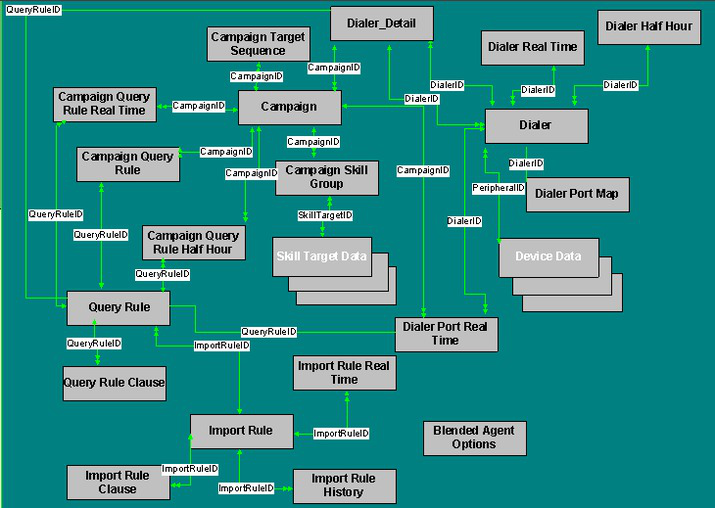
Page 635
• Campaign_Query_Rule_Half_Hour, on page 169
• Campaign_Query_Rule_Real_Time, on page 175
• Campaign_Skill_Group, on page 184
• Campaign_Target_Sequence, on page 186
• Dialer, on page 220
• Dialer_Detail, on page 225
• Dialer_Half_Hour, on page 231
• Dialer_Port_Map, on page 237
• Dialer_Port_Real_Time, on page 238
• Dialer_Skill_Group_Half_Hour, on page 244
• Dialer_Skill_Group_Real_Time, on page 247
• Import_Rule, on page 274
• Import_Rule_Clause, on page 278
• Import_Rule_History, on page 280
• Import_Rule_Real_Time, on page 281
• Query_Rule, on page 362
• Query_Rule_Clause, on page 364
Business Hours
This figure depicts the tables in this category and their connections.
In this graphic:
• A single box represents a single table.
• A single arrowhead indicates a one-to-one relationship, and a double arrowhead indicates a one-to-many
relationship.
• A stack of boxes represents several tables in another category of the schema.
Database Schema Handbook for Cisco Unified Contact Center Enterprise, Release 15.0(1)
617
Tables by Group
Business Hours
Page 636
Figure 2: Business Hours Category
To see the database rules for these tables, see Business Hours Tables, on page 697.
Tables in the Business Hours category include the following:
• Business_Hours, on page 108
• Business_Hours_Real_Time, on page 110
• Business_Hours_Reason, on page 111
• Special_Day_Schedule, on page 554
• Time_Zone_Location, on page 586
• Week_Day_Schedule, on page 612
Device
This figure depicts the tables in this category and their connections.
In this graphic:
• A single box represents a single table.
• A box with a + plus sign represents a subcategory of table with related detail: Peripheral and Trunk
Group.
• A stack of boxes represents several tables in another category of the schema.
• A single arrowhead indicates a one-to-one relationship, and a double arrowhead indicates a one-to-many
relationship.
Database Schema Handbook for Cisco Unified Contact Center Enterprise, Release 15.0(1)
618
Tables by Group
Device
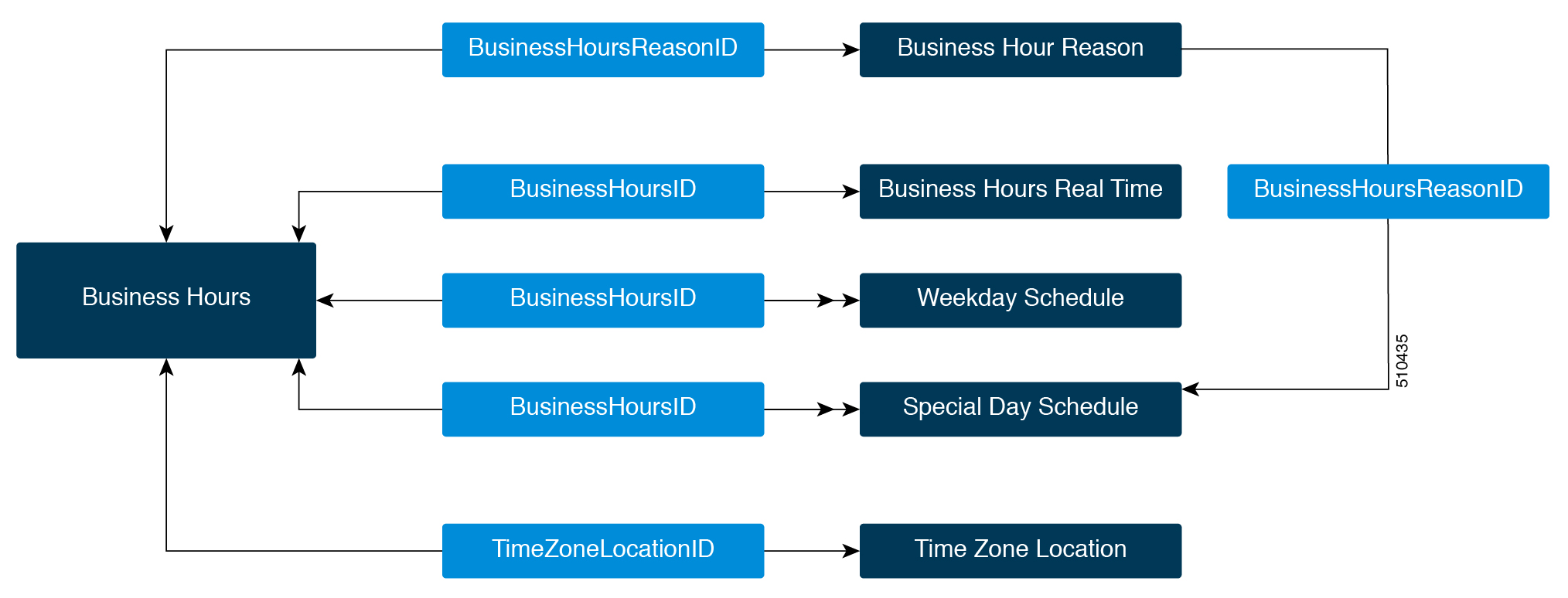
Page 637
Figure 3: Device
To see database rules for these tables, see Device Tables, on page 698.
Tables in the Device category include the following:
• Agent_Targeting_Rule, on page 74
• Agent_Targeting_Rule_Member, on page 76
• Agent_Targeting_Rule_Range, on page 77
• Dial_Number_Plan, on page 219
• Logical_Interface_Controller, on page 288
• Network_Trunk_Group, on page 311
• Network_Trunk_Group_Half_Hour, on page 312
• Network_Trunk_Group_Real_Time, on page 314
• Peripheral, on page 326 See the section below for Peripheral Detail tables.
• Peripheral_Default_Route, on page 330
• Physical_Controller_Half_Hour, on page 343
• Physical_Interface_Controller, on page 344
• Routing_Client, on page 416
• Routing_Client_Five_Minute, on page 420
• Trunk, on page 590
• Trunk_Group, on page 591 See the section below for Trunk Group Detail tables.
Database Schema Handbook for Cisco Unified Contact Center Enterprise, Release 15.0(1)
619
Tables by Group
Device
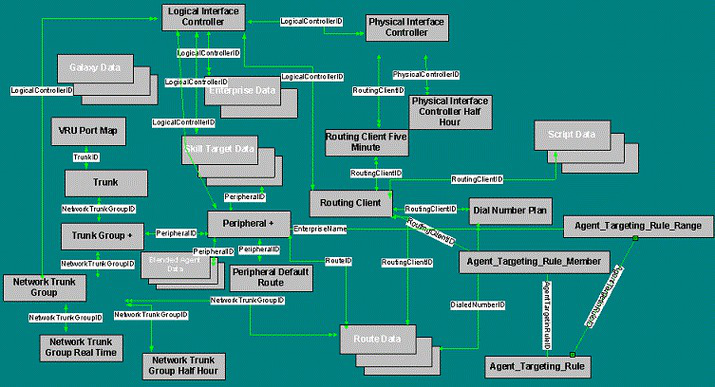
Page 638
• Vru_Port_Map, on page 611
Peripheral Detail
The figure below illustrates the tables in the Peripheral Detail subcategory.
Figure 4: Peripheral Detail
These tables are:
• Agent_Distribution, on page 27
• Dialer_Detail, on page 225
• Peripheral, on page 326
• Peripheral_Monitor, on page 333
• Peripheral_Real_Time, on page 335
Trunk Group Detail
The figure below illustrates the tables in the Trunk Detail subcategory.
Database Schema Handbook for Cisco Unified Contact Center Enterprise, Release 15.0(1)
620
Tables by Group
Peripheral Detail
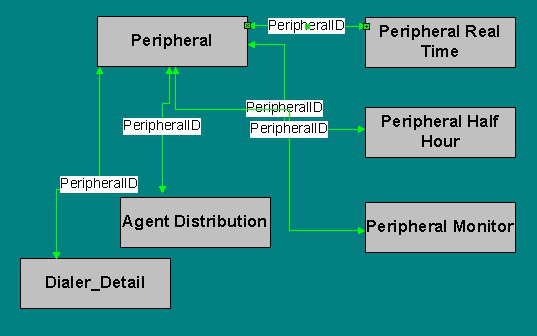
Page 639
Figure 5: Trunk Details
These tables are:
• Trunk_Group, on page 591
• Trunk_Group_Five_Minute, on page 593
• Trunk_Group_Half_Hour, on page 594
• Trunk_Group_Real_Time, on page 596
Enterprise
The figure below shows the relationships among tables in the Enterprise category.
• A single box represents a single table.
• A stack of boxes represents several tables in another category of the schema.
• A single arrowhead indicates a one-to-one relationship, and a double arrowhead indicates a one-to-many
relationship.
Database Schema Handbook for Cisco Unified Contact Center Enterprise, Release 15.0(1)
621
Tables by Group
Enterprise
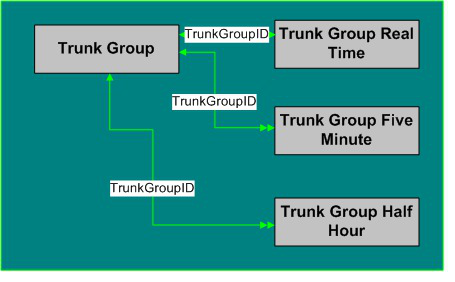
Page 640
Figure 6: Enterprise
To see database rules for these tables, see Enterprise Tables, on page 699.
Tables that hold Enterprise data are listed below.
• Enterprise_Route, on page 251
• Enterprise_Route_Member, on page 252
• Enterprise_Skill_Group, on page 255
• Enterprise_Skill_Group_Member, on page 256
• Enterprise_Service, on page 253
• Enterprise_Service_Member, on page 254
• Service_Array, on page 455
Database Schema Handbook for Cisco Unified Contact Center Enterprise, Release 15.0(1)
622
Tables by Group
Enterprise
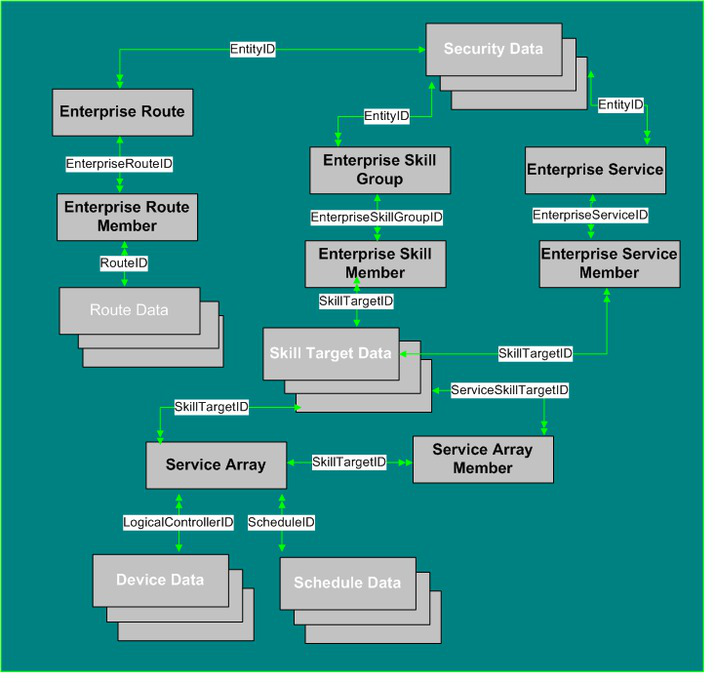
Page 641
• Service_Array_Member, on page 457
Media Routing
The figure below shows the relationships among the tables in the Media Routing category.
• A single box represents a single table.
• A stack of boxes represents several tables in another category of the schema.
• A single arrowhead indicates a one-to-one relationship, and a double arrowhead indicates a one-to-many
relationship.
Figure 7: Media Routing Tables
To see Database rules for the Media Routing tables, see Media Routing Tables, on page 699.
Media Routing Tables are listed below:
• Application_Instance, on page 91
• Application_Path, on page 92
• Application_Path_Member, on page 94
• Application_Path_Real_Time, on page 94
• Media_Class, on page 304
• Media_Routing_Domain, on page 305
Database Schema Handbook for Cisco Unified Contact Center Enterprise, Release 15.0(1)
623
Tables by Group
Media Routing
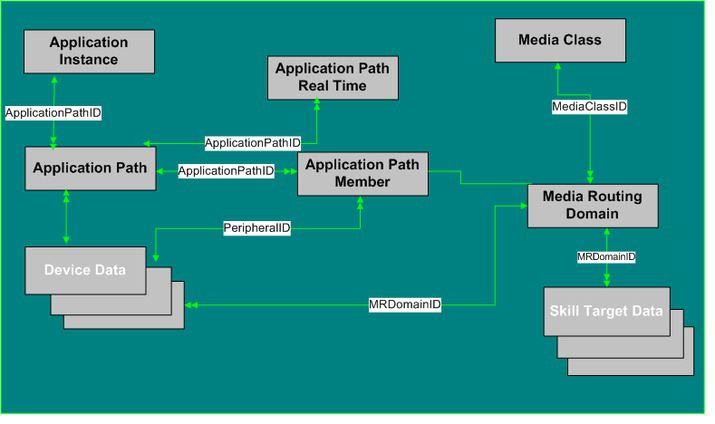
Page 642
Precision Queue
This figure depicts the tables in the Precision Queue category and their connections.
Figure 8: Precision Queue Tables
In this graphic:
• A single box represents a single table.
• A single arrowhead indicates a one-to-one relationship, and a double arrowhead indicates a one-to-many
relationship.
Tables that hold Precision Queue data are listed below:
• Agent_Real_Time
• Agent_Skill_Group_Interval
• Agent_Skill_Group_Real_Time
• Call_Type_SG_Interval
• Precision_Q_Real_Time_Table
• Precision_Queue_Step
• Precision_Queue_Term
• Router_Queue_Interval
• Skilll_Group
• Skill_Group_Interval
• Termination_Call_Detail
Database Schema Handbook for Cisco Unified Contact Center Enterprise, Release 15.0(1)
624
Tables by Group
Precision Queue
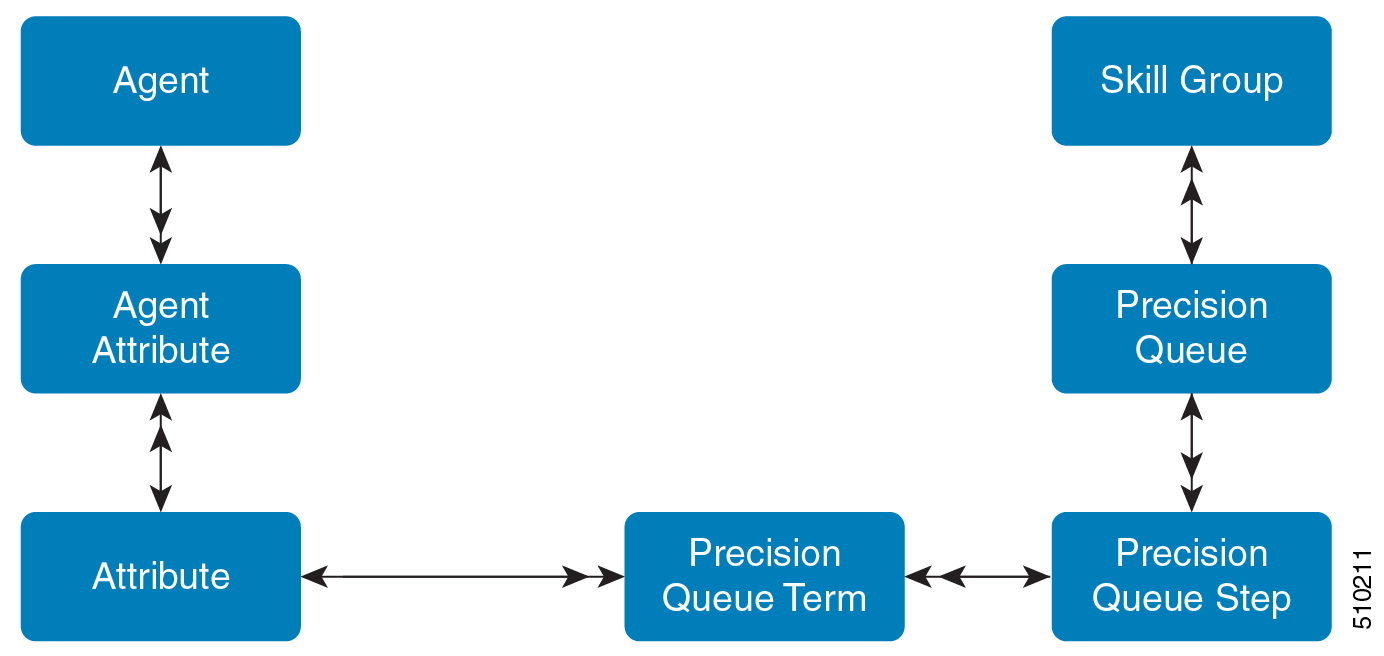
Page 643
Precision Queue Detail
The figure below illustrates the tables in the Precision Queue Detail subcategory.
Figure 9: Precision Queue Detail
Route
This figure depicts the tables in this category and their connections.
In this graphic:
• A single box represents a single table.
• A box with a + plus sign represents a subcategory of table with related detail: Route Detail.
• A stack of boxes represents several tables in another category of the schema.
• A single arrowhead indicates a one-to-one relationship, and a double arrowhead indicates a one-to-many
relationship.
Database Schema Handbook for Cisco Unified Contact Center Enterprise, Release 15.0(1)
625
Tables by Group
Precision Queue Detail
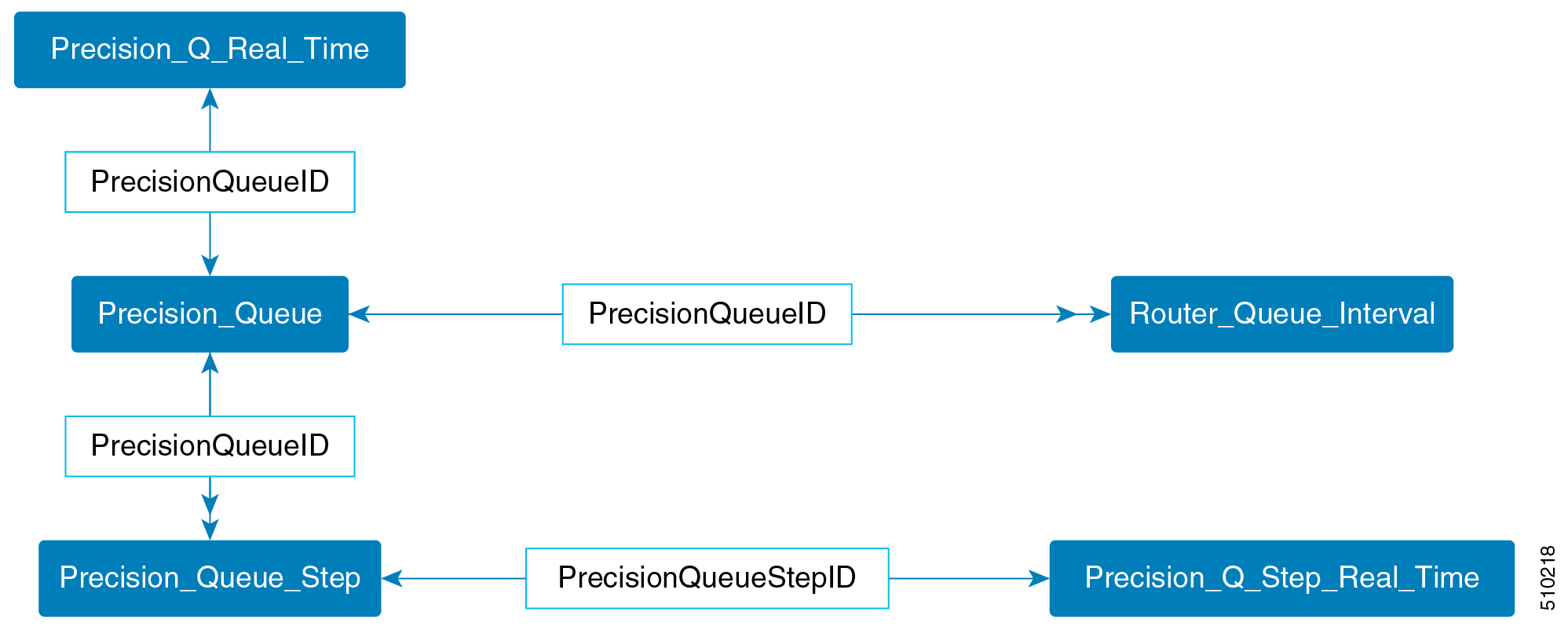
Page 644
Figure 10: Route Tables
To see Database Rules for Route Tables, see Route Tables, on page 700.
Tables that hold Route data are listed below.
• Announcement, on page 80
• Dialed_Number, on page 215
• Dialed_Number_Label, on page 217
• Expanded_Call_Variable, on page 259
• Label, on page 283
Database Schema Handbook for Cisco Unified Contact Center Enterprise, Release 15.0(1)
626
Tables by Group
Route
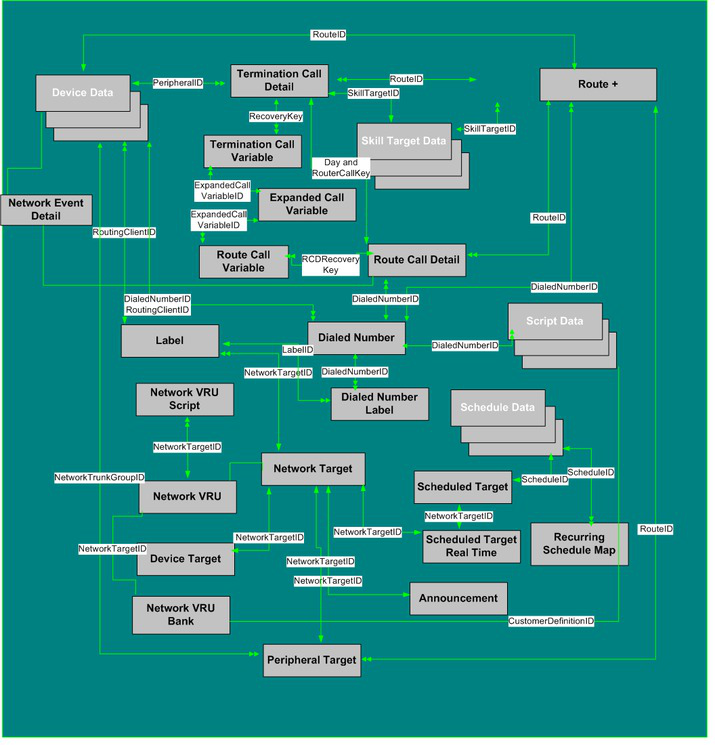
Page 645
• Network_Event_Detail, on page 308
• Network_Target, on page 310
• Network_Vru, on page 316
• Network_Vru_Bank, on page 317
• Network_Vru_Script, on page 318
• Peripheral_Target, on page 341
• Recurring_Schedule_Map, on page 368
• Route, on page 379
• Route_Call_Detail, on page 380
• Route_Call_Variable, on page 391
• Scheduled_Target, on page 439
• Scheduled_Target_Real_Time, on page 440
• Termination_Call_Detail, on page 566
• Termination_Call_Variable, on page 585
Route Detail Tables
The figure below illustrates the tables in the Route Details subcategory.
Figure 11: Route Details Tables
Route Detail Tables are:
• Route, on page 379
• Route_Real_Time, on page 401
• Route_Five_Minute, on page 392
• Route_Half_Hour, on page 396
Database Schema Handbook for Cisco Unified Contact Center Enterprise, Release 15.0(1)
627
Tables by Group
Route
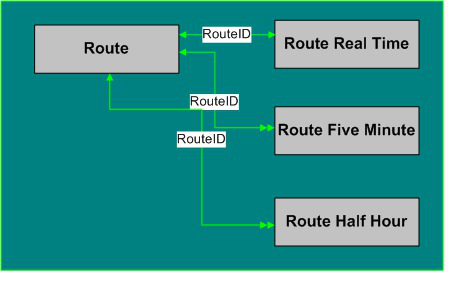
Page 646
Schedule
This figure depicts the tables in this category.
In this graphic:
• A single box represents a single table.
• A stack of boxes represents several tables in another category of the schema.
• A single arrowhead indicates a one-to-one relationship, and a double arrowhead indicates a one-to-many
relationship.
Figure 12: Schedule Tables
To see Database Rules for Schedule Tables, see Schedule Tables, on page 700.
Database Schema Handbook for Cisco Unified Contact Center Enterprise, Release 15.0(1)
628
Tables by Group
Schedule
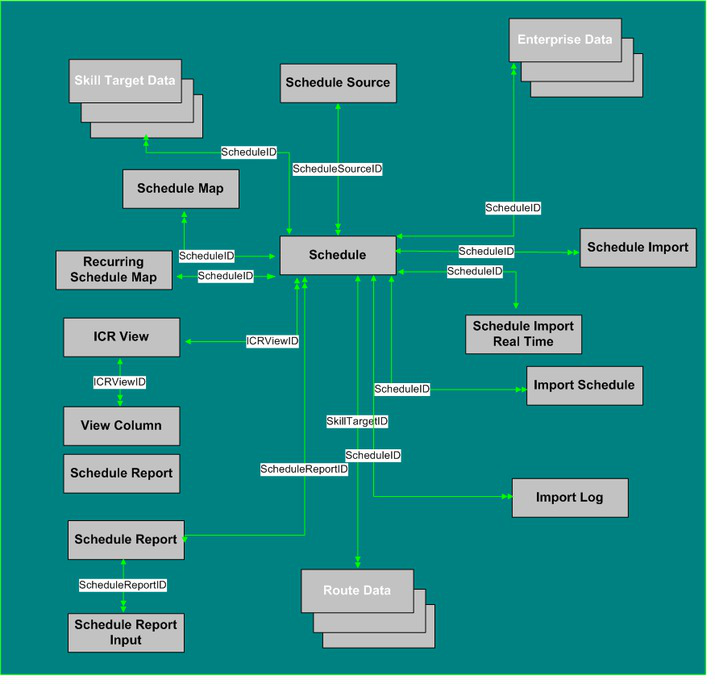
Page 647
Tables that hold Schedule data are listed below.
• Schedule, on page 428
• Schedule_Source, on page 438
• Schedule_Map, on page 434
• Recurring_Schedule_Map, on page 368
• Schedule_Report, on page 435
• Schedule_Report_Input, on page 437
• Schedule_Import, on page 430
• Schedule_Import_Real_Time, on page 432
• Schedule_Source, on page 438
• Import_Schedule, on page 282
• Import_Log, on page 273
• ICR_View, on page 271
• View_Column, on page 606
Script
This figure depicts the tables in this category.
In this graphic:
• A single box represents a single table.
• A box with a + plus sign represents a subcategory of table with related detail: Call Type, Region, and
Script.
• A stack of boxes represents several tables in another category of the schema.
• A single arrowhead indicates a one-to-one relationship, and a double arrowhead indicates a one-to-many
relationship.
Database Schema Handbook for Cisco Unified Contact Center Enterprise, Release 15.0(1)
629
Tables by Group
Script
Page 648
Figure 13: Script Tables
To see database rules for these tables, see Script Tables, on page 701.
Script Tables are listed below
• Admin_Script_Schedule_Map, on page 14
• Application_Gateway, on page 84
• Application_Gateway_Connection, on page 85
• Application_Gateway_Half_Hour, on page 89
• Application_Gateway_Globals, on page 87
• Call_Type, on page 112
• Call_Type_Map, on page 128
• Call_Type_Real_Time, on page 142
• Customer_Definition, on page 207
• Customer_Options, on page 208
• Default_Call_Type, on page 209
• Dialed_Number_Map, on page 217
• ICR_Instance, on page 267
• ICR_Node, on page 269
• Master_Script, on page 302
• Persistent_Variable, on page 342
Database Schema Handbook for Cisco Unified Contact Center Enterprise, Release 15.0(1)
630
Tables by Group
Script
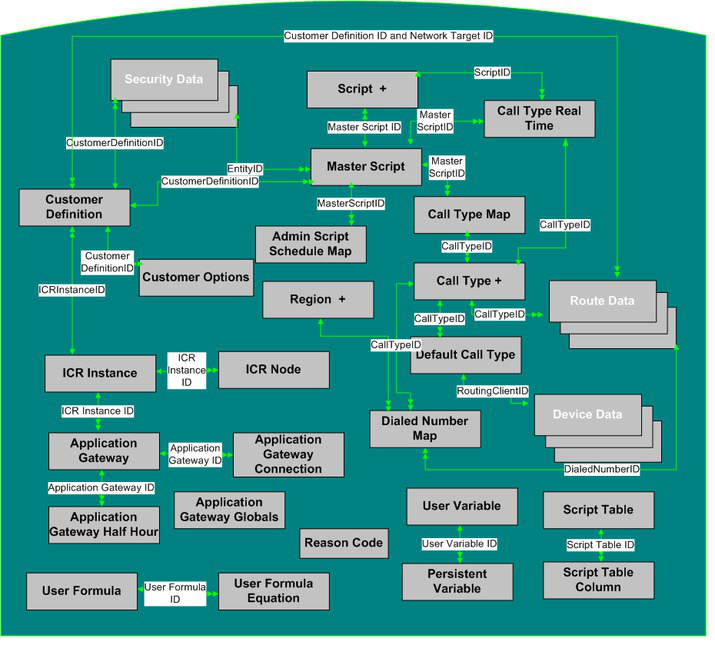
Page 649
• Region, on page 370
• Script, on page 441
• Script, on page 441
• Script_Table_Column, on page 449
• User_Formula, on page 597
• User_Formula_Equation, on page 598
• User_Variable, on page 604
Call Type Detail
The figure below illustrates the tables in the Call Type subcategory.
Figure 14: Call Type Tables
These tables are:
• Call_Type, on page 112
Region Detail
The figure below illustrates the tables in the Region Detail subcategory.
Database Schema Handbook for Cisco Unified Contact Center Enterprise, Release 15.0(1)
631
Tables by Group
Call Type Detail
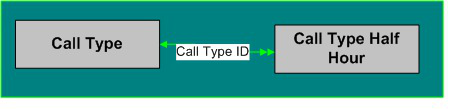
Page 650
Figure 15: Region Detail Tables
Region Detail Tables are listed below:
• Region, on page 370
• Region_Member, on page 371
• Region_Prefix, on page 372
• Region_View_Member, on page 377
• Region_View, on page 373
Script Detail
The figure below illustrates the tables in the Script Detail subcategory.
Database Schema Handbook for Cisco Unified Contact Center Enterprise, Release 15.0(1)
632
Tables by Group
Script Detail
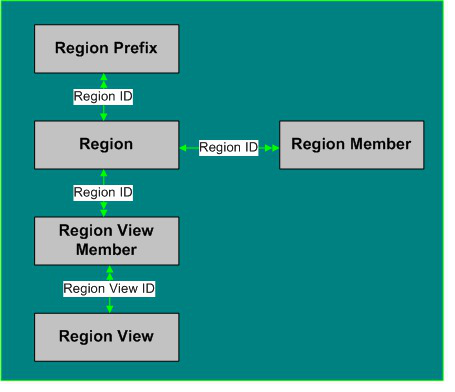
Page 651
Figure 16: Script Detail
Script Detail Tables are listed below:
• Script, on page 441
• Script_Cross_Reference, on page 443
• Script_Data, on page 444
• Script_Five_Minute, on page 444
• Script_Print_Control, on page 446
• Script_Real_Time, on page 447
Security
The figure below shows the relationships among tables in the Security category.
• A single box represents a single table.
• A stack of boxes represents several tables in another category of the schema.
• A single arrowhead indicates a one-to-one relationship, and a double arrowhead indicates a one-to-many
relationship.
Database Schema Handbook for Cisco Unified Contact Center Enterprise, Release 15.0(1)
633
Tables by Group
Security
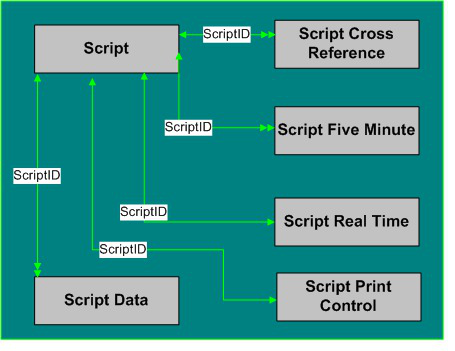
Page 652
Figure 17: Security Tables
To see database rules for these tables, see Security Tables, on page 702.
Tables that hold Security data are listed below.
• Business_Entity, on page 107
• Class_Access_Xref, on page 194
• ClassID_To_ObjectType, on page 196
• Class_List, on page 194
• Class_Security, on page 195
• Feature_Control_Set, on page 261
• Ids, on page 272
• Object_Access_Xref, on page 320
• Object_List, on page 321
• Object_Security, on page 322
• Sec_Group, on page 450
Database Schema Handbook for Cisco Unified Contact Center Enterprise, Release 15.0(1)
634
Tables by Group
Security
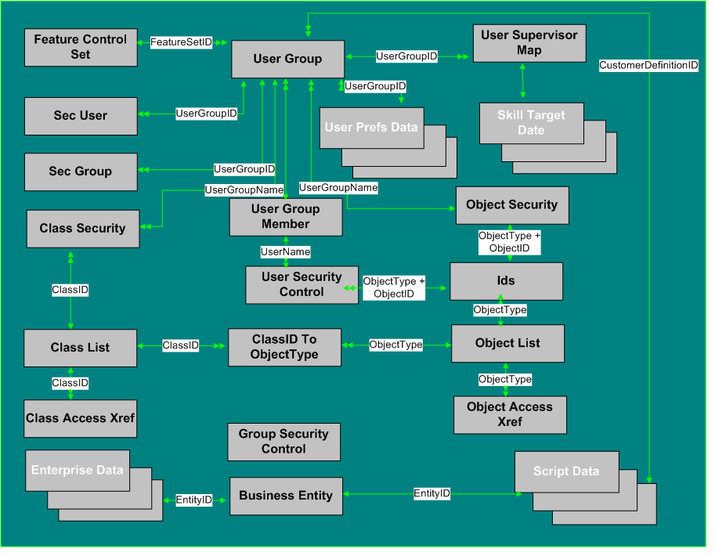
Page 653
• Sec_User, on page 451
• User_Group, on page 599
• User_Group_Member, on page 601
• User_Security_Control, on page 602
• User_Supervisor_Map, on page 603
Skill Target
This figure shows the relationships among tables in the Skill Target category. The Agent, Service, Skill Group,
and Skill Group Member tables each have related tables, as indicated by the + (plus signs) in the illustration.
In this graphic:
• A single box represents a single table.
• A box with a + plus sign represents a subcategory of table with related detail: Agent, Service, Skill Group,
and Skill Group Member.
• A stack of boxes represents several tables in another category of the schema.
• A single arrowhead indicates a one-to-one relationship, and a double arrowhead indicates a one-to-many
relationship.
Database Schema Handbook for Cisco Unified Contact Center Enterprise, Release 15.0(1)
635
Tables by Group
Skill Target
Page 654
Figure 18: Skill Target Tables
To see database rules for Skill Target tables, see Skill Target Tables, on page 702.
Skill Target tables include the following:
• Agent Table. See the Agent Detail section, below.
• Agent_Desk_Settings, on page 21
• Agent_Interval, on page 36
• Person, on page 323
• Service Tables. See the Service Detail section, below.
• Service_Member, on page 473
• Skill Group and Skill Group Member Tables. See the Skill Group Detail Section, below.
• Skill_Target, on page 543
• Translation_Route, on page 587
Database Schema Handbook for Cisco Unified Contact Center Enterprise, Release 15.0(1)
636
Tables by Group
Skill Target
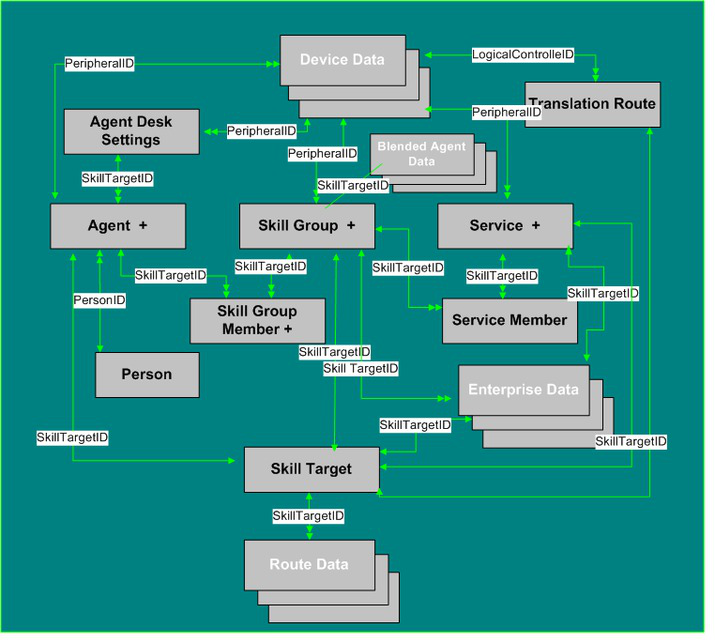
Page 655
• Translation_Route_Half_Hour, on page 588
Agent Detail
The figure below illustrates tables in the Agent subcategory.
Figure 19: Agent Tables
Agent Detail tables are listed below:
• Agent, on page 17
• Agent_Interval, on page 36
• Agent_Real_Time, on page 42
• Agent_Event_Detail, on page 28
• Agent_State_Trace, on page 68
• Agent_Team, on page 77
• Agent_Team_Member, on page 79
• Agent_Team_Supervisor, on page 80
• Dialer_Detail, on page 225
Database Schema Handbook for Cisco Unified Contact Center Enterprise, Release 15.0(1)
637
Tables by Group
Agent Detail
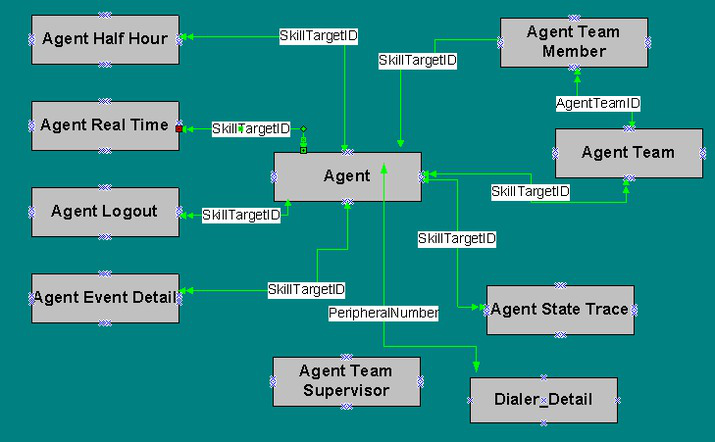
Page 656
Service Detail
The figure below illustrates tables in the Service subcategory.
Figure 20: Service Tables
Service tables include:
• Service, on page 452
• Service_Five_Minute, on page 458
• Service_Real_Time, on page 474
Skill Group Detail
The figures below illustrate tables in the Skill Group and Skill Group Member subcategories.
Figure 21: Skill Group Tables
Database Schema Handbook for Cisco Unified Contact Center Enterprise, Release 15.0(1)
638
Tables by Group
Service Detail
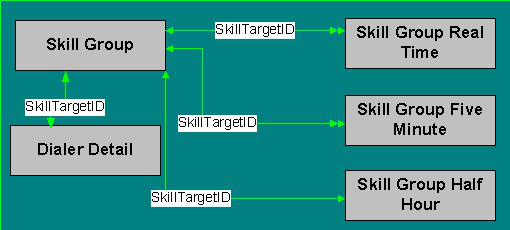
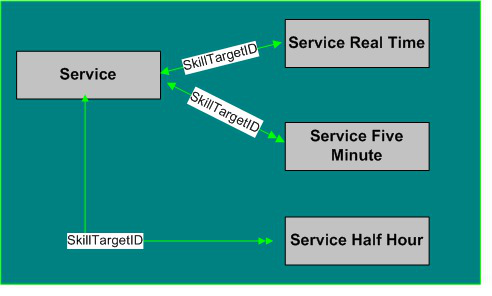
Page 657
Figure 22: Skill Group Member Tables
Skill Group and Skill Group Member Tables include the following:
• Skill_Group, on page 493
• Skill_Group_Five_Minute, on page 497
• Skill_Group_Real_Time, on page 527
• Skill_Group_Member, on page 527
• Agent_Skill_Group_Logout, on page 65
• Agent_Skill_Group_Real_Time, on page 66
Smart License
Smart_License_Info
This table is one of the Smart License tables.
This table captures the Registration and Authorization status for a Smart License Agent instance running on
a Unified CCE instance. The fields in this table represent the responses received from the Cisco Smart Software
Manager (CSSM) portal using internal APIs.
Each row displays the information for one Smart Agent instance.
Related Tables
• Smart_License_Server
• Smart_License_Product
• Smart_License_Entitlements
Database Schema Handbook for Cisco Unified Contact Center Enterprise, Release 15.0(1)
639
Tables by Group
Smart License
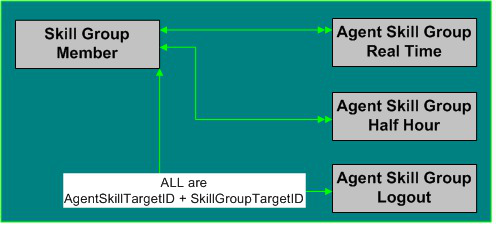
Page 658
Table 488: Indexes for the Smart_License_Info Table
index_keys
index_description
index_name
SmartLicenseInfoID
Primary key
XPKSmart_License_Info
Fields in the Smart_License_Info Table
Keys and NULL
Option
Data Type
Description
Name
NULL
DBDATETIME
Date and time of expiry of the product
license authorization. Product license
authorization must be renewed before this
date.
AuthorizationExpires
NULL
VARCHAR(255)
Reason for failure of authorization
attempt.
AuthorizationFailedReason
NOT NULL
CHANGESTAMP
Incremented when the record is changed
in the database.
ChangeStamp
NULL
DBINT
Authorization status ID of Unified CCE
with CSSM or Satellite.
Default value is 5
CssmAuthorizationStatus
NULL
DBINT
Registration status ID of Unified CCE
with CSSM or Satellite.
Default value is 2
CssmRegistrationStatus
NULL
DBINT
Number of days left in evaluation mode.
DaysLeftInEvaluationMode
NULL
DBINT
Number of days left in Out Of
Compliance mode.
DaysLeftInOutOfCompliance
NULL
DBDATETIME
Records the date and time when the record
is added/updated.
DateTimeStamp
NULL
DBCHAR
N indicates that encryption cannot be
turned on.
Values Y or N are allowed
ExportControlledAllow
NULL
DBDATETIME
Date and time of expiry of the product
evaluation period.
EvaluationExpiredTime
NULL
DBDATETIME
Reserved Field
FutureUseDateTime1
NULL
DBINT
Reserved Field
FutureUseInt1
NULL
DBINT
Reserved Field
FutureUseInt1
NULL
DBINT
Reserved Field
FutureUseInt2
Database Schema Handbook for Cisco Unified Contact Center Enterprise, Release 15.0(1)
640
Tables by Group
Smart_License_Info
Page 659
Keys and NULL
Option
Data Type
Description
Name
NULL
DBINT
Reserved Field
FutureUseInt3
NULL
DBINT
Reserved Field
FutureUseInt4
NULL
DBINT
Reserved Field
FutureUseInt5
NULL
DBINT
Reserved Field
FutureUseInt6
NULL
VARCHAR(255)
Reserved Field
FutureUseVarChar1
NULL
VARCHAR(255)
Reserved Field
FutureUseVarChar2
NULL
VARCHAR(255)
Reserved Field
FutureUseVarChar3
NULL
VARCHAR(255)
Reserved Field
FutureUseVarChar4
NULL
VARCHAR(255)
Reserved Field
FutureUseVarChar5
NULL
DBCHAR
Y if the product license authorization
attempt fails.
Values Y or N are allowed
IsAuthorizationFailed
NULL
DBCHAR
Y if the product license registration
attempt fails.
Values Y or N are allowed
IsRegistrationFailed
NULL
DBDATETIME
Date and Time of the last renewal attempt
for the product license authorization.
LastAuthorizationAttempt
NULL
DBDATETIME
Date and Time of the last renewal attempt
for the product license registration.
LastRenewalAttempt
NULL
DBDATETIME
Date and Time of the next renewal
attempt for the product license
authorization.
NextAuthorizationAttempt
NULL
DBDATETIME
Date and Time of the next renewal
attempt for the product license
registration.
NextRenewalAttempt
NULL
DBINT
The number of days you can use Unified
CCE when Out Of Compliance.
OverageDays
NULL
DBDATETIME
Time stamp when the overage days
column is updated.
OverageDaysUpdatedTime
NULL
VARCHAR(100)
Registered Product instance with CSSM.
ProductInstance
NULL
DBDATETIME
Date and Time at which the product
license registration will expire. Product
license registration must be renewed
before this date.
RegistrationExpires
Database Schema Handbook for Cisco Unified Contact Center Enterprise, Release 15.0(1)
641
Tables by Group
Smart_License_Info
Page 660
Keys and NULL
Option
Data Type
Description
Name
NULL
VARCHAR(255)
Reason for registration attempt failure.
RegistrationFailedReason
NULL
VARCHAR(100)
Name of Smart Account Name.
SmartAccount
PK
Clustered
DBINT
Gets the Smart License ID from the
Next_Available_Number table.
SmartLicenseInfoID
NULL
DBINT
Foreign key to SmartLicenseServer
SmartLicenseServerId
NULL
VARCHAR(100)
Name of Virtual Account Name.
VirtualAccount
Smart_License_Server
This table is one of the Smart License tables.
This table stores the Unified CCE specific configuration information that is required for connection and
registration to CSSM.
This table will come under configuration database table.
Related Tables
• Smart_License_Info
• Smart_License_Product
• Smart_License_Entitlements
Table 489: Indexes for the Smart_License_Server Table
index_keys
index_description
index_name
SmartLicenseServerID
Primary key
XPKSmart_License_Server
Table 490: Fields in the Smart_License_Server Table
Keys and NULL
Option
Data Type
Description
Name
NULL
VARCHAR(255)
ID that is used to identify the source of
the notification when there are multiple
instances of an agent on the same system.
AgentId
NOT NULL
CHANGESTAMP
Increments when the record is changed in
the database.
ChangeStamp
NULL
DBINT
Maximum wait time from CSSM before
SmartAgent times out and API fails.
CssmResponseTimeout
Database Schema Handbook for Cisco Unified Contact Center Enterprise, Release 15.0(1)
642
Tables by Group
Smart_License_Server
Page 661
Keys and NULL
Option
Data Type
Description
Name
NULL
DBDATETIME
Records the date and time when the record
was added/updated.
DateTimeStamp
NOT NULL
DBINT
Enterprise
DeploymentMode
NOT NULL
DBCHAR
Applies the 95 percentile formula to
exclude spikes if this value set to Y.
Values Y or N are allowed
Default value is Y
ExcludeSpikes
NULL
DBINT
Reserved for future use.
FutureUseInt1
NULL
DBINT
Reserved for future use.
FutureUseInt2
NULL
DBINT
Reserved for future use.
FutureUseInt3
NULL
DBINT
Reserved for future use.
FutureUseInt4
NULL
DBINT
Reserved for future use.
FutureUseInt5
NULL
VARCHAR(255)
Reserved for future use.
FutureUseVarChar1
NULL
VARCHAR(255)
Reserved for future use.
FutureUseVarChar2
NULL
VARCHAR(255)
Reserved for future use.
FutureUseVarChar3
NULL
VARCHAR(255)
Reserved for future use.
FutureUseVarChar4
NULL
VARCHAR(255)
Reserved for future use.
FutureUseVarChar5
NULL
VARCHAR(255)
Get the token from Cisco Licensing Cloud
CSSM.
IDToken
NOT NULL
DBCHAR
Defines the enforcement level applied.
Default value is Y which allows MACD
operation on Agents and Features. Default.
Values Y or N are allowed.
IsProvisionAllowed
NOT NULL
DBINT
1 -Perpetual
2 - Flex
LicenseType
NULL
DBCHAR
Defines if the system is
OutOfCompliance.
Allowed: Y or N
OutOfCompliance
NULL
DBDATETIME
The Out-of-Compliance start date.
OutOfComplianceStartTime
Database Schema Handbook for Cisco Unified Contact Center Enterprise, Release 15.0(1)
643
Tables by Group
Smart_License_Server
Page 662
Keys and NULL
Option
Data Type
Description
Name
NULL
DBINT
Number of times system went into Out Of
Compliance.
Default Value: 0
OutOfComplianceCount
NULL
VARCHAR(255)
Intermediate HTTP/HTTPS proxy Host
name or IP address
ProxyHostnameOrIP
NULL
DBINT
Intermediate HTTP/HTTPS proxy port
address
ProxyPort
NULL
VARCHAR(255)
For internal use.
SmartCode
PK
Clustered
DBINT
Gets the Smart License ID from the
Next_Available_Number table.
SmartLicenseServerID
NULL
VARCHAR(50)
Serial number to identify the product.
SerialNumber
NULL
DBINT
Reservation State:
0 - Disabled
1 - Enabled
Reservation Type
NULL
DBINT
SLR Status
0 - NONE
1 - IN_PROGRESS
2 - UNIVERSAL
3 - SPECIFIC
SlrStatus
NULL
VARCHAR(255)
Smart Software Manager Satellite URL
only in mediated deployment mode.
TransportGatewayUrl
NOT NULL
DBINT
0 - Direct
1 - On-Prem CSSM
2 - Proxy
TransportType
NULL
VARCHAR(255)
Cisco Smart Software Manager transport
URL in non-mediated deployment mode.
TransportUrl
NULL
DBINT
Transport mechanism to connect Smart
Agent To CSSM
• 1 - Smart Call Home
• 2 - Smart Transport
TransportMode
Database Schema Handbook for Cisco Unified Contact Center Enterprise, Release 15.0(1)
644
Tables by Group
Smart_License_Server
Page 663
Keys and NULL
Option
Data Type
Description
Name
NULL
DBINT
The two License Usage Modes are:
• 0 - Production
• 1 - Non-Production system
UsageMode
Smart_License_Entitlements
This table is one of the Smart License tables.
This table stores the information on the pre-defined entitlement tags for identifying and reporting licenses on
CSSM.
The information is presented in the table in multiple rows, one for each supported entitlement such as Standard
and Premium Agent Entitlement for each supported product.
Related Tables
• Smart_License_Info
• Smart_License_Product
• Smart_License_Server
Table 491: Indexes for the Smart_License_Server Table
index_keys
index_description
index_name
SmartLicenseEntitlementsTagID
Primary key
XPKSmart_License_Entitlements
Table 492: Fields in the Smart_License_Server Table
Keys and NULL
Option
Data Type
Description
Name
NOT NULL
CHANGESTAMP
Increments when the record is changed in the
database.
ChangeStamp
NULL
DBDATETIME
Records the date and time when the record was
added/updated.
DateTimeStamp
NULL
varchar(255)
Deployment mode of the system.
DeploymentType
NULL
VARCHAR(255)
Unique tag per Product ID (PID).
For example, Standard or Premium Agent
EntitlementTag. EntitlementTag names are
different for different types licenses.
EntitlementTag
NULL
VARCHAR(255)
Identifies the entitlement names for the
configured deployment.
EntitlementDisplayname
Database Schema Handbook for Cisco Unified Contact Center Enterprise, Release 15.0(1)
645
Tables by Group
Smart_License_Entitlements
Page 664
Keys and NULL
Option
Data Type
Description
Name
NULL
VARCHAR(255)
Displays the description of the Entitlement on
CSSM.
1 - Direct
2 - Proxy
3 - Satellite Connected
4 - Satellite Disconnected
EntitlementDescription
NULL
VARCHAR(255)
Entitlement Version is usually 1.0 unless
multiple versions are required by the product.
EntitlementVersion
NULL
VARCHAR(50)
Current enforcement mode of the entitlement.
List of the probable modes:
• Invalid
• Licenses not in use
• Waiting
• InCompliance
• OutOfCompliance
• Overage
• Evaluation Mode
• EvalExpired
• AuthorizedPeriodExpired
• Disabled
• InvalidTag
• NotApplicable
• ReservedInCompliance
• NotAuthorized
• NotInUse
EnforcementMode
NULL
VARCHAR(255)
Reserved for future use.
FutureUseVarChar1
NULL
VARCHAR(255)
Reserved for future use.
FutureUseVarChar2
NULL
DBINT
Reserved for future use.
FutureUseInt1
NULL
DBINT
Reserved for future use.
FutureUseInt2
Database Schema Handbook for Cisco Unified Contact Center Enterprise, Release 15.0(1)
646
Tables by Group
Smart_License_Entitlements
Page 665
Keys and NULL
Option
Data Type
Description
Name
NULL
DBINT
The two types of license supported are:
• 1 - Perpetual
• 2 - Flex
The default value 1(Perpetual).
LicenseType
NULL
DBINT
It is the highest license consumption value
above and beyond entitlement value when the
system is in Out-of-compliance state.
LockUsage
NULL
DBINT
This flag tells whether this Entitlement is in
OutOfCompliance.
OutOfCompliance
NULL
DBINT
Displays the number of times the Entitlements
are OutOfCompliance.
OutOfComplianceCount
NULL
DBINT
Displays the peak usage of this entitlement
PeakUsage
NOT NULL
DBINT
Gets the Smart License ID from the
Next_Available_Number table.
SmartLicense
EntitlementsTagID
Smart_License_Product
This table is one of the Smart License tables.
This table stores the information about the pre-defined product tag, display name and description to identify
the product instances on CSSM.
Related Tables
• Smart_License_Info
• Smart_License_Server
• Smart_License_Entitlements
Table 493: Indexes for the Smart_License_Server Table
index_keys
index_description
index_name
SmartLicenseProductID
Primary key
XPKSmart_License_Product
Database Schema Handbook for Cisco Unified Contact Center Enterprise, Release 15.0(1)
647
Tables by Group
Smart_License_Product
Page 666
Table 494: Fields in the Smart_License_Server Table
Keys and NULL
Option
Data Type
Description
Name
NOT NULL
CHANGESTAMP
This field is incremented when the record is
changed in the database.
ChangeStamp
NULL
DBDATETIME
Records the date and time when the license
record was added/updated.
DateTimeStamp
NULL
DBINT
Reserved for future use.
FutureUseInt1
NULL
DBINT
Reserved for future use.
FutureUseInt2
NULL
VARCHAR(255)
Reserved for future use.
FutureUseVarChar1
NULL
VARCHAR(255)
Reserved for future use.
FutureUseVarChar2
NULL
VARCHAR
(255)
Displays the description of the product license
in the product instance overview of CSSM.
ProductDescription
NOT NULL
VARCHAR
(255)
Displays the name of the product in the
product instance overview of CSSM.
ProductDisplayName
NULL
DBINT
Displays the environment of the product in the
product instance overview of CSSM.
The two types of environments supported are:
• 0: Production (default value)
• 1: Development
ProductEnvironment
NULL
DBINT
Displays the privacy status of the product in
the product instance overview of CSSM.
Values 0 or 1 are allowed.
• 0: Privacy disabled
• 1: Privacy enabled (default value)
PrivacyEnabled
NOT NULL
VARCHAR
(255)
Is a unique id defined for each product like
• UCCE
• PCCE
ProductTag
NULL
VARCHAR (30)
Product Version is usually 1.0 unless multiple
versions are required by the product.
ProductVersion
PK
Clustered
DBINT
Gets the Smart License ID from the
Next_Available_Number table.
SmartLicenseProductID
Database Schema Handbook for Cisco Unified Contact Center Enterprise, Release 15.0(1)
648
Tables by Group
Smart_License_Product
Page 667
System
The figure below illustrates tables in the System category. To see database rules for these tables, see System
Tables, on page 703.
Figure 23: System Tables
To see database rules for these tables, see System Tables, on page 703.
System Tables are listed below
• Application_Event, on page 81
• AWControl, on page 99
• Config_Message_Log, on page 199
• Controller_Time, on page 207
• Event, on page 257
• ICR_Globals, on page 263
• ICR_Locks, on page 268
• Logger_Admin, on page 285
• Logger_Meters, on page 286
• Logger_Type, on page 288
• Next_Available_Number, on page 320
• Recovery, on page 367
• Region_Info, on page 371
Database Schema Handbook for Cisco Unified Contact Center Enterprise, Release 15.0(1)
649
Tables by Group
System
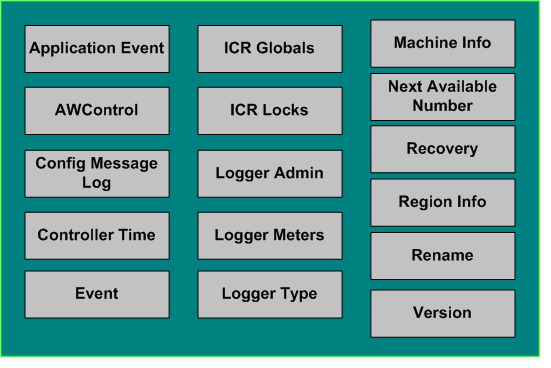
Page 668
• Rename, on page 378
• Version, on page 605
User Preferences
The figure below illustrates the relationships among the Uesr Preferences tables.
• A single box represents a single table.
• A stack of boxes represents several tables in another category of the schema.
• A single arrowhead indicates a one-to-one relationship, and a double arrowhead indicates a one-to-many
relationship.
Figure 24: User Preferences Tables
To see database rules for these tables, see User Preferences Tables, on page 704.
User Preferences Tables include the following:
• Cfg_Mngr_App_Snapshot_State, on page 187
• Cfg_Mngr_Globals, on page 188
• Cfg_Mngr_User_Desktop_Snap, on page 189
• Cfg_Mngr_User_Menu, on page 191
• Cfg_Mngr_User_Settings, on page 192
Database Schema Handbook for Cisco Unified Contact Center Enterprise, Release 15.0(1)
650
Tables by Group
User Preferences
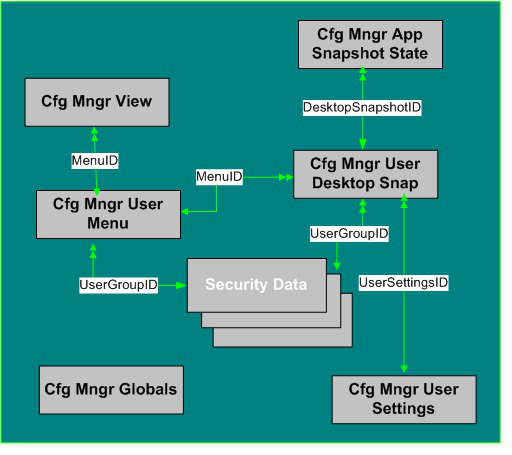
Page 669
• Cfg_Mngr_View, on page 193
VRU Micro-application
The figure below illustrates the relationships among the VRU Micro-Application tables.
• A single box represents a single table.
• A single arrowhead indicates a one-to-one relationship, and a double arrowhead indicates a one-to-many
relationship.
Figure 25: VRU Micro-application Tables
For database rules, see VRU Micro-applications Tables, on page 704.
VRU MicroApplication Tables are listed below:
• Vru_Currency, on page 607
• Vru_Defaults, on page 608
• Vru_Locale, on page 610
Tables Reserved for Future Use
Although the following tables have been added to the Unified CCE Schema, they are reserved for future use:
• Application_Gateway_License
• Campaign_Half_Hour
• Campaign_Real_Time
• Dialer Skill Group Half Hour
• Dialer Skill Group Real Time
• License_Definition
Database Schema Handbook for Cisco Unified Contact Center Enterprise, Release 15.0(1)
651
Tables by Group
VRU Micro-application
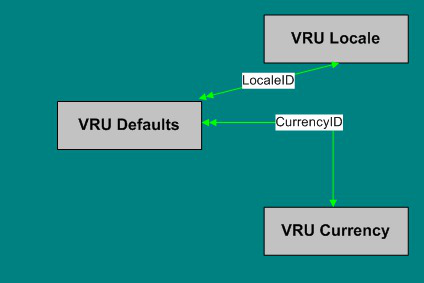
Page 670
• License_Real_Time
• Phone_Strategy
• Phone_Strategy_Node
Database Schema Handbook for Cisco Unified Contact Center Enterprise, Release 15.0(1)
652
Tables by Group
Tables Reserved for Future Use
Page 671
C H A P T E R 4
Field Values
• Access Levels, on page 654
• AgentState, on page 654
• Application Gateway: Fault Tolerance, on page 655
• Client Type, on page 656
• Customer Options Type, on page 656
• Days, on page 657
• Dialed Number Map: ANIWildCardType, on page 658
• Dialer Detail: CallResult, on page 658
• Dialer Detail: CallStatusZone, on page 660
• Dialer Detail: DialingMode, on page 661
• Event Fields, on page 661
• ICR Locks Fields, on page 662
• LabelType Fields, on page 662
• Logical Interface Controller Fields, on page 663
• Network Vru Type, on page 663
• Port Status, on page 664
• Route Call Detail Fields, on page 664
• Router Error Codes, on page 666
• Object Types: Security, on page 670
• Object Types: User Variable, on page 672
• Peripheral Real Time Status Field, on page 674
• Reason Codes, on page 675
• Service Fields, on page 676
• Service Real Time: Service Mode Indicator Field, on page 677
• Survey Question (For Future Use), on page 677
• Target Types: Script Cross Reference and Scheduled Report Input, on page 678
• Termination Call Detail: Call Disposition and CallDispositionFlag Fields, on page 681
• Termination Call Detail: Peripheral Call Type, on page 690
• Trunk Type, on page 693
Database Schema Handbook for Cisco Unified Contact Center Enterprise, Release 15.0(1)
653

Page 672
Access Levels
Several tables include an AccessLevel field that indicates the rights a user or group has to access an object or
class.
Meaning
AccessLevelValues
Read
10
Reference
20
Maintenance (create, read, update, delete)
30
AgentState
The Agent Real Time, Agent Skill Group Real Time, and Agent state trace tables ( see Agent_Real_Time,
on page 42, Agent_Skill_Group_Real_Time, on page 66, and Agent_State_Trace, on page 68) use the
AgentState field, which indicates the agent's state.
The meaning for this field varies depending on the table that uses it.
Note
Meaning(Agent_State_Trace)
Meaning (Agent_Real_Time /
Agent_Skill_Group_Real_Time)
Agent State
Values
Logged Off
Logged Off
0
Logged On
Logged On
1
Not Ready
Not Ready
2
Ready
Ready
3
Talking
Talking
4
Work Not Ready
Work Not Ready
5
Work Ready
Work Ready
6
Busy Other
Busy Other
7
Reserved
Reserved
8
Call Initiated
Unknown
9
Call Held
Calls On Hold
10
Active
Active
11
Paused
Paused
12
Database Schema Handbook for Cisco Unified Contact Center Enterprise, Release 15.0(1)
654
Field Values
Access Levels

Page 673
Meaning(Agent_State_Trace)
Meaning (Agent_Real_Time /
Agent_Skill_Group_Real_Time)
Agent State
Values
Interrupted
Interrupted
13
Not Active
Not Active
Note
Not Active is an agent state when the agent is signed
into a nonvoice skill group or precision queue. This state
is the equivalent of Ready for voice.
14
The Type field indicates the recurrence pattern of the schedule.
Meaning
Type
Values
Daily (the DayType field indicates which days of the week)
1
Weekly (the DayType field indicates which days of the week)
2
Biweekly (the DayType field indicates which days of the week)
3
Monthly (the Day field specifies the day of month)
4
Monthly (the DayPosition and DayType fields indicate day of the month)
5
Yearly (the month and day fields specify the day of year)
6
Yearly (the DayPosition, DayType, and Month specify the day of year)
7
Range (the starting and ending date and times specify the range)
8
Application Gateway: Fault Tolerance
The Fault Tolerance field in the Application Gateway Table (see Application_Gateway, on page 84) takes
these values:
• 0 = none
• 1 = Duplicate Request
Each router will manage a connection to a different host. Each time a scripts initiates a request, both
routers will ask their corresponding host. Both routers will believe the response from whichever host
responds first. This method is the most reliable, but has the added expense of requiring two hosts to
interface to. Even if a host (or a connection) fails, all requests will be satisfied.
• 2 = Alternate Request
Each router will manage a connection to a different host. The routers will take turns, sending half the
requests to the host connected to side A, and the other half to the host connected to side B. If either host
fails, the entire load will be directed to the surviving host. When a host (or connection) fails, some requests
may be lost. This is because by the time the router can figure out that a host is not going to respond, it
is too late to ask the other host and still route the call within the deadline imposed by the network
Database Schema Handbook for Cisco Unified Contact Center Enterprise, Release 15.0(1)
655
Field Values
Application Gateway: Fault Tolerance
Page 674
• 3 = Hot Standby
The hot standby method. Each router will manage a connection to a different host. All requests will be
directed to the designated primary host. If the host (or connection) fails, all requests will be directed to
the backup host. This option may also lose some requests on failures.
Client Type
The Client Type field in the Peripheral (see Peripheral, on page 326) and in the Routing_Client Table (see
Routing_Client, on page 416) takes these values:
• 13= VRU
• 15= VRU Polled
• 16= INCRP NIC
• 30= Enterprise Agent
• 43= Reserved
• 47 = Media Routing
Customer Options Type
The Type field in the Customer Options Table (see Customer_Options, on page 208) indicates a type of option
that is enabled or disabled for a customer.
Meaning
Type
Values
Allow quick-edit of Announcement node
1
Allow quick-edit of Call Type node
2
Allow quick-edit of Caller Entered Digits node
3
Allow quick-edit of Calling Line ID node
4
Allow quick-edit of Dialed Number node
5
Allow quick-edit of Goto Script node
6
Allow quick-edit of Percent Allocation node
7
Allow quick-edit of Requalify node
8
Allow quick-edit of Run VRU Script node
9
Allow quick-edit of Scheduled Select node
10
Allow quick-edit of Switch node
11
Database Schema Handbook for Cisco Unified Contact Center Enterprise, Release 15.0(1)
656
Field Values
Client Type
Page 675
Meaning
Type
Values
Allow quick-edit of Time node
12
Bill for VRU time
50
Customer billing data
51
Days
Both the Admin Script Schedule Map Table (see Admin_Script_Schedule_Map, on page 14) and the Recurring
Schedule Map Table use values to indicate the day of the week, day of the month, day position, and day type.
Meaning
Values
0x01 = Sunday
0x02 = Monday
0x04 = Tuesday
0x08 = Wednseday
0x10 = Thursday
0x20 = Friday
0x40 = Saturday
Day of the Week
0 = Applies to every day
1-31 = Specifies the day of month
Day of the Month
0 = First day of the type in a month
1 = Second day of the type in a month
2 = Third day of the type in a month
3 = Fourth day of the type in a month
4 = Last day of the type in a month
5 = Every day of the type in a month
Day Position
0-6 = Specifies a day (Sunday through Saturday, respectively)
7 = Every day
8 = Every weekday
9 = Every weekend day
Day Type
Database Schema Handbook for Cisco Unified Contact Center Enterprise, Release 15.0(1)
657
Field Values
Days
Page 676
Dialed Number Map: ANIWildCardType
The ANIWildCardType field in the Dialed Number Map Table (see Dialed_Number_Map, on page 217)
indicates how the system software should interpret the value given in the ANIWildCard field.
Meaning
ANIWildCardTypeValue
Unknown
0
NPA (3-digit match)
1
NPA-NXX (6-digit match)
2
Match (all digits are match)
3
Region
4
All (match all ANIs)
5
Prefix
6
If the value is 4, then the ANIWildCard value is ignored and the RegionID value is used.
Note
Dialer Detail: CallResult
The CallResult field in the Dialer Detail (see Dialer_Detail, on page 225) can be populated with the following
values:
Meaning
System Type Values
Error condition while dialing.
2
Number reported not in service by network.
3
No ringback from network when dial attempted.
4
Operator intercept returned from network when dial attempted.
5
No dial tone when dialer port went off hook.
6
Number reported as invalid by the network.
7
Customer phone did not answer.
8
Customer phone was busy.
9
Customer answered and was connected to agent.
10
Fax machine detected.
11
Database Schema Handbook for Cisco Unified Contact Center Enterprise, Release 15.0(1)
658
Field Values
Dialed Number Map: ANIWildCardType

Page 677
Meaning
System Type Values
Answering machine detected.
12
Dialer stopped dialing customer due to lack of agents or network stopped
dialing before it was complete.
13
Customer requested callback.
14
Answering machine requested callback.
15
Call connected with customer was abandoned by the dialer due to lack
of agents.
16
Failed to reserve agent for personal callback.
17
Agent has skipped or rejected a preview call.
18
Agent has skipped or rejected a preview call with the close option.
19
Customer has been abandoned to an IVR.
20
Customer dropped call within configured abandoned time.
21
In Unified CCE, the call result indicates an answering machine detection
which did not meet termination conditions. One such example is a network
voicemail message indicating a mailbox is full or not setup properly. In
TDM switches, it indicates a network answering machine detection, such
as a network voicemail.
22
Number successfully contacted but wrong number. (Not supported).
23
Number successfully contacted but reached the wrong person. (Not
supported).
24
Dialer has flushed this record because there is a change in the skillgroup,
or a change in the campaign, or there are no agents available.
25
The number was on the do not call list.
26
Call disconnected by the carrier or the network while ringing.
27
Dead air or low voice volume call.
28
Received message is not supported by voice gateway.
29
Received message is not authorized by voice gateway.
30
Invalid message received by voice gateway.
31
Call cancelled because the dialer lost connection with the Campaign
Manager.
32
Database Schema Handbook for Cisco Unified Contact Center Enterprise, Release 15.0(1)
659
Field Values
Dialer Detail: CallResult
Page 678
Meaning
System Type Values
Agent timed-out accepting preview or personal callback call.
Note
This Call Result is supported from 12.0 ES33 onwards.
33
Dialer Detail: CallStatusZone
The CallStatusZone1 and CallStatusZone2 fields in the Dialer Detail (see Dialer_Detail, on page 225) can be
populated with the following values that show the current status of the customer record for the zone.
The values are:
• A = Active. Stored in CallStatusZoneX (1 or 2). A zone is set to active when it has been sent to a dialer
for dialing
• B = A callback was requested. Stored in CallStatusZone1 and CallStatusZone2 field when a regular
callback (non personal callback) has been scheduled. The Callback time itself is stored in both the
CallbackDateTimeZone1 and CallbackDateTimeZone2 columns since the callback overrides the individual
zones.
• C = Closed. Record has been closed for that particular zone, so the record will not be retried again for
that zone.
• D=Dialed. Record has been dialed for that particular zone.
• F= Fax Machine. Stored in CallStatusZoneX (1 or 2).
• L = Not Allocated. Invalid number used for a Personal Callback.
• J = Agent rejected (closed out the record).
• M = Max Calls. The maximum number of attempts has been reached. Stored in both CallStatusZone1
and CallStatusZone2. A record is set to "M" when it has dialed the maximum times as specified in the
campaign and will not be retried again. Both zones are set to "M" to indicate no further calling in either
zone.
• P = Pending. Stored in CallStatusZoneX (1 or 2). This is the initial state of a record before any dialing
has taken place. The record remains in the pending state for a particular zone until all of the numbers
specified for that zone are dialed. A pending contact which has already dialed at least once from its
sequence will have at least one CallBackDateTime column filled in with a retry time.
• R = Retry. Stored in CallStatusZoneX (1 or 2) for the zone where the Retry is scheduled. The retry time
itself is stored in the CallbackDateTimeZoneX (1 or 2) as well as in the individual number column
CallbackDateTimeXX, where XX is the number to be retried (01 - 10). Call can be retried for a variety
of reasons including receiving a busy or no answer result, etc.
• S = A personal callback was requested. Stored in both CallStatusZone1 and CallStatusZone2. A record
is set to "S" when it has been scheduled for a personal callback. Both zones are set to "S" to indicate that
it has been moved to the personal callback list
• U = Unknown. Stored in CallStatusZone1 and CallStatusZone2. A record is set to Unknown if its status
was "A" when the Campaign Manager started. If the Campaign Manager shuts down when a record is
Database Schema Handbook for Cisco Unified Contact Center Enterprise, Release 15.0(1)
660
Field Values
Dialer Detail: CallStatusZone
Page 679
at a dialer, it no longer knows its status when it restarts. Therefore, it will remain in "U" state until the
record is returned to it.
• X = Agent not Available. For a personal callback, the agent is not available, and the reschedule mode is
Abandon. (CallStatusZone1 only)
Dialer Detail: DialingMode
The DialingMode field in the Dialer Detail (see Dialer_Detail, on page 225) can be populated with the following
values that show the campaign mode for the call. This field is NULL for Do Not Call entries.
Values are:
• 1 = Predictive only
• 2 = Predictive blended
• 3 = Preview only
• 4 = Preview blended
• 5 = Progressive only
• 6 = Progressive blended
• 7. = Direct preview only
• 8. = Direct preview blended
Event Fields
The SystemType field in the Event (see Event, on page 257) indicates the type of system within the system
software that generated the event.
Meaning
SystemTypeValues
Unknown
0
CallRouter
1
Peripheral Gateway (PG)
2
Network Interface Controller (NIC)
3
Administration & DataServer (ADS)
4
Logger
5
Listener
6
CTI Gateway
7
Blended Agent Dialer
8
Database Schema Handbook for Cisco Unified Contact Center Enterprise, Release 15.0(1)
661
Field Values
Dialer Detail: DialingMode
Page 680
If the event is generated by a PG, the Event.SystemId field indicates the specific machine. For a CallRouter
or Logger, Event.SystemId is always 0.
Note
ICR Locks Fields
The LockType field in the ICR Locak Table (see ICR_Locks, on page 268) indicates a kind of lock.
Table 495: ICR_Locks.LockType Values
Meaning
Value
Master lock (applies to configuration data and script.
0
Configuration lock (no longer used)
1
Script Lock(applies to an individual script)
2
Application lock (no longer used)
3
If the event is generated by a PG, the Event.SystemId field indicates the specific machine. For a CallRouter
or Logger, Event.SystemId is always 0.
Note
LabelType Fields
The LabelType field in the Label Table (see Label, on page 283) indicates the type of the routing label.
Meaning
LabelType
Values
Normal
0
DNIS Override (the system software returns the specific DNIS value to be used with the
label)
1
Busy (instructs the routing client to play a busy signal to caller)
2
Ring (instructs the routing client to play an unanswered ring to caller)
3
Post-Query (instructs the routing client to re-enter its call processing plan at a specific
point)
4
Resource (used internally for special routing client resources, such as a network VRU)
5
Database Schema Handbook for Cisco Unified Contact Center Enterprise, Release 15.0(1)
662
Field Values
ICR Locks Fields

Page 681
Not all label types are valid for all routing client types.
Note
Logical Interface Controller Fields
The LogicalControllerType field uses a subset of the values for Event.SystemType listed in the following
table. The ClientType field indicates the type of peripheral or routing client associated with the controller:
Meaning
Value
Voice Response Unit (VRU)
13
Voice Response Unit (VRU), polled
15
INCRP NIC
16
Enterprise Agent
29
Network Vru Type
The Type field in the Network Vru Table (see Network_Vru, on page 316) indicates the type of interface the
system software uses to communicate with the VRU.
Interface
Type
Values
Normal label type and a correlation ID.
1
Normal label type and a DNIS.
2
Resource label type and a correlation ID. The routing client can automatically take back the
call from the VRU when the system software returns a destination label.
3
Resource label type and a DNIS.
4
Resource label type and either a correlation ID or a DNIS.
5
No label, no correlation ID, and no DNIS (call is already at the VRU).
6
Similar to Type 3, but the system software automatically instructs the VRU to release the call
when it sends a destination label to the routing client.
7
Similar to Type 2, but a Type 8 VRU is used when the Client ICM has a routing client that
controls the call to the VRU.
8
Simplifies configuration requirements in Unified CVP Comprehensive Model deployments.
10
Database Schema Handbook for Cisco Unified Contact Center Enterprise, Release 15.0(1)
663
Field Values
Logical Interface Controller Fields

Page 682
Port Status
The values for the Port Status field in the Dialer_Port_Real_Time Table (see Dialer_Port_Real_Time, on page
238) are listed below:
• 290 = port allocated for future dial
• 300 = port released
• 310 = reservation call started
• 320 = agent reserved
• 330 = customer call started
• 340 = customer has been contacted
• 350 = call transferred to agent
• 360 = customer conversation complete
• 370 = agent completed with call
Route Call Detail Fields
This section has values for three fields in the Route_Call_Detail Table (see Route_Call_Detail, on page 380):
RequestType, OriginatorType, and TargetType.
The RequestType field indicates the type of route request processed.
Meaning
Value
Pre-Routing request
1
Blind transfer or network VRU
2
Announced transfer or MCI 800 call
3
Overflow
4
Re-route
5
Post-Routing request
6
The OriginatorType field indicates where the route request came from.
Meaning
Value
Unknown
0
Trunk
1
Teleset
2
Database Schema Handbook for Cisco Unified Contact Center Enterprise, Release 15.0(1)
664
Field Values
Port Status
Page 683
Meaning
Value
Voice Response Unit (VRU)
3
Trunk Group
4
The Route Call Detail Target Type is a numeric value representing the implementation result of the routing
script.
Following is a list of possible values this field (shown in terms of the value, type, and description):
• 0 = resultNone Call routing ended badly.
• 1= resultDefaultRouteCall routing ended using a default route.
• 2= resultRouteAgentCall routing ended with a route to an agent.
• 3= resultRouteService Call routing ended with a route to a service.
• 4= resultRouteGroup Call routing ended with a route to a skill group.
• 5= resultAnnouncementCall routing ended with an announcement.
• 6= resultBusy Call routing ended in a Busy node.
• 7= resultRing Call routing ended in a Ring node.
• 8= resultNone Call routing ended in a Label node.
• 9= resultNetworkDefault Call routing ended in a Termination node using a network default route
• 10 = resultRouteServiceArray Call routing ended with a route to a service array.
• 11= resultMultipleLabels Call routing ended badly.
• 12 = resultScheduledTarget - Call routing ended in a Scheduled Target node(busy link functionality).
• 13= resultDone Only applicable to an AdminScript that ends with no errors.
• 14= resultAborted Call disconnected.
• 15= = resultReleaseCall Call routing ended with a Release Call node.
• 16= resultQueuedTooLong Call routing exceeded the queue limit.
• 17= resultSendAgent Call routing ended with an Agent to Agent node.
• 18 = resultDynamicLabelCall routing ended with a dynamic label node.
• 19= resultDivertDynamicLabels Call routing ended with a divert-on-busy dynamic label.
• 20= resultQueuedDialogFailure The administrator asked to fail queued calls.
• 21= resultRouteAgentAndGroup Call routing ended with a route to an agent in a specified group.
• 22= resultSendPQ Call routing ended with a route to a Precision Queue.
• 23= resultPickPullAgent Successful pick or pull request routed to agent.
• 24= resultPickPullError Unsuccessful pick or pull request.
Database Schema Handbook for Cisco Unified Contact Center Enterprise, Release 15.0(1)
665
Field Values
Route Call Detail Fields
Page 684
Router Error Codes
The Router sets RouterErrorCode in the RCD when error conditions are detected and increments the
Call_Type_Interval.ErrorCount for the current interval.
A Route_Call_Detail.RouterErrorCode value of 448 is treated as an abandoned call and does not increment
the Call_Type_Interval.ErrorCount.
Note
References in the guide to DeskLink and Enterprise Agent are specific to resources associated with a Unified
CCE Peripheral.
The Router Log Viewer tool provides methods for viewing the System Events that are defined in this guide.
Router Log Viewer tool is an ICM Admin Workstation tool that provides a live stream of errors as they are
reported by the Router. This may be utilized to capture the error conditions specified in the guide.
The following defines the set of valid values for Router_Call_Detail.RouterErrorCode.
Some internally used error codes are not updated in the RCD.
Note
• RouterErrorCode=62
This is generated when the router receives a call route request from a routing client with a dialed number
that is not configured.
• RouterErrorCode=63
This is generated when the router is unable to find a call type for the specified dialed number, caller-entered
digits, and ANI in the route request.
• RouterErrorCode=64
This is generated when there is no script scheduled to run at the current time for the identified call type
and dialed number from the route request.
• RouterErrorCode=65
This is generated when the script run did not yield a result due to lack route configuration for the dialed
number and the associated call type.
• RouterErrorCode=66
This is generated when there is no default label that is configured for the dialed number, yet the Router
needed one.
• RouterErrorCode=67
This is generated when there is no label that is configured for announcement for the dialed number in
the Central Controller.
• RouterErrorCode=68
This is generated when there is no peripheral target that is configured in the Central Controller for route
with routing client.
Database Schema Handbook for Cisco Unified Contact Center Enterprise, Release 15.0(1)
666
Field Values
Router Error Codes

Page 685
• RouterErrorCode=69
This is generated when there is no valid label that is configured for the peripheral target.
• RouterErrorCode=70
This is generated when of an incorrect configuration in the translation route.
• RouterErrorCode=71
No peripheral target is available.
• RouterErrorCode=123
This is generated when the is been configured for the translation route.
• RouterErrorCode=124
This is generated when the peripheral to which a translation route is directed is not online. Translation
route cannot be completed. The peripheral (ACD) is not seen by the ICM. It may be down or the Peripheral
Gateway (PG) may not be able to see the peripheral due to communications problems between the ACD
and the PG.
• RouterErrorCode=126
This is generated when the specified ACD/IVR is not visible to the Peripheral Gateway. No call or agent
state information is being received by the Router from this site. Routing to this site is impacted.
• RouterErrorCode=230
This is generated when a script indicated that a busy label should be returned to the routing client for a
dialed number, but no such label is configured.
• RouterErrorCode=231
This is generated when a script indicated that a ring label should be returned to the routing client for the
dialed number, but no such label is configured.
• RouterErrorCode=232
This is generated when a script indicated that a label should be returned to the routing client for a dialed
number, but no such label is configured.
• RouterErrorCode=257
This is generated when there is no peripheral target available for translation route with a routing client.
• RouterErrorCode=258
This is generated when there are no labels for the peripheral target and the routing client.
• RouterErrorCode=274
This is generated when there are no free routes available to use for the translation route. This is typically
caused either when all the routes are used for translation routing.
• RouterErrorCode=433
This is generated when the router could not locate a call associated with this DialogID.
• RouterErrorCode=434
This is generated when the router could not locate a valid label for the Network VRU.
Database Schema Handbook for Cisco Unified Contact Center Enterprise, Release 15.0(1)
667
Field Values
Router Error Codes
Page 686
• RouterErrorCode=435
This is the default error that the system uses when a specific error is not identified.
• RouterErrorCode=448
This is generated when the customer disconnects the call at the routing client. This is not a routing error.
• RouterErrorCode=485
This is generated when a call (dialed number) from a PG routing client claimed to be from a VRU, but
the routing client's associated peripheral had no network VRU configured, so the router was unable to
determine which VRU the call was from.
• RouterErrorCode=486
This is generated when a call with an unknown dialed number from an NIC routing client claimed to be
from a VRU, but since the dialed number was unknown, it was not possible to determine which VRU
the call was from.
• RouterErrorCode=487
This is generated when a call with a dialed number from an NIC routing client claimed to be from a
VRU, but since the customer was unknown, it was not possible to determine which VRU the call was
from.
• RouterErrorCode=488
This is generated when a call with a dialed number from an NIC routing client claimed to be from a
VRU, but since the customer was not configured with a Network VRU (or there is no default
NetworkVRU), it was not possible to determine which VRU the call was from.
• RouterErrorCode=490
This is generated when the Routing to DeskLink route fails to find an agent in the SkillGroup node.
• RouterErrorCode=491
This is generated when the router attempts to send DeviceTargetPreCallInd to an unconnected peripheral.
Attempt was made to route an enterprise agent call to a peripheral not currently on-line to the router.
This probably indicates a configuration inconsistency.
• RouterErrorCode=492
This is generated when an attempt was made to route an enterprise agent call to a peripheral not connected
with the correct OPI revision.
This probably indicates a configuration inconsistency.
• RouterErrorCode=495
This is generated when the router attempted to send call to an agent on a peripheral who has no device
target. A script attempted to send an enterprise agent call to an agent who has no device target that is
assigned by the peripheral gateway.
• RouterErrorCode=499
This is generated when the call on the dialed number gets stopped for exceeding the maximum queue
time limit. Call was sent to the default label.
• RouterErrorCode=545
Database Schema Handbook for Cisco Unified Contact Center Enterprise, Release 15.0(1)
668
Field Values
Router Error Codes
Page 687
This is generated when the Router received a task request from a routing client with a dialed number that
is configured with the wrong media routing domain.
• RouterErrorCode=547
This is generated when a call was received from a routing client with an unknown media routing domain.
This probably indicates a configuration inconsistency.
• RouterErrorCode=564
This is generated when incorrect label configuration for a scheduled target in the Cisco Unified Contact
Center Enterprise script.
• RouterErrorCode=594
This is generated when there is no label available for the peripheral target and the routing client.
• RouterErrorCode=595
This is generated when no peripheral targets for a route have valid labels for every routing client that is
targeted by translation route.
• RouterErrorCode=704
This is generated when the router is unable to process the pick or pull service request.
These tasks typically have a Call Disposition of 66 (pick or pull request error) in the
Termination_Call_Detail record for the MR PG.
Consider the following list of MR Reason Codes that are suberror codes in MR PIM for this pick or pull
error:
Description
Reason Code
This is generated when there is an unsupported service request.
211
This is generated when requested MRD is not interruptible for the given
service request.
212
This is generated when the agent is not a member of the specified skill
group or precision queue.
213
This is generated when the Queue Type or Queue ID specified is invalid.
214
This is generated when the Dialog ID of the Pick or Pull request is invalid
or not found in the CCE Router.
215
This is generated when the Agent ID specified by the Media Routing
application in the Pick or Pull request is invalid.
216
This is generated when the specified agent is over their maximum task
limit.
217
This is generated when the specified agent is on a PG which is not
supported for the service request.
218
Database Schema Handbook for Cisco Unified Contact Center Enterprise, Release 15.0(1)
669
Field Values
Router Error Codes
Page 688
Description
Reason Code
This is generated when an agent's state is invalid while processing a
Pick or Pull request in the Router. The following conditions are included:
• When the agent's state is marked as logged off or in an unknown
state in the Router.
• When the Agent is marked as Not Routable.
• When the MRD of the task being picked or pulled is marked as
'Down' due to the Application Path Status being down for the Media
Routing application. This occurs when the application is not
connected to the CTI Server corresponding to the Agent PG.
• When the peripheral or site is marked as closed for routing.
• When the agent is not part of a Skill Group or Precision Queue
associated with the MRD specified in the Pick or Pull request.
• When the agent is already working on a non-interruptible MRD
task and the Pick or Pull request is for another non-interruptible
MRD task. CCE does not permit agents to handle multiple
non-interruptible tasks across different MRDs.
219
This is generated when the MRD of the task does not match the MRD
of the queue.
220
This is generated when the routing script does not find and execute a
'Pick Pull' node in the CCE script for a Pick or Pull request.
221
This is an intermittent state that occurs when the Router instructs the
Media Routing application to run a script while processing a Pick or
Pull request. If this state occurs consistently, verify the 'Interruptible'
flag for the Network VRU script. Ensure that the script is marked as
interruptible and does not execute for an extended duration in the Media
Routing application.
223
This is generated when a Pick or Pull request is attempted by an agent
in the Not Ready state. By default, an agent must be in the Ready state
to pick or pull a task.
224
Object Types: Security
Several tables related to security include an ObjectType field that indicates the type of object to which security
is applied.
Meaning
Object Type
Values
Dialed Number
2000
Database Schema Handbook for Cisco Unified Contact Center Enterprise, Release 15.0(1)
670
Field Values
Object Types: Security
Page 689
Meaning
Object Type
Values
Call Type
2001
Peripheral
2002
Trunk Group
2003
Service
2004
Skill Group
2005
Agent
2006
Announcement
2007
Translation Route
2008
Label
2009
Route
2010
Script Table
2011
Business Entity
2012
Master Script
2013
Enterprise Service
2014
Enterprise Skill Group
2015
Schedule
2016
Schedule Source
2017
Agent Desk Settings
2018
Agent Team
2019
Application Gateway
2020
Enterprise Agent Group
2021
Network Trunk Group
2022
Service Array
2023
Device Target (deprecated)
2024
Logical Interface Controller
2025
User Variable
2026
User Formula
2027
Database Schema Handbook for Cisco Unified Contact Center Enterprise, Release 15.0(1)
671
Field Values
Object Types: Security
Page 690
Meaning
Object Type
Values
Schedule Report
2028
Network VRU Script
2029
Scheduled Target
2030
Network VRU
2031
Expanded Call Variable
2032
Campaign
2033
Dialer
2034
Import Rule
2035
Query Rule
2036
System
2100
Network Interface
2101
Peripheral Global
2102
Call
2103
Network/Peripheral
2104
Object Types: User Variable
The ObjectType field in the User Variable Table (see User_Variable, on page 604) takes one of these values:
• 0 = Unknown
• 1 = Service
• 2 = Skill Group
• 3 = Agent
• 4 = Translation Route
• 5 = Agent Administration Group
• 6 = Announcement
• 7 = Call Type
• 8 = Enterprise Service
• 9 = Enterprise Skill Group
• 10 = Region
Database Schema Handbook for Cisco Unified Contact Center Enterprise, Release 15.0(1)
672
Field Values
Object Types: User Variable
Page 691
• 11 = Dialed Number
• 12 = Logical Interface Controller
• 13 = Physical Interface Controller
• 14 = Peripheral
• 15 = Routing Client
• 16 = Trunk Group
• 17 = Route
• 18 = Peripheral Target
• 19 = Label
• 20 = Master Script
• 21 = Script Table
• 22 = Script Table Column
• 23 = Script
• 24 = Schedule
• 25 = ICR View
• 26 = View Column
• 27 = Network Trunk Group
• 28 = Service Array
• 29 = Application Gateway
• 30 = Device Target (deprecated)
• 31 = User Variable
• 32 = User Formula
• 33 = Network VRU Script
• 34 = Scheduled Target
• 35 = Network VRU
• 36 = Skill Group Member
• 37 = Expanded Call Variable
• 38 = Agent Team
• 39 = Campaign
• 40 = Dialer
• 41 = Import Rule
• 42 = Query Rule
Database Schema Handbook for Cisco Unified Contact Center Enterprise, Release 15.0(1)
673
Field Values
Object Types: User Variable
Page 692
• 43 = Campaign Query Rule
• 44 = Dialer Port Map
• 45 = Message Category
• 46 = Message Destination
• 47 = Response Template
Peripheral Real Time Status Field
The Status field in the Peripheral Real Time table (see Peripheral_Real_Time, on page 335) can take these
values:
The current failure state of the peripheral is indicated by the status code:
• 0 = normal operation. The JTAPI Subsystem must be in service and all other subsystems are in service.
• 1 - 31 = failures that do not affect functionality. The JTAPI Subsystem must be in service and some other
subsystems are not in service.
• 32-63 = degraded operation (call routing still possible). The JTAPI Subsystem is in partial service and
all other subsystems are in service.
• 64 = no call processing
The JTAPI Subsystem is out of service and all other subsystems are in service.
• 65 - 127 = failures that prevent call routing
The JTAPI Subsystem is out of service and some other subsystems are not in service.
The JTAPI Subsystem reports "in service" if it can process calls and if all the configuration you specify
can be initialized.
It reports "out of service" if it is not configured, if the CTI Manager is down, or if all of its configuration
could not be initialized.
It reports "partial service" if some of its configuration could be initialize but not all of it.
When we are in a range, the Unified IP IVR simply increases the status by one for each subsystem (except
the JTAPI subsystem) it finds to not be in service.
These values are dependant upon the peripheral connected to the PIM.
All PIMs use the previously discussed status codes, with the exception of the Avaya and the Unified IP
IVR PIMs.
The Email and Web Manager PIM receives its Status values from the Init event and the Status event.
The VRU PIM receives its status values from the Init Event, the Status Event, and Poll confirmation.
• The Avaya PIM only uses four failure states:
0 = normal operation.
1 = failures that do not affect functionality.
32 = degraded operation (call routing still possible).
Database Schema Handbook for Cisco Unified Contact Center Enterprise, Release 15.0(1)
674
Field Values
Peripheral Real Time Status Field
Page 693
64 = failures that prevent call routing.
Reason Codes
In addition to reason codes that you have defined, the Unified CCE system uses predefined Not Ready and
Logout reason codes. The following tables describe these predefined Not Ready and Logout reason codes.
For more information see the Cisco Unified Contact Center Enterprise Reporting User Guide. Also refer to
the Reason_Code table.
Predefined Not Ready Reason Code
A Finesse supervisor forced an agent state change.
999
A CTI client component failed, causing the agent state
to be displayed as Not Ready. This could be due to
closing the agent desktop application, heartbeat
timeout, or a CTI server client failure (such as
Finesse).
50002
The agent's state was changed to Not Ready because
the agent either answered or made a non-ACD call.
50005
When agent places call in Available state, the Unified
CCE system temporarily changes the state to Not
Ready with this reason code to prevent calls from
routing to the agent.
50006
The agent did not receive multiple consecutive calls
routed to them. The system makes the agent Not
Ready automatically so that additional calls are not
routed to the agent. By default, the number of
consecutive calls missed before the agent is made Not
Ready is 2.
50010
This reason codes applies if an agent logs onto an
extension which already has a call or if the agent is
on a call when the PG restarts.
51004
The agent's state was changed to Not Ready because
the call fails when the agent's phone line rings busy.
50041
The agent's state was changed to Not Ready because
the agent did not answer a call and the call was
redirected to a different agent or skill group.
32767
The agent's state was changed to Not Ready and the
agent was forcibly logged out.
20001
This is the normal logout reason code condition from
Not Ready.
20002
Database Schema Handbook for Cisco Unified Contact Center Enterprise, Release 15.0(1)
675
Field Values
Reason Codes
Page 694
Predefined Not Ready Reason Code
If the agent is not in Not Ready state, a request is
made to place the agent in Not Ready state and then
a logout request is made to log the agent out.
20003
This code is reserved.
Supervisor Not Ready
Description
Predefined Logout Reason Code
The agent reinitialized due to peripheral restart.
-1
The PG reset the agent, usually due to a PG failure.
-2
An administrator modified the agent's extension while
the agent was logged in.
-3
A CTI client component failed, causing the agent state
to be displayed as logged out. This could be due to
closing the agent desktop application, heartbeat
timeout, or a CTI client failure (such as Finesse).
50002
The agent was logged out because the Unified CM
reported the agent's device as out of service.
50003
The agent was logged out due to agent inactivity as
configured in agent desk settings.
50004
50020
The agent was logged out because the agent was
logged into dynamic device target that was using the
same dialed number (DN) as the PG static device
target.
Note
Device target is deprecated.
50030
The mobile agent was logged out because the call
failed.
50040
The mobile agent was logged out because the phone
line disconnected when using nailed connection mode.
50042
Forces the logout request.
20003
A supervisor forced an agent state change to Logout.
999
Service Fields
The Unified CCE software can use any of three formulas to calculate the service level for a service.
The formulas differ in the way they treat calls that were abandoned before the service level threshold expired.
Database Schema Handbook for Cisco Unified Contact Center Enterprise, Release 15.0(1)
676
Field Values
Service Fields
Page 695
The value of the ServiceLevelType field indicates the type of service level calculation used.
Meaning
Value
Use default value from Peripheral record.
0
Ignore Abandoned Calls. Remove the abandoned calls from the calculation.
1
Abandoned Calls have negative impact. Treat abandoned calls as though they exceeded the service
level threshold.
2
Abandoned Calls have positive impact. Treat abandoned calls as though they were answered within
the service level threshold.
3
Note that regardless of which calculation you choose, the system software always tracks separately the number
of calls abandoned before the threshold expired.
In addition to tracking the service level as calculated by the system software, the historical and real-time tables
also track the service level as calculated by the peripheral.
In the Peripheral (see Peripheral, on page 326), the PeripheralServiceLevelType field indicates how the
peripheral itself calculates the service level.
Service Real Time: Service Mode Indicator Field
In the Service_Real_Time Table (see Service_Real_Time, on page 474), the ServiceModeIndicator field
indicates the current mode of the service.
Meaning
Value
Day Service
1
Night Service
2
Closed with Answer
3
Closed with No Answer
4
Transition
5
Open
6
Pilot Status Other
13
Survey Question (For Future Use)
The value in the following table represents the KPI metrics used in the Survey
Meaning
Question Type Value
Customer Satisfaction (CSAT)
1
Database Schema Handbook for Cisco Unified Contact Center Enterprise, Release 15.0(1)
677
Field Values
Service Real Time: Service Mode Indicator Field
Page 696
Meaning
Question Type Value
Customer Effort (CES)
2
Net Promoter Score (NPS)
3
Target Types: Script Cross Reference and Scheduled Report
Input
For the Script Cross Reference table (see Script_Cross_Reference, on page 443) the TargetType field indicates
the type of object referenced by the script. That is, it indicates the table referenced by the
Script_Cross_Reference.ForeignKey field.
For the Scheduled Report Input table (see Schedule_Report_Input, on page 437), the Target Type is a unique
identifier for the report input row.
Meaning
Target Type
Values
Unknown
0
Service
1
Skill Group
2
Agent
3
Translation Route
4
Agent Administration Group
5
Announcement
6
Call Type
7
Enterprise Service
8
Enterprise Skill Group
9
Region
10
Dialed Number
11
Logical Interface Controller
12
Physical Interface Controller
13
Peripheral
14
Routing Client
15
Trunk Group
16
Database Schema Handbook for Cisco Unified Contact Center Enterprise, Release 15.0(1)
678
Field Values
Target Types: Script Cross Reference and Scheduled Report Input
Page 697
Meaning
Target Type
Values
Route
17
Peripheral Target
18
Label
19
Master Script
20
Script Table
21
Script Table Column
22
Script
23
Schedule
24
ICR View
25
View Column
26
Network Trunk Group
27
Service Array
28
Application Gateway
29
Device Target (deprecated)
30
User Variable
31
User Formula
32
Network VRU Script
33
Scheduled Target
34
Network VRU
35
Skill Group Member
36
Expanded Call Variable
37
Agent Team
38
Campaign
39
Dialer
40
Import Rule
41
Query Rule
42
Campaign Query Rule
43
Database Schema Handbook for Cisco Unified Contact Center Enterprise, Release 15.0(1)
679
Field Values
Target Types: Script Cross Reference and Scheduled Report Input
Page 698
Meaning
Target Type
Values
Dialer Port Map
44
Message Category
45
Message Destination
46
Response Template
47
Enterprise Route
48
Person
49
Media Routing Domain Member
50
Media Routing Domain
51
Application Path
52
Peripheral MRD
53
Script Queue Meters
54
Campaign Target Sequence
55
Microapp Defaults
56
Microapp Currency
57
Microapp Locale
58
Object Call
59
Dialer Skill Group
60
ECC Payload
61
Call Type Skill Group
62
Translation Route Meters
63
Attribute
64
Precision Queue
65
Precision Queue Step
66
Precision Queue Term
67
Precision Queue Step Member
68
Attribute Set
69
Attribute Set Member
70
Database Schema Handbook for Cisco Unified Contact Center Enterprise, Release 15.0(1)
680
Field Values
Target Types: Script Cross Reference and Scheduled Report Input
Page 699
Meaning
Target Type
Values
Precision Queue Member
71
Congestion Control
72
Precision Queue Step Meter
73
Contact Share Group
80
Machine Address
81
Machine Host
82
Machine Service
83
Department
84
Contact Share Rule
85
Contact Share Queue
86
Business Hours
87
Business Hours Weekday
88
Business Hours Special Day
89
Business Hours Calendar
90
Business Hours Reason
91
Time Zone Location
92
The Script_Cross_Reference.LocalID field indicates the script object that references the target. The
Script_Cross_Reference.ForeignKey indicates the specific configuration record referenced.
TerminationCallDetail:CallDispositionandCallDispositionFlag
Fields
The Termination Call Detail Table (see Termination_Call_Detail, on page 566) has two fields that provide
details on why the call was considered handled, abandoned, and so forth.
The Call Disposition field gives the final disposition of call (or how the call terminated).
• 1 = Abandoned in Network
In Unified ICM, indicates the call was abandoned, or dropped, before being terminated at a target device
(for instance, an ACD, IVR, Desklink, etc.).
In Unified CCE, indicates that the call was routed to an agent but it never arrived or arrived after the
PIM reservation timed-out. (The default timeout is 30 seconds.) An agent will be set to Not Ready if it
Database Schema Handbook for Cisco Unified Contact Center Enterprise, Release 15.0(1)
681
Field Values
Termination Call Detail: Call Disposition and CallDispositionFlag Fields
Page 700
misses two consecutive routed calls, Peripheral Call Type will usually be two, and the Call Type ID and
Network Target ID will be filled in.
In Outbound Option, this result code indicates customer phone not in service.
• 2 = Abandoned in Local Queue
In Unified ICM, indicates the call was abandoned in the ACD queue while queued to an ACD answering
resources (for instance, a skill group, voice port, trunk, etc.)
In Unified CCE. Indicates that VRU Peripheral call was abandoned while in the queue (only for VRU
LEG call type).
VRU Service Control Queue Reporting has to be enabled.
Note
In Outbound Option, this result code indicates an outbound call was abandoned either by the customer
or dialer.
• 3 = Abandoned Ring
In Unified ICM, indicates the call was abandoned while ringing at a device. For example, the caller did
not wait for the call to be answered but disconnected while the call was ringing.
In Unified CCE, indicates that the caller disconnected while phone was ringing at the agent desktop.
• 4 = Abandoned Delay
In Unified ICM, indicates the call was abandoned without having been answered but not while ringing
or in a queue. Typically, a call marked Abandoned Delay was delayed due to switch processing. Because
of the delay, the caller ended up dropping the call before it could be answered.
In Unified CCE, indicates that the destination was not connected when the call terminated. This might
mean that:
• The agent logged out
• The agent picked up the phone and then disconnected without dialing digits.
• Route requests were logged on the Cisco Communication Manager PG that were not immediately
redirected to an agent.
• 5 = Abandoned Interflow
In Unified ICM, indicates an interflow call that dropped before the call could be handled by an answering
resource. Interflow calls are calls between ACDs. Abandoned Interflow is supported only by PIMs that
track interflow calls.
Does not apply to Unified CCE.
• 6 = Abandoned Agent Terminal
In Unified ICM, indicates the call was dropped while being held at an agent device. For example, the
caller is connected to an agent; the agent puts the caller on hold; the caller gets tired of waiting and
disconnects the call.
In Unified CCE, indicates that the caller disconnected while on hold on the Unified CM PG, which
generally indicates a training issue for the agent. On the VRU PG with Service Control Queue reporting
checked, this usually indicates caller abandoned..
Database Schema Handbook for Cisco Unified Contact Center Enterprise, Release 15.0(1)
682
Field Values
Termination Call Detail: Call Disposition and CallDispositionFlag Fields

Page 701
• 7 = Short
In Unified ICM, indicates the call was abandoned before reaching the abandoned call wait time. Short
calls are technically abandoned calls, but they are not counted in the Unified ICM CallsAbandoned counts
for the associated service/route. Short calls are, however, counted as offered calls in the CallsOffered
and ShortCall counts.
When the short call abandon timer is configured, single step transfers (local
transfers), being blind transfers by definition, have a Call Disposition of 7 (short
call abandon) and a Peripheral Call Type of 4 (transfer)
Note
Also applies to Unified CCE. In addition, route requests would be counted as short calls if so configured.
• 8 = Busy
Not used in Unified ICM.
Does not apply to Unified CCE.
In Outbound Option, this result code indicates an outbound call resulted in a busy signal.
• 9 = Forced Busy
The call was made busy by the ACD because there were no answering resources available to handle the
call. Currently, only the Avaya Aura PIM supports Forced Busy.
Does not apply to Unified CCE.
• 10 = Disconnect/drop no answer
Only the Meridian PIMs support the disconnect/drop no answer call disposition. For the Meridian ACD,
disconnect/drop no answer indicates that the ACD performed a "forced disconnect" .Disconnect/drop no
answer calls are counted as either abandoned or short calls in the system software's service and route
tables.
In Unified CCE, indicates that an agent-initiated call was not answered. (If agent picked up the phone
but did not dial any digits, the CallDisposition would be 4, Abandoned Delay.)
• 11 = Disconnect/drop busy
Does not apply to Unified CCE.
• 12 = Disconnect/drop reorder
Does not apply to Unified CCE.
• 13 = Disconnect/drop handled primary route
In Unified ICM, indicates the call was handled by an agent and was neither conferenced nor transferred.
These calls are counted as handled calls in Unified ICM Schema's service, route, and skill group tables.
In Unified CCE, indicates that a call was routed to an agent on the Cisco Communication Manager PG
and handled without a transfer or conference. This call disposition is also used for non-routed calls
handled by the agent if wrap up is used. On the VRU PG, this indicates that the call was handled by the
VRU. However, it does not indicate if the caller abandoned or disconnected the call after the call was
handled by the VRU.
Database Schema Handbook for Cisco Unified Contact Center Enterprise, Release 15.0(1)
683
Field Values
Termination Call Detail: Call Disposition and CallDispositionFlag Fields

Page 702
Just in case the script ends without routing the call, the RouterErrorCode field in the Route Call Detail
records will indicate the cause. Additionally, you can verify if the ServiceLevelAband and
ServiceLevelCallsOffered database fields in the CTHH report are incremented. The incremented fields
indicate that the caller abandoned the call when the call was at the VRU.
• 14 = Disconnect/drop handled other In Unified ICM and Unified CCE, indicates the call was handled
by a non-agent or unmonitored device (for example, a voice mail system). These calls are counted as
handled calls in Unified ICM schema's service, route, and skill group tables.
• 15 = Redirected / Rejected
In Unified ICM, this indicates the call was redirected such that the PIM no longer can receive events
for the call. In other words, the PIM no longer has a way of referencing or tracking the call. For example,
the call might have been redirected to a non-Unified ICM monitored device and then returned to the
switch with a different call ID. The Unified ICM generates the Termination Call Detail record with only
the data originally tracked for the call. Calls marked as Redirected are counted as Overflow Out calls in
the Unified ICM service and route tables.
In Unified CCE, to more accurately reflect call status, CallDisposition is set to 15 (Redirected) instead
of 4 (Abandon Delay) when:
• A call leaves a CTI route point to be sent to an IVR.
• An agent transfers the call to another skillgroup and no agent is available, so the call is sent to an
IVR.
For non-voice tasks, if an assigned agent has not started working on a task within a specified threshold,
the application may redirect the task to another queue or agent, marking the task as redirected.
• 16 = Cut Through
Not currently used.
• 17 = Intraflow
Not currently used.
• 18 = Interflow
Not currently used.
• 19 = Ring No Answer
Not currently used in Unified ICM.
In Unified CCE, this indicates the call wasn't answered by the agent within the Ring No Answer Time
(set in the agent desktop setting in Unified ICM Configuration) or that the call was pulled back because
of no answer as a result of CVP's RNA timeout expiring.
For nonvoice tasks, this indicates a RONA condition. The task was not accepted within the MRD
TaskStartTimeout.
In Outbound Option, this result code indicates an outbound call was not answered in the alloted time.
• 20 = Intercept reorder
Does not apply to Unified CCE.
In Outbound Option, this result code indicates the Dialer did not receive a ring back from the ACD on
the network.
Database Schema Handbook for Cisco Unified Contact Center Enterprise, Release 15.0(1)
684
Field Values
Termination Call Detail: Call Disposition and CallDispositionFlag Fields
Page 703
• 21 = Intercept denial
Does not apply to Unified CCE.
In Outbound Option, this result code indicates the customer call was intercepted by the operator.
• 22 = Time Out
Supported only by the Avaya ACD Manager PIM. Time out indicates that for an unknown reason the
PIM is no longer receiving events for the call. The Time Out call disposition provides a way to "clean
up" the call since events for the call can no longer be monitored. Time out calls are counted as
TerminatedOther in the Unified ICM service and route tables.
Does not apply to Unified CCE.
In Outbound Option, this result code indicates the Dialer is unable to detect a dial tone.
• 23 = Voice Energy
Not currently used in Unified ICM.
In Unified CCE, this indicates the outbound call was picked up by a person or an answering machine.
In Outbound Option, this result code indicates the outbound call was picked up by a person.
• 24 = Non-classified Energy Detected
Not currently used in Unified ICM.
In Outbound Option, this result code indicates the outbound call reached a FAX machine.
• 25 = No Cut Through
Not currently used.
• 26 = U-Abort
In the Unified ICM, this indicates the call ended abnormally.
In Unified CCE, the Unified CM indicated the call ended due to one of the following reasons: network
congestion, network not obtainable, or resource not available. Such reasons may be due to errors in media
set up.
In Outbound Option, this result code indicates the outbound call was stopped before the customer picked
up.
• 27 = Failed Software
In Unified ICM, either the PIM detected an error condition or an event did not occur for a call for an
extended period of time. For example, an inbound call with Call ID 1 and associated with Trunk 1 might
be marked failed if the PIM received a different call ID associated with Trunk 1. This would indicate a
missing Disconnect event for Call ID 1.
If no events are being tracked for the call, the call is eventually timed out. The failed call is marked as a
Forced Closed call in the Unified ICM Service and Route tables.
In Unified CCE, generally indicates that Unified CM PG terminated the call because it had exceeded
the time allowed for this state. (The default is 1 hour in the NULL state when agent has been removed,
and 8 hours in the connected state. The value is configurable.)
• 28 = Blind Transfer
Database Schema Handbook for Cisco Unified Contact Center Enterprise, Release 15.0(1)
685
Field Values
Termination Call Detail: Call Disposition and CallDispositionFlag Fields
Page 704
In the Unified ICM, a transfer scenario involves a primary call and a secondary call. If the secondary
call is transferred to a queue or another non-connected device, then the primary call (the one being
transferred) is set to Blind Transfer.
In Unified CCE (Unified CM PG), this indicates that the call was transferred before the destination
answered. For Unified ICM (VRU PG), this indicates that the IVR indicated the call was successfully
redirected.
• 29 = Announced Transfer
In Unified ICM andUnified CCE, a transfer scenario involves a primary call and a secondary call. If
the secondary call is connected to another answering device, or is put on hold at the device, then the
primary call (the call being transferred) is marked as Announced Transfer.
• 30 = Conferenced
In Unified ICM and Unified CCE, the call was terminated (dropped out of the conference). Conference
time is tracked in the system software's Skill Group tables for the skill group that initiated the conference.
• 31 = Duplicate Transfer
Does not apply to Unified CCE.
• 32 = Unmonitored Device
Not currently used.
• 33 = Answering Machine
In Unified ICM, this indicates the call was answered by an answering machine. Does not apply to Unified
CCE.
In Outbound Option, indicates the call was picked up by an answering machine.
• 34 = Network Blind Transfer
In Unified ICM, indicates the call was transferred by the network to a different peripheral. Does not
apply to Unified CCE unless there is an ISN installation.
• 35 = Task Abandoned in Router
The NewTask dialogue associated with the task was terminated before the Router could send a
DoThisWithTask message to the application instance that issued the NewTask.
• 36 = Task Abandoned Before Offered
This disposition is deprecated beginning in the 11.5(1) release. Nonvoice tasks that RONA increment
disposition 19 instead of 36.
• 37 = Task Abandoned While Offered
This disposition is only defined for multi-session chat tasks. A task is given this disposition if an agent
who is working on one chat session is assigned another chat session, and the customer involved in the
new chat session disconnects before the agent begins chatting with the customer.
• 38 = Normal End Task
The task was handled by an agent.
Only applies to non-voice tasks.
• 39 = Can't Obtain Task ID
Database Schema Handbook for Cisco Unified Contact Center Enterprise, Release 15.0(1)
686
Field Values
Termination Call Detail: Call Disposition and CallDispositionFlag Fields
Page 705
When an application sends the system software an Offer Application Task or Start Application Task
request, it waits for the Unified ICM to send a response containing that Task ID that Unified ICM has
assigned to the task. If OPC is unable to obtain a task ID from the Router (because the Router is down,
or the network connection between OPC and the Router is down), OPC will terminate the task with
disposition 39 "Can't Obtain Task ID".
• 40 = Agent Logged Out During Task
The agent logged out of an MRD without terminating the task.
• 41 = Maximum Task Lifetime Exceeded
The system software did not receive an End Task message for this task within the maximum task lifetime
of the MRD with which the task is associated.
• 42 = Application Path Went Down
The Task Life timed out while the system software was attempting to communicate with the application
instance associated with the task. (This might have occurred either because the application instance was
down, or the network connection between Unified ICM and the application instance was down.)
• 43 = Unified ICM Routing Complete
Not currently used.
• 44 = Unified ICM Routing Disabled
Not currently used.
• 45 = Application Invalid MRD ID
Not currently used.
• 46 = Application Invalid Dialog ID
Not currently used.
• 47 = Application Duplicate Dialogue ID
Not currently used.
• 48 = Application Invalid Invoke ID
Not currently used.
• 49 = Application Invalid Script Selector
The task was rejected because of an invalid Script Selector in the Task Routing request.
• 50 = Application Terminate Dialogue
Not currently used.
• 51 = Task Ended During Application Init
The application instance notified the system software that a task that existed prior to the loss of connection
was not initialized by the application once connection was restored.
• 52 = Called Party Disconnected.
CD 52 expected when called party disconnects, with CVP being the routing client.
• 53 = Partial call
Database Schema Handbook for Cisco Unified Contact Center Enterprise, Release 15.0(1)
687
Field Values
Termination Call Detail: Call Disposition and CallDispositionFlag Fields
Page 706
This code simplifies the process of distinguishing interim from final TCD records at reporting or extract
time.
Records that contain this CallDisposition code are considered interim records.
OPC will be changed to set a new "PartialCall" EventCause when it receives a GEO_NewTransaction_Ind
message from any PIM, and OPC's EventCauseToDisposition() needs to translate that EventCause to
the new "PartialCall" CallDisposition.
• 54 = Drop Network Consult
A Network Consult was established, and the agent then reconnected.
The consult leg would have this disposition for a successful single step transfer.
Note
• 55 = Network Consult Transfer
The Network Consult was established, and then the transfer was completed.
• 57 = Abandon Network Consult
The Network Consult was never established (ringing, but not answered), and the agent gives up and
reconnects.
This disposition will also be reported on a consult leg for a successful network
consult transfer.
Note
• 58 = Router Requery Before Answer
Router Received a Requery Event from CVP before the Agent PG indicated the call was answered by
an agent.
• 59 = Router Requery After Answer
Router Received a Requery Event from CVP after the Agent PG indicated the call was answered by an
agent.
• 60 = Network Error
Router received a network error for a call targeting an agent before the call arrived to the agent. This is
set at peripheral for any network error caused during call handling and when no requery event is received
from CVP. In such cases, the call is terminated without redirecting the call to another agent.
• 61 = Network Error Before Answer
Router received a network error event from CVP before the Agent PG indicated the call was answered
by an agent. In such cases, the call is terminated without redirecting the call to another agent.
• 62 = Network Error After Answer
Router received a network error event from CVP after the Agent PG indicated the call was answered by
an agent. In such cases, the call is terminated without redirecting the call to another agent.
• 63 = Task Transfer
Database Schema Handbook for Cisco Unified Contact Center Enterprise, Release 15.0(1)
688
Field Values
Termination Call Detail: Call Disposition and CallDispositionFlag Fields

Page 707
The task was transferred. The initiating application sent a new task request to CCE for routing that
includes the task id of the first task.
• 64 = Application Disconnected
Used for single ApplicationPath failures, for ApplicationInstances supporting multiple Client Connections
using the same ApplicationPath (UQ.Path). In this case the Application Path is not considered down,
because the other client instance of the Application is still connected. This occurs when a TaskLive
timeout occurs or and agent logs in again to the ApplicationPath.
• 65 = Task Transferred on Agent Logout
The agent logged out of the MRD with an active task, and the task was transferred.
• 66 = Pick / Pull Request Error
The pick or pull request failed.
• 67=Invalid Media Resource ID
Task is closed. It is closed as it is not loaded in the desktop due to a problem with the external application
or an incorrect/missing ID that is used to load the task
• 68 = Requery Network Error
The router receives a network error for a call routed to an agent before the call reaches the agent.
Additionally, call is automatically requeried and redirected to another agent. This is applicable only when
Requery is enabled.
• 69 = Requery Network Error Before Answer
The router receives a network error event from CVP before the Agent PG confirms that the call was
answered by an agent. This is applicable only when Requery is enabled.
• 70 = Requery Network Error After Answer
The router receives a network error event from CVP after the Agent PG confirms that the call was
answered by an agent. This is applicable only when Requery is enabled.
The CallDispositionFlag field provides detail on the call disposition.
Flags are:
• DBCDF_HANDLED = 1
• DBCDF_ABANDONED = 2
• DBCDF_SHORT = 3
• DBCDF_ERROR = 4
• DBCDF_REDIRECTED = 5
• DBCDF_REQUERY = 6
• DBCDF_INCOMPLETE = 7
Database Schema Handbook for Cisco Unified Contact Center Enterprise, Release 15.0(1)
689
Field Values
Termination Call Detail: Call Disposition and CallDispositionFlag Fields
Page 708
Termination Call Detail: Peripheral Call Type
The PeripheralCallType field in the Termination Call Detail Table (see Termination_Call_Detail, on page
566) offers information about the type of the call as reported by the peripheral.
Valid settings for this field are:
• 1 = ACD In
In Unified ICM (VRU PG), all calls are of this type.
In Unified CCE (Unified CM PG), generally indicates that this is a post-route request.
• 2 = Pre-Route ACD In
In Unified CCE, indicates call was routed to this destination so the Unified CM PG has routing information
to associate with the call (router call key, call context).
• 3 = Pre-Route Direct Agent
Does not apply to Unified CCE.
• 4 = Transfer In
In Unified CCE, indicates the call was transferred from another agent or device. The name value is
misleading because it is used for calls transferred in or out.
• 5 = Overflow In
Does not apply to Unified CCE.
• 6 = Other In
In Unified CCE, used for inbound calls that do not have route information/call context associated. Applies
to a call coming from an agent from the same peripheral.
• 7 = Auto Out
In Outbound option, indicates a Predictive /Progressive customer call.
• 8 = Agent Out
Does not apply to Unified CCE.
• 9 = Out
In Unified CCE, indicates call was placed outside the Unified CM cluster after a
CSTA_NETWORK_REACHED event was received.
• 10 = Agent Inside
• 11 = Offered
Does not apply to Unified CCE.
• 12 = Consult
• 13 = Consult Offered
• 14 = Consult Conference
Database Schema Handbook for Cisco Unified Contact Center Enterprise, Release 15.0(1)
690
Field Values
Termination Call Detail: Peripheral Call Type
Page 709
Does not apply to Unified CCE.
• 15 = Conference , Supervisor Barge In
Supervisor Barge In is specified as returning a PeripheralCallType of 23, but
currently returns 15, Conference, in the Termination Call Detail Table.
Note
• 16 = Unmonitored
Does not apply to Unified CCE.
• 17 = Preview
In Outbound Option indicates a Preview/Callback customer call.
• 18 = Reserved
In Outbound Option indicates a Reservation call.
• 19 = Supervisor Assist
• 20 = Emergency Call
• 21 = Supervisor Monitor
• 22 = Supervisor Whisper
Does not apply to Unified CCE.
• Supervisor Barge In
Supervisor Barge In is specified as returning a PeripheralCallType of 23, but
currently returns 15, Conference, in the Termination Call Detail Table.
Note
• 24 = Supervisor Intercept
• 25 = Task Routed by Unified CCE
Call type for nonvoice tasks routed by Unified CCE.
• 26 = Task Started by Application Instance
Call type for nonvoice tasks started by an agent or application.
• 27 = Reservation Preview
Call type for Outbound Option Reservation calls for Preview mode.
• 28 = Reservation Preview Direct
Call type for Outbound Option Reservation calls for Direct Preview mode.
• 29 = Reservation Predictive
Call type for Outbound Option Reservation calls for Predictive mode and Progressive mode.
• 30 = Reservation Callback
Database Schema Handbook for Cisco Unified Contact Center Enterprise, Release 15.0(1)
691
Field Values
Termination Call Detail: Peripheral Call Type

Page 710
Call type for Outbound Option Reservation calls for Callback calls.
• 31 = Reservation Personal Callback
Call type for Outbound Option Reservation calls for Personal Callback calls.
• 32 = Customer Preview
Call type for Outbound Option Customer calls for Preview mode.
• 33 = Customer Preview Direct
Call type for Outbound Option Customer calls for Direct Preview mode.
• 34 = Customer Predictive
Call type for Outbound Option Customer calls for Predictive mode and Progressive mode for agent-based
campaigns.
• 35 = Customer Callback
Call type for Outbound Option Customer calls for callback calls.
• 36 = Customer Personal Callback
Call type for Outbound Option Customer calls for personal callback calls.
• 37 = Customer IVR
Call type for Outbound Option Customer calls for Transfer to IVR campaigns.
• 38 = Non-ACD Call
Call type for Multi-Line Agent. Agent placed or received a call on a secondary extension. In an agent
to agent call that includes both an ACD line and a non-ACD line, the ACD line attributes take precedence.
• 39 = Play Agent Greeting
Route request to play an Agent Greeting.
• 40 = Record Agent Greeting
Agent call for recording an Agent Greeting.
• 41 = Voice Callback
Agent call for outbound Voice Callback.
• 42 = Switch Leg
Switch Leg for VRU Peripheral call.
Identifies the switch leg of the call at CVP, deployed as a Type 10 VRU.
Note
• 43 = VRU Leg
VRU Leg for VRU Peripheral call.
Database Schema Handbook for Cisco Unified Contact Center Enterprise, Release 15.0(1)
692
Field Values
Termination Call Detail: Peripheral Call Type

Page 711
Identifies the VRU leg of the call at CVP, deployed as a Type 10 VRU. (This is
only classified as VRU leg, if Queue Reporting has been enabled for the
corresponding VRU PG, using Peripheral Gateway Setup). If enabled, calls
abandoned in queue will have an Abandoned call disposition for the VRU leg of
the call, instead of a Handled call disposition, which helps in identifying individual
calls that were abandoned while being queued at CVP. The abandoned call
disposition is restricted to only queued calls, and not to Self-service calls.
Note
• 44 = Pick Request
Pick request from a non-Voice queue.
• 45 = Pull Request
Pull request from a non-Voice queue.
Trunk Type
The Type field in the Trunk Table (see Trunk, on page 590) allows these values to indicate the type of trunk:
• 1 = Local C.O.
• 2 = Foreign Exchange
• 3 = WATS
• 4 = DID/DNIS
• 5 = PRI
• 6 = Tie Line
• 7 = Interflow
Database Schema Handbook for Cisco Unified Contact Center Enterprise, Release 15.0(1)
693
Field Values
Trunk Type

Page 712
Database Schema Handbook for Cisco Unified Contact Center Enterprise, Release 15.0(1)
694
Field Values
Trunk Type
Page 713
C H A P T E R 5
Database Rules
• Blended Agent Tables (Outbound Option), on page 695
• Business Hours Tables, on page 697
• Contact Sharing Tables, on page 697
• CX Survey_Table (For Future Use), on page 697
• Device Tables, on page 698
• Enterprise Tables, on page 699
• Media Routing Tables, on page 699
• Route Tables, on page 700
• Schedule Tables, on page 700
• Script Tables, on page 701
• Security Tables, on page 702
• Skill Target Tables, on page 702
• System Tables, on page 703
• User Preferences Tables, on page 704
• VRU Micro-applications Tables, on page 704
Blended Agent Tables (Outbound Option)
To see a list and an illustration of the Blended Options tables, see Blended Agent (Outbound Option), on page
616.
With the optional Outbound Option feature, you can configure a contact center for automated inbound and
outbound calling activities.
The Blended Agent Options (see Blended_Agent_Options, on page 100) contains all options that are global
to a Blended Agent deployment, such as time parameters for calling a contact.
Campaign and Query Rules
A campaign delivers outgoing calls to agents for a specific purpose or goal. The goal might be to send a
particular message (for example, to invite current clients to take advantage of a new service) or make a
particular query (for example, to inquire about an account).
A query rule is a SQL filter function that selects contact records and associates those records with a campaign.
Contact records are selected from import lists you provide to the Blended Agent software.
Database Schema Handbook for Cisco Unified Contact Center Enterprise, Release 15.0(1)
695

Page 714
The Campaign (see Campaign, on page 156) contains information for all the campaigns defined in a Outbound
Option implementation. (There is a single row for every configured campaign.)
The Campaign Half Hour (see Campaign_Half_Hour, on page 165) provides historical reporting for campaign
attributes.
The Campaign Query Rule (see Campaign_Query_Rule, on page 166) is a cross-reference table between the
Campaign table and the Query Rule Table.
The Campaign Skill Group (see Campaign_Skill_Group, on page 184) is a cross-reference table between
Campaign table and the Skill Groups table. It defines the association between skill groups and campaigns.
The Campaign Target Sequence (see Campaign_Target_Sequence, on page 186) contains the target type and
sequence with which numbers are dialed within a campaign.
The Campaign Query Rule Real Time (see Campaign_Query_Rule_Real_Time, on page 175) and Campaign
Query Rule Half Hour (see Campaign_Query_Rule_Half_Hour, on page 169) provide statistics on particular
Campaign-Query Rule combinations.
The Query Rule Clause (see Query_Rule_Clause, on page 364) contains the SQL rules associated with each
query rule. There is a single row for each configured query rule.
The Query Rule (see Query_Rule, on page 362) is a cross-reference table between Query Rule Clause table
and the Import Rule table.
Import Rules
An import rule defines how Blended Agent imports data from an import list into a contact table. The information
in the contact table can then be used to build a dialing list.
An import list is a raw set of customer contacts (in text file format) that can be imported into a contact table
and used to build a dialing list. The import list may also be referred to as an import file or a contact file. The
import list is associated with a particular campaign and query rule.
The Import Rule (see Import_Rule, on page 274) contains a list of all the import rules and their associated
import lists.
The Import Rule Real Time (see Import_Rule_Real_Time, on page 281) and the Import Rule History (see
Import_Rule_History, on page 280) contain statistics on the Outbound Option imports and the success rate of
the imports.
The Import Rule Clause (see Import_Rule_Clause, on page 278) defines the portions of an import list to be
imported by the Blended Agent Import Rule process.
Dialers
The dialer is is used in Outbound Option to define the relationship between skill groups, the ACDs to which
they are connected, and the ports on a dialer board. The settings you assign to the dialer control how it handles
dialing from your location and how it responds to answering machines or human voices. Several database
tables control dialer configuration and record statistics.
The Dialer (see Dialer, on page 220) contains configuration information for each dialer in a Outbound Option
implementation.
The Dialer Port Map (see Dialer_Port_Map, on page 237) maps port numbers on the dialer to the ports on the
ACD, and identifies the ACD stations and their mapping to dialer ports.
Two reporting tables, Dialer Real Time (see Dialer_Real_Time, on page 240) and Dialer Half Hour (see
Dialer_Half_Hour, on page 231) provide statistics for reporting on dialer implementation.
Database Schema Handbook for Cisco Unified Contact Center Enterprise, Release 15.0(1)
696
Database Rules
Blended Agent Tables (Outbound Option)
Page 715
Two reporting tables, Dialer Skill Group Real Time (see Dialer_Skill_Group_Real_Time, on page 247) and
Dialer Skill Group Half Hour (see Dialer_Skill_Group_Half_Hour, on page 244) provide reports on campaigns
running on a dialer.
The Dialer Detail (see Dialer_Detail, on page 225) is a historical table that saves the detailed dialer records
that allow enhanced troubleshooting and tracking of dialer attempts, agent-skipped calls, and termination
codes.
Business Hours Tables
To see a list and an illustration of the Business Hour tables, see Business Hours, on page 617.
Business_Hours, on page 108 contains one entry for each business hour and maps to business hour reason,
time zone, and department.
Business_Hours_Real_Time, on page 110 maps to business hours.
Business_Hours_Reason, on page 111 contains one entry for each business reason.
Special_Day_Schedule, on page 554 contains one entry for each special day schedule and maps to business
hour and business reason.
Time_Zone_Location, on page 586 contains time zones from the system and maps to business hour.
Week_Day_Schedule, on page 612contains one entry each for weekday schedule and maps to business hour.
Contact Sharing Tables
The following Contact Share information is not supported in 15.0(1) release.
Note
A Contact Share Group (see the Contact_Share_Group, on page 203) applies to a group of contact share
precision queues and/or skill groups.
Each Contact Share Group Member (see the Contact_Share_Group_Member, on page 204) contains one or
more contact share queues.
Each Contact Share Queue (see the Contact_Share_Queue, on page 205) maps to either a skill group or a
precision queue using a TargetQueueID.
A Contact Share Rule (see the Contact_Share_Rule, on page 206) applies for all contact share precision queues
or skill groups within a contact share group.
CX Survey_Table (For Future Use)
Survey_Question (For Future Use), on page 556 contains one entry per question for each survey type.
Call_Type, on page 112 contains new columns which maps to surveyID. one calltype can map to one surveyID.
Survey_Result (For Future Use), on page 558 contains response for each question type per survey and maps
to surveyID and question type.
Database Schema Handbook for Cisco Unified Contact Center Enterprise, Release 15.0(1)
697
Database Rules
Business Hours Tables

Page 716
Device Tables
To see a list and an illustration of the Device tables, see Device, on page 618.
A Logical Interface Controller (see Logical_Interface_Controller, on page 288) is either a Peripheral Gateway
(PG) or a Network Interface Controller (NIC) .
Each logical interface controller maps to a Physical Interface Controller (see Physical_Interface_Controller,
on page 344). If NICs are duplexed, each NIC in the duplexed pair maps to a separate Physical Interface
Controller. A duplexed pair of PGs share a single Physical Interface Controller.
A Routing Client (see Routing_Client, on page 416) is a service, such as a switch within a private network. If
a logical interface controller is a NIC, it has one or more associated routing clients. If a logical interface
controller is a PG, it may have one or more associated routing clients (if peripherals managed by the PG
support Post-Routing)
Each routing client may have one or more associated Dial Number Plans (see Dial_Number_Plan, on page
219).
A Peripheral (see Peripheral, on page 326) is an ACD, PBX, or VRU . Each peripheral is associated with a
Peripheral Gateway.
Trunks
Each peripheral has one or more Trunk Groups (see Trunk_Group, on page 591). The public telephone network
may group trunks differently, so each PG may have one or more Network Trunk Groups (see
Network_Trunk_Group, on page 311).
Each Trunk Group contains one or more Trunks. Each trunk belongs to one trunk group.
Statistics
At Five-Minute intervals status information is produced for each Routing Client (see Routing_Client, on page
416).
Statistics are produced for each Trunk Group in Real-Time, at Five-Minute intervals, and every Half-hour.
Statistics are also produced for each Network Trunk Group in Real-Time and at Half-hour intervals.
Each Peripheral can have a Default Route (see Route, on page 379) that is used to account for calls at the
peripheral that are not associated with any other route.
Real-time statistics are generated for each Peripheral.
For some peripheral types, you must specify what entities to collect data for by including them in the Peripheral
Monitor (see Peripheral_Monitor, on page 333).
Multiple PIM Types
The Unified ICM PG can support multiple device types (for example, ACDs and VRUs). Each device type
requires a separate Peripheral Interface Manager (PIM). In cases where ACD and VRU PIMs are controlled
by the same PG, you must specify how VRU ports map to ACD ports or trunks.
Service Level Threshold
The Service Level Threshold (see Service_Level_Threshold, on page 472) contains information on how the
system software calculates the service level. Each row defines the service level threshold default values for
a particular Peripheral-Media Routing Domain pair.
Database Schema Handbook for Cisco Unified Contact Center Enterprise, Release 15.0(1)
698
Database Rules
Device Tables
Page 717
Enterprise Tables
To see an illustration and a list of the Enterprise tables, see Enterprise, on page 621.
Each Route (see Route, on page 379) can belong to one or more Enterprise Routes (see Enterprise_Route, on
page 251).
The Enterprise Route Member (see Enterprise_Route_Member, on page 252) maps Routes to Enterprise Routes.
Each Skill Group (see Skill_Group, on page 493) can belong to one or more Enterprise Skill Groups (see
Enterprise_Skill_Group, on page 255).
The Enterprise Skill Group Member (see Enterprise_Skill_Group_Member, on page 256) maps Skill Groups
to Enterprise Skill Groups.
Each Service (see Service, on page 452) can belong to one or more Enterprise Services (see Enterprise_Service,
on page 253).
The Enterprise Service Member (see Enterprise_Service_Member, on page 254) maps services to enterprise
services.
Each Peripheral Gateway (PG) can have one or more associated Service Arrays (see Service_Array, on page
455).
Each Service Array (see ) Service_Array, on page 455 contains one or more Services (see Service, on page
452); but all services in an array must be from peripherals associated with the same PG.
The Service Array Member (see Service_Array_Member, on page 457) maps Services (see Service, on page
452) to Service Arrays.
Media Routing Tables
To see an illustration and a list of the Media Routing tables, see Media Routing, on page 623.
Application_Instance, on page 91 contains configuration data about external application instances. The data
in this table enables the system software to identify application instances and grant them access to the
Configuration Management Service (CMS).
Application_Path, on page 92 defines a path from a registered application instances to a CTI Server.
Applications need an interface to CTI Server in order to report logins, agent states, and task messages to the
system software.
Application_Path_Real_Time, on page 94 provides real-time status and connection data for application paths.
Application_Path_Member, on page 94 defines the Media Routing Domains (MRDs) that use a particular
application path.
Media Class is a combination or single instance of physical media that are to be treated as a single concept
by Unified CCE software.
Media_Class, on page 304 defines a type of media class. This table is populated initially with default media
classes.
Media Routing Domain (MRD) is a collection of skill groups and services that are associated with a common
communication medium.
Database Schema Handbook for Cisco Unified Contact Center Enterprise, Release 15.0(1)
699
Database Rules
Enterprise Tables
Page 718
Media_Routing_Domain, on page 305 describes a single implementation of a media class. For example, a
media class such as Cisco single-session chat might have one or more Media Routing Domains (MRDs)
defined. These MRDs would all be of the same media class. However, they might be on different servers or
handle slightly different types of requests.
Route Tables
To see an illustration and a list of all tables in the Route category, see Route, on page 625.
Unified CCE selects a Route (see Route, on page 379) for each call. The route specifies a service for the call
and a skill target to handle the call. A skill target is a service, skill group, agent, or translation route.
The Network Target (see Network_Target, on page 310) specifies a destination for a call. A network target
can be an Announcement (see Announcement, on page 80), a Peripheral Target (see Peripheral_Target, on
page 341) or a Scheduled Target (see Scheduled_Target, on page 439). A peripheral target is a trunk group on
which to deliver the call and a DNIS value to send with it. A scheduled target is a destination for which the
Unified CCE knows only the number of scheduled resources and the number of calls in progress. For each
scheduled target, the Unified CCE maintains Scheduled Target Real Time data.
The routing client presents the Unified CCE with a Dialed Number (see Dialed_Number, on page 215). A
dialed number can be an 800 number such as 800-555-1234, or a string such as "RTE.007." Each Dialed
Number can have a default route.
A route is associated with one or more Network Targets. The network target has one or more associated
Labels. A label is the string that is passed back to the network to indicate the appropriate target. The Dialed
Number Label (see Dialed_Number_Label, on page 217) indicates which labels are valid for each dialed
number (or you can choose to make all labels valid for a routing client valid for all of that routing client's
dialed numbers).
For each route, statistics are produced in Real Time, every Five Minutes, and every Half-hour.
A Route Call Detail (see Route_Call_Detail, on page 380) record is produced immediately after the Unified
CCE determines a route. This records information about the request and the route determined by the Unified
CCE.
A Termination Call Detail (see Termination_Call_Detail, on page 566) record is produced at the end of each
call. Data for this record comes from the Peripheral Gateway. It provides information about how the call was
handled at the peripheral. The Route Call Detail and Termination Call Detail are linked by the Day and
RouterCallKey fields.
A script may direct a call to a Network VRU (see Network_Vru, on page 316) associated with the routing
client. The script returns a label to the routing client. It may also specify a Network Vru Script (see
Network_Vru_Script, on page 318) to be run by the VRU.
Schedule Tables
To see an illustration and a list of all tables in the Schedule category, see Schedule, on page 628.
With the optional Schedule Import feature, you can import schedules for each agent, skill group, and service
from a workforce management system.
Schedule, on page 428 contains one entry for each schedule.
Database Schema Handbook for Cisco Unified Contact Center Enterprise, Release 15.0(1)
700
Database Rules
Route Tables
Page 719
Schedule_Import, on page 430 contains the actual scheduling data for various time periods.
Schedule_Import_Real_Time, on page 432 contains the scheduling data that is currently in effect.
Schedule_Source, on page 438 indicates where the data are imported from. Schedule_Map, on page 434 gives
the primary key value for the scheduling data in the source.
ICR_View, on page 271 indicates how the Schedule Import records for a schedule are to be interpreted.
View_Column, on page 606 indicates how to interpret each field in Schedule Import
Import_Schedule, on page 282 defines import processes to be run automatically at specified times.
Import_Log, on page 273 contains information about these import processes.
A schedule may recur daily, weekly, monthly, etc. The Recurring Schedule Map describes a recurrence pattern
for a schedule.
Script Tables
To see an illustration and a list of all tables in the Script category, see Script, on page 629.
The Unified CCE classifies each incoming call into a Call Type (see Call_Type, on page 112) based on a
Dialed Number Map (see Dialed_Number_Map, on page 217). The mapping considers the dialed number,
caller-entered digits, and calling line ID. The calling line ID can be specified as a specific number, a wildcard,
or a Region (see Region, on page 370) composed of Prefixes. Each routing client may have a Default Call
Type (see Default_Call_Type, on page 209).
A script is a series of steps performed to determine the best route for a call or to perform periodic administrative
actions. You can create several versions of each script. General information about each script is stored in the
Master Script (see Master_Script, on page 302). Specific information about each version is stored in the Script
(see Script, on page 441). The binary representation of the script version is stored in the Script Data (see
Script_Data, on page 444) table. Each Script version has a Cross Reference for each database entity that it
references.
A Call Type Map (see Call_Type_Map, on page 128) associates one or more routing scripts to the call type
based on a schedule of when each script is active. An Admin Script Schedule Map (see
Admin_Script_Schedule_Map, on page 14) schedules a periodic administrative script. For each script version,
Real Time and Five-Minute data are produced. Also, Real-Time data are produced for each call type.
You can define User Variables (see User_Variable, on page 604) that you can set and reference in scripts.
Optionally, you can define Persistent Variables (see Persistent_Variable, on page 342) that retain their values
between script invocations. You can also define custom functions that are stored as User Formulas (see
User_Formula, on page 597). The expression associated with a custom function is stored in User Formula
Equation (see User_Formula_Equation, on page 598).
With the optional Gateway feature, a script can communicate with an external application. An Application
Gateway (see Application_Gateway, on page 84) represents such an external application. Each side of the
Central Controller can maintain a separate Connection for each Application Gateway. Unified CCE software
also maintains Global default values for Application Gateway connections. Half-hour data are produced for
each Application Gateway.
With the optional Gateway SQL feature, a script can query an external database. The tables that can be accessed
are stored in Script Table (see Script, on page 441) and the specific columns in Script Table Column (see
Script_Table_Column, on page 449).
Database Schema Handbook for Cisco Unified Contact Center Enterprise, Release 15.0(1)
701
Database Rules
Script Tables
Page 720
The Script Queue Real Time (see Script_Queue_Real_Time, on page 446) contains data on how tasks are
processed in a script queue.
Security Tables
To see an illustration and a list of all tables in the Security category, see Security, on page 633.
You might choose to restrict access to some objects in the Unified CCE database to specific users, specific
groups of users, or to a specific entity (such as a division within a company). The enterprise consists of one
or more entities. The Business Entity (see Business_Entity, on page 107) defines the entities within an enterprise.
The User Group (see User_Group, on page 599) defines groups of users or individual users who have specific
access rights. If a row in the User Group table defines a group, each user who is a member of that group is
configured in the User Group Member (see User_Group_Member, on page 601). Unified CCE software also
uses the Sec Group (see Sec_Group, on page 450) and Sec User (see Sec_User, on page 451) to track the state
of user groups. The User Supervisor Map (see User_Supervisor_Map, on page 603) is used to allow an agent
to log in as a Supervisor.
The Feature Control Set (see Feature_Control_Set, on page 261) defines the different feature sets that may be
used by different users. One set of features may be mapped to multiple users.
Each individual item for which the Unified CCE software controls access is an object. The Object List (see
Object_List, on page 321) contains information about these objects. The Ids (see Ids, on page 272) contains
information about row-level security for objects. The Object Security (see Object_Security, on page 322)
defines the access that specific user groups have for specific objects.
The User Security Control (see User_Security_Control, on page 602) defines the access that specific users
have for specific objects. The possible access levels for each object are defined in the Object Access Xref
(see Object_Access_Xref, on page 320). The Unified CCE software uses the Group Security Control as an
intermediate table to build User Security Control records.
A category of objects on which access is controlled is a class. The Class List (see Class_List, on page 194)
defines these categories. The Class Security (see Class_Security, on page 195) specifies the level of access a
user group has to a specific class. The access levels that are available for a class are specified in the Class
Access Xref (see Class_Access_Xref, on page 194).
The ClassID To ObjectType (see ClassID_To_ObjectType, on page 196) defines the mapping of classes to
objects.
Skill Target Tables
To see an illustration and a list of the Skill Target tables, see Skill Target, on page 635.
Peripheral Targets
Each peripheral can have many Services (see Service, on page 452), Agents, Skill Groups, and Translation
Routes (see Translation_Route, on page 587). These entities are collectively known as Skill Targets (see
Skill_Target, on page 543).
Each agent can be assigned to an team of agents (see Agent_Team, on page 77). Teams are for monitoring
purposes only; they are not used for routing calls. The Agent Team Member (see Agent_Team_Member, on
page 79) maps agents to teams.
Database Schema Handbook for Cisco Unified Contact Center Enterprise, Release 15.0(1)
702
Database Rules
Security Tables
Page 721
The Agent Team Supervisor (see Agent_Team_Supervisor, on page 80) is a configuration table that specifies
the mapping of supervisors to agent teams.
For agents that are not associated with an ACD, you can define Agent Desk Settings (see Agent_Desk_Settings,
on page 21), which specify features available and how the Unified ICM handles certain state changes for an
agent.
A Person (see Person, on page 323) record provides primary identification and authentication for all system
users, including both agents and administrators.
Each service has one or more associated skill groups. Each skill group can be associated with one or more
service. The Service Member (see Service_Member, on page 473) maps skill groups to services.
Each Skill Group has one or more member agents. Each agent can be associated with one or more skill groups.
The Skill Group Member (see Skill_Group_Member, on page 527) maps agents to skill groups.
For some peripherals, a base Skill Group can have multiple related Skill Groups with different priorities.
Statistics
Real-Time statistics are produced for each Agent (see Agent, on page 17), Skill Group (see Skill_Group, on
page 493), Service (see Service, on page 452, and each Skill Group Member (see Skill_Group_Member, on
page 527).
At Five-Minute intervals statistics are produced for each Skill Group (see Skill_Group, on page 493) and
Service (see Service, on page 452).
Every Half-hour, statistics are produced for each Skill Group (see Skill_Group, on page 493), Service (see
Service, on page 452), and Translation Route (see Translation_Route, on page 587).
For each agent, the Unified CCE software maintains a State Trace, which tracks the states an agent has been
in. When an agent logs out, the Unified CCE software creates an Agent Logout record (see Agent_Logout,
on page 40).
System Tables
To see an illustration and a list of the System tables, see System, on page 649.
Application_Event, on page 81 contains information about application events generated by the Unified CCE
software. This is a subset of the events reported in the Event table.
AWControl, on page 99 maintains information about the Admin Workstation and its local database.
Config_Message_Log, on page 199 contains database system information.
Controller_Time, on page 207 contains the current time as kept by the Central Controller.
Event, on page 257 contains information about system events generated by the Unified CCE software.
ICR_Globals, on page 263 contains some general information about the system.
ICR_Locks, on page 268 contains a row for each database lock currently held.
Logger_Admin, on page 285 maintains information about scheduled administration jobs run on the central
database by the Unified CCE software.
Logger_Meters, on page 286 contains performance information about the Logger process.
Database Schema Handbook for Cisco Unified Contact Center Enterprise, Release 15.0(1)
703
Database Rules
System Tables
Page 722
Logger_Type, on page 288specifies the type of Logger (that is, standard, Customer ICM (Server ICM)), or
Client ICM and, if the Logger is a Client ICM Logger, whether or not the Client ICM is a secondary Client
ICM.
Next_Available_Number, on page 320 identifies the next available unique integer ID value for a specific
database table.
Recovery, on page 367 contains internal status about each table in the database.
Region_Info, on page 371 specifies which prefixes and regions are pre-defined by the Unified CCE software.
Rename, on page 378 is an internal table.
Version, on page 605 records the current versions of the Unified CCE schema installed in the central and local
databases.
User Preferences Tables
To see an illustration and a list of the User Preferences tables, see User Preferences, on page 650.
Tables in the User Preferences group are used to create custom tool sets and desktop appearances for users
of the system software.
The "Cfg" tables control the desktop settings, or appearance, of Configuration Manager tool, which allows
users to define desktop settings, and to view, edit, or delete the records of existing desktop settings.
Cfg_Mngr_App_Snapshot_State, on page 187 defines a specific state of the Unified ICM Configuration
Manager that a user has saved. Information from this table is used to reconstruct the Unified ICM Configuration
Manager state when the Administration & DataServer is restarted.
Cfg_Mngr_User_Desktop_Snap, on page 189 retains information on the current Configuration Manager state
for a particular user.
Cfg_Mngr_User_Menu, on page 191 holds information that describes the default and custom menus in use
for each user of the Configuration Manager.
Cfg_Mngr_View, on page 193 holds the information necessary to produce the tree view structure for multiple
default and custom menus within the Unified ICM Configuration Manager.
Cfg_Mngr_User_Settings, on page 192 holds specific Unified ICM Configuration Manager settings for each
user of the Configuration Manager tool. Each row in this table specifies the personal settings for one user (for
example, whether or not the user want to save the Configuration Manager desktop settings in place when
Configuration Manager is closed).
Cfg_Mngr_Globals, on page 188 contains a single record that stores version information about the menu system
that Unified ICM Configuration Manager is currently using.
VRU Micro-applications Tables
To see an illustration and a list of the VRU Micro-Applications tables, see VRU Micro-application, on page
651.
Vru_Currency, on page 607 contains a list of currencies supported by VRU micro-applications.
Vru_Defaults, on page 608 contains a single row of data that contains the default values for a particular VRU
micro-application.
Database Schema Handbook for Cisco Unified Contact Center Enterprise, Release 15.0(1)
704
Database Rules
User Preferences Tables
Page 723
Vru_Locale, on page 610 contains a list of locales (a locale is a combination of language and country) supported
by VRU micro-applications.
Database Schema Handbook for Cisco Unified Contact Center Enterprise, Release 15.0(1)
705
Database Rules
VRU Micro-applications Tables
Page 724
Database Schema Handbook for Cisco Unified Contact Center Enterprise, Release 15.0(1)
706
Database Rules
VRU Micro-applications Tables
Page 725
I N D E X
A
Agent_Desk_Settings
21
AgentCanSelectGroup
21
Agent_Desk_Settings
21
AgentDeskSettingsID
17, 21
Agent
17
Agent_Desk_Settings
21
AgentDistributionID
27
Agent_Distribution
27
AgentHistoricalData
27
Agent_Distribution
27
AgentStateTrace
17
Agent
17
AgentToAgentCallsAllowed
21
Agent_Desk_Settings
21
AttributeID
20
Agent_Attribute
20
AttributeValue
20
Agent_Attribute
20
AutoAnswerEnabled
21
Agent_Desk_Settings
21
AutoRecordOnEmergency
21
Agent_Desk_Settings
21
AvailAfterIncoming
21
Agent_Desk_Settings
21
AvailAfterOutgoing
21
Agent_Desk_Settings
21
C
ChangeStamp
17, 21, 27, 211
Agent
17
Agent_Desk_Settings
21
Agent_Distribution
27
Department
211
ConfigParam
17
Agent
17
D
DateTime
28
Agent_Event_Detail
28
DayFlags
14
Admin_Script_Schedule_Map
14
DayOfMonth
14
Admin_Script_Schedule_Map
14
DayPosition
14
Admin_Script_Schedule_Map
14
DayType
14
Admin_Script_Schedule_Map
14
DbDateTime
28
Agent_Event_Detail
28
DefaultDevicePortAddress
21
Agent_Desk_Settings
21
Deleted
17
Agent
17
DepartmentID
17, 211–212
Agent
17
Department
211
Department_Member
212
Description
14, 17, 20–21, 211
Admin_Script_Schedule_Map
14
Agent
17
Agent_Attribute
20
Agent_Desk_Settings
21
Department
211
DistributorSiteName
27
Agent_Distribution
27
Duration
28
Agent_Event_Detail
28
E
EmergencyCallMethod
21
Agent_Desk_Settings
21
Enabled
27
Agent_Distribution
27
EndDay
14
Admin_Script_Schedule_Map
14
EndHour
14
Admin_Script_Schedule_Map
14
EndMinute
14
Admin_Script_Schedule_Map
14
EndMonth
14
Admin_Script_Schedule_Map
14
EndSecond
14
Admin_Script_Schedule_Map
14
EndYear
14
Admin_Script_Schedule_Map
14
Database Schema Handbook for Cisco Unified Contact Center Enterprise, Release 15.0(1)
IN-1

Page 726
EnterpriseName
17, 21, 211
Agent
17
Agent_Desk_Settings
21
Department
211
Event
28
Agent_Event_Detail
28
I
IdleReasonRequired
21
Agent_Desk_Settings
21
L
LoginDateTime
28
Agent_Event_Detail
28
LogoutNonActivityTime
21
Agent_Desk_Settings
21
LogoutReasonRequired
21
Agent_Desk_Settings
21
M
MasterScriptID
14
Admin_Script_Schedule_Map
14
MonthOfYear
14
Admin_Script_Schedule_Map
14
MRDomainID
28
Agent_Event_Detail
28
MultilineAgentControl
21
Agent_Desk_Settings
21
MultilineAgentStateBehavior
21
Agent_Desk_Settings
21
N
NonACDCallsAllowed
21
Agent_Desk_Settings
21
O
OutboundAccessInternational
21
Agent_Desk_Settings
21
OutboundAccessOperatorAssisted
21
Agent_Desk_Settings
21
OutboundAccessPBX
21
Agent_Desk_Settings
21
OutboundAccessPrivateNet
21
Agent_Desk_Settings
21
OutboundAccessPublicNet
21
Agent_Desk_Settings
21
P
PeripheralID
17, 27
Agent
17
Agent_Distribution
27
PeripheralName
17
Agent
17
PeripheralNumber
17
Agent
17
PersonID
17
Agent
17
Q
QualityRecordingRate
21
Agent_Desk_Settings
21
R
ReasonCode
28
Agent_Event_Detail
28
RecordingMode
21
Agent_Desk_Settings
21
RecoveryKey
28
Agent_Event_Detail
28
Recurrence
14
Admin_Script_Schedule_Map
14
RecurrenceFreq
14
Admin_Script_Schedule_Map
14
RemoteAgentType
21
Agent_Desk_Settings
21
RemoteLoginWithoutDesktop
21
Agent_Desk_Settings
21
RingNoAnswerDialedNumberID
21
Agent_Desk_Settings
21
RingNoAnswerTime
21
Agent_Desk_Settings
21
S
ScheduleID
17
Agent
17
SequenceNumber
14
Admin_Script_Schedule_Map
14
SilentMonitorAudibleIndication
21
Agent_Desk_Settings
21
SilentMonitorWarningMessage
21
Agent_Desk_Settings
21
SkillTargetID
17, 20, 28
Agent
17
Agent_Attribute
20
Agent_Event_Detail
28
StartDay
14
Admin_Script_Schedule_Map
14
Database Schema Handbook for Cisco Unified Contact Center Enterprise, Release 15.0(1)
IN-2
INDEX
Page 727
StartHour
14
Admin_Script_Schedule_Map
14
StartMinute
14
Admin_Script_Schedule_Map
14
StartMonth
14
Admin_Script_Schedule_Map
14
StartSecond
14
Admin_Script_Schedule_Map
14
StartYear
14
Admin_Script_Schedule_Map
14
SupervisorAgent
17
Agent
17
SupervisorAssistCallMethod
21
Agent_Desk_Settings
21
SupervisorCallsAllowed
21
Agent_Desk_Settings
21
T
TemporaryAgent
17
Agent
17
TimeZone
28
Agent_Event_Detail
28
Type
14
Admin_Script_Schedule_Map
14
U
UserDeletable
17
Agent
17
UserGroupID
212
Department_Member
212
W
WorkModeTimer
21
Agent_Desk_Settings
21
WrapupDataIncomingMode
21
Agent_Desk_Settings
21
WrapupDataOutgoingMode
21
Agent_Desk_Settings
21
Database Schema Handbook for Cisco Unified Contact Center Enterprise, Release 15.0(1)
IN-3
INDEX
Page 728
Database Schema Handbook for Cisco Unified Contact Center Enterprise, Release 15.0(1)
IN-4
INDEX