McDewey
/mcpPage 637
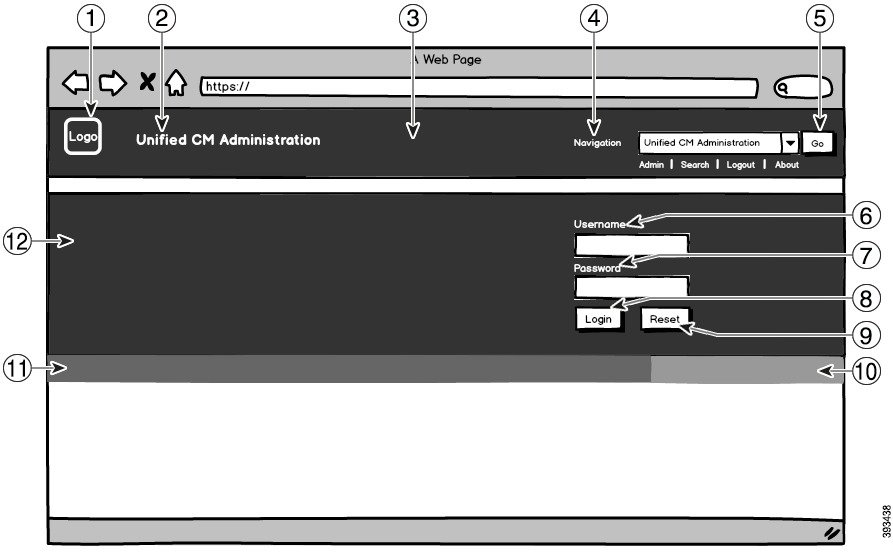
↗ View in doc contextFolder Structure Branding Option If you want to create a graded image for the header background, you need six separate image files to create the graded effect. Your branding folder must contain these subfolders and files Branding(folder) ccmadmin (folder) BrandingProperties.properties (file) brandingHeaderBegLTR.gif (6521 pixel image) brandingHeaderBegRTR.gif (6521 pixel image) brandingHeaderEndLTR.gif (6521 pixel image) brandingHeaderEndRTR.gif (6521 pixel image) brandingHeaderMidLTR.gif (6521 pixel image) brandingHeaderMidRTR.gif (6521 pixel image) ciscoLogo12pxMargin.gif (4444 pixel image) branding_logo.png (4425 pixel image) Graded Header Option User Interface Branding Options The following images display the customization options for the Cisco Unified CM Administration user interface: Figure 10: Branding Options for Unified CM Administration Login Screen Feature Configuration Guide for Cisco Unified Communications Manager, Release 15 and SUs 595 Custom Features Branding File Requirements