McDewey
/mcpPage 705
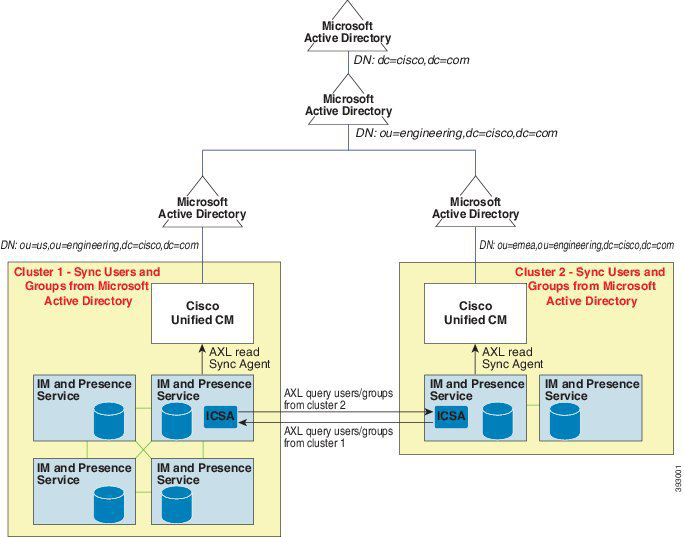
↗ View in doc contextEnterprise Groups Deployment Model 1 In this deployment model, Cluster 1 and Cluster 2 synchronize different subsets of users and groups from Microsoft Active Directory. The Cisco Intercluster Sync Agent service replicates the data from Cluster 2 into Cluster 1 to build the complete database of users and groups. Figure 12: Enterprise Groups Deployment Model 1 Enterprise Groups Deployment Model 2 In this deployment model, Cluster 1 synchronizes all the users and groups from Microsoft Active Directory. Cluster 2 synchronizes only users from Microsoft Active Directory. The Cisco Intercluster Sync Agent service replicates groups information from Cluster 1 into Cluster 2. If you are using this deployment model, ensure that you synchronize the groups data in only one cluster. The Enterprise Groups feature will not work as expected if you fail to do so. You can verify your configuration on the Cisco Unified CM IM and Presence Administration > Presence > Inter-Clustering window. Check the status of the Enterprise Groups LDAP Configuration parameter in the Inter-cluster peer table. No conflict found means there are no misconfigurations between peers. If there are conflicts found, click the Enterprise GroupConflicts link, and click the details button which appears. This opens a Reporting window for a detailed report. Caution Feature Configuration Guide for Cisco Unified Communications Manager, Release 15 and SUs 663 Custom Features Enterprise Groups Deployment Models (Active Directory)