McDewey
/mcpPage 706
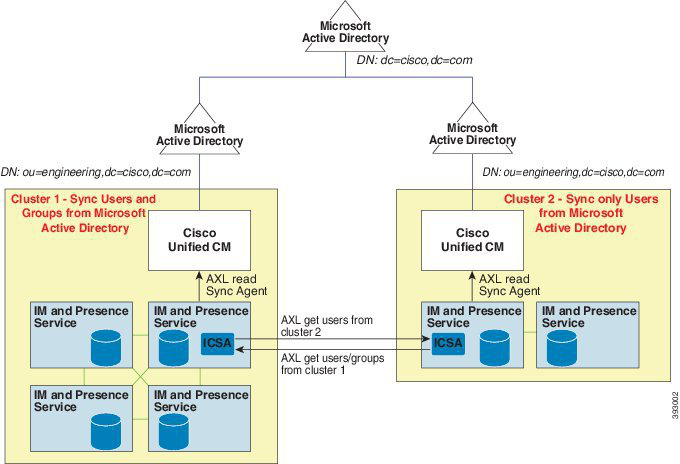
↗ View in doc contextFigure 13: Enterprise Groups Deployment Model 2 Enterprise Groups Limitations Table 60: Enterprise Groups Limitations Description Limitation When a Cisco Jabber user enables the "Block Everyone" feature from within their Cisco Jabber policy settings, the block prevents other Jabber users from viewing or exchanging IMs and Presence with the blocking user, unless they are listed as a contact in the blocking user's contact list. For example, a Cisco Jabber user (Andy) has enabled Block everyone within his personal Jabber settings. The following list breaks down how Andy's block affects other Jabber users whom may or may not be included in Andy's personal contact list. In addition to the block, Andy has a personal contact list that: • Includes Bob—Because Bob is in Andy's personal contact list, he can still send IMs and view Andy's presence despite the block. • Omits Carol—Carol cannot view Andy's presence or send IMs due to the block.. • Omits Deborah as a personal contact. However, Deborah is a member of an enterprise group that Andy has listed as a contact—Deborah is blocked from viewing Andy's presence or sending IMs to Andy. Note that Deborah is blocked from viewing Andy's presence, or sending IMs to Andy, despite the fact that she is a member of an enterprise group in Andy's contact list. For additional details on enterprise group contacts behavior, see CSCvg48001. Block Everyone Feature Configuration Guide for Cisco Unified Communications Manager, Release 15 and SUs 664 Custom Features Enterprise Groups Limitations