McDewey
/mcpPage 46
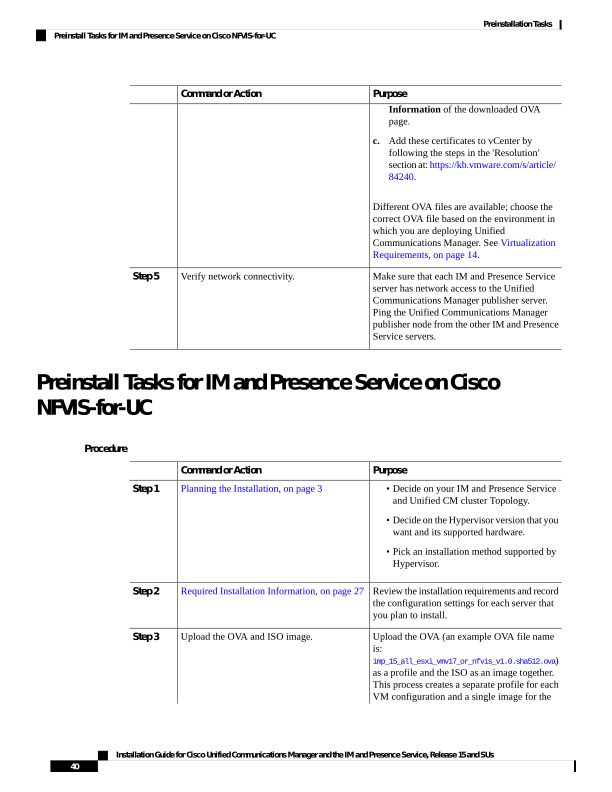
↗ View in doc contextPurpose Command or Action Information of the downloaded OVA page. c. Add these certificates to vCenter by following the steps in the 'Resolution' section at: https://kb.vmware.com/s/article/ 84240. Different OVA files are available; choose the correct OVA file based on the environment in which you are deploying Unified Communications Manager. See Virtualization Requirements, on page 14. Make sure that each IM and Presence Service server has network access to the Unified Verify network connectivity. Step 5 Communications Manager publisher server. Ping the Unified Communications Manager publisher node from the other IM and Presence Service servers. Preinstall Tasks for IM and Presence Service on Cisco NFVIS-for-UC Procedure Purpose Command or Action Planning the Installation, on page 3 Step 1 • Decide on your IM and Presence Service and Unified CM cluster Topology. • Decide on the Hypervisor version that you want and its supported hardware. • Pick an installation method supported by Hypervisor. Review the installation requirements and record the configuration settings for each server that you plan to install. Required Installation Information, on page 27 Step 2 Upload the OVA (an example OVA file name is: Upload the OVA and ISO image. Step 3 imp_15_all_esxi_vmv17_or_nfvis_v1.0.sha512.ova) as a profile and the ISO as an image together. This process creates a separate profile for each VM configuration and a single image for the Installation Guide for Cisco Unified Communications Manager and the IM and Presence Service, Release 15 and SUs 40 Preinstallation Tasks Preinstall Tasks for IM and Presence Service on Cisco NFVIS-for-UC