McDewey
Multi-vendor documentation library · semantic search · MCP endpoint at
/mcpPage 5
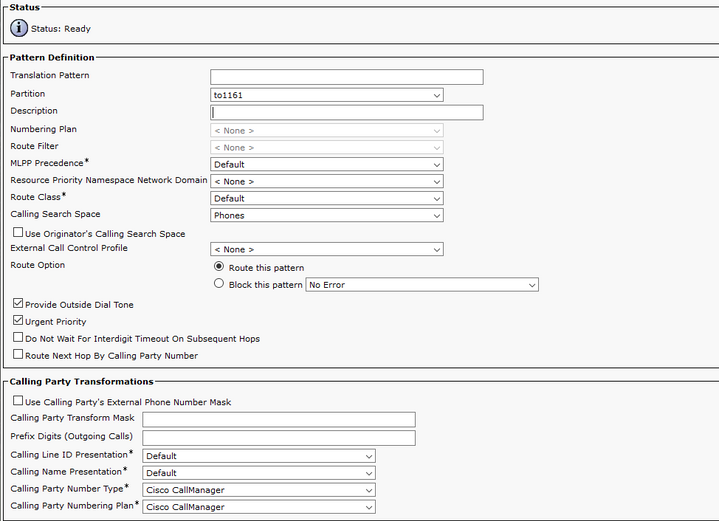
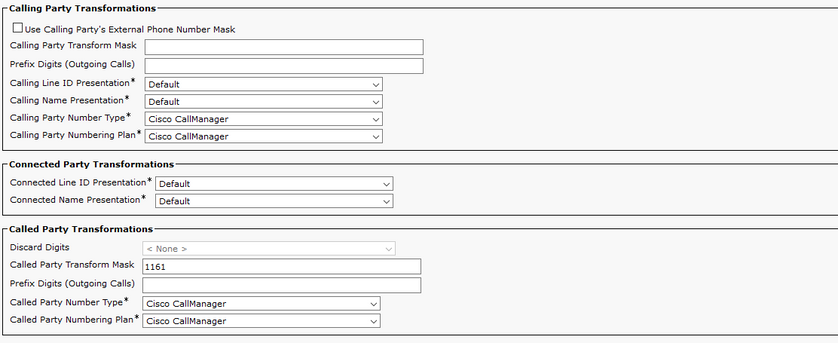
↗ View in doc contextNote: The design behind the example is base on DN 1161. 1161 is the target for the PLAR, but this configuration guarantees that 1161 can get a call from any other phone. The CSS used in the first screenshot for the Translation Pattern has access to the target DN partition. Step 4. Assign the Desired Calling Search Space for the PLAR Phone Navigate to Device > Phone. • Click Find in order to locate all the registered IP phones in Cisco Unified Communications Manager • Select the PLAR phone, and choose the DN to PLAR. • Assign the CSS to the DN for PLAR. •