McDewey
/mcpPage 166
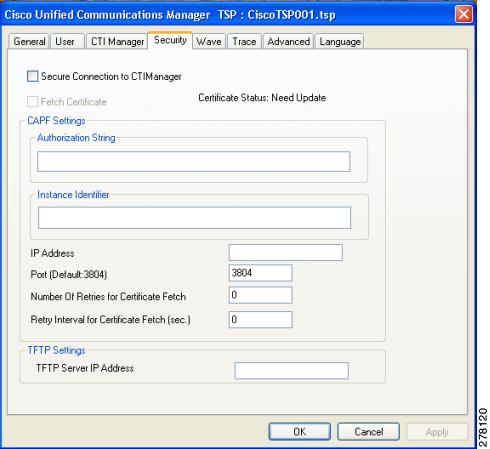
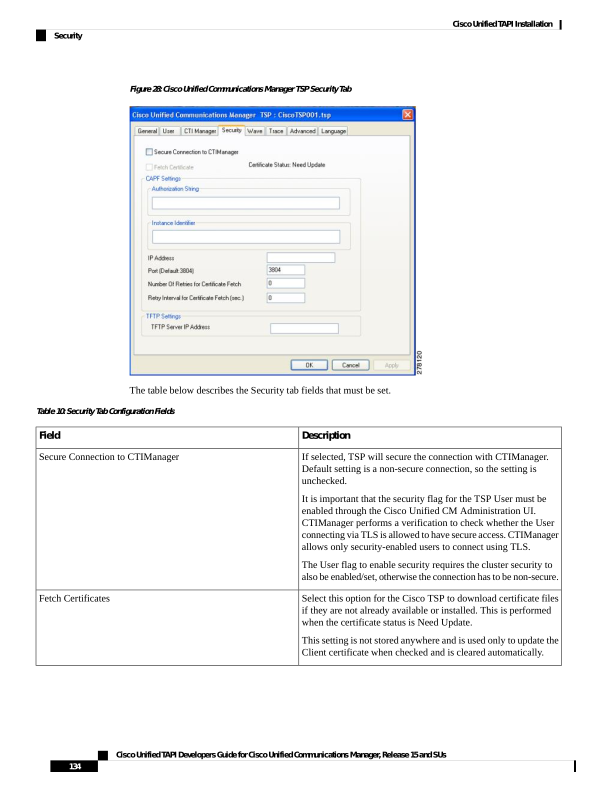
↗ View in doc contextFigure 28: Cisco Unified Communications Manager TSP Security Tab The table below describes the Security tab fields that must be set. Table 10: Security Tab Configuration Fields Description Field If selected, TSP will secure the connection with CTIManager. Default setting is a non-secure connection, so the setting is unchecked. It is important that the security flag for the TSP User must be enabled through the Cisco Unified CM Administration UI. CTIManager performs a verification to check whether the User connecting via TLS is allowed to have secure access. CTIManager allows only security-enabled users to connect using TLS. The User flag to enable security requires the cluster security to also be enabled/set, otherwise the connection has to be non-secure. Secure Connection to CTIManager Select this option for the Cisco TSP to download certificate files if they are not already available or installed. This is performed when the certificate status is Need Update. This setting is not stored anywhere and is used only to update the Client certificate when checked and is cleared automatically. Fetch Certificates Cisco Unified TAPI Developers Guide for Cisco Unified Communications Manager, Release 15 and SUs 134 Cisco Unified TAPI Installation Security