McDewey
/mcpPage 6
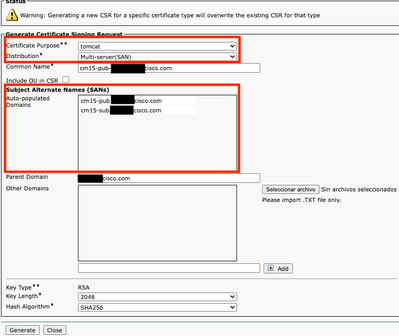
↗ View in doc contextOverall procedure to renew Tomcat multi-san certificate in CUCM cluster: Navigate to OS administration > Security > Certificate management. • Select Generate CSR • Select Tomcat in Certificate Porpuse. • Select Multi-SAN in Distribution. • Ensure all nodes in the cluster are listed under Auto-populated Domains. • Select Generate. Ensure CSR is created in all the nodes in the cluster. • Download the generated CSR from CUCM publisher and sign it with a Certificate Authority (CA) server. • Go to OS administration > Security > Certificate management. Select Upload certificate/Certificate chain. • Upload CA certificates as Tomcat-trust. • Repeat step 6 and now upload the Tomcat signed certificate as Tomcat. • Once completed and verified all nodes have the new tomcat certificate applied, restart Tomcat service through CLI in all the nodes in the cluster with this command utils service restart Cisco Tomcat. •