McDewey
/mcpPage 20
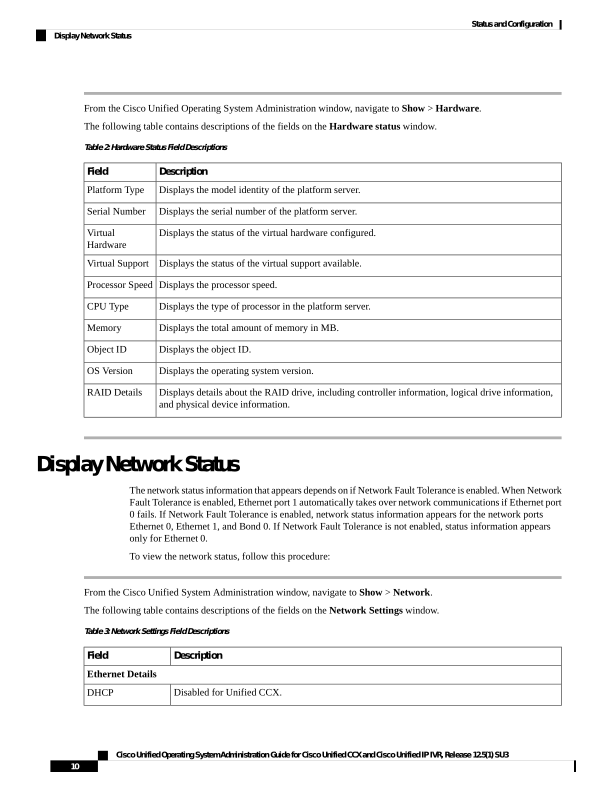
↗ View in doc contextFrom the Cisco Unified Operating System Administration window, navigate to Show > Hardware. The following table contains descriptions of the fields on the Hardware status window. Table 2: Hardware Status Field Descriptions Description Field Displays the model identity of the platform server. Platform Type Displays the serial number of the platform server. Serial Number Displays the status of the virtual hardware configured. Virtual Hardware Displays the status of the virtual support available. Virtual Support Displays the processor speed. Processor Speed Displays the type of processor in the platform server. CPU Type Displays the total amount of memory in MB. Memory Displays the object ID. Object ID Displays the operating system version. OS Version Displays details about the RAID drive, including controller information, logical drive information, and physical device information. RAID Details Display Network Status The network status information that appears depends on if Network Fault Tolerance is enabled. When Network Fault Tolerance is enabled, Ethernet port 1 automatically takes over network communications if Ethernet port 0 fails. If Network Fault Tolerance is enabled, network status information appears for the network ports Ethernet 0, Ethernet 1, and Bond 0. If Network Fault Tolerance is not enabled, status information appears only for Ethernet 0. To view the network status, follow this procedure: From the Cisco Unified System Administration window, navigate to Show > Network. The following table contains descriptions of the fields on the Network Settings window. Table 3: Network Settings Field Descriptions Description Field Ethernet Details Disabled for Unified CCX. DHCP Cisco Unified Operating System Administration Guide for Cisco Unified CCX and Cisco Unified IP IVR, Release 12.5(1) SU3 10 Status and Configuration Display Network Status