McDewey
/mcpPage 36
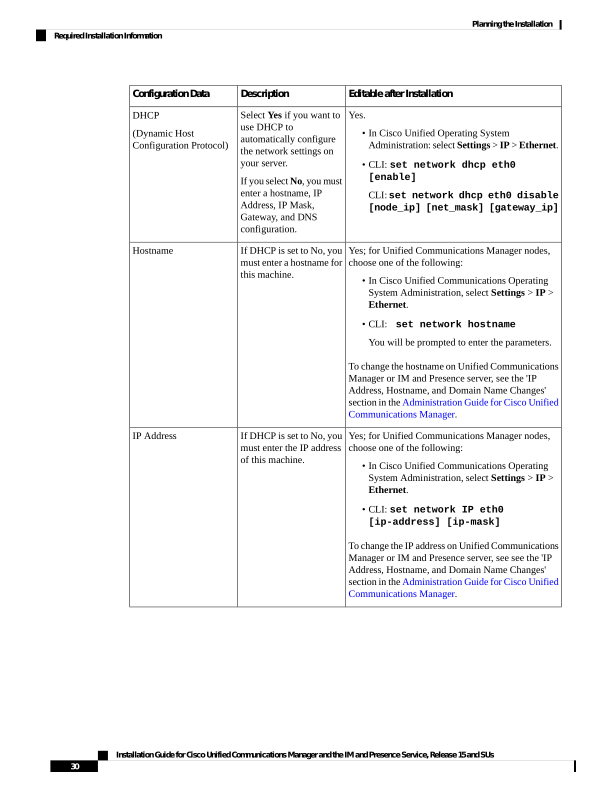
↗ View in doc contextEditable after Installation Description Configuration Data Yes. • In Cisco Unified Operating System Administration: select Settings > IP > Ethernet. • CLI: set network dhcp eth0 [enable] CLI: set network dhcp eth0 disable [node_ip] [net_mask] [gateway_ip] Select Yes if you want to use DHCP to automatically configure the network settings on your server. If you select No, you must enter a hostname, IP Address, IP Mask, Gateway, and DNS configuration. DHCP (Dynamic Host Configuration Protocol) Yes; for Unified Communications Manager nodes, choose one of the following: • In Cisco Unified Communications Operating System Administration, select Settings > IP > Ethernet. • CLI: set network hostname You will be prompted to enter the parameters. To change the hostname on Unified Communications Manager or IM and Presence server, see the 'IP Address, Hostname, and Domain Name Changes' section in the Administration Guide for Cisco Unified Communications Manager. If DHCP is set to No, you must enter a hostname for this machine. Hostname Yes; for Unified Communications Manager nodes, choose one of the following: • In Cisco Unified Communications Operating System Administration, select Settings > IP > Ethernet. • CLI: set network IP eth0 [ip-address] [ip-mask] To change the IP address on Unified Communications Manager or IM and Presence server, see see the 'IP Address, Hostname, and Domain Name Changes' section in the Administration Guide for Cisco Unified Communications Manager. If DHCP is set to No, you must enter the IP address of this machine. IP Address Installation Guide for Cisco Unified Communications Manager and the IM and Presence Service, Release 15 and SUs 30 Planning the Installation Required Installation Information