Document Metadata
Format: PDF 1.6
Title: Analog FXS Port SIP Registration with CUCM
Author: Anna Komarovska (annkomar)
Creator: Acrobat PDFMaker 22 for Word
Producer: Adobe PDF Library 22.3.98; modified using iText 2.1.7 by 1T3XT
Creation Date: D:20230309130336-05'00'
Mod Date: D:20230309100839-08'00'
Page 1
© 2023 Cisco and/or its affiliates. All rights reserved. This document is Cisco Public Information
1
Configuration Example
Analog FXS port SIP
Registration with
CUCM
Page 2
© 2023 Cisco and/or its affiliates. All rights reserved. This document is Cisco Public Information
2
Version: 23rd February 2023
Introduction
This document helps configure FXS ports as SIP endpoints registered to Cisco Unified Communications
Manager (CUCM) in order to support supplementary services on SIP Endpoints.
Prerequisites
Cisco recommends to have knowledge of these subjects
SIP protocol
Foreign Exchange Station (FXS) ports
Cisco Unified Communications Manager (CUCM) Cisco Analog Voice Gateway (VG Series)
Requirements
The FXS ports for Supplementary Services support CUCM version 12.5.1 SU1 or later with IOS XE 16.12.1
and above.
CUCM and IOS release for all platforms
ISR4461/VG450
IOS: 16.12.1
CUCM: 12.5.1 SU1
VG420
IOS: 17.6.1
CUCM: 12.5.1 SU4, 14.0 SU1
ISR4K, C8300, C8200 and VG400
IOS: 17.8.1
CUCM: 14.0 SU1
Supported Platforms
Cisco ISR4451-X/K9
Cisco ISR4461/K9
Cisco ISR4431/K9
Cisco ISR4351/K9
Cisco ISR4331/K9
Cisco ISR4321/K9
C8300-2N2S-4T2X
C8300-2N2S-6T
C8300-1N1S-4T2X
C8300-1N1S-6T
C8200-1N-4T
C8200L-1N-4T
VG400-2FXS/2FXO
VG400-4FXS/4FXO
VG400-6FXS/6FXO
Page 3
© 2023 Cisco and/or its affiliates. All rights reserved. This document is Cisco Public Information
3
VG400-8FXS
VG420-144FXS
VG420-84FXS/6FXO
VG420-132FXS/6FXO
VG450/K9*
VG450-72FXS/K9
VG450-144FXS/K9
*Requires a NIM
Supported Features:
The following supplementary services are supported.
Call Hold
Call Waiting
Call Transfer (unattended/attended)
Call Forward no Answer
Audio Message Waiting Indicator
Call Forwarding Unrestricted
Call Forward Busy
Call Park Directed
Call Pickup Directed
Call Pickup Group
Three-way Conference
Configure
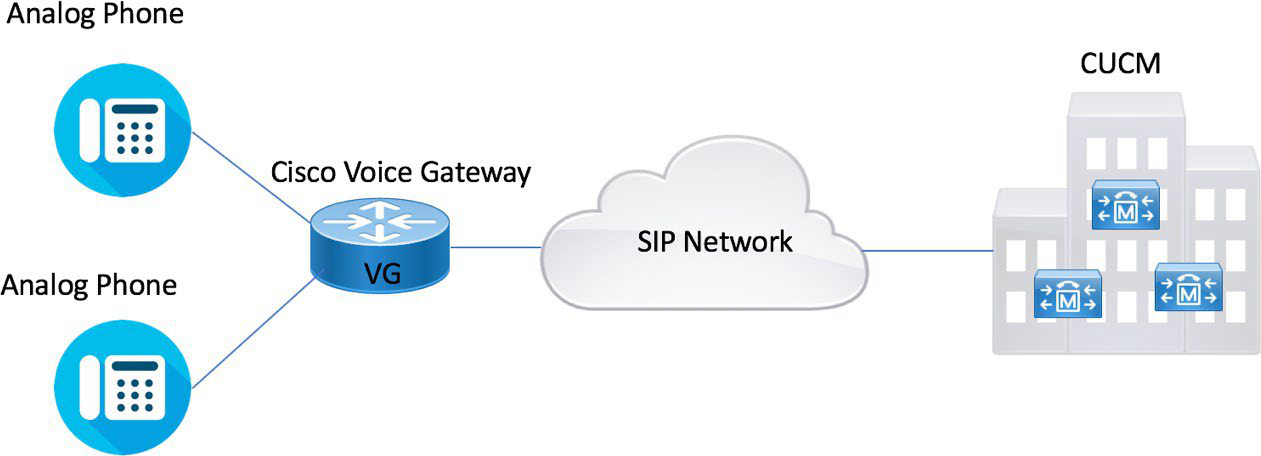
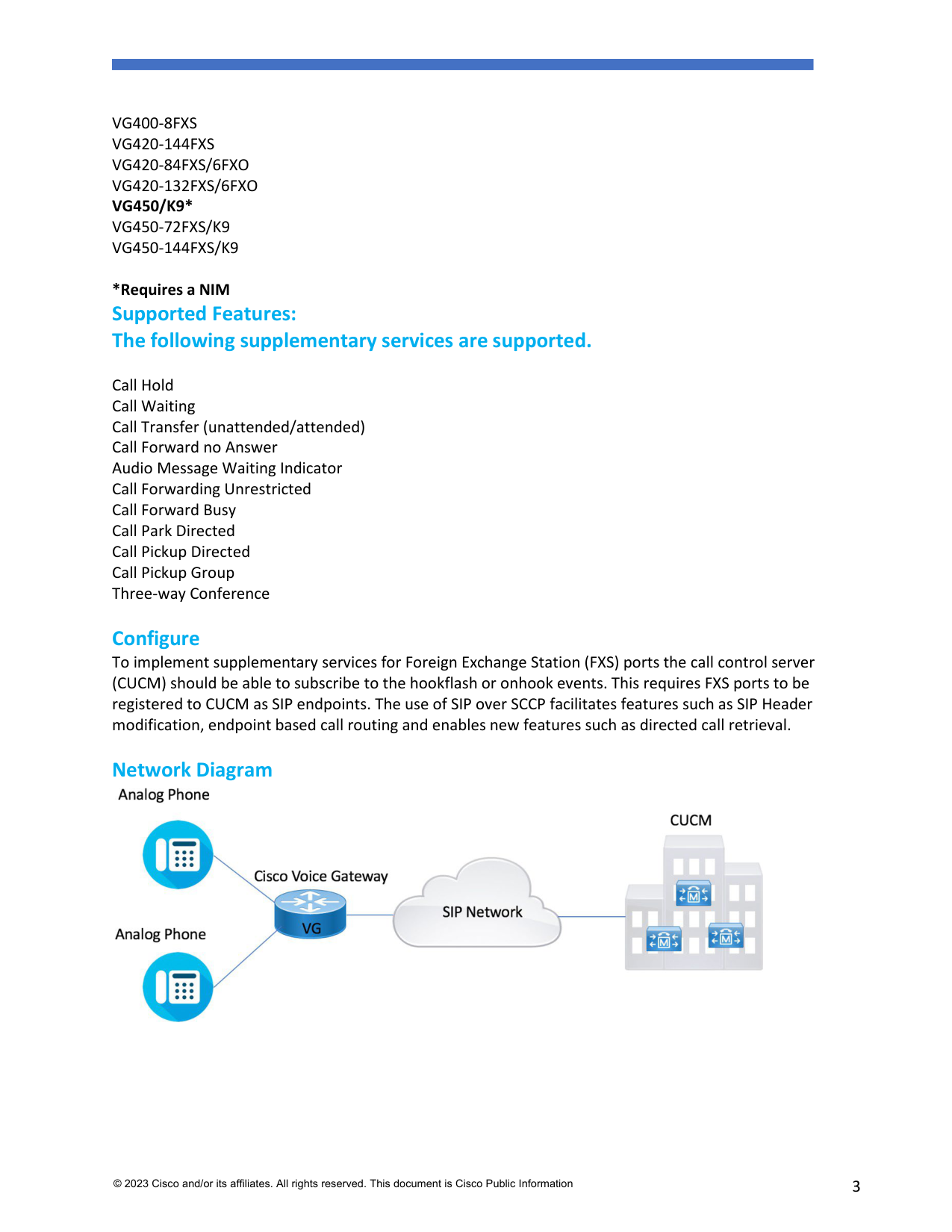
To implement supplementary services for Foreign Exchange Station (FXS) ports the call control server
(CUCM) should be able to subscribe to the hookflash or onhook events. This requires FXS ports to be
registered to CUCM as SIP endpoints. The use of SIP over SCCP facilitates features such as SIP Header
modification, endpoint based call routing and enables new features such as directed call retrieval.
Network Diagram
Page 4
© 2023 Cisco and/or its affiliates. All rights reserved. This document is Cisco Public Information
4
Configuration steps
This section describes the configuration required for this feature to work:
Configuring the Device Control Session Application
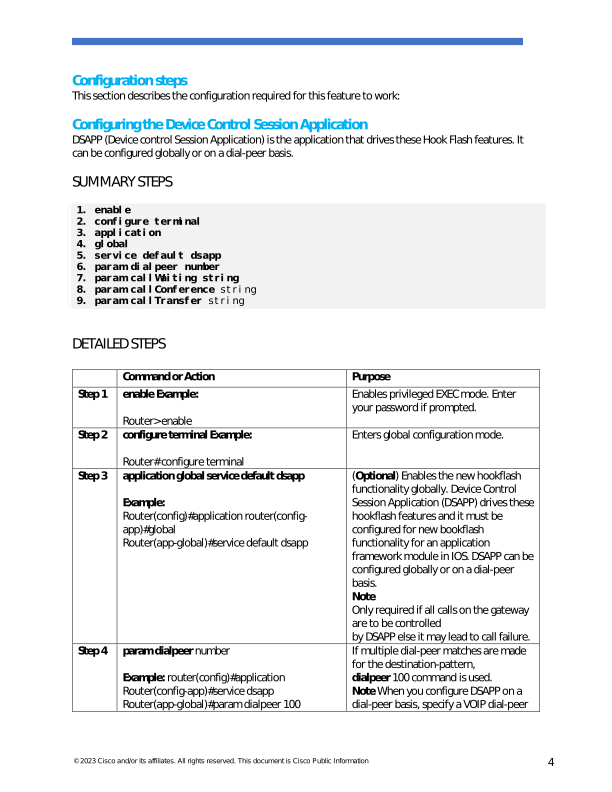
DSAPP (Device control Session Application) is the application that drives these Hook Flash features. It
can be configured globally or on a dial-peer basis.
SUMMARY STEPS
- enable
- configure terminal
- application
- global
- service default dsapp
- param dialpeer number
- param callWaiting string
- param callConference string
- param callTransfer string
DETAILED STEPS
Command or Action
Purpose
Step 1
enable Example:
Router> enable
Enables privileged EXEC mode. Enter
your password if prompted.
Step 2
configure terminal Example:
Router# configure terminal
Enters global configuration mode.
Step 3
application global service default dsapp
Example:
Router(config)#application router(config-
app)#global
Router(app-global)#service default dsapp
(Optional) Enables the new hookflash
functionality globally. Device Control
Session Application (DSAPP) drives these
hookflash features and it must be
configured for new bookflash
functionality for an application
framework module in IOS. DSAPP can be
configured globally or on a dial-peer
basis.
Note
Only required if all calls on the gateway
are to be controlled
by DSAPP else it may lead to call failure.
Step 4
param dialpeer number
Example: router(config)#application
Router(config-app)#service dsapp
Router(app-global)#param dialpeer 100
If multiple dial-peer matches are made
for the destination-pattern,
dialpeer 100 command is used.
Note When you configure DSAPP on a
dial-peer basis, specify a VOIP dial-peer
Page 5
© 2023 Cisco and/or its affiliates. All rights reserved. This document is Cisco Public Information
5
for any outbound call. If all outbound
calls that use the hookflash functionality
are on the same server, it is
recommended to use the param dial-
peer command.
When multiple matches are possible on
hookflash, enable peer parameters
callXXXX TRUE for DSAPP to interpret
hookflash to SIP supplementary service
messages
Step 5
param callWaiting string
Example:
Router(config)#application router(config-
app)#service dsapp
Router(app-global)#param dialpeer 100
Router(app-global)#param callWaiting TRUE
Enables call waiting feature.
Step 6
param callConference string
Enables call conference feature.
Step 7
param callTransfer string
Example:
Router(config)#application router(config-
app)#service dsapp
Router(app-global)#param dialpeer 100
Router(app-global)#param callWaiting TRUE
Router(app-global)#param callConference TRUE
Router(app-global)#param callTransfer TRUE
Enables call transfer feature.
Configuring the Outbound VoIP Dial-peer
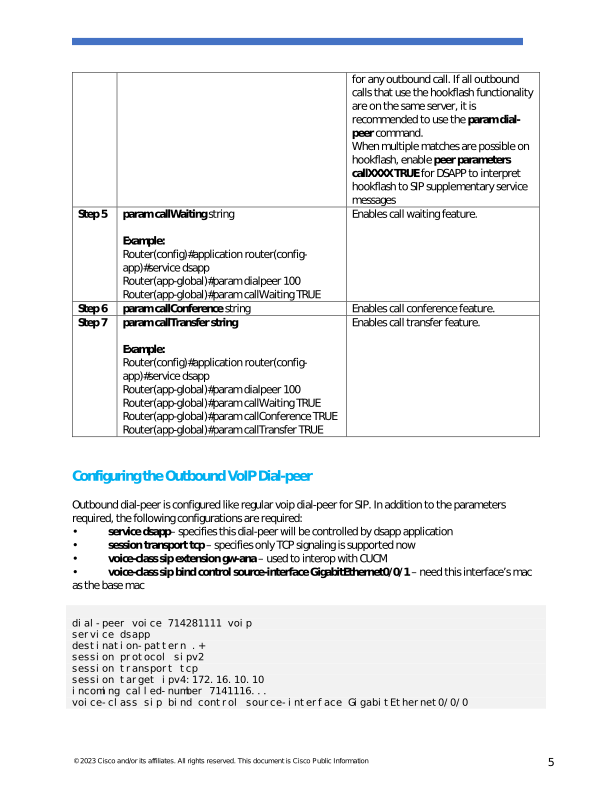
Outbound dial-peer is configured like regular voip dial-peer for SIP. In addition to the parameters
required, the following configurations are required:
•
service dsapp– specifies this dial-peer will be controlled by dsapp application
•
session transport tcp – specifies only TCP signaling is supported now
•
voice-class sip extension gw-ana – used to interop with CUCM
•
voice-class sip bind control source-interface GigabitEthernet0/0/1 – need this interface’s mac
as the base mac
dial-peer voice 714281111 voip
service dsapp
destination-pattern .+
session protocol sipv2
session transport tcp
session target ipv4:172.16.10.10
incoming called-number 7141116...
voice-class sip bind control source-interface GigabitEthernet0/0/0
Page 6
© 2023 Cisco and/or its affiliates. All rights reserved. This document is Cisco Public Information
6
codec g711ulaw
no shut
Note- G711 is the only codec supported for conference calls. It is recommended to add this command.
Configuring Pots Dial-peer
You can configure the pots dial-peer like a regular pots dial-peer for FXS. In addition to the parameters
required, you have to configure the following command under pots dial-peer to interpret hook flash
correctly and interop with CUCM:
•
service dsapp — specifies this dial-peer to be controlled by DSAPP application.
•
voice-class sip extension gw-ana – this parameter is used to interop with CUCM.
dial-peer voice 19993000 pots
service dsapp
destination-pattern 2124506300
voice-class sip extension
gw-ana port 3/0/0
Configuring Voice-card and SIP
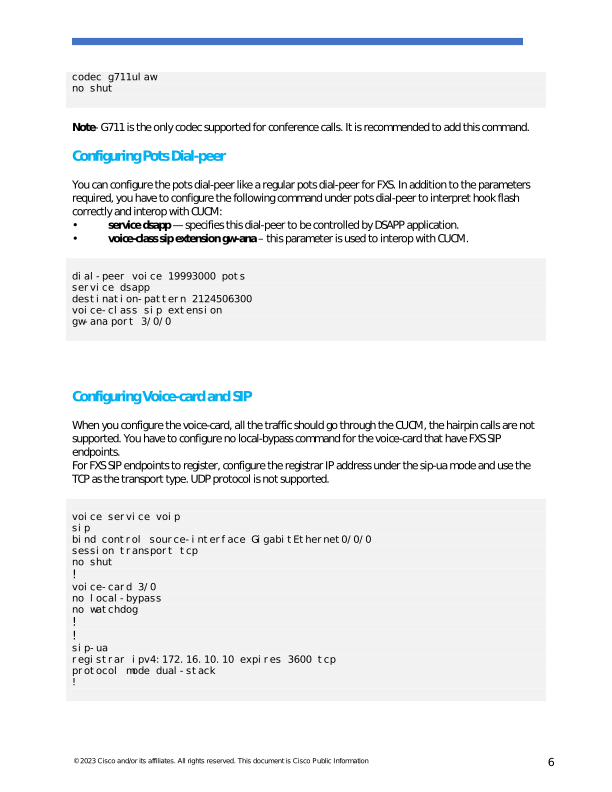
When you configure the voice-card, all the traffic should go through the CUCM, the hairpin calls are not
supported. You have to configure no local-bypass command for the voice-card that have FXS SIP
endpoints.
For FXS SIP endpoints to register, configure the registrar IP address under the sip-ua mode and use the
TCP as the transport type. UDP protocol is not supported.
voice service voip
sip
bind control source-interface GigabitEthernet0/0/0
session transport tcp
no shut
!
voice-card 3/0
no local-bypass
no watchdog
!
!
sip-ua
registrar ipv4:172.16.10.10 expires 3600 tcp
protocol mode dual-stack
!
Page 7
© 2023 Cisco and/or its affiliates. All rights reserved. This document is Cisco Public Information
7
Note - SIP service should be shut down before configuring the protocol mode. After configuring the
protocol mode as dual-stack, SIP service should be reenabled.
Enabling Device Control Session Application Line features
To register to CUCM as a SIP endpoint, and to distinguish line feature from trunk, configure the dsapp
line command.
SUMMARY STEPS
- enable
- configure
- dsapp line
DETAILED STEPS
Command or Action
Purpose
Step 1
enable
Example:
Router> enable
Enables privileged EXEC mode. Enter your
password if prompted.
Step 2
configure terminal
Example:
Router# configure terminal
Enters global configuration mode.
Step 3
dsapp line
Example:
Router(config)#
Router(config)#dsapp line
Specifies the format of each call feature.
Note: If you do not configure the dsapp line
command, the gateway will act like a SIP trunk
and the analog phone may not register as SIP
endpoints. Also, you cannot configure the FAC.
Ensure to configure the dsapp line command to
enable the FXS for SIP supplementary services
Configuring Feature Access Code
The dsapp line feature access-code command invokes the feature to translate the Feature
Access Code (FAC) to the format that the CUCM understands. If you do not configure this
command, the whole FAC digits are sent to the CUCM and may not invoke features. You can
also change the default FAC in the sub-mode.
Analog phones do not have soft keys. The required supplementary service features are invoked
through FAC. By default, prefix of the FAC is ‘**’ and it can also be changed using the CLI
command.
Page 8
© 2023 Cisco and/or its affiliates. All rights reserved. This document is Cisco Public Information
8
Router(config)#dsapp line feature access-code
Router(config-dsappline-fac)#prefix *#
Router(config-dsappline-fac)#cancel-call-waiting **4
Router(config-dsappline-fac)#exit
Router# show dsapp line feature
codes dsapp line feature
access-code prefix *#
call forward all *#1
call forward cancel *#2
pickup local *#5
pickup group *#7
pickup direct *#6
cancel-call-waiting **4 last-redial *#3
If the dsapp line feature access-code is not configured, the voice gateway does not translate
the FAC to the format that the CUCM understands. The whole FAC digits is sent to the CUCM.
After the FAC is disabled and re-enabled, all the FAC and prefix are rolled back to the default
values.
Router(config)#no dsapp line feature
access-code Feature access-code
disabled
Router(config)#do show dsapp line feature
codes dsappline feature access-code
disabled
Router(config)#dsapp line feature access-code
Router(config-dsappline-fac)#do show dsapp line feature codes
dsapp line feature
access-code prefix **
call forward all **1
call forward cancel
**2 pickup local **5
pickup group **7
pickup direct **6
cancel-call-waiting
**9 last-redial **3
Router(config-dsappline-fac)#do show run | b dsapp line
dsapp line
!
dsapp line feature access-code
Auto Configuration
To enable the auto-configuration, use the ccm-manager sipana auto-config local command. To get the
XML configuration file, use the ccm-manager config server command to download the configuration file
Page 9
© 2023 Cisco and/or its affiliates. All rights reserved. This document is Cisco Public Information
9
from the CUCM TFTP server. Configurations are needed on both CUCM and voice gateway. CUCM needs
to be configured first, then those configurations can be pushed to the voice gateway.
!
ccm-manager sipana auto-config local GigabitEthernetx/y/z
!
ccm-manager config server 172.xx.0.0
Note- Auto-Config only adds the dialpeers for each endpoint configured on CUCM. All other required SIP
CLI commands need to be added.
CUCM Configuration
VG450 is used in this example.
1.
Navigate to Device> Gateway>Add New>Gateway Type.
2.
Select SIP as the protocol and click Next
3.
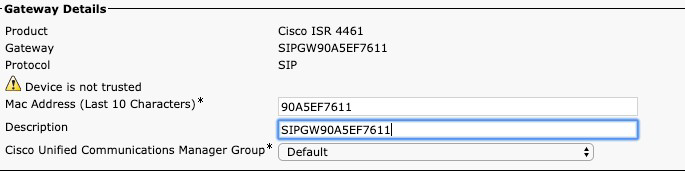
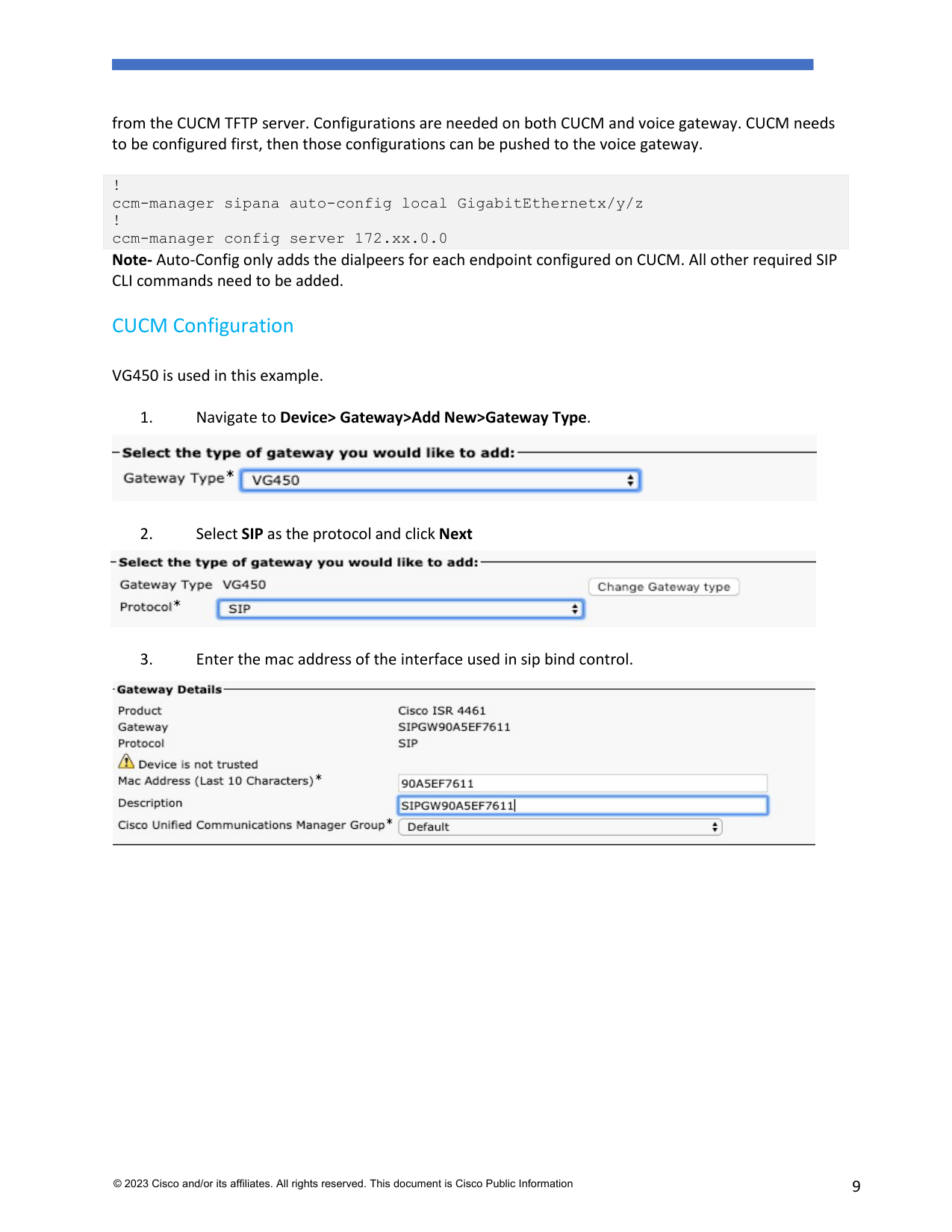
Enter the mac address of the interface used in sip bind control.
Page 10
© 2023 Cisco and/or its affiliates. All rights reserved. This document is Cisco Public Information
10
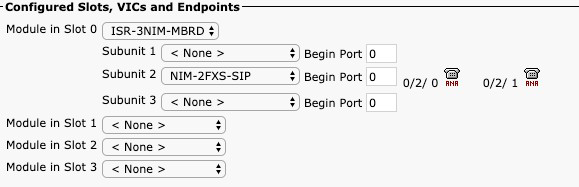
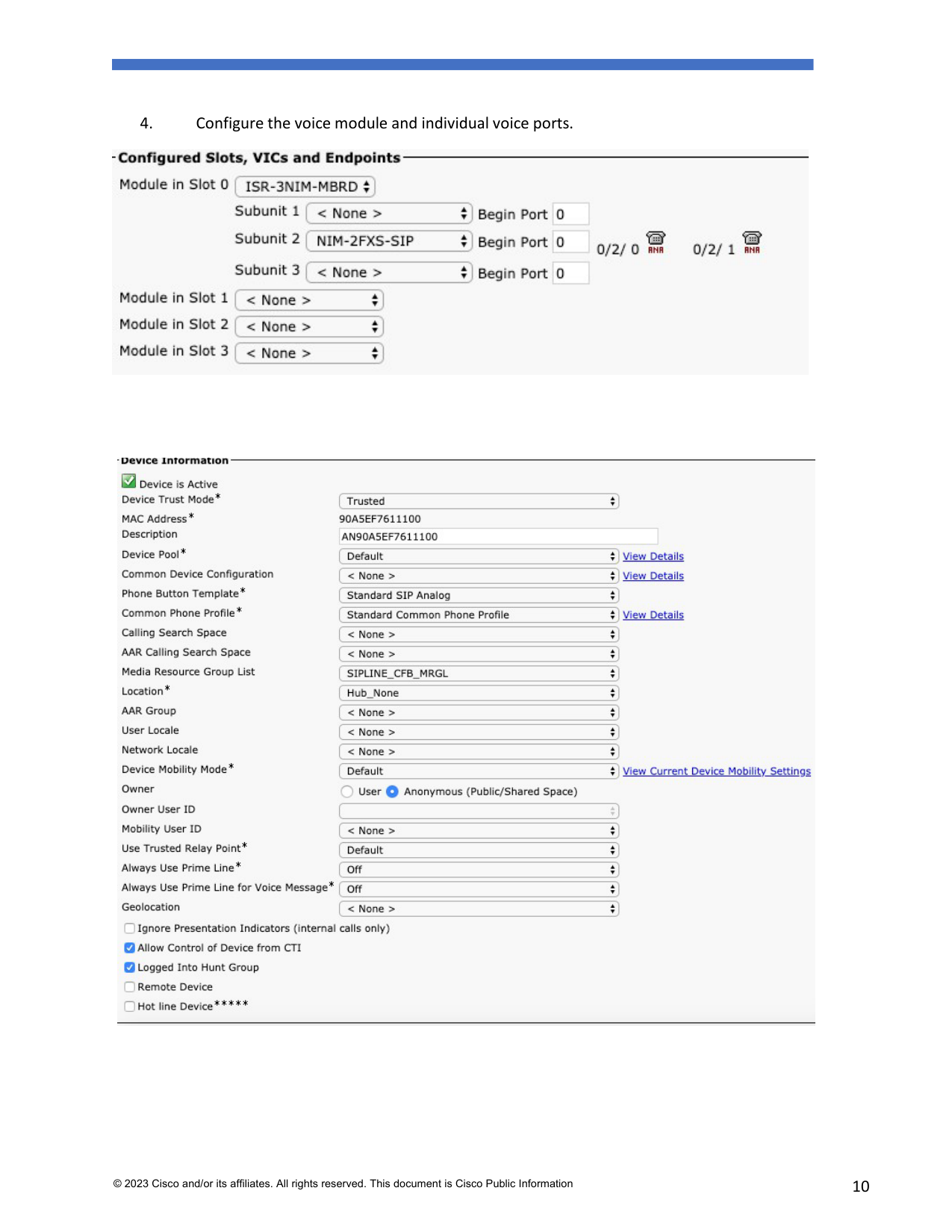
4.
Configure the voice module and individual voice ports.
Page 11
© 2023 Cisco and/or its affiliates. All rights reserved. This document is Cisco Public Information
11
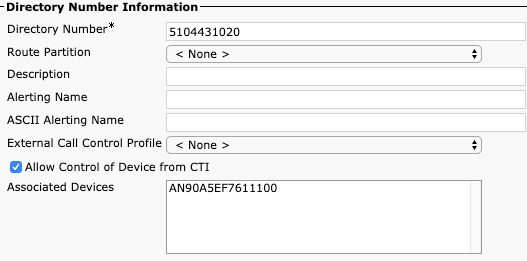
5.
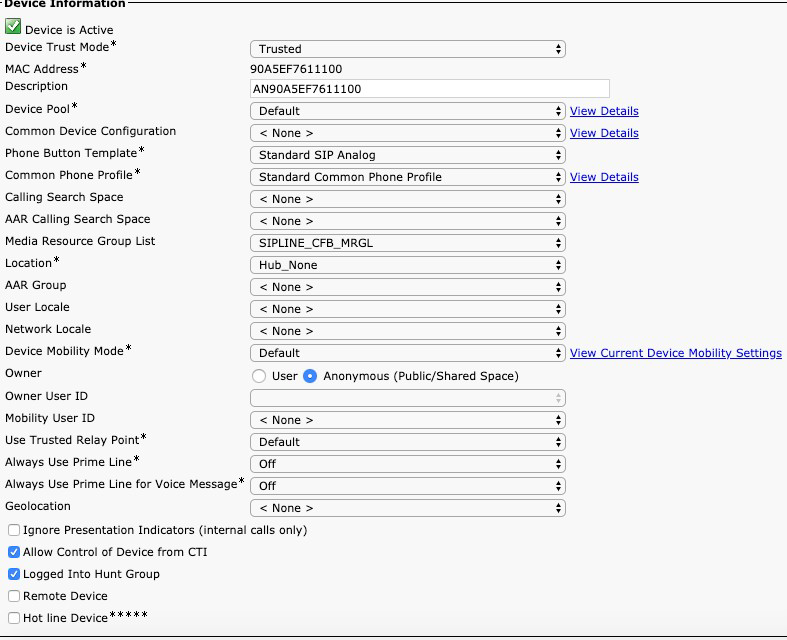
Add a directory Number > Save>Apply config.
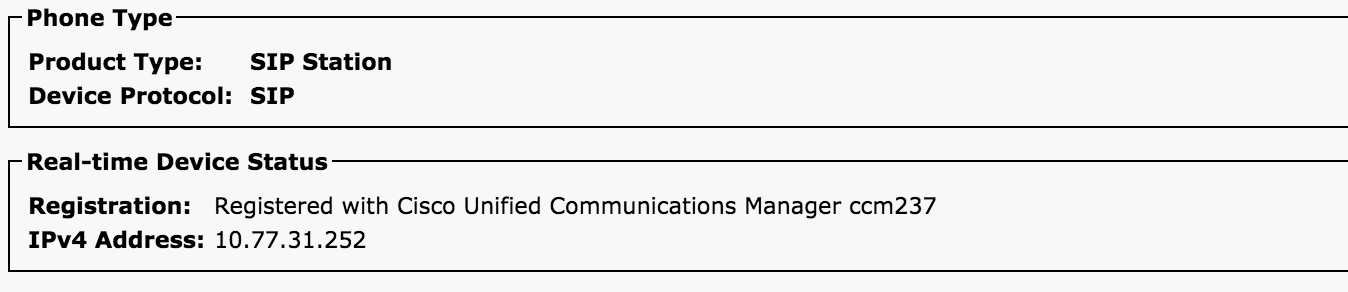
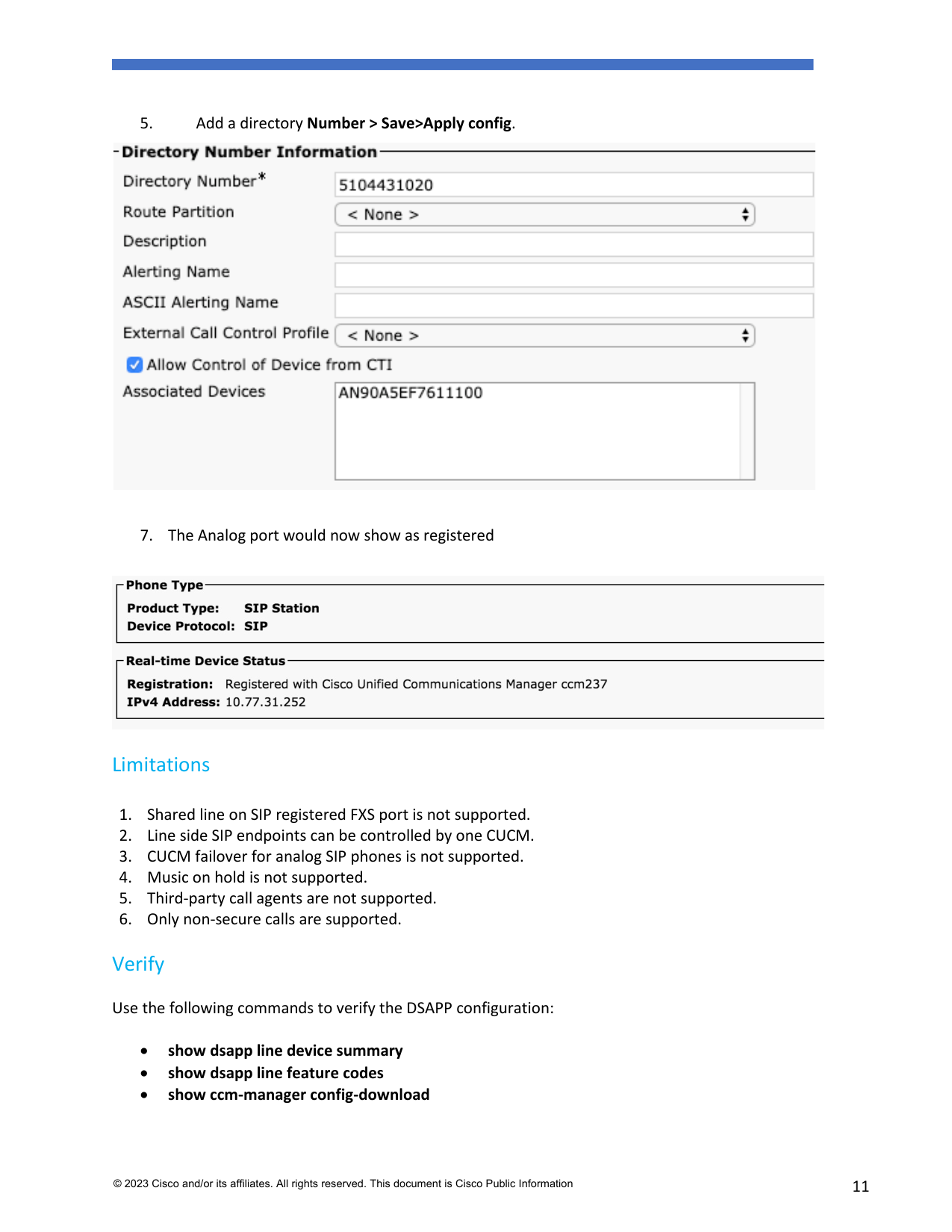
7. The Analog port would now show as registered
Limitations
- Shared line on SIP registered FXS port is not supported.
- Line side SIP endpoints can be controlled by one CUCM.
- CUCM failover for analog SIP phones is not supported.
- Music on hold is not supported.
- Third-party call agents are not supported.
- Only non-secure calls are supported.
Verify
Use the following commands to verify the DSAPP configuration:
•
show dsapp line device summary
•
show dsapp line feature codes
•
show ccm-manager config-download
Page 12
© 2023 Cisco and/or its affiliates. All rights reserved. This document is Cisco Public Information
12
The show dsapp line device summary command shows whether the FXS ports are successfully
registered to the CUCM as SIP endpoints.
Router#show dsapp line device summary
Total Devices:
3
Port Device
Registration Dev
Directory Last Number Identifier
Name
State Type Number
Dialed
3/0/0 ANDD309DD761600 REGISTERED
ALG
2124506300 Not Avail
3/0/1 ANDD309DD761601 REGISTERED
ALG
2124506301 Not
Avail
3/0/2 ANDD309DD761602 UNREGISTERED ALG
2124506302 Not Avail
The show dsapp line feature codes command shows whether FAC is enabled and feature codes
Router#show dsapp line feature codes
dsapp line feature
access-code prefix **
call forward all **1
call forward cancel
**2 pickup local **5
pickup group **7
pickup direct **6
cancel-call-waiting
**9 last-redial **3
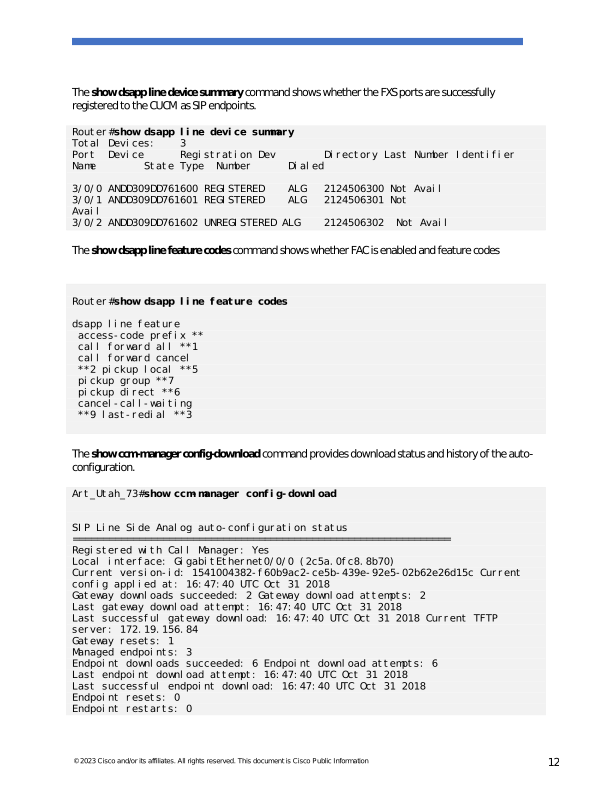
The show ccm-manager config-download command provides download status and history of the auto-
configuration.
Art_Utah_73#show ccm-manager config-download
SIP Line Side Analog auto-configuration status
Registered with Call Manager: Yes
Local interface: GigabitEthernet0/0/0 (2c5a.0fc8.8b70)
Current version-id: 1541004382-f60b9ac2-ce5b-439e-92e5-02b62e26d15c Current
config applied at: 16:47:40 UTC Oct 31 2018
Gateway downloads succeeded: 2 Gateway download attempts: 2
Last gateway download attempt: 16:47:40 UTC Oct 31 2018
Last successful gateway download: 16:47:40 UTC Oct 31 2018 Current TFTP
server: 172.19.156.84
Gateway resets: 1
Managed endpoints: 3
Endpoint downloads succeeded: 6 Endpoint download attempts: 6
Last endpoint download attempt: 16:47:40 UTC Oct 31 2018
Last successful endpoint download: 16:47:40 UTC Oct 31 2018
Endpoint resets: 0
Endpoint restarts: 0
Page 13
© 2023 Cisco and/or its affiliates. All rights reserved. This document is Cisco Public Information
13
Configuration Error History:
Troubleshoot
For registration issues capture CUCM SDL/SDI traces and run the following debugs on the gateway
debug voip application session debug ccsip messages
debug ccsip states debug ccsip error
For auto-configuration issues run the debug debug ccm-manager config-download all
Related Information
Configuring the Cisco Fourth-Generation T1/E1 Voice and WAN Network Interface Module